26 Apr 2026
Featured image for Remuneration Committee Presentation: How to Brief Non-Executives on Executive Pay Decisions

Remuneration Committee Presentation: How to Brief Non-Executives on Executive Pay Decisions

Quick Answer

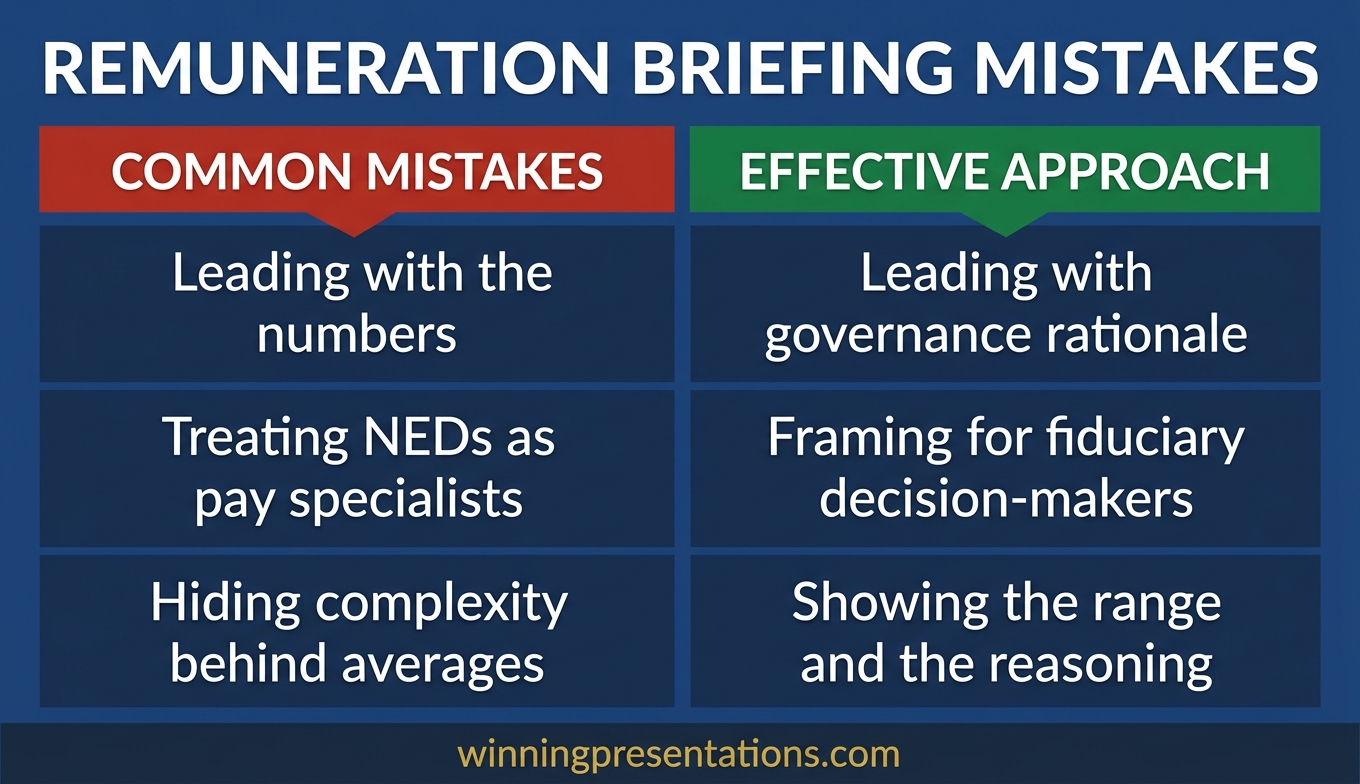
A remuneration committee presentation should lead with the governance rationale behind every pay recommendation, not the numbers themselves. Non-executive directors need to understand the decision framework — market positioning, performance conditions, shareholder context, and risk — before they can approve anything. Structure your briefing around those four pillars and you give the committee what it needs to act.

Laurence had been HR Director at a FTSE 350 financial services firm for three years. He knew the compensation landscape inside out. His benchmarking data was impeccable. His spreadsheets ran to fourteen tabs.

The remuneration committee meeting lasted forty-five minutes. His presentation took thirty of them. When the committee chair — a former FTSE 100 CFO — asked, “What’s the single strongest argument for this package if a shareholder challenges it at the AGM?”, Laurence didn’t have an answer ready.

Not because he didn’t know. Because his presentation hadn’t been structured to surface that answer. He’d built a data briefing. The committee needed a governance briefing. The distinction sounds semantic, but it changes everything about how you organise information, which slides come first, and what the committee remembers when they vote.

I’ve seen this pattern repeatedly across financial services, healthcare, and technology organisations. The person presenting to the remuneration committee is typically the most knowledgeable person in the room on compensation. But knowledge alone doesn’t translate into a presentation that helps non-executives make a confident decision.

Already know the pay data but struggling to frame it for non-executives?

The Executive Slide System includes governance briefing frameworks designed for committee and board presentations — the structures that turn complex data into clear decision support for non-executive directors.

Explore the Executive Slide System →

Why most remuneration committee briefings lose the room

The most common failure in a remuneration committee presentation is not poor data. It’s presenting the data as though the committee members are compensation specialists. They are not. They are non-executive directors with fiduciary responsibilities, broad commercial experience, and a governance lens that prioritises risk, fairness, and shareholder defensibility.

When you open with a detailed salary benchmarking analysis, you’re answering a question the committee hasn’t asked yet. They don’t start with “Is this the right number?” They start with “Is this defensible?” Those two questions require entirely different opening structures.

Three patterns consistently undermine remuneration committee briefings:

  • Data-first sequencing: Leading with median market data, percentile positioning, and peer group analysis before establishing the governance rationale. The committee receives numbers without a framework for evaluating them.
  • Excessive granularity: Presenting every element of the pay package — base, bonus, LTIP, benefits, pension — in sequence without connecting them to the overall narrative. The committee loses the thread between slide five and slide twelve.
  • Missing the shareholder voice: Failing to anticipate how the recommendation would appear in the annual report or at the AGM. Non-executive directors are acutely aware of shareholder scrutiny. If your presentation doesn’t address it, they will — and you won’t control the framing.

Each of these problems has the same root cause: the presentation is structured around what the presenter knows rather than what the committee needs to decide.

Give the Committee a Decision Framework, Not a Data Dump

The Executive Slide System — £39, instant access — includes governance briefing structures designed for committee and board-level presentations. Frame executive pay recommendations around defensibility, not just data. Built from 25 years of corporate banking experience.

  • 22 templates covering board, committee, and approval presentations
  • 51 AI prompts for drafting slides, talking points, and briefing notes
  • 15 scenario playbooks including governance and committee briefings

Get the Executive Slide System →

Designed for executives presenting pay, governance, and approval recommendations to non-executive boards.

The four pillars of a strong committee pay briefing

Every effective pay committee briefing rests on four pillars. These are not sections of your slide deck — they’re lenses that every piece of information in your briefing should be viewed through.

1. Market positioning

Where does the proposed package sit relative to the external market? Non-executive directors need to understand whether you’re positioning at median, upper quartile, or somewhere between — and why. The “why” matters more than the number. A package at the 75th percentile is defensible if the role requires a scarce skill set and the retention risk is genuine. It’s indefensible if it’s there because “that’s where we’ve always been.”

Present your benchmarking data as a single summary slide with the comparator group clearly defined. Save the detailed peer analysis for the appendix. The committee needs the conclusion, not the methodology.

2. Performance conditions

How is variable pay linked to outcomes? This is where many presentations lose clarity. The committee needs to see a direct line between the performance conditions in the bonus and LTIP schemes and the strategic objectives of the organisation. If the conditions are financial — revenue growth, return on equity, total shareholder return — show how they align with the published strategy. If they include non-financial metrics (ESG, customer satisfaction, employee engagement), explain why those metrics are material to long-term value.

3. Shareholder context

What would an institutional investor say about this recommendation? Non-executive directors on remuneration committees are acutely conscious of proxy advisory firms — ISS, Glass Lewis — and the governance codes that define best practice. Your presentation should pre-empt the questions those bodies would raise. If the proposed package includes any element that sits outside the Corporate Governance Code’s expectations, address it explicitly rather than hoping the committee doesn’t notice.

4. Risk and proportionality

What happens if this goes wrong? The committee needs to understand downside scenarios. If the executive underperforms, what clawback or malus provisions apply? If the share price falls, how does the LTIP award look in the annual report? If the pay ratio between the CEO and the median employee widens, how will that be communicated? Presenting the upside without acknowledging the downside is a trust-eroding pattern that experienced non-executives recognise immediately.
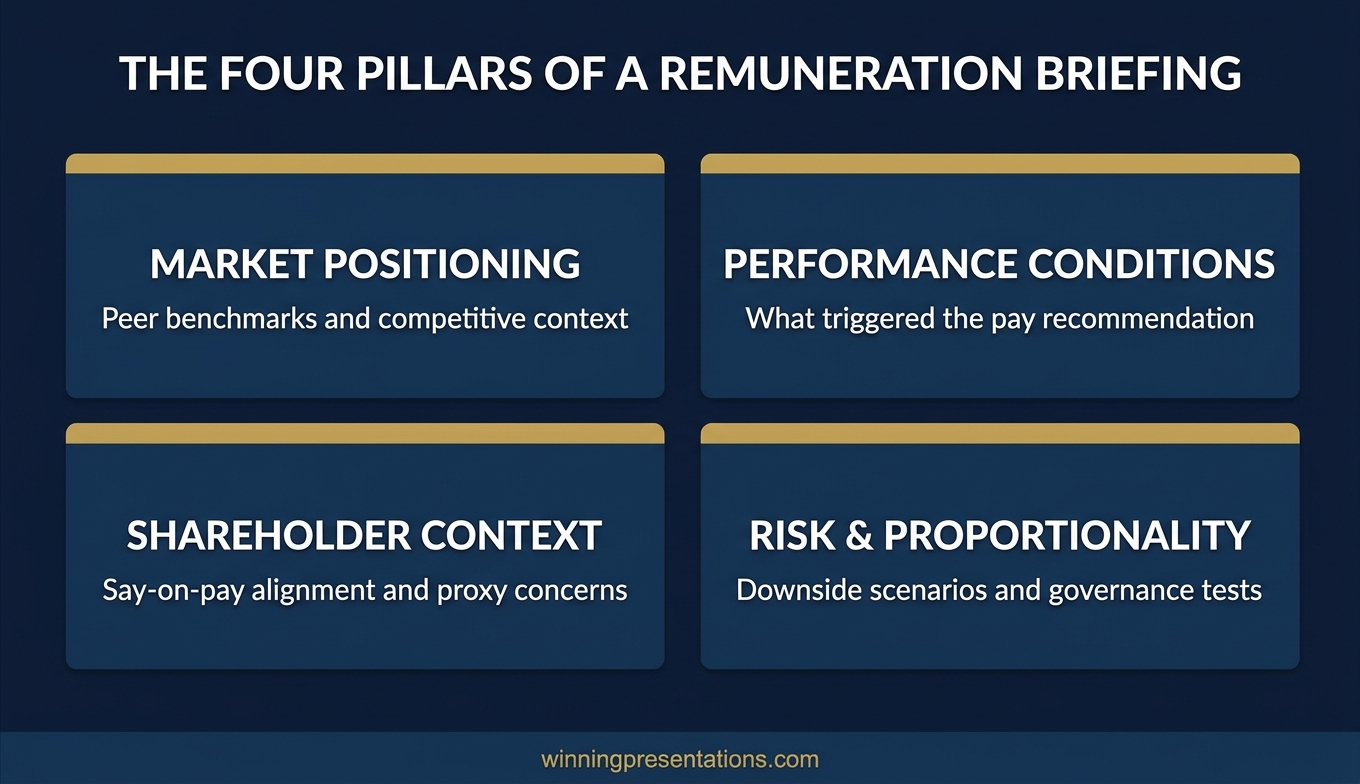
Infographic showing the four pillars of a remuneration committee briefing: market positioning, performance conditions, shareholder context, and risk and proportionality

Structuring the narrative for non-executive scrutiny

The slide order in a committee pay briefing matters more than most presenters realise. Non-executive directors process information through a governance lens, and that lens has a specific sequence: rationale first, then data, then recommendation.

A structure that works consistently:

Slide 1: The governance context. One slide that frames the purpose of the meeting. “The committee is being asked to approve the following pay recommendations for FY2027. These recommendations reflect [strategic priority], are benchmarked against [comparator group], and are designed to [retention/alignment objective].” No data yet — just the frame.

Slides 2–3: Market positioning summary. The benchmarking conclusion (not the raw data). Where the package sits, why it sits there, and what happens if you don’t act.

Slides 4–5: Performance conditions and strategic alignment. The link between pay and performance. What must be achieved for variable elements to vest or pay out. How this connects to the published strategy.

Slide 6: Shareholder and governance lens. Pre-empt the AGM question. Address the pay ratio. Note any departures from the governance code and explain why they’re appropriate.

Slide 7: The recommendation. Clear, specific, and presented as a resolution for the committee to approve. This is not a summary — it’s the decision point. State what you’re asking for and in what form.

This structure aligns with the governance sequence that non-executive directors are trained to follow. It respects their fiduciary role and gives them the information they need in the order they need it. For a detailed framework on structuring any board-level presentation within a tight time constraint, see the guide to the board presentation 15-minute framework.

How to handle sensitive data in a pay briefing

Pay committee briefings contain some of the most sensitive data in any organisation. Individual pay packages, performance ratings, retention risk assessments, and internal comparisons — all of this is material that requires careful handling in terms of both presentation and distribution.

Three principles apply to every sensitive element:

Name individuals only when necessary. In most remuneration committee meetings, the committee will review the pay of the executive team by name. But your slides don’t always need to display individual names prominently. Consider whether a summary table with names in an appendix serves the committee better than a slide-by-slide walkthrough of each executive. The committee chair can direct discussion to specific individuals as needed.

Control the document trail. Every slide you present to the remuneration committee may become discoverable in a legal or regulatory context. Write every slide as though it could appear in a newspaper. This doesn’t mean being evasive — it means being precise and avoiding informal language, subjective assessments without evidence, or commentary that could be misinterpreted.

Separate the paper from the presentation. The committee paper (the pre-read) should contain the full detail. Your presentation should contain the decision-support summary. If you try to put everything in the slides, they become too dense for verbal presentation but too sparse for standalone reading. Neither works. The approach to understanding how board papers and presentations serve different purposes is explored in the article on board agenda presentations.

If you want a structured template for governance-level committee briefings rather than building from blank slides each cycle, the Executive Slide System includes frameworks for exactly this type of presentation.

Stop Building Committee Slides From Scratch Every Quarter

The Executive Slide System — £39, instant access — gives you repeatable slide structures for governance presentations, committee briefings, and board approvals. Frame recommendations around defensibility, not just data. 22 templates, 51 AI prompts, 15 scenario playbooks.

Get the Executive Slide System →

Designed for committee, board, and governance presentations.
Infographic showing a seven-slide structure for a remuneration committee briefing with governance context, market data, performance conditions, shareholder lens, and recommendation

Building the shareholder lens into your slides

The remuneration committee’s ultimate accountability is to shareholders. Every pay decision they approve will be disclosed in the Directors’ Remuneration Report and potentially challenged at the AGM. If your presentation doesn’t help the committee see the recommendation through that lens, you’re leaving them to construct the shareholder argument themselves — and they shouldn’t have to.

Three shareholder-facing elements belong in every pay governance briefing:

The pay ratio. The UK Corporate Governance Code requires disclosure of the CEO-to-median-employee pay ratio. Your presentation should show this ratio, show the trend, and explain any year-on-year movement. If the ratio has widened, explain why in terms the committee can relay to shareholders: “The increase reflects the vesting of a three-year LTIP award granted during a period of significant strategic transformation.”

The comparator group logic. Institutional investors frequently challenge the choice of comparator companies used for benchmarking. If your comparator group includes organisations significantly larger or more profitable than yours, explain why the comparison is still relevant. If you’ve excluded outliers, say so. Transparency in methodology builds confidence in the conclusion.

The governance code alignment. Where do your proposals sit relative to the UK Corporate Governance Code or your organisation’s specific governance framework? If you’re compliant on every point, say so clearly. If you’re departing from a provision — for example, by using a notice period longer than twelve months — the “explain” part of “comply or explain” should be in your slides, not left to verbal commentary that may not be minuted.

For a broader view on how to tailor your presentation style when addressing non-executive directors specifically, see the guide to non-executive director board presentations.

The principle of audience-first structuring applies equally whether you’re briefing a committee, a full board, or an investor group. The specifics change; the discipline of leading with what the audience needs to decide does not.

Frequently Asked Questions

How long should a remuneration committee presentation be?

Most effective pay committee briefings run between seven and twelve slides, with the verbal briefing taking fifteen to twenty minutes. The remainder of the committee’s time should be reserved for questions and discussion. If your presentation takes longer than twenty minutes, it almost certainly contains detail that belongs in the committee paper rather than the slides. The committee’s role is to scrutinise and approve, not to be educated on every data point. Keep the slides focused on the decision framework and move the supporting analysis to the appendix.

Should I present benchmarking data or just the conclusions?

Present the conclusions in the main body and keep the detailed benchmarking in an appendix or the committee paper. Non-executive directors need to know where the package sits relative to the market and whether the comparator group is appropriate. They do not typically need to see every peer company’s individual data point during the presentation. If a committee member wants the detail, they’ll ask — and having it in the appendix shows you’ve done the work without consuming presentation time on methodology.

How do I address performance conditions that weren’t fully met?

Directly and early. If an executive’s bonus or LTIP award will vest at a reduced level because certain performance targets weren’t achieved, present this as a demonstration that the pay-for-performance link is working as designed. Frame partial vesting as evidence that the scheme is calibrated appropriately, not as a shortfall. The committee will be reassured by a scheme that discriminates between full and partial achievement. What they worry about is a scheme that always pays out in full regardless of performance.

What’s the biggest mistake presenters make in remuneration committee meetings?

Treating the committee as an audience rather than a decision-making body. The difference shapes everything: your slide order, your level of detail, your opening sentence, and how you handle questions. An audience listens and absorbs. A decision-making body evaluates and approves. When you structure your presentation for evaluation rather than absorption, you lead with the governance rationale, provide the evidence efficiently, and make the recommendation explicit. The committee can then do its job rather than spend time searching for the point.

The Winning Edge

Weekly strategies for executives who present at board and committee level. Every Thursday.

Subscribe Free →

Not ready for the full system? Start here instead: download the free Executive Presentation Checklist — a single-page reference for the structure, framing, and decision flow every governance presentation needs.

For executives preparing for internal career progression alongside committee briefings, the dynamics differ but the audience-first principle applies equally. See the related guide on promotion panel presentations.

Your next remuneration committee briefing should give non-executive directors a governance narrative, not a compensation lecture. Lead with the rationale, structure around the four pillars, and make the recommendation explicit. The committee will notice the difference.

About the Author

Mary Beth Hazeldine is the Owner & Managing Director of Winning Presentations. With 25 years of corporate banking experience at JPMorgan Chase, PwC, Royal Bank of Scotland, and Commerzbank, she advises executives across financial services, healthcare, technology, and government on structuring presentations for high-stakes funding rounds, board briefings, and leadership decisions.

25 Apr 2026
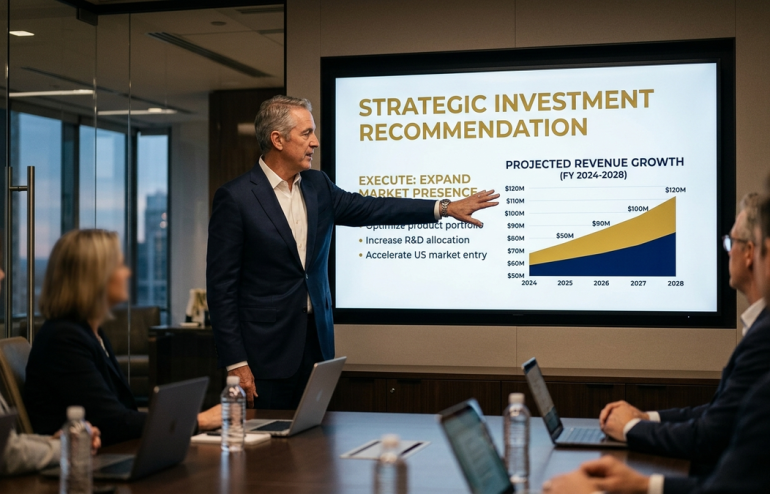
Female executive presenting to senior professionals in a modern London boardroom with structured slides on screen, demonstrating executive-level presentation skills training

Presentation Skills Online Course UK: Executive-Level Training

If you are looking for a presentation skills online course designed specifically for UK executives and senior professionals, AI-Enhanced Presentation Mastery is a self-paced programme covering 8 modules, 83 lessons, and AI-powered slide-building frameworks — all at your own pace, with no fixed schedule to attend.

This page covers exactly what the course includes, who it is designed for, and how it differs from generic presentation training. If you are evaluating options, the details below will help you decide whether this is the right investment.

The Problem With Most Presentation Skills Courses

You have been asked to present a restructuring plan to the board in three weeks. The stakes are real — headcount decisions, departmental budgets, and your credibility with senior leadership all hinge on how you frame the next forty minutes.

You search for a presentation skills course. What you find is a parade of generic options: two-day workshops that teach you to “engage your audience” and “use powerful body language.” The exercises involve presenting about your favourite holiday destination to a room of strangers. The feedback is warm and supportive and completely irrelevant to your board meeting.

The gap between what most courses teach and what executive professionals actually need is significant. Generic courses assume your challenge is confidence or stage presence. In reality, your challenge is structuring complex commercial information so that a room of experienced decision-makers says yes — under time pressure, with competing priorities, and with questions designed to test your thinking.

That requires a different kind of training entirely.

What an Executive-Level Online Course Actually Looks Like

AI-Enhanced Presentation Mastery is built for people who already present at work — and need to do it better at senior level. It is not an introductory course. It is a structured, self-paced programme that takes you from slide structure through to delivery, with AI-powered tools to accelerate every stage.

The programme is designed by Mary Beth Hazeldine, who spent 24 years in corporate banking at JPMorgan Chase, PwC, Royal Bank of Scotland, and Commerzbank before building Winning Presentations. It draws directly on the kind of presentations she delivered and advised on — board papers, investor updates, procurement pitches, and restructuring proposals.

The course runs entirely online. You access 8 modules and 83 lessons at your own pace — no fixed dates, no mandatory live sessions. There are two optional coaching sessions with Mary Beth included with every enrolment, both fully recorded so you can watch back at any time. New cohorts open every month, which simply means a new group of professionals begins alongside you. The material is available from the moment you enrol.

What sets this apart from generic training is the integration of AI tools — specifically ChatGPT and Microsoft Copilot — into the presentation-building process. You learn how to use AI to draft slides, restructure arguments, and prepare for Q&A, cutting preparation time significantly while improving the quality of your output. This is relevant whether you work in technology, finance, healthcare, or government.

What You Get

  • 8 modules, 83 lessons — covering executive slide structure, narrative frameworks, data presentation, stakeholder management, delivery techniques, and AI-powered preparation
  • Self-paced access — no deadlines, no mandatory attendance. Work through the material on your schedule, at your speed
  • AI integration throughout — practical prompts and workflows for ChatGPT and Microsoft Copilot, built into every module so you can apply them immediately
  • 2 optional live coaching sessions — with Mary Beth Hazeldine, fully recorded. Get direct feedback on your specific presentation challenges
  • Monthly cohort enrolment — join at any time. New cohorts open regularly, so there is no waiting period
  • UK-designed, globally relevant — built from real executive scenarios in British corporate environments, applicable across industries and geographies

Price: £499 per seat — instant access, no subscription, no recurring fees.

Stop Rebuilding Every Presentation From Scratch

AI-Enhanced Presentation Mastery gives you the frameworks, AI prompts, and executive-level structure to build compelling presentations in a fraction of the time. 8 modules. 83 lessons. Self-paced. £499 — one payment, lifetime access.

Explore AI-Enhanced Presentation Mastery →

Designed for senior professionals who present to boards, investors, and executive committees

Is This Right for You?

This course is designed for you if:

  • You present regularly to boards, senior leadership, investors, or clients
  • You want to use AI tools like ChatGPT and Copilot to speed up your preparation
  • You need structured frameworks, not generic tips
  • You prefer self-paced learning that fits around a demanding schedule
  • You are UK-based or work in UK corporate environments (though the content is globally applicable)

This course is not the right fit if:

  • You are looking for a basic public speaking course (this is executive-level, not introductory)
  • You need in-person classroom training with group exercises
  • Your primary challenge is acute presentation anxiety — for that, consider this overview of executive presentation approaches or the dedicated anxiety programmes

If you are not sure, explore the articles on this site for a sense of the approach. Many of the frameworks taught in the course are introduced in our executive presentation training guide — the course goes deeper with full implementation, AI tools, and coaching.

Frequently Asked Questions

Is this presentation skills course fully online?

Yes. AI-Enhanced Presentation Mastery is entirely online and self-paced. You access all 8 modules and 83 lessons from any device, at any time. The two optional coaching sessions with Mary Beth are conducted online and fully recorded. There is nothing to attend in person.

How long does it take to complete the course?

That depends entirely on your pace. Some participants work through the material in two to three weeks alongside their day job. Others take longer. There are no deadlines and no expiry date on your access. You can revisit modules before specific presentations as needed.

Do I need to know how to use ChatGPT or Copilot before starting?

No prior AI experience is required. The course teaches you how to use these tools specifically for presentation preparation — from drafting slide content to stress-testing your arguments. The prompts and workflows are provided ready to use.

Is this course relevant outside the UK?

Absolutely. The frameworks are built from real executive scenarios in British, European, and international corporate settings. Participants come from financial services, technology, healthcare, government, and professional services across multiple countries. The principles of structuring a compelling executive presentation are universal.

What if I have a specific presentation coming up — can I get direct feedback?

Yes. The two optional coaching sessions included with your enrolment are specifically designed for this. Bring your real presentation, and Mary Beth will review your structure, slides, and approach. Both sessions are recorded so you can refer back to the feedback.

Is this worth £499 compared to a free presentation course?

Free courses cover the basics — how to structure a beginning, middle, and end, how to make eye contact, how to manage nerves. If that is what you need, there are good options available at no cost. This course exists for professionals who already know the basics but need to present at a level that influences senior decision-makers. The difference is specificity: real executive scenarios, AI-accelerated preparation, and frameworks built from 24 years of corporate banking experience. If your next presentation has genuine commercial or career consequences, that specificity is what makes the investment worthwhile.

About the Author

Mary Beth Hazeldine is the Owner & Managing Director of Winning Presentations. With 24 years of corporate banking experience at JPMorgan Chase, PwC, Royal Bank of Scotland, and Commerzbank, she advises executives across financial services, healthcare, technology, and government on structuring presentations for high-stakes funding rounds, board approvals, and investor meetings.

25 Apr 2026
Executive Slide Design: What Board-Level Presentations Actually Look Like — featured image

Executive Slide Design: What Board-Level Presentations Actually Look Like

Quick Answer

Executive slide design follows three principles that most corporate presentations ignore: recommendation-first structure, visual hierarchy that guides the eye to the decision, and restraint that treats empty space as a signal of confidence rather than missing content. Board-level slides look different from working-level slides because they serve a different purpose — they exist to support a decision, not to document research.

Henrik had spent two weeks building a fifty-two-slide deck for his division’s strategy presentation to the CEO. Every slide was dense with analysis. Charts, tables, footnotes, appendices — the kind of thorough documentation that had earned him promotions throughout his career as an analyst.

The CEO stopped him on slide four.

“What are you recommending?” she asked. Henrik explained that the recommendation was on slide thirty-eight, after the market analysis, competitive landscape, financial modelling, and risk assessment. The CEO looked at the COO. “Can someone send me a one-pager?” The meeting ended twelve minutes early.

Henrik’s analysis was excellent. His slide design was wrong for the audience. He had built a research document and presented it as a decision tool. At the executive level, these are fundamentally different artefacts — and the design principles that make one effective actively undermine the other.

Designing slides for a board or C-suite presentation?

Before you add another chart or bullet list, check whether your slides are designed for the audience in the room. Quick pressure test:

  • Can a decision-maker grasp each slide’s point in under eight seconds?
  • Does your recommendation appear in the first three slides, not the last three?
  • Is there enough white space that each slide looks intentional, not overcrowded?

Explore the Executive Slide System →

Why Most Executive Slides Look Wrong for the Room They Are In

The default approach to executive slide design is to compress a working-level presentation into fewer slides. Take the forty-slide analyst deck, consolidate the content into fifteen slides, increase the font size slightly, and call it “board-ready.” This approach produces slides that are neither thorough enough for analysts nor clean enough for executives. They sit in an awkward middle ground that satisfies nobody.

The problem is conceptual, not aesthetic. Working-level slides are designed to document analysis — they show the work, justify the methodology, and present data in granular detail. Executive slides are designed to support decisions — they present recommendations, evidence, and trade-offs in a format that enables a room of senior people to say yes, no, or ask one clarifying question.

These are different design jobs. A working-level slide might contain a detailed waterfall chart showing quarterly revenue by product line, region, and customer segment. An executive slide covering the same topic would show total revenue against target with a single sentence explaining the variance. The analyst’s slide answers “what happened in detail?” The executive’s slide answers “are we on track, and if not, what should we do about it?”

When you design executive slides using working-level principles — more data, more detail, more backup — you force decision-makers to do analytical work they neither have time for nor expect to do. The slide becomes a reading exercise rather than a decision-support tool. And in a boardroom, reading exercises lose the room within minutes.

For a comprehensive look at how to structure an executive-level deck from start to finish, see our guide to executive presentation templates.

Recommendation-First Design: Putting the Answer Before the Evidence

The most important design principle for executive presentations is structural: the recommendation comes first, not last. This contradicts the logical progression most presenters learned in school and reinforced throughout their careers — build the case, present the evidence, arrive at the conclusion. At the executive level, that sequence is inverted.

Decision-makers want to know your recommendation within the first two minutes of the presentation. Not because they do not value the analysis, but because knowing the recommendation changes how they process everything that follows. If they know you are recommending Option B, they listen to your analysis through the lens of “does this evidence support that recommendation?” If they do not know the recommendation, they listen to your analysis through the lens of “where is this going?” — which is cognitively exhausting and emotionally frustrating.

In practical slide design terms, recommendation-first means your second or third slide states your recommendation in plain language. “We recommend expanding into the APAC market in Q3, with an initial investment of £2.4 million, targeting breakeven within eighteen months.” One slide. One sentence. One clear ask.

Everything after that slide is evidence, context, and risk analysis that supports the recommendation. The audience is no longer guessing where you are heading — they are evaluating whether your evidence is strong enough to justify your conclusion. That is a much more productive use of everyone’s time.

This structure also changes the Q&A dynamic. When the recommendation is visible early, questions during the presentation become more focused and more useful. Instead of “what’s your recommendation?” at slide thirty-eight, you get “how confident are you in the eighteen-month breakeven timeline?” at slide five. The second question is more valuable for everyone in the room.

Need Board-Ready Slides, Not Another Template Gallery?

Most slide templates give you layouts. The Executive Slide System — £39, instant access — gives you the decision-support frameworks that make executive presentations work:

  • Slide templates structured for recommendation-first executive communication
  • AI prompt cards to convert analyst-level data into board-level visual hierarchy
  • Scenario playbooks for board meetings, steering committees, and C-suite briefings
  • Executive summary frameworks designed for eight-second comprehension

Get the Executive Slide System → £39

Designed for executives and their teams who present to boards, steering committees, and C-suite leaders.

Visual Hierarchy for Decision-Makers Who Read Slides in 8 Seconds

Research on executive attention suggests that senior decision-makers spend approximately eight seconds on a slide before deciding whether it warrants further attention. In that eight seconds, they scan for three things: the point of the slide, the evidence that supports it, and whether they need to ask a question. Your visual hierarchy must deliver all three in that window.

The practical framework for executive visual hierarchy uses three tiers:

Tier 1: The headline (read in 1-2 seconds). Every slide should have a single-sentence headline that states the point of the slide — not a label, but a conclusion. “European Revenue Exceeded Target by 12%” is a conclusion. “European Revenue Q1 2026” is a label. Conclusions tell the decision-maker what to think about. Labels ask them to figure it out themselves. Use a large, bold font (minimum 24-point in a standard 16:9 slide) in a colour that contrasts clearly with the background.

Tier 2: The evidence (absorbed in 3-4 seconds). One chart, one data visualisation, or one three-to-four-bullet summary that supports the headline. Not two charts. Not a chart and a table. One piece of evidence, designed to be absorbed in a glance. If your evidence requires reading, it belongs in a pre-read document, not on a projected slide. Choose the visualisation type that communicates the point most quickly: bar charts for comparison, line charts for trends, tables only when exact numbers matter more than patterns.

Tier 3: The annotation (noticed in 1-2 seconds). A single line of context that answers the most likely question the audience will have after reading the headline and evidence. “Driven primarily by the Deutsche Bank contract signed in February” or “Represents a 3% improvement on the same period last year.” This annotation pre-empts the obvious question and saves time in discussion.

If you are designing slides for executives who make decisions quickly, the Executive Slide System (£39) provides the visual hierarchy frameworks and templates designed for exactly this three-tier approach.

The Restraint Principle: Why Less Content Signals More Authority

The instinct to fill every slide with content comes from a reasonable fear: that empty space looks like missing information. At the working level, this fear is sometimes justified — a sparse slide might genuinely indicate incomplete analysis. At the executive level, the opposite is true. A sparse slide signals that you have done the analytical work, made the judgement calls, and distilled the complexity down to what matters.

White space on an executive slide communicates three things: confidence in the recommendation, respect for the audience’s time, and mastery of the subject matter. When you leave space around a single chart and a clear headline, you are implicitly saying, “I know this topic well enough to tell you only what you need.” When you fill the slide with caveats, footnotes, and secondary data, you are saying, “I’m not sure what matters here, so I’m showing you everything.”

Practical restraint in board-level slide design means following a set of constraints:

One point per slide. If you cannot state the slide’s contribution to the argument in a single sentence, the slide is doing too many things. Split it or cut it. A twelve-slide deck where each slide makes one clear point is more effective than a six-slide deck where each slide makes three muddled ones.

Maximum three bullet points. If you have more than three supporting points, you have not prioritised ruthlessly enough. Rank them and present the top three. Move the rest to an appendix for anyone who wants the detail.

No decorative elements. Clip art, stock photography, gradient backgrounds, and animated transitions do not help executives make decisions. They add visual noise that competes with the content for attention. A clean, flat design with consistent typography and a restrained colour palette looks more authoritative than a “professionally designed” template with graphic embellishments.

Consistent typography. Use two fonts maximum — one for headlines, one for body text. Keep sizes consistent across slides. Inconsistent typography creates a subconscious sense of disorder that undermines the audience’s confidence in the presenter. If your slides look disorganised, the assumption is that your thinking is disorganised.

For detailed slide structure guidance tailored to board-level presentations, see our comprehensive framework for board presentation structure.

Five Slide Design Mistakes That Damage Executive Credibility

These five errors appear repeatedly in presentations delivered to boards, steering committees, and C-suite leaders. Each one is avoidable, and each one carries a credibility cost that exceeds the effort required to fix it.

1. Conclusion on the last slide. Saving the recommendation for the end works in academic presentations and courtroom dramas. In executive settings, it frustrates the audience and often means the recommendation never gets discussed — the meeting runs out of time because forty minutes were spent on background that should have been a pre-read. Move the recommendation to slide two or three.

2. Reading the slide aloud. If your speaking notes are identical to the text on the slide, the slide is a script, not a visual aid. Executives can read faster than you can speak. The moment they finish reading your slide — which takes about five seconds — they are waiting for you to add something the slide does not say. If you add nothing, the slide is redundant and so are you. Design slides that complement your narration, not duplicate it.

3. Charts without interpretation. A chart without a headline is an assignment, not a communication. It says to the audience: “Here is some data. Please analyse it and draw your own conclusions.” Executives do not want assignments. They want your interpretation. Every chart should have a headline that states what the chart means, not what the chart shows.

4. Inconsistent formatting across slides. Mixed fonts, varying alignment, different colour usage across slides, and inconsistent spacing signal a deck assembled from multiple sources without editorial oversight. Even if the content is strong, formatting inconsistency creates a perception of carelessness. Use a single master template and enforce it across every slide.

5. Appendix as a safety net. Including twenty appendix slides “just in case” is a sign that you have not decided what matters. A good appendix contains three to five slides that address the most likely technical questions. A bad appendix contains everything you cut from the main deck because you were not confident enough to leave it out entirely. If you would not present a slide under any circumstances, do not include it.

Stop Designing Slides That Get Interrupted on Page Four

The Executive Slide System — £39, instant access — gives you the board-ready templates and visual hierarchy frameworks that make designing executive presentations straightforward. Build recommendation-first decks that decision-makers can act on in one meeting.

Get the Executive Slide System → £39

Designed for professionals who present to boards, steering committees, and C-suite executives.

Frequently Asked Questions

How many slides should an executive presentation have?

Most effective executive presentations use ten to fifteen slides for a thirty-minute meeting, including one or two appendix slides for anticipated questions. The number matters less than the discipline: one point per slide, recommendation in the first three slides, and no slide that exists solely to demonstrate how much work went into the analysis. If your deck exceeds fifteen slides, ask whether every slide supports the decision the audience needs to make. Remove anything that serves your need to show thoroughness rather than their need to make a judgement.

What font and colour scheme works best for executive slides?

Use two fonts — one sans-serif for headlines (such as Calibri, Helvetica, or Inter) and one for body text (the same font at a smaller size works well). Avoid decorative or script fonts entirely. For colours, limit yourself to three: a dark primary colour for text and backgrounds, a contrasting accent colour for key data points and highlights, and white for negative space. Navy and gold is a classic executive palette. The goal is consistency and readability, not visual interest — the content provides the interest.

Should I use animations and transitions in executive presentations?

No. Animations and slide transitions add presentation time without adding decision value. They also create technical risk — transitions that work on your laptop may render differently on a boardroom projector, and animation timing often breaks when someone interrupts to ask a question mid-build. Use simple appear/disappear builds only when you need to reveal information sequentially to control the narrative. Otherwise, static slides are faster, more reliable, and look more professional to a senior audience.

How do I convert an analyst deck into an executive presentation?

Do not try to compress the analyst deck — build the executive deck separately, from scratch. Start with the recommendation, then identify the three to four pieces of evidence that most strongly support it. Each piece of evidence becomes one slide with a conclusion headline, one data visualisation, and one annotation line. Move the remaining analytical detail into a pre-read document or a short appendix. The executive deck and the analyst deck serve different purposes and should be designed independently, not derived from each other.

The Winning Edge — Weekly Presentation Intelligence

Every Thursday, I share one framework, one real-world example, and one practical technique drawn from 24 years of presenting in boardrooms across three continents. Join The Winning Edge newsletter →

Not ready for the full system? Start here instead: download the free Executive Presentation Checklist — a one-page reference covering the structure, visual hierarchy, and critical design elements every board-level presentation needs.

Great slides only work if you can deliver them with composure. See our guide to the presentation warm-up routine that calms your nervous system before you walk into the boardroom.

About the Author

Mary Beth Hazeldine is the Owner & Managing Director of Winning Presentations. With 24 years of corporate banking experience at JPMorgan Chase, PwC, Royal Bank of Scotland, and Commerzbank, she advises executives across financial services, healthcare, technology, and government on structuring presentations for high-stakes funding rounds and approvals.

Book a discovery call | View services

25 Apr 2026
Presentation Warm-Up Routine: The 10-Minute Protocol That Stops Nerves Before They Start — featured image

Presentation Warm-Up Routine: The 10-Minute Protocol That Stops Nerves Before They Start

Quick Answer

A presentation warm-up routine works in three phases: body activation to discharge excess adrenaline, vocal preparation to stabilise pitch and volume, and mental grounding to shift your focus from threat detection to task execution. The entire protocol takes ten minutes and can be done in a bathroom, stairwell, or empty office. It does not eliminate nerves — it regulates them so your body supports your message rather than undermining it.

Elena arrived at the conference centre forty-five minutes early. She had rehearsed her presentation six times. She knew the content. She had anticipated the likely questions. Her slides were clean, structured, and on-message.

None of that mattered when her body decided it was under threat.

By the time she walked to the front of the room, her hands were trembling visibly, her voice had risen half an octave, and her jaw was so tight she could feel her back teeth pressing together. The first three minutes of her presentation sounded nothing like the version she had rehearsed. The words were the same. The delivery was not. The audience noticed.

Afterwards, a colleague who had presented immediately before her mentioned something Elena had not considered: “I always warm up in the stairwell. Ten minutes. Voice, body, breathing. By the time I walk in, the adrenaline is working for me, not against me.” Elena had spent forty-five minutes reviewing her slides. She had spent zero minutes preparing her body to deliver them.

Presenting to senior leadership this week?

If your body hijacks your delivery despite thorough content preparation, the issue is not your slides — it is your nervous system. Quick self-check before your next presentation:

  • Does your voice change pitch or pace in the first two minutes?
  • Do your hands shake, your jaw clench, or your shoulders rise toward your ears?
  • Do you feel a disconnect between what you planned to say and what actually comes out?

Explore Conquer Your Fear of Public Speaking →

Why Walking Into a Presentation Cold Makes Anxiety Worse

Athletes warm up before competition. Musicians tune and run scales before performance. Actors do vocal and physical exercises before stepping on stage. Executives walk into board presentations having done none of these things — and then wonder why their body does not cooperate when they need it most.

The reason cold starts amplify anxiety is physiological, not psychological. When you are nervous, your sympathetic nervous system prepares your body for threat: heart rate increases, muscles tense, breathing becomes shallow, digestion slows, and blood diverts from your extremities to your core. This is the fight-or-flight response, and it operates below conscious control.

If you walk into a presentation without warming up, the fight-or-flight response has nowhere to go. The adrenaline surging through your system has no physical outlet, so it manifests as trembling hands, a shaking voice, visible sweating, and mental blankness. Your body is screaming “run” while your brain is trying to explain a quarterly forecast.

A warm-up routine gives the adrenaline somewhere to go before you step into the room. Physical movement discharges the excess energy. Vocal exercises engage the muscles that control pitch and volume. Mental grounding techniques redirect your attention from internal threat signals to external task focus. Together, these three elements regulate the nervous system so it supports performance rather than sabotaging it.

This is not about eliminating nerves — a certain amount of arousal improves performance. The goal is to bring your activation level into the zone where adrenaline sharpens your focus rather than overwhelming your capacity to think clearly. For a deeper exploration of how to manage the physical symptoms of presentation anxiety, see our guide to breathing techniques for presentations.


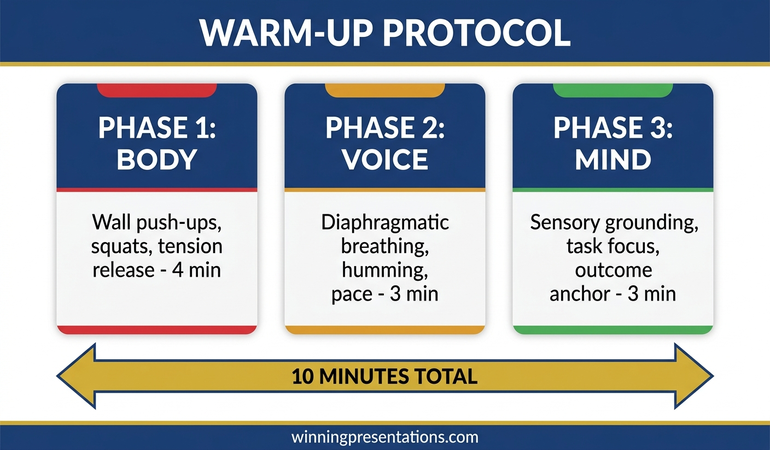
Three-phase presentation warm-up routine showing body activation, vocal preparation, and mental grounding with time allocations

Phase 1: Body Activation — Discharging Adrenaline Before It Controls You

The body activation phase takes three to four minutes and serves one purpose: burning off the excess adrenaline that would otherwise make your hands shake and your voice tremble. This is not a fitness routine — it is a physiological reset that prepares your body to be still and composed when you need it to be.

Large muscle engagement (90 seconds). Find a private space — a stairwell, an empty office, a bathroom stall — and do thirty seconds of wall push-ups, thirty seconds of standing squats, and thirty seconds of shoulder rolls. The goal is to engage your largest muscle groups so they absorb the adrenaline instead of your hands and voice. Keep the movements controlled and rhythmic. You are discharging energy, not exhausting yourself.

Isometric tension release (60 seconds). Clench both fists as tightly as possible for five seconds, then release. Repeat with your shoulders — press them up toward your ears, hold for five seconds, release. Then press your palms together at chest level, push hard for five seconds, and release. This progressive tension-release cycle activates and then relaxes the muscle groups most likely to carry visible tension during your presentation.

Jaw and face release (60 seconds). Open your mouth as wide as you can, stretch your face, and then release into a neutral expression. Repeat three times. Your jaw carries more tension than any other facial muscle, and a clenched jaw restricts your vocal range, makes you look rigid, and can trigger headaches during a long presentation. A loose jaw is the foundation of natural-sounding speech.

After the body activation phase, you should feel physically lighter — less coiled, less restless, less like your body is preparing for a threat. The adrenaline is still present, but it is distributed across your muscles rather than concentrated in your extremities.

Phase 2: Vocal Preparation — Stabilising Pitch, Pace, and Projection

The vocal preparation phase takes three minutes and addresses the most visible symptom of presentation anxiety: a voice that does not sound like yours. When you are nervous, your vocal cords tighten, your breathing becomes shallow, and your pitch rises. These changes happen automatically, and they are immediately noticeable to an audience — even if they cannot articulate what sounds different.

Diaphragmatic breathing (60 seconds). Place one hand on your stomach and breathe so your hand moves outward on the inhale and inward on the exhale. Take four slow breaths: inhale for four counts, hold for two, exhale for six. This pattern activates the parasympathetic nervous system, which counteracts the fight-or-flight response. It also shifts your breathing from chest-level (shallow, anxious) to diaphragm-level (deep, controlled) — which gives your voice its natural depth and resonance.

Vocal range warm-up (60 seconds). Hum at a comfortable pitch, then slide your hum from low to high and back down. Repeat three times. This warms the vocal cords and establishes your full range before you speak. Then say “one-two-three-four-five” at your normal speaking volume, followed by the same sequence projected as if speaking to someone across a large room. This calibrates your volume and ensures you do not start your presentation too quietly — a common anxiety response that signals uncertainty to the audience.

Pace calibration (60 seconds). Speak the first three sentences of your presentation out loud, deliberately slower than feels natural. Anxiety accelerates speech. What feels slow to you sounds measured and authoritative to the audience. Time yourself: your opening sentence should take at least five seconds. If it takes less than three, you are rushing. Practise the opening at the slow pace until it feels comfortable — this becomes your anchor tempo for the real presentation.

Still Dreading the Walk to the Front of the Room?

A warm-up routine manages the symptoms. Conquer Your Fear of Public Speaking — £39, instant access — addresses the underlying patterns that cause presentation anxiety in the first place:

  • Neuroscience-based techniques for regulating your nervous system before, during, and after presenting
  • Cognitive reframing protocols that change how your brain interprets the presentation situation
  • Physical symptom management for trembling, voice changes, and visible anxiety
  • Pre-presentation routines designed specifically for executive environments

Get Conquer Your Fear of Public Speaking → £39

Designed for executives who know their content but cannot control their body’s response to presenting it.

Phase 3: Mental Grounding — Shifting From Threat to Task

The mental grounding phase takes three minutes and addresses the cognitive dimension of presentation anxiety: the running internal commentary that tells you something is about to go wrong. This commentary — “they’ll think I’m not prepared,” “what if I forget the numbers,” “the last time I presented this badly…” — is your brain’s threat detection system scanning for danger. It is not helpful, and it is not accurate, but it feels urgent and true.

Mental grounding redirects your attention from internal threat signals to external task focus. Instead of monitoring how you feel, you begin monitoring what you need to do. This shift does not require positive thinking or affirmations — it requires structured attention redirection.

Sensory grounding (60 seconds). Name five things you can see, four you can hear, three you can touch. This technique, borrowed from clinical anxiety management, forces your brain out of future-oriented threat detection and into present-moment awareness. When your brain is busy cataloguing sensory input, it has less capacity for catastrophic prediction. Do this standing in the room where you will present, if possible — it also familiarises you with the environment, which reduces novelty-related anxiety.

Task-focus rehearsal (60 seconds). Instead of rehearsing content, rehearse actions. Say to yourself: “I will walk to the front, place my notes on the lectern, make eye contact with three people, and begin with my opening sentence.” This converts the presentation from an abstract threat (“I have to present to the board”) into a concrete sequence of manageable physical actions. Anxiety thrives on abstraction. Specificity neutralises it.

Outcome anchoring (60 seconds). Identify one specific outcome you want from this presentation — not “I want it to go well,” but “I want the CFO to approve the next phase.” Hold that outcome in mind as you take three final diaphragmatic breaths. This anchors your attention to purpose rather than performance. You are not going in to be judged. You are going in to achieve something specific. That reframe changes how your nervous system treats the situation.

If you want to build on this pre-presentation preparation with a structured morning protocol, see our guide to the morning presentation protocol that sets up your entire day for confident delivery.

For executives who want a complete system for managing presentation anxiety — not just a warm-up routine — the Conquer Your Fear of Public Speaking programme (£39) provides the full neuroscience-based framework for rewiring your response to high-stakes speaking situations.

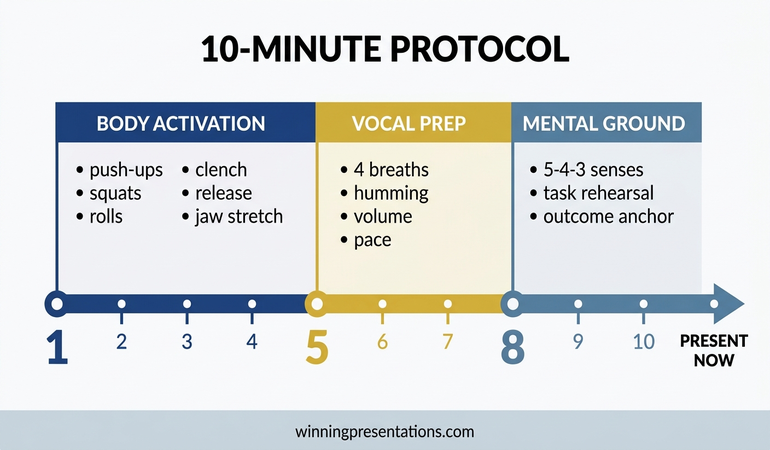
The Complete 10-Minute Protocol

Here is the full warm-up sequence, designed to be done in any private space ten minutes before you present. The order matters — body first, then voice, then mind — because physical regulation creates the foundation for vocal and cognitive control.

Minutes 1-4: Body activation. Wall push-ups (30 seconds), standing squats (30 seconds), shoulder rolls (30 seconds), fist clench and release (30 seconds), shoulder press and release (30 seconds), palm press and release (30 seconds), jaw stretches (60 seconds).

Minutes 5-7: Vocal preparation. Four diaphragmatic breaths at 4-2-6 count (60 seconds). Humming slides low to high (30 seconds). Volume calibration at two levels (30 seconds). Opening sentences at slow pace (60 seconds).

Minutes 8-10: Mental grounding. Sensory grounding — 5 see, 4 hear, 3 touch (60 seconds). Task-focus rehearsal — physical action sequence (60 seconds). Outcome anchoring with three final breaths (60 seconds).

This protocol is sequential, not optional. Skipping the body phase and jumping to breathing exercises leaves the adrenaline unaddressed. Skipping the vocal phase means your voice will betray your nerves in the first sentence. Skipping the mental phase means your attention will be split between your content and your internal threat commentary. All three phases work together.

After the protocol, walk directly into the room and begin. Do not sit down and wait — waiting allows the anxiety to rebuild. The transition from warm-up to presentation should be immediate, while the regulation is still active.


Complete 10-minute presentation warm-up protocol timeline showing body activation, vocal preparation, and mental grounding phases with specific exercises

Ready to Address the Root Cause, Not Just the Symptoms?

This warm-up routine regulates your nervous system in the moment. Conquer Your Fear of Public Speaking — £39, instant access — gives you the complete programme to change how your brain responds to presenting, so the anxiety diminishes over time rather than requiring management before every meeting.

Get Conquer Your Fear of Public Speaking → £39

Designed for executives who want to present with composure, not just survive the experience.

Want the slides too?

Preparation reduces anxiety. The Executive Slide System (£39) includes confident-presenter templates designed to minimise preparation stress — so your warm-up routine starts from a position of structure, not uncertainty.

Frequently Asked Questions

Can I do a presentation warm-up routine in a suit without getting sweaty?

Yes. The body activation exercises are controlled, low-impact movements — wall push-ups, standing squats, shoulder rolls, and isometric holds. They engage large muscle groups without raising your heart rate to the point of visible sweating. Keep the movements slow and deliberate. You are discharging adrenaline, not doing a workout. If you are concerned about overheating, focus on the isometric tension-release exercises (fist clenches, shoulder presses, palm presses) which are invisible to anyone who might walk past.

What if I only have two minutes before my presentation?

If time is limited, prioritise in this order: four diaphragmatic breaths (30 seconds), jaw release and facial stretch (15 seconds), opening sentence at slow pace (15 seconds), and sensory grounding — five things you can see (30 seconds). This compressed sequence hits the most critical elements: breathing calms the nervous system, jaw release frees your voice, pace calibration prevents rushing, and sensory grounding redirects your attention. It is not as effective as the full ten-minute protocol, but it is significantly better than walking in cold.

Should I use this routine before virtual presentations too?

Absolutely. Virtual presentations trigger the same fight-or-flight response as in-person ones — sometimes worse, because you cannot read the room and the silence between your words feels amplified. Do the full warm-up routine before joining the call. If you are presenting from home, you have the advantage of complete privacy for the body activation phase. The vocal preparation is especially important for virtual settings, where microphone compression can make a nervous, high-pitched voice sound even more strained than it would in person.

The Winning Edge — Weekly Presentation Intelligence

Every Thursday, I share one framework, one real-world example, and one practical technique drawn from 24 years of presenting in boardrooms across three continents. Join The Winning Edge newsletter →

Not ready for the full programme? Start here instead: download the free Executive Presentation Checklist — a one-page reference covering the structure and preparation elements every confident presentation needs.

Once your warm-up routine is in place, make sure your slides support your confidence — see our guide to executive slide design for the visual structures that reduce cognitive load and let you present from a position of clarity.

About the Author

Mary Beth Hazeldine is the Owner & Managing Director of Winning Presentations. With 24 years of corporate banking experience at JPMorgan Chase, PwC, Royal Bank of Scotland, and Commerzbank, she advises executives across financial services, healthcare, technology, and government on structuring presentations for high-stakes funding rounds and approvals. A qualified clinical hypnotherapist and NLP practitioner, she combines executive communication expertise with evidence-based techniques for managing presentation anxiety.

Book a discovery call | View services

24 Apr 2026
Confident female executive presenting stakeholder alignment strategy to senior business professionals in a modern boardroom with navy and gold tones

Stakeholder Alignment Presentation Training: What Works

Quick answer: Stakeholder alignment presentation training teaches senior professionals how to structure and deliver presentations that bring multiple decision-makers to a shared position — rather than simply informing them and hoping for consensus. Effective training addresses the architecture of the argument, the sequencing of information for different stakeholder priorities, and the handling of resistance and competing agendas. The Executive Buy-In Presentation System is a self-paced programme designed for exactly this context — building presentations that move rooms to a clear yes.

Lucinda had been the Group Head of Compliance for three years. Her presentations were thorough — well-researched, carefully evidenced, meticulously structured. She could answer any question thrown at her. But her proposals kept stalling. Not rejected — stalled. The board would thank her for the work, acknowledge the risk, and then defer the decision to the next meeting. After the third deferral of a critical regulatory remediation programme, she asked the Chief Risk Officer for honest feedback. His answer was blunt: “Everyone in that room agrees with your analysis. The problem is they each think someone else should fund it.” The issue was not the quality of her case. It was the absence of alignment — she was presenting to a room of individual decision-makers who had not been brought to a shared position on ownership, cost allocation, or timeline before she opened her slides. When she restructured her approach — mapping each stakeholder’s specific concern, addressing the cost question explicitly before the meeting, and designing the presentation to move from shared problem to shared commitment — her next proposal was approved in a single session. No deferrals. Same data. Different architecture.

Looking for stakeholder alignment presentation training? The Executive Buy-In Presentation System is a self-paced programme for senior professionals who present to boards and committees. New cohorts open monthly. Explore the programme →

What Stakeholder Alignment Actually Means at Senior Level

Stakeholder alignment is one of those phrases that sounds straightforward until you try to do it in a room where the stakeholders have competing priorities, different risk tolerances, and unequal influence over the final decision. At junior levels, alignment usually means getting people to agree with your recommendation. At senior level, it means something considerably more complex: bringing decision-makers to a shared position on what the problem is, who owns the solution, what resources are required, and what timeline is acceptable — before the formal decision point.

The distinction matters because most presentation training treats alignment as a delivery problem. It assumes that if you present clearly enough, with compelling enough data and confident enough body language, the room will align. That assumption breaks down the moment you have a CFO concerned about capital allocation, a COO focused on operational disruption, and a non-executive director asking about regulatory risk — all in the same meeting, all with legitimate but different lenses on the same proposal.

Genuine stakeholder alignment presentation training addresses this complexity directly. It teaches you to design presentations that acknowledge competing priorities rather than ignoring them, that sequence information to build shared understanding before requesting a shared decision, and that handle the political dimension of multi-stakeholder rooms without pretending it does not exist.

Understanding the psychology behind stakeholder buy-in is foundational here — it explains why rational arguments alone rarely move a room when the decision requires multiple people to agree, each of whom has different criteria for what constitutes a good outcome.

Stakeholder alignment failure points: four common reasons executive presentations stall — competing priorities, unclear ownership, absent pre-alignment, and mixed decision criteria — shown as stacked diagnostic cards

Why Standard Presentation Training Fails on Alignment

Most presentation training — even training marketed as “executive” — is built around a single-audience model. It teaches you to identify your audience, understand their needs, and structure your message accordingly. That works when your audience is functionally homogeneous: a team of engineers, a marketing committee, a group of analysts who share the same framework for evaluating information.

It breaks down in the rooms where senior professionals actually present. A board is not a single audience. It is a collection of individuals with different functional responsibilities, different appetites for detail, different political positions, and different definitions of success. Presenting to a board as though it were a single audience with a single set of needs is one of the most common structural errors at director level and above.

Standard training also tends to focus on the presentation itself — the forty-five minutes in the room — as though that is where alignment happens. In practice, alignment at senior level is largely determined before the slides are opened. The conversations that happen in corridors, in one-to-one briefings, in pre-reads and preparatory calls — these are where positions are tested, objections are surfaced, and the ground is prepared for what happens in the formal session.

Stakeholder alignment presentation training that ignores this pre-meeting architecture is addressing only half the problem. It is teaching you to perform well in the room while leaving unaddressed the work that determines whether the room is ready to decide.

Build the Case. Align the Room. Secure the Decision.

The Executive Buy-In Presentation System teaches senior professionals how to structure and deliver presentations that move boards and committees to a clear yes. Self-paced, £499, new cohorts open monthly. Optional Q&A calls are fully recorded — watch back anytime.

Explore the Programme →

Built from 25 years of corporate banking experience at JPMorgan Chase, PwC, RBS, and Commerzbank

What Effective Stakeholder Alignment Training Actually Covers

Training that genuinely addresses stakeholder alignment — rather than just using the phrase in its marketing — covers several areas that standard presentation courses typically omit.

Stakeholder mapping for decision rooms. This is not the generic stakeholder analysis taught in project management courses. It is specific to presentation contexts: who in the room has formal decision authority, who has informal veto power, who is the swing vote, and what does each person need to hear before they can commit. This mapping directly informs how you sequence your slides and where you place your key asks.

Argument architecture for multi-stakeholder audiences. When your audience includes a finance director, a chief operating officer, and two non-executive directors, you cannot build a single linear argument and expect it to land with all of them. Effective training teaches you to construct presentations with a shared narrative that branches into different value propositions — addressing financial return, operational feasibility, strategic fit, and risk mitigation within the same presentation structure without losing coherence.

Objection anticipation and pre-emption. At board level, the most dangerous objections are the ones that are not voiced in the room but discussed afterwards. Training that addresses alignment teaches you to identify likely objections, address them proactively within the presentation, and create space for the room to surface concerns rather than suppress them.

Decision facilitation. There is a specific skill in moving a room from discussion to decision. Many senior professionals are comfortable presenting information but less practiced at the moment where the presentation transitions from informing to asking. Alignment training addresses this explicitly — how to frame the ask, when to make it, and how to handle the silence that follows.

The Executive Buy-In Presentation System covers each of these areas as part of a structured, self-paced curriculum — designed for professionals who need a systematic approach rather than ad hoc advice.

The Pre-Meeting Architecture Most Training Ignores

If you have presented at board or committee level more than a few times, you will recognise this pattern: the presentation goes well, the questions are answered competently, but no decision is made. The chair says something like, “Thank you — let us reflect on this and return to it at the next meeting.” Two months later, you are back with the same deck, updated numbers, and the same result.

This is almost always an alignment failure, not a presentation failure. The room was not ready to decide because the pre-meeting work was not done — or was not done effectively. Pre-meeting architecture is the structured preparation that happens before the formal presentation, and it is where most alignment is actually achieved or lost.

Effective pre-meeting architecture includes several elements. First, identifying the two or three stakeholders whose position will determine the outcome — and having direct conversations with them before the meeting. Not to lobby, but to understand their specific concerns, test your framing with them, and adjust your presentation accordingly. Second, ensuring the chair knows what you are going to ask and is prepared to facilitate a decision — a surprised chair will almost always defer. Third, circulating a pre-read that sets up the key question clearly, so the room arrives having thought about the decision rather than hearing the information for the first time.

The article on stakeholder alignment before major proposals covers this process in more detail — the specific steps that transform a presentation from an information event into a decision event.

Training that addresses this pre-meeting layer gives you a systematic approach to the work that happens before the slides. It is not a substitute for a good presentation — you still need to be clear, well-structured, and confident in the room. But it is the preparation that makes the difference between a presentation that informs and one that decides.

Pre-meeting alignment roadmap showing five stages: stakeholder mapping, one-to-one briefings, chair preparation, pre-read circulation, and decision-ready presentation — shown as a sequential roadmap

What to Look For in a Programme

If you are evaluating stakeholder alignment presentation training, there are several indicators that distinguish genuinely useful programmes from generic presentation skills courses.

Board-level specificity. Does the programme address the particular dynamics of multi-stakeholder decision rooms — boards, investment committees, executive leadership teams? Or is it generic “persuasive presentation” training repackaged with the word “stakeholder” in the title? The specificity of the examples, case studies, and frameworks will tell you quickly.

Structural method, not just delivery coaching. Delivery is important, but alignment is a structural problem. Look for a programme that teaches you how to build the architecture of your argument for a multi-stakeholder room — not just how to speak more confidently or design cleaner slides.

Pre-meeting preparation. If the training starts when you open your slides, it is missing the most important part. A programme that includes systematic pre-meeting preparation — stakeholder mapping, one-to-one conversations, chair briefing — addresses the full process of alignment, not just the visible portion.

Facilitator credibility. The person who designed and facilitates the programme should have direct experience of the environments they are teaching for. Ask about their background. Have they operated in the kinds of rooms their participants present to? Do they understand the political and interpersonal dynamics that make multi-stakeholder alignment genuinely difficult?

For a broader discussion of what effective board-level preparation looks like, the article on board presentation best practices covers the structural and strategic preparation that separates presentations which earn decisions from those that earn deferrals. You may also find the related discussion on boardroom presentation skills useful if you are building capability across multiple presentation types.

The Executive Buy-In Presentation System

A self-paced programme for senior professionals who present to boards, committees, and decision-making groups. Learn to build the case, align the room, and secure the decision. £499 — new cohorts open monthly. Optional Q&A calls are fully recorded.

Explore the Programme →

Designed by Mary Beth Hazeldine — 25 years in corporate banking, 16 years training senior professionals

Frequently Asked Questions

What is stakeholder alignment presentation training?

Stakeholder alignment presentation training is a specialised form of executive communication development that focuses on the specific challenge of presenting to multi-stakeholder decision rooms — boards, investment committees, executive leadership teams. Unlike generic presentation skills training, it addresses how to structure arguments for audiences with competing priorities, how to manage pre-meeting preparation to build alignment before the formal session, and how to facilitate the transition from information sharing to decision-making. It is most relevant for directors, heads of function, and senior leaders who present regularly to groups where the decision requires multiple people to agree.

How is stakeholder alignment training different from standard presentation coaching?

Standard presentation coaching typically addresses delivery skills — confidence, vocal projection, slide design, audience engagement — and is built around a single-audience model. Stakeholder alignment training addresses the structural and strategic challenge of presenting to a room where different decision-makers have different priorities, different information needs, and different criteria for what constitutes a good outcome. It covers argument architecture for multi-stakeholder audiences, pre-meeting preparation and stakeholder mapping, objection anticipation, and decision facilitation — areas that standard coaching rarely touches.

Can stakeholder alignment presentation skills be learned online?

Yes — effectively, if the programme is well-designed. The structural and strategic elements of stakeholder alignment — how to map a decision room, how to sequence an argument for multiple audiences, how to prepare for pre-meeting conversations — translate well to online learning. A self-paced programme with a structured curriculum allows participants to work through material at their own speed and apply frameworks to their actual upcoming presentations. The key is that the programme provides a systematic method, not just general advice. Optional live Q&A sessions, when available and recorded for later viewing, add an additional layer of support without requiring fixed attendance.

Who benefits most from stakeholder alignment presentation training?

The professionals who benefit most are typically directors, heads of function, or senior leaders who present regularly to boards, committees, or executive leadership teams — and who find that their proposals are being deferred rather than decided. They are usually technically competent presenters whose challenge is not delivery but architecture: how to build a case that moves a room of decision-makers with competing priorities to a shared commitment. If your presentations are well-received but rarely result in same-meeting decisions, stakeholder alignment training is likely to address the gap that delivery coaching alone will not.

The Winning Edge

Weekly insights on executive presentations, board communication, and high-stakes delivery — for senior professionals.

Subscribe Free

About the author

Mary Beth Hazeldine, Owner & Managing Director, Winning Presentations. With 25 years of corporate banking experience at JPMorgan Chase, PwC, Royal Bank of Scotland, and Commerzbank, she has spent 16 years training senior professionals to present with greater clarity and confidence at board and executive committee level.

24 Apr 2026

Boardroom Presentation Skills: The Structured System for Executive Credibility

Quick Answer

Boardroom presentation skills are not about charisma or natural confidence. They are a structured set of competencies covering how you organise information for senior decision-makers, how you design slides that support rather than replace your argument, and how you handle questions from people who are paid to challenge your thinking. These skills can be learned systematically, and the executives who present most effectively in boardrooms are typically the ones who have invested in structured preparation — not the ones who rely on instinct.

Emeka had been presenting project updates to his line manager for three years with no issues. Then he was asked to present a strategic recommendation to the executive committee.

He built the same kind of deck he always built: detailed, thorough, twenty-eight slides covering every aspect of the proposal. He rehearsed the content until he could deliver it without notes. He arrived early, tested the projector, and felt reasonably prepared.

The CEO stopped him on slide five. “What are you asking us to decide?” Emeka paused. He knew the answer — it was on slide twenty-two. But the question exposed something he hadn’t considered: his deck was built to explain, not to persuade. In a boardroom, the audience doesn’t wait for the explanation to finish before they start making judgements. They are evaluating your recommendation from the moment you open your mouth. And if they have to wait twenty-two slides to find out what you’re recommending, you have already lost them.

That meeting changed how Emeka approached every subsequent board presentation. Not by learning to be more confident, but by learning to structure his content for the way board-level audiences actually process information.

Preparing for a boardroom presentation?

The Executive Slide System gives you the templates and frameworks designed specifically for board-level audiences — so your content is structured for how executives actually make decisions.

Explore the Executive Slide System →

What the Boardroom Requires That Other Settings Do Not

The boardroom is not simply a higher-stakes version of a team meeting. It operates under a different set of rules, and presenters who treat it as a scaled-up project update consistently underperform.

Board members and executive committees have three characteristics that distinguish them from other audiences. First, they are time-constrained. A board meeting covers multiple agenda items in a fixed window. Your slot is shorter than you think, and the expectation is that you will use it efficiently. A presentation that takes forty minutes when you were allocated twenty signals that you do not understand the audience you are presenting to.

Second, they are decision-oriented. Every item on a board agenda exists because a decision is required. If your presentation does not contain a clear recommendation and a specific ask, the board will wonder why it was on the agenda at all. Information for its own sake is not valued at this level — information that supports a decision is.

Third, they are adversarial by design. Board members are paid to challenge, question, and stress-test proposals. This is not personal. It is governance. A presenter who interprets board questions as criticism rather than due diligence will become defensive — and defensive presenters lose boardrooms. The ability to receive challenge calmly and respond with evidence is the single most important boardroom presentation skill.

Understanding board presentation best practices starts with accepting these three realities and building your presentation around them — not around what you want to communicate.

The Three Core Competencies of Boardroom Presenters

Effective boardroom presenters are not born. They are developed through deliberate practice in three specific areas.

Competency 1: Executive framing

Executive framing means structuring your content so that the recommendation comes first, the evidence comes second, and the detail comes only when requested. This is the inverse of how most professionals are trained to communicate — in academic and technical settings, you build the case before presenting the conclusion. In a boardroom, the conclusion is the starting point. Everything else is evidence the audience evaluates against the conclusion you have already stated.

The practical test: if a board member walked in five minutes late and heard only your opening three sentences, would they know what you are recommending? If not, your framing needs to change.

Competency 2: Visual discipline

Board slides serve a fundamentally different purpose from team slides. A team slide can carry detailed data, complex charts, and supporting text because the audience will spend time with it. A board slide needs to communicate one idea per slide — clearly, visually, and without requiring the audience to read paragraph-length text while you’re speaking. The best board decks are visually spare: headline, supporting visual or data point, and nothing else. Everything else goes in the appendix.

The executive presentation structure that works at board level follows this principle: fewer slides, each carrying a single clear message, arranged in the order the board needs to receive them — not the order you created them.

Competency 3: Composure under challenge

This is the competency that separates good boardroom presenters from adequate ones. When a board member challenges your numbers, questions your methodology, or pushes back on your recommendation, how you respond matters more than what you say. Composure signals preparation. Defensiveness signals insecurity. The response framework is simple: acknowledge the point, address it with specific evidence, and move on. If you don’t have the answer, say “I’ll confirm that and come back to you by end of day” — not “That’s a good question” followed by improvisation.

Build Boardroom-Ready Decks in Half the Time

The Executive Slide System — £39, instant access — gives you the templates, frameworks, and AI prompt cards designed specifically for board-level audiences:

  • 22 PowerPoint templates designed for executive and board presentations
  • 51 AI prompt cards to build board-ready slides quickly
  • Executive summary and strategic recommendation frameworks
  • 6 checklists covering board, investor, sales, and executive scenarios

Get the Executive Slide System →

Designed for professionals preparing to present at board and executive level.

Slide Design Principles for Board-Level Audiences

Board slides fail when they try to do too much. The most effective board presentations follow four design principles that keep the audience focused on the decision rather than the data.

One message per slide. If a slide communicates two ideas, split it into two slides. Board members process information in units. A slide that contains both a financial forecast and an implementation timeline forces the audience to switch context mid-slide — and most won’t. They will focus on one and miss the other.

Headlines that state conclusions, not topics. A slide titled “Q3 Financial Results” tells the audience what the slide is about. A slide titled “Q3 Revenue Exceeded Forecast by 12%” tells the audience what to think about it. The second approach saves time, reduces ambiguity, and lets the audience evaluate the evidence against a stated conclusion rather than trying to derive the conclusion from the evidence.

Data in context, not isolation. A chart showing revenue at £4.2 million means nothing without a reference point. Revenue at £4.2 million against a forecast of £3.8 million tells a story. Revenue at £4.2 million against a forecast of £3.8 million and a prior year of £5.1 million tells a different story entirely. Every data point on a board slide needs context: versus budget, versus prior period, versus target.

Appendix for depth. The main deck should be ten to fifteen slides. The appendix can be fifty. This structure lets you present a concise narrative while having detailed evidence available if a board member wants to go deeper on a specific point. Saying “That’s covered on appendix slide 34 — I can walk through the detail if helpful” is one of the most effective boardroom moves. It signals both preparation and respect for the board’s time.

The opening lines of a board presentation set the tone for everything that follows. Get the first slide right — clear headline, specific recommendation, confident framing — and the rest of the presentation flows from a position of strength.

If you need templates for these slide formats, the Executive Slide System includes board-ready PowerPoint templates with headline-first layouts and executive summary frameworks built for these exact scenarios.

Delivery Under Pressure: Pacing, Tone, and Presence

Boardroom delivery is not about performance. It is about clarity under pressure. The executives in the room are evaluating your competence through how you communicate — not just what you communicate.

Pacing. Most presenters accelerate under pressure. In a boardroom, this reads as nervousness. The deliberate counter-move is to speak slightly slower than feels natural. A presenter who pauses after key points and lets the room absorb them signals confidence. A presenter who rushes through thirty slides signals that they are afraid of being stopped — which, ironically, makes the board more likely to stop them.

Tone. Boardroom tone is conversational, not performative. You are not giving a keynote. You are briefing a group of senior colleagues on a matter that requires their input. The register should be the same as if you were explaining the proposal to a respected peer over coffee — informed, measured, direct. Avoid the presentation voice that many people adopt when they stand at the front of a room: higher pitch, faster pace, more filler words. If you notice yourself shifting into performance mode, pause, take a breath, and resume at conversational pace.

Presence. Presence in a boardroom is largely a function of preparation and composure, not personality. A quiet presenter who knows their material and handles questions with specificity will always outperform a confident presenter who improvises answers and glosses over gaps. The board is assessing whether you can be trusted with the decision you are recommending. That trust comes from demonstrating that you have thought about the problem more deeply than they have — not from demonstrating that you are comfortable in the spotlight.

Q&A at Board Level: How to Handle Challenge Without Losing Control

The Q&A is where boardroom presentations are won or lost. A strong deck can be undermined by weak question handling, and a competent Q&A performance can rescue a deck that was only adequate.

Anticipate the top five questions. Before every board presentation, write down the five most likely questions you will be asked. For each one, prepare a specific, evidence-based answer — not a general deflection. Board members ask questions they already know the answer to; they are testing whether you know it too.

Answer the question that was asked. Under pressure, presenters often answer the question they wish had been asked rather than the one that was. If a board member asks “What is the worst-case scenario?”, do not redirect to the expected scenario. Answer the specific question directly, then add context. The pattern is: direct answer, supporting evidence, context. In that order.

Own what you don’t know. “I don’t have that figure to hand, but I’ll confirm it and circulate to the board by end of day” is a perfectly acceptable boardroom answer. What is not acceptable is improvising a number, hedging with qualifiers, or visibly floundering. Board members have seen hundreds of presenters. They can tell the difference between a genuine knowledge gap and a competence gap. Owning the gap quickly and specifically is how you keep their confidence.

Do not argue with the chair. If the board chair redirects the conversation, closes a line of questioning, or asks you to move on, do so immediately. The chair controls the room. A presenter who pushes back against the chair’s direction — even politely — signals that they do not understand the governance dynamic. Save the additional point for a follow-up email.

See also how today’s related articles tackle adjacent challenges: structuring a budget overrun presentation for executive committees, adapting presentations for cross-cultural audiences, and the career cost of avoiding presentations at work.

Stop Building Board Decks From Scratch

The Executive Slide System — £39, instant access — includes 22 board-ready templates and 51 AI prompt cards that build your deck in half the time. No more starting from a blank slide.

Get the Executive Slide System →

Designed for professionals who present to boards and executive committees.

Frequently Asked Questions

How many slides should a boardroom presentation have?

Ten to fifteen in the main deck, with an appendix of as many as needed for supporting detail. The main deck should cover the executive summary, the recommendation, the key evidence, the risk assessment, and the ask — nothing more. Every additional slide dilutes the narrative and reduces the time available for Q&A, which is where the real decision-making happens.

What is the most important boardroom presentation skill?

Composure under challenge. The ability to receive a direct, sometimes sharp question from a senior executive and respond with specific evidence rather than defensive improvisation is the single most distinguishing skill of effective boardroom presenters. This is a learnable skill, not a personality trait — it comes from thorough preparation and rehearsed responses to the most likely challenges.

How do you prepare for a board presentation when you have never presented to one before?

Three steps. First, ask someone who has presented to this specific board what they expect — every board has its own culture, pace, and level of detail appetite. Second, build a modular deck: short core presentation with a comprehensive appendix. This lets you flex based on how the meeting evolves. Third, rehearse the Q&A more than the presentation itself. Write down the five hardest questions you might be asked and prepare specific, evidence-based answers for each. The presentation is the vehicle; the Q&A is the test.

Can boardroom presentation skills be learned or are they innate?

They are entirely learnable. The executives who appear most natural in boardrooms are almost always the ones who have invested the most in structured preparation, feedback, and deliberate practice. What looks like innate confidence is typically the result of repeated exposure, well-designed slide frameworks, and a systematic approach to Q&A preparation. Nobody is born knowing how to structure a board deck or handle a challenge from a non-executive director — these are acquired skills that improve with practice.

The Winning Edge — Weekly Presentation Intelligence

Every Thursday, I share one framework, one real-world example, and one practical technique drawn from 24 years of presenting in boardrooms across three continents. Join The Winning Edge newsletter →

Not ready for the full system? Start here instead: download the free Executive Presentation Checklist — a one-page reference covering the structure, opening, and critical elements every boardroom presentation needs before you walk in.

About the Author

Mary Beth Hazeldine is the Owner & Managing Director of Winning Presentations. With 24 years of corporate banking experience at JPMorgan Chase, PwC, Royal Bank of Scotland, and Commerzbank, she advises executives across financial services, healthcare, technology, and government on structuring presentations for high-stakes funding rounds and approvals.

Book a discovery call | View services

24 Apr 2026

Avoiding Presentations at Work: The Career Cost of Saying No

Quick Answer

Avoiding presentations at work protects you from short-term discomfort but creates long-term career damage that is difficult to reverse. Every declined opportunity narrows the roles, projects, and promotions available to you — and the pattern is visible to colleagues and managers even when you believe it’s hidden. The way out is not forcing yourself into a high-stakes presentation. It is building a structured, graduated approach that rebuilds your capacity in controlled conditions first.

Nadia had been a senior analyst at a consulting firm for four years when she realised she had turned down every presentation opportunity that came her way.

Not obviously. She never said “I’m too frightened to present.” She said things that sounded reasonable: “Ravi knows the client better — he should lead.” “I think it’s stronger if we keep it to one presenter.” “I’m deep in the modelling this week, can someone else take the Friday slot?” Each excuse was plausible. Each one was believed. And over four years, each one quietly moved her name off the list of people considered for client-facing roles.

Nadia found out about the career cost during her annual review. Her manager said she was “technically outstanding” but lacked “executive presence.” She hadn’t been considered for the principal promotion because, in the words of her skip-level manager, “we’ve never seen her present.” They hadn’t. Because she had made sure of it.

I hear some version of this story at least once a month. The details change — the industry, the level, the specific excuse. The pattern is always the same.

Recognise this pattern in yourself?

Conquer Speaking Fear is a structured 30-day programme that breaks the avoidance cycle using nervous system regulation — not willpower. It works with your biology, not against it.

Explore the Conquer Speaking Fear programme →

What Presentation Avoidance Actually Looks Like

Presentation avoidance rarely looks like refusal. It looks like delegation, strategic timing, and reasonable explanations that happen to keep you away from the front of the room every time.

The most common patterns are surprisingly consistent across industries and seniority levels:

Volunteering for the preparation instead of the delivery. You do all the analytical work, build all the slides, write the speaking notes — and then hand the finished deck to a colleague “because they’re the relationship lead” or “because they know the audience.” The work gets done. The credit goes to the person who presented it.

Engineering scheduling conflicts. You book a call, a client meeting, or a site visit that overlaps with the presentation you were asked to do. The conflict is real — you created it deliberately, but nobody else knows that.

Suggesting a different format. “Could we do this as a written briefing instead?” “Would a pre-read with a Q&A be more efficient?” Both suggestions sound like process improvement. Both remove the need for you to stand up and present.

The invisible ceiling. Over time, the avoidance becomes self-reinforcing. You turn down opportunities. Colleagues stop asking. Your manager learns that you prefer “behind the scenes” work and starts assigning you accordingly. You have effectively told the organisation that you are not a presenter — without ever saying the words. The opportunities narrow. And because it happened gradually, it doesn’t feel like a decision. It feels like the way things are.

If any of these patterns feel familiar, you are not alone. The fear of presenting to authority figures drives many of these behaviours — even when the presenter is technically more senior than they realise.

The Career Cost Nobody Warns You About

The damage from presentation avoidance is not dramatic. It is cumulative, quiet, and often invisible until it’s too late to reverse easily.

You lose visibility with decision-makers. In most organisations, the people who decide promotions, project assignments, and leadership appointments are not the people who read your reports. They are the people who see you present. If they never see you present, you do not exist in the context that matters for advancement. No amount of technical excellence compensates for this.

Your expertise becomes invisible. A senior analyst who never presents their own findings is perceived differently from one who does — even if the findings are identical. Presenting your work is not showing off. It is how knowledge becomes influence. Without it, your analysis goes into someone else’s presentation and carries their name, their framing, and their career benefit.

You get typed as “not ready.” Managers use shorthand for who is ready for the next level, and “hasn’t presented” is one of the most common disqualifiers. It is rarely stated explicitly because it sounds harsh. Instead, it surfaces as vague feedback: “needs more executive presence,” “not quite ready for client-facing work,” “strong contributor but needs to develop leadership skills.” All of these can mean: “We haven’t seen them present, and we need to before we can promote them.”

The cost compounds over time. A missed presentation in year one is recoverable. A pattern of avoidance over three to five years changes how the organisation sees you permanently. Colleagues who started at the same level and accepted the presentation opportunities are now two levels ahead — not because they were smarter, but because they were visible. That gap widens every year, and closing it becomes progressively harder.

Career cost of avoiding presentations roadmap showing progressive impact over five stages: Lost Visibility, Invisible Expertise, Typed as Not Ready, Compounding Gap, and Narrowed Options

Break the Avoidance Pattern — On Your Own Terms

Conquer Speaking Fear — £39, instant access — is a structured 30-day programme built on nervous system regulation techniques from clinical hypnotherapy. It is designed specifically for professionals who have tried willpower and found it doesn’t hold:

  • A graduated exposure framework that rebuilds confidence without the deep end
  • Nervous system regulation techniques for the physical symptoms that drive avoidance
  • Daily exercises designed for professionals with limited time
  • Techniques drawn from clinical hypnotherapy and NLP practice

Get the Conquer Speaking Fear Programme →

Designed for executives and professionals who know avoidance is limiting their careers.

Why Avoidance Works in the Short Term and Fails in the Long Term

Avoidance persists because it works — immediately and reliably. The moment you successfully avoid a presentation, the anxiety drops. The relief is real, and your nervous system learns to associate avoidance with safety. This is not a character flaw. It is how the threat response works.

The problem is that avoidance doesn’t just remove the anxiety temporarily. It strengthens the belief that the anxiety was justified. Every time you avoid a presentation and feel relief, your brain records: “The thing I feared was real, and escaping it was the right decision.” Over time, this makes the next presentation opportunity feel even more threatening — because the pattern has been reinforced, not challenged.

This is what psychologists call the avoidance-anxiety cycle. The anxiety creates the avoidance. The avoidance validates the anxiety. Each repetition makes the cycle harder to break. A presentation that would have felt manageable three years ago now feels impossible — not because you’ve become less capable, but because the avoidance has trained your nervous system to treat presenting as a genuine threat.

The critical insight is that willpower does not break this cycle. Telling yourself to “just do it” doesn’t address the nervous system response that made you avoid it in the first place. What breaks the cycle is graduated exposure in controlled conditions — starting with presentations that are low-stakes enough that your nervous system can complete them without triggering the full threat response, and building from there.

The experience of rebuilding presentation confidence after a period of avoidance is different from building it for the first time. You are not learning a new skill. You are unwinding a learned response.

Breaking the Avoidance Pattern Without the Deep End

The worst advice someone avoiding presentations can receive is “just sign up for a big one and push through.” This approach has a dismal success rate, because a single overwhelming experience typically reinforces the avoidance rather than breaking it. The nervous system doesn’t learn “I survived” — it learns “that was as bad as I feared, and I should avoid it even harder next time.”

The approach that works is graduated, structured, and deliberately boring at the start. Here is a practical framework:

Week 1–2: Speak without presenting. Contribute verbally in meetings where you are already comfortable. Ask a question. Offer a data point. Make a comment that requires the room to look at you for ten to fifteen seconds. This is not a presentation. It is practice being visible, and it starts to challenge the association between attention and threat.

Week 3–4: Present informally to a safe audience. Walk a trusted colleague through a piece of analysis at your desk. Talk a small group through a process you know well. Choose an audience where the stakes are genuinely zero — no evaluation, no judgement, no career implications. The goal is to complete a verbal delivery without your nervous system escalating. If it does escalate, that is information, not failure.

Week 5–6: Take a low-visibility speaking slot. A five-minute update in a team meeting. A short walkthrough of a project status. Something where you are presenting, but the content is routine and the audience is familiar. This is the stage where most people discover that the anticipated anxiety is worse than the actual experience — but only because the stakes are genuinely low.

Week 7–8: Accept a real presentation with preparation support. This is the first genuinely public presentation, and it should be one where you have time to prepare and where the audience does not include anyone who intimidates you significantly. Run through it once with a colleague beforehand. The goal is not a perfect presentation. The goal is a completed one.

This graduated approach works because it gives the nervous system time to learn that presenting is not the threat it has been coded as. Each step builds evidence against the fear — but only if the steps are small enough that the fear doesn’t overwhelm the experience. The imposter syndrome that drives presentation avoidance responds to the same logic: small, repeated evidence that you can do this is more powerful than one dramatic success.

If you want a structured version of this progression, the Conquer Speaking Fear programme walks you through a 30-day graduated exposure framework with daily nervous system regulation exercises designed to break the avoidance cycle at its root.

Breaking the avoidance pattern: comparison of avoidance cycle (anxiety, avoidance, relief, reinforced fear) versus recovery path (graduated exposure, controlled success, reduced threat response)

What to Do When You Can No Longer Say No

Sometimes the avoidance runway runs out. You are assigned a presentation that you cannot delegate, defer, or restructure into a written format. This happens more often at career transition points — promotions, new roles, client-facing assignments — where presenting is no longer optional.

If you are in this position, here is what to prioritise in the days before the presentation:

Over-prepare the opening two minutes. The first two minutes are when the physical symptoms peak — the heart rate, the dry mouth, the voice catching. If you know the opening so well that you can deliver it on autopilot, you give your nervous system time to settle without the cognitive load of trying to remember what comes next. Script the first three to four sentences word for word. After that, you can shift to notes or a natural flow.

Practise the physical, not just the content. Stand up. Speak out loud. Walk through the room where you will present, if possible. The nervous system responds to environmental cues, and rehearsing in the actual space reduces the novelty signal that triggers the threat response. If you can’t access the room, practise standing in a similar configuration. The body needs to rehearse, not just the mind.

Tell one person. This is counterintuitive, but telling a trusted colleague “I find this difficult” often reduces the intensity of the anxiety. The avoidance pattern thrives on secrecy — the belief that nobody can know. Sharing it with one person breaks that isolation and, in most cases, the response is supportive rather than judgmental. You may also find that the colleague has a similar experience they have never shared either.

See also how today’s related articles tackle adjacent challenges: delivering difficult financial news under pressure, adapting presentations for unfamiliar audiences, and building structured boardroom presentation skills.

Ready to Stop the Pattern?

Conquer Speaking Fear — £39, instant access — is a 30-day programme that uses nervous system regulation techniques from clinical hypnotherapy to break the avoidance cycle at its source. It is designed for professionals who have tried willpower and need a different approach.

Get the Conquer Speaking Fear Programme →

Designed for professionals who know avoidance is holding their career back.

Frequently Asked Questions

Is it normal to avoid presentations at work?

It is extremely common. Research consistently shows that public speaking is one of the most widely reported workplace anxieties, and avoidance is the most common coping strategy. The challenge is that avoidance is also the strategy that causes the most long-term career damage, because it is invisible — neither the person avoiding nor their colleagues typically recognise the cumulative cost until it has already shaped career trajectory significantly.

Can you have a successful career without presenting?

In some specialist roles, yes — but the ceiling is significantly lower. Almost every leadership role, client-facing role, and cross-functional role requires the ability to present. If you cannot or will not present, you limit yourself to roles where someone else presents your work for you. This is viable early in a career but becomes increasingly restrictive as seniority increases. Most professionals who avoid presentations do not choose a different career path — they simply stop advancing at the point where presenting becomes required.

How long does it take to overcome presentation avoidance?

With a structured approach, most professionals see meaningful progress within four to six weeks. This does not mean the anxiety disappears entirely — it means the avoidance behaviour stops, and the anxiety becomes manageable enough that you can present despite it. A graduated exposure framework typically starts to produce results within the first two weeks, as the nervous system begins to recalibrate its threat assessment. Full confidence rebuilding takes longer — typically three to six months of regular, positive presentation experiences.

The Winning Edge — Weekly Presentation Intelligence

Every Thursday, I share one framework, one real-world example, and one practical technique drawn from 25 years of banking and 16 years of training executives to present with confidence. Join The Winning Edge newsletter →

About the Author

Mary Beth Hazeldine is the Owner & Managing Director of Winning Presentations. A qualified clinical hypnotherapist and NLP practitioner, she spent five years struggling with severe presentation anxiety before developing the nervous system regulation techniques she now teaches. With 25 years of banking experience at JPMorgan Chase, PwC, Royal Bank of Scotland, and Commerzbank, she advises executives across financial services, healthcare, technology, and government on overcoming presentation fear and building lasting confidence.

Book a discovery call | View services

24 Apr 2026

Cross-Cultural Presentation: Adapting Executive Communication for Global Audiences

Quick Answer

A cross-cultural presentation requires adapting your communication style — not your content — to the decision-making norms of the audience in the room. What reads as confident directness in London can read as aggressive in Tokyo. What feels like thorough preparation in Frankfurt can feel like over-engineering in New York. The content stays the same. The framing, structure, and delivery shift to match how your audience processes information and makes decisions.

Astrid had presented the same strategic recommendation to three different regional boards in the space of two weeks.

In Stockholm, she led with the data, presented two options with a clear recommendation, asked for questions, and had approval within twenty minutes. In Singapore, she followed the same structure. Forty minutes later, the board thanked her for the presentation and said they would discuss it internally. Two weeks passed before she received a response — a set of questions she had already answered on slide four. In São Paulo, the board interrupted her before the second slide, asked about the commercial implications, challenged the competitive assumptions, and approved the recommendation on the spot — but with a modification she hadn’t anticipated.

Same proposal. Same slides. Same presenter. Three completely different outcomes. The content wasn’t the variable. The audience’s decision-making culture was. And Astrid’s presentation hadn’t adapted to any of them.

Presenting to an international executive audience soon?

The Executive Slide System gives you adaptable templates and frameworks that work across different audience cultures — so you can structure your content once and adjust the delivery for any room.

Explore the Executive Slide System →

Why Presentation Style Matters More Than Language

Most advice about cross-cultural presentations focuses on language: speak slowly, avoid idioms, use simple vocabulary. This is useful but insufficient. The deeper challenge is not whether the audience understands your words — it is whether your presentation structure matches how they expect to receive and process information.

In high-context cultures — Japan, South Korea, parts of the Middle East — what you don’t say often matters as much as what you do. A direct recommendation delivered early in the presentation can feel presumptuous, as though you have decided before consulting the room. In these settings, the expected structure is context first, analysis second, recommendation last — and the recommendation may be framed as a suggestion rather than a conclusion.

In low-context cultures — the US, UK, Netherlands, Australia — the opposite applies. A presentation that spends fifteen minutes building context before reaching the recommendation will lose the room. These audiences want the conclusion first, then the evidence to evaluate it. Anything else feels like deliberate delay.

German-speaking audiences occupy a different position entirely: they want depth. A presentation that moves quickly from recommendation to action without comprehensive supporting analysis feels superficial. They are not impatient for the conclusion — they are evaluating whether the analysis is rigorous enough to support the conclusion.

None of these preferences are wrong. They are simply different norms for how decisions get made. A strong cross-cultural presenter recognises which norm applies and adapts their structure accordingly. A weak one delivers the same presentation everywhere and wonders why it works in some rooms and fails in others.

The Three Decision-Making Norms That Change Everything

Rather than memorising cultural generalisations by country, focus on three structural variables that drive how your audience will respond to your presentation. Assess these before you build your deck.

1. Decision timing: in-room or post-meeting?

Some audiences expect to make decisions during the presentation. The US, UK, and much of Latin America fall into this category — if the case is strong, the decision should happen now. Other audiences — Japan, South Korea, and many Nordic organisations — prefer to deliberate after the presentation. The decision happens in a conversation you are not part of. If you structure your presentation to force an in-room decision with an audience that prefers post-meeting deliberation, you will get silence, not agreement. Build in a clear “next steps” slide that acknowledges the deliberation process without pushing for immediate commitment.

2. Detail appetite: executive summary or full evidence?

A board in New York may want three slides and a recommendation. A board in Munich may want thirty slides and a detailed appendix. Neither is wrong. The signal you need to read is how much analytical depth the audience requires before they feel comfortable making a decision. When in doubt, build a short core presentation with a comprehensive appendix. This lets you flex: present the summary to an action-oriented audience and pull up appendix slides for a detail-oriented one. The executive presentation structure that works globally is one designed to be modular, not fixed.

3. Dissent style: direct challenge or private question?

How an audience signals disagreement varies dramatically across cultures. In the Netherlands and Israel, disagreement is voiced openly and directly — it is not personal, it is the process. In Japan and many Southeast Asian cultures, disagreement is expressed indirectly: through questions, through silence, or through a follow-up conversation after the meeting. In parts of the Middle East, disagreement may come through a senior figure who speaks last, after everyone else has indicated support. If you misread the dissent style, you may think you have agreement when you actually have unresolved concerns — or you may interpret a direct challenge as hostility when it is simply how the conversation works.

Three decision-making norms for cross-cultural presentations: decision timing, detail appetite, and dissent style — with examples of how different cultures approach each

One Deck, Any Audience — Built for Global Presenters

Presenting across cultures means building modular, adaptable decks — not starting from scratch for every region. The Executive Slide System — £39, instant access — gives you the templates designed for exactly this flexibility:

  • Modular slide templates that flex from executive summary to full evidence
  • AI prompt cards to adapt your messaging for different audience contexts
  • Framework guides for structuring presentations around decision-making norms
  • Executive summary formats that work for action-oriented and deliberation cultures

Get the Executive Slide System →

Designed for executives presenting strategic recommendations to global stakeholders.

Structural Adaptations for Different Audience Cultures

Once you understand which decision-making norms apply to your audience, the structural changes are straightforward. Here are the four most common adaptations.

Lead with context or lead with conclusion

For audiences that prefer deliberation (East Asia, Nordics, many Middle Eastern settings), start with the background, the analysis, and the options — then present your recommendation at the end. This respects the audience’s expectation that they should form their own view before hearing yours. For audiences that prefer action (US, UK, Latin America), invert the structure entirely: recommendation first, then the supporting evidence. These audiences find a context-first structure frustrating because they cannot evaluate the evidence without knowing what it is evidence for.

Adjust the level of explicit direction

Some cultures expect the presenter to tell the room what to do. “I recommend we proceed with Option B and sign off this week” is appropriate for a US or UK board. For a Japanese board, the equivalent might be: “Based on the analysis, Option B appears to address the criteria we discussed. We would welcome your guidance on the appropriate next steps.” The content is the same. The framing shifts from directive to facilitative. Getting this wrong does not just feel odd — it can actively undermine your credibility with the audience.

Build in deliberation space

For audiences that decide after the meeting, your presentation needs to work without you in the room. This means: clear written labels on every slide, no reliance on verbal commentary that won’t be available later, a summary slide that restates the recommendation and the key evidence, and printed or emailed materials that the group can review independently. Think of it as building a presentation that is also a document. For these audiences, the quality of your leave-behind material matters as much as the quality of your delivery.

Manage Q&A expectations explicitly

In some cultures, questions during the presentation are expected and welcomed. In others, questions are saved for the end — or asked through intermediaries after the meeting. If you are presenting to a mixed audience, make the Q&A format explicit at the start: “I’ll pause after each section for questions, or you’re welcome to raise them at the end — whichever is most useful for you.” This removes ambiguity and lets different cultural preferences coexist without awkwardness. The techniques for managing hybrid meeting facilitation apply here too — mixed formats require explicit ground rules.

If you need adaptable templates that flex across these structures, the Executive Slide System includes modular frameworks designed for executives presenting to diverse stakeholder groups across regions.

Presenting to a Mixed-Culture Audience

The most challenging cross-cultural presentation is not one delivered to a single unfamiliar culture. It is one delivered to a room containing multiple cultures simultaneously — a global steering committee, a cross-regional board, or a multinational client team.

In these settings, you cannot optimise for one culture without potentially alienating another. A direct, conclusion-first approach may engage the London and New York attendees while causing the Tokyo attendees to disengage. A context-first approach may lose the Americans before you reach the recommendation.

The practical solution is a layered structure that accommodates both preferences:

Layer 1: Executive summary on slide one

Open with a single slide that states the recommendation, the key evidence, and the ask. This satisfies the action-oriented attendees immediately. It also gives the deliberation-oriented attendees a frame for what follows — they now know where the presentation is going, which makes the supporting analysis easier to process.

Layer 2: Full supporting analysis

Walk through the evidence, the alternatives considered, and the risk assessment. This satisfies the detail-oriented attendees and gives the deliberation-oriented attendees the information they need to form their own view. For the action-oriented attendees who are already persuaded, these slides serve as validation rather than persuasion.

Layer 3: Clear next steps with flexible commitment

End with next steps that offer both immediate action and a deliberation path. “If the group is comfortable proceeding today, the next step is X. If you would prefer to review the materials and reconvene next week, I can have the supporting documentation to you by end of day.” This respects both norms without making either group feel pressured or sidelined.

Maintaining energy in virtual presentations is particularly important in cross-cultural settings, where audience engagement cues may be less visible — especially when cultural norms suppress visible reactions.

Cross-cultural presentation adaptation cycle: Assess Audience Norms, Adapt Structure, Deliver Flexibly, Read Feedback — continuous adaptation process for global presenters

Handling Q&A Across Cultural Expectations

Q&A dynamics change significantly across cultures, and misreading them can undo the work your presentation did.

When no one asks questions

In some cultures, an absence of questions does not mean agreement — it means the audience is processing, or that questions will come through private channels later. If you are presenting to a group that does not ask questions during the meeting, do not interpret the silence as assent. Instead, close with: “I expect there will be questions as you review the materials. I will follow up with each of you individually to address anything that needs further discussion.” This gives the audience a culturally appropriate channel for their concerns.

When questions come as challenges

In cultures with direct dissent norms (Netherlands, Israel, parts of Scandinavia), questions may feel like attacks — “Why didn’t you consider Option C?” or “These numbers don’t hold up under X scenario.” This is not aggression. It is rigorous evaluation, and it is a signal of engagement, not rejection. Respond with the same directness: acknowledge the point, address it with evidence, and move on. Becoming defensive in these settings signals that you haven’t thought through your position.

When questions are asked indirectly

In some East Asian and Middle Eastern settings, a question like “Have you also considered the implications for the regional team?” may actually mean “I disagree with the recommendation as it applies to our region.” Listen for the implicit concern behind the explicit question. Responding to the literal question without addressing the underlying concern will leave the issue unresolved — and it may surface as a block to the decision later.

See also how today’s related articles tackle adjacent challenges: structuring a budget overrun presentation for executive committees, understanding the career cost of avoiding presentations, and building structured boardroom presentation skills.

Build Decks That Work in Any Room

The Executive Slide System — £39, instant access — includes modular templates and AI prompt cards that adapt to different audience expectations. Stop rebuilding your deck for every region.

Get the Executive Slide System →

Designed for executives presenting strategic recommendations to global stakeholders.

Frequently Asked Questions

How do you adapt a presentation for an audience you haven’t met before?

Research the decision-making norms rather than the cultural stereotypes. Ask three questions: Does this audience typically decide in the room or after? Do they prefer high-level summaries or detailed evidence? Is dissent expressed openly or privately? You can often get answers from a local colleague or the person who arranged the meeting. Build a modular deck that lets you flex between a short executive summary and a full evidence walkthrough, and read the room’s energy in the first five minutes to adjust in real time.

What is the biggest mistake in cross-cultural presentations?

Assuming that silence means agreement. In many cultures, silence during a presentation is a sign of respect, processing, or deference to seniority — not consensus. The second biggest mistake is interpreting direct questions as hostility. In cultures with strong direct-dissent norms, challenging your analysis is a compliment — it means the audience is taking your proposal seriously enough to stress-test it.

Should you change your slide content for different cultures?

Rarely. The substance — the data, the analysis, the recommendation — should remain consistent. What changes is the structure and the framing. The order in which you present information, the level of explicit direction you give, the way you handle Q&A, and the amount of supporting detail you include in the main body versus the appendix. Think of cross-cultural adaptation as adjusting the delivery envelope, not rewriting the letter inside it.

The Winning Edge — Weekly Presentation Intelligence

Every Thursday, I share one framework, one real-world example, and one practical technique drawn from 24 years of presenting in boardrooms across three continents. Join The Winning Edge newsletter →

Not ready for the full system? Start here instead: download the free Executive Presentation Checklist — a one-page reference covering the structure, opening, and key elements every executive presentation needs before it goes to an international audience.

About the Author

Mary Beth Hazeldine is the Owner & Managing Director of Winning Presentations. With 24 years of corporate banking experience at JPMorgan Chase, PwC, Royal Bank of Scotland, and Commerzbank, she advises executives across financial services, healthcare, technology, and government on structuring presentations for high-stakes funding rounds and approvals.

Book a discovery call | View services