Category: Templates

17 Dec 2025
Presentation Structure: 7 Frameworks That Actually Work - proven structures from McKinsey, TED, and top executives

Presentation Structure: 7 Frameworks That Actually Work [2026]

📅 Updated: December 2025

Quick Answer

The best presentation structure depends on your goal: use the Problem-Solution-Benefit framework for sales, the Pyramid Principle for executive briefings, or the What-So What-Now What structure for data presentations. This guide covers 7 proven frameworks with slide-by-slide breakdowns, so you can choose the right structure for any situation.

📦 USED BY 250+ EXECUTIVES

Executive Slide System — £39

All 7 frameworks as ready-to-use PowerPoint templates. 51 AI prompts. Slide-by-slide scripts. Stop starting from blank slides.

Get the Templates — £39 →

Instant download. Lifetime access. 30-day money-back guarantee.


Why Structure Matters More Than Content

I’ve watched brilliant people give terrible presentations. PhDs who can’t explain their research. CFOs who lose the board in slide three. Salespeople who know the product cold but can’t close.

The problem is never knowledge. It’s structure.

A client came to me last year with a 47-slide deck for a £2M deal. Every slide was accurate. Every data point was relevant. And the prospect said: “This is really comprehensive. We’ll get back to you.”

They didn’t.

We restructured the same content into 12 slides using Framework 1 below. Same information, different architecture. The next prospect signed in the room.

Structure is the difference between information and persuasion.

Here are 7 frameworks that work — each designed for a specific situation. Use the wrong one and you’ll confuse your audience. Use the right one and you’ll guide them exactly where you want them to go.

Framework 1: Problem-Solution-Benefit (Sales Presentations)

Best for: Sales pitches, proposals, any presentation where you’re asking for a decision

Why it works: Humans are wired to solve problems. When you start with a problem your audience recognises, they lean in. When you present the solution, they’re already primed to say yes.

The structure (7 slides):

  1. The Problem — State the pain your audience feels. Be specific. “Most sales teams spend 40% of their time on admin instead of selling.”
  2. The Cost — Quantify what the problem costs them. Time, money, opportunity. “That’s £180K per year in lost productivity for a team of 10.”
  3. The Cause — Explain why the problem exists. This positions you as someone who understands.
  4. The Solution — Introduce your answer. High-level, not features.
  5. How It Works — 3 steps maximum. Keep it simple.
  6. Proof — One case study with specific numbers. “Acme reduced admin time by 60% in 90 days.”
  7. Next Step — One clear action. Not “any questions?” but “I recommend we start a pilot next week.”

Pro tip: Spend 70% of your time on slides 1-3. If your audience doesn’t feel the problem, they won’t care about your solution.

Related: Sales Presentation Template: The Structure Top Performers Use

Framework 2: The Pyramid Principle (Executive Briefings)

Best for: Board presentations, executive updates, any audience with limited time and high authority

Why it works: Executives don’t want to follow your thinking process — they want your conclusion. The Pyramid Principle, developed at McKinsey, puts your answer first and lets the audience drill down only if needed.

The structure:

  1. The Answer — Lead with your recommendation or key finding. “We should acquire Company X for £15M.”
  2. Supporting Point 1 — First reason with evidence
  3. Supporting Point 2 — Second reason with evidence
  4. Supporting Point 3 — Third reason with evidence
  5. Implications — What this means for the business
  6. Next Steps — What you need from them

The rule of three: Never more than 3 supporting points. If you need more, you haven’t synthesised enough.

Pro tip: Prepare 10 slides of backup detail you may never show. Executives will ask questions — have the data ready, but don’t put it in the main flow.

Related: The Pyramid Principle for Presentations: McKinsey’s Secret Weapon


Stop Reinventing the Wheel

The Executive Slide System includes the Pyramid Principle, Problem-Solution-Benefit, and all 15 other frameworks as ready-to-use templates. Just fill in your content.

Get All 7 Templates — £39 →

Framework 3: What-So What-Now What (Data Presentations)

Best for: Quarterly reviews, analytics presentations, any data-heavy content

Why it works: Data alone is meaningless. Your audience needs to know what it means and what to do about it. This framework forces you to interpret, not just report.

The structure:

  1. What — The facts. “Revenue is up 12% but margin is down 3 points.”
  2. So What — The interpretation. “We’re winning more deals but at lower prices — likely due to competitor pressure in the mid-market.”
  3. Now What — The action. “I recommend we raise prices 5% on enterprise while holding mid-market rates.”

Apply it to every chart: Before you show any data visualisation, prepare your “So What” statement. If you can’t explain why the data matters, don’t include it.

Pro tip: Most data presentations fail because they’re all “What” and no “So What.” Force yourself to have one insight per slide.

Related: QBR Presentation Template: Quarterly Reviews That Retain Clients

Framework 4: The Hero’s Journey (Keynotes & Vision Presentations)

Best for: Conference talks, company all-hands, any presentation meant to inspire

Why it works: Stories are how humans make sense of the world. The Hero’s Journey — the structure behind every great film — works because it’s hardwired into how we process information.

The structure:

  1. The Ordinary World — Where we are today. Establish the status quo.
  2. The Challenge — The disruption that demands change.
  3. The Journey — The obstacles overcome, lessons learned.
  4. The Transformation — What changed. The new capability or insight.
  5. The New World — The better future now possible.
  6. The Call to Action — What the audience should do to join this journey.

Pro tip: The hero isn’t you — it’s your audience. Position them as the protagonist who can achieve the transformation.

Framework 5: SCQA (Consulting-Style Presentations)

Best for: Strategy presentations, recommendations, complex problem-solving

Why it works: SCQA (Situation-Complication-Question-Answer) creates narrative tension. By the time you reach the Answer, your audience is desperate to hear it.

The structure:

  1. Situation — The context everyone agrees on. “We’re the market leader in the UK with 34% share.”
  2. Complication — The problem or change that disrupts the situation. “But a new competitor entered last quarter and is winning on price.”
  3. Question — The strategic question that must be answered. “How do we defend our position without destroying margin?”
  4. Answer — Your recommendation, followed by supporting analysis.

Pro tip: The Complication is where you create urgency. Make it specific and quantified — “They’ve taken 8 points of share in 6 months” hits harder than “competition is increasing.”

Framework 6: The 10-20-30 Rule (Pitch Decks)

Best for: Investor pitches, startup presentations, any high-stakes pitch with time pressure

Why it works: Guy Kawasaki’s rule forces discipline: 10 slides, 20 minutes, 30-point minimum font. It prevents the most common pitch mistake — death by PowerPoint.

The 10 slides:

  1. Title — Company, name, contact
  2. Problem — The pain you solve
  3. Solution — Your unique approach
  4. Business Model — How you make money
  5. Secret Sauce — Why you win (technology, team, timing)
  6. Marketing Plan — How you reach customers
  7. Competition — Landscape and your differentiation
  8. Team — Why you’re the right people
  9. Financials — Projections and key metrics
  10. Ask — What you want and what you’ll do with it

Pro tip: 30-point font isn’t just about readability — it forces you to cut words and focus on what matters.

Related: Investor Pitch Deck Template: The Sequoia Format That Raised Billions

Framework 7: The Modular Deck (Flexible Meetings)

Best for: Client meetings, consultations, any presentation where the conversation might go in different directions

Why it works: Not every presentation is linear. The Modular Deck gives you building blocks you can rearrange in real-time based on audience interest.

The structure:

  1. Opening Module — 3-5 slides that always come first (context, agenda, key question)
  2. Core Modules — 4-6 self-contained sections of 3-5 slides each, any of which can be skipped or reordered
  3. Closing Module — 3-5 slides that always come last (summary, next steps, call to action)

Pro tip: Number your core modules clearly (Section 1, Section 2) so you can say “Let’s skip to Section 4” without fumbling. Use PowerPoint’s Zoom feature to navigate non-linearly.

Comparison chart showing which presentation framework to use for different situations - sales, executive, data, keynote, consulting, pitch, flexible

How to Choose the Right Framework

Use this decision tree:

Are you asking for money or a decision?

  • Investor pitch → 10-20-30 Rule
  • Sales presentation → Problem-Solution-Benefit

Are you presenting to executives?

  • Board or C-suite → Pyramid Principle
  • Strategy recommendation → SCQA

Are you presenting data?

  • Quarterly review → What-So What-Now What

Are you trying to inspire?

  • Keynote or all-hands → Hero’s Journey

Is the conversation unpredictable?

  • Client meeting → Modular Deck

Why Frameworks Alone Aren’t Enough

Here’s what I’ve learned training executives for 35 years: knowing the framework is 20% of the battle. Executing it is the other 80%.

I’ve seen people use the Pyramid Principle and still bury the lead. I’ve watched sales presentations with perfect Problem-Solution-Benefit structure fail because the proof wasn’t credible. I’ve reviewed decks that followed every rule but still felt flat.

The difference between good and great is in the details: how you phrase the opening line, which proof points you choose, how you handle the “so what,” what you put on each slide.

That’s why I built the Executive Slide System.

It’s not just frameworks — it’s ready-to-use templates with every slide designed for maximum impact. You get the exact structure, the placeholder text, the AI prompts to generate content, and the scripts for what to say.

My clients have used these templates to close over £250 million in deals. Not because the frameworks are secret — you just read them above. Because the execution is dialled in.

What’s Included: Free vs. Paid

What You Get Free Checklist Executive Slide System (£39)
7 framework summaries
One-page reference card
Ready-to-use PowerPoint templates ✓ 17 templates
Before/after examples ✓ Real transformations
AI prompts for each framework ✓ 51 prompts
Slide-by-slide scripts ✓ What to say per slide
Result Know the theory Present like a pro

🎯 MOST POPULAR

Executive Slide System

17 PowerPoint templates. 30 AI prompts. Slide-by-slide scripts.
Built from frameworks that have closed £250M+ in deals.

Get Instant Access — £39 →

✓ Instant download   ✓ Lifetime access   ✓ 30-day guarantee

Frequently Asked Questions

What is the best structure for a presentation?

The best presentation structure depends on your goal. For sales presentations, use Problem-Solution-Benefit. For executive briefings, use the Pyramid Principle (answer first, then supporting points). For data presentations, use What-So What-Now What. The key is matching structure to audience expectations — executives want conclusions upfront, while sales prospects need to feel the problem first.

How do you structure a 10-minute presentation?

For a 10-minute presentation, use 5-7 slides maximum: opening hook (1 slide, 1 minute), main point with 3 supporting arguments (3-4 slides, 7 minutes), and closing call to action (1 slide, 2 minutes). The most common mistake is trying to cover too much — focus on one core message and make it memorable.

What is the 5-5-5 rule in PowerPoint?

The 5-5-5 rule suggests no more than 5 words per line, 5 lines per slide, and 5 text-heavy slides in a row. It’s a useful guideline for preventing death by PowerPoint, but I prefer the “one idea per slide” principle — each slide should make exactly one point that your audience can grasp in 3 seconds.

How do you structure a presentation for executives?

Use the Pyramid Principle: lead with your recommendation or conclusion, then provide 3 supporting points with evidence, then implications and next steps. Executives have limited time and want your answer, not your thought process. Prepare backup slides for detailed questions but keep the main flow to 6-8 slides.

What is the SCQA framework?

SCQA stands for Situation-Complication-Question-Answer. It’s a consulting-style framework that creates narrative tension: start with agreed context (Situation), introduce the problem (Complication), frame the strategic question, then deliver your recommendation (Answer). It works because by the time you reach the Answer, your audience is primed to hear it.

Not Ready to Buy? Start Here.

Get the free checklist with all 7 frameworks as a one-page reference. You can upgrade to templates later.

Download Free Checklist →

📧
The Winning Edge Newsletter

Weekly insights on presentations that close deals, win budgets, and advance careers.

Subscribe Free →

Related Resources

About the Author

Mary Beth Hazeldine has trained executives on high-stakes presentations for 35 years. With 24 years in corporate banking at JPMorgan Chase, PwC, Royal Bank of Scotland, and Commerzbank, she’s seen what separates presentations that close from those that stall. Her clients have closed over £250 million using her presentation frameworks. She teaches at Winning Presentations.

15 Dec 2025

SaaS Sales Presentation Templates: 7 Decks With 40%+ Close Rates

📅 Updated: December 2025

SaaS sales presentation templates - 7 decks with 40%+ close rates overview

Quick Answer

The best SaaS sales presentations follow a consistent structure: Problem → Cost of Inaction → Solution → Proof → ROI → Next Step. This article breaks down 7 real deck templates from SaaS companies achieving 40%+ close rates, with specific slides you can adapt for your own sales process.

🎁 FREE DOWNLOAD

Executive Presentation Checklist

The 12-point framework top SaaS sellers use before every demo. Use this BEFORE you build your deck.

Download Free Checklist →

No spam. Unsubscribe anytime.


A SaaS founder came to me last year with a problem: 47 demos, 3 closes.

His deck was 34 slides of features, screenshots, and integrations. Beautiful design. Consistent branding. Zero persuasion.

We rebuilt it using Template 1 below. His next quarter: 23 demos, 9 closes.

Same product. Different structure.

SaaS sales deck transformation - 6% to 39% close rate before and after comparison

Most SaaS sales presentations fail for the same reason: they’re product tours disguised as pitches. Features. Screenshots. Integrations. Pricing. The prospect sits through 30 slides, says “this is really interesting,” and then ghosts you for three weeks.

I’ve reviewed hundreds of SaaS sales decks over 35 years of presentation training. The ones that close at 40%+ share a common structure — and it’s not what most sales teams are taught.

Here are 7 templates that actually work.

What High-Converting SaaS Decks Have in Common

Before the templates, the pattern:

They lead with the prospect’s problem, not the product. The first 3-5 minutes should make the prospect feel understood, not pitched.

They quantify the cost of doing nothing. “Your current process costs you £X per month” is more persuasive than “our product saves you time.”

They show proof before features. Case studies and results come early. Feature deep-dives come only if the prospect asks.

They end with a clear next step. Not “any questions?” but “based on what you’ve told me, here’s what I recommend we do next.”

Related: Sales Presentation Template: The Structure Top Performers Use

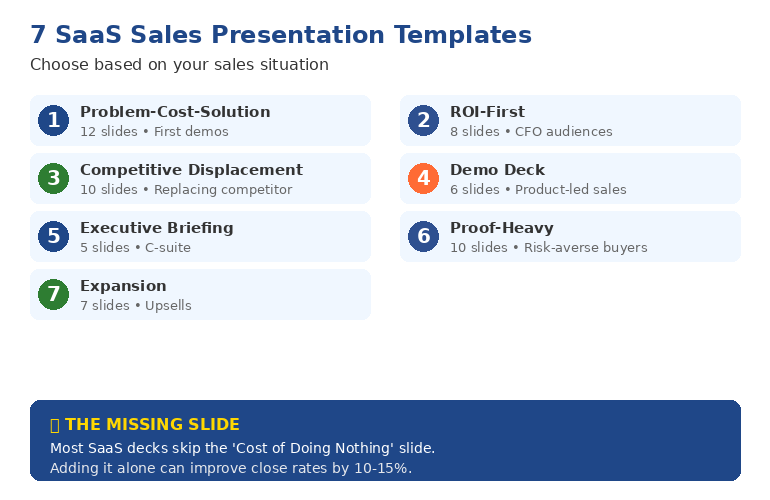
7 SaaS sales presentation templates overview - choose based on your sales situation

Template 1: The Problem-Cost-Solution Deck (12 slides)

Best for: First demo calls, discovery-heavy sales processes

Structure:

  1. Title slide — Company name, prospect name, date
  2. Agenda — What you’ll cover (sets expectations)
  3. Their world today — Describe their current process (shows you understand)
  4. The problem — What’s broken, with specific pain points
  5. Cost of inaction — Quantified: time, money, opportunity cost
  6. There’s a better way — Transition slide
  7. Solution overview — High-level, not features
  8. How it works — 3 steps maximum
  9. Proof — One case study, specific numbers
  10. ROI for you — Projected savings/gains for THIS prospect
  11. What others say — 2-3 testimonials
  12. Recommended next step — Specific action, not “any questions”

Why it works: The prospect sees themselves in the first 5 slides. By the time you show the product, they’re already convinced they need something to change.

This is the template that took my client from 6% to 39% close rate. The structure forces you to earn the right to talk about your product.

Problem-Cost-Solution 12-slide structure - Understand, Solve, Prove phases

Template 2: The ROI-First Deck (8 slides)

Best for: CFO-heavy buying committees, enterprise deals

Structure:

  1. The number — Open with projected ROI: “£340K saved in year one”
  2. How we calculated it — Show your math (builds credibility)
  3. The 3 cost drivers — Where savings come from
  4. Proof it works — Similar company, similar results
  5. Implementation timeline — How fast they see value
  6. Investment required — Pricing in context of ROI
  7. Risk mitigation — Guarantees, pilot options
  8. Decision framework — What to consider, recommended path

Why it works: Finance buyers don’t care about features. They care about returns. This deck speaks their language from slide one.

I used this structure to help a fintech company close a £2.1M enterprise deal. The CFO later said: “You were the only vendor who showed us the math before showing us the product.”

Template 3: The Competitive Displacement Deck (10 slides)

Best for: Prospects using a competitor, replacement sales

Structure:

  1. What’s changed — Market shifts since they chose current vendor
  2. Where [Competitor] falls short — 3 specific gaps (based on discovery)
  3. What modern solutions do differently — Category evolution
  4. Our approach — How you solve those specific gaps
  5. Migration story — Company that switched, why, and results
  6. Side-by-side — Honest comparison (include where competitor wins)
  7. Switching cost analysis — Time to value, implementation support
  8. Customer success commitment — What happens after they sign
  9. Transition plan — Week-by-week for first 90 days
  10. Decision timeline — What needs to happen by when

Why it works: Switching vendors is risky. This deck acknowledges that risk and systematically removes objections.

Template 4: The Demo Deck (6 slides + live demo)

Best for: Product-led sales, technical buyers

Structure:

  1. What you told us — Recap discovery call priorities
  2. What we’ll show you — 3 things, tied to their priorities
  3. Quick context — 60-second company/product overview
  4. [LIVE DEMO] — Focused on their use case
  5. What you saw — Recap benefits (not features)
  6. Next steps — Trial, pilot, or procurement path

Why it works: Most demos are 45 minutes of clicking through features. This structure keeps the demo focused on what matters to THIS buyer.

⏱️
Stop Rebuilding These From Scratch

You could recreate these 7 templates yourself — hours of work for each one. Or get them as editable PowerPoints, tested on real deals that closed £250M+, ready to customise in 10 minutes.

Get the Executive Slide System — £39 →

Template 5: The Executive Briefing Deck (5 slides)

Best for: C-suite presentations, board-level decisions

Structure:

  1. The strategic challenge — Business problem, not product category
  2. Market reality — What’s changed, why action is urgent
  3. Recommended approach — Your solution as strategy, not software
  4. Expected outcomes — Business metrics, not feature benefits
  5. Decision and next steps — What you need from them

Why it works: Executives have 15 minutes and zero patience for feature tours. This deck respects their time and frames your product as a strategic decision.

Related: Executive Presentation Template: 12 Slides That Command the Room

Template 6: The Proof-Heavy Deck (10 slides)

Best for: Risk-averse buyers, heavily regulated industries

Structure:

  1. Who we’ve helped — Logo slide with recognisable names
  2. Case study 1 — Similar company, specific results
  3. Case study 2 — Different use case, similar results
  4. Case study 3 — Their industry specifically
  5. The pattern — What these companies have in common
  6. How we do it — Brief methodology
  7. Security and compliance — Certifications, data handling
  8. Implementation approach — De-risked rollout plan
  9. Support structure — What happens when things go wrong
  10. Getting started — Low-risk first step (pilot, POC)

Why it works: Some buyers need overwhelming evidence before they’ll move. This deck provides it systematically.

Template 7: The Expansion Deck (7 slides)

Best for: Upsells, cross-sells, existing customer growth

Structure:

  1. Your results so far — What they’ve achieved with you
  2. What’s changed — New challenges, growth, market shifts
  3. The gap — What’s now possible that wasn’t before
  4. The opportunity — Specific expansion recommendation
  5. Expected additional value — Quantified improvement
  6. How others expanded — Similar customer story
  7. Recommended path — Timeline and investment

Why it works: Expansion deals should feel like a natural next step, not a new sale. This deck builds on the relationship you’ve already established.

The Slide Most SaaS Decks Are Missing

After reviewing hundreds of decks, the most common gap: the “Cost of Doing Nothing” slide.

Most SaaS sellers assume the prospect knows their problem is expensive. They don’t. Or they’ve normalised it.

Quantify the status quo:

  • “Your team spends 12 hours/week on manual data entry. At £50/hour, that’s £31,200/year.”
  • “You’re losing 23% of leads to slow response time. On your pipeline, that’s £180K in missed revenue.”
  • “Compliance incidents cost £15K each to resolve. You had 4 last year.”

This slide alone can move close rates by 10-15%. It reframes your price as an investment, not a cost.

Related: Best Copilot PowerPoint Prompts That Actually Work

Which Template Should You Use?

  • Discovery-heavy process? → Problem-Cost-Solution (Template 1)
  • Selling to finance? → ROI-First (Template 2)
  • Replacing a competitor? → Competitive Displacement (Template 3)
  • Product-led sales? → Demo Deck (Template 4)
  • C-suite audience? → Executive Briefing (Template 5)
  • Risk-averse buyers? → Proof-Heavy (Template 6)
  • Existing customers? → Expansion (Template 7)

Why the Free Checklist Isn’t Enough

The free checklist gives you the thinking framework. But frameworks without templates means hours of work building each deck from scratch.

What You Get DIY Approach Executive Slide System
Time to create each deck 4-6 hours 10 minutes to customise
All 7 templates Build yourself ✓ Included
Tested on real deals No ✓ £250M+ closed
Frameworks included Basic checklist ✓ AVP, 132 Rule, S.E.E.
Updates You maintain ✓ Lifetime access
Investment Your time (28-42 hours) £39

📦 ALL 7 TEMPLATES + FRAMEWORKS

Executive Slide System

Every template from this article as editable PowerPoints. Plus the AVP framework, 132 Rule, and S.E.E. Formula that make them work.

Get the Templates — £39 →

Instant download. Lifetime access. 30-day refund guarantee.

Frequently Asked Questions

What should a SaaS sales deck include?

Every effective SaaS sales presentation needs: problem definition, cost of inaction, solution overview, proof (case studies with specific numbers), ROI projection for this specific prospect, and a clear next step. The exact structure depends on your buyer — see Templates 1-7 above for different situations.

How many slides should a SaaS sales deck have?

5-12 slides for most situations. Executive briefings can be as few as 5. Discovery-heavy demos might go to 12. Never more than 15 — if you need more slides, you need a clearer message. The 34-slide decks I see from most SaaS companies are why their close rates are under 20%.

What’s the difference between a pitch deck and a sales deck?

Pitch decks raise money (investor audience). Sales decks close customers (buyer audience). Investors evaluate market size, team, and return potential. Buyers evaluate problem fit, ROI, and implementation risk. The structure is different because the decision criteria are different. See our Investor Pitch Deck Template for the fundraising version.

How do I improve my SaaS demo close rate?

Three changes make the biggest difference: (1) Add a “Cost of Doing Nothing” slide that quantifies their current pain, (2) Show proof before features — case studies early, product deep-dives only if asked, (3) End with a specific next step, not “any questions?” These changes alone typically improve close rates by 10-20%.

📧
The Winning Edge Newsletter

Weekly insights on presentations that close deals and advance careers.

Subscribe Free →

Related Resources

About the Author

Mary Beth Hazeldine has trained sales teams on high-stakes presentations for 35 years. With 24 years in corporate banking at JPMorgan Chase, PwC, Royal Bank of Scotland, and Commerzbank, she’s seen what separates deals that close from those that stall. Her clients have closed over £250 million using her presentation frameworks. She teaches at Winning Presentations.

14 Dec 2025
Investor pitch deck template - The Sequoia format that raised billions

Investor Pitch Deck Template: The Sequoia Format (With What They Cut)

📅 Updated: December 2025 | Based on 50+ funded pitch decks

The best investor pitch deck template follows the Sequoia format: 10 slides covering Company Purpose, Problem, Solution, Why Now, Market Size, Competition, Product, Business Model, Team, and Financials. Lead with your strongest story. Keep it under 15 slides. Make every slide answer one question: “Why should I invest?”

🎁 FREE DOWNLOAD

Investor Pitch Deck Checklist

10-slide framework + what investors look for on each slide. One page. Print before your pitch.

Download Free Checklist →

No spam. Unsubscribe anytime.


In 2019, I worked with a biotech founder developing a rare disease treatment who’d been rejected by 23 investors.

Her science was solid. Her market was massive. Her team had three PhDs. But she couldn’t get past the first meeting.

The problem wasn’t her company. It was her deck.

She’d built a 47-slide presentation that started with the molecular structure of her compound. By slide 8, investors’ eyes were glazed. She never got to the market opportunity.

We rebuilt her deck using the Sequoia format — 10 slides, story-first, problem-solution structure. She raised £3.2M in her next round.

The template I’m sharing today is the same structure we used. It’s based on the format Sequoia Capital recommends to their portfolio companies, refined through 50+ pitch decks I’ve helped create — including 12 that raised over £50M combined.

Why the Sequoia Format Works

Sequoia Capital has backed Apple, Google, Airbnb, Stripe, and WhatsApp. They’ve seen more pitch decks than almost anyone in venture capital.

Their recommended format isn’t arbitrary. It’s designed around how investors actually evaluate opportunities:

  1. Can I understand this in 3 minutes? — If your deck requires explanation, you’ve lost
  2. Is this a big market? — VCs need billion-dollar outcomes
  3. Why will this team win? — Ideas are cheap; execution is everything
  4. Why now? — Timing kills more startups than bad ideas

The 10-slide structure answers each of these questions in a logical sequence. Miss one, and the investor has a reason to say no.

The Sequoia 10-slide pitch deck structure from company purpose to financials

The 10-Slide Investor Pitch Deck Template

Slide 1: Company Purpose

The question it answers: What do you do in one sentence?

This slide should take 10 seconds to read and understand. If an investor can’t explain your company to their partner after seeing this slide, you’ve failed.

Include:

  • Company name and logo
  • One-line description (what you do, not how you do it)
  • Tagline if you have one that’s genuinely memorable

Example: “Stripe: Payments infrastructure for the internet”

Common mistake: Describing features instead of purpose. “AI-powered B2B SaaS platform leveraging machine learning” tells investors nothing. “We help retailers predict what customers will buy next” tells them everything.

Slide 2: Problem

The question it answers: What painful problem exists?

Make the investor feel the problem. Quantify it. Show that real people or companies are suffering right now — and willing to pay for a solution.

Include:

  • Clear problem statement
  • Who has this problem (be specific)
  • How big the problem is (quantified)
  • What they’re doing today (and why it’s not good enough)

Example: “UK retailers lose £2.3B annually to stockouts. Current forecasting tools are 60% accurate. Buyers spend 15 hours/week manually adjusting orders.”

Slide 3: Solution

The question it answers: How do you solve this?

Don’t describe every feature. Show the core insight — the thing you do differently that makes the problem go away.

Include:

  • Your solution in one sentence
  • How it works (high level)
  • The key insight that makes you different
  • Screenshot or visual if it helps understanding

Example: “Our AI predicts retail demand with 94% accuracy by analysing real-time signals competitors can’t access — social media, weather, local events.”

📄
Get the Complete Checklist

All 10 slides with what investors look for on each. One-page PDF you can reference while building your deck.

Download Free Checklist →

Slide 4: Why Now

The question it answers: Why is this the right moment?

This is the slide most founders skip — and it’s often the most important. Investors have seen similar ideas before. Why will yours work now when others failed?

Include:

  • Market shift (regulation, technology, behaviour change)
  • Why previous attempts failed and what’s different
  • Urgency — what happens if you wait?

Example: “Three things changed in 2024: (1) Real-time social data became accessible via API, (2) Retailers finally have clean POS data, (3) Post-pandemic, demand volatility is 3x higher than 2019.”

I worked with a fintech founder who had a brilliant product but kept getting “interesting, but not right now” responses. His Why Now slide said: “The market is growing.”

We rewrote it to: “Open Banking regulation just forced banks to share data. In 18 months, every bank will need what we’ve already built.”

He closed his round in 6 weeks.

Slide 5: Market Size

The question it answers: Is this big enough to matter?

VCs need billion-dollar outcomes. Your market needs to be large enough that capturing even a small share creates a significant company.

Include:

  • TAM (Total Addressable Market) — the entire market
  • SAM (Serviceable Addressable Market) — the part you could realistically reach
  • SOM (Serviceable Obtainable Market) — your target in the next 2-3 years
  • Source your numbers — “McKinsey estimates” beats “we think”

Common mistake: Absurd TAM claims. “The global retail market is £20 trillion” tells investors nothing. “UK mid-market retailers spend £400M annually on demand forecasting tools” is specific and credible.

Slide 6: Competition

The question it answers: Who else is solving this, and why will you win?

“We have no competition” is a red flag. Every company has competition — even if it’s the status quo of doing nothing.

Include:

  • Competitive landscape (2×2 matrix works well)
  • Key competitors and their approach
  • Your differentiation — what you do that they can’t easily copy
  • Why customers choose you over alternatives

Example positioning: “SAP and Oracle serve enterprise. Inventory Planner serves SMB. We’re the only solution built specifically for mid-market retailers (£10M-£500M revenue) with the accuracy they need at a price they can afford.”

Slide 7: Product

The question it answers: What have you actually built?

Show, don’t tell. Screenshots, demos, or visually striking representations of your product. This is where investors see if you can execute.

Include:

  • Product screenshots or demo
  • Key features (3-4 maximum)
  • What makes it delightful to use
  • Stage of development (MVP, beta, production)

Tip: If your product isn’t visual (APIs, backend infrastructure), show the customer-facing output or dashboard. Investors want to see what users experience.

Slide 8: Business Model

The question it answers: How do you make money?

Be specific. “SaaS subscription” isn’t enough. Show pricing, customer segments, and the unit economics that make this a good business.

Include:

  • Revenue model (subscription, transaction, marketplace, etc.)
  • Pricing and customer segments
  • Key metrics: CAC, LTV, payback period (if you have them)
  • Path to profitability

Example: “£2,000/month per retailer. Average contract: 24 months. Current CAC: £8,000. LTV:CAC ratio: 6:1. Payback: 4 months.”

Slide 9: Traction

The question it answers: Is this actually working?

Show momentum. Investors want to see that something is happening — customers, revenue, usage, partnerships. Even early traction is better than projections.

Include:

  • Key metrics (revenue, customers, users, growth rate)
  • Notable customers or logos
  • Month-over-month growth
  • Key milestones achieved

If you’re pre-revenue: Show other signals — waitlist size, LOIs, pilot agreements, engagement metrics. Anything that proves demand exists.

Slide 10: Team

The question it answers: Why will this team win?

At early stages, investors bet on teams as much as ideas. Show why your specific combination of people is uniquely positioned to solve this problem.

Include:

  • Founders with photos and titles
  • Relevant experience (keep it to 1-2 lines each)
  • Why this team for this problem
  • Key hires or advisors (if they add credibility)

Example: “CEO: 10 years at Tesco leading demand planning. CTO: Built recommendation engine at Amazon. Together: We’ve seen this problem from both sides.”

Slide 11: The Ask

The question it answers: What do you want from me?

Be specific about how much you’re raising, what you’ll use it for, and what milestones you’ll hit.

Include:

  • Amount raising
  • Use of funds (broad categories)
  • Milestones this gets you to
  • Timeline

Example: “Raising £2M Seed. 18-month runway. Milestones: 50 customers, £2M ARR, Series A ready.”

Related: 15 Killer Pitch Deck Templates That Raised £500M+

Before and after pitch deck transformation - from cluttered to clear investor-ready slides

Common Pitch Deck Mistakes

After helping build 50+ funded pitch decks, I see the same mistakes repeatedly:

Mistake 1: Starting with the solution

Your technology is not the story. The problem is the story. If investors don’t feel the pain, they won’t care about your cure.

Mistake 2: Claiming no competition

This tells investors you either don’t understand your market or you’re not being honest. Both are disqualifying.

Mistake 3: Financial hockey sticks with no basis

“We’ll hit £50M revenue in year 3” means nothing without showing how you’ll get there. Bottom-up projections beat top-down fantasies.

Mistake 4: Too many slides

If you can’t tell your story in 10-15 slides, you don’t understand your story well enough. Every slide that doesn’t strengthen the case weakens it.

Mistake 5: Reading your slides

Your deck is a visual aid, not a script. If everything you say is on the slide, why are you there?

Related: Why Your Investor Pitch Deck Isn’t Getting Meetings

Using AI to Build Your Pitch Deck

Tools like PowerPoint Copilot can accelerate pitch deck creation — but use them strategically.

What AI helps with:

  • First-draft structure and flow
  • Consistent formatting and design
  • Generating slide variations quickly
  • Refining language and clarity

What AI can’t do:

  • Know what makes your story compelling
  • Determine the right emphasis for your audience
  • Replace founder authenticity
  • Answer investor questions in the room

Use AI to save time on mechanics. Spend that saved time on what matters: refining your story and practising your delivery.

Related: Best Copilot PowerPoint Prompts That Actually Work

Beyond the Template

A template gives you structure. But structure alone doesn’t raise funding.

The founders who close rounds consistently have more than good slides. They have:

  • A compelling narrative — Every slide connects to one story
  • Confident delivery — They know their deck cold
  • Prepared Q&A — They’ve anticipated every hard question
  • Investor homework — They know who they’re pitching and why

The template is the foundation. Preparation is what builds on it.

⭐ RECOMMENDED

The Executive Slide System (£39)

Ready-to-use templates for investor pitches, board presentations, and executive updates — with the structures that get decisions.

  • Investor pitch deck template — Sequoia 10-slide format, ready to customise
  • 9 more executive templates — Board presentation, strategy deck, budget request, and more
  • Sequoia format built-in — 10-slide structure pre-designed
  • Before/after examples — See exactly how to transform weak slides
  • 30 AI prompts — Customise any template in minutes

Get the Executive Slide System — £39 →

Instant download. Use for unlimited presentations.

Free Checklist vs. Executive Slide System

What You Get Free Checklist Executive Slide System (£39)
10-slide Sequoia framework
Ready-to-use pitch deck template ✓ Fully designed
Before/after transformation examples ✓ Real examples
AI prompts for customisation ✓ 30 prompts
10 additional executive templates ✓ Full library
Outcome Know the structure Build your deck in hours

Start With the Free Checklist

The 10-slide framework with what investors look for on each. Print it before you start building.

Download Free Checklist →

Frequently Asked Questions

How many slides should an investor pitch deck have?

10-15 slides maximum. The Sequoia format uses 10 core slides plus an appendix for detailed financials, technical details, or additional team information. Every slide beyond 15 weakens your pitch.

Should I send the deck before or after the meeting?

It depends on the investor. Some prefer to see decks in advance; others want to hear you pitch live. Ask when you book the meeting. If in doubt, offer a teaser (3-5 slides) before and the full deck after.

What’s the most important slide in a pitch deck?

The Problem slide. If investors don’t believe the problem is real, painful, and large, nothing else matters. Spend 30% of your preparation time on this slide.

How do I present market size without looking unrealistic?

Use bottom-up analysis, not top-down. Instead of “1% of a £50B market,” show: “There are 5,000 potential customers × £20K average contract = £100M SAM.” Source your numbers from reputable research.

What if I don’t have traction yet?

Show other signals of demand: waitlist size, LOIs from potential customers, pilot agreements, advisor commitments, or early user engagement metrics. Something is better than projections.

📧
The Winning Edge Newsletter

Weekly insights on pitch decks, investor presentations, and what’s working in fundraising right now.

Subscribe Free →

Related Resources

About the Author

Mary Beth Hazeldine has helped clients raise over £250 million in funding over 35 years. With 24 years of corporate banking experience at JPMorgan Chase, PwC, Royal Bank of Scotland, and Commerzbank, she understands what investors look for from both sides of the table. She teaches at Winning Presentations.
13 Dec 2025
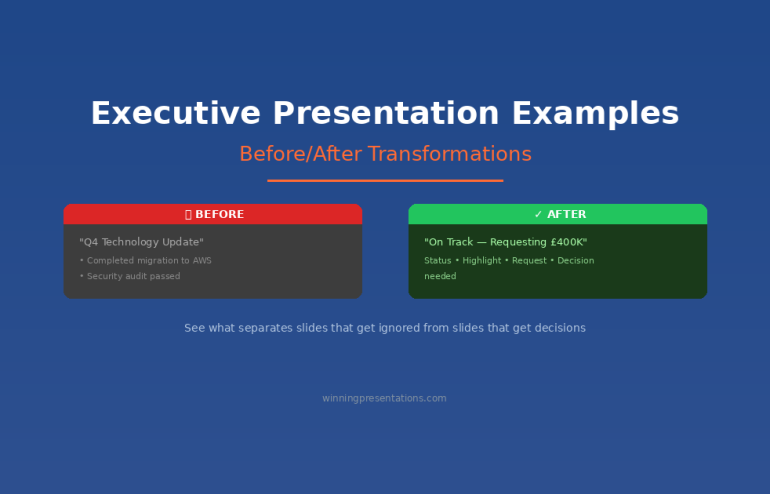
Executive presentation examples - before and after transformations that get decisions

Executive Presentation Examples: Before/After Transformations

📅 Updated: December 2025 | Real examples from client work

Executive presentation examples - before and after transformations that get decisions

Quick Answer

The best executive presentation examples share three traits: they lead with the recommendation, quantify everything, and make the decision obvious. Below are five real before/after transformations showing how small changes to structure, titles, and content turn forgettable slides into decision-driving presentations.

🎁 FREE DOWNLOAD

Executive Presentation Checklist

12-point checklist to transform your slides before your next executive meeting.

Download Free Checklist →

No spam. Unsubscribe anytime.


I’ve reviewed thousands of executive presentations over 35 years. The difference between slides that get ignored and slides that get decisions usually comes down to a handful of fixable mistakes.

A Head of Product at a fintech company came to me last month with a “failed” board presentation. She’d requested £2M for a platform rebuild. The board said “not now.”

I looked at her deck. The content was solid. The analysis was thorough. But the structure was backwards — she’d buried her ask on slide 14 of 18.

We restructured it in an afternoon. Same content. Different order. She re-presented two weeks later and got full approval.

Here are five transformations that show what actually changes.

Example 1: The Executive Summary Slide

❌ Before: Information Dump

Title: “Q4 Technology Update”

Content:

  • Completed migration to AWS (3 months ahead of schedule)
  • Security audit passed with zero critical findings
  • New CRM integration live across 4 regions
  • Mobile app downloads up 34% QoQ
  • Technical debt reduced by 40%
  • Team expanded to 47 FTEs
  • Budget tracking 3% under forecast

Problem: No recommendation. No ask. No clear “so what?” The executive has to work to figure out what matters.

✅ After: Decision-Ready

Title: “Q4 Technology: On Track — Requesting £400K for Q1 Security Enhancement”

Content:

  • Status: All major initiatives on track, 3% under budget
  • Highlight: AWS migration complete 3 months early, saving £180K annually
  • Request: £400K Q1 investment in security automation (ROI: 200% over 2 years)
  • Decision needed: Approve budget allocation by January 15

Why it works: The title tells you everything. Status, headline win, and the ask — all visible in 10 seconds.

Related: The Executive Summary Slide: How to Write the Only Slide That Matters

Before and after executive slide title transformation - from Q4 Technology Update to decision-ready title with specific ask

Example 2: The Budget Request

❌ Before: Buried Ask

Slide 1: “Marketing Technology Assessment”

Slides 2-8: Current state analysis, market research, competitor benchmarking

Slide 9: Vendor evaluation matrix

Slide 10: Implementation considerations

Slide 11: “Recommendation: Invest £350K in marketing automation platform”

Problem: The CFO stopped listening at slide 4. By the time you reached your ask, the room had mentally moved on.

✅ After: Ask First

Slide 1: “Requesting £350K for Marketing Automation — 280% ROI in 18 Months”

  • The ask: £350K one-time + £40K annual
  • The return: £980K revenue impact by Q4 2026
  • The risk: Vendor lock-in mitigated by 90-day exit clause
  • Decision needed today: Approve for Q1 implementation

Slides 2-4: Supporting evidence (for those who want it)

Appendix: Full analysis, vendor comparison, implementation plan

Why it works: Executives can say yes at slide 1. Everything else is backup.

Related: Budget Presentation Template: How to Get Your Budget Approved First Time

📄
Transform Your Next Presentation

Get the 12-point checklist to audit your slides before any executive meeting.

Download Free →

Example 3: The Slide Title

This is the single highest-impact change you can make. Most presenters use slide titles as labels. Executives want slide titles as headlines.

❌ Before: Label Titles

  • “Q3 Sales Results”
  • “Customer Satisfaction Data”
  • “Competitive Analysis”
  • “Risk Assessment”
  • “Next Steps”

✅ After: Headline Titles

  • “Q3 Sales Beat Target by 12% — Driven by Enterprise Segment”
  • “NPS Up 18 Points: Product Changes Working”
  • “We’re Losing on Price but Winning on Support”
  • “Three Risks to Monitor — All Have Mitigation Plans”
  • “Approve £200K Today to Capture Q4 Opportunity”

The test: Could an executive skip your presentation, read only the titles, and understand your message? If yes, you’ve done it right.

Related: Stop Writing Slide Titles Like This (Before and After Examples)

Example 4: The Risk Slide

❌ Before: Risk Register Dump

A 30-row table with columns for risk ID, category, description, likelihood, impact, owner, status, mitigation, and last updated. Unreadable. Ignored.

✅ After: Top 3 That Matter

Title: “Three Risks to Watch — All Have Mitigation Plans”

Risk Impact Mitigation
Vendor delivery slips 6-week delay Backup vendor on standby; penalty clause in contract
Key hire doesn’t close 3-month delay Two backup candidates in final stage
Regulatory change Scope increase Monitoring weekly; 15% contingency in budget

Why it works: Executives don’t want to see every risk. They want to know you’ve thought about what matters and have a plan.

Related: How to Present to a CFO: The Finance-First Framework

Example 5: The Recommendation Slide

❌ Before: Vague Direction

Title: “Recommendation”

Content: “We recommend investing in customer experience improvements to drive retention and growth.”

Problem: What investment? How much? What improvements? When? This isn’t a recommendation — it’s a direction.

✅ After: Specific and Actionable

Title: “Recommendation: Approve £180K for CX Platform by December 15”

Content:

  • Investment: £180K (£120K platform + £60K implementation)
  • Timeline: Go-live March 2026
  • Expected return: 8% improvement in retention = £420K annual revenue
  • Alternative: Do nothing — continue losing 2.3% customers monthly to competitors
  • Your decision: Approve budget allocation today

Why it works: Specific. Quantified. Clear consequence of inaction. Easy to say yes.

Related: Executive Presentation Template: 12 Slides That Command the Room

The Pattern Across All Examples

Every transformation follows the same principles:

  1. Lead with the conclusion — Put your recommendation in the title, not the body
  2. Quantify everything — “Significant improvement” means nothing; “12% increase” means something
  3. Make the decision obvious — Tell them exactly what you need and when
  4. Respect their time — If it can be in the appendix, put it in the appendix

Want Ready-to-Use Templates?

These examples show the principles. But building slides from scratch takes time.

The Executive Slide System gives you pre-built templates with these transformations already applied — so you can focus on your content, not your structure.

⭐ RECOMMENDED

The Executive Slide System (£39)

10 ready-to-use templates with the structure that gets decisions — plus before/after examples for every slide type.

  • 10 executive templates — Board, budget, strategy, project update, and more
  • Before/after examples — See exactly how to transform each slide
  • 30 AI prompts — Customise templates in minutes with Copilot
  • Headline title formulas — Never write a weak title again

Get the Executive Slide System — £39 →

Instant download. Use for unlimited presentations.

Start With the Free Checklist

12 questions to audit any executive presentation. Print it before your next meeting.

Download Free Checklist →

Frequently Asked Questions

How long should an executive presentation be?

12 slides maximum for a major decision. 6 slides for an update. Put everything else in the appendix — most executives won’t look at it, but it shows you’ve done the work.

Should every slide have a headline title?

Yes. If you can’t summarise the slide’s message in the title, the slide probably doesn’t have a clear message. Fix the thinking, then fix the title.

What if my executive prefers detailed slides?

Ask them. Some executives genuinely want more detail. But most who say this actually want confidence that detail exists — which the appendix provides. Test with your specific audience.

📧
The Winning Edge Newsletter

Weekly before/after examples and executive presentation tips. No fluff.

Subscribe Free →

Related Resources

About the Author

Mary Beth Hazeldine has trained executives on presentations for 35 years. These examples come from real client transformations across banking, biotech, SaaS, and consulting. She teaches at Winning Presentations.

13 Dec 2025
Executive presentation template - 12 slides that command the room

Executive Presentation Template: 12 Slides That Command the Room

📅 Updated: December 2025 | Based on 500+ executive presentations

Executive presentation template - 12 slides that command the room

Quick Answer

The best executive presentation template follows a 12-slide structure: Executive Summary, Situation Overview, Problem/Opportunity, Recommendation, Strategic Options, Implementation Plan, Resource Requirements, Risk Assessment, Timeline, Success Metrics, Governance, and Call to Action. Lead with your conclusion. Executives decide in the first 2 minutes — give them what they need upfront.

🎁 FREE DOWNLOAD

Executive Presentation Checklist

12-point checklist + slide-by-slide guide. One page. Used by Fortune 500 presenters.

Download Free Checklist →

No spam. Unsubscribe anytime.


The first time I presented to JPMorgan’s Executive Committee, I made a classic mistake.

I built a 35-slide deck. Started with background context. Walked through the analysis methodically. Saved my recommendation for slide 28.

The Managing Director interrupted at slide 4: “What do you want us to do?”

I fumbled forward to my recommendation, completely thrown off. The meeting ended with “send us a summary” — the polite executive way of saying no.

That experience taught me something that changed every presentation I’ve given since: executives don’t want information. They want decisions.

After 24 years presenting to C-suite leaders at JPMorgan, PwC, RBS, and Commerzbank — and training 500+ executives on their own presentations — I’ve developed a 12-slide structure that works every time.

Why Most Executive Presentations Fail

Before I share the template, you need to understand why the typical approach doesn’t work.

Mistake #1: Building up to the conclusion

Academic training teaches us to present evidence, then reach a conclusion. Executive presentations are the opposite. Lead with your recommendation. Then provide supporting evidence for those who want it.

Mistake #2: Including everything

Your 40-slide deck shows how much work you’ve done. Executives don’t care about your effort. They care about the decision in front of them. The appendix exists for a reason — use it.

Mistake #3: Presenting information instead of decisions

“Here’s an update on Project X” is information. “Project X requires £200K additional funding to hit the Q2 deadline — I recommend we approve it” is a decision. Executives want the second one.

Related: The 3-Slide System That Gets Executive Decisions Fast

12-slide executive presentation structure from executive summary to call to action

The 12-Slide Executive Presentation Template

This structure works for board updates, strategic recommendations, budget requests, and major initiative proposals. Adjust the emphasis based on your specific context, but the flow remains consistent.

Slide 1: Executive Summary

Purpose: Give them everything they need in 60 seconds.

This single slide should answer: What’s the situation? What do you recommend? What do you need from them?

If an executive could only see one slide, this is it. Many will make their decision here and use the rest of your presentation to confirm it.

Include:

  • One-sentence situation statement
  • Your recommendation (specific and actionable)
  • Key supporting points (3 maximum)
  • What you need from them (decision, resources, approval)

Related: The Executive Summary Slide: How to Write the Only Slide That Matters

Slide 2: Situation Overview

Purpose: Establish shared understanding of current state.

Keep this factual and brief. You’re not building a case yet — you’re ensuring everyone starts from the same place.

Include:

  • Current state (quantified where possible)
  • Key context executives need
  • What triggered this presentation

Slide 3: Problem or Opportunity

Purpose: Make the case for action.

This is where you create urgency. Quantify the cost of the problem or the value of the opportunity. Make inaction feel expensive.

Include:

  • The problem/opportunity clearly stated
  • Financial impact (cost of inaction or value of action)
  • Why now — what happens if we wait?

📄
Get the Complete Checklist

All 12 slides with what to include on each. One-page PDF you can reference before every executive presentation.

Download Free Checklist →

Slide 4: Recommendation

Purpose: State exactly what you want them to do.

Be specific. “Approve £1.2M investment in customer platform upgrade with a go-live target of September 2026” is a recommendation. “Consider investing in technology improvements” is not.

Include:

  • Your specific recommendation
  • Why this approach over alternatives
  • Expected outcome if approved

Slide 5: Strategic Options

Purpose: Show you’ve considered alternatives.

Present 2-3 options including your recommendation. This demonstrates rigorous thinking and gives executives a sense of control. Make your recommended option clearly the best choice.

Include:

  • Option A (your recommendation) — with pros/cons
  • Option B (viable alternative) — with pros/cons
  • Option C (do nothing) — with consequences

Slide 6: Implementation Plan

Purpose: Prove you can execute.

Executives approve ideas they believe will actually happen. Show you’ve thought through how to make this real.

Include:

  • Key phases or workstreams
  • Major milestones
  • Who owns what
  • Dependencies and assumptions

Slide 7: Resource Requirements

Purpose: Be transparent about what you need.

This is where trust is built or broken. Understate requirements and you’ll lose credibility when reality hits. Overstate and you won’t get approval.

Include:

  • Financial investment (broken down by category)
  • People required (FTEs, contractors, skills)
  • Technology or infrastructure needs
  • Timeline for each investment

Related: Budget Presentation Template: How to Get Your Budget Approved First Time

Slide 8: Risk Assessment

Purpose: Show you’ve thought about what could go wrong.

This is where most presenters lose executives — by either ignoring risks or drowning them in a 50-row risk register.

At RBS, I watched a colleague present a £5M initiative with a single line: “Risks are manageable.” The CFO’s response: “Name three.” He couldn’t. Proposal rejected.

The next week, I presented a similar-sized initiative. I led with our top three risks and the mitigation plan for each. Same CFO said: “You’ve clearly thought this through. Let’s discuss the timeline.”

Include:

  • Top 3-5 risks (no more)
  • Likelihood and impact for each
  • Mitigation strategy
  • Kill switch — what would make you stop?

Related: How to Present to a CFO: The Finance-First Framework

Slide 9: Timeline

Purpose: Make progress visible and measurable.

Executives want to know when they’ll see results and how they’ll track progress. Give them clear milestones.

Include:

  • Key milestones with dates
  • Decision points and checkpoints
  • Quick wins (what will we see in 90 days?)
  • Full completion date

Slide 10: Success Metrics

Purpose: Define what winning looks like.

If you can’t measure it, executives can’t evaluate it. Be specific about how you’ll know this worked.

Include:

  • Primary KPIs (3 maximum)
  • Baseline and target for each
  • How and when you’ll measure
  • Leading indicators (early signs of success/failure)

Slide 11: Governance

Purpose: Show how you’ll stay accountable.

Who’s responsible? How will progress be reported? What authority does the team have? Executives want to approve and move on — show them they can trust the process.

Include:

  • Executive sponsor and project lead
  • Steering committee (if applicable)
  • Reporting cadence and format
  • Escalation process

Slide 12: Call to Action

Purpose: Make the decision easy.

Don’t end with “any questions?” End with exactly what you need them to do, right now.

Include:

  • Specific decision requested
  • What happens after approval
  • Next steps with owners and dates
  • Your contact for follow-up

The Presentation That Changed Everything

Six months after my JPMorgan disaster, I used this structure for a £4M technology investment proposal.

Same Executive Committee. Same intimidating room. Different approach.

I opened with my executive summary: “I’m requesting £4M to modernise our client onboarding platform. ROI is 180% over three years. Main risk is vendor delivery — we’ve built in a kill switch at Phase 1 completion. I need your approval today to hit our Q3 deadline.”

The Managing Director who’d shut me down six months earlier nodded and said: “Walk us through the risks.”

Forty-five minutes later, I had full approval. Not because I was a better speaker. Because I’d given them what they needed in the format they expected.

The structure works. Trust it.

Before and after executive presentation comparison - from information dump to decision-ready structure

Adapting the Template for Different Contexts

The 12-slide structure is a framework, not a straitjacket. Here’s how to adjust for common scenarios:

Board presentations: Emphasise governance, risk, and strategic alignment. Boards think in quarters and years, not weeks. See: Board Presentation Template

Budget requests: Lead with ROI and resource requirements. CFOs want numbers upfront. See: Budget Presentation Template

Project updates: Simplify to 6 slides — summary, progress, risks, decisions needed, next steps, appendix. See: Project Status Updates That Don’t Waste Everyone’s Time

QBR presentations: Focus on metrics, insights, and forward-looking actions. See: QBR Presentation Template

Using AI to Build Your Executive Presentation

Tools like PowerPoint Copilot can accelerate your executive presentations — if you use them strategically.

What AI does well:

  • Generating first-draft structure from your notes
  • Creating consistent formatting across slides
  • Transforming bullet points into visual layouts

What AI can’t do:

  • Know your audience’s politics and priorities
  • Determine the right recommendation for your context
  • Anticipate the questions your specific executives will ask

Use AI for speed. Use your judgment for substance.

Related: Best Copilot PowerPoint Prompts That Actually Work

Why a Template Isn’t Enough

This structure will get you 80% of the way. But structure alone doesn’t command a room.

The executives who consistently get approvals have more than a good template. They have:

  • Pre-meeting relationships — They’ve socialised the recommendation before the meeting
  • Confident delivery — They present without reading slides
  • Q&A mastery — They handle tough questions without getting defensive
  • Executive presence — They project credibility before they say a word

The template is the foundation. The skills are what make it work.

⭐ RECOMMENDED

The Executive Slide System (£39)

Ready-to-use templates for every executive presentation scenario — with the structures proven to get decisions.

  • 10 executive templates — Board, QBR, Budget, Strategy, Project Update, and more
  • 12-slide master structure — Pre-built with guidance on each slide
  • Before/after examples — See exactly how to transform weak slides
  • 30 AI prompts — Customise every template in minutes
  • Executive summary templates — The slide that matters most

Get the Executive Slide System — £39 →

Instant download. Use for unlimited presentations.

Free Template vs. Executive Slide System

What You Get Free Checklist Executive Slide System (£39)
12-slide structure guide
Ready-to-use PowerPoint templates ✓ 10 templates
Before/after examples ✓ Real transformations
AI prompts for customisation ✓ 30 prompts
Executive summary templates ✓ Multiple formats
Outcome Know what to include Build it in minutes

Start with the Free Checklist

Get the 12-slide structure with what to include on each. Print it before your next executive presentation.

Download Free Checklist →

Frequently Asked Questions

How long should an executive presentation be?

12 slides for a major decision. 6 slides for an update. Rule of thumb: 2 minutes per slide maximum. If your meeting is 30 minutes, prepare 12 slides and expect to only get through 8 — the rest is Q&A.

Should I send the presentation before the meeting?

Yes — 24-48 hours in advance if possible. This gives executives time to form questions and means less time presenting, more time discussing. Pre-read culture is standard at most Fortune 500 companies.

How do I handle pushback on my recommendation?

Don’t get defensive. Acknowledge the concern, ask a clarifying question, then address it directly. “That’s a fair point. Can you help me understand what specifically concerns you about the timeline? … I see. Here’s how we’ve built in contingency for that.”

What if I have more than 12 slides of content?

Put it in the appendix. The core 12 slides are your presentation. Everything else is backup for questions. Most executive meetings never get to the appendix — and that’s fine.

How do I present virtually vs. in-person?

Virtual requires tighter structure and more visual slides — executives are more likely to multitask. Keep slides less text-heavy, use more visuals, and check in more frequently: “Any questions before I move to risks?”

📧
The Winning Edge Newsletter

Weekly insights on executive presentations, AI-enhanced workflows, and what’s actually working in boardrooms right now.

Subscribe Free →

Related Resources

About the Author

Mary Beth Hazeldine has trained executives on presentations for 35 years. With 24 years at JPMorgan Chase, PwC, Royal Bank of Scotland, and Commerzbank, she’s presented to C-suite leaders on deals worth billions — and helped clients raise over £250 million using her proprietary frameworks. She now teaches at Winning Presentations.


11 Dec 2025
Budget request slides - the CFO-approved 6-slide format that gets yes

Budget Request Slides: The CFO-Approved Format That Gets Yes [2026]

📅 Updated: December 2025 — Includes AI prompts to build your slides in 20 minutes

Quick Answer: What Should Budget Request Slides Include?

Effective budget request slides follow a 6-slide format: (1) The Ask — your specific request and expected ROI upfront, (2) The Problem — cost of inaction, (3) The Solution, (4) ROI calculation with visible assumptions, (5) Implementation timeline, (6) Risk mitigation. The key is leading with your number, not burying it after 20 slides of background research.

⭐ GET BUDGET REQUEST TEMPLATES

Executive Slide System

Pre-built budget slides + ROI calculator + AI prompts to customise

Download Templates — £39

Includes budget, board, QBR, and strategy templates


Why Most Budget Slides Get Rejected

I’ve reviewed hundreds of budget presentations. The pattern is always the same: 20 slides of research, analysis, and justification — then finally, buried on slide 18, the actual request.

By then, the CFO has mentally checked out.

Here’s what CFOs are actually thinking during your presentation: “What do you want, how much, and why should I prioritise this over everything else competing for budget?”

If you don’t answer that in the first 30 seconds, you’re fighting uphill.

Related: Budget Presentation Template: Complete Guide

The 6-Slide Budget Format That Works

This format has helped my clients secure over £250 million in funding. It works because it mirrors how CFOs actually evaluate requests.

Budget request slides - the CFO-approved 6-slide format that gets yes

Slide 1: The Ask

State your request in the first 30 seconds. Example: “Requesting £400K for marketing automation. Expected return: £1.2M in 12 months. 3x ROI. Decision needed by January 15.”

Slide 2: The Problem

Quantify the cost of doing nothing. CFOs respond to loss more than gain. What is the current situation costing in money, time, or missed opportunity?

Slide 3: The Solution

What you’re proposing and why this option versus alternatives. Keep it tight — you’re not selling the product, you’re selling the outcome.

Slide 4: The ROI

This is the slide CFOs actually care about. Show investment, expected return, payback period, and — critically — your assumptions. CFOs don’t trust black-box numbers.

Slide 5: The Timeline

Key milestones with dates. Include a checkpoint where you’ll evaluate results. This reduces perceived risk.

Slide 6: The Risk

Address what could go wrong before they ask. Show your mitigation plan. CFOs trust presenters who acknowledge uncertainty.

📧
Get Weekly Presentation Tips

Join executives getting my best frameworks and AI prompts every Thursday.

Subscribe to The Winning Edge →

The ROI Slide: Get This Right

Your ROI slide should be scannable in 5 seconds. Use this format:

Metric Amount
Total Investment £400,000
Expected Return (Year 1) £1,200,000
ROI 200%
Payback Period 4 months

Always show your assumptions. A footnote saying “Based on 15% conversion improvement (industry benchmark: 12-18%)” builds credibility instantly.

Use AI to Build Your Budget Slides

With Copilot, you can generate the first draft in 20 minutes.

Try this prompt:

"Create a 6-slide budget request presentation. Slide 1: Executive ask with amount, expected ROI, and deadline. Slide 2: Cost of current problem. Slide 3: Proposed solution. Slide 4: ROI table with assumptions. Slide 5: Implementation timeline. Slide 6: Risk mitigation. Context: [your details]. Professional tone for CFO audience."

Related: 50 Best Copilot Prompts for PowerPoint

Choose Your Path

Just Need AI Prompts?

25 prompts for executive presentations

Quick Start — £9.99

Want Ready-to-Use Templates?

Budget slides + ROI calculator built in

Slide System — £39

Related Resources

About the Author

Mary Beth Hazeldine spent 24 years in corporate banking at JPMorgan Chase, PwC, Royal Bank of Scotland, and Commerzbank, helping clients secure over £250 million in funding. She now trains executives at Winning Presentations.

11 Dec 2025
Budget presentation template - the 6-slide structure that gets CFOs to say yes - free template and AI prompts from Winning Presentations

Budget Presentation Template: How to Get Your Budget Approved First Time [2026]

📅 Last Updated: December 11, 2025 — Includes AI prompts to build your budget deck in 20 minutes

Quick Answer: What Makes a Budget Presentation Get Approved?

The most effective budget presentation template follows a 6-slide structure: (1) The Ask — lead with your specific request and expected ROI, (2) The Problem — cost of inaction, (3) The Solution, (4) ROI calculation with assumptions, (5) Timeline with milestones, (6) Risk mitigation. CFOs approve budgets that make the ROI obvious and the decision easy. Put your ask on slide 1, not slide 15.

📥
Want the Complete Budget Template Pack?

Stop building budget decks from scratch. Get ready-to-use templates with the exact 6-slide structure CFOs expect — plus AI prompts to customise them for your specific request.

✓ 6-slide budget template
✓ ROI calculator slides
✓ CFO-ready formatting
✓ AI customisation prompts

Get the Executive Slide System — £39

Includes budget, board, QBR, and strategy templates • Instant download


Why Most Budget Presentations Get “Let’s Revisit Next Quarter”

In 2019, a marketing director asked me to review her budget presentation before a critical board meeting. She wanted £400K for a new platform. Her slides were thorough — market research, vendor comparisons, implementation timeline.

She didn’t get the budget. The CFO said it was “interesting” and suggested they “revisit it next quarter.”

Three months later, she came back with the same request — but a completely different presentation. Six slides instead of twenty-two. Numbers framed differently. One critical addition.

She got £500K. More than she’d originally asked for.

The difference wasn’t better data. It was better structure.

After 24 years in corporate banking at JPMorgan Chase, PwC, Royal Bank of Scotland, and Commerzbank — where I helped clients secure over £250 million in funding — I’ve learned that budget approvals follow predictable patterns. CFOs and boards don’t reject good ideas. They reject presentations that don’t speak their language.

This is the budget presentation template that gets approvals — the same structure I teach executives who need to secure resources without endless back-and-forth.

What You’ll Learn in This Guide

  • The 6-slide budget template that gets CFOs to say yes
  • Why most budget requests get “let’s revisit next quarter” (and how to avoid it)
  • The ROI framework that makes your numbers impossible to ignore
  • How to use AI tools like Copilot to build your budget deck in 20 minutes
  • The one question you must answer before slide 1

📧 Get Weekly Presentation Tips

Join 500+ executives getting my best insights on AI-powered presentations every Thursday.
Subscribe to The Winning Edge →


Why Most Budget Presentations Fail

I’ve reviewed hundreds of budget presentations. The pattern is painfully consistent:

Twenty slides of justification. Charts showing market trends. Competitive analysis. Implementation timelines. Risk assessments. All the “homework” that proves you’ve done your research.

And then the CFO says: “This is thorough. Let’s discuss it offline.”

Translation: No.

Here’s what most people miss: CFOs don’t approve budgets because of research. They approve budgets because of ROI.

Every budget request is competing against every other budget request in the company. The marketing platform competes against the sales tool competes against the engineering hire competes against the office expansion. CFOs are playing portfolio allocation.

Your job isn’t to prove your idea is good. Your job is to prove it’s the best use of the company’s next pound.

That requires a completely different presentation structure.Budget presentation ROI framework showing investment, return, timeline, and risk

The Budget Presentation Template: 6 Slides That Get Approved

This template is designed around how CFOs actually think. Instead of building up to your request, you lead with it. Instead of hoping they see the ROI, you calculate it for them.

Slide 1: The Ask (Yes, First)

Most budget presentations bury the request on slide 15. By then, you’ve lost them.

Start with what you want. Be specific. Be bold.

What to include:

  • The exact amount you’re requesting
  • What it will fund (one sentence)
  • The expected return (quantified)
  • When you need the decision

Example: “Requesting £400K for marketing automation platform. Expected return: £1.2M additional revenue in 12 months (3x ROI). Decision needed by January 15 for Q1 implementation.”

That’s 32 words. A CFO can read it in 8 seconds and know exactly what’s at stake.

Why this works: CFOs are busy. They’re context-switching between meetings. If they don’t know what you want in the first 30 seconds, they spend the rest of your presentation wondering “where is this going?” instead of evaluating your case.

Slide 2: The Problem (Cost of Inaction)

This is the slide most people skip — and it’s often the most important one.

Before a CFO will spend money on your solution, they need to feel the pain of the current state. What is the problem costing the company right now?

What to include:

  • The current state (quantified pain)
  • What it’s costing in money, time, or opportunity
  • What happens if we do nothing

Example: “Current state: Manual lead processing takes 12 hours/week (£31K annual labour cost). We’re losing 23% of leads due to slow response time (£180K lost revenue). Competitors using automation are winning deals we should be closing.”

Pro tip: “Cost of inaction” is more powerful than “benefit of action.” Loss aversion is real. A CFO will work harder to avoid losing £180K than to gain £180K.

Slide 3: The Solution (What You’ll Do)

Now — and only now — explain what you want to buy and why.

What to include:

  • What you’re proposing (specific solution)
  • Why this solution vs. alternatives
  • What success looks like

Keep this slide tight. You’re not selling the product — you’re selling the outcome.

Example: “Solution: HubSpot Marketing Hub (Enterprise). Why HubSpot: Integrates with existing Salesforce CRM, 4.5/5 G2 rating, 3 competitors in our space already using it. Success metric: Lead response time under 5 minutes, 15% conversion rate improvement.”

Related: The Executive Summary Slide: How to Write the Only Slide That Matters

Slide 4: The ROI (The Only Slide CFOs Actually Care About)

This is your make-or-break slide. Get this right, and everything else is supporting detail.

What to include:

  • Investment: Total cost (including implementation, training, ongoing)
  • Return: Expected revenue or savings (be specific)
  • Timeline: When returns begin, when you break even
  • Confidence level: How certain are these numbers?

Format this as a simple table:

Metric Amount
Total Investment (Year 1) £400,000
Expected Return (Year 1) £1,200,000
Net Benefit £800,000
ROI 200%
Payback Period 4 months

Critical: Show your assumptions. CFOs don’t trust black-box numbers. A footnote saying “Based on 15% conversion improvement (industry benchmark: 12-18%)” builds credibility. Hiding your assumptions destroys it.

💡
Building Your Budget Deck Now?

The Executive Slide System includes a pre-built ROI calculator slide with the exact table format above — just plug in your numbers. Plus AI prompts to generate your cost-of-inaction analysis.

Get the Templates — £39
or keep reading for the full framework ↓

Slide 5: The Timeline (How You’ll Execute)

CFOs have seen too many approved budgets go nowhere. Show them you’ve thought through implementation.

What to include:

  • Key milestones with dates
  • Who’s responsible for each phase
  • When they’ll see first results
  • Decision points and checkpoints

Example timeline:

  • January: Vendor contract signed, kickoff meeting
  • February: Implementation and CRM integration
  • March: Team training, pilot with 2 campaigns
  • April: Full rollout, first performance review
  • July: 6-month ROI checkpoint

Pro tip: Include a “kill switch” — a checkpoint where you’ll evaluate whether to continue. This reduces perceived risk. “If we’re not seeing 10% improvement by Month 4, we’ll pause and reassess.”

Slide 6: The Risk Mitigation (Why This Won’t Fail)

Every CFO is thinking about what could go wrong. Address it before they ask.

What to include:

  • Top 2-3 risks to success
  • How you’ll mitigate each one
  • What you’ve already done to de-risk

Example:

  • Risk: Team adoption is slow → Mitigation: Vendor provides dedicated onboarding specialist, we’ve identified 3 internal champions
  • Risk: Integration issues with CRM → Mitigation: IT has reviewed architecture, vendor has certified Salesforce integration
  • Risk: ROI takes longer than projected → Mitigation: Month 4 checkpoint, conservative projections (used 12% not 18% benchmark)

Why this works: By raising risks yourself, you show maturity and thoroughness. CFOs trust presenters who acknowledge uncertainty more than those who pretend everything is guaranteed.

The 6-Slide Budget Presentation Template - 1. The Ask 2. The Problem 3. The Solution 4. The ROI T. The Timeline 5. The Risk

The One Question You Must Answer

Before you build a single slide, answer this question:

“Why should the company invest this money in my project instead of any other project?”

This is what CFOs are really evaluating. Your budget request isn’t judged in isolation — it’s judged against every other request on their desk.

If you can’t articulate why your project deserves priority, neither can they. And when CFOs can’t articulate priority, they default to “let’s revisit next quarter.”

The marketing director I mentioned at the start? The difference in her second presentation wasn’t more data. It was one slide showing that her £400K request had higher projected ROI than two other approved projects. She made the CFO’s decision easy by framing her budget in portfolio terms.

She got more than she asked for because she made her project impossible to deprioritise.

How to Build Your Budget Presentation with AI

With Copilot’s new Agent Mode, you can build a solid first draft of your budget presentation in about 20 minutes.

Prompt for Slide 1 (The Ask):

"Create an executive summary slide for a budget request. Amount: [£X]. Purpose: [one sentence]. Expected ROI: [X%]. Decision deadline: [date]. Format as 4 bullet points, each under 15 words."

Prompt for Slide 2 (Cost of Inaction):

"Create a 'cost of inaction' slide showing the business impact of not investing. Current problem: [describe]. Quantify: labour costs, lost revenue, competitive disadvantage. Make CFOs feel the pain of the status quo."

Prompt for Slide 4 (ROI):

"Create an ROI summary table for a budget request. Investment: [£X]. Expected return: [£X]. Include: total cost, expected return, net benefit, ROI percentage, payback period. Add a row for key assumptions."

Related: 50 Best Copilot PowerPoint Prompts That Actually Work

Budget Presentation Mistakes to Avoid

After reviewing hundreds of budget decks, these are the patterns that get requests rejected:

Mistake 1: Burying the ask

If your budget amount doesn’t appear until slide 10, you’ve already lost. CFOs spend the first 9 slides wondering “where is this going?” instead of evaluating your case. Lead with the number.

Mistake 2: Focusing on features, not outcomes

“This platform has AI-powered analytics, automated workflows, and real-time dashboards” tells a CFO nothing. “This platform will reduce lead response time from 12 hours to 5 minutes, increasing conversion by 15%” tells them everything.

Mistake 3: Presenting one option

Sophisticated budget presenters offer choices: “Option A: £400K for full implementation. Option B: £200K for pilot phase with expansion in Q3.” This gives CFOs control and shows you’ve thought through alternatives.

Mistake 4: No clear ROI

If you can’t quantify the return, CFOs can’t justify the spend. “This will improve efficiency” isn’t ROI. “This will save 500 hours annually (£25K in labour costs)” is ROI.

Mistake 5: Ignoring risk

Every CFO is thinking “what if this fails?” If you don’t address it, they assume you haven’t thought about it. Acknowledge risks, then explain your mitigation plan.

Budget Season Timing: When to Present

Timing matters more than most people realise:

  • Best time: 4-6 weeks before budget finalisation. CFOs are actively allocating funds and open to new requests.
  • Good time: Mid-quarter, when there’s flexibility for “found money” from underspent budgets.
  • Worst time: Right after budget lock. You’ll hear “great idea, let’s put it in next year’s planning.”

If you’re reading this in December 2025, January budget requests are still in play at most companies. Move fast.

Free Guide vs. Executive Slide System — What’s the Difference?

What You Get This Article Executive Slide System (£39)
6-slide structure explanation
Ready-to-use PowerPoint templates ✓ 4 template types
Pre-built ROI calculator slide ✓ Plug in your numbers
AI prompts for customisation 3 basic prompts 25+ industry-specific
QBR, board, and strategy templates ✓ Full executive suite
Best for Learning the framework Getting approvals fast

“Got my £180K budget approved in the first meeting. The ROI slide template made the CFO’s decision easy.”

— James T., Head of Operations, Manchester

Frequently Asked Questions

How do you present a budget request to executives?

Lead with your ask, not your research. State the exact amount, expected ROI, and decision deadline in your first slide. Then walk through the problem (cost of inaction), solution, ROI calculation, timeline, and risk mitigation. Keep it to 6 slides maximum. Executives have seen enough 30-slide budget decks — they’ll appreciate the focus.

What should a budget presentation include?

An effective budget presentation needs six elements: (1) The specific ask with expected return, (2) The problem or cost of doing nothing, (3) Your proposed solution, (4) ROI calculation with clear assumptions, (5) Implementation timeline with milestones, (6) Risk mitigation plan. Everything else is appendix material.

How do you justify a budget increase?

Focus on ROI, not need. “We need more resources” gets rejected. “£50K investment will generate £200K in returns (4x ROI) within 12 months” gets approved. Quantify everything: time saved, revenue gained, costs avoided, risks reduced. Make the CFO’s decision mathematically obvious.

How long should a budget presentation be?

Six slides for the core presentation. Everything beyond that goes in the appendix for reference. CFOs don’t have time for 30-slide budget reviews, and long presentations signal fuzzy thinking. If you can’t make your case in 6 slides, you haven’t clarified your thinking yet.

Related Budget and Executive Presentation Resources

MOST POPULAR

Ready to Get Your Budget Approved?

This framework works — but building from scratch still takes time. The Executive Slide System gives you ready-to-use templates with the exact structure above. Just plug in your numbers and present.

QUICK START

£9.99

25 AI prompts for executive decks

Get Quick Start

EXECUTIVE SLIDE SYSTEM ⭐

£39

Templates + prompts + ROI calculators

Get Slide System

Instant download • Ready to customise • Works with any presentation software

About the Author

Mary Beth Hazeldine spent 24 years in corporate banking at JPMorgan Chase, PwC, Royal Bank of Scotland, and Commerzbank, helping clients raise over £250 million in funding. She now trains executives to communicate with impact at Winning Presentations.

10 Dec 2025
QBR presentation template 2026 - 8-slide structure for quarterly business reviews that drive action with the So What framework

QBR Presentation Template: How to Run Quarterly Business Reviews That Drive Action [2026]

📅 Last Updated: December 10, 2025 — Includes AI prompts to build your QBR deck in 30 minutes

Last quarter, a VP of Operations walked into her QBR expecting the usual: present the numbers, answer a few questions, leave. Instead, she walked out with a £200K budget increase she hadn’t even planned to ask for.

The difference? She stopped presenting data and started presenting insight.

I’ve delivered hundreds of quarterly business reviews across 24 years in corporate banking — at JPMorgan Chase, PwC, Royal Bank of Scotland, and Commerzbank. I’ve watched executives tune out within three slides. And I’ve seen the same executives lean forward, engaged, asking how they can help.

The difference is never the data. It’s always the structure.

This is the QBR presentation template that turns quarterly reviews into quarterly wins — the same structure my clients use to run QBRs that actually drive action.

What You’ll Learn in This Guide

  • The 8-slide QBR template that keeps executives engaged
  • Why most quarterly business reviews bore leadership (and how to fix yours)
  • The “So What?” framework that turns data into decisions
  • How to use AI tools like Copilot to build your QBR in 30 minutes
  • Real before/after examples from client transformations

FIRST QBR COMING UP?

Get the essential prompts to build your deck fast

Quick Start Guide — £9.99

Why Most QBR Presentations Fail

I’ve sat through hundreds of quarterly business reviews. The pattern is always the same:

Slide after slide of metrics. Charts showing what happened. Tables comparing this quarter to last quarter. Thirty minutes of “here’s what we did” followed by executives checking their phones.

The problem isn’t the data. It’s the structure.

Most QBRs are built as status reports. But executives don’t need status reports — they have dashboards for that. What they need is insight and direction.

The question isn’t “What happened?” It’s “What does this mean, and what should we do about it?”

Related: Why Most QBR Presentations Bore Leadership (And How to Fix Yours)

The QBR Presentation Template: 8 Slides That Drive Action

8-slide QBR presentation template showing executive summary, scorecard, wins, misses, key insights, next quarter priorities, risks, and the ask

This template flips the traditional QBR on its head. Instead of starting with data, you start with insight. Instead of ending with “any questions?”, you end with a decision.

Slide 1: Executive Summary (The Only Slide That Matters)

If your executives only see one slide, this is it. Most QBRs bury the lead under 20 slides of context. Don’t.

What to include:

  • Quarter performance in one sentence (hit/miss/exceeded)
  • The single most important insight
  • Your recommendation or ask
  • What you need from leadership

Example: “Q4 exceeded target by 12% (£2.4M vs £2.1M goal). Customer acquisition cost dropped 23% due to referral programme. Recommend doubling referral budget in Q1. Need approval for £50K incremental spend.”

That’s 38 words. An executive can read it in 10 seconds and know exactly where you stand and what you need.

Slide 2: Scorecard — Goals vs. Actuals

One slide. One table. No narrative yet — just the numbers.

Format:

  • Metric | Target | Actual | Variance | Status (🟢🟡🔴)
  • Keep to 5-7 key metrics maximum
  • Use colour coding ruthlessly (green/yellow/red)

This slide answers: “Did we hit our numbers?” Nothing more.

Pro tip: Resist the urge to explain variances here. That comes next. The scorecard should be scannable in 5 seconds.

Slide 3: What Worked (Green Items Deep Dive)

Pick your biggest win and explain why it happened. Not what happened — why.

Structure:

  • The result (quantified)
  • The driver (what caused it)
  • The insight (what we learned)
  • The implication (what this means for next quarter)

Example: “Referral revenue up 47%. Driver: We simplified the referral process from 5 steps to 2. Insight: Friction was killing conversions. Implication: Apply same friction analysis to onboarding flow in Q1.”

See the difference? You’re not just reporting — you’re extracting meaning.

Slide 4: What Didn’t Work (Red Items Deep Dive)

This is where most presenters get defensive. Don’t be. Executives respect honesty more than spin.

Structure:

  • The miss (quantified)
  • Root cause (not excuses — actual cause)
  • What we’re doing about it
  • When we expect to see improvement

What NOT to do: “We missed target due to market conditions.” That’s an excuse, not an insight.

What TO do: “We missed target by 15%. Root cause: Our Q3 pipeline was 30% smaller than needed due to August hiring freeze. Action: Added 2 SDRs in October. Expect pipeline recovery by mid-Q1.”

⭐ GET THE COMPLETE QBR TEMPLATE

Executive Slide System

QBR templates + board decks + AI prompts to customise them instantly

Download Templates — £39

Includes QBR, board, budget, and strategy templates

Slide 5: Key Insights — The “So What?” Slide

This is the slide most QBRs miss entirely. You’ve shown the data. Now tell them what it means.

Format: 3-4 bullet points, each structured as:

  • Observation: What we noticed
  • Implication: What it means for the business

Example insights:

  • “Enterprise deals are taking 40% longer to close → Need to revisit our enterprise sales process”
  • “Support tickets dropped 30% after knowledge base update → Self-service is working; invest more here”
  • “Top 10% of customers drive 60% of revenue → Concentrate retention efforts on this segment”

This slide demonstrates that you’re not just tracking numbers — you’re thinking strategically.

Slide 6: Next Quarter Priorities

Based on your insights, what are you going to do about it?

Format:

  • 3-5 priorities maximum (more than 5 means no priorities)
  • Each priority linked to an insight from the previous slide
  • Owner assigned
  • Success metric defined

Example:

  • Priority: Reduce enterprise sales cycle
  • Why: 40% longer close times killing forecast accuracy
  • Owner: Sarah (VP Sales)
  • Success metric: Reduce average cycle from 90 to 65 days

Slide 7: Risks & Dependencies

What could derail your plan? Executives appreciate foresight.

Format:

  • Risk description
  • Likelihood (High/Medium/Low)
  • Impact (High/Medium/Low)
  • Mitigation plan

Keep to 3-4 risks. More than that, and you look like you’re hedging everything.

Include dependencies on other teams or decisions: “Q1 plan assumes marketing budget approval by January 15.”

Slide 8: The Ask

End with what you need from leadership. Be specific.

Types of asks:

  • Budget approval: “Requesting £50K for expanded referral programme”
  • Headcount: “Need approval for 2 additional engineers”
  • Decision: “Need direction on whether to pursue Enterprise or SMB focus”
  • Support: “Need executive sponsor for cross-functional initiative”

If you don’t need anything, say so: “No approvals needed. Presented for visibility and alignment.”

Then stop talking. Let them respond.

Want 100+ Prompts for Every Presentation Type?

QBR prompts, board decks, pitches, and more — all tested on real client work

Master Guide — £29

The “So What?” Framework: My Secret to QBR Slides That Drive Decisions

The So What framework for QBR presentations showing how to turn data into decisions through three iterative questions from revenue data to actionable insightEvery executive I’ve trained learns this framework. It’s the single most powerful tool for turning quarterly business review slides into action.

The rule: Every piece of data must survive three “So what?” questions. If it can’t, cut it.

Here’s how to run a QBR using this framework:

“Revenue was £2.4M this quarter.”
So what?
“That’s 12% above target.”
So what?
“It means our new pricing strategy is working.”
So what?
“We should expand it to the enterprise segment in Q1.”

Now you have an insight worth presenting. You’ve turned a data point into a quarterly business review example that drives a decision.

If you can’t get past “so what?” after three iterations, the data point doesn’t belong in your QBR slides.

I’ve used this framework in hundreds of QBRs. It works for sales quarterly reviews, marketing QBRs, product reviews — any context where you’re presenting performance data to leadership.

QBR Presentation Mistakes to Avoid

Mistake #1: Starting with History

“Before we look at Q4, let me recap Q3…”

No. Executives don’t need a recap. They were there for Q3. Start with this quarter’s results and look forward, not backward.

Mistake #2: Too Many Metrics

If you’re showing 20 KPIs, you’re showing zero insights. Five to seven metrics that actually matter beats a dashboard dump every time.

Ask yourself: “If I could only show three numbers, which would they be?” Start there.

Mistake #3: Charts Without Context

A chart that says “Revenue by Region” with no annotation is useless. Every chart needs a headline that tells me what to notice.

Bad: “Revenue by Region Q4”
Good: “EMEA Revenue Up 34% — Driven by New Partnership”

The headline does the work. The chart provides evidence.

Mistake #4: Ending with “Any Questions?”

That’s not an ending — it’s a surrender. End with your ask, your recommendation, or your key insight. Make them remember something specific.

Mistake #5: Reading the Slides

If you’re reading your slides aloud, you’ve already lost. Your slides are the evidence. Your voice provides the insight, context, and conviction.

Related: Executive Presentation Skills: How CEOs Actually Present

💡 Pro Tip: Rehearse your QBR out loud once. Time yourself. If you’re over 20 minutes of talking, you have too much content. Cut ruthlessly. Executives would rather have 15 focused minutes than 45 unfocused ones.

Using AI to Build Your QBR Faster

A good QBR takes 4-6 hours to build manually. With AI tools like PowerPoint Copilot, you can get a solid first draft in 30-45 minutes.

Here’s my workflow:

Step 1: Generate the Structure

“Create an 8-slide QBR presentation structure for [department/team] covering Q4 performance. Include executive summary, scorecard, wins analysis, misses analysis, key insights, next quarter priorities, risks, and asks.”

Step 2: Build the Scorecard

“Create a scorecard table with these metrics: [list your 5-7 KPIs]. Include columns for Target, Actual, Variance, and Status. Use green/yellow/red indicators.”

Step 3: Extract Insights

“Based on this data [paste your numbers], generate 3-4 strategic insights using the format: Observation + Implication. Focus on what this means for next quarter.”

Step 4: Generate Risk Assessment

“Generate 3 potential risks for [your Q1 plan] with likelihood, impact, and mitigation strategies.”

The AI handles the structure and first draft. You add the judgment, context, and conviction.

Related: Best Copilot PowerPoint Prompts That Actually Work

Choose Your Path

Just Need the Prompts?

25 essential prompts to get started

Quick Start — £9.99

Want Templates + Prompts?

QBR-ready decks you can customise

Slide System — £39

QBR Presentation Example: Before & After

Here’s a real transformation from a client — Sarah, VP of Customer Success at a B2B SaaS company.

Before: Sarah’s Original QBR

  • Title: “Q4 2025 Customer Success Review”
  • 14 slides of metrics: NPS, CSAT, churn rate, ticket volume, response times…
  • Every chart labelled descriptively: “NPS by Month”, “Churn by Segment”
  • No clear takeaway or recommendation
  • Ended with “Questions?”
  • Result: CEO asked “So what do you need from us?” — Sarah didn’t have an answer ready
    QBR transformation case study showing Sarah VP of Customer Success going from 14-slide data dump with no decision to 8-slide template with £50K budget approved

After: The Transformed QBR

  • Title: “Q4: Churn Down 23% — Proposing £50K Knowledge Base Investment”
  • 8 slides following the template structure
  • Executive summary stated: Churn dropped because self-service support reduced friction. Recommended expanding knowledge base to cover enterprise tier.
  • Every chart had an insight headline: “Enterprise Churn Dropped 31% After Dedicated CSM Assignment”
  • Clear ask on final slide: £50K budget + 1 headcount for Q1
  • Result: Budget approved in the meeting. CEO added: “Why didn’t we do this sooner?”

The content was mostly the same data. The structure made it actionable.

Sarah now uses this template every quarter. Her QBRs finish early, and she’s been promoted twice since.

QBR Presentation Checklist

Before you present, verify:

  • ☐ Executive summary on slide 1 with clear insight and ask
  • ☐ Scorecard limited to 5-7 metrics with colour coding
  • ☐ Wins explained with “why” not just “what”
  • ☐ Misses addressed honestly with root cause and action plan
  • ☐ Every data point passes the “So What?” test
  • ☐ Next quarter priorities linked to this quarter’s insights
  • ☐ Risks identified with mitigation plans
  • ☐ Clear ask on final slide
  • ☐ Presentation under 20 minutes
  • ☐ Chart headlines tell the story (not just describe the chart)

Frequently Asked Questions

How long should a QBR presentation be?

8-12 slides maximum. If your meeting is 60 minutes, aim for 15-20 minutes of presentation and 40 minutes of discussion. The discussion is where decisions get made.

What should I include in quarterly business review slides?

Every QBR deck needs these elements: executive summary with your ask, scorecard showing goals vs actuals, analysis of what worked and what didn’t, key insights, next quarter priorities, risks, and a clear ask. The 8-slide template above covers all of these.

How do I run a QBR that executives actually care about?

Start with insight, not data. Lead with your recommendation on slide 1. Use the “So What?” framework on every data point. End with a specific ask. Most importantly, make it a conversation about the future, not a report on the past.

Should I send the QBR deck in advance?

Yes. Send it 24-48 hours before. This lets executives come with informed questions rather than processing raw data in the meeting. Some will read it; some won’t. Accommodate both.

What if I have bad news to deliver?

Deliver it early, directly, and with a plan. Don’t bury bad news on slide 15. Executives respect honesty. What they don’t respect is spin or surprises.

Related: How to Present Bad News Without Killing Your Career

Do you have quarterly business review examples I can follow?

The Sarah case study above is a real example. The key transformation: she stopped presenting “what happened” and started presenting “what this means and what we should do.” Her QBR went from 14 slides of data to 8 slides of insight — and got her budget approved on the spot.

How do I handle executives who want more detail?

Build an appendix with supporting data. Say: “I have the detailed breakdown in the appendix if you’d like to review it.” Most won’t. But those who want it can access it without derailing the main presentation.

What’s the biggest QBR mistake you see?

Presenting data without insight. A QBR that’s just “here’s what happened” is a wasted opportunity. Every number should lead to an implication. Every implication should lead to an action.

How do I make my QBR more engaging?

Start with a story or a surprise. “We expected Q4 to be our weakest quarter. Instead, it was our strongest. Here’s why.” That’s more engaging than “Let me walk you through Q4 results.”

QBR Templates for Different Contexts

The 8-slide structure adapts to different types of quarterly reviews:

Sales QBR: Focus on pipeline, win rates, deal velocity, and forecast accuracy. Your “ask” is usually headcount or budget.

Marketing QBR: Focus on lead generation, CAC, attribution, and campaign performance. Link everything to revenue impact.

Product QBR: Focus on feature delivery, user adoption, NPS, and roadmap progress. Your “ask” is usually resources or priority decisions.

Operations QBR: Focus on efficiency metrics, SLAs, cost per transaction, and process improvements. Link to customer satisfaction and margin.

The structure stays the same. The metrics change.

Related Resources

MASTER EXECUTIVE PRESENTATIONS

AI-Powered Executive Presentations

Live cohort course launching January 2026

Master QBRs, board presentations, and high-stakes executive communication

Join the Waitlist — £249 Early Bird

Only 60 seats available • Regular price £499

About the Author

Mary Beth Hazeldine spent 24 years in corporate banking at JPMorgan Chase, PwC, Royal Bank of Scotland, and Commerzbank. She’s delivered hundreds of QBRs and helped clients raise over £250 million through high-stakes presentations. She now runs Winning Presentations, training executives to communicate with impact — and helping them use AI tools like Copilot to create better presentations in less time.

📊 READY TO BUILD YOUR QBR?

Get QBR-Ready Templates + AI Prompts

Stop rebuilding from scratch every quarter. Get templates that work.

Download Executive Slide System — £39

09 Dec 2025
Budget presentation template 2026 - 5-slide structure to get your budget approved first time with executive ask, ROI breakdown, and decision options.

Budget Presentation Template: Get Your Budget Approved First Time [2026]

📅 Updated: December 2025 — Includes AI prompts to build your budget deck from a budget presentation template in 30 minutes

Budget season is brutal. You’ve done the analysis, justified every line item, and built a rock-solid case. Then finance sends it back with questions you already answered on slide 47.

The problem isn’t your numbers. It’s your structure.

After 24 years in corporate banking and helping clients secure over £250 million in approvals, I’ve learned that budget presentations fail for one reason: they’re built for accountants, not decision-makers.

Here’s the budget presentation template that actually gets approved.

The 5-Slide Budget Presentation Structure

5-slide budget presentation template showing executive ask, strategic justification, ROI breakdown, risk mitigation, and decision slide with approval options

Decision-makers don’t read 50-slide budget decks. They scan for answers to three questions:

  1. What do you need?
  2. What will we get?
  3. What happens if we don’t approve this?

Answer those in five slides:

Slide 1: The Executive Ask

State your request in one sentence. Include the amount, the purpose, and the expected return.

Example: “Requesting £340K for customer success platform, projecting 23% reduction in churn (£890K annual value) with 4-month payback.”

That’s 23 words. A CFO can read it in 5 seconds and know exactly what you want.

Slide 2: Strategic Justification

Connect your budget request to company priorities. If it doesn’t align with what leadership already approved, you’re fighting uphill.

  • Which strategic initiative does this support?
  • What happens to that initiative without this budget?

Slide 3: ROI Breakdown

Show your math simply. One table:

  • Investment required
  • Expected return (quantified)
  • Payback period
  • ROI percentage

Keep the detailed financial model in an appendix. If they want to interrogate your assumptions, they’ll ask.

Slide 4: Risk & Mitigation

Every budget request has risks. Acknowledge them before someone else raises them.

  • What could go wrong?
  • How will you mitigate it?
  • What’s your contingency?

Two to three risks is enough. More looks like you’re not confident.

Slide 5: The Decision Slide

Make approval easy. Present clear options:

  • Approve: Full budget, proceed as planned
  • Approve with conditions: Reduced scope or phased approach
  • Defer: What additional information would help?

Then stop talking and let them decide.

⭐ GET THE COMPLETE TEMPLATE

Executive Slide System

Budget templates + board decks + AI prompts to customise them instantly

Download Templates — £39

Includes budget, board, QBR, and strategy templates

3 Budget Presentation Mistakes to Avoid

Mistake #1: Starting with background. Nobody needs three slides of context before you tell them what you want. Lead with the ask.

Mistake #2: Hiding the downside. If you don’t address risks, the CFO will. Better to control that narrative yourself.

Mistake #3: Presenting to the wrong audience. A budget deck for your direct manager is different from one for the executive committee. Adjust depth and detail accordingly.

Use AI to Build Your Budget Deck Faster

With tools like PowerPoint Copilot, you can generate a solid first draft in 30 minutes.

Try this prompt:

“Create a 5-slide budget presentation requesting [amount] for [purpose]. Include executive summary with ROI, strategic alignment, financial breakdown, risk mitigation, and decision options. Use professional business formatting.”

Then refine with your specific numbers and context.

Related: Board Presentation Template: The Executive’s Complete Guide

Choose Your Path

Just Need the Prompts?

25 essential AI prompts for presentations

Quick Start — £9.99

Want Templates + Prompts?

Budget-ready decks you can customise

Slide System — £39

Related Resources

About the Author

Mary Beth Hazeldine spent 24 years in corporate banking at JPMorgan Chase, PwC, Royal Bank of Scotland, and Commerzbank. She’s helped clients raise over £250 million through high-stakes presentations and now trains executives to communicate with impact at Winning Presentations.