Tag: business presentations

02 Mar 2026
Board directors asking questions in a corporate boardroom setting with presentation screen

Board Meeting Q&A: The 7 Questions Directors Always Ask (And What They’re Really Testing)

The CFO rejected it in 11 words. But it wasn’t the presentation that killed the deal. It was the answer to question three.

Quick Answer

Board directors ask the same seven categories of questions in every Q&A session—budget challenges, risk probes, timeline pressure, stakeholder alignment, alternatives analysis, cost-of-inaction testing, and governance compliance. The directors are not testing your slides; they’re testing your judgment under pressure. If you can predict these seven question types and prepare topic-matched answers in advance, you’ll walk into the boardroom with the clarity that wins approval.

🚨 Rescue: Are You Getting Blindsided in Board Q&A?

Directors ask questions you should have anticipated. You don’t have a framework for predicting them. You answer reactively instead of strategically. Three immediate actions:

  1. Map the question types: Before your next board meeting, write down which of these seven categories will matter most to your specific director.
  2. Pre-write your answers: Don’t prepare talking points. Prepare exact answer scripts so you can deliver them under pressure without fumbling.
  3. Run mock Q&A: Have a colleague ask these seven question types back-to-back. Record yourself. Listen for hesitation, filler words, or pivoting—all signals the answer isn’t locked in.

Get the Executive Q&A Handling System → £39

Jump to Section

The £4M Question That Wasn’t About the Slides

A CFO from a biotech firm spent three weeks perfecting her board presentation. Forty-seven slides narrowed to twelve. Charts that sang. A narrative arc that built momentum. The deck was flawless.

She walked into the boardroom confident. The presentation went perfectly. Directors engaged, nodded, asked follow-up questions—all positive signals. Then the chair asked: “Walk us through your assumptions on customer acquisition cost if we hit 60% market penetration in year two.”

The CFO had numbers. Spreadsheets backed her up. But the way she answered—hedging, backtracking, diving into footnotes instead of speaking with conviction—signalled uncertainty. Not about the data. About her own judgment.

Three weeks of slide work collapsed in 40 seconds of Q&A. The board approved a smaller funding round. Later, the chair told her: “Your slides were excellent. But in Q&A, you sounded like you were presenting someone else’s work, not owning it as your own.”

She didn’t need better slides. She needed a framework to predict the question types directors ask, lock in answer scripts in advance, and deliver them with the authority that wins approval. The presentation didn’t kill the deal. The unpreparedness in Q&A did.


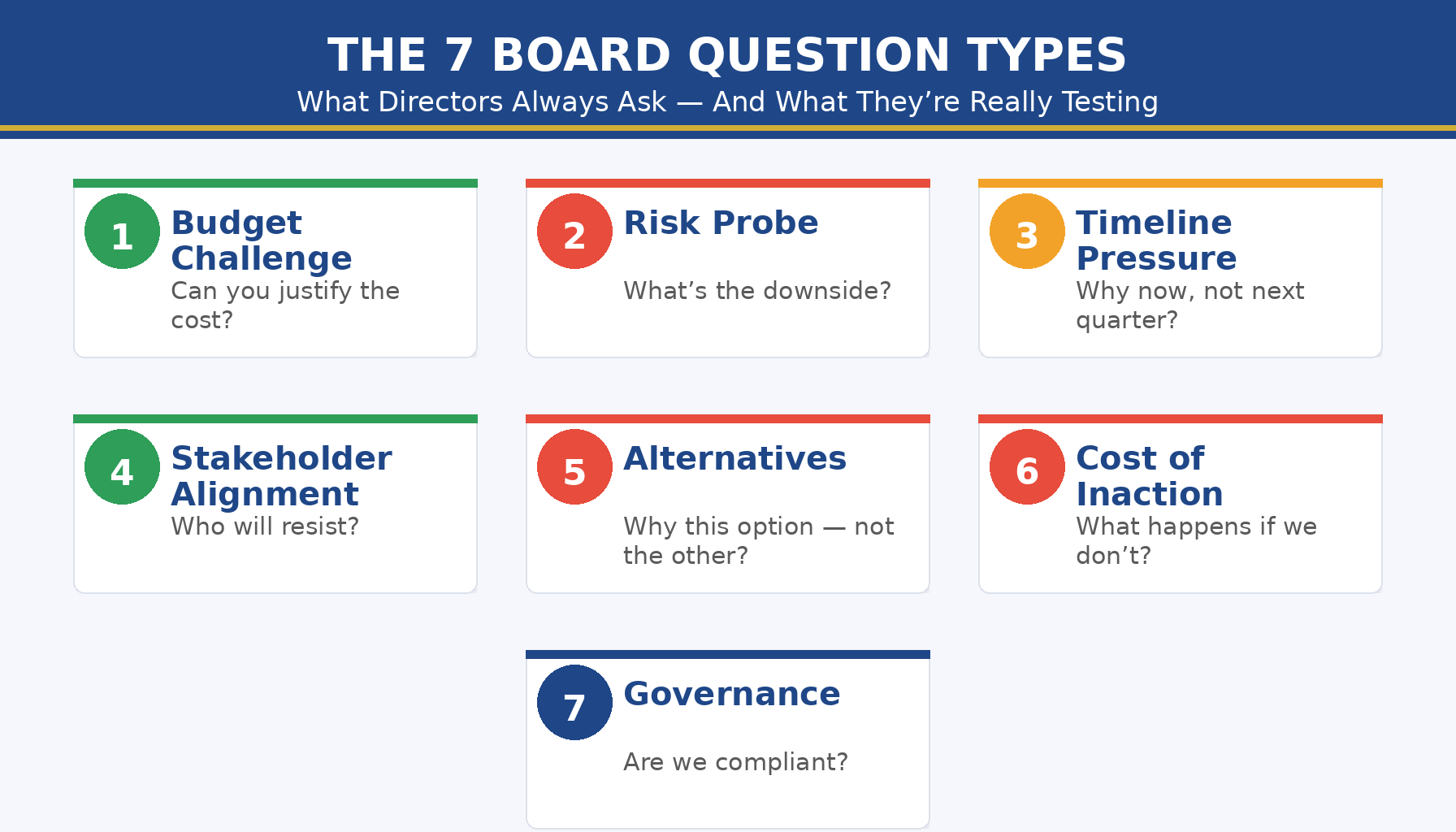
The 7 board question types directors always ask: budget challenges, risk probes, timeline pressure, stakeholder alignment, alternatives analysis, cost-of-inaction testing, governance compliance

The 7 Board Questions Directors Always Ask

Board directors operate from a playbook. Year after year, organisation after organisation, the same question categories appear. They shift in wording—sometimes sharper, sometimes softer depending on the chair’s style—but the underlying intent never changes.

Question Type 1: The Budget Challenge

The director looks sceptical. “How are you justifying this spend when we could allocate that budget elsewhere?” This question This question appears in most board Q&A sessions. Q&A sessions. Directors use it to test whether you understand the cost-benefit logic, not just the line items. They’re checking if you’ve competed against alternatives—even ones you didn’t present.

Question Type 2: The Risk Probe

“What happens if this assumption is wrong? What’s your downside scenario?” Directors live in risk. They ask this to see how you’ve stress-tested your thinking, whether you’ve prepared contingencies, and whether you’re overconfident about outcomes you can’t control.

Question Type 3: The Timeline Pressure

“Why this timeline? Could you accelerate it, or would delaying it be wiser?” This tests whether you’ve built slack into your schedule or whether you’re running on assumptions that evaporate under pressure. Directors know that execution delays cascade.

Question Type 4: The Stakeholder Alignment

“Have you confirmed buy-in from [HR / Finance / Sales]? What if they say no?” This uncovers whether you’ve done the pre-work or whether you’re asking the board to approve work that hasn’t been aligned below yet. Directors hate surprises downstream.

Question Type 5: The Alternatives Question

“Why this option and not the build/buy/partner approach instead?” Directors want evidence that you’ve evaluated other paths and chosen this one deliberately, not defaulted to it.

Question Type 6: The Cost-of-Inaction Test

“What happens if we don’t do this? What’s the cost of waiting?” This tests whether you understand the true business impact—not just what you’re proposing to build, but what’s at stake if you don’t.

Question Type 7: The Governance Compliance Question

“Does this align with our policy on [data / legal / regulatory / vendor management]? Have compliance and legal signed off?” Directors are gatekeepers. They ask this to confirm you haven’t built something that violates governance.

What Each Question Really Tests

Behind every question type is a hidden diagnostic. Directors aren’t listening for facts; they’re listening for the evidence of your judgment under pressure.

Budget Challenge tests: Your intellectual honesty. Can you say “This costs more, but here’s why it’s worth it” without sounding defensive? Can you acknowledge trade-offs?

Risk Probe tests: Your realism. Do you sound like you’ve war-gamed this, or are you presenting best-case assumptions as certainties?

Timeline Pressure tests: Your planning discipline. Have you built buffers and decision points, or are you hoping nothing goes wrong?

Stakeholder Alignment tests: Your organisational awareness. Do you understand who needs to move first, or are you presenting as if the board approval is the starting gun?

Alternatives Question tests: Your strategic thinking. Have you evaluated options, or did you arrive at this one by habit?

Cost-of-Inaction tests: Your business acumen. Can you quantify the risk of inaction, or are you asking the board to approve based on your assertion alone?

Governance Compliance tests: Your operational rigour. Do you move through the organisation systematically, or do you treat governance as an afterthought?

Notice what they’re not testing: the beauty of your slides. The eloquence of your storytelling. Your ability to read a room. Directors assume you’re competent at those things. They’re stress-testing your judgment.

Walk Into Board Q&A Knowing 80% of the Questions Before They’re Asked

Most executives enter board Q&A sessions unprepared for the actual questions that matter. They’ve rehearsed answers to what they think directors will ask, not what directors actually ask. The result: hesitation, backtracking, and the impression of judgment under fire.

The Executive Q&A Handling System flips this. You work through a proprietary question-mapping framework that identifies which of the seven question types matter most to your specific board composition. Then you build answer scripts—not talking points, but locked-in responses you can deliver under pressure without reaching for filler words or pivoting.

  • Predict the exact question categories your directors will ask, based on board composition and business context
  • Write answer scripts that acknowledge trade-offs and edge cases (the signals of strategic thinking)
  • Practise delivery until your answers sound conversational, not rehearsed—the hallmark of authentic authority

Get the Executive Q&A Handling System → £39

Used by executives preparing for high-stakes board Q&A in funding rounds, strategy approvals, and governance reviews.

If you’re presenting to a board for the first time, or you’ve noticed your Q&A answers lack the decisiveness directors expect, the Executive Q&A Handling System walks you through the exact process to map board questions and lock in your answers.

Stop Getting Blindsided by the Question You Should Have Predicted

Every director has a signature question type. Finance directors probe budget assumptions. Risk-focused directors stress-test downside scenarios. Operational directors test stakeholder alignment. When you walk into a board room unprepared for these predictable patterns, you’re already behind.

  • Know which question type matters most to each director on your board, before you sit down
  • Deliver answers that acknowledge complexity and edge cases—proof that you’ve genuinely thought this through

Get the Executive Q&A Handling System → £39

The framework includes a board profiling template and question-type checklists for finance, governance, risk, and operational directors.

Board Q&A often blends with hybrid presentation formats, where some directors are in the room and others are remote. Your Q&A framework needs to work across both delivery modes.


Board Q&A preparation checklist: question type identification, answer script writing, pressure delivery practice, stakeholder pre-alignment, downside scenario mapping, governance compliance review

How to Prepare Answers That Win Approval

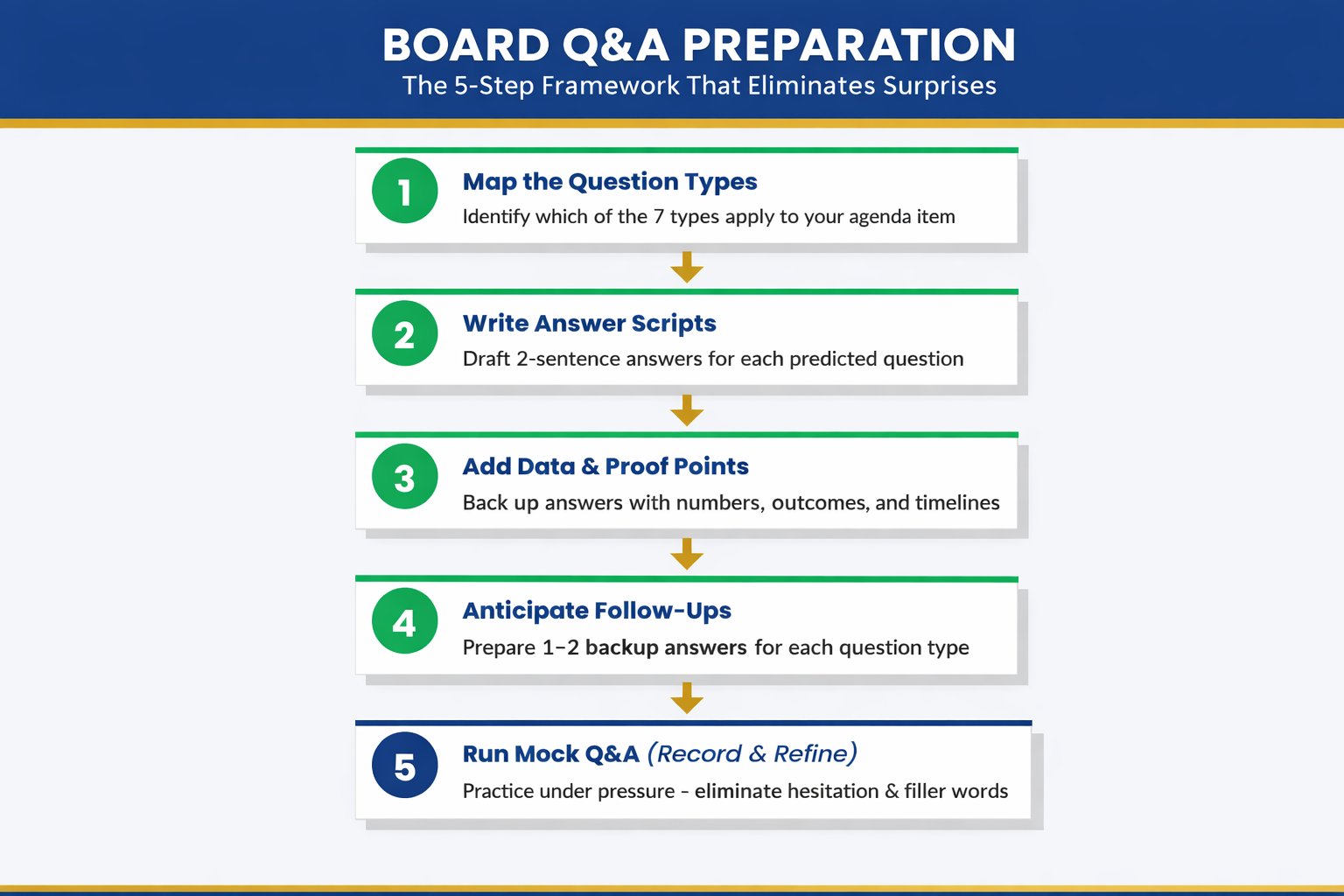
Board approval doesn’t hinge on the quality of your slides. It hinges on your ability to answer the seven question types with authority and honesty. Here’s the preparation framework:

Step 1: Profile Your Board

Which directors are finance-focused? Which are risk-obsessed? Which care most about operations and execution? Map the board composition and predict which question types will dominate your Q&A. A board with strong finance and risk representation? Expect aggressive budget and risk probes. A board with operational executives? Expect timeline pressure and stakeholder alignment questions.

Step 2: Build Your Question Map

For each of the seven question types, write down the specific version that will appear in your board Q&A. Don’t write generic versions. Write the actual questions your board will ask, based on your business context. “Walk us through your CAC assumptions if we shift from direct sales to channel partnerships” is more useful than “How have you stress-tested your assumptions?”

Step 3: Write Answer Scripts (Not Talking Points)

Talking points are vague. “We’ve thought about budget and here’s why we’re confident” is a talking point. Answer scripts are specific and locked in. “Our budget assumes £2.8M in year-one implementation costs. That’s 2.4% of annual revenue—higher than our industry baseline, but necessary because we’re building custom integrations rather than using COTS software. If we used COTS, we’d cut implementation costs by 40%, but we’d lose the operational advantage we’ve modelled.”

That’s an answer script. It acknowledges the trade-off. It signals that you’ve weighed alternatives. It doesn’t overstate certainty.

Step 4: Pressure Test Your Delivery

Have a colleague sit across from you and ask these questions in rapid succession, the way a board does. Record yourself. Listen for:

  • Filler words (“um,” “uh,” “like,” “you know”)
  • Hedging language (“I think,” “probably,” “we hope”)
  • Pivoting instead of answering (starting to answer the question they asked, then pivoting to something you’d rather talk about)
  • Hesitation before you speak

These are all signals that your answer scripts aren’t locked in yet. Practise until you can deliver them conversationally, with the calm authority that comes from genuine preparation.

Step 5: Pre-Align Stakeholders

The stakeholder alignment question often catches executives off guard because they haven’t done pre-alignment work. Before your board Q&A, confirm that HR, Finance, Legal, and any other department affected by your proposal has actually signed off. Don’t let the board be the first place you hear “Wait, Finance didn’t agree to this timeline.”

3 Questions Board Executives Ask Us

Q: How far in advance should I prepare board Q&A answers?
A: At least two weeks before your board meeting. That gives you time to build scripts, run mock Q&A, refine your language, and pre-align with stakeholders. Preparing the morning of creates stress and shows in your delivery.

Q: What if a director asks a question that isn’t one of the seven types?
A: It rarely happens. But if it does, your response is the same: pause (don’t rush), acknowledge the question, and answer with specificity and intellectual honesty. Directors respect executives who take a moment to think before they answer.

Q: Should I memorise my answers or keep them conversational?
A: Memorise the core ideas and key numbers. Keep the delivery conversational. You want directors to hear someone who knows this subject deeply, not someone reciting a script. The script is your foundation, not your prison.

24 Years of Board Q&A. The 7 Questions Never Change. The Answers Do.

Over nearly a quarter-century, I’ve sat through hundreds of board Q&A sessions—as a CFO, as a founder, as an advisor, and as a director myself. The seven question types I’ve outlined in this article have never changed. Budget challenges, risk probes, timeline pressure, stakeholder alignment, alternatives analysis, cost-of-inaction testing, governance compliance. They’re constants.

What changes is the sophistication of the directors asking them, the complexity of the business context, and the stakes of the decision. Your board expects you to walk in with answers that reflect genuine strategic thinking—not hope, not assumption, but judgment that’s been pressure-tested and refined.

  • Learn the seven question types and how to map them to your specific board
  • Practise answer scripts until delivery is effortless and conversational
  • Walk into your next board meeting with the clarity that wins approval

Get the Executive Q&A Handling System → £39

Used by executives across finance, operations, strategy, and IT preparing for high-stakes board Q&A in funding rounds, governance approvals, and strategic reviews.

Is This Right For You?

The Executive Q&A Handling System is built for executives who:

  • Present to boards regularly and want to move from reactive to prepared
  • Know the questions are predictable but haven’t had a framework to map them
  • Have good slides but notice their Q&A answers lack the conviction directors expect
  • Want to understand what directors are actually testing, not just what they’re asking
  • Are preparing for high-stakes decisions (funding rounds, strategy approvals, governance reviews) where board confidence matters

Frequently Asked Questions

Do all directors ask the same seven question types?

The seven types are universal. But the emphasis varies. Finance directors will probe budget and risk aggressively. Risk-focused directors will stress-test downside scenarios. Operational directors will focus on timeline and execution risk. The framework helps you identify which types matter most to your specific board and prepare accordingly.

What if I don’t know the directors’ profiles in advance?

You can usually find their public profiles online—investor history, operational background, prior board roles. If not, use the generic board composition (assume you’ll face budget, risk, and stakeholder questions, because those appear in nearly every board Q&A). The Executive Q&A Handling System includes a profiling template that works for both prepared and unprepared situations.

Can I use this framework for investor pitches and presentations to other stakeholder groups?

Yes. Investors ask a variation of the same seven questions, with heavier emphasis on risk and alternatives. The framework is adaptable to investor Q&A, strategy review Q&A, and any high-stakes questioning scenario. The underlying logic—prediction, scripting, pressure testing—applies everywhere.

📬 Get weekly guidance on executive communication delivered to your inbox

Each week, I share frameworks for presenting to boards, handling difficult questions, and building your authority as a presenter.

Subscribe


Related articles from today:

Build on your foundation: If this is your first board presentation, read First Board Presentation: How New Directors Earn Authority in the Room. For deeper Q&A mastery, explore How to Handle Difficult Questions in Presentations and Predict Your Presentation Questions: The Question Map Framework.

About the Author

Mary Beth Hazeldine is Owner & Managing Director of Winning Presentations. Over nearly 25 years, She advises executives across financial services, healthcare, technology, and government on preparing for high-stakes board Q&A, funding rounds, and strategic approval presentations. She founded Winning Presentations to help executives move from hoping they’ll answer well under pressure to knowing they will.

Her frameworks—built on years of observation in real boardrooms—show executives how to structure their thinking, anticipate the questions that matter, and deliver answers with the authority that wins approval.

Book a discovery call | View services

Your next board Q&A will surface the same seven question types. The executives who win approval are the ones who walked in knowing this in advance. Map your board questions and lock in your answers today.

30 Jan 2026
Executive woman with glasses looking frustrated at laptop screen while reviewing presentation slides

Why “Overview” Is the Worst Slide Title (And What to Write Instead)

The CFO glanced at slide 1, saw “Overview,” and started checking his phone.

By slide 3, he wasn’t even pretending to pay attention. The presenter—a talented VP with a genuinely good proposal—had lost the room before she’d said a word. Her slide titles told the CFO exactly what to expect: nothing worth his full attention.

Quick answer: Generic slide titles like “Overview,” “Summary,” “Background,” and “Next Steps” are attention killers. They tell executives nothing and signal that you haven’t thought hard about your message. The fix is simple: every slide title should be a complete sentence that delivers the point of that slide. Instead of “Q3 Results,” write “Q3 Revenue Exceeded Target by 12%.” Instead of “Overview,” write “This Initiative Will Save £2.4M Annually.” Slide title best practices start with one rule: if your title could appear on anyone’s deck, it’s not doing its job.

Why “Overview” Fails Every Time

I spent 24 years in corporate banking—JPMorgan Chase, PwC, Royal Bank of Scotland, Commerzbank. I’ve sat through thousands of presentations and delivered hundreds more. And I can tell you exactly what happens when an executive sees “Overview” as a slide title: nothing.

That’s the problem. “Overview” creates zero anticipation. It makes zero promises. It gives the reader zero reason to pay attention to what comes next.

Think about it from the executive’s perspective. They’re in back-to-back meetings. They have 47 unread emails. They’re thinking about three other problems while you’re presenting. When they see “Overview,” their brain registers: I don’t need to focus yet. This is just setup.

But here’s what most presenters miss: executives don’t read slides sequentially like a novel. They scan. They jump ahead. They look for the slides that matter and skip the ones that don’t. Your slide title is the only thing that tells them whether to pay attention or check out.

“Overview” says: Skip me.

The same is true for every generic title: “Background,” “Context,” “Agenda,” “Summary,” “Next Steps,” “Recommendations.” These words have appeared on so many thousands of slides that they’ve become invisible. They’re wallpaper.

If your slide titles could be swapped into any presentation in your company without anyone noticing, they’re not doing their job.

The Psychology of Executive Reading

Here’s something I learned watching senior leaders consume information: they don’t read presentations—they interrogate them.

An executive looking at your deck is asking one question on every slide: What’s the point? They want the answer immediately. If they have to read three paragraphs of body text to find it, you’ve already lost them.

This is why slide title best practices always come back to one principle: the title IS the point.

Before and after comparison showing generic slide title labels versus actionable headline titles

When I trained executives at UniCredit, I used to run an exercise. I’d show them a deck with all the body content removed—just the titles. Then I’d ask: “Can you understand the argument from titles alone?”

If the answer was no, the deck failed.

The best executive presentations tell a complete story through titles. You should be able to flip through the slides, read only the headlines, and understand exactly what the presenter is recommending and why. The body text, charts, and graphics are supporting evidence—not the main event.

This is why “Overview” is so damaging. It breaks the narrative. It’s a placeholder where a point should be. When an executive is scanning your deck (and they will scan), “Overview” tells them nothing. It’s a gap in your story.

And if you’re also struggling with how to stop rambling when you present, unclear slide titles are often the root cause—you haven’t clarified your point before you started speaking.

The Headline Formula That Works

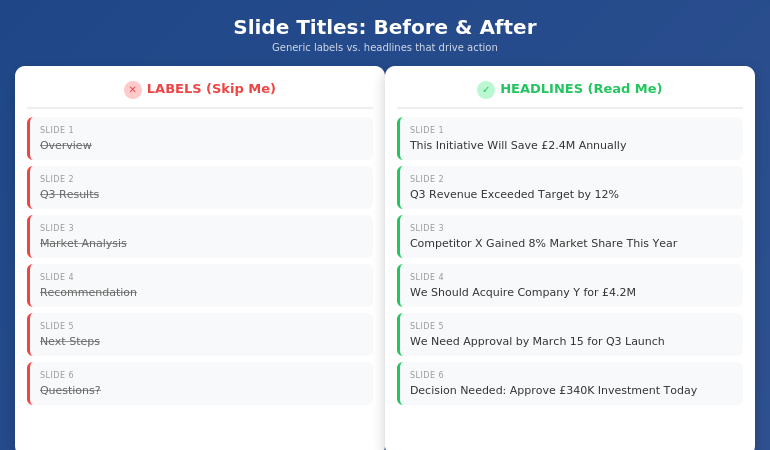
The fix for generic slide titles is simple: write headlines, not labels.

A label describes what’s on the slide: “Q3 Results,” “Market Analysis,” “Team Structure.”

A headline delivers the insight: “Q3 Revenue Beat Target by 12%,” “Market Share Is Vulnerable in APAC,” “We Need Three Additional Engineers.”

Here’s the formula I teach:

Every slide title should be a complete sentence that a busy executive could read and understand without seeing the rest of the slide.

This forces you to do something most presenters avoid: commit to a point. When you write “Overview,” you’re not committing to anything. When you write “This Initiative Will Reduce Customer Churn by 23%,” you’ve made a claim. You’ve given the executive something to engage with, challenge, or approve.

The test: Read your slide title out loud. If it sounds like something you’d actually say in conversation—”We’re recommending Option B because it’s 40% cheaper”—it’s a good title. If it sounds like a filing cabinet label—”Recommendation”—rewrite it.

Some presenters worry this makes titles too long. But look at any newspaper. Headlines are complete thoughts, often 8-12 words. That’s not too long—that’s exactly right for conveying meaning at a glance.

Before and After: 10 Slide Title Transformations

Let me show you how this works in practice. I’ve taken 10 common generic titles and transformed them into headlines that actually work. For more examples, see my detailed guide on writing better slide titles with before and after examples.

1. Overview → This Proposal Will Save £2.4M Annually

The original says nothing. The revision states the entire value proposition. An executive knows immediately whether to keep reading.

2. Background → We’ve Lost 3 Key Accounts in 6 Months

Context slides often feel like wasted time. Make them urgent by leading with the problem.

3. Agenda → Three Decisions We Need Today

Agendas are almost always skipped. Tell them what’s at stake instead.

4. Q3 Results → Q3 Revenue Exceeded Target by 12%

Don’t make them hunt for the number. Put the headline in the headline.

5. Market Analysis → Competitor X Has Gained 8% Market Share This Year

Analysis is boring. Insight is interesting. Lead with the “so what.”

6. Recommendation → We Should Acquire Company Y for £4.2M

Don’t hide your recommendation behind a label. State it clearly so decision-makers can react.

7. Timeline → Full Implementation Takes 14 Months

Timeline slides usually show a Gantt chart nobody reads. Put the key number in the title.

8. Budget → This Requires £340K Investment Over 3 Years

Finance people scan for numbers. Make them impossible to miss.

9. Risks → The Main Risk Is Regulatory Delay (40% Probability)

Generic risk slides get ignored. Specific risk titles get discussed.

10. Next Steps → We Need Approval by March 15 to Hit Q3 Launch

Create urgency. Tell them exactly what you need and when you need it.

⭐ Transform Every Slide Title in Your Next Deck

The Executive Slide System gives you the headline formulas, templates, and before/after examples to make every slide command attention.

What’s included:

  • The complete headline formula for executive slides
  • 12 slide templates with pre-written title structures
  • Before/after transformations for every common slide type
  • The “title-first” workflow that saves hours

Get the Executive Slide System → £39

Built from 24 years creating executive presentations in corporate banking

The 7 Worst Slide Titles (And What to Write Instead)

Based on 24 years of reviewing executive presentations, these are the seven most common title mistakes—and how to fix each one.

1. “Overview”

The emptiest word in presentations. Replace with your core message: “This Investment Will Generate 3x ROI in 18 Months.”

2. “Summary”

At the end of a deck, executives know it’s a summary. Tell them what to remember instead: “Three Things to Approve Today.”

3. “Discussion”

This signals you don’t have a point. Replace with the question you actually want answered: “Should We Expand to Germany in Q2?”

4. “Update”

Updates are boring by definition. Lead with what changed: “Project Is Now 2 Weeks Behind Schedule.”

5. “Analysis”

Nobody wants analysis. They want insight. Write the insight: “Pricing Is Our Biggest Competitive Weakness.”

6. “Appendix”

If it’s worth including, it’s worth labeling properly: “Detailed Financial Model” or “Competitor Comparison Data.”

7. “Questions?”

The laziest closing slide. Replace with your call to action: “We Need Budget Approval by Friday” or “Next Step: Schedule Pilot with Team A.”

For a complete system on structuring your executive summary slide, including title formulas and placement strategies, see my detailed guide.

⭐ Never Write a Generic Slide Title Again

The Executive Slide System includes fill-in-the-blank headline templates for every executive slide type—from opening to recommendation to closing.

You’ll get:

  • Headline templates for 12 common executive slide types
  • The “assertion-evidence” structure used in consulting and boardrooms
  • Word-for-word title formulas you can copy and adapt
  • Examples from real executive presentations

Get the Executive Slide System → £39

Built from 24 years in corporate banking and executive presentation coaching

When to Break the Rules

Not every slide needs a sentence-headline title. Here are the exceptions:

Title slides: Your presentation title and your name. That’s it. Don’t add “Overview of Q3 Performance”—just write “Q3 Performance: On Track for Record Year.”

Section dividers: If you’re using divider slides to signal transitions in a long presentation, simple labels like “Phase 2: Implementation” work fine. But limit these to one or two in any deck.

Data-heavy slides: When showing a complex chart or table, sometimes a short label title works better than a long headline. But add a subtitle or callout that delivers the insight: “Revenue by Region” with a callout that says “APAC growth is masking European decline.”

Backup slides: Slides you don’t plan to present but include for Q&A can use simpler labels. But if you’re presenting a slide, it needs a headline.

The rule of thumb: if you’re going to say words while this slide is on screen, the title should do heavy lifting. If the slide is just a reference or transition, you have more flexibility.

What makes a good slide title for executives?

A good slide title for executives is a complete sentence that delivers the point of the slide without requiring them to read the body content. It should be specific, actionable, and impossible to swap into another presentation. Instead of “Market Analysis,” write “We’re Losing Market Share in Three Key Segments.” The test: can an executive understand your argument by reading only the slide titles? If yes, your titles are working.

How long should a slide title be?

Slide titles should be as long as necessary to convey the complete point—usually 8-15 words. Newspaper headlines routinely hit this length and remain scannable. “Q3 Revenue Exceeded Target by 12% Despite Supply Chain Disruption” is 10 words and delivers far more value than “Q3 Results.” Don’t sacrifice clarity for brevity. A specific 12-word title beats a vague 2-word label every time.

Should every slide have a different title format?

No—consistency helps executives scan faster. Use the same title structure throughout your deck: complete sentences that state the point. What should vary is the content and specificity, not the format. If your titles alternate between labels (“Overview”) and headlines (“Revenue Is Up 12%”), the deck feels disjointed. Pick headline-style titles and stick with them.

⭐ Make Every Slide Title Count

The Executive Slide System gives you everything you need to write slide titles that command attention and drive decisions.

Inside the system:

  • The headline formula for executive slides
  • 12 templates with pre-written title structures
  • Before/after examples for every slide type
  • The “title-first” method that cuts creation time in half

Get the Executive Slide System → £39

Instant download. Start using these formulas in your next presentation.

Frequently Asked Questions

What if my company has a template with short title fields?

Most corporate templates have title placeholders that look small, but they can hold more text than you think. Test it—you can usually fit 12-15 words before needing to reduce font size. If the template truly restricts you to 3-4 words, add a subtitle line below with the full headline. The point should be visible at the top of the slide, even if it takes two lines.

Won’t long titles make my slides look cluttered?

No—they make your slides look intentional. A specific headline like “We Recommend Investing £2.4M to Capture the APAC Market” fills the title space with meaning rather than leaving it occupied by a generic label. Clutter comes from too much body text, not from titles that actually say something. In fact, strong titles often let you reduce body content because the point is already clear.

How do I write good titles for data slides?

Lead with the insight, not the data type. Instead of “Revenue Chart” or “Q3 Financials,” write what the data shows: “Revenue Growth Accelerated in Q3” or “Margin Pressure Continues Despite Volume Gains.” The chart is evidence for the claim in your title. If you can’t summarize the data in a headline, you may be showing too much data on one slide.

Should I write titles first or last?

First. Write all your slide titles before you create any content. This forces you to clarify your argument upfront and ensures every slide has a clear purpose. It also makes the rest of the deck easier to build—once you know the point of each slide, the supporting content almost writes itself. The executive presentation template in my system uses this “title-first” workflow.

📧 The Winning Edge Newsletter

Weekly insights on executive presentations, slide design, and high-stakes communication. No fluff—just what works.

Subscribe Free →

📋 Free: Executive Presentation Checklist

The pre-presentation checklist I use before every high-stakes meeting. Includes a slide title audit section.

Download Free Checklist →

Your Next Step

Open your last presentation. Read only the slide titles. Ask yourself: could a busy executive understand my argument without reading anything else?

If the answer is no—if you see “Overview,” “Summary,” “Background,” or any other generic labels—you have work to do. Replace each label with a headline that states the point. Make every title a complete sentence that delivers value on its own.

The CFO who checked his phone during “Overview” would have paid attention to “This Initiative Will Save £2.4M Annually.” Same content. Different title. Completely different outcome.

Your slides are only as good as the attention they earn. And attention starts with the title.

Related: If unclear thinking is leading to rambling when you present, see how to stop rambling when nervous—the solution often starts with clearer slide structure.

26 Jan 2026
Executive woman presenting data to leadership in boardroom with dashboard charts on screen behind her

Why “Data-Driven” Presentations Often Backfire With Executives

The CFO cut him off on slide three: “What do you want me to do?”

The analyst didn’t have an answer. Not because he hadn’t done the work—he’d spent three weeks building the most thorough financial analysis I’d ever seen. Twelve slides of charts, trend lines, and statistical significance. Every number sourced. Every projection defensible.

His £4M budget request was dead before he reached slide four.

I’ve watched this scene repeat hundreds of times across JPMorgan Chase, PwC, Royal Bank of Scotland, and Commerzbank. Brilliant people with impeccable data losing executive support—not because their analysis was wrong, but because their structure was backwards.

Quick answer: Data presentations fail with executives because they’re structured for analysis, not decision. Executives don’t want to re-walk your analytical journey—they want to know what you recommend and whether they should act on it. Leading with data signals you don’t understand how senior leaders make decisions. The fix: recommendation first, supporting evidence second, detailed analysis in the appendix.

Written by Mary Beth Hazeldine, Owner & Managing Director of Winning Presentations. 24 years corporate banking at JPMorgan Chase, PwC, RBS, and Commerzbank. I’ve sat in hundreds of executive meetings watching data-heavy presentations succeed or fail—the patterns are unmistakable. Last updated: January 2026.

Why Data-Heavy Presentations Fail With Executives

Here’s the uncomfortable truth: your data isn’t as persuasive as you think it is.

When you build analysis, you start with data and work toward a conclusion. That’s the right process for analysis. But it’s the wrong structure for presentation.

Executives have already delegated the analysis to you. They don’t want to re-do your work—they want to know what you concluded and whether they should act on it.

The Attention Economics Problem

A typical executive has 8-12 meetings per day. Your presentation is one of many competing for their mental bandwidth. They’re making a rapid assessment within the first 60 seconds: “Is this worth my full attention, or can I skim while checking email?”

Data-heavy openings signal: “This person is going to walk me through their entire process.”

That’s when you lose them.

📚 Research note: Studies on executive attention (Kahneman’s work on cognitive load, Davenport’s research on the attention economy) consistently show senior leaders use heuristics and pattern recognition rather than systematic data analysis. They’re scanning for “does this person know what they’re talking about?” and “what do they want me to do?”—not evaluating your methodology.

The Credibility Paradox

Here’s what’s counterintuitive: leading with data often reduces your credibility with executives.

Why? Because it signals you don’t understand your audience. Executives interpret data-heavy openings as:

  • “This person doesn’t know what’s important”
  • “They’re hiding behind numbers because they’re not confident”
  • “They don’t understand how decisions get made at this level”

That analyst with impeccable data? He lost credibility precisely because his structure was wrong. He knew the numbers—but he didn’t know his audience.

Diagram showing why data presentations fail with executives: the credibility paradox and attention economics

How Executives Actually Process Information

Understanding how executives think changes how you structure everything.

The Pyramid Principle (Inverted)

Barbara Minto’s Pyramid Principle—developed at McKinsey—captures this perfectly: start with the answer, then provide supporting evidence only as needed.

Most presenters do the opposite. They build to their conclusion like a mystery novel. But executives aren’t reading for suspense—they’re reading for decision.

What executives are thinking in the first 60 seconds:

  1. “What does this person want?”
  2. “Why should I care?”
  3. “What do they need from me?”

If you haven’t answered these questions by slide two, you’ve likely lost their full attention.

The “So What?” Filter

Every piece of data passes through an automatic filter in the executive mind: “So what?”

Revenue increased 12% → So what?
Customer acquisition cost dropped → So what?
Market share grew in Q3 → So what?

If you’re not explicitly answering “so what?” for every data point, executives are doing it themselves—and they might reach different conclusions than you intended.

For more on structuring executive communication, see how to write the executive summary slide.

⭐ Stop Building Presentations Executives Ignore

The Executive Slide System gives you the recommendation-first structure that senior leaders respond to. No more data dumps that get “taken offline.” No more brilliant analysis that dies on slide three.

What’s included:

  • The 6-slide executive structure (recommendation-first)
  • Data slide templates with built-in “so what?”
  • Appendix strategy for supporting evidence
  • Before/after examples from budget and strategy presentations

Get the Executive Slide System → £39

Used by senior professionals presenting budgets, forecasts, and business cases to CFOs and executive committees.

The Recommendation-First Structure That Works

The key insight: lead with the destination, not the journey.

Slide 1: The Recommendation

State your conclusion immediately. Not “today I’ll walk you through…” but “I recommend we do X because Y.”

This feels uncomfortable if you’re used to building up to your point. Do it anyway. Executives will respect you more, not less.

Slide 2: The Stakes

Why does this matter? What’s the cost of inaction? What’s the opportunity if we act?

This is where you earn continued attention. If the stakes aren’t clear, executives will mentally downgrade your priority.

Slides 3-5: Supporting Evidence (Curated)

Not all your data—the 3-4 data points that most directly support your recommendation. Each one with an explicit “so what.”

Critical: If a data point doesn’t directly support your recommendation, it goes in the appendix. Period.

Slide 6: The Ask

What specific decision or action do you need? “Approve the budget,” “Greenlight phase 2,” “Allocate resources to X.”

Vague asks get vague responses. Specific asks get decisions.

Appendix: Everything Else

All that additional data? It goes here. Available if executives want to drill down, but not blocking your core message.

→ Want templates for this exact structure? The Executive Slide System includes recommendation-first templates, data slide frameworks, and real before/after examples.

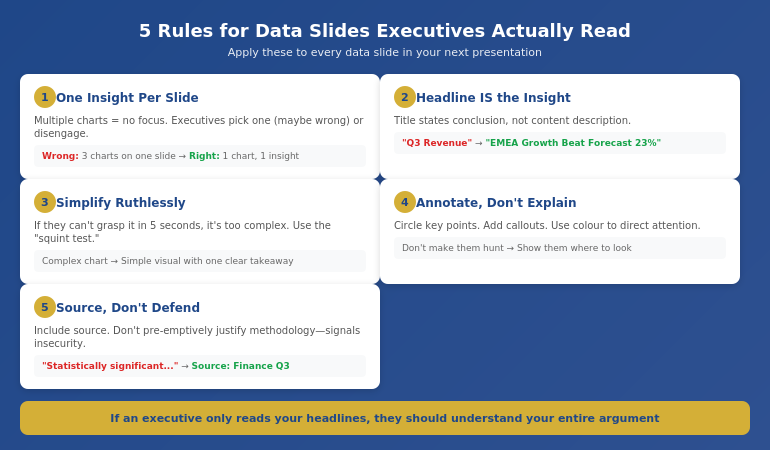
5 Rules for Data Slides Executives Will Actually Read

When you do include data slides, these rules prevent the common failures:

Rule 1: One Insight Per Slide

If a slide contains multiple charts or data points, executives don’t know where to look. They’ll either pick one (maybe not the one you wanted) or disengage entirely.

One slide. One insight. One “so what.”

Rule 2: The Headline IS the Insight

Your slide title should state the conclusion, not describe the content.

Wrong: “Q3 Revenue by Region”
Right: “EMEA Revenue Growth Outpaced Forecast by 23%”

If an executive only reads your headlines, they should understand your entire argument.

Rule 3: Simplify Ruthlessly

That complex chart that took you hours to build? It probably needs to be simpler. If executives can’t grasp the insight in 5 seconds, the chart is too complicated.

Use the “squint test”—if you squint at the slide, can you still see the main point?

Rule 4: Annotate, Don’t Explain

Don’t make executives hunt for the important part. Annotate directly on the chart:

  • Circle the key data point
  • Add a callout with the insight
  • Use colour to direct attention

Rule 5: Source, Don’t Defend

Include your data source, but don’t pre-emptively defend your methodology. If executives question it, you can explain. But leading with “this data is statistically significant because…” signals insecurity.

For more on making numbers compelling, see data storytelling techniques.

The 5 rules for data slides that work with executives: one insight, headline is insight, simplify, annotate, source don't defend

⭐ Transform How Executives Respond to Your Presentations

The Executive Slide System contains the exact structure that gets data-heavy presentations approved instead of ignored. Stop building decks that die on slide three.

Inside:

  • The recommendation-first framework
  • Data slide templates with “so what?” built in
  • “One insight per slide” layouts
  • Appendix strategy for supporting evidence

Get the Executive Slide System → £39

Move from “taken offline” to approved in the meeting.

Before and After: A 47-Slide Transformation

Let me show you what this looks like in practice.

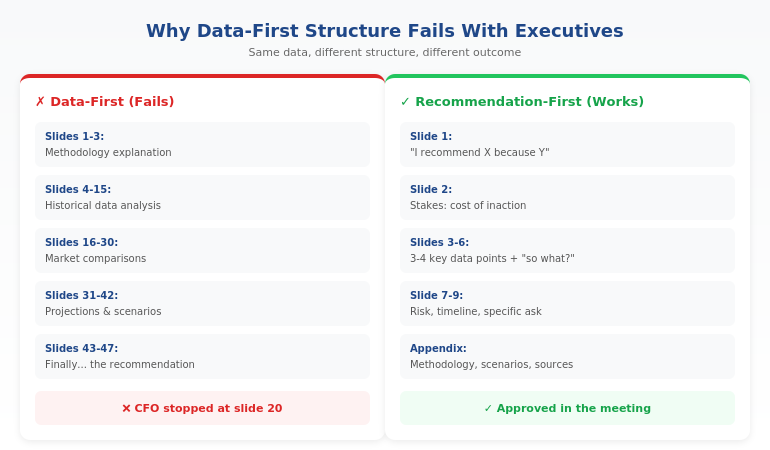
Before: The 47-Slide Data Dump

A finance director came to me with a budget presentation that had been rejected twice. Here’s what it looked like:

  • Slides 1-3: Methodology explanation
  • Slides 4-15: Historical data analysis
  • Slides 16-30: Market comparisons
  • Slides 31-42: Projections with multiple scenarios
  • Slides 43-47: Finally, the recommendation and ask

The CFO had never made it past slide 20. Twice.

After: The 12-Slide Decision Deck

We restructured completely:

  • Slide 1: “I recommend a £2.3M budget increase for Q3. Here’s why it will deliver £8M in returns.”
  • Slide 2: The cost of inaction (lost market opportunity)
  • Slides 3-6: Four supporting data points, each with explicit “so what”
  • Slide 7: Risk mitigation
  • Slide 8: Implementation timeline
  • Slide 9: The specific ask
  • Slides 10-12: Appendix (methodology, detailed scenarios, sources)

Result: Approved in the meeting. The CFO asked two questions, both answered from the appendix.

Same data. Same analyst. Different structure. Different outcome.

→ Ready to restructure your next data presentation? The Executive Slide System gives you the templates and framework to transform any data-heavy presentation for executive audiences.

🎯 Transform Your Next Data Presentation in 30 Minutes:

  1. Write your recommendation in one sentence — this becomes slide 1
  2. Identify the 3-4 data points that most directly support it — these become slides 3-5
  3. Move everything else to an appendix — available but not blocking
  4. Write “so what?” under each chart — make the insight explicit

Is This Right For You?

✓ This is for you if:

  • You present budgets, forecasts, or business cases to executives
  • Your data-heavy presentations keep getting “taken offline”
  • You want frameworks that get faster decisions
  • You’re willing to restructure how you present data

✗ This is NOT for you if:

  • Your audience is analysts who need to verify your methodology
  • You’re presenting research findings, not recommendations
  • Your presentations are primarily educational, not decisional
  • You’re not the one making recommendations

⭐ That £4M Rejection Taught Me What Actually Works

Watching brilliant analysts lose executive support because of structure—not substance—changed how I think about every presentation. The Executive Slide System contains exactly what I learned: the framework that gets data presentations approved instead of ignored.

What you’ll get:

  • The recommendation-first framework
  • Data slide templates with “so what?” built in
  • Executive summary structures that work
  • Appendix strategy for supporting evidence
  • Before/after examples from real presentations

Get the Executive Slide System → £39

Transform how executives respond to your data presentations.

Frequently Asked Questions

Won’t executives think I’m hiding something if I don’t show all the data?

No—they’ll think you understand what’s important. The appendix shows you’ve done thorough analysis. Leading with conclusions shows you can synthesise that analysis into actionable insight. That’s the skill executives want to see.

What if my executive is very data-oriented and wants to see the numbers?

Even data-oriented executives appreciate recommendation-first structure. They can always ask for more detail (that’s what the appendix is for). But starting with data when they want to start with conclusions wastes everyone’s time. Structure for decision-making, then support with data as requested.

How do I know which data points to keep vs. move to appendix?

Ask: “Does this directly support my recommendation?” If yes, it stays. If it’s interesting-but-tangential or supporting-but-not-essential, it goes to appendix. When in doubt, appendix it. Less is more with executive audiences.

What if I don’t have a clear recommendation yet?

Then you’re not ready to present. A presentation without a recommendation is a status update—and status updates rarely get decisions. Clarify your recommendation before you build the deck.

📧 Optional: Get weekly executive presentation strategies in The Winning Edge newsletter (free).

Your Next Step

Your data is probably excellent. Your analysis is probably thorough. What’s likely missing is structure that matches how executives actually make decisions.

The gap between “comprehensive analysis” and “approved budget” is often just presentation structure.

Start by restructuring your next data presentation using the framework in this article. Move your recommendation to slide one. Cut your data slides in half. Add “so what?” to every chart.

For the complete system—including templates, examples, and the full executive slide framework—get the Executive Slide System (£39).

P.S. If the problem isn’t your slides but your nerves when presenting them, see how to stop hands shaking during presentations—a quick nervous system reset that works in the moment.

About the Author

Mary Beth Hazeldine is the Owner & Managing Director of Winning Presentations. That £4M rejection that opens this article? She watched it happen—and it changed how she thinks about every data presentation since.

With 24 years at JPMorgan Chase, PwC, Royal Bank of Scotland, and Commerzbank, she’s sat in hundreds of executive meetings where data-heavy presentations succeeded or failed. The patterns are clear—and teachable.

Book a discovery call | View services

11 Jan 2026

10-Minute Presentation: Why This Format Dominates Business Communication

Quick Answer: The 10-minute presentation isn’t an arbitrary corporate convention—it’s the format your brain is wired for. Research shows attention naturally peaks and dips in roughly 10-minute cycles. Master this format and you’ve mastered the workhorse of business communication: leadership updates, project reviews, interview presentations, and stakeholder briefings all default to 10 minutes for good reason.

When I joined Commerzbank’s investment banking division in 2002, I noticed something strange. Every meeting seemed to have the same invisible structure.

Leadership updates? Ten minutes per presenter. Project reviews? Ten-minute slots. Client pitches? “You’ll have about ten minutes before questions.” Even informal updates to managing directors somehow gravitated toward that same window.

At first, I assumed it was arbitrary—just how things were done. But after 24 years across JPMorgan, PwC, RBS, and Commerzbank, I’ve realised there’s nothing arbitrary about it.

The 10-minute presentation is the dominant format of business communication because it aligns with how human attention actually works. It’s long enough to make a substantive argument. Short enough to maintain engagement. Flexible enough to work across contexts—from boardrooms to team meetings to conference stages.

Every executive I’ve trained who mastered this format saw their influence grow. Not because 10 minutes is magic, but because it’s everywhere. The quarterly business review. The budget request. The interview presentation. The strategy pitch. The project update. All 10 minutes.

Master the 10-minute presentation and you’ve mastered the format you’ll use more than any other in your career. Fail to master it, and you’ll spend decades struggling with the one slot that keeps appearing on your calendar.

Here’s what 5,000 executive coaching sessions taught me about why this format works—and how to make it work for you.

🎯 50+ Openers and Closers for Every Situation

The Presentation Openers & Closers Swipe File gives you proven hooks and closing techniques for 10-minute presentations across every business scenario—updates, pitches, reviews, and more.

What’s inside:

  • Opening hooks calibrated for 10-minute formats
  • Closing techniques that drive decisions
  • Scenario-specific templates (reviews, pitches, updates)
  • The “bookend” technique that creates coherence

Get the Swipe File → £9.99

Why 10 Minutes Dominates (The Science)

The 10-minute presentation format isn’t a corporate invention—it’s a biological reality.

Neuroscience research consistently shows that attention operates in cycles. John Medina’s work on brain rules found that audience attention begins to significantly wane around the 10-minute mark. TED talks famously cap at 18 minutes because research showed that’s the outer limit of sustained attention without re-engagement techniques.

But here’s what’s often missed: attention doesn’t just decline—it cycles. Your audience’s brain naturally wants a “reset” roughly every 10 minutes. Fight that rhythm and you’re fighting biology. Work with it and you’re working with how humans actually process information.

This is why 10 minutes became the de facto standard for business presentations:

  • It respects cognitive limits. Your audience can genuinely focus for 10 minutes without heroic effort.
  • It forces prioritisation. Ten minutes prevents the “everything is important” trap that destroys longer presentations.
  • It enables decision-making. Leaders can hear multiple 10-minute presentations in an hour, compare perspectives, and decide.
  • It signals respect. Asking for 10 minutes shows you value your audience’s time.

Understanding presentation pacing becomes critical here. Ten minutes isn’t about cramming—it’s about flowing with how attention naturally works.

Graph showing attention cycles and why 10-minute presentations align with natural cognitive rhythms

Where You’ll Encounter the 10-Minute Format

Once you start looking, you’ll see the 10-minute presentation everywhere. Here’s where it shows up across a typical executive career:

Leadership and Team Updates

Weekly team meetings. Monthly leadership forums. Quarterly all-hands. The format is almost always “10 minutes per update.” I’ve seen this at every major bank and consultancy I’ve worked with—it’s the universal language of internal communication.

Project and Status Reviews

Steering committees. Programme boards. Portfolio reviews. Each project lead gets roughly 10 minutes to convey status, risks, and asks. Go over and you’re that person. Go under and leadership wonders what you’re hiding.

Interview Presentations

“Prepare a 10-minute presentation on…” This is the standard format for senior role interviews across industries. It tests your ability to structure thinking, communicate under pressure, and respect boundaries—all things leadership roles require.

Stakeholder Briefings

Updating the board. Briefing executives. Presenting to clients. When you need to inform decision-makers without consuming their entire calendar, 10 minutes is the expected format. Our guide to presenting to senior management covers these scenarios in depth.

Conference and Event Slots

Breakout sessions. Lightning talks. Panel introductions. Event organisers know that 10 minutes maintains audience energy across a full programme. Longer slots require exceptional content; 10 minutes just requires clarity.

The reality? If you can deliver a compelling 10-minute presentation, you can handle 80% of the speaking situations your career will throw at you.

A Different Mindset Than 5 or 30 Minutes

Here’s where most professionals go wrong: they treat the 10-minute presentation as either a stretched 5-minute presentation or a compressed 30-minute one. It’s neither.

Each format requires a fundamentally different mindset:

5 Minutes: The Single Message

A 5-minute presentation is a sniper rifle. You have one message, maybe three supporting points, and no room for tangents. It’s about ruthless focus—what’s the one thing you must communicate? Everything else gets cut.

10 Minutes: The Developed Argument

A 10-minute presentation is a structured conversation. You can develop three genuine points with evidence for each. You can build an argument with a beginning, middle, and end. You have room for one brief story or example. But you still can’t cover everything—you’re choosing depth over breadth.

30 Minutes: The Full Exploration

A 30-minute presentation allows comprehensive coverage. You can explore implications, address objections, and provide extensive evidence. But you’ll need to re-engage attention multiple times—the audience’s natural 10-minute cycle means you’re managing multiple phases of concentration.

The mindset shift for 10 minutes: What three things can I develop properly? Not “what can I mention?” but “what can I actually prove with evidence and make memorable?”

Comparison of mindsets for 5, 10, and 30-minute presentation formats

The Depth Paradox: More Time Doesn’t Mean More Content

The most counterintuitive lesson about the 10-minute presentation: having more time than 5 minutes doesn’t mean adding more content. It means going deeper on fewer points.

Consider the difference:

5 minutes: “We need to invest in customer analytics. Here’s why it matters.”

10 minutes: “We need to invest in customer analytics. Let me show you what our competitors are doing, what we discovered in our pilot, and what the ROI looks like based on real numbers.”

Same core message. But 10 minutes allows you to build a proper case—with evidence, examples, and implications. That’s not more topics; it’s more depth.

I worked with a VP at RBS who consistently ran over in her 10-minute updates. When I watched her present, I counted seven distinct topics in one update. “They all need to know this,” she said.

But her leadership team couldn’t follow seven topics in 10 minutes. They left confused about what actually needed their attention. When we restructured to three topics with proper evidence for each, her updates became the clearest in the leadership forum.

The paradox: Say less, communicate more. Ten minutes gives you room for depth, not breadth. Use it accordingly.

This is where strong presentation structure becomes essential. Your framework determines whether 10 minutes feels rushed or spacious.

The 10-Minute Depth Calculator

Content Type How Many in 10 Minutes Depth Possible
Major Points 3 maximum Full development with evidence
Supporting Examples 3-4 total Brief but concrete
Data Points 5-6 memorable Contextualised, not raw
Stories 1-2 maximum 60-90 seconds each
Slides 8-12 total One idea per slide

⭐ Pre-Built Frameworks for Every 10-Minute Scenario

The Executive Slide System gives you ready-to-use templates for 10-minute presentations across every business context—updates, reviews, pitches, and briefings. Stop reinventing structure for every presentation.

Includes scenario-specific frameworks so you can focus on content, not architecture.

Get the Executive Slide System → £39

The Scenario Playbook: Adapting to Context

While the 10-minute format is consistent, how you use it varies dramatically by context. Here’s the playbook I’ve developed across thousands of coaching sessions:

The Project Update (Status Focused)

What leadership wants: Where are we? What’s changed? What do you need?

Structure that works:

  • First 2 minutes: Bottom-line status and one headline. “We’re green for March launch with one amber risk to discuss.”
  • Middle 6 minutes: Progress highlights (what’s working), the amber/red items (what needs attention), and your ask (decisions, resources, air cover).
  • Final 2 minutes: Specific next steps and timeline for your ask.

The mistake: Starting with background or methodology. Leadership assumes you did the work correctly—they want to know the outcome.

The Proposal or Pitch (Decision Focused)

What the audience wants: Should we do this? Why? What’s the risk of not acting?

Structure that works:

  • First 2 minutes: The problem or opportunity, sized in terms they care about. “We’re losing £2M annually to a process we could automate.”
  • Middle 6 minutes: Your proposed solution, proof it works (pilots, case studies, benchmarks), and what implementation looks like.
  • Final 2 minutes: Clear ask and immediate next step. “I need approval to proceed. Here’s what happens Monday if you say yes.”

The mistake: Leading with your solution instead of the problem. Our guide to persuasive presentations covers this in depth.

The Interview Presentation (Capability Focused)

What the panel wants: Can you do this job? How do you think? Will you fit?

Structure that works:

  • First 2 minutes: Your thesis about the role or topic they’ve assigned. Show you understand the real challenge.
  • Middle 6 minutes: Three examples or arguments that demonstrate relevant capability. Each should answer: “Here’s what I did, here’s what happened, here’s what I learned.”
  • Final 2 minutes: Why this role, why this organisation, why now. Make it personal and specific.

The mistake: Treating it as a presentation about you instead of a presentation about what you can do for them.

The Executive Briefing (Information Focused)

What executives want: What do I need to know? What should I worry about? What do you recommend?

Structure that works:

  • First 2 minutes: The essential update in plain language. “Customer satisfaction dropped 12 points. Here’s why it matters and what we’re doing.”
  • Middle 6 minutes: Analysis of causes, implications for the business, and options you’ve considered.
  • Final 2 minutes: Your recommendation and what you need from them—even if it’s just acknowledgment.

The mistake: Data dumping without interpretation. Executives don’t need raw information; they need analysis. See our guide on data storytelling for more.

Four 10-minute presentation scenarios showing different structures for updates, pitches, interviews, and briefings

Case Study: The Quarterly Review That Changed Everything

Marcus was a senior director at a fintech company who dreaded quarterly business reviews. Every quarter, the same pattern: he’d prepare 45 minutes of content, race through it in 10, and leave the leadership team confused about what they’d just heard.

“The business is complex,” he explained when we first met. “Ten minutes isn’t enough to explain everything.”

But that was exactly his problem. He was trying to explain everything instead of communicating what mattered.

We restructured his approach entirely. Instead of comprehensive coverage, we focused on three questions leadership actually cared about:

  1. Are we hitting our numbers? (With one slide showing the answer clearly)
  2. What’s the one thing keeping us up at night? (With context and options)
  3. What decision do we need from you? (With a specific, actionable ask)

His next QBR used 9 slides instead of 34. He finished in 8 minutes and 40 seconds. The CEO’s response: “That’s the clearest update I’ve heard in two years.”

The questions after his presentation? Engaged and strategic, not confused and clarifying. Leadership was discussing implications instead of asking him to repeat basic information.

Marcus’s promotion to VP came six months later. “The QBR shift wasn’t the only factor,” he told me, “but it changed how leadership saw me. I went from the guy who overwhelms them with detail to the guy who cuts through complexity.”

That’s what mastering the 10-minute presentation does. It doesn’t just improve your presentations—it changes how people perceive your thinking. Strong business presentation skills signal strong business thinking.

📧 Join 2,000+ professionals getting weekly presentation insights. Subscribe to The Winning Edge →

Frequently Asked Questions

How many slides should a 10-minute presentation have?

Aim for 8-12 slides maximum. This allows roughly one minute per slide with time for transitions. Quality matters more than quantity—fewer strong slides beat many weak ones. See our guide to making effective presentations for more on slide design.

How many words is a 10-minute presentation?

Approximately 1,200-1,500 words at a comfortable speaking pace of 120-150 words per minute. Leave room for pauses and audience engagement—don’t script every second. Learn more about optimal presentation pacing.

Why is 10 minutes such a common presentation length?

Research shows attention naturally dips around the 10-minute mark. Organisations have learned this intuitively—10 minutes is long enough to be substantive but short enough to maintain engagement. It’s biology meeting business needs.

How do I avoid running over 10 minutes?

Practice with a timer at least three times. Cut 20% more content than you think necessary. Build in buffer time—aim for 9 minutes in practice to allow for nerves and natural variation. Know exactly what you’ll cut if time runs short.

What’s the difference between 5-minute and 10-minute presentations?

A 5-minute presentation forces a single message with minimal support—it’s about ruthless focus. Ten minutes allows for three developed points with evidence—enough to build a genuine argument. They require different mindsets, not just different timing.

What’s the biggest mistake in 10-minute presentations?

Treating it as a shortened long presentation instead of its own format. Ten minutes has specific rules about depth, evidence, and pacing that differ from both shorter and longer formats. Learn more about effective presentation structure.

📥 Free Download: 7 Presentation Frameworks

Get proven structures for every presentation scenario—from 5-minute updates to 30-minute deep dives. Includes specific templates optimised for the 10-minute format.

Download Free →

Related Resources

Continue building your presentation skills:

The 10-Minute Advantage

The 10-minute presentation is the most common format you’ll encounter in business—and for good reason. It aligns with how attention works. It forces prioritisation. It enables efficient decision-making.

But mastering it requires seeing it as its own format, not a compressed version of something longer. It’s the sweet spot: enough time to develop genuine arguments, not enough time to hide behind complexity.

Every executive update, project review, interview presentation, and stakeholder briefing will test your ability to communicate within this window. Get it right consistently, and you’ll be seen as someone who thinks clearly under constraint.

That’s a reputation that compounds over a career.


Mary Beth Hazeldine is a qualified clinical hypnotherapist, NLP practitioner, and Managing Director of Winning Presentations. After 5 years terrified of presenting, she built a 24-year banking career at JPMorgan Chase, PwC, RBS, and Commerzbank. She has treated hundreds of anxiety clients and trained over 5,000 executives.

05 Jan 2026
How to deliver a presentation - the complete guide to voice, body language, and stage presence

How to Deliver a Presentation: The Complete Performance Guide [2026]

Last updated: January 2026

I once watched a brilliant strategy director present a plan that would save her company £3 million. Her analysis was flawless. Her slides were clear. Her recommendation was exactly right.

The board said no.

Not because the content was wrong — but because her delivery undermined everything. Monotone voice. Eyes fixed on her laptop. Shoulders hunched like she was apologising for existing. The board didn’t trust her recommendation because her delivery said “I’m not sure about this.”

Three weeks later, I coached her through the same presentation. Same slides. Same data. Same recommendation. This time she delivered it with vocal contrast, purposeful movement, and eye contact that said “I’ve done the work and I’m certain.” The board approved it unanimously.

Content gets you in the room. Delivery gets you the yes.

🎁 Free resource: Download my 7 Presentation Frameworks PDF — includes delivery cues and timing guidance for each framework.

This guide covers how to deliver a presentation with impact — the voice techniques, body language, and presence that transform competent presenters into compelling ones. Everything here comes from 24 years presenting in corporate boardrooms and 15 years coaching executives to command the room.

Why Delivery Matters More Than You Think

Research from UCLA suggests that when content and delivery conflict, audiences believe delivery. If your words say “this is urgent” but your voice says “I’m bored,” they hear bored.

This isn’t about being a performer. It’s about alignment — ensuring your voice, body, and presence support your message rather than undermine it.

The good news: delivery is a skill, not a personality trait. Every technique in this guide can be learned and improved with practice.

The Presentation Delivery Framework

Effective delivery has three components. Master all three, and you’ll command any room — physical or virtual.

The presentation delivery framework showing voice, body, and presence elements

1. Voice: Your Primary Instrument

Your voice does most of the delivery work. Even in a room where people can see you, vocal variety carries more impact than movement.

Pace: Most presenters speak too fast when nervous. Deliberately slow down, especially for important points. A pause before a key statement signals “this matters.”

Pitch: Vary your pitch to avoid monotone. Higher pitch conveys excitement; lower pitch conveys authority and seriousness.

Volume: Louder for emphasis, softer to draw people in. A whispered phrase after several loud ones creates dramatic contrast.

Pause: The most underused tool. Pause before important points (creates anticipation). Pause after important points (lets them land). Pause instead of “um” (sounds confident instead of uncertain).

For a deep dive on vocal techniques, see: Presentation Voice Tips

2. Body: Physical Communication

Your body either reinforces your words or contradicts them. The goal isn’t to perform — it’s to remove the physical habits that distract from your message.

Posture: Stand balanced, shoulders back, weight evenly distributed. This isn’t about looking powerful — it’s about breathing properly and projecting your voice.

Gestures: Use them purposefully to emphasise points, not as nervous energy release. When not gesturing, hands at sides or lightly clasped in front — not in pockets, not crossed.

Movement: Move with intention. Step toward the audience for important points. Move to different areas for different sections. Never pace or rock.

Eye contact: The single most important physical element. Look at individuals, not the crowd. Hold for a complete thought (3-5 seconds), then move to someone else. In virtual settings, this means looking at your camera lens.

For specific body language techniques, see: Presentation Body Language

3. Presence: The Intangible Quality

Presence is what remains when voice and body are working well. It’s the quality that makes people pay attention even before you speak.

Groundedness: Being fully in the room rather than in your head. Focus on your message and your audience, not on how you’re being perceived.

Conviction: Believing in what you’re saying. If you don’t believe it, neither will they — and it shows.

Calm authority: The quiet confidence that comes from preparation and experience. You’ve done the work. You know your material. You belong here.

Presence can’t be faked, but it can be developed through practice and preparation.

Ready to master delivery? My Public Speaking Cheat Sheets (£14.99) include a delivery quick-reference card — voice techniques, body language cues, and presence builders on one page.

How to Deliver a Presentation: Step-by-Step

Here’s the sequence I teach executives for any high-stakes presentation:

Before You Speak

Arrive early. Stand where you’ll present. Get comfortable in the space. If virtual, test your tech and settle into your environment.

Breathe. Three deep breaths before you start. This lowers your heart rate and grounds your voice.

Set your opening line. Know your first sentence cold. The opening is where nerves peak — having it memorised prevents stumbling.

The First 30 Seconds

Pause before speaking. Look at your audience. Let them settle. This brief silence signals confidence.

Deliver your hook. Your opening line should grab attention immediately. See How to Open a Presentation for specific techniques.

Establish eye contact. Connect with 2-3 individuals in your first 30 seconds. This grounds you and signals connection.

During the Presentation

Vary your delivery deliberately. Faster for excitement, slower for importance. Louder for emphasis, softer for intimacy. Movement for transitions, stillness for key points.

Use the power of contrast. A whisper after sustained volume. A pause after rapid delivery. Stillness after movement. Contrast creates attention.

Read the room. Watch for signs of engagement or disengagement. Adjust your pace, add interaction, or cut content as needed.

Return to your notes without apology. If you need to check your notes, do it cleanly. Pause, look down, find your place, look up, continue. No “sorry, I just need to check…” — it’s unnecessary and undermines confidence.

The Close

Signal the end. “Let me leave you with this…” or “In closing…” tells the audience to pay attention to what follows.

Deliver your key message. Your final statement should be memorable — the one thing you want them to remember if they forget everything else.

Pause, then thank. After your final line, pause for a beat. Let it land. Then a simple “Thank you” ends cleanly.

Common Presentation Delivery Mistakes

Common presentation delivery mistakes and how to fix them

After coaching thousands of presenters, these are the delivery mistakes I see constantly:

Mistake 1: Speaking Too Fast

Nerves accelerate speech. What feels normal to you sounds rushed to your audience.

The fix: Practice at 75% of your natural speed. It will feel awkwardly slow — but it will sound professional to listeners. Record yourself to calibrate.

Mistake 2: Monotone Voice

When nervous, vocal variety disappears. Everything comes out at the same pitch and pace.

The fix: Mark your script or notes with delivery cues. Underline words to emphasise. Add “PAUSE” where you need to breathe. Practice with deliberate exaggeration until variation feels natural.

Mistake 3: Reading Slides

Turning your back to read your own slides destroys connection and credibility.

The fix: Know your content well enough to speak without reading. Glance at slides briefly to orient yourself, then turn back to the audience. Use presenter view or notes if needed.

Mistake 4: Avoiding Eye Contact

Looking over heads, at the floor, or at the back wall signals discomfort and prevents connection.

The fix: Pick specific individuals and speak directly to them. Rotate through the room. One complete thought per person. In virtual settings, look at your camera lens, not the screen.

Mistake 5: Nervous Physical Habits

Pacing, rocking, fidgeting, touching your face, clicking a pen — all distract from your message.

The fix: Record yourself presenting and watch for habits. Most people are unaware of theirs. Once identified, consciously replace them — keep hands at sides, plant your feet, hold the pen still.

Mistake 6: No Pauses

Filling every moment with words signals nervousness and exhausts your audience.

The fix: Build in deliberate pauses. Before key points. After key points. Where you’d normally say “um.” Silence feels longer to you than to your audience — embrace it.

Presenting to executives? My Executive Slide System (£39) includes delivery guidance specifically for boardroom and C-suite presentations where the stakes are highest.

How to Deliver a Presentation Virtually

Virtual delivery requires adaptation, not abandonment, of these principles. The fundamentals remain — but execution changes.

Voice matters more. Without physical presence, your voice carries all the delivery weight. Increase vocal variety by 30% compared to in-person.

Camera is your audience. Eye contact means looking at your camera lens, not at faces on screen. This feels unnatural but reads as direct connection.

Energy must be amplified. Video flattens you. What feels slightly too energetic in person will land as normal on screen.

Gestures stay in frame. Hand movements that work in person may be invisible or distracting on camera. Keep gestures smaller and within the visible frame.

For the complete virtual delivery guide, see: Virtual Presentation Tips

Practice Methods That Actually Work

Reading advice won’t improve your delivery. Practice will. Here’s how to practice effectively:

Record Yourself

Video is brutal but essential. Record your practice runs and watch them. You’ll spot habits you never knew you had. Focus on one improvement at a time.

Practice Out Loud

Silent mental rehearsal doesn’t build delivery skills. You must practice speaking at full volume, with full delivery, as if presenting to a real audience.

Practice the Difficult Parts More

Run your opening 10 times. Practice your close until it’s automatic. Rehearse the transition where you always stumble. Targeted practice beats full run-throughs.

Practice With Distraction

Once you know your material, practice with the TV on, while walking, or with someone asking random questions. This builds the resilience to handle real-world interruptions.

Get Real Feedback

Practice with someone who will be honest. Not “that was good” — specific feedback on what works and what doesn’t. A coach, colleague, or friend who understands presentation skills.

Delivery for Different Situations

Delivery should adapt to context. Here’s how to adjust:

Small Meetings (5-10 people)

More conversational, less performative. Sit or stand depending on room setup. Make eye contact with everyone multiple times. Encourage interruptions and questions.

Large Presentations (50+ people)

Bigger gestures, more vocal projection, deliberate movement across the stage. Eye contact with sections of the room rather than individuals. Fewer interruptions, clear structure.

Executive Presentations

Get to the point fast. Confident but not arrogant. Ready to answer challenges. Delivery should say “I’ve done the work and I’m certain of this recommendation.”

Virtual Presentations

Higher energy, camera eye contact, attention resets every 10 minutes. See Virtual Presentation Tips for the complete guide.

Building Confidence in Delivery

Confident delivery comes from three sources:

Preparation: Know your content cold. When you trust your material, you’re free to focus on delivery.

Practice: Rehearse until delivery is automatic. Nervousness decreases as familiarity increases.

Experience: Every presentation teaches you something. Over time, you build a track record that supports confidence.

If presentation anxiety is a significant challenge, see my guide: Presentation Confidence, which draws on my training as a clinical hypnotherapist to address the psychological dimension.

Your Next Step

Pick one element from this guide and focus on it in your next presentation. Just one. Maybe it’s pausing more. Maybe it’s varying your volume. Maybe it’s making eye contact with individuals.

One improvement at a time, compounded over presentations, transforms delivery. Trying to fix everything at once overwhelms and changes nothing.

Want to master presentation delivery systematically? My Executive Buy-In Presentation System includes live practice sessions where you’ll deliver presentations and receive real-time feedback on voice, body language, and presence.

Get weekly delivery tips: Join 2,000+ professionals getting my Wednesday newsletter — real techniques from real presentations. Subscribe free here.


About the AuthorMary Beth Hazeldine is the Owner & Managing Director of Winning Presentations, where she’s helped thousands of professionals command the room for over 15 years. With 24 years in corporate banking at JPMorgan Chase, PwC, Royal Bank of Scotland, and Commerzbank, she brings real boardroom experience to every technique she teaches. Mary Beth is also a qualified clinical hypnotherapist, combining business expertise with the psychology of confidence and persuasion.

Frequently Asked Questions

What makes a good presentation delivery?

Good delivery combines vocal variety (pace, pitch, volume), purposeful body language, genuine eye contact, and confident presence. Content matters, but delivery determines whether anyone remembers it.

How can I improve my presentation delivery quickly?

Focus on three things: pause more than feels comfortable, make eye contact with individuals not the crowd, and vary your volume for emphasis. These create immediate impact with minimal practice.

Why do I sound monotone when presenting?

Nerves flatten vocal variety. The fix is deliberate contrast — whisper a phrase, then speak loudly. Your brain needs permission to vary, so exaggerate in practice until natural variation emerges.

Should I memorise my presentation?

Memorise your opening, key transitions, and closing. Know the rest well enough to speak naturally. Fully memorised presentations sound robotic and collapse if you lose your place.

How do I handle nerves during delivery?

Channel nervous energy into movement and vocal power rather than trying to eliminate it. Pause and breathe before starting. Focus on your message, not yourself. Nervousness usually peaks in the first 90 seconds then fades.

10 Dec 2025
Executive summary slide template using the 4-Line Formula - Situation, Insight, Recommendation, Ask - get decisions in 10 seconds

The Executive Summary Slide: How to Write the Only Slide That Matters [2026]

📅 Updated: January 2026 | The slide that decides your outcome before you finish talking

Need a Faster Way to Build Executive Slides?

Most executives spend hours on slides that still miss the mark. The Executive Slide System gives you a structured framework for building slides that land with senior audiences — without starting from scratch every time.

Explore the System →

Quick Answer

An executive summary slide should contain four elements: situation (one sentence), recommendation (specific and actionable), key supporting points (three maximum), and your ask (what you need from them). Put your conclusion first. Executives decide in 60 seconds — give them what they need upfront, not buried on slide 15.

I learned this lesson the hard way at Commerzbank.

A senior VP asked me to present a £2.3M technology investment to the Executive Committee. I built a 28-slide deck. Comprehensive analysis. Beautiful charts. Ironclad logic building to my recommendation.

The CFO interrupted at slide 3: “What do you want us to approve?”

I fumbled to slide 24 where my recommendation lived. By then, I’d lost the room. The meeting ended with “let’s revisit this next quarter” — executive-speak for no.

Three months later, same ask, same committee. This time I led with a single executive summary slide. Sixty seconds in, the CFO said: “Makes sense. What’s the implementation timeline?”

Twenty minutes later, I had full approval.

The difference wasn’t the analysis — it was identical. The difference was giving executives what they needed in the first 60 seconds.

After 25 years presenting to C-suite leaders at JPMorgan, PwC, RBS, and Commerzbank, I’ve refined a formula for executive summary slides that works every time.

Preparing an executive presentation this week?

The Executive Slide System includes fill-in-the-blank executive summary templates for board updates, budget requests, QBRs, and strategic recommendations — with the 4-part formula built in.

Why the Executive Summary Slide Decides Everything

Here’s what most presenters don’t understand: executives make decisions fast.

Senior leaders form initial judgments within seconds of seeing new information — experienced presenters know this instinctively. Everything after that either confirms or contradicts their first impression.

Your executive summary slide IS their first impression. Get it right, and the rest of your presentation is confirmation. Get it wrong, and you’re fighting uphill for the next 30 minutes.

I’ve seen this pattern hundreds of times:

Weak executive summary → Executives check phones → Questions become challenges → “Let’s table this”

Strong executive summary → Executives lean in → Questions become clarifications → “Walk us through implementation”

Same presenter. Same content. Different opening slide. Different outcome.

Built for High-Stakes Presentations

Build an Executive Summary Slide That Opens Doors

The Executive Slide System (£39, instant access): includes the exact executive summary template used in board-level and investor presentations — structured to deliver your key message before attention fades.

Designed for executives who present to boards, investors, and C-suite audiences where the first slide determines whether you keep the room.

Get the Executive Slide System →

The 4-Part Executive Summary Formula

Every effective executive summary slide contains exactly four elements. No more, no less.

The 4-Line Executive Summary Formula showing Situation, Insight, Recommendation, and Ask with real examples for each line

Part 1: Situation (One Sentence)

Ground everyone in the same reality. What’s happening? Why are we here?

Bad: “As you know, we’ve been evaluating our technology infrastructure across multiple dimensions including scalability, security, and cost efficiency, and have identified several areas of concern.”

Good: “Our customer platform will exceed capacity by Q3, risking £4M in annual revenue.”

One sentence. Quantified where possible. No preamble.

Part 2: Recommendation (Specific and Actionable)

What do you want them to do? Be precise enough that they could approve it right now.

Bad: “We recommend investing in technology improvements to address these challenges.”

Good: “Approve £1.2M to upgrade our customer platform, with completion by August 2026.”

Include the number. Include the timeline. Make it approvable as stated.

Part 3: Key Supporting Points (Three Maximum)

Why should they approve this? Give them three reasons — no more.

The human brain struggles to hold more than three to four items in working memory. Give executives five reasons and they’ll remember none. Give them three and they’ll remember all of them.

Example:

  • ROI: 180% over 3 years (payback in 14 months)
  • Risk mitigation: Prevents £4M revenue loss from capacity issues
  • Competitive: Matches capabilities our top 3 competitors launched last year

Each point should be scannable in under 5 seconds.

Part 4: The Ask (What You Need From Them)

Be explicit about what decision you need and when.

Bad: “We’d appreciate your input on next steps.”

Good: “I need budget approval today to meet the Q3 deadline. Implementation plan is ready.”

Executives respect clarity. They don’t respect hedging.

Want ready-made executive summary templates with the 4-part formula built in? The Executive Slide System includes templates for every executive scenario — Board, Budget, QBR, Strategy, and more.

The 4-Part Formula, Ready to Fill In

The Executive Slide System includes executive summary templates for every major presentation scenario — with the 4-part formula built into every layout.

Executive Slide System — £39, instant access.

  • Executive summary templates for Board, Budget, QBR, and Strategy presentations
  • 30 AI prompts to fill in each section in minutes
  • Situation, Recommendation, Supporting Points, and Ask — structured for you

Designed for directors and senior managers presenting to boards, leadership teams, and investors.

Executive Summary Slide Examples: Before and After

Let me show you how this works with real transformations from clients I’ve coached.

Example 1: Budget Request

BEFORE (Weak):

  • Title: “Technology Investment Proposal”
  • Content: Three paragraphs explaining background, four bullet points about challenges, reference to “detailed analysis in appendix”
  • No clear ask visible
  • Result: “Send us a summary” (rejected)

AFTER (Strong):

  • Title: “Request: £1.2M Platform Upgrade — 180% ROI”
  • Situation: Customer platform hits capacity Q3, risking £4M revenue
  • Recommendation: Approve £1.2M upgrade with August completion
  • Why: 180% ROI | Prevents £4M loss | Matches competitor capabilities
  • Ask: Budget approval needed today to meet deadline
  • Result: Approved in 20 minutes

Example 2: Strategic Initiative

BEFORE (Weak):

  • Title: “Market Expansion Analysis”
  • Content: Market size data, competitor overview, SWOT analysis summary, “recommendation on slide 18”
  • Result: Lost attention by slide 4

AFTER (Strong):

  • Title: “Recommendation: Enter DACH Market Q2 — £8M Opportunity”
  • Situation: UK growth slowing to 3%; DACH offers 12% growth with existing product fit
  • Recommendation: Launch DACH pilot Q2 with £400K investment
  • Why: £8M addressable market | 3 signed LOIs already | Existing team can execute
  • Ask: Approve pilot budget and hire 2 sales reps by March
  • Result: Approved with additional resources offered

Example 3: Project Status Update

BEFORE (Weak):

  • Title: “Project Phoenix Status Update”
  • Content: Timeline, milestones completed, milestones pending, budget status, team updates
  • Problem buried on slide 6
  • Result: Executives surprised and frustrated when issue finally surfaced

AFTER (Strong):

  • Title: “Project Phoenix: On Track, But Need Decision on Vendor Delay”
  • Situation: Phase 1 complete (on time, on budget). Phase 2 vendor delayed 3 weeks.
  • Recommendation: Accept delay (no cost impact) vs. switch vendors (£50K, saves 1 week)
  • Why: Delay acceptable — still hits Q3 deadline | Switching adds risk for minimal gain
  • Ask: Confirm we proceed with current vendor
  • Result: Decision made in 5 minutes, meeting ended early

Related: Executive Presentation Template: 12 Slides That Command the Room

Common Executive Summary Mistakes (And How to Fix Them)

Mistake #1: Burying the Lead

Your recommendation should be visible within 10 seconds of the slide appearing. If executives have to hunt for it, you’ve already lost.

Fix: Put your recommendation in the slide title or as the first bold line. “Request: £1.2M Platform Upgrade” tells them instantly what this is about.

Mistake #2: Too Many Supporting Points

Five bullet points means zero retention. Executives are processing dozens of decisions daily — they can’t hold your seven reasons in memory.

Fix: Force yourself to pick three. If you can’t decide which three matter most, you don’t understand your own argument well enough.

Mistake #3: Vague Language

“Significant investment” means nothing. “Improved efficiency” means nothing. “Strategic alignment” means nothing.

Fix: Use numbers. “£1.2M investment” is specific. “23% efficiency gain” is specific. “Supports Goal #2 in our 2026 strategy” is specific.

Mistake #4: No Clear Ask

If you don’t tell executives what you need, they’ll assume you don’t need anything — and they’ll move on.

Fix: End with an explicit ask. “I need approval today” or “I need a decision by Friday” or “I need you to choose between Option A and Option B.”

Mistake #5: Defensive Positioning

Starting with caveats, limitations, and “as you know” context signals insecurity. Executives smell fear.

Fix: Lead with confidence. State your recommendation directly. Address objections when asked, not before.

Related: The 3-Slide System That Gets Executive Decisions Fast

How to Write Your Executive Summary Slide (Step by Step)

Here’s my process for writing executive summary slides quickly and effectively.

Step 1: Start With the Ask

Write down: “At the end of this meeting, I need them to _______________.”

If you can’t complete that sentence, you’re not ready to present. Go back and figure out what you actually need.

Step 2: Write the Recommendation

Make it specific enough to approve as stated. Include amounts, timelines, and owners where relevant.

Test: Could they say “yes” to this exact sentence and know what happens next?

Step 3: Identify Three Supporting Points

Ask yourself: “If they push back, what are the three strongest reasons this makes sense?”

Those are your supporting points. Lead with the strongest.

Step 4: Write the Situation Line

One sentence that grounds everyone. Why are we here? What’s changed?

This often comes last because you need to understand your recommendation before you can frame the situation correctly.

Step 5: Cut Ruthlessly

Read your slide aloud. If it takes more than 45 seconds, cut something. The executive summary should be graspable in a single glance.

The executives who consistently get approvals follow a structured structure. The Executive Slide System gives you that structure with fill-in-the-blank templates for every scenario.

Writing your executive summary from scratch takes longer than it should.

The Executive Slide System gives you the 4-part formula as a fill-in-the-blank template — structured for board approvals, budget requests, status updates, and strategic recommendations.

Executive Slide System — £39, instant access.

Designed for executives who present where decisions are made.

Using AI to Draft Your Executive Summary

AI tools like ChatGPT or Claude can accelerate your executive summary slide — if you prompt them correctly.

Effective prompt:

“I’m presenting to [audience] about [topic]. I need them to approve [specific ask]. Write an executive summary slide with: 1) one-sentence situation, 2) specific recommendation, 3) three supporting points (quantified where possible), 4) clear ask. Keep total word count under 75 words.”

What AI does well:

  • Structuring your thoughts into the 4-part format
  • Tightening wordy language
  • Suggesting quantified supporting points

What you must add:

  • Political context (what matters to THIS audience)
  • Accurate numbers from your analysis
  • Judgment about which supporting points will resonate

Related: Best Copilot PowerPoint Prompts That Actually Work

Executive Summary Slide Design Tips

Content matters most, but design affects comprehension.

Title: Make it active and outcome-focused. “Request: £1.2M Platform Upgrade” not “Platform Investment Overview”

Layout: Use visual hierarchy. Recommendation should be the most prominent element.

Font size: If executives are reading from 10 feet away (common in boardrooms), your key points should be readable. 24pt minimum for main text.

White space: Crowded slides signal disorganised thinking. If you can’t fit it with breathing room, you have too much content.

Colour: Use your corporate template. Don’t get creative with colours — it distracts from content.

When to Use an Executive Summary Slide

Not every presentation needs a formal executive summary slide. Here’s when to use one:

Always use one when:

  • Presenting to C-suite or board
  • Requesting budget or resources
  • Proposing a strategic decision
  • Presenting to time-pressed audiences
  • The meeting is 30+ minutes

Consider skipping when:

  • Informal team updates
  • Brainstorming sessions
  • Workshops where you’re facilitating, not recommending

When in doubt, include one. Executives never complain about getting to the point too quickly.

Related: Board Presentation Template: The Executive’s Complete Guide

Structure That Commands Attention

Every Slide Structured for Senior Audiences

The Executive Slide System (£39) covers 17 presentation scenarios — each with a tested structure, narrative framework, and AI prompts for rapid customisation.

Get the Executive Slide System →

Frequently Asked Questions

How long should an executive summary slide be?

Under 75 words of actual content. It should be graspable in a single glance — roughly 30-45 seconds to read and understand. If you can’t read it aloud in under a minute, it’s too long.

Should the executive summary be slide 1 or slide 2?

Slide 1 in most cases. The only exception is if you need a single “context” slide to ground executives who aren’t familiar with the topic. Even then, keep the context slide to 30 seconds maximum before moving to your summary.

What if my recommendation is complex?

Simplify it for the executive summary, then expand in the supporting slides. “Approve the three-phase digital transformation programme” works on slide 1; the phases get their own slides later.

How do I handle multiple asks?

If you have more than one ask, you likely have more than one presentation. For genuinely related asks, bundle them: “Approve £1.2M budget AND two additional headcount for Q2 implementation.”

What if I don’t know what decision they’ll make?

Present options with a clear recommendation. “I recommend Option A for these three reasons. Option B is viable if timeline is the priority. I need you to choose today.”

Should I send the executive summary in advance?

Yes — 24-48 hours before the meeting if possible. Some executives prefer to form questions beforehand. Include it in the email body, not just as an attachment.

📧 The Winning Edge Newsletter

Weekly insights on executive presentations, slide design, and what’s actually working in boardrooms right now.

Subscribe Free →

Related Resources

🎁 Free: Executive Presentation Checklist

The 12-point checklist I use before every executive presentation — including the executive summary test. One page PDF.

Download Free Checklist →

No email required. Instant download.

About the Author

Mary Beth Hazeldine spent 25 years in corporate banking at JPMorgan Chase, PwC, Royal Bank of Scotland, and Commerzbank — presenting to C-suite leaders on deals worth billions. She’s trained executives across industries on high-stakes presentations. She now runs Winning Presentations.

10 Dec 2025
AI presentation skills for executives - The AI Fluency Framework teaching strategic prompting, workflow design, and quality control - Maven course January 2026

From 6 Hours to 30 Minutes: The AI Presentation Skills Executives Need Now [2026]

📅 Published: December 10, 2025 — AI presentation course launching January 2026

Updated 27 March 2026 — Revised for the latest Microsoft Copilot and ChatGPT capabilities.

Marcus, a Director of Strategy at a FTSE 250 company, scheduled a full Saturday to build his board presentation. Twelve slides. Eight hours blocked. His wife wasn’t happy, but Q4 results were due Monday.

By 3pm, he was six hours in and only on slide 9. The formatting kept breaking. The charts looked amateur. He was exhausted and frustrated.

Two weeks later, after one session with me, Marcus built a similar deck in 41 minutes. Not a rough draft — a polished, board-ready presentation. He turned to me and said: “Why didn’t anyone teach me this earlier?”

The difference wasn’t intelligence. Marcus is brilliant. It was a skill gap that’s splitting executives into two camps: those who’ve learned how to use AI for presentations properly, and those who are working ten times harder for the same output.

Marcus transformation case study - Director of Strategy went from 8 hours per board deck to 41 minutes after learning AI Fluency Framework, 92% time reductionHere’s the uncomfortable truth: most executives are using AI presentation tools wrong. They’re treating Copilot like a fancy autocomplete instead of the strategic tool it actually is.

I’ve trained over 200 executives on AI-powered presentations in the past year. The pattern is always the same: they’re working too hard because no one taught them the right approach.

Want a structured framework for this?

71 structured prompts for ChatGPT and Copilot — covering board decks, investor pitches, quarterly reviews, and strategy presentations.

Explore the Prompt Pack →

The New Executive Skill Gap

I’ve trained executives for over a decade. The skills that mattered in 2020 are table stakes now. Today, there’s a new differentiator emerging:

AI fluency for executive communication.

Not technical AI skills. Not prompt engineering for developers. A specific, practical ability to use AI presentation tools like Copilot for PowerPoint and ChatGPT to create high-stakes presentations faster and better.

The executives who’ve developed this skill aren’t just saving time. They’re:

  • Producing more polished work (AI catches inconsistencies humans miss)
  • Iterating faster (test three approaches in the time it took to build one)
  • Focusing on strategy instead of formatting (AI handles the tedious work)
  • Responding to opportunities faster (urgent board deck? Done in an hour)

The executives who haven’t learned how to use AI for presentations? They’re working twice as hard for the same output. And the gap is widening every month as tools like Copilot get more powerful.

Why Most Executives Use AI Presentation Tools Wrong

I see the same mistakes repeatedly:

Mistake #1: Treating AI Like Magic

“Create a board presentation about Q4 results.”

That prompt will give you a generic, forgettable deck every time. AI isn’t magic — it’s a tool that responds to specific inputs. Vague prompts produce vague outputs.

The fix: Structure your prompts like you’d brief a junior analyst. Context, audience, objective, constraints. The more specific your input, the more useful the output.

Mistake #2: Using AI for Everything

AI is exceptional at some things: generating first drafts, creating structure, suggesting alternatives, formatting consistently.

AI is terrible at other things: understanding your company’s politics, knowing what your CFO cares about, applying judgment about what to include and exclude.

The fix: Use AI for the 80% that’s mechanical. Apply human judgment to the 20% that matters.

Mistake #3: Accepting First Outputs

AI’s first answer is rarely its best answer. Most executives take what they get and manually fix it. That’s backwards.

The fix: Iterate with AI, not after AI. “Make this more concise.” “Add a risk section.” “Reframe this for a skeptical audience.” Three rounds of refinement with AI beats three hours of manual editing.

Related: PowerPoint Copilot December 2025: Agent Mode Changes Everything

CLOSE THE AI PRESENTATION SKILLS GAP

AI-Powered Executive Presentations

8-week live course teaching executives to master AI presentation tools

Join the January Waitlist

£249 early bird • Only 60 seats • Launching January 2026

Executive Resource

Stop Writing AI Prompts From Scratch

The Executive Prompt Pack gives you 50 battle-tested prompts for executive-level presentations — board updates, budget requests, investor briefs, and Q&A prep. Built for PowerPoint Copilot and ChatGPT.

Get the Executive Prompt Pack →

Used by executives preparing for board briefings, budget requests, and investor meetings.

The AI Fluency Framework: 3 Skills That Separate 10x Executives

The AI Fluency Framework showing three skills that separate 10x executives: strategic prompting, workflow design, and quality control with specific techniques for each

After training over 200 executives to use AI for presentations, I’ve codified what works into a framework I call AI Fluency.

It’s not technical. It’s not about prompt engineering for developers. It’s about three specific skills that separate executives who get 10x value from Copilot and ChatGPT from those who get 10% value:

Skill #1: Strategic Prompting

Not “prompt engineering” in the technical sense. Strategic prompting means knowing how to brief AI the way you’d brief a talented but inexperienced team member.

This includes:

  • Providing context (audience, stakes, history)
  • Specifying constraints (time, format, tone)
  • Defining success criteria (what does “good” look like?)
  • Iterating productively (building on outputs, not starting over)

Example — Weak prompt:
“Create a presentation about our new product.”

Example — Strategic prompt:
“Create a 10-slide presentation for enterprise IT buyers. Focus on security and compliance benefits. Our main competitor is [X], and buyers typically object that our solution is too complex. Use a problem-solution-proof structure. Tone should be confident but not aggressive.”

Same AI. Dramatically different output.

Skill #2: AI + Human Workflow Design

The goal isn’t to have AI do everything. It’s to have AI do the right things so you can focus on what humans do best.

What AI should handle:

  • First draft structure
  • Content generation for standard sections
  • Formatting and consistency
  • Alternative versions and variations
  • Research synthesis

What humans should handle:

  • Strategic decisions (what to include/exclude)
  • Audience-specific customization
  • Political sensitivity
  • Final judgment calls
  • Delivery and presence

The executives who master this workflow don’t just work faster. They produce better work because they’re spending their energy on high-value decisions instead of formatting.

Skill #3: Quality Control & Refinement

AI makes mistakes. It hallucinates. It produces generic content. It misses nuance.

The skill isn’t avoiding these problems — it’s catching and fixing them efficiently.

This means:

  • Knowing AI’s common failure modes (and checking for them)
  • Having a systematic review process
  • Using AI to check AI (ask it to critique its own output)
  • Building templates that reduce error rates

The executives who skip this step end up with presentations that feel “AI-generated” — generic, slightly off, lacking personality. The executives who master it produce work that’s indistinguishable from (or better than) fully manual creation.

Related: Fix Generic Copilot Slides in 5 Minutes

💡 The AI Fluency Compound Effect: These three skills compound. Strategic prompting produces better raw material. Good workflow design means less manual rework. Quality control catches issues early. Together, they transform a 6-hour process into a 30-minute process — without sacrificing quality. That’s the AI Fluency Framework in action.

Stop Guessing What to Type. Start Building in 25 Minutes.

The Executive Prompt Pack gives you 71 tested prompts for ChatGPT and Copilot — structured by scenario so you know exactly what to type:

  • Build from scratch — scenario prompts for board reviews, budget requests, and investor decks
  • Rescue and rewrite — audit an existing deck, condense it, or fix one slide at a time
  • Industry-specific prompts for financial services, banking, consulting, and executive audiences
  • Power modifiers that transform any prompt into board-ready output
  • The 25-minute deck workflow that replaces 3–4 hours of manual building

Works with ChatGPT, Microsoft Copilot, and Edit with Copilot (formerly Agent Mode). Updated March 2026.

Get the Executive Prompt Pack → £19.99

What Changes When You Master AI Fluency

Let me be specific about the transformation I’ve seen across 200+ executives I’ve trained:

Time savings: Average reduction of 70% in presentation creation time. Marcus (from the opening) went from 8 hours to 41 minutes. Another client, a VP of Marketing at a SaaS company, cut her weekly deck time from 6 hours to 90 minutes.

Quality improvement: Counterintuitively, AI-assisted decks are often better. More consistent formatting. Fewer typos. More thorough coverage of alternatives. Better structure. One client told me: “My CEO commented that my presentations have gotten noticeably sharper. He doesn’t know I’m using AI.”

Capacity expansion: When presentations take less time, you can do more of them. Or spend the saved time on strategy, relationships, and high-value work. One client calculated she saved 180 hours in her first year — that’s more than four full work weeks.

Reduced stress: The Sunday evening panic of “I have a board presentation Monday” disappears when you know you can produce quality work in an hour. Multiple clients have mentioned this as the biggest unexpected benefit.

AI Fluency results from 200+ executives trained: 70% time reduction, 180 hours saved in year one, 10x faster iteration, zero weekend decks

Why I’m Teaching This in a Live Course

These skills can’t be learned from blog posts or YouTube videos. I’ve tried teaching them that way. It doesn’t work.

Here’s why:

You need to practice on real work. Not hypotheticals. Your actual board deck. Your real QBR. Your specific investor pitch. Generic exercises don’t build real skill.

You need feedback. Someone who can look at your prompts and tell you why they’re not working. Someone who can review your AI workflow and spot inefficiencies. You can’t get that from a video.

You need accountability. Learning a new skill requires consistent practice. A cohort with weekly sessions creates the structure for that practice.

The tools keep changing. Copilot’s Agent Mode launched this month. The techniques from six months ago are already outdated. Live instruction adapts; recorded content doesn’t.

JANUARY 2026 COHORT

AI-Powered Executive Presentations

8 weeks • Live sessions • Real presentations • Lasting transformation

8

Weeks

60

Max Seats

£249

Early Bird

Reserve Your Seat

Regular price £499 after January 15

What You’ll Learn in 8 Weeks

The course teaches the complete AI Fluency Framework:

Weeks 1-2: Strategic Prompting — How to brief AI effectively. Building your prompt library for executive presentations. The difference between weak and powerful prompts.

Weeks 3-4: AI + Human Workflow Design — Copilot, ChatGPT, and emerging AI presentation tools. When to use what. Building efficient processes that play to AI’s strengths.

Weeks 5-6: Executive Presentation Mastery — Board decks, QBRs, investor pitches. Applying AI Fluency skills to high-stakes contexts where you can’t afford mistakes.

Weeks 7-8: Quality Control & Delivery — Catching AI mistakes systematically. Adding human judgment. Presenting with confidence when the stakes are high.

Throughout: You’ll work on your actual presentations. Every week, you’ll apply what you learn to real work and get direct feedback from me.

For 71 tested prompts covering every scenario — build from scratch, rescue an existing deck, or fix individual slides — the Executive Prompt Pack gives you exactly what to type, updated for the latest Copilot and ChatGPT capabilities.

Who This Is For

Executives and senior managers who create presentations regularly — board decks, QBRs, strategy presentations, client pitches — and want to do it faster without sacrificing quality.

Leaders who feel behind on AI but don’t have time for technical courses. This is practical, not theoretical. You’ll leave with skills you use immediately.

High performers who want an edge. While your peers spend six hours on a deck, you’ll spend one. That time compounds.

Who This Is NOT For

Technical roles looking for developer-focused AI training. This is about executive communication, not code.

Anyone looking for passive learning. This course requires active participation. You’ll present, get feedback, and iterate.

People who don’t create presentations regularly. If you’re not building decks at least monthly, the ROI isn’t there.

The Cost of Waiting

Remember Marcus from the opening? He told me recently: “I used to dread presentation weeks. Now I almost look forward to them. I know I can produce something good in an hour that used to take me all weekend.”

Every month you delay learning these skills, the executives around you are getting faster. The skill gap widens.

In six months, AI fluency for presentations won’t be a competitive advantage — it’ll be a baseline expectation. The question is whether you’ll be ahead of that curve or scrambling to catch up.

The January cohort is the first. I’m limiting it to 60 seats so I can provide meaningful feedback to each participant. Early bird pricing (£249) is available until January 15 or until seats fill.

If you’re serious about mastering AI presentation skills, this is the time.

FROM 6 HOURS TO 30 MINUTES

Master AI Presentation Skills in 8 Weeks

Join 60 executives learning to create better presentations in a fraction of the time

Join the January Waitlist — Free

No payment required until enrollment opens

71 Prompts. Every Scenario Covered.

Build from scratch, rescue an existing deck, or perfect individual slides — the Executive Prompt Pack covers every scenario. Works with ChatGPT, Copilot, and Edit with Copilot. Updated March 2026.

Get the Prompts → £19.99

Frequently Asked Questions

How do I use AI for presentations effectively?

The key is treating AI like a talented but inexperienced team member, not like magic. Provide context (audience, stakes, history), specify constraints (format, tone, length), and iterate on outputs rather than accepting the first result. Most executives make the mistake of vague prompts like “create a presentation about Q4” — that will always produce generic results.

Is Copilot good for executive presentations?

Yes, when used correctly. Copilot for PowerPoint excels at generating first drafts, creating consistent formatting, and producing alternative versions quickly. The December 2025 Agent Mode update made it significantly more capable for complex presentations. However, Copilot still requires human judgment for audience-specific customization and strategic decisions.

What AI presentation tools do executives actually use?

The most common combination I see among the executives I train: Copilot for PowerPoint (in-app generation and editing), ChatGPT (for content strategy and research synthesis), and occasionally Gamma or Beautiful.ai for quick visual drafts. The specific tools matter less than learning the underlying skills — strategic prompting, workflow design, and quality control.

How long does it take to learn AI presentation skills?

Most executives see significant improvement within 2-3 weeks of focused practice. Full fluency — where AI-assisted work becomes faster AND better than manual work — typically takes 6-8 weeks. The key is practicing on real presentations, not hypothetical exercises.

Will AI replace the need for presentation skills?

No. AI handles the mechanical work: drafting, formatting, generating alternatives. Human skills become MORE important, not less: strategic thinking, audience awareness, executive presence, and delivery. The executives who thrive will be those who combine strong traditional presentation skills with AI fluency.

What’s the ROI of learning AI presentation skills?

If you create presentations weekly and save 3 hours per deck (conservative estimate), that’s 150+ hours per year — nearly four work weeks. At executive compensation levels, that time value is substantial. More importantly, the capacity to produce better work faster compounds: more iterations, more polish, less stress, better outcomes.

Start Building Skills Now

Whether or not the course is right for you, here are resources to start improving today:

About Mary Beth Hazeldine

After 25 years in corporate banking at JPMorgan Chase, PwC, Royal Bank of Scotland, and Commerzbank, Mary Beth now trains executives to communicate with impact. Her clients have raised over using her methodologies. She’s particularly focused on helping leaders integrate AI tools into their presentation workflow — creating better work in less time. She runs Winning Presentations and is launching the AI-Powered Executive Presentations course on Maven in January 2026.

10 Dec 2025
QBR presentation template 2026 - 8-slide structure for quarterly business reviews that drive action with the So What framework

QBR Presentation Template: How to Run Quarterly Business Reviews That Drive Action [2026]

📅 Last Updated: January 2026 — Includes AI prompts to build your QBR deck in 30 minutes

Last quarter, a VP of Operations walked into her QBR expecting the usual: present the numbers, answer a few questions, leave. Instead, she walked out with a £200K budget increase she hadn’t even planned to ask for.

The difference? She stopped presenting data and started presenting insight.

I’ve delivered hundreds of quarterly business reviews across 25 years in corporate banking — at JPMorgan Chase, PwC, Royal Bank of Scotland, and Commerzbank. I’ve watched executives tune out within three slides. And I’ve seen the same executives lean forward, engaged, asking how they can help.

The difference is never the data. It’s always the structure.

This is the QBR presentation template that turns quarterly reviews into quarterly wins — the same structure my clients use to run QBRs that actually drive action.

Need a Faster Way to Build Executive Slides?

Most executives spend hours on slides that still miss the mark. The Executive Slide System gives you a structured framework for building slides that land with senior audiences — without starting from scratch every time.

Explore the System →

What You’ll Learn in This Guide

  • The 8-slide QBR template that keeps executives engaged
  • Why most quarterly business reviews bore leadership (and how to fix yours)
  • The “So What?” framework that turns data into decisions
  • How to use AI tools like Copilot to build your QBR in 30 minutes
  • Real before/after examples from client transformations

Running a QBR in the next 30 days?

The Executive Slide System includes a complete 8-slide QBR template built around the structure in this guide — plus AI prompt cards so you can customise it to your team’s numbers in under an hour.

Why Most QBR Presentations Fail

I’ve sat through hundreds of quarterly business reviews. The pattern is always the same:

Slide after slide of metrics. Charts showing what happened. Tables comparing this quarter to last quarter. Thirty minutes of “here’s what we did” followed by executives checking their phones.

The problem isn’t the data. It’s the structure.

Most QBRs are built as status reports. But executives don’t need status reports — they have dashboards for that. What they need is insight and direction.

The question isn’t “What happened?” It’s “What does this mean, and what should we do about it?”

Related: Why Most QBR Presentations Bore Leadership (And How to Fix Yours)

Built for High-Stakes Presentations

Build a QBR Deck That Gets You Resources, Not Just Nods

The Executive Slide System (£39, instant access): includes the QBR template and 16 other executive presentation structures — each designed to drive decisions, not just inform.

Designed for executives who present quarterly business reviews to boards, leadership teams, and key stakeholders.

Get the Executive Slide System →

The QBR Presentation Template: 8 Slides That Drive Action

8-slide QBR presentation template showing executive summary, scorecard, wins, misses, key insights, next quarter priorities, risks, and the ask

This template flips the traditional QBR on its head. Instead of starting with data, you start with insight. Instead of ending with “any questions?”, you end with a decision.

Slide 1: Executive Summary (The Only Slide That Matters)

If your executives only see one slide, this is it. Most QBRs bury the lead under 20 slides of context. Don’t.

What to include:

  • Quarter performance in one sentence (hit/miss/exceeded)
  • The single most important insight
  • Your recommendation or ask
  • What you need from leadership

Example: “Q4 exceeded target by 12% (£2.4M vs £2.1M goal). Customer acquisition cost dropped 23% due to referral programme. Recommend doubling referral budget in Q1. Need approval for £50K incremental spend.”

That’s 38 words. An executive can read it in 10 seconds and know exactly where you stand and what you need.

Slide 2: Scorecard — Goals vs. Actuals

One slide. One table. No narrative yet — just the numbers.

Format:

  • Metric | Target | Actual | Variance | Status (🟢🟡🔴)
  • Keep to 5-7 key metrics maximum
  • Use colour coding ruthlessly (green/yellow/red)

This slide answers: “Did we hit our numbers?” Nothing more.

Pro tip: Resist the urge to explain variances here. That comes next. The scorecard should be scannable in 5 seconds.

Slide 3: What Worked (Green Items Deep Dive)

Pick your biggest win and explain why it happened. Not what happened — why.

Structure:

  • The result (quantified)
  • The driver (what caused it)
  • The insight (what we learned)
  • The implication (what this means for next quarter)

Example: “Referral revenue up 47%. Driver: We simplified the referral process from 5 steps to 2. Insight: Friction was killing conversions. Implication: Apply same friction analysis to onboarding flow in Q1.”

See the difference? You’re not just reporting — you’re extracting meaning.

Slide 4: What Didn’t Work (Red Items Deep Dive)

This is where most presenters get defensive. Don’t be. Executives respect honesty more than spin.

Structure:

  • The miss (quantified)
  • Root cause (not excuses — actual cause)
  • What we’re doing about it
  • When we expect to see improvement

What NOT to do: “We missed target due to market conditions.” That’s an excuse, not an insight.

What TO do: “We missed target by 15%. Root cause: Our Q3 pipeline was 30% smaller than needed due to August hiring freeze. Action: Added 2 SDRs in October. Expect pipeline recovery by mid-Q1.”

Want the ready-made QBR slide layouts? The Executive Slide System includes the complete 8-slide QBR structure with AI prompts to customise it for your team.

Stop Building Your QBR Deck From Scratch

The Executive Slide System includes a complete 8-slide QBR template — each slide structured around the format above. Pair it with 30 AI prompt cards that generate your content in minutes.

Executive Slide System — £39, instant access.

  • 8-slide QBR template with decision-first structure built in
  • AI prompts to populate each slide from your performance data
  • Plus 9 more templates: board, budget, investor pitch, and more

Designed for VPs and directors who run quarterly reviews with senior leadership.

Slide 5: Key Insights — The “So What?” Slide

This is the slide most QBRs miss entirely. You’ve shown the data. Now tell them what it means.

Format: 3-4 bullet points, each structured as:

  • Observation: What we noticed
  • Implication: What it means for the business

Example insights:

  • “Enterprise deals are taking 40% longer to close → Need to revisit our enterprise sales process”
  • “Support tickets dropped 30% after knowledge base update → Self-service is working; invest more here”
  • “Top 10% of customers drive 60% of revenue → Concentrate retention efforts on this segment”

This slide demonstrates that you’re not just tracking numbers — you’re thinking strategically.

Slide 6: Next Quarter Priorities

Based on your insights, what are you going to do about it?

Format:

  • 3-5 priorities maximum (more than 5 means no priorities)
  • Each priority linked to an insight from the previous slide
  • Owner assigned
  • Success metric defined

Example:

  • Priority: Reduce enterprise sales cycle
  • Why: 40% longer close times killing forecast accuracy
  • Owner: Sarah (VP Sales)
  • Success metric: Reduce average cycle from 90 to 65 days

Slide 7: Risks & Dependencies

What could derail your plan? Executives appreciate foresight.

Format:

  • Risk description
  • Likelihood (High/Medium/Low)
  • Impact (High/Medium/Low)
  • Mitigation plan

Keep to 3-4 risks. More than that, and you look like you’re hedging everything.

Include dependencies on other teams or decisions: “Q1 plan assumes marketing budget approval by January 15.”

Slide 8: The Ask

End with what you need from leadership. Be specific.

Types of asks:

  • Budget approval: “Requesting £50K for expanded referral programme”
  • Headcount: “Need approval for 2 additional engineers”
  • Decision: “Need direction on whether to pursue Enterprise or SMB focus”
  • Support: “Need executive sponsor for cross-functional initiative”

If you don’t need anything, say so: “No approvals needed. Presented for visibility and alignment.”

Then stop talking. Let them respond.

The “So What?” Framework: Turning Data Into Decisions

Every executive I’ve trained learns this framework. It’s the single most powerful tool for turning quarterly business review slides into action.

The rule: Every piece of data must survive three “So what?” questions. If it can’t, cut it.

Here’s how to run a QBR using this framework:

“Revenue was £2.4M this quarter.”
So what?
“That’s 12% above target.”
So what?
“It means our new pricing strategy is working.”
So what?
“We should expand it to the enterprise segment in Q1.”

Now you have an insight worth presenting. You’ve turned a data point into a quarterly business review example that drives a decision.

If you can’t get past “so what?” after three iterations, the data point doesn’t belong in your QBR slides.

I’ve used this framework in hundreds of QBRs. It works for sales quarterly reviews, marketing QBRs, product reviews — any context where you’re presenting performance data to leadership.

QBR Presentation Mistakes to Avoid

Mistake #1: Starting with History

“Before we look at Q4, let me recap Q3…”

No. Executives don’t need a recap. They were there for Q3. Start with this quarter’s results and look forward, not backward.

Mistake #2: Too Many Metrics

If you’re showing 20 KPIs, you’re showing zero insights. Five to seven metrics that actually matter beats a dashboard dump every time.

Ask yourself: “If I could only show three numbers, which would they be?” Start there.

Mistake #3: Charts Without Context

A chart that says “Revenue by Region” with no annotation is useless. Every chart needs a headline that tells me what to notice.

Bad: “Revenue by Region Q4”
Good: “EMEA Revenue Up 34% — Driven by New Partnership”

The headline does the work. The chart provides evidence.

Mistake #4: Ending with “Any Questions?”

That’s not an ending — it’s a surrender. End with your ask, your recommendation, or your key insight. Make them remember something specific.

Mistake #5: Reading the Slides

If you’re reading your slides aloud, you’ve already lost. Your slides are the evidence. Your voice provides the insight, context, and conviction.

Related: Executive Presentation Skills: How CEOs Actually Present

💡 Pro Tip: Rehearse your QBR out loud once. Time yourself. If you’re over 20 minutes of talking, you have too much content. Cut ruthlessly. Executives would rather have 15 focused minutes than 45 unfocused ones.

The executives who consistently get approvals follow a structured structure. The Executive Slide System gives you that structure with before/after examples for every slide type.

Using AI to Build Your QBR Faster

A good QBR takes 4-6 hours to build manually. With AI tools like PowerPoint Copilot, you can get a solid first draft in 30-45 minutes.

Here’s my workflow:

Step 1: Generate the Structure

“Create an 8-slide QBR presentation structure for [department/team] covering Q4 performance. Include executive summary, scorecard, wins analysis, misses analysis, key insights, next quarter priorities, risks, and asks.”

Step 2: Build the Scorecard

“Create a scorecard table with these metrics: [list your 5-7 KPIs]. Include columns for Target, Actual, Variance, and Status. Use green/yellow/red indicators.”

Step 3: Extract Insights

“Based on this data [paste your numbers], generate 3-4 strategic insights using the format: Observation + Implication. Focus on what this means for next quarter.”

Step 4: Generate Risk Assessment

“Generate 3 potential risks for [your Q1 plan] with likelihood, impact, and mitigation strategies.”

The AI handles the structure and first draft. You add the judgment, context, and conviction.

Related: Best Copilot PowerPoint Prompts That Actually Work

QBR Presentation Example: Before & After

Here’s a real transformation from a client — Sarah, VP of Customer Success at a B2B SaaS company.

Before: Sarah’s Original QBR

  • Title: “Q4 2025 Customer Success Review”
  • 14 slides of metrics: NPS, CSAT, churn rate, ticket volume, response times…
  • Every chart labelled descriptively: “NPS by Month”, “Churn by Segment”
  • No clear takeaway or recommendation
  • Ended with “Questions?”
  • Result: CEO asked “So what do you need from us?” — Sarah didn’t have an answer ready

QBR transformation case study showing Sarah VP of Customer Success going from 14-slide data dump with no decision to 8-slide template with £50K budget approved

After: The Transformed QBR

  • Title: “Q4: Churn Down 23% — Proposing £50K Knowledge Base Investment”
  • 8 slides following the template structure
  • Executive summary stated: Churn dropped because self-service support reduced friction. Recommended expanding knowledge base to cover enterprise tier.
  • Every chart had an insight headline: “Enterprise Churn Dropped 31% After Dedicated CSM Assignment”
  • Clear ask on final slide: £50K budget + 1 headcount for Q1
  • Result: Budget approved in the meeting. CEO added: “Why didn’t we do this sooner?”

The content was mostly the same data. The structure made it actionable.

Sarah now uses this template every quarter. Her QBRs finish early, and she’s been promoted twice since.

QBR Presentation Checklist

Before you present, verify:

  • ☐ Executive summary on slide 1 with clear insight and ask
  • ☐ Scorecard limited to 5-7 metrics with colour coding
  • ☐ Wins explained with “why” not just “what”
  • ☐ Misses addressed honestly with root cause and action plan
  • ☐ Every data point passes the “So What?” test
  • ☐ Next quarter priorities linked to this quarter’s insights
  • ☐ Risks identified with mitigation plans
  • ☐ Clear ask on final slide
  • ☐ Presentation under 20 minutes
  • ☐ Chart headlines tell the story (not just describe the chart)

A QBR that drives action takes 4-6 hours to build manually. With the right template, it takes an afternoon.

The Executive Slide System gives you the QBR template above as a ready-made PowerPoint file — plus AI prompts that generate your narrative, risks, and priorities in minutes.

Executive Slide System — £39, instant access.

Designed for executives who present where decisions are made.

Structure That Commands Attention

Your Next QBR, Structured in 30 Minutes

The Executive Slide System (£39) gives you the exact narrative flow for QBR presentations — plus 51 AI prompts to customise each section for your audience and context.

Get the Executive Slide System →

Frequently Asked Questions

How long should a QBR presentation be?

8-12 slides maximum. If your meeting is 60 minutes, aim for 15-20 minutes of presentation and 40 minutes of discussion. The discussion is where decisions get made.

What should I include in quarterly business review slides?

Every QBR deck needs these elements: executive summary with your ask, scorecard showing goals vs actuals, analysis of what worked and what didn’t, key insights, next quarter priorities, risks, and a clear ask. The 8-slide template above covers all of these.

How do I run a QBR that executives actually care about?

Start with insight, not data. Lead with your recommendation on slide 1. Use the “So What?” framework on every data point. End with a specific ask. Most importantly, make it a conversation about the future, not a report on the past.

Should I send the QBR deck in advance?

Yes. Send it 24-48 hours before. This lets executives come with informed questions rather than processing raw data in the meeting. Some will read it; some won’t. Accommodate both.

What if I have bad news to deliver?

Deliver it early, directly, and with a plan. Don’t bury bad news on slide 15. Executives respect honesty. What they don’t respect is spin or surprises.

Related: How to Present Bad News Without Killing Your Career

Do you have quarterly business review examples I can follow?

The Sarah case study above is a real example. The key transformation: she stopped presenting “what happened” and started presenting “what this means and what we should do.” Her QBR went from 14 slides of data to 8 slides of insight — and got her budget approved on the spot.

How do I handle executives who want more detail?

Build an appendix with supporting data. Say: “I have the detailed breakdown in the appendix if you’d like to review it.” Most won’t. But those who want it can access it without derailing the main presentation.

What’s the biggest QBR mistake you see?

Presenting data without insight. A QBR that’s just “here’s what happened” is a wasted opportunity. Every number should lead to an implication. Every implication should lead to an action.

How do I make my QBR more engaging?

Start with a story or a surprise. “We expected Q4 to be our weakest quarter. Instead, it was our strongest. Here’s why.” That’s more engaging than “Let me walk you through Q4 results.”

📧 The Winning Edge Newsletter

Weekly insights on executive presentations, QBR strategies, and what’s actually working in boardrooms right now.

Subscribe Free →

QBR Templates for Different Contexts

The 8-slide structure adapts to different types of quarterly reviews:

Sales QBR: Focus on pipeline, win rates, deal velocity, and forecast accuracy. Your “ask” is usually headcount or budget.

Marketing QBR: Focus on lead generation, CAC, attribution, and campaign performance. Link everything to revenue impact.

Product QBR: Focus on feature delivery, user adoption, NPS, and roadmap progress. Your “ask” is usually resources or priority decisions.

Operations QBR: Focus on efficiency metrics, SLAs, cost per transaction, and process improvements. Link to customer satisfaction and margin.

The structure stays the same. The metrics change.

Related Resources

🎁 Free: Executive Presentation Checklist

The 12-point checklist I use before every executive presentation. One page. Covers structure, timing, and the mistakes that get decks rejected.

Download Free Checklist →

No email required. Instant download.

About the Author

Mary Beth Hazeldine spent 25 years in corporate banking at JPMorgan Chase, PwC, Royal Bank of Scotland, and Commerzbank. She’s delivered hundreds of QBRs and now teaches executives to run quarterly reviews that drive decisions and secure resources. She now runs Winning Presentations, training executives to communicate with impact — and helping them use AI tools like Copilot to create better presentations in less time.


09 Dec 2025
Budget presentation template 2026 - 5-slide structure to get your budget approved first time with executive ask, ROI breakdown, and decision options.

Budget Presentation Template: Get Your Budget Approved First Time [2026]

📅 Updated: December 2025 — Includes AI prompts to build your budget deck from a budget presentation template in 30 minutes

Updated 27 March 2026 — Revised for the latest Microsoft Copilot and ChatGPT capabilities.

Budget season is brutal. You’ve done the analysis, justified every line item, and built a rock-solid case. Then finance sends it back with questions you already answered on slide 47.

The problem isn’t your numbers. It’s your structure.

After 24 years in corporate banking and helping clients secure over £250 million in approvals, I’ve learned that budget presentations fail for one reason: they’re built for accountants, not decision-makers.

Here’s the budget presentation template that actually gets approved.

The 5-Slide Budget Presentation Structure

5-slide budget presentation template showing executive ask, strategic justification, ROI breakdown, risk mitigation, and decision slide with approval options

Decision-makers don’t read 50-slide budget decks. They scan for answers to three questions:

  1. What do you need?
  2. What will we get?
  3. What happens if we don’t approve this?

Answer those in five slides:

Slide 1: The Executive Ask

State your request in one sentence. Include the amount, the purpose, and the expected return.

Example: “Requesting £340K for customer success platform, projecting 23% reduction in churn (£890K annual value) with 4-month payback.”

That’s 23 words. A CFO can read it in 5 seconds and know exactly what you want.

Slide 2: Strategic Justification

Connect your budget request to company priorities. If it doesn’t align with what leadership already approved, you’re fighting uphill.

  • Which strategic initiative does this support?
  • What happens to that initiative without this budget?

Slide 3: ROI Breakdown

Show your math simply. One table:

  • Investment required
  • Expected return (quantified)
  • Payback period
  • ROI percentage

Keep the detailed financial model in an appendix. If they want to interrogate your assumptions, they’ll ask.

Slide 4: Risk & Mitigation

Every budget request has risks. Acknowledge them before someone else raises them.

  • What could go wrong?
  • How will you mitigate it?
  • What’s your contingency?

Two to three risks is enough. More looks like you’re not confident.

Slide 5: The Decision Slide

Make approval easy. Present clear options:

  • Approve: Full budget, proceed as planned
  • Approve with conditions: Reduced scope or phased approach
  • Defer: What additional information would help?

Then stop talking and let them decide.

⭐ GET THE COMPLETE TEMPLATE

Executive Slide System

Budget templates + board decks + AI prompts to customise them instantly

Download Templates — £39

Includes budget, board, QBR, and strategy templates

Stop Guessing What to Type. Start Building in 25 Minutes.

The Executive Prompt Pack gives you 71 tested prompts for ChatGPT and Copilot — structured by scenario so you know exactly what to type:

  • Build from scratch — scenario prompts for board reviews, budget requests, and investor decks
  • Rescue and rewrite — audit an existing deck, condense it, or fix one slide at a time
  • Industry-specific prompts for financial services, banking, consulting, and executive audiences
  • Power modifiers that transform any prompt into board-ready output
  • The 25-minute deck workflow that replaces 3–4 hours of manual building

Works with ChatGPT, Microsoft Copilot, and Edit with Copilot (formerly Agent Mode). Updated March 2026.

Get the Executive Prompt Pack → £19.99

3 Budget Presentation Mistakes to Avoid

Mistake #1: Starting with background. Nobody needs three slides of context before you tell them what you want. Lead with the ask.

Mistake #2: Hiding the downside. If you don’t address risks, the CFO will. Better to control that narrative yourself.

Mistake #3: Presenting to the wrong audience. A budget deck for your direct manager is different from one for the executive committee. Adjust depth and detail accordingly.

For 71 tested prompts covering every scenario — build from scratch, rescue an existing deck, or fix individual slides — the Executive Prompt Pack gives you exactly what to type, updated for the latest Copilot and ChatGPT capabilities.

Use AI to Build Your Budget Deck Faster

With tools like PowerPoint Copilot, you can generate a solid first draft in 30 minutes.

Try this prompt:

“Create a 5-slide budget presentation requesting [amount] for [purpose]. Include executive summary with ROI, strategic alignment, financial breakdown, risk mitigation, and decision options. Use professional business formatting.”

Then refine with your specific numbers and context.

Related: Board Presentation Template: The Executive’s Complete Guide

71 Prompts. Every Scenario Covered.

Build from scratch, rescue an existing deck, or perfect individual slides — the Executive Prompt Pack covers every scenario. Works with ChatGPT, Copilot, and Edit with Copilot. Updated March 2026.

Get the Prompts → £19.99

Related Resources

About the Author

Mary Beth Hazeldine spent 24 years in corporate banking at JPMorgan Chase, PwC, Royal Bank of Scotland, and Commerzbank. She’s helped clients raise over £250 million through high-stakes presentations and now trains executives to communicate with impact at Winning Presentations.

09 Dec 2025
Board Presentation Template 2025 - The 12-slide executive guide to boardroom success with structure used to secure £250M+ in board approvals

Board Presentation Template: The Executive’s Complete Guide to Boardroom Success [2026]

I’ve sat in boardrooms where £50 million decisions hung on a single presentation. I’ve watched executives with brilliant ideas fail because their board deck was a mess. And I’ve seen average proposals succeed because they were structured exactly right.

After 25 years $2 corporate banking — at JPMorgan Chase, PwC, Royal Bank of Scotland, and Commerzbank — I’ve delivered hundreds of board presentations. More importantly, I’ve helped clients raise over £250 million using the exact board presentation template I’m sharing today.

This isn’t theory. It’s the structure that gets budgets approved, strategies greenlit, and careers accelerated.

Need a Faster Way to Build Executive Slides?

Most executives spend hours on slides that still miss the mark. The Executive Slide System gives you a structured framework for building slides that land with senior audiences — without starting from scratch every time.

Explore the System →

What You’ll Learn in This Guide

  • The 12-slide board presentation template that works across industries
  • What board members actually want to see (and what makes them tune out)
  • Real before/after examples from clients who transformed their board decks
  • How to use AI tools like Copilot to create board presentations in 30 minutes
  • The 3 fatal mistakes that kill board presentations (and how to avoid them)

The Board Presentation Template: 12 Slides That Command the Room

12-slide board presentation template structure showing executive summary, problem, strategic alignment, solution, financial analysis, timeline, risks, resources, alternatives, governance, metrics, and the ask
Board members are busy. They’re reviewing multiple presentations, managing competing priorities, and making decisions that affect thousands of people. Your job is to make their decision easy.

Here’s the exact structure I use with clients:

Slide 1: Executive Summary (The Only Slide That Matters)

If board members only read one slide, this is it. Most presenters bury their ask on slide 15. That’s backwards.

What to include:

  • Your recommendation in one sentence
  • The investment required (money, time, resources)
  • The expected return (quantified)
  • The timeline for results

Example: “We recommend investing £2.4M in the Nordic expansion, projecting £8.2M revenue within 18 months (242% ROI) with break-even at month 11.”

That’s 28 words. A board member can read it in 5 seconds and know exactly what you’re asking for.

Slide 2: The Problem or Opportunity

Context matters. Before board members can evaluate your solution, they need to understand why it matters now.

What to include:

  • The business problem or market opportunity
  • Why it’s urgent (what happens if we don’t act)
  • Quantified impact on the business

Tip: Use the “So what?” test. After every statement, ask yourself “So what?” If you can’t answer with a business impact, cut it.

Slide 3: Strategic Alignment

Board members think in terms of strategy. Show them how your proposal connects to what they’ve already approved.

What to include:

  • Link to company strategy or board-approved priorities
  • How this advances strategic goals
  • What happens to strategy if this isn’t approved

Slide 4: The Proposed Solution

Now — and only now — do you present your solution. By this point, you’ve established the problem, the urgency, and the strategic fit.

What to include:

  • Clear description of what you’re proposing
  • Why this approach (vs. alternatives)
  • Key components or phases

⭐ BEST VALUE FOR BOARD PRESENTATIONS

Updated 27 March 2026 — Revised for the latest Microsoft Copilot and ChatGPT capabilities.

Executive Slide System

Executive Slide System — £39, instant access. Board-ready templates and AI prompts to customise them instantly.

Get the Templates →

Designed for executives presenting to boards

Slide 5: Financial Analysis

This is where most board presentations fail. Not because the numbers are wrong, but because they’re presented wrong.

What board members want to see:

  • Total investment required (not just this year — full cost)
  • Expected returns (revenue, cost savings, or both)
  • ROI calculation
  • Payback period
  • NPV if applicable

What they don’t want: 47 rows of spreadsheet data copied into PowerPoint. Summarise. If they want the detail, they’ll ask.

Slide 6: Implementation Timeline

A visual roadmap showing key milestones. Board members want to know:

  • When does this start?
  • What are the major phases?
  • When will we see results?
  • What are the key decision points?

Pro tip: Include a “Quick Win” milestone in the first 90 days. It builds confidence that you’ve thought through execution.

Slide 7: Risk Assessment

Boards don’t expect zero risk. They expect you to have identified and planned for risks.

Format that works:

  • Risk description
  • Likelihood (High/Medium/Low)
  • Impact (High/Medium/Low)
  • Mitigation strategy

Three to five risks is the sweet spot. Fewer looks naive. More looks like you’re not confident in the proposal.

Slide 8: Resource Requirements

Beyond money, what do you need?

  • People (FTEs, contractors, specific expertise)
  • Technology or infrastructure
  • External partners or vendors
  • Other departments’ involvement

Slide 9: Alternatives Considered

This slide demonstrates rigour. Show the board you’ve evaluated options:

  • Option A: Do nothing (what happens?)
  • Option B: Your recommendation
  • Option C: Alternative approach

Brief pros/cons for each. Make it obvious why your recommendation is the right choice — but let the logic speak for itself.

💡 Pro Tip: The “Alternatives Considered” slide is where AI tools like Copilot shine. Use prompts like: “Generate three strategic alternatives for [your proposal] with pros, cons, and estimated ROI for each.” You’ll get a first draft in 30 seconds that would take an hour manually.

Slide 10: Governance & Accountability

Who’s responsible? Boards want to know there’s clear ownership:

  • Executive sponsor
  • Project lead
  • Steering committee (if applicable)
  • Reporting cadence to the board

Slide 11: Success Metrics

How will we know this worked? Define 3-5 measurable KPIs:

  • What you’ll measure
  • Current baseline
  • Target
  • When you’ll measure it

This slide creates accountability — and makes your next board update much easier to structure.

Slide 12: The Ask

End where you began. Restate your recommendation clearly:

“We request board approval for £2.4M investment in Nordic expansion, with quarterly progress updates beginning Q2 2026.”

Then stop talking. The most powerful thing you can do after your ask is be silent and let the board respond.

Board presentation in the next 30 days? For a complementary approach, see our guide to executive presentation templates.

The Executive Slide System includes a 12-slide board presentation template built around the structure in this guide — plus AI prompt cards so you can customise it to your specific proposal in under an hour.

The 3 Fatal Mistakes That Kill Board Presentations

I’ve seen brilliant proposals fail because of these errors. Don’t make them.

Mistake #1: Burying the Lead

If you wait until slide 15 to reveal what you’re asking for, you’ve lost them. Board members are scanning for the bottom line. Give it to them immediately.

Fix: Put your recommendation and ask on slide 1. Everything else is supporting evidence.

Mistake #2: Data Dumping

Copying your entire financial model into PowerPoint doesn’t demonstrate rigour — it demonstrates that you don’t know how to communicate to executives.

Fix: One insight per slide. If a board member wants the backup, have it ready in an appendix or leave-behind document.

Mistake #3: Ignoring the Politics

Every board has dynamics. Who are the decision-makers? Who might oppose this? What concerns have they raised before?

Fix: Pre-wire your presentation. Talk to key board members before the meeting. Address their concerns in your deck. By the time you present, approval should feel like a formality.

Stop Guessing What to Type. Start Building in 25 Minutes.

The Executive Prompt Pack gives you 71 tested prompts for ChatGPT and Copilot — structured by scenario so you know exactly what to type:

  • Build from scratch — scenario prompts for board reviews, budget requests, and investor decks
  • Rescue and rewrite — audit an existing deck, condense it, or fix one slide at a time
  • Industry-specific prompts for financial services, banking, consulting, and executive audiences
  • Power modifiers that transform any prompt into board-ready output
  • The 25-minute deck workflow that replaces 3–4 hours of manual building

Works with ChatGPT, Microsoft Copilot, and Edit with Copilot (formerly Agent Mode). Updated March 2026.

Get the Executive Prompt Pack → £19.99

Using AI to Create Board Presentations Faster

Here’s a reality: the board presentation template I’ve shared takes 4-6 hours to create manually. With AI tools like PowerPoint Copilot’s new Agent Mode, you can get a solid first draft in 30-45 minutes.

How I use Copilot for board presentations:

  1. Structure first: Use the prompt: “Create a 12-slide board presentation structure for [proposal] requesting [amount] for [objective]”
  2. Section by section: Generate each section with specific prompts, then refine
  3. Data visualisation: “Create a chart showing ROI trajectory over 18 months with break-even at month 11”
  4. Risk assessment: “Generate 5 potential risks for [project] with likelihood, impact, and mitigation strategies”

The new Agent Mode in Copilot (released December 2025) can even research your industry and pull in relevant market data automatically.

Related: 50 Best Copilot Prompts for PowerPoint Presentations

Board Presentation Examples: Before & After

Here’s what transformation looks like:

Before: A Client’s Original Executive Summary Slide

  • Title: “Q3 Strategic Initiative Update”
  • 12 bullet points covering everything from market research to team structure
  • No clear ask
  • No financials visible
  • Required 5 minutes to explain what it meant

Board presentation transformation showing cluttered 12-bullet slide deferred twice versus clear 4-line executive summary approved unanimously

After: The Transformed Version

  • Title: “Recommendation: £2.4M Nordic Expansion”
  • 4 lines: Ask, Investment, Return, Timeline
  • Visual showing 242% ROI
  • Clear “Approve / Reject / Defer” framing
  • Understood in 10 seconds

Result: Approved unanimously in the first board meeting. The previous version had been deferred twice.

For 71 tested prompts covering every scenario — build from scratch, rescue an existing deck, or fix individual slides — the Executive Prompt Pack gives you exactly what to type, updated for the latest Copilot and ChatGPT capabilities.

What Board Members Really Think (But Won’t Tell You)

After 25 years of working with boards, here’s what I’ve learned they’re actually thinking:

“Get to the point.” They have 6 more presentations after yours. Respect their time.

“What’s this going to cost me?” Not just money — political capital, resources from other projects, risk to their reputation if it fails.

“Has this person done their homework?” They’re evaluating you as much as your proposal. Sloppy deck = sloppy thinking.

“What’s the catch?” If your proposal sounds too good to be true, they’ll assume it is. Address risks proactively.

“Can I defend this decision?” Board members are accountable to shareholders, regulators, and each other. Give them the evidence they need to say yes.

Board Presentation Checklist

Board presentation checklist with 12 verification items including executive summary on slide 1, financial analysis, risk assessment, and pre-wiring with decision makers

Before you present, verify:

  • ☐ Executive summary on slide 1 with clear ask
  • ☐ Problem/opportunity quantified with business impact
  • ☐ Strategic alignment explicitly stated
  • ☐ Financial analysis summarised (detail in appendix)
  • ☐ Implementation timeline with milestones
  • ☐ 3-5 risks with mitigation strategies
  • ☐ Alternatives considered (including “do nothing”)
  • ☐ Clear success metrics defined
  • ☐ Governance and accountability assigned
  • ☐ Final slide restates the ask
  • ☐ Presentation under 20 minutes
  • ☐ Pre-wired with key decision makers

71 Prompts. Every Scenario Covered.

Build from scratch, rescue an existing deck, or perfect individual slides — the Executive Prompt Pack covers every scenario. Works with ChatGPT, Copilot, and Edit with Copilot. Updated March 2026.

Get the Prompts → £19.99

The 12-slide structure above works for any board presentation. Getting the slides right is the hard part.

The Executive Slide System gives you all 12 slide types as ready-made templates — with AI prompt cards that generate your executive summary, risk assessment, and financial analysis in minutes.

Executive Slide System — £39, instant access.

Designed for executives presenting to boards, investors, and senior leadership teams.

Frequently Asked Questions

How long should a board presentation be?

12-15 slides maximum for the main presentation. If you need more, put it in an appendix. Most board presentations should take 15-20 minutes to present, leaving time for questions.

Should I send the board deck in advance?

Yes, always. Send it 48-72 hours before the meeting. This allows board members to review, formulate questions, and come prepared. Surprises in board meetings rarely go well.

What if a board member challenges my numbers?

Have your backup ready. Keep detailed financial models and source data accessible (laptop open, appendix printed). Answer calmly with specifics. If you don’t know something, say so and commit to following up.

How do I handle a hostile board member?

Pre-wire. If you know someone is likely to oppose your proposal, meet with them before the board meeting. Understand their concerns. Address them in your presentation. Sometimes the most vocal opponent becomes your strongest advocate when they feel heard.

Can I use animations and transitions?

Sparingly, if at all. Board members generally prefer clean, professional slides that don’t distract from the content. A subtle fade is fine. Flying text is not.

What’s the best font for board presentations?

Stick with clean, professional fonts: Arial, Calibri, or your company’s brand font. Size should be minimum 24pt for body text, 32pt+ for headers. If someone needs to squint, your font is too small.

Related Resources

Continue building your board presentation skills:


📧 The Winning Edge Newsletter

Weekly insights on executive presentations, QBR strategies, and what’s actually working in boardrooms right now.

Subscribe Free →

About the Author

Mary Beth Hazeldine spent 25 years in corporate banking at JPMorgan Chase, PwC, Royal Bank of Scotland, and Commerzbank before becoming a presentation skills specialist. She’s She’s particularly passionate about helping leaders use AI tools like Copilot to create better presentations in less time.
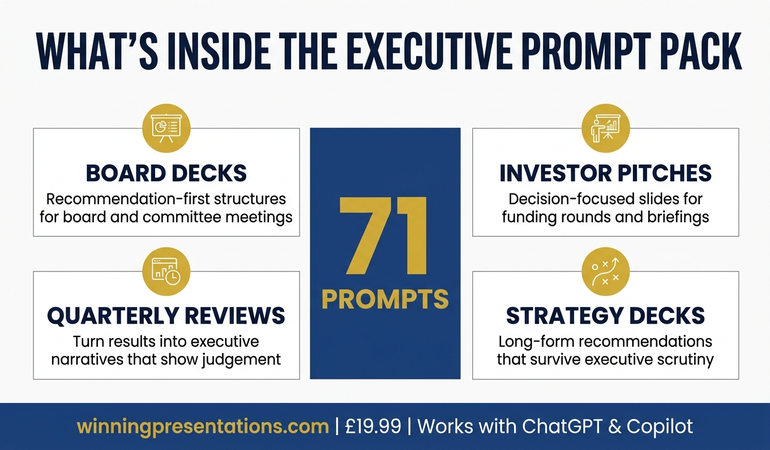
📂 READY TO BUILD YOUR BOARD DECK?

Get Board-Ready Templates + AI Prompts

Stop starting from scratch. Get the templates used by executives who present to boards and senior leadership.

Get the Executive Slide System →