
Category: Quarterly Reviews & Updates

01 Apr 2026
Executive presenting a single summary slide to senior leadership in a year-end review meeting

Year-End Review Presentation: One Slide That Summarises Everything

Quick Answer: The most effective year-end review presentation distils your entire year’s performance into a single, strategically structured summary slide. This slide captures three critical elements—what you achieved, why it matters in context, and what comes next—whilst supporting appendices provide evidence without overwhelming decision-makers. When executives see one powerful summary first, they engage more thoughtfully and make better decisions.

The Story: When More Becomes Less

Tomás had spent three weeks assembling the perfect year-end presentation. As VP of Operations at a mid-sized logistics company, he’d meticulously documented every achievement: new warehouse efficiency metrics, cost reductions by division, team expansions, process improvements. He’d created gorgeous charts, compelling narratives, supporting evidence across 47 slides—enough material to tell the complete story of an extraordinary year.

The CEO gave him 15 minutes with the board. Two slides in, he saw the glaze. Nobody was following his narrative. They wanted the answer to one simple question: Where did we win, and what does it mean for next year?

That afternoon, Tomás redesigned everything around a single summary slide. On it: year-on-year performance against four critical metrics, a visual explanation of why those metrics shifted, and three explicit priorities for the next twelve months. He kept the 47 slides but repositioned them as evidence—appendix material that the board could explore if they wanted depth. When he presented the new structure, the CEO asked better questions. The board engaged differently. The decision happened faster.

Tomás discovered what every executive eventually learns: the slide that matters most isn’t buried in a narrative mountain. It stands alone, crystalline, at the beginning—telling the entire story in one breath.

The Executive Challenge

You have one chance to show your board or executive audience that you understand what matters. Most year-end presentations bury that message in layers of supporting detail. What if you reversed the structure—putting your most powerful insight first, then letting supporting slides provide the depth executives need to feel confident in your conclusion?

Why 47 Slides Kill Your Message

Executives rarely object to having information available. They object to being made to work too hard to find meaning. When you build a year-end review presentation as a chronological narrative—achievements one, achievements two, achievements three—you’re asking your audience to connect dots you should have already joined.

The cognitive load problem compounds over time. Each new metric, story, or data point increases the mental effort required to hold the previous points in working memory. By slide 20, your audience has forgotten what slide 5 was really saying. By slide 47, they’re exhausted.

Worse: when everything feels equally important, nothing is. Your board comes away remembering fragments rather than the coherent narrative of your performance and future direction. They can’t explain your year to their peers because you gave them 47 data points instead of one crystalline insight.

The One-Slide Revolution

Your year-end review presentation must lead with clarity. One summary slide—properly constructed—can do the work of dozens. It compresses the year’s narrative into three elements: What happened (your performance against agreed metrics), Why it happened (the context and drivers), and What’s next (your strategic priorities). Everything else supports this framework. This approach isn’t about hiding detail. It’s about respecting your audience’s cognitive capacity and your credibility.

The Anatomy of One Powerful Summary Slide

A strategic summary slide has a precise internal architecture. It’s not a default template; it’s a carefully composed argument.

Section One: Performance Against Commitment sits at the top-left. You show 3–4 metrics you committed to at the start of the year against actual results. Think year-on-year growth, cost reduction, new customer acquisition—whatever your business measures. Use colour coding: green for outperformance, amber for on-track, red only if you must. Be honest. Boards respect accountability.

Section Two: The Context Layer occupies the top-right. This is crucial and often missing. You show the external or internal factors that shaped your performance. Market conditions? A product delay? A regulatory shift? Talent acquisition challenges? Don’t make excuses; explain causation. This section is where intelligent audiences learn that you understand the forces at play—not just the outcomes.

Section Three: Forward Direction sits below. You articulate 2–3 explicit priorities for the next 12 months. These should flow logically from your performance review. If you underperformed in customer retention, your next priority might be a retention-focused initiative. This section shows that you’re not just reflecting; you’re directing.
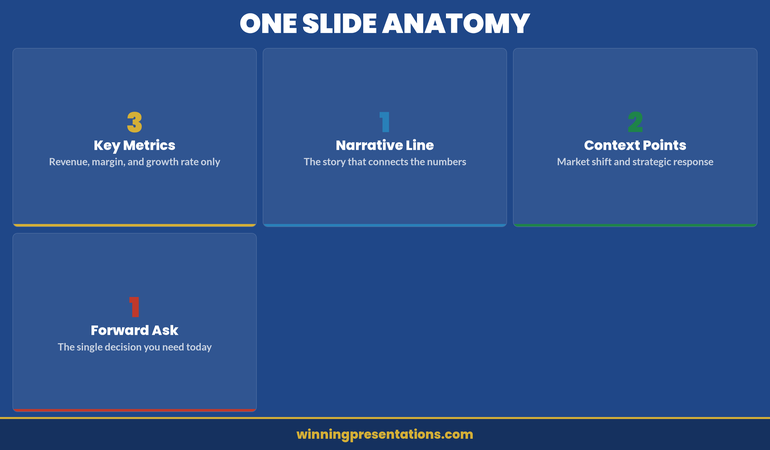
Anatomy of an effective year-end summary slide showing key components for executive review

The visual hierarchy matters enormously. Your metrics and context occupy roughly 60% of the slide. Your forward direction occupies 40%. This ratio reflects reality: most of the conversation will circle back to the question, “Given where we’ve been, where should we go?”

The Narrative Architecture Behind It

Why does this structure work? Because it mirrors how executive brains actually process information about performance.

When a board member looks at your summary slide, they’re answering a sequence of questions in real time. Did we hit our targets? Your performance section answers this in seconds. If we didn’t, why not? If we did, was it luck or skill? Your context section answers this. Now that I understand where we’ve been, where should we focus next? Your forward direction section answers this.

This narrative sequence is psychologically efficient. It moves from concrete (what happened) through explanatory (why it happened) to strategic (what we do about it). Your audience doesn’t have to guess the point. The point is evident.

The supporting slides you’ll present afterward hang on this framework like ornaments on a tree. When you say, “Here’s our detailed revenue breakdown by division,” your audience already knows why they’re looking at it—it’s evidence for the performance claims you made on your summary slide.

Inline Tip: When you structure your year-end review presentation this way, you’re not just making a better deck—you’re making your audience’s decision-making process visible. Executives can see exactly what they need to understand to assess your performance and set the next year’s direction. That transparency builds confidence.

Supporting Slides and the Appendix Role

Your 47 slides haven’t disappeared. They’ve simply been repositioned.

After your summary slide, you present detailed supporting evidence organised by theme. If your summary mentioned “operational efficiency improvements,” your next section unpacks that theme: new processes, adoption metrics, cost savings by initiative. If you mentioned “talent challenges,” your next section addresses hiring, retention, and capability development. This organisation makes the connection between your summary claims and your supporting detail explicit and easy to follow.

The appendix—slides 20–47—becomes genuinely optional. A CFO might drill into detailed financial forecasts. A board member focused on risk might skip to compliance and regulatory updates. But they’re choosing to explore based on interest, not drowning in mandatory detail.

This structure also works beautifully in writing. When you send your year-end review presentation ahead of a board meeting, executives can read your summary in two minutes. Those who want evidence can explore the supporting sections. Those who want everything can review the full appendix. Everyone gets what they need.
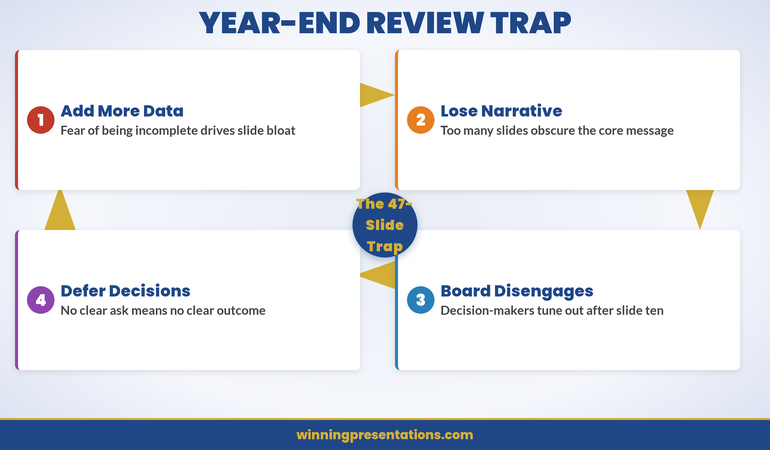
Common year-end review presentation mistakes and how to avoid them

Presenting to Different Audiences

Your board needs to see governance and strategy. Your team needs to see achievement and direction. A government regulator might need to see compliance and risk management. Can one presentation structure serve all these purposes?

Yes—if your summary slide is truly comprehensive. The metrics you choose, the context you highlight, and the priorities you set should be honest and complete enough that different audiences can extract what matters to them.

When you present to your team, you might dwell longer on the “context” section, helping people understand external pressures and industry shifts. This deepens their appreciation for organisational performance and their role in it. When you address the board, you might dwell on forward direction, using the appendix to justify why your priorities will create shareholder value.

The summary slide is the hinge. Everything else pivots around it.

Decision-Making Confidence

When executives see your year-end review presentation structured around one crystalline summary, they make better decisions. Not just because the data is different, but because they can hold the entire narrative in their minds. That clarity translates directly into confidence for better decisions, budgeting, and strategic alignment.

Get the Executive Slide System

Common Pitfalls and How to Avoid Them

Pitfall One: Trying to Fit Too Much Onto the Summary Slide. Resist the urge to show 8 metrics instead of 4, or 5 priorities instead of 3. Constraint forces clarity. If you can’t articulate why a metric matters, it shouldn’t be on your summary slide. Move it to supporting evidence. The summary’s power lies in its discipline.

Pitfall Two: Disconnecting Your Priorities From Your Performance. If your performance review showed underperformance in customer satisfaction but your forward priorities don’t address it, you lose credibility. Executives will assume you either didn’t notice or don’t care. Every priority should feel like a logical response to something on your performance or context section.

Pitfall Three: Making the Summary Too Jargon-Dense. Your summary slide is your moment to speak clearly to non-specialists on your team or board. Avoid acronyms without definition. Avoid industry-specific terminology without translation. If a smart 16-year-old couldn’t understand your summary slide, you’ve failed the clarity test.

Pitfall Four: Presenting It as Fixed. Your summary slide is the opening move in a conversation, not the final word. Invite questions. Be prepared to zoom into detail when someone asks. The most powerful executives are those who can hold the high-level narrative and zoom into granular evidence simultaneously. Your presentation structure should support that flexibility.

Frequently Asked Questions

Should my summary slide include financial data?

Only if your department directly owns a P&L or budget line. If you do, include the headline figure and variance. If you don’t, reference the financial impact of your work indirectly: cost saved, revenue enabled, risk avoided. The summary slide is about impact, not accounting.

How detailed should my context section be?

One slide, maximum. Context exists to orient the audience, not to relitigate the year. State the strategic priority, the operating conditions that shaped your results, and move on. If context takes more than 90 seconds to deliver, you’re over-explaining.

What if my actual performance doesn’t support a confident forward look?

Be honest. A year-end review that inflates next year’s outlook destroys credibility when Q1 results arrive. Present realistic targets with clear dependencies. The board respects realism far more than optimism. If your forward look is cautious, explain why and what would need to change for the outlook to improve.

Should I include a year-end review presentation before my board meeting or after?

Before. The year-end review sets the context for next year’s strategy discussion. If the board doesn’t have a clear view of where you’ve been, they can’t meaningfully evaluate where you’re going. Present the review first, then move to strategy.


Getting this right changes how your organisation thinks about annual reviews. Instead of a retrospective checklist, your executive summary becomes a strategic document—one that shows your board not just where you’ve been, but where you’re going and why. The clarity that summary slide creates ripples outward. Your team understands priorities more clearly. Your stakeholders support your direction more confidently. Your board makes better decisions.

Start with your summary slide. Let everything else hang from it. You’ll be amazed at how much more effective your entire approach becomes.

The Winning Edge Newsletter

Join executives, board members, and presentation leaders who get a fortnightly email about structuring presentations for high-stakes moments. Plus templates, frameworks, and thinking on governance and executive communication. Subscribe to The Winning Edge.

Download the Executive Presentation Checklist to validate your year-end review structure.


Read Next: Product Recall Presentation: How to Communicate Crisis With Clarity — when stakes are highest and time is shortest, the structure of your presentation determines whether your organisation controls the narrative or the narrative controls you.


Mary Beth Hazeldine is the Owner & Managing Director of Winning Presentations. With 24 years of corporate banking experience at JPMorgan Chase, PwC, Royal Bank of Scotland, and Commerzbank, she advises executives across financial services, healthcare, technology, and government on structuring presentations for high-stakes funding rounds and approvals.

31 Mar 2026
Executive delivering a concise department update presentation to leadership in a modern meeting room

The Department Update Presentation: How to Make Your Ten Minutes Count


A department update presentation typically runs ten to fifteen minutes—which means every slide, every stat, and every moment counts. You cannot afford to waste airtime on preamble or scattered information architecture. What separates a forgettable department update from one that lands with your executive audience is structure: knowing which information goes first, which visuals support trust, and which commitments or risks you surface before questions arise.

Jump to:

Kenji was mid-update slide deck when his executive sponsor interrupted: “What’s the story here?” Twenty minutes in, and Kenji realised he’d spent nine slides on process and context, leaving only three for results and what mattered. His team’s work was solid; his framing wasn’t. The following quarter, Kenji restructured his department update from the finish line backwards: outcome first, then the three metrics that proved he’d reached it, then the one risk that needed escalation. His sponsor asked fewer clarifying questions and approved his team’s next funding tranche within days. The difference wasn’t more data or better charts. It was arrangement.

Structuring a department update presentation means knowing which information slides first to set context, which evidence follows, and which risks you flag before you’re asked. This article walks you through the exact architecture executives expect—so your ten minutes land with clarity instead of confusion.

How to structure a ten-minute update

Ten minutes is roughly 800 words at a natural speaking pace—and you cannot afford filler. Your audience is senior; they are time-constrained; they expect you to have done the synthesis work before you stood up. A typical department update presentation follows this shape:

  1. Context slide (30 seconds): Where your department sits in the quarter’s priority landscape.
  2. Outcome slide (60 seconds): The headline result—revenue, cost, risk mitigation, capability built.
  3. Evidence slides (3–4 minutes): Three to four key metrics that support your outcome claim.
  4. Dependencies or risks (2 minutes): What needs flagging, what you need from others, what could derail next quarter.
  5. Close (60 seconds): One clear ask—approval, escalation, resources, or visibility—and the next gate.

This is the rhythm executives follow when they’re listening for decision points. Anything longer than this in any section will lose their focus; anything shorter risks sounding thin. The art is fitting meaningful evidence into those three to four minutes without compression artefacts.

Most executives see five or six department updates per month. What separates the ones they remember from the ones they skim is precision in your slide deck. Every element—from how you label a metric to where you place the risk flag—signals whether you’ve thought this through or are hoping for clarity in the room.

The Executive Slide System (ÂŁ39) gives you the exact template logic for a department update presentation: which metrics go above the fold, how to layer context so it’s never assumed, and how to flag dependency without seeming defensive. You get slide architecture, narrative sequencing, and three worked examples—so you’re not guessing at what “clear” looks like.

Get the System (ÂŁ39)

Opening with context, not housekeeping

Your first slide should never be a title slide. Your first slide should never be a mission statement. Your first slide answers one question for the person in the room who is scanning their email halfway through: Why am I listening to this, right now?

A context slide for a department update does three things:

  • Names the business priority or initiative your department supports
  • States the time period under review (quarter, month, fiscal year)
  • Flags the decision or approval you’re seeking at the end

Example: “We run the digital platform team. This update covers Q1 performance against our customer onboarding priority. By the end of this session, we need approval to move the payment integration release to early Q2.”

That opening does not waste words. It doesn’t introduce who you are, it doesn’t recap what digital does, and it doesn’t ask for a show of hands. It simply sets up the commercial thread that ties every slide to come. Your audience can now listen with a purpose.

Displaying key metrics without overload

This is where department updates often trip up. You have solid data—system uptime, release velocity, cost per transaction, customer satisfaction scores—and you’re tempted to show all of it because it all matters. But in a ten-minute window, four or five headline metrics will do far more work than a dashboard cram.

Choose your metrics using this filter: Does this metric prove I achieved my stated outcome, or does it prove I’m tracking against a known risk? If neither, cut it.

For a department update on digital platform delivery, that might be: completion rate against roadmap, defect density in production, and time-to-fix for critical issues. Those three numbers tell a story of what shipped, whether it’s stable, and whether your team responds quickly to trouble. A fourth metric—team capacity utilisation—might sit in your risk section if hiring freeze is a concern. A fifth—quarterly cost variance—gets one line in your close if budget is your next ask.

Each metric needs a single visual: a line chart for trend, a gauge or traffic light for status against target, or a before/after comparison. No stacked bar charts, no dual-axis complexity, no footnote disclaimers. If you need a footnote to explain your metric, your metric isn’t clear enough.

The visual design here matters more than you might think. Executives scan a metric slide in under five seconds; if the visual doesn’t make the story obvious, you’ll spend your remaining slide time explaining it instead of moving forward.


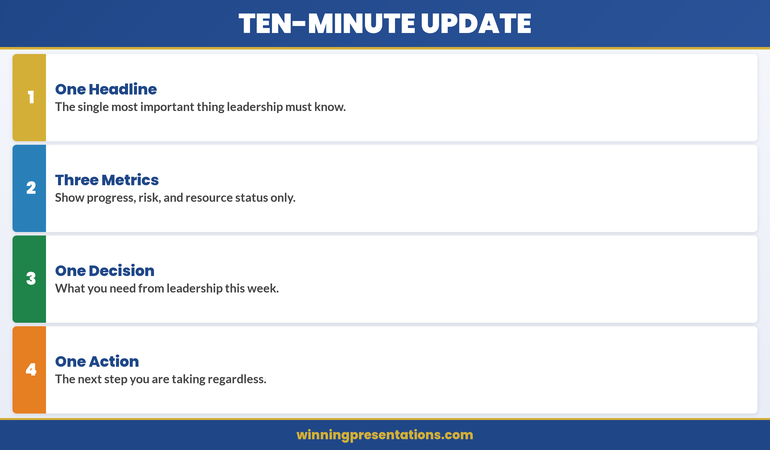
Ten-minute department update framework showing One Headline, Three Metrics, One Decision, One Action

The four-part architecture of a ten-minute department update: one headline, three metrics, one decision, one action.

The infographic above distils the ten-minute update into four non-negotiable elements. One Headline is the single most important thing leadership must know—not a summary of everything, but the one piece of information that, if they retained nothing else, would still make the update worthwhile. This forces discipline: if you cannot articulate your department’s status in a single sentence, you haven’t done the synthesis work.

Three Metrics covers progress, risk, and resource status only. Not five metrics, not eight, not a dashboard export. Three. Progress tells them whether you’re on track. Risk tells them what could derail you. Resource status tells them whether you have what you need. If a metric doesn’t fit one of those three categories, it belongs in an appendix slide, not in your ten-minute window.

One Decision is what you need from leadership this week. Not three decisions, not a wish list, not “any thoughts?” One decision, clearly framed, with the evidence you’ve already presented supporting the case. If you cannot name the decision you need, you’re presenting for visibility, not for impact—and visibility alone rarely justifies ten minutes of executive time.

One Action is the next step you’re taking regardless of what leadership decides. This signals forward momentum and demonstrates that your department isn’t waiting for permission to move. It also gives the audience a clear picture of what happens after the meeting ends, which is what experienced executives are always listening for.

Surfacing risks and dependencies early

If you wait until the Q&A to surface a risk or a blocking dependency, you’ve already lost credibility. Executives expect you to know what can go wrong—and they expect you to tell them before they have to ask. This is not negativity; this is professionalism.

A typical department update flags two to three risks or dependencies in the third quarter of your time:

  • A known constraint: “We’re currently resource-constrained in testing. The next release will take two weeks longer than originally planned.”
  • An external dependency: “Finance’s budget cycle delay means we can’t start contractor onboarding until mid-April. That pushes our infrastructure refresh to Q2.”
  • A strategic risk: “Three of our five senior engineers have expressed interest in external opportunities. We’re moving quickly on retention, but we wanted you aware.”

Notice the shape of each: Situation → Impact → Your response. You’re not asking permission to have the problem; you’re demonstrating that you’ve already thought it through. That distinction shifts the conversation from “What are you going to do?” to “Here’s what we’re doing; let me know if you’d approach this differently.”

Never bury a risk in a note at the bottom of a metrics slide. Give it its own real estate, name it, and then move on. You’ll command far more respect than if you hide it and hope no one notices.

Moving to action before time expires

Your close is not a summary. A summary of a ten-minute update is what kills momentum. Your close is a single, clear action: approval for your next phase, escalation of a decision that sits above your pay grade, a request for resource, or a commitment to a next meeting.

State it in one sentence. Then tell them when you’ll come back. Then stop talking.

Example close: “We need CFO approval to bring on two contract infrastructure engineers for Q2—that’s ÂŁ240k, and it compresses our roadmap risk by eight weeks. Can we have a decision by end of week?” Then pause. Don’t fill silence with extra context. Let the room respond.

If you’ve structured your department update correctly—context, outcome, evidence, risks, ask—the silence will be brief. Questions will cluster around the risks you’ve already named or the metrics that didn’t land as clearly as you hoped. What you won’t get are foundational questions about why you’re standing there or what your department actually does. That efficiency is the whole point.

Your slides are the difference between a conversation that moves and one that stalls. When your metric visuals are clear, your risks are surfaced without drama, and your ask is unmistakable, even a ten-minute slot becomes enough. Get the template logic and slide architecture that executives expect—and stop guessing at what clarity looks like.

Executive Slide System (ÂŁ39)


Department updates comparison: Wastes Time versus Drives Action across three dimensions

The contrast between department updates that waste time and those that drive action.

The comparison above crystallises the difference between department updates that waste executive time and those that drive action. In the first row, “Everything is Fine” — the generic positive spin with no specifics — is replaced by “One Key Issue”: leading with the thing leadership must act on. Executives don’t need reassurance; they need signal. If everything genuinely is fine, say so in one sentence and move to the decision you need. If something isn’t fine, surface it before someone else does.

In the second row, “All the Numbers” — every metric from every system available — gives way to “Three Signals”: progress, risk, and resource, nothing else. The temptation to show all your data is understandable; it feels like proof of diligence. But executives scanning twelve charts in three minutes don’t see diligence. They see a presenter who hasn’t filtered, and filtering is the job. Three signals, clearly labelled, with a one-line interpretation beside each, tells the story faster and more credibly than a dashboard dump.

In the third row, “Questions?” — the passive handoff with no direction — becomes “Decision Needed”: one specific ask with a deadline. “Questions?” invites the room to wander; “I need approval for two contract hires by Friday” invites a decision. The difference isn’t assertiveness for its own sake; it’s structural clarity. When you name the decision, you give the audience a reason to have listened. When you don’t, you leave them wondering why they were in the room.

Want the exact slide templates for each of these elements? The Executive Slide System gives you the headline slide, the three-metric layout, and the decision-close format — so you’re building from proven architecture, not guessing.

Frequently asked

How many slides should a ten-minute department update have?
Six to eight slides is the typical range. That’s roughly one minute per slide plus one for questions. If you’re building slide decks with twelve or more slides in a ten-minute slot, you’re either trying to show too much or your narratives are too thin to fill the time naturally.

Should I include historical comparison or just this quarter’s performance?
Include one or two quarters of historical data if it shows meaningful trend—for example, whether you’re improving on a known weakness or maintaining a strength. But don’t layer in five quarters of context unless a specific pattern (like seasonal volatility) matters to the decision at hand. Executives care about now and next; they don’t need your full archive.

What do I do if I’m running over time?
Cut from the middle, never from the opening or the close. Your context and your ask are non-negotiable. If time is tight, tighten your evidence section: choose three metrics instead of four, or move a secondary point into the Q&A. Never rush your close—that’s where approval lives.

Keep sharp: The Winning Edge

Every week, The Winning Edge delivers one executive presentation insight you can use in your next meeting. Ideas on structure, narrative technique, and slide logic—distilled so they land in under five minutes. Join hundreds of leaders who use it to sharpen their delivery.

Grab the Executive Presentation Checklist — a framework for vetting any presentation before you stand up.

Read next: The Succession Planning Presentation: Framing Leadership Continuity

—

Mary Beth Hazeldine is Owner & Managing Director of Winning Presentations. With 24 years of corporate banking experience at JPMorgan Chase, PwC, Royal Bank of Scotland, and Commerzbank, she advises executives across financial services, healthcare, technology, and government on structuring presentations for high-stakes funding rounds and approvals.


08 Mar 2026
Executive leading an operational review meeting with action items visible on a modern glass boardroom screen

The Operational Review That Gets Action (Not Just Nods)

You present 47 metrics. Your stakeholders nod. Nothing changes.

This is the operational review problem nobody talks about. You spend weeks preparing data, polishing slides, rehearsing the narrative. Your team coordinates across four departments. You nail the presentation. And then—silence. No decisions. No follow-ups. No action.

Quick Answer

Operational reviews fail to drive action because they prioritise data completeness over decision clarity. Most organisations present *everything*, which means nothing stands out as requiring a decision or response. The operational reviews that actually get action restructure around three elements: (1) what changed since last time, (2) what requires a decision now, and (3) what success looks like if we act. This isn’t a reporting exercise. It’s a decision-forcing mechanism.

🚨 Operational review this week?

Your stakeholders won’t act on data—they’ll act on clarity about what you need from them.

  • Are your key decision points buried in supporting metrics?
  • Does your audience know what success looks like after they leave the room?
  • Have you made it easy for them to say “yes”?

→ Need the exact operational review templates? Get the Executive Slide System (£39)

The Action-Driving Operational Review infographic showing five elements every operational review needs: Decision First, Impact Quantified, Owner Assigned, Timeline Committed, and Blockers Surfaced — each with specific guidance for turning reports into decisions

The VP Who Showed 47 Metrics in 12 Minutes

Sarah was a VP of Operations for a mid-sized fintech firm. Her operational reviews were legendary—in the worst way. She prepared comprehensive slide decks with 47 metrics: customer acquisition cost trends, churn percentages, team utilisation rates, vendor performance scores, system uptime data, and everything in between. She presented them beautifully, drilling down into cohort analysis and seasonal variations.

The executive team always nodded politely. Nobody acted on anything.

One Thursday, her CFO pulled her aside after a review. “Sarah, I have no idea what you need from me in that meeting. You’re drowning us in data and nowhere do you say, ‘This requires a decision, and here’s why.’”

That comment changed everything. Sarah restructured her next operational review around a single question: *What do you need us to decide or do in the next 30 days?* She cut the metrics to 12. For each, she added a single line: “Decision required: approve vendor migration” or “Action: allocate additional training budget.” Suddenly people weren’t passively receiving information. They were actively responding to requests.

Three weeks later, every decision from that review was implemented. Sarah hadn’t presented more data. She’d presented *clearer action*.

Why Operational Reviews Are Different From QBRs

Before we go deeper, let’s clarify what an operational review actually is—and what it’s *not*.

A QBR (Quarterly Business Review) is a snapshot: here’s how we performed against plan. It’s retrospective. It answers: “Did we deliver?” Operational reviews answer a different question: “What do we need to do about what we’re seeing?”

A QBR is about *reporting*. An operational review is about *deciding*. A QBR summarises the quarter. An operational review identifies what requires response in the coming weeks. They share some structure, but their purpose is fundamentally different. (If you’re preparing a QBR instead, our QBR Presentation Template handles that structure separately.)

This matters because it changes everything about how you prepare. In a QBR, you might show all 47 metrics because your remit is comprehensive reporting. In an operational review, showing all 47 metrics signals that nothing is particularly urgent—and therefore stakeholders treat everything as background noise.

The Three-Layer Structure That Forces Action

Operational reviews that drive action follow a disciplined three-layer structure:

Layer 1: Changed State
Start with what’s different since the last review. Not everything—just the changes that matter. “Our churn rate moved from 2.3% to 2.8%” is more useful than “churn is 2.8%.” You’re immediately signalling: this is new information, pay attention.

Layer 2: Decision Point
For each changed state, name the decision that’s now required. Don’t be subtle. “We need your approval to reallocate ÂŁ15k from training to customer success tooling” is actionable. “Training spend is under-utilised” is just observation.

Layer 3: Success Criteria
Define what happens after they say yes. “If approved, we implement by 15 April and expect churn to drop to 2.0% by Q2.” This removes ambiguity about what action actually means.

When you structure around these three layers, something shifts in the room. People aren’t passively consuming data—they’re actively making decisions and seeing the consequences of those decisions. That’s when action happens.

Stop Drowning in Data—Structure Operational Reviews for Immediate Buy-In

The operational review presentations that get funded, staffed, and executed within weeks follow a proven structure. They isolate what’s changed, clarify what you’re asking for, and show stakeholders exactly what success looks like.

  • Pre-built decision frameworks so you never present data without clarity on what action you’re requesting
  • Change-state templates that highlight what’s genuinely different (not just reporting all metrics)
  • Stakeholder alignment checkpoints that surface objections before the formal review

Get the Executive Slide System → £39

Used by operations leads, finance directors, and programme managers delivering operational reviews that stick.

How many times have you presented to silence?

Silence after a presentation usually means your audience doesn’t understand what you’re asking for. The Executive Slide System includes decision-clarity templates that change this dynamic.

Get the Executive Slide System → £39

Surfacing Decision Points Your Stakeholders Can’t Miss

Most operational reviews bury the decision point in a sea of supporting metrics. By the time your stakeholder realises you’re asking them for something, the meeting is nearly over and they’re mentally halfway to their next commitment.

Operational reviews that drive action surface the decision *first*, then provide the evidence.

Instead of: “System uptime was 99.2% last month. We experienced three outages in the third week related to database scaling. The vendor has recommended infrastructure upgrades costing ÂŁ12,000. Here are the technical specifications…”

Try: “We need your approval for a ÂŁ12,000 infrastructure upgrade to prevent recurring outages. Here’s what happened last month: three outages, all preventable with upgraded systems. Cost-benefit: the upgrade protects us from reputational damage and estimated ÂŁ50,000 in customer churn risk. Decision required this week.”

The second version makes it impossible for stakeholders to be passive. They know immediately what you’re asking for, why it matters, and what the cost of *not* acting is.

Document each decision point clearly on a single slide. Include: (1) the decision or action requested, (2) the evidence that makes it necessary now, (3) the risk of inaction, and (4) your recommendation. This is different from the dashboard or status presentation, where reporting is the sole purpose. Here, every metric serves a decision.

Status Update vs Action-Driving Review comparison infographic contrasting four dimensions: opening slide approach, data filtering, accountability structure, and meeting outcomes between passive reporting and decision-driving formats

How to Escape the Metrics Trap

Here’s the metrics trap: the more comprehensive your review, the less actionable it becomes. Each additional metric dilutes the impact of every other metric. You end up with perfect information and zero action.

Breaking out requires ruthlessness. Ask yourself about each metric: “If I removed this, would the decision change?” If the answer is no, remove it.

This is hard. You spent time gathering that data. Your team has tracked it carefully. But operational reviews aren’t data archives. They’re decision documents. The metrics that make it into your review should be the ones that either (1) changed in a way that matters, (2) support a decision you need to make, or (3) provide critical context no one else has access to.

Everything else—however interesting, however complete—stays in the supporting documentation. Your stakeholders can drill into detail if they want it. But the review itself stays laser-focused on what requires action.

A practical rule: if your operational review requires more than 20–25 minutes to present, you’ve included something that doesn’t drive a decision. Cut it.

Building Accountability Into the Close

The moment after you finish presenting is when action gets lost. People walk out, get distracted, and the decisions fade.

Operational reviews that actually get executed build accountability into the close. Before the meeting ends, you’re confirming: who’s responsible for each decision? By when? How will we measure success?

A simple close structure:

“Let me recap the decisions we’ve made today. First: approve the vendor migration—finance owns the contract, legal reviews by 14 April. Success metric: signatures by 21 April. Second: allocate the customer success budget—operations owns the allocation, implemented by 1 May. Success metric: new tools live and team trained by 30 April. Are we aligned on timing and owners?” (Then pause. Listen for objections. Adjust. Confirm again.)

This isn’t just politeness—it’s accountability enforcement. When owners confirm publicly and success is measured, action happens. When you leave it vague (“We’ll sort this out offline”), nothing happens.

Is This Right For You?

Operational reviews are the right format if:

  • You’re running a team or function that makes decisions week-to-week or month-to-month, not just quarterly
  • You need approval, budget, or resource decisions from stakeholders above you
  • You’re seeing patterns in data that require a response (not just reporting what happened)
  • You find that decisions from previous reviews take forever to execute
  • Your stakeholders frequently say “let’s table this offline” instead of deciding in the moment

If you’re running a monthly business review (focused on status), you might instead want our Monthly Business Review Presentation structure. If you’re running a formal quarterly report to the board, the QBR template is your better path.

But if you’re in that middle ground—where you need to drive operational decisions, secure resources, and move initiatives forward—operational reviews structured for action are your tool.

Tired of Presenting to Silence? Let Your Data Get Decisions

The Executive Slide System includes decision-ready operational review templates that eliminate vague requests and weak closes. Stakeholders walk out of your reviews with clarity about what they approved, who owns it, and when it’s done.

  • Proven decision frameworks that work for every type of operational review—budget, resource, process, or strategic
  • Close-out structures that lock in accountability so decisions actually get executed

Get the Executive Slide System → £39

70+ executives have restructured their operational reviews using these templates and reported faster decision-making within three months.

Want to see how Sarah restructured her operational review?

The specific templates, decision frameworks, and stakeholder alignment tools she used are part of the Executive Slide System. You’ll have them ready to use in your next review.

Get the Executive Slide System → £39

Frequently Asked Questions

How is an operational review different from a monthly business review?

An operational review is *decision-focused*. A monthly business review is *status-focused*. In a monthly review, you’re reporting what happened. In an operational review, you’re identifying what requires a decision or action. The structures are different because the purpose is different. An operational review can happen monthly, quarterly, or whenever decisions need to be made. A monthly business review is primarily retrospective reporting.

What if I have too many decision points? Should I include them all?

No. If you have more than five or six substantive decision points in a single operational review, you’ve either tried to cover too much ground or your decision points aren’t actually *decisions*—they’re observations. Operational reviews are most effective when they’re focused. If you have too many decision points, split them into separate forums or prioritise the ones that will have the most impact on execution in the next 30 days.

How do I handle metrics that didn’t change much? Should I still include them?

Only if the *stability* of that metric supports a decision. For example: “Customer satisfaction remained at 8.2/10—no action required on product quality.” But a metric that’s stable and doesn’t inform a decision should stay in supporting documentation, not in the review itself. The operational review is for data that *matters*.

What if stakeholders want me to include more detail during the review?

That’s a good sign—it means they’re engaged. But address it strategically. Say: “That’s a great question. I have the detailed analysis here [pull up supporting doc], but to keep us focused on the decisions we need to make today, can we table the deeper analysis and I’ll send it to you after the meeting?” This keeps the meeting focused on action without dismissing legitimate interest in detail.

📬 The Winning Edge

Weekly strategies for executives who present under pressure. No fluff. No filler. Just the structures that get decisions.

Subscribe Free →

🆓 Free resource: Executive Presentation Checklist — a free guide to strengthen your presentation preparation.

Master Operational Reviews Like a 24-Year Banking Executive

The structures in the Executive Slide System come from 24 years of delivering high-stakes operational reviews across JPMorgan Chase, PwC, Royal Bank of Scotland, and Commerzbank. These are the frameworks that got budgets approved, teams aligned, and initiatives launched.

  • Decision frameworks tested in boardrooms and strategy sessions where millions were at stake
  • Templates for every type of operational scenario—budget resets, vendor changes, team restructures, process improvements
  • Stakeholder alignment techniques that surface objections before the formal review (so you’re never blindsided)
  • Close structures that lock accountability into every decision
  • Bonus: frameworks for handling the difficult questions and pushback that always comes

Get the Executive Slide System → £39

These same frameworks have been used to restructure operational reviews across fintech, banking, SaaS, and professional services firms.

You might also be interested in:

About the Author

Mary Beth Hazeldine is the Owner & Managing Director of Winning Presentations. With 24 years of corporate banking experience at JPMorgan Chase, PwC, Royal Bank of Scotland, and Commerzbank, she has delivered high-stakes presentations in boardrooms across three continents.

A qualified clinical hypnotherapist and NLP practitioner, Mary Beth combines executive communication expertise with evidence-based techniques for managing presentation anxiety. She has trained thousands of executives and supported presentations for high-stakes funding rounds and approvals.

Book a discovery call | View services