Category: Leadership

08 Dec 2025
The Story-First Dashboard Framework showing 5 steps: Lead with headline, show only what matters, add context, explain why, connect to the ask

Team Dashboards That Tell a Story (Not Just Show Numbers)

I once watched a VP present 47 metrics in 12 minutes.

Forty-seven. Charts in every corner. Trend lines crossing like spaghetti. Numbers I’m certain even he didn’t fully understand. When he finished, the CEO had one question:

“So… is the team on track or not?”

Twelve minutes of data, and leadership still didn’t know the answer to the only question that mattered.

I’ve sat through hundreds of these presentations over 24 years at JPMorgan Chase, PwC, Royal Bank of Scotland, and Commerzbank. The pattern is painfully predictable: charts, graphs, metrics — and leadership still asking “so what does this mean?” at the end.

A dashboard isn’t a data dump. It’s a story about performance, told through carefully chosen numbers. When your dashboard tells a story, leadership understands what’s working, what’s not, and what you need from them — in 60 seconds.

Here’s how to transform your team dashboard presentation from a numbers report into a narrative that drives action.

The Story-First Dashboard Framework showing 5 steps: Lead with headline, show only what matters, add context, explain why, connect to the ask
The framework that transforms dashboards from data dumps into decision drivers

Why Most Dashboards Fail

The typical dashboard looks like a spreadsheet converted to slides. Metrics everywhere. Charts in every corner. Numbers without narrative.

Leadership sees this and thinks: “Which of these 15 metrics actually matter? Is 73% good or bad? What am I supposed to do with this information?”

The problem isn’t the data. It’s that a dashboard without story forces leadership to do the interpretation work. They won’t. They’ll nod politely and move to the next agenda item — and you’ll wonder why nothing changes.

An effective dashboard does the interpretation for them. It says: here’s what happened, here’s what it means, here’s what we need.

The Story-First Framework That Works

Every effective team dashboard presentation follows a narrative structure. Not data-first — story-first, with data as evidence.

Step 1: Lead With the Headline

Start with a one-sentence summary of performance. Not “Q3 Team Dashboard” as your title — that tells leadership nothing.

Weak: “Q3 2025 Team Performance Dashboard”

Strong: “Team exceeded delivery targets while managing 20% headcount gap”

Your headline should answer “how are things going?” before leadership looks at a single number. If they only read the title and nothing else, they should understand the situation.

Step 2: Show Only Metrics That Matter

A dashboard with 15 metrics is a dashboard where nothing stands out. Choose 4-6 maximum — the ones that actually indicate performance.

For each metric, apply this filter:

  • Does leadership need this to understand team performance? (If no, cut it)
  • Can they take action based on this metric? (If no, question it)
  • Does it tell a different story than other metrics? (If no, it’s redundant)

More metrics doesn’t mean more insight. It means more confusion and less time on what matters.

Step 3: Add Context to Every Number

A number without context is meaningless. “Customer satisfaction: 78%” tells leadership nothing. 78% compared to what?

For every metric, provide:

  • Target: What were we aiming for?
  • Previous period: What was it last quarter?
  • Trend: Improving or declining?
  • Interpretation: Good news or concerning?

Example: “Customer satisfaction: 78% (target: 75%, up from 72% last quarter) ✓ On track”

Now leadership knows 78% is good news — above target and improving. No interpretation required.

Want the exact template?

The Executive Slide System includes a team dashboard template with this structure built in — metrics with context, visual status indicators, and narrative framing. The same templates clients have used to secure approvals totalling over £250 million.

Step 4: Explain the Why Behind the Numbers

Don’t just report what happened — explain why.

Weak: “Delivery velocity decreased 15% this quarter.”

Strong: “Delivery velocity decreased 15% this quarter due to planned architecture refactoring. This short-term dip enables the 40% improvement projected for Q1.”

Leadership doesn’t just want to see numbers change. They want to understand the drivers. A dashboard that explains causation builds confidence in your grasp of the situation.

Step 5: Connect to What You Need

Every dashboard should end with implications and asks. What does this performance mean for decisions leadership needs to make?

Examples:

  • “Based on current trajectory, we’ll miss Q4 target without additional resources. Requesting approval for 2 contract developers.”
  • “Performance is strong. I recommend accelerating the Phase 2 timeline.”
  • “Team is on track. No decisions needed — I’ll flag if anything changes.”

A dashboard without implications is just information. A dashboard with implications drives action.

Side-by-side comparison of a data dump dashboard versus a story-first dashboard that gets decisions
The difference between “Is 78% good?” and “Got it. Approved. Next item.”

The One-Slide Version

Sometimes your entire update needs to fit on a single slide. Here’s the structure that works:

Section Content
Headline One sentence summarising overall performance
Key Metrics 4-6 metrics with target, actual, and status (✓ On track / ⚠ Watch / ✗ Off track)
What Changed 2-3 bullets on significant changes since last period
Watch Items Any metrics trending toward concern, with your mitigation plan
Ask / Implication What you need from leadership, or “No action required”

This single-slide structure tells the complete story in 30 seconds. Leadership can ask questions if they want depth, but they have the full picture immediately.

The one-slide team dashboard template showing headline, metrics, changes, watch items, and ask sections
Everything leadership needs to know — on one slide

5 Dashboard Mistakes That Lose Leadership

Mistake 1: Starting with the worst number. Leading with failures puts leadership in critical mode for everything that follows. They stop listening for solutions. Lead with a balanced headline, then address specifics.

Mistake 2: Showing every metric you track. Just because you track 30 metrics doesn’t mean leadership needs all of them. More data creates more confusion. Select ruthlessly — if it doesn’t change decisions, cut it.

Mistake 3: Charts without obvious takeaways. A dashboard full of complex charts looks sophisticated. But if leadership has to study a chart to extract the insight, you’ve failed. Every visualisation should have an obvious takeaway. If it doesn’t, replace it with a simple number and statement.

Mistake 4: Numbers without comparison. “Revenue: £2.3M” forces leadership to remember what’s normal. They won’t. Always include targets and trends so the number means something.

Mistake 5: Missing the “so what.” The most common failure: reporting numbers without implications. What does this performance mean? What should leadership do differently? If there’s no “so what,” leadership wonders why they’re looking at this.

5 dashboard presentation mistakes that lose leadership - infographic
Avoid these five mistakes and you’re already ahead of most presenters

The 60-Second Verbal Delivery

How you present the dashboard matters as much as the slide itself. Here’s a script that works:

“The team had a strong quarter — we exceeded delivery targets while managing a significant headcount gap.

Four metrics to highlight: [walk through each with status]. The velocity dip is planned — we’re investing in architecture that pays off next quarter.

One watch item: contractor costs are running above budget. We’ve implemented controls that should bring this in line by month-end.

No decisions needed today. I’ll flag if the cost situation doesn’t improve by our next check-in.”

That’s 60 seconds. Leadership has the full picture. They can ask questions or move on — but they’re not left wondering what you need from them.

Frequently Asked Questions

How often should I update my dashboard?

Match your organisation’s rhythm. Monthly for most teams, weekly for fast-moving projects, quarterly for stable operations. Your dashboard should show meaningful change — if metrics barely move between updates, you’re reporting too frequently.

What if my numbers are bad?

A dashboard with bad numbers should still lead with an honest headline, explain the causes, and present your recovery plan. Leadership respects transparency and action plans. They don’t respect hiding problems in dense data or burying bad news on slide 12.

Should I show the raw data?

Show interpreted data — metrics with context. Have raw data available in an appendix if leadership wants to drill down, but don’t lead with it. Your job is to do the interpretation work so they don’t have to.

How do I handle metrics where we missed targets?

Acknowledge the miss, explain why, and show what’s being done. “Delivery: 82% (target: 90%) — missed due to unexpected security requirements. Mitigating with additional sprint capacity in Q4.” Don’t hide it; own it.

Get the Dashboard Template

The Executive Slide System includes the team dashboard template with this exact structure — headline, metrics with context, watch items, and implications. Turn your data dump into a story that drives decisions.

Clients have used these templates to secure approvals totalling over £250 million. 10 templates. 30 AI prompts. Instant download.

GET INSTANT ACCESS → £39

30-day money-back guarantee • Instant PDF download • Use on unlimited presentations


Related: How to Create Executive Presentations That Get Approved in 2025

08 Dec 2025
The 60-Second Board Opening Framework showing the 4 elements: State Action Required, Establish Timeline, Preview Recommendation, Set Discussion Expectations

How to Open a Board Meeting So Everyone Knows What’s Expected

I watched a CFO lose a £4 million approval in eleven words.

“Let me walk you through our Q3 performance and then discuss…”

That was it. Eleven words. The moment he said “walk you through,” I saw three directors reach for their phones. By the time he got to his actual request — 22 minutes later — the room had mentally moved on. The board deferred his decision to next quarter. The delay cost his company £400K in interim licensing fees.

I’ve sat in hundreds of board presentations over 24 years at JPMorgan Chase, PwC, Royal Bank of Scotland, and Commerzbank. The pattern is unmistakable: presenters who open with context and background lose the room in 60 seconds. Those who open with clarity about what’s needed get decisions in 15 minutes.

Directors aren’t impatient — they’re fiduciaries with packed agendas. When you don’t establish expectations immediately, they spend your entire presentation wondering “what does this person actually want from me?”

That uncertainty kills decisions.

Here’s exactly how to open a board meeting so everyone knows what’s expected — and you walk out with the outcome you need.

The 60-Second Board Opening Framework showing the 4 elements: State Action Required, Establish Timeline, Preview Recommendation, Set Discussion ExpectationsThe 4-part framework that’s helped my clients secure over £250 million in board approvals

Why the First 60 Seconds Determine Everything

Board meetings operate differently from other executive meetings. Directors carry fiduciary responsibility. They’re evaluating risk, thinking about governance implications, mentally categorising every agenda item as “decision required” or “information only.”

When you open with “Let me walk you through our Q3 performance,” directors enter passive information-receiving mode. They’ll listen, nod, ask polite questions. But they’re not primed to decide anything.

When you open with “I’m requesting board approval for a £2M infrastructure investment with expected 18-month payback,” the dynamic shifts entirely. Directors immediately know their role. They’re evaluating a specific decision with specific parameters. Questions become focused. Discussion becomes productive.

The way you open a board meeting establishes everything that follows.

The 4-Part Framework for Your First 60 Seconds

Your opening slide and opening words should cover four elements — in this order:

1. State the Board Action Required

Lead with exactly what you need. Not context. Not background. The action.

Weak: “Today I’ll be presenting our technology modernisation initiative and the progress we’ve made over the past quarter.”

Strong: “I’m requesting board approval for Phase 2 of our technology modernisation — a £2M investment over 18 months.”

When directors hear the action first, everything that follows supports a specific decision. They’re not wondering where you’re headed.

2. Establish the Timeline

Tell directors when you need the decision and why timing matters.

Example: “I’m requesting approval today because vendor contracts expire January 15th. Delaying this decision by one quarter costs approximately £400K in interim licensing.”

This isn’t manipulation — it’s information directors need to prioritise their attention. Without timeline clarity, the default response becomes “let’s revisit this next quarter.”

3. Preview Your Recommendation

Give away your conclusion immediately. Don’t make directors wait 20 minutes to discover what you think they should do.

Example: “My recommendation is to approve the full £2M investment with Vendor A, rather than the phased approach or Vendor B alternative. I’ll walk you through the analysis supporting this recommendation.”

This might feel counterintuitive — shouldn’t you build to your recommendation? No. When directors know your position upfront, they can evaluate your supporting evidence against a clear thesis. They’re engaged, not guessing.

4. Set Discussion Expectations

Tell directors how you’ve structured the presentation and where you want their input.

Example: “I’ll take 10 minutes to walk through the business case and risk assessment. I’d particularly value the board’s perspective on vendor selection criteria and implementation timeline. I’ve reserved 15 minutes for questions.”

This maintains your control of the discussion while inviting meaningful input exactly where you need it.

Want the exact template?

The Executive Slide System includes a board meeting template with this opening structure built in — plus 9 other executive presentation frameworks. The same templates clients have used to secure approvals totalling over £250 million.

Side-by-side comparison showing a weak board meeting opening versus a strong opening that gets decisions
The difference between getting a decision and getting a deferral

The Complete 60-Second Script

Here’s the exact script I give my clients. Adapt it to your specific situation:

“Good morning. I’m here to request board approval for [specific action] — [financial amount or scope] with [timeline or payback period].

I’m requesting this decision today because [urgency/timeline driver]. Delaying would result in [cost of inaction].

My recommendation is [clear recommendation]. I’ll walk you through the business case and risk assessment in 10 minutes, then I’d welcome the board’s questions — particularly on [specific areas where you want input].

Let me start with [first section].”

That’s 45-60 seconds. Every director now knows exactly what’s expected. No confusion. No wondering what you want. Just clarity — and a room that’s ready to decide.

The 60-second board meeting opening script template with checklist
Save this script template — it works for any board presentation

5 Opening Mistakes That Kill Decisions

After hundreds of board presentations, these are the patterns I see destroy momentum before it starts:

Mistake 1: Opening with context. “Let me give you some background…” signals a long presentation ahead. Directors mentally check out. Start with the action; add context only as needed to support your ask.

Mistake 2: Opening with an agenda slide. Directors don’t need to see “Background, Analysis, Options, Recommendation, Next Steps.” They need to know what you want them to decide. Use your first slide for the Board Action Requested, not a table of contents.

Mistake 3: Opening without a clear ask. “I wanted to share our progress on digital transformation” makes directors think: “Why is this at board level? What am I supposed to do with this?” Always connect to a decision — even if it’s “I’m seeking board feedback on our approach.”

Mistake 4: Opening with apologies. “I know you’re busy” or “I’ll try to keep this brief” undermines your authority before you’ve established it. Open with confidence and clarity, not apology.

Mistake 5: Not knowing your number. “Approximately £2 million” sounds unprepared. “£2.1 million over 18 months, with £800K in Year 1” sounds like someone who’s done the work. Know your numbers cold.

After the 5 mistakes section, before "Adapting the Framework for Different Scenarios"
Avoid these five mistakes and you’re already ahead of 80% of presenters

Adapting the Framework for Different Scenarios

Requesting budget approval: “I’m requesting board approval for [amount] to [purpose], with [payback period/ROI]. Decision needed by [date] because [timeline driver].”

Presenting strategic recommendations: “I’m seeking board endorsement of [strategic direction], which requires [resource/commitment]. This supports our [strategic priority] and positions us for [outcome].”

Reporting on progress: “I’m providing the quarterly update on [initiative]. We’re [on track/behind/ahead] with [key metric]. I’m seeking board feedback on [specific decision point] and requesting [any needed approvals].”

Presenting risk or bad news: “I need to bring a [risk/issue] to the board’s attention. [State the issue directly]. I’m recommending [mitigation approach] and requesting [any needed authorisation].”

Frequently Asked Questions

What if I’m not requesting a decision — just providing an update?

Even updates need a point. Clarify what you want from directors: “I’m providing this update and seeking the board’s guidance on [specific question]” or “I’m sharing this for awareness and will return next quarter with a formal proposal.” Updates without purpose waste board time.

What if someone else chairs the meeting and introduces me?

Still lead with your own framing. After the introduction, say “Thank you. I’m here today to request…” Don’t rely on the chair to establish your purpose.

How detailed should my opening be?

Cover the four elements in 60 seconds or less. Details come in the body of your presentation. The opening establishes the frame — it doesn’t make the entire case.

What if I’m not sure the board will approve?

Still lead with a clear recommendation. Hedging your opening (“I wanted to explore whether the board might consider…”) signals uncertainty. If you’ve done the analysis and believe in your recommendation, present it with conviction. Let the board decide — that’s their job.

Get the Complete Board Presentation System

The Executive Slide System includes the board meeting template with this exact opening structure — plus the complete framework for business case, risk assessment, and recommendation slides.

Clients have used these templates to secure board approvals totalling over £250 million. 10 templates. 30 AI prompts. Instant download.

GET INSTANT ACCESS → £39

30-day money-back guarantee • Instant PDF download • Use on unlimited presentations


Related: How to Create Executive Presentations That Get Approved in 2025

06 Dec 2025
Challenge summary slide template - framework for presenting bad news with context and recovery plan

How to Present Bad News Without Killing Your Career

Present bad news the wrong way, and you’ll be remembered as the messenger who deserved to be shot.

Every executive has to present bad news eventually. A missed target. A failed project. A lost client. A budget overrun. The question isn’t whether you’ll face this moment — it’s whether you’ll handle it in a way that maintains trust or destroys your credibility.

After 24 years in corporate banking at JPMorgan Chase, PwC, Royal Bank of Scotland, and Commerzbank, I’ve seen executives present bad news brilliantly and disastrously. The difference isn’t the news itself — it’s the framework. Here’s how to present bad news while protecting your career and keeping leadership’s confidence.

Challenge summary slide template - framework for presenting bad news with context and recovery plan
The framework for presenting bad news while maintaining credibility

Why the Way You Present Bad News Matters More Than the News Itself

Here’s what I’ve learned: executives expect bad news. Markets shift, projects fail, targets get missed. What they don’t expect — and won’t forgive — is being surprised, misled, or left without a path forward.

When you present bad news well, you actually build trust. You demonstrate that you face reality, take ownership, and think proactively about solutions. These are exactly the qualities that get people promoted.

When you present bad news poorly — hiding it, sugar-coating it, or delivering it without a plan — you signal that you can’t be trusted with difficult situations. That reputation follows you.

The framework below ensures you present bad news in a way that builds rather than destroys your credibility.

The Framework to Present Bad News Effectively

When you need to present bad news, follow this five-part structure:

Step 1: Present Bad News Early and Directly

Don’t bury it. Don’t build up to it. Don’t hope they figure it out from your data. Present bad news in the first 30 seconds.

Example — Present Bad News Directly:

“I need to share a significant miss on our Q3 targets. We achieved £2.1M against a £3M target — a 30% shortfall. I want to explain what happened, what we’ve learned, and our plan to recover.”

This approach to present bad news accomplishes three things: leadership knows the severity immediately, they know you’re not hiding from it, and they know a plan is coming.

The executives who get destroyed are the ones who make leadership discover the bad news on slide 12. By then, trust is already broken.

Step 2: Present Bad News With Context, Not Excuses

After the headline, provide context. What factors contributed? Be factual, not defensive.

Example — Present Bad News With Context:

Contributing factors:

  • Enterprise deal with [Client A] slipped to Q4 (£400K) — their procurement process took 6 weeks longer than expected
  • Two mid-market deals lost to competitor pricing (£300K combined)
  • New product launch delayed by engineering, impacting £200K pipeline

Notice this doesn’t say “it’s not my fault.” When you present bad news, you explain what happened without shifting blame. Leadership can see the factors — they’ll form their own judgment about accountability.

The moment you start making excuses when you present bad news, you lose credibility. Even if the factors were genuinely outside your control.

Need to present bad news to leadership soon?

The Challenge Summary template in The Executive Slide System has this exact framework built in — structure your difficult message for maximum credibility. Clients have used these to navigate tough conversations while maintaining trust.

Step 3: Present Bad News With What You’ve Learned

This is where you turn bad news into evidence of growth. What did this situation teach you? What would you do differently?

Example — Present Bad News With Lessons:

What we’ve learned:

  • Enterprise procurement cycles are 8-12 weeks, not 4-6 — we need to adjust forecasting
  • Our pricing is vulnerable in competitive situations — need value-based selling training
  • Product dependencies must be flagged earlier — implementing monthly cross-functional reviews

When you present bad news with lessons learned, you demonstrate self-awareness and continuous improvement. Executives know that leaders who learn from failure are more valuable than those who’ve never failed.

Step 4: Present Bad News With a Recovery Plan

Never present bad news without a plan. Leadership needs to know you’re already working on solutions.

Example — Present Bad News With Recovery Plan:

Q4 recovery plan:

  • Enterprise deal with [Client A] verbal commitment secured — contracts in legal review, expect close by Nov 15
  • Added 3 new mid-market opportunities to pipeline (£450K total) — all in negotiation stage
  • Accelerating product launch to Nov 1 — engineering confirmed revised timeline

Revised Q4 forecast: £3.2M (vs. original £2.8M) — we’re aiming to recover the full-year target

When you present bad news this way, you’re not just reporting a problem — you’re demonstrating leadership. The situation is difficult, but you have a credible plan to address it.

10 executive presentation templates - QBR, budget request, board meeting, investor pitch, strategic recommendation slides
Different situations require different structures — presenting bad news has its own framework

Step 5: Present Bad News With a Clear Ask

What do you need from leadership? Support? Resources? Just awareness? Be explicit.

Example — Present Bad News With Clear Ask:

What I need from you:

  • Executive sponsor call with [Client A] CEO to reinforce strategic partnership — would you be available next week?
  • Approval to offer competitive pricing flexibility up to 15% on qualified opportunities
  • Alignment on messaging for the board — I recommend framing as Q3 shortfall with full-year recovery plan

When you present bad news with specific asks, you help leadership help you. Vague asks get vague responses. Specific asks get action.

Need to structure a difficult conversation?

The Executive Slide System includes the Challenge Summary template specifically designed for when you need to present bad news, plus AI prompts to help you frame the message. Clients have used these frameworks to navigate career-defining moments successfully.

Common Mistakes When You Present Bad News

Mistake 1: Burying the bad news.

Hoping leadership won’t notice or will be softened by good news first. They always notice. Present bad news upfront — every time.

Mistake 2: Over-explaining when you present bad news.

A 10-minute explanation of why targets were missed sounds like excuse-making. Present bad news concisely, provide key context, move to solutions.

Mistake 3: Blaming others when you present bad news.

“Engineering’s delay caused this” or “Sales didn’t execute” destroys your credibility even if true. When you present bad news, own what you can control and stay factual about what you can’t.

Mistake 4: Presenting bad news without a plan.

Coming with problems but no solutions signals you’re not ready for leadership. Always present bad news with at least a draft recovery plan.

Mistake 5: Being overly optimistic when you present bad news.

“I’m confident we’ll make it up” without credible evidence damages trust. Be honest about probability when you present bad news. “We have a realistic path to recover 80%” is more credible than false confidence.

The Timing Question: When to Present Bad News

Present bad news as soon as you know it’s real. Not when it’s confirmed beyond all doubt. Not when you have the complete story. Not after you’ve “tried everything.”

The rule: if leadership would want to know, tell them now.

Early bad news can be addressed. Late bad news feels like a cover-up. When you present bad news early, you give leadership time to help. When you wait, you’ve made a unilateral decision that they didn’t deserve to be informed.

I’ve seen careers survive presenting bad news early. I’ve rarely seen careers survive presenting bad news late.

FAQs About How to Present Bad News

What if the bad news is my fault?

Own it directly when you present bad news. “I made a judgment call on X that didn’t work out. Here’s what I learned and how I’ll approach similar situations differently.” Taking ownership when you present bad news builds more credibility than defensiveness ever could.

How do I present bad news in a written format vs. in-person?

Same structure, but present bad news in person whenever possible for significant issues. Written bad news can be misread or forwarded out of context. If you must write, keep it concise and offer to discuss in person.

What if leadership reacts badly when I present bad news?

Stay calm and professional. Don’t get defensive when you present bad news, even if the reaction is unfair. Ask: “What additional information would be helpful?” or “What would you like me to prioritise in the recovery plan?” Redirect to solutions.

How do I present bad news that affects my bonus or review?

The same way. Trying to hide or minimise bad news to protect yourself always backfires. Present bad news honestly, demonstrate accountability, show you’re focused on the business, not self-interest. This actually protects your long-term career better than short-term self-preservation.

The Career Impact of How You Present Bad News

Here’s the counterintuitive truth: executives who present bad news well often advance faster than those who’ve never had bad news to deliver.

Why? Because handling adversity is a leadership test. Anyone can present good news. The ability to present bad news with clarity, ownership, and a path forward demonstrates executive readiness.

I’ve seen leaders promoted specifically because of how they handled a crisis. Their ability to present bad news honestly while maintaining team morale and driving recovery showed exactly the qualities the organisation needed at higher levels.

Your next difficult moment isn’t just a problem to survive. It’s an opportunity to demonstrate who you are under pressure.

Your Framework to Present Bad News

When you need to present bad news, use this structure:

  1. Lead with the news — State it directly in the first 30 seconds
  2. Provide context — What happened, factually, without excuses
  3. Share lessons learned — What you now know that you didn’t before
  4. Present your recovery plan — Specific actions and realistic outcomes
  5. Make your ask — What you need from leadership to execute

This framework won’t make the bad news good. But it will ensure you present bad news in a way that maintains trust, demonstrates leadership, and positions you to recover — both the situation and your standing.

The Executive Slide System complete package - 10 PowerPoint templates, 30 AI prompts, and quick start guide for executive presentations

Get the Template to Present Bad News Effectively

The Challenge Summary template in The Executive Slide System is built for exactly these moments — when you need to present bad news while protecting your credibility. Plus 9 more executive presentation templates and 30 AI prompts.

Clients have used these frameworks to navigate difficult conversations and emerge with leadership’s trust intact.

GET INSTANT ACCESS → £39

10 templates • 30 AI prompts • Instant download • 30-day guarantee


Related: How to Create Executive Presentations That Get Approved in 2025 — the complete guide covering all 10 executive presentation types, including how to present bad news effectively.

05 Dec 2025
Executive summary slide template - one-page overview structure for leadership presentations

The 3-Slide Framework That Gets Executive Decisions Fast

Executive decisions happen fast when you structure your presentation right — and get deferred indefinitely when you don’t.

That 30-slide deck you spent a week building? It’s killing your chances of getting executive decisions. Executives don’t have time for 30 slides. They don’t want to “walk through” your analysis. They want to know what you’re recommending, why they should approve it, and what happens if they don’t.

After 24 years in corporate banking and 16 years training executives on presentations, I’ve developed a 3-slide framework that gets executive decisions in 15 minutes or less. It works because it respects how executives actually process information and make decisions.

Here’s the framework that turns endless deferrals into fast executive decisions.

Executive summary slide template - one-page overview structure for leadership presentations

The executive summary structure — designed for fast executive decisions

Why Long Presentations Kill Executive Decisions

Long presentations don’t fail because executives are impatient. They fail because they bury the decision in noise.

When you present 30 slides, you’re asking executives to hold everything in working memory while waiting for your point. By slide 15, they’ve forgotten slide 3. By slide 25, they’re thinking about their next meeting. When you finally ask for a decision, they defer — not because they disagree, but because they’ve lost the thread.

The 3-slide framework works because it puts executive decisions first. Everything the executive needs to decide is visible immediately. Questions and discussion focus on the decision, not on understanding your presentation.

This is how you get executive decisions fast.

The 3-Slide Framework for Executive Decisions

Every request that needs executive decisions can be reduced to three slides. Not three slides of summary with 27 slides of backup — three slides total, with supporting detail available if requested.

Slide 1: The Executive Decision Required

Your first slide answers one question: what executive decision do you need?

This slide should include:

  • The recommendation: What you’re proposing (specific and concrete)
  • The investment: What it costs (money, time, resources)
  • The return: What the organisation gains
  • The timeline: When this needs to happen

Example Slide 1 — Executive Decision Required:

Recommendation: Approve £200K for customer platform upgrade

Investment: £200K over 6 months

Return: £450K annual savings (18-month payback)

Timeline: Decision needed by December 15 for Q1 implementation

An executive can read this slide in 10 seconds and understand exactly what executive decision you need. That’s the foundation for fast executive decisions.

Slide 2: The Evidence That Supports the Executive Decision

Your second slide answers: why should the executive approve this?

This slide should include:

  • Key data points: The 3-4 most compelling facts supporting your recommendation
  • Risk mitigation: How you’ve addressed the obvious concerns
  • Alternatives considered: Why this option is best

Example Slide 2 — Evidence for Executive Decision:

Why now: Current platform failures cost £150K/quarter; compliance deadline in Q2

Confidence: 3 similar implementations delivered on time/budget in past 18 months

Risk mitigation: Phased rollout; 15% contingency included; fixed-price vendor contract

Alternatives: Evaluated patch approach (higher long-term cost) and rebuild (2x investment, 3x timeline)

This slide provides the evidence without overwhelming. An executive can evaluate the strength of your case in 30 seconds — enough to move toward an executive decision.

Want templates built for fast executive decisions?

Every template in The Executive Slide System follows decision-first structure. Clients have used these to secure over £250 million in approvals — many in single meetings.

Slide 3: The Cost of No Executive Decision

Your third slide answers: what happens if the executive doesn’t decide or decides no?

This slide is the most underutilised lever for executive decisions. Most presenters skip it, leaving executives to assume that “no” or “defer” has no consequences. When you make the cost of inaction explicit, you create urgency for an executive decision.

Example Slide 3 — Cost of No Executive Decision:

If we delay past Q1:

  • Compliance remediation cost increases 3x (reactive vs. proactive)
  • £150K/quarter in ongoing platform failure costs continues
  • Two key engineers have cited system frustration — retention risk
  • Competitor launches similar capability in Q2 (market positioning impact)

Now the executive decision isn’t just “should we do this?” It’s “can we afford not to?” That reframe accelerates executive decisions dramatically.

10 executive presentation templates - QBR, budget request, board meeting, investor pitch, strategic recommendation slides
Every executive presentation type can be reduced to the 3-slide framework for faster executive decisions

How the 3-Slide Framework Gets Executive Decisions in 15 Minutes

Here’s what happens when you use this framework for executive decisions:

Minutes 1-3: You present the three slides. The executive now understands what you’re asking, why you’re asking, and what happens if they say no.

Minutes 3-12: Questions and discussion. But unlike a 30-slide presentation, questions focus on the executive decision, not on understanding your content. The executive already understands — now they’re evaluating.

Minutes 12-15: Executive decision. You’ve given them everything they need. They can say yes, no, or ask for specific additional information. No more “let me think about it” deferrals.

This framework gets executive decisions fast because it eliminates the processing time that kills momentum. The executive isn’t trying to understand your presentation while simultaneously evaluating your request. They understand immediately, so all mental energy goes to the executive decision itself.

When to Use the 3-Slide Framework for Executive Decisions

This framework works for any request that needs executive decisions:

  • Budget requests: What you need, why, what happens without it → executive decision
  • Project approvals: What you’re proposing, evidence it will work, cost of delay → executive decision
  • Headcount requests: Who you need, business impact, consequence of understaffing → executive decision
  • Strategic initiatives: What you recommend, why it’s the best option, risk of inaction → executive decision
  • Vendor selections: Your recommendation, comparison data, urgency factors → executive decision

If you need executive decisions, you can use this framework.

Need an executive decision this week?

The Executive Slide System includes 10 templates built for fast executive decisions, plus 30 AI prompts to draft your content in minutes. One client used these to get a £500K approval in a single 20-minute meeting.

The 3-Slide Framework vs. the Appendix for Executive Decisions

“But what about all my analysis? My stakeholder input? My detailed projections?”

Put it in the appendix. The appendix exists for executive decisions that need deeper discussion. But the decision conversation should happen on your three slides — the appendix supports if questions arise.

Structure your appendix by anticipated question:

  • “How did you calculate ROI?” → Detailed financial model
  • “What’s the implementation plan?” → Project timeline and milestones
  • “Who else supports this?” → Stakeholder alignment summary
  • “What are the detailed risks?” → Full risk register

If the executive asks a question during your presentation, you can flip to the relevant appendix slide. But don’t present the appendix — let the three-slide framework drive the executive decision, with appendix as backup.

Common Mistakes That Slow Executive Decisions

Mistake 1: Building up to the ask.

Don’t save your recommendation for the end. Executives want to know what you’re asking from the first slide. Building suspense delays executive decisions.

Mistake 2: Including “nice to know” information.

If it doesn’t directly support the executive decision, cut it. Background context, stakeholder quotes, historical analysis — unless directly relevant to the decision, it slows everything down.

Mistake 3: Multiple asks in one presentation.

One presentation, one executive decision. If you need approval on budget AND headcount AND timeline, pick the most important. Get that executive decision, then address the others in follow-up.

Mistake 4: Vague recommendations.

“We should consider expanding our platform capabilities” is not a decision. “Approve £200K for platform upgrade” is a decision. Make your ask specific enough that the executive can say yes or no to enable fast executive decisions.

FAQs About Getting Fast Executive Decisions

What if the executive wants more detail before making an executive decision?

That’s what the appendix is for. Ask “What specific information would help you decide?” Address that specific question from your appendix, then return to the executive decision.

What if the executive decision is genuinely complex?

Break it into smaller executive decisions. A £10M multi-year program might need separate decisions for Phase 1 funding, vendor selection, and team structure. Get the first executive decision, build momentum, then address the next.

What if I’m not senior enough to present directly to executives?

The framework still works for executive decisions at any level. Build the three slides for your manager. They can use the same structure when they present upward. Decision-first structure works at every level.

How do I handle executives who love detail before making executive decisions?

Have comprehensive appendix slides ready. Some executives will want to dig in before making a decision. The three-slide framework doesn’t prevent detail — it structures the conversation so detail serves the executive decision rather than delaying it.

Your Next Executive Decision

You probably have an executive decision you need. Budget approval, project green light, headcount request, strategic direction.

Before building another 30-slide deck, try this:

  1. Write one sentence: what executive decision do you need?
  2. List 3-4 facts that most strongly support that executive decision
  3. Describe what happens if the executive says no or delays the executive decision

That’s your three-slide framework. Build those three slides. Put everything else in the appendix. Present in 15 minutes.

The executive who’s been deferring your requests isn’t doing so because they disagree. They’re deferring because your presentations make executive decisions hard. Make it easy, and executive decisions happen fast.

The Executive Slide System complete package - 10 PowerPoint templates, 30 AI prompts, and quick start guide for executive presentations

Get Templates Built for Executive Decisions

The Executive Slide System includes 10 templates with decision-first structure built in — designed to get executive decisions fast. Plus 30 AI prompts to draft your content in minutes.

Clients have used these frameworks to secure over £250 million in approved funding — many executive decisions made in single meetings.

GET INSTANT ACCESS → £39

10 templates • 30 AI prompts • Instant download • 30-day guarantee


Related: How to Create Executive Presentations That Get Approved in 2025 — the complete guide covering all 10 executive presentation types with frameworks for fast executive decisions.

04 Dec 2025
Board presentation opening slide template - board action requested structure for governance meetings

The Board Presentation Structure Nobody Teaches You

📅 Updated: January 2026 | The framework that gets board approvals in 15 minutes

Quick Answer

The ideal board presentation structure follows a 10-slide framework: Executive Summary, Strategic Context, The Proposal, Business Case, Implementation Approach, Resource Requirements, Risk Assessment, Governance, Timeline, and The Ask. Lead with your recommendation. Board members decide quickly — most form their view within the first 3 minutes. Give them what they need upfront.

The first time I presented to a bank’s Board of Directors, I made every mistake possible.

I’d prepared a 45-slide deck. Comprehensive market analysis. Detailed financial models. Thorough competitive assessment. I was ready to walk them through every assumption.

The Chairman interrupted at slide 6: “What’s your recommendation?”

I fumbled to slide 38. By then, two board members were checking their phones. Another had stepped out. The Chairman said: “Send us a one-pager and we’ll discuss at the next meeting.”

That was a £12M decision, delayed by three months. Because I didn’t understand how boards actually work.

After 24 years presenting to boards at JPMorgan, PwC, Royal Bank of Scotland, and Commerzbank — and coaching hundreds of executives through their own board presentations — I’ve learned what the business schools don’t teach you.

Board presentations follow different rules. This is the structure that works.

⭐ Get the Board Presentation Templates That Actually Work

Stop guessing what boards want to see. Get the exact structures used for £250M+ in approved funding.

The Executive Slide System includes:

  • Board presentation template with 10-slide structure
  • Executive summary templates — the slide boards read first
  • 30 AI prompts to customise every template in minutes

Download the Templates — £39 →

Used by CFOs, CEOs, and division heads at FTSE 100 companies. Instant download.

How Board Presentations Differ From Executive Presentations

Board presentations aren’t just executive presentations for a bigger audience. They follow fundamentally different rules.

Boards Think in Quarters and Years, Not Weeks

Executive committees focus on execution. Boards focus on strategy and governance. Your detailed implementation timeline matters less than your strategic rationale and risk assessment.

Boards Have Limited Context

Unlike your executive team, board members aren’t living your business daily. They see you 4-6 times per year. Don’t assume they remember details from last quarter — provide enough context to orient them quickly.

Boards Care About Governance

Who’s accountable? How will progress be reported? What are the escalation triggers? Executive committees often skip these questions. Boards never do.

Boards Read the Pack in Advance

Most board members will have reviewed your materials before the meeting. They’re not seeing this for the first time — they’re validating their initial impressions and getting answers to questions they’ve already formed.

Boards Value Brevity

A typical board meeting covers 8-12 agenda items in 3-4 hours. Your slot might be 15-20 minutes. Respect their time by getting to the point immediately.

10-slide board presentation structure from executive summary to the ask

The 10-Slide Board Presentation Structure

This framework works for strategic proposals, major investments, policy changes, and significant operational decisions that require board approval.

Slide 1: Executive Summary

Purpose: Everything they need to know in 60 seconds.

Board members often make their initial decision based on this slide alone. Everything after either confirms or challenges their first impression.

Include:

  • One-sentence situation statement
  • Your specific recommendation
  • Three supporting points (maximum)
  • What you need from them

Example: “Recommendation: Approve £8M acquisition of TechCo to accelerate our digital capability. ROI: 180% over 5 years. Strategic fit: Fills gap in our product roadmap. Risk: Manageable integration complexity. Ask: Approval to proceed to due diligence.”

Related: The Executive Summary Slide: How to Write the Only Slide That Matters

Slide 2: Strategic Context

Purpose: Connect this proposal to the bigger picture.

Boards approve things that advance strategy. Show how your proposal fits.

Include:

  • Relevant strategic priorities (reference the board-approved strategy)
  • Market context that makes this timely
  • Why now — what’s changed or what opportunity exists

Don’t: Repeat the entire corporate strategy. One slide. Three points maximum.

Slide 3: The Proposal

Purpose: State exactly what you’re asking them to approve.

Be specific enough that the board could vote “yes” based on this slide alone.

Include:

  • Precise description of what’s being proposed
  • Scope boundaries (what’s included, what’s not)
  • Key terms or conditions

Example: “Approve acquisition of TechCo Ltd for up to £8M, subject to satisfactory due diligence, with completion targeted for Q2 2026.”

Slide 4: Business Case

Purpose: Prove this is a good use of capital.

Boards are stewards of shareholder value. Show them the numbers.

Include:

  • Investment required
  • Expected returns (ROI, NPV, payback period)
  • Key assumptions
  • Sensitivity analysis (what if assumptions are wrong?)

Boards are sophisticated — don’t oversimplify. But don’t drown them in spreadsheets either. Summary on the slide, detail in the appendix.

Want ready-made board presentation templates with this structure built in? The Executive Slide System includes the complete 10-slide board framework with guidance on each slide.

Slide 5: Implementation Approach

Purpose: Demonstrate you can execute.

Boards approve ideas they believe will actually happen. Show you’ve thought through how.

Include:

  • High-level phases (not detailed project plans)
  • Key milestones
  • Critical dependencies
  • What needs to be true for this to succeed

Keep this strategic, not tactical. Boards don’t need your Gantt chart.

Slide 6: Resource Requirements

Purpose: Be transparent about what you need.

Include:

  • Capital expenditure
  • Operating expenditure impact
  • People (new hires, redeployment, external resources)
  • Technology or infrastructure

Boards respect honesty. Understate requirements and you’ll damage credibility when you come back for more. Overstate and you won’t get approval.

Slide 7: Risk Assessment

Purpose: Show you’ve thought about what could go wrong.

This is where board credibility is won or lost. Boards expect rigorous risk thinking.

Include:

  • Top 3-5 risks (no more — prioritise)
  • Likelihood and impact for each
  • Mitigation strategies
  • Residual risk after mitigation

At RBS, I watched a divisional CEO present a £50M initiative with “risks are manageable” as his only risk commentary. The Chairman’s response: “Unacceptable. Come back when you’ve done proper risk analysis.”

Three weeks later, same proposal, proper risk slide. Approved in 10 minutes.

Slide 8: Governance

Purpose: Show how you’ll stay accountable.

Boards care deeply about governance — it’s their primary responsibility.

Include:

  • Executive sponsor and accountable owner
  • Steering committee composition
  • Reporting cadence to the board
  • Escalation triggers (what would bring this back to the board?)
  • Decision rights at each level

Related: How to Present to a Board of Directors: 7 Mistakes to Avoid

⭐ Stop Guessing What Boards Want to See

Get the exact board presentation structure that’s secured over £250 million in approved funding.

What’s inside:

  • 10 executive templates — Board, QBR, Budget, Strategy, and more
  • Before/after examples showing exactly how to transform weak slides
  • 30 AI prompts that generate first drafts in seconds

Get Instant Access — £39 →

One CFO used these templates to get a £12M initiative approved in a single board meeting. Instant download.

Slide 9: Timeline

Purpose: Make progress measurable.

Include:

  • Key milestones with dates
  • Decision points requiring board input
  • When you’ll report back to the board
  • Expected completion

Keep this high-level. Quarterly milestones, not weekly tasks.

Slide 10: The Ask

Purpose: Make the decision easy.

End with exactly what you need them to do.

Include:

  • Specific resolution language (what they’re voting on)
  • Any conditions or caveats
  • What happens after approval
  • Next board touchpoint

Example: “Resolution: The Board approves the acquisition of TechCo Ltd for up to £8M, subject to satisfactory completion of due diligence, and delegates authority to the CEO to finalise terms within these parameters. Next update: Q2 board meeting.”

Then stop. Let them respond.

What Board Members Actually Read

After years of presenting to boards — and debriefing with board members afterward — here’s what I’ve learned about how they actually consume board papers.

Before the Meeting

Most board members spend 15-30 minutes reviewing each agenda item in advance. They read:

  • Executive summary — Almost always read in full
  • The ask — They want to know what decision is needed
  • Risk assessment — They scan for red flags
  • Financial summary — They check the numbers make sense

They skim or skip:

  • Detailed implementation plans
  • Lengthy market analysis
  • Comprehensive appendices

During the Meeting

Board members aren’t reading your slides — they’re validating their pre-formed impressions and getting answers to questions they’ve already thought of.

This means your verbal presentation should:

  • Reinforce the executive summary (don’t repeat it word-for-word)
  • Address the likely concerns head-on
  • Add insight not visible in the written materials
  • Demonstrate confidence and conviction

After the Meeting

Board members may revisit your materials when:

  • Writing up their own notes
  • Discussing with fellow board members
  • Preparing for follow-up meetings

Make sure your slides stand alone — they need to make sense without your narration.

Related: Board Presentation Template: The Executive’s Complete Guide

Board Presentation Mistakes to Avoid

Mistake #1: Too Much Detail

Boards don’t need your project plan. They need to understand the strategic rationale, the business case, and the risks. Put operational detail in the appendix.

Mistake #2: Burying the Recommendation

Your recommendation should be on slide 1, visible within 60 seconds. Don’t make board members hunt for what you want them to do.

Mistake #3: Weak Risk Analysis

“Risks are manageable” is not a risk assessment. Boards expect rigorous thinking about what could go wrong and how you’ll address it.

Mistake #4: Ignoring Governance

Boards are responsible for oversight. If you don’t explain how you’ll be accountable, they’ll either ask (wasting time) or worry (reducing confidence).

Mistake #5: Reading the Slides

Board members can read faster than you can speak. Your job is to add insight, demonstrate conviction, and handle questions — not to narrate the obvious.

Mistake #6: Defensive Body Language

Board questions aren’t attacks — they’re due diligence. If you get defensive or evasive, you destroy credibility. Address concerns directly and confidently.

The executives who consistently get board approvals follow a proven structure. The Executive Slide System gives you that structure with before/after examples for every board scenario.

How to Present to a Board: Delivery Tips

Arrive With a Point of View

Boards want recommendations, not options. Have a clear view on what should happen. Be prepared to defend it, but don’t waffle.

Manage Your Time Ruthlessly

If you have 15 minutes, plan to present for 8. Leave time for questions. Going over time is disrespectful and signals poor judgment.

Answer Questions Directly

When a board member asks a question, answer it. Don’t deflect, don’t hedge, don’t launch into a five-minute preamble. Answer first, then provide context if needed.

Know When to Take It Offline

If a board member has a detailed technical question that would derail the discussion, offer to follow up afterward. “That’s a great question — I don’t have that specific data here, but I’ll send it to you by end of day.”

Close Strong

End with your ask, clearly stated. “I’m requesting board approval for the £8M acquisition, subject to due diligence. Happy to answer any final questions before you deliberate.”

Then stop talking. Let them decide.

Board Presentation Checklist

Before you present to the board, verify:

  • ☐ Executive summary contains situation, recommendation, 3 supporting points, and ask
  • ☐ Strategic context links proposal to board-approved strategy
  • ☐ Proposal is specific enough to vote on
  • ☐ Business case includes ROI, key assumptions, and sensitivity analysis
  • ☐ Risk assessment covers top 3-5 risks with mitigation strategies
  • ☐ Governance slide shows accountability structure and reporting cadence
  • ☐ Final slide has clear resolution language
  • ☐ Total presentation is 10 slides or fewer (excluding appendix)
  • ☐ Appendix ready for detailed questions
  • ☐ Presentation rehearsed and timed (under 10 minutes of talking)

⭐ Your Next Board Presentation Deserves Better

Join the executives who’ve mastered the structure boards expect.

The Executive Slide System gives you:

  • Board presentation template with 10-slide structure
  • Executive summary templates — the slide boards read first
  • Risk assessment frameworks boards respect
  • 30 AI prompts that generate first drafts in minutes

Get Instant Access — £39 →

Clients have used these templates to secure over £250 million in board-approved funding. Instant download.

Frequently Asked Questions

How long should a board presentation be?

10 slides maximum for the core presentation. Plan to speak for 8-10 minutes, leaving ample time for questions. Board meetings are packed — respect their time by being concise.

Should I send the board pack in advance?

Yes — standard practice is 5-7 days before the meeting. This gives board members time to review and formulate questions. Never surprise a board with new information in the meeting itself.

How do I handle tough board questions?

Answer directly, without defensiveness. If you don’t know something, say so: “I don’t have that figure to hand, but I’ll follow up by end of day.” Never bluff a board member — they usually know more than you think.

What if the board disagrees with my recommendation?

Listen to their concerns. Ask clarifying questions. If they raise valid points you hadn’t considered, acknowledge it: “That’s a fair challenge — I’d like to revisit that aspect and bring a revised proposal to the next meeting.” Don’t dig in defensively.

How much financial detail should I include?

Summary on the slide, detail in the appendix. Board members are sophisticated — they want to see ROI, payback, NPV. But they don’t need your full financial model in the main deck.

What’s the biggest board presentation mistake?

Weak risk analysis. Boards are responsible for oversight — they need to know you’ve thought rigorously about what could go wrong. “Risks are manageable” is never acceptable.

📧 The Winning Edge Newsletter

Weekly insights on board presentations, executive communication, and what’s actually working in boardrooms right now.

Subscribe Free →

Related Resources

🎁 Free: Executive Presentation Checklist

The 12-point checklist I use before every board presentation. One page. Covers structure, timing, and the mistakes that get proposals rejected.

Download Free Checklist →

No email required. Instant download.

About the Author

Mary Beth Hazeldine spent 24 years in corporate banking at JPMorgan Chase, PwC, Royal Bank of Scotland, and Commerzbank — presenting to boards on deals worth billions. She’s trained over 5,000 executives on high-stakes presentations and helped clients raise over £250 million using her proprietary frameworks. She now runs Winning Presentations, training senior professionals to communicate with impact at the highest levels.

02 Dec 2025
10 executive presentation templates - QBR, budget request, board meeting, investor pitch, strategic recommendation slides

What 500+ Executive Presentations Taught Me About Getting Buy-In

I’ve reviewed over 500 executive presentations in my career — and most of them failed to get buy-in.

Not because the ideas were bad. Not because the data was wrong. These executive presentations failed because the presenter didn’t understand how executives actually make decisions.

After 24 years in corporate banking at JPMorgan Chase, PwC, Royal Bank of Scotland, and Commerzbank — followed by 16 years training professionals on executive presentations — I’ve identified the patterns that separate approved proposals from rejected ones.

Here’s what 500+ executive presentations taught me about getting buy-in. These same lessons helped one client secure £2M in funding and another turn a failing quarterly review into a promotion conversation.

10 executive presentation templates - QBR, budget request, board meeting, investor pitch, strategic recommendation slides
Different executive presentations require different approaches — but the principles of buy-in remain constant

Lesson 1: Executive Presentations Are Decided in the First 2 Minutes

Most presenters build to a conclusion. They set up context, walk through analysis, address objections, and finally — on slide 15 — reveal the recommendation.

By slide 15, the executive has already decided. Usually “no” or “I need to think about it” — which is also “no.”

The executive presentations that get buy-in flip this structure. They open with the recommendation, then provide supporting evidence. The first two minutes tell leadership exactly what you want and why they should approve it.

The pattern for executive presentations: Lead with your ask. If the answer is yes, you’ve succeeded in two minutes. If they have questions, the rest of your presentation answers them. Either way, you’re in control.

What I’ve seen work: “I’m requesting £500K for platform modernisation. Here’s why it’s urgent: our current system fails 3x per quarter, costing us £200K each incident. The investment pays back in 8 months.”

That’s 30 seconds. The executive now knows exactly what’s being asked and has a reason to keep listening to your executive presentation.

Lesson 2: “What If We Do Nothing?” Wins Buy-In in Executive Presentations

Most executive presentations focus on benefits. Here’s what we’ll gain, here’s how great it will be, here’s the ROI.

Benefits are abstract. Risk is concrete.

The executive presentations that consistently get buy-in include the cost of inaction. Not as a scare tactic — as an honest assessment of what happens if leadership says no.

The pattern: Every recommendation in your executive presentations should include a “do nothing” option with explicit consequences. Make it clear that saying no is also a decision with costs.

What I’ve seen work: “If we don’t address this now, we’ll face mandatory compliance remediation in Q3 — estimated at 3x the cost of proactive investment, plus regulatory scrutiny.”

Executives are responsible for risk management. When your executive presentations show them the risk of inaction, you’re speaking their language.

Lesson 3: One Decision Per Executive Presentation

I’ve watched presenters ask for budget approval, headcount, timeline extension, and strategic endorsement — all in one meeting. They got none of it.

Multiple asks in executive presentations create multiple opportunities to say no. And when executives face decision fatigue, the default is to defer everything.

The pattern: Identify the single most important decision you need. Build your entire executive presentation around getting that one yes. Everything else is a follow-up meeting.

What I’ve seen work: A director needed both budget and headcount. Instead of asking for both in her executive presentation, she requested budget approval first: “I’m asking for £300K for Phase 1. If approved, I’ll return next month with a staffing plan for Phase 2.”

She got the budget. The headcount conversation was easier because she’d already established momentum with her first executive presentation.

Want executive presentation templates built for buy-in?

I’ve built these lessons into The Executive Slide System — 10 PowerPoint templates with structures designed for approval. Clients have used these frameworks to raise over £250 million in funding.

Lesson 4: Executive Presentations Need Patterns, Not Promises

Anyone can promise results. Executive presentations that get buy-in show evidence — specifically, evidence that you’ve delivered before.

This doesn’t mean bragging in your executive presentations. It means referencing past performance as a predictor of future success.

The pattern: Before asking for something new in executive presentations, remind leadership of something you’ve already delivered. Create a pattern of reliability, then position your new request as the next step in that pattern.

What I’ve seen work: “In Q2, we launched the CRM integration on time and 10% under budget. In Q3, we delivered the mobile app ahead of schedule. This request continues that track record — same team, same methodology, higher impact.”

You’re not asking them to take a leap of faith with your executive presentation. You’re asking them to continue backing a winning approach.

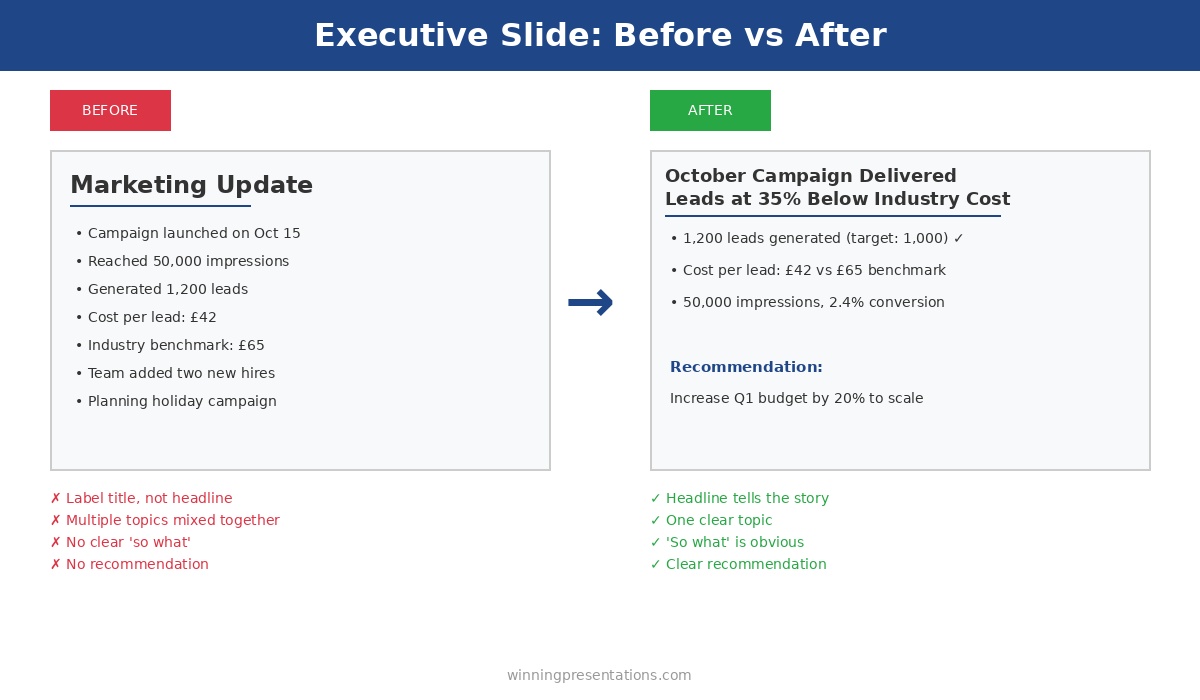
Executive slide before and after example - transforming a weak marketing update into a clear headline with recommendation

The same information, restructured for buy-in: vague labels become clear headlines with recommendations

Lesson 5: Address the Elephant in Your Executive Presentations

Every executive presentation has a weakness. A risk you’re downplaying, an assumption that might not hold, a question you’re hoping nobody asks.

Executives always find it. And when they do, your credibility takes a hit.

The executive presentations that get buy-in address the elephant proactively. They name the biggest concern and explain how it’s being managed — before anyone asks.

The pattern: Identify your executive presentation’s weakest point. Address it directly, early, with a clear mitigation plan. Turn a potential objection into evidence of thorough thinking.

What I’ve seen work: “The obvious question is timeline risk — we’re proposing an aggressive 6-month delivery. Here’s why we’re confident: we’ve already completed the architecture design, secured the technical lead, and identified no dependencies on other teams. If we do hit delays, we have a descoped Phase 1 that still delivers 70% of the value.”

Now the executive doesn’t need to probe for weaknesses in your executive presentation. You’ve shown you already know them.

Lesson 6: Make Executive Presentations Easy to Approve

I’ve seen 80-slide executive presentations. I’ve never seen an 80-slide presentation get buy-in.

More information doesn’t build confidence. It builds confusion and delays. Executives want enough information to decide, not all the information available in your executive presentation.

The pattern: For every piece of information in your executive presentations, ask: does this help them decide yes or no? If it’s “interesting background” or “might be useful,” cut it. Save it for the appendix or follow-up questions.

What I’ve seen work: The best executive presentations I’ve reviewed were 6-10 slides. They respected the audience’s time and focused relentlessly on the decision at hand. Executives could say yes in 15 minutes instead of deferring a 60-minute data dump.

The test: If your executive presentation takes more than 20 minutes to deliver, it’s too long. Cut until it hurts, then cut again.

Building an executive presentation this week?

The Executive Slide System includes 10 templates for every executive presentation type — QBRs, budget requests, board openers, strategic recommendations — plus 30 AI prompts to generate content in minutes. One client used the budget request template to secure approval in a single 15-minute meeting.

Lesson 7: Buy-In for Executive Presentations Starts Before the Meeting

This is the lesson that took me longest to learn: executive presentations that get buy-in usually have buy-in before the presentation happens.

The meeting is confirmation, not persuasion.

Experienced presenters socialise their ideas before the formal pitch. They have one-on-ones with key stakeholders, gather input that shapes the proposal, and build alignment so the executive presentation is a formality.

The pattern: Before any high-stakes executive presentation, identify the 2-3 people whose support you need. Meet with them individually. Ask for their input. Incorporate their feedback. When you present, they’re already invested in your success.

What I’ve seen work: A VP preparing a board presentation spent two weeks in pre-meetings. By the time he delivered his executive presentation, every board member had seen an early version and provided feedback. The presentation felt like a collaborative conclusion, not a surprise pitch. Approved unanimously.

The Meta-Lesson About Executive Presentations

Here’s what all 500+ executive presentations taught me: the audience isn’t “executives.” The audience is specific people with specific concerns, priorities, and decision-making styles.

A CFO reviewing executive presentations cares about ROI and risk. A CEO cares about strategy and competitive position. A board cares about governance and shareholder value. A COO cares about execution and resources.

The executive presentations that get buy-in are tailored to the actual people in the room — not a generic “leadership” audience.

The pattern: Before building any executive presentation, answer: Who exactly will be in the room? What do they each care about? What would make each of them say yes? Then build slides that address those specific concerns.

The Executive Presentation Buy-In Checklist

Before your next executive presentation, run through these questions:

Executive Presentation Buy-In Checklist

  1. ☐ Is my recommendation in the first 2 minutes?
  2. ☐ Have I shown the cost of doing nothing?
  3. ☐ Am I asking for ONE decision only?
  4. ☐ Have I referenced past success as evidence?
  5. ☐ Have I addressed the biggest objection proactively?
  6. ☐ Is the executive presentation under 20 minutes?
  7. ☐ Have I socialised this with key stakeholders beforehand?
  8. ☐ Have I tailored content to the specific people in the room?

If you can’t check every box, your executive presentation isn’t ready. Keep working until you can.

FAQs About Getting Buy-In on Executive Presentations

What if I don’t know who’ll be in the room for my executive presentation?

Ask. Email the meeting organiser: “Can you confirm who’ll be attending? I want to make sure I address the right priorities.” This also signals professionalism and preparation for your executive presentation.

How do I get pre-meetings with senior executives?

Position it as seeking input, not pitching: “I’m developing a proposal for [topic] and would value your perspective before the formal executive presentation. Can I have 15 minutes to walk you through the approach?” Most executives appreciate being consulted.

What if my executive presentation genuinely needs 30+ slides?

It doesn’t. You have 30+ slides of content — that’s different. Distill it to 10 slides for your executive presentation, put the rest in an appendix for reference, and offer to send the full deck afterward for anyone who wants detail.

How do I address objections without sounding defensive in executive presentations?

Frame it as thorough thinking, not defensiveness: “The question I’d ask if I were in your seat is [objection]. Here’s how we’re managing that risk…” You’re showing you’ve anticipated concerns in your executive presentation, not responding to criticism.

Your Next Executive Presentation

You probably have an executive presentation coming up. A budget request, a project proposal, a quarterly review, a board update.

Before you build another slide, step back and ask:

  • What’s the one decision I need from this executive presentation?
  • Who specifically will decide?
  • What would make them say yes?
  • What’s the biggest reason they’d say no — and how do I address it?

Answer those questions first. Then build your executive presentation. That order matters.

Executive presentations aren’t about impressing people with your analysis. They’re about making it easy for smart, busy people to say yes.

Make it easy, and they will

The Executive Slide System complete package - 10 PowerPoint templates, 30 AI prompts, and quick start guide for executive presentations

Get Templates for Executive Presentations That Get Buy-In

These lessons are built into The Executive Slide System — 10 PowerPoint templates structured for approval, plus 30 AI prompts to generate your content in minutes.

The same frameworks used to raise over £250 million in client funding. One client used these to turn a rejected proposal into a funded initiative.

GET INSTANT ACCESS → £39

10 templates • 30 AI prompts • Instant download • 30-day guarantee


Related: How to Create Executive Presentations That Get Approved in 2025 — the complete guide covering all 10 executive presentation types with structures and frameworks for buy-in.

01 Dec 2025
10 executive presentation templates - QBR, budget request, board meeting, investor pitch, strategic recommendation slides

Why Presentation Templates Aren’t Enough (What Actually Gets You Promoted)

Executive presentation skills are what separate people who get promoted from people who stay stuck — and you can’t learn them from a template.

I’ve sold thousands of presentation templates. They’re useful. They give you structure, save you time, and ensure you don’t miss critical elements. But I’ve watched people with perfect templates still fail in the room — because templates solve the “what” problem while executive presentation skills solve the “how” problem.

After 24 years in corporate banking at JPMorgan Chase, PwC, Royal Bank of Scotland, and Commerzbank — and helping clients raise over £250 million in funding — I’ve seen exactly what distinguishes executives who command the room from those who merely survive it. Here’s why developing real executive presentation skills might be the highest-ROI investment in your career.

10 executive presentation templates - QBR, budget request, board meeting, investor pitch, strategic recommendation slides

Templates provide structure — but executive presentation skills determine whether you succeed in the room

What Executive Presentation Skills Actually Include

When I talk about executive presentation skills, I’m not talking about generic public speaking. I’m talking about specific capabilities that matter in high-stakes business contexts:

Reading the room in real-time. Executive presentation skills include knowing when the CFO has already decided and you need to pivot. Sensing when the board is confused versus skeptical. Adjusting your pace, depth, and emphasis based on what’s actually happening — not what you planned.

Handling pushback without getting defensive. Executives will challenge your recommendations. Executive presentation skills include responding to tough questions with confidence, acknowledging valid concerns without caving, and defending your position without becoming adversarial.

Presenting with authority. The same content delivered with hesitation lands completely differently than content delivered with conviction. Executive presentation skills include vocal presence, confident body language, and the ability to own the room without arrogance.

Knowing what to cut in the moment. You prepared 15 minutes of content but the CEO just said “I have 5 minutes.” Executive presentation skills mean you can instantly restructure, hit the essential points, and still land your ask.

Building trust through how you communicate. Leadership is evaluating whether you’re ready for bigger responsibilities. Every presentation is an audition. Executive presentation skills signal “this person can handle senior stakeholders” in ways that content alone cannot.

Why Templates Can’t Teach Executive Presentation Skills

Templates are static. Executive presentation skills are dynamic.

A template tells you to put your recommendation on slide 1. It can’t tell you how to deliver that recommendation when the CEO looks skeptical, the CFO is checking email, and someone just asked a question that suggests they didn’t read the pre-read.

A template gives you a risk assessment structure. It can’t help you respond when a board member says “I don’t buy your mitigation plan” and everyone turns to watch how you handle it.

I’ve seen brilliant analysts with perfect slides get passed over for promotion because their executive presentation skills didn’t match their analytical skills. And I’ve seen people with mediocre slides advance because they commanded attention and handled pressure with grace.

One biotech founder I worked with had a technically perfect investor deck. She’d been pitching for three months with zero second meetings. The problem wasn’t her slides — it was her executive presentation skills. She presented like a scientist, building to conclusions, when investors needed the headline first. After we developed her executive presentation skills, she closed an £8M Series B within four months.

The difference isn’t the deck. It’s the skill.

This is why I created the AI-Enhanced Executive Presentation Mastery course.

It’s an 8-module programme that teaches the executive presentation skills that actually matter — not generic public speaking, but the specific capabilities that get you approved, promoted, and trusted with bigger responsibilities. Learn more about the course →

The Executive Presentation Skills Gap in Most Training

Here’s what most professionals don’t realise: executive presentation skills are rarely taught explicitly.

MBA programmes teach case analysis, not how to present to a hostile board. Corporate training covers “presentation skills” generically — how to structure slides, use visuals, maybe some tips on body language. But the specific executive presentation skills needed to succeed in senior contexts? You’re expected to figure those out through trial and error.

This is expensive learning. Every failed presentation, every deferred decision, every promotion that went to someone else — these are the costs of developing executive presentation skills through experience alone.

An investment banker I coached had been passed over for Director twice. The feedback was always vague: “not quite ready” or “needs more executive presence.” After focused work on his executive presentation skills — specifically handling pressure, stating recommendations with conviction, and managing his pace — he was promoted within eight months. Same person, same technical skills. Different executive presentation skills.

Executive Presentation Skills That Get You Promoted

Based on observing hundreds of executives across my career, here are the executive presentation skills that most strongly correlate with advancement:

1. The ability to synthesise complexity into clarity.

Leadership doesn’t have time for nuance. Executive presentation skills include distilling complex situations into clear recommendations without oversimplifying.

2. Comfort with conflict.

Disagreement is normal at senior levels. Executive presentation skills include engaging productively when people push back, finding common ground without abandoning your position.

3. Executive presence under pressure.

When things go wrong — technical failures, hostile questions, time cuts — how do you respond? Executive presentation skills include maintaining composure and authority even when your plan falls apart.

4. Strategic framing.

Presenting the same facts in different contexts requires different framing. Executive presentation skills include knowing how to position your message for a CFO versus a CEO versus a board.

5. Asking for what you need.

Many professionals present information but fail to make clear asks. Executive presentation skills include confidently requesting decisions, resources, and support — and handling “no” gracefully.

The Career ROI of Executive Presentation Skills

Consider the value at stake when you develop executive presentation skills:

A single successful board presentation could approve a £2M budget that makes your project possible. A strong investor pitch could raise funding that transforms your company. A compelling QBR could lead to the promotion conversation you’ve been waiting for.

Clients have used the executive presentation skills from my training to:

  • Raise over £250 million in combined funding
  • Get £10M board approvals in single meetings
  • Secure promotions after being passed over multiple times
  • Transform from “not ready” to “executive material”

The gap between “good enough” and “excellent” executive presentation skills might be worth hundreds of thousands of pounds over a career. A few hundred pounds invested in developing those skills is rounding error compared to what’s at stake.

FAQs About Executive Presentation Skills

Can executive presentation skills really be taught, or are they innate?

Executive presentation skills are absolutely learnable. Some people have natural advantages, but the specific skills — handling pressure, reading rooms, delivering with authority — develop through deliberate practice and feedback. I’ve watched hundreds of professionals transform their executive presentation skills through structured training.

How long does it take to improve executive presentation skills?

You can see meaningful improvement in executive presentation skills within weeks if you’re practicing deliberately with feedback. The full transformation typically happens over 2-3 months of consistent application. My course is designed to accelerate this timeline significantly.

What’s the difference between general presentation skills and executive presentation skills?

General presentation skills focus on clarity, structure, and basic delivery. Executive presentation skills add layers specific to senior contexts: handling high-pressure questions, reading sophisticated audiences, projecting authority, making confident asks, and adapting in real-time to stakeholder reactions.

Are templates useless if I need executive presentation skills?

No — templates and executive presentation skills work together. Templates ensure your structure is sound and you don’t miss critical elements. Executive presentation skills determine how effectively you deliver that content and handle what happens in the room. You need both, but skills are what differentiate good from great.

Executive presentation skills training - templates plus skills development

Develop Executive Presentation Skills That Get You Promoted

AI-Enhanced Executive Presentation Mastery is an 8-module course that teaches the executive presentation skills templates can’t — reading rooms, handling pushback, presenting with authority, and building executive presence.

Includes 2 live coaching sessions where you’ll practice with real feedback. Clients have used these executive presentation skills to raise over £250 million in funding.

ENROL NOW → £249

8 self-paced modules • 2 live sessions • Templates included • Launches January 2025


Just need templates? The Executive Slide System (£39) includes 10 PowerPoint templates and 30 AI prompts — great if you already have strong executive presentation skills and just need structure.

Related: How to Create Executive Presentations That Get Approved in 2025