Category: Budget Presentation

29 Mar 2026
CFO reviewing revenue forecast presentation slides with financial projections and scenario analysis

The Revenue Forecast Presentation: The Slide Structure CFOs Trust

A revenue forecast presentation that performs demands three essentials: transparent methodological grounding, scenario-based branching that accounts for variability, and monthly-to-quarterly reconciliation showing your assumptions hold. This structure is what CFOs and board finance committees examine first before approving budget allocations.

Last quarter, Rajesh—Finance Director at a mid-cap tech firm—presented his revenue forecast to a sceptical board. His first three slides covered product mix assumptions, but the CFO stopped him: “Where’s your monthly waterfall? How do these line-item projections reconcile with quarterly targets?” Rajesh hadn’t considered that CFOs don’t just want the number; they need the audit trail. By restructuring his deck around transparent methodology first, then scenario branching, and finishing with month-by-month reconciliation, his next forecast earned board approval on first pass. The difference? He’d moved from presenting outcomes to presenting the thinking behind them.

Struggling to articulate your forecast assumptions clearly?

Too many finance decks fail because the methodology slides are either missing or buried. This creates credibility gaps and stalls decision-making. The Executive Slide System teaches you how to structure methodology and scenario analysis so CFOs see your work, not just your conclusions. No vague assertions. No hand-waving on key drivers. Pure transparency.

Opening with Executive Context

Your revenue forecast presentation must begin where CFOs naturally ask: “What are we forecasting and why now?” An executive context slide—often your second slide—sets the frame. It answers: What is the forecast period? Which business segments are in scope? What external or internal triggers prompted this update? Are we forecasting organic growth, post-acquisition integration, or market recovery?

This slide is not the entire forecast. It’s the boundary condition. CFOs use it to establish expectations. If your context slide is vague—”We’re forecasting next quarter’s revenue”—you lose the first vote of confidence. If it’s precise—”Q2 revenue forecast, organic growth only, excludes pending acquisition synergies, incorporates January pricing increase and February market headwinds”—CFOs immediately understand what you’re measuring and why assumptions matter.

The best context slides use a three-column table: Period (Q2 2026), Scope (Segments A, B, C), Drivers (Pricing +3%, Volume ±2%, FX headwind -1%). This format makes assumptions transparent before you justify them.

Revenue forecasting demands structure—and structure demands the right toolkit.

The Executive Slide System (Track A) gives you the exact slide sequence, layout templates, and annotation guidance that builds CFO confidence. Learn how to layer methodology, scenario analysis, and reconciliation into a coherent narrative. Move from defending outcomes to demonstrating rigorous thinking.

Plus: Scenario templates. Reconciliation walkthroughs. CFO credibility checklist.

Anchoring with Methodology & Transparency

After context, CFOs expect methodology. This is the slide that separates forecasts driven by rigorous analysis from those built on rough estimates. A methodology slide answers: How did we model revenue? Did we use trend extrapolation, driver-based bottom-up builds, or hybrid approaches? Were historical volatility bands considered? How sensitive is the forecast to key assumptions?

Many teams skip this slide, assuming CFOs want speed. Wrong. CFOs want confidence, and confidence comes from transparency about method. A three-minute walk through your methodology—”We built this from segment-level volume and price assumptions, validated against 18-month trend analysis, and stress-tested against ±15% demand variance”—creates immediate credibility. It signals rigour.

The strongest methodology slides use visual hierarchy: (1) Primary model type (bottom-up by product line), (2) Data inputs (actual volumes, pricing schedules, churn rates), (3) Validation checks (trend variance, peer benchmarking, sensitivity analysis). This structure shows you haven’t just guessed; you’ve measured, validated, and pressure-tested your work.

Contrast panel comparing forecast approaches CFOs distrust versus trust across numbers, narrative, and credibility dimensions

Scenario Analysis: Base, Upside, Downside

The revenue forecast presentation that performs moves beyond a single “best estimate.” CFOs and boards expect scenario branching—base case, upside case, and downside case—because certainty is a fiction. Real forecasts acknowledge variability and prepare contingencies.

Your base case should reflect realistic assumptions: achieved pricing, historical volume trends, known market conditions. Upside cases (representing perhaps 20% probability) might assume stronger-than-expected customer adoption or higher average transaction value. Downside cases (also ~20% probability) account for market headwinds, competitive pressure, or slower sales cycles.

The critical insight: Don’t present three separate forecasts as though they’re equally likely. Present them as branches from shared assumptions, with clearly stated probability weightings or sensitivity ranges. A CFO-grade scenario slide might show: Base revenue £2.4M (55% probability), Upside £2.7M (+12%, strong customer demand), Downside £2.1M (-12%, market delays). This format demonstrates you’ve thought through variability and prepared the organisation for multiple outcomes.

Too many forecasts fail because teams present only the optimistic case. Boards see this as amateur risk assessment. Scenario branching signals maturity and builds trust in your numbers, because you’re not hiding downside.

Explicit Assumptions & Key Drivers

Every revenue forecast rests on assumptions. The strongest presentations surface these explicitly and defend them with evidence. Your assumptions might include: customer retention rate (92%, derived from 12-month historical data), average contract value (£8,500, based on current mix and pipeline), sales cycle length (45 days, from recent closures), or market growth rate (7%, per analyst forecasts).

The presentation architecture should dedicate one or more slides to assumptions. For each key assumption, show: the assumption itself, the source (historical data, market research, management judgement), the sensitivity (how much does forecast move if this assumption shifts by ±10%?), and mitigation (what flags would trigger an assumption revision?). This level of transparency transforms a forecast from “here’s our guess” to “here’s our educated forecast, and here’s how we’ll know if it’s wrong.”

Key drivers often fall into three categories: Volume drivers (customer acquisition, retention, churn), Price drivers (average contract value, pricing power, discounting trends), and Mix drivers (product/segment composition, geography distribution). For each, show the historical trend, current setting, and forecast assumption. If forecast assumes 5% volume growth but historical trend was flat, flag the difference and justify it.

Different angle: Assumptions aren’t liabilities—they’re your credibility foundation.

When CFOs see explicitly stated, evidenced assumptions, they see an organisation that understands its own business. Learn how to surface, defend, and monitor key drivers so your forecast earns board approval and builds confidence for future updates.

Monthly-to-Quarterly Reconciliation

This is where many revenue forecast presentations collapse. Teams present quarterly totals without showing the monthly waterfall underneath. CFOs immediately ask: “How does Q2 total of £2.4M decompose month by month? If May drives £900K but June drops to £600K, why? What’s the underlying pattern?” Without this reconciliation, your forecast appears disconnected from operational reality.

The strongest presentations include a monthly waterfall or bridge showing: Opening balance (revenue recognised year-to-date), add new customer revenue, add expansion from existing accounts, subtract churn or downgrades, equals closing balance (quarterly forecast). This format shows CFOs that your quarterly number isn’t a guess; it’s the sum of understood monthly flows.

For revenue forecasts, this might also include a run-rate analysis: “If March closes at £850K and April achieves our target of £880K, then May and June momentum at 3% growth each would deliver the £2.4M quarterly total.” This level of granularity transforms the forecast from abstract projection to operational roadmap.

When CFOs see monthly reconciliation, they see an organisation that has thought through seasonal patterns, sales cycles, and operational flow. They’re more likely to trust the quarterly estimate because it’s grounded in a credible monthly narrative.

Quarterly forecast cycle showing four stages: collect, model, present, and calibrate

Variance Monitoring & Contingency Planning

The final critical component of a revenue forecast presentation is your contingency architecture. This answers: How will we monitor whether the forecast is tracking? What variance thresholds would trigger a revised forecast? What contingency actions would we execute if downside scenarios begin materialising?

A variance monitoring slide might specify: “We will review actual revenue versus forecast weekly. If cumulative variance exceeds ±5% by end of month 1, we will conduct deep-dive analysis and communicate revised outlook. If variance exceeds ±10%, we will trigger contingency pricing review or sales acceleration programme.” This signals to CFOs that you’re not hoping your forecast is correct; you’re actively managing toward it.

Contingency planning builds trust because it demonstrates you’ve considered failure modes. “If customer acquisition lags by 15%, we have three contingencies: (1) accelerate existing customer expansion, (2) implement promotional pricing, (3) defer non-critical investment.” This isn’t pessimism; it’s operational maturity. CFOs respect forecasters who’ve prepared for multiple scenarios.

When you close a revenue forecast presentation with clear variance metrics and articulated contingencies, you signal that this isn’t a one-off presentation—it’s the beginning of an ongoing dialogue between finance and operations. That’s exactly the confidence CFOs need to approve budgets and commit resources.

Additionally, consider how to present to a CFO more broadly. Understanding your audience’s information priorities ensures your forecast structure aligns with their decision-making requirements. Similarly, reviewing a quarterly forecast presentation simplified can help you strip away non-essential detail and focus CFO attention on what matters most.

Ready to upgrade your forecast presentation architecture? The Executive Slide System (£39) teaches you the exact slide sequence, annotation methods, and confidence-building frameworks that CFOs expect. You’ll learn how to layer transparency into every slide—from methodology to monthly reconciliation—so your forecast earns approval on first pass.

FAQ: Revenue Forecast Presentations

How many scenarios should I present—base, upside, downside, or more?

Three primary scenarios (base, upside, downside) are the standard. More than three introduces complexity and dilutes focus. Probability-weight your cases: base case typically 50–60%, upside and downside each 20–25%. If you present a wide range (e.g., base £2.4M, upside £3.2M, downside £1.6M), CFOs may question whether you truly understand your business. Narrow the range and defend the bounds with evidence.

Should I present forecast variance (versus prior quarter) on the same slide or separately?

Variance from prior forecast should be a separate section, ideally with a reconciliation bridge. This answers: “Why did you change your forecast from last quarter?” If you gloss over variance, CFOs will stop you. A good bridge shows what assumptions changed (new data, market shift, operational performance) and quantifies the impact of each change. This transparency prevents the perception that you’re guessing differently.

What’s the difference between a revenue forecast presentation and a budget presentation?

A revenue forecast is your projection of likely outcomes given current market conditions and operational capacity. A budget is your plan for how to allocate resources to achieve (or exceed) that forecast. Forecasts are data-driven and revised frequently. Budgets are commitments and typically set annually. A strong revenue forecast presentation builds credibility for the budget conversation that follows. CFOs use forecast credibility to validate budget requests: “If revenue will be £2.4M, then a 22% operating expense budget is reasonable.”

Stay ahead with weekly insight on executive communication.

Finance leaders and operators trust The Winning Edge for actionable guidance on presenting to boards, CFOs, and investors. Structured, direct, no fluff.

Join The Winning Edge

Free download: Executive Presentation Checklist (Track A). Ensure every forecast slides hits CFO credibility standards.

You may also be interested in: The Governance Update Presentation, Data Breach Presentation to Your Board, or Presentation Anxiety: Speaking to Specific Audiences.

Revenue forecasts win approvals when they’re transparent, scenario-grounded, and operationally grounded. Build that structure into every slide, and CFOs will trust your numbers.

Mary Beth Hazeldine is Owner & Managing Director of Winning Presentations. With 24 years of corporate banking experience at JPMorgan Chase, PwC, Royal Bank of Scotland, and Commerzbank, she advises executives across financial services, healthcare, technology, and government on structuring presentations for high-stakes funding rounds and approvals.

27 Mar 2026
Executive presenting a capital expenditure request with financial charts visible on a boardroom screen

The CapEx Request That Got Approved Before the Meeting Ended

Finance committees reject CapEx requests that lack clear financial justification. The difference between approval and rejection is rarely the investment itself—it’s how you structure the business case and frame return on investment. A capital expenditure presentation must answer three questions immediately: Why now? How much? What’s the measurable return?

Vikram, Operations Director at a £85m logistics firm, had requested £2.3m for warehouse automation. Finance rejected it in fifteen minutes. The CFO said “weak business case.” Six months later, Vikram resubmitted with a restructured presentation: operational efficiency gains mapped to quarterly profit targets, risk mitigation quantified, ROI shown against three scenarios (conservative, expected, optimistic). This time, approval came in the first meeting. The difference wasn’t the investment. It was how he framed the capital expenditure presentation to speak to what the committee actually wanted to hear: risk-adjusted returns and strategic alignment.

Structure matters. Clarity builds confidence.

The Executive Slide System includes frameworks and templates designed for capital expenditure presentations. Explore the System →

Structure Your Business Case From First Slide

A capital expenditure presentation needs architecture, not a narrative dump. Finance committees evaluate requests using five core dimensions: strategic fit, financial return, timeline, risk, and alternatives. Every slide must address at least one. Open with an executive summary that names the investment, its purpose, and the expected return in a single sentence. Then move to the four-part structure:

Context. What’s driving the need? Market pressure, competitor action, operational bottleneck, or compliance requirement? Show the cost of not investing—cost of delay matters as much as investment size.

Solution. What will you acquire or build? Be specific: don’t say “technology platform.” Name the system, its core capability, and why this particular solution. Include implementation partners if relevant.

Financial Case. Three-year projection showing capital cost, implementation costs, operating cost changes, and revenue or savings impact. Include working capital requirements if material.

Risk and Mitigation. What could go wrong? Scope creep, delivery delays, adoption resistance, technology obsolescence. Show how you’ll manage each one. This is where governance and oversight shine.

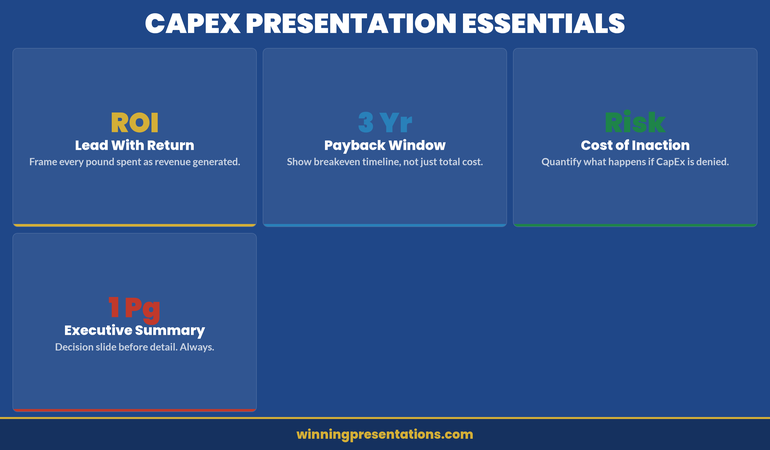
CapEx Presentation Essentials dashboard infographic showing four metric cards: ROI (Lead With Return), 3 Yr (Payback Window), Risk (Cost of Inaction), and 1 Pg (Executive Summary) — each with concise guidance for structuring the business case

Executive Slide System

Jump past DIY slide building. The Executive Slide System includes:

  • ✓ Slide templates for finance requests and capital justifications
  • ✓ AI prompt cards for ROI narratives and financial scenarios
  • ✓ Framework guides for business case structure and risk communication
  • ✓ Appendix templates for assumptions and sensitivity analysis
  • ✓ Colour schemes and fonts pre-aligned to corporate governance standards

Get the Executive Slide System → £39

Designed for capital expenditure presentations and financial justifications

ROI Framing That Persuades Finance Committees

The phrase “return on investment” means nothing without context. A 15% ROI sounds weak if it’s compared to equity markets (historically 10%+ annually). But if the alternative is outsourcing at 8% cost of revenue, it’s compelling. Frame your capital expenditure presentation’s ROI against the actual comparator the committee uses internally: cost of capital, hurdle rate, or competitor benchmarks.

Use three scenarios: conservative (downside case, lower adoption or delayed benefits), expected (realistic case with minor headwinds), and optimistic (everything lands on schedule). Show payback period for each. Most CFOs want 18–36 months; if yours is longer, lead with the strategic rationale, not the ROI.

Separate cash flow from profit impact. Automation might improve EBITDA but consume cash in year two. Working capital swings matter. Show both. If your business is capital-constrained, leading with cash payback beats EBITDA gains.

Quantify non-financial benefits only if they translate to numbers eventually. “Improved customer satisfaction” without a link to retention or pricing power is noise. But “reduced churn by 2% → £1.4m incremental revenue” is material. Stay precise. Executive teams make £50m decisions on £200k annual benefit assumptions; rigour builds confidence.

Financial Justification Framework: What Committees Actually Want

Finance committees receive dozens of CapEx requests annually. Yours competes not just on absolute return, but on clarity and governance maturity. Present your justification in four layers:

Strategic layer: How does this capital deployment advance the published strategy? Name the strategic pillar explicitly. If your strategy says “operational excellence” and this is a supply chain investment, lead with that link. Ambiguous connections trigger scepticism.

Financial layer: What’s the direct return? Show calculation assumptions explicitly. CFOs will challenge your gross margin assumptions, implementation timelines, and adoption curves. Write them down. Transparency here prevents later accusations of “sandbagging” or hiding risks.

Risk layer: What’s the downside? A £3m investment with a 2% delivery-delay risk isn’t dangerous; a £50m bet with single-vendor lock-in is. Quantify risks you can, qualify risks you cannot. Show how governance (steering committees, go/no-go gates) will manage slippage.

Governance layer: Who’s accountable? Name the project sponsor, the finance owner, the steering committee chair. Define success metrics before you start spending. Show how monthly reviews will track actuals versus budget and benefits versus plan. Committees approve investment and oversight together; weak governance sinks strong financials.

A related internal link worth reviewing: if you’re presenting CapEx alongside compliance requirements, see our guide on compliance presentations to regulatory boards—the financial justification format translates directly.

Slide templates save hours. Framework guides save meetings.

Pre-built financial justification slides, ROI scenario templates, and risk communication frameworks for capital expenditure requests. £39 → Start now

Handling Pushback on Large Capital Requests

Finance committees will challenge every material assumption. Expect it. Prepare for it. The best capital expenditure presentations include an objection appendix—slides that live in reserve, supporting your core claims with deeper data.

Objection: “Payback is too long.” If your project has a 42-month payback, don’t defend it as acceptable. Instead, decompose it. Show what payback looks like in year three versus year one. Show how phasing implementation reduces upfront cost and accelerates early returns. Offer a staged investment: “£1.2m in phase one, £1.8m in phase two (gate-gated on phase one results).” Staged approaches reduce perceived risk and buy time for outcomes to prove themselves.

Objection: “We could outsource instead.” Have the outsourcing financials ready. Show why build beats buy (or admit it doesn’t and reframe around control, IP, or capability). If outsourcing is genuinely cheaper, your capital request is dead—unless you layer in strategic or risk factors outsourcing can’t solve. Be honest. Committees respect rigour more than optimism.

Objection: “Adoption risk is real.” Show your change management plan. Name the sponsor who’ll champion adoption. Quantify training investment and timeline. Tie adoption to incentive structures where possible. Finance wants to see that you’ve thought through the human side, not just the technology.

Objection: “What if benefits don’t materialise?” Build in benefit verification gates. Show when you’ll measure actuals against plan. Commit to a post-implementation review at 6 months and 12 months. Show corrective actions if tracking is off. This transforms pushback into partnership—you and finance are jointly invested in outcomes, not just spend.

You’ll find similar dynamics when presenting risk appetite presentations to boards—the governance framework is identical.

If you’re building a capital request presentation from scratch, the Executive Slide System includes templates for all five core sections so you’re not starting blank.

Delivery Timeline and Impact Roadmap

The final element of a compelling capital expenditure presentation is a delivery roadmap that feels achievable. Don’t present an 18-month project with no interim milestones. Break it into quarters and show when key outputs (system live, first tranche of benefits realised, full adoption) hit the target.

Use a simple Gantt or staged diagram. Show dependencies clearly—if benefit realisation depends on vendor delivery or organisational change, make that visible. If you’re ahead of plan, say so. If you’ve absorbed early delays through schedule margin, say so. Committees want to see that you’re tracking, not gambling.

Attach a benefits tracking schedule to your presentation. Define what “success” looks like quantitatively in month 1, month 6, month 12, month 24. Name the person who owns measurement. Commit to monthly variance reporting in the first year. This transforms capital investment from a one-time decision into a managed programme. Governance rigour sells.

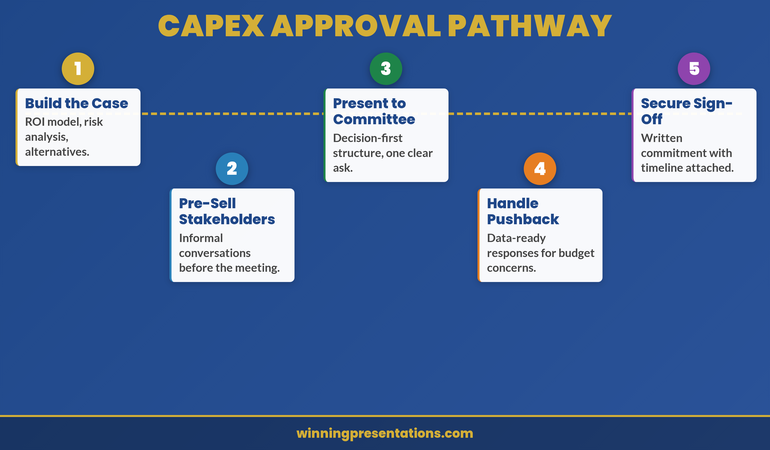
CapEx Approval Pathway roadmap infographic showing five milestones on a winding path: Build the Case, Pre-Sell Stakeholders, Present to Committee, Handle Pushback, and Secure Sign-Off

Frequently Asked Questions

How detailed should my financial model be in the presentation itself?

Show the summary (investment, payback, IRR, strategic fit) in slides. Build the detailed model (quarterly assumptions, sensitivity tables, build-versus-buy analysis) as appendices. Committee members may download the full pack before the meeting. Two-layer approach: headline numbers in the room, detailed justification on demand.

What if my CFO says the ROI isn’t strong enough?

This is valuable early feedback. Don’t defend weak ROI publicly; go back to the sponsoring business unit and ask if benefits assumptions are realistic or if the investment case should be rethought. Sometimes the answer is “reframe around strategic fit” rather than financial return. Other times it’s “this investment isn’t ready yet.” Better to learn that in a pre-meeting conversation than in the full committee room.

Should I present one scenario or three?

Three scenarios (conservative, expected, optimistic) show sophistication. But pick one as your “ask”—usually the expected case. Name it clearly. Show the others as upside and downside bounds. This prevents committees from anchoring to the optimistic case and then disappointing them when reality lands in the middle.

Stay ahead on executive communication.

Join The Winning Edge for weekly insights on presenting to boards, finance committees, and investor audiences. Practical frameworks. Real examples. No fluff.

Subscribe to The Winning Edge

Free resource: Download the Executive Presentation Checklist — a one-page review guide for testing your capital expenditure presentation before it reaches the committee room.

If you’re new to presenting at this level, you might also find value in our guide on structuring your first board presentation in a new role—many of the financial governance principles overlap with capital expenditure requests.

A strong capital expenditure presentation is built on three pillars: crystal-clear business case structure, ROI framing that connects to your committee’s actual hurdle rate, and governance transparency that builds confidence in execution. Get those right, and finance committees move from scepticism to partnership. The Executive Slide System gives you templates to structure all three.

About Mary Beth Hazeldine

Mary Beth Hazeldine is Owner & Managing Director of Winning Presentations. With 24 years of corporate banking experience at JPMorgan Chase, PwC, Royal Bank of Scotland, and Commerzbank, she advises executives across financial services, healthcare, technology, and government on structuring presentations for high-stakes funding rounds and approvals.
Book a discovery call | View services

09 Dec 2025
Budget presentation template 2026 - 5-slide structure to get your budget approved first time with executive ask, ROI breakdown, and decision options.

Budget Presentation Template: Get Your Budget Approved First Time [2026]

📅 Updated: December 2025 — Includes AI prompts to build your budget deck from a budget presentation template in 30 minutes

Updated 27 March 2026 — Revised for the latest Microsoft Copilot and ChatGPT capabilities.

Budget season is brutal. You’ve done the analysis, justified every line item, and built a rock-solid case. Then finance sends it back with questions you already answered on slide 47.

The problem isn’t your numbers. It’s your structure.

After 24 years in corporate banking and helping clients secure over £250 million in approvals, I’ve learned that budget presentations fail for one reason: they’re built for accountants, not decision-makers.

Here’s the budget presentation template that actually gets approved.

The 5-Slide Budget Presentation Structure

5-slide budget presentation template showing executive ask, strategic justification, ROI breakdown, risk mitigation, and decision slide with approval options

Decision-makers don’t read 50-slide budget decks. They scan for answers to three questions:

  1. What do you need?
  2. What will we get?
  3. What happens if we don’t approve this?

Answer those in five slides:

Slide 1: The Executive Ask

State your request in one sentence. Include the amount, the purpose, and the expected return.

Example: “Requesting £340K for customer success platform, projecting 23% reduction in churn (£890K annual value) with 4-month payback.”

That’s 23 words. A CFO can read it in 5 seconds and know exactly what you want.

Slide 2: Strategic Justification

Connect your budget request to company priorities. If it doesn’t align with what leadership already approved, you’re fighting uphill.

  • Which strategic initiative does this support?
  • What happens to that initiative without this budget?

Slide 3: ROI Breakdown

Show your math simply. One table:

  • Investment required
  • Expected return (quantified)
  • Payback period
  • ROI percentage

Keep the detailed financial model in an appendix. If they want to interrogate your assumptions, they’ll ask.

Slide 4: Risk & Mitigation

Every budget request has risks. Acknowledge them before someone else raises them.

  • What could go wrong?
  • How will you mitigate it?
  • What’s your contingency?

Two to three risks is enough. More looks like you’re not confident.

Slide 5: The Decision Slide

Make approval easy. Present clear options:

  • Approve: Full budget, proceed as planned
  • Approve with conditions: Reduced scope or phased approach
  • Defer: What additional information would help?

Then stop talking and let them decide.

⭐ GET THE COMPLETE TEMPLATE

Executive Slide System

Budget templates + board decks + AI prompts to customise them instantly

Download Templates — £39

Includes budget, board, QBR, and strategy templates

Stop Guessing What to Type. Start Building in 25 Minutes.

The Executive Prompt Pack gives you 71 tested prompts for ChatGPT and Copilot — structured by scenario so you know exactly what to type:

  • Build from scratch — scenario prompts for board reviews, budget requests, and investor decks
  • Rescue and rewrite — audit an existing deck, condense it, or fix one slide at a time
  • Industry-specific prompts for financial services, banking, consulting, and executive audiences
  • Power modifiers that transform any prompt into board-ready output
  • The 25-minute deck workflow that replaces 3–4 hours of manual building

Works with ChatGPT, Microsoft Copilot, and Edit with Copilot (formerly Agent Mode). Updated March 2026.

Get the Executive Prompt Pack → £19.99

3 Budget Presentation Mistakes to Avoid

Mistake #1: Starting with background. Nobody needs three slides of context before you tell them what you want. Lead with the ask.

Mistake #2: Hiding the downside. If you don’t address risks, the CFO will. Better to control that narrative yourself.

Mistake #3: Presenting to the wrong audience. A budget deck for your direct manager is different from one for the executive committee. Adjust depth and detail accordingly.

For 71 tested prompts covering every scenario — build from scratch, rescue an existing deck, or fix individual slides — the Executive Prompt Pack gives you exactly what to type, updated for the latest Copilot and ChatGPT capabilities.

Use AI to Build Your Budget Deck Faster

With tools like PowerPoint Copilot, you can generate a solid first draft in 30 minutes.

Try this prompt:

“Create a 5-slide budget presentation requesting [amount] for [purpose]. Include executive summary with ROI, strategic alignment, financial breakdown, risk mitigation, and decision options. Use professional business formatting.”

Then refine with your specific numbers and context.

Related: Board Presentation Template: The Executive’s Complete Guide

71 Prompts. Every Scenario Covered.

Build from scratch, rescue an existing deck, or perfect individual slides — the Executive Prompt Pack covers every scenario. Works with ChatGPT, Copilot, and Edit with Copilot. Updated March 2026.

Get the Prompts → £19.99

Related Resources

About the Author

Mary Beth Hazeldine spent 24 years in corporate banking at JPMorgan Chase, PwC, Royal Bank of Scotland, and Commerzbank. She’s helped clients raise over £250 million through high-stakes presentations and now trains executives to communicate with impact at Winning Presentations.