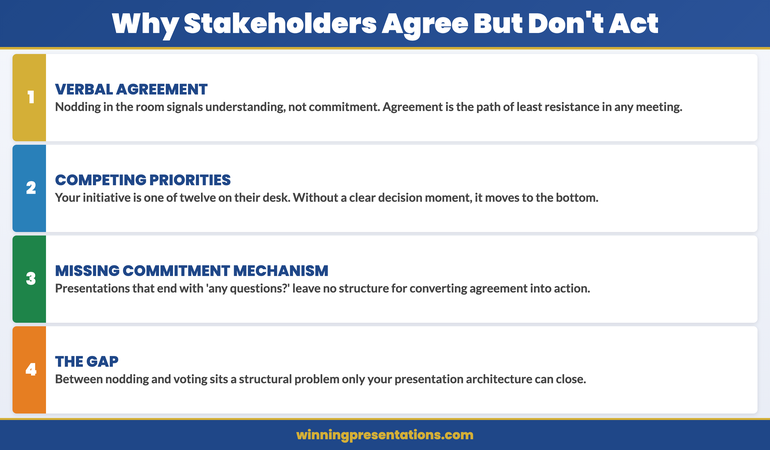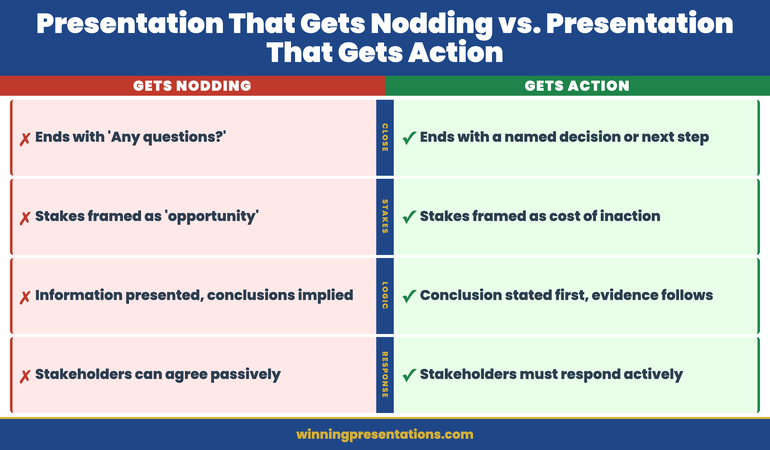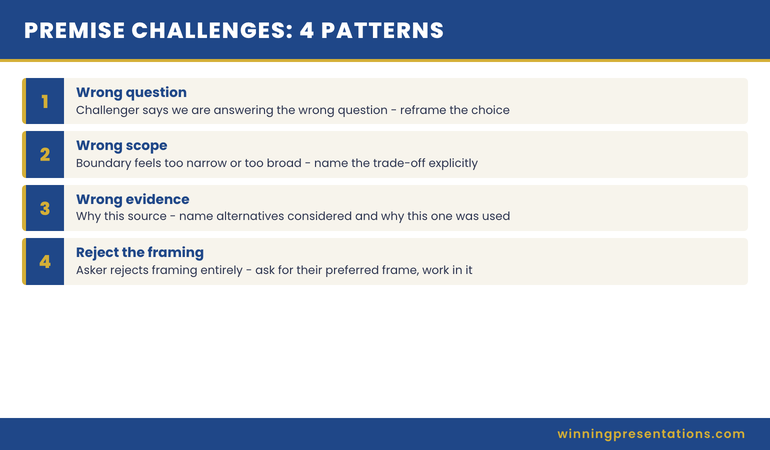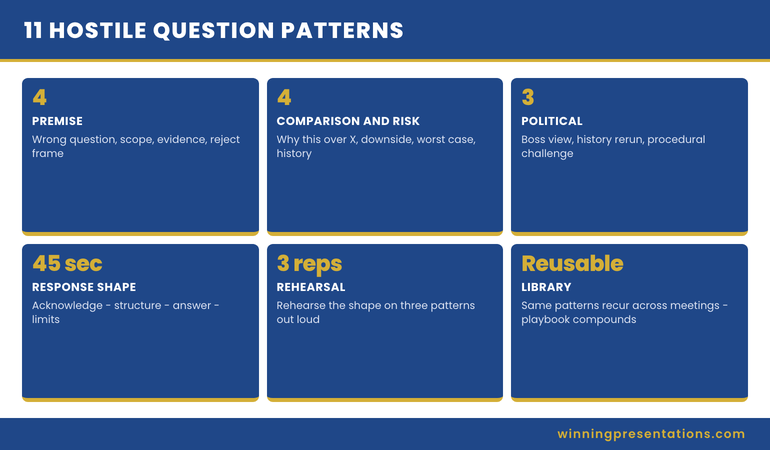
Tag: board presentations

16 Apr 2026
Male finance director presenting a live dashboard to senior executive team in a corporate boardroom, data screens visible behind him, navy and gold tones

Dashboard Presentation: How Executives Structure Live Data Reviews

Quick answer: A dashboard presentation is not simply a data walkthrough — it is a structured briefing designed to help senior decision-makers interpret numbers in context, draw the right conclusions, and agree on a clear next step. The most effective format opens with a concise framing slide before the data, uses a consistent annotation structure to guide interpretation, and closes with a decision prompt rather than a summary. The data itself rarely does the persuading. The framing around it does.

Henrik had run finance review meetings every quarter for three years. Each time, the pattern was the same: he opened the dashboard, walked the senior team through each metric in sequence, answered the questions that came up, and then the meeting ended with no clear resolution. Whether the numbers were good or bad, the outcome was similar — a polite discussion, a few action items, and a vague sense that nothing had really been decided.

After a particularly inconclusive Q2 review, the CFO pulled him aside. The data was fine, she said. The structure was the problem. Senior leaders were being asked to process numbers without a frame. They were drawing their own conclusions, independently, and arriving at different interpretations of the same dashboard. The meeting was not producing alignment — it was producing confusion dressed as agreement.

Henrik redesigned the next review entirely. He opened with a single slide that established the three things the room needed to decide — before any data appeared. He annotated each chart with a directional headline rather than a neutral label. He ended with an explicit options slide rather than an open-ended “any questions?” The Q3 review ran twelve minutes shorter. It ended with three decisions documented. That had never happened before.

If you are structuring data presentations for senior decision-makers and want a sharper framework for framing, annotating, and closing with clarity, the Executive Slide System contains slide templates and AI prompt cards for exactly these scenarios.

Explore the System →

Why a Dashboard Presentation Is Not a Report Meeting

The most common error in dashboard presentations is treating them like reporting sessions. A report session transfers data from one party to another. A dashboard presentation is a structured decision-making meeting with data as evidence. The difference in purpose requires a fundamentally different structure.

In a reporting session, the presenter owns the data and the audience receives it. Questions emerge from curiosity or confusion, and the session ends when the data has been presented in full. There is no inherent decision requirement. The meeting is complete when the numbers have been shared.

A dashboard presentation is different in structure, purpose, and outcome. The audience is not there to receive data — they are there to interpret it, align on what it means, and make a decision about what happens next. This requires the presenter to do the interpretive work before the meeting, not during it. If you walk into a dashboard presentation and expect the room to draw its own conclusions from charts, you have misunderstood your job.

Senior decision-makers do not have the time, nor in many cases the context, to interpret raw metrics on the spot. They rely on the presenter to have already done that work — to have identified which numbers matter, why they have moved, and what the business should do about it. When that framing is absent, the room does the interpretation independently. And different people in the same room will reach different conclusions from the same data.

The practical implication is this: your role in a dashboard presentation is not to show the data. Your role is to make the data legible and to guide the room to a decision. Every structural choice — what you put on slide one, how you annotate charts, where you place your recommendation — should serve that goal. The dashboard is your evidence. The presentation is your argument.

Executive Slide System — £39, instant access

Structure Data Presentations That Drive Decisions — Not Just Discussion

The Executive Slide System gives you professionally structured slide templates built around the scenarios finance leaders and board presenters face most. It includes dashboard and data review formats, AI prompt cards to help you frame metrics and annotate charts, and scenario playbooks for finance and governance contexts.

  • Slide templates for data reviews, board updates, and finance briefings
  • AI prompt cards to build directional headlines and frame complex metrics
  • Framework guides for structuring decisions in live review meetings
  • Scenario playbooks for quarterly, mid-year, and exception-based reviews

Get the Executive Slide System →

Designed for finance directors, CFOs, and executives presenting data to boards and senior leadership teams.

The Three-Slide Framing Sequence Before Your First Chart

The most reliable structural improvement to a dashboard presentation costs you no additional data analysis — it simply changes what happens before the first chart appears. Senior audiences who arrive in a data meeting without a shared frame tend to interpret metrics through their own individual priorities. The result is discussion rather than alignment.

A three-slide framing sequence before the dashboard data establishes the shared interpretive frame the room needs. The first slide states the decisions the meeting is designed to reach — not questions to explore, but specific choices the room needs to make before it finishes. This gives senior attendees a mental structure for evaluating everything that follows. They are no longer processing data in abstract; they are processing it in relation to a decision they know they need to make.

The second slide provides the performance context: what the targets were, what the comparison period was, and what external conditions are relevant. This slide does the audience’s contextualising work for them. Without it, different people in the room will apply different baselines — last quarter, last year, the original plan, the revised forecast — and arrive at different assessments of the same number.

The third slide is your headline summary: two or three interpretive statements about where the business stands, written as conclusions rather than observations. Not “revenue is up 4%” but “revenue growth is on track and the margin contraction warrants a response this quarter.” This third slide is the slide most presenters omit. It is also the slide that does the most work. It means the room does not need to draw their own interpretive conclusion from each chart — you have already provided it. The charts become confirmation of your interpretation rather than a puzzle the room must solve.

For executives building a clearer structure across all board-facing slides, the principles of a strong executive summary slide apply equally to dashboard framing: lead with the conclusion, support with evidence, and leave no interpretive work for the audience to do independently.


The three-slide framing sequence for dashboard presentations showing: decisions needed, performance context, and headline interpretive summary before the data

How to Present Data That Has Moved Against You

The hardest moment in a dashboard presentation is not when the data is good. It is when the data has moved in the wrong direction since the last review — and you are the person who has to present it to a senior room that expected better results.

The most common response to adverse data is to bury it — to sequence the dashboard so that stronger metrics come first, and the problematic numbers appear later when the room is already in a more positive frame. This approach is understandable and almost always counterproductive. Senior audiences notice when data has been sequenced to soften a finding. The act of sequencing itself communicates that the presenter is uncertain about the data or unwilling to address it directly. Both perceptions are worse than the underlying numbers.

A more effective approach is to introduce adverse data directly and immediately — but to introduce it with your interpretation already attached. The difference between “cost overruns increased 18% this quarter” and “cost overruns increased 18% this quarter, driven by two project-specific items we have already addressed” is the interpretive sentence. The first invites the room to speculate about cause. The second forecloses the most damaging speculative paths before they open.

For each adverse metric in your dashboard, prepare the following in advance: the cause (specific and verifiable), the action already taken or planned, and the expected impact on future performance. These three elements — cause, response, trajectory — give the room something to engage with constructively rather than a problem to diagnose in real time. You remain in control of the interpretive frame even when the numbers are unfavourable.

Annotating your charts matters here too. A dashboard chart presented without annotation is an open question. One annotated with directional language — “margins stabilising following supply chain correction” or “cost variance narrowing from Q1 peak” — provides an interpretive anchor. Even if someone in the room disagrees with your annotation, you have shaped the starting point for that conversation. An unannotated chart starts from nowhere.

For related reading on structuring data and financial evidence for governance meetings, see the companion article on audit committee presentation frameworks — the same principles of direct disclosure and interpretive pre-framing apply in compliance contexts where adverse findings carry regulatory weight.

Managing Live Questions on Data You Cannot Fully Explain

Every dashboard presentation contains at least one data point the presenter cannot fully explain in real time. Perhaps a metric has moved in a direction that the modelling did not predict. Perhaps there is a discrepancy between two figures that was not visible before the meeting. Perhaps a senior leader has access to external data that conflicts with the numbers on screen.

The instinct when this happens is to speculate — to offer a plausible cause on the spot rather than admit uncertainty. For data-confident presenters, this usually means offering three possible explanations and letting the room choose between them. This approach tends to generate more discussion than resolution, and it transfers interpretive authority from the presenter to the room.

A stronger response to live unexplained data is a clear structure: acknowledge the question directly, state what you know and what you do not, name the earliest point at which you can confirm the explanation, and move the meeting forward. This response pattern — acknowledge, scope, commit, continue — keeps you in control without requiring you to speculate or deflect. Senior audiences respond well to a presenter who knows the limits of their current data and can state them plainly.

The most important discipline here is maintaining the forward momentum of the meeting. Dashboard presentations that stall on a single unexplained data point often fail to reach their decision objective. When a question cannot be resolved in the room, parking it formally — noting it as a post-meeting follow-up, assigning it clearly — preserves the meeting’s purpose without dismissing the concern.

If you are building the executive slide system to cover data-heavy scenarios, the Executive Slide System includes AI prompt cards for annotating metrics and framing difficult data points before high-stakes finance meetings.

Ending With a Clear Decision Request

The most common structural failure in a dashboard presentation is the ending. Most data meetings end with a summary of what was covered and an open invitation for questions. Neither produces a decision. What ends a dashboard presentation effectively is an explicit decision slide: a structured choice frame that presents the options the room must choose between, the relevant considerations for each, and a prompt for the meeting to reach a conclusion before it closes.

The decision slide is not the same as a recommendation slide. A recommendation slide tells the room what you think they should do. A decision slide structures the choice and makes the act of deciding explicit. In some contexts — particularly where the room contains decision-makers with different views on the options — a decision frame is more effective than a recommendation, because it invites the room into the process rather than asking them to endorse your conclusion.

A well-structured decision slide for a dashboard presentation typically presents two or three options, names the decision owner for each, and states a clear timeline. It should not require further data analysis to evaluate — if the room needs more numbers before they can choose, the presentation has not done its preparatory work. The decision slide is the point at which everything that preceded it — the framing sequence, the data, the annotations, the adverse metric handling — either pays off or reveals a gap.

Connecting your dashboard presentation to the board’s formal agenda structure is also important. For guidance on how board agenda presentations build the context that makes finance review decisions easier for senior committees, the principles of sequence and pre-alignment apply directly.


Dashboard presentation structure showing the closing decision frame: options presented, decision owner, timeline, and criteria for each path forward

The Pre-Session Preparation That Changes Everything

The quality of a dashboard presentation is determined largely before the presenter enters the room. What happens during the meeting is shaped by the preparation that precedes it — specifically, the conversations you have with key stakeholders in the 24 to 48 hours before the session.

Pre-briefing the most senior decision-maker in the room is standard practice in effective executive communication — but it is often skipped for data reviews because the data is assumed to speak for itself. It does not. A brief conversation with the CFO, committee chair, or most influential attendee before the dashboard meeting serves three functions: it surfaces any concerns that might otherwise emerge disruptively in the meeting, it aligns on what decisions the meeting is expected to reach, and it allows you to calibrate your framing for the room’s current priorities.

It is also worth preparing for the questions that are statistically most likely to emerge. For finance review meetings, these tend to cluster around trend questions (“is this a one-time variance or a structural shift?”), comparison questions (“how does this compare to the same period last year or to the sector?”), and action questions (“what are we doing about this?”). If your dashboard presentation is structured to address these three question types within the main deck, rather than waiting for them in Q&A, the meeting runs faster and reaches its decision objective more reliably.

The preparation that matters most is not building better charts. It is knowing, before you enter the room, which decisions the meeting needs to reach, which data points are most likely to generate resistance, and what the interpretive answers are to the most predictable questions. For more on structuring the opening of a data or strategy presentation, see the framework for how to start a presentation with a frame that orients senior audiences before the main content begins.

The pre-session conversation is also your best opportunity to learn whether the agenda has shifted — whether a new concern has emerged in the business that changes how the room will interpret the data. Dashboard presentations that feel misaligned with the room’s current priorities almost always suffered from the same preparation gap: the presenter built the deck for the problem they expected, not the one the room is currently focused on.

Executive Slide System — £39, instant access

Build Finance and Data Presentations That Move Senior Rooms to a Decision

The Executive Slide System includes slide templates, AI prompt cards, and framework guides designed for finance directors and data presenters who need to brief senior audiences, committees, and boards.

Get the Executive Slide System →

Designed for finance leaders, board presenters, and executives managing high-stakes data review meetings.

Frequently Asked Questions

What is the most important structural difference between a dashboard presentation and a report?

A report transfers data. A dashboard presentation is structured to produce a decision. The key structural difference is the closing section: a report ends when the data has been covered; a dashboard presentation ends when the room has agreed on a clear next step. If your meeting ends with “let’s continue this discussion,” it has not functioned as a decision meeting. Adding an explicit decision slide — with options, decision owners, and a timeline — is the single most impactful structural change most finance presenters can make.

How should I handle a dashboard metric I cannot fully explain in the room?

Use a four-part structure: acknowledge the question directly, state what you currently know, state clearly what you do not yet know and when you will be able to confirm it, and then move the meeting forward. Avoid speculating in the room — offering possible explanations you are not confident in shifts interpretive authority to the audience and often generates more questions than it resolves. “I want to get you a confirmed answer on that by Thursday” is more authoritative than three speculative hypotheses.

When is the right moment to introduce your recommendation in a dashboard presentation?

Your recommendation or decision prompt should come at the end of the presentation, after the data has been presented in full and the room has had the opportunity to absorb the key findings. In hostile or resistant rooms, a recommendation that comes before the data is often dismissed before it has been heard. In aligned rooms, placing your recommendation early can accelerate agreement — but for dashboard presentations with mixed or uncertain stakeholder views, the end is the safer and more reliable position.

The Winning Edge — Weekly Newsletter

One Insight Per Week on Executive Communication

Each week, The Winning Edge delivers one focused insight on executive communication — structure, delivery, influence, and the mechanics of getting senior audiences to yes. Straightforward, applicable, and written for people who present under pressure.

Subscribe to The Winning Edge →

Free download: The Executive Presentation Checklist — a structured pre-presentation review covering structure, evidence sequencing, and delivery preparation.

About the Author

Mary Beth Hazeldine — Owner & Managing Director, Winning Presentations

With 25 years of corporate banking experience at JPMorgan Chase, PwC, Royal Bank of Scotland, and Commerzbank, Mary Beth now advises executives across financial services, healthcare, technology, and government on structuring presentations for high-stakes funding rounds, board approvals, and finance reviews. Winning Presentations is her specialist advisory practice.

16 Apr 2026
Female CFO presenting to audit committee members with external auditors present, formal governance meeting room, confident and precise delivery, navy tones

Audit Committee Presentation: The Framework Finance Leaders Use for Compliance Briefings

Quick answer: An audit committee presentation requires a different structure from a standard board presentation because the audience includes external auditors with specific procedural expectations alongside board members focused on governance outcomes. The most effective format follows a four-section sequence: scope and methodology, key findings with management response, control environment assessment, and recommended actions with owners and timelines. Directness is essential — audit committee members are specifically looking for any sign that material risks are being minimised or deflected.

Priya had presented to the main board six times. She understood the rhythm of those meetings — the expectation of confidence, the preference for brevity, the implicit protocol around how findings were framed. When the CFO asked her to lead the audit committee presentation for the first time, she assumed it would be similar. It was not.

Halfway through her second slide, the external audit partner interrupted. He wanted to understand the basis for a judgement call she had described as “management assessment.” Priya had expected questions at the end, not in the middle of the narrative. The audit committee chair then asked whether any of the three findings she had characterised as low-risk had been escalated for a second opinion. She had not expected that question either. The meeting did not go badly — but it went differently from every board presentation she had done before.

Afterwards, a more experienced colleague explained the dynamic. Audit committee presentations operate under a different set of expectations. The external auditor is not a passive observer — they are a participant with their own professional obligations. The committee chair is not simply a board member — they are accountable for governance in a way that makes them systematically more sceptical of management framing. And the standard of evidence required for a finding to be accepted without challenge is higher, not lower, than in a commercial presentation. Priya restructured her entire approach for the following quarter.

If you present regularly to audit committees, risk committees, or governance bodies and want a clearer structure for each section, the Executive Slide System includes slide templates and framework guides for finance and compliance presentations.

Explore the System →

Why Audit Committee Presentations Are Not the Same as Board Presentations

Finance leaders who present confidently to their main board often find audit committee meetings unexpectedly difficult. The audience composition is similar — senior people in a formal governance setting — but the dynamics and expectations are structurally different in ways that catch prepared presenters off guard.

The first distinction is the presence of external auditors. In a board presentation, the presenter controls the information flow. In an audit committee meeting, external auditors bring their own independent assessment of the same material. This means the committee has access to a second view on the findings before or during the meeting. Management presentations that omit, minimise, or frame findings too favourably will often be corrected by the auditors in the same session — a dynamic that is visible to the committee and damaging to the presenter’s credibility.

The second distinction is the committee’s governance accountability. Board members attend meetings to make commercial and strategic decisions. Audit committee members attend specifically to provide oversight of financial reporting, internal controls, and risk management. Their professional orientation is fundamentally sceptical — they are there to ensure that material risks and control weaknesses are being surfaced, not managed away from view. A presentation that emphasises positive findings at the expense of a frank assessment of what is not working will strike an audit committee as evasive rather than balanced.

The third distinction is the standard of precision required. Board presentations often use directional language that is understood to be indicative rather than exact. Audit committees require definitional accuracy — a finding described as “low risk” will be interrogated on the basis of how “low risk” was defined and who made that assessment. Management judgements presented as facts will be challenged on their evidential basis. This is not hostility — it is the committee performing its governance function. The presenter who understands this dynamic in advance is far better positioned than one who experiences it as an unexpected challenge.

Understanding the difference between how a board receives information and how an audit committee interprets it is foundational. For background on the broader governance dynamic between management and board members, the article on presenting to non-executive directors covers the sceptical oversight posture these audiences bring to every management presentation.

Executive Slide System — £39, instant access

Structure Governance and Finance Presentations That Withstand Audit Committee Scrutiny

The Executive Slide System contains slide templates and framework guides specifically built for high-accountability governance contexts — including audit committee, risk committee, and compliance briefing formats where the standard of evidence and precision is higher than in commercial presentations.

  • Slide templates for governance and compliance briefings
  • AI prompt cards for framing findings and management responses
  • Framework guides for structuring four-section audit presentations
  • Scenario playbooks for sensitive findings and control environment assessments

Get the Executive Slide System →

Designed for finance leaders, CFOs, and internal audit heads presenting to governance committees and external auditors.

The Four-Section Structure Your Audit Committee Expects

Audit committees generally bring a procedural expectation to management presentations. They have seen enough poorly structured briefings to have formed a view about what constitutes a credible presentation of findings. A four-section structure is consistent with best practice in governance communication and provides the committee with the logical flow they expect.

Section one is scope and methodology. This section tells the committee what the review covered, what it did not cover, and on what basis the findings were reached. Committees are particularly attentive to scope because the scope of a review determines whether a finding of “no issues identified” is meaningful or simply a function of a narrow remit. If your methodology relied on sampling rather than full population testing, say so. If the scope was determined jointly with the external auditor, say so. Committees treat unexplained methodological choices as potential gaps.

Section two presents key findings with management response. Each finding should be stated with its risk rating, the evidential basis for that rating, and the management response already attached. The management response should be specific — a named owner, a completion date, and a description of the remediation action. Findings presented without responses invite the committee to ask what management is doing about them, which shifts the dynamic from a managed briefing to a reactive Q&A.

Section three assesses the overall control environment. This section steps back from individual findings to give the committee a view of whether the control framework as a whole is fit for purpose. Is the control environment improving, stable, or deteriorating? Are there systemic factors behind the findings, or are they isolated incidents? This section is where experienced presenters demonstrate that they are thinking about governance at a structural level, not just reporting individual deficiencies.

Section four proposes recommended actions with named owners and timelines. The committee should leave the meeting knowing what will happen, who is responsible for it, and when it will be reported back. Recommendations without owners and timelines are observations, not governance commitments. Audit committee members have an accountability function that extends beyond the meeting — they need to be able to verify that what was agreed has been delivered.


The four-section audit committee presentation structure: scope and methodology, key findings with management response, control environment assessment, and recommended actions with owners and timelines

How to Handle Auditor and Committee Member Questions Simultaneously

One of the most distinctive challenges of an audit committee presentation is that questions can come from two distinct sources with different roles and different interests: the committee members who are providing oversight, and the external auditors who are providing independent assurance. Managing both simultaneously requires a different discipline from managing questions in a standard executive meeting.

Committee member questions tend to focus on governance adequacy — whether the control environment is sufficient, whether risks have been appropriately assessed, and whether management responses are proportionate. These questions often have a slightly adversarial quality not because the committee member is hostile, but because their governance role requires them to probe for gaps. Respond to these questions with the same four-part structure used for adverse data in any governance context: acknowledge the question, state the current position clearly, note any uncertainty, and confirm the action or timeline.

Auditor questions operate differently. The external audit partner is not challenging management from an oversight position — they are providing professional context based on their own independent review. When the auditor and management have reached different assessments of the same finding, that difference will emerge in the meeting. The most effective approach is to acknowledge the difference directly rather than contest it: “The external auditors have rated this as medium risk; management’s current assessment is low risk on the basis of [specific evidence]. We are in discussion to align our views before the next cycle.”

The most important discipline when managing dual-source questioning is maintaining the committee’s confidence in management’s objectivity. If the committee perceives that management is systematically minimising findings that the auditor has rated more seriously, the meeting dynamic shifts in a way that is difficult to recover from. Transparency about differences in assessment — presented as a professional dialogue rather than a dispute — preserves that confidence far more effectively than a unified narrative that the auditor then contradicts.

For related reading on managing live questions from senior governance audiences, the companion article on the difference between a board paper and a board presentation covers how written documentation and live briefings serve different governance functions and require different levels of precision.

Presenting Sensitive Findings Without Signalling Weakness

Every audit committee presentation includes at least one finding that management would prefer to frame more favourably than the raw assessment warrants. The challenge is to present that finding with the directness the committee requires without communicating that management is uncertain, defensive, or unable to manage the underlying issue.

The critical structural discipline is to lead with the finding’s factual description before providing any interpretive framing. Committees are experienced at recognising when a presentation is sequenced to soften a finding — when context and mitigating factors appear before the finding itself. This sequencing invites scepticism even when the mitigating factors are genuinely relevant. A finding stated directly and then contextualised is received as honest. A finding preceded by extensive context is received as hedged.

For high-sensitivity findings — particularly those that touch on compliance failures, regulatory risk, or senior personnel — the presentation format should include three specific elements: the finding stated in neutral, precise language; the management assessment of its significance with the rationale explained; and the immediate response already taken or the specific action committed to. The sequence matters. The committee’s primary concern is not the finding itself but whether management understands its significance and is responding to it appropriately. A presentation that demonstrates both qualities will generally satisfy the committee even when the finding is serious.

There is also a strategic discipline around what to proactively disclose versus what to wait for questions on. In audit committee presentations, proactive disclosure of sensitive findings is nearly always the stronger approach. Committees that learn of a sensitive issue through their own questioning — rather than through management’s upfront disclosure — draw a straightforward conclusion: management did not consider it important enough to lead with. That conclusion is often more damaging than the finding itself.

If you regularly use slide-based presentations for governance briefings and want a cleaner framework for structuring sensitive disclosures, the Executive Slide System contains slide templates designed specifically for high-accountability governance contexts including audit, risk, and compliance committees.


How to present sensitive audit findings without signalling weakness: lead with the finding, provide management assessment with rationale, state immediate action taken or committed

Pre-Briefing the Chair: The Step Most Finance Leaders Skip

The audit committee chair holds a specific governance role that differs from the role of a standard board chair. They are accountable for the committee’s oversight function and are personally exposed if material risks are not surfaced or if management responses are inadequate. This accountability shapes the chair’s posture in committee meetings — they tend to probe more systematically and are less likely to accept management framings at face value than a board chair in a commercial presentation.

Pre-briefing the audit committee chair before the meeting is the single most effective preparatory step that most finance leaders skip. A conversation of twenty to thirty minutes before the meeting achieves several things: it alerts the chair to any sensitive findings before they encounter them in the session, it allows the chair to indicate whether they have any specific areas of focus the committee has agreed to prioritise, and it gives you the opportunity to align on how the meeting will run procedurally.

A pre-briefed chair is also more likely to help manage the meeting constructively. When a committee member raises a question that has the potential to derail the session’s agenda, a chair who already has context can redirect the discussion more authoritatively. When an external auditor and management are in tension on a particular finding, a pre-briefed chair can frame the discussion in a way that acknowledges the difference without letting it dominate the meeting.

The pre-briefing conversation should not be used to negotiate the framing of findings or to secure the chair’s endorsement of a particular management position. Its purpose is alignment on process and context, not agreement on substance. A chair who feels that a pre-briefing conversation was used to pre-empt scrutiny rather than facilitate it will approach the full committee meeting with heightened scepticism.

For more on managing post-presentation follow-through with audit and board committees, the article on board presentation follow-up protocols covers how finance leaders structure the commitments made in governance meetings and report back reliably to the same audience at the next cycle. The same rigour that applies to audit committee presentations extends to the follow-through process. Also worth reading alongside this: the related article on dashboard presentations for finance directors, which covers the data framing principles that apply to all senior data and finance briefings.

Executive Slide System — £39, instant access

Build Governance Presentations That Demonstrate Credibility Under Scrutiny

The Executive Slide System includes slide templates, AI prompt cards, and scenario playbooks for finance leaders who present to audit committees, risk committees, and governance bodies where the standard of evidence and precision is higher than in commercial settings.

Get the Executive Slide System →

Designed for CFOs, internal audit heads, and finance leaders presenting to governance and compliance committees.

Frequently Asked Questions

How long should an audit committee presentation typically run?

Most audit committee presentations run between 20 and 40 minutes for the management briefing section, with additional time allocated for the auditor’s independent update and committee discussion. The management presentation itself should not exceed 25 minutes — audit committee time is heavily protected and committees will be frustrated by presentations that run over their allocated slot. The four-section structure helps with pacing: if you know each section has roughly five minutes, you can calibrate your level of detail accordingly.

What is the most common mistake finance leaders make in their first audit committee presentation?

The most common error is applying the framing conventions of a board presentation — where positive findings are emphasised and sensitive matters are contextualised before they are stated — to an audit committee context where that approach reads as evasive. Audit committee members are specifically trained to notice when material risks are being managed rather than disclosed. The correction is simple: state findings directly and then provide context, rather than leading with context to soften what follows.

Should the CFO always present to the audit committee, or can another finance leader lead?

The CFO typically leads the management presentation to the audit committee, but it is increasingly common — and strategically useful — to have a direct report lead specific sections or the entire briefing, particularly for routine quarterly reviews. This serves two functions: it develops governance presentation capability in the finance leadership team, and it demonstrates to the committee that the control environment is being managed at an operational level rather than being supervised only from the CFO level. Where a direct report leads, the CFO should remain present and available to contribute on questions of judgement or materiality.

The Winning Edge — Weekly Newsletter

One Insight Per Week on Executive Communication

Each week, The Winning Edge delivers one focused insight on executive communication — structure, delivery, influence, and the mechanics of getting senior audiences to yes. Straightforward, applicable, and written for people who present under pressure.

Subscribe to The Winning Edge →

Free download: The Executive Presentation Checklist — a structured pre-presentation review covering structure, evidence sequencing, and delivery preparation.

About the Author

Mary Beth Hazeldine — Owner & Managing Director, Winning Presentations

With 25 years of corporate banking experience at JPMorgan Chase, PwC, Royal Bank of Scotland, and Commerzbank, Mary Beth now advises executives across financial services, healthcare, technology, and government on structuring presentations for high-stakes funding rounds, board approvals, and governance meetings. Winning Presentations is her specialist advisory practice.

10 Apr 2026
Finance director presenting mid-year business review results on a large screen to a board of directors, confident stance, data charts visible, navy and gold tones, editorial photography style

Mid-Year Business Review Presentation: How to Structure the Second Half

Quick Answer: A mid-year business review presentation must do more than report what happened in the first half. It needs to explain why performance landed where it did, what that means for the second half, and what decisions the board or leadership team needs to make now. The structure that works puts honest assessment first, resets the forward view second, and closes with a clear ask — not a summary of slides already shown.

Henrik had been Finance Director at a professional services group for four years when he presented his first mid-year business review to the full board. He had prepared what he considered a thorough deck — twenty-two slides covering every line of H1 performance against budget, with detailed commentary on each variance. He had spent three evenings getting the numbers right.

Forty minutes into the meeting, the Chair stopped him at slide sixteen. “Henrik, I appreciate the detail. But I need to ask: are we on track, are we off track, and if we’re off track, what are you asking us to do about it?” Henrik realised he had prepared a report when the board needed a presentation. The data was all there. The judgement — and the ask — was entirely absent.

He asked for a brief recess, came back, and spent ten minutes giving the board the two-slide version of what he had just presented: H1 summary in plain language, three decisions required for H2. The Chair thanked him. The remaining board members engaged immediately. The revised deck he prepared for the next mid-year review was eight slides total. It covered everything that mattered.

Preparing for a board or leadership review?

The Executive Slide System includes slide templates designed for financial review, performance reporting, and strategic update contexts — structured for senior leadership audiences.

Explore the System →

What Most Mid-Year Reviews Get Wrong

The most common structural failure in a mid-year business review presentation is the same one Henrik made: conflating a management report with a board presentation. These are fundamentally different artefacts. A management report is a record of what happened. A board presentation is a judgement on what it means and a request for a decision. Presenting the former when the audience expects the latter creates the most common type of mid-year meeting failure — a technically thorough session that leaves leadership without the clarity they came for.

The second most common mistake is the false balance between backward-looking and forward-looking content. Mid-year reviews typically spend sixty to seventy per cent of their time on H1 performance and the remainder on H2 direction. This distribution is usually the wrong way around. Board members and senior leadership have already seen monthly management information during the first half. They are not coming to the mid-year review to hear the same numbers aggregated over a longer period. They are coming to understand the forward implications of what happened and to make decisions about the second half.

A third failure pattern is variance explanation without variance significance. Presenters often explain why revenue was down 12 per cent in March — the sales cycle lengthened, a key deal slipped — without addressing what that means for the full year, what the response is, and whether the structural assumption behind the original target is still valid. The explanation answers the question “what happened?” The board’s question is “what does it mean?” These require different slide structures.

The Structure That Works: Four Sections

The mid-year business review presentation that serves a board or senior leadership team effectively typically contains four sections, not twenty-two slides. The discipline of the structure comes from being ruthless about what each section must do — and removing anything that doesn’t serve that function.

Mid-Year Business Review presentation structure infographic showing four dimensions: H1 Performance Summary (honest assessment of results vs plan), Variance Significance (what the gaps mean for full year), H2 Direction Reset (revised targets and priorities), and Decisions Required (specific asks from leadership)

Section 1 — H1 Performance Summary. Three to five slides covering the most important performance dimensions: revenue versus plan, margin versus plan, key operating metrics, and any strategic milestones that were or were not achieved. The principle here is selectivity, not completeness. If you present twelve revenue lines when the board needs to understand two, you are making comprehension harder, not easier. Choose the metrics that tell the most important story.

Section 2 — What the H1 Results Mean. This section is the one most consistently missing from mid-year review decks. It takes the performance data from Section 1 and applies judgement: are the gaps structural or transient? Is the full-year target still achievable? Have any of the original strategic assumptions been invalidated by H1 performance? One to two slides. Direct language. This is the section where the presenter’s credibility is established or lost.

Section 3 — H2 Direction. What changes, and why. Revised targets if applicable, reprioritised initiatives, resource allocation decisions, any strategic pivots that H1 performance makes necessary. This section is also where the Q2 planning presentation framework overlaps — if the mid-year review triggers a formal Q3 planning cycle, the structure of that conversation follows naturally from this section.

Section 4 — Decisions Required. The most underused section in mid-year review presentations. A clear, numbered list of the specific decisions you are asking the board or leadership team to make. Not “feedback is welcome” — that is a non-ask. Specific decisions: approve revised budget, authorise additional headcount, endorse strategic pivot, confirm risk appetite. One decision per slide if they’re complex; a single decisions list if they’re straightforward. This section transforms the review from a briefing into a governance meeting.

Structure Your Review Deck for Decision-Quality Clarity

The Executive Slide System gives you slide templates and framework guides designed for the financial review and strategic update presentations that senior leadership teams require — structured for board-level comprehension, not management reporting.

  • Slide templates for board review and performance reporting contexts
  • Framework guides for structuring H1/H2 comparative narratives
  • AI prompt cards to build strategic review decks faster
  • Scenario playbooks for presenting difficult performance results

Get the Executive Slide System — £39

Designed for Finance Directors, Strategy leads, and business unit heads preparing senior leadership review presentations.

How to Report H1 Performance Without Losing the Room

The mechanics of how you present H1 performance data matter as much as the data itself. Two principles govern this section more than any others: narrative before numbers, and significance before detail.

Narrative before numbers means that every set of financial figures needs a one-sentence interpretive statement before the data appears. “Revenue for H1 came in at 94 per cent of plan. The shortfall is concentrated in one business line and reflects a single deal that slipped into H2.” That one sentence tells the board what they’re looking at before they look at it. Without it, every person in the room constructs their own interpretation of the same data simultaneously — and you spend the next eight minutes responding to four different reads of the same chart.

Significance before detail means leading with the implications rather than the components. For a variance that matters, present the significance first (“this puts the full-year target at risk if the trend continues”) and the detailed breakdown second. Audiences who understand why a number matters are far better equipped to process the detail than audiences who are still constructing their own significance judgements while you’re explaining line-item variances.

This approach aligns with the principles behind effective quarterly forecast presentations — the same narrative-first logic applies whether you’re presenting one quarter or six months of data. See also the team performance review presentation framework for how to apply the same structure to operational rather than financial metrics.

Resetting Strategic Direction for H2

The H2 direction section of a mid-year business review presentation is where most presenters underestimate the audience’s tolerance for directness. Boards and senior leadership teams do not need protecting from difficult strategic realities. What they cannot tolerate is ambiguity about what the presenter actually thinks.

If H1 performance has invalidated one of the strategic assumptions behind the annual plan, the H2 direction section is the place to say so clearly. “Our original assumption was that the enterprise segment would accelerate in H2 following the product launch. The H1 data suggests that assumption was optimistic. We are recommending a revised focus on the mid-market segment where conversion times are shorter and our H1 win rate was stronger.” That is a strategic pivot. Name it as such. Don’t bury it in hedging language.

The H2 direction section should also address resource implications directly. A strategic reset without resource implications is a strategic statement, not a plan. If the H2 pivot requires reallocating budget, deferring a project, or hiring in a specific area, those decisions need to appear in the deck — not be left as questions for a follow-up conversation. Leaving resource implications unresolved is the most common reason mid-year reviews generate a second meeting rather than decisions.

If you’re building the deck for a board or C-suite review, the Executive Slide System includes templates specifically structured for performance reporting and strategic review contexts.

The Ask: What Decisions Does the Board Need to Make?

The decisions-required section is the most structurally important part of a mid-year business review presentation, and the most commonly omitted. Its absence turns a governance meeting into a briefing session — the board receives information but doesn’t exercise judgement, which defeats the purpose of convening them.

Mid-Year Presentation Sequence roadmap infographic showing four milestones: Open With Judgement (state on-track or off-track in the first slide), Report H1 Honestly (narrative before numbers, significance before detail), Reset H2 Direction (name strategic pivots clearly with resource implications), and State the Decisions (numbered specific asks the board can action today)

A well-constructed decisions list is specific, bounded, and actionable within the meeting. It does not contain questions that require further investigation before a decision can be made — those belong in a pre-read or a follow-up. It contains decisions that the board has enough information to make based on what they’ve just seen in the preceding sections of the review.

The format that works most consistently is a numbered list, one decision per item, with a brief rationale attached to each. “Decision 1: Approve a revised full-year revenue target of £X, reflecting the H1 shortfall and revised H2 conversion assumptions. Rationale: the original target is no longer achievable without material upside on the deal that slipped; the revised target reflects the most credible H2 outlook.” The board can approve, reject, or request modification. That is a governance action. A vague “discussion of performance challenges” is not.

The competitive win-back presentation uses a similar bounded-ask principle — in both contexts, the precision of the ask determines whether the meeting produces a decision or a deferral.

From Performance Data to Board-Ready Presentation

The Executive Slide System gives you framework guides and scenario playbooks for translating complex performance data into the structured, decision-focused format senior leadership teams require.

Explore the Executive Slide System

Designed for senior professionals presenting to boards, executive committees, and investment committees.

Common Structural Mistakes and How to Avoid Them

Several structural patterns in mid-year business review presentations consistently undermine otherwise solid content. Recognising them in advance is more effective than diagnosing them after a difficult meeting.

Too many slides on context that the board already has. A mid-year review is not an onboarding session. Slides covering business model, market overview, and strategic objectives that the board approved in January are filler in a mid-year review. They signal that the presenter is either filling time or lacks the confidence to start directly with performance. Cut context to a single orientation slide if the board composition has changed, or omit it entirely if the audience is consistent.

Variance explanation without variance judgement. “Revenue was down 8 per cent because of a softer market environment in Q2” is an explanation. “Revenue was down 8 per cent, and based on our current pipeline we expect H2 to recover approximately half that gap, which means the full-year target is at risk by approximately 4 per cent” is a judgement with a forward implication. Boards need both; most mid-year decks only provide the former.

Ending on a summary rather than an ask. The final slide should not be “Key Takeaways from H1.” It should be “Decisions Required.” A summary restates what the audience just heard. A decisions slide asks them to act on it. If the meeting ends on a summary, the board leaves feeling informed but not empowered. If it ends on a decisions slide, they leave with clarity about what they did and what happens next.

Frequently Asked Questions

How many slides should a mid-year business review presentation contain?

For a board or senior leadership audience, eight to twelve slides is typically the right range. More than fifteen slides suggests the presenter hasn’t done the work of deciding what matters most. The discipline of reducing a full H1 performance record to twelve focused slides is itself a demonstration of strategic judgement. If supporting detail is essential, it belongs in an appendix that the board can reference rather than in the main deck.

What should go in the appendix of a mid-year review deck?

The appendix of a mid-year business review presentation is for detailed breakdowns that board members may want to reference during discussion — divisional P&Ls, segment-level variance tables, pipeline analysis — but that would slow the main narrative if included in the body of the deck. The rule is: if you need it to make the decision, it belongs in the main deck. If you might need it to answer a question, it belongs in the appendix.

How do you handle a mid-year review when performance is significantly below plan?

Present it directly. The most damaging presentation approach when performance is below plan is to soften, contextualise, or defer the difficult news. Boards have seen every version of that approach and it erodes credibility faster than the performance gap itself. Lead with the honest assessment, explain the root cause analysis, and come prepared with a specific H2 recovery plan and the decisions needed to execute it. Credibility in difficult performance conversations comes from candour and preparedness, not from minimising.

The Winning Edge Newsletter

Weekly presentation strategies, frameworks, and analysis for senior executives and finance professionals. Practical — not theoretical.

Subscribe Free →

Free resource: Download the Executive Presentation Checklist — a pre-presentation reference for board and leadership review contexts.

About Mary Beth Hazeldine

With 25 years of corporate banking experience at JPMorgan Chase, PwC, Royal Bank of Scotland, and Commerzbank, Mary Beth Hazeldine is Owner and Managing Director of Winning Presentations. She advises executives across financial services, healthcare, technology, and government on structuring presentations for high-stakes funding rounds, board approvals, and strategic review cycles. View services | Book a discovery call

07 Apr 2026

Zero-Based Budget Presentation: Justify Every Line to Finance

Quick answer: A zero-based budget presentation requires you to justify every line of expenditure as if it were a new request — not a continuation of last year’s spend. The most effective structure leads with the business outcome each line of spending supports, layers evidence for the lines most likely to face scrutiny, and frames the final slide as a binary decision with named consequences on both sides.

Valentina had three months to prepare. As Head of Operations for a mid-sized healthcare technology firm, she had presented budget requests before — always with a roll-forward from the prior year, always with a modest increase ask, always with a CFO who pushed back on the headline number and then approved most of it anyway. This year was different.

The board had mandated a zero-based budget process across the business. Every department would start from zero. Every pound would need justification. The CFO had warned his team that he expected operational rigour, not PowerPoint creativity. Valentina’s first draft — which looked like every budget deck she had ever produced — came back with a single comment: “This doesn’t tell me why. Start again.”

The second version took a different approach. Instead of opening with a summary of last year’s spend and this year’s request, Valentina opened with the operational outcomes her department was responsible for delivering — and then showed the dependency map between each outcome and each line of expenditure. By the third slide, the CFO had stopped making notes and started asking questions. That was the shift. Questions meant he was thinking about approval, not rejection.

Zero-based budgeting presentations fail when they are structured like traditional budget decks. They succeed when they are structured like investment proposals — where every line earns its place through a direct link to business value.

Preparing for a budget approval meeting?

The Executive Slide System includes slide templates and framework guides designed for high-scrutiny financial presentations — structured to help you lead with business outcomes and build your evidence layer efficiently.

Explore the System →

Why Zero-Based Budgeting Changes the Presentation Challenge

In a traditional incremental budget review, the implicit question the presenter is answering is: “Is this year’s increase reasonable?” The prior year’s spend is treated as a baseline that has already been approved and therefore doesn’t need re-justification. Your task is to explain the delta.

Zero-based budgeting removes that baseline. The implicit question becomes: “Does this spend need to exist at all?” That is a fundamentally different challenge — and it requires a fundamentally different deck structure.

The risk for most budget presenters is that they approach zero-based reviews using the same architecture as traditional reviews. They lead with total spend, break it down by category, attach a growth percentage, and wait for questions. This structure fails in a zero-based environment because it answers the wrong question. It tells the finance team what you want to spend. It doesn’t tell them why each element needs to exist.

The zero-based budget presentation is closer in structure to a capital expenditure proposal than a standard departmental review. Both require you to justify spending as if it were new. Both benefit from a dependency-based argument structure rather than a category-summary format.

The Problem With Traditional Budget Decks

Most budget presentations are built around three implicit assumptions that zero-based processes invalidate:

Assumption one: prior approval implies ongoing necessity. In a traditional review, last year’s approved budget line carries an implicit endorsement. In a zero-based review, it carries no weight at all. If you can’t justify why the line exists from first principles, the finance team is entitled to cut it entirely.

Assumption two: category headers are self-explanatory. Headings like “personnel costs,” “software licences,” and “professional services” communicate what the money is spent on, not why the organisation needs to spend it. Finance teams conducting a genuine zero-based review will push beneath every category header to understand the operational rationale. Your deck should anticipate that push, not wait for it.

Assumption three: the total is the primary focus. In a zero-based environment, the individual lines matter more than the total. A finance team will often accept a higher total if each line has a credible business case, and reject a lower total if several lines appear unjustified. Presenting the total first invites the wrong conversation — a negotiation about the headline number rather than an evaluation of each component’s merit.

Understanding these assumptions allows you to invert the structure of your deck: lead with operational outcomes, link each spend line to a named outcome, and surface the total only after the dependency map is established.

The Five Slides Every ZBB Presentation Needs

The structure below has been designed for budget presentations where every line must earn its place. It works in CFO reviews, board budget sessions, and investment committee meetings where detailed scrutiny is expected.

Five-step framework for structuring a zero-based budget presentation for executive scrutiny

Slide one — Operational outcomes. List the three to five measurable outcomes your department is responsible for delivering in the coming year. These are the anchors for everything that follows. Every line of expenditure will be linked back to one of these outcomes. If you cannot connect a spend line to a named outcome, that line belongs in a separate conversation.

Slide two — Dependency map. Show visually how each outcome depends on specific categories of spend. This is the intellectual core of the zero-based argument. The finance team can see that removing a budget line doesn’t just save money — it removes a capability that supports a named business outcome.

Slide three — Line-by-line justification. For each budget line, provide: what it funds, which outcome it supports, what the operational impact would be if it were removed, and any market comparators or benchmarks that contextualise the cost.

Slide four — Flexion points. Pre-identify the lines where you have genuine flexibility — where reduced funding would reduce service levels rather than eliminate a capability. Offering controlled flexion is strategically effective: it demonstrates rigour and gives the finance team a managed choice rather than an adversarial negotiation.

Slide five — Decision frame. Present the final slide as a binary: fund at this level and deliver these outcomes, or fund at a reduced level and accept these named consequences. A clean decision frame is more persuasive than a plea — it positions your ask as a business decision, not a departmental request.

The Executive Slide System

Slide templates and framework guides designed for executive presentations that require financial justification and board-level scrutiny.

  • Slide templates designed for budget approval and financial review meetings
  • AI prompt cards to structure financial arguments quickly and clearly
  • Framework guides for presenting numbers to mixed executive audiences
  • Scenario playbooks for CFO, board, and investment committee decks

Get the Executive Slide System — £39

Designed for executives preparing for high-scrutiny financial presentations.

How to Justify Each Line Without Losing the Room

The risk in detailed budget presentations is that justification becomes a recitation. The presenter reads through each line in order, the finance team becomes passive, and by the time the high-scrutiny items appear the room has lost engagement. The most effective zero-based budget presenters sequence their justification by risk, not by category.

Prioritise the lines most likely to face challenge. Before the meeting, identify the two or three expenditure lines that are most likely to prompt sceptical questions. These are typically: new spend categories with no prior year comparator, lines that have grown significantly relative to the business, and costs that are difficult to benchmark externally. Cover these early — when the room is still engaged and you have the most credibility to defend them.

Use a consistent justification structure. For each line, use the same three-part format: what it funds, what operational outcome it supports, and what would change if it were removed. Consistency allows the finance team to evaluate each line on the same basis, which reduces the likelihood of tangential discussions about format rather than substance.

Separate baseline from growth. Even in a zero-based process, it is worth distinguishing between spend that maintains an existing capability and spend that funds new or expanded capabilities. Finance teams understand that some expenditure simply keeps the lights on. Presenting this distinction honestly prevents unnecessary scrutiny of maintenance costs that are not in dispute. For guidance on structuring financial forecasts more broadly, see this analysis of revenue forecast presentation structure.

Speak to consequences, not to effort. The instinct when defending a budget line is to describe how much work it represents or how carefully it was costed. Finance teams are rarely moved by evidence of effort. What moves them is clarity about the operational consequence of removing the line. “If this line is cut, we lose the capability to X, which affects outcome Y by Z” is a more effective justification than any description of how the number was calculated.

The Executive Slide System includes slide templates structured specifically for budget justification and financial approval presentations, with a dependency-map format built in.

Handling Finance Team Scrutiny in the Room

The finance team’s role in a zero-based budget review is to challenge assumptions and test the rigour of your justification. Experienced budget presenters treat this scrutiny as a feature of the process rather than an obstacle to their ask. The way you handle challenge in the room often matters more than the quality of your deck.

Comparison of weak versus strong approaches to budget justification in executive meetings

Anticipate the three most likely challenge questions. Before the meeting, write out the three questions you most hope the finance team does not ask. These are your highest-risk areas. Then prepare clear, direct answers — ideally supported by a backup slide in an appendix — so that when these questions arise you can answer them without hesitation or visible discomfort. Hesitation in a budget meeting is read as uncertainty about the justification.

Distinguish between questions that seek information and questions that signal scepticism. A question like “what would be the impact of reducing this line by 20%?” is typically exploratory — the finance team wants to understand the flexibility in the model. A question like “can you walk me through how you arrived at this number?” often signals that the number looks high. Reading the intent behind a question allows you to calibrate your response appropriately. For a more detailed treatment of reading hostile questions, see the companion article on preparing for hostile questioner scenarios.

Never concede on a line you haven’t analysed. In a budget meeting, there is social pressure to appear flexible when challenged. The impulse to say “we could probably reduce that” in response to scrutiny is understandable, but it is also dangerous. Agreeing to reduce a line you have not modelled creates a commitment you cannot necessarily honour and signals that the original ask was not fully thought through. If you need time to model the impact of a proposed reduction, say so and commit to a specific follow-up timeline. For context on how governance bodies interpret budget proposals, see this overview of governance update presentation structure.

What the CFO Is Actually Evaluating

Understanding what the CFO is evaluating — and what they are not evaluating — changes how you structure your preparation. Most budget presenters over-prepare on the numbers and under-prepare on the narrative. A CFO conducting a zero-based budget review is typically evaluating four things simultaneously:

Rigour of thinking. Have you genuinely started from zero, or have you repackaged last year’s spend with better-sounding labels? A CFO who has run multiple zero-based budget cycles can identify cosmetic zero-basing quickly. The test is whether you can explain the rationale for each line in plain language without reference to what was previously approved.

Calibration of the ask. Is the total consistent with what the finance team would expect given the operational scope of the department? A CFO isn’t just evaluating whether each individual line is justified — they’re also assessing whether the aggregate feels calibrated. An aggregate that feels high will invite more detailed scrutiny even if each line appears justifiable in isolation.

Quality of trade-off analysis. The best budget presentations include explicit trade-off analysis: what would the organisation gain from funding option A versus option B, and what would it forgo? A CFO wants to make a well-informed allocation decision, not simply accept or reject your proposal. Offering a structured trade-off gives them the material to make that decision — and makes you a more credible partner in the process.

Your credibility as an operational leader. The budget presentation is also a proxy for how well you understand your own function. A Head of Operations who can explain every significant line of their budget — its purpose, its dependency, its flexibility — signals operational competence that extends beyond the budget itself. This is also why the team performance review presentation that often follows a budget cycle matters: it shows whether operational commitments made during the budget process were delivered. See the companion piece on structuring a team performance review presentation for guidance on that conversation.

Building Your Evidence Layer Before the Meeting

The evidence layer in a zero-based budget presentation is the set of materials you have prepared to substantiate each justification — not all of which will appear in the main deck, but all of which you should be able to produce immediately if challenged. A strong evidence layer has three components:

External benchmarks. For your highest-cost lines, identify external comparators that contextualise the spend. Industry salary benchmarks, software licence cost comparisons, contractor day-rate market data — these allow you to position your spend relative to a reference point the finance team can validate independently. Benchmarks are more persuasive than self-referential justifications because they anchor the argument in market reality rather than internal preference.

Operational dependency documentation. For any line that might appear discretionary, document the specific operational process it supports. This is particularly important for overheads and enabling functions — costs that don’t produce a visible output but that underpin capabilities the business depends on. A clear dependency document answers the question “what would actually happen if we cut this?” before it is asked.

Appendix slides for the most likely challenge scenarios. Prepare three to five supplementary slides that address the questions most likely to come up in a detailed review. These are not part of the main presentation — they sit in an appendix and are surfaced only if the specific question arises. The discipline of preparing these slides also forces you to think through the most challenging aspects of your justification before you are in the room.

The presenter who arrives with an evidence layer — even if most of it is never shown — projects a qualitatively different level of preparation from the one who has only the deck. Finance teams notice the difference.

Build Your Next Budget Deck With the Right Structure

The Executive Slide System includes framework guides for structuring financial approval presentations — so you can build a dependency-based argument without starting from a blank slide.

View the Executive Slide System — £39

Designed for executives preparing high-scrutiny financial presentations.

Frequently Asked Questions

What is the difference between a zero-based budget presentation and a standard budget review?

A standard budget review typically treats the prior year’s spend as a baseline and focuses on justifying increases or decreases relative to that baseline. A zero-based budget presentation requires you to justify every line of expenditure as if it were a new request — with no assumed entitlement to prior year spend levels. This means structuring your deck around business outcomes and dependency maps rather than category summaries and year-on-year variances.

How should I handle a line that is difficult to justify in isolation but necessary as part of a broader function?

The key is to make the dependency visible rather than asserting it. If a line is genuinely necessary as part of a broader operational capability, your deck should show the full capability — not just the individual line — and demonstrate that the capability would be impaired without it. Dependency mapping is the most effective tool for this: it shows the finance team that the line isn’t discretionary, it is load-bearing.

What should I include in my appendix for a zero-based budget presentation?

Your appendix should contain the detailed justification for the three to five lines most likely to face scrutiny — including external benchmarks, operational dependency documentation, and the modelled impact of any proposed reduction. You should also include a sensitivity analysis showing how your total changes under two or three different funding scenarios. These materials should be prepared in advance and be immediately available if challenged, even if they are never formally presented.

The Winning Edge — Weekly Newsletter

Executive presentation strategy, delivered every Thursday. Practical frameworks for high-stakes meetings — no filler, no motivational content.

Subscribe to The Winning Edge

Free resource: Executive Presentation Checklist — a practical pre-meeting audit for high-stakes presentations.

About the Author

Mary Beth Hazeldine is Owner & Managing Director of Winning Presentations. With 24 years of corporate banking experience at JPMorgan Chase, PwC, Royal Bank of Scotland, and Commerzbank, she advises executives across financial services, healthcare, technology, and government on structuring presentations for high-stakes funding rounds and approvals. Connect at winningpresentations.com.

01 Apr 2026

Board Paper vs Board Presentation: Know the Difference

A board paper is a written document submitted in advance that makes a case through evidence, context, and recommendation. A board presentation is a live conversation where visual support and executive summary matter more than comprehensive detail. The confusion costs organisations millions in poor governance decisions because boards receive the wrong format for their decision-making context.

Last month, Kwasi—a finance director at a mid-cap healthcare organisation—prepared what he believed was a comprehensive presentation on a proposed acquisition. He loaded 47 slides with financial models, regulatory timelines, and risk scenarios. He began his board presentation by saying, “I know there’s a lot here, so let me walk you through everything.” Midway through slide 12, the chair interrupted: “Kwasi, we didn’t need the detail. We needed your recommendation and the three key risks. You’ve buried the decision.” That 90-minute meeting should have taken 20 minutes. The board approved the acquisition anyway—but Kwasi had wasted the board’s time and undermined his own credibility because he’d confused a board paper with a board presentation. The paper existed (a 30-page investment memorandum, circulated days earlier). What the board needed was a live conversation structured around decision-making, not a slide-by-slide recitation of existing documents.

A practical resource for boards

Many governance professionals conflate these two formats, or worse, create only one when they need both. The problem is structural: boards need written evidence (the paper) and live dialogue (the presentation) to make sound decisions. Understanding the distinction clarifies not just what you write and speak—but how you think about board communication. This article walks you through both formats, including when to use each and how to structure them so your board actually makes better decisions faster.

cisions faster.

The Fundamental Difference Between Format and Purpose

A board paper and a board presentation serve fundamentally different cognitive and procedural purposes, even when they address the same topic.

A board paper is a written artefact of record. It exists to create a shared information base, build a case through evidence and reasoning, and allow board members to review independently before a meeting. Board papers typically run 8–30 pages. They include:

  • Executive summary or recommendation at the start
  • Detailed background context
  • Financial, legal, or regulatory implications
  • Risk analysis and mitigation strategies
  • Appendices with supporting data, external advice, or comparative analysis

A board paper is asynchronous: board members read it independently, sometimes days before the meeting. It must be self-contained because the author isn’t present to explain.

A board presentation is a live conversation with visual support. It exists to facilitate discussion, answer questions in real time, test assumptions, and build consensus around a decision. Board presentations typically run 15–40 minutes (not hours). They include:

  • A clear, concise recommendation at the start
  • Three to five key supporting points (not 30)
  • Visual aids that summarise, not enumerate
  • Invitation to questions and challenge
  • A closing decision frame (“We recommend approval, pending your questions about risk mitigation”)

A board presentation is synchronous: it depends on the presenter being present to respond, clarify, and address concerns. The visuals are memory aids for what the presenter is saying, not substitutes for the paper.

The psychological difference is critical. Reading demands sustained cognitive effort; the reader controls the pace. Speaking in real time demands attention but allows the presenter to prioritise, respond to non-verbal cues, and adjust based on the room’s reaction. A board that reads a paper first, then hears a presentation, has processed the information twice—once independently and once collaboratively. This redundancy is deliberate: it drives better decisions because it creates multiple moments for challenge and clarity.

Clarify your board communication structure today

The Executive Slide System gives you a tested framework for designing both board papers and presentations that boards actually engage with. No vagueness. No buried recommendations. Just clarity.

Get the Executive Slide System

Infographic comparing board paper format versus board presentation structure for governance meetings

When Each Format Is Appropriate

The choice between paper and presentation (or both) depends on the decision’s complexity, the board’s time availability, and the level of detail required for accountability.

Use a board paper when:

  • The decision involves complex financial, legal, or regulatory detail that requires deep scrutiny (acquisitions, material contracts, governance policy changes)
  • Board members must form an independent opinion before the meeting (regulatory best practice increasingly demands this)
  • You need a record of the information considered and the reasoning for the decision (audit trail)
  • Multiple stakeholders need to review the information asynchronously (board secretary, external counsel, auditors)
  • The decision is significant enough to warrant 30+ minutes of pre-meeting preparation from each director

Use the live presentation format when:

  • You’re presenting a recommendation that’s already backed by a written paper (the norm for most board meetings)
  • The recommendation needs live challenge or testing of assumptions
  • Time is limited and the decision is straightforward (board approval of a standard-form report, for instance)
  • The board has already reviewed detailed information and now needs to discuss and decide
  • You need to calibrate the board’s appetite for risk in real time based on their questions

Use both when: The decision is high-stakes, the paper is substantial (15+ pages), and the recommendation involves judgment calls. This is the norm for public company boards, private equity boards, and governance committees. The paper provides the evidence; the presentation surfaces assumptions and tests the logic.

The hybrid approach—where a board paper is circulated days in advance and a presentation follows at the meeting—remains the governance gold standard, particularly in regulated industries. It creates space for independent thought and collective challenge.

If you’re managing complex board communications, the Executive Slide System walks you through structuring written and live formats for maximum board engagement.

The Cost of Confusing the Two Formats

In practice, three mistakes dominate. Each one costs boards time, decision quality, or both.

Mistake one: Presenting the paper. This is Kwasi’s error. The presenter walks the board through a 25-page document, slide by slide, as though reading aloud is live discussion. The board already reviewed the written material. What they now need is clarification, challenge, and decision-making dialogue. Instead, they get a recitation. The result: wasted time, diminished credibility for the presenter, and a board that feels talked at rather than engaged with.

Mistake two: Creating a presentation without a paper. Some organisations skip the board paper entirely, assuming a good presentation is enough. This works for low-stakes decisions (approval of a standard report format, routine governance item). But for any decision with material implications, it shifts the burden of synthesis entirely to the board members during the meeting. They cannot form an independent view beforehand. They must absorb unfamiliar detail while also responding to live discussion. The decision quality suffers. And there’s no written record of the information that informed the decision—a problem during audits or if the decision comes under later challenge.

Mistake three: Confusing brevity with clarity. Some executives, trying to avoid Kwasi’s error, strip presentations down to four slides with almost no information. The board then feels they’re being patronised or hidden from the truth. Or they’re forced to pester the presenter for clarifications that should have been in the paper. The line between “appropriately concise” and “unhelpfully vague” is real but easily crossed.

The cost is real. Poor board communication leads to rushed decisions, unvetted assumptions, delayed approvals, and reduced board confidence in the executive team. Over time, it erodes the board’s ability to govern effectively.

How to Structure Board Papers for Maximum Impact

A board paper should guide the reader to a clear recommendation within the first two pages, then build the case. The structure matters more than the length.

Start with the executive summary. This is not an overview. It’s a one-page argument: what you’re recommending, why, the key evidence, and the risks you’ve considered. A competent board member should be able to read this page, ask intelligent questions, and vote based on the executive summary plus the detail they choose to explore. Many papers bury the recommendation on page 8. That’s a structural failure. The reader should know within 30 seconds what you’re proposing.

Follow with background and context. Assume the reader doesn’t know this space as well as you do. Provide the history, the regulatory landscape, or the market context that explains why this decision matters now. This is where you build credibility through evidence, not rhetoric.

Present the case in a logical sequence. Don’t arrange information by data source (financials, then legal, then operations). Arrange it by argument. If the decision hinges on three factors, present them in order of importance or logical dependency. Use clear headings. Use data visualisation where a table would burden the reader. A board member with limited time should be able to skim headings and grasp the argument.

Acknowledge risks and mitigation explicitly. A good board paper doesn’t pretend the option is risk-free. It identifies material risks and explains how you’d mitigate them. This is where boards actually trust executives—when they show they’ve thought critically about downside. A recommendation with no acknowledged risk looks naive.

Close with a clear decision frame. “We recommend approval of the acquisition, subject to no material changes to the vendor’s financial position between now and close, and contingent on the indemnity language reflecting the discussion at the last board meeting.” This is not vague. It’s precise. It tells the board exactly what they’re approving and what triggers a re-discussion.

Build board papers that actually drive decisions

The Executive Slide System includes a board paper template and checklist that ensures you structure recommendations for maximum clarity and board confidence. No guesswork. No wasted words.

Explore the System

Decision framework for choosing between board paper and board presentation formats

How to Structure Board Presentations for Decision-Making

A board presentation should assume the audience has read the paper (or at least the executive summary). Its job is to answer questions, test assumptions, and facilitate a decision. The structure is radically different from a typical corporate slide deck.

Start by stating your recommendation clearly. Not as a conclusion after 20 minutes of building. As the first thing you say. “We recommend approval of this acquisition, subject to the indemnity and earn-out terms outlined in the paper.” Then: “I’m here to answer your questions and address any concerns about the logic or the risks.” This positions you as confident and decision-oriented, not as someone who needs to talk the board into compliance.

Prepare for three categories of questions. Boards ask about assumptions (Is the revenue projection realistic?), risks (What if the vendor’s key customers leave?), and trade-offs (Why not explore an acquisition at a lower valuation?). Your presentation should signal that you’ve anticipated these. Have a slide or two on key assumptions and sensitivity. Have a slide on risks and mitigation. Have a slide on alternatives considered. But don’t present these unprompted. Present them only as they’re relevant to the discussion.

Use visuals as anchors, not scripts. Each slide should support what you’re saying, not duplicate it. If you’re discussing three market drivers for the acquisition, a simple visual showing those three drivers gives the board something to focus on while you explain the logic. A slide with 15 bullet points forces the board to read or listen—not both. Most choose to read, which means they’re not hearing you.

Build in space for dialogue. A 40-minute session should include 15–20 minutes of unstructured conversation, not just Q&A at the end. Early on, invite challenge: “Before I move to the financial detail, does anyone want to push back on the market assumptions?” This shows confidence and signals that you’re interested in collective intelligence, not rubber-stamp approval.

Close with a decision frame and next steps. “We need board approval to proceed with the vendor due diligence. The timeline is tight—we need approval today to keep to our close deadline. If there are any remaining concerns, I’d like to hear them now.” This is executive-level communication: clear, time-bound, and action-oriented.

Handling the Hybrid Scenario

Most high-stakes board decisions use both a paper and a presentation. This is the governance default for good reason: it allows boards to prepare independently and then deliberate collectively. But it creates a co-ordination challenge.

First, ensure the paper is circulated at least three working days before the board meeting. This gives directors time to read without rushing. It also signals that you’re serious about giving them space to form an independent view.

Second, before you present, confirm that all directors have received the paper and had a chance to review it. If someone hasn’t, adjust your presentation: briefly summarise the key argument and focus on the points most likely to generate discussion.

Third, start your presentation by stating what’s different from the paper. “Since the paper was circulated, we’ve received legal feedback on the vendor’s indemnity language. I want to walk you through that change and what it means for the board’s decision.” This respects the board’s preparation work and makes clear you’re not wasting their time repeating information they already have.

Finally, recognise that board members will interrupt or ask questions mid-presentation. This is a feature, not a bug. It means they’re engaged. Your job is to answer clearly and briefly, then continue. If a question reveals a gap in the paper, acknowledge it: “That’s a fair point that we should have addressed in more detail. Here’s my thinking…” This builds credibility far more than a defensive response would.

Frequently Asked Questions

Should every board decision have both a paper and a presentation?

Not always. Routine approvals often need only a paper. Complex or contested decisions benefit from both. The decision on format should be driven by two factors: how much context the board needs to process the decision, and whether the decision requires real-time discussion to reach alignment. If the answer to either is yes, a presentation adds value.

How long should the formal session actually be?

For a board presentation, 15–20 minutes including Q&A is the norm. A board paper has no fixed length but should respect the reader’s time: 3–5 pages of substantive content, with appendices for technical detail. If your paper exceeds 8 pages, you have included operational detail that belongs elsewhere.

What if the board hasn’t read the paper before the meeting?

Assume they haven’t. Structure your presentation so it stands alone. The paper provides depth for those who have read it; the presentation provides the decision framework for those who haven’t. If you rely on the paper being read, you’ll lose half the room before you’ve started.

Can I use the same slides for both the paper and the presentation?

No. A board paper is a written document designed to be read. A presentation is a visual aid designed to support spoken delivery. The formats, information density, and narrative flow are fundamentally different. Repurposing one as the other produces a document that fails at both jobs.

Subscribe to The Winning Edge

Practical insights on board communication, governance, and executive presence delivered fortnightly to your inbox.

Join The Winning Edge

Download the Executive Presentation Checklist to validate your approach before the next board meeting.

Related article from today

How to structure a product recall presentation so regulators and stakeholders understand your response plan. Read the article

Your next step: Audit your current board papers and presentations against the criteria in this article. Are you presenting the paper, or are you presenting to the board? Are your papers structured to guide the reader to your recommendation, or do they bury it? One structural change—moving the recommendation to page one, for instance—can shift how boards receive and engage with your communications.

About the author

Mary Beth Hazeldine is the Owner & Managing Director of Winning Presentations. With 24 years of corporate banking experience at JPMorgan Chase, PwC, Royal Bank of Scotland, and Commerzbank, she advises executives across financial services, healthcare, technology, and government on structuring presentations for high-stakes funding rounds and approvals.

31 Mar 2026
Executive boardroom prepared for a succession planning discussion with leadership pipeline slides on screen

Succession Planning Presentations: The Format That Makes the Conversation Productive

Succession planning presentations fail when they’re built like status updates. You walk into the room with slides about the timeline, the candidate profile, and the transition plan, but what you get back is hesitation, questions you didn’t anticipate, and a “let’s revisit this later” that means the board has reservations you never heard.

Jump to: What makes these presentations different | The five-section structure | Handling objections | Building credibility | Common missteps

The problem is structural. Ines, a Chief Operating Officer at a financial services firm, spent six weeks preparing a succession plan for her retiring Head of Operations. She’d done the hard work: identified the internal candidate, mapped the knowledge transfer, assessed the risk. But when she presented to the board, the conversation stalled. Board members asked for more detail on capability gaps. They wanted to see the bench. They wondered whether promoting from within was even the right move. Ines walked out having to restart the conversation entirely.

What Ines lacked wasn’t information—it was structure. A succession planning presentation isn’t a briefing. It’s a persuasion architecture. It needs to surface stakeholder concerns early, build confidence in your reasoning, and move people from scepticism to alignment. That’s a different format entirely.

Struggling with high-stakes presentations? The Executive Slide System is built for moments like this. Learn the framework that structures difficult conversations—succession, restructuring, investment cases—so stakeholders hear your reasoning first, not your conclusion. Explore the system →

What makes succession planning presentations different

Succession planning sits in a narrow band of corporate conversation. It’s not a routine update. It’s not a crisis. It sits between approval-seeking and reputation-building, where the stakes feel high to everyone in the room because people’s careers are on the line—yours included.

The listeners—board members, senior executives, investors—are thinking three things simultaneously: Is this person ready? Is this process sound? And am I comfortable with the risk? They’re not hostile. They’re protective. They want to buy in, but they’re also doing their job by stress-testing your recommendation.

A standard presentation format doesn’t account for this. It leads with the conclusion (promote candidate X), then supports it with evidence (credentials, track record, transition plan). But that reverses how people actually evaluate succession moves. They evaluate from risk down to recommendation. They ask themselves: What could go wrong? How have you thought about alternatives? Why this person, not someone else?

The succession planning presentation format inverts this. It leads with the stakes and the risks, shows how you’ve thought them through, builds confidence in your process, and then presents the recommendation as the logical outcome of sound reasoning.

Executive Slide System £39

Master the exact format financial services, healthcare, and technology leaders use to gain alignment on succession, restructuring, and major decisions. Includes templates, framework guides, and real-world examples.

View System (£39) →

The five-section structure that builds alignment

The productive succession planning presentation has five sections. Each one serves a specific function in moving stakeholders from scepticism to agreement.

1. The Context & Constraints
Start by naming the decision that needs to be made and the timeline you’re working within. Be explicit about constraints: regulatory requirements, board expectations, market conditions. This grounds the conversation in reality and shows you’ve already done the systems thinking. It also signals that this isn’t a whim—it’s a necessary move aligned with business strategy.

2. The Risks & Mitigations
Name the specific risks stakeholders are thinking about but haven’t said out loud. Loss of institutional knowledge. Capability gaps. Retention risk among other candidates. Market disruption during transition. Then, for each risk, articulate how you’ve thought about mitigation. Not as bullet points that wave them away, but as genuine strategies. This is where you build credibility. You’re not hiding the hard problems—you’re showing you’ve already solved them mentally.

3. The Evaluation Process
Walk through how you evaluated options. Did you consider internal candidates, external candidates, or both? What criteria did you use? How did you weight them? This section is about transparency of thinking. It reassures stakeholders that you haven’t rushed to a conclusion. The recommendation that follows will land more firmly because people have seen the methodology.

4. The Recommended Candidate & Case
Now you present the recommendation. Lead with why this person solves the strategic problem you named at the start. Not their CV, not a skills matrix, but the argument: What does this organisation need from this role in the next three years, and why is this person the best positioned to deliver it? This is where you connect dots between capability and strategy.

5. The Transition & Success Metrics
Close with the practical plan: the transition timeline, who they’ll work with, the key milestones, and the metrics you’ll use to measure success in the first 100 days, first year. This moves people from abstract approval to concrete execution. It says: I’m not just recommending this person, I’m committing to making them successful.

Succession planning slide structure showing four elements: current state, candidate pool, development plan, and transition plan

Within this five-section framework, your slides need to cover four concrete deliverables that the board expects to see. The first is the current state: a clear map of leadership roles and single points of failure. If one person’s departure would cripple an entire function, that’s the urgency the board needs to feel. Don’t assume they already understand the risk. Show them the org chart with the gaps circled.

The second deliverable is the candidate pool: who are the internal candidates, and what’s the readiness timeline for each? This isn’t a list of names with job titles. It’s an honest assessment of who could step into the role in six months, who needs twelve months of development, and who’s a longer-term prospect. Readiness timelines force you to be specific, and specificity is what gives the board confidence that you’ve thought beyond the immediate vacancy.

The third is the development plan: specific actions to close each candidate’s gaps. Not “we’ll provide coaching and mentoring” — that’s generic and the board will hear it as wishful thinking. Instead: “Priya needs exposure to regulatory reporting. We’re placing her on the compliance steering committee for Q2 and Q3 and assigning her to lead the next FCA submission.” That’s a plan the board can evaluate and hold you accountable for.

The fourth is the transition plan: a phased handover with knowledge transfer milestones. When does shadowing begin? When does the outgoing leader step back from day-to-day decisions? When is the new leader accountable for outcomes? Milestones create checkpoints where the board can assess whether the transition is on track — and that mechanism of oversight is often what converts their hesitation into approval.

Handling objections before they arise

The most powerful move in a succession planning presentation is to voice objections yourself before anyone else does. Not all of them—that would seem defensive—but the critical ones.

For example: “Some of you may be thinking we should look outside the organisation. Here’s why I’ve chosen to recommend from within, and here’s what I’ve validated about external alternatives.” This isn’t you being defensive. It’s you being thorough. It shows you’ve already tested your own recommendation and it held up. It also gives you control of the conversation. You’re bringing objections into the open where you can address them, rather than having them linger unspoken in the back of stakeholders’ minds.

The key is specificity. Don’t say “some people worry about capability.” Say “the role requires deep knowledge of our derivatives operations, and I want to address whether John’s background in equities is a limitation.” Now you’re talking about a real concern, and your answer carries weight.

This technique—naming and mitigating objections in your presentation—is covered in depth in our first board presentation guide, which walks through how to build board confidence in high-stakes moments.

When you present the Executive Slide System, you’ll see this principle embedded throughout. It’s the difference between a presentation that feels defensive and one that feels authoritative.

The role of confidence and credibility

A succession planning presentation is also a test of your credibility as a leader. Stakeholders are evaluating not just your candidate, but your judgment. Are you thoughtful? Have you considered second and third-order consequences? Do you understand the political landscape? Can people trust you with a decision this important?

This is why the structure matters so much. The format I’ve outlined—starting with context and constraints, moving through risks and evaluation process, then to recommendation—builds credibility with every section. You’re not asking stakeholders to trust you on assertion. You’re showing them your thinking. You’re letting them see that you’ve thought hard, evaluated fairly, and arrived at a conclusion that’s justified.

Equally important is tone. Succession planning presentations can’t be soft. But they can’t be rigid either. They need to be direct, precise, and conversational. You’re talking to peers who have legitimate concerns. Treat them that way. Acknowledge the weight of the decision. Show that you’ve felt the responsibility and done the work accordingly.

Comparison of awkward versus productive succession planning conversations across framing, evidence, and outcome

The difference between an awkward succession conversation and a productive one comes down to three dimensions. The first is framing. Awkward conversations frame succession as replacement planning for departures — someone is leaving, and we need to fill the gap. That framing carries anxiety because it centres on loss. Productive conversations frame succession as leadership continuity for growth — we’re building the next generation of capability because the organisation is evolving. That framing carries momentum. The board responds differently when the narrative is about growth rather than risk management.

The second dimension is evidence. Awkward succession presentations rely on gut feel about who is ready — “I’ve worked with James for five years and I believe he’s the right person.” That’s an assertion, not evidence. Productive presentations use a competency matrix with gap analysis: here are the five capabilities the role requires, here is where each candidate stands against them, and here are the gaps we’ve identified with specific development actions to close them. The matrix transforms a subjective opinion into a defensible process. Boards can challenge a gut feeling. They struggle to challenge a rigorous framework.

The third dimension is outcome. Awkward succession conversations end in discomfort and deferred decisions — no one wanted to say no, but no one was ready to say yes. Productive succession conversations end with the board approving a development budget, endorsing a transition timeline, or requesting a follow-up in 90 days with specific milestones. The difference isn’t the quality of the candidate. It’s the quality of the presentation structure that carried them there.

Common missteps in succession planning presentations

Most succession planning presentations fail not because the recommendation is weak, but because the format doesn’t create the conditions for stakeholders to feel confident in the decision.

Misstep 1: Leading with the candidate
You put the person’s photo and credentials on slide two. But stakeholders need to understand the problem and the decision context first. They need to know why this decision matters to the organisation. Only then does the candidate’s background become relevant.

Misstep 2: Treating risks as obstacles to get past, not problems to solve
When you name a risk and then quickly move on, stakeholders hear “this person has a gap and we’re hoping it doesn’t matter.” When you name a risk and articulate a specific mitigation strategy, they hear “we’ve thought about this and we have a plan.” The second builds confidence.

Misstep 3: Being vague about the evaluation process
“We looked at both internal and external candidates and decided that internal was the right move.” Too vague. Better: “We identified six candidates who met our criteria for the role. Four were internal, two external. We evaluated them against three dimensions: technical depth, leadership capability, and cultural fit. Here’s the outcome of that evaluation and why the recommendation emerged from that process.” Now people see you’ve been rigorous.

Misstep 4: Skipping the transition plan
The recommendation is the easy part. The transition is where things actually happen or fall apart. Stakeholders know this. When you walk through your transition plan—who the candidate will shadow, what handover looks like, what support you’re putting in place—you signal that you’re not just promoting someone and hoping for the best. You’re engineering a successful transition.

Ready to master executive-level presentations? The Executive Slide System includes real templates for succession planning, investment cases, and restructuring announcements. Learn the framework used by leaders in financial services, healthcare, and technology.

View System (£39) →

Common questions

Should I present the internal candidate’s main competitor as an alternative?

Only if you’re genuinely unsure which is the stronger recommendation, or if board members have specifically asked you to compare. If you’ve already concluded internally, presenting a serious alternative can confuse the conversation and make stakeholders worry you lack conviction. Instead, acknowledge that other candidates were considered and articulate why your recommendation emerged. You’ve done the hard comparison work already—stakeholders don’t need to see someone else in the presentation for it to feel like a fair process.

How much detail should I include about the candidate’s weaknesses?

Only the material ones—gaps that might genuinely affect success, paired with mitigation. Don’t list every small area for development. That reads as defensive list-making and undermines your recommendation. Instead, select one or two genuine capability gaps, name them clearly, and articulate how they’ll be addressed: through mentorship, external coaching, paired leadership, etc. This shows you’ve thought about development, not that you’ve settled for a mediocre candidate.

What if the candidate is a controversial choice?

If the recommendation is genuinely controversial—because of a past mistake, a difficult relationship, or a different career path—you need to address it directly in your presentation. Don’t hide it and hope board members don’t notice. Name the concern, acknowledge why it’s a fair thing to worry about, then articulate why you believe it’s not a disqualifying factor. Show what’s changed, what you’ve learned, or why the role is a different context. This gives stakeholders permission to move past their hesitation.


A succession planning presentation isn’t a status update. It’s a moment to demonstrate your judgment, your process, and your commitment to making the right decision for the organisation. When you structure it properly—moving from context to risks to evaluation to recommendation to transition—you create the conditions for stakeholders to hear your reasoning, evaluate it fairly, and move from scepticism to alignment.

The format works because it respects how senior leaders actually evaluate succession decisions. They don’t decide from conclusions down—they evaluate from risks up. Give them what they need, in the order they need it, and they’ll buy in.

Stay ahead in executive communication

Get insights on structuring high-stakes presentations, board conversations, and funding pitches. Delivered to your inbox weekly.

Join The Winning Edge →

Prefer a checklist? Download our Executive Presentation Checklist (free) and audit your next high-stakes presentation against the framework senior leaders expect.

See related articles: Learn how to structure a department update presentation or master your lateral move presentation.

Start with your transition narrative. Build the case from there.


Mary Beth Hazeldine is Owner & Managing Director of Winning Presentations. With 24 years of corporate banking experience at JPMorgan Chase, PwC, Royal Bank of Scotland, and Commerzbank, she advises executives across financial services, healthcare, technology, and government on structuring presentations for high-stakes funding rounds and approvals.

29 Mar 2026
Boardroom setting for a governance update presentation with non-executive directors reviewing slides

The Governance Update That Made Non-Executive Directors Lean In

Non-executive directors evaluate governance updates through the lens of risk, compliance, and organisational culture. They want clarity on board effectiveness, regulatory adherence, and the controls you’ve put in place—not lengthy operational detail. A well-structured update demonstrates that your organisation operates with transparency and deliberate oversight.

When Annika presented the governance update to her insurance company’s board, she’d prepared a 25-slide deep-dive on policy changes, committee attendance rates, and internal audit findings. Halfway through the second slide, the board chair interrupted: “Annika, we don’t need the granular data. Tell us what’s broken and what you’re doing about it.”

That five-minute conversation redirected her entire approach. She scrapped the presentation and rebuilt it around three themes: emerging risks, governance responses, and board-level assurance. The revised briefing took 12 minutes. Directors asked deeper questions. The conversation became strategic. What Annika learned that day is what non-executive directors have consistently told us: they’re not looking for comprehensiveness; they’re looking for clarity about what matters.

Struggling to pitch governance effectively to your board?

The Executive Slide System is built for exactly this moment. It includes a complete governance update framework, slide templates designed for director-level communication, and a step-by-step checklist to ensure you cover the issues that actually matter to your board. Hundreds of executives have used it to transform board conversations from operational updates into strategic dialogue.

What Non-Executive Directors Actually Want

Non-executive directors sit on boards for a single reason: to provide independent oversight and assurance. When evaluating your update, they’re asking three questions internally: Are we protected? Are we compliant? Is the executive team in control?

This is fundamentally different from what executives want to hear. An operational update highlights wins, progress, and momentum. A governance update addresses gaps, controls, and assurance. The best directors understand that governance doesn’t prevent success—it protects the organisation while success is being built.

This update must therefore start with this reframe. You’re not asking directors to approve operations; you’re inviting them into a transparent conversation about how the organisation manages risk. That transparency builds trust faster than any performance metric ever will.

The Three-Part Structure Framework

Every effective governance update follows the same underlying architecture, regardless of industry or organisation size. Mastering this structure is the quickest path to credibility.

Part 1: What’s Changed. Begin with the regulatory, market, or operational landscape shifts that have occurred since the last update. This establishes context. Directors need to understand what new risks or obligations have emerged. Be specific. “Regulatory environment remains stable” signals that you haven’t been paying attention. “Three new sector-specific compliance requirements from FCA took effect in Q1; we’ve mapped impact across finance, operations, and technology” signals rigour.

Part 2: What We’re Doing About It. Now present your response. Which controls have been tightened? Which processes have been redesigned? Which gaps remain visible to you, and what’s your timeline for closure? This is where directors assess executive competence. They’re listening for self-awareness, not defensiveness.

Part 3: What You Need to Know. Close with the items that require board attention: decisions you’re asking for, emerging risks you’re flagging early, or assurance you’re providing. This is your call to action. Directors leave feeling they’ve learned something and contributed something.

This three-part framework transforms the update from a compliance checkbox into a strategic conversation. It respects directors’ time, appeals to their decision-making authority, and positions you as a leader who thinks beyond the operational moment.

Four key expectations non-executive directors have for governance update presentations: strategic alignment, risk visibility, compliance status, and financial oversight

Stop Winging Board Presentations

The Executive Slide System gives you pre-built frameworks for governance, risk, finance, and strategy presentations. Every template is tested with real boards. Every slide follows the principles that make directors lean in.

Used by 300+ executives across banking, insurance, healthcare, and government.

Get the System — £39

Instant access. Lifetime updates.

Risk and Compliance: The Core of Your Story

If the three-part framework is the skeleton of your update, risk and compliance are the organs. They’re what directors care about most—and where many executives stumble.

The mistake most leaders make is presenting risk as a list. “Operational risk: medium. Reputational risk: low. Technology risk: medium.” Directors find this useless. A list doesn’t tell them what’s being done, why it matters, or whether they should worry.

Instead, present risk as narrative. Take your three or four most material risks and tell the story for each: What triggered this risk? How is it being managed? What’s the downside if controls fail? What’s the timeline for resolution? This approach transforms a compliance checkbox into a credible conversation about executive judgment.

On compliance, the principle is the same. Rather than listing policies or audit findings, centre your update around control effectiveness. Are the controls working? Have they been tested? What do auditors tell us? When controls fail, what’s the remediation? This is what matters to a director’s mind.

One additional note: directors despise surprise. If you’re aware of a control gap, tell them early and with a plan. If you’re managing a regulatory investigation, signal it proactively. Any update that raises flags early builds far more trust than one that tries to hide complexity and gets caught out later.

Board Effectiveness and Culture

Many governance updates stop at risk and compliance. The best ones go further. They address board effectiveness and organisational culture—the softer governance issues that often matter more than hard controls.

This might include: board composition and succession planning, diversity and inclusion progress, executive talent retention, or cultural health indicators. It might include anonymised whistleblowing data, employee engagement scores, or feedback from external stakeholders. The underlying message is the same: we understand that governance is about people and culture, not just policy.

Directors consistently report that they want more conversation about culture. They recognise that weak culture drives risk; strong culture mitigates it. When your update includes a thoughtful section on how you’re building and maintaining the right organisational culture, you’re speaking directly to what directors care about most.

This is also where you demonstrate leadership maturity. Executives who only present hard numbers and policies often appear defensive. Executives who reflect openly on culture, succession, and people dynamics appear thoughtful. This update is a chance to show directors that you’re thinking about the long term, not just the short term.

Comparison of weak versus strong governance update presentations across structure, tone, and outcome dimensions

The Critical Mistakes Directors Notice

We’ve sat with hundreds of directors in preparation meetings. When we ask them what weaknesses they see in these updates, the same patterns emerge repeatedly.

Mistake 1: Too Much Detail. Your presentation should run 15-20 minutes. If you need slides for every policy change, every audit recommendation, and every committee meeting, you’ve built a reference document, not a briefing. Directors can read a dashboard; they come to a meeting to think.

Mistake 2: Defensive Tone. When you present control gaps, do it matter-of-factly. Spending time explaining why the gap exists or defending past decisions signals weakness. Gap identified. Plan in place. Timeline set. Move forward. That’s the tone directors respect.

Mistake 3: No Clear Ask. Many of these presentations float without a landing. Directors don’t know what you want them to do. Do you need their approval for a new policy? Do you need their perspective on a trade-off? Do you need them to monitor a particular risk going forward? Close with clarity. It should end with a concrete next step.

Mistake 4: Mixing Governance with Operations. This briefing is not the place to sell your strategy or celebrate wins. Save that for your business update. The focus here is assurance and oversight. When you blur those lines, directors lose trust in your judgment about what actually matters.

Avoiding these mistakes alone puts you in the top quartile of executives. Most leaders haven’t thought carefully about any of them.

If you’re presenting to a board where governance has been an afterthought, the Executive Slide System includes a complete governance module that walks you through structure, messaging, and common director objections.

Preparing Your Presentation

Preparation is where most executives go wrong. They start writing slides before they’ve done the thinking. Reverse that. Think first.

Spend an hour identifying your genuine material risks and the status of your key controls. Not every risk is material to a board. Not every control is worth mentioning. Ruthless prioritisation separates executive-level governance from noise.

Then, have a conversation with your board chair or senior independent director. Share your proposed agenda and ask: What would help your board feel assured about governance this quarter? What keeps you awake at night? What questions do directors want answered? This conversation is worth far more than guessing.

Finally, build your briefing around the answer. Not around what you think should matter, but around what your board actually cares about. That alignment is what transforms a presentation into a conversation.

The Executive Slide System Includes:

  • Governance update templates with real board feedback
  • Risk communication frameworks that directors actually engage with
  • Step-by-step checklist to ensure you cover critical governance areas
  • Common director objections and how to address them
  • Lifetime access and quarterly updates

Explore the Executive Slide System — £39

Frequently Asked Questions

How long should this briefing be?

Between 15 and 20 minutes is optimal. This leaves time for questions and dialogue. If you need more than 20 minutes, you’ve included detail that doesn’t belong in a board presentation. Move granular content to written reports or appendices. Your briefing should highlight; a supporting document can detail.

Should I present governance updates in every board meeting?

Not necessarily. Some boards have a dedicated governance committee that reviews governance between board meetings. For full board meetings, governance can be a standing item, but it needn’t be a full presentation every time. Quarterly is common; some boards do it semi-annually. Alignment with your board’s cycle and governance committee structure matters more than frequency. What matters is consistency and visibility.

What if a director asks a question I can’t answer during the briefing?

Say so directly. “That’s an excellent question. I don’t have that data with me; let me investigate and come back to you within a week.” Then do it. Directors respect executives who admit knowledge gaps and follow up. They’re suspicious of those who bluff. Transparency about what you don’t know is part of demonstrating governance competence.

Get Board-Ready Insights Every Week

The Winning Edge newsletter shares governance, strategy, and risk communication strategies built on 24 years of board experience. Join 800+ executives.

Subscribe to The Winning Edge

Download the Executive Presentation Checklist — a free framework to prepare for any board presentation.

Related Reading

After you’ve mastered the governance update, explore how to present a data breach to your board — another critical conversation where structure and tone determine whether directors feel assured or alarmed.

Your next governance update is an opportunity to reframe how your board thinks about oversight. Structure it right, and you’ve not just informed them—you’ve built trust.

Mary Beth Hazeldine is Owner & Managing Director of Winning Presentations. With 24 years of corporate banking experience at JPMorgan Chase, PwC, Royal Bank of Scotland, and Commerzbank, she advises executives across financial services, healthcare, technology, and government on structuring presentations for high-stakes funding rounds and approvals.

29 Mar 2026
CFO reviewing revenue forecast presentation slides with financial projections and scenario analysis

The Revenue Forecast Presentation: The Slide Structure CFOs Trust

A revenue forecast presentation that performs demands three essentials: transparent methodological grounding, scenario-based branching that accounts for variability, and monthly-to-quarterly reconciliation showing your assumptions hold. This structure is what CFOs and board finance committees examine first before approving budget allocations.

Last quarter, Rajesh—Finance Director at a mid-cap tech firm—presented his revenue forecast to a sceptical board. His first three slides covered product mix assumptions, but the CFO stopped him: “Where’s your monthly waterfall? How do these line-item projections reconcile with quarterly targets?” Rajesh hadn’t considered that CFOs don’t just want the number; they need the audit trail. By restructuring his deck around transparent methodology first, then scenario branching, and finishing with month-by-month reconciliation, his next forecast earned board approval on first pass. The difference? He’d moved from presenting outcomes to presenting the thinking behind them.

Struggling to articulate your forecast assumptions clearly?

Too many finance decks fail because the methodology slides are either missing or buried. This creates credibility gaps and stalls decision-making. The Executive Slide System teaches you how to structure methodology and scenario analysis so CFOs see your work, not just your conclusions. No vague assertions. No hand-waving on key drivers. Pure transparency.

Opening with Executive Context

Your revenue forecast presentation must begin where CFOs naturally ask: “What are we forecasting and why now?” An executive context slide—often your second slide—sets the frame. It answers: What is the forecast period? Which business segments are in scope? What external or internal triggers prompted this update? Are we forecasting organic growth, post-acquisition integration, or market recovery?

This slide is not the entire forecast. It’s the boundary condition. CFOs use it to establish expectations. If your context slide is vague—”We’re forecasting next quarter’s revenue”—you lose the first vote of confidence. If it’s precise—”Q2 revenue forecast, organic growth only, excludes pending acquisition synergies, incorporates January pricing increase and February market headwinds”—CFOs immediately understand what you’re measuring and why assumptions matter.

The best context slides use a three-column table: Period (Q2 2026), Scope (Segments A, B, C), Drivers (Pricing +3%, Volume ±2%, FX headwind -1%). This format makes assumptions transparent before you justify them.

Revenue forecasting demands structure—and structure demands the right toolkit.

The Executive Slide System (Track A) gives you the exact slide sequence, layout templates, and annotation guidance that builds CFO confidence. Learn how to layer methodology, scenario analysis, and reconciliation into a coherent narrative. Move from defending outcomes to demonstrating rigorous thinking.

Plus: Scenario templates. Reconciliation walkthroughs. CFO credibility checklist.

Anchoring with Methodology & Transparency

After context, CFOs expect methodology. This is the slide that separates forecasts driven by rigorous analysis from those built on rough estimates. A methodology slide answers: How did we model revenue? Did we use trend extrapolation, driver-based bottom-up builds, or hybrid approaches? Were historical volatility bands considered? How sensitive is the forecast to key assumptions?

Many teams skip this slide, assuming CFOs want speed. Wrong. CFOs want confidence, and confidence comes from transparency about method. A three-minute walk through your methodology—”We built this from segment-level volume and price assumptions, validated against 18-month trend analysis, and stress-tested against ±15% demand variance”—creates immediate credibility. It signals rigour.

The strongest methodology slides use visual hierarchy: (1) Primary model type (bottom-up by product line), (2) Data inputs (actual volumes, pricing schedules, churn rates), (3) Validation checks (trend variance, peer benchmarking, sensitivity analysis). This structure shows you haven’t just guessed; you’ve measured, validated, and pressure-tested your work.

Contrast panel comparing forecast approaches CFOs distrust versus trust across numbers, narrative, and credibility dimensions

Scenario Analysis: Base, Upside, Downside

The revenue forecast presentation that performs moves beyond a single “best estimate.” CFOs and boards expect scenario branching—base case, upside case, and downside case—because certainty is a fiction. Real forecasts acknowledge variability and prepare contingencies.

Your base case should reflect realistic assumptions: achieved pricing, historical volume trends, known market conditions. Upside cases (representing perhaps 20% probability) might assume stronger-than-expected customer adoption or higher average transaction value. Downside cases (also ~20% probability) account for market headwinds, competitive pressure, or slower sales cycles.

The critical insight: Don’t present three separate forecasts as though they’re equally likely. Present them as branches from shared assumptions, with clearly stated probability weightings or sensitivity ranges. A CFO-grade scenario slide might show: Base revenue £2.4M (55% probability), Upside £2.7M (+12%, strong customer demand), Downside £2.1M (-12%, market delays). This format demonstrates you’ve thought through variability and prepared the organisation for multiple outcomes.

Too many forecasts fail because teams present only the optimistic case. Boards see this as amateur risk assessment. Scenario branching signals maturity and builds trust in your numbers, because you’re not hiding downside.

Explicit Assumptions & Key Drivers

Every revenue forecast rests on assumptions. The strongest presentations surface these explicitly and defend them with evidence. Your assumptions might include: customer retention rate (92%, derived from 12-month historical data), average contract value (£8,500, based on current mix and pipeline), sales cycle length (45 days, from recent closures), or market growth rate (7%, per analyst forecasts).

The presentation architecture should dedicate one or more slides to assumptions. For each key assumption, show: the assumption itself, the source (historical data, market research, management judgement), the sensitivity (how much does forecast move if this assumption shifts by ±10%?), and mitigation (what flags would trigger an assumption revision?). This level of transparency transforms a forecast from “here’s our guess” to “here’s our educated forecast, and here’s how we’ll know if it’s wrong.”

Key drivers often fall into three categories: Volume drivers (customer acquisition, retention, churn), Price drivers (average contract value, pricing power, discounting trends), and Mix drivers (product/segment composition, geography distribution). For each, show the historical trend, current setting, and forecast assumption. If forecast assumes 5% volume growth but historical trend was flat, flag the difference and justify it.

Different angle: Assumptions aren’t liabilities—they’re your credibility foundation.

When CFOs see explicitly stated, evidenced assumptions, they see an organisation that understands its own business. Learn how to surface, defend, and monitor key drivers so your forecast earns board approval and builds confidence for future updates.

Monthly-to-Quarterly Reconciliation

This is where many revenue forecast presentations collapse. Teams present quarterly totals without showing the monthly waterfall underneath. CFOs immediately ask: “How does Q2 total of £2.4M decompose month by month? If May drives £900K but June drops to £600K, why? What’s the underlying pattern?” Without this reconciliation, your forecast appears disconnected from operational reality.

The strongest presentations include a monthly waterfall or bridge showing: Opening balance (revenue recognised year-to-date), add new customer revenue, add expansion from existing accounts, subtract churn or downgrades, equals closing balance (quarterly forecast). This format shows CFOs that your quarterly number isn’t a guess; it’s the sum of understood monthly flows.

For revenue forecasts, this might also include a run-rate analysis: “If March closes at £850K and April achieves our target of £880K, then May and June momentum at 3% growth each would deliver the £2.4M quarterly total.” This level of granularity transforms the forecast from abstract projection to operational roadmap.

When CFOs see monthly reconciliation, they see an organisation that has thought through seasonal patterns, sales cycles, and operational flow. They’re more likely to trust the quarterly estimate because it’s grounded in a credible monthly narrative.

Quarterly forecast cycle showing four stages: collect, model, present, and calibrate

Variance Monitoring & Contingency Planning

The final critical component of a revenue forecast presentation is your contingency architecture. This answers: How will we monitor whether the forecast is tracking? What variance thresholds would trigger a revised forecast? What contingency actions would we execute if downside scenarios begin materialising?

A variance monitoring slide might specify: “We will review actual revenue versus forecast weekly. If cumulative variance exceeds ±5% by end of month 1, we will conduct deep-dive analysis and communicate revised outlook. If variance exceeds ±10%, we will trigger contingency pricing review or sales acceleration programme.” This signals to CFOs that you’re not hoping your forecast is correct; you’re actively managing toward it.

Contingency planning builds trust because it demonstrates you’ve considered failure modes. “If customer acquisition lags by 15%, we have three contingencies: (1) accelerate existing customer expansion, (2) implement promotional pricing, (3) defer non-critical investment.” This isn’t pessimism; it’s operational maturity. CFOs respect forecasters who’ve prepared for multiple scenarios.

When you close a revenue forecast presentation with clear variance metrics and articulated contingencies, you signal that this isn’t a one-off presentation—it’s the beginning of an ongoing dialogue between finance and operations. That’s exactly the confidence CFOs need to approve budgets and commit resources.

Additionally, consider how to present to a CFO more broadly. Understanding your audience’s information priorities ensures your forecast structure aligns with their decision-making requirements. Similarly, reviewing a quarterly forecast presentation simplified can help you strip away non-essential detail and focus CFO attention on what matters most.

Ready to upgrade your forecast presentation architecture? The Executive Slide System (£39) teaches you the exact slide sequence, annotation methods, and confidence-building frameworks that CFOs expect. You’ll learn how to layer transparency into every slide—from methodology to monthly reconciliation—so your forecast earns approval on first pass.

FAQ: Revenue Forecast Presentations

How many scenarios should I present—base, upside, downside, or more?

Three primary scenarios (base, upside, downside) are the standard. More than three introduces complexity and dilutes focus. Probability-weight your cases: base case typically 50–60%, upside and downside each 20–25%. If you present a wide range (e.g., base £2.4M, upside £3.2M, downside £1.6M), CFOs may question whether you truly understand your business. Narrow the range and defend the bounds with evidence.

Should I present forecast variance (versus prior quarter) on the same slide or separately?

Variance from prior forecast should be a separate section, ideally with a reconciliation bridge. This answers: “Why did you change your forecast from last quarter?” If you gloss over variance, CFOs will stop you. A good bridge shows what assumptions changed (new data, market shift, operational performance) and quantifies the impact of each change. This transparency prevents the perception that you’re guessing differently.

What’s the difference between a revenue forecast presentation and a budget presentation?

A revenue forecast is your projection of likely outcomes given current market conditions and operational capacity. A budget is your plan for how to allocate resources to achieve (or exceed) that forecast. Forecasts are data-driven and revised frequently. Budgets are commitments and typically set annually. A strong revenue forecast presentation builds credibility for the budget conversation that follows. CFOs use forecast credibility to validate budget requests: “If revenue will be £2.4M, then a 22% operating expense budget is reasonable.”

Stay ahead with weekly insight on executive communication.

Finance leaders and operators trust The Winning Edge for actionable guidance on presenting to boards, CFOs, and investors. Structured, direct, no fluff.

Join The Winning Edge

Free download: Executive Presentation Checklist (Track A). Ensure every forecast slides hits CFO credibility standards.

You may also be interested in: The Governance Update Presentation, Data Breach Presentation to Your Board, or Presentation Anxiety: Speaking to Specific Audiences.

Revenue forecasts win approvals when they’re transparent, scenario-grounded, and operationally grounded. Build that structure into every slide, and CFOs will trust your numbers.

Mary Beth Hazeldine is Owner & Managing Director of Winning Presentations. With 24 years of corporate banking experience at JPMorgan Chase, PwC, Royal Bank of Scotland, and Commerzbank, she advises executives across financial services, healthcare, technology, and government on structuring presentations for high-stakes funding rounds and approvals.

22 Mar 2026
CEO presenting strategy to formal board table with engaged Non-Executive Directors, large screen showing clean structured strategy slide with navy and gold accents, corporate governance atmosphere

Board Strategy Presentation: The 20-Minute Format That Gets Non-Executive Directors to Engage

Quick Answer: Effective board strategy presentations are compact and decision-focused. Rather than comprehensively covering the detail, a 6-slide format that isolates the strategic choice, frames the trade-offs, and requests explicit board approval delivers clarity in 20 minutes. This structure helps the CEO make the required decision clearer for Non-Executive Directors.

If you’re presenting strategy to the board in the next two weeks:

This article walks you through the exact 6-slide structure that keeps NEDs (Non-Executive Directors) engaged and moves strategic decisions in under 30 minutes. You’ll learn how to isolate the choice you actually need the board to make, and how to frame trade-offs in language directors understand.

The CEO Who Lost the Board at Slide 8

Jonathan was the CEO of a £85 million professional services firm. He’d spent three weeks building a 34-slide strategy deck with his leadership team. It covered market analysis, competitive positioning, operational restructuring, technology investments, and a new service line launch. Every slide had been carefully researched. The data was solid.

He walked into the boardroom confident. By slide 8, something had shifted. One Non-Executive Director was checking her phone. Another was making notes that didn’t look like engagement — they looked like distraction. The Chair was leaning back in his chair, not forward.

Jonathan kept going. Slide 12. The Chair interrupted: “Jonathan, I appreciate the depth here. But what’s the one strategic choice you’re recommending we make today? What decision do you actually need from this board?”

Jonathan paused. He hadn’t led with that. The recommendation was somewhere in slides 18-24, embedded in operational detail. He’d framed everything as context first, decision second. By the time he got to the ask, the board’s attention had already dissolved.

Two months later, Jonathan restructured his board presentation completely. Six slides. One clear strategic choice. The same board dynamics, the same NEDs. But this time they leaned forward. They took notes. One NED asked a sharp clarifying question about the trade-offs. The Chair said, “Approved — let’s move the decision to the 90-day implementation plan.” Twenty-two minutes. Done.

Why Comprehensive Strategy Decks Fail with NEDs

Non-Executive Directors occupy a unique cognitive position. They have deep experience in business, but they see your company once a month (or quarterly). They are NOT immersed in your operational reality. They don’t live with your market challenges or your internal constraints.

What they do have is a sharp ability to smell whether a strategy is clear or muddled. And they have limited time and attention. A 34-slide deck that tries to comprehensively justify every detail before revealing the ask is a form of cognitive tax on NEDs. It forces them to hold competing pieces of information in memory, waiting for you to finally name the choice.

The second problem: comprehensive decks rarely isolate the real choice. Instead, they present a menu of activities (market entry, technology investment, org restructuring, product launch) with the implicit message, “We’re doing all of this.” NEDs don’t feel they’re being asked to decide. They feel they’re being briefed on a done deal wrapped in a presentation.

The third problem: comprehensive decks hide the trade-offs. When you bury the limitations and risks in slides 22-30, NEDs never see the complete risk picture. They approve something incomplete and later discover constraints they didn’t know existed.

Information Dump vs Decision Brief comparison: left panel shows 34 slides, covers everything, NEDs disengage by slide 8, chair asks 'what's the ask?', strategy unresolved; right panel shows 6 slides, one clear recommendation, NEDs lean forward, chair says 'approved', strategy moves in 22 minutes

The Six-Slide Board Strategy Framework

A board strategy presentation that moves decisions in under 25 minutes has a precise structure. It’s not about oversimplifying — it’s about structuring complexity so NEDs can follow your logic and reach the same conclusion you have.

The framework isolates six decision moments, each on its own slide:

Slide 1: The Strategic Context

What has changed since the last board meeting that makes a new strategic decision necessary right now? (Market shift, competitor move, internal capability change, regulatory change.) This is not the full market analysis. This is the precipitating factor that triggered the need for board-level decision-making.

Slide 2: The Choice We Face

Two or three genuine options. Not one obvious option with two strawmen. Describe each option clearly, in language that reveals what each choice means for the business (growth rate, market position, risk profile). Real choices feel uncomfortable because each option has genuine merit and genuine limitations.

Slide 3: Our Recommendation

One clear recommendation with the single most important reason. Not three reasons. Not a comprehensive justification. The one thing that tipped the decision. NEDs will remember a crisp one-reason recommendation more than they’ll absorb three supporting arguments.

Slide 4: The Trade-Offs We’re Accepting

What we’re choosing NOT to do and why. This is the slide that builds credibility. You’re not pretending the choice is risk-free. You’re naming what you’re giving up and demonstrating you’ve thought it through. This is where NEDs feel heard because you’re acknowledging their likely concerns.

Slide 5: The 90-Day Actions

What starts happening in the next quarter if the board approves this strategy. Name the three or four actions that will be underway before the board meets again. This answers the question NEDs always ask: “How will we know this is working?”

Slide 6: The Decision We Need Today

A one-sentence, crystal-clear request for a specific board resolution. Not “approve the strategy.” Rather: “Approve the acquisition of TechCorp as our market entry mechanism” or “Approve the organisational restructuring to separate the operations and client service divisions.” Say exactly what resolution the board needs to pass.

Isolating the Strategic Choice You Actually Need

Most strategy decks fail at Slide 2 because the “choice” isn’t actually a choice. The CEO has already decided. The presentation is an elaborate justification, not a decision point.

A real strategic choice in front of a board should feel mutually exclusive. If you choose Option A, you explicitly do not choose Options B and C. There should be reasonable people — reasonable NEDs — who could argue for each option based on different risk tolerances or different interpretations of the market.

If your three options are (A) Acquire the competitor, (B) Acquire the competitor, or (C) Acquire the competitor, then you don’t have a choice. You’re presenting a done deal as though it’s a decision. NEDs will sense that immediately.

Real choices for boards often look like this:

Option A: Enter the North American market via organic growth. Invest £12M over 24 months. Lower short-term revenue impact. Higher execution risk. Slower market share capture.

Option B: Acquire a local North American player. Invest £22M upfront. Accelerated revenue. Known execution risks (integration). Higher short-term earnings pressure.

Option C: Partner with a North American distributor. Invest £2M. Minimal capital. Market risk (we don’t control the customer relationship). Slower long-term upside.

Now the board is facing a real decision. The CFO might lean toward Option C (capital efficiency). The growth-focused NED might lean toward Option B (speed to market). The risk-conscious Chair might prefer Option A (control, phased capital). Your job is to take a position, acknowledge that reasonable people could choose differently, and say why you recommend what you do.

When presenting strategy to a board, clarify your actual choice first.

Ask yourself: “If the board said no to my recommendation and chose a different option instead, would the business be substantively changed?” If the answer is no — if any of your three options would produce essentially the same business outcome — then you don’t have a real choice yet. Go back to your leadership team and refine the trade-offs until each option produces a materially different outcome.

Board Meeting This Week? Use the 6-Slide Structure

The Executive Slide System includes board strategy slide templates designed for the decision-focused format — each with context-setting, option framing, and trade-off language ready to adapt. Start with a structure that isolates the choice and frames the trade-offs before you walk in.

  • ✓ Board strategy slide templates for the 6-slide decision format
  • ✓ Trade-off framing guides to prepare Slide 4
  • ✓ Decision-slide frameworks for isolating the strategic choice
  • ✓ AI prompt cards to generate context and option language

Get Started →

The Trade-Offs Conversation NEDs Will Remember

Slide 4 is the most underrated slide in executive presentations. It’s the moment you shift from selling to credibility-building.

Most CEOs write Slide 4 reactively — “Here are the risks we’ve considered.” That’s passive. Instead, write it actively: “Here’s what we’re choosing not to do and why.”

If your recommendation is to enter the North American market via acquisition, your trade-offs might be:

“We’re choosing not to pursue organic growth because our window to establish market position is 18 months. Competitors are moving faster. We’re trading 18-24 months of higher capital expenditure for entry speed and known market position. We’re accepting the integration risk because the acquisition target’s client list is worth the execution complexity.”

Notice what that does: it answers the questions NEDs were already thinking. It shows you’ve weighed the alternatives. It makes the case that you’re not being reckless — you’re being strategic about which risks you’re willing to take and which you’re not.

This is where the board’s trust in you either deepens or erodes. If your trade-offs sound incomplete (“We’re not worried about integration issues”), NEDs will question your judgment. If your trade-offs sound honest and fully considered (“Integration risk is real; here’s our playbook to mitigate it”), you’ve built credibility.

One more principle: frame trade-offs in terms NEDs care about, not terms that matter to you internally. Your operations team cares about resource allocation. Your board cares about risk profile and shareholder value impact. Translate.

Moving from Presentation to Decision

The 90-day actions slide (Slide 5) serves a critical function. It signals to the board: “If you approve this, here’s what we’re actually doing. Here’s the resource commitment. Here’s the visible progress you’ll see by Q2.”

Many boards say no to strategies not because the strategy is bad, but because the CEO hasn’t convinced them that the business can execute. Your 90-day actions directly address that doubt.

What goes in the 90-day actions? The three or four initiatives that you will have visibly started before the board meets again. Not everything. Not the 12-month roadmap. The immediate next moves that prove you’re serious and capable.

If your strategy is to acquire TechCorp, your 90-day actions might be: (1) establish due diligence team, (2) sign NDA and begin deep financial review, (3) map integration playbook, (4) identify retention risks for key TechCorp staff. By the next board meeting, the board can see tangible progress. They know you’re executing.

The final slide — the resolution you need — should feel like a natural conclusion, not an abrupt ask. You’ve walked the board through context, options, your recommendation, trade-offs, and actions. The resolution slide is simply: “We need the board to pass the following resolution…” and you name it, one sentence, crystal clear.

If you’ve built the case well, NEDs won’t need time to think. They’ll be ready to pass the resolution in the meeting.

The 6-Slide Board Strategy Format: Card 1 shows Strategic Context, Card 2 shows The Choice We Face, Card 3 shows Our Recommendation, Card 4 shows Trade-Offs We're Accepting, Card 5 shows 90-Day Actions, Card 6 shows Decision We Need Today

The Mistakes That Extend Board Meetings

A board strategy presentation should take 18-22 minutes. If yours is consistently running 45 minutes or longer, one of these mistakes is happening:

Mistake 1: Comprehensive context instead of precipitating change. You’re giving the board a full market analysis when you should be naming the one thing that changed. Boards don’t need to relearn your market. They need to know why you’re asking them to make a decision now.

Mistake 2: Presenting options as though they’re all bad. If you frame Option A as “we could do this but it’s complicated,” and Option B as “we could do this but it’s risky,” then you’re not presenting real options. You’re presenting a predetermined conclusion disguised as choices. NEDs will feel manipulated, and they’ll slow down to ask clarifying questions to verify your options aren’t strawmen.

Mistake 3: Burying the recommendation. If it takes 12 minutes before you say what you actually recommend, you’ve lost the board’s permission to lead. Frame your recommendation early (Slide 3), then use Slides 4-5 to build the case.

Mistake 4: Trade-offs that sound defensive. “We’re aware of the integration risk.” That’s passive. “We’re accepting the integration risk because gaining market position in 12 months is worth the execution complexity, and here’s our mitigation plan.” That’s active and credible.

Mistake 5: 90-day actions that are too vague or too comprehensive. “We’ll begin implementation” isn’t an action. “We’ll have the due diligence team assembled and the first round of financial review complete” is. Name three or four specific, visible milestones.

Mistake 6: A resolution that sounds like a question. “Do you think we should consider approving the acquisition?” No. “We need the board to pass a resolution approving the acquisition of TechCorp pending satisfactory completion of due diligence.” That’s a request, not an inquiry.

Structuring your board presentation takes time the first time.

Most CEOs need 2-3 iterations before the choice, the recommendation, and the trade-offs all land cleanly. That’s normal. What matters is that you’re not starting from a 34-slide data dump. You’re starting from a framework that forces clarity. Our guide to executive presentation structure walks you through how to isolate the core decision and build your argument efficiently.

Is This Right For You?

  • ✓ You present strategic decisions to a board or governance committee — and you’ve noticed NEDs disengage when presentations exceed 25 minutes.
  • ✓ You struggle to isolate a clear strategic choice — your “options” feel like variations on a predetermined answer.
  • ✓ Board approval cycles are longer than they should be — you’re giving boards too much information and not enough clarity on what decision you need.

Frequently Asked Questions

What if the board asks for more detail during the presentation?

Embrace the question. If a NED asks for more detail on a specific point (market size, competitor positioning, integration timeline), you have that detail in your supporting deck. Say, “Good question — that’s in our detailed market analysis. Let me pull that up.” Then address the question without losing the board’s focus on the core decision. The 6-slide structure is your presentation; supporting materials are your backup.

How do I present three genuine options when I have a strong preference for one?

Present the options objectively, then make your recommendation clear on Slide 3. The key is that each option should be defensible — reasonable people with different risk tolerances could choose any of them. Your job is to name what you prefer and why, not to make the other options look foolish. If you can’t make a case that reasonable people could choose Option B or C, then they’re not real options. Go back and refine them so they are.

What if the board doesn’t approve my recommendation?

That’s the board doing its job. You’ve presented genuine options, they’ve chosen differently, and now you execute their choice. You don’t undermine it or lobby for yours. Your credibility depends on adapting to board direction and proving you can execute their chosen path as effectively as you would have executed yours. If you can’t do that with genuine commitment, you have a governance problem that a better presentation won’t solve.

The Winning Edge — Weekly insights for executives

Every Tuesday, we send a short email with one insight on presentation strategy, decision-making, or governance. Practical ideas you can use in your next board meeting. No promotional noise.

Sign Up for The Winning Edge

One more thing: your choice of whether to present a comprehensive deck or a decision-focused deck signals something to your board about your leadership. Comprehensive says, “Here’s everything I know, please decide.” Decision-focused says, “Here’s the choice I’ve made, here’s why, and here’s what I need from you.” NEDs reward clarity and decisiveness. They reward confidence balanced with honest acknowledgement of trade-offs. The 6-slide format isn’t about dumbing down complexity — it’s about proving you’ve thought the complexity through and can articulate why you’re recommending what you do.

When your next board meeting approaches, ask yourself: “Can I explain my strategic recommendation in six slides, naming the choice, the trade-offs, and what I need from the board?” If the answer is yes, you’re ready. If the answer is no, you probably don’t have a clear recommendation yet.

Not ready for the full system? Start here instead: download the free Executive Presentation Checklist — a one-page audit covering clarity of recommendation, trade-off framing, and decision readiness before you walk into any board room.

If you’re presenting multiple strategies to different boards, you’ll want to look at our guide to decision slides for executives, which goes deeper into how to frame the specific decision moment so NEDs move from listening to approving. And if your strategy involves multiple stakeholder groups, stakeholder mapping for presentations will help you tailor your framing for each audience.

Author: Mary Beth Hazeldine is Owner & Managing Director of Winning Presentations. With 24 years of corporate banking experience at JPMorgan Chase, PwC, Royal Bank of Scotland, and Commerzbank, she advises executives across financial services, healthcare, technology, and government on structuring presentations for high-stakes funding rounds and approvals.

The choice is not whether to be clear — it’s whether to be clear with the board in your presentation, or clear with yourself after the meeting when they reject the muddled recommendation.

17 Mar 2026
Executive walking into a boardroom where committee members have already made their decision, subtle body language showing predetermined outcome, navy and gold corporate aesthetic

Your Presentation Didn’t Fail — The Decision Was Already Made Before You Walked In

Quick answer: Many boardroom presentations fail not because of weak slides or delivery, but because the decision was predetermined. Executives often use presentations to validate existing leanings rather than genuinely evaluate options. Understanding this pre-decision dynamic lets you reframe your approach and influence the outcome.

Stuck in a presentation where you sense the outcome is already locked? You’re not imagining it. Pre-decision dynamics operate in every boardroom, and most presenters never address them directly. The Executive Slide System teaches you how to diagnose these dynamics early and restructure your slides to shift them.

Discover how to reframe your slides for pre-decided audiences → £39

A senior VP sat in the boardroom watching her team present a three-year cost-reduction strategy. Forty-five minutes of analysis. Seventeen slides of data. Three different implementation scenarios. She nodded at the right moments, asked clarifying questions, then rejected every option—not because the logic was flawed, but because the CFO had already decided he wanted his own proposal on the table first.

The presentation didn’t fail because it was poorly constructed. It failed because the decision had already been made, and the presentation was being used as political theatre, not genuine evaluation.

This happens in corporate environments constantly. Your slides are competing not against the strength of your logic, but against existing stakeholder leanings, hidden agendas, and pre-aligned factions. Understanding this dynamic isn’t pessimistic—it’s liberating. Once you see the pattern, you can work with it instead of against it.

Pre-Decision Dynamics in Boardrooms

Executive audiences rarely enter a presentation with blank minds. By the time you’re presenting, stakeholders have already formed initial preferences based on a dozen inputs you may never have controlled: prior conversations, rumour, political loyalty, financial incentive, or simple familiarity with an option they’ve already discussed privately.

This is what researchers call confirmation bias in high-stakes environments. Decision-makers instinctively look for information that confirms what they already believe, and minimise information that contradicts it. In boardrooms, this tendency amplifies because:

  • Ego is involved. Reversing a position already stated publicly feels like a loss of credibility.
  • Politics are present. Siding with one faction over another has real consequences for internal influence and career trajectory.
  • Time pressure is constant. Executives prefer to move toward a “decided” state quickly rather than remain in genuine evaluation mode.
  • Social proof drives conformity. If the senior voice in the room has already leaned one way, others follow to maintain group cohesion.

None of this means your presentation is worthless. It means your presentation is operating in a context where the rules are different from what most presenters assume.

Why Your Slides Don’t Change Pre-Made Minds

Traditional presentation advice says: show the data, build the argument, land the recommendation. This works beautifully in classrooms and sales contexts where the audience genuinely wants to be persuaded.

But in executive environments with pre-decided audiences, this approach backfires. Your detailed analysis becomes ammunition for the already-decided stakeholder to construct counter-arguments. Your three options become a buffet of justifications for why the preferred option is best.

Why? Because pre-decided audiences use presentations differently. They don’t evaluate—they filter. They’re looking for:

  • Reasons to rule out competing options
  • Language they can repeat to justify their preference
  • Data points that look good in an email recap
  • Anything that makes them look decisive and informed

Your job isn’t to persuade them. Your job is to become the clearest path to the decision they’re already leaning toward—or to expose flaws in that decision so obviously that staying the course becomes riskier than changing course.

How to Diagnose Pre-Decision Early

Before you present, you need to know whether you’re walking into a genuine evaluation or a pre-decided outcome. Real diagnostic signals appear weeks before the meeting:

Signal 1: Private alignment conversations have already happened. Stakeholders mention the decision casually in corridor chats before you’ve even presented the analysis. “I think we’re going with option B” signals that evaluation is over—you’re in validation mode.

Signal 2: The decision-maker defines “success” in oddly specific terms. Instead of “help us choose the best option,” they say “I need a clear business case for approach X.” You’re not evaluating X—you’re justifying it.

Signal 3: Certain voices are absent from decision meetings. If key stakeholders who should influence the choice are being excluded, a faction has already decided and is controlling the process.

Signal 4: The timeframe is artificially compressed. “We need this decided by Thursday” often means the decision is already made and they’re rushing to legitimacy. Real evaluation takes longer.

Signal 5: Your predecessors’ recommendations are being ignored or contradicted without new information. If prior analysis said one thing and the new brief says another without any material change in context, a decision has been made at a different level.

Recognising these signals early lets you adjust your strategy before you’re standing in front of the room.

Body language and verbal cue comparison infographic showing signs the decision favours you versus signs the decision is against you across multiple indicators

Restructuring Your Approach for Pre-Decided Audiences

Once you know you’re presenting to a pre-decided audience, your slide strategy changes fundamentally. Your aim shifts from persuasion to clarity and credibility.

First: Lead with the stakeholder’s preference, not your analysis. Name the option they’re leaning toward. Validate the reasoning. This removes defensiveness and positions you as someone who understands their thinking.

Second: Surface the hidden risks in their preferred option using neutral language. Don’t argue against it—illuminate gaps. “This approach works beautifully if assumption X holds true. Here’s what we’ve seen when that assumption breaks down.”

Third: Reframe competing options not as alternatives, but as complementary or sequential steps. Instead of “Option A or Option B,” use “Option B achieves X quickly, and Option A handles Y in the medium term.”

Fourth: Make it easy for them to change their mind without losing face. Give them new information that legitimises reversal. “We just learned this from the market research—it changes the risk profile of the original approach.”

Master Pre-Decision Dynamics With Structured Slide Architecture

The Executive Slide System teaches you a seven-slide foundation that works in pre-decided boardrooms. You’ll learn how to diagnose stakeholder leanings before you present, structure your recommendation to shift pre-aligned positions, and surface hidden risks that force genuine reconsideration.

  • Identify whether you’re in evaluation mode or validation mode (Signal check)
  • Restructure your recommendation to address unspoken stakeholder concerns
  • Create slides that surface risk without appearing to argue
  • Build a decision-shifting narrative that feels like new information, not contradiction
  • Deliver with confidence when you understand the real dynamics at play

Get the Executive Slide System → £39

Used by executives at FTSE 250 companies and funded startups to restructure high-stakes presentations in real time.

Need a framework to diagnose pre-decision dynamics before you walk in?

Get the ESS Framework → £39

The Pre-Presentation Alignment Conversation

The most powerful move you can make happens before you present. Conduct a pre-decision stakeholder conversation with the key decision-maker. Not to persuade them—to understand them.

This conversation should happen 3–5 days before the presentation. Its purpose is diagnostic, not political:

“I want to make sure my slides land clearly. Walk me through your current thinking on this decision. What’s most important to you about the final choice?”

Listen for:

  • What they say first (usually the real priority)
  • What they return to multiple times (the worry underneath)
  • What they don’t mention (the blind spot)
  • Who they reference (“I’ve talked to the CFO about…”)—the informal power structure

This single conversation often reveals whether you’re in a pre-decided scenario. If they already have a clear leaning, you now know. If they’re genuinely undecided, you’ll hear it in the language they use—it’s more tentative, more exploratory, less prescriptive.

Armed with this clarity, restructure your slides to build genuine buy-in, not just validation. The slides should address the stakeholder’s actual priority, not the priority you guessed.

Decision timeline infographic showing five stages from pre-meeting lobbying to post-meeting follow-up highlighting that the actual decision happens at stages one to three not during the formal presentation

Winning Presentations Beyond Pre-Decision Scenarios

Not every presentation operates under pre-decision pressure. Some stakeholder groups genuinely want to evaluate options. But too many presenters assume they’re in the evaluation group when they’re actually in the validation group.

Understanding which context you’re in changes everything. A strong boardroom presentation structure works in both scenarios, but the emphasis shifts. In pre-decision environments, clarity and risk transparency become more important than volume of detail.

The stakes of getting this wrong are real. A misread pre-decision scenario can lead you to over-prepare, over-present, and over-argue, which only reinforces stakeholder defensiveness about their leaning. You come across as someone who doesn’t understand the political reality.

Diagnose and Restructure Before Your Next Boardroom Presentation

The Executive Slide System includes a pre-presentation diagnostic tool to identify whether you’re facing a pre-decided audience. Once you know, the system guides you through restructuring every slide to work with stakeholder leanings, not against them.

  • Pre-presentation diagnostic: Signals to spot pre-decided scenarios
  • Stakeholder alignment conversation template: Uncover hidden priorities
  • Slide restructuring framework: Adapt your narrative for pre-aligned audiences
  • Risk-surfacing techniques: Highlight flaws without appearing argumentative
  • Real-world boardroom examples: Presentations that succeeded despite pre-decision pressure

Get the Executive Slide System → £39

Included: Full stakeholder alignment conversation template (save 2 hours of preparation).

Ready to restructure your slides for the boardroom reality you’re actually facing?

Start With the ESS → £39

Key Takeaways

Pre-decision dynamics are normal in executive environments. Stakeholders often use presentations to validate existing leanings rather than genuinely evaluate options. Recognising this isn’t cynical—it’s realistic.

Your presentation isn’t failing because it’s weak. It’s failing because you’re treating a validation scenario as an evaluation scenario. The approach is different.

Diagnosis comes before restructuring. Ask yourself: has the decision already been made? If yes, shift from persuasion to clarity and credibility. If no, use a traditional persuasion structure.

A pre-presentation stakeholder conversation is your strongest diagnostic tool. It reveals whether you’re in a pre-decided scenario and, if you are, what the real priority is.

Is This Right For You?

✓ This is for you if:

You’re presenting to stakeholders who seem to have already decided, and your slides feel like they’re being used to justify rather than evaluate.
You suspect a stakeholder faction has aligned privately before your presentation, and you need to know how to work with that reality.
You want to diagnose pre-decision dynamics early so you can restructure your approach instead of walking into the boardroom blindly.

✗ Not for you if:

You’re presenting to an audience that genuinely hasn’t formed a preference yet and is asking you to help them decide. (In that case, use a traditional persuasion structure.)
You prefer to ignore the political reality of boardrooms and hope that strong analysis alone will win the day.

People Also Ask

What if I’m wrong about whether the decision is pre-made? You’re not really wrong—the stakes of being wrong are low. If you treat a genuine evaluation scenario like pre-decided, you’ll be clear and organised (which helps). If you treat a pre-decided scenario like genuine evaluation, you’ll be verbose and argumentative (which hurts). Defaulting to the pre-decided assumption is safer.

Is it unethical to adjust my slides based on a stakeholder’s existing leaning? No. Your job is to serve the decision-maker’s real needs, not your imagined idea of what’s neutral. If you understand what they actually care about, you present information in a way they can hear. That’s not manipulation—that’s communication.

How do I surface concerns about the preferred option without looking like I’m arguing against it? Use neutral, exploratory language: “Here’s what we’ve seen when this assumption holds” or “This approach works beautifully in scenario X. Here’s what happens in scenario Y.” You’re not saying the option is wrong—you’re surfacing contingencies they need to account for.

The Complete Framework for Pre-Decision Boardrooms

The Executive Slide System is built on one core truth: your slides must serve the stakeholder’s real decision-making process, not an imagined ideal one. That’s how you build credibility and influence.

  • Seven-slide architecture that works in pre-decided scenarios
  • Pre-presentation diagnostic checklist (identify the real situation)
  • Stakeholder alignment conversation template (uncover hidden priorities)
  • Slide restructuring toolkit (adapt your narrative in real time)
  • Risk-surfacing language (raise concerns without appearing argumentative)

Get the Executive Slide System → £39

Trusted by executives at FTSE-listed companies, family offices, and venture-backed startups.

FAQ

Can I still influence a pre-decided decision through my presentation?

Yes, but indirectly. You don’t change a pre-decided stakeholder’s mind through argument—you do it by surfacing information they didn’t have that makes the original decision riskier. “We just learned X from the market” or “Competitor Y has moved faster than we anticipated” gives them a legitimate reason to reconsider without admitting their original leaning was wrong.

What’s the difference between a pre-decided scenario and a bad presentation?

A bad presentation fails because the slides are confusing, the logic is weak, or the delivery is poor. A pre-decided scenario fails because the audience was never going to be persuaded by slides alone—they were there to validate. You can have excellent slides and still fail in a pre-decided scenario if you don’t address the real dynamic.

Should I confront a stakeholder if I think they’ve already decided?

No. Never accuse a stakeholder of having pre-decided. Instead, use the alignment conversation diagnostic to understand their thinking, acknowledge what you learn, and restructure your slides accordingly. They may not even realise they’ve already decided—and that’s fine.

How many pre-presentation alignment conversations should I have?

Ideally, one with the primary decision-maker and one with the most influential peer stakeholder. That’s usually enough to map the terrain. More than that and you risk looking like you’re lobbying rather than gathering information.

Related: The ‘One More Thing’ That Ruins Good Presentations: Why Anxiety Makes You Add Content — How nervous presenters often over-prepare in pre-decided scenarios, which backfires.

Related: Technical Questions From Non-Technical Executives: How to Translate Under Pressure — When the Q&A reveals a comprehension gap that you need to bridge instantly.

Get Clarity on Boardroom Politics Before Your Next Presentation

The executives who win boardrooms aren’t the ones with the most data. They’re the ones who understand the political reality—who has decided what, why, and what would actually shift their thinking.

The Executive Slide System gives you a diagnostic framework to map that reality in your next presentation. Once you see the dynamics clearly, restructuring your slides becomes straightforward.

You’re presenting on March 24? You have seven days to diagnose the stakeholder landscape and restructure your narrative. That window is shrinking—start your stakeholder alignment conversation this week.

Join the executives learning to read boardroom dynamics before they present. Subscribe to The Winning Edge newsletter for weekly frameworks on executive communication.

🆓 Free resource: Download now — a free guide to strengthen your presentation preparation.

About the Author

Mary Beth Hazeldine is the Owner & Managing Director of Winning Presentations. With 24 years of corporate banking experience at JPMorgan Chase, PwC, Royal Bank of Scotland, and Commerzbank, she has delivered high-stakes presentations in boardrooms across three continents.

A qualified clinical hypnotherapist and NLP practitioner, Mary Beth combines executive communication expertise with evidence-based techniques for managing presentation anxiety. She has trained thousands of executives and supported high-stakes funding rounds and approvals.

Book a discovery call | View services

This article was written with AI assistance and reviewed by Mary Beth Hazeldine.