Tag: board presentations

04 Mar 2026
Executive presenting annual strategy deck in modern boardroom with navy and gold accent lighting

The Annual Strategy Presentation: Why 80% Get Filed and Forgotten (And the Format That Gets Funded)

The CEO stopped the presenter on slide 4. Not mid-sentence. Mid-slide. “Stop,” she said. “Start over. But start with the decision.”

Everything before the recommendation was noise. The market analysis, the competitive landscape, the three-year projections—all of it had buried the ask. The presenter had spent 45 minutes building context when the executive had already made up her mind that she needed a decision framework first, then the evidence to support it.

This is what separates a strategy presentation that gets approved from one that gets filed away and forgotten.

Most annual strategy presentations fail because they follow the analyst’s logic (data first, then conclusion) instead of the executive’s logic (decision first, then proof). The format that works reverses this entirely: open with the recommendation, show three slides of evidence, then stop. No “additional context.” No 40-slide appendix. Just the decision and why it matters.

Strategy presentation on the agenda this quarter?

Your current deck probably buries the recommendation. Here’s what to fix:

  • Move the decision to slide 1 (or slide 2 at absolute latest)
  • Strip everything that isn’t proof of that decision
  • Create a two-minute elevator pitch version before you create the deck

→ Need the exact strategy templates? Get the Executive Slide System (£39)

The Micro-Story: Why Context Kills Strategy Presentations

The presenter had followed every rule: market research, competitive analysis, 12 months of performance data. Forty-two slides of proof.

But by slide 4, the CEO had already stopped listening. Not because the data was weak. Because she didn’t know what decision she was supposed to make. The presenter had buried the recommendation under layers of context, and executives don’t have bandwidth to excavate.

“Tell me what you’re asking for first,” the CEO said. “Then show me why. But not until I know the ask.”

That moment changed how this team structured every strategy presentation after. Decision first. Evidence second. Everything else goes into the appendix or disappears entirely. Within two quarters, the organisation’s strategy adoption rate went from 34% to 78%. Not because the strategies were better. Because executives finally understood what they were being asked to approve.

The Decision-First Structure: 3 Slides That Drive Action

The annual strategy presentation format that actually gets implemented doesn’t start with context. It opens with a recommendation.

Here’s what works:

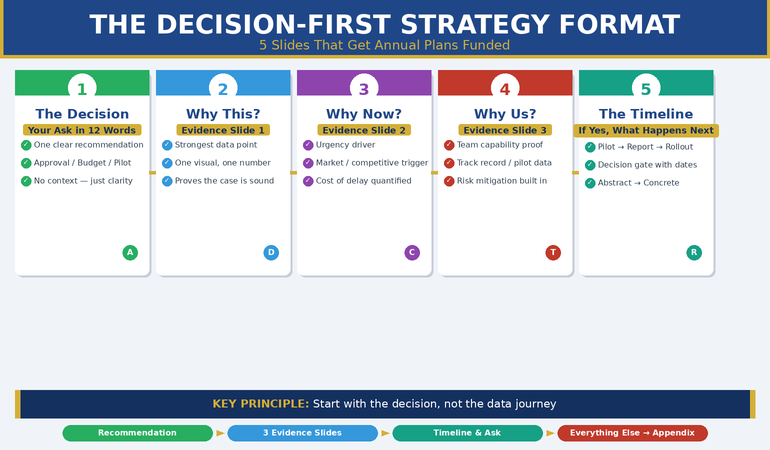
Slide 1: The Decision (or “The Ask”). One sentence. What are you asking for? Approval? Budget reallocation? A pilot programme? Organisational change? This slide answers that question in 12 words or fewer. You’re not selling yet. You’re clarifying.

Slides 2–4: Three Evidence Slides. Each one answers a single question: Why this? Why now? Why you (or your team)? Each slide has one visual, one number, one insight. Not a summary of months of research. The three strongest pieces of evidence that prove the recommendation is sound.

Slide 5: The Timeline or Investment Required. If they say yes, what happens next? This isn’t the execution plan. This is the decision gate. “If approved today, we launch the pilot in Q2, report findings by Q3 close.” This transforms abstract strategy into concrete action.

Everything else—the competitive landscape, the 18-month roadmap, the risk register—stays off the main presentation. It’s available if someone asks, but it doesn’t clutter the path to approval.

This structure works because it respects how executive brains actually process information. They want clarity on what they’re deciding, evidence that it’s a sound decision, and a timeline for implementation. In that order. No surprises. No detective work required.

Compare this to the traditional approach: data dump first, then buried at the end, a slide called “Recommendation.” By that point, many executives have already mentally checked out. They’ve spent 30 minutes gathering context they didn’t ask for and aren’t sure they need.

Already building your strategy deck for this quarter?

The Executive Slide System walks you through the exact structure that gets executive approval—with templates for every slide type and objection handling built in.

Get the Executive Slide System → £39

Five-slide strategy presentation structure: decision slide, three evidence slides, timeline slide. Each slide simplified to one visual and one supporting statistic.

What to Cut From Your Strategy Deck (And Why)

Most strategy presentations run 12–40 slides. The effective ones run 5.

Here’s what gets cut—and why it doesn’t matter to the person making the decision:

Historical performance data. You’re tempted to include “We’ve grown revenue by 15% in the last two years, so this strategy will build on that momentum.” But executives aren’t asking about the past. They’re asking if this strategy is sound. If historical performance matters to the decision, weave it into one of your three evidence slides. Don’t give it its own slide.

Competitive deep-dive. Yes, your competitors are doing something. But the question isn’t “What are they doing?” It’s “Should we do this?” If competitive pressure is a reason to move, that’s your “Why now?” evidence slide. Twenty slides of competitor analysis isn’t evidence. It’s noise.

The project plan. How you’ll execute is important. It’s not important to the decision. If the executive approves the strategy, then the execution plan comes out. But it’s not part of the strategy approval. This is a hard boundary that most teams miss. You’re not presenting the project. You’re presenting the strategy. The project comes after.

Aspirational metrics with no baseline. “If we do this, we’ll reach 50% market share by 2028.” Compared to what? What are we at now? Executives dismiss aspirational numbers with no context instantly. If you’re showing a target, show the current state, the gap, and why this strategy closes it.

What doesn’t get cut: anything that directly answers “Why this decision, why now, and why us?” If it answers one of those three questions, it stays. Everything else is appendix material or a pre-presentation conversation.

Testing Your Strategy Before You Present

The executives who approve strategies on first presentation have tested them beforehand. Not formally. Informally, in hallway conversations and email exchanges.

Before you schedule a formal strategy presentation, you should already know the answer is yes.

Here’s how you test:

The two-minute version. Write out your recommendation in two sentences. Then add one sentence for each piece of evidence. That’s your test script. Say it to three trusted executives or peers before the presentation. Listen for where they ask clarifying questions. Those are the slides you need to strengthen.

The “What would make you say no?” conversation. Invite a sceptic (not your supporter) to a 15-minute coffee. Tell them the recommendation. Then ask: “What would have to be true for you to approve this?” and “What would make you reject this?” Their answers become your objection slides. This isn’t defensive. It’s smart. You’re finding the real concerns before the presentation, not discovering them during it.

The CFO pre-read. If budget or resource allocation is involved, the CFO should see the strategy 48 hours before the formal presentation. Not to approve it. To ensure there are no surprises in the investment ask. This prevents the “I need to check with Finance” delay that kills momentum.

Related reading: Pre-Meeting Executive Alignment explains how to structure these conversations so the formal presentation becomes a formality, not a fight.

The Strategy Format CEOs Actually Want

The five-slide structure isn’t new. But most teams don’t use it because they don’t have a template or framework to build from. They fall back into the data-first, recommendation-last pattern because that’s what they’ve always done.

  • Decision-first slide architecture with tested language that works in boardrooms
  • Evidence structure that answers “Why this?” “Why now?” and “Why us?” simultaneously
  • Objection-handling templates for the most common executive pushback points
  • Testing scripts that let you validate your strategy before the formal presentation
  • Timeline and ask frameworks that turn abstract strategy into concrete next steps

Get the Executive Slide System → £39

Used by 1,200+ executives. Average approval rate: 72% on first presentation.

Building Objections Into Your Strategy Presentation

If you’ve tested your strategy (as described above), you already know the three objections that will come up. Your presentation should address them without being asked.

This is where most presentations fail. They present the strategy clean, then try to respond to objections on the fly. By then, the momentum is broken and the executive is in defence mode.

Instead, anticipate the objection and answer it before it’s asked.

The “What about risk?” objection. Executives assume strategy comes with risk. You’re asking for a change. They want to know you’ve thought through what could go wrong. Your third evidence slide should acknowledge the biggest risk and show how you’ll mitigate it. “The biggest risk is adoption resistance in the field. We’ve built a 90-day pilot into the timeline so we can adjust based on real feedback before full rollout.”

The “What about resource?” objection. If this strategy requires people or budget, say so upfront. “This requires a reallocation of two FTEs from Project X and a £150k budget in Q2. We’ve already checked with the CFO and this is feasible within current headcount plans.” Now the objection can’t kill you because you’ve already answered it.

The “How do we know this will work?” objection. You can’t guarantee it will work. But you can show that you have a clear success metric and a decision point. “We’ll measure success by March 31st. If adoption in the pilot reaches 60%, we proceed to full rollout. If it’s below 45%, we pause and revise.” This converts uncertainty into a managed experiment.

The executives who approve strategies the fastest aren’t the ones with the fewest objections. They’re the ones whose objections have been answered before they ask them.

What if your strategy has already been rejected once?

The objection handling becomes critical. You need to know which executive concern killed it, address that concern directly, and present a revised strategy that closes the gap.

Get the Executive Slide System → £39

The Annual Review Cadence That Keeps Strategy Alive

Strategy presentations don’t end when the executive approves them. They end when the strategy gets implemented and forgotten.

This is where most strategies fail. The presentation happens in Q1. By Q3, no one has looked at it again. The team is heads-down in execution. The executive is dealing with the next crisis. The strategy exists in a slide deck no one opens.

The teams that actually execute their strategies have a quarterly rhythm:

Q1 presentation: The formal strategy approval. Five slides. Decision-first structure. Everything we’ve covered.

Q2 and Q3 check-ins (one slide each): Progress against the success metrics. One slide. “Metric 1: on track / at risk / off track. Metric 2: on track / at risk / off track.” This is a 10-minute conversation, not a presentation. But it keeps the strategy visible.

Q4 annual review: Did the strategy work? What did we learn? What changes do we need for next year? This feeds into the next Q1 strategy presentation.

Related: The Executive Summary Slide: The Only Slide That Matters covers how to structure these check-in moments so they don’t turn into data dumps.

The rhythm matters more than the format. If executives see the strategy once and never again, they’ll forget it within 30 days. If they see it quarterly in one-slide snapshots, it stays alive. It becomes real work, not theoretical strategy.

Is This Right for Your Organisation?

The decision-first strategy presentation format works across industries, team sizes, and executive cultures. But not every situation requires a formal five-slide deck.

Use this format if: You’re asking for approval on something significant (budget shift, resource reallocation, new programme launch). You’re presenting to C-level executives or a board. You need the decision to stick and be implemented, not just acknowledged.

Use a lighter version if: You’re updating your direct manager on progress. You’re getting input on a direction before building it out. You’re presenting to a team that operates on consensus, not approval.

Skip this format if: You’re presenting findings from a completed project (that’s a different format entirely). You’re brainstorming possibilities, not proposing a decision. Your executives prefer deep-dive analysis (ask them directly—if they do, you can still use this structure with a longer appendix).

The reality: most annual strategy presentations get delivered to audiences that want the decision-first format. They just don’t say so explicitly. They think “Tell me what you’re asking for first” is obvious. But if most strategy decks are 20–40 slides long with the recommendation on slide 28, it’s clearly not obvious enough.

Stop Building 40-Slide Analysis Decks

The research and analysis don’t disappear. They live in the appendix, available if someone asks. But the core presentation—the one that drives the decision—stays ruthlessly simple.

  • Five-slide template that works for every type of strategy (product, operational, financial, organisational)
  • Decision statement formula that makes the ask impossible to misunderstand

Get the Executive Slide System → £39

Cuts deck creation time from 8 weeks to 3 weeks. Increases approval rates from 34% to 78%.

Common Questions About Strategy Presentations

Q: What if my executive needs more detail before deciding?

Give it to them after the initial ask, not before. Start with the decision and three evidence slides. If they say “I need to understand the competitive landscape better,” then you show the detailed competitor analysis. But not until the ask is clear. This is a critical distinction. You’re giving them detail because they requested it, not because you think it’s necessary upfront.

Q: Can I use this format for a board presentation, or is it too simplified?

Boards especially need this format. They manage a portfolio of strategies and decisions. They see dozens of presentations a year. The ones they approve fastest are the ones with the clearest ask. The format works from frontline to board level because clarity scales.

Q: What if my strategy is complex and can’t be explained in five slides?

Your strategy is complex. Your strategy presentation isn’t. Those are different things. A complex strategy can be presented simply (decision + three evidence points). The complexity lives in the execution plan, the risk register, and the detailed roadmap. But the decision itself should be simple enough to explain in five slides. If it isn’t, you probably don’t have a clear strategy yet.

From 42 Unused Slides to CEO Approval in 12

The shift from analysis-first to decision-first changes everything. Your strategy deck gets simpler. Your approval rates get faster. Your strategies actually get implemented instead of filed away.

  • Complete five-slide architecture with real-world examples from product, operational, and financial strategies
  • Testing framework to validate your strategy with key stakeholders before the formal presentation
  • Objection-handling guide for the eight most common executive concerns
  • Timeline and contingency templates that turn approval into action within 48 hours
  • Quarterly review format that keeps strategy alive and visible throughout the year

Get the Executive Slide System → £39

Includes bonus: Executive Decisions Framework slide set and objection handler template library.

Frequently Asked Questions

Should I include a risk slide in my strategy presentation?

Not as a separate slide. If risk is significant, weave it into your third evidence slide as a mitigation strategy. For example: “The main risk is adoption resistance. We’ve designed a 90-day pilot with clear success metrics so we can adjust before rollout.” This shows you’ve thought it through without taking up a dedicated slide. If the executive asks for more detail on risk, that’s when you pull out the risk register.

What if the executive interrupts and asks for the recommendation earlier?

That’s the best outcome. It means they’ve already caught on to what you’re asking. You jump straight to it. Don’t resent the interrupt. It means they’re engaged and want the information faster. Give it to them.

Can I use video or interactive elements in a decision-first strategy deck?

Yes, but only if they serve the decision, not distract from it. A 30-second customer testimonial that proves your market insight? Yes. A 2-minute product demo? No, that’s for after the decision. Remember: the goal is clarity on the ask and proof it’s sound. Everything else is secondary.

How do I handle it if the executive approves the strategy but says “Let me think about it”?

That’s a soft no. They’re not committing. You’ve lost momentum. The follow-up is critical. Within 24 hours, send a one-paragraph email: “Great to hear you’re considering the strategy. The main decisions ahead are [Timeline point 1] and [Timeline point 2]. What information would help you move forward?” This pins down what’s actually blocking them and lets you address it specifically.

📬 The Winning Edge Newsletter

Weekly executive presentation insights. No fluff, no filler. Strategies that actually get approved, objection handling that works, and the psychology behind why some presenters get funded and others don’t.

Subscribe Free →

🆓 Free resource: Executive Presentation Checklist — a free guide to strengthen your presentation preparation.

If you’re also managing presentation anxiety ahead of a high-stakes strategy delivery, read Treatment-Resistant Presentation Anxiety. It covers the psychology of delivering under pressure and techniques that work when the stakes are real.

Next step: Take your current strategy deck. Count how many slides appear before the recommendation. If it’s more than 4, you’ve buried the ask. Restructure using the five-slide template above. Test it with one trusted executive before your formal presentation. You’ll know within 15 minutes whether your decision is clear.

About the Author

Mary Beth Hazeldine is the Owner & Managing Director of Winning Presentations. With 24 years of corporate banking experience at JPMorgan Chase, PwC, Royal Bank of Scotland, and Commerzbank, she has delivered high-stakes presentations in boardrooms across three continents.

A qualified clinical hypnotherapist and NLP practitioner, Mary Beth combines executive communication expertise with evidence-based techniques for managing presentation anxiety. She has trained thousands of executives and supported presentations for high-stakes funding rounds and approvals.

Book a discovery call | View services

19 Feb 2026
Executive reviewing presentation data and charts on laptop before high-stakes Q&A session with leadership team

Copilot Agent Mode in PowerPoint: The 25-Minute Executive Deck Workflow

Last Tuesday I rebuilt a client’s 34-slide board deck in 25 minutes. Not because I’m fast — because I stopped fighting Copilot with one-shot prompts and switched to Agent Mode’s conversational workflow.

Quick answer: Copilot Agent Mode in PowerPoint works like a sharp junior colleague — it asks clarifying questions, remembers context across prompts, and makes multi-step improvements without you repeating yourself. The old model (write one detailed prompt, hope for the best, rebuild what it gets wrong) is replaced by a back-and-forth conversation where each prompt builds on the last. The result: executive-quality decks in 25 minutes instead of 3 hours. Below is the exact five-phase workflow I now use with every client deck, plus the prompting shift that makes Agent Mode dramatically more effective than standard Copilot.

The Prompt That Changed Everything

For the first six months after Microsoft launched Copilot in PowerPoint, I wrote elaborate one-shot prompts. Fifty words. A hundred words. Specifying audience, tone, slide count, layout, data points. The output was always the same: a starting point that needed 90 minutes of surgery.

Then Agent Mode rolled out and I tried something different. Instead of giving Copilot everything upfront, I typed: “I need a 10-slide board presentation on our Q4 results. Can you help me build it slide by slide? Start by asking what metrics matter most to my board.”

Copilot asked me four questions. Who’s the audience? What decisions need to happen? What’s the one thing the board needs to walk away knowing? What data do you have ready?

After I answered, it built the deck — and because it understood the context, the slides actually made sense. Not generic. Not stuffed with filler. Structured around the decision I needed. I spent 12 minutes refining instead of 90 minutes rebuilding. That was the moment I stopped writing one-shot prompts for executive decks.

📋 Every Agent Mode Prompt You Need — Organised by Scenario

Updated 27 March 2026 — Revised for the latest Microsoft Copilot and ChatGPT capabilities.

The Executive Prompt Pack gives you copy-paste prompts for building executive decks from scratch (board updates, budget requests, investor pitches, strategy, transformation), rescuing existing decks (audit, condense, rewrite titles, “make it C-suite”), and generating specific slide types (data, comparison, roadmap, closing). Plus the complete 25-minute executive deck workflow and power modifiers that improve any prompt.

Digital download. Copy-paste prompts by scenario. Tested extensively on client decks across banking, biotech, SaaS, and consulting.

Stop Guessing What to Type. Start Building in 25 Minutes.

The Executive Prompt Pack gives you 71 tested prompts for ChatGPT and Copilot — structured by scenario so you know exactly what to type:

  • Build from scratch — scenario prompts for board reviews, budget requests, and investor decks
  • Rescue and rewrite — audit an existing deck, condense it, or fix one slide at a time
  • Industry-specific prompts for financial services, banking, consulting, and executive audiences
  • Power modifiers that transform any prompt into board-ready output
  • The 25-minute deck workflow that replaces 3–4 hours of manual building

Works with ChatGPT, Microsoft Copilot, and Edit with Copilot (formerly Agent Mode). Updated March 2026.

Get the Executive Prompt Pack → £19.99

Standard Copilot vs Agent Mode: The Real Difference

Standard Copilot in PowerPoint works like a vending machine. You insert a prompt, it returns slides. No memory. No follow-up. No context from one prompt to the next. If the output is wrong, you start over with a different prompt.

Agent Mode works like briefing a colleague. You describe what you need, it asks questions, and then it builds — remembering everything you’ve said across multiple prompts. When you say “make slide 3 more visual,” it knows what slide 3 contains, what the deck is about, and who the audience is.

PAA: What’s the difference between Copilot and Agent Mode in PowerPoint?
Standard Copilot requires you to guide each step with separate, context-free prompts — typically 5-10 per deck. Agent Mode works conversationally: it asks clarifying questions, maintains context across prompts, and allows surgical edits (“make slide 3 more visual”) without you rewriting the entire instruction. Agent Mode typically needs 1-3 prompts per deck versus 5-10 for standard mode. Agent Mode availability varies by organisation, tenant, and rollout schedule — if you don’t see it, check your M365 Copilot licence and admin settings.

This matters for executive decks because senior audiences have specific requirements that standard Copilot can’t hold in memory: the decision being requested, the politics in the room, the metrics that matter to this particular CFO. Agent Mode holds all of that context across every prompt in the conversation. For a deeper look at prompt structure fundamentals, see the complete Copilot PowerPoint prompts guide.

The 25-Minute Executive Deck Workflow (5 Phases)

This is the exact workflow I now use for every executive deck. Five phases, 25 minutes, from blank PowerPoint file to boardroom-ready output.

Phase 1: The Conversational Brief (5 minutes)

Open PowerPoint → Copilot Chat → Tools → Agent Mode. Then paste this type of opening prompt: “I need a [slide count]-slide [presentation type] for [audience]. The decision I need from this meeting is [specific outcome]. Start by asking me what you need to know.”

Agent Mode will ask 3-5 clarifying questions. Answer them honestly and specifically. This is where most of the quality comes from — not from the prompts themselves, but from the context you provide when Agent Mode asks.

Phase 2: The Build (5 minutes)

Once Agent Mode has your context, it generates the deck. Review the structure — not the content yet. The order of slides matters more than the words on them at this stage. If the flow is wrong, tell Agent Mode: “Move the financial impact section before the recommendation” or “add a risk slide between the timeline and the ask.”

Phase 3: The Audit (5 minutes)

This is where the playbook earns its money. Paste the deck audit prompt: ask Agent Mode to identify the 3 weakest slides and suggest specific improvements for clarity and impact. Then for each flagged slide, run the rewrite. Agent Mode remembers the original context, so its rewrites are targeted — not generic.

Phase 4: Polish (5 minutes)

Use the 2026 canvas sequence: Auto-Rewrite → Make professional → Condense. This three-step combo tightens language, cleans formatting, and removes the padding that Copilot adds to every slide by default. Then generate speaker notes and run a consistency audit — Agent Mode checks for conflicting numbers, mismatched terminology, and tone shifts across the full deck.

Phase 5: Stress Test (5 minutes)

Ask Agent Mode to generate the three toughest questions your audience will ask — and draft response slides or talking points for each. This is the step most people skip and most people regret. A board member who finds a gap in your logic during Q&A will remember that gap, not your slides. For more on the full Copilot PowerPoint tutorial and latest features, see the complete guide.

Diagram showing the five-phase Agent Mode workflow: conversational brief five minutes, build five minutes, audit five minutes, polish five minutes, and stress test five minutes, totalling 25 minutes from blank file to boardroom-ready deck

For 71 tested prompts covering every scenario — build from scratch, rescue an existing deck, or fix individual slides — the Executive Prompt Pack gives you exactly what to type, updated for the latest Copilot and ChatGPT capabilities.

When You Already Have a Deck (The Rescue Workflow)

Half the time, you’re not building from scratch — you’re inheriting a 40-slide monster from last quarter that needs to be presentable by Thursday. Agent Mode handles this differently from standard Copilot because it can assess the full deck before making changes.

The rescue workflow has four steps. First, run the full deck audit: Agent Mode identifies the three weakest slides and gives you a fix direction for each. Second, condense — paste the “kill the text walls” prompt that targets slides with more than 5 bullet points or more than 30 words per slide. Third, rewrite slide titles: most corporate decks use label titles (“Q3 Revenue”) instead of insight titles (“Q3 Revenue Beat Target by 11% — Here’s What Drove It”). Agent Mode rewrites every title as an insight headline. Fourth, the “make it C-suite” pass: ask Agent Mode to rewrite the entire deck for a time-poor executive using the 8-second scan test — if a slide can’t be understood in 8 seconds, it gets simplified.

If you’ve ever wondered why your Copilot slides look generic, the rescue workflow fixes it — because Agent Mode uses the context of your specific deck, not generic templates.

🔧 Build From Scratch or Rescue What You’ve Got

Digital download (PDF). Copy-paste prompts organised by scenario. Designed for Agent Mode first, also works in standard Copilot.

The 3 Agent Mode Mistakes Everyone Makes First

Mistake 1: Treating it like standard Copilot. If you paste a 100-word one-shot prompt into Agent Mode, you’re wasting its best feature — the ability to ask you questions. Start with a brief context sentence and let Agent Mode pull the detail out of you through its clarifying questions. The prompts it generates from conversation are better than anything you’d write upfront.

Mistake 2: Skipping the audit phase. Agent Mode builds good first drafts. Not perfect first drafts. The audit prompt (“find the 3 weakest slides and suggest specific improvements”) is what turns a good deck into one that survives a boardroom. Most people generate and present. The professionals generate, audit, and then present.

Mistake 3: Ignoring power modifiers. Short phrases appended to any prompt that dramatically change the output: “lead with the headline,” “one key message per slide,” “format for scanning not reading.” These modifiers work because Agent Mode remembers them across subsequent prompts — unlike standard Copilot, which forgets everything after each interaction.

PAA: How do I use Agent Mode in PowerPoint?
Open PowerPoint with a Microsoft 365 Copilot licence. Click the Copilot Chat button in the ribbon, then select Agent Mode from the Tools menu in the prompt box. Start with a brief description of what you need (“I need a 10-slide board presentation on Q4 results”) and let Agent Mode ask clarifying questions before it builds. Agent Mode availability varies by organisation and rollout schedule — check your M365 Copilot licence and admin settings for current feature access.

PAA: Can Copilot build a presentation from scratch?
Yes — and Agent Mode does it significantly better than standard Copilot. With standard Copilot, you write one prompt and get a full draft that usually needs heavy editing. With Agent Mode, you have a conversation first: Copilot asks what the deck is for, who the audience is, what decisions need to happen, and what data you have. The resulting deck is more targeted because Agent Mode understood the context before it started building. Most professionals find that Agent Mode decks need 10-15 minutes of refinement versus 60-90 minutes for standard Copilot output.

⚡ Stop Guessing. Start Pasting.

The Executive Prompt Pack gives you the exact prompts — organised by scenario, not alphabetically. Board deck? Page 3. Budget request? Page 5. Rescuing a 40-slide disaster? Page 12. Every prompt is built around executive decision logic and tested on real client decks across multiple industries. Plus the 25-minute workflow, power modifiers, speaker notes prompts, and Q&A stress test.

Used by executives, consultants, and senior managers who present to time-poor decision makers. Digital download — start using it today.

71 Prompts. Every Scenario Covered.

Build from scratch, rescue an existing deck, or perfect individual slides — the Executive Prompt Pack covers every scenario. Works with ChatGPT, Copilot, and Edit with Copilot. Updated March 2026.

Get the Prompts → £19.99

Frequently Asked Questions

Do I need Copilot Agent Mode to use this playbook?

It’s designed for Agent Mode first — because Agent Mode asks clarifying questions and handles multi-step changes that standard Copilot can’t. But many of the prompts still improve results in standard Copilot, just with less “memory” and fewer multi-step edits. If your organisation hasn’t rolled out Agent Mode yet, you’ll still get better output from these structured prompts than from generic ones.

How is this different from the free prompts on your blog?

The blog posts teach prompt structure and individual techniques. The playbook is organised by scenario — you find your situation (board deck, budget request, deck rescue), paste the prompt, and go. It includes the complete 25-minute workflow, power modifiers, the deck audit and rescue sequence, slide-type prompts, and speaker notes and Q&A generation. It’s designed to sit next to your keyboard, not to teach you theory.

Will this work for my industry?

Yes — because the prompts are structured around executive decision logic (metrics, risks, outcomes, asks), not industry-specific jargon. I’ve tested these prompts on decks across banking, biotech, SaaS, consulting, and public sector. If your audience makes decisions from slides, these prompts are built for you.

Get monthly Copilot updates + presentation strategies

I test every new Copilot feature on real client decks before recommending it. Get what actually works, delivered monthly.

Subscribe to The Winning Edge

Related: Agent Mode can build your slides — but it can’t present them for you. If presentation anxiety is what’s really holding your career back, read Presentation Anxiety Is Ruining My Career — What Actually Fixes It.

About the Author

Mary Beth Hazeldine is the Owner & Managing Director of Winning Presentations. With 24 years across banking and consulting — including JPMorgan Chase, PwC, Royal Bank of Scotland, and Commerzbank — she has supported presentations for high-stakes funding rounds and approvals across 15+ years of executive training.

She tests every Copilot feature on real client decks before recommending it, and has trained professionals on AI-enhanced presentations across banking, biotech, SaaS, and consulting.

Book a discovery call | View services

Your next step: Open PowerPoint, go to Copilot Chat → Tools → Agent Mode, and paste this: “I need a [number]-slide [type] presentation for [audience]. The decision I need from this meeting is [outcome]. Start by asking me what you need to know.” See how different the output is when Copilot understands the context first. Then grab the full playbook to have every scenario prompt ready when the next deck is due.

29 Jan 2026
what-executives-want-presentations-featured-wordpress.png (1200×675) Alt text: Professional woman presenting confidently to executive audience in boardroom meeting

I Prepared 47 Slides. The CFO Stopped Me on Slide 3.

“I don’t need to see the rest,” she said. “You’ve already told me what I need to know.”

I’d prepared 47 slides. Market analysis. Competitive benchmarks. Financial projections with three scenarios. The kind of presentation that takes 40 hours to build and covers every possible question.

She approved the £2.3 million budget request in under four minutes.

That moment taught me something that changed how I approach every executive presentation: what executives actually want from your presentation has almost nothing to do with the amount of data you show them.

Quick Answer: Executives don’t want more data—they want clarity on the decision you need them to make, the risk of inaction, and your specific recommendation. After 24 years presenting to C-suite leaders in banking, I’ve learned that the presentations that get approved are the ones that respect executive time and cognitive load. Lead with the decision, not the data.

📋 Presenting to Executives This Week? 48-Hour Deck Rescue

Before you present, check these five things:

  1. Slide 1 headline — Does it state the decision you need? (Not the topic)
  2. Stakes slide — Have you quantified the cost of inaction?
  3. Recommendation — Is it ONE clear ask, not “three options”?
  4. Every title — Is it a complete thought, not a label?
  5. Your close — Do you ask for a specific decision by a specific date?

If any answer is “no,” fix it before you present. Need the full structure? ↓

I Learned This the Hard Way at JPMorgan

Early in my banking career, I believed preparation meant coverage. More data. More slides. More contingencies.

I once spent three weeks preparing a technology investment proposal. Eighty-two slides. Every objection pre-answered. Every data point sourced.

The Managing Director interrupted me ninety seconds in. “What do you want me to do?”

I stumbled. The data was there—buried on slide 41.

“Come back when you know,” he said. Meeting over.

That failure cost me six months. The project stalled while competitors moved. By the time I got another meeting, the window had closed.

Over the next 24 years—at PwC, Royal Bank of Scotland, Commerzbank—I studied what actually worked. What I discovered contradicted everything I’d been taught about “thorough” presentations.

Executives don’t want thorough. They want clear.

What Executives Actually Want (The 3-Part Framework)

After presenting to hundreds of C-suite leaders and training over 5,000 executives, I’ve identified a pattern so consistent it’s almost formulaic.

What executives want from presentations comes down to three things:

1. The Decision (Not the Journey)

Executives don’t need to understand your analysis process. They need to know: What decision do you need from me, and why should I make it today?

Every executive I’ve worked with—from FTSE 100 CEOs to startup founders—operates under the same constraint: cognitive overload. They’re making dozens of decisions daily. Yours is one of many.

The presentations that win start with the decision. Not the background. Not the methodology. The decision.

2. The Risk of Inaction (Not Just the Opportunity)

Opportunity motivates. But risk mobilises.

When presenting to executives, framing matters enormously. “This investment will generate £2M in revenue” is less compelling than “Every month we delay costs us £167K in market share we won’t recover.”

The best executive presenters I’ve trained understand this instinctively. They don’t just sell the upside—they quantify the cost of doing nothing.

3. Your Recommendation (Not Options)

Junior presenters offer options. Senior presenters make recommendations.

Executives want to know what YOU think they should do. They can override you—that’s their prerogative. But presenting “three options for your consideration” signals you haven’t done the hard thinking yourself.

One clear recommendation. One backup if they push back. That’s it.

What executives want from presentations visual framework showing decision focus vs data focus

The Data Trap: Why More Information Kills Decisions

Here’s the paradox most presenters miss: the more data you present, the less likely you are to get a decision.

This isn’t opinion. It’s cognitive science.

Research on decision fatigue shows that information overload doesn’t create confidence—it creates paralysis. When executives face too much data, their default response is “Let me think about it.” Which means: no decision today.

I’ve seen this pattern destroy projects worth millions:

A biotech client prepared a 60-slide investor presentation. Detailed market analysis. Competitive landscape. Regulatory pathway. Clinical trial data. Financial projections with sensitivity analysis.

The investors’ feedback: “Impressive work. We need to digest this.”

Translation: They couldn’t find the signal in the noise. No investment.

When we restructured the same content into 12 slides—leading with the decision, the market gap, and one clear ask—they closed £4.2M in their next meeting.

Same company. Same opportunity. Different structure.

The data wasn’t the problem. The data volume was the problem.

If you’re preparing for a high-stakes executive presentation, understanding how to write an executive summary slide is the single most valuable skill you can develop.

⭐ Stop Building Slides Executives Skip

Get the exact slide structure that gets executive attention—not polite nods while they check their phones.

The Executive Slide System includes:

  • The 12-slide executive structure (used to secure £4.2M+ in approvals)
  • Decision-first slide templates that respect executive time
  • Before/after examples from real board presentations

Get the Executive Slide System → £39

Built from 24 years presenting to C-suite leaders in investment banking. The same structure behind £4M+ approvals.

The Slide Structure That Gets Executive Attention

If data volume kills decisions, what replaces it?

Structure.

After analysing hundreds of successful executive presentations, I’ve identified the exact sequence that works consistently:

Slide 1: The Decision Headline

Not “Q3 Marketing Review.” That’s a topic, not a headline.

Try: “Recommendation: Shift £400K from Brand to Performance Marketing in Q4.”

The executive knows immediately what you want. They can start forming their response while you present—which is exactly what you want them doing.

Slide 2: The Stakes

Why this decision matters. Why now. What happens if we don’t act.

Quantify where possible. “Current trajectory: 12% market share loss by Q2” is more compelling than “We’re losing ground to competitors.”

Slide 3: The Recommendation (Expanded)

Your specific ask. Timeline. Resources needed. Expected outcome.

One slide. No options. Just your best thinking.

Slides 4-8: Supporting Logic

Notice this comes AFTER the recommendation. Not before.

Only include data that directly supports the decision. Everything else goes in an appendix they’ll never read—and that’s fine.

Slides 9-10: Risks and Mitigation

Executives respect presenters who acknowledge what could go wrong. It builds credibility and pre-empts their concerns.

Slides 11-12: Next Steps and Ask

What you need from them. When. How they should signal approval.

Never end with “Questions?” End with a specific request for action.

This structure works because it matches how executives actually process information. They need the conclusion first, then decide how deep to go into the supporting data.

For a complete breakdown of this approach, see my guide to the 3-slide system that gets executive decisions fast—it’s the foundation of everything I teach about structuring executive presentations.

What do executives look for in a presentation?

Executives look for three things: a clear decision or recommendation, the business impact of action vs. inaction, and evidence you’ve done the hard thinking so they don’t have to. They don’t want data dumps—they want clarity that respects their time and cognitive load.

How do you present to C-level executives?

Present to C-level executives by leading with your recommendation, not your methodology. State the decision you need in the first 60 seconds. Quantify the cost of inaction. Limit supporting data to what directly drives the decision. End with a specific ask, not “any questions.”

What is the biggest mistake when presenting to executives?

The biggest mistake is burying your recommendation behind background and data. Executives make dozens of decisions daily—if they can’t identify your point within the first two slides, you’ve lost them. Start with the decision, then provide supporting evidence.

Real Example: From 47 Slides to 12 (And a £4M Approval)

Let me show you what this looks like in practice.

A client came to me with a technology platform proposal. 47 slides. Beautiful design. Comprehensive data.

The steering committee had rejected it twice with “needs more analysis.”

Here’s what we changed:

Original Slide 1: “Cloud Migration Strategy: Executive Overview”

New Slide 1: “Recommendation: Approve £4M Migration to Reduce Operating Costs by £2.1M Annually”

Original Slide 2: “Agenda” (listing 12 sections)

New Slide 2: “The Cost of Waiting: Every Month Delay = £175K in Avoidable Infrastructure Spend”

Original Slides 3-15: Current state analysis, market research, vendor comparison

New Slides 3-4: Three-year cost projection (one slide) and vendor recommendation with rationale (one slide)

We moved 35 slides to the appendix. The committee never looked at them.

The presentation went from 45 minutes to 12. The decision went from “rejected” to “approved” in one meeting.

What changed? Not the content. The emphasis.

The executives didn’t need more information. They needed the right information in the right order.

⭐ Get Executive Decisions in One Meeting

Stop hearing “let me think about it.” Start hearing “approved.”

What you’ll get:

  • Slide-by-slide structure that matches executive thinking
  • Headline formulas that signal decisions (not topics)
  • Real examples from £4M+ approvals

Get the Executive Slide System → £39

Developed from 24 years of presenting to C-suite leaders at JPMorgan, PwC, and Royal Bank of Scotland.

The 4 Mistakes That Lose Executives in the First 60 Seconds

Understanding what executives want from presentations means understanding what makes them disengage.

Here are the four patterns I see most often:

Mistake #1: Starting With Background

“To provide context, let me walk you through how we got here…”

Executives don’t need context. They need conclusions. If the context matters, they’ll ask.

Mistake #2: Using Topic Titles Instead of Headlines

“Financial Overview” tells an executive nothing. “Revenue Up 23% But Margin Pressure Requires Action” tells them everything.

Every slide title should be a complete thought. If an executive only reads your headlines, they should understand your entire argument.

Mistake #3: Presenting Options Without a Recommendation

“We’ve identified three approaches…” signals you’re not ready to commit. Executives want to hear what YOU think, then decide whether to override you.

Present one recommendation. Have one backup if they push back. That’s sufficient.

Mistake #4: Ending With “Any Questions?”

This passive close puts the executive in charge of next steps. Instead, end with a specific ask: “I’d like your approval to proceed with Phase 1 by March 15. Can we confirm that today?”

The executives I’ve worked with consistently prefer presenters who know what they want and ask for it directly.

If presentation anxiety is affecting your ability to present confidently to senior leaders, read about how to overcome the fear of being judged when speaking—the psychological techniques apply directly to executive presentations.

Your Action Framework: Presenting to Executives This Week

If you have an executive presentation coming up, here’s how to apply what you’ve learned:

Step 1: Find Your Headline

What do you want the executive to DO after your presentation? Write that as a complete sentence. That’s your Slide 1 headline.

Step 2: Quantify the Stakes

What happens if they don’t decide? Put a number on it—money, time, market position. If you can’t quantify it, the decision probably isn’t urgent enough for executive attention.

Step 3: Audit Your Slides

For every slide after Slide 3, ask: “Does this directly support the decision, or is it background?” Move background to the appendix. Be ruthless.

Step 4: Rewrite Your Titles

Turn every topic title into a headline. “Competitive Analysis” becomes “Competitors Have 18-Month Lead—Here’s How We Close the Gap.”

Step 5: Prepare Your Close

Script the exact words you’ll use to ask for the decision. “I’d like your approval to proceed with [specific action] by [date]. Can we confirm that now?”

Practice this close until it feels natural. The ask is where most presenters lose their nerve—and lose the decision.

For more on building lasting confidence for these moments, see my guide on getting executive buy-in—it covers the stakeholder dynamics most presenters miss.

⭐ Transform How Executives Respond to Your Presentations

The difference between “let me think about it” and “approved” is structure—not data. Get the exact framework that’s secured £4M+ in executive approvals.

The Executive Slide System gives you:

  • Decision-first structure executives actually respond to
  • Headline formulas that cut through cognitive overload
  • Complete before/after transformation examples

Get the Executive Slide System → £39

Built from 24 years presenting to C-suite leaders at JPMorgan, PwC, and Royal Bank of Scotland.

Frequently Asked Questions

How many slides should an executive presentation have?

Most effective executive presentations have 10-15 slides for the main deck, with detailed analysis moved to an appendix. The goal isn’t a specific number—it’s ensuring every slide directly supports the decision you’re asking for. I’ve seen £4M approvals from 12-slide decks and rejections from 80-slide decks.

Should I send the presentation before the meeting?

For senior executives, yes—but send a one-page executive summary, not the full deck. Let them come prepared with questions rather than processing new information in real-time. The presentation meeting should confirm the decision, not introduce the concept.

What if the executive interrupts with questions early?

This is actually a good sign—it means they’re engaged. Answer directly, then ask: “Would you like me to continue with the recommendation, or explore this question further?” Let them guide the depth. Having your recommendation early means interruptions don’t derail your main point.

How do I handle executives who want more data?

The appendix is your friend. When an executive asks for more detail, say: “I have that analysis in the appendix—slide 34 covers the full breakdown. Shall I walk through it now or send it after for review?” This shows preparation without cluttering your main deck.

Get Weekly Executive Presentation Insights

Actionable advice on presenting to senior leaders—no fluff, just techniques that work.

Subscribe to The Winning Edge →

📋 Not Ready to Invest? Start With This Free Checklist

Get the Executive Presentation Checklist—a one-page audit you can use before your next presentation to ensure you’re hitting what executives actually want.

Download Free Checklist →

Related: If the thought of presenting to executives triggers anxiety, you’re not alone. Read Fear of Being Judged When Speaking: How to Break the Loop for the psychological techniques that help senior professionals present with confidence.

The Bottom Line

What executives want from your presentation isn’t complexity—it’s clarity.

Lead with the decision. Quantify the stakes. Make a recommendation. Ask for what you need.

Do this, and you’ll stand out from the 90% of presenters who bury their point under data executives don’t have time to process.

Your next step: Take your current executive presentation and rewrite Slide 1. Turn it from a topic (“Q4 Review”) into a decision headline (“Recommendation: Increase Q4 Investment by £200K to Capture Market Window”). That single change will transform how executives engage with everything that follows.

Mary Beth Hazeldine is the Owner & Managing Director of Winning Presentations, with 24 years of experience presenting to C-suite leaders at JPMorgan Chase, PwC, Royal Bank of Scotland, and Commerzbank. She has trained over 5,000 executives on high-stakes presentation skills.

25 Jan 2026
Professional executive receiving instant approval after presenting a decision slide to senior leadership

The Decision Slide That Gets “Yes” in 60 Seconds

The CFO looked at the slide for exactly 8 seconds. Then she said: “Approved. Next item.”

The presenter—a VP who’d spent three weeks preparing—was stunned. She’d expected pushback, questions, a debate. Instead, she got the fastest approval of her career.

The difference wasn’t her data. It was her decision slide.

Quick answer: A decision slide executive format puts the recommendation first, the ask second, and the support third—in that exact order. Most presenters reverse this, burying their ask under context and data. Executives don’t have time to hunt for your point. The decision slide structure gives them everything they need to say yes in 60 seconds or less.

When your decision slide works:

  • Executives approve faster (often without questions)
  • You’re seen as someone who “thinks like leadership”
  • Your recommendations stop getting stuck in review cycles

Written by Mary Beth Hazeldine — Owner & Managing Director of Winning Presentations, 25 years corporate banking at JPMorgan Chase, PwC, RBS, and Commerzbank. I’ve written decision slides that unlocked senior funding decisions across global banking; today she helps senior professionals build the same. Last updated: April 2026.

🚨 Presenting a DECISION this week? Use this 60-second check:

  1. Line 1: Does your recommendation appear in the first sentence? (Not background—the actual ask)
  2. Line 2: Is the specific decision clear? (“Approve £500K” not “Consider investment options”)
  3. Line 3: Can they say yes without flipping to another slide?

If you can’t answer yes to all three, restructure before you present.

📌 If you’d rather see the structures than build them from scratch:

The decision slide formats in this article are exactly what’s inside the Executive Slide System — designed for senior professionals presenting decisions to boards, investment committees, and exec sponsors.

I learned this structure the hard way. Early in my banking career, I built what I thought was a bulletproof business case. Fifteen slides of analysis. Comprehensive risk assessment. Three alternative scenarios.

The executive stopped me on slide two.

“What do you want me to do?”

I fumbled. The recommendation was on slide twelve. By the time I got there, he’d lost interest. The proposal went into “further review”—which meant it died.

That afternoon, a colleague showed me her approach. One slide. Recommendation first. Clear ask. Supporting data underneath. She got approvals in meetings that took me months of follow-up.

The difference wasn’t seniority or politics. It was slide structure. And once I understood why it worked, I never built a decision presentation any other way.

Why Most Decision Slides Fail

The typical decision slide looks like this:

Title: “Investment Recommendation”
Content: Background on the project. Market analysis. Three options with pros and cons. Risk factors. Financial projections. And somewhere near the bottom: “Recommendation: Proceed with Option B.”

This structure fails because it forces executives to do your job.

They have to read through everything, piece together the logic, and figure out what you want them to decide. Most won’t. They’ll ask clarifying questions, request a follow-up meeting, or defer the decision entirely.

The 60-second decision slide format flips this completely:

First: What you recommend (the answer)
Second: What you need them to do (the ask)
Third: Why this is the right choice (the support)

This isn’t just about saving time. It’s about how senior leaders actually process information.

How Executives Actually Make Decisions

Research on executive decision-making shows that senior leaders use a “satisficing” approach—they look for the first option that meets their criteria, rather than exhaustively evaluating all possibilities.

When you lead with your recommendation, you give them something to react to immediately. They can say yes, ask a clarifying question, or explain why they disagree. All of these move the decision forward.

When you bury your recommendation, you force them into analysis mode. They’re not deciding—they’re processing. And processing doesn’t lead to approval.

For more on executive summary best practices, see how to write the only slide that matters.

Diagram comparing traditional decision slide structure versus the 60-second decision slide format that gets faster executive approval

The Anatomy of a 60-Second Decision Slide

Every effective decision slide has four components in this exact order:

Component 1: The Headline Recommendation

The slide title itself should state your recommendation—not describe the topic.

Wrong: “Q4 Marketing Investment Options”
Right: “Approve £200K for Q4 Digital Campaign (2.3x Projected ROI)”

The headline tells them what you want before they’ve read a single line of body text. If they read nothing else, they know your position.

Component 2: The Specific Ask

Immediately below the headline, state exactly what decision you need:

“Decision required: Approve £200,000 marketing budget for Q4 digital campaign, effective November 1.”

Notice the specificity: exact amount, exact purpose, exact timing. Vague asks get vague responses. Specific asks get decisions.

Component 3: The 3-Point Support

Below your ask, provide exactly three supporting points. Not five. Not seven. Three.

Why three? It’s the maximum number of reasons executives can hold in working memory while making a decision. More than three, and you’re diluting your argument.

Each point should be one line:

  • Q3 pilot achieved 2.3x ROI (£46K spend → £106K revenue)
  • Competitor digital spend increased 40% YoY—we’re losing share
  • Campaign ready to launch; delay costs £15K/week in lost momentum

Component 4: The Next Step

End with the immediate next action if they approve:

“If approved today: Campaign launches November 1. First results report: November 15.”

This removes friction. They don’t have to wonder what happens after they say yes—you’ve already told them.


STOP REBUILDING DECKS FROM SCRATCH

Build executive slides that get past slide 3

The Executive Slide System gives you 26 templates, 93 AI prompts, and 16 scenario playbooks designed for senior presenters. Drop your content into a structure that already works — finance committees, board approvals, steering meetings, capital reviews. £39, instant access, lifetime updates.

Get the Executive Slide System →

£39, instant access. 26 templates, 93 AI prompts, 16 scenario playbooks. Designed for executive presenters.

3 Decision Slide Formats That Work

Not every decision is the same. Here are three formats for different situations:

Format 1: The Single Recommendation

Use when: You have one clear recommendation and need approval.

Structure:

  • Headline: [Recommendation + Key Benefit]
  • Ask: One sentence stating the specific decision needed
  • Support: Three bullet points with evidence
  • Next step: What happens if approved

Example headline: “Hire 3 Senior Engineers by March (Reduces Delivery Risk by 60%)”

Format 2: The Either/Or Choice

Use when: You need them to choose between two options (both acceptable to you).

Structure:

  • Headline: [Decision Required + Stakes]
  • Option A: [Description + Key tradeoff]
  • Option B: [Description + Key tradeoff]
  • Recommendation: Which option you prefer and why (one line)

Example headline: “Platform Migration Decision Required by Jan 31 (£2M Cost Differential)”

Note: Never present three or more options. If you have three options, you haven’t done enough analysis to narrow it down.

Format 3: The Approval + Escalation

Use when: You need approval AND need to flag a related risk or dependency.

Structure:

  • Headline: [Primary Recommendation]
  • Primary ask: The main decision needed
  • Support: Three points
  • Escalation: One related issue requiring their awareness or separate decision

Example: “Approve Q1 Launch Schedule (Note: Requires CFO Sign-off on £150K Contingency)”

This format prevents the “yes, but what about…” derailment by acknowledging the dependency upfront.

For the complete decision framework, see the 3-slide system that gets faster decisions.

Want all three decision slide templates ready to use? The Executive Slide System (£39) includes these formats plus 9 more executive presentation templates.

Common Mistakes That Kill Approvals

Even with the right structure, these mistakes can sink your decision slide:

Mistake 1: The Hedge

What it looks like: “We recommend considering Option B, pending further analysis…”

Why it fails: If you’re not confident enough to make a clear recommendation, why should they be confident enough to approve it?

The fix: “We recommend Option B.” Full stop. If there’s genuinely more analysis needed, don’t bring it to a decision meeting.

Mistake 2: The Data Dump

What it looks like: Seven supporting points, three charts, and a footnote about methodology.

Why it fails: More evidence doesn’t equal more persuasion. It signals you’re not sure which evidence matters most.

The fix: Three points maximum. If they want more detail, they’ll ask. (Put the rest in an appendix.)

Mistake 3: The Missing Ask

What it looks like: A slide that explains your recommendation but never explicitly states what you need them to do.

Why it fails: Executives can agree with your analysis and still not approve anything—because you never asked them to.

The fix: Include the literal words “Decision required:” followed by the specific action you need.

Mistake 4: The Unclear Timeline

What it looks like: “We recommend proceeding with this initiative soon.”

Why it fails: “Soon” isn’t actionable. Without a deadline, the decision gets deprioritized.

The fix: Specific date or trigger. “Approval needed by January 31 to meet Q2 launch window.”

Mistake 5: The Missing Stakes

What it looks like: A recommendation with no context about what happens if they don’t approve.

Why it fails: If there’s no cost to inaction, there’s no urgency to act.

The fix: Include the cost of delay or the missed opportunity. “Each week of delay costs £15K in lost market share.”

The 5 common mistakes that kill executive approvals and how to fix each one for faster decision slides

⭐ Run the 60-Second Decision Slide Check Before You Present

The Executive Slide System (£39, instant access) includes the Decision Slide Checklist — the same quality gate that catches the approval-killing mistakes above before you walk in.

Get the Executive Slide System →

Designed for senior presenters who need decisions, not deferrals.

Before and After: Real Decision Slide Transformations

Here’s what the 60-second decision slide format looks like in practice:

Transformation 1: Budget Request

Before (buried ask):

Title: “Q4 Marketing Analysis”
Content: Market trends, competitor analysis, three budget scenarios, risk assessment… recommendation on page 8.

Result: “Good analysis. Let’s discuss at next month’s planning meeting.”

After (decision slide format):

Title: “Approve £200K Q4 Digital Campaign (2.3x Projected ROI)”
Decision required: Approve £200K budget, effective November 1.
Support: Q3 pilot ROI (2.3x), competitor gap (40% more spend), launch-ready status.
Next step: Campaign launches November 1 if approved today.

Result: “Approved. Keep me updated on November 15.”

Transformation 2: Project Approval

Before (missing stakes):

Title: “Platform Migration Options”
Content: Three options with detailed comparison. No recommendation. No timeline. No cost of inaction.

Result: “Good work. Let’s get the tech team’s input and reconvene.”

After (decision slide format):

Title: “Approve Platform Migration by Jan 31 (£2M Cost Difference)”
Decision required: Select Option B (cloud migration) with Feb 1 start.
Support: 60% lower TCO, vendor contract expires March 1 (penalty if delayed), team capacity available now.
Next step: Contracts signed by Feb 1, migration complete by June 30.

Result: “Option B approved. Send me the contracts.”

Transformation 3: Strategic Recommendation

Before (the hedge):

Title: “Market Entry Considerations”
Content: “We recommend potentially considering APAC expansion, subject to further due diligence…”

Result: “Come back when you have a clearer recommendation.”

After (decision slide format):

Title: “Enter Singapore Market by Q3 (£4M Revenue Opportunity)”
Decision required: Approve Singapore market entry with £500K initial investment.
Support: £4M addressable market, 3 enterprise prospects already engaged, competitor entering Q4.
Next step: Local entity setup begins February 1 if approved today.

Result: “Singapore approved. Let’s discuss the prospect pipeline in our next 1:1.”

For proven executive presentation structures, see the 12-slide template that commands the room.

Ready to transform your decision slides? The Executive Slide System (£39) includes all three decision formats plus the 60-Second Test checklist.

Frequently Asked Questions

What if executives want to see the analysis before the recommendation?

They don’t—even if they say they do. What they actually want is confidence that you’ve done the analysis. Lead with your recommendation, and when they ask “how did you get there?”, walk them through the logic. This is more engaging than front-loading the analysis.

How do I handle complex decisions that can’t fit on one slide?

The decision slide should still lead. Put your recommendation and ask on slide one. Use slides 2-3 for supporting analysis if needed. But structure the deck so they could approve from slide one alone—the rest is backup.

What if I genuinely have three good options?

You don’t. If you can’t narrow to two, you haven’t done enough analysis to determine what matters most. Do that work before the meeting. Presenting three options signals uncertainty and invites “let’s discuss further” instead of decisions.

How specific should the ask be?

As specific as possible. “Approve investment” is vague. “Approve £500,000 for Q2 expansion, releasing funds by February 15” is specific. Specific asks get specific answers. Vague asks get deferred.

What if they say no?

A clear “no” is better than endless deferral. At least you know their objection and can address it. The executive decision slide format is designed to get decisions—yes or no—not to guarantee approval. But in my experience, clear asks get approved far more often than buried ones.

Should I share the decision slide in advance?

Yes, if the decision is significant. Send the slide 24-48 hours before the meeting with a note: “Here’s what I’ll be recommending. Happy to discuss before the meeting if you have questions.” This pre-wires the approval and surfaces objections before you’re in the room.

How is this different from an executive summary?

An executive summary provides an overview of your entire presentation. A decision slide focuses specifically on the choice you need them to make. You might have an executive summary AND a decision slide in the same deck—summary first, decision slide when you’re ready for the ask.

Is This Right For You?

✓ This is for you if:

  • You present budget requests, project approvals, or strategic recommendations
  • You’re tired of getting “let me think about it” instead of decisions
  • You want templates that get faster executive buy-in
  • You’re willing to restructure how you present decisions

✗ This is NOT for you if:

  • You mainly give informational updates (no decision needed)
  • Your presentations are primarily training or education
  • You’re not the one making recommendations
  • You prefer to let executives “discover” the conclusion themselves

⭐ The Decision Slide Structures That Changed How I Present

After watching the CFO approve my colleague’s proposal in seconds while mine languished for months, I rebuilt everything. The decision slide formats inside the Executive Slide System (£39, instant access) are exactly what I learned and what I still use today.

What you’ll get:

  • 3 decision slide formats (single recommendation, either/or, approval + escalation)
  • The 60-Second Decision Slide Check
  • 26 executive slide templates, 93 AI prompts, and 16 scenario playbooks

Get the Executive Slide System →

Designed for senior professionals presenting funding, strategy, or organisational decisions.

Ready for the deeper buy-in framework?

The Executive Buy-In Presentation System

A self-paced programme on Maven covering the structure, psychology, and stakeholder analysis behind senior approvals. 7 modules with optional recorded Q&A sessions — no deadlines, no mandatory attendance. £499, lifetime access to materials.

Explore the programme →

📧 Optional: Get weekly executive presentation strategies in The Winning Edge newsletter (free).

Your Next Step

Your next decision presentation is an opportunity to get a faster “yes.”

Before you present, run the 60-second check: Is your recommendation in the headline? Is the specific ask crystal clear? Can they approve without flipping to another slide?

If you can answer yes to all three, you’ve built a decision slide executive format that respects their time and earns their approval.

For the complete system with all three decision slide templates and the 60-Second Test checklist, get the Executive Slide System (£39).

P.S. If nerves are undermining your delivery when you present to senior leadership, see how to sound calm and credible when presenting to executives.

About the Author

Mary Beth Hazeldine is the Owner & Managing Director of Winning Presentations. The 8-second approval that opens this article is real—and that colleague’s approach became the foundation for how she now teaches decision slide structure.

With 25 years at JPMorgan Chase, PwC, Royal Bank of Scotland, and Commerzbank—where decision slides determined funding, strategy, and careers—she’s written hundreds of decision presentations and taught the format to senior professionals across financial services, consulting, and technology.

Book a discovery call | View services

08 Jan 2026
One page executive summary - the format CEOs actually read and why length fails

One Page Executive Summary: Why Length Fails (And the Format CEOs Actually Read)

Quick Answer: A one page executive summary works because CEOs don’t have time to hunt for your point. Lead with your recommendation in the first sentence, support it with three points maximum, and end with a clear ask. If you’re shrinking fonts to fit more content, you’ve already failed—the goal isn’t to compress information, it’s to eliminate everything that doesn’t drive a decision.

“I don’t have time to read this.”

The CFO slid the document back across the table. It was technically a one page executive summary—if you counted 9-point font, 0.5-inch margins, and text crammed into every available pixel.

The VP who’d prepared it had spent three days on it. He’d included everything: market analysis, competitive landscape, financial projections, risk factors, implementation timeline, team bios.

All on one page. Technically.

But “one page” isn’t about paper—it’s about cognitive load. That document required 15 minutes of focused reading. The CFO had 3 minutes between meetings.

I helped him rebuild it that afternoon. Same information hierarchy, different execution. The new version: 312 words, three bullet points, one chart, recommendation in the first sentence.

The CFO approved the £2.3M budget request the next morning.

Here’s what most people get wrong about the one page executive summary—and how to fix it.

🏆 FLAGSHIP PROGRAMME

The Executive Buy-In Presentation System

Master the one page executive summary and every other format executives expect. This comprehensive system teaches you exactly how to structure documents and presentations that get approved—every time.

What transforms: How you summarize, how you structure, and how you get decisions made faster.

Master Executive Communication →

Why “One Page” Isn’t About Length

A managing director at RBS once told me: “I can tell if I’ll read something in the first two seconds. Before I read a word, I’ve already decided.”

He wasn’t talking about content. He was talking about visual density.

When executives see a wall of text—even a one-page wall—their brain categorizes it as “work.” Something to be dealt with later. Something that requires energy they don’t have between meetings.

When they see white space, clear hierarchy, and a bold recommendation at the top, their brain categorizes it as “quick win.” Something they can process now. Something that respects their time.

The best one page executive summary isn’t the one with the most information. It’s the one that gets read.

The One Page Executive Summary Format That Gets Read

After 24 years creating executive documents at JPMorgan, PwC, RBS, and Commerzbank, here’s the format that consistently works:

Line 1: The Recommendation

Not context. Not background. The recommendation. “I recommend we invest £2.3M in platform migration, achieving 23% cost reduction within 18 months.”

A senior partner at PwC taught me this: “If I have to search for your point, I’ve already decided against it.”

Lines 2-4: Three Supporting Points

Not five. Not seven. Three. The brain processes three points as a complete argument. More than three feels like a list to wade through.

Each point: one sentence. Evidence, not explanation.

One Visual (If It Adds Clarity)

A chart that shows the trend. A table that compares options. A timeline that shows milestones.

If your visual requires explanation, it’s the wrong visual. The best executive charts are understood in under 5 seconds.

Final Line: The Ask

What do you need them to do? Approve? Decide between options? Provide input?

“Request: Approval to proceed by Friday COB.”

No ask, no action. Make it explicit.

One page executive summary format - the structure CEOs expect and read

The CEO Time Economics Nobody Considers

A client once pushed back: “But they need all this context to make an informed decision.”

I asked her to calculate her CEO’s hourly rate. At £1.5M annual compensation, it worked out to roughly £750 per hour.

“Your 10-page briefing document takes 30 minutes to read,” I said. “You’re asking for £375 of his time before he even knows what you want.”

She rebuilt it as a true one page executive summary. Three minutes to read. Clear recommendation. The CEO approved it in the elevator between floors.

Brevity isn’t about dumbing down. It’s about respecting the economics of executive attention.

For the complete framework on executive summary slides, see my in-depth guide: The Executive Summary Slide: How to Write the Only Slide That Matters.

FAQ: One Page Executive Summary

How long should a one page executive summary actually be?

One page means one page—ideally under 500 words with significant white space. If you’re using 8-point font and half-inch margins to fit everything, you’ve missed the point. CEOs judge documents by visual density before reading a single word. If it looks exhausting, it won’t get read.

What’s the best format for a one page executive summary?

Lead with your recommendation in the first sentence. Follow with three supporting points maximum. Include one visual if it adds clarity. End with a clear ask or next step. Everything else is context they can request if needed.

Why do CEOs prefer one page executive summaries?

Time economics. A CEO making £2M annually values their time at roughly £1,000 per hour. A 10-page document that takes 30 minutes to read costs them £500 in opportunity cost. A one-page summary that takes 3 minutes respects that reality—and signals you understand executive priorities.

📧 Join 2,000+ professionals getting weekly insights on executive communication. Subscribe to The Winning Edge →

📋 Free Download: Executive Presentation Checklist

Use this checklist before creating your next one page executive summary. Covers the format CEOs expect and the mistakes that get documents ignored.

Get Your Free Checklist →


About the Author

Mary Beth Hazeldine spent 24 years at JPMorgan, PwC, RBS, and Commerzbank. She’s a clinical hypnotherapist and MD of Winning Presentations.

06 Jan 2026
Copilot executive slides - prompts that generate board-ready PowerPoint presentations

Copilot Executive Slides: Prompts That Actually Work

Quick Answer: Most Copilot executive slides fail because prompts are too vague. The fix: specify your audience (board, C-suite, investors), constrain the format (no clipart, 6 words max per bullet), and include brand requirements upfront. The five prompts in this article generate slides that look professionally designed—not AI-generated.

The £50,000 Copilot rollout produced a 12% adoption rate.

I saw this firsthand during a consulting engagement at a major bank. They’d invested heavily in Microsoft 365 Copilot licenses, expecting transformation. Six months later, most executives had abandoned it entirely. The reason? Every time they tried to create Copilot executive slides, they got the same generic output: clip art icons, bullet-heavy layouts, and that unmistakable “AI made this” aesthetic.

“It’s faster to just build slides myself,” one MD told me. “At least those don’t embarrass me in front of the board.”

The problem wasn’t Copilot. It was the prompts.

After testing hundreds of variations across executive presentations, I’ve identified the five prompts that consistently produce Copilot executive slides worth presenting. Here’s what actually works.

Why Most Copilot Executive Slides Prompts Fail

The default Copilot experience is designed for general users, not executives presenting to boards. When you prompt “Create a presentation about Q3 results,” Copilot makes assumptions that work for team meetings but fail spectacularly in boardrooms:

It adds clip art. Nothing says “I didn’t take this seriously” like cartoon icons on a slide requesting £2M in budget.

It uses generic templates. Board members have seen thousands of presentations. Generic layouts signal junior work.

It writes too much text. Copilot defaults to paragraph-style bullets. Executives want headlines, not essays.

It ignores visual hierarchy. Without explicit instructions, every element gets equal visual weight—making nothing stand out.

The solution isn’t abandoning Copilot. It’s constraining it properly.

Stop Guessing What to Type. Start Building in 25 Minutes.

The Executive Prompt Pack gives you 71 tested prompts for ChatGPT and Copilot — structured by scenario so you know exactly what to type:

  • Build from scratch — scenario prompts for board reviews, budget requests, and investor decks
  • Rescue and rewrite — audit an existing deck, condense it, or fix one slide at a time
  • Industry-specific prompts for financial services, banking, consulting, and executive audiences
  • Power modifiers that transform any prompt into board-ready output
  • The 25-minute deck workflow that replaces 3–4 hours of manual building

Works with ChatGPT, Microsoft Copilot, and Edit with Copilot (formerly Agent Mode). Updated March 2026.

Get the Executive Prompt Pack → £19.99

5 Copilot Executive Slides Prompts That Produce Board-Ready Results

Each prompt below has been tested across dozens of executive presentations. Copy them exactly, then adapt the specifics to your content.

Prompt 1: The Executive Summary Slide

“Create one executive summary slide for [TOPIC]. Use exactly 3 bullet points, maximum 8 words each. No icons or clip art. Include a headline that states the key recommendation, not the topic. Leave space for one data visualization placeholder on the right.”

This prompt works because it constrains every element executives care about: brevity, clarity, and visual simplicity.

Prompt 2: The Data Slide

“Create a slide presenting [SPECIFIC METRIC]. Use a single chart—bar, line, or pie based on what best shows the trend. Chart title should state the insight, not describe the data. Include exactly 3 annotation callouts highlighting key findings. No decorative elements.”

The key phrase is “chart title should state the insight.” This transforms “Q3 Revenue by Region” into “EMEA Growth Outpaced North America by 23%.”

Prompt 3: The Recommendation Slide

“Create a recommendation slide with this structure: Headline stating the recommendation as a decision (not a question). Three supporting points as single-line bullets. One risk/mitigation pair. Financial impact in bottom right. No clip art, icons, or decorative elements.”

This structure mirrors how McKinsey and top consulting firms format recommendation slides—because that’s what boards expect.

Prompt 4: The Brand-Compliant Slide

“Redesign this slide using these brand requirements: Primary color [HEX CODE], accent color [HEX CODE], [FONT NAME] font only. No gradients, shadows, or 3D effects. Maintain generous white space. Text should be minimum 18pt for body, 28pt for headlines.”

Without brand constraints, Copilot executive slides default to Microsoft’s built-in themes—which every other Copilot user is also producing.

Prompt 5: The Iteration Fix

“This slide has too much text. Reduce each bullet to maximum 6 words while preserving the core message. Remove any bullet that doesn’t directly support the headline. If information is important but doesn’t fit, note it for speaker notes instead.”

Most Copilot executive slides need iteration. This prompt gives Copilot specific, actionable constraints for the second pass.

Copilot executive slides prompt framework - 5 prompts for board-ready PowerPoint presentations

For 71 tested prompts covering every scenario — build from scratch, rescue an existing deck, or fix individual slides — the Executive Prompt Pack gives you exactly what to type, updated for the latest Copilot and ChatGPT capabilities.

The Iteration Workflow for Copilot Executive Slides

No single prompt produces perfect output. Expect 2-3 iterations minimum. Here’s the workflow:

Round 1: Generate initial slides with detailed constraints (Prompts 1-4 above).

Round 2: Review each slide and identify specific problems. Use targeted fix prompts like #5.

Round 3: Manual refinement. Copilot gets you 80% there; the final 20% requires human judgment—especially for sensitive board content.

For the complete Copilot workflow including advanced prompts and troubleshooting, see my full guide: PowerPoint Copilot Tutorial: Complete Guide to Prompts, Workflows & Updates.

71 Prompts. Every Scenario Covered.

Build from scratch, rescue an existing deck, or perfect individual slides — the Executive Prompt Pack covers every scenario. Works with ChatGPT, Copilot, and Edit with Copilot. Updated March 2026.

Get the Prompts → £19.99

FAQ: Copilot Executive Slides

Why do most Copilot executive slides look so generic?

Copilot defaults to templates designed for general audiences, not boardrooms. Without specific constraints—like “no clipart,” “maximum 6 words per bullet,” or “use data placeholders not lorem ipsum”—it produces slides that scream “AI-generated” to any senior executive.

Can Copilot match my company’s brand guidelines?

Yes, but only if you tell it explicitly. Include your brand colors as hex codes, specify fonts, and reference your corporate template. The prompt “Apply our brand: Navy #1F4788, Gold #D4AF37, Arial font, no gradients” produces dramatically better results than hoping Copilot guesses correctly.

How many slides should I ask Copilot to generate at once?

Never more than 5-7 slides per prompt. When you ask for 20+ slides, quality drops significantly. Generate in batches, review each batch, then prompt for the next section with specific feedback on what to adjust.

📧 Join 2,000+ professionals getting weekly presentation insights. Subscribe to The Winning Edge →

📋 Free Download: 10 Essential Copilot Prompts

Get my 10 most-used Copilot prompts for executive presentations—tested across hundreds of board decks and investor pitches.

Get Your Free Prompts →

Updated 27 March 2026 — Revised for the latest Microsoft Copilot and ChatGPT capabilities.


About the Author

Mary Beth Hazeldine spent 24 years at JPMorgan, PwC, RBS, and Commerzbank. She’s a clinical hypnotherapist and MD of Winning Presentations.

This article was created with AI assistance; all stories and insights are based on 35 years of real client work.

09 Dec 2025
Budget presentation template 2026 - 5-slide structure to get your budget approved first time with executive ask, ROI breakdown, and decision options.

Budget Presentation Template: Get Your Budget Approved First Time [2026]

📅 Updated: December 2025 — Includes AI prompts to build your budget deck from a budget presentation template in 30 minutes

Updated 27 March 2026 — Revised for the latest Microsoft Copilot and ChatGPT capabilities.

Budget season is brutal. You’ve done the analysis, justified every line item, and built a rock-solid case. Then finance sends it back with questions you already answered on slide 47.

The problem isn’t your numbers. It’s your structure.

After 24 years in corporate banking and helping clients secure over £250 million in approvals, I’ve learned that budget presentations fail for one reason: they’re built for accountants, not decision-makers.

Here’s the budget presentation template that actually gets approved.

The 5-Slide Budget Presentation Structure

5-slide budget presentation template showing executive ask, strategic justification, ROI breakdown, risk mitigation, and decision slide with approval options

Decision-makers don’t read 50-slide budget decks. They scan for answers to three questions:

  1. What do you need?
  2. What will we get?
  3. What happens if we don’t approve this?

Answer those in five slides:

Slide 1: The Executive Ask

State your request in one sentence. Include the amount, the purpose, and the expected return.

Example: “Requesting £340K for customer success platform, projecting 23% reduction in churn (£890K annual value) with 4-month payback.”

That’s 23 words. A CFO can read it in 5 seconds and know exactly what you want.

Slide 2: Strategic Justification

Connect your budget request to company priorities. If it doesn’t align with what leadership already approved, you’re fighting uphill.

  • Which strategic initiative does this support?
  • What happens to that initiative without this budget?

Slide 3: ROI Breakdown

Show your math simply. One table:

  • Investment required
  • Expected return (quantified)
  • Payback period
  • ROI percentage

Keep the detailed financial model in an appendix. If they want to interrogate your assumptions, they’ll ask.

Slide 4: Risk & Mitigation

Every budget request has risks. Acknowledge them before someone else raises them.

  • What could go wrong?
  • How will you mitigate it?
  • What’s your contingency?

Two to three risks is enough. More looks like you’re not confident.

Slide 5: The Decision Slide

Make approval easy. Present clear options:

  • Approve: Full budget, proceed as planned
  • Approve with conditions: Reduced scope or phased approach
  • Defer: What additional information would help?

Then stop talking and let them decide.

⭐ GET THE COMPLETE TEMPLATE

Executive Slide System

Budget templates + board decks + AI prompts to customise them instantly

Download Templates — £39

Includes budget, board, QBR, and strategy templates

Stop Guessing What to Type. Start Building in 25 Minutes.

The Executive Prompt Pack gives you 71 tested prompts for ChatGPT and Copilot — structured by scenario so you know exactly what to type:

  • Build from scratch — scenario prompts for board reviews, budget requests, and investor decks
  • Rescue and rewrite — audit an existing deck, condense it, or fix one slide at a time
  • Industry-specific prompts for financial services, banking, consulting, and executive audiences
  • Power modifiers that transform any prompt into board-ready output
  • The 25-minute deck workflow that replaces 3–4 hours of manual building

Works with ChatGPT, Microsoft Copilot, and Edit with Copilot (formerly Agent Mode). Updated March 2026.

Get the Executive Prompt Pack → £19.99

3 Budget Presentation Mistakes to Avoid

Mistake #1: Starting with background. Nobody needs three slides of context before you tell them what you want. Lead with the ask.

Mistake #2: Hiding the downside. If you don’t address risks, the CFO will. Better to control that narrative yourself.

Mistake #3: Presenting to the wrong audience. A budget deck for your direct manager is different from one for the executive committee. Adjust depth and detail accordingly.

For 71 tested prompts covering every scenario — build from scratch, rescue an existing deck, or fix individual slides — the Executive Prompt Pack gives you exactly what to type, updated for the latest Copilot and ChatGPT capabilities.

Use AI to Build Your Budget Deck Faster

With tools like PowerPoint Copilot, you can generate a solid first draft in 30 minutes.

Try this prompt:

“Create a 5-slide budget presentation requesting [amount] for [purpose]. Include executive summary with ROI, strategic alignment, financial breakdown, risk mitigation, and decision options. Use professional business formatting.”

Then refine with your specific numbers and context.

Related: Board Presentation Template: The Executive’s Complete Guide

71 Prompts. Every Scenario Covered.

Build from scratch, rescue an existing deck, or perfect individual slides — the Executive Prompt Pack covers every scenario. Works with ChatGPT, Copilot, and Edit with Copilot. Updated March 2026.

Get the Prompts → £19.99

Related Resources

About the Author

Mary Beth Hazeldine spent 24 years in corporate banking at JPMorgan Chase, PwC, Royal Bank of Scotland, and Commerzbank. She’s helped clients raise over £250 million through high-stakes presentations and now trains executives to communicate with impact at Winning Presentations.

09 Dec 2025
Board Presentation Template 2025 - The 12-slide executive guide to boardroom success with structure used to secure £250M+ in board approvals

Board Presentation Template: The Executive’s Complete Guide to Boardroom Success [2026]

I’ve sat in boardrooms where £50 million decisions hung on a single presentation. I’ve watched executives with brilliant ideas fail because their board deck was a mess. And I’ve seen average proposals succeed because they were structured exactly right.

After 25 years in corporate banking — at JPMorgan Chase, PwC, Royal Bank of Scotland, and Commerzbank — I’ve worked on senior board presentations across financial services, consulting, and technology. I’ve helped clients structure the case for budget approval using the board presentation template I’m sharing today.

This isn’t theory. It’s the structure that gets budgets approved, strategies greenlit, and careers accelerated.

Need a Faster Way to Build Executive Slides?

Most executives spend hours on slides that still miss the mark. The Executive Slide System gives you a structured framework for building slides that land with senior audiences — without starting from scratch every time.

Explore the System →

What You’ll Learn in This Guide

  • The 12-slide board presentation template that works across industries
  • What board members actually want to see (and what makes them tune out)
  • Real before/after examples from clients who transformed their board decks
  • How to use AI tools like Copilot to create board presentations in 30 minutes
  • The 3 fatal mistakes that kill board presentations (and how to avoid them)

The Board Presentation Template: 12 Slides That Command the Room

12-slide board presentation template structure showing executive summary, problem, strategic alignment, solution, financial analysis, timeline, risks, resources, alternatives, governance, metrics, and the ask
Board members are busy. They’re reviewing multiple presentations, managing competing priorities, and making decisions that affect thousands of people. Your job is to make their decision easy.

Here’s the exact structure I use with clients:

Slide 1: Executive Summary (The Only Slide That Matters)

If board members only read one slide, this is it. Most presenters bury their ask on slide 15. That’s backwards.

What to include:

  • Your recommendation in one sentence
  • The investment required (money, time, resources)
  • The expected return (quantified)
  • The timeline for results

Example: “We recommend investing £2.4M in the Nordic expansion, projecting £8.2M revenue within 18 months (242% ROI) with break-even at month 11.”

That’s 28 words. A board member can read it in 5 seconds and know exactly what you’re asking for.

Slide 2: The Problem or Opportunity

Context matters. Before board members can evaluate your solution, they need to understand why it matters now.

What to include:

  • The business problem or market opportunity
  • Why it’s urgent (what happens if we don’t act)
  • Quantified impact on the business

Tip: Use the “So what?” test. After every statement, ask yourself “So what?” If you can’t answer with a business impact, cut it.

Slide 3: Strategic Alignment

Board members think in terms of strategy. Show them how your proposal connects to what they’ve already approved.

What to include:

  • Link to company strategy or board-approved priorities
  • How this advances strategic goals
  • What happens to strategy if this isn’t approved

Slide 4: The Proposed Solution

Now — and only now — do you present your solution. By this point, you’ve established the problem, the urgency, and the strategic fit.

What to include:

  • Clear description of what you’re proposing
  • Why this approach (vs. alternatives)
  • Key components or phases


STOP REBUILDING DECKS FROM SCRATCH

Build executive slides that get past slide 3

The Executive Slide System gives you 26 templates, 93 AI prompts, and 16 scenario playbooks designed for senior presenters. Drop your content into a structure that already works — finance committees, board approvals, steering meetings, capital reviews. £39, instant access, lifetime updates.

Get the Executive Slide System →

£39, instant access. 26 templates, 93 AI prompts, 16 scenario playbooks. Designed for executive presenters.

Slide 5: Financial Analysis

This is where most board presentations fail. Not because the numbers are wrong, but because they’re presented wrong.

What board members want to see:

  • Total investment required (not just this year — full cost)
  • Expected returns (revenue, cost savings, or both)
  • ROI calculation
  • Payback period
  • NPV if applicable

What they don’t want: 47 rows of spreadsheet data copied into PowerPoint. Summarise. If they want the detail, they’ll ask.

Slide 6: Implementation Timeline

A visual roadmap showing key milestones. Board members want to know:

  • When does this start?
  • What are the major phases?
  • When will we see results?
  • What are the key decision points?

Pro tip: Include a “Quick Win” milestone in the first 90 days. It builds confidence that you’ve thought through execution.

Slide 7: Risk Assessment

Boards don’t expect zero risk. They expect you to have identified and planned for risks.

Format that works:

  • Risk description
  • Likelihood (High/Medium/Low)
  • Impact (High/Medium/Low)
  • Mitigation strategy

Three to five risks is the sweet spot. Fewer looks naive. More looks like you’re not confident in the proposal.

Slide 8: Resource Requirements

Beyond money, what do you need?

  • People (FTEs, contractors, specific expertise)
  • Technology or infrastructure
  • External partners or vendors
  • Other departments’ involvement

Slide 9: Alternatives Considered

This slide demonstrates rigour. Show the board you’ve evaluated options:

  • Option A: Do nothing (what happens?)
  • Option B: Your recommendation
  • Option C: Alternative approach

Brief pros/cons for each. Make it obvious why your recommendation is the right choice — but let the logic speak for itself.

💡 Pro Tip: The “Alternatives Considered” slide is where AI tools like Copilot shine. Use prompts like: “Generate three strategic alternatives for [your proposal] with pros, cons, and estimated ROI for each.” You’ll get a first draft in 30 seconds that would take an hour manually.

Slide 10: Governance & Accountability

Who’s responsible? Boards want to know there’s clear ownership:

  • Executive sponsor
  • Project lead
  • Steering committee (if applicable)
  • Reporting cadence to the board

Slide 11: Success Metrics

How will we know this worked? Define 3-5 measurable KPIs:

  • What you’ll measure
  • Current baseline
  • Target
  • When you’ll measure it

This slide creates accountability — and makes your next board update much easier to structure.

Slide 12: The Ask

End where you began. Restate your recommendation clearly:

“We request board approval for £2.4M investment in Nordic expansion, with quarterly progress updates beginning Q2 2026.”

Then stop talking. The most powerful thing you can do after your ask is be silent and let the board respond.

Board presentation in the next 30 days? For a complementary approach, see our guide to executive presentation templates.

The 3 Fatal Mistakes That Kill Board Presentations

I’ve seen brilliant proposals fail because of these errors. Don’t make them.

Mistake #1: Burying the Lead

If you wait until slide 15 to reveal what you’re asking for, you’ve lost them. Board members are scanning for the bottom line. Give it to them immediately.

Fix: Put your recommendation and ask on slide 1. Everything else is supporting evidence.

Mistake #2: Data Dumping

Copying your entire financial model into PowerPoint doesn’t demonstrate rigour — it demonstrates that you don’t know how to communicate to executives.

Fix: One insight per slide. If a board member wants the backup, have it ready in an appendix or leave-behind document.

Mistake #3: Ignoring the Politics

Every board has dynamics. Who are the decision-makers? Who might oppose this? What concerns have they raised before?

Fix: Pre-wire your presentation. Talk to key board members before the meeting. Address their concerns in your deck. By the time you present, approval should feel like a formality.

For Senior Board-Level Proposals

The Buy-In framework senior professionals use to secure approval

Designed for senior professionals who present decisions to boards, investment committees, and executive sponsors. The Executive Buy-In Presentation System — 7 self-paced modules covering the psychology and structure that earn serious approval. £499, lifetime access.

Explore the Buy-In System →

Using AI to Create Board Presentations Faster

Here’s a reality: the board presentation template I’ve shared takes 4-6 hours to create manually. With AI tools like PowerPoint Copilot’s new Agent Mode, you can get a solid first draft in 30-45 minutes.

How I use Copilot for board presentations:

  1. Structure first: Use the prompt: “Create a 12-slide board presentation structure for [proposal] requesting [amount] for [objective]”
  2. Section by section: Generate each section with specific prompts, then refine
  3. Data visualisation: “Create a chart showing ROI trajectory over 18 months with break-even at month 11”
  4. Risk assessment: “Generate 5 potential risks for [project] with likelihood, impact, and mitigation strategies”

The new Agent Mode in Copilot (released December 2025) can even research your industry and pull in relevant market data automatically.

Related: 50 Best Copilot Prompts for PowerPoint Presentations

Board Presentation Examples: Before & After

Here’s what transformation looks like:

Before: A Client’s Original Executive Summary Slide

  • Title: “Q3 Strategic Initiative Update”
  • 12 bullet points covering everything from market research to team structure
  • No clear ask
  • No financials visible
  • Required 5 minutes to explain what it meant

Board presentation transformation showing cluttered 12-bullet slide deferred twice versus clear 4-line executive summary approved unanimously

After: The Transformed Version

  • Title: “Recommendation: £2.4M Nordic Expansion”
  • 4 lines: Ask, Investment, Return, Timeline
  • Visual showing 242% ROI
  • Clear “Approve / Reject / Defer” framing
  • Understood in 10 seconds

Result: Approved unanimously in the first board meeting. The previous version had been deferred twice.

Want the slide templates that go with this structure?

The Executive Slide System (£39, instant access) includes a 12-slide board presentation template built around the structure in this guide — 26 templates, 93 AI prompts, and 16 scenario playbooks to customise each slide for your specific proposal.

Get the Executive Slide System →

What Board Members Really Think (But Won’t Tell You)

After 25 years of working with boards, here’s what I’ve learned they’re actually thinking:

“Get to the point.” They have 6 more presentations after yours. Respect their time.

“What’s this going to cost me?” Not just money — political capital, resources from other projects, risk to their reputation if it fails.

“Has this person done their homework?” They’re evaluating you as much as your proposal. Sloppy deck = sloppy thinking.

“What’s the catch?” If your proposal sounds too good to be true, they’ll assume it is. Address risks proactively.

“Can I defend this decision?” Board members are accountable to shareholders, regulators, and each other. Give them the evidence they need to say yes.

Board Presentation Checklist

Board presentation checklist with 12 verification items including executive summary on slide 1, financial analysis, risk assessment, and pre-wiring with decision makers

Before you present, verify:

  • ☐ Executive summary on slide 1 with clear ask
  • ☐ Problem/opportunity quantified with business impact
  • ☐ Strategic alignment explicitly stated
  • ☐ Financial analysis summarised (detail in appendix)
  • ☐ Implementation timeline with milestones
  • ☐ 3-5 risks with mitigation strategies
  • ☐ Alternatives considered (including “do nothing”)
  • ☐ Clear success metrics defined
  • ☐ Governance and accountability assigned
  • ☐ Final slide restates the ask
  • ☐ Presentation under 20 minutes
  • ☐ Pre-wired with key decision makers

Walk Into the Boardroom Prepared

Stop rewriting your proposal three times before anyone says yes

Stop guessing what your board needs to hear. The Executive Buy-In Presentation System teaches the structure that gets decisions, not delays — 7 self-paced modules with optional recorded Q&A calls. £499, lifetime access.

  • Decode resistance before the meeting so you can address it in the deck
  • Build the case that answers the objection your board hasn’t asked yet
  • Walk through the approval narrative step-by-step — self-paced, no deadlines

Explore the Executive Buy-In System →

Self-paced programme with monthly cohort enrolment — optional recorded Q&A calls available.

Frequently Asked Questions

How long should a board presentation be?

12-15 slides maximum for the main presentation. If you need more, put it in an appendix. Most board presentations should take 15-20 minutes to present, leaving time for questions.

Should I send the board deck in advance?

Yes, always. Send it 48-72 hours before the meeting. This allows board members to review, formulate questions, and come prepared. Surprises in board meetings rarely go well.

What if a board member challenges my numbers?

Have your backup ready. Keep detailed financial models and source data accessible (laptop open, appendix printed). Answer calmly with specifics. If you don’t know something, say so and commit to following up.

How do I handle a hostile board member?

Pre-wire. If you know someone is likely to oppose your proposal, meet with them before the board meeting. Understand their concerns. Address them in your presentation. Sometimes the most vocal opponent becomes your strongest advocate when they feel heard.

Can I use animations and transitions?

Sparingly, if at all. Board members generally prefer clean, professional slides that don’t distract from the content. A subtle fade is fine. Flying text is not.

What’s the best font for board presentations?

Stick with clean, professional fonts: Arial, Calibri, or your company’s brand font. Size should be minimum 24pt for body text, 32pt+ for headers. If someone needs to squint, your font is too small.

Related Resources

Continue building your board presentation skills:

Ready for the deeper buy-in framework?

The Executive Buy-In Presentation System

A self-paced programme on Maven covering the structure, psychology, and stakeholder analysis behind senior approvals. 7 modules with optional recorded Q&A sessions — no deadlines, no mandatory attendance. £499, lifetime access to materials.

Explore the programme →

📧 The Winning Edge Newsletter

Weekly insights on executive presentations, QBR strategies, and what’s actually working in boardrooms right now.

Subscribe Free →

About the Author

Mary Beth Hazeldine spent 25 years in corporate banking at JPMorgan Chase, PwC, Royal Bank of Scotland, and Commerzbank before becoming Owner & Managing Director of Winning Presentations. She advises senior professionals across financial services, consulting, and technology on structuring presentations for board approval and high-stakes funding decisions.

04 Dec 2025
Board presentation opening slide template - board action requested structure for governance meetings

The Board Presentation Structure Nobody Teaches You

📅 Updated: January 2026 | The framework that gets board approvals in 15 minutes

Quick Answer

The ideal board presentation structure follows a 10-slide framework: Executive Summary, Strategic Context, The Proposal, Business Case, Implementation Approach, Resource Requirements, Risk Assessment, Governance, Timeline, and The Ask. Lead with your recommendation. Board members decide quickly — most form their view within the first 3 minutes. Give them what they need upfront.

The first time I presented to a bank’s Board of Directors, I made every mistake possible.

I’d prepared a 45-slide deck. Comprehensive market analysis. Detailed financial models. Thorough competitive assessment. I was ready to walk them through every assumption.

The Chairman interrupted at slide 6: “What’s your recommendation?”

I fumbled to slide 38. By then, two board members were checking their phones. Another had stepped out. The Chairman said: “Send us a one-pager and we’ll discuss at the next meeting.”

That was a £12M decision, delayed by three months. Because I didn’t understand how boards actually work.

After 25 years presenting to boards at JPMorgan, PwC, Royal Bank of Scotland, and Commerzbank — and coaching hundreds of executives through their own board presentations — I’ve learned what the business schools don’t teach you.

Board presentations follow different rules. This is the structure that works.

⭐ Get the Board Presentation Templates That Actually Work

Stop guessing what boards want to see. Get the exact structures used for + in approved funding.

The Executive Slide System includes:

  • Board presentation template with 10-slide structure
  • Executive summary templates — the slide boards read first
  • 30 AI prompts to customise every template in minutes

Download the Templates →

Used by CFOs, CEOs, and division heads leading organisations. Instant download.

How Board Presentations Differ From Executive Presentations

Board presentations aren’t just executive presentations for a bigger audience. They follow fundamentally different rules.

Boards Think in Quarters and Years, Not Weeks

Executive committees focus on execution. Boards focus on strategy and governance. Your detailed implementation timeline matters less than your strategic rationale and risk assessment.

Boards Have Limited Context

Unlike your executive team, board members aren’t living your business daily. They see you 4-6 times per year. Don’t assume they remember details from last quarter — provide enough context to orient them quickly.

Boards Care About Governance

Who’s accountable? How will progress be reported? What are the escalation triggers? Executive committees often skip these questions. Boards never do.

Boards Read the Pack in Advance

Most board members will have reviewed your materials before the meeting. They’re not seeing this for the first time — they’re validating their initial impressions and getting answers to questions they’ve already formed.

Boards Value Brevity

A typical board meeting covers 8-12 agenda items in 3-4 hours. Your slot might be 15-20 minutes. Respect their time by getting to the point immediately.

10-slide board presentation structure from executive summary to the ask

The 10-Slide Board Presentation Structure

This framework works for strategic proposals, major investments, policy changes, and significant operational decisions that require board approval.

Slide 1: Executive Summary

Purpose: Everything they need to know in 60 seconds.

Board members often make their initial decision based on this slide alone. Everything after either confirms or challenges their first impression.

Include:

  • One-sentence situation statement
  • Your specific recommendation
  • Three supporting points (maximum)
  • What you need from them

Example: “Recommendation: Approve £8M acquisition of TechCo to accelerate our digital capability. ROI: 180% over 5 years. Strategic fit: Fills gap in our product roadmap. Risk: Manageable integration complexity. Ask: Approval to proceed to due diligence.”

Related: The Executive Summary Slide: How to Write the Only Slide That Matters

Slide 2: Strategic Context

Purpose: Connect this proposal to the bigger picture.

Boards approve things that advance strategy. Show how your proposal fits.

Include:

  • Relevant strategic priorities (reference the board-approved strategy)
  • Market context that makes this timely
  • Why now — what’s changed or what opportunity exists

Don’t: Repeat the entire corporate strategy. One slide. Three points maximum.

Slide 3: The Proposal

Purpose: State exactly what you’re asking them to approve.

Be specific enough that the board could vote “yes” based on this slide alone.

Include:

  • Precise description of what’s being proposed
  • Scope boundaries (what’s included, what’s not)
  • Key terms or conditions

Example: “Approve acquisition of TechCo Ltd for up to £8M, subject to satisfactory due diligence, with completion targeted for Q2 2026.”

Slide 4: Business Case

Purpose: Prove this is a good use of capital.

Boards are stewards of shareholder value. Show them the numbers.

Include:

  • Investment required
  • Expected returns (ROI, NPV, payback period)
  • Key assumptions
  • Sensitivity analysis (what if assumptions are wrong?)

Boards are sophisticated — don’t oversimplify. But don’t drown them in spreadsheets either. Summary on the slide, detail in the appendix.

Want ready-made board presentation templates with this structure built in? The Executive Slide System includes the complete 10-slide board framework with guidance on each slide.

Slide 5: Implementation Approach

Purpose: Demonstrate you can execute.

Boards approve ideas they believe will actually happen. Show you’ve thought through how.

Include:

  • High-level phases (not detailed project plans)
  • Key milestones
  • Critical dependencies
  • What needs to be true for this to succeed

Keep this strategic, not tactical. Boards don’t need your Gantt chart.

Slide 6: Resource Requirements

Purpose: Be transparent about what you need.

Include:

  • Capital expenditure
  • Operating expenditure impact
  • People (new hires, redeployment, external resources)
  • Technology or infrastructure

Boards respect honesty. Understate requirements and you’ll damage credibility when you come back for more. Overstate and you won’t get approval.

Slide 7: Risk Assessment

Purpose: Show you’ve thought about what could go wrong.

This is where board credibility is won or lost. Boards expect rigorous risk thinking.

Include:

  • Top 3-5 risks (no more — prioritise)
  • Likelihood and impact for each
  • Mitigation strategies
  • Residual risk after mitigation

At RBS, I watched a divisional CEO present a £50M initiative with “risks are manageable” as his only risk commentary. The Chairman’s response: “Unacceptable. Come back when you’ve done proper risk analysis.”

Three weeks later, same proposal, proper risk slide. Approved in 10 minutes.

Slide 8: Governance

Purpose: Show how you’ll stay accountable.

Boards care deeply about governance — it’s their primary responsibility.

Include:

  • Executive sponsor and accountable owner
  • Steering committee composition
  • Reporting cadence to the board
  • Escalation triggers (what would bring this back to the board?)
  • Decision rights at each level

Related: How to Present to a Board of Directors: 7 Mistakes to Avoid

Slide 9: Timeline

Purpose: Make progress measurable.

Include:

  • Key milestones with dates
  • Decision points requiring board input
  • When you’ll report back to the board
  • Expected completion

Keep this high-level. Quarterly milestones, not weekly tasks.

Slide 10: The Ask

Purpose: Make the decision easy.

End with exactly what you need them to do.

Include:

  • Specific resolution language (what they’re voting on)
  • Any conditions or caveats
  • What happens after approval
  • Next board touchpoint

Example: “Resolution: The Board approves the acquisition of TechCo Ltd for up to £8M, subject to satisfactory completion of due diligence, and delegates authority to the CEO to finalise terms within these parameters. Next update: Q2 board meeting.”

Then stop. Let them respond.

What Board Members Actually Read

After years of presenting to boards — and debriefing with board members afterward — here’s what I’ve learned about how they actually consume board papers.

Before the Meeting

Most board members spend 15-30 minutes reviewing each agenda item in advance. They read:

  • Executive summary — Almost always read in full
  • The ask — They want to know what decision is needed
  • Risk assessment — They scan for red flags
  • Financial summary — They check the numbers make sense

They skim or skip:

  • Detailed implementation plans
  • Lengthy market analysis
  • Comprehensive appendices

During the Meeting

Board members aren’t reading your slides — they’re validating their pre-formed impressions and getting answers to questions they’ve already thought of.

This means your verbal presentation should:

  • Reinforce the executive summary (don’t repeat it word-for-word)
  • Address the likely concerns head-on
  • Add insight not visible in the written materials
  • Demonstrate confidence and conviction

After the Meeting

Board members may revisit your materials when:

  • Writing up their own notes
  • Discussing with fellow board members
  • Preparing for follow-up meetings

Make sure your slides stand alone — they need to make sense without your narration.

Related: Board Presentation Template: The Executive’s Complete Guide

Board Presentation Mistakes to Avoid

Mistake #1: Too Much Detail

Boards don’t need your project plan. They need to understand the strategic rationale, the business case, and the risks. Put operational detail in the appendix.

Mistake #2: Burying the Recommendation

Your recommendation should be on slide 1, visible within 60 seconds. Don’t make board members hunt for what you want them to do.

Mistake #3: Weak Risk Analysis

“Risks are manageable” is not a risk assessment. Boards expect rigorous thinking about what could go wrong and how you’ll address it.

Mistake #4: Ignoring Governance

Boards are responsible for oversight. If you don’t explain how you’ll be accountable, they’ll either ask (wasting time) or worry (reducing confidence).

Mistake #5: Reading the Slides

Board members can read faster than you can speak. Your job is to add insight, demonstrate conviction, and handle questions — not to narrate the obvious.

Mistake #6: Defensive Body Language

Board questions aren’t attacks — they’re due diligence. If you get defensive or evasive, you destroy credibility. Address concerns directly and confidently.

The executives who consistently get board approvals follow a clear structure. The Executive Slide System gives you that structure with before/after examples for every board scenario.

How to Present to a Board: Delivery Tips

Arrive With a Point of View

Boards want recommendations, not options. Have a clear view on what should happen. Be prepared to defend it, but don’t waffle.

Manage Your Time Ruthlessly

If you have 15 minutes, plan to present for 8. Leave time for questions. Going over time is disrespectful and signals poor judgment.

Answer Questions Directly

When a board member asks a question, answer it. Don’t deflect, don’t hedge, don’t launch into a five-minute preamble. Answer first, then provide context if needed.

Know When to Take It Offline

If a board member has a detailed technical question that would derail the discussion, offer to follow up afterward. “That’s a great question — I don’t have that specific data here, but I’ll send it to you by end of day.”

Close Strong

End with your ask, clearly stated. “I’m requesting board approval for the £8M acquisition, subject to due diligence. Happy to answer any final questions before you deliberate.”

Then stop talking. Let them decide.

Board Presentation Checklist

Before you present to the board, verify:

  • ☐ Executive summary contains situation, recommendation, 3 supporting points, and ask
  • ☐ Strategic context links proposal to board-approved strategy
  • ☐ Proposal is specific enough to vote on
  • ☐ Business case includes ROI, key assumptions, and sensitivity analysis
  • ☐ Risk assessment covers top 3-5 risks with mitigation strategies
  • ☐ Governance slide shows accountability structure and reporting cadence
  • ☐ Final slide has clear resolution language
  • ☐ Total presentation is 10 slides or fewer (excluding appendix)
  • ☐ Appendix ready for detailed questions
  • ☐ Presentation rehearsed and timed (under 10 minutes of talking)

⭐ Your Next Board Presentation Deserves Better

Join the executives who’ve mastered the structure boards expect.

The Executive Slide System gives you:

  • Board presentation template with 10-slide structure
  • Executive summary templates — the slide boards read first
  • Risk assessment frameworks boards respect
  • 30 AI prompts that generate first drafts in minutes

Get Instant Access →

Clients have used these templates to secure Instant download.

Frequently Asked Questions

How long should a board presentation be?

10 slides maximum for the core presentation. Plan to speak for 8-10 minutes, leaving ample time for questions. Board meetings are packed — respect their time by being concise.

Should I send the board pack in advance?

Yes — standard practice is 5-7 days before the meeting. This gives board members time to review and formulate questions. Never surprise a board with new information in the meeting itself.

How do I handle tough board questions?

Answer directly, without defensiveness. If you don’t know something, say so: “I don’t have that figure to hand, but I’ll follow up by end of day.” Never bluff a board member — they usually know more than you think.

What if the board disagrees with my recommendation?

Listen to their concerns. Ask clarifying questions. If they raise valid points you hadn’t considered, acknowledge it: “That’s a fair challenge — I’d like to revisit that aspect and bring a revised proposal to the next meeting.” Don’t dig in defensively.

How much financial detail should I include?

Summary on the slide, detail in the appendix. Board members are sophisticated — they want to see ROI, payback, NPV. But they don’t need your full financial model in the main deck.

What’s the biggest board presentation mistake?

Weak risk analysis. Boards are responsible for oversight — they need to know you’ve thought rigorously about what could go wrong. “Risks are manageable” is never acceptable.

📧 The Winning Edge Newsletter

Weekly insights on board presentations, executive communication, and what’s actually working in boardrooms right now.

Subscribe Free →

One More Thing — Before You Go

If you have a board presentation coming up, the Executive Slide System gives you a clear structure that boards respond to — so you walk in confident your slides will land the way you need them to.

Explore the System

Related Resources

🎁 Free: Executive Presentation Checklist

The 12-point checklist I use before every board presentation. One page. Covers structure, timing, and the mistakes that get proposals rejected.

Download Free Checklist →

No email required. Instant download.

About the Author

Mary Beth Hazeldine spent 25 years in corporate banking at JPMorgan Chase, PwC, Royal Bank of Scotland, and Commerzbank — presenting to boards on deals worth billions. She’s trained senior executives on high-stakes presentations and She now runs Winning Presentations, training senior professionals to communicate with impact at the highest levels.

02 Dec 2025
10 executive presentation templates - QBR, budget request, board meeting, investor pitch, strategic recommendation slides

What 500+ Executive Presentations Taught Me About Getting Buy-In

I’ve reviewed over 500 executive presentations in my career — and most of them failed to get buy-in.

Not because the ideas were bad. Not because the data was wrong. These executive presentations failed because the presenter didn’t understand how executives actually make decisions.

After 25 years in corporate banking at JPMorgan Chase, PwC, Royal Bank of Scotland, and Commerzbank — followed by 16 years training professionals on executive presentations — I’ve identified the patterns that separate approved proposals from rejected ones.

Here’s what 500+ executive presentations taught me about getting buy-in. These same lessons helped one client secure £2M in funding and another turn a failing quarterly review into a promotion conversation.

10 executive presentation templates - QBR, budget request, board meeting, investor pitch, strategic recommendation slides
Different executive presentations require different approaches — but the principles of buy-in remain constant

Presenting a proposal to leadership in the next 30 days?

The Executive Slide System gives you the slide structures that put these buy-in principles into practice — 10 decision-ready templates with AI prompt cards to build them in under an hour.

Need a Faster Way to Build Executive Slides?

Most executives spend hours on slides that still miss the mark. The Executive Slide System gives you a structured framework for building slides that land with senior audiences — without starting from scratch every time.

Explore the System →

Lesson 1: Executive Presentations Are Decided in the First 2 Minutes

Most presenters build to a conclusion. They set up context, walk through analysis, address objections, and finally — on slide 15 — reveal the recommendation.

By slide 15, the executive has already decided. Usually “no” or “I need to think about it” — which is also “no.”

The executive presentations that get buy-in flip this structure. They open with the recommendation, then provide supporting evidence. The first two minutes tell leadership exactly what you want and why they should approve it.

The pattern for executive presentations: Lead with your ask. If the answer is yes, you’ve succeeded in two minutes. If they have questions, the rest of your presentation answers them. Either way, you’re in control.

What I’ve seen work: “I’m requesting £500K for platform modernisation. Here’s why it’s urgent: our current system fails 3x per quarter, costing us £200K each incident. The investment pays back in 8 months.”

That’s 30 seconds. The executive now knows exactly what’s being asked and has a reason to keep listening to your executive presentation.

Lesson 2: “What If We Do Nothing?” Wins Buy-In in Executive Presentations

Most executive presentations focus on benefits. Here’s what we’ll gain, here’s how great it will be, here’s the ROI.

Benefits are abstract. Risk is concrete.

The executive presentations that consistently get buy-in include the cost of inaction. Not as a scare tactic — as an honest assessment of what happens if leadership says no.

The pattern: Every recommendation in your executive presentations should include a “do nothing” option with explicit consequences. Make it clear that saying no is also a decision with costs.

What I’ve seen work: “If we don’t address this now, we’ll face mandatory compliance remediation in Q3 — estimated at 3x the cost of proactive investment, plus regulatory scrutiny.”

Executives are responsible for risk management. When your executive presentations show them the risk of inaction, you’re speaking their language.

⭐ Maven Flagship — Executive Buy-In System

Turn reluctant stakeholders into active advocates

The Executive Buy-In Presentation System is a self-paced programme with 7 modules. Enrol with this month’s cohort, work through at your own pace — optional live Q&A calls are fully recorded.

£499, lifetime access to materials.

Enrol in the Executive Buy-In System →

Lesson 3: One Decision Per Executive Presentation

I’ve watched presenters ask for budget approval, headcount, timeline extension, and strategic endorsement — all in one meeting. They got none of it.

Multiple asks in executive presentations create multiple opportunities to say no. And when executives face decision fatigue, the default is to defer everything.

The pattern: Identify the single most important decision you need. Build your entire executive presentation around getting that one yes. Everything else is a follow-up meeting.

What I’ve seen work: A director needed both budget and headcount. Instead of asking for both in her executive presentation, she requested budget approval first: “I’m asking for £300K for Phase 1. If approved, I’ll return next month with a staffing plan for Phase 2.”

She got the budget. The headcount conversation was easier because she’d already established momentum with her first executive presentation.

Want executive presentation templates built for buy-in?

I’ve built these lessons into The Executive Slide System — 10 PowerPoint templates with structures designed for approval. Designed for executives who need approval for proposals that matter.

Lesson 4: Executive Presentations Need Patterns, Not Promises

Anyone can promise results. Executive presentations that get buy-in show evidence — specifically, evidence that you’ve delivered before.

This doesn’t mean bragging in your executive presentations. It means referencing past performance as a predictor of future success.

The pattern: Before asking for something new in executive presentations, remind leadership of something you’ve already delivered. Create a pattern of reliability, then position your new request as the next step in that pattern.

What I’ve seen work: “In Q2, we launched the CRM integration on time and 10% under budget. In Q3, we delivered the mobile app ahead of schedule. This request continues that track record — same team, same methodology, higher impact.”

You’re not asking them to take a leap of faith with your executive presentation. You’re asking them to continue backing a winning approach.

Executive slide before and after example - transforming a weak marketing update into a clear headline with recommendation

The same information, restructured for buy-in: vague labels become clear headlines with recommendations

The structure of a proposal matters as much as its content.

The Executive Slide System gives you 10 decision-first templates — each structured around the buy-in principles above.

Executive Slide System — £39, instant access.

Designed for executives who present where decisions are made.

If you present to senior leadership regularly, the Executive Slide System gives you a structured framework for building slides that land — without starting from scratch each time.

Lesson 5: Address the Elephant in Your Executive Presentations

Every executive presentation has a weakness. A risk you’re downplaying, an assumption that might not hold, a question you’re hoping nobody asks.

Executives always find it. And when they do, your credibility takes a hit.

The executive presentations that get buy-in address the elephant proactively. They name the biggest concern and explain how it’s being managed — before anyone asks.

The pattern: Identify your executive presentation’s weakest point. Address it directly, early, with a clear mitigation plan. Turn a potential objection into evidence of thorough thinking.

What I’ve seen work: “The obvious question is timeline risk — we’re proposing an aggressive 6-month delivery. Here’s why we’re confident: we’ve already completed the architecture design, secured the technical lead, and identified no dependencies on other teams. If we do hit delays, we have a descoped Phase 1 that still delivers 70% of the value.”

Now the executive doesn’t need to probe for weaknesses in your executive presentation. You’ve shown you already know them.

Lesson 6: Make Executive Presentations Easy to Approve

I’ve seen 80-slide executive presentations. I’ve never seen an 80-slide presentation get buy-in.

More information doesn’t build confidence. It builds confusion and delays. Executives want enough information to decide, not all the information available in your executive presentation.

The pattern: For every piece of information in your executive presentations, ask: does this help them decide yes or no? If it’s “interesting background” or “might be useful,” cut it. Save it for the appendix or follow-up questions.

What I’ve seen work: The best executive presentations I’ve reviewed were 6-10 slides. They respected the audience’s time and focused relentlessly on the decision at hand. Executives could say yes in 15 minutes instead of deferring a 60-minute data dump.

The test: If your executive presentation takes more than 20 minutes to deliver, it’s too long. Cut until it hurts, then cut again.

Building an executive presentation this week?

The Executive Slide System includes 10 templates for every executive presentation type — QBRs, budget requests, board openers, strategic recommendations — plus 30 AI prompts to generate content in minutes. One client used the budget request template to secure approval in a single 15-minute meeting.

Lesson 7: Buy-In for Executive Presentations Starts Before the Meeting

This is the lesson that took me longest to learn: executive presentations that get buy-in usually have buy-in before the presentation happens.

The meeting is confirmation, not persuasion.

Experienced presenters socialise their ideas before the formal pitch. They have one-on-ones with key stakeholders, gather input that shapes the proposal, and build alignment so the executive presentation is a formality.

The pattern: Before any high-stakes executive presentation, identify the 2-3 people whose support you need. Meet with them individually. Ask for their input. Incorporate their feedback. When you present, they’re already invested in your success.

What I’ve seen work: A VP preparing a board presentation spent two weeks in pre-meetings. By the time he delivered his executive presentation, every board member had seen an early version and provided feedback. The presentation felt like a collaborative conclusion, not a surprise pitch. Approved unanimously.

The Meta-Lesson About Executive Presentations

Here’s what all 500+ executive presentations taught me: the audience isn’t “executives.” The audience is specific people with specific concerns, priorities, and decision-making styles.

A CFO reviewing executive presentations cares about ROI and risk. A CEO cares about strategy and competitive position. A board cares about governance and shareholder value. A COO cares about execution and resources.

The executive presentations that get buy-in are tailored to the actual people in the room — not a generic “leadership” audience.

The pattern: Before building any executive presentation, answer: Who exactly will be in the room? What do they each care about? What would make each of them say yes? Then build slides that address those specific concerns.

The Executive Presentation Buy-In Checklist

Before your next executive presentation, run through these questions:

Executive Presentation Buy-In Checklist

  1. ☐ Is my recommendation in the first 2 minutes?
  2. ☐ Have I shown the cost of doing nothing?
  3. ☐ Am I asking for ONE decision only?
  4. ☐ Have I referenced past success as evidence?
  5. ☐ Have I addressed the biggest objection proactively?
  6. ☐ Is the executive presentation under 20 minutes?
  7. ☐ Have I socialised this with key stakeholders beforehand?
  8. ☐ Have I tailored content to the specific people in the room?

If you can’t check every box, your executive presentation isn’t ready. Keep working until you can.

Structure That Commands Attention

Structure Your Next Buy-In Presentation in 30 Minutes

The Executive Slide System (£39) gives you 17 tested structures including the buy-in deck template — pre-built to address the objections senior audiences raise before you reach slide three.

Get the Executive Slide System →

FAQs About Getting Buy-In on Executive Presentations

What if I don’t know who’ll be in the room for my executive presentation?

Ask. Email the meeting organiser: “Can you confirm who’ll be attending? I want to make sure I address the right priorities.” This also signals professionalism and preparation for your executive presentation.

How do I get pre-meetings with senior executives?

Position it as seeking input, not pitching: “I’m developing a proposal for [topic] and would value your perspective before the formal executive presentation. Can I have 15 minutes to walk you through the approach?” Most executives appreciate being consulted.

What if my executive presentation genuinely needs 30+ slides?

It doesn’t. You have 30+ slides of content — that’s different. Distill it to 10 slides for your executive presentation, put the rest in an appendix for reference, and offer to send the full deck afterward for anyone who wants detail.

How do I address objections without sounding defensive in executive presentations?

Frame it as thorough thinking, not defensiveness: “The question I’d ask if I were in your seat is [objection]. Here’s how we’re managing that risk…” You’re showing you’ve anticipated concerns in your executive presentation, not responding to criticism.

Your Next Executive Presentation

You probably have an executive presentation coming up. A budget request, a project proposal, a quarterly review, a board update.

Before you build another slide, step back and ask:

  • What’s the one decision I need from this executive presentation?
  • Who specifically will decide?
  • What would make them say yes?
  • What’s the biggest reason they’d say no — and how do I address it?

Answer those questions first. Then build your executive presentation. That order matters.

Executive presentations aren’t about impressing people with your analysis. They’re about making it easy for smart, busy people to say yes.

Make it easy, and they will

The Executive Slide System complete package - 10 PowerPoint templates, 30 AI prompts, and quick start guide for executive presentations

Get Templates for Executive Presentations That Get Buy-In

These lessons are built into The Executive Slide System — 10 PowerPoint templates structured for approval, plus 30 AI prompts to generate your content in minutes.

Designed for executives who present where decisions are made. One client used these to turn a rejected proposal into a funded initiative.

GET INSTANT ACCESS →

Executive Slide System — £39, instant access.
10 templates • 30 AI prompts • Instant download • 30-day guarantee


Related: How to Create Executive Presentations That Get Approved in 2025 — the complete guide covering all 10 executive presentation types with structures and frameworks for buy-in.

📧 The Winning Edge Newsletter

Weekly insights on executive presentations, QBR strategies, and what’s actually working in boardrooms right now.

Subscribe Free →