Quick Answer: Presenting to a risk-averse CEO means leading with downside protection, not upside promise. Structure the deck around three questions: what could go wrong, what’s being done to prevent it, and what the decision reversal cost is. This framework earns the benefit of the doubt that risk-tolerant CEOs give automatically.
JUMP TO:
Henrik, the divisional managing director of a mid-market engineering firm, had spent six weeks preparing to pitch a European expansion to his CEO. He arrived confident. Forty-five minutes later, the CEO said “I need to think about this” and left. That phrase has a translation in executive language: the answer is no. Henrik came to me that evening, asking what he had done wrong.
The pitch itself was sharp. The market data was current. The financial model was defensible. The problem was structural. Henrik had built the presentation around why the opportunity was compelling. But his CEO was not a compellable person. She was a risk-averse leader managing a business that had survived two near-collapses. Her decision-making process started with “how could this hurt us” and ended with “what’s the evidence we can absorb that hurt.” Henrik had answered neither question.
We rebuilt the deck that weekend. Same opportunity, same numbers, same market. Different framing. She approved the expansion two weeks later. What changed was the structure, not the substance.
If you’re preparing for a cautious decision-maker right now
The Executive Slide System includes scenario playbooks designed for risk-averse audiences — the structural templates that frame initiatives in terms of downside protection first, upside second.
Why risk-averse CEOs sit on decisions
A risk-averse CEO is not an indecisive CEO. They make decisions constantly — hiring, investment, strategic direction. What they resist is committing to outcomes they cannot clearly see the containment plan for. The fear is not the initiative failing. It is the initiative failing in a way that damages the business’s resilience, the team’s confidence, or the CEO’s credibility with the board.
This means three things for your presentation. First, an enthusiastic pitch reads as naive. Confidence without downside discipline suggests you have not thought hard enough. Second, financial upside matters less than you think. The CEO is already motivated to grow — that is not the decision constraint. Third, the comparison set is not status quo versus the initiative. It is initiative A versus a less risky alternative use of the same capital and attention.
The structural shift that works: reframe the presentation around what you know, what you have controlled for, and what remains genuinely unknown. A risk-averse CEO can approve an initiative with genuine uncertainty in it — as long as the uncertainty is named honestly and the consequences of being wrong are survivable.
The three questions framework
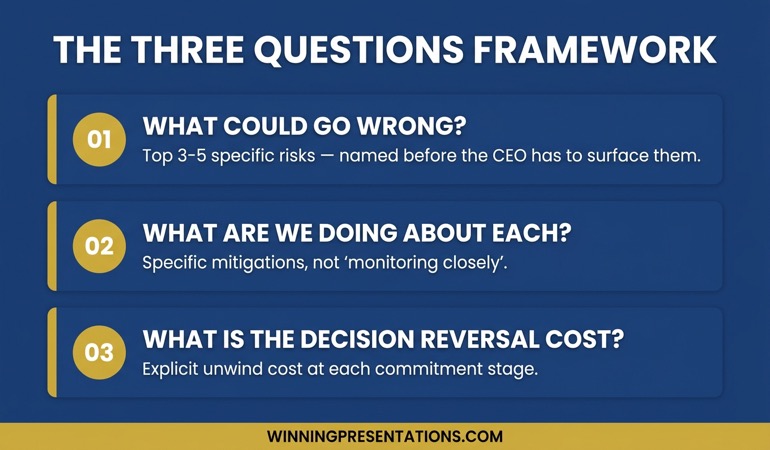
Every presentation to a risk-averse CEO should explicitly answer three questions in this order:
Question 1: What could go wrong? List the top three to five ways this initiative could damage the business. Not theoretical risks. Real, specific ones. Be the first to name them. If the CEO has to surface risks you have not addressed, you have lost the room.
Question 2: What are we doing about each one? For every named risk, show the mitigation. This is where the work happens. Weak mitigations (“we’ll monitor closely”) signal weak thinking. Strong mitigations (“we have a signed letter of intent with an alternative supplier if the primary fails regulatory review”) signal control.
Question 3: If this decision turns out to be wrong, what’s the cost of reversing it? Most initiatives can be unwound — at a price. A risk-averse CEO can commit to an initiative with a known, survivable reversal cost much more easily than to an initiative with unclear exit economics. Make this cost explicit.
THE EXECUTIVE SLIDE SYSTEM — £39
Stop rebuilding the same risk-mitigation slide for every cautious executive
The Executive Slide System is 26 presentation templates, 93 AI prompts, 16 scenario playbooks, a master checklist, and a framework reference. Risk-averse executive audiences have their own playbook inside — structured to surface downside first and protect your credibility. £39, instant access.
Get the Executive Slide System →
Designed for executives presenting to cautious CEOs, boards, and investment committees.
Opening slide structure for a cautious audience
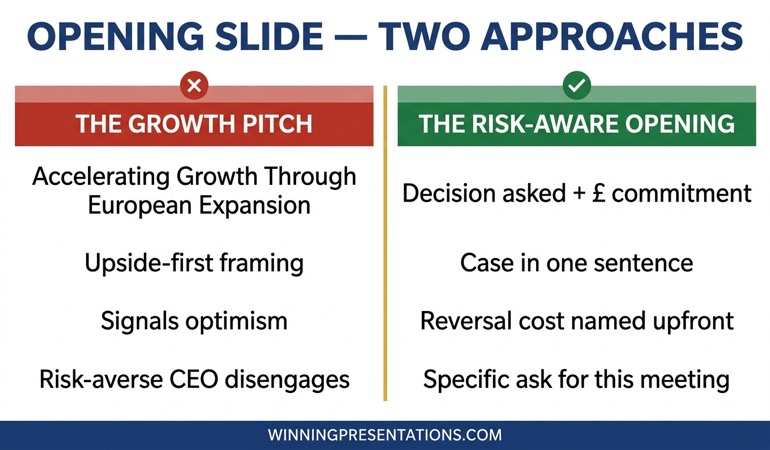
The first slide sets the audience’s expectation about how the next forty minutes will unfold. For a risk-averse CEO, the wrong opening is a title slide that promises upside (“Accelerating Growth Through European Expansion”). The right opening names the decision being asked for and the boundary conditions.
A structure that works in practice:
- Line 1: The decision. “Today I’m asking for approval to commit £4.2m to a German market entry.”
- Line 2: The case in one sentence. “The case: three of our top five existing clients have German operations requesting local support.”
- Line 3: The guardrails. “Decision is reversible within 18 months at a maximum unwind cost of £800k.”
- Line 4: What we need from this meeting. “Decision, or specific concerns that would let us bring back a revised proposal.”
The third line is the one most executives miss. Naming the reversal cost upfront does something psychologically important: it signals that you have already thought about failure. A risk-averse CEO hears that signal immediately. It earns you the benefit of the doubt for the rest of the presentation.
If you are presenting in a cluster of executive scenarios, the board presentation opening framework applies the same principle to group audiences.
Mapping objections before they surface
The most dangerous objection is the one the CEO raises that you had not anticipated. It does two things: it signals to everyone in the room that you have not thought hard enough, and it shifts the conversation from your structured case to a defensive response. Once you are defending, you are losing.
Before the presentation, sit down and write the objection map. Three columns: the objection (specific, in the CEO’s language), the mitigation (what you have done about it), the residual risk (what you cannot fully control for).
Most executives fill the first two columns well. They skip the third. That is a mistake. Naming residual risk honestly is the fastest way to build trust with a cautious leader. “We cannot fully control regulatory timing. Our current mitigation is to sequence the investment so we do not commit the second tranche until the regulatory pathway is clear. That delays full market entry by approximately four months if regulation slows, but it reduces our at-risk capital to £1.4m in that scenario.”
Honest residual risk is not the same as admitting weakness. It is demonstrating control. The CEO’s internal monologue shifts from “what are they not telling me” to “they have already run the scenario I was about to raise.”
For a related approach with mixed executive audiences, the stakeholder alignment workshop framework shows how to surface objections earlier in the process, before the room even assembles.
The decision reversal cost slide
This is the slide most executives do not include. It is also the slide that converts cautious CEOs. The structure is simple. At the top: the initial commitment. Below: the commitments made in the first six, twelve, and eighteen months, with cumulative at-risk capital at each point. At the bottom: the unwind cost if the initiative is halted at each stage.
For Henrik’s European expansion, the slide looked like this. Month 0: £600k commitment for office setup and initial hires. Month 6: £1.4m cumulative, unwind cost if halted £400k. Month 12: £2.8m cumulative, unwind cost £750k. Month 18: £4.2m cumulative, unwind cost £800k net of realised receivables.
Note the asymmetry: commitment grows fast, but unwind cost grows slowly. This is by design. The mitigation plan is embedded in the staging. If you cannot draw this slide for your initiative — if the unwind cost scales with total commitment — that is useful information. It means the initiative is structurally risky in a way that a risk-averse CEO should question. Reshape the plan before you present it.
If you want a ready-made template for this structure, the Executive Slide System includes the reversal-cost slide structure in its scenario playbook for investment committee presentations.
How to close the presentation
A risk-averse CEO rarely makes a decision in the room on significant initiatives. Your close is not “can we have a decision today.” It is “what would give you enough confidence to decide.” That question unlocks the actual blocker. Sometimes it is a number. Sometimes it is a dependency (“I want to hear from the CFO on the funding structure”). Sometimes it is a precedent (“I want to see how our last international expansion actually performed through its first twelve months”).
Whatever they name, write it down, commit to the specific deliverable, and propose a follow-up date. You are not leaving without a structured path forward. The decision is paused, not refused.
In Henrik’s case, the specific ask was a reference call with the managing director of their only existing German customer. That call happened four days later. The approval came the following week.
For financial review scenarios that share the same dynamics, the capex presentation framework covers the structure for risk-weighted investment decisions.
WHEN YOU WANT THE STRUCTURE, NOT ANOTHER ARTICLE
The complete scenario library for cautious executive audiences
The Executive Slide System gives you 26 templates, 93 AI prompts, and 16 scenario playbooks — including the risk-averse executive playbook referenced here. £39, instant access, no subscription.
Frequently Asked Questions
How do I know if my CEO is risk-averse?
The tell is what they ask about first after a pitch. Growth-oriented CEOs ask about upside, speed, competitive advantage. Risk-averse CEOs ask about dependencies, assumptions, and what happens if the main assumption is wrong. Watch the pattern across three or four of their previous decisions. The pattern is consistent.
Should I still include the upside case?
Yes, but not first. Include the upside case after you have established the downside containment. The sequence matters. A risk-averse CEO is not resistant to upside — they are resistant to commitment before risk has been addressed. Once the risk conversation is credible, the upside case becomes the thing that tips the decision.
What if the CEO keeps asking for more analysis?
Repeated requests for more analysis usually signal one of two things: a real data gap, or a decision that the CEO is not ready to make emotionally. The two have different fixes. If it’s a data gap, deliver the specific analysis and return. If it is emotional hesitation, the fix is often a structured conversation about what criteria would let them decide — not more numbers. Ask directly: “What would need to be true for this to be a clear yes?”
How long should the presentation be?
For a risk-averse CEO, shorter is better than longer. Twenty minutes of content with twenty-five minutes of structured discussion works better than forty-five minutes of content with a rushed question period. The discussion is where cautious decisions get made. Protect that time.
Presentation playbooks, delivered Thursdays
The Winning Edge newsletter covers the structures real executives use for high-stakes meetings — the practical frameworks, not the motivational content. One issue per week, typically read in four minutes.
Not ready for the full system? Start here instead: download the free Executive Presentation Checklist — a one-page structural review for any high-stakes presentation you are preparing.
Partner post: Once you have the CEO’s decision, the next presentation is usually to the investment committee or board. The investor update deck structure covers that next step.
Your next step: Before your next presentation to a cautious executive, build the three-column objection map first. Do it before you open PowerPoint. The structure will shape the deck, not the other way around.
About the Author
Mary Beth Hazeldine is Owner & Managing Director of Winning Presentations Ltd. With 24 years of corporate banking experience at JPMorgan Chase, PwC, Royal Bank of Scotland, and Commerzbank, she advises executives across financial services, healthcare, technology, and government on structuring presentations for high-stakes funding rounds and approvals.