
Tag: presentation strategy

02 Feb 2026
Executive professional in thoughtful planning pose with pen before opening laptop, demonstrating strategic presentation preparation order

I Stopped Preparing Slides First. My Approval Rate Doubled.

I used to spend six hours on a presentation and still get rejected.

Beautiful slides. Careful animations. Colour-coordinated charts. The CFO would look at it for three minutes and say, “This isn’t what we need. Can you redo it?”

I thought I had a slides problem. I didn’t. I had a preparation order problem.

The moment I stopped opening PowerPoint first, everything changed. Same amount of time. Same audiences. Dramatically different results.

Here’s what I learned: the order you prepare a presentation determines whether it succeeds or fails. Most professionals get it backwards—and wonder why their approval rates are so low.

Quick answer: The optimal presentation preparation order is: (1) Decision—what do you need from this audience? (2) Audience—what do they care about and what’s blocking them? (3) Structure—what’s the logical flow that leads to your ask? (4) Slides—only now do you open PowerPoint. Most people start at step 4 and wonder why they keep getting sent back to the drawing board. This article explains each step and why the order matters more than the time you spend.

⚡ Presenting Tomorrow? The 12-Minute Reset

If you’re presenting soon and don’t have time for the full process, do this now:

  1. Write one sentence: “I need [audience] to approve [specific thing].” (2 min)
  2. List their top concern: What’s the #1 reason they might say no? (3 min)
  3. Check slide 1: Does it state your recommendation? If not, rewrite it. (5 min)
  4. Delete 20%: Cut any slide that doesn’t address their concern or your ask. (2 min)

This won’t fix everything, but it will dramatically improve your odds. For the complete framework, keep reading.

Why Most Preparation Is Backwards

Watch how most professionals prepare a presentation:

  1. Open PowerPoint
  2. Pick a template
  3. Start typing content onto slides
  4. Rearrange slides until it “flows”
  5. Add charts and formatting
  6. Hope it works

This approach feels productive. You can see progress—slides appearing, content filling in, a deck taking shape. But it’s an illusion.

Here’s the problem: you’re making structural decisions while distracted by visual decisions. You’re asking “what should slide 7 say?” before you’ve answered “what does my audience actually need to hear?”

The result is predictable: a presentation that looks complete but doesn’t accomplish anything. You’ve built a house without a blueprint—and now you’re surprised when the client says it’s not what they wanted.

I made this mistake for years. I’d spend hours perfecting slides, then watch executives flip through them in 90 seconds and ask questions my deck didn’t answer. The slides were fine. The thinking behind them was absent.

For more on why structurally sound presentations still get rejected, see my article on why good presentations get rejected.

The Four-Step Preparation Order

After years of trial and error—and training thousands of executives—I’ve identified the preparation order that consistently gets results:

  1. Decision — What do you need from this audience?
  2. Audience — What do they care about? What’s blocking them?
  3. Structure — What’s the logical flow that leads to your ask?
  4. Slides — Only now do you open PowerPoint

Notice what’s missing from steps 1-3: any mention of slides, templates, or visuals. That’s intentional. The first 60-70% of effective preparation happens before you touch presentation software.

This feels counterintuitive. Slides are the deliverable, so shouldn’t you start there? No—for the same reason architects don’t start by choosing paint colours. The visible output is the last step, not the first.
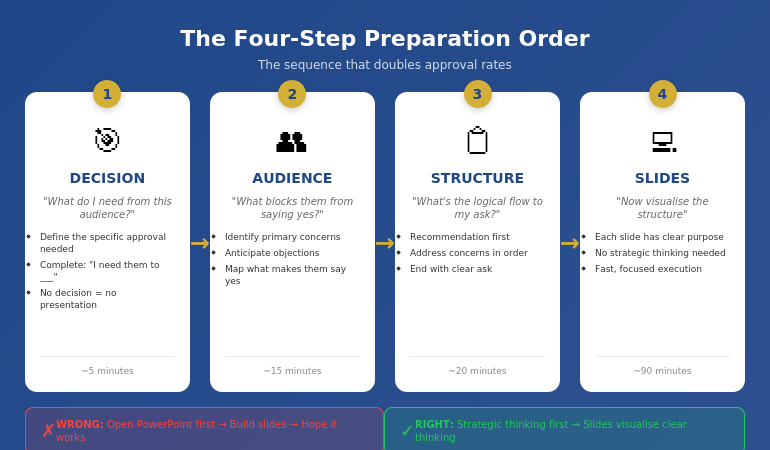
The four-step presentation preparation order: Decision, Audience, Structure, then Slides

Step 1: Decision First

Before anything else, answer one question: What decision do I need from this audience?

Not “what do I want to tell them?” Not “what information should I share?” What decision do you need?

Examples:

  • “I need approval to hire two additional engineers”
  • “I need the board to greenlight the expansion budget”
  • “I need the client to sign the contract today”
  • “I need leadership to prioritise this project over Project X”

If you can’t complete the sentence “I need them to _____,” you’re not ready to prepare a presentation. You’re ready to prepare a document—which is a different thing entirely.

Why this matters: Every element of your presentation should move toward this decision. If a slide doesn’t advance the decision, it doesn’t belong. But you can’t make that judgment until you know what you’re deciding.

Most presentations fail because the presenter never clarified what they wanted. They shared information. They presented data. They “updated” stakeholders. But they never asked for anything—so they didn’t get anything.

📊 Structure Your Presentation for Decisions

The Executive Slide System gives you decision-first templates built around the preparation order that actually works. Stop guessing what goes where—use structures proven to get executive approval.

Inside:

  • The 10-slide decision framework
  • Recommendation-first templates
  • Executive summary formats that work
  • Before/after examples from real approvals

Get the Executive Slide System → £39

Used by professionals who need approvals, not just presentations.

Step 2: Audience Second

With your decision clear, the next question is: What does this specific audience care about, and what might block them from saying yes?

This isn’t general audience analysis. It’s decision-focused analysis. You’re not asking “who are they?” You’re asking “what stands between them and approving this?”

For each key stakeholder, consider:

  • What’s their primary concern? (Risk? Cost? Timeline? Reputation?)
  • What would make them say no? (Insufficient data? Wrong timing? Political issues?)
  • What would make them say yes? (ROI proof? Risk mitigation? Alignment with their goals?)
  • What questions will they definitely ask?

If you’re presenting to a CFO, the blocking concern is probably financial risk or unclear ROI. If you’re presenting to a board, it might be strategic alignment or competitive positioning. If you’re presenting to a client, it might be trust or implementation complexity.

The key insight: your presentation should answer their concerns, not your talking points. Most presenters build decks around what they want to say. Effective presenters build decks around what the audience needs to hear to say yes.

This step typically takes 10-15 minutes but saves hours of revision later. When you understand the audience’s blocking concerns, you build a presentation that addresses them. When you don’t, you build a presentation that gets sent back with “good start, but can you add…”

📋 Want templates built around executive concerns? The Executive Slide System (£39) includes decision-first structures that anticipate what leadership actually wants to see.

Step 3: Structure Third

Now—and only now—do you think about structure. But not slide structure. Argument structure.

The question is: What’s the logical flow that leads from where my audience is now to the decision I need?

For most executive presentations, the structure is simpler than people think:

  1. Recommendation — Here’s what I’m asking for
  2. Why it matters — Here’s the problem/opportunity this addresses
  3. How it works — Here’s the approach (briefly)
  4. What could go wrong — Here are the risks and how we’ll mitigate them
  5. What it costs — Here’s the investment required
  6. The ask — Here’s specifically what I need you to approve

Notice this structure is recommendation-first, not background-first. You don’t build up to your point—you start with it. Executives have limited time and attention. Respect that by leading with the answer.

At this stage, I write the structure as bullet points on paper or in a notes app. No slides. No formatting. Just the logical flow.

For example:

  • Recommendation: Approve £200K for customer portal upgrade
  • Why: Current portal causing 23% support ticket increase, costing £15K/month
  • Approach: Phase 1 (self-service), Phase 2 (AI chat), Phase 3 (integration)
  • Risks: Integration complexity—mitigated by phased approach
  • Cost: £200K over 6 months, ROI positive by month 9
  • Ask: Approve budget and project start date of March 1

That’s the entire presentation in six bullet points. Everything else is supporting detail.

For more on executive-ready structures, see my guide to executive presentation structure.

📊 Structures That Get Yes

The Executive Slide System includes proven structures for board presentations, budget requests, project approvals, and strategic recommendations. Each template follows the decision-first order that executives actually respond to.

Get the Executive Slide System → £39

Templates + examples + the exact slide order that works.

Step 4: Slides Last

Only now do you open PowerPoint.

But here’s the difference: you’re not figuring out what to say anymore. You already know what to say. You’re just visualising it.

This changes everything about slide creation:

  • Each slide has a clear purpose (it maps to your structure)
  • You know what belongs and what doesn’t (does it advance the decision?)
  • You can work faster (no strategic thinking mixed with visual thinking)
  • You make better visual choices (because you understand the point each slide needs to make)

The slide creation process becomes almost mechanical. Structure point 1 becomes slides 1-2. Structure point 2 becomes slides 3-4. And so on.

For the example above, the slide deck might be:

  1. Executive Summary: Approve £200K portal upgrade (ROI positive month 9)
  2. The Problem: Support tickets up 23%, costing £15K/month
  3. Root Cause: Current portal lacks self-service capabilities
  4. Solution Overview: Three-phase portal modernisation
  5. Phase Details: Timeline and deliverables
  6. Risk Mitigation: Phased approach reduces integration risk
  7. Investment: £200K over 6 months
  8. ROI Analysis: Break-even month 9, £180K annual savings
  9. Ask: Approve budget and March 1 start date
  10. Appendix: Technical details (if asked)

Ten slides. Clear logic. Decision-focused. And it took less time than the “start with slides” approach because there was no backtracking, no restructuring, no “wait, what’s my point again?”

For guidance on what makes an effective executive summary slide, see how to write the executive summary slide.

How This Actually Saves Time

The objection I hear most often: “I don’t have time for a four-step process. I just need to get the deck done.”

I understand. But consider the true time cost of the “just start with slides” approach:

  • Hours building slides → Presentation rejected → Hours rebuilding
  • Deck looks done → Stakeholder asks unexpected question → Scramble to add slides
  • Send for review → “This doesn’t address the real issue” → Start over

The four-step process typically takes the same total time—or less—because you eliminate rework. Thirty minutes of strategic thinking before slides prevents three hours of revision after slides.

Typical time breakdown:

  • Step 1 (Decision): 5 minutes
  • Step 2 (Audience): 15 minutes
  • Step 3 (Structure): 20 minutes
  • Step 4 (Slides): 60-90 minutes

Total: About 2 hours for a solid executive presentation. Compare that to 4-6 hours of meandering slide creation followed by revision cycles.

The professionals who “don’t have time” for strategic preparation are the same ones working weekends to fix presentations that should have been right the first time.

What order should you prepare a presentation?

The optimal order is: Decision (what do you need?), Audience (what blocks them?), Structure (what’s the logical flow?), then Slides (visualise the structure). Most people start with slides and work backwards, which is why most presentations get rejected or require extensive revision. Starting with the decision ensures every element of your presentation serves a purpose.

Should you write your presentation before making slides?

Yes—but not word-for-word scripts. You should clarify your decision, understand your audience’s concerns, and outline your logical structure before touching slide software. This typically means 30-45 minutes of thinking and notes before opening PowerPoint. The slides then become a visualisation of clear thinking rather than a substitute for it.

Why do most presentations fail to get approval?

Most presentations fail because they’re built around what the presenter wants to say rather than what the audience needs to hear to say yes. When you start with slides, you naturally focus on your content. When you start with the decision, you naturally focus on what moves the audience toward that decision. The preparation order determines the outcome.

📊 Skip the Guesswork

The Executive Slide System gives you decision-first templates so you never start from a blank screen. Each structure is built around the preparation order that gets approvals—not just presentations.

You’ll get:

  • 10-slide decision frameworks for every scenario
  • Executive summary templates that lead with the ask
  • Before/after examples showing the transformation
  • The exact slide order executives expect

Get the Executive Slide System → £39

For professionals who need approvals, not just slide decks.

Frequently Asked Questions

How long should presentation preparation take?

For a standard executive presentation (10-15 slides), allow 2-3 hours total: 30-45 minutes for strategic thinking (steps 1-3) and 90-120 minutes for slide creation (step 4). This assumes you’re working from templates rather than starting from scratch. Complex presentations or unfamiliar topics may require more time, but the ratio should stay similar—about 30% strategy, 70% execution.

Should I use a presentation template or start from scratch?

Use a template—but choose one that matches your strategic structure, not just your visual preferences. A template saves time only if it’s built around decision-first logic. A beautiful template with the wrong structure will still get rejected. The best approach is using templates designed for your specific presentation type (board update, budget request, project approval) rather than generic “professional” templates.

What if I’m given a slide deck to present that someone else created?

Run through steps 1-3 anyway. Clarify the decision you need, identify audience concerns, and check whether the existing structure addresses them. Often, inherited decks need restructuring—they contain good content in the wrong order. Taking 20 minutes to validate (or adjust) the structure before presenting will dramatically improve your results compared to just “learning the slides.”

Does this process work for short presentations too?

Yes—and it’s arguably more important. When you only have 5 minutes or 5 slides, every element must earn its place. The four-step process ensures you’re putting the right content in limited space. For very short presentations, steps 1-3 might take just 10 minutes total, but skipping them is how people end up with 5 slides that don’t accomplish anything.

📧 The Winning Edge Newsletter

Weekly insights on executive presentations, approval strategies, and what actually works in corporate boardrooms.

Subscribe Free →

📋 Free: Executive Presentation Checklist

A one-page checklist covering all four preparation steps. Use it before your next presentation to ensure you’re not skipping the strategic work.

Download Free Checklist →

About the Author

Mary Beth Hazeldine is the Owner & Managing Director of Winning Presentations. With 24 years of corporate banking experience at JPMorgan Chase, PwC, Royal Bank of Scotland, and Commerzbank, she has delivered high-stakes presentations in boardrooms across three continents.

A qualified clinical hypnotherapist and NLP practitioner, Mary Beth combines executive communication expertise with evidence-based techniques for managing presentation anxiety. She has trained thousands of executives and supported high-stakes funding rounds and executive approvals.

Book a discovery call | View services

Your Next Step

The next time you need to create a presentation, resist the urge to open PowerPoint immediately. Instead, take 30 minutes to work through steps 1-3:

  1. What decision do I need?
  2. What concerns might block my audience?
  3. What’s the logical flow that addresses those concerns and leads to my ask?

Then—and only then—build your slides.

It feels slower. It isn’t. And the results will show you why preparation order matters more than preparation time.

If presentation anxiety is part of what’s holding you back, see today’s companion article on why therapy doesn’t always fix presentation fear.

28 Jan 2026
Professional woman in enrollment conversation during coffee meeting, actively engaging with colleague about stakeholder buy-in

Pre-Meeting Executive Alignment: How to Get Approval Before You Present

The CFO approved £2 million before my client finished slide one.

Not because the presentation was brilliant. Not because the data was compelling. Because the decision had already been made — three days earlier, over a 12-minute conversation and one carefully crafted email.

The presentation? A formality. A public confirmation of a private agreement.

This is what pre-meeting executive alignment looks like when it’s done right. And it’s the skill that separates professionals who constantly fight for approval from those who walk into rooms where “yes” is already waiting.

Quick Answer: Pre-meeting executive alignment is the practice of socializing your recommendation with key stakeholders before the formal presentation. Done correctly, it surfaces objections early, builds champions, and transforms the meeting from a decision point into a confirmation ceremony. The most effective executives spend more time on pre-alignment than on slides.

📋 Presenting for Approval This Week? Do This First:

48-72 hours before your presentation:

  1. Identify the real decision-maker (often not the most senior person)
  2. Request 10 minutes — “I’d value your perspective before Thursday’s meeting”
  3. Share your recommendation (not all your slides — just the answer)
  4. Ask: “What concerns would you want me to address?”
  5. Send a follow-up email summarizing what you heard and how you’ll address it

This 10-minute conversation often determines the outcome more than the 30-minute presentation.

The Email That Changed Everything

Early in my banking career at JPMorgan, I watched a colleague present a flawless business case for a new trading system. The logic was airtight. The ROI was clear. The slides were polished.

The CFO said no.

Not because the proposal was weak — but because he’d been blindsided. He had concerns about implementation risk that were never addressed. He felt ambushed by a major capital request he hadn’t been prepared for. His “no” wasn’t about the merits. It was about the process.

A month later, I saw a more senior colleague get a larger budget approved in half the time. The difference? She’d spent 20 minutes with the CFO the week before, walking him through her thinking and asking what would make him comfortable.

By the time she presented, he was already her champion. He’d helped shape the proposal. His concerns were already addressed. The meeting was a formality.

That’s when I understood: the presentation isn’t where the decision gets made. It’s where the decision gets announced.

Why Pre-Alignment Works

Pre-meeting alignment works because of three psychological principles that govern how senior people make decisions:

1. Executives hate surprises

Senior leaders are evaluated on judgment. Being caught off-guard in a meeting — especially by something they “should have known” — feels like a failure. When you pre-align, you’re protecting their reputation, not just selling your idea.

2. Ownership drives support

When someone contributes to shaping a proposal, they become invested in its success. The CFO who suggested adding a risk mitigation section will defend that section in the meeting. Pre-alignment turns potential blockers into co-authors.

3. Public positions are hard to reverse

Once someone takes a position in a meeting, backing down feels like losing face. If you surface objections privately, they can be addressed without anyone having to publicly change their mind. Private alignment prevents public conflict.

For more on how executives actually make decisions, see our guide to executive presentation structure.

How do you get stakeholder alignment before a meeting?

Get stakeholder alignment by having brief one-on-one conversations with key decision-makers 48-72 hours before your presentation. Share your recommendation (not all your slides), ask what concerns they’d want addressed, then incorporate their input. Follow up with a short email confirming what you heard. This transforms potential opponents into contributors who are invested in your success.

Timeline showing pre-alignment process: 1 week before identify stakeholders, 48-72 hours before have conversations, 24 hours before send summary email, meeting day present with confidence

⭐ Maven Flagship — Executive Buy-In

Walk into your next approval meeting prepared

The Executive Buy-In Presentation System gives you 7 self-paced modules covering stakeholder analysis, case construction, and the presentation structures that hold up to scrutiny.

Monthly cohort enrolment — £499, lifetime access.

Enrol in the Executive Buy-In System →

The 5-Step Pre-Alignment Process

Here’s the exact process I teach executives for pre-meeting alignment:

Step 1: Map Your Stakeholders (1 Week Before)

Before you build a single slide, answer these questions:

  • Who will be in the room?
  • Who has formal decision authority?
  • Who has informal influence? (Often more important)
  • Who might object, and why?
  • Who could be a champion if they understood the benefits?

Create a simple grid: Name | Role | Likely Position | Key Concern | How to Reach

Step 2: Prioritise Your Conversations (5-7 Days Before)

You can’t pre-align with everyone. Prioritise:

  1. The decision-maker (whoever actually signs off)
  2. Potential blockers (people likely to object)
  3. Influential voices (people others listen to)

Three to four conversations is usually enough. More than that becomes logistically difficult and can feel like you’re “working the room” too hard.

Step 3: Have the Conversations (48-72 Hours Before)

Request brief meetings: “I’m presenting to the steering committee on Thursday. I’d value 10 minutes of your perspective beforehand — would Tuesday or Wednesday work?”

In the conversation:

  • Share your recommendation in one sentence
  • Explain the core logic (2-3 minutes max)
  • Ask: “What concerns would you want me to address?”
  • Listen more than you talk
  • Thank them for their input

Do NOT present all your slides. This isn’t a preview — it’s a consultation.

How do you get executive buy-in for a project?

Executive buy-in comes from making “yes” feel safe, not from having the best data. The most reliable method is pre-meeting alignment: share your recommendation privately with key stakeholders before the formal presentation, address their concerns in advance, and let them contribute to shaping the proposal. By meeting time, they’re invested in your success.

Step 4: Incorporate and Acknowledge (24-48 Hours Before)

After your conversations:

  • Adjust your presentation to address the concerns you heard
  • Add a slide or talking point that directly acknowledges input: “Based on conversations with the team, I’ve added a section on implementation risk…”
  • Send a brief follow-up email to each person you spoke with

This follow-up email is crucial. It confirms you listened and creates a paper trail of their involvement.

Step 5: Present With Confidence (Meeting Day)

When you’ve done proper pre-alignment:

  • You know what objections are coming (because you asked)
  • You’ve already addressed the major concerns (in your slides)
  • Key stakeholders feel heard (because they contributed)
  • The decision-maker isn’t being surprised (because you briefed them)

The presentation becomes a confirmation, not a persuasion exercise.

For more on presenting to senior leadership, see our guide on how to present to a board of directors.

Need the slide structure that executives respond to?

Get the Executive Slide System → £39

The Email Template That Works

Here’s the follow-up email template I used with my client — the one that preceded the £2M approval:

Subject: Following up on our conversation — Thursday’s budget review

Hi [Name],

Thank you for taking time yesterday to share your perspective on the [project name] proposal.

I heard two key points:

  1. [Concern #1 they raised]
  2. [Concern #2 they raised]

I’ve updated the presentation to address both directly — specifically, I’ve added [what you added] and revised [what you changed].

Looking forward to Thursday. Please let me know if anything else comes to mind before then.

Best,
[Your name]

This email does three things:

  1. Confirms you listened (they see their concerns reflected back)
  2. Shows you acted (you made changes based on their input)
  3. Creates investment (they’re now part of the proposal’s development)

Comparison showing traditional approach vs pre-alignment approach: traditional leads to surprises and objections, pre-alignment leads to support and quick approval

What is pre-meeting alignment?

Pre-meeting alignment is the practice of having brief one-on-one conversations with key stakeholders before a formal presentation or decision meeting. The goal is to share your recommendation, surface concerns early, incorporate feedback, and build support — so the meeting becomes a confirmation of a decision that’s already been shaped collaboratively, rather than a debate.

⭐ The Slide Structure That Closes After Pre-Alignment

Pre-alignment gets stakeholders ready to say yes. The Executive Slide System gives you the structure that makes “yes” easy — recommendation-first, objection-addressed, decision-clear.

Inside the system:

  • The exact 6-slide structure executives prefer
  • How to lead with your recommendation (not context)
  • Where to place proof so it reassures, not defends
  • The decision slide format that gets action

Get the Executive Slide System → £39

Built from 24 years of corporate banking experience. Works for budget requests, board presentations, and client pitches.

Common Mistakes to Avoid

Pre-alignment is powerful, but it can backfire if done wrong:

Mistake #1: Presenting your full deck in the pre-meeting

The pre-alignment conversation is a consultation, not a preview. Share your recommendation and ask for input — don’t walk through 25 slides. If you do, the actual meeting feels redundant.

Mistake #2: Only talking to supporters

It’s tempting to pre-align with people you know will agree. But the value is in reaching potential blockers. The CFO who might object is exactly who you need to talk to beforehand.

Mistake #3: Ignoring what you hear

If someone raises a concern and you don’t address it, you’ve made things worse. They’ll feel unheard and may actively oppose you in the meeting. Either incorporate their feedback or explain why you couldn’t.

Mistake #4: Being too obvious about “working the room”

Pre-alignment should feel like genuine consultation, not political manoeuvring. Frame it as seeking input, not building a coalition. “I’d value your perspective” works. “I’m lining up support” does not.

Mistake #5: Skipping the follow-up email

The conversation creates alignment. The email locks it in. Without the written follow-up, people can forget what they said or claim they never agreed. The email creates accountability.

For the slide structure that works after you’ve done pre-alignment, see our guide to CFO-approved budget presentations.

Ready to structure slides that close after pre-alignment?

Get the Executive Slide System → £39

When Pre-Alignment Isn’t Possible

Sometimes you can’t pre-align — you don’t have access, there’s no time, or the culture doesn’t support it. In those cases:

  • Lead with your recommendation anyway. Even without pre-alignment, the structure still matters. Don’t build to your conclusion.
  • Anticipate objections yourself. If you can’t ask stakeholders what concerns them, use your judgment and address likely objections proactively.
  • Create space for input during the meeting. If they haven’t had a chance to shape the proposal, give them opportunities to contribute: “Before I continue, I’d welcome any initial reactions.”

Pre-alignment dramatically improves your odds. But even without it, the right structure helps.

Is Pre-Alignment Right For Your Situation?

Chart showing when pre-alignment works well vs when it may not be appropriate

⭐ Complete Your Approval Strategy

Pre-alignment opens the door. The Executive Slide System walks you through it — with the exact structure, format, and flow that executives respond to.

Everything you get:

  • The 6-slide executive structure (recommendation-first)
  • Real before/after transformations
  • Slide-by-slide breakdown with formatting guidance
  • Templates for budget, board, and client presentations

Get the Executive Slide System → £39

Instant download. The same structure I taught in corporate banking for budget approvals and steering committee decisions.

Frequently Asked Questions

Isn’t this just politics or manipulation?

Pre-alignment isn’t manipulation — it’s good communication. You’re not hiding information or going behind anyone’s back. You’re consulting stakeholders, incorporating their input, and making the formal meeting more productive for everyone. The alternative — blindsiding people with a major request in a public meeting — is actually less respectful of their time and position.

What if I don’t have access to the decision-makers beforehand?

Start with whoever you can reach. Even pre-aligning with one influential person is better than none. You can also ask your manager or sponsor to help facilitate introductions: “Would it be appropriate for me to brief [Name] before Thursday?” If truly no access is possible, focus on anticipating objections yourself and structuring your presentation to address them proactively.

How far in advance should I do pre-alignment?

48-72 hours before the meeting is ideal. Too early (more than a week) and priorities may shift or people forget. Too late (day before) and there’s no time to incorporate feedback or for them to process. The sweet spot gives you time to adjust your presentation while keeping the conversation fresh in everyone’s mind.

What if someone changes their mind in the actual meeting?

It happens, but it’s rare when you’ve done proper pre-alignment. If someone raises a new objection, don’t panic. Acknowledge it calmly: “That’s a fair point — I’d like to think through the implications. Can I follow up with you after the meeting?” This shows confidence and prevents the meeting from derailing. The follow-up email you sent creates a record of their earlier input, which usually keeps positions stable.

Get Weekly Executive Presentation Insights

Strategies for getting approval, building credibility, and presenting with confidence — from 24 years in corporate banking.

Subscribe to The Winning Edge →

📋 Free Resource: Executive Presentation Checklist

A quick-reference checklist covering structure, pre-alignment, and delivery. Use it before your next high-stakes presentation.

Download Free Checklist →

Your Next Step

The next time you have a presentation where you need approval, try the pre-alignment approach:

  1. Identify 2-3 key stakeholders
  2. Request 10 minutes of their time before the meeting
  3. Share your recommendation and ask what concerns they’d want addressed
  4. Incorporate their feedback and send a follow-up email

You’ll be surprised how much easier the actual presentation becomes when the groundwork is already laid.

P.S. Once you’re in the meeting, delivery matters too. If you struggle with projecting confidence, I wrote about how to project your voice without shouting — it’s more about resonance than volume.

P.P.S. If you’re spending too long building presentations, check out how to cut presentation creation time without cutting quality — the system approach that saves hours.

About Mary Beth Hazeldine
Owner & Managing Director of Winning Presentations. 24 years in corporate banking at JPMorgan Chase, PwC, RBS, and Commerzbank. I’ve seen hundreds of presentations succeed or fail based on what happened before the meeting started. Pre-alignment is the skill I wish someone had taught me in year one.