I watched a board ignore 22 perfect AI-written slides — because not one of them asked for a decision.
Quick Answer: AI generates content — clear sentences, reasonable data points, professional formatting. What it can’t generate is AI presentation structure: the decision architecture that determines which slide goes where, what the room needs to decide, and why the evidence is sequenced to lead them there. If you ask AI to “create a board presentation,” you’ll get 15-20 slides of competent content with no argument. The fix: build the structural skeleton first (what decision, what recommendation, what evidence in what order), then use AI to fill each section.
In this article:
- The difference between content and structure (and why AI only gives you one)
- Why AI presentations fail in executive settings
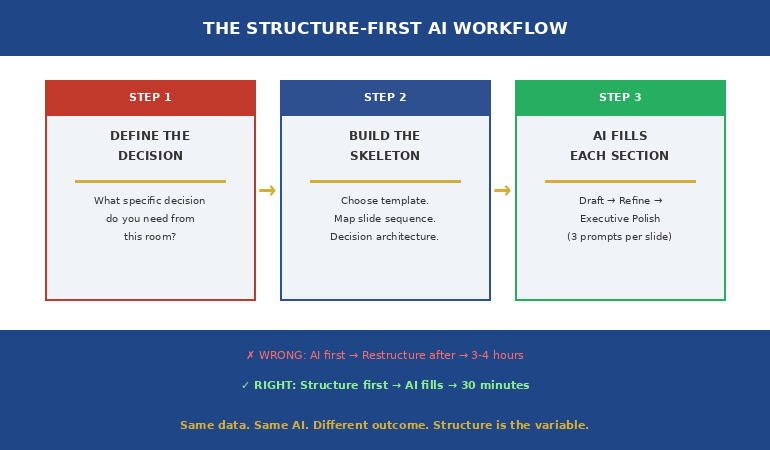
- The Structure-First AI workflow: decision → skeleton → AI
- The 3-prompt system: Draft → Refine → Executive Polish
- What AI IS good at (once the structure exists)
- Frequently asked questions
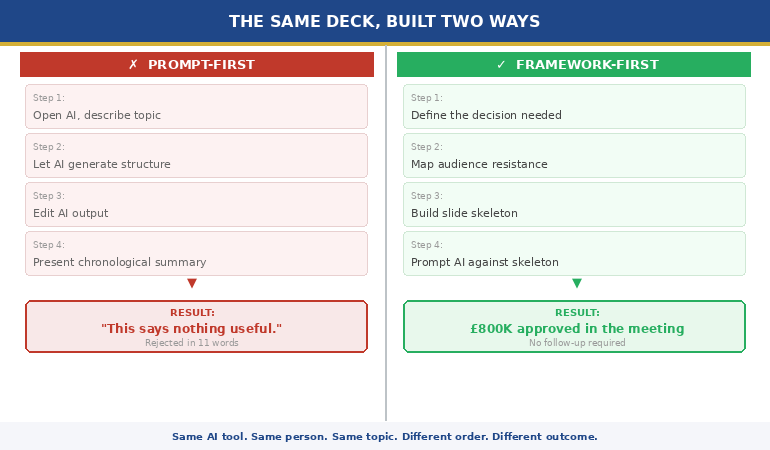
A client — a VP at a technology company — sent me his board presentation and asked for feedback. It was 22 slides. Beautifully written. Consistent formatting. Every slide had clear bullet points and supporting data.
He’d used ChatGPT to build it, and the output was impressive. Clean language. Professional tone. Relevant content.
One problem: nowhere in 22 slides did it say what decision the board needed to make.
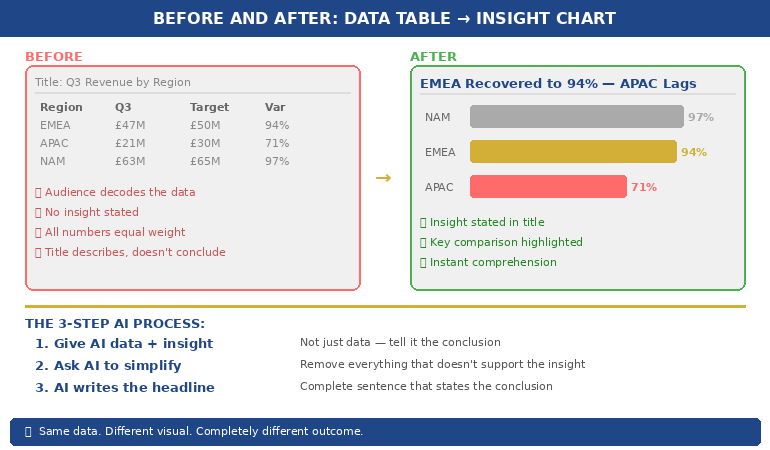
There was no recommendation. No “I’m asking for X by Y date.” No comparison of options with trade-offs. No cost of inaction. Just 22 slides of well-written information, sequenced in the order the AI had generated it — which was the order of his prompt, not the order of a decision-first argument.
I asked him: “If the board reads only slide 1, do they know what you’re asking for?” He looked at slide 1. It was a project overview. They wouldn’t know the decision until slide 19.
We restructured in 90 minutes. Same data, same AI-written content — but reorganised around a decision architecture. Recommendation on slide 2, evidence supporting it, options with trade-offs, specific ask with a deadline.
The board approved it in the first 10 minutes.
🚨 Built a presentation with AI and it feels flat? Quick check: Does slide 1 tell the room what decision you need? If the decision is on slide 15+, you have a content deck, not an argument.
→ Need the structural skeleton that makes AI output land? Get the Executive Slide System → £39
The Difference Between Content and Structure (And Why AI Only Gives You One)
Content is what your slides say. Structure is the order they say it in and why.
AI is extraordinarily good at content. Ask ChatGPT to “write a slide about Q3 revenue performance” and you’ll get a clear, professional summary with relevant data points. Ask it to “write 15 slides for a board presentation on Project Phoenix” and you’ll get 15 clear, professional slides.
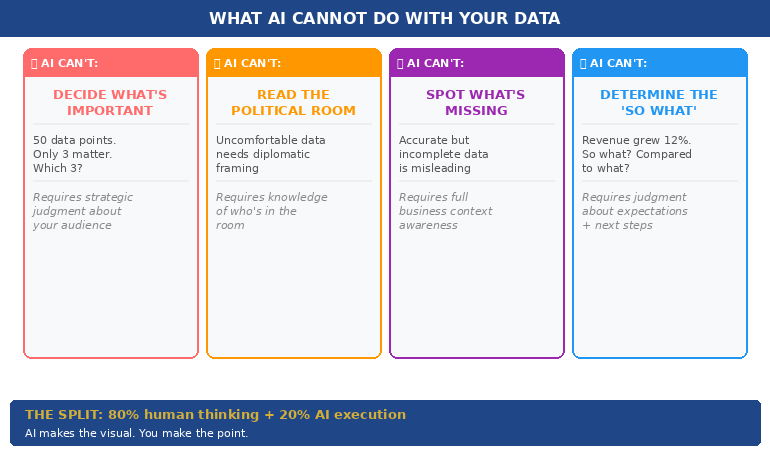
What you won’t get is an argument. Because an argument requires something AI doesn’t have: knowledge of the decision-maker, the political context, the urgency, the alternatives, and the specific outcome you need from the room.
AI presentation structure fails because AI sequences content in the order it was prompted, not in the order that leads a room to a decision. It generates in narrative order (background → context → analysis → findings → recommendation) when executive communication requires decision-first order (recommendation → evidence → options → ask).
This is the fundamental gap. It’s not about better prompts, more specific instructions, or a different AI tool. It’s about the structural logic that determines what goes on slide 1, what goes on slide 5, and what the room is doing on slide 10.
For more on the difference between AI-enhanced and AI-generated presentations, see the full comparison.
Why do AI-generated presentations fail with executives?
Because executives read slides in decision mode — they’re looking for the recommendation, the risk, the cost, and the ask. AI generates slides in information mode — sequenced to inform, not to persuade. When an executive hits slide 5 and still doesn’t know what you’re asking for, they check out. The content might be better than anything you’d write manually. But without decision architecture, it’s like having a perfectly worded email with no subject line.
Why AI Presentations Fail in Executive Settings
After reviewing hundreds of AI-generated executive decks — from clients using ChatGPT, Copilot, Gamma, and others — I see the same three structural failures every time.
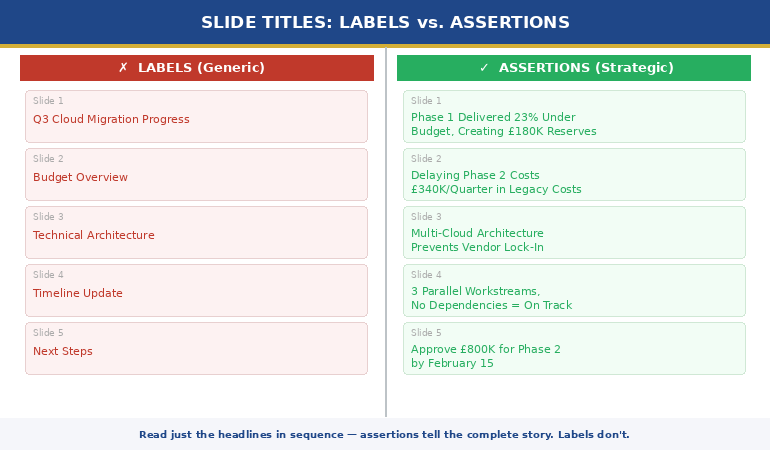
Failure 1: The recommendation is buried. AI typically generates in chronological or logical order: background first, analysis second, conclusions third, recommendation last. In a 20-slide deck, the recommendation lands on slide 17-20. By then, three executives have left and two more are on their phones. Executive presentations need the recommendation on slide 1 or 2 — everything after that is evidence supporting the ask.
Failure 2: No options or trade-offs. AI generates a single recommendation because that’s what it was asked for. But decision-makers need options. “I recommend A” gives the room two choices: yes or defer. “Here are three options with costed trade-offs, and I recommend A because…” gives them agency. AI doesn’t create options unless specifically prompted — and even then, it doesn’t quantify the trade-offs the way an executive audience needs.
Failure 3: No cost of inaction. The most powerful slide in any decision deck is the one that shows what happens if the room doesn’t decide. AI never generates this slide because it doesn’t understand that executive meetings exist to make decisions, and that deferral is the default outcome unless you make it expensive. The decision slide structure includes this by default — AI doesn’t.
⭐ Give AI the Structure It’s Missing — Then Let It Do What It’s Good At
The Executive Slide System gives you 22 structural skeletons — the decision architecture AI can’t generate. Each template tells you what goes on every slide and why. Then the 51 matched AI prompts (Draft → Refine → Executive Polish) fill the structure with content that sounds like you.
Your structure-first AI toolkit:
- 22 executive slide templates — the structural skeleton for board decks, status updates, proposals, and recommendations
- 51 AI prompts in 3 stages: Draft (generate content), Refine (sharpen for audience), Polish (stress-test as a skeptical CEO)
- 15 scenario playbooks — find your exact situation, follow the template + prompt sequence like a recipe
- Decision architecture built into every template — recommendation, options, cost of inaction, specific ask
Get the Executive Slide System → £39
Built from 24 years of executive presentations — the structural logic AI doesn’t have.
The Structure-First AI Workflow: Decision → Skeleton → AI
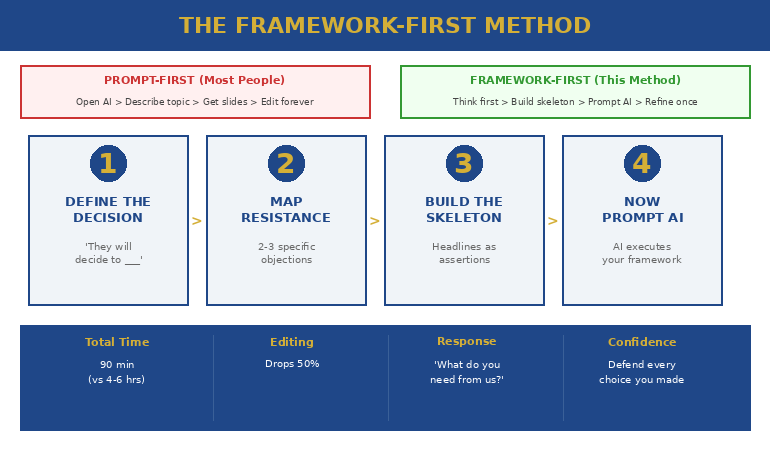
The fix is simple but counterintuitive: you need to build the structural skeleton BEFORE you open AI. Most people do the opposite — they prompt AI first, then try to restructure the output. That’s backwards.
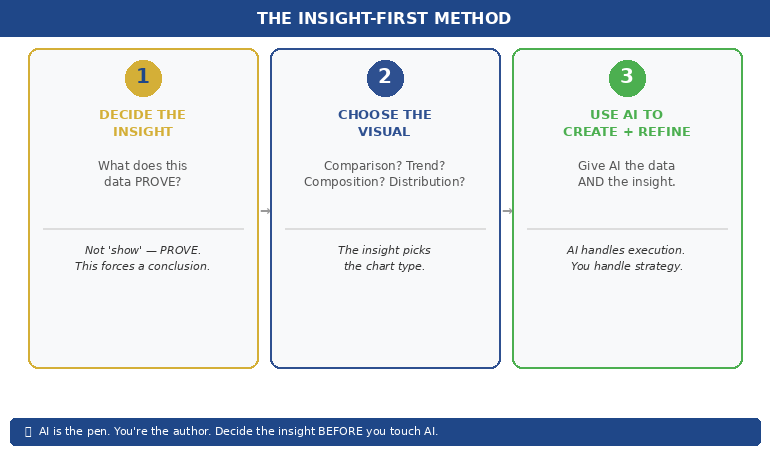
Step 1: Define the decision. Before you write a single prompt, answer: “What specific decision do I need from this room?” Not “inform them about the project.” Not “update them on progress.” A decision: “Approve £400K additional budget by March 7.” If you can’t state the decision in one sentence, you’re not ready to build slides — with or without AI.
Step 2: Build the skeleton. Choose a template that matches your scenario. A board presentation needs a different skeleton than a project status update, which needs a different skeleton than an investment proposal. The skeleton determines what goes on each slide and in what order — recommendation first, evidence second, options third, ask last.
Step 3: Prompt AI to fill each section. Now — and only now — use AI. But not with a single prompt like “create a board presentation.” Instead, prompt section by section: “Write the executive summary for a £400K technology investment. The recommendation is to approve. The key evidence is…” When AI fills a pre-built structure, the output has the decision architecture the room needs.
This is the approach that turned my client’s 22-slide information deck into a 12-slide decision deck — same data, same AI-generated language, fundamentally different outcome.
For a library of proven prompts, see the complete guide to ChatGPT prompts for presentations.
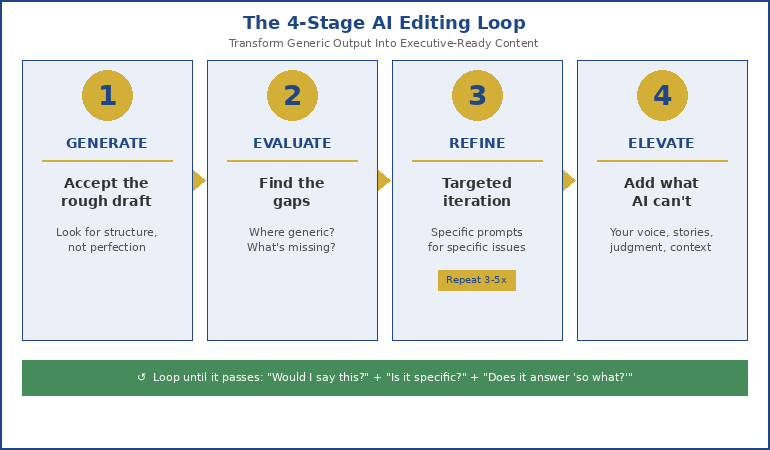
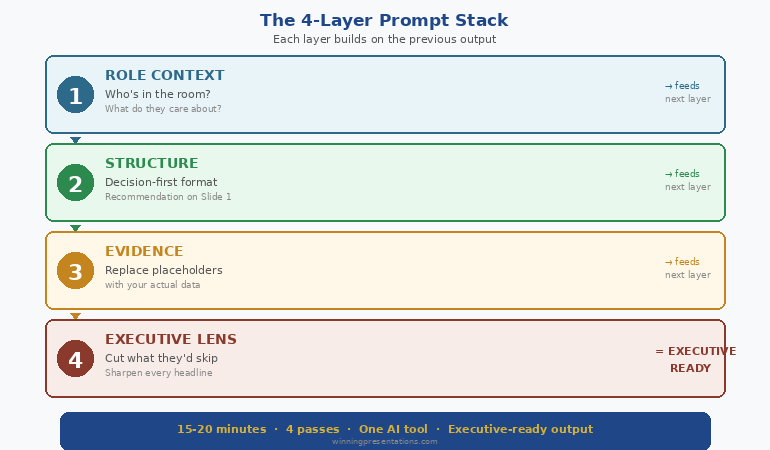
The 3-Prompt System: Draft → Refine → Executive Polish
One prompt doesn’t produce executive-quality output. Three prompts do — if they’re sequenced correctly.
Prompt 1: Draft. Generate the content for a specific slide or section. Be specific about the scenario, the audience, and the data. “Create content for a Q3 business review for the finance committee. Include: revenue vs target, three significant wins with quantified impact, two challenges with root causes, and three priorities for next quarter.”
Prompt 2: Refine. Sharpen the output for the specific audience. “Make this more impactful for a CFO audience. Each win should quantify business impact. Challenges should include what we’re doing about them. Remove metrics that don’t connect to business outcomes.”
Prompt 3: Executive Polish. Stress-test it. “Review this through the eyes of a CEO with five other meetings today. What would they skip? What questions would they ask? Strengthen the ‘so what’ for each point. Ensure the decision is specific and time-bound.”
Each prompt layer adds something the previous one didn’t: the Draft gives you content, the Refine makes it audience-specific, and the Polish makes it decision-ready. Without the structural skeleton underneath, all three layers produce better-written information. With the skeleton, they produce an argument.
The 51 AI prompts in the Executive Slide System are pre-written in the Draft → Refine → Polish sequence for every template — so you’re not writing prompts from scratch. Open the template, run the three matched prompts, and the structural skeleton fills itself with executive-quality content. Get the Executive Slide System → £39
What AI IS Good At (Once the Structure Exists)
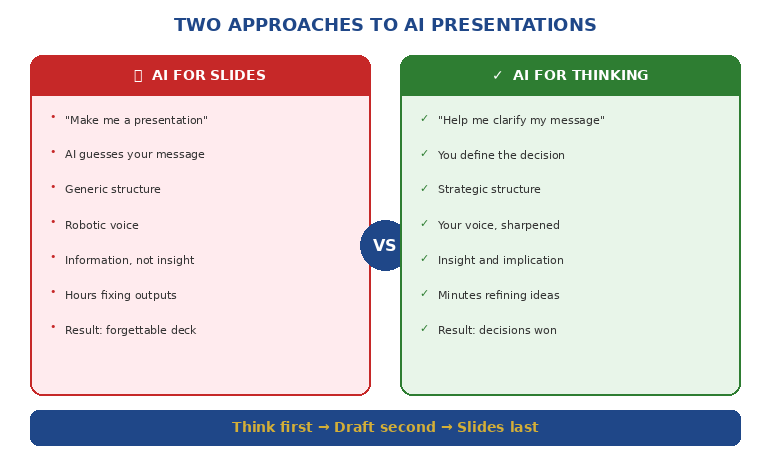
This isn’t an anti-AI article. AI is transformative for presentations — but only when it fills a structure rather than creating one.
Once you have the decision architecture in place, AI excels at: generating clear, professional language for each section; stress-testing your content from the audience’s perspective; finding gaps in your logic that you’ve become blind to; polishing language to be more concise and direct; and creating supporting data visualisations.
The combination of human structure + AI content is more powerful than either alone. You bring the judgement (what decision, what audience, what politics). AI brings the execution speed (clear language, consistent tone, gap identification). The structural skeleton is the interface between the two.
The professionals who are most effective with AI aren’t the ones writing the best prompts. They’re the ones who know what the room needs BEFORE they open ChatGPT. Structure first. AI second. That’s the workflow that gets decisions.
⭐ Stop Getting 22 Slides of Information and Zero Decisions
The Executive Slide System is the structural skeleton that makes AI output actually work in executive meetings. Each of the 22 templates includes the decision architecture — recommendation position, evidence sequence, options framing, specific ask — that AI can’t generate on its own.
Your structure-first AI deliverables:
- 22 structural templates — recommendation-first, decision-ready, each with mapped slide sequence
- 51 matched AI prompts — 3 per template (Draft → Refine → Executive Polish), pre-written and ready to paste
- 15 scenario playbooks — find your exact situation, follow template + prompt sequence in under 30 minutes
- 6 checklists — verify decision readiness, argument logic, and executive clarity before presenting
Get the Executive Slide System → £39
The structural logic from 24 years of executive banking + 51 AI prompts that fill it in minutes. Structure first. AI second. Decisions always.
The 15 scenario playbooks in the Executive Slide System tell you which template to open AND which AI prompts to run for your specific situation — so the structure-first workflow takes 30 minutes, not 3 hours. Get the Executive Slide System → £39
Is This Right For You?
✓ This is for you if:
- You’ve used AI for presentations but the output feels flat, informational, or doesn’t get decisions
- You want the structural logic that makes AI-generated content land with executive audiences
- You want pre-written AI prompts matched to specific executive scenarios
✗ This is NOT for you if:
- You don’t use AI for presentations and don’t plan to start
- You’re looking for visual design templates (this is structural logic, not design)
⭐ 24 Years of Board-Level Decision Decks — Now a Structure AI Can’t Mess Up
Every template in the Executive Slide System was built from real executive approvals — board papers, SteerCo recommendations, ExCo investment cases. The decision architecture that got those approved is now the skeleton your AI fills.
Your AI-ready decision architecture:
- Decision slide order that forces “what are you asking for?” onto slides 1–2 (not slide 19)
- Options + trade-off slide formats executives actually use to decide — with costed consequences
- Cost-of-inaction slide prompts — the missing slide in 90% of AI-generated decks
- 51 matched AI prompts (Draft → Refine → Executive Polish) pre-written for every template
Get the Executive Slide System → £39
Built from board approvals, SteerCo recommendations, and ExCo investment cases at JPMorgan, RBS, PwC, and Commerzbank. Instant download. 30-day money-back guarantee.
Frequently Asked Questions
Can’t I just write better prompts instead of using templates?
Better prompts produce better content — but content isn’t the problem. The problem is structural logic: what goes on slide 1, what goes on slide 5, why the evidence is sequenced the way it is. No prompt, however sophisticated, gives AI the knowledge of your decision-maker, the political dynamics in the room, or the specific decision the meeting exists to make. Templates provide the structural skeleton that prompts can’t. Then prompts fill it brilliantly.
Does this work with ChatGPT, Copilot, and other AI tools?
Yes — because the structural problem is universal across all AI tools. ChatGPT, Copilot, Gamma, Claude, and every other AI presentation tool generates content in information mode. None of them generate in decision-first mode unless you provide the structure first. The templates work with any tool. The 51 AI prompts are written for ChatGPT-style interfaces but adapt to any conversational AI.
How long does the structure-first workflow take?
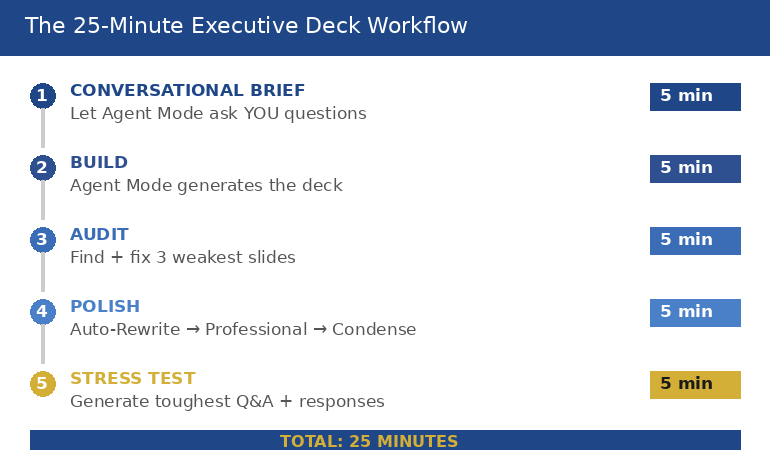
About 30 minutes for a complete executive deck. Five minutes to choose the right template for your scenario (the playbooks tell you which one). Five minutes to define the decision, recommendation, and key evidence points. Twenty minutes to run the three prompts per section and review the output. Compare that to 3-4 hours of prompt-iterate-restructure-prompt cycles when starting with AI alone.
What if my presentation is informational, not decision-based?
Most presentations that claim to be “informational” actually contain an implicit decision. A project status update implicitly asks “should we continue as planned?” A quarterly review implicitly asks “is this team performing?” If you genuinely need to inform without seeking a decision — a training session or a knowledge-share, for example — AI alone works fine. But for any presentation to leadership, there’s almost always a decision embedded. Find it, make it explicit, and build the structure around it.
📬 The Winning Edge — Weekly Newsletter
One executive presentation insight per week. AI workflows, structural frameworks, and the decision-first thinking that makes both work. No filler.
Read next: AI handles slides. Q&A handles everything else. Read When You Don’t Know the Answer: 3 Responses That Save You in Q&A — the scripts for when AI can’t help.
Read next: If your next presentation involves giving sensitive feedback, read The Sandwich Feedback Trap: Why It Fails When You Critique Up (And the Mirror Structure That Works).
If your board pack goes out tomorrow morning — or your SteerCo pre-read is due by 5pm — don’t let AI decide the slide order. Build the structural skeleton first. Then let AI fill it. That’s how 22 slides of information become 12 slides that get a decision.
About the Author
Mary Beth Hazeldine is the Owner & Managing Director of Winning Presentations. With 24 years of corporate banking experience at JPMorgan Chase, PwC, Royal Bank of Scotland, and Commerzbank, she has delivered high-stakes presentations in boardrooms across three continents.
A qualified clinical hypnotherapist and NLP practitioner, Mary Beth combines executive communication expertise with evidence-based techniques for managing presentation anxiety. She has trained thousands of executives and supported presentations for high-stakes funding rounds and approvals.