

Framework First: The Order That Makes AI Presentations Compelling
Quick answer: Most professionals open ChatGPT or Copilot and start prompting before they’ve decided what the presentation needs to achieve. The result is polished slides with no strategic backbone. Reverse the order — framework first, AI second — and the output transforms from generic to compelling in the same amount of time.
⏰ Presenting in less than 24 hours?
Do these four things right now — 12 minutes total:
1. Write one sentence: “By the end, my audience will decide to ___.” (2 min)
2. List the 3 objections standing between them and that decision. (3 min)
3. Write 6–9 slide headlines as assertions, not labels. (5 min)
4. Prompt AI slide-by-slide against your skeleton. (2 min to start)
That sequence alone will produce a sharper deck than three hours of open-ended prompting. Read on for the full method — or if you want the complete system with templates:
🎓 AI-Enhanced Presentation Mastery — The self-study programme that teaches the complete framework-first workflow, with templates for every step. Explore the programme → £249
In this article:
The CFO rejected it in 11 words: “This is a lot of slides that say nothing useful.”
My client Marcus had spent three hours with ChatGPT the night before. He’d prompted carefully. The slides looked professional — clean typography, consistent formatting, relevant data points. Every slide had a heading, a supporting visual, and a transition that made logical sense.
The problem wasn’t the slides. The problem was that Marcus had opened AI before opening his brain.
He’d typed “Create a presentation about our Q3 cloud migration progress” and let the tool structure his thinking for him. What came out was a chronological summary of everything that had happened — technically accurate, strategically empty. No recommendation. No decision point. No clear reason for the CFO to care.
I’ve watched this pattern repeat across senior teams throughout my 24 years in corporate banking. The professionals who produce genuinely compelling AI presentations aren’t better at prompting. They’re better at something that happens before the first prompt: they build the framework first.
That single shift in order — framework before AI, not AI before framework — is the difference between presentations that get polite nods and presentations that get decisions.
🎓 Master the Framework-First System
AI-Enhanced Presentation Mastery teaches the complete framework-first workflow — from strategic thinking to AI execution. Self-study with live Q&A calls.
Explore AI-Enhanced Presentation Mastery → £249
The programme is live now — January and February modules are already available, with new modules releasing through April. Join any time and start with the full library so far.
Why Most AI Presentations Are Built Backwards
Here’s the workflow most professionals follow when they need a presentation:
Open ChatGPT or Copilot. Describe the topic. Let AI generate the structure. Edit the output. Present it.
It feels efficient. It is efficient — at producing mediocre work.
The problem is that AI is optimised to generate plausible content, not strategic content. When you say “Create a presentation about our cloud migration,” the tool doesn’t know that your CFO cares about cost overruns but not technical architecture. It doesn’t know that the VP of Engineering is already a supporter while the Head of Procurement is a sceptic. It doesn’t know that the real decision being made is whether to approve another £800K for Phase 2.
Without that context, AI does what AI does well: it creates something that looks like a presentation. Chronological structure. Balanced coverage of all topics. Professional formatting. And absolutely no strategic backbone.
I saw this constantly during my years at JPMorgan Chase and PwC. The decks that got approvals weren’t the ones with the most data or the cleanest slides. They were the ones where you could feel the strategic thinking underneath — the ones where every slide existed for a reason, and that reason pointed toward a specific decision.
AI can’t generate that strategic thinking. But it can execute brilliantly once you’ve done the thinking yourself.
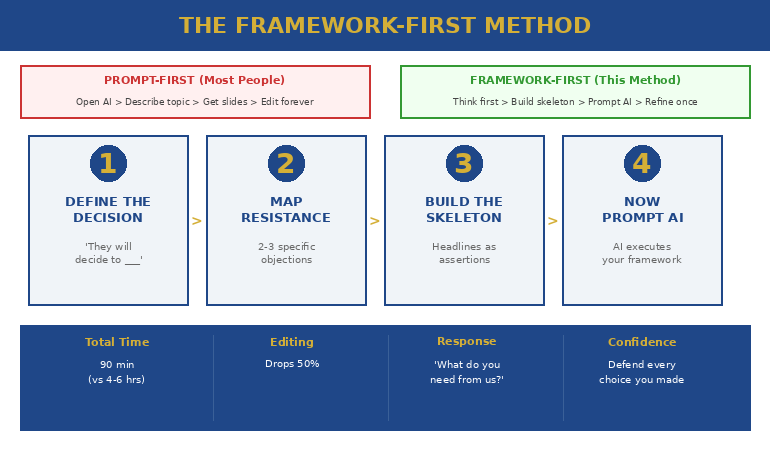
The Framework-First Method (4 Steps)
The structure-before-prompting approach reverses the standard AI workflow. Instead of prompting first and structuring later, you build the decision architecture before touching any AI tool.
Step 1: Define the Decision (Not the Topic)
Most people describe their presentation by topic: “It’s about Q3 results.” Framework-first starts with the decision: “I need the board to approve £800K for Phase 2 of cloud migration.”
That single sentence changes everything. Now every slide either supports that decision or it doesn’t belong in the deck.
Write one sentence: “By the end of this presentation, my audience will decide to ___________.” If you can’t complete that sentence, you’re not ready to open AI.
Step 2: Map the Audience Resistance
Before building slides, identify the two or three objections that stand between your audience and the decision you need. Not theoretical objections — the specific concerns this group of people will have.
Marcus’s CFO had one concern: cost. The VP of Engineering had a different concern: timeline risk. The Head of Procurement worried about vendor lock-in. Three people, three different resistance points, all sitting in the same meeting.
A generic AI prompt produces one presentation for all three. This approach produces one presentation that addresses each resistance point in sequence, building toward the decision.
Step 3: Build the Slide Skeleton
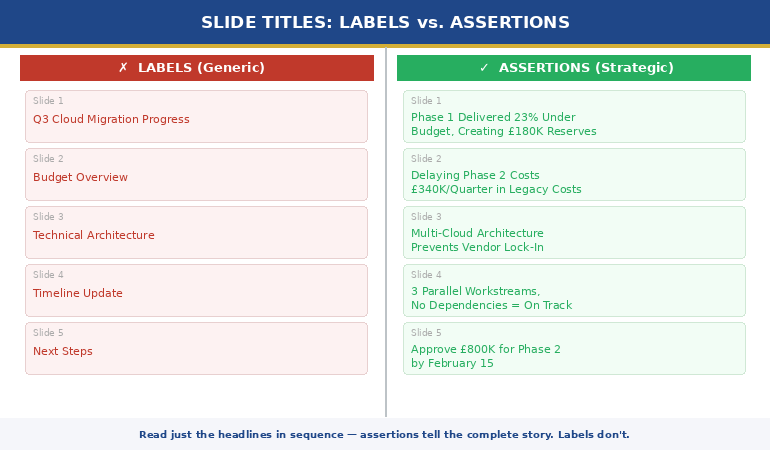
Not full slides — just the architecture. Write the headline for each slide as a complete assertion, not a label. “Q3 Migration Progress” is a label. “Phase 1 Delivered 23% Under Budget, Creating £180K in Reserves for Phase 2” is an assertion.
Your skeleton might be six slides. It might be twelve. The number doesn’t matter. What matters is that each slide headline tells the complete story if you read them in sequence — no body content needed.
This is the strategic thinking that AI cannot do for you. And it’s the thinking that separates presentations executives act on from presentations executives forget.
🎓 AI-Enhanced Presentation Mastery — The self-study programme walks through this skeleton-building process with real executive examples across finance, operations, and strategy contexts. See the full curriculum → £249
Step 4: Now Prompt AI (With the Framework)
This is where AI becomes genuinely powerful. You’re no longer asking it to think — you’re asking it to execute. Instead of “Create a cloud migration presentation,” your prompt becomes:
“I need supporting content for a 9-slide executive presentation. The decision: approve £800K for Phase 2. Slide 3 headline: ‘Phase 1 Delivered 23% Under Budget, Creating £180K in Reserves for Phase 2.’ Generate 3 data points and one visual recommendation that support this assertion.”
The output from this prompt is categorically different from the output of a topic-based prompt. It’s specific. It’s strategic. It supports the decision architecture you’ve already built.
What Changes When You Lead With Structure
The before-and-after is striking. I’ve watched executives switch from prompt-first to structure-first and produce dramatically better output in less total time.
Here’s what shifts:
Editing time drops by half. When AI executes against a clear framework, the output requires refinement rather than restructuring. You’re adjusting language, not rethinking strategy. Most executives I work with report cutting their total deck-building time from four to six hours down to 90 minutes — not because the AI is faster, but because they’re not rebuilding the structure three times.
Audience response changes. Presentations built in this order generate questions about next steps rather than clarifying questions about intent. That’s the signal that your strategic thinking landed. When the first question after your presentation is “So what do you need from us to move forward?” — you’ve built it in the right order.
Confidence increases. This is the part nobody talks about. When you know every slide exists for a strategic reason, you present differently. You’re not narrating slides — you’re building an argument. That comes through in your voice, your posture, and especially in how you handle questions. If the structure of your deck reflects genuine strategic thinking rather than AI-generated organisation, you can defend every choice because you made every choice.
📐 The Complete Framework-First Workflow
AI-Enhanced Presentation Mastery includes the full decision-architecture method, audience resistance mapping templates, and slide skeleton builders — plus how to prompt any AI tool to execute against your framework.
Explore AI-Enhanced Presentation Mastery → £249
Modules cover decision framing, audience mapping, skeleton building, and AI execution for every presentation type.
3 Frameworks That Work With Any AI Tool
You don’t need a new framework for every presentation. Most executive presentations fall into one of three structural patterns, and each one gives AI a clear execution brief.
The Recommendation Framework
Use when: You need a decision. Budget approvals, strategy pivots, vendor selections.
Structure: Recommendation → Evidence → Risks Addressed → Ask. Four to eight slides maximum. The recommendation appears on slide one, not slide twenty. This structure works because executives scan for the conclusion first — give it to them, then prove it.
AI execution: Prompt AI to generate supporting evidence for each assertion in your skeleton. The framework tells AI what to prove, not what to explore.
The Progress Framework
Use when: You’re reporting on work in progress. QBRs, project updates, migration reviews.
Structure: Where We Said We’d Be → Where We Are → What Changed → What We Need Next. Resist the chronological pull. AI will default to “what happened in order” — your framework forces it to highlight the gaps between plan and reality, which is what the audience actually cares about.
AI execution: Prompt AI to generate variance analysis and impact statements rather than activity summaries. The framework prevents AI from producing a timeline when what you need is a gap analysis.
The Problem-Solution Framework
Use when: You’re proposing something new. Process changes, team restructures, new initiatives.
Structure: Cost of the Current Problem → Root Cause → Proposed Solution → Expected Impact → Resources Needed. The key is quantifying the cost of inaction before presenting the cost of action. When the audience sees that doing nothing costs £2M annually, the £400K solution looks different.
AI execution: Prompt AI to quantify impact in the audience’s currency — time, revenue, risk, headcount. Your framework tells AI which currency matters to this specific audience.
Each of these frameworks transforms how AI generates content. Instead of producing generic slides about a topic, AI produces specific content that supports a strategic argument. The full AI presentation workflow covers how to integrate these frameworks into your existing tools.
🎓 AI-Enhanced Presentation Mastery — Includes ready-to-use templates for all three frameworks with worked examples from real executive contexts. Explore the programme → £249
Real Example: The Same Deck Built Both Ways
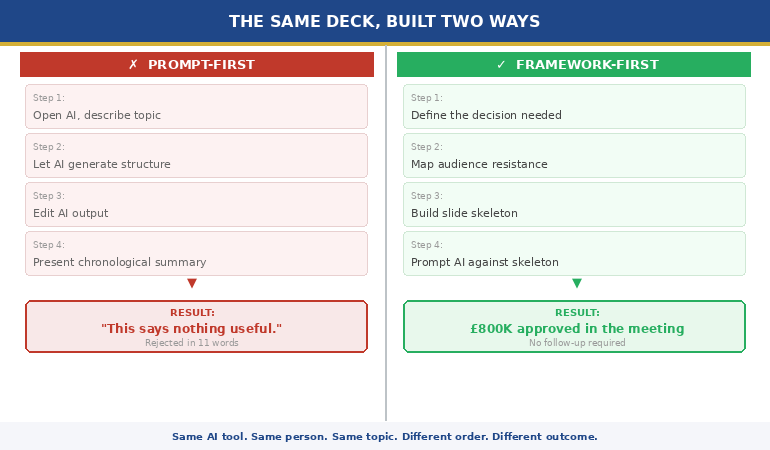
Let me show you what this looks like in practice. Same presenter, same topic, same AI tool, same meeting. Different order.
Prompt-First Version (What Marcus Built)
Marcus opened ChatGPT and typed: “Create a 12-slide presentation on our Q3 cloud migration progress for the executive team.”
What AI produced: a chronological summary. Slide 1: Title. Slide 2: Agenda. Slide 3: Q3 Objectives. Slide 4: What We Completed. Slide 5: Technical Architecture Update. Slides 6-9: Detailed progress by workstream. Slide 10: Challenges. Slide 11: Next Steps. Slide 12: Questions.
Every slide was accurate. None of them built toward a decision. The CFO sat through twelve slides waiting for the point, then rejected it in 11 words.
Framework-First Version (What We Built Together)
We started with the decision sentence: “I need the board to approve £800K for Phase 2 of cloud migration.”
We mapped three resistance points: cost (CFO), timeline risk (VP Engineering), vendor lock-in (Head of Procurement).
We wrote the skeleton — nine slide headlines, each an assertion:
1. Phase 2 Requires £800K — Here’s Why It Pays for Itself in 14 Months
2. Phase 1 Delivered 23% Under Budget, Creating £180K in Reserves
3. Delaying Phase 2 Costs £340K/Quarter in Legacy Maintenance
4. Timeline Risk Is Contained: 3 Parallel Workstreams, No Dependencies
5. Vendor Flexibility Built In: Multi-Cloud Architecture Prevents Lock-In
6. Cost Comparison: Phase 2 vs. Extending Phase 1 Support
7. Resource Ask: Same Team, Extended Timeline
8. Risk Mitigation: Phase Gates at 30/60/90 Days
9. Decision Required: Approve Phase 2 by February 15
Then we prompted AI — slide by slide — to generate supporting content for each assertion. The output was specific, strategic, and directly addressed each stakeholder’s concerns.
The board approved the budget in the meeting. No follow-up required.
Same AI tool. Same person. Different order. Completely different outcome.
🧠 Stop Prompting First. Start Thinking First.
AI-Enhanced Presentation Mastery is a self-study programme that gives you the complete framework-first system: decision architecture, audience resistance mapping, slide skeleton templates, and AI execution prompts for every executive presentation type. Study at your own pace, with live Q&A calls when you need direct feedback.
Explore AI-Enhanced Presentation Mastery → £249
Self-study modules + decision-architecture templates + live Q&A. Built for executives who use AI but want better results.
Does the framework-first method work with ChatGPT and Copilot?
Yes — framework-first is tool-agnostic. Whether you use ChatGPT, Copilot, Claude, or Gemini, the principle is identical: do the strategic thinking before the first prompt. The framework becomes the brief that any AI tool executes against. The difference is in the quality of your input, not the brand of your AI.
How long does it take to build a framework before using AI?
Typically 15 to 25 minutes for the decision sentence, resistance mapping, and slide skeleton. That investment saves two to four hours of restructuring and editing on the back end. Most executives find the total deck-building time drops from four to six hours to under 90 minutes once the framework-first habit is established.
What if I don’t know what decision I need from my audience?
That’s the most valuable signal the framework-first method gives you. If you can’t write the decision sentence, you’re not ready to build the presentation — regardless of whether you’re using AI or not. Clarifying the decision before you start is what separates persuasive presentations from information dumps.
Frequently Asked Questions
Can I use the framework-first method for informal presentations like team updates?
Absolutely. Even a five-minute team update benefits from a decision sentence: “I need the team to prioritise workstream B this week.” The framework doesn’t have to be elaborate — even a two-slide skeleton built in three minutes produces sharper AI output than an open-ended prompt. The method scales from boardroom pitches down to Slack presentation summaries.
What if my manager just wants me to share information, not drive a decision?
Information-sharing presentations still benefit from a framework because they need a “so what.” Define what you want the audience to take away: “After this update, the team will understand that Phase 1 is on track and no escalation is needed.” That framing gives AI a clear brief and prevents the chronological data dump that makes people stop listening at slide four.
Is framework-first slower than just letting AI generate the whole thing?
In the first ten minutes, yes. In total time, no. Executives who prompt AI without a framework spend 15 minutes generating slides, then two to four hours restructuring, re-prompting, and editing. Framework-first spends 20 minutes thinking, 20 minutes prompting, and 30 minutes refining. The total is consistently shorter because you’re not rebuilding the strategic backbone after the fact.
📬 The Winning Edge Newsletter
Weekly frameworks, AI presentation strategies, and executive communication techniques — delivered in under 3 minutes.
📋 Free: 7 Presentation Frameworks
Download the framework reference sheet used in our executive training — including the Recommendation, Progress, and Problem-Solution structures covered in this article.
Also published today:
📊 The All-Hands Meeting That Destroyed Morale (And How to Avoid It) — The structural mistakes that turn company updates into resignation triggers.
💛 What Happens When You Cry During a Presentation (I Know Because I Did) — A recovery framework for the moment emotion takes over.
Your next step: Before your next presentation, spend 15 minutes writing the decision sentence and three slide headlines as assertions. Then open your AI tool. You’ll feel the difference in the output immediately — and your audience will feel it in the room. If you want the complete system with templates and worked examples, explore AI-Enhanced Presentation Mastery.
About the Author
Mary Beth Hazeldine is the Owner & Managing Director of Winning Presentations. With 24 years of corporate banking experience at JPMorgan Chase, PwC, Royal Bank of Scotland, and Commerzbank, she has delivered high-stakes presentations in boardrooms across three continents.
A qualified clinical hypnotherapist and NLP practitioner, Mary Beth combines executive communication expertise with evidence-based techniques for managing presentation anxiety. She has trained thousands of executives and supported presentations in high-stakes funding rounds and approvals.