Tag: presentation delivery

26 Apr 2026
Featured image for Standing vs Sitting During Presentations: How Your Position Shapes Authority and Connection

Standing vs Sitting During Presentations: How Your Position Shapes Authority and Connection

Quick Answer

The choice between standing and sitting during presentations sends different signals to your audience. Standing amplifies authority and projects confidence in large rooms, while sitting creates proximity and conversational trust in smaller meetings. The right choice depends on room size, audience seniority, and what you need the audience to feel. Most presenters default to one position without considering the strategic impact.

Priya was halfway through a divisional review at a pharmaceutical company in Reading when she realised something was wrong. She was standing at the front of a small boardroom — eight people seated around an oval table — and the senior director across from her had physically leaned back, arms folded, watching her with the polite distance of someone observing rather than participating.

She had prepared thoroughly. The data was clear, the recommendation was sound, and her delivery was controlled. But the room felt adversarial rather than collaborative. After the meeting, her manager offered a simple observation: “You were standing over them. In that room, with that group, it felt like a lecture. They wanted a conversation.”

The following month, presenting to the same group, Priya sat down. She placed her notes on the table, made eye contact at the same level as every other person in the room, and opened with a question rather than a statement. The senior director leaned forward. The recommendation was approved without a single challenge.

Nothing had changed about Priya’s competence or her argument. What changed was her physical position — and the signal it sent to every person watching.

Does your body fight you before every presentation?

If the decision about whether to stand or sit gets tangled up with anxiety about being watched, the real issue may not be positioning at all. Conquer Your Fear of Public Speaking is a neuroscience-based programme designed to help executives manage the physical and cognitive symptoms that make every presentation feel like a test.

Explore the Programme →

Why Your Physical Position Changes How You Are Perceived

The way an audience perceives a speaker begins before the first word is spoken. Physical elevation — standing above a seated audience — is one of the oldest and most reliable signals of authority in human communication. It works because of deeply embedded social processing: a person who is higher than you commands a different kind of attention than one who is level with you.

This is not about dominance. It is about signal clarity. Standing at the front of a room tells an audience three things: you are the designated speaker, you have prepared a structured message, and the flow of information is intended to move in one direction. Sitting at the table tells them something different: you are a participant in a shared discussion, your contribution is one of several, and information is expected to flow in both directions.

Neither signal is inherently better. But choosing the wrong one creates a mismatch between what you are saying and what your body is communicating. That mismatch is what audiences experience as discomfort — they describe it as “too formal” or “something felt off.” In most cases, the issue is positional. Getting standing sitting presentations right is less about preference and more about reading context accurately.

Understanding how presentation gestures shape perceived authority becomes significantly more useful when combined with an intentional decision about where and how you position your body in the room.

Conquer Your Fear of Public Speaking

Standing in front of a room should not feel like a threat. This neuroscience-based programme — £39, instant access — covers the physical and cognitive dimensions of presentation anxiety so you can focus on your message rather than managing your nervous system.

  • Nervous system regulation techniques for high-stakes settings
  • Cognitive reframing methods for anticipatory anxiety
  • Physical symptom management (shaking, breathlessness, dry mouth)
  • Pre-presentation protocols you can use in the final minutes before you speak

Get the Programme →

Designed for executives and senior professionals who present regularly in high-pressure environments.

When Standing Strengthens Authority and Presence

Standing works best in situations where the audience expects a structured, directional flow of information. Conference presentations, town halls, client pitches to groups of six or more, and any context where slides are projected behind you — these are environments where standing is the natural and expected position. Audiences in these settings are primed to receive, not to participate, and your standing position reinforces that expectation.

Standing also becomes more important when the room is large or when there is any distance between you and the audience. In a room with thirty people, sitting at a table at the front removes you from half the audience’s sightline. Your gestures become invisible, your eye contact narrows to the people closest to you, and your voice loses projection because you are speaking horizontally rather than directing sound outward and upward.

There is a physical confidence benefit as well. When you stand, your diaphragm opens, your breathing deepens naturally, and your vocal range expands. Speakers who struggle with vocal monotony in seated meetings often discover that the same content sounds more varied and engaging when delivered standing. This is not a psychological trick — it is physiology. An open posture produces a more resonant voice.

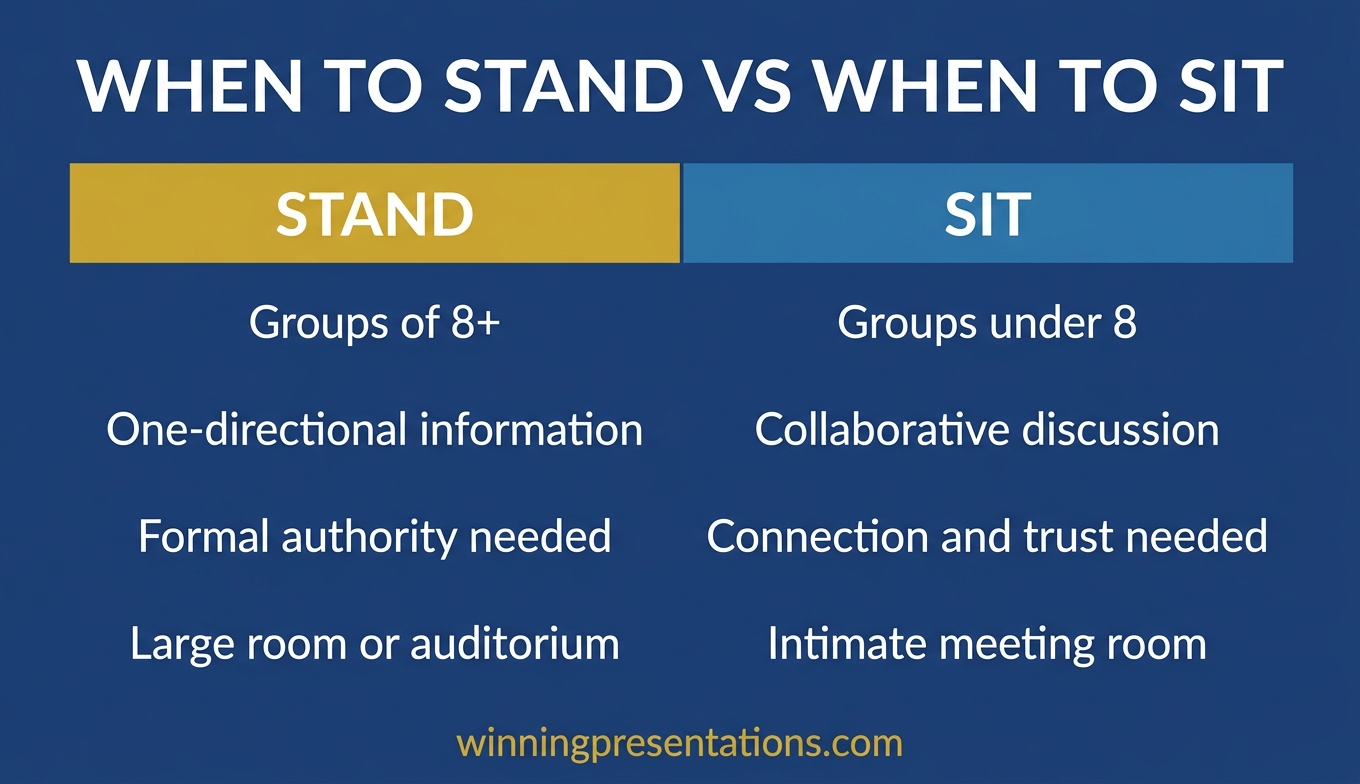
Comparison of standing versus sitting presentation dynamics: standing amplifies authority, vocal projection, and gesture visibility in larger rooms; sitting creates eye-level connection and conversational tone in smaller groups

Where standing can work against you is in intimate settings. A room with four people around a small table does not benefit from a speaker standing at one end. In that context, standing creates vertical distance that the audience reads as separation. You become the performer in a room that expected a colleague. This is particularly noticeable in cultures and organisations where hierarchy is already a source of tension — standing amplifies the power differential in ways that may not serve your objective.

The decision about how to use movement during presentations is closely connected to the standing question. Movement only works when you are already standing — and purposeful movement (stepping toward the audience, moving to a different part of the room) can reinforce authority without creating the static formality that some audiences find distancing.

When Sitting Builds Trust and Genuine Connection

Sitting down removes the vertical advantage. That is its purpose. In small meetings — four to eight people — where the goal is discussion, collaboration, or consensus-building, sitting at the table signals that you are a participant rather than a performer. For many executives, particularly those who present to peers or senior leaders, this is the more effective position.

The trust mechanism is straightforward: eye-level communication feels equitable. When you sit, the audience does not need to look up at you. The physical dynamic is shared — everyone is at the same height, everyone has the same posture options, and the conversation feels laterally structured rather than top-down. This is particularly valuable in advisory or consulting contexts, where appearing authoritative without appearing hierarchical is the central presentational challenge.

Sitting also changes the tempo of your delivery. Standing presenters tend to pace themselves against slides or a mental clock. Seated presenters tend to pace themselves against the room — responding to nods, pausing after questions, allowing silences to develop. This responsive tempo often leads to richer discussion and better audience engagement, particularly in senior leadership settings where the audience expects to contribute, not just receive.

One tactical advantage of sitting is its effect on eye contact technique. When standing, eye contact becomes a deliberate scan across the room. When sitting, it becomes conversational — you look at the person speaking, then shift to the person you are addressing. This pattern feels more natural and produces genuine dialogue.

The risk of sitting is reduced projection. If you naturally speak softly, sitting can make your voice harder to hear. If you rely on gestures, sitting compresses your gesture range to what is visible above the table line. And if the audience is expecting a formal presentation — a board briefing or investor update — sitting may feel under-prepared, regardless of content quality.

The Hybrid Approach: Switching Position Mid-Presentation

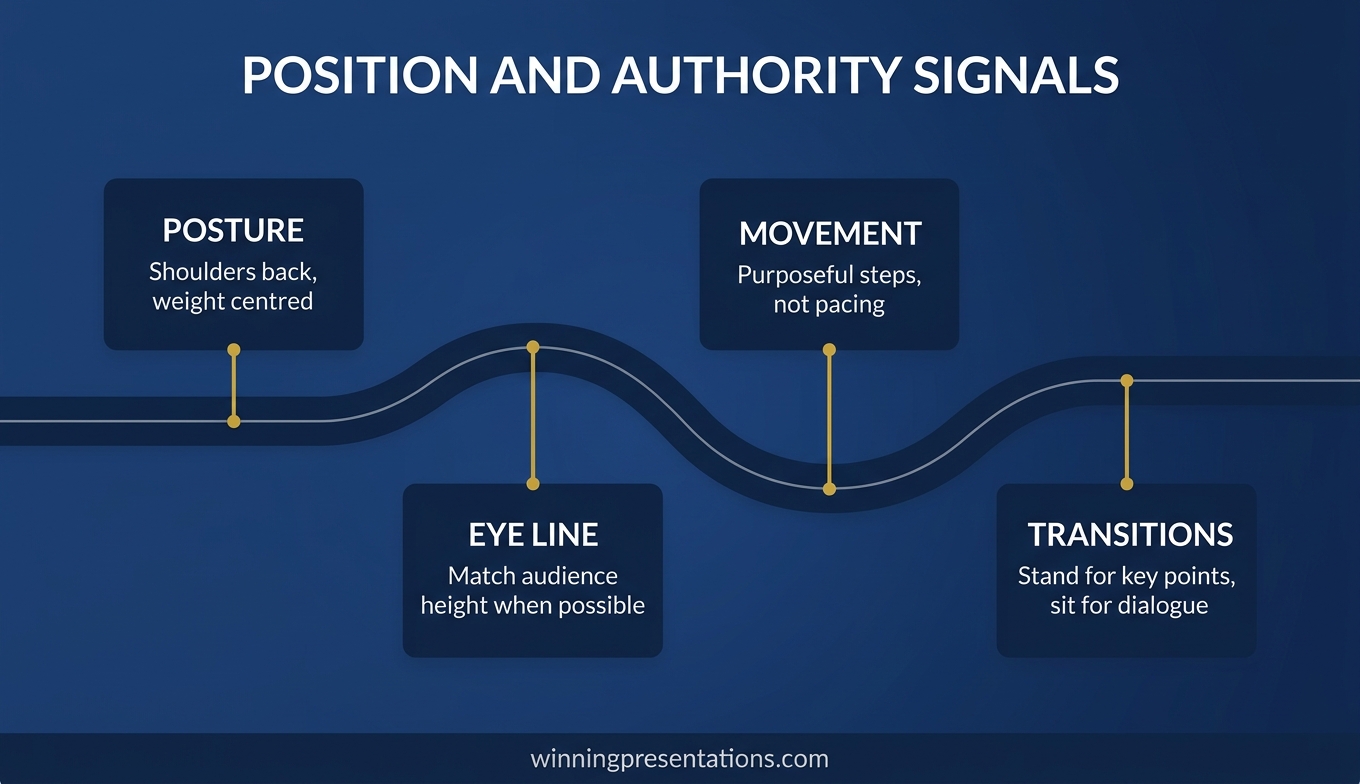
The most adaptable presenters do not commit to one position for the entire session. They begin standing for the structured portion — data, recommendation, formal argument — and sit down when the session shifts to discussion or Q&A.

This transition is itself a signal. Standing to seated says: “I have finished delivering; now I am listening.” It communicates a shift in power dynamics — from speaker-led to audience-led — and audiences respond instinctively. The room relaxes and questions become more substantive.

The reverse transition — sitting to standing — is equally powerful. If a discussion has become circular, standing to summarise key points and propose next steps restores directional energy. Used sparingly, this transition can reshape a meeting that has lost momentum without requiring you to comment on the pace of the conversation.

The key is attaching the transition to a structural moment — a slide change, a new topic, or a pause after a major point. “Let me sit down for this part — I want to hear your reaction before I move to the recommendation” is a transition that feels purposeful rather than performative.

If you are exploring ways to build confidence across all presentation formats, the Conquer Your Fear of Public Speaking programme includes protocols for managing anxiety in both standing and seated contexts.

Managing Nerves in Each Position

Anxiety behaves differently when you are standing than when you are sitting, and understanding the distinction is essential for managing it effectively. When standing, the body’s fight-or-flight response has more physical expression — pacing, shifting weight, fidgeting with hands. These are visible to the audience and can create a feedback loop: you notice yourself moving nervously, which increases self-consciousness, which increases the nervous movement.

The counter-strategy for standing anxiety is grounding. Plant both feet flat, hip-width apart, and distribute your weight evenly. From this grounded position, deliberate movement becomes possible — a step forward to emphasise a point, a turn toward a different section of the audience — without the restless quality that audiences interpret as uncertainty.

Sitting creates different challenges. Anxiety tends to express itself in smaller movements: tapping fingers, clicking pens, bouncing a knee under the table. The containment of the seated position can also increase a sense of being trapped — no space to move, no physical release for the adrenaline your nervous system is producing.

Managing presentation anxiety by position: standing strategies include grounding feet and deliberate movement; sitting strategies include anchoring hands and controlled breathing techniques

The counter-strategy for seated anxiety is anchoring. Place both hands on the table, fingers loosely interlaced or resting on your notes — this gives the nervous energy a physical endpoint. Combine this with a slower breathing rhythm (inhale for four counts, exhale for six) and the seated position becomes stable rather than confining.

Both positions benefit from arriving early and occupying the space before the audience does. Standing at the front of an empty room for two minutes allows your nervous system to register the space as familiar. Sitting and arranging your materials before others arrive establishes physical ownership of the position. Either approach reduces the novelty that triggers the strongest anxiety responses.

Reading the Room Before You Decide

The decision about whether to stand or sit should ideally be made before you enter the room — but confirmed in the first thirty seconds after you arrive. Three factors should guide the decision.

Room geometry. If the room has a clear “front” — a screen, a lectern, a presentation area separated from the seating — standing is the expected norm. If the room is organised around a table with no focal point, sitting is the default. Going against the room’s implied structure requires a deliberate reason and a confident transition.

Audience seniority relative to yours. Presenting to people more senior than you creates a tactical decision. Standing projects confidence but can create an awkward dynamic where a junior person is physically elevated above decision-makers. Sitting signals respect but can reduce your visibility when you need the room to take your recommendation seriously. The right choice depends on the organisation’s culture and your specific relationship with the audience.

Meeting purpose. Informational presentations (results, updates, briefings) favour standing because the information flow is one-directional. Decisional presentations are more context-dependent — standing works for large committees, sitting for small ones. Collaborative sessions almost always favour sitting because the goal is participation rather than reception. Mastering standing sitting presentations across all three contexts gives you a genuine advantage in how your message lands.

For a deeper exploration of how to structure a confident presenting approach across different executive contexts, the principles of positional awareness apply regardless of the format or formality of the session.

Conquer Your Fear of Public Speaking

Whether you stand or sit, anxiety should not dictate the decision. This programme covers nervous system regulation, cognitive reframing, and physical symptom management — so you choose your position based on strategy, not survival. £39, instant access.

Get the Programme →

Designed for executives and senior professionals who present in high-pressure environments.

Frequently Asked Questions

Is it better to stand or sit when presenting to a small group?

In groups of eight or fewer, sitting is usually more effective. It creates eye-level connection and a conversational dynamic that encourages discussion. The standing sitting presentations debate often comes down to group size: standing in a small room can feel like lecturing, which reduces audience engagement and willingness to challenge your points constructively.

Should I stand for a virtual presentation?

Standing during a virtual presentation can improve your vocal projection, energy, and posture — but only if your camera is positioned at eye level and the framing looks natural. If standing makes you appear distant or creates an awkward angle, sitting with good posture and a well-positioned camera will communicate more effectively through the screen.

How do I manage shaking hands or legs when standing to present?

Shaking is a common adrenaline response. Ground yourself by planting both feet flat on the floor, hip-width apart, and pressing gently into the surface. For hands, hold a pen or rest one hand on the lectern — this gives the nervous energy a physical endpoint. The shaking typically subsides within the first two to three minutes as your body adjusts to the sustained attention. A structured pre-presentation breathing protocol can reduce the intensity of the initial response.

Can I switch between standing and sitting during the same presentation?

Yes, and it can be highly effective. Stand for the structured delivery portion — data, recommendations, formal argument — and sit for discussion and Q&A. The transition itself signals a shift from presenter-led to audience-led, which encourages more substantive engagement. Attach the transition to a structural moment (a topic change or a deliberate pause) so it feels purposeful rather than uncertain.

The Winning Edge — Weekly Newsletter

Practical presentation strategies for senior professionals — delivered every Thursday. Body language, slide structure, executive communication, and confidence techniques drawn from 25 years of corporate experience.

Subscribe to The Winning Edge →

Mary Beth Hazeldine is the Owner & Managing Director of Winning Presentations. With 25 years of corporate banking experience at JPMorgan Chase, PwC, Royal Bank of Scotland, and Commerzbank, she advises executives across financial services, healthcare, technology, and government on structuring presentations for high-stakes funding rounds, board briefings, and leadership decisions.

23 Apr 2026
Female executive speaking confidently at a corporate conference with microphone, deliberate and authoritative delivery, editorial photography style

Filler Words in Presentations: The Hidden Habits Destroying Your Executive Credibility

Quick Answer

Filler words in presentations signal cognitive overload to your audience — even when you know your material cold. The fix is not “just slow down.” It’s replacing the nervous system habit that reaches for “um” or “you know” with a trained behaviour: the deliberate pause. Once you understand why filler words happen and practise the pause as a replacement, the habit shifts within two to three weeks of focused work.

I once watched a senior director lose a room in six minutes.

She was presenting a restructuring proposal to a group of eight executives — a high-stakes conversation she had prepared thoroughly for. Her analysis was rigorous. Her recommendation was sound. But within the first ninety seconds, something shifted in the room. Eyes moved to phones. The CFO started annotating his copy of the paper. The energy dropped.

I counted afterwards, from the recording: forty-one filler words in the first six minutes. Not just “um” and “uh” — though there were plenty of those. “Sort of.” “You know what I mean.” “Basically.” “Obviously.” “If that makes sense.” Each one a tiny signal of uncertainty, stacking up into a pattern the room had registered at a level below conscious awareness.

She knew her material. She had rehearsed. The filler words weren’t coming from unpreparedness — they were coming from a nervous system habit she had never been shown how to address. The content was excellent. The delivery was quietly dismantling her credibility one word at a time.

Struggling with verbal habits that undermine your delivery?

Conquer Speaking Fear gives you the evidence-based techniques to retrain the nervous system habits behind filler words, hesitation, and vocal uncertainty — so your delivery matches the quality of your thinking.

Explore Conquer Speaking Fear →

Why Filler Words Happen — Even When You Know Your Material

The conventional explanation for filler words is that they’re a sign of not knowing what to say next. This explanation is wrong often enough to be unhelpful. Many of the executives I work with who use the most filler words are the most knowledgeable people in the room. Their filler words are not a symptom of ignorance — they’re a symptom of a nervous system under mild stress.

When we speak in high-stakes situations, the prefrontal cortex — the part of the brain responsible for word retrieval, sequencing, and articulation — is competing with the threat-response system for processing resources. Even when there is no genuine threat, the social pressure of presenting to a senior audience activates a low-level arousal response that slightly degrades the fluency of speech production.

The brain, faced with a brief processing delay, reaches for a learned verbal placeholder to maintain the impression of continuity. “Um.” “Uh.” “Sort of.” These are not random sounds — they are trained habits that developed over years of speaking in classrooms, meetings, and conversations where silence felt uncomfortable. The placeholder fills the silence. Over time, the behaviour becomes automatic.

This matters because it means the fix is not intellectual. You cannot think your way out of a nervous system habit. You have to replace it with a different trained behaviour — and the most effective replacement for a filler word is a deliberate pause. The techniques for eliminating “um” from your speech all work through this mechanism: replacing an automatic avoidance behaviour with a controlled alternative.

The Filler Words Beyond “Um” That Damage Credibility

Most advice about filler words focuses on “um” and “uh.” These are the most obvious and the easiest to hear, but they are not always the most damaging. The filler words that cause more subtle but persistent credibility erosion are the ones that sound like content but function like noise.

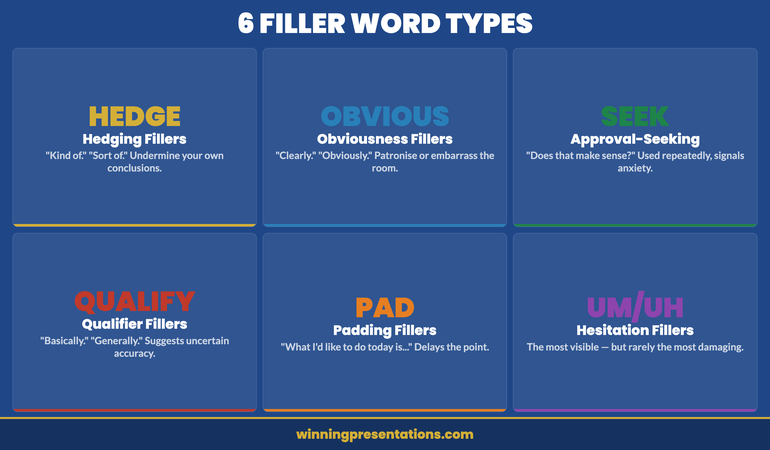
Six categories of filler words in presentations that damage executive credibility: Hesitation fillers, Hedging fillers, Obviousness fillers, Approval-seeking fillers, Qualifier fillers, and Padding fillers with examples of each

Hedging fillers are phrases that undermine the confidence of your own statements. “Kind of.” “Sort of.” “In a way.” “I suppose.” When you say “The data kind of suggests we should proceed,” you are communicating uncertainty about a statement you may be entirely certain about. Hedging fillers are particularly damaging in executive contexts because they signal that you don’t fully trust your own analysis.

Obviousness fillers are phrases that imply the audience should already know what you’re telling them. “Obviously.” “Clearly.” “Of course.” “As you’ll all be aware.” These carry a dual risk: they can patronise an audience that does know the thing, and they can embarrass an audience member who doesn’t. Neither serves you. They also signal that you haven’t thought carefully about the audience’s actual knowledge level — which itself reads as poor preparation.

Approval-seeking fillers are question tags and checking phrases that seek validation mid-sentence. “Does that make sense?” “You know what I mean?” “Right?” “If that makes sense.” Used once, these are fine — they can be genuine invitations for questions. Used repeatedly, they signal anxiety about whether the audience is following you, which amplifies rather than resolves the tension in the room.

Qualifier fillers are words that technically modify a statement but function as verbal hedges. “Basically.” “Generally speaking.” “In most cases.” “Typically.” These are sometimes genuinely necessary — you may be making a statement that genuinely has exceptions. But when they appear on statements that don’t require qualification, they suggest you’re not quite sure whether what you’re saying is accurate.

Padding fillers are extended phrases that don’t add information. “What I’d like to do today is take you through…” “So what we’re going to look at is…” “The thing about this is that…” These typically appear at the beginnings of sentences, before the actual information starts. They delay the moment of value and create a rhythm that makes the speaker seem less direct than the content deserves.

From Verbal Habits to Vocal Authority

Filler words are one symptom of a broader pattern: a nervous system that hasn’t learned to feel safe in high-stakes speaking situations. Conquer Speaking Fear — £39, instant access — addresses the root cause, not just the surface habit:

  • Nervous system regulation techniques drawn from clinical hypnotherapy
  • Evidence-based methods for retraining habitual speech patterns under pressure
  • A 30-day programme that builds lasting vocal confidence, not just temporary fixes
  • In-the-moment techniques you can use before and during high-stakes presentations

Get Conquer Speaking Fear →

Designed for executives whose delivery doesn’t yet match the quality of their thinking.

What Filler Words Signal to Your Audience

Audiences process filler words at a level below conscious analysis. They rarely think “this speaker uses too many filler words” — they experience a vague sense of uncertainty, a slight reduction in confidence in what they’re hearing. The effect is cumulative and largely invisible to the speaker.

In executive settings, the cost is specific. Filler words signal four things that are particularly damaging in high-stakes presentations.

They signal cognitive overload — the impression that you are working harder than expected to retrieve the information you’re presenting, which raises the question of whether you have truly mastered the material.

They signal uncertainty about your own conclusions. Hedging fillers in particular create the impression that you are not fully convinced by your own analysis. An executive who hedges their recommendations is less persuasive than one who states them directly.

They signal anxiety — which, in a room of senior executives, activates a subtle assessment of whether you are ready for the level of responsibility the presentation implies. This is rarely fair. But it is real.

And they signal lack of preparation — even when the opposite is true. Because filler words are associated with thinking out loud, an audience that hears many of them will often conclude the speaker hasn’t fully prepared, regardless of the quality of the underlying content.

The relationship between presentation confidence and credibility perception is well documented in professional contexts: the way you sound when you present your ideas affects how those ideas are received, independently of the ideas themselves. This is worth taking seriously.

If the pattern you recognise in yourself goes beyond filler words to broader delivery anxiety, Conquer Speaking Fear is built specifically for executives dealing with the gap between their knowledge and their delivery.

The Technique That Replaces Filler Words Permanently

The single most effective technique for eliminating filler words is the deliberate pause. Not a hesitation pause — that’s what produces the filler word in the first place. A deliberate pause: a conscious, controlled moment of silence that you use in place of the filler word.

The deliberate pause works because it replaces the nervous system habit at the point of activation. When the brain reaches for a verbal placeholder, you train it to reach for silence instead. Silence, unlike “um,” signals confidence. It gives the impression that you are choosing your words carefully — which you are. It creates emphasis. It gives the audience a moment to absorb what you’ve just said before you continue.

The primary obstacle to using the deliberate pause is that silence feels much longer to the speaker than it does to the audience. What feels like an uncomfortable three-second pause to you typically registers as a natural one-second beat to your listeners. This mismatch is the reason most people default to filler words — they are filling a silence that doesn’t actually exist in the audience’s experience.

The technique requires practice to internalise. You need to experience the pause in low-stakes situations until your nervous system registers that silence does not create the negative reaction you are expecting. Once that recalibration happens, the pause becomes available to you under pressure.

The presentation pause technique in detail: at the moment you feel the impulse to say “um,” close your mouth, breathe once, and allow the pause to exist. Make eye contact with one person in the room during the pause — this transforms what might feel like a gap into a moment of connection. Then continue.

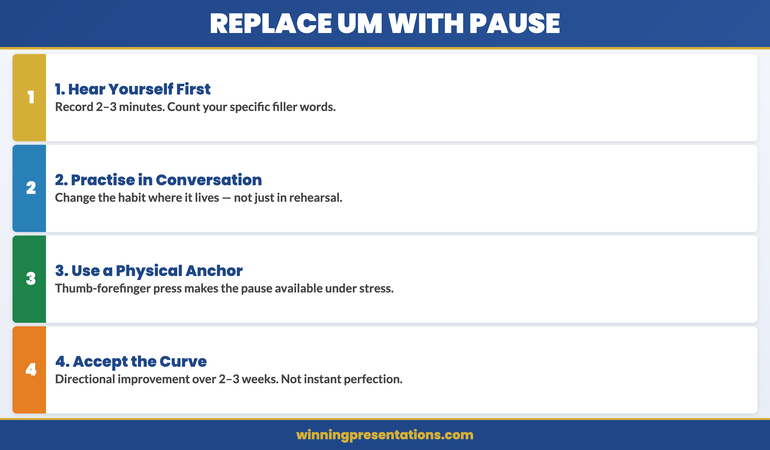
The four-step process for replacing filler words with deliberate pauses: Recognise the impulse, Close your mouth, Breathe and make eye contact, Continue speaking

How to Practise This So It Holds Under Pressure

Knowing the technique is the easy part. Making it available when you are presenting under real pressure requires a specific practice approach. Here is the method that produces reliable results.

Step 1: Hear yourself first

Record two to three minutes of yourself speaking — on any topic — without trying to control filler words. Listen back and note the specific words and phrases you use most frequently. Most people are surprised by both the frequency and the variety of their own filler words. You cannot change a habit you haven’t clearly identified.

Step 2: Practise in conversation, not just rehearsal

Catching filler words in a rehearsed speech is relatively straightforward because the script gives you structure. The harder and more valuable work is practising the pause in conversation — in meetings, phone calls, and informal exchanges — where you don’t have a prepared script to fall back on. This is where the habit is actually formed and where it needs to be changed.

Step 3: Use a physical anchor

During early practice, pair the deliberate pause with a physical sensation — pressing your thumb and forefinger together, or feeling your feet on the floor. This creates a proprioceptive anchor for the behaviour, which makes it more accessible under stress. The physical anchor gives the nervous system something concrete to reach for when the usual verbal placeholder habit activates.

Step 4: Accept the learning curve

In the early stages of changing this habit, you will sometimes produce filler words in situations where you are actively trying not to. This is normal. Habit change is not linear. The goal is directional improvement over two to three weeks of consistent practice — not immediate perfection from the first session. Tracking your frequency over time (via recording) will show you the trend even when individual sessions feel inconsistent.

See today’s related articles for context on the broader picture: how to present a pilot as a commercial case, how to take a technology roadmap to the board, and the structured approach to building lasting presentation skills at work.

Stop Letting Delivery Habits Undermine Your Ideas

Conquer Speaking Fear — £39, instant access — is a 30-day programme that addresses the nervous system patterns behind filler words and verbal uncertainty, so your delivery reflects the quality of your thinking rather than working against it.

Get Conquer Speaking Fear →

Designed for executives whose delivery doesn’t yet match the quality of their thinking.

Frequently Asked Questions

How long does it take to stop using filler words in presentations?

With consistent daily practice — recording yourself, catching the habit in conversation, and using the deliberate pause technique — most people notice a measurable reduction within two to three weeks. Eliminating filler words in scripted presentations typically happens faster than in spontaneous conversation, because the script provides structure that reduces the cognitive load that triggers filler words. The more challenging work is sustaining the change under the pressure of high-stakes presentations, which is where nervous system training becomes important alongside habit change.

Is it bad to use any filler words at all in a presentation?

Occasional filler words are unremarkable and entirely human. The problem is frequency and pattern — a speaker who uses one “um” in ten minutes barely registers with an audience; a speaker who uses forty registers as uncertain and underprepared. The goal is not complete elimination but deliberate control. A well-placed pause is consistently more effective than a filler word in any situation, but the occasional “um” in an otherwise authoritative delivery is not a credibility issue.

Why do I use more filler words with senior audiences than with peers?

Because the perceived stakes are higher, which activates a stronger stress response, which degrades speech fluency more significantly. This is a normal neurological response, not a sign that you’re particularly anxious or underprepared. The mitigation is nervous system regulation before and during high-stakes presentations — bringing your baseline arousal level down before you speak so that the prefrontal cortex has more processing resource available for articulation. The deliberate pause also helps in the moment: it creates a brief circuit break from the stress response that allows fluency to return.

The Winning Edge — Weekly Presentation Intelligence

Every Thursday, one framework or technique for high-stakes speaking — drawn from 24 years in boardrooms and 16 years training executives. Join The Winning Edge →

About the Author

Mary Beth Hazeldine is the Owner & Managing Director of Winning Presentations. With 25 years of corporate banking experience at JPMorgan Chase, PwC, Royal Bank of Scotland, and Commerzbank, and 16 years training executives in high-stakes presentation delivery, she advises senior leaders across financial services, healthcare, technology, and government on the full range of presentation performance — from structure to delivery to anxiety management.

Book a discovery call | View services

21 Apr 2026
Female executive presenting confidently on a large conference stage holding a handheld microphone, professional lighting, large audience visible, editorial photography style

Microphone Technique for Executives: Handheld, Lapel and Podium

Quick Answer

Poor microphone technique is one of the fastest ways to lose an audience before you have said anything worth hearing. The three types of microphone used in executive presentations — handheld, lapel, and podium — each require different habits. Get the technique right and the microphone disappears from the room’s awareness. Get it wrong and it becomes the only thing anyone notices. This is a mechanical skill, not a talent. It takes twenty minutes to learn and applies immediately.

I watched a divisional director lose the room in the first forty-five seconds of a company-wide address. He had prepared well. The content was clear. The slide structure was sound. But he walked to the front holding the handheld microphone at chin level and turned his head away from it every time he looked at his slides. The words reached the front rows and evaporated. The back third of the room heard a sequence of half-sentences and ambient noise.

The people in those back rows did not know why they could not follow him. They simply stopped trying. They checked their phones, leaned to whisper to colleagues, and disconnected from a presentation that deserved better. The director did not recover, not because the content failed, but because the physical credibility gap opened in the first minute became the frame through which everything else was read.

Microphone technique is one of those skills that is invisible when done correctly and catastrophic when done badly. Most executives are never taught it. It is assumed that someone who can present to a boardroom can also handle an amplification system. The assumption is wrong, and the consequences are measurable in audience engagement from the first sentence.

Presenting to a large audience and managing your nerves at the same time?

Conquer Speaking Fear is a 30-day programme using nervous system regulation techniques from clinical hypnotherapy. Designed for executives who have tried other approaches and still struggle with the physical and psychological experience of high-stakes presenting.

Find Out More →

Why Microphone Technique Matters More Than Most Executives Realise

In a small meeting room, voice projection is managed by the speaker. In a larger venue — a conference hall, a company-wide townhall, an awards ceremony, an industry event — amplification takes over that function. The microphone becomes the primary instrument of your voice, and if you do not know how to use it, you have handed control of your first impression to a piece of equipment you have not practised with.

The problem is compounded because microphone issues are almost always invisible to the speaker. When you turn your head and your voice drops out of the microphone’s pickup range, you feel nothing different. You have no signal that fifty per cent of the room just missed your opening statement. The feedback loop that would normally alert you — a restless audience, a confused expression, a question that reveals they did not follow — is delayed by several minutes, by which time the connection has already been severed.

The deeper issue is what poor amplification signals to an experienced audience. Senior professionals who attend many large presentations have a calibrated sense of what confident, prepared speakers look like on stage. Fumbling with a microphone, holding it inconsistently, or having feedback spikes from a lapel badly clipped suggests either inexperience with large formats or poor preparation. Neither is the impression you want to create in the first sixty seconds.

The solution is not complex. It requires understanding the three microphone types, the specific error patterns of each, and a pre-presentation soundcheck protocol that takes under five minutes. None of this is performance coaching. It is mechanical knowledge that anyone can apply immediately.

Handheld Microphone: The Positioning Errors That Destroy Clarity

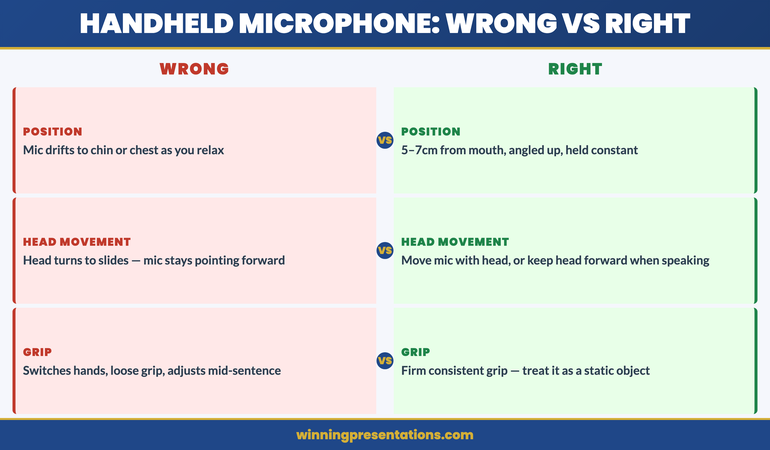
The handheld microphone is the most common in corporate presentations and the one most frequently misused. The fundamental rule is consistent distance: the microphone should be held approximately five to seven centimetres from your mouth, angled slightly upward, and maintained at that distance regardless of what your head does.

The most common error is letting the microphone drift downward as the presentation progresses. Speakers start with correct positioning and, as they relax into their content or begin referencing slides, the hand holding the microphone drops toward chin level, then toward the chest. At this point the microphone is capturing significantly less of the voice and more of the room’s ambient noise. The audience hears a reduction in clarity and volume that feels like disengagement, even if the speaker is fully present.

The second error is head-turning. When speakers turn to reference slides or look across the room, they often rotate their head while keeping the microphone stationary. The microphone stays pointing at where the voice was rather than following where it is. The fix is to move the microphone with your head, or to train yourself to keep your head forward when speaking and only glance at slides briefly rather than addressing them.

The third error is inconsistent grip. Nervous speakers often transfer the microphone between hands, hold it loosely, or grip it tightly and then adjust mid-sentence. Each adjustment creates a brief movement that disrupts pickup distance. Hold the microphone with a firm, consistent grip — treating it as a static object, not a prop — from the moment you take it to the moment you hand it back.

A practical test before any presentation with a handheld microphone: stand in front of a mirror, hold the microphone at the correct distance, and then do what you plan to do on stage — turn your head, gesture, reference notes. Watch what happens to the microphone position. The errors that appear in a mirror will also appear on stage.

Handheld microphone technique errors: drift downward, head-turning without moving mic, inconsistent grip — correct position shown at 5-7cm, angled upward, consistent throughout

Lapel Microphone: Placement, Clothing and Movement Rules

The lapel microphone, also called a lavalier, clips to clothing near the collar and provides hands-free amplification. It is common at conferences and company-wide events where the speaker needs freedom of movement. The three variables that determine whether it works are placement, clothing choice, and movement habits.

Placement is the most frequently mismanaged element. The clip should sit approximately fifteen to twenty centimetres below the chin, close to the centreline of the chest. Too low and the pickup weakens significantly; too high and the microphone is visible in camera shots and more susceptible to clothing noise. The exact placement depends on the sensitivity of the specific device, which is why a soundcheck matters — the technician will advise on positioning for that particular room and system.

Clothing creates the most unpredictable problems. Fabrics that rustle — certain synthetics, stiff cotton, structured jackets with internal lining — generate constant friction noise that the lapel microphone amplifies. This is not volume that the speaker can hear, but it is clearly audible to the audience and to anyone watching a recording. If you are presenting at a large event and wearing a lapel microphone, test your outfit with movement before you go on. Run your hand across the lapel area and listen for any fabric sound. Jackets with lapels are generally better than soft knitwear, which can move against the clip and generate intermittent noise.

Movement habits matter because turning your head sharply to one side — particularly if wearing a collar microphone near the jawline — can bring the jaw or shoulder into proximity with the pickup capsule, causing brief distortion. The fix is to turn from the body rather than leading with the chin: rotate your whole torso to address different parts of the room rather than swinging your head while your shoulders stay square.

Podium Microphone: How to Work It Without Being Trapped by It

The podium microphone is fixed in position, which creates a specific constraint that many speakers handle badly: they become physically anchored to the podium. They stand directly behind it, keep their movement minimal, and lose the stage presence that comes from occupying space freely. The microphone that was supposed to amplify their authority ends up containing it.

The key to working a podium microphone without being trapped by it is understanding its pickup angle. Most podium microphones have a cardioid pattern that captures a cone of sound roughly thirty to forty-five degrees wide directly in front of the capsule. You do not need to lean into the microphone. You need to speak across it from a consistent distance — typically twenty to thirty centimetres — and maintain that relationship even when you move your weight, gesture, or shift your stance.

The error most speakers make is leaning forward when they want to emphasise a point. The instinct is to move toward the audience when you want to make something land. But leaning into a podium microphone creates a volume spike that is jarring for the audience and uncomfortable in a large hall. Emphasis is better delivered through vocal variation — a slower pace, a deliberate pause, a lower register — rather than through physical proximity to the pickup.

If you want the freedom to move away from the podium briefly, discuss this with the AV team before the session. Many podium setups can be paired with a lapel backup that allows you to step out from behind the stand for a section of the presentation and then return. Planning this in advance is far more effective than improvising it on stage.

Understanding how to use eye contact effectively in executive presentations becomes significantly more powerful when your microphone technique is already handled — you can direct full attention to the room rather than managing the equipment at the same time.

Conquer Speaking Fear

Microphone technique handles the mechanics. Conquer Speaking Fear — £39, instant access — addresses the anxiety that makes the mechanics harder to manage in the moment. A 30-day programme built from clinical hypnotherapy techniques for executives who need a systematic approach to high-stakes presenting.

  • Nervous system regulation techniques from clinical hypnotherapy
  • 30-day structured programme for lasting anxiety reduction
  • In-the-moment techniques for the day of a high-stakes presentation
  • Designed for executives who have tried other approaches

Get Conquer Speaking Fear →

The anxiety management system built from clinical hypnotherapy, not just presentation tips.

When Anxiety Meets a Microphone: Managing Amplified Nerves

For speakers who experience presentation anxiety, a microphone adds a specific layer of difficulty. The physical symptoms of anxiety — a slight tremor in the voice, an increase in breathing rate, a dry mouth — become more apparent under amplification. Sounds that would be imperceptible to an audience of twenty become audible to an audience of two hundred. This knowledge itself increases the anxiety, which worsens the physical symptoms, which increases the awareness of the microphone. It is a reliable loop that catches many capable executives off guard the first time they present at scale.

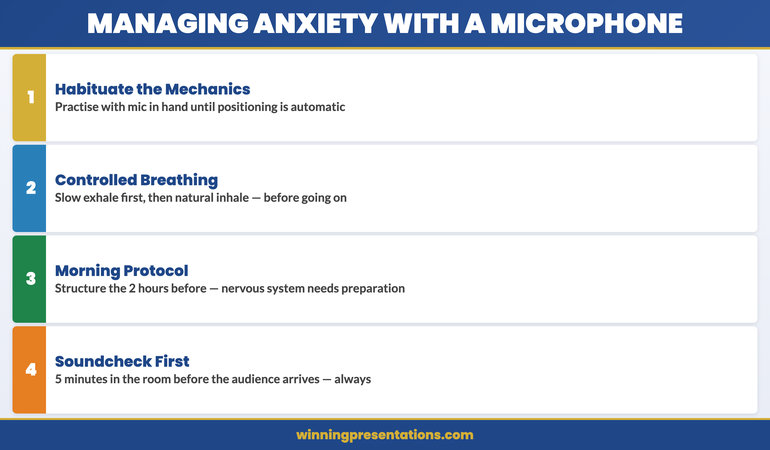
The most effective counter is preparation that is specific to the amplified format, not just to presenting in general. Practise with a microphone, or at least with your hand held in the position a microphone would occupy, so that the physical habit of holding it becomes automatic. Automatic behaviours are not disrupted by anxiety in the same way that novel behaviours are. When the mechanics of microphone use are fully habitual, they no longer compete with the cognitive and physical demands of managing nerves.

Breathing is more important under amplification than in smaller formats. The microphone will pick up an audible breath if it is sharp or gasped. Practise deliberate, controlled breathing before you go on stage: slow exhale, then a natural inhale, not the other way around. This is the breathing pattern associated with the parasympathetic nervous system rather than the stress response, and it reduces the visible and audible signs of anxiety more effectively than deep inhalation does.

The morning before a large presentation is also a significant factor. What you do in the two hours before you go on stage has a measurable effect on how well your nervous system manages the amplified format. A structured morning presentation protocol specifically for high-stakes events gives the nervous system the conditions to perform, rather than asking it to recover from a disordered start to the day.

If anxiety in large-format presentations is a consistent pattern for you rather than an occasional occurrence, that is not a microphone technique problem. The technique helps, but the root cause requires a different kind of work. Conquer Speaking Fear is designed specifically for executives dealing with persistent presentation anxiety — a 30-day programme built from clinical hypnotherapy, not generic confidence advice.

Microphone anxiety management: four steps — habituate the mechanics, controlled breathing technique, morning protocol, address root cause if pattern is persistent

The Soundcheck Protocol Most Speakers Skip

Most speakers arrive at a large event, accept the microphone from an AV technician, and walk to the stage. This skips the single most effective preparation available to them: a working soundcheck in the actual space, at the actual volume level, before the audience arrives.

A soundcheck takes four minutes. What it gives you is worth far more. First, you get to hear your own voice as the audience will hear it — amplified, in that specific room, at that specific volume. For most people this is a surprising experience: the voice sounds different, often deeper and more resonant, and getting comfortable with that difference before you are in front of five hundred people means you are not distracted by it when it matters.

Second, the soundcheck is where you discover problems. The lapel clip that causes friction against your jacket. The podium microphone positioned too far to the left of centre. The feedback frequency that kicks in when you turn toward the screen. These are all fixable before the presentation and difficult to manage during it.

Third, the soundcheck is where you establish rapport with the AV team. These are the people who control your volume, your slide progression, and the lighting. Treating them as professionals who are invested in your success — which they are — rather than as technicians to be given brief instructions creates a collaborative dynamic that consistently produces better outcomes on the day.

Request a soundcheck as a formal part of your arrival process for any event that uses amplification. If the organisers say there is no time, arrive thirty minutes earlier than they suggest and ask the AV team directly. Almost always, they will make time. They want the audio to work as much as you do.

The same principle of deliberate physical preparation applies to movement and stage positioning: professionals who walk the stage before the audience arrives always look more comfortable when the audience is there.

Frequently Asked Questions

What should you do if the microphone cuts out mid-presentation?

Pause briefly, signal to the AV team with a clear look or a raised hand, and project your voice naturally until the system is restored. Do not apologise repeatedly or call attention to the technical problem beyond acknowledging it once. Audiences are forgiving of equipment failures that are managed calmly and unforgettable when a speaker appears thrown by them. The ability to project without amplification for thirty seconds, if necessary, is worth practising specifically: speak from the diaphragm, not the throat, and maintain the same pace and authority your amplified voice would carry.

Is it acceptable to hold a handheld microphone with two hands?

Not typically. Two-handed microphone holding limits gesture, signals physical tension, and looks uncertain on stage. The exception is if the venue is very large and the microphone is heavy — some broadcast-quality handheld microphones have significant weight, and a two-handed hold can be appropriate for extended periods. In most corporate presentation contexts, one hand with a firm, relaxed grip is correct. The other hand should be free to gesture naturally or rest at your side.

How do you handle a microphone when you want to pause dramatically?

A deliberate pause is one of the most powerful tools in executive presenting, and the microphone changes how you manage it. If you lower the microphone during a pause, you signal that you are about to speak again when you raise it — which can reduce the impact of the silence. Keeping the microphone in position during a pause maintains the tension of the silence rather than breaking it. The audience reads the raised microphone and the silence simultaneously, which creates a more powerful expectation of what comes next.

The Winning Edge — A Newsletter for Executives Who Present

Every Thursday: one practical technique for structuring, presenting, or defending a high-stakes proposal. Designed for executives who need to communicate with authority, not just confidence.

Subscribe to The Winning Edge →

Conquer Speaking Fear

The 30-day programme for executives dealing with persistent presentation anxiety — built from clinical hypnotherapy techniques that address the nervous system root cause, not just the surface symptoms. £39, instant access.

Get Conquer Speaking Fear →

The anxiety management system built from clinical hypnotherapy, not just presentation tips.

When you are ready to address the Q&A session that follows a large-format presentation, the same discipline applies: preparation and habit formation reduce the unpredictability. See the companion article on handling Q&A in team settings for a structured approach to managing questions under pressure.

About the Author

Mary Beth Hazeldine is the Owner and Managing Director of Winning Presentations. With 25 years of corporate banking experience at JPMorgan Chase, PwC, Royal Bank of Scotland, and Commerzbank, she advises executives across financial services, healthcare, technology, and government on structuring presentations for high-stakes funding rounds and approvals.

18 Apr 2026

Asynchronous Presentation: How to Deliver Impact Without a Live Audience

Quick Answer: Recording an asynchronous presentation produces a specific kind of anxiety that live presenting does not — no audience feedback, no natural pacing cues, no recovery from a stumble. The result is often either a flat, over-rehearsed delivery that sounds scripted, or a fractured recording session full of restarts that never quite captures what you know you can do. The fix is a structured approach: script the architecture rather than the words, regulate your physical state before hitting record, and apply a clear protocol for when to continue versus when to re-record.

Ngozi was Head of Client Success at a SaaS company with teams across eight time zones. When her director asked her to record a 12-minute overview of Q1 client health metrics for a global leadership meeting, she assumed it would take an hour. Two and a half hours later, she had completed eight full takes and was still not happy with any of them.

The problem was not her knowledge of the material — she knew it precisely. It was the silence. In a live meeting, she could read the room: a nod told her to move on, a furrowed brow told her to explain further, a shift in posture told her she had the room’s attention. Recording herself for an audience she could not see produced a physical response she had not anticipated — a slight tightening in her voice, a tendency to rush through the data slides, and a persistent sense that she had somehow got the tone wrong even when the content was correct.

The restarts were making it worse. Each time she re-recorded, she became more self-conscious, not less. The ninth take was worse than the third. She stopped, spent fifteen minutes on a physical regulation routine she had learned from a coaching session, went back to her one-page script outline — not a word-for-word script, just the architecture of each section — and recorded it in one take that was good enough to send.

The leadership team’s response was warm and specific. The recording had landed. Not because it was technically perfect — there was one moment where she stumbled slightly and kept going — but because it felt real and considered. That is the standard an asynchronous presentation actually needs to meet.

If recording yourself triggers a physical anxiety response

The Calm Under Pressure programme is designed for in-the-moment physical symptom management during presentations — including the specific tension patterns that recording without a live audience tends to produce. It addresses the physical state, not just the mindset.

Explore the Programme →

Why Recording Yourself Creates a Different Kind of Anxiety Than Live Presenting

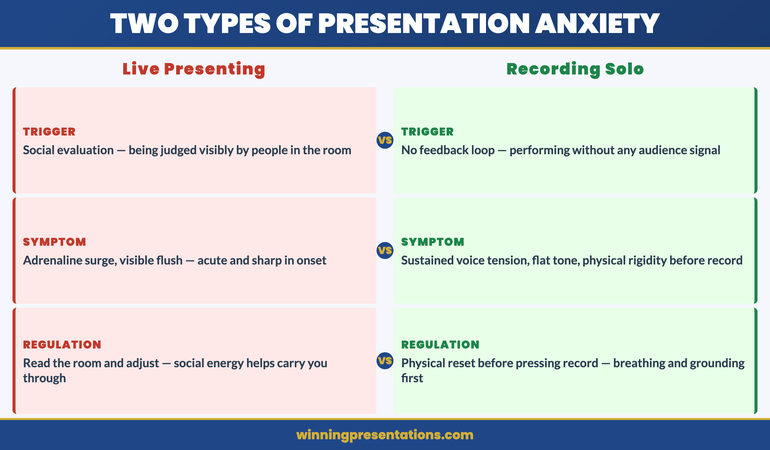
Live presenting produces anxiety primarily through social evaluation: the fear of being judged, of losing the room, of visibly struggling in front of people whose opinions matter. This is uncomfortable, but it comes with natural regulation mechanisms — you read the room, you adjust, you get into the flow of a conversation, and the social energy of the room often carries you through difficult moments.

Recording yourself without an audience removes all of those regulation mechanisms simultaneously. There is no room to read. There is no social energy to carry you. There is no feedback loop that tells you whether you are going well or badly — only your own internal critic, which has no information about how the recording is actually landing and tends to default to “worse than expected.”

The physical response to this is distinct from live presentation anxiety. Rather than the adrenaline surge of walking into a room, recording anxiety tends to manifest as a sustained physical tension — a slight tightness in the throat and chest, a flatness in vocal tone, a tendency toward over-precision in diction that makes delivery sound rehearsed rather than natural. Executives who present with considerable confidence in live settings often find that their recorded delivery sounds noticeably less authoritative than they know themselves to be. This is not a performance problem. It is a physiological response to an unnatural stimulus: performing without an audience for an audience you cannot see.

Understanding this distinction matters because the solution is different. Live presentation anxiety responds well to preparation and rehearsal. Recording anxiety responds better to physical regulation before recording and a structural approach to delivery that gives you something to navigate rather than a blank canvas to fill. The screen sharing and virtual presence framework covers the related challenge of delivering effectively on camera — many of the same principles apply here.

Calm Under Pressure

Manage the Physical Response That Undermines Your Recorded Delivery

Calm Under Pressure — £19.99, instant access — is designed for in-the-moment physical symptom management in presenting contexts. It addresses the specific physical patterns that recording without an audience tends to produce: voice tension, delivery flatness, and the physical spiral that makes restarts worse rather than better. Techniques designed for the moments before and during high-stakes presentation delivery.

  • In-the-moment physical regulation techniques for voice tension and delivery anxiety
  • Breathing and grounding frameworks for solo recording and virtual presentation environments
  • Physical symptom management for presenting without live audience feedback
  • Protocols for resetting your physical state when recording sessions are not going well

Get Calm Under Pressure →

Designed for executives who experience physical anxiety symptoms during presentations.


Asynchronous Presentation Anxiety infographic comparing Live Presentation anxiety triggers (social evaluation, losing the room, visible struggle) versus Recording anxiety triggers (no feedback loop, internal critic, sustained voice and physical tension) — with different regulation approaches for each

The Physical Setup That Reduces Delivery Anxiety

The physical environment in which you record has a measurable effect on delivery quality — not just for technical reasons, but because environmental signals shape your physiological state before you begin.

Camera position matters more than most executives realise. A camera positioned below eye level is the most common setup mistake in recorded presentations, and it produces a subtle but perceptible effect: the presenter appears to be looking slightly down, which reads as diminished authority or discomfort. Camera at eye level — which typically means elevating the laptop or external camera to head height — produces a noticeably different quality of presence on screen. You are speaking with your audience rather than at them or above them.

Lighting has a similar effect on the physical experience of recording. Poor lighting — particularly strong backlight from a window behind the presenter — forces a subtle physical tension as the camera struggles to compensate and the presenter senses that the image is not clear. A single key light source positioned in front of and slightly above the presenter reduces this tension significantly. Natural daylight from in front is ideal; a ring light is a reliable alternative. The practical principles behind virtual setup are covered in the hybrid meeting facilitation guide — the same environmental principles apply to async recording.

The two minutes before you hit record are as important as the setup itself. A brief physical regulation routine — slow breathing, a deliberate relaxation of the shoulders and jaw, and two or three slow exhales — reduces the physical tension that accumulates in the lead-up to recording. The goal is not to be relaxed in the way you might be in a casual conversation. The goal is to be in the physical state from which your natural authority emerges. Most people know what that state feels like. The regulation routine is designed to get you there intentionally rather than waiting to stumble into it.

How to Script Without Sounding Like You Are Reading

The instinct when recording an asynchronous presentation is to write a full script — every word, every transition, every data point — so that nothing gets missed and nothing sounds uncertain. The result is almost always a recording that sounds exactly like what it is: someone reading from a script. The fluency markers that indicate natural speech — the slight variation in sentence length, the occasional pause for thought, the natural emphasis that comes from actually thinking about what you are saying — are absent, and their absence is immediately perceptible to listeners.

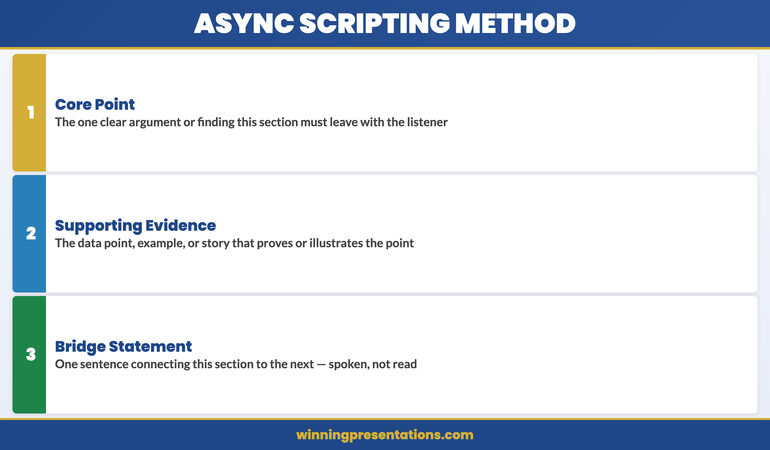
The alternative is not to record without preparation. It is to script the architecture rather than the words. For each section of your asynchronous presentation, prepare a one to three bullet point outline: the core point you are making, the supporting evidence or example you will use, and the bridging statement that moves you to the next section. That is your script. Within each section, you speak to those points rather than reading predetermined sentences.

This approach has a specific cognitive benefit. When you are working from an architectural outline rather than a word-for-word script, the process of expressing each point engages your thinking rather than your memory. Your delivery becomes the natural product of actually engaging with the material — which is exactly what your audience will perceive as authority and genuine expertise.

The exception to this principle is the opening statement. Writing and memorising a single strong opening sentence — delivered directly to camera — anchors the recording with presence and sets the tone for everything that follows. First impressions in recorded presentations are formed within the first ten seconds, and a confident, direct opening statement creates a frame that benefits every subsequent section. The principles behind effective opening delivery are covered in the Teams presentation delivery framework — the same opening principles apply across virtual and recorded formats.

If the physical symptoms of recording anxiety — voice tension, difficulty finding your natural delivery register, the restart spiral — are a consistent challenge, Calm Under Pressure addresses these at the physical level, with in-the-moment techniques designed for presenting contexts specifically.


Async Presentation Scripting Method infographic showing the architectural outline approach: for each section prepare Core Point, Supporting Evidence or Example, and Bridge to Next Section — contrasted with the full-script approach that produces robotic delivery

Your Voice Without an Audience: Why It Sounds Wrong and How to Fix It

Most people, when they first listen back to a recording of themselves presenting, have the same reaction: that does not sound like me. The voice sounds flatter, more monotone, more hesitant than the presenter believed they sounded while recording. This is not a delusion — it reflects something real about what happens to vocal delivery when the live audience is removed.

In a live presenting environment, your voice is shaped partly by the room’s response. You raise volume when the room gets quieter and you sense it is needed. You slow down when you see a furrowed brow. You lean into emphasis when a point lands and the room’s energy confirms that it has. These are not conscious decisions — they are automatic responses to social feedback that regulate your vocal delivery in real time.

Recording removes all of these regulation signals. The result is that voice tends to compress: the dynamic range narrows, the pace either rushes or stalls without natural audience pacing to guide it, and the emphasis becomes either over-performed (because the presenter is consciously trying to be expressive without feedback) or flat (because the effort of compensating has depleted the vocal presence that would otherwise emerge naturally).

The practical fix has two components. The first is physical: recording standing up rather than seated produces measurably better vocal quality for most people. Standing removes the subtle compression of the diaphragm that sitting produces, which allows the voice more physical resonance. The second is directional: speak to one person in your mind’s eye, not to an abstract audience. Identify a specific individual — a trusted colleague, a client whose opinion you respect — and speak to them directly. The voice naturally adjusts to direct conversation in ways that it does not adjust to broadcasting, and recorded presentations benefit from exactly that quality of directed, conversational engagement.

Managing the Urge to Restart: A Decision Framework

The restart spiral is the most common technical failure in asynchronous presentation recording. The presenter stumbles, stops, and starts again — and with each restart, the awareness of the stumble increases, the physical tension builds, and the subsequent take is marginally worse than the one before. After five or six restarts, the presenter is recording in a state of elevated anxiety that is audible in every take.

The instinct driving the restart spiral is the assumption that the recording needs to be perfect to be effective. This is not accurate. Listeners do not experience a slight stumble or an “um” in a recorded presentation the way presenters expect. What listeners notice is not individual errors — it is the overall quality of presence and the sense that the presenter actually knows what they are talking about. A recording with two minor stumbles delivered with genuine authority is significantly more effective than five careful restarts that produce technically perfect but lifeless delivery.

A clear decision framework for restarts reduces the spiral significantly. There are two situations in which a restart is warranted: you lose your place entirely and cannot recover the thread within three seconds, or you have said something factually incorrect that the audience will notice. Everything else — a filler word, a slight mis-step in phrasing, a pause that felt awkward — is not a restart. It is a moment of natural speech that most listeners will not consciously register.

If you do need to restart, build a full physical reset into the pause: stand up if you were seated, do a slow exhale, and physically shake out the tension in your hands and shoulders before sitting back down. Recording again immediately after a frustrating take compounds the physical tension that produced the problem in the first place. The reset is not a delay — it is the preparation for a take that is worth sending.

The Companion Message That Gets Your Recording Watched

An asynchronous presentation that no one watches has no impact, regardless of its quality. The single most underinvested element of async presentation preparation is the companion message — the text that accompanies the recording in the email, Teams message, or Slack post through which it is distributed.

The companion message serves three functions. First, it gives the recipient a reason to prioritise watching: not “please see attached recording” but “I have recorded a 12-minute overview of the Q1 client health metrics — the key finding is X, and I would like your view on Y before the leadership meeting on Thursday.” The reason to watch and the specific ask are both explicit. Second, it sets expectations: telling the recipient how long the recording is (“12 minutes”) and what decision you need from them by when removes the two most common friction points that cause async recordings to be deferred rather than watched. Third, it signals that you have not just offloaded information but prepared something worth their time.

The companion message should be no more than four sentences. One sentence that states the context and what the recording covers. One sentence with the key finding or recommendation. One sentence with the specific decision or input you need. One sentence with the deadline. Everything else is overhead that reduces the likelihood of the recording being watched promptly. If the asynchronous recording is followed by a live Q&A session, the STAR method for executive Q&A provides the structured response framework for handling the follow-up questions when you are eventually in the room with the audience.

Calm Under Pressure

Physical Symptom Management for Presenting Under Pressure

Calm Under Pressure — £19.99, instant access — gives you in-the-moment physical regulation techniques for the specific symptoms that undermine presentation delivery: voice tension, physical rigidity, the restart spiral, and the sustained anxiety of performing without live audience feedback. For virtual and recorded presenting contexts as well as live ones.

Get Calm Under Pressure →

Designed for executives who experience physical anxiety symptoms in presenting contexts.

Frequently Asked Questions

How do you make an asynchronous presentation sound natural?

The most reliable way to make a recorded asynchronous presentation sound natural is to script the architecture rather than the words. For each section, prepare a brief outline — the core point, the supporting evidence, and the transition to the next section — and speak to those points rather than reading from a full script. Full scripts produce delivery that sounds read because it is being read. The architectural outline gives you structure without suppressing the natural speech patterns that make delivery sound authoritative and genuine. The opening statement is an exception: write and memorise one strong opening sentence to deliver directly to camera. Everything after that should come from genuine engagement with your outline rather than precise recall.

How long should an asynchronous presentation be?

For most executive and business contexts, an asynchronous presentation should run between eight and fifteen minutes. Below eight minutes, the recording may not provide sufficient depth on complex topics. Above fifteen minutes, the likelihood of the full recording being watched in a single sitting drops significantly — most recipients will begin it, reach a natural break point, and not return. If your content genuinely requires more than fifteen minutes, break it into clearly labelled sections (each with its own short companion message) and allow recipients to watch sections in the order most relevant to them. Respecting your audience’s attention is a form of executive communication competence, and a concise recording that is watched in full is more effective than a comprehensive one that is watched in part.

What equipment do you actually need to record a professional asynchronous presentation?

For the majority of business contexts, the equipment you already have is adequate — with two adjustments. First, elevate your camera to eye level if you are using a laptop or built-in webcam; this single change has more impact on perceived authority than almost any other equipment decision. Second, address your lighting: ensure your light source is in front of you rather than behind you, and if possible use a simple ring light or position yourself facing a window. A good external microphone improves audio quality noticeably, and clean audio matters more than high-definition video for most business presentations. Beyond these adjustments, the quality of your delivery — preparation, physical state, scripting approach — has far greater impact on the recording’s effectiveness than the technical specifications of your equipment.

The Winning Edge

Weekly insights on executive presentations, delivered every Thursday. Practical frameworks, real scenarios, and no generic advice.

Subscribe to The Winning Edge →

About the Author

Mary Beth Hazeldine — Owner & Managing Director, Winning Presentations

With 25 years of corporate banking experience at JPMorgan Chase, PwC, Royal Bank of Scotland, and Commerzbank, Mary Beth Hazeldine advises executives across financial services, healthcare, technology, and government on structuring presentations for high-stakes funding rounds and approvals. She works directly with senior leaders to build the communication skills that hold up under pressure. Learn more at Winning Presentations.

16 Apr 2026
Female executive presenting to a senior team in a large open meeting room, standing with composed grounded posture, audience visible and engaged, professional corporate setting

Movement During Presentations: How to Use Physical Space Without Losing Authority

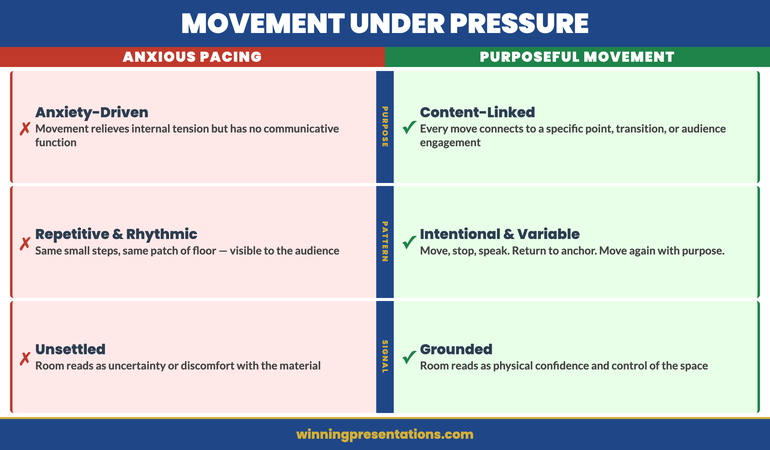
Quick answer: Movement during presentations affects how authority is perceived — but the nature of that movement determines whether it increases or undermines credibility. Purposeful movement that connects to a specific point, transitions between content sections, or closes the physical distance with a key audience member builds presence. Anxious movement — pacing, rocking, shifting weight repeatedly — signals discomfort and draws the audience’s attention away from what is being said. Managing movement under pressure is a physical discipline, not simply a matter of awareness.

Valentina knew her material. She had spent three evenings preparing the numbers and had rehearsed the key points twice the night before. Walking into the steering committee room, she felt reasonably prepared — until she reached the front of the room and realised there was no lectern, no table to stand behind, and sixteen people seated in a horseshoe facing her directly.

She started well. But by the third slide, she noticed she had moved to the left side of the room and was unconsciously pacing — small, repetitive steps that she could feel herself making but could not seem to stop. The movement was not covering any ground purposefully. It was simply the physical expression of the discomfort she was managing internally. A colleague told her afterwards that one of the committee members had whispered something to the person beside him around slide four. She spent the drive home convinced it was about her movement.

What Valentina experienced was not unusual. The physical symptoms of presentation anxiety — the activated nervous system, the heightened muscle tension, the excess energy that has no natural outlet in a formal presentation setting — often manifest as movement. The movement feels like it is helping, because it is releasing physical tension. But to the audience watching, particularly a senior one, it reads as something else entirely.

If physical symptoms — including nervous movement, tension, and restlessness — are affecting how you come across in high-stakes presentations, Calm Under Pressure provides a structured approach to managing those physical responses in the room.

Explore the Approach →

Why Nervous Movement Signals Uncertainty to Senior Audiences

Senior audiences read physical signals faster than most presenters realise. Before the first sentence has been completed, the room has already formed an impression based on how the presenter entered the space, where they stood, and what their body was communicating before they spoke. Nervous movement is one of the clearest physical signals that an audience receives and interprets — often without consciously registering that they are doing so.

The reason nervous movement reads as uncertainty is grounded in how people interpret physical behaviour in high-stakes contexts. A presenter who is comfortable with the material and comfortable in the room typically uses their body deliberately — they move to make a point, to shift the audience’s attention, or to manage the physical space of the room. When movement is random, repetitive, and disconnected from the content, it signals that the body is reacting to internal discomfort rather than engaging with the external environment.

For senior audiences — particularly boards, investment committees, and executive leadership teams who have spent years assessing presentations — this interpretation happens quickly and often with limited generosity. They are not wrong to notice it. Movement under pressure is genuinely informative about a presenter’s internal state. The question is not whether the audience will read it, but what you are giving them to read.

Understanding the relationship between movement and perceived authority is part of the broader discipline of executive physical presence. For related reading on how hand and arm positioning affects credibility, the article on presentation gestures and executive authority covers how deliberate gesture use reinforces rather than contradicts what is being said.

Calm Under Pressure — £19.99, instant access

Manage the Physical Symptoms of Presentation Anxiety — In the Room, in Real Time

Calm Under Pressure is a practical resource for executives who experience physical symptoms of anxiety in high-stakes presentations — shaking, sweating, voice changes, restlessness, and the kind of nervous energy that shows up in your body before the room has had a chance to form an opinion. It provides in-the-moment physical management techniques designed for professional settings where you cannot pause and regroup.

  • In-the-moment techniques for managing physical symptoms under pressure
  • Methods for grounding restless movement and nervous energy before you speak
  • Physical reset protocols for use between slides and during Q&A
  • Frameworks for maintaining composed physical presence through challenging moments

Get Calm Under Pressure →

Designed for executives and professionals who present under pressure and need practical in-the-moment physical management.

The Difference Between Purposeful Movement and Anxious Pacing

Not all movement during a presentation signals anxiety. Skilled presenters move deliberately and purposefully — and that movement enhances rather than undermines their authority. The distinction between purposeful movement and anxious pacing is not primarily a matter of how much you move, but whether the movement has an intentional relationship to the content and the audience.

Purposeful movement serves a communicative function. Walking toward a specific audience member while making a key point closes the physical distance and increases the sense of direct communication. Moving to a different part of the room when transitioning between sections of content signals to the audience that something has shifted — it provides a physical marker for a structural change in the presentation. Pausing in stillness to allow a significant point to land is a form of deliberate non-movement that communicates confidence and control.

Anxious pacing is characterised by repetitiveness and disconnection from the content. The pacing presenter moves because the internal discomfort demands a physical outlet — not because the movement serves any communicative purpose. The steps are often small, often rhythmic, and often cover the same patch of floor. The audience recognises this pattern not because they have analysed it consciously, but because it lacks the intentionality that deliberate movement carries.

A useful internal test during rehearsal: if you ask yourself why you moved just then and the honest answer is “I don’t know” or “I needed to,” the movement was anxious. If the answer is “I moved to emphasise that point” or “I moved to shift the audience’s attention to the screen,” the movement was purposeful. This distinction, practised in low-stakes rehearsals, builds the habit of intentional physical communication before you enter a room where the stakes are high.


Contrast showing purposeful movement versus anxious pacing in presentations: deliberate movement toward audience, transitional movement between sections, versus repetitive pacing disconnected from content

How Anxiety Produces Unhelpful Physical Patterns

Presentation anxiety produces two distinct physical responses that affect how you occupy space in a room. The first is excess activation — the kind of nervous energy that manifests as pacing, hand movements, weight shifting, and restlessness. The second is physical freezing — a paradoxical stiffness that can set in when the anxiety is high enough that the nervous system pulls the body into a contracted, protective posture.

Both patterns — the overactive and the frozen — communicate anxiety to observers, but they do so in different ways. The overactive presenter reads as unsettled, unfocused, or uncertain about whether they should be in the room. The frozen presenter reads as stiff, disconnected, or under-prepared. Neither pattern is neutral in the way that a presenter might hope when they are simply trying to manage an internal physical state that they cannot directly control.

The anxiety-movement link is physiological. When the body perceives a threat — and a high-stakes presentation to a senior audience is interpreted by many nervous systems as a form of threat — it activates the sympathetic nervous system. Adrenaline and cortisol are released. Muscles are tensed in preparation for physical action that never comes. The body’s physical tension has nowhere to go in a boardroom, so it emerges as movement or as rigidity.

Understanding this mechanism is the first step toward managing it. You are not choosing to pace or to freeze — you are experiencing a physiological response to a perceived threat. The management strategies that work address the physiological state directly, not just the surface behaviour. Telling yourself to stop moving is rarely effective because the underlying activation has not changed. Physical grounding — through breath, through intentional muscle tension and release, through deliberate postural choices — works at the level of the nervous system, not just the conscious instruction.

For executives who experience the pre-presentation activation period as particularly difficult to manage, the article on morning presentation protocols covers how to structure the hours before a high-stakes presentation to reduce the peak of that activation before you enter the room. Managing your physical state ahead of time is more effective than trying to manage it in the moment.

Three Movement Patterns That Undermine Your Credibility

Most presenters have one or two default physical habits that they cannot easily observe in themselves during a presentation. These habits tend to be more visible in video recordings than in live self-assessment — which is one reason that rehearsing on camera, even informally, is such a reliable diagnostic tool. Three patterns appear most commonly in senior executive presentations where movement is unmanaged.

The first is the retreat pattern — moving backwards or sideways away from the audience when making a significant point. This pattern appears when the presenter is unconsciously protecting themselves from the perceived exposure of making a strong claim. The body retreats even as the words advance. The audience reads this as ambivalence — a presenter who is not fully behind what they are saying. Moving forward, toward the audience, on significant points is the correction.

The second is the weight-shift pattern — rhythmically transferring weight from foot to foot while standing in place. This is one of the most common physical habits in presentations and one of the most distracting to observe. It creates a visual rhythm that draws the eye and that reads as restlessness even when the presenter feels relatively calm. The corrective posture is feet shoulder-width apart with weight distributed evenly — a stance that feels slightly over-deliberate in rehearsal but reads as grounded to the audience.

The third is the back-turn pattern — consistently turning toward the screen or slide deck rather than maintaining eye contact with the audience. This pattern often emerges when a presenter is anxious about their content and uses the slides as a prompt. The act of turning away from the audience reduces the physical engagement with the room and signals that the presenter is not fully present with the people in front of them. Managing slides from a position that maintains forward facing — whether through memorisation, a presenter view on a laptop, or deliberate practice — removes the need for the back-turn entirely.

For practical techniques for maintaining eye contact and physical engagement with senior audiences, the article on eye contact techniques in executive presentations covers the specific disciplines for distributing attention across a room of senior decision-makers without triggering the anxiety response that makes sustained eye contact difficult.

If physical symptoms — including these movement patterns — are a persistent challenge in high-pressure presentations, Calm Under Pressure provides in-the-moment physical management techniques designed specifically for professional presentation contexts where the standard approach of taking a break or regrouping is not available.


Three movement patterns that undermine presentation credibility: the retreat pattern, the weight-shift pattern, and the back-turn pattern — with corrections for each

Building Physical Confidence for High-Stakes Presentations

Physical confidence in presentations is not a personality trait — it is a practised competence. Presenters who appear naturally composed in high-stakes rooms have typically developed that composure through deliberate rehearsal, feedback, and the accumulated experience of managing their physical state under pressure. The composure looks natural because it has become habitual; it was not natural at the start.

Building physical confidence begins with establishing a default physical position that feels stable under pressure. For most presenters, this means a grounded stance — feet approximately shoulder-width apart, weight evenly distributed, hands in a neutral position either clasped lightly in front or resting at the sides. This position may feel unnatural at first, particularly if the body’s default response to pressure is to contract or to move. Practising it in low-stakes contexts until it feels comfortable is the only way to make it available when the stakes are genuinely high.

Physical confidence also develops through deliberate movement practice. Rather than waiting for high-stakes presentations to discover your physical habits, rehearsing in a space that mimics the presentation environment — a similar-sized room, a similar physical arrangement — allows you to map out your movement choices before they become reactive. Where will you stand for the opening? Where will you move to on the first key point? Where will you position yourself for the Q&A? Making these decisions in rehearsal means you are not making them for the first time in the room.

The link between physical confidence and voice quality is also worth noting here. When the body is tense and movement is anxious, breath becomes shallow, and the voice loses both depth and steadiness. A grounded physical position supports fuller breathing, which in turn supports a more controlled and authoritative vocal delivery. Physical confidence and vocal confidence are not independent qualities — they reinforce each other in both directions. For related reading on this connection, the companion article on voice control during executive Q&A covers how physical grounding and breath management combine to maintain vocal authority under questioning.

Practising Movement Control Before You Enter the Room

The most effective physical preparation for a high-stakes presentation happens in the minutes immediately before the session, not only in the days of rehearsal leading up to it. The body’s activation state in those final minutes — the cortisol and adrenaline already circulating, the muscles already tensed — will shape how you move and stand once you enter the room. Working with that state deliberately, rather than hoping it will settle on its own, makes a measurable difference to how you present.

One of the most reliable pre-entry practices is deliberate physical grounding. Before entering the presentation room, find a private space — a corridor, an empty office, a bathroom — and spend ninety seconds in the default grounded stance described earlier. Feel the weight distributed evenly through both feet. Relax the muscle tension in the shoulders and jaw, which are typically the first places anxiety concentrates. Take three slow, extended exhales. The purpose is not to eliminate the activation — that would be neither possible nor desirable. It is to establish a physical baseline that is closer to composed than to reactive.

Entering the room early, when it is still empty or occupied only by support staff, also allows you to establish your physical relationship with the space before the audience arrives. Stand where you plan to stand. Walk the movement path you have rehearsed. Make the space familiar to your body before it is occupied by the people whose judgement you are managing your anxiety about. Familiarity with the physical environment reduces the additional activation that comes from encountering an unfamiliar space while simultaneously managing the presentation itself.

The pre-room preparation window is also the right time to set your physical intention. Not your content objective — your physical one. A simple internal instruction — “I will stand still unless I am moving with a purpose” — functions as a behavioural anchor that can interrupt habitual anxious movement patterns before they take hold. The instruction does not need to be complex. It needs to be specific enough that you will remember it in the room when the activation is high and the habits are pulling in a familiar direction.

Calm Under Pressure — £19.99, instant access

Manage Physical Symptoms and Nervous Energy in High-Stakes Presentations

Calm Under Pressure provides in-the-moment physical management techniques for executives who experience shaking, nervous movement, voice changes, or physical tension during presentations. It is designed for professional settings where you cannot pause, retreat, or visibly manage your anxiety.

Get Calm Under Pressure →

Designed for executives and senior professionals who need to present with composure under genuine pressure.

Frequently Asked Questions

Is it better to move around the room or stay in one place during a presentation?

Neither is inherently better — the quality of the movement determines whether it helps or hinders. Purposeful movement that connects to specific moments in the content — walking toward an audience member when making a key point, shifting position to signal a transition between sections — enhances presence. Staying in one place with genuine composure and intentional stillness also communicates authority. What undermines credibility is not the presence or absence of movement, but the repetitive, disconnected movement that signals physical restlessness rather than deliberate engagement with the room.

What should I do with my hands if I am not gesturing?

The two most neutral hand positions for a standing presentation are a light clasp in front of the body — hands lightly held at roughly waist height — or hands resting naturally at your sides. Both feel more self-conscious than they look to the audience. Hands in pockets, arms crossed, or hands gripping a lectern all carry stronger negative signals than either neutral position. If you tend to fidget with rings, pens, or clothing during high-stress moments, removing the prop before entering the room removes the fidgeting opportunity.

How do I stop pacing when I cannot tell I am doing it in the moment?

The most reliable method is to use a physical anchor — a specific spot in the room that you return to as your default position after any deliberate movement. If you have established this anchor in rehearsal, returning to it becomes a habit that interrupts the pacing pattern without requiring you to consciously monitor your movement during the presentation itself. Video review of rehearsal recordings is also valuable: most people are surprised by their movement habits when they see them on screen, and that visual feedback is more effective at building awareness than verbal feedback from observers.

The Winning Edge — Weekly Newsletter

One Insight Per Week on Executive Communication

Each week, The Winning Edge delivers one focused insight on executive communication — structure, delivery, influence, and the mechanics of getting senior audiences to yes. Straightforward, applicable, and written for people who present under pressure.

Subscribe to The Winning Edge →

About the Author

Mary Beth Hazeldine — Owner & Managing Director, Winning Presentations

With 25 years of corporate banking experience at JPMorgan Chase, PwC, Royal Bank of Scotland, and Commerzbank, and 16 years training executives in high-stakes communication, Mary Beth advises professionals across financial services, healthcare, technology, and government on presenting with authority and composure under genuine pressure. Winning Presentations is her specialist advisory practice.

15 Apr 2026
Male executive presenting via Microsoft Teams, confident expression, professional home office setting

Microsoft Teams Presentation: The Features That Build Confidence and Authority in Virtual Meetings

Quick Answer
Most executives use Microsoft Teams at a fraction of its presentation capability. The features that genuinely change how you come across — Presenter Mode, Spotlight, Background Blur precision, live reactions view — are rarely activated in senior executive meetings. More importantly, technology confidence directly reduces presentation anxiety: knowing exactly what your audience sees eliminates a significant source of pre-meeting dread. When you stop worrying about whether your slides are displaying correctly, you free up cognitive and emotional resources for the actual conversation.

Tomás had been presenting quarterly finance updates to the executive committee via Teams for two years. He was good at the numbers. He understood the story behind them. But every session carried the same low-grade dread from the moment he clicked “Join.”

He never quite knew whether his slides were displaying correctly, or whether the tiny black-and-white thumbnail versions he could see in the corner represented what the CFO and three regional directors were actually looking at. He couldn’t read facial reactions — just names in boxes. His camera sat too low, pointing slightly upward, and he’d never found the right moment to fix it. So he carried on. Dry mouth before every meeting. A tightness in his chest that didn’t fully release until the call was over. He’d assumed that was just what virtual presenting felt like. He was wrong.

If the anxiety of virtual presentations is affecting how you perform in Teams meetings, Calm Under Pressure gives you specific techniques for managing the physical symptoms of presentation stress in the moment — dry mouth, racing pulse, voice shake, and the chest tightness that can make it hard to think clearly mid-presentation.

Explore the Approach →

Why Teams Presentations Trigger a Different Kind of Anxiety

In-person presentations have their own pressures, but they give you something virtual meetings almost never do: immediate, readable feedback. You can see when someone leans in. You notice when the room goes quiet in the right way. You get to sense the energy before you even open your mouth. Virtual presentations strip most of that away, and the brain registers that absence as threat.

The anxiety that builds around Teams presentations is often less about the content and more about uncertainty. Are the slides showing? Did that last point land or did three people mute themselves because they’re checking email? Is the camera making you look unprepared? These questions run in the background like an open application you can’t quite close, consuming mental resource that should be directed at your message.

There is also a specific kind of pressure that comes from presenting to senior stakeholders in a format that feels inherently casual. The video call box places you beside everyone else regardless of seniority. The meeting recording banner is always visible. The chat panel scrolls with messages you may or may not be aware of. It is a format designed for conversation, pressed into service for high-stakes communication — and that tension is real.

Mastering your Teams environment does not remove all of that uncertainty. But it removes enough of it that the anxiety starts to reduce to a manageable level. When you know exactly what your audience sees, you stop generating catastrophic interpretations of their silence. That is a significant shift.

Calm Under Pressure — £19.99, instant access

Manage the Physical Symptoms of Presentation Anxiety — Before, During, and After Your Next Teams Meeting

Most advice about presentation nerves focuses on preparation and mindset. Calm Under Pressure takes a different approach: it addresses the physical symptoms that hit you in the moment — the symptoms that no amount of preparation has managed to prevent. Shaking hands. Sweating. Voice that won’t hold steady. The nausea that arrives as you click “Join.” These are real physiological responses, and there are specific techniques for managing them.

  • In-the-moment techniques for stopping visible shaking and steadying your hands
  • Breathing protocols that activate the parasympathetic nervous system within 60 seconds
  • Voice steadying methods for when your throat tightens before you start speaking
  • Approaches for managing sweating and the physical heat response that comes with adrenaline
  • A pre-meeting reset sequence for the 5 minutes before you join a high-stakes Teams call
  • Recovery techniques for when anxiety spikes mid-presentation and you need to regroup quickly

Get Calm Under Pressure →

Designed for executives who need to manage presentation symptoms in the moment — not weeks of practice.

The Features Most Executives Never Activate

Microsoft Teams is used daily by hundreds of millions of people, and the vast majority of them are using it at roughly 20% of its presentation capability. The default experience — share your screen, speak, hope everyone is following — misses several features that meaningfully change how you are perceived.

Spotlight is one of the most underused. It pins your video as the dominant view for all participants regardless of who else is speaking. In a standard Teams call, the active speaker tile shifts constantly — which means if someone coughs, their face takes over the screen. When you Spotlight yourself at the start of a presentation, you hold the visual frame for the room. It is a small action with a disproportionate effect on perceived authority.

Background Blur is often treated as a binary switch — on or off. What many executives miss is the difference between standard blur and portrait blur, and how each of these interacts with their specific camera, lighting, and background. Portrait mode, which uses AI to distinguish your face from the background, can create a cleaner edge effect but it also sometimes creates an unsettling halo if your lighting is inconsistent. Testing this in advance — not five minutes before a board call — removes one more variable from the anxiety equation.

The reactions panel — which shows real-time emoji responses from participants — is often left closed. But during a presentation, monitoring it briefly gives you something that in-person presenting offers freely: a signal that the room is engaged. Even a thumbs up from a senior stakeholder mid-presentation is information. It tells you the point landed. That kind of feedback, however small, reduces the catastrophising that drives virtual presentation anxiety.


Microsoft Teams presentation features checklist showing Spotlight, Presenter Mode, Background Blur and reactions panel settings for executive meetings

Presenter Mode: What Your Audience Sees and Why It Matters

Presenter Mode is one of the most significant features in the Teams presentation toolkit, and it is routinely ignored. Rather than simply sharing your screen as a flat image, Presenter Mode overlays your camera feed into the slide view — so your audience sees your face and your slides simultaneously, without switching between tiles.

There are three Presenter Mode layouts. Standout places your video over the slides (useful when content detail matters but you still want presence). Reporter shows you below your slides, as though presenting them on a news programme. Side-by-side splits the view. Each creates a materially different impression, and the right choice depends on your slide density and meeting context.

What Presenter Mode does functionally is remove the cognitive dissonance that comes from watching someone share a full-screen deck while their camera disappears. When the audience can see your face while engaging with content, they are more likely to stay with you. And when you know your face is visible alongside your slides — rather than hidden behind them — you present differently. The awareness that you are being seen tends to focus delivery, not unsettle it.

If you want to understand more about how your slides interact with delivery in a virtual context, this guide to screen sharing presentations covers the mechanics of what your audience actually receives when you share your screen — and how to structure slides specifically for that format.

One important note on Presenter Mode: it requires your camera to be on. If you habitually present on Teams with your camera off, you are removing the primary tool that builds trust in a virtual room. Senior audiences read the camera-off choice as disengagement, avoidance, or poor preparation — even when the reason is benign. Turning your camera on, consistently, is a decision that carries more professional weight than most executives realise.

Camera, Lighting, and the Confidence That Comes From Control

The single most impactful physical change most executives can make to their virtual presence costs nothing: raise the camera to eye level. A laptop camera sitting on a desk is typically positioned at chest height or lower. The angle it creates is unflattering and, more importantly, it signals something unintended — you appear to be looking down at your audience, or not quite at them at all.

Eye-level camera placement is achieved by raising the laptop on a stand, a stack of books, or an external monitor. The camera lens should sit at or just above the midpoint of your face. Once this is correct, the impression shifts noticeably. You appear to be addressing the room directly rather than glancing up from paperwork. For presentations to the board or senior leadership, this adjustment is worth making before every call.

Lighting follows the same principle of control reducing anxiety. When you cannot see your own image clearly — when you are backlit by a window or underlit in a dim room — you do not know what the senior stakeholders on the call are looking at. That uncertainty feeds the same low-grade dread that makes virtual presenting exhausting. A ring light or a simple desk lamp positioned in front of you, slightly to one side, is sufficient. It removes the variable.

The connection between physical control and psychological confidence here is direct. It is not about vanity. It is about certainty. When you know your setup is correct — camera at the right height, face well lit, background clean — you have one fewer source of uncertainty running in the background during the meeting. That cognitive space becomes available for the presentation itself.

If physical symptoms of anxiety are affecting your ability to present confidently in virtual meetings — dry mouth, a voice that tightens under pressure, the physical tension that builds as you click “Join” — Calm Under Pressure addresses those symptoms specifically, with techniques you can apply in the moment.

Managing Presentation Anxiety in Virtual High-Stakes Meetings

The Teams features covered in this article are tools for reducing situational uncertainty. But for some executives, the anxiety that surrounds virtual presentations is not primarily about technology at all. It is physiological: a genuine stress response that produces real physical symptoms regardless of how well prepared you are or how smoothly the meeting runs.

These two types of anxiety often run together, which is why both need to be addressed. Controlling your Teams environment removes one layer of pressure. Managing the physical response that persists beneath that requires different techniques — specifically, approaches that work on the nervous system in real time.

One of the reasons virtual presentations feel particularly exposing is the absence of movement. In an in-person meeting, you can walk to a screen, adjust a pointer, pour water. Small physical actions regulate the adrenaline response. On a Teams call, you are largely static. The energy has nowhere to go, and physical symptoms become more noticeable to you — even when they are entirely invisible to your audience.

Your voice is particularly sensitive to this. When adrenaline rises, the vocal cords tighten. The result is a voice that sounds higher, thinner, or less certain than your normal delivery — and because you can hear yourself clearly through your own speakers or headphones on a Teams call, you become acutely aware of any deviation from your usual tone. That awareness feeds the anxiety rather than reducing it.

Understanding your own voice and how to keep it steady under pressure is addressed in detail in this guide to voice control in presentations. For the virtual context specifically, where your voice carries the full weight of your authority, it is worth reading before any high-stakes Teams meeting.


Five-step anxiety management protocol for virtual Teams presentations showing pre-meeting setup, breathing technique, camera check, slide share and post-meeting reset

Calm Under Pressure — £19.99, instant access

Your Next Senior Teams Call Does Not Have to Feel Like This

The pre-meeting dread. The voice that won’t settle. The dry mouth and racing pulse that arrive five minutes before you click Join. Calm Under Pressure gives you specific, evidence-based techniques for managing the physical symptoms of presentation stress — so they stop running the show. These are not mindset reframes. They are physiological interventions that work in the moment, developed for executives who present under genuine pressure.

Get Calm Under Pressure →

The 15-Minute Teams Setup Protocol Before Any Senior Meeting

One of the most effective things you can do to reduce virtual presentation anxiety is to remove all variables before you need to present. A 15-minute setup check — completed well before the meeting starts — converts uncertainty into confirmed readiness. Here is a practical sequence.

Check your camera view. Open Teams, go to Settings, then Devices, and view your camera preview. Verify the angle — eye level, face well lit, background clean. Make any adjustments now, not at 8:58 for a 9:00 call.

Test your audio. In the same Devices panel, run the microphone and speaker test. This is not about paranoia — it is about eliminating the single most common source of opening-minute disruption in virtual presentations. The person who spends the first two minutes of a senior call being told “we can’t hear you” starts from a deficit.

Open your slides before joining. Have your presentation file open, in presentation mode, and tested on screen share. If you use Presenter Mode, activate it in a test meeting or with a colleague the day before. Do not discover its quirks five minutes before a board presentation.

Prepare for a screen-share failure. Have your slides saved to a location you can access in seconds — SharePoint, OneDrive, or a local desktop shortcut. Know in advance that you will say “Let me reshare that” calmly and do so without apology. Using a deliberate pause technique in these moments is more effective than rushing to fill the silence.

Close everything else. Browser notifications, email client, messaging apps. On a laptop with limited processing power, background applications slow Teams. They also provide a distraction if a notification banner appears mid-presentation. A clean desktop is a professional signal that most people overlook.

When you have moved through this sequence and everything is confirmed, the cognitive load of the upcoming presentation drops. You are no longer managing open questions about the technology. You can direct your attention to the opening of your presentation and the points you most need to land.

If you are preparing a presentation that involves difficult content or sensitive messages — financial results that carry bad news, restructuring updates, or performance reviews — the particular pressures of that scenario sit alongside these teams presentation tips. There is specific guidance on presenting bad news to senior leadership that addresses both the structure and the emotional management of those conversations.

Frequently Asked Questions

Why do Teams presentations feel more stressful than in-person presentations?

Teams presentations remove most of the real-time feedback that helps presenters self-regulate in person — visible audience reactions, body language, the energy of the room. Without those signals, the brain defaults to uncertainty, and uncertainty triggers a low-grade threat response. Additionally, virtual presenting requires you to manage technology, monitor the chat, and maintain eye contact with a camera lens simultaneously, which creates a higher cognitive load than in-person presenting. The result is that anxiety symptoms can surface more noticeably even when you are entirely comfortable with your content.

What should I do if my screen share fails mid-presentation?

Stop sharing, pause for two to three seconds without apologising, then reshare. Say something brief and direct: “Let me get that back up for you.” Do not over-explain or fill the silence with reassurances. The deliberate pause signals composure rather than panic. If resharing fails, send the deck link via the Teams chat immediately — have the shareable link ready in a browser tab before the meeting starts. Participants can follow along while you re-establish the share. Preparation for this specific scenario is what separates executives who recover smoothly from those who lose authority in the moment.

How do I maintain audience engagement in a Microsoft Teams presentation?

Engagement in virtual presentations is sustained through shorter structured segments rather than long uninterrupted blocks of content. Plan a check-in or question moment every five to seven minutes — not rhetorical questions, but direct ones: “Helena, does that align with what you’re seeing in the EMEA data?” Use the Teams reactions panel to monitor participation in real time. Ask participants to use the raise hand feature rather than interrupting. Vary your pace and use deliberate silence to signal transitions between points. Audiences on virtual calls disengage when the format is purely passive — build in moments that require a response, however small, and attention levels hold significantly better.

The Winning Edge — Weekly Presentation Insights

Every Thursday, The Winning Edge delivers one practical insight on executive presenting — virtual delivery, high-stakes meetings, managing nerves, slide structure. No fluff, no padding. Written for executives who present under real pressure.

Subscribe to The Winning Edge →

About the Author

With 25 years of corporate banking experience at JPMorgan Chase, PwC, Royal Bank of Scotland, and Commerzbank, Mary Beth Hazeldine has presented to boards, investment committees, and senior leadership teams across four continents. She now works with executives, finance directors, and senior professionals to help them present with authority — in the room and on screen. Her work focuses on the real challenges of high-stakes communication: managing anxiety, commanding virtual meetings, and translating complex information into decisions.

Winning Presentations — winningpresentations.com

13 Apr 2026
Female executive Director presenting to the leadership team — deliberate, grounded gesture visible, open palm facing audience, corporate boardroom, authoritative confident posture, editorial photography style

Presentation Gestures: The Body Language Signals That Build Executive Credibility

Quick Answer

Presentation gestures undermine executive credibility when they are unconscious and driven by anxiety — self-touching, repetitive movements, or hands hidden below the table. They build credibility when they are intentional and match the pace of speech: open palms to signal transparency, contained gestures to signal precision, and deliberate pauses that give the body time to settle. The goal is not to choreograph movement — it is to stop nervous movement from speaking louder than your words.

Priya had been promoted to Director six months earlier and had presented to the executive leadership team twice since then. Both times, the feedback from her line manager was the same: technically excellent, but something feels slightly off in the room. People aren’t quite as convinced as they should be given the quality of the content.

The third time, her line manager sat in and watched. Afterwards, he asked her to watch a recording of the presentation — just the first three minutes, with the sound off.

What Priya saw startled her. She had no idea her hands were doing what they were doing. Throughout the opening — the part where she was most confident in her content — her left hand was touching her collar repeatedly, then her right hand was gripping the edge of the table, then both hands were clasped together in front of her. Her upper body was also subtly angled away from the most senior person in the room. She looked, she said afterwards, “like someone who was waiting to be told off.”

The content of those three minutes was strong. The body language was reading a completely different story — one of self-protection, uncertainty, and low status. And the people in that room, all of them experienced at reading people under pressure, were responding to the story they could see, not the one they could hear.

Gesture is not decoration. In executive presentations, it is a primary communication channel — and unlike the words you choose, it operates largely below conscious awareness. Understanding how to manage your own gesture patterns is one of the most direct routes to building the kind of credibility your content deserves.

Is anxiety affecting how you present physically?

If nerves are showing up in your body language — tight gestures, gripping, self-touching — Conquer Speaking Fear addresses the underlying anxiety that drives these physical patterns, not just the surface symptoms. Explore the Programme →

Why gesture matters more than words in executive settings

The research on non-verbal communication in high-stakes professional contexts is consistent: when verbal content and non-verbal signals are misaligned, audiences prioritise the non-verbal signal. They may not be able to articulate why they are unconvinced — “something felt off” is the most common description — but the misalignment registers and creates a vague but persistent sense of doubt.

In executive settings, this effect is amplified by the seniority of the audience. Senior leaders are experienced at reading people under pressure. They have spent careers in rooms where people present optimistic forecasts, defend difficult decisions, and ask for resources they may not be confident about. They have learned to use non-verbal cues as a reliability signal — not consciously, but through accumulated pattern recognition. When your gesture patterns signal anxiety, they read it as uncertainty about your content, whether or not that is what the anxiety is actually about.

The practical implication is that gesture management is not about performance. It is about alignment — ensuring that the credibility signals your body is sending are consistent with the quality of the case you are making. An executive with a genuinely strong case who presents with high-anxiety body language loses credibility they did not need to lose. An executive with a moderate case who presents with calm, grounded body language buys the room’s patience and attention.

For a related dimension of executive physical presence, see eye contact technique for presentations: how to hold the room without staring anyone down.

The four gesture zones every executive presenter needs to understand

Gesture research identifies four distinct spatial zones that matter for executive presenters. Understanding which zone your habitual gestures occupy — and what each zone communicates — is the starting point for deliberate gesture management.

The four gesture zones for executive presenters infographic: the power zone, the credibility zone, the anxiety zone, and the withdrawal zone — showing what each communicates to the audience

The power zone. This is the space between your waist and your sternum, directly in front of your body. Gestures made in this zone — open, visible, with palms facing up or facing the audience — signal confidence and transparency. Leaders who gesture naturally in this zone tend to be perceived as authoritative without being aggressive. This is the zone you want most of your visible gestures to occupy.

The credibility zone. Slightly higher than the power zone, between your sternum and your collarbone. Gestures here — particularly precision gestures, where fingers and thumb touch — signal analytical confidence and attention to detail. Finance directors and technical specialists instinctively use this zone when discussing numbers or complex systems. It reads as competence.

The anxiety zone. This is the space at or above shoulder height. Gestures that drift into this zone — touching your face, hair, or collar — are the clearest non-verbal signal of anxiety available to an audience. They are almost always involuntary and almost always noticed. If you know you have a habit of touching your face or neck when you are under pressure, this is the single most important thing to address.

The withdrawal zone. This is everything below the table or behind your back. Hands that disappear from view — clasped behind you, hidden below the desk line, shoved into pockets — signal that you are managing yourself rather than engaging with the room. The audience may not consciously notice, but the engagement deficit is real.

Conquer Speaking Fear

Address the Anxiety That’s Showing Up in Your Body

Anxiety-driven gestures are a symptom, not the problem. Conquer Speaking Fear — £39, instant access — is a 30-day programme built on nervous system regulation and clinical hypnotherapy techniques, designed for executives whose anxiety is showing up physically in high-stakes presentation settings.

  • 30-day structured programme for presentation anxiety
  • Nervous system regulation techniques for the days and hours before presenting
  • Clinical hypnotherapy-based approaches for deep-rooted speaking fear
  • In-the-moment composure strategies for when nerves spike unexpectedly

Get Conquer Speaking Fear →

Designed for executives whose anxiety is limiting their professional presence and credibility.

Grounding gestures vs distancing gestures

Within the power and credibility zones, there is a further distinction that matters for executive presentations: the difference between grounding gestures and distancing gestures. Both types occur in the visible zone and neither is inherently anxious — but they communicate very different things about your relationship with your content and your audience.

Grounding gestures are gestures that move towards the audience or that are centred and contained. Open palms facing upward or toward the audience, a gesture that physically moves in the direction of a screen or a person, a deliberate downward motion that emphasises a point — these all create a sense of connection and presence. They say, in non-verbal terms: “I am here, I am engaged with you, and I want you to receive what I am saying.”

Distancing gestures are gestures that move away from the audience or that are turned inward. Palms facing down in a pressing motion (which can read as dismissive when overused), hands folded in front of the body (which creates a physical barrier), arms crossed (ditto), or gestures that stay close to the body’s centreline without extending outward — these all create a sense of separation. The speaker appears to be presenting from behind a physical boundary.

The practical intervention is to notice, before you begin any high-stakes presentation, what your default gesture pattern is when you are under moderate stress. Most people have one. If you tend toward contained, inward gestures, practise a single grounding gesture — an open, slow sweep toward the screen when referring to a slide, or an open palm toward the audience when making a key point. You do not need to overhaul your natural style. One intentional, grounded gesture per major content section is enough to shift how the room reads you.

For a broader framework on building executive presence before you walk into the room, see executive presence in presentations: the components that signal authority before you speak.

How the boardroom table works for and against you

A significant proportion of high-stakes executive presentations happen seated — board meetings, steering committees, investor briefings. The boardroom table changes the gesture landscape in ways that most presenters do not fully account for.

The table creates a natural boundary that can easily slide into the withdrawal zone. When you are seated, the temptation is to keep your hands below the table line — particularly if you are feeling anxious or uncertain. This removes your most important credibility signal from view entirely. The audience sees a talking head and infers, correctly, that the rest of the body is doing something it does not want observed.

The single most effective intervention in a seated executive presentation is to keep both hands visible above the table line at all times — resting lightly on the table or gesturing in the power zone above it. This alone shifts the impression from guarded to open, without requiring any additional gesture changes.

The table also creates opportunities. A deliberate, palm-down press on the table surface when making a firm point registers as decisive. A single fingertip placed on the table to enumerate a list point draws the audience’s eye and creates emphasis without the largeness of a standing gesture. Seated presenters who learn to use the table surface as part of their gesture repertoire typically find that their perceived authority increases significantly.

If anxiety is causing you to physically close down in presentations — hands hidden, gestures contracted, body angled away — Conquer Speaking Fear addresses the underlying nervous system response that drives those physical patterns, rather than treating the symptoms in isolation.

Common gesture mistakes that undermine authority

Five gesture patterns appear consistently across executives whose body language is undermining their credibility. These are not personality flaws — they are learned responses to the specific stress of presenting to senior audiences, and they can be addressed with awareness and practice.

Common presentation gesture mistakes vs credibility-building alternatives: contrast panels showing anxious gestures (face touching, hidden hands, crossed arms) against grounded executive alternatives

The self-touch. Touching the face, neck, collar, hair, or ear during a presentation is the most visible anxiety signal available to an audience. It happens when the nervous system is trying to self-soothe under pressure. Awareness is the first step — if you know you do this, you can create a simple circuit-breaker: when you feel the impulse, redirect the hand to a deliberate gesture in the power zone instead.

The grip. Gripping the edge of a table, a pen, a pointer, or your own hands together conveys tension directly. The knuckles whiten, the forearm tightens, and the audience reads physical effort where you intend conviction. If you need something to hold, use a pen lightly — not gripped. Better still, keep your hands free and resting lightly on the table.

The fig leaf. Hands clasped together below the waist (standing) or in the lap (seated) create a closed, self-protective posture. This is one of the most common default positions for presenters under stress, and one of the most damaging in terms of perceived authority. The fix is to simply part the hands — resting them separately on the table or thighs — which immediately creates a more open and settled impression.

The repetitive movement. Swaying, rocking, pen-clicking, tapping, or any other repeated physical action draws attention from the content and signals restlessness or anxiety. These behaviours are almost always invisible to the presenter and very visible to the audience. A recording of your last presentation, watched with the sound off for two minutes, will tell you definitively whether you have a repetitive movement pattern.

The turned body. Presenting with your body or torso angled away from the most senior person in the room — usually the person you find most intimidating — creates a subtle but consistent impression of avoidance. The most effective correction is deliberate: before you begin, physically orient your body toward the decision-maker rather than toward the screen or the room in general.

For morning routine techniques that help you arrive at presentations in a calmer physical state, see the morning presentation protocol that elite executives use to manage pre-presentation nerves.

When nerves take over: recovering composure mid-presentation

Even experienced executive presenters encounter moments mid-presentation when the nervous system spikes unexpectedly — an aggressive question, an unexpected technical failure, a silence that lasts too long. In these moments, the body tends to revert to its anxious default, and the gesture patterns described above will all try to activate at once.

The most effective in-the-moment recovery technique is what performance coaches call the reset breath — a single, deliberate, slow exhale before you respond. The exhale activates the parasympathetic nervous system, which moderates the acute stress response. It takes less than three seconds. To the audience it looks like a considered pause before a thoughtful response. To your nervous system, it is a circuit breaker.

Pair the reset breath with a deliberate physical reset: both hands visible and flat on the table, shoulders dropped rather than raised, body facing toward the questioner. This physical posture tells your nervous system that you are in a position of stability rather than threat — which further moderates the anxiety response.

The longer-term solution is not performance management but the underlying anxiety itself. Gesture problems in executive presentations are almost always a symptom of a presenting anxiety that has not been fully addressed at its root — the belief, often below conscious awareness, that this presentation is dangerous, that failure here will be catastrophic, that the audience is looking for reasons to dismiss you. Addressing that belief — rather than managing its physical expressions — is what creates lasting change.

Conquer Speaking Fear — £39

From Managed Symptoms to Genuine Confidence

Conquer Speaking Fear — £39, instant access — is a structured 30-day programme using nervous system regulation and clinical hypnotherapy techniques. Designed for executives whose anxiety is showing up physically — in gestures, posture, or in-the-moment composure — and who want lasting change, not coping strategies.

Get Conquer Speaking Fear →

Designed for executives whose presentation anxiety is limiting their professional credibility.

Frequently Asked Questions

Should I rehearse specific gestures before a presentation?

Rehearsing specific gestures tends to make them look choreographed rather than natural — which creates a different kind of credibility problem. What is worth rehearsing is the absence of anxious gestures: recording yourself on your phone for five minutes while you walk through the opening of your presentation, then watching it back with the sound off to identify which anxiety patterns are active. Once you know what your default anxious gestures are, you can practise redirecting them rather than scripting replacements. The goal is not controlled performance — it is the physical calm that comes from a nervous system that is not in high alert.

Does gesture style need to change depending on the audience’s culture?

Cultural context does affect gesture norms, and this matters most in international or cross-cultural executive presentations. In general, contained gestures that stay in the power zone are culturally neutral — they read as professional and deliberate across most Western and Asian corporate cultures. What varies is the degree of expressiveness that is expected: some cultures read low gesture volume as composure, others as coldness or disengagement. If you are presenting to an audience from a culture significantly different from your own, the safest approach is to observe how your most respected counterparts in that culture gesture during presentations, and calibrate accordingly.

How long does it take to change habitual gesture patterns?

For most executives, awareness alone produces a noticeable change within three to five presentations. The anxious gesture pattern is habitual, not instinctive — which means it can be interrupted with conscious attention. What takes longer is the underlying anxiety that drives the pattern. If you find that the gestures return under high-pressure conditions even when you have worked hard to address them in lower-stakes settings, that is a signal that the anxiety itself needs to be addressed rather than just managed at the surface level.

The Winning Edge

Weekly executive communication insight — every Thursday

Practical, evidence-based analysis of presentation confidence, delivery, and body language for executives who present in high-stakes settings.

Subscribe to The Winning Edge →

About the Author

Mary Beth Hazeldine — Owner & Managing Director, Winning Presentations

With 25 years of corporate banking experience at JPMorgan Chase, PwC, Royal Bank of Scotland, and Commerzbank, Mary Beth advises executives across financial services, healthcare, technology, and government on structuring presentations and managing the anxiety that limits their professional impact. Her approach draws on neuroscience, performance psychology, and 16 years of executive presentation training.

07 Apr 2026

How to Use Your Voice to Command a Room Without Shouting

Quick answer: Vocal authority in presentations is not about volume — it is about control of five specific variables: pace, pitch, pause, projection, and resonance. Under pressure, most executives lose control of all five simultaneously, which creates the impression of uncertainty even when the content is strong. Each variable can be trained individually, and the combination creates the quality that audiences describe as a speaker who “commands the room.”

Astrid had spent eleven years in investment banking before moving into a strategy director role at a European infrastructure fund. She was technically exceptional — her analytical rigour was well-regarded across the firm, and her written work was consistently cited as a reference by colleagues. But in rooms with more than six people, something changed. Her voice rose slightly. Her pace quickened. Her sentences — clear and authoritative on paper — became hedged and breathless in delivery.

A senior partner raised it with her directly: “Your content is excellent. But when you present it, you sound like you’re asking for permission.” Astrid was startled. She had not been aware of the shift. She had been focused entirely on the content — on the accuracy of her numbers, the logic of her argument, the completeness of her analysis. She had given almost no attention to the instrument she was using to deliver it.

What followed was six months of deliberate work on her vocal delivery — not elocution lessons or theatrical coaching, but specific, functional adjustments to the way she managed pace, pitch, and pause under conditions that mirrored the presentations she gave at work. The partner who had flagged the issue told her, nine months later, that something fundamental had shifted. “You walk in and people assume you know what you’re talking about before you’ve said a word.”

That is the effect of vocal authority. It operates as a pre-content signal — shaping how the audience receives the words before they have processed what those words mean.

Does your voice give you away under pressure?

Conquer Speaking Fear is a structured programme that addresses the physical and psychological dimensions of presentation anxiety — including the vocal changes that happen when your nervous system interprets the room as a threat.

Explore the Programme →

Why Your Voice Changes Under Pressure

The voice is directly controlled by the body’s stress response. When the nervous system perceives a high-stakes situation — a large audience, a sceptical board, a question you weren’t expecting — it releases adrenaline and cortisol. These hormones prepare the body for rapid action, and the changes they produce are useful in a physical emergency. In a presentation, they are largely unhelpful.

The laryngeal muscles — which control the tension and position of the vocal cords — respond to stress by tightening. This raises pitch. The diaphragm, which controls breath support for the voice, becomes less effective as shallow chest breathing replaces the deep diaphragmatic breathing that supports full vocal resonance. The result is a voice that is higher, thinner, faster, and quieter — regardless of the speaker’s intention to sound confident.

The problem is compounded by self-awareness. Many experienced presenters can hear the change happening in real time — the slightly higher note, the quickening pace — and their awareness of it creates a secondary layer of anxiety that reinforces the vocal change. This is the voice-pressure cycle: stress changes the voice, awareness of the change creates more stress, which changes the voice further.

Understanding this mechanism is important because it clarifies what training can and cannot achieve. You cannot eliminate the stress response entirely, and attempting to do so is counterproductive. What you can do is build the technical habits — breath control, pace awareness, physical positioning — that allow you to maintain vocal quality even when the stress response is active. For broader context on managing physical presentation symptoms, see this guide on why your voice goes higher when you’re nervous and how to fix it.

The Mechanics of Vocal Authority

Vocal authority is not a single quality — it is the auditory impression created by the combination of several technical elements working in alignment. When these elements are in alignment, audiences describe the speaker as authoritative, confident, or commanding. When they are out of alignment, the same content — presented with the same intention — reads as uncertain, apologetic, or unconvincing.

Breath is the foundation. Everything else in vocal delivery depends on the quality of the breath support beneath it. Diaphragmatic breathing — drawing air into the lower lungs rather than the upper chest — produces a fuller, more resonant sound and allows the speaker to maintain a steady pace without running out of breath mid-sentence. Most people breathe diaphragmatically when at rest. Under pressure, they revert to chest breathing without noticing. Retraining this default is the single most impactful investment in vocal quality.

Resonance amplifies authority. Resonance refers to where in the body sound vibrates before it leaves the mouth. A voice that resonates in the chest cavity produces a fuller, lower, more substantial sound than a voice that resonates primarily in the head or nasal cavity. Chest resonance reads as authority. Head resonance reads as uncertainty or youth. Physical relaxation — particularly in the jaw, neck, and shoulders — is prerequisite for chest resonance; tension collapses it.

Pace is the clearest signal of confidence. Research in communication consistently shows that slower delivery is associated with higher perceived credibility and authority. The optimal pace for high-stakes executive presentations is slower than most people’s natural conversational rate — and significantly slower than their pressurised presenting rate. A pause of two to three seconds between major points feels uncomfortably long to the speaker and authoritative to the audience. For broader context on pacing and executive attention, see this analysis of how pacing affects executive engagement in presentations.

The Five Voice Variables Executives Must Master

Each of the five variables below can be worked on independently. The sequence moves from the most foundational (breath) to the most contextual (reading the room), because changes to earlier variables often resolve problems in later ones.

Five-stage roadmap for developing vocal authority in executive presentations

Variable one — Breath control. Practise diaphragmatic breathing as a deliberate routine before every presentation. Place one hand on your chest and one on your abdomen. A correct breath expands the abdomen without moving the chest. Three deep diaphragmatic breaths immediately before speaking — particularly before a high-stakes moment — activate the parasympathetic nervous system and provide the breath support the voice needs to function at its best.

Variable two — Pitch management. Record yourself presenting and listen back specifically for pitch. Most people are surprised by how much higher their pitch is under pressure than in ordinary conversation. To lower pitch deliberately, begin sentences on a lower note than feels natural, and resist the upward inflection at the end of statements that makes assertions sound like questions. The latter — sometimes called “uptalk” — is one of the most common authority-eroding vocal habits in executive presentations.

Variable three — Pace and pause. Mark deliberate pauses into your presentation notes or slides — not as reminders to pause, but as specific positions in the content where a pause creates meaning. After a key statistic. After a critical recommendation. After a question to the room. These pauses do triple duty: they give the audience time to process, they give you time to breathe, and they signal confidence in the material.

Variable four — Volume and projection. Projection is not shouting — it is directing the voice toward the back of the room while maintaining full resonance and control. The most common projection problem in executive presentations is not insufficient volume but insufficient direction: the speaker addresses the person nearest to them rather than projecting to the room as a whole. Speaking slightly past the audience — imagining an audience member a metre behind the furthest row — naturally increases both volume and clarity.

Variable five — Resonance and release. Physical tension is the primary enemy of resonance. Jaw tension, shoulder elevation, and neck stiffness all reduce the space available for vocal resonance and produce a thinner, tighter sound. A physical warm-up that includes jaw release, shoulder rolls, and neck mobilisation — done privately before the presentation — removes much of this tension before you enter the room.

Conquer Speaking Fear

A structured 30-day programme that addresses presentation anxiety at the physiological and psychological level — including the nervous system patterns that change your voice under pressure.

  • 30-day structured programme for systematic anxiety reduction
  • Nervous system regulation techniques for high-stakes presentations
  • Clinical hypnotherapy methods for rewiring the threat response
  • Practical drills designed for corporate presentation contexts

Get Conquer Speaking Fear — £39

Designed for executives whose anxiety affects their delivery under pressure.

Practical Drills You Can Do Before Any Presentation

The most effective vocal preparation combines physiological preparation — activating the breath and releasing tension — with cognitive familiarisation — running through the opening material until the initial sentences feel automatic. The following sequence takes approximately eight minutes and can be done in a private space immediately before the presentation.

Two minutes — physical release. Standing, roll both shoulders back slowly five times. Gently rotate the neck in each direction. Release the jaw by opening the mouth wide and then allowing it to close naturally — without pressing the teeth together. These movements address the primary tension sites that restrict vocal resonance.

Two minutes — breath activation. Three full diaphragmatic breaths: four counts in through the nose, hold for two, eight counts out through the mouth. On the exhalation, allow the abdomen to fully deflate. This activates the diaphragm and signals to the nervous system that the situation is manageable rather than threatening. For a full pre-presentation routine, see this framework for the pre-presentation ritual used by high-performance presenters.

Two minutes — vocal warm-up. Hum quietly at a comfortable pitch, feeling the vibration in the chest. Then speak your opening sentence aloud — at the pace you intend to use in the room, not faster. Repeat the opening sentence three times, focusing specifically on the pitch of the first word. Starting a sentence on a lower note than feels natural is one of the fastest ways to drop perceived register.

Two minutes — intention setting. Speak your opening two minutes aloud in full, as if you were in the room. Not as a rehearsal focused on accuracy — as a familiarisation run focused on physical delivery. The goal is to have the first two minutes feel familiar in the body before you enter the room, so that the nervous system has a prior reference for this specific act of speaking in this specific context.

For executives whose anxiety has a deeper physiological component, Conquer Speaking Fear provides a structured 30-day programme for rewiring the nervous system’s response to high-stakes speaking situations.

The Most Common Voice Mistakes Under Pressure

The following patterns appear consistently across executives who self-report difficulty with vocal authority. Each is a response to pressure rather than an intentional choice — which is why awareness alone is rarely sufficient to change them. Each requires a specific corrective practice.

The voice-pressure cycle showing how stress affects vocal quality and how to break the pattern

Rising inflection on statements. When the voice rises at the end of a declarative sentence, the sentence reads as a question — as if the speaker is seeking validation rather than making an assertion. This pattern is particularly damaging in recommendation and conclusion slides, where the executive needs to project certainty. The corrective is deliberate: end every statement with a downward inflection, even if it feels unnatural in practice sessions.

Filler vocalisations between sentences. “Um,” “er,” “so,” and “you know” are auditory signals of cognitive searching — they indicate to the listener that the speaker is uncertain about what comes next. The corrective is not silence; it is the pause. A two-second pause while the speaker transitions to the next point reads as deliberation and authority. The same transition filled with “um” reads as uncertainty. The distinction is almost entirely in the intention to pause rather than fill.

Trailing volume at the end of sentences. Many pressurised speakers begin a sentence at an appropriate volume and then allow the final clause to drop — both in pitch and in volume — as they run out of breath. The last few words of a sentence often carry its most important information: the verb, the number, the specific recommendation. Allowing them to trail off undermines the clarity of the message and signals to the audience that the speaker is uncertain about those specific words.

Pace acceleration through transitions. The space between slides — the moment of transition from one topic to the next — is where pace most commonly accelerates. The speaker feels exposed in the gap and rushes to fill it. This is precisely where a deliberate pause is most effective: it signals to the audience that the transition is intentional, creates anticipation for what follows, and gives the speaker a moment to breathe before beginning the next section.

Reading the Room Through Your Voice

Experienced presenters use their voice not only to deliver content but to read and manage the room. This is an advanced skill — one that requires the foundational vocal habits to be sufficiently automated that the speaker has cognitive bandwidth to observe audience response and adjust in real time.

Volume as a tool for re-engagement. When an audience becomes distracted — when people begin checking phones or having side conversations — the instinctive response is to speak louder. The counterintuitive but more effective response is to drop volume significantly. A dramatic reduction in volume forces the audience to lean in and focus, in a way that increased volume does not. This technique requires confidence, because it feels risky in the moment — but it is remarkably effective for recapturing attention.

Pace as a signal of complexity. When you reach the section of the presentation that contains the most complex or consequential information, slow down further than you think necessary. The additional slowness is a signal to the audience: this matters, pay attention. It also ensures that the audience has time to process before you move on — which reduces the likelihood of questions that reveal they missed a critical point.

Pitch variation to sustain engagement. Monotone delivery — a voice that remains at a constant pitch throughout the presentation — is fatiguing to listen to. Deliberate pitch variation — slightly higher for questions or provocations, slightly lower for conclusions or recommendations — maintains audience engagement over the duration of the presentation. This variation needs to be intentional; under pressure, most people’s pitch variation collapses toward monotone.

How Voice Training Connects to Confidence

There is a bidirectional relationship between vocal quality and confidence. Most people experience this unidirectionally: they believe that if they felt more confident, their voice would improve. This is true — but the reverse is also true, and often more actionable. When the voice functions well under pressure, the speaker receives immediate positive feedback from their own perception of the room’s response — and confidence builds in real time.

This feedback loop is why vocal training has a disproportionate impact on overall presentation confidence relative to the narrowness of its focus. Working specifically on breath control, pitch, and pace produces not only better vocal delivery but also a reduction in the anxiety symptoms that interfere with delivery — because the speaker has a reliable tool they can use to manage the physiological pressure response in the room.

The most effective vocal training for executive presenters combines technical practice — deliberate work on each of the five variables — with exposure to increasingly challenging contexts. Recording practice presentations and listening back with specific focus on one variable at a time accelerates the feedback cycle. Working with a Q&A simulation exercise — where a colleague challenges your answers under conditions that mirror the real room — builds the specific resilience that Q&A situations demand. See the companion piece on building hostile questioner resilience through simulation for a structured method for the Q&A context.

Address the Anxiety Behind the Voice

Conquer Speaking Fear is a structured 30-day programme that works at the nervous system level — addressing the physiological patterns that change your voice, your pace, and your presence under pressure.

View Conquer Speaking Fear — £39

Designed for executives whose anxiety affects their delivery under pressure.

Frequently Asked Questions

Can vocal authority be learned, or is it something you either have or don’t?

Vocal authority is a technical skill with a strong learned component. While some individuals have a naturally resonant voice or a slower default pace, the specific combination of habits that creates the impression of authority — controlled breath, deliberate pace, downward inflection on statements, intentional pausing — can be developed through specific practice. The timeframe varies: most executives who work consistently on these five variables report noticeable change within four to six weeks of deliberate practice.

Is it worth recording yourself to improve your voice?

Yes — with one important caveat. The first time most people hear a recording of themselves presenting, they experience a strong negative reaction to the sound of their own voice. This is normal and does not indicate that the voice is objectively poor. After one or two exposures, the initial aversion subsides and you can listen analytically — focusing on specific variables rather than on the global impression. A useful practice is to record a two-minute section of a presentation, then listen back twice: once for pace, once for inflection. Focusing on one variable at a time produces more actionable feedback than a general impression.

What should I do if my voice visibly shakes during a presentation?

A shaking voice is a physiological stress response — it is caused by tension in the laryngeal muscles, which are activated by adrenaline. The single most effective in-the-moment intervention is a deep diaphragmatic breath before continuing. This does not eliminate the adrenaline, but it provides the breath support that compensates for some of the tension. Slowing your pace simultaneously reduces the load on the vocal system and gives the muscles more time to recover between words. Over time, systematic desensitisation — deliberate exposure to high-stress presenting contexts — reduces the severity of the physiological response in familiar contexts.

The Winning Edge — Weekly Newsletter

Executive presentation strategy, delivered every Thursday. Practical frameworks for delivery, confidence, and high-stakes communication.

Subscribe to The Winning Edge

About the Author

Mary Beth Hazeldine is Owner & Managing Director of Winning Presentations. With 24 years of corporate banking experience at JPMorgan Chase, PwC, Royal Bank of Scotland, and Commerzbank, she advises executives across financial services, healthcare, technology, and government on structuring presentations for high-stakes funding rounds and approvals. Connect at winningpresentations.com.

05 Apr 2026
Executive presenter making deliberate eye contact with a board member during a high-stakes presentation, confident posture, engaged audience

Eye Contact in Presentations: The 3-Second Rule That Changes How Executives Read You

Quick Answer

The 3-second rule for eye contact in presentations means holding deliberate eye contact with one person for roughly three seconds — long enough to complete a thought — before moving to another. This prevents the scanning and darting that signals anxiety, and it distributes your attention purposefully across the room, including to the people who are most sceptical. Executives read your eye contact behaviour as a direct signal of whether you believe what you are saying.

Henrik is a VP at a pharmaceutical company. He had prepared meticulously for a major leadership presentation — the data was solid, the narrative was clear, and he knew every number on every slide. Afterwards, the feedback stopped him cold: he had “seemed uncertain.” His coach watched the recording with him and spotted the issue within two minutes. Henrik had spent the entire presentation making eye contact with the three people nodding along at the left side of the table. He had barely glanced at the two board members on the right — the sceptics, the ones who were quietly deciding whether his budget proposal was credible. He had read the room, chosen the safe faces, and without realising it, he had signalled to the decision-makers that he either did not see them or did not want to. His certainty about the content never reached the people who mattered most.

Want a structured approach to building presentation confidence?

If you recognise the pattern Henrik experienced — knowing your material but still not landing as confidently as you should — there is a structured programme built specifically for executives navigating that gap. It works on the physical and psychological roots of presentation anxiety, not just the surface technique.

Explore the Programme →

What Eye Contact Signals to an Executive Audience

When you present to a senior audience, the content you deliver accounts for only part of how you are judged. Executives — particularly those who regularly sit in on high-stakes decisions — are experienced observers of other people. They have learned, often without consciously articulating it, to read delivery as a signal of conviction.

Eye contact is one of the clearest signals available to them. When a speaker holds steady, distributed eye contact, the room interprets it as ownership of the material. When a speaker scans nervously, looks repeatedly at their slides, or gravitates only toward friendly faces, the room reads it as discomfort — and discomfort in the presenter creates doubt about the content.

This matters enormously in executive and board-level settings, where the audience is making ongoing assessments throughout your presentation rather than waiting for the end. They are not passively receiving information. They are evaluating whether they trust the person delivering it. This is why your opening moments carry so much weight — and why eye contact behaviour from the first thirty seconds shapes the credibility you carry for the rest of the room.

There is also a subtler signal at work. When you make sustained eye contact with someone, it implies you are speaking directly to them — that you expect them to engage, to respond, to be part of the conversation. Executives are accustomed to being addressed this way. When a presenter fails to include them visually, it can read, consciously or not, as a lack of confidence in what is being said.

The inverse is equally important: the two board members Henrik was avoiding noticed, even if they never mentioned it. Sceptics who are not included in a speaker’s eye contact pattern often become more entrenched in their scepticism. They have been, in effect, dismissed.

The 3-Second Rule: Why It Works and How to Apply It

The 3-second rule is straightforward: when making eye contact in a presentation, hold your gaze with one person for approximately three seconds — enough to complete a sentence or a thought — before moving to someone else. It is not a rigid count. The goal is to match a complete idea to a complete moment of connection.

Why three seconds? Less than that and the contact reads as a glance — it feels rushed and superficial. The audience member does not feel genuinely addressed. More than five or six seconds and the contact starts to feel intense or confrontational, which is equally counterproductive. Three seconds is the natural duration of genuine conversational engagement. It is what happens automatically between two people having a focused discussion. Replicating it in a presentation setting makes the room feel like a conversation rather than a broadcast.

Applying it requires deliberate zone management. A useful way to think about your room is in three zones:

  • Decision-Makers Zone: The people with direct authority over the outcome — budget holders, senior sponsors, the most sceptical voices. Aim to spend approximately 40% of your eye contact time here, even if — especially if — they are not visibly receptive.
  • Nodders Zone: The engaged, visibly supportive faces. These feel natural to return to. Limit yourself to around 30% of your eye contact time here. They are already on your side.
  • Peripheral Zone: Colleagues, observers, junior stakeholders. Include them at around 30%, particularly during moments where you are building general credibility rather than pushing for a specific decision.

The practical discipline is to resist the gravitational pull of the nodders. It is entirely human to seek the safe face when you are under pressure. But doing so consistently tells the decision-makers that you are managing your own anxiety rather than engaging with them — which is precisely the opposite impression you want to create. Deliberate eye contact during an eye contact presentation is an act of attention directed outward, not inward.

One refinement worth noting: when you are presenting data or referencing a slide, it is acceptable to glance at the screen briefly. The error is staying there. Executives are reading your slides differently from how you expect, which means your job is to bridge the visual information to your verbal argument — and that bridge is built through eye contact, not through reading aloud.


Dashboard infographic showing the eye contact zone strategy for presentations with percentage time allocations for decision-makers, nodders, and peripheral audience members

Conquer Speaking Fear — £39

Build the Delivery Confidence That Lets Your Expertise Actually Land

Knowing your material is not the same as being able to deliver it under pressure. Conquer Speaking Fear is a 30-day programme that works on the nervous system roots of presentation anxiety — drawing on techniques from clinical hypnotherapy and nervous system regulation — so that your capability as a speaker matches the depth of your expertise.

  • Addresses the physiological and psychological components of presentation anxiety
  • Uses nervous system regulation techniques developed from clinical hypnotherapy practice
  • Structured as a 30-day programme with a clear, progressive framework
  • Designed for the specific pressures of executive and leadership-level presenting
  • Works on the internal experience of presenting, not just surface-level technique

Get Conquer Speaking Fear → £39

Designed for executives managing presentation anxiety and delivery pressure.

The Common Eye Contact Mistakes Executives Make

Most executives making eye contact errors are not aware they are doing it. The mistakes tend to cluster into a few recurring patterns.

Defaulting to the slide. The slide becomes a refuge when anxiety rises. Looking at the screen gives the speaker a brief pause from the pressure of being observed. Done occasionally, it is fine. Done repeatedly, it signals that the presenter does not fully own the material — that they need the slide as a prompt rather than as a visual support for an argument they could make without it.

The lighthouse sweep. Some speakers attempt to cover the room by scanning continuously from left to right and back again. This feels inclusive in theory, but in practice no individual ever feels addressed. The effect is impersonal and often reads as rehearsed in an unconvincing way. It is eye contact that avoids actual contact.

Locking in on one person. Some speakers — particularly those who are anxious — find one sympathetic face and stay there. This person becomes uncomfortable; everyone else feels excluded. If that one person happens to be a junior colleague rather than a decision-maker, the power dynamics in the room shift in an unhelpful direction.

Avoiding the sceptics entirely. This is Henrik’s mistake, and it is the most costly. Sceptics are sceptical precisely because they have unanswered questions or concerns. When a speaker visually excludes them, they receive a secondary signal that the speaker is either unaware of their concerns or unwilling to engage with them. Neither reading helps the presenter’s case. By contrast, deliberate and steady eye contact with a sceptic communicates: I see you. I am not afraid of your scrutiny.

Breaking eye contact at the wrong moment. The moment a speaker looks away tends to be interpreted as a signal — especially when it happens immediately after a key claim or recommendation. Looking down as you deliver your conclusion reads, unconsciously, as lack of conviction. The recommendation lands, then the speaker retreats from it. Holding eye contact through the delivery of a key point is one of the most direct ways to signal that you stand behind it.

If you are also working on avoiding the over-explanation habits that undermine credibility, eye contact discipline reinforces that work. The two behaviours are connected: over-explaining often comes with the same anxious avoidance pattern that produces poor eye contact.

How to Use Eye Contact When the Room Turns Hostile

There are presentations where the atmosphere shifts. A question is asked with an edge. Two board members exchange a look. Someone pushes back on your data. The room — or part of it — turns.

This is precisely the moment when instinct and good practice diverge most sharply. The instinctive response to hostility is to look away — to break contact, reduce the confrontational feeling, and regroup. But breaking eye contact in that moment sends a signal: that you are unsettled, that the challenge has found its target.

The discipline required is to maintain steady eye contact with the person who has challenged you while you formulate your response. Not a stare — that reads as aggression. But the same three-second conversational contact you would use with anyone else in the room. It communicates that you have heard the challenge, that you are taking it seriously, and that you are not rattled by it.

When answering a difficult question, direct the opening of your answer to the person who asked it, then broaden your gaze to include the wider room as you develop your response. This does two things: it honours the questioner while simultaneously making your answer a contribution to the whole room, not just a defence directed at one person. It reduces the adversarial dynamic without conceding ground.

If a question is genuinely difficult and you need a moment to think, it is completely acceptable to say so. The error is saying so while looking at the floor. Pausing while maintaining a composed, outward gaze signals that you are thinking carefully, not that you have been caught out.

Preparing for exactly this kind of pressure is one of the reasons executives benefit from working on the anxiety response that underpins delivery, not just the technique layer. When the nervous system is calmer under pressure, the physical signals — including eye contact — become far easier to manage.

If you have recently delivered a high-stakes presentation and are thinking about how to manage the follow-up conversation with decision-makers, the board presentation follow-up protocol covers the steps that typically happen after the room.

If the anxiety response in high-pressure presentations is something you recognise in yourself, Conquer Speaking Fear addresses exactly that, using nervous system regulation and clinical hypnotherapy techniques structured across thirty days.

Practising Eye Contact Before High-Stakes Presentations

Knowing the 3-second rule intellectually and executing it under pressure are two different skills. Like any physical component of presentation delivery, eye contact benefits from deliberate rehearsal — not just running through your content, but specifically practising the act of looking at people.

The most effective practice method is to rehearse in front of actual people rather than a mirror. A mirror changes the dynamic significantly: you are watching yourself, which is the opposite of the outward attention eye contact requires. If you can rehearse with a small group — even two or three colleagues — you can practise zone management in a realistic context.

If live rehearsal is not possible, the following framework helps structure your practice:

  1. Map your room in advance. Before a high-stakes presentation, identify where the decision-makers, nodders, and peripheral audience members will sit. Have a plan for where your eye contact will begin and how it will move.
  2. Anchor your opening in a person, not a slide. Start by addressing a specific individual with your first sentence. This sets the conversational tone from the outset.
  3. Practise completing full thoughts per person. Rehearse delivering single sentences or short ideas to one imagined person before moving. Get comfortable with the rhythm of thought-and-release rather than scan-and-move.
  4. Record yourself. Even a phone recording of a rehearsal can reveal patterns you are not aware of — including how often you look at your notes, your slides, or the floor.
  5. Practise under mild pressure. If the anxiety itself disrupts your eye contact, practising in entirely comfortable conditions will not prepare you for the real thing. Find ways to rehearse with a slightly raised heart rate — presenting to a slightly larger group than is comfortable, or in a less familiar environment.

The goal is not to make eye contact feel effortful and deliberate on the day — it is to practise until the deliberate choices become second nature. The technique should be invisible to your audience. They should experience you as engaged and present, not as someone executing a method.


Stacked cards infographic showing the five-step eye contact framework for presentations from mapping the room to returning to sceptics

Conquer Speaking Fear — £39

Systematic Confidence for the Moments That Count

Technical rehearsal takes you a certain distance. Conquer Speaking Fear takes you further — building the internal stability that lets you hold eye contact with a sceptic, absorb a difficult question, and deliver your recommendation with composure. It is a 30-day programme using nervous system regulation and techniques drawn from clinical hypnotherapy, structured for the specific challenges of executive-level presenting.

Get Conquer Speaking Fear → £39

Frequently Asked Questions

How long should eye contact last in a presentation?

Aim for approximately three seconds of eye contact per person — long enough to complete a sentence or a clear thought before moving on. Less than that reads as a glance; more than five or six seconds can feel intense or confrontational. The three-second duration naturally mirrors the rhythm of genuine conversational engagement, which is why it tends to feel credible to an executive audience.

Should you make eye contact with difficult or sceptical audience members?

Yes — and it is worth making a deliberate effort to do so, because the instinct under pressure is to avoid sceptical faces. Decision-makers who are sceptical are exactly the people whose confidence you need to build. Deliberately including them in your eye contact pattern signals that you are not unsettled by their scrutiny, which often does more to address their concerns than the content alone. Avoiding them tends to entrench rather than reduce their scepticism.

What if nerves make it difficult to maintain eye contact during a presentation?

This is common and it has a physical basis: when the nervous system is in an anxious state, looking at people can feel more exposing. Surface techniques help — practising zone management, rehearsing under mild pressure, anchoring your opening in a specific person. But if anxiety is disrupting your delivery more broadly, working on the underlying nervous system response tends to produce more sustainable results than technique adjustments alone. A structured programme focused on the physiological roots of presentation anxiety addresses this at the level where it originates.

Free Weekly Insights

The Winning Edge Newsletter

Each week: one practical idea for senior presenters. Delivery, structure, stakeholder handling, and the internal work that makes the difference. No filler.

Subscribe to The Winning Edge →

Mary Beth Hazeldine

Mary Beth Hazeldine is a presentation skills coach and the founder of Winning Presentations. She works with executives and senior leaders on the delivery, structure, and confidence challenges that arise in high-stakes presenting. Her programmes draw on her background in clinical hypnotherapy and nervous system regulation to address the anxiety that technical preparation alone does not resolve. She writes regularly on executive communication, presentation delivery, and the psychology of credibility.

17 Mar 2026
Executive at a desk late at night surrounded by printed slides adding yet more content to an already overloaded presentation, navy and gold corporate aesthetic

The ‘One More Thing’ Killing Your Presentations: Why Anxiety Makes You Add Content Instead of Simplifying

Quick answer: Nervous presenters don’t simplify—they add slides. When anxiety spikes, your brain tells you that more content equals more safety, more credibility, more control. This backfires catastrophically. The presentation becomes bloated, the message blurs, and you look unprepared.

Catching yourself adding “just one more slide” before a presentation? That’s anxiety talking, and it will sabotage you. Conquer Speaking Fear teaches you to recognise anxiety-driven over-preparation and replace it with a simple, confidence-building presentation structure that stays intact under pressure.

Break the anxiety-over-preparation cycle → £39

A director walked into a boardroom with forty-seven slides. Her presentation was supposed to be thirty minutes. She’d prepared for six weeks, revising and expanding. The night before, anxiety hit: “What if they ask something I haven’t covered?” So she added seven more slides.

Twenty minutes in, the CFO interrupted. “What’s the actual decision you want from us?” She froze. In forty-seven slides, the core point had become invisible. She’d buried the recommendation under layers of supporting data that no one had asked for.

The content wasn’t bad. But the volume was a tell-tale sign of anxiety, and the audience knew it. Anxious presenters add slides. Confident presenters know what to cut.

The Anxiety-Content Loop

Here’s what happens in an anxious presenter’s mind, usually starting about a week before the presentation:

Monday: You finish your slides. Twelve slides, tight narrative. It feels clean.

Tuesday: Anxiety whispers: “But what if they ask about the quarterly impact on EBITDA? You should add a slide on that.” You add it.

Wednesday: Anxiety escalates: “The VP of Finance definitely wants to see a three-year projection. Add another one.” You do.

Thursday: Now you’re in full spiral mode: “What about competitive comparison? Market share implications? Risk factors by region?” You keep adding.

Friday night before the presentation: You have twenty-three slides instead of twelve. You stay up late “practising” but really you’re reading every slide, trying to memorise content you never meant to present in the first place.

Saturday morning: You feel unprepared (because you are—you’ve just memorised someone else’s presentation), and anxiety peaks at 6 AM: “I should add one more thing.” But now there’s no time to practise the new version.

This is the anxiety-content loop. And most presenters run it without even noticing they’re trapped in it.

Anxiety-content spiral diagram showing the vicious cycle from anxiety through adding content longer presentation less confident delivery audience disengagement and back to more anxiety

Why Anxiety Drives You to Add Instead of Cut

When your nervous system detects threat, it shifts into protective mode. For presenters, that protective instinct manifests as content hoarding. Your brain calculates: more information = fewer gaps I can be caught in = safer position.

This logic is backwards, but it feels true when you’re anxious. Here’s why:

Anxiety assumes the audience is looking for gaps. If you have forty-seven slides, there are forty-seven chances to prove your expertise and fill in potential questions. Your nervous system sees this as risk reduction. In reality, it’s noise creation.

Adding feels like control. When you can’t control whether the presentation will go well, you can at least control the volume of material. Expanding the deck feels like you’re doing something constructive. It’s false productivity born from helplessness.

Cutting feels like leaving yourself exposed. Every slide you remove feels like you’re leaving a weapon behind. “What if they ask about this and I don’t have a slide?” Your nervous system treats this as dangerous. So you keep the slide, just in case.

Anxiety distorts your sense of what’s necessary. When calm, you know that two slides on budget suffice. When anxious, one slide feels insufficient. You add a third “just to be thorough.” Then a fourth “for context.” Soon you have six slides on budget and the audience has stopped listening.

The cruel irony: the more slides you add from anxiety, the less prepared you actually feel, because now there’s more material to master. Anxiety creates the very problem it’s trying to prevent.

The Consequences of Slide Bloat

Audiences can sense when a presentation is bloated. They don’t consciously analyse slide count—they feel it. The signs:

Time pressure becomes obvious. You planned for thirty minutes but have forty slides. You start rushing, skipping slides, apologising: “I’ll skip this one—not critical.” Now you’re signalling that your own preparation was wasteful.

Your message becomes invisible. In client meetings and boardrooms, the core decision or ask gets buried under supporting details. Stakeholders leave confused about what you actually wanted from them.

You lose credibility. Bloated presentations signal insecurity, not expertise. Confident subject-matter experts trim ruthlessly. They know that clarity beats completeness.

The Q&A becomes chaotic. With forty-seven slides, questioners don’t know which one to challenge or build on. Instead of a focused conversation, you get scattered questions that force you to jump around the deck.

You appear unprepared. This is the cruel twist: over-preparation from anxiety makes you look under-prepared. The rushed pacing, the apologetic skipping, the obvious padding—it all screams “I didn’t think through what actually matters.”

Your delivery becomes stiff. More slides mean more memorisation, less mental space for presence and authenticity. You’re too focused on hitting your content marks to connect with the room.

None of this is because the slides are bad. It’s because the volume contradicts the presentation’s purpose.

How to Recognise the Pattern in Your Own Work

You might be in the anxiety-addition loop right now without realising it. Here’s the diagnostic checklist:

  • Your slide count keeps growing, even though the time limit isn’t changing. You started with a plan for fifteen slides in thirty minutes. Now you have twenty-two and still find reasons to add more.
  • You’re adding slides to answer questions you’ve imagined, not questions you’ve actually been asked. “They might ask about…” drives new slides.
  • You can’t articulate why each slide is there. When someone asks “Why this slide?”, your answer is vague: “It provides context” or “Good to have.” Not “It directly supports the main recommendation.”
  • Your practice sessions feel rushed because there’s too much material. You wanted to practise for an hour, but now there’s ninety minutes of content.
  • You’re adding slides in the final days before presenting. Not because new information has emerged, but because you’re nervous and adding feels like productivity.
  • You’ve already decided what to cut, but you haven’t actually deleted those slides. They linger in the deck as “backup” or “optional.” They’re adding cognitive load even if you don’t present them.

If three or more of these apply, you’re in the loop. The good news: once you see the pattern, you can interrupt it.

Subtraction framework infographic comparing what to cut from presentations versus what to keep with specific examples for each category

Rebuilding Your Preparation Approach

Breaking the anxiety-addition loop requires a different preparation strategy entirely. Instead of expanding until the night before, you build once and protect that structure.

Strategy 1: Build your presentation in one focused session, then stop. Choose one day—ideally two weeks before presenting. Build the slides based on your audience’s actual question: “What decision do I need from you?” or “What action do I want?” Build slides that answer that question and nothing else. Then close the file.

Strategy 2: If you want to add something, you must delete something. A rule: no additions without deletions. This forces genuine prioritisation. Is the new idea more important than one of the existing slides? If yes, which one gets cut? This forces you to defend your structure instead of just expanding it.

Strategy 3: Practise with the full slide count early, then lock the deck. Three weeks out, do a full run-through. If you finish with time left, that’s fine—you have space. But that means the slide count is set. No additions after the first full practice.

Strategy 4: Record yourself and watch for the signals. Film yourself presenting the deck. Watch for where you’re apologising, skipping slides, or rushing. Those are the problem areas. The solution isn’t more slides—it’s simplifying the existing ones or cutting them entirely.

Strategy 5: Use a trusted colleague as a veto. Before finalising, show your slides to someone you trust and ask: “Be honest—do we need this slide?” An external voice often catches padding that you can’t see because anxiety has normalised it.

Master the Confidence Structure That Stops Anxiety-Driven Additions

Conquer Speaking Fear teaches you a presentation framework designed to stop the anxiety-addition loop before it starts. You build once, you lock the structure, and you practise from confidence instead of from fear.

  • The “Purpose Statement” framework: Build your deck around one clear decision or outcome, not scattered content
  • The deletion protocol: How to know what to cut so anxiety can’t convince you to add it back
  • The confidence checkpoint: Three practice milestones that prove you’re ready (no more adding after milestone 2)
  • The anticipation exercise: Answer likely questions in your prep, not by adding slides
  • The pre-presentation routine: Neurological techniques that calm anxiety in the final hours

Get Conquer Speaking Fear → £39

Includes the “Purpose Statement” template—used by executives at Goldman Sachs and major law firms to lock presentations and stop anxious editing.

Need a framework to stop adding slides from anxiety before your next presentation?

Learn the Confidence Framework → £39

The Real Conversation Beneath the Anxiety

Adding slides from anxiety isn’t really about content. It’s about a belief: “I am not enough. My ideas alone won’t convince them. I need more stuff to be credible.”

This is the imposter syndrome that runs beneath presentation anxiety. When you doubt your credibility, you instinctively add armour—more data, more detail, more slides. It feels protective. It feels professional.

But audiences don’t evaluate you based on volume. They evaluate you based on clarity and confidence. The presenter who says “I know what you need to decide, and here it is” carries more authority than the presenter drowning in material.

Interrupting the anxiety-addition loop means interrupting the belief underneath it. You are enough. Your core message is enough. The slides exist to support your message, not to carry it.

Once you shift that belief, the preparation process changes. You’re no longer asking “What else should I include?” You’re asking “What does the audience actually need?” And those questions produce completely different decks.

The Relationship Between Anxiety and Preparation

Here’s a counterintuitive truth: The more you truly calm your nerves, the less you over-prepare. And the less you over-prepare, the calmer you actually feel during the presentation.

This is the opposite of what anxiety tells you. Anxiety says: “You’ll feel calmer when you’ve covered every possible angle.” That’s a lie. You feel calmer when you’ve mastered a focused, tight, defensible structure.

Executives who deliver killer presentations often have fewer slides than the average presenter. Not because they know less. Because they know more—they know what matters and what doesn’t. That confidence comes from a tight preparation process, not from an exhaustive one.

The Presentation Confidence System: From Anxiety to Clarity

Conquer Speaking Fear isn’t just about managing nerves—it’s about building a presentation structure and preparation process that make anxiety irrelevant. You lock your slides early, practise with purpose, and walk in feeling ready because you actually are.

  • The core framework that stops “one more slide” syndrome before it starts
  • The purpose statement that keeps you on track when anxiety tries to derail you
  • The three-stage practice protocol that builds real confidence, not false reassurance
  • The pre-presentation calm technique (clinical hypnotherapy anchoring for executive presenters)
  • The Q&A anticipation process: Answer tough questions in prep, not by adding slides

Get Conquer Speaking Fear → £39

Includes a worksheet to map your own anxiety triggers during presentation prep.

Ready to stop over-preparing from anxiety and start building from clarity?

Start Here → £39

People Also Ask

What if my audience really does need that extra information? They don’t. What they need is to understand your core point. If they want more detail, they’ll ask. In fact, brevity often prompts better questions because there’s actually space for the audience to think.

Isn’t over-preparing better than under-preparing? No. Under-prepared presenters are scattered. Over-prepared presenters (from anxiety) appear insecure and rushed. There’s a preparation sweet spot: you know your material, you’ve cut ruthlessly, you have mental space to respond to the room. That’s not about total hours invested—it’s about where you focus.

How do I know if I’m adding from anxiety or from genuine new information? Ask yourself: “Has my audience’s actual need changed, or have I just had more time to worry?” Genuine new information changes the actual requirement. Anxiety just keeps you busy.

Is This Right For You?

✓ This is for you if:

You catch yourself adding slides days before presentations, even though you know the original structure was strong.
Your presentation anxiety gets worse as you get closer to the date, instead of getting better with preparation.
You want to recognise when you’re adding from anxiety versus adding from genuine audience needs.

✗ Not for you if:

You genuinely need to cover more material because your audience has asked for it. (In that case, rebuild the structure—don’t just add to the existing one.)
You prefer to add as much material as possible and let the audience pick what’s relevant. (That’s not a strategy—that’s avoidance of prioritisation.)

Want to master the complete slide architecture that prevents this problem?

The Executive Slide System teaches you a seven-slide framework that works for any executive presentation. It’s tight enough that anxiety can’t derail it, and flexible enough that it adapts to your audience. Learn the ESS framework → £39

FAQ

Is there ever a good reason to add slides close to presentation day?

Almost never. If new information emerges that fundamentally changes your recommendation, then yes—rebuild from scratch. But “I just thought of something I should mention” at the three-day mark is anxiety, not strategy.

What if my boss asks me to add more detail before presenting?

That’s different from anxiety—that’s a genuine audience need. In that case, rebuild the structure instead of just tacking on extra slides. Ask your boss: “Which existing slides should I cut to make room for this new detail?” That forces prioritisation and usually gets you back to a reasonable slide count.

How many practice runs do I actually need before I stop adding?

Ideally one full run-through, at least ten days before presenting. That’s your confirmation moment: “The structure works. It covers what needs covering. No more additions.” Everything after that should be refinement, not expansion.

What if I finish practising and there are still fifteen minutes of blank time in my scheduled presentation?

That’s perfect. You can pause for questions, build in discussion time, or simply speak at a more natural pace (instead of rushing). Blank time during a presentation is a gift. Don’t fill it with slides.

Related: Your Presentation Didn’t Fail — The Decision Was Already Made Before You Walked In — How pre-decision dynamics compound anxiety and why you need to diagnose the situation early.

Related: Technical Questions From Non-Technical Executives: How to Translate Under Pressure — How to handle unexpected questions without relying on slides you added from anxiety.

Break the Anxiety-Addition Cycle Before Your Next Presentation

The best presentations you’ve ever given probably weren’t the ones with the most slides. They were the ones where you felt focused, confident, and clear about what you wanted the audience to do.

That feeling comes from a tight preparation process, not an exhaustive one. From a structure you can defend, not a mountain of material you’re hoping covers every contingency.

You’re presenting next week? This is the week to build your deck, practise it fully, and then lock it. Don’t open it again except for delivery adjustments. The additions your anxiety will suggest are noise, not value. Recognise the pattern and stop it.

Join executives learning to break anxiety patterns and build confidence through better preparation. Subscribe to The Winning Edge newsletter for weekly frameworks on managing presentation nerves.

🆓 Free resource: Download now — a free guide to strengthen your presentation preparation.

About the Author

Mary Beth Hazeldine is the Owner & Managing Director of Winning Presentations. With 24 years of corporate banking experience at JPMorgan Chase, PwC, Royal Bank of Scotland, and Commerzbank, she has delivered high-stakes presentations in boardrooms across three continents.

A qualified clinical hypnotherapist and NLP practitioner, Mary Beth combines executive communication expertise with evidence-based techniques for managing presentation anxiety. She has trained thousands of executives and supported high-stakes funding rounds and approvals.

Book a discovery call | View services

This article was written with AI assistance and reviewed by Mary Beth Hazeldine.