

Asynchronous Presentation: How to Deliver Impact Without a Live Audience
Quick Answer: Recording an asynchronous presentation produces a specific kind of anxiety that live presenting does not — no audience feedback, no natural pacing cues, no recovery from a stumble. The result is often either a flat, over-rehearsed delivery that sounds scripted, or a fractured recording session full of restarts that never quite captures what you know you can do. The fix is a structured approach: script the architecture rather than the words, regulate your physical state before hitting record, and apply a clear protocol for when to continue versus when to re-record.
Ngozi was Head of Client Success at a SaaS company with teams across eight time zones. When her director asked her to record a 12-minute overview of Q1 client health metrics for a global leadership meeting, she assumed it would take an hour. Two and a half hours later, she had completed eight full takes and was still not happy with any of them.
The problem was not her knowledge of the material — she knew it precisely. It was the silence. In a live meeting, she could read the room: a nod told her to move on, a furrowed brow told her to explain further, a shift in posture told her she had the room’s attention. Recording herself for an audience she could not see produced a physical response she had not anticipated — a slight tightening in her voice, a tendency to rush through the data slides, and a persistent sense that she had somehow got the tone wrong even when the content was correct.
The restarts were making it worse. Each time she re-recorded, she became more self-conscious, not less. The ninth take was worse than the third. She stopped, spent fifteen minutes on a physical regulation routine she had learned from a coaching session, went back to her one-page script outline — not a word-for-word script, just the architecture of each section — and recorded it in one take that was good enough to send.
The leadership team’s response was warm and specific. The recording had landed. Not because it was technically perfect — there was one moment where she stumbled slightly and kept going — but because it felt real and considered. That is the standard an asynchronous presentation actually needs to meet.
If recording yourself triggers a physical anxiety response
The Calm Under Pressure programme is designed for in-the-moment physical symptom management during presentations — including the specific tension patterns that recording without a live audience tends to produce. It addresses the physical state, not just the mindset.
Why Recording Yourself Creates a Different Kind of Anxiety Than Live Presenting
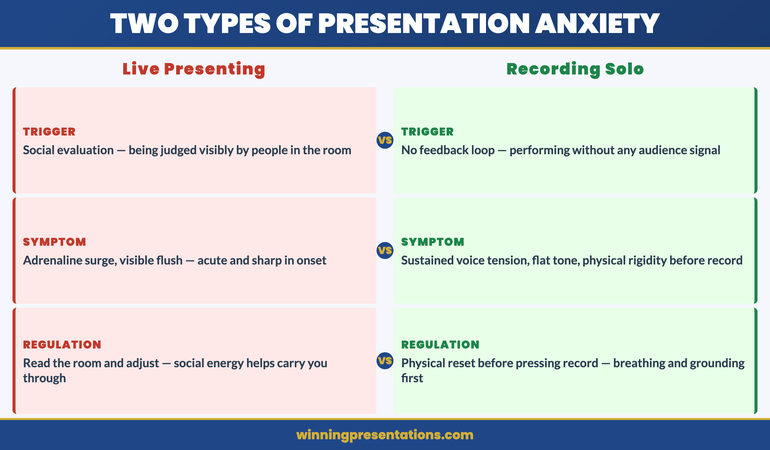
Live presenting produces anxiety primarily through social evaluation: the fear of being judged, of losing the room, of visibly struggling in front of people whose opinions matter. This is uncomfortable, but it comes with natural regulation mechanisms — you read the room, you adjust, you get into the flow of a conversation, and the social energy of the room often carries you through difficult moments.
Recording yourself without an audience removes all of those regulation mechanisms simultaneously. There is no room to read. There is no social energy to carry you. There is no feedback loop that tells you whether you are going well or badly — only your own internal critic, which has no information about how the recording is actually landing and tends to default to “worse than expected.”
The physical response to this is distinct from live presentation anxiety. Rather than the adrenaline surge of walking into a room, recording anxiety tends to manifest as a sustained physical tension — a slight tightness in the throat and chest, a flatness in vocal tone, a tendency toward over-precision in diction that makes delivery sound rehearsed rather than natural. Executives who present with considerable confidence in live settings often find that their recorded delivery sounds noticeably less authoritative than they know themselves to be. This is not a performance problem. It is a physiological response to an unnatural stimulus: performing without an audience for an audience you cannot see.
Understanding this distinction matters because the solution is different. Live presentation anxiety responds well to preparation and rehearsal. Recording anxiety responds better to physical regulation before recording and a structural approach to delivery that gives you something to navigate rather than a blank canvas to fill. The screen sharing and virtual presence framework covers the related challenge of delivering effectively on camera — many of the same principles apply here.
Calm Under Pressure
Manage the Physical Response That Undermines Your Recorded Delivery
Calm Under Pressure — £19.99, instant access — is designed for in-the-moment physical symptom management in presenting contexts. It addresses the specific physical patterns that recording without an audience tends to produce: voice tension, delivery flatness, and the physical spiral that makes restarts worse rather than better. Techniques designed for the moments before and during high-stakes presentation delivery.
- In-the-moment physical regulation techniques for voice tension and delivery anxiety
- Breathing and grounding frameworks for solo recording and virtual presentation environments
- Physical symptom management for presenting without live audience feedback
- Protocols for resetting your physical state when recording sessions are not going well
Designed for executives who experience physical anxiety symptoms during presentations.
The Physical Setup That Reduces Delivery Anxiety
The physical environment in which you record has a measurable effect on delivery quality — not just for technical reasons, but because environmental signals shape your physiological state before you begin.
Camera position matters more than most executives realise. A camera positioned below eye level is the most common setup mistake in recorded presentations, and it produces a subtle but perceptible effect: the presenter appears to be looking slightly down, which reads as diminished authority or discomfort. Camera at eye level — which typically means elevating the laptop or external camera to head height — produces a noticeably different quality of presence on screen. You are speaking with your audience rather than at them or above them.
Lighting has a similar effect on the physical experience of recording. Poor lighting — particularly strong backlight from a window behind the presenter — forces a subtle physical tension as the camera struggles to compensate and the presenter senses that the image is not clear. A single key light source positioned in front of and slightly above the presenter reduces this tension significantly. Natural daylight from in front is ideal; a ring light is a reliable alternative. The practical principles behind virtual setup are covered in the hybrid meeting facilitation guide — the same environmental principles apply to async recording.
The two minutes before you hit record are as important as the setup itself. A brief physical regulation routine — slow breathing, a deliberate relaxation of the shoulders and jaw, and two or three slow exhales — reduces the physical tension that accumulates in the lead-up to recording. The goal is not to be relaxed in the way you might be in a casual conversation. The goal is to be in the physical state from which your natural authority emerges. Most people know what that state feels like. The regulation routine is designed to get you there intentionally rather than waiting to stumble into it.
How to Script Without Sounding Like You Are Reading
The instinct when recording an asynchronous presentation is to write a full script — every word, every transition, every data point — so that nothing gets missed and nothing sounds uncertain. The result is almost always a recording that sounds exactly like what it is: someone reading from a script. The fluency markers that indicate natural speech — the slight variation in sentence length, the occasional pause for thought, the natural emphasis that comes from actually thinking about what you are saying — are absent, and their absence is immediately perceptible to listeners.
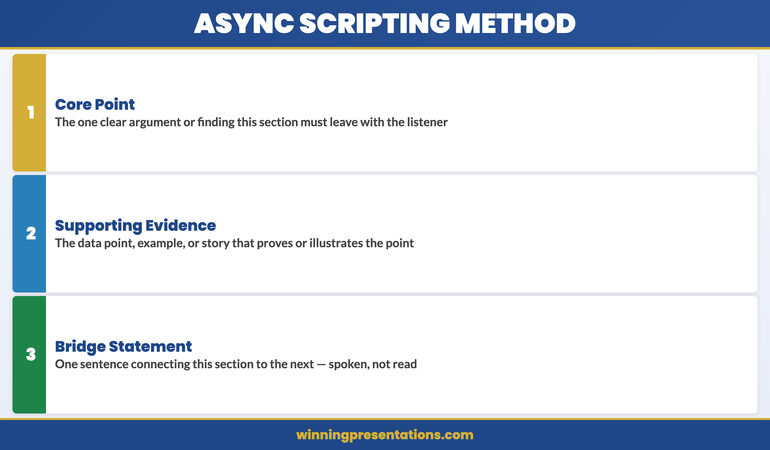
The alternative is not to record without preparation. It is to script the architecture rather than the words. For each section of your asynchronous presentation, prepare a one to three bullet point outline: the core point you are making, the supporting evidence or example you will use, and the bridging statement that moves you to the next section. That is your script. Within each section, you speak to those points rather than reading predetermined sentences.
This approach has a specific cognitive benefit. When you are working from an architectural outline rather than a word-for-word script, the process of expressing each point engages your thinking rather than your memory. Your delivery becomes the natural product of actually engaging with the material — which is exactly what your audience will perceive as authority and genuine expertise.
The exception to this principle is the opening statement. Writing and memorising a single strong opening sentence — delivered directly to camera — anchors the recording with presence and sets the tone for everything that follows. First impressions in recorded presentations are formed within the first ten seconds, and a confident, direct opening statement creates a frame that benefits every subsequent section. The principles behind effective opening delivery are covered in the Teams presentation delivery framework — the same opening principles apply across virtual and recorded formats.
If the physical symptoms of recording anxiety — voice tension, difficulty finding your natural delivery register, the restart spiral — are a consistent challenge, Calm Under Pressure addresses these at the physical level, with in-the-moment techniques designed for presenting contexts specifically.
Your Voice Without an Audience: Why It Sounds Wrong and How to Fix It
Most people, when they first listen back to a recording of themselves presenting, have the same reaction: that does not sound like me. The voice sounds flatter, more monotone, more hesitant than the presenter believed they sounded while recording. This is not a delusion — it reflects something real about what happens to vocal delivery when the live audience is removed.
In a live presenting environment, your voice is shaped partly by the room’s response. You raise volume when the room gets quieter and you sense it is needed. You slow down when you see a furrowed brow. You lean into emphasis when a point lands and the room’s energy confirms that it has. These are not conscious decisions — they are automatic responses to social feedback that regulate your vocal delivery in real time.
Recording removes all of these regulation signals. The result is that voice tends to compress: the dynamic range narrows, the pace either rushes or stalls without natural audience pacing to guide it, and the emphasis becomes either over-performed (because the presenter is consciously trying to be expressive without feedback) or flat (because the effort of compensating has depleted the vocal presence that would otherwise emerge naturally).
The practical fix has two components. The first is physical: recording standing up rather than seated produces measurably better vocal quality for most people. Standing removes the subtle compression of the diaphragm that sitting produces, which allows the voice more physical resonance. The second is directional: speak to one person in your mind’s eye, not to an abstract audience. Identify a specific individual — a trusted colleague, a client whose opinion you respect — and speak to them directly. The voice naturally adjusts to direct conversation in ways that it does not adjust to broadcasting, and recorded presentations benefit from exactly that quality of directed, conversational engagement.
Managing the Urge to Restart: A Decision Framework
The restart spiral is the most common technical failure in asynchronous presentation recording. The presenter stumbles, stops, and starts again — and with each restart, the awareness of the stumble increases, the physical tension builds, and the subsequent take is marginally worse than the one before. After five or six restarts, the presenter is recording in a state of elevated anxiety that is audible in every take.
The instinct driving the restart spiral is the assumption that the recording needs to be perfect to be effective. This is not accurate. Listeners do not experience a slight stumble or an “um” in a recorded presentation the way presenters expect. What listeners notice is not individual errors — it is the overall quality of presence and the sense that the presenter actually knows what they are talking about. A recording with two minor stumbles delivered with genuine authority is significantly more effective than five careful restarts that produce technically perfect but lifeless delivery.
A clear decision framework for restarts reduces the spiral significantly. There are two situations in which a restart is warranted: you lose your place entirely and cannot recover the thread within three seconds, or you have said something factually incorrect that the audience will notice. Everything else — a filler word, a slight mis-step in phrasing, a pause that felt awkward — is not a restart. It is a moment of natural speech that most listeners will not consciously register.
If you do need to restart, build a full physical reset into the pause: stand up if you were seated, do a slow exhale, and physically shake out the tension in your hands and shoulders before sitting back down. Recording again immediately after a frustrating take compounds the physical tension that produced the problem in the first place. The reset is not a delay — it is the preparation for a take that is worth sending.
The Companion Message That Gets Your Recording Watched
An asynchronous presentation that no one watches has no impact, regardless of its quality. The single most underinvested element of async presentation preparation is the companion message — the text that accompanies the recording in the email, Teams message, or Slack post through which it is distributed.
The companion message serves three functions. First, it gives the recipient a reason to prioritise watching: not “please see attached recording” but “I have recorded a 12-minute overview of the Q1 client health metrics — the key finding is X, and I would like your view on Y before the leadership meeting on Thursday.” The reason to watch and the specific ask are both explicit. Second, it sets expectations: telling the recipient how long the recording is (“12 minutes”) and what decision you need from them by when removes the two most common friction points that cause async recordings to be deferred rather than watched. Third, it signals that you have not just offloaded information but prepared something worth their time.
The companion message should be no more than four sentences. One sentence that states the context and what the recording covers. One sentence with the key finding or recommendation. One sentence with the specific decision or input you need. One sentence with the deadline. Everything else is overhead that reduces the likelihood of the recording being watched promptly. If the asynchronous recording is followed by a live Q&A session, the STAR method for executive Q&A provides the structured response framework for handling the follow-up questions when you are eventually in the room with the audience.
Calm Under Pressure
Physical Symptom Management for Presenting Under Pressure
Calm Under Pressure — £19.99, instant access — gives you in-the-moment physical regulation techniques for the specific symptoms that undermine presentation delivery: voice tension, physical rigidity, the restart spiral, and the sustained anxiety of performing without live audience feedback. For virtual and recorded presenting contexts as well as live ones.
Designed for executives who experience physical anxiety symptoms in presenting contexts.
Frequently Asked Questions
How do you make an asynchronous presentation sound natural?
The most reliable way to make a recorded asynchronous presentation sound natural is to script the architecture rather than the words. For each section, prepare a brief outline — the core point, the supporting evidence, and the transition to the next section — and speak to those points rather than reading from a full script. Full scripts produce delivery that sounds read because it is being read. The architectural outline gives you structure without suppressing the natural speech patterns that make delivery sound authoritative and genuine. The opening statement is an exception: write and memorise one strong opening sentence to deliver directly to camera. Everything after that should come from genuine engagement with your outline rather than precise recall.
How long should an asynchronous presentation be?
For most executive and business contexts, an asynchronous presentation should run between eight and fifteen minutes. Below eight minutes, the recording may not provide sufficient depth on complex topics. Above fifteen minutes, the likelihood of the full recording being watched in a single sitting drops significantly — most recipients will begin it, reach a natural break point, and not return. If your content genuinely requires more than fifteen minutes, break it into clearly labelled sections (each with its own short companion message) and allow recipients to watch sections in the order most relevant to them. Respecting your audience’s attention is a form of executive communication competence, and a concise recording that is watched in full is more effective than a comprehensive one that is watched in part.
What equipment do you actually need to record a professional asynchronous presentation?
For the majority of business contexts, the equipment you already have is adequate — with two adjustments. First, elevate your camera to eye level if you are using a laptop or built-in webcam; this single change has more impact on perceived authority than almost any other equipment decision. Second, address your lighting: ensure your light source is in front of you rather than behind you, and if possible use a simple ring light or position yourself facing a window. A good external microphone improves audio quality noticeably, and clean audio matters more than high-definition video for most business presentations. Beyond these adjustments, the quality of your delivery — preparation, physical state, scripting approach — has far greater impact on the recording’s effectiveness than the technical specifications of your equipment.
The Winning Edge
Weekly insights on executive presentations, delivered every Thursday. Practical frameworks, real scenarios, and no generic advice.
About the Author
Mary Beth Hazeldine — Owner & Managing Director, Winning Presentations
With 25 years of corporate banking experience at JPMorgan Chase, PwC, Royal Bank of Scotland, and Commerzbank, Mary Beth Hazeldine advises executives across financial services, healthcare, technology, and government on structuring presentations for high-stakes funding rounds and approvals. She works directly with senior leaders to build the communication skills that hold up under pressure. Learn more at Winning Presentations.