A board paper is a written document submitted in advance that makes a case through evidence, context, and recommendation. A board presentation is a live conversation where visual support and executive summary matter more than comprehensive detail. The confusion costs organisations millions in poor governance decisions because boards receive the wrong format for their decision-making context.
Contents
Last month, Kwasi—a finance director at a mid-cap healthcare organisation—prepared what he believed was a comprehensive presentation on a proposed acquisition. He loaded 47 slides with financial models, regulatory timelines, and risk scenarios. He began his board presentation by saying, “I know there’s a lot here, so let me walk you through everything.” Midway through slide 12, the chair interrupted: “Kwasi, we didn’t need the detail. We needed your recommendation and the three key risks. You’ve buried the decision.” That 90-minute meeting should have taken 20 minutes. The board approved the acquisition anyway—but Kwasi had wasted the board’s time and undermined his own credibility because he’d confused a board paper with a board presentation. The paper existed (a 30-page investment memorandum, circulated days earlier). What the board needed was a live conversation structured around decision-making, not a slide-by-slide recitation of existing documents.
A practical resource for boards
Many governance professionals conflate these two formats, or worse, create only one when they need both. The problem is structural: boards need written evidence (the paper) and live dialogue (the presentation) to make sound decisions. Understanding the distinction clarifies not just what you write and speak—but how you think about board communication. This article walks you through both formats, including when to use each and how to structure them so your board actually makes better decisions faster.
cisions faster.
The Fundamental Difference Between Format and Purpose
A board paper and a board presentation serve fundamentally different cognitive and procedural purposes, even when they address the same topic.
A board paper is a written artefact of record. It exists to create a shared information base, build a case through evidence and reasoning, and allow board members to review independently before a meeting. Board papers typically run 8–30 pages. They include:
- Executive summary or recommendation at the start
- Detailed background context
- Financial, legal, or regulatory implications
- Risk analysis and mitigation strategies
- Appendices with supporting data, external advice, or comparative analysis
A board paper is asynchronous: board members read it independently, sometimes days before the meeting. It must be self-contained because the author isn’t present to explain.
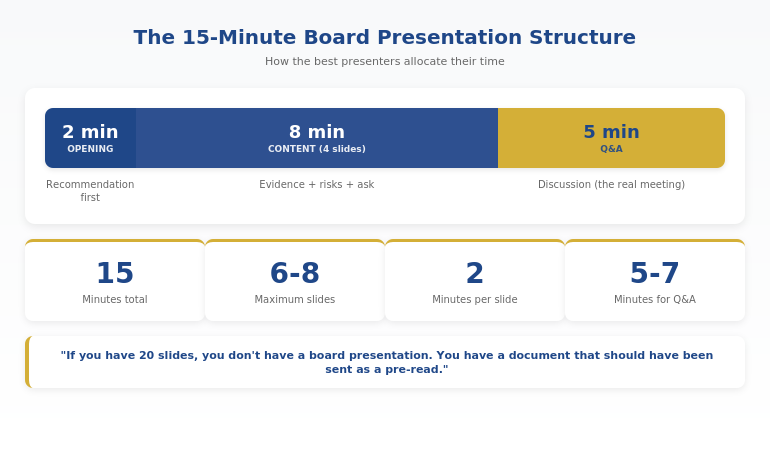
A board presentation is a live conversation with visual support. It exists to facilitate discussion, answer questions in real time, test assumptions, and build consensus around a decision. Board presentations typically run 15–40 minutes (not hours). They include:
- A clear, concise recommendation at the start
- Three to five key supporting points (not 30)
- Visual aids that summarise, not enumerate
- Invitation to questions and challenge
- A closing decision frame (“We recommend approval, pending your questions about risk mitigation”)
A board presentation is synchronous: it depends on the presenter being present to respond, clarify, and address concerns. The visuals are memory aids for what the presenter is saying, not substitutes for the paper.
The psychological difference is critical. Reading demands sustained cognitive effort; the reader controls the pace. Speaking in real time demands attention but allows the presenter to prioritise, respond to non-verbal cues, and adjust based on the room’s reaction. A board that reads a paper first, then hears a presentation, has processed the information twice—once independently and once collaboratively. This redundancy is deliberate: it drives better decisions because it creates multiple moments for challenge and clarity.
Clarify your board communication structure today
The Executive Slide System gives you a tested framework for designing both board papers and presentations that boards actually engage with. No vagueness. No buried recommendations. Just clarity.

When Each Format Is Appropriate
The choice between paper and presentation (or both) depends on the decision’s complexity, the board’s time availability, and the level of detail required for accountability.
Use a board paper when:
- The decision involves complex financial, legal, or regulatory detail that requires deep scrutiny (acquisitions, material contracts, governance policy changes)
- Board members must form an independent opinion before the meeting (regulatory best practice increasingly demands this)
- You need a record of the information considered and the reasoning for the decision (audit trail)
- Multiple stakeholders need to review the information asynchronously (board secretary, external counsel, auditors)
- The decision is significant enough to warrant 30+ minutes of pre-meeting preparation from each director
Use the live presentation format when:
- You’re presenting a recommendation that’s already backed by a written paper (the norm for most board meetings)
- The recommendation needs live challenge or testing of assumptions
- Time is limited and the decision is straightforward (board approval of a standard-form report, for instance)
- The board has already reviewed detailed information and now needs to discuss and decide
- You need to calibrate the board’s appetite for risk in real time based on their questions
Use both when: The decision is high-stakes, the paper is substantial (15+ pages), and the recommendation involves judgment calls. This is the norm for public company boards, private equity boards, and governance committees. The paper provides the evidence; the presentation surfaces assumptions and tests the logic.
The hybrid approach—where a board paper is circulated days in advance and a presentation follows at the meeting—remains the governance gold standard, particularly in regulated industries. It creates space for independent thought and collective challenge.
If you’re managing complex board communications, the Executive Slide System walks you through structuring written and live formats for maximum board engagement.
The Cost of Confusing the Two Formats
In practice, three mistakes dominate. Each one costs boards time, decision quality, or both.
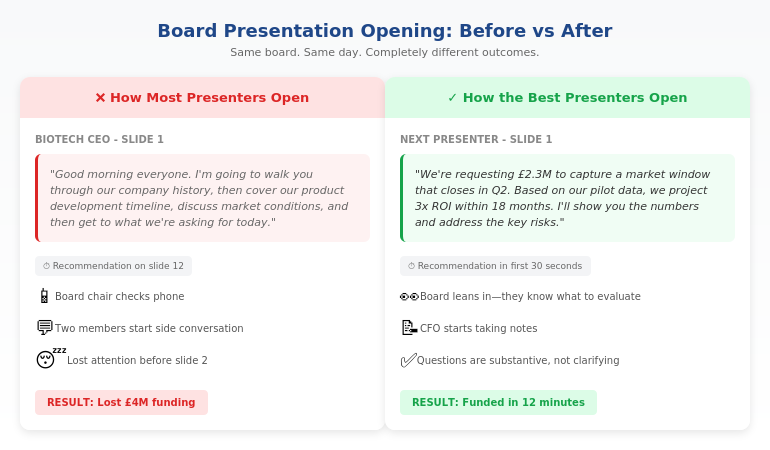
Mistake one: Presenting the paper. This is Kwasi’s error. The presenter walks the board through a 25-page document, slide by slide, as though reading aloud is live discussion. The board already reviewed the written material. What they now need is clarification, challenge, and decision-making dialogue. Instead, they get a recitation. The result: wasted time, diminished credibility for the presenter, and a board that feels talked at rather than engaged with.
Mistake two: Creating a presentation without a paper. Some organisations skip the board paper entirely, assuming a good presentation is enough. This works for low-stakes decisions (approval of a standard report format, routine governance item). But for any decision with material implications, it shifts the burden of synthesis entirely to the board members during the meeting. They cannot form an independent view beforehand. They must absorb unfamiliar detail while also responding to live discussion. The decision quality suffers. And there’s no written record of the information that informed the decision—a problem during audits or if the decision comes under later challenge.
Mistake three: Confusing brevity with clarity. Some executives, trying to avoid Kwasi’s error, strip presentations down to four slides with almost no information. The board then feels they’re being patronised or hidden from the truth. Or they’re forced to pester the presenter for clarifications that should have been in the paper. The line between “appropriately concise” and “unhelpfully vague” is real but easily crossed.
The cost is real. Poor board communication leads to rushed decisions, unvetted assumptions, delayed approvals, and reduced board confidence in the executive team. Over time, it erodes the board’s ability to govern effectively.
How to Structure Board Papers for Maximum Impact
A board paper should guide the reader to a clear recommendation within the first two pages, then build the case. The structure matters more than the length.
Start with the executive summary. This is not an overview. It’s a one-page argument: what you’re recommending, why, the key evidence, and the risks you’ve considered. A competent board member should be able to read this page, ask intelligent questions, and vote based on the executive summary plus the detail they choose to explore. Many papers bury the recommendation on page 8. That’s a structural failure. The reader should know within 30 seconds what you’re proposing.
Follow with background and context. Assume the reader doesn’t know this space as well as you do. Provide the history, the regulatory landscape, or the market context that explains why this decision matters now. This is where you build credibility through evidence, not rhetoric.
Present the case in a logical sequence. Don’t arrange information by data source (financials, then legal, then operations). Arrange it by argument. If the decision hinges on three factors, present them in order of importance or logical dependency. Use clear headings. Use data visualisation where a table would burden the reader. A board member with limited time should be able to skim headings and grasp the argument.
Acknowledge risks and mitigation explicitly. A good board paper doesn’t pretend the option is risk-free. It identifies material risks and explains how you’d mitigate them. This is where boards actually trust executives—when they show they’ve thought critically about downside. A recommendation with no acknowledged risk looks naive.
Close with a clear decision frame. “We recommend approval of the acquisition, subject to no material changes to the vendor’s financial position between now and close, and contingent on the indemnity language reflecting the discussion at the last board meeting.” This is not vague. It’s precise. It tells the board exactly what they’re approving and what triggers a re-discussion.
Build board papers that actually drive decisions
The Executive Slide System includes a board paper template and checklist that ensures you structure recommendations for maximum clarity and board confidence. No guesswork. No wasted words.

How to Structure Board Presentations for Decision-Making
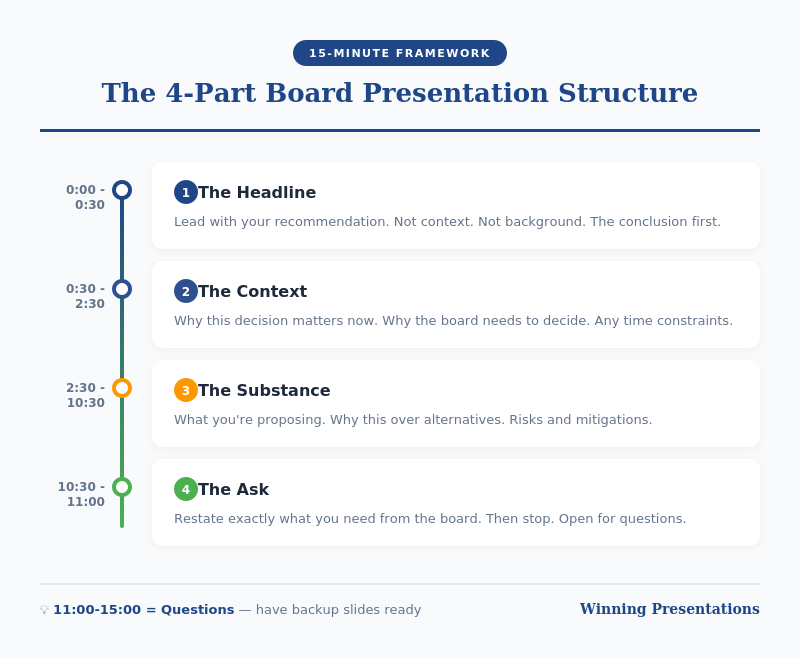
A board presentation should assume the audience has read the paper (or at least the executive summary). Its job is to answer questions, test assumptions, and facilitate a decision. The structure is radically different from a typical corporate slide deck.
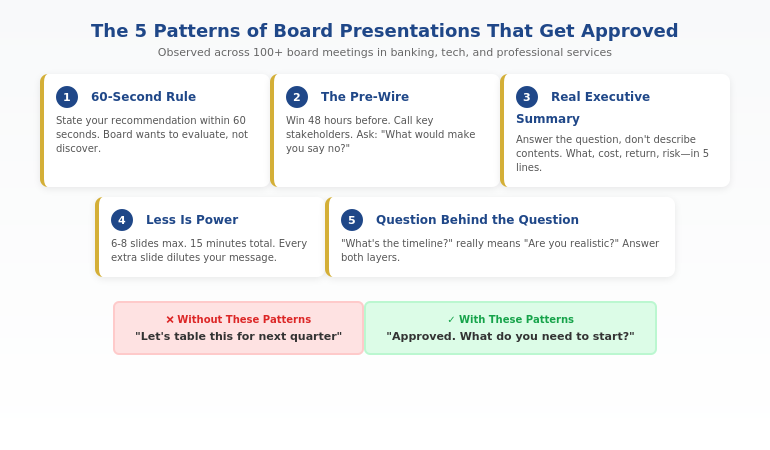
Start by stating your recommendation clearly. Not as a conclusion after 20 minutes of building. As the first thing you say. “We recommend approval of this acquisition, subject to the indemnity and earn-out terms outlined in the paper.” Then: “I’m here to answer your questions and address any concerns about the logic or the risks.” This positions you as confident and decision-oriented, not as someone who needs to talk the board into compliance.
Prepare for three categories of questions. Boards ask about assumptions (Is the revenue projection realistic?), risks (What if the vendor’s key customers leave?), and trade-offs (Why not explore an acquisition at a lower valuation?). Your presentation should signal that you’ve anticipated these. Have a slide or two on key assumptions and sensitivity. Have a slide on risks and mitigation. Have a slide on alternatives considered. But don’t present these unprompted. Present them only as they’re relevant to the discussion.
Use visuals as anchors, not scripts. Each slide should support what you’re saying, not duplicate it. If you’re discussing three market drivers for the acquisition, a simple visual showing those three drivers gives the board something to focus on while you explain the logic. A slide with 15 bullet points forces the board to read or listen—not both. Most choose to read, which means they’re not hearing you.
Build in space for dialogue. A 40-minute session should include 15–20 minutes of unstructured conversation, not just Q&A at the end. Early on, invite challenge: “Before I move to the financial detail, does anyone want to push back on the market assumptions?” This shows confidence and signals that you’re interested in collective intelligence, not rubber-stamp approval.
Close with a decision frame and next steps. “We need board approval to proceed with the vendor due diligence. The timeline is tight—we need approval today to keep to our close deadline. If there are any remaining concerns, I’d like to hear them now.” This is executive-level communication: clear, time-bound, and action-oriented.
Handling the Hybrid Scenario
Most high-stakes board decisions use both a paper and a presentation. This is the governance default for good reason: it allows boards to prepare independently and then deliberate collectively. But it creates a co-ordination challenge.
First, ensure the paper is circulated at least three working days before the board meeting. This gives directors time to read without rushing. It also signals that you’re serious about giving them space to form an independent view.
Second, before you present, confirm that all directors have received the paper and had a chance to review it. If someone hasn’t, adjust your presentation: briefly summarise the key argument and focus on the points most likely to generate discussion.
Third, start your presentation by stating what’s different from the paper. “Since the paper was circulated, we’ve received legal feedback on the vendor’s indemnity language. I want to walk you through that change and what it means for the board’s decision.” This respects the board’s preparation work and makes clear you’re not wasting their time repeating information they already have.
Finally, recognise that board members will interrupt or ask questions mid-presentation. This is a feature, not a bug. It means they’re engaged. Your job is to answer clearly and briefly, then continue. If a question reveals a gap in the paper, acknowledge it: “That’s a fair point that we should have addressed in more detail. Here’s my thinking…” This builds credibility far more than a defensive response would.
Frequently Asked Questions
Should every board decision have both a paper and a presentation?
Not always. Routine approvals often need only a paper. Complex or contested decisions benefit from both. The decision on format should be driven by two factors: how much context the board needs to process the decision, and whether the decision requires real-time discussion to reach alignment. If the answer to either is yes, a presentation adds value.
How long should the formal session actually be?
For a board presentation, 15–20 minutes including Q&A is the norm. A board paper has no fixed length but should respect the reader’s time: 3–5 pages of substantive content, with appendices for technical detail. If your paper exceeds 8 pages, you have included operational detail that belongs elsewhere.
What if the board hasn’t read the paper before the meeting?
Assume they haven’t. Structure your presentation so it stands alone. The paper provides depth for those who have read it; the presentation provides the decision framework for those who haven’t. If you rely on the paper being read, you’ll lose half the room before you’ve started.
Can I use the same slides for both the paper and the presentation?
No. A board paper is a written document designed to be read. A presentation is a visual aid designed to support spoken delivery. The formats, information density, and narrative flow are fundamentally different. Repurposing one as the other produces a document that fails at both jobs.
Subscribe to The Winning Edge
Practical insights on board communication, governance, and executive presence delivered fortnightly to your inbox.
Download the Executive Presentation Checklist to validate your approach before the next board meeting.
Related article from today
How to structure a product recall presentation so regulators and stakeholders understand your response plan. Read the article
Your next step: Audit your current board papers and presentations against the criteria in this article. Are you presenting the paper, or are you presenting to the board? Are your papers structured to guide the reader to your recommendation, or do they bury it? One structural change—moving the recommendation to page one, for instance—can shift how boards receive and engage with your communications.
About the author
Mary Beth Hazeldine is the Owner & Managing Director of Winning Presentations. With 24 years of corporate banking experience at JPMorgan Chase, PwC, Royal Bank of Scotland, and Commerzbank, she advises executives across financial services, healthcare, technology, and government on structuring presentations for high-stakes funding rounds and approvals.