Tag: presentation framework

22 Apr 2026

Presentation Anxiety Treatment for Executives: Evidence-Based Approaches That Work

If you are searching for presentation anxiety treatment as an executive, Conquer Speaking Fear is a 30-day structured programme that combines nervous system regulation with clinical hypnotherapy — designed specifically for professionals whose anxiety shows up in high-stakes presenting situations rather than in everyday life. This is not general anxiety management. It is a targeted treatment approach for a specific pattern: the executive who is capable, experienced, and composed in most professional contexts, but whose body and mind respond to the presenting environment as though it were a genuine threat. It is available now at £39, instant access. This page covers what the programme addresses, how it works, and whether it fits your situation.

The Problem: Why Executive Presentation Anxiety Persists Despite Experience

Presentation anxiety at the executive level is counterintuitive — and that is partly why it persists. You have given hundreds of presentations. You know the content. You have navigated far more demanding situations than a 20-minute board update. And yet the anxiety remains, sometimes worsening as the stakes increase rather than diminishing with experience.

This happens because presentation anxiety is not a knowledge problem or a preparation problem. It is a nervous system response — a learned pattern in which the brain treats the act of presenting as a threat and triggers the same physiological cascade it would deploy in a genuinely dangerous situation. The voice tightens. Thoughts scatter. The body enters a mode designed for survival, not for articulate persuasion.

Most treatment approaches for executives stop at the cognitive level: reframe your thinking, prepare more thoroughly, practise in front of colleagues. These strategies have a role, but they do not reach the mechanism that drives the response. The nervous system operates faster than conscious thought — by the time you are telling yourself to stay calm, your physiology has already decided otherwise.

Understanding how anticipatory anxiety before presentations works at the physiological level helps clarify why willpower-based approaches so often fall short under genuine pressure.

The Solution: Conquer Speaking Fear

Conquer Speaking Fear is a 30-day structured treatment programme that works at two levels simultaneously: the nervous system (where the anxiety response originates) and the subconscious associations (where the brain has learned to classify presenting as threatening). It does not replace clinical therapy for generalised anxiety, but for presentation-specific anxiety — the pattern that shows up reliably in speaking contexts and not elsewhere — it is precisely targeted.

The nervous system regulation component gives you practical techniques that interrupt the physiological response before and during a presentation. These are not breathing exercises in the abstract — they are calibrated to the specific timeline of executive presenting: the days before, the minutes before entering the room, the moment a difficult question arrives, and the recovery period afterwards.

The clinical hypnotherapy sessions work at the subconscious level, gradually shifting the associations your brain has built around the presenting environment. This is where lasting change happens — not in what you consciously tell yourself, but in how your brain categorises the situation before conscious thought engages. The programme builds these sessions progressively over 30 days, creating durable change rather than temporary relief.

For executives who want to understand the cognitive dimension alongside the nervous system approach, the guide to cognitive restructuring for presentation anxiety covers the thinking-level techniques that complement this programme well.

What You Get

  • 30-day structured programme — daily modules building progressively, designed to fit around a senior professional’s schedule
  • Nervous system regulation techniques — practical methods for managing the physiological response at every stage of the presentation timeline
  • Clinical hypnotherapy audio sessions — targeted sessions that address subconscious threat associations with the presenting environment
  • In-the-moment symptom management — techniques for use during live presentations when the anxiety response activates
  • Post-incident recovery module — dedicated support for executives recovering from a presentation that went significantly wrong
  • Instant access — start immediately, work at your own pace within the 30-day structure

Price: £39 — instant access, no subscription.

Stop Managing Presentation Anxiety — Treat the Pattern That Drives It

Conquer Speaking Fear gives you a structured, 30-day treatment programme combining nervous system regulation and clinical hypnotherapy — designed specifically for executives whose anxiety shows up in the presenting environment, not in everyday professional life. £39, instant access.

  • ✓ 30-day programme with daily structured modules
  • ✓ Nervous system regulation for executive presenting contexts
  • ✓ Clinical hypnotherapy sessions targeting presentation anxiety
  • ✓ In-the-moment techniques for live high-stakes presentations

Get Conquer Speaking Fear → £39

Instant access · £39 · No subscription

Is This Right for You?

Conquer Speaking Fear is designed for executives and senior professionals who experience a consistent anxiety pattern specifically in presenting contexts. It is most relevant if you have tried cognitive approaches — more preparation, positive self-talk, generic confidence workshops — and found that they help in lower-pressure situations but do not hold reliably when the stakes are genuinely high.

It is right for you if: you experience physical symptoms under presentation pressure (voice tightening, mind blanking, elevated heart rate); anticipatory dread affects your preparation in the days before a significant presentation; you find yourself avoiding high-visibility speaking opportunities; or a past presenting experience has created a pattern that persists.

It is not designed for executives who want to improve their slide structure or delivery technique without an anxiety component — presentation skills training addresses those needs more directly. It is also not a replacement for clinical support if your anxiety extends significantly beyond presenting contexts into daily life. In that situation, working alongside a qualified therapist while using this programme is entirely appropriate.

The guide to grounding techniques for presentation anxiety covers practical in-the-moment methods that complement the nervous system work in this programme.

Frequently Asked Questions

Is this a clinical anxiety treatment?

Conquer Speaking Fear is a structured self-directed programme, not clinical therapy. It uses techniques drawn from clinical practice — specifically nervous system regulation and clinical hypnotherapy — applied to the presentation-specific anxiety pattern. If your anxiety is primarily triggered by presenting situations rather than being generalised across your daily life, this programme addresses that pattern directly. If you are experiencing broad anxiety that affects multiple areas of daily functioning, working with a qualified therapist alongside this programme is advisable.

How is this different from presentation skills coaching?

Presentation skills coaching focuses on delivery technique, slide design, and message structure — how to present well. Conquer Speaking Fear focuses on the anxiety response itself — why your body and mind react to presenting as a threat, and how to change that pattern at the nervous system level. Many executives have strong presentation skills but still experience significant anxiety. This programme addresses the anxiety directly, independent of skill level.

Will this work for someone who has presented for 20+ years?

Yes — and lengthy experience presenting is common among participants. Presentation anxiety often intensifies rather than diminishes with seniority, because the stakes increase faster than familiarity can compensate. The programme does not assume you lack experience. It addresses the nervous system pattern that operates independently of how many presentations you have given or how well you know the material.

Can I use this alongside medication for anxiety?

Yes. The techniques in Conquer Speaking Fear do not conflict with prescribed anxiety medication. If you are currently taking medication for anxiety — whether specifically for presenting situations or more broadly — this programme can complement that treatment by addressing the learned nervous system response that medication manages but does not retrain. Mention your use of this programme to your prescribing clinician so they have a complete picture of your anxiety management approach.

What if I have a major presentation before I finish the 30 days?

The programme is designed so that several techniques are immediately usable from the first week — particularly the nervous system regulation methods for the minutes before and during a presentation. You do not need to complete all 30 days before your next presentation. The early modules focus on in-the-moment management precisely because many participants begin the programme with an upcoming high-stakes presentation in mind. The deeper subconscious work develops over the full programme period.

The Winning Edge

Weekly insights on executive presentations, speaking confidence, and high-stakes communication — delivered every Thursday.

Subscribe Free

About the author

Mary Beth Hazeldine, Owner & Managing Director, Winning Presentations. With 25 years of corporate banking experience at JPMorgan Chase, PwC, Royal Bank of Scotland, and Commerzbank, and 16 years working with executives on high-stakes presentations, she advises senior professionals across financial services, healthcare, technology, and government on structuring and delivering presentations under pressure.

15 Apr 2026
Male executive reviewing a structured presentation outline at a glass desk, city skyline behind him

Executive Presentation Outline: The Five-Part Structure That Builds Any High-Stakes Deck

Quick answer: An executive presentation outline has five mandatory components regardless of topic: context statement, recommendation, three-part evidence structure, risk framing, and next steps. Getting the outline right before building slides is the difference between a deck that builds itself and one requiring eight revisions. The structure forces clarity on what you are actually asking for — and why — before a single slide is designed.

Kwame had a reputation in his division for building decks fast. When colleagues had a board submission due Friday, they would glance over at his desk by Tuesday and see a nearly finished presentation sitting in PowerPoint, polished and structured. They assumed it was natural fluency — some innate ability with slides he had always possessed.

Then came the quarterly review that changed his thinking entirely. He had built the deck in his usual way — starting with the title slide and working forward, slide by slide. The content was solid. The data was accurate. But in the room, the CFO stopped him eleven slides in and asked, “Kwame, what are you actually asking us to decide today?” He didn’t have a clean answer. The meeting ended without resolution and he was asked to come back the following month.

That week, he stopped opening PowerPoint first. Instead, he drafted a five-line outline on paper before touching his laptop. Context. Recommendation. Three evidence points. Risk. Next steps. Every deck he built from that point started on a single sheet. His reputation for speed didn’t change — but the outcomes in the room did. Decisions started being made on the day, not deferred.

If your decks are taking too long to build — or landing without the clarity you intended — it’s rarely a slide design problem. It’s a structure problem. The Executive Slide System gives you the frameworks, outline templates, and AI prompt cards to plan and build high-stakes presentations with confidence.

Explore the System →

Why Most Executive Presentations Fail Before the First Slide

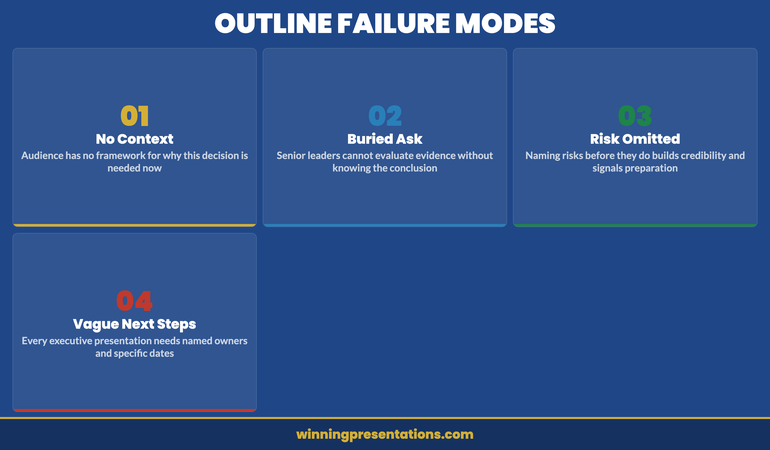
The most common mistake in executive deck preparation is opening PowerPoint before you have clarity on structure. It feels productive — templates fill up, slides get labelled, transitions get applied. But without a deliberate outline in place first, you are essentially writing the second draft before completing the first one.

Senior decision-makers — board members, investors, C-suite stakeholders — evaluate presentations not just on content quality but on structural logic. They want to know, within the first two minutes, what you are asking them to consider and why it matters now. If your deck buries the recommendation in slide fifteen, you have already lost the room’s sharpest thinkers, who will have jumped ahead, formed their own conclusions, and stopped listening to your narrative.

Structure also protects you against scope creep. When you begin building slides without an outline, every interesting data point feels includable. Every supporting chart earns its place. Before long, a 10-slide board presentation becomes a 28-slide information dump. The outline is the editing tool — it forces you to decide what is load-bearing and what is background noise. For a deeper look at how to frame the beginning of any executive presentation, this guide on how to start a presentation covers the critical first moments in detail.

The five-part framework described in this article applies across presentation types: capital allocation requests, strategic updates, operational reviews, project sign-offs, and investor briefings. The components stay constant; only the content within them changes.


STOP REBUILDING DECKS FROM SCRATCH

Build executive slides that get past slide 3

The Executive Slide System gives you 26 templates, 93 AI prompts, and 16 scenario playbooks designed for senior presenters. Drop your content into a structure that already works — finance committees, board approvals, steering meetings, capital reviews. £39, instant access, lifetime updates.

Get the Executive Slide System →

£39, instant access. 26 templates, 93 AI prompts, 16 scenario playbooks. Designed for executive presenters.

The Five-Part Executive Presentation Outline

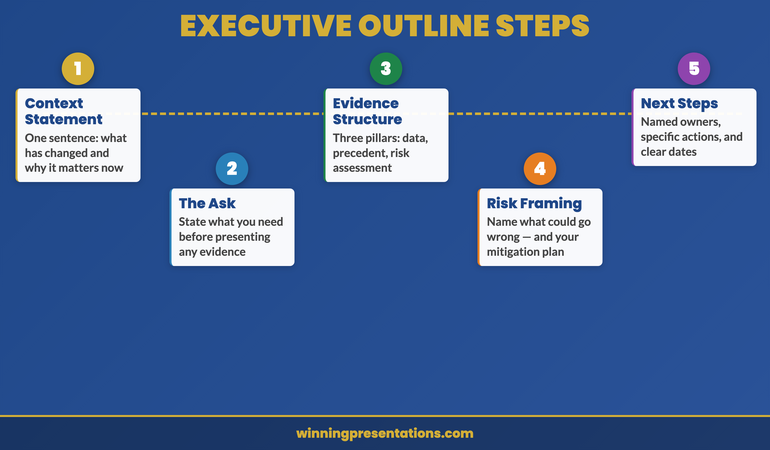
Every effective high-stakes deck shares the same underlying architecture, regardless of topic or audience. The five components below form the load-bearing structure. Remove any one of them and the deck becomes harder to follow, easier to challenge, and less likely to generate a decision on the day.

1. Context statement. One to three sentences establishing why this topic matters now. Not background — context. The context statement answers the question “Why are we having this conversation today?” It connects the presentation to a specific business condition, deadline, or strategic pressure.

2. Recommendation. A single, clearly stated ask or proposed course of action. This comes second — not at the end. Senior audiences do not need to be walked to a conclusion; they need to know where you are headed so they can evaluate your evidence against your recommendation as they listen.

3. Three-part evidence structure. Three distinct reasons, data points, or strategic rationales that support your recommendation. Not two, not seven. Three is the cognitive limit for retention under pressure, and it forces you to prioritise your strongest arguments rather than presenting everything you know.

4. Risk framing. An honest acknowledgement of what could go wrong, what you have considered, and how you propose to manage it. This section is frequently omitted. Its omission is what causes the sharpest person in the room to derail your presentation with a challenge you have not addressed.

5. Next steps. Specific, time-bound actions that follow a yes decision — or clarity on what happens if the decision is deferred. This closes the loop and transforms a presentation into a decision instrument rather than a status update.


Five-part executive presentation outline diagram showing context, recommendation, evidence, risk framing, and next steps in sequence

The Context Statement: One Sentence That Changes Everything

Most presenters open with background. They explain the history of a project, recap previous decisions, or summarise the market landscape before getting to the point. This approach respects the audience’s knowledge less than it should. Board members and senior leaders do not need a history lesson — they need to know immediately why this presentation is happening today and what it requires from them.

A well-formed context statement is crisp and specific. Compare these two openings:

Weak: “As you will know, our operations in the northern region have been under review for the past eighteen months following the restructure in 2024. Today I want to take you through where we have landed.”

Strong: “The northern region restructure closes on 30 April. This presentation outlines the three decisions that need board approval before that date.”

The second version creates a decision frame immediately. It tells the audience what kind of meeting this is — a decision meeting, not a status update — and it makes the deadline explicit. Every executive in the room now knows what is expected of them before the second slide appears.

When writing your context statement during the outlining phase, ask yourself two questions: What is the specific business pressure creating urgency? And what kind of response do I need from this audience? Your answers should shape a single, declarative sentence that opens your deck. For context on how the executive summary slide fits into this structure, see this guide on the executive summary slide.

Building Your Evidence Structure Around the Decision

The evidence section is where most presentations either earn or lose their credibility. The instinct — particularly for analytically trained leaders — is to present all the data and let the audience draw their own conclusions. This approach hands control of the narrative to whoever in the room is most inclined to challenge you.

An effective evidence structure is built backwards from the recommendation. Start with what you are recommending, then ask: what are the three most compelling reasons a rational, sceptical senior executive should agree with this? Those three reasons become your evidence pillars. Each pillar should be expressible as a single, declarative sentence before you attach any data or analysis to it.

In practice, this means your outline for the evidence section looks like this before you open a single data file:

Evidence 1: The financial case — [one sentence stating the financial rationale]
Evidence 2: The strategic fit — [one sentence connecting to existing priorities]
Evidence 3: The timing imperative — [one sentence explaining why now and not later]

Each of these then becomes a section of your deck, with supporting data underneath. The discipline is in the ordering: you state the point first, then support it — not the other way around. This is the pyramid principle applied to outline architecture, and it is the difference between a deck that reads as a confident recommendation and one that reads as a hesitant data dump.

The Executive Slide System gives you pre-built outline frameworks for the executive presentations most likely to need structural clarity — including capital requests, strategic reviews, and board sign-offs where the evidence structure is the difference between a yes and a deferral.

Risk Framing: The Section Most Executives Leave Out

Omitting the risk section from your presentation outline is one of the most common — and most costly — errors in high-stakes communication. The instinct behind the omission is understandable: you are trying to build confidence in your recommendation, and explicitly surfacing risks feels counterproductive. But senior decision-makers operate differently. They are looking for evidence of judgement, not just advocacy.

A well-structured risk section demonstrates three things simultaneously: that you understand the complexity of the decision you are asking for; that you have done the work to anticipate objections; and that you are a trustworthy steward of the organisation’s resources. These three signals matter as much as the financial case.

In your outline, plan for two to three specific risks — not generic disclaimer language. Vague risk acknowledgements (“there are of course some uncertainties we will monitor”) read as evasion. Specific ones (“the primary execution risk is integration timeline, which we have addressed by bringing the programme manager’s start date forward by six weeks”) read as competence.

For each risk in your outline, draft three elements: the risk itself, your mitigation, and the residual exposure after mitigation. This three-part format prevents the risk section from feeling like a panic list. It shows that you have thought past identification to management. When a board member raises a risk you have already addressed, the credibility gain is significant. When they raise one you have not, your mitigation instinct has to work much harder.

If you are presenting to an audience that may be hostile to your recommendation, the risk framing section becomes even more important. See this article on presentation structure for hostile audiences for specific techniques when the room is divided.


Executive presentation outline risk framing section showing risk, mitigation, and residual exposure structure

Executive Slide System — £39, instant access

Stop Starting From Scratch. Build Faster With the Right Templates.

The Executive Slide System includes outline templates specifically structured for the moments where clarity matters most — board approvals, capital allocation, strategic pivots, and operational reviews. Each template is pre-loaded with the five-part framework so you start every deck in the right place.

Get the Executive Slide System →

Testing Your Outline Before You Build

The outline is a testable document — and testing it before opening PowerPoint is where the real time saving happens. A five-minute outline review at the planning stage is worth sixty minutes of deck revision at the delivery stage. There are three tests worth running on every outline before you commit to building.

The “so what” test. Read your recommendation aloud to someone outside your immediate team — a trusted colleague, a coach, a peer from another division. If their immediate response is “so what?” or “what are you asking me to do?”, your recommendation is not specific enough. A good recommendation names an action, an amount, and a timeline. “I am recommending we proceed” is not a recommendation. “I am recommending board approval of £2.4m for Phase 2, with a go-live target of Q3 2026” is.

The coverage test. Does your evidence section cover financial, strategic, and operational dimensions — or is it heavily weighted towards one category? A purely financial case is vulnerable to strategic objections. A purely strategic case is vulnerable to financial ones. The most resilient outlines have evidence that addresses multiple decision-making lenses so that different stakeholders in the room find their priorities served by at least one pillar.

The one-minute summary test. Can you summarise your entire outline — context, recommendation, three evidence points, primary risk, and next step — in under sixty seconds, out loud, without notes? This is not a presentation rehearsal. It is a clarity check. If you cannot summarise the outline in a minute, the deck will not land cleanly in thirty. Conduct this test before you build a single slide. The clarity you develop in this sixty-second exercise will shape every content decision that follows.

If your presentation is heading to a board or a senior governance committee, the testing phase also needs to include a stakeholder mapping review. Who in the room will champion the recommendation? Who will probe hardest? Where does the power to say yes actually sit? These political considerations belong in the outline phase — not discovered mid-delivery. For board-specific structural guidance, see this article on board agenda presentations.

The outline is not a planning formality. It is the most important document you will produce in the presentation process — and it is the one most leaders skip. The leaders who do not skip it are the ones whose decks consistently drive decisions rather than deferring them.

Need the outline templates rather than building from scratch? The Executive Slide System (£39, instant access) ships with the five-part outline pre-loaded across 26 slide templates, 93 AI prompt cards, and 16 scenario playbooks — including capital requests, board sign-offs, and strategic pivots.

Frequently Asked Questions

How long should an executive presentation outline be?

An effective executive presentation outline should fit on a single page — typically five to eight bullet points covering context, recommendation, three evidence pillars, risk, and next steps. It is a planning document, not a content document. If your outline runs to multiple pages before you have built any slides, you are writing the presentation twice. The outline exists to establish the logic and sequence of your argument; detailed supporting content belongs in the deck itself, not the planning document.

Should the recommendation come at the start or end of an executive presentation?

For executive audiences, the recommendation comes at the start — specifically, as the second element after your context statement. This is the direct opposite of the narrative build used in consumer or public-facing communication. Senior decision-makers are time-pressured, context-rich, and scepticism-prone. They evaluate your evidence more effectively when they know what they are being asked to approve. Burying the recommendation at slide fifteen signals that you are not confident in your ask, or that you are hoping to build enough momentum to make the recommendation impossible to refuse — both of which undermine trust.

How do you outline a presentation when you don’t know the outcome yet?

When the recommendation is genuinely uncertain — exploratory briefings, scenario planning sessions, or strategic option reviews — the five-part structure adapts rather than breaks. Replace the recommendation slot with a “decision frame”: a clear statement of what options you are asking the audience to consider and what criteria they should use to evaluate them. Your evidence section then presents the case for each option rather than a single path. The risk and next steps sections remain the same. This approach maintains the structural clarity of the framework while respecting the genuinely open nature of the decision.

Ready for the deeper buy-in framework?

The Executive Buy-In Presentation System

A self-paced programme on Maven covering the structure, psychology, and stakeholder analysis behind senior approvals. 7 modules with optional recorded Q&A sessions — no deadlines, no mandatory attendance. £499, lifetime access to materials.

Explore the programme →

Get more executive communication strategies every Thursday. The Winning Edge is a weekly newsletter for senior leaders who want sharper presentations, stronger boardroom presence, and clearer communication under pressure.

Subscribe to The Winning Edge →

Free resource: The Executive Presentation Checklist — a one-page reference covering the key structural and delivery checks before any high-stakes presentation. Download it and use it before your next board or leadership team meeting.

Download the Free Checklist →

About the Author

Mary Beth Hazeldine

With 25 years of corporate banking experience at JPMorgan Chase, PwC, Royal Bank of Scotland, and Commerzbank, Mary Beth Hazeldine has spent 16 years coaching senior leaders to communicate with the clarity and authority their roles demand. She works with executives who need to perform under pressure — in board rooms, investor meetings, and high-stakes leadership settings where the quality of the presentation determines the outcome.

13 Apr 2026
Male CFO at the closing moment of a board presentation — composed, authoritative expression, board members visible in background, executive boardroom with navy and gold tones, editorial photography style

Presentation Closing Framework: The Three-Part Close That Drives Executive Decisions

Quick Answer

A strong presentation closing framework has three components: a decision consolidation statement (one sentence summarising why this is the right choice), a specific next step (not a general invitation to proceed), and a tangible handout or commitment anchor. The goal is not to summarise — it is to make the decision feel inevitable and the path forward feel clear.

Henrik had presented the cost-reduction programme to the board three times in as many months. Each time, the analysis was thorough, the numbers were clear, and the recommendation was unambiguous. Each time, the board thanked him, asked a few clarifying questions, and agreed to revisit the decision at the next meeting.

As CFO of a mid-size healthcare group, Henrik understood that boards are cautious by design. What he had not understood — until a non-executive director told him privately — was that his presentations were ending in a way that made deferral the default.

“Every time you finish,” she said, “you say, ‘I’m happy to take any questions.’ That’s the signal that you’re done presenting and you’re handing control back to us. We’re very comfortable deciding when we want to decide. You need to tell us when you need us to decide.”

Henrik had been spending enormous energy on the substance of his presentations and almost none on how they ended. His closings were technically correct — a summary slide, a clear recommendation — but they were passive. They created no forward momentum and gave the board no particular reason to act now rather than later.

The next month, he ended differently. He named the decision clearly, stated the cost of another month’s delay in concrete terms, and said: “I’m asking for a decision today. If there are concerns that prevent that, I’d like to understand which ones so I can address them before we leave the room.” The board approved the programme at that meeting.

The closing of a presentation is not the tail end of a communication process. It is the moment when everything you have built either converts into action or dissolves into a follow-up email that may never be answered.

Want a structured closing framework?

The Executive Slide System includes closing sequence templates and scenario guides designed for high-stakes decision presentations, board updates, and funding rounds. Explore the System →

Why most executive presentations end weakly

The convention in most organisations is to end a presentation with a summary slide and an open invitation for questions: “That’s the overview — happy to take any questions you have.” This convention is so widespread that most presenters apply it without examining what it actually does to a room.

What it does is transfer control. The moment you say “happy to take any questions,” you are signalling that the formal part of the presentation is over and the audience is now in charge of what happens next. In an executive or board context, this is rarely the outcome you want. Senior decision-makers are accustomed to being in control of their own time and their own agenda. The moment you hand control back to them, they will use it — to ask questions, to deliberate, to defer, or to end the meeting early.

The passive close also creates an ambiguity problem. It is not clear from “happy to take any questions” whether you are inviting clarification, seeking endorsement, or asking for a decision. Decision-makers — particularly board members — are very sensitive to what is actually being asked of them. When the ask is ambiguous, the safest response is no response: defer the decision until the next meeting, when there may be more clarity.

The active close does the opposite. It names what is happening, what the decision is, and what happens next. It does not leave the outcome to inference. This is a significant shift in presentation culture for many executives, who have been trained to present and then yield. But in high-stakes contexts, yielding is not a virtue. It is a risk.

For a related structural principle applied at the opening, see how to start a presentation: the opening techniques that set executive authority from the first slide.

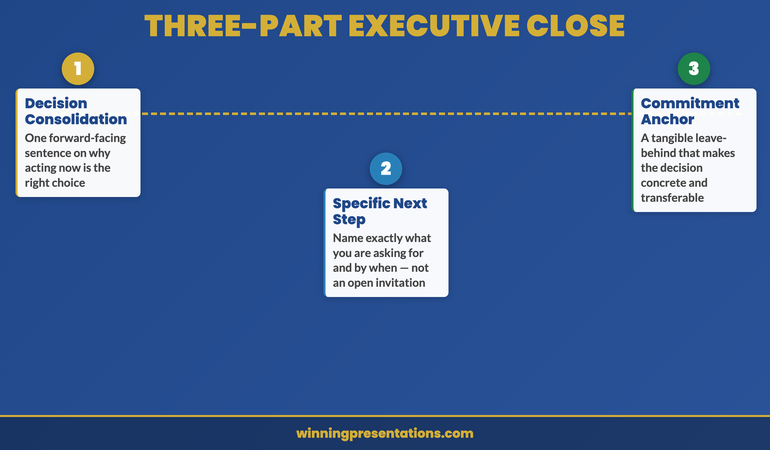
The three-part executive close

The most effective presentation closing framework for executive contexts has three distinct components, each doing a specific job. Used together, they transform the end of a presentation from a passive handover into an active decision moment.

The three-part executive presentation closing framework infographic — decision consolidation, specific next step, and commitment anchor — showing how each component drives audience action

Component 1: The decision consolidation statement. This is a single sentence — delivered verbally, not read from a slide — that names the decision and frames it in terms of its strategic consequence. It should not be a summary of your presentation. A summary is backwards-facing: it tells the audience what they have just heard. The consolidation statement is forwards-facing: it tells the audience what happens if they act on what they have just heard. Example: “Approving this investment today means we can begin the procurement process this quarter and have systems in place before the regulatory deadline — which protects the business from the compliance risk we identified on slide twelve.”

Component 2: The specific next step. Name exactly what you are asking the audience to do, and by when. Not “I hope we can move forward” — that is a wish, not a next step. Not “we look forward to your feedback” — that is an invitation for correspondence, not a decision path. A specific next step sounds like: “I’m asking for approval today, subject to any conditions the board wishes to attach. If approval is given, the procurement team can begin the vendor selection process on Monday.” The more specific the next step, the more clearly the audience understands what they are being asked to do.

Component 3: The commitment anchor. This is a tangible leave-behind — a one-page summary, a printed timeline, a named next action — that makes the decision feel concrete rather than conceptual. The commitment anchor serves two purposes: it gives the audience something to refer to after you leave the room, and it signals that you are operationally ready to proceed. Presenting without a leave-behind suggests that you are still in the analysis phase. Presenting with one suggests that you have already begun.

Executive Slide System

Build Presentations That Close — Not Just Inform

The closing sequence is where presentations succeed or fail. The Executive Slide System — £39, instant access — gives you the slide templates, AI prompt cards, and closing frameworks to build presentations that drive decisions rather than generate follow-up emails.

  • Slide templates for decision-focused executive presentations
  • AI prompt cards to structure closing arguments quickly
  • Framework guides for board approvals, budget bids, and programme sign-off
  • Scenario playbooks covering common high-stakes presentation contexts

Get the Executive Slide System →

Designed for executives who need decisions, not discussions.

Commitment close vs summary close — which to use

There are two primary closing approaches used in executive presentations. The summary close — a recap of your main points followed by a recommendation — is the more common and the less effective. The commitment close — a forward-facing statement of what you are asking for and why now — is the approach that actually moves decisions.

The summary close has one legitimate use: when the audience is genuinely processing complex information for the first time and needs a synthesis before they can decide. In a ninety-minute technical briefing covering new regulatory requirements, a summary close is appropriate. In a board presentation where the topic has been on the agenda for two months, it reads as filler.

The commitment close works because it aligns with how senior decision-makers actually think about their role. They are not there to absorb information — they have assistants and briefing packs for that. They are there to make decisions. A presenter who treats the close as the decision moment — who explicitly names what the decision is and why this meeting is the right moment to make it — is speaking directly to how executives understand their function in the room.

The practical difference is in the verb you use. The summary close uses “is”: “Our recommendation is X.” The commitment close uses “need” or “ask”: “We need a decision today so that…” or “I’m asking the board to approve…” The commitment close positions you as someone with authority who is asking for a specific outcome — which is a very different posture from someone who has completed a presentation and is waiting to see what happens.

For a companion approach to the pre-meeting phase that complements a strong close, see how to use pre-decision conversations to build executive approval before the meeting.

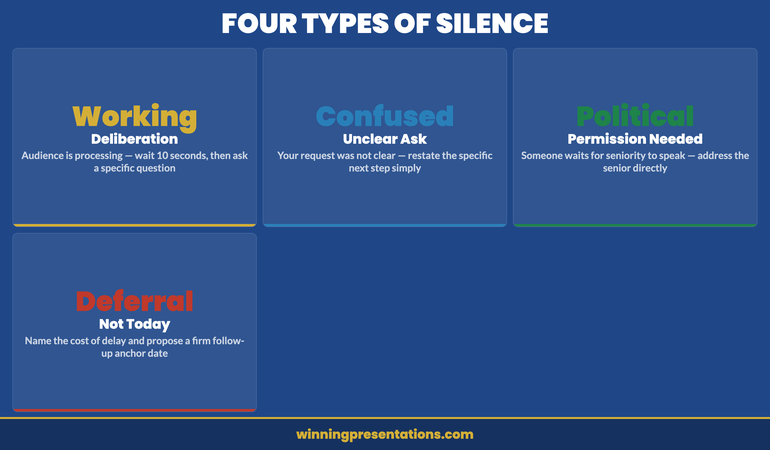
How to handle the silence after the close

The moment after you deliver the close of a presentation is often the most uncomfortable part of the entire communication. You have named the decision. You have stated what you are asking for. And then — nothing. The room is quiet, people are looking at the table or at each other, and the temptation is to fill the silence.

Do not fill it.

Presentation closing framework — handling silence after the close: a dashboard showing the four types of silence every executive presenter faces and the correct response to each

The silence after a close is a working silence. Decision-makers are processing — weighing the case against their own priorities, considering the implications for their stakeholders, formulating their question or their position. This is a good sign. It means your close landed and the decision is being actively considered.

When you speak into working silence, you undermine it. You suggest that you are not comfortable with the weight of the decision, that you have more to say, or that you need to soften your ask. Any of these signals weakens your close. The audience will take their cue from you: if you seem uncertain about whether to act, they will feel uncertain too.

The practical rule is to count to ten after your close. Ten seconds feels much longer than it is. In that time, the decision-maker who was about to speak will speak. If nobody speaks after ten seconds, ask a specific question: “Does anyone have concerns they’d like to raise before we move to a decision?” This moves the silence from open-ended to purposeful, without retreating from your position.

If you are building a presentation for a critical decision meeting and want a structured framework that takes you from opening through to close, the Executive Slide System includes closing sequence templates specifically designed for high-stakes executive contexts.

Closing mistakes that undermine credibility

There are five closing patterns that consistently undermine the effectiveness of executive presentations, regardless of how strong the preceding content has been.

The apologetic close. “I know this was a lot to cover in a short time” or “I realise there’s still some uncertainty in these numbers.” Self-deprecation in the close signals that you are not fully confident in your own case — which gives decision-makers permission to defer. If there is genuine uncertainty in your data, address it during the body of the presentation, not in the final sentence.

The laundry list close. Ending with five or six “next steps” dilutes the decision and gives the audience multiple low-friction alternatives to the main ask. If you need approval today, that should be the only next step in the close. Other actions can follow from it.

The over-summarised close. A summary that takes more than ninety seconds is no longer a summary — it is a second presentation. Decision-makers in executive settings have excellent memories for content they found compelling. A lengthy recap implies you do not trust them to remember what you said.

The open-ended close. Ending with “I’m happy to discuss further” or “I’d welcome your thoughts” without naming a decision invites discussion, not decision-making. Both have their place, but they are different processes. Be clear about which one you are opening.

The gratitude close. “Thank you for your time — I really appreciate you giving us this opportunity.” Gratitude is appropriate at the very end of a meeting, after the decision has been made. Opening the close with it signals that you consider the presentation to be over before the decision has been made, which it has not.

For a foundational treatment of executive summary structure that informs the closing sequence, see how to structure an executive summary slide that sets the decision frame.

The follow-up anchor technique

When a decision cannot be made in the room — because a key stakeholder is absent, because additional information is genuinely needed, or because the governance structure requires a second layer of approval — the follow-up anchor is the technique that keeps momentum alive rather than allowing the decision to drift.

The follow-up anchor is a specific, named commitment made in the room before the meeting ends. Not “we’ll be in touch” — that is not a commitment, it is a valediction. The follow-up anchor sounds like: “Before we close, can I confirm that you’ll have a response to me by next Wednesday? I’ll send a one-page summary with the key decision points this afternoon to support your deliberations.” The anchor has a date, a named person, and a specific deliverable.

The follow-up anchor works because it converts a vague “we’ll think about it” into a named next action with a deadline. It also signals operational competence — you are already managing the process, not just presenting the case. Decision-makers respond positively to this because it reduces their administrative burden: they know what they will receive and when, which makes it easier for them to engage.

The one-page summary you send after the meeting should be designed for forwarding. Senior decision-makers rarely make decisions alone — they consult their own advisers, their finance directors, their chief of staff. A clean, one-page summary that travels well through an organisation is more powerful than a detailed report that requires the decision-maker to interpret it on behalf of others.

For related thinking on how competitive presentations use the closing sequence, see the companion article: competitive tender presentation: how to win the room against an established vendor.

Executive Slide System — £39

The Structure Behind Presentations That Get Decisions

The Executive Slide System — £39, instant access — gives you slide templates, closing frameworks, and AI prompt cards to build executive presentations that move from opening context to clear decision moment without losing the room in between.

Get the Executive Slide System →

Designed for executives who need decisions, not discussions.

Frequently Asked Questions

How long should the close of a presentation be?

For most executive presentations, the close should take no more than two to three minutes. This includes the decision consolidation statement (one sentence, delivered verbally), the specific next step (one or two sentences), and the handover of any commitment anchor. If your close is taking longer than three minutes, you are either summarising rather than closing, or you have identified that additional persuasion is needed — which means you should address it in the body of the presentation, not the close. The brevity of the close is itself a signal of confidence: you believe your case has been made and you are asking for the decision.

What if the audience has objections during the close?

An objection raised during the close is usually one of two things: a genuine concern that was not addressed during the presentation, or a signal that the audience is engaging seriously with the decision. In either case, welcome it rather than defending against it. Name the objection: “That’s a fair challenge — let me address it directly.” Then answer specifically, without retreating from your recommendation. If the objection reveals a genuine gap in your case, acknowledge it, state how you will address it, and modify your next step accordingly: “Given that concern, what I’d suggest is a thirty-minute session next week to go through the risk model in more detail. Can we agree that as the next step?”

Is it appropriate to ask for a decision in a board presentation?

Yes — and in most cases it is not only appropriate but expected. Board members are decision-makers by function. Presenting to a board without asking for a decision leaves them in the position of advisers rather than governors, which is not the role they are paid to play. The key is to frame the decision clearly and to name the consequence of not deciding: “Every month we delay the programme costs the business approximately £X in operational inefficiency.” This is not pressure — it is information. Decision-makers need to understand the cost of inaction in order to weigh the decision correctly.

The Winning Edge

Weekly executive communication insight — every Thursday

Practical, no-filler analysis of what works in high-stakes presentations — including closing techniques, board communication, and decision-meeting structure.

Subscribe to The Winning Edge →

Free resource: Download the Executive Presentation Checklist — a pre-presentation audit used by Mary Beth’s clients before every high-stakes decision meeting.

About the Author

Mary Beth Hazeldine — Owner & Managing Director, Winning Presentations

With 25 years of corporate banking experience at JPMorgan Chase, PwC, Royal Bank of Scotland, and Commerzbank, Mary Beth advises executives across financial services, healthcare, technology, and government on structuring presentations for high-stakes funding rounds and board approvals. Her work focuses on the communication architecture that moves decisions.

05 Mar 2026
Confident executive woman presenting with structured slide deck visible on screen behind her in modern boardroom

Why a Proven Slide Structure Makes You 10x More Confident Than Practice Alone

The most confident executive presenter I’ve ever worked with rehearsed less than anyone else in her organisation. She simply had a better structure.

Most people try to fix presentation anxiety with more practice. More rehearsal. More hours in front of the mirror. And it helps, to a point. But if you’ve ever over-rehearsed a presentation and still felt shaky walking into the room, you already know: practice has a ceiling. After 24 years coaching executives, I can tell you what actually removes the nerves. It’s not confidence. It’s not charisma. It’s structure. A proven, tested system that tells you exactly what goes on each slide, in what order, and why.

Quick answer: Presentation confidence doesn’t come from rehearsal alone—it comes from structural certainty. When you know your slide architecture is proven, your opening is designed to land, your evidence sequence is tested, and your close drives a decision, your nervous system stops treating the presentation as a threat. Structure replaces uncertainty. And uncertainty is what your body reads as danger. Executives who use a proven presentation system report feeling fundamentally calmer—not because they’ve practised more, but because they’ve eliminated the guesswork.

Tired of rehearsing endlessly and still feeling underprepared?

The problem isn’t practice—it’s that you’re building every presentation from scratch. The Executive Slide System gives you a tested architecture for every slide, every transition, and every close. When the structure is proven, the confidence follows.

Explore the Executive Slide System → £39

The Two Directors Who Presented to the Same Board

Last year I coached two directors at the same FTSE-listed company. Both were presenting strategic proposals to the board on the same afternoon. Both had strong ideas. Both were intelligent, articulate leaders. One spent three weeks rehearsing. She practised in the car, at her desk, in the shower. She could recite her presentation by heart. The other spent two days building her deck using a structured system I’d given her—a tested slide architecture with a decision-first format, an evidence sequence, and a pre-built close.

The first director walked in looking polished but tense. You could see it in how she held her clicker, in the micro-pauses where she was searching for memorised phrasing. When a board member interrupted with a question, she lost her thread for ten seconds. That ten seconds cost her momentum. She recovered, but the room’s energy had shifted.

The second director walked in calm. Not rehearsed-calm. Actually calm. She knew what her first slide would accomplish. She knew the evidence sequence was proven. She knew the close would drive a decision because she’d seen it work before. When a board member interrupted, she handled it easily—because she wasn’t holding a memorised script in her head. She was following a structure she trusted.

Both proposals were approved. But the second director was asked to present the combined strategy at the annual investor meeting. The board didn’t choose her because she was more senior or more experienced. They chose her because she looked like someone who could handle a room. That composure came from structure, not talent.

After 24 years of coaching, I’ve watched this pattern repeat hundreds of times. The executives who look most confident aren’t the ones who practise most. They’re the ones who trust their structure.

Stop Building Presentations From Scratch

Every time you start with a blank slide deck, your nervous system registers one thing: uncertainty. The Executive Slide System eliminates that uncertainty entirely.

  • A decision-first slide architecture tested across 1,200+ executive presentations
  • Evidence sequence framework that answers “Why this?”, “Why now?”, and “Why us?” in the order boards actually process information
  • Stakeholder-specific templates: CFO version, Operations version, Board-level version
  • Objection-handling slides for the eight most common executive concerns—built in, not bolted on
  • Closing framework that drives decisions, not just applause

Get the Executive Slide System → £39

Used by 1,200+ executives. Average approval rate: 72% on first presentation.

Why Practice Has a Confidence Ceiling

Rehearsal does build familiarity. It smooths your delivery, tightens your timing, helps you internalise key points. Nobody is arguing against practice. The problem is that practice alone doesn’t eliminate the uncertainty that causes anxiety.

When you rehearse a presentation you’ve built from scratch, you’re practising delivery—but you’re still carrying a deeper question: Is this the right structure? Will the board engage with this opening? Will they follow my logic? Will the close land? Am I presenting the evidence in the right order?

Those structural doubts don’t disappear with rehearsal. You can practise a badly structured presentation a hundred times and still feel uneasy about it, because your subconscious knows the architecture is uncertain. You haven’t tested whether this sequence of ideas actually works on this type of audience. You’re hoping it does.

Hope is not confidence. Confidence comes from knowing.

When executives tell me they “just don’t feel confident presenting,” I almost always find the same root cause: they’ve been working without a tested structure. They’re assembling slides from instinct, convention, or whatever worked last time, and then trying to rehearse away the underlying uncertainty. That’s like memorising a route through an unfamiliar city instead of using a map. You might get there, but you’ll be anxious the entire way.

The Structure Effect: What Certainty Does to Your Nervous System

Your nervous system is constantly scanning for threat. In a presentation context, the primary threat it detects isn’t the audience—it’s unpredictability. Will this work? Will they follow? Am I going to lose the room?

When you use a proven structure—a slide architecture that’s been tested with hundreds of similar audiences—your nervous system registers something entirely different: certainty. You’re not wondering whether the opening will land, because you’ve seen this opening work. You’re not anxious about the evidence sequence, because it follows a tested logic. You’re not worried about the close, because the framework is designed to drive a decision.

This is why I say structure makes people 10x more confident. It’s not a motivational claim. It’s a nervous system observation. When your brain doesn’t have to solve the “will this work?” problem during the presentation, it frees up an enormous amount of cognitive resource. That resource becomes presence, composure, and the ability to respond to the room rather than cling to a memorised script.

Think about the difference between driving a familiar route and navigating somewhere new. On the familiar route, you can have a conversation, notice the scenery, react to other drivers easily. On an unfamiliar route, your attention narrows, your grip tightens, and you can barely hold a conversation. Same skill—driving. Completely different experience, because one involves structural certainty and the other doesn’t.

Presenting works exactly the same way. A proven structure is your familiar route. It frees you to be present instead of panicking about what comes next.


The Structure-Confidence Effect infographic comparing how presenting without a proven structure triggers nervous system threat response versus how a proven template activates confidence response

Five Ways a Proven System Eliminates Presentation Anxiety

1. It removes the blank-slide problem

The moment of highest anxiety in presentation preparation isn’t the rehearsal—it’s the blank first slide. That’s when your brain confronts the full weight of “I have to figure out what to say, in what order, with what evidence, for this specific audience.” A proven system eliminates this entirely. You open the template, and each slide already has a purpose, a position in the sequence, and a tested rationale. Preparation becomes assembly, not invention.

2. It answers the “will this work?” question in advance

When you’ve built a presentation from scratch, you carry a low-level doubt through every rehearsal and into the room itself. A tested system removes that doubt because the structure has already worked. You’re not the first person to use this evidence sequence or this decision-first opening. It’s been tested with boards, investors, executive committees, and sceptical audiences. Knowing that shifts your internal state from “I hope this works” to “I know this works.”

3. It handles interruptions for you

One of the biggest anxiety triggers in executive presentations is the fear of interruption. What if someone asks a question mid-slide? What if you lose your place? When your confidence depends on a memorised sequence, any interruption is a threat. But when your confidence comes from a proven structure, interruptions become manageable because you always know where you are in the architecture. You can address the question and return to your position without panic, because the structure holds whether or not you deliver it in perfect sequence.

4. It makes your preparation faster (and calmer)

Executives who work without a system often spend days or weeks building a presentation—and then need additional time to rehearse it. The preparation itself generates anxiety because it consumes so much time and mental energy. A proven system cuts preparation time dramatically. When the structure is settled, all you’re doing is populating it with your specific content. This means less time in preparation mode and more time feeling ready—which is itself a confidence multiplier.

5. It gives you permission to stop rehearsing

Over-rehearsal is a real problem. When you’ve practised too much, your delivery becomes wooden, your responses to questions feel scripted, and you start second-guessing phrasing mid-sentence. A proven structure gives you permission to stop rehearsing earlier because you trust the architecture. You don’t need to practise the presentation fifteen times when the system has already been tested by hundreds of other executives. You familiarise yourself with it, personalise the content, and walk in.

Still assembling presentations from scratch?

The Executive Slide System gives you the architecture so you can focus on the content. Templates for every slide type, a proven evidence sequence, and objection-handling built in. Stop building from blank—start building from proven.

Get the Executive Slide System → £39

What a Confidence-Building Structure Actually Looks Like

Not all structures are equal. A confidence-building presentation structure has specific characteristics that differentiate it from a basic template or outline.

It leads with the decision, not the background. Most presentations start with context, history, and data before arriving at the ask. This creates anxiety because you’re spending the first ten minutes wondering whether the audience is following your logic. A decision-first architecture puts your recommendation on the first slide. The audience knows immediately what you’re proposing, and every subsequent slide exists to support that decision. You’re not building toward a reveal—you’re providing evidence for a position you’ve already stated.

It sequences evidence in the order audiences process it. Executives process information in a specific sequence: What’s the risk? What’s the return? What’s the timeline? A proven structure mirrors that processing order. You’re not guessing which evidence to present first—you’re following the cognitive sequence that board members naturally use to evaluate proposals. This makes your presentation feel logical and inevitable, which in turn makes you feel confident delivering it.

It pre-builds objection responses. Half of presentation anxiety comes from fear of challenge. What if they push back on the budget? What if they question the timeline? A confidence-building structure includes objection-handling slides built directly into the flow. You don’t need to improvise under pressure because the most common objections are already addressed in your architecture.

It closes with a specific action, not a vague summary. “Any questions?” is the weakest ending in executive presentations—and it’s the one that generates the most post-presentation anxiety. A proven structure closes with a clear decision framework: what you’re asking for, by when, and what happens next. You walk out knowing exactly what you asked for and what the next step is. That eliminates the lingering anxiety of “Did I get through to them?”

Your Next Presentation, Without the Guesswork

  • Decision-first architecture: stop burying your ask on slide 15
  • Evidence framework that follows how executives actually process proposals
  • Pre-built objection-handling slides for the questions that keep you up at night
  • Closing framework that drives a decision instead of trailing off into “Any questions?”

Get the Executive Slide System → £39

The same system used by board presenters, strategy directors, and CEOs at FTSE companies


Structure vs More Practice comparison infographic showing six categories where a proven slide architecture outperforms rehearsal: starting point, core question, preparation time, interruptions, and confidence source

Structure vs. More Practice: Where Executives Get This Wrong

The instinct when presentations feel shaky is always the same: practise more. Run through it again. Rehearse in the car. Record yourself. This instinct is understandable and not entirely wrong—but it usually addresses the symptom rather than the cause.

Here’s what I’ve observed over two decades of coaching: when an executive feels underprepared, the issue is almost never delivery. They can speak clearly, they know their material, they’re intelligent professionals. The issue is structural uncertainty. They’re not sure the deck is in the right order. They’re not sure the opening will connect. They’re not sure the close will land. And no amount of rehearsal resolves structural uncertainty, because you can’t practise your way to a better architecture—you can only practise the architecture you have.

This is where the 10x confidence factor comes from. When the structure is settled, rehearsal becomes productive instead of anxious. You’re no longer practising to discover whether the presentation works. You’re practising to refine your delivery of a presentation you already know works. That is a completely different psychological experience.

Think of it as the difference between rehearsing a play with a finished script and rehearsing while the writer is still changing the plot. One is productive. The other just compounds anxiety.

The same principle applies to hybrid presentations, where structural certainty is even more important because you’re managing in-room and remote audiences simultaneously. Without a clear architecture, the cognitive load doubles and confidence drops.

Structure first, rehearsal second.

The Executive Slide System gives you the proven architecture. Once you’ve populated it with your content, you’ll find you need far less rehearsal—because the structural confidence is already there.

Get the Executive Slide System → £39

Is This the Right Approach for You?

A structure-based approach to presentation confidence works when the underlying issue is uncertainty about your material’s architecture—not a clinical anxiety condition. If you’re an executive who knows your subject, can speak competently, but still feels unsettled walking into the room, structural certainty is very likely the missing piece.

This applies to you if: you spend more time worrying about your slide order than your content. If you rearrange your deck three times before every presentation. If you feel confident about what you know but anxious about how you’re presenting it. If you’ve ever looked at another executive and thought “how are they so calm?”—the answer is usually that they have a system.

If your anxiety is more pervasive—if it extends well beyond presentations into other areas of professional life, or if it involves severe physical symptoms that don’t respond to preparation changes—then you may benefit from a more clinical approach. For the majority of executives, though, structural confidence is the transformation they didn’t know they needed.

24 Years of Boardroom Presentations, Distilled Into One System

  • Complete decision-first architecture with real-world examples from every major executive scenario
  • 10+ pitch templates: strategy, budget, operational change, technology adoption, innovation—all with proven slide sequences
  • Stakeholder-specific decks for CFOs, Operations directors, and board-level audiences
  • Objection-handling templates for the 8 most common executive concerns
  • Language guide with 50+ proven phrases and framings for executive contexts

Get the Executive Slide System → £39

Trusted by 1,200+ executives. Average approval rate: 72% on first presentation.

Frequently Asked Questions About Presentation Structure and Confidence

Does using a template make my presentations feel generic?

The opposite. A proven structure frees you to focus on your specific content, data, and storytelling—because you’re not spending cognitive energy on architecture. Templates provide the skeleton; your expertise provides the substance. Nobody in the boardroom thinks about your slide order. They think about whether your argument is compelling. Structure makes your argument more compelling, not less personal.

I’m already a strong speaker. Do I still need a system?

Strong speakers benefit the most from structure, because the system eliminates the one thing that still creates anxiety: uncertainty about the material’s architecture. You may be brilliant at delivery, but if your slide order isn’t optimised for how executives process information, you’re working harder than you need to. A system lets your speaking ability shine by removing the structural friction underneath it.

How is this different from just following a standard presentation format?

Standard formats (introduction, body, conclusion) tell you what to include but not how to sequence it for decision-making audiences. A decision-first architecture is fundamentally different from a conventional presentation flow. It leads with the recommendation, structures evidence in the order executives process it, and closes with a specific ask. Standard formats leave the most important decisions to you—a tested system has already made them.

How quickly will I notice a confidence difference?

Most executives report feeling different during preparation—not just during delivery. The moment you open a template and see a clear architecture waiting for your content, the “where do I start?” anxiety disappears. By the time you’ve populated the structure with your specific data and arguments, you’ll feel a level of preparedness that would normally take three times the preparation hours to achieve. The confidence shift is immediate because it’s based on structural certainty, not accumulated rehearsal.

Get executive presentation insights every week.

The Winning Edge newsletter delivers real strategies for the presentation moments that matter. Techniques, frameworks, psychology. Once a week, practical. No fluff.

Subscribe to The Winning Edge

🆓 Free resource: Executive Presentation Checklist — a free guide to strengthen your presentation preparation.

Explore related articles:

About the Author

Mary Beth Hazeldine has spent 24 years coaching executives, board members, and senior leaders through high-stakes presentations. She created the Executive Slide System after observing that the most confident presenters weren’t the most practised—they were the most structured. The system distils the architecture of successful executive presentations into a reusable framework that removes guesswork and builds genuine confidence from the first slide.

Next step: If you have a presentation coming up and you’re already dreading the preparation, try this: before you open PowerPoint, write down the decision you want from the audience. Then write the three strongest pieces of evidence for that decision. Then write your close. If you can do that in 15 minutes, you’ve already built a skeleton that’s more effective than most executive presentations. If you want the complete architecture—tested, templated, and ready to populate—the Executive Slide System gives you exactly that.


23 Feb 2026
Professional woman standing alone presenting to a boardroom of seated sceptical executives — presenting when the room has already decided against you

The Presentation You Give When the Room Has Already Decided Against You

Quick answer: When the room has already decided against your recommendation, a traditional presentation — background first, evidence second, ask at the end — guarantees rejection. The audience spends every slide building their counter-argument. The reversal framework works differently: acknowledge the objection first (proves you understand their position), reframe the decision criteria (shifts what they’re evaluating), present evidence against the NEW criteria (makes your recommendation logical under their reframed perspective), and make the ask inevitable. The room doesn’t change their mind — you change what they’re deciding about.

47 Slides. A Competing Internal Team. A Room That Had Already Said No.

The biotech company had 47 slides. The board had already been briefed by a competing internal team pushing an alternative approach. Every decision-maker in the room had seen the counter-proposal first — and had been nodding along to it for two weeks.

My client walked in knowing the room had pre-decided. Not hostile in a confrontational way. Worse. Politely certain they’d already found the better option.

We cut the 47 slides to 12. Not by removing information — by restructuring the logic. The first slide didn’t present the recommendation. It acknowledged the competing proposal’s strongest argument. The second slide reframed the decision criteria — not “which approach is cheaper?” but “which approach reduces regulatory risk in the first 18 months?” By slide 4, the room was evaluating a different question than the one they’d walked in with.

They approved the recommendation. £4.2 million in funding. From a room that had walked in ready to say no.

Not because the presentation was persuasive. Because the structure changed what the room was deciding about. That’s the difference between presenting to a hostile room and reversing one.

🚨 Presenting to a resistant room this week? Quick 60-second check: Does your first slide acknowledge their current position — or does it launch straight into YOUR recommendation? If it launches into your pitch, you’ve lost them by slide 2. They’re not listening. They’re building their counter-argument. → Need the exact reversal templates? The Executive Slide System (£39) includes the decision-reframing structure that turns hostile rooms into approvals.

Why Traditional Presentations Guarantee Rejection in a Hostile Room

When an audience has already decided against your recommendation, every element of a traditional presentation works against you. Here’s the structural problem:

Background slides confirm their position. You open with context: market data, project history, the problem you’re solving. The hostile audience doesn’t hear “context.” They hear “here’s why I think you’re wrong” — and they start mentally rehearsing their objections. By the time you reach slide 5, they’ve already formulated three reasons to reject you. Your background became their preparation time.

Evidence slides trigger counter-evidence. You present your data, your ROI projections, your implementation plan. Each data point the audience disagrees with hardens their resistance. In a neutral room, evidence builds your case. In a hostile room, evidence triggers an adversarial response — they’re not evaluating your data, they’re looking for the flaw that justifies their pre-existing position.

The late ask gives them an easy exit. After 20 slides of background and evidence, you finally ask for the decision. By now, the hostile audience has had 20 slides to build their “no.” The ask becomes a formality — they deliver the rejection they’ve been preparing since slide 1. You never had a chance because the structure gave them 20 minutes to fortify their opposition.

This is why “just present the facts and let them decide” fails catastrophically in a hostile room. The facts aren’t evaluated neutrally. They’re filtered through a pre-existing conclusion. The decision-first slide approach addresses this by restructuring when the audience encounters the key question — but in a hostile room, you need to go further. You need to change the question itself.

Diagram showing how traditional presentation structure guarantees rejection in hostile rooms — background confirms opposition, evidence triggers counter-arguments, late ask enables prepared rejection

The 4-Slide Reversal Framework That Changes What the Room Is Deciding

The Reversal Framework doesn’t try to persuade a hostile room to agree with you. It changes what they’re deciding about — so your recommendation becomes the logical answer to a different question.

Here’s how the 12-slide biotech presentation worked, condensed to its 4-slide core logic:

Slide 1: The Acknowledgement. Not your recommendation. Not your evidence. An honest acknowledgement of the room’s current position and why it makes sense. “The Phase 2 approach has clear cost advantages and faster initial timelines. I understand why it’s the preferred option.” This does something no traditional opening does: it disarms the audience. They walked in expecting you to argue against their position. Instead, you validated it. The adversarial dynamic breaks. For 30 seconds, the room stops preparing their counter-argument — because you’re not arguing. You’re agreeing. That 30-second window is where the reversal begins.

Slide 2: The Reframe. This is the architectural pivot. You don’t challenge their conclusion — you challenge the criteria they used to reach it. “But the decision criteria should include regulatory risk in the first 18 months — not just cost and speed. Here’s why.” You’re not saying they’re wrong. You’re saying the question is incomplete. This is psychologically powerful because it doesn’t require the audience to admit they were wrong about anything. They weren’t wrong about cost. They weren’t wrong about speed. They just weren’t evaluating the full picture. Nobody’s ego is threatened. The decision criteria simply got bigger.

Slide 3: Evidence Against the NEW Criteria. Now — and only now — you present your evidence. But mapped to the reframed criteria, not the original ones. The competing proposal wins on cost. Your proposal wins on regulatory risk, which you’ve just established as the criterion that matters most. The room evaluates your evidence against the expanded criteria and sees that your recommendation is the logical answer — not because you argued better, but because the question changed. At board-level presentations, this reframing technique is particularly effective because boards are conditioned to evaluate decisions against multiple criteria.

Slide 4: The Inevitable Ask. Restate the reframed decision criteria. Show how your recommendation satisfies them. Make the ask. “Given the regulatory risk profile, I’m recommending we proceed with the Phase 3 approach at a cost of £4.2M.” By this point, the ask doesn’t feel like a pitch. It feels like the obvious conclusion to the framework the room has already accepted. They’re not “changing their mind” — they’re making a different decision because the decision criteria changed.

Four slides. Acknowledge → Reframe → Evidence → Ask. The room walks in ready to say no. They walk out having approved — because you didn’t fight their position. You expanded it.

The Reversal Framework — including the acknowledgement template, the criteria reframe formula, and the evidence-mapping structure — is built into the Executive Slide System, with templates designed for steering committees, boards, and senior leadership meetings where pre-decided resistance is the norm.

The Slide Structure That Reverses Pre-Decided Rooms

The Executive Slide System gives you the Reversal Framework — the slide architecture that turns hostile rooms into approvals by changing what the audience is deciding about, not by arguing harder.

  • ✓ The Acknowledgement Slide template — disarm resistant stakeholders in the first 30 seconds
  • ✓ The Criteria Reframe formula — shift the decision question so your recommendation becomes the logical answer
  • ✓ Evidence-mapping templates — present data against the reframed criteria, not the ones you’ll lose on

Get the Executive Slide System → £39

Built from 24 years of executive presentations at JPMorgan, PwC, RBS, and Commerzbank — including high-stakes approvals where the room walked in ready to say no.

How to Reframe Decision Criteria Without the Room Realising

The reframe is the most critical slide in the Reversal Framework — and the most misunderstood. It’s not manipulation. It’s not a trick. It’s adding a decision criterion the room hasn’t considered, making their evaluation more complete rather than less.

Here’s the technique, broken down into three steps:

Step 1: Identify the criteria the room is currently using. In the biotech case, the room was evaluating on cost and speed. Those were the two criteria the competing team had presented — because they won on both. Your first task is to name the criteria the room is using, even if nobody has stated them explicitly. “The current evaluation is focused on cost and implementation speed — and the Phase 2 approach wins on both.”

Step 2: Introduce the missing criterion with a consequence. Not “here’s another thing to consider.” That’s too weak. Instead: “But there’s a criterion missing from this evaluation that changes the calculus entirely: regulatory risk in the first 18 months.” The word “consequence” is important. You’re not adding a nice-to-have. You’re introducing something that materially changes the outcome. The room’s attention shifts because you’ve signalled danger — there’s something they haven’t evaluated that could hurt them.

Step 3: Make the missing criterion the decisive one. Show — with evidence — why the missing criterion outweighs the existing ones. “A regulatory delay costs £800K per month. The Phase 2 cost advantage is £1.2M total. One regulatory setback eliminates the entire cost saving and creates a £2.4M exposure.” The maths makes the reframe concrete. The room isn’t changing their mind — they’re responding to new information that makes the previous evaluation incomplete.

This works because you’re not saying “you were wrong.” You’re saying “you were right — but incomplete.” That’s a much easier psychological position for decision-makers to accept, especially at the steering committee level where nobody wants to appear to have been manipulated or to have missed something obvious.

The 4-Slide Reversal Framework showing Acknowledge, Reframe, Evidence against new criteria, and Inevitable Ask — turning hostile rooms into approvals

Reading the Room: How to Know If the Reversal Is Working

The Reversal Framework creates observable shifts in the room’s behaviour. Knowing what to watch for helps you calibrate your delivery in real time.

Signal 1: The uncrossing. Hostile audiences have closed body language — crossed arms, leaned back, minimal eye contact. When the Acknowledgement Slide lands, you’ll see a physical shift. Arms uncross. Posture shifts forward slightly. One or two people make eye contact. This happens because you’ve broken the adversarial expectation. They expected a fight. You gave them validation. The physiological response is an opening — literally.

Signal 2: The note-taking shift. In a hostile room, decision-makers take notes to build their counter-argument (“didn’t account for X,” “timeline unrealistic”). When the Reframe Slide lands, the note-taking changes character. Instead of writing objections, they start writing the new criterion. They’re no longer building a case against you. They’re processing the reframe. Watch for the moment someone writes down your reframed criterion — that’s the moment the reversal is working.

Signal 3: The internal glance. After the Reframe Slide, watch for decision-makers glancing at each other. Not the hostile “can you believe this?” glance. The “did we miss this?” glance. This is the most powerful signal because it means the room is collectively realising their previous evaluation was incomplete. They’re checking whether their colleagues had considered the missing criterion. If nobody had, your reframe has just created a shared gap that only your recommendation fills.

Signal 4: Questions shift from challenges to logistics. In a hostile room, questions sound like “Where did you get those numbers?” and “Isn’t the alternative cheaper?” After a successful reversal, questions shift to “What’s the implementation timeline?” and “How soon can we start?” When questions move from challenging your premise to planning the execution, the room has decided — even if they haven’t formally voted yet.

The Reversal Framework templates inside the Executive Slide System include the acknowledgement opener, the criteria reframe formula, and the evidence-mapping structure — plus AI prompts to build your reversal deck in 25 minutes so you’re prepared even when you discover the resistance the morning of the meeting.

Stop Losing Recommendations to Rooms That Decided Before You Spoke

You’ve walked into meetings where every face said no before you opened your mouth. You’ve watched good proposals die because the room had already committed to the alternative. The Executive Slide System gives you the reversal architecture that changes what they’re deciding about.

  • ✓ Stop presenting evidence to rooms that have already decided to ignore it
  • ✓ Stop losing budget approvals because a competing proposal was briefed first
  • ✓ Stop watching strong recommendations die because the room was pre-committed to “no”

Get the Executive Slide System → £39

The same reversal framework used by the biotech team that secured £4.2M from a board briefed against their proposal — 47 slides became 12, and the room that walked in ready to say no walked out having approved.

Common Questions About Presenting to Hostile Audiences

How do you present when the audience has already decided against you?

You don’t try to change their mind — you change what they’re deciding. The Reversal Framework uses four slides: Acknowledgement (validate their current position to disarm the adversarial dynamic), Reframe (introduce a decision criterion they haven’t considered that shifts the evaluation), Evidence (present your data against the reframed criteria where your recommendation wins), and Ask (make the recommendation inevitable under the expanded framework). The key psychological insight: people don’t resist changing their mind when they feel they’re making a better decision, not a different one. The reframe gives them new information that makes their previous evaluation incomplete — and your recommendation becomes the logical completion.

Can a presentation actually reverse a pre-decided room?

Yes, but not through better arguments or more data. Pre-decided rooms have already evaluated your type of evidence and reached a conclusion. Adding more of the same evidence reinforces their existing framework. The Reversal Framework works because it changes the evaluation framework itself — introducing a criterion the room hasn’t considered that shifts which option is logically superior. The biotech case study is typical: the room had decided on cost and speed grounds. The reframed criterion (regulatory risk) didn’t make them wrong about cost — it made cost insufficient as a decision factor. No ego threatened. No position reversed. Just a more complete evaluation that changed the answer.

What’s the best structure for presenting to resistant stakeholders?

The worst structure is the most common one: background → evidence → ask. In a resistant room, background gives stakeholders time to prepare their objections, evidence triggers counter-evidence, and the late ask enables the rejection they’ve been building toward. The best structure for resistant stakeholders is: acknowledge → reframe → evidence against new criteria → inevitable ask. This works because the acknowledgement breaks the adversarial dynamic (they expected a fight, you gave validation), the reframe expands the evaluation criteria (nobody’s wrong, the question just got bigger), and the evidence against the NEW criteria positions your recommendation as the logical answer to a question the room accepts as legitimate.

Is the Executive Slide System Right For You?

✓ This is for you if:

  • You regularly present to rooms where the audience has already formed an opinion — boards, steering committees, or leadership teams briefed by competing proposals
  • You’ve had good recommendations rejected because the room was pre-committed to an alternative
  • You want a structural framework for reversing resistant audiences — not motivational advice about “staying confident”
  • You need to build a reversal deck quickly, sometimes with hours of notice

✗ This is NOT for you if:

  • Your audience is neutral or supportive — the Reversal Framework is specifically for pre-decided resistance (neutral audiences need decision-first structure, not reversal architecture)
  • You’re looking for body language or delivery coaching (this is a slide structure framework)
  • Your presentations don’t involve a specific recommendation or ask (the framework is built around reversing a decision, which requires a decision to reverse)

47 Slides Became 12. A Hostile Room Became a £4.2M Approval. The Framework Is Now Available as Templates.

Every template in the Executive Slide System was built in boardrooms, steering committees, and programme governance meetings where the room walked in pre-decided — across 24 years at JPMorgan, PwC, RBS, and Commerzbank.

  • ✓ Reversal Framework templates — Acknowledge, Reframe, Evidence, Ask — built for pre-decided audiences
  • ✓ AI prompts to restructure your existing deck into reversal architecture in 25 minutes
  • ✓ Before/after examples from real executive presentations where the room started hostile and ended with approval

Get the Executive Slide System → £39

Used by programme directors, VPs, and department heads presenting in environments where the answer was “no” before they walked in — and “yes” before they walked out.

Frequently Asked Questions

What if the room won’t engage at all — stone-faced silence?

Stone-faced silence is actually better than active hostility — it means the room is waiting, not fighting. The Acknowledgement Slide is particularly powerful here because it breaks the expectation. The room expects you to pitch. When you validate their position instead, the silence shifts from resistant to curious. They’re listening to see where you’re going. The Reframe Slide then gives them something to evaluate — a new criterion they hadn’t considered. Stone-faced rooms often break into engagement at the reframe because you’ve introduced genuine new information. If the silence persists through the Evidence Slide, ask a direct question: “Does the regulatory risk factor change how you’d evaluate the two options?” This forces a response and makes the reframe explicit.

Does this work when my own manager is against the recommendation?

Yes, and it’s actually more important in this scenario. When your manager disagrees, a traditional “here’s why I’m right” presentation creates a direct conflict with someone who controls your career. The Reversal Framework avoids direct conflict entirely. You acknowledge your manager’s position (validating their thinking), introduce an additional criterion (not contradicting them — expanding the evaluation), and let the evidence speak to the expanded criteria. Your manager doesn’t have to admit they were wrong. They have to decide whether the new criterion changes the calculus — and if your evidence is strong, the answer is yes. The key: never frame it as “you missed this.” Frame it as “there’s new information that wasn’t available when the initial evaluation was done.”

What if I’ve already presented this recommendation and it was rejected — can I try the Reversal Framework on a second attempt?

Yes, but the Acknowledgement Slide becomes even more critical. You need to acknowledge the previous rejection explicitly: “Last quarter, I recommended the Phase 3 approach and the committee decided against it. The cost and speed evaluation was sound.” Then introduce what’s changed: “Since then, three things have shifted that change the risk profile…” The reframe works because you’re not saying the previous decision was wrong — you’re saying the conditions have changed. This gives decision-makers a psychologically safe way to reverse course: they made the right call with the information they had. Now the information is different. Second-attempt reversals have the highest success rate when you can name the specific change that makes the previous decision incomplete.

Get Weekly Presentation Intelligence

Reversal frameworks, decision-reframing techniques, and the slide architecture that turns resistant rooms into approvals — delivered every week for senior professionals who present in high-stakes environments.

Join the Newsletter

Related: If the hostile room triggers anxiety — the dread of walking into a meeting where every face says no, the fear of public failure — that’s a separate problem with a separate fix. Read Glossophobia at the C-Suite: Why Successful Executives Still Struggle for the clinical techniques that break the executive anxiety cycle.

Also today: If the problem isn’t collective resistance but a specific colleague actively sabotaging your presentation — feeding contradictory data to decision-makers or lobbying against you before the meeting — the structural defence is different. Read The Executive Who Tried to Sabotage My Client’s Presentation for the framework that makes sabotage structurally irrelevant.

Your next step: Think about your next meeting where the room might not be on your side. Check your deck: Does Slide 1 acknowledge their current position? Does Slide 2 introduce a criterion that changes the evaluation? If you’re leading with your recommendation instead, you’re presenting to a room that’s spending your entire deck building their “no.”

The room has already decided. Your structure needs to change what they’re deciding about. Build the reversal deck before the meeting — not after the rejection.

Get the Executive Slide System → £39

About the Author

Mary Beth Hazeldine is the Owner & Managing Director of Winning Presentations. With 24 years of corporate banking experience at JPMorgan Chase, PwC, Royal Bank of Scotland, and Commerzbank, she has delivered and supported high-stakes presentations in boardrooms where the room walked in pre-decided — steering committees, programme boards, and executive governance meetings where the default answer was “no” and the slide structure had to change it.

A qualified clinical hypnotherapist and NLP practitioner, Mary Beth has trained thousands of executives and supported high-stakes funding rounds and approvals across banking, consulting, and corporate environments.

Book a discovery call | View services

23 Feb 2026
Executive woman standing with composed expression in boardroom while male colleague sits behind her with arms crossed — corporate presentation sabotage dynamics

The Executive Who Tried to Sabotage My Client’s Presentation (And How the Slides Saved Her)

Quick answer: Presentation sabotage — colleagues feeding contradictory data to decision-makers, lobbying against your recommendation before the meeting, or positioning themselves to benefit from your failure — is a structural problem, not a political one. The defence isn’t better office politics. It’s a slide architecture that makes sabotage irrelevant: decision-first sequencing, self-contained logic, pre-emptive objection handling built into the slide order. When the structure is unchallengeable, the saboteur has nothing to attack.

She Found Out 20 Minutes Before the Meeting. The Room Had Already Been Briefed Against Her.

A colleague had emailed the entire steering committee contradictory data the night before.

Not overtly. Not as an attack. As a “just wanted to flag some concerns about the numbers in tomorrow’s presentation” — the kind of corporate sabotage that looks like diligence but is designed to destroy credibility before you’ve said a word.

My client — a programme director at a global bank — found the email at 8:40am. The meeting was at 9:00. Twenty minutes. No time to address each point individually. No time to rally allies. No time to confront the colleague.

She presented anyway. The committee approved her recommendation in the room. The saboteur’s email was never discussed.

Not because she was politically brilliant. Not because she out-manoeuvred the colleague. Because the slide structure she used made the contradictory data irrelevant. Her architecture led with the decision, surfaced the objections before anyone could raise them, and made the recommendation logically inevitable — regardless of what anyone had been told beforehand.

The sabotage failed because the structure was unchallengeable. That’s not luck. That’s architecture.

Here’s the framework, and why it works when everything else doesn’t.

🚨 Presenting this week in a politically charged environment? Quick check: Does your first slide state the decision you’re asking for — or does it start with background? If it starts with background, any pre-briefed sceptic has 5-10 minutes to build their counter-argument before you’ve even asked for anything. Decision-first sequencing eliminates that window. → Need the exact slide structure? The Executive Slide System (£39) includes the templates that make sabotage structurally irrelevant.

Why Slide Structure — Not Politics — Is Your Only Reliable Defence

When someone sabotages your presentation, the instinctive response is political: confront the saboteur, rally allies, escalate to your manager, or try to discredit their intervention.

Every one of those strategies is unreliable, and here’s why.

Confrontation tips off the saboteur that you know what they’ve done. They adjust. They escalate. A political skirmish becomes a political war, and now the decision-makers are watching two colleagues fight rather than evaluating your recommendation.

Rallying allies requires time you don’t have. In my client’s case, she had twenty minutes. In most cases, you discover the sabotage hours before the meeting — or you don’t discover it at all until you see the sceptical faces. You can’t build a coalition in a corridor conversation.

Escalation makes you look weak. Running to your manager because a colleague sent a challenging email positions you as someone who can’t handle scrutiny. Decision-makers notice. Even if your manager intervenes, you’ve signalled that your recommendation can’t stand on its own.

Structure does something none of these approaches can do: it makes the sabotage irrelevant without addressing it directly. When your decision slide leads with the recommendation, the room evaluates your logic — not the saboteur’s pre-briefing. When your objection handling is built into the slide order, the contradictory data has already been addressed before anyone can raise it. When the evidence follows a self-contained sequence, the committee has no gaps to exploit.

The saboteur needs gaps. A bulletproof structure has none.

Diagram showing why political responses to presentation sabotage fail while structural defences succeed — confrontation, allies, and escalation versus decision-first architecture

The Sabotage-Proof Framework: 4 Slides That Make Attacks Irrelevant

This is the framework my client used. It works because each slide eliminates a specific attack vector that saboteurs rely on.

Slide 1: The Decision Statement. Not background. Not context. Not “Today I’d like to update you on…” The first slide states, in one sentence, exactly what you’re asking the room to approve. “I’m requesting approval to proceed with Option B at a cost of £2.4M, with implementation beginning Q3.” This eliminates the saboteur’s most powerful weapon: the build-up period. In a traditional presentation, the first 5-10 slides are background — and that’s where pre-briefed sceptics build their counter-narrative. By the time you reach your recommendation on slide 15, the room has already decided against you. Decision-first removes the build-up entirely.

Slide 2: The Decision Criteria. Not your evidence yet. The criteria the committee should use to evaluate ANY recommendation — yours or the alternative. “This decision should be evaluated against three factors: implementation risk, 18-month ROI, and team capacity.” This is the architectural masterstroke against sabotage. When you define the decision criteria before presenting your evidence, the saboteur’s contradictory data has to survive YOUR framework. If their “concerns” don’t map to your stated criteria, they’re irrelevant — and the committee sees that without you saying it.

Slide 3: Evidence Against Your Own Criteria. Now — and only now — you present your evidence, mapped directly to the criteria on Slide 2. Each criterion gets a clear data point. No gaps. No hand-waving. No “we’ll come back to that.” The committee can evaluate your recommendation against the framework you’ve already established. The saboteur’s pre-briefing exists in a different framework — one you’ve just made obsolete.

Slide 4: The Ask + Pre-Emptive Objection. Restate the decision. Then address the single most likely objection — proactively, on the slide itself. “The primary risk is implementation timeline. Our mitigation: phased delivery with Stage 1 complete by Week 8.” This removes the saboteur’s final weapon: the “but what about…?” challenge after your presentation. You’ve already answered it. On screen. In front of everyone. The saboteur has to either agree with your mitigation or reveal their objection was personal, not professional.

Four slides. Each one closes an attack vector. Together, they create a structure where sabotage has nowhere to land.

This 4-slide framework is the core architecture inside the Executive Slide System — including the decision-first templates, the criteria slide formula, and the pre-emptive objection structure that makes political attacks structurally irrelevant.

Slide Structure That Survives Corporate Politics

The Executive Slide System gives you the sabotage-proof architecture that makes contradictory pre-briefings, hostile lobbying, and political undermining structurally irrelevant — because the logic is self-contained and unchallengeable.

  • ✓ Decision-first templates that eliminate the build-up window saboteurs exploit
  • ✓ The Criteria Slide formula — force the room to evaluate YOUR framework, not the saboteur’s
  • ✓ Pre-emptive objection slides that close attack vectors before anyone opens them

Get the Executive Slide System → £39

Built from 24 years of executive presentations at JPMorgan, PwC, RBS, and Commerzbank — including high-stakes approvals where the politics were as dangerous as the numbers.

How to Build Pre-Emptive Objection Handling Into Your Slide Order

The difference between a presentation that survives sabotage and one that collapses under it is where the objection handling sits.

Most executives handle objections after the presentation, in Q&A. This is the worst possible position when you’re being sabotaged, because the saboteur has had your entire presentation to refine their challenge. They’ll frame their pre-briefed data as a question — “I noticed some discrepancies in the numbers…” — and now you’re defending yourself instead of advancing your recommendation.

Pre-emptive objection handling reverses this dynamic entirely. Here’s how it works in practice:

Step 1: Map the three most likely challenges to your recommendation. Not your weaknesses — the challenges. What would a reasonable sceptic push back on? What would a saboteur use? In my client’s case: implementation timeline, cost relative to the alternative, and the data discrepancy her colleague had flagged.

Step 2: Address each challenge inside the evidence slides, not after them. When you present your ROI data, include the cost comparison — proactively. When you show the implementation plan, include the risk mitigation — proactively. The saboteur’s ammunition has already been detonated before they can use it.

Step 3: Use Slide 4’s explicit objection statement as the final seal. Name the biggest remaining objection out loud, on the slide, in front of the committee. “The primary concern is timeline risk. Here’s our mitigation.” This signals three things: you’re aware of the risk, you’ve addressed it, and you’re confident enough to name it publicly. A saboteur who raises it now looks like they’re repeating what you’ve already covered.

This is how structure gives you credibility in front of senior leadership — not by avoiding difficult topics, but by owning them before anyone else can weaponise them.

What to Do When Sabotage Happens During the Presentation

Sometimes the sabotage isn’t pre-meeting. Sometimes it’s live: an interruption, a challenge, a “just a quick question” designed to derail your flow at the worst possible moment.

The Sabotage-Proof Framework handles this too, because it changes the room’s expectations about how the presentation should unfold.

When your first slide states the decision, everyone in the room knows what they’re evaluating. A mid-presentation interruption that doesn’t relate to the decision criteria looks like what it is — a distraction. The room self-polices. “Can we let her finish the framework before we go into questions?” happens naturally when the structure is clear.

When your criteria are already established, an off-topic challenge has no anchor. “That’s an interesting point — does it map to one of the three criteria we’re evaluating against?” This isn’t confrontation. It’s a structural redirect. You’re not dismissing the saboteur. You’re applying the framework the room has already accepted.

When your objections are already addressed, a repeated challenge reveals the saboteur’s intent. “As I covered on slide 4, the timeline risk mitigation is phased delivery. Was there an additional concern beyond what’s shown?” The room sees the repetition. The saboteur’s credibility drops.

The framework creates a situation where continued sabotage exposes the saboteur. You don’t need to say a word about the politics. The structure says it for you.

Every template in the Executive Slide System is built with this defensive architecture — the decision-first sequence, criteria-based evaluation, and pre-emptive objection handling that makes political attacks structurally irrelevant, whether they happen before or during the meeting.

The 4-slide Sabotage-Proof Framework showing how each slide eliminates a specific attack vector that corporate saboteurs rely on

Stop Letting Office Politics Decide Whether Your Recommendation Gets Approved

You’ve watched good ideas die because someone lobbied against them before the meeting. You’ve seen colleagues with weaker proposals win because they played the politics better. The Executive Slide System makes the politics irrelevant — your structure does the defending.

  • ✓ Stop losing approvals to colleagues who brief against you — make pre-meeting lobbying irrelevant
  • ✓ Stop scrambling to counter sabotage you discover 20 minutes before the meeting
  • ✓ Stop relying on political alliances to get decisions — let your slide architecture carry the logic

Get the Executive Slide System → £39

The same framework used by my client who got approval 20 minutes after discovering a colleague had briefed the entire committee against her.

Common Questions About Presentation Sabotage

How do you present when someone is actively undermining you?

The counter-intuitive answer: you don’t address the undermining at all. You use a slide structure that makes it irrelevant. Decision-first sequencing eliminates the build-up window where pre-briefed sceptics formulate their challenges. A criteria slide forces the room to evaluate your framework rather than the saboteur’s narrative. Pre-emptive objection handling detonates the saboteur’s ammunition before they can use it. The structure does the defending — you focus on presenting the recommendation clearly and confidently. The executives I’ve worked with across JPMorgan, RBS, and Commerzbank consistently found that structural defence outperformed political manoeuvring, because it doesn’t require you to know what the saboteur has done in advance.

Can slide structure actually protect against corporate politics?

Yes, because corporate sabotage exploits structural weaknesses in traditional presentations. The build-up period (slides 1-10 as background) gives sceptics time to build counter-narratives. Objection handling in Q&A gives saboteurs the last word. Evidence without evaluation criteria lets challengers reframe the decision on their terms. The Sabotage-Proof Framework closes each of these gaps: decision first (no build-up), criteria defined (your framework), evidence mapped to criteria (no gaps), objections addressed proactively (no ammunition left). Politics thrive in ambiguity. Structure eliminates ambiguity.

What do you do when a colleague sabotages your presentation?

If you discover sabotage before the meeting: restructure your opening to lead with the decision and define the evaluation criteria — this makes the saboteur’s pre-briefing compete against your framework rather than your credibility. If sabotage happens during the meeting (interruptions, challenges, “just a quick question” designed to derail): redirect to your criteria slide. “That’s worth discussing — does it map to one of the three criteria we established?” This isn’t confrontation. It’s a structural redirect that the room accepts because the framework was established at the start. The executive presentation framework covers the full architectural approach.

Is the Executive Slide System Right For You?

✓ This is for you if:

  • You present in politically charged environments where colleagues compete for budget, headcount, or strategic priority
  • You’ve had recommendations rejected because someone lobbied against you before the meeting — and you need a structural defence
  • You want slide templates that make your logic unchallengeable regardless of what’s happening behind the scenes
  • You’re tired of winning on evidence and losing on politics

✗ This is NOT for you if:

  • Your presentations are informal team updates with no political stakes (this is built for decision meetings)
  • You’re looking for political strategy or relationship management advice (this is a structural framework)
  • Your presentations don’t involve a specific ask or recommendation (the framework is built around decision-first architecture)

24 Years of High-Stakes Approvals Where the Politics Were as Dangerous as the Numbers. Now Available as Templates.

Every template in the Executive Slide System was built in environments where sabotage, pre-meeting lobbying, and political manoeuvring were standard operating procedure — global banking, consulting, and corporate governance at JPMorgan, PwC, RBS, and Commerzbank.

  • ✓ Decision-first templates tested in steering committees, board meetings, and programme governance
  • ✓ AI prompts to build your sabotage-proof deck in 25 minutes
  • ✓ Before/after examples from real executive presentations where the politics were hostile

Get the Executive Slide System → £39

Used by programme directors, VPs, and department heads presenting in politically charged environments where the structure has to carry the argument — because the politics won’t.

Frequently Asked Questions

What if the saboteur is more senior than me?

Seniority makes the sabotage more dangerous — but the structural defence works identically. In fact, it works better against senior saboteurs, because the decision-first framework shifts the room’s attention from hierarchy to logic. When your first slide states the decision and your second slide defines the evaluation criteria, the committee is evaluating the framework — not the relative seniority of the people in the room. A senior colleague who challenges your data after you’ve already addressed it on Slide 4 looks like they haven’t been paying attention. You don’t need to confront seniority. The structure makes seniority irrelevant to the decision process.

Does this work if decision-makers have already been briefed against me?

Yes — this is the exact scenario the framework is designed for. Pre-briefing creates a counter-narrative in the decision-makers’ minds. Traditional presentations (background first, recommendation last) give that counter-narrative 10-15 minutes to solidify before you’ve even asked for anything. Decision-first sequencing bypasses the counter-narrative entirely. By slide 2, you’ve defined the evaluation criteria — and the pre-briefing has to survive YOUR framework. Most pre-briefed “concerns” don’t map to rigorous evaluation criteria. The committee sees the mismatch without you pointing it out.

What if sabotage happens DURING my presentation — live interruptions and challenges?

The framework handles live sabotage through structural authority. When your criteria are established on Slide 2, every interruption is filtered through that framework. “That’s worth discussing — how does it relate to the criteria we’ve established?” This redirect is powerful because the room has already accepted the criteria. The saboteur has to either map their challenge to your framework (where you’ve already addressed it) or reveal that their objection doesn’t fit the evaluation criteria at all. Continued off-topic challenges expose the saboteur’s intent to the room. You don’t need to call it out. The structure makes it visible.

Get Weekly Presentation Intelligence

Structural frameworks for politically charged environments, plus the slide architecture and communication strategies that make executive presentations unchallengeable — delivered every week.

Join the Newsletter

Related: If the political pressure triggers anxiety about the presentation itself — the fear of being publicly challenged, the dread of walking into a hostile room — that’s a separate problem with a separate fix. Read Glossophobia at the C-Suite: Why Successful Executives Still Struggle for the clinical techniques that break the executive anxiety cycle.

Also today: If the problem isn’t a specific saboteur but a room that has collectively decided against your recommendation before you’ve spoken, the structural approach is different. Read The Presentation You Give When the Room Has Already Decided Against You for the reversal framework.

Your next step: Open the deck for your next steering committee, programme board, or Monday exec meeting. Check: Does Slide 1 state the decision? Does Slide 2 define the evaluation criteria? If not, your structure has gaps — and gaps are where sabotage lands. Fix the architecture before the saboteur makes their next move.

Your next SteerCo, programme board, or leadership meeting has politics. Your slides need to handle it. Build the structure that makes sabotage irrelevant — before the saboteur makes their next move.

Get the Executive Slide System → £39

About the Author

Mary Beth Hazeldine is the Owner & Managing Director of Winning Presentations. With 24 years of corporate banking experience at JPMorgan Chase, PwC, Royal Bank of Scotland, and Commerzbank, she has delivered and supported high-stakes presentations in environments where the politics were as dangerous as the numbers — steering committees, programme boards, and executive governance meetings where sabotage, pre-briefing, and political manoeuvring were part of the operating landscape.

A qualified clinical hypnotherapist and NLP practitioner, Mary Beth has trained thousands of executives and supported high-stakes funding rounds and approvals across banking, consulting, and corporate environments.

Book a discovery call | View services

16 Feb 2026
Executive focused at laptop building a presentation under time pressure, navy blazer, warm office lighting, coffee on desk

The Last Minute Presentation Framework That Saved My Career (Twice)

Forty minutes. That’s how long I had between “Mary Beth, the CFO needs an update on the integration programme — you’re presenting at 3pm” and walking into the boardroom.

Quick answer: A last minute presentation doesn’t fail because you had no time. It fails because you tried to build a full deck in a fraction of the time. The emergency framework is five slides, built in a specific order: decision needed, current situation, options, recommendation, next steps. You write the headlines first, add one supporting point per slide, and rehearse the transitions once. This takes 25–30 minutes and produces a clearer deck than most people create in three days.

The first time it happened, I was at Royal Bank of Scotland. A VP had called in sick twenty minutes before a steering committee meeting. My manager appeared at my desk: “You know the project. You’re presenting.” I had no slides, no notes, and no choice.

I spent the first ten minutes panicking. Then I wrote five headlines on a notepad, opened PowerPoint, typed them as slide titles, and added one sentence under each. I walked in with a five-slide deck that looked intentional.

The steering committee approved the budget. Afterwards, a director I barely knew said: “That was the clearest update we’ve had on this project.” He didn’t know it was built in thirty minutes. And that’s when I realised: the emergency framework wasn’t a compromise. It was better than most planned decks.

Why Last Minute Presentations Fail (It’s Not the Time)

The natural response to a last minute presentation is compression: take everything you’d normally include and cram it into whatever time you have. This is the single biggest mistake you can make under time pressure.

Compression produces a bloated deck delivered at speed. Your audience gets more information than they can process, delivered by a presenter who hasn’t rehearsed, with slides that don’t connect because they were assembled rather than structured. The result feels frantic — and frantic signals incompetence, even when the content is sound.

The executives I’ve trained across JPMorgan Chase, PwC, Royal Bank of Scotland, and Commerzbank over 24 years all share the same discovery: the best last minute presentations aren’t compressed versions of full presentations. They’re structured differently from the start. Five slides with clear headlines will outperform twenty rushed slides every single time — because clarity signals competence more than volume does.

The real problem isn’t time. It’s the instinct to build the deck you wish you had time for, instead of the deck your audience actually needs. If you understand how executives evaluate presentations — and what executives actually read on your slides — you’ll realise that five slides is often the right number even when you have three weeks to prepare.

PAA: How do you prepare a presentation with very little time?
Start with the decision, not the background. Write five slide headlines before opening PowerPoint: what decision is needed, what the current situation is, what the options are, what you recommend, and what the next steps are. Type those headlines as slide titles, add one supporting sentence or data point per slide, and rehearse the transitions between slides once out loud. This takes 25–30 minutes and produces a more focused deck than starting with a blank canvas.

The Emergency Framework Lives Inside This System

The Executive Slide System gives you a pre-built structure, slide sequencing framework, and executive messaging templates — so you never start from a blank screen again. When you have 30 minutes, you need a system, not inspiration.

Get the Executive Slide System → £39

Built from 24 years in corporate banking. Used in boardrooms, steering committees, and approval meetings across every industry.

The 5-Slide Emergency Framework (30 Minutes)

This is the framework I’ve used personally and taught to executives for fifteen years. Five slides, each with a single job. Build them in the order below — not in presentation order — and you’ll have a structured, focused deck in under thirty minutes.

Slide 1: The Decision (or The Ask). What do you need from this audience? Start here because everything else flows from it. “We need approval to extend the pilot by 60 days” or “I’m recommending we proceed with Option B” or “The committee needs to decide between three vendor options.” If there’s no decision, the frame is: “Here’s what you need to know and what it means.” One sentence headline. One supporting line. Done.

Slide 2: Current Situation. Where are we right now? Three to four bullet points maximum — facts only, no interpretation. Revenue, timeline status, key metrics, blockers. This slide answers: “What’s actually happening?” Your audience needs context before they can evaluate your recommendation. Keep it to data they can verify, not opinions they’ll debate.

Slide 3: The Options (or The Problem). If it’s a decision meeting: lay out 2–3 options with one-line trade-offs for each. If it’s an update: describe the core challenge or what’s changed since the last meeting. This slide creates the frame for your recommendation. Without it, your recommendation feels like an assertion. With it, your recommendation feels like the logical conclusion of the evidence.

Slide 4: Your Recommendation. What do you think should happen, and why? One recommendation, supported by 2–3 reasons. Don’t hedge. The biggest mistake in last minute presentations is presenting options without a recommendation because you “didn’t have time to think it through.” You did. You just need to trust your judgement. If you genuinely don’t have a recommendation, say so — and explain what you’d need to form one.

Slide 5: Next Steps. Who does what by when? Three to four concrete actions with owners and dates. This slide does two things: it signals that you’ve thought beyond the meeting, and it gives the audience something to approve rather than something to debate. “Approve Option B and I’ll have the implementation plan by Friday” moves faster than “Let me know what you think.”


Five-slide emergency presentation framework showing Decision, Situation, Options, Recommendation, and Next Steps cards

The reason this works under pressure is that each slide has exactly one job. You’re not deciding what to include — the framework decides for you. Your only task is filling in the specifics. That’s the difference between building a deck and filling in a structure.

📊 Want this framework pre-built in a reusable template?

The Executive Slide System includes the emergency 5-slide structure, sequencing rules, and messaging templates for every executive scenario.

Get the Executive Slide System → £39

The Order You Build It (Not the Order You Present It)

Here’s a counter-intuitive rule: don’t build the deck in the order you present it. Build it in the order that’s fastest to think through.

Build first: Slide 4 (Recommendation). You probably already know what you think should happen. Write it down. One sentence. This anchors everything else — because once you know what you’re recommending, you know what context and evidence to include (and what to leave out).

Build second: Slide 1 (The Decision). Now frame the ask. “I’m recommending X. The committee needs to approve / reject / modify.” This takes thirty seconds because you’ve already written the recommendation.

Build third: Slide 2 (Current Situation). What facts support your recommendation? Don’t include everything you know — include only the 3–4 data points that make your recommendation feel inevitable. This is where most people go wrong under pressure: they include everything because they’re afraid of getting caught without an answer. But including everything actually weakens your recommendation by burying the signal in noise.

Build fourth: Slide 3 (Options/Problem). If there are alternatives, list them briefly. If not, describe what’s changed. This slide exists to show you’ve considered the landscape — not to present a balanced analysis.

Build last: Slide 5 (Next Steps). By now, the next steps are obvious because they flow directly from your recommendation. Write three actions with names and dates.

This sequence — recommendation first, context second, evidence third — is the same principle behind the preparation order that doubles approval rates. It works under pressure because it eliminates the hardest part of building a deck: deciding what to include. When you know your recommendation, the filter is automatic.


Counter-intuitive build order for emergency presentations showing Recommendation first then Decision, Situation, Options, Next Steps

PAA: What is the best structure for a quick presentation?
The 5-slide structure: Decision/Ask, Current Situation, Options/Problem, Recommendation, Next Steps. Each slide has a single clear headline and one supporting point. This structure works because it mirrors how executives process information — they want to know the ask, the context, the options, your view, and what happens next. Anything else is optional. Build the recommendation slide first, then work backwards to the supporting slides.

30 Minutes Is Enough — If You Have the Right Structure

The Executive Slide System eliminates the blank-screen problem permanently. Pre-built frameworks for emergency presentations, steering committees, board updates, and approval decks. Open the template. Fill in the structure. Present with confidence.

Get the Executive Slide System → £39

Used in high-stakes approvals and funding pitches. Built from 24 years in corporate banking + 15 years training executives.

What to Cut When You Have 15 Minutes (Not 30)

Sometimes you don’t have thirty minutes. You have fifteen. Or ten. Here’s what to cut — in order.

Cut first: Slide 3 (Options). If time is critical, go straight from situation to recommendation. Your audience can ask about alternatives in Q&A. The options slide is the most expendable because its job — showing you’ve considered the landscape — can be done verbally.

Cut second: Slide 2 detail. Reduce the current situation from 3–4 bullets to 1–2. Keep only the data points that directly support your recommendation. “Revenue is at 87% of target with two months remaining” is enough if your recommendation is about closing the gap.

Never cut: Slides 1, 4, and 5. The ask, the recommendation, and the next steps are non-negotiable. Even if you’re presenting verbally with zero slides, these three elements must be present. “Here’s what I need from you. Here’s what I recommend. Here’s what happens next.” That’s a complete presentation in three sentences.

The extreme version: 3 slides in 10 minutes. Decision + Recommendation + Next Steps. This works when your audience already has context (they’ve been in the meetings, they’ve read the reports, they know the situation). Don’t repeat what they already know. Just cut to the decision.

📊 Need a system you can deploy in minutes, not hours?

Pre-built frameworks for 5-slide emergency, 8-slide steering committee, and 12-slide board update — all ready to fill.

Get the Executive Slide System → £39

When You Have Zero Minutes: Presenting Without Slides

Sometimes there’s no time for slides at all. Your boss pulls you into a meeting already in progress: “Can you update us on the project?” Here’s how to structure a verbal-only last minute presentation.

The 60-Second Structure:

“Let me give you three things.” (This signals structure — your audience relaxes because they know it’s bounded.)

“First, where we are: [one sentence on current status].”
“Second, the main issue we’re navigating: [one sentence on the challenge].”
“Third, what I need from this group: [one sentence on the ask or decision].”

Then stop talking. Let them ask questions. The questions will tell you what they actually need to know — which is almost never the twenty points you would have included in a full deck.

This verbal structure works because it follows the same logic as the 5-slide framework: situation, problem, ask. It just strips out the options and recommendation slides because in a verbal context, those emerge naturally through discussion.


Three time tiers for last minute presentations showing 30-minute, 15-minute, and zero-minute frameworks

The principles behind this approach are the same ones that define effective executive presentation structure — lead with what matters, cut everything that doesn’t, and trust your audience to ask for what they need.

PAA: How do you present without preparation or slides?
Use the “three things” verbal framework: state where you are, what the main issue is, and what you need from the audience. Signal structure at the start (“Let me give you three things”) so your audience knows it’s bounded. Then stop and let questions guide the rest. Verbal presentations without slides are often more effective than rushed slide decks because they feel confident and conversational rather than frantic and over-packed.

Stop Starting From Scratch. Start From Structure.

The Executive Slide System is the presentation framework executives use when the stakes are high and the time is short. Pre-built structures for emergency presentations, board updates, steering committees, and approval decks — so you never face a blank screen again.

Get the Executive Slide System → £39

Used in board updates, steering committees, and approval meetings across every industry. Built from 24 years in corporate banking + 15 years training executives.

Frequently Asked Questions

Should I apologise for having a short deck?

Never. The moment you say “Sorry, I only had thirty minutes to prepare this,” you’ve given your audience permission to lower their expectations. Present the five slides as if they’re exactly what you intended. Executives respect brevity — a focused five-slide deck signals confidence and prioritisation, not lack of preparation. The most senior people in the room will assume you’re concise by design.

What if I’m asked about something not in my five slides?

Say: “That’s a great question — I don’t have the data in front of me, but I’ll follow up by end of day.” This is a perfectly acceptable response at every level of corporate life. It’s far better than guessing or including unverified information in rushed slides. The follow-up email after the meeting is often where the real decision gets finalised anyway.

How do I handle last minute presentations when I’m not the subject expert?

Focus on the structure, not the depth. The 5-slide framework works even with surface-level knowledge because it’s asking: what’s the situation, what are the options, what do you recommend? You don’t need to be the deepest expert — you need to be the clearest communicator. If there are technical questions you can’t answer, name the person who can: “James has the detail on the migration timeline — I’ll connect you directly.”

Is the 5-slide framework only for emergency presentations?

No. Most of the executives I work with use it as their default structure for every presentation, then add slides only when the context demands it. The emergency version is the minimum viable deck. The planned version adds depth to each section. But the bones — Decision, Situation, Options, Recommendation, Next Steps — work whether you have thirty minutes or three weeks.

📬 The Winning Edge Newsletter

Weekly strategies for executive presentations, leadership communication, and career-critical stakeholder conversations. No fluff.

Subscribe free →

🎯 Free: Executive Presentation Checklist

The pre-presentation checklist I give every executive before a high-stakes meeting — including the emergency 5-slide framework, slide headline formulas, and the three questions every executive audience silently asks.

Download free →

Related: Last minute presentations don’t just test your slide skills — they trigger imposter syndrome. If the panic is less about the slides and more about the voice in your head saying “they’re going to find out I’m not ready,” read the imposter syndrome pre-presentation reset — it’s a 4-minute protocol designed for exactly this moment.

A last minute presentation isn’t a crisis. It’s a clarity test. Five slides. Build the recommendation first. Add only the context that supports it. Rehearse the transitions once. And walk in like you planned the whole thing.

🎯 Next time you get the tap on the shoulder, be ready in minutes — not hours.

Get the Executive Slide System → £39 — the pre-built framework for every executive presentation, including the emergency 5-slide structure.

About the Author

Mary Beth Hazeldine is the Owner & Managing Director of Winning Presentations. With 24 years of corporate banking experience at JPMorgan Chase, PwC, Royal Bank of Scotland, and Commerzbank, she has trained executives through high-stakes approvals and funding pitches — including more last minute presentations than she can count.

A qualified clinical hypnotherapist and NLP practitioner, Mary Beth combines executive communication expertise with the psychology of performance under pressure. She helps leaders communicate with clarity and confidence — especially when there’s no time to prepare.

Book a discovery call | View services

13 Feb 2026
Executive reviewing printed presentation slides with pen while comparing to AI-generated deck on screen

Your AI Presentation Has Structure. It Doesn’t Have Persuasion. Here’s the Missing Layer.

Quick answer: AI tools are excellent at organising information into clear, logical structures. What they consistently fail to produce is persuasion — the layer that makes executives act, not just nod. The S.E.E. formula (Story-Evidence-Emotion) is the human review layer that transforms AI-structured content into presentations that drive decisions. Below: exactly how it works, why AI can’t do it for you, and how to apply it to any AI-generated deck in under 20 minutes.

⚡ Presenting this week? Do this on your next deck in 7 minutes:

  • Story: Add one specific client or internal example to each major section (2 min)
  • Evidence: Add a benchmark or consequence to every data point (3 min)
  • Emotion: On your recommendation slide, answer: “What do I need them to feel?” (2 min)

Want the full system with templates for each step? Get the S.E.E. Templates + Workflow →

The Board Said “So What?” After a Deck That Took 6 Hours to Build.

A client — head of strategy at a mid-sized financial services firm — came to me after what she described as “the most embarrassing board meeting of my career.” She’d used AI to build a 22-slide strategic review. The structure was immaculate. Clear sections. Logical flow. Data on every slide. The AI had done exactly what she’d asked: organise the quarterly results into a coherent deck.

She presented for eighteen minutes. The board listened politely. Then the chairman said five words that made her stomach drop: “What do you want us to do?”

She had the data. She had the structure. She had the logic. What she didn’t have was a reason for anyone in that room to care — or act. The deck was informative. It wasn’t persuasive. And in a boardroom, informative without persuasive is just a well-organised waste of everyone’s time.

When we audited the deck together, the problem was obvious. Every slide followed the same pattern: here’s what happened, here are the numbers, here’s the next slide. No context for why the numbers mattered. No connection to what the board actually cared about. No emotional stakes. The AI had produced a report disguised as a presentation.

This is the gap that nearly every AI-generated presentation falls into. Not a structure problem. A persuasion problem. And it’s a gap that AI can’t close on its own — because making AI slides persuasive requires something AI doesn’t have: knowledge of what your specific audience fears, wants, and needs to hear before they’ll say yes.

🎯 Learn the Complete S.E.E. Framework Inside the Course

AI-Enhanced Presentation Mastery teaches you the full S.E.E. formula (Story-Evidence-Emotion) alongside AVP structure, the 132 Rule, and the Insight-Implication-Action framework for data — the complete system for turning AI output into presentations that drive executive decisions. Self-study modules releasing through April 2026, plus live Q&A sessions. Join anytime — you get all released modules immediately.

Get the S.E.E. Templates + Full Workflow →

Presale pricing: £249 — moves to £299 early bird, then £499 full price. 60-seat cap.

The Structure-Persuasion Gap: Why AI Output Feels Flat

AI is remarkably good at one thing: organising information logically. Give it data, a topic, and a prompt, and it will produce sections, headings, bullet points, and a sequence that makes rational sense. This is genuinely useful — it handles the tedious structural work that used to take hours.

But structure and persuasion are different skills. Structure answers “What information goes where?” Persuasion answers “Why should anyone care?” A well-structured deck can be completely unpersuasive. An unstructured but emotionally compelling argument can move a room. The ideal presentation has both — and AI consistently delivers only the first.

Here’s why. Persuasion requires three things AI doesn’t have access to: the specific context your audience is operating in, the emotional stakes attached to the decision, and the proof points that this particular group of people will find credible. AI can’t know that the CFO is worried about Q3 cash flow, that the board rejected a similar proposal six months ago, or that the CEO responds to client stories but switches off during spreadsheet reviews. These are human-intelligence inputs, and they’re exactly what transforms a structured deck into a persuasive one.

The reason most AI presentations fail isn’t that the AI is bad. It’s that the human skips the layer that makes AI slides persuasive, assuming structure is enough.

The S.E.E. Formula: Story, Evidence, Emotion

The S.E.E. formula is the persuasion layer you apply after AI has handled the structure. It stands for Story, Evidence, Emotion — three elements that, when woven into an AI-structured deck, transform it from a report into an argument that moves people to act.

Think of it this way: AI builds the skeleton. S.E.E. adds the muscle, the nervous system, and the heartbeat.

Each element serves a different persuasion function. Story provides context and makes your point memorable. Evidence provides credibility and makes your case defensible. Emotion creates urgency and makes your audience care enough to decide. A presentation that has all three is extremely difficult to dismiss. A presentation missing any one of them has a predictable failure mode.


Side by side comparison of AI output before and after applying the S.E.E. formula showing transformation from facts to persuasion

Layer 1: Story — The Context AI Doesn’t Know

Story in a business presentation doesn’t mean “once upon a time.” It means context — the specific situation that makes your recommendation relevant, urgent, and grounded in reality.

AI output typically starts with the general: “Market conditions have shifted.” “Customer satisfaction has declined.” “Revenue targets are at risk.” These statements are accurate but they don’t anchor to anything your audience can feel. They’re abstract. And abstract doesn’t persuade.

The S.E.E. Story layer asks you to add one specific, concrete example to each major section of your deck. Not fiction — a real situation from your organisation that illustrates the point.

For example, instead of AI’s “Customer churn has increased 12% year-over-year,” the Story layer adds: “When I spoke with three of our enterprise clients last month, two mentioned they’re evaluating competitors for the first time in four years. One said — and I’m quoting directly — ‘Your platform used to be ahead. Now it’s keeping pace.’ That’s the shift the 12% represents.”

Now the board isn’t processing a number. They’re processing a threat. The data hasn’t changed. But the context makes it matter.

This is something AI fundamentally cannot generate — because it doesn’t know which clients you spoke to, what they said, or which anecdote will land with this particular audience. It’s human intelligence applied to AI structure.

📋 The S.E.E. formula is one of six frameworks inside the course.

AI-Enhanced Presentation Mastery includes the complete system: AVP structure, 132 Rule, S.E.E. formula, data storytelling frameworks, plus AI prompt templates for each. Study at your own pace — modules releasing through April 2026.

Get All 6 Frameworks + AI Prompt Packs →

Layer 2: Evidence — Turning Data Into Proof

AI is very good at including data. It’s surprisingly bad at turning data into proof. There’s a crucial difference.

Data is a number. Proof is a number plus its implication. AI will give you “NPS declined from 72 to 61.” That’s data. Proof sounds like: “NPS declined from 72 to 61 — a drop below the threshold where enterprise clients typically begin vendor reviews, based on our last three contract cycles.”

The Evidence layer in S.E.E. asks you to do three things with every data point AI generates:

First, contextualise it. What does this number mean relative to a benchmark your audience recognises? Industry average, last quarter, a target they set, a competitor’s performance. Data without context is just a number. Data with context is a signal.

Second, source it credibly. AI often presents data without attribution. Executives discount unsourced numbers. Add where the data came from — even “based on our Q3 finance review” adds credibility. If it’s external data, name the source. If it’s your own analysis, say so.

Third, connect it to consequence. What happens if this number continues? What happens if it reverses? The consequence is what transforms data from interesting to actionable. The Insight-Implication-Action framework from the course formalises this — every data point needs an insight (what it means), an implication (why it matters), and an action (what to do about it).

This evidence layer is where AI-enhanced presentations diverge from AI-generated ones. The AI handles the organisation. You handle the meaning.

Layer 3: Emotion — The Decision Trigger

This is the layer most professionals skip, and it’s the one that matters most for executive decisions.

Executives don’t make decisions based on logic alone. Research in decision science consistently shows that emotion drives action — logic justifies it afterward. A presentation that’s logically perfect but emotionally flat produces “let me think about it.” A presentation that creates the right emotional response — urgency, opportunity, risk — produces “let’s move on this.”

The Emotion layer isn’t about manipulation. It’s about connecting your recommendation to something your audience genuinely cares about. Every executive in every meeting has emotional stakes: protecting their team, delivering on promises they’ve made, avoiding the embarrassment of backing the wrong initiative, capitalising on an opportunity before a competitor does.

AI can’t identify these emotional stakes because they’re not in any dataset. They’re in the politics, relationships, and pressures of your specific organisation. Only you know that the VP of Operations is under pressure to show efficiency gains. Only you know that the CEO mentioned supply chain risk at the last all-hands meeting. Only you know that this proposal’s biggest blocker lost a similar bet two years ago and is risk-averse as a result.

The Emotion layer asks one question for each key slide: “What does my audience feel about this — and what do I need them to feel instead?” If the current state is complacency, you need urgency. If the current state is fear, you need confidence. If the current state is scepticism, you need proof that reduces perceived risk.

This is the layer that took my client’s deck from “so what?” to a follow-up meeting where the board asked her to accelerate the initiative. Same data. Same structure. Different emotional framing.

📊 The Full Persuasion System — Not Just One Formula

AI-Enhanced Presentation Mastery teaches S.E.E. alongside five other frameworks that work together: AVP for slide structure, 132 Rule for information sequencing, Insight-Implication-Action for data storytelling, plus customised AI prompt templates that make each framework faster to apply. 8 self-study modules + 2 live Q&A sessions.

Turn AI Slides Into Executive Decisions →

Presale pricing: £249 — moves to £499 full price soon. Join anytime — get all released modules immediately.

Applying S.E.E. to Any AI Deck in 20 Minutes

Here’s the practical workflow. You’ve used AI to build your deck — structure is solid, data is in place, flow makes sense. Now apply S.E.E. in three passes:

Pass 1: Story scan (5 minutes). Review each major section. For each one, ask: “Is there a specific, concrete example from our organisation that illustrates this point?” Write one sentence per section — a client conversation, an internal metric, a project outcome, a competitor move. You’re adding the anchor that makes abstract data feel real. If you can’t find a story, the section may be filler.

Your AI workflow handled the structure. This pass handles the meaning.

Pass 2: Evidence upgrade (5–10 minutes). Review every data point. For each one, add: context (vs what benchmark?), source (where did this come from?), and consequence (what happens if this continues?). Delete any data that doesn’t have a clear implication. More data with no context is worse than less data with clear meaning. Senior leaders don’t need all the information — they need the right information, framed so the conclusion is obvious.

Pass 3: Emotion check (5 minutes). For each key decision slide — recommendations, proposals, asks — answer: “What does my audience currently feel about this topic? What do I need them to feel? What one change to this slide creates that emotional shift?” Sometimes it’s reframing the opening line. Sometimes it’s adding a consequence slide. Sometimes it’s removing a defensive caveat that signals your own uncertainty.

Total time: roughly 20 minutes on top of whatever the AI took to generate the deck. That 20 minutes is the difference between “good presentation” and “approved.”

🔍 Want the complete workflow — AI structure + S.E.E. persuasion + templates?

The course includes before/after deck transformations, S.E.E. wording templates, and AI prompt packs designed to make each pass faster. Study at your own pace.

Get the Complete AI → Executive Workflow →

How do I make AI presentations more persuasive?

Apply the S.E.E. formula after AI handles structure: add Story (specific examples from your organisation), upgrade Evidence (contextualise every data point with benchmarks and consequences), and layer in Emotion (connect your recommendation to what your audience cares about). This 20-minute review transforms AI output from informative to actionable.

Why do AI-generated presentations feel flat?

AI excels at logical organisation but lacks access to three persuasion inputs: the specific context your audience operates in, the emotional stakes attached to the decision, and the proof points this particular group will find credible. Without these, AI produces structured reports rather than persuasive arguments.

What is the S.E.E. formula for presentations?

S.E.E. stands for Story-Evidence-Emotion. Story provides concrete, real-world context that makes abstract data feel tangible. Evidence transforms raw numbers into proof by adding benchmarks, sources, and consequences. Emotion connects your recommendation to what your audience fears, wants, or needs — the trigger that turns understanding into action.

🏆 AI-Enhanced Presentation Mastery: The Complete System

S.E.E. is one framework inside a complete course that transforms how you build presentations with AI. What’s included:

  • AVP framework — Action-Value-Proof slide structure
  • 132 Rule — information sequencing for how brains process
  • S.E.E. formula — Story-Evidence-Emotion persuasion layer
  • Insight-Implication-Action — data storytelling framework
  • AI prompt templates — customised for each framework
  • Before/after deck transformations — real examples
  • 8 self-study modules — releasing through April 2026
  • 2 live Q&A sessions — April 2026
  • Lifetime access — all recordings, templates, and future updates

Designed for busy professionals who create presentations regularly and want to save hours while dramatically improving impact.

Get the Complete AI Presentation System →

Presale pricing: £249 — moves to £499 full price soon. 60-seat cap. Join anytime — get all released modules immediately.

Frequently Asked Questions

Can I use the S.E.E. formula with any AI tool?

Yes. S.E.E. is a human review layer applied after AI generates the initial structure. It works with ChatGPT, Copilot, Claude, Gemini, or any other AI tool. The formula is tool-agnostic — it addresses the persuasion gap that all AI tools share.

How is S.E.E. different from general storytelling advice?

General storytelling advice tells you to “add stories” without specifying where, what kind, or how they interact with data and emotional framing. S.E.E. is a systematic three-pass review designed specifically for AI-generated business presentations, with each layer serving a distinct persuasion function.

Do I need presentation design skills for this?

No. S.E.E. operates at the messaging and content level, not the design level. You’re changing what the slides say and how the argument is framed — not formatting or layout. The AI handles structure and design; you handle persuasion.

How long does the full AI-Enhanced Presentation Mastery course take?

The course is 8 self-study modules released between January and April 2026, designed for busy professionals. Each module takes 60–90 minutes. You study at your own pace, with 2 live Q&A sessions in April for questions and feedback. Lifetime access means you can revisit any material whenever needed.

📬 The Winning Edge Newsletter

Weekly strategies for AI-enhanced presentations, executive communication, and confident delivery. No filler.

Subscribe Free →

📥 Free: Executive Presentation Checklist

A quick-reference checklist for reviewing any executive presentation before delivery — including a simplified S.E.E. review prompt.

Download Free Checklist →

Related reading: The presentation was perfect — the Q&A lost the deal — once your deck has the persuasion layer, prepare for the decision-making conversation that follows.

Your next step: Take the last AI-generated deck you built. Run the three S.E.E. passes: Story scan (add one concrete example per section), Evidence upgrade (contextualise every data point), Emotion check (connect each recommendation to what your audience cares about). Twenty minutes. And if you want the complete system — S.E.E. plus AVP, 132 Rule, data storytelling, and AI prompt templates for each — AI-Enhanced Presentation Mastery (£249) gives you everything in one self-study programme.

About the Author

Mary Beth Hazeldine is the Owner & Managing Director of Winning Presentations. With 24 years of corporate banking experience at JPMorgan Chase, PwC, Royal Bank of Scotland, and Commerzbank, she has delivered high-stakes presentations in boardrooms across three continents.

A certified hypnotherapist and NLP practitioner, Mary Beth combines executive communication expertise with practical techniques for managing presentation nerves. She has trained senior professionals and executive audiences over many years.

Book a discovery call | View services

27 Jan 2026
Professional man smiling confidently at whiteboard while explaining a framework to colleagues in modern office

The 3-Part Presentation System Executives Trust: Structure → Story → Slides

I once spent 14 hours on a single board presentation. Fourteen hours. And it still wasn’t right.

After 24 years in corporate banking — at JPMorgan Chase, PwC, Royal Bank of Scotland, Commerzbank — I’d built hundreds of presentations. But I had no system. Every deck was a fresh struggle: staring at a blank screen, rearranging slides endlessly, second-guessing every choice.

Then I developed what I now call the 3-part presentation system executives actually trust. It cut my prep time by 75%. More importantly, it consistently delivered results — budget approvals, project sign-offs, client wins.

Here’s the system I wish someone had given me two decades ago.

Quick Answer: The presentation system executives trust follows three phases in strict order: (1) Structure — nail your recommendation and logic flow before touching slides, (2) Story — add the human element that makes data memorable, (3) Slides — build visuals that support your structure, not the other way around. This sequence prevents the #1 time-waster: building slides before you know what you’re actually saying.

📋 Creating a Presentation This Week? Start Here:

Before you open PowerPoint, answer these 3 questions:

  1. What’s your ONE recommendation? (If you can’t say it in one sentence, you’re not ready)
  2. What are the 3 proof points? (Data, example, or logic that supports it)
  3. What decision do you need? (Approval, funding, alignment, action)

Only after you can answer all three should you start building slides.

Why Most Presentation “Systems” Fail

Early in my banking career, I watched a colleague present to the executive committee. He had 47 beautifully designed slides. Animations. Charts. The works.

The CFO stopped him on slide 3. “What are you actually recommending?”

My colleague couldn’t answer clearly. He’d spent days on slides without first nailing his structure. The meeting ended early. The project stalled for months.

I’ve seen this pattern hundreds of times since. Professionals jump straight to PowerPoint, build slides that look impressive, then wonder why executives lose interest or decisions don’t happen.

The problem isn’t the slides. It’s the sequence.

Most presentation advice focuses on delivery tips or design tricks. But without a solid underlying system, you’re just decorating a house with no foundation.

Phase 1: Structure (The Foundation)

Structure is 70% of whether your presentation succeeds or fails. Yet most people spend 70% of their time on slides.

The structure phase happens entirely OFF the screen. Whiteboard, paper, or just thinking — but not in PowerPoint.

The Executive Structure Formula:

  1. Lead with your recommendation. Not background. Not context. The answer first.
  2. Identify 3 supporting points. Data, logic, or examples that prove your recommendation is sound.
  3. Define the decision needed. What exactly do you want them to approve, fund, or do?
  4. Anticipate 2-3 objections. What will they push back on? Have your responses ready.

This follows the Pyramid Principle that McKinsey made famous: conclusion first, then supporting evidence. It’s the opposite of how most people naturally think (building up to the conclusion), but it’s how executives prefer to receive information.

For a deeper dive into the exact format, see our guide to executive presentation structure.

What system do executives use for presentations?

Senior executives typically use a top-down structure: recommendation first, supporting evidence second, decision request third. This is often called the Pyramid Principle or BLUF (Bottom Line Up Front). The best executive presenters also have a consistent personal methodology — a repeatable process they follow for every presentation, regardless of topic or audience.

The 3-part presentation system: Structure leads to Story leads to Slides, shown as a sequential process"

⭐ Master the Complete System in 4 Weeks

AI-Enhanced Presentation Mastery is a live cohort course that teaches the full Structure → Story → Slides methodology — plus how to use AI tools to accelerate (not replace) each phase.

What you’ll learn:

  • The complete 3-part framework in depth
  • How to apply it to board decks, client pitches, and internal updates
  • AI prompts that enhance each phase (without making slides generic)
  • Live feedback on your real presentations

Learn More About the Course →

Live cohort format with direct instructor access. Built from 24 years of corporate banking experience.

Phase 2: Story (The Connection)

Once your structure is solid, you add the human element. Data convinces the rational mind. Story convinces the whole person.

This doesn’t mean turning your board presentation into a TED Talk. It means strategic use of narrative to make your points memorable and your recommendations compelling.

Three Story Techniques for Executive Presentations:

1. The Stakes Story (60 seconds)

Before presenting your recommendation, briefly establish what’s at risk. “If we don’t address this now, here’s what happens…” This creates urgency without being dramatic.

2. The Proof Story (90 seconds)

Instead of just citing data, briefly tell the story behind one data point. “When we piloted this with the Manchester team, here’s what happened…” Specific examples stick better than aggregate statistics.

3. The Future Story (60 seconds)

Paint a brief picture of what success looks like. “Six months from now, if we do this, here’s where we’ll be…” This helps executives visualise the outcome they’re approving.

Notice the time limits. Executive presentations aren’t the place for long narratives. These are strategic micro-stories embedded within a structured argument.

How do you structure an executive presentation?

The most effective structure for executive presentations is: (1) Recommendation/conclusion first, (2) Three supporting points with evidence, (3) Clear decision or action request, (4) Appendix for detail. This “top-down” approach respects executives’ time and mirrors how they make decisions. Avoid building up to your conclusion — executives want to know your answer immediately, then decide if they need the supporting detail.

Ready to master the complete system?

Explore AI-Enhanced Presentation Mastery →

Phase 3: Slides (The Delivery)

Only now — after structure and story are locked — do you open PowerPoint.

This is where most people START, which is why they waste so much time. When you build slides before your structure is solid, you end up rearranging endlessly, adding slides you don’t need, and second-guessing every design choice.

When structure comes first, slides become almost mechanical. You know exactly what each slide needs to say. You’re just visualising decisions you’ve already made.

The Slide Phase Checklist:

  • One message per slide. If a slide makes two points, split it.
  • Headlines that state conclusions. Not “Q3 Results” but “Q3 Revenue Exceeded Target by 12%”
  • Visuals that prove the headline. The chart or image should make the headline obvious.
  • Appendix for detail. Anything they might ask about but don’t need upfront.

For the detailed workflow I use, including how AI can accelerate this phase, see our guide to AI presentation workflow.

Time allocation comparison: amateur vs professional presenters showing where time should be spent

What makes a presentation system effective?

An effective presentation system is: (1) Repeatable — works for any presentation type, (2) Sequenced — forces you to do the right things in the right order, (3) Efficient — eliminates wasted time and rework, (4) Results-focused — optimised for getting decisions, not just delivering information. The best systems separate thinking (structure) from building (slides), ensuring you don’t waste time on visuals before your logic is sound.

⭐ Stop Reinventing Every Presentation

The AI-Enhanced Presentation Mastery course gives you a complete, repeatable system — so you never face a blank screen wondering where to start again.

Course includes:

  • 4 weeks of live instruction + Q&A
  • Templates for board, client, and internal presentations
  • AI prompt library for each phase of the system
  • Peer cohort for feedback and accountability

Learn More About the Course →

Framework-first, AI-enhanced. Next cohort starting soon.

Where AI Fits (And Where It Doesn’t)

AI tools like ChatGPT, Claude, and Copilot can dramatically accelerate presentation creation. But only if you use them at the right points in the system.

Where AI helps:

  • Phase 1 (Structure): Brainstorming counter-arguments, stress-testing your logic, identifying gaps
  • Phase 2 (Story): Drafting story options, finding analogies, refining language
  • Phase 3 (Slides): Generating first-draft slide content, reformatting data, creating visual options

Where AI fails:

  • Knowing your specific audience and what they care about
  • Understanding the political dynamics in your organisation
  • Making the judgment call on what to include vs. leave out
  • Replacing the strategic thinking that makes presentations persuasive

The professionals who get the most from AI use it as an accelerator within a proven framework — not as a replacement for having a system in the first place.

Want to learn how to combine framework + AI effectively?

Explore AI-Enhanced Presentation Mastery →

Is This System Right For You?

The 3-part system works for anyone who creates presentations for business audiences. But the full course is designed for a specific professional:

Qualification chart showing who the AI-Enhanced Presentation Mastery course is designed for

If you recognised yourself in the left column, the system will transform how you approach presentations — whether you learn it from this article or go deeper in the course.

⭐ The Complete System + Live Instruction

AI-Enhanced Presentation Mastery is a 4-week live cohort course that teaches the full Structure → Story → Slides methodology — plus the AI techniques that accelerate each phase without making your presentations generic.

What’s included:

  • 4 weeks of live sessions with Q&A
  • The complete 3-part framework with templates
  • AI prompt library for each phase
  • Feedback on your real presentations
  • Cohort of peers for ongoing accountability

Learn More About the Course →

Built from 24 years of corporate banking experience. Framework-first, AI-enhanced.

Frequently Asked Questions

How is this different from using AI tools alone?

AI tools are powerful but they don’t give you a system. They can generate content, but they can’t tell you what content you actually need. Without a framework, AI often produces generic slides that look impressive but don’t persuade. The 3-part system gives you the strategic foundation — AI then accelerates execution within that framework. It’s the difference between having a GPS (system) versus just having a fast car (AI).

Does this work for different presentation types (board, client, internal)?

Yes — that’s the point of having a system. The Structure → Story → Slides sequence works whether you’re presenting to a board, pitching a client, updating your team, or requesting budget. The specific content changes, but the methodology stays the same. In the course, we apply the system to multiple presentation types so you can see how it adapts.

How much time does the system actually save?

In my experience, the system cuts presentation prep time by 50-75% once you’ve internalised it. The savings come from eliminating the two biggest time-wasters: (1) building slides before your structure is clear, and (2) endless rearranging and second-guessing. When you know exactly what each slide needs to say before you open PowerPoint, the building phase becomes almost mechanical.

What if I’m already experienced at presentations?

Most experienced presenters are “unconsciously competent” — they do things that work but can’t articulate why. The system makes your process conscious and repeatable, which means you can improve it deliberately and teach it to others. It also fills gaps you might not know you have. Many experienced professionals find the Story phase (Phase 2) particularly eye-opening.

Get Weekly Presentation System Insights

Frameworks, templates, and techniques for executive presentations — from 24 years in corporate banking.

Subscribe to The Winning Edge →

Your Next Step

The 3-part presentation system — Structure → Story → Slides — isn’t complicated. But it does require discipline to follow the sequence, especially when you’re tempted to jump straight into PowerPoint.

Start with your next presentation. Before you open any software, answer the three questions from the rescue block above. Get your structure right first. Everything else becomes easier.

P.S. If you’re making a presentation this week, check out the presentation habit that’s quietly killing careers — it’s about the structural mistake most professionals make without realising it.

P.P.S. If nerves are part of your presentation challenge, I wrote about how to speak confidently in meetings — including the 30-second reset that helps even when anxiety hits.

About Mary Beth Hazeldine
Owner & Managing Director of Winning Presentations. 24 years in corporate banking at JPMorgan Chase, PwC, RBS, and Commerzbank. I’ve built hundreds of executive presentations and now teach the system I wish I’d had from the start.

19 Jan 2026
Why AI-generated slides look generic - the framework-first fix for executive-quality presentations

Why Your AI-Generated Slides Look Generic (And How to Fix It)

Quick answer: Your AI-generated slides look generic because you’re asking AI to do the thinking for you. The tool isn’t broken—the input is. When you prompt AI without a clear framework (structure, audience, decision point), it defaults to safe, templated output. The fix isn’t better prompts. It’s building your presentation framework first, then using AI to accelerate execution.

This fixes the endless cycle of generate → cringe → delete → redo that wastes hours and leaves you with slides you’re embarrassed to present.

⚡ Need to fix generic AI slides right now? Do this before your next prompt:

Step 1: Write your main message in one sentence (what do you want them to decide/believe?)

Step 2: List your 3 supporting points in order of importance

Step 3: Identify your audience’s #1 objection

Step 4: NOW prompt AI with this structure—watch the output transform

The £2M Pitch That AI Almost Ruined

A client came to me last year in a panic. She’d used AI to create her investor pitch deck—Gamma for the slides, ChatGPT for the script. The output looked polished. Professional fonts, clean layouts, smooth transitions.

The investors passed in under five minutes.

“It felt like every other pitch we’ve seen this month,” one told her. “Nothing stood out.”

That’s the trap. AI-generated slides look generic not because the tools are bad, but because they’re designed to be safe. They optimise for “acceptable to everyone” rather than “compelling to your specific audience.”

Six weeks later, we rebuilt her deck using a framework-first approach. Same information. Same AI tools for execution. Different result: £2.1M raised.

The AI didn’t change. Her input did.

⭐ Master the Framework That Makes AI Output Executive-Ready

Stop fighting with prompts. Learn the structure-first methodology that transforms any AI tool from “generic template generator” to “presentation accelerator.”

In this live cohort course:

  • The Decision-First Framework for AI-enhanced presentations
  • How to brief AI tools so they produce executive-quality output
  • Live feedback on your actual presentations
  • Templates that work with Copilot, Gamma, ChatGPT, and any future tool

Join AI-Enhanced Presentation Mastery →

Live cohort course with Mary Beth Hazeldine. Limited seats per session. Framework-first methodology tested across banking, consulting, and FTSE 100 environments.

If you have an investor pitch, board deck, or QBR in the next 2–3 weeks, this will pay for itself immediately.

Why Every AI Tool Produces Generic Output

Here’s what most people don’t understand about AI presentation tools: they’re trained on millions of slides, which means they’ve learned to produce the average of all those slides.

Average is, by definition, generic.

When you prompt Copilot with “Create a presentation about Q3 results,” it generates what a Q3 presentation typically looks like—across thousands of companies, industries, and contexts. It doesn’t know your audience is a skeptical CFO. It doesn’t know your Q3 results contain a critical pivot point. It doesn’t know the board has seen 47 similar presentations this month.

So it gives you:

  • Safe bullet points that could apply to any company
  • Stock imagery that signals “corporate presentation”
  • Slide titles like “Overview” and “Key Takeaways” that tell the audience nothing
  • A structure that builds to a conclusion (when executives want conclusions first)

This isn’t a flaw in the AI. It’s working exactly as designed. The problem is the input, not the tool.

If you’ve tried fixing generic Copilot slides with better prompts, you’ve probably noticed: better prompts help marginally. They don’t solve the core problem.

The Framework-First Method That Changes Everything

The executives I’ve trained over 24 years in banking don’t start with slides. They don’t start with AI prompts. They start with a framework.

Framework-first means answering these questions before you touch any tool:

1. What’s the one decision I need from this audience?

Not “inform them about Q3.” A specific decision: “Approve the £500K investment in the new system.”

2. What’s their biggest objection or concern?

A CFO worries about ROI. A board worries about risk. A client worries about implementation. Name it.

3. What evidence will overcome that objection?

Not all your data. The specific proof points that address their specific concern.

4. What’s the logical flow that leads to yes?

Decision → Impact → Risk mitigation → Evidence. This is the executive presentation structure that actually works.

Once you have this framework, AI becomes extraordinarily useful. You’re not asking it to think for you. You’re asking it to execute your thinking faster.

Instead of prompting: “Create a presentation about our new CRM system”

Prompt with framework: “Create a 6-slide presentation for our CFO requesting £500K for a CRM upgrade. Main message: this investment pays back in 14 months through reduced customer churn. Address the objection that implementation will disrupt Q4 sales. Structure: recommendation first, then ROI evidence, then risk mitigation, then timeline.”

The output from the second prompt is unrecognisable from the first—even though it’s the same AI tool.

Want to master framework-first AI presentations? AI-Enhanced Presentation Mastery is a live cohort course that teaches the complete methodology—with feedback on your actual presentations. See upcoming sessions →

Before and After: Same Tool, Different Input

Here’s what the framework-first difference looks like in practice:

BEFORE (prompt-first approach):

Prompt:

“Create a presentation about implementing a new project management system”

AI Output:

  • Slide 1: Title slide with generic stock image
  • Slide 2: “Agenda” (why do executives need an agenda for 8 slides?)
  • Slide 3: “Current Challenges” (vague bullet points)
  • Slide 4: “Proposed Solution” (feature list)
  • Slide 5: “Benefits” (generic claims)
  • Slide 6: “Implementation Timeline” (Gantt chart)
  • Slide 7: “Budget Overview” (numbers without context)
  • Slide 8: “Next Steps” / “Questions?”

AFTER (framework-first approach):

Framework completed first:

Decision: Approve £85K for project management system. Audience: COO + Finance Director. Main objection: disruption to current workflow. Key evidence: 23% productivity gain from pilot team.

Prompt:

“Create a 6-slide executive presentation requesting £85K budget approval for a project management system. Lead with the recommendation and expected ROI. Address workflow disruption concerns by showing pilot results. Include risk mitigation. Audience is COO and Finance Director who value efficiency metrics.”

AI Output:

  • Slide 1: “Recommendation: Approve £85K—Expected 340% ROI in 18 months”
  • Slide 2: Pilot results showing 23% productivity gain
  • Slide 3: Workflow disruption mitigation plan
  • Slide 4: Financial breakdown with payback timeline
  • Slide 5: Risk assessment with contingencies
  • Slide 6: Decision requested + implementation start date

Same AI. Same topic. Completely different output. The difference is worth thousands in approved budgets and closed deals. Learning to create framework-first presentations can transform how decision-makers perceive your proposals—and your readiness for senior roles.


Framework-first vs prompt-first approach comparison showing how the same AI tool produces generic versus executive-quality slides based on input quality

⭐ Stop Producing Slides That Look Like Everyone Else’s

The framework-first methodology works with any AI tool—because it fixes the input, not the technology. Learn it once, apply it forever.

What you’ll master:

  • The 4-question framework that transforms AI output
  • Executive presentation structures that work across industries
  • How to brief any AI tool for professional results
  • Live practice with real-time feedback

Join the Next Cohort →

Live sessions + async practice. Includes templates, frameworks, and direct feedback on your presentations.

Which AI Tool Actually Matters? (Hint: None of Them)

People ask me constantly: “Should I use Copilot or Gamma? Is ChatGPT better than Claude for slides? What about Beautiful.ai?”

The honest answer: it barely matters.

Every major AI tool can produce executive-quality slides—if you give it executive-quality input. And every tool will produce generic output if you give it generic prompts.

The tools will keep changing. Copilot will update. New competitors will launch. GPT-6 will arrive. But the framework-first methodology stays constant because it’s based on how humans make decisions, not how AI generates content.

This is why I teach frameworks that are tool-agnostic. My clients use the same methodology whether they’re in Copilot, Gamma, or building slides manually. The AI presentation workflow accelerates execution, but the thinking happens before any tool is opened.

What to ask instead of “which tool is best?”:

  • “Do I have a clear decision I’m asking for?”
  • “Have I identified my audience’s main objection?”
  • “Do I know the evidence that overcomes that objection?”
  • “Is my structure decision-first or conclusion-last?”

Answer those questions, and any AI tool will serve you well.

Ready to master framework-first presentations? AI-Enhanced Presentation Mastery teaches the complete system—70% framework thinking, 30% AI execution. Works with any tool, now and in the future. View course details →

Related: Once your slides are executive-ready, make sure your structure and delivery match. Read Executive Presentation Structure: The Format That Gets Instant Buy-In and How to Stop Saying Um (Without Sounding Robotic).

Common Questions About AI-Generated Slides

Why do AI presentations look so generic?

AI tools are trained on millions of slides, so they produce the statistical average of all presentations. Average means generic. The tool optimises for “safe and acceptable” rather than “compelling for your specific audience.” To get non-generic output, you must provide specific input: the decision you need, the objection you’re addressing, and the evidence that overcomes it.

How do I make AI-generated slides look professional?

The secret isn’t in the prompts—it’s in the framework you create before prompting. Define your one key decision, your audience’s main concern, and your supporting evidence structure. Then prompt AI with this specific context. The same tool that produces generic bullet points will produce executive-ready slides when given framework-quality input.

What’s wrong with AI presentation tools?

Nothing is wrong with the tools. Copilot, Gamma, ChatGPT, and others are all capable of producing excellent output. The problem is how most people use them—asking AI to think instead of asking AI to execute. When you do the strategic thinking first (framework) and use AI for tactical execution (slides), the results transform completely.

⭐ Create Presentations That Don’t Look AI-Generated

Learn the methodology that makes AI your presentation accelerator—not your presentation liability.

Inside the course:

  • The Decision-First Framework (works with any AI tool)
  • Executive presentation templates with prompting guides
  • Live cohort sessions with direct feedback
  • How to brief AI for boardroom-quality output

Enroll in AI-Enhanced Presentation Mastery →

Live cohort format with Mary Beth Hazeldine. Framework-first methodology developed from 24 years in corporate banking and executive coaching.

FAQ

Which AI tool is best for presentations?

The tool matters far less than the input. Copilot, Gamma, ChatGPT, Beautiful.ai, and Canva’s AI features can all produce excellent presentations—if you give them framework-quality input. Choose based on what integrates with your workflow (Copilot for Microsoft users, Gamma for standalone, etc.), not based on which “produces the best slides.” They all produce generic slides with generic prompts.

Can AI really create executive-quality slides?

Yes—but only when you provide executive-quality thinking first. AI excels at execution: formatting, visual consistency, generating variations quickly. It struggles with strategy: understanding your specific audience, identifying the key decision, structuring for persuasion. Do the strategy yourself, use AI for execution, and the output will impress executives.

How long does the framework-first approach take?

About 10-15 minutes of structured thinking before you open any tool. This feels slower initially but dramatically reduces total time. You eliminate the “generate, delete, regenerate” cycle that wastes hours. Most of my clients report cutting total presentation creation time by 40-60% once the framework-first approach becomes habit.

Will this work with Copilot/Gamma/ChatGPT?

The framework-first methodology works with any AI tool because it focuses on input quality, not tool features. I’ve tested it extensively with Copilot, Gamma, ChatGPT, Claude, and several others. The specific prompting syntax varies slightly by tool, but the core framework remains identical. Learn the framework once, adapt to any tool.

📧 The Winning Edge Newsletter

Weekly insights on AI-enhanced presentations, executive communication, and framework-first thinking. Practical techniques from 24 years in corporate banking—no AI hype, just what actually works.

Subscribe Free →

Your Next Step

Your AI-generated slides look generic because AI is doing what it’s designed to do: produce safe, average output. The fix isn’t a better tool or better prompts. It’s better input.

Before your next presentation, take 10 minutes to answer the framework questions: What decision do you need? What’s the main objection? What evidence overcomes it? What’s the logical structure?

Then prompt AI with that framework. The output will transform—and so will how your audience responds.

If you want to master the complete framework-first methodology with live feedback and executive-tested templates, join AI-Enhanced Presentation Mastery.

About the Author

Mary Beth Hazeldine is the Owner & Managing Director of Winning Presentations and a former corporate banker with 24 years of experience at JPMorgan Chase, PwC, Royal Bank of Scotland, and Commerzbank. She has trained thousands of executives on high-stakes presentation skills and helped clients secure more than £250 million in funding and budget approvals.

Mary Beth is also a qualified clinical hypnotherapist and NLP practitioner, specialising in helping professionals overcome presentation anxiety. She developed the framework-first AI methodology after seeing countless executives struggle with generic AI output—and discovering that the fix was strategic thinking, not better technology.

Book a discovery call | View services