Tag: executive presentation skills

23 Jan 2026
Professional woman having a realization moment about why watching TED Talks didn't improve her presentation skills, showing the breakthrough when passive learning clicks as the problem

Why Watching TED Talks Won’t Improve Your Presentations (I Watched 200+ Before I Figured This Out)

I spent three years watching TED Talks, studying the speakers, taking notes on their techniques. My presentations didn’t improve at all.

Quick answer: Watching TED Talks to improve presentations is like watching cooking shows to become a chef—it feels productive, but passive consumption doesn’t build skills. The problem isn’t the content; it’s the learning mode. Presentation skills require active practice with frameworks, not passive observation of polished performances. The executives who actually improve use structured frameworks they can apply immediately, not inspiration they can’t replicate.

In practice, improving your presentations requires deliberate application of specific frameworks to real presentations you’re building—not watching someone else’s finished product and hoping the magic transfers.

Written by Mary Beth Hazeldine — executive presentation coach, 24 years corporate banking, trained 5,000+ executives. Last updated: January 2026.

🚨 Presenting THIS WEEK? Skip the TED Talks. Do this instead:

  1. Pick ONE framework (problem → solution → action works for 80% of business presentations)
  2. Restructure your current deck using that framework (don’t start from scratch)
  3. Practice the transitions between sections out loud (this is where most people stumble)
  4. Record yourself once on your phone—watch for filler words and pacing only

This 45-minute active session will improve your presentation more than 10 hours of TED Talk watching.

📋 Copy/paste this opening for your next presentation:

“Here’s the decision we need today…” [state the specific ask]

“Here’s the impact if we don’t act…” [make it concrete and urgent]

“Here’s what I’m recommending…” [your solution in one sentence]

This 30-second opening uses the Problem-Solution-Action framework. It works for 80% of business presentations.

📅 Want to systematically improve your presentations over the next 90 days?

The difference between professionals who plateau and those who keep improving is structured practice with feedback. This article explains why passive learning fails—and what to do instead.

After my three years of TED Talk “research,” I finally understood the problem: I was confusing entertainment with education, and inspiration with skill-building.

The executives I now train often come to me after the same realisation. They’ve watched the talks, read the books, attended the webinars. Their presentations haven’t changed.

If you’ve ever wondered why consuming great presentation content hasn’t made you a better presenter, this article explains exactly why—and what actually works instead.

Why Watching TED Talks Doesn’t Transfer to Your Presentations

TED Talks are meticulously crafted performances. The speakers have typically rehearsed for months. They’ve worked with professional coaches. The talks are edited to remove any rough edges. The stage, lighting, and audience are optimised for the speaker’s success.

None of that transfers to your Tuesday afternoon project update.

I see this constantly: executives who can quote Chris Anderson’s TED commandments, who’ve watched Brené Brown’s vulnerability talk six times, who know exactly why Simon Sinek says to “start with why”—but who still struggle to structure a clear 10-minute board update.

The gap isn’t knowledge. It’s application.

A senior product manager named Rachel told me: “I watched Amy Cuddy’s body language talk and tried the power pose before my next presentation. It didn’t help at all. My problem wasn’t confidence—it was that my slides were a mess and I didn’t know how to structure my argument.”

TED Talks give you inspiration. They don’t give you frameworks you can actually use.

The Passive Learning Trap (And Why It Feels Productive)

Here’s the uncomfortable truth about why we default to watching TED Talks when we want to improve presentations: it’s easy, and it feels productive.

Watching a brilliant speaker is enjoyable. You’re learning something. You’re “investing in yourself.” You can do it from your couch after dinner.

Actually restructuring your deck using a new framework? That’s hard. Recording yourself and watching the playback? Uncomfortable. Getting feedback from a colleague? Vulnerable.

So we choose the easy path and wonder why nothing changes.

The research on skill acquisition is clear: passive consumption accounts for almost zero skill transfer. You can watch 1,000 hours of tennis and not improve your serve. Presentations work the same way.

A finance director named James spent six months consuming presentation content—books, podcasts, YouTube channels, TED Talks. When I asked him to show me a recent presentation, it had all the same problems as before: buried lead, too many slides, unclear ask.

“I know what good looks like,” he said. “I just can’t seem to do it.”

That’s the passive learning trap in one sentence.

Diagram comparing passive learning like watching TED Talks versus active learning like applying frameworks, showing why only active learning improves presentation skills

📥 Want to start applying frameworks immediately?

Get the 7 Presentation Frameworks Cheat Sheet — the exact structures that handle 90% of business presentations. Free, instant download.

Download Free Framework Cheat Sheet →

Then, when you’re ready for guided practice with feedback, the course below takes you deeper.

⭐ From Watching to Doing: The Structured Path

AI-Enhanced Presentation Mastery is built on the principle that killed my TED Talk habit: frameworks you apply immediately, not inspiration you forget tomorrow.

What makes it different:

  • 4 executive presentation frameworks (apply to your real presentations)
  • Live cohort sessions (active practice, not passive watching)
  • AI-enhanced workflow (70% faster creation, more time for what matters)

See the Full Curriculum →

Next cohort starts soon. Limited to 20 participants for hands-on feedback.

📦 What You Get (Specifically):

  • 4 executive presentation frameworks — board updates, budget requests, project proposals, stakeholder alignment
  • AI-enhanced creation workflow — cut creation time by 70% so you can focus on delivery and refinement
  • Live cohort sessions — practice with feedback, not passive observation
  • Framework application exercises — apply each framework to a real presentation you’re building
  • Spaced learning structure — designed for retention, not just completion

📌 What this course gives you that TED Talks can’t:

  • Frameworks, not performances — structures you can apply to YOUR presentations, not polished shows to admire
  • Active application — you build real presentations during the course, with feedback
  • Accountability — cohort structure means you actually do the work, not just consume content

TED Talks show you what great looks like. This course teaches you how to build it yourself.

What Actually Improves Presentations (The Research)

If watching doesn’t work, what does? The research on skill acquisition points to three elements that actually improve presentations:

1. Deliberate Practice (Not Just Repetition)

Deliberate practice means working on specific weaknesses with immediate feedback. It’s not comfortable. It’s not entertaining. And it’s the only thing that consistently improves performance.

For presentations, this means: identify one specific weakness (unclear structure, filler words, weak openings), focus on that element, get feedback, adjust, repeat.

Watching TED Talks is the opposite of deliberate practice. It’s passive, there’s no feedback, and you’re not working on your specific weaknesses.

2. Frameworks (Not Tips)

Tips are forgettable. “Make eye contact.” “Tell a story.” “Use fewer bullet points.” You’ve heard them all. They don’t stick because they’re not systematic.

Frameworks are memorable and applicable. “Every executive presentation follows: context (30 seconds), problem (1 minute), solution (2 minutes), ask (30 seconds).” That’s a framework you can actually use on Tuesday.

The executives who improve fastest are the ones who master 3-4 frameworks and apply them repeatedly, not the ones who collect 100 tips they never use.

3. Spaced Repetition (Not Binge Learning)

Remember all those TED Talks you watched? How much do you actually remember? Research shows that massed learning (consuming lots of content at once) creates the illusion of learning but poor retention.

Spaced repetition—revisiting concepts over time with increasing intervals—actually builds lasting skills. This is why one-day workshops rarely create lasting change, but structured programmes with spaced practice do.

For more on why traditional approaches fail, see why most presentation training fails.

Ready for frameworks that actually stick? AI-Enhanced Presentation Mastery uses spaced learning and active application—the opposite of TED Talk binge-watching. See the Curriculum →

The Framework Approach: How Top Performers Actually Learn

The executives who consistently deliver strong presentations share a common trait: they’ve internalised a small number of frameworks so deeply that they apply them automatically.

They’re not thinking about “tips” during a presentation. They’re not trying to remember what that TED speaker did. They’re executing a structure they’ve practiced dozens of times.

Here’s what the framework approach looks like in practice:

The Problem-Solution-Action Framework

This single framework handles 80% of business presentations:

  1. Problem (30 seconds): What’s the issue we’re addressing? Make it concrete and urgent.
  2. Solution (2-3 minutes): What do you propose? Be specific about the approach.
  3. Action (30 seconds): What do you need from this audience? Make the ask clear.

A product director named Sarah told me this framework transformed her stakeholder updates: “Before, I’d just walk through my slides in order. Now I structure everything around: here’s the problem, here’s what I’m doing about it, here’s what I need from you. My updates went from 20 minutes to 8, and I get decisions faster.”

The Pyramid Principle

Start with your conclusion, then support it with evidence. The opposite of how most people present (building up to the conclusion).

Executives don’t have time for suspense. They want the answer first, then the supporting logic. This framework alone will differentiate you in most corporate environments.

The STAR Framework for Stories

When you do tell stories (and you should), use: Situation, Task, Action, Result. This keeps your stories tight and business-relevant—unlike the rambling anecdotes that make audiences check their phones.

Three frameworks. Applied consistently. That’s worth more than 500 hours of TED Talks.

Related: See what to look for in presentation skills training that actually works.

The three presentation frameworks that handle 90 percent of business presentations: Problem-Solution-Action, Pyramid Principle, and STAR Stories

⭐ If You’ve Tried “Learning Presentations” Before and It Didn’t Stick

That’s not a reflection on you—it’s a reflection on passive learning methods. AI-Enhanced Presentation Mastery is designed for executives who’ve consumed plenty of content but haven’t seen results.

Why it’s different:

  • You apply frameworks to real presentations you’re building (not hypotheticals)
  • Live sessions mean accountability and feedback (not self-paced content you never finish)
  • AI workflow handles the grunt work so you focus on what matters

See the Full Curriculum →

For executives who are done with passive content and ready for structured improvement.

The 90-Day Path From “Watching” to “Doing”

If you’re ready to stop watching and start improving, here’s what a structured 90-day path looks like:

Days 1-30: Foundation

Goal: Master one framework completely.

Pick the Problem-Solution-Action framework. Apply it to your next three presentations. Don’t add complexity—just get this one structure automatic.

Record yourself delivering the opening of each presentation. Watch for: clear problem statement, logical flow to solution, specific ask at the end.

Days 31-60: Expansion

Goal: Add the Pyramid Principle.

Now you have two tools: PSA for the overall structure, Pyramid for how you present information within each section. Lead with conclusions. Support with evidence.

Get feedback from one trusted colleague on one presentation during this phase. Specific feedback on structure, not general “that was good.”

Days 61-90: Integration

Goal: Add storytelling with STAR.

Identify one story you can use in your presentations. Structure it with STAR. Practice it until it’s natural. You now have three frameworks that handle nearly any business presentation.

By day 90, you’ve done more active skill-building than three years of TED Talk watching.

If you’re experiencing a plateau in your presentation skills, see the presentation skills gap most professionals don’t see.

Want a structured path with expert guidance? AI-Enhanced Presentation Mastery compresses years of self-directed learning into a focused cohort experience. Learn More →

Frequently Asked Questions

Are TED Talks completely useless for presentation skills?

Not completely—but they serve a different purpose than skill-building. TED Talks can inspire you, expose you to new ideas, and show you what excellence looks like. What they can’t do is teach you how to structure your own presentations, give you feedback on your delivery, or help you apply frameworks to your specific context. Think of them as entertainment that occasionally inspires, not training that builds skills.

Why does watching great speakers not make me better?

Skill acquisition research shows that passive observation creates almost zero transfer to active performance. You can watch 1,000 hours of tennis and not improve your serve. The same applies to presentations. Improvement requires deliberate practice: working on specific weaknesses, getting feedback, and adjusting. Watching—no matter how attentively—doesn’t include any of those elements.

What’s the fastest way to improve my presentations?

The fastest path to improve presentations is: (1) learn one framework deeply, (2) apply it to your next real presentation, (3) record yourself, (4) get specific feedback, (5) adjust and repeat. Most professionals try to learn too many techniques at once and apply none of them consistently. Mastering one framework and using it repeatedly will improve your presentations faster than consuming hundreds of hours of content.

How many frameworks do I actually need?

For most business professionals, 3-4 frameworks handle 90% of presentations: a general structure framework (Problem-Solution-Action), an information hierarchy framework (Pyramid Principle), a storytelling framework (STAR), and optionally a persuasion framework. Going beyond that adds complexity without proportional benefit. Depth beats breadth.

Should I still watch TED Talks?

If you enjoy them, yes—but recategorize them in your mind. They’re entertainment and inspiration, not training. Watch them when you want to relax, not when you want to improve. And when you do watch, focus on structure rather than delivery. Notice how the speaker organized their argument. That’s more transferable than trying to copy their charisma.

How long does it take to see real improvement?

With deliberate practice using frameworks, most executives see noticeable improvement within 3-4 presentations (roughly 2-4 weeks if you present regularly). Significant improvement—where colleagues start commenting on the difference—typically takes 8-12 weeks of consistent framework application. This is dramatically faster than passive learning, which often produces no improvement at all regardless of time invested.

What if I don’t present very often?

Less frequent presenting actually makes framework-based learning more important, not less. When you only present occasionally, you need reliable structures you can pull out without much warmup. Frameworks give you that. Create practice opportunities: volunteer for presentations, offer to present at team meetings, record yourself practicing. The less naturally you get reps, the more deliberate you need to be about creating them.

Is This Course Right For You?

✓ This is for you if:

  • You’ve consumed presentation content before without seeing results
  • You want frameworks you can apply immediately to real presentations
  • You’re a senior professional who presents to executives/stakeholders
  • You’re willing to do active practice, not just watch content

✗ This is NOT for you if:

  • You want self-paced content you can watch passively
  • You’re looking for inspiration, not skill-building
  • You prefer consuming content to applying it
  • You’re not currently presenting at work

⭐ Three Years of TED Talks Taught Me This: You Need Frameworks, Not Inspiration

After 200+ TED Talks and zero improvement, I finally understood: passive watching doesn’t build skills. AI-Enhanced Presentation Mastery is everything I wish existed when I was stuck in the consumption trap.

What you’ll actually do:

  • Apply 4 executive frameworks to real presentations
  • Practice with live feedback (not passive video)
  • Use AI to handle creation so you focus on delivery

See the Full Curriculum →

Next cohort starting soon. Limited to 20 participants.

📧 The Winning Edge Newsletter

Weekly frameworks for executive presentations—the opposite of passive content consumption. Actionable structures you can apply immediately. For senior professionals who want results, not just inspiration.

Subscribe Free →

Your Next Step

If you’ve been trying to improve presentations by watching TED Talks, consuming podcasts, or reading books, you now understand why it hasn’t worked. The problem isn’t your effort or intelligence—it’s the learning mode.

Passive consumption feels productive but builds no skills. Active application of frameworks—even just one framework, applied consistently—will do more for your presentations than years of watching.

Start with Problem-Solution-Action. Apply it to your next presentation. Record yourself. Get feedback. That’s the path forward.

Or, if you’re ready for structured improvement with expert guidance, see the AI-Enhanced Presentation Mastery curriculum.

If you’re also dealing with high-stakes presentations where failure has real consequences, see how to present after a failure without destroying your credibility—today’s partner article on recovery presentations.

About the Author

Mary Beth Hazeldine is the founder of Winning Presentations and creator of AI-Enhanced Presentation Mastery. The “200+ TED Talks” admission that opened this article is real—and it took her three years to realise watching wasn’t the same as learning.

With 24 years of corporate experience at JPMorgan Chase, PwC, Royal Bank of Scotland, and Commerzbank, plus having trained 5,000+ executives, she now teaches the framework-based approach that actually builds presentation skills.

Book a discovery call | View services

31 Dec 2025
Professional presentation skills that cap your career

Professional Presentation Skills: The Career Cap You Don’t See Coming (2026 Fix)

Last updated: December 31, 2025 · 7 minute read

Your professional presentation skills might be quietly capping your career — and nobody’s telling you.

You’re good at your job. Your work is solid. You hit your targets. Yet promotions go to others. Opportunities seem to land elsewhere. And nobody tells you the real reason.

After 24 years in corporate banking at JPMorgan, PwC, Royal Bank of Scotland, and Commerzbank, I’ve watched this pattern hundreds of times. The professionals who plateau share something in common — and it’s rarely about their technical skills or work ethic.

It’s how they present.

Not whether they present. Not how often. But whether they present in a way that makes senior leaders trust them with more responsibility — or merely tolerate them in the role they have.

At Winning Presentations, I’ve trained thousands of executives to fix this specific gap. Here’s what most professionals don’t realise about professional presentation skills and career advancement — and how to fix it in 2026.

⚡ Key Takeaways

  • Professional presentation skills are promotion gatekeepers — you can’t lead what you can’t communicate
  • There’s a difference between “solid” and “trusted” — trusted presenters get bigger opportunities
  • Technical excellence doesn’t translate automatically — many experts fail to communicate at the executive level
  • The skill that caps careers: inability to present recommendations with conviction and clarity
  • This is fixable — professional presentation skills are learnable, not innate

📥 FREE DOWNLOAD: Executive Presentation Checklist

The pre-presentation routine used by executives who command respect.

Download Free →

Why Professional Presentation Skills Create an Invisible Career Cap

Here’s what nobody tells you in performance reviews: communication skills — particularly presentation skills — are promotion gatekeepers.

You can be technically excellent and still get passed over. Not because you lack capability, but because senior leaders can’t see you in a bigger role.

Why? Because bigger roles require influencing people you don’t manage, presenting to stakeholders who don’t report to you, and communicating ideas that span beyond your technical domain. If you can’t present effectively, you can’t do those things.

And so you stay where you are. Solid. Reliable. Capped.

I saw this constantly in banking. Brilliant analysts who couldn’t get promoted because they presented like analysts — drowning executives in data instead of driving decisions. Outstanding managers who couldn’t break into senior leadership because they couldn’t command a room of people who outranked them.

The work was excellent. The professional presentation skills weren’t. And the career stalled.

Trusted vs Tolerated: Professional Presentation Skills That Matter

Professional presentation skills comparison - trusted vs tolerated presenters

There’s a distinction that determines career trajectory: some professionals are trusted, others are merely tolerated.

Both deliver work. Both meet deadlines. Both show up for presentations. But watch what happens in the room, and you’ll see completely different dynamics.

Tolerated Presenters

  • Senior leaders check their phones during the presentation
  • Questions feel like challenges — defensive exchanges
  • The meeting runs long because the message isn’t landing
  • Decisions get deferred: “Let’s take this offline”
  • Feedback is polite but generic: “Good work, thanks”

Tolerated presenters are allowed to present. They’re not asked to present more.

Trusted Presenters

  • Senior leaders lean in, engaged from the first minute
  • Questions feel collaborative — building on ideas together
  • The meeting finishes early because the message was clear
  • Decisions happen: “I’m aligned. Let’s proceed.”
  • Feedback opens doors: “I want you to present this to the board”

Trusted presenters get invited to bigger rooms. They get asked to represent the team. They get promoted.

The difference isn’t charisma or natural talent. It’s specific professional presentation skills that can be learned.

The Professional Presentation Skills Gap That Caps Careers

After training thousands of executives, I’ve identified the single skill gap that most frequently caps careers:

The inability to present recommendations with conviction and clarity.

This sounds simple. It isn’t. Here’s what it actually involves:

Conviction Without Arrogance

Many professionals hedge. They say “I think we should consider…” instead of “I recommend…” They pepper their presentations with caveats that undermine their credibility.

This comes from a good place — intellectual honesty, awareness of complexity. But to senior leaders, it signals uncertainty. And uncertain people don’t get trusted with big decisions.

Professional presentation skills require stating your position clearly, defending it when challenged, and acknowledging uncertainty only where it genuinely exists — not as a protective habit.

For more on this pattern, see my article on why technical experts struggle with executive presentations.

Clarity Without Oversimplification

The opposite failure is oversimplifying to the point of uselessness. Executives don’t want dumbed-down content — they want complexity made accessible.

This requires understanding your material deeply enough to explain it simply, anticipating the questions that matter, and structuring information so the key insight lands immediately rather than emerging after 20 slides.

Executive Framing

Most professionals present the way they think: chronologically, comprehensively, building toward a conclusion.

Executives think differently: What’s the decision? What do you recommend? Why? What do you need from me?

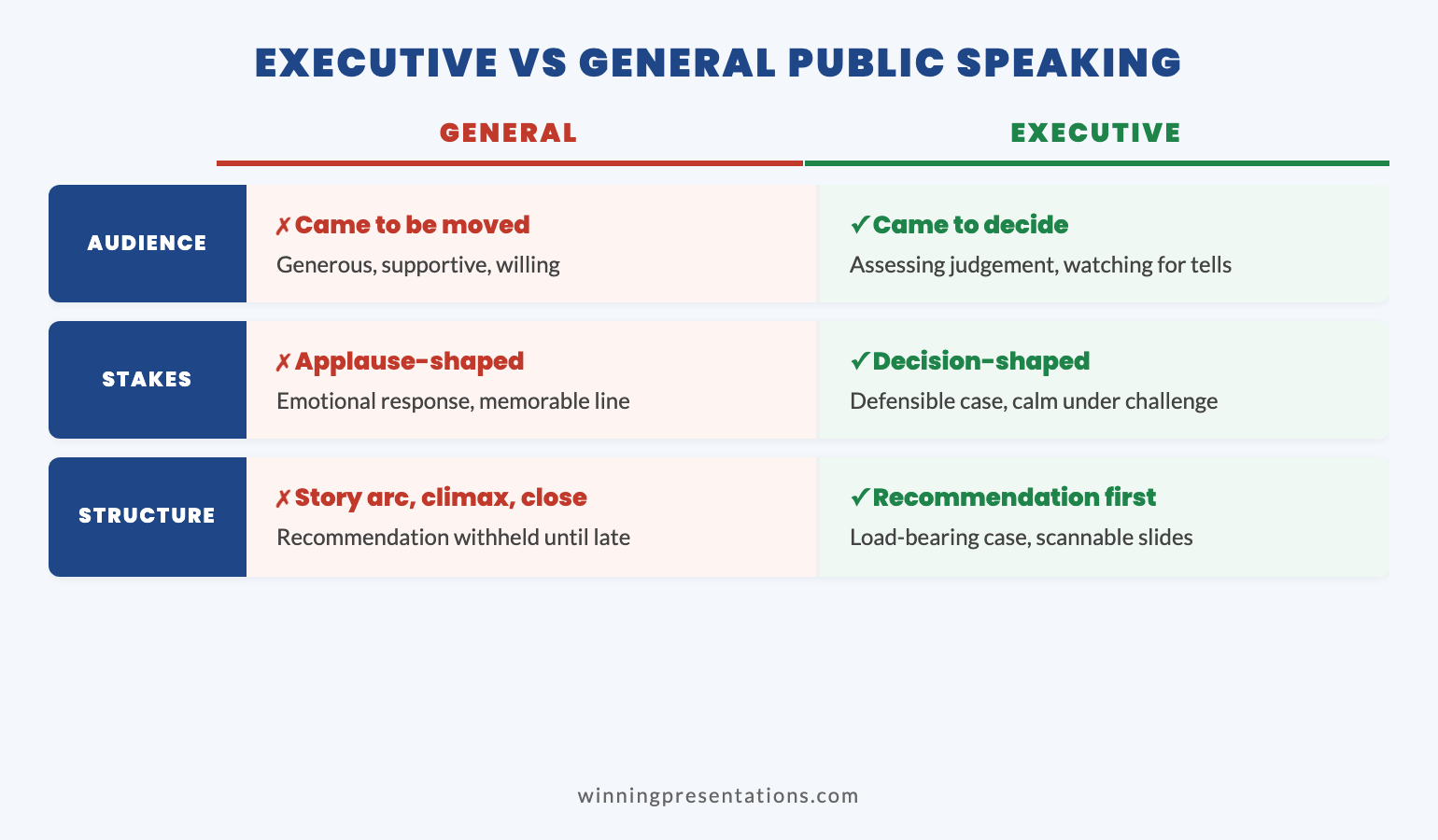
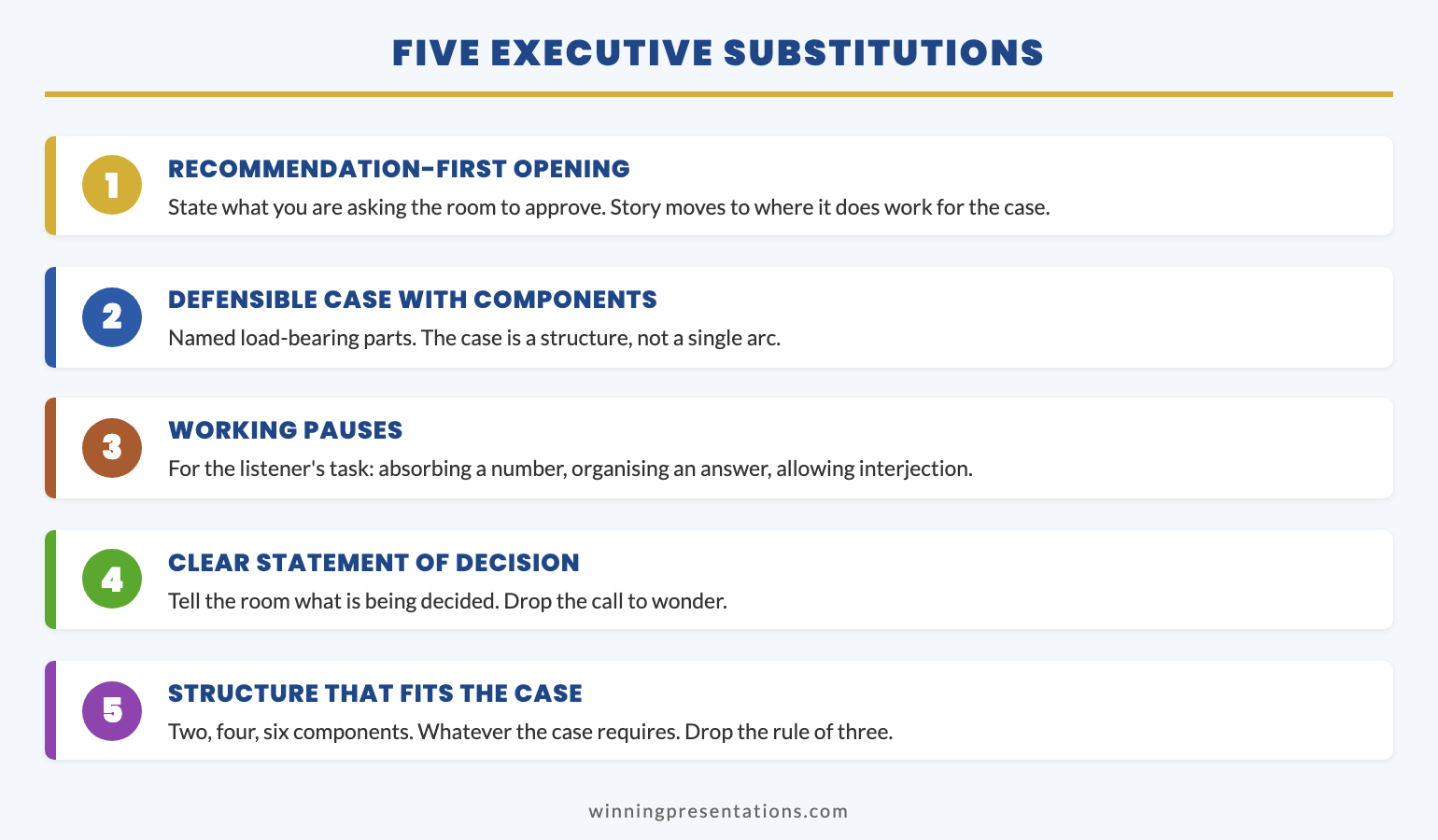
Professional presentation skills require flipping your natural structure. Lead with the recommendation. Support it with evidence. End with the ask. This is learnable — but it requires deliberate practice.

For detailed frameworks, see my guide on executive presentations.

💡 Present Like an Executive

The Executive Slide System includes 7 frameworks for structuring presentations the way senior leaders think — recommendation-first, evidence-based, action-oriented.

Stop building toward your point. Start with it.

Get the Executive Slide System — £39 →

How to Fix Your Professional Presentation Skills in 2026

If you recognise yourself in this article — if you suspect your professional presentation skills might be quietly capping your career — here’s how to fix it.

Step 1: Get Honest Feedback

The reason this gap stays invisible is that people don’t tell you. “Good presentation” is the polite default, regardless of impact.

Ask someone you trust — preferably someone senior — for specific, honest feedback. Not “how did I do?” but “what would make you more likely to approve this?” or “where did you lose interest?”

The answer might be uncomfortable. That’s the point.

Step 2: Study How Executives Present

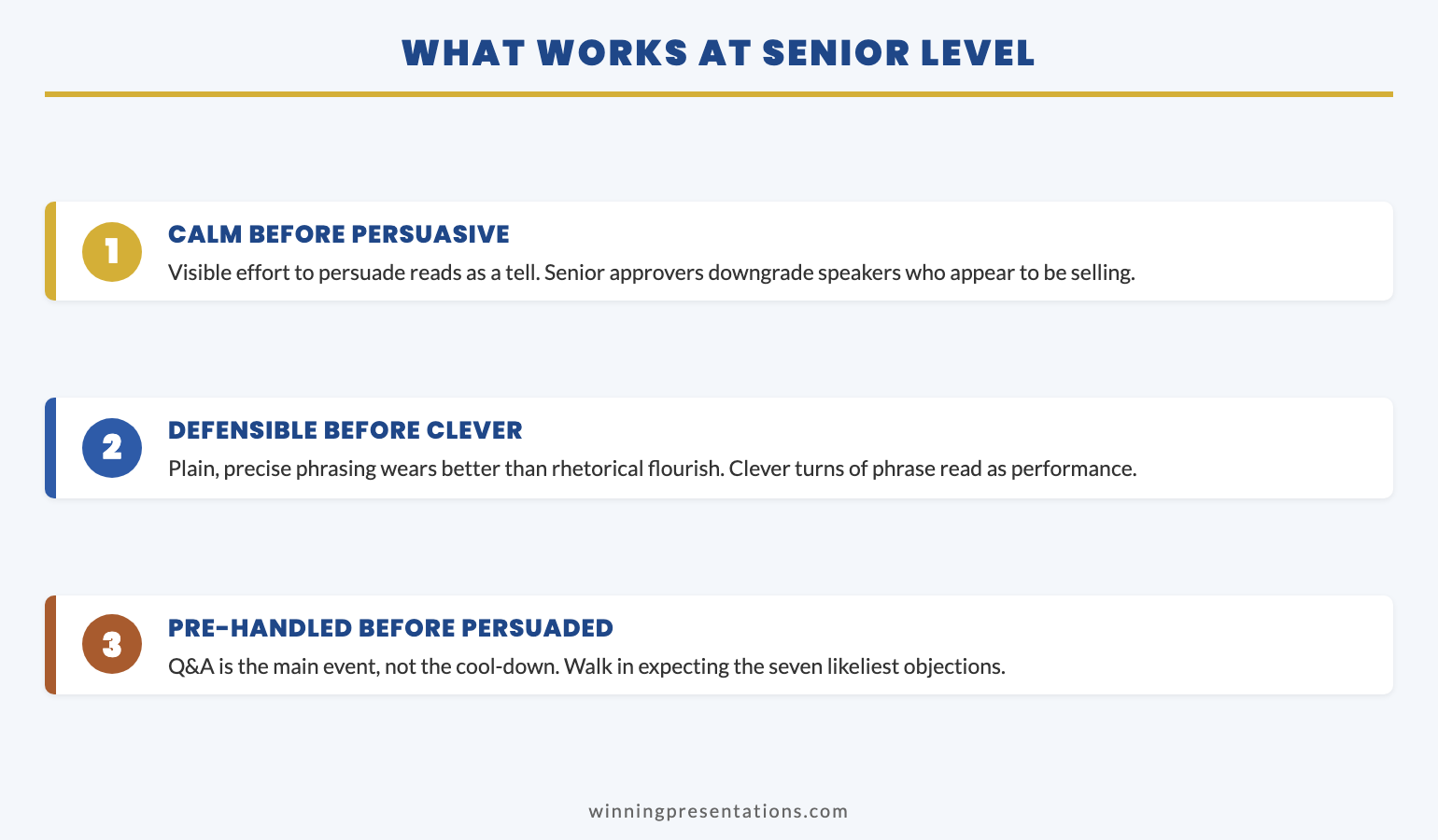
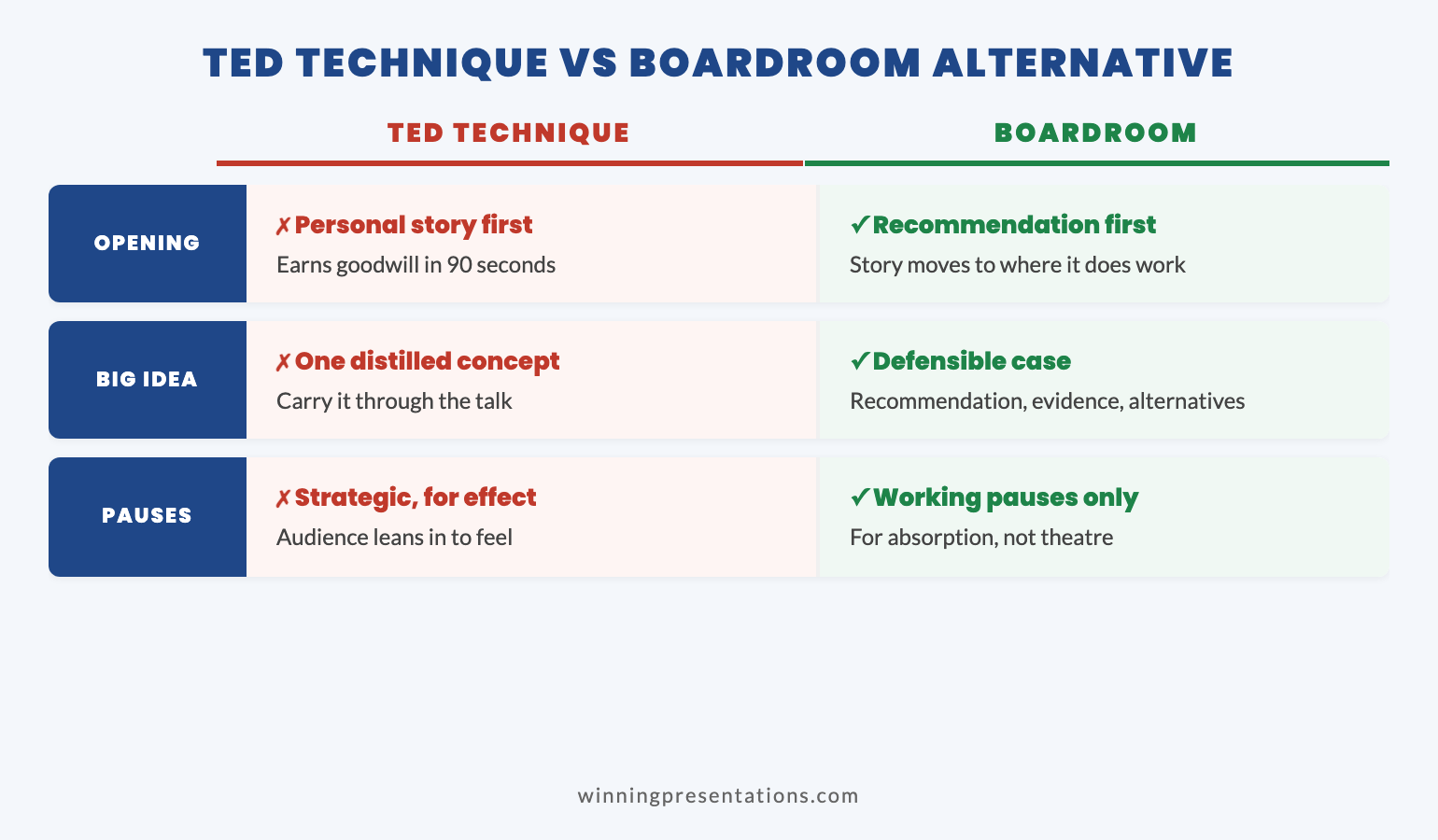
Watch presenters who consistently get results. Not TED speakers — internal executives who consistently get buy-in.

Notice their structure. How quickly do they get to the point? How do they handle questions? What do they include — and what do they leave out?

Professional presentation skills are observable. Study the patterns that work.

For advanced techniques, see my guide on advanced presentation skills.

Step 3: Restructure How You Present

Most career-capping presentation habits come from structure, not delivery. You’re building toward conclusions when you should be leading with them. You’re being comprehensive when you should be selective.

The executive structure:

  1. Here’s my recommendation
  2. Here’s why (3 supporting points maximum)
  3. Here’s what I need from you
  4. Here’s what happens next

Everything else goes in backup slides or appendices. Ruthlessly cut anything that doesn’t serve the decision.

Step 4: Practice Under Realistic Conditions

Practicing alone, in comfortable settings, doesn’t prepare you for real stakes. You need to practice with challenge: time pressure, interruptions, sceptical questions.

Find colleagues who will push back. Present in conditions that make you uncomfortable. The skills that matter only develop under pressure.

Step 5: Get Structured Development

Some professional presentation skills can be self-taught. Many can’t — at least not efficiently. Structured programmes, coaching, and feedback accelerate development dramatically.

If presentation skills are genuinely capping your career, investing in systematic development isn’t an expense. It’s a career investment with compound returns.

🎓 Ready to Remove the Cap?

If 2026 is the year you want to break through the invisible ceiling, structured development accelerates results — executive frameworks, psychology-based confidence techniques, and expert feedback that creates lasting change.

The complete system for professional presentation skills that get you promoted. Let’s discuss what that looks like for you →

Professional Presentation Skills: The Career Decision

Here’s the honest reality: professional presentation skills separate careers that advance from careers that plateau.

You can be excellent at your job and still get capped. Technical skills get you in the door. Presentation skills determine how far you go once you’re inside.

The good news: this is fixable. Professional presentation skills are learnable, not innate. The executives who command rooms weren’t born that way — they developed specific skills through deliberate practice and often structured training.

If you’re setting presentation skills goals for 2026, make this the year you address the invisible cap. The investment in your professional presentation skills compounds for the rest of your career.

The question isn’t whether presentation skills matter. They obviously do.

The question is whether you’ll continue being tolerated — or start being trusted.

Your Next Step

📖 FREE: Executive Presentation Checklist
The pre-presentation routine used by executives who command respect.
Download Free →

💡 QUICK WIN: Executive Slide System — £39
7 frameworks for structuring presentations the way senior leaders think.
Get Instant Access →

🎓 COMPLETE SYSTEM: Structured Development
Executive frameworks, psychology, and expert coaching.
Let’s discuss what that looks like for you →

FAQs: Professional Presentation Skills and Career Growth

How do professional presentation skills affect career advancement?

Professional presentation skills are promotion gatekeepers. Senior roles require influencing people you don’t manage, presenting to stakeholders who don’t report to you, and communicating ideas beyond your technical domain. If you can’t present effectively, you can’t do those things — and you stay capped in your current role regardless of technical excellence.

What’s the difference between being “trusted” and “tolerated” as a presenter?

Tolerated presenters are allowed to present; trusted presenters are invited to present more. The difference shows in how senior leaders engage: do they lean in or check phones? Do questions feel collaborative or challenging? Do decisions happen in the room or get deferred? Trusted presenters get promoted. Tolerated presenters plateau.

What’s the specific skill gap that caps most careers?

The inability to present recommendations with conviction and clarity. This includes stating positions without excessive hedging, making complexity accessible without oversimplifying, and structuring presentations the way executives think (recommendation-first) rather than the way you naturally think (building toward conclusions).

Can professional presentation skills actually be learned, or are some people just natural presenters?

Professional presentation skills are absolutely learnable. The executives who command rooms weren’t born that way — they developed specific skills through deliberate practice and often structured training. Structure, conviction, and executive framing are all trainable. Waiting for natural talent to emerge is how careers stay capped.

How long does it take to improve professional presentation skills significantly?

With focused effort and structured feedback, most professionals see meaningful improvement within 90 days. The key is deliberate practice on specific weaknesses, not just more presentations. Restructuring how you present (leading with recommendations, cutting comprehensiveness) can show results immediately. Building conviction and handling pressure takes longer but is equally learnable.


Mary Beth Hazeldine is the Owner & Managing Director of Winning Presentations. She spent 24 years in corporate banking at JPMorgan Chase, PwC, Royal Bank of Scotland, and Commerzbank, watching professional presentation skills make and break careers at every level. She now trains executives to present with the conviction and clarity that earns trust — not just tolerance. Her clients have raised over £250 million using her frameworks.

Get Weekly Presentation Insights

Join 2,000+ professionals getting practical presentation tips every Tuesday.

Subscribe to The Winning Edge →

31 Dec 2025
Presentation skills goals for 2026 - what senior professionals need to improve

Presentation Skills Goals for 2026: What Senior Professionals Actually Need to Improve

Last updated: December 31, 2025 · 9 minute read

Most presentation skills goals fail before February.

Not because professionals lack discipline. Not because they’re too busy. But because they’re setting the wrong goals entirely.

“Present more confidently” isn’t a goal — it’s a wish. “Get better at slides” isn’t measurable. “Stop being nervous” isn’t achievable through willpower alone.

After 24 years in corporate banking and training over 5,000 executives at Winning Presentations, I’ve watched hundreds of professionals set presentation skills goals every January. The ones who actually improve share something specific: they treat presentation skills like a system, not an event.

Here’s what actually works for setting presentation skills goals in 2026 — and why most advice gets it completely wrong.

⚡ Key Takeaways

  • Most presentation skills goals fail because they lack feedback loops, structure, and measurement
  • The 3 goals that matter: Clarity under pressure, executive structuring, and message discipline
  • 90-day improvement lens — Month 1: Awareness, Month 2: Structure, Month 3: Delivery under pressure
  • Systems beat motivation — deliberate practice compounds; random repetition doesn’t
  • Senior professionals think differently — they focus on skill systems, not presentation events

📥 FREE DOWNLOAD: Executive Presentation Checklist

The pre-presentation routine I use before every high-stakes talk.

Download Free →

Why Most Presentation Skills Goals Fail

Every January, millions of professionals make some version of the same resolution: “This year, I’ll get better at presenting.”

By March, nothing has changed.

The problem isn’t motivation. Research on professional development consistently shows that intention alone doesn’t drive skill improvement. What does? Systems.

Here’s why most presentation skills goals fail:

No Feedback Loop

You present. It goes “okay.” You present again. It goes “okay.” Without specific, structured feedback, you’re just reinforcing existing habits — good and bad.

Most professionals never get real feedback on their presentations. Colleagues say “that was great” because they’re being polite. Your manager focuses on content, not delivery. You have no idea what’s actually working or failing.

No Structure

“Get better at presenting” isn’t a goal — it’s a direction. Better how? Better at what specifically? Better measured by whom?

Vague presentation skills goals produce vague results. Without structure, you’ll drift toward whatever feels comfortable rather than what actually needs improvement.

No Measurement

How do you know if you’ve improved? Most professionals can’t answer this question. They rely on feelings: “I think I’m better.” “That one went well.”

Feelings aren’t measurement. Without clear metrics — even simple ones — you can’t track progress or identify what’s working.

No Pressure Simulation

Practising presentations alone in your office isn’t the same as presenting to a sceptical board. The skills that matter most — composure under pressure, handling tough questions, reading the room — only develop under realistic conditions.

This is why many professionals “know” what to do but can’t execute when it matters. They’ve practised the easy part and avoided the hard part.

For more on building genuine confidence, see my guide on how to speak confidently in public.

The 3 Presentation Skills Goals That Actually Matter

3 presentation skills goals that actually matter for professionals

After training thousands of executives, I’ve identified the three presentation skills goals that actually differentiate senior professionals from everyone else.

These aren’t “soft skills.” They’re specific, measurable capabilities that directly impact whether you get the outcome you want from a presentation.

Goal 1: Clarity Under Pressure

Can you articulate your key message in one sentence when someone interrupts you mid-presentation and asks “what’s the bottom line?”

Most professionals can’t. They’ve prepared 20 slides but haven’t distilled their core message. When pressure hits — an unexpected question, a time cut, a sceptical executive — they ramble, hedge, or lose the thread entirely.

What this looks like in practice:

  • You can state your recommendation in under 15 seconds
  • You can explain your “why” without slides
  • You stay coherent when challenged or interrupted
  • Your answer to “so what?” is immediate and compelling

How to develop it: Practise the “elevator pitch” for every presentation. Before you open PowerPoint, write your one-sentence message. Then test yourself: can you deliver it under pressure?

Goal 2: Executive Structuring

Do you structure presentations the way senior leaders think — or the way you think?

Most professionals present chronologically: “Here’s what I did, here’s what I found, here’s what I recommend.” Executives want the opposite: “Here’s my recommendation, here’s why, here’s what I need from you.”

What this looks like in practice:

  • You lead with the decision or recommendation
  • You provide supporting evidence, not comprehensive data
  • You anticipate the three questions they’ll ask
  • You can present the same content in 5 minutes or 30 minutes

How to develop it: Study how your most effective executives present. Notice the structure. Then apply it to your own content — starting with the “so what” instead of building toward it.

For detailed frameworks, see my guide on executive presentations.

Goal 3: Message Discipline

Can you resist the urge to say everything you know?

The curse of expertise is wanting to share all of it. But senior leaders don’t want comprehensive — they want relevant. They don’t want thorough — they want clear.

What this looks like in practice:

  • You cut 50% of your slides and the presentation gets better
  • You answer questions directly without over-explaining
  • You let silence exist instead of filling it with caveats
  • Your backup slides contain more content than your main deck

How to develop it: After preparing any presentation, force yourself to cut it by half. Not by rushing — by prioritising. What’s essential? What’s “nice to have”? Kill the nice-to-haves.

💡 Ready to Structure Like a Senior Leader?

The Executive Slide System includes 7 frameworks for structuring presentations the way executives think — recommendation-first, evidence-based, action-oriented.

Stop building toward your point. Start with it.

Get the Executive Slide System — £39 →

The 90-Day Improvement Lens for Presentation Skills Goals

Annual presentation skills goals are too distant. They let you procrastinate. “I have all year” becomes “I’ll start next month” becomes “maybe next year.”

Think in 90-day cycles instead. Three months is long enough to create real change, short enough to maintain urgency.

Month 1: Awareness

Before you can improve, you need to know what needs improving. Most professionals have blind spots — habits they don’t notice, weaknesses they’ve never identified.

Actions for Month 1:

  • Record yourself presenting (video, not just audio)
  • Ask 3 colleagues for specific, honest feedback
  • Identify your top 3 weaknesses — the specific things hurting your impact
  • Watch executives you admire — what do they do differently?

This month isn’t about changing anything. It’s about seeing clearly.

Month 2: Structure

Now that you know what to work on, build the systems that will drive improvement.

Actions for Month 2:

  • Create a pre-presentation routine you use every time
  • Develop 2-3 frameworks you apply to every presentation
  • Build a feedback system — how will you get input after each presentation?
  • Schedule deliberate practice, not just presentations

Structure turns intentions into habits. Without it, you’ll default to old patterns under pressure.

Month 3: Delivery Under Pressure

This is where most professionals skip. They practice alone, in comfortable settings, without stakes.

Actions for Month 3:

  • Present to colleagues who will challenge you — not support you
  • Practice with time constraints (you have 5 minutes, not 20)
  • Rehearse handling interruptions and tough questions
  • If possible, get coaching or join a structured programme

Skills that collapse under pressure weren’t really skills — they were comfort-zone performances.

For advanced techniques on handling pressure, see my guide on advanced presentation skills.

🎓 Want Structured Development?

If 2026 is the year you want to master presentation skills properly, structured development matters more than random practice.

Framework-based programmes with psychology techniques and expert feedback create lasting change — not just temporary motivation. If you’d like to discuss what structured development might look like for you, get in touch →

How Senior Professionals Think About Presentation Skills Goals

There’s a mental shift that separates professionals who continuously improve from those who plateau.

Skills vs Events

Plateau thinking: “I have a big presentation next month. I need to prepare for it.”

Growth thinking: “Presenting is a skill I’m developing. Each presentation is a data point.”

When you treat presentations as isolated events, you prepare, perform, and forget. When you treat presenting as an ongoing skill development, each presentation becomes an opportunity to test, learn, and refine.

Systems vs Motivation

Plateau thinking: “I need to feel confident before I can present well.”

Growth thinking: “I need systems that work even when I don’t feel confident.”

Motivation is unreliable. Systems are consistent. The executives who present brilliantly under pressure don’t rely on feeling good — they rely on preparation routines, structural frameworks, and recovery techniques that work regardless of how they feel.

Deliberate Practice vs Repetition

Plateau thinking: “The more I present, the better I’ll get.”

Growth thinking: “Purposeful practice on specific weaknesses improves skill. Random repetition just reinforces habits.”

Twenty years of presenting doesn’t automatically make you good. It makes you experienced. If you’ve been reinforcing bad habits for twenty years, you’re just an experienced bad presenter.

Deliberate practice means identifying specific weaknesses, designing exercises to address them, getting feedback, and adjusting. It’s uncomfortable. That’s why it works.

Making 2026 the Year You Actually Improve Your Presentation Skills Goals

Here’s the honest truth: most people reading this won’t do anything different in 2026.

Not because they lack ability or desire. But because they’ll set vague goals, rely on motivation, and treat presentation skills as an afterthought when they’re not actively presenting.

The professionals who actually improve will:

  • Set specific, measurable presentation skills goals (not wishes)
  • Build systems that don’t depend on motivation
  • Create accountability through feedback loops or structured programmes
  • Practice under realistic pressure, not comfortable conditions
  • Treat presenting as a skill to develop, not an event to survive

If that sounds like work, it is. Skill development always is. But the compound returns are substantial — in promotions, influence, credibility, and career opportunities.

The question isn’t whether presentation skills matter for your career in 2026. They obviously do.

The question is whether you’ll treat them like the strategic asset they are — or continue hoping that “more practice” will somehow produce different results.

Your Next Step

📖 FREE: Executive Presentation Checklist
The pre-presentation routine I use before every high-stakes talk.
Download Free →

💡 QUICK WIN: Executive Slide System — £39
7 frameworks for structuring presentations the way senior leaders think.
Get Instant Access →

🎓 COMPLETE SYSTEM: Structured Development
If you’re ready for comprehensive training with expert guidance, let’s discuss what that looks like for you →

FAQs: Presentation Skills Goals

What are the most important presentation skills goals to set for 2026?

The three presentation skills goals that matter most are: clarity under pressure (being able to state your key message when challenged), executive structuring (leading with recommendations instead of building toward them), and message discipline (resisting the urge to say everything you know). These directly impact whether you achieve your presentation outcomes.

How long does it take to improve presentation skills?

With deliberate practice and structured feedback, most professionals see meaningful improvement within 90 days. The key is focusing on specific weaknesses rather than general “practice.” Random repetition reinforces habits; deliberate practice changes them. Think in 90-day improvement cycles rather than annual goals.

Why do most presentation skills goals fail?

Most presentation skills goals fail because they lack four things: feedback loops (you don’t know what’s working or failing), structure (vague goals produce vague results), measurement (feelings aren’t data), and pressure simulation (practicing alone doesn’t prepare you for real stakes). Systems address all four.

How can I measure improvement in my presentation skills?

Measure presentation skills improvement through specific outcomes: Did you get the decision you wanted? Did stakeholders engage or disengage? How many clarifying questions did you get (fewer often means clearer communication)? Did you stay within your time limit? Recording yourself and comparing over time also provides objective measurement.

What’s the difference between deliberate practice and just presenting more?

Presenting more reinforces existing habits — good and bad. Deliberate practice involves identifying specific weaknesses, designing exercises to address them, getting feedback, and adjusting your approach. Twenty years of presentations doesn’t automatically make you skilled; it makes you experienced. The distinction determines whether you improve or plateau.


Mary Beth Hazeldine is the Owner & Managing Director of Winning Presentations. She spent 24 years in corporate banking at JPMorgan Chase, PwC, Royal Bank of Scotland, and Commerzbank, and has trained over 5,000 executives to present with impact. Her clients have raised over £250 million using her frameworks.

Get Weekly Presentation Insights

Join 2,000+ professionals getting practical presentation tips every Tuesday.

Subscribe to The Winning Edge →

13 Dec 2025
What 24 years in banking taught me about high-stakes presentations

What 24 Years in Banking Taught Me About High-Stakes Presentations

📅 Updated: December 2025

What 24 years in banking taught me about high-stakes presentations

Quick Answer

Executive presentation training rarely teaches what actually matters. After 24 years at JPMorgan, PwC, RBS, and Commerzbank, I learned that high-stakes presentations aren’t won with better slides — they’re won with better preparation, political awareness, and the ability to read a room. The presenters who consistently got approvals weren’t the most polished speakers. They were the ones who’d done the work before they walked in.

🎁 FREE DOWNLOAD

Executive Presentation Checklist

12-point checklist I wish I’d had when I started. One page. Print it before your next big meeting.

Download Free Checklist →

No spam. Unsubscribe anytime.


I still remember my first presentation to JPMorgan’s Executive Committee.

I was 26. I’d spent three weeks building a 45-slide deck. I knew every number, every assumption, every footnote. I’d rehearsed my talking points until I could recite them in my sleep.

Seven minutes in, the Global Head of Operations held up his hand. “What’s the ask?”

I froze. My ask was on slide 38.

“I’ll… I’ll get to that,” I managed.

“I don’t have time for you to get to it. What do you want us to do?”

I fumbled forward, completely thrown off my script. The meeting ended with a polite “send us a one-pager” — which in banking means no.

That moment was the beginning of everything I know about high-stakes presentations.

Lesson 1: The Decision Happens Before the Meeting

Here’s what they don’t teach in executive presentation training: by the time you walk into that room, most decisions are already made.

At a UK hight street bank, I watched a colleague present a flawless recommendation for a £3M technology investment. Perfect slides. Clear ROI. Confident delivery.

The CFO said no in under two minutes.

What my colleague didn’t know: the CFO had already committed that budget to another initiative. The decision was made three weeks earlier in a conversation he wasn’t part of.

The best presenters I worked with at JPMorgan spent more time before the meeting than during it. They’d walk the halls, grab coffee with stakeholders, understand the politics. By the time they presented, they already knew who would support them, who would push back, and what objections they’d face.

The presentation wasn’t where they made their case. It was where they confirmed what they’d already built.

Lesson 2: Executives Buy Confidence, Not Content

In 2008, I was presenting a risk assessment to the bank’s board during the financial crisis. Markets were collapsing. Nobody knew what would happen next.

I had two options: present the uncertainty honestly, or project confidence I didn’t feel.

I chose honesty. I said: “I don’t know what’s going to happen. Nobody does. But here’s what we do know, here’s what we’re watching, and here’s how we’ll respond to each scenario.”

After the meeting, the Chief Risk Officer pulled me aside. “That was the most credible presentation I’ve seen all week. Everyone else is pretending they have answers. You gave us a framework for decisions we can actually make.”

Confidence isn’t about having all the answers. It’s about being clear on what you know, what you don’t know, and what you recommend despite the uncertainty.

Executives don’t expect you to predict the future. They expect you to help them make good decisions with incomplete information. That’s what they do every day.

Seven lessons from 24 years of banking presentations

Lesson 3: Your Slides Are Not Your Presentation

At PwC, I worked with a partner who was legendary for client presentations. He’d walk in with three slides — sometimes two — and walk out with seven-figure engagements.

I once asked him how he did it.

“The slides are a prop,” he said. “They’re not the show. The show is what happens in the room. The conversation. The questions. The moment you see them lean forward because you’ve said something that matters to them.”

He was right. I’ve seen beautiful 50-slide decks put people to sleep. I’ve seen scribbled whiteboards close deals.

The difference isn’t the slides. It’s the presenter’s ability to:

  • Read the room and adjust in real-time
  • Answer questions they didn’t prepare for
  • Make the audience feel heard, not talked at
  • Create space for the decision to emerge naturally

Related: Executive Presentation Template: 12 Slides That Command the Room

📄
Want the Checklist?

12 things to do before every executive presentation. The prep work that actually matters.

Download Free →

Lesson 4: The Question You Don’t Expect Will Define You

At a US Investment Bank., I was presenting a £8M operations initiative to the regional CEO. Everything was going perfectly. Slides landing. Heads nodding. I was about to close with my ask.

Then the CEO asked: “What happens to the 47 people in Mumbai whose jobs this eliminates?”

I hadn’t prepared for that question. It wasn’t in my risk assessment. It wasn’t in my stakeholder analysis. I’d been so focused on ROI and efficiency that I’d completely missed the human element.

I stumbled through something about “redeployment opportunities” and “natural attrition.” It was vague and everyone knew it.

The CEO said: “Come back when you’ve thought about the people, not just the numbers.”

That presentation taught me something that’s shaped every executive conversation since: the question you don’t expect reveals what you haven’t thought through. And executives notice.

The best way to prepare for unexpected questions isn’t to anticipate every possible question. It’s to think more broadly about your recommendation in the first place. Who’s affected? What could go wrong? What would make you change your mind?

Related: How to Present to a CFO: The Finance-First Framework

Lesson 5: Vulnerability Builds More Trust Than Perfection

This one took me years to learn.

Early in my career, I thought executive presentations were performances. I needed to appear competent, polished, in control. Any sign of uncertainty was weakness.

Then I watched a Managing Director at RBS do something that changed my perspective.

She was presenting a strategy that had partially failed. Instead of burying the failure in positive spin, she opened with: “I want to tell you what went wrong, what I learned, and what I’d do differently.”

The room leaned in. For the next 20 minutes, she had complete attention. When she finished, the Chief Executive said: “That’s the most useful strategy review I’ve heard this year.”

She got more budget, not less.

Executives are surrounded by people telling them what they want to hear. Honesty — even uncomfortable honesty — is rare and valuable. The presenter who admits what didn’t work, explains why, and shows they’ve learned is more credible than the one with a perfect track record they can’t explain.

Lesson 6: Presence Trumps Content Every Time

At Commerzbank, I sat through hundreds of presentations. I started noticing a pattern.

The presenters who got approvals weren’t always the ones with the best analysis. They were the ones who:

  • Walked in like they belonged there
  • Made eye contact with decision-makers, not their slides
  • Spoke at a pace that commanded attention
  • Paused after making important points
  • Handled pushback without getting defensive

Executive presence is hard to define but easy to recognise. You know it when you see it. And it’s not about being the most charismatic person in the room — some of the most effective presenters I’ve worked with were quiet, understated people who simply projected certainty.

It can be learned. I’ve seen people transform their presence in a matter of months. But it requires deliberate practice, feedback, and usually someone who can show you what you can’t see in yourself.

Lesson 7: AI Won’t Save You

I’ve been using AI tools for presentations since they became available. They’re remarkable for certain things — generating first drafts, formatting consistently, iterating quickly.

But here’s what 24 years taught me that no AI can replicate:

  • Knowing that the CFO and COO don’t speak to each other, so you need separate pre-meetings
  • Sensing that the room has turned and you need to skip ahead
  • Hearing the question behind the question
  • Building relationships that mean your call gets answered

AI makes the mechanical parts of presentations faster. That’s valuable. But the mechanical parts were never the hard part.

The hard part is everything that happens between humans — the trust, the politics, the unspoken dynamics. That’s where presentations are won or lost. And that hasn’t changed in 24 years.

Related: Why AI Won’t Replace Presentation Skills (But Will Amplify Them)

The best presenters spent more time before the meeting than during it

What I’d Tell My 26-Year-Old Self

If I could go back to that first JPMorgan Chase presentation, here’s what I’d say:

Stop building slides. Start building relationships. The people in that room are more important than anything on your screen. Know what they care about before you walk in.

Lead with the ask. Respect their time. Tell them what you want, then justify it. Not the other way around.

Prepare for the conversation, not the presentation. Your slides will take 15 minutes. The Q&A will take 45. Prepare accordingly.

Get comfortable being uncomfortable. The moment that terrifies you — the hard question, the pushback, the silence — is where trust is built. Don’t run from it.

Find people who’ll tell you the truth. You can’t see your own blind spots. Get feedback from people who’ll be honest, not kind.

Why I Started Teaching This

After 24 years in banking, I’d collected a lot of lessons. Most of them learned the hard way.

When I moved into training, I discovered that most executive presentation training focused on the wrong things. Slide design. Speaking techniques. Body language tips.

All useful. But none of it addressed what actually determines outcomes: the strategic preparation, the stakeholder management, the ability to read a room and adapt in real-time.

So I built a programme that teaches what I wish I’d known at 26. Not theory — the actual skills and frameworks that worked in real boardrooms with real money on the line.

🎓 COHORT STARTING JANUARY 2026

AI-Enhanced Presentation Mastery

8 weeks of structured training on the skills that actually matter in high-stakes presentations — plus how to use AI to multiply your effectiveness.

  • 8 self-paced modules — Work through at your own pace
  • 2 live coaching sessions — Get direct feedback on your presentations
  • Proven frameworks — AVP, 132 Rule, S.E.E. Formula
  • Real examples — Before/after transformations from actual client work
  • Lifetime access — All materials, templates, and future updates

Presale Price: £499 £249 (ends December 31)

Join the January Cohort →

60 seats. 50% already filled.

Reading vs. Doing

What You Get Free Articles AI-Enhanced Mastery (£249)
Awareness of what matters
Proven frameworks (AVP, 132, S.E.E.) Mentioned ✓ Deep training
8 structured learning modules ✓ Self-paced
Live coaching sessions ✓ 2 sessions
Templates & prompt packs Examples ✓ Full library
Before/after transformations ✓ Real examples
Outcome Know what to do Actually do it

Not Ready for the Course?

Start with the free checklist. 12 things to do before every executive presentation.

Download Free Checklist →

Frequently Asked Questions

How is executive presentation training different from regular presentation skills?

Regular presentation training focuses on delivery — how to stand, how to speak, how to use slides. Executive presentation training focuses on outcomes — how to get decisions, how to manage stakeholders, how to handle high-stakes situations. The audience, the stakes, and the dynamics are fundamentally different.

Can presentation skills really be taught?

Yes, but not through lectures. The skills that matter — reading a room, handling pushback, projecting confidence — require practice with feedback. That’s why the Maven course includes live coaching sessions, not just video content.

What if I don’t work in banking?

The principles apply across industries. I’ve trained executives in biotech, SaaS, consulting, and manufacturing. The dynamics of high-stakes presentations — managing stakeholders, leading with conclusions, handling tough questions — are universal.

How long does it take to see improvement?

Most people see significant improvement within their first 2-3 presentations after training. The frameworks give you structure immediately. The confidence builds with practice.

📧
The Winning Edge Newsletter

Weekly insights on executive presentations from 35 years of training leaders. No fluff. No theory. Just what works.

Subscribe Free →

Related Reading

About the Author

Mary Beth Hazeldine spent 24 years in corporate banking at JPMorgan Chase, PwC, Royal Bank of Scotland, and Commerzbank before moving into executive training. Over 35 years, she’s helped clients raise over £250 million in funding and close deals worth over £100 million. She teaches at Winning Presentations and is launching the AI-Enhanced Presentation Mastery course in January 2026.


01 Dec 2025
10 executive presentation templates - QBR, budget request, board meeting, investor pitch, strategic recommendation slides

Why Presentation Templates Aren’t Enough (What Actually Gets You Promoted)

Executive presentation skills are what separate people who get promoted from people who stay stuck — and you can’t learn them from a template.

I’ve sold thousands of presentation templates. They’re useful. They give you structure, save you time, and ensure you don’t miss critical elements. But I’ve watched people with perfect templates still fail in the room — because templates solve the “what” problem while executive presentation skills solve the “how” problem.

After 24 years in corporate banking at JPMorgan Chase, PwC, Royal Bank of Scotland, and Commerzbank — and helping clients raise over £250 million in funding — I’ve seen exactly what distinguishes executives who command the room from those who merely survive it. Here’s why developing real executive presentation skills might be the highest-ROI investment in your career.

10 executive presentation templates - QBR, budget request, board meeting, investor pitch, strategic recommendation slides

Templates provide structure — but executive presentation skills determine whether you succeed in the room

What Executive Presentation Skills Actually Include

When I talk about executive presentation skills, I’m not talking about generic public speaking. I’m talking about specific capabilities that matter in high-stakes business contexts:

Reading the room in real-time. Executive presentation skills include knowing when the CFO has already decided and you need to pivot. Sensing when the board is confused versus skeptical. Adjusting your pace, depth, and emphasis based on what’s actually happening — not what you planned.

Handling pushback without getting defensive. Executives will challenge your recommendations. Executive presentation skills include responding to tough questions with confidence, acknowledging valid concerns without caving, and defending your position without becoming adversarial.

Presenting with authority. The same content delivered with hesitation lands completely differently than content delivered with conviction. Executive presentation skills include vocal presence, confident body language, and the ability to own the room without arrogance.

Knowing what to cut in the moment. You prepared 15 minutes of content but the CEO just said “I have 5 minutes.” Executive presentation skills mean you can instantly restructure, hit the essential points, and still land your ask.

Building trust through how you communicate. Leadership is evaluating whether you’re ready for bigger responsibilities. Every presentation is an audition. Executive presentation skills signal “this person can handle senior stakeholders” in ways that content alone cannot.

Why Templates Can’t Teach Executive Presentation Skills

Templates are static. Executive presentation skills are dynamic.

A template tells you to put your recommendation on slide 1. It can’t tell you how to deliver that recommendation when the CEO looks skeptical, the CFO is checking email, and someone just asked a question that suggests they didn’t read the pre-read.

A template gives you a risk assessment structure. It can’t help you respond when a board member says “I don’t buy your mitigation plan” and everyone turns to watch how you handle it.

I’ve seen brilliant analysts with perfect slides get passed over for promotion because their executive presentation skills didn’t match their analytical skills. And I’ve seen people with mediocre slides advance because they commanded attention and handled pressure with grace.

One biotech founder I worked with had a technically perfect investor deck. She’d been pitching for three months with zero second meetings. The problem wasn’t her slides — it was her executive presentation skills. She presented like a scientist, building to conclusions, when investors needed the headline first. After we developed her executive presentation skills, she closed an £8M Series B within four months.

The difference isn’t the deck. It’s the skill.

This is why I created the AI-Enhanced Executive Presentation Mastery course.

It’s an 8-module programme that teaches the executive presentation skills that actually matter — not generic public speaking, but the specific capabilities that get you approved, promoted, and trusted with bigger responsibilities. Learn more about the course →

The Executive Presentation Skills Gap in Most Training

Here’s what most professionals don’t realise: executive presentation skills are rarely taught explicitly.

MBA programmes teach case analysis, not how to present to a hostile board. Corporate training covers “presentation skills” generically — how to structure slides, use visuals, maybe some tips on body language. But the specific executive presentation skills needed to succeed in senior contexts? You’re expected to figure those out through trial and error.

This is expensive learning. Every failed presentation, every deferred decision, every promotion that went to someone else — these are the costs of developing executive presentation skills through experience alone.

An investment banker I coached had been passed over for Director twice. The feedback was always vague: “not quite ready” or “needs more executive presence.” After focused work on his executive presentation skills — specifically handling pressure, stating recommendations with conviction, and managing his pace — he was promoted within eight months. Same person, same technical skills. Different executive presentation skills.

Executive Presentation Skills That Get You Promoted

Based on observing hundreds of executives across my career, here are the executive presentation skills that most strongly correlate with advancement:

1. The ability to synthesise complexity into clarity.

Leadership doesn’t have time for nuance. Executive presentation skills include distilling complex situations into clear recommendations without oversimplifying.

2. Comfort with conflict.

Disagreement is normal at senior levels. Executive presentation skills include engaging productively when people push back, finding common ground without abandoning your position.

3. Executive presence under pressure.

When things go wrong — technical failures, hostile questions, time cuts — how do you respond? Executive presentation skills include maintaining composure and authority even when your plan falls apart.

4. Strategic framing.

Presenting the same facts in different contexts requires different framing. Executive presentation skills include knowing how to position your message for a CFO versus a CEO versus a board.

5. Asking for what you need.

Many professionals present information but fail to make clear asks. Executive presentation skills include confidently requesting decisions, resources, and support — and handling “no” gracefully.

The Career ROI of Executive Presentation Skills

Consider the value at stake when you develop executive presentation skills:

A single successful board presentation could approve a £2M budget that makes your project possible. A strong investor pitch could raise funding that transforms your company. A compelling QBR could lead to the promotion conversation you’ve been waiting for.

Clients have used the executive presentation skills from my training to:

  • Raise over £250 million in combined funding
  • Get £10M board approvals in single meetings
  • Secure promotions after being passed over multiple times
  • Transform from “not ready” to “executive material”

The gap between “good enough” and “excellent” executive presentation skills might be worth hundreds of thousands of pounds over a career. A few hundred pounds invested in developing those skills is rounding error compared to what’s at stake.

FAQs About Executive Presentation Skills

Can executive presentation skills really be taught, or are they innate?

Executive presentation skills are absolutely learnable. Some people have natural advantages, but the specific skills — handling pressure, reading rooms, delivering with authority — develop through deliberate practice and feedback. I’ve watched hundreds of professionals transform their executive presentation skills through structured training.

How long does it take to improve executive presentation skills?

You can see meaningful improvement in executive presentation skills within weeks if you’re practicing deliberately with feedback. The full transformation typically happens over 2-3 months of consistent application. My course is designed to accelerate this timeline significantly.

What’s the difference between general presentation skills and executive presentation skills?

General presentation skills focus on clarity, structure, and basic delivery. Executive presentation skills add layers specific to senior contexts: handling high-pressure questions, reading sophisticated audiences, projecting authority, making confident asks, and adapting in real-time to stakeholder reactions.

Are templates useless if I need executive presentation skills?

No — templates and executive presentation skills work together. Templates ensure your structure is sound and you don’t miss critical elements. Executive presentation skills determine how effectively you deliver that content and handle what happens in the room. You need both, but skills are what differentiate good from great.

Executive presentation skills training - templates plus skills development

Develop Executive Presentation Skills That Get You Promoted

AI-Enhanced Executive Presentation Mastery is an 8-module course that teaches the executive presentation skills templates can’t — reading rooms, handling pushback, presenting with authority, and building executive presence.

Includes 2 live coaching sessions where you’ll practice with real feedback. Clients have used these executive presentation skills to raise over £250 million in funding.

ENROL NOW → £249

8 self-paced modules • 2 live sessions • Templates included • Launches January 2025


Just need templates? The Executive Slide System (£39) includes 10 PowerPoint templates and 30 AI prompts — great if you already have strong executive presentation skills and just need structure.

Related: How to Create Executive Presentations That Get Approved in 2025