Tag: executive buy-in

14 Feb 2026
Executive mapping stakeholder names and influence dynamics on whiteboard before high-stakes presentation

The Political Landscape Map: Who Blocks, Who Enables, Who Decides

The Political Landscape Map: Who Blocks, Who Enables, Who Decides

Quick answer: Most presentations fail because of politics, not content. Before you build a single slide, you need to map three things: who has the power to say yes, who will quietly block you, and who can champion your recommendation when you’re not in the room. This article gives you the framework to identify all three — and a system for navigating each.

The best deck I ever helped a client build got rejected in seven minutes.

It wasn’t the content. The data was solid. The recommendation was clear. The slides were tight — twelve of them, structured exactly right. My client, a Head of Strategy at a mid-cap bank, had rehearsed until the delivery was calm and confident.

The problem was a person he’d never spoken to. A Group Risk Director sitting three chairs from the decision-maker. She had concerns about implementation timelines that nobody had surfaced before the meeting. When the CFO looked at her for a reaction, she shook her head. Meeting over.

Afterwards, my client said: “I prepared for every question. I just didn’t prepare for every person.”

That sentence changed how I teach presentation strategy. In 24 years of corporate banking at JPMorgan Chase, PwC, Royal Bank of Scotland, and Commerzbank, I watched this pattern repeat hundreds of times: brilliant content, devastating political blindspot. The people who consistently got approvals weren’t the best presenters. They were the ones who mapped the room before they entered it.

That mapping process is what I now call the Political Landscape Map.

Why Politics Kills More Presentations Than Bad Slides

Here’s something most presentation training ignores entirely: the decision about your recommendation is rarely made during your presentation.

It’s made before, in conversations you weren’t part of. In hallway exchanges between stakeholders. In the silent risk calculations happening while you’re still on slide two. In the relationship dynamics between people who have history you know nothing about.

When executives decide, they silently ask three questions: What happens if I say yes and it goes wrong? What happens if I say no and miss out? Can I defend this decision to my peers? Your slides can answer the first two. Only political preparation can answer the third.

The uncomfortable truth is that most professionals prepare exclusively for the content challenge — clearer data, better structure, tighter delivery. But in rooms where decisions involve multiple stakeholders, political dynamics determine outcomes more often than presentation quality.

This doesn’t mean content doesn’t matter. It means content is necessary but not sufficient. You need both the right slides and the right relationships with the people evaluating them.

PAA: Why do good presentations still get rejected?
Good presentations get rejected when the presenter addresses the content but not the politics. If a key stakeholder has concerns that weren’t surfaced before the meeting, or if someone in the room feels bypassed or threatened by the recommendation, no amount of data will overcome that resistance. Mapping the political landscape before you present is as important as building the deck itself.

The System for Getting Decisions — Not Just Delivering Presentations

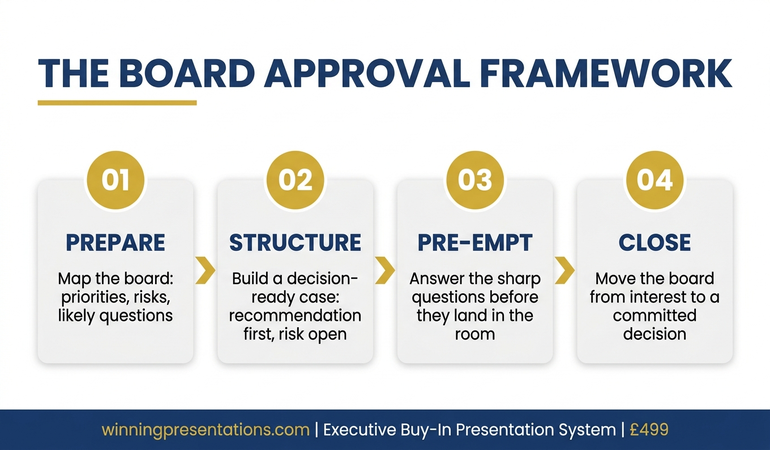
The Executive Buy-In Presentation System teaches you how decisions actually get made in senior rooms — and how to position yourself on the right side of that decision before you open your mouth. 7 modules covering decision psychology, stakeholder mapping, proof strategy, and pressure response.

Includes: Decision Definition Canvas • Stakeholder Landscape Map template • Proof Selector Matrix • Executive Buy-In Blueprint • Pressure Response Playbook with scripts

Get the Executive Buy-In System → £199

Self-study programme with modules released over 4 weeks + live Q&A calls. Currently £199 — price rises to £499 (self-study) / £850 (live cohort) on March 1st.

The Three Roles in Every Decision Room

Every room where a significant decision gets made contains three types of people. Your job is to identify all of them before you present — not during.

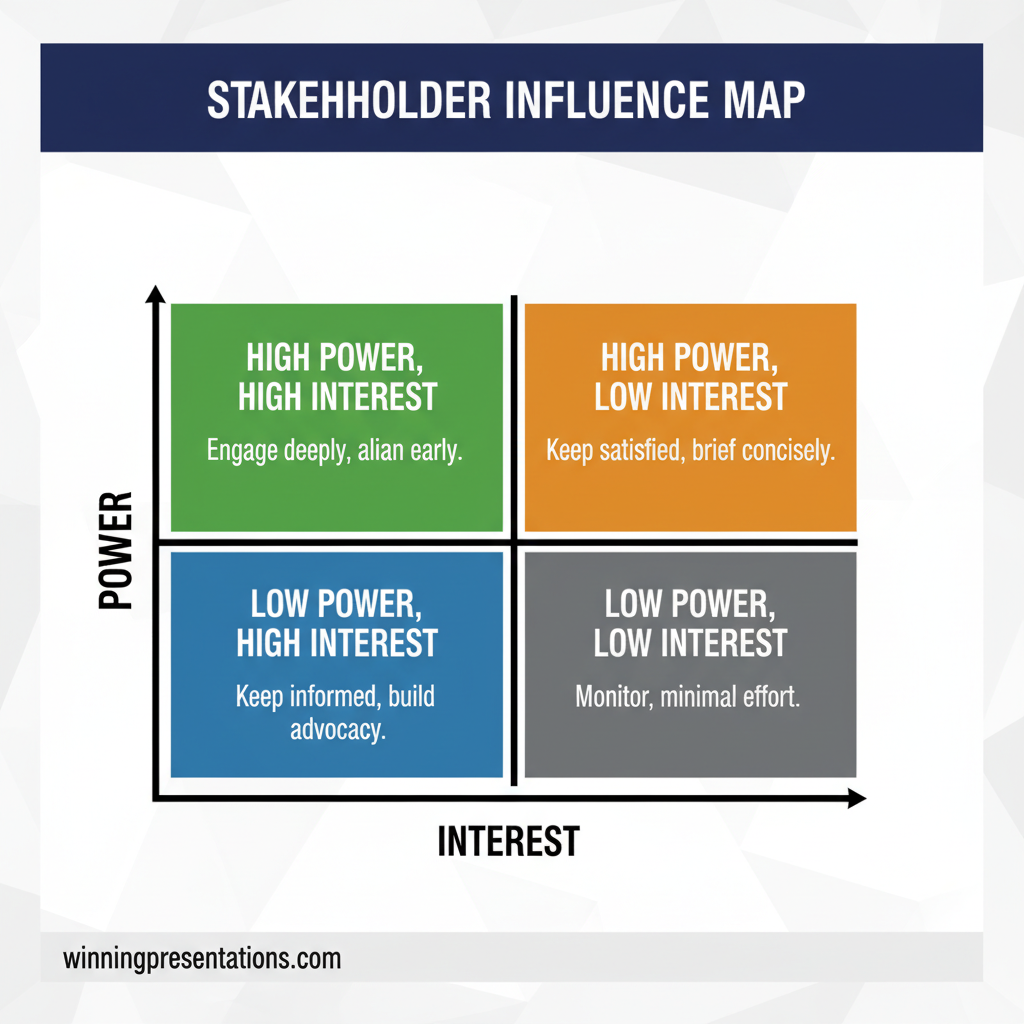
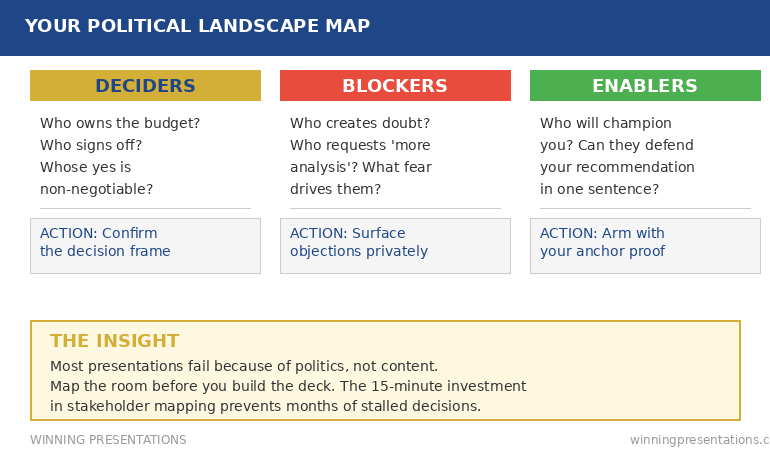
I call this framework the Decider / Blocker / Enabler model — a political landscape map that categorises every stakeholder by their role in the decision, not their title on the org chart. It’s the same approach used in change management and consulting, adapted specifically for high-stakes executive presentations where the politics of the room matter as much as the quality of the slides.

The Decider. This is the person whose “yes” actually matters. In some rooms, it’s obvious — the CEO, the CFO, the Board Chair. In others, it’s not. I once watched a VP present to a room of eight people, addressing his entire pitch to the most senior person present. The actual decision-maker was a Commercial Director two levels below, who controlled the budget line. The VP never made eye contact with her. The proposal died.

The Decider isn’t always the most senior person. They’re the person who owns the budget, the risk, or the political capital required to move forward. Ask yourself: Who actually signs off on this? Whose approval is non-negotiable?

The Blocker. This is the person who can prevent your recommendation from being approved — even if they can’t approve it themselves. Blockers don’t always announce themselves. They ask careful questions. They raise “concerns for consideration.” They request “further analysis.” My client’s Group Risk Director was a classic blocker: she didn’t reject the proposal directly. She simply signalled doubt, and the room followed.

Blockers are motivated by different fears. Some worry about career risk — what if this makes me look bad? Some worry about territorial loss — does this reduce my influence? Some have legitimate technical concerns that haven’t been addressed. The key is understanding which fear is driving the resistance, because each requires a different response.

The Enabler. This is the person who will champion your recommendation when you’re not in the room. Enablers are the most underutilised asset in executive presentations. They’re the colleague who says “I’ve seen the analysis, it’s solid” in the pre-meeting conversation. They’re the board member who turns to the Decider and says “I think this addresses my concern from last quarter.”

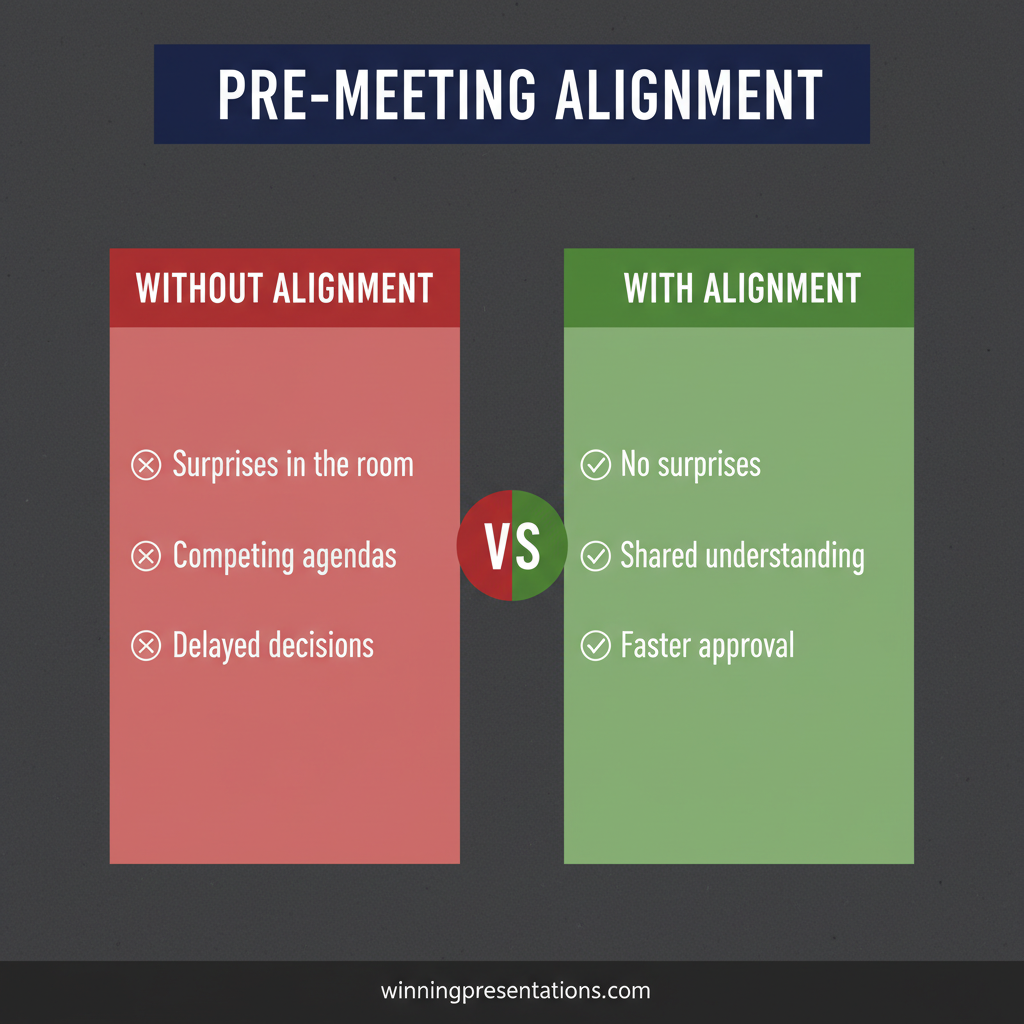
You can’t create enablers in the presentation itself. You create them before it — through pre-meeting alignment conversations that give them the information and confidence to support you publicly.

Do this in 60 seconds before your next deck:

Write down the names of everyone in the room. Label each person: D (Decider), B (Blocker), or E (Enabler).

If you can’t label them, you’re not ready to present yet.

Fix it fast: The Executive Buy-In Presentation System (£199 — rises March 1st) includes a ready-to-use Political Landscape Map template + the Decision Definition Canvas so you can do this properly in under 10 minutes.


Executive mapping stakeholder names and influence dynamics on whiteboard before high-stakes presentation

The Executive Buy-In Presentation System includes the Decision Definition Canvas and the Proof Selector Matrix — tools specifically designed to map stakeholder dynamics and match your approach to each person’s concerns. Learn more about the Executive Buy-In System (£199).

Building Your Political Landscape Map

The map itself takes 15 minutes. The intelligence it reveals can save you months of stalled decisions.

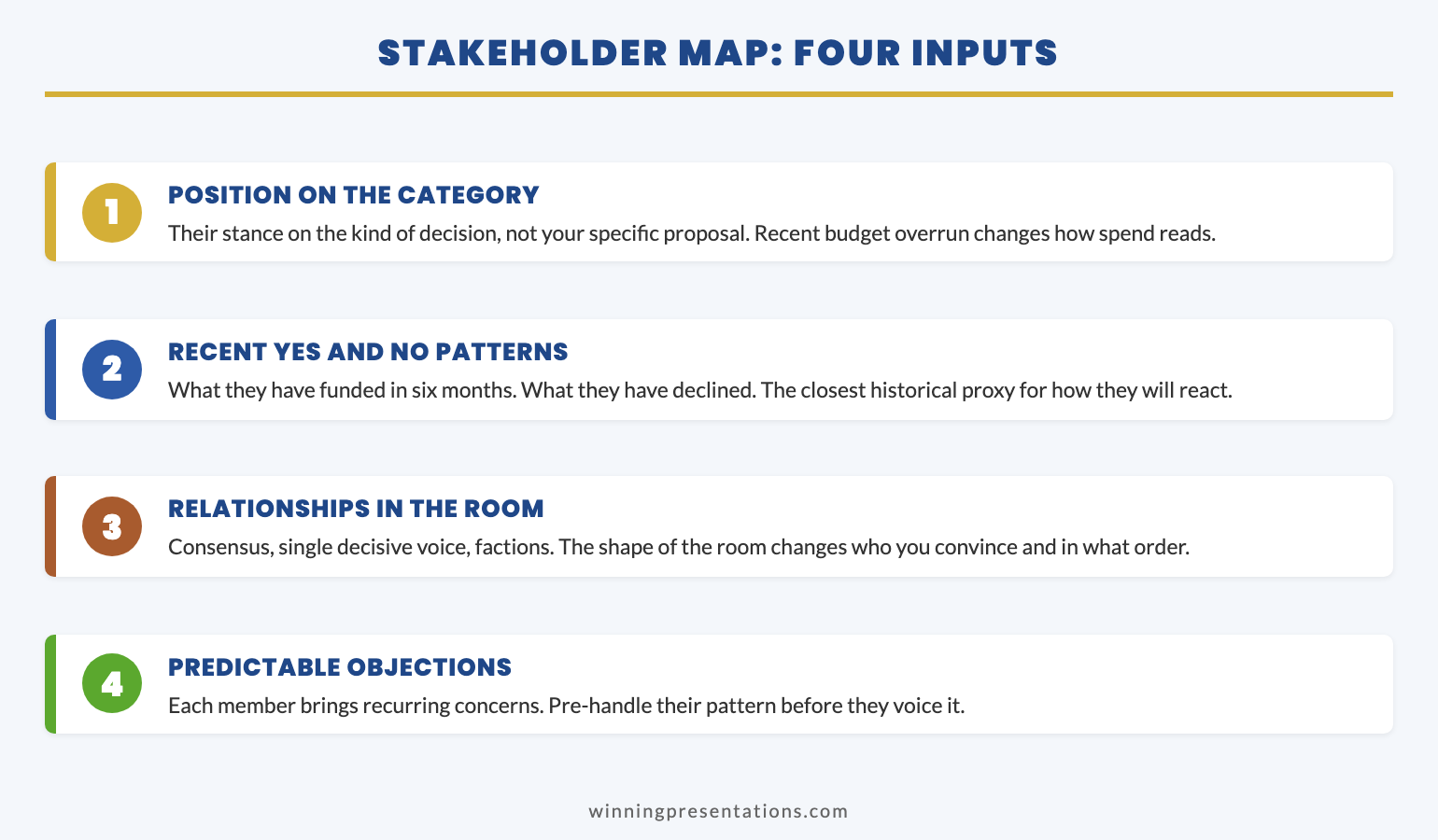
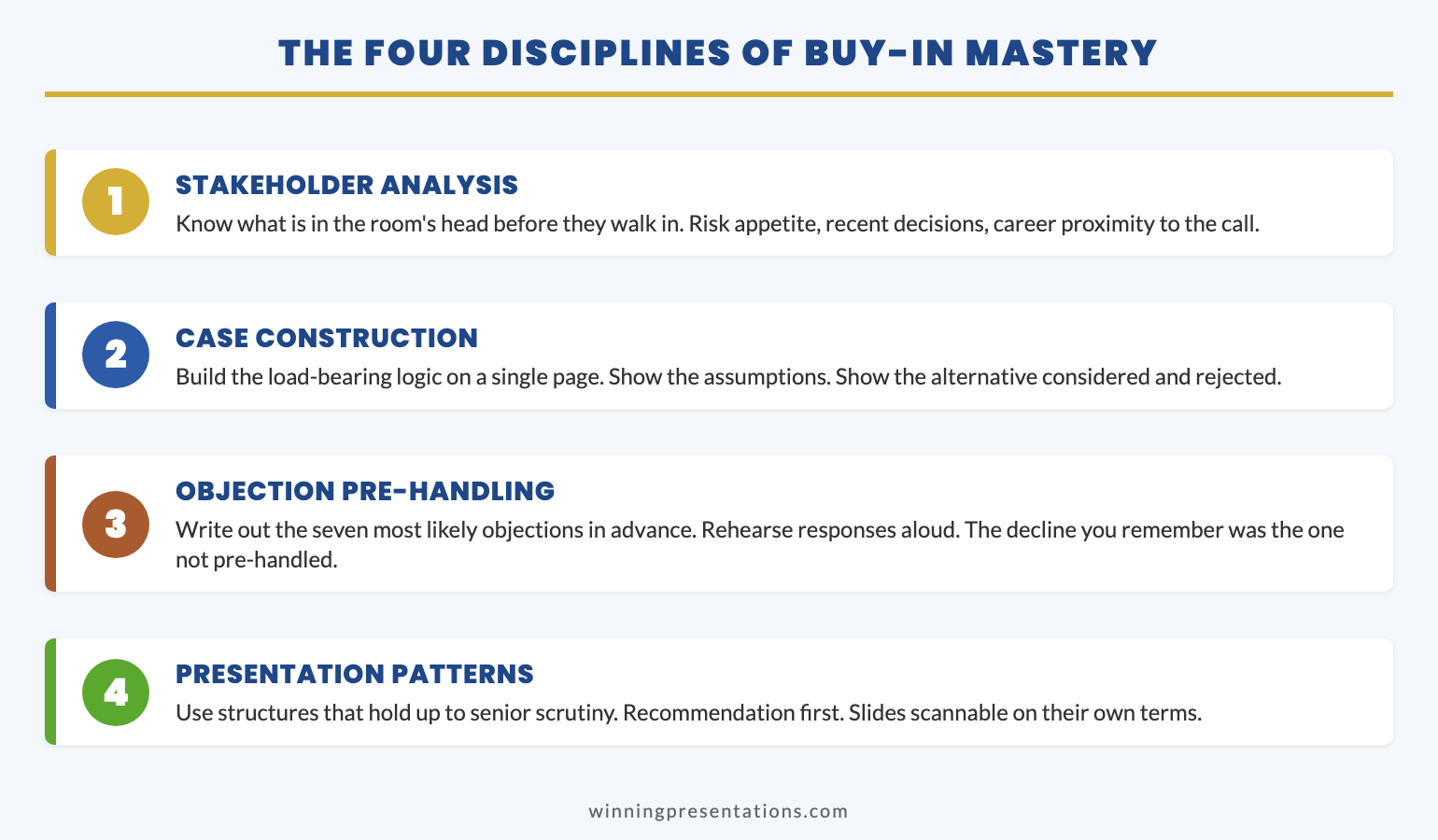
For every significant presentation, before you build a single slide, write down every person who will be in the room (or who influences people in the room). Then answer four questions about each:

1. What is their role in this decision? Decider, Blocker, or Enabler. Some people are genuinely neutral — they’ll follow whoever has the strongest signal. Mark them too. They matter because they’re the audience your Enablers are trying to influence.

2. What is their primary fear? Career risk, financial risk, reputation risk, or timing risk. This isn’t about what they’ll say — it’s about what they’re silently calculating. A CFO who asks “What’s the ROI?” is usually asking “What happens to me if this loses money?” Those are different questions requiring different answers.

3. What is their relationship to your recommendation? Does this increase or decrease their influence? Does it create work for their team? Does it solve a problem they’ve been publicly advocating for — or does it contradict something they’ve championed before? People don’t evaluate recommendations in isolation. They evaluate them through the lens of their own position.

4. What would make them feel safe saying yes? This is the critical question. Not “what evidence would convince them?” but “what would reduce their perceived risk enough to support this?” For some, it’s precedent. For others, it’s a guarantee of reversibility. For others, it’s simply being consulted before the meeting so they don’t feel ambushed.

PAA: How do you identify stakeholder dynamics before a presentation?
Start by listing everyone in the room and categorising them as Decider, Blocker, Enabler, or Neutral. Then identify each person’s primary concern — career risk, financial risk, reputation risk, or timing risk. Finally, have one-on-one conversations before the meeting to surface objections and build support. The goal is to know the room’s dynamics before you enter it.

Decisions Happen Before the Meeting. Your Preparation Should Too.

Module 1 of the Executive Buy-In System includes the Decision Definition Canvas — a diagnostic that maps the decision, the decision-maker, the perceived risk, and the success criteria in under 10 minutes. Module 4 teaches you how to match proof to each stakeholder’s specific fear type.

Get the Executive Buy-In System → £199

Study at your own pace with live Q&A calls for support. 7 modules, 36 lessons, built from real boardroom experience where political preparation consistently separated approved proposals from stalled ones.

Presenting this week? Do this in 15 minutes:

1. List every attendee + two influencers who won’t be in the room but shape opinions.
2. Label each: D (Decider) / B (Blocker) / E (Enabler) / N (Neutral).
3. Write each person’s likely fear: career risk, financial risk, reputation risk, or timing risk.
4. Schedule one 10-minute conversation with the most likely Blocker.
5. Add one slide that directly addresses the Blocker’s concern.
6. Confirm the decision question with the Decider’s office.

How to Work the Map Before You Present

The map is useless if you build it and then present as though you haven’t. Here’s how to act on it.

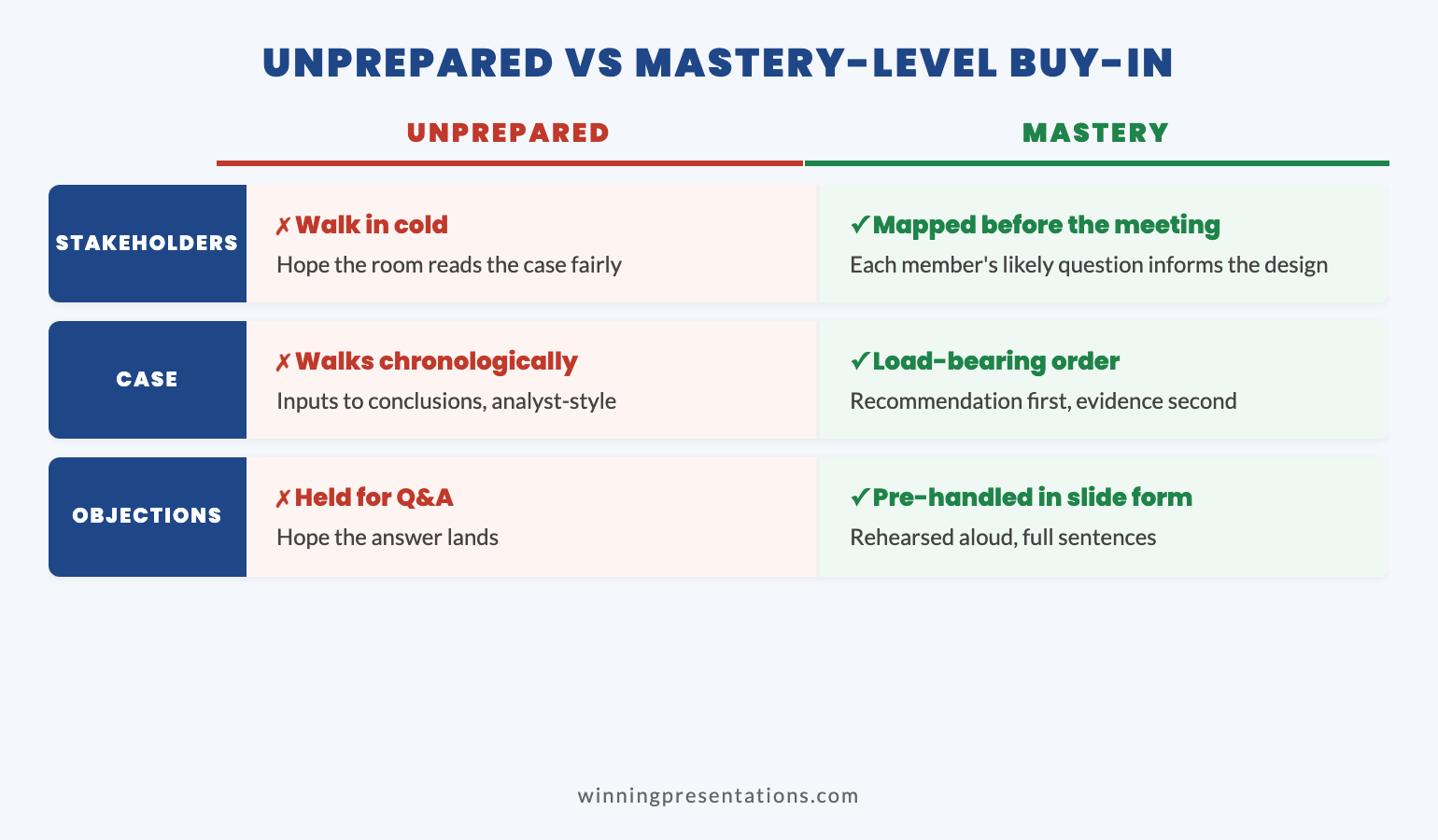
For Deciders: Confirm the decision frame. Before the meeting, have a brief conversation with the Decider (or their gatekeeper) to confirm what decision they’re actually expecting. “I want to make sure I’m structuring this around the right question — is the decision whether to proceed, or which option to proceed with?” This single question has saved my clients more time than any slide redesign. It also signals competence — you’re thinking about their decision, not your content.

For Blockers: Surface the objection privately. This is the most important step, and the one most people skip. Meet the Blocker before the presentation. Not to persuade them — to listen. “I’m presenting the X recommendation next week. I’d value your perspective before I finalise the approach.” Most Blockers don’t want to destroy your proposal. They want their concern acknowledged. When they feel heard in private, they’re far less likely to ambush you in public.

If you discover a concern you can address, build it into your presentation explicitly: “Sarah in Risk flagged the implementation timeline, and I’ve adjusted the phasing to reflect that.” This does two things: it neutralises the objection and it publicly credits the Blocker, which converts them from opponent to contributor.

For Enablers: Arm them with your anchor proof. Your Enabler can only champion your recommendation if they can articulate why it’s the right call — in one sentence, from memory, to sceptics. Give them that sentence. “The anchor proof is [X]. If anyone pushes back on [concern], the response is [Y].” When your champion can defend your recommendation as confidently as you can, the decision doesn’t depend solely on your performance in the room.

For Neutrals: Make the default easy. Neutral stakeholders will follow the strongest signal. If your Enabler speaks first and confidently, Neutrals tend to follow. Structure your presentation so the ask is clear and the next step is simple. People default to “yes” when saying yes is easier than asking more questions.

If you’re interested in the broader stakeholder mapping process for your executive presentations, I’ve written a detailed tactical guide.

The Executive Buy-In System covers this entire process in depth — from the Decision Definition Canvas (Module 1) through pressure response scripts for when Blockers challenge you in the room (Module 6). See the full Executive Buy-In System syllabus (£199).

What to Do When the Politics Are Against You

Sometimes you map the landscape and the picture isn’t good. The Blocker is powerful. Your Enabler is junior. The Decider is risk-averse. What then?

Don’t present until the ground is prepared. The biggest mistake I see is professionals walking into rooms they haven’t prepared politically because “the meeting is already scheduled.” Postponing a meeting to do proper alignment work is almost always a better outcome than presenting into a hostile or uncertain room. You lose a week. You gain a decision.

Reframe the ask to reduce perceived risk. If the political landscape suggests a full “yes” is unlikely, consider presenting a smaller ask: a pilot, a phased approach, a “proceed to next stage” rather than “approve the full programme.” This isn’t weakness — it’s reading the room accurately and adapting. Executives trust people who propose manageable risks over those who push for everything at once.

Use the Blocker’s language in your framing. If you’ve had a pre-meeting conversation with the Blocker, use their exact words in your presentation. “As [Name] rightly pointed out in our earlier conversation, the implementation timeline needs careful sequencing.” This isn’t manipulation — it’s demonstrating that you’ve listened. It’s remarkably difficult for someone to oppose a recommendation that explicitly incorporates their concern.

PAA: What do you do when executives resist your presentation recommendation?
First, diagnose the type of resistance. Is it a content objection (they need more evidence), a risk concern (they need reassurance), a political dynamic (they have competing interests), or a trust issue (they don’t yet believe you can deliver)? Each requires a different response. The psychology of executive buy-in is about addressing the real concern, not just the stated one.

Stop Presenting Into Rooms You Haven’t Read

The Executive Buy-In Presentation System teaches you how senior people actually decide — and how to structure your approach around their psychology, their politics, and their risk calculations. 7 modules: decision clarity, buy-in structure, credibility, proof strategy, AI execution, pressure response, and your personal executive playbook.

Get the Executive Buy-In System → £199

⏰ Launch pricing ends March 1st. The price rises to £499 (self-study) / £850 (live cohort). Lock in £199 before it changes.

Self-study modules + live Q&A calls. Built from 24 years in corporate banking where political preparation consistently separated approved proposals from stalled ones.

Frequently Asked Questions

How far in advance should I map the political landscape?

For high-stakes presentations (board approvals, budget requests, major client pitches), start mapping at least two weeks before. You need time for one-on-one conversations with Blockers and Enablers. For routine updates, a quick mental map the day before is usually sufficient — but even five minutes of stakeholder thinking prevents most political blindspots.

What if I can’t get access to the Blocker before the meeting?

If direct access isn’t possible, find someone who has it. Ask a mutual colleague: “What’s [Name]’s main concern about this area right now?” Even indirect intelligence is better than walking in blind. If you truly can’t get any information, acknowledge the gap in your presentation: build in a slide that explicitly addresses the most likely objection from that person’s position. Showing you’ve anticipated their concern — even without a conversation — signals respect for their perspective.

Is this approach manipulative?

Stakeholder mapping is standard practice in change management, consulting, and programme leadership. It’s not about manipulating anyone — it’s about understanding what different people need in order to feel confident making a decision. The pre-meeting conversations are about listening, not persuading. The goal is to build a presentation that genuinely addresses everyone’s legitimate concerns, not to circumvent them.

How do I handle a situation where two stakeholders have conflicting interests?

This is more common than most people realise. When stakeholders conflict, your job is to name the tension rather than pretend it doesn’t exist. “I’m aware that this recommendation creates different priorities for Operations and Finance, and I’ve tried to structure a phased approach that addresses both.” Naming the conflict demonstrates political awareness. Ignoring it guarantees that one side will surface it — on their terms, not yours.

📬 The Winning Edge Newsletter

Weekly executive presentation strategies, stakeholder navigation techniques, and career-critical communication insights. No fluff.

Subscribe free →

🎯 Free: Executive Presentation Checklist

The pre-presentation checklist I give every executive before a high-stakes meeting. Covers structure, messaging, and audience preparation — including a stakeholder mapping section.

Download free →

Related: If you’ve recently been promoted and you’re presenting to a room where you don’t yet know the political dynamics, read The Presentation You Give After Getting Promoted (Most Get It Wrong) — the listening-led approach is your fastest path to mapping a new political landscape. And if the politics of presenting trigger anxiety, introverted executives often have an advantage in these situations because they observe dynamics rather than performing over them.

The best presentation in the world fails when it’s delivered into a room you haven’t read. Map the Deciders, the Blockers, and the Enablers. Have the conversations before the meeting. Build your slides around their concerns, not just your content.

Start with the Executive Buy-In Presentation System (£199 — launch pricing ends March 1st) — and learn the decision psychology that turns political awareness into consistent approvals.

About the Author

Mary Beth Hazeldine is the Owner & Managing Director of Winning Presentations. With 24 years of corporate banking experience at JPMorgan Chase, PwC, Royal Bank of Scotland, and Commerzbank, she spent over a decade navigating the political dynamics of boardroom decisions before teaching others to do the same.

A qualified clinical hypnotherapist and NLP practitioner, Mary Beth combines executive communication expertise with decision psychology and stakeholder strategy. She has trained thousands of professionals and helps leaders turn political complexity into consistent buy-in.

Book a discovery call | View services

12 Feb 2026
Professional executive woman presenting with restraint to boardroom, holding notes with simple chart visible, corporate glass office setting

Why Over-Explaining Destroys Your Credibility (The Slide Audit That Changes Everything)

Quick answer: Over-explaining in presentations isn’t thoroughness — it’s a stress response that signals doubt. Executives interpret excessive detail as a lack of confidence in your own recommendation. The fix: audit every slide as either “safety content” (makes you feel prepared) or “decision content” (helps them decide) — then cut ruthlessly. In my experience, most decks are majority safety content that actively undermines your credibility.

A Client Had 65 Slides. I Asked One Question. She Went Quiet for 30 Seconds.

She’d spent three weeks building it. Every slide was polished. Every chart sourced and footnoted. Every possible objection anticipated with backup data.

I asked her: “Which of these slides does the audience need to make a decision — and which exist because they make you feel safe presenting?”

She went quiet. Then: “…most of these are for me, aren’t they?”

Thirty-eight slides were there to manage her anxiety. Not to help the CFO decide. Once she saw it, she couldn’t unsee it — and neither will you.

This is the pattern I’ve watched play out across 24 years in banking boardrooms at JPMorgan Chase, PwC, Royal Bank of Scotland, and Commerzbank. The highest-performing professionals sabotaging their own credibility not by saying the wrong thing, but by saying too much. Over-explaining isn’t a communication problem. It’s a stress response disguised as professionalism.

And the fix isn’t “be more concise.” The fix is understanding why you included each slide in the first place — then having a system to separate what serves you from what serves them.

That system is what I call the Credibility Audit. And once you run it on your own deck, your presentations — and how executives respond to you — will never be the same.

🎯 Stop Over-Explaining. Start Getting Decisions.

The Executive Buy-In Presentation System is a 7-module self-study programme that teaches you how decisions actually get made — and how to structure your presentation so “yes” feels safe. Includes the Credibility Release framework, Decision Definition Canvas, Pressure Response playbook, and AI-assisted workflow. Study at your own pace, with live Q&A calls for support.

Built on 24 years in banking boardrooms. Not theory — pattern recognition from thousands of high-stakes presentations.

Get the Executive Buy-In System → £199

Self-study modules + live Q&A sessions. Join anytime — all released modules available immediately.

First-cohort pricing: £199 is the launch price for this intake only. From next month, pricing moves to £499 (self-study) and £850 (live cohort).

Why Over-Explaining Feels Right But Reads Wrong

Here’s what makes this problem so persistent: the impulse to over-explain comes from a good place. You want to be thorough. You want to show you’ve done the work. You want to anticipate every question so nobody catches you off guard.

These are reasonable instincts. They also signal the opposite of what you intend.

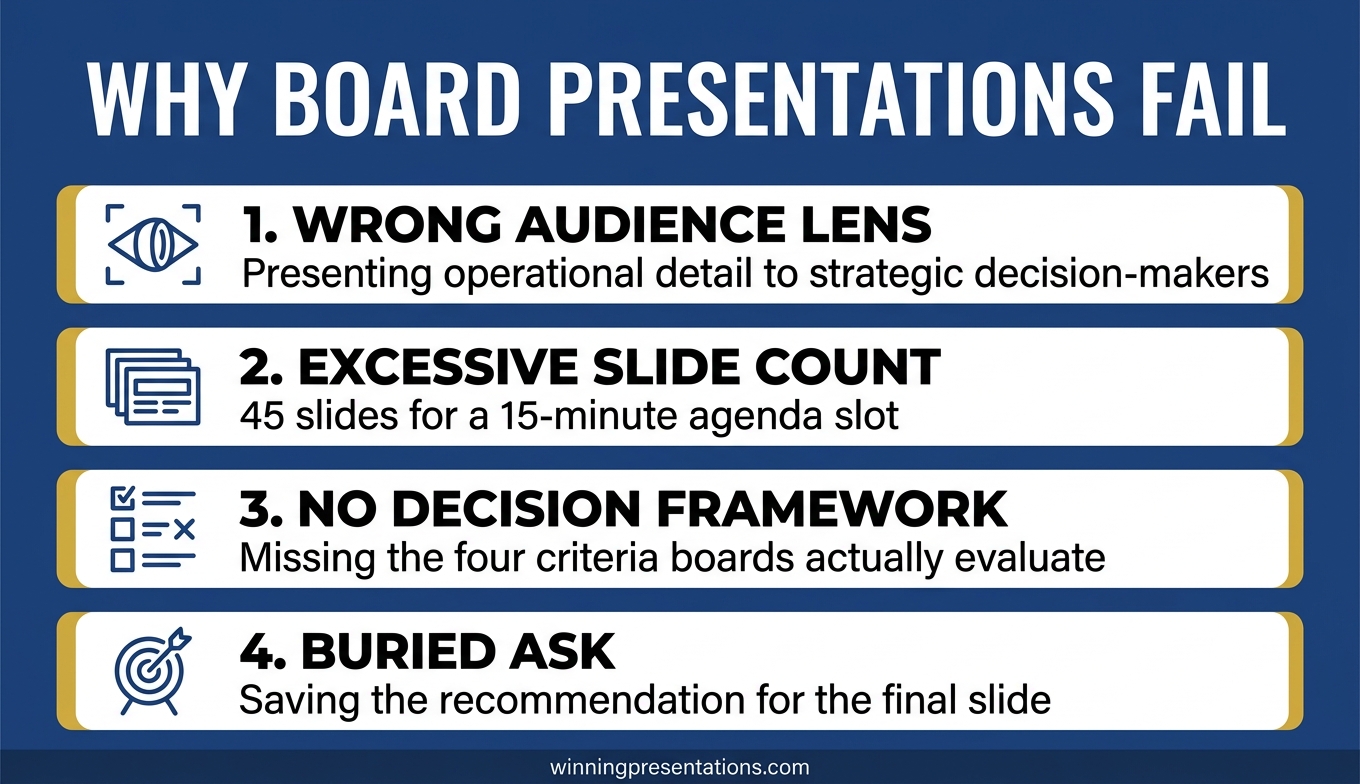
When you present 47 slides of context, methodology, and evidence before reaching your recommendation, the audience isn’t thinking “how thorough.” They’re thinking: “If they need to explain this much, are they sure about it?”

There’s neuroscience behind this. When we’re anxious, we talk more. It’s a measurable stress response — the same mechanism that makes people over-justify when they feel insecure about a decision. Audiences detect this subconsciously. They can’t always name what feels off, but they register it as uncertainty.

The result: you’ve accidentally signalled doubt about the very recommendation you’re trying to get approved.

I watched this happen to a brilliant colleague at Commerzbank. She presented a €50M deal structure for 45 minutes. Flawless analysis. Perfect charts. The Chair’s response: “That was thorough. What did you want us to do?” Her recommendation was on slide 38. By the time she reached it, the room had already decided she wasn’t confident in it.

The seniority paradox makes this worse. Watch any boardroom carefully. The most senior person usually says the least. The CEO speaks last, and briefly. This isn’t laziness — it’s how authority is communicated. But most professionals, as they prepare for senior audiences, add more explanation. They’re signalling junior-ness to the exact people they want to see them as senior.

If your executives keep stopping you mid-presentation, the problem isn’t your content. It’s your ratio of explanation to judgement.

📋 Want the complete Credibility Release framework?

Module 3 of the Executive Buy-In System gives you the full audit tool, Apology Scan reference sheet, and restraint-as-authority techniques.

Get the Executive Buy-In System → £199

Launch pricing — moves to £499/£850 next month.

Safety Content vs Decision Content: The Distinction That Changes Everything

Every slide in your presentation falls into one of two categories. Once you learn to see this, you can never unsee it.

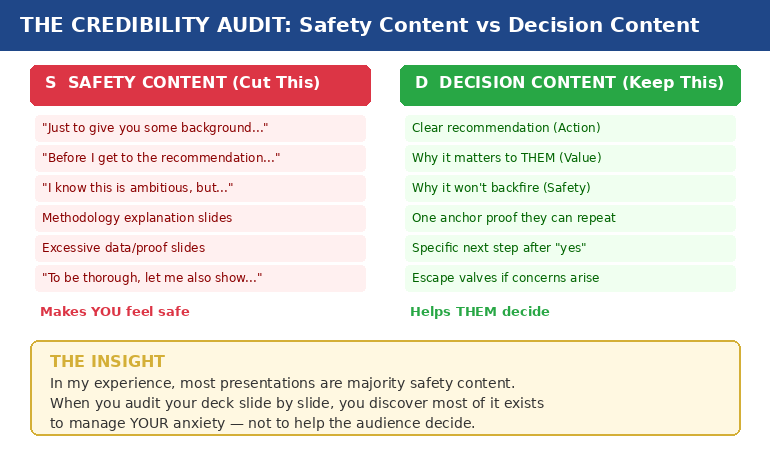
Safety content exists to make you feel prepared. It’s the background context, the methodology walkthrough, the 14 case studies, the comprehensive data analysis. It feels essential when you’re building the deck at 11pm. In the room, it signals that you’re not sure what matters.

Decision content exists to help them decide. It’s your clear recommendation, the specific value to them, the reason it won’t backfire, one piece of proof they can repeat to their peers, and a concrete next step.

In my experience, most presentations are majority safety content.

Credibility audit diagram showing safety content versus decision content with examples of each type

A consultant I worked with showed a client 14 case studies to prove their methodology worked. The client said: “But none of these are in our industry.” One relevant example would have closed the deal. Instead, fourteen irrelevant ones created doubt.

That’s safety content in action. The consultant wasn’t trying to help the client decide. She was trying to protect herself from the question “how do we know this works?” — a question the client never asked.

The three questions every decision-maker silently asks are:

  1. What happens if I say yes and it goes wrong?
  2. What happens if I say no and miss out?
  3. Can I defend this decision to my peers?

Everything that answers those three questions is decision content. Everything else — no matter how impressive — is safety content. And safety content doesn’t just waste time. It actively undermines your credibility by making you look unsure about which information actually matters.

If you’ve ever wondered why your executive presentation structure isn’t landing, start here. The structure probably isn’t wrong. The ratio is.

📊 The Credibility Release Framework: Module 3 of the Buy-In System

Five lessons that transform how you build presentations: why over-explaining destroys credibility (the neuroscience), the Credibility Audit tool for existing decks, the Apology Scan reference sheet, and the “restraint as authority” framework. Plus the Permission to Be Brief audio for cultures that expect “comprehensive” presentations.

Get the Executive Buy-In System → £199

7 modules, 36 lessons, 8 downloadable tools. Designed for busy executives who can’t commit to fixed schedules.

£199 is the first-cohort launch price. From next month: £499 self-study / £850 live cohort.

The Credibility Audit: How to Run It on Your Own Deck

This takes fifteen minutes and will change how you see every presentation you build.

Step 1: Print your deck (or open it in slide sorter view). You need to see every slide at once.

Step 2: Mark each slide with one letter. S for safety content — content that exists because it makes you feel prepared. D for decision content — content that directly helps the audience make their decision.

Be honest. The methodology slide that took you four hours to build? If removing it wouldn’t change whether they say yes or no, it’s an S.

Step 3: Count the ratio. If you’re like most professionals I work with, you’ll find the majority of your slides are S.

Step 4: For every S slide, ask one question: “If the CEO asked me to present this in half the time, would I keep this slide?” If the answer is no, it was never decision content. It was your anxiety asking for an insurance policy.

Step 5: Move the S slides to an appendix. Don’t delete them — that triggers its own anxiety. Put them in backup. If someone asks a question that one of those slides answers, you’ll have it. But you won’t volunteer information that nobody asked for.

A client brought me a 47-slide deck for a steering committee. We reduced it to 12 slides using this exact process. Same information, different structure. The committee approved in 15 minutes — a decision that had been delayed for three months.

The content wasn’t the problem. The ratio was.

🔍 Make this audit repeatable for every presentation.

The Credibility Release Checklist inside the Executive Buy-In System turns this into a systematic, page-by-page diagnostic you can run in minutes.

Get the Executive Buy-In System → £199

Launch pricing — moves to £499/£850 next month.

The Apology Scan: Hidden Phrases That Signal Doubt

Over-explaining isn’t just about slide count. It’s also about language. There are phrases that feel polite and professional but actually function as apologies for your own recommendation.

I call this the Apology Scan. Run through your presenter notes or script and look for these patterns:

“Just to give you some background…” — Translation: I’m not confident you’ll accept my recommendation without extensive justification.

“I know this is ambitious, but…” — Translation: I’m pre-apologising for what I’m about to recommend.

“You might be wondering why…” — Translation: I’m anticipating your objection and defending before you’ve attacked.

“To be thorough, let me also show…” — Translation: I’m padding my case because I’m not sure the core argument is strong enough.

“Before I get to the recommendation…” — Translation: I need you to see how much work I’ve done before you’ll trust my judgement.

Every one of these phrases feels reasonable when you write them. In the room, each one is an unintentional admission of doubt. They tell the audience: “I’m not sure you’ll trust me, so let me earn it first.”

Senior leaders don’t do this. They state what they recommend, why it matters, and what happens next. The absence of hedging is the credibility signal.

I learned this watching a partner at PwC give a 20-minute presentation to a CFO. After five minutes, the CFO interrupted: “I trust you. What do you need?” The partner said: “I need 15 more minutes.” The CFO laughed, approved everything, and left. That partner understood something it took me years to learn: the CFO wasn’t evaluating the content. She was evaluating the confidence.

Why Restraint Communicates Authority (And How to Get There)

Executives judge three things in the first two minutes — before they’ve evaluated a single slide:

  1. Do you know what you want? (Clear recommendation, not buried on slide 38)
  2. Do you believe in it? (Restrained delivery, not defensive over-explanation)
  3. Are you making this easy for me? (Decision-ready structure, not a data tour)

Restraint answers all three. Verbosity answers none.

This doesn’t mean being unprepared. It means being prepared enough to know what to leave out. Cutting content is an act of judgement — and judgement is exactly what executives are evaluating.

The “appendix strategy” solves the cultural challenge. In organisations that expect “comprehensive” presentations, you can be brief in the room while having depth available if asked. Your main deck shows 12 slides of decision content. Your appendix holds 35 slides of safety content. If someone asks “what about the methodology?” — you have it. But you didn’t volunteer it, which signals you know what matters.

This is the difference between a presenter and a decision-maker. Presenters show everything they know. Decision-makers show only what’s needed. Which one do you want to be perceived as?

There’s a reason “great presentation” is the worst feedback you can get. It means they were impressed by your delivery but didn’t feel moved to act. Restraint moves people to act.

How many slides should an executive presentation have?

There’s no magic number. The question is: how many of your slides are “decision content” (helps them decide) versus “safety content” (makes you feel prepared)? A 12-slide deck of pure decision content outperforms a 47-slide deck that’s 70% safety content. Run the Credibility Audit and let the ratio guide you.

How do you present confidently to senior executives?

Confidence in executive presentations is communicated through restraint, not through proving you’ve done the work. Lead with your recommendation, not your research. Cut safety content to an appendix. Remove apology phrases from your script. The absence of hedging is the credibility signal.

Why do executives stop presentations early?

Usually because the recommendation is buried under context. Executives scan for direction in the first 90 seconds. If they find context instead of a clear recommendation, they interrupt — not because they’re impatient, but because they can’t evaluate a proposal they haven’t heard yet.

🏆 The Complete System for Getting Executive Decisions

The Executive Buy-In Presentation System covers everything in this article and far more — from clarifying the decision before you build a single slide, to structuring your message so “yes” feels safe, to handling pressure when executives push back. Seven modules:

  • Module 1: Clarify the Decision (eliminate the ambiguity that causes over-explaining)
  • Module 2: The Executive Buy-In Structure (Action → Value → Safety → Proof → Next Step)
  • Module 3: The Credibility Release (the audit and apology scan from this article)
  • Module 4: Reassurance-First Proof (one anchor proof vs ten weak ones)
  • Module 5: AI as Execution Engine (90-minute deck creation workflow)
  • Module 6: Pressure Response (reframe pushback as risk-testing, not rejection)
  • Module 7: Your Personal Executive Playbook (custom rules for your stress patterns)

36 lessons, 8 downloadable tools, live Q&A sessions. Self-study format designed for busy executives.

Get the Executive Buy-In System → £199

Join anytime — all released modules available immediately. Study at your own pace.

⚡ £199 is the first-cohort launch price only. From next month, the self-study programme moves to £499 and the live cohort to £850. This intake locks in the launch rate.

Frequently Asked Questions

How do I know if I’m over-explaining versus being appropriately thorough?

Run the Credibility Audit: mark each slide as S (safety — makes you feel prepared) or D (decision — helps them decide). If more than 40% of your slides are S, you’re over-explaining. The acid test: if the CEO asked you to present in half the time, which slides would you cut first? Those were never decision content — they were anxiety management disguised as thoroughness.

What if my organisation expects long, comprehensive presentations?

Use the appendix strategy. Keep your main deck to decision content only (typically 10-15 slides). Move all safety content to an appendix. You’re not being unprepared — you’re being strategic about what you volunteer versus what you hold in reserve. If someone asks a detailed question, you have the slide. But you didn’t dilute your credibility by volunteering information nobody asked for. Over time, your brevity will be noticed — and rewarded.

Doesn’t cutting slides risk looking unprepared or under-researched?

The opposite is true. Knowing what to cut requires more judgement than knowing what to include. Executives recognise this instantly. A 12-slide deck that leads with a clear recommendation signals: “I know exactly what matters.” A 47-slide deck that buries the recommendation on slide 38 signals: “I’m not sure which of this information is important, so I’m showing you all of it.” The first is the presentation of someone ready for the next level. The second is the presentation of someone still proving they belong at this one.

Can the Credibility Audit work for non-slide presentations — like verbal updates or meeting contributions?

Absolutely. The same principle applies to any communication. Before your next verbal update, write down what you plan to say. Mark each point as S (makes you feel covered) or D (helps them decide or act). You’ll likely find you planned to give three minutes of context before reaching the actual point. Cut the context. Lead with the point. Watch how differently the room responds.

📬 The Winning Edge Newsletter

Weekly insights on executive presentations, decision psychology, and high-stakes communication — from 24 years in banking boardrooms. No fluff. No “10 tips” lists. Just the patterns that actually get decisions.

Subscribe Free →

📋 Free: Executive Presentation Checklist

A quick-reference checklist for structuring any executive presentation — including the safety vs decision content check. Download it before your next high-stakes meeting.

Download the Free Checklist →

Related reading: The Headcount Request That Got Yes When Everyone Said No · Why Your Nervous System Remembers That Awful Presentation From 2019

Your next step: Open your most recent presentation. Mark every slide S or D. Count the ratio. Then move every S slide to an appendix and see what’s left. That’s your real presentation — the one that communicates confidence instead of anxiety. And if you want the complete system for structuring presentations that get decisions instead of “let’s discuss further,” the Executive Buy-In Presentation System gives you the frameworks, tools, and playbooks to make it repeatable. It’s £199 at the current first-cohort launch price (moving to £499/£850 next month).

About the Author

Mary Beth Hazeldine is the Owner & Managing Director of Winning Presentations. With 24 years of corporate banking experience at JPMorgan Chase, PwC, Royal Bank of Scotland, and Commerzbank, she has delivered high-stakes presentations in boardrooms across three continents.

A qualified clinical hypnotherapist and NLP practitioner, Mary Beth combines executive communication expertise with evidence-based techniques for managing presentation anxiety. She has trained senior professionals and executive audiences over many years, and supported high-stakes funding and approval presentations across industries.

Book a discovery call | View services

10 Feb 2026
Executive reviewing stakeholder notes before entering boardroom meeting

Reading the Room Before You Enter It: The Intelligence-Gathering Phase

The decision was made before I opened my mouth.

I didn’t know it at the time. I walked into that boardroom at Chase Manhattan with 47 slides and absolute confidence in my analysis. The CFO stopped me on slide 3. “We’ve already discussed this with the CEO,” he said. “The answer is no.”

I’d spent three weeks on that presentation. The analysis was bulletproof. The recommendation was sound. None of it mattered — because I’d walked into a room where the political dynamics had already determined the outcome.

That was the day I learned: the presentation doesn’t start when you stand up. It starts weeks before, when you begin gathering intelligence on every person who will be in that room.

Quick answer: The intelligence-gathering phase is the pre-presentation work that determines whether your proposal succeeds or fails. Before you build a single slide, you need to know: who has decision authority, who influences the decision-maker, what each stakeholder’s hidden priorities are, where potential resistance will come from, and who might champion your proposal. Senior executives spend as much time on this phase as they do on the presentation itself — because they know the room’s dynamics matter more than the deck’s content.

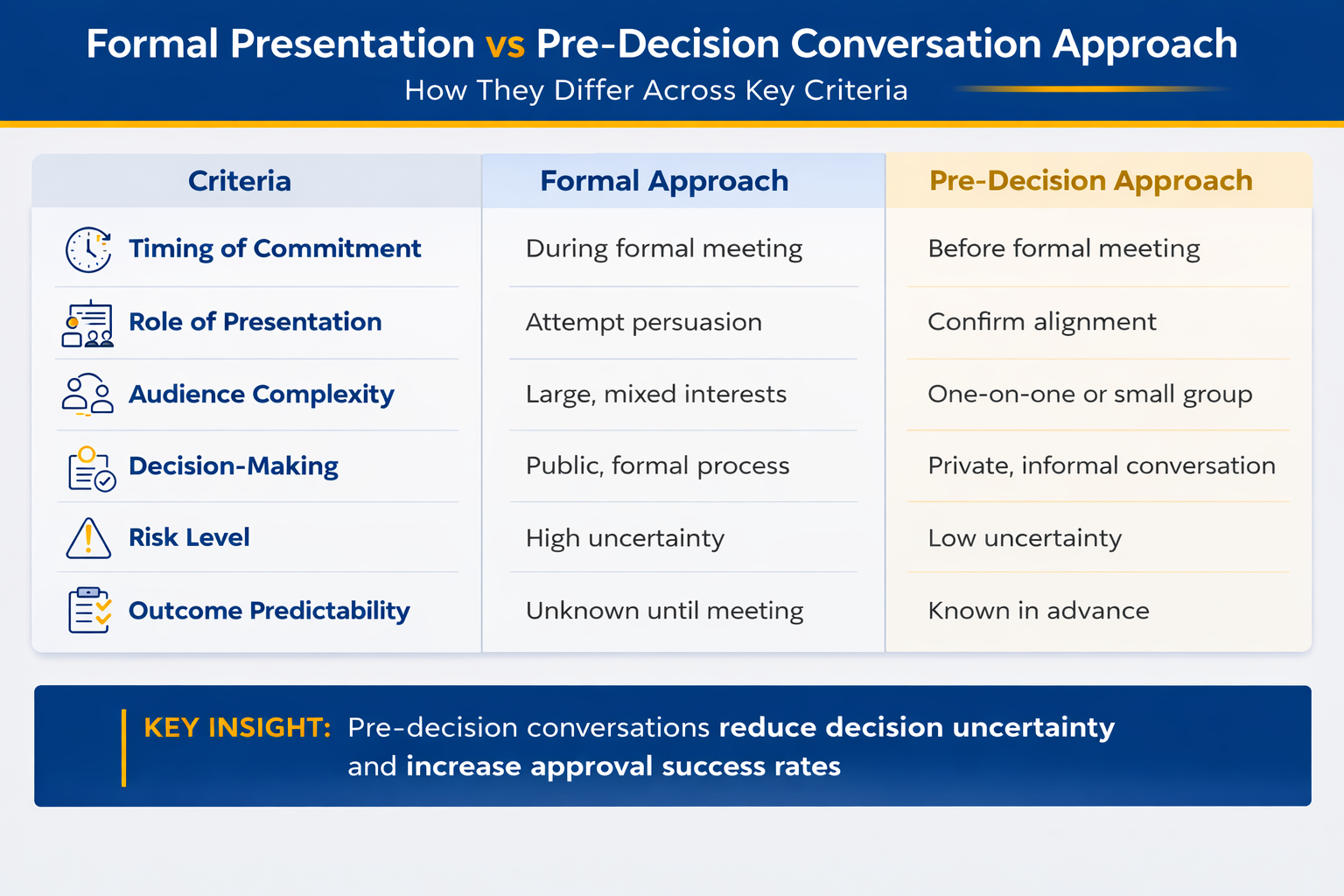
I’m writing this because I’m seeing more senior teams make decisions before the meeting — and presentations are becoming confirmation, not persuasion. If you’re still building slides before mapping the room, you’re solving the wrong problem first.

After that Chase disaster, I started paying attention to something I’d previously ignored: how the senior executives who consistently got approval actually prepared.

What I noticed surprised me. They spent relatively little time on slides. But they spent enormous amounts of time in conversations — casual coffees, brief check-ins, “quick questions” that weren’t quick at all. They were gathering intelligence.

One executive I worked with at JPMorgan had an almost supernatural ability to get proposals approved. I finally asked him his secret. He laughed and said: “I never present anything the room hasn’t already agreed to. The presentation is just the formality.”

That’s when I understood: the best presenters aren’t better at presenting. They’re better at the work that happens before.

Why Intelligence Beats Content

Here’s an uncomfortable truth about executive decision-making: the quality of your analysis is rarely the deciding factor.

Executives make decisions based on:

  • Trust — Do they believe you understand their world?
  • Risk — What happens if this goes wrong, and who gets blamed?
  • Politics — How does this affect relationships and power dynamics?
  • Priorities — Does this align with what they’re measured on?

Your spreadsheet addresses none of these. Your stakeholder intelligence addresses all of them.

When you walk into a room understanding each person’s hidden concerns, unspoken priorities, and political position, you can shape your presentation to speak directly to what actually matters to them — not what you assume matters.

This is why two people can present identical recommendations and get opposite outcomes. One understood the room. The other understood only the content.

The Four Phases of Pre-Meeting Stakeholder Research

Intelligence gathering isn’t random networking. It’s a systematic process with four distinct phases.

Phase 1: Identify

Before you can gather intelligence, you need to know who matters. This isn’t just “who will be in the room.” It’s a complete map of the decision ecosystem.

The Decision-Maker: Who has final authority? This is often not the most senior person. A CFO might defer to a COO on operational matters. A CEO might defer to a board member on strategic investments.

The Influencers: Who does the decision-maker listen to? These people may not be in the room, but their opinion has been sought — or will be sought after your presentation.

The Gatekeepers: Who controls access to the decision-maker? Executive assistants, chiefs of staff, and “special advisors” often have more influence than their titles suggest.

The Blockers: Who might oppose your proposal? Sometimes this is obvious (the person whose budget you’re threatening). Sometimes it’s hidden (the person who proposed something similar last year and failed).

The Champions: Who might actively support you? These are the people who will speak up in your favour when you’re not in the room.

If you can’t name your blockers and champions in 60 seconds, your deck is the wrong place to start.

The stakeholder mapping template inside the Executive Buy-In System lets you map your room in 15 minutes.

🎯 Master the Intelligence Phase

The Executive Buy-In Presentation System includes complete stakeholder mapping templates, intelligence-gathering scripts, and a systematic process for identifying decision dynamics before any high-stakes presentation. Stop guessing who matters. Start knowing.

Get the Stakeholder Mapping Templates →

Executive Buy-In System, £199. Self-study modules + live Q&A calls. Join anytime.

Phase 2: Research

Once you know who matters, you need to understand what matters to them. This requires research across multiple dimensions.

Professional priorities: What are they measured on? What’s in their bonus criteria? What did they commit to in their last performance review or board presentation?

Current pressures: What challenges are they facing right now? What keeps them up at night? What are they being asked about by their boss?

Past positions: Have they taken public stances on related topics? Did they support or oppose similar proposals? What patterns exist in their decision-making?

Communication style: Do they prefer data or narrative? Do they want details or headlines? Do they decide quickly or need time to process?

This information comes from multiple sources: public statements, previous meeting notes, conversations with their team members, and — most valuably — direct conversation with them.

Phase 3: Map

Now you create a visual representation of the political landscape. This isn’t optional — it’s essential. Human memory can’t hold the complexity of stakeholder dynamics. You need it on paper.

A stakeholder map shows:

  • Each person’s position (supporter / neutral / opponent)
  • Each person’s influence level (high / medium / low)
  • Relationships between stakeholders (allies, rivals, reporting lines)
  • Key concerns and priorities for each person
  • What would move each person toward support

The map reveals patterns you can’t see otherwise. You might discover that your biggest opponent is close allies with someone who could become your champion — if you approached them first. You might see that two neutral parties share a concern you could address to shift both simultaneously.

The stakeholder mapping templates in the Executive Buy-In System include specific frameworks for visualising these dynamics and identifying the highest-leverage moves.


Stakeholder intelligence framework showing 4 phases: Identify, Research, Map, Prepare

Phase 4: Prepare

Intelligence is worthless unless it shapes action. The final phase is translating what you’ve learned into specific presentation decisions.

Opening: Whose concern will you address first? (Usually the decision-maker’s, unless a powerful blocker needs to be neutralised early.)

Framing: How will you position the proposal to align with stated priorities? What language will resonate with this specific group?

Evidence: What type of proof does this group find compelling? (Some want data. Some want case studies. Some want peer validation.)

Objection handling: What resistance will come from whom? How will you address it without making enemies?

Ask: What specific decision are you requesting, and is the room actually empowered to make it?

Uncovering Hidden Priorities

The most valuable intelligence is what stakeholders don’t say publicly. Everyone has hidden priorities — concerns they won’t voice in a meeting but that heavily influence their decisions.

Common Hidden Priorities

Career protection: “Will this make me look bad if it fails?” This is especially strong for people who’ve been burned before or who are approaching a promotion decision.

Relationship preservation: “Will supporting this damage my relationship with [person]?” Political alliances often matter more than logical analysis.

Legacy concerns: “Does this undo or overshadow something I built?” People are protective of their past work, even when circumstances have changed.

Resource competition: “Will this take budget/headcount/attention from my priorities?” Zero-sum thinking is pervasive in organisations.

Workload anxiety: “Will this create more work for my team?” Even good ideas get blocked because people are already overwhelmed.

How to Uncover Hidden Priorities

You can’t ask directly. “What’s your hidden agenda?” doesn’t work. Instead, use indirect approaches:

Ask about history: “What happened when [similar proposal] was discussed before?” Past reactions reveal ongoing concerns.

Ask about pressures: “What’s taking most of your attention right now?” Current stress points predict resistance areas.

Ask about success criteria: “What would make this a win from your perspective?” People reveal priorities when describing their ideal outcome.

Ask about concerns: “What would need to be true for you to feel comfortable with this?” This is permission to voice objections before the formal meeting.

Listen for qualifiers: When someone says “I like this, but…” the word after “but” is the hidden priority.

🔍 Scripts for Every Intelligence Conversation

The Executive Buy-In System includes word-for-word scripts for pre-meeting conversations — how to ask questions that reveal hidden priorities without seeming manipulative, how to test reactions without showing your full hand, and how to build alliances before the formal presentation.

Get the Pre-Meeting Conversation Scripts →

Executive Buy-In System, £199. Includes objection-handling frameworks and champion recruitment strategies.

Mapping the Political Landscape

Every organisation has a political landscape — relationships, rivalries, alliances, and histories that shape how decisions actually get made. Ignoring this doesn’t make you “above politics.” It makes you ineffective.

Key Political Dynamics to Identify

Alliance clusters: Who consistently supports whom? These groups often vote as a bloc, so winning one member can win several.

Rivalry pairs: Who has history with whom? If your proposal is associated with one side of a rivalry, the other side may oppose it automatically.

Rising and falling stars: Who is gaining influence? Who is losing it? Aligning with rising stars is strategic; relying on falling stars is risky.

Debt relationships: Who owes whom a favour? Political capital is real, and people cash it in on important decisions.

Information channels: How does information flow? Who talks to whom? A message that reaches the CEO through their trusted advisor lands differently than one that comes through formal channels.

Navigating Without Taking Sides

The goal isn’t to become a political player. It’s to understand the landscape well enough to navigate it without stepping on landmines.

This means:

  • Presenting your proposal as good for the organisation, not good for any faction
  • Acknowledging different perspectives without aligning with any camp
  • Giving potential opponents a way to support you without losing face
  • Never badmouthing anyone, even to people you think are allies

The political navigation module in the Executive Buy-In System covers these dynamics in depth, including case studies of how senior leaders navigate complex political environments.

Using Intelligence to Shape Your Presentation

Intelligence gathering isn’t an end in itself. Every insight should translate into a specific presentation decision.

Shaping Your Opening

Your opening should address the decision-maker’s primary concern within the first 60 seconds. If you’ve done your intelligence work, you know exactly what that concern is.

Example: If the CFO’s hidden priority is “don’t create more work for my already-stretched team,” your opening isn’t about ROI. It’s about: “This proposal requires no additional headcount and actually reduces manual work by 40%.”

Shaping Your Evidence

Different stakeholders find different types of evidence compelling:

  • Finance people want numbers, models, sensitivity analysis
  • Operations people want process flows, implementation plans, risk mitigation
  • Sales people want customer stories, competitive positioning, market validation
  • Technical people want architecture, scalability, integration details

Your intelligence tells you who will be in the room and what each person needs to see. Structure your evidence accordingly — leading with what matters most to the decision-maker, but including what others need to feel comfortable.

Shaping Your Ask

The biggest intelligence failure is asking for something the room can’t give. Before you present, confirm:

  • Does this group have authority to approve this?
  • Is this the right venue for this decision?
  • What’s the maximum they can approve without escalation?
  • What approval process follows a “yes” in this room?

Sometimes the right ask isn’t “approve this” but “recommend this to [higher authority]” or “approve Phase 1 so we can return with Phase 2.”

The Intelligence Timeline

How far in advance should you start? For high-stakes presentations:

  • 4-6 weeks before: Identify stakeholders and begin research
  • 3-4 weeks before: Initial conversations with key players
  • 2-3 weeks before: Create stakeholder map, identify gaps
  • 1-2 weeks before: Fill intelligence gaps, test key messages
  • Days before: Final check-ins with champion and potential blockers

This timeline assumes a major proposal. For routine presentations, compress accordingly — but never skip the intelligence phase entirely.

📊 The Complete Executive Buy-In System

Everything you need to master the intelligence phase and beyond:

  • Stakeholder mapping templates and frameworks
  • Intelligence-gathering conversation scripts
  • Political landscape analysis tools
  • Pre-meeting alignment strategies
  • Champion recruitment playbook
  • Objection prevention and handling

Map the Room Before You Present →

Executive Buy-In System, £199. Self-study modules releasing through April 2026. Join now for immediate access + live Q&A calls.

📬 PS: Want weekly strategies for stakeholder management and executive buy-in? Subscribe to The Winning Edge — free, practical, from 24 years in corporate boardrooms.

Frequently Asked Questions

How do I gather intelligence without seeming manipulative?

Frame conversations as seeking input, not gathering ammunition. “I’m working on a proposal and would value your perspective” is honest and opens dialogue. Most people appreciate being consulted before being presented to — it shows respect for their expertise and position.

What if I don’t have access to key stakeholders?

Work through intermediaries. Their direct reports, peers, or executive assistants often have valuable insights. You can also gather intelligence indirectly through public statements, previous meeting notes, and organisational knowledge. Something is always better than nothing.

How much time should I spend on intelligence vs. content?

For high-stakes presentations, I recommend at least equal time — and often more on intelligence. A perfectly crafted presentation that misreads the room fails. A rough presentation that addresses exactly what stakeholders need often succeeds. Prioritise understanding over polish.

What if my intelligence reveals the proposal will be rejected?

That’s valuable intelligence. You now have choices: modify the proposal to address concerns, build more support before presenting, choose a different venue or timing, or decide not to present at all. All of these are better than walking into certain rejection.

Related: Even with perfect intelligence, your nervous system can sabotage you in the room. Read The Fight or Flight Hack I Learned From Hypnotherapy for the 90-second reset that interrupts panic before high-stakes presentations.

That Chase presentation taught me a lesson I’ve never forgotten: the room’s dynamics matter more than the deck’s content.

The executives who consistently get approval aren’t better presenters. They’re better intelligence gatherers. They know what each stakeholder wants before they enter the room. They’ve addressed concerns before they’re raised. They’ve built support before they ask for it.

Start your next important presentation not with slides, but with questions: Who decides? Who influences? What do they care about? What would make them say yes?

Answer those questions first. Then build your deck.

About the Author

Mary Beth Hazeldine is the Owner & Managing Director of Winning Presentations. With 24 years in corporate banking at JPMorgan Chase, PwC, Royal Bank of Scotland, and Commerzbank, she has navigated complex stakeholder environments across three continents.

Mary Beth has supported high-stakes funding and approval presentations across global banking environments. She now teaches executives the stakeholder management and buy-in strategies that make the difference between proposals that get approved and proposals that get filed away.

08 Feb 2026
Maven presentation courses at test pricing showing AI-Enhanced Mastery at £249 and Executive Buy-In System at £199 with savings up to £1,152

Two Executive Presentation Courses: One for Speed, One for Buy-In

Test pricing is temporary. This transparency isn’t.

When I launched these two Maven courses, I deliberately priced them low — not as a “launch discount” marketing gimmick, but to genuinely test demand while I was still building out the content. I wanted to know: would busy professionals actually invest in comprehensive presentation training?

The answer was yes. Resoundingly yes.

Which means the test pricing window is closing. And once it does, these courses will never be available at these prices again.

Here’s what’s about to change:

  • AI-Enhanced Presentation Mastery: Currently £249 → Rising to £399 (self-study) or £750 (live cohort)
  • Executive Buy-In Presentation System: Currently £199 → Rising to £499 (self-study) or £850 (live cohort)

That’s not marketing spin. The current prices represent 37-76% savings compared to what future students will pay. And the content is identical — built from 24 years in corporate banking and consulting, plus 14+ years training senior professionals globally.

Both courses have already started, which is actually better for you — more modules are immediately available, so you can start applying the frameworks this week rather than waiting for content to release.

Let me show you exactly what each course delivers.

Quick answer: If you spend too many hours building presentations and want to cut creation time in half using AI — choose AI-Enhanced Presentation Mastery (£249 now, £399-£750 later). If you struggle to get approvals and face stakeholder resistance — choose Executive Buy-In Presentation System (£199 now, £499-£850 later). If you want speed AND buy-in, the best value is both courses for £448 — less than the future self-study price of Executive Buy-In alone (£499).

Best Value: Get Both Courses

£448

Future value: £898 self-study | £1,600 live cohort — Save up to £1,152

Lock In Test Pricing →

Or scroll down to choose just one course

💰 The Numbers Don’t Lie: Test Pricing vs. Future Pricing

Course Test Price Self-Study Live Cohort You Save
AI-Enhanced Mastery £249 £399 £750 Up to £501
Executive Buy-In £199 £499 £850 Up to £651
BOTH COURSES £448 £898 £1,600 Up to £1,152

Test pricing includes lifetime access to all materials, live Q&A sessions, and future updates.

AI-Enhanced Presentation Mastery (£249)

The problem this solves: You’re spending 4-6 hours building presentations that should take 90 minutes. You’ve tried AI tools but end up with generic outputs that need complete rewrites. You know AI could help, but you haven’t found a system that actually works for executive-level content.

What you’ll learn:

This isn’t an AI tutorial. It’s a strategic system for using AI as a thinking partner — not a content generator.

  • The AVP Framework (Action-Value-Proof) — Structure presentations that are impossible to ignore. Create compelling outlines in minutes that guide audiences to yes.
  • The 132 Rule — Organize information in the exact sequence your audience’s brain processes and remembers it.
  • The S.E.E. Formula (Story-Evidence-Emotion) — Make your proof memorable and your recommendations impossible to dismiss.
  • Your Personal AI Playbook — Customised prompts that reflect your expertise and communication style. Create first drafts in 30 minutes.
  • Data Storytelling with AI — Transform KPIs and analytics into strategic narratives using the Insight-Implication-Action framework.

What’s included:

  • 8 self-paced modules (releasing January–April 2026)
  • 2 live 60-minute coaching sessions
  • AI-powered outline generators
  • 30+ prompt templates for different presentation types
  • Before/after slide transformations
  • Master Prompt Pack
  • Lifetime access to all materials and future updates

The practical result: You’ll cut presentation creation time by 50%+ while dramatically improving quality. One client used the AVP framework to rebuild a 47-slide deck into 12 focused slides — and got approval in the first meeting after three previous rejections.

AI-Enhanced Presentation Mastery

Test Price: £249

Future: £399 self-study | £750 live cohort

Lock In Test Pricing → £249

Modules already available. Start applying frameworks this week.

Executive Buy-In Presentation System (£199)

The problem this solves: You create solid presentations but struggle to get approval. Stakeholders push back. Decision-makers say “let me think about it” instead of “yes.” You know your recommendations are sound, but you can’t seem to get the room on your side.

What you’ll learn:

This is about influence, not information. You’ll learn the psychology of how decisions actually get made in organisations — and how to position yourself on the winning side.

  • The Champion Strategy — How to get someone fighting FOR your proposal before you even present. Pre-meeting tactics that make your presentation a formality.
  • The Objection Map — Find resistance before it finds you. Identify blockers, skeptics, and hidden agendas before you walk into the room.
  • Stakeholder Psychology — Why “alignment” fails and “enrollment” wins. The difference between people nodding and people actually supporting you.
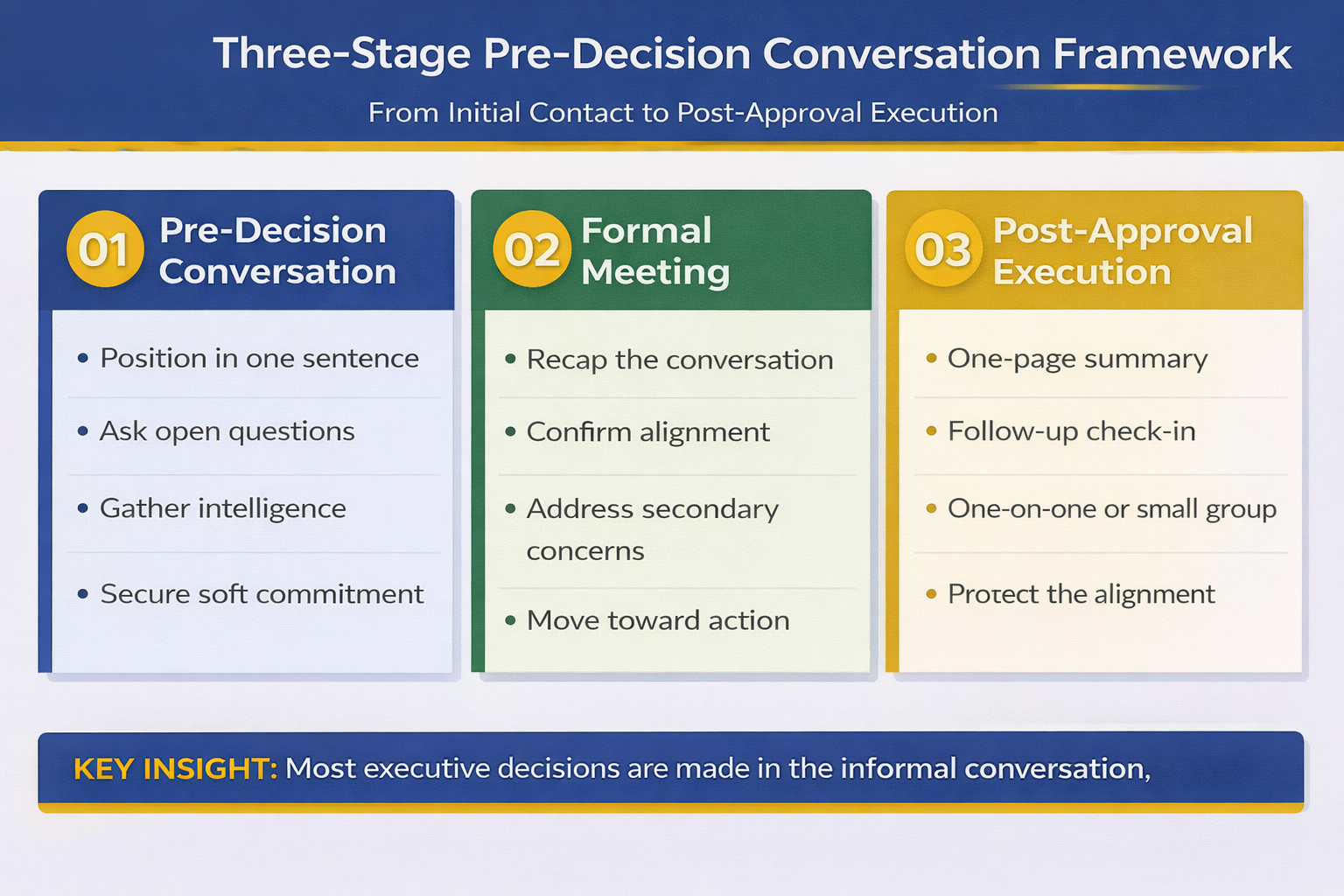
  • The Pre-Decision Conversation — Where approvals actually happen (hint: it’s not in the presentation). How to have the conversations that matter.
  • Handling “Let Me Think About It” — Scripts and frameworks for converting hesitation into commitment.

What’s included:

  • Complete self-paced module library
  • Live Q&A coaching sessions
  • Stakeholder mapping templates
  • Pre-meeting preparation frameworks
  • Objection handling scripts
  • Decision architecture templates
  • Lifetime access to all materials and future updates

The practical result: You’ll stop being the person who presents and start being the person who gets things approved. One executive used the Champion Strategy to secure a £2M budget — the decision was essentially made before the formal presentation even started.

Executive Buy-In Presentation System

Test Price: £199

Future: £499 self-study | £850 live cohort

Lock In Test Pricing → £199

Modules already available. Start applying frameworks this week.

Is This the Right Presentation Skills Course for You?

Here’s the honest breakdown:

Choose AI-Enhanced Presentation Mastery (£249 — saves up to £501) if:

  • You spend too many hours building presentations
  • You want to use AI but haven’t found a system that works
  • You need to produce more presentations without sacrificing quality
  • You’re already decent at getting buy-in but want faster creation
  • Your main pain is time, not approval

Choose Executive Buy-In System (£199 — saves up to £651) if:

  • You create good presentations but struggle to get approval
  • You face resistance, skepticism, or “let me think about it”
  • You need to influence stakeholders without formal authority
  • Politics and hidden agendas derail your recommendations
  • Your main pain is approval, not creation time

Take both courses (£448 — saves up to £1,152) if:

  • You want the complete system — fast creation AND reliable approval
  • You’re at a career inflection point where presentations really matter
  • You recognise that £448 for both is less than the future self-study price of Executive Buy-In alone (£499)
  • You want to lock in lifetime access before prices triple

🚫 These courses are NOT for you if:

  • You’re looking for a quick PowerPoint tutorial (these are strategic frameworks, not software training)
  • You need presentation skills for academic or personal contexts (these are built for corporate/executive environments)
  • You want someone to build your slides for you (these teach you to build better, faster)
  • You’re not willing to invest 2-3 hours per week in learning and applying the frameworks

For more on executive presentation structure, see my guide on executive presentation structure. For AI presentation workflows, see AI presentation workflow. For stakeholder influence, see how to get executive buy-in.

Why Test Pricing Exists (And Why It’s Ending)

I want to be completely honest about why these prices exist — because understanding this helps you see why it’s genuinely a limited window.

I needed to validate demand. Before investing hundreds of hours building comprehensive courses, I needed to know: would busy executives actually pay for in-depth presentation training? Would the frameworks I’ve used for 24 years translate to a self-paced format?

So I priced both courses low enough to test the market while I built the content. Not “discounted” — genuinely priced to test.

The test worked. Students enrolled. They’re getting results. The feedback is shaping the final versions of both courses. But now the content is nearly complete, and there’s no longer a reason to keep prices at testing levels.

Here’s what you get at test pricing that future students won’t:

  • The same content — Identical frameworks, templates, and live sessions
  • Lifetime access — Including all future updates and improvements
  • Live Q&A sessions — Worth the price difference alone
  • Maven Guarantee — Full refund eligible up until halfway point
  • 37-76% lower price — Compared to what the exact same course will cost in 3 months

The maths is simple:

If you wait and buy AI-Enhanced Presentation Mastery at the future self-study price (£399), you’ll pay £150 more for exactly the same course. If you want the live cohort experience later, that’s £750 — three times today’s price.

If you wait and buy Executive Buy-In at the future self-study price (£499), you’ll pay £300 more. The live cohort? £850 — more than four times today’s price.

If you buy both now (£448), you pay less than the future self-study price of Executive Buy-In alone (£499). Here’s the simple price logic: test pricing exists to validate demand, not to be permanent.

Lock In Test Pricing Before It Disappears

AI-Enhanced Mastery

£249 £399-£750

Save up to £501

Lock In Test Pricing →

Executive Buy-In System

£199 £499-£850

Save up to £651

Lock In Test Pricing →

BOTH COURSES: £448 (Future value: £898-£1,600)

Lifetime access. Live Q&A sessions. Maven Guarantee.

Frequently Asked Questions

The courses have already started — am I too late?

The opposite. Because modules release over time, joining now means you get immediate access to everything that’s already available — more content ready to consume than early joiners had. You can catch up at your own pace, the live Q&A sessions are still ahead, and you’re paying the same test price. If anything, you’re getting better value than the earliest students.

Why are these prices so much lower than future pricing?

Honestly? I priced them low to test demand while building the courses. I needed to validate that busy professionals would invest in comprehensive presentation training before committing hundreds of hours to create it. The test worked — students enrolled and are getting results. Now that the content is nearly complete, there’s no reason to keep prices at testing levels. Future students will pay £399-£750 for AI-Enhanced and £499-£850 for Executive Buy-In.

What if I can’t attend the live sessions?

All live sessions are recorded and added to your course portal. You’ll have lifetime access to watch them whenever convenient. The courses are designed for busy professionals — self-paced learning with live sessions as a bonus, not a requirement.

Can my company reimburse the cost?

Yes — many employers cover professional development courses. Maven provides documentation and receipts suitable for expense claims. Both courses include certificates of completion you can share with your employer or add to LinkedIn. At test pricing, this is an easy approval — you’re essentially getting live-cohort-quality training at a fraction of typical corporate training costs.

Will test pricing return later?

No. Test pricing exists because I was validating demand while building the courses. Once the programmes are complete and established, they move to standard pricing: £399 (self-study) or £750 (live cohort) for AI-Enhanced, and £499 (self-study) or £850 (live cohort) for Executive Buy-In. This window is genuinely limited.

What’s the refund policy?

Both courses are backed by Maven’s satisfaction guarantee. You’re eligible for a full refund up until the halfway point of the course if it’s not what you expected. There’s no risk in trying — except the risk of waiting and paying 2-4x more later.

Your Next Step

Let me make this simple.

If you wait three months and buy these courses at regular pricing, you’ll pay £898 for self-study access to both — or £1,600 for live cohort access.

If you act now, you pay £448 for both. That’s less than the future self-study price of Executive Buy-In alone.

The content is identical. The frameworks took me 24 years to develop. The only difference is whether you lock in test pricing or pay 2-4x more later.

If your main pain is spending too many hours building presentations:
AI-Enhanced Presentation Mastery — £249 (future: £399-£750)

If your main pain is getting approval and buy-in:
Executive Buy-In Presentation System — £199 (future: £499-£850)

If you want the complete toolkit:
Both courses — £448 total (future: £898-£1,600)

These frameworks work. I’ve used them to train thousands of executives. You can start applying them this week. The only question is whether you’ll pay test prices or full prices for the same result.

⏰ Test Pricing Window Is Closing

Once these courses are fully established, prices rise to £399-£850 per course. Lock in test pricing now and save up to £1,152.

Best Value: Get Both Courses → £448

📧 Not Ready to Commit? Get the Newsletter First

Weekly insights on executive communication, presentation structure, and high-stakes delivery — free. See if my approach resonates before investing in a course.

Subscribe to The Winning Edge →

About the Author

Mary Beth Hazeldine is the Owner & Managing Director of Winning Presentations. With 24 years in corporate banking and consulting — including senior roles at JPMorgan Chase, PwC, Royal Bank of Scotland, and Commerzbank — she has delivered high-stakes presentations in boardrooms across three continents.

A qualified clinical hypnotherapist and NLP practitioner, Mary Beth combines executive communication expertise with evidence-based techniques for influence and persuasion. She has trained thousands of executives and supported presentations that have secured significant funding and approvals.

Book a discovery call | View services

06 Feb 2026
Senior executive in thoughtful pose considering a business decision in modern corporate office

Why Executives Say ‘Let Me Think About It’ (And How to Prevent It)

“Let me think about it” cost me six months and nearly derailed my career.

I’d just delivered what I thought was a flawless presentation to the executive committee at Commerzbank. Forty-five minutes of carefully constructed slides. Every question answered. Every objection pre-empted. The CFO nodded throughout. The COO asked thoughtful questions. I left feeling confident.

Then came the response: “This is excellent work. Let me think about it and we’ll circle back.”

They never circled back. Two months later, I followed up. “Still considering.” Three months: “The timing isn’t right.” Six months: the initiative quietly died, and I spent the next year rebuilding credibility.

It took me years — and dozens of similar experiences working with banking clients — to understand what “let me think about it” actually means. And more importantly, what causes it.

The answer changed how I approach every executive presentation.

Quick answer: “Let me think about it” rarely means an executive needs more time to consider your proposal. It usually signals one of five hidden barriers: insufficient information to decide confidently, unspoken political concerns, unclear personal benefit, fear of being wrong, or lack of urgency. The solution isn’t a better follow-up strategy — it’s preventing these barriers from forming before you present.

⚡ Presenting tomorrow and worried you’ll hear “let me think about it”?

If you can’t do the pre-work, use these three questions to force specificity in the room:

  1. “What would you need to see to decide today?” — Surfaces hidden information gaps.
  2. “What concern would make ‘yes’ feel risky?” — Brings objections into the open.
  3. Close: “If I can address that concern now, can we move forward?”

These won’t guarantee a yes — but they’ll prevent a vague deferral. You’ll know exactly what’s blocking the decision.

What ‘Let Me Think About It’ Actually Means

Let’s be direct: “Let me think about it” is almost never what it sounds like.

Executives are paid to make decisions. They make dozens of them daily. If your proposal required genuine deliberation, they’d ask specific questions, request particular data, or schedule a follow-up with defined parameters. “Let me think about it” — with no specifics — means something else entirely.

Here’s what it usually means:

“I don’t have enough information to say yes confidently.” Something is missing. They can’t articulate what, but the decision doesn’t feel safe. So they defer.

“I have concerns I don’t want to raise in this forum.” There are political dynamics, relationship issues, or historical context that make a public “no” awkward. Deferral is the polite exit.

“I don’t see how this benefits me or my priorities.” Every executive has personal objectives — visibility, budget, headcount, strategic positioning. If your proposal doesn’t connect to those, it becomes low priority.

“I’m not sure this is the right call, and I don’t want to be wrong.” Risk aversion is real. When the upside isn’t clear and the downside could reflect poorly, deferral feels safer than decision.

“This doesn’t feel urgent enough to decide now.” Without a compelling reason to act today, everything can wait. And things that can wait often wait forever.

Notice what’s missing from this list: “I need time to carefully weigh the merits of your proposal.” That’s what we want to believe. It’s rarely what’s happening.

Stop Hearing “Let Me Think About It”

The Executive Buy-In System is a self-paced Maven course that teaches you exactly how to identify and address the hidden barriers that cause decision stalling — before you present. Stakeholder psychology, political navigation, urgency creation, and the decision architecture that transforms “let me think about it” into “let’s move forward.”

Join the Executive Buy-In System →

Self-paced learning with live Q&A calls. Join anytime — get instant access to all released modules.

The Five Hidden Reasons Executives Stall

Understanding why executives defer decisions is the first step to preventing it. Here’s what’s usually happening beneath the surface:

The 5 hidden reasons executives say let me think about it with prevention strategies

Reason 1: Information Asymmetry

You’ve spent weeks or months on this proposal. You know every detail, every implication, every edge case. The executive has spent 45 minutes listening to your summary. The information asymmetry is enormous.

When executives don’t have enough information to feel confident, they defer. Not because they want more data — but because the decision doesn’t feel “safe” yet. They can’t point to what’s missing, so they ask for time.

The fix: Don’t just present information. Transfer confidence. Help them see what you see. Make the decision feel as obvious to them as it does to you.

Reason 2: Political Complexity

Every proposal exists in a political context. Your initiative might threaten someone’s budget. It might contradict a position someone else has already taken. It might create winners and losers among the executive’s peers or reports.

Executives don’t want to create political problems for themselves. If saying yes creates conflict they’d rather avoid, they defer. The politics are invisible to you but very real to them.

The fix: Map the political landscape before you present. Understand who wins and loses. Pre-wire the people who might object. Make yes politically easy.

Reason 3: Missing Personal Connection

Every executive has personal priorities: what they’re trying to accomplish this quarter, what they want to be known for, what metrics they’re measured on. Your proposal might be objectively good for the company but irrelevant to their personal objectives.

Proposals that don’t connect to personal priorities become “important but not urgent.” And important-but-not-urgent proposals get deferred indefinitely.

The fix: Know what each decision-maker cares about. Frame your proposal in terms of their priorities, not just organisational benefit.

For more on connecting proposals to executive priorities, see my guide on how to present to a CFO.

Reason 4: Fear of Being Wrong

Executives are evaluated partly on judgment. Being wrong — especially publicly wrong — carries career risk. When the right decision isn’t obvious, deferral feels safer than commitment.

This is especially true for decisions that are visible, irreversible, or outside the executive’s core expertise. The less confident they feel, the more likely they are to defer.

The fix: Reduce perceived risk. Show what happens if it doesn’t work. Create off-ramps. Make saying yes feel safe.

Reason 5: Lack of Urgency

Without a compelling reason to decide now, executives will defer. It’s not malicious — it’s just how human attention works. Urgent things get attention. Non-urgent things wait.

If your proposal can be decided next week just as easily as today, it will be decided next week. Or next month. Or never.

The fix: Create genuine urgency. Not artificial scarcity, but real consequences of delay. What opportunity closes? What cost increases? What risk materialises?

How to Prevent Decision Stalling Before You Present

The best response to “let me think about it” is prevention. Here’s how to address each barrier before it forms:

For Information Asymmetry:

Don’t assume your presentation will transfer enough understanding. Preview your key insights with decision-makers before the formal meeting. When they’ve already processed the core information privately, the presentation becomes confirmation rather than revelation.

Also: present with recommendations, not options. Executives don’t want to make your decision for you. They want to approve a confident recommendation. Give them something to say yes to.

For Political Complexity:

Do the political work before you present. Talk to anyone who might object. Understand their concerns. Where possible, incorporate their input so they feel ownership. When potential blockers feel heard, they’re less likely to block.

Critically: don’t surprise anyone in the room. If someone is going to hear about your proposal for the first time during your presentation, you’ve already lost.

For Missing Personal Connection:

Research what each decision-maker cares about. What are they measured on? What do they want to be known for? What problems keep them up at night?

Then frame your proposal explicitly in those terms. “This addresses the customer retention issue you raised in Q3” is more compelling than “This improves customer retention.” Same proposal, different framing.

For Fear of Being Wrong:

Make saying yes feel safe. Show that you’ve considered what could go wrong. Present contingency plans. Propose pilot approaches that limit downside. Create checkpoints where the decision can be revisited.

The goal isn’t to eliminate risk — it’s to make the executive feel that saying yes is a reasonable, defensible choice. They need to be able to justify the decision if it doesn’t work out.

For Lack of Urgency:

Build real urgency into your proposal. What window is closing? What competitive advantage erodes with delay? What cost increases the longer we wait?

If there’s genuinely no urgency, consider whether this is the right time to present. Sometimes the answer is to wait for a moment when urgency naturally exists.

For more on structuring proposals that drive decisions, see my guide on the 3-slide system that gets executive decisions fast.

What to Do If You Hear It Anyway

Despite your best preparation, you might still hear “let me think about it.” Here’s how to respond:

Don’t accept vague deferral. Instead, ask: “I want to make sure I’ve addressed everything you need. What specifically would be helpful for you to consider?” This forces them to articulate the barrier — which gives you something to address.

Propose a specific next step. “Would it help if I sent over [specific information] and we reconnected on Thursday?” This creates a commitment rather than an open-ended deferral. A defined follow-up is better than “we’ll circle back.”

Ask about concerns directly. “I want to make sure there isn’t a concern I haven’t addressed. Is there anything about this that doesn’t sit right?” This gives them permission to voice the real objection.

Check for political dynamics. “Is there anyone else whose input would be valuable before we move forward?” This surfaces hidden stakeholders who might be influencing the decision.

Create a decision point. “I understand you want to consider this. Just so I can plan accordingly, when would you expect to have a view?” This creates mild accountability without being pushy.

The goal isn’t to pressure — it’s to understand. “Let me think about it” is a symptom. Your job is to diagnose the underlying barrier so you can address it.

For more on building executive buy-in, see my guide on how to get executives to say yes.

Transform “Let Me Think About It” Into “Let’s Move Forward”

The Executive Buy-In System teaches you the complete process for preventing decision stalling. Stakeholder mapping, barrier identification, urgency creation, political navigation, and the decision architecture that gets proposals approved — not deferred.

Join the Executive Buy-In System →

Self-paced Maven course with live Q&A calls. Join anytime — get instant access to all released modules.

Frequently Asked Questions

Is “let me think about it” ever genuine?

Sometimes, yes — particularly for very large decisions with significant organisational impact. But even genuine deliberation should come with specifics: what they’re considering, what information would help, when they expect to decide. Vague deferral with no parameters is usually a polite no. If an executive genuinely needs time, they’ll tell you what they need time to consider.

How long should I wait before following up?

This depends on what you agreed in the meeting. If you proposed a specific check-in (“I’ll send the additional data and follow up Thursday”), honour that timeline. If the meeting ended with vague deferral, follow up within 3-5 business days with something valuable — new information, an article relevant to their concerns, clarification of a point raised. Don’t just ask “have you decided?” Give them a reason to re-engage.

What if they keep deferring despite my follow-ups?

Multiple deferrals usually mean one of two things: the proposal is genuinely low priority for them, or there’s a barrier they’re unwilling to articulate. At this point, it’s worth a direct conversation: “I want to respect your time. Should I interpret the timing as a signal that this isn’t a priority right now? I’d rather know than keep following up if the answer is no.” This gives them permission to say no, which is often better than indefinite limbo.

How do I create urgency without seeming manipulative?

Real urgency isn’t manufactured — it’s surfaced. What genuinely changes if you wait? Market conditions, competitive dynamics, cost increases, opportunity windows, resource availability? If there’s real urgency, articulate it clearly. If there isn’t, don’t fabricate it. Executives see through artificial scarcity, and it damages your credibility. Sometimes the honest answer is that there’s no urgency — in which case, consider waiting for a moment when urgency naturally exists.

Your Next Step

The next time you prepare a presentation, don’t just think about what you’ll say. Think about the five barriers that cause executives to defer.

What information might they be missing? What political dynamics exist? How does this connect to their personal priorities? What might make them afraid to say yes? Why should they decide now rather than later?

Address those questions before you present, and you’ll hear “let me think about it” far less often.

Ready to master the psychology of executive decisions?

Join the Executive Buy-In System →

📧 Get the Winning Edge Newsletter

Weekly insights on executive communication, stakeholder psychology, and the dynamics of getting buy-in — from 24 years in corporate banking.

Subscribe free →

Related reading: Decision stalling often happens in recurring meetings like MBRs and QBRs. If your regular updates keep getting deferred, the problem might be structural. Read Monthly Business Reviews That Don’t Bore Everyone to Death for the 20-minute format that drives decisions rather than deferrals.

About the Author

Mary Beth Hazeldine is the Owner & Managing Director of Winning Presentations. With 24 years of corporate banking experience at JPMorgan Chase, PwC, Royal Bank of Scotland, and Commerzbank, she heard “let me think about it” more times than she can count — and eventually learned what it really meant.

Now she teaches senior professionals the stakeholder psychology and decision architecture that transforms deferrals into approvals. She combines executive communication expertise with evidence-based influence techniques.

04 Feb 2026
Executive preparing objection responses before a high-stakes boardroom presentation

The Objection Map: How to Find Resistance Before It Finds You

The Objection Map: How to Find Resistance Before It Finds You

Three words killed a £4M proposal before the presenter finished slide two.

“We’ve tried that.”

The room shifted. Arms folded. The CFO glanced at her phone. And the presenter — a senior director who’d spent two weeks perfecting those slides — had no response prepared. He stumbled through a vague “this is different because…” and never recovered.

I was in the room. I was his coach. And the worst part? I knew that objection was coming. We’d talked about it in our prep session. But we hadn’t built a specific response into the presentation itself, because he thought his data was strong enough to pre-empt it.

It wasn’t.

Quick answer: An Objection Map is a structured pre-presentation exercise that identifies every likely point of resistance, traces it to the stakeholder most likely to raise it, and builds your response directly into your slides — before you ever enter the room. Most executive presentations fail not because the idea is weak, but because predictable objections went unaddressed. The Objection Map eliminates that failure mode.

⏰ Presenting tomorrow? Do this in 60 seconds:

1. Write down your top 3 likely objections — the ones that make you uncomfortable.
2. For each one, identify which slide should address it — and move that slide earlier.
3. Prepare one sentence per objection that acknowledges the concern and bridges to your evidence.

That’s your minimum viable resistance map. For the complete framework, keep reading.

I learned about objection mapping the hard way — during my years at Commerzbank, when I was presenting restructuring proposals to committees that existed to say no.

The first time I presented to a credit committee, I prepared 40 slides of analysis. Bulletproof data. Waterfall charts. Scenario models. I was convinced the numbers would speak for themselves.

They didn’t. The head of risk asked one question about regulatory exposure, and I froze. Not because I didn’t know the answer — I did — but because I hadn’t anticipated needing to deliver it under pressure, in that room, to that face.

After that, I started building what I now call an Objection Map before every significant presentation. In 24 years across JPMorgan Chase, PwC, Royal Bank of Scotland, and Commerzbank, I’ve refined it into a repeatable system. It’s one of the core frameworks inside the Executive Buy-In Presentation System, and it’s the skill that changed my career from “good presenter” to “the person who gets approvals.”


Why Objections Kill Presentations (Even Good Ones)

Here’s what most professionals misunderstand about executive objections: they’re rarely about the quality of your idea.

They’re about risk. Executives don’t sit in presentation rooms asking “Is this a good idea?” They ask “What goes wrong if I say yes?” Every objection is a risk signal, and when you fail to address it, you’re not just leaving a gap in your argument — you’re confirming the risk is real.

I’ve coached executives through hundreds of high-stakes presentations, and the pattern is always the same. The presenter assumes the strength of the proposal will overcome doubt. The audience, meanwhile, is mentally stress-testing every claim. The gap between those two mindsets is where proposals die.

Research from the Harvard Business Review confirms this: stakeholder buy-in depends more on addressing concerns than on presenting benefits. Benefits create interest. Addressed objections create confidence. And confidence is what gets decisions made.

The most dangerous objections aren’t the ones that get voiced. They’re the ones that stay silent — the concerns that make an executive say “Let me think about it” and then never follow up. An Objection Map forces those silent concerns to the surface before you present, so you can address them proactively rather than reactively.

How do you handle unexpected objections in an executive presentation?

Acknowledge the objection immediately — don’t dismiss it or deflect. Reframe it as a valid concern (“That’s exactly the question I’d ask too”), then bridge to your strongest evidence. If you genuinely don’t have the answer, say so and commit to a specific follow-up timeframe. Executives respect honesty far more than improvised answers.


What an Objection Map Actually Is

An Objection Map is a four-column document you create before any significant presentation. It looks simple. It is simple. That’s why it works — because busy professionals actually use it.

The four columns:

Column 1 — The Objection. Write the exact words someone might use. Not a sanitised version. Not what you hope they’ll say. The blunt, uncomfortable version. “We’ve tried that.” “The timing is wrong.” “This won’t scale.”

Column 2 — The Source. Which specific person in the room is most likely to raise this? Name them. If you don’t know who’ll be in the room, find out. Presenting to strangers is gambling.

Column 3 — The Root Cause. Why does this person have this concern? It’s rarely about the words. “We don’t have budget” usually means “I don’t trust this will work.” “The timing is wrong” usually means “I have a competing priority you’re threatening.”

Column 4 — The Pre-Emptive Response. How will you address this concern inside your presentation — before it’s raised? This is the critical difference between an Objection Map and simple preparation. You’re not preparing answers for Q&A. You’re restructuring your narrative to remove the objection entirely.

When I work with clients on high-stakes presentations — proposals involving significant budgets, restructuring plans, or board-level approvals — the resistance map typically surfaces between five and twelve concerns. Of those, two or three will be presentation-killers: objections that, if left unaddressed, will prevent a decision regardless of how strong everything else is.

Four-column objection map framework showing objection, source, root cause, and pre-emptive response for executive presentations


Stop guessing what the room is thinking.

The Executive Buy-In Presentation System teaches you the complete Objection Map framework, plus stakeholder analysis, champion recruitment, and the slide structures that turn resistance into approval. Self-study modules with live Q&A calls — study at your own pace.

Join the Executive Buy-In System →

Training started 2 Feb — join anytime. New modules released weekly. All calls recorded.


How to Build Your Objection Map in 30 Minutes

You don’t need hours. You need thirty focused minutes and a willingness to be honest about the weak points in your proposal.

Step 1: List every reason someone could say no (10 minutes). Sit with a blank page and write down every objection you can imagine — including the ones you don’t want to think about. Budget. Timing. Priority. Capability. Past failures. Political concerns. If a colleague has ever pushed back on a similar idea, write that down. If your manager has flagged a risk, write that down. Aim for at least eight.

Step 2: Assign each objection to a person (5 minutes). Who in the room is most likely to raise each concern? If you can’t name the person, you don’t know your audience well enough. This is where the psychology of executive buy-in becomes practical. Every objection has a human source, and understanding their motivation is half the battle.

Step 3: Dig to the root cause (10 minutes). For each objection, ask “Why would this specific person care about this specific concern?” The surface objection is almost never the real one. “We’ve tried that” means “I was involved in the last attempt and it made me look bad.” “The data doesn’t support it” means “I don’t trust the methodology.” Finding the root cause tells you which evidence will actually change their mind.

Step 4: Write your pre-emptive responses (5 minutes). For each concern, draft a single sentence — or a single slide — that addresses the root cause directly. Not a defensive rebuttal. A confident acknowledgment that demonstrates you’ve thought about this from their perspective.

How do you anticipate objections before a presentation?

Start by listing every decision-maker who’ll be in the room and their known priorities. Then ask yourself: “If I were them, what would worry me about saying yes to this?” Test your list against a trusted colleague — ideally someone who’ll challenge you. The objections that make you uncomfortable are usually the ones that matter most.


Embedding Responses Into Your Slides

Here’s where most people get the Objection Map wrong. They build the map, identify the concerns, prepare their responses — and then save everything for Q&A.

That’s backwards.

If you know the CFO is worried about implementation cost, don’t wait for her to ask. Put your implementation cost slide before she has to. If the operations director will question timeline feasibility, show your phased delivery plan in the first third of the presentation, not the last.

The principle is straightforward: address objections before they form.

When an executive hears their concern addressed proactively — without having to raise it — two things happen. First, they feel understood. Someone has actually thought about this from their perspective. Second, they can’t use the objection as a blocker, because you’ve already removed the obstacle.

I call this “pre-emptive framing,” and it’s the difference between presentations that get “we need to think about it” and presentations that get “let’s move forward.”

In practice, this means restructuring your slide order around your pre-emptive objections worksheet. The slides that address the top three concerns should appear in the first half of your presentation. Supporting evidence comes second. The “nice to know” detail goes in an appendix — or gets cut entirely.

A client of mine presented a restructuring plan to a hostile board last year. Her resistance map identified “job losses” as the number-one unspoken concern. Instead of burying the headcount impact on slide 18, she addressed it on slide 3 — with specific redeployment plans, timeline, and support packages. The board approved the restructuring in a single meeting. The previous presenter, with a stronger plan but no objection preparation, had been sent away twice.


What the full pre-emptive framing system covers:

✓ The four-column resistance map (what you’ve started learning here)

✓ Stakeholder analysis — understanding who decides, who influences, and who blocks

✓ Champion recruitment — getting someone fighting for your proposal before you present

✓ Slide restructuring — embedding responses into your narrative so objections never surface

✓ The follow-through framework — turning “maybe” into a signed approval


The 7 Executive Objections That Appear in Every Room

After 24 years of corporate banking and coaching executives through high-stakes presentations, I’ve found that most objections are variations of seven core concerns. Once you recognise the pattern, you stop being surprised.

1. “We’ve tried that.” Root cause: fear of repeating a past failure. Your response must show what’s different this time — different approach, different conditions, different data.

2. “We don’t have budget.” Root cause: this proposal isn’t a high enough priority to fight for funding. Your response must reframe the cost of inaction, not the cost of action.

3. “The timing isn’t right.” Root cause: a competing priority the speaker hasn’t surfaced. Your response must acknowledge the competing demand and show how your proposal fits alongside it — not instead of it.

4. “Show me the data.” Root cause: the executive doesn’t trust the reasoning, so they’re demanding proof. Your response must address the trust gap, not just pile on more numbers.

5. “Who else supports this?” Root cause: the executive doesn’t want to be the first person to take the risk. This is why building a coalition before you present is essential.

6. “Let me think about it.” Root cause: unspoken concern they’re not willing to raise publicly. Your resistance map should have already identified what this concern might be — and addressed it in the presentation.

7. “Great presentation.” Root cause: polite rejection. When executives genuinely plan to act, they ask implementation questions. Compliments without follow-up questions are a warning sign. If you’re getting praise without decisions, your presentation is entertaining but not persuasive.

What are the most common objections in business presentations?

The seven most frequent objections revolve around past failures (“we’ve tried that”), budget constraints, timing concerns, requests for more data, lack of visible support from others, stalling (“let me think about it”), and polite rejection disguised as praise (“great presentation”). Preparing specific responses for each increases your approval rate significantly.


Ready to stop hearing “Let me think about it”? The Executive Buy-In Presentation System gives you scripts, templates, and the stakeholder strategy that turns resistance into approval.


What to Do When an Objection Lands Anyway

Even the best pre-emptive objections worksheet won’t catch everything. Someone will raise a concern you didn’t anticipate. Here’s the framework I teach for handling it in the moment:

Pause. Don’t respond immediately. Two seconds of silence communicates confidence. Rushing communicates panic.

Acknowledge. “That’s a fair concern” or “I appreciate you raising that.” This isn’t weakness — it’s emotional intelligence. The rest of the room is watching how you handle pushback, and your composure matters as much as your answer.

Bridge. Connect their concern to something you’ve already addressed. “That connects directly to the risk mitigation on slide 7 — would it help if I walked through that again?” This shows your presentation already accounts for their thinking.

Commit. If you don’t have the answer, say so. “I want to give you an accurate response on that. I’ll send the analysis by Thursday.” Executives respect specificity. “I’ll get back to you” is vague and forgettable. “I’ll send the analysis by Thursday” is a commitment they’ll remember.

The biggest mistake I see? Defensiveness. The moment you say “Actually, if you look at slide 14…” with an edge in your voice, you’ve turned a conversation into a confrontation. And nobody approves proposals from someone they’re arguing with.

If presentation anxiety makes handling objections harder — if the fear of being challenged is what keeps you up the night before — that’s a different problem with a different solution. Understanding what executives actually do before big presentations might help you separate the anxiety from the strategy.


Your next presentation doesn’t have to be a guessing game.

The Executive Buy-In Presentation System covers the full approval cycle: Objection Mapping, stakeholder analysis, champion recruitment, pre-emptive framing, and the follow-through that closes decisions. Self-study modules released weekly, with live Q&A calls (all recorded) so you learn on your schedule.

Join the Executive Buy-In System →

Training started 2 Feb — join anytime and access everything released so far. New modules every week. All Q&A calls recorded for on-demand viewing.

Executive presentation objection response framework showing Pause, Acknowledge, Bridge, Commit steps for handling resistance"


Frequently Asked Questions

How far in advance should I create an Objection Map?

At least three to five days before a significant presentation. You need time to research stakeholder concerns, test your responses with a trusted colleague, and restructure your slides based on what you find. Last-minute objection mapping catches the obvious concerns but misses the subtle political ones that actually derail approvals.

What if I don’t know who will be in the room?

Find out. Ask your sponsor, your manager, or the meeting organiser. If you genuinely can’t get an attendee list, prepare responses for the seven standard executive objections listed above. They cover most boardroom scenarios. But presenting without knowing your audience is a risk that’s entirely avoidable.

Does this work for virtual presentations too?

Yes — and it’s arguably more important. In virtual settings, you can’t read body language as easily, so objections are more likely to stay silent. An Objection Map ensures you address the most common concerns proactively, reducing the chance of a quiet “no” after the call ends.

How is this different from just preparing for Q&A?

Q&A preparation means having answers ready for when someone asks. Objection Mapping means restructuring your presentation so the question never needs to be asked. The first is reactive. The second is strategic. Executives who never have to voice their concern are far more likely to approve your proposal.


📬 The Winning Edge Newsletter

Weekly strategies for executive presentations, stakeholder buy-in, and speaking with confidence. No fluff — just what works.

Subscribe Free →


📋 Free: Executive Presentation Checklist

The pre-presentation checklist I use with every client — covers structure, stakeholder prep, slide order, and objection readiness.

Download Free Checklist →


Read next:

📊 Why “Great Presentation” Is the Worst Feedback You Can Get — what to do when you’re getting compliments but no decisions.

💊 Beta Blockers for Public Speaking: What Executives Actually Do Before Big Presentations — managing the physical symptoms that make handling objections harder.


Objections aren’t the enemy. Unpreparedness is.

Every objection in an executive presentation is predictable if you know your audience, understand their priorities, and have the humility to admit where your proposal is vulnerable. The resistance map gives you thirty minutes of structured preparation that eliminates the single biggest reason executive presentations fail: not the idea, but the resistance that nobody addressed.

Your next step: pick your most important upcoming presentation. Spend thirty minutes building your Objection Map using the four-column framework. Then restructure your slides to address the top three concerns before anyone has to raise them. If you want the full system — including stakeholder analysis, champion recruitment, and the follow-through framework that turns “maybe” into “yes” — the Executive Buy-In Presentation System is open now. Training is in progress, new modules release every week, and all live Q&A calls are recorded — so you can join anytime and study at your own pace.


About the Author

Mary Beth Hazeldine is the Owner & Managing Director of Winning Presentations. With 24 years of corporate banking experience at JPMorgan Chase, PwC, Royal Bank of Scotland, and Commerzbank, she has delivered high-stakes presentations in boardrooms across three continents.

A qualified clinical hypnotherapist and NLP practitioner, Mary Beth combines executive communication expertise with evidence-based techniques for managing presentation anxiety. She works with senior leaders preparing for board presentations, investor pitches, and high-stakes approvals — helping them structure slides, handle objections, and present with confidence.

Book a discovery call | View services

31 Jan 2026
Executive processing presentation rejection feedback at laptop in modern office

Why Your Best Presentation Got Rejected (The Real Reason Nobody Tells You)

The presentation was perfect. The rejection took eleven words.

“This is great work. Let’s revisit it next quarter when we have bandwidth.”

Translation: No.

I’ve watched this scene play out repeatedly across 24 years in corporate banking. A senior professional delivers a polished, well-researched, beautifully designed presentation. The executives nod along. They ask a few questions. Then they defer, delay, or decline—with compliments that feel like consolation prizes.

The presenter leaves confused. The deck was solid. The data was compelling. The delivery was confident. What went wrong?

Here’s what nobody tells you: the presentation wasn’t rejected because it was bad. It was rejected because it was structured wrong.

Quick answer: Most presentation rejections aren’t about content quality—they’re about cognitive load. Executives reject presentations that make them work too hard to find what matters. If your recommendation is on slide 15 of 20, you’ve already lost. If your executive summary requires reading to understand, it’s not executive. The fix isn’t better slides or more data. It’s restructuring so the decision point is unmissable in the first 60 seconds. This article shows you exactly why good presentations get rejected and the structural changes that get them approved.

The Real Reason Presentations Get Rejected

After 24 years in corporate banking—JPMorgan Chase, PwC, Royal Bank of Scotland, Commerzbank—I’ve seen the pattern clearly. The presentations that get rejected usually aren’t worse than the ones that get approved. They’re structured differently.

Here’s what’s actually happening when executives say “let’s revisit this later”:

They couldn’t find the decision point fast enough.

Executives don’t read presentations the way you build them. You build sequentially: context, then analysis, then options, then recommendation. They scan for one thing: What do you want me to decide, and why should I decide it now?

If they can’t answer that question in 60 seconds, they mentally categorise your presentation as “not ready for decision”—regardless of how polished it is.

The feedback you receive won’t tell you this directly. Executives rarely say “your structure made me work too hard.” Instead, they say:

  • “Great work—let’s discuss timing”
  • “I’d like to see more analysis on X”
  • “Can you socialise this with the team first?”
  • “Let’s table this until Q2”

These sound like legitimate concerns. Sometimes they are. But often, they’re polite ways of saying: “I couldn’t figure out what you wanted me to do, so I’m deferring rather than deciding.”

If you’re also dealing with the anxiety that comes after rejection, the techniques in my article on managing presentation fear can help you recover and approach the next one with confidence.

The Cognitive Load Problem

Here’s the uncomfortable truth: your audience’s attention is not a renewable resource.

The average executive sits through 6-8 presentations per week. Each one competes for limited mental bandwidth. By the time they reach yours, they’re not evaluating your content fresh—they’re triaging it against everything else demanding their attention.

When your presentation requires them to:

  • Read through 10 slides of context before understanding the ask
  • Mentally piece together scattered data points
  • Figure out which of three options you actually recommend
  • Calculate the implications themselves

…you’re asking them to do work. And executives don’t do work during presentations. They make decisions.

The presentations that get approved do the cognitive work FOR the executive. The recommendation is obvious. The supporting logic is clear. The ask is unmissable. The decision is easy.

This isn’t about dumbing things down. It’s about respecting how busy decision-makers actually process information.

Comparison of rejected vs approved presentation structures showing decision point placement

The 60-Second Structure Test

Before your next high-stakes presentation, run this test:

Give your deck to someone unfamiliar with the project. Set a timer for 60 seconds. Ask them to review only the first three slides, then answer:

  1. What decision is being requested?
  2. What’s the recommendation?
  3. Why does this matter now?

If they can’t answer all three confidently, your structure is working against you.

Most rejected presentations fail this test. The decision is buried in slide 12. The recommendation is hedged across multiple options. The urgency is implied rather than stated.

Contrast this with presentations that consistently get approved. Within 60 seconds, any viewer can articulate: “They’re asking for £X to do Y because Z is happening. They recommend Option A because of these three reasons.”

That clarity doesn’t happen by accident. It happens through deliberate structure.

⭐ Stop Getting Rejected for the Wrong Reasons

The Executive Slide System includes decision-first templates that pass the 60-second test every time. No more polite deferrals. No more “let’s revisit next quarter.”

What’s inside:

  • 12 executive-ready slide templates built for instant clarity
  • The Recommendation-First Framework that gets decisions
  • Before/after examples showing exactly what to change
  • The Executive Summary format that actually summarises

Get the Executive Slide System → £39

Built from corporate banking experience + executive presentation coaching.

3 Common Structures That Get Rejected

After reviewing thousands of presentations, I’ve identified three structural patterns that consistently lead to rejection—even when the content is excellent.

1. The Academic Structure

Pattern: Background → Methodology → Findings → Analysis → Conclusion → Recommendation

This structure works beautifully for research papers and academic presentations. It builds logically from foundation to conclusion. It shows your work.

Why it fails: Executives don’t care about your methodology. They care about what you’re recommending and why. By the time you reach your conclusion, they’ve mentally checked out or already formed opinions based on incomplete information.

I watched a brilliant analyst present market research this way at Commerzbank. Eighteen slides of rigorous analysis, building to a clear recommendation on slide 19. The managing director interrupted on slide 7: “What’s your point?” The analyst had to skip ahead, losing all the carefully constructed logic.

2. The Menu Structure

Pattern: Option A (pros/cons) → Option B (pros/cons) → Option C (pros/cons) → “Thoughts?”

This structure feels collaborative and thorough. You’re presenting all the options fairly and letting the executives decide.

Why it fails: Executives don’t want menus. They want recommendations. When you present three options without a clear recommendation, you’re asking them to do your job. They defer not because the options are bad, but because making the choice requires work they weren’t prepared to do. For more on what executives actually want to see, read my guide on what executives want in presentations.

3. The Narrative Structure

Pattern: Story of the problem → Journey of discovery → Revelation of solution → Call to action

This structure is engaging and memorable. It works well for keynotes, sales presentations, and all-hands meetings.

Why it fails for executive decisions: The dramatic tension that makes narratives compelling also delays the decision point. Executives in decision-making mode want the ending first. They’ll engage with the story after they know where it’s going.

The Structure That Gets Approved

The presentations that consistently get approved follow what I call the Recommendation-First structure. It’s counterintuitive if you’re used to building arguments sequentially, but it aligns perfectly with how executives actually process information.

The Recommendation-First Framework:

  1. Decision Requested (Slide 1): What you’re asking them to decide, stated in one sentence
  2. Recommendation (Slide 2): What you recommend and why, in three bullets maximum
  3. Implications (Slide 3): What happens if they approve, what happens if they don’t
  4. Supporting Logic (Slides 4-8): The analysis that supports your recommendation
  5. Risks and Mitigation (Slide 9): Anticipated concerns, already addressed
  6. Ask and Timeline (Slide 10): Specific approval needed, specific next steps

Notice what this structure does: it frontloads the decision. By slide 3, the executive knows exactly what you want and why. Everything after that is supporting evidence they can engage with or skip, depending on their questions.

This is fundamentally different from “saving the best for last.” You’re not building to a crescendo—you’re establishing the destination immediately, then providing the map for anyone who wants it.

For a deep dive on the opening slide specifically, see my article on how to write an executive summary slide.

📊 Want plug-and-play templates for this framework? The Executive Slide System includes ready-to-use slides for each position—so you’re not starting from scratch.

⭐ The Recommendation-First Templates

Stop restructuring from scratch. Get the exact framework that gets presentations approved—with templates for every slide in the decision-first sequence.

Get the Executive Slide System → £39

Used in executive decision meetings and board-style updates.

How to Fix a Rejected Presentation

If your presentation was recently rejected (or politely deferred), here’s how to restructure it for a better outcome:

Step 1: Identify the Buried Decision

Find the slide where you actually state what you want them to decide. In most rejected presentations, this is somewhere between slide 10 and slide 20. Note the slide number.

Step 2: Move It to Position 1

Create a new slide 1 that states the decision in one sentence: “I’m requesting approval for [X] by [date] to [achieve Y].” No context. No buildup. Just the ask.

Step 3: Create a Recommendation Slide

Slide 2 should answer: “What do you recommend and why?” Use three bullets maximum. If you can’t summarise your recommendation in three bullets, you don’t yet have a clear recommendation.

Step 4: Add Implications

Slide 3 shows two paths: “If approved, here’s what happens. If not approved, here’s what happens.” This creates appropriate urgency without artificial pressure.

Step 5: Restructure Supporting Content

Everything else becomes supporting material. Reorganise it to answer the questions executives are most likely to ask, in the order they’re likely to ask them. Delete anything that doesn’t directly support the recommendation.

Step 6: Run the 60-Second Test Again

Show someone your restructured deck. Can they identify the decision, recommendation, and urgency within 60 seconds? If yes, you’re ready to re-present. If no, keep simplifying.

⚡ Prefer templates over restructuring from scratch? The Executive Slide System includes before/after examples and decision-first templates that make restructuring straightforward.

Why do good presentations get rejected?

Good presentations get rejected when the structure makes executives work too hard to find the decision point. If your recommendation is buried in slide 15, your “executive summary” requires reading, or you’re presenting options without a clear recommendation, executives will defer rather than decide. The rejection isn’t about content quality—it’s about cognitive load. Restructure to put the decision and recommendation in the first 60 seconds, and the same content often gets approved.

How do you respond to presentation rejection?

First, get specific feedback if possible: “What would need to be different for this to get approved?” Second, run the 60-second structure test—have someone review your first three slides and see if they can identify the decision, recommendation, and urgency. Third, restructure using the Recommendation-First framework before re-presenting. Often the same content, restructured for decision-first clarity, gets approved on the second attempt.

What do executives actually want in presentations?

Executives want three things within 60 seconds: what decision you’re requesting, what you recommend, and why it matters now. Everything else is supporting material. They don’t want to hunt for the point, piece together scattered data, or choose between options you should have already evaluated. Do the cognitive work for them, and they can focus on deciding rather than deciphering.

⭐ Never Get Rejected for Structure Again

The Executive Slide System gives you the proven framework that gets presentations approved—not because you have better content, but because executives can actually find your point.

You’ll get:

  • 12 decision-first slide templates
  • The Recommendation-First Framework
  • Before/after restructuring examples
  • The 60-second clarity checklist

Get the Executive Slide System → £39

Built from 24 years of corporate banking presentations.

Frequently Asked Questions

How do I know if my presentation structure is the problem?

Run the 60-second test: show your first three slides to someone unfamiliar with the project and ask them to identify the decision requested, your recommendation, and why it matters now. If they struggle with any of these, structure is likely your issue. Also review where your actual recommendation appears—if it’s past slide 10, you’re burying the lead. Common signs of structural problems include feedback like “great work, let’s revisit later” or requests for “more analysis” when you’ve already provided extensive data.

Can I fix a rejected presentation or should I start over?

Most rejected presentations can be fixed without starting over. The content is usually fine—it’s the structure that needs work. Move your decision request to slide 1, your recommendation to slide 2, and reorganise everything else as supporting material. This restructuring typically takes 1-2 hours and dramatically improves approval rates. Only start over if the fundamental analysis or recommendation was flawed, which feedback usually makes clear.

What’s the fastest way to restructure for executive approval?

Use the Recommendation-First framework: Decision (slide 1) → Recommendation (slide 2) → Implications (slide 3) → Supporting logic (slides 4-8) → Risks (slide 9) → Ask and timeline (slide 10). Copy your existing content into this structure, delete anything that doesn’t directly support the recommendation, and run the 60-second test before re-presenting. The Executive Slide System includes templates that make this restructuring straightforward.

How do I get honest feedback after a presentation rejection?

Ask specific questions rather than general ones. Instead of “what did you think?”, try: “What would need to be different for this to get approved?” or “Was the recommendation clear in the first few slides?” or “Were there questions I didn’t anticipate?” Executives are more likely to give actionable feedback when you make it easy for them. Also ask trusted colleagues who were in the room—they often notice reactions you missed while presenting.

📧 The Winning Edge Newsletter

Weekly insights on executive presentations, stakeholder strategy, and the structural patterns that get approvals.

Subscribe Free →

📋 Free: Executive Presentation Checklist

Run through this checklist before your next presentation to catch the structural issues that lead to rejection.

Download Free Checklist →

⚡ Want a quick win? The Presentation Openers & Closers Swipe File → £9.99 gives you 15 proven opening lines that grab executive attention in the first 10 seconds—perfect for nailing that critical first impression.

About the Author

Mary Beth Hazeldine is the Owner & Managing Director of Winning Presentations. With 24 years of corporate banking experience at JPMorgan Chase, PwC, Royal Bank of Scotland, and Commerzbank, she has delivered high-stakes presentations in boardrooms across three continents.

A qualified clinical hypnotherapist and NLP practitioner, Mary Beth combines executive communication expertise with evidence-based techniques for managing presentation anxiety. She has trained thousands of executives and supported high-stakes funding rounds and executive approvals.

Book a discovery call | View services

Your Next Step

That presentation you’re still thinking about—the one that should have been approved but wasn’t—probably didn’t fail because of the content. It failed because the structure made executives work too hard to find your point.

The good news: structure is fixable. Often in an afternoon.

Run the 60-second test on your next presentation. If someone can’t immediately identify your decision, recommendation, and urgency from the first three slides, restructure before you present. The Recommendation-First framework isn’t complicated—it just requires putting the ending at the beginning.

Executives don’t reject good ideas. They reject good ideas that are hard to find.

Make yours impossible to miss.

Related: If presentation anxiety is affecting your delivery alongside structural issues, see my article on overcoming glossophobia for techniques that address the fear component.

29 Jan 2026
Executive sitting alone at boardroom table with hand on forehead after failed presentation, colleagues walking away in background

The Stakeholder Map That Saved a £3M Project (When Everyone Said No)

The project was dead before I walked into the room.

Five executives. Five hidden agendas. And a £3M infrastructure project that everyone had already decided to reject—I just didn’t know it yet.

Quick answer: A stakeholder map is a strategic document that identifies who influences your presentation’s outcome, what each person actually cares about, and how to engage them before you present. The executives who consistently win approval don’t have better slides—they have better stakeholder intelligence. This article shows you the exact mapping method I developed over 24 years in banking that transforms “surprise rejections” into predictable approvals.

What Is Stakeholder Mapping (And Why Slides Won’t Save You)

Most professionals prepare for presentations backwards. They spend 80% of their time on slides and 20% on understanding the room. The executives who consistently win approval do the opposite.

Stakeholder mapping is the process of identifying every person who influences your presentation’s outcome—not just who’s in the room, but who whispers in the decision-maker’s ear before and after. It answers three questions most presenters never ask:

  • Who actually decides? (Hint: it’s rarely the most senior person)
  • What does each person need to hear to say yes? (Their public criteria and private concerns are different)
  • Who can kill this before it reaches the room? (The blocker you don’t see coming)

I learned this the hard way at JPMorgan Chase. Beautiful deck. Compelling ROI. Standing ovation from the team. The steering committee rejected it in four minutes because I’d missed the one person whose support I actually needed—the operations director who’d been burned by a similar project two years earlier.

The CFO told me afterwards: “Your slides were fine. Your stakeholder work was invisible.”

That conversation changed how I approach every high-stakes presentation. If you’re presenting to senior leadership and fear of being judged is holding you back, know this: judgment often comes from misreading the room, not from your delivery.

The Meeting That Changed Everything

Three years later, I faced the same situation—but with very different preparation.

The project: a £3M infrastructure upgrade that would disrupt operations for six months. The room: five regional directors, each protecting their own territory. The politics: two of them had competing projects that would lose funding if mine was approved.

The old me would have built a brilliant deck proving ROI. The new me spent three weeks building a stakeholder map instead.

4-Quadrant Stakeholder Map showing Champions, Blockers, Fence-Sitters, and Observers with recommended actions for each quadrant

What I discovered changed everything:

  • The “decision-maker” (the CFO) actually deferred to the operations director on anything that touched day-to-day workflows
  • The loudest opponent wasn’t against the project—he was against being surprised by it
  • The quiet supporter in the corner had tried to push a similar initiative three years ago and been shut down. She had data I needed.
  • Two directors had a private rivalry that had nothing to do with my project but would influence how they voted

Armed with this map, I didn’t walk into the presentation hoping for approval. I walked in knowing I had it.

How? Because I’d had five separate conversations before the meeting. Each stakeholder felt heard. Each concern had been addressed. The presentation wasn’t where I won approval—it was where I confirmed it.

The 4-Quadrant Stakeholder Framework

After using stakeholder mapping to secure approval on projects from £500K to £12M, I’ve refined it into a simple framework anyone can use. Every stakeholder falls into one of four quadrants based on two factors: their influence over the decision and their current position toward your proposal.

Quadrant 1: Champions (High Influence + Supportive)

These stakeholders want your project to succeed and have the power to make it happen. Your job: arm them with ammunition. Give them the talking points they’ll use when you’re not in the room. Ask them: “What objections will come up, and how should I address them?”

Quadrant 2: Blockers (High Influence + Opposed)

The most dangerous quadrant. These stakeholders can kill your project, and they want to. Your job: understand their real concern (it’s rarely what they say publicly). Often, blockers aren’t against your idea—they’re against not being consulted, or they’re protecting something you haven’t considered. Meet them one-on-one before the presentation. Listen more than you talk.

Quadrant 3: Fence-Sitters (High Influence + Neutral)

These stakeholders could go either way. They’re often the swing votes. Your job: make it easy to say yes. Remove risk, offer pilot options, show precedent. They don’t want to champion your project—they want to not look foolish for approving it.

Quadrant 4: Observers (Low Influence + Any Position)

These stakeholders won’t determine the outcome, but they might influence someone who does. Your job: don’t ignore them completely—a frustrated observer can become a vocal critic. Keep them informed, but don’t spend your political capital here.

For each person in your stakeholder map, document: their quadrant, their public position, their private concern, who influences them, and what they need to hear from you.

⭐ Stop Walking Into Rooms Where the Decision Is Already Made

The Executive Buy-In Presentation System teaches you exactly how to map stakeholders, run pre-meeting conversations, and secure approval before you present.

What’s included:

  • Complete stakeholder mapping templates and frameworks
  • Pre-meeting conversation scripts that surface hidden objections
  • The “Enrollment vs Alignment” method for creating champions
  • Live cohort with feedback on your actual presentations

See Dates & Pricing on Maven →

For senior professionals presenting for budget approval, project sign-off, or strategic initiatives

The Pre-Meeting Conversations That Win Votes

The stakeholder map tells you who to talk to. But what do you actually say?

Most professionals make one of two mistakes: they either skip pre-meeting conversations entirely (hoping their slides will speak for themselves), or they pitch their idea to everyone they meet (creating resistance before the formal presentation).

The executives who consistently win approval do something different. They have discovery conversations—structured dialogues designed to surface concerns, build relationships, and create ownership.

Here’s the framework I use:

📘 Want the complete conversation scripts?

The Executive Buy-In System includes word-for-word scripts for pre-meeting conversations, plus templates for every stakeholder type.

See Dates & Pricing on Maven →

The 3-Part Pre-Meeting Conversation:

Part 1: Understand Their World (70% of the conversation)

“I’m presenting on [topic] next week. Before I finalize anything, I wanted to understand your perspective. What would you need to see for something like this to work for your team?”

Notice: you’re not pitching. You’re learning. Most stakeholders have never been asked what they actually need. This question alone creates goodwill.

Part 2: Surface Hidden Concerns (20% of the conversation)

“What concerns would you have? What’s worked—or not worked—when similar initiatives have been tried before?”

This is where blockers reveal their real objections. Often, they’ll tell you things they’d never say in a group setting. A operations director once told me: “I don’t care about the ROI. I care about not being blamed when something goes wrong during the transition.” That concern never appeared in the official feedback—but it was the only thing that mattered.

Part 3: Create Ownership (10% of the conversation)

“Based on what you’ve shared, here’s how I’m thinking about addressing [their concern]. Does that make sense to you?”

When a stakeholder helps shape your proposal, they become invested in its success. They’re no longer evaluating your idea—they’re defending their own input.

How to Uncover Hidden Agendas

Every executive room has hidden agendas. The question isn’t whether they exist—it’s whether you know what they are before you present.

In my 24 years at JPMorgan Chase, PwC, Royal Bank of Scotland, and Commerzbank, I’ve seen hundreds of technically superior proposals lose to politically savvy ones. Not because politics is more important than substance—but because ignoring politics is a form of arrogance that executives punish.

Here’s how to uncover what’s really driving the decision:

Ask the Executive Assistant

The EA often knows more about what’s really happening than anyone in the room. A simple question—”Is there anything I should be aware of before this meeting?”—can reveal landmines you’d never see coming.

Follow the Budget Trail

Who else is competing for the same resources? What got funded last quarter—and what got cut? Your proposal doesn’t exist in isolation. It exists in a portfolio of competing priorities.

Map the Relationships

Who mentored whom? Who’s been passed over for promotion? Who has a track record of opposing this type of initiative? Understanding how to present to a board of directors means understanding that board dynamics are rarely about the agenda item in front of them.

Look for the “Real Decision-Maker”

The person with the highest title isn’t always the person who decides. In my £3M infrastructure project, the CFO had final authority—but he would never approve anything the operations director opposed. The real decision was made in a hallway conversation I wasn’t part of. My stakeholder map told me that. My pre-meeting work made sure that conversation went in my favor.

⭐ Turn Hidden Agendas Into Open Doors

The Executive Buy-In System gives you the frameworks to decode stakeholder dynamics and navigate organizational politics with confidence.

You’ll learn:

  • How to identify the “real decision-maker” in any room
  • Scripts for surfacing hidden objections before they surface you
  • The relationship mapping technique used in investment banking
  • How to convert blockers into champions (or at least neutralize them)

See Dates & Pricing on Maven →

From 24 years navigating executive politics at JPMorgan Chase, PwC, RBS, and Commerzbank

3 Stakeholder Mapping Mistakes That Kill Projects

After helping hundreds of executives prepare for high-stakes presentations, I see the same mistakes repeatedly. Each one is easy to make and expensive to fix.

Mistake #1: Mapping Titles Instead of Influence

Your stakeholder map lists “CFO, COO, VP Operations” because those are the names on the meeting invite. But influence doesn’t follow org charts. The CFO might defer to their trusted advisor on technical matters. The COO might be checked out on this topic entirely. The VP Operations might have the CEO’s ear because they golf together.

The fix: For each stakeholder, ask: “Who do they listen to? Who influences their thinking on this topic specifically?” Map the shadow org chart, not the official one.

Mistake #2: Assuming Silence Means Support

You present your proposal. Three executives nod. Two stay quiet. You assume the quiet ones are fine with it.

They’re not. They’re waiting. They’ll voice their objections later—in the hallway, in a follow-up email, in a private conversation with the decision-maker. By then, your proposal is dead and you don’t know why.

The fix: Silence is a warning sign, not a green light. If someone hasn’t expressed a position, you don’t have their support—you have their tolerance. Find out what they’re really thinking before the meeting, not after.

Mistake #3: Treating All Stakeholders Equally

You have a week to prepare. You spend equal time with every stakeholder. The result: you know a little about everyone and not enough about anyone.

The fix: Your stakeholder map should be prioritized ruthlessly. Spend 80% of your pre-meeting time on the 20% of stakeholders who will actually determine the outcome. A deep relationship with two key influencers beats shallow relationships with ten observers.

Understanding what it takes to get executive buy-in means accepting that some stakeholders matter more than others—and acting accordingly.

📘 Ready to transform how you prepare?

The Executive Buy-In Presentation System gives you the complete framework—stakeholder maps, conversation scripts, and live feedback on your actual presentations.

See Dates & Pricing on Maven →

What is stakeholder mapping in presentations?

Stakeholder mapping is the process of identifying every person who influences your presentation’s outcome, understanding their position, and strategically engaging them before you present. It answers three questions: Who actually decides? What does each person need to hear? Who can kill this quietly? The goal is to secure approval through pre-meeting work, so the presentation confirms what’s already been agreed—not where you hope to persuade.

How do you identify key stakeholders for a presentation?

Start with the meeting invite, then expand. Ask: Who influences the decision-maker? Who has veto power? Who’s been burned by similar proposals? Who has competing priorities? Map both formal authority (titles) and informal influence (relationships, expertise, history). The most important stakeholders often aren’t in the room—they’re the people the decision-maker calls after the meeting.

How do you present to multiple stakeholders with different agendas?

You don’t try to address every agenda in the room—you address each agenda before the room. Use your stakeholder map to have individual conversations where you surface each person’s real concerns and incorporate their input into your proposal. When you present, acknowledge the different perspectives: “I know some of you are focused on risk, others on timeline, others on budget. Let me show you how this addresses each.” The preparation makes the presentation feel effortless.

⭐ Make Your Next Presentation a Formality

The Executive Buy-In Presentation System teaches you to win approval before you present—so the meeting is where you confirm the decision, not where you hope for it.

Inside the system:

  • The 4-Quadrant Stakeholder Framework with templates
  • Pre-meeting conversation scripts that create champions
  • How to identify and neutralize blockers before they strike
  • Live cohort sessions with personalized feedback

See Dates & Pricing on Maven →

For executives who are tired of surprise rejections and “let me think about it”

Frequently Asked Questions

Isn’t this just office politics?

Stakeholder mapping isn’t manipulation—it’s respect. You’re taking the time to understand what each person actually needs, rather than assuming your brilliant slides will convince everyone. The executives who dismiss this as “politics” are often the ones who get blindsided by rejections they didn’t see coming. Understanding organizational dynamics is a professional skill, not a character flaw.

What if I don’t know the stakeholders well enough?

Start with what you know, then expand. Ask your sponsor or champion: “Who should I talk to before this meeting?” Ask trusted colleagues: “What should I know about the people in this room?” Even thirty minutes of stakeholder research is better than none. The goal isn’t perfect intelligence—it’s better intelligence than you had before.

How much time does stakeholder mapping actually take?

For a typical steering committee or board presentation, plan for 3-5 hours of stakeholder work spread across 1-2 weeks. That includes creating the initial map (1 hour), having pre-meeting conversations (2-3 hours total), and refining your approach based on what you learn. This time investment pays for itself many times over—a rejected proposal wastes far more than 5 hours.

What if the stakeholder landscape changes at the last minute?

It will. Someone gets pulled into another meeting. A new executive joins. Priorities shift overnight. Your stakeholder map isn’t a static document—it’s a living framework. Update it as you learn new information. The executives who handle last-minute changes well are the ones who’ve done enough stakeholder work to understand the underlying dynamics, not just the surface positions.

📧 The Winning Edge Newsletter

Weekly insights on executive presentations, stakeholder strategy, and high-stakes communication. No fluff—just what works.

Subscribe Free →

📋 Free: Executive Presentation Checklist

The pre-presentation checklist I use before every high-stakes meeting. Covers stakeholder prep, slide structure, and room setup.

Download Free Checklist →

Your Next Step

The stakeholder map that saved my £3M project took three hours to create. The conversations it enabled took another six hours spread across two weeks. The approval that followed? That took about four minutes once I walked into the room.

If you’re preparing for a high-stakes presentation—budget approval, project sign-off, board update, client pitch—start your stakeholder map today. Identify the four quadrants. Find your champions and your blockers. Have the pre-meeting conversations that turn a stressful presentation into a predictable formality.

And if you want the complete system—templates, scripts, frameworks, and live feedback on your actual presentations—join the Executive Buy-In Presentation System on Maven.

The decision isn’t made in the meeting. It’s made before. Your stakeholder map makes sure you’re part of those conversations.

Related: If presentation anxiety is part of what’s holding you back from stakeholder conversations, read how to handle the fear of being judged when speaking.

28 Jan 2026
Professional woman in enrollment conversation during coffee meeting, actively engaging with colleague about stakeholder buy-in

Pre-Meeting Executive Alignment: How to Get Approval Before You Present

The CFO approved £2 million before my client finished slide one.

Not because the presentation was brilliant. Not because the data was compelling. Because the decision had already been made — three days earlier, over a 12-minute conversation and one carefully crafted email.

The presentation? A formality. A public confirmation of a private agreement.

This is what pre-meeting executive alignment looks like when it’s done right. And it’s the skill that separates professionals who constantly fight for approval from those who walk into rooms where “yes” is already waiting.

Quick Answer: Pre-meeting executive alignment is the practice of socializing your recommendation with key stakeholders before the formal presentation. Done correctly, it surfaces objections early, builds champions, and transforms the meeting from a decision point into a confirmation ceremony. The most effective executives spend more time on pre-alignment than on slides.

📋 Presenting for Approval This Week? Do This First:

48-72 hours before your presentation:

  1. Identify the real decision-maker (often not the most senior person)
  2. Request 10 minutes — “I’d value your perspective before Thursday’s meeting”
  3. Share your recommendation (not all your slides — just the answer)
  4. Ask: “What concerns would you want me to address?”
  5. Send a follow-up email summarizing what you heard and how you’ll address it

This 10-minute conversation often determines the outcome more than the 30-minute presentation.

The Email That Changed Everything

Early in my banking career at JPMorgan, I watched a colleague present a flawless business case for a new trading system. The logic was airtight. The ROI was clear. The slides were polished.

The CFO said no.

Not because the proposal was weak — but because he’d been blindsided. He had concerns about implementation risk that were never addressed. He felt ambushed by a major capital request he hadn’t been prepared for. His “no” wasn’t about the merits. It was about the process.

A month later, I saw a more senior colleague get a larger budget approved in half the time. The difference? She’d spent 20 minutes with the CFO the week before, walking him through her thinking and asking what would make him comfortable.

By the time she presented, he was already her champion. He’d helped shape the proposal. His concerns were already addressed. The meeting was a formality.

That’s when I understood: the presentation isn’t where the decision gets made. It’s where the decision gets announced.

Why Pre-Alignment Works

Pre-meeting alignment works because of three psychological principles that govern how senior people make decisions:

1. Executives hate surprises

Senior leaders are evaluated on judgment. Being caught off-guard in a meeting — especially by something they “should have known” — feels like a failure. When you pre-align, you’re protecting their reputation, not just selling your idea.

2. Ownership drives support

When someone contributes to shaping a proposal, they become invested in its success. The CFO who suggested adding a risk mitigation section will defend that section in the meeting. Pre-alignment turns potential blockers into co-authors.

3. Public positions are hard to reverse

Once someone takes a position in a meeting, backing down feels like losing face. If you surface objections privately, they can be addressed without anyone having to publicly change their mind. Private alignment prevents public conflict.

For more on how executives actually make decisions, see our guide to executive presentation structure.

How do you get stakeholder alignment before a meeting?

Get stakeholder alignment by having brief one-on-one conversations with key decision-makers 48-72 hours before your presentation. Share your recommendation (not all your slides), ask what concerns they’d want addressed, then incorporate their input. Follow up with a short email confirming what you heard. This transforms potential opponents into contributors who are invested in your success.

Timeline showing pre-alignment process: 1 week before identify stakeholders, 48-72 hours before have conversations, 24 hours before send summary email, meeting day present with confidence

⭐ Structure Your Slides for Executive Approval

Pre-alignment gets you in the room with support. The Executive Slide System gives you the slide structure that closes the deal — recommendation-first format that matches how executives actually decide.

What’s included:

  • The 6-slide executive structure (recommendation → stakes → proof → decision)
  • Before/after examples from real executive presentations
  • Slide-by-slide breakdown with exact formatting
  • Templates you can adapt immediately

Get the Executive Slide System → £39

Built from 24 years in corporate banking. Designed for budget approvals, board presentations, and client pitches. Instant download.

The 5-Step Pre-Alignment Process

Here’s the exact process I teach executives for pre-meeting alignment:

Step 1: Map Your Stakeholders (1 Week Before)

Before you build a single slide, answer these questions:

  • Who will be in the room?
  • Who has formal decision authority?
  • Who has informal influence? (Often more important)
  • Who might object, and why?
  • Who could be a champion if they understood the benefits?

Create a simple grid: Name | Role | Likely Position | Key Concern | How to Reach

Step 2: Prioritise Your Conversations (5-7 Days Before)

You can’t pre-align with everyone. Prioritise:

  1. The decision-maker (whoever actually signs off)
  2. Potential blockers (people likely to object)
  3. Influential voices (people others listen to)

Three to four conversations is usually enough. More than that becomes logistically difficult and can feel like you’re “working the room” too hard.

Step 3: Have the Conversations (48-72 Hours Before)

Request brief meetings: “I’m presenting to the steering committee on Thursday. I’d value 10 minutes of your perspective beforehand — would Tuesday or Wednesday work?”

In the conversation:

  • Share your recommendation in one sentence
  • Explain the core logic (2-3 minutes max)
  • Ask: “What concerns would you want me to address?”
  • Listen more than you talk
  • Thank them for their input

Do NOT present all your slides. This isn’t a preview — it’s a consultation.

How do you get executive buy-in for a project?

Executive buy-in comes from making “yes” feel safe, not from having the best data. The most reliable method is pre-meeting alignment: share your recommendation privately with key stakeholders before the formal presentation, address their concerns in advance, and let them contribute to shaping the proposal. By meeting time, they’re invested in your success.

Step 4: Incorporate and Acknowledge (24-48 Hours Before)

After your conversations:

  • Adjust your presentation to address the concerns you heard
  • Add a slide or talking point that directly acknowledges input: “Based on conversations with the team, I’ve added a section on implementation risk…”
  • Send a brief follow-up email to each person you spoke with

This follow-up email is crucial. It confirms you listened and creates a paper trail of their involvement.

Step 5: Present With Confidence (Meeting Day)

When you’ve done proper pre-alignment:

  • You know what objections are coming (because you asked)
  • You’ve already addressed the major concerns (in your slides)
  • Key stakeholders feel heard (because they contributed)
  • The decision-maker isn’t being surprised (because you briefed them)

The presentation becomes a confirmation, not a persuasion exercise.

For more on presenting to senior leadership, see our guide on how to present to a board of directors.

Need the slide structure that executives respond to?

Get the Executive Slide System → £39

The Email Template That Works

Here’s the follow-up email template I used with my client — the one that preceded the £2M approval:

Subject: Following up on our conversation — Thursday’s budget review

Hi [Name],

Thank you for taking time yesterday to share your perspective on the [project name] proposal.

I heard two key points:

  1. [Concern #1 they raised]
  2. [Concern #2 they raised]

I’ve updated the presentation to address both directly — specifically, I’ve added [what you added] and revised [what you changed].

Looking forward to Thursday. Please let me know if anything else comes to mind before then.

Best,
[Your name]

This email does three things:

  1. Confirms you listened (they see their concerns reflected back)
  2. Shows you acted (you made changes based on their input)
  3. Creates investment (they’re now part of the proposal’s development)

Comparison showing traditional approach vs pre-alignment approach: traditional leads to surprises and objections, pre-alignment leads to support and quick approval

What is pre-meeting alignment?

Pre-meeting alignment is the practice of having brief one-on-one conversations with key stakeholders before a formal presentation or decision meeting. The goal is to share your recommendation, surface concerns early, incorporate feedback, and build support — so the meeting becomes a confirmation of a decision that’s already been shaped collaboratively, rather than a debate.

⭐ The Slide Structure That Closes After Pre-Alignment

Pre-alignment gets stakeholders ready to say yes. The Executive Slide System gives you the structure that makes “yes” easy — recommendation-first, objection-addressed, decision-clear.

Inside the system:

  • The exact 6-slide structure executives prefer
  • How to lead with your recommendation (not context)
  • Where to place proof so it reassures, not defends
  • The decision slide format that gets action

Get the Executive Slide System → £39

Built from 24 years of corporate banking experience. Works for budget requests, board presentations, and client pitches.

Common Mistakes to Avoid

Pre-alignment is powerful, but it can backfire if done wrong:

Mistake #1: Presenting your full deck in the pre-meeting

The pre-alignment conversation is a consultation, not a preview. Share your recommendation and ask for input — don’t walk through 25 slides. If you do, the actual meeting feels redundant.

Mistake #2: Only talking to supporters

It’s tempting to pre-align with people you know will agree. But the value is in reaching potential blockers. The CFO who might object is exactly who you need to talk to beforehand.

Mistake #3: Ignoring what you hear

If someone raises a concern and you don’t address it, you’ve made things worse. They’ll feel unheard and may actively oppose you in the meeting. Either incorporate their feedback or explain why you couldn’t.

Mistake #4: Being too obvious about “working the room”

Pre-alignment should feel like genuine consultation, not political manoeuvring. Frame it as seeking input, not building a coalition. “I’d value your perspective” works. “I’m lining up support” does not.

Mistake #5: Skipping the follow-up email

The conversation creates alignment. The email locks it in. Without the written follow-up, people can forget what they said or claim they never agreed. The email creates accountability.

For the slide structure that works after you’ve done pre-alignment, see our guide to CFO-approved budget presentations.

Ready to structure slides that close after pre-alignment?

Get the Executive Slide System → £39

When Pre-Alignment Isn’t Possible

Sometimes you can’t pre-align — you don’t have access, there’s no time, or the culture doesn’t support it. In those cases:

  • Lead with your recommendation anyway. Even without pre-alignment, the structure still matters. Don’t build to your conclusion.
  • Anticipate objections yourself. If you can’t ask stakeholders what concerns them, use your judgment and address likely objections proactively.
  • Create space for input during the meeting. If they haven’t had a chance to shape the proposal, give them opportunities to contribute: “Before I continue, I’d welcome any initial reactions.”

Pre-alignment dramatically improves your odds. But even without it, the right structure helps.

Is Pre-Alignment Right For Your Situation?

Chart showing when pre-alignment works well vs when it may not be appropriate

⭐ Complete Your Approval Strategy

Pre-alignment opens the door. The Executive Slide System walks you through it — with the exact structure, format, and flow that executives respond to.

Everything you get:

  • The 6-slide executive structure (recommendation-first)
  • Real before/after transformations
  • Slide-by-slide breakdown with formatting guidance
  • Templates for budget, board, and client presentations

Get the Executive Slide System → £39

Instant download. The same structure I taught in corporate banking for budget approvals and steering committee decisions.

Frequently Asked Questions

Isn’t this just politics or manipulation?

Pre-alignment isn’t manipulation — it’s good communication. You’re not hiding information or going behind anyone’s back. You’re consulting stakeholders, incorporating their input, and making the formal meeting more productive for everyone. The alternative — blindsiding people with a major request in a public meeting — is actually less respectful of their time and position.

What if I don’t have access to the decision-makers beforehand?

Start with whoever you can reach. Even pre-aligning with one influential person is better than none. You can also ask your manager or sponsor to help facilitate introductions: “Would it be appropriate for me to brief [Name] before Thursday?” If truly no access is possible, focus on anticipating objections yourself and structuring your presentation to address them proactively.

How far in advance should I do pre-alignment?

48-72 hours before the meeting is ideal. Too early (more than a week) and priorities may shift or people forget. Too late (day before) and there’s no time to incorporate feedback or for them to process. The sweet spot gives you time to adjust your presentation while keeping the conversation fresh in everyone’s mind.

What if someone changes their mind in the actual meeting?

It happens, but it’s rare when you’ve done proper pre-alignment. If someone raises a new objection, don’t panic. Acknowledge it calmly: “That’s a fair point — I’d like to think through the implications. Can I follow up with you after the meeting?” This shows confidence and prevents the meeting from derailing. The follow-up email you sent creates a record of their earlier input, which usually keeps positions stable.

Get Weekly Executive Presentation Insights

Strategies for getting approval, building credibility, and presenting with confidence — from 24 years in corporate banking.

Subscribe to The Winning Edge →

📋 Free Resource: Executive Presentation Checklist

A quick-reference checklist covering structure, pre-alignment, and delivery. Use it before your next high-stakes presentation.

Download Free Checklist →

Your Next Step

The next time you have a presentation where you need approval, try the pre-alignment approach:

  1. Identify 2-3 key stakeholders
  2. Request 10 minutes of their time before the meeting
  3. Share your recommendation and ask what concerns they’d want addressed
  4. Incorporate their feedback and send a follow-up email

You’ll be surprised how much easier the actual presentation becomes when the groundwork is already laid.

P.S. Once you’re in the meeting, delivery matters too. If you struggle with projecting confidence, I wrote about how to project your voice without shouting — it’s more about resonance than volume.

P.P.S. If you’re spending too long building presentations, check out how to cut presentation creation time without cutting quality — the system approach that saves hours.

About Mary Beth Hazeldine
Owner & Managing Director of Winning Presentations. 24 years in corporate banking at JPMorgan Chase, PwC, RBS, and Commerzbank. I’ve seen hundreds of presentations succeed or fail based on what happened before the meeting started. Pre-alignment is the skill I wish someone had taught me in year one.

27 Jan 2026
Professional woman in navy blazer presenting confidently in executive boardroom, gesturing while making a point to colleagues

How to Get Executive Buy-In for Your Presentations: The Psychology Most Professionals Get Wrong

“Let’s take this offline.”

Four words. That’s all it took to kill a £4 million project I’d spent three months preparing.

The logic was solid. The data was compelling. The slides were polished. And yet the steering committee smiled politely, asked reasonable questions, and then… nothing. No decision. No approval. Just “let’s discuss further.”

It took me years — and hundreds more presentations — to understand why. The problem wasn’t my idea. It wasn’t my data. It wasn’t even my delivery. The problem was that I was structuring my message in a way that triggered doubt instead of confidence.

If you’ve ever struggled to get executive buy-in for your presentations — even when your recommendations are sound — you’re probably making the same mistake.

Quick Answer: Executives decide in the first 2-3 minutes of your presentation, then spend the rest looking for reasons to trust or doubt that initial instinct. When you lead with context, build to your recommendation, and back it up with extensive data, you’re accidentally signalling uncertainty. The unspoken question in their mind: “If they need this much explanation, is the recommendation actually solid?” Getting buy-in requires structuring your message to work with executive decision psychology, not against it.

📋 Presenting for a Decision This Week? Check These First:

  1. Can you state your recommendation in one sentence? (If not, you’re not ready)
  2. Is it on slide 1? (Not slide 10. Not after “context.” Slide 1.)
  3. Do you know the ONE concern they’ll have? (Address it before they raise it)
  4. What’s the specific decision you need? (Not “thoughts” — a decision)

If any answer is unclear, you’re at risk of “let’s discuss further.”

Why Good Ideas Get Rejected

I spent 24 years in corporate banking — at JPMorgan Chase, PwC, Royal Bank of Scotland, and Commerzbank. I’ve sat on both sides of the table: the nervous presenter hoping for approval, and the senior stakeholder deciding whether to say yes.

Here’s what I learned from the decision-maker’s chair:

Most presentations that fail aren’t bad. They’re structured wrong.

The presenter builds carefully to their recommendation. Context first. Background. Analysis. Options considered. And finally — after 15 or 20 slides — the recommendation.

It feels logical. It feels thorough. It feels like you’re building a case.

But to the executive, it feels like something else entirely: uncertainty.

The unspoken question forming in their mind: “If this recommendation were solid, why would they need all this explanation?”

For more on why traditional structure fails with executives, see our guide to the Pyramid Principle.

How Executives Actually Decide

Research and experience confirm the same thing: senior people decide early.

Within the first 2-3 minutes of your presentation, they’ve formed an initial judgment. The rest of the time, they’re looking for reasons to trust that instinct — or doubt it.

This changes everything about how you should structure your message.

If you lead with context and build to your recommendation, you’re giving them 15 minutes of reasons to doubt before they even hear what you’re proposing.

If you lead with your recommendation and immediately address their likely concern, you’re giving them reasons to trust from the start.

The executive’s internal process:

  1. Initial judgment (first 2-3 minutes): “Does this feel right?”
  2. Confirmation seeking (next 10-15 minutes): “Can I trust this instinct?”
  3. Risk assessment (throughout): “What could go wrong if I say yes?”
  4. Decision: “Is ‘yes’ the safe choice?”

Your job isn’t to impress them. It’s to make “yes” feel like the obvious, low-risk choice.

How do you get executive buy-in for a project?

Executive buy-in requires structuring your presentation around how senior people actually decide — not how you naturally want to explain. Lead with your recommendation (not context), address their likely concern before they raise it, provide 1-2 proof points that reduce perceived risk, and make the decision you need crystal clear. Executives say yes when “yes” feels safe, not when they’re impressed by your analysis.

Diagram showing how executives decide: initial judgment in first 3 minutes, then confirmation seeking, with traditional vs buy-in structure compared

⭐ Master the Complete Buy-In System

The Executive Buy-In Presentation System is a 4-week live course that teaches you how to structure any high-stakes presentation so “yes” feels like the obvious choice.

What’s included:

  • The Executive Buy-In Blueprint (the exact structure that works)
  • The Decision Definition Canvas (clarify the real ask in 10 minutes)
  • The Proof Selector Matrix (choose proof that reassures, not defends)
  • The Pressure Response Playbook (handle pushback without getting defensive)
  • Weekly live Q&A sessions + lifetime access

See Current Pricing & Dates →

Introductory pricing available for a limited time. Check Maven for current cohort dates.

The 4 Things That Trigger Doubt

Through hundreds of presentations — both giving and receiving — I’ve identified four patterns that accidentally signal uncertainty to executives:

1. Too Much Context

When you spend the first 5-10 minutes on background, you’re signalling that the recommendation needs extensive justification. Executives read this as: “They’re not confident enough to lead with the answer.”

2. Too Much Proof

Counter-intuitive, but piling on data often increases doubt instead of reducing it. It feels defensive. The executive wonders: “If this were obviously right, why would they need 15 supporting charts?”

3. Building to the Recommendation

The classic “options analysis” approach — where you present Option A, Option B, Option C, then reveal your recommendation — gives executives 20 minutes of uncertainty before they know what you actually think. By then, doubt has taken root.

4. Over-Explaining Your Credibility

Spending time establishing why you’re qualified to make this recommendation actually undermines your credibility. Senior professionals let their work speak for itself. Over-explaining signals insecurity.

For more on the structural mistakes that kill executive presentations, see our guide to executive presentation structure.

Why do executives say no to good ideas?

Executives rarely reject ideas because the ideas are bad. They reject them because the presentation triggered doubt — too much context, too much defensive proof, building to the recommendation instead of leading with it. When executives feel uncertain, the safe choice is “not yet” or “let’s discuss further.” Good ideas get approved when they’re presented in a way that makes “yes” feel low-risk.

Ready to stop hearing “let’s discuss further”?

See Current Pricing & Dates →

Introductory pricing available for early cohorts

The Buy-In Structure That Works

Once you understand how executives decide, the structure becomes clear:

The Executive Buy-In Blueprint:

  1. Recommendation first (Slide 1). State what you’re proposing in one clear sentence. No preamble. No context. The answer.
  2. Stakes (Slide 2). Why this matters now. What’s at risk if we don’t act, or what we gain if we do.
  3. Their likely concern (Slide 3). Name the objection they’re probably already thinking. Address it before they raise it.
  4. 1-2 proof points (Slides 4-5). Not 10 charts. One or two pieces of evidence that directly address the concern you just named.
  5. The decision needed (Slide 6). Be specific. Not “your thoughts” — the actual decision. “I’m asking for approval to proceed with a £200K pilot in Q2.”
  6. Appendix. Everything else goes here. Available if they ask, not cluttering your core argument.

This structure works because it aligns with how executives actually process information. They know your answer immediately, which lets them spend the rest of the time confirming it’s sound — rather than wondering what you’re going to say.

For more on presenting to senior leadership, see our guide on how to present to a board of directors.

The Executive Buy-In Blueprint showing 6-slide structure: Recommendation, Stakes, Their Concern, Proof, Decision, Appendix

How do you present to senior leadership effectively?

Present to senior leadership by leading with your recommendation, not building to it. State your answer on slide 1, address their likely concern on slide 3, provide minimal proof that reduces perceived risk, and make your decision request specific and clear. Senior leaders decide early and spend the rest of the time confirming. Structure your presentation to support that confirmation, not create doubt.

⭐ Stop Triggering Doubt — Start Winning Decisions

The Executive Buy-In Presentation System gives you the complete methodology — not just structure, but how to handle pushback, choose the right proof, and manage the anxiety that comes with high-stakes presenting.

You’ll walk away with:

  • A repeatable system for any high-stakes presentation
  • Tools to clarify the real decision in under 10 minutes
  • A playbook for handling tough questions with calm authority
  • Your personal executive playbook tailored to your pressure patterns

See Current Pricing & Dates →

4 weeks. Live Q&A sessions. Lifetime access. Introductory pricing available.

Handling Pushback Without Getting Defensive

Even with perfect structure, you’ll face tough questions. Sceptical executives. Unexpected challenges.

How you respond determines whether you win the room or lose it.

Most professionals get defensive under pressure — justifying, over-explaining, or backing down too quickly. All of these destroy credibility.

The Pressure Response Framework:

When you face pushback, there are four types of pressure behind it:

  • Clarity pressure: “I don’t understand” → They need you to simplify, not elaborate
  • Risk pressure: “What if this fails?” → They need reassurance, not more data
  • Control pressure: “Why wasn’t I consulted?” → They need to feel included, not convinced
  • Status pressure: Challenging to look tough → They need acknowledgment, not argument

Recognising which type of pressure you’re facing changes how you respond. Most defensive reactions come from treating all pushback the same way.

And sometimes the right answer is: “I don’t know — I’ll find out and come back to you.” Said with calm confidence, this builds credibility. Said defensively, it destroys it.

Want the complete Pressure Response Playbook?

See Current Pricing & Dates →

Includes the full playbook + live practice in Q&A sessions

Is This System Right For You?

The Executive Buy-In Presentation System is designed for professionals who present when decisions matter:

Qualification chart showing who the Executive Buy-In Presentation System is designed for

If you recognised yourself in the left column, this system will change how your presentations land — and how often you hear “approved” instead of “let’s discuss further.”

⭐ The Complete Executive Buy-In System

A 4-week live cohort course that teaches you how to structure high-stakes presentations so “yes” feels like the obvious, low-risk choice.

Everything you get:

  • 7 focused video modules (4-5 hours total)
  • The Executive Buy-In Blueprint + Decision Definition Canvas
  • The Credibility Release Checklist + Proof Selector Matrix
  • The Pressure Response Playbook + Personal Executive Playbook
  • Decision-Safe AI Prompt Set
  • 4 weekly live Q&A sessions with direct feedback
  • Lifetime access to all materials and future updates

See Current Pricing & Dates →

Introductory pricing available for a limited time. Full refund available until the halfway point.

Frequently Asked Questions

How is this different from presentation skills training?

This course doesn’t teach you how to present — it teaches you how to win decisions. Presentation skills courses focus on delivery, design, and communication. This course focuses on how executives actually decide, and how to structure your message so “yes” feels like the obvious choice. Presentation skills are the vehicle; winning decisions is the destination.

What if I’m already confident but decisions still stall?

This is exactly who the course is for. Confidence isn’t usually the problem — structure is. Many capable, confident presenters unknowingly trigger doubt through too much context, too much proof, or leading with the wrong information. If you’re confident but decisions still stall, get delayed, or don’t go your way, the issue is almost certainly structural, not personal.

How much time does the course require?

2-3 hours per week for 4 weeks. The video content totals 4-5 hours, designed to be watched in focused 30-minute sessions between meetings. Most professionals complete the course alongside their normal work. The tools are designed to save you time on every presentation thereafter — typically cutting preparation time significantly while improving results.

Does this work across different industries?

Yes. The system applies across industries because it’s based on how senior people make decisions — not on specific content. Whether you’re in banking, consulting, tech, healthcare, or government, the psychology of executive decision-making is the same. If you present to people more senior than you, this system is relevant.

Get Weekly Executive Communication Insights

Frameworks and techniques for winning decisions — from 24 years in corporate banking.

Subscribe to The Winning Edge →

Your Next Step

The next time you present for a decision, try one thing differently: put your recommendation on slide 1.

Not after context. Not after options. Slide 1.

Then watch how the energy in the room changes. Executives lean in differently when they know what you’re proposing from the start.

That one shift won’t fix everything. But it will show you how much of the problem was structural all along.

P.S. If you’re making a presentation this week, check out the presentation habit that’s quietly killing careers — it’s related to the structural mistake we covered here.

P.P.S. If anxiety is part of your presentation challenge, I wrote about how to speak confidently in meetings — including the nervous system reset that helps even when stakes are high.

About Mary Beth Hazeldine
Owner & Managing Director of Winning Presentations. 24 years in corporate banking at JPMorgan Chase, PwC, RBS, and Commerzbank. Qualified clinical hypnotherapist. I’ve sat on both sides of the table — the nervous presenter and the senior decision-maker — and I teach what actually works to win the room.