Tag: stakeholder alignment

24 Apr 2026
Confident female executive presenting stakeholder alignment strategy to senior business professionals in a modern boardroom with navy and gold tones

Stakeholder Alignment Presentation Training: What Works

Quick answer: Stakeholder alignment presentation training teaches senior professionals how to structure and deliver presentations that bring multiple decision-makers to a shared position — rather than simply informing them and hoping for consensus. Effective training addresses the architecture of the argument, the sequencing of information for different stakeholder priorities, and the handling of resistance and competing agendas. The Executive Buy-In Presentation System is a self-paced programme designed for exactly this context — building presentations that move rooms to a clear yes.

Lucinda had been the Group Head of Compliance for three years. Her presentations were thorough — well-researched, carefully evidenced, meticulously structured. She could answer any question thrown at her. But her proposals kept stalling. Not rejected — stalled. The board would thank her for the work, acknowledge the risk, and then defer the decision to the next meeting. After the third deferral of a critical regulatory remediation programme, she asked the Chief Risk Officer for honest feedback. His answer was blunt: “Everyone in that room agrees with your analysis. The problem is they each think someone else should fund it.” The issue was not the quality of her case. It was the absence of alignment — she was presenting to a room of individual decision-makers who had not been brought to a shared position on ownership, cost allocation, or timeline before she opened her slides. When she restructured her approach — mapping each stakeholder’s specific concern, addressing the cost question explicitly before the meeting, and designing the presentation to move from shared problem to shared commitment — her next proposal was approved in a single session. No deferrals. Same data. Different architecture.

Looking for stakeholder alignment presentation training? The Executive Buy-In Presentation System is a self-paced programme for senior professionals who present to boards and committees. New cohorts open monthly. Explore the programme →

What Stakeholder Alignment Actually Means at Senior Level

Stakeholder alignment is one of those phrases that sounds straightforward until you try to do it in a room where the stakeholders have competing priorities, different risk tolerances, and unequal influence over the final decision. At junior levels, alignment usually means getting people to agree with your recommendation. At senior level, it means something considerably more complex: bringing decision-makers to a shared position on what the problem is, who owns the solution, what resources are required, and what timeline is acceptable — before the formal decision point.

The distinction matters because most presentation training treats alignment as a delivery problem. It assumes that if you present clearly enough, with compelling enough data and confident enough body language, the room will align. That assumption breaks down the moment you have a CFO concerned about capital allocation, a COO focused on operational disruption, and a non-executive director asking about regulatory risk — all in the same meeting, all with legitimate but different lenses on the same proposal.

Genuine stakeholder alignment presentation training addresses this complexity directly. It teaches you to design presentations that acknowledge competing priorities rather than ignoring them, that sequence information to build shared understanding before requesting a shared decision, and that handle the political dimension of multi-stakeholder rooms without pretending it does not exist.

Understanding the psychology behind stakeholder buy-in is foundational here — it explains why rational arguments alone rarely move a room when the decision requires multiple people to agree, each of whom has different criteria for what constitutes a good outcome.

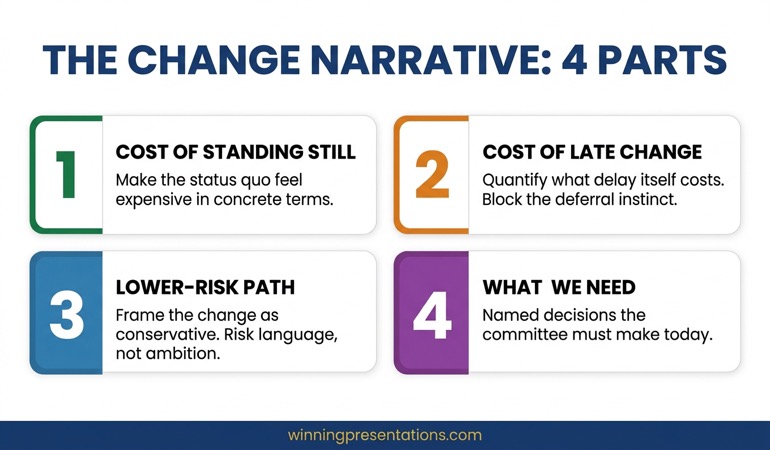
Stakeholder alignment failure points: four common reasons executive presentations stall — competing priorities, unclear ownership, absent pre-alignment, and mixed decision criteria — shown as stacked diagnostic cards

Why Standard Presentation Training Fails on Alignment

Most presentation training — even training marketed as “executive” — is built around a single-audience model. It teaches you to identify your audience, understand their needs, and structure your message accordingly. That works when your audience is functionally homogeneous: a team of engineers, a marketing committee, a group of analysts who share the same framework for evaluating information.

It breaks down in the rooms where senior professionals actually present. A board is not a single audience. It is a collection of individuals with different functional responsibilities, different appetites for detail, different political positions, and different definitions of success. Presenting to a board as though it were a single audience with a single set of needs is one of the most common structural errors at director level and above.

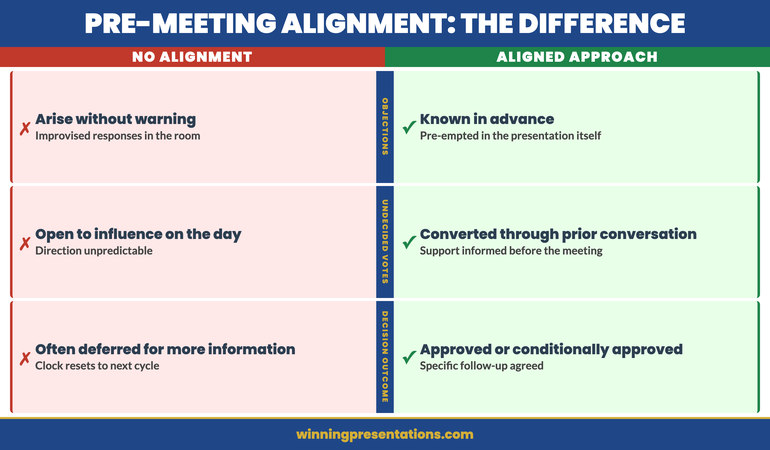
Standard training also tends to focus on the presentation itself — the forty-five minutes in the room — as though that is where alignment happens. In practice, alignment at senior level is largely determined before the slides are opened. The conversations that happen in corridors, in one-to-one briefings, in pre-reads and preparatory calls — these are where positions are tested, objections are surfaced, and the ground is prepared for what happens in the formal session.

Stakeholder alignment presentation training that ignores this pre-meeting architecture is addressing only half the problem. It is teaching you to perform well in the room while leaving unaddressed the work that determines whether the room is ready to decide.

Build the Case. Align the Room. Secure the Decision.

The Executive Buy-In Presentation System teaches senior professionals how to structure and deliver presentations that move boards and committees to a clear yes. Self-paced, £499, new cohorts open monthly. Optional Q&A calls are fully recorded — watch back anytime.

Explore the Programme →

Built from 25 years of corporate banking experience at JPMorgan Chase, PwC, RBS, and Commerzbank

What Effective Stakeholder Alignment Training Actually Covers

Training that genuinely addresses stakeholder alignment — rather than just using the phrase in its marketing — covers several areas that standard presentation courses typically omit.

Stakeholder mapping for decision rooms. This is not the generic stakeholder analysis taught in project management courses. It is specific to presentation contexts: who in the room has formal decision authority, who has informal veto power, who is the swing vote, and what does each person need to hear before they can commit. This mapping directly informs how you sequence your slides and where you place your key asks.

Argument architecture for multi-stakeholder audiences. When your audience includes a finance director, a chief operating officer, and two non-executive directors, you cannot build a single linear argument and expect it to land with all of them. Effective training teaches you to construct presentations with a shared narrative that branches into different value propositions — addressing financial return, operational feasibility, strategic fit, and risk mitigation within the same presentation structure without losing coherence.

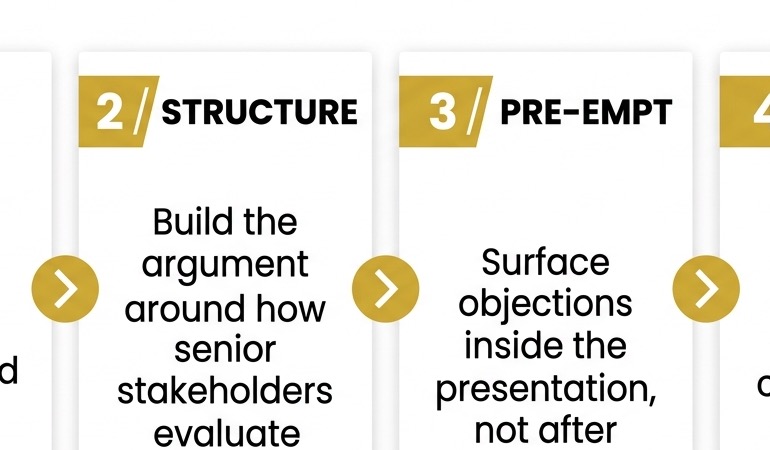
Objection anticipation and pre-emption. At board level, the most dangerous objections are the ones that are not voiced in the room but discussed afterwards. Training that addresses alignment teaches you to identify likely objections, address them proactively within the presentation, and create space for the room to surface concerns rather than suppress them.

Decision facilitation. There is a specific skill in moving a room from discussion to decision. Many senior professionals are comfortable presenting information but less practiced at the moment where the presentation transitions from informing to asking. Alignment training addresses this explicitly — how to frame the ask, when to make it, and how to handle the silence that follows.

The Executive Buy-In Presentation System covers each of these areas as part of a structured, self-paced curriculum — designed for professionals who need a systematic approach rather than ad hoc advice.

The Pre-Meeting Architecture Most Training Ignores

If you have presented at board or committee level more than a few times, you will recognise this pattern: the presentation goes well, the questions are answered competently, but no decision is made. The chair says something like, “Thank you — let us reflect on this and return to it at the next meeting.” Two months later, you are back with the same deck, updated numbers, and the same result.

This is almost always an alignment failure, not a presentation failure. The room was not ready to decide because the pre-meeting work was not done — or was not done effectively. Pre-meeting architecture is the structured preparation that happens before the formal presentation, and it is where most alignment is actually achieved or lost.

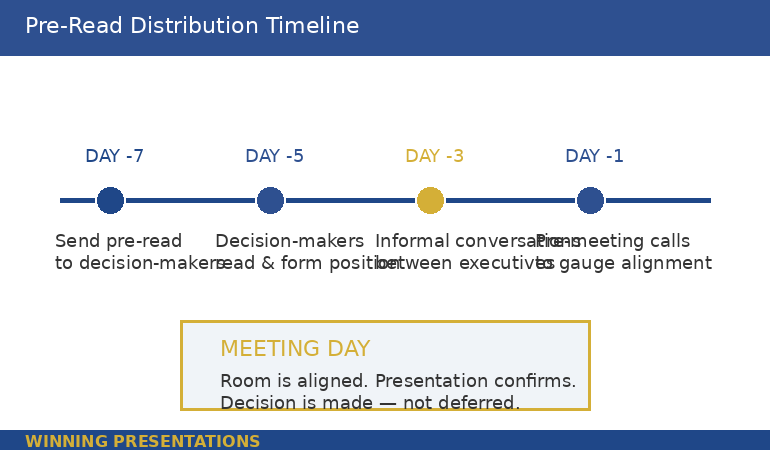
Effective pre-meeting architecture includes several elements. First, identifying the two or three stakeholders whose position will determine the outcome — and having direct conversations with them before the meeting. Not to lobby, but to understand their specific concerns, test your framing with them, and adjust your presentation accordingly. Second, ensuring the chair knows what you are going to ask and is prepared to facilitate a decision — a surprised chair will almost always defer. Third, circulating a pre-read that sets up the key question clearly, so the room arrives having thought about the decision rather than hearing the information for the first time.

The article on stakeholder alignment before major proposals covers this process in more detail — the specific steps that transform a presentation from an information event into a decision event.

Training that addresses this pre-meeting layer gives you a systematic approach to the work that happens before the slides. It is not a substitute for a good presentation — you still need to be clear, well-structured, and confident in the room. But it is the preparation that makes the difference between a presentation that informs and one that decides.

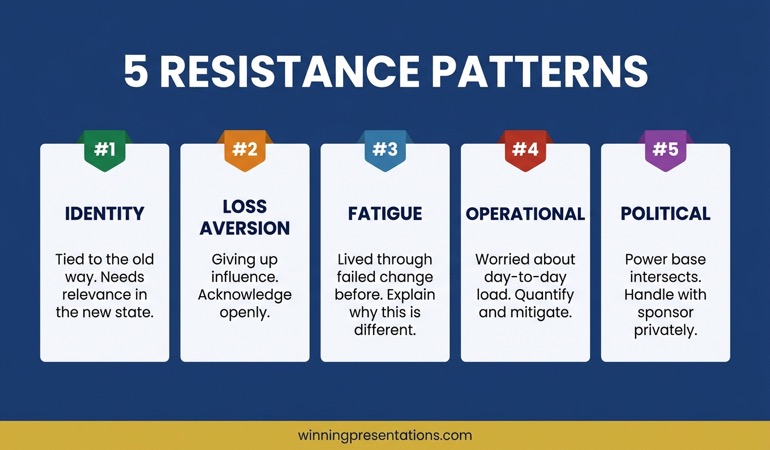
Pre-meeting alignment roadmap showing five stages: stakeholder mapping, one-to-one briefings, chair preparation, pre-read circulation, and decision-ready presentation — shown as a sequential roadmap

What to Look For in a Programme

If you are evaluating stakeholder alignment presentation training, there are several indicators that distinguish genuinely useful programmes from generic presentation skills courses.

Board-level specificity. Does the programme address the particular dynamics of multi-stakeholder decision rooms — boards, investment committees, executive leadership teams? Or is it generic “persuasive presentation” training repackaged with the word “stakeholder” in the title? The specificity of the examples, case studies, and frameworks will tell you quickly.

Structural method, not just delivery coaching. Delivery is important, but alignment is a structural problem. Look for a programme that teaches you how to build the architecture of your argument for a multi-stakeholder room — not just how to speak more confidently or design cleaner slides.

Pre-meeting preparation. If the training starts when you open your slides, it is missing the most important part. A programme that includes systematic pre-meeting preparation — stakeholder mapping, one-to-one conversations, chair briefing — addresses the full process of alignment, not just the visible portion.

Facilitator credibility. The person who designed and facilitates the programme should have direct experience of the environments they are teaching for. Ask about their background. Have they operated in the kinds of rooms their participants present to? Do they understand the political and interpersonal dynamics that make multi-stakeholder alignment genuinely difficult?

For a broader discussion of what effective board-level preparation looks like, the article on board presentation best practices covers the structural and strategic preparation that separates presentations which earn decisions from those that earn deferrals. You may also find the related discussion on boardroom presentation skills useful if you are building capability across multiple presentation types.

The Executive Buy-In Presentation System

A self-paced programme for senior professionals who present to boards, committees, and decision-making groups. Learn to build the case, align the room, and secure the decision. £499 — new cohorts open monthly. Optional Q&A calls are fully recorded.

Explore the Programme →

Designed by Mary Beth Hazeldine — 25 years in corporate banking, 16 years training senior professionals

Frequently Asked Questions

What is stakeholder alignment presentation training?

Stakeholder alignment presentation training is a specialised form of executive communication development that focuses on the specific challenge of presenting to multi-stakeholder decision rooms — boards, investment committees, executive leadership teams. Unlike generic presentation skills training, it addresses how to structure arguments for audiences with competing priorities, how to manage pre-meeting preparation to build alignment before the formal session, and how to facilitate the transition from information sharing to decision-making. It is most relevant for directors, heads of function, and senior leaders who present regularly to groups where the decision requires multiple people to agree.

How is stakeholder alignment training different from standard presentation coaching?

Standard presentation coaching typically addresses delivery skills — confidence, vocal projection, slide design, audience engagement — and is built around a single-audience model. Stakeholder alignment training addresses the structural and strategic challenge of presenting to a room where different decision-makers have different priorities, different information needs, and different criteria for what constitutes a good outcome. It covers argument architecture for multi-stakeholder audiences, pre-meeting preparation and stakeholder mapping, objection anticipation, and decision facilitation — areas that standard coaching rarely touches.

Can stakeholder alignment presentation skills be learned online?

Yes — effectively, if the programme is well-designed. The structural and strategic elements of stakeholder alignment — how to map a decision room, how to sequence an argument for multiple audiences, how to prepare for pre-meeting conversations — translate well to online learning. A self-paced programme with a structured curriculum allows participants to work through material at their own speed and apply frameworks to their actual upcoming presentations. The key is that the programme provides a systematic method, not just general advice. Optional live Q&A sessions, when available and recorded for later viewing, add an additional layer of support without requiring fixed attendance.

Who benefits most from stakeholder alignment presentation training?

The professionals who benefit most are typically directors, heads of function, or senior leaders who present regularly to boards, committees, or executive leadership teams — and who find that their proposals are being deferred rather than decided. They are usually technically competent presenters whose challenge is not delivery but architecture: how to build a case that moves a room of decision-makers with competing priorities to a shared commitment. If your presentations are well-received but rarely result in same-meeting decisions, stakeholder alignment training is likely to address the gap that delivery coaching alone will not.

The Winning Edge

Weekly insights on executive presentations, board communication, and high-stakes delivery — for senior professionals.

Subscribe Free

About the author

Mary Beth Hazeldine, Owner & Managing Director, Winning Presentations. With 25 years of corporate banking experience at JPMorgan Chase, PwC, Royal Bank of Scotland, and Commerzbank, she has spent 16 years training senior professionals to present with greater clarity and confidence at board and executive committee level.

20 Apr 2026
Senior executive in a focused one-to-one pre-meeting with a colleague in a glass-walled corporate office, reviewing a proposal document together, navy and gold tones, editorial photography style

Stakeholder Alignment Workshop: The Pre-Meeting That Decides

Quick Answer

Stakeholder alignment is the work that happens before your presentation, not inside it. Identify the two or three people whose silence or resistance could derail your proposal, meet them individually beforehand, and address their concerns directly. Executives who walk into decision meetings with informed support rather than hopeful assumptions achieve faster approvals and fewer unexpected deferrals.

Kwame had every reason to feel confident walking into the committee room. He had spent three weeks building the proposal, modelled three financial scenarios, addressed the likely objections in the appendix, and rehearsed the narrative twice. He believed the room would be receptive.

It wasn’t. Within ten minutes, the Chief Risk Officer had raised a concern about regulatory exposure that Kwame had not prepared for. Two other committee members, who had said nothing before the meeting, aligned themselves with her position. The session ended with a request for a revised paper at the next quarter’s cycle.

Kwame reviewed what had gone wrong. The CRO had spoken informally to a colleague about regulatory risk several weeks earlier. That conversation had shaped her view long before the formal session. Kwame had been building a presentation; his opponent had been building a coalition. He had assumed the formal meeting was where the decision would be made. In practice, it had already been made — against him.

Most presentation preparation focuses on what happens in the room. The executives who consistently secure approvals focus on what happens before it.

Preparing a proposal for a major decision meeting?

The Executive Slide System includes scenario playbooks and slide frameworks designed for executive decision presentations, including pre-meeting structuring and stakeholder-specific slide approaches.

Explore the System →

Why the Decision Is Usually Made Before the Meeting

Formal decision meetings rarely change minds. By the time a proposal reaches a board or committee, the people in that room have already formed a view — either through their own analysis, through conversations with colleagues, or through a prior experience with the presenting team. The formal session is not the moment of decision. It is the moment where existing positions are ratified or challenged.

This is not a criticism of how decisions are made. It reflects how senior leaders actually operate. They gather intelligence informally, form provisional views, and use the formal meeting to test those views against the group. An executive who walks in hoping to persuade a room from a standing start is working against this process rather than with it.

The implication is significant: if stakeholder alignment is not done before the meeting, the presentation itself becomes an uphill argument against positions that were formed without your input. The objections raised in the room are almost always objections that existed before the room convened. They simply were not surfaced earlier because no one asked.

Pre-meeting alignment is not about lobbying or soft manipulation. It is about making sure that the people who will influence the decision have had a genuine opportunity to raise their concerns — with you, directly, in advance — so those concerns can be understood, addressed, and either incorporated into the proposal or prepared for in the room.

Mapping Your Stakeholder Landscape in Advance

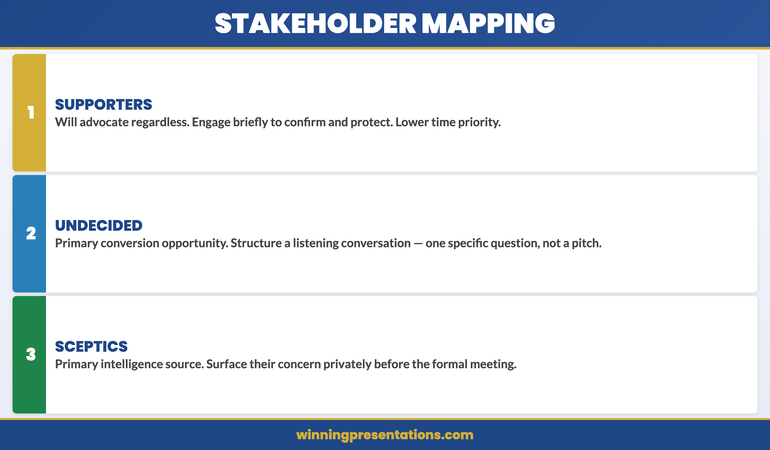
Before any alignment conversation takes place, map the landscape. For a typical executive decision meeting, this means identifying three categories of stakeholder: those who are likely to support the proposal, those who are genuinely undecided, and those whose instinct will be sceptical or resistant.

The supporters matter less than you think. They will advocate regardless. The undecided are your primary opportunity: a well-structured pre-meeting conversation with an undecided stakeholder often converts a tentative abstention into active support. The sceptics are your primary intelligence source: understanding their specific concerns before the meeting allows you to address them directly in your presentation or to prepare substantive responses rather than improvised ones.

To map accurately, consider three factors. First: authority weight. Who in the room carries disproportionate influence over others? A single sceptic with high authority is more consequential than three undecided voices. Second: domain expertise. Who will be most credible on the technical or commercial dimensions of the proposal? If the CFO is sceptical about the financial model, that carries more weight than a peer-level concern. Third: prior exposure. Has anyone on the committee heard a version of this proposal before? Prior exposure creates expectations — either positive or negative — that shape how the new version is received.

Stakeholder mapping framework showing three categories: Supporters (advocate regardless), Undecided (primary conversion opportunity), Sceptics (primary intelligence source) with engagement priority guidance for each

The Pre-Meeting Formula: What to Cover One-to-One

An alignment conversation is not a pre-sell. It is a structured listening exercise that happens to include a briefing. The distinction matters because the purpose is to learn, not to persuade. Going into a pre-meeting with the goal of converting a sceptic will produce a conversation that feels transactional and may harden their position. Going in with the goal of understanding their concern produces a conversation that often resolves the concern naturally.

A well-structured pre-meeting covers three areas. First, context: give the person a brief overview of what you are proposing and why it is coming to this particular committee at this particular time. Keep this to two minutes. Second, invitation: ask a specific question. Not “what do you think?” but something more targeted, such as “What would you want to understand about the financial model before the session?” or “From your experience with similar projects, what tends to create the most friction in approvals like this?” These questions surface real concerns without feeling interrogative. Third, direct ask: at the end of the conversation, confirm understanding. “Is there anything in what I’ve covered that would give you pause at the meeting?”

That final question is uncomfortable to ask and extremely valuable to hear. It gives sceptics a private, low-stakes forum in which to raise their concern. Most will. And a concern raised privately is significantly easier to address than one launched in a formal committee session in front of peers.

The Executive Slide System

Executive decisions are won through structure, not persuasion. The Executive Slide System — £39, instant access — includes slide frameworks and scenario playbooks designed for high-stakes proposals, including how to structure a presentation for a room where views are already partially formed.

  • Slide templates for executive decision scenarios
  • AI prompt cards to build decks fast
  • Scenario playbooks for board, budget, and approval meetings
  • Framework guides for structuring high-stakes proposals

Get the Executive Slide System →

Designed for executives preparing high-stakes presentations and proposals.

Reading Resistance Versus Polite Uncertainty

Not every sceptic sounds like one in a pre-meeting. Some express genuine enthusiasm but are privately unconvinced. Others raise procedural questions that feel neutral but signal substantive concern. Learning to distinguish between “wait and see” and “fundamentally opposed” is one of the most valuable skills in stakeholder alignment.

Genuine support tends to be specific. A supporter will name what they find compelling, ask about implementation or timing, and use inclusive language (“when this is approved” rather than “if this goes ahead”). Polite uncertainty tends to be general. Someone who is unconvinced but unwilling to say so will offer vague encouragement (“very interesting work”), redirect to process (“has legal reviewed this?”), or ask questions that test your preparation without engaging with your argument.

The most telling signals are the questions that are not asked. If someone who has domain expertise in a critical area of your proposal asks nothing about that area in a pre-meeting, they either have no concern or they have already decided they will raise it formally rather than privately. The latter is more common. A subject-matter expert who asks nothing has usually formed a view they consider settled.

When you encounter this pattern, do not push for their opinion. Instead, name the gap directly: “I noticed I haven’t covered the operational implications — is that an area you’d want more detail on before the session?” This gives them a structured opening. If there is a concern, it will usually surface at this point. If there genuinely isn’t, they will say so clearly.

If you are structuring a follow-up presentation after an inconclusive meeting, pre-meeting alignment becomes even more important: you need to understand what shifted between the previous session and the current one before you can present effectively.

When a Yes in Private Becomes Silence in the Room

One of the most disorienting experiences in executive presenting is walking into a formal meeting with four verbal commitments from individual stakeholders and watching three of them say nothing while a fifth person raises an objection that changes the room’s direction.

This happens for a predictable reason. A private yes is a personal position. A public yes is a social commitment with professional consequences. Senior leaders manage their reputations carefully. If a peer raises a concern in a formal session that another executive did not anticipate, that executive may stay silent to avoid appearing poorly briefed rather than speak up for a position they privately hold.

The lesson is not that pre-meeting commitments are unreliable. It is that they are conditional on what happens in the room. To protect the value of your pre-meeting work, there are two practical steps. First, close each alignment conversation with a specific commitment: “If no new information comes up before Thursday, can I count on your support at the meeting?” That language shifts the implied commitment from unconditional to bounded — and gives you a cleaner read of where each person actually stands. Second, build your formal presentation to pre-empt the concerns you identified in pre-meetings. If you know the CFO is worried about the capital expenditure timeline, address that directly and early in the presentation itself. This signals to the CFO that you listened, and it reduces the likelihood that they will raise it as a public challenge.

Understanding how to close a presentation so executives take action becomes significantly easier when stakeholder alignment has already established the direction of their thinking before the final slides appear.

If you want to strengthen your approach to executive decision presentations, the Executive Slide System includes scenario playbooks specifically designed for multi-stakeholder approval meetings.

How Pre-Alignment Changes Your Formal Presentation

A presentation built without stakeholder alignment intelligence is constructed around what the presenter assumes the room needs to hear. A presentation built after alignment conversations is constructed around what the room has already told you it needs to hear. The difference in persuasive effectiveness is substantial.

Concretely, pre-alignment changes three structural decisions. First, it changes what you emphasise. If your mapping has identified that the CFO is undecided and the CEO is supportive, you structure the proposal so that the financial case is front-loaded and comprehensive. If the operational committee is your swing vote, operational feasibility becomes the centrepiece. You are not changing the proposal; you are calibrating the emphasis to match the decision-making framework of the people who matter most.

Second, it changes how you handle objections. Without alignment intelligence, you respond to objections as they arise. With it, you can pre-empt the most significant ones. “One question that came up in my preparation was the impact on the current capital allocation cycle — I want to address that directly before we move to Q&A.” This signals thoroughness, reduces the dramatic impact of the objection if it still arises, and demonstrates respect for the committee’s specific concerns.

Third, it changes your structure if you have a formal executive presentation outline. Instead of a linear case-building structure, a pre-aligned presentation often leads with the decision itself, addresses the two or three specific concerns identified in pre-meetings early, and reserves the detailed evidence for stakeholders who want it rather than presenting it to everyone as though none of them have a view yet.

Pre-alignment impact on presentation structure: three changes — emphasis (calibrated to decision-makers), objections (pre-empted not improvised), structure (decision-led not case-building)

Common Alignment Mistakes to Avoid

The most common error is treating alignment as optional rather than structural. Many executives view pre-meetings as a favour to important stakeholders, something done when there is time rather than as a non-negotiable step in the presentation process. When pressed on preparation time, they deprioritise alignment in favour of slide refinement. This trades the thing most likely to improve the outcome (understanding the room) for the thing most visible in preparation (polishing the deck).

The second error is aligning too broadly. Speaking to every member of the committee in advance creates logistical difficulty and can create the impression that you are lobbying rather than consulting. Focus on three to five people: the one with the most authority, the one most likely to be sceptical, and one who has previously expressed interest in similar proposals. These conversations will tell you more than speaking to ten people at a more superficial level.

The third error is seeking endorsement rather than understanding. Going into a pre-meeting with the goal of securing a “yes” creates conversations that feel manipulative and tend to produce hollow agreements. Going in with the goal of understanding genuine concerns produces conversations that are substantively useful. The distinction lies in the questions you ask: “What would you need to see?” is more valuable than “Can you see yourself supporting this?”

The fourth error is not following up. If a stakeholder raises a concern in a pre-meeting and you address it in your revised presentation, send them a brief note before the formal session: “Following our conversation last week, I’ve updated the proposal to reflect your point about the timeline. Section three now covers that directly.” This closes the loop, confirms you listened, and reminds them of their prior engagement with the process in a way that makes it harder to raise the same concern again as though it is new.

The Executive Slide System

Slide frameworks designed for multi-stakeholder executive decisions — including scenario playbooks for proposals where different stakeholders have different priorities. £39, instant access.

Get the Executive Slide System →

Designed for executives preparing structured proposals for senior decision meetings.

Frequently Asked Questions

How much time before a presentation should stakeholder alignment happen?

Alignment conversations should happen at least five to seven working days before the formal meeting. This gives you time to incorporate significant concerns into your proposal and gives stakeholders enough notice that the conversation feels deliberate rather than last-minute. For high-stakes or complex proposals, begin alignment two to three weeks in advance. The earlier you understand the room’s concerns, the more substantive your response can be.

What if a key stakeholder refuses to meet in advance?

If a stakeholder declines a pre-meeting, this is itself useful information. It usually signals one of three things: they are too busy to engage at this stage, they have a strong prior view that they do not want to moderate through private discussion, or they prefer to see how the formal meeting develops before committing. In any of these cases, invest extra effort in understanding their known priorities and likely concerns through other channels — conversations with their direct reports, recent public statements on similar proposals, or the records of previous meetings where they have engaged on related topics. Design your formal presentation to pre-empt the most predictable version of their concern.

Can pre-meeting alignment backfire?

It can if handled badly. Speaking to too many people, sharing sensitive details prematurely, or creating the impression of a coordinated lobbying effort can generate resistance rather than support. Two principles reduce this risk. First, approach each pre-meeting as a listening exercise, not a persuasion exercise. Second, keep the conversations focused on the proposal’s merits and the specific concerns of that individual — do not reference what other stakeholders said or imply that you are building consensus against someone.

The Winning Edge — A Newsletter for Executives Who Present

Every Thursday: one practical technique for structuring, presenting, or defending a high-stakes proposal. Designed for executives who need to communicate with authority, not just confidence.

Subscribe to The Winning Edge →

Also available: the Executive Presentation Checklist — a free pre-presentation checklist for senior decision meetings.

If you are building a proof-of-concept presentation, the same alignment principles apply — with an additional layer of technical credibility to manage.

About the Author

Mary Beth Hazeldine is the Owner and Managing Director of Winning Presentations. With 25 years of corporate banking experience at JPMorgan Chase, PwC, Royal Bank of Scotland, and Commerzbank, she advises executives across financial services, healthcare, technology, and government on structuring presentations for high-stakes funding rounds and approvals.

17 Apr 2026
A senior female executive in a one-to-one conversation with a male board member in a glass-walled office, building alignment before a formal meeting, confident and collaborative tone, editorial photography style

Stakeholder Alignment Presentation: The Pre-Meeting That Wins Approvals

Quick Answer: Most approvals are decided before the formal presentation begins. A stakeholder alignment session — a structured pre-meeting with key decision-makers — lets you surface objections privately, refine your narrative based on what you hear, and arrive in the room with commitments already secured. The formal presentation then becomes a ratification exercise rather than a persuasion exercise. This approach works for board approvals, finance committee requests, and any high-stakes executive decision.

Astrid had thirty minutes in front of the investment committee. She had rehearsed the deck twenty times. Her financial model was solid, her slides were clear, and her executive sponsor believed in the project. When the committee chair asked a single question — “What does the operations director think about the implementation timeline?” — the presentation stalled.

The operations director hadn’t been consulted. He sat in the room, visibly uncomfortable. The committee read the room, delayed the decision, and asked for a revised proposal that incorporated operational input.

Three weeks later, Astrid submitted the same project with one structural difference: she had spent the preceding fortnight meeting individually with every committee member and the operations director. By the time she walked into the formal presentation, every objection had already been heard, addressed, and in most cases resolved. The formal presentation took nineteen minutes. The approval was unanimous.

If you’re preparing for a high-stakes approval

The Executive Slide System includes scenario playbooks and slide templates for executive approval presentations — including the alignment and pre-meeting frameworks that help you structure what you learn before the formal session.

Explore the System →

Why the Decision Is Made Before You Present

Senior decision-makers rarely change their minds in a committee room. By the time the formal meeting convenes, most members have already formed a view — based on conversations in corridors, emails exchanged with colleagues, and assumptions built from prior context. The formal presentation is where those views are tested, not formed.

This is not cynicism about the process. It reflects how experienced executives make high-stakes decisions: they gather information in advance, test their instincts with trusted colleagues, and arrive in the meeting with a working hypothesis. Your presentation either confirms or challenges that hypothesis. If you’ve done no work to shape it in advance, you’re working against a position that was set before you entered the room.

The most effective executives understand this dynamic and work with it rather than against it. They treat the formal presentation as the final step in a longer engagement process, not the first and only opportunity to make their case.

The pre-presentation alignment session is the mechanism that makes this possible. It is not manipulation — it is thorough preparation. Every concern that surfaces in a private conversation is one that won’t derail the formal meeting. Every commitment secured informally is one that reinforces the approval in the room. And every stakeholder who feels heard in advance is one who arrives in the meeting inclined to support rather than question.

Executive Slide System

Structure Your Approval Presentation to Match the Work Done Before the Room

The Executive Slide System — £39, instant access — gives you slide templates for board, finance committee, and investment committee presentations, plus scenario playbooks for navigating stakeholder alignment before high-stakes approvals. Designed for executives who want to arrive in the formal meeting with the decision already moving in their direction.

  • Slide templates for approval and board presentations across executive scenarios
  • AI prompt cards to map stakeholder concerns before the alignment session
  • Framework guides for structuring the narrative around what you hear pre-meeting
  • Scenario playbooks for investment committee, board, and finance committee contexts

Get the Executive Slide System →

Designed for high-stakes approval presentations where preparation matters more than performance.


Stakeholder Alignment Dashboard infographic showing four metric categories: Decision-Makers to Brief, Concerns to Surface, Commitments Secured, and Objections Outstanding — a pre-presentation tracking framework

Who to Meet and What to Ask Them

Not every stakeholder needs a dedicated pre-meeting. The goal is to meet the people whose support is essential and whose concerns, if left unaddressed, could derail the formal presentation. For most approval presentations, that list is shorter than it appears.

Start with the decision-makers — the people who will vote, recommend, or formally approve. Understand their current view on the topic before you attempt to inform it. Have they been involved in similar decisions before? Do they have a prior position on this type of investment or initiative? Is there a competing proposal that complicates their thinking?

Next, identify the influencers — the people whose opinion the decision-makers trust. In a finance committee context, this is often the CFO’s direct advisers or the head of internal audit. In a board context, it may be the senior independent director or a non-executive with a strong view on capital allocation. These people may not have a vote, but their informal influence on the final outcome can be decisive.

Finally, identify the potential blockers — the people whose opposition, if expressed in the formal meeting, could damage the proposal even if they are in the minority. Understanding a blocker’s concern before the meeting gives you the opportunity to address it privately, which is almost always more productive than managing it in public.

In each pre-meeting, ask three questions. What do they already know about the proposal? What concerns do they have about it? And what would they need to see to be comfortable supporting it? These questions are not a sales pitch — they are information-gathering. The goal is to understand, not to convince. Convincing comes later, in how you update the presentation.

For the framework behind pre-decision conversations, see The Pre-Decision Conversation: How Executives Secure Approval Before the Meeting.

Running the Alignment Session Effectively

An alignment session is a conversation, not a presentation. Executives who use the pre-meeting to walk through their slides — treating it as a rehearsal — miss the point. The slide deck is not what you bring to this meeting. What you bring is curiosity and good questions.

Keep the meeting short: thirty minutes is usually sufficient. Open by explaining your purpose directly — you are seeking input before the formal session to ensure the presentation addresses the right questions. Most decision-makers respect this directness. It signals that you are thorough, not that you are uncertain.

Listen more than you speak. When a concern surfaces, resist the instinct to immediately counter it. Instead, explore it: “That’s useful to know — can you say more about what’s driving that concern?” Understanding the root of an objection is more valuable than overcoming its surface expression. An objection that sounds financial may actually be about trust. An objection about timing may actually be about resource competition.

Take notes, and be transparent about doing so. “I want to make sure I capture this accurately before I revise the presentation” signals that the conversation will have a real impact on what the committee sees. This is important: if decision-makers sense that the pre-meeting is performative rather than genuinely informative, they stop sharing real concerns.

Close each session by confirming what you’ve heard and what changes you plan to make. “Based on what you’ve shared, I’ll strengthen the implementation timeline and add more detail on the alternatives we considered. Does that address the main concerns you raised?” This gives the stakeholder the opportunity to confirm or correct your understanding before you do the work.

If you’re rebuilding a formal approval presentation around what you’ve heard in pre-meeting conversations, the Executive Slide System includes slide templates and AI prompt cards designed to help you translate stakeholder concerns into a presentation narrative that addresses them structurally, not just rhetorically.


Stakeholder Alignment Roadmap infographic showing five stages: Map the Stakeholders, Schedule Pre-Meetings, Surface Concerns, Update the Narrative, and Enter the Room with Commitments Secured

What to Do With What You Hear

The alignment session has value only if it changes something. If you leave every pre-meeting with the same deck and the same narrative, you’ve gathered information that you didn’t act on — which is worse than not gathering it, because it signals to stakeholders that the consultation was cosmetic.

After each pre-meeting, categorise what you’ve heard. Some concerns will be addressed by adding or clarifying information — a new slide, an updated data source, a clearer explanation of a financial assumption. These are structural changes, and they make the presentation more complete. Make them before the formal session.

Other concerns will reflect a disagreement about the underlying business case — a stakeholder who genuinely believes the investment is premature, or that a different approach should be considered. These cannot be resolved with a slide change. They require a direct conversation about the merits, and in some cases, the involvement of a more senior sponsor to navigate the impasse. Identify these early, because they need more time than a slide revision.

Some concerns will be about perception rather than substance — a stakeholder who hasn’t been involved in previous discussions and feels left out, or one who is concerned about credit and visibility when the project succeeds. These are relationship issues, and they are resolved through the pre-meeting process itself: the act of consulting them is the resolution. Make sure they know their input shaped the final presentation.

Keep a simple log of what you heard, what you changed, and what remains unresolved. This is useful for two reasons. It ensures that nothing gets lost between conversations. And if the decision is contested in the formal meeting, your log gives you the basis to say with confidence: “I discussed this with [stakeholder] two weeks ago, and here is how I addressed that concern in the revised presentation.” For related thinking on managing structural change presentations, see Restructuring Presentation: Rebuilding Trust Through Transparent Communication.

Aligning Across Competing Interests

The most challenging stakeholder alignment situations are those where key decision-makers have competing interests — where what one stakeholder needs to hear directly contradicts what another needs to hear. A proposal that involves resource reallocation is a classic example: the function gaining resources welcomes it, while the function losing resources opposes it.

The response here is not to tell different stakeholders different things — that collapses the moment the formal meeting convenes. The response is to find the common ground between competing interests and build the presentation narrative around it.

What both stakeholders share, despite competing interests, is typically a concern about the broader organisational outcome. The function losing resources still cares about the company’s performance. The disagreement is about means, not ends. A presentation that frames the proposal in terms of the shared goal — rather than the redistribution of resources — gives both stakeholders something they can support.

Where interests are genuinely irreconcilable, the alignment session’s value is in surfacing the conflict before the formal meeting rather than discovering it in public. A committee where two factions are in open disagreement is difficult to present to. A committee where the chair knows the disagreement exists and has managed it in advance is a different environment. Use the pre-meeting process to give the chair the information they need to manage the room, as well as to manage your own presentation.

Using the Formal Presentation to Confirm, Not Persuade

When the alignment process has been done well, the formal presentation shifts in character. It becomes a confirmation exercise — a structured walk through the proposal that gives the committee confidence that everything has been considered, rather than a persuasion exercise where the outcome is uncertain.

This changes the tone and the pacing. A confirmation presentation can afford to be shorter, because most of the information has already been shared in pre-meetings. It can acknowledge concerns explicitly — “I know some of you have raised questions about the implementation timeline, so I’ve added a new slide that addresses this directly” — because the concerns are already known. And it can invite a more collaborative discussion, because the presenter isn’t guarding against ambushes.

The questions that arise in a confirmation presentation are also different in character. They tend to be sharper and more specific — looking for the final detail that will complete the picture — rather than broad and exploratory. This is a good sign. It means the committee is doing the final check before committing, not starting the analysis from scratch.

The goal is to make the formal presentation feel inevitable in the best sense: the logical outcome of a rigorous process rather than a surprise outcome from a single event. For guidance on how executive presence supports this dynamic in the room, see Executive Presence in Presentations: The Quality That Closes the Room.

Need the Templates, Not Another Framework?

Slide Templates for Executives Who Present to Senior Decision-Makers

The Executive Slide System — £39, instant access — includes ready-to-use templates for board, finance committee, and investment approval presentations, plus AI prompt cards to structure your narrative around what stakeholders actually need to hear.

Get the Executive Slide System →

Frequently Asked Questions

How many pre-meetings is too many before a formal presentation?

There is no fixed upper limit, but the quality of pre-meetings matters more than the number. Five shallow conversations that don’t surface real concerns are less valuable than two deep ones that reveal the actual objections. As a working guide, prioritise the three to five people whose support is essential and whose concerns are most likely to surface in the formal meeting. Beyond that core group, judge based on the political complexity of the specific approval and the time available.

What if a key stakeholder refuses to meet before the formal session?

A refusal to meet is itself useful information. It may signal opposition, disengagement, or a prior commitment to a competing proposal. If a critical decision-maker declines a pre-meeting, work through your executive sponsor to understand their position and whether there is a backstory that you need to account for. It may also be worth adjusting the formal presentation to explicitly invite that stakeholder’s input — framing their engagement as essential to the process rather than assuming their alignment.

Is it appropriate to share draft slides in a pre-meeting?

In most cases, no. Sharing draft slides in a pre-meeting shifts the conversation from concerns to critique — stakeholders start commenting on slide design rather than sharing their underlying concerns about the proposal. The exception is when a specific stakeholder is a subject-matter expert whose input on a particular section of the deck would meaningfully improve it. In that case, share only the relevant section and frame it as a request for input rather than a preview of the full presentation.

The Winning Edge — Free Weekly Newsletter

Practical frameworks for executives who present to boards, finance committees, and senior leadership. Every Thursday.

Subscribe to The Winning Edge →

Not ready for the full system? Start here instead: download the free Executive Presentation Checklist — a one-page reference covering the structural elements decision-makers look for in board and approval presentations.

About the Author

Mary Beth Hazeldine is Owner & Managing Director of Winning Presentations. With 25 years of corporate banking experience at JPMorgan Chase, PwC, Royal Bank of Scotland, and Commerzbank, she advises executives across financial services, healthcare, technology, and government on structuring presentations for high-stakes funding rounds and approvals.

06 Apr 2026
A senior executive at a polished boardroom table reviewing a concise follow-up slide deck, with a glass office background and navy blue document folders, editorial photography style

Follow-Up Deck: Why Approvals Die After the Meeting and How to Fix It

Most approvals do not die in the meeting. They die in the three days afterwards, when the decision-maker returns to a full inbox, the urgency fades, and your proposal becomes one of twelve things waiting for attention. A well-structured follow-up deck is the single most underused tool for keeping executive approvals alive — and most executives never build one.

Ngozi had presented her transformation programme to the executive committee on a Tuesday. The room had been engaged. The CFO asked detailed questions about the cost model. The CEO nodded through the implementation timeline. At the end, the chair said the words every presenter dreads: “Thank you, Ngozi — we’ll come back to you on this.” By Friday, she had heard nothing. By the following Wednesday, two committee members had left for conferences. A month later, her proposal was still listed as “under review.” She had done everything right in the meeting. What she had not done was send a follow-up deck. Instead, she had sent a two-paragraph email with a PDF attachment of her original slides. The email got a read receipt but no response. The proposal stalled not because the committee disagreed — they had signalled support — but because no one had given them a clear, decision-ready document to move forward with. When she finally sent a structured follow-up deck six weeks later, it was approved within forty-eight hours.

Preparing a post-meeting deck for a stalled approval? The Executive Slide System includes decision-focused templates designed for high-stakes executive approval presentations. Explore the System →

Why Approvals Stall After Successful Meetings

The moment an executive presentation ends, the executive committee disperses back into their own priorities. A positive meeting creates intent, but intent is not a decision. Without something concrete to act on, that intent degrades. The half-life of a “we’ll come back to you on this” is shorter than most presenters realise.

Three dynamics work against you in the post-meeting window. First, decision-making friction: even supportive executives need a trigger to commit formally. Your original slides were designed for a live presentation — they do not function as a standalone decision document. Second, stakeholder drift: committee members who were aligned on Tuesday may have heard a counterargument by Thursday. Without a written reference point, the alignment you built in the room has nowhere to anchor. Third, competing priorities: the urgency your proposal felt in the room evaporates when the committee chair’s diary fills with unrelated crises.

The follow-up deck solves all three. It provides a trigger — a concrete document that moves the process forward. It anchors alignment — a written record of the direction the meeting was heading. And it reintroduces urgency — not through pressure, but through a clear next step with a defined timeline.

Understanding the pre-decision conversation that precedes executive approval is equally important — the follow-up deck works best when the right groundwork has been laid before the meeting, not improvised afterwards.

Build the Deck That Closes the Approval Gap

The Executive Slide System gives you templates for every stage of the executive approval journey — from the initial presentation to the follow-up deck that turns a promising meeting into a signed decision.

  • ✓ Slide templates for executive and board approval scenarios
  • ✓ AI prompt cards to build decision-ready decks fast
  • ✓ Framework guides for high-stakes approval presentations

Get the Executive Slide System → £39

Designed for executives preparing high-stakes presentations

What a Follow-Up Deck Contains — and What It Isn’t

A follow-up deck is not a compressed version of your original presentation. It is a different document with a different purpose. Where the original presentation was designed to persuade, the follow-up deck is designed to decide. These are distinct tasks that require distinct structures.

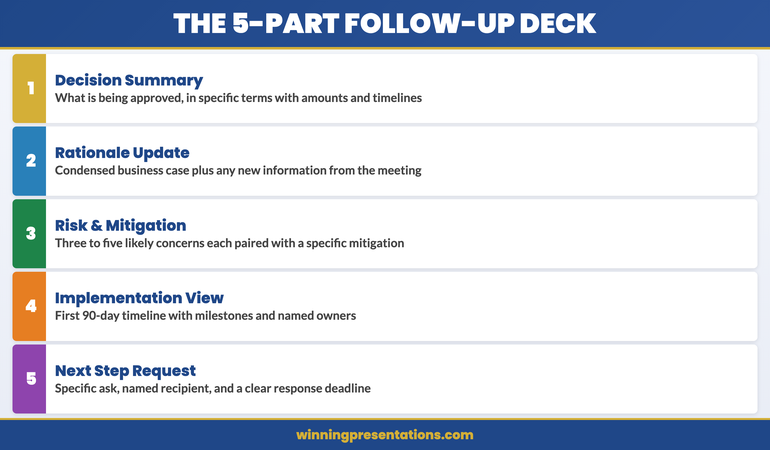
An effective follow-up deck for executive approval contains five components. The first is a decision summary — a single slide or opening section that restates what the committee is being asked to approve, in plain language. Avoid the qualifying language you might have used in the live presentation. “We are proposing a phased investment in infrastructure modernisation” becomes “The committee is asked to approve a £1.2M infrastructure investment with implementation beginning May 2026.” Clarity is not aggression. It is respect for the committee’s time.

The second component is a concise rationale update — two to three slides maximum that distil the business case to its essential logic. These are not a replay of your full argument. They are a written anchor that reminds decision-makers why the proposal was compelling. Include any new information that emerged during the meeting — questions that were asked and answered, concerns that were addressed, or data points that were requested and can now be provided.

The third component is a risk and mitigation summary. Committee members often stall not because they disagree, but because they cannot articulate a response to objections they anticipate from colleagues. A clear risk table — three to five rows covering the most likely concerns with specific mitigations — gives your supporters the language they need to champion the proposal in conversations you are not part of.

The fourth component is the implementation overview. A single timeline slide showing the first ninety days — milestones, owners, decision points — converts abstract approval into concrete commitment. Executives who approve a vague proposal often feel exposed. Executives who approve a specific plan feel informed. The difference is consequential.

The fifth component is the next-step request. This is the most frequently omitted section, and its absence is why so many follow-up decks fail to accelerate a decision. State clearly what you are asking the committee to do, by when, and how they should signal their response. “Please confirm approval by email to [chair] by April 10 to allow the project team to begin procurement” is actionable. “We welcome any questions” is not.

The five components of an effective executive follow-up deck: decision summary, rationale update, risk and mitigation, implementation overview, and next-step request

Timing and Delivery: When to Send It and How

The follow-up deck should be sent within twenty-four to forty-eight hours of the meeting. This is not a guideline — it is a strategic imperative. Within that window, the meeting is still recent, the committee’s impressions are still fresh, and you have the highest probability of capturing attention before competing priorities crowd your proposal out.

Waiting a week to prepare a polished document is a common mistake. A clean, clear five-slide deck sent the morning after a meeting outperforms a beautifully designed twelve-slide document sent five days later. The follow-up deck’s job is to maintain momentum, and momentum is time-sensitive.

Delivery should be direct, not through an assistant. Send it personally to the meeting chair with the committee members copied. The covering note should be one paragraph: acknowledge the meeting, state what is attached, and name the specific response you are requesting. Do not write a summary of your proposal in the email body — that is what the deck is for. Do not ask if there are any questions — that invites delay rather than decision.

The structure of high-stakes decision slides follows a specific logic that applies equally to live presentations and follow-up decks — the principles of decision architecture do not change because the medium has shifted from live to asynchronous.

If you are preparing multiple executive presentations for different stakeholders in parallel, the Executive Slide System provides the structural templates that allow you to build each deck — presentation and follow-up — from a consistent, decision-tested framework.

Structuring the Decision Summary Slide

The decision summary slide is the most important slide in your follow-up deck. It is the slide the committee chair will use to introduce the item in any subsequent discussion, and it is the slide that will be referenced when the approval is communicated to the wider organisation. Getting it right is not optional.

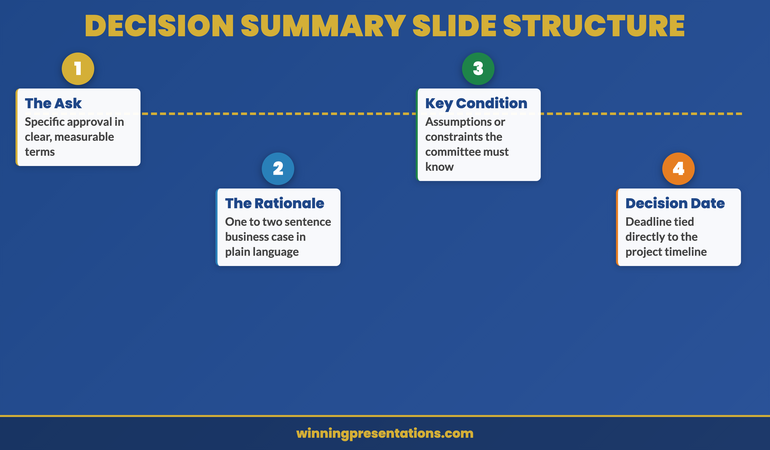
The decision summary should contain four elements only. The first is the ask: a single sentence naming what is being approved, in specific terms. Quantify wherever possible — amount, timeline, scope. The second is the rationale: one or two sentences giving the business case in plain language. This is not a condensed version of your full argument. It is the sentence a committee member would say if asked to explain the decision to a colleague who was not in the room.

The third element is the key condition: if there is a circumstance or assumption that makes the proposal viable, state it here. “Subject to legal review of the contract terms” or “Contingent on Q2 budget reforecast confirming £400K headroom.” This does not weaken the proposal — it demonstrates that you understand the constraints the committee is working within. Decision-makers who see their real-world constraints acknowledged are far more comfortable committing.

The fourth element is the decision date: the specific date by which you need a response for the implementation timeline to hold. This is not a deadline you are imposing. It is a project-management reality you are communicating. Frame it as information, not pressure: “Approval by April 14 allows the procurement process to begin within budget cycle.”

Decision summary slide structure for executive follow-up decks showing the four essential elements: ask, rationale, key condition, and decision date

Maintaining Momentum With Stakeholders After You Send It

Sending the follow-up deck is not the end of your approval management process. It is the beginning of a structured follow-up sequence that keeps the proposal visible without becoming intrusive. Most executives send the deck and then wait passively. This is where proposals stall.

If you have not received a response within forty-eight hours of sending the deck, a single follow-up is appropriate. This is not a chaser. It is a value-add: “I wanted to check whether any additional information would be useful before the committee considers the proposal.” This phrasing invites engagement without creating pressure. If there are open questions, this is when they surface — and surfacing them now is better than discovering them after the decision window has closed.

Identify the internal champions from your original meeting — the committee members who were visibly supportive — and maintain direct contact with them. These are the people who will advocate for the proposal in conversations you are not invited to. Giving them easy-to-use language — a clear one-paragraph summary they can share informally — is one of the most effective forms of approval management. It is also one of the least practised.

If your proposal contains a third-party dependency — a vendor quote that expires, a regulatory window that closes, a budget cycle that resets — communicate this proactively. Do not wait for the deadline to arrive and then rush to inform the committee. Flag it in your follow-up correspondence with enough lead time for the committee to act. This is not about creating artificial urgency. It is about ensuring that legitimate constraints are visible before they create problems.

For the complete board presentation follow-up protocol, including email templates and the twenty-four-hour action checklist, that guide covers every step of the post-presentation process. And if your proposal involves expanding an existing client relationship, our guide to upsell presentations covers how to make the expanded case when the client already knows and trusts you.

Structure Your Follow-Up Deck for Faster Approval

The Executive Slide System gives you the decision-focused templates and frameworks to build the follow-up deck that moves stalled proposals to approval — for £39.

Get the System Now → £39

Frequently Asked Questions

How long should a follow-up deck be after an executive presentation?

Five to seven slides is the right range for most executive follow-up decks. The purpose is not to re-present your full case — it is to make the decision easy to take. A decision summary, a condensed rationale, a risk overview, an implementation timeline, and a clear next-step request cover the essential ground without adding reading time the committee does not have. Longer decks signal that you are not sure what the decision-maker actually needs — and that uncertainty becomes their reason to delay.

Should the follow-up deck be different from the original presentation?

Yes — significantly. The original presentation was designed for live delivery, with slides that support spoken explanation. The follow-up deck must be self-explanatory, readable in isolation, and structured for a committee reading it asynchronously rather than listening in real time. Every slide must be able to stand alone without narration. This typically means more text on each slide than you would include in a live presentation, with section headers that tell the reader exactly what the slide is doing in the argument.

What if the committee has already asked for more information before deciding?

If the committee requested specific additional information during the meeting, your follow-up deck must address each request explicitly — with a slide that names the question that was asked, and provides the answer. Do not bury the responses in an appendix. Put them in the main body of the deck with a clear label: “Requested: Cost model breakdown for Phase 2.” This signals that you listened, you acted, and you are organised. More importantly, it removes the committee’s stated reason for deferring and creates a clear path to decision.

The Winning Edge

Weekly insights on executive presentations, slide strategy, and boardroom communication.

Subscribe Free

Preparing a high-stakes approval deck? Download the Executive Presentation Checklist — a structured framework for building decision-ready slides from first draft to final review.

If the approval you are chasing relates to a client account, our guide to the upsell presentation covers how to structure the expanded case for existing clients who are ready to grow.

About the author

Mary Beth Hazeldine, Owner & Managing Director, Winning Presentations. With 24 years of corporate banking experience at JPMorgan Chase, PwC, Royal Bank of Scotland, and Commerzbank, she advises executives across financial services, healthcare, technology, and government on structuring presentations for high-stakes funding rounds and approvals.

21 Mar 2026
Executive technology evaluation meeting with IT and Finance leaders reviewing structured presentation slides in modern glass boardroom

The Technology Evaluation Presentation: How to Get IT and Finance to Say Yes in the Same Meeting

Your CTO wants security and scalability. Your CFO wants ROI and risk mitigation. You need both departments signing off on the same technology purchase—and they’re speaking completely different languages.

Quick Answer: The most common reason technology evaluation presentations fail is that they’re built for one audience and hope the other one agrees. A strong technology evaluation presentation structure addresses both IT performance criteria and financial impact simultaneously, using parallel evidence that speaks to each department’s priorities without requiring translation.

⚠️ Diagnosis: Is Your Tech Evaluation Presentation Missing Something?

Your presentation is not failing because you lack technical detail or financial analysis. It’s failing because IT and Finance hear different stories from the same slides. You need a structure that lets both departments recognise their priorities instantly.

Get the presentation diagnostic checklist

The Platform Migration That Shipped on Schedule

A senior infrastructure engineer named Sven was tasked with moving his organisation from a monolithic payment system to a cloud-native platform. The IT team had strong architectural preferences. Finance needed cost certainty. Instead of building separate business cases, Sven structured a single evaluation that showed how IT’s chosen architecture eliminated the specific cost categories Finance worried about most: manual reconciliation work (£240k annually), vendor overage fees during migration (another £120k), and post-launch infrastructure optimisation delays (£90k). He sent this pre-read to both teams structured as three parallel columns: Technical Requirements Met, Financial Impact, Timeline Risk. The CFO approved funding before the steering committee met. The CTO approved the approach before Finance gave it a second review. When the full group convened, the decision was simply confirmed.

Why Separating IT and Finance Approval Costs You a Month

  • Deploy structured slide templates designed for dual-audience technology evaluations—IT criteria on the left, financial impact on the right
  • Use prompts that help you position technical decisions as financial decisions (not just risk mitigation)
  • Build vendor comparison frameworks that show both architecture fit and cost justification simultaneously
  • Create business case slides that integrate technical requirements with budget approval criteria
  • Include pre-meeting diagnostic slides that signal to both stakeholders that their priorities are already understood

Get the Executive Slide System → £39

The Executive Slide System includes slide templates specifically for technology evaluation scenarios with AI prompt cards, scenario playbook guides, and diagnostic checklists for dual-audience alignment.

The Three Slides That Align IT and Finance Instantly

Technology evaluation presentations typically fail because they are built sequentially: here’s the problem, here’s the technical solution, here’s the cost. IT nods at slide two. Finance wakes up at slide three. Neither sees how their priorities connect.

The three slides that change this are:

Slide 1: The Business Impact Statement
This is not a financial summary. It’s a statement of what becomes possible (or what risk gets eliminated) after this technology is in place. Frame it as capability, not cost: “With [solution], we can deliver customer onboarding in 48 hours instead of 2 weeks” or “This integration removes our single point of failure in payments processing.” IT sees the technical outcome they’re responsible for. Finance sees the business consequence they’re accountable for.

Slide 2: The Architecture Approach (Stripped of Jargon)
Your CTO needs this detail. Your CFO does not. But your CFO needs to see that a real approach exists. Show the architectural approach in three boxes: what you’re replacing, how the new system sits between current tools, what integrations matter. Include one line of financial context per box: “This eliminates manual reconciliation (currently £180k annually in labour)” or “Migration follows this sequence to prevent revenue system downtime.”

Slide 3: The Approval Criteria Met
Create a two-column comparison. Left side: “Technical Requirements” (security rating, uptime percentage, API maturity, team capacity required). Right side: “Financial Requirements” (cost per user, implementation timeline impact, payback period, risk exposure reduction). Show how the selected solution meets both columns. This is the slide where IT and Finance finally see they’re evaluating the same thing.

IT-Finance Alignment Framework infographic showing five steps: Map Stakeholder Criteria, Build the Bridge Slide, Lead With Business Impact, Show the Decision Framework, and Close With the Recommendation

Building Credible Evidence for Both Audiences

IT teams trust technical proof points: architecture diagrams, security certifications, API documentation, case studies from similar technical environments. Finance teams trust financial proof points: contract terms, reference customers of similar size, implementation cost breakdowns, risk-adjusted ROI models.

Your evidence strategy needs both. But don’t duplicate your slide space—integrate them. On your vendor comparison slide, for example:

  • Show security certifications (ISO, SOC 2, etc.) alongside average cost of a data breach in your industry
  • Display API maturity levels alongside integration velocity impact (faster integration = lower implementation cost)
  • List team certification requirements alongside fully-loaded cost per developer month
  • Reference customer case studies that include both similar organisation size AND similar implementation budget

This evidence structure does something important: it stops IT and Finance from dismissing each other’s concerns. When IT sees that a “secure but slower” vendor choice increases implementation cost by £300k, they’re more willing to compromise on a “less certified but faster” option that Finance prefers. When Finance sees that a “cheaper” vendor requires 40% more server infrastructure than their sizing assumed, they understand IT’s resistance.

The Technology Evaluation Presentation Mistakes That Delay Approval

Most technology evaluation presentations fail not because they lack information, but because they ask IT and Finance to do translation work. Here are the mistakes that add three weeks to your approval timeline:

Mistake 1: Assuming “Total Cost of Ownership” is Self-Evident
You calculate TCO. Your Finance team recalculates it. They discover they counted hidden costs differently. Everyone redoes the analysis. Instead: show your TCO calculation methodology in the presentation itself. Let Finance validate the numbers before the meeting, not during it.

Mistake 2: Treating Risk as a Technical Issue Only
Your IT team worries about vendor lock-in, uptime guarantees, and data security. Your Finance team worries about vendor financial stability, contract exit terms, and liability limits. A strong technology evaluation presentation addresses both. Show the vendor’s financial health (not just their technical health). Show how contract terms protect the organisation if the vendor fails.

Mistake 3: Presenting Vendor Comparisons That Privilege IT Priorities
Your comparison might show “Vendor A has better API maturity” and “Vendor B has lower cost.” IT gravitates to A. Finance to B. You’ve created a false choice. Instead, show what IT gets for Finance’s chosen option (faster integration reduces cost) and what Finance gets for IT’s chosen option (better architecture prevents costly maintenance).

Technology Evaluation Presentations comparison infographic contrasting wrong approaches like starting with product features versus right approaches like starting with the business problem across four categories

Are Both Departments Making the Same Decision?

The difference between approval in one meeting versus three is whether IT and Finance can see the same solution from their different angles. Get the slide templates designed for dual-audience alignment.

Explore the Templates → £39

The Business Case Slide Nobody Expects

Most technology evaluation presentations include a financial business case. Few include the business case for deciding now versus deciding later.

This matters because IT and Finance have different timelines. IT worries about technical debt—the longer you wait, the more complex the migration. Finance worries about cost escalation—the longer you wait, the more expensive the solution. A strong presentation quantifies both.

Your business case slide should show:

  • Cost of current system in year 1, year 2, year 3 (licence escalation, maintenance burden, team capacity spent on workarounds)
  • Implementation cost if you decide now versus if you decide in 12 months (vendors raise prices, migration gets more complex with accumulated data, team turnover changes execution capability)
  • Risk cost if the current system fails before you migrate (revenue impact, recovery time, customer impact)
  • Opportunity cost: what the team could build instead of maintaining workarounds

This slide works because it frames the decision as “which timeline makes financial sense?” rather than “do we agree this technology is good?” IT and Finance can disagree on technology and still agree on timeline logic.

Stop Building Separate Presentations for IT and Finance

  • Dual-audience slide templates that let both departments recognise their priorities in one deck
  • Vendor evaluation frameworks designed to address both technical and financial approval criteria simultaneously

Get the Executive Slide System → £39

Designed for presentations where technology evaluations need IT procurement sign-off and CFO budget approval in the same meeting.

Is This Approach Right for You?

This structure works when:

  • You need approval from both IT and Finance in the same decision cycle
  • IT and Finance have measured you before and disagreed (one wanted to move fast, one wanted to move carefully)
  • The technology decision affects both infrastructure and budget planning
  • You want to avoid sequential presentations that create delays and re-analysis cycles
  • Your organisation has a history of technology projects where IT and Finance blamed each other for overruns or delays

If you’re presenting to IT only, or Finance only, you need a different emphasis. But if you need both departments saying yes in one meeting, this structure is the difference between approval and delay.

Master Dual-Audience Technology Presentations

  • PowerPoint slide templates for technology evaluation scenarios (vendor comparison, build vs. buy, migration business case, infrastructure investment)
  • AI-powered prompt cards that help you articulate technical decisions in financial language (and vice versa)
  • Scenario playbook guides including the exact slides IT and Finance need to see in technology vendor evaluations
  • Diagnostic checklists including approval criteria mapping (what each stakeholder needs to see to say yes)
  • The alignment framework used in presentations where both IT and Finance approved in a single meeting

Get the Executive Slide System → £39

Used in technology vendor evaluation presentations where IT and Finance stakeholders approved in the same meeting because both departments recognised their priorities in the slide structure.

People Also Ask

What’s the difference between a technology evaluation presentation and a vendor pitch?

A vendor pitch is the vendor selling to you. A technology evaluation presentation is you selling the decision to your stakeholders. The structure is completely different. Vendor pitches emphasise product capabilities. Technology evaluation presentations emphasise how the product solves your specific problem and meets your approval criteria. This is why vendors often can’t deliver the slides you actually need—they don’t know what your IT and Finance departments require to say yes.

Should I show multiple vendors or commit to one in the presentation?

Show multiple vendors if your organisation requires vendor comparison before approval. Show one vendor if you’ve already done the evaluation and you’re presenting the recommended choice. The mistake most people make is showing multiple vendors but letting different stakeholders prefer different ones. Use your vendor comparison slide to show why the recommended vendor is the right choice for both IT and Finance criteria, not just for one audience.

What if IT and Finance genuinely disagree on the best choice?

That’s not a presentation problem—that’s a decision problem. Your presentation can’t solve disagreement, but it can clarify what each department is optimising for. Often IT and Finance aren’t actually disagreeing on the technology; they’re disagreeing on which risk matters more. A strong presentation surfaces that disagreement so the business decision-maker can decide: is this a technical risk organisation or a financial risk organisation? Then everyone commits to the same choice based on that business logic.

Frequently Asked Questions

How long should a technology evaluation presentation be?

For IT and Finance together: 12-15 slides. You need enough detail that both departments see their concerns addressed, but not so much that you create confusion. Pre-read documents can contain additional technical or financial detail. The presentation itself should move decision-makers from “we need more information” to “we’re ready to decide.”

Should I include the vendor’s materials in my presentation?

No. Use the vendor’s materials for research and detail validation, but build your presentation from your stakeholders’ perspective. Vendor materials sell product features. Your presentation sells the decision to buy. The structure, evidence hierarchy, and audience focus are completely different. If you copy slides from vendor pitch decks, you’re inheriting their priority sequencing, not yours.

What’s the biggest mistake in technology vendor evaluation presentations?

Treating evaluation as a technical exercise and expecting Finance to simply rubber-stamp the IT decision. The biggest mistake is the reverse: treating it as a financial exercise and expecting IT to accept whatever Finance chooses. Both perspectives matter. Both approval criteria matter. Your presentation’s job is to show that the recommended choice wins on both dimensions, or explicitly show which dimension your organisation is prioritising if it doesn’t.

Every week, just the essentials

Advanced presentation strategy and stakeholder communication insights for the people who lead decisions. No sales messages. Only insights you can use Monday morning.

Join The Winning Edge

Get the slide checklist: executive presentation diagnostic checklist (free)

About the Author

Mary Beth Hazeldine helps executive teams and technical leaders build presentations that actually get decisions approved. She works with CIOs, CTOs, CFOs, and business leaders on technology investment presentations where multiple stakeholders need to agree. Her framework for dual-audience presentations has been used in vendor evaluations, infrastructure investments, and technology transformation initiatives across financial services, healthcare, and professional services.

08 Mar 2026
Executive leading an operational review meeting with action items visible on a modern glass boardroom screen

The Operational Review That Gets Action (Not Just Nods)

You present 47 metrics. Your stakeholders nod. Nothing changes.

This is the operational review problem nobody talks about. You spend weeks preparing data, polishing slides, rehearsing the narrative. Your team coordinates across four departments. You nail the presentation. And then—silence. No decisions. No follow-ups. No action.

Quick Answer

Operational reviews fail to drive action because they prioritise data completeness over decision clarity. Most organisations present *everything*, which means nothing stands out as requiring a decision or response. The operational reviews that actually get action restructure around three elements: (1) what changed since last time, (2) what requires a decision now, and (3) what success looks like if we act. This isn’t a reporting exercise. It’s a decision-forcing mechanism.

🚨 Operational review this week?

Your stakeholders won’t act on data—they’ll act on clarity about what you need from them.

  • Are your key decision points buried in supporting metrics?
  • Does your audience know what success looks like after they leave the room?
  • Have you made it easy for them to say “yes”?

→ Need the exact operational review templates? Get the Executive Slide System (£39)

The Action-Driving Operational Review infographic showing five elements every operational review needs: Decision First, Impact Quantified, Owner Assigned, Timeline Committed, and Blockers Surfaced — each with specific guidance for turning reports into decisions

The VP Who Showed 47 Metrics in 12 Minutes

Sarah was a VP of Operations for a mid-sized fintech firm. Her operational reviews were legendary—in the worst way. She prepared comprehensive slide decks with 47 metrics: customer acquisition cost trends, churn percentages, team utilisation rates, vendor performance scores, system uptime data, and everything in between. She presented them beautifully, drilling down into cohort analysis and seasonal variations.

The executive team always nodded politely. Nobody acted on anything.

One Thursday, her CFO pulled her aside after a review. “Sarah, I have no idea what you need from me in that meeting. You’re drowning us in data and nowhere do you say, ‘This requires a decision, and here’s why.’”

That comment changed everything. Sarah restructured her next operational review around a single question: *What do you need us to decide or do in the next 30 days?* She cut the metrics to 12. For each, she added a single line: “Decision required: approve vendor migration” or “Action: allocate additional training budget.” Suddenly people weren’t passively receiving information. They were actively responding to requests.

Three weeks later, every decision from that review was implemented. Sarah hadn’t presented more data. She’d presented *clearer action*.

Why Operational Reviews Are Different From QBRs

Before we go deeper, let’s clarify what an operational review actually is—and what it’s *not*.

A QBR (Quarterly Business Review) is a snapshot: here’s how we performed against plan. It’s retrospective. It answers: “Did we deliver?” Operational reviews answer a different question: “What do we need to do about what we’re seeing?”

A QBR is about *reporting*. An operational review is about *deciding*. A QBR summarises the quarter. An operational review identifies what requires response in the coming weeks. They share some structure, but their purpose is fundamentally different. (If you’re preparing a QBR instead, our QBR Presentation Template handles that structure separately.)

This matters because it changes everything about how you prepare. In a QBR, you might show all 47 metrics because your remit is comprehensive reporting. In an operational review, showing all 47 metrics signals that nothing is particularly urgent—and therefore stakeholders treat everything as background noise.

The Three-Layer Structure That Forces Action

Operational reviews that drive action follow a disciplined three-layer structure:

Layer 1: Changed State
Start with what’s different since the last review. Not everything—just the changes that matter. “Our churn rate moved from 2.3% to 2.8%” is more useful than “churn is 2.8%.” You’re immediately signalling: this is new information, pay attention.

Layer 2: Decision Point
For each changed state, name the decision that’s now required. Don’t be subtle. “We need your approval to reallocate £15k from training to customer success tooling” is actionable. “Training spend is under-utilised” is just observation.

Layer 3: Success Criteria
Define what happens after they say yes. “If approved, we implement by 15 April and expect churn to drop to 2.0% by Q2.” This removes ambiguity about what action actually means.

When you structure around these three layers, something shifts in the room. People aren’t passively consuming data—they’re actively making decisions and seeing the consequences of those decisions. That’s when action happens.

Stop Drowning in Data—Structure Operational Reviews for Immediate Buy-In

The operational review presentations that get funded, staffed, and executed within weeks follow a proven structure. They isolate what’s changed, clarify what you’re asking for, and show stakeholders exactly what success looks like.

  • Pre-built decision frameworks so you never present data without clarity on what action you’re requesting
  • Change-state templates that highlight what’s genuinely different (not just reporting all metrics)
  • Stakeholder alignment checkpoints that surface objections before the formal review

Get the Executive Slide System → £39

Used by operations leads, finance directors, and programme managers delivering operational reviews that stick.

How many times have you presented to silence?

Silence after a presentation usually means your audience doesn’t understand what you’re asking for. The Executive Slide System includes decision-clarity templates that change this dynamic.

Get the Executive Slide System → £39

Surfacing Decision Points Your Stakeholders Can’t Miss

Most operational reviews bury the decision point in a sea of supporting metrics. By the time your stakeholder realises you’re asking them for something, the meeting is nearly over and they’re mentally halfway to their next commitment.

Operational reviews that drive action surface the decision *first*, then provide the evidence.

Instead of: “System uptime was 99.2% last month. We experienced three outages in the third week related to database scaling. The vendor has recommended infrastructure upgrades costing £12,000. Here are the technical specifications…”

Try: “We need your approval for a £12,000 infrastructure upgrade to prevent recurring outages. Here’s what happened last month: three outages, all preventable with upgraded systems. Cost-benefit: the upgrade protects us from reputational damage and estimated £50,000 in customer churn risk. Decision required this week.”

The second version makes it impossible for stakeholders to be passive. They know immediately what you’re asking for, why it matters, and what the cost of *not* acting is.

Document each decision point clearly on a single slide. Include: (1) the decision or action requested, (2) the evidence that makes it necessary now, (3) the risk of inaction, and (4) your recommendation. This is different from the dashboard or status presentation, where reporting is the sole purpose. Here, every metric serves a decision.

Status Update vs Action-Driving Review comparison infographic contrasting four dimensions: opening slide approach, data filtering, accountability structure, and meeting outcomes between passive reporting and decision-driving formats

How to Escape the Metrics Trap

Here’s the metrics trap: the more comprehensive your review, the less actionable it becomes. Each additional metric dilutes the impact of every other metric. You end up with perfect information and zero action.

Breaking out requires ruthlessness. Ask yourself about each metric: “If I removed this, would the decision change?” If the answer is no, remove it.

This is hard. You spent time gathering that data. Your team has tracked it carefully. But operational reviews aren’t data archives. They’re decision documents. The metrics that make it into your review should be the ones that either (1) changed in a way that matters, (2) support a decision you need to make, or (3) provide critical context no one else has access to.

Everything else—however interesting, however complete—stays in the supporting documentation. Your stakeholders can drill into detail if they want it. But the review itself stays laser-focused on what requires action.

A practical rule: if your operational review requires more than 20–25 minutes to present, you’ve included something that doesn’t drive a decision. Cut it.

Building Accountability Into the Close

The moment after you finish presenting is when action gets lost. People walk out, get distracted, and the decisions fade.

Operational reviews that actually get executed build accountability into the close. Before the meeting ends, you’re confirming: who’s responsible for each decision? By when? How will we measure success?

A simple close structure:

“Let me recap the decisions we’ve made today. First: approve the vendor migration—finance owns the contract, legal reviews by 14 April. Success metric: signatures by 21 April. Second: allocate the customer success budget—operations owns the allocation, implemented by 1 May. Success metric: new tools live and team trained by 30 April. Are we aligned on timing and owners?” (Then pause. Listen for objections. Adjust. Confirm again.)

This isn’t just politeness—it’s accountability enforcement. When owners confirm publicly and success is measured, action happens. When you leave it vague (“We’ll sort this out offline”), nothing happens.

Is This Right For You?

Operational reviews are the right format if:

  • You’re running a team or function that makes decisions week-to-week or month-to-month, not just quarterly
  • You need approval, budget, or resource decisions from stakeholders above you
  • You’re seeing patterns in data that require a response (not just reporting what happened)
  • You find that decisions from previous reviews take forever to execute
  • Your stakeholders frequently say “let’s table this offline” instead of deciding in the moment

If you’re running a monthly business review (focused on status), you might instead want our Monthly Business Review Presentation structure. If you’re running a formal quarterly report to the board, the QBR template is your better path.

But if you’re in that middle ground—where you need to drive operational decisions, secure resources, and move initiatives forward—operational reviews structured for action are your tool.

Tired of Presenting to Silence? Let Your Data Get Decisions

The Executive Slide System includes decision-ready operational review templates that eliminate vague requests and weak closes. Stakeholders walk out of your reviews with clarity about what they approved, who owns it, and when it’s done.

  • Proven decision frameworks that work for every type of operational review—budget, resource, process, or strategic
  • Close-out structures that lock in accountability so decisions actually get executed

Get the Executive Slide System → £39

70+ executives have restructured their operational reviews using these templates and reported faster decision-making within three months.

Want to see how Sarah restructured her operational review?

The specific templates, decision frameworks, and stakeholder alignment tools she used are part of the Executive Slide System. You’ll have them ready to use in your next review.

Get the Executive Slide System → £39

Frequently Asked Questions

How is an operational review different from a monthly business review?

An operational review is *decision-focused*. A monthly business review is *status-focused*. In a monthly review, you’re reporting what happened. In an operational review, you’re identifying what requires a decision or action. The structures are different because the purpose is different. An operational review can happen monthly, quarterly, or whenever decisions need to be made. A monthly business review is primarily retrospective reporting.

What if I have too many decision points? Should I include them all?

No. If you have more than five or six substantive decision points in a single operational review, you’ve either tried to cover too much ground or your decision points aren’t actually *decisions*—they’re observations. Operational reviews are most effective when they’re focused. If you have too many decision points, split them into separate forums or prioritise the ones that will have the most impact on execution in the next 30 days.

How do I handle metrics that didn’t change much? Should I still include them?

Only if the *stability* of that metric supports a decision. For example: “Customer satisfaction remained at 8.2/10—no action required on product quality.” But a metric that’s stable and doesn’t inform a decision should stay in supporting documentation, not in the review itself. The operational review is for data that *matters*.

What if stakeholders want me to include more detail during the review?

That’s a good sign—it means they’re engaged. But address it strategically. Say: “That’s a great question. I have the detailed analysis here [pull up supporting doc], but to keep us focused on the decisions we need to make today, can we table the deeper analysis and I’ll send it to you after the meeting?” This keeps the meeting focused on action without dismissing legitimate interest in detail.

📬 The Winning Edge

Weekly strategies for executives who present under pressure. No fluff. No filler. Just the structures that get decisions.

Subscribe Free →

🆓 Free resource: Executive Presentation Checklist — a free guide to strengthen your presentation preparation.

Master Operational Reviews Like a 24-Year Banking Executive

The structures in the Executive Slide System come from 24 years of delivering high-stakes operational reviews across JPMorgan Chase, PwC, Royal Bank of Scotland, and Commerzbank. These are the frameworks that got budgets approved, teams aligned, and initiatives launched.

  • Decision frameworks tested in boardrooms and strategy sessions where millions were at stake
  • Templates for every type of operational scenario—budget resets, vendor changes, team restructures, process improvements
  • Stakeholder alignment techniques that surface objections before the formal review (so you’re never blindsided)
  • Close structures that lock accountability into every decision
  • Bonus: frameworks for handling the difficult questions and pushback that always comes

Get the Executive Slide System → £39

These same frameworks have been used to restructure operational reviews across fintech, banking, SaaS, and professional services firms.

You might also be interested in:

About the Author

Mary Beth Hazeldine is the Owner & Managing Director of Winning Presentations. With 24 years of corporate banking experience at JPMorgan Chase, PwC, Royal Bank of Scotland, and Commerzbank, she has delivered high-stakes presentations in boardrooms across three continents.

A qualified clinical hypnotherapist and NLP practitioner, Mary Beth combines executive communication expertise with evidence-based techniques for managing presentation anxiety. She has trained thousands of executives and supported presentations for high-stakes funding rounds and approvals.

Book a discovery call | View services

21 Feb 2026
Senior professional man gesturing while explaining data on a presentation screen to colleagues from different departments in a modern glass-walled meeting room

Presenting Cross-Functionally: Why Your Best Slides Fail Outside Your Department

Quick answer: Your slides fail cross-functionally because they’re structured around your department’s priority filter, not the receiving audience’s. Finance listens for cost and risk. Marketing listens for growth and reach. Operations listens for efficiency and timeline. The Audience Translation Method restructures the same data through the priority filter of whoever you’re presenting to — without creating a new deck from scratch.

My Client’s Slides Got a Standing Ovation From IT. The Board Fell Asleep by Slide 4.

A programme director brought me the same deck he’d used to get IT leadership excited about a platform migration. Detailed architecture. Risk mitigation. Technical milestones. Clear delivery timeline.

He needed to present the same project to the main board — a mix of finance, commercial, and HR directors. Different people, same project, same facts.

I asked him: “What does the CFO care about in this project?” He said: “The technology benefits.” I said: “No. She cares about the £2.1M annual saving and whether you’ll go over budget getting there. That’s slide 1 for her. Your architecture diagram? That’s the appendix she’ll never open.”

We restructured the same data — not a single new fact — through the board’s priority filter. The CFO’s question (cost) became slide 1. The commercial director’s question (customer impact) became slide 2. The HR director’s question (change management) became slide 3. The technical architecture moved to backup slides.

Same project. Same facts. Completely different slide order. The board approved it in one meeting — a project that had been stuck in technical review for three months.

The 5 Priority Filters (Every Audience Uses Only One)

After 24 years working across departments in large organisations, I’ve identified five priority filters that cover virtually every cross-functional audience. Each department processes your information through one dominant filter — and largely ignores everything else until that filter is satisfied.

1. The Cost Filter (Finance, CFO, Budget holders). First question: “What does this cost and what’s the return?” They’re scanning for numbers, risk to budget, and payback timeline. If your first three slides don’t address cost, they mentally check out and wait for the financial summary.

2. The Growth Filter (Commercial, Marketing, Sales, CEO). First question: “How does this grow revenue, customers, or market position?” They want impact on the top line. Technical capability only matters if it connects to growth.

3. The Efficiency Filter (Operations, COO, Delivery teams). First question: “Does this make things faster, simpler, or more reliable?” They’re scanning for process improvement, capacity impact, and timeline risk. Everything else is noise until efficiency is addressed.

4. The Risk Filter (Legal, Compliance, Risk committees). First question: “What could go wrong and have we covered it?” They’re scanning for exposure, regulatory implications, and precedent. Benefits are secondary until risk is addressed.

5. The People Filter (HR, Change management, People leaders). First question: “What’s the impact on people — skills, roles, morale?” They want to know about change management, training needs, and employee experience. Technology and finance are background until the people impact is clear.

The mistake most professionals make isn’t having bad content. It’s leading with their own department’s filter when presenting to people who use a different one. Your executive presentation structure needs to flex based on who’s in the room.

Five audience priority filters showing cost filter for finance, growth filter for commercial, efficiency filter for operations, risk filter for legal, and people filter for HR with lead with this indicators

Present the Same Data to Any Audience — And Get Buy-In Every Time

The Executive Slide System gives you audience-adaptive slide structures for cross-functional presentations, boards, steering committees, and mixed-stakeholder meetings — so your slides work for finance, commercial, operations, and leadership.

Get the Executive Slide System → £39

Built from 24 years of corporate experience across banking, consulting, and financial services.

The Audience Translation Method (3 Steps)

You don’t need to build a new deck for every audience. You need to restructure the same deck in 15 minutes using three steps.

Step 1: Identify the dominant filter in the room. Before you present, answer one question: “What’s the first thing this audience will want to know?” If it’s a finance audience: cost. Commercial: growth impact. Operations: timeline and efficiency. If it’s a mixed audience (like a board), identify the most senior person’s filter — that’s your lead slide.

Step 2: Restructure your first three slides through that filter. Your slides already contain the information — it’s just in the wrong position. Move the data that answers the dominant filter’s question to slides 1-3. Everything else slides back. You’re not adding content. You’re changing the order.

❌ Wrong (presenting a tech project to Finance):

Slide 1: Platform architecture overview. Slide 2: Technical capabilities. Slide 3: Migration timeline. Slide 4: Cost and ROI.

✅ Right (same project, translated for Finance):

Slide 1: £2.1M annual saving + 14-month payback. Slide 2: Budget vs. actual (on track). Slide 3: Risk mitigation for the two financial risks. Slide 4: Technical summary (one slide).

Step 3: Translate your headlines into their language. Every department has vocabulary that signals “this person understands our world.” Finance responds to “ROI,” “payback period,” “cost per unit.” Marketing responds to “conversion,” “reach,” “customer acquisition.” Operations responds to “throughput,” “capacity,” “cycle time.” Replace your department’s jargon with theirs — same data, different labels.

Understanding stakeholder psychology is what makes this method work. You’re not dumbing down your content. You’re restructuring it through the lens of what your audience already cares about.

The Executive Slide System includes audience-adaptive frameworks for cross-functional meetings, boards, and mixed-stakeholder presentations.

Get the Executive Slide System → £39

Same Project, Three Different Audiences — Worked Example

Here’s a real restructure using a CRM implementation project. Same facts, three audiences:

To the CFO (Cost Filter):

Slide 1: “CRM investment: £340K. Projected revenue uplift: £1.2M in Year 1. Payback: 4 months.” Slide 2: “Budget status: £15K under forecast. No change requests pending.” Slide 3: “Financial risk: vendor pricing locked for 36 months. Overspend buffer: 8%.”

To the Sales Director (Growth Filter):

Slide 1: “Pipeline visibility increases from 60% to 95%. Lead response time drops from 4 hours to 12 minutes.” Slide 2: “Sales team adoption: 78% actively using (target: 70%). Top performers adopted first.” Slide 3: “Q3 forecast: 15% uplift in conversion rate based on early data.”

To the Operations Director (Efficiency Filter):

Slide 1: “Manual data entry eliminated. Team saves 12 hours/week.” Slide 2: “Integration with existing systems complete — no parallel running needed.” Slide 3: “Go-live timeline: on track. No dependency on other projects.”

Same CRM. Same week. Three completely different slide 1s. The information the audience needs first changes everything about how they receive the rest of your presentation.

Same CRM project data restructured for three audiences showing CFO sees cost and payback first, Sales Director sees pipeline and conversion first, and Operations Director sees efficiency and time savings first

The Executive Slide System (£39) gives you audience-adaptive slide structures and priority filter frameworks for every cross-functional scenario — restructure any deck in 15 minutes.

The 15-Minute Cross-Functional Slide Restructure

You have an existing deck and 15 minutes before presenting to a different audience. Here’s the rapid restructure process:

Minutes 1-3: Identify the filter. Who’s in the room? What’s their dominant priority? If mixed, who’s the most senior decision-maker?

Minutes 4-8: Restructure slides 1-3. Find the data in your existing deck that answers the dominant filter’s first question. Move those slides (or those data points) to positions 1-3. You’re not creating new slides — you’re reordering.

Minutes 9-12: Translate three headlines. Rename three slide titles using the receiving department’s vocabulary. “Technical architecture” becomes “System reliability” for ops. “User adoption metrics” becomes “Change management progress” for HR. “Revenue impact” stays “Revenue impact” for commercial.

Minutes 13-15: Cut or move two slides. Identify the two slides most rooted in your department’s filter and move them to backup. Your deck just got shorter and more relevant. The approach to reading the room before you enter it starts with this 15-minute preparation.

If your first slide doesn’t match their priority filter, you lose them before slide 3. The Executive Slide System (£39) includes audience-adaptive templates so you can restructure for any department in minutes — not hours.

Common Questions About Cross-Functional Presentations

Why do my presentations fail with other departments?

Your presentations fail cross-functionally because they’re structured around your department’s priority filter. Every department processes information through a different lens — finance hears cost, marketing hears growth, operations hears efficiency. When your first three slides don’t address their priority, they mentally disengage before you reach the content that matters to them. The fix isn’t better content. It’s restructuring the same content so their priority appears first.

How do you present the same data to different audiences?

Use the Audience Translation Method: identify the dominant priority filter of your audience (cost, growth, efficiency, risk, or people), restructure your first three slides to address that filter first, and translate your slide headlines into the receiving department’s vocabulary. You’re not building a new deck — you’re reordering and relabelling the same data. This takes 15 minutes and dramatically changes how different audiences receive the same information.

How do you present to a mixed audience with different priorities?

When presenting to a mixed audience, identify the most senior decision-maker’s priority filter and lead with that. If the CFO is the most senior person, lead with cost and return. After addressing the dominant filter in slides 1-3, briefly acknowledge other filters: “The operational efficiency gain is covered on slide 5” and “People impact and change management is on slide 6.” This signals that you’ve considered everyone’s perspective while still leading with the decision-maker’s priority.

Stop Rebuilding Your Deck for Every Audience. Restructure It in 15 Minutes.

The Executive Slide System gives you the Audience Translation Method plus slide structures for boards, steering committees, and every cross-functional scenario — so one deck works for any room.

Get the Executive Slide System → £39

Used in cross-functional meetings, programme boards, and multi-stakeholder presentations across corporate teams.

Frequently Asked Questions

Do I really need a different version for every department?

No. You need one deck with a flexible first three slides. The Audience Translation Method doesn’t require building separate decks — it requires knowing which data to lead with for each audience. Most cross-functional restructures take 15 minutes because the data is already in your deck. You’re moving slides, not creating them.

What if I’m presenting to a department I don’t understand well?

Ask one person in that department a single question before your presentation: “What’s the first thing your team will want to know about this project?” Their answer tells you the dominant priority filter. You can also look at what that department measures — their KPIs reveal their filter. Finance measures cost and return. Marketing measures reach and conversion. Operations measures throughput and reliability.

What about presenting to senior leadership who came from different departments?

People carry their departmental filter even after promotion. A CFO who came from commercial still thinks in growth terms as well as cost. A COO who came from engineering still values technical detail. When presenting to a leadership team, research the most senior decision-maker’s career background — it reveals which filter they’ll default to, even if their title suggests otherwise.

Get Weekly Presentation Intelligence

Slide structures, audience frameworks, and the executive communication strategies that work across departments — delivered every week.

Join the Newsletter

Related: If your cross-functional presentation involves recommending a vendor or product, read The Vendor Selection Presentation: How to Get a £500K Decision in One Meeting — the Decision Architecture for comparison presentations.

Your next step: Before your next cross-functional presentation, answer one question: “What’s the first thing this audience will want to know?” Move that answer to slide 1. You’ll present the same data and get a completely different response.

Want the complete Audience Translation Method with priority filters and worked examples for every department combination?

Get the Executive Slide System → £39

About the Author

Mary Beth Hazeldine is the Owner & Managing Director of Winning Presentations. With 24 years of corporate banking experience at JPMorgan Chase, PwC, Royal Bank of Scotland, and Commerzbank, she specialises in executive-level presentation skills and cross-functional stakeholder communication.

A qualified clinical hypnotherapist and NLP practitioner, Mary Beth combines executive communication expertise with evidence-based techniques. She has spent 15 years training executives for board presentations, cross-departmental meetings, and multi-stakeholder decision forums.

Read more articles at winningpresentations.com

19 Feb 2026
Close-up of an executive reviewing a two-page pre-read document with pen annotations on a dark wood desk, laptop and coffee cup in warm golden light

The Executive Presentation Pre-Read That Gets Decisions Before You Walk In

They approved my client’s £4M budget before she presented a single slide. The presentation was a fifteen-minute formality.

Quick answer: The executive presentation pre-read is the most strategically important document most professionals never learn to write. It’s not your slides emailed early. It’s not a summary of what you’ll say. It’s a separate, purpose-built document with three parts — the Decision Frame, the Evidence Stack, and the Ask — designed to get senior executives aligned on your recommendation before you enter the room. When done right, the meeting itself becomes a confirmation, not a persuasion exercise. Built from 24 years in banking and consulting environments, this is the structure I’ve taught to executives preparing for board meetings, steering committees, and investment approvals. The difference between presenting to an aligned room versus an uninformed room is the difference between getting a decision and getting a “let me think about it.”

The Budget That Got Approved Before She Opened Her Mouth

At Commerzbank, I watched a VP prepare for weeks on a £4M technology modernisation budget. Her slides were immaculate. Forty-two slides covering everything from vendor comparison to implementation timeline. She’d rehearsed the delivery. She’d prepared for questions.

But the week before, she did something most people skip entirely. She sent a two-page pre-read document to the five decision-makers who’d be in the room. Not her slides — a separate document. It laid out the business case in three sections: why now, what the evidence showed, and what she needed them to decide.

By the time she walked into that boardroom, three of the five had already emailed back with variations of “this looks solid.” The CFO had flagged one line item he wanted to discuss. The CTO had already circulated it to his team for technical validation. The meeting itself lasted fifteen minutes. Twelve of those were spent on the CFO’s one concern. The decision was unanimous.

That’s when I understood: the presentation isn’t where decisions get made. The pre-read is. The presentation is where decisions get confirmed.

📊 Your Pre-Read Needs a Deck That Matches

The Executive Slide System gives you the slide frameworks and sequencing templates that align with your pre-read structure — so when executives arrive having read your document, the deck confirms exactly what they expected. Built from real board presentations where the pre-read and the deck worked as a single system.

Get the Executive Slide System — £39

Built from 24 years of banking presentations and 15+ years training executives for board updates, steering committees, and investment approvals.

The Mistake 90% of Presenters Make With Pre-Reads

Most professionals do one of two things with pre-reads: they skip them entirely, or they email their slide deck the night before and call it a pre-read. Both are career-limiting mistakes.

Sending your slides as the pre-read creates two problems at once. First, executives try to read a document that was designed to be presented — and it either has too little text to make sense alone, or too much text because you tried to make it self-explanatory. Second, when you stand up to present those same slides, the room has already seen everything. You’re narrating a document they’ve already skimmed. The energy dies. The questions start on slide two instead of after your recommendation.

Skipping the pre-read is worse. You walk into a room where five executives are hearing your business case for the first time. They’re processing information, forming opinions, and identifying objections simultaneously. No human brain handles that well. The result is almost always “interesting — let me think about it,” which is executive language for “I’m not comfortable deciding without time to process.”

The pre-read solves both problems. It gives executives the thinking time they need so the meeting becomes the decision time you need.

PAA: Should you send your presentation slides before the meeting?
No. Your slides and your pre-read are two different documents serving two different purposes. Slides are visual support for a live presenter — they’re designed to be incomplete without your narration. A pre-read is a self-standing document designed to be complete without you in the room. Sending slides as a pre-read weakens both the document and the presentation. Create a separate two-to-three-page pre-read document using the Decision Frame, Evidence Stack, and Ask structure below.

The 3-Part Board Pre-Read Structure

In twenty-four years of banking, I’ve seen dozens of pre-read formats. The one that consistently produces pre-meeting alignment has three sections — never more. Each section answers a single question that’s running through every executive’s mind before they commit time to your meeting.

Executive pre-read structure showing three sections: Decision Frame half page, Evidence Stack one to two pages, and The Ask three sentences, with purpose and length for each section

The entire document should fit on two pages. Three at the absolute maximum. Anything longer and executives won’t read it — which defeats the entire purpose. I’ve written about the executive summary slide before. The pre-read follows the same principle: compression creates clarity.

Part 1: The Decision Frame (Half a Page)

The Decision Frame answers the question every executive asks before reading anything: “Why am I looking at this, and what do you need from me?”

It has four elements, each one sentence:

The Context: One sentence on why this is on the agenda now. Not the history of the project. Not the background. Just: why now? Example: “Q1 infrastructure costs exceeded forecast by 23%, driven by three unplanned outages in February.”

The Impact: One sentence on what happens if nothing changes. Example: “Without intervention, we project £1.2M in additional unplanned costs by year-end, plus reputational risk from client-facing service disruption.”

The Recommendation: One sentence on what you’re proposing. Lead with the answer, not the analysis. Example: “We recommend a £4M investment in platform modernisation, delivered in two phases over 18 months, with breakeven at month 14.”

The Decision Required: One sentence on exactly what you need from this group. Example: “We are seeking approval to proceed with Phase 1 (£1.8M) and authorisation to begin vendor negotiations by March 15.”

That’s it. Four sentences. Half a page. Every executive in the room now knows what this is about, what the stakes are, and what you’re asking for — before they read another word.

This kind of structural clarity — knowing exactly what goes where and in what order — is what the Executive Slide System was built for. The frameworks apply to both your pre-read and the deck that follows it.

Get the Executive Slide System — £39

Part 2: The Evidence Stack (1–2 Pages)

The Evidence Stack answers the second question: “Why should I believe this recommendation?”

This is where most people go wrong. They dump every data point they’ve gathered into the pre-read. Executives don’t want to see your working. They want to see the three to five strongest pieces of evidence that support your recommendation — and they want to see them in descending order of weight.

PAA: How long should a board pre-read be?
Two pages is ideal. Three is the maximum. Research on executive reading behaviour consistently shows that documents over three pages see completion rates drop below 40%. Your pre-read should take no more than five minutes to read. If an executive needs more detail, put it in appendices or reference it in your presentation deck — but the core pre-read must be scannable in under five minutes.

Structure the Evidence Stack as three to five numbered points, each with a headline and two to three sentences of support. Example:

1. Cost trajectory is accelerating. Infrastructure maintenance costs have grown 18% year-over-year for three consecutive years. The current platform requires 340 engineering hours per month in reactive maintenance alone.

2. Client impact is measurable. Three client-facing outages in Q1 resulted in two formal complaints and one at-risk account review. The NPS score for affected clients dropped 12 points.

3. Comparable investment shows 2.1x return. The Singapore office completed a similar modernisation in 2024, reducing maintenance costs by 62% and eliminating client-facing outages for 14 consecutive months.

Each point is verifiable. Each point supports the recommendation. Each point can be challenged in the meeting — and you should want that, because you’ll be prepared for exactly those challenges.

📋 Structure Your Deck to Mirror Your Pre-Read

The Executive Slide System includes slide sequencing frameworks that align with the Decision Frame → Evidence Stack → Ask flow. When your pre-read and your deck tell the same story in the same order, executives experience coherence — and coherence builds confidence in your recommendation.

Get the Executive Slide System — £39

Includes pre-read-to-deck alignment frameworks for board presentations, steering committees, and investment approvals.

Part 3: The Ask (3 Sentences)

The Ask closes the pre-read with surgical precision. Three sentences, no more.

Sentence 1 — The specific decision: “We are requesting approval for £1.8M Phase 1 investment.”

Sentence 2 — The timeline: “Vendor selection begins March 15 if approved; Phase 1 delivery completes by September 30.”

Sentence 3 — The meeting purpose: “Thursday’s session is scheduled for 30 minutes to address questions and confirm the go/no-go decision.”

That third sentence is the one most people miss — and it’s the most important. It tells every executive in advance that they’re expected to make a decision in the meeting. No “let me think about it.” No “circle back next quarter.” The pre-read has given them the thinking time. The meeting is for deciding.

I’ve written about pre-meeting executive alignment — the conversations that happen alongside the pre-read. The document and the conversations work together. The pre-read gives executives the substance. The pre-meeting conversations give you the intelligence on where resistance lives.

Building both a pre-read and a presentation deck for the same meeting? The Executive Slide System gives you the structural frameworks so both documents work as a single persuasion system — not two disconnected files.

Get the Executive Slide System — £39

When to Send It (And to Whom)

Timing matters more than most people realise. Send the pre-read too early and it gets buried. Send it too late and executives don’t read it.

The optimal window is five to seven business days before the meeting. This gives executives enough time to read it during one of their review blocks, form an initial position, and — critically — have informal conversations with other attendees about it before the meeting.

Those informal conversations are where alignment actually happens. When the CFO reads your pre-read on Monday and mentions it to the COO over coffee on Wednesday, they’ve already begun forming a collective view. By Thursday’s meeting, the room has a shared baseline. Your job in the presentation shifts from “convince five individuals” to “confirm what the group has already been discussing.”

Who receives the pre-read: Every decision-maker who’ll be in the room, plus their chiefs of staff or executive assistants (who control what gets read). Do not send it to observers, note-takers, or people attending for information only. The pre-read is for decision-makers. Everyone else gets context from the presentation itself.

Pre-read distribution timeline showing optimal schedule from seven days before meeting to meeting day, with key actions at each stage including send, read, informal conversations, and pre-meeting calls

PAA: What goes in an executive pre-read?
Three sections only: a Decision Frame (why this is on the agenda, what you recommend, and what decision you need), an Evidence Stack (three to five numbered pieces of evidence supporting the recommendation), and the Ask (the specific decision, timeline, and meeting purpose). The total document should be two pages maximum. Detailed data, appendices, and supporting analysis belong in the presentation deck or in supplementary documents — not in the pre-read.

Why Your Slides Are Not a Pre-Read

This is the hill I will die on. I watched a managing director at PwC send a 38-slide deck as a pre-read before a partner meeting. The partners received it on Monday. By Wednesday, two had emailed back with detailed objections to slides 14 and 27. By Thursday’s meeting, the first twenty minutes were spent relitigating points that should have been addressed in the pre-read’s Evidence Stack — not discovered by scrolling through presentation slides.

Slides are designed for visual support during live narration. They use headlines, not paragraphs. They show charts, not arguments. They make no sense without a presenter standing next to them. When you send slides as a pre-read, you’re asking executives to guess what you’re going to say about each slide — and their guesses will be wrong.

A pre-read is a narrative document. Full sentences. Complete arguments. No visual dependencies. An executive should be able to read it at their desk, understand your recommendation, evaluate your evidence, and know what you need from them — without ever seeing a slide.

The slides and the pre-read work together, but they are not the same document. The pre-read builds alignment. The slides confirm it visually. I’ve written about board presentation best practices — the pre-read is what makes those best practices actually work, because the room arrives aligned.

🎯 The Pre-Read Gets Alignment. The Deck Confirms It.

The Executive Slide System gives you the deck frameworks that work in tandem with a strong pre-read. Decision slides, evidence sequences, and recommendation structures — all built from real board presentations where the pre-read did the heavy lifting and the deck sealed the decision.

Get the Executive Slide System — £39

Trusted by executives who understand that the best presentations start with what happens before the meeting, not during it.

Frequently Asked Questions

What format should an executive pre-read be in?

A Word document or PDF — never a slide deck. The pre-read should be a narrative document with full sentences and complete arguments. Two pages is optimal, three is the maximum. Use the Decision Frame (half a page), Evidence Stack (one to two pages), and Ask (three sentences) structure. Number your evidence points for easy reference in the meeting. Include your name, date, and “PRE-READ: [Meeting Name]” in the header so it’s immediately identifiable in an executive’s inbox.

How far in advance should you send a board pre-read?

Five to seven business days before the meeting. This gives decision-makers time to read it, form an initial position, and have informal conversations with other attendees. Sending it less than three days before risks executives arriving without having read it. Sending it more than ten days before risks it getting buried under newer priorities. If your organisation uses a formal “board book” process, align your pre-read submission with that timeline.

What should you NOT include in an executive pre-read?

Do not include background information the audience already knows, detailed methodology or technical workings, more than five evidence points, caveats or hedge language that weakens your recommendation, or anything that requires visual explanation (charts, graphs, diagrams). Those belong in the presentation deck or supplementary appendices. The pre-read’s job is clarity and alignment — not comprehensiveness. If it takes more than five minutes to read, it’s too long.

Get weekly executive presentation strategies

Frameworks, structures, and real examples from corporate boardrooms — delivered every week.

Subscribe to the Newsletter

Related: If the thought of presenting to a senior audience triggers more anxiety the more experienced you become, that’s common — and it’s a different problem from structure. Read Why Your Presentation Anxiety Gets Worse With Experience for the psychological side of high-stakes presenting.

About the Author

Mary Beth Hazeldine is the Owner & Managing Director of Winning Presentations. With 24 years of corporate banking experience at JPMorgan Chase, PwC, Royal Bank of Scotland, and Commerzbank, she has delivered high-stakes presentations in boardrooms across three continents.

A qualified clinical hypnotherapist and NLP practitioner, Mary Beth combines executive communication expertise with evidence-based techniques for managing presentation anxiety. She has supported presentations for high-stakes funding rounds and approvals across 15+ years of executive training.

Book a discovery call | View services

Your next step: Before your next high-stakes presentation, open a blank document and write the four sentences of your Decision Frame. Context, Impact, Recommendation, Decision Required. Send that half-page to your key decision-maker five days before the meeting and ask: “Does this capture the right framing?” Their response will tell you exactly where the resistance lives — before you build a single slide.

02 Feb 2026
Two executives in private one-on-one meeting discussing presentation champion strategy and stakeholder buy-in

The Champion Strategy: How to Get Someone Fighting FOR Your Proposal

I watched a brilliant proposal die in 47 minutes.

The presenter had done everything right. Clear recommendation. Solid data. Compelling ROI. She’d rehearsed until her delivery was flawless. The CFO asked two questions, nodded thoughtfully, and said, “Let’s table this for now.”

Afterwards, I asked her: “Who in that room was already fighting for this before you walked in?”

She looked confused. “What do you mean? I was presenting it. I was fighting for it.”

That was the problem.

The most important person for your proposal’s success isn’t you. It’s your champion—the person who fights for your idea when you’re not in the room. Without one, even perfect presentations fail. With one, even mediocre presentations often succeed.

Quick answer: A presentation champion is someone with influence in the decision-making group who advocates for your proposal before, during, and after your presentation. The champion strategy involves identifying the right person, enrolling them in your idea through one-on-one conversations (never in the group meeting), and equipping them to defend your proposal when you’re not present. This approach works because executive decisions rarely happen in presentations—they happen in hallway conversations, pre-meetings, and informal discussions where your champion speaks for you. This article explains how to identify, approach, and activate your champion.

⚡ Presenting This Week? The 15-Minute Champion Check

If you have a presentation coming up and haven’t thought about champions, ask yourself:

  1. Who in the room already wants this to succeed? (Not who should—who actually does?)
  2. Have you talked to them one-on-one? If not, schedule 15 minutes today.
  3. Do they know what objections to expect? Brief them on likely pushback and how to respond.
  4. Can they speak first or second? Champions are most effective when they establish momentum early.

This won’t replace proper champion development, but it dramatically improves your odds. For the complete system, keep reading.

Why Champions Matter More Than Presentation Skills

Here’s an uncomfortable truth I learned after 24 years in corporate banking: executive decisions rarely happen in presentations.

By the time you stand up to present, most decision-makers have already formed opinions. They’ve talked to colleagues. They’ve heard informal assessments. They’ve developed positions based on conversations you weren’t part of.

Your presentation doesn’t create the decision. It confirms or challenges decisions that were already forming.

This is why brilliant presenters with weak proposals sometimes win, while mediocre presenters with strong proposals sometimes lose. The presentation is visible. The pre-work is invisible. And the pre-work usually matters more.

A champion changes this dynamic. When you have someone in the room who’s already committed to your success, they do things you can’t:

  • They advocate for your idea in conversations you’re not invited to
  • They counter objections before they solidify into opposition
  • They lend their credibility to your proposal
  • They signal to others that supporting this idea is safe
  • They follow up after the meeting to keep momentum

Without a champion, you’re alone. With a champion, you have an ally inside the decision-making system.

For more on why good presentations still fail, see my article on how to get executive buy-in.

What Makes Someone a Champion

Not everyone can be your champion. The right champion has three characteristics:

1. Influence in the Decision

Your champion needs to matter in this specific decision. That might mean formal authority (they’re a decision-maker) or informal influence (decision-makers respect their judgment). Often, the most effective champions aren’t the most senior people—they’re the people whose opinions carry weight with the actual decision-makers.

2. Genuine Interest in Your Success

Champions work best when they have authentic reasons to support your proposal. Maybe it aligns with their goals. Maybe it solves a problem they care about. Maybe they believe in you personally. The motivation matters because champions often need to spend political capital defending your idea—they won’t do that for something they don’t actually believe in.

3. Willingness to Advocate

Some people might want your proposal to succeed but won’t actively fight for it. A true champion is willing to speak up, push back on objections, and put their reputation behind your idea. This requires a certain personality type—not everyone is comfortable in that role.

The intersection of these three qualities is rare. You might find someone influential who doesn’t care about your proposal. Or someone who cares deeply but lacks influence. Or someone with both but who avoids advocacy. Your job is to find the person who has all three—or to develop those qualities in a potential champion.

Venn diagram showing the three qualities of an effective presentation champion: influence, genuine interest, and willingness to advocate

🎯 Master the Buy-In System

The Executive Buy-In Presentation System teaches the complete internal advocate approach—plus stakeholder mapping, objection handling, and the pre-meeting tactics that determine whether your proposal succeeds or fails.

What you’ll learn:

  • The Champion Identification Framework
  • The Enrollment Conversation script
  • Stakeholder mapping for complex decisions
  • How to neutralise blockers before they block
  • The Follow-Through System for post-presentation momentum

Join the Executive Buy-In System → £199

Self-study programme with modules + templates + live Q&A calls. Study at your own pace.

How to Identify Your Champion

Finding your champion requires honest assessment of the decision-making landscape. Here’s the process I teach:

Step 1: Map the Decision-Makers

List everyone who will influence this decision. Include formal decision-makers (those who sign off) and informal influencers (those whose opinions matter). For each person, note:

  • Their likely position on your proposal (supportive, neutral, opposed, unknown)
  • Their level of influence in this specific decision
  • Their relationship with you (strong, moderate, weak, none)

Step 2: Identify Potential Champions

From your map, look for people who are:

  • Already supportive or leaning supportive (you need genuine interest)
  • Influential enough to matter (their voice carries weight)
  • Accessible to you (you can actually have conversations with them)

The best champions often aren’t obvious. They might be one level below the top decision-maker but highly trusted. They might be from a different department but respected for their judgment. They might be a peer who happens to have the CEO’s ear.

Step 3: Assess Willingness

Before approaching a potential champion, consider: Would this person actually advocate for a proposal? Some people avoid taking positions. Others speak up but only for their own initiatives. Look for people with a track record of supporting good ideas—even when they weren’t the originator.

Step 4: Choose Wisely

Having multiple champions can be powerful, but start with one. Choose the person who best combines influence, genuine interest, and willingness. You can expand later—but a strong single champion often outperforms multiple weak ones.

For more on stakeholder analysis, see my guide on stakeholder buy-in psychology.

📋 Note: The complete stakeholder mapping system—including templates for identifying champions and planning your approach—is covered in the Executive Buy-In System programme.

The Enrollment Conversation

You cannot create an internal advocate in a group meeting. This is perhaps the most important thing I can tell you about the sponsor approach.

Group meetings are the worst place to build support. People are cautious. They’re watching others. They’re protecting themselves. No one wants to be the first to champion an idea that might fail publicly.

Champions are created in one-on-one conversations—ideally before the formal presentation is even scheduled.

Here’s the enrollment conversation structure I teach:

1. Open with Genuine Curiosity

Don’t pitch. Ask questions. “I’m working on a proposal for [X] and I’d value your perspective. What would you need to see for something like this to work?”

This does two things: it shows respect for their judgment, and it reveals what they actually care about—information you can use to shape your proposal.

2. Listen More Than You Talk

Let them share concerns, questions, and suggestions. Take notes. Ask follow-up questions. The more they talk, the more invested they become—and the more you learn about how to position your proposal for success.

3. Incorporate Their Input

After the conversation, actually use their feedback. When people see their ideas reflected in your proposal, they feel ownership. Ownership drives advocacy.

4. Make the Ask

Once you’ve had substantive conversations and incorporated input, you can make the explicit ask: “This is going to the steering committee next month. Would you be willing to support it? I think your perspective on [their area of expertise] could really help.”

Notice the ask is specific. You’re not asking them to “help” vaguely—you’re asking for explicit support in a specific context.

5. Equip Them

Champions can only advocate effectively if they have the right information. Share your key points, anticipated objections, and responses. Make it easy for them to defend your proposal without needing you present.

💡 The Enrollment Conversation Is Where Champions Are Made

The scripts and practice scenarios for these conversations are detailed in the Executive Buy-In System. But even without formal training, the principles above will dramatically improve your approach: genuine curiosity, active listening, incorporation of feedback, specific asks, and proper equipping.

Activating Your Champion

Having a champion isn’t enough. You need to activate them effectively. Here’s how:

Before the Presentation

Brief them on the landscape. Who else will be in the room? What positions have people already taken? What objections are likely? Your champion should walk in informed, not surprised.

Agree on their role. Will they speak early to establish momentum? Will they address specific objections? Will they stay quiet unless needed? Different situations call for different approaches. Discuss and agree.

Share your materials in advance. Your champion should see your presentation before the meeting. They might catch issues, suggest improvements, or simply feel more confident advocating for something they’ve reviewed.

During the Presentation

Don’t look to them for rescue. Your champion shouldn’t be your safety net for a poorly prepared presentation. Do your job well; let them amplify your success rather than compensate for your failures.

Create openings. When appropriate, you can create natural moments for your champion to contribute: “Sarah has been thinking about the operational implications—Sarah, what’s your view?” This gives them a platform without making their support seem staged.

After the Presentation

Debrief immediately. What worked? What didn’t? What follow-up is needed? Your champion often has insights into room dynamics that you missed while presenting.

Keep them informed. As the decision progresses, keep your champion updated. They may have opportunities to advocate in conversations you’re not part of—but only if they know what’s happening.

Thank them genuinely. Champions spend political capital on your behalf. Acknowledge that investment, regardless of the outcome.

For more on the pre-meeting strategy, see my guide on pre-meeting executive alignment.

🎯 The Complete Buy-In System

Stop leaving buy-in to chance. The Executive Buy-In Presentation System teaches everything in this article—plus stakeholder mapping, objection handling, political navigation, and follow-through tactics—in a structured programme with templates, scripts, and live support.

The programme includes:

  • The Champion Identification Framework
  • Enrollment Conversation scripts
  • Stakeholder mapping templates
  • Objection pre-emption strategies
  • The Follow-Through System
  • Live Q&A calls for your specific situations

Join the Executive Buy-In System → £199

Self-study programme with live Q&A support. Study at your own pace.

Frequently Asked Questions

What is a champion in business presentations?

A presentation champion is someone with influence in the decision-making group who actively advocates for your proposal. Unlike a passive supporter who might vote yes if asked, a champion proactively speaks up for your idea, counters objections, and uses their credibility to build support—both in formal meetings and in informal conversations where decisions often really happen.

How do you get executive buy-in for a proposal?

Executive buy-in requires working outside the presentation itself. Identify stakeholders before you present, have one-on-one conversations to understand concerns and incorporate feedback, cultivate a champion who will advocate for you, and address objections before they surface publicly. The presentation confirms momentum you’ve already built—it rarely creates new support from scratch.

Why do good presentations get rejected?

Most rejected presentations fail for political reasons, not content reasons. The presenter had no champion advocating for them. Key stakeholders had concerns that weren’t addressed beforehand. Opposition formed in private conversations. Decision-makers had already decided before the presentation started. Strong content matters, but it can’t overcome weak stakeholder groundwork.

What if I don’t know anyone senior enough to be my champion?

You don’t necessarily need someone senior—you need someone influential in this specific decision. That might be a peer who’s highly respected, someone from a related department whose opinion carries weight, or your direct manager who can advocate upward. Start building relationships before you need them. The best time to develop potential champions is when you don’t have an immediate ask.

How do I approach a potential champion without seeming political?

Lead with genuine curiosity rather than asking for support. “I’d value your perspective on this challenge” is authentic relationship-building. “Will you support my proposal?” feels transactional. Build the relationship through substantive conversations about the work. The ask for support comes later, naturally, after you’ve demonstrated respect for their judgment and incorporated their thinking.

What if my champion can’t attend the actual presentation?

Champions are often more valuable outside the presentation than inside it. They can advocate in pre-meetings, informal conversations, and follow-up discussions. If your champion can’t attend, ask them to speak with key decision-makers beforehand, and keep them informed so they can continue advocating as the decision progresses through other forums.

How far in advance should I start building champion relationships?

Ideally, you’re building relationships continuously—not just when you need something. For a specific proposal, start cultivating your champion at least 2-4 weeks before the formal presentation. This gives time for multiple conversations, incorporating feedback, and allowing your champion to do their own informal advocacy. Last-minute champion recruitment rarely works.

📧 The Winning Edge Newsletter

Weekly insights on executive presentations, stakeholder management, and what actually works in corporate decision-making.

Subscribe Free →

📋 Free: Executive Presentation Checklist

A pre-presentation checklist that includes the champion check, stakeholder assessment, and objection preparation. Use it before every important presentation.

Download Free Checklist →

About the Author

Mary Beth Hazeldine is the Owner & Managing Director of Winning Presentations. With 24 years of corporate banking experience at JPMorgan Chase, PwC, Royal Bank of Scotland, and Commerzbank, she has navigated complex stakeholder environments and delivered high-stakes presentations in boardrooms across three continents.

A qualified clinical hypnotherapist and NLP practitioner, Mary Beth combines executive communication expertise with evidence-based techniques for managing presentation anxiety. She works with senior teams on high-stakes funding rounds and executive approvals.

Book a discovery call | View services

Your Next Step

Before your next important presentation, ask yourself: Who is my champion?

If you can’t name someone specific—someone who will actively advocate for your proposal in conversations you’re not part of—you have work to do before you work on your slides.

The internal advocate approach isn’t about politics or manipulation. It’s about recognising how decisions actually get made in organisations, and working with that reality rather than against it.

Strong proposals deserve strong advocates. Find yours.

Related: If your preparation process needs work too, see today’s companion article on the preparation order that doubles approval rates—because even with a champion, your content still needs to be right.

28 Jan 2026
Professional woman in enrollment conversation during coffee meeting, actively engaging with colleague about stakeholder buy-in

Pre-Meeting Executive Alignment: How to Get Approval Before You Present

The CFO approved £2 million before my client finished slide one.

Not because the presentation was brilliant. Not because the data was compelling. Because the decision had already been made — three days earlier, over a 12-minute conversation and one carefully crafted email.

The presentation? A formality. A public confirmation of a private agreement.

This is what pre-meeting executive alignment looks like when it’s done right. And it’s the skill that separates professionals who constantly fight for approval from those who walk into rooms where “yes” is already waiting.

Quick Answer: Pre-meeting executive alignment is the practice of socializing your recommendation with key stakeholders before the formal presentation. Done correctly, it surfaces objections early, builds champions, and transforms the meeting from a decision point into a confirmation ceremony. The most effective executives spend more time on pre-alignment than on slides.

📋 Presenting for Approval This Week? Do This First:

48-72 hours before your presentation:

  1. Identify the real decision-maker (often not the most senior person)
  2. Request 10 minutes — “I’d value your perspective before Thursday’s meeting”
  3. Share your recommendation (not all your slides — just the answer)
  4. Ask: “What concerns would you want me to address?”
  5. Send a follow-up email summarizing what you heard and how you’ll address it

This 10-minute conversation often determines the outcome more than the 30-minute presentation.

The Email That Changed Everything

Early in my banking career at JPMorgan, I watched a colleague present a flawless business case for a new trading system. The logic was airtight. The ROI was clear. The slides were polished.

The CFO said no.

Not because the proposal was weak — but because he’d been blindsided. He had concerns about implementation risk that were never addressed. He felt ambushed by a major capital request he hadn’t been prepared for. His “no” wasn’t about the merits. It was about the process.

A month later, I saw a more senior colleague get a larger budget approved in half the time. The difference? She’d spent 20 minutes with the CFO the week before, walking him through her thinking and asking what would make him comfortable.

By the time she presented, he was already her champion. He’d helped shape the proposal. His concerns were already addressed. The meeting was a formality.

That’s when I understood: the presentation isn’t where the decision gets made. It’s where the decision gets announced.

Why Pre-Alignment Works

Pre-meeting alignment works because of three psychological principles that govern how senior people make decisions:

1. Executives hate surprises

Senior leaders are evaluated on judgment. Being caught off-guard in a meeting — especially by something they “should have known” — feels like a failure. When you pre-align, you’re protecting their reputation, not just selling your idea.

2. Ownership drives support

When someone contributes to shaping a proposal, they become invested in its success. The CFO who suggested adding a risk mitigation section will defend that section in the meeting. Pre-alignment turns potential blockers into co-authors.

3. Public positions are hard to reverse

Once someone takes a position in a meeting, backing down feels like losing face. If you surface objections privately, they can be addressed without anyone having to publicly change their mind. Private alignment prevents public conflict.

For more on how executives actually make decisions, see our guide to executive presentation structure.

How do you get stakeholder alignment before a meeting?

Get stakeholder alignment by having brief one-on-one conversations with key decision-makers 48-72 hours before your presentation. Share your recommendation (not all your slides), ask what concerns they’d want addressed, then incorporate their input. Follow up with a short email confirming what you heard. This transforms potential opponents into contributors who are invested in your success.

Timeline showing pre-alignment process: 1 week before identify stakeholders, 48-72 hours before have conversations, 24 hours before send summary email, meeting day present with confidence

⭐ Maven Flagship — Executive Buy-In

Walk into your next approval meeting prepared

The Executive Buy-In Presentation System gives you 7 self-paced modules covering stakeholder analysis, case construction, and the presentation structures that hold up to scrutiny.

Monthly cohort enrolment — £499, lifetime access.

Enrol in the Executive Buy-In System →

The 5-Step Pre-Alignment Process

Here’s the exact process I teach executives for pre-meeting alignment:

Step 1: Map Your Stakeholders (1 Week Before)

Before you build a single slide, answer these questions:

  • Who will be in the room?
  • Who has formal decision authority?
  • Who has informal influence? (Often more important)
  • Who might object, and why?
  • Who could be a champion if they understood the benefits?

Create a simple grid: Name | Role | Likely Position | Key Concern | How to Reach

Step 2: Prioritise Your Conversations (5-7 Days Before)

You can’t pre-align with everyone. Prioritise:

  1. The decision-maker (whoever actually signs off)
  2. Potential blockers (people likely to object)
  3. Influential voices (people others listen to)

Three to four conversations is usually enough. More than that becomes logistically difficult and can feel like you’re “working the room” too hard.

Step 3: Have the Conversations (48-72 Hours Before)

Request brief meetings: “I’m presenting to the steering committee on Thursday. I’d value 10 minutes of your perspective beforehand — would Tuesday or Wednesday work?”

In the conversation:

  • Share your recommendation in one sentence
  • Explain the core logic (2-3 minutes max)
  • Ask: “What concerns would you want me to address?”
  • Listen more than you talk
  • Thank them for their input

Do NOT present all your slides. This isn’t a preview — it’s a consultation.

How do you get executive buy-in for a project?

Executive buy-in comes from making “yes” feel safe, not from having the best data. The most reliable method is pre-meeting alignment: share your recommendation privately with key stakeholders before the formal presentation, address their concerns in advance, and let them contribute to shaping the proposal. By meeting time, they’re invested in your success.

Step 4: Incorporate and Acknowledge (24-48 Hours Before)

After your conversations:

  • Adjust your presentation to address the concerns you heard
  • Add a slide or talking point that directly acknowledges input: “Based on conversations with the team, I’ve added a section on implementation risk…”
  • Send a brief follow-up email to each person you spoke with

This follow-up email is crucial. It confirms you listened and creates a paper trail of their involvement.

Step 5: Present With Confidence (Meeting Day)

When you’ve done proper pre-alignment:

  • You know what objections are coming (because you asked)
  • You’ve already addressed the major concerns (in your slides)
  • Key stakeholders feel heard (because they contributed)
  • The decision-maker isn’t being surprised (because you briefed them)

The presentation becomes a confirmation, not a persuasion exercise.

For more on presenting to senior leadership, see our guide on how to present to a board of directors.

Need the slide structure that executives respond to?

Get the Executive Slide System → £39

The Email Template That Works

Here’s the follow-up email template I used with my client — the one that preceded the £2M approval:

Subject: Following up on our conversation — Thursday’s budget review

Hi [Name],

Thank you for taking time yesterday to share your perspective on the [project name] proposal.

I heard two key points:

  1. [Concern #1 they raised]
  2. [Concern #2 they raised]

I’ve updated the presentation to address both directly — specifically, I’ve added [what you added] and revised [what you changed].

Looking forward to Thursday. Please let me know if anything else comes to mind before then.

Best,
[Your name]

This email does three things:

  1. Confirms you listened (they see their concerns reflected back)
  2. Shows you acted (you made changes based on their input)
  3. Creates investment (they’re now part of the proposal’s development)

Comparison showing traditional approach vs pre-alignment approach: traditional leads to surprises and objections, pre-alignment leads to support and quick approval

What is pre-meeting alignment?

Pre-meeting alignment is the practice of having brief one-on-one conversations with key stakeholders before a formal presentation or decision meeting. The goal is to share your recommendation, surface concerns early, incorporate feedback, and build support — so the meeting becomes a confirmation of a decision that’s already been shaped collaboratively, rather than a debate.

⭐ The Slide Structure That Closes After Pre-Alignment

Pre-alignment gets stakeholders ready to say yes. The Executive Slide System gives you the structure that makes “yes” easy — recommendation-first, objection-addressed, decision-clear.

Inside the system:

  • The exact 6-slide structure executives prefer
  • How to lead with your recommendation (not context)
  • Where to place proof so it reassures, not defends
  • The decision slide format that gets action

Get the Executive Slide System → £39

Built from 24 years of corporate banking experience. Works for budget requests, board presentations, and client pitches.

Common Mistakes to Avoid

Pre-alignment is powerful, but it can backfire if done wrong:

Mistake #1: Presenting your full deck in the pre-meeting

The pre-alignment conversation is a consultation, not a preview. Share your recommendation and ask for input — don’t walk through 25 slides. If you do, the actual meeting feels redundant.

Mistake #2: Only talking to supporters

It’s tempting to pre-align with people you know will agree. But the value is in reaching potential blockers. The CFO who might object is exactly who you need to talk to beforehand.

Mistake #3: Ignoring what you hear

If someone raises a concern and you don’t address it, you’ve made things worse. They’ll feel unheard and may actively oppose you in the meeting. Either incorporate their feedback or explain why you couldn’t.

Mistake #4: Being too obvious about “working the room”

Pre-alignment should feel like genuine consultation, not political manoeuvring. Frame it as seeking input, not building a coalition. “I’d value your perspective” works. “I’m lining up support” does not.

Mistake #5: Skipping the follow-up email

The conversation creates alignment. The email locks it in. Without the written follow-up, people can forget what they said or claim they never agreed. The email creates accountability.

For the slide structure that works after you’ve done pre-alignment, see our guide to CFO-approved budget presentations.

Ready to structure slides that close after pre-alignment?

Get the Executive Slide System → £39

When Pre-Alignment Isn’t Possible

Sometimes you can’t pre-align — you don’t have access, there’s no time, or the culture doesn’t support it. In those cases:

  • Lead with your recommendation anyway. Even without pre-alignment, the structure still matters. Don’t build to your conclusion.
  • Anticipate objections yourself. If you can’t ask stakeholders what concerns them, use your judgment and address likely objections proactively.
  • Create space for input during the meeting. If they haven’t had a chance to shape the proposal, give them opportunities to contribute: “Before I continue, I’d welcome any initial reactions.”

Pre-alignment dramatically improves your odds. But even without it, the right structure helps.

Is Pre-Alignment Right For Your Situation?

Chart showing when pre-alignment works well vs when it may not be appropriate

⭐ Complete Your Approval Strategy

Pre-alignment opens the door. The Executive Slide System walks you through it — with the exact structure, format, and flow that executives respond to.

Everything you get:

  • The 6-slide executive structure (recommendation-first)
  • Real before/after transformations
  • Slide-by-slide breakdown with formatting guidance
  • Templates for budget, board, and client presentations

Get the Executive Slide System → £39

Instant download. The same structure I taught in corporate banking for budget approvals and steering committee decisions.

Frequently Asked Questions

Isn’t this just politics or manipulation?

Pre-alignment isn’t manipulation — it’s good communication. You’re not hiding information or going behind anyone’s back. You’re consulting stakeholders, incorporating their input, and making the formal meeting more productive for everyone. The alternative — blindsiding people with a major request in a public meeting — is actually less respectful of their time and position.

What if I don’t have access to the decision-makers beforehand?

Start with whoever you can reach. Even pre-aligning with one influential person is better than none. You can also ask your manager or sponsor to help facilitate introductions: “Would it be appropriate for me to brief [Name] before Thursday?” If truly no access is possible, focus on anticipating objections yourself and structuring your presentation to address them proactively.

How far in advance should I do pre-alignment?

48-72 hours before the meeting is ideal. Too early (more than a week) and priorities may shift or people forget. Too late (day before) and there’s no time to incorporate feedback or for them to process. The sweet spot gives you time to adjust your presentation while keeping the conversation fresh in everyone’s mind.

What if someone changes their mind in the actual meeting?

It happens, but it’s rare when you’ve done proper pre-alignment. If someone raises a new objection, don’t panic. Acknowledge it calmly: “That’s a fair point — I’d like to think through the implications. Can I follow up with you after the meeting?” This shows confidence and prevents the meeting from derailing. The follow-up email you sent creates a record of their earlier input, which usually keeps positions stable.

Get Weekly Executive Presentation Insights

Strategies for getting approval, building credibility, and presenting with confidence — from 24 years in corporate banking.

Subscribe to The Winning Edge →

📋 Free Resource: Executive Presentation Checklist

A quick-reference checklist covering structure, pre-alignment, and delivery. Use it before your next high-stakes presentation.

Download Free Checklist →

Your Next Step

The next time you have a presentation where you need approval, try the pre-alignment approach:

  1. Identify 2-3 key stakeholders
  2. Request 10 minutes of their time before the meeting
  3. Share your recommendation and ask what concerns they’d want addressed
  4. Incorporate their feedback and send a follow-up email

You’ll be surprised how much easier the actual presentation becomes when the groundwork is already laid.

P.S. Once you’re in the meeting, delivery matters too. If you struggle with projecting confidence, I wrote about how to project your voice without shouting — it’s more about resonance than volume.

P.P.S. If you’re spending too long building presentations, check out how to cut presentation creation time without cutting quality — the system approach that saves hours.

About Mary Beth Hazeldine
Owner & Managing Director of Winning Presentations. 24 years in corporate banking at JPMorgan Chase, PwC, RBS, and Commerzbank. I’ve seen hundreds of presentations succeed or fail based on what happened before the meeting started. Pre-alignment is the skill I wish someone had taught me in year one.