

The Restructuring Presentation: A Slide Framework That Keeps Team Trust Intact
When you announce a restructuring, you have 90 seconds to preserve trust or lose it. Most executives use that time to explain the business case. That’s backwards. A restructuring presentation succeeds because the *framework* signals respect for your people first, then delivers the difficult message. This article walks through the exact slide sequence, word choices, and structural decisions that keep your team’s confidence intact when roles are changing.
Quick Navigation
- Why Restructuring Presentations Fail
- The Trust-First Framework
- Slide Sequence: What Goes On Each Slide
- Language That Maintains Trust vs. Language That Destroys It
- Handling the Q&A When Emotions Run High
- Implementation: What Happens After the Slides Close
The Story: Anya’s Restructure That Nearly Broke Her Team’s Trust
Anya led a 40-person commercial operations team at a luxury goods manufacturer. Last September, the board mandated a restructure: two lateral layers were being collapsed into one. Twelve roles would shift. Four team members would move to a different function entirely. On the face of it, no redundancies—but the reshuffle felt like betrayal waiting to happen.
Anya’s first draft was a PowerPoint: seven slides, heavy on org chart before-and-afters, structured around “why we’re doing this” (supply chain efficiency, margin protection, headcount optimisation). Clear. Logical. Completely soulless.
She showed it to her peer, Henrik, who’d navigated a similar restructure two years earlier. His feedback stopped her cold: “You’re explaining why *you* made the decision. Your team doesn’t care why yet. They care whether you think *they’re* still valuable.”
Anya scrapped the deck. She rebuilt it around a different spine: respect for what the current team had built, acknowledgement of uncertainty, clarity on *how* she’d manage the transition, and then the business rationale. She led with people, not process. When she presented it, the room’s tension visibly shifted. People asked harder questions—but they asked them like they trusted her to have thought through the answers.
Building a restructuring presentation?
The Executive Slide System includes slide templates designed for organisational change announcements.
Why Restructuring Presentations Fail (Even When the Logic Is Sound)
Most restructuring presentations collapse because they’re built on a technical assumption: *If I explain the business case clearly, people will understand and accept the change.* That’s not how restructures work. The business case is downstream. The first question in your team’s mind isn’t “Is this strategically sound?” It’s “Do I still matter?”
A restructuring presentation fails on three predictable faults:
1. Leading with the org chart. Showing the “after” structure first forces people to map themselves into (or out of) the new world before you’ve given them any emotional permission to trust you’re thinking about them. It triggers threat response immediately.
2. Over-explaining the “why.” When you spend four slides defending the business rationale, you signal that you know your people are unhappy and you’re bracing for pushback. That defensive posture *increases* scepticism. People hear: “I expect you to disagree, so here’s my armour.”
3. Burying the human transition plan. Most executives bury the practical details (How will I find a new role? Will my salary change? What happens this week?) in slide five or six, or punt them to an email after the meeting. People stop listening after slide two if you haven’t told them how this affects *them* specifically.
The result: even if the restructure makes perfect sense, your team leaves the room thinking you’ve prioritised process over people. Trust fractures before the new structure even launches.

The Trust-First Framework: Structure Before Content
A restructuring presentation that keeps team trust follows this sequence. Notice that the org chart doesn’t appear until slide five. That’s intentional.
Slide 1: Acknowledgement & Context. “We’ve decided to restructure how the commercial operations team is organised. This affects everyone in this room. I’m going to walk you through what’s changing, why, and how we’ll manage the transition. I know there’s uncertainty right now—that’s normal and I’ll do my best to answer your questions.”
This is 30 seconds of spoken word with a single, simple visual (your team name, the word “Restructure”, maybe a single supporting image). The goal isn’t information. It’s permission to continue. You’re saying: “I know this is uncomfortable. I’m not pretending it isn’t. We’re going to talk about it directly.”
Slide 2: What We’re Keeping (Your Anchor). What has this team done well? What are you proud of? What *won’t* change? Name three specific, credible wins from the past 12 months. “You’ve taken customer onboarding from 18 days to 9. You’ve reduced invoice errors by 34%. You’ve built relationships with every regional director that actually mean something.” This isn’t cheerleading. It’s a foundation. You’re saying: “What you’ve built matters. That didn’t change yesterday.”
Slide 3: Why Now (Business Context, Not Defence). Present the market condition or internal shift that makes this necessary. One slide. Three bullet points maximum. “Margin pressure from overseas competitors has increased 12% this year. We need to flatten decision-making to respond faster. That means organisational layers need to shift.” This isn’t justification. It’s context. You’re answering: “Why is this real, and why is it real now?”
Slide 4: What’s Changing (The Honest Bit). “The commercial operations team will be restructured from three layers to two. Twelve roles will shift. Four team members will transition to the finance function. Some roles will change title. Some will have expanded responsibility. Some will have a different manager.” This is the moment you say the thing people are afraid of. Say it plainly. Don’t soften it, and don’t over-explain it yet.
Slide 5: The New Structure. Now show the org chart. Annotate it to show where movement is happening. Use colour or markers to highlight “New Team” vs. “Expanded Role” vs. “Moved to Finance.” People can map themselves. This is information, not emotion.
Slide 6: Your Individual Transition (The Critical Slide). “Your role in the new structure is [X]. Your new manager is [Y]. You’ll report on this formal date. Between now and then, here’s what I need from you: [three things]. Here’s what I’m committing to: [three things, including specific one-on-one timing].” One slide, tailored for each audience cohort if necessary. This is where you move from “team” to “you.”
This six-slide structure takes 12–15 minutes to deliver. It respects your audience’s intelligence and their emotional reality. You’re not hiding anything. You’re presenting it in an order that makes it *possible* for people to hear it.
Slide Templates Built for These Scenarios
The exact slide sequence above comes alive with the right visual templates. Pre-built layouts remove the cognitive load of designing whilst managing the emotional weight of the message. The Executive Slide System includes six ready-to-edit templates for restructuring scenarios.
- ✓ Trust-first slide sequence templates (6 slides, not 20)
- ✓ Org chart templates that highlight change, not just structure
- ✓ Prompt cards for difficult questions and follow-ups
Designed for high-stakes executive announcements
Slide Sequence: What Goes On Each Slide (Detailed Design Choices)
The framework is clear. Now let’s talk visual execution—because a well-structured message can still fail if your slides look like you’ve delegated the design to someone’s nephew.
Slide 1 (Acknowledgement): Minimal Visual, Maximum Presence. White or soft grey background. Your team name at the top in a clear sans-serif, 60pt. Single image below—maybe your office, maybe a symbolic image of change (a path splitting, a bridge) that doesn’t try too hard. One sentence of text: “Restructuring: How we’ll stay strong together.” (Or similar, in your voice.) The visual purpose is to hold attention while you speak. Your voice carries the real message.
Slide 2 (What We’re Keeping): Achievement-Focused Layout. Three boxes or three rows, each highlighting one concrete win. Include metrics if honest (not inflated). Use your brand colour for the header, but keep backgrounds neutral. Font: 18pt body, 28pt headers. “Customer onboarding: 9 days (down from 18)” is stronger than “We’ve improved efficiency significantly.” Specificity builds credibility.
Slide 3 (Why Now): Context, Not Justification. Three bullet points. A single supporting visual on the right—maybe a chart showing market conditions, or a simple icon for each point. Avoid red colours or “declining” imagery (even if accurate—you’re presenting context, not catastrophe). Dark text on light background. 20pt font. This is functional; make it clear.
Slide 4 (What’s Changing): Honest and Unadorned. Four bullet points, plain text. No icons, no illustrations. You’re delivering difficult news. Overdesigning it looks manipulative. Font size 20pt, clear hierarchy. “Some roles will shift to the finance function” doesn’t need visual flourish. It needs clarity.
Slide 5 (The New Structure): Org Chart That Shows Change. Use colour or line weight to distinguish new reporting lines from existing ones. Annotate with dates: “Effective 1 April.” Include names (or placeholder names if confidential). Keep it to 60% of the slide; don’t cram it all in. People need to be able to read it in a room of 30 people on a projector. If your org is complex, show it in two layers: “Commercial Operations leadership” on one slide, “Your team assignments” on another.
Slide 6 (Individual Transition): Personal and Actionable. This slide should have *your* name and photo at the top. “Here’s what I need from you in the next three weeks” (then three specific, achievable things). “Here’s what I’m committing to” (then three things you can actually deliver, including “One-to-one with each of you by Friday of this week”). Use your brand colour for the headers. Font 18pt for easy reading.
The overall design philosophy: trust is built through clarity, not through visual magic. Your slides should disappear; your message should remain.
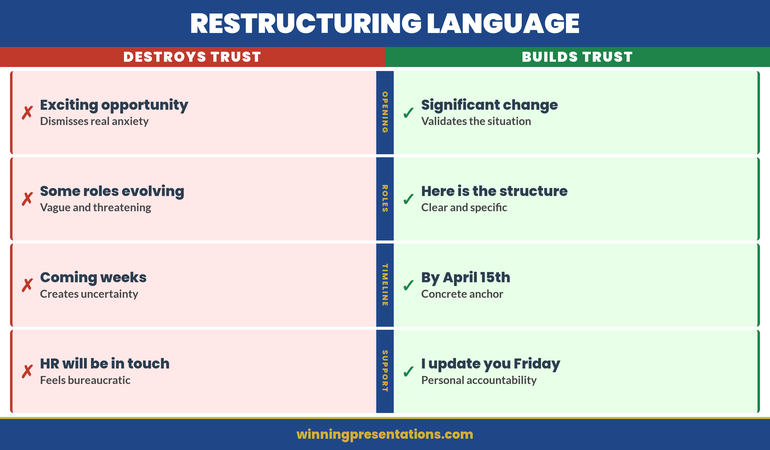
Language That Maintains Trust vs. Language That Destroys It
Your words matter more than your slides. Restructuring announcements live or die on precise language choices.
Avoid: Euphemism. “We’re right-sizing” sounds like you’re hiding something. Your team will hear “layoffs are coming” even if that’s not true. Say what you mean. “We’re restructuring” or “We’re reorganising” or “We’re consolidating layers.” Simple, honest, unvarnished.
Use: Specific Transition Language. Instead of “Your role will evolve,” say “Your role will expand to include customer data analysis in addition to vendor management.” Instead of “There will be some changes to reporting lines,” say “You’ll report to Sarah instead of Michael, starting 1 April.” Specificity signals competence. Vagueness signals panic.
Avoid: Spin. “This is actually a great opportunity for growth” might be true, but when you say it in a restructuring announcement, it sounds patronising. Let people decide whether it’s an opportunity. Your job is to be clear and respectful, not to sell them on the silver lining.
Use: Empathy Without Apology. “I know this creates uncertainty, and you’ll likely have questions I can’t answer today” is honest. “I’m really sorry we have to do this” is apologising for the business decision, which undermines your credibility. Own the decision, acknowledge the impact, commit to managing the transition well.
Avoid: Over-Explanation in Real Time. If you’re 10 minutes into a restructuring presentation and people are asking “Why are we doing this?” or “Did the board force this?”, you don’t answer in the moment. You acknowledge it, stay on script, and say “That’s a fair question—I’ll come back to that in Q&A. Right now I want to make sure everyone understands what’s changing and what the timeline is.”
Use: Pause. After you announce the restructure (Slide 4), pause for three full seconds. Let it land. People need processing time. If you fill that silence, you’ll rush into defensive explanation. Don’t.
Handling the Q&A When Emotions Run High
The presentation itself is 12 minutes. The Q&A is where your team decides whether you’ve lost them.
Expect Three Categories of Questions:
The Practical Question. “When does this take effect?” “Will my salary change?” “How do I apply for the new role?” These are your allies. They mean people are already thinking about implementation. Answer them briefly and directly. Use this moment to reinforce your timeline and your next steps.
The Uncertainty Question. “What if I don’t want the new role?” “Is there a chance this changes in three months?” “Are we hiring in the new structure?” These are harder because the honest answer is often “I don’t know yet.” Say that. “That’s a fair question. I don’t have a definitive answer, but here’s what I know [then the boundary], and here’s when you’ll know more [then the date].”
The Challenge Question. “Isn’t this just cost-cutting?” “Why wasn’t the team consulted?” “Did the board make this decision, or did you?” These questions are testing whether you’ll stay honest under pressure. Answer them. Don’t defend. “Yes, it is partly cost-driven—margin pressure is real. It’s also about moving faster. Both are true. Both matter.” If it was a board decision, say so. If you disagree with part of it, don’t pretend otherwise, but stay aligned on the execution.
Your Role in Q&A: Listen fully before answering. Repeat the question back (“So you’re asking whether your benefits package changes?”). Answer the question asked, not the question you wish they’d asked. If you don’t know, say “I don’t know, I’ll find out by Thursday, and I’ll email you.” Then actually do it. These follow-ups matter more than your slides.
If the room becomes emotionally charged, pause. “I can see this matters deeply. That’s appropriate. Let’s take it offline—I’m going to schedule 20 minutes with each of you in the next week. We’ll talk through your specific situation.” Then close the meeting on time. Running 45 minutes over won’t convince anyone. It signals you’ve lost control.
Implementation: What Happens After the Slides Close
Your restructuring presentation isn’t a one-off event. It’s the beginning of a managed transition. Most executives end the meeting and assume they’ve done the hard part. They haven’t.
Within 24 hours: Send a written summary of what you announced. Include dates, names, reporting lines, and links to resources (intranet page, FAQ, HR support contact). Don’t add new information—just codify what you said. This gives people something concrete to share with their partners or to read again when they’re processing.
Within one week: One-to-one conversations with every direct report. Not HR—you. 20 minutes each. The agenda is their specific situation: What’s changing for them? What’s not? What’s the next step they need to take? What do they need from you? Listen more than you talk. Many people won’t raise their real concern in the group setting.
Within two weeks: Publish an updated team page or document showing the new structure, new role descriptions, and the new team charter (how you’ll work together differently). This gives people certainty that the restructure is real and deliberate, not provisional.
Then, every week for the first month: A short team update on implementation progress. Keep it brief: “This week we finalised the new vendor management process. Next week we’ll train everyone on the new system.” These updates do two things: they signal momentum (reducing uncertainty), and they prove you’re thinking about how to make the transition smooth.
Your restructuring presentation keeps trust in the moment. Your follow-up execution keeps trust alive. Miss either, and you’ll have announced a reorganisation only to discover your best people are already interviewing elsewhere.
Need the Templates, Not Another Article?
If the restructuring presentation structure is clear but your slides still aren’t built, the Executive Slide System gives you ready-to-edit layouts for high-stakes change announcements. Also see the project delay presentation framework for sequencing difficult announcements across your organisation.
Frequently Asked Questions
Should I rehearse a restructuring presentation differently than other presentations?
Yes. Rehearse it twice: once for technical accuracy (slides, timing, order), then once for emotional tone. Have someone watch the second rehearsal and tell you honestly: “Do you sound defensive?” “Do you sound like you care about the impact on people?” “Are you going too fast?” This is harder than rehearsing a financial update, but the stakes are higher.
What if people ask me questions I can’t answer in the meeting?
Write it down. Say: “That’s a really important question. I don’t have the answer right now, but I will by [specific date], and I’ll email you and the team.” Then do it. Credibility during a restructure is built on following through on what you say you’ll do, even small things.
Should I announce the restructure in person or can I do it via video call?
In person if at all possible, especially if your team is co-located. Video works if your team is remote and you can’t travel, but the lack of physical presence makes tone harder to read. If you do it by video, be extra clear about your emotional intent: “I know this is harder to absorb on a call. I’m committing to one-to-ones this week so we can talk through your specific situation.”
How do I present a restructure if I disagree with how it’s been designed?
This is a conversation with your leadership before the presentation, not during it. Once you’re delivering the message, you own it. If you visibly distance yourself from the decision (“The board made me do this”), you lose your team’s confidence that you’re in control. Disagree upstairs; align downstairs.
The Winning Edge
Weekly presentation strategies for executives who present under pressure.
Not ready to invest? Start with the free Executive Presentation Checklist — a quick-reference guide for your next high-stakes presentation.
About the Author
Mary Beth Hazeldine is Owner & Managing Director of Winning Presentations. With 24 years of corporate banking experience at JPMorgan Chase, PwC, Royal Bank of Scotland, and Commerzbank, she advises executives across financial services, healthcare, technology, and government on structuring presentations for high-stakes funding rounds and approvals.
Related reading: How to Build Executive Presence Into Your Presentation | Town Hall Presentation: Rebuild Trust After Layoffs | Stop the Dry Mouth Before Presenting