

The CFO stopped listening at slide 3. By slide 7, she was answering emails. The project manager kept presenting anyway.
I watched this happen at Commerzbank during a £12 million programme update. Forty-five minutes of task-level detail. Zero decisions made. The steering committee scheduled another meeting “to actually discuss the issues.”
After 25 years in corporate banking managing complex programmes at JPMorgan Chase, PwC, Royal Bank of Scotland, and Commerzbank, I’ve developed a project status update framework that communicates everything leadership needs in 2 minutes — and actually keeps them engaged.
Here’s how to deliver project status updates that respect everyone’s time and establish you as someone who can be trusted with bigger projects.
Quick Answer: Effective project status updates answer three questions in under 2 minutes: Is this on track? Do you need to do anything? What should you be worried about? Lead with a traffic light headline (green/amber/red), show 3-5 key metrics, highlight only what changed since the last update, and state explicitly whether executive action is required.
In this article:
Why Most Project Status Updates Fail
The fundamental problem with most project status updates: they’re written for the project team, not for executives.
Project managers track dozens of tasks, dependencies, and risks. So their project status update includes all of it. But executives don’t need task-level visibility — they need to know three things:
- Is this project on track?
- Do I need to do anything?
- What should I be worried about?
A project status update that answers these three questions in 2 minutes is infinitely more valuable than a 30-minute walkthrough of your Gantt chart.
I learned this the hard way at RBS. I’d spent six hours preparing a comprehensive programme update — 18 slides covering every workstream, every milestone, every risk. The Programme Director interrupted me on slide 4: “Just tell me if we’re going to hit the deadline and what you need from me.”
That moment changed how I structure every project status update since.
The Project Status Update Framework: Traffic Light Plus Context
Every effective project status update follows this structure:
Element 1: The Headline Status
Open your project status update with a single line that tells leadership exactly where things stand:
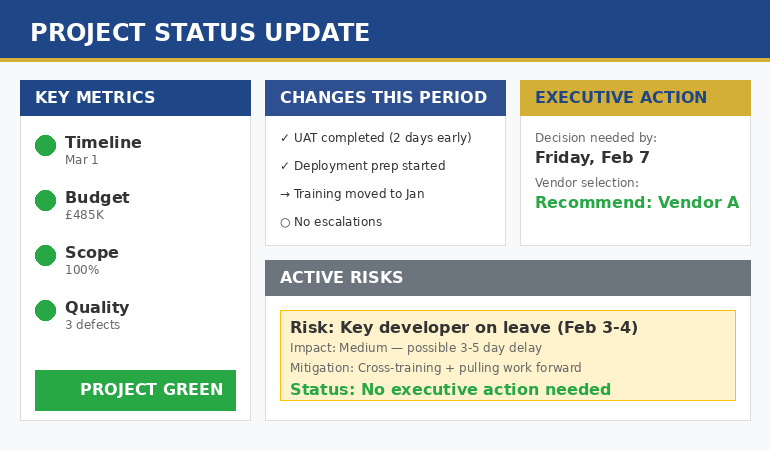
🟢 GREEN: Project on track — 2 weeks ahead of schedule, within budget
🟡 AMBER: Project at risk — vendor delay may impact launch date; mitigation in progress
🔴 RED: Project off track — need executive decision on scope reduction by Friday
This headline tells executives immediately whether they need to pay close attention or can relax. Most project status updates bury this on slide 8 — put it first.
Element 2: The Key Metrics
After the headline, your project status update should show 3-5 metrics that matter:
| Metric | Target | Actual | Status |
|---|---|---|---|
| Timeline | March 15 | March 1 | 🟢 |
| Budget | £500K | £485K | 🟢 |
| Scope | 100% | 100% | 🟢 |
| Quality | <5 defects | 3 defects | 🟢 |
This dashboard gives executives the complete picture in seconds. They can see whether you’re ahead, on track, or behind — and where specifically.
Element 3: What Changed Since Last Update
Executives don’t want to re-read everything — they want to know what’s new. Your project status update should highlight changes:
Changes Since Last Project Status Update:
- Completed: User acceptance testing (2 days early)
- Started: Production deployment preparation
- Changed: Moved training from Feb to Jan based on stakeholder availability
- Escalated: None this period
This format lets executives skip what they already know and focus on what’s new. It’s the difference between a helpful update and a time-wasting repeat.
Element 4: Risks and Issues
Every project status update must address risks — even if there aren’t any significant ones:
Notice the last line: “no executive action needed.” Always tell leadership whether you need them to do something. Most risks you’re managing yourself — make that explicit in your project status update.
The traffic light framework I’ve described is exactly what’s built into The Executive Slide System → — clients have used these templates to run steering committees for programmes worth over £50 million.
Element 5: Decisions or Support Needed
If your project status update requires executive action, state it clearly:
Executive Action Required:
Decision needed by: Friday, February 7
Question: Should we proceed with vendor A (£50K higher cost, 2 weeks faster) or vendor B (lower cost, standard timeline)?
Recommendation: Vendor A — the timeline benefit outweighs the cost given our Q1 deadline
Status updates are one scenario where a structured presentation skills training programme pays back fastest — avoiding the slide-by-slide drift that lost the steering committee above.
If no action is needed, say that explicitly: “No executive decisions required this period.” This tells leadership they can simply note the update without adding it to their action list.
⭐ Transform Your Next Status Update in Minutes
Your steering committee is next week. Use the same framework that’s kept executives engaged through £50M+ programme reviews.
What you get:
- Traffic light dashboard template (fill in your metrics)
- Risk register format executives actually read
- Decision slide structure that gets clear approvals
Instant download • 30-day money-back guarantee
The 2-Minute Project Status Update Script
Here’s exactly how to deliver your project status update verbally:
First 15 seconds — Headline:
“Project Phoenix is green — we’re two weeks ahead of schedule and within budget. No executive action needed this week.”
Next 30 seconds — Key changes:
“Since our last update, we completed UAT two days early and started deployment prep. We moved training up to January based on stakeholder availability.”
Next 45 seconds — Risks:
“One risk I’m monitoring: our lead developer is on leave for two weeks in February. We’re cross-training a backup and pulling critical work forward. I don’t expect this to impact the timeline, but I’ll flag it if that changes.”
Final 30 seconds — Look ahead:
“For next period, we’re focused on completing deployment prep and beginning production migration. Next update will confirm go-live readiness.”
Total: under 2 minutes. Executives have everything they need. You’ve demonstrated control of your project without wasting anyone’s time.
This script structure works because it follows the same principles built into The Executive Slide System — lead with the conclusion, support with evidence, close with the ask.
Project Status Update Mistakes to Avoid
Mistake 1: Reading every line of your slides.
Executives can read. Summarise the headline, highlight what changed, flag what needs attention. Don’t read word-for-word.
Mistake 2: Task-level detail.
“John completed the database migration scripts” doesn’t belong in an executive project status update. Executives need milestone-level visibility, not task-level.
Mistake 3: Hiding problems.
If the project is amber or red, say so. Finding out later that you knew about problems destroys trust faster than the problems themselves.
Mistake 4: No clear action.
Every project status update should end with either “no action needed” or a specific ask. Don’t leave executives wondering what you need from them.
Mistake 5: Inconsistent format.
Use the same structure every time. Executives shouldn’t have to learn a new format each week — consistency lets them find information quickly.
Related: If presenting status updates makes you anxious, see Presentation Anxiety Before Meetings: The Executive Reset That Actually Works — the techniques I teach clients who need to stay calm under pressure in steering committees.
FAQ
How often should I send a project status update?
Weekly for active projects, bi-weekly for steady-state. Match your frequency to how fast things change and how closely leadership wants to track. If nothing changes between updates, that’s useful information too — it shows stability.
How long should a project status update be?
One slide for verbal updates, maximum two pages for written. If your update is longer, you’re including too much detail. Everything else belongs in an appendix or separate detailed report for the project team.
What if nothing changed since the last update?
Say that explicitly: “No significant changes since last update. All metrics remain green, on track for March delivery.” A brief update confirming stability is valuable — it takes 30 seconds and builds confidence that you’re in control.
One More Thing — Before You Go
Need a status update framework that gets sign-off the first time? The Executive Slide System gives you the exact templates and structure used by senior leaders to move projects forward without going round in circles.
Should I include good news in my project status update?
Yes — briefly. Wins deserve acknowledgment. “Team delivered UAT two days early — strong execution” takes 5 seconds and builds confidence. Don’t bury it, but don’t spend five minutes on celebration either.
📧 Get Weekly Executive Presentation Insights
Join 2,000+ professionals getting frameworks, templates, and real examples every week.
🎁 Free Resource: Executive Presentation Checklist
12 things to check before any executive presentation — including your next project status update.
Your Next Project Status Update
You probably have a project status update due soon. Before you build another 15-slide deck, try this:
- Write your headline status in one sentence
- List 3-5 metrics with traffic light indicators
- Note what changed since your last update
- List active risks with mitigations
- State clearly whether you need executive action
That’s your project status update. One slide. Two minutes. Everything leadership needs to know.
The project managers who advance are the ones who can run complex projects while keeping leadership informed without overwhelming them. This framework demonstrates exactly that capability.
Related: How to Create Executive Presentations That Get Approved — the complete guide covering all 10 executive presentation types, including the project status update framework.
See also: QBR Presentation Template: How to Run Quarterly Business Reviews That Drive Action