Tag: executive buy-in

29 Jan 2026
Executive sitting alone at boardroom table with hand on forehead after failed presentation, colleagues walking away in background

Stakeholder Mapping for Presentations: The 4-Quadrant Method

The project was dead before I walked into the room.

Five executives. Five hidden agendas. And a significant infrastructure project that several stakeholders had already decided to reject—I just didn’t know it yet.

Quick answer: A stakeholder map is a strategic document that identifies who influences your presentation’s outcome, what each person actually cares about, and how to engage them before you present. The executives who consistently win approval don’t have better slides—they have better stakeholder intelligence. This article shows the mapping approach developed across 25 years in banking and 16 years coaching senior professionals.

Presenting for approval this week? Start with a stakeholder map.

  1. Who actually decides? It’s rarely the most senior person in the room.
  2. What does each person need to say yes? Public criteria and private concerns are different.
  3. Who can kill this before it reaches the room? Name them — then meet them first.

For the complete mapping framework and pre-meeting conversation structure, see the Executive Buy-In Presentation System.

What Is Stakeholder Mapping (And Why Slides Won’t Save You)

Most professionals prepare for presentations backwards. They spend 80% of their time on slides and 20% on understanding the room. The executives who consistently win approval do the opposite.

Stakeholder mapping is the process of identifying every person who influences your presentation’s outcome—not just who’s in the room, but who whispers in the decision-maker’s ear before and after. It answers three questions most presenters never ask:

  • Who actually decides? (Hint: it’s rarely the most senior person)
  • What does each person need to hear to say yes? (Their public criteria and private concerns are different)
  • Who can kill this before it reaches the room? (The blocker you don’t see coming)

I learned this the hard way at JPMorgan Chase. Beautiful deck. Compelling ROI. Standing ovation from the team. The steering committee rejected it in four minutes because I’d missed the one person whose support I actually needed—the operations director who’d been burned by a similar project two years earlier.

The CFO told me afterwards: “Your slides were fine. Your stakeholder work was invisible.”

That conversation changed how I approach every high-stakes presentation. If you’re presenting to senior leadership and fear of being judged is holding you back, know this: judgment often comes from misreading the room, not from your delivery.

The Meeting That Changed Everything

Three years later, I faced the same situation—but with very different preparation.

The project: a significant infrastructure upgrade that would disrupt operations for six months. The room: five regional directors, each protecting their own territory. The politics: two of them had competing projects that would lose funding if mine was approved.

The old me would have built a brilliant deck proving ROI. The new me spent three weeks building a stakeholder map instead.

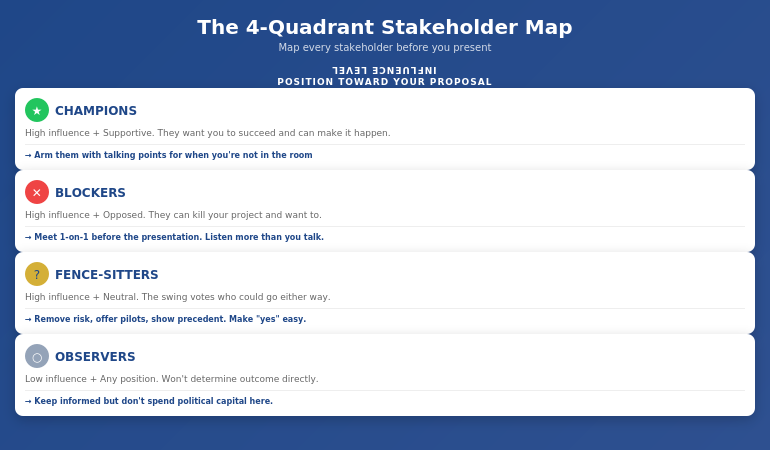
4-Quadrant Stakeholder Map showing Champions, Blockers, Fence-Sitters, and Observers with recommended actions for each quadrant

What I discovered changed everything:

  • The “decision-maker” (the CFO) actually deferred to the operations director on anything that touched day-to-day workflows
  • The loudest opponent wasn’t against the project—he was against being surprised by it
  • The quiet supporter in the corner had tried to push a similar initiative three years ago and been shut down. She had data I needed.
  • Two directors had a private rivalry that had nothing to do with my project but would influence how they voted

Armed with this map, I didn’t walk into the presentation hoping for approval. I walked in knowing I had it.

How? Because I’d had five separate conversations before the meeting. Each stakeholder felt heard. Each concern had been addressed. The presentation wasn’t where I won approval—it was where I confirmed it.

The 4-Quadrant Stakeholder Framework

After using stakeholder mapping across projects of varying scale and stakes, I’ve refined it into a simple framework anyone can use. Every stakeholder falls into one of four quadrants based on two factors: their influence over the decision and their current position toward your proposal.

Quadrant 1: Champions (High Influence + Supportive)

These stakeholders want your project to succeed and have the power to make it happen. Your job: arm them with ammunition. Give them the talking points they’ll use when you’re not in the room. Ask them: “What objections will come up, and how should I address them?”

Quadrant 2: Blockers (High Influence + Opposed)

The most dangerous quadrant. These stakeholders can kill your project, and they want to. Your job: understand their real concern (it’s rarely what they say publicly). Often, blockers aren’t against your idea—they’re against not being consulted, or they’re protecting something you haven’t considered. Meet them one-on-one before the presentation. Listen more than you talk.

Quadrant 3: Fence-Sitters (High Influence + Neutral)

These stakeholders could go either way. They’re often the swing votes. Your job: make it easy to say yes. Remove risk, offer pilot options, show precedent. They don’t want to champion your project—they want to not look foolish for approving it.

Quadrant 4: Observers (Low Influence + Any Position)

These stakeholders won’t determine the outcome, but they might influence someone who does. Your job: don’t ignore them completely—a frustrated observer can become a vocal critic. Keep them informed, but don’t spend your political capital here.

For each person in your stakeholder map, document: their quadrant, their public position, their private concern, who influences them, and what they need to hear from you.

⭐ Walk into your next approval meeting prepared

The Executive Buy-In Presentation System gives you 7 self-paced modules covering stakeholder analysis, case construction, and the presentation structures that hold up to scrutiny. Monthly cohort enrolment — £499, lifetime access to materials.

What’s covered:

  • Stakeholder mapping frameworks for high-stakes decisions
  • Pre-meeting conversation approaches that surface hidden objections
  • The enrollment versus alignment distinction for creating champions
  • Bonus Q&A calls (optional, fully recorded — watch back anytime)

Explore the Buy-In System on Maven →

Self-paced with monthly cohort enrolment.

The Pre-Meeting Conversations That Win Votes

The stakeholder map tells you who to talk to. But what do you actually say?

Most professionals make one of two mistakes: they either skip pre-meeting conversations entirely (hoping their slides will speak for themselves), or they pitch their idea to everyone they meet (creating resistance before the formal presentation).

The executives who consistently win approval do something different. They have discovery conversations—structured dialogues designed to surface concerns, build relationships, and create ownership.

Here’s the framework I use:

No deadlines, no mandatory attendance. Executive Buy-In Presentation System — 7 self-paced modules, £499, lifetime access to materials.

Explore the Buy-In System →

The 3-Part Pre-Meeting Conversation:

Part 1: Understand Their World (70% of the conversation)

“I’m presenting on [topic] next week. Before I finalize anything, I wanted to understand your perspective. What would you need to see for something like this to work for your team?”

Notice: you’re not pitching. You’re learning. Most stakeholders have never been asked what they actually need. This question alone creates goodwill.

Part 2: Surface Hidden Concerns (20% of the conversation)

“What concerns would you have? What’s worked—or not worked—when similar initiatives have been tried before?”

This is where blockers reveal their real objections. Often, they’ll tell you things they’d never say in a group setting. A operations director once told me: “I don’t care about the ROI. I care about not being blamed when something goes wrong during the transition.” That concern never appeared in the official feedback—but it was the only thing that mattered.

Part 3: Create Ownership (10% of the conversation)

“Based on what you’ve shared, here’s how I’m thinking about addressing [their concern]. Does that make sense to you?”

When a stakeholder helps shape your proposal, they become invested in its success. They’re no longer evaluating your idea—they’re defending their own input.

How to Uncover Hidden Agendas

Every executive room has hidden agendas. The question isn’t whether they exist—it’s whether you know what they are before you present.

Across 25 years at JPMorgan Chase, PwC, Royal Bank of Scotland, and Commerzbank, I watched technically superior proposals lose to politically savvy ones. Not because politics is more important than substance—but because ignoring politics is a form of arrogance that executives punish.

Here’s how to uncover what’s really driving the decision:

Ask the Executive Assistant

The EA often knows more about what’s really happening than anyone in the room. A simple question—”Is there anything I should be aware of before this meeting?”—can reveal landmines you’d never see coming.

Follow the Budget Trail

Who else is competing for the same resources? What got funded last quarter—and what got cut? Your proposal doesn’t exist in isolation. It exists in a portfolio of competing priorities.

Map the Relationships

Who mentored whom? Who’s been passed over for promotion? Who has a track record of opposing this type of initiative? Understanding how to present to a board of directors means understanding that board dynamics are rarely about the agenda item in front of them.

Look for the “Real Decision-Maker”

The person with the highest title isn’t always the person who decides. In the infrastructure project above, the CFO had final authority—but he would never approve anything the operations director opposed. The real decision was made in a hallway conversation I wasn’t part of. My stakeholder map told me that. My pre-meeting work made sure that conversation went in my favour.

⭐ Stop guessing what your stakeholders need to say yes

The Executive Buy-In Presentation System is the self-paced framework for decoding stakeholder resistance and building the case that addresses it — 7 modules, monthly cohort enrolment, optional recorded Q&A. £499, lifetime access.

Explore the Buy-In System on Maven →

Self-paced with monthly cohort enrolment.

3 Stakeholder Mapping Mistakes That Kill Projects

After years coaching senior professionals through high-stakes presentations, I see the same mistakes repeatedly. Each one is easy to make and expensive to fix.

Mistake #1: Mapping Titles Instead of Influence

Your stakeholder map lists “CFO, COO, VP Operations” because those are the names on the meeting invite. But influence doesn’t follow org charts. The CFO might defer to their trusted advisor on technical matters. The COO might be checked out on this topic entirely. The VP Operations might have the CEO’s ear because they golf together.

The fix: For each stakeholder, ask: “Who do they listen to? Who influences their thinking on this topic specifically?” Map the shadow org chart, not the official one.

Mistake #2: Assuming Silence Means Support

You present your proposal. Three executives nod. Two stay quiet. You assume the quiet ones are fine with it.

They’re not. They’re waiting. They’ll voice their objections later—in the hallway, in a follow-up email, in a private conversation with the decision-maker. By then, your proposal is dead and you don’t know why.

The fix: Silence is a warning sign, not a green light. If someone hasn’t expressed a position, you don’t have their support—you have their tolerance. Find out what they’re really thinking before the meeting, not after.

Mistake #3: Treating All Stakeholders Equally

You have a week to prepare. You spend equal time with every stakeholder. The result: you know a little about everyone and not enough about anyone.

The fix: Your stakeholder map should be prioritized ruthlessly. Spend 80% of your pre-meeting time on the 20% of stakeholders who will actually determine the outcome. A deep relationship with two key influencers beats shallow relationships with ten observers.

Understanding what it takes to get executive buy-in means accepting that some stakeholders matter more than others—and acting accordingly.

What is stakeholder mapping in presentations?

Stakeholder mapping is the process of identifying every person who influences your presentation’s outcome, understanding their position, and strategically engaging them before you present. It answers three questions: Who actually decides? What does each person need to hear? Who can kill this quietly? The goal is to secure approval through pre-meeting work, so the presentation confirms what’s already been agreed—not where you hope to persuade.

How do you identify key stakeholders for a presentation?

Start with the meeting invite, then expand. Ask: Who influences the decision-maker? Who has veto power? Who’s been burned by similar proposals? Who has competing priorities? Map both formal authority (titles) and informal influence (relationships, expertise, history). The most important stakeholders often aren’t in the room—they’re the people the decision-maker calls after the meeting.

How do you present to multiple stakeholders with different agendas?

You don’t try to address every agenda in the room—you address each agenda before the room. Use your stakeholder map to have individual conversations where you surface each person’s real concerns and incorporate their input into your proposal. When you present, acknowledge the different perspectives: “I know some of you are focused on risk, others on timeline, others on budget. Let me show you how this addresses each.” The preparation makes the presentation feel effortless.

⭐ Built on 25 years in corporate banking

The Executive Buy-In Presentation System is the structured framework developed across 25 years in corporate banking and 16 years coaching senior professionals across financial services, insurance, consulting, and technology. £499, lifetime access to materials.

What you get:

  • 7 self-paced modules on stakeholder analysis, structure, and delivery
  • Pre-meeting conversation frameworks with exact language
  • Approaches for identifying real decision-makers and influencers
  • Bonus Q&A calls (optional, fully recorded — watch back anytime)
  • Lifetime access to all materials

Explore the Buy-In System on Maven →

Self-paced with monthly cohort enrolment — new cohort opens every month.

Frequently Asked Questions

Isn’t this just office politics?

Stakeholder mapping isn’t manipulation—it’s respect. You’re taking the time to understand what each person actually needs, rather than assuming your brilliant slides will convince everyone. The executives who dismiss this as “politics” are often the ones who get blindsided by rejections they didn’t see coming. Understanding organizational dynamics is a professional skill, not a character flaw.

What if I don’t know the stakeholders well enough?

Start with what you know, then expand. Ask your sponsor or champion: “Who should I talk to before this meeting?” Ask trusted colleagues: “What should I know about the people in this room?” Even thirty minutes of stakeholder research is better than none. The goal isn’t perfect intelligence—it’s better intelligence than you had before.

How much time does stakeholder mapping actually take?

For a typical steering committee or board presentation, plan for 3-5 hours of stakeholder work spread across 1-2 weeks. That includes creating the initial map (1 hour), having pre-meeting conversations (2-3 hours total), and refining your approach based on what you learn. This time investment pays for itself many times over—a rejected proposal wastes far more than 5 hours.

What if the stakeholder landscape changes at the last minute?

It will. Someone gets pulled into another meeting. A new executive joins. Priorities shift overnight. Your stakeholder map isn’t a static document—it’s a living framework. Update it as you learn new information. The executives who handle last-minute changes well are the ones who’ve done enough stakeholder work to understand the underlying dynamics, not just the surface positions.

📧 The Winning Edge Newsletter

Weekly insights on executive presentations, stakeholder strategy, and high-stakes communication. No fluff—just what works.

Subscribe Free →

📋 Free: Executive Presentation Checklist

The pre-presentation checklist I use before every high-stakes meeting. Covers stakeholder prep, slide structure, and room setup.

Download Free Checklist →

Your Next Step

The stakeholder map for that infrastructure project took three hours to create. The conversations it enabled took another six hours spread across two weeks. The approval that followed took about four minutes once I walked into the room.

If you’re preparing for a high-stakes presentation—budget approval, project sign-off, board update, client pitch—start your stakeholder map today. Identify the four quadrants. Find your champions and your blockers. Have the pre-meeting conversations that turn a stressful presentation into a predictable formality.

And if you want the complete system—templates, scripts, frameworks, and live feedback on your actual presentations—join the Executive Buy-In Presentation System on Maven.

The decision isn’t made in the meeting. It’s made before. Your stakeholder map makes sure you’re part of those conversations.

Related: If presentation anxiety is part of what’s holding you back from stakeholder conversations, read how to handle the fear of being judged when speaking.

About Mary Beth Hazeldine
Owner & Managing Director of Winning Presentations. 25 years in corporate banking at JPMorgan Chase, PwC, Royal Bank of Scotland, and Commerzbank taught me that the best proposals fail without stakeholder work. The pre-meeting map is the step separating presentations that get approved from presentations that get “tabled for further review.”

28 Jan 2026
Professional woman in enrollment conversation during coffee meeting, actively engaging with colleague about stakeholder buy-in

Pre-Meeting Executive Alignment: How to Get Approval Before You Present

The CFO approved £2 million before my client finished slide one.

Not because the presentation was brilliant. Not because the data was compelling. Because the decision had already been made — three days earlier, over a 12-minute conversation and one carefully crafted email.

The presentation? A formality. A public confirmation of a private agreement.

This is what pre-meeting executive alignment looks like when it’s done right. And it’s the skill that separates professionals who constantly fight for approval from those who walk into rooms where “yes” is already waiting.

Quick Answer: Pre-meeting executive alignment is the practice of socializing your recommendation with key stakeholders before the formal presentation. Done correctly, it surfaces objections early, builds champions, and transforms the meeting from a decision point into a confirmation ceremony. The most effective executives spend more time on pre-alignment than on slides.

📋 Presenting for Approval This Week? Do This First:

48-72 hours before your presentation:

  1. Identify the real decision-maker (often not the most senior person)
  2. Request 10 minutes — “I’d value your perspective before Thursday’s meeting”
  3. Share your recommendation (not all your slides — just the answer)
  4. Ask: “What concerns would you want me to address?”
  5. Send a follow-up email summarizing what you heard and how you’ll address it

This 10-minute conversation often determines the outcome more than the 30-minute presentation.

The Email That Changed Everything

Early in my banking career at JPMorgan, I watched a colleague present a flawless business case for a new trading system. The logic was airtight. The ROI was clear. The slides were polished.

The CFO said no.

Not because the proposal was weak — but because he’d been blindsided. He had concerns about implementation risk that were never addressed. He felt ambushed by a major capital request he hadn’t been prepared for. His “no” wasn’t about the merits. It was about the process.

A month later, I saw a more senior colleague get a larger budget approved in half the time. The difference? She’d spent 20 minutes with the CFO the week before, walking him through her thinking and asking what would make him comfortable.

By the time she presented, he was already her champion. He’d helped shape the proposal. His concerns were already addressed. The meeting was a formality.

That’s when I understood: the presentation isn’t where the decision gets made. It’s where the decision gets announced.

Why Pre-Alignment Works

Pre-meeting alignment works because of three psychological principles that govern how senior people make decisions:

1. Executives hate surprises

Senior leaders are evaluated on judgment. Being caught off-guard in a meeting — especially by something they “should have known” — feels like a failure. When you pre-align, you’re protecting their reputation, not just selling your idea.

2. Ownership drives support

When someone contributes to shaping a proposal, they become invested in its success. The CFO who suggested adding a risk mitigation section will defend that section in the meeting. Pre-alignment turns potential blockers into co-authors.

3. Public positions are hard to reverse

Once someone takes a position in a meeting, backing down feels like losing face. If you surface objections privately, they can be addressed without anyone having to publicly change their mind. Private alignment prevents public conflict.

For more on how executives actually make decisions, see our guide to executive presentation structure.

How do you get stakeholder alignment before a meeting?

Get stakeholder alignment by having brief one-on-one conversations with key decision-makers 48-72 hours before your presentation. Share your recommendation (not all your slides), ask what concerns they’d want addressed, then incorporate their input. Follow up with a short email confirming what you heard. This transforms potential opponents into contributors who are invested in your success.

Timeline showing pre-alignment process: 1 week before identify stakeholders, 48-72 hours before have conversations, 24 hours before send summary email, meeting day present with confidence

⭐ Maven Flagship — Executive Buy-In

Walk into your next approval meeting prepared

The Executive Buy-In Presentation System gives you 7 self-paced modules covering stakeholder analysis, case construction, and the presentation structures that hold up to scrutiny.

Monthly cohort enrolment — £499, lifetime access.

Enrol in the Executive Buy-In System →

The 5-Step Pre-Alignment Process

Here’s the exact process I teach executives for pre-meeting alignment:

Step 1: Map Your Stakeholders (1 Week Before)

Before you build a single slide, answer these questions:

  • Who will be in the room?
  • Who has formal decision authority?
  • Who has informal influence? (Often more important)
  • Who might object, and why?
  • Who could be a champion if they understood the benefits?

Create a simple grid: Name | Role | Likely Position | Key Concern | How to Reach

Step 2: Prioritise Your Conversations (5-7 Days Before)

You can’t pre-align with everyone. Prioritise:

  1. The decision-maker (whoever actually signs off)
  2. Potential blockers (people likely to object)
  3. Influential voices (people others listen to)

Three to four conversations is usually enough. More than that becomes logistically difficult and can feel like you’re “working the room” too hard.

Step 3: Have the Conversations (48-72 Hours Before)

Request brief meetings: “I’m presenting to the steering committee on Thursday. I’d value 10 minutes of your perspective beforehand — would Tuesday or Wednesday work?”

In the conversation:

  • Share your recommendation in one sentence
  • Explain the core logic (2-3 minutes max)
  • Ask: “What concerns would you want me to address?”
  • Listen more than you talk
  • Thank them for their input

Do NOT present all your slides. This isn’t a preview — it’s a consultation.

How do you get executive buy-in for a project?

Executive buy-in comes from making “yes” feel safe, not from having the best data. The most reliable method is pre-meeting alignment: share your recommendation privately with key stakeholders before the formal presentation, address their concerns in advance, and let them contribute to shaping the proposal. By meeting time, they’re invested in your success.

Step 4: Incorporate and Acknowledge (24-48 Hours Before)

After your conversations:

  • Adjust your presentation to address the concerns you heard
  • Add a slide or talking point that directly acknowledges input: “Based on conversations with the team, I’ve added a section on implementation risk…”
  • Send a brief follow-up email to each person you spoke with

This follow-up email is crucial. It confirms you listened and creates a paper trail of their involvement.

Step 5: Present With Confidence (Meeting Day)

When you’ve done proper pre-alignment:

  • You know what objections are coming (because you asked)
  • You’ve already addressed the major concerns (in your slides)
  • Key stakeholders feel heard (because they contributed)
  • The decision-maker isn’t being surprised (because you briefed them)

The presentation becomes a confirmation, not a persuasion exercise.

For more on presenting to senior leadership, see our guide on how to present to a board of directors.

Need the slide structure that executives respond to?

Get the Executive Slide System → £39

The Email Template That Works

Here’s the follow-up email template I used with my client — the one that preceded the £2M approval:

Subject: Following up on our conversation — Thursday’s budget review

Hi [Name],

Thank you for taking time yesterday to share your perspective on the [project name] proposal.

I heard two key points:

  1. [Concern #1 they raised]
  2. [Concern #2 they raised]

I’ve updated the presentation to address both directly — specifically, I’ve added [what you added] and revised [what you changed].

Looking forward to Thursday. Please let me know if anything else comes to mind before then.

Best,
[Your name]

This email does three things:

  1. Confirms you listened (they see their concerns reflected back)
  2. Shows you acted (you made changes based on their input)
  3. Creates investment (they’re now part of the proposal’s development)

Comparison showing traditional approach vs pre-alignment approach: traditional leads to surprises and objections, pre-alignment leads to support and quick approval

What is pre-meeting alignment?

Pre-meeting alignment is the practice of having brief one-on-one conversations with key stakeholders before a formal presentation or decision meeting. The goal is to share your recommendation, surface concerns early, incorporate feedback, and build support — so the meeting becomes a confirmation of a decision that’s already been shaped collaboratively, rather than a debate.

⭐ The Slide Structure That Closes After Pre-Alignment

Pre-alignment gets stakeholders ready to say yes. The Executive Slide System gives you the structure that makes “yes” easy — recommendation-first, objection-addressed, decision-clear.

Inside the system:

  • The exact 6-slide structure executives prefer
  • How to lead with your recommendation (not context)
  • Where to place proof so it reassures, not defends
  • The decision slide format that gets action

Get the Executive Slide System → £39

Built from 24 years of corporate banking experience. Works for budget requests, board presentations, and client pitches.

Common Mistakes to Avoid

Pre-alignment is powerful, but it can backfire if done wrong:

Mistake #1: Presenting your full deck in the pre-meeting

The pre-alignment conversation is a consultation, not a preview. Share your recommendation and ask for input — don’t walk through 25 slides. If you do, the actual meeting feels redundant.

Mistake #2: Only talking to supporters

It’s tempting to pre-align with people you know will agree. But the value is in reaching potential blockers. The CFO who might object is exactly who you need to talk to beforehand.

Mistake #3: Ignoring what you hear

If someone raises a concern and you don’t address it, you’ve made things worse. They’ll feel unheard and may actively oppose you in the meeting. Either incorporate their feedback or explain why you couldn’t.

Mistake #4: Being too obvious about “working the room”

Pre-alignment should feel like genuine consultation, not political manoeuvring. Frame it as seeking input, not building a coalition. “I’d value your perspective” works. “I’m lining up support” does not.

Mistake #5: Skipping the follow-up email

The conversation creates alignment. The email locks it in. Without the written follow-up, people can forget what they said or claim they never agreed. The email creates accountability.

For the slide structure that works after you’ve done pre-alignment, see our guide to CFO-approved budget presentations.

Ready to structure slides that close after pre-alignment?

Get the Executive Slide System → £39

When Pre-Alignment Isn’t Possible

Sometimes you can’t pre-align — you don’t have access, there’s no time, or the culture doesn’t support it. In those cases:

  • Lead with your recommendation anyway. Even without pre-alignment, the structure still matters. Don’t build to your conclusion.
  • Anticipate objections yourself. If you can’t ask stakeholders what concerns them, use your judgment and address likely objections proactively.
  • Create space for input during the meeting. If they haven’t had a chance to shape the proposal, give them opportunities to contribute: “Before I continue, I’d welcome any initial reactions.”

Pre-alignment dramatically improves your odds. But even without it, the right structure helps.

Is Pre-Alignment Right For Your Situation?

Chart showing when pre-alignment works well vs when it may not be appropriate

⭐ Complete Your Approval Strategy

Pre-alignment opens the door. The Executive Slide System walks you through it — with the exact structure, format, and flow that executives respond to.

Everything you get:

  • The 6-slide executive structure (recommendation-first)
  • Real before/after transformations
  • Slide-by-slide breakdown with formatting guidance
  • Templates for budget, board, and client presentations

Get the Executive Slide System → £39

Instant download. The same structure I taught in corporate banking for budget approvals and steering committee decisions.

Frequently Asked Questions

Isn’t this just politics or manipulation?

Pre-alignment isn’t manipulation — it’s good communication. You’re not hiding information or going behind anyone’s back. You’re consulting stakeholders, incorporating their input, and making the formal meeting more productive for everyone. The alternative — blindsiding people with a major request in a public meeting — is actually less respectful of their time and position.

What if I don’t have access to the decision-makers beforehand?

Start with whoever you can reach. Even pre-aligning with one influential person is better than none. You can also ask your manager or sponsor to help facilitate introductions: “Would it be appropriate for me to brief [Name] before Thursday?” If truly no access is possible, focus on anticipating objections yourself and structuring your presentation to address them proactively.

How far in advance should I do pre-alignment?

48-72 hours before the meeting is ideal. Too early (more than a week) and priorities may shift or people forget. Too late (day before) and there’s no time to incorporate feedback or for them to process. The sweet spot gives you time to adjust your presentation while keeping the conversation fresh in everyone’s mind.

What if someone changes their mind in the actual meeting?

It happens, but it’s rare when you’ve done proper pre-alignment. If someone raises a new objection, don’t panic. Acknowledge it calmly: “That’s a fair point — I’d like to think through the implications. Can I follow up with you after the meeting?” This shows confidence and prevents the meeting from derailing. The follow-up email you sent creates a record of their earlier input, which usually keeps positions stable.

Get Weekly Executive Presentation Insights

Strategies for getting approval, building credibility, and presenting with confidence — from 24 years in corporate banking.

Subscribe to The Winning Edge →

📋 Free Resource: Executive Presentation Checklist

A quick-reference checklist covering structure, pre-alignment, and delivery. Use it before your next high-stakes presentation.

Download Free Checklist →

Your Next Step

The next time you have a presentation where you need approval, try the pre-alignment approach:

  1. Identify 2-3 key stakeholders
  2. Request 10 minutes of their time before the meeting
  3. Share your recommendation and ask what concerns they’d want addressed
  4. Incorporate their feedback and send a follow-up email

You’ll be surprised how much easier the actual presentation becomes when the groundwork is already laid.

P.S. Once you’re in the meeting, delivery matters too. If you struggle with projecting confidence, I wrote about how to project your voice without shouting — it’s more about resonance than volume.

P.P.S. If you’re spending too long building presentations, check out how to cut presentation creation time without cutting quality — the system approach that saves hours.

About Mary Beth Hazeldine
Owner & Managing Director of Winning Presentations. 24 years in corporate banking at JPMorgan Chase, PwC, RBS, and Commerzbank. I’ve seen hundreds of presentations succeed or fail based on what happened before the meeting started. Pre-alignment is the skill I wish someone had taught me in year one.

27 Jan 2026
Professional woman in navy blazer presenting confidently in executive boardroom, gesturing while making a point to colleagues

How to Get Executive Buy-In for Your Presentations: The Psychology Most Professionals Get Wrong

“Let’s take this offline.”

Four words. That’s all it took to kill a £4 million project I’d spent three months preparing.

The logic was solid. The data was compelling. The slides were polished. And yet the steering committee smiled politely, asked reasonable questions, and then… nothing. No decision. No approval. Just “let’s discuss further.”

It took me years — and hundreds more presentations — to understand why. The problem wasn’t my idea. It wasn’t my data. It wasn’t even my delivery. The problem was that I was structuring my message in a way that triggered doubt instead of confidence.

If you’ve ever struggled to get executive buy-in for your presentations — even when your recommendations are sound — you’re probably making the same mistake.

Quick Answer: Executives decide in the first 2-3 minutes of your presentation, then spend the rest looking for reasons to trust or doubt that initial instinct. When you lead with context, build to your recommendation, and back it up with extensive data, you’re accidentally signalling uncertainty. The unspoken question in their mind: “If they need this much explanation, is the recommendation actually solid?” Getting buy-in requires structuring your message to work with executive decision psychology, not against it.

Presenting for a decision this week? Check these first.

  1. Can you state your recommendation in one sentence? If not, you’re not ready.
  2. Is it on slide 1? Not slide 10. Not after “context.” Slide 1.
  3. Do you know the one concern they’ll have? Address it before they raise it.
  4. What’s the specific decision you need? Not “thoughts” — a decision.

If any answer is unclear, you’re at risk of “let’s discuss further.” For the structured framework, see the Executive Buy-In Presentation System.

Why Good Ideas Get Rejected

I spent 25 years in corporate banking — at JPMorgan Chase, PwC, Royal Bank of Scotland, and Commerzbank. I’ve sat on both sides of the table: the nervous presenter hoping for approval, and the senior stakeholder deciding whether to say yes.

Here’s what I learned from the decision-maker’s chair:

Most presentations that fail aren’t bad. They’re structured wrong.

The presenter builds carefully to their recommendation. Context first. Background. Analysis. Options considered. And finally — after 15 or 20 slides — the recommendation.

It feels logical. It feels thorough. It feels like you’re building a case.

But to the executive, it feels like something else entirely: uncertainty.

The unspoken question forming in their mind: “If this recommendation were solid, why would they need all this explanation?”

For more on why traditional structure fails with executives, see our guide to the Pyramid Principle.

How Executives Actually Decide

Research and experience confirm the same thing: senior people decide early.

Within the first 2-3 minutes of your presentation, they’ve formed an initial judgment. The rest of the time, they’re looking for reasons to trust that instinct — or doubt it.

This changes everything about how you should structure your message.

If you lead with context and build to your recommendation, you’re giving them 15 minutes of reasons to doubt before they even hear what you’re proposing.

If you lead with your recommendation and immediately address their likely concern, you’re giving them reasons to trust from the start.

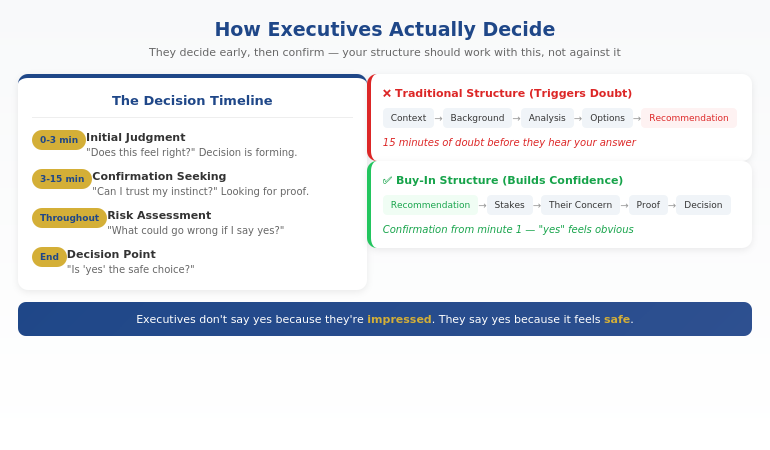
The executive’s internal process:

  1. Initial judgment (first 2-3 minutes): “Does this feel right?”
  2. Confirmation seeking (next 10-15 minutes): “Can I trust this instinct?”
  3. Risk assessment (throughout): “What could go wrong if I say yes?”
  4. Decision: “Is ‘yes’ the safe choice?”

Your job isn’t to impress them. It’s to make “yes” feel like the obvious, low-risk choice.

How do you get executive buy-in for a project?

Executive buy-in requires structuring your presentation around how senior people actually decide — not how you naturally want to explain. Lead with your recommendation (not context), address their likely concern before they raise it, provide 1-2 proof points that reduce perceived risk, and make the decision you need crystal clear. Executives say yes when “yes” feels safe, not when they’re impressed by your analysis.

Diagram showing how executives decide: initial judgment in first 3 minutes, then confirmation seeking, with traditional vs buy-in structure compared

⭐ Build the case your stakeholders can’t dismiss

The Executive Buy-In Presentation System is a self-paced framework — 7 modules walking you through the structure, psychology, and delivery that get senior approval. Monthly cohort enrolment, optional recorded Q&A calls. £499, lifetime access to materials.

What’s covered:

  • The slide structure that aligns with how executives actually decide
  • Stakeholder analysis and concern-mapping before the meeting
  • How to choose proof that reassures rather than defends
  • Frameworks for handling pushback without getting defensive

Explore the Buy-In System on Maven →

Self-paced with monthly cohort enrolment.

The 4 Things That Trigger Doubt

Through hundreds of presentations — both giving and receiving — I’ve identified four patterns that accidentally signal uncertainty to executives:

1. Too Much Context

When you spend the first 5-10 minutes on background, you’re signalling that the recommendation needs extensive justification. Executives read this as: “They’re not confident enough to lead with the answer.”

2. Too Much Proof

Counter-intuitive, but piling on data often increases doubt instead of reducing it. It feels defensive. The executive wonders: “If this were obviously right, why would they need 15 supporting charts?”

3. Building to the Recommendation

The classic “options analysis” approach — where you present Option A, Option B, Option C, then reveal your recommendation — gives executives 20 minutes of uncertainty before they know what you actually think. By then, doubt has taken root.

4. Over-Explaining Your Credibility

Spending time establishing why you’re qualified to make this recommendation actually undermines your credibility. Senior professionals let their work speak for itself. Over-explaining signals insecurity.

For more on the structural mistakes that kill executive presentations, see our guide to executive presentation structure.

Why do executives say no to good ideas?

Executives rarely reject ideas because the ideas are bad. They reject them because the presentation triggered doubt — too much context, too much defensive proof, building to the recommendation instead of leading with it. When executives feel uncertain, the safe choice is “not yet” or “let’s discuss further.” Good ideas get approved when they’re presented in a way that makes “yes” feel low-risk.

Work at your own pace. Keep the materials forever. Executive Buy-In Presentation System — 7 modules, £499, self-paced with monthly cohort enrolment.

Explore the Buy-In System →

The Buy-In Structure That Works

Once you understand how executives decide, the structure becomes clear:

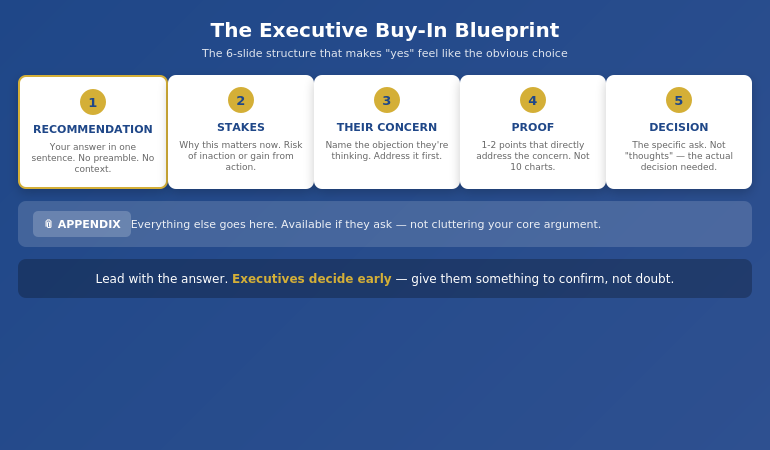
The Executive Buy-In Blueprint:

  1. Recommendation first (Slide 1). State what you’re proposing in one clear sentence. No preamble. No context. The answer.
  2. Stakes (Slide 2). Why this matters now. What’s at risk if we don’t act, or what we gain if we do.
  3. Their likely concern (Slide 3). Name the objection they’re probably already thinking. Address it before they raise it.
  4. 1-2 proof points (Slides 4-5). Not 10 charts. One or two pieces of evidence that directly address the concern you just named.
  5. The decision needed (Slide 6). Be specific. Not “your thoughts” — the actual decision. “I’m asking for approval to proceed with a £200K pilot in Q2.”
  6. Appendix. Everything else goes here. Available if they ask, not cluttering your core argument.

This structure works because it aligns with how executives actually process information. They know your answer immediately, which lets them spend the rest of the time confirming it’s sound — rather than wondering what you’re going to say.

For more on presenting to senior leadership, see our guide on how to present to a board of directors.

The Executive Buy-In Blueprint showing 6-slide structure: Recommendation, Stakes, Their Concern, Proof, Decision, Appendix

How do you present to senior leadership effectively?

Present to senior leadership by leading with your recommendation, not building to it. State your answer on slide 1, address their likely concern on slide 3, provide minimal proof that reduces perceived risk, and make your decision request specific and clear. Senior leaders decide early and spend the rest of the time confirming. Structure your presentation to support that confirmation, not create doubt.

⭐ Stop rewriting your proposal three times only to hear “we’ll think about it”

The Executive Buy-In Presentation System teaches the structure that gets decisions, not delays — 7 self-paced modules with optional recorded Q&A calls. £499, lifetime access.

Explore the Buy-In System on Maven →

Self-paced with monthly cohort enrolment.

Handling Pushback Without Getting Defensive

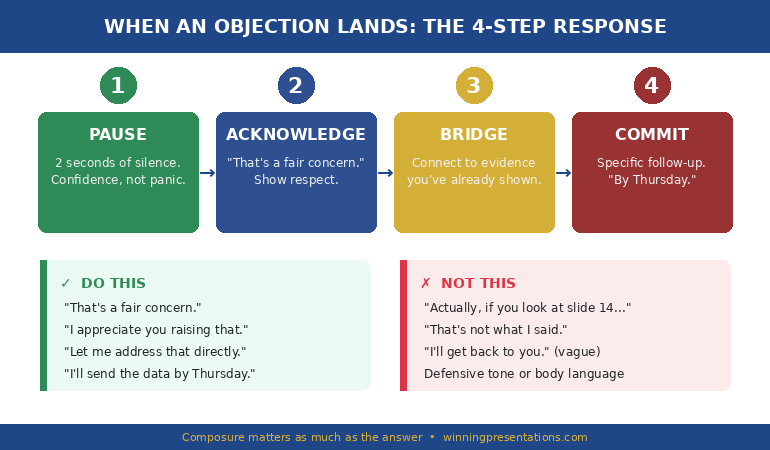
Even with perfect structure, you’ll face tough questions. Sceptical executives. Unexpected challenges.

How you respond determines whether you win the room or lose it.

Most professionals get defensive under pressure — justifying, over-explaining, or backing down too quickly. All of these destroy credibility.

The Pressure Response Framework:

When you face pushback, there are four types of pressure behind it:

  • Clarity pressure: “I don’t understand” → They need you to simplify, not elaborate
  • Risk pressure: “What if this fails?” → They need reassurance, not more data
  • Control pressure: “Why wasn’t I consulted?” → They need to feel included, not convinced
  • Status pressure: Challenging to look tough → They need acknowledgment, not argument

Recognising which type of pressure you’re facing changes how you respond. Most defensive reactions come from treating all pushback the same way.

And sometimes the right answer is: “I don’t know — I’ll find out and come back to you.” Said with calm confidence, this builds credibility. Said defensively, it destroys it.

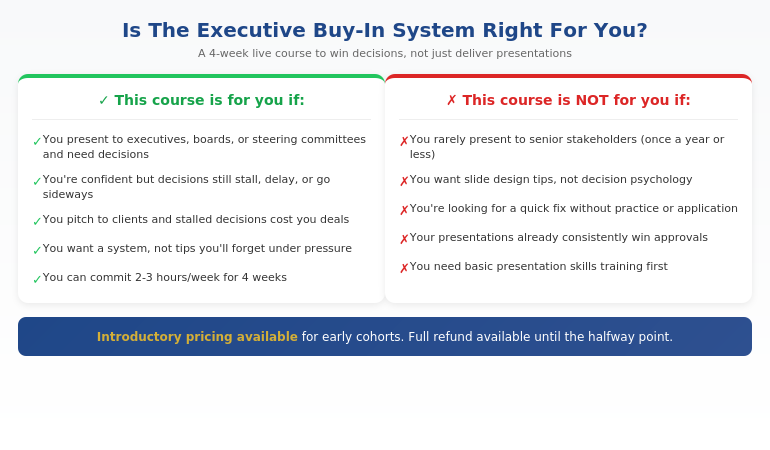
Is This System Right For You?

The Executive Buy-In Presentation System is designed for professionals who present when decisions matter:

Qualification chart showing who the Executive Buy-In Presentation System is designed for

If you recognised yourself in the left column, this system will change how your presentations land — and how often you hear “approved” instead of “let’s discuss further.”

⭐ Built on 25 years in corporate banking

The Executive Buy-In Presentation System is the structured framework developed across 25 years in corporate banking and 16 years coaching senior professionals across financial services, insurance, consulting, and technology. £499, lifetime access to materials.

What you get:

  • 7 self-paced modules covering psychology, structure, and delivery
  • Frameworks for stakeholder analysis and concern-mapping
  • Approaches for handling pushback with calm authority
  • Bonus Q&A calls (optional, fully recorded — watch back anytime)
  • Lifetime access to all materials

Explore the Buy-In System on Maven →

Self-paced with monthly cohort enrolment — new cohort opens every month.

Frequently Asked Questions

How is this different from presentation skills training?

This course doesn’t teach you how to present — it teaches you how to win decisions. Presentation skills courses focus on delivery, design, and communication. This course focuses on how executives actually decide, and how to structure your message so “yes” feels like the obvious choice. Presentation skills are the vehicle; winning decisions is the destination.

What if I’m already confident but decisions still stall?

This is exactly who the course is for. Confidence isn’t usually the problem — structure is. Many capable, confident presenters unknowingly trigger doubt through too much context, too much proof, or leading with the wrong information. If you’re confident but decisions still stall, get delayed, or don’t go your way, the issue is almost certainly structural, not personal.

How much time does the course require?

The Executive Buy-In Presentation System is self-paced — you set the pace. The video content totals around 4-5 hours, designed to be watched in focused 30-minute sessions between meetings. Most professionals complete the modules alongside their normal work. The frameworks are designed to save preparation time on every presentation thereafter.

Does this work across different industries?

Yes. The system applies across industries because it’s based on how senior people make decisions — not on specific content. Whether you’re in banking, consulting, tech, healthcare, or government, the psychology of executive decision-making is the same. If you present to people more senior than you, this system is relevant.

Get Weekly Executive Communication Insights

Frameworks and techniques for winning decisions — from 25 years in corporate banking.

Subscribe to The Winning Edge →

Your Next Step

The next time you present for a decision, try one thing differently: put your recommendation on slide 1.

Not after context. Not after options. Slide 1.

Then watch how the energy in the room changes. Executives lean in differently when they know what you’re proposing from the start.

That one shift won’t fix everything. But it will show you how much of the problem was structural all along.

P.S. If you’re making a presentation this week, check out the presentation habit that’s quietly killing careers — it’s related to the structural mistake we covered here.

P.P.S. If anxiety is part of your presentation challenge, I wrote about how to speak confidently in meetings — including the nervous system reset that helps even when stakes are high.

About Mary Beth Hazeldine
Owner & Managing Director of Winning Presentations. 25 years in corporate banking at JPMorgan Chase, PwC, RBS, and Commerzbank. Qualified clinical hypnotherapist. I’ve sat on both sides of the table — the nervous presenter and the senior decision-maker — and I teach what actually works to win the room.