

What 500+ Executive Presentations Taught Me About Getting Buy-In
I’ve reviewed over 500 executive presentations in my career — and most of them failed to get buy-in.
Not because the ideas were bad. Not because the data was wrong. These executive presentations failed because the presenter didn’t understand how executives actually make decisions.
After 25 years in corporate banking at JPMorgan Chase, PwC, Royal Bank of Scotland, and Commerzbank — followed by 16 years training professionals on executive presentations — I’ve identified the patterns that separate approved proposals from rejected ones.
Here’s what 500+ executive presentations taught me about getting buy-in. These same lessons helped one client secure £2M in funding and another turn a failing quarterly review into a promotion conversation.

Presenting a proposal to leadership in the next 30 days?
The Executive Slide System gives you the slide structures that put these buy-in principles into practice — 10 decision-ready templates with AI prompt cards to build them in under an hour.
Need a Faster Way to Build Executive Slides?
Most executives spend hours on slides that still miss the mark. The Executive Slide System gives you a structured framework for building slides that land with senior audiences — without starting from scratch every time.
Lesson 1: Executive Presentations Are Decided in the First 2 Minutes
Most presenters build to a conclusion. They set up context, walk through analysis, address objections, and finally — on slide 15 — reveal the recommendation.
By slide 15, the executive has already decided. Usually “no” or “I need to think about it” — which is also “no.”
The executive presentations that get buy-in flip this structure. They open with the recommendation, then provide supporting evidence. The first two minutes tell leadership exactly what you want and why they should approve it.
The pattern for executive presentations: Lead with your ask. If the answer is yes, you’ve succeeded in two minutes. If they have questions, the rest of your presentation answers them. Either way, you’re in control.
What I’ve seen work: “I’m requesting £500K for platform modernisation. Here’s why it’s urgent: our current system fails 3x per quarter, costing us £200K each incident. The investment pays back in 8 months.”
That’s 30 seconds. The executive now knows exactly what’s being asked and has a reason to keep listening to your executive presentation.
Lesson 2: “What If We Do Nothing?” Wins Buy-In in Executive Presentations
Most executive presentations focus on benefits. Here’s what we’ll gain, here’s how great it will be, here’s the ROI.
Benefits are abstract. Risk is concrete.
The executive presentations that consistently get buy-in include the cost of inaction. Not as a scare tactic — as an honest assessment of what happens if leadership says no.
The pattern: Every recommendation in your executive presentations should include a “do nothing” option with explicit consequences. Make it clear that saying no is also a decision with costs.
What I’ve seen work: “If we don’t address this now, we’ll face mandatory compliance remediation in Q3 — estimated at 3x the cost of proactive investment, plus regulatory scrutiny.”
Executives are responsible for risk management. When your executive presentations show them the risk of inaction, you’re speaking their language.
⭐ Maven Flagship — Executive Buy-In System
Turn reluctant stakeholders into active advocates
The Executive Buy-In Presentation System is a self-paced programme with 7 modules. Enrol with this month’s cohort, work through at your own pace — optional live Q&A calls are fully recorded.
£499, lifetime access to materials.
Lesson 3: One Decision Per Executive Presentation
I’ve watched presenters ask for budget approval, headcount, timeline extension, and strategic endorsement — all in one meeting. They got none of it.
Multiple asks in executive presentations create multiple opportunities to say no. And when executives face decision fatigue, the default is to defer everything.
The pattern: Identify the single most important decision you need. Build your entire executive presentation around getting that one yes. Everything else is a follow-up meeting.
What I’ve seen work: A director needed both budget and headcount. Instead of asking for both in her executive presentation, she requested budget approval first: “I’m asking for £300K for Phase 1. If approved, I’ll return next month with a staffing plan for Phase 2.”
She got the budget. The headcount conversation was easier because she’d already established momentum with her first executive presentation.
Want executive presentation templates built for buy-in?
I’ve built these lessons into The Executive Slide System — 10 PowerPoint templates with structures designed for approval. Designed for executives who need approval for proposals that matter.
Lesson 4: Executive Presentations Need Patterns, Not Promises
Anyone can promise results. Executive presentations that get buy-in show evidence — specifically, evidence that you’ve delivered before.
This doesn’t mean bragging in your executive presentations. It means referencing past performance as a predictor of future success.
The pattern: Before asking for something new in executive presentations, remind leadership of something you’ve already delivered. Create a pattern of reliability, then position your new request as the next step in that pattern.
What I’ve seen work: “In Q2, we launched the CRM integration on time and 10% under budget. In Q3, we delivered the mobile app ahead of schedule. This request continues that track record — same team, same methodology, higher impact.”
You’re not asking them to take a leap of faith with your executive presentation. You’re asking them to continue backing a winning approach.
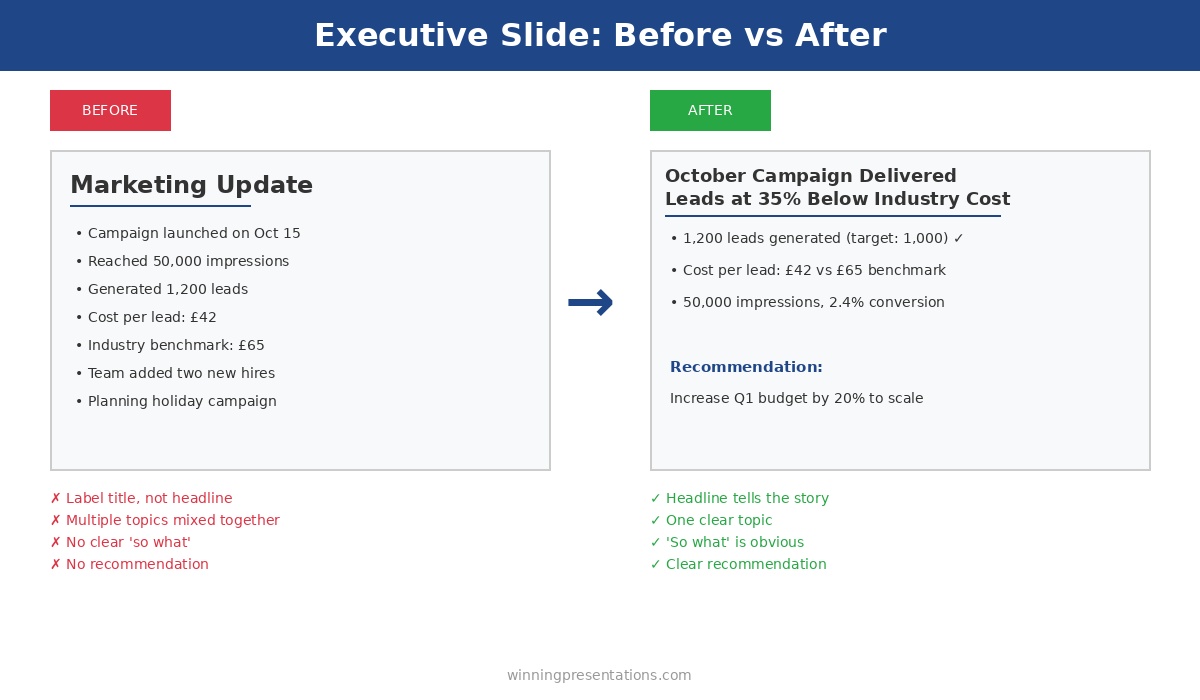
The structure of a proposal matters as much as its content.
The Executive Slide System gives you 10 decision-first templates — each structured around the buy-in principles above.
Executive Slide System — £39, instant access.
Designed for executives who present where decisions are made.
If you present to senior leadership regularly, the Executive Slide System gives you a structured framework for building slides that land — without starting from scratch each time.
Lesson 5: Address the Elephant in Your Executive Presentations
Every executive presentation has a weakness. A risk you’re downplaying, an assumption that might not hold, a question you’re hoping nobody asks.
Executives always find it. And when they do, your credibility takes a hit.
The executive presentations that get buy-in address the elephant proactively. They name the biggest concern and explain how it’s being managed — before anyone asks.
The pattern: Identify your executive presentation’s weakest point. Address it directly, early, with a clear mitigation plan. Turn a potential objection into evidence of thorough thinking.
What I’ve seen work: “The obvious question is timeline risk — we’re proposing an aggressive 6-month delivery. Here’s why we’re confident: we’ve already completed the architecture design, secured the technical lead, and identified no dependencies on other teams. If we do hit delays, we have a descoped Phase 1 that still delivers 70% of the value.”
Now the executive doesn’t need to probe for weaknesses in your executive presentation. You’ve shown you already know them.
Lesson 6: Make Executive Presentations Easy to Approve
I’ve seen 80-slide executive presentations. I’ve never seen an 80-slide presentation get buy-in.
More information doesn’t build confidence. It builds confusion and delays. Executives want enough information to decide, not all the information available in your executive presentation.
The pattern: For every piece of information in your executive presentations, ask: does this help them decide yes or no? If it’s “interesting background” or “might be useful,” cut it. Save it for the appendix or follow-up questions.
What I’ve seen work: The best executive presentations I’ve reviewed were 6-10 slides. They respected the audience’s time and focused relentlessly on the decision at hand. Executives could say yes in 15 minutes instead of deferring a 60-minute data dump.
The test: If your executive presentation takes more than 20 minutes to deliver, it’s too long. Cut until it hurts, then cut again.
Building an executive presentation this week?
The Executive Slide System includes 10 templates for every executive presentation type — QBRs, budget requests, board openers, strategic recommendations — plus 30 AI prompts to generate content in minutes. One client used the budget request template to secure approval in a single 15-minute meeting.
Lesson 7: Buy-In for Executive Presentations Starts Before the Meeting
This is the lesson that took me longest to learn: executive presentations that get buy-in usually have buy-in before the presentation happens.
The meeting is confirmation, not persuasion.
Experienced presenters socialise their ideas before the formal pitch. They have one-on-ones with key stakeholders, gather input that shapes the proposal, and build alignment so the executive presentation is a formality.
The pattern: Before any high-stakes executive presentation, identify the 2-3 people whose support you need. Meet with them individually. Ask for their input. Incorporate their feedback. When you present, they’re already invested in your success.
What I’ve seen work: A VP preparing a board presentation spent two weeks in pre-meetings. By the time he delivered his executive presentation, every board member had seen an early version and provided feedback. The presentation felt like a collaborative conclusion, not a surprise pitch. Approved unanimously.
The Meta-Lesson About Executive Presentations
Here’s what all 500+ executive presentations taught me: the audience isn’t “executives.” The audience is specific people with specific concerns, priorities, and decision-making styles.
A CFO reviewing executive presentations cares about ROI and risk. A CEO cares about strategy and competitive position. A board cares about governance and shareholder value. A COO cares about execution and resources.
The executive presentations that get buy-in are tailored to the actual people in the room — not a generic “leadership” audience.
The pattern: Before building any executive presentation, answer: Who exactly will be in the room? What do they each care about? What would make each of them say yes? Then build slides that address those specific concerns.
The Executive Presentation Buy-In Checklist
Before your next executive presentation, run through these questions:
Executive Presentation Buy-In Checklist
- ☐ Is my recommendation in the first 2 minutes?
- ☐ Have I shown the cost of doing nothing?
- ☐ Am I asking for ONE decision only?
- ☐ Have I referenced past success as evidence?
- ☐ Have I addressed the biggest objection proactively?
- ☐ Is the executive presentation under 20 minutes?
- ☐ Have I socialised this with key stakeholders beforehand?
- ☐ Have I tailored content to the specific people in the room?
If you can’t check every box, your executive presentation isn’t ready. Keep working until you can.
Structure That Commands Attention
Structure Your Next Buy-In Presentation in 30 Minutes
The Executive Slide System (£39) gives you 17 tested structures including the buy-in deck template — pre-built to address the objections senior audiences raise before you reach slide three.
FAQs About Getting Buy-In on Executive Presentations
What if I don’t know who’ll be in the room for my executive presentation?
Ask. Email the meeting organiser: “Can you confirm who’ll be attending? I want to make sure I address the right priorities.” This also signals professionalism and preparation for your executive presentation.
How do I get pre-meetings with senior executives?
Position it as seeking input, not pitching: “I’m developing a proposal for [topic] and would value your perspective before the formal executive presentation. Can I have 15 minutes to walk you through the approach?” Most executives appreciate being consulted.
What if my executive presentation genuinely needs 30+ slides?
It doesn’t. You have 30+ slides of content — that’s different. Distill it to 10 slides for your executive presentation, put the rest in an appendix for reference, and offer to send the full deck afterward for anyone who wants detail.
How do I address objections without sounding defensive in executive presentations?
Frame it as thorough thinking, not defensiveness: “The question I’d ask if I were in your seat is [objection]. Here’s how we’re managing that risk…” You’re showing you’ve anticipated concerns in your executive presentation, not responding to criticism.
Your Next Executive Presentation
You probably have an executive presentation coming up. A budget request, a project proposal, a quarterly review, a board update.
Before you build another slide, step back and ask:
- What’s the one decision I need from this executive presentation?
- Who specifically will decide?
- What would make them say yes?
- What’s the biggest reason they’d say no — and how do I address it?
Answer those questions first. Then build your executive presentation. That order matters.
Executive presentations aren’t about impressing people with your analysis. They’re about making it easy for smart, busy people to say yes.
Make it easy, and they will

Get Templates for Executive Presentations That Get Buy-In
These lessons are built into The Executive Slide System — 10 PowerPoint templates structured for approval, plus 30 AI prompts to generate your content in minutes.
Designed for executives who present where decisions are made. One client used these to turn a rejected proposal into a funded initiative.
Executive Slide System — £39, instant access.
10 templates • 30 AI prompts • Instant download • 30-day guarantee
Related: How to Create Executive Presentations That Get Approved in 2025 — the complete guide covering all 10 executive presentation types with structures and frameworks for buy-in.
📧 The Winning Edge Newsletter
Weekly insights on executive presentations, QBR strategies, and what’s actually working in boardrooms right now.