The executive showed me her AI-generated presentation with a mix of pride and confusion. “It created this in 30 seconds,” she said. “But something’s off. I can’t use this.”
She was right. The slides were structurally sound. The content was accurate. The formatting was clean. And yet the whole thing felt generic, lifeless, obviously machine-made.
Her mistake wasn’t using AI. It was stopping after the first output.
I’ve watched this pattern hundreds of times since AI presentation tools became mainstream: professionals generate a deck, feel vaguely disappointed, and either abandon AI entirely or present something mediocre because “at least it saved time.”
Both responses miss the point. AI isn’t meant to produce finished work on the first try. It’s meant to produce raw material that you shape through iteration. The magic happens in the editing loop — the systematic process of refining AI output until it sounds like you, fits your audience, and makes the point you actually need to make.
Here’s how that loop works, and why skipping it guarantees underwhelming results.
In this article:
Quick answer: AI presentation tools generate competent first drafts, not finished products. The editing loop — Generate → Evaluate → Refine → Elevate — transforms generic output into executive-ready content. Most professionals skip this loop entirely, which is why most AI presentations feel obviously AI-generated. Plan for 3-5 iteration cycles on any presentation that matters.
📋 Copy/Paste: The 4-Stage Editing Loop Prompts
Stage 1 (Generate): “Create a [X]-slide presentation on [topic] for [audience]. Include [key sections].”
Stage 2 (Evaluate): “Review this output. Identify: (1) generic phrases, (2) missing context, (3) weak recommendations, (4) sections a skeptic would challenge.”
Stage 3 (Refine): “Rewrite [specific section] to include [specific data/context]. Remove hedging. State the recommendation directly.”
Stage 4 (Elevate): [Manual] Add your opening story, the objection you know they’ll raise, and adjust the tone to match how you actually speak.
Use these prompts in sequence. Repeat Stage 3 until the output passes the “would I say this?” test.
Why AI’s First Output Always Disappoints
AI generates presentations by predicting what words and structures typically follow your prompt. This statistical approach produces content that is, by definition, average. It’s the most likely output given your input — which means it’s also the most generic.
Here’s what that looks like in practice:
The structure is predictable. AI defaults to formats it’s seen most often: intro → three points → conclusion. Agenda slide → content → summary. This isn’t wrong, but it’s not differentiated either.
The language is safe. AI avoids strong positions because strong positions are statistically riskier. You get “consider implementing” instead of “do this.” You get “may provide benefits” instead of “will increase revenue.”
The specifics are missing. AI doesn’t know your company’s situation, your audience’s concerns, or what happened in last week’s meeting. It fills these gaps with generalities that signal “I don’t actually know your context.”
The voice is neutral. AI has no personality because personality requires consistent preferences, and AI doesn’t have those. Every output sounds like every other output — competent but anonymous.
None of these are flaws in the technology. They’re features of how language models work. Understanding this is the first step toward using AI effectively.
For more on why AI presentations fall flat, see my article on why AI presentations fail.
The 4-Stage Editing Loop
The editing loop transforms AI output from generic to specific, from safe to compelling, from anonymous to unmistakably yours. Here’s how it works:
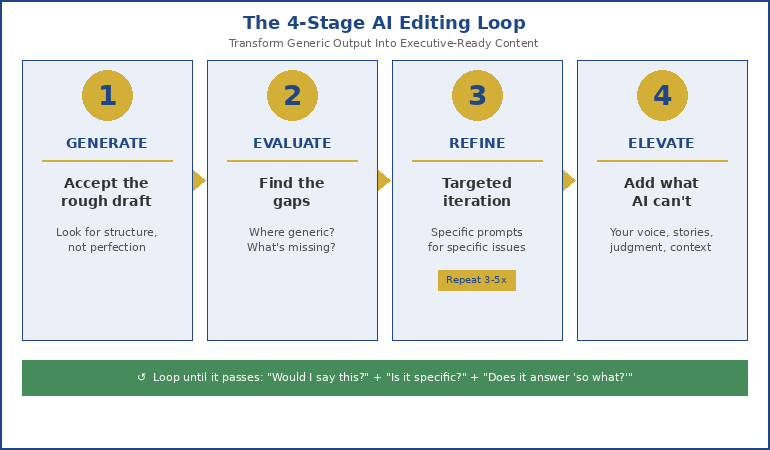
Stage 1: Generate (Accept the Rough Draft)
Your first prompt produces raw material, not a finished product. Treat it accordingly.
At this stage, you’re looking for structural bones: Does the overall flow make sense? Are the main sections in a logical order? Is the scope roughly right?
Don’t evaluate language, tone, or specifics yet. That comes later. Right now, you just need something to work with.
Stage 2: Evaluate (Find the Gaps)
Now examine the output with specific questions:
- Where is it generic when it should be specific?
- Where does it hedge when it should assert?
- What context is missing that your audience needs?
- Which sections feel thin or underdeveloped?
- What would a skeptical executive challenge?
Write down your findings. You’ll use them in the next stage.
Stage 3: Refine (Targeted Iteration)
This is where most people go wrong. They either accept the first output or start over from scratch. Neither works.
Instead, iterate on specific elements:
“The executive summary is too vague. Rewrite it to lead with our 23% cost reduction and include the three-month implementation timeline.”
“Section 2 hedges too much. Make the recommendation more direct. We ARE recommending Option B, not ‘suggesting it might be worth considering.'”
“Add context about the Q3 budget discussions. The CFO needs to see how this connects to her stated priorities.”
Each refinement prompt targets one issue. Stack them until the output matches your requirements.
Stage 4: Elevate (Add What AI Can’t)
AI can’t add your judgment, your stories, your voice. This final stage is where you inject what makes the presentation yours:
- Your opening anecdote from the last board meeting
- The specific objection you know the CTO will raise
- The phrase your CEO always uses when she’s aligned
- Your perspective on why this matters beyond the numbers
These human elements transform competent AI output into compelling communication.
🎯 Master the AI Editing Loop
AI-Enhanced Presentation Mastery teaches the complete iteration system — from first prompt to final polish. You’ll learn exactly how to evaluate AI output, which refinement prompts work for different problems, and how to inject your expertise into every slide.
- The 4-stage editing loop with real examples
- 50+ refinement prompts for common issues
- Quality checkpoints that catch AI weaknesses
- Live Q&A sessions for your specific challenges
Join AI-Enhanced Presentation Mastery →
Self-study modules you complete at your own pace, plus live Q&A calls for direct feedback.
Iteration Prompts That Actually Work
Generic refinement requests produce generic improvements. Here are specific prompts that solve specific problems:
For vague content:
“Replace [general statement] with specific data from [source]. Include the exact percentage and timeframe.”
For weak recommendations:
“Strengthen the recommendation in section X. Remove hedging language. State clearly: we recommend [specific action] because [specific reason].”
For missing context:
“Add a paragraph connecting this proposal to [recent event/discussion]. Reference the specific concern [stakeholder] raised about [topic].”
For bland openings:
“Rewrite the opening slide to start with the outcome, not the process. Lead with what the audience gains, not what we did.”
For generic slide titles:
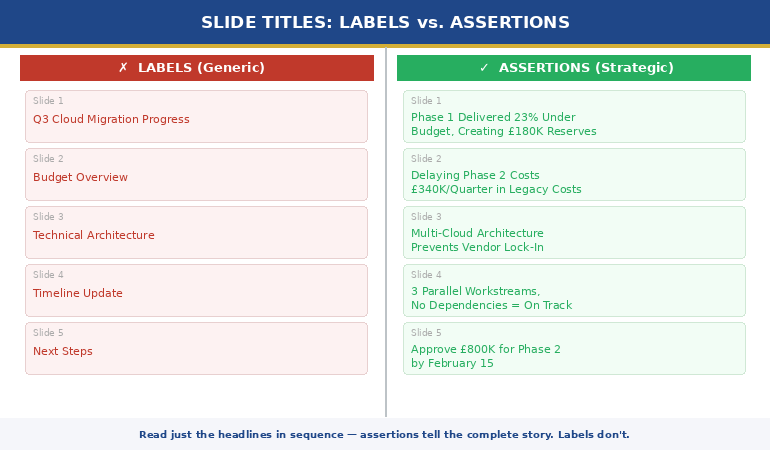
“Replace ‘Overview’ with a title that states the key point. Replace ‘Analysis’ with what the analysis concluded. Every title should be a complete thought.”
For corporate-speak:
“Simplify the language in section X. Remove jargon. Write as if explaining to an intelligent person outside our industry.”
For a complete AI presentation workflow, see my guide on AI-Enhanced Presentation Mastery.
How to Know When You’re Done
The editing loop can continue indefinitely. At some point, you need to stop. Here’s how to know when:
The “would I say this?” test.
Read each slide aloud. If any sentence sounds like something you’d never actually say, it needs another iteration. When everything sounds like you wrote it, you’re close.
The specificity check.
Count the generic phrases: “various stakeholders,” “multiple benefits,” “significant improvement.” Each one represents a gap. When you can’t find any, you’re done with refinement.
The skeptic test.
Imagine your toughest audience member reading each slide. What would they challenge? What would make them roll their eyes? Address those points, or acknowledge them if they can’t be fully addressed.
The “so what?” filter.
After each major point, ask “so what?” If the answer isn’t obvious from the content, add it. When every slide answers its own “so what,” you’re done.
The time-value calculation.
Additional iterations have diminishing returns. If an iteration improves the presentation by less than the time it takes, stop. Good enough on time beats perfect too late.
For more on making AI slides feel less generic, see my article on why AI-generated slides look generic.
What’s in AI-Enhanced Presentation Mastery: The complete 4-stage editing loop with templates, 50+ refinement prompts organised by problem type, quality checkpoints that catch AI weaknesses, and real examples from executive presentations. Self-paced modules plus live Q&A sessions for direct feedback.
The Editing Loop in Practice
Here’s what a real iteration sequence looks like:
First prompt: “Create a 10-slide presentation recommending we expand into the German market.”
First output: Generic market overview, safe recommendation, no specifics about our company or situation.
Iteration 1: “Add specific data: our current European revenue (€4.2M), German market size (€890M), and our three main competitors there.”
Iteration 2: “Strengthen the recommendation. We ARE recommending Germany. Remove ‘might consider’ and ‘could potentially.’ State the investment required (€1.2M) and expected ROI (18 months to break-even).”
Iteration 3: “Add the risk section the CFO will ask about. Include currency exposure, regulatory requirements, and the contingency if growth is slower than projected.”
Iteration 4: “Rewrite slide titles. Replace ‘Market Analysis’ with ‘Germany: €890M Market, 3 Vulnerable Competitors.’ Replace ‘Recommendation’ with ‘Invest €1.2M, Break Even in 18 Months.'”
Final elevation (manual): Add opening anecdote about the German distributor who approached us at the trade show. Add the CEO’s quote about European expansion from the last town hall. Adjust tone to match how I actually present.
Total time: 45 minutes. Result: A presentation that sounds like me, addresses my specific situation, and anticipates my audience’s concerns. That’s the editing loop in action.
The AI-Enhanced Presentation Mastery course includes dozens of examples like this, showing the full iteration sequence from generic first draft to polished final product.
If you want the complete system — the full prompt library, the evaluation frameworks, and live feedback on your specific presentations — it’s all in one place.
Frequently Asked Questions
How many iteration cycles should I plan for?
For important presentations, plan for 3-5 cycles. Quick internal updates might need only 1-2. The stakes of the presentation should determine your iteration investment. A board presentation deserves more refinement than a weekly team update.
Won’t all this iteration defeat the time savings of using AI?
Even with 4-5 iteration cycles, you’re typically faster than creating from scratch — and the quality is higher because AI handles the structural work while you focus on refinement. The time savings come from not staring at a blank page, not from accepting mediocre output.
Can I use the same refinement prompts for every presentation?
Some prompts work universally (strengthen recommendations, add specifics, improve titles). Others are situation-specific. Build a personal library of prompts that solve problems you encounter repeatedly, then adapt them for each presentation.
What if the AI keeps giving me the same generic output despite iteration?
This usually means your refinement prompts are too vague. Instead of “make it better,” specify exactly what’s wrong and exactly what you want. “Replace the generic market size statement with our internal estimate of £4.2M addressable market in Q1” gets better results than “add more specific data.”
📧 Weekly AI presentation insights: Subscribe to The Winning Edge →
Related: AI can help you structure difficult messages — like presenting cost cuts without destroying trust. And if presentation anxiety affects your delivery regardless of how good your slides are, see why your nervous system remembers that awful presentation from 2019.
About the Author
Mary Beth Hazeldine is the Owner & Managing Director of Winning Presentations. With 24 years in corporate banking and consulting, she has guided senior professionals through thousands of high-stakes presentations — and now teaches them how to leverage AI without sacrificing quality or authenticity.
Her AI-Enhanced Presentation Mastery course on Maven combines practical AI workflows with the executive communication standards she developed over two decades of corporate experience.