

Virtual Presentation Energy: How to Project Confidence Through a Camera
Quick Answer
Virtual presentation energy drops because the camera compresses physical presence and eliminates the environmental cues that naturally regulate your nervous system. The fixes are specific: eye-level camera, slight vocal projection, deliberate pause technique, and a two-minute physical reset before you open the call. Fatigue and flatness on camera are not personality traits. They are physiological responses to a format that most executives have never been trained to manage.
In This Article
Rafaela had been presenting to senior committees for eleven years. Boards, excos, client panels — none of them rattled her. She knew how to read a room, how to use space, how to pitch her voice to the back of a boardroom. She had presence.
Then every meeting moved online.
She noticed it in the feedback first. “You seemed a little flat.” “Hard to gauge your energy.” “Felt like you were reading rather than presenting.” She was doing exactly what she had always done. But through a camera, her performance was landing differently. What had been authoritative in a room was reading as subdued on screen. The techniques that had built her reputation over a decade were not transferring.
This is one of the least-discussed challenges facing senior executives in a permanent hybrid environment. Presence in a physical room is partly about physical scale, proximity, movement, and the ambient energy of being in a space with other people. None of those elements translate through a camera. What reads as composed and measured in a boardroom can read as flat and disengaged on a laptop screen. The format changes the physics of presence, and most executives have not adapted their technique to account for it.
Struggling with physical symptoms that affect your on-screen presence?
Calm Under Pressure is designed for the in-the-moment physical symptoms that flatten energy on camera: voice tension, shallow breathing, and the freeze response that makes you read as flat rather than composed.
Why Executive Energy Drops on Camera
Understanding why your energy drops on camera is the first step to correcting it, because most of the fixes are specific to the cause rather than general performance adjustments.
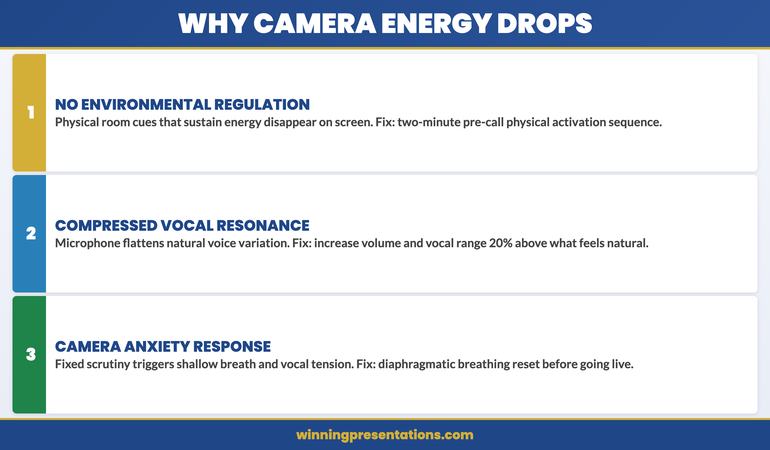
The primary factor is the absence of environmental regulation. In a physical room, your nervous system receives constant environmental feedback: the presence of other people, ambient sound, spatial awareness, eye contact with a distributed audience, the physical sensation of standing or moving. This feedback keeps your nervous system engaged and your energy regulated without any conscious effort. On camera, all of that disappears. You are looking at a two-dimensional screen in a static position, with no ambient input, no physical connection to an audience, and no spatial feedback. The result is a mild but significant suppression of the neural systems that generate what audiences perceive as presence and energy.
The second factor is vocal feedback. In a room, your voice has physical resonance — you can feel it in your chest, hear it reflected off surfaces, and instinctively calibrate it to the space. Through a microphone, that resonance is compressed and flattened. Executives who project naturally in a room tend to under-project on camera because the acoustic environment no longer cues them to increase volume and variation. The result is a delivery that sounds monotone and low-energy to the audience, even when the speaker feels they are presenting at normal intensity.
The third factor is the anxiety response that camera visibility triggers in many presenters. Being watched through a camera — particularly in a static frame where there is nowhere to move — activates a mild threat response in the nervous system. This manifests as vocal tension, shortened breath, reduced facial expressiveness, and a tendency toward faster speech and fewer pauses. The physical symptoms are subtle but visible to an audience. They read not as anxiety but as flatness, disengagement, or lack of confidence.
The Physical Setup That Protects Your Presence
Your physical setup is not peripheral to your virtual presence. It is the foundation of it. Three elements matter most.
Camera height. The camera should be at or slightly above eye level. When the camera is below eye level — as it is on a standard laptop sitting on a desk — you are looking slightly down at the screen throughout the presentation. This creates a subtle subordinate posture that communicates deference rather than authority. Raising the camera to eye level by using a monitor riser, an external webcam on a stand, or a laptop on books is a five-minute adjustment that materially changes how your authority reads to the audience. It also naturally lifts your chin and opens your posture, which improves vocal resonance immediately.
Lighting direction. Light source should be in front of you, not behind or to the side. A window behind you creates a silhouette. A window to one side creates uneven shadows that make facial expressions harder to read. A soft light source in front of you — a window, a lamp, or a ring light — illuminates your face evenly and makes expression visible at small screen sizes. This matters because facial expression is a significant part of how presence and energy are read by a virtual audience, and it is lost entirely when the lighting is wrong.
Body position. Sit or stand slightly forward, with shoulders back and both feet flat on the floor if sitting. Leaning back into a chair collapses your posture and compresses your diaphragm, which restricts vocal projection and reads as disengagement. Sitting forward with upright posture is the virtual equivalent of standing up to present — it activates the same physical positioning that generates presence in a room.
Vocal Projection and Pace in a Virtual Format
The single most effective vocal adjustment for virtual presentations is increasing both your volume and your vocal variation by approximately 20% above what feels natural. This counteracts the compression effect of microphone audio and restores the dynamic range that audiences associate with energy and confidence.
Pace is the other critical variable. The natural reaction to virtual anxiety is to speak faster — it feels like it fills the silence and reduces the exposure time under the camera’s gaze. In practice, faster speech on camera reads as nervous and difficult to follow. Deliberately slowing your pace by around 15% below your natural speaking rate, and pausing for a full beat between major points, signals authority and control. Pauses that feel uncomfortably long to the speaker are usually comfortable and useful for the audience.
Vocal variation — the contrast between higher and lower pitch, louder and quieter moments — is the element that prevents a virtual presentation from sounding like a recording. Executives who use vocal monotone in virtual settings are not disengaged; they are simply not aware that the audio compression of a microphone strips the natural variation out of their voice unless they consciously exaggerate it. The fix is not to perform — it is to recalibrate upward to compensate for what the technology takes away.
The Two-Minute Pre-Call Reset
A two-minute physiological reset before a virtual presentation is the single highest-return investment in on-screen energy. The purpose is to shift your nervous system out of the low-arousal, slightly suppressed state that comes from sitting in front of a screen into the activated, regulated state that generates presence.
The sequence has four elements. First, stand up and take three deep breaths that fully expand the diaphragm — you should feel your belly expand on the inhale. This increases oxygen levels and reduces the shallow-breath pattern that compresses vocal energy. Second, do 20 seconds of light physical movement — shaking out your hands, rolling your shoulders, or briefly walking around. This activates the same neural pathways that regulate energy in a physical presentation environment. Third, say two or three sentences aloud at slightly above your natural volume, as if warming up your voice before a physical presentation. This recalibrates your vocal projection before the camera is live. Fourth, check your camera angle, lighting, and posture, and sit forward into your speaking position before you open the call.
This sequence takes less than two minutes and has a measurable effect on how you present in the first five minutes of a virtual meeting — which is when first impressions are formed and when energy most often drops for executives who have moved directly from a screen-reading task to a live presentation.
Manage the Physical Symptoms That Flatten Your Camera Presence
Calm Under Pressure — £19.99, instant access — is designed for the in-the-moment physical symptoms that undermine virtual presence: voice tension, shallow breathing, and the physical freeze that makes you read as flat rather than authoritative on screen.
- 60-second resets for vocal tension, shallow breathing, and physical freeze
- Pre-call activation sequence to shift your nervous system into presentation state
- In-the-moment physical symptom management for live virtual meetings
- Techniques for sustaining energy across longer remote presentations
Designed for executives whose physical symptoms are affecting their authority on screen.
Camera Eye Contact and Why Most Executives Get This Wrong
Eye contact is one of the most powerful signals of authority and engagement in a face-to-face presentation. On camera, most executives manage eye contact in a way that does the opposite of what they intend.
The common pattern is to look at the gallery view of faces on screen while speaking. This feels natural — you are looking at your audience. But from the audience’s perspective, your eyes are consistently below the camera, which reads as looking down or looking away. The result is a delivery that feels like you are avoiding eye contact even when you are actively looking at the people you are presenting to.
True camera eye contact means looking directly into the lens of the camera, not at the screen. For most executives this feels deeply unnatural, because there is no face in the lens — only a small dot. The technique that makes this workable is to use the screen for context and reference, but return to the lens for the moments that matter: when you are making your key argument, when you are asking for a decision, and when you are addressing a specific individual directly.
A practical approach is to place a small sticker or arrow near the camera lens as a visual anchor point. This gives your eye contact a target that is physically distinct from the screen content, making it easier to return to the lens without losing your place in the presentation. It sounds like a small adjustment. For audience members, the difference between a presenter who looks at the camera and one who does not is the difference between feeling addressed and feeling observed.
For virtual presentations where you are sharing your screen or navigating between slides, the screen sharing presentation guide covers the specific techniques for maintaining audience engagement when your screen content is visible alongside your face. And for presentations that are recorded rather than delivered live, asynchronous presentation recording addresses the different energy challenge of presenting to a camera with no live audience at all.
The physical symptoms that create camera anxiety — vocal tension, shallow breathing, and the tightening that reduces expressiveness — are the same symptoms addressed by the techniques in managing presentation anxiety on remote and camera formats. If you find that the energy issue is rooted in anxiety rather than technique, that is the right starting point.
If the physical symptoms are consistent enough to affect your performance across multiple virtual meetings, the Calm Under Pressure programme is designed specifically for the in-the-moment physical reset techniques that restore vocal quality and physical presence before and during virtual presentations.
Sustaining Energy Across Longer Virtual Presentations
The energy management challenge in a 90-minute virtual presentation is fundamentally different from a 90-minute in-person one. In a physical setting, movement, spatial change, and human interaction naturally sustain your energy. Online, the static format creates a progressive drain that most presenters do not notice until the final 30 minutes — when their audience does.
Three techniques sustain virtual energy across longer presentations. First, build in structured interaction points every 15–20 minutes. This is not for audience engagement alone — it is to activate your own nervous system. The act of asking a question, reading responses, or managing a polling tool interrupts the static energy drain and forces a brief reset. Second, stand for the sections of the presentation where you need the highest energy — typically the opening, the key recommendation, and the close. Standing activates the same physiological engagement as presenting in a room and is audible in your vocal delivery even to an audience who cannot see your full body. Third, have a glass of water within reach and use a sip during a natural transition point as an opportunity to reset your posture and take a breath before moving to the next section.
Managing physical symptoms that undermine energy on camera is the focus of Calm Under Pressure. The programme provides 60-second reset techniques for vocal tension, shallow breathing, and the physical tightening that reduces expressiveness on screen — all of which are more manageable than most executives realise once they have the right tools.

Stop Physical Symptoms from Flattening Your Virtual Presence
Calm Under Pressure — £19.99, instant access — gives you the 60-second in-the-moment resets that stop physical symptoms before they affect your authority on screen.
- Vocal tension and shallow breathing reset techniques
- Pre-call activation sequence to shift your nervous system into presentation state
Designed for executives whose physical symptoms are undermining their authority in virtual settings.
Frequently Asked Questions
Why do I feel more anxious presenting virtually than in person?
Several factors compound in the virtual format. The absence of ambient environmental feedback — no physical room, no spatial awareness, no distributed audience — removes the neural regulation that naturally manages your anxiety in a physical setting. The camera creates a fixed point of scrutiny that activates a mild threat response in many presenters. And the audio delay and absence of real-time audience cues make it harder to regulate your delivery through the feedback loop you rely on in a room. These are physiological responses to a novel format, not character traits — and they are addressable with specific techniques.
Does virtual presentation anxiety get better with more experience?
For most executives, experience with virtual presentations reduces the novelty anxiety but does not automatically resolve the physiological energy problem. You can become very comfortable with the format and still present with flat energy, because the environmental regulation issue is structural rather than psychological. What does get better with deliberate practice is the specific technique adjustments: camera eye contact, vocal projection calibration, and the pre-call reset. These require conscious effort at first and become habitual with repetition.
Is a ring light worth the investment for virtual presentations?
For executives who present virtually more than twice a week, a modest ring light or softbox is worth the cost. The lighting difference is significant: it eliminates the patchy, shadow-heavy quality that most home and office setups produce and replaces it with even, flattering illumination that makes facial expression fully readable at small screen sizes. The psychological effect is also real — presenting in good light feels more like presenting in a professional environment, which activates the same performance mindset as a physical boardroom setting.
How do I handle the energy drain when I have four back-to-back virtual meetings in a day?
The two-minute pre-call reset is your primary tool for managing this. Between each call, stand up, move briefly, take three deep diaphragmatic breaths, and reset your camera position before the next call opens. This is the virtual equivalent of walking between meeting rooms. The movement and physiological reset interrupt the energy drain cycle that builds across consecutive static screen time. For days with a particularly high-stakes virtual presentation — such as a board or exco meeting late in a full schedule — schedule a 10-minute break before it, even if other meetings have to be shortened to create that buffer.
The Winning Edge — Weekly Executive Communication Insights
Each Thursday: one high-stakes communication technique, one real case study, one action you can apply before your next meeting.
About the Author
Mary Beth Hazeldine is the Owner & Managing Director of Winning Presentations. With 25 years of corporate banking experience at JPMorgan Chase, PwC, Royal Bank of Scotland, and Commerzbank, she has delivered high-stakes presentations in boardrooms across three continents.
A qualified clinical hypnotherapist and NLP practitioner, Mary Beth advises executives across financial services, healthcare, technology, and government on structuring presentations for high-stakes funding rounds and approvals.