24 Apr 2026

Budget Overrun Presentation: How to Brief Executives When Projects Exceed Costs

Quick Answer

A budget overrun presentation succeeds when it leads with the size of the problem, explains the cause clearly, and presents a credible recovery path — all before anyone asks. The executives in the room do not need surprise minimised. They need enough information to make a decision about what happens next, and they need that information structured so they can act on it quickly.

Tomás was ninety seconds into his project status update when the CFO held up one hand and said, “Skip to the number.”

The number was £1.4 million over the approved budget — a 22 per cent overrun on a digital transformation programme that had been running for nine months. Tomás had prepared twelve slides explaining the circumstances: regulatory changes, vendor delays, scope additions requested by the business. All of it true. All of it irrelevant to what happened next.

The CFO looked at the COO. The COO looked at the programme sponsor. Somebody asked whether the project should be paused. Tomás spent the next forty minutes defending a project he had originally been asked to update on. By the time the meeting ended, the overrun was no longer the problem. The problem was that nobody in the room trusted the forecast anymore.

That meeting could have gone differently. Not because the numbers were wrong, but because the presentation was built to explain the overrun rather than to manage it.

Presenting a budget overrun to executives this quarter?

The Executive Slide System gives you the templates and frameworks to structure difficult financial briefings — so executives get the information they need to make decisions, not a defensive explanation they have to interpret.

Explore the Executive Slide System →

Why Budget Overruns Destroy Trust Faster Than Missed Deadlines

A missed deadline is a schedule problem. A budget overrun is a judgement problem. That distinction matters because it changes how executives interpret everything else you say.

When a project runs late, the typical assumption is that something took longer than expected — complexity, dependencies, resource availability. Most senior leaders have seen this before and can contextualise it. When a project runs over budget, the assumption is different: somebody either underestimated the costs, failed to control spending, or didn’t flag the issue early enough. All three are judgement failures, and judgement failures erode trust in the person presenting — not just the project.

This is why budget overrun presentations require a fundamentally different approach from standard project updates. A project update says “here is what’s happening.” A budget overrun briefing says “here is what went wrong, here is why I didn’t catch it sooner, and here is exactly what I’m going to do about it.” The order of those three elements matters more than most presenters realise.

The second complication is that budget overruns compound. An executive hearing about a £1.4 million overrun is not just thinking about £1.4 million. They are thinking: “Is this the final number, or is there more coming?” If your presentation doesn’t explicitly address forecast reliability — why they should believe the new number — you will face that question regardless. Better to answer it before it’s asked.

Understanding how to handle budget variance presentations is useful context here, but a variance and an overrun are not the same conversation. A variance is expected movement. An overrun is a breach of the approved envelope. The stakes are higher, and the presentation needs to reflect that.

The Three-Part Structure for Overrun Briefings

Every effective budget overrun presentation follows the same logic, regardless of the size of the overrun or the industry. It answers three questions in a specific order, and the order is non-negotiable.

Part 1: The current position — exactly how much and exactly why

Open with the number. Not the background, not the context, not the history of the project — the number. State the approved budget, the current forecast, and the variance in both absolute and percentage terms. Then explain the cause in no more than three clear categories. For example: “The overrun is driven by three factors. Regulatory requirements added to the scope accounted for £620,000. Vendor repricing after the contract mid-point accounted for £480,000. Internal resource reallocation from a parallel programme accounted for the remaining £300,000.”

Notice what this does not include: excuses, qualifications, or phrases like “due to unforeseen circumstances.” Every circumstance was unforeseen until it happened. What executives need is specificity, not apology.

Part 2: Forecast reliability — why they should believe this number

This is the part most presenters skip, and it is the part that determines whether the room trusts you or not. After presenting the current variance, explicitly address the question: “Is this the final number?” Explain the methodology behind your revised forecast. Show which cost categories are now fixed (contracted, committed, or delivered) and which still carry variance risk. If you are 85 per cent through the project with 90 per cent of costs committed, say so — that is a materially different risk profile from being 60 per cent through with significant uncommitted spend.

The best presenters I have worked with include a simple confidence indicator on their forecast slide: a three-tier assessment showing which cost lines are firm, which are estimated, and which carry identified risk. This gives the CFO what they actually want — not certainty, but a clear view of where uncertainty remains.

Budget overrun presentation structure showing three parts: Current Position with variance breakdown, Forecast Reliability with confidence indicators, and Recovery Plan with timeline and cost controls

Part 3: The recovery plan — what you are going to do about it

End with a specific, time-bound recovery or completion plan. This is not a list of good intentions. It is a slide that shows: revised completion timeline, remaining cost envelope, specific cost controls you have already implemented, and the decision you need from the room (additional funding approval, scope reduction, or a hybrid approach). If the project can be de-scoped to bring costs back within the original budget, show what that looks like alongside the full-scope option. Let executives choose — do not choose for them.

Need to Brief Executives on a Budget Overrun This Month?

Structuring a budget overrun presentation requires a different framework from a standard update. The Executive Slide System — £39, instant access — gives you the templates designed for exactly these high-stakes financial conversations:

  • Slide templates for financial variance and recovery plan briefings
  • AI prompt cards to structure your cost analysis and forecast slides
  • Executive summary frameworks for delivering difficult financial news
  • Stakeholder-ready formats that separate the problem from the plan

Get the Executive Slide System →

Designed for executives presenting financial decisions to senior leadership.

The Recovery Slide That Restores Executive Confidence

If the overrun slide breaks trust, the recovery slide rebuilds it. And the difference between a weak recovery slide and a strong one is specificity.

A weak recovery slide says: “We will implement tighter cost controls and review the project plan to identify savings.” This tells executives nothing. It reads like a response drafted by someone who has not yet worked out what to do.

A strong recovery slide shows four things:

1. What has already changed

List the cost controls you have already implemented — not the ones you plan to implement. This signals competence and urgency. For example: “Weekly spend reviews introduced from 1 April. Vendor change request approval now requires programme director sign-off. Non-essential scope items paused pending revised business case.”

2. Revised cost forecast with committed versus estimated split

Show the remaining budget in two columns: committed costs (contracted, invoiced, or in progress) and estimated costs (subject to change). This gives the CFO the risk transparency they need without pretending you have perfect information.

3. Completion timeline — realistic, not optimistic

An overly optimistic revised timeline after a budget overrun is worse than an honest one. If the project will take three additional months, say so. Executives would rather hear a credible timeline once than an optimistic timeline twice.

4. The decision required

End the recovery slide with a clear ask. “We are requesting approval for an additional £1.4 million to complete the full scope, with revised completion in Q4. Alternative: reduce scope to phase one only, completing within the original budget by Q3.” Give the committee options and the information to choose between them. This is what presenting bad news to senior leadership actually looks like when done well — not minimising the problem, but framing the decision.

If you need templates for structuring these recovery conversations, the Executive Slide System includes frameworks for financial variance briefings and executive decision slides that separate the problem from the recommendation.

Language That Backfires When Presenting Bad Financial News

The words you use in a budget overrun presentation matter as much as the numbers. Certain phrases — often used with good intentions — consistently make the conversation harder, not easier.

“Due to unforeseen circumstances”

This phrase raises a question it was intended to answer: if the circumstances were foreseeable, why didn’t you foresee them? And if they genuinely weren’t foreseeable, then what does that say about the original budgeting process? Replace it with specificity. “Regulatory changes published in February added £620,000 to the compliance workstream” is a fact. “Due to unforeseen circumstances” is a defence.

“The project is slightly over budget”

Minimising language is the fastest way to lose credibility in these conversations. If the overrun is 22 per cent, it is not “slight.” Executives can read a spreadsheet. When the language doesn’t match the numbers, they stop trusting the language — and by extension, everything else in the presentation. State the variance clearly, without qualification. The CFO will form their own view on whether it’s significant.

“We’re confident the revised forecast will hold”

Confidence claims without evidence are meaningless after a budget overrun — because the original budget was presumably also presented with confidence. Replace the claim with the basis for it: “Ninety-one per cent of remaining costs are committed or contracted, leaving £180,000 of estimated spend still subject to variance.” That is a reason for confidence. The word “confident” on its own is not.

Budget overrun language comparison showing three phrases to avoid and their specific, credible replacements for executive financial briefings

This kind of precise, honest communication is also central to effective cost reduction presentations — the same executives who need transparency about overruns also need it when you’re proposing cuts.

Handling the Hardest Questions in a Budget Overrun Q&A

The Q&A after a budget overrun presentation is where trust is either rebuilt or permanently damaged. Preparation is everything.

“Why didn’t we know about this sooner?”

This is the most common question, and the only honest answer addresses the reporting cycle directly. If the overrun materialised gradually and was identified at the most recent forecast review, say so. If the overrun was identifiable earlier but was not escalated, acknowledge that and explain what has changed in the reporting process. The worst response is to imply that the overrun only just happened when the data suggests otherwise. Executives who discover a delayed escalation after the fact will never trust the project team’s reporting again.

“What’s the worst case from here?”

Always have a worst-case number prepared. If the revised forecast is £1.4 million over, what is the maximum credible exposure? If the answer is £1.8 million under a specific set of adverse conditions, say so, and explain what those conditions would need to be. A presenter who can articulate the worst case calmly and specifically signals that they understand the risk landscape. A presenter who hesitates signals that they haven’t thought about it.

“Should we stop the project?”

This question often sounds more aggressive than it is. In most cases, the person asking wants to hear a clear case for continuation — they want to be persuaded. Respond with the sunk cost reality, the cost of stopping versus completing, and the business value that still justifies the investment. If the honest answer is that stopping should be considered, say that too. A recommendation to pause or descope is more credible than a recommendation to continue at all costs.

See also how today’s related articles tackle adjacent challenges: adapting executive presentations for cross-cultural audiences, the career cost of avoiding presentations at work, and building the structured system for boardroom credibility.

Turn a Difficult Briefing Into a Clear Decision

The Executive Slide System — £39, instant access — includes the financial briefing and recovery plan templates that turn a budget overrun conversation into a structured decision meeting. Stop improvising these slides under pressure.

Get the Executive Slide System →

Designed for executives delivering financial updates to senior leadership.

Frequently Asked Questions

How do you open a budget overrun presentation?

Open with the number. State the approved budget, the current forecast, and the variance in both absolute and percentage terms. Do not start with background, context, or a project timeline — these delay the conversation the room actually needs to have. Once the number is on the table, explain the cause in three clear categories and then move to the recovery plan. Executives facing a budget overrun want to understand the scale of the problem before anything else.

Should you present a budget overrun before the full picture is clear?

Yes, with appropriate caveats. A delayed escalation is always worse than an early one with acknowledged uncertainty. Present what you know, flag what you don’t, and commit to a specific date for the revised forecast. The phrase “the current estimated overrun is £X, with a further £Y still under review — we will have the full picture by [date]” is far more effective than waiting until you have perfect numbers. Executives consistently prefer incomplete but timely information over complete but late information.

What should the recovery plan slide include?

Four elements: actions already taken to control costs, the revised cost forecast split between committed and estimated spend, a realistic completion timeline, and the specific decision you need from the room. The recovery plan is not a list of intentions — it is a concrete proposal with options. Always present at least two options (full scope with additional funding, or reduced scope within the original budget) so executives can make a choice rather than simply react to a problem.

The Winning Edge — Weekly Presentation Intelligence

Every Thursday, I share one framework, one real-world example, and one practical technique drawn from 24 years of presenting in boardrooms across three continents. Join The Winning Edge newsletter →

Not ready for the full system? Start here instead: download the free Executive Presentation Checklist — a one-page reference covering the structure, opening, and critical elements every executive financial briefing needs.

About the Author

Mary Beth Hazeldine is the Owner & Managing Director of Winning Presentations. With 24 years of corporate banking experience at JPMorgan Chase, PwC, Royal Bank of Scotland, and Commerzbank, she advises executives across financial services, healthcare, technology, and government on structuring presentations for high-stakes funding rounds and approvals.

Book a discovery call | View services

23 Apr 2026

Executive Buy-In Presentation Course Online: The Complete System for Securing Approval

Executive Buy-In Presentation Course Online: The Complete System for Securing Approval

If you’re searching for an executive buy-in presentation course online, you’ve likely experienced the frustration of pitching a strong idea only to have decision-makers hesitate, delay, or say no. The Maven Executive Buy-In Presentation System (£499) is a self-paced programme built specifically around this challenge — teaching you the complete framework for structuring, delivering, and closing presentations that secure executive approval. On this page, you’ll find exactly what the programme covers, who it’s designed for, and whether it’s the right investment for your situation.

Why Most Buy-In Presentations Fail at Senior Level

You’ve prepared thoroughly. Your data is solid. Your slides are polished. But fifteen minutes into the presentation, the CFO interrupts with a question about risk, the CEO shifts the conversation to a completely different priority, and suddenly your carefully structured argument is unravelling.

This isn’t a confidence problem — it’s a structural one. Most professionals build buy-in presentations the same way they build informational ones: lead with background, walk through the analysis, arrive at the recommendation. It feels logical. But executives don’t process information that way. They want the conclusion first, the commercial impact second, and the supporting detail only if they ask for it.

The result is a pattern that repeats across organisations: talented people with genuinely strong proposals failing to secure approval — not because the idea is weak, but because the presentation doesn’t match how senior leaders actually make decisions.

A Structured System for Securing Executive Approval

The Maven Executive Buy-In Presentation System approaches this problem differently from generic presentation courses. Rather than teaching broad communication skills and hoping you’ll adapt them to high-stakes settings, it focuses entirely on one outcome: getting decision-makers to say yes.

The programme is built around Mary Beth Hazeldine’s 25 years of experience working with executives in banking, professional services, and corporate leadership. It teaches you to structure your argument using a framework that mirrors how senior leaders actually evaluate proposals — starting with commercial impact, addressing objections before they’re raised, and building a decision path that reduces the perceived risk of saying yes.

This is a self-paced programme with new cohorts opening every month. You work through the material at your own speed, on your own schedule. Optional Q&A coaching calls with Mary Beth are available throughout — and every session is fully recorded, so you can watch back at any time if you can’t attend live. “Cohort” here simply means the enrolment period; there are no fixed deadlines, no mandatory attendance, and no pressure to keep up with a group schedule.

The programme covers the full arc of a buy-in presentation: from initial stakeholder analysis through to handling live objections in the room. Each module builds on the previous one, giving you a repeatable system you can apply to any proposal, any audience, any sector.

What You Get

  • Complete buy-in presentation framework — a step-by-step system for structuring proposals that match how executives actually make decisions
  • Stakeholder analysis templates — tools for mapping decision-makers, their priorities, and their likely objections before you present
  • Objection-handling methodology — techniques for addressing resistance in real time without losing control of the conversation
  • Executive narrative structures — proven formats for opening, building, and closing your argument with senior audiences
  • Optional coaching calls with Mary Beth — live Q&A sessions, fully recorded, available to watch back at any time
  • Lifetime access to all materials — revisit modules whenever you face a new buy-in challenge

£499 per seat — self-paced, join at your own pace.

Stop Losing Proposals You Should Be Winning

The difference between a rejected proposal and an approved one is rarely the idea — it’s how the idea is presented to decision-makers. The Maven Executive Buy-In Presentation System gives you the complete framework for structuring, delivering, and closing presentations that secure executive approval. Self-paced, with optional recorded coaching calls.

Explore the Programme → £499/seat

Enrolment is open — join at your own pace.

Is This Right for You?

This programme is designed for professionals who regularly present proposals, strategies, or business cases to senior decision-makers — and who need those presentations to result in approval, not just polite interest. It’s particularly suited to mid-to-senior professionals in corporate, financial services, or consulting environments where the stakes of a single presentation can be significant.

It is not a general public speaking course. If your primary goal is improving your delivery style, managing nerves, or becoming a better all-round communicator, this isn’t the right fit. This programme is narrowly focused on one outcome: getting executive buy-in. If that’s the challenge you face, it’s built precisely for you.

Frequently Asked Questions

Is the Executive Buy-In Presentation System worth £499?

Consider the cost of a single rejected proposal — the lost revenue, the delayed project, the months spent reworking and re-pitching. The programme pays for itself the first time you secure approval on a proposal that would previously have stalled. The framework is reusable across every buy-in presentation you give from that point forward.

How long does the programme take to complete?

The programme is entirely self-paced. Some participants work through it in a focused week; others spread it across a month alongside their day job. There are no deadlines and no mandatory sessions. You move at the speed that suits your schedule.

Do I need to attend live coaching sessions?

No. The Q&A coaching calls with Mary Beth are completely optional. Every session is fully recorded and available to watch back at any time. You get the full benefit of the programme whether you attend live or not.

What if I’m already experienced at presenting?

Experience presenting doesn’t always translate to experience securing buy-in. Many participants are confident, capable presenters who struggle specifically with the dynamics of executive decision-making — the interruptions, the objections, the political undercurrents. This programme addresses that specific gap, regardless of your general presentation skill level.

Can I apply this to different types of proposals?

Yes. The framework is designed to work across sectors and proposal types — budget approvals, strategic initiatives, technology investments, organisational change, new hires. The underlying principles of how executives evaluate and approve proposals remain consistent regardless of the subject matter.

What format is the programme delivered in?

All content is delivered online through the Maven platform. You get video lessons, frameworks, templates, and access to optional live Q&A calls (recorded). Everything is accessible from any device, and you retain lifetime access to the materials.

23 Apr 2026
Professional preparing a polished board presentation on a laptop in a modern office, focused and confident, editorial photography style

How to Improve Presentation Skills for Work: The Structured Approach That Actually Works

Quick Answer

To improve presentation skills for work you need three things working in parallel: a reliable structure so you stop rebuilding every deck from scratch, a system for managing delivery under pressure, and deliberate practice in conditions that match the real stakes of the presentations you need to give. Courses that only address one of these three typically produce temporary improvement. This guide covers all three.

Kwame had been told to “work on his presentation skills” three times in four years.

Once by a line manager after a client pitch that didn’t land. Once in a 360-degree feedback report after a town hall that received mixed responses. And once — most directly — by the head of his division, who told him in a performance review that he was “technically exceptional but needed to develop his executive presence in front of senior stakeholders.”

Each time, Kwame tried to act on the feedback. He watched YouTube videos. He read books. He took a one-day communication course his company funded. He rehearsed more. None of it moved the dial in the ways that mattered. He still rebuilt every presentation from scratch. He still felt exposed in Q&A. His delivery still tightened when the room was senior enough to matter.

The problem wasn’t effort. It was that the advice he was following addressed surface symptoms — delivery tips, confidence mantras, filler-word elimination — without addressing the underlying structural deficits that were producing them. When your presentations don’t have a reliable skeleton, you will always be improvising. And improvisation under pressure produces exactly the symptoms he was trying to fix.

Told to improve your presentation skills but not sure where to start?

The Executive Slide System gives you the structural foundation that removes the rebuilding problem — so you walk into every presentation with a proven framework rather than starting from a blank slide.

Explore the Executive Slide System →

Why Most Presentation Tips Don’t Stick

The internet contains thousands of presentation tips. Most of them are accurate. Almost none of them produce lasting change when applied in isolation, because they address individual behaviours without building the system those behaviours need to operate within.

“Make eye contact” is a useful tip. But if you’re using working memory to track your place in a poorly structured deck, your attention is on the slides — not your audience. The eye contact tip won’t help until the structural problem is resolved.

“Speak more slowly” is a useful tip. But if you’re anxious because you don’t know how to handle the Q&A that’s coming, you’ll speed up again as soon as a challenging question arrives. The delivery tip won’t help until the Q&A preparation problem is resolved.

“Use pauses instead of filler words” is a useful tip. But if your nervous system hasn’t been recalibrated to tolerate the silence, the pause will feel unbearable and you’ll default to “um” within seconds. The filler word tip won’t help until the nervous system regulation problem is resolved.

This is why presentation improvement initiatives that focus on tips — however accurate — tend to produce temporary results. You leave the workshop feeling equipped. You apply the tips in the next few presentations. Then the high-stakes presentation arrives, and you revert to baseline. Because tips are not a system. Presentation skills training that actually sticks has to address the underlying components, not just the surface behaviours.

The Three Components of Lasting Improvement

To improve presentation skills for work in a way that holds under pressure, you need to work on three components simultaneously. Each one reinforces the others. Fixing only one or two will produce partial improvement at best.

Component 1: Structure — a repeatable framework for building presentations that you don’t have to reinvent for every new context. Most professionals spend the majority of their preparation time trying to figure out what to put on each slide and in what order. A reliable structure eliminates this problem. You know the architecture; the work becomes filling it with the specific content for this presentation.

Component 2: Delivery under pressure — the ability to maintain composure, clarity, and authority when the stakes are high, the room is difficult, or the Q&A goes somewhere unexpected. This is a nervous system and rehearsal challenge, not a knowledge challenge. You can know your material completely and still feel exposed when a senior executive asks a question you hadn’t anticipated.

Component 3: Deliberate practice — a method of building skill that goes beyond simply giving more presentations and hoping improvement happens. Most people’s presentation skills plateau because they keep practising the same behaviours in the same conditions. Deliberate practice targets the specific gaps that matter and creates conditions that are challenging enough to produce genuine improvement.

The Structural Foundation Every Executive Presenter Needs

If you are rebuilding every presentation from scratch, you are solving the wrong problem before every meeting. The Executive Slide System — £39, instant access — gives you the structural framework that removes that problem permanently:

  • 22 PowerPoint templates covering the executive scenarios you actually encounter
  • 51 AI prompt cards to build content into any template fast
  • Scenario playbooks for board presentations, budget cases, client pitches, and more
  • Checklists that catch the structural errors that lose rooms before Q&A begins

Get the Executive Slide System →

Designed for professionals who need to present with confidence at executive and board level.

Structure: The Fastest Lever to Pull

Of the three components, structure produces the fastest visible improvement because it addresses the most common root cause of weak presentations: the absence of a clear decision logic.

Most professionals build presentations by gathering all the relevant information and then arranging it in a logical sequence. The problem with this approach is that “logical sequence” usually means chronological — how the situation developed, how the analysis was done, what was found, and then what is recommended. This is the right order for a research paper. It is the wrong order for an executive presentation.

Executive audiences want to know the recommendation first, the supporting evidence second, and the analysis third — if at all. This is the pyramid principle applied to presentations, and it runs counter to how most professionals were trained to present information at school and university. The result is that competent, well-prepared professionals produce presentations that bury the point, overwhelm the audience with context before the recommendation, and leave senior stakeholders frustrated even when the underlying thinking is excellent.

The executive presentation structure that works consistently follows this pattern: start with the conclusion, support it with three to four reasons or evidence points, and provide the detail as supporting material rather than the main event. This structure is learnable and replicable. Once you have internalised it, every presentation becomes easier to build — because you always know what goes where.

The templates in the Executive Slide System are built around this structure — so you don’t have to reinvent the architecture for each new presentation, you just load your content into a proven framework.

Delivery: What Changes When the Stakes Are Real

Good delivery in a low-stakes environment does not automatically transfer to good delivery in a high-stakes one. This surprises many professionals who feel confident in informal presentations but notice their delivery deteriorating when the room is more senior or the decision more significant.

What changes under pressure is the availability of cognitive resources. When the stakes feel high, part of your working memory is occupied by threat-monitoring — tracking how the room is responding, anticipating questions, managing any anxiety symptoms. This leaves less resource available for fluency, word retrieval, and the deliberate choices that constitute good delivery: eye contact, pacing, pausing.

Improving delivery under pressure therefore requires two parallel approaches. First, reduce the cognitive load of the presentation itself — a reliable structure and well-rehearsed content means less working memory is needed for the material, leaving more available for delivery choices. Second, reduce the baseline activation level of the threat response — through preparation, rehearsal in conditions that mimic the real stakes, and where necessary, nervous system regulation techniques that bring down arousal before you begin.

The specific presentation skills development work that addresses delivery under pressure includes: practising in front of people whose opinion you care about (not just in front of a mirror), recording yourself in full-dress rehearsals and watching it back, and simulating the most challenging Q&A scenarios you are likely to face. Each of these creates the conditions for genuine improvement rather than improvement in controlled practice environments that don’t translate.

Deliberate Practice: How to Improve Without More Presentations

Most professionals improve their presentation skills by giving presentations and hoping the experience produces improvement. This works to a point — you do get more comfortable with the mechanics of presenting — but it stops working once your skills plateau, because you are practising the same strengths in the same conditions.

Deliberate practice is different. It targets the specific gap, creates challenge that is slightly beyond your current capability, and builds in feedback so you can see whether you improved. Here is what deliberate practice looks like for the three most common development areas.

For structure: Take a presentation you have already given and rebuild it using a different structural logic — starting with the conclusion rather than the context, or organising by stakeholder concern rather than analytical sequence. Compare the two versions and assess which one a senior audience would find easier to act on. Repeat with three to five different past presentations until the new structure becomes your default approach.

For delivery under pressure: Ask a trusted colleague or manager to play the role of a challenging committee member during a rehearsal — specifically tasked with asking questions you won’t have prepared for, expressing scepticism, or cutting across your slides mid-sentence. This is uncomfortable. It is also the only way to build the skills you need for those conditions. Rehearsal against a supportive audience does not prepare you for a difficult one.

For verbal habits and fluency: Record two minutes of yourself explaining your current project — without notes — and watch it back with the sound off, then again with sound only. The visual and audio separation often reveals habits that are invisible when you’re watching both together. Identify the single most distracting habit and target it explicitly in the following week’s practice sessions, rather than trying to fix everything at once.

See today’s related articles: the specific verbal habits that damage executive credibility, how to present a pilot as a commercial case, and how to take a technology roadmap to the board.

Stop Rebuilding Presentations From Scratch

The Executive Slide System — £39, instant access — gives you the structural foundation, templates, and AI prompt cards that remove the biggest time drain in presentation preparation. Build better presentations faster, and walk in with a structure you trust.

Get the Executive Slide System →

Designed for professionals who need to present with confidence at executive and board level.

Frequently Asked Questions

What is the fastest way to improve presentation skills for work?

Fix your structure first. Most presentation problems — unclear delivery, loss of confidence in Q&A, audiences that seem disengaged — trace back to a structural problem: the presentation doesn’t make the recommendation early enough, or doesn’t organise information in the way a senior audience expects to receive it. Once the structure is reliable, delivery and confidence tend to follow because you’re spending less cognitive resource on figuring out where you are in the deck and more on connecting with the room.

Is it worth taking a presentation skills course for work?

It depends entirely on what the course addresses. A one-day communication workshop that covers tips and techniques without addressing structure, Q&A handling, or delivery under pressure will produce limited lasting improvement. Look for resources that provide a replicable structural framework — one you can use in your actual work presentations rather than a course-specific exercise — and that address the specific challenges you face: whether that is senior audience management, anxiety, Q&A, or deck construction. The most effective development work is targeted, not generic.

How do I improve presentation skills when I don’t present very often?

Treat every meeting where you speak as a presentation opportunity. The informal explanation you give in a team meeting, the project update you provide on a call, the recommendation you make in a one-to-one — these are all opportunities to practise structuring your thinking, leading with the conclusion, and managing the question that follows. Frequency of formal presentations is less important than the quality of practice. Deliberate work on structure and delivery in everyday professional communication builds the same capabilities you need in formal presentations.

Why do my presentation skills seem to get worse when I’m presenting to senior people?

Because senior audiences activate a stronger threat response, which takes cognitive resource away from fluency and delivery. This is a normal neurological pattern, not a sign of inadequate preparation. The mitigation is twofold: reduce the cognitive load of the presentation itself through structure and rehearsal, and reduce your baseline arousal level before you present through preparation rituals and, where needed, nervous system regulation techniques. Most professionals find that the combination of better structure and targeted rehearsal in high-stakes conditions produces measurable improvement within four to six presentations.

The Winning Edge — Weekly Presentation Intelligence

Every Thursday, one framework or technique for high-stakes presenting at work — drawn from 25 years of boardroom experience and 16 years training executives. Join The Winning Edge →

Not ready for the full system? Start here: download the free Executive Presentation Checklist — a one-page reference covering the structure and slides every work presentation needs before it goes to a senior audience.

About the Author

Mary Beth Hazeldine is the Owner & Managing Director of Winning Presentations. With 25 years of corporate banking experience at JPMorgan Chase, PwC, Royal Bank of Scotland, and Commerzbank, she advises executives across financial services, healthcare, technology, and government on structuring presentations for high-stakes funding rounds and approvals.

Book a discovery call | View services

23 Apr 2026
Female executive speaking confidently at a corporate conference with microphone, deliberate and authoritative delivery, editorial photography style

Filler Words in Presentations: The Hidden Habits Destroying Your Executive Credibility

Quick Answer

Filler words in presentations signal cognitive overload to your audience — even when you know your material cold. The fix is not “just slow down.” It’s replacing the nervous system habit that reaches for “um” or “you know” with a trained behaviour: the deliberate pause. Once you understand why filler words happen and practise the pause as a replacement, the habit shifts within two to three weeks of focused work.

I once watched a senior director lose a room in six minutes.

She was presenting a restructuring proposal to a group of eight executives — a high-stakes conversation she had prepared thoroughly for. Her analysis was rigorous. Her recommendation was sound. But within the first ninety seconds, something shifted in the room. Eyes moved to phones. The CFO started annotating his copy of the paper. The energy dropped.

I counted afterwards, from the recording: forty-one filler words in the first six minutes. Not just “um” and “uh” — though there were plenty of those. “Sort of.” “You know what I mean.” “Basically.” “Obviously.” “If that makes sense.” Each one a tiny signal of uncertainty, stacking up into a pattern the room had registered at a level below conscious awareness.

She knew her material. She had rehearsed. The filler words weren’t coming from unpreparedness — they were coming from a nervous system habit she had never been shown how to address. The content was excellent. The delivery was quietly dismantling her credibility one word at a time.

Struggling with verbal habits that undermine your delivery?

Conquer Speaking Fear gives you the evidence-based techniques to retrain the nervous system habits behind filler words, hesitation, and vocal uncertainty — so your delivery matches the quality of your thinking.

Explore Conquer Speaking Fear →

Why Filler Words Happen — Even When You Know Your Material

The conventional explanation for filler words is that they’re a sign of not knowing what to say next. This explanation is wrong often enough to be unhelpful. Many of the executives I work with who use the most filler words are the most knowledgeable people in the room. Their filler words are not a symptom of ignorance — they’re a symptom of a nervous system under mild stress.

When we speak in high-stakes situations, the prefrontal cortex — the part of the brain responsible for word retrieval, sequencing, and articulation — is competing with the threat-response system for processing resources. Even when there is no genuine threat, the social pressure of presenting to a senior audience activates a low-level arousal response that slightly degrades the fluency of speech production.

The brain, faced with a brief processing delay, reaches for a learned verbal placeholder to maintain the impression of continuity. “Um.” “Uh.” “Sort of.” These are not random sounds — they are trained habits that developed over years of speaking in classrooms, meetings, and conversations where silence felt uncomfortable. The placeholder fills the silence. Over time, the behaviour becomes automatic.

This matters because it means the fix is not intellectual. You cannot think your way out of a nervous system habit. You have to replace it with a different trained behaviour — and the most effective replacement for a filler word is a deliberate pause. The techniques for eliminating “um” from your speech all work through this mechanism: replacing an automatic avoidance behaviour with a controlled alternative.

The Filler Words Beyond “Um” That Damage Credibility

Most advice about filler words focuses on “um” and “uh.” These are the most obvious and the easiest to hear, but they are not always the most damaging. The filler words that cause more subtle but persistent credibility erosion are the ones that sound like content but function like noise.

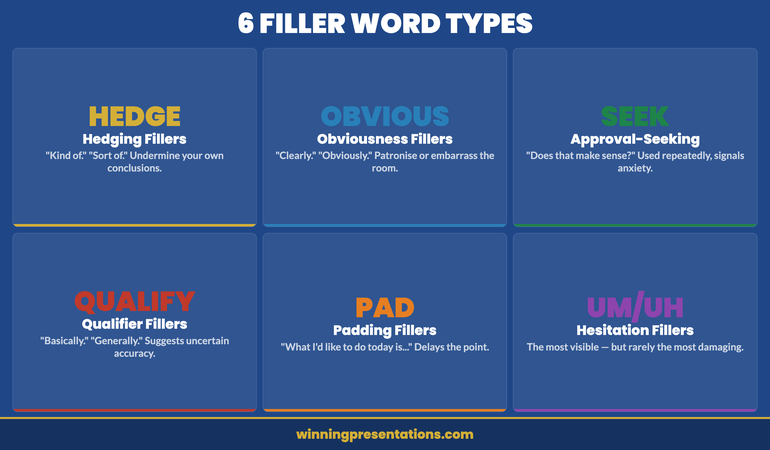
Six categories of filler words in presentations that damage executive credibility: Hesitation fillers, Hedging fillers, Obviousness fillers, Approval-seeking fillers, Qualifier fillers, and Padding fillers with examples of each

Hedging fillers are phrases that undermine the confidence of your own statements. “Kind of.” “Sort of.” “In a way.” “I suppose.” When you say “The data kind of suggests we should proceed,” you are communicating uncertainty about a statement you may be entirely certain about. Hedging fillers are particularly damaging in executive contexts because they signal that you don’t fully trust your own analysis.

Obviousness fillers are phrases that imply the audience should already know what you’re telling them. “Obviously.” “Clearly.” “Of course.” “As you’ll all be aware.” These carry a dual risk: they can patronise an audience that does know the thing, and they can embarrass an audience member who doesn’t. Neither serves you. They also signal that you haven’t thought carefully about the audience’s actual knowledge level — which itself reads as poor preparation.

Approval-seeking fillers are question tags and checking phrases that seek validation mid-sentence. “Does that make sense?” “You know what I mean?” “Right?” “If that makes sense.” Used once, these are fine — they can be genuine invitations for questions. Used repeatedly, they signal anxiety about whether the audience is following you, which amplifies rather than resolves the tension in the room.

Qualifier fillers are words that technically modify a statement but function as verbal hedges. “Basically.” “Generally speaking.” “In most cases.” “Typically.” These are sometimes genuinely necessary — you may be making a statement that genuinely has exceptions. But when they appear on statements that don’t require qualification, they suggest you’re not quite sure whether what you’re saying is accurate.

Padding fillers are extended phrases that don’t add information. “What I’d like to do today is take you through…” “So what we’re going to look at is…” “The thing about this is that…” These typically appear at the beginnings of sentences, before the actual information starts. They delay the moment of value and create a rhythm that makes the speaker seem less direct than the content deserves.

From Verbal Habits to Vocal Authority

Filler words are one symptom of a broader pattern: a nervous system that hasn’t learned to feel safe in high-stakes speaking situations. Conquer Speaking Fear — £39, instant access — addresses the root cause, not just the surface habit:

  • Nervous system regulation techniques drawn from clinical hypnotherapy
  • Evidence-based methods for retraining habitual speech patterns under pressure
  • A 30-day programme that builds lasting vocal confidence, not just temporary fixes
  • In-the-moment techniques you can use before and during high-stakes presentations

Get Conquer Speaking Fear →

Designed for executives whose delivery doesn’t yet match the quality of their thinking.

What Filler Words Signal to Your Audience

Audiences process filler words at a level below conscious analysis. They rarely think “this speaker uses too many filler words” — they experience a vague sense of uncertainty, a slight reduction in confidence in what they’re hearing. The effect is cumulative and largely invisible to the speaker.

In executive settings, the cost is specific. Filler words signal four things that are particularly damaging in high-stakes presentations.

They signal cognitive overload — the impression that you are working harder than expected to retrieve the information you’re presenting, which raises the question of whether you have truly mastered the material.

They signal uncertainty about your own conclusions. Hedging fillers in particular create the impression that you are not fully convinced by your own analysis. An executive who hedges their recommendations is less persuasive than one who states them directly.

They signal anxiety — which, in a room of senior executives, activates a subtle assessment of whether you are ready for the level of responsibility the presentation implies. This is rarely fair. But it is real.

And they signal lack of preparation — even when the opposite is true. Because filler words are associated with thinking out loud, an audience that hears many of them will often conclude the speaker hasn’t fully prepared, regardless of the quality of the underlying content.

The relationship between presentation confidence and credibility perception is well documented in professional contexts: the way you sound when you present your ideas affects how those ideas are received, independently of the ideas themselves. This is worth taking seriously.

If the pattern you recognise in yourself goes beyond filler words to broader delivery anxiety, Conquer Speaking Fear is built specifically for executives dealing with the gap between their knowledge and their delivery.

The Technique That Replaces Filler Words Permanently

The single most effective technique for eliminating filler words is the deliberate pause. Not a hesitation pause — that’s what produces the filler word in the first place. A deliberate pause: a conscious, controlled moment of silence that you use in place of the filler word.

The deliberate pause works because it replaces the nervous system habit at the point of activation. When the brain reaches for a verbal placeholder, you train it to reach for silence instead. Silence, unlike “um,” signals confidence. It gives the impression that you are choosing your words carefully — which you are. It creates emphasis. It gives the audience a moment to absorb what you’ve just said before you continue.

The primary obstacle to using the deliberate pause is that silence feels much longer to the speaker than it does to the audience. What feels like an uncomfortable three-second pause to you typically registers as a natural one-second beat to your listeners. This mismatch is the reason most people default to filler words — they are filling a silence that doesn’t actually exist in the audience’s experience.

The technique requires practice to internalise. You need to experience the pause in low-stakes situations until your nervous system registers that silence does not create the negative reaction you are expecting. Once that recalibration happens, the pause becomes available to you under pressure.

The presentation pause technique in detail: at the moment you feel the impulse to say “um,” close your mouth, breathe once, and allow the pause to exist. Make eye contact with one person in the room during the pause — this transforms what might feel like a gap into a moment of connection. Then continue.

The four-step process for replacing filler words with deliberate pauses: Recognise the impulse, Close your mouth, Breathe and make eye contact, Continue speaking

How to Practise This So It Holds Under Pressure

Knowing the technique is the easy part. Making it available when you are presenting under real pressure requires a specific practice approach. Here is the method that produces reliable results.

Step 1: Hear yourself first

Record two to three minutes of yourself speaking — on any topic — without trying to control filler words. Listen back and note the specific words and phrases you use most frequently. Most people are surprised by both the frequency and the variety of their own filler words. You cannot change a habit you haven’t clearly identified.

Step 2: Practise in conversation, not just rehearsal

Catching filler words in a rehearsed speech is relatively straightforward because the script gives you structure. The harder and more valuable work is practising the pause in conversation — in meetings, phone calls, and informal exchanges — where you don’t have a prepared script to fall back on. This is where the habit is actually formed and where it needs to be changed.

Step 3: Use a physical anchor

During early practice, pair the deliberate pause with a physical sensation — pressing your thumb and forefinger together, or feeling your feet on the floor. This creates a proprioceptive anchor for the behaviour, which makes it more accessible under stress. The physical anchor gives the nervous system something concrete to reach for when the usual verbal placeholder habit activates.

Step 4: Accept the learning curve

In the early stages of changing this habit, you will sometimes produce filler words in situations where you are actively trying not to. This is normal. Habit change is not linear. The goal is directional improvement over two to three weeks of consistent practice — not immediate perfection from the first session. Tracking your frequency over time (via recording) will show you the trend even when individual sessions feel inconsistent.

See today’s related articles for context on the broader picture: how to present a pilot as a commercial case, how to take a technology roadmap to the board, and the structured approach to building lasting presentation skills at work.

Stop Letting Delivery Habits Undermine Your Ideas

Conquer Speaking Fear — £39, instant access — is a 30-day programme that addresses the nervous system patterns behind filler words and verbal uncertainty, so your delivery reflects the quality of your thinking rather than working against it.

Get Conquer Speaking Fear →

Designed for executives whose delivery doesn’t yet match the quality of their thinking.

Frequently Asked Questions

How long does it take to stop using filler words in presentations?

With consistent daily practice — recording yourself, catching the habit in conversation, and using the deliberate pause technique — most people notice a measurable reduction within two to three weeks. Eliminating filler words in scripted presentations typically happens faster than in spontaneous conversation, because the script provides structure that reduces the cognitive load that triggers filler words. The more challenging work is sustaining the change under the pressure of high-stakes presentations, which is where nervous system training becomes important alongside habit change.

Is it bad to use any filler words at all in a presentation?

Occasional filler words are unremarkable and entirely human. The problem is frequency and pattern — a speaker who uses one “um” in ten minutes barely registers with an audience; a speaker who uses forty registers as uncertain and underprepared. The goal is not complete elimination but deliberate control. A well-placed pause is consistently more effective than a filler word in any situation, but the occasional “um” in an otherwise authoritative delivery is not a credibility issue.

Why do I use more filler words with senior audiences than with peers?

Because the perceived stakes are higher, which activates a stronger stress response, which degrades speech fluency more significantly. This is a normal neurological response, not a sign that you’re particularly anxious or underprepared. The mitigation is nervous system regulation before and during high-stakes presentations — bringing your baseline arousal level down before you speak so that the prefrontal cortex has more processing resource available for articulation. The deliberate pause also helps in the moment: it creates a brief circuit break from the stress response that allows fluency to return.

The Winning Edge — Weekly Presentation Intelligence

Every Thursday, one framework or technique for high-stakes speaking — drawn from 24 years in boardrooms and 16 years training executives. Join The Winning Edge →

About the Author

Mary Beth Hazeldine is the Owner & Managing Director of Winning Presentations. With 25 years of corporate banking experience at JPMorgan Chase, PwC, Royal Bank of Scotland, and Commerzbank, and 16 years training executives in high-stakes presentation delivery, she advises senior leaders across financial services, healthcare, technology, and government on the full range of presentation performance — from structure to delivery to anxiety management.

Book a discovery call | View services

23 Apr 2026
Male technology leader presenting a digital roadmap to a board in a modern boardroom, projected slides visible, editorial photography style

Technology Roadmap Presentation: How to Get Board and Executive Buy-In

Quick Answer

A technology roadmap presentation succeeds at board level when it frames technology decisions as business decisions. Executives don’t approve IT roadmaps — they approve investments in business capability, risk reduction, and competitive advantage. Structure your deck around those three levers, not around technical architecture, and the conversation shifts from “do we understand this?” to “when do we start?”

Henrik had prepared for six weeks.

The technology roadmap he was presenting covered the next three years of the company’s IT infrastructure: legacy system migration, cloud consolidation, cybersecurity uplift, and three new customer-facing platforms. He had worked with his team to cost every workstream, build the implementation timeline, and map out the interdependencies between each phase.

The board gave him twelve minutes before the chair interrupted. “Henrik, I appreciate the detail. But what I really need to understand is — if we approve this, what does the business look like in three years that it doesn’t look like today?”

Henrik hadn’t built that slide. He had built a technology roadmap. The board was asking for a business transformation story. Those are not the same presentation, even when they cover the same material.

That question — “what does the business look like in three years?” — is the question your technology roadmap presentation must answer before the chair has to ask it.

Taking a technology investment to the board this quarter?

The Executive Slide System gives you the templates to present technical decisions in the language executives actually use to approve investments — business capability, risk, and competitive positioning.

Explore the Executive Slide System →

Why Technology Roadmaps Fail at Board Level

The most common reason a technology roadmap presentation fails with a board or executive committee is not the technology. It’s the framing. Technical leaders build roadmaps from the inside out — starting with what the current architecture looks like, what needs to change, and how those changes will be implemented. Boards think from the outside in — starting with where the business needs to go and working backwards to what capabilities are required to get there.

When a technology roadmap is presented in technical sequence, it requires the board to do the translation work: to take what they’re being shown about infrastructure and API consolidation and reverse-engineer the business implication. Most boards won’t do that work. They’ll ask for a summary, defer the decision, or approve a smaller scope than you needed — because the full case didn’t land.

The fix is not to simplify the roadmap. It’s to reframe how the roadmap is presented. The technical detail should be available — in an appendix, in supporting slides, in a pre-read. But the main deck should tell the business story, with technology appearing as the mechanism that enables it rather than the subject of the presentation.

The approach that consistently works with boards is the same one that underpins effective digital transformation board presentations: lead with the outcome, justify with the evidence, close with the decision.

Translating Technical Decisions Into Business Language

Every major item on a technology roadmap maps to one of three business concerns: capability (what we can do), risk (what could hurt us), or efficiency (how much it costs to operate). Your job before you build a single slide is to make this mapping explicit — for yourself first, and then for your audience.

Capability language describes what the business will be able to do after the investment that it cannot do today. “We will be able to launch new products in six weeks instead of six months.” “Our sales team will have real-time visibility of customer activity across all channels.” “We will be able to process transactions in markets we are currently locked out of.” This is the language that makes boards lean forward.

Risk language describes what the business is exposed to if it does not invest. “Our current system has not received security patches since 2019 — every day it runs is a regulatory risk.” “We are operating on hardware for which spare parts are no longer available.” “Three of the five engineers who understand this architecture are planning to retire in the next two years.” Boards have strong risk appetite awareness. A well-framed risk case often moves faster than a capability case.

Efficiency language describes the cost of the current state versus the cost of the future state. “Our current architecture requires 14 separate integrations to do what a modern platform does natively.” “We are paying for five different systems that do essentially the same thing.” “Each new feature requires four weeks of development time because of the current technical debt.” This is the most straightforward translation — it’s a cost reduction story with a capital investment requirement.

Once you have mapped your roadmap to these three languages, building the board-facing deck becomes considerably more straightforward. Every technical decision has a business translation, and every business translation belongs in the main deck.

The Deck That Gets Technology Investment Approved

Translating a technical roadmap into a business case is one of the hardest things IT and technology leaders have to do. The Executive Slide System — £39, instant access — is built for exactly this challenge:

  • Slide templates for technology investment and digital transformation cases
  • Business case frameworks that translate technical decisions into board language
  • AI prompt cards to build ROI models and risk assessments slide by slide
  • Executive summary templates that lead with outcome, not architecture

Get the Executive Slide System →

Designed for executives presenting investment decisions to boards and senior committees.

The Slide Structure That Earns Executive Approval

The most effective technology roadmap presentations for boards follow a structure that starts with the strategic context, moves to the business case, and arrives at the technical plan — rather than the other way around.

Technology roadmap presentation structure showing 5 steps: Strategic Context, Business Case, Roadmap Overview, Investment Requirements, and Governance

Slide 1 — Strategic context

Where is the business now, and where does it need to be? This slide establishes the business direction that the technology roadmap is responding to. It should reference the organisation’s strategic priorities — not the IT strategy — and show the gap between current technical capability and what will be needed. Boards approve technology investments they can see are connected to business direction. They stall on investments that appear to be driven by internal IT preference.

Slides 2–3 — The business case

This is the capability, risk, and efficiency case translated into financial and operational terms. What is the cost of the current state? What does the improved future state deliver? What is the investment required, and over what timeline does the return accrue? Include a single summary table that shows the key numbers — total investment, operating cost change, expected capability outcomes, and risk reduction. Boards make investment decisions from this table. Everything else in the deck supports it.

Slide 4 — Roadmap overview

Show the three-year roadmap as a visual — phased by year, with each phase labelled by the business outcome it enables rather than the technical workstream it contains. “Year 1: Remove critical security risk and consolidate platforms” is more useful for a board than “Year 1: Network segmentation, patch management uplift, and SaaS consolidation.” The technical detail sits in supporting slides. The overview slide is for decision-making, not education.

Slide 5 — Investment requirements by phase

Break the total investment by year and by category: capital, operating, internal resource, and external partners. Show the dependencies — which phases are required before others can proceed, and what happens to the timeline and cost if phases are deferred or descoped. This slide is where boards often want to negotiate; having the dependency logic visible makes those conversations considerably more productive.

Slide 6 — Governance and oversight

How will the programme be governed? Who is accountable for each phase? What are the decision points at which the board will be asked to review progress? Boards are more willing to approve large investments when they can see they will have meaningful oversight of how the investment is being spent. A clear governance model signals maturity and professionalism; its absence raises the question of whether the technology leader has done this before.

Slide 7 — Recommendation and immediate next steps

As with any executive decision deck, end with the specific ask. “We are requesting approval of phase one investment of £X, with a programme review at the six-month stage before phase two funding is released.” This gives the board a bounded decision — they are not being asked to commit to the full three-year investment upfront, they are being asked to approve the first phase with defined review points.

The board presentation best practices that apply to technology roadmaps are the same as for any major investment: answer the strategic question first, justify the numbers clearly, and give the board a decision they can make in the room.

The Executive Slide System includes the investment case and roadmap slide templates that make this structure straightforward to build, even when you’re working with complex multi-year programmes.

How to Present Prioritisation Decisions Without Losing Credibility

One of the most delicate elements of any technology roadmap presentation is explaining why certain investments have been prioritised and others deferred. Boards understand that not everything can happen at once. What they are less tolerant of is a prioritisation rationale that appears arbitrary, politically driven, or disconnected from business need.

The strongest approach is to make your prioritisation criteria explicit before you show the roadmap. State the two or three criteria by which investments have been ranked: typically some combination of business impact, risk reduction, technical dependency (some things must happen before others), and investment required. Show the board your prioritisation matrix — which investments score highest across all criteria, which were deferred because they scored lower or are dependent on earlier phases, and which were excluded entirely and why.

This approach does two things. First, it demonstrates that the roadmap is the output of a disciplined process, not a wish list. Second, it gives board members a framework for asking questions: “Why does this score lower than that on business impact?” is a much more productive conversation than “Why isn’t X on the roadmap?”

Where items have been deferred due to budget rather than priority, say so directly. “We have included this in a future phase not because it’s lower priority but because the investment profile of phase one is at the limit of what we believe the organisation can absorb in a single year.” This is the kind of transparency that builds credibility with boards rather than eroding it.

Technology roadmap prioritisation framework showing four criteria: Business Impact, Risk Reduction, Technical Dependency, and Investment Required with scoring examples

Handling the Questions Boards Always Ask

Technology roadmap presentations generate a predictable set of board questions. Preparing for these in advance significantly reduces the risk of the presentation stalling.

“What happens if we only fund phase one?”

Have a clear answer for the partial investment scenario. What does phase one deliver in isolation? Is it useful on its own or is it a prerequisite for the phases that follow? If phase one is only valuable as the foundation for subsequent investment, say that directly — and explain what the cost is of then having to decommission or restart if the subsequent phases are not approved. This prevents boards from approving a small piece and then finding the full investment is required anyway.

“Have you considered buying rather than building?”

This is almost always worth including proactively in the deck. Show the build versus buy analysis — what you considered, why you selected the approach you’re recommending, and what the cost, capability, and risk trade-offs are. Boards that raise this question themselves feel it hasn’t been considered. Boards that see you’ve already addressed it feel confident the recommendation is robust.

“How do we know the costs won’t escalate?”

Reference your contingency provision and your governance model. Technology programmes routinely cost more than estimated — boards know this. What they want to see is that you have built this reality into your investment case rather than assumed everything will go to plan. A programme with a fifteen to twenty per cent contingency provision and a defined process for managing scope changes is more credible than one that presents a single-point estimate.

See also today’s related articles on converting a successful pilot into a contract, eliminating the delivery habits that undermine your credibility, and building lasting presentation capability at work.

Stop Watching Technology Budgets Stall in “Further Review”

The Executive Slide System — £39, instant access — gives you the business case templates and investment frameworks that translate technical decisions into the language boards use to approve spending. Build your next technology roadmap presentation in a fraction of the time.

Get the Executive Slide System →

Designed for executives presenting investment decisions to boards and senior committees.

Frequently Asked Questions

How do you present a multi-year technology roadmap without overwhelming the board?

Focus the main deck on the first phase and the high-level arc of the full programme. Show what the board is being asked to approve now, what they will see at each review point, and what the three-year destination looks like. The detail behind each subsequent phase belongs in supporting slides or a pre-read document. Boards that feel overwhelmed by detail defer decisions; boards that see a clear first phase with defined review points are considerably more likely to approve.

What is the right level of technical detail for a board technology presentation?

Almost none in the main deck. Board members are not evaluating your technical choices — they are evaluating the business logic of the investment. Technical architecture diagrams, system integration maps, and development methodology detail belong in appendix slides that you reference if specific questions arise. The main deck should be comprehensible to a non-technical director who is asking: “Does this make business sense?”

How do you handle a board member who is a technology expert and wants more detail?

Acknowledge their expertise and offer a deeper technical conversation outside the board session. In the main presentation, keep the business framing intact — changing pace and detail level for one board member risks losing the rest. Offer to send supporting technical documentation in advance of the next meeting, or propose a separate technical deep-dive with the interested director. This respects their interest while maintaining a presentation that works for the full board.

The Winning Edge — Weekly Presentation Intelligence

Every Thursday, frameworks and techniques from 24 years of presenting in boardrooms. Join The Winning Edge →

Not ready for the full system? Download the free Executive Presentation Checklist — a one-page reference for the structure and slides every board presentation needs.

About the Author

Mary Beth Hazeldine is the Owner & Managing Director of Winning Presentations. With 24 years of corporate banking experience at JPMorgan Chase, PwC, Royal Bank of Scotland, and Commerzbank, she advises executives across financial services, healthcare, technology, and government on structuring presentations for high-stakes funding rounds and approvals.
Book a discovery call | View services

23 Apr 2026
Senior executive presenting pilot results to a steering committee in a polished boardroom, confident and authoritative, editorial photography style

Pilot to Contract Presentation: How to Convert a Successful POC Into a Full Programme

Quick Answer

A pilot to contract presentation succeeds when it reframes your results as proof of commercial value — not just technical success. Structure it around three questions every decision-maker is silently asking: Did it do what we needed? Can it scale? What does the business case look like at full deployment? Answer those three questions clearly, and the path from POC to signed contract becomes considerably shorter.

Priya had spent four months running a technology pilot that had exceeded every success metric.

Adoption rates were up 34 percentage points above the baseline. User satisfaction scores were the highest her company had seen in three years. The internal team who’d trialled the system had stopped using the old process entirely — not because they were required to, but because the new approach was simply better.

And yet, when she stood in front of the steering committee to present the results and seek approval to roll out across all twelve business units, the room went quiet in the wrong way. The CFO leaned back. The Chief Operations Officer asked whether this had been tested at sufficient scale. The head of IT raised procurement complexity. After forty-five minutes, the committee agreed to “think about it” and reconvene in six weeks.

Priya’s pilot hadn’t failed. Her presentation had. She had built a case for the pilot’s success but had forgotten to build the case for the contract. Those are two entirely different presentations.

Presenting pilot results to a sceptical committee this month?

The Executive Slide System gives you the templates and frameworks to structure your business case — so decision-makers can see exactly what a full deployment looks like and why it makes commercial sense.

Explore the Executive Slide System →

Why Successful Pilots Still Stall at Contract

The assumption behind most pilot presentations is that strong results speak for themselves. If the numbers are good, the contract should follow naturally. In practice, the opposite is frequently true: the better a pilot performs, the more complex the commercial conversation becomes.

There are three reasons a successful pilot stalls at the contract stage. First, the decision-making group often changes. The person who approved the pilot was typically a programme sponsor or operational lead. The full contract requires sign-off from finance, procurement, legal, and often the board — people who were not in the room during the pilot and have no emotional investment in its success.

Second, a pilot is a controlled environment. Stakeholders who weren’t involved know this, and they’re right to ask what happens when the constraints are removed: more users, more data, more edge cases, more integration complexity. Your pilot deck almost certainly doesn’t address this.

Third — and this is the one most presenters miss — decision-makers who weren’t involved in the pilot don’t just need to understand the results. They need to understand what they’re agreeing to. Scale, cost, implementation timeline, internal resource requirements, and ongoing support are all live questions. Your presentation needs to answer them before they’re asked.

The pilot programme results presentation is a technical document. The pilot to contract presentation is a commercial document. Most teams only build the first one.

The Three Questions Every Decision-Maker Is Asking

Before you design a single slide, write down the three questions that are running through every stakeholder’s mind in that room. Every element of your presentation should exist to answer one of these questions directly.

Question 1: Did it do what we actually needed?

This sounds obvious, but many pilot presentations report what happened rather than what was needed. If the business case for the pilot was “improve time-to-value for new client onboarding,” your results slide needs to show time-to-value data — not a selection of positive metrics that weren’t part of the original brief. Decision-makers who weren’t part of the pilot will look for the specific success criteria that were agreed upfront. If your results section doesn’t map directly to those criteria, you’ll face the question: “But does this actually solve the original problem?”

Question 2: Can it scale — and what does that involve?

The single biggest gap in pilot to contract presentations is the absence of a credible scale plan. Stakeholders who didn’t run the pilot need to see that you have thought through what deployment at full scale actually means: volume of users, integration points, implementation phases, internal change management requirements, and the realistic timeline for each. Without this, a successful pilot becomes a liability — it shows the thing works in a lab but doesn’t explain how it works in production.

Question 3: What is the business case at full deployment?

The ROI or business value calculation needs to be recalculated at scale, not extrapolated from the pilot. If the pilot involved fifty users and showed a specific efficiency gain, that gain at five hundred users is not simply ten times larger — there will be integration costs, change management overhead, and a transition period before the full value is realised. Decision-makers need to see a business case that accounts for full deployment costs, implementation timeline, and the point at which the investment becomes accretive. An honest, conservative model is significantly more persuasive than an optimistic extrapolation.

The Deck That Gets Your Pilot Approved at Scale

Structuring a pilot to contract presentation is one of the hardest things to get right — because it requires you to write for an audience who wasn’t in the room. The Executive Slide System — £39, instant access — gives you the templates and frameworks designed for exactly this scenario:

  • Slide templates for programme approval and rollout business cases
  • AI prompt cards to build your scale analysis and ROI model slide by slide
  • Stakeholder-readiness frameworks for presenting to new decision-makers
  • Executive summary templates that answer the three critical questions upfront

Get the Executive Slide System →

Designed for executives presenting commercial decisions to approval committees.

The Slide Structure That Converts POC Results

A pilot to contract presentation follows a different logic from a standard project update or results deck. Rather than moving chronologically through what happened, it moves commercially — from where we are now to what we’re recommending and why that recommendation makes financial and operational sense.

Here is a proven structure for this type of deck:

Slide 1 — Executive summary

This is your entire case on one slide: the original problem, the pilot result against each agreed success criterion, your recommendation (full deployment or a defined next phase), and the headline business case. Decision-makers who are pressed for time should be able to form a view from this slide alone. Everything that follows is supporting evidence.

Slides 2–3 — Results against original success criteria

Map every stated success criterion from the pilot approval to a specific result. Show the baseline, the target, and the actual outcome. If you exceeded some criteria and fell short on others, say so clearly. A presentation that only shows the wins loses credibility; a presentation that names the limitations and explains them builds it.

The Pilot to Contract Presentation framework showing 6 slides: Executive Summary, Results Against Criteria, Risk Assessment, Scale Plan, Business Case, and Recommendation

Slides 4–5 — Scale plan and implementation roadmap

Break deployment into three to four phases. Show what is required internally at each phase: resource, budget, timeline, and who owns what. Include the risks at each phase and how they will be mitigated. Decision-makers who were not involved in the pilot are particularly concerned about the transition — they have seen technology deployments fail at scale before. Your job is to show them you have thought through the entire journey, not just the destination.

Slides 6–7 — Business case at full scale

Build the investment case using the data you have, not the projections you’d like. Show the total cost of full deployment (including internal resource, change management, and integration), the expected return timeline, and the cost of inaction or delay. A well-constructed business case slide answers the question: “What happens if we don’t do this?” as clearly as “What happens if we do.”

Slide 8 — Risk assessment

This is a slide most presenters leave out, and its absence is noticed. Show the top four to six risks for full deployment and your mitigation approach for each. This is not an invitation for the committee to find problems — it’s a signal that you’ve already found them and planned for them. Committees approve proposals from people who demonstrate they understand the risks, not people who pretend the risks don’t exist.

Slide 9 — Recommendation and next steps

End with a specific, time-bound recommendation: what you are asking them to approve, by when, and what happens next if they do. Ambiguous endings are the enemy of contract approvals. “We recommend proceeding to full deployment by Q3, with phase one sign-off required by 30 April to maintain the implementation timeline” gives the committee something to say yes to.

The approach mirrors what the best stakeholder buy-in frameworks recommend: answer the questions in the room before they’re asked, then make the decision easy to say yes to.

If you need templates for any of these slide types, the Executive Slide System includes ready-to-use frameworks for programme approval decks, business case slides, and rollout roadmaps.

The Three Mistakes That Kill the Contract at the Finish Line

After reviewing dozens of pilot presentations, the patterns that cause contract stalls are remarkably consistent. Here are the three that come up most often.

Mistake 1: Presenting to the wrong level of detail

Pilot teams are close to the work. They know the nuance, the edge cases, the workarounds, and the technical challenges they overcame. The approval committee needs none of this. They need the strategic case, the commercial logic, and the risk profile. A presentation filled with operational detail signals to senior decision-makers that the presenter doesn’t understand the difference between informing and persuading. Strip it back. If the detail is needed, put it in the appendix and reference it only if asked.

Mistake 2: Treating the pilot as a proof of concept when the committee sees it as a prototype

In technical teams, “proof of concept” means the thing works. In commercial decision-making, it means “we tried something on a small scale to learn whether it was worth investing in at full scale.” Those are different definitions. When you present the results, explicitly address the prototype concern: yes, this was tested at limited scale; here is why the results are directionally valid at full deployment; here are the known differences and how we will manage them.

Mistake 3: Not knowing who owns the objection

The CFO’s concern about the business case is different from the COO’s concern about implementation complexity, which is different from the IT director’s concern about integration. A single presentation that tries to address all concerns simultaneously often addresses none of them convincingly. Where possible, identify who in the room holds which concern before you present, and ensure you have a specific, direct answer for each. The proof of concept presentation strategy that works is one tailored to the audience in the room, not the audience you imagined when you built the slides.

Three common pilot to contract presentation mistakes: wrong detail level, prototype perception gap, and unaddressed stakeholder objections — comparison of weak vs strong approaches

Handling Q&A When Stakeholders Push Back on Scale

Even a well-structured pilot to contract presentation will draw questions at the scale stage. Here is how to handle the most common challenges.

“Has this been tested at the scale you’re proposing?”

Don’t attempt to argue that the pilot is equivalent to full scale — it isn’t, and the committee knows it. Instead, acknowledge the scale difference directly and explain the basis for your confidence: benchmarking against similar implementations, vendor track record at scale, technical architecture analysis, or a phased deployment plan that limits exposure at each stage. The honest answer is almost always more persuasive than the defensive one.

“What happens if the integration is more complex than expected?”

Show your risk slide. If you don’t have a risk slide, promise one for the next conversation. More importantly, name the specific integration risks you have already identified, explain the mitigation approach for each, and be clear about what would trigger a pause or reassessment. Decision-makers are not asking because they want to stop the project — they are asking because they want to know you have a plan if something goes wrong.

“Can we see a cheaper or faster alternative?”

This question often signals that the business case hasn’t landed rather than genuine interest in alternatives. Before your next slide, restate the cost of inaction: what does the current process cost per year, what is the competitive risk of not deploying, and how does that compare to the investment you are proposing? If there are genuine alternatives worth considering, include them in an alternatives slide and explain why you have recommended this approach over the others.

See also how today’s related articles tackle adjacent challenges: structuring a technology roadmap presentation for the board, eliminating the habits that undermine your delivery credibility, and building a structured system to improve presentation skills at work.

Stop Losing Contracts After a Successful Pilot

The Executive Slide System — £39, instant access — includes the business case and programme approval templates that turn a successful pilot into a signed contract. Stop rebuilding these slides from scratch every time.

Get the Executive Slide System →

Designed for executives presenting commercial decisions to approval committees.

Frequently Asked Questions

How long should a pilot to contract presentation be?

For a steering committee or board approval, twelve to fifteen slides is the right target. The executive summary, results against criteria, scale plan, business case, risk assessment, and recommendation account for eight to ten core slides, with a further two to four for supporting analysis or appendix material. Anything longer and you risk losing the narrative; anything shorter and you risk leaving material questions unanswered. The goal is a deck that can be presented in twenty to thirty minutes with time left for Q&A.

What is the difference between a pilot results presentation and a pilot to contract presentation?

A pilot results presentation documents what happened and whether the pilot met its objectives. A pilot to contract presentation uses those results as evidence for a commercial recommendation. The results deck looks backwards; the contract deck looks forwards. Many teams make the mistake of delivering the same deck for both purposes, which leaves decision-makers without the information they need to approve the next stage.

How do you present a pilot that only partially met its objectives?

Directly and confidently. Identify the criteria that were met and those that weren’t. For the gaps, explain what caused them, whether they were within or outside the scope of the pilot, and how the full deployment plan addresses them. A partial success presented honestly is more persuasive than a selective success that leaves the committee wondering what you’re not telling them. Decision-makers have seen optimistic pilots before — the ones that build trust are the ones that acknowledge reality.

The Winning Edge — Weekly Presentation Intelligence

Every Thursday, I share one framework, one real-world example, and one practical technique drawn from 24 years of presenting in boardrooms across three continents. Join The Winning Edge newsletter →

Not ready for the full system? Start here instead: download the free Executive Presentation Checklist — a one-page reference covering the structure, opening, and slides every senior presentation needs before it goes to a committee.

About the Author

Mary Beth Hazeldine is the Owner & Managing Director of Winning Presentations. With 24 years of corporate banking experience at JPMorgan Chase, PwC, Royal Bank of Scotland, and Commerzbank, she advises executives across financial services, healthcare, technology, and government on structuring presentations for high-stakes funding rounds and approvals.
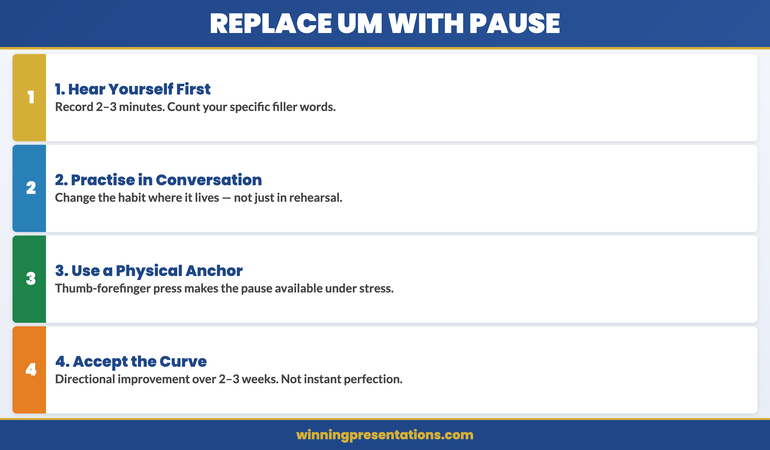
Book a discovery call | View services

22 Apr 2026

Presentation Anxiety Treatment for Executives: Evidence-Based Approaches That Work

If you are searching for presentation anxiety treatment as an executive, Conquer Speaking Fear is a 30-day structured programme that combines nervous system regulation with clinical hypnotherapy — designed specifically for professionals whose anxiety shows up in high-stakes presenting situations rather than in everyday life. This is not general anxiety management. It is a targeted treatment approach for a specific pattern: the executive who is capable, experienced, and composed in most professional contexts, but whose body and mind respond to the presenting environment as though it were a genuine threat. It is available now at £39, instant access. This page covers what the programme addresses, how it works, and whether it fits your situation.

The Problem: Why Executive Presentation Anxiety Persists Despite Experience

Presentation anxiety at the executive level is counterintuitive — and that is partly why it persists. You have given hundreds of presentations. You know the content. You have navigated far more demanding situations than a 20-minute board update. And yet the anxiety remains, sometimes worsening as the stakes increase rather than diminishing with experience.

This happens because presentation anxiety is not a knowledge problem or a preparation problem. It is a nervous system response — a learned pattern in which the brain treats the act of presenting as a threat and triggers the same physiological cascade it would deploy in a genuinely dangerous situation. The voice tightens. Thoughts scatter. The body enters a mode designed for survival, not for articulate persuasion.

Most treatment approaches for executives stop at the cognitive level: reframe your thinking, prepare more thoroughly, practise in front of colleagues. These strategies have a role, but they do not reach the mechanism that drives the response. The nervous system operates faster than conscious thought — by the time you are telling yourself to stay calm, your physiology has already decided otherwise.

Understanding how anticipatory anxiety before presentations works at the physiological level helps clarify why willpower-based approaches so often fall short under genuine pressure.

The Solution: Conquer Speaking Fear

Conquer Speaking Fear is a 30-day structured treatment programme that works at two levels simultaneously: the nervous system (where the anxiety response originates) and the subconscious associations (where the brain has learned to classify presenting as threatening). It does not replace clinical therapy for generalised anxiety, but for presentation-specific anxiety — the pattern that shows up reliably in speaking contexts and not elsewhere — it is precisely targeted.

The nervous system regulation component gives you practical techniques that interrupt the physiological response before and during a presentation. These are not breathing exercises in the abstract — they are calibrated to the specific timeline of executive presenting: the days before, the minutes before entering the room, the moment a difficult question arrives, and the recovery period afterwards.

The clinical hypnotherapy sessions work at the subconscious level, gradually shifting the associations your brain has built around the presenting environment. This is where lasting change happens — not in what you consciously tell yourself, but in how your brain categorises the situation before conscious thought engages. The programme builds these sessions progressively over 30 days, creating durable change rather than temporary relief.

For executives who want to understand the cognitive dimension alongside the nervous system approach, the guide to cognitive restructuring for presentation anxiety covers the thinking-level techniques that complement this programme well.

What You Get

  • 30-day structured programme — daily modules building progressively, designed to fit around a senior professional’s schedule
  • Nervous system regulation techniques — practical methods for managing the physiological response at every stage of the presentation timeline
  • Clinical hypnotherapy audio sessions — targeted sessions that address subconscious threat associations with the presenting environment
  • In-the-moment symptom management — techniques for use during live presentations when the anxiety response activates
  • Post-incident recovery module — dedicated support for executives recovering from a presentation that went significantly wrong
  • Instant access — start immediately, work at your own pace within the 30-day structure

Price: £39 — instant access, no subscription.

Stop Managing Presentation Anxiety — Treat the Pattern That Drives It

Conquer Speaking Fear gives you a structured, 30-day treatment programme combining nervous system regulation and clinical hypnotherapy — designed specifically for executives whose anxiety shows up in the presenting environment, not in everyday professional life. £39, instant access.

  • ✓ 30-day programme with daily structured modules
  • ✓ Nervous system regulation for executive presenting contexts
  • ✓ Clinical hypnotherapy sessions targeting presentation anxiety
  • ✓ In-the-moment techniques for live high-stakes presentations

Get Conquer Speaking Fear → £39

Instant access · £39 · No subscription

Is This Right for You?

Conquer Speaking Fear is designed for executives and senior professionals who experience a consistent anxiety pattern specifically in presenting contexts. It is most relevant if you have tried cognitive approaches — more preparation, positive self-talk, generic confidence workshops — and found that they help in lower-pressure situations but do not hold reliably when the stakes are genuinely high.

It is right for you if: you experience physical symptoms under presentation pressure (voice tightening, mind blanking, elevated heart rate); anticipatory dread affects your preparation in the days before a significant presentation; you find yourself avoiding high-visibility speaking opportunities; or a past presenting experience has created a pattern that persists.

It is not designed for executives who want to improve their slide structure or delivery technique without an anxiety component — presentation skills training addresses those needs more directly. It is also not a replacement for clinical support if your anxiety extends significantly beyond presenting contexts into daily life. In that situation, working alongside a qualified therapist while using this programme is entirely appropriate.

The guide to grounding techniques for presentation anxiety covers practical in-the-moment methods that complement the nervous system work in this programme.

Frequently Asked Questions

Is this a clinical anxiety treatment?

Conquer Speaking Fear is a structured self-directed programme, not clinical therapy. It uses techniques drawn from clinical practice — specifically nervous system regulation and clinical hypnotherapy — applied to the presentation-specific anxiety pattern. If your anxiety is primarily triggered by presenting situations rather than being generalised across your daily life, this programme addresses that pattern directly. If you are experiencing broad anxiety that affects multiple areas of daily functioning, working with a qualified therapist alongside this programme is advisable.

How is this different from presentation skills coaching?

Presentation skills coaching focuses on delivery technique, slide design, and message structure — how to present well. Conquer Speaking Fear focuses on the anxiety response itself — why your body and mind react to presenting as a threat, and how to change that pattern at the nervous system level. Many executives have strong presentation skills but still experience significant anxiety. This programme addresses the anxiety directly, independent of skill level.

Will this work for someone who has presented for 20+ years?

Yes — and lengthy experience presenting is common among participants. Presentation anxiety often intensifies rather than diminishes with seniority, because the stakes increase faster than familiarity can compensate. The programme does not assume you lack experience. It addresses the nervous system pattern that operates independently of how many presentations you have given or how well you know the material.

Can I use this alongside medication for anxiety?

Yes. The techniques in Conquer Speaking Fear do not conflict with prescribed anxiety medication. If you are currently taking medication for anxiety — whether specifically for presenting situations or more broadly — this programme can complement that treatment by addressing the learned nervous system response that medication manages but does not retrain. Mention your use of this programme to your prescribing clinician so they have a complete picture of your anxiety management approach.

What if I have a major presentation before I finish the 30 days?

The programme is designed so that several techniques are immediately usable from the first week — particularly the nervous system regulation methods for the minutes before and during a presentation. You do not need to complete all 30 days before your next presentation. The early modules focus on in-the-moment management precisely because many participants begin the programme with an upcoming high-stakes presentation in mind. The deeper subconscious work develops over the full programme period.

The Winning Edge

Weekly insights on executive presentations, speaking confidence, and high-stakes communication — delivered every Thursday.

Subscribe Free

About the author

Mary Beth Hazeldine, Owner & Managing Director, Winning Presentations. With 25 years of corporate banking experience at JPMorgan Chase, PwC, Royal Bank of Scotland, and Commerzbank, and 16 years working with executives on high-stakes presentations, she advises senior professionals across financial services, healthcare, technology, and government on structuring and delivering presentations under pressure.

22 Apr 2026
A professional woman presenting on a video call with camera on, well-lit home office setup, laptop with ring light visible, attentive expression, navy background, editorial photography style

Camera On or Off in Virtual Presentations

Quick Answer

Camera on is the default for any presentation where you are presenting, seeking a decision, or building trust. Camera off is appropriate when you are part of a large passive audience or when technical constraints make a poor image worse than no image. The question isn’t whether cameras help — they do. The question is when the discomfort around cameras is worth working through, and when the decision to turn off is covering something that needs addressing.

Nadia had been on camera in every client meeting for three years. Then she got a new manager who ran every call with his camera off. Within two months, half the team had stopped using cameras too.

She noticed something shift in the quality of those meetings. Decisions took longer. Follow-up questions went unanswered until email. People multitasked in ways they didn’t before.

Nobody said anything. Camera-off had become the culture. And the culture was costing them something real — not in visibility, exactly, but in attention, trust, and the subtle accountability that comes from being seen.

The debate about cameras in virtual presentations is often framed as a comfort issue. It is sometimes that. But more often it’s a signal issue — and understanding what your camera choice signals to others is more useful than any general rule about when to turn it on or off.

If virtual presentations trigger more anxiety than in-person ones, you’re not alone — and it’s fixable.

Conquer Speaking Fear addresses the patterns that make virtual presentations feel harder than they should — including camera anxiety, self-consciousness on screen, and the specific challenge of reading an invisible audience.

Explore Conquer Speaking Fear →

What turning your camera off actually signals

Most people think of camera use in terms of what it does for them — whether they feel comfortable on screen, whether their background is presentable, whether the lighting is good enough. That’s the wrong frame.

Camera use is a signal to others. And the signal it sends when you turn it off depends heavily on the context and your role in the meeting.

When a presenter turns their camera off, the audience receives one of three messages:

  • Technical necessity: bandwidth issues, poor lighting, technical failure. This is understood and accepted if acknowledged briefly.
  • Disengagement: the presenter doesn’t feel this interaction warrants full presence. This is not always the intended message, but it’s frequently the received one.
  • Avoidance: in presentations where the topic is difficult, or where the presenter is anxious, a switched-off camera can read as reluctance to be seen. Senior stakeholders notice this.

None of these perceptions is entirely fair. The person behind the camera-off screen may be intensely focused, technically constrained, or simply following what’s become their team’s default. But perception matters in presentations — and managing the signal you’re sending is part of the job.

Research into video call behaviour consistently shows that camera presence correlates with perceived engagement, trust, and commitment. This doesn’t mean camera-off makes you appear untrustworthy. It means that in high-stakes presentations — the ones where credibility is being assessed — the camera is doing more work than most people realise.

Stacked cards infographic showing the three signals sent by camera-off in presentations: technical necessity, disengagement, and avoidance — with guidance on each

When camera-on is non-negotiable

There are situations where presenting without camera is not a neutral choice. In these contexts, turning your camera off changes the nature of the interaction in ways that work against you.

When you are the primary presenter seeking a decision. If you’re presenting a proposal, requesting a budget, pitching a strategy, or asking for approval, your camera is part of your persuasive presence. The audience is not just evaluating your slides — they’re evaluating your confidence, your conviction, and your ability to respond to questions live. A camera-off presenter in this context appears either unprepared or evasive.

When you are managing a crisis or delivering difficult news. Camera presence in difficult conversations signals that you’re taking responsibility and engaging fully. A camera-off difficult conversation feels like a phone call with slides. It removes the human accountability that makes hard news easier to receive.

When you’re presenting to someone you haven’t met before. Trust is built through face-to-face interaction, even on a screen. The first impression you make to a new stakeholder, senior leader, or client group is shaped heavily by whether you’re visible. A first meeting with camera off creates a relationship deficit that takes subsequent meetings to recover.

When you’re in a small group presentation. In a meeting of three to six people, camera-off is conspicuous. In a large webinar of 100 people, camera-off is standard. The size of the audience changes what camera-off means.

Legitimate reasons to turn your camera off

There are contexts where camera-off is the right call — not because of anxiety or avoidance, but because it genuinely serves the interaction better.

When screen-sharing is the primary communication medium. If you’re conducting a technical walkthrough, demonstrating a product, or presenting a detailed document where the audience needs to focus on the screen content, your face in the corner can be a distraction rather than an aid. Some presenters prefer to turn camera off during the demonstration and on during the Q&A.

When bandwidth is genuinely degrading your image quality. A pixelated, freezing image is worse than no image. A face that breaks up every 30 seconds signals technical incompetence rather than presence. If your connection is poor, announce it clearly at the start — “I’m going to turn camera off to preserve audio quality, I’ll switch back on for Q&A” — and the choice becomes professional rather than evasive.

When you are a passive participant in a large meeting. In an all-hands presentation or a town hall where you’re not presenting, camera-off is standard. The etiquette scales with audience size. Above roughly 20 people, camera-off for non-presenters is normal and expected.

When team culture explicitly permits it and the stakes are low. Internal team catch-ups with an established team where camera-off is normalised carry different weight than a client presentation. Know the difference.

Virtual Presentations Feel Different Because They Are Different — Here’s How to Close the Gap

Conquer Speaking Fear — £39, instant access — addresses the specific patterns that make virtual presentations harder: camera anxiety, self-consciousness on screen, the absence of non-verbal feedback, and the feeling of presenting into a void. Built on clinical hypnotherapy and NLP, designed for professionals presenting under real pressure.

  • Techniques for managing camera anxiety and self-consciousness
  • Frameworks for reading virtual audiences without visible cues
  • Tools for building presence through a screen rather than despite it
  • Nervous system regulation approaches for high-stakes virtual presentations

Get Conquer Speaking Fear →

Designed for professionals who want to present with confidence in any format.

When camera anxiety is the real issue

There’s a pattern I see regularly: people who find every credible-sounding reason to turn their camera off — poor lighting, bandwidth, the meeting is too large, “I’m just listening today” — when the actual driver is anxiety about being seen on screen.

Camera anxiety is real. The experience of seeing yourself on screen while simultaneously trying to present is genuinely uncomfortable. You’re monitoring your own expression, your hair, whether your background looks acceptable, whether you look engaged or blank or nervous. It’s a cognitive load that doesn’t exist in in-person presentations.

The problem with using camera-off as a permanent solution to camera anxiety is that it removes the anxiety without resolving it. The anxiety remains — it just gets smaller, because you’re avoiding the trigger. And avoidance maintains anxiety rather than reduces it. Each time you turn the camera off to escape the discomfort, the next camera-on experience feels harder.

The more productive path is to address what’s driving the discomfort directly. For many people, camera anxiety is a form of self-consciousness — an intense self-focus on how you appear rather than what you’re communicating. This is the same pattern that underlies general presentation anxiety, and it responds to the same approaches: structured techniques for redirecting attention, nervous system regulation before presenting, and gradual exposure to the trigger under controlled conditions.

If you recognise this pattern in yourself, the article on presentation anxiety and remote cameras addresses this specifically.

Cycle infographic showing the camera anxiety avoidance loop: camera anxiety, avoidance, short-term relief, reinforced anxiety, and the intervention point

The setup changes everything

Many camera decisions are driven by practical problems that are actually fixable. Before defaulting to camera-off, it’s worth considering whether the issue is technical rather than personal.

Lighting. The most common cause of a poor on-screen image is bad lighting, not poor equipment. If the primary light source is behind you (a window, a lamp), your face will be dark and your background will be washed out. A simple ring light or a repositioned desk lamp in front of you changes the image quality dramatically. This is a £30 fix that removes one of the most cited reasons for camera-off.

Camera angle. A laptop camera positioned below eye level produces an unflattering upward angle. Raising the laptop — even with a stack of books — brings the camera to eye level. At eye level, the image is more natural and the eye contact with the camera feels more direct. This is a two-minute adjustment that changes how you appear on screen.

Background. You don’t need a perfectly decorated office. You need a wall. A plain wall behind you with nothing distracting in frame creates a neutral, professional background. Virtual backgrounds work, but they introduce rendering artefacts that experienced viewers notice. A real background, even a simple one, is usually better.

When these three elements — lighting, angle, background — are addressed, most people find that camera-on feels significantly less uncomfortable. The discomfort was partly aesthetic, and the aesthetics are fixable.

For a complete guide to virtual presentation setup and how to maintain presence through a screen, the article on virtual presentation energy covers the physical and environmental factors in detail. And for managing the specific anxiety that comes from presenting content on screen, the article on screen sharing presentations addresses the moment-by-moment challenges.

If camera anxiety is part of a broader pattern of presentation fear, the structured approaches in Conquer Speaking Fear are designed to address the underlying patterns rather than just the surface symptoms.

Build Genuine Confidence in Virtual Presentations — Not Just Coping Strategies

Conquer Speaking Fear — £39, instant access — moves beyond tips and into the actual patterns that make presentations feel threatening. If virtual presenting feels harder than it should, this is the resource that addresses why — and what to do about it.

Get Conquer Speaking Fear →

Designed for professionals presenting under real pressure in any format.

Frequently Asked Questions

Is it rude to turn your camera off in a work meeting?

It depends on the meeting type and your role in it. If you’re presenting, leading, or actively participating in a small group, camera-off registers as disengagement to most colleagues. If you’re a passive participant in a large meeting, camera-off is standard. The social norm scales with meeting size and your role. When in doubt, camera on is the lower-risk default — it’s easier to turn off than to reverse the impression created by starting off screen.

Does camera-off affect how you’re perceived in virtual interviews or presentations to senior stakeholders?

Yes, meaningfully. Senior stakeholders in assessment contexts are evaluating your presence, confidence, and communication style — not just your content. Camera-off removes most of those signals. If technical issues prevent you from presenting with camera, acknowledge it directly at the start and offer to follow up with an in-person meeting or a call where you can be seen. Never leave camera-off unexplained in a high-stakes presentation.

What if my whole team has camera-off as the default — should I still turn mine on?

When you’re presenting, yes. When you’re participating as a listener in a team where camera-off is cultural, that’s a different consideration — you’re not going against convention in a meaningful way. But in any meeting where you are presenting, leading, or seeking something, camera-on is worth the discomfort. You will stand out — and standing out in those moments works in your favour.

The Winning Edge

Weekly insights on presenting with confidence and clarity — for professionals in every format. Every Thursday.

Subscribe Free →

Not ready for the full programme? Start here instead: download the free Virtual Presentation Checklist — a practical reference for setup, delivery, and follow-through in virtual presentations.

For the executive skill of opening virtual and in-person presentations with authority, see the guide on board presentation opening lines — the structures that establish credibility from your first sentence.

The camera question is, in the end, a question about presence. Turn yours on. Work on the setup until it feels comfortable. And if the discomfort is about more than lighting and angles, address that directly — because your virtual presence is now as important as your in-person one.

About the Author

Mary Beth Hazeldine is Owner & Managing Director of Winning Presentations. With 24 years of corporate banking experience at JPMorgan Chase, PwC, Royal Bank of Scotland, and Commerzbank, she advises executives across financial services, healthcare, technology, and government on structuring and delivering high-stakes presentations. She is a qualified clinical hypnotherapist and NLP practitioner, and draws on both disciplines in her approach to presentation confidence and anxiety.

22 Apr 2026
A senior executive man reviewing presentation slides at a table with a younger professional woman, warm collegial setting, glass office background, mentorship context, editorial photography style

Mentorship Presentation

Quick Answer

An effective mentorship presentation shares hard-won knowledge through structured experience rather than instruction. The key is framing your insight as something you discovered — not something you’re delivering. This shifts the dynamic from teacher-to-student to peer-to-peer, which is the only dynamic that actually changes how people think.

Henrik had 28 years of experience in supply chain finance. His mentee, Chiara, was sharp, ambitious, and had been promoted twice in four years. He wanted to share what he knew before he retired.

He built a presentation. Twenty-two slides covering everything he’d learned about vendor relationships, payment terms, and working capital dynamics. He delivered it over 90 minutes.

Chiara said it was helpful. Afterwards, she couldn’t recall a single specific insight.

The information was excellent. The format made it forgettable. Henrik had built a lecture when he needed to build a conversation. The difference between the two is not tone — it’s structure. And the structure problem is fixable.

Want your knowledge to land rather than wash over people?

The Executive Slide System includes frameworks for structuring complex knowledge into clear, actionable slide decks — the kind that get read, remembered, and acted on.

Explore the Executive Slide System →

The patronising trap in mentorship presentations

The patronising trap is not about tone. Most people who patronise their audience aren’t trying to condescend — they’re trying to be thorough. The trap is structural: it’s built into how you organise the content.

When you present as though you know something your audience doesn’t, and your job is to transfer that knowledge to them, you’ve created a hierarchy. Even if the content is valuable and the delivery is warm, the structure says: I have expertise; you lack it. This creates a subtle defensiveness in the listener — particularly in high-performers who are used to being the person in the room who knows things.

The alternative is to present as though you’re inviting them to examine a problem alongside you. You’ve already done the examination. You’ve already reached conclusions. But you’re presenting the examination, not just the conclusions — and you’re doing it in a way that allows them to follow the thinking rather than simply receive the result.

This matters because retained knowledge comes from active engagement. When a person follows a chain of reasoning and arrives at the insight themselves — even if you led them there — they own it. When you give them the conclusion directly, they receive it but don’t necessarily internalise it.

The structural shift is surprisingly simple: lead with a question or a dilemma rather than a statement. “Here’s what I learned” becomes “Here’s the problem I hadn’t anticipated.” The content that follows is identical. The relationship between presenter and audience is fundamentally different.

Split comparison infographic showing ineffective lecture-style mentorship presentation structure versus effective experience-sharing mentorship structure

The structure that teaches without lecturing

There is a specific structure that works for mentorship presentations at executive level. I’ve used it across group mentorship sessions, one-to-one strategy conversations, and formal knowledge-transfer presentations. It adapts to any length and any subject matter.

It has four parts:

Part 1 — The decision you faced. Not the answer. The decision — the moment where multiple options existed and something was at stake. Be specific about the stakes. Vague stakes produce vague learning. “A significant contract was at risk” produces less engagement than “We had 48 hours to respond and a £3.8M renewal on the line.”

Part 2 — What you tried first (and why it was wrong). This is the part most mentors skip. They’re uncomfortable presenting failure or initial misjudgement. But the wrong turn is where the learning lives. If you jumped straight to the right answer, your mentee learns the answer without the reasoning that makes it applicable elsewhere. The wrong turn teaches them to recognise the situation next time — not just copy the response.

Part 3 — The insight that changed your approach. Not a principle. A specific realisation, triggered by a specific event or piece of information. “We realised the procurement lead wasn’t the real decision-maker — the CFO was reviewing every contract above £500K” is teaching. “You need to understand stakeholder dynamics” is not.

Part 4 — The pattern you now apply. This is where you make the specific applicable to the general. Once you’ve taken them through the specific decision, you can generalise to the pattern — and it will land because they’ve followed the reasoning. “Since then, I map decision authority before I map content” is a principle that makes sense because they understand where it came from.

This structure takes longer to build than a traditional knowledge-transfer presentation. But it transfers knowledge that stays.

Build Decks That Teach as Clearly as They Inform

The Executive Slide System — £39, instant access — includes frameworks for structuring knowledge presentations that audiences actually engage with. Stop building lecture decks. Build thinking frameworks instead.

  • Slide structure templates for knowledge transfer and strategic alignment
  • AI prompt cards to build complex content into clear narrative flows
  • Executive presentation frameworks for different audience types
  • Opening and closing structures that maintain engagement throughout

Get the Executive Slide System →

Designed for executive-level presentations across all formats and audiences.

How to design knowledge-transfer slides

Most knowledge-transfer presentations look like this: a title slide, a table of contents, seven section headers with three to five bullet points each, and a summary slide. This is the standard corporate training format. It’s also the format most likely to produce an audience who nods, takes notes, and remembers nothing specific three days later.

Slide design for knowledge transfer requires a different logic. Each slide should do one of four things:

Frame a dilemma. A slide that shows a decision point — “Which approach did we choose and why?” — orients the audience toward a specific question before you answer it. This creates active processing rather than passive receipt of information.

Show the comparison. Rather than a slide full of principles, a comparison slide shows two approaches side by side — the instinctive approach and the effective one, or the approach that works in one context and fails in another. Comparisons are memorable because they contain contrast, and the brain encodes contrast more reliably than lists.

Illustrate the pattern. Once you’ve taken the audience through a specific decision, a single slide showing the general pattern (with your specific example as one application) ties the learning together. This is the “applicable elsewhere” moment — the point at which specific experience becomes transferable knowledge.

Invite reflection. A slide that asks a question — “What would you have done at this point?” or “What’s the risk in each option?” — creates a pause for active engagement. In a one-to-one setting, you can ask these questions verbally without putting them on a slide. In a group, the slide creates a visible anchor for the conversation.

For the foundational principles of executive presentation structure that underpin this approach, the article on executive presentation structure covers the core frameworks.

Using questions to deepen retention

One of the most consistent patterns I’ve observed in effective mentorship presentations is the deliberate use of questions — not rhetorical questions, but genuine questions that pause the presentation and invite a response.

Most presenters avoid this. They’re worried about silence, or about the conversation going off track, or about losing the thread of their prepared content. The avoidance is understandable. But it costs them the engagement that makes knowledge transfer work.

The question method works like this: at a natural turning point in your narrative — usually just after you’ve described the wrong turn or the dilemma — you pause and ask a direct question. “Before I tell you what we did, what would you have considered here?” or “What’s the risk you’d want to understand before moving forward?”

The mentee’s answer reveals their current mental model. If they identify the same concern you had, you can confirm it and move forward — they’re tracking with you. If they identify a different concern, you have an opportunity to address that concern directly, which is far more valuable than following your prepared script.

You don’t need to ask questions on every slide. Two or three across a 60-minute session is enough to shift the dynamic from presentation to conversation. That shift changes retention significantly.

Dashboard infographic showing four slide design types for knowledge transfer: frame a dilemma, show the comparison, illustrate the pattern, invite reflection

Four mistakes that undermine mentorship presentations

These patterns appear consistently in mentorship presentations that don’t transfer knowledge effectively. Each one has a specific fix.

1. Starting with credentials rather than content. Opening with your CV, your career history, or your list of achievements signals that you feel your authority needs establishing before your content will be accepted. Most mentees already respect you — that’s why they’re there. Starting with credentials delays the content and, ironically, can feel defensive. Start with the first dilemma. Your credentials will be demonstrated through the quality of the reasoning, not the length of your biography.

2. Covering too much. A mentorship presentation that tries to share 28 years of knowledge in 90 minutes will transfer almost none of it. Three specific, well-developed experiences with clear patterns will transfer far more than twenty principles illustrated with brief examples. Depth beats breadth in knowledge transfer every time.

3. Using “always” and “never.” Absolute rules are memorable but unreliable. The experienced person knows that every rule has a context in which it doesn’t apply. When you present principles as absolutes, you’re simplifying in a way that will mislead your mentee the first time they encounter the exception. Better: “My default is [approach] — and there are two situations where it doesn’t work.”

4. Skipping the failure. I’ve already mentioned this, but it deserves its own entry. The moments of your career that changed how you operated were almost always preceded by something going wrong. Sharing those moments is not a sign of weakness. It’s the most valuable thing you can give a mentee: the pattern of error that leads to the pattern of insight. Without the failure, the insight sounds like advice. With the failure, it sounds like truth.

If you’re also thinking about how to present your experience when moving between roles or seeking a new position, the article on internal transfer pitch presentations covers how to frame accumulated experience as a strategic asset.

For a complete framework for building structured executive presentations — including the slide templates that support knowledge transfer and persuasion across complex topics — the Executive Slide System gives you the structures used in high-stakes executive presentations.

Turn Your Experience Into a Presentation That Actually Changes How People Think

The Executive Slide System — £39, instant access — gives you the slide frameworks, AI prompt cards, and structure templates to turn complex knowledge and experience into presentations that land. Stop delivering information. Start transferring understanding.

Get the Executive Slide System →

Designed for executives structuring knowledge, strategy, and approval presentations.

Frequently Asked Questions

How long should a mentorship presentation be?

Sixty minutes is the ceiling for knowledge retention in a mentorship setting. Most people attempt 90 minutes to two hours and end up with an audience who remembers very little. If your content genuinely requires more time, divide it across multiple sessions rather than extending a single presentation. The break between sessions allows reflection and consolidation — which is where retention actually happens.

Should I use slides for a mentorship presentation?

Yes, when slides serve as anchors for specific frameworks, comparisons, or decision points — not when they’re a running commentary on what you’re saying. A mentorship presentation with eight well-designed slides will produce better knowledge transfer than one with thirty slides that duplicate your spoken content. The slides should create reference points, not document everything.

How do I handle it when a mentee already knows something I’m covering?

Acknowledge it directly and adjust. “You may already know this part — tell me if you want to skip ahead” treats the mentee as the intelligent professional they are. Continuing to present content they’ve already mastered wastes their time and suggests you haven’t thought about their current level. Good mentorship presentation means knowing when to skip, deepen, or redirect based on their responses.

The Winning Edge

Weekly insights for executives on presenting, persuading, and communicating with precision. Every Thursday.

Subscribe Free →

Not ready for the full system? Start here instead: download the free Executive Presentation Checklist — a practical reference for structuring any executive presentation clearly and quickly.

For the related challenge of delivering difficult feedback through a formal presentation — where clarity and respect need to coexist — see the guide on team performance review presentations.

The best mentors don’t teach. They show their thinking, invite engagement, and create the conditions in which insight becomes visible. Your presentation is that invitation. Build it accordingly.

About the Author

Mary Beth Hazeldine is Owner & Managing Director of Winning Presentations. With 24 years of corporate banking experience at JPMorgan Chase, PwC, Royal Bank of Scotland, and Commerzbank, she advises executives across financial services, healthcare, technology, and government on structuring presentations for high-stakes funding rounds and approvals. She is a qualified clinical hypnotherapist and NLP practitioner.