20 Apr 2026
Senior executive in a focused one-to-one pre-meeting with a colleague in a glass-walled corporate office, reviewing a proposal document together, navy and gold tones, editorial photography style

Stakeholder Alignment Workshop: The Pre-Meeting That Decides

Quick Answer

Stakeholder alignment is the work that happens before your presentation, not inside it. Identify the two or three people whose silence or resistance could derail your proposal, meet them individually beforehand, and address their concerns directly. Executives who walk into decision meetings with informed support rather than hopeful assumptions achieve faster approvals and fewer unexpected deferrals.

Kwame had every reason to feel confident walking into the committee room. He had spent three weeks building the proposal, modelled three financial scenarios, addressed the likely objections in the appendix, and rehearsed the narrative twice. He believed the room would be receptive.

It wasn’t. Within ten minutes, the Chief Risk Officer had raised a concern about regulatory exposure that Kwame had not prepared for. Two other committee members, who had said nothing before the meeting, aligned themselves with her position. The session ended with a request for a revised paper at the next quarter’s cycle.

Kwame reviewed what had gone wrong. The CRO had spoken informally to a colleague about regulatory risk several weeks earlier. That conversation had shaped her view long before the formal session. Kwame had been building a presentation; his opponent had been building a coalition. He had assumed the formal meeting was where the decision would be made. In practice, it had already been made — against him.

Most presentation preparation focuses on what happens in the room. The executives who consistently secure approvals focus on what happens before it.

Preparing a proposal for a major decision meeting?

The Executive Slide System includes scenario playbooks and slide frameworks designed for executive decision presentations, including pre-meeting structuring and stakeholder-specific slide approaches.

Explore the System →

Why the Decision Is Usually Made Before the Meeting

Formal decision meetings rarely change minds. By the time a proposal reaches a board or committee, the people in that room have already formed a view — either through their own analysis, through conversations with colleagues, or through a prior experience with the presenting team. The formal session is not the moment of decision. It is the moment where existing positions are ratified or challenged.

This is not a criticism of how decisions are made. It reflects how senior leaders actually operate. They gather intelligence informally, form provisional views, and use the formal meeting to test those views against the group. An executive who walks in hoping to persuade a room from a standing start is working against this process rather than with it.

The implication is significant: if stakeholder alignment is not done before the meeting, the presentation itself becomes an uphill argument against positions that were formed without your input. The objections raised in the room are almost always objections that existed before the room convened. They simply were not surfaced earlier because no one asked.

Pre-meeting alignment is not about lobbying or soft manipulation. It is about making sure that the people who will influence the decision have had a genuine opportunity to raise their concerns — with you, directly, in advance — so those concerns can be understood, addressed, and either incorporated into the proposal or prepared for in the room.

Mapping Your Stakeholder Landscape in Advance

Before any alignment conversation takes place, map the landscape. For a typical executive decision meeting, this means identifying three categories of stakeholder: those who are likely to support the proposal, those who are genuinely undecided, and those whose instinct will be sceptical or resistant.

The supporters matter less than you think. They will advocate regardless. The undecided are your primary opportunity: a well-structured pre-meeting conversation with an undecided stakeholder often converts a tentative abstention into active support. The sceptics are your primary intelligence source: understanding their specific concerns before the meeting allows you to address them directly in your presentation or to prepare substantive responses rather than improvised ones.

To map accurately, consider three factors. First: authority weight. Who in the room carries disproportionate influence over others? A single sceptic with high authority is more consequential than three undecided voices. Second: domain expertise. Who will be most credible on the technical or commercial dimensions of the proposal? If the CFO is sceptical about the financial model, that carries more weight than a peer-level concern. Third: prior exposure. Has anyone on the committee heard a version of this proposal before? Prior exposure creates expectations — either positive or negative — that shape how the new version is received.
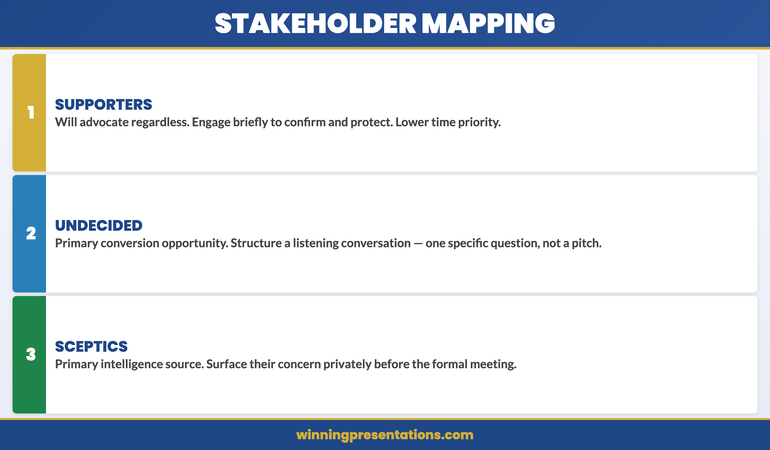
Stakeholder mapping framework showing three categories: Supporters (advocate regardless), Undecided (primary conversion opportunity), Sceptics (primary intelligence source) with engagement priority guidance for each

The Pre-Meeting Formula: What to Cover One-to-One

An alignment conversation is not a pre-sell. It is a structured listening exercise that happens to include a briefing. The distinction matters because the purpose is to learn, not to persuade. Going into a pre-meeting with the goal of converting a sceptic will produce a conversation that feels transactional and may harden their position. Going in with the goal of understanding their concern produces a conversation that often resolves the concern naturally.

A well-structured pre-meeting covers three areas. First, context: give the person a brief overview of what you are proposing and why it is coming to this particular committee at this particular time. Keep this to two minutes. Second, invitation: ask a specific question. Not “what do you think?” but something more targeted, such as “What would you want to understand about the financial model before the session?” or “From your experience with similar projects, what tends to create the most friction in approvals like this?” These questions surface real concerns without feeling interrogative. Third, direct ask: at the end of the conversation, confirm understanding. “Is there anything in what I’ve covered that would give you pause at the meeting?”

That final question is uncomfortable to ask and extremely valuable to hear. It gives sceptics a private, low-stakes forum in which to raise their concern. Most will. And a concern raised privately is significantly easier to address than one launched in a formal committee session in front of peers.

The Executive Slide System

Executive decisions are won through structure, not persuasion. The Executive Slide System — £39, instant access — includes slide frameworks and scenario playbooks designed for high-stakes proposals, including how to structure a presentation for a room where views are already partially formed.

  • Slide templates for executive decision scenarios
  • AI prompt cards to build decks fast
  • Scenario playbooks for board, budget, and approval meetings
  • Framework guides for structuring high-stakes proposals

Get the Executive Slide System →

Designed for executives preparing high-stakes presentations and proposals.

Reading Resistance Versus Polite Uncertainty

Not every sceptic sounds like one in a pre-meeting. Some express genuine enthusiasm but are privately unconvinced. Others raise procedural questions that feel neutral but signal substantive concern. Learning to distinguish between “wait and see” and “fundamentally opposed” is one of the most valuable skills in stakeholder alignment.

Genuine support tends to be specific. A supporter will name what they find compelling, ask about implementation or timing, and use inclusive language (“when this is approved” rather than “if this goes ahead”). Polite uncertainty tends to be general. Someone who is unconvinced but unwilling to say so will offer vague encouragement (“very interesting work”), redirect to process (“has legal reviewed this?”), or ask questions that test your preparation without engaging with your argument.

The most telling signals are the questions that are not asked. If someone who has domain expertise in a critical area of your proposal asks nothing about that area in a pre-meeting, they either have no concern or they have already decided they will raise it formally rather than privately. The latter is more common. A subject-matter expert who asks nothing has usually formed a view they consider settled.

When you encounter this pattern, do not push for their opinion. Instead, name the gap directly: “I noticed I haven’t covered the operational implications — is that an area you’d want more detail on before the session?” This gives them a structured opening. If there is a concern, it will usually surface at this point. If there genuinely isn’t, they will say so clearly.

If you are structuring a follow-up presentation after an inconclusive meeting, pre-meeting alignment becomes even more important: you need to understand what shifted between the previous session and the current one before you can present effectively.

When a Yes in Private Becomes Silence in the Room

One of the most disorienting experiences in executive presenting is walking into a formal meeting with four verbal commitments from individual stakeholders and watching three of them say nothing while a fifth person raises an objection that changes the room’s direction.

This happens for a predictable reason. A private yes is a personal position. A public yes is a social commitment with professional consequences. Senior leaders manage their reputations carefully. If a peer raises a concern in a formal session that another executive did not anticipate, that executive may stay silent to avoid appearing poorly briefed rather than speak up for a position they privately hold.

The lesson is not that pre-meeting commitments are unreliable. It is that they are conditional on what happens in the room. To protect the value of your pre-meeting work, there are two practical steps. First, close each alignment conversation with a specific commitment: “If no new information comes up before Thursday, can I count on your support at the meeting?” That language shifts the implied commitment from unconditional to bounded — and gives you a cleaner read of where each person actually stands. Second, build your formal presentation to pre-empt the concerns you identified in pre-meetings. If you know the CFO is worried about the capital expenditure timeline, address that directly and early in the presentation itself. This signals to the CFO that you listened, and it reduces the likelihood that they will raise it as a public challenge.

Understanding how to close a presentation so executives take action becomes significantly easier when stakeholder alignment has already established the direction of their thinking before the final slides appear.

If you want to strengthen your approach to executive decision presentations, the Executive Slide System includes scenario playbooks specifically designed for multi-stakeholder approval meetings.

How Pre-Alignment Changes Your Formal Presentation

A presentation built without stakeholder alignment intelligence is constructed around what the presenter assumes the room needs to hear. A presentation built after alignment conversations is constructed around what the room has already told you it needs to hear. The difference in persuasive effectiveness is substantial.

Concretely, pre-alignment changes three structural decisions. First, it changes what you emphasise. If your mapping has identified that the CFO is undecided and the CEO is supportive, you structure the proposal so that the financial case is front-loaded and comprehensive. If the operational committee is your swing vote, operational feasibility becomes the centrepiece. You are not changing the proposal; you are calibrating the emphasis to match the decision-making framework of the people who matter most.

Second, it changes how you handle objections. Without alignment intelligence, you respond to objections as they arise. With it, you can pre-empt the most significant ones. “One question that came up in my preparation was the impact on the current capital allocation cycle — I want to address that directly before we move to Q&A.” This signals thoroughness, reduces the dramatic impact of the objection if it still arises, and demonstrates respect for the committee’s specific concerns.

Third, it changes your structure if you have a formal executive presentation outline. Instead of a linear case-building structure, a pre-aligned presentation often leads with the decision itself, addresses the two or three specific concerns identified in pre-meetings early, and reserves the detailed evidence for stakeholders who want it rather than presenting it to everyone as though none of them have a view yet.
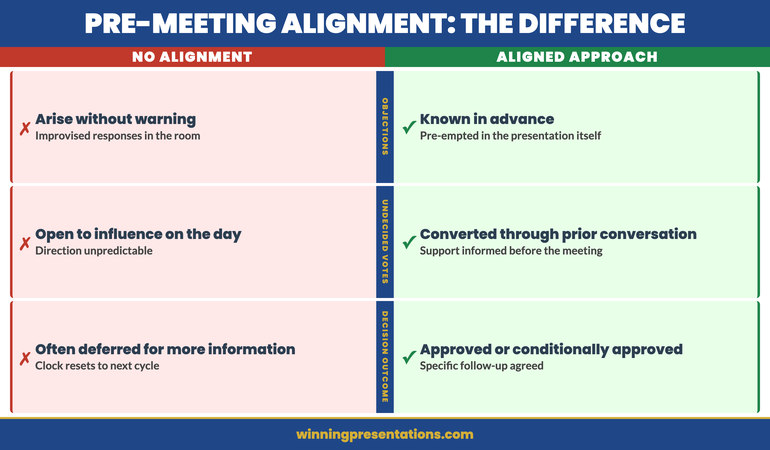
Pre-alignment impact on presentation structure: three changes — emphasis (calibrated to decision-makers), objections (pre-empted not improvised), structure (decision-led not case-building)

Common Alignment Mistakes to Avoid

The most common error is treating alignment as optional rather than structural. Many executives view pre-meetings as a favour to important stakeholders, something done when there is time rather than as a non-negotiable step in the presentation process. When pressed on preparation time, they deprioritise alignment in favour of slide refinement. This trades the thing most likely to improve the outcome (understanding the room) for the thing most visible in preparation (polishing the deck).

The second error is aligning too broadly. Speaking to every member of the committee in advance creates logistical difficulty and can create the impression that you are lobbying rather than consulting. Focus on three to five people: the one with the most authority, the one most likely to be sceptical, and one who has previously expressed interest in similar proposals. These conversations will tell you more than speaking to ten people at a more superficial level.

The third error is seeking endorsement rather than understanding. Going into a pre-meeting with the goal of securing a “yes” creates conversations that feel manipulative and tend to produce hollow agreements. Going in with the goal of understanding genuine concerns produces conversations that are substantively useful. The distinction lies in the questions you ask: “What would you need to see?” is more valuable than “Can you see yourself supporting this?”

The fourth error is not following up. If a stakeholder raises a concern in a pre-meeting and you address it in your revised presentation, send them a brief note before the formal session: “Following our conversation last week, I’ve updated the proposal to reflect your point about the timeline. Section three now covers that directly.” This closes the loop, confirms you listened, and reminds them of their prior engagement with the process in a way that makes it harder to raise the same concern again as though it is new.

The Executive Slide System

Slide frameworks designed for multi-stakeholder executive decisions — including scenario playbooks for proposals where different stakeholders have different priorities. £39, instant access.

Get the Executive Slide System →

Designed for executives preparing structured proposals for senior decision meetings.

Frequently Asked Questions

How much time before a presentation should stakeholder alignment happen?

Alignment conversations should happen at least five to seven working days before the formal meeting. This gives you time to incorporate significant concerns into your proposal and gives stakeholders enough notice that the conversation feels deliberate rather than last-minute. For high-stakes or complex proposals, begin alignment two to three weeks in advance. The earlier you understand the room’s concerns, the more substantive your response can be.

What if a key stakeholder refuses to meet in advance?

If a stakeholder declines a pre-meeting, this is itself useful information. It usually signals one of three things: they are too busy to engage at this stage, they have a strong prior view that they do not want to moderate through private discussion, or they prefer to see how the formal meeting develops before committing. In any of these cases, invest extra effort in understanding their known priorities and likely concerns through other channels — conversations with their direct reports, recent public statements on similar proposals, or the records of previous meetings where they have engaged on related topics. Design your formal presentation to pre-empt the most predictable version of their concern.

Can pre-meeting alignment backfire?

It can if handled badly. Speaking to too many people, sharing sensitive details prematurely, or creating the impression of a coordinated lobbying effort can generate resistance rather than support. Two principles reduce this risk. First, approach each pre-meeting as a listening exercise, not a persuasion exercise. Second, keep the conversations focused on the proposal’s merits and the specific concerns of that individual — do not reference what other stakeholders said or imply that you are building consensus against someone.

The Winning Edge — A Newsletter for Executives Who Present

Every Thursday: one practical technique for structuring, presenting, or defending a high-stakes proposal. Designed for executives who need to communicate with authority, not just confidence.

Subscribe to The Winning Edge →

Also available: the Executive Presentation Checklist — a free pre-presentation checklist for senior decision meetings.

If you are building a proof-of-concept presentation, the same alignment principles apply — with an additional layer of technical credibility to manage.

About the Author

Mary Beth Hazeldine is the Owner and Managing Director of Winning Presentations. With 25 years of corporate banking experience at JPMorgan Chase, PwC, Royal Bank of Scotland, and Commerzbank, she advises executives across financial services, healthcare, technology, and government on structuring presentations for high-stakes funding rounds and approvals.

19 Apr 2026
Female executive attending live online training cohort on laptop in professional home office, focused and engaged, navy and gold tones

Business Presentation Course Online UK

Quick Answer

Most business presentation courses available online in the UK teach general communication skills that do not address what senior professionals actually face: structuring a board update under time pressure, using AI tools to build a credible deck, or making a case to a sceptical executive committee. The most effective online presentation training for UK professionals combines live instruction, small-group feedback, and direct application to real presentations — not hypothetical exercises.

Valentina had been in asset management for seventeen years. She had presented to investment committees, chaired client briefings, and sat on boards. When her firm moved her into a regional director role, she found herself presenting to the executive committee monthly — and for the first time in her career, she could feel her credibility slipping. The committee was polite. The decisions that emerged from her presentations were often inconclusive. She searched for business presentation training online and found dozens of courses: confidence building, slide design, public speaking for beginners. Nothing that addressed what she was actually struggling with — the logic of a board argument, the structure of a high-stakes recommendation, the difference between informing a committee and moving one. She eventually found the right training. When she presented her Q3 regional strategy two months later, the committee approved her full budget recommendation without amendment. The gap had not been her confidence. It had been her structure.

Looking for a business presentation course online in the UK? The Executive Buy-In Presentation System is a self-paced online programme for senior professionals — covering strategic structure, board-level case-building, and the presentation architecture that moves committees to a decision. New cohorts open monthly. Explore the programme →

What Most Online Courses Miss for Senior Professionals

Type “business presentation course online UK” into any search engine and you will find a large number of options. Udemy, Coursera, LinkedIn Learning, and various coaching platforms all offer presentation skills training at a range of price points. Some of it is competent. Much of it addresses the wrong level.

The majority of online presentation courses are designed for people who are new to presenting in professional settings. They focus on managing nerves, structuring a basic argument, and making slides look cleaner. For someone who has been presenting to senior audiences for a decade or more, none of this is the gap. The gap is usually strategic: how to build an argument that moves a sceptical committee; how to structure a multi-stakeholder recommendation where different parts of the room want different things; how to use AI tools to build credible decks without losing the strategic logic that makes them work.

There is also a format problem. Most online courses are pre-recorded and self-paced. That format works for skills acquisition — learning software, building knowledge. It does not work well for presentation development, which requires feedback on your specific content, your specific audiences, and your specific presentation habits. Watching videos about how to structure a board presentation is not the same as having an expert review the board presentation you are actually about to give.

A third issue is the American frame of reference. A significant proportion of online presentation courses are produced for US corporate audiences. The presentation culture, the stakeholder dynamics, and the risk appetite around directness differ between US and UK boardrooms in ways that matter. Advice to “lead with confidence and project authority” lands differently in a UK financial services context, where the culture rewards precision and understatement over self-projection.

Understanding the structural framework for executive presentations is the starting point — before design, before delivery, before AI tools. Structure is what a committee evaluates, even when they could not articulate exactly why they approved one recommendation and deferred another.

When the Room Has to Say Yes — Build That Presentation.

The Executive Buy-In Presentation System is built for senior professionals who present recommendations, strategies, and investment cases to boards and committees. Self-paced. £499. New cohorts open monthly.

Explore the Programme →

Build Board-Ready Presentations in 30 Minutes

The Executive Slide System gives you 22 templates, 51 AI prompt cards, and 15 scenario playbooks — designed for senior professionals who present to boards, committees, and executive leadership. £39, instant access, no subscription.

Get the Executive Slide System →

Designed for executives presenting at board level and senior leadership meetings

What Business Presentation Training Actually Needs to Cover

Effective business presentation training for senior professionals needs to address three distinct areas. The first is structure — not a generic three-part structure, but the specific architecture of a high-stakes recommendation: how to frame the ask, how to sequence the evidence, how to anticipate and pre-empt the objections that will arise during Q&A rather than waiting to be surprised by them.

The second area is audience intelligence. Senior stakeholders in UK organisations — executive committees, boards, investment committees, audit committees — have specific decision-making patterns, risk tolerances, and information preferences. Training that treats all audiences as equivalent misses the specific dynamics of the contexts where the stakes are highest. A skills training course online UK should prepare you for the room you are actually walking into, not a generic corporate audience.

The third area is AI integration. The use of AI tools in building presentations has shifted from novelty to standard practice in most large organisations. What has not kept pace is the skill of using AI to strengthen structure rather than simply to generate content. AI-generated slide drafts are frequently fluent and visually coherent but strategically weak — they produce arguments that sound plausible rather than arguments that are decision-ready. Training that addresses AI as a structural tool, rather than a drafting shortcut, is a genuine differentiator.

These three areas — structure, audience intelligence, and AI integration — are what distinguish advanced presentation training for senior professionals from the general-purpose courses that make up most of the online training market. When searching for a business presentation skills course UK, the question to ask of any programme is: does it address these three areas explicitly, with examples drawn from the actual senior contexts you work in?

For the structural side specifically, the stakeholder alignment process that precedes major presentations is often the overlooked element — the preparation that happens before the first slide is opened. Effective training addresses the full process, not just the delivery moment.

Why UK Context Matters in Presentation Training

My own background is twenty-five years in corporate banking — spanning JPMorgan Chase, PwC, Royal Bank of Scotland, and Commerzbank — followed by sixteen years working with executives across financial services, healthcare, technology, and government. That experience spans London, Edinburgh, Frankfurt, and Zurich. What I have observed consistently is that presentation culture is genuinely different between UK and US corporate environments, and between UK financial services and UK technology or healthcare.

UK boardrooms, and particularly those in regulated industries, value epistemic humility. A presenter who projects certainty without acknowledging constraint will often lose credibility faster than one who acknowledges the limits of the data while articulating why the recommendation is still sound. The phrase “I am confident in the direction, though I want to flag two risks to the timeline” carries more weight in many UK executive committee rooms than “This will deliver £X million in returns.” Confidence is read through precision, not projection.

UK-specific contexts also matter: presentations to regulators, to audit committees under FCA scrutiny, to investment committees governed by FRC standards. These have specific structural expectations and specific risk tolerances around how claims are made and evidence is presented. Training designed for a US sales presentation context will not prepare you for a UK regulatory context — and the gap between them is consequential.

An online presentation skills course UK that does not account for this context will produce advice that technically correct but practically counterproductive. The best training is specific: specific to your seniority level, specific to the types of decisions you are asking audiences to take, and specific to the UK and European corporate environments in which those decisions are being made.

If you are preparing a board presentation as part of a live programme and want to review the structural elements in advance, the board presentation follow-up protocol covers the full post-presentation sequence — including how to maintain the momentum of a positive board meeting through to a confirmed decision.

For an overview of what makes the Executive Buy-In Presentation System different from generic online presentation courses, the Maven programme page sets out the curriculum structure, the learning outcomes, and the participant profile.

AI Tools and Presentation Structure: The New Competency Gap

The introduction of AI tools into the presentation-building workflow has created a new competency gap that most online business presentation training has not yet addressed. The gap is not technical — most senior professionals can open Copilot, ChatGPT, or Gemini and ask it to draft slides. The gap is strategic: knowing how to direct an AI tool to produce the argument you need, rather than accepting the argument the AI generates.

AI-generated presentations tend to be structured around the information the presenter has, rather than the decision the audience needs to take. This is a fundamental structural error, but it is invisible to the AI. A prompt asking for “a presentation on our Q3 performance and plans for Q4” will produce a document that covers Q3 performance and Q4 plans — but will not, without more specific direction, produce a document structured to move the committee to the specific decision the presenter is seeking. The logic of information sharing and the logic of decision facilitation are different, and AI does not distinguish between them automatically.

Training that integrates AI tools into the structural and strategic framework of executive presentations — rather than treating AI as a drafting tool and structure as a separate concern — is the format that produces measurable improvement in the shortest time. Senior professionals who learn to direct AI with structural precision produce better decks faster, and those decks are more likely to result in the decisions their organisations need.

This is the specific competency gap that the Executive Buy-In Presentation System addresses: not AI as a productivity shortcut, but the strategic and structural skills required to build presentations that move decision-makers to a clear yes.

The Executive Buy-In Presentation System

For executives who need their next high-stakes presentation to land a decision, not just inform one. Self-paced programme, £499, new cohorts open monthly.

Join the Next Cohort →

Is This Right for You?

The Executive Buy-In Presentation System is built for senior professionals who are already competent presenters and who are working at the level where presentations have direct commercial, strategic, or organisational consequences. It is not a beginner’s course. It is not a confidence-building programme for people new to public speaking.

The typical participant is a director, head of function, or senior manager who presents regularly to executive committees, boards, or major client or regulatory audiences. They have the experience to know what they want to achieve in a presentation — and the frustration of watching well-prepared presentations produce inconclusive outcomes. They want the structural and strategic tools to close that gap.

The programme is particularly suited to professionals preparing significant presentations in the near term — budget reallocations, strategic reviews, board approvals, or major client pitches. Being self-paced, the work you do in the modules applies directly to presentations you are building right now.

If you are looking for a business presentation skills course UK that covers both the foundations and the advanced strategic structure for senior-level contexts, the Executive Buy-In Presentation System delivers both — sequenced for people who already have the foundations and need to develop the senior-level application. New cohorts open monthly.

Frequently Asked Questions

What is the difference between business presentation training online UK and a public speaking course?

Public speaking courses focus primarily on delivery: voice, body language, managing nerves, and engaging an audience. Business presentation training for UK professionals addresses a broader and more strategic set of skills — how to structure a recommendation, how to build a case for a specific decision, how to read a senior audience and adapt in real time, and how to use tools including AI to build decks that hold up to scrutiny. For senior professionals, delivery is rarely the limiting factor. Strategy and structure are.

Are online presentation courses effective for senior professionals in the UK?

They can be — but the format matters significantly. Pre-recorded self-paced courses produce limited results for senior professionals because they do not include feedback on the specific presentations those professionals are building. Live cohort programmes, where participants work on real presentations and receive expert and peer feedback, are substantially more effective. The key differentiator is whether the training is applied to your actual work or to generic hypothetical scenarios.

How does the executive presentation course on Maven differ from standard LinkedIn Learning content?

LinkedIn Learning and similar platforms offer video-based instruction that teaches general frameworks and principles. The Executive Buy-In Presentation System is a structured self-paced programme where participants work through the specific architecture of decision-focused presentations — built for senior professionals at director level and above, presenting to boards and committees in UK and European corporate contexts.

What does a business presentation skills course UK typically cost?

Online self-paced courses typically range from £20 to £200. Live coaching programmes for senior professionals typically range from £500 to £3,000+ per participant, depending on the level of personalisation and the seniority of the facilitator. The Executive Buy-In Presentation System is priced at £499 — a self-paced programme covering the complete architecture of board and committee presentations, with new cohorts opening monthly. It sits at the accessible end of the live-training market for senior professionals.

The Winning Edge

Weekly insights on executive presentations, strategic structure, and boardroom communication — for UK professionals who present at senior level.

Subscribe Free

Building a high-stakes presentation now? Download the Executive Presentation Checklist — a structured framework for senior professionals preparing board-level and executive committee presentations.

If you are preparing for an upcoming board meeting and want to think through the structural elements of your follow-up process, the follow-up deck for approval meetings covers exactly how to maintain decision momentum after a strong executive presentation.

About the author

Mary Beth Hazeldine, Owner & Managing Director, Winning Presentations. With 25 years of corporate banking experience at JPMorgan Chase, PwC, Royal Bank of Scotland, and Commerzbank, she works with executives across financial services, healthcare, technology, and government on structuring presentations for high-stakes approvals, board reviews, and senior stakeholder communication.

19 Apr 2026

Virtual Presentation Energy: How to Project Confidence Through a Camera

Quick Answer

Virtual presentation energy drops because the camera compresses physical presence and eliminates the environmental cues that naturally regulate your nervous system. The fixes are specific: eye-level camera, slight vocal projection, deliberate pause technique, and a two-minute physical reset before you open the call. Fatigue and flatness on camera are not personality traits. They are physiological responses to a format that most executives have never been trained to manage.

Rafaela had been presenting to senior committees for eleven years. Boards, excos, client panels — none of them rattled her. She knew how to read a room, how to use space, how to pitch her voice to the back of a boardroom. She had presence.

Then every meeting moved online.

She noticed it in the feedback first. “You seemed a little flat.” “Hard to gauge your energy.” “Felt like you were reading rather than presenting.” She was doing exactly what she had always done. But through a camera, her performance was landing differently. What had been authoritative in a room was reading as subdued on screen. The techniques that had built her reputation over a decade were not transferring.

This is one of the least-discussed challenges facing senior executives in a permanent hybrid environment. Presence in a physical room is partly about physical scale, proximity, movement, and the ambient energy of being in a space with other people. None of those elements translate through a camera. What reads as composed and measured in a boardroom can read as flat and disengaged on a laptop screen. The format changes the physics of presence, and most executives have not adapted their technique to account for it.

Struggling with physical symptoms that affect your on-screen presence?

Calm Under Pressure is designed for the in-the-moment physical symptoms that flatten energy on camera: voice tension, shallow breathing, and the freeze response that makes you read as flat rather than composed.

Explore Calm Under Pressure →

Why Executive Energy Drops on Camera

Understanding why your energy drops on camera is the first step to correcting it, because most of the fixes are specific to the cause rather than general performance adjustments.

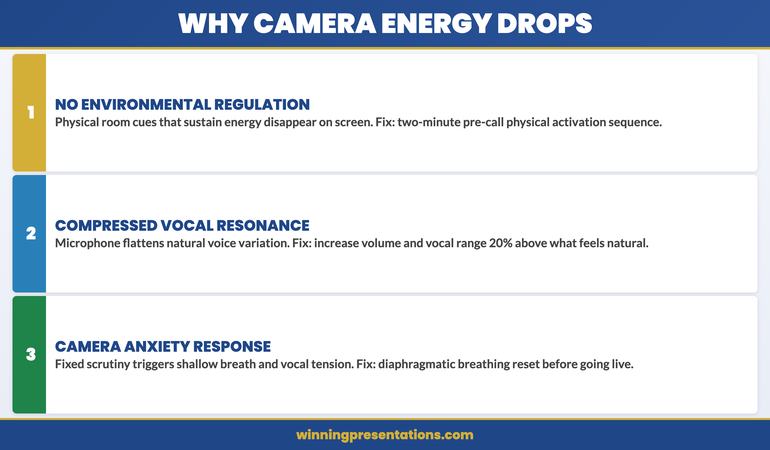
The primary factor is the absence of environmental regulation. In a physical room, your nervous system receives constant environmental feedback: the presence of other people, ambient sound, spatial awareness, eye contact with a distributed audience, the physical sensation of standing or moving. This feedback keeps your nervous system engaged and your energy regulated without any conscious effort. On camera, all of that disappears. You are looking at a two-dimensional screen in a static position, with no ambient input, no physical connection to an audience, and no spatial feedback. The result is a mild but significant suppression of the neural systems that generate what audiences perceive as presence and energy.

The second factor is vocal feedback. In a room, your voice has physical resonance — you can feel it in your chest, hear it reflected off surfaces, and instinctively calibrate it to the space. Through a microphone, that resonance is compressed and flattened. Executives who project naturally in a room tend to under-project on camera because the acoustic environment no longer cues them to increase volume and variation. The result is a delivery that sounds monotone and low-energy to the audience, even when the speaker feels they are presenting at normal intensity.

The third factor is the anxiety response that camera visibility triggers in many presenters. Being watched through a camera — particularly in a static frame where there is nowhere to move — activates a mild threat response in the nervous system. This manifests as vocal tension, shortened breath, reduced facial expressiveness, and a tendency toward faster speech and fewer pauses. The physical symptoms are subtle but visible to an audience. They read not as anxiety but as flatness, disengagement, or lack of confidence.

Why executive energy drops on camera: three causes — no environmental regulation, compressed vocal resonance, and camera-triggered anxiety response

The Physical Setup That Protects Your Presence

Your physical setup is not peripheral to your virtual presence. It is the foundation of it. Three elements matter most.

Camera height. The camera should be at or slightly above eye level. When the camera is below eye level — as it is on a standard laptop sitting on a desk — you are looking slightly down at the screen throughout the presentation. This creates a subtle subordinate posture that communicates deference rather than authority. Raising the camera to eye level by using a monitor riser, an external webcam on a stand, or a laptop on books is a five-minute adjustment that materially changes how your authority reads to the audience. It also naturally lifts your chin and opens your posture, which improves vocal resonance immediately.

Lighting direction. Light source should be in front of you, not behind or to the side. A window behind you creates a silhouette. A window to one side creates uneven shadows that make facial expressions harder to read. A soft light source in front of you — a window, a lamp, or a ring light — illuminates your face evenly and makes expression visible at small screen sizes. This matters because facial expression is a significant part of how presence and energy are read by a virtual audience, and it is lost entirely when the lighting is wrong.

Body position. Sit or stand slightly forward, with shoulders back and both feet flat on the floor if sitting. Leaning back into a chair collapses your posture and compresses your diaphragm, which restricts vocal projection and reads as disengagement. Sitting forward with upright posture is the virtual equivalent of standing up to present — it activates the same physical positioning that generates presence in a room.

Vocal Projection and Pace in a Virtual Format

The single most effective vocal adjustment for virtual presentations is increasing both your volume and your vocal variation by approximately 20% above what feels natural. This counteracts the compression effect of microphone audio and restores the dynamic range that audiences associate with energy and confidence.

Pace is the other critical variable. The natural reaction to virtual anxiety is to speak faster — it feels like it fills the silence and reduces the exposure time under the camera’s gaze. In practice, faster speech on camera reads as nervous and difficult to follow. Deliberately slowing your pace by around 15% below your natural speaking rate, and pausing for a full beat between major points, signals authority and control. Pauses that feel uncomfortably long to the speaker are usually comfortable and useful for the audience.

Vocal variation — the contrast between higher and lower pitch, louder and quieter moments — is the element that prevents a virtual presentation from sounding like a recording. Executives who use vocal monotone in virtual settings are not disengaged; they are simply not aware that the audio compression of a microphone strips the natural variation out of their voice unless they consciously exaggerate it. The fix is not to perform — it is to recalibrate upward to compensate for what the technology takes away.

The Two-Minute Pre-Call Reset

A two-minute physiological reset before a virtual presentation is the single highest-return investment in on-screen energy. The purpose is to shift your nervous system out of the low-arousal, slightly suppressed state that comes from sitting in front of a screen into the activated, regulated state that generates presence.

The sequence has four elements. First, stand up and take three deep breaths that fully expand the diaphragm — you should feel your belly expand on the inhale. This increases oxygen levels and reduces the shallow-breath pattern that compresses vocal energy. Second, do 20 seconds of light physical movement — shaking out your hands, rolling your shoulders, or briefly walking around. This activates the same neural pathways that regulate energy in a physical presentation environment. Third, say two or three sentences aloud at slightly above your natural volume, as if warming up your voice before a physical presentation. This recalibrates your vocal projection before the camera is live. Fourth, check your camera angle, lighting, and posture, and sit forward into your speaking position before you open the call.

This sequence takes less than two minutes and has a measurable effect on how you present in the first five minutes of a virtual meeting — which is when first impressions are formed and when energy most often drops for executives who have moved directly from a screen-reading task to a live presentation.

Manage the Physical Symptoms That Flatten Your Camera Presence

Calm Under Pressure — £19.99, instant access — is designed for the in-the-moment physical symptoms that undermine virtual presence: voice tension, shallow breathing, and the physical freeze that makes you read as flat rather than authoritative on screen.

  • 60-second resets for vocal tension, shallow breathing, and physical freeze
  • Pre-call activation sequence to shift your nervous system into presentation state
  • In-the-moment physical symptom management for live virtual meetings
  • Techniques for sustaining energy across longer remote presentations

Get Calm Under Pressure →

Designed for executives whose physical symptoms are affecting their authority on screen.

Camera Eye Contact and Why Most Executives Get This Wrong

Eye contact is one of the most powerful signals of authority and engagement in a face-to-face presentation. On camera, most executives manage eye contact in a way that does the opposite of what they intend.

The common pattern is to look at the gallery view of faces on screen while speaking. This feels natural — you are looking at your audience. But from the audience’s perspective, your eyes are consistently below the camera, which reads as looking down or looking away. The result is a delivery that feels like you are avoiding eye contact even when you are actively looking at the people you are presenting to.

True camera eye contact means looking directly into the lens of the camera, not at the screen. For most executives this feels deeply unnatural, because there is no face in the lens — only a small dot. The technique that makes this workable is to use the screen for context and reference, but return to the lens for the moments that matter: when you are making your key argument, when you are asking for a decision, and when you are addressing a specific individual directly.

A practical approach is to place a small sticker or arrow near the camera lens as a visual anchor point. This gives your eye contact a target that is physically distinct from the screen content, making it easier to return to the lens without losing your place in the presentation. It sounds like a small adjustment. For audience members, the difference between a presenter who looks at the camera and one who does not is the difference between feeling addressed and feeling observed.

For virtual presentations where you are sharing your screen or navigating between slides, the screen sharing presentation guide covers the specific techniques for maintaining audience engagement when your screen content is visible alongside your face. And for presentations that are recorded rather than delivered live, asynchronous presentation recording addresses the different energy challenge of presenting to a camera with no live audience at all.

The physical symptoms that create camera anxiety — vocal tension, shallow breathing, and the tightening that reduces expressiveness — are the same symptoms addressed by the techniques in managing presentation anxiety on remote and camera formats. If you find that the energy issue is rooted in anxiety rather than technique, that is the right starting point.

If the physical symptoms are consistent enough to affect your performance across multiple virtual meetings, the Calm Under Pressure programme is designed specifically for the in-the-moment physical reset techniques that restore vocal quality and physical presence before and during virtual presentations.

Sustaining Energy Across Longer Virtual Presentations

The energy management challenge in a 90-minute virtual presentation is fundamentally different from a 90-minute in-person one. In a physical setting, movement, spatial change, and human interaction naturally sustain your energy. Online, the static format creates a progressive drain that most presenters do not notice until the final 30 minutes — when their audience does.

Three techniques sustain virtual energy across longer presentations. First, build in structured interaction points every 15–20 minutes. This is not for audience engagement alone — it is to activate your own nervous system. The act of asking a question, reading responses, or managing a polling tool interrupts the static energy drain and forces a brief reset. Second, stand for the sections of the presentation where you need the highest energy — typically the opening, the key recommendation, and the close. Standing activates the same physiological engagement as presenting in a room and is audible in your vocal delivery even to an audience who cannot see your full body. Third, have a glass of water within reach and use a sip during a natural transition point as an opportunity to reset your posture and take a breath before moving to the next section.

Managing physical symptoms that undermine energy on camera is the focus of Calm Under Pressure. The programme provides 60-second reset techniques for vocal tension, shallow breathing, and the physical tightening that reduces expressiveness on screen — all of which are more manageable than most executives realise once they have the right tools.

Sustaining virtual presentation energy: three techniques — structured interaction every 15-20 minutes, standing for high-energy sections, and physical reset between transitions

Stop Physical Symptoms from Flattening Your Virtual Presence

Calm Under Pressure — £19.99, instant access — gives you the 60-second in-the-moment resets that stop physical symptoms before they affect your authority on screen.

  • Vocal tension and shallow breathing reset techniques
  • Pre-call activation sequence to shift your nervous system into presentation state

Get Calm Under Pressure →

Designed for executives whose physical symptoms are undermining their authority in virtual settings.

Frequently Asked Questions

Why do I feel more anxious presenting virtually than in person?

Several factors compound in the virtual format. The absence of ambient environmental feedback — no physical room, no spatial awareness, no distributed audience — removes the neural regulation that naturally manages your anxiety in a physical setting. The camera creates a fixed point of scrutiny that activates a mild threat response in many presenters. And the audio delay and absence of real-time audience cues make it harder to regulate your delivery through the feedback loop you rely on in a room. These are physiological responses to a novel format, not character traits — and they are addressable with specific techniques.

Does virtual presentation anxiety get better with more experience?

For most executives, experience with virtual presentations reduces the novelty anxiety but does not automatically resolve the physiological energy problem. You can become very comfortable with the format and still present with flat energy, because the environmental regulation issue is structural rather than psychological. What does get better with deliberate practice is the specific technique adjustments: camera eye contact, vocal projection calibration, and the pre-call reset. These require conscious effort at first and become habitual with repetition.

Is a ring light worth the investment for virtual presentations?

For executives who present virtually more than twice a week, a modest ring light or softbox is worth the cost. The lighting difference is significant: it eliminates the patchy, shadow-heavy quality that most home and office setups produce and replaces it with even, flattering illumination that makes facial expression fully readable at small screen sizes. The psychological effect is also real — presenting in good light feels more like presenting in a professional environment, which activates the same performance mindset as a physical boardroom setting.

How do I handle the energy drain when I have four back-to-back virtual meetings in a day?

The two-minute pre-call reset is your primary tool for managing this. Between each call, stand up, move briefly, take three deep diaphragmatic breaths, and reset your camera position before the next call opens. This is the virtual equivalent of walking between meeting rooms. The movement and physiological reset interrupt the energy drain cycle that builds across consecutive static screen time. For days with a particularly high-stakes virtual presentation — such as a board or exco meeting late in a full schedule — schedule a 10-minute break before it, even if other meetings have to be shortened to create that buffer.

The Winning Edge — Weekly Executive Communication Insights

Each Thursday: one high-stakes communication technique, one real case study, one action you can apply before your next meeting.

Subscribe to The Winning Edge →

About the Author

Mary Beth Hazeldine is the Owner & Managing Director of Winning Presentations. With 25 years of corporate banking experience at JPMorgan Chase, PwC, Royal Bank of Scotland, and Commerzbank, she has delivered high-stakes presentations in boardrooms across three continents.

A qualified clinical hypnotherapist and NLP practitioner, Mary Beth advises executives across financial services, healthcare, technology, and government on structuring presentations for high-stakes funding rounds and approvals.
Book a discovery call | View services

19 Apr 2026

Internal Transfer Pitch: The Presentation That Gets You to the Role You Want

Quick Answer

An internal transfer pitch succeeds when it is structured as a business case rather than a personal preference statement. The decision-maker needs to see three things: what the organisation gains by approving the move, what you bring that is directly relevant to the new role, and what the cost or risk of not moving you is. An internal pitch that frames itself around your career goals is a request. One that frames itself around organisational value is a proposal.

Tomás had been in the same division for eight years. When a senior role opened in a part of the business he had been angling towards for two years, he put himself forward, prepared a thorough self-assessment, and requested time with the divisional director to discuss it.

The conversation lasted 11 minutes. The director told him the role would be filled externally.

What went wrong was not Tomás’s track record, which was strong. What went wrong was the structure of what he said. He spent the 11 minutes explaining why he wanted the role. The director spent those same 11 minutes silently calculating what losing Tomás from his existing team would cost him. Neither of them was having the conversation the situation required.

Internal transfer pitches fail in this way constantly. The candidate frames the conversation around their development. The decision-maker evaluates it through the lens of organisational disruption. Those two frames are not compatible, and without a structure that addresses both, the conversation ends in a polite “we’ll let you know” that usually means no.

Need a presentation structure for a high-stakes career conversation?

The Executive Slide System includes proposal templates and framework guides designed for making the business case in internal and external career-stage presentations.

Explore the System →

Why Internal Pitches Fail When External Pitches Would Succeed

The most counterintuitive aspect of an internal transfer pitch is that your existing relationship with the organisation makes the conversation harder, not easier. External candidates start from zero. You start from a set of existing perceptions, existing dependencies, and existing political dynamics that shape how every word you say is received.

Your current manager hears your transfer pitch as a signal that their team is about to lose a high-performer. The hiring manager in the new division may have concerns about whether you can reposition yourself from a known role into an unknown one. The HR function is evaluating whether approving your move sets a precedent they are comfortable with. None of these stakeholders are against you, but none of them are reading your pitch as a neutral observer.

This means the internal pitch requires a more sophisticated structure than an external interview. An external candidate needs to establish credibility, demonstrate capability, and close on the opportunity. An internal candidate needs to do all three of those things and also address the costs and concerns that come with internal movement. The pitch has to make it easy for multiple stakeholders to say yes, not just the hiring manager.

The failure mode for most internal pitches is treating the conversation as if it were a performance review rather than a business proposal. The structure of a performance review is backward-looking: here is what I have done, here is how well I have done it, here is why I deserve the next thing. The structure of a business proposal is forward-looking: here is the problem that needs solving, here is my capability to solve it, here is what the organisation gets by backing this move. The second frame is far more persuasive in a decision setting.

Internal pitch frame comparison: Performance Review frame (backward-looking: what I have done) versus Business Proposal frame (forward-looking: what the organisation gains)

The Three Elements Every Internal Pitch Must Address

An internal transfer pitch that earns approval addresses three questions in sequence. These questions correspond to the concerns of the different stakeholders involved in the decision.

1. What does the organisation gain? This is the organisational value question, and it is the frame that makes an internal pitch a business proposal rather than a personal request. The answer should connect your specific skills and experience to a named need in the target role or division. Not “I have strong analytical capability” but “the new division is building a client-facing data function and I have spent three years building exactly this capability on the service delivery side, which is the experience they currently lack on the team.”

2. What do you bring that is directly relevant? This is not your full CV. It is the two or three pieces of your existing experience that are most directly transferable to the requirements of the new role. Be specific about the capability, and be explicit about the mechanism of transfer — not just “I have done X” but “the X I did on Project Meridian translates directly to the Y challenge I understand the new team is facing.” Internal decision-makers are generally more sceptical about transferability than external ones, because they have a clearer picture of the gap between your current role and the new one.

3. What is the cost or risk of the move not happening? This is the element most often absent from internal pitches, and it is the one that converts a polite conversation into a decision moment. The cost of the move not happening is rarely about you personally — it is about the organisational opportunity that is left unaddressed. “Without someone with this profile in the new team, the risk is that the function is built by people who understand the technology but not the client relationship dynamics. That is a gap that costs significantly more to correct after the fact.” This reframes the decision from “should we approve Tomás’s transfer?” to “what does it cost us not to put the right person in this role?”

How to Frame the Move as a Business Decision

The business case frame for an internal transfer pitch requires you to research the target role with the same rigour you would apply to any significant business proposal. Before the conversation with the decision-maker, you should be able to answer three questions about the division you are moving into: what are the current performance challenges, what capability does the team currently lack, and what is the strategic priority that the role is expected to support?

This information is almost always available if you look for it. Department heads discuss their challenges in all-hands meetings and in conversations with peers. Annual reports and strategy presentations are public. If you have a contact in the division, a single conversation will surface the specific pressure points the team is dealing with. The point is to do this research before the pitch, so your opening framing is not “I would like to move to your team” but “I understand the team is building out its [specific capability] function, and I have direct experience in that area from my current role.”

This opening immediately repositions the conversation. Instead of a candidate asking for a favour, you are a senior professional who has identified a specific organisational need and is presenting a solution. That is the frame in which business proposals are evaluated, and it is far more likely to generate a substantive conversation than a general expression of interest.

The political dimension of an internal transfer pitch is real and ignoring it does not make it disappear. Your current manager will find out about the pitch, if not from you then from the person you are pitching to. Managing that conversation proactively is always better than having it reactively.

The timing of when you inform your current manager is a judgment call that depends on the strength of your relationship and the culture of your organisation. In most settings, informing them before rather than after the pitch is the right move, framed as a professional courtesy rather than a request for permission. “I wanted you to hear this from me directly before I speak with anyone else: I am going to explore the opportunity in [division]. I am not planning to leave the team immediately — this is a longer-term development move — and I want to make sure we handle any transition in a way that does not leave the team exposed.”

This conversation also gives you an opportunity to address the most immediate concern your current manager has: continuity. If you can demonstrate that you have a clear transition plan before the pitch even happens, you remove the most significant source of resistance to an internal move. A manager who knows the handover will be handled well is far less likely to block or slow an internal transfer than one who feels the departure will be disruptive and unplanned.

The broader political landscape also includes relationships with peers who may be affected by the move or who have competing interests in how the new role is filled. It is worth thinking through who the decision influences and ensuring none of them are surprised in a way that creates unnecessary friction.

Presenting Your Transition Plan

Including a transition plan in your internal pitch is one of the most effective ways to signal that you are thinking about this as a business decision rather than a personal one. Most internal candidates do not do this. The ones who do demonstrate a level of organisational maturity that sets them apart from those who present only their own interests.

A transition plan for an internal pitch addresses three things: who takes over your current responsibilities, over what timeline, and what the risk to the current team’s output is during the transition period. It does not need to be detailed. A single slide or a two-paragraph summary is sufficient. The purpose is not to hand over the operational planning to the current manager — it is to demonstrate that you have already considered the disruption your departure causes and have a structured approach to minimising it.

“I would expect a transition of approximately eight weeks. In that time, I would document the [specific process] and cross-train Ngozi, who already has the background to take it on. The two areas of highest continuity risk are [X] and [Y], and I have a plan for both.” That is a transition plan. It takes two minutes to deliver and it removes the primary objection that most internal decision-makers have.

Once the transfer is approved and you are into the new role, the 90-day presentation framework for a new role covers how to structure your first significant update to the new team’s leadership — a presentation that signals you have arrived with a plan and are already making an impact. And for anyone stepping into a board-facing role for the first time, preparing for your first board presentation in a new role addresses the specific challenges of presenting to a board that does not yet have a relationship with you.

Build the Slides for Your Internal Pitch

The Executive Slide System — £39, instant access — includes proposal and initiative templates designed for making the business case in high-stakes internal conversations, including career-stage and role transition presentations.

  • Initiative Proposal slide template adaptable for internal transfer business cases
  • Strategic Recommendation template for framing the organisational value argument
  • AI prompt cards to draft your three-element pitch narrative in under 20 minutes
  • Framework guides for presenting transition plans and capability transfer arguments

Get the Executive Slide System →

Designed for executives making the business case in high-stakes internal conversations.

Handling the Objections That Always Come Up

Three objections appear consistently in internal transfer conversations. Preparing for them before the pitch is not optional.

“We need you where you are.” This is the most common objection and the most straightforward to handle, because the transition plan directly addresses it. “I understand that, and I have thought about the handover carefully. Here is how I would ensure continuity in my current role…” If you have done the transition planning work, this objection collapses on contact. If you have not, it is fatal.

“You don’t have experience in [specific area].” This is a capability gap objection. The response is to acknowledge the gap directly and then reframe it: “You are right that I have not done X in this context. What I have done is Y, which required the same underlying judgment in a different environment. I am confident the learning curve on the technical aspect of X is manageable; the harder part is the [specific judgment or relationship skill], and that is where my existing experience is directly relevant.” Acknowledging the gap first makes you more credible, not less.

“The hiring decision has not been finalised yet.” This is a timing objection, and it requires a specific response: “I understand. I am not asking for a decision today. I am asking for your awareness that I am interested and that I believe I can make a strong business case for the move. Can we schedule 20 minutes when the process is at the right stage for you to discuss it formally?” This keeps the conversation alive without pressuring a decision that has not yet been reached.

For the pitch structure itself, the executive presentation outline framework covers the sequencing principles that make a business case land well with senior decision-makers, whether the pitch is for an internal move, an external role, or a project proposal. And if you are doing this presentation virtually — which is increasingly common for internal conversations across different office locations — the virtual presentation energy guide covers the camera-presence techniques that ensure you read as authoritative and confident even through a screen.

If you are building the supporting slides for your internal pitch, the Executive Slide System includes initiative proposal templates and AI prompt cards for making the business case quickly.

Internal transfer pitch objection handling infographic: three common objections and the response structure for each — We need you where you are, capability gap, and timing

Ready to Build the Slides for Your Business Case?

The Executive Slide System — £39, instant access — includes proposal templates and AI prompt cards you can use to build a structured internal pitch deck in under an hour.

  • Initiative Proposal and Strategic Recommendation templates
  • AI prompt cards for making the capability and business value arguments quickly

Get the Executive Slide System →

Designed for executives making high-stakes internal cases under time pressure.

Frequently Asked Questions

Should I prepare a formal presentation for an internal transfer pitch, or keep it conversational?

It depends on the culture of your organisation and the seniority of the decision-maker. At director level and above, a brief structured document or slide deck signals that you are treating this as a professional business proposal rather than an informal request — which is the right impression to create. At manager level, a well-prepared verbal conversation with a clear structure may be more appropriate. In all cases, the structure of what you say should follow the business case framework: organisational value, relevant capability, cost of not moving. Whether you use slides or not, that is the argument that needs to be made.

How do I pitch for a lateral move when I am already at a senior level?

Lateral moves at senior levels require the most careful framing, because the default assumption is that a senior professional who wants to move sideways is either dissatisfied in their current role or unable to progress vertically. The pitch needs to address this assumption directly. Frame the lateral move in terms of breadth of experience that prepares you for a specific future progression, or in terms of the strategic value to the organisation of having your specific capability in the new function. “I have taken my current division as far as I can in the current structure. Moving to the international team gives me the cross-regional experience that will make me a stronger candidate for the MD role when it becomes available” is a credible lateral pitch for a senior executive.

What if my current manager has already told me they will not support the move?

This is a common and genuinely difficult situation. The first step is understanding the specific objection your current manager has — whether it is genuinely about team continuity, or whether it reflects a different concern (e.g., they do not want to lose you from their headcount, or they have a relationship with the hiring manager that makes this awkward). Once you understand the actual objection, you can address it directly. If the objection is about continuity, a detailed transition plan is the most effective tool. If the objection is more political, you may need to involve HR or a senior sponsor to navigate the decision above the level of the immediate manager.

How long should an internal transfer pitch meeting be?

Twenty to thirty minutes is the appropriate range for an initial pitch conversation. This is long enough to present the business case, address the primary objections, and agree a next step, and short enough to respect the decision-maker’s time and signal that you have prepared efficiently. If the conversation runs beyond 30 minutes, it is usually a good sign — it means the decision-maker is engaged enough to explore the details. The worst outcome is a 10-minute conversation that ends politely, because it means you did not get deep enough into the case for the decision-maker to form a view.

The Winning Edge — Weekly Executive Communication Insights

Each Thursday: one high-stakes communication technique, one real case study, one action you can apply before your next meeting.

Subscribe to The Winning Edge →

Download the free Executive Presentation Checklist — a one-page structure review for any high-stakes meeting.

About the Author

Mary Beth Hazeldine is the Owner & Managing Director of Winning Presentations. With 25 years of corporate banking experience at JPMorgan Chase, PwC, Royal Bank of Scotland, and Commerzbank, she has delivered high-stakes presentations in boardrooms across three continents.

A qualified clinical hypnotherapist and NLP practitioner, Mary Beth advises executives across financial services, healthcare, technology, and government on structuring presentations for high-stakes funding rounds and approvals.

Book a discovery call | View services

19 Apr 2026

Multi-Year Budget Proposal: The 3-Horizon Framework for Executive Approval

Quick Answer

A multi-year budget proposal earns approval when structured around three planning horizons: the investment case for Year 1 (what you are asking for today), the return trajectory for Years 2–3 (when and how value accumulates), and the strategic cost of not proceeding. Finance committees do not reject well-analysed proposals because the numbers are wrong. They reject them because the structure does not make the decision easy.

Henrik had the numbers. Three years of financial modelling. Sensitivity analysis across four scenarios. A phased investment plan that any finance director would recognise as thorough. He walked into the capital allocation committee certain that rigour would carry the proposal.

The committee deferred it in 22 minutes.

The feedback was not that the numbers were wrong. It was that the committee could not see “what we are being asked to approve today versus what comes later.” The proposal had been built as a document, not a decision structure. Every year’s costs were present. The decision logic — what the committee needed to commit to now, and why — was absent.

Multi-year budget proposals fail at this exact point more than any other. The financial analysis is usually sound. The presentation structure is not built for how finance committees actually make multi-year decisions.

Need a complete budget presentation structure?

The Executive Slide System includes budget request templates and framework guides designed for multi-year investment cases and CFO-level review committees.

Explore the System →

Why Most Multi-Year Proposals Fail at the First Committee

Finance committees reviewing multi-year proposals are not asking “is this a good investment?” in the abstract. They are asking a specific question: “What are we committing to today, and what does that commit us to over three years?” These are different questions, and most proposals are structured to answer only the first.

The most common structural failure is presenting all three years as equivalent decisions. Year 1, Year 2, and Year 3 costs appear in the same table, at the same level of detail, as if the committee is being asked to approve all three simultaneously. Finance committees make phased commitments. They approve Year 1 funding while noting Year 2 and Year 3 dependencies. Conflating the approval decision with the forward commitment is the source of most first-committee deferrals on multi-year proposals.

The second failure is front-loading cost without front-loading rationale. When the first slides a committee sees are tables of expenditure, the default cognitive response is scepticism — which is the appropriate professional reaction to cost proposals. If the rationale for the investment has not been established before the numbers appear, every figure is evaluated against “why are we spending this?” rather than “is this the right level of investment for the return?”

The third failure is the absence of a cost-of-delay argument. Multi-year proposals are particularly vulnerable to deferral because they feel like decisions that can wait. Without a credible, specific cost of not proceeding this planning cycle, you are giving the committee permission to defer without consequence.

The 3-Horizon Framework Explained

The 3-horizon framework restructures a multi-year proposal around how finance committees evaluate long-range investment, rather than how financial models are typically built.

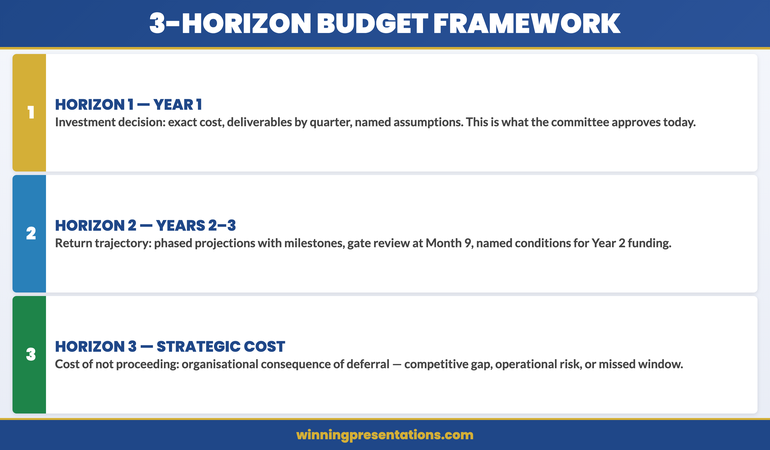
Horizon 1 covers the immediate investment decision: what is being committed to this financial year, at what cost, and for what specific outcome. This is the only horizon the committee needs to approve today.

Horizon 2 covers the return trajectory: how value accumulates in Years 2 and 3, under what conditions, and what the key milestones are that signal whether the programme is on track. This horizon tells the committee what they are agreeing to in principle when they approve Horizon 1.

Horizon 3 covers the strategic context: what the organisation’s competitive or operational position looks like if this investment does not proceed. This is the cost-of-delay argument — the most often absent element, and the most important for overcoming the default deferral instinct.

The framework works because it matches the structure of a finance committee’s decision-making process rather than the structure of a financial model. It separates the approval decision from the forward commitment from the strategic rationale, and presents each in the order a committee needs to process them.

Three planning horizons infographic: Horizon 1 — Year 1 investment decision, Horizon 2 — Years 2 and 3 return trajectory, Horizon 3 — cost of not proceeding

Horizon 1: Building the Year 1 Investment Case

The Year 1 investment case is the most specific and most detailed section of your proposal. This is what the committee is being asked to approve today, and it needs to hold up under direct scrutiny. Every figure should be supportable, every assumption named, every dependency identified.

Structure the Year 1 case around four elements: the problem being addressed, the investment required, the outputs delivered by year-end, and the risk of not investing at this level. The problem statement should quantify the current state using operational data you can defend. “Our current process takes 12 days and introduces rework at roughly one in six outputs” is defensible. “We are 40% less efficient than best practice” is not — the comparison is unverifiable and finance committees notice.

The Year 1 output statement should describe deliverables, not benefits. Benefits belong in Horizon 2. Year 1 deliverables are what you will have produced by year-end: infrastructure built, system deployed, team trained, pilot completed. These are verifiable. They give the committee something concrete to hold you to, which builds credibility rather than eroding it.

Horizon 2: Showing the Return Trajectory

The return trajectory for Years 2 and 3 should be presented at a coarser level of detail than Year 1. Finance committees expect long-range projections to carry wider confidence intervals. Presenting Year 3 figures with Year 1 precision signals either that you have not thought carefully about uncertainty, or that you are suppressing it. A range with named assumptions is more credible than a specific number that implies false precision.

The key elements of Horizon 2 are the milestones that signal the programme is on track, the trigger points that would prompt a review or a pause decision, and the cumulative return projection with its named dependencies. Being explicit about what Years 2 and 3 figures assume — which market conditions, which internal capacity, which decisions not yet made — demonstrates analytical maturity. Finance committees are far more comfortable with named uncertainty than with projections that appear to ignore it.

Present Horizon 2 as a conditional commitment: “Approving Year 1 today gives you visibility of the Year 2 cost envelope. Year 2 funding would be subject to a gate review at Month 9, where we present against the delivery milestones.” This is how large programmes are actually managed. Presenting it explicitly signals governance competence, which builds more confidence with a finance committee than any spreadsheet.

Horizon 3: The Cost of Not Proceeding

Horizon 3 is not about what happens to the project if it is not approved. It is about what happens to the organisation. The two produce very different responses from finance committees. “We will not achieve our efficiency targets” is a project consequence. “Our unit cost per transaction will remain 34% above sector median while competitors who have made this investment begin undercutting our contract pricing” is an organisational consequence. The second creates a decision imperative that the first does not.

The cost-of-delay argument is also where you introduce the competitive, regulatory, or technology context that a three-year investment is typically responding to. If there is a market shift, a regulatory deadline, or a technology window that makes this planning cycle the optimal one for investment, state it in Horizon 3. This reframes the question from “should we do this?” to “is this the right time?” — which most finance committees will answer in your favour if the evidence is credible and specific.

⭐ Maven Flagship — Executive Buy-In

Walk into your next approval meeting prepared

The Executive Buy-In Presentation System gives you 7 self-paced modules covering stakeholder analysis, case construction, and the presentation structures that hold up to scrutiny.

Monthly cohort enrolment — £499, lifetime access.

Enrol in the Executive Buy-In System →

Slide Structure for the Proposal Deck

The slide order for a multi-year budget proposal should follow the 3-horizon logic, not the financial model structure. The sequence that earns finance committee approval:

Slide 1 — Decision Summary. One slide: what you are recommending, what it costs in Year 1, what it returns over three years, and the consequence of not proceeding. Readable in 60 seconds.

Slides 2–3 — The Problem Being Addressed. Current state data establishing why the investment is necessary. Operational metrics, competitive positioning, or regulatory context — whichever is most relevant. This comes before the cost because it frames the cost as a response rather than a request.

Slides 4–6 — Horizon 1 Investment Case. Year 1 cost breakdown, deliverables by quarter, assumptions, and risks. This is the most detailed section because it is the decision being made today.

Slides 7–8 — Horizon 2 Return Trajectory. Phased return projection with named milestones, gate review points, and the conditions under which Years 2 and 3 funding would be confirmed.

Slide 9 — Decision Request. What you need approved today, in one sentence, with the action assignment and the timeline. This is the closing structure that ensures your proposal ends with a decision rather than a deferral — the same principle behind every effective executive presentation close.

For proposals that have already gone through one failed submission, the budget resubmission framework covers how to restructure after rejection without undermining your credibility on the second attempt. For ongoing tracking once a budget is approved, the budget variance presentation structure gives finance committees the accountability view they expect in subsequent review cycles.

When your organisation uses zero-based budgeting rather than prior-year baselines, the zero-based budget presentation approach runs alongside the three-horizon structure to justify every line of Year 1 investment from first principles.

The Executive Slide System includes budget request templates and AI prompt cards for building the three-horizon narrative quickly before a capital allocation deadline.

Preparing for CFO-Level Questions

Finance directors and CFOs reviewing multi-year proposals will focus on a predictable cluster of questions. Preparing specific answers before the committee meeting is the minimum standard for a proposal of this size.

“What happens if Year 1 underdelivers?” This tests whether you have a contingency plan. The answer should name the gate review milestone, define what “underdelivers” means specifically, and describe the decision that follows. “If we are behind Month 9 delivery milestones by more than 15%, we bring a revised scope to the Q4 committee rather than proceeding to Year 2 funding.”

“Why now rather than next planning cycle?” This is the Horizon 3 question in direct form. Your answer is the cost-of-delay argument in two sentences: the operational or competitive consequence of waiting, and the specific factor that makes this planning cycle the right one. Without a credible answer to this question, the proposal is at high risk of deferral regardless of how good the analysis is.

“Who owns the Year 2 and Year 3 commitments?” Finance committees need clear programme ownership before approving multi-year investment. Name the individual accountable for the Month 9 gate review and the Year 2 budget request. If they are not in the room, explain when they will be briefed.

Finance committee Q and A preparation infographic: three CFO questions on multi-year proposals and the response structure for each

Build the Full Case, Not Just the Financial Model

The Executive Slide System — £39, instant access — includes templates, AI prompt cards and framework guides for budget proposals at every seniority level, from departmental requests to capital allocation committees.

  • Budget Request template structured for phased, multi-year investment
  • AI prompt cards to build the three-horizon narrative quickly under deadline

Get the Executive Slide System →

Designed for senior budget owners who need approval at the first committee meeting.

Frequently Asked Questions

How far ahead should a multi-year budget proposal project?

For most corporate planning cycles, a three-year horizon is standard. Year 1 should be presented at budget-line level of detail. Years 2 and 3 are typically shown at programme or workstream level, with clear acknowledgement that they are indicative and subject to gate reviews. Projecting beyond three years in a single proposal usually signals that the scope is too large to be decided in one committee meeting and may need restructuring as a phased programme with separate approval stages.

Should the proposal include a sensitivity analysis?

Yes, but keep it brief and specific. One slide showing the outcome under three scenarios — base case, upside, and downside — with the assumptions that drive each. Finance committees expect sensitivity analysis on investment proposals of this size. However, a sensitivity analysis with more than three scenarios or more than four variables per scenario suggests you are not confident in your base case, which creates the opposite impression from the one you intend.

What is the right length for a multi-year budget proposal presentation?

Nine to twelve slides is the appropriate range for a finance committee presentation. The detailed financial model belongs in a supporting document or appendix, not in the main deck. Finance committees need to make a decision; they do not need to review every assumption in the room. If the committee wants the detailed model, they will ask for it. Present the decision case, not the workings.

How do you handle a committee that wants to reduce Year 1 scope before approving?

Prepare for this in advance by identifying which Year 1 elements are critical-path dependencies for Years 2 and 3 outcomes, and which are not. If the committee wants to reduce scope, offer a restructured Year 1 that protects the dependencies while deferring the discretionary elements. This is more credible than defending the full scope, and it signals that you understand programme priority rather than treating everything as equally essential.

The Winning Edge — Weekly Executive Communication Insights

Each Thursday: one high-stakes communication technique, one real case study, one action you can apply before your next meeting.

Subscribe to The Winning Edge →

Download the free Executive Presentation Checklist — a one-page structure review for any high-stakes meeting.

About the Author

Mary Beth Hazeldine is the Owner & Managing Director of Winning Presentations. With 25 years of corporate banking experience at JPMorgan Chase, PwC, Royal Bank of Scotland, and Commerzbank, she has delivered high-stakes presentations in boardrooms across three continents.

A qualified clinical hypnotherapist and NLP practitioner, Mary Beth advises executives across financial services, healthcare, technology, and government on structuring presentations for high-stakes funding rounds and approvals.

Book a discovery call | View services

19 Apr 2026

How to End a Presentation: The Executive Closing Framework

Quick Answer

To end a presentation effectively, close with a single decision request, a named next step with an owner and a date, and one concrete reason why acting now matters more than deferring. The final 90 seconds determine whether your work produces a decision or another review cycle. Most executives end with “any questions?” — the single most reliable way to hand the decision back to the room.

Valentina spent six weeks building the case. The data was solid. The recommendation was clear. Every likely objection had been addressed in the appendix. She walked into the steering committee knowing she had done everything right — and for 28 minutes, she was correct.

Then she reached the last slide.

“So… that covers the overview. Any questions?”

Three weeks later she was told the committee needed more time to review the financial modelling. The project was deferred. It had nothing to do with the quality of her analysis. It had everything to do with the final 60 seconds. She had done the hardest part of the work — built the argument, earned the room — and then handed the decision back rather than asking for it.

This is not an unusual outcome. It is the default outcome when executives end presentations the way they were trained: summarise, thank the room, open the floor. That structure works in educational settings and team briefings. In a high-stakes decision meeting, it works against you.

Need a complete presentation structure for your next high-stakes meeting?

The Executive Slide System includes closing slide templates and scenario playbooks designed for board meetings, budget approvals, and executive decision settings.

Explore the System →

Why the Last Two Minutes Determine the Decision

How people feel at the end of an experience shapes how they judge the whole of it — a well-documented principle in behavioural psychology. In a presentation context, this means your closing does not just wrap up what came before. It is the frame through which the entire preceding 25 minutes is interpreted and acted upon.

A weak close retroactively weakens strong content. When a presentation ends with “any questions?” after a carefully constructed argument, the implicit signal is: I have given you information; I am leaving the conclusion to you. For a senior audience who expected a recommendation, that reads as uncertainty. And uncertainty from a presenter is one of the most effective reasons to defer a decision.

A strong close, by contrast, frames everything that came before as evidence for a specific action. It tells the room: here is what I need from you, here is who is responsible, here is when it needs to happen. That is not pressure. That is the clarity that senior executives are paid to produce — and to respect when they see it in others.

The Executive Closing Framework infographic showing three elements: Decision Request (what you need approved), Action Assignment (who does what by when), and Reason to Act Now (the cost of delay)

The “Any Questions?” Trap and Why It Kills Approvals

“Any questions?” is not neutral. It is a structural signal that you have finished presenting and are handing control of the meeting back to the room. In most social and educational settings, this is appropriate. In an executive decision meeting, it is a strategic error.

When you ask for questions, three things reliably happen. First, the most vocal person in the room asks about the detail that interests them most — which is rarely the detail most relevant to the decision. Second, someone raises an objection that opens a discussion you had not prepared for. Third, the person with decision authority says nothing, because they are waiting to see how the rest of the room responds before committing.

By the time two rounds of questions have been answered, the energy has dispersed. The thread connecting your recommendation to a specific action has dissolved. The meeting closes with “let’s take this offline” or “we’ll review and come back to you” — and the decision clock resets entirely.

The alternative is not to eliminate questions. Questions are expected and valuable. The alternative is to sequence correctly: close before you open. Ask for the decision first. Then invite questions inside that framework, so any discussion that follows moves toward a commitment rather than away from it.

The Decision-Action-Reason Framework

The executive closing framework has three components delivered in sequence. Each takes under 30 seconds. Together they take a presentation from “informative” to “actionable.”

1. The Decision Request

State precisely what you need the room to approve. Not “I would welcome your thoughts on this.” Not “we are hoping to move forward.” A direct request: “I am asking for approval to proceed with Phase 1 at a budget of £240,000, with implementation beginning 5 May.” One sentence. One number. One date.

2. The Action Assignment

Name the next step, the owner, and the deadline. “If approved today, Henrik in Finance issues the purchase order by the 22nd, and we brief the vendor team the following Monday.” This collapses the gap between approval in the room and work starting in the building. It also signals that you have already thought through the consequences of a yes — which is the strongest form of preparation credibility.

3. The Reason to Act Now

Give one concrete reason why this decision is better made today. Not manufactured urgency — a real one. A contract window, a regulatory deadline, a competitive pressure, a resource availability issue. “The vendor holds our preferred pricing until the 30th of this month. A decision today locks that rate; a deferral to the next meeting costs an additional £18,000.” That is a reason to act now.

This sequence works because it removes ambiguity from the moment that matters most. The room knows what is being asked, who does what next, and why waiting has a cost. That is the structure of every decision that gets made cleanly.

What Your Final Slide Should Contain

Most executives end with either a “Thank You” slide or a dense recap of everything they just covered. Both are errors. The “Thank You” slide is the visual equivalent of “any questions?” — it signals completion without requesting action. The summary slide gives the room something to read rather than something to respond to.

Your final slide should contain three things: your recommendation in one complete sentence, the next action with an owner and a date, and a single contact detail for private follow-up. No bullet points. No appendix links. No “for more information, see slide 22.”

The recommendation line should be a full sentence containing the decision: “Recommended: Approve Phase 1 of the infrastructure modernisation programme at a total budget of £850,000, commencing Q3 2026.” Not a headline. A recommendation.

The action line should name a specific person: “Priya (PMO Director) to issue the project mandate by 30 April.” Naming someone in the room creates a social commitment that a generic “next steps” section never achieves.

The contact detail handles the executives who prefer to follow up privately — which is more common in board and committee settings than public questions. Include your email and direct line. Make a quiet yes easy to convert into a confirmed one.

Final slide structure infographic: three elements only — Recommendation (one sentence with decision), Action Assignment (owner and date), Contact Detail (email and direct line)

When the Room Pushes Back at the Close

Pushback at the close is not failure. It is information. When a senior executive challenges your recommendation in the final moments rather than the middle, it means they were engaged enough to form a specific objection. That is a better outcome than polite silence followed by a deferral.

Distinguish between two types. Informational pushback means they want more data before committing: “Can you send the full cost model?” or “What contingency is built into that figure?” Respond by acknowledging the question and naming a specific follow-up: “I’ll send the full breakdown by close of business today. Does that allow us to confirm by Thursday?” You have answered the objection and preserved the decision timeline.

Positional pushback means someone has a strategic concern that data alone will not resolve: “I am not sure the timing is right given current market conditions.” This requires a different move — not more numbers, but a question: “What would need to be true for the timing to feel right?” That surfaces the actual concern, which you can then address directly rather than arguing past it.

In both cases, your goal is the same: preserve the decision timeline. The presentation closing framework exists to keep that timeline intact even when the conversation becomes complicated. You can give more information. You can address a concern. What you should not do is allow “let’s revisit this” without attaching a specific date and a specific commitment.

Adapting Your Close for Board, Budget and Pitch Formats

The Decision-Action-Reason structure works across formats, but the emphasis shifts depending on the meeting type.

Board presentations require the sharpest decision request. Board members are there to make decisions, not review process. Lead with the decision, spend the most time on the reason, and keep the action step brief. If the board approves, the operational team handles the implementation detail.

Budget presentations require the strongest reason to act now. Finance audiences are trained to identify costs and risks — their default position on any budget request is scepticism. Your closing reason must be cost-of-delay rather than cost-of-approval. “Deferring this to Q4 means we miss the procurement window and pay spot rates, adding 23% to the total cost” is more persuasive to a CFO than any benefit statement. The multi-year budget proposal framework builds this kind of close into the full structure from first slide to decision request.

Pitch presentations require the clearest action assignment. In a sales or partnership context, the close is about commercial commitment, not internal approval. The action step should be specific and low-friction: “I would like to suggest a 30-minute call with your procurement lead next week to walk through the implementation timeline. Would Tuesday or Wednesday work?” A specific ask produces a specific answer. “Let us know when you are ready” produces nothing.

In all three formats, the underlying principle holds: a presentation outline that does not build toward a specific close is a report. The difference is not in the quality of the analysis. It is in whether you ask for the decision. For opening-to-close consistency, the how to start a presentation guide covers the techniques that prime the room for a decision-ready close from the first slide.

If you are rebuilding your closing sequence before an upcoming board or budget presentation, the Executive Slide System includes closing templates for every major executive meeting format.

Build a Closing Slide That Gets the Decision

The Executive Slide System — £39, instant access — includes closing slide templates and scenario playbooks for executive decision settings. Stop ending with “any questions” and start ending with a named decision, a clear next step, and a reason to act today.

  • Closing slide templates for board meetings, budget approvals and project sign-offs
  • Framework guides for structuring the final 90 seconds of any high-stakes presentation
  • 51 AI prompt cards to build your closing sequence in under 10 minutes
  • 15 scenario playbooks covering executive meeting formats

Get the Executive Slide System →

Designed for executives who need board-ready decks without spending three days in PowerPoint.

Five Closing Mistakes to Eliminate Before Your Next Meeting

Beyond “any questions?”, four other habits consistently undermine strong presentations.

The summary recap. Starting your close with “so, to summarise what we covered today…” treats the room as if they were not listening. Senior executives were listening. They do not need a recap — they need a direction. Skip the summary and move directly to the decision request.

The passive recommendation. “We believe this is the right approach and would welcome your feedback.” This positions you as an adviser rather than a decision owner. Own the recommendation: “I recommend we proceed” is more credible than “we feel this could work.”

The overstuffed final slide. A closing slide with six bullet points, three logos, and a disclaimer signals that you have not decided what matters most. Clarity on the final slide is a proxy for clarity in your thinking. One recommendation. One action. One contact.

The time apology. “I know we are running short on time, so I will skip ahead…” undermines your authority in the final moments. If you are running long, cut from a content section in the middle — never from the close. The close is the only part the room must hear to make a decision.

The open-ended handover. “I will leave it with you to review and come back when you are ready.” This has no decision, no timeline, and no owner. The presentation becomes a document in someone’s inbox rather than a meeting with an outcome. Always leave the room with a specific next step and a named date.

Need the Full Deck Structured, Not Just the Close?

The Executive Slide System — £39, instant access — provides slide templates and AI prompt cards for every section of an executive presentation, from opening to decision request.

  • 22 PowerPoint templates covering executive, board and investor scenarios
  • 51 AI prompt cards to draft, refine and polish every section in minutes

Get the Executive Slide System →

Designed for executives preparing decision-stage presentations under time pressure.

Frequently Asked Questions

How long should the closing section of a presentation be?

For a 30-minute executive presentation, your close should take no more than 90 seconds to deliver. The decision request takes 20 seconds. The action assignment takes 20 seconds. The reason to act now takes 30 seconds. A brief pause and the invitation for questions takes the remainder. If your closing is running longer than 90 seconds, you are recapping rather than closing — and recapping in the final moments signals uncertainty to the room.

What if the decision-maker is not ready to commit at the end of the meeting?

Ask for a conditional commitment rather than a full approval. “If the financial model I send today confirms the figures, can we confirm this decision by Thursday?” A conditional commitment is far more useful than an open-ended deferral. It gives you a specific follow-up action, a named deadline, and a clear criterion for the decision. Most deferrals happen because no one defines what “more information” actually means. Your job at the close is to make that definition concrete.

Is it appropriate to end a presentation with a question?

Yes — but the right question. “Any questions?” is not a close; it is an abdication of the decision moment. A closing question that works presupposes forward motion: “Which of these two implementation options fits better with your Q3 planning cycle?” or “Is there anything that would prevent us from confirming this today?” These questions move the conversation toward a decision. The distinction is between a question that opens an undefined conversation and one that frames a specific choice.

What should I do if my presentation goes over time and I have to shorten the close?

Never shorten the close. If you are running long, cut from a content section in the middle — specifically the section that contains the most detail the audience already knows or can read in a supporting document. The opening, the recommendation, and the close are non-negotiable. An executive who hears your recommendation and your decision request, even without the full supporting argument, is better positioned to make a decision than one who has all the context but no direction on what to do with it.

The Winning Edge — Weekly Executive Communication Insights

Each Thursday: one high-stakes communication technique, one real case study, one action you can apply before your next meeting.

Subscribe to The Winning Edge →

Download the free Executive Presentation Checklist — a one-page structure review you can run through the day before any high-stakes meeting.

About the Author

Mary Beth Hazeldine is the Owner & Managing Director of Winning Presentations. With 25 years of corporate banking experience at JPMorgan Chase, PwC, Royal Bank of Scotland, and Commerzbank, she has delivered high-stakes presentations in boardrooms across three continents.

A qualified clinical hypnotherapist and NLP practitioner, Mary Beth advises executives across financial services, healthcare, technology, and government on structuring presentations for high-stakes funding rounds and approvals.
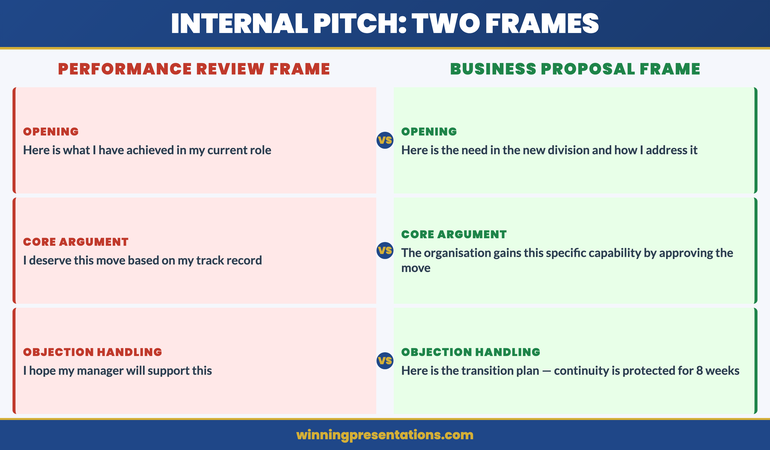
Book a discovery call | View services

18 Apr 2026
Senior executive speaking with authority at a corporate boardroom presentation

Executive Public Speaking Course Online

Quick Answer

If you are looking for an executive public speaking course online, the most important distinction to make is what “executive public speaking” actually means. This is not about speaking on a stage or presenting at a conference. It is about presenting to boards, committees, investment panels, and senior leadership teams — the closed-room, high-stakes settings where careers and decisions intersect. Conquer Speaking Fear is a 30-day online programme designed specifically for professionals who present in organisational settings and want to address the anxiety that surfaces in those environments — not on stage, but in boardrooms, committee rooms, and senior leadership meetings. £39, instant access.

The Problem: Executive Public Speaking Anxiety Is Different

The anxiety that senior professionals experience when presenting to boards and committees is not the same as stage fright. Stage fright is acute, immediate, and often physical — a rush of adrenaline in front of a large audience, a fear of forgetting lines. Executive presentation anxiety is quieter, more persistent, and harder to name.

It shows up as voice tightening in the first two minutes of a board presentation, even when you know the material completely. It shows up as over-explaining — adding caveat upon caveat to protect against challenge — until the core message is buried. It shows up as deferring too quickly to a senior colleague’s objection, not because you lack a response, but because the physiological response to being challenged by someone powerful overwhelms the part of you that knows the answer.

For many senior professionals, this anxiety is contextually specific. They can brief a team confidently, chair a meeting without hesitation, and handle a difficult conversation one-to-one without concern. But put them in front of a board, a governance committee, or a senior panel — particularly if their track record or budget is under review — and the response is entirely different.

The difference matters because it requires a different solution. General presentation skills training does not address the physiological component of this response. Generic mindfulness techniques can help at the margins but do not resolve the pattern at source. What works is a structured approach that combines nervous system regulation with the cognitive reframing required to change how the presenting situation is interpreted by the body and the brain. That is what presentation anxiety rooted in imposter syndrome and senior-level evaluation actually requires to shift.

The Solution: Conquer Speaking Fear

Conquer Speaking Fear is a 30-day online programme that works at the level of the nervous system, not just the presenting technique. It is designed for professionals who present in organisational settings — to boards, committees, senior leadership teams, and investor panels — and who want to address the anxiety they experience in those settings at its source rather than managing its symptoms in the moment.

The programme combines two evidence-informed approaches. The first is nervous system regulation — structured techniques for de-escalating the physiological stress response before and during high-stakes presentations. These are not breathing exercises alone. They are a set of specific, sequenced practices that build the nervous system’s capacity to stay regulated under evaluation pressure, developed through clinical practice rather than adapted from general stress management.

The second approach is clinical hypnotherapy, delivered through audio sessions that work at the level of the subconscious patterns driving the anxious response. For many professionals, presentation anxiety is maintained by a set of beliefs about evaluation, authority, and what it means to be visibly wrong in front of senior colleagues. These beliefs do not respond reliably to rational challenge — telling yourself the board is on your side does not change the physiological response when you stand up to present. Clinical hypnotherapy works differently, addressing the pattern at the level where it actually operates.

Conquer Speaking Fear includes a dedicated module on presenting after a difficult experience — returning to the boardroom after a presentation that did not go as planned, after a period of absence, or after a significant professional setback. This is one of the most common but least discussed aspects of executive presentation anxiety, and it is rarely covered in conventional training.

The programme also covers in-the-moment symptom management — the specific techniques that help when you are in the room, the voice tightening, and you need to regulate without pausing the presentation. Understanding why the anxiety response persists despite experience and competence is also part of the picture — the guide on why presentation anxiety relapses even for experienced professionals covers this in more detail.

What You Get

  • 30-day structured programme — a sequenced daily approach that builds nervous system regulation capacity progressively rather than expecting results from a single session
  • Nervous system regulation techniques — specific, practised methods for de-escalating the stress response before and during high-stakes presentations in organisational settings
  • Clinical hypnotherapy audio sessions — professionally developed recordings that address the subconscious patterns driving the anxious response to evaluation in senior environments
  • Module: presenting after a difficult experience — structured support for returning to high-stakes presenting after a presentation that did not go as intended, after a period of absence, or after a significant setback
  • In-the-moment symptom management — practical techniques for regulating when you are already in the room and the anxiety response has activated
  • Instant access, self-paced — begin immediately and work through the programme at the pace that suits your schedule and upcoming presentations

£39 — instant access, no subscription.

Build a Reliable Presenting Practice for High-Stakes Executive Settings

Conquer Speaking Fear is a 30-day programme that addresses executive presentation anxiety at the level of the nervous system — not just the symptoms. Designed for professionals presenting to boards, committees, and senior leadership teams. £39, instant access.

Get Conquer Speaking Fear → £39

Instant access. 30-day structured programme. For executives presenting in organisational settings.

Is This Right for You?

Conquer Speaking Fear is designed for senior professionals who present regularly in organisational settings and want to address the anxiety that surfaces in those presentations at its source — not just manage it moment to moment.

This programme is a strong fit if: you present to boards, committees, or senior leadership teams and experience a physiological anxiety response in those settings; your presenting confidence varies significantly depending on the seniority of the audience; you have presented well in lower-stakes environments but find the shift to board-level presenting triggers a different level of nerves; or you are returning to high-stakes presenting after a difficult experience and want structured support for that re-entry.

This programme is not designed for: professionals who are looking primarily for presentation structure training, slide design guidance, or technique coaching. Conquer Speaking Fear addresses the anxiety dimension of executive presenting. If your primary goal is overhauling your presentation structure and integrating AI tools into how you build board-level decks, the AI-Enhanced Presentation Mastery cohort on Maven covers both the structural and confidence dimensions of presenting at senior level — it may be worth exploring if you want to work on both areas simultaneously.

Both products serve different needs. If the anxiety is the primary barrier, Conquer Speaking Fear addresses that directly and specifically. If the structure is also a significant gap, the Maven cohort covers both. Most executives benefit from clarity on which is the primary presenting challenge before investing in a programme — the guide on building executive presence through structured presentation may help with that assessment.

Frequently Asked Questions

Is this suitable if I don’t have clinical anxiety?

Yes — the majority of people who benefit from Conquer Speaking Fear do not have a clinical anxiety diagnosis. The programme is designed for the presenting-specific dread, voice tightening, and over-compensation patterns that affect many competent professionals in high-stakes evaluation settings. You do not need to experience anxiety across all areas of your life for this programme to be relevant. If you notice a clear and uncomfortable shift in your physical and mental state when presenting to boards or senior stakeholders, this programme is designed for that specific experience.

How is this different from a presentation skills course?

Presentation skills courses focus on structure, delivery technique, slide design, and communication clarity. Conquer Speaking Fear focuses on the physiological and psychological response to presenting in evaluation-heavy environments. The two are complementary but distinct. If your slides are strong, your structure is sound, and you still find yourself tightening up in the room, the gap is not a structural one — it is a nervous system one. That is what this programme addresses. If both structure and anxiety are significant challenges, working through a structured presentation programme alongside or after Conquer Speaking Fear is a reasonable approach.

Can I use this alongside professional support?

Yes. Conquer Speaking Fear is designed as a standalone self-development programme and is not a substitute for clinical psychological or therapeutic support. If you are working with a therapist, psychologist, or coach on related issues, this programme can complement that work — the nervous system regulation and hypnotherapy techniques operate at a different level from most talking therapies and are unlikely to conflict. If you have any concerns about working with hypnotherapy audio content specifically, speak with your professional practitioner before beginning.

What if my anxiety is specifically about being judged by senior colleagues?

This is one of the most common patterns among the professionals this programme is designed for. The anxiety response to presenting in front of people who have authority over your career, budget, or reputation is a specific and well-recognised form of evaluation anxiety — distinct from general nervousness or shyness. The clinical hypnotherapy sessions within Conquer Speaking Fear address evaluation anxiety patterns directly, working at the level where the belief “being visibly wrong in front of someone powerful is dangerous” actually operates. The nervous system regulation component also provides practical tools for the moments when this specific trigger activates in the room.

How long is the programme and when can I start?

Conquer Speaking Fear is a 30-day structured programme available with instant access — you can begin immediately after purchase. The programme is self-paced, so if your schedule is demanding, you can work through the material at a pace that fits around your commitments. The 30-day structure is designed to build nervous system regulation capacity progressively rather than in a single session. Most participants complete the core content within the 30-day framework and continue to use the audio sessions and regulation techniques as ongoing practice before high-stakes presentations.

The Winning Edge

Weekly insights on executive presentations, boardroom communication, and presenting with confidence at senior level.

Subscribe Free

If your presenting challenge includes rebuilding confidence after a period away or after a difficult experience in the room, the guide on rebuilding presenting confidence after maternity leave covers the specific dynamics of that re-entry — including why the anxiety on return is often not about competence, and what actually helps.

About the author

Mary Beth Hazeldine, Owner & Managing Director, Winning Presentations. With 25 years of corporate banking experience at JPMorgan Chase, PwC, Royal Bank of Scotland, and Commerzbank, and 16 years delivering executive communication training, she works with senior professionals presenting in high-stakes organisational settings across financial services, healthcare, technology, and government.

18 Apr 2026

STAR Method for Q&A: How to Structure Answers Under Executive Pressure

Quick Answer: The STAR method — Situation, Task, Action, Result — gives executives a reliable structure for answering questions under pressure without rambling or losing the thread. Most executives over-answer under scrutiny: they provide context that was not requested, explore tangents that undermine their core point, and arrive at their conclusion after the board has already drawn its own. STAR is the correction. It sequences your answer so that every sentence earns its place, and the response ends on your terms rather than trailing off.

Tomás was Head of Strategy at a professional services firm and was known — admired, even — for the quality of his thinking. His analysis was rigorous. His written work was precise. In Q&A, however, he had a problem that had been following him for three years. He gave five-minute answers to two-sentence questions. He knew it. His colleagues knew it. And the board, which had begun to route certain questions away from him during strategy reviews, knew it too.

When it came up at his performance review, his CEO was direct: “Your answers contain everything you know about a topic. We only need everything that’s relevant to what we asked.” That distinction — everything you know versus everything that’s relevant — became the problem Tomás spent the next six months solving.

He began working with the STAR framework: Situation, Task, Action, Result. Not as a rigid script, but as a decision architecture. Before answering any question — in a formal Q&A, in a one-to-one, in a senior committee — he would silently allocate one or two sentences to each component and use that allocation as his answer’s spine. The result was answers that ran 90 seconds rather than five minutes, that landed on a clear conclusion, and that left room for the questioner to follow up rather than waiting for him to stop.

Two board reviews later, the CEO said: “You’ve changed how you answer questions.” Tomás had not changed what he knew. He had changed the architecture through which he expressed it.

If your Q&A handling needs a systematic approach

The Executive Q&A Handling System is designed for executives who need a complete framework for predicting and handling questions in board, investor, and senior committee presentations — including structured answer frameworks, preparation protocols, and approaches for the question types that most commonly derail experienced presenters.

Explore the System →

Why Most Executives Over-Answer Under Pressure

The instinct to over-answer under questioning is not a failure of knowledge. It is a failure of structure — and it has a specific cause. When a question triggers mild anxiety (the stakes are high, the questioner is senior, the topic is sensitive), the brain’s threat response extends the answer in search of safety. More context feels like more protection. More explanation feels like more credibility. The executive continues talking because silence, or a concise answer that might invite a follow-up, feels more exposed than a comprehensive one that covers every possible angle.

This cognitive mechanism produces the opposite of the intended effect. Boards and senior committees are experienced at distinguishing between the executive who is comprehensive because the topic requires it and the executive who is comprehensive because they are uncomfortable. A 90-second answer that precisely addresses the question reads as mastery. A five-minute answer that addresses the question plus three adjacent questions that were not asked reads as anxiety management.

The second driver of over-answering is the absence of an answer structure. Without a predetermined architecture, the executive makes real-time decisions about what to include and what to leave out — under pressure, and with the questioner watching. These decisions almost always result in more content rather than less, because exclusion requires confidence and pressure reduces confidence. Structure removes this decision from the moment of answering and places it in preparation, where the executive has time to make it well.

The short answer framework for executive Q&A identifies the same pattern: most executives have a content problem in their answers not because they lack content, but because they have not decided in advance what to leave out. STAR is the architecture that makes that decision for you.

Executive Q&A Handling System

A Complete System for Predicting and Handling Executive Q&A

The Executive Q&A Handling System — £39, instant access — is designed for executives who present to boards, investors, and senior committees where the Q&A determines the outcome as much as the slides. It includes structured response frameworks, question prediction tools, and preparation protocols for the question types that most commonly derail senior presentations.

  • Question prediction frameworks for board, investor, and finance committee presentations
  • Structured answer frameworks including STAR and executive-adapted alternatives
  • Scenario playbooks for hostile, compound, and off-topic questions
  • Preparation guides for high-stakes Q&A sessions where the decision hinges on the answers

Get the Q&A Handling System →

Designed for executives where Q&A outcomes shape the decision as much as the presentation itself.


STAR Method for Executive Q&A infographic showing the four components: Situation — brief context for the answer; Task — what needed to be addressed; Action — what was done and why; Result — the outcome and its significance — with a note that each component should run one to two sentences maximum in executive Q&A contexts

The STAR Method Explained — and What Most People Get Wrong

The STAR framework — Situation, Task, Action, Result — was originally designed for structured interview responses, where a candidate is asked to give an example of a specific competency. In that context, it works well: it gives the interviewer a complete narrative arc in a predictable sequence, and it gives the candidate a structure that prevents them from either under-answering (missing essential context) or over-answering (losing the thread in excessive detail).

In an executive Q&A context, STAR serves a different purpose, and the adaptation matters. The most common mistake executives make when applying STAR to board or senior committee questions is treating each component as equal in weight. In an interview, Situation and Task may require several sentences of context-setting. In an executive Q&A, Situation gets one sentence — possibly two if the context is genuinely unfamiliar to the questioner — and Task gets one sentence. The substantive weight of the answer lives in Action and Result. Executives who spend too long on S and T have not answered the question by the time they reach the components that actually matter.

The second common error is treating Result as the factual outcome and nothing more. In an executive presenting context, Result has two components: what the outcome was, and what it means for the decision or situation currently under discussion. An answer that ends with “and the result was a 14% improvement in processing time” is technically complete but strategically incomplete. An answer that ends with “and the result was a 14% improvement in processing time, which is why we believe the same approach is viable in the context you are asking about” connects the narrative to the questioner’s actual concern. That connection is what transforms a technically correct answer into one that advances the conversation.

How to Use STAR for Hostile or Compound Questions

STAR works well for straightforward questions. For hostile questions and compound questions — two of the most common Q&A challenges in executive presenting — it requires adaptation.

A hostile question typically contains a loaded premise: an assertion embedded in the question that, if accepted, puts the respondent in a losing position. “Given that your division has consistently missed its targets over three consecutive quarters, how do you justify the current headcount?” The loaded premise is “consistently missed its targets” — which may be a selective reading of a more complex performance picture. Applying STAR directly to this question means accepting the premise in your Situation component, which undermines the entire answer.

The adaptation for hostile questions is to introduce a pre-STAR clarification: one sentence that either corrects the factual premise or reframes the context before beginning the STAR sequence. “I want to be precise about the performance context here.” Then STAR begins from a corrected starting point. This is not evasion — it is accuracy. Boards and senior committees respect an executive who corrects a false premise without becoming defensive, because it demonstrates both knowledge and composure. The hostile questioner simulation framework in the executive Q&A preparation programme works through this adaptation in detail across different question types.

Compound questions — “Can you explain the revenue shortfall, and while you are at it, what is your view on the M&A pipeline, and has that affected the team’s capacity to deliver?” — require a different adaptation. The first step is to explicitly acknowledge the compound nature of the question: “There are three elements to that question — let me take them in turn.” This signals organisation rather than confusion, and it gives you permission to answer each part with appropriate brevity rather than attempting to weave them together in a way that loses all three. Apply a compressed STAR to each element — one sentence of Situation and Task, two of Action and Result — and the compound answer remains structured throughout.

For executives who want a complete system for handling the full range of board and senior committee questions — not just STAR but the prediction frameworks, preparation protocols, and specific techniques for the most challenging question types — the Executive Q&A Handling System covers the full landscape.


STAR Method Adaptations infographic showing three columns: Standard Question — apply STAR directly with equal sentence weight on Action and Result; Hostile Question — add pre-STAR premise correction then STAR; Compound Question — acknowledge all parts then apply compressed STAR to each element in sequence

Adapting STAR for Different Executive Question Types

Not every Q&A question in an executive context is asking for a narrative example — which is what the STAR framework was originally designed to provide. Boards ask three other types of questions with significant frequency, and each requires a slight adaptation of the STAR architecture.

Opinion questions ask for the executive’s view rather than a factual account: “What is your assessment of the market opportunity in the next 18 months?” For opinion questions, the Situation component becomes context-setting (the facts that inform the view), Task becomes the specific question being assessed, Action becomes the reasoning process (what factors you have weighed and how), and Result becomes the conclusion — the actual opinion. The structure is otherwise the same; the content in each component is different.

Forward-looking questions ask about plans, projections, or intentions: “What are you planning to do about the competitor that just entered your market?” For these, Situation is the current landscape, Task is the strategic challenge being addressed, Action is the planned response, and Result is the anticipated outcome — stated with appropriate confidence rather than as a guarantee. Be specific about what you know and appropriately cautious about what you are projecting. Boards distinguish between executives who are precise about certainty levels and those who present projections as facts.

Clarifying questions ask the executive to revisit something already presented: “You mentioned earlier that you are confident in the Q3 projection — can you walk us through why?” For these, the Situation component is brief (you are returning to a point already made), the Task is what specifically needs clarification, the Action is the additional detail or reasoning, and the Result connects back to the confidence stated earlier. The key with clarifying questions is not to become defensive — the questioner is giving you an opportunity to strengthen your position, not challenging it.

All three question types benefit from the same preparatory discipline: the two-second pause before answering to categorise the question and select the appropriate STAR adaptation, as covered in the pause technique for executive Q&A. The pause is not delay — it is the moment in which the structural decision gets made.

The STAR Exit: How to Land Your Answer Without Trailing Off

The exit — the final sentence of a STAR answer — is where most executives lose the ground they have spent the previous 60 to 90 seconds building. The answer arrives at the Result component and then continues: one more qualifying clause, one more piece of context, one more hedge against a follow-up question. The landing that the structure set up gets cancelled by the executive’s inability to stop talking.

A strong STAR exit has one sentence: the Result, stated plainly, connected where appropriate to the question’s underlying concern. “The result was X, which is why we are confident / which is why we are monitoring / which is why we have changed our approach.” Full stop. No qualifiers. No additional context. No invitation for a follow-up by pre-emptively addressing objections that have not been raised.

The difficulty of stopping precisely at the right moment is not a content problem. It is a physical one. The anxiety of senior Q&A produces a tendency to fill silence — the silence after your final sentence feels exposed in a way that compels the executive to add one more clause. The practical solution is to build an exit marker into your STAR preparation: a deliberate phrase that you know signals the end of your answer. “That is the position as we understand it” or “that is what the data showed” are phrases that function as exit signals — they close the answer with a tone of finality rather than tentativeness. They also tell the questioner that you have finished, which gives them permission to respond rather than waiting for you to continue.

Making STAR Automatic: The Practice Protocol

The STAR framework is not useful in a Q&A if you are consciously constructing it in real time while a board member is looking at you. The goal of STAR practice is to make the structure automatic — to reach a point where the categorisation and sequencing happen without deliberate effort, leaving your conscious attention free for the content of the answer itself.

The practice protocol has three stages. The first stage is deliberate application: for one week, consciously apply STAR to every question you are asked in any professional context — one-to-ones, team meetings, informal conversations with senior stakeholders. This stage feels mechanical and slightly awkward; that is expected and necessary. The structure needs to become familiar before it can become fluent.

The second stage is high-stakes simulation. Work with a trusted colleague to run a 20-minute Q&A session in which they ask the ten questions you most expect at your next board or senior committee presentation. Record the session. Review each answer against the STAR structure: where did the Situation run too long? Where did the Action lack specificity? Where did the Result fail to connect to the underlying concern? This kind of structured review produces faster improvement than any number of unstructured rehearsals. The simulation approach used in the hostile questioner simulation framework applies the same principle to the most demanding question types.

The third stage is transfer: using STAR in increasingly high-stakes contexts until the board room or investor meeting no longer feels categorically different from a well-prepared team presentation. The same structured practice approach applies in virtual and recorded presentation contexts — the asynchronous presentation framework addresses the specific challenges of delivering without live audience feedback, where STAR’s answer architecture provides equally useful discipline for the absence of an immediate follow-up exchange. This transfer does not happen automatically — it requires deliberately choosing to apply the structure in the next senior context rather than reverting to unstructured answering when the stakes rise. Executives who complete all three stages consistently report that Q&A sessions that once felt like a threat become, over time, the part of a presentation they are most comfortable with — because they are the part they have systematically prepared for.

Executive Q&A Handling System

Predict, Prepare, and Handle the Questions That Shape Decisions

The Executive Q&A Handling System — £39, instant access — gives you a complete framework for executive Q&A: question prediction tools, structured response frameworks, preparation protocols, and scenario playbooks for the question types most likely to derail a senior presentation. For board, investor, finance committee, and high-stakes management Q&A.

Get the Q&A Handling System →

Designed for executives where the Q&A determines whether the decision goes their way.

Frequently Asked Questions

Is the STAR method appropriate for executive Q&A, or is it mainly an interview technique?

The STAR method was developed in an interview context, but the underlying architecture — Situation, Task, Action, Result — is applicable to any answering context where structure prevents over-answering and ensures the response ends on a clear conclusion. In executive Q&A, the adaptation is primarily one of weight: Situation and Task receive minimal space (one sentence each at most), and Action and Result carry the substantive weight of the answer. The framework is particularly useful in board and senior committee presentations where the questioner has limited patience for long preambles and where the executive’s credibility is partly assessed by the economy and precision of their answers. STAR is most valuable not as a rigid formula but as a decision architecture that removes the need to construct your answer’s structure in real time under pressure.

How long should a STAR answer be in a board or executive Q&A context?

In an executive Q&A context, most STAR answers should run between 60 and 90 seconds when spoken at a measured pace. This typically allows one or two sentences per STAR component, with slightly more weight on Action and Result. Answers running shorter than 60 seconds may be appropriate for simple or factual questions but risk appearing evasive for questions requiring substantive explanation. Answers running longer than 90 seconds — unless the question is genuinely complex and the additional length is justified — typically reflect either an S or T component that has run longer than necessary, or a Result component that has been qualified and extended beyond the point where it serves the answer. If you consistently find your STAR answers running over 90 seconds, the most likely fix is compressing your Situation to one sentence and cutting any Task context that the questioner already knows.

What do you do when you do not have a relevant result to complete the STAR structure?

When a question asks about a situation that is ongoing or one where the outcome is not yet known, the Result component becomes a forward-looking statement rather than a historical outcome. “We are currently in the process of X, and our expectation is Y by Z date” is a valid and honest Result for an open situation. The alternative — attempting to offer a historical result when none exists — produces answers that sound evasive or manufactured. Boards and senior committees are generally comfortable with “we do not yet have the result because the initiative is ongoing” when that statement is followed by a specific expected outcome and timeline. What they are not comfortable with is ambiguity about whether management has a clear view of where it is heading. The Result component, whether historical or forward-looking, is always about demonstrating that management is in command of the situation — not simply that things have gone well.

The Winning Edge

Weekly insights on executive presentations, delivered every Thursday. Practical frameworks, real scenarios, and no generic advice.

Subscribe to The Winning Edge →

About the Author

Mary Beth Hazeldine — Owner & Managing Director, Winning Presentations

With 25 years of corporate banking experience at JPMorgan Chase, PwC, Royal Bank of Scotland, and Commerzbank, Mary Beth Hazeldine advises executives across financial services, healthcare, technology, and government on structuring presentations for high-stakes funding rounds and approvals. She works directly with senior leaders to build the Q&A capability that shapes decisions in the room. Learn more at Winning Presentations.
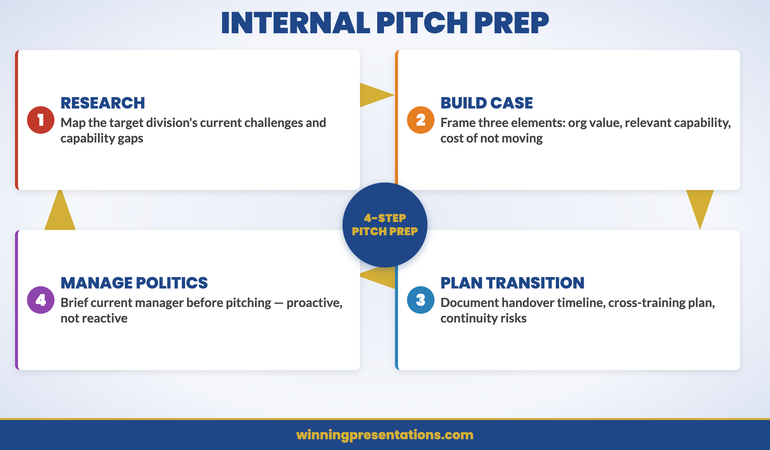
18 Apr 2026

Asynchronous Presentation: How to Deliver Impact Without a Live Audience

Quick Answer: Recording an asynchronous presentation produces a specific kind of anxiety that live presenting does not — no audience feedback, no natural pacing cues, no recovery from a stumble. The result is often either a flat, over-rehearsed delivery that sounds scripted, or a fractured recording session full of restarts that never quite captures what you know you can do. The fix is a structured approach: script the architecture rather than the words, regulate your physical state before hitting record, and apply a clear protocol for when to continue versus when to re-record.

Ngozi was Head of Client Success at a SaaS company with teams across eight time zones. When her director asked her to record a 12-minute overview of Q1 client health metrics for a global leadership meeting, she assumed it would take an hour. Two and a half hours later, she had completed eight full takes and was still not happy with any of them.

The problem was not her knowledge of the material — she knew it precisely. It was the silence. In a live meeting, she could read the room: a nod told her to move on, a furrowed brow told her to explain further, a shift in posture told her she had the room’s attention. Recording herself for an audience she could not see produced a physical response she had not anticipated — a slight tightening in her voice, a tendency to rush through the data slides, and a persistent sense that she had somehow got the tone wrong even when the content was correct.

The restarts were making it worse. Each time she re-recorded, she became more self-conscious, not less. The ninth take was worse than the third. She stopped, spent fifteen minutes on a physical regulation routine she had learned from a coaching session, went back to her one-page script outline — not a word-for-word script, just the architecture of each section — and recorded it in one take that was good enough to send.

The leadership team’s response was warm and specific. The recording had landed. Not because it was technically perfect — there was one moment where she stumbled slightly and kept going — but because it felt real and considered. That is the standard an asynchronous presentation actually needs to meet.

If recording yourself triggers a physical anxiety response

The Calm Under Pressure programme is designed for in-the-moment physical symptom management during presentations — including the specific tension patterns that recording without a live audience tends to produce. It addresses the physical state, not just the mindset.

Explore the Programme →

Why Recording Yourself Creates a Different Kind of Anxiety Than Live Presenting

Live presenting produces anxiety primarily through social evaluation: the fear of being judged, of losing the room, of visibly struggling in front of people whose opinions matter. This is uncomfortable, but it comes with natural regulation mechanisms — you read the room, you adjust, you get into the flow of a conversation, and the social energy of the room often carries you through difficult moments.

Recording yourself without an audience removes all of those regulation mechanisms simultaneously. There is no room to read. There is no social energy to carry you. There is no feedback loop that tells you whether you are going well or badly — only your own internal critic, which has no information about how the recording is actually landing and tends to default to “worse than expected.”

The physical response to this is distinct from live presentation anxiety. Rather than the adrenaline surge of walking into a room, recording anxiety tends to manifest as a sustained physical tension — a slight tightness in the throat and chest, a flatness in vocal tone, a tendency toward over-precision in diction that makes delivery sound rehearsed rather than natural. Executives who present with considerable confidence in live settings often find that their recorded delivery sounds noticeably less authoritative than they know themselves to be. This is not a performance problem. It is a physiological response to an unnatural stimulus: performing without an audience for an audience you cannot see.

Understanding this distinction matters because the solution is different. Live presentation anxiety responds well to preparation and rehearsal. Recording anxiety responds better to physical regulation before recording and a structural approach to delivery that gives you something to navigate rather than a blank canvas to fill. The screen sharing and virtual presence framework covers the related challenge of delivering effectively on camera — many of the same principles apply here.

Calm Under Pressure

Manage the Physical Response That Undermines Your Recorded Delivery

Calm Under Pressure — £19.99, instant access — is designed for in-the-moment physical symptom management in presenting contexts. It addresses the specific physical patterns that recording without an audience tends to produce: voice tension, delivery flatness, and the physical spiral that makes restarts worse rather than better. Techniques designed for the moments before and during high-stakes presentation delivery.

  • In-the-moment physical regulation techniques for voice tension and delivery anxiety
  • Breathing and grounding frameworks for solo recording and virtual presentation environments
  • Physical symptom management for presenting without live audience feedback
  • Protocols for resetting your physical state when recording sessions are not going well

Get Calm Under Pressure →

Designed for executives who experience physical anxiety symptoms during presentations.


Asynchronous Presentation Anxiety infographic comparing Live Presentation anxiety triggers (social evaluation, losing the room, visible struggle) versus Recording anxiety triggers (no feedback loop, internal critic, sustained voice and physical tension) — with different regulation approaches for each

The Physical Setup That Reduces Delivery Anxiety

The physical environment in which you record has a measurable effect on delivery quality — not just for technical reasons, but because environmental signals shape your physiological state before you begin.

Camera position matters more than most executives realise. A camera positioned below eye level is the most common setup mistake in recorded presentations, and it produces a subtle but perceptible effect: the presenter appears to be looking slightly down, which reads as diminished authority or discomfort. Camera at eye level — which typically means elevating the laptop or external camera to head height — produces a noticeably different quality of presence on screen. You are speaking with your audience rather than at them or above them.

Lighting has a similar effect on the physical experience of recording. Poor lighting — particularly strong backlight from a window behind the presenter — forces a subtle physical tension as the camera struggles to compensate and the presenter senses that the image is not clear. A single key light source positioned in front of and slightly above the presenter reduces this tension significantly. Natural daylight from in front is ideal; a ring light is a reliable alternative. The practical principles behind virtual setup are covered in the hybrid meeting facilitation guide — the same environmental principles apply to async recording.

The two minutes before you hit record are as important as the setup itself. A brief physical regulation routine — slow breathing, a deliberate relaxation of the shoulders and jaw, and two or three slow exhales — reduces the physical tension that accumulates in the lead-up to recording. The goal is not to be relaxed in the way you might be in a casual conversation. The goal is to be in the physical state from which your natural authority emerges. Most people know what that state feels like. The regulation routine is designed to get you there intentionally rather than waiting to stumble into it.

How to Script Without Sounding Like You Are Reading

The instinct when recording an asynchronous presentation is to write a full script — every word, every transition, every data point — so that nothing gets missed and nothing sounds uncertain. The result is almost always a recording that sounds exactly like what it is: someone reading from a script. The fluency markers that indicate natural speech — the slight variation in sentence length, the occasional pause for thought, the natural emphasis that comes from actually thinking about what you are saying — are absent, and their absence is immediately perceptible to listeners.

The alternative is not to record without preparation. It is to script the architecture rather than the words. For each section of your asynchronous presentation, prepare a one to three bullet point outline: the core point you are making, the supporting evidence or example you will use, and the bridging statement that moves you to the next section. That is your script. Within each section, you speak to those points rather than reading predetermined sentences.

This approach has a specific cognitive benefit. When you are working from an architectural outline rather than a word-for-word script, the process of expressing each point engages your thinking rather than your memory. Your delivery becomes the natural product of actually engaging with the material — which is exactly what your audience will perceive as authority and genuine expertise.

The exception to this principle is the opening statement. Writing and memorising a single strong opening sentence — delivered directly to camera — anchors the recording with presence and sets the tone for everything that follows. First impressions in recorded presentations are formed within the first ten seconds, and a confident, direct opening statement creates a frame that benefits every subsequent section. The principles behind effective opening delivery are covered in the Teams presentation delivery framework — the same opening principles apply across virtual and recorded formats.

If the physical symptoms of recording anxiety — voice tension, difficulty finding your natural delivery register, the restart spiral — are a consistent challenge, Calm Under Pressure addresses these at the physical level, with in-the-moment techniques designed for presenting contexts specifically.


Async Presentation Scripting Method infographic showing the architectural outline approach: for each section prepare Core Point, Supporting Evidence or Example, and Bridge to Next Section — contrasted with the full-script approach that produces robotic delivery

Your Voice Without an Audience: Why It Sounds Wrong and How to Fix It

Most people, when they first listen back to a recording of themselves presenting, have the same reaction: that does not sound like me. The voice sounds flatter, more monotone, more hesitant than the presenter believed they sounded while recording. This is not a delusion — it reflects something real about what happens to vocal delivery when the live audience is removed.

In a live presenting environment, your voice is shaped partly by the room’s response. You raise volume when the room gets quieter and you sense it is needed. You slow down when you see a furrowed brow. You lean into emphasis when a point lands and the room’s energy confirms that it has. These are not conscious decisions — they are automatic responses to social feedback that regulate your vocal delivery in real time.

Recording removes all of these regulation signals. The result is that voice tends to compress: the dynamic range narrows, the pace either rushes or stalls without natural audience pacing to guide it, and the emphasis becomes either over-performed (because the presenter is consciously trying to be expressive without feedback) or flat (because the effort of compensating has depleted the vocal presence that would otherwise emerge naturally).

The practical fix has two components. The first is physical: recording standing up rather than seated produces measurably better vocal quality for most people. Standing removes the subtle compression of the diaphragm that sitting produces, which allows the voice more physical resonance. The second is directional: speak to one person in your mind’s eye, not to an abstract audience. Identify a specific individual — a trusted colleague, a client whose opinion you respect — and speak to them directly. The voice naturally adjusts to direct conversation in ways that it does not adjust to broadcasting, and recorded presentations benefit from exactly that quality of directed, conversational engagement.

Managing the Urge to Restart: A Decision Framework

The restart spiral is the most common technical failure in asynchronous presentation recording. The presenter stumbles, stops, and starts again — and with each restart, the awareness of the stumble increases, the physical tension builds, and the subsequent take is marginally worse than the one before. After five or six restarts, the presenter is recording in a state of elevated anxiety that is audible in every take.

The instinct driving the restart spiral is the assumption that the recording needs to be perfect to be effective. This is not accurate. Listeners do not experience a slight stumble or an “um” in a recorded presentation the way presenters expect. What listeners notice is not individual errors — it is the overall quality of presence and the sense that the presenter actually knows what they are talking about. A recording with two minor stumbles delivered with genuine authority is significantly more effective than five careful restarts that produce technically perfect but lifeless delivery.

A clear decision framework for restarts reduces the spiral significantly. There are two situations in which a restart is warranted: you lose your place entirely and cannot recover the thread within three seconds, or you have said something factually incorrect that the audience will notice. Everything else — a filler word, a slight mis-step in phrasing, a pause that felt awkward — is not a restart. It is a moment of natural speech that most listeners will not consciously register.

If you do need to restart, build a full physical reset into the pause: stand up if you were seated, do a slow exhale, and physically shake out the tension in your hands and shoulders before sitting back down. Recording again immediately after a frustrating take compounds the physical tension that produced the problem in the first place. The reset is not a delay — it is the preparation for a take that is worth sending.

The Companion Message That Gets Your Recording Watched

An asynchronous presentation that no one watches has no impact, regardless of its quality. The single most underinvested element of async presentation preparation is the companion message — the text that accompanies the recording in the email, Teams message, or Slack post through which it is distributed.

The companion message serves three functions. First, it gives the recipient a reason to prioritise watching: not “please see attached recording” but “I have recorded a 12-minute overview of the Q1 client health metrics — the key finding is X, and I would like your view on Y before the leadership meeting on Thursday.” The reason to watch and the specific ask are both explicit. Second, it sets expectations: telling the recipient how long the recording is (“12 minutes”) and what decision you need from them by when removes the two most common friction points that cause async recordings to be deferred rather than watched. Third, it signals that you have not just offloaded information but prepared something worth their time.

The companion message should be no more than four sentences. One sentence that states the context and what the recording covers. One sentence with the key finding or recommendation. One sentence with the specific decision or input you need. One sentence with the deadline. Everything else is overhead that reduces the likelihood of the recording being watched promptly. If the asynchronous recording is followed by a live Q&A session, the STAR method for executive Q&A provides the structured response framework for handling the follow-up questions when you are eventually in the room with the audience.

Calm Under Pressure

Physical Symptom Management for Presenting Under Pressure

Calm Under Pressure — £19.99, instant access — gives you in-the-moment physical regulation techniques for the specific symptoms that undermine presentation delivery: voice tension, physical rigidity, the restart spiral, and the sustained anxiety of performing without live audience feedback. For virtual and recorded presenting contexts as well as live ones.

Get Calm Under Pressure →

Designed for executives who experience physical anxiety symptoms in presenting contexts.

Frequently Asked Questions

How do you make an asynchronous presentation sound natural?

The most reliable way to make a recorded asynchronous presentation sound natural is to script the architecture rather than the words. For each section, prepare a brief outline — the core point, the supporting evidence, and the transition to the next section — and speak to those points rather than reading from a full script. Full scripts produce delivery that sounds read because it is being read. The architectural outline gives you structure without suppressing the natural speech patterns that make delivery sound authoritative and genuine. The opening statement is an exception: write and memorise one strong opening sentence to deliver directly to camera. Everything after that should come from genuine engagement with your outline rather than precise recall.

How long should an asynchronous presentation be?

For most executive and business contexts, an asynchronous presentation should run between eight and fifteen minutes. Below eight minutes, the recording may not provide sufficient depth on complex topics. Above fifteen minutes, the likelihood of the full recording being watched in a single sitting drops significantly — most recipients will begin it, reach a natural break point, and not return. If your content genuinely requires more than fifteen minutes, break it into clearly labelled sections (each with its own short companion message) and allow recipients to watch sections in the order most relevant to them. Respecting your audience’s attention is a form of executive communication competence, and a concise recording that is watched in full is more effective than a comprehensive one that is watched in part.

What equipment do you actually need to record a professional asynchronous presentation?

For the majority of business contexts, the equipment you already have is adequate — with two adjustments. First, elevate your camera to eye level if you are using a laptop or built-in webcam; this single change has more impact on perceived authority than almost any other equipment decision. Second, address your lighting: ensure your light source is in front of you rather than behind you, and if possible use a simple ring light or position yourself facing a window. A good external microphone improves audio quality noticeably, and clean audio matters more than high-definition video for most business presentations. Beyond these adjustments, the quality of your delivery — preparation, physical state, scripting approach — has far greater impact on the recording’s effectiveness than the technical specifications of your equipment.

The Winning Edge

Weekly insights on executive presentations, delivered every Thursday. Practical frameworks, real scenarios, and no generic advice.

Subscribe to The Winning Edge →

About the Author

Mary Beth Hazeldine — Owner & Managing Director, Winning Presentations

With 25 years of corporate banking experience at JPMorgan Chase, PwC, Royal Bank of Scotland, and Commerzbank, Mary Beth Hazeldine advises executives across financial services, healthcare, technology, and government on structuring presentations for high-stakes funding rounds and approvals. She works directly with senior leaders to build the communication skills that hold up under pressure. Learn more at Winning Presentations.

18 Apr 2026

Management Accounts Presentation: When the Numbers Demand an Explanation

Quick Answer: A management accounts presentation fails when it reports numbers without explaining them. The board already has the figures — what they need from you is the narrative: what changed, why it changed, and what management is doing in response. The most effective management accounts presentations are built around a four-part structure for each key metric: expectation, outcome, cause, response. That structure turns a reporting exercise into a decision-making conversation.

Astrid had been Head of Finance at the logistics company for four years. She was methodical, precise, and trusted by the board. But the month the EBITDA came in 23% below budget, she sat in front of her spreadsheet for three hours wondering how to build a management accounts presentation that would not lose her credibility before she finished the first slide.

The temptation was to bury the number — to lead with revenue (which was only 8% down), build the case for external factors, and let EBITDA appear deep enough in the deck that the meeting had momentum before the board saw it. She resisted that instinct. Instead, she put the key variance on the second slide, led with the most honest explanation she had, and structured the rest of the presentation around what management was doing to recover the position.

The board did not respond well to the EBITDA figure. But they responded well to her. The Chair said afterwards that the most confidence-inspiring thing a finance director can do is present bad news clearly, early, and with a plan. Boards are experienced enough to know that businesses have difficult months. What they are actually assessing is whether management understands its own numbers and is in command of its own response.

That distinction — between what the numbers say and whether management understands them — is what the management accounts presentation is really designed to communicate.

If you present financial results to a board or senior committee

The Executive Slide System includes slide templates and framework guides designed for finance and board reporting presentations — including the narrative structure that turns monthly accounts from a reporting exercise into a conversation that drives decisions.

Explore the System →

Why Management Accounts Presentations Go Wrong Before a Slide Is Built

The most common failure in management accounts presentations is not a presentation problem. It is a framing problem — and it happens before anyone opens PowerPoint.

When finance teams approach the monthly pack as a reporting exercise, the output is a presentation that describes what happened. When they approach it as a communication exercise, the output is a presentation that explains what happened and what it means for decisions being made right now. These are structurally different outputs, and boards experience them as such. One feels like a status update. The other feels like the briefing they needed to walk in and make a call.

The second common failure is building the presentation around the structure of the accounts rather than the structure of the conversation the board needs to have. Management accounts are organised by accounting categories: P&L, balance sheet, cash flow, departmental cost centres. Boards are not organised by accounting categories — they are organised by decisions, priorities, and concerns. Presenting in accounting order forces the board to do the interpretive work of connecting figures to implications. Presenting in decision order means the slides do that work for them.

A third failure is proportionality. Finance teams with 40 slides of management accounts are not communicating more effectively than those with 12. They are signalling that they have not prioritised — that every number is equally important, which means none of them are. The board will come to its own conclusions about which three figures matter most, and those conclusions may not align with yours. The management accounts presentation is your opportunity to make that prioritisation explicit. The principles behind this are covered in depth in the data presentations for executives framework — the same logic applies here.

Executive Slide System

Build Financial Presentations That Drive Decisions, Not Just Discussion

The Executive Slide System — £39, instant access — includes slide templates for finance and board reporting presentations, AI prompt cards for structuring your financial narrative, and framework guides for presenting variance analysis and results with clarity. Designed for finance directors and senior executives who present management accounts to boards and senior committees.

  • Slide templates for management accounts, board updates, and financial review presentations
  • AI prompt cards to build your narrative around key variances and performance drivers
  • Framework guides for structuring financial results as a decision-making conversation
  • Scenario playbooks for presenting unfavourable results and recovery plans to senior audiences

Get the Executive Slide System →

Designed for executives presenting financial results in high-stakes board environments.


Management Accounts Presentation Structure infographic showing four components for each key metric: Expectation — what was budgeted or forecast; Outcome — what actually happened; Cause — the primary driver of the variance; Response — what management is doing as a result

The Narrative Architecture for Financial Results

Every management accounts presentation needs a narrative architecture — a conscious decision about what story you are telling with the numbers, before you decide which numbers to show.

The most reliable structure for financial results uses a four-part sequence for each key metric: expectation, outcome, cause, response. Expectation: what was the budget or forecast? Outcome: what actually happened? Cause: what was the primary driver of the difference? Response: what is management doing about it, and on what timeline? Applied consistently across your three or four priority metrics, this structure gives the board everything it needs to form a view and ask the right questions — without requiring them to read across multiple slides to piece together a picture you could have given them in one.

One structural decision that significantly improves management accounts presentations is the choice to lead with the conclusion rather than build to it. Most finance presentations work chronologically or logically: here are the inputs, here is the process, here is the output. Boards find this frustrating because they want to know the headline before they invest attention in the detail. Leading with the conclusion — “EBITDA is 23% below budget, driven primarily by two factors, and here is our recovery plan” — orients the board before you present the evidence. It does not reduce the rigour of the presentation; it increases the board’s ability to engage with it productively.

Cross-referencing your management accounts narrative against the quarterly forecast gives the board an additional layer of context — whether the monthly variance is part of a pattern or an isolated month. The quarterly forecast presentation framework covers how to integrate this context without doubling the length of your pack.

Variance Analysis: How to Present the Gap Without Sounding Defensive

Variance analysis is where most management accounts presentations either gain or lose the board’s confidence. The numbers themselves rarely cause the problem. The way they are explained does.

The defensive presentation of variance explains the gap in terms of factors outside management’s control. Fuel costs increased. Currency moved against us. The market contracted. These may all be true — but presenting them without equal weight on what management controlled creates the impression that the team sees itself as a passive responder to external conditions. Boards lose confidence in finance leaders who consistently attribute outcomes to factors they could not influence.

The credible presentation of variance separates causes into two categories: external factors (outside management’s control) and management decisions (inside management’s control). For each, it gives the honest weighting. If 60% of the EBITDA shortfall came from a supplier cost increase and 40% from a decision to prioritise volume over margin in Q3, both get stated clearly. The 40% that management controlled is where the board will focus — and presenting it voluntarily, with context, is far stronger than having the board extract it through questions.

The response section of the variance narrative is where credibility is built or destroyed. A vague response (“we are reviewing our cost structure”) signals that management does not yet have a clear plan. A specific response (“we have identified three cost reduction levers that will recover 60% of the shortfall by month eight, and we are tracking them against weekly milestones”) signals that management is in command of its own situation. Specificity — even when the situation is difficult — is more confidence-inspiring than optimism. For more on how variance analysis integrates into board financial reporting, the budget variance presentation framework is a useful companion resource.

For finance directors and heads of strategy who present management accounts to boards and senior committees, the Executive Slide System includes slide templates and AI prompt cards designed specifically for financial results and board reporting presentations.


Variance Analysis Framework infographic showing two columns: External Factors (outside management control — presented with honest weighting) vs Management Decisions (inside management control — presented with specific recovery plan and timeline)

The One Slide Your Board Reads First

Every management accounts pack has one slide that the board will turn to before the presentation formally begins. In most cases, it is the summary P&L or the KPI dashboard on the first or second page of the pack. Boards have learned to navigate to this slide first because it gives them the headline picture before they invest attention in anything else.

Because this slide receives disproportionate attention, it deserves disproportionate care. The summary slide — whether it is a P&L summary, a KPI dashboard, or an executive briefing note at the front of the pack — should give the board the three things they most need to know: the headline financial position against budget or prior year, the one or two primary drivers of any significant variance, and the management response or action being taken. One slide. Three pieces of information. Nothing that requires them to cross-reference page 14 to understand what they are looking at.

The formatting of this slide matters more than any other in the pack. Red/amber/green traffic light indicators work well for KPIs where the direction of movement is self-evident — but they lose their value if overused. If everything is amber, nothing is. Reserve the RAG system for your five or six most critical metrics, and let the narrative explain everything else. A board that has to decode a slide before it can read it is a board whose attention you have already lost.

When the Numbers Tell a Story the Business Doesn’t Like

There is a version of management accounts preparation that every finance director and CFO knows well: you have the figures, they are worse than expected, and you have to build a presentation that explains them to people who will be concerned, possibly critical, and are relying on you to give them an honest picture.

The principle that holds in this situation is simpler than most executives expect. Boards deal with bad news regularly. What they cannot deal with is bad news that arrives late, that arrives without explanation, or that arrives with an explanation that subsequently turns out to be incomplete. The finance director who tells the board the full picture clearly and early — and who has a credible plan — is in a far stronger position than the one who presents an optimistic version that requires three subsequent months of “further explanation.”

When presenting unfavourable management accounts, lead with the headline. Do not bury it. State what has happened, why it has happened (with honest weighting between external and management factors), and what management is doing about it. The board will have questions — that is appropriate. Your job is to ensure that your answers to those questions do not produce a worse impression than the numbers themselves. Preparation here is everything: anticipate the three or four questions the board is most likely to ask, have precise answers ready, and resist the temptation to speculate on outcomes you cannot yet project with confidence.

One phrase that finance directors find useful when presenting difficult results: “Here is what we know, here is what we do not yet know, and here is what we are doing to find out.” It is honest, it is structured, and it signals a management team that is running towards a problem rather than away from it. The same principle — leading with clarity rather than protection — applies in investor and shareholder contexts; the AGM presentation framework for handling shareholder questions applies the identical logic to the public scrutiny that listed company finance directors face.

Making Management Accounts a Decision Tool, Not a Report

The highest-value management accounts presentations do something most finance presentations do not: they end with a clear indication of what the board needs to decide or approve as a result of what has been presented.

Most management accounts presentations are constructed as information deliveries — here are the facts, over to you. The board then has to do the interpretive work of converting information into decision points. Some boards are good at this. Many are not, or take significantly longer than necessary because the finance team has not made the decision implications explicit.

A simple addition to the closing section of any management accounts presentation is a “decisions required” or “board input needed” slide that states clearly: given what we have just presented, here are the two or three things we need from you before the next management accounts meeting. These might be approval for additional budget, endorsement of a cost recovery plan, or a steer on strategic priorities in light of a changed financial position. The specificity of this slide tells the board exactly what you need them to do — and gives the finance team a clear mandate to act on after the meeting.

This approach transforms management accounts from a reporting exercise into a governance mechanism. The board is not just receiving information — it is actively participating in the response to that information. Finance directors who build this habit find that their board relationships improve significantly, because the board begins to see the management accounts meeting as a forum where real decisions get made, not just a status update that could have been an email.

Executive Slide System

The Slide Architecture for Finance Leaders Who Present to Boards

The Executive Slide System — £39, instant access — includes slide templates for management accounts and board financial reporting, AI prompt cards for building variance narratives, and framework guides for structuring results presentations that drive decisions rather than just discussion.

Get the Executive Slide System →

Designed for finance directors and senior executives presenting results to boards and senior committees.

Frequently Asked Questions

How should management accounts be presented to a board?

Management accounts should be presented to a board in decision order, not accounting order. Rather than working through the P&L line by line, identify the three or four metrics that most directly affect the decisions the board will make in the next quarter — and build your narrative around those. For each key metric, use the expectation-outcome-cause-response structure: what was forecast, what happened, why, and what management is doing about it. Lead with the headline rather than building to it, and close with a clear statement of what you need from the board. The pack itself should be concise — a well-constructed 12-slide management accounts presentation is more effective than a 40-slide one that forces the board to do the interpretive work.

What do you do when management accounts are significantly below budget?

When management accounts are significantly below budget, the presentation approach matters as much as the content. Lead with the headline variance early — do not bury it in the middle of the pack. Present the causes with honest weighting: separate the factors outside management’s control from the decisions management made that contributed to the shortfall. The board will focus on the controllable element, so present that part with a specific recovery plan and timeline rather than a vague commitment to “review the situation.” The finance director who presents difficult numbers clearly, early, and with a credible plan is in a far stronger position than one who presents optimistically and has to revise downwards again next month.

How many slides should a management accounts presentation have?

For a typical board management accounts presentation, 10 to 15 slides is generally appropriate. This allows for an executive summary slide, three to five slides covering key financial metrics with variance analysis, one to two slides on operational performance, a slide on cash and balance sheet position if relevant, a forward-looking section covering the updated forecast or outlook, and a decisions-required slide at the end. Anything significantly beyond 15 slides tends to dilute rather than enhance the board’s understanding — it signals that the finance team has not done the prioritisation work that the board is relying on them to do.

The Winning Edge

Weekly insights on executive presentations, delivered every Thursday. Practical frameworks, real scenarios, and honest analysis of what actually works in senior boardrooms.

Subscribe to The Winning Edge →

Free resource: Download the Executive Presentation Checklist — a one-page pre-presentation review for board and senior committee presentations.

About the Author

Mary Beth Hazeldine — Owner & Managing Director, Winning Presentations

With 25 years of corporate banking experience at JPMorgan Chase, PwC, Royal Bank of Scotland, and Commerzbank, Mary Beth Hazeldine advises executives across financial services, healthcare, technology, and government on structuring presentations for high-stakes funding rounds and approvals. She works directly with senior leaders to build the presentation architecture that gets decisions made. Learn more at Winning Presentations.