06 Feb 2026
Executive presenting monthly business review to engaged leadership team in boardroom

Monthly Business Reviews That Don’t Bore Everyone to Death

The CFO checked his phone 47 seconds into the MBR.

I was sitting three seats away, watching a senior manager present her monthly business review to the leadership team at RBS. She’d prepared for two days. Forty-three slides. Every metric covered.

By slide six, half the room had mentally checked out. The CEO was reading emails. The CFO was scrolling. Only the presenter’s direct manager was still making eye contact — and even she looked pained.

The presentation ran 58 minutes. The decision that needed to happen? Pushed to “next month.”

I’ve sat through hundreds of monthly business reviews across JPMorgan Chase, PwC, RBS, and Commerzbank. The pattern is almost universal: too many slides, too much data, too little clarity on what anyone is supposed to do with the information.

Here’s what I learned about the MBRs that actually work — the ones that finish in 20 minutes and leave with decisions, not deferrals.

Quick answer: The monthly business reviews that get decisions instead of glazed eyes follow a simple structure: one slide of “what happened,” one slide of “what it means,” and one slide of “what I need from you.” Everything else is backup. Total presentation time: 20 minutes or less. The rest of the hour is for discussion — which is where decisions actually happen.

Why Most Monthly Business Reviews Fail

The problem with most MBRs isn’t the data. It’s the assumption that leadership wants to review the data with you.

They don’t.

Your CFO has already seen the numbers. Your CEO gets a daily dashboard. The leadership team sitting in your MBR has access to the same systems you do.

What they don’t have is your interpretation. Your judgement. Your recommendation on what to do next.

When you spend 45 minutes walking through metrics they could read themselves, you’re not adding value — you’re wasting their time. And they know it. That’s why they check their phones.

The three mistakes that kill MBRs:

1. Data recitation instead of insight delivery. “Revenue was £4.2M against a target of £4.5M” tells them nothing they couldn’t read. “We missed target because two enterprise deals slipped to next month — here’s what we’re doing about it” tells them something useful.

2. Comprehensive coverage instead of selective focus. You don’t need to mention every metric. You need to mention the three that matter this month and the one that needs their attention.

3. No clear ask. If your MBR doesn’t end with a specific request — a decision, a resource, an approval — then it was a status update dressed as a meeting. Status updates belong in emails.

The 20-Minute MBR Format

The format that works takes exactly 20 minutes to present. Not 45. Not 60. Twenty.

Why 20 minutes? Because attention spans in executive meetings max out around 18-22 minutes before declining sharply. And because the discussion is where value gets created — not the presentation itself.

If you’re presenting for 45 minutes in a 60-minute meeting, you’ve left 15 minutes for discussion. That’s not enough time to make decisions. It’s barely enough time for clarifying questions.

Flip it. Present for 20. Discuss for 40. Decide before the hour ends.

The executives I’ve trained who’ve adopted this format report the same thing: their MBRs went from “endurance tests” to “the meeting people actually want to attend.”

The Executive Slide System includes the exact 20-minute MBR structure with slide-by-slide guidance — designed for executives who need to present monthly updates that drive decisions.

The Three Sections That Matter

Every effective MBR has three sections. Only three. Everything else is appendix material that stays hidden unless someone asks for it.

The MBR Clarity Framework showing the three-section structure for monthly business reviews

Section 1: What Happened (5 minutes, 2-3 slides)

This is your executive summary — not your data dump. Cover:

The headline: One sentence that captures the month. “We hit 94% of target with two major wins and one significant miss.”

The three metrics that matter: Not all metrics. The three that leadership cares about this month. These might change month to month based on strategic priorities.

The surprise: What happened that wasn’t expected? Good or bad, this is what they actually want to know. If nothing surprised you, say so — that’s useful information too.

Section 2: What It Means (5 minutes, 2-3 slides)

This is where you add value. Anyone can report numbers. You can interpret them.

The pattern: What does this month tell you when combined with the previous two or three months? Are you seeing a trend or an anomaly?

The implication: If this continues, what happens? If the trend holds, where are you in six months? This is the “so what” that turns data into insight.

The risk or opportunity: Based on what you’re seeing, what should leadership be aware of? What might need their attention before next month?

Section 3: What I Need (5 minutes, 1-2 slides)

This is the section most MBRs skip entirely — and it’s the only section that actually requires a meeting.

The decision: What specific decision do you need from this group? Be precise. “I need approval to reallocate £50K from Q2 marketing to Q1 sales enablement.”

The options: If there are choices, present them clearly. Two or three options maximum, with your recommendation highlighted.

The timeline: When do you need this decision by? What happens if it’s delayed?

Build MBRs That Get Decisions

The Executive Slide System includes the complete 20-minute MBR structure, plus templates for executive summaries, decision slides, and the backup appendix format that keeps detail available without cluttering your core presentation.

Get the Executive Slide System → £39

Built for MBRs, QBRs, and decision meetings where time is tight.

What to Cut (And Why Leadership Will Thank You)

If you’re currently presenting 40+ slides in your MBR, you’re probably including things that don’t belong in the room. Here’s what to move to the appendix — or cut entirely:

Detailed breakdowns by segment/region/product. Unless there’s a specific story in one segment, this is appendix material. Put it on slide 47 in case someone asks. They usually won’t.

Month-over-month comparisons for every metric. Choose the three metrics that matter. The rest is noise.

Process updates. “We implemented a new CRM” is not MBR content unless it affected the numbers. Save it for the team meeting.

Future plans without decision requirements. If you’re sharing plans that don’t need approval or input, send an email. Meetings are for decisions.

Anything that prompts “we’ll discuss offline.” If it consistently gets deferred, it doesn’t belong in the MBR. Find another forum.

I worked with a client at a fintech company whose MBRs had ballooned to 67 slides. We cut it to 12. The feedback from his CEO: “Finally, an MBR I can actually use.”

The Decision Slide That Changes Everything

The single most important slide in your MBR is the one most people don’t include: the decision slide.

This slide appears at the end of Section 3. It contains exactly four elements:

1. The decision statement. One sentence describing what you need decided. “Approve reallocation of £50K from Q2 marketing to Q1 sales enablement.”

2. The recommendation. Your professional opinion on what they should decide. “I recommend approval based on pipeline analysis showing 3:1 ROI potential.”

3. The options. If relevant, the alternatives they could choose instead. Keep it to two or three.

4. The impact of delay. What happens if this decision doesn’t get made today? “Each week of delay costs approximately £12K in missed pipeline conversion.”

When you put a decision slide in front of executives, something shifts. The meeting has a purpose. There’s something to do, not just something to hear.

For more on structuring slides that drive action, see my guide on writing executive summary slides that actually get read.

Stop Presenting. Start Deciding.

The Executive Slide System gives you the exact structure for MBRs, QBRs, and executive updates that finish with decisions instead of deferrals. Includes the decision slide template, the 20-minute format guide, and the appendix structure that keeps detail available without cluttering your presentation.

Get the Executive Slide System → £39

The Backup Appendix Strategy

Everything you cut doesn’t disappear. It goes to the appendix — slides 15-50 that you never present but always have ready.

The appendix serves two purposes:

Credibility insurance. When someone asks “what about the APAC breakdown?” you can jump to slide 34 and show them. This proves you’ve done the work without forcing everyone to sit through it.

Follow-up material. After the meeting, you can send specific appendix slides to people who want deeper detail. “As discussed, here’s the segment breakdown from slide 38.”

The key is keeping appendix slides out of your main flow. They exist. They’re available. But they’re not part of your 20-minute presentation unless someone explicitly requests them.

This structure — 12-15 presentation slides plus 30-40 appendix slides — gives you comprehensive coverage without comprehensive boredom.

Need a similar structure for quarterly reviews? The Executive Slide System includes templates for both MBRs and QBRs, designed to work together so your reporting cadence stays consistent.

Real Example: The 67-Slide MBR That Became 12

A director at a professional services firm came to me after his CEO told him — in front of the leadership team — that his MBRs were “impossible to follow.”

His current deck: 67 slides. Every metric. Every segment. Every variance explanation. Comprehensive, thorough, and completely ineffective.

We rebuilt it using the three-section structure:

Section 1 (What Happened): 3 slides. Revenue summary, the three KPIs his CEO actually tracked, and the one surprise from the month (a major client requesting expanded scope).

Section 2 (What It Means): 4 slides. The trend line showing three consecutive months of scope expansion requests, the margin implication of saying yes without rate adjustment, and the competitive intelligence suggesting this was an industry-wide shift.

Section 3 (What I Need): 3 slides. A decision on whether to implement a scope change protocol, two options for how to handle pricing, and a recommendation with supporting rationale.

Appendix: 45 slides of detailed breakdowns, available if requested.

The CEO’s feedback after the first 12-slide MBR: “That’s the first time I’ve understood what’s actually happening in your division.”

For more on project and status update structures, see my guide on project status updates that don’t waste everyone’s time.

Transform Your Monthly Business Reviews

The Executive Slide System gives you the complete structure for MBRs that get decisions instead of deferrals. Includes the 20-minute format, the three-section framework, decision slide templates, and the appendix strategy that keeps detail available without cluttering your core presentation.

Get the Executive Slide System → £39

Instant download. Start using it in your next MBR.

Frequently Asked Questions

What if my leadership team expects comprehensive MBRs?

They expect comprehensive coverage, not comprehensive presentation. The appendix strategy gives you both: a focused 20-minute presentation with 40+ slides of backup detail available on request. When you make this shift, frame it as “respecting their time” — which it is. Most leaders will thank you for cutting the presentation and leaving more time for discussion.

How do I handle it when someone asks about something I cut?

This is exactly what the appendix is for. When someone asks about APAC performance, you say “I have that detail — let me pull it up” and jump to the relevant appendix slide. You look prepared and responsive without having forced everyone to sit through slides they didn’t need. Over time, you’ll learn which appendix slides get requested and can consider promoting them to the main deck.

What if I genuinely have no decisions needed this month?

Then your MBR should be an email, not a meeting. If there’s nothing to decide, discuss, or escalate, send a written summary and give everyone an hour back. The exception is if your organisation requires MBRs regardless — in which case, use Section 3 to ask for input or feedback rather than a decision. “I’d like your perspective on whether this trend concerns you” still creates discussion value.

How do I transition from 60-minute MBRs to 20-minute ones?

Don’t announce it — just do it. Build your new 12-slide deck, present it in 20 minutes, and then say “I’ve left the remaining time for discussion and questions.” If anyone asks about missing content, show them the appendix. Within two or three months, no one will remember the old format — they’ll just appreciate that your meetings are now useful.

Your Next Step

Your next MBR is coming. You have a choice: deliver another 45-minute data recitation that ends with “we’ll discuss next month” — or build a 20-minute presentation that ends with a decision.

The structure isn’t complicated. Three sections. Twelve slides. One decision slide that changes everything.

If you want the templates and slide-by-slide guidance, the Executive Slide System gives you exactly that. But even without it, you can start tomorrow: cut your deck to 12 slides, add a decision slide, and watch what happens when you give leadership 40 minutes to discuss instead of 15.

They might actually make a decision.

📧 Get the Winning Edge Newsletter

Weekly insights on executive presentations, high-stakes communication, and the psychology of influence — from 24 years in banking boardrooms.

Subscribe free →

🎁 Free Resource: Executive Presentation Checklist

A quick-reference checklist for any executive presentation — MBRs, QBRs, board updates, or stakeholder meetings.

Download free →

Related reading: If presenting to senior leadership triggers anxiety that gets worse as you get more senior, you’re not alone. Read Performance Anxiety at 45: Why It Gets Worse With Seniority for the neuroscience behind this phenomenon and what actually helps.

About the Author

Mary Beth Hazeldine is the Owner & Managing Director of Winning Presentations. With 24 years of corporate banking experience at JPMorgan Chase, PwC, Royal Bank of Scotland, and Commerzbank, she has delivered high-stakes presentations in boardrooms across three continents.

A qualified clinical hypnotherapist and NLP practitioner, Mary Beth combines executive communication expertise with evidence-based techniques for managing presentation anxiety. She specialises in helping senior professionals transform complex information into clear, decision-focused presentations.

05 Feb 2026
Executive woman reviewing AI-generated presentation output on laptop in corporate office

Prompt Layering: The Technique That Makes AI Output Executive-Ready

I asked ChatGPT to write an executive summary for a £3 million infrastructure proposal. It gave me something that read like a university essay.

Same tool. Same data. But the output was unusable in any boardroom I’ve ever sat in.

The problem wasn’t AI. It was how I was prompting it — one instruction, one shot, hope for the best. Most professionals do exactly this, and most get exactly this result: technically correct, strategically useless.

Then I discovered prompt layering. Not a single clever instruction, but a sequence of four prompts that build on each other — each one refining the output until it reads like something a senior leader actually wrote.

That single shift changed how I teach AI presentation prompts to executives. And it’s the technique that separates “AI-assisted” slides from “AI-generated” ones.

Quick answer: Prompt layering is a technique where you build AI presentation output through four sequential prompts — Role, Context, Task, Constraints — instead of cramming everything into one instruction. Each layer refines the previous output, producing executive-quality slides that sound like you wrote them. Senior leaders who use this approach report cutting revision time from hours to minutes while getting output their audience actually respects.

🎯 Presenting tomorrow? Copy these 4 prompts in order:

Prompt 1 (Role): “You are a senior strategy consultant who has written executive presentations for FTSE 100 boards. Your writing is concise, direct, and recommendation-led.”

Prompt 2 (Context): “I’m presenting to [AUDIENCE] about [TOPIC]. They care about [KEY CONCERN]. The decision I need is [SPECIFIC ASK]. Here’s my background data: [PASTE DATA].”

Prompt 3 (Task): “Create a [NUMBER]-slide executive presentation. Lead with the recommendation. Each slide should have one main message as the title. No bullet points longer than 8 words.”

Prompt 4 (Constraints): “Rewrite the output using these rules: no jargon, no passive voice, every slide answers ‘so what?’, and the entire deck could be understood by reading only the slide titles.”

Fill in the brackets. Run them in sequence (not all at once). Each prompt builds on the last.

A client — VP of Operations at a logistics company — showed me his “AI presentation workflow.” He’d type a paragraph-long prompt, get a full deck back, then spend three hours rewriting every slide.

“It’s faster than starting from scratch,” he said. He was right. But only barely.

I showed him the layering technique. Same AI tool, same topic, but four prompts instead of one. The first set the voice. The second loaded the context. The third defined the structure. The fourth applied the constraints.

His next board presentation took 40 minutes to build. Not 40 minutes of editing AI output — 40 minutes total, from blank screen to finished deck. His exact words afterwards: “It actually sounds like me now.”

That’s what prompt layering does. It doesn’t make AI smarter. It gives AI enough information to produce something you’d actually present.

Why Single-Prompt AI Fails at Executive Level

The standard approach to AI presentations looks like this: write one detailed prompt, hit enter, get a deck. Every tutorial teaches it. Every professional tries it. And almost everyone gets the same result — slides that are technically complete but strategically empty.

Here’s why. When you give AI one prompt, you’re asking it to simultaneously figure out your voice, understand your audience, structure your argument, and apply formatting constraints. That’s four cognitive tasks compressed into one instruction. Even experienced professionals can’t do all four at once. AI certainly can’t.

The output reveals the problem. Slide titles become generic (“Overview,” “Key Findings,” “Next Steps”). Content reads like a report, not a presentation. The recommendation — if there is one — gets buried on slide 9 instead of leading on slide 1.

I’ve seen this pattern across hundreds of executive presentations. The executives who get the worst AI output are often the ones who write the longest, most detailed single prompts. More instructions in one shot doesn’t mean better output. It means more confusion.

Prompt layering solves this by separating those four tasks into four sequential prompts. Each one does one job. And each one builds on the output of the last.

The 4-Layer Prompt Stacking Technique

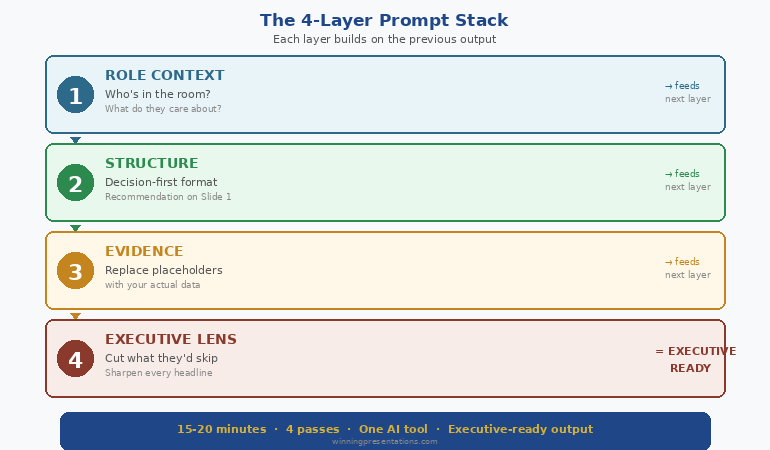
The technique works because it mirrors how senior leaders actually think through a presentation — not all at once, but in layers. Role first. Context second. Structure third. Polish fourth.


The 4-layer prompt stacking technique showing Role then Context then Task then Constraints for executive-ready AI presentation output

Layer 1: Role (Set the Voice)

Before you ask AI to create anything, tell it who it is. This isn’t a gimmick. Role-setting changes the vocabulary, sentence length, and level of assumption in every output that follows.

Weak role: “You are a helpful assistant.”

Strong role: “You are a senior strategy consultant who has written board-level presentations for FTSE 100 companies. Your writing style is direct, recommendation-led, and assumes the reader is time-poor and sceptical.”

The difference in output is immediate. With the strong role, AI stops explaining basics, drops the hedging language, and leads with conclusions instead of background.

Layer 2: Context (Load the Intelligence)

This is where most professionals fail. They give AI the topic but not the situation. A board presentation about Q3 performance is completely different depending on whether results exceeded targets or missed them by 15%.

The context layer includes: who you’re presenting to, what they care about, what decision you need, what resistance you expect, and the raw data or talking points they need to see.

Paste your data here. Meeting notes, spreadsheet summaries, previous feedback — give AI the same briefing you’d give a junior analyst preparing your slides.

Layer 3: Task (Define the Structure)

Now — and only now — do you tell AI what to build. The task layer specifies slide count, format requirements, what goes on each slide, and how the argument flows.

Because AI already has the voice (Layer 1) and the intelligence (Layer 2), the structural output is dramatically better. Slide titles become specific. Content maps to what your audience actually needs to decide. Recommendations lead rather than follow.

Layer 4: Constraints (Apply the Polish)

The final layer is a rewrite instruction. You take the output from Layer 3 and run it through quality filters: no jargon, no passive voice, every slide answers “so what?”, slide titles tell the full story when read in sequence.

This layer is where generic becomes executive. It’s the equivalent of a senior partner reviewing a junior associate’s slides and saying “tighter, sharper, more direct.”

Four prompts. Four minutes. Output that used to require three hours of manual rewriting.


The Complete AI Presentation System

Prompt layering is one module inside AI-Enhanced Presentation Mastery — the self-study programme that teaches the full executive AI workflow. Modules release weekly. Live Q&A calls included. Join anytime and get everything released so far.

Join AI-Enhanced Presentation Mastery (See Dates & Pricing) →

Self-study modules + live Q&A calls. All sessions recorded.
The course is live now, with new modules releasing through April 2026. Join today and get instant access to everything released so far — plus every module as it drops.

Before and After: Real Executive Output

Theory is useful. Seeing the difference is convincing. Here’s what prompt layering actually produces compared to the standard single-prompt approach — using the same AI tool, same topic, same data.

Scenario: Q3 Board Update (Results Below Target)

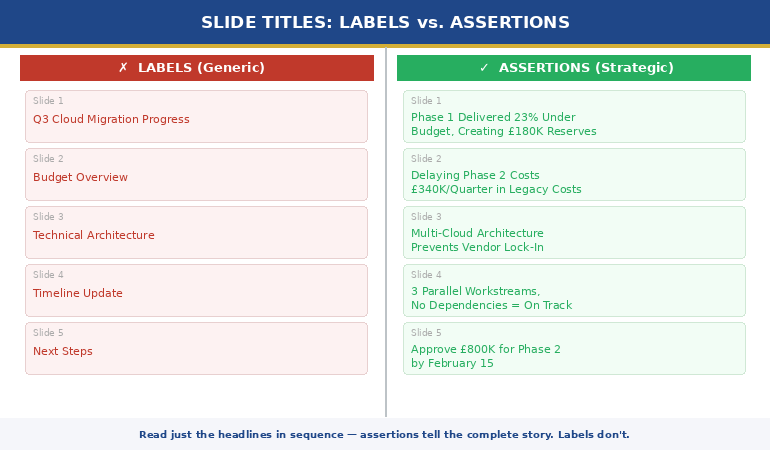
Single prompt output — Slide 1 title: “Q3 2025 Performance Overview and Key Metrics Summary”

Layered prompt output — Slide 1 title: “Q3 Revenue Missed Target by 8%. Here’s the Recovery Plan.”

The first tells the board they’re about to see data. The second tells them exactly what happened and what you’re doing about it. One wastes their first 30 seconds. The other earns their attention immediately.

Scenario: Budget Request Presentation

Single prompt output — Closing slide: “Summary and Recommendations for Consideration”

Layered prompt output — Closing slide: “Approve £450K Q1 Investment. Payback by Month 9. Here’s Why Delay Costs More.”

The difference isn’t AI capability. It’s prompt architecture. The layered approach forces AI to write like a decision-maker rather than a report-generator.

The 3 Layering Mistakes That Ruin Executive Output

Prompt layering isn’t foolproof. I’ve watched senior professionals adopt the technique and still get mediocre output because of three specific errors.

Mistake 1: Combining Layers

The temptation is efficiency — why send four prompts when you can send two? Because combining layers defeats the purpose. When you merge Role and Context into one prompt, AI gives equal weight to voice and data. The voice gets diluted. The context gets summarised instead of absorbed.

Four separate prompts. Every time. The two minutes you “save” by combining costs you twenty minutes in rewrites.

Mistake 2: Skipping the Constraints Layer

Layers 1-3 produce good output. Layer 4 produces executive output. The constraints prompt is what removes jargon, tightens language, forces the “so what?” test, and ensures slide titles tell a complete story. Skipping it is like submitting a first draft to the board.

Mistake 3: Restarting Instead of Building

If Layer 3 output isn’t right, the instinct is to start over with a new prompt. Don’t. Instead, add a corrective instruction that builds on what’s already there: “Keep the structure but make the recommendation on slide 1 instead of slide 8.” AI retains context from previous layers. Starting over throws that context away.

Going deeper: The complete layering protocol — including audience-specific role templates and the editing loop that catches what Layer 4 misses — is covered in the AI-Enhanced Presentation Mastery programme. Join anytime — get instant access to all modules released so far, plus new ones dropping through April 2026.

When to Use Prompt Layering (And When Not To)

Prompt layering is the right technique for any presentation where the audience is senior, the stakes are real, and “good enough” isn’t good enough. Board updates. Budget requests. Client pitches. Investor decks. Steering committee presentations.

For internal team updates, training materials, or quick status slides, a single well-written prompt is perfectly fine. The 4-layer technique adds four minutes to your process. That investment pays off when the audience is a CFO. It’s overkill when the audience is your own team.

The decision framework I use: if the presentation could affect a decision, a budget, or your reputation, layer your prompts. If it’s informational, don’t.

Also worth noting: prompt layering fits inside a broader AI presentation workflow that includes research, structure, and rehearsal phases. The prompts are one part of a larger system.

And if the presentation you’re preparing also involves getting the format right for a CEO audience, the role layer becomes especially critical — the voice you set in Layer 1 needs to match the expectations of the room.

People Also Ask

What are the best AI prompts for executive presentations?

The best AI prompts for executive presentations use a layered approach — setting role, loading context, defining structure, then applying constraints in four separate prompts. This produces recommendation-led, jargon-free output that mirrors how senior leaders actually communicate. Single-prompt approaches consistently produce generic, report-style slides.

How do you make AI-generated slides look professional?

Professional AI slides come from professional prompting. The constraints layer — applied after structure is set — forces AI to remove jargon, eliminate passive voice, and ensure every slide answers “so what?” Most professionals skip this step and spend hours manually fixing what one additional prompt would solve.

Can AI replace presentation designers for executives?

AI replaces the content creation and structuring work, not the visual design. Executive AI workflows focus on argument architecture, slide messaging, and narrative flow — the strategic work that determines whether a presentation succeeds or fails. Visual polish is a separate step.


Learn the Full Executive AI Workflow

Prompt layering is one technique inside a complete system. AI-Enhanced Presentation Mastery covers the full workflow — from research to rehearsal — in self-study modules with live Q&A support. The programme is already in progress. Join anytime and access everything released so far, plus all future modules.

Join AI-Enhanced Presentation Mastery (See Dates & Pricing) →

Self-study. Weekly modules. Live Q&A calls recorded. Study at your own pace.
Join anytime — get instant access to all modules released so far, plus new ones dropping through April 2026

Frequently Asked Questions

Does prompt layering work with any AI tool or just ChatGPT?

The 4-layer technique works with any large language model — ChatGPT, Claude, Gemini, Copilot. The principle is universal: separating role, context, task, and constraints into sequential prompts produces better output regardless of which tool you use. The specific prompt wording may vary slightly between tools, but the layering structure remains the same.

How long does prompt layering add to my workflow?

Approximately four minutes for the prompting phase. Most professionals report saving 60-90 minutes on the back end because the output requires far less manual rewriting. The net time saving is significant — particularly for board presentations and budget requests where revision cycles typically consume hours.

I’ve tried detailed prompts before and the output was still generic. How is this different?

Detailed single prompts overload the AI with competing instructions. Layering separates each instruction type so AI can focus fully on one task at a time. The key difference is sequence: you’re building output in stages rather than asking for everything simultaneously. The constraints layer alone — applied to already-structured content — typically transforms generic output into something presentation-ready.

Can I use prompt layering for presentations I need to give tomorrow?

Yes. The four-prompt sequence takes under five minutes. The copy-paste prompts at the top of this article are designed for exactly that scenario. Fill in the brackets, run them in order, and you’ll have a structured draft in minutes. For high-stakes presentations, allow an additional 15-20 minutes for your own review and refinement.

📬 The Winning Edge Newsletter

Weekly AI presentation techniques, executive communication strategies, and frameworks for senior professionals. No fluff. Practical every time.

Subscribe free →

Quick win: Start with my free prompt pack — 10 tested prompts for executive presentations, including a role-setting template you can use immediately.

Get the Free Prompt Pack →

Related today: If the presentation you’re building needs the format your CEO actually wants, the role layer in prompt layering is where you set that expectation. And if nerves are the bigger issue, here’s what to do when you freeze mid-presentation.

Your Next Step

Open your AI tool. Don’t type a prompt yet.

Instead, write the role first. Who should this AI be when it writes for you? A senior strategy consultant? A CFO who’s reviewed a thousand budget presentations? A board secretary who knows what directors actually read?

Set that role. Then load your context. Then define the task. Then constrain the output.

Four prompts. Four minutes. Executive-quality output that sounds like you — not like a machine.

If you want the complete system — role templates for every audience type, the editing loop, the workflow senior leaders actually use, and the refinement protocol that catches what the constraints layer misses — explore AI-Enhanced Presentation Mastery.

Stop writing one prompt and hoping. Start layering — and watch your AI output become something you’d actually present.

About the Author

Mary Beth Hazeldine is the Owner & Managing Director of Winning Presentations. With 24 years of corporate banking experience at JPMorgan Chase, PwC, Royal Bank of Scotland, and Commerzbank, she has created hundreds of executive presentations — first manually, now with AI assistance.

A qualified clinical hypnotherapist and NLP practitioner, Mary Beth combines executive communication expertise with evidence-based techniques. She has helped senior professionals and teams create presentations that secure funding, approvals, and high-stakes decisions across three continents.

Book a discovery call | View services

05 Feb 2026
Professional woman pausing composedly at corporate podium after freezing mid presentation

I Froze for 47 Seconds. The Audience Didn’t Notice. Here’s Why.

Forty-seven seconds.

I know the exact length because a colleague recorded the presentation on her phone. When I watched it back that evening—hands still shaking, convinced my career was over—I counted every silent second.

Except it wasn’t forty-seven seconds of silence. It was forty-seven seconds of me pausing, looking at my notes, taking a breath, and resuming. On the recording, it looked deliberate. It looked like I was letting a point land before continuing.

Inside my body, it was a different story entirely. My mind went white. My throat closed. I couldn’t remember the next sentence, the slide I was on, or—for a genuinely terrifying moment—why I was standing in that room at all.

The audience saw a confident pause. I experienced a full nervous system shutdown. That gap between what you feel and what they see is the most important thing to understand about freezing mid-presentation—and the key to recovering from it.

Quick Answer: When you freeze mid-presentation, your audience almost never perceives it the way you do. Research on time perception during anxiety shows that what feels like an eternity to the presenter typically registers as a natural pause to the audience. The recovery isn’t about preventing the freeze—it’s about understanding the perception gap, using a physical reset to re-engage your nervous system, and having a bridge phrase ready that buys you time without signalling distress.

⏱️ Presenting This Week? Your 30-Second Freeze Recovery Protocol

Memorise this three-step sequence before your next presentation. It works whether you freeze for three seconds or thirty:

  1. Feet (3 sec) — Press both feet firmly into the floor. This grounds your nervous system and interrupts the dissociation response.
  2. Breath (5 sec) — One slow exhale through your mouth. Not a deep breath in—the exhale activates your parasympathetic nervous system.
  3. Bridge phrase (immediate) — Say: “Let me come back to that point” or “The key thing here is…” and glance at your slide. Your brain will re-engage.

Total time the audience notices: 5-8 seconds. What they see: a presenter gathering their thoughts. What you’ve done: rebooted your nervous system.

🎯 Is This Your Pattern?

  • You’ve frozen during a presentation and the memory still makes you anxious weeks or months later
  • The fear of freezing again is now worse than the original fear of presenting
  • You over-prepare and over-rehearse specifically because you’re terrified of going blank
  • You avoid certain presentation settings (all-hands, board meetings, Q&A) because the freeze risk feels too high
  • You’ve started declining speaking opportunities that could advance your career

This article explains what’s actually happening in your nervous system when you freeze, why it’s far less visible than it feels, and how to recover in real time.

The Perception Gap: What You Feel vs. What They See

After my forty-seven-second freeze, I asked three people in that room what they noticed. Their answers changed how I think about presentation anxiety entirely.

The first said he didn’t notice anything unusual. The second said she thought I’d paused to let the data on the slide sink in. The third—my manager—said she noticed I seemed to lose my train of thought briefly but recovered well.

Three people. Three different perceptions. None of them matched what I experienced.

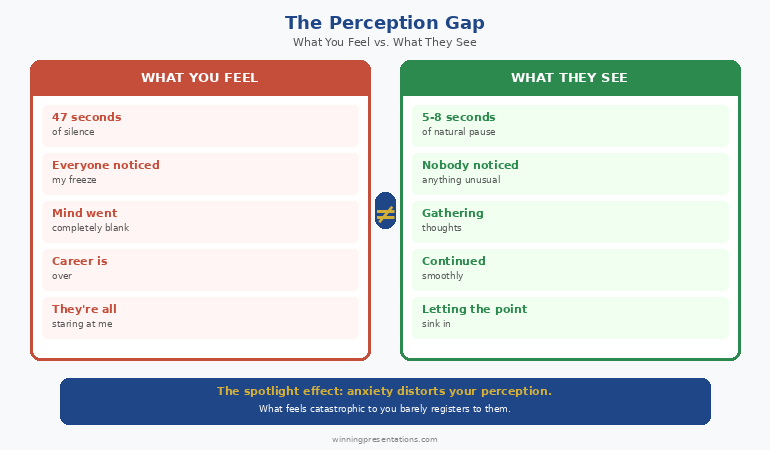
This is what psychologists call the spotlight effect—our tendency to overestimate how much other people notice our internal states. In a presentation context, it’s amplified by anxiety, which distorts time perception and magnifies self-consciousness.

Here’s what the perception gap actually looks like in practice:

What you feel: “I’ve been standing here in silence for an eternity. Everyone can see I’ve forgotten everything. My career is over. They’re all staring at me.”

What they see: “She paused for a moment. Maybe gathering her thoughts. Okay, she’s moving on.”

I’ve worked with hundreds of executives who describe their freeze in catastrophic terms—”the worst moment of my professional life,” “a complete public meltdown,” “everyone saw me fall apart.” When I ask if anyone in the audience mentioned it afterward, the answer is almost always the same: no one said a word.

The Perception Gap diagram showing what you feel versus what the audience actually sees when freezing during a presentation

What’s Actually Happening in Your Nervous System

Freezing mid-presentation isn’t a failure of preparation or competence. It’s a physiological response—your nervous system doing exactly what it’s designed to do when it perceives threat.

As a clinical hypnotherapist who spent five years struggling with presentation terror before training to understand it, I can tell you that the freeze response follows a predictable neurological sequence:

Stage 1: Threat Detection
Your amygdala—the brain’s threat detection system—registers something as dangerous. In a presentation, this could be a hostile facial expression, an unexpected question, a moment of silence, or simply the awareness that many people are watching you. The trigger is often unconscious.

Stage 2: Sympathetic Activation
Your nervous system floods with adrenaline and cortisol. Heart rate spikes. Muscles tense. Blood diverts from your prefrontal cortex (where speech and logic live) to your limbs (where fight-or-flight lives). This is why you can’t think clearly—your thinking brain has literally been de-prioritised.

Stage 3: The Freeze
When fight and flight are both impossible (you can’t punch anyone, you can’t run away), your nervous system defaults to freeze. Speech stops. Movement stops. Time distortion begins. You are not “forgetting your presentation.” Your brain has temporarily shut down the functions that make presenting possible.

Stage 4: Spontaneous Recovery
This is the part nobody mentions: the freeze is temporary. Your nervous system will regulate itself. The adrenaline will metabolise. Speech will return. The question isn’t whether you’ll recover—it’s how long the gap lasts and what you do during it.

Understanding this sequence matters because it reframes the freeze from a personal failure to a biological event. You didn’t freeze because you’re bad at presenting. You froze because your nervous system did its job.

For more on managing the pre-presentation anxiety that often triggers freezing, see my guide on calming nerves before a presentation.

⭐ The Freeze Response Isn’t Random. Neither Is the Fix.

Conquer Speaking Fear is a structured programme built around the neuroscience of presentation anxiety—including the freeze response, the avoidance cycle, and the recovery techniques that work under real pressure.

What’s inside:

  • The nervous system reset protocol for real-time freeze recovery
  • Hypnotherapy-informed techniques for rewiring the threat response
  • The confidence-building sequence that reduces freeze frequency over time

Get Conquer Speaking Fear → £39

Addresses the root cause, not just the symptom. Instant download.

The 3-Part Recovery Protocol That Works Mid-Presentation

I’ve tested dozens of freeze recovery techniques—with myself, with clients, and in real presentation situations. Most of them don’t work because they require cognitive effort at exactly the moment your cognitive brain has gone offline.

The protocol that works targets the body first, the breath second, and the words last. Here’s why that order matters.

Step 1: Ground (2-3 seconds)

Press your feet hard into the floor. If you’re at a lectern, press your fingertips onto the surface. If you’re holding notes, squeeze them.

This isn’t metaphorical. Physical sensation sends a signal to your nervous system that you are safe, here, and in your body. The freeze response involves a form of dissociation—you feel disconnected from yourself. Physical grounding interrupts that disconnection.

What the audience sees: you standing still for two seconds. That’s it.

Step 2: Exhale (3-5 seconds)

One long, slow breath out through your mouth. Not in—out.

Most freeze recovery advice says “take a deep breath.” This is backwards. When you’re in freeze, your chest is already tight and your breathing is shallow. Trying to breathe deeply creates more tension. But a long exhale activates your vagus nerve, which triggers your parasympathetic nervous system—the system that calms you down.

What the audience sees: you taking a natural breath between points.

Step 3: Bridge (immediate)

Use a bridge phrase that buys you time while your brain re-engages. This isn’t about finding the exact word you lost. It’s about getting any words out of your mouth, because speech itself tells your nervous system that the freeze is over.

The bridge phrase connects back to your presentation without revealing that you lost your place. It creates continuity where there was a gap.

What the audience sees: a presenter emphasising a key point before continuing.

The entire sequence takes 5-10 seconds. On the rare occasion someone notices, they’ll interpret it as a thoughtful pause.

Bridge Phrases: The Words That Buy You Time

Bridge phrases are pre-memorised sentences that restart your speech engine without requiring you to remember where you were. They work because they’re overlearned—you’ve rehearsed them so many times they’re stored in procedural memory, not the declarative memory that goes offline during a freeze.

Backward bridges (reconnect to what you just said):

“So the key point there is…” — then glance at your slide. Your brain will fill in the blank.
“Let me put that differently…” — buys you time to rephrase whatever you were saying.
“And that’s exactly why this matters…” — works whether you remember the point or not.

Forward bridges (skip ahead to the next section):

“But here’s what’s really important…” — jump to whatever you remember next.
“Let me move to the part that affects you directly…” — resets the audience’s attention.
“I want to make sure we cover…” — look at your next slide and continue from there.

Engagement bridges (redirect to the audience):

“I’m curious—has anyone experienced this?” — gives you 15-20 seconds to regroup.
“Before I continue, any questions on that point?” — legitimate pause while you recover.
“Take a moment to think about how this applies to your team.” — buys you 10 seconds minimum.

Pick three bridge phrases. Practise them until they’re automatic. The goal isn’t elegant delivery—it’s reliable delivery under stress. When your cognitive brain goes dark, these phrases are the torchlight that gets you moving again.

For more on what to do when your mind goes completely blank, including the 10-second recovery technique, see my guide on what to do when your mind goes blank during a presentation.

⭐ Build the Nervous System Resilience That Prevents Freezing

Recovery techniques handle the moment. Conquer Speaking Fear addresses the pattern—rewiring the threat response that triggers freezing so it happens less often and resolves faster when it does.

Get Conquer Speaking Fear → £39

Addresses the root cause, not just the symptom. Hypnotherapy and NLP techniques for lasting change. Instant download.

Why Prevention Fails (And What to Do Instead)

I need to be honest about something: you cannot fully prevent the freeze response. And attempting to is often what makes it worse.

Here’s the trap most people fall into after a freeze: they over-prepare. They memorise every word. They rehearse twenty times. They create backup notes for their backup notes. And then they walk into the presentation with a new anxiety layered on top of the original one—the fear that all that preparation might fail.

Over-preparation creates rigidity. Rigidity makes you more vulnerable to freezing, not less. Because if you’ve memorised a script and you lose your place, there’s nowhere to go. You haven’t practised recovering. You’ve only practised perfection.

What actually reduces freeze frequency over time isn’t more preparation. It’s three things:

1. Desensitisation through graduated exposure
Start with low-stakes speaking situations and build up. Team meetings before all-hands. Small groups before large audiences. Each successful experience rewires your nervous system’s threat assessment—this situation is survivable, not dangerous.

2. Recovery rehearsal
Practise freezing on purpose. Mid-rehearsal, stop speaking. Use the ground-exhale-bridge protocol. Resume. Do this until recovery feels automatic. You’re training your nervous system to treat the freeze as a speed bump, not a cliff edge.

3. Threat reappraisal
The freeze happens because your amygdala classifies the presentation as dangerous. Cognitive reappraisal—consistently reframing the audience as allies rather than evaluators—gradually shifts that classification. This isn’t positive thinking. It’s systematic rewiring of the threat detection system.

For a deeper look at building lasting presentation confidence rather than relying on willpower, see my guide on presentation confidence.

What to Do After You’ve Frozen (The 24-Hour Window)

What happens in the twenty-four hours after a freeze determines whether it becomes a one-off event or a recurring pattern.

Most people replay the freeze on a loop. They catastrophise. They convince themselves everyone noticed. They start dreading the next presentation before it’s even scheduled. This creates what psychologists call a conditioned anxiety response—the memory of the freeze becomes a trigger for future freezing.

Here’s what to do instead:

Within one hour: Write down exactly what happened—factually, not emotionally. “I paused for approximately 15 seconds during the third section. I used a bridge phrase and continued.” Facts disrupt the catastrophic narrative your anxiety wants to write.

Within four hours: Ask one trusted person who was in the room what they noticed. Not “did you see me freeze?”—that plants the idea. Ask “how did you think the presentation went?” Their answer will almost certainly not mention the freeze.

Within twenty-four hours: Present again—even if it’s a five-minute update in a team meeting. The longer you wait, the larger the freeze looms. Getting back in front of an audience quickly tells your nervous system that presenting is still safe.

This twenty-four-hour protocol is based on the same principle used in trauma recovery: early, controlled re-exposure prevents the event from becoming consolidated as a trauma memory. A freeze doesn’t have to define your relationship with presenting. But only if you don’t let it.

What causes freezing during a presentation?

Freezing during a presentation is a nervous system response, not a failure of preparation. Your amygdala detects a threat (many people watching, high stakes, unexpected moment), floods your body with stress hormones, and when fight or flight aren’t possible, defaults to freeze. Blood diverts from your prefrontal cortex—where speech and logic live—to your limbs. The result: speech stops, thoughts disappear, and time distorts.

How long does a presentation freeze actually last?

Most presentation freezes last between 3 and 15 seconds, though they feel significantly longer to the presenter due to anxiety-driven time distortion. Studies on the spotlight effect show that audiences rarely notice pauses under 10 seconds and typically interpret longer pauses as deliberate. What feels like a catastrophic failure to you often registers as a thoughtful moment to them.

Can you prevent freezing during presentations?

You can reduce the frequency and severity of freezing, but completely preventing it isn’t realistic or even necessary. The most effective approach combines graduated exposure (building up from low-stakes to high-stakes speaking), recovery rehearsal (practising the ground-exhale-bridge protocol until it’s automatic), and having reliable bridge phrases memorised. Managing the freeze matters more than preventing it.

⭐ Stop Living in Fear of the Next Freeze

Conquer Speaking Fear gives you the complete system—real-time recovery techniques for the moment it happens, plus the deeper nervous system work that reduces how often it happens. Built from clinical hypnotherapy and 24 years of working with executives who freeze, shake, and shut down under pressure.

Get Conquer Speaking Fear → £39

Clinical hypnotherapy and NLP techniques for presentation anxiety. Addresses the root cause, not just symptoms. Instant download.

Frequently Asked Questions

Is freezing during a presentation a sign of a bigger problem?

Not usually. Freezing is a normal nervous system response that many confident, experienced presenters encounter at some point. It becomes a concern only when it creates a persistent avoidance pattern—when you start declining opportunities or over-preparing to the point of exhaustion. If freezing is occasional, recovery techniques are sufficient. If it’s happening repeatedly and limiting your career, working with a specialist in presentation anxiety can help address the underlying pattern.

Should I tell the audience I froze?

In most professional settings, no. The perception gap means they likely didn’t register it as a freeze. Drawing attention to it serves your need for emotional honesty but undermines your credibility. Use a bridge phrase, continue, and debrief privately afterward. The exception is very small, trusted groups where acknowledging a brief pause might feel more authentic than pretending it didn’t happen.

Will beta blockers prevent freezing?

Beta blockers manage the physical symptoms of anxiety (racing heart, shaking hands) but don’t directly address the freeze response, which is a dissociative neurological event rather than a purely cardiovascular one. Some people find beta blockers helpful as one part of a broader approach, but they don’t replace nervous system reconditioning. Consult your GP before considering any medication for presentation anxiety.

How is freezing different from losing your train of thought?

Losing your train of thought is a cognitive event—you forget what comes next but can still speak, look at your notes, and recover within seconds. Freezing is a neurological event—your speech, movement, and sometimes awareness temporarily shut down. The recovery approach is different: cognitive blanking responds to notes and prompts, while a full freeze requires a physical reset (grounding, exhale) before your brain can re-engage with language.

Get Weekly Speaking Confidence Insights

Evidence-based techniques for presentation anxiety, freeze recovery, and building lasting confidence—from a clinical hypnotherapist who’s been there.

Subscribe to The Winning Edge →

📋 Free: Executive Presentation Checklist

A quick-reference checklist that helps you prepare for any presentation—including the recovery protocol covered in this article.

Download the Free Checklist →

Related: If you’re presenting strategy to your CEO this week and the freeze fear is already building, start with the format—having the right structure reduces cognitive load, which reduces freeze risk. Read the strategy presentation format your CEO actually wants for the 12-slide decision-first structure.

The Bottom Line

Forty-seven seconds. That’s how long my worst presentation freeze lasted. I was certain it ended my credibility. It didn’t. Nobody mentioned it. The presentation achieved its objective. And the recording proved that what I experienced as a catastrophe looked, from the outside, like a pause.

You will freeze again. Maybe not today, maybe not next month. But at some point, your nervous system will do its job and temporarily shut down your speech in a high-stakes moment. That’s not a question of preparation or skill—it’s biology.

The question that matters isn’t “how do I prevent this?” It’s “what do I do in the eight seconds between the freeze and the recovery?” Now you know: ground, exhale, bridge. And keep presenting.

About the Author

Mary Beth Hazeldine is the Owner & Managing Director of Winning Presentations. With 24 years of corporate banking experience at JPMorgan Chase, PwC, Royal Bank of Scotland, and Commerzbank, she has presented in boardrooms across three continents—and frozen in a few of them.

A qualified clinical hypnotherapist and NLP practitioner, Mary Beth combines executive communication expertise with evidence-based techniques for managing presentation anxiety. She has trained senior teams and coached high-stakes presentations across banking, consulting, and corporate leadership.

05 Feb 2026
Executive woman gesturing while presenting strategy to boardroom with data slides visible on screen

My CEO Stopped Me on Slide 4. “Start Over,” She Said. “But Start With the Decision.”

I’d spent three weeks on that strategy deck.

Market analysis. Competitor benchmarking. Trend data from four research firms. Financial projections modelled in three scenarios. Forty-two slides that told a comprehensive, logical story from problem to solution.

The CEO let me get to slide four—the market overview—before she held up her hand.

“I can see where this is going,” she said. “You want to expand into Nordic markets. Just tell me: should we do it, what will it cost, and what happens if we don’t? I don’t need the journey. I need the destination.”

I stood there with 38 unused slides and a career lesson I’ve never forgotten: CEOs don’t want your strategy presentation to teach them something. They want it to help them decide something.

Quick Answer: The strategy presentation format CEOs actually want is decision-first, not analysis-first. Lead with your recommendation and the decision required, then provide only the evidence that supports the decision. A 12-slide strategy deck that starts with the answer outperforms a 40-slide deck that builds to it—because executives don’t have time to follow your logic. They need to evaluate your conclusion.

⏱️ Presenting Strategy This Week? Your 15-Minute Fix

Before your next strategy presentation, restructure the first three slides:

  1. Slide 1: The decision (5 min) — State exactly what you’re asking leadership to approve. One sentence. “I recommend we [specific action] by [date] at a cost of [amount].”
  2. Slide 2: Why now (5 min) — The consequence of delay. What happens if this decision isn’t made this quarter?
  3. Slide 3: What it takes (5 min) — Investment required, timeline, and the one metric that will prove it’s working.

These three slides should be strong enough to stand alone. Everything after them is supporting evidence—appendix material the CEO may never need.

🎯 Is This Your Situation?

  • You’re presenting strategy to a CEO or C-suite and need a clear, proven format
  • Your last strategy deck was too long, too detailed, or didn’t get a decision
  • You’ve been told to “get to the point faster” but aren’t sure how to structure that
  • You need to present a strategic recommendation, not just a strategic overview
  • The stakes are high enough that the format matters as much as the content

This article gives you the exact slide structure. Keep reading.

What That CEO Taught Me About Strategy Presentations

After the meeting, I sat with that CEO for fifteen minutes. She wasn’t unkind—she was direct.

“You’re not the only one who does this,” she told me. “Every strategy presentation I see starts with the problem. Market trends. Competitive landscape. Internal challenges. By slide ten, I’ve already formed my own conclusion. Then I spend the next twenty slides wondering if yours matches mine.”

She drew something on a napkin. Two boxes with an arrow.

The first box said: “Here’s what I recommend.” The second box said: “Here’s why.”

“That’s the entire format,” she said. “Everything else is appendix.”

I rebuilt that strategy deck in two hours. Twelve slides instead of forty-two. Led with the recommendation. Supported it with three evidence points. Closed with the specific decision I needed.

She approved the Nordic expansion the following week. Same strategy. Different format. Different outcome.

Why Most Strategy Decks Use the Wrong Format

Most strategy presentations follow what I call the “analyst format”—the structure you’d use to present research to peers. It looks like this:

— Situation overview (slides 1-8)
— Market analysis (slides 9-15)
— Competitive landscape (slides 16-22)
— Options considered (slides 23-30)
— Recommendation (slide 31)
— Implementation plan (slides 32-38)
— Financial projections (slides 39-42)

This format makes sense to the presenter. It shows your working. It demonstrates rigour. It builds logically to a conclusion.

But it’s wrong for CEOs—because CEOs don’t need to follow your analytical journey. They need to evaluate your conclusion.

The analyst format forces the CEO to hold everything in working memory until slide 31. By then, they’ve mentally checked out, formed their own view, or started thinking about the next meeting. Your recommendation arrives when their attention is lowest.

For more on how to structure the executive summary that opens your strategy deck, see my guide on the executive summary slide.

How CEOs Actually Process Strategy Presentations

After twenty-four years presenting to senior executives in banking—from managing directors at JPMorgan to board members at Commerzbank—I’ve learned that CEOs process strategy through a specific mental framework.

It’s not the same framework you used to develop the strategy. Understanding the difference is the key to formatting your deck correctly.

CEO processing framework:

Question 1: “What are you asking me to decide?”
If this isn’t answered in the first 90 seconds, they’ll ask it themselves—and your carefully structured build-up crumbles.

Question 2: “What’s the risk if I say yes?”
Not the upside. The risk. CEOs are paid to manage risk. They want to know the downside scenario before they evaluate the upside.

Question 3: “What happens if we do nothing?”
The cost of inaction is often more persuasive than the benefit of action. If nothing bad happens from waiting, they’ll wait.

Question 4: “Who else supports this?”
Social proof matters at the top. They want to know that the CFO has seen the numbers, that operations has validated the timeline, that this isn’t one person’s enthusiasm.

Your strategy deck format should answer these four questions—in this order. Everything else is supporting evidence they may request but shouldn’t have to wade through.

12-slide strategy presentation format showing decision first on slides 1-3, evidence on slides 4-8, and the close on slides 9-12 with appendix for everything else

⭐ Strategy Slides Built for CEO-Level Decisions

The Executive Slide System includes ready-made strategy presentation templates designed around the decision-first format—so you stop building 40-slide analysis decks and start presenting 12-slide decision decks.

Inside the system:

  • Decision-first slide templates for strategy presentations
  • Executive summary frameworks that answer the CEO’s four questions
  • Risk and implementation slides formatted for senior leadership

Get the Executive Slide System → £39

Built for strategy decks, board updates, and CEO decision meetings. Instant download.

The 12-Slide Strategy Format That Gets Decisions

This is the format I now use for every strategy presentation, and the one I teach to executives who present strategic recommendations to leadership.

THE DECISION BLOCK (Slides 1-3)

Slide 1: The Recommendation
One sentence. “I recommend we [do X] by [date] at a cost of [amount].” No preamble. No context. Just the answer. This is the most important slide in the deck—and it goes first.

Slide 2: The Cost of Inaction
What happens if the CEO doesn’t approve this? Revenue lost. Market share ceded. Competitive position weakened. Make inaction feel riskier than action.

Slide 3: The Investment and Timeline
Total cost. Key milestones. The one metric that will tell you it’s working within 90 days. CEOs want to know when they’ll see evidence that this was the right call.

THE EVIDENCE BLOCK (Slides 4-8)

Slide 4: Market Evidence
Not a full market analysis. The two or three data points that directly support your recommendation. Curated evidence, not comprehensive analysis.

Slide 5: Competitive Evidence
What competitors are doing—or not doing—that makes this the right moment. One slide. Not a landscape.

Slide 6: Internal Readiness
Why the organisation can execute this now. Capabilities, resources, team. Demonstrates you’ve validated feasibility, not just desirability.

Slide 7: Risk Assessment
Top three risks and your mitigation plan for each. CEOs respect people who’ve thought about what could go wrong. It builds trust faster than optimistic projections.

Slide 8: Financial Summary
Investment required. Expected return. Break-even timeline. One slide, not five. The CFO can request detail offline.

THE DECISION BLOCK (Slides 9-12)

Slide 9: What You Need From Them
The specific approval requested. Budget sign-off? Resource allocation? Green light to proceed? Be precise.

Slide 10: Implementation Roadmap
High-level only. Quarterly milestones. Who’s accountable for what. Demonstrates this isn’t theoretical—there’s a plan.

Slide 11: Success Metrics
How you’ll measure whether this strategy is working. Three metrics maximum. Tied to the timeline in slide 3.

Slide 12: The Ask (Repeated)
Restate the recommendation from slide 1. This creates a closed loop. The presentation started with the decision and ends with the decision. No ambiguity about what you need.

Everything else—detailed market analysis, financial models, competitive deep-dives—goes in an appendix. Available if requested. Never presented unless asked.

The Decision Slide: The Only Slide That Really Matters

Of the twelve slides, one determines everything: Slide 1.

If your opening slide is a market overview, an agenda, or—worst of all—your company logo with a title, you’ve already lost the CEO’s attention. They’re waiting for the point. Every second before the point is friction.

Decision slide format:

Headline: Your recommendation in one sentence (max 15 words)
Supporting line: The single most compelling reason
The ask: What specific decision you need today
The number: The investment or return figure they need to evaluate

Example:

Headline: “Expand into Nordic markets by Q3 to capture £12M recurring revenue”
Supporting line: “Three competitors are already there. Two more are entering this year.”
The ask: “Approve £2.1M investment and 8-person team allocation”
The number: “Break-even in 14 months. ROI of 5.7x over 3 years.”

That’s one slide. And for some CEOs, it’s the only slide they need. Everything after it answers the questions that slide raises.

For a deeper look at how this fits within broader presentation structures, see my guide on executive presentation structure.

⭐ Build Strategy Decks CEOs Actually Approve

Stop spending weeks on 40-slide analysis decks. The Executive Slide System gives you the decision-first templates that match how senior leaders actually process strategy—so your recommendation lands, not your research.

Get the Executive Slide System → £39

Designed to force clarity on Slide 1: the decision. Instant download.

Three Strategy Presentation Mistakes That Kill Momentum

Even with the right format, these three mistakes undermine strategy presentations more than any other.

Mistake 1: Presenting Options Instead of a Recommendation

“Here are three options. What do you think?”

This feels democratic. It’s actually a failure of leadership. When you present options without a recommendation, you’re asking the CEO to do your job. They hired you to have a point of view. Present it.

The fix: present one recommendation, supported by the reasoning. Mention that alternatives were considered—briefly—and explain why this option is superior. The CEO can always ask about alternatives. They should never have to choose between them without your guidance.

Mistake 2: Building Suspense

“Let me walk you through the analysis, and you’ll see why we reached this conclusion.”

This is the analyst format disguised as storytelling. It builds to a reveal. CEOs hate reveals. They want to know the ending first, then decide whether the supporting evidence is convincing.

The fix: state your recommendation on slide 1. Let them evaluate the evidence knowing where it leads. This actually makes the evidence more persuasive—because they’re evaluating it against a specific conclusion, not trying to guess where you’re headed.

Mistake 3: Death by Data

Forty-two data points on twelve slides. Charts that require explanation. Footnotes that reference methodology.

Data doesn’t persuade CEOs. Curated data persuades CEOs. The three data points that directly support your recommendation are worth more than thirty that demonstrate your thoroughness. Thoroughness is your job. Clarity is your presentation.

For more on how to present like senior leaders actually do, see how CEOs actually present.

Adapting the Format for Different Strategy Types

The 12-slide structure works across strategy types, but the emphasis shifts depending on what you’re presenting.

Annual Strategic Plan
Heavy emphasis on Slides 2 (cost of inaction) and 10 (implementation roadmap). The CEO wants to know: what changes from last year, and how will we execute? Keep market evidence to one slide—they’ve likely seen the same trends.

Growth/Expansion Strategy
Heavy emphasis on Slides 4-5 (market and competitive evidence) and 8 (financial summary). The CEO needs to see that the opportunity is real, the timing is right, and the numbers work.

Transformation/Change Strategy
Heavy emphasis on Slide 2 (cost of inaction) and 7 (risk assessment). Transformation is uncomfortable. The CEO needs to feel that not transforming is riskier than transforming. Risk assessment must be honest—understating risk destroys credibility.

Defensive/Turnaround Strategy
Heavy emphasis on Slide 1 (the recommendation—be bold) and 3 (investment and timeline). In turnaround situations, clarity and speed matter more than thoroughness. The CEO wants a confident recommendation delivered fast.

How should I format a strategy presentation for my CEO?

Lead with your recommendation on slide 1—not background, not analysis. CEOs process strategy by evaluating your conclusion, not following your analytical journey. Use a 12-slide decision-first format: recommendation, cost of inaction, investment required, then supporting evidence. Keep detailed analysis in an appendix.

How many slides should a strategy presentation have?

Twelve core slides is optimal for most strategy presentations to senior leadership. The first three should be strong enough to stand alone (recommendation, urgency, investment). Slides 4-8 provide evidence. Slides 9-12 close with the specific ask. Additional detail belongs in an appendix that’s available if requested.

What do CEOs look for in strategy presentations?

CEOs evaluate strategy presentations against four questions: What decision is required? What’s the risk of saying yes? What happens if we do nothing? Who else supports this? Format your deck to answer these questions in order, and you’ll hold their attention far longer than a comprehensive analysis would.

⭐ The Executive Slide System — Strategy Decks That Get Approved

Every template in the Executive Slide System follows the decision-first format. Strategy presentations, board updates, steering committee decks—all structured around how CEOs actually process information.

What’s inside:

  • Decision-first templates for strategy, board, and leadership presentations
  • Executive summary slide frameworks with recommendation-first structure
  • Risk assessment and financial summary templates formatted for C-suite

Get the Executive Slide System → £39

Decision-first format. Every template starts with the recommendation, not the background. Instant download.

Frequently Asked Questions

Should I present my analysis or just the recommendation?

Present the recommendation first, then curated evidence that supports it. Your full analysis belongs in an appendix. CEOs want to evaluate your conclusion—not follow your entire analytical journey. If they need more detail on any point, they’ll ask. Most won’t.

What if my CEO prefers detailed presentations?

Even detail-oriented CEOs prefer knowing the destination before the journey. Start with the recommendation and the decision required, then provide as much supporting detail as they want. The difference is structural: lead with the answer, then go deep. Don’t build to the answer through forty slides of context.

How do I handle a strategy presentation where there’s genuine uncertainty?

Present your best recommendation with the uncertainties clearly stated in the risk slide. CEOs don’t expect certainty—they expect a point of view. Saying “based on what we know today, I recommend X, with these caveats” is far stronger than presenting three options and asking them to choose.

Can I use this format for a strategy update, not a new strategy?

Yes—adapt slides 1-3. Slide 1 becomes “Here’s where we are versus plan.” Slide 2 becomes “Here’s what needs to change.” Slide 3 becomes “Here’s what I need from you.” The decision-first principle applies to updates too: don’t make leadership wait for the conclusion about whether the strategy is working.

Get Weekly Executive Presentation Insights

Practical frameworks for strategy decks, board presentations, and leadership communication—no fluff.

Subscribe to The Winning Edge →

📋 Free: Executive Presentation Checklist

A quick-reference checklist for structuring any executive presentation—including strategy decks—around the decision-first format.

Download the Free Checklist →

Related: Presenting strategy to senior leadership can trigger intense anxiety—especially when the stakes are high. Read how to sound calm and credible when presenting to senior leadership for the delivery techniques that match this structural approach.

The Bottom Line

That CEO didn’t reject my strategy. She rejected my format.

The recommendation was sound. The analysis was thorough. The financial case was strong. But I’d buried all of it under thirty-eight slides of build-up that forced her to wait for the point.

When I restructured the same strategy into twelve decision-first slides, she approved it in one meeting. Same content. Different structure. Completely different outcome.

Your next step: Open your current strategy deck. Find the slide where you state your recommendation. Now move it to slide 1. Delete everything that came before it. Look at what’s left—that’s closer to the deck your CEO actually wants.

About the Author

Mary Beth Hazeldine is the Owner & Managing Director of Winning Presentations. With 24 years of corporate banking experience at JPMorgan Chase, PwC, Royal Bank of Scotland, and Commerzbank, she has presented strategy to boardrooms across three continents.

A qualified clinical hypnotherapist and NLP practitioner, Mary Beth combines executive communication expertise with evidence-based techniques for high-stakes presentations. She has trained senior teams and coached high-stakes approvals across banking, consulting, and corporate leadership.

Book a discovery call | View services

04 Feb 2026
Executive preparing objection responses before a high-stakes boardroom presentation

The Objection Map: How to Find Resistance Before It Finds You

The Objection Map: How to Find Resistance Before It Finds You

Three words killed a £4M proposal before the presenter finished slide two.

“We’ve tried that.”

The room shifted. Arms folded. The CFO glanced at her phone. And the presenter — a senior director who’d spent two weeks perfecting those slides — had no response prepared. He stumbled through a vague “this is different because…” and never recovered.

I was in the room. I was his coach. And the worst part? I knew that objection was coming. We’d talked about it in our prep session. But we hadn’t built a specific response into the presentation itself, because he thought his data was strong enough to pre-empt it.

It wasn’t.

Quick answer: An Objection Map is a structured pre-presentation exercise that identifies every likely point of resistance, traces it to the stakeholder most likely to raise it, and builds your response directly into your slides — before you ever enter the room. Most executive presentations fail not because the idea is weak, but because predictable objections went unaddressed. The Objection Map eliminates that failure mode.

⏰ Presenting tomorrow? Do this in 60 seconds:

1. Write down your top 3 likely objections — the ones that make you uncomfortable.
2. For each one, identify which slide should address it — and move that slide earlier.
3. Prepare one sentence per objection that acknowledges the concern and bridges to your evidence.

That’s your minimum viable resistance map. For the complete framework, keep reading.

I learned about objection mapping the hard way — during my years at Commerzbank, when I was presenting restructuring proposals to committees that existed to say no.

The first time I presented to a credit committee, I prepared 40 slides of analysis. Bulletproof data. Waterfall charts. Scenario models. I was convinced the numbers would speak for themselves.

They didn’t. The head of risk asked one question about regulatory exposure, and I froze. Not because I didn’t know the answer — I did — but because I hadn’t anticipated needing to deliver it under pressure, in that room, to that face.

After that, I started building what I now call an Objection Map before every significant presentation. In 24 years across JPMorgan Chase, PwC, Royal Bank of Scotland, and Commerzbank, I’ve refined it into a repeatable system. It’s one of the core frameworks inside the Executive Buy-In Presentation System, and it’s the skill that changed my career from “good presenter” to “the person who gets approvals.”


Why Objections Kill Presentations (Even Good Ones)

Here’s what most professionals misunderstand about executive objections: they’re rarely about the quality of your idea.

They’re about risk. Executives don’t sit in presentation rooms asking “Is this a good idea?” They ask “What goes wrong if I say yes?” Every objection is a risk signal, and when you fail to address it, you’re not just leaving a gap in your argument — you’re confirming the risk is real.

I’ve coached executives through hundreds of high-stakes presentations, and the pattern is always the same. The presenter assumes the strength of the proposal will overcome doubt. The audience, meanwhile, is mentally stress-testing every claim. The gap between those two mindsets is where proposals die.

Research from the Harvard Business Review confirms this: stakeholder buy-in depends more on addressing concerns than on presenting benefits. Benefits create interest. Addressed objections create confidence. And confidence is what gets decisions made.

The most dangerous objections aren’t the ones that get voiced. They’re the ones that stay silent — the concerns that make an executive say “Let me think about it” and then never follow up. An Objection Map forces those silent concerns to the surface before you present, so you can address them proactively rather than reactively.

How do you handle unexpected objections in an executive presentation?

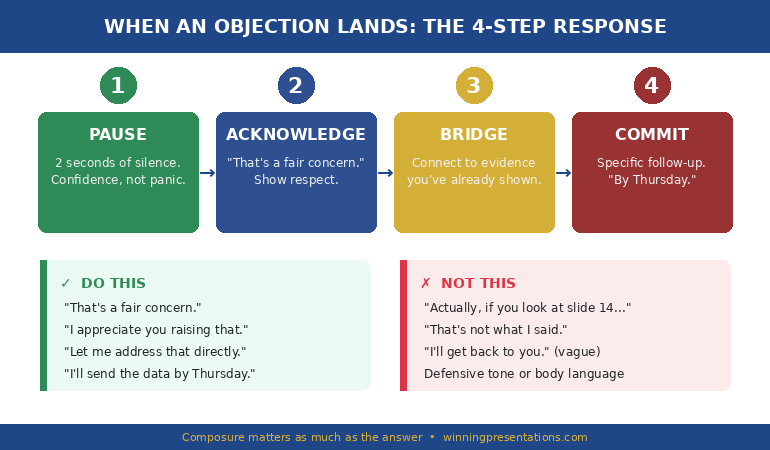
Acknowledge the objection immediately — don’t dismiss it or deflect. Reframe it as a valid concern (“That’s exactly the question I’d ask too”), then bridge to your strongest evidence. If you genuinely don’t have the answer, say so and commit to a specific follow-up timeframe. Executives respect honesty far more than improvised answers.


What an Objection Map Actually Is

An Objection Map is a four-column document you create before any significant presentation. It looks simple. It is simple. That’s why it works — because busy professionals actually use it.

The four columns:

Column 1 — The Objection. Write the exact words someone might use. Not a sanitised version. Not what you hope they’ll say. The blunt, uncomfortable version. “We’ve tried that.” “The timing is wrong.” “This won’t scale.”

Column 2 — The Source. Which specific person in the room is most likely to raise this? Name them. If you don’t know who’ll be in the room, find out. Presenting to strangers is gambling.

Column 3 — The Root Cause. Why does this person have this concern? It’s rarely about the words. “We don’t have budget” usually means “I don’t trust this will work.” “The timing is wrong” usually means “I have a competing priority you’re threatening.”

Column 4 — The Pre-Emptive Response. How will you address this concern inside your presentation — before it’s raised? This is the critical difference between an Objection Map and simple preparation. You’re not preparing answers for Q&A. You’re restructuring your narrative to remove the objection entirely.

When I work with clients on high-stakes presentations — proposals involving significant budgets, restructuring plans, or board-level approvals — the resistance map typically surfaces between five and twelve concerns. Of those, two or three will be presentation-killers: objections that, if left unaddressed, will prevent a decision regardless of how strong everything else is.

Four-column objection map framework showing objection, source, root cause, and pre-emptive response for executive presentations


Stop guessing what the room is thinking.

The Executive Buy-In Presentation System teaches you the complete Objection Map framework, plus stakeholder analysis, champion recruitment, and the slide structures that turn resistance into approval. Self-study modules with live Q&A calls — study at your own pace.

Join the Executive Buy-In System →

Training started 2 Feb — join anytime. New modules released weekly. All calls recorded.


How to Build Your Objection Map in 30 Minutes

You don’t need hours. You need thirty focused minutes and a willingness to be honest about the weak points in your proposal.

Step 1: List every reason someone could say no (10 minutes). Sit with a blank page and write down every objection you can imagine — including the ones you don’t want to think about. Budget. Timing. Priority. Capability. Past failures. Political concerns. If a colleague has ever pushed back on a similar idea, write that down. If your manager has flagged a risk, write that down. Aim for at least eight.

Step 2: Assign each objection to a person (5 minutes). Who in the room is most likely to raise each concern? If you can’t name the person, you don’t know your audience well enough. This is where the psychology of executive buy-in becomes practical. Every objection has a human source, and understanding their motivation is half the battle.

Step 3: Dig to the root cause (10 minutes). For each objection, ask “Why would this specific person care about this specific concern?” The surface objection is almost never the real one. “We’ve tried that” means “I was involved in the last attempt and it made me look bad.” “The data doesn’t support it” means “I don’t trust the methodology.” Finding the root cause tells you which evidence will actually change their mind.

Step 4: Write your pre-emptive responses (5 minutes). For each concern, draft a single sentence — or a single slide — that addresses the root cause directly. Not a defensive rebuttal. A confident acknowledgment that demonstrates you’ve thought about this from their perspective.

How do you anticipate objections before a presentation?

Start by listing every decision-maker who’ll be in the room and their known priorities. Then ask yourself: “If I were them, what would worry me about saying yes to this?” Test your list against a trusted colleague — ideally someone who’ll challenge you. The objections that make you uncomfortable are usually the ones that matter most.


Embedding Responses Into Your Slides

Here’s where most people get the Objection Map wrong. They build the map, identify the concerns, prepare their responses — and then save everything for Q&A.

That’s backwards.

If you know the CFO is worried about implementation cost, don’t wait for her to ask. Put your implementation cost slide before she has to. If the operations director will question timeline feasibility, show your phased delivery plan in the first third of the presentation, not the last.

The principle is straightforward: address objections before they form.

When an executive hears their concern addressed proactively — without having to raise it — two things happen. First, they feel understood. Someone has actually thought about this from their perspective. Second, they can’t use the objection as a blocker, because you’ve already removed the obstacle.

I call this “pre-emptive framing,” and it’s the difference between presentations that get “we need to think about it” and presentations that get “let’s move forward.”

In practice, this means restructuring your slide order around your pre-emptive objections worksheet. The slides that address the top three concerns should appear in the first half of your presentation. Supporting evidence comes second. The “nice to know” detail goes in an appendix — or gets cut entirely.

A client of mine presented a restructuring plan to a hostile board last year. Her resistance map identified “job losses” as the number-one unspoken concern. Instead of burying the headcount impact on slide 18, she addressed it on slide 3 — with specific redeployment plans, timeline, and support packages. The board approved the restructuring in a single meeting. The previous presenter, with a stronger plan but no objection preparation, had been sent away twice.


What the full pre-emptive framing system covers:

✓ The four-column resistance map (what you’ve started learning here)

✓ Stakeholder analysis — understanding who decides, who influences, and who blocks

✓ Champion recruitment — getting someone fighting for your proposal before you present

✓ Slide restructuring — embedding responses into your narrative so objections never surface

✓ The follow-through framework — turning “maybe” into a signed approval


The 7 Executive Objections That Appear in Every Room

After 24 years of corporate banking and coaching executives through high-stakes presentations, I’ve found that most objections are variations of seven core concerns. Once you recognise the pattern, you stop being surprised.

1. “We’ve tried that.” Root cause: fear of repeating a past failure. Your response must show what’s different this time — different approach, different conditions, different data.

2. “We don’t have budget.” Root cause: this proposal isn’t a high enough priority to fight for funding. Your response must reframe the cost of inaction, not the cost of action.

3. “The timing isn’t right.” Root cause: a competing priority the speaker hasn’t surfaced. Your response must acknowledge the competing demand and show how your proposal fits alongside it — not instead of it.

4. “Show me the data.” Root cause: the executive doesn’t trust the reasoning, so they’re demanding proof. Your response must address the trust gap, not just pile on more numbers.

5. “Who else supports this?” Root cause: the executive doesn’t want to be the first person to take the risk. This is why building a coalition before you present is essential.

6. “Let me think about it.” Root cause: unspoken concern they’re not willing to raise publicly. Your resistance map should have already identified what this concern might be — and addressed it in the presentation.

7. “Great presentation.” Root cause: polite rejection. When executives genuinely plan to act, they ask implementation questions. Compliments without follow-up questions are a warning sign. If you’re getting praise without decisions, your presentation is entertaining but not persuasive.

What are the most common objections in business presentations?

The seven most frequent objections revolve around past failures (“we’ve tried that”), budget constraints, timing concerns, requests for more data, lack of visible support from others, stalling (“let me think about it”), and polite rejection disguised as praise (“great presentation”). Preparing specific responses for each increases your approval rate significantly.


Ready to stop hearing “Let me think about it”? The Executive Buy-In Presentation System gives you scripts, templates, and the stakeholder strategy that turns resistance into approval.


What to Do When an Objection Lands Anyway

Even the best pre-emptive objections worksheet won’t catch everything. Someone will raise a concern you didn’t anticipate. Here’s the framework I teach for handling it in the moment:

Pause. Don’t respond immediately. Two seconds of silence communicates confidence. Rushing communicates panic.

Acknowledge. “That’s a fair concern” or “I appreciate you raising that.” This isn’t weakness — it’s emotional intelligence. The rest of the room is watching how you handle pushback, and your composure matters as much as your answer.

Bridge. Connect their concern to something you’ve already addressed. “That connects directly to the risk mitigation on slide 7 — would it help if I walked through that again?” This shows your presentation already accounts for their thinking.

Commit. If you don’t have the answer, say so. “I want to give you an accurate response on that. I’ll send the analysis by Thursday.” Executives respect specificity. “I’ll get back to you” is vague and forgettable. “I’ll send the analysis by Thursday” is a commitment they’ll remember.

The biggest mistake I see? Defensiveness. The moment you say “Actually, if you look at slide 14…” with an edge in your voice, you’ve turned a conversation into a confrontation. And nobody approves proposals from someone they’re arguing with.

If presentation anxiety makes handling objections harder — if the fear of being challenged is what keeps you up the night before — that’s a different problem with a different solution. Understanding what executives actually do before big presentations might help you separate the anxiety from the strategy.


Your next presentation doesn’t have to be a guessing game.

The Executive Buy-In Presentation System covers the full approval cycle: Objection Mapping, stakeholder analysis, champion recruitment, pre-emptive framing, and the follow-through that closes decisions. Self-study modules released weekly, with live Q&A calls (all recorded) so you learn on your schedule.

Join the Executive Buy-In System →

Training started 2 Feb — join anytime and access everything released so far. New modules every week. All Q&A calls recorded for on-demand viewing.

Executive presentation objection response framework showing Pause, Acknowledge, Bridge, Commit steps for handling resistance"


Frequently Asked Questions

How far in advance should I create an Objection Map?

At least three to five days before a significant presentation. You need time to research stakeholder concerns, test your responses with a trusted colleague, and restructure your slides based on what you find. Last-minute objection mapping catches the obvious concerns but misses the subtle political ones that actually derail approvals.

What if I don’t know who will be in the room?

Find out. Ask your sponsor, your manager, or the meeting organiser. If you genuinely can’t get an attendee list, prepare responses for the seven standard executive objections listed above. They cover most boardroom scenarios. But presenting without knowing your audience is a risk that’s entirely avoidable.

Does this work for virtual presentations too?

Yes — and it’s arguably more important. In virtual settings, you can’t read body language as easily, so objections are more likely to stay silent. An Objection Map ensures you address the most common concerns proactively, reducing the chance of a quiet “no” after the call ends.

How is this different from just preparing for Q&A?

Q&A preparation means having answers ready for when someone asks. Objection Mapping means restructuring your presentation so the question never needs to be asked. The first is reactive. The second is strategic. Executives who never have to voice their concern are far more likely to approve your proposal.


📬 The Winning Edge Newsletter

Weekly strategies for executive presentations, stakeholder buy-in, and speaking with confidence. No fluff — just what works.

Subscribe Free →


📋 Free: Executive Presentation Checklist

The pre-presentation checklist I use with every client — covers structure, stakeholder prep, slide order, and objection readiness.

Download Free Checklist →


Read next:

📊 Why “Great Presentation” Is the Worst Feedback You Can Get — what to do when you’re getting compliments but no decisions.

💊 Beta Blockers for Public Speaking: What Executives Actually Do Before Big Presentations — managing the physical symptoms that make handling objections harder.


Objections aren’t the enemy. Unpreparedness is.

Every objection in an executive presentation is predictable if you know your audience, understand their priorities, and have the humility to admit where your proposal is vulnerable. The resistance map gives you thirty minutes of structured preparation that eliminates the single biggest reason executive presentations fail: not the idea, but the resistance that nobody addressed.

Your next step: pick your most important upcoming presentation. Spend thirty minutes building your Objection Map using the four-column framework. Then restructure your slides to address the top three concerns before anyone has to raise them. If you want the full system — including stakeholder analysis, champion recruitment, and the follow-through framework that turns “maybe” into “yes” — the Executive Buy-In Presentation System is open now. Training is in progress, new modules release every week, and all live Q&A calls are recorded — so you can join anytime and study at your own pace.


About the Author

Mary Beth Hazeldine is the Owner & Managing Director of Winning Presentations. With 24 years of corporate banking experience at JPMorgan Chase, PwC, Royal Bank of Scotland, and Commerzbank, she has delivered high-stakes presentations in boardrooms across three continents.

A qualified clinical hypnotherapist and NLP practitioner, Mary Beth combines executive communication expertise with evidence-based techniques for managing presentation anxiety. She works with senior leaders preparing for board presentations, investor pitches, and high-stakes approvals — helping them structure slides, handle objections, and present with confidence.

Book a discovery call | View services

04 Feb 2026
Executive holding a pill before a presentation, deciding whether to take beta blockers for public speaking anxiety

I Kept Beta Blockers in My Desk for 3 Years. Here’s Why I Never Took One.

Quick answer: Yes, executives take beta blockers before presentations. More than you think. But medication manages the symptoms without touching the fear underneath — and after 25 years in corporate banking and training as a clinical hypnotherapist, I can tell you there is a faster, more permanent path. Here is the honest breakdown of what works, what doesn’t, and what nobody in the boardroom will admit to.

I kept a box of propranolol in my desk drawer for three years.

Not prescribed. Borrowed from a colleague who “got them for migraines.” Every Monday morning, I would open the drawer, look at the box, and wonder if today was the day I would finally take one.

I never did. Not because I was brave, but because I was more afraid of the pill than the presentation. What if it made me drowsy? What if my boss noticed? What if I became dependent and couldn’t present without it?

Those three years taught me something that changed the direction of my career entirely. Working at JPMorgan Chase, then PwC, then Royal Bank of Scotland, I discovered that the medication question isn’t really about medication at all. It is about whether you want to manage the fear — or actually resolve it.

After training as a clinical hypnotherapist, I now understand exactly why I was right to hesitate. And why so many executives don’t.

Reaching for medication before your next presentation?

There is a structured, clinical programme that addresses the fear pattern directly — no pills, no white-knuckling. It retrains the nervous system response at the subconscious level. See Conquer Speaking Fear →

Comparison chart showing beta blockers versus nervous system retraining for presentation anxiety, with pros and cons of each approach

The Pill in the Boardroom Bathroom

Let me paint you a picture you will recognise.

It is 8:47am. You are presenting the quarterly update to the leadership team at 9:00. You are sitting in the bathroom stall. Your heart is hammering so loudly you can feel it in your ears. Your hands are cold and damp. Your mouth has gone completely dry.

And you are Googling “can I take a beta blocker 15 minutes before a presentation.”

I have been that person. Many of the executives I have worked with have been that person. The medication question is the most common thing I am asked in private — and the thing nobody will raise in a group setting.

Here is the reality: beta blockers for public speaking are extraordinarily common among senior professionals. Concert musicians have used propranolol for decades. Surgeons use them. Barristers use them. And yes — your colleagues on the executive floor use them too.

The question is not whether they work. They do, for certain symptoms. The question is whether they are the right solution for you.

What Beta Blockers Actually Do (And What They Don’t)

⚕️ Not medical advice. Beta blockers are prescription medication. Talk to your GP before taking them — they are not suitable for everyone, particularly those with asthma, low blood pressure, or certain heart conditions. This article discusses their use for presentation anxiety from a practical and psychological perspective, not a clinical one.

Beta blockers — typically propranolol — work by blocking adrenaline receptors. When your fight-or-flight response fires before a presentation, adrenaline floods your body. Propranolol stops that adrenaline from reaching your heart and muscles.

What beta blockers DO:

They slow your heart rate. They reduce hand tremor. They stop the visible shaking. They prevent that “thumping chest” sensation that makes you feel like everyone can see your fear. For purely physical symptoms, they can be remarkably effective within 30–60 minutes.

What beta blockers DON’T do:

They do not touch the fear itself. They do not stop the negative thought loop (“they’re judging me,” “I’m going to forget my words,” “they can tell I’m nervous”). They do not build confidence. They do not improve your presentation skills. And critically — they do not help you the day you forget to take one.

This is the distinction most people miss. Beta blockers manage the physical expression of anxiety. They do not address the neurological pattern that creates it.

I have worked with executives who took propranolol before every presentation for five, ten, even fifteen years. When they finally forgot the pill or couldn’t get a refill in time, the panic returned at full force — sometimes worse than before, because now they had an additional fear layered on top: “I can’t present without my medication.”

Do executives take beta blockers before presentations?

Yes — far more commonly than most people realise. Beta blockers like propranolol are widely used by senior professionals to manage the physical symptoms of presentation anxiety, including racing heart and hand tremor. However, they only address symptoms and do not resolve the underlying fear. Many executives use them as a temporary bridge while developing longer-term anxiety management skills.

Your Fear Has a Pattern. You Can Break It.

Conquer Speaking Fear (£39, instant access) uses clinical hypnotherapy and NLP techniques to retrain the neurological pattern that creates presentation anxiety — not just mask the symptoms. No medication. No willpower. A different nervous system response.

Get Conquer Speaking Fear → £39

Designed by a clinical hypnotherapist with 25 years of corporate banking experience. £39, instant access.

The Executive Anxiety Secret Nobody Discusses

When I started training executives after leaving banking, the most surprising discovery was not how many professionals struggled with presentation anxiety. It was how many senior professionals struggled with it — and how completely they hid it.

Managing Directors. Partners. C-suite leaders. People who looked utterly composed at the front of the room.

Behind closed doors, here is what they told me:

“I’ve been taking propranolol before every board meeting for eight years. My wife doesn’t even know.”

“I rearranged my entire schedule last quarter to avoid presenting at the all-hands. I told my team I had a conflict.”

“I drink two glasses of wine before evening events where I might have to speak. I’ve done it for so long I don’t even think about it anymore.”

These are not weak people. These are accomplished professionals with decades of experience, running teams of hundreds, making decisions worth millions. And they are quietly medicating, drinking, or avoiding their way around a neurological pattern that nobody taught them how to change.

The shame keeps the problem invisible. And the invisibility keeps people reaching for the quick fix — because they do not know a permanent solution exists.

The Dependency Trap: When Medication Becomes a Crutch

I want to be clear: I am not anti-medication. Beta blockers are safe when prescribed appropriately, they have genuine medical applications, and for some people they serve as a valuable bridge while doing deeper work.

But here is the pattern I see repeatedly in my practice:

Stage 1: The relief. You take propranolol before a big presentation. Your heart doesn’t race. Your hands don’t shake. You think: “This is the answer.”

Stage 2: The habit. You take it before the next presentation. And the one after. You start carrying it “just in case.” The box moves from your desk drawer to your briefcase.

Stage 3: The dependency belief. You begin to believe you cannot present without it. This is not a physical dependency — beta blockers are not addictive. It is a psychological dependency. Your brain has created a new rule: “Safe presentations require medication.”

Stage 4: The expanded fear. Now you have two fears. The original presentation anxiety, plus a new one: “What happens if I can’t get my pills?” Travel, forgotten prescriptions, running out of refills — all become sources of anxiety that didn’t exist before.

This is not a theoretical risk. I have worked with three executives in the past year alone who came to me specifically because their propranolol dependency had escalated their presentation nerves rather than reduced them.

The beta blocker dependency cycle: four stages from initial relief to expanded fear, showing how medication can reinforce presentation anxiety

Is propranolol safe for public speaking?

Propranolol is generally considered safe for occasional use before presentations when prescribed by a doctor. It effectively reduces physical symptoms like rapid heartbeat and trembling. However, it can cause lightheadedness, fatigue, and a feeling of emotional disconnection. The larger concern is not physical safety but psychological dependency — the belief that you cannot present without it — which reinforces the anxiety pattern rather than resolving it.

Stop Managing the Symptom. Resolve the Cause.

Conquer Speaking Fear (£39, instant access) is built on the same clinical hypnotherapy and NLP techniques that resolved my own 5-year presentation phobia — without medication, without white-knuckling it, without “just pushing through.” The nervous system pattern changes permanently.

Get Conquer Speaking Fear → £39

25 years of corporate banking experience. Qualified clinical hypnotherapist and NLP practitioner. £39 — a fraction of the cost of one therapy session.

What Actually Works Long-Term (From a Hypnotherapist Who Lived It)

I was terrified of presenting for five years. Not mildly nervous — terrified. Racing heart, dry mouth, shallow breathing, the full physiological cascade that makes you want to cancel, call in sick, or find any excuse to let someone else present.

Beta blockers would have masked the symptoms. But here is what actually resolved the fear permanently:

1. Understand the pattern. Presentation anxiety is not a character flaw. It is a learned neurological response — your amygdala firing a threat signal based on a past experience (or series of experiences) where speaking in front of others felt dangerous. Once you see it as a pattern, you can change it.

2. Work at the subconscious level. This is where medication falls short. The fear response is generated below conscious awareness. Talking about it (traditional therapy) and thinking about it (willpower) operate at the wrong level. Clinical hypnotherapy and NLP techniques access the subconscious pattern directly.

3. Replace the response — don’t suppress it. Beta blockers suppress adrenaline. Hypnotherapy replaces the fear trigger with a calm, resourceful state. The difference: suppression requires ongoing medication. Replacement is permanent.

4. Build evidence. Every successful presentation without medication builds genuine neural evidence that you can do this. Medication-assisted presentations don’t build this evidence — your brain attributes the calm to the pill, not to you.

This is exactly the approach I built into Conquer Speaking Fear — the same techniques that got me from vomiting in the corridor to confidently presenting to boardrooms across three continents.

Retrain Your Nervous System — Not Just Your Symptoms

Here is the simplest way to think about the choice:

Beta blockers = turn down the volume on the alarm. The alarm still fires. You just don’t hear it as loudly. Remove the volume control, and the alarm is still there.

Nervous system retraining = change what triggers the alarm. When the presenting situation no longer registers as a threat, the alarm doesn’t fire. Nothing to suppress. Nothing to medicate. Nothing to remember to pack in your briefcase.

I have worked with executives who spent years — and thousands of pounds — on therapy, coaching, and medication. When they finally addressed the subconscious pattern, the shift happened in weeks, not years.

If you are currently using beta blockers and they are helping you function, I am not suggesting you stop immediately. But I am suggesting you start building the permanent solution alongside them. Use the medication as a bridge, not a destination. Work on calming your nerves at the source, and you will find you need the bridge less and less — until one day you leave the pill in the drawer and present anyway.

That is the day everything changes.

What are natural alternatives to beta blockers for presentations?

The most effective natural alternatives address the root neurological pattern rather than just symptoms. Clinical hypnotherapy and NLP retraining can permanently change the fear response. For immediate physical relief, diaphragmatic breathing (4-7-8 technique), peripheral vision activation, and bilateral stimulation can reduce the fight-or-flight response within 60–90 seconds. These techniques build genuine confidence because your brain learns it can manage the situation without external support.

🎓 25 Years Coaching Senior Professionals Without Beta Blockers

Conquer Your Fear of Public Speaking is built from 16 years coaching senior professionals across financial services, consulting, healthcare, and technology — alongside 25 years of corporate banking experience. Every technique — the nervous system regulation work, the breathing protocols, the cognitive reframing scripts — comes from real client work with executives who chose to build genuine confidence rather than mask symptoms.

Designed for senior professionals who want to manage acute presentation anxiety without medication — and build the regulation skills that last.

Get Conquer Your Fear of Public Speaking → £39

Instant download — lifetime access to every framework and technique.

Frequently Asked Questions

Can I take beta blockers and do nervous system retraining at the same time?

Absolutely — and this is often the smartest approach. Use beta blockers as a bridge while actively retraining your fear response through hypnotherapy or NLP techniques. As the retraining takes effect, you will naturally find you need the medication less. Many of my clients follow this exact path: medication provides immediate relief while the deeper work creates permanent change. The key is treating the medication as temporary support, not a long-term solution.

My presentation anxiety is only physical — surely medication is the right answer?

This is one of the most common misconceptions. What feels “only physical” — racing heart, trembling, sweating — is actually the physical expression of a subconscious fear pattern. Your amygdala detects a perceived threat and triggers the adrenaline cascade. Beta blockers block the adrenaline from reaching your muscles and heart, but your amygdala still fires the threat signal every single time. Address the signal itself, and the physical symptoms resolve naturally without medication.

How long does nervous system retraining take compared to medication?

Medication works in 30–60 minutes but stops working when you stop taking it. Nervous system retraining through clinical hypnotherapy and NLP typically shows significant improvement within 2–4 weeks of consistent practice, with permanent results. Most executives I work with notice a measurable reduction in their presentation anxiety after the first week. The trade-off is clear: immediate but temporary symptom relief versus slightly longer but permanent resolution.

Will my doctor judge me for asking about beta blockers for presentations?

No. GPs prescribe propranolol for performance anxiety regularly — it is one of the most common off-label uses. If you want to discuss it with your doctor, be direct: “I experience significant physical anxiety symptoms before work presentations and I would like to discuss whether propranolol might help as a short-term bridge while I work on longer-term solutions.” Most doctors will appreciate the thoughtful approach and the fact that you are not looking for a permanent prescription.

📧 The Winning Edge Newsletter

Weekly insights on presentation confidence, evidence-based anxiety techniques, and what actually works for professionals who need to present at a senior level.

Subscribe Free →

Not ready for the full programme? Start here instead — download the free 7 Presentation Frameworks guide, which gives you a structured foundation so your nervous system has one less unknown to panic about.

📌 Related: Even when the anxiety is managed, most executives receive feedback that sounds positive but means nothing. Read Why “Great Presentation” Is the Worst Feedback You Can Get — and learn how to get the actionable input that actually improves your next performance.

Your next step: If you have been reaching for medication before presentations — or thinking about it — recognise that as a signal, not a solution. The fear has a pattern. The pattern can be changed. Start with understanding why the fear exists, then use Conquer Speaking Fear to retrain the response permanently.

Leave the pill in the drawer. Build the skill instead.

About the Author

Mary Beth Hazeldine is the Owner & Managing Director of Winning Presentations. With 25 years of corporate banking experience at JPMorgan Chase, PwC, Royal Bank of Scotland, and Commerzbank, she has delivered high-stakes presentations in boardrooms across three continents.

A qualified clinical hypnotherapist and NLP practitioner, Mary Beth combines executive communication expertise with evidence-based techniques for managing presentation anxiety. She advises executives across financial services, healthcare, technology, and government on managing presentation anxiety and high-stakes speaking situations.

Book a discovery call | View services

04 Feb 2026
Executive looking frustrated after presentation with green checkmark on screen behind him — vague praise instead of actionable feedback

Why ‘Great Presentation’ Is the Worst Feedback You Can Get

“Great presentation, really liked it.” The CFO shook my client’s hand, smiled, and walked out. Three weeks later, the £1.8 million budget request was quietly shelved.

The quick answer: When executives tell you “great presentation,” it almost always means your deck failed to force a decision. Actionable presentation feedback sounds uncomfortable — “slide 3 needs the ROI number,” “cut sections 4 through 7,” “lead with the ask next time.” Vague praise is a polite exit. If you’re consistently hearing “good job” but not getting approvals, the problem isn’t your delivery. It’s your slide structure.

⚡ Presenting tomorrow and need actionable feedback fast?

Before you walk into the room, ask one person — your manager, a peer, a trusted stakeholder — these three slide-specific questions:

  1. “Which slide would you cut first if I had to lose three?”
  2. “Is my recommendation on the first substantive slide, or buried at the end?”
  3. “What’s the one question the CFO will ask that I haven’t answered?”

Those three answers will give you more useful feedback in ten minutes than a dozen “great job” responses after the meeting. If you want the slide structure that forces this kind of feedback automatically, the Executive Slide System (£39) builds decision points into every section.

The Night I Realised Praise Was a Warning Sign

Early in my banking career at JPMorgan Chase, I presented a credit restructuring proposal to a room of seven senior directors. Twelve slides. Thirty-five minutes. When I finished, the most senior director nodded and said, “Really well put together. Thanks for that.”

I walked out feeling brilliant. Told my manager it went well. Two days later, she pulled me aside: “They’ve gone with another approach. Apparently, the deck didn’t address the regulatory risk.”

Nobody in that room told me what was missing. They told me it was “well put together.” That phrase now sets off alarm bells whenever I hear a client use it. Because in 24 years of corporate banking — across JPMorgan, PwC, Royal Bank of Scotland, and Commerzbank — I’ve learned that the executives who give you a compliment and nothing else are the ones who’ve already mentally moved on.

The executives who interrogate your slides? They’re the ones about to approve something.

Vague vs Actionable: What Real Presentation Feedback Sounds Like

After 24 years of coaching executives through high-stakes presentations — from board-level budget approvals to investor pitches — I’ve noticed a pattern that separates the presenters who get promoted from those who plateau. It has nothing to do with charisma or slide design. It’s about the type of feedback they receive — and what they do with it.

Vague feedback sounds warm. “Great presentation.” “Really interesting.” “Good job, thanks.” It feels good in the moment, but it gives you nothing to improve. You walk out not knowing what worked, what didn’t, or what to change for next time.

Comparison chart showing vague presentation feedback versus actionable feedback with specific examples

Actionable presentation feedback sounds different — and often less comfortable. “Slide 3 needs a clearer decision point.” “The finance section is twice as long as it needs to be.” “Your recommendation should be on the first slide, not the last.” These responses tell you exactly what to change. They mean the listener engaged deeply enough with your content to form a specific opinion.

Here’s the uncomfortable truth: if every stakeholder tells you “great job” and nobody challenges a single slide, your deck didn’t provoke enough thought to drive a decision. You entertained the room. You didn’t move it.

What does ‘actionable feedback’ mean for a presentation? Actionable presentation feedback identifies a specific element — a slide, a data point, a structural choice, an argument — and tells you what to change, add, or remove. It’s feedback you can act on before your next presentation without guessing what the person meant.

Your Slides Should Force Decisions — Not Compliments

The Executive Slide System gives you the exact 12-slide structure that makes executive audiences engage, challenge, and approve — instead of politely nodding and moving on. Built from frameworks I’ve used across JPMorgan Chase, PwC, and RBS.

Get the Executive Slide System → £39

Includes 12-slide executive structure, decision slide templates, and the recommendation-first framework refined across 24 years of high-stakes corporate presentations.

Why Executives Default to ‘Great Presentation’ (It’s Not About You)

Before you blame yourself for getting vague praise, understand why it happens. Senior leaders default to “great presentation” for three reasons — and none of them mean your content was actually great.

Reason 1: Your deck didn’t demand a response. Most presentation structures end with a summary slide or a “thank you.” Neither forces a decision. When you don’t build a decision point into your slides, the only polite response is a compliment. Executives aren’t going to volunteer constructive criticism you didn’t ask for.

Reason 2: They’re being politically careful. In senior leadership, vague praise is often code for “I don’t want to commit to a position in this room.” If your presentation doesn’t make it easy for them to say yes or no, they’ll say “great job” because it’s the safest non-answer. I saw this constantly at Commerzbank — the more political the room, the vaguer the feedback.

Reason 3: They’ve already decided — and it’s not in your favour. This is the hardest one to accept. When a senior leader has already made up their mind against your recommendation, “great presentation” is a kindness. It lets them reject your proposal without rejecting you personally. My client with the £1.8 million budget request? The CFO had already allocated those funds elsewhere. The compliment was a consolation prize.

In every case, the problem isn’t the executive. It’s the structure of the presentation itself. A well-structured executive deck makes it nearly impossible for a room to respond with vague praise — because it forces specific questions, specific objections, and specific decisions.

📊 This is exactly why the Executive Slide System builds a decision slide into position 3 — before the supporting evidence — so executives engage with your ask immediately instead of passively consuming your content. Get the Executive Slide System → £39

How do you ask for feedback after an executive presentation? Never ask “how was it?” or “any feedback?” — these invite vague praise. Instead, ask a specific, slide-level question: “Was the risk section on slide 7 strong enough to address your concerns?” or “Would you restructure the recommendation on slide 3?” Specificity invites specificity.

The Feedback Extraction Framework (Stop Hoping — Start Structuring)

After watching hundreds of executives present at board level, I developed a four-step framework that consistently turns vague “nice job” responses into genuinely useful, actionable presentation feedback. The key insight: you have to build feedback extraction into the presentation itself — not bolt it on afterwards.

Four-step feedback extraction framework showing before, during, after, and apply stages for improving executive presentations

Step 1 — Before: Build a feedback scaffolding slide. Add a penultimate slide that asks the room a specific question. Not “any questions?” but “Which of these three options would you recommend, and why?” This forces the room to respond with substance. One of my clients at RBS started using a “decision criteria” slide that listed three options with trade-offs. The room couldn’t leave without picking one — and their feedback immediately became specific, because they had to justify a choice.

Step 2 — During: Watch for the lean-in moment. Every presentation has a moment where the audience shifts posture — they lean forward, pick up a pen, or furrow their brow. That’s the slide that landed. Note which slide triggered it. That’s your strongest content, and everything else should be restructured to match its impact. I teach executives to build their executive summary slide using the same approach that triggered that lean-in.

Step 3 — After: Ask slide-specific questions. Immediately after presenting (or within 24 hours), ask one targeted question: “If you could change one thing about slide 5, what would it be?” Not “how was the presentation?” — that invites “great job.” Make your question so specific that the only possible answer is actionable. If they respond with “it was fine,” that slide didn’t register. Move your attention to the slides that provoked an actual reaction.

Step 4 — Apply: One change per cycle. Don’t overhaul your entire deck based on one round of feedback. Change one thing — the opening, one data visualisation, the recommendation placement — and present again. Measure whether the feedback changes. This creates a compounding improvement loop that, over time, transforms a deck that gets polite nods into one that gets challenged, questioned, and approved.

Stop Getting Compliments. Start Getting Approvals.

The Executive Slide System includes the exact decision slide format, feedback-forcing structure, and recommendation-first framework I’ve refined across hundreds of executive presentations. Your deck shouldn’t generate praise — it should generate action.

Get the Executive Slide System → £39

Built from frameworks refined across JPMorgan Chase, PwC, Royal Bank of Scotland, and Commerzbank — where vague praise meant lost deals.

Why is vague feedback harmful for presentations? Vague feedback creates a dangerous illusion of success. When you’re told “great job” repeatedly, you stop improving. You keep using the same structure, the same slides, the same approach — and you can’t understand why budgets get delayed, projects stall, and decisions don’t happen. Vague praise doesn’t just fail to help you. It actively holds you back by convincing you nothing needs to change.

Why Your Slide Structure Determines Your Feedback Quality

This is the part most presentation advice gets backwards. They tell you to “ask better questions” or “request feedback proactively.” That helps — but it treats the symptom, not the cause.

The cause is your slide structure.

A deck that follows a narrative arc — context, evidence, analysis, recommendation — naturally builds to a decision point. When the last substantive slide presents a clear recommendation with trade-offs, the room has no choice but to respond with specific feedback. They have to say “I agree with option A because…” or “I disagree because slide 7 doesn’t address…” Either response gives you something concrete to work with.

Compare that to a deck that ends with a summary slide restating what you already said. The room has nothing to decide. No recommendation to accept or reject. No trade-offs to weigh. So they default to the only available response: “nice job.”

Every presentation I’ve restructured for clients — whether it was a £4 million budget proposal at JPMorgan or a quarterly business review at PwC — the single biggest change was moving the recommendation to the front and building decision points into every section. The result? Feedback went from “looks good” to “I need you to strengthen the compliance section before I can approve this.” That’s a completely different conversation. That’s a conversation that leads somewhere.

📊 The Executive Slide System builds this recommendation-first, decision-forcing structure into every slide — so your deck naturally generates the kind of actionable feedback that drives approvals. Get the Executive Slide System → £39

Related: If the feedback you’re receiving is “great job” but you feel physically ill before every presentation, the problem might be deeper than slide structure. Read: The Medication Question: What Executives Actually Do Before Big Presentations

Common Questions About Presentation Feedback

How do you give actionable feedback on a presentation? Reference specific slides by number, identify what’s missing rather than what’s wrong, and suggest a concrete change. “Slide 4 needs the ROI calculation” is actionable. “The middle section felt slow” is not. If you’re the one giving feedback, the most useful gift you can offer is a specific slide number paired with a specific recommendation.

What should I do if I only get positive feedback on my presentations? Positive-only feedback is a red flag, not a green light. It usually means your deck didn’t create enough tension to provoke a real response. Try adding a decision slide that forces the room to choose between options. Ask one person before you leave: “If you could only keep three slides from this deck, which three?” Their answer will tell you which slides actually mattered — and which were filler.

How do you improve a presentation when nobody gives you specific feedback? Stop waiting for others to tell you what’s wrong. Instead, audit your own deck using one metric: which slides generated questions or comments, and which generated silence? The silent slides are the ones to cut or restructure first. Build a decision point into every presentation — even a simple “do you agree with this recommendation?” — and the room will be forced to respond with specifics.

The Structure That Turns ‘Great Job’ Into ‘Approved’

I built the Executive Slide System after 24 years of watching presentations succeed and fail at the highest levels of corporate banking. It contains the exact slide order, decision frameworks, and recommendation-first structure that forces executive audiences to engage — not just applaud. If your presentations keep generating compliments but not commitments, your structure is the problem. This fixes it.

Get the Executive Slide System → £39

Includes 12-slide executive structure, decision slide templates, and the recommendation-first framework used in high-stakes approvals and funding rounds.

Frequently Asked Questions

Is ‘great presentation’ always negative feedback?

Not always — but it should trigger scrutiny. If “great presentation” comes with a specific follow-up action (approval, next meeting scheduled, budget allocated), the praise is genuine. If it comes with nothing else — no questions, no next steps, no decision — it’s a polite way of ending the conversation without committing. The tell is what happens in the 48 hours after: silence means it wasn’t great.

How do I get my boss to give me more specific feedback on my presentations?

Ask before you present, not after. Send your boss the deck in advance with one question: “Can you flag the slide that’s weakest before I present to the group?” This gives them permission to be critical in private (where it’s safe) rather than in public (where they’ll default to “looks good”). After the presentation, ask about a specific slide: “Did slide 6 make the case strongly enough?” The more specific your question, the more specific their answer.

What’s the fastest way to tell if my presentation actually worked?

Count the questions. A presentation that generated zero questions either answered everything perfectly (rare) or failed to engage the room (common). A deck that triggered three to five specific, content-level questions — “How did you calculate the ROI?” or “What’s the timeline risk?” — drove genuine engagement. The type of question matters too: questions about your data mean they’re evaluating your proposal. Questions about your background mean they’re evaluating you. One leads to approval. The other leads to “great presentation.”

📬 The Winning Edge Newsletter

Weekly insights on executive presentations, slide structure, and the psychology of getting buy-in — from 24 years inside corporate boardrooms. No fluff. No generic tips. Just the frameworks that actually work.

Subscribe to The Winning Edge → Free

🆓 Free Download: Executive Presentation Checklist

The pre-presentation checklist I give every client before high-stakes meetings. Covers slide structure, decision points, and the three things to verify before you present to senior leadership.

Download the Executive Presentation Checklist → Free

Your Next Step

If you walked out of your last presentation hearing “great job” and nothing else, your structure needs work. Not your delivery. Not your confidence. Your structure. A recommendation-first slide order with built-in decision points makes it nearly impossible for a room to respond with vague praise — because your deck demands a specific response.

Restructure one deck. Present it. Notice the difference: fewer compliments, more questions, better decisions. Get the Executive Slide System → £39

About the Author

Mary Beth Hazeldine is the Owner & Managing Director of Winning Presentations. With 24 years of corporate banking experience at JPMorgan Chase, PwC, Royal Bank of Scotland, and Commerzbank, she has delivered high-stakes presentations in boardrooms across three continents.

A qualified clinical hypnotherapist and NLP practitioner, Mary Beth combines executive communication expertise with evidence-based techniques for managing presentation anxiety. She works with executives preparing for high-stakes funding rounds and approvals across banking, consulting, and corporate leadership.

Book a discovery call | View services

03 Feb 2026
Executive mapping presentation framework on glass whiteboard with structured diagrams before using AI tools

Framework First: The Order That Makes AI Presentations Compelling

Quick answer: Most professionals open ChatGPT or Copilot and start prompting before they’ve decided what the presentation needs to achieve. The result is polished slides with no strategic backbone. Reverse the order — framework first, AI second — and the output transforms from generic to compelling in the same amount of time.

⏰ Presenting in less than 24 hours?

Do these four things right now — 12 minutes total:

1. Write one sentence: “By the end, my audience will decide to ___.” (2 min)
2. List the 3 objections standing between them and that decision. (3 min)
3. Write 6–9 slide headlines as assertions, not labels. (5 min)
4. Prompt AI slide-by-slide against your skeleton. (2 min to start)

That sequence alone will produce a sharper deck than three hours of open-ended prompting. Read on for the full method — or if you want the complete system with templates:

🎓 AI-Enhanced Presentation Mastery — The self-study programme that teaches the complete framework-first workflow, with templates for every step. Explore the programme → £249

The CFO rejected it in 11 words: “This is a lot of slides that say nothing useful.”

My client Marcus had spent three hours with ChatGPT the night before. He’d prompted carefully. The slides looked professional — clean typography, consistent formatting, relevant data points. Every slide had a heading, a supporting visual, and a transition that made logical sense.

The problem wasn’t the slides. The problem was that Marcus had opened AI before opening his brain.

He’d typed “Create a presentation about our Q3 cloud migration progress” and let the tool structure his thinking for him. What came out was a chronological summary of everything that had happened — technically accurate, strategically empty. No recommendation. No decision point. No clear reason for the CFO to care.

I’ve watched this pattern repeat across senior teams throughout my 24 years in corporate banking. The professionals who produce genuinely compelling AI presentations aren’t better at prompting. They’re better at something that happens before the first prompt: they build the framework first.

That single shift in order — framework before AI, not AI before framework — is the difference between presentations that get polite nods and presentations that get decisions.

🎓 Master the Framework-First System

AI-Enhanced Presentation Mastery teaches the complete framework-first workflow — from strategic thinking to AI execution. Self-study with live Q&A calls.

Explore AI-Enhanced Presentation Mastery → £249

The programme is live now — January and February modules are already available, with new modules releasing through April. Join any time and start with the full library so far.

Why Most AI Presentations Are Built Backwards

Here’s the workflow most professionals follow when they need a presentation:

Open ChatGPT or Copilot. Describe the topic. Let AI generate the structure. Edit the output. Present it.

It feels efficient. It is efficient — at producing mediocre work.

The problem is that AI is optimised to generate plausible content, not strategic content. When you say “Create a presentation about our cloud migration,” the tool doesn’t know that your CFO cares about cost overruns but not technical architecture. It doesn’t know that the VP of Engineering is already a supporter while the Head of Procurement is a sceptic. It doesn’t know that the real decision being made is whether to approve another £800K for Phase 2.

Without that context, AI does what AI does well: it creates something that looks like a presentation. Chronological structure. Balanced coverage of all topics. Professional formatting. And absolutely no strategic backbone.

I saw this constantly during my years at JPMorgan Chase and PwC. The decks that got approvals weren’t the ones with the most data or the cleanest slides. They were the ones where you could feel the strategic thinking underneath — the ones where every slide existed for a reason, and that reason pointed toward a specific decision.

AI can’t generate that strategic thinking. But it can execute brilliantly once you’ve done the thinking yourself.

The Framework-First Method (4 Steps)

The structure-before-prompting approach reverses the standard AI workflow. Instead of prompting first and structuring later, you build the decision architecture before touching any AI tool.

Step 1: Define the Decision (Not the Topic)

Most people describe their presentation by topic: “It’s about Q3 results.” Framework-first starts with the decision: “I need the board to approve £800K for Phase 2 of cloud migration.”

That single sentence changes everything. Now every slide either supports that decision or it doesn’t belong in the deck.

Write one sentence: “By the end of this presentation, my audience will decide to ___________.” If you can’t complete that sentence, you’re not ready to open AI.

Step 2: Map the Audience Resistance

Before building slides, identify the two or three objections that stand between your audience and the decision you need. Not theoretical objections — the specific concerns this group of people will have.

Marcus’s CFO had one concern: cost. The VP of Engineering had a different concern: timeline risk. The Head of Procurement worried about vendor lock-in. Three people, three different resistance points, all sitting in the same meeting.

A generic AI prompt produces one presentation for all three. This approach produces one presentation that addresses each resistance point in sequence, building toward the decision.

Step 3: Build the Slide Skeleton

Not full slides — just the architecture. Write the headline for each slide as a complete assertion, not a label. “Q3 Migration Progress” is a label. “Phase 1 Delivered 23% Under Budget, Creating £180K in Reserves for Phase 2” is an assertion.

Your skeleton might be six slides. It might be twelve. The number doesn’t matter. What matters is that each slide headline tells the complete story if you read them in sequence — no body content needed.

This is the strategic thinking that AI cannot do for you. And it’s the thinking that separates presentations executives act on from presentations executives forget.


Slide skeleton example showing assertion-based headlines versus generic label-based slide titles

🎓 AI-Enhanced Presentation Mastery — The self-study programme walks through this skeleton-building process with real executive examples across finance, operations, and strategy contexts. See the full curriculum → £249

Step 4: Now Prompt AI (With the Framework)

This is where AI becomes genuinely powerful. You’re no longer asking it to think — you’re asking it to execute. Instead of “Create a cloud migration presentation,” your prompt becomes:

“I need supporting content for a 9-slide executive presentation. The decision: approve £800K for Phase 2. Slide 3 headline: ‘Phase 1 Delivered 23% Under Budget, Creating £180K in Reserves for Phase 2.’ Generate 3 data points and one visual recommendation that support this assertion.”

The output from this prompt is categorically different from the output of a topic-based prompt. It’s specific. It’s strategic. It supports the decision architecture you’ve already built.

Executive mapping presentation framework on glass whiteboard with structured diagrams before using AI tools

What Changes When You Lead With Structure

The before-and-after is striking. I’ve watched executives switch from prompt-first to structure-first and produce dramatically better output in less total time.

Here’s what shifts:

Editing time drops by half. When AI executes against a clear framework, the output requires refinement rather than restructuring. You’re adjusting language, not rethinking strategy. Most executives I work with report cutting their total deck-building time from four to six hours down to 90 minutes — not because the AI is faster, but because they’re not rebuilding the structure three times.

Audience response changes. Presentations built in this order generate questions about next steps rather than clarifying questions about intent. That’s the signal that your strategic thinking landed. When the first question after your presentation is “So what do you need from us to move forward?” — you’ve built it in the right order.

Confidence increases. This is the part nobody talks about. When you know every slide exists for a strategic reason, you present differently. You’re not narrating slides — you’re building an argument. That comes through in your voice, your posture, and especially in how you handle questions. If the structure of your deck reflects genuine strategic thinking rather than AI-generated organisation, you can defend every choice because you made every choice.

📐 The Complete Framework-First Workflow

AI-Enhanced Presentation Mastery includes the full decision-architecture method, audience resistance mapping templates, and slide skeleton builders — plus how to prompt any AI tool to execute against your framework.

Explore AI-Enhanced Presentation Mastery → £249

Modules cover decision framing, audience mapping, skeleton building, and AI execution for every presentation type.

3 Frameworks That Work With Any AI Tool

You don’t need a new framework for every presentation. Most executive presentations fall into one of three structural patterns, and each one gives AI a clear execution brief.

The Recommendation Framework

Use when: You need a decision. Budget approvals, strategy pivots, vendor selections.

Structure: Recommendation → Evidence → Risks Addressed → Ask. Four to eight slides maximum. The recommendation appears on slide one, not slide twenty. This structure works because executives scan for the conclusion first — give it to them, then prove it.

AI execution: Prompt AI to generate supporting evidence for each assertion in your skeleton. The framework tells AI what to prove, not what to explore.

The Progress Framework

Use when: You’re reporting on work in progress. QBRs, project updates, migration reviews.

Structure: Where We Said We’d Be → Where We Are → What Changed → What We Need Next. Resist the chronological pull. AI will default to “what happened in order” — your framework forces it to highlight the gaps between plan and reality, which is what the audience actually cares about.

AI execution: Prompt AI to generate variance analysis and impact statements rather than activity summaries. The framework prevents AI from producing a timeline when what you need is a gap analysis.

The Problem-Solution Framework

Use when: You’re proposing something new. Process changes, team restructures, new initiatives.

Structure: Cost of the Current Problem → Root Cause → Proposed Solution → Expected Impact → Resources Needed. The key is quantifying the cost of inaction before presenting the cost of action. When the audience sees that doing nothing costs £2M annually, the £400K solution looks different.

AI execution: Prompt AI to quantify impact in the audience’s currency — time, revenue, risk, headcount. Your framework tells AI which currency matters to this specific audience.

Each of these frameworks transforms how AI generates content. Instead of producing generic slides about a topic, AI produces specific content that supports a strategic argument. The full AI presentation workflow covers how to integrate these frameworks into your existing tools.

🎓 AI-Enhanced Presentation Mastery — Includes ready-to-use templates for all three frameworks with worked examples from real executive contexts. Explore the programme → £249


Side-by-side comparison of prompt-first versus framework-first AI presentation results

Real Example: The Same Deck Built Both Ways

Let me show you what this looks like in practice. Same presenter, same topic, same AI tool, same meeting. Different order.

Prompt-First Version (What Marcus Built)

Marcus opened ChatGPT and typed: “Create a 12-slide presentation on our Q3 cloud migration progress for the executive team.”

What AI produced: a chronological summary. Slide 1: Title. Slide 2: Agenda. Slide 3: Q3 Objectives. Slide 4: What We Completed. Slide 5: Technical Architecture Update. Slides 6-9: Detailed progress by workstream. Slide 10: Challenges. Slide 11: Next Steps. Slide 12: Questions.

Every slide was accurate. None of them built toward a decision. The CFO sat through twelve slides waiting for the point, then rejected it in 11 words.

Framework-First Version (What We Built Together)

We started with the decision sentence: “I need the board to approve £800K for Phase 2 of cloud migration.”

We mapped three resistance points: cost (CFO), timeline risk (VP Engineering), vendor lock-in (Head of Procurement).

We wrote the skeleton — nine slide headlines, each an assertion:

1. Phase 2 Requires £800K — Here’s Why It Pays for Itself in 14 Months
2. Phase 1 Delivered 23% Under Budget, Creating £180K in Reserves
3. Delaying Phase 2 Costs £340K/Quarter in Legacy Maintenance
4. Timeline Risk Is Contained: 3 Parallel Workstreams, No Dependencies
5. Vendor Flexibility Built In: Multi-Cloud Architecture Prevents Lock-In
6. Cost Comparison: Phase 2 vs. Extending Phase 1 Support
7. Resource Ask: Same Team, Extended Timeline
8. Risk Mitigation: Phase Gates at 30/60/90 Days
9. Decision Required: Approve Phase 2 by February 15

Then we prompted AI — slide by slide — to generate supporting content for each assertion. The output was specific, strategic, and directly addressed each stakeholder’s concerns.

The board approved the budget in the meeting. No follow-up required.

Same AI tool. Same person. Different order. Completely different outcome.

🧠 Stop Prompting First. Start Thinking First.

AI-Enhanced Presentation Mastery is a self-study programme that gives you the complete framework-first system: decision architecture, audience resistance mapping, slide skeleton templates, and AI execution prompts for every executive presentation type. Study at your own pace, with live Q&A calls when you need direct feedback.

Explore AI-Enhanced Presentation Mastery → £249

Self-study modules + decision-architecture templates + live Q&A. Built for executives who use AI but want better results.

Does the framework-first method work with ChatGPT and Copilot?

Yes — framework-first is tool-agnostic. Whether you use ChatGPT, Copilot, Claude, or Gemini, the principle is identical: do the strategic thinking before the first prompt. The framework becomes the brief that any AI tool executes against. The difference is in the quality of your input, not the brand of your AI.

How long does it take to build a framework before using AI?

Typically 15 to 25 minutes for the decision sentence, resistance mapping, and slide skeleton. That investment saves two to four hours of restructuring and editing on the back end. Most executives find the total deck-building time drops from four to six hours to under 90 minutes once the framework-first habit is established.

What if I don’t know what decision I need from my audience?

That’s the most valuable signal the framework-first method gives you. If you can’t write the decision sentence, you’re not ready to build the presentation — regardless of whether you’re using AI or not. Clarifying the decision before you start is what separates persuasive presentations from information dumps.

Frequently Asked Questions

Can I use the framework-first method for informal presentations like team updates?

Absolutely. Even a five-minute team update benefits from a decision sentence: “I need the team to prioritise workstream B this week.” The framework doesn’t have to be elaborate — even a two-slide skeleton built in three minutes produces sharper AI output than an open-ended prompt. The method scales from boardroom pitches down to Slack presentation summaries.

What if my manager just wants me to share information, not drive a decision?

Information-sharing presentations still benefit from a framework because they need a “so what.” Define what you want the audience to take away: “After this update, the team will understand that Phase 1 is on track and no escalation is needed.” That framing gives AI a clear brief and prevents the chronological data dump that makes people stop listening at slide four.

Is framework-first slower than just letting AI generate the whole thing?

In the first ten minutes, yes. In total time, no. Executives who prompt AI without a framework spend 15 minutes generating slides, then two to four hours restructuring, re-prompting, and editing. Framework-first spends 20 minutes thinking, 20 minutes prompting, and 30 minutes refining. The total is consistently shorter because you’re not rebuilding the strategic backbone after the fact.

📬 The Winning Edge Newsletter

Weekly frameworks, AI presentation strategies, and executive communication techniques — delivered in under 3 minutes.

Subscribe free →

📋 Free: 7 Presentation Frameworks

Download the framework reference sheet used in our executive training — including the Recommendation, Progress, and Problem-Solution structures covered in this article.

Download free →

Also published today:

📊 The All-Hands Meeting That Destroyed Morale (And How to Avoid It) — The structural mistakes that turn company updates into resignation triggers.

💛 What Happens When You Cry During a Presentation (I Know Because I Did) — A recovery framework for the moment emotion takes over.

Your next step: Before your next presentation, spend 15 minutes writing the decision sentence and three slide headlines as assertions. Then open your AI tool. You’ll feel the difference in the output immediately — and your audience will feel it in the room. If you want the complete system with templates and worked examples, explore AI-Enhanced Presentation Mastery.

About the Author

Mary Beth Hazeldine is the Owner & Managing Director of Winning Presentations. With 24 years of corporate banking experience at JPMorgan Chase, PwC, Royal Bank of Scotland, and Commerzbank, she has delivered high-stakes presentations in boardrooms across three continents.

A qualified clinical hypnotherapist and NLP practitioner, Mary Beth combines executive communication expertise with evidence-based techniques for managing presentation anxiety. She has trained thousands of executives and supported presentations in high-stakes funding rounds and approvals.

03 Feb 2026
Professional woman experiencing emotional moment during presentation, showing vulnerability and composure

What Happens When You Cry During a Presentation (I Know Because I Did)

The tears came without warning.

I was presenting our quarterly results to 40 colleagues. Slide 7. Nothing emotional—just revenue figures. And suddenly my throat closed, my eyes burned, and I felt the first tear escape before I could stop it.

I’d been running on four hours of sleep for two weeks. My father had just been diagnosed with cancer. I hadn’t told anyone at work. And my body chose that moment—in front of my entire department—to finally break.

I excused myself for water. Came back. Finished the presentation with a shaky voice and mascara I was certain had migrated somewhere terrible. Spent the next three days convinced my career was over.

It wasn’t. But the shame lasted longer than it should have, because nobody had ever told me what I’m about to tell you.

Quick answer: Crying during a presentation feels catastrophic in the moment, but it’s rarely the career-ending disaster it seems. What matters most is your recovery—not preventing the tears entirely. The 30-second reset (pause, breathe, acknowledge briefly, continue) preserves far more credibility than fighting visible tears or fleeing the room. Crying happens because your nervous system is overwhelmed—by stress, exhaustion, personal circumstances, or accumulated pressure. It’s a physiological response, not a character flaw. This article covers what actually happens when you cry during a presentation, why it occurs, and the specific recovery techniques that protect your professional standing.

⚡ Presenting Soon and Worried About This?

If you’re reading this because you have a presentation coming up and you’re afraid of losing composure, here’s the emergency protocol:

  1. Before: Press your thumbnail hard into your index finger during high-emotion moments. The mild pain interrupts the crying reflex.
  2. If tears start: Pause. Say “Give me just a moment.” Take three slow breaths. Nobody judges a brief pause.
  3. To continue: Lower your voice slightly and slow your pace. This signals control even when you don’t feel it.
  4. Afterwards: Do NOT apologise repeatedly. One brief acknowledgment maximum, then move forward.

This won’t solve the underlying vulnerability, but it will get you through the immediate situation. For the deeper work, keep reading.

Why Crying During Presentations Happens

Tears during presentations aren’t about weakness. They’re about nervous system overload.

Your body has a threshold for stress. When cumulative pressure exceeds that threshold—sleep deprivation, personal problems, work stress, the presentation itself—your nervous system needs to discharge the excess. Tears are one discharge mechanism. So is trembling. So is the urge to flee.

The cruel irony: the harder you try to suppress tears, the more pressure builds, and the more likely they become. Fighting the crying reflex is like trying to hold back a sneeze—sometimes you can, but often the effort makes it worse.

Common triggers include:

  • Accumulated stress that finally finds an outlet
  • Sleep deprivation (your emotional regulation is significantly impaired after poor sleep)
  • Personal circumstances you’re carrying while trying to perform professionally
  • Feeling attacked or criticised during Q&A
  • Talking about something you genuinely care about (passion and tears share neural pathways)
  • The frustration of not being heard or feeling dismissed

None of these make you unprofessional. They make you human.

For more on the physiological side of presentation anxiety, see my article on managing high-stakes presentation nerves.

What Others Actually See (It’s Not What You Think)

Here’s what I wish someone had told me after that quarterly review:

You experience your tears from the inside. Everyone else sees them from the outside.

From the inside, crying feels like complete loss of control. Humiliation. Exposure. The end of any credibility you’d built.

From the outside? People see a colleague who got emotional for a moment. Most feel empathy, not judgment. Many have been there themselves. The ones who judge harshly reveal more about themselves than about you.

What actually damages credibility:

  • Fleeing the room in visible distress
  • Apologising repeatedly throughout the rest of the presentation
  • Bringing it up again and again in the following days
  • Making others feel responsible for managing your emotions

What preserves credibility:

  • A brief pause to collect yourself
  • Continuing with quiet dignity
  • One brief acknowledgment (“I apologise for that moment”) and then moving on
  • Not making it a bigger deal than it needs to be

The research on this is clear: how you handle emotional moments matters far more than whether they occur. Leaders who show authentic emotion and recover gracefully are often rated more trustworthy than those who seem robotically controlled.

Comparison of internal experience versus external perception when crying during a presentation, plus the 30-second recovery protocol

🎯 Build Unshakeable Presentation Composure

Conquer Speaking Fear is a comprehensive programme for professionals who want to present with genuine confidence—not performed confidence that cracks under pressure. Developed from clinical hypnotherapy and NLP techniques that address the nervous system directly.

What’s included:

  • Nervous system regulation techniques
  • The emotional anchor method
  • Recovery protocols for high-pressure moments
  • Long-term resilience building

Get Conquer Speaking Fear → £39

Instant download. Built for high-pressure professional moments: quarterly updates, steering committees, and senior stakeholder meetings.

The 30-Second Recovery Protocol

If you feel tears coming or they’ve already started, here’s the protocol that works:

Step 1: Pause (5 seconds)

Stop speaking. Don’t try to power through while visibly crying—it makes everyone uncomfortable and damages your credibility more than a pause would.

Simply stop. Look down at your notes or take a sip of water if available.

Step 2: Breathe (10 seconds)

Take two or three slow, deep breaths. This isn’t just calming—it physiologically interrupts the crying reflex by activating your parasympathetic nervous system.

Breathe in for 4 counts, out for 6. The extended exhale is what triggers the calming response.

Step 3: Acknowledge Briefly (5 seconds)

One sentence maximum. Choose based on context:

  • “Give me just a moment.” (neutral, professional)
  • “This topic matters to me. Let me collect myself.” (if the content is genuinely emotional)
  • “I apologise—let me continue.” (if you need to move past it quickly)

Do NOT over-explain. Do NOT apologise repeatedly. One acknowledgment, then move forward.

Step 4: Continue with Adjusted Delivery (10 seconds to recalibrate)

When you resume, speak slightly slower and slightly lower in pitch than normal. This signals control and authority even when you don’t feel it internally.

If you have notes, use them more directly for the next few minutes. Nobody expects perfect recall after an emotional moment.

🎯 Want the complete recovery toolkit? Conquer Speaking Fear (£39) includes in-the-moment recovery protocols plus the deeper nervous system work that reduces vulnerability over time.

Managing the Aftermath

What you do in the hours and days after matters almost as much as the recovery itself.

The First Hour

Don’t flee immediately. If possible, stay for a few minutes after the presentation. Chat normally with a colleague or two. This signals that you’re fine and prevents the “dramatic exit” narrative.

Don’t apologise to everyone individually. One acknowledgment in the room was enough. Going person to person saying “I’m so sorry about that” makes it a bigger deal than it needs to be.

The First Day

If someone brings it up kindly: “Thank you—I had a lot going on that day. I appreciate your understanding.” Then change the subject.

If someone brings it up critically: “I’m human. It won’t affect my work.” No further explanation needed. You don’t owe anyone a justification for having emotions.

The Following Week

Deliver something excellent. The best way to move past an emotional moment is to demonstrate competence in your next visible contribution. Don’t hide—show up and perform.

Don’t keep bringing it up. If you make self-deprecating jokes about it for weeks, you’re the one keeping it alive. Let it fade.

For more on managing the anxiety that can follow difficult presentation experiences, see my article on presentation anxiety before meetings.

💡 The Shame is Usually Worse Than the Reality

In my experience—both personal and working with professionals across industries—the internal experience of crying during a presentation is almost always worse than the external impact. Most colleagues are more empathetic than you expect. Most have their own vulnerable moments they remember. The shame you carry is usually disproportionate to the actual professional consequences.

Reducing Vulnerability Long-Term

While you can’t guarantee you’ll never cry during a presentation, you can significantly reduce your vulnerability.

Address the Basics

Sleep. Emotional regulation is severely impaired when you’re sleep-deprived. Before high-stakes presentations, prioritise sleep above extra preparation.

Stress load. If you’re carrying significant personal stress, consider whether this is the right time for optional high-visibility presentations. Sometimes the wisest choice is to postpone or delegate.

Build Nervous System Resilience

Your nervous system can be trained to handle higher levels of activation without triggering emotional overflow. Techniques include:

  • Regular breathwork practice (not just in emergencies)
  • Progressive exposure to speaking situations
  • Anchoring techniques from NLP that create instant access to calm states
  • Somatic practices that discharge accumulated stress before it reaches overflow

Reframe the Stakes

Often, we cry during presentations because we’ve made the stakes impossibly high in our minds. This presentation will determine my career. Everyone will judge me. I must be perfect.

Realistic reframing: This is one presentation among many. People are mostly thinking about themselves. Imperfection is human and often more relatable than polish.

For deeper work on the panic response that can precede tears, see my article on managing panic attacks before presentations.

🎯 Transform Your Relationship with Presentation Pressure

Conquer Speaking Fear isn’t about suppressing emotions—it’s about building genuine resilience so your nervous system can handle pressure without overwhelm. Developed from clinical hypnotherapy and NLP, used by professionals who need to present under real pressure.

The programme includes:

  • Nervous system regulation foundations
  • The emotional anchor technique
  • In-the-moment recovery protocols
  • Long-term resilience building
  • Reframing techniques for high-stakes situations

Get Conquer Speaking Fear → £39

Instant download. Build the resilience that prevents overwhelm before it starts.

Frequently Asked Questions

What causes crying during presentations?

Crying during presentations is a nervous system overflow response. It occurs when cumulative stress exceeds your current capacity—triggered by factors like sleep deprivation, personal circumstances, feeling attacked or criticised, passion about the topic, or accumulated work pressure. It’s physiological, not a character flaw. Your body needs to discharge excess activation, and tears are one mechanism for that discharge.

How do you stop yourself from crying mid-presentation?

The most effective technique is the extended exhale: breathe in for 4 counts, out for 6-8 counts. This activates your parasympathetic nervous system and interrupts the crying reflex. Physical interrupts also work—pressing your thumbnail into your finger or pressing your tongue to the roof of your mouth. However, if tears have already started, trying to suppress them often makes it worse. A brief pause to collect yourself preserves more credibility than visibly fighting tears while continuing to speak.

What should you say if you start crying during a presentation?

Keep it brief—one sentence maximum. Options include: “Give me just a moment” (neutral), “This topic matters to me—let me collect myself” (if content is genuinely emotional), or simply “I apologise, let me continue” (if you want to move past it quickly). Do not over-explain, repeatedly apologise, or provide detailed context for why you’re emotional. One acknowledgment, then continue.

Is it unprofessional to cry during a presentation?

Having emotions is human, not unprofessional. What matters is how you handle the moment. A brief pause, composure recovery, and continuing with dignity actually demonstrates emotional intelligence and resilience. What damages professionalism is fleeing the room in distress, apologising repeatedly, or making others feel responsible for managing your emotions. Research shows leaders who show authentic emotion and recover gracefully are often rated more trustworthy than those who seem artificially controlled.

Can you recover professionally after crying in front of colleagues?

Yes, absolutely. The key is not making it a bigger deal than necessary. Don’t apologise to everyone individually, don’t keep bringing it up, and don’t hide afterwards. Show up, deliver excellent work in your next visible contribution, and let the moment fade. Most colleagues are more understanding than you expect—many have their own vulnerable moments they remember. Your subsequent performance matters far more than one emotional moment.

Why do some people cry more easily than others?

Crying thresholds vary based on nervous system sensitivity, current stress load, sleep quality, hormonal factors, and life circumstances. Some people’s nervous systems are simply more reactive—this isn’t weakness, it’s biology. Additionally, accumulated stress lowers everyone’s threshold. Someone who cries easily during a difficult period may have much higher resilience when their overall stress load is lower. The good news: nervous system resilience can be trained and improved over time.

How long does it take to recover credibility after crying at work?

In most cases, much shorter than you fear. If you handle the moment with dignity and don’t keep drawing attention to it, colleagues typically move on within days. Your next solid contribution accelerates this. The exception is if you make the incident into an ongoing narrative—repeatedly apologising, making self-deprecating comments, or avoiding situations. That keeps it alive. The fastest path to recovery is demonstrating competence in your next visible moment and letting the incident fade naturally.

📧 The Winning Edge Newsletter

Weekly insights on presenting with confidence, managing presentation anxiety, and building genuine resilience under pressure. From a clinical hypnotherapist who’s been exactly where you are.

Subscribe Free →

📋 Free: 7 Presentation Frameworks

Structure reduces anxiety. These seven frameworks give you reliable starting points for any presentation situation—so you can focus on delivery instead of wondering what comes next.

Download Free Frameworks →

About the Author

Mary Beth Hazeldine is the Owner & Managing Director of Winning Presentations. With 24 years of corporate banking experience at JPMorgan Chase, PwC, Royal Bank of Scotland, and Commerzbank, she knows what it’s like to present under real pressure—and what it costs when it goes wrong.

A qualified clinical hypnotherapist and NLP practitioner, Mary Beth overcame five years of severe presentation anxiety using the techniques she now teaches. She works with thousands of executives on building genuine presentation confidence.

Mary Beth overcame five years of severe presentation anxiety using the techniques she now teaches.

Your Next Step

If you’re reading this because it already happened—I’m sorry. I know how it feels. The shame, the replaying, the certainty that everyone is talking about you.

They’re probably not. And even if they are, it will pass faster than you think.

What matters now is what you do next. Show up. Do good work. Don’t apologise again. Let it fade.

And if you’re reading this because you’re afraid it might happen—that fear itself increases the likelihood. The nervous system techniques in this article can help, but the deeper work is learning to present from a place of genuine resilience rather than performed control.

You’re allowed to be human. Even at work. Even during presentations.

Related: If you’re preparing for a high-stakes meeting and worried about composure, see today’s companion article on the all-hands meeting mistakes that destroy morale—because good structure reduces the pressure that leads to emotional overwhelm.

03 Feb 2026
Executive addressing large all-hands meeting audience from podium in corporate auditorium

The All-Hands Meeting That Destroyed Morale (And How to Avoid It)

The CEO opened with “I’m excited to share our new direction.”

Twelve minutes later, 200 employees were mentally updating their CVs.

I was consulting for a mid-sized tech company when this happened. The CEO had genuinely good news—a pivot that would create opportunities, not cuts. But by the time he finished, the Slack channels were on fire. “What does this mean for us?” “Reading between the lines here…” “Anyone else feel like that was rehearsed?”

The content was fine. The delivery destroyed trust.

That meeting cost them 14 resignations over the next quarter. Not because the strategy was wrong—but because the presentation of that strategy broke something that couldn’t be easily repaired.

Quick answer: The most common all-hands meeting presentation mistakes aren’t about slides or timing—they’re about trust. Leaders fail when they lead with corporate messaging instead of human acknowledgment, when they avoid difficult realities employees already sense, when they fill time instead of respecting it, when they perform rather than communicate, and when they treat Q&A as a threat rather than an opportunity. The all-hands meeting that builds morale does the opposite: it acknowledges reality first, delivers substance over polish, respects employees’ intelligence, and creates genuine dialogue. This article covers the five mistakes that destroy morale and the structure that builds trust instead.

⚡ All-Hands This Week? The 10-Minute Trust Check

Before you present, ask yourself these four questions:

  1. What’s the elephant in the room? Name it in your first 60 seconds—or employees will assume you’re hiding something.
  2. What would a skeptical employee think? Address that concern directly, not defensively.
  3. Can you cut 30%? Respect their time. Say less, mean more.
  4. Is your Q&A genuinely open? If you’re screening questions, they know—and trust erodes.

These four checks won’t fix structural issues, but they’ll prevent the most damaging mistakes. For the complete framework, keep reading.

Mistake 1: Leading with Corporate, Not Human

“I’m excited to announce…” “We’re thrilled to share…” “This is an incredible opportunity…”

The moment employees hear corporate enthusiasm, their guard goes up. They’ve been trained by years of experience: when leadership sounds excited, something uncomfortable is coming.

The tech CEO I mentioned opened with excitement about “transformation” and “new horizons.” What employees heard: “I’m about to tell you something you won’t like, and I’m pretending it’s good news.”

The fix: Lead with acknowledgment, not enthusiasm.

“I know there’s been uncertainty about our direction. Today I want to address that directly.” This signals respect. It says: I know you’re not naive. I’m not going to insult you with spin.

Acknowledgment before announcement. Reality before vision. Human before corporate.

For more on this approach, see my guide on presenting difficult news without destroying credibility.

Mistake 2: Avoiding What Everyone Already Knows

In every organisation, there are things “everyone knows” but leadership pretends don’t exist. The product that’s failing. The competitor that’s winning. The restructure that’s coming. The executive who’s struggling.

When you stand in front of your entire company and don’t mention the elephant, you don’t make it disappear. You confirm that leadership either doesn’t know (incompetent) or won’t say (dishonest).

Neither builds trust.

I watched a CFO give a 45-minute all-hands without mentioning that Q3 results were 40% below target. Every employee in the room knew the numbers. The Slack messages afterwards weren’t about the content of the presentation—they were about what it revealed about leadership’s honesty.

The fix: Name the elephant in the first 90 seconds.

“Before I get into our plans, let’s acknowledge what’s on everyone’s mind. Q3 was significantly below where we needed to be. That’s not a secret, and I’m not going to pretend otherwise. Here’s what we’re doing about it…”

You don’t have to have all the answers. But you have to acknowledge the questions.

Mistake 3: Filling Time Instead of Respecting It

The standard all-hands runs 60-90 minutes. Why? Because that’s how long all-hands meetings are supposed to be.

But here’s what actually happens: 15 minutes of substance gets stretched to fill the slot. Department updates that could be emails. Metrics that are already in the dashboard. Celebrations that feel forced because they’re wedged between filler.

Employees aren’t fooled. They know when you’re wasting their time. And every unnecessary minute costs you credibility.

The fix: Cut ruthlessly. Then cut more.

A 25-minute all-hands with genuine substance builds more trust than a 90-minute meeting with padding. Respecting employees’ time signals that you value their contribution more than the appearance of thorough communication.

Ask yourself: If employees were billing you £200/hour each, would you still include this section?

Comparison diagram showing the five all-hands meeting mistakes that destroy morale versus trust-building alternatives

🎯 Build Slides That Build Trust

The Executive Slide System includes templates specifically designed for high-stakes company communications—including all-hands meetings, town halls, and leadership updates. Structure that respects your audience’s intelligence.

What’s included:

  • Town hall and all-hands frameworks
  • Opening slides that acknowledge reality
  • Q&A preparation structures
  • Templates that cut filler automatically

Get the Executive Slide System → £39

Instant download. Built for high-stakes leadership communications.

Mistake 4: Performing Instead of Communicating

Over-rehearsed delivery. Memorised transitions. The corporate voice that sounds nothing like how the CEO actually talks.

Performance creates distance. Employees can feel when someone is delivering lines versus sharing thoughts. And in an all-hands—where the entire point is connection—that distance is fatal.

The irony: leaders rehearse to seem confident. But over-rehearsal signals the opposite. It says: “I’m so worried about how this will land that I’ve scripted every word.”

The fix: Prepare your structure, not your script.

Know your key points. Know your opening acknowledgment. Know how you’ll handle the hard questions. But deliver in your actual voice, with your actual personality, including your actual uncertainty where it exists.

Employees don’t need you to be polished. They need you to be real.

“I don’t have all the answers yet” builds more trust than a perfectly delivered non-answer.

📊 Need a structure you can make your own? The Executive Slide System (£39) gives you frameworks to prepare thoroughly while still sounding human.

Mistake 5: Treating Q&A as Damage Control

Screened questions. Pre-selected softballs. The classic “we’re running out of time” when hard questions start coming.

Employees see through all of it. And each evasion confirms what they suspected: leadership doesn’t want honest dialogue.

The worst version: anonymous questions that are clearly filtered, so everyone knows the difficult ones were removed. You’ve now combined dishonesty with the appearance of openness—the most damaging combination.

The fix: Embrace the hard questions. They’re the point.

The question that makes you uncomfortable is exactly the question that needs answering. When you address it directly—even if the answer is “I don’t know yet, and here’s why”—you build trust that no amount of polished presentation can create.

If you’re afraid of what employees might ask, that fear is data. It’s telling you something about the gap between what you’re saying and what they’re experiencing.

For more on handling difficult questions, see my guide on executive presentation structure.

💡 Q&A Is Where Trust Is Won or Lost

The questions that make you uncomfortable are exactly the questions that need answering. When you address them directly—even if the answer is “I don’t know yet, and here’s why”—you build trust that no amount of polished slides can create. The Executive Slide System includes Q&A preparation frameworks for anticipating and handling the hard questions.

The All-Hands Structure That Builds Trust

After watching hundreds of company meetings—the ones that built trust and the ones that destroyed it—here’s the structure that works:

1. Acknowledge First (2-3 minutes)

Name what’s on everyone’s mind. Don’t spin. Don’t pivot to positivity immediately. Just acknowledge.

“I know the last quarter has been difficult. I know there’s uncertainty about what’s coming. I want to address that head-on today.”

2. Context Before Content (3-5 minutes)

Before you share decisions, share the thinking behind them. What did you consider? What trade-offs did you make? What would you do differently?

This transparency builds trust because it treats employees as partners in understanding, not just recipients of announcements.

3. Substance Over Padding (10-15 minutes)

Deliver your actual content. Cut everything that could be an email. Cut department updates that don’t affect everyone. Cut metrics that are already visible. Keep only what requires the entire company’s attention.

4. Honest Q&A (15-20 minutes)

Open the floor genuinely. Don’t screen questions. When you get a hard one, pause, acknowledge its importance, and answer as honestly as you can—even if that answer is incomplete.

5. Close with Commitment (2-3 minutes)

What specifically are you committing to? When will you follow up? What can employees hold you accountable for?

Vague inspiration erodes trust. Specific commitments build it.

Total time: 35-45 minutes. Not 90. Not 60. Less time, more substance, more trust.

For a detailed template, see my town hall presentation template.

🎯 The Complete Executive Communication System

The Executive Slide System gives you everything in this article as ready-to-use templates—plus frameworks for board presentations, stakeholder updates, and every other high-stakes executive communication. Build slides that build trust.

Includes:

  • All-hands and town hall frameworks
  • Trust-building opening templates
  • Q&A preparation structures
  • Board presentation formats
  • Stakeholder update templates

Get the Executive Slide System → £39

Instant download. Transform your next all-hands from morale-killer to trust-builder.

Frequently Asked Questions

What should you not do in an all-hands meeting?

The five biggest mistakes: leading with corporate enthusiasm instead of human acknowledgment, avoiding topics everyone already knows about, filling time with content that could be emails, over-rehearsing until you sound scripted, and treating Q&A as damage control rather than genuine dialogue. Each mistake signals that leadership values appearance over substance—and employees notice immediately.

How do you make an all-hands meeting engaging?

Engagement comes from trust, not entertainment. Acknowledge reality in your opening, share the thinking behind decisions (not just the decisions themselves), cut ruthlessly to respect people’s time, deliver in your actual voice rather than a corporate performance, and embrace hard questions as opportunities to build credibility. A 30-minute meeting with genuine substance beats a 90-minute meeting with forced energy.

Why do all-hands meetings fail?

Most all-hands meetings fail because they prioritise information delivery over trust-building. Leaders focus on what they want to say rather than what employees need to hear. They avoid difficult realities, pad time with filler, and treat Q&A as a risk to manage. The result: employees leave feeling more disconnected than before, regardless of the content.

How long should an all-hands meeting be?

As short as possible while covering genuine substance—typically 30-45 minutes including Q&A. The standard 60-90 minutes exists because of tradition, not effectiveness. Shorter meetings that respect employees’ time build more trust than longer meetings padded with updates that could be emails. If you can’t fill 30 minutes with content that requires the entire company’s attention, you don’t need an all-hands meeting.

Should you allow anonymous questions at all-hands?

Only if you’ll actually answer them—including the difficult ones. Filtered anonymous questions are worse than no anonymous questions at all, because employees know the hard questions were removed. If you allow anonymous submission, commit to addressing every question (you can group similar ones). If you’re not willing to do that, better to have live Q&A and demonstrate openness through your genuine responses to real-time challenges.

How do you deliver bad news at an all-hands meeting?

Lead with it. Don’t bury bad news in the middle or save it for Q&A. Acknowledge it in your first 90 seconds: “I want to start with something difficult.” Then provide context (why this happened), impact (what it means), and path forward (what you’re doing about it). Employees can handle bad news; what destroys trust is the sense that you’re hiding it or spinning it.

What’s the best structure for an all-hands meeting?

Acknowledge first (2-3 minutes)—name what’s on everyone’s mind. Context before content (3-5 minutes)—share thinking behind decisions. Substance over padding (10-15 minutes)—only content that requires company-wide attention. Honest Q&A (15-20 minutes)—unfiltered, genuine responses. Close with commitment (2-3 minutes)—specific accountabilities, not vague inspiration. Total: 35-45 minutes maximum.

📧 The Winning Edge Newsletter

Weekly insights on executive communication, leadership presentations, and what actually builds trust in corporate settings. From 24 years in banking boardrooms.

Subscribe Free →

📋 Free: Executive Presentation Checklist

A pre-presentation checklist for any high-stakes executive communication—including the trust check, audience analysis, and Q&A preparation. Use it before your next all-hands.

Download Free Checklist →

About the Author

Mary Beth Hazeldine is the Owner & Managing Director of Winning Presentations. With 24 years of corporate banking experience at JPMorgan Chase, PwC, Royal Bank of Scotland, and Commerzbank, she has delivered high-stakes presentations in boardrooms across three continents—and watched countless all-hands meetings build or destroy organisational trust.

A qualified clinical hypnotherapist and NLP practitioner, Mary Beth combines executive communication expertise with evidence-based techniques for managing presentation anxiety. She works with thousands of executives on high-stakes funding rounds and approvals.

Book a discovery call | View services

Your Next Step

Before your next all-hands meeting, run the trust check. Ask yourself: What’s the elephant in the room? Am I acknowledging it—or avoiding it?

The five mistakes in this article are easy to make and hard to recover from. But they’re also easy to avoid once you see them clearly.

Your employees are smart. They see through spin, they feel performance, and they remember evasion. The all-hands meeting that builds trust is the one that treats them as the intelligent partners they are.

Lead with acknowledgment. Deliver substance. Respect their time. Embrace the hard questions.

That’s it. That’s the whole system.

Related: If presenting in front of groups triggers anxiety—even when you’re the one in charge—see today’s companion article on what to do when emotions overwhelm you mid-presentation. It happens to more leaders than you’d think.