09 Feb 2026
Person experiencing nervous system response before presentation with visible tension

Why Your Nervous System Remembers That Awful Presentation From 2019

It was six years ago. You’ve been promoted twice since then. You’ve delivered dozens of successful presentations. You’ve received praise, closed deals, earned respect.

And yet.

The moment you stand up to present to a group that reminds you of that room — same size, same setup, same type of senior faces watching — your heart rate spikes. Your palms dampen. Your voice tightens before you’ve said a word.

Your conscious mind knows you’re not that person anymore. Your nervous system didn’t get the memo.

I spent five years as a presentation coach wondering why intelligent, accomplished executives couldn’t “just get over” a single bad experience from years earlier. Then I trained as a clinical hypnotherapist, and everything made sense.

Your nervous system isn’t being irrational. It’s doing exactly what it evolved to do: protect you from threats it has identified. The problem is, it classified “presenting to senior stakeholders” as a survival-level threat — and it’s still running that programme.

Here’s how that happens, and more importantly, how to change it.

Quick answer: Your nervous system stores intense emotional experiences as survival data, bypassing rational thought. A humiliating or frightening presentation gets encoded the same way your brain encodes near-miss car accidents — as a threat to remember and avoid. This is why logic (“I’m prepared, I know my stuff”) doesn’t calm presentation anxiety. The response lives below conscious thought. To change it, you need techniques that work at the nervous system level, not the cognitive level.

If old presentation trauma is still running the show, you are not broken — your nervous system has learned a pattern it hasn’t had a reason to update.

Conquer Your Fear of Public Speaking walks through the nervous-system-level techniques — hypnotherapy audio, somatic release, pre-presentation protocols — designed for professionals who need to step into high-stakes presentations without the old fear programme firing.

Explore the programme →

Why Your Body Remembers What Your Mind Forgets

Your nervous system has one primary job: keep you alive.

To do this efficiently, it catalogues experiences into two categories: safe and dangerous. When something registers as dangerous, your nervous system creates a rapid-response protocol. The next time you encounter similar conditions, it triggers that protocol automatically — before your conscious mind even processes what’s happening.

This is brilliant for actual survival threats. You don’t want to consciously evaluate whether that car is going to hit you; you want your body to jump out of the way first.

The problem is, your nervous system can’t distinguish between physical danger and social danger. To your amygdala, the part of your brain that processes threat, humiliation registers the same as physical harm.

That presentation in 2019 — the one where you lost your train of thought, or the CFO cut you off, or you could see people checking their phones — your nervous system filed that as a near-death experience.

Not literally, of course. But in terms of how it’s stored and retrieved, the encoding is identical.

For a deeper understanding of the fear response, see my guide on overcoming fear of public speaking.

How Presentation Trauma Actually Forms

Not every bad presentation becomes encoded trauma. The nervous system has specific conditions for creating these rapid-response protocols:

Diagram showing how nervous system stores and retrieves presentation trauma

Condition 1: Intensity

The emotional charge needs to be high enough to trigger the encoding process. A mildly awkward presentation doesn’t create trauma. A presentation where you felt genuine humiliation, fear, or shame does.

Condition 2: Perceived helplessness

Trauma forms when you feel you had no control, no escape, no way to fix what was happening. Standing at the front of a room, unable to leave, while things fall apart — that’s a helplessness state.

Condition 3: Social evaluation

Your nervous system is especially sensitive to group judgment. Being negatively evaluated by a group — particularly a high-status group — triggers ancient threat responses related to tribal exclusion.

Condition 4: No completion

When an intense experience doesn’t have a clear resolution — when you just have to endure it until it’s over — the nervous system keeps the file “open.” It doesn’t know the threat has passed.

Put all four together, and you have the perfect recipe for a nervous system that believes presenting is genuinely dangerous.

🧠 Work With Your Nervous System, Not Against It

Conquer Speaking Fear (£39, instant download) uses clinical hypnotherapy techniques to address presentation anxiety at the nervous system level — where it actually lives. This isn’t about “thinking positive” or “power posing.” It’s about rewiring the automatic responses that hijack you before conscious thought kicks in.

  • Hypnotherapy audio sessions for nervous system reset
  • Somatic techniques to release stored presentation trauma
  • Pre-presentation protocols that calm the fear response

Get Conquer Speaking Fear (instant download) →

Developed by a clinical hypnotherapist with 25 years of corporate presentation experience.

Signs Your Nervous System Is Running an Old Programme

How do you know if your presentation anxiety is a nervous system response versus normal nerves? Here are the distinguishing signs:

The response is disproportionate to the actual risk.

You’re presenting a routine update to colleagues you’ve known for years. There’s nothing at stake. And yet your body is responding as if you’re about to face a firing squad. The gap between actual threat and physical response is the giveaway.

Logic doesn’t help.

You tell yourself you’re prepared. You remind yourself you’ve done this before. You know, rationally, that you’ll be fine. None of it makes a dent in the anxiety. That’s because the response is happening below the level where rational thought operates.

Specific triggers activate it.

Maybe it’s not all presentations — just ones with a certain type of audience, or in a certain room configuration, or with a certain person present. The specificity points to encoded memory, not generalised anxiety.

The response starts before the event.

Days before the presentation, you’re already anxious. Your sleep is disrupted. You’re running mental simulations of everything that could go wrong. Your nervous system is pre-activating the threat response.

Physical symptoms appear automatically.

Racing heart, sweating, voice tremor, shallow breathing, dry mouth, shaking hands — these aren’t choices. They’re your sympathetic nervous system activating whether you want it to or not.

If this describes your experience, see my article on Conquer Speaking Fear for techniques that work at the nervous system level.

How to Release Stored Presentation Trauma

If your presentation anxiety is encoded at the nervous system level, you need approaches that work at that level. Here’s what actually helps:

Approach 1: Somatic Release

Your body stores the incomplete threat response. Somatic techniques help complete the cycle your nervous system left open.

After a stressful presentation (or when recalling one), try this: Allow your body to shake, tremble, or move however it wants to for 2-3 minutes. This looks strange but mimics what animals do after escaping predators — they shake to discharge the stress hormones and reset their nervous system.

Approach 2: Bilateral Stimulation

Alternating stimulation of the left and right brain helps reprocess traumatic memories. You can do this by tapping alternately on your left and right knees while recalling the difficult presentation, or by moving your eyes left to right while holding the memory.

This is the basis of EMDR therapy, and it helps move memories from “active threat” to “past event” in your nervous system’s filing system.

Approach 3: Hypnotherapy

Clinical hypnotherapy accesses the subconscious directly — the level where trauma is stored. In a hypnotic state, it’s possible to revisit and reframe past experiences, essentially giving your nervous system new information about what that event meant.

This is how I work with presentation anxiety now, and it’s far more effective than any cognitive approach I used in my first decade of coaching.

Approach 4: Gradual Exposure with Safety

Controlled exposure to presentation situations — starting with low-stakes environments and gradually increasing — can help your nervous system learn that presenting doesn’t lead to the catastrophe it expects.

The key is “with safety.” Exposure without adequate support can retraumatise rather than heal.

For techniques to calm physical symptoms, see my guide on presentation breathing techniques.

🎯 Release What Your Mind Can’t Reach

The techniques that release presentation trauma aren’t the ones most training programmes teach. Conquer Speaking Fear (£39, instant download) gives you clinical hypnotherapy audio sessions designed specifically for presentation anxiety — the same approaches I use with executive clients who’ve carried these patterns for years.

Get Conquer Speaking Fear (instant download) →

Created by a qualified clinical hypnotherapist who overcame severe presentation anxiety herself.

Rewiring the Response

Releasing old trauma is half the work. The other half is giving your nervous system new experiences that create new patterns.

Stack successful experiences.

Your nervous system learns from repetition. Every presentation that goes “okay” (not perfect — just okay) adds a data point that contradicts the original trauma encoding. Over time, these accumulate into a new default expectation.

Create pre-presentation rituals.

Rituals signal safety to your nervous system. A consistent routine before presenting — the same breathing pattern, the same grounding exercise, the same mental preparation — creates predictability. Predictability calms the threat response.

Reframe the physical sensations.

The physical symptoms of anxiety and excitement are nearly identical: racing heart, heightened alertness, increased energy. You can train your nervous system to interpret these sensations as “ready” rather than “afraid” by consistently labelling them that way before presenting.

This isn’t pretending you’re not anxious. It’s recognising that the sensations themselves are neutral — it’s the interpretation that creates suffering.

Build a recovery practice.

After every presentation, take 5 minutes for nervous system recovery. Slow breathing, gentle movement, perhaps some bilateral tapping. This teaches your nervous system that presentations end, that you survive them, and that it can return to baseline.

For more calming techniques, see my guide on how to calm nerves before a presentation.

The Presentation From 2019 Doesn’t Define You

Here’s what I want you to understand: carrying presentation trauma doesn’t mean you’re weak, broken, or fundamentally anxious. It means your nervous system did what nervous systems do — it identified a threat and created a protection programme.

That programme served a purpose. It tried to keep you safe. And now it’s time to update it with new information: you’re not the person who gave that presentation in 2019. You’ve grown. You’ve learned. And with the right techniques, your nervous system can learn too.

Because you deserve to present without that old experience hijacking your body every time.

Frequently Asked Questions

How long does it take to release presentation trauma?

This varies significantly. Some people experience shift after a single hypnotherapy session. For others, especially those with multiple traumatic presentation experiences, it may take several weeks of consistent practice. The nervous system doesn’t operate on rational timelines — it changes when it feels safe enough to change.

Is this the same as PTSD?

Presentation trauma operates on similar mechanisms to PTSD but is typically less severe and more specific in its triggers. The nervous system encoding process is the same, which is why PTSD treatments like EMDR can be effective for presentation anxiety. However, if you have symptoms that significantly impair daily functioning, please consult a mental health professional.

Will the anxiety ever go away completely?

For most people, the goal isn’t zero anxiety — it’s functional anxiety. Some activation before presenting can actually improve performance. The goal is to move from a hijacked, disproportionate response to a manageable, appropriate one. Many people who do this work find that presentations become neutral or even enjoyable over time.

Can I do this work on my own, or do I need a therapist?

Many of these techniques can be practised independently, especially somatic release and bilateral stimulation. For deeper trauma, or if self-practice isn’t creating change, working with a qualified hypnotherapist or trauma-informed therapist can accelerate the process significantly. The audio sessions in Conquer Speaking Fear are designed to give you access to clinical techniques you can use on your own.

📧 Weekly insights: Subscribe to The Winning Edge →

Related: Difficult presentations create trauma — but so does delivering difficult news. See How to Present Cost Cuts Without Destroying Trust for the framework that protects relationships while delivering hard messages.

About the Author

Mary Beth Hazeldine is the Owner & Managing Director of Winning Presentations. After 25 years in corporate banking and consulting, she trained as a clinical hypnotherapist to address the presentation anxiety she saw (and experienced) throughout her corporate career.

Mary Beth combines executive communication expertise with clinical techniques for managing the nervous system responses that derail even the most prepared presenters. She has worked with senior professionals across industries to transform their relationship with high-stakes presentations.

09 Feb 2026
Executive presenting difficult news to team in boardroom with empathetic body language

I Had to Present 200 Redundancies. Here’s What I Learned About Trust.

The CFO handed me the deck at 4pm. “Present this tomorrow. 200 roles. Be clear but compassionate.”

I looked at the slides. Twelve pages of financial rationale. Charts showing declining margins. A timeline of “workforce optimisation.” Not a single word about the humans whose lives were about to change.

That night, I rebuilt the entire presentation. Because I’d seen what happens when cost reduction presentations focus on the numbers instead of the trust. I’d watched leaders lose their teams’ respect in 15 minutes — respect that took years to build and would never fully return.

The presentation the next morning wasn’t easy. But six months later, the remaining team was still engaged, still productive, and still willing to go the extra mile. That almost never happens after restructuring announcements.

Here’s what I learned about presenting cost cuts without destroying the trust you’ll need to rebuild.

Quick answer: Cost reduction presentations destroy trust when they lead with financial justification and treat people as line items. To preserve trust: acknowledge the human impact first, explain the business reality second, be specific about what’s happening and when, answer the questions people are actually thinking, and commit to specific next steps. The sequence matters as much as the content.

Why Trust Dies in Cost Reduction Presentations

I’ve watched dozens of cost reduction presentations over 24 years in banking and consulting. The ones that destroy trust share the same pattern:

They lead with the business case.

“Market conditions have changed. Our margins are compressed. We need to reduce operating costs by 15%.”

The moment you start with numbers, you’ve lost them. Because everyone in that room is doing the same mental calculation: “Am I a cost? Am I being reduced?”

They’re not hearing your carefully constructed rationale. They’re scanning for threat signals. Their nervous systems have already shifted into fight-or-flight. And everything you say after that opening gets filtered through fear.

The trust equation shifts instantly.

Before the presentation, your team believed you cared about them as people. The moment you lead with financial justification, they recategorise you. You’re no longer “leader who has my back.” You’re “person who sees me as a number.”

That recategorisation takes seconds. Reversing it takes years — if it’s even possible.

For more on delivering difficult news, see my guide on how to present bad news to executives.

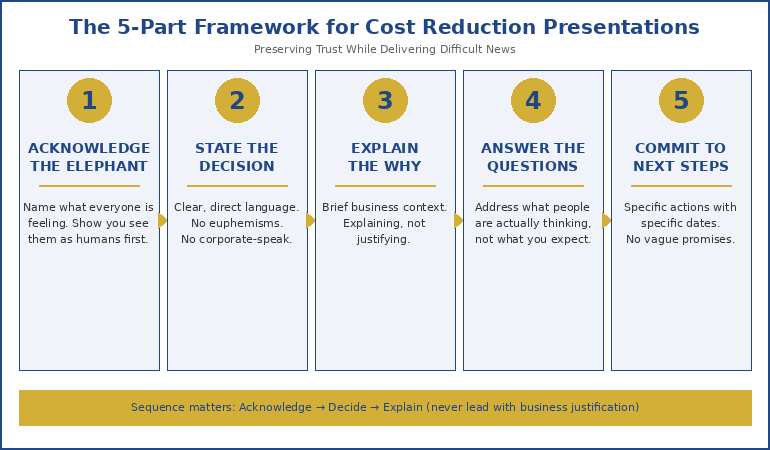
The 5-Part Framework That Preserves Credibility

After that 200-person restructuring presentation, I codified what worked into a framework I’ve used — and taught — ever since.

Five-part framework for presenting cost cuts while maintaining trust

Part 1: Acknowledge the Elephant (First 60 Seconds)

Before anything else, name what everyone is feeling.

“I know why you’re here. I know what you’re expecting to hear. And I know that whatever I say in the next few minutes is going to affect how you feel about this company, about this team, and about me. I’m not going to pretend this is easy news.”

This does something crucial: it signals that you see them as humans, not audience members to be managed. It also prevents the mental drift that happens when people are anxious — they’ll actually hear what you say next.

Part 2: State the Decision Clearly (No Euphemisms)

“We are reducing our workforce by 200 positions. This affects the following departments…”

Don’t say “workforce optimisation.” Don’t say “right-sizing.” Don’t say “strategic realignment of human capital.”

Euphemisms don’t soften the blow. They signal that you’re either ashamed of the decision or think your audience is too stupid to understand plain language. Neither builds trust.

Part 3: Explain the Why (But Not First)

Now — and only now — explain the business context. But keep it brief and honest.

“Here’s why this is happening: our revenue dropped 23% this year. We explored every alternative — hiring freezes, salary reductions, project deferrals. This was the option that gives us the best chance of protecting the remaining roles long-term.”

Notice what’s different: you’re not justifying. You’re explaining. The tone is “here’s the reality” not “here’s why you should be okay with this.”

Part 4: Answer the Unasked Questions

Everyone in that room has the same questions. Answer them before they have to ask:

  • “Is my role affected?” — Be specific about who knows what and when.
  • “When will I find out?” — Give exact timelines.
  • “What support is available?” — Be concrete about severance, outplacement, references.
  • “What happens to my projects?” — Show you’ve thought about continuity.
  • “Can I trust what you’re telling me?” — Address this directly: “I’m telling you everything I know right now.”

Part 5: Commit to Specific Next Steps

“By end of day Friday, every affected person will have a one-on-one with their manager. By next Wednesday, HR will have individual packages prepared. I will send a written summary of everything I’ve said today within two hours.”

Specificity signals competence. Vague promises (“we’ll support everyone through this”) signal that you haven’t actually planned what happens next.

📊 Difficult Conversations Require Clear Structure

Cost reduction presentations fail when leaders improvise. The Executive Slide System gives you proven frameworks for structuring sensitive communications — including templates for restructuring announcements that preserve trust while delivering clarity.

  • 10 executive slide templates (including difficult news formats)
  • Recommended-first structures that work for sensitive topics
  • Opening and closing frameworks that set the right tone

Get the Executive Slide System → £39

Built from 24 years in corporate banking and consulting. Designed for restructuring, cost reduction, and high-stakes stakeholder meetings.

What Never to Say (And What to Say Instead)

Some phrases seem professional but actually destroy trust. Here’s what to avoid:

❌ “This was a difficult decision.”

Everyone knows it was difficult. Saying it sounds like you’re asking for sympathy — which should be flowing the other direction.

✓ Instead: “I wish I had better news.”

❌ “We’re all in this together.”

If you’re not losing your job, you’re not in this together. This phrase infuriates people.

✓ Instead: “I know this affects some of you more than others.”

❌ “This is an opportunity for the company to emerge stronger.”

True, perhaps. But saying it in a redundancy announcement makes you sound like you’re celebrating.

✓ Instead: Save this for three months later, when you’ve earned the right to look forward.

❌ “HR will handle the details.”

This makes you look like you’re delegating the hard part. Even if HR does handle details, you need to own the communication.

✓ Instead: “I’ll be working with HR to ensure everyone gets individual support. Here’s exactly what that looks like…”

The Executive Slide System includes specific language frameworks for sensitive presentations — phrases that land and phrases to avoid.

The Slide Structure That Works

If you must use slides (and sometimes you must, for documentation or remote teams), here’s the structure that maintains trust:

Slide 1: The Decision

One sentence. No charts. No logos. Just the news.

“We are reducing our workforce by [X] positions, effective [date].”

Slide 2: Who Is Affected

Departments, locations, roles. Be specific. Don’t make people guess.

Slide 3: The Timeline

When people will be notified. When last day is. When support begins.

Slide 4: Support Available

Severance terms. Outplacement services. Reference policies. Healthcare continuation.

Slide 5: What Happens Next

Specific actions with specific dates. Who to contact. When the next communication will happen.

Slide 6 (Optional): Business Context

If you include this, keep it to one slide. This is not the time for a 20-slide market analysis.

Notice what’s missing: no “journey” language, no vision statements, no “exciting future” positioning. Those come later, if ever.

For more on presentation structure, see my guide on executive presentation structure.

🎯 Structure Sensitive Presentations With Confidence

The difference between a cost reduction presentation that preserves trust and one that destroys it often comes down to structure. Get it wrong, and you lose your team’s respect permanently. Get it right, and you maintain the credibility needed to rebuild.

Get the Executive Slide System → £39

Designed for restructuring announcements, difficult conversations, and crisis communications.

What Happens After the Presentation

The presentation is just the beginning. Trust is built or destroyed in what comes next.

Within 2 hours: Send a written summary of exactly what you said. No softening, no additions. This creates a record and shows consistency.

Within 24 hours: Every affected person should have had an individual conversation. Not an email — a conversation.

Within 1 week: Check in with your remaining team. Not to sell them on the future — to listen to their concerns. The people who stay are watching how you treat the people who leave.

Within 1 month: Acknowledge the transition openly. “We’re a smaller team now. Here’s how we’re adapting. Here’s what I need from you.”

The biggest mistake leaders make post-announcement: acting like it never happened. Your team remembers. Pretending it’s “business as usual” insults their intelligence and damages whatever trust remains.

For more on this topic, see my article on restructuring announcement presentations.

Presenting Cost Cuts Without Losing Your Team

Here’s what it comes down to:

Your team will remember how you made them feel during the hardest moments. Not your financial rationale. Not your market analysis. Not your carefully worded euphemisms.

They’ll remember whether you looked them in the eye. Whether you spoke plainly. Whether you answered their real questions. Whether you followed through on what you promised.

The Executive Slide System gives you the structural frameworks. But the trust comes from how you deliver them.

That 200-person presentation? It wasn’t my finest hour. But the team that remained trusted me enough to rebuild. And that trust started with acknowledging that I was about to deliver news that would change lives — before I said anything else.

📋 Ready to Structure High-Stakes Presentations?

Whether you’re presenting cost reductions, restructuring announcements, or any difficult news — structure determines whether you preserve trust or destroy it. The Executive Slide System gives you proven templates for sensitive executive communications.

  • 10 executive-ready slide templates
  • Difficult news presentation frameworks
  • Opening scripts that acknowledge reality
  • 30-day email support if you get stuck

Get the Executive Slide System → £39

Built from 24 years in corporate banking and consulting + 15 years training senior executives.

Frequently Asked Questions

Should I rehearse a cost reduction presentation?

Yes, but not for polish — for emotional preparation. Rehearse so you can deliver the difficult parts without hesitating, stumbling, or showing discomfort that makes you seem uncertain about the decision. Your team needs to see that you’ve fully processed this, even if they haven’t.

What if I don’t agree with the cost cuts?

This is one of the hardest leadership moments. You have three options: advocate privately until the decision changes, present the decision as your own (which it becomes the moment you deliver it), or resign before delivering news you can’t stand behind. What you cannot do is subtly distance yourself from the decision during the presentation — your team will sense it, and it destroys trust in both you and the organisation.

Should I take questions during the presentation?

Yes, but manage the format. Say: “I’ll answer questions after I’ve covered everything. That way, some of your questions might already be addressed.” This prevents derailment while still showing openness. Have a clear time limit for Q&A and commit to following up on anything you can’t answer immediately.

What if someone gets emotional during the presentation?

Acknowledge it. “I understand this is difficult to hear.” Then pause. Give them space. Don’t rush past it. The worst thing you can do is pretend it’s not happening or quickly move to the next slide. Human reactions deserve human responses.

Related: Difficult presentations affect your nervous system long after they’re over. If you’re still carrying the weight of past presentations, see Why Your Nervous System Remembers That Awful Presentation From 2019.

About the Author

Mary Beth Hazeldine is the Owner & Managing Director of Winning Presentations. With 24 years in corporate banking and consulting — including roles at JPMorgan Chase, PwC, Royal Bank of Scotland, and Commerzbank — she has delivered and supported high-stakes presentations in boardrooms across three continents, including restructuring announcements affecting thousands of employees.

A qualified clinical hypnotherapist and NLP practitioner, Mary Beth combines executive communication expertise with evidence-based techniques for navigating difficult conversations. She has trained thousands of executives on presenting with clarity, credibility, and composure under pressure.

Book a discovery call | View services

08 Feb 2026
Maven presentation courses at test pricing showing AI-Enhanced Mastery at £249 and Executive Buy-In System at £199 with savings up to £1,152

Two Executive Presentation Courses: One for Speed, One for Buy-In

Test pricing is temporary. This transparency isn’t.

When I launched these two Maven courses, I deliberately priced them low — not as a “launch discount” marketing gimmick, but to genuinely test demand while I was still building out the content. I wanted to know: would busy professionals actually invest in comprehensive presentation training?

The answer was yes. Resoundingly yes.

Which means the test pricing window is closing. And once it does, these courses will never be available at these prices again.

Here’s what’s about to change:

  • AI-Enhanced Presentation Mastery: Currently £249 → Rising to £399 (self-study) or £750 (live cohort)
  • Executive Buy-In Presentation System: Currently £199 → Rising to £499 (self-study) or £850 (live cohort)

That’s not marketing spin. The current prices represent 37-76% savings compared to what future students will pay. And the content is identical — built from 24 years in corporate banking and consulting, plus 14+ years training senior professionals globally.

Both courses have already started, which is actually better for you — more modules are immediately available, so you can start applying the frameworks this week rather than waiting for content to release.

Let me show you exactly what each course delivers.

Quick answer: If you spend too many hours building presentations and want to cut creation time in half using AI — choose AI-Enhanced Presentation Mastery (£249 now, £399-£750 later). If you struggle to get approvals and face stakeholder resistance — choose Executive Buy-In Presentation System (£199 now, £499-£850 later). If you want speed AND buy-in, the best value is both courses for £448 — less than the future self-study price of Executive Buy-In alone (£499).

Best Value: Get Both Courses

£448

Future value: £898 self-study | £1,600 live cohort — Save up to £1,152

Lock In Test Pricing →

Or scroll down to choose just one course

💰 The Numbers Don’t Lie: Test Pricing vs. Future Pricing

Course Test Price Self-Study Live Cohort You Save
AI-Enhanced Mastery £249 £399 £750 Up to £501
Executive Buy-In £199 £499 £850 Up to £651
BOTH COURSES £448 £898 £1,600 Up to £1,152

Test pricing includes lifetime access to all materials, live Q&A sessions, and future updates.

AI-Enhanced Presentation Mastery (£249)

The problem this solves: You’re spending 4-6 hours building presentations that should take 90 minutes. You’ve tried AI tools but end up with generic outputs that need complete rewrites. You know AI could help, but you haven’t found a system that actually works for executive-level content.

What you’ll learn:

This isn’t an AI tutorial. It’s a strategic system for using AI as a thinking partner — not a content generator.

  • The AVP Framework (Action-Value-Proof) — Structure presentations that are impossible to ignore. Create compelling outlines in minutes that guide audiences to yes.
  • The 132 Rule — Organize information in the exact sequence your audience’s brain processes and remembers it.
  • The S.E.E. Formula (Story-Evidence-Emotion) — Make your proof memorable and your recommendations impossible to dismiss.
  • Your Personal AI Playbook — Customised prompts that reflect your expertise and communication style. Create first drafts in 30 minutes.
  • Data Storytelling with AI — Transform KPIs and analytics into strategic narratives using the Insight-Implication-Action framework.

What’s included:

  • 8 self-paced modules (releasing January–April 2026)
  • 2 live 60-minute coaching sessions
  • AI-powered outline generators
  • 30+ prompt templates for different presentation types
  • Before/after slide transformations
  • Master Prompt Pack
  • Lifetime access to all materials and future updates

The practical result: You’ll cut presentation creation time by 50%+ while dramatically improving quality. One client used the AVP framework to rebuild a 47-slide deck into 12 focused slides — and got approval in the first meeting after three previous rejections.

AI-Enhanced Presentation Mastery

Test Price: £249

Future: £399 self-study | £750 live cohort

Lock In Test Pricing → £249

Modules already available. Start applying frameworks this week.

Executive Buy-In Presentation System (£199)

The problem this solves: You create solid presentations but struggle to get approval. Stakeholders push back. Decision-makers say “let me think about it” instead of “yes.” You know your recommendations are sound, but you can’t seem to get the room on your side.

What you’ll learn:

This is about influence, not information. You’ll learn the psychology of how decisions actually get made in organisations — and how to position yourself on the winning side.

  • The Champion Strategy — How to get someone fighting FOR your proposal before you even present. Pre-meeting tactics that make your presentation a formality.
  • The Objection Map — Find resistance before it finds you. Identify blockers, skeptics, and hidden agendas before you walk into the room.
  • Stakeholder Psychology — Why “alignment” fails and “enrollment” wins. The difference between people nodding and people actually supporting you.
  • The Pre-Decision Conversation — Where approvals actually happen (hint: it’s not in the presentation). How to have the conversations that matter.
  • Handling “Let Me Think About It” — Scripts and frameworks for converting hesitation into commitment.

What’s included:

  • Complete self-paced module library
  • Live Q&A coaching sessions
  • Stakeholder mapping templates
  • Pre-meeting preparation frameworks
  • Objection handling scripts
  • Decision architecture templates
  • Lifetime access to all materials and future updates

The practical result: You’ll stop being the person who presents and start being the person who gets things approved. One executive used the Champion Strategy to secure a £2M budget — the decision was essentially made before the formal presentation even started.

Executive Buy-In Presentation System

Test Price: £199

Future: £499 self-study | £850 live cohort

Lock In Test Pricing → £199

Modules already available. Start applying frameworks this week.

Is This the Right Presentation Skills Course for You?

Here’s the honest breakdown:

Choose AI-Enhanced Presentation Mastery (£249 — saves up to £501) if:

  • You spend too many hours building presentations
  • You want to use AI but haven’t found a system that works
  • You need to produce more presentations without sacrificing quality
  • You’re already decent at getting buy-in but want faster creation
  • Your main pain is time, not approval

Choose Executive Buy-In System (£199 — saves up to £651) if:

  • You create good presentations but struggle to get approval
  • You face resistance, skepticism, or “let me think about it”
  • You need to influence stakeholders without formal authority
  • Politics and hidden agendas derail your recommendations
  • Your main pain is approval, not creation time

Take both courses (£448 — saves up to £1,152) if:

  • You want the complete system — fast creation AND reliable approval
  • You’re at a career inflection point where presentations really matter
  • You recognise that £448 for both is less than the future self-study price of Executive Buy-In alone (£499)
  • You want to lock in lifetime access before prices triple

🚫 These courses are NOT for you if:

  • You’re looking for a quick PowerPoint tutorial (these are strategic frameworks, not software training)
  • You need presentation skills for academic or personal contexts (these are built for corporate/executive environments)
  • You want someone to build your slides for you (these teach you to build better, faster)
  • You’re not willing to invest 2-3 hours per week in learning and applying the frameworks

For more on executive presentation structure, see my guide on executive presentation structure. For AI presentation workflows, see AI presentation workflow. For stakeholder influence, see how to get executive buy-in.

Why Test Pricing Exists (And Why It’s Ending)

I want to be completely honest about why these prices exist — because understanding this helps you see why it’s genuinely a limited window.

I needed to validate demand. Before investing hundreds of hours building comprehensive courses, I needed to know: would busy executives actually pay for in-depth presentation training? Would the frameworks I’ve used for 24 years translate to a self-paced format?

So I priced both courses low enough to test the market while I built the content. Not “discounted” — genuinely priced to test.

The test worked. Students enrolled. They’re getting results. The feedback is shaping the final versions of both courses. But now the content is nearly complete, and there’s no longer a reason to keep prices at testing levels.

Here’s what you get at test pricing that future students won’t:

  • The same content — Identical frameworks, templates, and live sessions
  • Lifetime access — Including all future updates and improvements
  • Live Q&A sessions — Worth the price difference alone
  • Maven Guarantee — Full refund eligible up until halfway point
  • 37-76% lower price — Compared to what the exact same course will cost in 3 months

The maths is simple:

If you wait and buy AI-Enhanced Presentation Mastery at the future self-study price (£399), you’ll pay £150 more for exactly the same course. If you want the live cohort experience later, that’s £750 — three times today’s price.

If you wait and buy Executive Buy-In at the future self-study price (£499), you’ll pay £300 more. The live cohort? £850 — more than four times today’s price.

If you buy both now (£448), you pay less than the future self-study price of Executive Buy-In alone (£499). Here’s the simple price logic: test pricing exists to validate demand, not to be permanent.

Lock In Test Pricing Before It Disappears

AI-Enhanced Mastery

£249 £399-£750

Save up to £501

Lock In Test Pricing →

Executive Buy-In System

£199 £499-£850

Save up to £651

Lock In Test Pricing →

BOTH COURSES: £448 (Future value: £898-£1,600)

Lifetime access. Live Q&A sessions. Maven Guarantee.

Frequently Asked Questions

The courses have already started — am I too late?

The opposite. Because modules release over time, joining now means you get immediate access to everything that’s already available — more content ready to consume than early joiners had. You can catch up at your own pace, the live Q&A sessions are still ahead, and you’re paying the same test price. If anything, you’re getting better value than the earliest students.

Why are these prices so much lower than future pricing?

Honestly? I priced them low to test demand while building the courses. I needed to validate that busy professionals would invest in comprehensive presentation training before committing hundreds of hours to create it. The test worked — students enrolled and are getting results. Now that the content is nearly complete, there’s no reason to keep prices at testing levels. Future students will pay £399-£750 for AI-Enhanced and £499-£850 for Executive Buy-In.

What if I can’t attend the live sessions?

All live sessions are recorded and added to your course portal. You’ll have lifetime access to watch them whenever convenient. The courses are designed for busy professionals — self-paced learning with live sessions as a bonus, not a requirement.

Can my company reimburse the cost?

Yes — many employers cover professional development courses. Maven provides documentation and receipts suitable for expense claims. Both courses include certificates of completion you can share with your employer or add to LinkedIn. At test pricing, this is an easy approval — you’re essentially getting live-cohort-quality training at a fraction of typical corporate training costs.

Will test pricing return later?

No. Test pricing exists because I was validating demand while building the courses. Once the programmes are complete and established, they move to standard pricing: £399 (self-study) or £750 (live cohort) for AI-Enhanced, and £499 (self-study) or £850 (live cohort) for Executive Buy-In. This window is genuinely limited.

What’s the refund policy?

Both courses are backed by Maven’s satisfaction guarantee. You’re eligible for a full refund up until the halfway point of the course if it’s not what you expected. There’s no risk in trying — except the risk of waiting and paying 2-4x more later.

Your Next Step

Let me make this simple.

If you wait three months and buy these courses at regular pricing, you’ll pay £898 for self-study access to both — or £1,600 for live cohort access.

If you act now, you pay £448 for both. That’s less than the future self-study price of Executive Buy-In alone.

The content is identical. The frameworks took me 24 years to develop. The only difference is whether you lock in test pricing or pay 2-4x more later.

If your main pain is spending too many hours building presentations:
AI-Enhanced Presentation Mastery — £249 (future: £399-£750)

If your main pain is getting approval and buy-in:
Executive Buy-In Presentation System — £199 (future: £499-£850)

If you want the complete toolkit:
Both courses — £448 total (future: £898-£1,600)

These frameworks work. I’ve used them to train thousands of executives. You can start applying them this week. The only question is whether you’ll pay test prices or full prices for the same result.

⏰ Test Pricing Window Is Closing

Once these courses are fully established, prices rise to £399-£850 per course. Lock in test pricing now and save up to £1,152.

Best Value: Get Both Courses → £448

📧 Not Ready to Commit? Get the Newsletter First

Weekly insights on executive communication, presentation structure, and high-stakes delivery — free. See if my approach resonates before investing in a course.

Subscribe to The Winning Edge →

About the Author

Mary Beth Hazeldine is the Owner & Managing Director of Winning Presentations. With 24 years in corporate banking and consulting — including senior roles at JPMorgan Chase, PwC, Royal Bank of Scotland, and Commerzbank — she has delivered high-stakes presentations in boardrooms across three continents.

A qualified clinical hypnotherapist and NLP practitioner, Mary Beth combines executive communication expertise with evidence-based techniques for influence and persuasion. She has trained thousands of executives and supported presentations that have secured significant funding and approvals.

Book a discovery call | View services

08 Feb 2026
Executive mid-answer during boardroom Q&A with presentation screen visible behind

Appendix Slides: The 5 Backup Slides That Win Executive Q&A

The CFO asked a question I wasn’t expecting. I froze — then said, “I actually have a slide on that.”

As I flipped to my appendix, I watched her expression shift from skepticism to something like respect. The question was about our methodology assumptions — the kind of challenge that derails presenters who haven’t thought three steps ahead.

But I had thought three steps ahead. Not because I’m smarter than anyone else in the room. Because I’d learned something most presenters never figure out: appendix slides (also called backup slides) aren’t for “extra information.” They’re pre-built answers to the questions you’ll be asked.

After 25 years in corporate banking and consulting, I’ve noticed a pattern. The people who look most prepared in boardrooms aren’t the ones who memorised every data point. They’re the ones who anticipated the questions — and had slides ready.

Here’s how to build appendix slides that transform Q&A from a threat into an opportunity.

Quick answer: Effective appendix slides (backup slides) aren’t repositories for leftover data — they’re strategically prepared answers to anticipated questions. Build five types: (1) methodology backup for “how did you calculate that?”, (2) deeper data cuts for “what about segment X?”, (3) scenario alternatives for “what if we did Y instead?”, (4) historical context for “how does this compare to last time?”, and (5) risk mitigation for “what could go wrong?” Having these ready transforms Q&A from a threat into an opportunity to demonstrate thorough preparation.

⚡ Presenting to leadership this week?

Build these 3 appendix slides before anything else:

  1. The “How We Got This Number” slide. Whatever your key recommendation relies on — have the calculation visible and ready.
  2. The “What About [Their Pet Topic]” slide. Every senior leader has something they always ask about. Prepare for it.
  3. The “Plan B” slide. If they say no to your first recommendation, what’s the alternative? Have it ready.

These three slides cover 80% of the questions that catch presenters off guard.

If you don’t have the “How we got this number” slide ready, you’re not presenting — you’re negotiating credibility.

Looking for a structured way to build appendix slides? The Executive Slide System walks through the 5 categories, scenario playbooks, and Q&A-ready templates covered in this article — useful if you’d rather work from a system than build one from scratch.

Why Most Appendix Advice Is Useless

Search “appendix slides” and you’ll find the same advice everywhere: “Put extra information at the end of your presentation.” “Include detailed data that doesn’t fit in your main slides.” “Add references and sources.”

This advice is technically correct and practically useless.

It treats appendix slides as a dumping ground — a place to put things you couldn’t fit elsewhere. That’s backwards. It’s like saying “put a fire extinguisher somewhere in the building” without teaching people where fires actually start.

The real purpose of appendix slides is strategic anticipation.

Every presentation to senior leaders follows a predictable pattern. You present. They listen. Then they ask questions designed to test whether you’ve actually thought this through — or whether you’re just presenting someone else’s analysis.

The questions they ask fall into recognisable categories. And if you’ve prepared slides that answer those categories, something interesting happens: you stop dreading Q&A. You start looking forward to it. Because every question becomes an opportunity to demonstrate that you’re not just a messenger — you’re someone who thinks at their level.

For more on how senior leaders process presentations, see my guide on what executives actually read on your slides.

The 5 Types of Appendix Slides That Actually Matter

After observing thousands of executive presentations — and noting which questions consistently surface — I’ve identified five categories of backup slides that cover nearly every challenging question you’ll face.

Five categories of appendix slides with example questions for each type

Type 1: Methodology Backup (“How did you calculate that?”)

This is the most common challenge in data-heavy presentations. Someone questions your numbers — not because they think you’re wrong, but because they need to understand the foundation before they’ll trust the conclusion.

Your methodology backup slide should include:

  • Data sources (where the numbers came from)
  • Key assumptions (what you held constant)
  • Calculation logic (the formula or approach, simplified)
  • Sensitivity notes (what changes if assumptions shift)

When someone asks “How did you get to that 15% figure?”, you flip to this slide and walk them through it in 60 seconds. Their next response is almost always a nod, not a follow-up challenge.

Type 2: Deeper Data Cuts (“What about segment X?”)

Senior leaders often want to see how aggregate numbers break down. If you’re showing total revenue, someone will ask about revenue by region. If you’re showing overall customer satisfaction, someone will ask about enterprise vs. SMB.

Anticipate the two or three most likely segmentation questions and prepare slides that show:

  • The breakdown they’re likely to ask about
  • Whether the segment trend matches or diverges from the aggregate
  • Any notable outliers worth flagging

The magic phrase: “Great question — let me show you the breakdown.” Then flip to the slide you already prepared.

Type 3: Scenario Alternatives (“What if we did Y instead?”)

Decision-makers rarely accept the first option without exploring alternatives. If you’re recommending Option A, someone will ask what happens with Option B or C.

Your scenario alternative slides should show:

  • The alternative approach (briefly described)
  • Key differences in outcome (cost, timeline, risk, impact)
  • Why you’re not recommending it (the trade-off that makes it inferior)

This demonstrates that you didn’t just fall in love with your recommendation — you evaluated alternatives and made a reasoned choice.

Type 4: Historical Context (“How does this compare to last time?”)

Institutional memory runs deep in senior leadership. They remember the last time someone proposed something similar. They remember how it turned out.

Your historical context slide should address:

  • Previous similar initiatives (briefly)
  • What happened (outcome)
  • What’s different this time (why history won’t repeat)

If you don’t prepare this slide, someone will bring up the past anyway — and you’ll be caught defending against a comparison you didn’t anticipate.

Type 5: Risk Mitigation (“What could go wrong?”)

Every approval involves accepting risk. Leaders want to know you’ve thought about what could fail — and that you have a plan if it does.

Your risk mitigation slide should include:

  • Top 2-3 risks (the realistic ones, not the theoretical)
  • Likelihood and impact (brief assessment)
  • Mitigation approach (what you’ll do if each risk materialises)

This slide transforms “What could go wrong?” from a trap into an opportunity to show thorough thinking.

Build Your Main Deck and Appendix Fast — Without Starting From Blank

The Executive Slide System — £39, instant access — gives you the complete framework to structure your recommendation deck and prepare for Q&A: 26 templates, 93 AI prompt cards, and 16 scenario playbooks. Build presentations that anticipate challenges before they’re asked.

Get the Executive Slide System → £39

Instant download. 30-day guarantee.

What’s inside:

  • 26 executive slide templates (recommendation, decision, update, and Q&A-ready structures)
  • 93 AI prompt cards for ChatGPT and Copilot (draft → refine → executive polish)
  • 16 scenario playbooks (board meetings, budget decisions, quarterly reviews, client escalations)
  • Master checklist + framework reference + 30-day money-back guarantee

Use it today: Download → pick the recommendation template → drop in your key numbers → add 3 appendix slides using the framework above → present with confidence.

How to Predict Which Questions You’ll Be Asked

Building the right appendix slides requires knowing which questions are coming. Here’s how to predict them.

Step 1: Know Your Audience’s Patterns

Every senior leader has favourite questions. The CFO always asks about ROI assumptions. The COO always asks about implementation timeline. The CEO always asks about competitive response.

Before any presentation, ask yourself: What does each person in this room always want to know? Build an appendix slide for each pattern.

Step 2: Identify Your Weakest Points

You know where your argument is strongest — and where it’s vulnerable. The vulnerable spots are where questions will land.

Be honest with yourself: Which part of my recommendation would I challenge if I were in their seat? Build an appendix slide that addresses that challenge head-on.

Step 3: Anticipate the “Yes, But” Reactions

When you make your recommendation, imagine someone saying “Yes, but…” and completing the sentence. Common completions:

  • “Yes, but we tried something similar before…”
  • “Yes, but what about the risk of…”
  • “Yes, but how does this affect department X…”
  • “Yes, but the timeline seems aggressive…”

Each “yes, but” is an appendix slide waiting to be built.

Step 4: Ask Someone Who’s Been in the Room

If you haven’t presented to this group before, find someone who has. Ask them: “What questions did they ask you?” and “What caught you off guard?”

Their experience becomes your preparation advantage.

For more on handling difficult questions, see my guide on handling difficult questions in presentations.

Don’t want to predict and build appendix slides from scratch?

The Executive Slide System gives you 26 templates, 93 AI prompt cards, and 16 scenario playbooks — structured for boardroom Q&A and built around the appendix categories covered above. £39, instant download.

Get the Executive Slide System →

The “Flip-Back” Technique for Q&A Confidence

Having appendix slides is only half the battle. Using them smoothly is the other half.

Here’s the technique I teach:

Step 1: Acknowledge the Question

“That’s a great question” or “I’m glad you asked that” — something brief that shows you’re not thrown off.

Step 2: Signal That You’re Prepared

“I actually have some data on that” or “Let me show you what we found when we looked at that specifically.”

This moment — before you’ve even shown the slide — is when perception shifts. You’re not scrambling. You anticipated this.

Step 3: Navigate Smoothly

Know your appendix slide numbers. Practice the navigation so you don’t fumble. In PowerPoint, you can type the slide number and press Enter to jump directly there.

Step 4: Answer Concisely

Don’t over-explain. Show the slide, make your point in 30-60 seconds, and ask if that addresses their question. Less is more.

Step 5: Return to Your Flow

After answering, return to where you were in your main presentation — or to your recommendation slide if you were near the end. Don’t let one question derail your entire narrative.

The Psychological Effect

When you flip to a prepared slide during Q&A, something subtle happens in the room. The questioner feels heard (you took their concern seriously enough to prepare for it). The rest of the room sees competence (you thought ahead). And you feel confident (you’re not improvising — you’re executing).

This is why appendix slides change the entire dynamic of executive presentations.

Why Building Appendix Slides First Changes Everything

Here’s a counterintuitive practice that transformed how I prepare presentations: build your appendix slides before your main deck.

Most people do the opposite. They build their main presentation, then throw some extra slides at the end as an afterthought. But this order is backwards.

When you build appendix slides first, you’re forced to think about:

  • What questions will this presentation raise?
  • What challenges will my recommendation face?
  • What context does my audience need that I might forget to include?

This thinking improves your main presentation. You realise which points need more support. You identify gaps in your logic before someone else points them out. You build a stronger argument because you’ve already stress-tested it.

The practical workflow:

  1. Draft your recommendation (one sentence)
  2. List every question or challenge you can imagine
  3. Build appendix slides for the top 5-8 challenges
  4. Now build your main presentation, informed by that thinking
  5. Review: did any appendix content belong in the main deck after all?

This approach takes slightly longer upfront but dramatically reduces revision cycles and — more importantly — transforms your Q&A performance.

For more on executive presentation structure, see my guide on executive presentation structure.

The pattern is consistent — the executives who handle Q&A best almost always built appendix slides ahead of time, anticipating the harder questions before the meeting.

Stop Dreading Q&A. Start Looking Forward to It.

The Executive Slide System (£39, instant access) gives you the complete framework — 26 deck templates plus 16 scenario playbooks with structure for building appendix slides in every question category. Build presentations that anticipate challenges before they’re asked.

Get the Executive Slide System → £39

Instant download. 30-day guarantee.

Frequently Asked Questions

How many appendix slides should I have?

Quality matters more than quantity. Aim for 5-10 well-prepared appendix slides that cover the most likely questions. Having 30 appendix slides you can’t navigate quickly is worse than having 5 you know inside out. Focus on the five types described above and you’ll cover most scenarios.

Should I mention my appendix slides during the presentation?

Generally, no. Let them discover your preparation during Q&A — that’s when the “I have a slide on that” moment creates the strongest impression. The exception: if you’re presenting something controversial and want to pre-empt objections, you might say “I have backup data on our methodology in the appendix if anyone wants to dig deeper.”

What if someone asks a question I don’t have an appendix slide for?

It happens. Acknowledge the question, answer as best you can verbally, and offer to follow up with more detail. The goal isn’t to have every possible answer prepared — it’s to have the most likely answers ready. Even covering 70% of questions with prepared slides dramatically improves your Q&A performance.

How do I quickly navigate to appendix slides during a live presentation?

In PowerPoint, type the slide number and press Enter to jump directly there. Know your appendix slide numbers before you present. Some presenters add a small index on their final main slide (visible only to them in presenter view) showing which appendix slides cover which topics. Practice the navigation until it’s smooth.

Your Next Step

Before your next executive presentation, try this: after you’ve drafted your recommendation, spend 30 minutes building appendix slides for the three most likely challenges. Just three.

Then notice how your confidence shifts. You’re no longer hoping they don’t ask hard questions. You’re ready for them. And that readiness shows — in your body language, your voice, and your willingness to engage with whatever comes.

The best-prepared person in the room isn’t the one who knows everything. It’s the one who anticipated what would matter — and prepared accordingly.

📧 Get the Winning Edge Newsletter

Weekly insights on executive communication, presentation structure, and high-stakes delivery — from someone who’s spent 25 years in boardroom-style decision meetings.

Subscribe free →

Related reading: Once you’ve built your appendix slides, make sure your main deck is structured for how senior leaders actually scan. Read What Executives Actually Read on Your Slides (In the First 5 Seconds) to ensure your key content lands in the high-attention zones.

About the Author

Mary Beth Hazeldine is the Owner & Managing Director of Winning Presentations. With 25 years in corporate banking and consulting — plus years training senior professionals — she has seen exactly what gets challenged in executive Q&A and what separates presenters who look brilliant from those who look blindsided.

She now helps professionals build presentations that anticipate questions before they’re asked.

08 Feb 2026
Senior executive woman reviewing presentation slides on laptop with focused analytical expression in modern office

What Executives Actually Read on Your Slides (In the First 5 Seconds)

I watched a CFO flip through 47 slides in under two minutes. She stopped on three of them.

This was during my banking career, sitting in on a budget approval meeting. The presenter had spent weeks building what he thought was a comprehensive deck. Beautiful charts. Detailed analysis. Supporting data for every claim.

The CFO’s eyes landed on the slide titles. Then the recommendation boxes. Then the numbers in bold. Everything else — the carefully crafted explanations, the background context, the methodology sections — might as well have been invisible.

After 24 years in corporate banking and consulting, I can tell you: most slides are built for the wrong reader.

They’re built for someone who will read every word. Senior leaders don’t.

Here’s what they actually look at — and what they skip entirely.

Quick answer: Senior leaders read in a predictable pattern: slide title first (to decide if the slide is relevant), then any boxed recommendation or conclusion, then bolded numbers or outcomes, then the first bullet only. They skip methodology, background context, detailed explanations, and anything that looks like “supporting information.” Structure every slide so the most important content appears in those four high-attention zones.

⚡ Presenting to executives this week?

Quick fixes that take 15 minutes:

  1. Rewrite your slide titles as conclusions. Not “Q3 Sales Analysis” but “Q3 Sales Exceeded Target by 12%”
  2. Add a recommendation box to every decision slide. Bold border, 2 sentences maximum, top-right position.
  3. Bold the numbers that matter. Revenue, headcount, timeline, cost — the figures they’ll be asked about later.

These three changes put your key content where executive eyes actually land.

If your slide title doesn’t contain the decision or outcome, senior leaders assume you don’t have one.
Fix your titles first — then drop your content into templates built for executive scanning.

Get the Executive Slide System → £39

The Executive Reading Pattern

Senior leaders don’t read slides. They scan them.

This isn’t because they’re lazy or don’t care. It’s because they’re making decisions all day, and reading every word of every presentation would be impossible. They’ve developed a filtering system — a rapid triage that separates “need to know” from “nice to know.”

Understanding this pattern changes how you build slides.

The scan takes about 3-5 seconds per slide. In that window, a decision-maker determines: Is this slide relevant to me? Is there a decision required? What’s the key number or outcome? Do I need to dig deeper or can I move on?

If your most important content isn’t visible in those 3-5 seconds, it doesn’t exist.

The Executive Reading Pattern showing what executives look at first second and skip on slides

Here’s the scanning sequence I’ve observed across hundreds of boardroom presentations:

First: Slide title (0.5 seconds)
This is the gatekeeper. The title tells them whether to invest attention or flip to the next slide. Titles that describe content (“Market Analysis”) get skipped. Titles that state conclusions (“Market Share Dropped 8% — Action Required”) get attention.

Second: Boxes and call-outs (1 second)
Anything visually separated — recommendation boxes, key takeaway sections, highlighted conclusions — draws the eye next. Decision-makers have learned that presenters put important things in boxes.

Third: Bold numbers (1 second)
Revenue figures. Headcount. Timelines. Percentages. Costs. Leaders are trained to find numbers because numbers are what they’ll be asked about in the next meeting.

Fourth: First bullet point (1-2 seconds)
If they’re still on the slide, they’ll read the first bullet. Maybe the second. Rarely the third. Almost never the fourth or fifth.

Then: Decision to engage or move on
Based on those 3-5 seconds, they either ask a question, request you to slow down, or mentally move to the next topic.

For more on structuring presentations for senior audiences, see my guide on executive presentation structure.

Build Slides That Get Read in the First 5 Seconds

The Executive Slide System includes templates pre-structured for how senior leaders actually scan — with recommendation boxes, conclusion-first titles, and visual hierarchy that puts key content where eyes land first.

Get the Executive Slide System → £39

Built from 24 years of presenting in boardroom-style decision meetings.

What They Actually Read (In Order)

Let’s break down each high-attention zone and how to use it.

1. Slide Titles: Your 8-Word Headline

Most presenters write titles that describe what’s on the slide. “Revenue Overview.” “Project Timeline.” “Risk Assessment.”

These titles are useless to someone scanning quickly. They don’t answer the only question that matters: “What do I need to know?”

Better approach: Write titles that state the conclusion.

Descriptive Title (Skip) Conclusion Title (Read)
Q3 Sales Performance Q3 Sales Beat Target by £2.4M
Project Status Update Project On Track for March Launch
Budget Analysis Budget Request: £450K for Q2
Risk Factors Three Risks Require Board Decision

Notice the pattern: conclusion titles tell the reader what to think about the slide before they’ve read anything else. They can decide instantly whether to engage deeply or move on.

For more examples of this transformation, see my guide on slide titles before and after.

2. Recommendation Boxes: The Decision Zone

Decision-makers are trained to look for recommendations. Put your “ask” in a visually distinct box — border, background colour, positioned top-right or bottom of slide.

A good recommendation box contains:

  • What you’re recommending (one sentence)
  • What it costs or requires (one sentence)
  • Nothing else

Example: “Recommendation: Approve £200K for pilot programme. Decision required by March 15.”

That’s it. The supporting argument is in the rest of the slide — but the recommendation stands alone in its box, scannable in under two seconds.

3. Bold Numbers: The Facts They’ll Quote Later

When leaders leave your presentation, they’ll be asked: “What was the number?” Make sure the important numbers are visually unmissable.

Bold these categories consistently:

  • Revenue/cost figures
  • Headcount impacts
  • Timeline milestones
  • Percentage changes
  • Decision thresholds

Don’t bold for emphasis. Bold for memorability. If the audience can’t recall the key figure 30 minutes later, it wasn’t bold enough.

4. First Bullets: Your One Chance at Detail

If you have supporting points, the first bullet is prime real estate. The second bullet is acceptable. The third is rarely read. The fourth and fifth are essentially invisible.

This means: front-load your bullet lists. Put the most important point first, not last. Don’t build to a conclusion — start with it.

For more on what senior leaders look for, see my guide on the executive summary slide.

What They Skip Entirely

Equally important: knowing what decision-makers don’t read. This is where most presenters waste time and slide space.

Background and context sections

You know that “Background” slide at the beginning? The one that sets up why this topic matters? It gets skipped. The audience already knows why they’re in the meeting. Context that seems essential to you is old news to them.

Methodology explanations

“How we arrived at this recommendation” is rarely read unless someone challenges the conclusion. Lead with the answer; keep methodology in the appendix for questions.

Detailed timelines

Gantt charts with 47 task lines? Skipped. They want three things: when does it start, when does it end, what are the major milestones in between. Everything else is operational detail they’ll delegate.

Supporting data tables

Raw data is for analysts. Senior audiences want the interpretation. “Sales grew 12%” is readable. A table with 24 monthly figures that demonstrates 12% growth is not.

Paragraphs of any kind

If your slide has a paragraph on it, that paragraph is invisible. They don’t read paragraphs in presentations. They read headlines, bullets, and numbers. Paragraphs signal “this isn’t important enough to summarize” — so they skip them.

Anything below the fold

Content that requires scrolling or appears at the very bottom of a dense slide is effectively hidden. If it matters, it should be visible without effort.

How to Structure Slides for Executive Eyes

Here’s the slide structure that works for senior-level scanning:

Top of slide: Conclusion title
State what the slide proves in 8 words or fewer.

Top-right: Recommendation box (if decision slide)
What you want them to approve, and what it requires.

Middle: Visual or key data
One chart, one table, or 3-4 bullets maximum. Bold the numbers that matter.

Bottom: Source line (tiny) or next steps
If there’s a “so what” action, put it here. Otherwise, just the data source in small font.

What’s missing from this structure? Background. Methodology. Explanation. Context. All of that lives in your speaker notes or the appendix — not on the slide itself.

The 10-Second Test

Before finalising any slide, show it to someone for exactly 10 seconds, then hide it. Ask them: “What was that slide about? What’s the key number? What’s the recommendation?”

If they can answer all three questions, your slide is structured correctly. If they can’t, the important content isn’t in the high-attention zones.

For more on board-level presentations, see my guide on board presentation best practices.

Stop Building Slides That Get Skipped

The Executive Slide System gives you templates that put your content where senior eyes actually land — conclusion titles, recommendation boxes, and visual hierarchy built for 3-second scanning. Stop guessing. Start structuring for how decisions actually get made.

Get the Executive Slide System → £39

Instant download. Built from 24 years of boardroom experience.

Frequently Asked Questions

What if my executive audience wants detail?

Some do — but they want detail on demand, not upfront. Structure your slides for scanning, then have detailed appendix slides ready for questions. When someone asks “How did you calculate that?”, you can flip to the methodology. But don’t put methodology on the main slide where it will be skipped by the three people who don’t ask.

How many bullets are too many?

Three is ideal. Four is acceptable. Five is pushing it. Beyond five, you’re writing a document, not a slide. If you have more than five points, you either need multiple slides or you need to group points into categories.

Should I read my slides aloud during the presentation?

Never read content they can scan faster than you can speak. Instead, use your speaking time to add context, tell stories, and address the “so what” — the things that don’t fit in a scannable format. Your slides and your speaking should complement each other, not duplicate.

What about technical presentations with complex data?

The same principles apply, but with one addition: a “headline chart” that summarises the complex data before you show the detail. The audience wants to understand what the data means before they see the data itself. Give them the interpretation first, then offer to go deeper if they want.

Your Next Step

The next time you build a presentation, imagine your most senior audience member scanning each slide for 3-5 seconds. Ask yourself: In that window, can they see the conclusion? The recommendation? The key number?

If not, move that content to where their eyes actually land.

Your deck might look different — fewer words, more conclusion titles, bolder numbers. But it will work better. Because it’s built for how decision-makers actually read.

Ready to build slides that get read in the first 5 seconds?

Get the Executive Slide System → £39

📧 Get the Winning Edge Newsletter

Weekly insights on executive communication, presentation structure, and high-stakes delivery — from someone who’s spent 24 years in boardroom-style decision meetings.

Subscribe free →

Related reading: If the thought of Monday’s presentation is already keeping you up tonight, read The Night Before the Biggest Presentation of Your Career for the protocol that actually helps you rest before high-stakes moments.

About the Author

Mary Beth Hazeldine is the Owner & Managing Director of Winning Presentations. With 24 years of corporate banking experience at JPMorgan Chase, PwC, Royal Bank of Scotland, and Commerzbank, she has sat through thousands of executive presentations — and learned exactly where senior leaders look and what they skip.

She now helps professionals build slides that work for how decisions actually get made, not how presenters wish they were made.

07 Feb 2026
Professional man at desk with laptop focused on high-impact AI presentation tasks

AI Presentation 80/20 Rule: What Actually Moves the Needle

I spent three months mastering every AI presentation tool. Then I realized I was optimizing the wrong things.

Like most people who discover AI for presentations, I went deep. Prompt engineering courses. Every Copilot feature. Claude, ChatGPT, Gamma, Beautiful.ai — I tested them all. I built elaborate workflows with multiple tools chained together.

My presentations got faster to create. But they didn’t get better. And the executives I was presenting to couldn’t tell the difference between my AI-optimized decks and the ones I’d built the old way.

That’s when I started tracking where AI actually moved the needle — and where I was just playing with shiny tools.

The Pareto Principle applies to AI presentations just like everything else: roughly 20% of AI applications deliver 80% of the value. The rest is optimization theatre.

This guide shows you where to focus.

Quick answer: The highest-impact uses of AI in presentations are: (1) structuring your argument before you touch slides, (2) pressure-testing your logic against likely objections, and (3) transforming dense content into clear, scannable formats. The lowest-impact uses — where most people spend their time — are generating slides from scratch, finding “the perfect prompt,” and automating visual design. Focus on thinking assistance, not production assistance.

⚡ Need to use AI effectively right now?

If you only have 30 minutes to improve your presentation with AI, do these three things:

  1. Ask AI to find holes in your argument. Paste your key points and ask: “What would a skeptical CFO challenge here?”
  2. Ask AI to simplify your densest slide. Paste the content and ask: “Rewrite this so a busy executive can absorb it in 10 seconds.”
  3. Ask AI for your opening line. Describe your audience and goal, then ask: “Give me 5 opening sentences that would make this audience lean in.”

These three uses take 30 minutes total and improve your presentation more than hours of prompt engineering.

📋 Copy/Paste These 3 High-Impact Prompts:

PROMPT 1: Find holes

I need to convince [AUDIENCE] to [ACTION]. Here are my key points: [PASTE POINTS]. What would a skeptical executive challenge? What’s the weakest part of this argument?

PROMPT 2: Simplify

Here’s my densest slide: [PASTE CONTENT]. Rewrite this so a busy executive can absorb it in 10 seconds. Maximum 3 bullet points, 8 words each.

PROMPT 3: Opening options

I’m presenting to [AUDIENCE] about [TOPIC]. My goal is [OUTCOME]. Give me 5 opening sentences that would make this audience lean in. Range from conservative to bold.

The High-Impact 20% (Where AI Actually Helps)

After tracking my own AI usage — and observing how executives I train actually benefit from these tools — I’ve identified five high-impact applications. These are where AI genuinely improves outcomes, not just speeds up production.

1. Structuring your argument BEFORE slides

This is the single highest-value use of AI in presentations. Before you open PowerPoint, before you think about design, use AI to pressure-test your structure.

The prompt that works: “I need to convince [audience] to [action]. Here’s my current thinking: [your key points]. What’s the most persuasive order for these points? What’s missing? What would make a skeptic say no?”

Why it matters: Most weak presentations fail at the structure level, not the slide level. Getting your argument right first means everything downstream improves. AI is genuinely good at identifying logical gaps and suggesting better sequences.

2. Pressure-testing against objections

AI can simulate a hostile audience faster than you can anticipate objections yourself. This is where the technology excels — generating variations and edge cases.

The prompt that works: “You are a skeptical [CFO/board member/client]. Here’s the presentation I’m about to give you: [paste your structure or key points]. What questions would you ask? What would make you say no? What’s the weakest part of this argument?”

Why it matters: The questions that derail presentations are usually predictable. AI helps you find them before the room does.

3. Transforming dense content into clear formats

If you have a wall of text, a complex data set, or a technical explanation that needs to become executive-friendly, AI does this transformation well.

The prompt that works: “Here’s [technical content/data/dense text]. Transform this into [a 3-point executive summary / a comparison table / a timeline / a decision tree]. A busy executive should be able to absorb this in [10 seconds / one glance].”

Why it matters: This is genuine cognitive work that AI handles well — restructuring information for a different audience. It saves time AND improves clarity.

4. Generating opening and closing options

The first 30 seconds and last 30 seconds of a presentation carry disproportionate weight. AI can generate multiple options quickly, letting you pick and refine rather than starting from scratch.

The prompt that works: “I’m presenting to [audience] about [topic]. My goal is [specific outcome]. Give me 5 different opening lines that would make this audience want to keep listening. Range from conservative to bold.”

Why it matters: Most people default to their first idea for openings. Having options improves the final choice significantly.

5. Creating speaker notes and talking points

Once your slides are structured, AI can help you prepare what to actually say — creating natural talking points that expand on slide content without reading it verbatim.

The prompt that works: “Here’s my slide: [paste content]. Write speaker notes that: expand on the key point without repeating the slide text, include one concrete example, and transition naturally to [next topic].”

Why it matters: Good speaker notes are tedious to write. AI handles this well, and strong notes dramatically improve delivery.

For more on effective AI workflows, see my guide on AI presentation workflow.

Master the AI Techniques That Actually Matter

AI-Enhanced Presentation Mastery focuses on the high-impact 20% — the specific prompts, workflows, and techniques that improve presentation outcomes, not just production speed. Self-paced modules with live Q&A calls.

Join AI-Enhanced Presentation Mastery →

Join anytime — get instant access to all released modules.

The Low-Impact 80% (Where Most People Waste Time)

These are the AI applications that feel productive but don’t meaningfully improve your presentations. Most people spend most of their AI time here.

1. Generating slides from scratch

This is where everyone starts — and where AI consistently disappoints. “Create a presentation about Q3 results” produces generic slides that require so much editing you’d have been faster starting manually.

Why it’s low-impact: AI doesn’t know your audience, your politics, your specific situation. Generated slides are starting points at best, and often worse than templates you already have.

2. Obsessing over “the perfect prompt”

Prompt engineering has become its own hobby. People spend hours refining prompts to get slightly better outputs, when the real issue is what they’re asking AI to do in the first place.

Why it’s low-impact: A mediocre prompt for a high-value task beats a perfect prompt for a low-value task. Focus on WHAT you’re asking, not HOW you’re asking it.

3. Automating visual design

AI can suggest layouts, generate images, and format slides. But design that impresses other people rarely impresses executives. They care about clarity, not aesthetics.

Why it’s low-impact: Visual polish is the last 5% of presentation effectiveness. Getting it perfect while your argument is weak is optimization theatre.

4. Building elaborate multi-tool workflows

Using ChatGPT for structure, then Claude for refinement, then Copilot for formatting, then Midjourney for images… these workflows are intellectually satisfying but time-consuming.

Why it’s low-impact: The productivity gains from tool-chaining rarely exceed the time spent building and maintaining the workflow. Simple beats complex.

5. Generating content you should be thinking through

AI can write your executive summary, your recommendation, your conclusion. But if you’re outsourcing the thinking, you’re outsourcing the value.

Why it’s low-impact: The presentations that get approvals contain thinking that couldn’t have come from a generic AI. Your judgment, your context, your insight — that’s what matters.

For more on avoiding generic AI output, see my guide on why AI-generated slides look generic.

The AI Presentation Matrix

Here’s how to think about where AI fits in your presentation workflow:

The AI Presentation 80/20 Matrix showing high-impact versus low-impact AI use cases

High Impact + Low Time Investment (DO FIRST)

  • Structure pressure-testing
  • Objection anticipation
  • Opening/closing generation
  • Content simplification

High Impact + High Time Investment (DO SELECTIVELY)

  • Speaker notes for complex presentations
  • Data visualization suggestions
  • Audience-specific customization

Low Impact + Low Time Investment (SKIP OR AUTOMATE)

  • Basic formatting
  • Spell/grammar checking
  • Simple template application

Low Impact + High Time Investment (AVOID)

  • Full slide generation
  • Complex prompt optimization
  • Multi-tool workflows
  • AI-generated visuals for executive audiences

For a complete AI presentation approach, see my guide on how to make a presentation with AI.

The Focused Workflow

Here’s the AI workflow I now use — and teach — that focuses only on high-impact applications:

Step 1: Clarify before you create (15 minutes)

Before touching any tool, answer these questions (use AI to help if needed):

  • What decision am I asking for?
  • What does this audience already believe?
  • What would make them say no?
  • What’s the one thing they must remember?

Step 2: Structure with AI assistance (20 minutes)

Use AI to pressure-test your argument structure. Share your key points. Ask for logical gaps. Ask for better sequencing. Ask what a skeptic would challenge.

Output: A clear outline with your argument in the right order.

Step 3: Build slides manually (your normal process)

Yes, manually. Your existing process for creating slides is probably fine. The structure work you did in Step 2 is what matters. Don’t let AI slow you down with generated slides you’ll need to heavily edit anyway.

Step 4: AI refinement on specific elements (15 minutes)

Use AI surgically:

  • Simplify your densest slide
  • Generate 5 opening options
  • Create speaker notes for your 3 most complex slides
  • Anticipate questions for your Q&A

Step 5: Human review (always)

Every AI output gets human review. Check for: accuracy, tone match, context appropriateness, anything that sounds generic or could have come from anyone.

Total AI time: ~50 minutes, focused entirely on high-impact applications.

Learn the Focused AI Approach

AI-Enhanced Presentation Mastery teaches you exactly where AI helps and where it doesn’t — with specific prompts, real examples, and the workflow that senior professionals actually use. No fluff, no tool obsession, just results.

Join AI-Enhanced Presentation Mastery →

Self-paced learning with live Q&A calls. Join anytime.

Frequently Asked Questions

Isn’t using AI for slides the whole point?

It’s the obvious application, but not the valuable one. AI-generated slides require so much human editing that the time savings are minimal. The real value is using AI for thinking assistance — pressure-testing arguments, anticipating objections, simplifying complex content. These improve your presentation regardless of how you build the slides.

What about Copilot in PowerPoint — isn’t that high-impact?

Copilot is useful for specific tasks: reformatting existing content, suggesting layouts, generating speaker notes. It’s not useful for creating presentations from scratch. Think of it as an assistant for production tasks, not a replacement for thinking. Use it selectively, not comprehensively.

How do I know if I’m wasting time on low-impact AI use?

Ask yourself: “Is this helping me think more clearly, or just produce faster?” If you’re spending time refining prompts, chaining tools, or generating content you’ll heavily edit anyway, you’re in the low-impact zone. If AI is helping you see gaps in your logic or simplify your message, you’re in the high-impact zone.

Should I use multiple AI tools or just one?

One tool, used well, beats three tools used superficially. Pick the AI you’re most comfortable with (ChatGPT, Claude, Copilot) and learn to use it effectively for the high-impact applications. Tool-switching creates friction that usually exceeds any capability gains.

Your Next Step

The 80/20 rule works for AI presentations just like everything else. Most of the value comes from a small number of applications — and most of the time waste comes from chasing the wrong optimizations.

Focus on structure, objection-testing, and content transformation. Skip the elaborate workflows and slide generation. Use AI as a thinking partner, not a production tool.

That’s where the needle actually moves.

Ready to master AI presentations the right way?

Join AI-Enhanced Presentation Mastery →

📧 Get the Winning Edge Newsletter

Weekly insights on AI-enhanced presentations, executive communication, and high-stakes delivery — practical techniques you can use immediately.

Subscribe free →

Related reading: One of the highest-stakes presentations you might face is a restructuring announcement. Read Restructuring Announcement Presentation: What HR Won’t Tell You for the structure that preserves trust when delivering difficult news — an example where human judgment matters more than AI assistance.

About the Author

Mary Beth Hazeldine is the Owner & Managing Director of Winning Presentations. With 24 years of corporate banking experience at JPMorgan Chase, PwC, Royal Bank of Scotland, and Commerzbank, she has seen firsthand which presentation approaches actually influence executive decisions — and which are optimization theatre.

She now teaches senior professionals how to use AI tools strategically, focusing on the applications that improve outcomes rather than just production speed.

07 Feb 2026
Professional woman lying awake at night unable to sleep before a big presentation with alarm clock visible

Night Before Presentation Anxiety: The Protocol That Actually Works

It’s 2:47am. You have to present to the board in six hours. And you’re staring at the ceiling.

Your mind won’t stop rehearsing. Not the presentation itself — the disaster scenarios. The CFO’s sceptical face. The question you can’t answer. The moment your voice cracks and everyone notices.

I know this ceiling. I stared at it for five years.

Before I learned what actually helps the night before a big presentation — and what makes things worse — I tried everything. Warm milk. Meditation apps. Reviewing my slides one more time (always a mistake). Alcohol (definitely a mistake).

Now, as a clinical hypnotherapist who specialises in presentation anxiety, I understand why nothing worked. And I’ve developed a protocol that does.

This isn’t about eliminating nerves. It’s about getting enough rest that you can function tomorrow — and managing the anxiety spiral that keeps you awake.

Quick answer: The night before a big presentation, your nervous system is in threat-detection mode — which is why you can’t sleep no matter how tired you are. The solution isn’t forcing sleep; it’s calming your nervous system enough that sleep becomes possible. Stop rehearsing by 8pm, write your fears on paper to externalize them, use physiological sighs (double inhale, long exhale) to activate your parasympathetic system, and accept that imperfect sleep won’t ruin your presentation.

⚡ Presenting in a few hours and can’t sleep?

Do these three things right now:

  1. Stop trying to sleep. The pressure to sleep makes it impossible. Get up, sit somewhere comfortable, and accept you might not sleep much tonight.
  2. Do 5 physiological sighs. Double inhale through nose (short, then long), slow exhale through mouth. This is the fastest way to calm your nervous system.
  3. Write down your three worst fears. On paper, not a screen. Getting them out of your head and onto paper reduces their power.

You can deliver a strong presentation on imperfect sleep. I’ve done it dozens of times. Your body has reserves you don’t know about.

📋 Tomorrow Morning Script (copy this now)

Three lines to keep in your pocket:

Opener: “Before I begin, I want to acknowledge that this topic matters — which is why I’m here to give you the full picture.”

If you blank: “Let me pause for a moment to make sure I’m giving you the most important point here…”

Reset line: “The key thing I want you to take away is this…”

Screenshot this. Having these lines ready reduces anxiety more than any amount of rehearsal.

Why You Can’t Sleep (It’s Not What You Think)

When you can’t sleep before a big presentation, the problem isn’t your mind — it’s your nervous system.

Your brain has identified tomorrow’s presentation as a threat. Not a physical threat, but your amygdala doesn’t know the difference between a predator and a CFO. As far as your nervous system is concerned, something dangerous is coming, and sleeping would be a very bad survival strategy.

This is why telling yourself to “just relax” doesn’t work. You’re fighting millions of years of evolution designed to keep you awake when danger is near.

The anxiety loop works like this:

You think about the presentation → Your body produces stress hormones → You feel more alert → You notice you’re not sleeping → You worry about being tired tomorrow → You think more about the presentation → More stress hormones

Each cycle makes sleep less likely. And the clock keeps ticking.

Here’s what’s actually happening in your body:

  • Cortisol stays elevated. Normally it drops at night. Before a big presentation, it doesn’t.
  • Your heart rate stays up. Even lying still, your cardiovascular system is ready for action.
  • Your mind scans for threats. This is why you keep imagining worst-case scenarios — your brain is trying to prepare you for danger.
  • Temperature regulation shifts. You might feel too hot or too cold. This is stress response, not your bedroom temperature.

Understanding this is step one. You’re not broken. You’re not uniquely anxious. Your nervous system is doing exactly what it evolved to do.

The question is: how do you convince it that you’re safe enough to sleep?

For more on the physiological symptoms of presentation anxiety, see my guide on presentation breathing techniques.

Break the Anxiety Cycle Before Your Next Presentation

Conquer Speaking Fear (£39, instant access) combines clinical hypnotherapy techniques with practical exercises you can use the night before — and the morning of — any high-stakes presentation. Stop the spiral before it starts.

Get Conquer Speaking Fear → £39

From a clinical hypnotherapist who spent 5 years staring at that ceiling.

The Night-Before Protocol

This is the exact sequence I use with clients — and used on myself during my banking career. It’s not about forcing sleep. It’s about creating the conditions where sleep becomes possible.

The Night-Before Protocol showing four phases to calm your nervous system before a presentation

Phase 1: The Hard Stop (8pm)

Stop all presentation work by 8pm. No reviewing slides. No rehearsing. No “just one more look.”

Here’s why this matters: every time you review your presentation, you’re telling your nervous system “this is important and potentially dangerous.” Your brain doesn’t distinguish between preparation and worry. To your amygdala, thinking about the presentation IS the threat.

If you’re not ready by 8pm, you’re not going to become ready between 8pm and midnight. You’ll just make yourself more anxious.

Instead, do something completely unrelated. Watch something light (not the news). Read fiction. Take a bath. The goal is to give your brain something else to process.

Phase 2: The Brain Dump (9pm)

Before you try to sleep, externalize your anxiety. Get a piece of paper — not your phone, paper — and write down:

  • Every fear you have about tomorrow
  • Every worst-case scenario your mind keeps generating
  • Every “what if” question that won’t leave you alone

Don’t censor yourself. Don’t try to be rational. Just dump it all onto the page.

This works because anxiety lives in loops. Your brain keeps cycling through fears because it’s trying to “solve” them. Writing them down tells your brain “I’ve captured this — you don’t need to keep reminding me.”

Then put the paper in a drawer. Physically separating from it matters.

Phase 3: The Nervous System Reset (Before Bed)

Now you need to shift your body from sympathetic (fight/flight) to parasympathetic (rest/digest) activation. These techniques work directly on your vagus nerve:

Physiological sighs (5 repetitions):

  • Double inhale through your nose: one short breath, then one longer breath on top of it (filling your lungs completely)
  • Long, slow exhale through your mouth
  • The extended exhale is what activates the parasympathetic response

Cold water on wrists and face:

  • Run cold water over the insides of your wrists for 30 seconds
  • Splash cold water on your face
  • This triggers the “dive reflex” which slows heart rate

Progressive muscle release:

  • Lying down, tense your feet for 5 seconds, then release
  • Move up through calves, thighs, stomach, chest, arms, face
  • Tension followed by release teaches your body what relaxation feels like

Phase 4: The Sleep Frame

When you get into bed, do not try to sleep. Instead, tell yourself: “I’m going to rest my body. Sleep would be nice, but rest is enough.”

This removes the pressure that makes sleep impossible. The irony of insomnia is that trying to sleep prevents sleep. Accepting rest — even wakeful rest — allows sleep to happen.

If you’re still awake after 30 minutes, get up. Sit somewhere comfortable. Do another round of physiological sighs. Don’t check your phone. Don’t review your slides. Just sit until you feel drowsy, then return to bed.

For more techniques on calming nerves, see my guide on how to calm nerves before a presentation.

What NOT to Do (Common Mistakes)

Some things that feel like good ideas actually make night-before anxiety worse:

Don’t review your slides “one more time.”

This is the most common mistake. It feels productive but does two harmful things: it signals to your brain that you’re not prepared (or why would you need to review again?), and it keeps the presentation front-of-mind when you need to let it go.

Don’t drink alcohol to help you sleep.

Alcohol might help you fall asleep, but it destroys sleep quality. You’ll wake up more often, spend less time in restorative sleep phases, and feel worse in the morning than if you’d slept less but alcohol-free.

Don’t use your phone in bed.

Blue light suppresses melatonin. But more importantly, your phone is a portal to email, to your slides, to everything that triggers anxiety. Keep it in another room.

Don’t catastrophize about not sleeping.

Here’s the truth: you can deliver a solid presentation on four hours of sleep. You can deliver one on two hours. Your body has adrenaline reserves that will kick in when you need them. Worrying about the effects of no sleep causes more damage than the actual sleep loss.

Don’t rehearse in bed.

Running through your presentation in bed feels like preparation, but it’s actually rumination in disguise. Your brain can’t distinguish between helpful rehearsal and anxious repetition when you’re trying to sleep.

Don’t take sleeping pills for the first time.

If you don’t know how a medication affects you, the night before a big presentation is not the time to find out. Some people feel groggy for hours after sleeping pills. Others have strange dreams that are worse than the insomnia.

The Morning Of: First 30 Minutes

How you spend the first 30 minutes after waking sets the tone for your entire presentation day.

Don’t check email first.

Email is other people’s priorities. On presentation day, you need to protect your mental state. Email can wait until after you’ve centred yourself.

Do move your body.

Even 10 minutes of movement — walking, stretching, light exercise — metabolizes the stress hormones that built up overnight. You’ll feel physically lighter and mentally clearer.

Do eat protein.

Skip the sugary breakfast. You need stable blood sugar for the next few hours. Eggs, yogurt, nuts — something that will sustain you without a crash.

Do one final physiological reset.

Five physiological sighs, plus cold water on face and wrists. This pre-sets your nervous system to a calmer baseline before you even leave for the presentation.

Don’t over-caffeinate.

If you slept poorly, the temptation is to drink extra coffee. Resist it. Caffeine amplifies anxiety symptoms — racing heart, jittery hands, rapid thoughts. One normal coffee is fine. Three espressos will make you worse.

If you’re worried about a panic attack, see my guide on what to do if you have a panic attack before a presentation.

Stop Dreading the Night Before

Conquer Speaking Fear (£39, instant access) gives you the complete system for managing presentation anxiety — not just coping techniques, but the deep reprogramming that changes how your nervous system responds to high-stakes moments. Clinical hypnotherapy meets practical business reality.

Get Conquer Speaking Fear → £39

Developed from 5 years of personal struggle and clinical hypnotherapy training.

Frequently Asked Questions

What if I literally can’t sleep at all?

It happens. And here’s the counterintuitive truth: lying in a dark room with your eyes closed, even without sleeping, provides about 70% of the restorative benefit of actual sleep. Your body is still resting, even if your mind isn’t. You will have enough fuel to get through tomorrow. I’ve delivered major presentations on zero sleep. It wasn’t fun, but it was fine.

Should I take melatonin the night before a presentation?

If you’ve used melatonin before and know how it affects you, a low dose (0.5-1mg) an hour before bed can help. But if you’ve never tried it, don’t experiment the night before something important. Some people feel groggy in the morning; others get vivid dreams. Know your response before using it strategically.

What if I wake up at 3am and can’t get back to sleep?

Don’t fight it. Get up, go somewhere comfortable (not your presentation space), and do a brain dump of whatever woke you up. Do five physiological sighs. Read something light for 20 minutes. Then return to bed without any expectation of sleep. Paradoxically, removing the pressure often allows sleep to return.

Is it better to wake up early or sleep as long as possible?

Wake at your normal time, or slightly earlier. Sleeping in disrupts your circadian rhythm and often leaves you feeling groggier than less sleep at the right time. Give yourself at least 90 minutes between waking and presenting to let your brain fully come online.

Your Next Step

The night before a big presentation is never going to be comfortable. Your nervous system is doing its job — preparing you for something that matters.

But you can work with your biology instead of against it. Stop rehearsing by 8pm. Dump your fears onto paper. Reset your nervous system with physiological sighs. And accept that imperfect sleep doesn’t mean a failed presentation.

If you want the complete nervous-system protocol — not just for tomorrow night, but for every future presentation — Conquer Speaking Fear covers the full programme.

Tomorrow, you’ll have reserves you don’t know about. Trust them.

📧 Get the Winning Edge Newsletter

Weekly insights on presentation confidence, anxiety management, and high-stakes communication — from a clinical hypnotherapist and former banking executive.

Subscribe free →

Related reading: If you’re facing one of the most difficult presentation types tomorrow — a restructuring announcement — read Restructuring Announcement Presentation: What HR Won’t Tell You for the structure that preserves trust when delivering hard news.

About the Author

Mary Beth Hazeldine is the Owner & Managing Director of Winning Presentations. A qualified clinical hypnotherapist and NLP practitioner, she spent five years struggling with severe presentation anxiety during her corporate banking career at JPMorgan Chase, PwC, Royal Bank of Scotland, and Commerzbank.

That personal experience — combined with her clinical training — now helps executives across financial services, healthcare, technology, and government transform their relationship with high-stakes communication. She combines evidence-based anxiety management techniques with practical business reality.

07 Feb 2026
Female executive delivering a restructuring announcement at a corporate town hall with employees in background

Restructuring Announcement Presentation: What HR Won’t Tell You

I watched a CEO destroy ten years of trust in twelve minutes.

The restructuring was necessary. Everyone in the room knew the numbers didn’t work. But the way he delivered it — reading from a script that Legal had clearly written, avoiding eye contact, rushing through the “people impact” slide like it was a quarterly metric — turned necessary change into organisational trauma.

Three months later, 40% of the people he’d asked to stay had already left. Not the ones he’d let go. The ones he’d kept.

I’ve witnessed many restructuring announcements at JPMorgan Chase, Royal Bank of Scotland, and Commerzbank. I’ve sat in rooms where careers ended and futures became uncertain. And I’ve learned that how you deliver this news matters as much as the news itself.

HR will give you the legal language. Legal will give you the liability protection. But neither will tell you how to keep your credibility — and your remaining team — intact.

That’s what this guide is for.

Quick answer: Restructuring announcements fail when leaders prioritise legal protection over human connection. The most effective structure has three phases: Context (why this is happening), Impact (who is affected and how), and Path Forward (what happens next for everyone). Lead with honesty, not corporate euphemisms. Acknowledge the human cost before discussing business rationale. And never, ever read from a script.

⚡ Announcing a restructuring tomorrow?

If you’re short on time, focus on these three things:

  1. Open with acknowledgment, not business case. “I know this news will be difficult” before “Here’s why we’re doing this.”
  2. Be specific about what you know and don’t know. Vagueness breeds fear. “Decisions will be finalised by Friday” beats “over the coming weeks.”
  3. Tell people what to do next. Uncertainty is paralysing. Give everyone a concrete next step, even if it’s just “Your manager will meet with you individually by 3pm today.”

These won’t make the news easy. But they’ll preserve trust when you need it most.

📊 If you must use slides, here are the only 4 you need:

Slide Purpose
1. Timeline Key dates: when decisions are final, when transitions begin, when support ends
2. Support Available Severance, outplacement, counselling, references — what people can expect
3. Who to Contact HR contacts, manager availability, confidential questions channel
4. Next Steps (Today) What happens in the next 2-4 hours for everyone in the room

Everything else — the why, the context, the acknowledgment — should come from you directly, not a screen.

Why Most Restructuring Announcements Fail

Most restructuring announcements are designed by committee — Legal, HR, Communications, Finance — each adding their requirements until the message becomes a corporate word salad that protects the company but alienates the people.

Here’s what typically goes wrong:

The euphemism problem. “Right-sizing.” “Workforce optimisation.” “Strategic realignment.” Everyone knows what these words mean. Using them signals that you think your audience is stupid — or that you’re too cowardly to say what’s actually happening. Neither builds trust.

The script problem. Reading from prepared remarks in a restructuring announcement sends a devastating message: this moment doesn’t matter enough for me to speak to you directly. People can tell when you’re reading Legal’s words versus speaking your own.

The speed problem. Leaders often rush through restructuring announcements because they’re uncomfortable. But speed signals callousness. When you’re telling someone their job is at risk, moving quickly through slides feels like you’re trying to get it over with — because you are.

The sequence problem. Most announcements lead with business rationale: market conditions, financial pressures, strategic imperatives. By the time you get to the human impact, you’ve already signalled that spreadsheets matter more than people.

The vagueness problem. “Some positions will be affected.” “Changes will be implemented over the coming weeks.” “We’ll share more details soon.” Vagueness might feel kinder, but it creates anxiety that’s worse than bad news. People fill uncertainty with worst-case scenarios.

For more on delivering difficult news effectively, see my guide on how to present bad news without destroying credibility.

Structure High-Stakes Announcements With Confidence

The Executive Slide System includes frameworks for the presentations that matter most — including restructuring announcements, difficult news delivery, and crisis communication. Slide structures that maintain credibility when the stakes are highest.

Get the Executive Slide System → £39

Built from 24 years in corporate banking and leadership communication delivery.

The Three-Phase Announcement Structure

Effective restructuring announcements follow a specific structure that balances honesty, clarity, and humanity. Here’s the framework I’ve used across three banks and dozens of organisational changes:

The three-phase restructuring announcement framework showing Context Impact and Path Forward with timing guidelines

Phase 1: Context (3-5 minutes)

Before you explain what’s happening, you need to acknowledge the moment. This is where most leaders go wrong — they jump straight to business rationale.

Start with humanity:

“I want to begin by acknowledging that what I’m about to share will be difficult to hear. I wish I were standing here with different news. But I owe you honesty, and I owe you the full picture.”

Then, and only then, provide context:

  • What market or business conditions have changed
  • What options were considered and why this path was chosen
  • What this means for the organisation’s future

Keep this section factual but not detached. You’re explaining why, but you’re doing it as a human being who understands the weight of what you’re saying.

Phase 2: Impact (5-7 minutes)

This is the hardest part — and the part most leaders rush through. Don’t.

Be specific about:

  • How many roles are affected (exact number, not “some”)
  • Which teams or functions are impacted
  • The timeline for decisions and transitions
  • What support will be provided (severance, outplacement, references)

Be equally specific about what’s NOT changing. People in unaffected roles need reassurance that this news doesn’t apply to them — otherwise everyone spends the next week assuming the worst.

Crucially: if you don’t know something yet, say so explicitly. “Individual decisions will be communicated by Friday” is better than vague promises of “soon.”

Phase 3: Path Forward (3-5 minutes)

After delivering difficult news, people need to know what happens next. Not just for the organisation — for them, personally, today.

Cover three things:

  1. Immediate next steps: “Your manager will meet with you individually within the next two hours to discuss how this affects your role specifically.”
  2. Resources available: “HR will be available in Conference Room B until 5pm for questions. Here’s the email address for confidential concerns.”
  3. Your commitment: “I will be here. I will answer your questions. And I will not hide behind process or policy.”

End with your door being open — and mean it.

For more on structuring town hall presentations, see my guide on town hall presentation templates for leaders.

What to Say (And What Never to Say)

The words you choose in a restructuring announcement carry enormous weight. Here’s what works — and what destroys trust:

Say this:

  • “We’re eliminating [X] positions” — Direct and honest
  • “I wish I had different news” — Acknowledges the human cost
  • “Here’s exactly what happens next” — Reduces anxiety through clarity
  • “I don’t know yet, but I will by [specific date]” — Honest about uncertainty
  • “This was my decision” — Takes accountability (if true)

Never say this:

  • “We’re right-sizing the organisation” — Corporate euphemism that insults intelligence
  • “This is actually an exciting opportunity” — Tone-deaf and dismissive
  • “We’re all in this together” — You’re not; some people are losing their jobs
  • “It’s not personal” — It’s deeply personal to the people affected
  • “We had no choice” — There’s always a choice; own the one you made

The accountability principle:

If you made this decision, say so. “I decided” is more trustworthy than “It was decided.” Passive voice in restructuring announcements signals that no one is willing to own the impact — which makes everyone distrust leadership more.

If the decision came from above you, you can acknowledge that while still taking responsibility for how you’re implementing it: “The board made this decision, and I’m accountable for how we execute it and how we treat people through this process.”

The 48 Hours After: What Most Leaders Miss

The announcement is just the beginning. What you do in the 48 hours after determines whether you keep or lose your remaining team.

Be visible. The instinct after a difficult announcement is to retreat to your office and let HR handle the fallout. Resist it. Walk the floor. Be available. Let people see that you’re not hiding.

Follow through on every commitment. If you said managers would meet with people by 3pm, that needs to happen by 3pm. If you said HR would be available until 5pm, they need to be there until 5pm. Broken commitments after a restructuring announcement compound the damage exponentially.

Listen more than you talk. People need to process. They need to vent. They need to ask questions — sometimes the same questions multiple times. Your job in these 48 hours is to absorb, not to convince anyone that the decision was right.

Watch for the second wave. The people you’re keeping often have stronger reactions than the people you’re letting go. Survivor guilt, fear of being next, anger at losing colleagues — these emotions surface in the days after the announcement, not during it.

Document what you’re hearing. The questions and concerns that surface after a restructuring announcement are valuable data. They tell you what wasn’t clear, what fears remain, and what you need to address in follow-up communications.

For more on crisis communication, see my guide on crisis communication slides: the 5 things you must never say.

Navigate High-Stakes Presentations With Confidence

The Executive Slide System gives you proven structures for the presentations that define careers — restructuring announcements, board presentations, budget requests, and strategic recommendations. Frameworks that work when the stakes are highest.

Get the Executive Slide System → £39

Built for board-level and town-hall moments where credibility matters.

Frequently Asked Questions

Should I use slides for a restructuring announcement?

Minimal slides, if any. A restructuring announcement should feel like a human conversation, not a presentation. If you use slides, limit them to factual information people will want to reference later: timeline, support resources, who to contact, next steps. Never put the “why” on slides — that needs to come from you directly, not from a screen.

How do I handle questions I can’t answer yet?

Be honest that you don’t have the answer, and be specific about when you will. “I don’t know yet” is acceptable. “I don’t know yet, but I will have that answer by Thursday at noon and will email everyone directly” is better. The key is converting uncertainty into a specific commitment.

What if I disagree with the restructuring decision?

If you’re delivering the announcement, you need to own it — regardless of whether you agreed with the decision. You can acknowledge complexity (“This was a difficult decision with no perfect answer”) without undermining the decision itself. If you genuinely can’t support the decision, consider whether you should be the one delivering it. Half-hearted delivery is worse than no delivery.

How do I handle emotional reactions in the room?

Expect them and don’t rush past them. If someone is visibly upset, acknowledge it: “I can see this is hitting hard. That’s understandable.” Don’t try to fix the emotion or move quickly to the next point. Give people space to react. Silence after difficult news isn’t awkward — it’s necessary.

Your Next Step

If you’re facing a restructuring announcement, remember: the news itself is fixed, but how you deliver it is entirely in your control.

Lead with humanity. Be specific about impact and timeline. Take accountability for the decision. And be visible in the aftermath.

The people you’re keeping are watching how you treat the people you’re letting go. That’s what they’ll remember long after the restructuring is complete.

Need a structure for your next high-stakes presentation?

Get the Executive Slide System → £39

📧 Get the Winning Edge Newsletter

Weekly insights on executive communication, crisis leadership, and high-stakes presentations — from 24 years in corporate banking.

Subscribe free →

Related reading: Delivering a restructuring announcement is one of the highest-anxiety presentation moments a leader faces. If you’re struggling with the night before, read The Night Before the Biggest Presentation of Your Career for techniques that actually help.

About the Author

Mary Beth Hazeldine is the Owner & Managing Director of Winning Presentations. With 24 years of corporate banking experience at JPMorgan Chase, PwC, Royal Bank of Scotland, and Commerzbank, she has delivered restructuring announcements, led teams through organisational change, and learned firsthand what preserves trust when delivering difficult news.

Now she teaches senior professionals how to navigate high-stakes communication moments with confidence and credibility. She combines executive communication expertise with evidence-based techniques for managing difficult conversations.

06 Feb 2026
Senior executive in thoughtful pose considering a business decision in modern corporate office

Why Executives Say ‘Let Me Think About It’ (And How to Prevent It)

“Let me think about it” cost me six months and nearly derailed my career.

I’d just delivered what I thought was a flawless presentation to the executive committee at Commerzbank. Forty-five minutes of carefully constructed slides. Every question answered. Every objection pre-empted. The CFO nodded throughout. The COO asked thoughtful questions. I left feeling confident.

Then came the response: “This is excellent work. Let me think about it and we’ll circle back.”

They never circled back. Two months later, I followed up. “Still considering.” Three months: “The timing isn’t right.” Six months: the initiative quietly died, and I spent the next year rebuilding credibility.

It took years — and dozens of similar experiences across 25 years in corporate banking — to understand what “let me think about it” actually means. And more importantly, what causes it.

The answer changed how I approach every executive presentation.

Quick answer: “Let me think about it” rarely means an executive needs more time to consider your proposal. It usually signals one of five hidden barriers: insufficient information to decide confidently, unspoken political concerns, unclear personal benefit, fear of being wrong, or lack of urgency. The solution isn’t a better follow-up strategy — it’s preventing these barriers from forming before you present.

Presenting tomorrow and worried you’ll hear “let me think about it”?

If you can’t do the pre-work, use these three questions to force specificity in the room:

  1. “What would you need to see to decide today?” Surfaces hidden information gaps.
  2. “What concern would make ‘yes’ feel risky?” Brings objections into the open.
  3. “If I can address that concern now, can we move forward?” Forces a decision path.

These won’t guarantee a yes — but they prevent vague deferral. For the full framework, see the Executive Buy-In Presentation System.

What ‘Let Me Think About It’ Actually Means

Let’s be direct: “Let me think about it” is almost never what it sounds like.

Executives are paid to make decisions. They make dozens of them daily. If your proposal required genuine deliberation, they’d ask specific questions, request particular data, or schedule a follow-up with defined parameters. “Let me think about it” — with no specifics — means something else entirely.

Here’s what it usually means:

“I don’t have enough information to say yes confidently.” Something is missing. They can’t articulate what, but the decision doesn’t feel safe. So they defer.

“I have concerns I don’t want to raise in this forum.” There are political dynamics, relationship issues, or historical context that make a public “no” awkward. Deferral is the polite exit.

“I don’t see how this benefits me or my priorities.” Every executive has personal objectives — visibility, budget, headcount, strategic positioning. If your proposal doesn’t connect to those, it becomes low priority.

“I’m not sure this is the right call, and I don’t want to be wrong.” Risk aversion is real. When the upside isn’t clear and the downside could reflect poorly, deferral feels safer than decision.

“This doesn’t feel urgent enough to decide now.” Without a compelling reason to act today, everything can wait. And things that can wait often wait forever.

Notice what’s missing from this list: “I need time to carefully weigh the merits of your proposal.” That’s what we want to believe. It’s rarely what’s happening.

⭐ Build the case your stakeholders can’t defer

The Executive Buy-In Presentation System is a self-paced framework — 7 modules walking you through stakeholder analysis, case construction, and the presentation structures that get decisions rather than delays. £499, lifetime access to materials.

What’s covered:

  • Identifying the hidden barriers that cause decision stalling
  • Stakeholder psychology and political navigation approaches
  • Creating genuine urgency that makes “decide now” feel natural
  • Bonus Q&A calls (optional, fully recorded — watch back anytime)

Explore the Buy-In System on Maven →

Self-paced with monthly cohort enrolment.

The Five Hidden Reasons Executives Stall

Understanding why executives defer decisions is the first step to preventing it. Here’s what’s usually happening beneath the surface:

The 5 hidden reasons executives say let me think about it with prevention strategies

Reason 1: Information Asymmetry

You’ve spent weeks or months on this proposal. You know every detail, every implication, every edge case. The executive has spent 45 minutes listening to your summary. The information asymmetry is enormous.

When executives don’t have enough information to feel confident, they defer. Not because they want more data — but because the decision doesn’t feel “safe” yet. They can’t point to what’s missing, so they ask for time.

The fix: Don’t just present information. Transfer confidence. Help them see what you see. Make the decision feel as obvious to them as it does to you.

Reason 2: Political Complexity

Every proposal exists in a political context. Your initiative might threaten someone’s budget. It might contradict a position someone else has already taken. It might create winners and losers among the executive’s peers or reports.

Executives don’t want to create political problems for themselves. If saying yes creates conflict they’d rather avoid, they defer. The politics are invisible to you but very real to them.

The fix: Map the political landscape before you present. Understand who wins and loses. Pre-wire the people who might object. Make yes politically easy.

Reason 3: Missing Personal Connection

Every executive has personal priorities: what they’re trying to accomplish this quarter, what they want to be known for, what metrics they’re measured on. Your proposal might be objectively good for the company but irrelevant to their personal objectives.

Proposals that don’t connect to personal priorities become “important but not urgent.” And important-but-not-urgent proposals get deferred indefinitely.

The fix: Know what each decision-maker cares about. Frame your proposal in terms of their priorities, not just organisational benefit.

For more on connecting proposals to executive priorities, see my guide on how to present to a CFO.

Reason 4: Fear of Being Wrong

Executives are evaluated partly on judgment. Being wrong — especially publicly wrong — carries career risk. When the right decision isn’t obvious, deferral feels safer than commitment.

This is especially true for decisions that are visible, irreversible, or outside the executive’s core expertise. The less confident they feel, the more likely they are to defer.

The fix: Reduce perceived risk. Show what happens if it doesn’t work. Create off-ramps. Make saying yes feel safe.

Reason 5: Lack of Urgency

Without a compelling reason to decide now, executives will defer. It’s not malicious — it’s just how human attention works. Urgent things get attention. Non-urgent things wait.

If your proposal can be decided next week just as easily as today, it will be decided next week. Or next month. Or never.

The fix: Create genuine urgency. Not artificial scarcity, but real consequences of delay. What opportunity closes? What cost increases? What risk materialises?

How to Prevent Decision Stalling Before You Present

The best response to “let me think about it” is prevention. Here’s how to address each barrier before it forms:

For Information Asymmetry:

Don’t assume your presentation will transfer enough understanding. Preview your key insights with decision-makers before the formal meeting. When they’ve already processed the core information privately, the presentation becomes confirmation rather than revelation.

Also: present with recommendations, not options. Executives don’t want to make your decision for you. They want to approve a confident recommendation. Give them something to say yes to.

For Political Complexity:

Do the political work before you present. Talk to anyone who might object. Understand their concerns. Where possible, incorporate their input so they feel ownership. When potential blockers feel heard, they’re less likely to block.

Critically: don’t surprise anyone in the room. If someone is going to hear about your proposal for the first time during your presentation, you’ve already lost.

For Missing Personal Connection:

Research what each decision-maker cares about. What are they measured on? What do they want to be known for? What problems keep them up at night?

Then frame your proposal explicitly in those terms. “This addresses the customer retention issue you raised in Q3” is more compelling than “This improves customer retention.” Same proposal, different framing.

For Fear of Being Wrong:

Make saying yes feel safe. Show that you’ve considered what could go wrong. Present contingency plans. Propose pilot approaches that limit downside. Create checkpoints where the decision can be revisited.

The goal isn’t to eliminate risk — it’s to make the executive feel that saying yes is a reasonable, defensible choice. They need to be able to justify the decision if it doesn’t work out.

For Lack of Urgency:

Build real urgency into your proposal. What window is closing? What competitive advantage erodes with delay? What cost increases the longer we wait?

If there’s genuinely no urgency, consider whether this is the right time to present. Sometimes the answer is to wait for a moment when urgency naturally exists.

For more on structuring proposals that drive decisions, see my guide on the 3-slide system that gets executive decisions fast.

No deadlines, no mandatory attendance. Executive Buy-In Presentation System — 7 self-paced modules, £499, lifetime access to materials.

Explore the Buy-In System →

What to Do If You Hear It Anyway

Despite your best preparation, you might still hear “let me think about it.” Here’s how to respond:

Don’t accept vague deferral. Instead, ask: “I want to make sure I’ve addressed everything you need. What specifically would be helpful for you to consider?” This forces them to articulate the barrier — which gives you something to address.

Propose a specific next step. “Would it help if I sent over [specific information] and we reconnected on Thursday?” This creates a commitment rather than an open-ended deferral. A defined follow-up is better than “we’ll circle back.”

Ask about concerns directly. “I want to make sure there isn’t a concern I haven’t addressed. Is there anything about this that doesn’t sit right?” This gives them permission to voice the real objection.

Check for political dynamics. “Is there anyone else whose input would be valuable before we move forward?” This surfaces hidden stakeholders who might be influencing the decision.

Create a decision point. “I understand you want to consider this. Just so I can plan accordingly, when would you expect to have a view?” This creates mild accountability without being pushy.

The goal isn’t to pressure — it’s to understand. “Let me think about it” is a symptom. Your job is to diagnose the underlying barrier so you can address it.

For more on building executive buy-in, see my guide on how to get executives to say yes.

⭐ Stop rewriting your proposal three times only to hear “we’ll think about it”

The Executive Buy-In Presentation System teaches the structure that gets decisions, not delays — 7 self-paced modules with optional recorded Q&A calls. £499, lifetime access.

Explore the Buy-In System on Maven →

Self-paced with monthly cohort enrolment.

⭐ Built on 25 years in corporate banking

The Executive Buy-In Presentation System is the structured framework developed across 25 years in corporate banking and 16 years coaching senior professionals across financial services, insurance, consulting, and technology. £499, lifetime access to materials.

What you get:

  • 7 self-paced modules covering psychology, structure, and delivery
  • Frameworks for identifying real decision-makers and hidden barriers
  • Approaches for creating genuine urgency without manufactured scarcity
  • Bonus Q&A calls (optional, fully recorded — watch back anytime)
  • Lifetime access to all materials

Explore the Buy-In System on Maven →

Self-paced with monthly cohort enrolment — new cohort opens every month.

Frequently Asked Questions

Is “let me think about it” ever genuine?

Sometimes, yes — particularly for very large decisions with significant organisational impact. But even genuine deliberation should come with specifics: what they’re considering, what information would help, when they expect to decide. Vague deferral with no parameters is usually a polite no. If an executive genuinely needs time, they’ll tell you what they need time to consider.

How long should I wait before following up?

This depends on what you agreed in the meeting. If you proposed a specific check-in (“I’ll send the additional data and follow up Thursday”), honour that timeline. If the meeting ended with vague deferral, follow up within 3-5 business days with something valuable — new information, an article relevant to their concerns, clarification of a point raised. Don’t just ask “have you decided?” Give them a reason to re-engage.

What if they keep deferring despite my follow-ups?

Multiple deferrals usually mean one of two things: the proposal is genuinely low priority for them, or there’s a barrier they’re unwilling to articulate. At this point, it’s worth a direct conversation: “I want to respect your time. Should I interpret the timing as a signal that this isn’t a priority right now? I’d rather know than keep following up if the answer is no.” This gives them permission to say no, which is often better than indefinite limbo.

How do I create urgency without seeming manipulative?

Real urgency isn’t manufactured — it’s surfaced. What genuinely changes if you wait? Market conditions, competitive dynamics, cost increases, opportunity windows, resource availability? If there’s real urgency, articulate it clearly. If there isn’t, don’t fabricate it. Executives see through artificial scarcity, and it damages your credibility. Sometimes the honest answer is that there’s no urgency — in which case, consider waiting for a moment when urgency naturally exists.

Your Next Step

The next time you prepare a presentation, don’t just think about what you’ll say. Think about the five barriers that cause executives to defer.

What information might they be missing? What political dynamics exist? How does this connect to their personal priorities? What might make them afraid to say yes? Why should they decide now rather than later?

Address those questions before you present, and you’ll hear “let me think about it” far less often.

📧 Get the Winning Edge Newsletter

Weekly insights on executive communication, stakeholder psychology, and the dynamics of getting buy-in — from 25 years in corporate banking.

Subscribe free →

Related reading: Decision stalling often happens in recurring meetings like MBRs and QBRs. If your regular updates keep getting deferred, the problem might be structural. Read Monthly Business Reviews That Don’t Bore Everyone to Death for the 20-minute format that drives decisions rather than deferrals.

About the Author

Mary Beth Hazeldine is the Owner & Managing Director of Winning Presentations. With 25 years of corporate banking experience at JPMorgan Chase, PwC, Royal Bank of Scotland, and Commerzbank, she heard “let me think about it” more times than she can count — and eventually learned what it really meant.

Now she teaches senior professionals the stakeholder psychology and decision architecture that transforms deferrals into approvals. She combines executive communication expertise with evidence-based influence techniques.

06 Feb 2026
Senior executive looking pensive before high-stakes presentation in corporate setting

Performance Anxiety in Older Professionals: Why It Gets Worse With Seniority

I was more terrified presenting at 45 than I was at 25.

That sounds backwards. Twenty years of experience. Hundreds of presentations. A track record of success. By every logical measure, I should have been more confident, not less.

But there I was — senior enough to present to the executive committee at Commerzbank, experienced enough to know exactly what I was doing, and so anxious before every high-stakes presentation that I sometimes couldn’t eat for 24 hours beforehand.

When I finally trained as a clinical hypnotherapist and started working with executives on presentation anxiety, I discovered something that changed everything: I wasn’t unusual. The pattern I experienced — anxiety that increases with seniority rather than decreasing — is remarkably common among high-performing professionals.

And there’s solid neuroscience behind why it happens.

Quick answer: Performance anxiety often intensifies with seniority because of three factors: accumulated negative experiences that compound over time, genuinely higher stakes as you advance, and identity threat — the fear that a poor presentation will reveal you as less competent than your position suggests. The good news: these specific causes respond well to targeted interventions that work differently from generic “confidence building” advice.

⚡ Presenting in the next 24 hours?

Do this now:

  1. 4-7-8 breathing × 2: Inhale 4 seconds, hold 7, exhale 8. Repeat twice.
  2. 10-second “eyes soft” reset: Soften your gaze, drop your shoulders, unclench your jaw.
  3. First sentence memorised: Know your opening cold. Everything else can flex.
  4. One “re-entry line” ready: If you lose your place: “Let me come back to the key point here…”

This 60-second protocol interrupts the anxiety spiral. For the deeper work of rewiring the pattern permanently, that’s what Conquer Speaking Fear is designed to do.

Explore the programme →

Why Performance Anxiety Gets Worse With Experience

The assumption that experience reduces anxiety is intuitive but wrong. Here’s why:

Your brain doesn’t average experiences — it accumulates them.

Every presentation that went badly, every moment you stumbled over words, every time you saw someone check their phone while you were speaking — your amygdala filed all of it. Not as “learning experiences.” As threats.

At 25, you might have had one or two awkward presentations stored in your threat database. At 45, you might have dozens. Your conscious mind remembers the successes. Your nervous system remembers every moment of perceived danger.

This is why a senior executive with a stellar track record can feel more anxious than a graduate giving their first presentation. The graduate has no threat history. The executive has twenty years of accumulated micro-traumas, most of which they’ve consciously forgotten but their body hasn’t.

The Anxiety Accumulation Effect

I call this phenomenon the Anxiety Accumulation Effect. It works like this:

Senior executive looking pensive before high-stakes presentation in corporate setting

Early career: You’re nervous but resilient. Bad presentations sting, but you bounce back quickly. You have less to lose and more time to recover.

Mid-career: Stakes rise. Bad presentations now have real consequences — missed promotions, lost clients, damaged reputation. Each negative experience leaves a slightly deeper mark. Your nervous system starts anticipating threat more quickly.

Senior level: You’ve accumulated years of high-stakes experiences. Your threat detection system is finely tuned — perhaps too finely tuned. You notice micro-signals in the audience that junior presenters miss entirely. Your body responds to a board member shifting in their seat the same way it would respond to a genuine threat.

The cruel irony: the skills that made you successful — attention to detail, reading the room, high standards — become the very mechanisms that amplify your anxiety.

Higher Stakes, Higher Fear

Let’s be honest about something: the stakes are higher when you’re senior.

At 25, a bad presentation might mean an uncomfortable conversation with your manager. At 45, it might mean:

Career consequences: You’re presenting to people who decide your bonus, your promotion, your future at the company. The evaluation is real, not imagined.

Financial exposure: You might be presenting a proposal worth millions. Your mortgage, your children’s education, your retirement — they’re all connected to your professional performance in ways they weren’t at 25.

Reputation risk: You’ve spent two decades building credibility. One truly disastrous presentation in front of the wrong people can undo years of careful positioning.

Leadership expectations: People expect you to be polished. The tolerance for nervousness that exists for junior staff evaporates at senior levels. Visible anxiety can be interpreted as lack of confidence in your own recommendations.

Your anxiety isn’t irrational. It’s your brain accurately perceiving that the consequences of failure have genuinely increased.

The problem isn’t that you’re afraid. The problem is that fear has become disproportionate to the actual probability of those consequences occurring.

Break the Accumulation Pattern

Conquer Speaking Fear (£39, instant download) uses clinical hypnotherapy and NLP techniques specifically designed to interrupt the anxiety accumulation that builds over a career. Not positive thinking. Not “just practice more.” Actual neurological intervention that changes how your brain responds to presentation situations.

Get Conquer Speaking Fear →

Created by a clinical hypnotherapist who experienced this pattern firsthand.

When Your Identity Is on the Line

This is the factor nobody talks about, and it might be the most important one.

At 25, your identity is still forming. A bad presentation doesn’t threaten who you are — it’s just something that happened while you were learning.

At 45, you’ve built an identity around being competent, experienced, capable. You’re the person others come to for advice. You’re the senior voice in the room. You’ve earned your position through demonstrated ability.

And every high-stakes presentation becomes a test of that identity.

The fear isn’t just “what if I stumble over my words?” It’s “what if they discover I’m not as competent as they think I am?” What if this presentation reveals that my success was luck, not skill? What if I’ve been fooling everyone, including myself?

Psychologists call this identity threat. It’s closely related to imposter syndrome, but it’s slightly different. Imposter syndrome is the chronic feeling that you don’t deserve your success. Identity threat is the acute fear that a specific performance will expose you.

Senior professionals are particularly vulnerable to identity threat because they have more identity invested in their professional competence. The more you’ve built your self-concept around being good at your job, the more terrifying it is to risk that self-concept in public.

For more on the psychology of presentation confidence, see my guide on building presentation confidence that actually lasts.

Ready to address identity threat at its root? The Conquer Speaking Fear programme includes specific techniques for separating your self-worth from any single presentation.

Explore Conquer Speaking Fear (£39) →

What Actually Helps (And What Doesn’t)

If you’re experiencing worsening presentation anxiety as you advance in your career, generic advice won’t help. You’ve probably already tried it.

What doesn’t work:

“Just practice more.” You’ve been practicing for 20 years. If practice alone solved this, you’d be cured by now. Practice without addressing the underlying threat response just gives you more opportunities to reinforce the anxiety pattern.

“Imagine the audience in their underwear.” This advice was always absurd, but it’s particularly useless for senior professionals presenting to boards and executive committees. You can’t trick your brain into thinking high-stakes situations aren’t high-stakes.

“Fake it till you make it.” You’ve been “making it” for two decades. The problem isn’t lack of success — it’s that success hasn’t translated into reduced anxiety. Faking confidence while feeling terrified is exhausting, and your body knows the difference.

“Remember, the audience wants you to succeed.” Maybe. But your nervous system doesn’t care about the audience’s intentions. It cares about the perceived threat of evaluation. Rational reframes rarely override limbic system responses.

What actually works:

Nervous system regulation. Before you can think differently, you need to feel differently. Techniques that directly calm the physiological stress response — specific breathing patterns, vagal toning, somatic interventions — create a foundation for everything else.

Pattern interruption. The anxiety response is a learned pattern. Your brain learned to associate presentations with threat. Clinical techniques like hypnotherapy and NLP can interrupt and rewrite these patterns at a level that conscious effort can’t reach.

Identity work. If your anxiety is rooted in identity threat, you need to do the deeper work of separating your self-worth from any single performance. This isn’t about lowering your standards — it’s about recognising that you remain competent even when a specific presentation doesn’t go perfectly.

Graduated exposure with support. Not just “do more presentations” — but structured exposure with proper nervous system support, so each presentation becomes evidence of safety rather than another threat to accumulate.

For immediate physiological techniques, see my guide on calming nerves before a presentation.

These approaches fail because they target the wrong system. Presentation anxiety in experienced professionals is a nervous system pattern, not a knowledge gap — and that is what Conquer Speaking Fear (£39) is designed to address.

The Permission You Might Need

If you’re a senior professional struggling with presentation anxiety that seems to be getting worse, I want to tell you something important:

This doesn’t mean you’re weak. It doesn’t mean you’re a fraud. It doesn’t mean you don’t deserve your success.

It means your nervous system has been doing its job — protecting you from perceived threats — and it’s gotten a bit too good at it. The very vigilance that helped you succeed is now working against you.

You’re not broken. You’re not unusual. And you’re not stuck with this forever.

The anxiety accumulation that happens over a career can be addressed. The patterns can be interrupted. The nervous system can be retrained. I know because I’ve done it myself, and I’ve helped hundreds of other senior professionals do the same.

For a deeper understanding of how to overcome speaking fear at its root, see my comprehensive guide on overcoming the fear of public speaking.

It’s Time to Break the Pattern

Conquer Speaking Fear (£39, instant download) gives you the clinical tools to interrupt the anxiety accumulation that builds over a career. Hypnotherapy recordings, NLP techniques, nervous system regulation protocols, and the identity work that separates your self-worth from any single presentation.

Get Conquer Speaking Fear →

Instant download. Start interrupting the pattern today.

Frequently Asked Questions

Is it normal for presentation anxiety to get worse as I get more senior?

Yes, and it’s more common than you think. The combination of accumulated negative experiences, genuinely higher stakes, and increased identity investment creates conditions for anxiety to intensify rather than fade. Many senior executives experience this but don’t discuss it because they assume it reflects poorly on them. It doesn’t — it reflects the normal functioning of a nervous system that’s become overly protective.

I’ve been successful for 20 years. Why do I still feel like a fraud before presentations?

This is identity threat at work. The more you’ve built your professional identity around competence, the more any single presentation feels like a test of that identity. Your brain isn’t questioning your track record — it’s worried that this specific presentation might be the one that “exposes” you. This fear is almost always disproportionate to reality, but knowing that doesn’t make it go away. It requires intervention at the nervous system level.

Will medication help with presentation anxiety?

Beta blockers can reduce physical symptoms like racing heart and shaking hands, and some executives use them for high-stakes presentations. However, medication addresses symptoms without changing the underlying pattern. It can be useful as a short-term support while you do deeper work, but most people find they want to eventually present without chemical assistance. The goal should be rewiring the anxiety response, not permanently managing it.

How is this different from the anxiety I felt early in my career?

Early-career anxiety is typically about competence uncertainty — “Can I do this?” Senior-level anxiety is typically about identity threat — “What if this reveals I’m not who I appear to be?” The underlying fear has shifted from capability to exposure. This requires different interventions. Early-career anxiety often responds to skill-building and practice. Senior-level anxiety requires nervous system work and identity separation.

Your Next Step

If presentation anxiety has been getting worse as you’ve advanced in your career, you’re not alone — and you’re not stuck with it.

The anxiety accumulation pattern can be interrupted. The nervous system can be retrained. The identity threat can be addressed.

You’ve earned your position through decades of hard work. You deserve to present without the anxiety that’s been accumulating along the way.

📧 Get the Winning Edge Newsletter

Weekly insights on presentation confidence, nervous system regulation, and the psychology of high-stakes communication — from a clinical hypnotherapist with 25 years in banking.

Subscribe free →

Related reading: If your anxiety spikes specifically around monthly or quarterly business reviews, the problem might be structural as much as psychological. Read Monthly Business Reviews That Don’t Bore Everyone to Death for the 20-minute format that reduces both preparation stress and presentation pressure.

About the Author

Mary Beth Hazeldine is the Owner & Managing Director of Winning Presentations. With 25 years of corporate banking experience at JPMorgan Chase, PwC, Royal Bank of Scotland, and Commerzbank, she experienced firsthand the anxiety accumulation pattern described in this article.

Now a qualified clinical hypnotherapist and NLP practitioner, Mary Beth specialises in helping senior professionals break the presentation anxiety patterns that build over a career. She combines executive communication expertise with evidence-based clinical techniques.