12 Feb 2026
Professional reflecting on past presentation experience with contemplative expression

Presentation PTSD Is Real: Signs You’re Still Carrying an Old Failure

It was seven years ago. I still remember exactly what I was wearing.

The room had 40 people. I was presenting quarterly results to the leadership team. Slide 12 — a chart I’d built myself — had an error. The CFO spotted it immediately. “These numbers don’t add up,” he said. Not quietly. Not kindly.

For the next three minutes, I stood there while he picked apart my work in front of everyone. My face burned. My voice disappeared. I wanted the floor to open and swallow me whole.

That presentation ended my confidence for years. Every time I stood up to speak after that, I wasn’t in the current room — I was back in that room, waiting for someone to find the error, waiting for the humiliation to start again.

If you’ve had a presentation experience that still affects how you feel about speaking — even years later — you’re not being dramatic. Your nervous system is doing exactly what it’s designed to do. It’s trying to protect you from a threat it still believes is real.

I’m writing about this now because presentation anxiety is increasingly recognised as a genuine psychological response, not a character flaw. Recent understanding of how trauma affects the nervous system explains why “just get over it” doesn’t work — and what actually does.

Quick answer: Presentation trauma occurs when a difficult speaking experience becomes encoded in your nervous system as a threat. Signs include physical reactions (racing heart, sweating, nausea) that seem disproportionate to the current situation, avoidance behaviours, intrusive memories of past failures, and anticipatory anxiety that starts days before a presentation. Recovery involves recognising the pattern, working with your nervous system rather than against it, and gradually rebuilding positive associations with speaking. Some people notice shifts relatively quickly; deeper patterns can take longer. The key is that recovery is possible — your nervous system learned this response, and it can learn something new.

⏰ Presenting in the next 48 hours?

Three things to do right now to calm your nervous system:

  1. Tonight: Use a guided nervous system reset before bed (18–20 min)
  2. Tomorrow morning: Avoid caffeine; do 5 minutes of slow breathing
  3. Minutes before: Use a 90-second physical reset in the corridor

If you’d rather work from a structured system, the Conquer Speaking Fear programme includes guided audio for each of those three moments.

Note: This article discusses presentation-related anxiety and trauma responses. While these experiences are common and the techniques here help many people, persistent or severe symptoms may benefit from support with a qualified mental health professional. The term “PTSD” is used colloquially here to describe trauma-like responses to presentation experiences — clinical PTSD is a specific diagnosis that requires professional assessment.

As a certified hypnotherapist who now works with executives on presentation anxiety, I’ve heard hundreds of these stories. The details differ — a forgotten line, a hostile question, a technology failure, a panic attack — but the pattern is remarkably consistent.

Something happened. It felt terrible. And now, years later, it still controls how you feel about presenting.

The good news: this isn’t permanent. Your nervous system learned this fear response, and it can unlearn it. But first, you need to understand what’s actually happening.

Signs You’re Carrying Presentation Trauma

Presentation trauma doesn’t always announce itself obviously. Sometimes it shows up as “I just don’t like presenting” or “I’m not a natural speaker.” But there are specific signs that suggest you’re carrying something from the past:

1. Your Body Reacts Before Your Mind Does

You get an email about an upcoming presentation. Before you’ve even processed what it says, your heart rate increases. Your stomach tightens. Your palms get clammy.

This instant physical response — before conscious thought — is a hallmark of trauma. Your nervous system has flagged “presentation” as a threat and is activating your fight-or-flight response automatically.

2. The Fear Seems Disproportionate

You’re presenting to three friendly colleagues about a topic you know well. Objectively, the stakes are low. But your body is reacting like you’re about to face a firing squad.

When the fear response doesn’t match the actual situation, it’s often because your nervous system is responding to a past threat, not the current one.

3. You Have Intrusive Memories

When you think about presenting, your mind automatically goes to that time it went wrong. You can see it clearly — the faces, the room, the moment everything fell apart. These memories arrive unbidden and feel uncomfortably vivid.

4. You Avoid at All Costs

You’ve turned down opportunities, delegated important moments to others, or restructured your career to minimise presenting. The avoidance has become a pattern that shapes your professional life.

5. Anticipatory Anxiety Starts Days (or Weeks) Early

A presentation is scheduled for next Thursday. By Sunday, you’re already feeling anxious. By Wednesday night, you can’t sleep. The dread builds exponentially as the date approaches.

6. You Experience Shame, Not Just Fear

There’s a difference between “I’m afraid of presenting” and “I’m ashamed of how I present.” Trauma often carries shame — a feeling that you are fundamentally flawed, not just that the situation is scary.

🎯 Release Presentation Trauma With Guided Nervous System Work

Conquer Speaking Fear — £39, instant access — uses hypnotherapy and NLP techniques specifically designed to work with your nervous system, not against it. The programme includes three audio tools for different moments:

  • Full Guided Session (18-20 min): Deep nervous system reprogramming — use the night before
  • 90-Second Reset Audio: Quick calm-down for the corridor or bathroom — minutes before
  • Printable Pocket Card: 4-step physical reset — in the moment when you need it

Get Conquer Speaking Fear → £39

Instant download. Created by a certified hypnotherapist who spent five years terrified of presenting — and found a way out.

Why Your Nervous System Won’t “Just Let It Go”

If you’ve ever been told to “just relax” or “it’s not a big deal,” you know how unhelpful that advice is. Here’s why your nervous system doesn’t respond to logic:

The Amygdala Doesn’t Have a Calendar

Your amygdala — the brain’s threat-detection centre — processes experiences without timestamps. A humiliating presentation from 2018 feels just as threatening as one happening right now, because to your amygdala, there’s no difference between “this happened” and “this is happening.”

Emotional Memories Are Stored Differently

Traumatic experiences aren’t filed away like regular memories. They’re stored in a fragmented, sensory way — which is why a particular room layout, a certain type of projector, or even a specific smell can trigger the whole response pattern.

Your Body Keeps the Score

The fear isn’t just in your mind — it’s encoded in your body. Your posture, your breathing pattern, your muscle tension all hold the memory. This is why cognitive approaches (“think positive thoughts”) often fail. The body remembers what the mind tries to forget.

Avoidance Reinforces the Fear

Every time you avoid presenting, your nervous system gets confirmation: “See? That was dangerous. Good thing we escaped.” The avoidance provides temporary relief but strengthens the fear response long-term.

The Trauma Response Cycle

Understanding the cycle helps you interrupt it:

Stage 1: Trigger
Something reminds your nervous system of the original threat — a calendar invite, a request to present, even someone mentioning “presentation” in conversation.

Stage 2: Activation
Your fight-or-flight system activates. Heart rate increases, stress hormones release, blood flows away from your prefrontal cortex (thinking brain) toward your survival systems.

Stage 3: Hijack
Your rational mind goes offline. You can’t think clearly, can’t access your preparation, can’t remember that you’re actually safe. The past has hijacked the present.

Stage 4: Behaviour
You either fight (get defensive, speak too fast, overcompensate), flight (avoid, delegate, call in sick), or freeze (mind goes blank, voice disappears, body locks up).

Stage 5: Aftermath
Regardless of how the presentation actually went, you feel depleted, ashamed, and more convinced than ever that presenting is dangerous. The cycle reinforces itself.
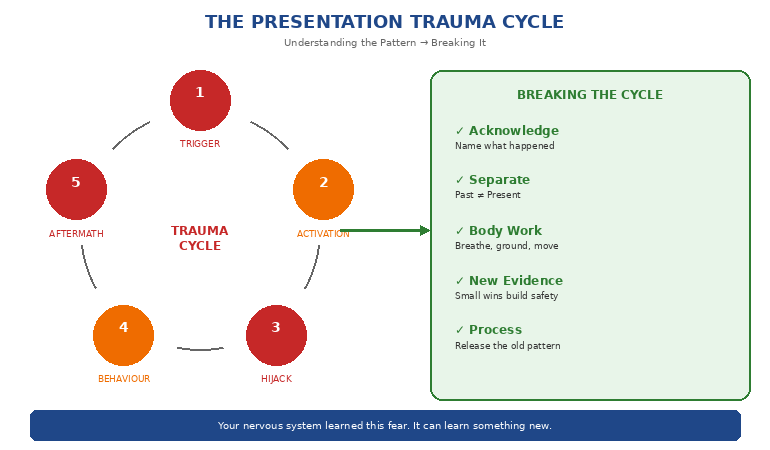

Presentation trauma cycle showing trigger, response, and recovery pathway

Breaking the cycle means working with your body, not just your mind — the Conquer Speaking Fear programme (£39) is built around that principle, with guided audio that interrupts this exact pattern.

How to Release the Pattern

Recovery from presentation trauma isn’t about forcing yourself to present more (exposure therapy without proper support often makes things worse). It’s about working with your nervous system to create new associations.

Step 1: Acknowledge What Happened

Stop minimising. “It wasn’t that bad” or “I should be over it by now” keeps you stuck. Something happened that affected you. That’s real. Your response makes sense given what you experienced.

I spent years pretending my CFO moment didn’t bother me. Recovery only started when I admitted: that was humiliating, it hurt, and it changed how I felt about presenting.

Step 2: Separate Past from Present

When you notice the fear response activating, practice naming it: “This is my nervous system responding to 2018, not to today.” You’re not trying to make the feeling go away — you’re creating space between the trigger and your response.

Step 3: Work With Your Body

Because the trauma is stored in your body, body-based techniques are often more effective than cognitive ones:

  • Slow exhales: Longer exhales than inhales can help activate your parasympathetic nervous system
  • Grounding: Feel your feet on the floor, your weight in the chair — anchor yourself in the present moment
  • Movement: Shake out your hands, roll your shoulders — discharge the physical activation
  • Posture reset: Stand tall, open your chest — your body’s position affects your emotional state

Step 4: Create New Experiences

Your nervous system needs evidence that presenting can be safe. This doesn’t mean forcing yourself into high-stakes situations. It means starting small:

  • Speaking up in a meeting with one comment
  • Presenting to one trusted colleague
  • Recording yourself and watching without judgment
  • Gradually increasing the challenge as your nervous system adapts

Step 5: Process the Original Experience

Sometimes the old memory needs direct attention. Techniques like guided visualisation, timeline therapy, or working with a therapist can help you process what happened so it no longer controls your present.

This is where hypnotherapy-based approaches can be particularly effective — they work directly with the subconscious patterns that keep the trauma response active.

🧠 Nervous System Reprogramming for Presentation Trauma

Conquer Speaking Fear (£39, instant access) was created specifically for professionals carrying presentation trauma. The guided hypnotherapy session helps your nervous system release the old pattern and build new, calmer associations with speaking.

  • Work with your subconscious, not against it
  • Release the physical holding patterns
  • Build genuine confidence (not just “fake it”)
  • Three audio formats for different situations

Get Conquer Speaking Fear → £39

Instant download. Developed from hypnotherapy techniques that helped me release my own presentation trauma after five years of suffering.

Rebuilding Confidence After a Bad Experience

Once you’ve started releasing the trauma pattern, you can begin rebuilding genuine confidence:

Reframe the Original Story

The story you tell yourself about what happened matters. “I failed and everyone saw” is different from “I had a difficult experience and I survived it.”

My CFO story? I eventually reframed it: “I made an error, someone called it out publicly, and I handled a difficult moment without falling apart completely. I went back to work the next day. I kept presenting. I survived.”

Collect Counter-Evidence

Your brain has been selectively remembering the bad experience. Start noticing the neutral and positive ones. After each presentation — even a small one — note what went okay. Build a file of evidence that presenting doesn’t always mean disaster.

Prepare Differently

Trauma often creates over-preparation (spending 20 hours on a 10-minute presentation) or under-preparation (avoiding thinking about it until the last minute). Neither works.

Effective preparation for trauma recovery means: know your content well enough to feel secure, but accept that perfection isn’t the goal. Your safety doesn’t depend on getting everything right.

Build Physical Anchors

Create associations between specific physical actions and calm states. When you’re relaxed, practice a subtle gesture (touching your thumb to your finger, for example). Over time, this gesture can help trigger the calm state — giving you a tool you can use in the moment.

This anchoring technique is part of what makes nervous system-based approaches so effective for presentation anxiety.

What Recovery Actually Looks Like

Recovery from presentation trauma isn’t linear, and it doesn’t mean you’ll never feel nervous again. Here’s what realistic progress looks like:

Week 1-2: You start noticing the pattern — recognising when your nervous system is responding to the past rather than the present.

Week 3-4: The anticipatory anxiety begins to shorten. Instead of dreading a presentation for two weeks, you might dread it for a few days.

Month 2-3: You have a presentation that goes “okay” and notice it. The negative bias starts shifting.

Month 3-6: The physical symptoms become less intense. Your heart still races, but it doesn’t feel life-threatening. You can think while nervous.

Ongoing: Presenting becomes uncomfortable rather than terrifying. You can do it without it ruining your week. Eventually, some presentations feel almost… fine.

This timeline varies. Some people see significant shifts in weeks; others take longer. The key is that progress is possible — your nervous system can learn new patterns.

🎓 25 Years Coaching Senior Professionals Through Speaking Fear

Conquer Your Fear of Public Speaking is built from 16 years coaching senior professionals across financial services, consulting, healthcare, and technology — alongside 25 years of corporate banking experience. Every technique — the nervous system regulation work, the trauma-informed preparation rituals, the in-the-moment recovery scripts — comes from real client work with executives who came to speaking with histories that needed careful, not generic, approaches.

Designed for senior professionals whose speaking fear has roots in past experience, not just nerves — and who need approaches that respect that history.

Get Conquer Your Fear of Public Speaking → £39

Instant download — lifetime access to every framework and technique.

Frequently Asked Questions

Is “presentation PTSD” a real diagnosis?

The term is used colloquially to describe trauma-like responses to presentation experiences. Clinical PTSD is a specific diagnosis with defined criteria that requires professional assessment. However, the nervous system responses described in this article — hypervigilance, avoidance, intrusive memories, disproportionate fear responses — are real and well-documented, even if they don’t meet the clinical threshold for PTSD. Your experience is valid regardless of diagnostic labels.

How long does it take to recover from presentation trauma?

This varies significantly based on the severity of the original experience, how long ago it happened, and what support you have. Some people notice shifts within a few weeks; deeper patterns may take several months of consistent work. There’s no universal timeline — everyone’s nervous system responds differently. If you’re not seeing progress after sustained effort, consider working with a therapist who specialises in anxiety or trauma responses. The key is that recovery is possible — your nervous system learned this response, and it can learn a new one.

Should I force myself to present more to get over it?

Exposure without proper support can actually reinforce the trauma. Simply forcing yourself through more presentations while activated often strengthens the fear response. The goal is to present while regulated — which requires first developing tools to work with your nervous system. Gradual, supported exposure works; white-knuckling through high-stakes presentations usually doesn’t.

Can I fully recover, or will I always be anxious about presenting?

Most people don’t become completely anxiety-free — some presentation nerves are normal and even useful. What changes is the intensity and the control. Instead of anxiety hijacking your ability to think and speak, it becomes manageable background noise. Many people who’ve done this work eventually describe presenting as “uncomfortable but doable” rather than “terrifying and avoided at all costs.”

📬 PS: Weekly techniques for managing presentation anxiety and building genuine confidence. Subscribe to The Winning Edge — practical strategies from a hypnotherapist who’s been there.

Related: If presentation trauma is holding you back from career moments like requesting resources or budget, read The Headcount Request That Got Yes When Everyone Said No for a presentation structure that builds confidence through preparation.

That presentation from years ago — the one you still think about — doesn’t have to control your future.

Your nervous system is doing what it was designed to do: protect you from perceived threats. But the threat isn’t real anymore. The room is different. The audience is different. You are different.

Recovery is possible. Your nervous system learned to fear presenting, and it can learn something new.

It starts with acknowledging what happened, understanding why your body responds the way it does, and working with your nervous system rather than against it.

The past doesn’t have to own your present. You can let it go.

About the Author

Mary Beth Hazeldine is the Owner & Managing Director of Winning Presentations. With 25 years in corporate banking at JPMorgan Chase, PwC, Royal Bank of Scotland, and Commerzbank, she experienced presentation trauma firsthand — including five years of debilitating fear before finding techniques that actually worked.

Now a certified hypnotherapist and NLP practitioner, Mary Beth specialises in helping professionals release presentation anxiety at the nervous system level. She combines executive communication expertise with evidence-based approaches to fear and trauma recovery.

Book a discovery call | View services

12 Feb 2026
Executive presenting headcount request to leadership team with approval indicators

The Headcount Request That Got Yes When Everyone Said No

“We’re in a hiring freeze. The answer is no.”

That’s what my client heard when she mentioned her headcount request to her CFO in the corridor. The company had just announced a 15% budget reduction. Every department was being told to do more with less. And Sarah needed 12 new engineers to deliver a project the CEO had personally championed.

Two weeks later, she got all 12 approved.

Not because she had special connections. Not because the freeze was lifted. But because her presentation made it impossible to say no — by making the cost of “no” crystal clear.

I’m sharing this now because headcount requests in 2026 face unprecedented scrutiny. AI is reshaping workforce planning, budgets are tight, and executives are asking harder questions about every hire. The old approach — “we need more people because we’re busy” — doesn’t work anymore. What works is a business case so compelling that approval becomes the obvious choice.

Quick answer: Successful headcount requests don’t ask for people — they present a business case for outcomes. The structure that works: lead with the business problem (not the resource gap), quantify the cost of inaction, present headcount as the solution to a problem leadership already cares about, and pre-answer the objections before they’re raised. This approach gets approval even during hiring freezes because it reframes the request from “cost” to “investment with measurable return.”

I’ve helped executives request headcount in every economic condition — boom times when money flowed freely, and downturns when every hire required CEO approval. The pattern is consistent: the requests that get approved aren’t the ones with the best justification. They’re the ones with the best presentation.

Sarah’s situation was typical. She had a genuine need — her team was working 60-hour weeks, attrition was climbing, and the CEO’s pet project was at risk. But her first draft presentation was also typical: a list of reasons why she needed more people, supported by workload data and burnout statistics.

It would have failed. Here’s why — and what we changed.

Why Most Headcount Requests Fail

The fundamental mistake in headcount presentations is starting with the resource gap. “We need 12 more engineers because…” immediately puts leadership in defence mode. They hear “cost” before they hear “value.”

The Psychology of No

When executives hear a headcount request, three mental processes activate simultaneously:

Budget protection: “Where will this money come from? What else won’t get funded?”

Precedent fear: “If I approve this, what other requests will follow?”

Accountability anxiety: “If this hire doesn’t work out, it’s my signature on the approval.”

Your presentation has to address all three — before they become objections.

The “Busy” Trap

The most common headcount justification is also the weakest: “We’re too busy.” Every department is busy. Every manager feels understaffed. “Busy” doesn’t differentiate your request — it makes you sound like everyone else who’s asking.

What executives actually need to hear: not that you’re busy, but that specific business outcomes are at risk without additional resources. That’s a completely different conversation.

🎯 Executive Slide System — Headcount Request Templates Included

Stop building headcount presentations from scratch. The Executive Slide System includes ready-to-use templates for resource requests, budget approvals, and business cases — all structured to get executive buy-in.

  • Business case structure that leads with outcomes
  • ROI calculation frameworks executives trust
  • Objection pre-answer templates
  • Decision slide formats that drive approval

Get the Executive Slide System → £39

Instant download. Used in headcount requests that have secured hundreds of new hires across banking and consulting environments.

The 5-Slide Structure That Gets Yes

Here’s the exact structure Sarah used to get 12 engineers approved during a hiring freeze:

Slide 1: The Business Problem (Not the Resource Gap)

Don’t open with “We need more people.” Open with the business problem that leadership already cares about.

Sarah’s opening: “Project Phoenix — the CEO’s priority initiative — is at risk of missing its Q3 deadline. Current trajectory shows a 67% probability of 8-week delay, which would push launch past the competitor window.”

Notice what’s not mentioned: headcount, engineers, workload, burnout. The first slide is entirely about business impact. Leadership is now thinking about Project Phoenix, not about budget.

Slide 2: The Cost of Inaction

Before you present your solution, make the cost of doing nothing undeniable.

Sarah’s slide: “An 8-week delay costs £2.4M in delayed revenue, puts the Series B timeline at risk, and allows CompetitorX to establish market position. Additionally, current team attrition trajectory suggests we lose 3 senior engineers in the next 90 days — each representing £180K in replacement and ramp-up costs.”

This slide does the heavy lifting. When the cost of inaction is £2.4M+, the cost of 12 engineers looks like a bargain.

Slide 3: The Solution (Now You Can Mention Headcount)

Only after establishing the problem and the cost of inaction do you present headcount as the solution.

Sarah’s framing: “To deliver Phoenix on schedule and protect the £2.4M revenue, we need to add 12 engineers over the next 6 weeks. This represents a £840K annual investment that protects £2.4M in near-term revenue and establishes the team capacity for the 2027 roadmap.”

The headcount request is now positioned as a solution to a problem leadership wants solved — not as a cost to be minimised.

Slide 4: The Risk Mitigation

Address the “what if it doesn’t work” fear before it’s voiced.

Sarah included:

  • Hiring timeline: Specific milestones with contingency plans
  • Ramp-up plan: How new hires become productive (with timeline)
  • Success metrics: How leadership will know the investment is working
  • Exit ramp: What happens if business conditions change

This slide removes the “what if” anxiety that kills approvals.

Slide 5: The Decision

End with a clear, specific ask — not a vague request for “support.”

Sarah’s close: “I’m requesting approval to open 12 engineering requisitions immediately, with a £840K annual budget allocation. This protects £2.4M in Phoenix revenue and positions us for the 2027 roadmap. I need your decision by Friday to maintain the hiring timeline.”

Clear ask. Clear timeline. Clear next step.


5-slide headcount request structure showing business case framework for approval

Want this structure as a ready-to-use template? The Executive Slide System includes the complete headcount request framework — plus decision slides, ROI calculators, and objection pre-answers.

Get the Templates → £39

Making the Numbers Undeniable

The difference between headcount requests that get approved and those that get “let’s revisit next quarter” often comes down to how the numbers are presented.

The ROI Frame

Never present headcount as a cost. Always present it as an investment with measurable return.

Weak: “12 engineers will cost £840K annually.”

Strong: “A £840K investment protects £2.4M in revenue and enables £4.2M in 2027 roadmap delivery. ROI: 7.9x in year one.”

The numbers are the same. The frame is completely different.

The Comparison Anchor

Give leadership a reference point that makes your request seem reasonable.

Sarah’s anchor: “The cost of 12 engineers (£840K) is less than the cost of the 8-week delay (£2.4M), less than the cost of losing 3 senior engineers to attrition (£540K in replacement costs), and less than the consulting alternative (£1.2M for equivalent capacity).”

When you anchor against worse alternatives, your request becomes the sensible middle ground.

The Staged Approach

If your full request feels too large, offer a staged alternative that gets you started.

Sarah’s backup: “If 12 immediate hires isn’t possible, a phased approach of 6 now and 6 in Q2 still protects the Phoenix timeline, though with reduced margin for error.”

This shows flexibility while maintaining the business case. Leadership often approves the full request when they see you’ve thought through alternatives.

📊 Build Business Cases That Get Approved

The Executive Slide System gives you the frameworks for any approval presentation — headcount, budget, project investment, or strategic initiative. Stop guessing what executives want to see.

  • Cost-of-inaction calculation templates
  • ROI presentation frameworks
  • Risk mitigation slide structures
  • Decision slide formats that drive action

Get the Executive Slide System → £39

Instant download. Developed from 24 years of corporate banking presentations where every resource request faced intense scrutiny.

Pre-Answering the Objections

The best headcount presentations answer objections before they’re raised. Here are the five you’ll face — and how to address them in your slides:

Objection 1: “Can’t you do more with AI/automation?”

Pre-answer: Include a slide on what you’ve already automated and why the remaining work requires human judgment. “We’ve automated 40% of routine tasks. The remaining work — architecture decisions, client relationships, complex problem-solving — requires experienced engineers.”

Objection 2: “What about contractors instead of FTEs?”

Pre-answer: Show the total cost comparison including ramp-up time, knowledge retention, and long-term flexibility. Contractors often cost more when you factor in everything.

Objection 3: “Can you reprioritise instead?”

Pre-answer: Show what gets cut if you don’t add headcount — and the business impact of those cuts. Make leadership choose between options, not between “yes” and “no.”

Objection 4: “What if the project gets cancelled?”

Pre-answer: Show how the roles support multiple initiatives, not just one project. “These 12 engineers support Phoenix, but also provide capacity for the 2027 roadmap and reduce our single-point-of-failure risk on critical systems.”

Objection 5: “Why now? Can’t it wait?”

Pre-answer: Show the cost of delay. “Every month we wait adds £300K to the eventual cost (higher salaries in a tighter market, extended project timeline, continued attrition of current team).”

Handling the Tough Q&A

Even with perfect slides, headcount requests face intense questioning. Here’s how to handle the moments that determine approval:

When They Challenge Your Numbers

Don’t get defensive. Show your work.

“The £2.4M delay cost comes from three factors: £1.8M in delayed subscription revenue based on current pipeline, £400K in additional contractor costs to extend the bridge period, and £200K in opportunity cost from the sales team’s reduced confidence in our delivery timeline. I can walk through each calculation.”

When They Ask for Less

Don’t immediately agree. Show the trade-offs.

“I can work with 8 instead of 12, but I want to be transparent about what that means: we move from 95% confidence on the Q3 deadline to about 70%, and we lose the buffer for the inevitable surprises. If 8 is the decision, I’ll make it work — but I want leadership to understand the risk we’re accepting.”

When They Want to Delay the Decision

Make the cost of delay concrete.

“I understand the desire for more time. But every week we delay the hiring process adds roughly 2 weeks to the project timeline, because good candidates don’t stay on the market. If we decide Friday, we can still hit Q3. If we wait until end of month, Q3 becomes unlikely.”

Facing tough Q&A on your headcount request? The Executive Q&A Handling System gives you frameworks for handling challenges, pushback, and curveball questions with confidence.

Get the Q&A System → £39

What Happened to Sarah

Sarah presented to the CFO, COO, and CEO on a Thursday morning. The same CFO who had said “the answer is no” in the corridor.

The presentation took 12 minutes. The Q&A took 20. Most of the questions were about implementation details — a sign that approval was likely.

By Friday afternoon, she had written approval for all 12 positions.

The CFO told her afterwards: “I’ve seen a hundred headcount requests this year. Yours was the only one that made me feel like saying no would cost us money.”

That’s the reframe that changes everything. Not “please give me resources” but “here’s what you lose if you don’t.”

🎯 Get Your Headcount Approved

The Executive Slide System includes everything you need to build a headcount presentation that gets yes:

  • Business case templates: Lead with outcomes, not resource gaps
  • Cost-of-inaction frameworks: Make “no” more expensive than “yes”
  • ROI calculators: Present investment, not cost
  • Objection pre-answers: Address concerns before they’re raised
  • Decision slides: Clear asks that drive approval

Get the Executive Slide System → £39

Instant download. The same frameworks used in headcount requests that have secured hundreds of new hires — even during hiring freezes.

📬 PS: Weekly strategies for executive presentations and getting buy-in. Subscribe to The Winning Edge — practical techniques from 24 years in corporate boardrooms.

Frequently Asked Questions

What if my company has a strict hiring freeze with no exceptions?

Even “no exceptions” freezes have exceptions — they just require CEO-level approval and an exceptional business case. Use the cost-of-inaction framework to show that the freeze is costing more than the hire. If the numbers are compelling enough, freezes get unfrozen. If they’re not, at least you’ve positioned yourself for first approval when the freeze lifts.

How do I request headcount when I can’t quantify the revenue impact?

Focus on risk and cost avoidance instead of revenue. “Without this hire, we have single-point-of-failure risk on a critical system” or “Current overtime costs are £X per month and climbing” or “Attrition risk in the current team represents £Y in replacement costs.” Not everything ties to revenue, but everything ties to something leadership cares about.

Should I ask for more than I need, expecting to be negotiated down?

No. Ask for exactly what you need with clear justification. Padding your request damages credibility and invites the “let’s cut this by 30%” response. If you need 12, ask for 12 and show why 12 is the right number. You can offer a phased alternative, but don’t inflate the initial ask.

How long should a headcount presentation be?

Five to seven slides maximum for the core presentation. You can have backup slides for detailed questions, but the main narrative should be completable in 10-15 minutes. Executives make headcount decisions quickly when the business case is clear — long presentations signal unclear thinking.

Related: If past presentation failures are affecting your confidence in high-stakes requests like headcount approvals, read Presentation PTSD Is Real: Signs You’re Still Carrying an Old Failure for techniques to break the pattern.

Sarah’s CFO was right about one thing: during a hiring freeze, the default answer is no.

But defaults can be overridden — when the cost of “no” is higher than the cost of “yes.”

Your headcount request isn’t about getting resources. It’s about presenting a business case so compelling that approval becomes the obvious choice.

Lead with the problem. Quantify the cost of inaction. Position headcount as the solution. Pre-answer the objections. Ask for a clear decision.

That’s how you get yes when everyone else is hearing no.

About the Author

Mary Beth Hazeldine is the Owner & Managing Director of Winning Presentations. With 24 years in corporate banking at JPMorgan Chase, PwC, Royal Bank of Scotland, and Commerzbank, she has supported hundreds of resource requests, budget approvals, and headcount presentations in high-scrutiny environments.

A certified hypnotherapist and NLP practitioner, Mary Beth combines executive communication expertise with an understanding of the psychology behind approval decisions. She helps professionals build business cases that get yes — even when the default answer is no.

Book a discovery call | View services

11 Feb 2026
Professional thinking strategically with AI interface, not just generating slides

AI Slides vs. AI Thinking: The Distinction That Changes Everything

“Make me a 10-slide presentation on Q3 results.”

That’s the prompt. And that’s the problem.

I watched a senior director spend 45 minutes “fixing” what AI had generated — adjusting layouts, rewriting headlines, deleting clip art nobody asked for. By the time he finished, he’d saved maybe 20 minutes compared to building it himself. And the result still felt… generic.

“AI presentations don’t work for executive content,” he told me afterwards. “They’re fine for internal updates, but anything important? I still have to do it myself.”

He was wrong. But not in the way he thought.

In 2026, the professionals pulling ahead aren’t the ones who’ve mastered AI slide generation. They’re the ones who’ve discovered that slides are the last thing AI should touch. The real leverage is upstream — in thinking, structure, and messaging. That’s the distinction nobody’s teaching.

Quick answer: “AI Slides” means using AI to generate visual outputs — layouts, formatting, design. “AI Thinking” means using AI as a strategic partner to clarify your message, structure your argument, and pressure-test your logic before you ever open PowerPoint. The distinction matters because AI is mediocre at slides but exceptional at thinking. Professionals who flip their workflow — thinking first, slides last — create presentations in half the time with dramatically better results.

Three years ago, I was skeptical of AI for presentations. I’d seen too many executives embarrassed by obviously AI-generated decks — the telltale signs, the generic phrasing, the “this could be about any company” feel.

Then I started experimenting with a different approach. Instead of asking AI to make slides, I asked it to help me think. To challenge my structure. To find holes in my argument. To translate my jargon into language my audience would actually understand. I was using AI as a thinking partner for presentations — not a production tool.

The presentations got better. Not because the slides looked fancier — they didn’t. But because the thinking was sharper. The message was clearer. The structure was tighter.

That’s when I realised: we’ve been using the most powerful thinking tool in history to do graphic design. It’s like using a Formula 1 engine to power a lawnmower. The real AI presentation strategy? Think first, slides last.

Why Most People Start at the Wrong End

The typical AI presentation workflow looks like this:

Step 1: Open AI tool
Step 2: “Create a presentation about [topic]”
Step 3: Review generated slides
Step 4: Fix everything that’s wrong
Step 5: Add what’s missing
Step 6: Rewrite what sounds robotic
Step 7: Wonder why this took so long

The problem isn’t the AI. The problem is the sequence.

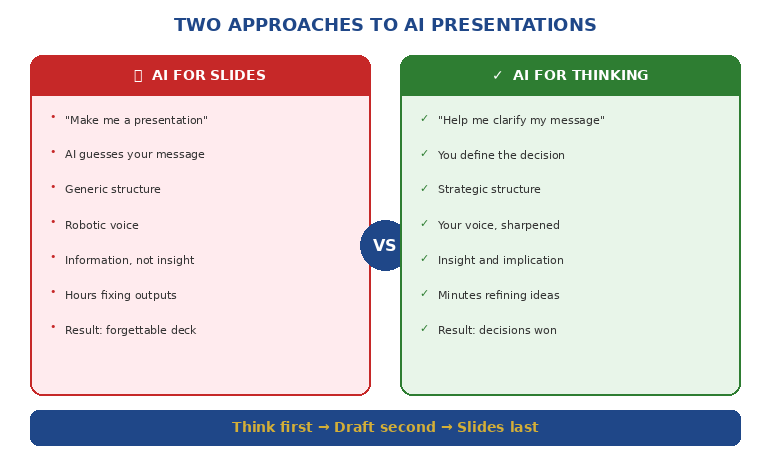
When you ask AI to generate slides first, you’re asking it to make decisions it has no business making: What’s the core message? What does this audience care about? What’s the one thing you need them to remember? What action do you want them to take?

AI doesn’t know these things. So it guesses. And its guesses are generic because they have to be — it’s optimising for “probably relevant to most presentations about this topic” rather than “exactly right for your specific situation.”

The Upstream Problem

Great presentations aren’t great because of their slides. They’re great because of the thinking behind them.

Before you ever touch a slide, you need clarity on:

  • The decision you’re driving: What do you want your audience to do, approve, or believe?
  • The single message: If they remember one thing, what is it?
  • The structure: What sequence will move them from where they are to where you need them?
  • The proof: What evidence will make your argument undeniable?

These are thinking problems, not design problems. And this is exactly where AI excels — if you use it correctly.

🎓 AI-Enhanced Presentation Mastery

Learn to use AI as a strategic thinking partner, not just a slide generator. This self-paced programme teaches the frameworks, workflows, and prompts that transform how you create executive presentations — cutting creation time in half while dramatically improving impact.

Includes the AVP framework (Action-Value-Proof), the 132 Rule for structure, and a complete AI presentation workflow you can use immediately.

Join AI-Enhanced Presentation Mastery → £249

8 self-paced modules + 2 live coaching sessions + lifetime access. Study at your own pace.

What “AI Slides” Actually Produces

Let’s be honest about what happens when you ask AI to generate presentation slides:

The Generic Structure

AI defaults to safe, forgettable structures: Agenda → Background → Key Points → Summary → Next Steps. This structure works for everything, which means it’s optimised for nothing.

Your quarterly business review looks like every other QBR. Your investment pitch looks like every other pitch. Your strategic recommendation looks like a Wikipedia article with bullet points.

The Clip Art Problem

AI tools love adding visuals. Icons. Stock imagery. Decorative elements that fill space but add nothing. You spend half your editing time removing things nobody asked for.

The Voice Mismatch

AI-generated text has a tell. It’s slightly too formal, too hedged, too… diplomatic. “It is recommended that consideration be given to…” instead of “We should do X because Y.”

Executive audiences notice. They may not consciously identify it, but they feel it. The presentation lacks conviction. It sounds like it was written by a committee — because in a way, it was.

The Missing Insight

Most damning of all: AI-generated slides contain information, not insight. They tell you what happened, not what it means. They present data, not implications. They describe the situation, not the decision.

That’s the gap that kills executive presentations. And no amount of better prompting will fix it — because the problem isn’t the slides. It’s the thinking that should have happened first.


Comparison diagram showing AI for slides versus AI for thinking approaches

What “AI Thinking” Unlocks

Now consider a different approach. Before you generate a single slide, you use AI as a thinking partner:

Clarifying Your Message

“I need to present our Q3 results to the board. Our revenue is up 12% but margins are down. Help me identify the single message that positions this honestly while maintaining confidence in our strategy.”

AI won’t write your message for you. But it will help you find it — by asking questions, offering framings, and pressure-testing your logic.

Structuring Your Argument

“My audience is skeptical of this budget request. What objections will they have? In what sequence should I address them to build agreement before I ask for the money?”

This is strategic work. AI can help you map objections, sequence arguments, and identify proof points you might have missed.

Testing Your Logic

“Here’s my recommendation. Play devil’s advocate. What are the strongest counterarguments? Where is my reasoning weakest?”

Most presenters don’t stress-test their logic until they’re in the room, facing hostile questions. AI lets you do that work beforehand — privately, iteratively, without ego.

Translating Your Expertise

“I’m a technical expert presenting to non-technical executives. Here’s my explanation of the problem. Rewrite it so someone without engineering background understands why this matters.”

This is where AI shines — taking your expertise and making it accessible without dumbing it down.

Want the exact prompts and workflows? AI-Enhanced Presentation Mastery teaches you to use AI as a thinking partner — including the S.E.E. formula for making proof memorable.

Get the Course → £249

The Flipped Workflow

Here’s the workflow that actually works:

Phase 1: Think With AI (60% of your time)

Define the decision: What do you need your audience to do, approve, or believe?

Clarify the message: What’s the single idea that makes your case?

Map the audience: What do they already believe? What concerns will they have? What do they need to hear?

Structure the argument: What sequence moves them from skepticism to agreement?

Identify the proof: What evidence makes your case undeniable?

All of this happens before you open PowerPoint. AI helps you think through each step — challenging, refining, sharpening.

Phase 2: Draft With AI (25% of your time)

Only now do you create content — but not slides yet. You’re creating:

Headlines: One clear sentence per section that could stand alone

Key points: The 2-3 supporting facts for each headline

Transitions: How each section connects to the next

AI can help you draft these — but you’re editing and approving, not accepting wholesale.

Phase 3: Build Slides (15% of your time)

Now — finally — you build slides. But notice: the hard work is done. You know your message. You know your structure. You know your proof.

The slides are just containers for thinking you’ve already completed. They almost build themselves.

And if you want AI to help with layout at this point? Fine. But you’re giving it clear inputs, not asking it to guess.

📚 The Complete AI Presentation System

AI-Enhanced Presentation Mastery includes:

  • 8 self-paced modules on structure, messaging, and AI workflows
  • AVP Framework: Action-Value-Proof for executive-ready presentations
  • 132 Rule: The sequence your audience’s brain processes and remembers
  • Master Prompt Pack: Ready-to-use prompts for every stage of creation
  • 2 live coaching sessions for Q&A and feedback

Join AI-Enhanced Presentation Mastery → £249

Lifetime access. Study at your own pace. Join live sessions when convenient.

Frameworks That Make AI Useful

The difference between “AI Slides” and “AI Thinking” often comes down to having frameworks that guide the conversation. Here are three that transform how you work with AI:

The AVP Framework (Action-Value-Proof)

Every presentation should answer three questions in this order:

Action: What do you want the audience to do?
Value: Why should they care? What’s in it for them?
Proof: Why should they believe you?

When you structure your AI conversation around AVP, the outputs become dramatically more focused. Instead of “create a presentation about X,” you’re saying “help me articulate the specific action I’m asking for, the value proposition for this audience, and the proof points that support my case.”

The 132 Rule

Audiences process information in a specific sequence: one main message, supported by three pillars, each backed by two proof points.

This isn’t arbitrary — it’s how memory works. One thing is memorable. Three things are manageable. Two supports each point without overwhelming.

When you tell AI “structure this using the 132 Rule,” you get outputs that match how your audience’s brain actually works.

The S.E.E. Formula (Story-Evidence-Emotion)

For any proof point to land, it needs:

Story: A concrete example or scenario
Evidence: Data or facts that support the story
Emotion: Connection to what the audience cares about

Most AI-generated content has evidence without story or emotion. When you explicitly ask for S.E.E., you get proof that’s memorable and persuasive, not just accurate.

Learn these frameworks in depth. AI-Enhanced Presentation Mastery includes ready-to-use prompts that apply AVP, 132, and S.E.E. to any presentation challenge.

Get the Course → £249

The Real Difference

A colleague recently showed me two presentations on the same topic — a budget request for a new initiative.

Presentation A was AI-generated. Polished slides. Professional layouts. Comprehensive information. It took 30 minutes to create. The executive committee said “interesting” and asked to revisit it next quarter.

Presentation B was AI-enhanced. Simpler slides. Less polish. But the message was razor-sharp, the structure anticipated every objection, and the proof points were undeniable. It took 90 minutes to create. The executive committee approved it on the spot.

Presentation B wasn’t better because it had better slides. It was better because the presenter had used AI to think, not just to make.

That’s the distinction that changes everything.

🎯 Transform How You Create Presentations

AI-Enhanced Presentation Mastery teaches you to use AI as a strategic thinking partner — not just a slide generator. You’ll learn:

  • The flipped workflow that cuts creation time in half
  • Frameworks (AVP, 132 Rule, S.E.E.) that make AI outputs executive-ready
  • Prompts for every stage — from clarifying your message to stress-testing your logic
  • How to transform data into stories people actually understand

Join AI-Enhanced Presentation Mastery → £249

8 self-paced modules releasing through April 2026. Join anytime — get immediate access to all released content. Lifetime access included.

📬 PS: Weekly strategies for AI-enhanced presentations and executive communication. Subscribe to The Winning Edge — practical techniques from 24 years in corporate boardrooms.

Frequently Asked Questions

Does this mean I should never use AI to generate slides?

Not at all. AI can be helpful for initial layouts, especially for routine presentations. But for anything high-stakes — board presentations, investment pitches, strategic recommendations — the thinking work should come first. Use AI for slides last, not first.

Which AI tools work best for the “thinking” approach?

Any conversational AI works — ChatGPT, Claude, Gemini. The tool matters less than how you use it. The key is treating it as a thinking partner (asking questions, getting feedback, refining ideas) rather than a production tool (generate this output for me).

How long does the “flipped workflow” actually take?

For a typical executive presentation, the thinking phase might take 30-45 minutes. Drafting another 15-20. Slides 15-20. Total: about 60-90 minutes for a presentation that would otherwise take 3-4 hours — and the quality is dramatically higher because the thinking is sharper.

What if I’m not good at giving AI instructions?

That’s exactly what frameworks solve. When you know to ask for AVP structure or S.E.E. proof points, you don’t need to be a “prompt engineer.” The framework does the heavy lifting. AI-Enhanced Presentation Mastery includes ready-to-use prompts for every scenario.

Related: The thinking-first approach is especially powerful for recurring executive presentations. See Transformation Program Updates That Make Executives Want to Fund You for how to structure updates that build champions.

And if presentation anxiety is holding you back from presenting your AI-enhanced work confidently, read When Your Voice Cracks Mid-Sentence for recovery techniques that work.

That senior director who told me “AI presentations don’t work for executive content” was right about the symptom but wrong about the cause.

AI presentations don’t fail because AI is bad at presentations. They fail because most people use AI to skip the thinking — when thinking is exactly what AI does best.

Flip the workflow. Think first. Slides last.

Use AI as a strategic partner, not a production tool.

That’s the distinction that changes everything.

About the Author

Mary Beth Hazeldine is the Owner & Managing Director of Winning Presentations. With 24 years in corporate banking at JPMorgan Chase, PwC, Royal Bank of Scotland, and Commerzbank, she has delivered high-stakes presentations in boardrooms across three continents.

A certified hypnotherapist and NLP practitioner, Mary Beth now pioneers AI-enhanced presentation mastery — combining strategic thinking with AI efficiency. She developed the AVP framework and 3Ps methodology, refined through years of executive presentation work in high-stakes banking and consulting environments.

Book a discovery call | View services

11 Feb 2026
Engaged steering committee reviewing transformation program wins on boardroom screen

Transformation Program Updates That Make Executives Want to Fund You

The CEO leaned forward and said five words I’d never heard in a steering committee: “How can we do more?”

My client had just finished her transformation update. Same programme that six months earlier had executives checking their watches. Same steering committee that used to rush through her slot to get to “more important” agenda items.

But something had changed. Not the programme — the programme was on track, same as before. What changed was how she presented it.

She’d stopped reporting status. She’d started showcasing momentum. And suddenly, the executives who had been passive observers became active champions.

I’m seeing a shift in 2026: executives are drowning in transformation initiatives — digital, AI, sustainability, operating model. The programmes that survive aren’t necessarily the best-run ones. They’re the ones whose leaders know how to make the steering committee feel invested in their success.

Quick answer: The transformation updates that generate executive enthusiasm share three characteristics: they lead with outcomes achieved (not activities completed), they make wins visible and credit shared, and they create opportunities for executives to contribute rather than just observe. Structure your updates around momentum and possibility rather than status and risk, and you’ll transform passive steering committees into active sponsors who fight for your budget.

The transformation my client led wasn’t unusual — a digital modernisation programme at a mid-sized financial services firm. Good progress, reasonable challenges, nothing dramatically wrong or right.

But her first six months of updates had been… forgettable. Milestone trackers. RAG statuses. Risk registers. The steering committee nodded politely and moved on.

When we redesigned her approach, we didn’t change the facts. We changed the story. Instead of “here’s where we are,” she started telling “here’s what we’ve unlocked.” Instead of “here’s what might go wrong,” she started asking “here’s where you can help us go further.”

The executives didn’t just approve her next phase. They volunteered resources from their own teams. One board member mentioned the programme in an investor call — as an example of “the innovative work we’re doing.”

Same programme. Different narrative. Completely different level of sponsorship.

The Momentum Mindset

Most programme managers think their job is to report status. It’s not. Your job is to maintain momentum — and momentum is as much about perception as reality.

Consider two ways to present the same fact:

Status mindset: “Phase 2 is 73% complete. We have 14 tasks remaining. Timeline is on track.”

Momentum mindset: “Phase 2 unlocked three capabilities that weren’t possible last quarter. Operations is already using the new workflow, and they’re asking when Phase 3 features arrive.”

Both are true. But one sounds like a progress report, and the other sounds like a success story. Guess which one makes executives want to invest more?

Why Momentum Matters More Than Status

Transformation programmes live or die by executive sponsorship. And executive sponsorship depends on executives feeling that:

  • Their investment is paying off — They can see tangible returns, not just completed tasks
  • The team is winning — There’s energy and progress, not just competent execution
  • They’re part of something important — The programme matters to the organisation’s future
  • Their involvement makes a difference — They have a role beyond rubber-stamping updates

Status updates address none of these. Momentum updates address all of them.

📊 The Executive Slide System

Build updates that generate executive enthusiasm, not polite nods. The Executive Slide System includes momentum-focused templates, outcome showcase frameworks, and structures that turn steering committees into active champions for your programme.

Get the Executive Slide System → £39

Instant download. Includes transformation update templates, executive engagement frameworks, and sponsor activation guides.

The 5-Slide Structure That Builds Champions

After working with transformation leaders across banking, consulting, and FTSE 100 companies, this is the structure that consistently turns passive steering committees into active advocates:

Slide 1: The Win Wall (60 seconds)

Start with what’s been achieved — not completed, achieved. There’s a difference.

“Completed” is internal: “We finished the data migration.”

“Achieved” is external: “Customer service teams now resolve queries 40% faster because they have unified data access.”

Your Win Wall should feature 3-4 outcomes that matter to the business. Each one framed as: what changed, who benefits, and what it enables next.

This slide sets the tone for everything that follows. It says: “This programme is delivering value. Now let’s talk about how to deliver more.”

Slide 2: The Momentum Metrics (30 seconds)

Show movement, not position. Executives don’t need to know you’re “73% complete.” They need to know you’re accelerating, on pace, or (if necessary) recalibrating.

Choose 3-4 metrics that demonstrate forward motion:

  • Adoption velocity: How fast are people using what you’ve built?
  • Value realisation: What benefits are already being captured?
  • Capability unlocks: What can the organisation do now that it couldn’t before?
  • Stakeholder sentiment: How do users and sponsors feel about progress?

Notice: none of these are “tasks completed” or “budget spent.” Those are inputs. Executives care about outputs.


Transformation program update structure showing momentum-focused 5-slide format

Slide 3: The Spotlight Story (90 seconds)

Every month, feature one specific success in detail. A team that’s transformed their workflow. A customer outcome that exceeded expectations. A capability that’s generating unexpected value.

This does three things:

  • Makes abstract progress concrete and human
  • Gives executives a story they can retell (“Did you hear what the transformation team achieved in operations?”)
  • Creates heroes within the organisation who become programme advocates

Rotate your spotlight across different areas of the programme. Everyone who gets featured becomes invested in overall programme success.

Slide 4: The Opportunity Horizon (60 seconds)

This is where you invite executive engagement — not by asking them to solve problems, but by showing them possibilities.

“Based on what we’ve learned in Phase 2, we see three opportunities to accelerate value in Phase 3…”

“The operations team is asking whether we could extend this capability to [adjacent area]. If the steering committee sees strategic value, we could scope this for Q3…”

You’re not asking for permission. You’re asking for guidance on where to create more value. That’s a conversation executives want to have.

The Executive Slide System (£39) includes “Opportunity Horizon” templates that frame expansion possibilities in ways executives find compelling.

Slide 5: The Ask (30 seconds)

End with one clear request — but make it an opportunity to contribute, not a problem to solve.

Instead of: “We need budget approval to continue Phase 3.”

Try: “Phase 3 is ready to launch. We’d like your endorsement to proceed — and your input on which business units should pilot first.”

The difference: one positions executives as gatekeepers. The other positions them as strategic partners. Guess which one generates more enthusiasm?

⚡ Presenting this week?

If your Slide 1 doesn’t state the outcome achieved and the decision ask in one line, executives assume you don’t have one. Fix it in 60 seconds with ready-to-use templates.

Get the Executive Slide System → £39

How to Showcase Wins Without Bragging

Some programme managers resist the momentum approach because it feels like self-promotion. “I don’t want to oversell. What if we hit problems next month?”

Here’s the reframe: showcasing wins isn’t about you. It’s about the organisation.

The Credit Distribution Principle

Every win you present should credit someone other than your programme team:

  • “The operations team embraced the new workflow and found three efficiency improvements we hadn’t anticipated.”
  • “Finance’s early adoption created the proof points that convinced other departments to accelerate their timeline.”
  • “The steering committee’s decision to prioritise data quality in Q1 is why we’re seeing these customer experience gains now.”

When you distribute credit, you’re not bragging — you’re celebrating collective success. And everyone you credit becomes an advocate for continued programme investment.

The “Because Of” Frame

Connect wins to decisions executives made:

“Because the board approved accelerated investment in January, we were able to deliver three months ahead of the original timeline.”

“Because the CFO championed cross-functional data sharing, we’re seeing benefits that weren’t in our original business case.”

This isn’t flattery. It’s accountability — showing that executive decisions produced executive-level results. It makes them feel invested in your success because they’re partly responsible for it.

🏆 Templates That Celebrate Without Overselling

The Executive Slide System includes Win Wall templates, Spotlight Story frameworks, and credit distribution guides — everything you need to showcase momentum while keeping executives invested in your continued success.

Get the Executive Slide System → £39

Built for steering-committee and C-suite updates in banking and consulting-style environments. Instant download.

Turning Observers Into Advocates

The ultimate goal isn’t just approval — it’s advocacy. You want steering committee members actively championing your programme in conversations you’re not part of.

Create Retellable Moments

Executives talk to other executives. Board members talk to investors. Your updates should give them stories worth retelling.

A forgettable update: “The transformation programme is on track.”

A retellable moment: “The new customer portal went live in 8 weeks instead of 6 months, and NPS jumped 15 points in the first month.”

When you give executives impressive specifics, they become your marketing team.

Assign Meaningful Roles

Don’t just inform executives — involve them. Specific, valuable involvement:

  • “We’d value your perspective on which market segment to pilot next.”
  • “Could you introduce us to your counterpart at [partner company] who faced a similar integration?”
  • “The board presentation would benefit from your narrative on strategic alignment.”

Each ask makes them more invested. Each contribution makes them more likely to defend the programme when budget pressures arise.

The sponsor engagement frameworks in the Executive Slide System (£39) show you exactly how to create these involvement opportunities.

Maintaining Energy Across the Programme Lifecycle

Transformation programmes are marathons, not sprints. Maintaining executive energy over 18-24 months requires deliberate effort.

The Energy Curve Challenge

Most programmes follow a predictable pattern:

  • Launch: High executive attention, lots of enthusiasm
  • Middle months: Attention fades, “business as usual” takes over
  • Final stretch: Renewed interest as outcomes become visible

The middle months are where programmes lose sponsorship — not because anything went wrong, but because executives stopped paying attention.

Breaking the Attention Fade

Combat mid-programme drift with deliberate momentum markers:

Quarterly “State of Transformation” sessions: Bigger than monthly updates. Invite broader leadership. Celebrate cumulative progress.

Value realisation milestones: Don’t wait until the end to show ROI. Identify early wins that demonstrate the business case is working.

External validation: Industry recognition, analyst mentions, customer testimonials. Third-party credibility renews internal enthusiasm.

Expansion announcements: “Based on success in Division A, we’re extending to Division B.” Growth signals success.

The Narrative Arc

Think of your transformation as a story with chapters. Each steering committee update should feel like progress in that story — not a disconnected status report.

“Last month we unlocked the foundation. This month we’re seeing the first benefits. Next month we’ll expand to new areas.”

Executives stay engaged with stories. They disengage from spreadsheets.

📋 Everything You Need for Champion-Building Updates

The Executive Slide System gives you:

  • 5-slide momentum update template
  • Win Wall and Spotlight Story frameworks
  • Momentum metrics dashboard structure
  • Opportunity Horizon presentation format
  • Credit distribution and sponsor engagement guides
  • Quarterly “State of Transformation” template

Get the Executive Slide System → £39

Instant download. Transform your steering committees from passive observers to active champions.

📬 PS: Weekly strategies for executive communication and transformation leadership. Subscribe to The Winning Edge — practical tactics from 24 years in corporate transformation.

Frequently Asked Questions

What if my programme has genuine problems I need to report?

Report them — but in context. Problems within a momentum narrative sound different: “We hit a vendor delay that pushed integration back three weeks. We’ve already recovered two of those weeks and expect to be back on timeline by month end.” Challenges within progress feel manageable. Challenges within a status report feel like failure.

How do I showcase wins when we’re still in early stages?

Early wins exist — you just need to recognise them. Successful stakeholder alignment, strong team formation, faster-than-expected technical setup, enthusiastic pilot volunteers. Frame early progress as “foundation that enables everything that follows.” The story arc matters even before the climax.

Won’t executives see through this as spin?

Momentum framing isn’t spin — it’s emphasis. You’re not inventing wins or hiding problems. You’re choosing to lead with what’s working rather than what might go wrong. Executives appreciate leaders who can see and communicate progress. That’s confidence, not deception.

How do I handle a steering committee that only wants to discuss risks?

Give them a dedicated risk section — but don’t lead with it. “Before we discuss risks, let me show you what we’ve achieved this month.” Once executives see momentum, risk discussions become problem-solving sessions rather than anxiety spirals. Context changes everything.

Related: Even positive updates can trigger presentation anxiety. If your voice or confidence falters in steering committees, read When Your Voice Cracks Mid-Sentence: The Recovery Nobody Teaches for techniques that work in high-pressure executive settings.

That CEO who asked “How can we do more?” became my client’s biggest advocate. He mentioned the programme in three board meetings, secured additional funding without being asked, and personally called to congratulate the team when they hit a major milestone.

None of that happened because the programme suddenly got better. It happened because the story changed.

Your transformation programme is probably doing good work. The question is whether your steering committee knows it — whether they feel it, whether they want to be part of it.

Stop reporting status. Start showcasing momentum. Lead with wins. Create champions.

The executives in your steering committee want to support something exciting. Give them that story, and they’ll fight for your budget, your timeline, and your success.

About the Author

Mary Beth Hazeldine is the Owner & Managing Director of Winning Presentations. With 24 years in corporate banking at JPMorgan Chase, PwC, Royal Bank of Scotland, and Commerzbank, she has led transformation communications and supported programme leaders across major change initiatives on three continents.

A qualified clinical hypnotherapist and NLP practitioner, Mary Beth combines executive communication expertise with evidence-based techniques for high-pressure presentation environments. She helps transformation leaders turn steering committees from passive observers into active champions.

Book a discovery call | View services

11 Feb 2026
Professional pausing confidently mid-presentation, moment of composure

When Your Voice Cracks Mid-Sentence (The Recovery Nobody Teaches)

My voice cracked on the word “strategy.”

Two hundred people in the room. The CEO in the front row. And my voice — the one thing I needed to work — just… broke. Mid-word. Mid-sentence. Mid-thought.

What happened next is a blur. I remember heat rising to my face. I remember my throat tightening further. I remember thinking: “Everyone just heard that. Everyone knows.”

I finished the presentation somehow. Smiled through the Q&A. Walked calmly to the bathroom and cried for ten minutes.

That was fifteen years ago. It took me another five years — and training as a clinical hypnotherapist — to understand what actually happened in that moment, and what I could have done differently.

I’m sharing this now because voice cracking is the presentation fear people are most ashamed to admit. In 2026, I’m seeing more professionals struggle with this than ever — hybrid meetings with close-up cameras, AI transcription that captures every hesitation, and audiences who’ve forgotten how to be generous with speakers. If your voice has ever betrayed you, this article is for you.

Quick answer: If your voice cracks when presenting, it’s usually caused by stress-driven breath restriction and throat tension — not a “bad voice.” The fix isn’t “just relax” — it’s a quick downshift in arousal that often reduces tension for many speakers. Mid-presentation, you can recover in 3-5 seconds with a deliberate pause, a slow exhale, and a grounded restart. Long-term, you can train your nervous system to stay calmer so it’s less likely to happen.

Note: This article is educational and not medical advice. If voice cracking happens frequently outside stressful situations, or you experience pain or hoarseness, see an ENT specialist or speech-language pathologist.

After that presentation, I became hypervigilant about my voice. Every meeting, I’d monitor for signs of cracking. Which, of course, made it worse — because vigilance is tension, and tension is exactly what causes the problem.

I tried everything. Vocal exercises. Breathing techniques from YouTube. Drinking warm water. Avoiding dairy. None of it helped consistently, because none of it addressed the root cause.

When I trained as a hypnotherapist, I finally understood: the voice crack isn’t a voice problem. It’s a nervous system problem. And the nervous system doesn’t respond to willpower or tips. It responds to specific interventions that speak its language — like the breathing techniques and pre-presentation calming methods I now teach.

Now I teach executives the same techniques that ended my own five-year struggle. The techniques that turn “I hope my voice doesn’t crack” into “I know I can handle whatever happens.”

Why Your Voice Cracks (The Physiology)

Understanding why your voice cracks removes half the fear. It’s not weakness. It’s not lack of preparation. It’s biology.

The Fight-or-Flight Voice

When your brain perceives threat — and yes, 200 pairs of eyes qualifies — it triggers your sympathetic nervous system. Adrenaline floods your body. And your vocal apparatus responds:

  • Vocal cords tighten: Tension in the larynx restricts the smooth vibration your voice needs
  • Breathing shallows: Less air means less support for sustained sound
  • Throat constricts: The muscles around your larynx contract, raising your pitch and reducing control
  • Mouth dries: Saliva production decreases, making articulation harder

The result: your voice has less air, more tension, and reduced lubrication. Of course it cracks.

The Feedback Loop From Hell

Here’s where it gets worse. When your voice cracks:

You notice → You feel embarrassed → Your brain registers more threat → More adrenaline releases → Your voice tightens further → It cracks again

This is why “just push through” doesn’t work. Pushing through feeds the loop. What you need is an intervention that breaks it.

🎯 Conquer Speaking Fear — Complete Audio Programme

Train your nervous system to stay calm before and during presentations. This programme includes three guided audio sessions designed by a clinical hypnotherapist:

  • Full Guided Session (18-20 min): Deep nervous system reprogramming for lasting confidence
  • Quick 90-Second Reset: Use in the corridor before any presentation
  • Printable Reset Card: The 4-step protocol you can keep in your pocket

Get Conquer Speaking Fear → £39

Instant download. Developed from techniques that ended my own 5-year struggle with presentation anxiety.

The Mid-Presentation Recovery (3-5 Seconds)

Your voice just cracked. The room heard it. Now what?

Most people do one of two things: they speed up (trying to get past the embarrassment) or they freeze (deer in headlights). Both make it worse.

Here’s the recovery that actually works:

Step 1: Pause Deliberately (1-2 seconds)

Stop talking. Completely. Not a hesitation — a deliberate pause.

This feels counterintuitive. Your instinct screams “keep going, fill the silence, pretend it didn’t happen.” Ignore that instinct.

A deliberate pause does three things:

  • Breaks the panic spiral by giving you back control
  • Reads to the audience as confidence, not weakness
  • Creates space for the physiological reset you’re about to do

Professional speakers pause constantly. Your audience won’t think “their voice cracked.” They’ll think “they’re pausing for emphasis.”

Step 2: Exhale Slowly (2 seconds)

During the pause, release your breath slowly through slightly parted lips. Not a big dramatic sigh — just a quiet, controlled exhale.

A slower exhale can help many people feel calmer and reduce vocal tension. You can’t force your voice to relax, but you can exhale — and the relaxation often follows.

Step 3: Ground and Restart (1-2 seconds)

Feel your feet on the floor. Press them down slightly. Then restart your sentence — from the beginning of the thought, not from where you cracked.

Why restart? Because it gives you a clean vocal line. “As I was saying, the strategy requires…” sounds confident. Picking up mid-word sounds like you’re pretending the crack didn’t happen (which everyone notices).


Voice recovery protocol showing 3-step mid-presentation reset technique

The 3-5 Second Window

The entire recovery takes 3-5 seconds. To your audience, it looks like a confident pause. To your nervous system, it’s a chance to downshift.

I’ve watched executives use this technique in board meetings, investor pitches, and all-hands presentations. Nobody in the audience knows anything went wrong. The speaker knows — and they know they handled it.

Voice cracking is one of the most common physical symptoms of speaking fear — this recovery works because it targets the underlying fear response, not just the voice.

If you want this to be automatic under pressure, don’t wait until the next high-stakes moment. Save the 90-second reset now and use it before your next meeting.

The Conquer Speaking Fear programme (£39) includes a printable pocket card with this exact protocol — so you can review it in the corridor before any high-stakes presentation.

Preventing It Before You Present

Recovery is essential. But prevention is better. Here’s what actually works in the 5-30 minutes before you present:

The 90-Second Nervous System Reset

This is the protocol I use with executives before high-stakes presentations. It takes 90 seconds and can be done in a bathroom stall, empty corridor, or parked car:

Ground (15 seconds): Feel your feet. Press them into the floor. Notice the contact points. This activates your body awareness and begins pulling you out of your head.

Breathe (30 seconds): Inhale for 4 counts. Hold for 4 counts. Exhale for 6 counts. Repeat twice. The extended exhale is key — it helps shift your body toward a calmer state.

Anchor (30 seconds): Press your thumb and forefinger together. While holding this pressure, recall a moment when you felt completely confident and in control. Any moment — doesn’t have to be presenting. Hold the memory and the finger pressure together for 30 seconds.

Engage (15 seconds): Release the anchor. Take one normal breath. Say your opening line out loud — just once, at normal volume and pace. You’re ready.

The Warm-Up Most People Skip

Your voice is a physical instrument. Would a singer perform without warming up? Would an athlete sprint without stretching?

Five minutes before presenting:

  • Hum: Low, relaxed humming for 30 seconds loosens your vocal cords
  • Yawn: Three big, exaggerated yawns open your throat
  • Lip trills: Blow air through loosely closed lips (like a horse) to release tension
  • Range slides: Slide from your lowest comfortable note to your highest, then back down

This isn’t about sounding better. It’s about ensuring your vocal apparatus is loose and ready — not tight and primed to crack.

🎧 Three Audio Tools for Different Moments

Conquer Speaking Fear gives you the right tool for every situation:

  • Night before: Full 18-20 minute guided session — deep relaxation and mental rehearsal
  • Corridor before: 90-second quick reset audio — nervous system calm in under 2 minutes
  • In-the-moment: Printable pocket card — the 4-step recovery you can glance at anytime

Get All Three Tools → £39

Developed by a clinical hypnotherapist. Based on techniques that actually work with your nervous system, not against it.

Long-Term Nervous System Training

The techniques above work in the moment. But if voice cracking is a recurring problem, you need to retrain your nervous system’s baseline response to presentations.

Why “Practice More” Doesn’t Fix It

You’ve probably been told to practice until you’re comfortable. But here’s the problem: if you practice while anxious, you’re training your nervous system to associate presenting with anxiety. You’re reinforcing the pattern, not breaking it.

What works is practicing in a calm state while mentally rehearsing the challenging situation. This is what hypnotherapy does — it accesses the subconscious patterns that drive the anxiety response and rewires them at the source.

The Anchor Stack Technique

Over time, you can build what I call an “anchor stack” — multiple positive associations linked to the act of presenting:

Memory anchors: Link the thumb-forefinger press to memories of confidence, competence, and calm

Physical anchors: Develop a pre-presentation ritual (specific posture, specific breath pattern) that your body learns to associate with readiness

Visual anchors: Create a mental image of yourself presenting successfully that you can access before and during any presentation

When you have multiple anchors stacked together, your nervous system has multiple pathways to calm. One bad moment doesn’t derail you because you have backup systems.

The full guided session in Conquer Speaking Fear (£39) walks you through building these anchor stacks — reprogramming your nervous system’s response to presentations over repeated listening.

Releasing the Shame

Here’s what I wish someone had told me after my voice cracked in front of 200 people:

Everyone has experienced this. Every single person in that audience has had their voice crack, their face flush, their hands shake, their mind go blank. They’re not judging you. They’re relieved it wasn’t them this time.

It’s not a character flaw. Voice cracking isn’t weakness, inadequacy, or lack of preparation. It’s a physiological response to perceived threat. Your nervous system is trying to protect you. It’s just overreacting.

It’s fixable. Not with willpower. Not with “fake it till you make it.” But with specific techniques that work with your biology instead of against it.

One incident doesn’t define you. I’ve had my voice crack in presentations. I’ve also delivered presentations that moved people to tears, secured millions in funding, and changed careers. Both are true. The voice crack isn’t who I am — it was a moment I learned from.

The Reframe That Changed Everything

After years of dreading presentations, I finally asked myself: “What if the goal isn’t to never have my voice crack? What if the goal is to know I can handle it when it does?”

That reframe changed everything. I stopped trying to control the uncontrollable. I started building skills for recovery. And paradoxically, once I stopped fearing the crack, it almost never happened.

Your voice cracking isn’t the problem. Your fear of it cracking is the problem. Solve the fear, and the symptom often disappears.

🎯 The Complete Confidence System

Conquer Speaking Fear includes everything you need to end the voice-cracking cycle:

  • Full Guided Audio (18-20 min): Deep nervous system reprogramming with hypnotherapeutic techniques — progressive relaxation, future pacing, anchor building, and embedded suggestions for lasting confidence
  • Quick Reset Audio (90 seconds): The exact protocol to use in the corridor, bathroom, or car before any presentation
  • Printable Pocket Card: The 4-step recovery protocol you can keep with you and glance at anytime

Get Conquer Speaking Fear → £39

Instant download. Based on the techniques that ended my own 5-year struggle — methods I’ve used with executive audiences and clients over many years.

📬 PS: Weekly strategies for confident presenting and executive communication. Subscribe to The Winning Edge — practical techniques from a hypnotherapist who’s been there.

Frequently Asked Questions

Can voice cracking be a medical issue?

In rare cases, persistent voice problems can indicate medical conditions like vocal nodules or laryngeal tension dysphonia. If your voice cracks frequently outside of stressful situations, or if you experience pain or prolonged hoarseness, see an ENT specialist. But for most people, voice cracking during presentations is purely anxiety-driven — and the techniques in this article address that directly.

What if my voice cracks during a job interview or really high-stakes moment?

The recovery protocol works anywhere. Pause, exhale, restart. In an interview, you can even acknowledge it lightly: “Let me start that thought again.” This shows composure under pressure — which is exactly what interviewers want to see. The worst response is pretending it didn’t happen while clearly being rattled.

How long does it take to stop voice cracking permanently?

With consistent use of nervous system training (like the guided audio), many people notice improvement within a few weeks, though results vary. The goal isn’t “never crack again” — it’s building enough confidence in your recovery skills that the fear diminishes, which often stops the cracking from happening in the first place.

Does caffeine make voice cracking worse?

Yes. Caffeine increases adrenaline, tightens muscles, and dehydrates your vocal cords. If you’re prone to voice cracking, avoid coffee for 2-3 hours before presenting. Warm water with honey is a better choice — it hydrates and soothes the throat without stimulating your nervous system.

Related: Voice issues often surface during high-stakes executive presentations. If you’re presenting transformation updates or programme status to steering committees, read Transformation Program Updates That Make Executives Want to Fund You for the structure that builds champions instead of critics.

Fifteen years ago, my voice cracked on the word “strategy” and I thought my career was over.

It wasn’t. That moment became the catalyst for everything I now teach — the nervous system training, the recovery protocols, the deep understanding of how anxiety manifests physically and how to interrupt it.

Your voice cracking isn’t a verdict on your competence. It’s your nervous system asking for better tools. Give it those tools, and it will stop sending the distress signal.

Pause. Exhale. Ground. Restart.

You’ve got this.

About the Author

Mary Beth Hazeldine is the Owner & Managing Director of Winning Presentations. A certified hypnotherapist and NLP practitioner, she spent five years struggling with presentation anxiety before training in the techniques that finally worked.

With 24 years in corporate banking at JPMorgan Chase, PwC, Royal Bank of Scotland, and Commerzbank, Mary Beth understands the pressure of high-stakes executive presentations. She helps professionals overcome speaking fear using evidence-based approaches that work with the nervous system, not against it.

Book a discovery call | View services

10 Feb 2026
Executive reviewing stakeholder notes before entering boardroom meeting

Reading the Room Before You Enter It: The Intelligence-Gathering Phase

The decision was made before I opened my mouth.

I didn’t know it at the time. I walked into that boardroom at Chase Manhattan with 47 slides and absolute confidence in my analysis. The CFO stopped me on slide 3. “We’ve already discussed this with the CEO,” he said. “The answer is no.”

I’d spent three weeks on that presentation. The analysis was bulletproof. The recommendation was sound. None of it mattered — because I’d walked into a room where the political dynamics had already determined the outcome.

That was the day I learned: the presentation doesn’t start when you stand up. It starts weeks before, when you begin gathering intelligence on every person who will be in that room.

Quick answer: The intelligence-gathering phase is the pre-presentation work that determines whether your proposal succeeds or fails. Before you build a single slide, you need to know: who has decision authority, who influences the decision-maker, what each stakeholder’s hidden priorities are, where potential resistance will come from, and who might champion your proposal. Senior executives spend as much time on this phase as they do on the presentation itself — because they know the room’s dynamics matter more than the deck’s content.

I’m writing this because I’m seeing more senior teams make decisions before the meeting — and presentations are becoming confirmation, not persuasion. If you’re still building slides before mapping the room, you’re solving the wrong problem first.

After that Chase disaster, I started paying attention to something I’d previously ignored: how the senior executives who consistently got approval actually prepared.

What I noticed surprised me. They spent relatively little time on slides. But they spent enormous amounts of time in conversations — casual coffees, brief check-ins, “quick questions” that weren’t quick at all. They were gathering intelligence.

One executive I worked with at JPMorgan had an almost supernatural ability to get proposals approved. I finally asked him his secret. He laughed and said: “I never present anything the room hasn’t already agreed to. The presentation is just the formality.”

That’s when I understood: the best presenters aren’t better at presenting. They’re better at the work that happens before.

Why Intelligence Beats Content

Here’s an uncomfortable truth about executive decision-making: the quality of your analysis is rarely the deciding factor.

Executives make decisions based on:

  • Trust — Do they believe you understand their world?
  • Risk — What happens if this goes wrong, and who gets blamed?
  • Politics — How does this affect relationships and power dynamics?
  • Priorities — Does this align with what they’re measured on?

Your spreadsheet addresses none of these. Your stakeholder intelligence addresses all of them.

When you walk into a room understanding each person’s hidden concerns, unspoken priorities, and political position, you can shape your presentation to speak directly to what actually matters to them — not what you assume matters.

This is why two people can present identical recommendations and get opposite outcomes. One understood the room. The other understood only the content.

The Four Phases of Pre-Meeting Stakeholder Research

Intelligence gathering isn’t random networking. It’s a systematic process with four distinct phases.

Phase 1: Identify

Before you can gather intelligence, you need to know who matters. This isn’t just “who will be in the room.” It’s a complete map of the decision ecosystem.

The Decision-Maker: Who has final authority? This is often not the most senior person. A CFO might defer to a COO on operational matters. A CEO might defer to a board member on strategic investments.

The Influencers: Who does the decision-maker listen to? These people may not be in the room, but their opinion has been sought — or will be sought after your presentation.

The Gatekeepers: Who controls access to the decision-maker? Executive assistants, chiefs of staff, and “special advisors” often have more influence than their titles suggest.

The Blockers: Who might oppose your proposal? Sometimes this is obvious (the person whose budget you’re threatening). Sometimes it’s hidden (the person who proposed something similar last year and failed).

The Champions: Who might actively support you? These are the people who will speak up in your favour when you’re not in the room.

If you can’t name your blockers and champions in 60 seconds, your deck is the wrong place to start.

The stakeholder mapping template inside the Executive Buy-In System lets you map your room in 15 minutes.

🎯 Master the Intelligence Phase

The Executive Buy-In Presentation System includes complete stakeholder mapping templates, intelligence-gathering scripts, and a systematic process for identifying decision dynamics before any high-stakes presentation. Stop guessing who matters. Start knowing.

Get the Stakeholder Mapping Templates →

Executive Buy-In System, £199. Self-study modules + live Q&A calls. Join anytime.

Phase 2: Research

Once you know who matters, you need to understand what matters to them. This requires research across multiple dimensions.

Professional priorities: What are they measured on? What’s in their bonus criteria? What did they commit to in their last performance review or board presentation?

Current pressures: What challenges are they facing right now? What keeps them up at night? What are they being asked about by their boss?

Past positions: Have they taken public stances on related topics? Did they support or oppose similar proposals? What patterns exist in their decision-making?

Communication style: Do they prefer data or narrative? Do they want details or headlines? Do they decide quickly or need time to process?

This information comes from multiple sources: public statements, previous meeting notes, conversations with their team members, and — most valuably — direct conversation with them.

Phase 3: Map

Now you create a visual representation of the political landscape. This isn’t optional — it’s essential. Human memory can’t hold the complexity of stakeholder dynamics. You need it on paper.

A stakeholder map shows:

  • Each person’s position (supporter / neutral / opponent)
  • Each person’s influence level (high / medium / low)
  • Relationships between stakeholders (allies, rivals, reporting lines)
  • Key concerns and priorities for each person
  • What would move each person toward support

The map reveals patterns you can’t see otherwise. You might discover that your biggest opponent is close allies with someone who could become your champion — if you approached them first. You might see that two neutral parties share a concern you could address to shift both simultaneously.

The stakeholder mapping templates in the Executive Buy-In System include specific frameworks for visualising these dynamics and identifying the highest-leverage moves.


Stakeholder intelligence framework showing 4 phases: Identify, Research, Map, Prepare

Phase 4: Prepare

Intelligence is worthless unless it shapes action. The final phase is translating what you’ve learned into specific presentation decisions.

Opening: Whose concern will you address first? (Usually the decision-maker’s, unless a powerful blocker needs to be neutralised early.)

Framing: How will you position the proposal to align with stated priorities? What language will resonate with this specific group?

Evidence: What type of proof does this group find compelling? (Some want data. Some want case studies. Some want peer validation.)

Objection handling: What resistance will come from whom? How will you address it without making enemies?

Ask: What specific decision are you requesting, and is the room actually empowered to make it?

Uncovering Hidden Priorities

The most valuable intelligence is what stakeholders don’t say publicly. Everyone has hidden priorities — concerns they won’t voice in a meeting but that heavily influence their decisions.

Common Hidden Priorities

Career protection: “Will this make me look bad if it fails?” This is especially strong for people who’ve been burned before or who are approaching a promotion decision.

Relationship preservation: “Will supporting this damage my relationship with [person]?” Political alliances often matter more than logical analysis.

Legacy concerns: “Does this undo or overshadow something I built?” People are protective of their past work, even when circumstances have changed.

Resource competition: “Will this take budget/headcount/attention from my priorities?” Zero-sum thinking is pervasive in organisations.

Workload anxiety: “Will this create more work for my team?” Even good ideas get blocked because people are already overwhelmed.

How to Uncover Hidden Priorities

You can’t ask directly. “What’s your hidden agenda?” doesn’t work. Instead, use indirect approaches:

Ask about history: “What happened when [similar proposal] was discussed before?” Past reactions reveal ongoing concerns.

Ask about pressures: “What’s taking most of your attention right now?” Current stress points predict resistance areas.

Ask about success criteria: “What would make this a win from your perspective?” People reveal priorities when describing their ideal outcome.

Ask about concerns: “What would need to be true for you to feel comfortable with this?” This is permission to voice objections before the formal meeting.

Listen for qualifiers: When someone says “I like this, but…” the word after “but” is the hidden priority.

🔍 Scripts for Every Intelligence Conversation

The Executive Buy-In System includes word-for-word scripts for pre-meeting conversations — how to ask questions that reveal hidden priorities without seeming manipulative, how to test reactions without showing your full hand, and how to build alliances before the formal presentation.

Get the Pre-Meeting Conversation Scripts →

Executive Buy-In System, £199. Includes objection-handling frameworks and champion recruitment strategies.

Mapping the Political Landscape

Every organisation has a political landscape — relationships, rivalries, alliances, and histories that shape how decisions actually get made. Ignoring this doesn’t make you “above politics.” It makes you ineffective.

Key Political Dynamics to Identify

Alliance clusters: Who consistently supports whom? These groups often vote as a bloc, so winning one member can win several.

Rivalry pairs: Who has history with whom? If your proposal is associated with one side of a rivalry, the other side may oppose it automatically.

Rising and falling stars: Who is gaining influence? Who is losing it? Aligning with rising stars is strategic; relying on falling stars is risky.

Debt relationships: Who owes whom a favour? Political capital is real, and people cash it in on important decisions.

Information channels: How does information flow? Who talks to whom? A message that reaches the CEO through their trusted advisor lands differently than one that comes through formal channels.

Navigating Without Taking Sides

The goal isn’t to become a political player. It’s to understand the landscape well enough to navigate it without stepping on landmines.

This means:

  • Presenting your proposal as good for the organisation, not good for any faction
  • Acknowledging different perspectives without aligning with any camp
  • Giving potential opponents a way to support you without losing face
  • Never badmouthing anyone, even to people you think are allies

The political navigation module in the Executive Buy-In System covers these dynamics in depth, including case studies of how senior leaders navigate complex political environments.

Using Intelligence to Shape Your Presentation

Intelligence gathering isn’t an end in itself. Every insight should translate into a specific presentation decision.

Shaping Your Opening

Your opening should address the decision-maker’s primary concern within the first 60 seconds. If you’ve done your intelligence work, you know exactly what that concern is.

Example: If the CFO’s hidden priority is “don’t create more work for my already-stretched team,” your opening isn’t about ROI. It’s about: “This proposal requires no additional headcount and actually reduces manual work by 40%.”

Shaping Your Evidence

Different stakeholders find different types of evidence compelling:

  • Finance people want numbers, models, sensitivity analysis
  • Operations people want process flows, implementation plans, risk mitigation
  • Sales people want customer stories, competitive positioning, market validation
  • Technical people want architecture, scalability, integration details

Your intelligence tells you who will be in the room and what each person needs to see. Structure your evidence accordingly — leading with what matters most to the decision-maker, but including what others need to feel comfortable.

Shaping Your Ask

The biggest intelligence failure is asking for something the room can’t give. Before you present, confirm:

  • Does this group have authority to approve this?
  • Is this the right venue for this decision?
  • What’s the maximum they can approve without escalation?
  • What approval process follows a “yes” in this room?

Sometimes the right ask isn’t “approve this” but “recommend this to [higher authority]” or “approve Phase 1 so we can return with Phase 2.”

The Intelligence Timeline

How far in advance should you start? For high-stakes presentations:

  • 4-6 weeks before: Identify stakeholders and begin research
  • 3-4 weeks before: Initial conversations with key players
  • 2-3 weeks before: Create stakeholder map, identify gaps
  • 1-2 weeks before: Fill intelligence gaps, test key messages
  • Days before: Final check-ins with champion and potential blockers

This timeline assumes a major proposal. For routine presentations, compress accordingly — but never skip the intelligence phase entirely.

📊 The Complete Executive Buy-In System

Everything you need to master the intelligence phase and beyond:

  • Stakeholder mapping templates and frameworks
  • Intelligence-gathering conversation scripts
  • Political landscape analysis tools
  • Pre-meeting alignment strategies
  • Champion recruitment playbook
  • Objection prevention and handling

Map the Room Before You Present →

Executive Buy-In System, £199. Self-study modules releasing through April 2026. Join now for immediate access + live Q&A calls.

📬 PS: Want weekly strategies for stakeholder management and executive buy-in? Subscribe to The Winning Edge — free, practical, from 24 years in corporate boardrooms.

Frequently Asked Questions

How do I gather intelligence without seeming manipulative?

Frame conversations as seeking input, not gathering ammunition. “I’m working on a proposal and would value your perspective” is honest and opens dialogue. Most people appreciate being consulted before being presented to — it shows respect for their expertise and position.

What if I don’t have access to key stakeholders?

Work through intermediaries. Their direct reports, peers, or executive assistants often have valuable insights. You can also gather intelligence indirectly through public statements, previous meeting notes, and organisational knowledge. Something is always better than nothing.

How much time should I spend on intelligence vs. content?

For high-stakes presentations, I recommend at least equal time — and often more on intelligence. A perfectly crafted presentation that misreads the room fails. A rough presentation that addresses exactly what stakeholders need often succeeds. Prioritise understanding over polish.

What if my intelligence reveals the proposal will be rejected?

That’s valuable intelligence. You now have choices: modify the proposal to address concerns, build more support before presenting, choose a different venue or timing, or decide not to present at all. All of these are better than walking into certain rejection.

Related: Even with perfect intelligence, your nervous system can sabotage you in the room. Read The Fight or Flight Hack I Learned From Hypnotherapy for the 90-second reset that interrupts panic before high-stakes presentations.

That Chase presentation taught me a lesson I’ve never forgotten: the room’s dynamics matter more than the deck’s content.

The executives who consistently get approval aren’t better presenters. They’re better intelligence gatherers. They know what each stakeholder wants before they enter the room. They’ve addressed concerns before they’re raised. They’ve built support before they ask for it.

Start your next important presentation not with slides, but with questions: Who decides? Who influences? What do they care about? What would make them say yes?

Answer those questions first. Then build your deck.

About the Author

Mary Beth Hazeldine is the Owner & Managing Director of Winning Presentations. With 24 years in corporate banking at JPMorgan Chase, PwC, Royal Bank of Scotland, and Commerzbank, she has navigated complex stakeholder environments across three continents.

Mary Beth has supported high-stakes funding and approval presentations across global banking environments. She now teaches executives the stakeholder management and buy-in strategies that make the difference between proposals that get approved and proposals that get filed away.

10 Feb 2026
Professional taking a calming breath before high-stakes presentation, moment of composure

The Fight or Flight Hack I Learned From Hypnotherapy (It Works in 90 Seconds)

My heart was pounding so hard I could hear it in my ears.

I was standing outside a boardroom at JPMorgan, about to present a restructuring proposal to twelve senior executives. I’d done this a hundred times. I knew the content cold. But my body didn’t care about my experience. It had decided I was about to be eaten by a predator.

My hands were shaking. My mouth was dry. My brain was screaming at me to run — literally run — out of the building and never come back.

That was the day I realised something had to change. Not my preparation. Not my slides. Not my “mindset.” Something deeper. Something neurological.

I spent the next three years training as a clinical hypnotherapist, specifically to understand why intelligent, experienced professionals lose control of their bodies before presentations — and what actually works to stop it.

Here’s what I learned.

Quick answer: Presentation panic is an amygdala hijack — your brain’s threat detection system firing when there’s no actual threat. You can’t think your way out of it because the amygdala bypasses your rational brain. But you can interrupt it with a 90-second nervous system reset: ground your feet, slow your exhale, activate a physical anchor, and engage your peripheral vision. This shifts you from sympathetic (fight/flight) to parasympathetic (calm/focused) dominance before you enter the room.

For five years, I had a secret. I was a senior banking executive who delivered high-stakes presentations regularly — and I was terrified every single time.

Not nervous. Not “a bit anxious.” Terrified. The kind of fear where your vision narrows, your thoughts scatter, and your body feels like it belongs to someone else.

I tried everything the corporate world suggests: more preparation, more practice, more positive thinking. I visualised success. I told myself I was “excited, not nervous.” I did power poses in the bathroom.

None of it worked. Because none of it addressed the actual problem.

The problem wasn’t psychological. It was physiological. My nervous system was hijacking my body, and no amount of positive thinking could override 200,000 years of human evolution.

When I trained as a hypnotherapist, I finally understood why — and more importantly, what to do about it. (If you want the full story of how I overcame my fear of public speaking, I’ve written about that separately.)

Why Your Body Betrays You (The Neuroscience)

Here’s what’s actually happening when you feel presentation panic:

Your amygdala — the brain’s threat detection centre — has identified a potential danger: you’re about to be evaluated by a group of people. For our ancestors, group rejection meant death. Being cast out of the tribe was a survival threat.

Your amygdala doesn’t know the difference between a boardroom and a savannah. It just knows: evaluation by group = potential rejection = danger.

So it does what it’s designed to do: trigger the sympathetic nervous system. Flood your body with adrenaline and cortisol. Prepare you to fight or run.

This is the amygdala hijack. And here’s the crucial part: it happens before your rational brain gets involved.

The threat signal reaches your amygdala faster than it reaches your prefrontal cortex — the thinking brain. By the time you’re consciously aware of the fear, your body is already in full fight-or-flight mode. (This “low road” threat response was first described by neuroscientist Joseph LeDoux in his research on fear processing.)

This is why you can’t think your way out of it. By the time you’re thinking, the hijack has already happened.

You need to interrupt the nervous system directly.

The 90-Second Nervous System Reset

This technique works because it targets the vagus nerve — the main communication line between your body and your parasympathetic nervous system (the “rest and digest” system that calms you down).

Do this 2-3 minutes before you need to present:

Step 1: Ground (15 seconds)

Stand with both feet flat on the floor, hip-width apart. Press your feet down firmly — feel the floor pushing back up against you.

This isn’t metaphorical “grounding.” It’s neurological. Pressure receptors in your feet send signals to your brain that say “stable, safe, solid ground.” This interrupts the “run away” signal.

Mentally scan from the soles of your feet up through your ankles. Notice the connection to the earth. Your body is supported.

Step 2: Breathe (30 seconds)

Here’s the key most people get wrong: it’s not about breathing deeply. It’s about breathing out slowly.

Your exhale activates the parasympathetic nervous system. Your inhale activates the sympathetic (stress) system. Most anxious breathing is short inhale, short exhale — which keeps you stuck in stress mode.

The 4-7-8 pattern:

  • Inhale through your nose for 4 counts
  • Hold for 7 counts
  • Exhale slowly through your mouth for 8 counts

The extended exhale is what shifts your nervous system. Do this 3-4 times.

⚡ Presenting in the next 24 hours? Do this now (2 minutes):

  • Run the 90-second reset once (Ground → Breathe → Anchor → Peripheral)
  • Write the first sentence you’ll say when you start — just 9 words
  • Fire your anchor the moment you stand up tomorrow

If you want the guided audio version + the full calm protocol for tonight and tomorrow morning:

🎧 Emergency Relief: Guided Audio You Can Use Tonight

Conquer Speaking Fear includes a guided audio walkthrough of the 90-second reset — so you can practise with my voice in your ears instead of trying to remember each step. Use it tonight, use it tomorrow morning, use it 5 minutes before you present.

Get Conquer Speaking Fear → £39

Instant download. 30-day money-back guarantee. Printable protocol card included.

Step 3: Anchor (30 seconds)

This is the technique that changed everything for me. It’s called “anchoring” in NLP, and it gives you a physical switch to access calm on demand.

While you’re in that calm state from the breathing:

  • Press your thumb and middle finger together firmly
  • Hold for 10 seconds
  • Associate this pressure with the feeling of calm

The more you practise this (outside of stressful situations), the stronger the anchor becomes. Eventually, pressing those fingers together triggers the calm state automatically.

I’ve used this anchor in boardrooms, on stages, in TV interviews. It works because you’re not trying to create calm in the moment — you’re accessing calm you’ve already stored.

Step 4: Engage Peripheral Vision (15 seconds)

When we’re anxious, our vision narrows — literally. This is called “tunnel vision” and it’s part of the fight-or-flight response. Your brain focuses on the threat and ignores everything else.

You can reverse this deliberately:

  • Pick a spot on the wall in front of you
  • While keeping your eyes on that spot, expand your awareness to include what’s in your peripheral vision
  • Notice objects on the far left and far right without moving your eyes

This simple technique shifts your brain from “focused threat detection” to “relaxed awareness.” It’s impossible to maintain full fight-or-flight while in peripheral vision mode.

The Conquer Speaking Fear programme includes guided audio for each step of this protocol, plus advanced techniques for building permanent calm anchors.

90-second nervous system reset technique showing 4 steps: Ground, Breathe, Anchor, Engage

Why “Just Breathe” Doesn’t Work Alone

You’ve probably been told to “just breathe” before presentations. And you’ve probably found it doesn’t help much.

Here’s why: breathing alone, without the other elements, often makes anxiety worse.

When you focus intensely on your breathing while anxious, you’re focusing on a body that feels out of control. You notice how fast your heart is beating. You notice how shallow your breath is. You notice how uncomfortable you feel.

This increases anxiety, not decreases it.

The 90-second reset works because it combines multiple interventions:

  • Grounding interrupts the “run” signal
  • Extended exhale activates the parasympathetic system
  • Anchoring accesses pre-stored calm
  • Peripheral vision shifts brain state

Each element alone has some effect. Together, they’re transformative.

Physical Anchors: The Technique Nobody Teaches

Anchoring is the most powerful technique I learned in hypnotherapy training, and it’s almost never taught in corporate presentation skills courses.

The concept is simple: your brain naturally associates physical sensations with emotional states. Think of a song that instantly transports you to a specific memory and feeling. That’s an anchor — the song triggers the emotional state.

You can create these deliberately.

How to Install a Calm Anchor

Step 1: Create a genuine calm state

Do this when you’re actually relaxed — after a bath, during meditation, while listening to calming music. Don’t try to do it when you’re already anxious.

Step 2: Intensify the calm

Once you feel relaxed, focus on the feeling. Notice where you feel it in your body. Make it stronger in your imagination. Give it a colour if that helps.

Step 3: Set the anchor

At the peak of the calm feeling, press your thumb and middle finger together (or any unique physical gesture you can do discreetly). Hold for 10-15 seconds while maintaining the calm feeling.

Step 4: Release and repeat

Release the fingers, break the state (stand up, shake it off), then repeat 3-5 times in the same session.

Step 5: Test and strengthen

Later, in a neutral state, fire the anchor (press the fingers). Notice if you feel a shift toward calm. The more you repeat steps 1-4 over days and weeks, the stronger the anchor becomes.

This isn’t magic. It’s classical conditioning — the same mechanism Pavlov discovered with his dogs. You’re conditioning your nervous system to produce calm on demand.

🎯 Build a Permanent Calm Switch

The anchor installation protocol in Conquer Speaking Fear goes deeper than what I can cover here — including how to “stack” multiple calm memories into one anchor, how to test anchor strength, and how to rebuild an anchor if it weakens over time. This is the skill that transforms occasional relief into permanent confidence.

Get Conquer Speaking Fear → £39

Includes guided audio for anchor installation + stacking technique.

Before, During, and After: A Complete Protocol

The 90-second reset is for immediate pre-presentation use. But if you’re dealing with significant presentation anxiety, you need a complete protocol.

The Night Before

Do NOT review your slides obsessively. This increases anxiety by keeping the presentation front-of-mind.

Instead:

  • Do one final review in the early evening, then stop
  • Spend 10 minutes with your calm anchor (install or strengthen it)
  • Avoid alcohol (it disrupts sleep and increases next-day anxiety)
  • Go to bed at your normal time

The Morning Of

Your nervous system is most suggestible in the first 20 minutes after waking.

  • Don’t check email or news immediately — this triggers stress hormones
  • Do 5 minutes of the breathing protocol while still in bed
  • Visualise yourself calm and in control (not the presentation content — just the feeling of confidence)
  • Move your body — even a 10-minute walk shifts your nervous system state

The full morning protocol in Conquer Speaking Fear includes a specific sequence designed to set your nervous system baseline before high-stakes days.

2-3 Minutes Before

This is when you use the 90-second reset: Ground → Breathe → Anchor → Peripheral Vision.

Do this in a private space if possible — a bathroom, an empty corridor, even a stairwell. You need 90 seconds where no one will interrupt you. (For more techniques to calm your nerves before a presentation, see my dedicated guide.)

During the Presentation

If you feel anxiety rising mid-presentation:

  • Fire your anchor discreetly (press thumb and finger under the table or behind your back)
  • Slow your speaking pace deliberately — anxiety makes us rush
  • Engage peripheral vision while speaking — it’s easier than you think
  • Ground through your feet if you’re standing

Nobody will notice you doing these things. They’re invisible interventions.

After

Your nervous system doesn’t know the “threat” is over just because the presentation ended. You may feel residual anxiety for hours.

  • Don’t immediately debrief or replay what happened
  • Take 5 minutes for physical movement — walk around, stretch
  • Do 3-4 extended exhales to signal safety to your nervous system
  • Later that day, acknowledge what went well (your brain needs positive data to update its threat assessment)

What Changed for Me

That day at JPMorgan, standing outside the boardroom with my heart pounding, I didn’t have these techniques. I went in anxious, stayed anxious throughout, and delivered a presentation that was technically acceptable but emotionally flat.

Now, fifteen years and hundreds of presentations later, I still get the initial spike of adrenaline. That’s normal — it’s your body preparing for a performance. The difference is I know exactly how to channel it.

The 90-second reset isn’t about eliminating all nervousness. It’s about moving from panic (sympathetic dominance) to focused energy (balanced nervous system). The goal isn’t to feel nothing. It’s to feel ready.

You can learn to do this too. Your nervous system isn’t broken — it’s just running outdated threat detection software. You can update it.

🧠 The Complete Nervous System Control System

Everything in Conquer Speaking Fear:

  • The 90-second reset (guided audio + printable card)
  • Anchor installation protocol with memory stacking
  • Night-before and morning-of routines
  • Mid-presentation recovery techniques
  • Post-presentation nervous system reset

Get Conquer Speaking Fear → £39

Instant download. 30-day money-back guarantee. Used by hundreds of executives.

For physical symptoms specifically (shaking hands, racing heart, sweating): Calm Under Pressure (£19.99) provides targeted techniques for the body-level symptoms of presentation anxiety.

Frequently Asked Questions

How long does it take for anchoring to work?

Most people notice some effect after 3-5 installation sessions spread over a week or two. The anchor strengthens with repetition — the more you install it during genuinely calm states, the more reliable it becomes. Some of my clients have anchors they’ve been using for years that fire instantly.

What if I don’t have 90 seconds before the presentation?

If you only have 30 seconds, prioritise the extended exhale (3-4 breaths with long exhale) and fire your anchor. These two elements give you the most nervous system shift in the least time. Even one proper exhale helps.

Can this work for people with severe presentation anxiety?

Yes, but severe anxiety may need additional support. These techniques are the foundation I use with all my clients, including those with diagnosed anxiety disorders. For severe cases, I recommend combining these techniques with professional support from a therapist who understands performance anxiety specifically.

Note: These techniques are performance tools, not medical treatment. If you experience panic attacks, severe anxiety symptoms, or symptoms that significantly impact your daily life, please consult a qualified healthcare professional alongside using performance techniques.

Why does peripheral vision help with anxiety?

Tunnel vision is part of the fight-or-flight response — your brain narrows focus to the perceived threat. By deliberately engaging peripheral vision, you signal to your brain that you’re not in immediate danger (you wouldn’t be scanning the horizon if a predator were attacking). This shifts you out of the high-alert stress state.

📬 The Winning Edge Newsletter

Weekly techniques for presentation confidence and executive communication. Evidence-based strategies from a clinical hypnotherapist who’s been in the boardroom.

Subscribe free →

Related: Once your nervous system is under control, you need a presentation that’s worth delivering. Read The M&A Integration Update That Stops Panic for a framework that keeps 500 people calm when the stakes are high.

Your body’s fear response isn’t your enemy. It’s an ancient protection system that kept your ancestors alive. The problem is it can’t distinguish between a sabre-toothed tiger and a quarterly business review.

You don’t need to eliminate fear. You need to regulate it. Ground your feet. Extend your exhale. Fire your anchor. Engage your peripheral vision.

Ninety seconds. That’s all it takes to shift from panic to ready.

About the Author

Mary Beth Hazeldine is the Owner & Managing Director of Winning Presentations. A qualified clinical hypnotherapist and NLP practitioner, she spent 24 years in corporate banking at JPMorgan Chase, PwC, Royal Bank of Scotland, and Commerzbank before specialising in presentation anxiety.

Mary Beth combines evidence-based nervous system techniques with real-world executive experience. She has trained thousands of professionals in managing presentation fear and high-stakes communication pressure.

10 Feb 2026
Executive confidently answering difficult question in boardroom presentation

How to Handle Difficult Questions in a Presentation: The 4-Part Executive System

The CFO leaned forward. “What’s the ROI, and how confident are you in that number?”

I knew the answer. I’d calculated it myself. But in that moment — with twelve executives watching — my mind went blank. I started talking. And talking. Sixty seconds of rambling later, I could see the energy draining from the room.

We lost the deal. Not because of the presentation. The deck was solid. The strategy was sound. We lost it in Q&A, in the space between a reasonable question and an answer that never quite landed.

That was fifteen years ago. Since then, I’ve helped hundreds of executives prepare for exactly these moments — the high-stakes questions that can make or break a decision. What I’ve learned: handling difficult questions is a skill, not a talent. And it’s entirely learnable.

Quick answer: Handle difficult presentation questions using the 4-part system: Forecast the questions before the meeting, Build executive-ready answers using the Headline → Reason → Proof → Close framework, Control the room with bridging phrases and deliberate pacing, and Protect the decision by capturing open loops. Most presenters fail in Q&A because they prepare their slides but not their answers.

Here’s what nobody tells you about executive presentations: the deck is the easy part. You control the narrative. You choose the sequence. You decide what to emphasise and what to minimise.

Q&A is different. Someone asks a question you didn’t anticipate. The room shifts. Suddenly you’re not presenting — you’re defending. And if you don’t have a system for handling that moment, even the best presentation can unravel in sixty seconds.

I’ve watched it happen to brilliant people. Subject matter experts who know their content cold but freeze when challenged. Senior leaders who’ve delivered the same presentation a dozen times but still dread the questions at the end.

The good news: there’s a system that works. I’ve used it myself and taught it to executives facing boards, investors, regulators, and hostile stakeholders. It doesn’t require you to predict every question. It requires you to be ready for any question.

Prefer a ready-made system? The Executive Q&A Handling System gives you the full 4-part framework — forecasting templates, response structures, and bridging phrases — so you don’t have to build it from scratch.

Why Q&A Derails Good Presentations

Most presentation training focuses on delivery. Slide design. Story structure. Eye contact. Voice modulation. All important — but all useless if you lose the room in the last ten minutes.

Q&A derails presentations for predictable reasons:

You answer the question you heard, not the question they asked. Executive questions often have subtext. “What’s the timeline?” might really mean “I’m worried this will slip.” If you answer only the surface question, you miss the real concern.

You go too detailed. When challenged, the instinct is to prove you know your stuff. So you dive into methodology, caveats, edge cases. The executive wanted a 20-second answer. You gave them two minutes. Their eyes glaze over. Your credibility drops.

You get defensive. A sharp question feels like an attack. Your body language shifts. Your tone hardens. Now you’re in a confrontation instead of a conversation. Even if you “win” the exchange, you’ve lost the room.

You ramble while thinking. You don’t know the answer immediately, so you start talking to fill the silence. The longer you talk without landing somewhere, the less confident you appear.

You let one question derail the agenda. Someone asks about a tangent. You engage fully. Twenty minutes later, you’ve never returned to your core message, and the decision you needed hasn’t been made.

Every one of these failures is preventable. Not with more subject matter expertise — with a system.

The 4-Part System That Keeps You in Control

After years of coaching executives through high-stakes Q&A, I’ve distilled the approach into four parts. Each takes 10-20 minutes of preparation. Together, they transform how you handle difficult questions.

Part 1: Forecast the Questions (10 minutes)

Before every high-stakes presentation, spend 10 minutes forecasting the questions that could kill your decision.

Not every possible question — the dangerous ones. The questions that, if answered badly, will derail the meeting.

These cluster into six categories:

  • Money: “What’s the ROI?” / “Why is this the best use of budget?” / “What happens if costs overrun?”
  • Risk: “What could go wrong?” / “What’s your contingency?” / “Why should we believe this will work?”
  • Priorities: “Why this over other initiatives?” / “What are we saying no to?”
  • Time: “Why now?” / “What if we wait six months?” / “Can this be done faster?”
  • People: “Do we have the capability?” / “Who’s accountable?” / “What about the team impact?”
  • Credibility: “How do you know?” / “What’s this based on?” / “Who else has done this?”

Write down the 5-10 questions most likely to come from your specific audience. If you’re presenting to a CFO, weight toward Money and Risk. If you’re presenting to a board, weight toward Credibility and Priorities.

🎯 Get the Complete Q&A Preparation System

The Executive Q&A Handling System — £39, instant access — includes a question forecasting framework, a library of executive challenge questions organised by category (Money, Risk, Trade-offs, Timing, Capability, Evidence, Politics), and a one-page prep sheet you can use before every high-stakes meeting. Stop dreading Q&A — start controlling it.

Get the Executive Q&A Handling System → £39

Instant download. Use it for your next presentation.

Part 2: Build Executive Answers (20 minutes)

For each forecasted question, write a headline answer using this framework:

Headline → Reason → Proof → Close

This structure keeps your answers between 20-45 seconds — long enough to be substantive, short enough to maintain attention.

Example question: “What’s the ROI and how confident are you?”

Headline: “We project 3.2x return within 18 months.”

Reason: “That’s based on conservative estimates of cost reduction in three areas.”

Proof: “We’ve validated these numbers with Finance and they align with what we saw in the pilot.”

Close: “I’m confident in the methodology. Happy to walk through the assumptions if helpful.”

Total time: 30 seconds. The executive got a clear answer, understood the basis, and has an option to go deeper if they want.

Write these out. Don’t just think them through — write them. The act of writing forces clarity. When the question comes live, you won’t remember the exact words, but you’ll remember the structure.

Part 3: Control the Room (Live)

When you’re in the room, three techniques keep you in control:

Pause before answering. A 2-3 second pause signals confidence, not uncertainty. It shows you’re considering the question rather than reacting to it. This is counterintuitive — most people rush to fill silence — but it transforms how you’re perceived.

Use bridging phrases. When a question is hostile or off-topic, bridge back to your message:

  • “That’s an important consideration. The way we’ve addressed it is…”
  • “I understand the concern. What I’d focus on is…”
  • “That’s worth exploring. Before we do, let me make sure we’ve covered…”

These phrases acknowledge the question without letting it hijack the conversation.

Park questions safely. Not every question needs an immediate answer. “I want to give that the attention it deserves. Can I come back to you with a fuller answer by Friday?” This is not weakness — it’s professionalism.

Don’t want to build the bridging library from scratch?

The Executive Q&A Handling System gives you the bridging phrases, parking techniques, and control language ready to use in any live Q&A. £39, instant download — lifetime access.

Get the Q&A Handling System →

Part 4: Protect the Decision (After Q&A)

Q&A doesn’t end when the meeting ends. Questions create open loops — concerns raised, information promised, follow-ups needed. If these aren’t captured, decisions drift.

Within 24 hours of every high-stakes presentation, send a brief follow-up:

  • Questions raised and answers provided
  • Open items with owners and deadlines
  • Clear next steps toward the decision

This isn’t administrative busywork. It’s decision protection. It shows you’re organised, reliable, and driving toward action — exactly the qualities that make executives say yes.


4-part Q&A handling system showing Forecast, Build, Control, Protect framework

The 7 Question Types Executives Ask

Once you recognise the patterns, executive questions become predictable. Here are the seven types you’ll encounter most often:

1. The ROI Challenge: “What’s the return?” / “Justify this investment.” / “Why is this worth the money?”

2. The Risk Probe: “What could go wrong?” / “What’s your contingency?” / “What if this fails?”

3. The Trade-off Question: “Why this over X?” / “What are we not doing if we do this?” / “Is this the best option?”

4. The Timing Question: “Why now?” / “Can we wait?” / “Is this urgent?”

5. The Capability Question: “Can we actually do this?” / “Do we have the skills?” / “Who’s going to deliver?”

6. The Evidence Question: “How do you know?” / “What’s this based on?” / “Where’s the data?”

7. The Political Question: “Who else supports this?” / “What does [stakeholder] think?” / “Is this aligned with [initiative]?”

Before any high-stakes presentation, scan your content through these seven lenses. Where are you weakest? That’s where the tough questions will come.

📋 50+ Executive Challenge Questions — Ready to Use

The Executive Q&A Handling System (£39, instant access) includes a curated library of tough questions organised by category — Money, Risk, Trade-offs, Timing, Capability, Evidence, and Politics. Use it to stress-test every presentation before you deliver it.

Get the Executive Q&A Handling System → £39

Instant download. Includes response frameworks for each question type.

The Response Framework That Works Every Time

The Headline → Reason → Proof → Close framework works for most questions. But some situations need variations:

For Hostile Questions

When the tone is sharp or the question feels like an attack:

Acknowledge → Reframe → Answer → Bridge

“I understand why that’s a concern [acknowledge]. The way I’d frame it is [reframe]. Here’s what we’re doing [answer]. What matters most for this decision is [bridge].”

This defuses tension without being defensive. You’re not fighting the questioner — you’re redirecting the conversation.

For Complex Questions

When a question has multiple parts or requires nuance:

Clarify → Chunk → Answer → Check

“Let me make sure I understand — you’re asking about X and Y? [clarify] I’ll take those separately [chunk]. On X… On Y… [answer] Does that address what you were looking for? [check]”

Breaking complex questions into parts prevents rambling and ensures you actually answer what was asked.

For Questions You Weren’t Expecting

When something comes from left field:

Pause → Acknowledge → Partial Answer → Commit

“[Pause] That’s not something I’d considered from that angle [acknowledge]. My initial thought is [partial answer]. Let me give that more thought and come back to you with a fuller response by [date] [commit].”

This is far better than making something up or rambling while you think.

How to Handle “I Don’t Know” Moments

The question every presenter dreads: what if you genuinely don’t know the answer?

First, recognise that this isn’t failure. No one knows everything. The executives asking questions don’t expect omniscience. What they do expect is honesty, competence, and follow-through.

Here’s how to handle it:

Don’t bluff. Executives detect BS instantly. A made-up answer destroys credibility far more than admitting uncertainty. If you don’t know, don’t pretend you do.

Don’t over-apologise. “I don’t know” is fine. “I’m so sorry, I really should know this, I can’t believe I don’t have that information” is weak. State it simply and move on.

Offer what you do know. “I don’t have the exact figure, but I know it’s in the range of X to Y based on [source]. I’ll confirm the precise number and send it by end of day.”

Commit to a specific follow-up. “Let me find out and get back to you by [specific time].” Then actually do it. Reliable follow-through builds more credibility than knowing everything on the spot.

Use the room. Sometimes the answer is in the room. “I don’t have that detail — Sarah, do you know?” This shows collaboration, not weakness.

The magic phrase: “I want to give you an accurate answer rather than a quick one. Let me confirm and get back to you.”

What Changes When You Have a System

I recently worked with a VP preparing for a board presentation. She’d delivered the same content twice before — and both times, Q&A had gone sideways. The board had concerns she couldn’t address cleanly, and the decision kept getting deferred.

We spent 90 minutes applying this system. We forecasted the likely questions (six of them, mostly in the Risk and Capability categories). We wrote headline answers for each. We practised bridging phrases for the one board member who always went off-topic.

The third presentation took 25 minutes. Q&A took 15 minutes. She answered every question in 30-45 seconds, using the frameworks. The decision was approved that day.

Same presenter. Same content. Same board. Different result — because she had a system.

🎓 25 Years of Boardroom Q&A. One System.

The Executive Q&A Handling System is built from 25 years of corporate banking and 16 years coaching senior professionals across financial services, healthcare, technology, and government. Every framework — the 4-part system, the bridging phrases, the parking techniques, and the post-Q&A capture process — comes from real boardroom situations where Q&A decided whether the room said yes.

Designed for senior professionals who present to boards, investment committees, and executive sponsors where Q&A is the deciding moment.

Get the Executive Q&A Handling System → £39

Instant download — lifetime access to every framework and template.

Frequently Asked Questions

How much time should I spend preparing for Q&A?

For a high-stakes presentation, spend 30-45 minutes on Q&A preparation: 10 minutes forecasting questions, 20 minutes writing headline answers, and 5-10 minutes reviewing bridging phrases. This investment pays off dramatically. Most presenters spend hours on slides and zero time on Q&A — then wonder why they lose momentum at the end.

What if someone asks a question I haven’t prepared for?

Use the Pause → Acknowledge → Partial Answer → Commit framework. A 2-3 second pause buys thinking time. Acknowledge the question is valid. Give the best partial answer you can. Commit to a specific follow-up if needed. This handles 90% of unexpected questions professionally.

How do I handle a questioner who’s clearly hostile?

Use Acknowledge → Reframe → Answer → Bridge. Don’t get defensive — it never helps. Acknowledge their concern as valid, reframe to the substance of the issue, give a clear answer, then bridge back to your core message. Stay calm, maintain eye contact, and keep your voice steady. Hostility often dissolves when met with professionalism.

Should I take questions during the presentation or save them for the end?

For executive audiences, it’s usually better to take questions as they arise — executives don’t like waiting. But set a boundary: “I’m happy to take questions as we go. If something requires a longer discussion, I’ll note it and we’ll come back to it at the end.” This keeps you in control while respecting their time.

📬 The Winning Edge Newsletter

Weekly frameworks for executive presentations and high-stakes communication. Join senior professionals who receive actionable techniques every week.

Subscribe free →

Related: If difficult questions trigger physical anxiety — racing heart, shallow breathing, mind going blank — the techniques in The Fight or Flight Hack I Learned From Hypnotherapy can help you stay calm under pressure.

You can have a perfect deck and still lose the room in Q&A. The difference between presenters who maintain control and those who don’t isn’t subject matter expertise — it’s preparation and system.

Forecast the questions. Build executive answers. Control the room with deliberate technique. Protect the decision with clear follow-through.

The next tough question doesn’t have to derail you. You just need a system.

About the Author

Mary Beth Hazeldine is the Owner & Managing Director of Winning Presentations. With 25 years of corporate banking experience, she has faced — and helped clients prepare for — high-stakes Q&A sessions with boards, investors, regulators, and senior leadership teams.

A qualified clinical hypnotherapist and NLP practitioner, Mary Beth combines executive communication expertise with evidence-based techniques for staying calm under pressure. She advises executives across financial services, healthcare, technology, and government on high-stakes presentation structure and Q&A preparation.

10 Feb 2026
Executive presenting M&A integration update to large team in modern corporate setting

M&A Integration Communication Presentation: The 7-Slide Update That Stops Panic

The CFO pulled me aside 20 minutes before the all-hands. “They’re scared,” she said. “Half of them think they’re losing their jobs. The other half think they already have.”

I looked at my slides. Fourteen pages of integration timelines, synergy targets, and org chart changes. Technically accurate. Emotionally catastrophic.

We had 500 people waiting in the auditorium. Most had been through two acquisitions in three years. They’d learned that “exciting opportunities” meant redundancies and “streamlined processes” meant their team was being absorbed.

In the next 18 minutes, I rewrote the entire presentation. Not the facts — those stayed the same. But everything about how we delivered them.

That presentation didn’t just inform people. It stopped the panic spiral that had been building for six weeks. Here’s the framework I’ve used in every M&A communication since.

Quick answer: M&A integration updates fail when they lead with process and timelines instead of addressing the fear in the room. The 7-slide framework — Acknowledge, Clarify What’s Decided, Clarify What’s Not, Explain the Why, Show the Timeline, Answer the Unasked, Commit to Next Update — keeps 500 people informed without triggering panic. Lead with what people actually need to hear, not what the integration team wants to report.

I’ve been on both sides of M&A communications. As a banking executive, I sat through integration updates that told me nothing useful (I survived 5 banking mergers in my career) while my colleagues quietly updated their CVs. As a consultant, I’ve helped leadership teams deliver updates that actually reduced anxiety instead of amplifying it.

The difference isn’t about having better news. Sometimes the news is genuinely uncertain. The difference is understanding that your audience isn’t listening for information — they’re listening for signals about whether they’re safe.

Every slide, every word choice, every pause is being interpreted through a single filter: What does this mean for me?

If your presentation doesn’t answer that question — directly and honestly — you’ve lost them. And once you’ve lost them, the rumour mill fills the vacuum with something worse than reality.

Why Most M&A Integration Updates Make Things Worse

I’ve watched dozens of integration updates create more anxiety than they resolve. The pattern is remarkably consistent:

The presentation leads with process. Timelines. Workstreams. Governance structures. Integration milestones. All technically important. All completely irrelevant to the person wondering if they’ll have a job in six months.

The language is corporate-defensive. “Synergy realisation” instead of cost cuts. “Organisational optimisation” instead of redundancies. “Exciting opportunities” instead of changes. Everyone in the room knows the translation. The euphemisms signal that leadership isn’t being straight with them.

The update answers questions nobody asked. Twenty minutes on technology integration. Two minutes on “people implications.” The audience leaves knowing exactly how the CRM systems will merge and nothing about whether their role exists in the new structure.

The Q&A is performative. Pre-planted questions. Non-answers to real questions. “We’ll get back to you on that” repeated until people stop asking.

Here’s what happens next: The meeting ends. People cluster in corridors. The real conversation begins. Speculation fills every gap your presentation left open. By the end of the day, “we’re still finalising the structure” has become “they’re cutting 30% of the team but won’t admit it.”

Your integration update didn’t inform anyone. It accelerated the panic.

The 7-Slide Framework That Prevents Panic

After rebuilding that presentation in 18 minutes — and then refining the approach across 12 more post-merger communications — I’ve landed on a framework that consistently works.

It’s not about having better news. It’s about delivering whatever news you have in a way that builds trust instead of destroying it.

Slide 1: Acknowledge the Elephant

Open by naming what everyone is feeling. Not corporate acknowledgment — real acknowledgment.

Don’t say: “We know this is a period of change and uncertainty.”

Say: “I know many of you are worried about your jobs. I know the last six weeks have been stressful. I know some of you have been through acquisitions before that didn’t go well. I’m going to tell you everything I can today — including what we don’t know yet.”

This slide takes 60 seconds. It’s the most important slide in your deck. It signals that you understand what’s actually happening in the room.

Slide 2: What’s Decided

State clearly what has been finalised. No hedging. No “subject to” qualifiers.

  • The leadership structure for the combined entity
  • Which locations will remain operational
  • Which functions are being consolidated
  • The timeline for key decisions

If something is decided, say it’s decided. People can handle difficult news. They cannot handle ambiguity that feels like deception.

Slide 3: What’s Not Decided

This is where most presentations fail. They skip this slide entirely, leaving the audience to assume the worst.

Be explicit about what remains open:

  • “Individual role assignments below director level have not been finalised”
  • “The Technology team structure is still being designed”
  • “Relocation requirements are being assessed”

Then commit to when these decisions will be made. Not “soon” — a date.

🎯 Get the M&A Communication Framework

The Executive Slide System includes templates specifically designed for high-stakes corporate communications — M&A updates, restructuring announcements, and integration milestones. Frameworks refined across multiple post-merger communications.

Get the Executive Slide System → £39

Instant download. Use it for your next integration update.

Slide 4: Why These Decisions

Now — and only now — explain the reasoning. People will accept difficult decisions if they understand the logic. They’ll resist reasonable decisions if they feel imposed without explanation.

Keep it honest:

  • “We’re consolidating the London and Manchester offices because maintaining two headquarters isn’t financially viable for the combined business.”
  • “The Finance function is being centralised because the acquirer’s systems and processes are more mature.”

Don’t spin. Don’t pretend difficult decisions are exciting opportunities. Treat your audience like adults.

Slide 5: The Timeline

Now the process slide makes sense — but only because you’ve addressed the emotional context first.

Show key milestones with specific dates:

  • Week of March 3: Individual conversations with all affected team members
  • March 15: Final structure announced
  • April 1: New reporting lines effective
  • June 30: Integration complete

Specificity reduces anxiety. “The coming weeks” creates anxiety. “Week of March 3” creates a boundary people can plan around.

Slide 6: The Unasked Questions

Answer the questions people are afraid to ask publicly:

  • Severance: “Anyone whose role is eliminated will receive [X] weeks per year of service, minimum [Y] weeks.”
  • Retention: “Key personnel retention decisions will be communicated by [date].”
  • References: “Anyone leaving will receive a reference reflecting their actual performance.”
  • Support: “Outplacement support will be provided for anyone affected.”

These aren’t comfortable topics. That’s exactly why you need to address them. Silence on severance doesn’t make people feel better — it makes them assume the worst.

Slide 7: The Commitment

End with a specific commitment to ongoing communication:

  • When the next update will be (exact date)
  • How people can ask questions between updates
  • What you personally commit to doing

“I will send a written update every Friday at 4pm until the integration is complete. If something material changes before Friday, you’ll hear from me that day.”

Then keep that commitment. Every single week. Even if the update is “nothing has changed since last week.”

The Executive Slide System includes this complete 7-slide framework with fill-in templates for each section.

What to Never Say in an Integration Update

Some phrases have become so associated with corporate deception that using them actively damages trust:

“Exciting opportunities ahead” — No one believes this. It signals you’re not being straight with them.

“Synergies” — Everyone knows this means cost cuts. Say cost cuts.

“Right-sizing” — Say redundancies. The euphemism insults their intelligence.

“Nothing has been decided” — When things have clearly been decided. This destroys credibility instantly.

“We’ll communicate as soon as we know more” — Without a specific date, this means nothing.

“This is actually good news” — Let them decide if it’s good news. Telling people how to feel backfires.

“We value every member of the team” — Especially hollow when some members are about to be made redundant.

“The integration is going smoothly” — When everyone can see it isn’t. Better to acknowledge challenges and explain how you’re addressing them.


7-slide M&A integration update framework showing structure from context to next steps

Handling the Questions You Can’t Answer Yet

The hardest part of M&A communication isn’t delivering bad news. It’s handling genuine uncertainty without destroying trust.

Some questions don’t have answers yet. Here’s how to handle them:

Acknowledge the question is valid: “That’s exactly the right question to be asking.”

Explain why you can’t answer it yet: “We haven’t finalised the Technology structure because we’re still assessing which systems will be primary. That assessment completes on March 1.”

Commit to a timeline: “I will have an answer for you by March 8. If it’s going to take longer than that, I’ll tell you on March 8 why it’s delayed and give you a new date.”

Follow up: Send a written note to the person who asked, confirming the commitment. Then actually follow up on March 8.

The magic isn’t in having all the answers. It’s in being trustworthy about what you know, what you don’t know, and when you’ll know more.

M&A updates attract the toughest questions — ROI challenges, risk probes, “what about my job?” moments. The Executive Q&A Handling System gives you the complete framework for handling difficult questions in 20-45 seconds — question forecasting, response templates, and bridging phrases for when you need to buy thinking time.

📊 Build Trust Through Structure

M&A communications fail when they lack structure. The Executive Slide System gives you the exact frameworks for integration updates, restructuring announcements, and high-stakes corporate communications — so your message lands the way you intend.

Get the Executive Slide System → £39

Built from 24 years in corporate banking. Used repeatedly in high-stakes integration communications.

The Update Cadence That Builds Trust

One presentation doesn’t build trust. Consistent communication over time does.

Here’s the cadence that works:

Week 1 (Day of announcement): Full all-hands with the 7-slide framework. Allow 30+ minutes for Q&A.

Weeks 2-4: Weekly written updates every Friday at 4pm. Even if there’s nothing new. Especially if there’s nothing new. “No update this week” is actually reassuring — it means nothing bad happened.

Week 4: Second all-hands. Repeat the 7-slide framework with updated information. Address questions that have accumulated.

Weeks 5-12: Bi-weekly written updates. All-hands monthly or when major decisions are finalised.

Post-integration: Final all-hands to close the loop. What happened, what was learned, what’s next.

The key is predictability. People should know exactly when they’ll hear from you and what format it will take. Uncertainty about communication creates more anxiety than uncertainty about the integration itself.

The communication templates in the Executive Slide System include both presentation frameworks and written update formats for the full integration cycle.

What Happens When You Get It Right

That presentation I rebuilt in 18 minutes? The CFO told me later it was a turning point.

The rumour mill didn’t stop completely — it never does. But the tone shifted. People started asking constructive questions instead of catastrophising. Two senior people who had been actively interviewing decided to stay through the integration.

The difference wasn’t the news. The news was the same difficult reality. The difference was that people felt informed instead of managed. Respected instead of handled.

That’s what good M&A communication does. It doesn’t eliminate uncertainty — that’s impossible. It creates trust in the midst of uncertainty. And trust is what keeps 500 people functioning instead of panicking.

🎯 Your Next Integration Update

Stop rebuilding the wheel for every M&A communication. The Executive Slide System includes the complete 7-slide integration framework, written update templates, and Q&A preparation guides — everything you need to communicate clearly during corporate transitions.

Get the Executive Slide System → £39

Instant download. Refined across multiple post-merger integration updates.

🎯 Master the Q&A That Follows Every Update

The slides get them informed. The questions determine if they trust you. The Executive Q&A Handling System gives you the complete framework for handling tough M&A questions — question forecasting by category, the Headline→Reason→Proof→Close response structure, bridging phrases for hostile questions, and a decision capture sheet.

Get the Q&A Handling System → £39

Frequently Asked Questions

How do I present M&A updates when I genuinely don’t know the outcome?

Separate what’s decided from what’s not decided. Be explicit about the timeline for remaining decisions. People can handle uncertainty far better than they can handle ambiguity that feels like evasion. Say “I don’t know yet, and I’ll tell you by [specific date]” rather than vague reassurances.

Should I take questions during the presentation or save them for the end?

Save them for the end, but allocate at least 30 minutes for Q&A. People need to hear the full picture before their questions will be productive. However, if someone asks a clarifying question that will help them understand the rest, answer it briefly and continue.

How do I handle hostile questions from people who are clearly angry?

Acknowledge the emotion before addressing the content. “I understand you’re frustrated — this has been a difficult six weeks” validates their experience without agreeing that the decisions are wrong. Then answer the actual question as directly as you can. Defensiveness makes hostility worse.

What if the news is genuinely bad and there’s no way to soften it?

Don’t try to soften it. Bad news delivered clearly is better than bad news wrapped in corporate language. State the facts, explain the reasoning, describe the support available, and commit to next steps. People respect honesty far more than they respect spin.

📬 The Winning Edge Newsletter

Weekly frameworks for executive presentations and high-stakes corporate communications. Join senior professionals who receive actionable techniques every week.

Subscribe free →

Related: High-stakes presentations often trigger physical anxiety responses. If you’re presenting integration updates and feeling the pressure physically, read The Fight or Flight Hack I Learned From Hypnotherapy.

The next integration update you deliver will either build trust or erode it. There’s no neutral option. Use the 7-slide framework. Lead with acknowledgment. Be specific about what’s decided and what isn’t. Commit to a communication cadence and keep it.

Your 500 people are waiting. Give them something worth waiting for.

About the Author

Mary Beth Hazeldine is the Owner & Managing Director of Winning Presentations. With 24 years of corporate banking experience, she has delivered and supported M&A communications, restructuring announcements, and integration updates across global financial institutions.

A qualified clinical hypnotherapist and NLP practitioner, Mary Beth combines executive communication expertise with evidence-based techniques for managing high-stakes presentation pressure. She has trained thousands of executives and supported presentations involving complex corporate transitions.

09 Feb 2026
Iterative AI presentation editing process showing refinement from first draft to final

The AI Editing Loop: Why Your First Output Is Never the Final One

The executive showed me her AI-generated presentation with a mix of pride and confusion. “It created this in 30 seconds,” she said. “But something’s off. I can’t use this.”

She was right. The slides were structurally sound. The content was accurate. The formatting was clean. And yet the whole thing felt generic, lifeless, obviously machine-made.

Her mistake wasn’t using AI. It was stopping after the first output.

I’ve watched this pattern hundreds of times since AI presentation tools became mainstream: professionals generate a deck, feel vaguely disappointed, and either abandon AI entirely or present something mediocre because “at least it saved time.”

Both responses miss the point. AI isn’t meant to produce finished work on the first try. It’s meant to produce raw material that you shape through iteration. The magic happens in the editing loop — the systematic process of refining AI output until it sounds like you, fits your audience, and makes the point you actually need to make.

Here’s how that loop works, and why skipping it guarantees underwhelming results.

Quick answer: AI presentation tools generate competent first drafts, not finished products. The editing loop — Generate → Evaluate → Refine → Elevate — transforms generic output into executive-ready content. Most professionals skip this loop entirely, which is why most AI presentations feel obviously AI-generated. Plan for 3-5 iteration cycles on any presentation that matters.

📋 Copy/Paste: The 4-Stage Editing Loop Prompts

Stage 1 (Generate): “Create a [X]-slide presentation on [topic] for [audience]. Include [key sections].”

Stage 2 (Evaluate): “Review this output. Identify: (1) generic phrases, (2) missing context, (3) weak recommendations, (4) sections a skeptic would challenge.”

Stage 3 (Refine): “Rewrite [specific section] to include [specific data/context]. Remove hedging. State the recommendation directly.”

Stage 4 (Elevate): [Manual] Add your opening story, the objection you know they’ll raise, and adjust the tone to match how you actually speak.

Use these prompts in sequence. Repeat Stage 3 until the output passes the “would I say this?” test.

Why AI’s First Output Always Disappoints

AI generates presentations by predicting what words and structures typically follow your prompt. This statistical approach produces content that is, by definition, average. It’s the most likely output given your input — which means it’s also the most generic.

Here’s what that looks like in practice:

The structure is predictable. AI defaults to formats it’s seen most often: intro → three points → conclusion. Agenda slide → content → summary. This isn’t wrong, but it’s not differentiated either.

The language is safe. AI avoids strong positions because strong positions are statistically riskier. You get “consider implementing” instead of “do this.” You get “may provide benefits” instead of “will increase revenue.”

The specifics are missing. AI doesn’t know your company’s situation, your audience’s concerns, or what happened in last week’s meeting. It fills these gaps with generalities that signal “I don’t actually know your context.”

The voice is neutral. AI has no personality because personality requires consistent preferences, and AI doesn’t have those. Every output sounds like every other output — competent but anonymous.

None of these are flaws in the technology. They’re features of how language models work. Understanding this is the first step toward using AI effectively.

For more on why AI presentations fall flat, see my article on why AI presentations fail.

The 4-Stage Editing Loop

The editing loop transforms AI output from generic to specific, from safe to compelling, from anonymous to unmistakably yours. Here’s how it works:

The 4-stage AI editing loop diagram showing generate, evaluate, refine, elevate

Stage 1: Generate (Accept the Rough Draft)

Your first prompt produces raw material, not a finished product. Treat it accordingly.

At this stage, you’re looking for structural bones: Does the overall flow make sense? Are the main sections in a logical order? Is the scope roughly right?

Don’t evaluate language, tone, or specifics yet. That comes later. Right now, you just need something to work with.

Stage 2: Evaluate (Find the Gaps)

Now examine the output with specific questions:

  • Where is it generic when it should be specific?
  • Where does it hedge when it should assert?
  • What context is missing that your audience needs?
  • Which sections feel thin or underdeveloped?
  • What would a skeptical executive challenge?

Write down your findings. You’ll use them in the next stage.

Stage 3: Refine (Targeted Iteration)

This is where most people go wrong. They either accept the first output or start over from scratch. Neither works.

Instead, iterate on specific elements:

“The executive summary is too vague. Rewrite it to lead with our 23% cost reduction and include the three-month implementation timeline.”

“Section 2 hedges too much. Make the recommendation more direct. We ARE recommending Option B, not ‘suggesting it might be worth considering.'”

“Add context about the Q3 budget discussions. The CFO needs to see how this connects to her stated priorities.”

Each refinement prompt targets one issue. Stack them until the output matches your requirements.

Stage 4: Elevate (Add What AI Can’t)

AI can’t add your judgment, your stories, your voice. This final stage is where you inject what makes the presentation yours:

  • Your opening anecdote from the last board meeting
  • The specific objection you know the CTO will raise
  • The phrase your CEO always uses when she’s aligned
  • Your perspective on why this matters beyond the numbers

These human elements transform competent AI output into compelling communication.

🎯 Master the AI Editing Loop

AI-Enhanced Presentation Mastery teaches the complete iteration system — from first prompt to final polish. You’ll learn exactly how to evaluate AI output, which refinement prompts work for different problems, and how to inject your expertise into every slide.

  • The 4-stage editing loop with real examples
  • 50+ refinement prompts for common issues
  • Quality checkpoints that catch AI weaknesses
  • Live Q&A sessions for your specific challenges

Join AI-Enhanced Presentation Mastery →

Self-study modules you complete at your own pace, plus live Q&A calls for direct feedback.

Iteration Prompts That Actually Work

Generic refinement requests produce generic improvements. Here are specific prompts that solve specific problems:

For vague content:

“Replace [general statement] with specific data from [source]. Include the exact percentage and timeframe.”

For weak recommendations:

“Strengthen the recommendation in section X. Remove hedging language. State clearly: we recommend [specific action] because [specific reason].”

For missing context:

“Add a paragraph connecting this proposal to [recent event/discussion]. Reference the specific concern [stakeholder] raised about [topic].”

For bland openings:

“Rewrite the opening slide to start with the outcome, not the process. Lead with what the audience gains, not what we did.”

For generic slide titles:

“Replace ‘Overview’ with a title that states the key point. Replace ‘Analysis’ with what the analysis concluded. Every title should be a complete thought.”

For corporate-speak:

“Simplify the language in section X. Remove jargon. Write as if explaining to an intelligent person outside our industry.”

For a complete AI presentation workflow, see my guide on AI-Enhanced Presentation Mastery.

How to Know When You’re Done

The editing loop can continue indefinitely. At some point, you need to stop. Here’s how to know when:

The “would I say this?” test.

Read each slide aloud. If any sentence sounds like something you’d never actually say, it needs another iteration. When everything sounds like you wrote it, you’re close.

The specificity check.

Count the generic phrases: “various stakeholders,” “multiple benefits,” “significant improvement.” Each one represents a gap. When you can’t find any, you’re done with refinement.

The skeptic test.

Imagine your toughest audience member reading each slide. What would they challenge? What would make them roll their eyes? Address those points, or acknowledge them if they can’t be fully addressed.

The “so what?” filter.

After each major point, ask “so what?” If the answer isn’t obvious from the content, add it. When every slide answers its own “so what,” you’re done.

The time-value calculation.

Additional iterations have diminishing returns. If an iteration improves the presentation by less than the time it takes, stop. Good enough on time beats perfect too late.

For more on making AI slides feel less generic, see my article on why AI-generated slides look generic.

What’s in AI-Enhanced Presentation Mastery: The complete 4-stage editing loop with templates, 50+ refinement prompts organised by problem type, quality checkpoints that catch AI weaknesses, and real examples from executive presentations. Self-paced modules plus live Q&A sessions for direct feedback.

The Editing Loop in Practice

Here’s what a real iteration sequence looks like:

First prompt: “Create a 10-slide presentation recommending we expand into the German market.”

First output: Generic market overview, safe recommendation, no specifics about our company or situation.

Iteration 1: “Add specific data: our current European revenue (€4.2M), German market size (€890M), and our three main competitors there.”

Iteration 2: “Strengthen the recommendation. We ARE recommending Germany. Remove ‘might consider’ and ‘could potentially.’ State the investment required (€1.2M) and expected ROI (18 months to break-even).”

Iteration 3: “Add the risk section the CFO will ask about. Include currency exposure, regulatory requirements, and the contingency if growth is slower than projected.”

Iteration 4: “Rewrite slide titles. Replace ‘Market Analysis’ with ‘Germany: €890M Market, 3 Vulnerable Competitors.’ Replace ‘Recommendation’ with ‘Invest €1.2M, Break Even in 18 Months.'”

Final elevation (manual): Add opening anecdote about the German distributor who approached us at the trade show. Add the CEO’s quote about European expansion from the last town hall. Adjust tone to match how I actually present.

Total time: 45 minutes. Result: A presentation that sounds like me, addresses my specific situation, and anticipates my audience’s concerns. That’s the editing loop in action.

The AI-Enhanced Presentation Mastery course includes dozens of examples like this, showing the full iteration sequence from generic first draft to polished final product.

If you want the complete system — the full prompt library, the evaluation frameworks, and live feedback on your specific presentations — it’s all in one place.

Join AI-Enhanced Presentation Mastery →

Frequently Asked Questions

How many iteration cycles should I plan for?

For important presentations, plan for 3-5 cycles. Quick internal updates might need only 1-2. The stakes of the presentation should determine your iteration investment. A board presentation deserves more refinement than a weekly team update.

Won’t all this iteration defeat the time savings of using AI?

Even with 4-5 iteration cycles, you’re typically faster than creating from scratch — and the quality is higher because AI handles the structural work while you focus on refinement. The time savings come from not staring at a blank page, not from accepting mediocre output.

Can I use the same refinement prompts for every presentation?

Some prompts work universally (strengthen recommendations, add specifics, improve titles). Others are situation-specific. Build a personal library of prompts that solve problems you encounter repeatedly, then adapt them for each presentation.

What if the AI keeps giving me the same generic output despite iteration?

This usually means your refinement prompts are too vague. Instead of “make it better,” specify exactly what’s wrong and exactly what you want. “Replace the generic market size statement with our internal estimate of £4.2M addressable market in Q1” gets better results than “add more specific data.”

📧 Weekly AI presentation insights: Subscribe to The Winning Edge →

Related: AI can help you structure difficult messages — like presenting cost cuts without destroying trust. And if presentation anxiety affects your delivery regardless of how good your slides are, see why your nervous system remembers that awful presentation from 2019.

About the Author

Mary Beth Hazeldine is the Owner & Managing Director of Winning Presentations. With 24 years in corporate banking and consulting, she has guided senior professionals through thousands of high-stakes presentations — and now teaches them how to leverage AI without sacrificing quality or authenticity.

Her AI-Enhanced Presentation Mastery course on Maven combines practical AI workflows with the executive communication standards she developed over two decades of corporate experience.