02 Feb 2026
Two executives in private one-on-one meeting discussing presentation champion strategy and stakeholder buy-in

The Champion Strategy: How to Get Someone Fighting FOR Your Proposal

I watched a brilliant proposal die in 47 minutes.

The presenter had done everything right. Clear recommendation. Solid data. Compelling ROI. She’d rehearsed until her delivery was flawless. The CFO asked two questions, nodded thoughtfully, and said, “Let’s table this for now.”

Afterwards, I asked her: “Who in that room was already fighting for this before you walked in?”

She looked confused. “What do you mean? I was presenting it. I was fighting for it.”

That was the problem.

The most important person for your proposal’s success isn’t you. It’s your champion—the person who fights for your idea when you’re not in the room. Without one, even perfect presentations fail. With one, even mediocre presentations often succeed.

Quick answer: A presentation champion is someone with influence in the decision-making group who advocates for your proposal before, during, and after your presentation. The champion strategy involves identifying the right person, enrolling them in your idea through one-on-one conversations (never in the group meeting), and equipping them to defend your proposal when you’re not present. This approach works because executive decisions rarely happen in presentations—they happen in hallway conversations, pre-meetings, and informal discussions where your champion speaks for you. This article explains how to identify, approach, and activate your champion.

⚡ Presenting This Week? The 15-Minute Champion Check

If you have a presentation coming up and haven’t thought about champions, ask yourself:

  1. Who in the room already wants this to succeed? (Not who should—who actually does?)
  2. Have you talked to them one-on-one? If not, schedule 15 minutes today.
  3. Do they know what objections to expect? Brief them on likely pushback and how to respond.
  4. Can they speak first or second? Champions are most effective when they establish momentum early.

This won’t replace proper champion development, but it dramatically improves your odds. For the complete system, keep reading.

Why Champions Matter More Than Presentation Skills

Here’s an uncomfortable truth I learned after 24 years in corporate banking: executive decisions rarely happen in presentations.

By the time you stand up to present, most decision-makers have already formed opinions. They’ve talked to colleagues. They’ve heard informal assessments. They’ve developed positions based on conversations you weren’t part of.

Your presentation doesn’t create the decision. It confirms or challenges decisions that were already forming.

This is why brilliant presenters with weak proposals sometimes win, while mediocre presenters with strong proposals sometimes lose. The presentation is visible. The pre-work is invisible. And the pre-work usually matters more.

A champion changes this dynamic. When you have someone in the room who’s already committed to your success, they do things you can’t:

  • They advocate for your idea in conversations you’re not invited to
  • They counter objections before they solidify into opposition
  • They lend their credibility to your proposal
  • They signal to others that supporting this idea is safe
  • They follow up after the meeting to keep momentum

Without a champion, you’re alone. With a champion, you have an ally inside the decision-making system.

For more on why good presentations still fail, see my article on how to get executive buy-in.

What Makes Someone a Champion

Not everyone can be your champion. The right champion has three characteristics:

1. Influence in the Decision

Your champion needs to matter in this specific decision. That might mean formal authority (they’re a decision-maker) or informal influence (decision-makers respect their judgment). Often, the most effective champions aren’t the most senior people—they’re the people whose opinions carry weight with the actual decision-makers.

2. Genuine Interest in Your Success

Champions work best when they have authentic reasons to support your proposal. Maybe it aligns with their goals. Maybe it solves a problem they care about. Maybe they believe in you personally. The motivation matters because champions often need to spend political capital defending your idea—they won’t do that for something they don’t actually believe in.

3. Willingness to Advocate

Some people might want your proposal to succeed but won’t actively fight for it. A true champion is willing to speak up, push back on objections, and put their reputation behind your idea. This requires a certain personality type—not everyone is comfortable in that role.

The intersection of these three qualities is rare. You might find someone influential who doesn’t care about your proposal. Or someone who cares deeply but lacks influence. Or someone with both but who avoids advocacy. Your job is to find the person who has all three—or to develop those qualities in a potential champion.
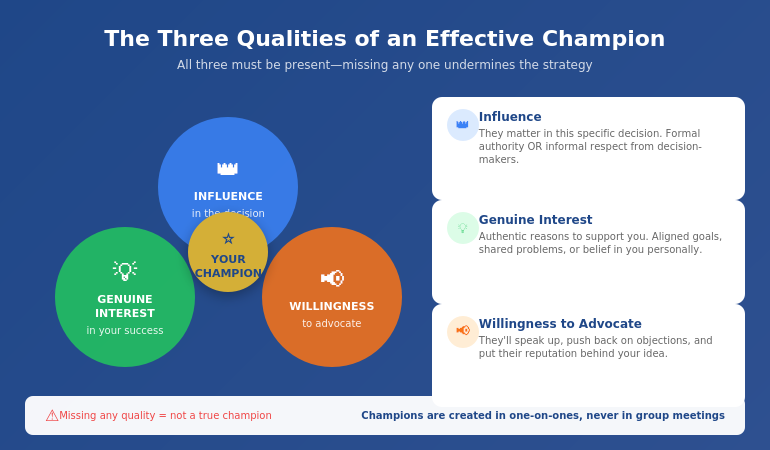
Venn diagram showing the three qualities of an effective presentation champion: influence, genuine interest, and willingness to advocate

🎯 Master the Buy-In System

The Executive Buy-In Presentation System teaches the complete internal advocate approach—plus stakeholder mapping, objection handling, and the pre-meeting tactics that determine whether your proposal succeeds or fails.

What you’ll learn:

  • The Champion Identification Framework
  • The Enrollment Conversation script
  • Stakeholder mapping for complex decisions
  • How to neutralise blockers before they block
  • The Follow-Through System for post-presentation momentum

Join the Executive Buy-In System → £199

Self-study programme with modules + templates + live Q&A calls. Study at your own pace.

How to Identify Your Champion

Finding your champion requires honest assessment of the decision-making landscape. Here’s the process I teach:

Step 1: Map the Decision-Makers

List everyone who will influence this decision. Include formal decision-makers (those who sign off) and informal influencers (those whose opinions matter). For each person, note:

  • Their likely position on your proposal (supportive, neutral, opposed, unknown)
  • Their level of influence in this specific decision
  • Their relationship with you (strong, moderate, weak, none)

Step 2: Identify Potential Champions

From your map, look for people who are:

  • Already supportive or leaning supportive (you need genuine interest)
  • Influential enough to matter (their voice carries weight)
  • Accessible to you (you can actually have conversations with them)

The best champions often aren’t obvious. They might be one level below the top decision-maker but highly trusted. They might be from a different department but respected for their judgment. They might be a peer who happens to have the CEO’s ear.

Step 3: Assess Willingness

Before approaching a potential champion, consider: Would this person actually advocate for a proposal? Some people avoid taking positions. Others speak up but only for their own initiatives. Look for people with a track record of supporting good ideas—even when they weren’t the originator.

Step 4: Choose Wisely

Having multiple champions can be powerful, but start with one. Choose the person who best combines influence, genuine interest, and willingness. You can expand later—but a strong single champion often outperforms multiple weak ones.

For more on stakeholder analysis, see my guide on stakeholder buy-in psychology.

📋 Note: The complete stakeholder mapping system—including templates for identifying champions and planning your approach—is covered in the Executive Buy-In System programme.

The Enrollment Conversation

You cannot create an internal advocate in a group meeting. This is perhaps the most important thing I can tell you about the sponsor approach.

Group meetings are the worst place to build support. People are cautious. They’re watching others. They’re protecting themselves. No one wants to be the first to champion an idea that might fail publicly.

Champions are created in one-on-one conversations—ideally before the formal presentation is even scheduled.

Here’s the enrollment conversation structure I teach:

1. Open with Genuine Curiosity

Don’t pitch. Ask questions. “I’m working on a proposal for [X] and I’d value your perspective. What would you need to see for something like this to work?”

This does two things: it shows respect for their judgment, and it reveals what they actually care about—information you can use to shape your proposal.

2. Listen More Than You Talk

Let them share concerns, questions, and suggestions. Take notes. Ask follow-up questions. The more they talk, the more invested they become—and the more you learn about how to position your proposal for success.

3. Incorporate Their Input

After the conversation, actually use their feedback. When people see their ideas reflected in your proposal, they feel ownership. Ownership drives advocacy.

4. Make the Ask

Once you’ve had substantive conversations and incorporated input, you can make the explicit ask: “This is going to the steering committee next month. Would you be willing to support it? I think your perspective on [their area of expertise] could really help.”

Notice the ask is specific. You’re not asking them to “help” vaguely—you’re asking for explicit support in a specific context.

5. Equip Them

Champions can only advocate effectively if they have the right information. Share your key points, anticipated objections, and responses. Make it easy for them to defend your proposal without needing you present.

💡 The Enrollment Conversation Is Where Champions Are Made

The scripts and practice scenarios for these conversations are detailed in the Executive Buy-In System. But even without formal training, the principles above will dramatically improve your approach: genuine curiosity, active listening, incorporation of feedback, specific asks, and proper equipping.

Activating Your Champion

Having a champion isn’t enough. You need to activate them effectively. Here’s how:

Before the Presentation

Brief them on the landscape. Who else will be in the room? What positions have people already taken? What objections are likely? Your champion should walk in informed, not surprised.

Agree on their role. Will they speak early to establish momentum? Will they address specific objections? Will they stay quiet unless needed? Different situations call for different approaches. Discuss and agree.

Share your materials in advance. Your champion should see your presentation before the meeting. They might catch issues, suggest improvements, or simply feel more confident advocating for something they’ve reviewed.

During the Presentation

Don’t look to them for rescue. Your champion shouldn’t be your safety net for a poorly prepared presentation. Do your job well; let them amplify your success rather than compensate for your failures.

Create openings. When appropriate, you can create natural moments for your champion to contribute: “Sarah has been thinking about the operational implications—Sarah, what’s your view?” This gives them a platform without making their support seem staged.

After the Presentation

Debrief immediately. What worked? What didn’t? What follow-up is needed? Your champion often has insights into room dynamics that you missed while presenting.

Keep them informed. As the decision progresses, keep your champion updated. They may have opportunities to advocate in conversations you’re not part of—but only if they know what’s happening.

Thank them genuinely. Champions spend political capital on your behalf. Acknowledge that investment, regardless of the outcome.

For more on the pre-meeting strategy, see my guide on pre-meeting executive alignment.

🎯 The Complete Buy-In System

Stop leaving buy-in to chance. The Executive Buy-In Presentation System teaches everything in this article—plus stakeholder mapping, objection handling, political navigation, and follow-through tactics—in a structured programme with templates, scripts, and live support.

The programme includes:

  • The Champion Identification Framework
  • Enrollment Conversation scripts
  • Stakeholder mapping templates
  • Objection pre-emption strategies
  • The Follow-Through System
  • Live Q&A calls for your specific situations

Join the Executive Buy-In System → £199

Self-study programme with live Q&A support. Study at your own pace.

Frequently Asked Questions

What is a champion in business presentations?

A presentation champion is someone with influence in the decision-making group who actively advocates for your proposal. Unlike a passive supporter who might vote yes if asked, a champion proactively speaks up for your idea, counters objections, and uses their credibility to build support—both in formal meetings and in informal conversations where decisions often really happen.

How do you get executive buy-in for a proposal?

Executive buy-in requires working outside the presentation itself. Identify stakeholders before you present, have one-on-one conversations to understand concerns and incorporate feedback, cultivate a champion who will advocate for you, and address objections before they surface publicly. The presentation confirms momentum you’ve already built—it rarely creates new support from scratch.

Why do good presentations get rejected?

Most rejected presentations fail for political reasons, not content reasons. The presenter had no champion advocating for them. Key stakeholders had concerns that weren’t addressed beforehand. Opposition formed in private conversations. Decision-makers had already decided before the presentation started. Strong content matters, but it can’t overcome weak stakeholder groundwork.

What if I don’t know anyone senior enough to be my champion?

You don’t necessarily need someone senior—you need someone influential in this specific decision. That might be a peer who’s highly respected, someone from a related department whose opinion carries weight, or your direct manager who can advocate upward. Start building relationships before you need them. The best time to develop potential champions is when you don’t have an immediate ask.

How do I approach a potential champion without seeming political?

Lead with genuine curiosity rather than asking for support. “I’d value your perspective on this challenge” is authentic relationship-building. “Will you support my proposal?” feels transactional. Build the relationship through substantive conversations about the work. The ask for support comes later, naturally, after you’ve demonstrated respect for their judgment and incorporated their thinking.

What if my champion can’t attend the actual presentation?

Champions are often more valuable outside the presentation than inside it. They can advocate in pre-meetings, informal conversations, and follow-up discussions. If your champion can’t attend, ask them to speak with key decision-makers beforehand, and keep them informed so they can continue advocating as the decision progresses through other forums.

How far in advance should I start building champion relationships?

Ideally, you’re building relationships continuously—not just when you need something. For a specific proposal, start cultivating your champion at least 2-4 weeks before the formal presentation. This gives time for multiple conversations, incorporating feedback, and allowing your champion to do their own informal advocacy. Last-minute champion recruitment rarely works.

📧 The Winning Edge Newsletter

Weekly insights on executive presentations, stakeholder management, and what actually works in corporate decision-making.

Subscribe Free →

📋 Free: Executive Presentation Checklist

A pre-presentation checklist that includes the champion check, stakeholder assessment, and objection preparation. Use it before every important presentation.

Download Free Checklist →

About the Author

Mary Beth Hazeldine is the Owner & Managing Director of Winning Presentations. With 24 years of corporate banking experience at JPMorgan Chase, PwC, Royal Bank of Scotland, and Commerzbank, she has navigated complex stakeholder environments and delivered high-stakes presentations in boardrooms across three continents.

A qualified clinical hypnotherapist and NLP practitioner, Mary Beth combines executive communication expertise with evidence-based techniques for managing presentation anxiety. She works with senior teams on high-stakes funding rounds and executive approvals.

Book a discovery call | View services

Your Next Step

Before your next important presentation, ask yourself: Who is my champion?

If you can’t name someone specific—someone who will actively advocate for your proposal in conversations you’re not part of—you have work to do before you work on your slides.

The internal advocate approach isn’t about politics or manipulation. It’s about recognising how decisions actually get made in organisations, and working with that reality rather than against it.

Strong proposals deserve strong advocates. Find yours.

Related: If your preparation process needs work too, see today’s companion article on the preparation order that doubles approval rates—because even with a champion, your content still needs to be right.

02 Feb 2026
Professional woman in therapy session looking frustrated that treatment hasn't resolved her public speaking fear

Why Therapy Didn’t Fix My Presentation Fear (Until I Tried This)

I sat in my therapist’s office for the forty-seventh time, and she asked how the presentation went.

“I threw up in the car park beforehand,” I said. “Then I rushed through it so fast nobody could follow. Then I couldn’t sleep for two days replaying every mistake.”

She nodded sympathetically. We’d been working on my anxiety for eighteen months. I understood my childhood patterns. I could identify cognitive distortions. I had breathing techniques and grounding exercises and a meditation practice.

None of it helped when I stood up to present.

It took me another two years—and training as a clinical hypnotherapist—to understand why. Traditional therapy is excellent for many things. Presentation fear often isn’t one of them.

Quick answer: Traditional therapy (including CBT) often fails to resolve presentation anxiety because it addresses the wrong level of the problem. Presentation fear isn’t primarily a thinking problem—it’s a nervous system problem. Your body has learned that presenting equals danger, and it responds automatically before your rational mind can intervene. Talk therapy can help you understand your fear, but understanding doesn’t change the automatic physiological response. Effective treatment requires working at the nervous system level—through techniques like anchoring, somatic work, and hypnotherapy—to change the learned threat response itself. This article explains why traditional approaches fall short and what actually works.

⚡ Presenting This Week? The 60-Second Reset

If you have a presentation coming up and therapy hasn’t helped, try this before you present:

  1. 30 seconds before: Press your thumb and forefinger together firmly while taking one slow breath. Hold 4 seconds. This creates a physical anchor point.
  2. While walking in: Drop your shoulders, unclench your jaw, soften your hands. Your body posture signals safety to your nervous system.
  3. First sentence: Start with a statement, not a question. “I’m here to share…” gives you control of the first moment.

This won’t cure presentation fear, but it interrupts the panic spiral. For the complete nervous system approach, keep reading.

Or explore the full programme →

Why Traditional Therapy Often Fails for Presentation Fear

Let me be clear: therapy is valuable. It helped me understand anxiety patterns I’d carried for decades. It improved my relationships, my self-awareness, my general wellbeing.

But it didn’t stop me from panicking before presentations.

Here’s what I learned after years of trying—and then training to understand why:

Traditional therapy treats presentation fear as a thinking problem. The assumption is that if you understand why you’re afraid, challenge your irrational beliefs, and develop coping strategies, the fear will diminish.

This works for many anxiety types. It doesn’t work well for performance anxiety because the fear doesn’t live primarily in your thoughts. It lives in your nervous system.

When you stand up to present, your amygdala—the threat-detection centre of your brain—triggers a cascade of physiological responses before your rational mind can intervene. Your heart races. Your hands shake. Your voice changes. Your digestive system rebels.

This happens in milliseconds. No amount of cognitive restructuring can outrun it. By the time you’re trying to remember your CBT techniques, your body has already decided you’re in danger.

For more on the physiology behind presentation fear, see my article on what glossophobia actually is.

The Wrong Level of Intervention

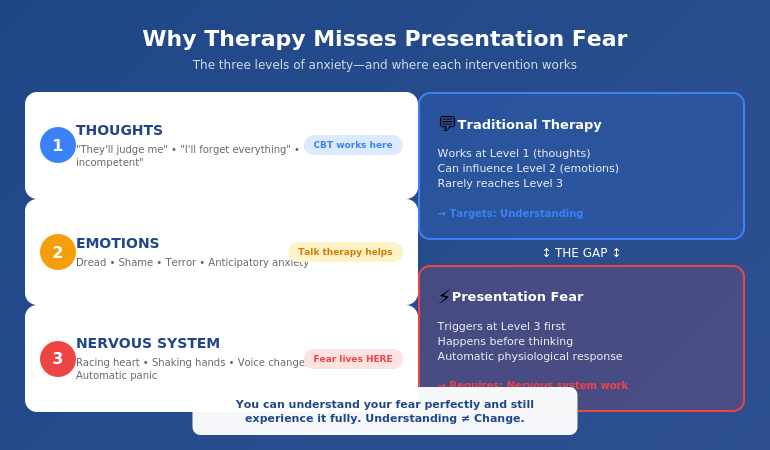
Think of anxiety as operating on three levels:

Level 1: Thoughts — What you think about presenting (“They’ll judge me,” “I’ll forget everything,” “I’ll look incompetent”)

Level 2: Emotions — What you feel about presenting (dread, shame, terror, anticipatory anxiety)

Level 3: Nervous System — What your body does automatically (fight-or-flight activation, adrenaline release, physical symptoms)

Traditional talk therapy—including CBT—works primarily at Level 1. You learn to identify and challenge unhelpful thoughts. This can reduce the intensity of Level 2 emotions over time.

But Level 3 operates independently. Your nervous system learned that presenting is dangerous through past experiences—embarrassments, freezes, visible anxiety, perceived failures. It doesn’t care what you think about those experiences now. It responds to the trigger (standing up to present) with the learned response (full physiological panic).

This is why you can know your fear is irrational and still experience it fully. Understanding doesn’t change the automatic response. Your therapist can help you see that the audience isn’t actually dangerous. Your amygdala disagrees—and it controls your body.

Three levels of anxiety showing thoughts emotions and nervous system with therapy addressing level one while presentation fear operates at level three

🧠 Address the Right Level

Conquer Speaking Fear (£39, instant download) works at the nervous system level—where presentation anxiety actually lives. These are clinical hypnotherapy and NLP techniques specifically designed for performance anxiety, not general talk therapy approaches.

What’s inside:

  • Nervous system reprogramming protocols
  • The Anchor Technique for pre-presentation calm
  • Somatic release methods for stored fear
  • The Exposure Reframe (changing the threat response itself)

Get Conquer Speaking Fear →

Developed by a clinical hypnotherapist who spent years in traditional therapy first.

The Nervous System Problem

Your nervous system is a learning machine. It observes patterns and creates automatic responses to keep you safe.

At some point—maybe in school, maybe early in your career—you had a negative experience while presenting. Perhaps you froze. Perhaps people laughed. Perhaps you forgot everything. Perhaps you just felt intensely uncomfortable and visible.

Your nervous system registered this as: Presenting = Danger. Avoid or prepare for threat.

Every subsequent presentation reinforced this learning. Even if the presentations went “okay,” your body was in threat mode throughout. That reinforcement strengthened the association.

Now, decades later, the pattern is deeply embedded. The moment you know you have to present—sometimes weeks in advance—your nervous system starts preparing for danger. The anticipatory anxiety. The sleep disruption. The growing dread.

Then you stand up, and everything your nervous system learned kicks in automatically:

  • Adrenaline floods your system (energy for fighting or fleeing)
  • Blood flows away from your brain (making thinking harder)
  • Your heart races (preparing for physical exertion)
  • Your hands shake (excess adrenaline with nowhere to go)
  • Your voice changes (vocal cords tighten under stress)
  • Your digestive system shuts down (causing nausea)

This is not a thinking problem. It’s a learned physiological response. And it requires intervention at the level where it lives.

For more on managing the physical symptoms, see my guide on presentation anxiety before meetings.

🎯 Ready to work at the nervous system level? Conquer Speaking Fear (£39) includes the clinical protocols I developed after traditional therapy failed me.

What Actually Works

If traditional therapy works at the wrong level, what works at the right level?

After training as a clinical hypnotherapist and working with professionals across banking, consulting, and tech who struggled with presentation anxiety, I’ve identified the approaches that actually change the nervous system response:

1. Anchoring

Anchoring creates a physical trigger associated with a calm, confident state. Through repetition, you train your nervous system to access that state on demand.

The technique: While in a deeply relaxed state, you create a physical anchor (like pressing thumb and forefinger together). You repeat this pairing until the physical action automatically triggers the calm state. Before presenting, you fire the anchor—and your nervous system responds with calm rather than panic.

This works because you’re creating a new automatic response, not trying to think your way out of the old one.

2. Somatic Release

Your body stores past fear experiences. Somatic techniques help discharge that stored energy, reducing the intensity of the automatic response.

This might include specific breathing patterns that activate the parasympathetic nervous system, physical movements that release tension, or body-awareness practices that interrupt the fear cascade.

3. Hypnotherapy

Clinical hypnotherapy accesses the subconscious mind—where the learned fear response lives—and creates new associations. Under hypnosis, you can rehearse successful presentations while deeply relaxed, teaching your nervous system that presenting can be safe.

This is different from stage hypnosis entertainment. Clinical hypnotherapy is a recognised therapeutic approach with research support for anxiety conditions.

4. Gradual Exposure with New Associations

Exposure therapy can work for presentation fear—but only when paired with positive experiences at each stage. The goal isn’t to “push through” fear (which often reinforces it) but to create new evidence that presenting is safe.

This means starting with very low-stakes presentations where you can remain relatively calm, then gradually increasing the challenge while maintaining that calm baseline.

🧠 The Nervous System Approach

Conquer Speaking Fear (£39, instant download) teaches all four approaches—anchoring, somatic release, hypnotic rehearsal, and graduated exposure—in a structured programme designed for professionals who need results, not just understanding.

Get Conquer Speaking Fear →

From someone who tried everything else first.

My Breakthrough

After eighteen months of therapy that helped everything except presenting, I was desperate enough to try something different.

I enrolled in clinical hypnotherapy training—not because I wanted to become a hypnotherapist, but because I wanted to understand why I couldn’t fix myself with all the tools I’d learned.

What I discovered changed my understanding of anxiety completely.

The techniques I learned worked at a different level than anything I’d tried before. Instead of understanding my fear (which I could already do perfectly), I was changing the automatic response itself.

The first time I presented after learning anchoring techniques, something remarkable happened: my body didn’t panic. Not because I’d suppressed the panic—because the panic didn’t come. My nervous system had learned a new response.

It wasn’t instant. It took practice. But within a few months, I went from vomiting before presentations to feeling… normal. Not fearless. Not artificially confident. Just normal—like presenting was a professional task rather than a survival threat.

That transformation is why I do this work now. Traditional therapy has its place. But for presentation-specific fear, you need presentation-specific solutions that work at the nervous system level.

For more on overcoming presentation fear generally, see my comprehensive guide on how to overcome fear of public speaking.

🧠 What Traditional Therapy Couldn’t Give Me

Conquer Speaking Fear (£39, instant download) is what I wish existed during my years of struggling with therapy that didn’t work for presenting. Clinical techniques that work at the nervous system level—where presentation fear actually lives.

The programme includes:

  • The Anchor Technique (pre-presentation calm on demand)
  • Somatic release protocols
  • Hypnotic rehearsal methods
  • The Exposure Reframe system
  • The Confidence Compound approach

Get Conquer Speaking Fear →

For professionals who’ve tried therapy and need something that actually works for presenting.

Frequently Asked Questions

Does therapy help with fear of public speaking?

Traditional therapy can help you understand your fear and may reduce general anxiety levels, but it often fails to eliminate presentation-specific panic. This is because presentation fear operates primarily at the nervous system level—as a learned automatic response—rather than as a thinking problem. Therapy that works at the cognitive level (like standard CBT) addresses thoughts and beliefs but doesn’t change the physiological response that triggers before rational thought can intervene.

Why doesn’t CBT work for presentation anxiety?

CBT works by identifying and challenging unhelpful thoughts. For presentation anxiety, you can successfully challenge thoughts (“the audience isn’t dangerous”) while still experiencing the full physiological fear response. This is because your amygdala triggers fight-or-flight before your rational mind processes the situation. CBT can reduce anticipatory anxiety and improve recovery after presenting, but it rarely eliminates the in-the-moment panic that defines presentation fear.

What is the best treatment for glossophobia?

The most effective treatments work at the nervous system level rather than the cognitive level. These include clinical hypnotherapy (creating new associations under relaxed states), NLP anchoring techniques (establishing physical triggers for calm), somatic approaches (releasing stored fear from the body), and carefully structured exposure with positive reinforcement. Many professionals find the best results from combining multiple nervous system approaches rather than relying on talk therapy alone.

Should I stop therapy if it’s not helping my presentation fear?

Not necessarily—therapy may be helping with other aspects of anxiety even if presentation fear persists. However, if presentation anxiety is your primary concern and you’ve been in therapy for 6+ months without improvement in that specific area, it’s reasonable to add or switch to approaches that work at the nervous system level. Many professionals benefit from combining general therapy with presentation-specific techniques like hypnotherapy or NLP.

Is hypnotherapy better than CBT for public speaking anxiety?

For presentation-specific fear, hypnotherapy often produces faster results because it works at the subconscious level where the fear response is encoded. CBT is excellent for general anxiety and helpful for anticipatory worry, but it struggles to change the automatic physiological response that happens in the moment of presenting. That said, some people benefit from combining both—using CBT for thought patterns and hypnotherapy for the nervous system response.

How is presentation-specific treatment different from general anxiety therapy?

General anxiety therapy addresses broad patterns of worry and avoidance. Presentation-specific treatment focuses on the performance context—the unique combination of visibility, evaluation, and real-time pressure that triggers a distinct fear response. Effective presentation treatment often includes rehearsal under relaxed states, anchoring techniques tied to presenting scenarios, and gradual exposure specific to speaking situations. Generic anxiety tools rarely transfer directly to the presenting moment.

Can medication help if therapy hasn’t worked?

Beta blockers (like propranolol) can reduce physical symptoms by blocking adrenaline’s effects—slowing heart rate, reducing trembling, stabilising voice. Many professionals use them as a bridge while developing other skills. However, medication doesn’t address the underlying fear; it manages symptoms. Some people feel “disconnected” or “flat” on beta blockers. Medication works best as part of a broader approach that includes nervous system retraining, not as a standalone solution. Always consult a doctor before using any medication for anxiety.

📧 The Winning Edge Newsletter

Weekly insights on presentation confidence, evidence-based anxiety techniques, and what actually works for professionals who need to present.

Subscribe Free →

Not ready for the full nervous-system programme? Start here instead: download the free 7 Presentation Frameworks — structured blueprints that reduce pre-presentation anxiety by removing the uncertainty.

About the Author

Mary Beth Hazeldine is the Owner & Managing Director of Winning Presentations. With 25 years of corporate banking experience at JPMorgan Chase, PwC, Royal Bank of Scotland, and Commerzbank, she has delivered high-stakes presentations in boardrooms across three continents.

A qualified clinical hypnotherapist and NLP practitioner, Mary Beth combines executive communication expertise with evidence-based techniques for managing presentation anxiety. She works with senior professionals across financial services, healthcare, technology, and government on high-stakes presentation preparation.

Book a discovery call | View services

Your Next Step

If you’ve been in therapy and your presentation fear hasn’t improved, you’re not failing at therapy. You’re using the wrong tool for this specific problem.

Presentation fear requires intervention at the nervous system level—where the automatic response lives. Traditional therapy works at the cognitive level, which is why it helps with understanding but not with the panic that hijacks your body when you stand up to speak.

The good news: nervous system approaches can work relatively quickly once you apply them. I spent years in therapy without progress on presenting. I saw significant change within weeks of using the right techniques.

You don’t need more sessions doing the same thing. You need a different approach entirely.

Related: If preparation anxiety is adding to your stress, see today’s companion article on the preparation order that actually reduces panic—because better structure means less for your nervous system to worry about.

02 Feb 2026
Executive professional in thoughtful planning pose with pen before opening laptop, demonstrating strategic presentation preparation order

I Stopped Preparing Slides First. My Approval Rate Doubled.

I used to spend six hours on a presentation and still get rejected.

Beautiful slides. Careful animations. Colour-coordinated charts. The CFO would look at it for three minutes and say, “This isn’t what we need. Can you redo it?”

I thought I had a slides problem. I didn’t. I had a preparation order problem.

The moment I stopped opening PowerPoint first, everything changed. Same amount of time. Same audiences. Dramatically different results.

Here’s what I learned: the order you prepare a presentation determines whether it succeeds or fails. Most professionals get it backwards—and wonder why their approval rates are so low.

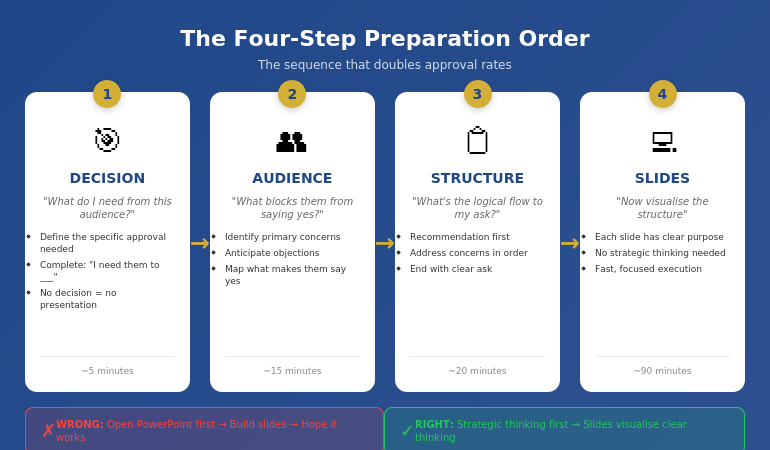
Quick answer: The optimal presentation preparation order is: (1) Decision—what do you need from this audience? (2) Audience—what do they care about and what’s blocking them? (3) Structure—what’s the logical flow that leads to your ask? (4) Slides—only now do you open PowerPoint. Most people start at step 4 and wonder why they keep getting sent back to the drawing board. This article explains each step and why the order matters more than the time you spend.

⚡ Presenting Tomorrow? The 12-Minute Reset

If you’re presenting soon and don’t have time for the full process, do this now:

  1. Write one sentence: “I need [audience] to approve [specific thing].” (2 min)
  2. List their top concern: What’s the #1 reason they might say no? (3 min)
  3. Check slide 1: Does it state your recommendation? If not, rewrite it. (5 min)
  4. Delete 20%: Cut any slide that doesn’t address their concern or your ask. (2 min)

This won’t fix everything, but it will dramatically improve your odds. For the complete framework, keep reading.

Why Most Preparation Is Backwards

Watch how most professionals prepare a presentation:

  1. Open PowerPoint
  2. Pick a template
  3. Start typing content onto slides
  4. Rearrange slides until it “flows”
  5. Add charts and formatting
  6. Hope it works

This approach feels productive. You can see progress—slides appearing, content filling in, a deck taking shape. But it’s an illusion.

Here’s the problem: you’re making structural decisions while distracted by visual decisions. You’re asking “what should slide 7 say?” before you’ve answered “what does my audience actually need to hear?”

The result is predictable: a presentation that looks complete but doesn’t accomplish anything. You’ve built a house without a blueprint—and now you’re surprised when the client says it’s not what they wanted.

I made this mistake for years. I’d spend hours perfecting slides, then watch executives flip through them in 90 seconds and ask questions my deck didn’t answer. The slides were fine. The thinking behind them was absent.

For more on why structurally sound presentations still get rejected, see my article on why good presentations get rejected.

The Four-Step Preparation Order

After years of trial and error—and training thousands of executives—I’ve identified the preparation order that consistently gets results:

  1. Decision — What do you need from this audience?
  2. Audience — What do they care about? What’s blocking them?
  3. Structure — What’s the logical flow that leads to your ask?
  4. Slides — Only now do you open PowerPoint

Notice what’s missing from steps 1-3: any mention of slides, templates, or visuals. That’s intentional. The first 60-70% of effective preparation happens before you touch presentation software.

This feels counterintuitive. Slides are the deliverable, so shouldn’t you start there? No—for the same reason architects don’t start by choosing paint colours. The visible output is the last step, not the first.

The four-step presentation preparation order: Decision, Audience, Structure, then Slides

Step 1: Decision First

Before anything else, answer one question: What decision do I need from this audience?

Not “what do I want to tell them?” Not “what information should I share?” What decision do you need?

Examples:

  • “I need approval to hire two additional engineers”
  • “I need the board to greenlight the expansion budget”
  • “I need the client to sign the contract today”
  • “I need leadership to prioritise this project over Project X”

If you can’t complete the sentence “I need them to _____,” you’re not ready to prepare a presentation. You’re ready to prepare a document—which is a different thing entirely.

Why this matters: Every element of your presentation should move toward this decision. If a slide doesn’t advance the decision, it doesn’t belong. But you can’t make that judgment until you know what you’re deciding.

Most presentations fail because the presenter never clarified what they wanted. They shared information. They presented data. They “updated” stakeholders. But they never asked for anything—so they didn’t get anything.

📊 Structure Your Presentation for Decisions

The Executive Slide System gives you decision-first templates built around the preparation order that actually works. Stop guessing what goes where—use structures proven to get executive approval.

Inside:

  • The 10-slide decision framework
  • Recommendation-first templates
  • Executive summary formats that work
  • Before/after examples from real approvals

Get the Executive Slide System → £39

Used by professionals who need approvals, not just presentations.

Step 2: Audience Second

With your decision clear, the next question is: What does this specific audience care about, and what might block them from saying yes?

This isn’t general audience analysis. It’s decision-focused analysis. You’re not asking “who are they?” You’re asking “what stands between them and approving this?”

For each key stakeholder, consider:

  • What’s their primary concern? (Risk? Cost? Timeline? Reputation?)
  • What would make them say no? (Insufficient data? Wrong timing? Political issues?)
  • What would make them say yes? (ROI proof? Risk mitigation? Alignment with their goals?)
  • What questions will they definitely ask?

If you’re presenting to a CFO, the blocking concern is probably financial risk or unclear ROI. If you’re presenting to a board, it might be strategic alignment or competitive positioning. If you’re presenting to a client, it might be trust or implementation complexity.

The key insight: your presentation should answer their concerns, not your talking points. Most presenters build decks around what they want to say. Effective presenters build decks around what the audience needs to hear to say yes.

This step typically takes 10-15 minutes but saves hours of revision later. When you understand the audience’s blocking concerns, you build a presentation that addresses them. When you don’t, you build a presentation that gets sent back with “good start, but can you add…”

📋 Want templates built around executive concerns? The Executive Slide System (£39) includes decision-first structures that anticipate what leadership actually wants to see.

Step 3: Structure Third

Now—and only now—do you think about structure. But not slide structure. Argument structure.

The question is: What’s the logical flow that leads from where my audience is now to the decision I need?

For most executive presentations, the structure is simpler than people think:

  1. Recommendation — Here’s what I’m asking for
  2. Why it matters — Here’s the problem/opportunity this addresses
  3. How it works — Here’s the approach (briefly)
  4. What could go wrong — Here are the risks and how we’ll mitigate them
  5. What it costs — Here’s the investment required
  6. The ask — Here’s specifically what I need you to approve

Notice this structure is recommendation-first, not background-first. You don’t build up to your point—you start with it. Executives have limited time and attention. Respect that by leading with the answer.

At this stage, I write the structure as bullet points on paper or in a notes app. No slides. No formatting. Just the logical flow.

For example:

  • Recommendation: Approve £200K for customer portal upgrade
  • Why: Current portal causing 23% support ticket increase, costing £15K/month
  • Approach: Phase 1 (self-service), Phase 2 (AI chat), Phase 3 (integration)
  • Risks: Integration complexity—mitigated by phased approach
  • Cost: £200K over 6 months, ROI positive by month 9
  • Ask: Approve budget and project start date of March 1

That’s the entire presentation in six bullet points. Everything else is supporting detail.

For more on executive-ready structures, see my guide to executive presentation structure.

📊 Structures That Get Yes

The Executive Slide System includes proven structures for board presentations, budget requests, project approvals, and strategic recommendations. Each template follows the decision-first order that executives actually respond to.

Get the Executive Slide System → £39

Templates + examples + the exact slide order that works.

Step 4: Slides Last

Only now do you open PowerPoint.

But here’s the difference: you’re not figuring out what to say anymore. You already know what to say. You’re just visualising it.

This changes everything about slide creation:

  • Each slide has a clear purpose (it maps to your structure)
  • You know what belongs and what doesn’t (does it advance the decision?)
  • You can work faster (no strategic thinking mixed with visual thinking)
  • You make better visual choices (because you understand the point each slide needs to make)

The slide creation process becomes almost mechanical. Structure point 1 becomes slides 1-2. Structure point 2 becomes slides 3-4. And so on.

For the example above, the slide deck might be:

  1. Executive Summary: Approve £200K portal upgrade (ROI positive month 9)
  2. The Problem: Support tickets up 23%, costing £15K/month
  3. Root Cause: Current portal lacks self-service capabilities
  4. Solution Overview: Three-phase portal modernisation
  5. Phase Details: Timeline and deliverables
  6. Risk Mitigation: Phased approach reduces integration risk
  7. Investment: £200K over 6 months
  8. ROI Analysis: Break-even month 9, £180K annual savings
  9. Ask: Approve budget and March 1 start date
  10. Appendix: Technical details (if asked)

Ten slides. Clear logic. Decision-focused. And it took less time than the “start with slides” approach because there was no backtracking, no restructuring, no “wait, what’s my point again?”

For guidance on what makes an effective executive summary slide, see how to write the executive summary slide.

How This Actually Saves Time

The objection I hear most often: “I don’t have time for a four-step process. I just need to get the deck done.”

I understand. But consider the true time cost of the “just start with slides” approach:

  • Hours building slides → Presentation rejected → Hours rebuilding
  • Deck looks done → Stakeholder asks unexpected question → Scramble to add slides
  • Send for review → “This doesn’t address the real issue” → Start over

The four-step process typically takes the same total time—or less—because you eliminate rework. Thirty minutes of strategic thinking before slides prevents three hours of revision after slides.

Typical time breakdown:

  • Step 1 (Decision): 5 minutes
  • Step 2 (Audience): 15 minutes
  • Step 3 (Structure): 20 minutes
  • Step 4 (Slides): 60-90 minutes

Total: About 2 hours for a solid executive presentation. Compare that to 4-6 hours of meandering slide creation followed by revision cycles.

The professionals who “don’t have time” for strategic preparation are the same ones working weekends to fix presentations that should have been right the first time.

What order should you prepare a presentation?

The optimal order is: Decision (what do you need?), Audience (what blocks them?), Structure (what’s the logical flow?), then Slides (visualise the structure). Most people start with slides and work backwards, which is why most presentations get rejected or require extensive revision. Starting with the decision ensures every element of your presentation serves a purpose.

Should you write your presentation before making slides?

Yes—but not word-for-word scripts. You should clarify your decision, understand your audience’s concerns, and outline your logical structure before touching slide software. This typically means 30-45 minutes of thinking and notes before opening PowerPoint. The slides then become a visualisation of clear thinking rather than a substitute for it.

Why do most presentations fail to get approval?

Most presentations fail because they’re built around what the presenter wants to say rather than what the audience needs to hear to say yes. When you start with slides, you naturally focus on your content. When you start with the decision, you naturally focus on what moves the audience toward that decision. The preparation order determines the outcome.

📊 Skip the Guesswork

The Executive Slide System gives you decision-first templates so you never start from a blank screen. Each structure is built around the preparation order that gets approvals—not just presentations.

You’ll get:

  • 10-slide decision frameworks for every scenario
  • Executive summary templates that lead with the ask
  • Before/after examples showing the transformation
  • The exact slide order executives expect

Get the Executive Slide System → £39

For professionals who need approvals, not just slide decks.

Frequently Asked Questions

How long should presentation preparation take?

For a standard executive presentation (10-15 slides), allow 2-3 hours total: 30-45 minutes for strategic thinking (steps 1-3) and 90-120 minutes for slide creation (step 4). This assumes you’re working from templates rather than starting from scratch. Complex presentations or unfamiliar topics may require more time, but the ratio should stay similar—about 30% strategy, 70% execution.

Should I use a presentation template or start from scratch?

Use a template—but choose one that matches your strategic structure, not just your visual preferences. A template saves time only if it’s built around decision-first logic. A beautiful template with the wrong structure will still get rejected. The best approach is using templates designed for your specific presentation type (board update, budget request, project approval) rather than generic “professional” templates.

What if I’m given a slide deck to present that someone else created?

Run through steps 1-3 anyway. Clarify the decision you need, identify audience concerns, and check whether the existing structure addresses them. Often, inherited decks need restructuring—they contain good content in the wrong order. Taking 20 minutes to validate (or adjust) the structure before presenting will dramatically improve your results compared to just “learning the slides.”

Does this process work for short presentations too?

Yes—and it’s arguably more important. When you only have 5 minutes or 5 slides, every element must earn its place. The four-step process ensures you’re putting the right content in limited space. For very short presentations, steps 1-3 might take just 10 minutes total, but skipping them is how people end up with 5 slides that don’t accomplish anything.

📧 The Winning Edge Newsletter

Weekly insights on executive presentations, approval strategies, and what actually works in corporate boardrooms.

Subscribe Free →

📋 Free: Executive Presentation Checklist

A one-page checklist covering all four preparation steps. Use it before your next presentation to ensure you’re not skipping the strategic work.

Download Free Checklist →

About the Author

Mary Beth Hazeldine is the Owner & Managing Director of Winning Presentations. With 24 years of corporate banking experience at JPMorgan Chase, PwC, Royal Bank of Scotland, and Commerzbank, she has delivered high-stakes presentations in boardrooms across three continents.

A qualified clinical hypnotherapist and NLP practitioner, Mary Beth combines executive communication expertise with evidence-based techniques for managing presentation anxiety. She has trained thousands of executives and supported high-stakes funding rounds and executive approvals.

Book a discovery call | View services

Your Next Step

The next time you need to create a presentation, resist the urge to open PowerPoint immediately. Instead, take 30 minutes to work through steps 1-3:

  1. What decision do I need?
  2. What concerns might block my audience?
  3. What’s the logical flow that addresses those concerns and leads to my ask?

Then—and only then—build your slides.

It feels slower. It isn’t. And the results will show you why preparation order matters more than preparation time.

If presentation anxiety is part of what’s holding you back, see today’s companion article on why therapy doesn’t always fix presentation fear.

02 Feb 2026

The Approval Packet Method: A 6-Slide Executive Deck That Gets a Clear Yes

If your decks get “polite nods” but slow decisions, the problem is rarely your content. It’s the structure. Executives don’t want more slides—they want a fast, low-risk path to approve (or reject) with confidence.

Below is a plug-and-play 6-slide format you can copy for steering committees, budget asks, project approvals, and stakeholder decisions.


Get the Executive Slide System (Templates + Prompts) →

Best for: proposals, investment requests, change initiatives, strategy updates, governance meetings.

A decision meeting is not a presentation. It’s an approval process.

What executives need to approve in under 60 seconds

In the first minute, most senior leaders are trying to answer three questions:

  • What are you asking me to approve? (the exact decision)
  • Why now? (the stakes of doing nothing)
  • How contained is the risk? (what could go wrong and how you’ll control it)

If your deck makes them hunt for any of those, you’ll hear the familiar: “This is interesting… send it around… let’s revisit.”

The shift that changes outcomes: stop “presenting,” start briefing

I learned this the hard way in financial services: senior decision-makers don’t read decks like stories. They scan like triage. If the decision isn’t obvious, they assume the work isn’t done.

The fix is simple: build the deck as an Approval Packet—a brief designed to make the decision easy.

The 6-Slide Approval Packet (copy this structure)

Use these six slides in this order. Keep each slide to one idea. Use sentence-style titles so the deck reads like a brief.

  1. The Decision — The exact “yes” you need (one sentence).
  2. The Stakes — What changes if we do nothing (consequence, not drama).
  3. The Options — 2–3 viable paths (including “do nothing”).
  4. The Recommendation — Your choice + the trade-off it wins.
  5. The Risk Box — Top risks + mitigations + kill switch trigger.
  6. The 30-Day Plan — What happens next if approved (who/when/what).

The Approval Packet is a repeatable decision format—use it for nearly any leadership meeting.


Download the Executive Slide System →

If you’re building a deck today, start with this structure first. Design comes last.

The “Risk Box” slide: why it prevents the “come back with more analysis” stall

Most decks fail because risk is either hidden or hand-waved. When risk is vague, executives assume it’s larger than you’re admitting—so they delay.

Instead, give risk its own slide. Keep it tight and controlled:

  • Risk: plain-language statement (no jargon)
  • Likelihood / Impact: low / medium / high
  • Mitigation: what you will do proactively
  • Kill switch: the trigger that stops the initiative before it becomes expensive

This single slide signals competence and maturity. You’re not “selling.” You’re leading.

The 20-minute build workflow (when you’re under pressure)

  1. Write the Decision sentence first. If you can’t write it, you’re not ready to build slides.
  2. List the options. Leaders trust people who show trade-offs.
  3. Draft the Risk Box. This is what stops last-minute pushback.
  4. Add the 30-day plan. Make “what happens next” obvious.
  5. Only then add visuals and supporting numbers.

Rule: if a slide title can’t be read aloud as a complete sentence, rewrite it.

If you want this as plug-and-play templates (so you’re not rebuilding from scratch)

The Executive Slide System gives you a ready-made set of executive-grade slide structures plus prompts that help you write clean, decision-ready content—fast.

Use it when: you need a board-ready deck quickly and you don’t want to start from a blank slide.

Templates don’t replace thinking. They remove friction so your thinking lands faster.


Get the Executive Slide System →

Tip: if you’re using AI to draft slides, templates + prompts prevent generic “wordy slide” output.

Need a broader set of executive decision resources?

If you want to browse the full set of Executive Decision Deck resources (including related toolkits and swipe files), you can start here:


Browse Executive Decision Decks →

Quick self-check before you send your next deck

  • 10-second test: Can someone restate the decision after a skim of slide 1?
  • Trade-off test: Are options and consequences visible (not implied)?
  • Risk test: Is downside bounded with mitigations and a kill switch?
  • Momentum test: Is the 30-day next step obvious if approved?

If you pass all four, you’re no longer “presenting.” You’re making a decision easy.


About the author
Mary Beth Hazeldine helps professionals build decision-ready executive presentations—based on real boardroom experience (ex-JPMorgan Chase, PwC, Commerzbank) and 30+ years of presentation training at Winning Presentations.


Executive Slide System (Templates + Prompts) →

01 Feb 2026
Professional person looking frustrated at laptop screen showing AI-generated content that doesn't sound right

Why Your AI-Generated Executive Summary Always Sounds Wrong (The 30-Second Fix)

You asked ChatGPT to write your executive summary. It took 8 seconds. Then you spent 45 minutes rewriting it because it sounded like a press release written by a committee.

The sentences were technically correct. The structure was fine. But something was off. It didn’t sound like something you’d actually say to your CFO. It didn’t sound like something anyone would say to anyone.

This isn’t an AI problem. It’s a context problem. And it takes 30 seconds to fix.

Quick answer: AI-generated executive summaries sound wrong because the AI doesn’t know your audience, your relationship with them, or what decision you’re driving toward. It fills that gap with generic corporate language. The fix isn’t better editing—it’s better context injection. Before asking for content, give the AI three things: who’s reading, what they already know, and what you need them to do. This takes 30 seconds and transforms the output.

⚡ Presenting tomorrow? Copy this prompt:

AUDIENCE: [Who’s reading—role + what they care about]
KNOWLEDGE: [What they already know about this topic]
DECISION: [What action you need them to take]
TONE: [Formal/informal + your relationship]
CONSTRAINTS: [Word count, format, company style]

Write an executive summary for: [your topic]

Fill the 5 blanks. Paste into ChatGPT/Claude/Copilot. Watch the difference.

Why AI-Written Exec Summaries Sound “Off”

Last year, I watched a client—a VP at a major retailer—spend an entire afternoon fighting with ChatGPT.

She needed an executive summary for a board presentation on warehouse automation. ChatGPT gave her something that read like a Wikipedia entry crossed with a management consulting brochure. Phrases like “leveraging synergies” and “optimising operational efficiency” that no human being has ever said out loud to another human being.

She rewrote it. Fed it back. Asked for “more natural.” Got something slightly less robotic but still wrong. Three hours later, she wrote the whole thing herself.

“AI is supposed to save time,” she told me. “I would have been faster with a blank page.”

She wasn’t wrong. But she also wasn’t using the AI correctly. The problem wasn’t the tool—it was what she didn’t tell it.

Why does AI-generated content sound generic?

AI models are trained on vast amounts of text, which means they default to the most common patterns. Without specific context, they produce “average” corporate language—technically correct but lacking the specificity and voice that makes content feel human. The more context you provide about your audience, purpose, and constraints, the more specific (and useful) the summary output becomes.

The Context Gap (What AI Doesn’t Know)

When you ask AI to “draft an exec summary for my presentation,” here’s what the AI doesn’t know:

  • Who’s reading it — A board of directors? Your direct manager? External investors? Each requires completely different framing.
  • What they already know — Are they familiar with the project? New to it? Skeptical? Supportive?
  • What decision you need — Approval? Awareness? Budget? The summary should drive toward that outcome.
  • Your relationship with them — Formal? Informal? Do you have credibility or are you building it?
  • Your organisation’s voice — Every company has unwritten rules about how executives communicate.

Without this context, AI does what any reasonable system would do: it guesses. And it guesses conservatively, using the safest, most generic language possible.

That’s why the output sounds like it was written by someone who’s never met your audience. Because, in a sense, it was.

I’ve written extensively about how to structure executive summaries in my guide to the executive summary slide—but even the best structure falls flat if the voice is wrong.

The 30-Second Fix: Context Injection

Before you ask AI to write anything, spend 30 seconds injecting context. This is the single highest-leverage change you can make to AI-assisted presentation work.

The Context Injection Framework

Add this to the beginning of any prompt:

AUDIENCE: [Who will read this, their role, what they care about]

KNOWLEDGE LEVEL: [What they already know about this topic]

DECISION NEEDED: [What action you want them to take]

TONE: [Formal/informal, relationship context]

CONSTRAINTS: [Word count, format, company style]

That’s it. Five lines. Thirty seconds to write.

The difference in output quality is dramatic—not because the AI suddenly became smarter, but because you stopped asking it to read your mind.


Context injection framework showing five elements: Audience, Knowledge Level, Decision Needed, Tone, and Constraints

How do I make ChatGPT write in my voice?

Give it examples of your voice. Paste 2-3 paragraphs you’ve written previously and say: “Match this tone and style.” Combine this with context injection (audience, decision needed, constraints) and the output will be dramatically closer to how you actually communicate. The AI can mimic voice patterns—it just needs samples.

Master AI-Enhanced Executive Presentations

AI-Enhanced Presentation Mastery is the complete system for executives who want AI to accelerate their presentation work—not create more editing. Learn context injection, voice matching, and the full workflow that cuts creation time without sacrificing quality.

Enrol in AI-Enhanced Presentation Mastery → £249

Self-study modules + live Q&A calls. Study at your own pace.

Before and After Examples

Let me show you what context injection actually does.

Scenario: Q3 Results for the Board

Without context injection:

Prompt: “Write an executive summary for my Q3 results presentation.”

“This executive summary provides an overview of Q3 performance metrics and key achievements. The quarter demonstrated strong operational efficiency and strategic alignment with organisational objectives. Key highlights include revenue growth, cost optimisation initiatives, and enhanced customer satisfaction scores…”

Generic. Forgettable. Could be any company, any quarter, any presenter.

With context injection:

AUDIENCE: Board of directors, 8 people, mostly focused on margin and cash flow

KNOWLEDGE LEVEL: They saw Q2 results; know we’re behind on EBITDA target

DECISION NEEDED: Approve additional headcount for Q4 push

TONE: Direct, confident, acknowledge the miss but pivot to solution

CONSTRAINTS: 150 words max, no jargon, lead with the ask

Write an executive summary for my Q3 results presentation.

“Q3 EBITDA came in 12% below target. You’ll want to know why—and what we’re doing about it. The miss was driven by delayed product launches (now resolved) and higher-than-expected customer acquisition costs in APAC. Despite this, revenue grew 8% QoQ, and we’ve identified a clear path to recover margin in Q4. That path requires 6 additional headcount in sales engineering. This presentation makes the case for that investment and shows the projected impact on Q4 and FY targets. I’m asking for approval today so we can begin hiring next week.”

Same AI. Same request. Completely different output.

The second version sounds like a real person talking to real people about a real situation. It leads with the uncomfortable truth, acknowledges what the audience cares about, and drives toward a specific decision.

That’s what context injection does. It turns AI from a generic content machine into a tool that understands your specific communication challenge.

Want the complete library of context injection templates for every presentation type?

Get AI-Enhanced Presentation Mastery → £249

What context does AI need for executive presentations?

At minimum: who’s reading (role and what they care about), what they already know, and what decision you need. Adding tone guidance and constraints (word count, format) improves output further. The more specific your context, the less editing you’ll need. Think of it as briefing a smart but uninformed colleague—they need background before they can help.

Beyond Summaries: The Full Workflow

Context injection works for executive summaries, but it’s actually the foundation of a complete AI-assisted presentation workflow.

The Three-Layer Approach

Layer 1: Strategic Context (before any content)

Define your audience, decision, and constraints. This shapes everything that follows.

Layer 2: Structural Generation

Use AI to generate slide structures, not content. “Given this context, what are the 8 slides I need?” is a better prompt than “Write my presentation.”

Layer 3: Content Refinement

Generate content slide-by-slide, with context injection for each. Review and refine in passes, not all at once.

This approach typically cuts presentation creation time by 50-70%—not because AI writes everything, but because it handles the parts that don’t require your judgment while you focus on the parts that do.

I cover the full workflow in detail in my guide to using ChatGPT for PowerPoint presentations—including the specific prompts for each layer.

When AI Isn’t the Answer

Context injection dramatically improves AI output, but some elements of executive presentations still require human judgment:

  • Political navigation — AI doesn’t know that the CFO and COO are feuding, or that the CEO hates bullet points
  • Stakeholder relationships — The history between you and your audience shapes how you frame sensitive topics
  • Strategic ambiguity — Sometimes you need to be deliberately vague; AI defaults to clarity
  • Emotional calibration — Delivering bad news, building urgency, or inspiring action requires human touch

The goal isn’t to automate everything. It’s to automate the parts that don’t need you, so you can invest your judgment where it matters.

For more on the strategic side of executive presentations, see my article on AI for presentations.

The Compound Effect

Here’s what most people miss about AI-assisted presentations: the benefit compounds.

Once you have a context injection template for board presentations, you reuse it. Once you’ve trained AI on your voice with sample paragraphs, you can reference that conversation. Once you’ve built a library of prompts that work for your organisation’s style, every presentation gets faster.

The first presentation might save you 30 minutes. The tenth saves you 3 hours. The fiftieth is a completely different workflow—one where AI handles the scaffolding and you focus purely on strategic decisions and refinement.

That’s the real promise of AI for executive presentations. Not “AI writes your presentation.” But “AI handles the 80% that doesn’t need your brain, so your brain can focus on the 20% that does.”

Stop Fighting With AI. Start Collaborating.

AI-Enhanced Presentation Mastery teaches you the complete workflow: context injection templates, voice matching techniques, structural generation, and the refinement process that produces executive-ready output. Self-study modules you can complete at your own pace, plus live Q&A calls for personalised guidance.

Enrol in AI-Enhanced Presentation Mastery → £249

Created from 24 years of executive presentation experience combined with systematic AI workflow development.

Frequently Asked Questions

Will this work with any AI tool (ChatGPT, Claude, Copilot)?

Yes. Context injection is model-agnostic—it works with ChatGPT, Claude, Copilot, Gemini, and any other large language model. The principle is the same: AI produces better output when you give it better input. The specific prompts in AI-Enhanced Presentation Mastery are tested across multiple tools so you can use whichever your organisation prefers.

How long does it take to learn the context injection method?

The basic framework takes about 15 minutes to understand and apply. You’ll see improved output immediately. Mastering the nuances—when to add more context, how to iterate, how to build reusable templates—takes longer, typically 2-3 weeks of regular practice. The course accelerates this with pre-built templates and worked examples.

What if my company has a specific presentation style?

That’s actually ideal. Feed the AI examples of presentations your company has approved. Include style guidelines in your context injection. The more specific you are about organisational norms, the better the output matches. Many course participants create company-specific template libraries they reuse across their teams.

Is this different from prompt engineering courses?

Yes. General prompt engineering teaches principles that apply across use cases. AI-Enhanced Presentation Mastery is specifically designed for executive presentations—the context injection frameworks, the structural prompts, the refinement workflows are all built for the specific challenge of creating high-stakes business presentations. It’s specialised, not general.

📬 Get Weekly AI + Presentation Insights

Join professionals who receive my weekly newsletter on AI-enhanced presentations, executive communication, and high-stakes delivery.

Subscribe to The Winning Edge →

Related reading:

📋 Free Resource: 10 Essential AI Prompts for Presentations

Not ready for the full course? Start with my free prompt library—10 tested prompts for common presentation tasks, including context injection templates you can use immediately.

Get the Free AI Prompts →

Your Next Step

The next time you need an executive summary, don’t start with “Write an executive summary.”

Start with 30 seconds of context injection. Tell the AI who’s reading, what they know, and what decision you need.

Watch what happens to the output.

And if you want the complete system—not just context injection, but the full workflow that transforms how you create executive presentations—AI-Enhanced Presentation Mastery will show you how.

AI is a tool. The question is whether you’re using it as a content generator or a thought partner. Context injection is the difference.

About the Author

Mary Beth Hazeldine is the Owner & Managing Director of Winning Presentations. With 24 years of corporate banking experience at JPMorgan Chase, PwC, Royal Bank of Scotland, and Commerzbank, she has delivered hundreds of high-stakes executive presentations—and now teaches professionals how to use AI to create them more efficiently.

A qualified clinical hypnotherapist and NLP practitioner, Mary Beth combines executive communication expertise with systematic AI workflow development. She has helped senior professionals and teams transform their presentation process.

Book a discovery call | View services

01 Feb 2026
Person lying awake at night unable to sleep with clock visible, experiencing Sunday night presentation anxiety

The Sunday Night Presentation Dread: Why It Hits 48 Hours Early (And How to Stop It)

It’s 9pm on Sunday. Your presentation isn’t until Tuesday afternoon. And you’re already nauseous.

You’ve tried distracting yourself. You’ve tried “not thinking about it.” You’ve tried telling yourself it’s irrational. None of it works.

The dread just sits there—a low-grade hum of cortisol that ruins your evening, wrecks your sleep, and makes Monday feel like walking toward execution.

I know this feeling intimately. For five years, I lived it every week.

Quick answer: Anticipatory anxiety hits 24-72 hours before a presentation because your amygdala can’t distinguish between imagining danger and experiencing it. Every time you mentally rehearse what could go wrong, your brain releases the same stress hormones as if it’s happening now. The fix isn’t distraction or positive thinking—it’s interrupting the rehearsal loop with specific nervous system interventions that work in 60 seconds.

Why the Dread Hits 48 Hours Early

When I was a VP at Royal Bank of Scotland, I had a recurring nightmare: standing in front of the board, mouth open, nothing coming out.

The nightmare didn’t happen the night before presentations. It happened two or three nights before. By the time the actual presentation arrived, I’d been anxious for 72 hours straight.

I thought I was uniquely broken. Then I trained as a clinical hypnotherapist and discovered the neuroscience: my brain wasn’t malfunctioning. It was doing exactly what brains do.

Your amygdala—the brain’s threat-detection centre—can’t tell the difference between vividly imagining something and actually experiencing it. When you picture yourself freezing, stumbling, or being judged, your brain responds as if it’s happening right now.

That’s why the dread starts days early. You’re not anxious about Tuesday’s presentation. You’re anxious about the twenty presentations you’ve already given in your mind since Friday.

Presenting this week and already feeling it?

The techniques below will calm your nervous system tonight. If the pattern keeps repeating, there’s a structured programme built around clinical hypnotherapy and NLP reprogramming that addresses the root cause. See Conquer Speaking Fear →

Why do I get anxiety days before a presentation?

Your brain’s threat-detection system (the amygdala) can’t distinguish between imagining a threat and experiencing one. When you mentally rehearse what could go wrong, your body releases cortisol and adrenaline as if the threat is real. This “anticipatory anxiety” often peaks 24-72 hours before the event because that’s when mental rehearsal intensifies.

The Disaster Rehearsal Loop

Here’s what’s happening in your brain right now:

  1. Trigger: A thought about Monday’s presentation floats through your mind
  2. Imagination: Your brain instantly generates a “what if” scenario (forgetting your words, being judged, looking incompetent)
  3. Physical response: Your body releases stress hormones as if the scenario is real
  4. Reinforcement: The physical discomfort makes the thought feel important, so your brain keeps returning to it
  5. Loop: Back to step 1, but now with more intensity

This is why “don’t think about it” fails. Trying not to think about something requires thinking about it first. You’re feeding the loop.

It’s also why positive affirmations often backfire. Telling yourself “I’ll do great” when your body is flooded with cortisol creates cognitive dissonance. Your nervous system knows you’re lying.

The solution isn’t psychological. It’s physiological.

I’ve written more about breaking this loop in my guide to stage fright before presentations—but let me give you the immediate intervention first.

The 60-Second Reset (Do This Tonight)

This technique comes from my clinical hypnotherapy training. It works because it targets the vagus nerve—the direct line between your brain and your body’s stress response.

The Physiological Sigh

This isn’t a breathing exercise. It’s a neurological interrupt.

  1. Inhale through your nose until your lungs feel full
  2. Inhale again—a second, smaller sip of air on top of the first breath (this re-inflates the alveoli in your lungs)
  3. Exhale slowly through your mouth for as long as comfortable
  4. Repeat twice more (three total cycles)

The double inhale activates a specific reflex that tells your nervous system the threat has passed. Stanford neuroscientist Andrew Huberman has shown this to be one of the quickest ways to reduce acute stress in real time.

Do it right now. Notice what happens in your chest and shoulders.

Why This Works When “Deep Breathing” Doesn’t

Standard deep breathing often fails because anxious people unconsciously hold tension while breathing. You’re taking deep breaths with a clenched body, which sends mixed signals.

The physiological sigh works because the double inhale mechanically forces your lungs to expand fully, which physically activates the parasympathetic response. You can’t override it by being tense. It’s a hardware hack, not a software suggestion.

For more on the physiology behind this, see my full guide to presentation breathing techniques.


Diagram showing the five-step disaster rehearsal loop and how the physiological sigh interrupts anxiety

How do I stop dreading presentations?

Interrupt the “disaster rehearsal” loop by targeting your nervous system directly, not your thoughts. The physiological sigh (double inhale, long exhale) activates the vagus nerve and reduces cortisol within 60 seconds. Pair this with scheduled worry time—giving your brain a specific window to process concerns—so it stops hijacking your evenings and sleep.

Stop White-Knuckling Through Every Presentation

Conquer Speaking Fear (£39, instant access) combines clinical hypnotherapy techniques with NLP protocols to rewire your brain’s response to presentations—not just manage the symptoms.

Get Conquer Speaking Fear → £39

Developed from clinical hypnotherapy practice and 25 years of high-stakes corporate presenting. £39, instant access.

The Pre-Presentation Sleep Protocol

If you’re reading this on Sunday night and can’t sleep, here’s exactly what to do:

1. Scheduled Worry Time (15 minutes, not in bed)

Your brain keeps returning to the presentation because it has unfinished business. Give it a proper window to process.

  • Set a timer for 15 minutes
  • Sit somewhere that isn’t your bed
  • Write down every worry about the presentation—no filtering
  • For each worry, write one small action you could take (even “accept I can’t control this”)
  • When the timer ends, close the notebook and say out loud: “I’ve processed this. My brain can let go now.”

This sounds almost absurdly simple. It works because your brain needs permission to stop rehearsing. The ritual provides that permission.

2. The 4-7-8 Sleep Sequence

Once you’re in bed:

  • Inhale through your nose for 4 counts
  • Hold for 7 counts
  • Exhale through your mouth for 8 counts
  • Repeat 4 times

The extended exhale activates your parasympathetic nervous system. Most people feel noticeably drowsier by the third cycle.

3. The “Already Done” Visualisation

Instead of rehearsing what could go wrong, rehearse what happens after the presentation:

  • Picture yourself walking out of the room, presentation complete
  • Notice the relief in your shoulders
  • Imagine texting someone “Done. Went fine.”
  • Feel the evening after—the weight lifted

This gives your brain a different movie to play. You’re not suppressing the anxiety; you’re redirecting the rehearsal toward a calming outcome.

Why can’t I sleep before a presentation?

Your brain is running “disaster rehearsal” on a loop, releasing cortisol that keeps you alert. To sleep, you need to give your brain permission to stop rehearsing: do 15 minutes of scheduled worry time (not in bed), then use the 4-7-8 breathing sequence (inhale 4, hold 7, exhale 8) to activate your parasympathetic nervous system. Most people feel drowsy by the third cycle.

If the slides are part of Monday’s dread

Preparation reduces last-minute anxiety. The Executive Slide System (£39) gives you 26 board-ready templates, 93 AI prompts for Copilot, and 16 scenario playbooks — so you can walk into Monday knowing the structure will hold up even if your nervous system hasn’t caught up yet.

See the Executive Slide System → £39

Breaking the Pattern Permanently

The techniques above will get you through tonight. But if you’re tired of managing this anxiety week after week, you need to address the root pattern.

Anticipatory presentation anxiety isn’t really about presentations. It’s about your nervous system’s learned response to perceived judgment and evaluation.

Somewhere along the way—maybe a humiliating moment in school, a harsh boss, a presentation that genuinely went badly—your brain learned that “all eyes on me” equals danger. Now it fires that alarm every time a presentation approaches, regardless of the actual stakes.

Rewiring this requires two things:

1. Desensitisation (Gradual Exposure)

Your nervous system needs evidence that presentations don’t actually result in catastrophe. This means deliberately seeking small presentation opportunities and letting your brain register the non-catastrophic outcomes.

Not “fake it till you make it.” More like “collect evidence that contradicts the fear.”

2. Nervous System Reprogramming

This is where clinical techniques like hypnotherapy and NLP come in. They work by accessing the pattern at a level below conscious thought—the level where the fear actually lives.

I spent years trying to think my way out of presentation terror. Therapy helped me understand it. But the fear didn’t shift until I used techniques that targeted my nervous system directly.

That’s why I built the Conquer Speaking Fear programme around these clinical protocols, not just tips and mindset shifts. The fear isn’t rational, so rational approaches have limited power.

For more on the difference between managing symptoms and resolving root causes, see my article on calming nerves before presentations.


When Sunday Becomes Every Sunday

If the dread has become a recurring pattern — not just one big presentation — the techniques alone won’t break it. Conquer Speaking Fear (£39) addresses the underlying response that keeps returning, week after week.

Get Conquer Speaking Fear → £39

£39, instant access. For senior professionals stuck in the recurring anxiety loop.

What I Wish Someone Had Told Me

For five years, I thought my presentation anxiety meant something was wrong with me. I watched colleagues present effortlessly and assumed they had something I lacked.

They didn’t. They just had nervous systems that hadn’t learned to associate presentations with danger. Or they’d learned and then unlearned it.

The dread you’re feeling right now isn’t a character flaw. It’s a pattern. Patterns can be changed.

Tonight, use the physiological sigh. Do the scheduled worry time. Try the sleep protocol. Get through Monday.

Then consider whether you want to keep managing this every week—or resolve it.

Frequently Asked Questions

Is it normal to feel anxious days before a presentation?

Yes—anticipatory anxiety is extremely common, especially among high-performers. Most people experience some presentation anxiety, and for many, the anticipation is worse than the event itself. Your brain can’t distinguish between imagining a threat and experiencing one, so it starts the stress response as soon as you start mentally rehearsing.

What if I have a presentation tomorrow and can’t sleep?

Do the 15-minute scheduled worry time (not in bed), then use the 4-7-8 breathing sequence (inhale 4 counts, hold 7, exhale 8) once you’re lying down. If racing thoughts continue, try the “already done” visualisation—picture yourself after the presentation, feeling relieved. Most people feel drowsy within 3-4 breathing cycles.

Should I take medication for presentation anxiety?

That’s a decision for you and your doctor. Beta-blockers can reduce physical symptoms (racing heart, shaking hands) without affecting mental clarity. However, they address symptoms, not the underlying pattern. Many of my clients use them as a bridge while doing the deeper nervous system work that creates lasting change.

Will this anxiety ever go away permanently?

Yes—if you address the root pattern, not just the symptoms. Your nervous system learned to associate presentations with danger; it can unlearn that association. This requires deliberate reprogramming through techniques like desensitisation, NLP anchoring, and hypnotherapy. I lived with severe presentation anxiety for 5 years before resolving it. It doesn’t have to be permanent.

📬 Get Weekly Confidence Insights

Join professionals who receive my weekly newsletter on presentation confidence, nervous system management, and high-stakes communication.

Subscribe to The Winning Edge →

Presenting for a salary review or promotion? The anxiety is often worse when the stakes are personal. Read my companion guide: The Salary Review Presentation: How One Slide Got My Client a 35% Raise

Not ready for the full programme? Anxiety often comes from uncertainty about structure — start here instead with the free 7 Presentation Frameworks guide, which gives you a solid foundation to calm the preparation side of the dread.


Built From Clinical Hypnotherapy + 25 Years in the Boardroom

Conquer Speaking Fear (£39, instant access) is the programme built after sitting through too many Sunday evenings like the one you may be having now. Designed for senior professionals whose nervous system still responds to Monday’s presentation as if it were a physical threat.

  • Nervous-system regulation protocols (the clinical hypnotherapy foundation)
  • Cognitive reframing exercises for the disaster-rehearsal loop
  • Pre-presentation anchoring sequences (NLP-based)
  • Physical-symptom management for the morning-of
  • Complete programme, instant access, work at your own pace

Get Conquer Speaking Fear → £39

Designed for senior professionals in banking, biotech, and SaaS. £39, instant access.

Your Next Step

It’s Sunday night. You have a presentation coming. The dread is real.

Right now, do three physiological sighs. Notice your shoulders drop.

Then decide: do you want to keep white-knuckling through this every week? Or do you want to resolve it?

The techniques are above. The deeper work is in the programme described earlier in this article. The choice is yours.

Either way—you’ll get through Monday. I promise.

About the Author

Mary Beth Hazeldine is the Owner & Managing Director of Winning Presentations. With 25 years of corporate banking experience at JPMorgan Chase, PwC, Royal Bank of Scotland, and Commerzbank, she knows presentation anxiety from the inside—she spent 5 years terrified of presenting before training as a clinical hypnotherapist to resolve it.

Now a qualified clinical hypnotherapist and NLP practitioner, Mary Beth combines executive communication expertise with evidence-based techniques for managing presentation anxiety. She advises executives across financial services, healthcare, technology, and government on managing presentation anxiety and building sustainable speaking confidence.

Book a discovery call | View services

01 Feb 2026
Professional woman confidently presenting salary review data to manager in modern office meeting

The Salary Review Presentation: How One Slide Got My Client a 35% Raise

She walked into her salary review with 47 bullet points of accomplishments. She walked out with a 3% cost-of-living adjustment.

Six months later, she tried again—with one slide. She got 35%.

The difference wasn’t confidence. It wasn’t timing. It wasn’t even her track record (which was excellent both times).

It was the structure of what she showed her manager in the first 60 seconds.

Quick answer: The most effective salary review presentation uses a single “Value Proposition” slide that leads with your financial impact—not your accomplishments. Structure it as: (1) business problem you solved, (2) measurable outcome, (3) market rate comparison, (4) specific ask. This framing shifts the conversation from “why you deserve more” to “why paying you more is a smart business decision.”

Why Leading With Accomplishments Backfires

In my 24 years of corporate banking at JPMorgan Chase, PwC, and Royal Bank of Scotland, I watched hundreds of salary conversations go sideways.

The pattern was always the same: talented professionals would prepare exhaustively. Lists of projects. Metrics. Testimonials from colleagues. Training completed. Extra hours worked.

And their managers would nod politely, thank them for their contributions, and explain that “the budget is tight this year.”

Here’s what those professionals didn’t understand: accomplishments are past-tense. Managers fund future value.

When you lead with what you’ve done, you’re essentially saying: “I already gave you this value. Now pay me for it.” That’s not how business decisions work.

When you lead with what you’re worth to them going forward, you’re saying: “Here’s the return on investment you’ll get by keeping me engaged.”

One framing gets you gratitude. The other gets you money.

How do you present a salary increase request?

Present your salary request as a business case, not a personal appeal. Lead with the financial impact you create (revenue generated, costs saved, risks mitigated), compare it to market rates for similar roles, and make a specific ask. Keep it to one slide that takes 60 seconds to present—then stop talking and let them respond.

Value Proposition slide template showing four-part salary review structure: Problem, Outcome, Market, Ask

The One-Slide Format That Works

After testing dozens of approaches with clients, I’ve found that salary conversations work best when you present a single slide with four components:

Component 1: The Business Problem (One Line)

Start with a problem the company faced that you solved. Not a task you completed—a problem with stakes.

Weak: “Led the Q3 product launch”

Strong: “Q3 launch was at risk of missing deadline by 6 weeks, threatening £2.1M in committed revenue”

Component 2: The Measurable Outcome (One Line)

What happened because of your involvement? Use numbers.

Weak: “Successfully delivered on time”

Strong: “Delivered 2 weeks early. £2.1M revenue secured. Team retention at 100% (vs. 67% company average)”

Component 3: Market Rate Comparison (One Line)

This is the part most people skip—and it’s the part that makes the business case.

Research comparable roles on Glassdoor, LinkedIn Salary Insights, and industry surveys. Present the range.

Example: “Market rate for this role with my experience: £85,000-£105,000. Current compensation: £72,000.”

Component 4: The Specific Ask (One Line)

Don’t say “I’d like to discuss my compensation.” Make a specific request.

Example: “Requesting adjustment to £92,000, reflecting mid-market rate and contribution to date.”

That’s it. Four lines. One slide. Sixty seconds.

The structure works because it mirrors how executives make every other business decision: problem → solution → market context → action.

You can learn more about this decision-focused approach in my guide to the executive summary slide—the same principles apply.

Your Salary Conversation Deserves Better Than a Bullet List

The Executive Slide System includes the exact “Value Proposition” slide template I used with Sarah—plus 12 other executive-ready formats for every high-stakes conversation.

Get the Executive Slide System → £39

Built from 24 years in corporate banking + executive presentation coaching. Used in salary reviews, promotion cases, and budget approvals.

From 47 Bullets to One Slide: Sarah’s Story

Sarah was a senior product manager at a fintech company. Brilliant at her job. Consistently rated “exceeds expectations.” And stuck at the same salary for three years.

Her first attempt at a salary conversation was textbook “what not to do”:

  • 47 bullet points of accomplishments across 6 slides
  • 15 minutes of presenting
  • Ended with “I feel I deserve to be compensated fairly”

Her manager agreed she was valuable. Thanked her for her contributions. Offered 3%—the standard cost-of-living adjustment.

When Sarah came to me, she was ready to start job hunting. I asked her one question:

“What’s the single biggest business problem you solved this year, and what was it worth?”

After some digging, we found it: she’d prevented a product launch disaster that would have cost £1.8M in customer refunds and damaged a key partnership.

We built one slide:

VALUE PROPOSITION

Problem: June product launch facing critical API failure, putting £1.8M customer commitments at risk

Outcome: Identified root cause in 72 hours. Zero customer impact. Partnership renewed for 3 years (£4.2M TCV)

Market: Senior PM roles at comparable fintechs: £95,000-£115,000. Current: £78,000

Ask: Adjustment to £105,000 reflecting contribution and market positioning

She presented it in 45 seconds. Then stopped talking.

Her manager was silent for a moment. Then: “I didn’t realise the June situation was that close to disaster. Let me talk to the CFO.”

Two weeks later: £105,000. A 35% increase.

Same accomplishments. Same manager. Same budget constraints. Different frame.

Want to use the same structure Sarah did?

Get the Executive Slide System → £39

What slides should I include in a salary review presentation?

One slide is usually enough—and often more effective than a full deck. Include: (1) a specific business problem you solved, (2) the measurable financial outcome, (3) market rate data for comparable roles, and (4) your specific salary request. This structure takes 60 seconds to present and frames your value in terms managers can act on.

Timing and Delivery Tips

The slide is only half the equation. Here’s how to deploy it:

When to Present

Best timing: 2-3 weeks before your formal review cycle. This gives your manager time to advocate internally before budgets are locked.

Worst timing: During the review meeting itself. By then, decisions are usually already made.

Request a separate 15-minute meeting. Frame it as: “I’d like to share some thoughts on my role and compensation before our formal review. Can we find 15 minutes this week?”

How to Present

  1. Share the slide in advance — Email it 24 hours before with: “Here’s what I’d like to discuss tomorrow.”
  2. Present in 60 seconds or less — Walk through all four components. Don’t elaborate.
  3. Stop talking — The most important part. After your ask, be silent. Let them respond.

Most people fill the silence with justifications, caveats, and softening language. Don’t. Your slide makes the case. Now let them process it.

This approach aligns with how I teach executives to present to CFOs and other senior leaders—lead with the decision you need, then support it. You can see more on this in my guide to presenting to a CFO.

Stop Hoping Your Accomplishments Speak for Themselves

Get the Templates → £39

What to Say When They Push Back

Even with the right structure, you’ll face objections. Here’s how to handle the common ones:

“There’s no budget this year”

Response: “I understand budget constraints. Can we discuss what would need to happen for this to be possible in Q2? I’d like to understand the path forward.”

This keeps the conversation open and creates accountability for a timeline.

“You’re already well-compensated for your level”

Response: “I appreciate that perspective. The market data I’ve found suggests the range for this impact level is [X-Y]. Can you help me understand how you’re defining the level for my role?”

This shifts the conversation to the job scope, which often reveals that you’re operating above your official level.

“Let me think about it”

Response: “Of course. When would be a good time to follow up? I want to be respectful of your process while also planning my next steps.”

“Planning my next steps” is intentionally ambiguous. It creates gentle urgency without making threats.

How do you justify a pay raise to your boss?

Justify a pay raise by framing it as a business decision, not a personal request. Present the financial impact you create (specific problems solved, revenue protected, costs avoided), compare your compensation to market rates for similar roles, and make a specific ask. The strongest justification connects your continued engagement to future business outcomes.

Get the full objection-handling playbook + follow-up email templates

Get the Complete System → £39

The Psychology Behind the One-Slide Approach

There’s a reason this works, and it’s not manipulation. It’s alignment.

When you present 47 accomplishments, you’re asking your manager to do the work of synthesising them into a business case. Most won’t. They’ll default to the standard adjustment.

When you present one slide with a clear value proposition, you’re doing that work for them. You’re making it easy to say yes.

More importantly, you’re speaking the language they use for every other business decision: problem, solution, market context, action.

Your salary isn’t a reward for past behaviour. It’s an investment in future value. Frame it that way, and you stop competing for limited “merit increase” budget—you start competing for strategic investment budget.

That’s a much bigger pool.

For more on structuring executive-level conversations, see my guide to the executive presentation template.

Your Next Salary Conversation Is Too Important to Wing

The Executive Slide System includes 13 ready-to-use templates for salary reviews, promotion requests, budget approvals, and board presentations. Each one designed for the executive conversations that shape careers.

Get the Executive Slide System → £39

Includes Value Proposition slide, Executive Summary format, and Decision Slide framework—ready to customise in minutes.

Frequently Asked Questions

What if my company has a standard salary review process?

Use the one-slide approach before the formal process—ideally 2-3 weeks ahead. This gives your manager ammunition to advocate for you internally. The formal review then becomes a confirmation of what’s already been decided, not a negotiation from scratch.

How far in advance should I prepare my salary presentation?

Start gathering impact data continuously—don’t wait for review season. When it’s time to present, you should be able to build your one slide in under an hour because you already know your biggest wins. The research on market rates takes another 1-2 hours. Total preparation: half a day, not half a week.

What if my manager says there’s genuinely no budget?

Ask two questions: “What would need to change for this to be possible?” and “Can we agree on a timeline and criteria for revisiting this?” If they can’t answer either, that tells you something important about your future at the company. Sometimes the most valuable outcome of a salary conversation is clarity about whether to stay.

Can I use this approach for a promotion conversation too?

Absolutely—with one modification. For promotions, add a fifth component: “Evidence I’m already operating at the next level.” Use specific examples of decisions you’ve made, scope you’ve managed, or impact you’ve created that matches the job description for the higher role. The frame shifts from “I want to be promoted” to “I’m already doing the job—let’s align the title and compensation.”

📬 Get Weekly Executive Presentation Insights

Join 2,500+ professionals who receive my weekly newsletter on high-stakes presentations, executive communication, and career-advancing slides.

Subscribe to The Winning Edge →

Nervous about presenting your salary case? If the thought of this conversation is already triggering Sunday-night dread, read my companion article: The Sunday Night Presentation Dread: Why It Hits 48 Hours Early (And How to Stop It)

📋 Free Resource: Executive Presentation Checklist

Not ready to invest yet? Download my free checklist covering the 10 elements every executive presentation needs—including salary conversations.

Get the Free Checklist →

Your Next Step

Your salary review is coming. You have two choices:

Option one: Walk in with a list of accomplishments and hope your manager connects the dots. Get the standard 3% adjustment. Wonder why your peers seem to advance faster.

Option two: Walk in with one slide that frames your value in terms your manager can act on. Make a specific ask. Create a conversation about investment, not reward.

Sarah chose option two. It took her 45 seconds to present—and changed her career trajectory.

The slide structure is above. The templates are in the Executive Slide System. The only thing left is your decision.

About the Author

Mary Beth Hazeldine is the Owner & Managing Director of Winning Presentations. With 24 years of corporate banking experience at JPMorgan Chase, PwC, Royal Bank of Scotland, and Commerzbank, she has delivered high-stakes presentations in boardrooms across three continents.

A qualified clinical hypnotherapist and NLP practitioner, Mary Beth combines executive communication expertise with evidence-based techniques for managing presentation anxiety. She has trained thousands of executives and supported presentations that have secured high-stakes funding rounds and approvals.

Book a discovery call | View services

31 Jan 2026
Executive frustrated with AI-generated presentation slides showing generic charts on laptop screen

The AI Presentation Paradox: Why Better Tools Create Worse Outcomes

The CFO stopped me after three slides.

“This looks like every other AI deck I’ve seen this month,” she said. “Generic frameworks. Placeholder language. No actual thinking.”

The presenter had spent 45 minutes with ChatGPT and Copilot. The result was a 20-slide deck that said nothing. Beautifully formatted nothing—but nothing nonetheless.

I’m seeing this pattern everywhere now. Executives investing in AI tools, expecting transformation, and getting… mediocrity at scale.

Here’s what nobody talks about: AI presentation tools don’t have a capability problem. They have an amplification problem. They make it faster to produce more of whatever you were already doing—including the things that weren’t working.

Quick answer: The AI presentation paradox is this: better tools often create worse outcomes because they amplify existing problems rather than solving them. If your presentation thinking was muddled before AI, you now produce muddled presentations faster. If you didn’t know what executives actually want, AI helps you miss the mark more efficiently. The solution isn’t abandoning AI—it’s learning to use it as an enhancement tool rather than a replacement for strategic thinking. This article explains the paradox and the framework that fixes it.

⚡ Presenting This Week? The 10-Minute Fix

If you’re presenting soon and your AI-generated slides feel generic, do this now:

  1. Delete slides 1-3. Start with your recommendation, not your agenda.
  2. Ask yourself: “What decision do I need? What’s their main objection?”
  3. Rewrite slide 1 to answer: “Here’s what I recommend and why it matters to you.”
  4. Cut 30%. If you have 20 slides, you need 14. Executives don’t reward thoroughness.

This won’t fix the root cause, but it will improve your odds on Monday. For the complete framework, keep reading.

The Paradox Explained

Here’s what’s happening in organisations everywhere:

Before AI: Creating a presentation took 4-6 hours. This forced people to think carefully about what to include. The friction was a feature—it prevented low-value content.

After AI: Creating a presentation takes 30-60 minutes. The friction is gone. So is the thinking.

The paradox: removing friction from production also removes friction from bad decisions.

When it took hours to build a slide, you asked yourself: “Is this slide necessary?” When AI can generate ten slides in ten seconds, that question disappears. You end up with more slides, not better slides.

I’ve watched this play out with dozens of teams. The ones who struggled with presentation strategy before AI now produce strategic misfires at triple the speed. The ones who understood what executives wanted now produce great presentations faster.

AI didn’t change the fundamental problem. It revealed it.

For more on why AI-generated presentations specifically fail, see my detailed breakdown of why AI presentations fail.

The Three AI Presentation Traps

After reviewing hundreds of AI-assisted presentations, I’ve identified three traps that catch most professionals:

Trap 1: The Volume Trap

AI makes it easy to generate content. So people generate more content.

The 15-slide deck becomes 35 slides. The executive summary becomes three executive summaries. The recommendation section includes every possible option instead of the one that matters.

The result: Executives now have to work harder to find the point. Your presentation that was supposed to save time actually costs more time—their time, which is more expensive than yours.

One client showed me a “streamlined” AI-generated board deck. It was 47 slides. “But they’re really good slides,” he said. The board gave him 12 minutes. Do the maths.

Trap 2: The Generic Trap

AI tools are trained on millions of presentations. They’ve learned what “average” looks like. When you ask for a presentation, you get… average.

Generic frameworks. Safe language. Balanced viewpoints. Nothing that could possibly offend—or persuade.

Executives see these decks constantly now. They’ve developed AI-detection instincts. Not because the formatting looks artificial, but because the thinking looks artificial. No point of view. No conviction. No reason to act.

The result: Your presentation looks exactly like the five AI-generated decks the executive saw yesterday. You’re not standing out. You’re blending in—with mediocrity.

Trap 3: The Efficiency Trap

The promise of AI is efficiency. Faster production. Less effort. More output.

But presentations aren’t factory products. The goal isn’t maximum output—it’s maximum impact. A presentation that takes 30 minutes to make and gets rejected costs more than a presentation that takes 4 hours and gets approved.

The result: People optimise for the wrong metric. They celebrate how fast they created the deck, not whether the deck achieved anything.

The AI Presentation Paradox comparing replacement thinking versus enhancement thinking approaches

🎓 Learn AI-Enhanced Presentation Mastery

Stop using AI as a replacement for thinking. Learn to use it as an amplifier for strategic presentation skills. This self-study programme teaches the framework that turns AI from a liability into a genuine advantage.

What you’ll learn:

  • The Enhancement Framework (AI + human judgement)
  • Prompt engineering for executive-quality output
  • The 3-layer review process that catches AI mistakes
  • When to use AI—and when to step away from it

Enrol in AI-Enhanced Presentation Mastery →

Self-study programme with modules + templates + live Q&A calls. Study at your own pace.

What Executives Actually See

I asked a group of C-suite executives what they notice about AI-assisted presentations. Their answers were revealing:

“No point of view.” AI presents all sides. Executives want recommendations. The balanced, hedged language that AI defaults to signals a lack of conviction—or a lack of understanding.

“Template thinking.” AI uses frameworks it was trained on. Executives have seen these frameworks hundreds of times. When your SWOT analysis looks identical to every other SWOT analysis, it adds no value.

“Missing context.” AI doesn’t know your organisation’s politics, priorities, or constraints. It generates content that’s technically correct but strategically tone-deaf.

“Over-explained.” AI tends toward comprehensiveness. Executives want concision. Every unnecessary slide is a signal that you don’t respect their time—or understand what matters.

One executive put it bluntly: “I can tell within 30 seconds if someone used AI as a crutch or as a tool. The crutch users outsourced their thinking. The tool users sharpened theirs.”

For a deeper look at this distinction, see my article on AI-enhanced vs AI-generated presentations.

🎯 Want to be a “tool user” not a “crutch user”? AI-Enhanced Presentation Mastery teaches the framework executives actually respect.

Enhancement vs. Replacement: The Critical Distinction

The professionals getting great results from AI understand something the struggling ones don’t:

AI is an enhancement layer, not a replacement layer.

Here’s what that means in practice:

Replacement Thinking (Doesn’t Work)

  • “AI, create a board presentation about our Q3 results”
  • AI generates 25 slides
  • User tweaks formatting and sends
  • Result: Generic, unfocused, rejected

Enhancement Thinking (Works)

  • User decides: “The board needs to approve the expansion budget. Their main concern is risk.”
  • User creates outline: Recommendation → Risk mitigation → Financial impact → Ask
  • AI helps: “Draft three ways to frame the risk mitigation that will resonate with a risk-averse CFO”
  • User selects, refines, adds context AI can’t know
  • Result: Focused, strategic, approved

The difference isn’t the tool. It’s who’s doing the thinking.

In the replacement model, AI makes decisions. In the enhancement model, you make decisions and AI executes them faster.

For more on how senior leaders actually approach this, see how senior leaders use AI for presentations.

🎓 Master the Enhancement Approach

AI-Enhanced Presentation Mastery teaches you exactly when to use AI, when to override it, and how to maintain strategic control while gaining speed advantages. Self-study format designed for busy professionals.

Enrol Now →

Includes prompt templates, review checklists, and live Q&A support.

The Framework That Works

After working with executives who successfully integrated AI into their presentation workflow, I’ve identified a consistent framework:

Step 1: Strategy First (No AI)

Before touching any AI tool, answer three questions:

  1. What decision do I need from this audience?
  2. What’s their main objection or concern?
  3. What’s the one thing they must remember?

AI cannot answer these questions. They require knowledge of your specific audience, context, and objectives. This is the thinking AI amplifies—make sure it’s good thinking.

Step 2: Structure Second (Light AI)

With your strategy clear, create an outline. You can use AI to suggest structures, but you make the final call. A good prompt: “Given an audience of [specific role] who needs to decide [specific decision], suggest three possible structures for a 10-minute presentation.”

Review the suggestions critically. AI will offer generic structures. Your job is to select and modify based on what you know about your specific situation.

Step 3: Content Third (Heavy AI)

Now AI earns its keep. With strategy and structure locked, use AI to:

  • Draft slide content quickly
  • Generate multiple versions of key messages
  • Create supporting data visualisations
  • Polish language and flow

This is where speed gains happen—but only because the strategic foundation is solid.

Step 4: Review Fourth (No AI)

AI cannot evaluate whether the presentation achieves its strategic goal. You must review with fresh eyes, asking:

  • Does this answer the audience’s real question?
  • Would I approve this if I were them?
  • What’s missing that only I would know?

This final pass is where human judgement makes the difference between generic and genuinely useful.

Why do AI-generated presentations look generic?

AI tools are trained on millions of presentations, which means they’ve learned what “average” looks like. When you ask for a presentation without specific strategic guidance, AI defaults to safe, balanced, widely-applicable content. The result is technically competent but strategically empty—it could apply to any company, any situation, any audience. Generic output isn’t an AI failure; it’s the natural result of asking a pattern-matching system to create something without giving it patterns specific to your situation.

What’s the biggest mistake people make with AI presentation tools?

Using AI as a replacement for strategic thinking rather than an enhancement of it. The biggest mistake is typing “create a presentation about X” and accepting what comes out. AI doesn’t know your audience’s concerns, your organisation’s politics, or the specific decision you need. When you skip the strategic thinking phase, AI amplifies that gap—producing more content faster, none of which hits the mark. The solution is doing the strategic work first, then using AI to execute faster.

How do executives actually use AI for presentations?

Successful executives use AI for execution speed, not strategic decisions. They determine the audience, objective, and key message themselves. Then they use AI to draft content faster, generate multiple versions for comparison, polish language, and handle formatting. The ratio is roughly: 30% of time on strategy (no AI), 20% on structure (light AI), 30% on content (heavy AI), 20% on review (no AI). This approach maintains strategic control while capturing efficiency gains.

🎓 Resolve the Paradox

AI-Enhanced Presentation Mastery gives you the complete system for using AI as a strategic advantage rather than a professional liability. Designed for busy executives who want results, not experiments.

Programme includes:

  • The 4-step Enhancement Framework
  • Prompt templates for every presentation type
  • The 3-layer review checklist
  • Live Q&A calls for your specific questions
  • Lifetime access to all materials

Enrol in AI-Enhanced Presentation Mastery →

Self-study programme. Study at your own pace with live Q&A support.

Frequently Asked Questions

Should I stop using AI for presentations?

No—but you should stop using it as a replacement for thinking. AI is genuinely useful for drafting, iteration, and execution speed. The problem isn’t the tools; it’s how most people use them. Keep using AI, but shift to an enhancement model: you do the strategic thinking, AI helps you execute faster. That combination produces better results than either pure AI or pure manual work.

Which AI presentation tool is best?

The tool matters less than how you use it. ChatGPT, Copilot, Gamma, Beautiful.ai—they all produce similar quality output when used the same way. The differentiator is your strategic input and review process, not the specific tool. That said, for corporate environments, Copilot integrates well with existing workflows, while ChatGPT offers more flexibility for complex prompting. Choose based on your workflow, not marketing promises.

How long does it take to learn proper AI presentation workflows?

Most professionals can shift from “replacement thinking” to “enhancement thinking” within 2-3 weeks of deliberate practice. The concepts are straightforward; the challenge is breaking old habits. The AI-Enhanced Presentation Mastery programme is designed to be completed in 4-6 weeks of part-time study, but many participants report significant improvement after the first module on the Enhancement Framework.

Can AI really create executive-quality presentations?

AI can contribute to executive-quality presentations, but it cannot create them alone. Executive quality requires understanding specific audience concerns, organisational context, and strategic positioning that AI simply doesn’t have access to. What AI can do is dramatically speed up the execution once you’ve provided that strategic foundation. Think of it as the difference between a skilled assistant and a strategic advisor—AI is the former, not the latter.

📧 The Winning Edge Newsletter

Weekly insights on AI presentation strategy, executive communication, and what’s actually working in corporate boardrooms.

Subscribe Free →

📋 Free: 10 Essential AI Prompts for Presentations

Start using AI the right way. These 10 prompts are designed for enhancement, not replacement—each one keeps you in strategic control.

Download Free Prompts →

About the Author

Mary Beth Hazeldine is the Owner & Managing Director of Winning Presentations. With 24 years of corporate banking experience at JPMorgan Chase, PwC, Royal Bank of Scotland, and Commerzbank, she has delivered high-stakes presentations in boardrooms across three continents.

A qualified clinical hypnotherapist and NLP practitioner, Mary Beth combines executive communication expertise with evidence-based techniques for managing presentation anxiety. She has trained thousands of executives and supported high-stakes funding rounds and executive approvals.

Book a discovery call | View services

Your Next Step

The AI presentation paradox isn’t going away. Tools will get better. Adoption will increase. The gap between people using AI well and people using it poorly will widen.

The question isn’t whether to use AI. It’s whether you’ll use it as an enhancement to strategic thinking—or a replacement for it.

One approach produces executives who present faster and better. The other produces professionals who generate mediocrity at scale.

The choice is yours.

Related: If your presentations are being rejected for structural reasons, see my article on why good presentations get rejected. If presentation anxiety is part of the challenge, see the presentation phobia nobody talks about.

31 Jan 2026
Professional woman in corporate hallway before presentation, contemplative expression showing pre-presentation anxiety

The Presentation Phobia Nobody Talks About: It’s Not the Audience

I vomited in a bathroom stall before presenting to twelve people.

Twelve. Not twelve hundred. Twelve colleagues I’d worked with for years. People who liked me. People who wanted me to succeed.

It didn’t matter. My hands shook so badly I couldn’t hold my notes. My voice cracked on the second sentence. I rushed through 20 minutes of material in 8 minutes, then fled to my desk pretending I had an urgent email.

That was year three of my glossophobia. I had two more years of terror ahead of me before I finally understood what was actually happening—and why everything I’d tried wasn’t working.

Here’s what I discovered: glossophobia isn’t fear of the audience. It’s fear of being exposed.

Quick answer: Glossophobia—the clinical term for fear of public speaking—affects up to 75% of people to some degree. But most advice focuses on the wrong problem: managing symptoms or “connecting with your audience.” The real fear isn’t the audience at all. It’s the terror of being seen as incompetent, unprepared, or fraudulent. Until you address that core fear, breathing exercises and power poses are just putting plasters on a broken bone. This article explains what’s actually driving your presentation anxiety and the approach that finally addresses the root cause.

The Real Fear Behind Glossophobia

After five years of presentation terror—and then training as a clinical hypnotherapist to understand why—I can tell you exactly what glossophobia is and isn’t.

It’s not fear of the audience. Your audience is usually neutral or supportive. They want you to do well. They’re not waiting for you to fail.

It’s not fear of forgetting your words. You can recover from a forgotten point. Everyone forgets things.

It’s not even fear of judgment, exactly. It’s something more primal.

Glossophobia is fear of exposure.

When you stand up to present, you’re making yourself visible in a way that feels dangerous to your nervous system. Every flaw, every hesitation, every moment of uncertainty is on display. There’s nowhere to hide.

For many professionals, this triggers a specific terror: What if they see that I don’t actually know what I’m doing? What if they realise I’m not as competent as they thought?

This is why glossophobia often hits high achievers hardest. The more successful you become, the more you feel you have to lose. The more you feel like an impostor, the more terrifying exposure becomes.

If your presentations are getting rejected for structural reasons rather than delivery issues, my article on why good presentations get rejected addresses that separate problem.

Why Glossophobia Gets Worse With Success

Here’s something that confuses many professionals: their presentation anxiety gets worse as they advance in their careers, not better.

You’d think more experience would mean more confidence. Instead, the opposite often happens. Why?

Three reasons:

1. Higher stakes, higher visibility. When you’re junior, a mediocre presentation is forgettable. When you’re senior, you’re presenting to boards, clients, and stakeholders who will remember. The exposure feels more dangerous because it is—your reputation is more visible.

2. The competence gap widens. Early in your career, no one expects you to be polished. You get credit for trying. As you advance, expectations rise. The gap between “how competent I should appear” and “how competent I feel” grows wider.

3. Accumulated negative experiences. Each awkward presentation, each moment of panic, each time you stumbled over words—your nervous system remembers all of it. These memories compound. By mid-career, you may have dozens of “evidence points” that presenting is dangerous.

This is why glossophobia rarely improves on its own. Without intervention, it typically gets worse. For more on the physical symptoms and how to manage them, see my guide on presentation anxiety before meetings.

The glossophobia cycle diagram showing fear of exposure leading to physical symptoms, confirmation, and avoidance

Why Standard Advice Doesn’t Work

If you’ve struggled with glossophobia, you’ve probably tried the standard advice:

  • “Just breathe deeply”
  • “Picture the audience in their underwear”
  • “Practice more”
  • “Focus on your message, not yourself”
  • “Fake it till you make it”

None of this works for true glossophobia. Here’s why:

Breathing exercises address symptoms, not causes. Yes, deep breathing can temporarily slow your heart rate. But it doesn’t touch the underlying fear that’s triggering the panic response. The moment you step up to present, your nervous system overrides your breathing technique.

“Picture them in underwear” is absurd. Your amygdala—the fear centre of your brain—doesn’t respond to cognitive tricks when it’s in threat mode. You can’t think your way out of a fight-or-flight response.

Practice makes permanent, not perfect. If you practice while anxious, you’re training your brain to associate presenting with anxiety. More practice can actually make glossophobia worse if the practice itself is fear-inducing.

“Fake it till you make it” is exhausting. Pretending to be confident while terrified creates cognitive dissonance that your audience can often sense. It also depletes mental resources you need for actual presenting.

The problem with all this advice is that it treats glossophobia as a thinking problem. It’s not. It’s a nervous system problem.

📌 If nervous-system-level work sounds like what you need:

Conquer Speaking Fear is a structured programme built from clinical hypnotherapy and NLP — designed for senior professionals whose anxiety hasn’t responded to breathing exercises, Toastmasters, or beta blockers.

⭐ Ready to Address the Root Cause?

Conquer Speaking Fear combines clinical hypnotherapy techniques with NLP methods specifically designed for professionals with presentation anxiety. Not breathing exercises. Not positive thinking. Real nervous system reprogramming.

What’s inside:

  • The Exposure Reframe technique (addressing the real fear)
  • Nervous system reset protocols
  • Pre-presentation anchoring methods
  • The Confidence Compound system

Get Conquer Speaking Fear → £39

Developed by a clinical hypnotherapist who overcame severe glossophobia.

The Nervous System Problem

To understand why glossophobia is so resistant to logical solutions, you need to understand what’s happening in your body.

When you perceive a threat—and your nervous system has learned that presenting IS a threat—your amygdala triggers the fight-or-flight response. This happens automatically, before your conscious mind can intervene.

Within milliseconds:

  • Adrenaline floods your system
  • Your heart rate spikes
  • Blood flows away from your brain (making thinking harder) and toward your muscles (preparing you to run)
  • Your vocal cords tighten (causing voice changes)
  • Your hands shake (excess adrenaline with nowhere to go)
  • Your digestive system shuts down (causing nausea)

This is why you can’t think your way out of glossophobia. By the time you’re trying to remember your breathing techniques, the physiological cascade has already started. Your prefrontal cortex—the thinking part of your brain—is being actively suppressed by your fear response.

The solution isn’t to fight this response in the moment. It’s to retrain your nervous system so it stops perceiving presenting as a threat in the first place.

🧠 Want to retrain your nervous system response? Conquer Speaking Fear includes the specific protocols I used to overcome five years of presentation terror.

What Actually Works

After training as a clinical hypnotherapist and working with hundreds of professionals with presentation anxiety, I’ve identified what actually moves the needle on glossophobia:

1. Addressing the Core Fear (Not the Symptoms)

The first step is identifying what you’re actually afraid of. For most professionals, it’s not “the audience” in abstract—it’s a specific fear of exposure:

  • Being seen as incompetent
  • Having your knowledge gaps exposed
  • Losing status or respect
  • Confirming your own impostor feelings

Once you identify your specific fear, you can work with it directly rather than trying to suppress symptoms.

2. Nervous System Reprogramming

Your nervous system learned that presenting is dangerous. It can learn that presenting is safe. This requires creating new associations—pairing the act of presenting with calm, competence, and safety rather than threat.

Techniques that work at the nervous system level include:

  • Anchoring (creating physical triggers for calm states)
  • Gradual exposure with positive associations
  • Hypnotic rehearsal (visualising success while in a deeply relaxed state)
  • Somatic release work (discharging stored fear from past experiences)

3. Building a New Evidence Base

Your nervous system has collected “evidence” that presenting is dangerous. Every past anxiety experience reinforced this belief. To change it, you need to create new evidence—successful presenting experiences that your nervous system registers as safe.

This doesn’t mean forcing yourself through terrifying presentations. It means creating controlled, positive experiences that gradually expand your comfort zone. For techniques on calming nerves before a presentation, see my guide on how to calm nerves before presenting.

⭐ The Nervous System Approach

Conquer Speaking Fear (£39, instant access) teaches you to work WITH your nervous system instead of fighting it — the same clinical techniques that rebuilt my relationship with presenting.

Get Conquer Speaking Fear →

Includes anchoring protocols, rehearsal techniques, and the Exposure Reframe method.

How I Finally Overcame It

For five years, I tried everything. Breathing exercises. Visualisation. Toastmasters. Beta blockers (which helped the symptoms but left me feeling disconnected and flat). Nothing addressed the core terror I felt every time I had to present.

What finally worked was training as a clinical hypnotherapist—not because I wanted to treat others, but because I was desperate to treat myself.

Through that training, I learned something that changed everything: my fear wasn’t irrational. It was a perfectly rational response to what my nervous system believed was a genuine threat.

The problem wasn’t my fear response. The problem was my nervous system’s threat assessment. Once I understood that, I could work on changing the assessment rather than suppressing the response.

Today, I present to executives, boards, and large audiences without the terror that once defined my professional life. Not because I’m braver than I was, but because my nervous system no longer perceives presenting as a threat.

That’s the difference between managing glossophobia and actually overcoming it.

What is glossophobia and what causes it?

Glossophobia is the clinical term for fear of public speaking. It affects up to 75% of people to some degree, making it one of the most common phobias. The cause isn’t the audience itself—it’s fear of exposure and judgment. When you present, you become visible in a way that feels threatening to your nervous system. Past negative experiences, perfectionism, impostor syndrome, and accumulated anxiety all contribute. The fear often worsens with career success because stakes and visibility increase.

Why does glossophobia get worse over time?

Glossophobia typically worsens because of three factors: accumulated negative experiences (your nervous system remembers every anxious presentation), increasing stakes (senior roles mean higher-visibility presenting), and the widening gap between expected competence and felt competence. Each anxious presentation reinforces your nervous system’s belief that presenting is dangerous. Without intervention that addresses the root cause, the fear compounds rather than fades.

Can glossophobia be cured?

Yes, glossophobia can be overcome—but not through willpower, breathing exercises, or “just doing it more.” Effective treatment requires retraining your nervous system’s threat response through techniques like anchoring, gradual exposure with positive associations, and addressing the core fear of exposure. Many professionals find significant improvement through clinical approaches like hypnotherapy and NLP that work at the nervous system level rather than the cognitive level.

⭐ Overcome Glossophobia—For Real

Conquer Speaking Fear is the programme I wish existed during my five years of presentation terror. Clinical techniques, nervous system protocols, and the Exposure Reframe method that finally addresses the root cause.

You’ll learn:

  • Why standard advice fails (and what works instead)
  • The Exposure Reframe technique
  • Pre-presentation anchoring protocols
  • How to build a new evidence base for your nervous system

Get Conquer Speaking Fear → £39

From someone who’s been where you are—and found the way out.

Frequently Asked Questions

Is glossophobia the same as social anxiety?

No, though they can overlap. Social anxiety is a broader condition affecting many social situations. Glossophobia is specifically fear of public speaking or presenting. Many people with glossophobia are perfectly comfortable in other social situations—meetings, conversations, even networking events. They only experience anxiety when they’re “on stage” and the focus is entirely on them. However, if you experience anxiety across many social situations, addressing underlying social anxiety may be necessary alongside glossophobia-specific techniques.

Why do I have glossophobia even though I’m confident otherwise?

This is extremely common. Glossophobia often hits high achievers hardest because they have more to lose (or feel they do). Your confidence in other areas may actually increase your glossophobia—you’ve built a reputation for competence, and presenting feels like a moment where that reputation could be destroyed. The fear isn’t about lacking confidence generally; it’s about the specific vulnerability of being visibly evaluated while performing.

Can medication help with glossophobia?

Beta blockers (like propranolol) can reduce physical symptoms—shaking hands, racing heart, trembling voice. They work by blocking adrenaline’s effects on your body. However, they don’t address the underlying fear, and some people report feeling disconnected or flat when using them. Medication can be a useful bridge while you work on root-cause solutions, but it’s rarely a complete answer on its own. Always consult a doctor before using any medication for anxiety.

How long does it take to overcome glossophobia?

This varies significantly based on severity and approach. Surface-level symptom management can show results in days. Deeper nervous system reprogramming typically takes weeks to months of consistent practice. The key factor is whether you’re addressing symptoms or root causes. Quick fixes that manage symptoms tend to fail under pressure; approaches that retrain your nervous system’s threat response create lasting change. Most professionals who commit to root-cause work see significant improvement within 4-8 weeks.

📧 The Winning Edge Newsletter

Weekly insights on presentation confidence, executive communication, and evidence-based techniques for managing anxiety.

Subscribe Free →

📋 Free: 7 Presentation Frameworks

Structure reduces anxiety. These seven frameworks give you a clear path through any presentation—so you’re not improvising under pressure.

Download Free Frameworks →

About the Author

Mary Beth Hazeldine is the Owner & Managing Director of Winning Presentations. With 25 years of corporate banking experience at JPMorgan Chase, PwC, Royal Bank of Scotland, and Commerzbank, she has delivered high-stakes presentations in boardrooms across three continents.

A qualified clinical hypnotherapist and NLP practitioner, Mary Beth combines executive communication expertise with evidence-based techniques for managing presentation anxiety. She has coached senior professionals and supported high-stakes funding rounds and executive approvals.

Book a discovery call | View services

Your Next Step

If you’ve read this far, you probably recognise the pattern I’ve described. The fear that doesn’t respond to logic. The symptoms that hijack your body before you can stop them. The sense that you should be over this by now.

You’re not broken. Your nervous system learned something that isn’t true—that presenting is dangerous. It can learn something different.

The question isn’t whether glossophobia can be overcome. It can. The question is whether you’ll address the root cause or keep fighting symptoms.

I spent five years fighting symptoms. It didn’t work. Addressing the root cause did.

Related: If your presentation anxiety stems partly from poor structure or feeling unprepared, see my article on why presentations get rejected—sometimes better slides reduce anxiety naturally.

  • Why Glossophobia Gets Worse With Success
  • Why Standard Advice Doesn’t Work
  • The Nervous System Problem
  • What Actually Works
  • How I Finally Overcame It
  • FAQ
  • The Real Fear Behind Glossophobia

    After five years of presentation terror—and then training as a clinical hypnotherapist to understand why—I can tell you exactly what glossophobia is and isn’t.

    It’s not fear of the audience. Your audience is usually neutral or supportive. They want you to do well. They’re not waiting for you to fail.

    It’s not fear of forgetting your words. You can recover from a forgotten point. Everyone forgets things.

    It’s not even fear of judgment, exactly. It’s something more primal.

    Glossophobia is fear of exposure.

    When you stand up to present, you’re making yourself visible in a way that feels dangerous to your nervous system. Every flaw, every hesitation, every moment of uncertainty is on display. There’s nowhere to hide.

    For many professionals, this triggers a specific terror: What if they see that I don’t actually know what I’m doing? What if they realise I’m not as competent as they thought?

    This is why glossophobia often hits high achievers hardest. The more successful you become, the more you feel you have to lose. The more you feel like an impostor, the more terrifying exposure becomes.

    If your presentations are getting rejected for structural reasons rather than delivery issues, my article on why good presentations get rejected addresses that separate problem.

    Why Glossophobia Gets Worse With Success

    Here’s something that confuses many professionals: their presentation anxiety gets worse as they advance in their careers, not better.

    You’d think more experience would mean more confidence. Instead, the opposite often happens. Why?

    Three reasons:

    1. Higher stakes, higher visibility. When you’re junior, a mediocre presentation is forgettable. When you’re senior, you’re presenting to boards, clients, and stakeholders who will remember. The exposure feels more dangerous because it is—your reputation is more visible.

    2. The competence gap widens. Early in your career, no one expects you to be polished. You get credit for trying. As you advance, expectations rise. The gap between “how competent I should appear” and “how competent I feel” grows wider.

    3. Accumulated negative experiences. Each awkward presentation, each moment of panic, each time you stumbled over words—your nervous system remembers all of it. These memories compound. By mid-career, you may have dozens of “evidence points” that presenting is dangerous.

    This is why glossophobia rarely improves on its own. Without intervention, it typically gets worse. For more on the physical symptoms and how to manage them, see my guide on presentation anxiety before meetings.

    The glossophobia cycle diagram showing fear of exposure leading to physical symptoms, confirmation, and avoidance

    Why Standard Advice Doesn’t Work

    If you’ve struggled with glossophobia, you’ve probably tried the standard advice:

    • “Just breathe deeply”
    • “Picture the audience in their underwear”
    • “Practice more”
    • “Focus on your message, not yourself”
    • “Fake it till you make it”

    None of this works for true glossophobia. Here’s why:

    Breathing exercises address symptoms, not causes. Yes, deep breathing can temporarily slow your heart rate. But it doesn’t touch the underlying fear that’s triggering the panic response. The moment you step up to present, your nervous system overrides your breathing technique.

    “Picture them in underwear” is absurd. Your amygdala—the fear centre of your brain—doesn’t respond to cognitive tricks when it’s in threat mode. You can’t think your way out of a fight-or-flight response.

    Practice makes permanent, not perfect. If you practice while anxious, you’re training your brain to associate presenting with anxiety. More practice can actually make glossophobia worse if the practice itself is fear-inducing.

    “Fake it till you make it” is exhausting. Pretending to be confident while terrified creates cognitive dissonance that your audience can often sense. It also depletes mental resources you need for actual presenting.

    The problem with all this advice is that it treats glossophobia as a thinking problem. It’s not. It’s a nervous system problem.

    📌 If nervous-system-level work sounds like what you need:

    Conquer Speaking Fear is a structured programme built from clinical hypnotherapy and NLP — designed for senior professionals whose anxiety hasn’t responded to breathing exercises, Toastmasters, or beta blockers.

    ⭐ Ready to Address the Root Cause?

    Conquer Speaking Fear combines clinical hypnotherapy techniques with NLP methods specifically designed for professionals with presentation anxiety. Not breathing exercises. Not positive thinking. Real nervous system reprogramming.

    What’s inside:

    • The Exposure Reframe technique (addressing the real fear)
    • Nervous system reset protocols
    • Pre-presentation anchoring methods
    • The Confidence Compound system

    Get Conquer Speaking Fear → £39

    Developed by a clinical hypnotherapist who overcame severe glossophobia.

    The Nervous System Problem

    To understand why glossophobia is so resistant to logical solutions, you need to understand what’s happening in your body.

    When you perceive a threat—and your nervous system has learned that presenting IS a threat—your amygdala triggers the fight-or-flight response. This happens automatically, before your conscious mind can intervene.

    Within milliseconds:

    • Adrenaline floods your system
    • Your heart rate spikes
    • Blood flows away from your brain (making thinking harder) and toward your muscles (preparing you to run)
    • Your vocal cords tighten (causing voice changes)
    • Your hands shake (excess adrenaline with nowhere to go)
    • Your digestive system shuts down (causing nausea)

    This is why you can’t think your way out of glossophobia. By the time you’re trying to remember your breathing techniques, the physiological cascade has already started. Your prefrontal cortex—the thinking part of your brain—is being actively suppressed by your fear response.

    The solution isn’t to fight this response in the moment. It’s to retrain your nervous system so it stops perceiving presenting as a threat in the first place.

    🧠 Want to retrain your nervous system response? Conquer Speaking Fear includes the specific protocols I used to overcome five years of presentation terror.

    What Actually Works

    After training as a clinical hypnotherapist and working with hundreds of professionals with presentation anxiety, I’ve identified what actually moves the needle on glossophobia:

    1. Addressing the Core Fear (Not the Symptoms)

    The first step is identifying what you’re actually afraid of. For most professionals, it’s not “the audience” in abstract—it’s a specific fear of exposure:

    • Being seen as incompetent
    • Having your knowledge gaps exposed
    • Losing status or respect
    • Confirming your own impostor feelings

    Once you identify your specific fear, you can work with it directly rather than trying to suppress symptoms.

    2. Nervous System Reprogramming

    Your nervous system learned that presenting is dangerous. It can learn that presenting is safe. This requires creating new associations—pairing the act of presenting with calm, competence, and safety rather than threat.

    Techniques that work at the nervous system level include:

    • Anchoring (creating physical triggers for calm states)
    • Gradual exposure with positive associations
    • Hypnotic rehearsal (visualising success while in a deeply relaxed state)
    • Somatic release work (discharging stored fear from past experiences)

    3. Building a New Evidence Base

    Your nervous system has collected “evidence” that presenting is dangerous. Every past anxiety experience reinforced this belief. To change it, you need to create new evidence—successful presenting experiences that your nervous system registers as safe.

    This doesn’t mean forcing yourself through terrifying presentations. It means creating controlled, positive experiences that gradually expand your comfort zone. For techniques on calming nerves before a presentation, see my guide on how to calm nerves before presenting.

    ⭐ The Nervous System Approach

    Conquer Speaking Fear (£39, instant access) teaches you to work WITH your nervous system instead of fighting it — the same clinical techniques that rebuilt my relationship with presenting.

    Get Conquer Speaking Fear →

    Includes anchoring protocols, rehearsal techniques, and the Exposure Reframe method.

    How I Finally Overcame It

    For five years, I tried everything. Breathing exercises. Visualisation. Toastmasters. Beta blockers (which helped the symptoms but left me feeling disconnected and flat). Nothing addressed the core terror I felt every time I had to present.

    What finally worked was training as a clinical hypnotherapist—not because I wanted to treat others, but because I was desperate to treat myself.

    Through that training, I learned something that changed everything: my fear wasn’t irrational. It was a perfectly rational response to what my nervous system believed was a genuine threat.

    The problem wasn’t my fear response. The problem was my nervous system’s threat assessment. Once I understood that, I could work on changing the assessment rather than suppressing the response.

    Today, I present to executives, boards, and large audiences without the terror that once defined my professional life. Not because I’m braver than I was, but because my nervous system no longer perceives presenting as a threat.

    That’s the difference between managing glossophobia and actually overcoming it.

    What is glossophobia and what causes it?

    Glossophobia is the clinical term for fear of public speaking. It affects up to 75% of people to some degree, making it one of the most common phobias. The cause isn’t the audience itself—it’s fear of exposure and judgment. When you present, you become visible in a way that feels threatening to your nervous system. Past negative experiences, perfectionism, impostor syndrome, and accumulated anxiety all contribute. The fear often worsens with career success because stakes and visibility increase.

    Why does glossophobia get worse over time?

    Glossophobia typically worsens because of three factors: accumulated negative experiences (your nervous system remembers every anxious presentation), increasing stakes (senior roles mean higher-visibility presenting), and the widening gap between expected competence and felt competence. Each anxious presentation reinforces your nervous system’s belief that presenting is dangerous. Without intervention that addresses the root cause, the fear compounds rather than fades.

    Can glossophobia be cured?

    Yes, glossophobia can be overcome—but not through willpower, breathing exercises, or “just doing it more.” Effective treatment requires retraining your nervous system’s threat response through techniques like anchoring, gradual exposure with positive associations, and addressing the core fear of exposure. Many professionals find significant improvement through clinical approaches like hypnotherapy and NLP that work at the nervous system level rather than the cognitive level.

    ⭐ Overcome Glossophobia—For Real

    Conquer Speaking Fear is the programme I wish existed during my five years of presentation terror. Clinical techniques, nervous system protocols, and the Exposure Reframe method that finally addresses the root cause.

    You’ll learn:

    • Why standard advice fails (and what works instead)
    • The Exposure Reframe technique
    • Pre-presentation anchoring protocols
    • How to build a new evidence base for your nervous system

    Get Conquer Speaking Fear → £39

    From someone who’s been where you are—and found the way out.

    Frequently Asked Questions

    Is glossophobia the same as social anxiety?

    No, though they can overlap. Social anxiety is a broader condition affecting many social situations. Glossophobia is specifically fear of public speaking or presenting. Many people with glossophobia are perfectly comfortable in other social situations—meetings, conversations, even networking events. They only experience anxiety when they’re “on stage” and the focus is entirely on them. However, if you experience anxiety across many social situations, addressing underlying social anxiety may be necessary alongside glossophobia-specific techniques.

    Why do I have glossophobia even though I’m confident otherwise?

    This is extremely common. Glossophobia often hits high achievers hardest because they have more to lose (or feel they do). Your confidence in other areas may actually increase your glossophobia—you’ve built a reputation for competence, and presenting feels like a moment where that reputation could be destroyed. The fear isn’t about lacking confidence generally; it’s about the specific vulnerability of being visibly evaluated while performing.

    Can medication help with glossophobia?

    Beta blockers (like propranolol) can reduce physical symptoms—shaking hands, racing heart, trembling voice. They work by blocking adrenaline’s effects on your body. However, they don’t address the underlying fear, and some people report feeling disconnected or flat when using them. Medication can be a useful bridge while you work on root-cause solutions, but it’s rarely a complete answer on its own. Always consult a doctor before using any medication for anxiety.

    How long does it take to overcome glossophobia?

    This varies significantly based on severity and approach. Surface-level symptom management can show results in days. Deeper nervous system reprogramming typically takes weeks to months of consistent practice. The key factor is whether you’re addressing symptoms or root causes. Quick fixes that manage symptoms tend to fail under pressure; approaches that retrain your nervous system’s threat response create lasting change. Most professionals who commit to root-cause work see significant improvement within 4-8 weeks.

    📧 The Winning Edge Newsletter

    Weekly insights on presentation confidence, executive communication, and evidence-based techniques for managing anxiety.

    Subscribe Free →

    📋 Free: 7 Presentation Frameworks

    Structure reduces anxiety. These seven frameworks give you a clear path through any presentation—so you’re not improvising under pressure.

    Download Free Frameworks →

    About the Author

    Mary Beth Hazeldine is the Owner & Managing Director of Winning Presentations. With 25 years of corporate banking experience at JPMorgan Chase, PwC, Royal Bank of Scotland, and Commerzbank, she has delivered high-stakes presentations in boardrooms across three continents.

    A qualified clinical hypnotherapist and NLP practitioner, Mary Beth combines executive communication expertise with evidence-based techniques for managing presentation anxiety. She has coached senior professionals and supported high-stakes funding rounds and executive approvals.

    Book a discovery call | View services

    Your Next Step

    If you’ve read this far, you probably recognise the pattern I’ve described. The fear that doesn’t respond to logic. The symptoms that hijack your body before you can stop them. The sense that you should be over this by now.

    You’re not broken. Your nervous system learned something that isn’t true—that presenting is dangerous. It can learn something different.

    The question isn’t whether glossophobia can be overcome. It can. The question is whether you’ll address the root cause or keep fighting symptoms.

    I spent five years fighting symptoms. It didn’t work. Addressing the root cause did.

    Related: If your presentation anxiety stems partly from poor structure or feeling unprepared, see my article on why presentations get rejected—sometimes better slides reduce anxiety naturally.

    31 Jan 2026
    Executive processing presentation rejection feedback at laptop in modern office

    Why Your Best Presentation Got Rejected (The Real Reason Nobody Tells You)

    The presentation was perfect. The rejection took eleven words.

    “This is great work. Let’s revisit it next quarter when we have bandwidth.”

    Translation: No.

    I’ve watched this scene play out repeatedly across 24 years in corporate banking. A senior professional delivers a polished, well-researched, beautifully designed presentation. The executives nod along. They ask a few questions. Then they defer, delay, or decline—with compliments that feel like consolation prizes.

    The presenter leaves confused. The deck was solid. The data was compelling. The delivery was confident. What went wrong?

    Here’s what nobody tells you: the presentation wasn’t rejected because it was bad. It was rejected because it was structured wrong.

    Quick answer: Most presentation rejections aren’t about content quality—they’re about cognitive load. Executives reject presentations that make them work too hard to find what matters. If your recommendation is on slide 15 of 20, you’ve already lost. If your executive summary requires reading to understand, it’s not executive. The fix isn’t better slides or more data. It’s restructuring so the decision point is unmissable in the first 60 seconds. This article shows you exactly why good presentations get rejected and the structural changes that get them approved.

    The Real Reason Presentations Get Rejected

    After 24 years in corporate banking—JPMorgan Chase, PwC, Royal Bank of Scotland, Commerzbank—I’ve seen the pattern clearly. The presentations that get rejected usually aren’t worse than the ones that get approved. They’re structured differently.

    Here’s what’s actually happening when executives say “let’s revisit this later”:

    They couldn’t find the decision point fast enough.

    Executives don’t read presentations the way you build them. You build sequentially: context, then analysis, then options, then recommendation. They scan for one thing: What do you want me to decide, and why should I decide it now?

    If they can’t answer that question in 60 seconds, they mentally categorise your presentation as “not ready for decision”—regardless of how polished it is.

    The feedback you receive won’t tell you this directly. Executives rarely say “your structure made me work too hard.” Instead, they say:

    • “Great work—let’s discuss timing”
    • “I’d like to see more analysis on X”
    • “Can you socialise this with the team first?”
    • “Let’s table this until Q2”

    These sound like legitimate concerns. Sometimes they are. But often, they’re polite ways of saying: “I couldn’t figure out what you wanted me to do, so I’m deferring rather than deciding.”

    If you’re also dealing with the anxiety that comes after rejection, the techniques in my article on managing presentation fear can help you recover and approach the next one with confidence.

    The Cognitive Load Problem

    Here’s the uncomfortable truth: your audience’s attention is not a renewable resource.

    The average executive sits through 6-8 presentations per week. Each one competes for limited mental bandwidth. By the time they reach yours, they’re not evaluating your content fresh—they’re triaging it against everything else demanding their attention.

    When your presentation requires them to:

    • Read through 10 slides of context before understanding the ask
    • Mentally piece together scattered data points
    • Figure out which of three options you actually recommend
    • Calculate the implications themselves

    …you’re asking them to do work. And executives don’t do work during presentations. They make decisions.

    The presentations that get approved do the cognitive work FOR the executive. The recommendation is obvious. The supporting logic is clear. The ask is unmissable. The decision is easy.

    This isn’t about dumbing things down. It’s about respecting how busy decision-makers actually process information.

    Comparison of rejected vs approved presentation structures showing decision point placement

    The 60-Second Structure Test

    Before your next high-stakes presentation, run this test:

    Give your deck to someone unfamiliar with the project. Set a timer for 60 seconds. Ask them to review only the first three slides, then answer:

    1. What decision is being requested?
    2. What’s the recommendation?
    3. Why does this matter now?

    If they can’t answer all three confidently, your structure is working against you.

    Most rejected presentations fail this test. The decision is buried in slide 12. The recommendation is hedged across multiple options. The urgency is implied rather than stated.

    Contrast this with presentations that consistently get approved. Within 60 seconds, any viewer can articulate: “They’re asking for £X to do Y because Z is happening. They recommend Option A because of these three reasons.”

    That clarity doesn’t happen by accident. It happens through deliberate structure.

    ⭐ Stop Getting Rejected for the Wrong Reasons

    The Executive Slide System includes decision-first templates that pass the 60-second test every time. No more polite deferrals. No more “let’s revisit next quarter.”

    What’s inside:

    • 12 executive-ready slide templates built for instant clarity
    • The Recommendation-First Framework that gets decisions
    • Before/after examples showing exactly what to change
    • The Executive Summary format that actually summarises

    Get the Executive Slide System → £39

    Built from corporate banking experience + executive presentation coaching.

    3 Common Structures That Get Rejected

    After reviewing thousands of presentations, I’ve identified three structural patterns that consistently lead to rejection—even when the content is excellent.

    1. The Academic Structure

    Pattern: Background → Methodology → Findings → Analysis → Conclusion → Recommendation

    This structure works beautifully for research papers and academic presentations. It builds logically from foundation to conclusion. It shows your work.

    Why it fails: Executives don’t care about your methodology. They care about what you’re recommending and why. By the time you reach your conclusion, they’ve mentally checked out or already formed opinions based on incomplete information.

    I watched a brilliant analyst present market research this way at Commerzbank. Eighteen slides of rigorous analysis, building to a clear recommendation on slide 19. The managing director interrupted on slide 7: “What’s your point?” The analyst had to skip ahead, losing all the carefully constructed logic.

    2. The Menu Structure

    Pattern: Option A (pros/cons) → Option B (pros/cons) → Option C (pros/cons) → “Thoughts?”

    This structure feels collaborative and thorough. You’re presenting all the options fairly and letting the executives decide.

    Why it fails: Executives don’t want menus. They want recommendations. When you present three options without a clear recommendation, you’re asking them to do your job. They defer not because the options are bad, but because making the choice requires work they weren’t prepared to do. For more on what executives actually want to see, read my guide on what executives want in presentations.

    3. The Narrative Structure

    Pattern: Story of the problem → Journey of discovery → Revelation of solution → Call to action

    This structure is engaging and memorable. It works well for keynotes, sales presentations, and all-hands meetings.

    Why it fails for executive decisions: The dramatic tension that makes narratives compelling also delays the decision point. Executives in decision-making mode want the ending first. They’ll engage with the story after they know where it’s going.

    The Structure That Gets Approved

    The presentations that consistently get approved follow what I call the Recommendation-First structure. It’s counterintuitive if you’re used to building arguments sequentially, but it aligns perfectly with how executives actually process information.

    The Recommendation-First Framework:

    1. Decision Requested (Slide 1): What you’re asking them to decide, stated in one sentence
    2. Recommendation (Slide 2): What you recommend and why, in three bullets maximum
    3. Implications (Slide 3): What happens if they approve, what happens if they don’t
    4. Supporting Logic (Slides 4-8): The analysis that supports your recommendation
    5. Risks and Mitigation (Slide 9): Anticipated concerns, already addressed
    6. Ask and Timeline (Slide 10): Specific approval needed, specific next steps

    Notice what this structure does: it frontloads the decision. By slide 3, the executive knows exactly what you want and why. Everything after that is supporting evidence they can engage with or skip, depending on their questions.

    This is fundamentally different from “saving the best for last.” You’re not building to a crescendo—you’re establishing the destination immediately, then providing the map for anyone who wants it.

    For a deep dive on the opening slide specifically, see my article on how to write an executive summary slide.

    📊 Want plug-and-play templates for this framework? The Executive Slide System includes ready-to-use slides for each position—so you’re not starting from scratch.

    ⭐ The Recommendation-First Templates

    Stop restructuring from scratch. Get the exact framework that gets presentations approved—with templates for every slide in the decision-first sequence.

    Get the Executive Slide System → £39

    Used in executive decision meetings and board-style updates.

    How to Fix a Rejected Presentation

    If your presentation was recently rejected (or politely deferred), here’s how to restructure it for a better outcome:

    Step 1: Identify the Buried Decision

    Find the slide where you actually state what you want them to decide. In most rejected presentations, this is somewhere between slide 10 and slide 20. Note the slide number.

    Step 2: Move It to Position 1

    Create a new slide 1 that states the decision in one sentence: “I’m requesting approval for [X] by [date] to [achieve Y].” No context. No buildup. Just the ask.

    Step 3: Create a Recommendation Slide

    Slide 2 should answer: “What do you recommend and why?” Use three bullets maximum. If you can’t summarise your recommendation in three bullets, you don’t yet have a clear recommendation.

    Step 4: Add Implications

    Slide 3 shows two paths: “If approved, here’s what happens. If not approved, here’s what happens.” This creates appropriate urgency without artificial pressure.

    Step 5: Restructure Supporting Content

    Everything else becomes supporting material. Reorganise it to answer the questions executives are most likely to ask, in the order they’re likely to ask them. Delete anything that doesn’t directly support the recommendation.

    Step 6: Run the 60-Second Test Again

    Show someone your restructured deck. Can they identify the decision, recommendation, and urgency within 60 seconds? If yes, you’re ready to re-present. If no, keep simplifying.

    ⚡ Prefer templates over restructuring from scratch? The Executive Slide System includes before/after examples and decision-first templates that make restructuring straightforward.

    Why do good presentations get rejected?

    Good presentations get rejected when the structure makes executives work too hard to find the decision point. If your recommendation is buried in slide 15, your “executive summary” requires reading, or you’re presenting options without a clear recommendation, executives will defer rather than decide. The rejection isn’t about content quality—it’s about cognitive load. Restructure to put the decision and recommendation in the first 60 seconds, and the same content often gets approved.

    How do you respond to presentation rejection?

    First, get specific feedback if possible: “What would need to be different for this to get approved?” Second, run the 60-second structure test—have someone review your first three slides and see if they can identify the decision, recommendation, and urgency. Third, restructure using the Recommendation-First framework before re-presenting. Often the same content, restructured for decision-first clarity, gets approved on the second attempt.

    What do executives actually want in presentations?

    Executives want three things within 60 seconds: what decision you’re requesting, what you recommend, and why it matters now. Everything else is supporting material. They don’t want to hunt for the point, piece together scattered data, or choose between options you should have already evaluated. Do the cognitive work for them, and they can focus on deciding rather than deciphering.

    ⭐ Never Get Rejected for Structure Again

    The Executive Slide System gives you the proven framework that gets presentations approved—not because you have better content, but because executives can actually find your point.

    You’ll get:

    • 12 decision-first slide templates
    • The Recommendation-First Framework
    • Before/after restructuring examples
    • The 60-second clarity checklist

    Get the Executive Slide System → £39

    Built from 24 years of corporate banking presentations.

    Frequently Asked Questions

    How do I know if my presentation structure is the problem?

    Run the 60-second test: show your first three slides to someone unfamiliar with the project and ask them to identify the decision requested, your recommendation, and why it matters now. If they struggle with any of these, structure is likely your issue. Also review where your actual recommendation appears—if it’s past slide 10, you’re burying the lead. Common signs of structural problems include feedback like “great work, let’s revisit later” or requests for “more analysis” when you’ve already provided extensive data.

    Can I fix a rejected presentation or should I start over?

    Most rejected presentations can be fixed without starting over. The content is usually fine—it’s the structure that needs work. Move your decision request to slide 1, your recommendation to slide 2, and reorganise everything else as supporting material. This restructuring typically takes 1-2 hours and dramatically improves approval rates. Only start over if the fundamental analysis or recommendation was flawed, which feedback usually makes clear.

    What’s the fastest way to restructure for executive approval?

    Use the Recommendation-First framework: Decision (slide 1) → Recommendation (slide 2) → Implications (slide 3) → Supporting logic (slides 4-8) → Risks (slide 9) → Ask and timeline (slide 10). Copy your existing content into this structure, delete anything that doesn’t directly support the recommendation, and run the 60-second test before re-presenting. The Executive Slide System includes templates that make this restructuring straightforward.

    How do I get honest feedback after a presentation rejection?

    Ask specific questions rather than general ones. Instead of “what did you think?”, try: “What would need to be different for this to get approved?” or “Was the recommendation clear in the first few slides?” or “Were there questions I didn’t anticipate?” Executives are more likely to give actionable feedback when you make it easy for them. Also ask trusted colleagues who were in the room—they often notice reactions you missed while presenting.

    📧 The Winning Edge Newsletter

    Weekly insights on executive presentations, stakeholder strategy, and the structural patterns that get approvals.

    Subscribe Free →

    📋 Free: Executive Presentation Checklist

    Run through this checklist before your next presentation to catch the structural issues that lead to rejection.

    Download Free Checklist →

    ⚡ Want a quick win? The Presentation Openers & Closers Swipe File → £9.99 gives you 15 proven opening lines that grab executive attention in the first 10 seconds—perfect for nailing that critical first impression.

    About the Author

    Mary Beth Hazeldine is the Owner & Managing Director of Winning Presentations. With 24 years of corporate banking experience at JPMorgan Chase, PwC, Royal Bank of Scotland, and Commerzbank, she has delivered high-stakes presentations in boardrooms across three continents.

    A qualified clinical hypnotherapist and NLP practitioner, Mary Beth combines executive communication expertise with evidence-based techniques for managing presentation anxiety. She has trained thousands of executives and supported high-stakes funding rounds and executive approvals.

    Book a discovery call | View services

    Your Next Step

    That presentation you’re still thinking about—the one that should have been approved but wasn’t—probably didn’t fail because of the content. It failed because the structure made executives work too hard to find your point.

    The good news: structure is fixable. Often in an afternoon.

    Run the 60-second test on your next presentation. If someone can’t immediately identify your decision, recommendation, and urgency from the first three slides, restructure before you present. The Recommendation-First framework isn’t complicated—it just requires putting the ending at the beginning.

    Executives don’t reject good ideas. They reject good ideas that are hard to find.

    Make yours impossible to miss.

    Related: If presentation anxiety is affecting your delivery alongside structural issues, see my article on overcoming glossophobia for techniques that address the fear component.