30 Jan 2026
Executive in boardroom looking concerned after realizing he said the wrong thing, colleagues visible in background

I Lost a £4M Deal in a 30-Minute Presentation. The Mistake Took 5 Seconds.

“That’s an interesting perspective, but let me show you why the data disagrees.”

Seventeen words. Five seconds to say them. £4 million gone.

The CFO had raised a concern about implementation risk. I had prepared for this question. I had three slides of data proving our risk mitigation was solid. I was ready.

So I corrected him. Politely. Professionally. With impeccable data.

And I watched his face close. Not angry—worse. Neutral. The engaged executive who’d been leaning forward for 20 minutes leaned back, crossed his arms, and didn’t ask another question for the rest of the presentation.

The deal died in that moment. Everything after was theatre.

Quick answer: The most expensive executive presentation mistakes aren’t about slides, structure, or preparation. They’re about the words you say in critical moments—responding to a question, handling an objection, or reacting to resistance. I’ve lost deals with perfect decks and won deals with mediocre ones. The difference was almost always something I said (or didn’t say) in a 5-second window. This article covers the 7 in-room mistakes that kill executive buy-in and the exact language patterns that prevent them.

Why 5 Seconds Can Undo 5 Weeks of Work

After 24 years in corporate banking—JPMorgan Chase, PwC, Royal Bank of Scotland, Commerzbank—I’ve been in hundreds of rooms where deals lived or died. The pattern I’ve observed is humbling: preparation gets you to the table, but what you say in critical moments determines whether you leave with a yes.

Here’s why those 5-second windows matter so much:

Executives are constantly evaluating two things: your proposal AND you. They’re asking themselves: “Is this person someone I can work with? Do they listen? Do they get defensive? Will they be a problem when things go wrong?”

Your slides answer the first question. Your in-room behaviour answers the second.

A single defensive response can flip their mental model from “this person is competent” to “this person will be difficult.” And once that flip happens, your data doesn’t matter anymore. They’re not evaluating your proposal—they’re looking for reasons to say no.

The CFO I mentioned earlier? He later told my colleague: “The proposal was solid. But when I raised a concern, he made me feel stupid. I don’t want to work with someone who does that.”

I hadn’t made him feel stupid intentionally. I’d just corrected him. With data. Professionally.

But in executive dynamics, being right isn’t the same as being effective.
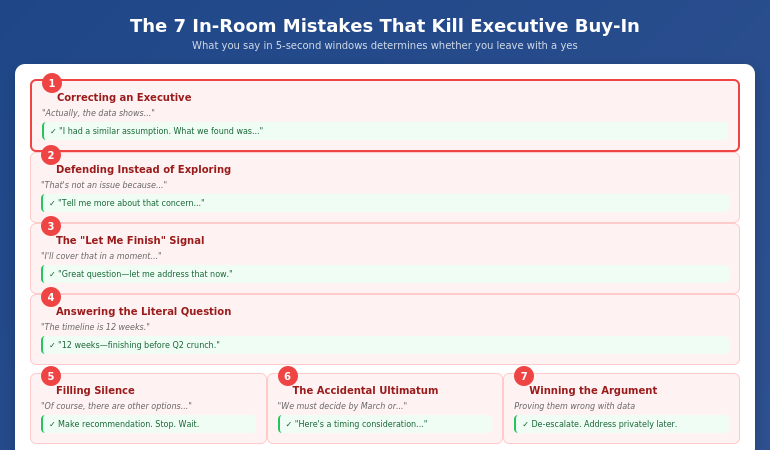
The 7 in-room mistakes that kill executive buy-in with fixes for each

Mistake #1: Correcting an Executive (Even When You’re Right)

This is the mistake that cost me £4M, and I see it constantly.

An executive says something that’s factually incorrect or based on outdated information. You have the data that proves otherwise. Your instinct is to correct them—politely, of course.

What you say: “Actually, the data shows something different…” or “That’s not quite accurate—let me explain…”

What they hear: “You’re wrong and I’m about to prove it in front of your colleagues.”

Executives have egos. More importantly, they have positions to protect. Correcting them publicly—even gently—triggers a defensive response. They stop listening to your content and start protecting their status.

What to say instead:

“That’s a really important point. I had a similar assumption initially. What we found when we dug deeper was…”

This does three things: validates their thinking, admits you once thought the same (so they’re not stupid for thinking it), and introduces new information as discovery rather than correction.

Or try: “You’re right that [acknowledge the valid part of their concern]. The piece that changed our thinking was…”

Find the kernel of truth in what they said—there almost always is one—and build from there rather than contradicting.

⭐ Master the Critical Moments That Win (or Lose) Executive Buy-In

The Executive Buy-In Presentation System teaches you exactly what to say—and what never to say—in the high-stakes moments that determine whether you get approval.

You’ll learn:

  • Language patterns that turn resistance into engagement
  • How to handle objections without triggering defensiveness
  • The psychology behind executive reactions (and how to work with it)
  • Scripts for the 10 most common deal-killing moments

See the Executive Buy-In System on Maven →

Cohort-based programme for senior professionals. See Maven for dates.

Mistake #2: Defending Instead of Exploring

When an executive raises an objection, your instinct is to address it. To explain why it’s not a problem. To defend your proposal.

This instinct is wrong.

What you say: “I understand the concern, but here’s why it’s not an issue…” or “We’ve actually addressed that—let me show you…”

What happens: You’ve just entered an adversarial dynamic. They raised a concern; you dismissed it. Now they have to either accept that their concern was invalid (unlikely) or push harder to prove they were right to raise it (likely).

I watched a colleague lose a £2M consulting engagement this way. The client mentioned concerns about timeline. My colleague immediately launched into a detailed explanation of why the timeline was achievable. Fifteen minutes of defending.

The client wasn’t asking for reassurance. She was asking to be heard.

What to say instead:

“Tell me more about that concern. What specifically worries you about [X]?”

Or: “That’s worth exploring. When you think about [the concern], what would need to be true for you to feel comfortable?”

This does something powerful: it moves you from opposing positions to the same side of the table. You’re now exploring the concern together, not defending against an attack.

Often, when you explore, you discover the stated concern isn’t the real concern. The executive worried about “timeline” might actually be worried about resource allocation, or political dynamics, or a past project that went badly. You can’t address the real concern if you’re busy defending against the stated one.

Mistake #3: The “Let Me Finish” Signal

You’re explaining a key point. An executive interrupts with a question. You say some version of: “I’m going to cover that in a moment” or “Let me just finish this thought” or “Hold that—I’ll get there.”

What you intend: Orderly presentation flow. You have a structure and you’re sticking to it.

What they experience: Their question isn’t important enough to answer now. You value your agenda over their curiosity.

Executives interrupt because something you said triggered a thought they want to explore. That interruption is engagement. It’s interest. It’s exactly what you want.

When you defer their question, you’re telling them their engagement doesn’t matter. Many will stop engaging entirely.

What to say instead:

“Great question—let me address that now.” Then answer it, even if it disrupts your flow. Your slides can wait. Executive engagement cannot.

If the question truly would be answered better with context from later slides: “That’s actually the perfect lead-in to the next section. Mind if I show you something that’ll help frame the answer?” Then go directly to that section.

The key insight: their agenda matters more than your agenda. Flexible presenters who follow executive interest build more trust than rigid presenters who stick to their script. If you struggle with staying composed when your flow is disrupted, see my article on how to stop rambling when nervous.

Mistake #4: Answering the Question They Asked

This sounds counterintuitive, but stay with me.

An executive asks: “What’s the implementation timeline?”

You answer: “Twelve weeks for phase one, then another eight weeks for full rollout.”

Factually accurate. Completely unhelpful.

Because the question behind the question was probably: “Is this going to disrupt Q2?” or “Will this conflict with the ERP migration?” or “Am I going to have to explain a delay to the board?”

The mistake: Answering the literal question without addressing the underlying concern.

What to say instead:

“Twelve weeks for phase one—so we’d complete before the Q2 crunch you’re navigating.” Or: “Twelve weeks, and I’ve coordinated with Sarah’s team to make sure we’re not competing for the same resources as the ERP work.”

If you don’t know the underlying concern, ask: “Before I answer, help me understand what’s driving that question. Is there a timing constraint I should know about?”

Executives are often asking about implications, not facts. The presenter who answers implications builds more trust than the one who answers facts.

⭐ Learn to Read What Executives Are Really Asking

The Executive Buy-In Presentation System teaches you to hear the question behind the question—and respond in ways that build trust instead of triggering resistance.

The programme includes:

  • Decoding executive questions: what they ask vs. what they mean
  • Response frameworks that address concerns without being defensive
  • Practice scenarios with real executive objection patterns
  • Recovery techniques when you sense you’ve lost the room

See the Executive Buy-In System on Maven →

For executives and senior professionals who present to decision-makers.

Mistake #5: Filling Silence

You make your recommendation. The room goes quiet. Executives are thinking.

The silence feels uncomfortable. So you fill it: “Of course, there are other options we could consider…” or “I know this is a big decision…” or “Let me show you a few more supporting points…”

What you’ve just done: Undermined your own recommendation. Signalled that you’re not confident. Given them reasons to delay.

Silence after a recommendation is often good. It means they’re processing. They’re considering. They’re taking you seriously.

When you fill that silence, you interrupt their processing. Worse, you often plant doubts that weren’t there: “Other options? Maybe I should ask about those.”

What to do instead:

Make your recommendation. Then stop talking. Let the silence sit for 5-10 seconds (it will feel like an hour). If you must say something, try: “I’m happy to answer questions, or if it would be helpful, I can walk through the alternatives we considered and why we landed here.”

Notice the difference: you’re offering to provide more information if they want it, not volunteering it out of nervousness.

The executives who get buy-in most consistently are comfortable with silence. They make their case, then wait. They project confidence by not needing to fill every gap.

Mistake #6: The Accidental Ultimatum

You’re trying to convey urgency. The window for this opportunity is closing. You want them to act.

What you say: “If we don’t move forward by March, we’ll lose this opportunity” or “This is a now-or-never situation.”

What they hear: You’re pressuring them. You’re trying to force a decision before they’re ready. You don’t trust them to make good choices on their own timeline.

Even if the urgency is real, framing it as an ultimatum triggers resistance. Executives don’t like being told what to do. They especially don’t like feeling manipulated into decisions.

What to say instead:

“I want to flag a timing consideration. The vendor’s pricing is locked until March 15th—after that, we’re looking at a 20% increase. I’m not trying to rush the decision, but I wanted you to have that context.”

Or: “There’s a window here that I think is worth noting. Here’s what changes if we move in Q1 versus Q2…” Then present the trade-offs neutrally.

The difference: you’re providing information for their decision, not pressuring them toward your preferred outcome. Same facts, different framing, completely different response.

Mistake #7: Winning the Argument, Losing the Room

An executive pushes back. Hard. They’re wrong—you can prove it. You have data, precedents, expert opinions. You can win this argument.

So you do. Point by point, you dismantle their objection. You’re thorough. You’re factual. You’re right.

And you’ve just lost the room.

Because every other executive watched you publicly defeat one of their peers. They’re now thinking: “If I raise a concern, will I get the same treatment?”

The room goes quiet. Not because they’re convinced—because they’ve decided not to engage. They’ll raise their concerns after you leave, in conversations you’re not part of, where decisions will be made without your input.

What to do instead:

When you sense an argument forming, de-escalate: “I think we might be looking at this from different angles. Can we step back? Help me understand the core concern here.”

Or try: “You’re raising something important. Let me make sure I understand it fully before I respond.”

If they’re genuinely wrong about something material, address it one-on-one after the meeting, not publicly in the room. Save their face. Preserve your relationship. Get the same outcome without the collateral damage.

For more on presenting to senior audiences without triggering these dynamics, see my guide on presenting to senior leadership.

What’s the most common mistake that kills executive buy-in?

Correcting executives publicly, even when you’re factually right. When you contradict an executive in front of their peers, you trigger a defensive response that has nothing to do with your proposal. They stop evaluating your idea and start protecting their status. Instead, validate first (“That’s an important point”), then introduce new information as discovery rather than correction (“What we found when we explored further was…”).

How do I handle executive objections without being defensive?

Explore before you defend. When an executive raises a concern, your instinct is to explain why it’s not a problem. Resist this instinct. Instead, ask: “Tell me more about that concern” or “What specifically worries you about that?” This moves you from opposing positions to exploring together. Often, the stated concern isn’t the real concern—and you can’t address what you don’t understand.

What should I do when an executive interrupts my presentation?

Answer their question immediately, even if it disrupts your flow. Interruptions are engagement—exactly what you want. When you defer with “I’ll cover that later,” you signal that your agenda matters more than their interest. Executives who feel unheard stop engaging. Your slides can wait; executive engagement cannot.

⭐ Stop Losing Deals in Critical Moments

The Executive Buy-In Presentation System gives you the exact language, frameworks, and practice you need to handle high-stakes moments without triggering resistance.

What you’ll master:

  • The psychology of executive decision-making under pressure
  • Scripts for the 10 most common buy-in killers
  • Recovery techniques when you sense you’ve lost the room
  • Practice scenarios with feedback from senior peers

See the Executive Buy-In System on Maven →

Cohort-based on Maven. See current dates and availability.

Frequently Asked Questions

Can I recover if I make one of these mistakes mid-presentation?

Sometimes. If you catch yourself early, you can course-correct: “Actually, let me reframe that. What I should have said was…” Acknowledging the misstep shows self-awareness. If you’ve lost an executive (they’ve gone quiet or defensive), consider addressing it directly: “I sense I may have missed something important in how I responded to your question. Can you help me understand what I should be considering?” Humility can recover what defensiveness cannot.

What if the executive is genuinely wrong about something material?

Address it privately if at all possible—after the meeting, one-on-one. If you must address it in the room, use the “I had the same assumption” frame: “That was actually my initial read too. What changed my thinking was…” This corrects without contradicting. You’re sharing a learning journey, not proving them wrong.

How do I know if I’ve lost the room?

Watch for: executives who were engaged going quiet, crossed arms or leaning back, checking phones or watches, questions that become pointed or skeptical rather than curious, and the senior decision-maker deferring to others (“What do you all think?”) instead of engaging directly. These signals don’t mean you’re definitely lost, but they warrant a check-in: “I want to pause and make sure we’re tracking. Is this addressing what matters, or should we shift focus?”

Is it better to prepare answers for tough questions or respond naturally?

Both. Prepare frameworks for common objection patterns, but don’t script word-for-word answers. Scripted responses sound rehearsed and often miss the nuance of the actual question. Know the categories of concerns you might face (timeline, cost, risk, resources, political implications) and have a general approach for each. Then listen carefully to the specific question and adapt. The combination of preparation and presence beats either one alone. For strategic pre-meeting work, see my guide on stakeholder mapping for presentations.

📧 The Winning Edge Newsletter

Weekly insights on executive presentations, stakeholder strategy, and the language patterns that win buy-in.

Subscribe Free →

The 5-Second Difference

That CFO who killed my £4M deal taught me something I couldn’t learn from any presentation training: what you say in critical moments matters more than everything else combined.

Preparation gets you in the room. Slides give you credibility. But the words you choose when an executive pushes back, questions your assumptions, or goes quiet—those 5-second windows determine whether you leave with a yes.

I’ve since learned to pause before responding to tough questions. To validate before correcting. To explore before defending. To welcome interruptions as engagement rather than disruption.

These aren’t natural instincts—they’re learned behaviours that feel wrong until you see them work.

The good news: once you recognise the patterns, you can prepare for them. You can practice the language. You can build the reflexes that turn deal-killing moments into deal-making ones.

Five seconds is long enough to lose everything. It’s also long enough to win.

30 Jan 2026
Senior executive looking bored during generic presentation training course that doesn't match her level

Why Most Presentation Courses Fail Senior Professionals (And What Actually Works)

I sat through a full-day presentation skills course last year. By lunch, I’d learned how to make eye contact and use hand gestures.

I’ve been presenting to boards and C-suites for 24 years. I didn’t need tips on eye contact. I needed to know how to restructure a 47-slide deck for a CFO who gives me 10 minutes. I needed frameworks for handling hostile questions from stakeholders who’ve already decided to say no. I needed strategies for presenting when I’m the most junior person in the room and everyone else has an agenda.

The course taught none of that. It taught what every presentation course teaches: basics that senior professionals mastered a decade ago.

Quick answer: Most presentation courses fail senior professionals because they’re designed for beginners. They focus on foundational skills—eye contact, body language, slide design basics—that executives already have. What senior professionals actually need is strategic-level training: how to structure for executive audiences, how to navigate organisational politics in presentations, how to handle high-stakes situations where the content is complex and the stakes are real. A presentation course for executives should spend 70% of its time on frameworks and strategy, not performance basics.

Why Standard Presentation Courses Fail Executives

After 24 years in corporate banking—JPMorgan Chase, PwC, Royal Bank of Scotland, Commerzbank—and now running a presentation training business, I’ve seen both sides of this problem. I’ve been the frustrated executive in generic courses, and I’ve trained enough senior professionals to know exactly where most programmes go wrong.

The fundamental issue is mismatch. Most presentation courses are built for a general audience—people who present occasionally, who need foundational skills, who haven’t yet developed their own style. These courses cover:

• How to stand and move on stage
• Making eye contact with the audience
• Using hand gestures effectively
• Creating visually appealing slides
• Overcoming basic nervousness

For someone giving their first all-hands presentation, this is valuable. For a VP who presents to the board quarterly, it’s remedial. And sitting through remedial training when you have strategic problems to solve isn’t just boring—it’s actively demotivating.

The second problem is context. Generic courses assume a generic presenting situation: you have time to prepare, your audience is receptive, and your goal is simply to inform or persuade. But senior professional presentations rarely look like that. You’re often:

• Presenting to people more senior than you who have limited time
• Navigating political dynamics where some stakeholders want you to fail
• Handling complex information that can’t be simplified into “three key points”
• Responding to unexpected questions that challenge your credibility
• Presenting bad news without damaging relationships

No amount of eye contact advice helps with these challenges. They require strategic frameworks, not performance tips.

Comparison of generic presentation courses versus executive-level training showing different focus areas and strategy ratios

What Senior Professionals Actually Need

When I work with executives on their presentations, we rarely discuss body language. We discuss structure, strategy, and stakeholder management. Here’s what senior professionals actually need from presentation training:

Executive-specific frameworks

How do you structure a presentation when your CFO gives you 10 minutes but you have 30 minutes of content? How do you open when everyone in the room already knows the background? How do you present a recommendation when you know the CEO has a different preference? These situations require specific frameworks—not general principles.

Stakeholder psychology

Senior presentations are rarely about information transfer. They’re about alignment, buy-in, and political navigation. Understanding what different stakeholders actually want (which is rarely what they say they want), how to handle blockers, and how to build champions before you present—this is the real skill of executive presenting.

High-stakes scenario handling

What do you do when a board member interrupts you on slide 2 with a hostile question? How do you recover when your technology fails in front of the leadership team? How do you present when you’re nervous specifically because the stakes are high and the audience is intimidating? These scenarios need dedicated practice, not a mention in passing. If you struggle with the physical symptoms of high-stakes pressure, techniques like stopping nervous rambling are more useful than generic confidence advice.

Efficiency and leverage

Senior professionals don’t have time to spend hours building a presentation. They need systems for creating executive-quality decks efficiently—often in a fraction of the time traditional approaches require. They need to know which parts of preparation actually matter and which are wasted effort. This is where AI-enhanced workflows become critical—not as a gimmick, but as a genuine time multiplier.

⭐ Presentation Training Built for Senior Professionals

AI-Enhanced Presentation Mastery is a cohort-based course designed specifically for executives and senior professionals—70% strategic frameworks, 30% AI-powered efficiency.

What makes it different:

  • Executive-specific frameworks for board presentations, budget requests, and stakeholder buy-in
  • AI workflows that significantly reduce presentation build time (many participants see 50–75% savings once embedded)
  • Live cohort sessions with peer feedback from other senior professionals
  • No basics—we assume you already know how to present

See Dates & Curriculum on Maven →

Cohort dates and availability listed on Maven. Limited to 20 participants for quality interaction.

The Framework Gap: Strategy vs. Performance

The biggest gap in most presentation courses is the ratio of strategy to performance. Generic courses spend 80% of time on performance (delivery, slides, presence) and 20% on strategy (structure, audience, objectives). For senior professionals, that ratio should be inverted.

Here’s what I mean:

Performance skills are how you deliver: your voice, your movement, your slides, your eye contact. These are important, but they’re also skills that executives have already developed through years of practice. Diminishing returns set in quickly.

Strategic skills are how you think about presenting: how you structure for a specific audience, how you anticipate objections, how you sequence information for decision-makers, how you handle the political context of any given presentation. These skills compound—every improvement makes every future presentation better.

A presentation course for executives should focus on strategic skills because that’s where the leverage is. Teaching a VP to gesture more confidently might marginally improve one presentation. Teaching that same VP how to structure a board update for maximum impact improves every board presentation for the rest of their career.

For more on why most training programmes miss this distinction, see my analysis of why presentation training fails.

How to Evaluate a Presentation Course (Before You Waste Time)

Before investing time in any presentation course, senior professionals should ask these questions:

1. Who is the target audience?

If the course description mentions “overcome fear of public speaking” or “learn the basics of slide design” prominently, it’s not designed for you. Look for language about “executive presentations,” “stakeholder communication,” or “high-stakes scenarios.”

2. What’s the framework-to-tips ratio?

Review the curriculum. Count the modules on strategic frameworks versus the modules on delivery skills. If delivery dominates, the course is built for beginners. You want at least 60% of content focused on structure, audience analysis, and scenario handling.

3. Does it address executive-specific scenarios?

Look for coverage of: board presentations, budget requests, presenting to senior leadership, handling difficult questions, presenting bad news, and navigating organisational politics. If the scenarios are generic (“presenting to a team,” “giving a conference talk”), the course won’t address your real challenges.

4. Is there peer interaction with other senior professionals?

One of the most valuable parts of executive-level training is learning from peers. A cohort of other senior professionals provides context, feedback, and shared experience that solo courses can’t match. Self-paced video courses miss this entirely.

5. Does it incorporate modern tools and efficiency?

In 2026, any presentation course that ignores AI-enhanced workflows is already outdated. Senior professionals need to know how to leverage tools that save time without sacrificing quality. Courses that treat presentation creation as a purely manual process are teaching yesterday’s skills.

For more on the skills gap most training misses, see the presentation skills gap.

⭐ A Course Designed for How Executives Actually Present

AI-Enhanced Presentation Mastery passes every evaluation criteria above—because it was built specifically for senior professionals who are already good at presenting but want to be exceptional.

The curriculum includes:

  • The Executive Presentation Framework (structure for any high-stakes situation)
  • Stakeholder Mapping and Pre-Meeting Alignment strategies
  • AI workflows for 90-minute deck creation
  • Live practice with feedback from instructor and senior peers

See Dates & Curriculum on Maven →

Cohort-based on Maven. See current dates and investment details.

The AI Factor: Why 2026 Changes Everything

There’s a reason I emphasise AI-enhanced presentation skills specifically for senior professionals: time leverage.

Executives don’t have hours to build a presentation. They have limited windows between meetings. The old approach—start from scratch, build slides manually, iterate through multiple drafts—doesn’t fit executive schedules. AI changes this equation fundamentally.

But here’s what most people get wrong about AI and presentations: they think it’s about generating slides. That’s the least valuable application. The real power of AI for executives is in:

Rapid structure iteration — Testing three different presentation structures in 20 minutes instead of building one structure in 3 hours.

Audience analysis at scale — Understanding what matters to different stakeholders before you present, not after.

Content transformation — Taking a 50-page report and extracting the 12 slides that actually matter for an executive audience.

Rehearsal and refinement — Using AI to identify weak points in your argument before a hostile questioner finds them.

The executives who master these workflows don’t just save time—they produce better presentations because they can iterate more. They can test more structures, anticipate more objections, and refine more thoroughly in the same time it used to take to build a first draft.

This is why any presentation course for executives in 2026 must include AI-enhanced workflows. Not as an add-on or a gimmick, but as a core component of how modern executive presenting works.

What should executives look for in a presentation course?

Executives should look for courses that spend at least 60% of time on strategic frameworks rather than delivery basics. Key indicators include: executive-specific scenarios (board presentations, budget requests, stakeholder buy-in), peer interaction with other senior professionals, coverage of AI-enhanced workflows, and explicit acknowledgment that participants already have foundational skills. Avoid courses that prominently feature “overcome fear of public speaking” or “slide design basics” in their marketing.

Why don’t generic presentation courses work for senior professionals?

Generic courses are designed for beginners who need foundational skills like eye contact, body language, and basic slide design. Senior professionals mastered these years ago. What executives need is strategic-level training: how to structure for time-pressed decision-makers, how to navigate organisational politics, how to handle high-stakes scenarios with complex information. The mismatch between what’s taught and what’s needed makes generic courses frustrating and low-value for experienced presenters.

Is AI-enhanced presentation training worth it for executives?

Yes—if the course treats AI as a time multiplier rather than a slide generator. The value for executives isn’t having AI create presentations; it’s using AI to iterate faster, test more structures, transform complex content, and identify weaknesses before presenting. Executives who master these workflows often see significant time savings while producing higher-quality outputs. That time leverage alone makes AI-enhanced training worth the investment.

⭐ Ready for Presentation Training That Matches Your Level?

AI-Enhanced Presentation Mastery is the course I wish existed when I was navigating executive presentations in banking. No basics. No remedial content. Just frameworks and workflows for senior professionals.

What you’ll master:

  • Executive presentation frameworks for any high-stakes situation
  • Stakeholder psychology and pre-meeting alignment
  • AI-powered workflows that significantly reduce creation time
  • Live practice with feedback from peers at your level

See Dates & Curriculum on Maven →

Cohort-based learning with senior professionals. See Maven for dates.

Frequently Asked Questions

How much should executives expect to pay for quality presentation training?

Quality executive presentation training typically costs £500-£2,000 for cohort-based programmes with live instruction and peer interaction. Self-paced video courses are cheaper but miss the peer learning and live feedback that makes executive training valuable. The cost should reflect the level of content, the quality of interaction, and the instructor’s relevant experience. Beware of programmes that charge executive prices but deliver generic content.

Can I improve executive presentation skills on my own?

Partially. You can read frameworks, study examples, and practice independently. But the highest-leverage improvements come from structured feedback and peer interaction—seeing how other senior professionals handle similar challenges, and getting real-time input on your specific presentation problems. Self-study builds knowledge; cohort-based training builds skill. For senior professionals, the combination is most effective.

What’s the time commitment for executive presentation training?

Quality programmes typically require 8-15 hours total, spread across several weeks to allow for practice between sessions. This is significantly less than generic multi-day courses because executive training skips the basics and focuses on high-leverage skills. The time investment should feel efficient—if a course requires days of your time on content you already know, it’s not designed for senior professionals.

How do I know if I’m ready for executive-level presentation training?

You’re ready if: you present regularly to senior audiences, you’ve already developed a personal presentation style, and your challenges are strategic (structure, stakeholder management, high-stakes scenarios) rather than foundational (basic nervousness, slide design, body language). If you’re still working on foundational confidence, start there first—executive presentation skills training builds on basics rather than teaching them.

📧 The Winning Edge Newsletter

Weekly insights on executive presentations, strategic communication, and AI-enhanced workflows for senior professionals.

Subscribe Free →

Your Next Step

If you’ve sat through presentation training that felt too basic, the problem wasn’t you—it was the course. Senior professionals need different content, different frameworks, and different peer interaction than general-audience training provides.

Before investing in any presentation course, evaluate it against the criteria above. Ask specifically about executive scenarios, strategic frameworks, and AI-enhanced workflows. If the provider can’t speak to these directly, the course isn’t designed for your level.

The presentations you give in the next year will shape your reputation, your influence, and your career trajectory. They deserve training that matches the stakes.

Related: If unclear structure is causing you to ramble in presentations, see how to stop rambling when nervous—a structuralised approach helps both your slides and your delivery.

30 Jan 2026
Professional man speaking in meeting with uncertain expression and open hand gesture, searching for words mid-sentence

How to Stop Rambling When Nervous: The 3-Sentence Structure

The question was simple: “Can you give us a quick update on the project?”

What came out of my mouth was anything but quick. I talked for four minutes. I repeated myself twice. I went off on a tangent about a supplier issue that nobody asked about. By the time I stopped, the room had glazed over and my manager was checking her phone.

I knew I was rambling. I could hear myself doing it. But I couldn’t stop.

Quick answer: Nervous rambling happens when anxiety hijacks your working memory, making it impossible to organise thoughts in real-time. The fix isn’t “slow down” or “take a breath”—it’s having a structure so simple you can use it even when your brain is flooded with stress hormones. The 3-sentence structure works: Point (what you’re saying), Reason (why it matters), Example or Action (proof or next step). When you know exactly how your answer will be shaped, you stop filling silence with words.

Why We Ramble When Nervous (The Neuroscience)

Before I became a clinical hypnotherapist specialising in presentation anxiety, I spent 24 years in corporate banking. I’ve been the rambler in the room more times than I’d like to admit. And I’ve watched hundreds of intelligent professionals do the same thing—lose control of their words the moment pressure hit.

Here’s what’s actually happening in your brain when you ramble:

When you feel anxious—someone asks you a question, all eyes turn to you, you’re put on the spot—your amygdala triggers a stress response. Cortisol and adrenaline flood your system. Your heart rate increases. And critically, blood flow shifts away from your prefrontal cortex (where organised thinking happens) toward your limbic system (where survival instincts live).

This is why you can’t “think straight” when nervous. Your brain is literally operating with reduced cognitive capacity. The part of you that organises thoughts, prioritises information, and knows when to stop talking? It’s running on backup power.

So you do what feels safe: you keep talking. Silence feels dangerous when you’re in fight-or-flight mode. Your brain interprets the pause as a threat—they’re judging me, I need to fill this space, I should add more context—and words keep pouring out.

The rambling isn’t a character flaw. It’s a neurological response to perceived threat.

And that’s exactly why “just relax” doesn’t work. You can’t think your way out of a stress response. You need a structure so automatic that it works even when your prefrontal cortex is compromised.

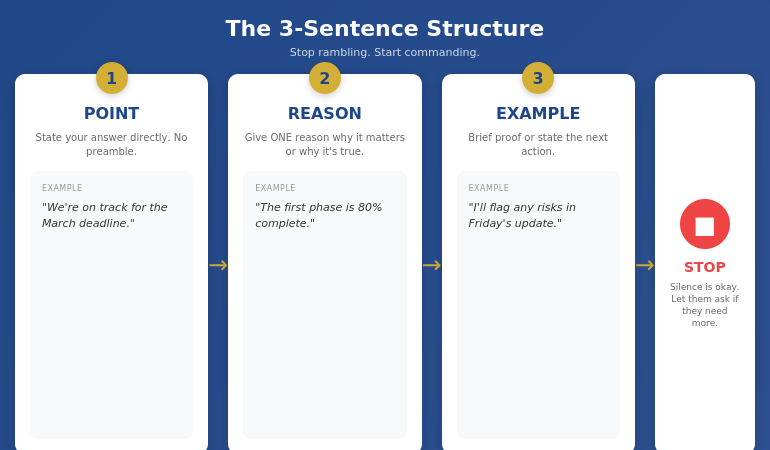
The 3-sentence structure to stop rambling: Point, Reason, Example, then Stop

The 3-Sentence Structure That Stops Rambling

The structure I teach is deliberately simple. It has to be—because you’ll be using it when your brain is running at 60% capacity.

Sentence 1: POINT — State your answer directly. No preamble, no context-setting, no “Well, that’s a great question.” Just the point.

Sentence 2: REASON — Give one reason why this matters or why it’s true. One. Not three. Not five. One.

Sentence 3: EXAMPLE or ACTION — Either give a brief example that illustrates your point, or state the next action. Then stop.

That’s it. Point. Reason. Example. Stop.

Let me show you how this works with the question that started my rambling disaster:

“Can you give us a quick update on the project?”

What I said (rambling): “So, the project is going well, I think we’re making progress, although there have been some challenges with the timeline because the supplier had some issues, which reminded me that we need to talk about the procurement process at some point, but anyway, the team is working hard and we’ve completed most of the first phase, or at least the parts that don’t depend on the supplier, and I think we should be on track for the deadline, assuming nothing else comes up…”

What I should have said (3-sentence structure): “We’re on track for the March deadline. The first phase is 80% complete, with the remaining work dependent on supplier delivery next week. I’ll flag any risks in Friday’s update.”

Same information. Fraction of the words. Zero rambling.

If you’re also struggling with talking too fast when nervous, the 3-sentence structure helps with that too—when you know exactly what you’re going to say, you naturally slow down.

⭐ Stop Rambling. Start Commanding the Room.

Conquer Speaking Fear gives you the complete system for speaking with confidence—including the mental techniques that stop nervous rambling at its source.

What’s included:

  • The neuroscience of why you ramble (and how to interrupt the pattern)
  • Structure templates for answering any question concisely
  • Hypnotherapy-based techniques to reduce anxiety before speaking
  • Practice exercises you can do in 5 minutes before any meeting

Get Conquer Speaking Fear → £39

Created by a clinical hypnotherapist who spent 5 years conquering her own speaking fear

Practice Scenarios: Using the Structure in Real Meetings

The 3-sentence structure only works if you’ve practised it enough that it becomes automatic. Here are five common meeting scenarios with example responses:

Scenario 1: “What do you think about this proposal?”

Point: “I think it’s viable but needs refinement.”
Reason: “The timeline is aggressive given our current resource constraints.”
Example/Action: “I’d suggest we map out dependencies before committing to the April launch.”

Scenario 2: “Can you explain what went wrong?”

Point: “The integration failed because of a data format mismatch.”
Reason: “Our system expected JSON but the vendor sent XML.”
Action: “We’ve implemented validation checks to prevent this going forward.”

Scenario 3: “Where are we on budget?”

Point: “We’re 12% over budget.”
Reason: “The overage is driven by unplanned contractor costs in Q2.”
Action: “I’m presenting options to recover the gap at Thursday’s review.”

Scenario 4: “What’s your recommendation?”

Point: “I recommend we go with Vendor B.”
Reason: “They’re 20% cheaper and have better implementation support.”
Example: “They successfully deployed for three companies in our industry last year.”

Scenario 5: “Can you introduce yourself?”

Point: “I’m Sarah, the project lead for the digital transformation initiative.”
Reason: “I’ve been with the company for six years, most recently leading the CRM migration.”
Action: “I’m here to answer any questions about implementation timelines.”

Notice what’s missing from all of these: filler words, excessive context, tangents, and the word “just.” Each response is complete. Each response is concise. Each response stops.

For more techniques on speaking confidently in meetings, including how to handle interruptions and pushback, see my detailed guide.

What Doesn’t Work (And Why People Keep Suggesting It)

You’ve probably heard all of these. None of them work reliably for nervous rambling:

“Take a deep breath before you speak.”

This can help with physical symptoms, but it doesn’t solve the structural problem. You can take a deep breath and still ramble for three minutes because you don’t know where your answer is going. Breathing helps your body; structure helps your words.

“Just slow down.”

When you’re anxious, your brain interprets pauses as danger. Telling yourself to slow down creates internal conflict—your stress response is pushing you to fill silence while your conscious mind is trying to brake. The result is often choppy, awkward speech that still goes on too long.

“Think before you speak.”

With what cognitive resources? When you’re nervous, your prefrontal cortex is impaired. “Think before you speak” assumes you have full access to your thinking capacity. You don’t. You need a structure simple enough to execute on autopilot.

“Practice more.”

Practice what, exactly? If you practice without a structure, you’re just reinforcing bad habits. Unstructured practice can actually make rambling worse because you’re training your brain that “more words = better prepared.”

The 3-sentence structure works because it gives your impaired brain a simple template to follow. Point. Reason. Example. Stop. Even at 60% cognitive capacity, you can execute three steps.

⭐ Get the Complete Speaking Confidence System

Conquer Speaking Fear combines practical techniques like the 3-sentence structure with deeper work on the anxiety that causes rambling in the first place.

You’ll learn:

  • How to interrupt the anxiety-rambling cycle before it starts
  • The “mental rehearsal” technique used by elite performers
  • How to recover when you catch yourself rambling mid-sentence
  • Building long-term confidence that reduces nervous responses

Get Conquer Speaking Fear → £39

From a clinical hypnotherapist with 24 years in high-pressure corporate environments

Advanced Techniques for Chronic Ramblers

If rambling is a persistent problem—not just occasional nervousness—these advanced techniques can help:

The Physical Anchor

When you finish your third sentence, do something physical: put your pen down, place your hands flat on the table, or shift your weight slightly. This physical action creates a “stop signal” that interrupts the urge to keep talking. Your body tells your brain: we’re done.

The Preview Technique

Before you start speaking, say how many points you’ll make: “Two things on this.” Now you’ve created a public commitment. Your brain knows it needs to stop after two things. This works especially well for longer responses where three sentences isn’t enough.

The Callback Close

End by referencing the question you were asked: “So to answer your question about timeline—March 15th, assuming no supplier delays.” This signals clearly that you’ve completed your answer. It also proves you actually answered what was asked, which ramblers often fail to do.

The Silence Practice

Rambling is often a fear of silence. Practice sitting in silence after you finish speaking. In your next low-stakes meeting, give a short answer and then deliberately wait. Notice that the silence isn’t as uncomfortable as your brain predicted. Nobody judges you for being concise. The more you prove this to yourself, the less you’ll feel compelled to fill space with words.

For related techniques on presentation skills for meetings, including how to handle being put on the spot, see my comprehensive guide.

What causes rambling when speaking?

Rambling is caused by anxiety triggering a stress response that impairs your prefrontal cortex—the part of your brain responsible for organising thoughts and knowing when to stop. When you’re nervous, your brain interprets silence as threatening and pushes you to keep talking. This isn’t a character flaw; it’s a neurological response to perceived pressure. The solution is having a simple structure that works even when your cognitive capacity is reduced.

How do I stop over-explaining at work?

Use the 3-sentence structure: Point (your answer), Reason (why it matters), Example or Action (proof or next step). Then stop. Over-explaining usually happens because you’re uncertain whether you’ve been clear enough, so you keep adding context. The structure gives you confidence that you’ve said enough. If they need more, they’ll ask.

Why do I ramble when I’m put on the spot?

Being put on the spot triggers your fight-or-flight response, which reduces activity in your prefrontal cortex. Without full access to your thinking brain, you can’t organise thoughts in real-time—so you talk while thinking, which produces rambling. The fix is having a structure so simple you can use it on autopilot: Point, Reason, Example, Stop.

⭐ Finally Speak With Confidence and Clarity

Conquer Speaking Fear gives you both the practical structures and the deeper anxiety work to stop rambling for good.

Inside the programme:

  • The 3-sentence structure with practice scenarios
  • Hypnotherapy-based techniques to calm your nervous system
  • How to handle being put on the spot without panicking
  • Building lasting confidence that reduces anxiety over time

Get Conquer Speaking Fear → £39

Instant access. Start using these techniques in your next meeting.

Frequently Asked Questions

What if three sentences isn’t enough to answer the question?

For complex questions, use the Preview Technique: “There are three parts to this.” Then give each part its own Point-Reason-Example structure. You’re not limited to three sentences total—you’re using the structure as a unit. Three parts with three sentences each gives you nine focused sentences, which is plenty for almost any question. The key is that each unit has a clear endpoint.

How do I practice the 3-sentence structure?

Start with low-stakes situations: answering emails out loud, explaining something to a friend, or responding to questions in your head while watching the news. The goal is making the structure automatic before you need it under pressure. Spend one week practising daily for five minutes, and the pattern will start to feel natural.

What if I catch myself rambling mid-sentence?

Stop, pause, and say: “Let me summarise.” Then give your Point in one sentence. It’s completely acceptable to course-correct publicly. In fact, people respect it—it shows self-awareness. What they don’t respect is someone who clearly knows they’re rambling but can’t stop.

Is rambling a sign of anxiety disorder?

Occasional rambling when nervous is normal—most people experience it. If rambling is severely impacting your work performance or causing significant distress, it may be worth speaking with a mental health professional. But for most people, rambling is a skill gap, not a disorder. You haven’t learned a structure for speaking concisely under pressure. That’s fixable.

📧 The Winning Edge Newsletter

Weekly techniques for speaking with confidence, managing presentation anxiety, and commanding any room. No fluff—just what works.

Subscribe Free →

📋 Free: Public Speaking Cheat Sheets

Quick-reference guides for managing nerves, structuring answers, and recovering from mistakes—keep them on your phone for any meeting.

Download Free Cheat Sheets →

Your Next Step

The next time someone asks you a question in a meeting, pause for one second. In that second, identify your Point—the single sentence that answers the question. Then give your Reason. Then your Example or Action. Then stop.

Point. Reason. Example. Stop.

It will feel abrupt at first. Your brain will scream at you to add more context. Resist. Let the silence sit. Watch what happens: nothing bad. People nod. They move on. They respect your conciseness.

The rambling that used to derail your credibility? It’s not a fixed part of who you are. It’s a pattern. And patterns can be interrupted.

Three sentences. That’s all you need.

Related: If unclear slide structure is contributing to your rambling during presentations, see why “Overview” is the worst slide title—the fix often starts with clearer thinking before you speak.

30 Jan 2026
Executive woman with glasses looking frustrated at laptop screen while reviewing presentation slides

Why “Overview” Is the Worst Slide Title (And What to Write Instead)

The CFO glanced at slide 1, saw “Overview,” and started checking his phone.

By slide 3, he wasn’t even pretending to pay attention. The presenter—a talented VP with a genuinely good proposal—had lost the room before she’d said a word. Her slide titles told the CFO exactly what to expect: nothing worth his full attention.

Quick answer: Generic slide titles like “Overview,” “Summary,” “Background,” and “Next Steps” are attention killers. They tell executives nothing and signal that you haven’t thought hard about your message. The fix is simple: every slide title should be a complete sentence that delivers the point of that slide. Instead of “Q3 Results,” write “Q3 Revenue Exceeded Target by 12%.” Instead of “Overview,” write “This Initiative Will Save £2.4M Annually.” Slide title best practices start with one rule: if your title could appear on anyone’s deck, it’s not doing its job.

Why “Overview” Fails Every Time

I spent 24 years in corporate banking—JPMorgan Chase, PwC, Royal Bank of Scotland, Commerzbank. I’ve sat through thousands of presentations and delivered hundreds more. And I can tell you exactly what happens when an executive sees “Overview” as a slide title: nothing.

That’s the problem. “Overview” creates zero anticipation. It makes zero promises. It gives the reader zero reason to pay attention to what comes next.

Think about it from the executive’s perspective. They’re in back-to-back meetings. They have 47 unread emails. They’re thinking about three other problems while you’re presenting. When they see “Overview,” their brain registers: I don’t need to focus yet. This is just setup.

But here’s what most presenters miss: executives don’t read slides sequentially like a novel. They scan. They jump ahead. They look for the slides that matter and skip the ones that don’t. Your slide title is the only thing that tells them whether to pay attention or check out.

“Overview” says: Skip me.

The same is true for every generic title: “Background,” “Context,” “Agenda,” “Summary,” “Next Steps,” “Recommendations.” These words have appeared on so many thousands of slides that they’ve become invisible. They’re wallpaper.

If your slide titles could be swapped into any presentation in your company without anyone noticing, they’re not doing their job.

The Psychology of Executive Reading

Here’s something I learned watching senior leaders consume information: they don’t read presentations—they interrogate them.

An executive looking at your deck is asking one question on every slide: What’s the point? They want the answer immediately. If they have to read three paragraphs of body text to find it, you’ve already lost them.

This is why slide title best practices always come back to one principle: the title IS the point.

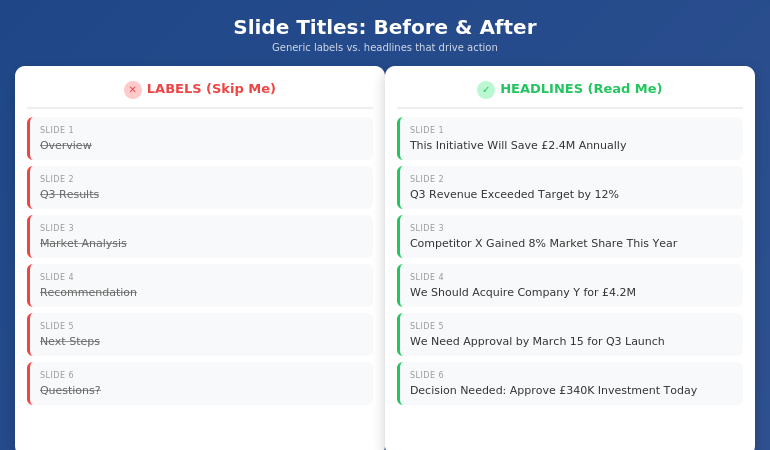
Before and after comparison showing generic slide title labels versus actionable headline titles

When I trained executives at UniCredit, I used to run an exercise. I’d show them a deck with all the body content removed—just the titles. Then I’d ask: “Can you understand the argument from titles alone?”

If the answer was no, the deck failed.

The best executive presentations tell a complete story through titles. You should be able to flip through the slides, read only the headlines, and understand exactly what the presenter is recommending and why. The body text, charts, and graphics are supporting evidence—not the main event.

This is why “Overview” is so damaging. It breaks the narrative. It’s a placeholder where a point should be. When an executive is scanning your deck (and they will scan), “Overview” tells them nothing. It’s a gap in your story.

And if you’re also struggling with how to stop rambling when you present, unclear slide titles are often the root cause—you haven’t clarified your point before you started speaking.

The Headline Formula That Works

The fix for generic slide titles is simple: write headlines, not labels.

A label describes what’s on the slide: “Q3 Results,” “Market Analysis,” “Team Structure.”

A headline delivers the insight: “Q3 Revenue Beat Target by 12%,” “Market Share Is Vulnerable in APAC,” “We Need Three Additional Engineers.”

Here’s the formula I teach:

Every slide title should be a complete sentence that a busy executive could read and understand without seeing the rest of the slide.

This forces you to do something most presenters avoid: commit to a point. When you write “Overview,” you’re not committing to anything. When you write “This Initiative Will Reduce Customer Churn by 23%,” you’ve made a claim. You’ve given the executive something to engage with, challenge, or approve.

The test: Read your slide title out loud. If it sounds like something you’d actually say in conversation—”We’re recommending Option B because it’s 40% cheaper”—it’s a good title. If it sounds like a filing cabinet label—”Recommendation”—rewrite it.

Some presenters worry this makes titles too long. But look at any newspaper. Headlines are complete thoughts, often 8-12 words. That’s not too long—that’s exactly right for conveying meaning at a glance.

Before and After: 10 Slide Title Transformations

Let me show you how this works in practice. I’ve taken 10 common generic titles and transformed them into headlines that actually work. For more examples, see my detailed guide on writing better slide titles with before and after examples.

1. Overview → This Proposal Will Save £2.4M Annually

The original says nothing. The revision states the entire value proposition. An executive knows immediately whether to keep reading.

2. Background → We’ve Lost 3 Key Accounts in 6 Months

Context slides often feel like wasted time. Make them urgent by leading with the problem.

3. Agenda → Three Decisions We Need Today

Agendas are almost always skipped. Tell them what’s at stake instead.

4. Q3 Results → Q3 Revenue Exceeded Target by 12%

Don’t make them hunt for the number. Put the headline in the headline.

5. Market Analysis → Competitor X Has Gained 8% Market Share This Year

Analysis is boring. Insight is interesting. Lead with the “so what.”

6. Recommendation → We Should Acquire Company Y for £4.2M

Don’t hide your recommendation behind a label. State it clearly so decision-makers can react.

7. Timeline → Full Implementation Takes 14 Months

Timeline slides usually show a Gantt chart nobody reads. Put the key number in the title.

8. Budget → This Requires £340K Investment Over 3 Years

Finance people scan for numbers. Make them impossible to miss.

9. Risks → The Main Risk Is Regulatory Delay (40% Probability)

Generic risk slides get ignored. Specific risk titles get discussed.

10. Next Steps → We Need Approval by March 15 to Hit Q3 Launch

Create urgency. Tell them exactly what you need and when you need it.

⭐ Transform Every Slide Title in Your Next Deck

The Executive Slide System gives you the headline formulas, templates, and before/after examples to make every slide command attention.

What’s included:

  • The complete headline formula for executive slides
  • 12 slide templates with pre-written title structures
  • Before/after transformations for every common slide type
  • The “title-first” workflow that saves hours

Get the Executive Slide System → £39

Built from 24 years creating executive presentations in corporate banking

The 7 Worst Slide Titles (And What to Write Instead)

Based on 24 years of reviewing executive presentations, these are the seven most common title mistakes—and how to fix each one.

1. “Overview”

The emptiest word in presentations. Replace with your core message: “This Investment Will Generate 3x ROI in 18 Months.”

2. “Summary”

At the end of a deck, executives know it’s a summary. Tell them what to remember instead: “Three Things to Approve Today.”

3. “Discussion”

This signals you don’t have a point. Replace with the question you actually want answered: “Should We Expand to Germany in Q2?”

4. “Update”

Updates are boring by definition. Lead with what changed: “Project Is Now 2 Weeks Behind Schedule.”

5. “Analysis”

Nobody wants analysis. They want insight. Write the insight: “Pricing Is Our Biggest Competitive Weakness.”

6. “Appendix”

If it’s worth including, it’s worth labeling properly: “Detailed Financial Model” or “Competitor Comparison Data.”

7. “Questions?”

The laziest closing slide. Replace with your call to action: “We Need Budget Approval by Friday” or “Next Step: Schedule Pilot with Team A.”

For a complete system on structuring your executive summary slide, including title formulas and placement strategies, see my detailed guide.

⭐ Never Write a Generic Slide Title Again

The Executive Slide System includes fill-in-the-blank headline templates for every executive slide type—from opening to recommendation to closing.

You’ll get:

  • Headline templates for 12 common executive slide types
  • The “assertion-evidence” structure used in consulting and boardrooms
  • Word-for-word title formulas you can copy and adapt
  • Examples from real executive presentations

Get the Executive Slide System → £39

Built from 24 years in corporate banking and executive presentation coaching

When to Break the Rules

Not every slide needs a sentence-headline title. Here are the exceptions:

Title slides: Your presentation title and your name. That’s it. Don’t add “Overview of Q3 Performance”—just write “Q3 Performance: On Track for Record Year.”

Section dividers: If you’re using divider slides to signal transitions in a long presentation, simple labels like “Phase 2: Implementation” work fine. But limit these to one or two in any deck.

Data-heavy slides: When showing a complex chart or table, sometimes a short label title works better than a long headline. But add a subtitle or callout that delivers the insight: “Revenue by Region” with a callout that says “APAC growth is masking European decline.”

Backup slides: Slides you don’t plan to present but include for Q&A can use simpler labels. But if you’re presenting a slide, it needs a headline.

The rule of thumb: if you’re going to say words while this slide is on screen, the title should do heavy lifting. If the slide is just a reference or transition, you have more flexibility.

What makes a good slide title for executives?

A good slide title for executives is a complete sentence that delivers the point of the slide without requiring them to read the body content. It should be specific, actionable, and impossible to swap into another presentation. Instead of “Market Analysis,” write “We’re Losing Market Share in Three Key Segments.” The test: can an executive understand your argument by reading only the slide titles? If yes, your titles are working.

How long should a slide title be?

Slide titles should be as long as necessary to convey the complete point—usually 8-15 words. Newspaper headlines routinely hit this length and remain scannable. “Q3 Revenue Exceeded Target by 12% Despite Supply Chain Disruption” is 10 words and delivers far more value than “Q3 Results.” Don’t sacrifice clarity for brevity. A specific 12-word title beats a vague 2-word label every time.

Should every slide have a different title format?

No—consistency helps executives scan faster. Use the same title structure throughout your deck: complete sentences that state the point. What should vary is the content and specificity, not the format. If your titles alternate between labels (“Overview”) and headlines (“Revenue Is Up 12%”), the deck feels disjointed. Pick headline-style titles and stick with them.

⭐ Make Every Slide Title Count

The Executive Slide System gives you everything you need to write slide titles that command attention and drive decisions.

Inside the system:

  • The headline formula for executive slides
  • 12 templates with pre-written title structures
  • Before/after examples for every slide type
  • The “title-first” method that cuts creation time in half

Get the Executive Slide System → £39

Instant download. Start using these formulas in your next presentation.

Frequently Asked Questions

What if my company has a template with short title fields?

Most corporate templates have title placeholders that look small, but they can hold more text than you think. Test it—you can usually fit 12-15 words before needing to reduce font size. If the template truly restricts you to 3-4 words, add a subtitle line below with the full headline. The point should be visible at the top of the slide, even if it takes two lines.

Won’t long titles make my slides look cluttered?

No—they make your slides look intentional. A specific headline like “We Recommend Investing £2.4M to Capture the APAC Market” fills the title space with meaning rather than leaving it occupied by a generic label. Clutter comes from too much body text, not from titles that actually say something. In fact, strong titles often let you reduce body content because the point is already clear.

How do I write good titles for data slides?

Lead with the insight, not the data type. Instead of “Revenue Chart” or “Q3 Financials,” write what the data shows: “Revenue Growth Accelerated in Q3” or “Margin Pressure Continues Despite Volume Gains.” The chart is evidence for the claim in your title. If you can’t summarize the data in a headline, you may be showing too much data on one slide.

Should I write titles first or last?

First. Write all your slide titles before you create any content. This forces you to clarify your argument upfront and ensures every slide has a clear purpose. It also makes the rest of the deck easier to build—once you know the point of each slide, the supporting content almost writes itself. The executive presentation template in my system uses this “title-first” workflow.

📧 The Winning Edge Newsletter

Weekly insights on executive presentations, slide design, and high-stakes communication. No fluff—just what works.

Subscribe Free →

📋 Free: Executive Presentation Checklist

The pre-presentation checklist I use before every high-stakes meeting. Includes a slide title audit section.

Download Free Checklist →

Your Next Step

Open your last presentation. Read only the slide titles. Ask yourself: could a busy executive understand my argument without reading anything else?

If the answer is no—if you see “Overview,” “Summary,” “Background,” or any other generic labels—you have work to do. Replace each label with a headline that states the point. Make every title a complete sentence that delivers value on its own.

The CFO who checked his phone during “Overview” would have paid attention to “This Initiative Will Save £2.4M Annually.” Same content. Different title. Completely different outcome.

Your slides are only as good as the attention they earn. And attention starts with the title.

Related: If unclear thinking is leading to rambling when you present, see how to stop rambling when nervous—the solution often starts with clearer slide structure.

29 Jan 2026
Executive sitting alone at boardroom table with hand on forehead after failed presentation, colleagues walking away in background

Stakeholder Mapping for Presentations: The 4-Quadrant Method

The project was dead before I walked into the room.

Five executives. Five hidden agendas. And a significant infrastructure project that several stakeholders had already decided to reject—I just didn’t know it yet.

Quick answer: A stakeholder map is a strategic document that identifies who influences your presentation’s outcome, what each person actually cares about, and how to engage them before you present. The executives who consistently win approval don’t have better slides—they have better stakeholder intelligence. This article shows the mapping approach developed across 25 years in banking and 16 years coaching senior professionals.

Presenting for approval this week? Start with a stakeholder map.

  1. Who actually decides? It’s rarely the most senior person in the room.
  2. What does each person need to say yes? Public criteria and private concerns are different.
  3. Who can kill this before it reaches the room? Name them — then meet them first.

For the complete mapping framework and pre-meeting conversation structure, see the Executive Buy-In Presentation System.

What Is Stakeholder Mapping (And Why Slides Won’t Save You)

Most professionals prepare for presentations backwards. They spend 80% of their time on slides and 20% on understanding the room. The executives who consistently win approval do the opposite.

Stakeholder mapping is the process of identifying every person who influences your presentation’s outcome—not just who’s in the room, but who whispers in the decision-maker’s ear before and after. It answers three questions most presenters never ask:

  • Who actually decides? (Hint: it’s rarely the most senior person)
  • What does each person need to hear to say yes? (Their public criteria and private concerns are different)
  • Who can kill this before it reaches the room? (The blocker you don’t see coming)

I learned this the hard way at JPMorgan Chase. Beautiful deck. Compelling ROI. Standing ovation from the team. The steering committee rejected it in four minutes because I’d missed the one person whose support I actually needed—the operations director who’d been burned by a similar project two years earlier.

The CFO told me afterwards: “Your slides were fine. Your stakeholder work was invisible.”

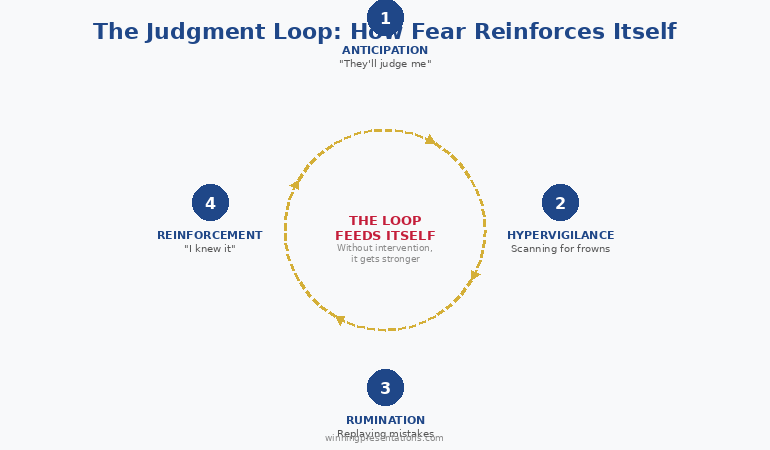
That conversation changed how I approach every high-stakes presentation. If you’re presenting to senior leadership and fear of being judged is holding you back, know this: judgment often comes from misreading the room, not from your delivery.

The Meeting That Changed Everything

Three years later, I faced the same situation—but with very different preparation.

The project: a significant infrastructure upgrade that would disrupt operations for six months. The room: five regional directors, each protecting their own territory. The politics: two of them had competing projects that would lose funding if mine was approved.

The old me would have built a brilliant deck proving ROI. The new me spent three weeks building a stakeholder map instead.

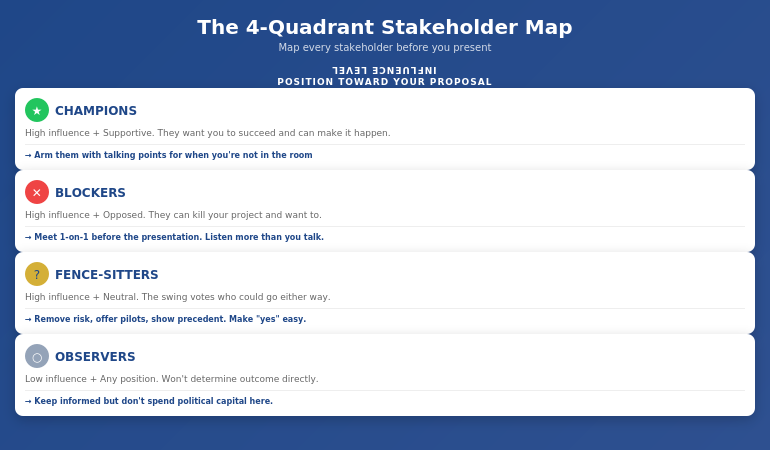
4-Quadrant Stakeholder Map showing Champions, Blockers, Fence-Sitters, and Observers with recommended actions for each quadrant

What I discovered changed everything:

  • The “decision-maker” (the CFO) actually deferred to the operations director on anything that touched day-to-day workflows
  • The loudest opponent wasn’t against the project—he was against being surprised by it
  • The quiet supporter in the corner had tried to push a similar initiative three years ago and been shut down. She had data I needed.
  • Two directors had a private rivalry that had nothing to do with my project but would influence how they voted

Armed with this map, I didn’t walk into the presentation hoping for approval. I walked in knowing I had it.

How? Because I’d had five separate conversations before the meeting. Each stakeholder felt heard. Each concern had been addressed. The presentation wasn’t where I won approval—it was where I confirmed it.

The 4-Quadrant Stakeholder Framework

After using stakeholder mapping across projects of varying scale and stakes, I’ve refined it into a simple framework anyone can use. Every stakeholder falls into one of four quadrants based on two factors: their influence over the decision and their current position toward your proposal.

Quadrant 1: Champions (High Influence + Supportive)

These stakeholders want your project to succeed and have the power to make it happen. Your job: arm them with ammunition. Give them the talking points they’ll use when you’re not in the room. Ask them: “What objections will come up, and how should I address them?”

Quadrant 2: Blockers (High Influence + Opposed)

The most dangerous quadrant. These stakeholders can kill your project, and they want to. Your job: understand their real concern (it’s rarely what they say publicly). Often, blockers aren’t against your idea—they’re against not being consulted, or they’re protecting something you haven’t considered. Meet them one-on-one before the presentation. Listen more than you talk.

Quadrant 3: Fence-Sitters (High Influence + Neutral)

These stakeholders could go either way. They’re often the swing votes. Your job: make it easy to say yes. Remove risk, offer pilot options, show precedent. They don’t want to champion your project—they want to not look foolish for approving it.

Quadrant 4: Observers (Low Influence + Any Position)

These stakeholders won’t determine the outcome, but they might influence someone who does. Your job: don’t ignore them completely—a frustrated observer can become a vocal critic. Keep them informed, but don’t spend your political capital here.

For each person in your stakeholder map, document: their quadrant, their public position, their private concern, who influences them, and what they need to hear from you.

⭐ Walk into your next approval meeting prepared

The Executive Buy-In Presentation System gives you 7 self-paced modules covering stakeholder analysis, case construction, and the presentation structures that hold up to scrutiny. Monthly cohort enrolment — £499, lifetime access to materials.

What’s covered:

  • Stakeholder mapping frameworks for high-stakes decisions
  • Pre-meeting conversation approaches that surface hidden objections
  • The enrollment versus alignment distinction for creating champions
  • Bonus Q&A calls (optional, fully recorded — watch back anytime)

Explore the Buy-In System on Maven →

Self-paced with monthly cohort enrolment.

The Pre-Meeting Conversations That Win Votes

The stakeholder map tells you who to talk to. But what do you actually say?

Most professionals make one of two mistakes: they either skip pre-meeting conversations entirely (hoping their slides will speak for themselves), or they pitch their idea to everyone they meet (creating resistance before the formal presentation).

The executives who consistently win approval do something different. They have discovery conversations—structured dialogues designed to surface concerns, build relationships, and create ownership.

Here’s the framework I use:

No deadlines, no mandatory attendance. Executive Buy-In Presentation System — 7 self-paced modules, £499, lifetime access to materials.

Explore the Buy-In System →

The 3-Part Pre-Meeting Conversation:

Part 1: Understand Their World (70% of the conversation)

“I’m presenting on [topic] next week. Before I finalize anything, I wanted to understand your perspective. What would you need to see for something like this to work for your team?”

Notice: you’re not pitching. You’re learning. Most stakeholders have never been asked what they actually need. This question alone creates goodwill.

Part 2: Surface Hidden Concerns (20% of the conversation)

“What concerns would you have? What’s worked—or not worked—when similar initiatives have been tried before?”

This is where blockers reveal their real objections. Often, they’ll tell you things they’d never say in a group setting. A operations director once told me: “I don’t care about the ROI. I care about not being blamed when something goes wrong during the transition.” That concern never appeared in the official feedback—but it was the only thing that mattered.

Part 3: Create Ownership (10% of the conversation)

“Based on what you’ve shared, here’s how I’m thinking about addressing [their concern]. Does that make sense to you?”

When a stakeholder helps shape your proposal, they become invested in its success. They’re no longer evaluating your idea—they’re defending their own input.

How to Uncover Hidden Agendas

Every executive room has hidden agendas. The question isn’t whether they exist—it’s whether you know what they are before you present.

Across 25 years at JPMorgan Chase, PwC, Royal Bank of Scotland, and Commerzbank, I watched technically superior proposals lose to politically savvy ones. Not because politics is more important than substance—but because ignoring politics is a form of arrogance that executives punish.

Here’s how to uncover what’s really driving the decision:

Ask the Executive Assistant

The EA often knows more about what’s really happening than anyone in the room. A simple question—”Is there anything I should be aware of before this meeting?”—can reveal landmines you’d never see coming.

Follow the Budget Trail

Who else is competing for the same resources? What got funded last quarter—and what got cut? Your proposal doesn’t exist in isolation. It exists in a portfolio of competing priorities.

Map the Relationships

Who mentored whom? Who’s been passed over for promotion? Who has a track record of opposing this type of initiative? Understanding how to present to a board of directors means understanding that board dynamics are rarely about the agenda item in front of them.

Look for the “Real Decision-Maker”

The person with the highest title isn’t always the person who decides. In the infrastructure project above, the CFO had final authority—but he would never approve anything the operations director opposed. The real decision was made in a hallway conversation I wasn’t part of. My stakeholder map told me that. My pre-meeting work made sure that conversation went in my favour.

⭐ Stop guessing what your stakeholders need to say yes

The Executive Buy-In Presentation System is the self-paced framework for decoding stakeholder resistance and building the case that addresses it — 7 modules, monthly cohort enrolment, optional recorded Q&A. £499, lifetime access.

Explore the Buy-In System on Maven →

Self-paced with monthly cohort enrolment.

3 Stakeholder Mapping Mistakes That Kill Projects

After years coaching senior professionals through high-stakes presentations, I see the same mistakes repeatedly. Each one is easy to make and expensive to fix.

Mistake #1: Mapping Titles Instead of Influence

Your stakeholder map lists “CFO, COO, VP Operations” because those are the names on the meeting invite. But influence doesn’t follow org charts. The CFO might defer to their trusted advisor on technical matters. The COO might be checked out on this topic entirely. The VP Operations might have the CEO’s ear because they golf together.

The fix: For each stakeholder, ask: “Who do they listen to? Who influences their thinking on this topic specifically?” Map the shadow org chart, not the official one.

Mistake #2: Assuming Silence Means Support

You present your proposal. Three executives nod. Two stay quiet. You assume the quiet ones are fine with it.

They’re not. They’re waiting. They’ll voice their objections later—in the hallway, in a follow-up email, in a private conversation with the decision-maker. By then, your proposal is dead and you don’t know why.

The fix: Silence is a warning sign, not a green light. If someone hasn’t expressed a position, you don’t have their support—you have their tolerance. Find out what they’re really thinking before the meeting, not after.

Mistake #3: Treating All Stakeholders Equally

You have a week to prepare. You spend equal time with every stakeholder. The result: you know a little about everyone and not enough about anyone.

The fix: Your stakeholder map should be prioritized ruthlessly. Spend 80% of your pre-meeting time on the 20% of stakeholders who will actually determine the outcome. A deep relationship with two key influencers beats shallow relationships with ten observers.

Understanding what it takes to get executive buy-in means accepting that some stakeholders matter more than others—and acting accordingly.

What is stakeholder mapping in presentations?

Stakeholder mapping is the process of identifying every person who influences your presentation’s outcome, understanding their position, and strategically engaging them before you present. It answers three questions: Who actually decides? What does each person need to hear? Who can kill this quietly? The goal is to secure approval through pre-meeting work, so the presentation confirms what’s already been agreed—not where you hope to persuade.

How do you identify key stakeholders for a presentation?

Start with the meeting invite, then expand. Ask: Who influences the decision-maker? Who has veto power? Who’s been burned by similar proposals? Who has competing priorities? Map both formal authority (titles) and informal influence (relationships, expertise, history). The most important stakeholders often aren’t in the room—they’re the people the decision-maker calls after the meeting.

How do you present to multiple stakeholders with different agendas?

You don’t try to address every agenda in the room—you address each agenda before the room. Use your stakeholder map to have individual conversations where you surface each person’s real concerns and incorporate their input into your proposal. When you present, acknowledge the different perspectives: “I know some of you are focused on risk, others on timeline, others on budget. Let me show you how this addresses each.” The preparation makes the presentation feel effortless.

⭐ Built on 25 years in corporate banking

The Executive Buy-In Presentation System is the structured framework developed across 25 years in corporate banking and 16 years coaching senior professionals across financial services, insurance, consulting, and technology. £499, lifetime access to materials.

What you get:

  • 7 self-paced modules on stakeholder analysis, structure, and delivery
  • Pre-meeting conversation frameworks with exact language
  • Approaches for identifying real decision-makers and influencers
  • Bonus Q&A calls (optional, fully recorded — watch back anytime)
  • Lifetime access to all materials

Explore the Buy-In System on Maven →

Self-paced with monthly cohort enrolment — new cohort opens every month.

Frequently Asked Questions

Isn’t this just office politics?

Stakeholder mapping isn’t manipulation—it’s respect. You’re taking the time to understand what each person actually needs, rather than assuming your brilliant slides will convince everyone. The executives who dismiss this as “politics” are often the ones who get blindsided by rejections they didn’t see coming. Understanding organizational dynamics is a professional skill, not a character flaw.

What if I don’t know the stakeholders well enough?

Start with what you know, then expand. Ask your sponsor or champion: “Who should I talk to before this meeting?” Ask trusted colleagues: “What should I know about the people in this room?” Even thirty minutes of stakeholder research is better than none. The goal isn’t perfect intelligence—it’s better intelligence than you had before.

How much time does stakeholder mapping actually take?

For a typical steering committee or board presentation, plan for 3-5 hours of stakeholder work spread across 1-2 weeks. That includes creating the initial map (1 hour), having pre-meeting conversations (2-3 hours total), and refining your approach based on what you learn. This time investment pays for itself many times over—a rejected proposal wastes far more than 5 hours.

What if the stakeholder landscape changes at the last minute?

It will. Someone gets pulled into another meeting. A new executive joins. Priorities shift overnight. Your stakeholder map isn’t a static document—it’s a living framework. Update it as you learn new information. The executives who handle last-minute changes well are the ones who’ve done enough stakeholder work to understand the underlying dynamics, not just the surface positions.

📧 The Winning Edge Newsletter

Weekly insights on executive presentations, stakeholder strategy, and high-stakes communication. No fluff—just what works.

Subscribe Free →

📋 Free: Executive Presentation Checklist

The pre-presentation checklist I use before every high-stakes meeting. Covers stakeholder prep, slide structure, and room setup.

Download Free Checklist →

Your Next Step

The stakeholder map for that infrastructure project took three hours to create. The conversations it enabled took another six hours spread across two weeks. The approval that followed took about four minutes once I walked into the room.

If you’re preparing for a high-stakes presentation—budget approval, project sign-off, board update, client pitch—start your stakeholder map today. Identify the four quadrants. Find your champions and your blockers. Have the pre-meeting conversations that turn a stressful presentation into a predictable formality.

And if you want the complete system—templates, scripts, frameworks, and live feedback on your actual presentations—join the Executive Buy-In Presentation System on Maven.

The decision isn’t made in the meeting. It’s made before. Your stakeholder map makes sure you’re part of those conversations.

Related: If presentation anxiety is part of what’s holding you back from stakeholder conversations, read how to handle the fear of being judged when speaking.

About Mary Beth Hazeldine
Owner & Managing Director of Winning Presentations. 25 years in corporate banking at JPMorgan Chase, PwC, Royal Bank of Scotland, and Commerzbank taught me that the best proposals fail without stakeholder work. The pre-meeting map is the step separating presentations that get approved from presentations that get “tabled for further review.”

29 Jan 2026
Confident business leader reviewing presentation on laptop with focused expression and minimal workspace

I Had 4 Hours a Week to Improve My Presentations. Here’s What Actually Moved the Needle

My calendar was a disaster. Back-to-back meetings. Endless email. Two direct reports who needed constant coaching.

And somewhere in that chaos, I was supposed to “work on my presentation skills.”

Every article I found assumed I had hours to practice. Record yourself! Watch it back! Do it again! Join Toastmasters! Find a speaking buddy!

I had maybe four hours a week—total—that weren’t already claimed. And most of those were fragmented: 30 minutes here, 45 minutes there.

So I stopped trying to follow the standard advice. Instead, I reverse-engineered what actually moves the needle for busy leaders. The answer wasn’t more practice time. It was smarter practice—focused on the three levers that create 80% of the impact.

Quick Answer: Presentation skills development for busy leaders requires ruthless prioritisation. Focus on three levers: structure (how you organise information), delivery (how you use voice and pacing), and presence (how you command attention). Most leaders only need 2-4 hours per week of focused practice—but it must target the right skills in the right order. Framework first, then refinement.

⏱️ Presenting This Week? Your 25-Minute Head Start

Before diving into the full roadmap, here are three things you can do right now:

  1. Rewrite your opening (10 min) — Start with your recommendation or key message, not background. What do you want them to do?
  2. Cut 30% of your slides (10 min) — Move anything that’s “nice to have” to an appendix. Keep only what directly supports your ask.
  3. Script your close (5 min) — Write the exact words you’ll use to ask for the decision. “I’d like your approval to [specific action] by [date].”

These three changes will improve your next presentation more than hours of slide polishing. Now read on for the complete system.

🎯 Is This Your Situation?

  • You’re senior enough that presentations matter—but too busy to spend hours practicing
  • You’ve plateaued at “good enough” and can’t seem to break through
  • Generic advice (“just practice more!”) doesn’t fit your reality
  • You want a roadmap, not a random collection of tips
  • You need results in weeks, not years

If this sounds familiar, keep reading. This roadmap was built for exactly your constraints.

The Realisation That Changed Everything

I spent years believing I needed more time to improve. More practice sessions. More feedback. More reps.

Then I noticed something odd: the best presenters in my organisation weren’t the ones with the most free time. They were often the busiest—running divisions, managing crises, juggling impossible demands.

What they had wasn’t more time. It was a system. A framework they could apply to any presentation, regardless of how little prep time they had.

When I finally asked one of them directly—a CFO who could command any room despite preparing most presentations on the train—she said something I’ve never forgotten:

“I don’t practice presentations. I practice principles. The presentation just follows.”

That’s when I understood: improving your presentations isn’t about finding more hours. It’s about knowing exactly which skills to develop, in which order, with which exercises. Everything else is noise.

Why Generic Presentation Advice Fails Busy Leaders

Most presentation advice is written for people with unlimited time and no constraints. It assumes you can:

— Record every presentation and review it
— Attend weekly practice groups
— Rehearse the same deck five times before delivery
— Hire a coach for ongoing feedback

If you’re a senior leader, none of that is realistic. You’re preparing presentations in the gaps between other work. Sometimes you get the deck 30 minutes before you present it. Sometimes you’re presenting someone else’s material entirely.

The real question isn’t “how do I practice more?”

It’s “what’s the minimum effective dose that actually improves my presentations?”

After 24 years of presenting in banking environments—and training executives who face the same constraints—I’ve identified three levers that create the vast majority of impact. Everything else is optimisation at the margins.

For more on how frameworks beat generic tips, see my guide on the executive presentation framework that AI can’t replace.

The Three Levers That Create 80% of Impact

Presentation skills development isn’t one skill—it’s a cluster of skills that interact. But not all skills are equal. Three levers drive most of the results:

Lever 1: Structure

How you organise information determines whether audiences follow you or lose you. Structure is invisible when done well—the presentation just “flows.” But when structure is weak, no amount of charisma saves you.

Structure is also the highest-leverage skill because it transfers. Learn to structure once, and every presentation improves automatically.

Lever 2: Delivery

Voice, pacing, pauses, emphasis. Delivery is how you bring structure to life. The same content delivered with poor pacing feels boring; delivered with good pacing, it feels compelling.

Delivery is trainable but requires deliberate practice. Most people never improve because they never isolate the specific delivery skills that need work.

Lever 3: Presence

How you occupy space. How you handle silence. How you respond when challenged. Presence is what separates good presenters from people who command rooms.

Presence is partly psychological (confidence, calm under pressure) and partly physical (posture, eye contact, movement). Both can be developed.

Presentation skills development roadmap showing three phases structure delivery and presence with timeline

The order matters. Structure first, because it’s foundational. Delivery second, because it activates structure. Presence third, because it multiplies everything else.

Trying to develop presence before you have solid structure is like polishing a car with a broken engine. It might look good, but it won’t get you anywhere.

⭐ The Complete Development System for Busy Leaders

AI-Enhanced Presentation Mastery is a structured cohort programme that develops all three levers—in the right order, with the right exercises, in a time-efficient format designed for senior professionals.

What you’ll develop:

  • The executive structure framework (70% of the programme)
  • AI-enhanced preparation workflows that often cut creation time significantly
  • Delivery and presence techniques for high-stakes environments

Learn More About the Programme →

Live cohort programme on Maven. Limited to 20 participants for hands-on feedback.

Phase 1: Structure (Weeks 1-4)

Structure is where most presentation improvement should begin—and where most busy leaders skip ahead too quickly.

Week 1-2: The Core Framework

Learn one structural framework deeply. Not five frameworks superficially. One framework you can apply to any presentation type: board updates, client pitches, team meetings, all-hands presentations.

The framework I teach has three components: Context (why this matters now), Content (what you need to know), and Call-to-action (what happens next). Every presentation maps to this structure.

Week 3-4: Application Practice

Take three real presentations from your calendar. Restructure each using the framework. You don’t need to deliver them differently—just reorganise the information.

This is where the skill becomes automatic. By the end of Week 4, you should be able to look at any presentation and immediately see where the structure is weak.

Time investment: 2-3 hours per week. Can be done in fragments.

For more on why structure is foundational, see my guide on presentation skills training that actually works.

Phase 2: Delivery (Weeks 5-8)

With structure solid, delivery becomes the multiplier. The same well-structured content can land with impact or fall flat—delivery makes the difference.

Week 5-6: Voice and Pacing

Most leaders speak too fast when presenting. Not because they’re nervous (though that’s part of it) but because they’ve never practised deliberate pacing.

Exercise: Take one section of an upcoming presentation. Deliver it three times: first at normal speed, then deliberately 30% slower, then finding the pace that feels right. Record the third version.

Week 7-8: Strategic Pauses

Pauses are the most underused tool in presentation delivery. A pause before a key point creates anticipation. A pause after creates absorption time. Most presenters fill every silence with “um” or “so.”

Exercise: Identify three moments in your next presentation where a 2-second pause would add impact. Mark them in your notes. Deliver them deliberately.

Time investment: 2-3 hours per week. Requires some uninterrupted practice time.

Want Delivery Exercises Designed for Senior Professionals?

AI-Enhanced Presentation Mastery includes specific delivery drills calibrated for busy leaders, plus live feedback on your actual presentations.

Learn More About the Programme →

Phase 3: Presence (Weeks 9-12)

Presence is what remains when structure and delivery are handled. It’s the quality that makes some presenters magnetic—and it’s more trainable than most people believe.

Week 9-10: Physical Presence

Posture, eye contact, use of space. These aren’t soft skills—they’re signals that audiences read unconsciously.

Exercise: Before your next presentation, stand for 2 minutes in an expansive posture (feet shoulder-width, arms uncrossed, chest open). Many leaders find this helps shift their physiological state before high-stakes moments. Then carry that posture into the room.

Week 11-12: Psychological Presence

The ability to stay calm when challenged. To handle silence without rushing to fill it. To respond to hostile questions without becoming defensive.

This is partly technique (specific frameworks for handling Q&A) and partly mindset (understanding that presence comes from internal state, not external validation).

Time investment: 2-4 hours per week. Includes real presentation opportunities.

How long does it take to improve presentation skills?

With focused practice on the right skills, most leaders notice meaningful improvement within 4-6 weeks. Significant transformation typically takes 90 days of consistent work. The key is deliberate practice on specific skills—not generic “presenting more often.”

Can you improve presentation skills without a coach?

Yes, but progress is typically slower without feedback. Self-study works for structure and some delivery skills. Presence and advanced delivery usually benefit from external perspective—whether a coach, peer group, or structured programme with feedback built in.

What’s the fastest way to get better at presentations?

Focus on structure first. It’s the highest-leverage skill and transfers to every presentation. Most leaders who feel stuck are actually stuck on structure—they’ve been trying to improve delivery and presence without the foundation. Fix structure, and everything else becomes easier.

⭐ Accelerate Your Development With Expert Guidance

The roadmap above works. But working through it with expert feedback and a cohort of peers accelerates results dramatically.

AI-Enhanced Presentation Mastery includes:

  • Live sessions covering structure, delivery, and presence
  • AI workflows that often cut preparation time significantly
  • Direct feedback on your actual presentations

Learn More About the Programme →

Next cohort starts soon. 70% framework, 30% AI enhancement.

The 4-Hour Weekly Rhythm

Here’s how to structure your limited time for maximum impact:

Hour 1: Learning (can be fragmented)

Read, watch, or listen to material on your current focus area. This can happen in 15-minute blocks: commute time, lunch, waiting for meetings to start.

Hour 2: Application (needs focus)

Take what you learned and apply it to a real upcoming presentation. Restructure. Rewrite. Mark delivery points. This works best in a single focused block.

Hour 3: Practice (needs privacy)

Actually deliver a section out loud. Not in your head—out loud. Record if possible. This requires uninterrupted time, but even 30 minutes twice per week compounds.

Hour 4: Reflection (can be fragmented)

After each real presentation, spend 15 minutes noting what worked and what didn’t. This is where learning consolidates. Most people skip this—and lose 80% of the development value.

Four hours. Sixteen weeks. The three levers. That’s the roadmap.

Want to Compress This Timeline?

AI-Enhanced Presentation Mastery covers the complete framework in a structured cohort format—with expert guidance and peer feedback built in.

Learn More About the Programme →

For more on how AI can enhance (not replace) your presentation workflow, see my guide on AI presentation workflows that actually work.

⭐ Ready to Accelerate Your Presentation Development?

AI-Enhanced Presentation Mastery is a live cohort programme for senior professionals who want to develop executive-level presentation skills in a time-efficient format.

What makes it different:

  • 70% framework development, 30% AI enhancement (not an AI gimmick)
  • Limited to 20 participants for meaningful feedback
  • Designed for busy leaders with real time constraints

Learn More About the Programme →

Live on Maven. Built from 24 years of executive presentation experience.

Frequently Asked Questions

How much time per week do I really need to improve my presentations?

Four hours per week is the minimum effective dose for meaningful improvement. Less than that and progress is too slow to maintain momentum. More than that isn’t necessary for most leaders—it’s about quality of practice, not quantity. The key is consistency over 12-16 weeks rather than intensity over a few weeks.

Should I focus on one skill at a time or work on everything?

Focus on one skill at a time, in sequence. Structure first (weeks 1-4), then delivery (weeks 5-8), then presence (weeks 9-12). Trying to improve everything simultaneously dilutes focus and slows progress. Each skill builds on the previous one.

What if I don’t have time to practice before presentations?

That’s actually the point of framework-based development. Once you’ve internalised the structure framework, you don’t need hours of prep—you can apply it quickly to any content. The 90-day development period is an investment that pays dividends in every future presentation.

Is presentation development different for senior leaders?

Yes. Senior leaders face unique constraints (less prep time, higher stakes, more diverse audiences) and unique opportunities (more real presentation reps, more authority in the room). Generic presentation advice doesn’t account for these differences. Development programmes designed for executives focus on high-leverage skills that work under real-world constraints.

Get Weekly Presentation Insights

Actionable advice for busy leaders—no fluff, just what works.

Subscribe to The Winning Edge →

Related: Structure starts with understanding what your audience actually needs. Read What Executives Actually Want From Your Presentation to see how decision-first structure works in practice.

The Bottom Line

Presentation skills development doesn’t require endless hours. It requires focus on the right skills, in the right order, with deliberate practice.

Structure first. Delivery second. Presence third. Four hours per week. Twelve to sixteen weeks.

That’s the roadmap. The question is whether you’ll actually follow it—or keep waiting for more time that never comes.

Your next step: Identify your next presentation. Before you build any slides, write out the structure: Context (why this matters now), Content (what they need to know), Call-to-action (what happens next). That single exercise will improve your presentation more than hours of slide polishing.

Mary Beth Hazeldine is the Owner of Winning Presentations, with 24 years of experience presenting in high-stakes banking environments at JPMorgan Chase, PwC, Royal Bank of Scotland, and Commerzbank. She has trained thousands of executives on presentation capability that works within real-world time constraints.

29 Jan 2026
Woman looking anxious before presenting with thought bubble showing worried inner critic

Every Time I Stood Up to Speak, the Same Thought Hijacked Me.

“They can all see you’re faking it.”

That was the thought. Every single time. Standing up in meetings. Walking to the front of a room. Unmuting on a video call. The same voice, the same accusation: they’re watching you fail.

For five years, I believed it was true. The fear of being judged when speaking wasn’t just uncomfortable—it ran my career. I turned down opportunities. I stayed silent when I had something valuable to say. I spent hours rehearsing, then hours afterward replaying every stumble.

Then I trained as a clinical hypnotherapist. And I discovered something that changed everything: the judgment I feared wasn’t coming from the audience. It was coming from inside my own head—and it had been lying to me the whole time.

Quick Answer: The fear of being judged when speaking is a cognitive loop—your brain predicting criticism, scanning for evidence, then “confirming” the prediction with selective attention. In practice, audiences are far more generous than speakers imagine. Breaking the loop requires understanding that most judgment you fear is projection: your inner critic’s voice, not actual audience opinion.

🎯 Does This Sound Familiar?

  • You replay presentations for hours, fixating on every mistake
  • You assume a neutral face means disapproval
  • You feel like everyone noticed that one stumble—even when no one mentions it
  • You avoid speaking opportunities because the judgment feels unbearable
  • You’ve been told you’re “too hard on yourself”—but can’t seem to stop

If three or more apply, you’re caught in the judgment loop. There’s a way out—keep reading.

Want a Structured Way to Break the Loop?

For readers who prefer a guided framework over working through techniques alone, Conquer Speaking Fear walks through the cognitive and physiological work step-by-step — designed by a qualified clinical hypnotherapist.

Explore the Programme →

The Moment I Realised I’d Been Wrong for Years

The turning point came during my hypnotherapy training. We studied a cognitive distortion called “mind reading”—the assumption that you know what others are thinking.

I realised I’d been doing it for my entire career.

Every frown in the audience meant disapproval. Every glance at a phone meant boredom. Every person who didn’t smile was silently cataloguing my failures.

Except none of it was real. I was projecting my own self-criticism onto faces that were actually neutral, distracted, or simply processing information.

When I finally started asking for actual feedback after presentations, the gap between my perception and reality was staggering. “Clear and confident,” people said. “Really useful.” Meanwhile, I’d spent the previous night convinced I’d humiliated myself.

The fear of being judged when speaking wasn’t coming from the audience. It was coming from a voice in my own head—and that voice had been running the show for five years.

The Judgment Loop: Why Your Brain Creates Critics That Don’t Exist

The fear of being judged isn’t irrational—it’s an ancient survival mechanism running outdated software.

Thousands of years ago, social rejection meant death. Being cast out from the tribe meant no protection, no food, no survival. Your brain evolved to be hyper-vigilant about social threats—scanning constantly for signs of exclusion.

The problem? That same brain now treats a Tuesday morning team meeting like a life-or-death tribal evaluation.

The judgment loop works in four stages:

Stage 1: Anticipation. Before you speak, your brain predicts negative outcomes. “They’ll think you’re incompetent. They’ll see through you. They’re already judging.”

Stage 2: Hypervigilance. During the presentation, you scan for evidence confirming those predictions. A frown. A yawn. Someone checking their phone. Each gets flagged as “proof.”

Stage 3: Rumination. Afterward, you replay every micro-moment, constructing a narrative of failure. The frown becomes contempt. The yawn becomes boredom. The silence becomes criticism.

Stage 4: Reinforcement. This post-event analysis “proves” your fears were justified—making the anticipation worse next time.

The loop feeds itself. Without intervention, it strengthens with every presentation.

#image_title

Fear of being judged when speaking diagram showing the judgment loop cycle of anticipation hypervigilance rumination and reinforcement

What Audiences Actually Think (The Research)

Cognitive psychology research consistently shows the same thing: audiences are far more generous than speakers believe.

The Illusion of Transparency

Speakers dramatically overestimate how visible their nervousness is. In studies, presenters rated their anxiety as obvious; audiences barely noticed. Your racing heart, sweaty palms, and internal panic are largely invisible to everyone but you.

The Audience Wants You to Succeed

Most audiences are sympathetic, not critical. They’re not hoping you’ll fail—they’re hoping you’ll give them something useful. When you stumble, their instinct is usually empathy, not judgment.

Think about your own experience. When a speaker loses their place, do you think “what an idiot”? Or “that happens to everyone”?

Attention Is Scattered, Not Focused

You feel like every eye is drilling into you, evaluating every word. In reality, audience attention is distributed. People are thinking about their next meeting, their lunch, their own concerns. You’re not the centre of their mental universe—even while you’re speaking.

This is liberating, not dismissive. The judgment you fear isn’t happening because people aren’t paying the microscopic attention your brain assumes.

For a deeper look at building sustainable confidence, see my guide on genuine presentation confidence.

⭐ Stop the Loop Before Your Next Presentation

The fear of being judged isn’t something you manage—it’s something you can resolve. Get the complete system for rewiring how you experience speaking.

Conquer Speaking Fear includes:

  • The psychological framework behind judgment fear (and how to dismantle it)
  • NLP techniques to interrupt the rumination loop
  • Pre-presentation protocols that prevent the spiral before it starts

Get Conquer Speaking Fear → £39

Created by a clinical hypnotherapist who spent 5 years trapped in the same loop.

The Spotlight Effect: Why You Feel Watched When You’re Not

Psychologists call it the “spotlight effect”—the tendency to believe others are paying more attention to us than they actually are.

In one famous study, participants wore embarrassing t-shirts and estimated that about half the people they encountered noticed. The actual number? Less than 25%.

When speaking, the spotlight effect intensifies. You feel like you’re under a microscope when you’re actually just… talking to people who are half-listening while thinking about their own lives.

Why does this matter?

Because the fear of being judged is based on a false premise: that people are watching you closely enough to judge you in the first place.

They’re not.

That stumble you replayed forty times? Most people didn’t register it. That “um” that haunts you? Nobody counted. That moment you lost your place? They assumed you were pausing for effect.

The spotlight you feel isn’t real. It’s a cognitive illusion created by a brain that evolved to overestimate social threats.

Why am I so afraid of being judged when I speak?

Fear of judgment when speaking stems from your brain’s ancient threat-detection system treating social evaluation like physical danger. This was useful for tribal survival—social rejection once meant death. But it creates false alarms in modern contexts. The fear feels real because your nervous system can’t distinguish between actual threat and imagined social rejection.

How do I stop caring what people think when presenting?

You don’t stop caring—you recalibrate. The goal isn’t indifference but accurate perception. When you understand that most “judgment” is projection (your inner critic, not actual audience opinion), you can focus on connection rather than performance. Cognitive reframing and pre-presentation protocols help shift this automatically.

Is fear of judgment a form of anxiety?

Yes—fear of being judged when speaking is a core component of social anxiety and performance anxiety. It involves the same neural pathways: amygdala activation, stress hormones, hypervigilance for threat. The good news is that anxiety responses can be rewired with the right techniques.

Your Inner Critic Isn’t Protecting You—It’s Sabotaging You

Here’s the uncomfortable truth: the harshest judge in any room is the one inside your own head.

Your inner critic sounds like it’s helping. “Don’t mess up. They’re watching. Be careful.” But this voice doesn’t protect you from judgment—it creates the anxiety that undermines your performance.

The inner critic creates a self-fulfilling prophecy:

You fear being seen as nervous → The fear makes you nervous → The nervousness confirms the fear was “justified.”

Meanwhile, the audience sees someone who seems slightly tense and thinks nothing of it. The “judgment” exists only in the loop between your ears.

The voice isn’t objective

If you recorded your inner critic’s commentary and played it back, you’d recognise it as absurdly harsh. “Everyone thinks you’re incompetent” is not reasonable analysis—it’s catastrophising. But in the moment, it feels like truth.

Part of breaking the judgment loop is learning to hear that voice as a voice—not as reality. It has opinions. Those opinions are usually wrong. You don’t have to believe everything it says.

For more on the physical side of this response, see my guide on managing high-stakes presentation nerves.

For the Inner Critic Loop

The structured programme for silencing the inner critic that logic alone won’t quiet

Conquer Your Fear of Public Speaking (£39, instant access) — cognitive reframing techniques and NLP pattern interrupts designed by a qualified clinical hypnotherapist.

Get the Programme →

How to Break the Loop: The 4-Step Reset

Understanding the loop intellectually is useful. Breaking it requires action. Here’s the framework I use with clients—and used on myself:

Step 1: Catch the Prediction

Before you speak, notice the anticipatory thoughts. “They’ll think I’m boring. They’ll judge my voice. They’ll see I’m nervous.”

Don’t argue with them. Just notice. “Ah, there’s the prediction.” Awareness alone begins to weaken the loop.

Step 2: Question the Evidence

During or after speaking, when you catch yourself “mind reading,” ask: “What’s my actual evidence for this?”

A frown isn’t evidence of judgment. It might be concentration. Confusion. Indigestion. You don’t know—and assuming the worst isn’t data.

Step 3: Interrupt the Replay

Post-presentation rumination is where the loop reinforces itself. When you catch yourself replaying mistakes, use a pattern interrupt:

— Physically move (stand up, change rooms)
— Say “that’s not useful” out loud
— Redirect attention to something requiring focus

The goal isn’t suppression—it’s breaking momentum before the spiral.

Step 4: Collect Contrary Evidence

Actively seek feedback. Not “how did I do?” (too vague) but “what’s one thing that worked well?” and “what’s one thing I could improve?”

Real feedback—almost always more positive than imagination—begins to overwrite the false narrative.

From Performing to Connecting: What Real Confidence Looks Like

The deepest shift happens when you stop treating speaking as a performance to be judged and start treating it as a connection to be made.

Performance mindset asks: “How am I being perceived?”
Connection mindset asks: “How can I be useful to these people?”

When you focus on the audience’s needs rather than your own evaluation, the spotlight effect diminishes naturally. You’re not the subject anymore—the value you’re providing is.

This isn’t fake-it-till-you-make-it. It’s genuine confidence from redirecting attention away from self-judgment and toward service.

The irony: When you stop worrying about being judged, you become a better speaker. Your delivery improves. Your presence strengthens. You become the confident person you were trying to perform.

Not because the audience changed. Because you stopped inventing critics who were never there.

For more on overcoming fear of public speaking at a deeper level, that guide covers the physiological techniques that complement this cognitive approach.

⭐ Ready to Break the Loop for Good?

The fear of being judged when speaking isn’t permanent. It’s a pattern—and patterns can be changed. Get the complete system for rewiring your relationship with speaking.

Conquer Speaking Fear gives you:

  • The psychological framework behind judgment fear
  • Step-by-step techniques to interrupt the loop at every stage
  • Pre-presentation protocols that prevent spiralling

Get Conquer Speaking Fear → £39

Created by a qualified clinical hypnotherapist and NLP practitioner who knows the loop from the inside.

Frequently Asked Questions

How long does it take to overcome fear of being judged when speaking?

Most people notice a significant shift within 2-4 weeks of consistent practice with these techniques. The judgment loop took years to build, so complete rewiring takes time—but acute intensity often reduces quickly once you understand the mechanism and have tools to interrupt it.

Will the fear ever go away completely?

For most people, the fear transforms rather than disappears entirely. You may still notice old thoughts arise, but they lose their power. Instead of believing “everyone’s judging me,” you recognise it as an old pattern and let it pass. The fear stops controlling behaviour even if echoes remain.

What if I really am being judged?

Sometimes you are—but rarely as you imagine. Even when someone judges a presentation negatively, their opinion is usually fleeting and less extreme than feared. The key: their judgment of one presentation isn’t judgment of your worth as a person. Those are different things.

Should I avoid speaking situations until I’ve overcome this?

Avoidance strengthens fear. Each avoided presentation teaches your brain that speaking is genuinely dangerous. Instead, seek smaller, lower-stakes opportunities to practice the techniques. Gradual exposure with new tools is more effective than waiting until you feel “ready.”

Get Weekly Confidence Insights

Practical techniques for speaking with confidence—no fluff, just what works.

Subscribe to The Winning Edge →

If your body reacts before your mind does

Racing heart, shaking hands, tight chest before you speak? Calm Under Pressure (£19.99) covers the physiological techniques — breathing, posture, vocal resets — designed to complement the cognitive work in this article.

Get Calm Under Pressure →

Related: Fear of judgment often spikes when presenting to senior leaders. Read What Executives Actually Want From Your Presentation to understand what they’re really looking for—it’s not what most people assume, and knowing this can reduce the pressure significantly.

The Bottom Line

The fear of being judged when speaking feels like truth. It feels like you’re perceiving reality accurately—that the audience really is cataloguing your flaws.

They’re not.

The judgment loop is a cognitive distortion created by a brain evolved for tribal survival, not conference room presentations. The critics in your head aren’t real. The spotlight isn’t on you. And the audience is far more sympathetic than your inner voice has led you to believe.

Once you understand this—really understand it—the loop begins to break.

Your next step: Before your next presentation, notice the anticipatory thoughts. Don’t fight them. Just notice: “There’s the prediction.” That simple act of awareness is the first crack in the loop that’s been running your speaking life.

Mary Beth Hazeldine is Owner & Managing Director of Winning Presentations and a qualified clinical hypnotherapist and NLP practitioner. After spending 5 years trapped in the judgment loop herself — while working 25 years in corporate banking at JPMorgan Chase, PwC, Royal Bank of Scotland, and Commerzbank — she developed techniques that help senior professionals across financial services, consulting, and technology speak with genuine confidence.

29 Jan 2026
what-executives-want-presentations-featured-wordpress.png (1200×675) Alt text: Professional woman presenting confidently to executive audience in boardroom meeting

I Prepared 47 Slides. The CFO Stopped Me on Slide 3.

“I don’t need to see the rest,” she said. “You’ve already told me what I need to know.”

I’d prepared 47 slides. Market analysis. Competitive benchmarks. Financial projections with three scenarios. The kind of presentation that takes 40 hours to build and covers every possible question.

She approved the £2.3 million budget request in under four minutes.

That moment taught me something that changed how I approach every executive presentation: what executives actually want from your presentation has almost nothing to do with the amount of data you show them.

Quick Answer: Executives don’t want more data—they want clarity on the decision you need them to make, the risk of inaction, and your specific recommendation. After 24 years presenting to C-suite leaders in banking, I’ve learned that the presentations that get approved are the ones that respect executive time and cognitive load. Lead with the decision, not the data.

📋 Presenting to Executives This Week? 48-Hour Deck Rescue

Before you present, check these five things:

  1. Slide 1 headline — Does it state the decision you need? (Not the topic)
  2. Stakes slide — Have you quantified the cost of inaction?
  3. Recommendation — Is it ONE clear ask, not “three options”?
  4. Every title — Is it a complete thought, not a label?
  5. Your close — Do you ask for a specific decision by a specific date?

If any answer is “no,” fix it before you present. Need the full structure? ↓

I Learned This the Hard Way at JPMorgan

Early in my banking career, I believed preparation meant coverage. More data. More slides. More contingencies.

I once spent three weeks preparing a technology investment proposal. Eighty-two slides. Every objection pre-answered. Every data point sourced.

The Managing Director interrupted me ninety seconds in. “What do you want me to do?”

I stumbled. The data was there—buried on slide 41.

“Come back when you know,” he said. Meeting over.

That failure cost me six months. The project stalled while competitors moved. By the time I got another meeting, the window had closed.

Over the next 24 years—at PwC, Royal Bank of Scotland, Commerzbank—I studied what actually worked. What I discovered contradicted everything I’d been taught about “thorough” presentations.

Executives don’t want thorough. They want clear.

What Executives Actually Want (The 3-Part Framework)

After presenting to hundreds of C-suite leaders and training over 5,000 executives, I’ve identified a pattern so consistent it’s almost formulaic.

What executives want from presentations comes down to three things:

1. The Decision (Not the Journey)

Executives don’t need to understand your analysis process. They need to know: What decision do you need from me, and why should I make it today?

Every executive I’ve worked with—from FTSE 100 CEOs to startup founders—operates under the same constraint: cognitive overload. They’re making dozens of decisions daily. Yours is one of many.

The presentations that win start with the decision. Not the background. Not the methodology. The decision.

2. The Risk of Inaction (Not Just the Opportunity)

Opportunity motivates. But risk mobilises.

When presenting to executives, framing matters enormously. “This investment will generate £2M in revenue” is less compelling than “Every month we delay costs us £167K in market share we won’t recover.”

The best executive presenters I’ve trained understand this instinctively. They don’t just sell the upside—they quantify the cost of doing nothing.

3. Your Recommendation (Not Options)

Junior presenters offer options. Senior presenters make recommendations.

Executives want to know what YOU think they should do. They can override you—that’s their prerogative. But presenting “three options for your consideration” signals you haven’t done the hard thinking yourself.

One clear recommendation. One backup if they push back. That’s it.

What executives want from presentations visual framework showing decision focus vs data focus

The Data Trap: Why More Information Kills Decisions

Here’s the paradox most presenters miss: the more data you present, the less likely you are to get a decision.

This isn’t opinion. It’s cognitive science.

Research on decision fatigue shows that information overload doesn’t create confidence—it creates paralysis. When executives face too much data, their default response is “Let me think about it.” Which means: no decision today.

I’ve seen this pattern destroy projects worth millions:

A biotech client prepared a 60-slide investor presentation. Detailed market analysis. Competitive landscape. Regulatory pathway. Clinical trial data. Financial projections with sensitivity analysis.

The investors’ feedback: “Impressive work. We need to digest this.”

Translation: They couldn’t find the signal in the noise. No investment.

When we restructured the same content into 12 slides—leading with the decision, the market gap, and one clear ask—they closed £4.2M in their next meeting.

Same company. Same opportunity. Different structure.

The data wasn’t the problem. The data volume was the problem.

If you’re preparing for a high-stakes executive presentation, understanding how to write an executive summary slide is the single most valuable skill you can develop.

⭐ Stop Building Slides Executives Skip

Get the exact slide structure that gets executive attention—not polite nods while they check their phones.

The Executive Slide System includes:

  • The 12-slide executive structure (used to secure £4.2M+ in approvals)
  • Decision-first slide templates that respect executive time
  • Before/after examples from real board presentations

Get the Executive Slide System → £39

Built from 24 years presenting to C-suite leaders in investment banking. The same structure behind £4M+ approvals.

The Slide Structure That Gets Executive Attention

If data volume kills decisions, what replaces it?

Structure.

After analysing hundreds of successful executive presentations, I’ve identified the exact sequence that works consistently:

Slide 1: The Decision Headline

Not “Q3 Marketing Review.” That’s a topic, not a headline.

Try: “Recommendation: Shift £400K from Brand to Performance Marketing in Q4.”

The executive knows immediately what you want. They can start forming their response while you present—which is exactly what you want them doing.

Slide 2: The Stakes

Why this decision matters. Why now. What happens if we don’t act.

Quantify where possible. “Current trajectory: 12% market share loss by Q2” is more compelling than “We’re losing ground to competitors.”

Slide 3: The Recommendation (Expanded)

Your specific ask. Timeline. Resources needed. Expected outcome.

One slide. No options. Just your best thinking.

Slides 4-8: Supporting Logic

Notice this comes AFTER the recommendation. Not before.

Only include data that directly supports the decision. Everything else goes in an appendix they’ll never read—and that’s fine.

Slides 9-10: Risks and Mitigation

Executives respect presenters who acknowledge what could go wrong. It builds credibility and pre-empts their concerns.

Slides 11-12: Next Steps and Ask

What you need from them. When. How they should signal approval.

Never end with “Questions?” End with a specific request for action.

This structure works because it matches how executives actually process information. They need the conclusion first, then decide how deep to go into the supporting data.

For a complete breakdown of this approach, see my guide to the 3-slide system that gets executive decisions fast—it’s the foundation of everything I teach about structuring executive presentations.

What do executives look for in a presentation?

Executives look for three things: a clear decision or recommendation, the business impact of action vs. inaction, and evidence you’ve done the hard thinking so they don’t have to. They don’t want data dumps—they want clarity that respects their time and cognitive load.

How do you present to C-level executives?

Present to C-level executives by leading with your recommendation, not your methodology. State the decision you need in the first 60 seconds. Quantify the cost of inaction. Limit supporting data to what directly drives the decision. End with a specific ask, not “any questions.”

What is the biggest mistake when presenting to executives?

The biggest mistake is burying your recommendation behind background and data. Executives make dozens of decisions daily—if they can’t identify your point within the first two slides, you’ve lost them. Start with the decision, then provide supporting evidence.

Real Example: From 47 Slides to 12 (And a £4M Approval)

Let me show you what this looks like in practice.

A client came to me with a technology platform proposal. 47 slides. Beautiful design. Comprehensive data.

The steering committee had rejected it twice with “needs more analysis.”

Here’s what we changed:

Original Slide 1: “Cloud Migration Strategy: Executive Overview”

New Slide 1: “Recommendation: Approve £4M Migration to Reduce Operating Costs by £2.1M Annually”

Original Slide 2: “Agenda” (listing 12 sections)

New Slide 2: “The Cost of Waiting: Every Month Delay = £175K in Avoidable Infrastructure Spend”

Original Slides 3-15: Current state analysis, market research, vendor comparison

New Slides 3-4: Three-year cost projection (one slide) and vendor recommendation with rationale (one slide)

We moved 35 slides to the appendix. The committee never looked at them.

The presentation went from 45 minutes to 12. The decision went from “rejected” to “approved” in one meeting.

What changed? Not the content. The emphasis.

The executives didn’t need more information. They needed the right information in the right order.

⭐ Get Executive Decisions in One Meeting

Stop hearing “let me think about it.” Start hearing “approved.”

What you’ll get:

  • Slide-by-slide structure that matches executive thinking
  • Headline formulas that signal decisions (not topics)
  • Real examples from £4M+ approvals

Get the Executive Slide System → £39

Developed from 24 years of presenting to C-suite leaders at JPMorgan, PwC, and Royal Bank of Scotland.

The 4 Mistakes That Lose Executives in the First 60 Seconds

Understanding what executives want from presentations means understanding what makes them disengage.

Here are the four patterns I see most often:

Mistake #1: Starting With Background

“To provide context, let me walk you through how we got here…”

Executives don’t need context. They need conclusions. If the context matters, they’ll ask.

Mistake #2: Using Topic Titles Instead of Headlines

“Financial Overview” tells an executive nothing. “Revenue Up 23% But Margin Pressure Requires Action” tells them everything.

Every slide title should be a complete thought. If an executive only reads your headlines, they should understand your entire argument.

Mistake #3: Presenting Options Without a Recommendation

“We’ve identified three approaches…” signals you’re not ready to commit. Executives want to hear what YOU think, then decide whether to override you.

Present one recommendation. Have one backup if they push back. That’s sufficient.

Mistake #4: Ending With “Any Questions?”

This passive close puts the executive in charge of next steps. Instead, end with a specific ask: “I’d like your approval to proceed with Phase 1 by March 15. Can we confirm that today?”

The executives I’ve worked with consistently prefer presenters who know what they want and ask for it directly.

If presentation anxiety is affecting your ability to present confidently to senior leaders, read about how to overcome the fear of being judged when speaking—the psychological techniques apply directly to executive presentations.

Your Action Framework: Presenting to Executives This Week

If you have an executive presentation coming up, here’s how to apply what you’ve learned:

Step 1: Find Your Headline

What do you want the executive to DO after your presentation? Write that as a complete sentence. That’s your Slide 1 headline.

Step 2: Quantify the Stakes

What happens if they don’t decide? Put a number on it—money, time, market position. If you can’t quantify it, the decision probably isn’t urgent enough for executive attention.

Step 3: Audit Your Slides

For every slide after Slide 3, ask: “Does this directly support the decision, or is it background?” Move background to the appendix. Be ruthless.

Step 4: Rewrite Your Titles

Turn every topic title into a headline. “Competitive Analysis” becomes “Competitors Have 18-Month Lead—Here’s How We Close the Gap.”

Step 5: Prepare Your Close

Script the exact words you’ll use to ask for the decision. “I’d like your approval to proceed with [specific action] by [date]. Can we confirm that now?”

Practice this close until it feels natural. The ask is where most presenters lose their nerve—and lose the decision.

For more on building lasting confidence for these moments, see my guide on getting executive buy-in—it covers the stakeholder dynamics most presenters miss.

⭐ Transform How Executives Respond to Your Presentations

The difference between “let me think about it” and “approved” is structure—not data. Get the exact framework that’s secured £4M+ in executive approvals.

The Executive Slide System gives you:

  • Decision-first structure executives actually respond to
  • Headline formulas that cut through cognitive overload
  • Complete before/after transformation examples

Get the Executive Slide System → £39

Built from 24 years presenting to C-suite leaders at JPMorgan, PwC, and Royal Bank of Scotland.

Frequently Asked Questions

How many slides should an executive presentation have?

Most effective executive presentations have 10-15 slides for the main deck, with detailed analysis moved to an appendix. The goal isn’t a specific number—it’s ensuring every slide directly supports the decision you’re asking for. I’ve seen £4M approvals from 12-slide decks and rejections from 80-slide decks.

Should I send the presentation before the meeting?

For senior executives, yes—but send a one-page executive summary, not the full deck. Let them come prepared with questions rather than processing new information in real-time. The presentation meeting should confirm the decision, not introduce the concept.

What if the executive interrupts with questions early?

This is actually a good sign—it means they’re engaged. Answer directly, then ask: “Would you like me to continue with the recommendation, or explore this question further?” Let them guide the depth. Having your recommendation early means interruptions don’t derail your main point.

How do I handle executives who want more data?

The appendix is your friend. When an executive asks for more detail, say: “I have that analysis in the appendix—slide 34 covers the full breakdown. Shall I walk through it now or send it after for review?” This shows preparation without cluttering your main deck.

Get Weekly Executive Presentation Insights

Actionable advice on presenting to senior leaders—no fluff, just techniques that work.

Subscribe to The Winning Edge →

📋 Not Ready to Invest? Start With This Free Checklist

Get the Executive Presentation Checklist—a one-page audit you can use before your next presentation to ensure you’re hitting what executives actually want.

Download Free Checklist →

Related: If the thought of presenting to executives triggers anxiety, you’re not alone. Read Fear of Being Judged When Speaking: How to Break the Loop for the psychological techniques that help senior professionals present with confidence.

The Bottom Line

What executives want from your presentation isn’t complexity—it’s clarity.

Lead with the decision. Quantify the stakes. Make a recommendation. Ask for what you need.

Do this, and you’ll stand out from the 90% of presenters who bury their point under data executives don’t have time to process.

Your next step: Take your current executive presentation and rewrite Slide 1. Turn it from a topic (“Q4 Review”) into a decision headline (“Recommendation: Increase Q4 Investment by £200K to Capture Market Window”). That single change will transform how executives engage with everything that follows.

Mary Beth Hazeldine is the Owner & Managing Director of Winning Presentations, with 24 years of experience presenting to C-suite leaders at JPMorgan Chase, PwC, Royal Bank of Scotland, and Commerzbank. She has trained over 5,000 executives on high-stakes presentation skills.

28 Jan 2026
Professional woman having one-on-one stakeholder conversation with hand gesture, engaging colleague in discussion

Stakeholder Buy-In Psychology: Why Alignment Creates Agreement and Enrollment Creates Champions

The CFO said yes in our one-on-one. Then he stayed silent in the steering committee while someone else killed the project.

I’d done everything right — or so I thought. I’d had the pre-meeting conversations. I’d addressed concerns. I’d gotten explicit agreement from every key stakeholder. On paper, I was “aligned.”

But when a skeptical VP raised objections in the room, nobody defended my proposal. The people who’d nodded along in private sat quietly while the project got “tabled for further review.” It never came back.

That’s when a mentor taught me the distinction that changed everything: I’d achieved alignment, but not enrollment. And in stakeholder buy-in psychology, that difference is everything.

Quick Answer: Alignment means stakeholders agree with your position — they won’t actively oppose you. Enrollment means stakeholders feel ownership of the idea — they’ll defend it, champion it, and drive it forward even when you’re not in the room. The psychology is different: alignment asks “will you accept this?” while enrollment asks “what would make this yours?” Enrollment is harder to achieve but dramatically more durable.

If you’re presenting to executives, boards, or steering committees — passive agreement isn’t enough. You need people who will speak up when objections arise. That requires understanding the psychology of genuine buy-in.

Need real buy-in this week? Try the enrollment shift.

Instead of asking “Do you agree with this?” ask:

  1. “What would need to be true for this to work for you?”
  2. “What concerns would you want addressed before you’d champion this?”
  3. “If we solve [their concern], would you be willing to speak to that in the meeting?”

You’re not asking them to accept your idea — you’re inviting them to shape it and own it. For the structured framework, see the Executive Buy-In Presentation System.

Why Alignment Isn’t Enough

I learned this lesson painfully at RBS during a major technology initiative.

We needed approval for a significant system upgrade. I spent weeks building the business case, meeting with stakeholders, addressing objections. By the time I walked into the executive committee, I had verbal agreement from everyone who mattered.

The presentation went smoothly — until a board member who’d missed our earlier conversations raised a concern about implementation risk. I started to respond, but something worse happened: silence. The executives who’d agreed with me privately said nothing. They let me defend the proposal alone.

The project was delayed six months while we “further evaluated risks.” Half the team moved on to other priorities. The momentum never recovered.

Later, I asked my CFO why he hadn’t spoken up. His answer was honest: “I agreed it was a good idea. But I didn’t feel like it was my idea. I wasn’t going to spend political capital defending someone else’s project.”

That was the moment I understood: agreement isn’t commitment. Alignment isn’t enrollment.

The Psychology of Enrollment

The distinction between alignment and enrollment comes down to ownership psychology:

Alignment means: “I won’t block this.”

  • Stakeholder has accepted your reasoning
  • They’ve agreed the proposal makes sense
  • They’ll vote yes if asked directly
  • But they feel no personal stake in the outcome

Enrollment means: “I want this to happen.”

  • Stakeholder sees the proposal as partly theirs
  • Their input shaped the direction
  • Success reflects well on them
  • They’ll defend it when challenged

4-quadrant stakeholder map showing High Power/High Interest as Key Players, High Power/Low Interest as Keep Satisfied, Low Power/High Interest as Keep Informed, Low Power/Low Interest as Monitor

The psychological research on this is clear: people defend ideas they feel ownership over, not ideas they merely accept. When stakeholders contribute to a proposal — when their concerns shape it, when their language appears in it — they experience what psychologists call the “IKEA effect”: they value it more because they helped build it.

For the tactical side of stakeholder engagement, see our guide to stakeholder mapping for presentations.

How do you get stakeholder buy-in?

True stakeholder buy-in requires enrollment, not just alignment. Instead of presenting your finished idea and asking for agreement, involve stakeholders early: ask what would make the proposal work for them, incorporate their concerns into your approach, and give them ownership of specific elements. When stakeholders feel the idea is partly theirs, they’ll defend it actively — not just accept it passively.

⭐ Turn reluctant stakeholders into active advocates

The Executive Buy-In Presentation System is a self-paced programme with 7 modules covering the psychology, conversation frameworks, and presentation structure that move senior stakeholders from passive agreement to active championship. £499, lifetime access to materials.

What’s covered:

  • The psychology of ownership and why it drives genuine buy-in
  • Enrollment conversation frameworks with exact language
  • How to work with skeptics so they champion the proposal
  • Stakeholder mapping and champion activation

Explore the Buy-In System on Maven →

Self-paced with monthly cohort enrolment. Optional recorded Q&A calls available.

How to Enroll Instead of Align

The shift from alignment to enrollment requires changing your approach at every stage:

1. Start Earlier

Alignment happens at the end: you build your proposal, then seek agreement. Enrollment happens at the beginning: you involve stakeholders while the proposal is still taking shape.

The enrollment question isn’t “Do you agree with this?” It’s “What would need to be true for you to champion this?”

2. Seek Input, Not Just Feedback

There’s a difference between asking stakeholders to review a finished proposal and asking them to help shape one. When you ask for feedback on something complete, they’re evaluating your work. When you ask for input on something developing, they’re contributing to shared work.

3. Make Their Concerns Central

When a stakeholder raises a concern, don’t just address it — feature it. “Sarah raised an important point about implementation risk, so we’ve built in these safeguards…” Now Sarah hears her concern taken seriously, sees her name attached to the solution, and has a stake in the proposal’s success.

4. Give Them Lines to Say

Enrolled stakeholders need talking points. Before the meeting, brief your champions: “If the CFO raises budget concerns, it would be helpful if you mentioned the ROI projections we discussed.” You’re not asking them to lie — you’re making it easy for them to support you publicly.

5. Let Them Take Credit

Enrollment requires ego generosity. When the proposal succeeds, share credit liberally. “This wouldn’t have happened without Sarah’s insight on implementation” makes Sarah more likely to champion your next initiative.

For the pre-meeting conversation tactics, see our detailed guide on pre-meeting executive alignment.

What is the psychology of buy-in?

The psychology of buy-in centers on ownership. People defend and champion ideas they feel they helped create — what psychologists call the “IKEA effect.” When stakeholders contribute concerns, shape solutions, or see their language in proposals, they experience psychological ownership. This transforms them from passive evaluators (“I agree this makes sense”) into active champions (“I want this to succeed”).

No deadlines, no mandatory attendance. The Executive Buy-In Presentation System — 7 self-paced modules, £499, lifetime access to materials.

Explore the Buy-In System →

The Enrollment Conversation Framework

Here’s the exact conversation structure I use to move from alignment to enrollment:

Phase 1: Open with Curiosity (2 minutes)

Don’t pitch. Ask about their world first:

  • “What’s top of mind for you right now?”
  • “What pressures are you facing this quarter?”
  • “What would make your life easier?”

This isn’t small talk — it’s intelligence gathering. You’re learning what they care about so you can connect your proposal to their priorities.

Phase 2: Share the Problem, Not the Solution (3 minutes)

Describe the problem you’re trying to solve. Then pause. Let them react:

  • “We’re seeing X issue. Does that match what you’re experiencing?”
  • “How does this problem affect your team?”
  • “What have you tried so far?”

If they start solving the problem with you, you’ve begun enrollment. They’re no longer evaluating your idea — they’re contributing to a shared challenge.

Phase 3: Co-Create the Direction (5 minutes)

Share your emerging thinking, but frame it as incomplete:

  • “One direction we’re considering is X. What would make that work for you?”
  • “What concerns would you want addressed before you’d feel confident in this?”
  • “What am I missing from your perspective?”

Write down their input. Reference it back to them. “So if I understand correctly, you’d want to see Y before moving forward…”

Phase 4: Ask for Championship (2 minutes)

This is the enrollment ask — and most people skip it:

  • “If we address [their concern], would you be willing to speak to that in the steering committee?”
  • “Would you be comfortable being the voice for [specific element] in the meeting?”
  • “Can I count on you to support this if [condition they named] is met?”

The explicit ask transforms passive agreement into active commitment. They’ve now made a promise, and people generally keep promises they’ve made directly.

Stakeholder engagement flow showing: Map stakeholders, Identify key players, Have pre-meeting conversations, Shape presentation to concerns, Activate champions, Present with alignment

Why do stakeholders resist change?

Stakeholders resist change when they feel it’s being done to them rather than with them. Resistance often signals unaddressed concerns, fear of being blamed if things go wrong, or simply not feeling heard. The enrollment approach reduces resistance by involving stakeholders early, incorporating their concerns, and giving them ownership of the solution — transforming them from targets of change into co-creators of it.

⭐ Stop guessing what your stakeholders need to say yes

The Executive Buy-In Presentation System is the self-paced framework for decoding resistance and building the case that addresses it — 7 modules, monthly cohort enrolment, optional recorded Q&A. £499, lifetime access.

Explore the Buy-In System on Maven →

Self-paced with monthly cohort enrolment.

Why Enrollment Fails (And How to Fix It)

Even when people try enrollment, they often undermine it:

Mistake #1: Asking for Input Too Late

If your proposal is 90% complete when you ask for input, stakeholders know they’re just being consulted for appearance. They’ll give token feedback but won’t feel ownership. Enrollment requires involving people when things are still genuinely malleable.

Mistake #2: Ignoring the Input You Receive

Nothing destroys enrollment faster than asking for input and then ignoring it. If you can’t incorporate someone’s suggestion, explain why — and find something else of theirs you can include. They need to see their fingerprints on the final product.

Mistake #3: Treating Enrollment as Manipulation

Enrollment isn’t a trick. If you’re cynically going through the motions to manufacture buy-in, stakeholders will sense it. Genuine enrollment requires actually being open to others’ input changing your approach. If you’re not willing to be influenced, don’t pretend to be.

Mistake #4: Forgetting to Make the Explicit Ask

Many people do the enrollment work but never ask for championship. They assume that if someone contributed, they’ll naturally support. But the explicit ask — “Will you speak to this in the meeting?” — transforms implicit goodwill into explicit commitment.

Mistake #5: Hoarding Credit

If you take all the credit when the proposal succeeds, you’ve taught stakeholders that supporting you doesn’t benefit them. Generous credit-sharing builds long-term enrollment — people will champion your next initiative because championing the last one felt good.

For the presentation structure that reinforces enrollment, see our guide to executive presentation structure.

A Major Project: What I Did Differently

Six months after my failure, I had another significant proposal to bring forward. Same executive committee. Same political dynamics. Different approach.

This time, I started enrollment three weeks before the meeting:

With the CFO: Instead of presenting my budget analysis, I asked what would make him confident in the ROI. He mentioned concerns about assumptions. I asked him to help me stress-test them. When he contributed to the financial model, it became partly his model.

With the skeptical VP: I met with him early and asked directly: “What would need to be true for you to support this?” He named three conditions. I built all three into the proposal and told him I’d done so. Then I asked: “Would you be willing to confirm these safeguards are adequate in the meeting?” He agreed.

With the CTO: I asked her to validate the technical approach. When she suggested a modification, I adopted it and credited her publicly: “Maria’s recommendation to phase the implementation addresses the risk concern.”

The Result:

When I presented, the CFO spoke first: “I’ve reviewed the financials with [me] — the assumptions are solid.” The VP who’d killed my previous project said: “I was initially skeptical, but the safeguards address my concerns.” The CTO nodded along.

Approved in the first round. No “further review.” No six-month delay.

Same committee that had killed my previous proposal. The difference was enrollment.

⭐ Built on 25 years in corporate banking

The Executive Buy-In Presentation System is the self-paced framework developed across 25 years in corporate banking and 16 years coaching senior professionals across financial services, insurance, consulting, and technology. £499, lifetime access to materials.

What you get:

  • 7 self-paced modules covering psychology, conversations, and structure
  • Enrollment conversation frameworks with exact language
  • Stakeholder mapping and champion activation tools
  • Bonus Q&A calls (optional, fully recorded — watch back anytime)
  • Lifetime access to materials

Explore the Buy-In System on Maven →

Self-paced with monthly cohort enrolment — new cohort opens every month.

Frequently Asked Questions

What’s the difference between alignment and enrollment?

Alignment means stakeholders agree with your position — they’ll vote yes but won’t actively champion it. Enrollment means stakeholders feel ownership of the idea — they’ll defend it when challenged, speak up in meetings, and drive it forward even without your prompting. The key difference is psychological ownership: enrolled stakeholders feel the proposal is partly theirs.

How do you enroll resistant stakeholders?

Start by understanding their resistance. Ask: “What would need to be true for you to support this?” Their answer reveals their real concerns. Address those concerns visibly in your proposal, credit them for the insight, and ask explicitly: “If we address this, would you be willing to champion it?” Resistance often transforms into championship when stakeholders feel genuinely heard and see their concerns taken seriously.

Is this manipulation?

Enrollment isn’t manipulation — it’s collaboration. You’re not tricking stakeholders into supporting something against their interests. You’re genuinely incorporating their concerns and giving them ownership of solutions. The approach requires actually being open to their input changing your proposal. If you’re only pretending to listen, that’s manipulation — and stakeholders will sense it.

How long does enrollment take vs alignment?

Enrollment requires more upfront investment — typically 2-3 weeks of conversations before a major presentation, versus a few days for alignment. But the ROI is dramatically better: enrollment leads to faster approvals, fewer delays, and decisions that stick. Alignment often creates “false yes” situations where apparent agreement dissolves under pressure, causing months of rework.

Get Weekly Executive Buy-In Insights

Strategies for stakeholder psychology, decision-getting, and presenting with authority — from 25 years in corporate banking.

Subscribe to The Winning Edge →

📋 Not ready for the course? Take the checklist.

A quick-reference guide covering executive presentation structure, stakeholder engagement, and decision-getting. Use it before your next high-stakes presentation.

Download Free Checklist →

Your Next Step

Before your next important presentation, pick one key stakeholder and try the enrollment approach:

  1. Meet them before your proposal is finalized
  2. Ask: “What would need to be true for you to champion this?”
  3. Incorporate their answer visibly
  4. Ask explicitly: “Will you speak to this in the meeting?”

One enrolled champion changes the dynamics of the entire room. Start there.

P.S. Before you enroll stakeholders, you need to map them. I wrote a detailed guide on stakeholder mapping for presentations — including the 4-quadrant framework that shows who to focus on.

P.P.S. And if fear of judgment affects how you show up in stakeholder conversations, check out how to handle fear of being judged when speaking — it’s about rewiring the evaluation anxiety.

About Mary Beth Hazeldine
Owner & Managing Director of Winning Presentations. 25 years in corporate banking at JPMorgan Chase, PwC, RBS, and Commerzbank taught me that the best presentations fail without enrollment. The psychology of buy-in is the skill that separates proposals that get approved from proposals that get “tabled for further review.”

28 Jan 2026
Professional woman working efficiently on laptop with focused, calm expression in modern office

How to Build Presentations Faster: The System That Cut My Build Time by 75%

Six hours. That’s what a client presentation used to cost me.

Two hours researching and outlining. Two hours building slides. Two hours tweaking formatting, adjusting layouts, and second-guessing every design choice. By the end, I was exhausted — and the presentation still felt like it could be better.

Then I discovered something that changed everything: the problem wasn’t my speed. It was my process.

Today, I create presentations in 90 minutes that are better than what I used to produce in six hours. Not because I found a magic AI tool. Because I found a system for faster presentation creation that puts thinking first and production second.

Quick Answer: Faster presentation creation comes from working framework-first, not slide-first. Most time waste happens when you open PowerPoint before you’ve decided your core message, structure, and key proof points. The fastest workflow is: clarify your recommendation (10 min) → build your structure (15 min) → draft content with AI assistance (30 min) → refine and design (35 min). Total: 90 minutes for a presentation that used to take 6 hours.

If you’re building for a steering committee, CFO, or board — speed isn’t the only goal. Decision clarity is. That’s why this workflow starts with Recommendation → Proof → Decision, not slides.

⚡ Need to Build a Presentation Today? The 90-Minute Framework:

  1. Minutes 1-10: Write your recommendation in one sentence. What do you want them to decide/do/believe?
  2. Minutes 11-25: Build your structure: Recommendation → Stakes → Their concern → Proof → Decision
  3. Minutes 26-55: Draft slide content (use AI to expand bullet points into full slides)
  4. Minutes 56-90: Refine language, add visuals, polish design

The key: Don’t open PowerPoint until step 3. Structure first, slides second.

Where Presentation Time Actually Goes

A few years ago, I tracked exactly how I spent time on a board presentation. The results were embarrassing:

  • 47 minutes deciding how to start
  • 38 minutes reorganizing slides I’d already built
  • 52 minutes adjusting fonts, colors, and alignments
  • 41 minutes adding content, then deleting it, then adding it back
  • 26 minutes looking for the “right” image

Less than an hour of that time was actual thinking — deciding what to say and how to structure it. The rest was production busywork and decision fatigue.

That’s when I realized: I wasn’t slow at building presentations. I was building them in the wrong order.

Opening PowerPoint first meant making design decisions before content decisions. Starting with slides meant restructuring constantly as my thinking evolved. Working without a framework meant reinventing my approach every single time.

The fix wasn’t working faster. It was working in a different sequence.

The Framework-First Approach

Here’s the principle that changed everything: structure before slides, thinking before production.

Most professionals open PowerPoint and start building. They think in slides, not in messages. They make dozens of micro-decisions about layout and formatting before they’ve made the one macro-decision that matters: what’s the point?

The framework-first approach flips this:

  1. Decide your recommendation before you touch any tool
  2. Build your logical structure on paper or in a simple doc
  3. Draft content in whatever format is fastest (often with AI help)
  4. Then — and only then — build slides

This sounds obvious, but almost nobody does it. The temptation to “just start building” is strong. And it’s exactly what makes presentations take 6 hours instead of 90 minutes.

For the executive-focused structure I use, see our guide to executive presentation structure.

How can I make presentations faster?

Make presentations faster by working framework-first: decide your core message and structure before opening PowerPoint. Most time waste comes from building slides before you’ve clarified your thinking — which leads to constant reorganizing and second-guessing. Use a repeatable structure (recommendation → stakes → proof → decision), then use AI to help draft content once your framework is solid.

Comparison of traditional vs framework-first presentation workflow showing time savings at each stage

⭐ Master the Framework-First System

AI-Enhanced Presentation Mastery teaches you the complete system: how to structure your thinking before you build, where AI accelerates production, and how to create executive-quality presentations in a fraction of the time.

What you’ll learn:

  • The framework-first workflow that cuts creation time by 50-75%
  • Where AI helps (drafting, iteration) and where it doesn’t (strategy, structure)
  • Prompt patterns that produce usable content, not generic filler
  • The quality checks that ensure AI-assisted work meets executive standards

Cut Your Build Time (See Maven) →

Live cohort-based course. 70% frameworks, 30% AI implementation. Check Maven for current dates and pricing.

The 90-Minute System Step by Step

Here’s exactly how I build presentations now:

Phase 1: Clarify (10 minutes)

Before anything else, I answer three questions in writing:

  1. What do I want them to decide, do, or believe after this presentation?
  2. What’s the ONE thing they need to understand for that to happen?
  3. What’s their biggest concern or objection likely to be?

This takes 10 minutes. It saves hours. Because every slide decision that follows becomes obvious when you know your destination.

Phase 2: Structure (15 minutes)

I use a consistent structure for executive presentations:

  • Slide 1: Recommendation (the answer, upfront)
  • Slide 2: Stakes (why this matters now)
  • Slide 3: Their concern (name the objection)
  • Slides 4-5: Proof (evidence that addresses the concern)
  • Slide 6: Decision (the specific ask)

I sketch this out in a simple document or even on paper. No PowerPoint yet. Just the logic flow.

Phase 3: Draft Content (30 minutes)

Now I draft the actual content — slide titles, key points, supporting data. This is where AI becomes genuinely useful.

I don’t ask AI to “create a presentation about X.” That produces generic garbage. Instead, I give it my structure and ask it to help me expand specific sections:

  • “Here’s my recommendation and three proof points. Help me articulate the stakes in language a CFO would respond to.”
  • “I need to address this objection: [objection]. Give me three ways to frame the response.”
  • “Turn these bullet points into a clear slide narrative: [bullets]”

AI drafts. I direct and edit. The quality stays high because I’m driving the strategy.

For more on AI-assisted presentation creation, see our detailed guide on how to make a presentation with AI.

Phase 4: Build and Polish (35 minutes)

Only now do I open PowerPoint. And because my content is already drafted, this phase is pure execution:

  • Paste content into slides
  • Apply consistent formatting
  • Add simple visuals where they help
  • Review flow and make final adjustments

No more agonizing over structure. No more rewriting slides three times. The thinking is done. I’m just packaging it.

How do you speed up PowerPoint creation?

Speed up PowerPoint by doing your thinking before you open it. Draft your structure and content in a simple document first, then use PowerPoint only for final assembly. Also: use a consistent template, master keyboard shortcuts, and resist the urge to perfect every slide before moving forward. Build rough, then polish once at the end.

Want the complete framework-first system?

See AI-Enhanced Presentation Mastery →

Where AI Helps (And Where It Doesn’t)

Let me be direct about AI’s role in this system: it’s an accelerator, not a replacement.

AI is excellent at:

  • Drafting content from your bullet points
  • Generating variations of your messaging
  • Suggesting ways to phrase complex ideas simply
  • Creating first drafts you can edit and improve
  • Iterating quickly when you need to try different approaches

AI is poor at:

  • Knowing what your audience cares about
  • Understanding the politics of your organization
  • Deciding what to recommend
  • Structuring an argument strategically
  • Judging what’s “good enough” for your specific context

The professionals who get burned by AI are the ones who outsource the thinking. They ask AI to “create a presentation” and get something that looks polished but says nothing. The slides are pretty. The logic is hollow.

The professionals who save hours are the ones who use AI for production while retaining control of strategy. They know what they want to say. AI helps them say it faster.

Diagram showing where human thinking is essential vs where AI accelerates production in presentation creation

⭐ Learn the Human + AI Balance

AI-Enhanced Presentation Mastery teaches you exactly where to use AI and where to trust your judgment — so you get speed without sacrificing quality or strategic thinking.

The course covers:

  • The 70/30 rule: 70% human framework, 30% AI execution
  • Prompt patterns that produce executive-quality content

See Course Details on Maven →

Live sessions with real feedback. Check Maven for current cohort dates.

Mistakes That Kill Your Speed

After coaching hundreds of professionals on presentation efficiency, I see the same speed-killers repeatedly:

Mistake #1: Opening PowerPoint first

The moment you open PowerPoint, you start thinking in slides instead of messages. You make formatting decisions before content decisions. You build, then restructure, then rebuild. This single habit can double your creation time.

Mistake #2: Perfecting slides as you go

Adjusting fonts while you’re still figuring out your argument is a form of productive procrastination. You feel busy, but you’re avoiding the hard thinking. Build rough first. Polish once at the end.

Mistake #3: Starting from scratch every time

If you don’t have a repeatable structure, you reinvent your approach with every presentation. That’s exhausting and slow. Develop a go-to framework. Adapt it for each situation. Don’t rebuild from zero.

Mistake #4: Using AI without a framework

Asking AI to “create a presentation about Q3 results” produces garbage. AI needs constraints to be useful. Give it your structure, your key points, your audience context. Then let it draft within those boundaries.

Mistake #5: Treating every presentation as equally important

A 15-minute team update doesn’t need the same polish as a board presentation. Calibrate your effort to the stakes. Some presentations deserve 90 minutes. Some deserve 30. Know the difference.

For more workflow optimization, see our complete guide to AI presentation workflow.

What is the fastest way to create a professional presentation?

The fastest way to create a professional presentation is: (1) clarify your recommendation in one sentence, (2) build your structure on paper first, (3) draft content with AI assistance using specific prompts, (4) only then open PowerPoint to assemble and polish. This framework-first approach can cut creation time by 50-75% compared to building slides from scratch.

Ready to cut your presentation time in half?

See AI-Enhanced Presentation Mastery →

The Compound Effect of a System

Here’s what most people miss: the real value of a system isn’t just time saved on one presentation. It’s the compound effect across your career.

If you create two presentations per week and save 4 hours each, that’s 8 hours per week. Over a year, that’s more than 400 hours — ten full work weeks returned to you.

But the benefit goes beyond hours. When presentations stop being a time drain, you:

  • Approach them with less dread
  • Have energy left to rehearse properly
  • Can take on more opportunities without burning out
  • Actually improve over time instead of just surviving

A system for building presentations faster isn’t about cutting corners. It’s about creating space for what actually matters: clear thinking, confident delivery, and results.

⭐ Build the System That Lasts

AI-Enhanced Presentation Mastery gives you the complete framework-first system — from initial thinking to final polish — so you can create executive-quality presentations in a fraction of the time, consistently.

What’s included:

  • The 90-minute presentation workflow
  • Framework templates for different presentation types
  • Prompt library for AI-assisted content creation
  • Quality checks that ensure AI work meets executive standards
  • Live sessions with direct feedback on your work

See Course Details on Maven →

Live cohort-based course on Maven. Check the page for current dates, pricing, and syllabus.

Frequently Asked Questions

Will AI-generated content look generic?

Only if you use AI wrong. Generic content comes from generic prompts like “create a presentation about X.” When you give AI your specific framework, key points, and audience context, it produces drafts you can actually use. The framework-first approach ensures AI is expanding your thinking, not replacing it with filler.

How much time can I realistically save?

Most professionals report saving 50-75% once they’ve internalized the system. A presentation that took 6 hours typically drops to 90 minutes to 2 hours. The biggest savings come in the first phase (no more agonizing over how to start) and the third phase (AI-assisted drafting instead of writing from scratch).

Does this work for highly technical or specialized presentations?

Yes — in some ways, better. Technical presentations often suffer from too much detail and unclear structure. The framework-first approach forces you to identify your core message and structure your argument logically before diving into technical content. AI is less useful for specialized terminology, but still helps with structuring explanations and drafting transitions.

What if I’m not technical with AI tools?

You don’t need to be technical. The AI-assisted portions use simple prompts in conversational language — you’re telling AI what you need the same way you’d brief a junior colleague. The course teaches exact prompts that work, so you don’t need to figure out “prompt engineering” on your own.

Get Weekly Presentation Efficiency Insights

Frameworks, workflows, and AI strategies for creating better presentations in less time — from 24 years of corporate experience.

Subscribe to The Winning Edge →

📋 Not ready for the course? Take the checklist.

A quick-reference guide showing which tasks benefit from AI assistance and which require human judgment. Use it to speed up your next presentation without sacrificing quality.

Download Free Checklist →

Your Next Step

The next time you need to create a presentation, try this:

  1. Don’t open PowerPoint
  2. Write your recommendation in one sentence
  3. Sketch your structure on paper
  4. Then start building

You’ll be surprised how much faster the whole process becomes when you know where you’re going before you start.

P.S. Speed matters, but so does getting the decision. If you’re presenting for approval, I wrote about pre-meeting alignment — the strategy that gets “yes” before you open your slides.

P.P.S. And if nerves are affecting your delivery, check out how to project your voice — it’s more about releasing tension than speaking louder.

About Mary Beth Hazeldine
Owner & Managing Director of Winning Presentations. After 24 years in corporate banking building hundreds of presentations under deadline pressure, I became obsessed with efficiency. The framework-first approach I teach now is the system I wish I’d had in year one.