28 Jan 2026
I Used to Repeat Myself Three Times in Every Meeting. Then I Learned This. How to Project Your Voice Without Shouting (The Technique Most People Get Wrong) "Sorry, could you say that again?" I heard those words in every meeting for the first three years of my banking career. I'd make a point. Silence. Someone would lean in. I'd repeat myself — louder this time, voice straining. By the third repetition, whatever authority I had was gone. The advice I got? "Just speak up." "Be more confident." "Project from your diaphragm." None of it worked. Because how to project your voice has almost nothing to do with volume — and everything to do with where the sound actually comes from. Quick Answer: Voice projection isn't about speaking louder — it's about resonance. When you breathe from your diaphragm (not your chest), relax your throat, and direct sound forward, your voice carries naturally without strain. Most quiet speakers are chest-breathing and tensing their throat, which traps sound. Fix the breathing, and the voice follows. đŸŽ€ Need to Be Heard in a Meeting Today? Try This 30-Second Reset: Before you speak: Take one slow breath into your belly (not chest) — feel your stomach expand Drop your shoulders — tension rises to throat when shoulders are tight Speak on the exhale — let the breath carry the sound out Aim your voice at the back wall — not at the person nearest you This isn't about being louder. It's about letting your natural voice come through instead of trapping it. In This Article: Why Your Voice Doesn't Carry (It's Not What You Think) The Difference Between Volume and Resonance The 3 Physical Shifts That Change Everything The Anxiety Connection Most People Miss Voice Projection on Zoom and Teams FAQ Why Your Voice Doesn't Carry (It's Not What You Think) The turning point came during a presentation skills workshop — not a voice training course. The facilitator watched me present for 60 seconds, then stopped me. "You're breathing into your chest," she said. "Your shoulders are up by your ears. Your throat is tight. No wonder your voice doesn't carry — you're strangling it before it leaves your mouth." She was right. Every time I got nervous (which was constantly), my body did three things automatically: Shallow chest breathing (less air = less power) Shoulders rising toward ears (tension travels up) Throat tightening (voice gets thin and trapped) I wasn't speaking quietly because I was timid. I was speaking quietly because anxiety was physically constricting my voice. The fix wasn't "speak louder." It was learning to release the tension so my natural voice could come through. The Difference Between Volume and Resonance Here's the distinction that changed everything for me: Volume is how loud the sound is at the source — pushing more air, straining your vocal cords. Resonance is how the sound vibrates and carries — using your chest, throat, and head as amplifiers. When you try to "speak up" by increasing volume, you strain. Your voice sounds forced. You tire quickly. And paradoxically, a strained voice often carries less well than a relaxed one. When you speak with resonance, your voice fills the room naturally. You don't feel like you're shouting. Listeners don't feel like they're being shouted at. The sound just... arrives. Think of the difference between a speaker who sounds effortlessly authoritative versus one who sounds like they're trying too hard. That's resonance versus volume. How can I project my voice without yelling? Project your voice by focusing on resonance, not volume. Breathe from your diaphragm (belly expands, not chest), relax your throat and jaw, and direct sound forward as if speaking to someone at the back of the room. This creates natural carrying power without strain. Yelling pushes air harder; projection uses your body as an amplifier. ⭐ Voice Problems Often Start With Anxiety If your voice gets quiet, tight, or shaky when you're nervous, the fix isn't vocal exercises — it's addressing what's causing the tension in the first place. Conquer Speaking Fear gives you the complete system for rewiring your nervous system response to speaking situations. What's inside: The "Calm Command" protocol for pre-presentation anxiety Breathing techniques that release throat tension (not just "breathe deep") How to reset your nervous system in 60 seconds The mental rehearsal method that builds lasting confidence Get Conquer Speaking Fear → ÂŁ39 Created by a qualified clinical hypnotherapist who spent 5 years terrified of presenting. Instant download. The 3 Physical Shifts That Change Everything Voice projection comes down to three physical changes. Get these right, and your voice carries naturally: Shift #1: Diaphragmatic Breathing Most people breathe into their chest — especially when nervous. Chest breathing is shallow and gives you less air to work with. Your voice runs out of fuel mid-sentence. Diaphragmatic breathing means breathing into your belly. When you inhale, your stomach should expand outward. Your chest and shoulders stay relatively still. Try this now: Place one hand on your chest, one on your belly. Breathe in slowly. Which hand moves first? If it's your chest, you're chest-breathing. To fix it: Exhale completely first. Then let the inhale happen naturally — it will go deeper. Practice until belly-first breathing becomes automatic. For a deeper dive on breathing for presentations, see our guide to presentation breathing techniques. Shift #2: Release Throat Tension When you're nervous, your throat tightens. It's a primitive protective response — the body preparing for threat. But a tight throat traps sound and makes your voice thin and strained. To release throat tension: Yawn (seriously) — this opens the throat naturally Hum gently for 10 seconds — you should feel vibration in your chest Drop your jaw slightly — most people clench without realising Relax your tongue — let it rest at the bottom of your mouth Before important meetings, I still do a few gentle hums in private. It's the fastest way to open up the vocal pathway. Shift #3: Direct Sound Forward Many quiet speakers direct their voice downward — toward their notes, their laptop, the table. Sound goes where you send it. Instead, imagine you're speaking to someone at the back of the room. Not shouting at them — just including them in the conversation. Your voice will naturally carry further without strain. In a meeting room, pick a point on the far wall and speak toward it. On Zoom, speak toward your camera as if the listener is sitting a few meters behind your screen. Why is my voice so quiet when I speak? A quiet voice usually comes from one of three causes: shallow chest breathing (not enough air), throat tension (voice gets trapped), or directing sound downward instead of outward. All three are often triggered by nervousness. When you're anxious, your body tenses up — and a tense body produces a thin, quiet voice. Address the physical tension, and your natural voice volume returns. Nervous tension killing your voice? Fix the root cause. Get Conquer Speaking Fear → ÂŁ39 The Anxiety Connection Most People Miss Here's what vocal coaches rarely tell you: for most professionals, voice projection problems are anxiety problems in disguise. When your nervous system perceives threat (and yes, a boardroom full of executives counts), it triggers a cascade of physical responses: Breathing becomes shallow and rapid Muscles tense — including throat, jaw, and shoulders Blood flow shifts away from non-essential functions Fine motor control decreases Your quiet, shaky voice isn't a skill problem. It's your body's threat response showing up in your vocal cords. This is why "just speak up" doesn't work. You can't willpower your way past a nervous system response. You have to work with your body, not against it. The most effective approach combines the physical techniques (breathing, throat release, direction) with methods that calm the underlying anxiety response. When you're not fighting your nervous system, your voice has room to come through. If your voice also shakes when you're nervous, see our specific guide on voice shaking when speaking. ⭐ Stop Fighting Your Nervous System Conquer Speaking Fear teaches you to work with your body's response instead of against it — so your voice comes through naturally, without strain or force. The system includes: Pre-presentation protocols that calm your nervous system In-the-moment resets when anxiety spikes Long-term rewiring techniques for lasting change The hypnotherapist's approach to speaking confidence Get Conquer Speaking Fear → ÂŁ39 The same techniques I use with private clients. Instant digital download. Voice Projection on Zoom and Teams Virtual meetings add a layer of complexity. Your microphone captures sound differently than human ears in a room. Here's how to adapt: Microphone positioning matters more than volume Speaking louder into a badly positioned mic just creates distortion. Position your microphone 6-8 inches from your mouth, slightly below chin level. Let the mic do the amplification work. Test your levels before important calls Both Zoom and Teams have audio testing features. Use them. Many "quiet" speakers on calls simply have their input levels set too low. Speak toward the camera, not the screen Just like directing sound to the back of a room, speak toward your camera. This creates better mic pickup and — as a bonus — better eye contact with viewers. The resonance principles still apply Diaphragmatic breathing, throat release, and forward direction all improve your virtual presence. A resonant voice sounds more authoritative through speakers, not less. For complete guidance on virtual presence, see our guide to looking confident when presenting. How do speakers project their voice? Professional speakers project their voice through three techniques: diaphragmatic breathing (breathing into the belly for more air support), releasing throat and jaw tension (so sound isn't trapped), and directing their voice outward toward the back of the room. This creates resonance — natural carrying power — rather than strained volume. Most also manage their anxiety, since nervousness causes the physical tension that kills projection. Ready to speak with natural authority? Get Conquer Speaking Fear → ÂŁ39 The Practice Routine That Builds Lasting Change These techniques work immediately, but lasting change requires practice. Here's the 5-minute daily routine I recommend: Morning (2 minutes): 10 belly breaths (hand on stomach, feel it expand) 30 seconds of gentle humming (feel chest vibration) Speak one sentence out loud, directing voice across the room Before any meeting (30 seconds): One slow belly breath Drop shoulders Quick throat release (small yawn or hum) First words aimed at far wall/back of camera Within 2-3 weeks of consistent practice, the new patterns start to become automatic. Within 2-3 months, they're your default. ⭐ The Complete System for Speaking Confidence Voice projection is one piece. Conquer Speaking Fear gives you the complete system — from managing pre-presentation nerves to rewiring your long-term relationship with speaking situations. Everything included: The "Calm Command" pre-presentation protocol Breathing and body techniques that release tension In-the-moment anxiety resets Mental rehearsal methods for lasting confidence The hypnotherapist's approach to fear rewiring Get Conquer Speaking Fear → ÂŁ39 Instant download. Created from clinical hypnotherapy training and 24 years of corporate experience. Frequently Asked Questions Will this work if my voice is naturally soft? Yes. "Naturally soft" voices are almost always under-projected voices — not permanently quiet voices. When you breathe properly and release tension, even traditionally soft voices carry well. You're not trying to sound like a drill sergeant; you're trying to let your natural voice come through without restriction. Most people are surprised by how much presence their voice has when it's not being strangled by tension. Does voice projection work on Zoom and Teams? Absolutely — and it might matter even more virtually. Microphones don't compensate for mumbling or trailing off the way human listeners sometimes do. The resonance techniques (diaphragmatic breathing, open throat, forward direction) all translate to virtual settings. Pair them with proper mic positioning and input levels for best results. How long does it take to see results? The 30-second reset technique works immediately — try it in your next meeting. Building lasting change takes longer: 2-3 weeks of daily practice to start feeling natural, 2-3 months to become your default. The key is consistency. Five minutes of daily practice beats an hour once a week. What if my voice still shakes when I'm nervous? Voice shaking is a specific anxiety symptom that requires targeted techniques. The diaphragmatic breathing helps, but if shaking persists, you likely need to address the underlying nervous system response more directly. That's where the anxiety-management components of Conquer Speaking Fear come in — it's designed specifically for professionals whose physical symptoms don't respond to "just relax" advice. Get Weekly Speaking Confidence Insights Techniques for projecting presence, managing nerves, and speaking with authority — from a clinical hypnotherapist with 24 years in corporate banking. Subscribe to The Winning Edge → 📋 Free Resource: 7 Presentation Frameworks Structure your next presentation with proven frameworks — so you can focus on delivery instead of figuring out what comes next. Download Free Frameworks → Your Next Step The next time you need to speak up in a meeting: Take one belly breath before you start Drop your shoulders Aim your voice at the back wall You'll feel the difference immediately. And so will everyone in the room. P.S. Voice projection matters most in high-stakes situations. If you're presenting for approval, I wrote about the pre-meeting alignment strategy that gets decisions made before you even open your slides. P.P.S. If you're spending too long building presentations, check out how to cut presentation creation time without cutting quality — the system approach that saves hours every week. About Mary Beth Hazeldine Qualified clinical hypnotherapist, NLP practitioner, and Owner of Winning Presentations. I spent 5 years terrified of presenting — voice quiet, hands shaking, avoiding every speaking opportunity I could. Learning to project my voice was part of a larger journey that changed my career. Now I help professionals find their voice, literally and figuratively.

How to Project Your Voice Without Shouting (The Technique Most People Get Wrong)

“Sorry, could you say that again?”

I heard those words in every meeting for the first three years of my banking career. I’d make a point. Silence. Someone would lean in. I’d repeat myself — louder this time, voice straining. By the third repetition, whatever authority I had was gone.

The advice I got? “Just speak up.” “Be more confident.” “Project from your diaphragm.”

None of it worked. Because how to project your voice has almost nothing to do with volume — and everything to do with where the sound actually comes from.

Quick Answer: Voice projection isn’t about speaking louder — it’s about resonance. When you breathe from your diaphragm (not your chest), relax your throat, and direct sound forward, your voice carries naturally without strain. Most quiet speakers are chest-breathing and tensing their throat, which traps sound. Fix the breathing, and the voice follows.

đŸŽ€ Need to Be Heard in a Meeting Today? Try This 30-Second Reset:

  1. Before you speak: Take one slow breath into your belly (not chest) — feel your stomach expand
  2. Drop your shoulders — tension rises to throat when shoulders are tight
  3. Speak on the exhale — let the breath carry the sound out
  4. Aim your voice at the back wall — not at the person nearest you

This isn’t about being louder. It’s about letting your natural voice come through instead of trapping it.

Why Your Voice Doesn’t Carry (It’s Not What You Think)

The turning point came during a presentation skills workshop — not a voice training course.

The facilitator watched me present for 60 seconds, then stopped me. “You’re breathing into your chest,” she said. “Your shoulders are up by your ears. Your throat is tight. No wonder your voice doesn’t carry — you’re strangling it before it leaves your mouth.”

She was right. Every time I got nervous (which was constantly), my body did three things automatically:

  • Shallow chest breathing (less air = less power)
  • Shoulders rising toward ears (tension travels up)
  • Throat tightening (voice gets thin and trapped)

I wasn’t speaking quietly because I was timid. I was speaking quietly because anxiety was physically constricting my voice.

The fix wasn’t “speak louder.” It was learning to release the tension so my natural voice could come through.

The Difference Between Volume and Resonance

Here’s the distinction that changed everything for me:

Volume is how loud the sound is at the source — pushing more air, straining your vocal cords.

Resonance is how the sound vibrates and carries — using your chest, throat, and head as amplifiers.

When you try to “speak up” by increasing volume, you strain. Your voice sounds forced. You tire quickly. And paradoxically, a strained voice often carries less well than a relaxed one.

When you speak with resonance, your voice fills the room naturally. You don’t feel like you’re shouting. Listeners don’t feel like they’re being shouted at. The sound just… arrives.

Think of the difference between a speaker who sounds effortlessly authoritative versus one who sounds like they’re trying too hard. That’s resonance versus volume.

How can I project my voice without yelling?

Project your voice by focusing on resonance, not volume. Breathe from your diaphragm (belly expands, not chest), relax your throat and jaw, and direct sound forward as if speaking to someone at the back of the room. This creates natural carrying power without strain. Yelling pushes air harder; projection uses your body as an amplifier.
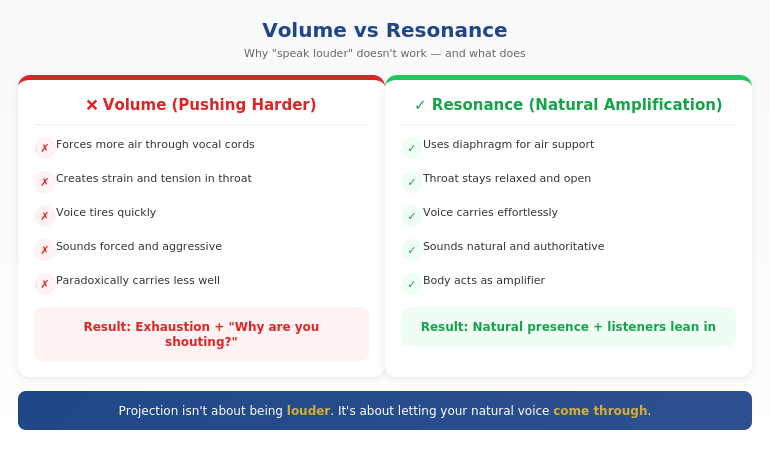
Diagram showing volume vs resonance: volume creates strain and thin sound, resonance creates natural carrying power using diaphragm breathing

⭐ Voice Problems Often Start With Anxiety

If your voice gets quiet, tight, or shaky when you’re nervous, the fix isn’t vocal exercises — it’s addressing what’s causing the tension in the first place. Conquer Speaking Fear gives you the complete system for rewiring your nervous system response to speaking situations.

What’s inside:

  • The “Calm Command” protocol for pre-presentation anxiety
  • Breathing techniques that release throat tension (not just “breathe deep”)
  • How to reset your nervous system in 60 seconds
  • The mental rehearsal method that builds lasting confidence

Get Conquer Speaking Fear → £39

Created by a qualified clinical hypnotherapist who spent 5 years terrified of presenting. Instant download.

The 3 Physical Shifts That Change Everything

Voice projection comes down to three physical changes. Get these right, and your voice carries naturally:

Shift #1: Diaphragmatic Breathing

Most people breathe into their chest — especially when nervous. Chest breathing is shallow and gives you less air to work with. Your voice runs out of fuel mid-sentence.

Diaphragmatic breathing means breathing into your belly. When you inhale, your stomach should expand outward. Your chest and shoulders stay relatively still.

Try this now: Place one hand on your chest, one on your belly. Breathe in slowly. Which hand moves first? If it’s your chest, you’re chest-breathing.

To fix it: Exhale completely first. Then let the inhale happen naturally — it will go deeper. Practice until belly-first breathing becomes automatic.

For a deeper dive on breathing for presentations, see our guide to presentation breathing techniques.

Shift #2: Release Throat Tension

When you’re nervous, your throat tightens. It’s a primitive protective response — the body preparing for threat. But a tight throat traps sound and makes your voice thin and strained.

To release throat tension:

  • Yawn (seriously) — this opens the throat naturally
  • Hum gently for 10 seconds — you should feel vibration in your chest
  • Drop your jaw slightly — most people clench without realising
  • Relax your tongue — let it rest at the bottom of your mouth

Before important meetings, I still do a few gentle hums in private. It’s the fastest way to open up the vocal pathway.

Shift #3: Direct Sound Forward

Many quiet speakers direct their voice downward — toward their notes, their laptop, the table. Sound goes where you send it.

Instead, imagine you’re speaking to someone at the back of the room. Not shouting at them — just including them in the conversation. Your voice will naturally carry further without strain.

In a meeting room, pick a point on the far wall and speak toward it. On Zoom, speak toward your camera as if the listener is sitting a few meters behind your screen.

Why is my voice so quiet when I speak?

A quiet voice usually comes from one of three causes: shallow chest breathing (not enough air), throat tension (voice gets trapped), or directing sound downward instead of outward. All three are often triggered by nervousness. When you’re anxious, your body tenses up — and a tense body produces a thin, quiet voice. Address the physical tension, and your natural voice volume returns.

Nervous tension killing your voice? Fix the root cause.

Get Conquer Speaking Fear → £39

The Anxiety Connection Most People Miss

Here’s what vocal coaches rarely tell you: for most professionals, voice projection problems are anxiety problems in disguise.

When your nervous system perceives threat (and yes, a boardroom full of executives counts), it triggers a cascade of physical responses:

  • Breathing becomes shallow and rapid
  • Muscles tense — including throat, jaw, and shoulders
  • Blood flow shifts away from non-essential functions
  • Fine motor control decreases

Your quiet, shaky voice isn’t a skill problem. It’s your body’s threat response showing up in your vocal cords.

This is why “just speak up” doesn’t work. You can’t willpower your way past a nervous system response. You have to work with your body, not against it.

The most effective approach combines the physical techniques (breathing, throat release, direction) with methods that calm the underlying anxiety response. When you’re not fighting your nervous system, your voice has room to come through.

If your voice also shakes when you’re nervous, see our specific guide on voice shaking when speaking.

The anxiety-voice connection: threat response triggers shallow breathing, throat tension, and muscle tightening, which creates thin quiet voice

⭐ Stop Fighting Your Nervous System

Conquer Speaking Fear teaches you to work with your body’s response instead of against it — so your voice comes through naturally, without strain or force.

The system includes:

  • Pre-presentation protocols that calm your nervous system
  • In-the-moment resets when anxiety spikes
  • Long-term rewiring techniques for lasting change
  • The hypnotherapist’s approach to speaking confidence

Get Conquer Speaking Fear → £39

The same techniques I use with private clients. Instant digital download.

Voice Projection on Zoom and Teams

Virtual meetings add a layer of complexity. Your microphone captures sound differently than human ears in a room. Here’s how to adapt:

Microphone positioning matters more than volume

Speaking louder into a badly positioned mic just creates distortion. Position your microphone 6-8 inches from your mouth, slightly below chin level. Let the mic do the amplification work.

Test your levels before important calls

Both Zoom and Teams have audio testing features. Use them. Many “quiet” speakers on calls simply have their input levels set too low.

Speak toward the camera, not the screen

Just like directing sound to the back of a room, speak toward your camera. This creates better mic pickup and — as a bonus — better eye contact with viewers.

The resonance principles still apply

Diaphragmatic breathing, throat release, and forward direction all improve your virtual presence. A resonant voice sounds more authoritative through speakers, not less.

For complete guidance on virtual presence, see our guide to looking confident when presenting.

How do speakers project their voice?

Professional speakers project their voice through three techniques: diaphragmatic breathing (breathing into the belly for more air support), releasing throat and jaw tension (so sound isn’t trapped), and directing their voice outward toward the back of the room. This creates resonance — natural carrying power — rather than strained volume. Most also manage their anxiety, since nervousness causes the physical tension that kills projection.

Ready to speak with natural authority?

Get Conquer Speaking Fear → £39

The Practice Routine That Builds Lasting Change

These techniques work immediately, but lasting change requires practice. Here’s the 5-minute daily routine I recommend:

Morning (2 minutes):

  • 10 belly breaths (hand on stomach, feel it expand)
  • 30 seconds of gentle humming (feel chest vibration)
  • Speak one sentence out loud, directing voice across the room

Before any meeting (30 seconds):

  • One slow belly breath
  • Drop shoulders
  • Quick throat release (small yawn or hum)
  • First words aimed at far wall/back of camera

Within 2-3 weeks of consistent practice, the new patterns start to become automatic. Within 2-3 months, they’re your default.

⭐ The Complete System for Speaking Confidence

Voice projection is one piece. Conquer Speaking Fear gives you the complete system — from managing pre-presentation nerves to rewiring your long-term relationship with speaking situations.

Everything included:

  • The “Calm Command” pre-presentation protocol
  • Breathing and body techniques that release tension
  • In-the-moment anxiety resets
  • Mental rehearsal methods for lasting confidence
  • The hypnotherapist’s approach to fear rewiring

Get Conquer Speaking Fear → £39

Instant download. Created from clinical hypnotherapy training and 24 years of corporate experience.

Frequently Asked Questions

Will this work if my voice is naturally soft?

Yes. “Naturally soft” voices are almost always under-projected voices — not permanently quiet voices. When you breathe properly and release tension, even traditionally soft voices carry well. You’re not trying to sound like a drill sergeant; you’re trying to let your natural voice come through without restriction. Most people are surprised by how much presence their voice has when it’s not being strangled by tension.

Does voice projection work on Zoom and Teams?

Absolutely — and it might matter even more virtually. Microphones don’t compensate for mumbling or trailing off the way human listeners sometimes do. The resonance techniques (diaphragmatic breathing, open throat, forward direction) all translate to virtual settings. Pair them with proper mic positioning and input levels for best results.

How long does it take to see results?

The 30-second reset technique works immediately — try it in your next meeting. Building lasting change takes longer: 2-3 weeks of daily practice to start feeling natural, 2-3 months to become your default. The key is consistency. Five minutes of daily practice beats an hour once a week.

What if my voice still shakes when I’m nervous?

Voice shaking is a specific anxiety symptom that requires targeted techniques. The diaphragmatic breathing helps, but if shaking persists, you likely need to address the underlying nervous system response more directly. That’s where the anxiety-management components of Conquer Speaking Fear come in — it’s designed specifically for professionals whose physical symptoms don’t respond to “just relax” advice.

Get Weekly Speaking Confidence Insights

Techniques for projecting presence, managing nerves, and speaking with authority — from a clinical hypnotherapist with 24 years in corporate banking.

Subscribe to The Winning Edge →

📋 Free Resource: 7 Presentation Frameworks

Structure your next presentation with proven frameworks — so you can focus on delivery instead of figuring out what comes next.

Download Free Frameworks →

Your Next Step

The next time you need to speak up in a meeting:

  1. Take one belly breath before you start
  2. Drop your shoulders
  3. Aim your voice at the back wall

You’ll feel the difference immediately. And so will everyone in the room.

P.S. Voice projection matters most in high-stakes situations. If you’re presenting for approval, I wrote about the pre-meeting alignment strategy that gets decisions made before you even open your slides.

P.P.S. If you’re spending too long building presentations, check out how to cut presentation creation time without cutting quality — the system approach that saves hours every week.

About Mary Beth Hazeldine
Qualified clinical hypnotherapist, NLP practitioner, and Owner of Winning Presentations. I spent 5 years terrified of presenting — voice quiet, hands shaking, avoiding every speaking opportunity I could. Learning to project my voice was part of a larger journey that changed my career. Now I help professionals find their voice, literally and figuratively.

28 Jan 2026
Professional woman in enrollment conversation during coffee meeting, actively engaging with colleague about stakeholder buy-in

Pre-Meeting Executive Alignment: How to Get Approval Before You Present

The CFO approved ÂŁ2 million before my client finished slide one.

Not because the presentation was brilliant. Not because the data was compelling. Because the decision had already been made — three days earlier, over a 12-minute conversation and one carefully crafted email.

The presentation? A formality. A public confirmation of a private agreement.

This is what pre-meeting executive alignment looks like when it’s done right. And it’s the skill that separates professionals who constantly fight for approval from those who walk into rooms where “yes” is already waiting.

Quick Answer: Pre-meeting executive alignment is the practice of socializing your recommendation with key stakeholders before the formal presentation. Done correctly, it surfaces objections early, builds champions, and transforms the meeting from a decision point into a confirmation ceremony. The most effective executives spend more time on pre-alignment than on slides.

📋 Presenting for Approval This Week? Do This First:

48-72 hours before your presentation:

  1. Identify the real decision-maker (often not the most senior person)
  2. Request 10 minutes — “I’d value your perspective before Thursday’s meeting”
  3. Share your recommendation (not all your slides — just the answer)
  4. Ask: “What concerns would you want me to address?”
  5. Send a follow-up email summarizing what you heard and how you’ll address it

This 10-minute conversation often determines the outcome more than the 30-minute presentation.

The Email That Changed Everything

Early in my banking career at JPMorgan, I watched a colleague present a flawless business case for a new trading system. The logic was airtight. The ROI was clear. The slides were polished.

The CFO said no.

Not because the proposal was weak — but because he’d been blindsided. He had concerns about implementation risk that were never addressed. He felt ambushed by a major capital request he hadn’t been prepared for. His “no” wasn’t about the merits. It was about the process.

A month later, I saw a more senior colleague get a larger budget approved in half the time. The difference? She’d spent 20 minutes with the CFO the week before, walking him through her thinking and asking what would make him comfortable.

By the time she presented, he was already her champion. He’d helped shape the proposal. His concerns were already addressed. The meeting was a formality.

That’s when I understood: the presentation isn’t where the decision gets made. It’s where the decision gets announced.

Why Pre-Alignment Works

Pre-meeting alignment works because of three psychological principles that govern how senior people make decisions:

1. Executives hate surprises

Senior leaders are evaluated on judgment. Being caught off-guard in a meeting — especially by something they “should have known” — feels like a failure. When you pre-align, you’re protecting their reputation, not just selling your idea.

2. Ownership drives support

When someone contributes to shaping a proposal, they become invested in its success. The CFO who suggested adding a risk mitigation section will defend that section in the meeting. Pre-alignment turns potential blockers into co-authors.

3. Public positions are hard to reverse

Once someone takes a position in a meeting, backing down feels like losing face. If you surface objections privately, they can be addressed without anyone having to publicly change their mind. Private alignment prevents public conflict.

For more on how executives actually make decisions, see our guide to executive presentation structure.

How do you get stakeholder alignment before a meeting?

Get stakeholder alignment by having brief one-on-one conversations with key decision-makers 48-72 hours before your presentation. Share your recommendation (not all your slides), ask what concerns they’d want addressed, then incorporate their input. Follow up with a short email confirming what you heard. This transforms potential opponents into contributors who are invested in your success.

Timeline showing pre-alignment process: 1 week before identify stakeholders, 48-72 hours before have conversations, 24 hours before send summary email, meeting day present with confidence

⭐ Maven Flagship — Executive Buy-In

Walk into your next approval meeting prepared

The Executive Buy-In Presentation System gives you 7 self-paced modules covering stakeholder analysis, case construction, and the presentation structures that hold up to scrutiny.

Monthly cohort enrolment — £499, lifetime access.

Enrol in the Executive Buy-In System →

The 5-Step Pre-Alignment Process

Here’s the exact process I teach executives for pre-meeting alignment:

Step 1: Map Your Stakeholders (1 Week Before)

Before you build a single slide, answer these questions:

  • Who will be in the room?
  • Who has formal decision authority?
  • Who has informal influence? (Often more important)
  • Who might object, and why?
  • Who could be a champion if they understood the benefits?

Create a simple grid: Name | Role | Likely Position | Key Concern | How to Reach

Step 2: Prioritise Your Conversations (5-7 Days Before)

You can’t pre-align with everyone. Prioritise:

  1. The decision-maker (whoever actually signs off)
  2. Potential blockers (people likely to object)
  3. Influential voices (people others listen to)

Three to four conversations is usually enough. More than that becomes logistically difficult and can feel like you’re “working the room” too hard.

Step 3: Have the Conversations (48-72 Hours Before)

Request brief meetings: “I’m presenting to the steering committee on Thursday. I’d value 10 minutes of your perspective beforehand — would Tuesday or Wednesday work?”

In the conversation:

  • Share your recommendation in one sentence
  • Explain the core logic (2-3 minutes max)
  • Ask: “What concerns would you want me to address?”
  • Listen more than you talk
  • Thank them for their input

Do NOT present all your slides. This isn’t a preview — it’s a consultation.

How do you get executive buy-in for a project?

Executive buy-in comes from making “yes” feel safe, not from having the best data. The most reliable method is pre-meeting alignment: share your recommendation privately with key stakeholders before the formal presentation, address their concerns in advance, and let them contribute to shaping the proposal. By meeting time, they’re invested in your success.

Step 4: Incorporate and Acknowledge (24-48 Hours Before)

After your conversations:

  • Adjust your presentation to address the concerns you heard
  • Add a slide or talking point that directly acknowledges input: “Based on conversations with the team, I’ve added a section on implementation risk…”
  • Send a brief follow-up email to each person you spoke with

This follow-up email is crucial. It confirms you listened and creates a paper trail of their involvement.

Step 5: Present With Confidence (Meeting Day)

When you’ve done proper pre-alignment:

  • You know what objections are coming (because you asked)
  • You’ve already addressed the major concerns (in your slides)
  • Key stakeholders feel heard (because they contributed)
  • The decision-maker isn’t being surprised (because you briefed them)

The presentation becomes a confirmation, not a persuasion exercise.

For more on presenting to senior leadership, see our guide on how to present to a board of directors.

Need the slide structure that executives respond to?

Get the Executive Slide System → £39

The Email Template That Works

Here’s the follow-up email template I used with my client — the one that preceded the ÂŁ2M approval:

Subject: Following up on our conversation — Thursday’s budget review

Hi [Name],

Thank you for taking time yesterday to share your perspective on the [project name] proposal.

I heard two key points:

  1. [Concern #1 they raised]
  2. [Concern #2 they raised]

I’ve updated the presentation to address both directly — specifically, I’ve added [what you added] and revised [what you changed].

Looking forward to Thursday. Please let me know if anything else comes to mind before then.

Best,
[Your name]

This email does three things:

  1. Confirms you listened (they see their concerns reflected back)
  2. Shows you acted (you made changes based on their input)
  3. Creates investment (they’re now part of the proposal’s development)

Comparison showing traditional approach vs pre-alignment approach: traditional leads to surprises and objections, pre-alignment leads to support and quick approval

What is pre-meeting alignment?

Pre-meeting alignment is the practice of having brief one-on-one conversations with key stakeholders before a formal presentation or decision meeting. The goal is to share your recommendation, surface concerns early, incorporate feedback, and build support — so the meeting becomes a confirmation of a decision that’s already been shaped collaboratively, rather than a debate.

⭐ The Slide Structure That Closes After Pre-Alignment

Pre-alignment gets stakeholders ready to say yes. The Executive Slide System gives you the structure that makes “yes” easy — recommendation-first, objection-addressed, decision-clear.

Inside the system:

  • The exact 6-slide structure executives prefer
  • How to lead with your recommendation (not context)
  • Where to place proof so it reassures, not defends
  • The decision slide format that gets action

Get the Executive Slide System → £39

Built from 24 years of corporate banking experience. Works for budget requests, board presentations, and client pitches.

Common Mistakes to Avoid

Pre-alignment is powerful, but it can backfire if done wrong:

Mistake #1: Presenting your full deck in the pre-meeting

The pre-alignment conversation is a consultation, not a preview. Share your recommendation and ask for input — don’t walk through 25 slides. If you do, the actual meeting feels redundant.

Mistake #2: Only talking to supporters

It’s tempting to pre-align with people you know will agree. But the value is in reaching potential blockers. The CFO who might object is exactly who you need to talk to beforehand.

Mistake #3: Ignoring what you hear

If someone raises a concern and you don’t address it, you’ve made things worse. They’ll feel unheard and may actively oppose you in the meeting. Either incorporate their feedback or explain why you couldn’t.

Mistake #4: Being too obvious about “working the room”

Pre-alignment should feel like genuine consultation, not political manoeuvring. Frame it as seeking input, not building a coalition. “I’d value your perspective” works. “I’m lining up support” does not.

Mistake #5: Skipping the follow-up email

The conversation creates alignment. The email locks it in. Without the written follow-up, people can forget what they said or claim they never agreed. The email creates accountability.

For the slide structure that works after you’ve done pre-alignment, see our guide to CFO-approved budget presentations.

Ready to structure slides that close after pre-alignment?

Get the Executive Slide System → £39

When Pre-Alignment Isn’t Possible

Sometimes you can’t pre-align — you don’t have access, there’s no time, or the culture doesn’t support it. In those cases:

  • Lead with your recommendation anyway. Even without pre-alignment, the structure still matters. Don’t build to your conclusion.
  • Anticipate objections yourself. If you can’t ask stakeholders what concerns them, use your judgment and address likely objections proactively.
  • Create space for input during the meeting. If they haven’t had a chance to shape the proposal, give them opportunities to contribute: “Before I continue, I’d welcome any initial reactions.”

Pre-alignment dramatically improves your odds. But even without it, the right structure helps.

Is Pre-Alignment Right For Your Situation?

Chart showing when pre-alignment works well vs when it may not be appropriate

⭐ Complete Your Approval Strategy

Pre-alignment opens the door. The Executive Slide System walks you through it — with the exact structure, format, and flow that executives respond to.

Everything you get:

  • The 6-slide executive structure (recommendation-first)
  • Real before/after transformations
  • Slide-by-slide breakdown with formatting guidance
  • Templates for budget, board, and client presentations

Get the Executive Slide System → £39

Instant download. The same structure I taught in corporate banking for budget approvals and steering committee decisions.

Frequently Asked Questions

Isn’t this just politics or manipulation?

Pre-alignment isn’t manipulation — it’s good communication. You’re not hiding information or going behind anyone’s back. You’re consulting stakeholders, incorporating their input, and making the formal meeting more productive for everyone. The alternative — blindsiding people with a major request in a public meeting — is actually less respectful of their time and position.

What if I don’t have access to the decision-makers beforehand?

Start with whoever you can reach. Even pre-aligning with one influential person is better than none. You can also ask your manager or sponsor to help facilitate introductions: “Would it be appropriate for me to brief [Name] before Thursday?” If truly no access is possible, focus on anticipating objections yourself and structuring your presentation to address them proactively.

How far in advance should I do pre-alignment?

48-72 hours before the meeting is ideal. Too early (more than a week) and priorities may shift or people forget. Too late (day before) and there’s no time to incorporate feedback or for them to process. The sweet spot gives you time to adjust your presentation while keeping the conversation fresh in everyone’s mind.

What if someone changes their mind in the actual meeting?

It happens, but it’s rare when you’ve done proper pre-alignment. If someone raises a new objection, don’t panic. Acknowledge it calmly: “That’s a fair point — I’d like to think through the implications. Can I follow up with you after the meeting?” This shows confidence and prevents the meeting from derailing. The follow-up email you sent creates a record of their earlier input, which usually keeps positions stable.

Get Weekly Executive Presentation Insights

Strategies for getting approval, building credibility, and presenting with confidence — from 24 years in corporate banking.

Subscribe to The Winning Edge →

📋 Free Resource: Executive Presentation Checklist

A quick-reference checklist covering structure, pre-alignment, and delivery. Use it before your next high-stakes presentation.

Download Free Checklist →

Your Next Step

The next time you have a presentation where you need approval, try the pre-alignment approach:

  1. Identify 2-3 key stakeholders
  2. Request 10 minutes of their time before the meeting
  3. Share your recommendation and ask what concerns they’d want addressed
  4. Incorporate their feedback and send a follow-up email

You’ll be surprised how much easier the actual presentation becomes when the groundwork is already laid.

P.S. Once you’re in the meeting, delivery matters too. If you struggle with projecting confidence, I wrote about how to project your voice without shouting — it’s more about resonance than volume.

P.P.S. If you’re spending too long building presentations, check out how to cut presentation creation time without cutting quality — the system approach that saves hours.

About Mary Beth Hazeldine
Owner & Managing Director of Winning Presentations. 24 years in corporate banking at JPMorgan Chase, PwC, RBS, and Commerzbank. I’ve seen hundreds of presentations succeed or fail based on what happened before the meeting started. Pre-alignment is the skill I wish someone had taught me in year one.

27 Jan 2026
Professional woman in navy blazer presenting confidently in executive boardroom, gesturing while making a point to colleagues

How to Get Executive Buy-In for Your Presentations: The Psychology Most Professionals Get Wrong

“Let’s take this offline.”

Four words. That’s all it took to kill a ÂŁ4 million project I’d spent three months preparing.

The logic was solid. The data was compelling. The slides were polished. And yet the steering committee smiled politely, asked reasonable questions, and then… nothing. No decision. No approval. Just “let’s discuss further.”

It took me years — and hundreds more presentations — to understand why. The problem wasn’t my idea. It wasn’t my data. It wasn’t even my delivery. The problem was that I was structuring my message in a way that triggered doubt instead of confidence.

If you’ve ever struggled to get executive buy-in for your presentations — even when your recommendations are sound — you’re probably making the same mistake.

Quick Answer: Executives decide in the first 2-3 minutes of your presentation, then spend the rest looking for reasons to trust or doubt that initial instinct. When you lead with context, build to your recommendation, and back it up with extensive data, you’re accidentally signalling uncertainty. The unspoken question in their mind: “If they need this much explanation, is the recommendation actually solid?” Getting buy-in requires structuring your message to work with executive decision psychology, not against it.

Presenting for a decision this week? Check these first.

  1. Can you state your recommendation in one sentence? If not, you’re not ready.
  2. Is it on slide 1? Not slide 10. Not after “context.” Slide 1.
  3. Do you know the one concern they’ll have? Address it before they raise it.
  4. What’s the specific decision you need? Not “thoughts” — a decision.

If any answer is unclear, you’re at risk of “let’s discuss further.” For the structured framework, see the Executive Buy-In Presentation System.

Why Good Ideas Get Rejected

I spent 25 years in corporate banking — at JPMorgan Chase, PwC, Royal Bank of Scotland, and Commerzbank. I’ve sat on both sides of the table: the nervous presenter hoping for approval, and the senior stakeholder deciding whether to say yes.

Here’s what I learned from the decision-maker’s chair:

Most presentations that fail aren’t bad. They’re structured wrong.

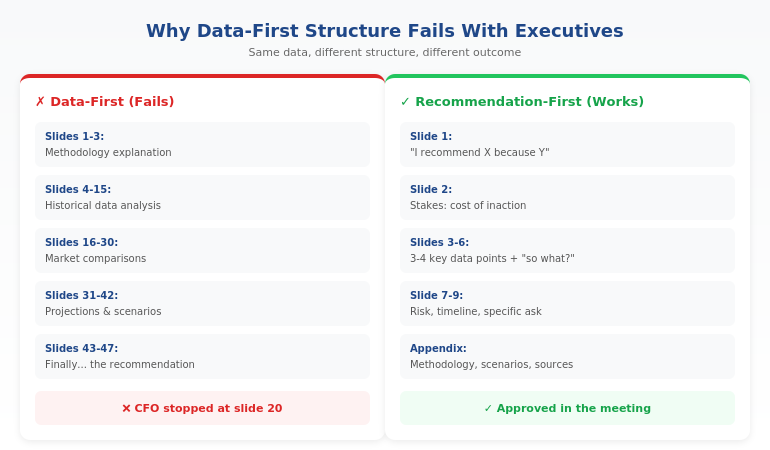
The presenter builds carefully to their recommendation. Context first. Background. Analysis. Options considered. And finally — after 15 or 20 slides — the recommendation.

It feels logical. It feels thorough. It feels like you’re building a case.

But to the executive, it feels like something else entirely: uncertainty.

The unspoken question forming in their mind: “If this recommendation were solid, why would they need all this explanation?”

For more on why traditional structure fails with executives, see our guide to the Pyramid Principle.

How Executives Actually Decide

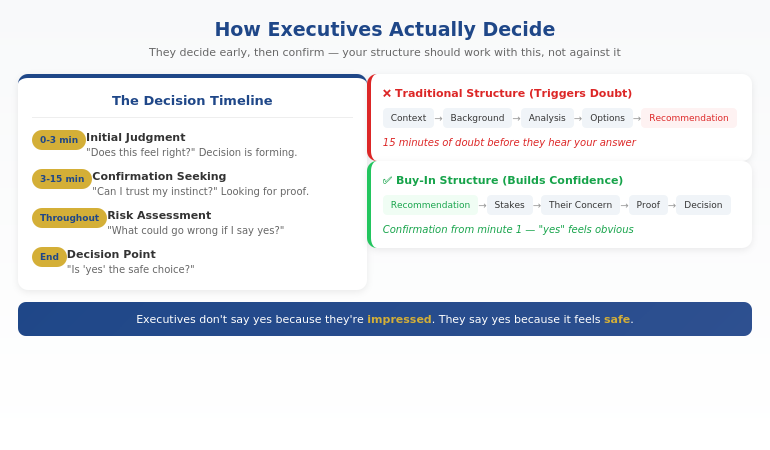
Research and experience confirm the same thing: senior people decide early.

Within the first 2-3 minutes of your presentation, they’ve formed an initial judgment. The rest of the time, they’re looking for reasons to trust that instinct — or doubt it.

This changes everything about how you should structure your message.

If you lead with context and build to your recommendation, you’re giving them 15 minutes of reasons to doubt before they even hear what you’re proposing.

If you lead with your recommendation and immediately address their likely concern, you’re giving them reasons to trust from the start.

The executive’s internal process:

  1. Initial judgment (first 2-3 minutes): “Does this feel right?”
  2. Confirmation seeking (next 10-15 minutes): “Can I trust this instinct?”
  3. Risk assessment (throughout): “What could go wrong if I say yes?”
  4. Decision: “Is ‘yes’ the safe choice?”

Your job isn’t to impress them. It’s to make “yes” feel like the obvious, low-risk choice.

How do you get executive buy-in for a project?

Executive buy-in requires structuring your presentation around how senior people actually decide — not how you naturally want to explain. Lead with your recommendation (not context), address their likely concern before they raise it, provide 1-2 proof points that reduce perceived risk, and make the decision you need crystal clear. Executives say yes when “yes” feels safe, not when they’re impressed by your analysis.

Diagram showing how executives decide: initial judgment in first 3 minutes, then confirmation seeking, with traditional vs buy-in structure compared

⭐ Build the case your stakeholders can’t dismiss

The Executive Buy-In Presentation System is a self-paced framework — 7 modules walking you through the structure, psychology, and delivery that get senior approval. Monthly cohort enrolment, optional recorded Q&A calls. £499, lifetime access to materials.

What’s covered:

  • The slide structure that aligns with how executives actually decide
  • Stakeholder analysis and concern-mapping before the meeting
  • How to choose proof that reassures rather than defends
  • Frameworks for handling pushback without getting defensive

Explore the Buy-In System on Maven →

Self-paced with monthly cohort enrolment.

The 4 Things That Trigger Doubt

Through hundreds of presentations — both giving and receiving — I’ve identified four patterns that accidentally signal uncertainty to executives:

1. Too Much Context

When you spend the first 5-10 minutes on background, you’re signalling that the recommendation needs extensive justification. Executives read this as: “They’re not confident enough to lead with the answer.”

2. Too Much Proof

Counter-intuitive, but piling on data often increases doubt instead of reducing it. It feels defensive. The executive wonders: “If this were obviously right, why would they need 15 supporting charts?”

3. Building to the Recommendation

The classic “options analysis” approach — where you present Option A, Option B, Option C, then reveal your recommendation — gives executives 20 minutes of uncertainty before they know what you actually think. By then, doubt has taken root.

4. Over-Explaining Your Credibility

Spending time establishing why you’re qualified to make this recommendation actually undermines your credibility. Senior professionals let their work speak for itself. Over-explaining signals insecurity.

For more on the structural mistakes that kill executive presentations, see our guide to executive presentation structure.

Why do executives say no to good ideas?

Executives rarely reject ideas because the ideas are bad. They reject them because the presentation triggered doubt — too much context, too much defensive proof, building to the recommendation instead of leading with it. When executives feel uncertain, the safe choice is “not yet” or “let’s discuss further.” Good ideas get approved when they’re presented in a way that makes “yes” feel low-risk.

Work at your own pace. Keep the materials forever. Executive Buy-In Presentation System — 7 modules, £499, self-paced with monthly cohort enrolment.

Explore the Buy-In System →

The Buy-In Structure That Works

Once you understand how executives decide, the structure becomes clear:

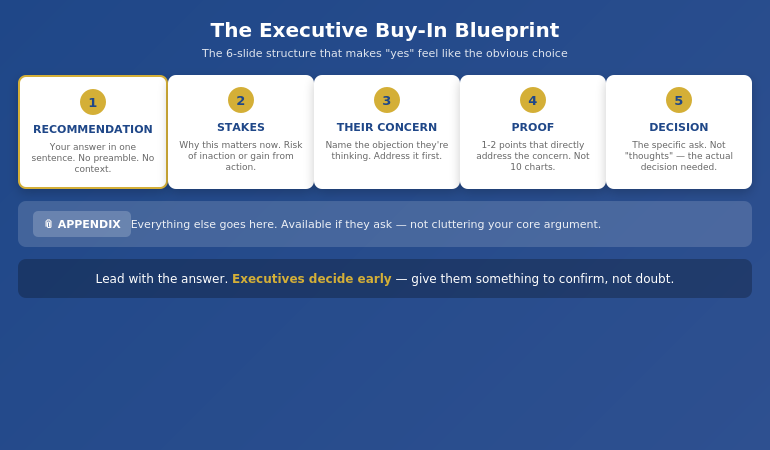
The Executive Buy-In Blueprint:

  1. Recommendation first (Slide 1). State what you’re proposing in one clear sentence. No preamble. No context. The answer.
  2. Stakes (Slide 2). Why this matters now. What’s at risk if we don’t act, or what we gain if we do.
  3. Their likely concern (Slide 3). Name the objection they’re probably already thinking. Address it before they raise it.
  4. 1-2 proof points (Slides 4-5). Not 10 charts. One or two pieces of evidence that directly address the concern you just named.
  5. The decision needed (Slide 6). Be specific. Not “your thoughts” — the actual decision. “I’m asking for approval to proceed with a ÂŁ200K pilot in Q2.”
  6. Appendix. Everything else goes here. Available if they ask, not cluttering your core argument.

This structure works because it aligns with how executives actually process information. They know your answer immediately, which lets them spend the rest of the time confirming it’s sound — rather than wondering what you’re going to say.

For more on presenting to senior leadership, see our guide on how to present to a board of directors.

The Executive Buy-In Blueprint showing 6-slide structure: Recommendation, Stakes, Their Concern, Proof, Decision, Appendix

How do you present to senior leadership effectively?

Present to senior leadership by leading with your recommendation, not building to it. State your answer on slide 1, address their likely concern on slide 3, provide minimal proof that reduces perceived risk, and make your decision request specific and clear. Senior leaders decide early and spend the rest of the time confirming. Structure your presentation to support that confirmation, not create doubt.

⭐ Stop rewriting your proposal three times only to hear “we’ll think about it”

The Executive Buy-In Presentation System teaches the structure that gets decisions, not delays — 7 self-paced modules with optional recorded Q&A calls. £499, lifetime access.

Explore the Buy-In System on Maven →

Self-paced with monthly cohort enrolment.

Handling Pushback Without Getting Defensive

Even with perfect structure, you’ll face tough questions. Sceptical executives. Unexpected challenges.

How you respond determines whether you win the room or lose it.

Most professionals get defensive under pressure — justifying, over-explaining, or backing down too quickly. All of these destroy credibility.

The Pressure Response Framework:

When you face pushback, there are four types of pressure behind it:

  • Clarity pressure: “I don’t understand” → They need you to simplify, not elaborate
  • Risk pressure: “What if this fails?” → They need reassurance, not more data
  • Control pressure: “Why wasn’t I consulted?” → They need to feel included, not convinced
  • Status pressure: Challenging to look tough → They need acknowledgment, not argument

Recognising which type of pressure you’re facing changes how you respond. Most defensive reactions come from treating all pushback the same way.

And sometimes the right answer is: “I don’t know — I’ll find out and come back to you.” Said with calm confidence, this builds credibility. Said defensively, it destroys it.

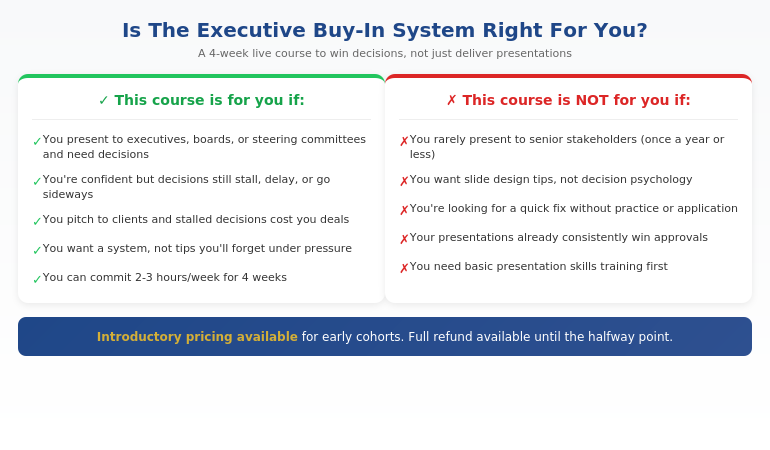
Is This System Right For You?

The Executive Buy-In Presentation System is designed for professionals who present when decisions matter:

Qualification chart showing who the Executive Buy-In Presentation System is designed for

If you recognised yourself in the left column, this system will change how your presentations land — and how often you hear “approved” instead of “let’s discuss further.”

⭐ Built on 25 years in corporate banking

The Executive Buy-In Presentation System is the structured framework developed across 25 years in corporate banking and 16 years coaching senior professionals across financial services, insurance, consulting, and technology. ÂŁ499, lifetime access to materials.

What you get:

  • 7 self-paced modules covering psychology, structure, and delivery
  • Frameworks for stakeholder analysis and concern-mapping
  • Approaches for handling pushback with calm authority
  • Bonus Q&A calls (optional, fully recorded — watch back anytime)
  • Lifetime access to all materials

Explore the Buy-In System on Maven →

Self-paced with monthly cohort enrolment — new cohort opens every month.

Frequently Asked Questions

How is this different from presentation skills training?

This course doesn’t teach you how to present — it teaches you how to win decisions. Presentation skills courses focus on delivery, design, and communication. This course focuses on how executives actually decide, and how to structure your message so “yes” feels like the obvious choice. Presentation skills are the vehicle; winning decisions is the destination.

What if I’m already confident but decisions still stall?

This is exactly who the course is for. Confidence isn’t usually the problem — structure is. Many capable, confident presenters unknowingly trigger doubt through too much context, too much proof, or leading with the wrong information. If you’re confident but decisions still stall, get delayed, or don’t go your way, the issue is almost certainly structural, not personal.

How much time does the course require?

The Executive Buy-In Presentation System is self-paced — you set the pace. The video content totals around 4-5 hours, designed to be watched in focused 30-minute sessions between meetings. Most professionals complete the modules alongside their normal work. The frameworks are designed to save preparation time on every presentation thereafter.

Does this work across different industries?

Yes. The system applies across industries because it’s based on how senior people make decisions — not on specific content. Whether you’re in banking, consulting, tech, healthcare, or government, the psychology of executive decision-making is the same. If you present to people more senior than you, this system is relevant.

Get Weekly Executive Communication Insights

Frameworks and techniques for winning decisions — from 25 years in corporate banking.

Subscribe to The Winning Edge →

Your Next Step

The next time you present for a decision, try one thing differently: put your recommendation on slide 1.

Not after context. Not after options. Slide 1.

Then watch how the energy in the room changes. Executives lean in differently when they know what you’re proposing from the start.

That one shift won’t fix everything. But it will show you how much of the problem was structural all along.

P.S. If you’re making a presentation this week, check out the presentation habit that’s quietly killing careers — it’s related to the structural mistake we covered here.

P.P.S. If anxiety is part of your presentation challenge, I wrote about how to speak confidently in meetings — including the nervous system reset that helps even when stakes are high.

About Mary Beth Hazeldine
Owner & Managing Director of Winning Presentations. 25 years in corporate banking at JPMorgan Chase, PwC, RBS, and Commerzbank. Qualified clinical hypnotherapist. I’ve sat on both sides of the table — the nervous presenter and the senior decision-maker — and I teach what actually works to win the room.

27 Jan 2026
Professional man smiling confidently at whiteboard while explaining a framework to colleagues in modern office

The 3-Part Presentation System Executives Trust: Structure → Story → Slides

I once spent 14 hours on a single board presentation. Fourteen hours. And it still wasn’t right.

After 24 years in corporate banking — at JPMorgan Chase, PwC, Royal Bank of Scotland, Commerzbank — I’d built hundreds of presentations. But I had no system. Every deck was a fresh struggle: staring at a blank screen, rearranging slides endlessly, second-guessing every choice.

Then I developed what I now call the 3-part presentation system executives actually trust. It cut my prep time by 75%. More importantly, it consistently delivered results — budget approvals, project sign-offs, client wins.

Here’s the system I wish someone had given me two decades ago.

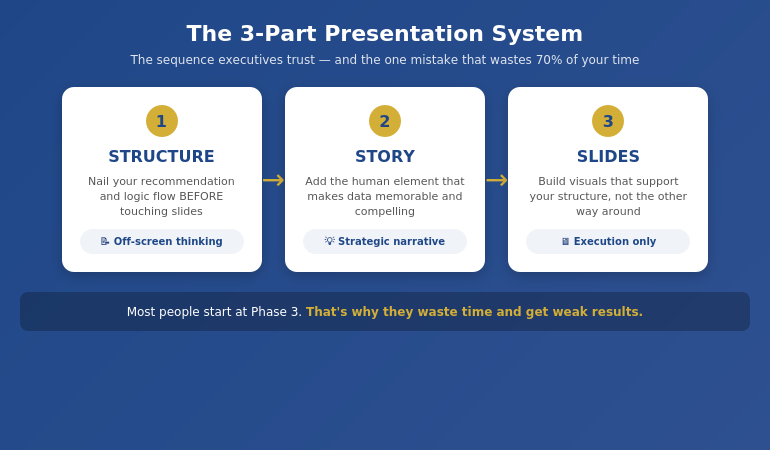
Quick Answer: The presentation system executives trust follows three phases in strict order: (1) Structure — nail your recommendation and logic flow before touching slides, (2) Story — add the human element that makes data memorable, (3) Slides — build visuals that support your structure, not the other way around. This sequence prevents the #1 time-waster: building slides before you know what you’re actually saying.

📋 Creating a Presentation This Week? Start Here:

Before you open PowerPoint, answer these 3 questions:

  1. What’s your ONE recommendation? (If you can’t say it in one sentence, you’re not ready)
  2. What are the 3 proof points? (Data, example, or logic that supports it)
  3. What decision do you need? (Approval, funding, alignment, action)

Only after you can answer all three should you start building slides.

Why Most Presentation “Systems” Fail

Early in my banking career, I watched a colleague present to the executive committee. He had 47 beautifully designed slides. Animations. Charts. The works.

The CFO stopped him on slide 3. “What are you actually recommending?”

My colleague couldn’t answer clearly. He’d spent days on slides without first nailing his structure. The meeting ended early. The project stalled for months.

I’ve seen this pattern hundreds of times since. Professionals jump straight to PowerPoint, build slides that look impressive, then wonder why executives lose interest or decisions don’t happen.

The problem isn’t the slides. It’s the sequence.

Most presentation advice focuses on delivery tips or design tricks. But without a solid underlying system, you’re just decorating a house with no foundation.

Phase 1: Structure (The Foundation)

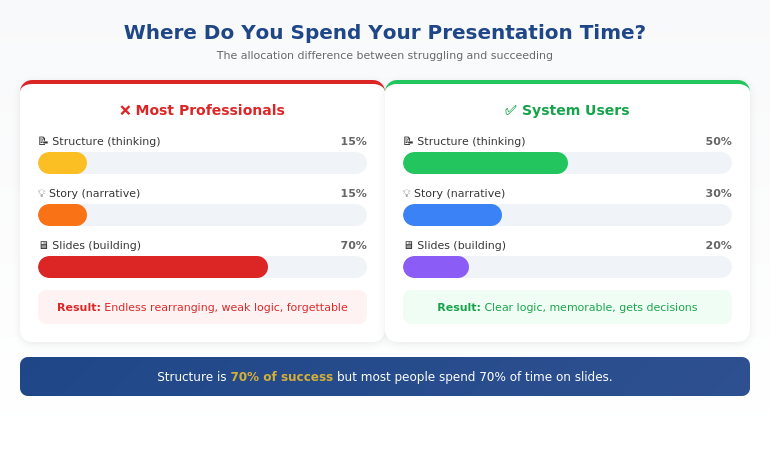
Structure is 70% of whether your presentation succeeds or fails. Yet most people spend 70% of their time on slides.

The structure phase happens entirely OFF the screen. Whiteboard, paper, or just thinking — but not in PowerPoint.

The Executive Structure Formula:

  1. Lead with your recommendation. Not background. Not context. The answer first.
  2. Identify 3 supporting points. Data, logic, or examples that prove your recommendation is sound.
  3. Define the decision needed. What exactly do you want them to approve, fund, or do?
  4. Anticipate 2-3 objections. What will they push back on? Have your responses ready.

This follows the Pyramid Principle that McKinsey made famous: conclusion first, then supporting evidence. It’s the opposite of how most people naturally think (building up to the conclusion), but it’s how executives prefer to receive information.

For a deeper dive into the exact format, see our guide to executive presentation structure.

What system do executives use for presentations?

Senior executives typically use a top-down structure: recommendation first, supporting evidence second, decision request third. This is often called the Pyramid Principle or BLUF (Bottom Line Up Front). The best executive presenters also have a consistent personal methodology — a repeatable process they follow for every presentation, regardless of topic or audience.

The 3-part presentation system: Structure leads to Story leads to Slides, shown as a sequential process"

⭐ Master the Complete System in 4 Weeks

AI-Enhanced Presentation Mastery is a live cohort course that teaches the full Structure → Story → Slides methodology — plus how to use AI tools to accelerate (not replace) each phase.

What you’ll learn:

  • The complete 3-part framework in depth
  • How to apply it to board decks, client pitches, and internal updates
  • AI prompts that enhance each phase (without making slides generic)
  • Live feedback on your real presentations

Learn More About the Course →

Live cohort format with direct instructor access. Built from 24 years of corporate banking experience.

Phase 2: Story (The Connection)

Once your structure is solid, you add the human element. Data convinces the rational mind. Story convinces the whole person.

This doesn’t mean turning your board presentation into a TED Talk. It means strategic use of narrative to make your points memorable and your recommendations compelling.

Three Story Techniques for Executive Presentations:

1. The Stakes Story (60 seconds)

Before presenting your recommendation, briefly establish what’s at risk. “If we don’t address this now, here’s what happens…” This creates urgency without being dramatic.

2. The Proof Story (90 seconds)

Instead of just citing data, briefly tell the story behind one data point. “When we piloted this with the Manchester team, here’s what happened…” Specific examples stick better than aggregate statistics.

3. The Future Story (60 seconds)

Paint a brief picture of what success looks like. “Six months from now, if we do this, here’s where we’ll be…” This helps executives visualise the outcome they’re approving.

Notice the time limits. Executive presentations aren’t the place for long narratives. These are strategic micro-stories embedded within a structured argument.

How do you structure an executive presentation?

The most effective structure for executive presentations is: (1) Recommendation/conclusion first, (2) Three supporting points with evidence, (3) Clear decision or action request, (4) Appendix for detail. This “top-down” approach respects executives’ time and mirrors how they make decisions. Avoid building up to your conclusion — executives want to know your answer immediately, then decide if they need the supporting detail.

Ready to master the complete system?

Explore AI-Enhanced Presentation Mastery →

Phase 3: Slides (The Delivery)

Only now — after structure and story are locked — do you open PowerPoint.

This is where most people START, which is why they waste so much time. When you build slides before your structure is solid, you end up rearranging endlessly, adding slides you don’t need, and second-guessing every design choice.

When structure comes first, slides become almost mechanical. You know exactly what each slide needs to say. You’re just visualising decisions you’ve already made.

The Slide Phase Checklist:

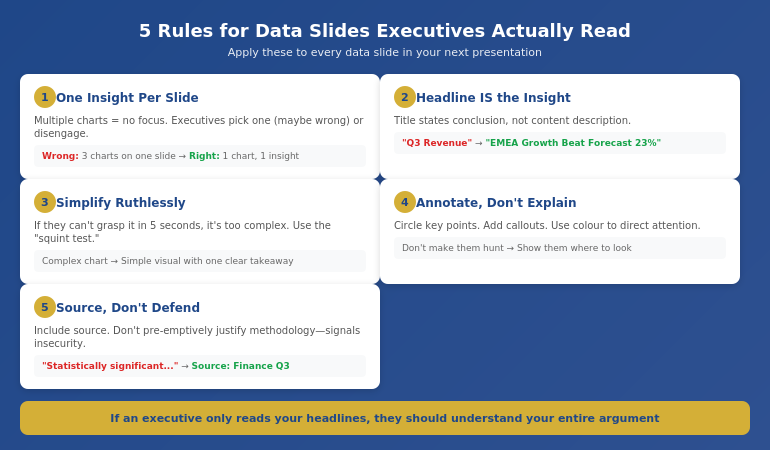
  • One message per slide. If a slide makes two points, split it.
  • Headlines that state conclusions. Not “Q3 Results” but “Q3 Revenue Exceeded Target by 12%”
  • Visuals that prove the headline. The chart or image should make the headline obvious.
  • Appendix for detail. Anything they might ask about but don’t need upfront.

For the detailed workflow I use, including how AI can accelerate this phase, see our guide to AI presentation workflow.

Time allocation comparison: amateur vs professional presenters showing where time should be spent

What makes a presentation system effective?

An effective presentation system is: (1) Repeatable — works for any presentation type, (2) Sequenced — forces you to do the right things in the right order, (3) Efficient — eliminates wasted time and rework, (4) Results-focused — optimised for getting decisions, not just delivering information. The best systems separate thinking (structure) from building (slides), ensuring you don’t waste time on visuals before your logic is sound.

⭐ Stop Reinventing Every Presentation

The AI-Enhanced Presentation Mastery course gives you a complete, repeatable system — so you never face a blank screen wondering where to start again.

Course includes:

  • 4 weeks of live instruction + Q&A
  • Templates for board, client, and internal presentations
  • AI prompt library for each phase of the system
  • Peer cohort for feedback and accountability

Learn More About the Course →

Framework-first, AI-enhanced. Next cohort starting soon.

Where AI Fits (And Where It Doesn’t)

AI tools like ChatGPT, Claude, and Copilot can dramatically accelerate presentation creation. But only if you use them at the right points in the system.

Where AI helps:

  • Phase 1 (Structure): Brainstorming counter-arguments, stress-testing your logic, identifying gaps
  • Phase 2 (Story): Drafting story options, finding analogies, refining language
  • Phase 3 (Slides): Generating first-draft slide content, reformatting data, creating visual options

Where AI fails:

  • Knowing your specific audience and what they care about
  • Understanding the political dynamics in your organisation
  • Making the judgment call on what to include vs. leave out
  • Replacing the strategic thinking that makes presentations persuasive

The professionals who get the most from AI use it as an accelerator within a proven framework — not as a replacement for having a system in the first place.

Want to learn how to combine framework + AI effectively?

Explore AI-Enhanced Presentation Mastery →

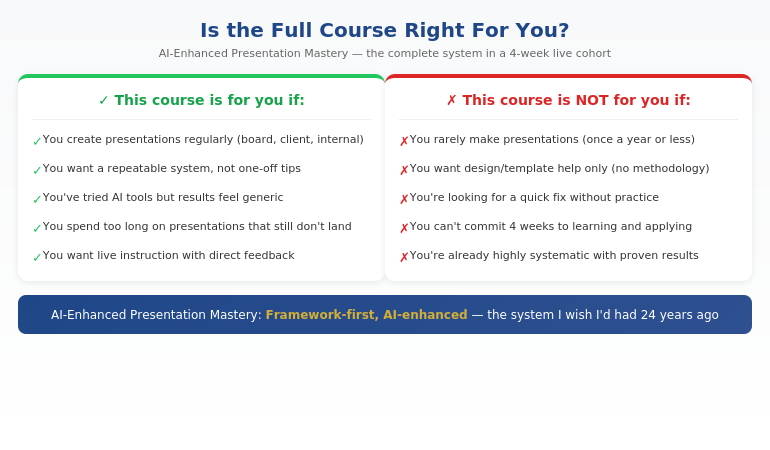
Is This System Right For You?

The 3-part system works for anyone who creates presentations for business audiences. But the full course is designed for a specific professional:

Qualification chart showing who the AI-Enhanced Presentation Mastery course is designed for

If you recognised yourself in the left column, the system will transform how you approach presentations — whether you learn it from this article or go deeper in the course.

⭐ The Complete System + Live Instruction

AI-Enhanced Presentation Mastery is a 4-week live cohort course that teaches the full Structure → Story → Slides methodology — plus the AI techniques that accelerate each phase without making your presentations generic.

What’s included:

  • 4 weeks of live sessions with Q&A
  • The complete 3-part framework with templates
  • AI prompt library for each phase
  • Feedback on your real presentations
  • Cohort of peers for ongoing accountability

Learn More About the Course →

Built from 24 years of corporate banking experience. Framework-first, AI-enhanced.

Frequently Asked Questions

How is this different from using AI tools alone?

AI tools are powerful but they don’t give you a system. They can generate content, but they can’t tell you what content you actually need. Without a framework, AI often produces generic slides that look impressive but don’t persuade. The 3-part system gives you the strategic foundation — AI then accelerates execution within that framework. It’s the difference between having a GPS (system) versus just having a fast car (AI).

Does this work for different presentation types (board, client, internal)?

Yes — that’s the point of having a system. The Structure → Story → Slides sequence works whether you’re presenting to a board, pitching a client, updating your team, or requesting budget. The specific content changes, but the methodology stays the same. In the course, we apply the system to multiple presentation types so you can see how it adapts.

How much time does the system actually save?

In my experience, the system cuts presentation prep time by 50-75% once you’ve internalised it. The savings come from eliminating the two biggest time-wasters: (1) building slides before your structure is clear, and (2) endless rearranging and second-guessing. When you know exactly what each slide needs to say before you open PowerPoint, the building phase becomes almost mechanical.

What if I’m already experienced at presentations?

Most experienced presenters are “unconsciously competent” — they do things that work but can’t articulate why. The system makes your process conscious and repeatable, which means you can improve it deliberately and teach it to others. It also fills gaps you might not know you have. Many experienced professionals find the Story phase (Phase 2) particularly eye-opening.

Get Weekly Presentation System Insights

Frameworks, templates, and techniques for executive presentations — from 24 years in corporate banking.

Subscribe to The Winning Edge →

Your Next Step

The 3-part presentation system — Structure → Story → Slides — isn’t complicated. But it does require discipline to follow the sequence, especially when you’re tempted to jump straight into PowerPoint.

Start with your next presentation. Before you open any software, answer the three questions from the rescue block above. Get your structure right first. Everything else becomes easier.

P.S. If you’re making a presentation this week, check out the presentation habit that’s quietly killing careers — it’s about the structural mistake most professionals make without realising it.

P.P.S. If nerves are part of your presentation challenge, I wrote about how to speak confidently in meetings — including the 30-second reset that helps even when anxiety hits.

About Mary Beth Hazeldine
Owner & Managing Director of Winning Presentations. 24 years in corporate banking at JPMorgan Chase, PwC, RBS, and Commerzbank. I’ve built hundreds of executive presentations and now teach the system I wish I’d had from the start.

27 Jan 2026
Professional woman in meeting with hand on chest, using self-calming technique, moment of composed confidence

How to Speak Confidently in Meetings (Even When Anxious): The 30-Second Reset That Changes Everything

My mind went completely blank. Twelve people staring. The CEO waiting.

I knew the answer. I’d spent three weeks on that analysis. But when my name was called, my brain emptied like someone had pulled a plug. I mumbled something incoherent, felt my face burn, and spent the rest of the meeting wishing I could disappear.

If you’ve ever struggled to speak confidently in meetings — even when you know your stuff — you’re not dealing with a confidence problem. You’re dealing with a nervous system problem. And that changes everything about how to fix it.

Quick Answer: Speaking confidently in meetings when anxious requires regulating your nervous system BEFORE you speak — not forcing confidence through willpower. The 30-second reset (physiological sigh + grounding + intention) interrupts the threat response and gives your thinking brain back online. Practised before meetings, this technique transforms how you show up.

📅 Got a Meeting Today? Try This 30-Second Reset:

  1. Physiological sigh (10 sec): Two inhales through nose, one long exhale through mouth
  2. Ground yourself (10 sec): Feel feet on floor, hands on table, name 3 things you see
  3. Set one intention (10 sec): “I will make ONE clear point” — not “be perfect”

Do this in the corridor, the bathroom, or even silently at your desk before the meeting starts.

Why You Freeze (It’s Not What You Think)

For five years, I was terrified of speaking up in meetings. As a senior professional in corporate banking — at JPMorgan Chase, PwC, Royal Bank of Scotland — I sat in hundreds of meetings where I knew the answer but couldn’t get the words out.

I tried everything. Power poses. Positive affirmations. “Just be confident.” None of it worked.

Then I trained as a clinical hypnotherapist, and I finally understood what was actually happening.

When you feel anxious in meetings, your brain has detected a threat. Maybe it’s the senior leader who intimidates you. Maybe it’s the fear of saying something wrong. Maybe it’s a memory of a past embarrassment.

Whatever the trigger, your nervous system doesn’t distinguish between “CEO asking a question” and “tiger about to attack.” It launches the same response: blood leaves your brain (hello, mental blank), your throat tightens (goodbye, clear voice), and your heart races (hello, panic).

This is why “just be confident” doesn’t work. You can’t think your way out of a physiological response. You have to calm the nervous system first.

Your Nervous System Is Running the Show

Here’s what’s happening in your body when you freeze in meetings:

Your amygdala (the brain’s alarm system) detects “danger” — which might just be your manager’s raised eyebrow.

Your sympathetic nervous system activates fight-or-flight. Adrenaline floods your system.

Blood flow shifts away from your prefrontal cortex (where clear thinking happens) toward your limbs (for running or fighting).

Your vocal cords tighten. Your mouth goes dry. Your mind goes blank.

None of this is a character flaw. It’s biology. And once you understand that, you can work WITH your nervous system instead of fighting against it.

How do I speak confidently in meetings when nervous?

The key is regulating your nervous system before you need to speak — not forcing confidence through willpower. Use a physiological sigh (two inhales, one long exhale) to activate your parasympathetic nervous system. Ground yourself by feeling your feet on the floor. Set one small intention rather than trying to “be perfect.” This 30-second reset gives your thinking brain back online so confidence can emerge naturally.

Diagram showing the nervous system response in meetings and how the 30-second reset interrupts the freeze response

The 30-Second Reset Explained

This technique comes from my work as a clinical hypnotherapist, combined with the latest neuroscience research. It’s designed to interrupt the threat response and bring your thinking brain back online — fast.

Step 1: The Physiological Sigh (10 seconds)

This is the fastest way to calm your nervous system that science has found. It’s not regular deep breathing — there’s a specific pattern:

  • Inhale through your nose
  • At the top of that breath, take a second small inhale (this reinflates collapsed air sacs in your lungs)
  • Long, slow exhale through your mouth

One cycle is usually enough. Two if you’re very activated. This directly stimulates your vagus nerve and shifts you from sympathetic (fight/flight) to parasympathetic (rest/digest) nervous system dominance.

Step 2: Ground Yourself (10 seconds)

Anxiety lives in the future (“what if I mess up?”). Grounding brings you back to now:

  • Feel your feet on the floor — really notice the pressure
  • Feel your hands on the table or in your lap
  • Silently name three things you can see in the room

This engages your sensory cortex and interrupts the anxious thought loop.

Step 3: Set One Micro-Intention (10 seconds)

Don’t aim for “be confident” or “impress everyone.” That’s too big and triggers more anxiety.

Instead: “I will make ONE clear point.” Or “I will ask ONE good question.” Or even “I will say my name clearly when I introduce myself.”

Small, achievable intentions build momentum. Perfectionism builds paralysis.

⭐ Go Deeper: Rewire Your Response to Speaking Situations

The Conquer Speaking Fear system addresses the ROOT cause of meeting anxiety — not just the symptoms. Built from clinical hypnotherapy principles and 24 years in high-pressure corporate environments.

Includes:

  • The nervous system rewiring protocol
  • Pre-meeting preparation sequence
  • In-the-moment recovery techniques
  • Long-term confidence building framework

Get Conquer Speaking Fear → £39

Created by a qualified clinical hypnotherapist who spent 5 years terrified of speaking in meetings.

What to Do Before the Meeting

The 30-second reset works best when you do it BEFORE the meeting, not when you’re already in fight-or-flight.

The Night Before:

  • Review the agenda. Know what topics might require your input.
  • Prepare 1-2 points you could contribute — not a script, just bullet points.
  • Visualise yourself speaking calmly and being heard. (This isn’t woo-woo — it’s neural pathway priming.)

30 Minutes Before:

  • Do the full 30-second reset — in the bathroom, corridor, or silently at your desk.
  • Arrive early if possible. Sitting in your seat before others arrive reduces the “walking into a room of eyes” trigger.
  • Have water nearby. Dry mouth is real, and small sips help.

As the Meeting Starts:

  • Take one grounding breath as you sit down.
  • Place your feet flat on the floor — this is subtle but powerful grounding.
  • Remind yourself of your micro-intention.

For more on building lasting presentation confidence, see our guide to presentation confidence.

Why do I lose confidence when speaking in meetings?

Meetings often contain triggers that activate your brain’s threat detection system: senior people, potential judgement, past experiences of embarrassment. When your amygdala perceives threat, it launches a physiological response that literally reduces blood flow to your thinking brain. This causes the mental blanks, tight throat, and racing heart. It’s not a confidence problem — it’s a nervous system response that can be interrupted and retrained.

Ready to address the root cause of meeting anxiety?

Get Conquer Speaking Fear → £39

What to Do In the Moment

Sometimes anxiety hits mid-meeting, when you’re called on unexpectedly or the conversation shifts to your area.

The 5-Second Emergency Reset:

  1. Press your feet into the floor (grounds you instantly)
  2. Take one physiological sigh (two inhales, long exhale) — you can do this silently
  3. Buy yourself 3 seconds: “That’s a great question. Let me think about that for a moment.”

Those 3 seconds aren’t stalling — they’re giving your prefrontal cortex time to come back online. Executives do this all the time. It signals thoughtfulness, not weakness.

If Your Mind Goes Completely Blank:

It happens. Even to senior leaders. Here’s what to say:

  • “I had a thought on this — give me a moment to collect it.”
  • “Let me come back to that in a minute — I want to make sure I phrase it clearly.”
  • “I’m going to take a beat on that — it’s an important point.”

None of these sound weak. All of them buy you time to let your nervous system settle and your thinking brain re-engage.

If you’re looking for more specific techniques for calming pre-meeting nerves, see our guide on how to calm nerves before a presentation.

How can I stop sounding nervous in meetings?

The shaky voice, fast talking, and filler words (“um,” “like”) are symptoms of nervous system activation — not bad habits. To stop sounding nervous, you need to calm the activation: use the physiological sigh to settle your system, pause before speaking (silence feels longer to you than to others), and speak more slowly than feels natural. When your nervous system is regulated, your voice naturally steadies and your pace naturally slows.

Before meeting preparation timeline showing night before, 30 minutes before, and as meeting starts actions

⭐ Stop Managing Symptoms — Start Rewiring the Response

Quick fixes help in the moment. But if you want lasting change — the kind where speaking up feels natural instead of terrifying — you need to rewire how your nervous system responds to speaking situations.

The Conquer Speaking Fear system includes:

  • The fear response rewiring protocol
  • Graduated exposure framework
  • Cognitive restructuring techniques
  • Long-term maintenance strategies

Get Conquer Speaking Fear → £39

Built from clinical hypnotherapy principles — not generic confidence tips.

Is This Right For You?

Meeting anxiety affects different people in different ways. Here’s how to know if these techniques — and the deeper work — will help you:

Qualification chart showing who the Conquer Speaking Fear system helps and who needs different support

Recognised yourself in the “yes” column?

Get Conquer Speaking Fear → £39

The underlying issue — your nervous system perceiving speaking situations as threats — is addressable. It takes consistent practice, but the change is real and lasting.

For more on developing meeting-specific skills, see our guide to presentation skills for meetings.

⭐ Transform How You Show Up in Every Meeting

The Conquer Speaking Fear system is the complete methodology I developed after five years of personal struggle and clinical training. It addresses the root cause — not just the symptoms.

Inside:

  • The nervous system rewiring protocol
  • Pre-meeting preparation sequence
  • In-the-moment recovery techniques
  • Long-term confidence building framework

Get Conquer Speaking Fear → £39

Created by a qualified clinical hypnotherapist with 24 years in high-pressure corporate environments.

Frequently Asked Questions

Why do I freeze up in meetings but I’m fine one-on-one?

One-on-one conversations feel safer to your nervous system because there’s less perceived judgement and you can read social cues more easily. Meetings multiply the threat signals: more people watching, higher stakes, less control over timing. Your brain isn’t broken — it’s responding to what it perceives as a higher-threat environment. The techniques in this article help you signal “safety” to your nervous system even in group settings.

Can I use these techniques in virtual meetings too?

Absolutely — and in some ways they’re easier to use virtually. You can do the physiological sigh with your camera off before unmuting. You can ground yourself by pressing your feet into the floor without anyone seeing. The “Gallery view stare” often triggers MORE anxiety than in-person meetings, so the reset is even more important. Just adapt: keep water nearby, and use the chat function to buy thinking time if needed.

What if my boss puts me on the spot unexpectedly?

This is the hardest scenario, but it’s manageable. Use the 5-second emergency reset: feet into floor, one physiological sigh, then buy time with “That’s a great question — let me think about that for a moment.” Those few seconds allow your prefrontal cortex to come back online. If your mind is still blank, it’s completely acceptable to say “I want to give that a proper answer — can I follow up with you after the meeting?” This signals thoroughness, not weakness.

How long before I see improvement?

The 30-second reset can help immediately — you may notice a difference in your very next meeting. However, lasting change (where speaking up feels natural rather than managed) typically takes 4-8 weeks of consistent practice. You’re essentially rewiring neural pathways, and that requires repetition. In my experience, meaningful shifts often appear within 2-3 weeks of daily practice, with significant transformation by week 6-8.

Get Weekly Confidence-Building Strategies

Practical techniques for speaking up at work — from a clinical hypnotherapist who’s been there.

Subscribe to The Winning Edge →

Your Next Step

Speaking confidently in meetings when you’re anxious isn’t about forcing confidence or faking it. It’s about understanding that your nervous system is running a threat response — and learning how to interrupt it.

Try the 30-second reset before your next meeting. Notice what shifts.

And remember: that mental blank, that racing heart, that shaky voice — none of it means you’re not capable. It means your nervous system is doing its job. Now you know how to work with it instead of against it.

P.S. If you’re also struggling with how to structure your presentations once you DO speak up, I wrote about the presentation habit that’s quietly killing careers — it’s the structural mistake most professionals don’t even know they’re making.

P.P.S. If your main issue is physical symptoms (racing heart, shaky hands, tight chest), Calm Under Pressure (ÂŁ19.99) focuses specifically on rapid relief techniques for the body-based anxiety response.

About Mary Beth Hazeldine
Owner & Managing Director of Winning Presentations. 24 years in corporate banking at JPMorgan Chase, PwC, RBS, and Commerzbank. Qualified clinical hypnotherapist and NLP practitioner. I help professionals overcome speaking anxiety and present with confidence.

27 Jan 2026
Professional woman having moment of realization at boardroom table while reviewing presentation on laptop

The Presentation Habit That’s Quietly Killing Your Career

She got the promotion. He had the better slides.

I watched this play out at JPMorgan Chase more times than I can count. The analyst with the comprehensive 40-slide deck passed over. The one with 12 slides and a clear recommendation? Fast-tracked to VP.

The difference wasn’t talent. It wasn’t data quality. It wasn’t even presentation confidence.

It was a single presentation career mistake that most professionals don’t even know they’re making — one that quietly signals to leadership: “This person isn’t ready.”

Quick Answer: The presentation habit killing most careers is building slides bottom-up (data → analysis → conclusion) instead of top-down (recommendation → supporting evidence → details if needed). Bottom-up signals you haven’t done the executive thinking. Top-down signals you’re ready for leadership.

📅 Presenting This Week? Use This 6-Slide Structure:

  1. Slide 1: Your recommendation + the ask
  2. Slide 2: Stakes — why this matters now
  3. Slides 3–5: Three proof points (one per slide)
  4. Slide 6: Decision needed + next steps
  5. Appendix: All supporting detail (only if asked)

This structure works for board updates, steering committees, budget requests, and any decision-seeking presentation.

Want the complete structure with copy/paste templates?

Get the Executive Slide System → £39

The Invisible Mistake Nobody Tells You About

In my 24 years in corporate banking — at JPMorgan Chase, PwC, Royal Bank of Scotland, and Commerzbank — I sat through thousands of presentations. And I noticed something that changed how I coach executives today.

The people who got promoted didn’t have better data. They didn’t have fancier slides. They didn’t even have more confidence.

They structured their presentations differently.

Specifically: they led with their recommendation. Not their process. Not their analysis. Not their methodology. Their conclusion — slide one.

Meanwhile, talented professionals with years of expertise were building decks the “logical” way: background, then analysis, then findings, then finally — on slide 37 — what they actually recommended.

And leadership tuned out long before they got there.

This is the presentation habit that’s quietly killing careers. It’s invisible because everyone does it. It feels right because it mirrors how we think. And nobody tells you it’s wrong because they’re doing it too.

Why This Happens (And Why It’s Not Your Fault)

You were trained to present bottom-up.

School taught you to show your work. University rewarded methodological rigour. Your first job praised thorough analysis.

So you build presentations the same way you build reports:

  • Start with context
  • Walk through the data
  • Explain your analysis
  • Finally, share your conclusion

This is bottom-up thinking. And it’s career poison in executive settings.

Here’s why: executives don’t have time to follow your journey. They need your destination — then they’ll decide if they want the map.

When you present bottom-up, you’re asking leadership to hold 15 minutes of context in their heads before they understand why it matters. Most won’t. They’ll check email, interrupt with questions, or mentally check out.

Then they’ll remember you as “the one who couldn’t get to the point.”

What presentation mistakes hurt your career?

The most damaging presentation mistake is structural, not cosmetic. Building presentations bottom-up (data first, conclusion last) signals to leadership that you haven’t done the executive thinking. It suggests you’re presenting your process rather than your judgement — which is exactly what leaders are evaluating when considering promotions.

What Executives Actually See When You Present

When you present bottom-up, executives don’t see thorough analysis.

They see someone who:

  • Can’t prioritise. If everything gets equal airtime, nothing is important.
  • Hasn’t formed a judgement. Walking through data without a clear recommendation suggests you want them to decide for you.
  • Doesn’t understand their time. Executives operate in 15-minute windows. Burying your point on slide 30 signals you don’t get that.
  • Isn’t ready for leadership. Leaders make recommendations. Analysts present data.

This is brutal, but it’s real.

I’ve sat in rooms where promotion decisions were made, and I’ve heard the exact words: “Great analyst, but not strategic enough yet.” What that often means: “Their presentations don’t lead with insight.”

Comparison showing bottom-up versus top-down presentation structure and how executives perceive each approach

Why do some presenters never get promoted?

Many talented professionals plateau because their presentation structure signals “analyst” rather than “leader.” They present their thinking process (how they got to the answer) instead of their strategic judgement (what should happen and why). This structural choice — often unconscious — shapes how leadership perceives their readiness for senior roles.

The Shift That Changes Everything

Top-down presentation structure is the opposite of how most people present — and exactly how executives think.

Bottom-up (what most people do):

  1. Background and context
  2. Methodology and approach
  3. Data and analysis
  4. Findings and insights
  5. Recommendation (finally)

Top-down (what gets you promoted):

  1. Recommendation and ask
  2. Key supporting points (3 maximum)
  3. Evidence for each point
  4. Appendix for details (if asked)

The shift feels uncomfortable at first. You’ll worry you’re not being thorough. You’ll feel exposed leading with your conclusion before you’ve “earned” it.

That discomfort? It’s the feeling of presenting like a leader.

If you’re finding that speaking confidently in meetings is also a challenge, the structure shift actually helps — when you know exactly what you’re arguing for, confidence follows.

⭐ Stop Signalling “Not Ready” — Start Presenting Like a Leader

The Executive Slide System gives you the exact structure that signals strategic thinking — built from 24 years in corporate banking and 15+ years coaching executives.

Includes:

  • Top-down slide structure template
  • Executive summary framework
  • Before/after transformation examples
  • Decision-slide formula

Get the Executive Slide System → £39

Built for board updates, steering committees, and CFO decision meetings.

How to Fix This (Starting With Your Next Deck)

You don’t need to overhaul everything. You need to change your starting point.

Step 1: Write your recommendation before you open PowerPoint

One sentence. What do you want them to decide, approve, or do? If you can’t articulate this clearly, you’re not ready to build the deck.

Step 2: Identify your 3 supporting points

Not 7. Not 12. Three. If you have more, you haven’t prioritised. Executives remember threes.

Step 3: Build the deck backwards

Start with your recommendation slide. Then your three supporting points. Then evidence for each. Everything else goes in the appendix — where it belongs.

Step 4: Apply the “slide 1 test”

If an executive only saw your first slide and nothing else, would they understand what you’re asking for and why? If not, restructure.

This approach mirrors the Pyramid Principle that consulting firms like McKinsey have used for decades. It’s not new — but it’s rarely taught outside elite environments.

Want the exact templates to make this shift immediate?

Get the Executive Slide System → £39

How do executives structure presentations differently?

Executives use top-down structure: recommendation first, supporting points second, evidence third, details in appendix. This approach respects the audience’s time, demonstrates strategic judgement, and signals leadership readiness. It’s the opposite of the bottom-up academic approach most professionals default to.

The 4-step process to fix presentation structure showing write recommendation first then identify 3 supporting points then build deck backwards then apply slide 1 test

⭐ Your Next Presentation Could Change How Leadership Sees You

One presentation with the right structure can shift perception faster than a year of good work. The Executive Slide System shows you exactly how.

What you’ll implement immediately:

  • The “recommendation-first” opening template
  • The 3-point evidence structure
  • The appendix strategy that shows depth without burying your point

Get the Executive Slide System → £39

Based on real boardroom experience — not theory.

Is This Right For You?

This structural shift isn’t for everyone. Here’s how to know if it applies to you:

Qualification chart showing who the Executive Slide System is for and who it is not for

Recognised yourself in the “yes” column?

Get the Executive Slide System → £39

The uncomfortable truth: if you’ve been presenting the same way for years without the career progress you expected, the structure is likely the issue. Not your data. Not your confidence. Your structure.

For more on building executive-grade presentation structure, see our complete guide to executive presentation structure.

⭐ Transform How Leadership Perceives You — Starting This Week

The Executive Slide System is the complete structure transformation I wish I’d had in my first decade in banking. It would have saved years of invisible career damage.

Inside:

  • The top-down structure template (copy/paste ready)
  • Real before/after examples from client transformations
  • The decision-slide formula that gets “yes”
  • Executive summary framework for any presentation type

Get the Executive Slide System → £39

Built from 24 years in corporate banking + 15 years coaching executives on high-stakes presentations.

Frequently Asked Questions

Can one presentation habit really affect promotion decisions?

Yes. Promotion decisions often hinge on perceived “executive presence” and “strategic thinking” — both of which are heavily influenced by how you structure presentations. When you present bottom-up, you signal analyst-level thinking even if your content is brilliant. When you present top-down, you signal leadership readiness. I’ve seen this pattern repeatedly across 24 years in corporate banking.

How do I know if I’m making this mistake?

Open your last presentation. Look at slide 1. Does it state your recommendation and ask? Or does it say “Agenda,” “Background,” or “Overview”? If your conclusion appears after slide 10, you’re presenting bottom-up. If executives regularly interrupt you mid-presentation asking “what’s the bottom line?” — that’s another clear signal.

What if my company culture expects detailed, thorough slides?

You can still be thorough — just restructure the order. Lead with your recommendation, provide your three key supporting points, then include all the detail in an appendix. This approach gives executives what they need immediately while proving you’ve done the deep work. It’s not less thorough; it’s better organised.

How long does it take to change this habit?

The structural shift can happen with your very next presentation — it’s a framework change, not a skill that takes months to develop. The discomfort of leading with your recommendation typically fades after 2-3 presentations. Most professionals I’ve coached report noticeable changes in how leadership responds within their first month of using top-down structure.

Get Weekly Executive Presentation Insights

Actionable presentation strategies delivered every Tuesday — from someone who’s been in the room where decisions are made.

Subscribe to The Winning Edge →

Your Next Step

The presentation habit that’s killing careers is structural, not cosmetic. It’s invisible because it feels logical. And it’s fixable — starting with your next deck.

Write your recommendation before you open PowerPoint. Lead with your ask. Structure top-down.

One presentation built this way can shift how leadership perceives you more than a year of good work presented the wrong way.

For more on crafting the critical first slide, see our guide to the executive summary slide.

P.S. If anxiety is also affecting your presentations, I wrote about how to speak confidently in meetings even when anxious — the structure shift actually helps with confidence too.

About Mary Beth Hazeldine
Owner & Managing Director of Winning Presentations. 24 years in corporate banking at JPMorgan Chase, PwC, RBS, and Commerzbank. Qualified clinical hypnotherapist. I help executives transform their presentations from forgettable to career-defining.

26 Jan 2026
Executive woman having breakthrough moment explaining AI presentation insight to colleagues in boardroom

AI-Enhanced vs AI-Generated: The Distinction That Changes Everything

“Can you tell this was made with AI?”

A senior director asked me this after a board presentation. He’d used Copilot to build his deck, spent hours refining prompts, and was proud of how quickly he’d pulled it together. The slides looked polished. The formatting was clean.

And yes—I could tell immediately. So could the board.

The problem wasn’t the tool. The problem was the approach. He’d let AI generate his presentation instead of using AI to enhance his thinking. The difference sounds subtle. It’s not. It’s the difference between slides that look like everyone else’s and slides that command executive attention.

Quick answer: AI-generated presentations let the tool drive—you input content, AI creates slides, you tweak the output. AI-enhanced presentations let you drive—you develop the strategy, structure, and message, then use AI to accelerate execution. The first approach produces generic, forgettable decks. The second produces executive-grade presentations in a fraction of the time. The distinction isn’t about which tools you use. It’s about who’s thinking.

Written by Mary Beth Hazeldine, Owner & Managing Director of Winning Presentations. 24 years corporate banking at JPMorgan Chase, PwC, RBS, and Commerzbank. I’ve trained executives on presentation skills since before AI tools existed—and now teach how to integrate AI without losing what makes presentations work. Last updated: January 2026.

The Core Distinction (And Why It Matters)

Let me make the distinction concrete:

AI-Generated (Tool Drives)

Process: You give AI your content or topic → AI creates slides → You edit the output

Example prompt: “Create a presentation about Q3 results for the board”

Result: Slides that are structurally sound but strategically empty. They look like presentations. They don’t work like presentations.

AI-Enhanced (You Drive)

Process: You develop strategy and structure → You use AI to accelerate specific tasks → You maintain creative control

Example approach: “I need to recommend a ÂŁ2M budget increase. My structure is: recommendation, stakes, three supporting points, ask. Help me draft the executive summary slide.”

Result: Slides that reflect your strategic thinking, accelerated by AI capabilities.

The fundamental question: Who is doing the thinking—you or the AI? If AI is generating your structure, your flow, your message… executives will sense it. Not because AI is bad, but because AI doesn’t know your audience, your context, or your strategic intent.

Why AI-Generated Presentations Fail

AI-generated presentations fail not because the AI is incompetent, but because the AI is missing crucial context that only you have.

Problem 1: Generic Structure

When you ask AI to “create a presentation,” it draws on patterns from millions of presentations. The result is statistically average—which means forgettable.

AI doesn’t know that your CFO hates agenda slides. It doesn’t know that this board always asks about risk first. It doesn’t know that your last proposal was rejected for being too long.

AI produces what’s typical. Executives respond to what’s tailored.

Problem 2: Missing Strategic Intent

AI can’t read the room. It doesn’t know you’re presenting after a failed project. It doesn’t know the political dynamics between departments. It doesn’t know that this decision has been deferred twice already.

Your strategic intent—what you’re really trying to achieve and why—can’t be captured in a prompt. It requires human judgment that AI simply doesn’t have.

Problem 3: Surface-Level Polish

AI-generated slides often look professional. Clean formatting. Consistent styling. Nice transitions.

But polish isn’t persuasion. Executives don’t approve budgets because the slides look good. They approve budgets because the thinking is sound. AI can polish your output. It can’t do your thinking.

For more on why AI presentations fail, see the complete analysis.

Comparison diagram showing AI-Generated approach (tool drives, generic output) versus AI-Enhanced approach (you drive, executive-grade output)

⭐ Master the AI-Enhanced Approach

AI-Enhanced Presentation Mastery teaches the framework-first methodology that separates executive-grade presentations from generic AI output. It’s 70% presentation frameworks, 30% AI integration—because the frameworks are what make AI useful.

What you’ll learn:

  • Executive presentation frameworks (recommendation-first, pyramid principle, decision structures)
  • Where AI accelerates vs. where AI fails
  • The specific workflow that produces executive-grade output
  • How to maintain strategic control while leveraging AI speed

See the Full Curriculum →

Live cohort-based course with direct feedback. Limited to 25 participants per cohort.

The AI-Enhanced Approach

The AI-enhanced approach treats AI as an accelerator, not a replacement. Here’s what that looks like in practice:

Step 1: You Define the Strategy

Before touching any AI tool, answer these questions:

  • What decision am I asking for?
  • Who is my audience and what do they care about?
  • What’s my one core message?
  • What objections will I face?

This strategic work happens in your head or on paper—not in a prompt box. AI can’t do this for you, and if you skip it, your presentation will show it.

Step 2: You Build the Structure

Using proven frameworks (pyramid principle, recommendation-first, problem-solution-benefit), you create the skeleton of your presentation:

  • What goes on slide 1?
  • What’s the logical flow?
  • Where do you need data? Story? Call to action?

This is where most AI users go wrong. They skip structure and go straight to “create slides.” The structure IS the thinking. Skip it, and you’ve outsourced your thinking to a statistical average.

Step 3: AI Accelerates Execution

Now—and only now—AI becomes valuable:

  • Drafting: “Based on this structure, draft the executive summary slide”
  • Data visualization: “Suggest the best chart type for this comparison”
  • Refinement: “Make this headline more action-oriented”
  • Polish: “Check this slide for consistency with the rest of the deck”

AI handles the execution. You maintain the strategy. The result: presentations that are both fast to create AND strategically sound.

For a detailed workflow, see the AI presentation workflow.

→ Want to master this approach? AI-Enhanced Presentation Mastery teaches the complete framework-first methodology in a live cohort format with direct feedback.

Why Framework-First Beats Prompt-First

There’s a popular belief that getting better at AI presentations means getting better at prompts. Write better prompts, get better output.

This is backwards.

Better prompts produce better-executed bad strategy. If your underlying structure is wrong, a perfect prompt just makes the wrong thing faster.

The Prompt-First Trap

Prompt-first users spend hours refining how they ask AI for slides. They experiment with specificity, tone, formatting instructions. They join communities about “prompt engineering.”

And their presentations still look generic. Because the problem was never the prompt—it was the absence of strategic thinking before the prompt.

The Framework-First Advantage

Framework-first users spend their time on:

  • Understanding executive decision-making patterns
  • Learning structures that guide attention (pyramid principle, SCQA, etc.)
  • Developing judgment about what belongs where

Then they use simple prompts—because when the strategy is clear, the prompts don’t need to be clever.

The framework does the heavy lifting. AI just executes.

🚹 The Test: Ask Yourself This

If AI disappeared tomorrow, could you still create an executive-grade presentation? If the answer is “no” or “it would take much longer,” you’ve become dependent on the tool without building the underlying skill. That dependency shows in your output.

What Executives Actually Notice

Here’s what gives away AI-generated presentations to experienced executives:

1. Generic Opening Slides

“Today I’ll walk you through…” or “Agenda” slides that could belong to any presentation. AI defaults to these because they’re common. Executives skip them because they’re worthless.

2. Missing Strategic Logic

Slides that present information without a clear “so what.” Data without insight. Points without connection to a recommendation. AI can organize information. It can’t create strategic narrative.

3. Surface-Level Personalisation

AI can add your company name, reference your industry, include relevant buzzwords. But it can’t capture the specific context of THIS presentation to THIS audience at THIS moment. That kind of tailoring requires human judgment.

4. Perfectly Mediocre

AI-generated slides are never terrible. They’re also never exceptional. They hit a plateau of “acceptable but forgettable.” Executives notice when nothing stands out—because standing out is what drives decisions.

What executives notice in AI-generated presentations: generic openings, missing strategic logic, surface personalisation, and perfectly mediocre output

⭐ Stop Looking Like Everyone Else

AI-Enhanced Presentation Mastery teaches the frameworks that transform AI from a crutch into an accelerator. You’ll learn executive presentation methodology first, then how to deploy AI within that methodology.

Course structure:

  • Week 1-2: Executive presentation frameworks
  • Week 3: AI integration methodology
  • Week 4: Application and feedback
  • Live sessions + async practice + direct feedback

See the Full Curriculum →

Next cohort starts soon. Limited to 25 participants for quality feedback.

The Real Competitive Advantage

Here’s what most people miss: as AI tools become universal, the competitive advantage shifts.

When everyone has access to the same AI tools, the differentiator isn’t the tool—it’s the thinking behind how you use it.

Two presenters using identical AI tools:

  • Presenter A: Asks AI to generate a presentation → Gets generic output → Tweaks formatting → Presents
  • Presenter B: Develops strategy → Builds structure using frameworks → Uses AI to accelerate execution → Presents

Same tools. Radically different outcomes. The difference is methodology, not technology.

The executives who will thrive in an AI world are those who pair AI speed with human judgment. That’s the AI-enhanced approach.

For current AI tool capabilities, see what PowerPoint Copilot actually does well.

→ Ready to build the methodology that makes AI useful? AI-Enhanced Presentation Mastery is framework-first by design—because frameworks are what separate generic from executive-grade.

Is This Right For You?

✓ This course is for you if:

  • You present to executives, boards, or senior stakeholders
  • You’re using AI but suspect your output looks generic
  • You want frameworks, not just tool tutorials
  • You’re willing to invest in methodology, not just shortcuts

✗ This course is NOT for you if:

  • You mainly present to peers (lower stakes)
  • You’re looking for quick prompt templates
  • You want AI to do the thinking for you
  • You’re not willing to learn underlying frameworks

⭐ The Framework-First Methodology for AI-Era Presentations

That senior director who asked if I could tell his presentation was AI-generated? He didn’t need better prompts. He needed better frameworks. AI-Enhanced Presentation Mastery teaches both—in the right order.

What you’ll master:

  • Executive presentation structures (pyramid, SCQA, recommendation-first)
  • The specific tasks where AI excels vs. fails
  • A complete workflow from strategy to final slides
  • Techniques for maintaining strategic control at AI speed
  • Live feedback on your actual presentations

See the Full Curriculum →

Live cohort format ensures you get direct feedback, not just content consumption.

Frequently Asked Questions

Can’t I just learn better prompts?

Better prompts help with execution, not strategy. If your underlying structure is wrong—if you’re not thinking like an executive thinks—better prompts just make the wrong thing faster. Framework-first, then prompts.

What if I’m already using Copilot effectively?

If your presentations consistently drive executive decisions and don’t look generic, you may have already developed framework-thinking intuitively. This course makes that thinking explicit and systematic. Most people who think they’re using AI effectively are actually in the AI-generated camp without realising it.

Is this course about the tools or the methodology?

70% methodology, 30% tools. The methodology is what makes the tools useful. We cover AI integration, but only after establishing the executive presentation frameworks that give AI direction. Tools change; frameworks endure.

How is this different from YouTube tutorials?

YouTube tutorials teach tool features. They don’t teach executive-level thinking. They don’t provide feedback on your specific presentations. And they don’t create accountability for actually implementing what you learn. This is a cohort-based course with live sessions and direct feedback.

📧 Optional: Get weekly insights on executive presentations and AI integration in The Winning Edge newsletter (free).

Your Next Step

The next time you open an AI tool to build a presentation, pause.

Ask yourself: Am I about to generate a presentation, or enhance one?

If you don’t have a clear strategy, structure, and message before you type a prompt, you’re in AI-generated territory. The output will show it.

The shift from AI-generated to AI-enhanced isn’t about using different tools. It’s about developing the frameworks that make any tool useful. Start there.

For the complete framework-first methodology—with live instruction and feedback on your actual presentations—explore AI-Enhanced Presentation Mastery.

P.S. If your slides are strong but your delivery needs work, see how to stop hands shaking during presentations. And if your data presentations aren’t landing with executives, see why data-driven presentations often backfire.

About the Author

Mary Beth Hazeldine is the Owner & Managing Director of Winning Presentations. She’s been training executives on presentation skills since before AI tools existed—and now teaches how to integrate AI without losing what makes presentations work.

With 24 years at JPMorgan Chase, PwC, Royal Bank of Scotland, and Commerzbank, she understands what executives actually respond to. The AI-Enhanced Presentation Mastery course combines that executive insight with practical AI integration methodology.

Book a discovery call | View services

26 Jan 2026
Professional woman at podium with microphone looking nervous but determined before presentation

Hands Shaking During Presentations: The 30-Second Nervous System Reset

I dropped the clicker in front of 200 people.

My hands were shaking so badly I couldn’t grip it properly. It clattered onto the floor, rolled under the front row of chairs, and I had to ask someone to retrieve it while the entire room watched. The presentation hadn’t even started yet.

That was fifteen years ago. I was a senior banker at JPMorgan Chase, supposedly confident, supposedly competent. But my hands told a different story. They shook before every important presentation—sometimes visibly, sometimes so badly I couldn’t hold my notes steady.

What changed everything wasn’t “just relax” advice. It was understanding why hands shake in the first place—and learning specific techniques to interrupt the nervous system response that causes tremors.

Quick answer: Hands shake during presentations because your nervous system releases adrenaline, which causes involuntary muscle contractions. You can’t think your way out of shaking—it’s a physiological response. The fix is also physiological: specific techniques that activate your parasympathetic nervous system and interrupt the adrenaline cascade. The 30-second reset in this article works because it addresses the cause, not the symptom.

Written by Mary Beth Hazeldine, Owner & Managing Director of Winning Presentations. Qualified clinical hypnotherapist and NLP practitioner. I spent 5 years with debilitating presentation anxiety before learning to regulate my nervous system. These techniques come from both clinical training and personal experience. Last updated: January 2026.

🚹 Presenting in the NEXT 30 MINUTES? Do this now:

  1. Press your feet firmly into the floor (activates grounding response)
  2. Squeeze your thigh muscles hard for 5 seconds, then release (redirects adrenaline)
  3. Exhale longer than you inhale (4 counts in, 6 counts out) for 5 breaths

This combination interrupts the adrenaline cascade that causes tremors. It works in under 60 seconds.

Why Your Hands Shake (The Real Reason)

Here’s what nobody tells you about shaking hands: you can’t think your way out of them.

When your brain perceives a threat (and yes, presenting to senior leaders registers as a threat), it triggers the sympathetic nervous system. Adrenaline floods your bloodstream. Your muscles tense. Blood flow redirects to major muscle groups.

The shaking? That’s excess adrenaline with nowhere to go. Your muscles are primed for fight-or-flight, but you’re standing still at a podium. The energy has to release somehow—and it releases as tremors.

Why “Just Relax” Doesn’t Work

Telling yourself to relax when adrenaline is coursing through your system is like telling yourself not to blink. The response is involuntary. It’s happening below conscious control.

That’s why willpower fails. That’s why positive thinking fails. That’s why “just breathe” often makes it worse—because shallow, panicked breathing actually signals MORE danger to your nervous system.

📚 Research note: The physiological tremor response is well-documented in stress research. Studies on the autonomic nervous system (Porges’ Polyvagal Theory) show that physical interventions—not cognitive ones—are required to shift from sympathetic (fight/flight) to parasympathetic (calm) activation. This is why the techniques in this article focus on physical actions, not mental reframes.

The Good News

If the cause is physiological, the solution is also physiological. You don’t need to overcome fear. You need to interrupt the adrenaline response. That’s exactly what the techniques below do.

For more on the nervous system response before presentations, see how to calm nerves before a presentation.

The 30-Second Nervous System Reset

This is the technique that changed everything for me. It works because it activates your parasympathetic nervous system—the “rest and digest” system that counteracts adrenaline.

The Reset (Do This Exactly)

Step 1: Ground (5 seconds)

Press both feet firmly into the floor. Feel the pressure. Notice the contact points—heels, balls of feet, toes. This activates your body’s grounding response and pulls attention away from your hands.

Step 2: Squeeze and Release (10 seconds)

Squeeze your thigh muscles as hard as you can for 5 seconds. Then release completely. This gives the excess adrenaline somewhere to go—large muscle groups can absorb what your hands cannot.

Step 3: Extended Exhale (15 seconds)

Breathe in for 4 counts. Breathe out for 6 counts. Repeat three times. The extended exhale is critical—it directly activates the vagus nerve and signals safety to your nervous system.

Total time: 30 seconds.

You can do this while sitting, while standing at the side of the room, even while someone else is introducing you. Nobody will notice. Your nervous system will.

⭐ Stop the Shaking Before It Starts

Calm Under Pressure contains the complete nervous system regulation toolkit—including the advanced techniques I use with executive coaching clients who experience severe physical symptoms.

What’s included:

  • The full 5-minute pre-presentation protocol
  • Emergency techniques for when symptoms hit mid-presentation
  • Body positioning that naturally reduces tremors
  • The “invisible reset” you can do while presenting

Get Calm Under Pressure → £19.99

Developed from clinical hypnotherapy training and 5 years of personal experience with presentation anxiety.

What to Do BEFORE the Presentation

The best way to stop hands shaking during a presentation is to reduce the adrenaline surge before it happens.

The Night Before

Avoid caffeine after 2pm. Caffeine amplifies the adrenaline response. If you’re already prone to shaking, coffee on presentation day is fuel on fire.

Prepare your body, not just your slides. Lay out what you’ll wear. Know exactly where you need to be and when. Reduce every source of morning stress.

The Morning Of

Physical movement. A 20-minute walk, some stretching, or light exercise burns off baseline adrenaline. Your nervous system starts calmer.

Cold water on wrists. This sounds strange, but cold water on your inner wrists activates the vagus nerve and triggers a calming response. Do it in the bathroom 10 minutes before you present.

30 Minutes Before

Arrive early. Stand in the room. Touch the podium. Handle the clicker. Familiarity reduces threat perception.

Do the 30-second reset (from above) at least twice before you begin.

For a complete breathing protocol, see presentation breathing techniques.

Timeline showing what to do before a presentation to prevent hands from shaking: night before, morning of, and 30 minutes before

What to Do DURING the Presentation

Sometimes the shaking starts mid-presentation. Here’s how to manage it in real time.

The Invisible Reset

You can activate the parasympathetic response without anyone noticing:

  • Press your feet into the floor (grounding)
  • Press your tongue against the roof of your mouth (vagus nerve activation)
  • Slow your exhale (even slightly longer exhales help)

These micro-adjustments work while you’re speaking. Nobody will see them.

Use Your Body Strategically

Rest your hands on the podium. The contact point absorbs tremors and gives you stability.

Hold a pen (but don’t click it). The grip gives tremors somewhere to go. Just don’t fidget with it—hold it still.

Use open gestures. Counter-intuitively, moving your hands purposefully makes tremors less visible than trying to hold them still. Gesture broadly when making key points.

If Tremors Are Visible

Don’t apologise. Drawing attention to shaking makes it worse—both for you and your audience’s perception. Most people don’t notice unless you point it out.

Set things down. If you’re holding papers that shake, set them on the podium. If you’re holding a clicker, rest your hand against your thigh between clicks.

→ Want the complete toolkit? Calm Under Pressure (ÂŁ19.99) includes emergency techniques, body positioning guides, and the “invisible reset” protocol for managing symptoms in real time.

5 Practical Hacks to Hide Tremors

While you work on the underlying nervous system regulation, these practical strategies reduce visible shaking:

1. Don’t Hold Papers

Shaking hands + paper = amplified tremor. The paper acts like a flag, making small tremors look dramatic. Use note cards (stiffer) or put notes on the podium/table.

2. Use a Slide Advancer, Not a Laptop

Reaching for a laptop keyboard makes tremors visible. A wireless clicker keeps your hands by your side or behind the podium between advances.

3. Interlock Your Fingers

When not gesturing, loosely interlace your fingers in front of you. This provides stability and makes tremors virtually invisible.

4. Rest One Hand

Keep one hand in your pocket or resting on a table while gesturing with the other. Fewer visible hands = fewer visible tremors.

5. Arrive Warm

Cold hands shake more. If the room is cold, warm your hands beforehand—rub them together, hold a warm drink, run them under warm water.

5 practical techniques to hide trembling hands during presentations: no papers, use clicker, interlock fingers, rest one hand, stay warm

⭐ I Spent 5 Years With Shaking Hands. You Don’t Have To.

The techniques in this article are a starting point. Calm Under Pressure is the complete system—everything I learned from clinical hypnotherapy training, nervous system research, and 5 years of personal trial and error.

Inside:

  • The full pre-presentation regulation protocol
  • Emergency resets for acute anxiety
  • Long-term techniques to reduce baseline anxiety
  • Audio guides for nervous system regulation

Get Calm Under Pressure → £19.99

Stop managing symptoms. Start regulating your nervous system.

When Shaking Signals Something Deeper

For most people, hands shaking during presentations is a normal stress response that these techniques can manage effectively.

But if you experience:

  • Shaking that happens outside of stressful situations
  • Tremors that interfere with daily activities
  • Symptoms that have suddenly worsened without clear cause

Consider consulting a healthcare professional. Persistent tremors can occasionally indicate other conditions worth ruling out.

For severe anxiety that goes beyond physical symptoms, see what to do about panic attacks before presentations.

→ Ready to stop the shaking for good? Calm Under Pressure (£19.99) gives you the complete nervous system regulation toolkit so you can present without visible anxiety.

Is This Right For You?

✓ This is for you if:

  • Your hands visibly shake before or during presentations
  • You’ve tried “just relax” and it doesn’t work
  • You want techniques that address the cause, not just hide symptoms
  • You’re willing to practise the techniques before your next presentation

✗ This is NOT for you if:

  • Your tremors happen outside of stressful situations (see a doctor)
  • You’re looking for medication recommendations
  • You expect instant results without practising the techniques
  • Your main issue is content/slides, not physical anxiety

⭐ That Dropped Clicker Changed Everything I Knew

After I dropped that clicker in front of 200 people, I spent years learning why shaking happens and how to stop it. The clinical hypnotherapy training, the nervous system research, the personal experimentation—it’s all in Calm Under Pressure. So you don’t have to figure it out yourself.

What you’ll get:

  • The complete 5-minute pre-presentation protocol
  • Emergency techniques for acute symptoms
  • Body positioning that naturally reduces tremors
  • The “invisible reset” for mid-presentation relief
  • Long-term techniques to reduce baseline anxiety

Get Calm Under Pressure → £19.99

From someone who solved her own shaking hands—and now helps executives do the same.

Frequently Asked Questions

What if my hands shake so badly I can’t hold notes or a clicker?

Don’t hold them. Put notes on the podium. Use a wireless clicker that you can grip against your thigh between slides. Or memorise your key points so you don’t need notes at all. The techniques in this article will reduce severity over time, but in the meantime, set yourself up so tremors don’t interfere with your delivery.

Does this work for severe anxiety, not just mild nerves?

Yes—these techniques are based on nervous system regulation, which works regardless of severity. In fact, they’re most effective for severe symptoms because they address the physiological cause rather than trying to override it mentally. That said, if you experience panic attacks or anxiety that significantly impacts daily life, consider working with a mental health professional alongside these self-help techniques.

Should I tell my audience I’m nervous?

Generally, no. Most people don’t notice nervousness unless you point it out. Announcing “sorry, I’m really nervous” makes the audience look for signs of anxiety and reduces their confidence in your content. Better to use the techniques in this article and let your preparation speak for itself.

What if the techniques don’t work?

They need practice. The nervous system doesn’t change overnight. Try the 30-second reset at least 10 times in low-stakes situations (at your desk, before phone calls) before expecting it to work in high-stakes moments. Most people see noticeable improvement within 2-3 weeks of consistent practice.

📧 Optional: Get weekly techniques for confident presenting in The Winning Edge newsletter (free).

Your Next Step

Shaking hands during presentations isn’t a character flaw. It’s a nervous system response—and nervous systems can be trained.

Start with the 30-second reset. Practice it today, at your desk, when no one’s watching. Practice it tomorrow before a low-stakes meeting. Build the muscle memory so it’s automatic when you need it.

For the complete toolkit—including the 5-minute pre-presentation protocol, emergency techniques, and body positioning guides—get Calm Under Pressure (£19.99).

P.S. If your nerves are under control but your slides aren’t landing, see why data presentations often backfire with executives—and what to do instead.

About the Author

Mary Beth Hazeldine is the Owner & Managing Director of Winning Presentations. That dropped clicker that opens this article? That was her—and it started a journey into clinical hypnotherapy, nervous system regulation, and presentation psychology.

Now a qualified clinical hypnotherapist and NLP practitioner, she combines 24 years of corporate banking experience with evidence-based techniques for managing presentation anxiety. The shaking stopped years ago. Now she helps others do the same.

Book a discovery call | View services

26 Jan 2026
Executive woman presenting data to leadership in boardroom with dashboard charts on screen behind her

Why “Data-Driven” Presentations Often Backfire With Executives

The CFO cut him off on slide three: “What do you want me to do?”

The analyst didn’t have an answer. Not because he hadn’t done the work—he’d spent three weeks building the most thorough financial analysis I’d ever seen. Twelve slides of charts, trend lines, and statistical significance. Every number sourced. Every projection defensible.

His ÂŁ4M budget request was dead before he reached slide four.

I’ve watched this scene repeat hundreds of times across JPMorgan Chase, PwC, Royal Bank of Scotland, and Commerzbank. Brilliant people with impeccable data losing executive support—not because their analysis was wrong, but because their structure was backwards.

Quick answer: Data presentations fail with executives because they’re structured for analysis, not decision. Executives don’t want to re-walk your analytical journey—they want to know what you recommend and whether they should act on it. Leading with data signals you don’t understand how senior leaders make decisions. The fix: recommendation first, supporting evidence second, detailed analysis in the appendix.

Written by Mary Beth Hazeldine, Owner & Managing Director of Winning Presentations. 24 years corporate banking at JPMorgan Chase, PwC, RBS, and Commerzbank. I’ve sat in hundreds of executive meetings watching data-heavy presentations succeed or fail—the patterns are unmistakable. Last updated: January 2026.

Why Data-Heavy Presentations Fail With Executives

Here’s the uncomfortable truth: your data isn’t as persuasive as you think it is.

When you build analysis, you start with data and work toward a conclusion. That’s the right process for analysis. But it’s the wrong structure for presentation.

Executives have already delegated the analysis to you. They don’t want to re-do your work—they want to know what you concluded and whether they should act on it.

The Attention Economics Problem

A typical executive has 8-12 meetings per day. Your presentation is one of many competing for their mental bandwidth. They’re making a rapid assessment within the first 60 seconds: “Is this worth my full attention, or can I skim while checking email?”

Data-heavy openings signal: “This person is going to walk me through their entire process.”

That’s when you lose them.

📚 Research note: Studies on executive attention (Kahneman’s work on cognitive load, Davenport’s research on the attention economy) consistently show senior leaders use heuristics and pattern recognition rather than systematic data analysis. They’re scanning for “does this person know what they’re talking about?” and “what do they want me to do?”—not evaluating your methodology.

The Credibility Paradox

Here’s what’s counterintuitive: leading with data often reduces your credibility with executives.

Why? Because it signals you don’t understand your audience. Executives interpret data-heavy openings as:

  • “This person doesn’t know what’s important”
  • “They’re hiding behind numbers because they’re not confident”
  • “They don’t understand how decisions get made at this level”

That analyst with impeccable data? He lost credibility precisely because his structure was wrong. He knew the numbers—but he didn’t know his audience.

Diagram showing why data presentations fail with executives: the credibility paradox and attention economics

How Executives Actually Process Information

Understanding how executives think changes how you structure everything.

The Pyramid Principle (Inverted)

Barbara Minto’s Pyramid Principle—developed at McKinsey—captures this perfectly: start with the answer, then provide supporting evidence only as needed.

Most presenters do the opposite. They build to their conclusion like a mystery novel. But executives aren’t reading for suspense—they’re reading for decision.

What executives are thinking in the first 60 seconds:

  1. “What does this person want?”
  2. “Why should I care?”
  3. “What do they need from me?”

If you haven’t answered these questions by slide two, you’ve likely lost their full attention.

The “So What?” Filter

Every piece of data passes through an automatic filter in the executive mind: “So what?”

Revenue increased 12% → So what?
Customer acquisition cost dropped → So what?
Market share grew in Q3 → So what?

If you’re not explicitly answering “so what?” for every data point, executives are doing it themselves—and they might reach different conclusions than you intended.

For more on structuring executive communication, see how to write the executive summary slide.

⭐ Stop Building Presentations Executives Ignore

The Executive Slide System gives you the recommendation-first structure that senior leaders respond to. No more data dumps that get “taken offline.” No more brilliant analysis that dies on slide three.

What’s included:

  • The 6-slide executive structure (recommendation-first)
  • Data slide templates with built-in “so what?”
  • Appendix strategy for supporting evidence
  • Before/after examples from budget and strategy presentations

Get the Executive Slide System → £39

Used by senior professionals presenting budgets, forecasts, and business cases to CFOs and executive committees.

The Recommendation-First Structure That Works

The key insight: lead with the destination, not the journey.

Slide 1: The Recommendation

State your conclusion immediately. Not “today I’ll walk you through…” but “I recommend we do X because Y.”

This feels uncomfortable if you’re used to building up to your point. Do it anyway. Executives will respect you more, not less.

Slide 2: The Stakes

Why does this matter? What’s the cost of inaction? What’s the opportunity if we act?

This is where you earn continued attention. If the stakes aren’t clear, executives will mentally downgrade your priority.

Slides 3-5: Supporting Evidence (Curated)

Not all your data—the 3-4 data points that most directly support your recommendation. Each one with an explicit “so what.”

Critical: If a data point doesn’t directly support your recommendation, it goes in the appendix. Period.

Slide 6: The Ask

What specific decision or action do you need? “Approve the budget,” “Greenlight phase 2,” “Allocate resources to X.”

Vague asks get vague responses. Specific asks get decisions.

Appendix: Everything Else

All that additional data? It goes here. Available if executives want to drill down, but not blocking your core message.

→ Want templates for this exact structure? The Executive Slide System includes recommendation-first templates, data slide frameworks, and real before/after examples.

5 Rules for Data Slides Executives Will Actually Read

When you do include data slides, these rules prevent the common failures:

Rule 1: One Insight Per Slide

If a slide contains multiple charts or data points, executives don’t know where to look. They’ll either pick one (maybe not the one you wanted) or disengage entirely.

One slide. One insight. One “so what.”

Rule 2: The Headline IS the Insight

Your slide title should state the conclusion, not describe the content.

Wrong: “Q3 Revenue by Region”
Right: “EMEA Revenue Growth Outpaced Forecast by 23%”

If an executive only reads your headlines, they should understand your entire argument.

Rule 3: Simplify Ruthlessly

That complex chart that took you hours to build? It probably needs to be simpler. If executives can’t grasp the insight in 5 seconds, the chart is too complicated.

Use the “squint test”—if you squint at the slide, can you still see the main point?

Rule 4: Annotate, Don’t Explain

Don’t make executives hunt for the important part. Annotate directly on the chart:

  • Circle the key data point
  • Add a callout with the insight
  • Use colour to direct attention

Rule 5: Source, Don’t Defend

Include your data source, but don’t pre-emptively defend your methodology. If executives question it, you can explain. But leading with “this data is statistically significant because…” signals insecurity.

For more on making numbers compelling, see data storytelling techniques.

The 5 rules for data slides that work with executives: one insight, headline is insight, simplify, annotate, source don't defend

⭐ Transform How Executives Respond to Your Presentations

The Executive Slide System contains the exact structure that gets data-heavy presentations approved instead of ignored. Stop building decks that die on slide three.

Inside:

  • The recommendation-first framework
  • Data slide templates with “so what?” built in
  • “One insight per slide” layouts
  • Appendix strategy for supporting evidence

Get the Executive Slide System → £39

Move from “taken offline” to approved in the meeting.

Before and After: A 47-Slide Transformation

Let me show you what this looks like in practice.

Before: The 47-Slide Data Dump

A finance director came to me with a budget presentation that had been rejected twice. Here’s what it looked like:

  • Slides 1-3: Methodology explanation
  • Slides 4-15: Historical data analysis
  • Slides 16-30: Market comparisons
  • Slides 31-42: Projections with multiple scenarios
  • Slides 43-47: Finally, the recommendation and ask

The CFO had never made it past slide 20. Twice.

After: The 12-Slide Decision Deck

We restructured completely:

  • Slide 1: “I recommend a ÂŁ2.3M budget increase for Q3. Here’s why it will deliver ÂŁ8M in returns.”
  • Slide 2: The cost of inaction (lost market opportunity)
  • Slides 3-6: Four supporting data points, each with explicit “so what”
  • Slide 7: Risk mitigation
  • Slide 8: Implementation timeline
  • Slide 9: The specific ask
  • Slides 10-12: Appendix (methodology, detailed scenarios, sources)

Result: Approved in the meeting. The CFO asked two questions, both answered from the appendix.

Same data. Same analyst. Different structure. Different outcome.

→ Ready to restructure your next data presentation? The Executive Slide System gives you the templates and framework to transform any data-heavy presentation for executive audiences.

🎯 Transform Your Next Data Presentation in 30 Minutes:

  1. Write your recommendation in one sentence — this becomes slide 1
  2. Identify the 3-4 data points that most directly support it — these become slides 3-5
  3. Move everything else to an appendix — available but not blocking
  4. Write “so what?” under each chart — make the insight explicit

Is This Right For You?

✓ This is for you if:

  • You present budgets, forecasts, or business cases to executives
  • Your data-heavy presentations keep getting “taken offline”
  • You want frameworks that get faster decisions
  • You’re willing to restructure how you present data

✗ This is NOT for you if:

  • Your audience is analysts who need to verify your methodology
  • You’re presenting research findings, not recommendations
  • Your presentations are primarily educational, not decisional
  • You’re not the one making recommendations

⭐ That £4M Rejection Taught Me What Actually Works

Watching brilliant analysts lose executive support because of structure—not substance—changed how I think about every presentation. The Executive Slide System contains exactly what I learned: the framework that gets data presentations approved instead of ignored.

What you’ll get:

  • The recommendation-first framework
  • Data slide templates with “so what?” built in
  • Executive summary structures that work
  • Appendix strategy for supporting evidence
  • Before/after examples from real presentations

Get the Executive Slide System → £39

Transform how executives respond to your data presentations.

Frequently Asked Questions

Won’t executives think I’m hiding something if I don’t show all the data?

No—they’ll think you understand what’s important. The appendix shows you’ve done thorough analysis. Leading with conclusions shows you can synthesise that analysis into actionable insight. That’s the skill executives want to see.

What if my executive is very data-oriented and wants to see the numbers?

Even data-oriented executives appreciate recommendation-first structure. They can always ask for more detail (that’s what the appendix is for). But starting with data when they want to start with conclusions wastes everyone’s time. Structure for decision-making, then support with data as requested.

How do I know which data points to keep vs. move to appendix?

Ask: “Does this directly support my recommendation?” If yes, it stays. If it’s interesting-but-tangential or supporting-but-not-essential, it goes to appendix. When in doubt, appendix it. Less is more with executive audiences.

What if I don’t have a clear recommendation yet?

Then you’re not ready to present. A presentation without a recommendation is a status update—and status updates rarely get decisions. Clarify your recommendation before you build the deck.

📧 Optional: Get weekly executive presentation strategies in The Winning Edge newsletter (free).

Your Next Step

Your data is probably excellent. Your analysis is probably thorough. What’s likely missing is structure that matches how executives actually make decisions.

The gap between “comprehensive analysis” and “approved budget” is often just presentation structure.

Start by restructuring your next data presentation using the framework in this article. Move your recommendation to slide one. Cut your data slides in half. Add “so what?” to every chart.

For the complete system—including templates, examples, and the full executive slide framework—get the Executive Slide System (£39).

P.S. If the problem isn’t your slides but your nerves when presenting them, see how to stop hands shaking during presentations—a quick nervous system reset that works in the moment.

About the Author

Mary Beth Hazeldine is the Owner & Managing Director of Winning Presentations. That £4M rejection that opens this article? She watched it happen—and it changed how she thinks about every data presentation since.

With 24 years at JPMorgan Chase, PwC, Royal Bank of Scotland, and Commerzbank, she’s sat in hundreds of executive meetings where data-heavy presentations succeeded or failed. The patterns are clear—and teachable.

Book a discovery call | View services

25 Jan 2026
Professional evaluating executive presentation coaching options to find a programme worth the investment

Executive Presentation Coaching: What to Look For in 2026

I spent ÂŁ8,000 on presentation coaching that taught me nothing I could use.

The coach was credentialed. The programme was respected. But after six sessions, I was still freezing in front of the board—because everything I’d learned was theory that collapsed under pressure.

Quick answer: The best executive presentation coaching in 2026 focuses on frameworks you can apply under pressure, not concepts you understand intellectually. It should address both structure (how to build slides that work for executive audiences) and delivery (how to present with authority when stakes are high). Most coaching fails because it teaches presentation theory without accounting for the stress response that hijacks your performance when it matters most.

When you find the right coaching:

  • You stop dreading presentations and start seeing them as career accelerators
  • Your recommendations get approved faster—because executives trust how you communicate
  • The skills compound: each presentation builds on the last instead of starting from scratch

Written by Mary Beth Hazeldine — Owner & Managing Director of Winning Presentations, 24 years in corporate banking (JPMorgan Chase, PwC, RBS, Commerzbank), qualified clinical hypnotherapist, and someone who’s been on both sides of executive presentation coaching—as a client who wasted money, and now as someone who teaches what actually works. Last updated: January 2026.

🚹 Evaluating a coaching programme THIS MONTH? Ask these 3 questions:

  1. Can you show me the exact frameworks I’ll use? (If they can’t, it’s theory-based)
  2. How do you address performance under pressure? (If they don’t, skills won’t transfer)
  3. What measurable outcomes have past participants achieved? (Vague answers = vague results)

These questions separate programmes that transform from programmes that teach.

I’ve helped senior professionals transform their executive presentations at global banks, consulting teams, and Fortune 100 companies—environments where one presentation can determine funding, strategy, or careers.

→ Want a programme designed for senior professionals? See the AI-Enhanced Presentation Mastery curriculum — frameworks-first approach for executives who present to decision-makers.

📅 Investing in your presentation skills this quarter?

This guide will help you evaluate any programme—including mine—so you invest in coaching that actually delivers results.

That £8,000 I spent? It taught me what not to look for. Over the next decade—through hundreds of executive presentations and eventually training senior leaders myself—I learned what actually creates transformation versus what just sounds impressive.

The difference isn’t subtle. And in 2026, with AI changing how presentations are created, the gap between effective coaching and outdated approaches has never been wider.

Why Most Executive Presentation Coaching Fails

The presentation coaching industry has a dirty secret: most programmes don’t produce lasting change.

Executives complete the training, feel inspired for a week, then revert to their old patterns the moment they’re under pressure. The coaching “worked” in the safe environment of the training room—but collapsed in the boardroom.

Here’s why:

Problem 1: Theory Without Application

Most coaching teaches concepts: “Lead with your conclusion.” “Use the pyramid principle.” “Make eye contact.”

These aren’t wrong—but they’re incomplete. Understanding a concept intellectually doesn’t mean you can execute it when your nervous system is in fight-or-flight mode.

The insight: Effective executive presentation coaching must bridge the gap between knowing and doing. That requires frameworks specific enough to follow under pressure, plus techniques for managing the stress response that blocks execution.

Problem 2: Generic Approaches

Many programmes teach the same content to everyone: entry-level employees, middle managers, and C-suite executives all get the same “presentation skills” curriculum.

But presenting to a board is fundamentally different from presenting to peers. The expectations, the communication patterns, the decision-making dynamics—all different.

The insight: Executive-level coaching should focus specifically on high-stakes, senior-audience scenarios. Generic “presentation skills” won’t cut it.

Problem 3: Ignoring the Stress Response

Here’s what most coaches don’t understand: the anxiety that executives feel before high-stakes presentations isn’t a mindset problem. It’s a physiological response.

When your brain perceives threat (and being evaluated by people who control your career IS a threat), it triggers hormonal cascades that impair verbal fluency, working memory, and executive function—the exact cognitive skills you need to present well.

The insight: Any coaching that doesn’t address nervous system regulation will fail when stakes are high. “Just be confident” isn’t a technique—it’s a wish.

📚 Research note: The Trier Social Stress Test (Kirschbaum et al., 1993)—the gold standard for measuring social evaluative threat—consistently shows that being judged by high-status observers produces stronger cortisol spikes than other stressors. Research on anxiety and working memory (Eysenck & Calvo’s Processing Efficiency Theory) explains why intelligent, knowledgeable executives can “blank” during presentations: anxiety consumes cognitive resources needed for verbal retrieval. The expertise is intact, but access is blocked. Effective coaching must account for this biological reality.

For more on why training fails, see the hidden reasons most programmes don’t stick.

Diagram showing why most executive presentation coaching fails: theory without application, generic approaches, and ignoring the stress response

What Actually Works: The 5 Non-Negotiables

After spending too much money on coaching that didn’t work, and then developing programmes that do, I’ve identified five elements that separate effective executive presentation coaching from expensive disappointments.

Non-Negotiable 1: Frameworks, Not Concepts

Effective coaching gives you specific, repeatable structures—not abstract principles.

Concept: “Lead with your conclusion.”
Framework: “Your first slide headline should state your recommendation + key benefit. Example: ‘Approve ÂŁ500K for Q4 Campaign (2.3x Projected ROI).’ Here’s the template.”

The difference? A framework tells you exactly what to do. A concept requires you to figure it out yourself—which you can’t do under pressure.

What to look for: Can the coach show you the exact templates, structures, or scripts you’ll use? If it’s all principles and no specifics, keep looking.

Non-Negotiable 2: Pressure-Tested Techniques

Skills learned in calm conditions don’t automatically transfer to stressful ones. Effective coaching builds in stress inoculation—practicing under conditions that simulate real pressure.

What to look for: Does the programme include practice with realistic scenarios? Do they address what happens when anxiety spikes mid-presentation? Do they teach recovery techniques for when things go wrong?

Non-Negotiable 3: Executive-Specific Content

Presenting to a board requires different skills than presenting to a team meeting. Effective executive coaching focuses specifically on:

  • Decision-oriented structures (not information dumps)
  • Managing challenging questions from senior stakeholders
  • Building credibility with time-poor, skeptical audiences
  • The specific dynamics of high-stakes approval scenarios

What to look for: Is the content designed for senior audiences, or is it generic “presentation skills” repackaged?

Non-Negotiable 4: Both Structure AND Delivery

Some coaching focuses only on slide design. Others focus only on speaking skills. Neither alone is sufficient.

You need both: the ability to structure content that works for executive audiences AND the ability to deliver it with authority under pressure.

What to look for: Does the programme address both what you present (structure, slides, messaging) and how you present it (delivery, presence, managing nerves)?

Non-Negotiable 5: Modern Integration

In 2026, any executive presentation coaching that ignores AI is incomplete. Not because AI replaces presentation skills—but because AI changes how presentations are created.

The executives who thrive use AI to accelerate the mechanical work (drafts, formatting, research synthesis) while applying human judgment to the strategic work (what to include, how to frame it, what story to tell).

What to look for: Does the programme address how to leverage AI tools effectively? Or is it stuck in a pre-2023 world?

💬 “The framework changed how I structure every board presentation. I used to spend 6+ hours on decks that got questioned. Now I spend 90 minutes and get approval on the first pass.” — Senior Director, Global Consulting Firm

⭐ A Programme Built on These 5 Non-Negotiables

AI-Enhanced Presentation Mastery was designed specifically for senior professionals who present to decision-makers. It’s frameworks-first (not theory), addresses the stress response, and integrates modern AI workflows.

What’s included:

  • Executive presentation frameworks (decision slides, board updates, stakeholder pitches)
  • Techniques for calm authority under pressure
  • AI integration for faster, higher-quality presentation creation

See the Full Curriculum →

Cohort-based programme for senior professionals. Limited seats per session.

The 2026 Coaching Landscape: What’s Changed

The executive presentation coaching market has shifted dramatically. Here’s what’s different now:

Change 1: AI Has Raised the Bar

When anyone can generate a “decent” presentation in minutes using AI, the baseline has changed. Decent isn’t enough anymore.

The executives who stand out are those who can take AI-generated foundations and elevate them with strategic thinking, audience insight, and executive-level polish. Coaching that doesn’t address this reality is already outdated.

Change 2: Remote + Hybrid Has Become Permanent

Many executive presentations now happen on video—or hybrid with some participants in-room and others remote. This changes everything: how you build rapport, how you read the room, how you maintain engagement.

Coaching designed for in-person only is incomplete. Look for programmes that address the specific challenges of presenting through screens.

Change 3: Decision Speed Has Increased

Executives have less patience than ever. The “let me walk you through this” approach that worked a decade ago now loses audiences before you’ve made your point.

Modern coaching should emphasise decision-oriented structures: recommendation first, evidence second, context only when asked.

Change 4: Credentialism Matters Less, Results Matter More

Traditional presentation coaching often leaned on credentials: “trained at [famous institution]” or “certified in [methodology].”

Smart buyers now ask: “What outcomes have your participants achieved?” Credentials don’t guarantee results. Ask for evidence of transformation, not badges.

For more on what separates top performers, see why most presentation training fails senior professionals.

Looking for a programme designed for the 2026 reality? AI-Enhanced Presentation Mastery integrates frameworks, stress management, and modern AI workflows—specifically for senior professionals.

Red Flags: When to Walk Away

Not all coaching is worth the investment. Here are the warning signs:

Red Flag 1: “Everyone Needs the Same Training”

If a programme promises to help “everyone from interns to executives,” it’s not executive-focused. Generic content won’t address the specific challenges of high-stakes senior presentations.

Red Flag 2: All Theory, No Templates

If the coach can’t show you specific frameworks, templates, or structures you’ll walk away with, you’re paying for concepts you could read in a book.

Ask: “Can you show me an example of a framework I’ll learn?” If the answer is vague, walk away.

Red Flag 3: No Mention of Pressure or Nerves

If the programme doesn’t address performance anxiety, stress response, or presenting under pressure, it’s incomplete. Skills learned in calm conditions often collapse when stakes are high.

Red Flag 4: Outdated Content

If there’s no mention of AI, remote/hybrid presenting, or modern executive communication patterns, the content may be years out of date.

Ask: “How has this programme evolved in the last two years?”

Red Flag 5: No Evidence of Results

If the coach can’t point to specific outcomes from past participants—faster approvals, promotions, successful pitches—the programme may not deliver transformation.

Ask: “What measurable results have past participants achieved?”

Red flags when evaluating executive presentation coaching: generic content, no templates, ignoring nerves, outdated material, no evidence of results

⭐ A Programme That Passes Every Test

AI-Enhanced Presentation Mastery includes specific frameworks you can review before enrolling, addresses performance under pressure, and is updated for 2026 realities—including AI integration and remote/hybrid presenting.

You’ll get:

  • Frameworks you can see before you enrol (no mystery content)
  • Techniques for managing the stress response
  • Modern AI workflows that save hours per presentation

See the Full Curriculum →

Designed for senior professionals presenting to boards, executives, and key stakeholders.

How to Evaluate Any Programme

Use this framework to assess any executive presentation coaching you’re considering—including mine:

The 10-Question Evaluation

Content Quality:

  1. Is the content designed specifically for executive/senior audiences?
  2. Can they show you the exact frameworks and templates you’ll use?
  3. Does it address both structure (slides/content) AND delivery (presence/nerves)?
  4. Is it updated for 2026 realities (AI, remote/hybrid, decision speed)?

Practical Application:

  1. Does it include practice with realistic high-stakes scenarios?
  2. Do they address what happens when anxiety spikes mid-presentation?
  3. Will you walk away with tools you can use immediately?

Evidence of Results:

  1. Can they point to specific outcomes from past participants?
  2. Do they offer any guarantee or way to assess fit before full commitment?
  3. Does the programme structure support actual skill development (not just information transfer)?

Score it: If a programme doesn’t score at least 7/10, consider alternatives.

10-question coaching evaluation scorecard to rate any executive presentation coaching programme before committing

🎯 Choose Your Next Step Based on Your Timeline

If you present to ExCo/Board in the next 14 days: Focus on immediate fixes—review our decision slide framework and calm presence techniques. Long-term coaching can wait.

If you’re evaluating coaching this month: Use the 10-question scorecard above. Request curriculum details before any call. Compare at least 2-3 options.

If you’re planning Q1 development: Book now for early cohorts—quality programmes fill quickly in January. The AI-Enhanced Presentation Mastery next cohort has limited seats.

🎯 If you’re investing in coaching this quarter, do this TODAY:

  1. List the specific presentation challenges you need to solve (not vague “get better”—specific scenarios)
  2. Identify 2-3 programmes to evaluate using the 10-question framework above
  3. Request to see actual content before committing (frameworks, templates, curriculum)
  4. Ask for outcomes evidence from past participants in similar roles

This takes an hour. It prevents spending thousands on coaching that won’t deliver.

For more on presentation skill development, see what actually gets senior professionals ahead.

Want to evaluate AI-Enhanced Presentation Mastery? See the full curriculum and framework overview — you can review exactly what’s included before making any decision.

Frequently Asked Questions

How much should I expect to invest in executive presentation coaching?

Quality programmes range from a few hundred pounds for self-paced courses to several thousand for intensive 1:1 coaching. The question isn’t the absolute cost—it’s the return. A ÂŁ500 programme that transforms your executive presentations delivers better ROI than a ÂŁ5,000 programme that teaches theory you can’t apply.

Is 1:1 coaching better than group programmes?

Not necessarily. 1:1 offers personalisation; group programmes offer peer learning and accountability. The best choice depends on your learning style and specific needs. What matters more than format is whether the content meets the 5 non-negotiables.

How quickly should I expect results from coaching?

With framework-based coaching, you should see improvement in your very next presentation. Deep transformation—the kind that makes high-stakes presenting feel natural—typically takes 3-6 months of deliberate application.

Should I look for a coach with experience in my industry?

Industry experience can be helpful but isn’t essential. Executive presentation patterns are remarkably consistent across sectors. What matters more is whether the coach understands high-stakes, senior-audience dynamics—not the specifics of your industry.

Can AI tools replace executive presentation coaching?

AI can help you create slides faster, but it can’t teach you to present with authority under pressure. The mechanical parts of presentation creation are being automated; the human elements—strategic thinking, executive presence, managing the room—remain irreplaceable. The best coaching helps you leverage AI for efficiency while developing the skills AI can’t provide.

What if I’ve tried coaching before and it didn’t work?

The failure was likely in the approach, not in you. Most coaching fails because it’s theory-based, generic, or ignores the stress response. Use the evaluation framework in this article to find a programme that addresses those gaps. Don’t give up on coaching—find better coaching.

Does coaching work for people who are naturally nervous presenters?

Yes—in fact, naturally nervous people often see the biggest transformation. Here’s why: coaching that addresses the stress response (not just “presentation tips”) gives anxious presenters specific techniques to manage their physiology. They’re not trying to “stop being nervous”—they’re learning to present effectively despite the nerves. Many of the most composed executive presenters you see are naturally anxious people who’ve learned to channel that energy rather than display it.

Is This Right For You?

✓ Executive coaching is right for you if:

  • You present to boards, executives, or senior stakeholders
  • Your presentations affect decisions on funding, strategy, or career advancement
  • You want frameworks and techniques, not just theory
  • You’re ready to invest time in deliberate practice

✗ Executive coaching is NOT right for you if:

  • You mainly present to peers or direct reports (lower stakes)
  • You’re looking for quick tips rather than skill development
  • You’re not willing to practice between sessions
  • You expect transformation without applying what you learn

⭐ The £8,000 I Wasted Taught Me What Works

That expensive coaching that failed? It taught me exactly what to avoid—and what to build. AI-Enhanced Presentation Mastery is everything I wish that programme had been: frameworks-first, pressure-tested, and designed specifically for executives who present to decision-makers.

What you’ll get:

  • Executive presentation frameworks (not theory—templates you can use immediately)
  • Techniques for calm authority under pressure
  • Modern AI integration for faster, better presentations

See the Full Curriculum →

Cohort-based programme on Maven. Review the full curriculum before deciding.

📧 Optional: Get weekly executive presentation strategies in The Winning Edge newsletter (free).

Your Next Step

The right executive presentation coaching can transform how you communicate with decision-makers—and by extension, how your career progresses.

But the wrong coaching wastes thousands and leaves you no better than before. The difference is in knowing what to look for.

Use the 10-question evaluation on any programme you’re considering. Demand to see frameworks before you commit. Ask for evidence of results. And don’t settle for theory-based coaching that collapses under pressure.

Your ability to present to executives is one of the highest-leverage skills you can develop. Invest in coaching that actually delivers transformation—not just inspiration.

To review a programme designed around these principles, see the AI-Enhanced Presentation Mastery curriculum.

P.S. If your immediate challenge is structuring slides for executive approval, see how to build decision slides that get “yes” in 60 seconds. If it’s managing nerves when presenting to senior leadership, see how to sound calm and credible under pressure.

About the Author

Mary Beth Hazeldine is the Owner & Managing Director of Winning Presentations and a qualified clinical hypnotherapist. The £8,000 coaching failure that opens this article is real—and the decade that followed taught her what actually creates transformation in executive presentations.

After 24 years in corporate banking at JPMorgan Chase, PwC, Royal Bank of Scotland, and Commerzbank—where presenting to senior leadership was unavoidable—she now teaches the frameworks and techniques that actually work under pressure.

Book a discovery call | View services