25 Jan 2026
Professional woman presenting confidently to senior leadership in a boardroom, projecting calm authority

Presenting to Senior Leadership: How to Sound Calm and Credible

The CEO leaned back in his chair. I was three sentences into my presentation, and I could already feel my voice starting to shake.

I knew my material. I’d rehearsed for hours. But none of that mattered—because the moment I saw seven senior executives staring at me, my body decided this was a survival situation.

Quick answer: Presenting to senior leadership triggers a specific kind of anxiety—not just fear of public speaking, but fear of being judged by people who control your career. The solution isn’t more preparation or “power poses.” It’s rewiring the automatic responses that make you sound nervous even when you know your content cold. This article shows you the exact techniques that create calm authority under executive scrutiny.

When you can present calmly to senior leadership:

  • Your recommendations get taken seriously (not dismissed as “nervous energy”)
  • You’re trusted with higher-stakes opportunities
  • You stop dreading the meetings that could advance your career

Written by Mary Beth Hazeldine — Owner & Managing Director of Winning Presentations, qualified clinical hypnotherapist, and someone who spent 5 years terrified of presenting before discovering what actually works. Last updated: January 2026.

🚨 Presenting to LEADERSHIP this week? Use this 60-second reset:

  1. Before you enter: 3 slow breaths (4 counts in, 7 counts out)
  2. First sentence: Speak 30% slower than feels natural
  3. Eye contact: Pick ONE friendly face for your first 10 seconds

This won’t eliminate nerves—but it will prevent them from showing.

These techniques have been used by senior professionals presenting to CFOs, MDs, and Executive Committees in high-stakes approval meetings—the same situations where careers are made or stalled.

→ Want the complete system for calm executive presence? Get Conquer Speaking Fear (£39) — includes the pre-meeting protocol and in-the-moment techniques.

📅 Have a leadership presentation in the next 7 days?

The techniques in this article take one focused practice session to internalise. Most professionals report feeling noticeably calmer in their very next executive presentation.

That presentation to the CEO? I got through it. But I could hear how shaky I sounded. I watched my credibility drain away with every rushed sentence and nervous hedge.

Afterward, a colleague took me aside. “You knew your stuff,” she said. “But you didn’t sound like you believed it.”

She was right. And that’s when I realised: presenting to senior leadership isn’t about knowing more. It’s about appearing calm enough for them to trust what you know.

Over the next five years, I studied everything—from nervous system regulation to clinical hypnotherapy—to understand why some people project calm authority while others (like me) fell apart under executive scrutiny. What I discovered changed not just my presentations, but my entire career.

Why Senior Leadership Presentations Feel Different

You might present confidently to your team, your peers, even large audiences. But the moment you’re in front of the C-suite, something shifts.

This isn’t weakness. It’s biology.

The “Evaluation Threat” Response

Research on social stress shows that being evaluated by high-status individuals triggers a stronger threat response than almost any other social situation. Your brain registers senior leaders not just as an audience, but as people who can affect your livelihood.

This activates the sympathetic nervous system—the same fight-or-flight response you’d have if facing physical danger. Blood flows away from your prefrontal cortex (where clear thinking happens) and toward your muscles (preparing you to run).

The result: you know your material, but you can’t access it smoothly. Words come out wrong. You rush. You hedge. You sound exactly as nervous as you feel.

📚 Research note: The “social evaluative threat” response is well-documented in stress research. The Trier Social Stress Test—which simulates evaluation by high-status observers—consistently produces stronger cortisol spikes than other stressors. Studies on anxiety and working memory show that threat-state arousal specifically impairs verbal fluency and recall, explaining why you can “know” your material but struggle to access it under scrutiny.

The Stakes Amplifier

When presenting to senior leadership, the stakes feel magnified because they often are:

  • Career advancement decisions get made based on these impressions
  • Budget approvals depend on your perceived competence
  • Your reputation with decision-makers is being established

Your nervous system isn’t overreacting. It’s responding accurately to a high-stakes situation. The problem is that the response—rushing, hedging, avoiding eye contact—undermines the very outcome you’re trying to achieve.

For more on managing nerves, see the 5-minute reset that actually works.
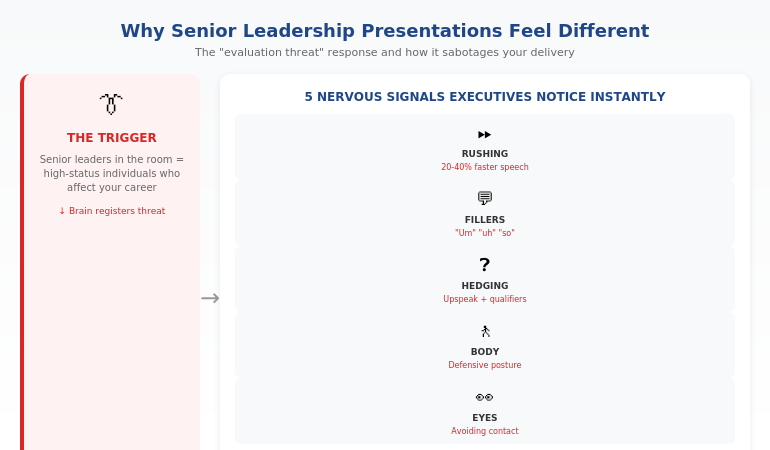
Diagram showing the evaluation threat response when presenting to senior leadership and how it affects your voice, body language, and thinking

The 5 Nervous Signals Executives Notice Instantly

Senior leaders have sat through thousands of presentations. They’ve developed an unconscious radar for nervousness—and when they detect it, they discount what you’re saying.

Here’s what they notice before you’ve finished your first sentence:

Signal 1: Speech Speed

Nervous presenters rush. They speak 20-40% faster than their normal conversational pace, cramming words together as if trying to finish before something bad happens.

Executives interpret this as: “They’re not confident in what they’re saying” or “They’re trying to get through this before I can ask questions.”

The tell: If you finish your opening faster than you did in rehearsal, you’re rushing.

Signal 2: Filler Words

“Um,” “uh,” “so,” “like,” “you know”—these multiply under pressure. One or two are human. A pattern of them signals that you’re searching for words because anxiety is blocking access to your prepared content.

The tell: Filler words cluster at the beginning of sentences and during transitions.

Signal 3: Upspeak and Hedging

Ending statements as questions (“We should invest in this initiative?”) or adding hedges (“I think maybe we could potentially consider…”) signals uncertainty.

Senior leaders want confident recommendations. When you hedge, they hear: “I’m not sure about this, and neither should you be.”

The tell: Your voice rises at the end of declarative statements.

Signal 4: Defensive Body Language

Crossed arms, hands in pockets, weight shifting from foot to foot, avoiding the centre of the room—all signal discomfort.

Executives read this as: “They don’t want to be here” or “They’re hiding something.”

The tell: You’re standing differently than you would in a casual conversation with friends.

Signal 5: Eye Contact Avoidance

Looking at your slides, at the floor, at the back wall—anywhere but at the people you’re presenting to.

This is the most damaging signal because it breaks connection. When you avoid eye contact, it makes trust harder to establish—executives instinctively wonder what you’re uncertain about.

The tell: You’re not sure what colour eyes the most senior person in the room has.

⭐ Stop the Nervous Signals Before They Start

Conquer Speaking Fear gives you the techniques to rewire these automatic responses—so you project calm authority even when your nervous system is screaming.

What’s inside:

  • The pre-presentation protocol that calms your nervous system in 5 minutes
  • In-the-moment techniques for each of the 5 nervous signals
  • The “recovery moves” when nerves spike mid-presentation

Get Conquer Speaking Fear → £39

Developed from clinical hypnotherapy training and 5 years of personal research into presentation anxiety.

How to Project Calm Authority (Even When You’re Not Calm)

The goal isn’t to eliminate nervousness—that’s unrealistic for high-stakes situations. The goal is to prevent nervousness from showing.

The key insight: calm is a behaviour, not a feeling. You can act calm while feeling anxious—and when you act calm, executives perceive you as calm.

Here’s how:

Technique 1: The Deliberate Pause

When you feel the urge to rush, do the opposite: pause.

Before your first sentence, take a breath. Between major points, pause for a full second. When asked a question, pause before answering.

Pauses feel eternal to you but appear confident to your audience. Senior leaders interpret pauses as: “This person is thoughtful and in control.”

Practice: Rehearse with intentional 2-second pauses after every third sentence. It will feel awkward. It will look authoritative.

Technique 2: Lower Your Vocal Register

Anxiety raises your pitch. A higher voice signals stress to listeners at a subconscious level.

Before you speak, hum quietly at the lowest comfortable note in your range. This primes your voice to start lower.

When presenting, imagine you’re speaking from your chest rather than your throat. The difference is subtle but powerful.

Practice: Record yourself presenting. If your pitch rises during key moments, consciously drop it in your next rehearsal.

Technique 3: Strategic Eye Contact

Don’t try to make eye contact with everyone—that’s overwhelming. Instead, use the “triangle technique.”

Identify three people in the room: one friendly face, one neutral, one who seems skeptical. Rotate your eye contact among these three, spending 5-7 seconds with each.

This creates the impression of confident engagement without the cognitive load of tracking everyone.

Practice: In your next meeting (even a low-stakes one), practice the triangle. Notice how it changes your sense of connection.

Technique 4: The “Grounded Stance”

Plant your feet shoulder-width apart. Feel your weight distributed evenly. Keep your hands visible—either at your sides or gesturing naturally.

This physical stability creates psychological stability. When your body feels grounded, your mind follows.

Practice: Stand in the grounded stance for 60 seconds before your presentation. Notice how it changes your breathing.

Technique 5: The First Sentence Anchor

Memorise your first sentence word-for-word. Not your whole opening—just the first sentence.

When anxiety is highest (the first 30 seconds), you need something you can deliver automatically. A memorised first sentence gives you that anchor.

Practice: Say your first sentence 20 times until it requires zero thought. Then trust it in the room.

For more on building lasting confidence, see why “fake it till you make it” doesn’t work.

Want all 5 techniques plus the complete pre-presentation protocol? Conquer Speaking Fear (£39) includes step-by-step implementation guides for each one.

Before, During, and After: The Complete Protocol

Calm authority when presenting to senior leadership requires preparation at three stages:

Before: The 24-Hour Protocol

The night before:

  • Review your material once (not repeatedly—that creates anxiety)
  • Visualise a successful presentation: see yourself calm, hear yourself clear
  • Get adequate sleep—anxiety spikes when you’re tired

The morning of:

  • Light exercise (even a 10-minute walk) burns off stress hormones
  • Avoid excessive caffeine—it amplifies anxiety symptoms
  • Eat something light so your blood sugar is stable

The hour before:

  • Arrive early and familiarise yourself with the room
  • Do the 4-7-8 breathing technique (4 counts in, 7 hold, 8 out) three times
  • Review only your first sentence and your key recommendation—nothing else

During: The In-the-Moment Techniques

Remember: the first 30 seconds set the tone for everything that follows.

First 30 seconds:

  • Deliver your memorised first sentence
  • Speak 30% slower than feels natural
  • Find your friendly face and make initial eye contact there

Throughout:

  • Use deliberate pauses after key points
  • Keep returning to the grounded stance when you feel yourself shifting
  • If you feel yourself speeding up, consciously slow down

When challenged:

  • Pause before responding (this looks thoughtful, not slow)
  • Acknowledge the question: “That’s an important point”
  • Answer directly, then stop talking—don’t over-explain

After: The Recovery Protocol

What you do after the presentation affects your confidence in the next one.

Immediately after:

  • Note one thing that went well (your brain will naturally focus on flaws—counteract this)
  • If you stumbled, remind yourself: one moment doesn’t define the presentation

Within 24 hours:

  • Write down what you’d do differently (then close that loop mentally)
  • If you received positive feedback, record it—you’ll need this evidence on low-confidence days
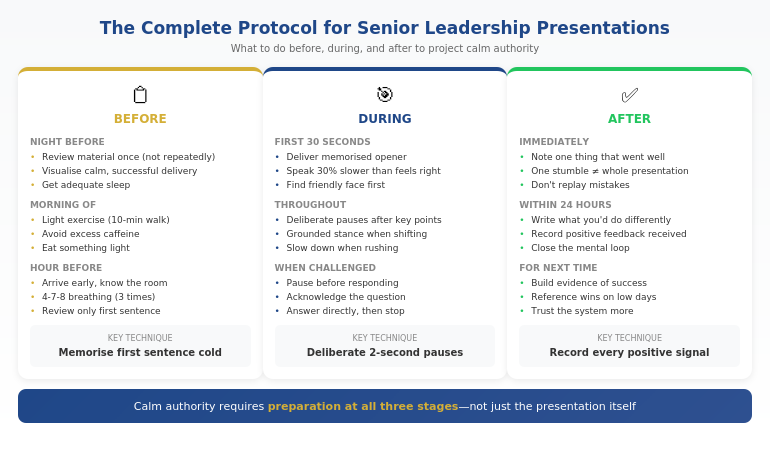
The complete before, during, and after protocol for presenting to senior leadership with calm authority

🎯 If you’re presenting to senior leadership this week, do this in the next 30 minutes:

  1. Write your recommendation in one sentence (if you can’t, you’re not ready)
  2. Memorise your first sentence word-for-word (this is your anchor)
  3. Practice deliberate 2-second pauses after every third sentence (it will feel awkward—that’s the point)
  4. Set a reminder to do the 4-7-8 breathing technique one hour before

This takes 30 minutes. It changes how you show up. The full system in Conquer Speaking Fear builds on these foundations.

⭐ The Complete Protocol — Ready to Implement

Conquer Speaking Fear includes the full before/during/after system, plus the specific techniques for each nervous signal. It’s everything I learned in 5 years of overcoming my own presentation terror—packaged so you can implement it before your next leadership presentation.

You’ll get:

  • The 24-hour preparation protocol
  • In-the-moment recovery techniques
  • The post-presentation confidence builder

Get Conquer Speaking Fear → £39

Developed from clinical hypnotherapy training and tested with hundreds of anxious presenters.

What to Say When Your Mind Goes Blank

It happens to everyone: you’re mid-sentence, and suddenly you have no idea what comes next. In front of senior leadership, this feels catastrophic.

Here’s how to recover:

Recovery Move 1: The Summary Bridge

When you lose your place, summarise what you just said:

“So to summarise that point: [restate the last thing you remember]. Now, moving to [look at your slide or notes for the next topic]…”

This buys you time while appearing organised. Senior leaders appreciate summaries—they’re processing a lot of information.

Recovery Move 2: The Strategic Question

If you’ve made a point and lost your thread, turn to your audience:

“Before I continue—are there questions on this section?”

This pause gives you time to recover while appearing collaborative. If they ask a question, answering it will often reconnect you to your material.

Recovery Move 3: The Honest Reset

If the blank is severe, acknowledge it simply:

“Let me pause and make sure I’m covering this clearly…”

Then glance at your notes, find your place, and continue. Senior leaders respect honesty more than struggling through a confused ramble.

Recovery Move 4: The Transition to Visuals

If you have slides, use them as your anchor:

“Let me walk you through what’s on this slide…”

Reading your slide isn’t ideal, but it’s far better than standing in silence. It keeps the presentation moving while you regain your footing.

For more recovery techniques, see what senior leaders actually do when nerves hit.

Ready to stop dreading leadership presentations? Conquer Speaking Fear (£39) gives you the complete system for calm authority under executive scrutiny.

Frequently Asked Questions

Why do I present fine to my team but fall apart with senior leadership?

It’s the “evaluation threat” response. Your brain perceives senior leaders as high-status individuals who can affect your career—triggering a stronger anxiety response than peer-level presentations. This is normal and biological, not a character flaw.

How much should I rehearse for a leadership presentation?

Rehearse until you know your material, then stop. Over-rehearsing creates a different kind of anxiety—the fear of forgetting your “perfect” version. Know your first sentence cold, know your key points, and trust yourself to fill in the details conversationally.

What if the CEO interrupts me with a tough question?

Pause before responding (this looks thoughtful). Acknowledge the question. Answer directly and concisely. If you don’t know the answer, say “I’ll need to verify that and follow up”—executives respect honesty over fumbled guesses.

Should I use notes when presenting to senior leadership?

Brief notes are fine—better than losing your place. Use a single page with key points only, not a script. Glance at it when needed; don’t read from it. Senior leaders care about your command of the material, not whether you reference notes.

How do I handle a hostile or skeptical executive?

Don’t take it personally—skepticism is their job. Stay calm, stick to facts, and don’t become defensive. If they push back, acknowledge their concern (“I understand that concern—here’s how we’ve addressed it…”) rather than arguing. Calm persistence wins.

What if I visibly blush, sweat, or shake during the presentation?

Physical symptoms are more noticeable to you than to your audience. If they do notice, projecting calm through your voice and posture matters more than controlling the symptom. The techniques in this article help prevent symptoms from escalating.

How long does it take to get comfortable presenting to senior leadership?

Most people see significant improvement within 3-5 presentations when using these techniques deliberately. You may never be “comfortable,” but you can become confident that you can manage your nerves effectively.

Does this work if you’re naturally anxious?

Yes—in fact, it works better for naturally anxious people than the standard advice (“just relax,” “be confident”). These techniques don’t require you to change your personality or pretend you’re not nervous. They work by giving your anxious energy somewhere productive to go: into deliberate pauses, into grounded posture, into that memorised first sentence. The anxiety is still there—but it’s channelled rather than displayed. Many of the professionals who’ve used these techniques describe themselves as “anxious people who’ve learned to present calmly.” That’s the goal.

Is This Right For You?

✓ This is for you if:

  • You present well to peers but struggle with senior leadership
  • Your nerves undermine your credibility in high-stakes meetings
  • You want techniques that work in the moment, not just theory
  • You’re tired of dreading presentations that could advance your career

✗ This is NOT for you if:

  • You already feel calm presenting to executives
  • Your main issue is slide design, not delivery anxiety
  • You’re looking for medication or therapy referrals
  • You’re not willing to practice techniques before presentations

⭐ I Spent 5 Years Terrified. Then I Found What Works.

That CEO presentation where my voice shook? It was rock bottom. But it started a 5-year journey into nervous system regulation, clinical hypnotherapy, and what actually creates calm authority. Everything I learned is in Conquer Speaking Fear—so you don’t have to spend years figuring it out yourself.

What you’ll get:

  • The complete pre/during/after protocol
  • Techniques for each of the 5 nervous signals
  • Recovery moves when things go wrong

Get Conquer Speaking Fear → £39

Developed from clinical hypnotherapy training and tested with hundreds of professionals who struggled with executive presentations.

📧 Optional: Get weekly confidence strategies in The Winning Edge newsletter (free).

Your Next Step

Your next leadership presentation is the easiest moment to reset how you’re perceived.

Before you present, run through the 60-second reset: three slow breaths, commit to speaking 30% slower, and identify your friendly face for initial eye contact.

These three techniques won’t eliminate nerves—but they’ll prevent nerves from showing. And when you appear calm, executives take you seriously.

The gap between “knowing your material” and “being trusted with bigger opportunities” is often just perceived composure. Close that gap before your next presentation.

For the complete system—including the 24-hour protocol, all 5 signal-blocking techniques, and recovery moves when things go wrong—get Conquer Speaking Fear (£39).

P.S. If your slides aren’t structured for executive decision-making, see how to build decision slides that get “yes” in 60 seconds.

About the Author

Mary Beth Hazeldine is the Owner & Managing Director of Winning Presentations and a qualified clinical hypnotherapist. The CEO presentation that opens this article is real—and the 5 years of terror that followed led to the techniques now in Conquer Speaking Fear.

After 24 years in corporate banking at JPMorgan Chase, PwC, Royal Bank of Scotland, and Commerzbank—where presenting to senior leadership was unavoidable—she’s helped hundreds of professionals transform their relationship with high-stakes presentations.

Book a discovery call | View services

25 Jan 2026
Professional executive receiving instant approval after presenting a decision slide to senior leadership

The Decision Slide That Gets “Yes” in 60 Seconds

The CFO looked at the slide for exactly 8 seconds. Then she said: “Approved. Next item.”

The presenter—a VP who’d spent three weeks preparing—was stunned. She’d expected pushback, questions, a debate. Instead, she got the fastest approval of her career.

The difference wasn’t her data. It was her decision slide.

Quick answer: A decision slide executive format puts the recommendation first, the ask second, and the support third—in that exact order. Most presenters reverse this, burying their ask under context and data. Executives don’t have time to hunt for your point. The decision slide structure gives them everything they need to say yes in 60 seconds or less.

When your decision slide works:

  • Executives approve faster (often without questions)
  • You’re seen as someone who “thinks like leadership”
  • Your recommendations stop getting stuck in review cycles

Written by Mary Beth Hazeldine — Owner & Managing Director of Winning Presentations, 25 years corporate banking at JPMorgan Chase, PwC, RBS, and Commerzbank. I’ve written decision slides that unlocked senior funding decisions across global banking; today she helps senior professionals build the same. Last updated: April 2026.

🚨 Presenting a DECISION this week? Use this 60-second check:

  1. Line 1: Does your recommendation appear in the first sentence? (Not background—the actual ask)
  2. Line 2: Is the specific decision clear? (“Approve £500K” not “Consider investment options”)
  3. Line 3: Can they say yes without flipping to another slide?

If you can’t answer yes to all three, restructure before you present.

📌 If you’d rather see the structures than build them from scratch:

The decision slide formats in this article are exactly what’s inside the Executive Slide System — designed for senior professionals presenting decisions to boards, investment committees, and exec sponsors.

I learned this structure the hard way. Early in my banking career, I built what I thought was a bulletproof business case. Fifteen slides of analysis. Comprehensive risk assessment. Three alternative scenarios.

The executive stopped me on slide two.

“What do you want me to do?”

I fumbled. The recommendation was on slide twelve. By the time I got there, he’d lost interest. The proposal went into “further review”—which meant it died.

That afternoon, a colleague showed me her approach. One slide. Recommendation first. Clear ask. Supporting data underneath. She got approvals in meetings that took me months of follow-up.

The difference wasn’t seniority or politics. It was slide structure. And once I understood why it worked, I never built a decision presentation any other way.

Why Most Decision Slides Fail

The typical decision slide looks like this:

Title: “Investment Recommendation”
Content: Background on the project. Market analysis. Three options with pros and cons. Risk factors. Financial projections. And somewhere near the bottom: “Recommendation: Proceed with Option B.”

This structure fails because it forces executives to do your job.

They have to read through everything, piece together the logic, and figure out what you want them to decide. Most won’t. They’ll ask clarifying questions, request a follow-up meeting, or defer the decision entirely.

The 60-second decision slide format flips this completely:

First: What you recommend (the answer)
Second: What you need them to do (the ask)
Third: Why this is the right choice (the support)

This isn’t just about saving time. It’s about how senior leaders actually process information.

How Executives Actually Make Decisions

Research on executive decision-making shows that senior leaders use a “satisficing” approach—they look for the first option that meets their criteria, rather than exhaustively evaluating all possibilities.

When you lead with your recommendation, you give them something to react to immediately. They can say yes, ask a clarifying question, or explain why they disagree. All of these move the decision forward.

When you bury your recommendation, you force them into analysis mode. They’re not deciding—they’re processing. And processing doesn’t lead to approval.

For more on executive summary best practices, see how to write the only slide that matters.

Diagram comparing traditional decision slide structure versus the 60-second decision slide format that gets faster executive approval

The Anatomy of a 60-Second Decision Slide

Every effective decision slide has four components in this exact order:

Component 1: The Headline Recommendation

The slide title itself should state your recommendation—not describe the topic.

Wrong: “Q4 Marketing Investment Options”
Right: “Approve £200K for Q4 Digital Campaign (2.3x Projected ROI)”

The headline tells them what you want before they’ve read a single line of body text. If they read nothing else, they know your position.

Component 2: The Specific Ask

Immediately below the headline, state exactly what decision you need:

“Decision required: Approve £200,000 marketing budget for Q4 digital campaign, effective November 1.”

Notice the specificity: exact amount, exact purpose, exact timing. Vague asks get vague responses. Specific asks get decisions.

Component 3: The 3-Point Support

Below your ask, provide exactly three supporting points. Not five. Not seven. Three.

Why three? It’s the maximum number of reasons executives can hold in working memory while making a decision. More than three, and you’re diluting your argument.

Each point should be one line:

  • Q3 pilot achieved 2.3x ROI (£46K spend → £106K revenue)
  • Competitor digital spend increased 40% YoY—we’re losing share
  • Campaign ready to launch; delay costs £15K/week in lost momentum

Component 4: The Next Step

End with the immediate next action if they approve:

“If approved today: Campaign launches November 1. First results report: November 15.”

This removes friction. They don’t have to wonder what happens after they say yes—you’ve already told them.


STOP REBUILDING DECKS FROM SCRATCH

Build executive slides that get past slide 3

The Executive Slide System gives you 26 templates, 93 AI prompts, and 16 scenario playbooks designed for senior presenters. Drop your content into a structure that already works — finance committees, board approvals, steering meetings, capital reviews. £39, instant access, lifetime updates.

Get the Executive Slide System →

£39, instant access. 26 templates, 93 AI prompts, 16 scenario playbooks. Designed for executive presenters.

3 Decision Slide Formats That Work

Not every decision is the same. Here are three formats for different situations:

Format 1: The Single Recommendation

Use when: You have one clear recommendation and need approval.

Structure:

  • Headline: [Recommendation + Key Benefit]
  • Ask: One sentence stating the specific decision needed
  • Support: Three bullet points with evidence
  • Next step: What happens if approved

Example headline: “Hire 3 Senior Engineers by March (Reduces Delivery Risk by 60%)”

Format 2: The Either/Or Choice

Use when: You need them to choose between two options (both acceptable to you).

Structure:

  • Headline: [Decision Required + Stakes]
  • Option A: [Description + Key tradeoff]
  • Option B: [Description + Key tradeoff]
  • Recommendation: Which option you prefer and why (one line)

Example headline: “Platform Migration Decision Required by Jan 31 (£2M Cost Differential)”

Note: Never present three or more options. If you have three options, you haven’t done enough analysis to narrow it down.

Format 3: The Approval + Escalation

Use when: You need approval AND need to flag a related risk or dependency.

Structure:

  • Headline: [Primary Recommendation]
  • Primary ask: The main decision needed
  • Support: Three points
  • Escalation: One related issue requiring their awareness or separate decision

Example: “Approve Q1 Launch Schedule (Note: Requires CFO Sign-off on £150K Contingency)”

This format prevents the “yes, but what about…” derailment by acknowledging the dependency upfront.

For the complete decision framework, see the 3-slide system that gets faster decisions.

Want all three decision slide templates ready to use? The Executive Slide System (£39) includes these formats plus 9 more executive presentation templates.

Common Mistakes That Kill Approvals

Even with the right structure, these mistakes can sink your decision slide:

Mistake 1: The Hedge

What it looks like: “We recommend considering Option B, pending further analysis…”

Why it fails: If you’re not confident enough to make a clear recommendation, why should they be confident enough to approve it?

The fix: “We recommend Option B.” Full stop. If there’s genuinely more analysis needed, don’t bring it to a decision meeting.

Mistake 2: The Data Dump

What it looks like: Seven supporting points, three charts, and a footnote about methodology.

Why it fails: More evidence doesn’t equal more persuasion. It signals you’re not sure which evidence matters most.

The fix: Three points maximum. If they want more detail, they’ll ask. (Put the rest in an appendix.)

Mistake 3: The Missing Ask

What it looks like: A slide that explains your recommendation but never explicitly states what you need them to do.

Why it fails: Executives can agree with your analysis and still not approve anything—because you never asked them to.

The fix: Include the literal words “Decision required:” followed by the specific action you need.

Mistake 4: The Unclear Timeline

What it looks like: “We recommend proceeding with this initiative soon.”

Why it fails: “Soon” isn’t actionable. Without a deadline, the decision gets deprioritized.

The fix: Specific date or trigger. “Approval needed by January 31 to meet Q2 launch window.”

Mistake 5: The Missing Stakes

What it looks like: A recommendation with no context about what happens if they don’t approve.

Why it fails: If there’s no cost to inaction, there’s no urgency to act.

The fix: Include the cost of delay or the missed opportunity. “Each week of delay costs £15K in lost market share.”

The 5 common mistakes that kill executive approvals and how to fix each one for faster decision slides

⭐ Run the 60-Second Decision Slide Check Before You Present

The Executive Slide System (£39, instant access) includes the Decision Slide Checklist — the same quality gate that catches the approval-killing mistakes above before you walk in.

Get the Executive Slide System →

Designed for senior presenters who need decisions, not deferrals.

Before and After: Real Decision Slide Transformations

Here’s what the 60-second decision slide format looks like in practice:

Transformation 1: Budget Request

Before (buried ask):

Title: “Q4 Marketing Analysis”
Content: Market trends, competitor analysis, three budget scenarios, risk assessment… recommendation on page 8.

Result: “Good analysis. Let’s discuss at next month’s planning meeting.”

After (decision slide format):

Title: “Approve £200K Q4 Digital Campaign (2.3x Projected ROI)”
Decision required: Approve £200K budget, effective November 1.
Support: Q3 pilot ROI (2.3x), competitor gap (40% more spend), launch-ready status.
Next step: Campaign launches November 1 if approved today.

Result: “Approved. Keep me updated on November 15.”

Transformation 2: Project Approval

Before (missing stakes):

Title: “Platform Migration Options”
Content: Three options with detailed comparison. No recommendation. No timeline. No cost of inaction.

Result: “Good work. Let’s get the tech team’s input and reconvene.”

After (decision slide format):

Title: “Approve Platform Migration by Jan 31 (£2M Cost Difference)”
Decision required: Select Option B (cloud migration) with Feb 1 start.
Support: 60% lower TCO, vendor contract expires March 1 (penalty if delayed), team capacity available now.
Next step: Contracts signed by Feb 1, migration complete by June 30.

Result: “Option B approved. Send me the contracts.”

Transformation 3: Strategic Recommendation

Before (the hedge):

Title: “Market Entry Considerations”
Content: “We recommend potentially considering APAC expansion, subject to further due diligence…”

Result: “Come back when you have a clearer recommendation.”

After (decision slide format):

Title: “Enter Singapore Market by Q3 (£4M Revenue Opportunity)”
Decision required: Approve Singapore market entry with £500K initial investment.
Support: £4M addressable market, 3 enterprise prospects already engaged, competitor entering Q4.
Next step: Local entity setup begins February 1 if approved today.

Result: “Singapore approved. Let’s discuss the prospect pipeline in our next 1:1.”

For proven executive presentation structures, see the 12-slide template that commands the room.

Ready to transform your decision slides? The Executive Slide System (£39) includes all three decision formats plus the 60-Second Test checklist.

Frequently Asked Questions

What if executives want to see the analysis before the recommendation?

They don’t—even if they say they do. What they actually want is confidence that you’ve done the analysis. Lead with your recommendation, and when they ask “how did you get there?”, walk them through the logic. This is more engaging than front-loading the analysis.

How do I handle complex decisions that can’t fit on one slide?

The decision slide should still lead. Put your recommendation and ask on slide one. Use slides 2-3 for supporting analysis if needed. But structure the deck so they could approve from slide one alone—the rest is backup.

What if I genuinely have three good options?

You don’t. If you can’t narrow to two, you haven’t done enough analysis to determine what matters most. Do that work before the meeting. Presenting three options signals uncertainty and invites “let’s discuss further” instead of decisions.

How specific should the ask be?

As specific as possible. “Approve investment” is vague. “Approve £500,000 for Q2 expansion, releasing funds by February 15” is specific. Specific asks get specific answers. Vague asks get deferred.

What if they say no?

A clear “no” is better than endless deferral. At least you know their objection and can address it. The executive decision slide format is designed to get decisions—yes or no—not to guarantee approval. But in my experience, clear asks get approved far more often than buried ones.

Should I share the decision slide in advance?

Yes, if the decision is significant. Send the slide 24-48 hours before the meeting with a note: “Here’s what I’ll be recommending. Happy to discuss before the meeting if you have questions.” This pre-wires the approval and surfaces objections before you’re in the room.

How is this different from an executive summary?

An executive summary provides an overview of your entire presentation. A decision slide focuses specifically on the choice you need them to make. You might have an executive summary AND a decision slide in the same deck—summary first, decision slide when you’re ready for the ask.

Is This Right For You?

✓ This is for you if:

  • You present budget requests, project approvals, or strategic recommendations
  • You’re tired of getting “let me think about it” instead of decisions
  • You want templates that get faster executive buy-in
  • You’re willing to restructure how you present decisions

✗ This is NOT for you if:

  • You mainly give informational updates (no decision needed)
  • Your presentations are primarily training or education
  • You’re not the one making recommendations
  • You prefer to let executives “discover” the conclusion themselves

⭐ The Decision Slide Structures That Changed How I Present

After watching the CFO approve my colleague’s proposal in seconds while mine languished for months, I rebuilt everything. The decision slide formats inside the Executive Slide System (£39, instant access) are exactly what I learned and what I still use today.

What you’ll get:

  • 3 decision slide formats (single recommendation, either/or, approval + escalation)
  • The 60-Second Decision Slide Check
  • 26 executive slide templates, 93 AI prompts, and 16 scenario playbooks

Get the Executive Slide System →

Designed for senior professionals presenting funding, strategy, or organisational decisions.

Ready for the deeper buy-in framework?

The Executive Buy-In Presentation System

A self-paced programme on Maven covering the structure, psychology, and stakeholder analysis behind senior approvals. 7 modules with optional recorded Q&A sessions — no deadlines, no mandatory attendance. £499, lifetime access to materials.

Explore the programme →

📧 Optional: Get weekly executive presentation strategies in The Winning Edge newsletter (free).

Your Next Step

Your next decision presentation is an opportunity to get a faster “yes.”

Before you present, run the 60-second check: Is your recommendation in the headline? Is the specific ask crystal clear? Can they approve without flipping to another slide?

If you can answer yes to all three, you’ve built a decision slide executive format that respects their time and earns their approval.

For the complete system with all three decision slide templates and the 60-Second Test checklist, get the Executive Slide System (£39).

P.S. If nerves are undermining your delivery when you present to senior leadership, see how to sound calm and credible when presenting to executives.

About the Author

Mary Beth Hazeldine is the Owner & Managing Director of Winning Presentations. The 8-second approval that opens this article is real—and that colleague’s approach became the foundation for how she now teaches decision slide structure.

With 25 years at JPMorgan Chase, PwC, Royal Bank of Scotland, and Commerzbank—where decision slides determined funding, strategy, and careers—she’s written hundreds of decision presentations and taught the format to senior professionals across financial services, consulting, and technology.

Book a discovery call | View services

24 Jan 2026
The Presentation Mastery Curve: Where Most Professionals Get Stuck (I Was Stuck for 8 Years)

The Presentation Mastery Curve: Where Most Professionals Get Stuck (I Was Stuck for 8 Years)

I gave presentations for eight years without getting meaningfully better. I wasn’t bad. I was stuck at “competent”—and I had no idea why I couldn’t break through.

Quick answer: The presentation mastery curve is a predictable progression with four stages: Survival (just getting through it), Competence (adequate but forgettable), Confidence (good but plateaued), and Mastery (commanding and persuasive). Most professionals get stuck between Competence and Confidence—where presentations are “fine” but not remarkable. The breakthrough requires deliberate structure work, not more practice of the same approach.

In practice, moving from “competent presenter” to “master presenter” requires recognising which stage you’re actually at, understanding why you’re stuck there, and applying the specific intervention that unlocks the next level.

When you break through to the next stage:

  • People stop saying “let me think about it”
  • Your ask becomes easier to say yes to
  • You stop needing 30 slides to feel credible

Written by Mary Beth Hazeldine — executive presentation coach, 24 years corporate banking, trained 5,000+ executives. I’ve coached executives inside global banks, consulting teams, and high-stakes leadership environments—where one presentation can change funding, strategy, or careers. Last updated: January 2026 with new stage diagnostic + “presenting this week” reset.

🚨 Presenting THIS WEEK? Here’s how to break through immediately:

  1. Identify your stage using the diagnostic below (be honest—most overestimate)
  2. Apply the ONE intervention for your stage (don’t skip ahead)
  3. Focus on structure for this presentation, not delivery polish
  4. Get one piece of feedback on whether your argument was clear (not on your style)

One presentation with deliberate structure work beats ten presentations on autopilot.

📅 Want to systematically move through the mastery curve?

The difference between professionals who stay stuck and those who break through is structured progression with the right interventions at each stage. This article maps the curve—and shows you exactly where you are.

When I finally understood the mastery curve, I realised I’d been applying Confidence-stage interventions while stuck at the Competence stage. I was polishing delivery when my structure was broken. No wonder nothing changed.

The executives I train often have the same realisation. They’ve been working on the wrong things—not because they’re not trying, but because they didn’t know which stage they were actually at.

If you’ve ever felt like your presentations should be better than they are—despite years of experience—this article explains exactly why, and what to do about it.

The Four Stages of Presentation Mastery

After training 5,000+ executives, I’ve observed that the presentation mastery curve follows a remarkably consistent pattern. Almost everyone moves through the same four stages—the difference is how long they stay stuck at each one.

Stage 1: Survival (0-2 years presenting)

At this stage, your primary goal is getting through the presentation without disaster. You’re focused on not forgetting your words, not visibly shaking, not running out of things to say.

Markers: Heavy reliance on notes or slides as a script. Significant anxiety before and during. Relief when it’s over. Little memory of what actually happened.

The trap: Some people stay here for years because avoidance feels safer than exposure. They present as little as possible, which prevents them from ever building the reps needed to advance.

Stage 2: Competence (2-5 years presenting)

You can deliver a presentation that’s “fine.” The audience doesn’t notice anything wrong. You hit your points, stay on time, answer questions adequately. But you’re forgettable.

Markers: Lower anxiety, but not excitement. Presentations feel like tasks to complete, not opportunities to influence. You get polite feedback but rarely enthusiastic response.

The trap: This is where most professionals get permanently stuck. “Fine” doesn’t trigger a need for improvement. The pain isn’t acute enough to drive change.

Stage 3: Confidence (5-10+ years… or never)

You’re comfortable presenting. You might even enjoy it. Your delivery is polished. But something’s still missing—you’re not commanding rooms or driving decisions the way you know is possible.

Markers: Good style, but structure might still be weak. You can present well, but can’t necessarily teach others why. Inconsistent results depending on the topic or audience.

The trap: At this stage, the problem is invisible. You look and feel competent. Others might even compliment you. But you’ve hit a ceiling you can’t identify, let alone break through.

Stage 4: Mastery (Rare)

You don’t just present information—you shape how people think. Your presentations create clarity where there was confusion, momentum where there was stagnation, decisions where there was paralysis.

Markers: Presentations feel like conversations, not performances. You adapt in real-time based on the room. The structure serves the argument so seamlessly that it’s invisible. People act differently after hearing you speak.

The truth: Most professionals never reach this stage—not because they can’t, but because they don’t know the specific interventions required to break through from Stage 3.

The four stages of presentation mastery development showing where most professionals get stuck between Competence and Confidence

⭐ A Structured Path Through the Mastery Curve

AI-Enhanced Presentation Mastery is designed for professionals stuck between Competence and Mastery—with the specific interventions that unlock each stage.

What makes it different:

  • Stage-appropriate frameworks (not one-size-fits-all advice)
  • Structure interventions first (the actual breakthrough), delivery polish second
  • Live cohort sessions for real-time feedback on your actual presentations

See the Full Curriculum →

Next cohort starts soon. Limited to 20 participants for hands-on progression.

📦 What You Get (Specifically):

  • 4 executive presentation frameworks — the structure interventions that create breakthrough
  • AI-enhanced creation workflow — cut creation time by 70% so you can focus on mastery, not mechanics
  • Live cohort sessions — practice with feedback at your actual stage
  • Stage-specific exercises — interventions matched to where you are, not generic advice
  • Real presentation application — apply everything to presentations you’re actually building

📌 What this course gives you that experience alone can’t:

  • Diagnosis — honest assessment of your actual stage (most overestimate by one level)
  • Stage-appropriate intervention — the specific work that unlocks YOUR next level
  • Acceleration — compress years of trial-and-error into focused, structured progression

Experience gives you reps. Structure gives you breakthrough.

Where Most Professionals Get Stuck (And Why)

The most common sticking point is between Stage 2 (Competence) and Stage 3 (Confidence). Here’s why:

The “Good Enough” Trap

At Stage 2, presentations work. They’re not embarrassing. They don’t cause problems. This eliminates the urgent need for improvement.

A marketing VP named David described it perfectly: “I’d been presenting for seven years. My presentations were fine. Nobody complained. But I noticed that when I asked for resources or decisions, I’d get ‘let me think about it’ instead of ‘yes.’ I didn’t connect those two things until much later.”

The absence of failure isn’t the same as the presence of success. But it feels like it.

The Wrong Intervention Problem

When professionals at Stage 2 try to improve, they often apply Stage 3 or 4 interventions: vocal variety, body language, storytelling polish, slide design aesthetics.

These are the wrong tools. The breakthrough from Stage 2 to Stage 3 isn’t about delivery—it’s about structure. Your argument needs to be clearer, your ask needs to be sharper, your logic needs to be tighter.

A product director named Jennifer spent a year working with a speaking coach on her delivery. “My voice got better, my posture improved, but my presentations still weren’t landing. Then someone pointed out that my structure was a mess—I was burying my point on slide 15. All that delivery work was polishing a broken argument.”

The Experience Illusion

There’s a dangerous assumption that more presenting automatically means better presenting. It doesn’t.

If you’ve been driving the same way for 20 years, you have 20 years of experience. But you’re not a better driver than you were at year 5. Presentation skills work the same way—repetition without deliberate intervention just reinforces your current level.

I see this constantly: executives with 15+ years of presenting experience who are still firmly at Stage 2. They’ve never been forced to confront the structural weaknesses that are holding them back.

For more on why traditional approaches fail, see why most presentation training fails.

Ready for the structure intervention that creates breakthrough? AI-Enhanced Presentation Mastery focuses on the actual bottleneck—argument structure—not the symptoms. See the Curriculum →

The Honest Diagnostic: Which Stage Are You Really At?

Most professionals overestimate their stage by at least one level. Here’s an honest diagnostic:

You’re at Stage 1 (Survival) if:

  • You avoid presenting when possible
  • You rely heavily on notes or reading from slides
  • Your primary emotion before presenting is dread
  • You can’t remember much of what happened during presentations
  • You measure success by “getting through it”

You’re at Stage 2 (Competence) if:

  • You can present without disaster, but it feels like a task
  • Audience feedback is polite but not enthusiastic
  • You often hear “that was good” but rarely see action result from your presentations
  • You struggle to articulate why some presentations land better than others
  • Your structure varies significantly from presentation to presentation

You’re at Stage 3 (Confidence) if:

  • You’re comfortable presenting, even to senior audiences
  • Your delivery is polished and consistent
  • But you still have presentations that inexplicably fall flat
  • You can’t reliably replicate your best performances
  • You feel like there’s another level you can’t quite reach

You’re at Stage 4 (Mastery) if:

  • You can adapt your presentation in real-time based on the room
  • People consistently act differently after hearing you speak
  • You could teach others exactly why your approach works
  • Your structure is so clear that the audience never feels lost
  • Presenting feels like a conversation, not a performance

Be honest with yourself. The intervention that works depends entirely on an accurate diagnosis.

Related: See the presentation skills gap most professionals don’t see.

Diagnostic checklist for identifying your current stage of presentation mastery development

⭐ If You’ve Been Stuck at “Good Enough” for Years

That’s not a failure of effort—it’s a misdiagnosis of stage. AI-Enhanced Presentation Mastery includes honest assessment and stage-appropriate interventions that actually create movement.

Why it works when experience hasn’t:

  • Diagnoses your actual stage (not the one you think you’re at)
  • Applies the intervention that matches YOUR bottleneck
  • Structure-first approach (the real breakthrough, not delivery polish)

See the Full Curriculum →

Limited to 20 participants • Hands-on feedback • Next cohort starting soon.

The Intervention That Unlocks Each Stage

Each stage has a specific intervention that creates breakthrough. Applying the wrong intervention is why most people stay stuck.

Stage 1 → Stage 2: Exposure + Simple Structure

The intervention: More reps with a basic framework. You need to present enough times that the survival fear diminishes. But you also need a simple structure to follow so each presentation has a foundation.

Specifically: Use the Problem-Solution-Action framework for every presentation. Don’t worry about polish—just hit the structure every time. Volume matters at this stage.

Stage 2 → Stage 3: Structure Mastery

The intervention: Deep work on argument structure. This is where most improvement efforts fail—they focus on delivery when structure is the actual bottleneck.

Specifically: Master the Pyramid Principle (conclusion first, then evidence). Learn to identify and eliminate structural weaknesses: buried leads, unclear asks, logic gaps. Record yourself and analyse structure, not delivery.

A finance director named Marcus described his breakthrough: “I’d been working on my ‘presence’ for years. Then I rewatched a presentation and ignored how I looked—I just mapped the structure. It was a mess. My conclusion came on slide 18. Once I fixed that, everything changed.”

Stage 3 → Stage 4: Adaptive Mastery

The intervention: Real-time adaptation and invisible structure. At this stage, you need to internalise frameworks so deeply that you can deploy them without thinking—and adjust based on audience response.

Specifically: Practice presenting the same content with different structures. Learn to read the room and pivot. Develop the ability to explain your framework choices—if you can teach it, you’ve mastered it.

For more on effective training approaches, see what to look for in presentation skills training.

Want the specific frameworks for each stage transition? AI-Enhanced Presentation Mastery maps the interventions to your actual level—not generic advice for everyone. Learn More →

The Realistic Timeline for Mastery

Here’s what progression along the presentation mastery curve actually looks like with deliberate practice:

Stage 1 → Stage 2: 3-6 months

With consistent exposure (presenting at least weekly) and a simple framework, most professionals can move past survival mode within a few months. The key is volume—you need enough reps for the fear to subside.

Stage 2 → Stage 3: 6-18 months

This is the hardest transition because it requires recognising invisible structural weaknesses. With deliberate structure work, feedback, and focused practice, most professionals can break through within a year. Without intervention, many stay stuck here forever.

Stage 3 → Stage 4: 12-24+ months

Mastery requires deep internalisation of frameworks and real-time adaptation skills. This stage is about refinement, not revolution. Consistent practice with increasingly challenging audiences and situations builds the adaptive capacity that defines mastery.

The Acceleration Factor

These timelines assume deliberate practice with appropriate interventions. With structured guidance—a coach, a programme, a systematic approach—each transition can be compressed significantly. Without it, most professionals never complete the journey.

A senior VP named Robert shared his experience: “I was stuck at Stage 2 for probably ten years. Once I understood the structure intervention, I moved to Stage 3 within four months. Ten years of being stuck, four months to break through—because I finally had the right diagnosis.”

Frequently Asked Questions

Can you skip stages on the presentation mastery curve?

Not really. Each stage builds capabilities that the next stage requires. Trying to work on Stage 4 skills (adaptive mastery) while still struggling with Stage 2 issues (structural clarity) will frustrate you and produce inconsistent results. The progression is sequential for a reason—foundations matter.

How do I know if I’m stuck or just progressing slowly?

If your presentations have felt roughly the same for more than two years, you’re stuck. Normal progression—even slow progression—shows visible improvement over that timeframe. Stuckness feels like running in place: lots of effort, no movement. If colleagues would describe your presentations the same way they would have described them two years ago, that’s stuckness.

Why does focusing on delivery not work at Stage 2?

Because delivery polish can’t compensate for structural weakness. A beautifully delivered presentation with a buried conclusion still fails. The audience might enjoy watching you, but they won’t act on your message because they can’t follow your argument. Structure is the foundation—delivery is the finish. You can’t finish what isn’t built.

Is Stage 4 mastery actually achievable for most people?

Yes, but it requires sustained deliberate practice—and most people don’t maintain that commitment. Stage 4 is rare not because the skills are impossibly difficult, but because the path requires consistent work over years. Most professionals find Stage 3 “good enough” and stop pushing. That’s a valid choice—but it’s a choice, not a limitation.

What’s the biggest mistake people make when trying to improve?

Applying interventions from the wrong stage. Stage 2 presenters working on “executive presence.” Stage 3 presenters taking basic courses designed for Stage 1. The intervention must match the diagnosis. Most improvement efforts fail because they skip honest assessment and jump to generic advice.

How important is feedback in moving through the stages?

Critical at every stage, but the type of feedback changes. Stage 1 needs encouragement and basic correction. Stage 2 needs structural feedback (not style feedback). Stage 3 needs feedback on argument effectiveness and audience impact. Stage 4 needs feedback on adaptation and invisible framework choices. Generic “that was good” feedback doesn’t help at any stage.

Can I diagnose myself accurately?

Somewhat, but most people overestimate by one level. We judge ourselves on intent; audiences judge us on impact. Recording yourself and analysing structure (not watching how you look) helps. But external assessment from someone who understands the stages is more reliable. That’s one reason coaching and structured programmes accelerate progress—they provide accurate diagnosis.

Is This Course Right For You?

✓ This is for you if:

  • You’ve been presenting for years but feel stuck at “good enough”
  • You want stage-appropriate interventions, not generic tips
  • You’re ready for honest assessment of where you actually are
  • You’re willing to do structure work before delivery polish

✗ This is NOT for you if:

  • You’re at Stage 1 and need basic exposure first
  • You want quick fixes rather than systematic progression
  • You’re not currently presenting at work
  • You prefer to work on delivery polish only

⭐ I Was Stuck for 8 Years. Here’s What Finally Worked.

The mastery curve explained everything. I’d been applying wrong-stage interventions for nearly a decade. AI-Enhanced Presentation Mastery is what I wish existed when I was stuck—stage-appropriate frameworks that actually create movement.

What you’ll actually get:

  • Honest stage diagnosis (most overestimate)
  • The specific intervention for YOUR transition
  • Structure frameworks that create breakthrough

See the Full Curriculum →

Next cohort starting soon. Limited to 20 participants.

📧 Optional: Get weekly presentation frameworks in The Winning Edge newsletter (free).

Your Next Step

If you’ve been working on your presentations for years without meaningful improvement, you now understand why: you’ve likely been applying wrong-stage interventions, or not applying any intervention at all.

Presentation mastery development isn’t mysterious. It follows a predictable curve with specific transitions. The breakthrough comes when you accurately diagnose your stage and apply the matching intervention.

Use the diagnostic above. Be honest about where you are. Then focus on the one intervention that unlocks your next level—structure work for most professionals.

For structured progression with expert guidance, see the AI-Enhanced Presentation Mastery curriculum.

P.S. If you’re presenting this week and want to understand what your slides communicate beyond your words, see what your slides actually say about you.

About the Author

Mary Beth Hazeldine is the Owner & Managing Director of Winning Presentations and creator of AI-Enhanced Presentation Mastery. The “8 years stuck” admission that opened this article is real—and understanding the mastery curve was the breakthrough that finally created movement.

With 24 years of corporate experience at JPMorgan Chase, PwC, Royal Bank of Scotland, and Commerzbank, plus having trained 5,000+ executives through the mastery curve, she now teaches the stage-appropriate approach that actually creates progression.

Book a discovery call | View services

24 Jan 2026
Professional woman taking a calming breath as panic subsides before a presentation, showing the moment of regaining control

Panic Attack Before Presentation: What to Do in the Moment

My hands were shaking so badly I couldn’t hold my notes. My heart was pounding so hard I was certain everyone in the corridor could hear it. I had seven minutes until I was supposed to present to the board—and I was hiding in a bathroom stall, convinced I was dying.

Quick answer: A panic attack before presentation is your nervous system’s false alarm—it feels life-threatening but it isn’t. The 90-second protocol that stops it: (1) Cold water on wrists and neck, (2) 4-7-8 breathing (inhale 4, hold 7, exhale 8), (3) Name 5 things you can see out loud. This interrupts the panic cycle and gives your prefrontal cortex time to regain control from your hijacked amygdala.

In practice, panic attacks before presenting are far more common than most professionals admit—and they’re completely manageable once you understand what’s happening in your body and have a reliable protocol to interrupt the cycle.

When you have a protocol that works:

  • Panic becomes manageable instead of terrifying
  • You present anyway—and no one knows what happened
  • The fear of panic itself starts to fade

Written by Mary Beth Hazeldine — executive presentation coach and qualified clinical hypnotherapist. I spent 5 years having panic attacks before presentations until I learned what actually works. I’ve since helped hundreds of executives who thought they’d have to live with this forever. Last updated: January 2026.

🚨 Panic attack happening RIGHT NOW? Do this:

  1. Cold water — Run cold water on your wrists and splash your face/neck (activates dive reflex, slows heart)
  2. 4-7-8 breath — Inhale 4 counts, hold 7 counts, exhale 8 counts. Repeat 3 times.
  3. 5-4-3-2-1 grounding — Name 5 things you see, 4 you touch, 3 you hear, 2 you smell, 1 you taste
  4. Move — Shake your hands, roll your shoulders, walk. Movement discharges adrenaline.

This takes 90 seconds. The panic will peak and pass. You will be able to present.

→ Want this protocol in audio form you can use in the moment? Get Calm Under Pressure →

📅 Presenting in the next 7 days?

The protocol above handles acute panic. But if you want to prevent panic attacks from escalating—or stop them before they fully activate—you need to train your nervous system in advance. That’s what this article teaches.

That board presentation I mentioned? I made it through. Delivered the full 20 minutes. Got the budget approved. No one knew what had happened in that bathroom seven minutes earlier.

I learned something crucial that day: panic attacks feel unsurvivable, but they’re not. And once you have a reliable protocol, you stop fearing the fear itself—which is often worse than the panic.

After 5 years of suffering through this alone—and then training as a clinical hypnotherapist specifically to understand why it happens—I now teach these techniques to executives who thought presentation panic was just something they had to endure. It isn’t.

What’s Actually Happening During a Panic Attack

Understanding what’s happening in your body removes some of the terror. A panic attack before presentation is your nervous system misfiring—your brain has incorrectly flagged “presentation” as “life-threatening danger.”

The Amygdala Hijack

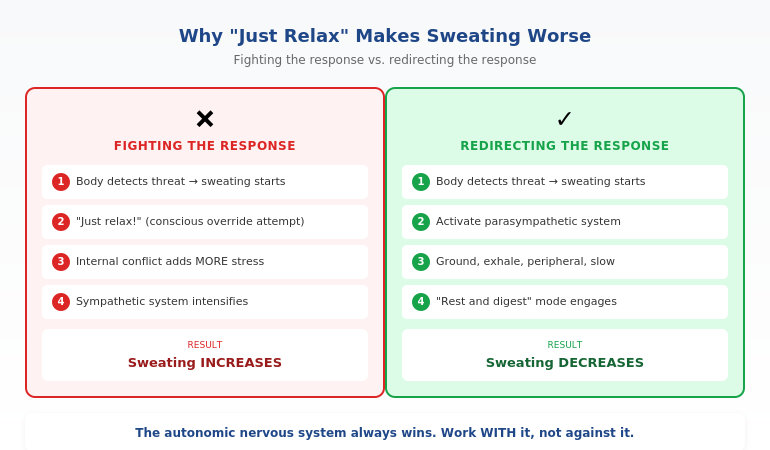
Your amygdala (the brain’s threat detector) triggers fight-or-flight. It doesn’t consult your rational brain first. By the time you think “this is just a presentation,” your body is already flooded with adrenaline and cortisol.

This is why telling yourself to “just relax” doesn’t work. Your rational brain isn’t driving anymore.

The Physical Symptoms (And Why They Happen)

Every panic symptom has a survival purpose that’s now misfiring:

  • Racing heart — Pumping blood to muscles for fighting or fleeing
  • Shallow breathing — Quick oxygen intake for action
  • Sweating — Cooling the body for exertion
  • Trembling — Muscles primed for explosive movement
  • Tunnel vision — Focusing on the “threat”
  • Nausea/stomach drop — Digestion shutting down to redirect energy
  • Feeling of unreality — Dissociation to protect from trauma

None of these will hurt you. They feel terrible, but they’re your body trying to protect you from a threat that doesn’t exist.

The Critical Fact Most People Don’t Know

Panic attacks peak within 10 minutes and pass within 20-30 minutes—even if you do nothing. Your body cannot sustain that level of activation indefinitely. The adrenaline gets metabolised. The cortisol clears.

The 90-second protocol below speeds this process dramatically by directly interrupting the nervous system cascade.

Diagram showing the panic attack cycle and how the 90-second protocol interrupts it at each stage

The 90-Second Protocol (Step-by-Step)

This protocol works because it targets your nervous system directly—not through thoughts, but through physical interventions that trigger automatic calming responses.

Step 1: Cold Water (15 seconds)

Run cold water over your wrists. If possible, splash cold water on your face and the back of your neck.

Why it works: This activates the “mammalian dive reflex”—an automatic response that slows your heart rate. Your body thinks you’re diving into water and immediately begins calming your cardiovascular system. It’s not psychological; it’s physiological.

If you can’t get to water: Press something cold against your wrists or neck—a cold drink can, ice from a water glass, a cold window, your phone screen.

Step 2: 4-7-8 Breathing (45 seconds)

Inhale through your nose for 4 counts. Hold for 7 counts. Exhale through your mouth for 8 counts. Repeat 3 times.

Why it works: The extended exhale activates your parasympathetic nervous system (the “rest and digest” system). You’re manually flipping the switch from fight-or-flight to calm. The hold interrupts the hyperventilation pattern that makes panic worse.

Can’t remember the counts? Just make the exhale longer than the inhale. That’s the key mechanism.

Step 3: 5-4-3-2-1 Grounding (20 seconds)

Name out loud (or silently if you’re not alone):

  • 5 things you can see
  • 4 things you can touch
  • 3 things you can hear
  • 2 things you can smell
  • 1 thing you can taste

Why it works: This engages your prefrontal cortex (rational brain) and pulls attention away from the amygdala (panic brain). You cannot fully panic while actively cataloguing your environment. It anchors you in the present moment rather than the catastrophic future.

Step 4: Move (10 seconds)

Shake your hands vigorously. Roll your shoulders. Walk a few steps. Do wall push-ups if you’re somewhere private.

Why it works: Your body has been flooded with adrenaline meant for physical action. Movement discharges it. This is why animals shake after a threat passes—they’re completing the stress cycle. Humans often skip this step, which is why the chemicals linger.

For more breathing techniques, see the complete guide to presentation breathing.

⭐ Never Face Presentation Panic Unprepared Again

Calm Under Pressure is the complete system for managing physical anxiety symptoms before and during presentations—including the 90-second protocol in audio form you can use in the moment.

What’s inside:

  • The Emergency Protocol audio (what you just learned, guided so you don’t have to remember)
  • The 7-Day Nervous System Reset (reduces baseline anxiety before big presentations)
  • The Pre-Presentation Ritual (prevents panic from fully activating)

Get Calm Under Pressure → £19.99

Created by a clinical hypnotherapist who spent 5 years managing her own presentation panic.

How to Stop Panic Before It Starts

The 90-second protocol handles acute panic. But ideally, you prevent presentation panic from fully activating in the first place.

The Pre-Presentation Ritual (30 minutes before)

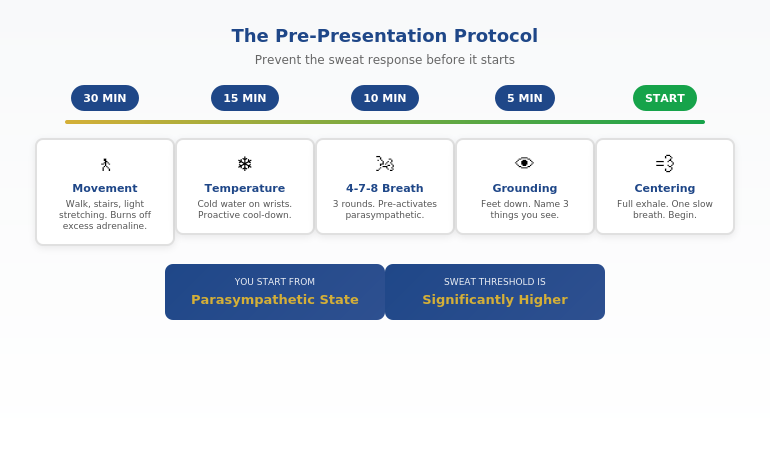
1. Physiological sigh (5 minutes before leaving for the room)

Double inhale through your nose (one breath, then a second shorter breath on top), then long exhale through mouth. Repeat 3-5 times. Stanford research shows this is the fastest way to reduce real-time stress.

2. Cold exposure (10 minutes before)

Hold something cold, splash cold water on your wrists, or step outside briefly if it’s cold. Pre-activates the calming dive reflex before you need it.

3. Movement (15-20 minutes before)

Take a brisk walk. Climb stairs. Light stretching. Burns off anticipatory adrenaline before it accumulates to panic levels.

4. Arrival ritual (5 minutes before)

Arrive early. Claim your space. Touch the podium or table. Greet one person. This reduces the “entering hostile territory” feeling that triggers panic.

The Morning-Of Protocol

On presentation days:

  • Limit caffeine — It amplifies anxiety symptoms. Half your normal amount, or skip it.
  • Eat protein — Stabilises blood sugar. Blood sugar crashes trigger anxiety responses.
  • Exercise early — Even 20 minutes of movement reduces anxiety for hours afterward.
  • Avoid news/social media — Your nervous system doesn’t need additional activation.

Want the complete pre-presentation ritual with guided audio?

Includes the full 30-minute protocol you can follow the morning of any high-stakes presentation.

Get Calm Under Pressure → £19.99

Long-Term: Training Your Nervous System

If you experience panic attacks regularly before presentations, your nervous system has learned to associate “presentation” with “danger.” The long-term solution is retraining that association.

Gradual Exposure

Your nervous system learns safety through repeated exposure without catastrophe:

  • Speak up in small meetings first
  • Volunteer for low-stakes presentations
  • Record yourself presenting and watch it back
  • Present to friends or family

Each time you present and survive, your amygdala gets evidence that presentations aren’t actually life-threatening. The threat association weakens.

Daily Nervous System Training

Daily practice—not just on presentation days—builds your capacity to regulate:

  • Daily breathwork — 5 minutes of 4-7-8 breathing trains your body to access calm states quickly
  • Cold exposure — Cold showers or ice on wrists builds stress tolerance
  • Vagal toning — Humming, singing, gargling stimulate the vagus nerve that controls the calm response

Cognitive Reframing

Physical interventions work faster, but shifting how you think about panic also helps:

  • “This is excitement” — Anxiety and excitement have identical symptoms. Relabelling helps.
  • “My body is preparing me” — Reframe symptoms as preparation for performance, not danger signals.
  • “I’ve survived this before” — You have a 100% survival rate for panic attacks so far.

For more on the psychology of speaking fear, see the hypnotherapist’s guide to lasting change.

The three-level approach to managing presentation panic: emergency protocol, prevention ritual, and long-term nervous system training

⭐ Stop Dreading Every Presentation

The techniques in this article work. But implementing them when you’re already anxious is hard. Calm Under Pressure gives you the complete system with audio guides so you don’t have to think—just press play.

You’ll get:

  • Emergency audio protocol (use during active panic)
  • 7-day nervous system reset program
  • Pre-presentation morning ritual
  • Long-term training guide

Get Calm Under Pressure → £19.99

Used by executives who present in high-stakes boardrooms and client meetings.

When to Seek Professional Help

The techniques here help most people manage presentation panic. But some situations warrant professional support:

Consider seeing a professional if:

  • Panic attacks happen frequently outside of presentations
  • You’re avoiding career opportunities because of fear
  • Anxiety is affecting sleep, relationships, or daily life
  • You’re using alcohol or substances to cope
  • These techniques aren’t helping after consistent 4-week practice

Effective professional approaches for presentation panic:

  • Cognitive Behavioural Therapy (CBT) — Evidence-based treatment for anxiety disorders
  • Clinical Hypnotherapy — Works with subconscious associations driving panic
  • EMDR — Particularly helpful if there’s a traumatic presentation experience in your history
  • Medication — Beta-blockers block physical symptoms; SSRIs address underlying anxiety. Discuss with your doctor.

Seeking help isn’t weakness—it’s strategic. Many successful executives work with professionals to optimise their performance.

For more on building lasting confidence, see the 5-minute reset that actually works.

Ready to take control of presentation panic?

Get the complete toolkit—emergency protocols, prevention rituals, and the training system.

Get Calm Under Pressure → £19.99

Frequently Asked Questions

Can a panic attack actually hurt me?

No. A panic attack before presentation feels dangerous but isn’t. The symptoms are uncomfortable—sometimes terrifying—but they won’t cause heart attacks, fainting (blood pressure rises during panic, making fainting nearly impossible), or permanent harm. Understanding this reduces the fear of panic itself.

What if panic happens DURING my presentation?

Pause. Take a drink of water (buys time, activates swallowing reflex which calms). Take one breath with a long exhale. Continue. Most audiences assume you’re collecting your thoughts. If needed, say “Let me take a moment to make sure I’m explaining this clearly.”

Will people know I’m having a panic attack?

Almost certainly not. Internal symptoms (racing heart, nausea, doom feeling) are invisible. External symptoms (trembling, sweating) are far less obvious than you think. Others are focused on their own concerns, not analysing your physiology.

Should I tell my audience I’m nervous?

Generally, no. It draws attention to something they haven’t noticed and reduces your perceived authority. Exception: if you’re visibly struggling, a brief “Bear with me for a moment” is better than pretending nothing is wrong.

Why do panic attacks seem to come out of nowhere?

They don’t. There’s usually a buildup of anticipatory anxiety that crosses a threshold—hours or days of rumination, sleep disruption, and physical tension accumulating until the system tips. Prevention techniques address this buildup.

Can I take medication for presentation panic?

Beta-blockers (propranolol) are commonly prescribed for performance anxiety—they block physical symptoms without affecting mental clarity. Safe for occasional use, but they don’t address the underlying cause. Discuss with your doctor.

How long until these techniques work?

The 90-second protocol works immediately—relief within minutes. Prevention techniques show results within 1-2 weeks of consistent use. Long-term nervous system retraining takes 4-8 weeks to produce lasting change.

Is This Right For You?

✓ This is for you if:

  • You experience physical panic symptoms before presenting
  • You’ve tried “just relax” and it doesn’t work
  • You want techniques that work with your nervous system
  • You’re willing to practice before the high-stakes moment

✗ This is NOT for you if:

  • Panic attacks happen frequently in daily life (see a professional)
  • You want a magic fix without practice
  • Your main issue is content preparation, not anxiety
  • You’re unwilling to try physical techniques

⭐ I Hid in Bathroom Stalls for 5 Years. Then I Found What Works.

The techniques in Calm Under Pressure are what finally ended my own presentation panic—and what I now teach executives who thought they’d suffer through this forever. You don’t have to.

The complete system:

  • 90-second emergency protocol (audio)
  • Pre-presentation ritual (30-minute preparation)
  • 7-day nervous system reset
  • Long-term training guide

Get Calm Under Pressure → £19.99

From someone who’s been in that bathroom stall—and found her way out.

📧 Optional: Get weekly techniques for presentation confidence in The Winning Edge newsletter (free).

Your Next Step

A panic attack before presentation doesn’t have to derail your career or your confidence. The 90-second protocol works. The prevention rituals work. The long-term training works.

Start with the emergency protocol. Practice it when you’re calm so it’s automatic when you need it. Then build in the prevention rituals. Then commit to the nervous system training.

You can present without panic. I did—after 5 years of hiding in bathroom stalls. Hundreds of my clients have. You will too.

For the complete system with audio guides, get Calm Under Pressure (£19.99).

P.S. If anxiety about your slides is making panic worse, see what your slides actually communicate about you—sometimes fixing the deck reduces the anxiety.

About the Author

Mary Beth Hazeldine is the Owner & Managing Director of Winning Presentations and a qualified clinical hypnotherapist. The bathroom stall story that opened this article is real—she spent 5 years experiencing panic attacks before presentations before training as a hypnotherapist specifically to understand and overcome them.

With 24 years at JPMorgan Chase, PwC, Royal Bank of Scotland, and Commerzbank—environments where one presentation could change funding, strategy, or careers—she’s helped hundreds of executives who thought panic was something they just had to endure.

Book a discovery call | View services

24 Jan 2026
Professional woman evaluating her presentation slides and realizing what they signal about her competence to executives

What Your Slides Say About You (And It’s Not What You Think)

A CFO once told me why she rejected a £2 million budget request before the presenter finished slide three: “His slides told me everything I needed to know about his thinking. It was scattered.”

Quick answer: Executive slide design perception is how decision-makers read your competence, preparation, and thinking quality through your slides—before you speak a single word. Executives form judgments within 5 seconds of seeing your first slide. Cluttered slides signal cluttered thinking. Buried conclusions signal uncertainty. Wall-of-text slides signal you haven’t done the synthesis work.

In practice, the visual signals your slides send often matter more than the words on them. Executives aren’t reading your slides—they’re reading YOU through your slides.

When your slides send the right signals:

  • Executives lean in instead of checking email
  • Your recommendations get faster approvals
  • You’re seen as someone who “gets it”

Written by Mary Beth Hazeldine — executive presentation coach, 24 years corporate banking at JPMorgan Chase, PwC, RBS, and Commerzbank. I’ve sat in the room when slides killed careers and when they made them. Last updated: January 2026.

🚨 Presenting THIS WEEK? Check your slides for these 3 signals:

  1. Slide 1: Does your conclusion appear in the first 10 words? (If not, you’re burying the lead)
  2. Any slide: Can someone grasp the point in 3 seconds? (If not, it’s too cluttered)
  3. Titles: Do they make claims or just label topics? (“Revenue grew 23%” beats “Revenue Overview”)

Fix these three and you’ll send different signals immediately.

→ If your slide 1 doesn’t contain your decision ask, executives assume you don’t have one. Get the templates that fix this in 60 seconds →

📅 Have 7 days to transform your deck?

The slide signal system in this article takes one focused session to implement. Most professionals see the difference in how executives respond within their very next presentation.

I learned this lesson the hard way. Early in my banking career, I spent 40 hours building what I thought was a comprehensive deck. Fifty-seven slides. Every data point. Complete background on every issue.

The Managing Director stopped me on slide four.

“I can see you worked hard on this,” she said. “But I still don’t know what you want me to do.”

Forty hours of work. Four slides in. And my slides had already told her I didn’t understand what mattered. Not because of the content—but because of the signals the design sent about my thinking.

That moment changed how I approach every deck. And after 24 years of watching executives react to presentations, I now know exactly what signals matter—and which ones kill your credibility before you’ve finished your opening sentence.

What Executives Actually See (In the First 5 Seconds)

When an executive sees your slide, they’re not reading it. They’re scanning it for signals about YOU.

Research on cognitive load shows people form impressions within milliseconds of seeing a visual. Your audience has judged your slide—and by extension, your thinking—before you’ve finished your opening sentence.

Here’s what they’re actually processing:

Signal 1: Hierarchy (Do you know what matters?)

The first thing executives notice is whether there’s a clear visual hierarchy. Is there one dominant element? Or is everything competing for attention?

A slide with five equally-weighted bullet points tells the executive: “I couldn’t decide what was important, so I’m making you do it.”

A slide with one clear headline supported by three subordinate points tells them: “I’ve done the thinking. Here’s what matters.”

Signal 2: Density (Do you respect my time?)

Wall-of-text slides send an unmistakable message: “I haven’t distilled this enough to present it clearly, so I’m going to read to you.”

One senior partner at a consulting firm told me: “When I see a dense slide, I immediately wonder if the presenter understands the material well enough to simplify it. Usually they don’t.”

Signal 3: Structure (Can you think clearly?)

Executives are pattern-matchers. They’ve seen thousands of presentations. They immediately notice whether your deck follows a logical structure or feels random.

A deck that jumps from problem to solution to background to data to recommendation signals scattered thinking. A deck that flows—situation, complication, resolution—signals someone who can construct a coherent argument.

For more on title mistakes, see why “Overview” is the worst slide title.

Diagram showing what executives see in the first 5 seconds of viewing a slide: hierarchy, density, and structure signals

The Hidden Messages Your Slides Are Sending

Beyond the conscious signals, your slides send subconscious messages that executives process without even realising it.

“I’m not confident in my recommendation”

When you bury your conclusion on slide 15 instead of leading with it, executives interpret this as hedging. You’re building up to something because you’re not sure they’ll accept it.

A VP of product once told me: “When someone buries the ask, I assume they know it’s weak. If they believed in their recommendation, they’d lead with it.”

“I don’t understand my audience”

Technical details that belong in an appendix. Jargon that assumes expertise they don’t have. Context they already know being explained at length.

All of these signal the same thing: you haven’t thought about who’s in the room and what they need.

“I’m trying to impress rather than inform”

Over-designed slides with animations, complex charts, and visual flourishes often backfire. Executives see through them immediately.

A managing director at an investment bank put it bluntly: “Fancy slides usually mean the content is weak. The best presenters I know use the simplest slides.”

“I haven’t done the hard work”

It takes more effort to create a simple, clear slide than a complex one. As the saying goes: “If you can’t explain it simply, you don’t understand it well enough.”

Executives know this. When they see complex slides, they question whether you’ve done the synthesis work—or whether you’re just dumping information and hoping they’ll sort it out.

⭐ Slides That Signal “This Person Gets It”

The Executive Slide System gives you the exact structures that send the right signals—hierarchy, clarity, and confidence—from slide one.

What’s inside:

  • 12 executive-tested slide templates (board updates, budget requests, project proposals)
  • The “Headline Test” that ensures every title makes a claim
  • Before/after examples showing signal transformation

Get the Executive Slide System → £39

Built from 24 years in corporate banking + executive training work with senior stakeholders.

5 Slide Signals That Kill Your Credibility

These are the specific executive slide design perception mistakes that damage how you’re seen:

1. The “Agenda” Opening Slide

Starting with “Agenda” or “Overview” tells executives nothing. It’s a missed opportunity to signal that you understand what matters.

What it signals: “I’m going to walk you through this linearly because I haven’t identified what you actually need to know.”

The fix: Open with your conclusion or recommendation. “We should approve the £2M investment because it will generate £8M in returns within 18 months.”

2. The Wall of Bullets

Five or more bullet points of equal weight, each a complete sentence, filling the slide.

What it signals: “I couldn’t synthesise this information, so I’m presenting my notes instead of my thinking.”

The fix: One headline that makes a claim. Three supporting points maximum. If you need more, you need more slides.

3. The Chart Without a Story

A complex chart with no annotation, no highlight, no indication of what the viewer should notice.

What it signals: “I’m showing you data but I haven’t interpreted it. You figure out what it means.”

The fix: Every chart needs a headline that states the insight. “Revenue grew 23% despite market contraction” not “Revenue Chart Q3.”

4. The “Let Me Give You Context” Deck

Slides 1-10 are background. The recommendation doesn’t appear until slide 15.

What it signals: “I’m afraid you’ll reject my recommendation, so I’m delaying it as long as possible.”

The fix: Recommendation on slide 1. Context only when asked for or as appendix.

5. The Design-Over-Substance Slide

Beautiful gradients, custom icons, animations—but the content is thin or unclear.

What it signals: “I spent time on how this looks because I didn’t have confidence in what it says.”

The fix: Simple, clean, content-focused. Let the message carry the weight.

For more on executive summary best practices, see how to write the only slide that matters.

Want slide templates that send the right signals? The Executive Slide System (£39) includes 12 proven structures used by executives at top firms.

5 Slide Signals That Build Authority

These are the signals that make executives think “this person knows what they’re doing”:

1. Conclusion-First Structure

Your recommendation or key message appears in the first 10 seconds. No buildup. No suspense.

What it signals: “I’m confident in my position. I’ve done the analysis. Here’s what we should do.”

2. Headline-Driven Slides

Every slide title makes a claim, not a label. “Market share increased 15%” not “Market Share Update.”

What it signals: “I’ve interpreted the data. I’m not making you do my job.”

3. Strategic White Space

Slides that breathe. One idea per slide. Room for the eye to rest.

What it signals: “I’ve distilled this to what matters. I respect your cognitive load.”

4. Annotated Visuals

Charts with callouts. Diagrams with explanatory text. Visual elements that guide rather than overwhelm.

What it signals: “I’ve thought about what you need to see and made it easy to find.”

5. The “So What?” Test

Every slide answers “so what?” explicitly. No slide exists just to show information—each one drives toward the conclusion.

What it signals: “Everything here has a purpose. I’m not wasting your time.”

Comparison of credibility-killing slide signals versus authority-building slide signals that executives notice

⭐ If Your Slides Aren’t Getting the Response You Want

It’s probably not your content—it’s the signals your slides are sending. The Executive Slide System rewires how your deck communicates before you even speak.

You’ll get:

  • The “Signal Audit” checklist (run before every important presentation)
  • 12 slide templates that pass the executive perception test
  • Real before/after transformations from actual client decks

Get the Executive Slide System → £39

The same structures I used for 24 years in banking—now available as templates.

Before and After: Real Slide Transformations

Here’s what changing your slide signals looks like in practice:

Transformation 1: The Opening Slide

Before: “Q3 Performance Review — Agenda: 1. Background, 2. Market Overview, 3. Results, 4. Challenges, 5. Next Steps”

What it signalled: “Buckle up for a linear data dump. I’ll get to the point eventually.”

After: “Recommendation: Approve £500K additional investment in Product X. Q3 results exceeded targets by 23%, validating our strategy.”

What it signals now: “I know what you need to decide. Here it is.”

Transformation 2: The Data Slide

Before: Title: “Revenue Data” — Complex chart with 8 data series, no annotations, legend in small text.

What it signalled: “Here’s all the data. Good luck finding the insight.”

After: Title: “Revenue grew 23% while competitors declined” — Same data, but one trend highlighted, callout pointing to key inflection, competitors greyed out.

What it signals now: “I’ve analysed this. Here’s what matters.”

Transformation 3: The Recommendation Slide

Before: Bullet list of 7 recommendations, all equal weight, no prioritisation.

What it signalled: “I generated a list but couldn’t prioritise it for you.”

After: One primary recommendation in large text. Three supporting actions in smaller text. Clear next step with owner and deadline.

What it signals now: “I know what matters most. I’ve made the decision easy for you.”

For proven executive presentation structures, see the 12-slide template that commands the room.

Ready to transform your slides? The Executive Slide System (£39) includes the exact before/after templates you can apply immediately.

Frequently Asked Questions

How quickly do executives form impressions from slides?

Research suggests visual impressions form within milliseconds—faster than conscious thought. By the time you’ve said your first sentence, they’ve already judged your slide. This is why executive slide design perception matters so much: the signals happen before your content has a chance to land.

Does slide design really matter more than content?

No—but poor slide design can prevent good content from being heard. If your slides signal scattered thinking, executives will be skeptical of your content regardless of its quality. The design IS the first impression of your content.

What’s the biggest slide mistake executives notice?

Burying the lead. When your conclusion or recommendation doesn’t appear until deep in the deck, executives interpret this as either lack of confidence or lack of synthesis. Lead with your point. Support it with evidence.

Should I use professional design templates?

Clean, simple templates are fine. Over-designed templates can actually hurt you—they signal that you’re compensating for weak content. The goal is invisible design: formatting that helps the content communicate, not formatting that draws attention to itself.

How do I know if my slides are sending the wrong signals?

Apply the “3-second test”: show someone your slide for 3 seconds, then hide it. Ask them what the main point was. If they can’t tell you, your hierarchy is wrong. If they mention something other than your main point, your emphasis is wrong. If they say “it was really busy,” your density is wrong.

Can I fix bad slide signals quickly before a presentation?

Yes. Focus on three things: (1) Move your conclusion to slide 1, (2) Make every title a claim instead of a label, (3) Remove any slide that doesn’t directly support your conclusion. This won’t make your deck perfect, but it will send dramatically better signals.

Why do executives care about slides if they’re listening to me?

Executives are overwhelmed with information. Slides act as a filter—a quick way to assess whether this presentation is worth their full attention. Clean, well-structured slides signal that you’ve done the hard work of synthesis. That earns their attention. Cluttered slides signal the opposite.

Is This Right For You?

✓ This is for you if:

  • You present to executives, boards, or senior stakeholders
  • You’ve noticed your slides aren’t getting the response you want
  • You want templates that signal competence immediately
  • You’re willing to restructure how you build decks

✗ This is NOT for you if:

  • You only present to internal teams (lower stakes)
  • You want design software training, not structure help
  • Your main issue is delivery, not deck construction
  • You’re not willing to change how you organise information

⭐ The MD Who Stopped Me on Slide Four Taught Me Everything

That 57-slide deck that died on slide four? I rebuilt it using the structures now in the Executive Slide System. Same content. Different signals. The same MD approved it two weeks later—and asked for the template.

What you’ll get:

  • 12 executive-tested slide templates
  • The Signal Audit checklist
  • Before/after transformation examples

Get the Executive Slide System → £39

Built from structures that work in global banking and consulting-style environments.

📧 Optional: Get weekly slide strategies in The Winning Edge newsletter (free).

Your Next Step

Your slides are sending signals whether you intend them to or not. The question is whether those signals build your credibility or undermine it.

Run the 3-second test on your next deck. Check whether your conclusion appears in the first 10 seconds. Make sure every title makes a claim instead of labelling a topic.

Those three changes alone will transform your executive slide design perception—how executives read you through your slides.

For the complete system with templates and checklists, get the Executive Slide System (£39).

P.S. If presentation anxiety is affecting your delivery regardless of how strong your slides are, see what to do if you have a panic attack before presenting.

About the Author

Mary Beth Hazeldine is the Owner & Managing Director of Winning Presentations. The MD story that opened this article is real—and that rejected deck became the foundation for how she now teaches slide structure.

With 24 years at JPMorgan Chase, PwC, Royal Bank of Scotland, and Commerzbank—where one presentation could change funding, strategy, or careers—she’s seen thousands of executive presentations. The patterns of what works became the Executive Slide System.

Book a discovery call | View services

23 Jan 2026
Professional woman having a realization moment about why watching TED Talks didn't improve her presentation skills, showing the breakthrough when passive learning clicks as the problem

Why Watching TED Talks Won’t Improve Your Presentations (I Watched 200+ Before I Figured This Out)

I spent three years watching TED Talks, studying the speakers, taking notes on their techniques. My presentations didn’t improve at all.

Quick answer: Watching TED Talks to improve presentations is like watching cooking shows to become a chef—it feels productive, but passive consumption doesn’t build skills. The problem isn’t the content; it’s the learning mode. Presentation skills require active practice with frameworks, not passive observation of polished performances. The executives who actually improve use structured frameworks they can apply immediately, not inspiration they can’t replicate.

In practice, improving your presentations requires deliberate application of specific frameworks to real presentations you’re building—not watching someone else’s finished product and hoping the magic transfers.

Written by Mary Beth Hazeldine — executive presentation coach, 24 years corporate banking, trained 5,000+ executives. Last updated: January 2026.

🚨 Presenting THIS WEEK? Skip the TED Talks. Do this instead:

  1. Pick ONE framework (problem → solution → action works for 80% of business presentations)
  2. Restructure your current deck using that framework (don’t start from scratch)
  3. Practice the transitions between sections out loud (this is where most people stumble)
  4. Record yourself once on your phone—watch for filler words and pacing only

This 45-minute active session will improve your presentation more than 10 hours of TED Talk watching.

📋 Copy/paste this opening for your next presentation:

“Here’s the decision we need today…” [state the specific ask]

“Here’s the impact if we don’t act…” [make it concrete and urgent]

“Here’s what I’m recommending…” [your solution in one sentence]

This 30-second opening uses the Problem-Solution-Action framework. It works for 80% of business presentations.

📅 Want to systematically improve your presentations over the next 90 days?

The difference between professionals who plateau and those who keep improving is structured practice with feedback. This article explains why passive learning fails—and what to do instead.

After my three years of TED Talk “research,” I finally understood the problem: I was confusing entertainment with education, and inspiration with skill-building.

The executives I now train often come to me after the same realisation. They’ve watched the talks, read the books, attended the webinars. Their presentations haven’t changed.

If you’ve ever wondered why consuming great presentation content hasn’t made you a better presenter, this article explains exactly why—and what actually works instead.

Why Watching TED Talks Doesn’t Transfer to Your Presentations

TED Talks are meticulously crafted performances. The speakers have typically rehearsed for months. They’ve worked with professional coaches. The talks are edited to remove any rough edges. The stage, lighting, and audience are optimised for the speaker’s success.

None of that transfers to your Tuesday afternoon project update.

I see this constantly: executives who can quote Chris Anderson’s TED commandments, who’ve watched Brené Brown’s vulnerability talk six times, who know exactly why Simon Sinek says to “start with why”—but who still struggle to structure a clear 10-minute board update.

The gap isn’t knowledge. It’s application.

A senior product manager named Rachel told me: “I watched Amy Cuddy’s body language talk and tried the power pose before my next presentation. It didn’t help at all. My problem wasn’t confidence—it was that my slides were a mess and I didn’t know how to structure my argument.”

TED Talks give you inspiration. They don’t give you frameworks you can actually use.

The Passive Learning Trap (And Why It Feels Productive)

Here’s the uncomfortable truth about why we default to watching TED Talks when we want to improve presentations: it’s easy, and it feels productive.

Watching a brilliant speaker is enjoyable. You’re learning something. You’re “investing in yourself.” You can do it from your couch after dinner.

Actually restructuring your deck using a new framework? That’s hard. Recording yourself and watching the playback? Uncomfortable. Getting feedback from a colleague? Vulnerable.

So we choose the easy path and wonder why nothing changes.

The research on skill acquisition is clear: passive consumption accounts for almost zero skill transfer. You can watch 1,000 hours of tennis and not improve your serve. Presentations work the same way.

A finance director named James spent six months consuming presentation content—books, podcasts, YouTube channels, TED Talks. When I asked him to show me a recent presentation, it had all the same problems as before: buried lead, too many slides, unclear ask.

“I know what good looks like,” he said. “I just can’t seem to do it.”

That’s the passive learning trap in one sentence.

Diagram comparing passive learning like watching TED Talks versus active learning like applying frameworks, showing why only active learning improves presentation skills

📥 Want to start applying frameworks immediately?

Get the 7 Presentation Frameworks Cheat Sheet — the exact structures that handle 90% of business presentations. Free, instant download.

Download Free Framework Cheat Sheet →

Then, when you’re ready for guided practice with feedback, the course below takes you deeper.

⭐ From Watching to Doing: The Structured Path

AI-Enhanced Presentation Mastery is built on the principle that killed my TED Talk habit: frameworks you apply immediately, not inspiration you forget tomorrow.

What makes it different:

  • 4 executive presentation frameworks (apply to your real presentations)
  • Live cohort sessions (active practice, not passive watching)
  • AI-enhanced workflow (70% faster creation, more time for what matters)

See the Full Curriculum →

Next cohort starts soon. Limited to 20 participants for hands-on feedback.

📦 What You Get (Specifically):

  • 4 executive presentation frameworks — board updates, budget requests, project proposals, stakeholder alignment
  • AI-enhanced creation workflow — cut creation time by 70% so you can focus on delivery and refinement
  • Live cohort sessions — practice with feedback, not passive observation
  • Framework application exercises — apply each framework to a real presentation you’re building
  • Spaced learning structure — designed for retention, not just completion

📌 What this course gives you that TED Talks can’t:

  • Frameworks, not performances — structures you can apply to YOUR presentations, not polished shows to admire
  • Active application — you build real presentations during the course, with feedback
  • Accountability — cohort structure means you actually do the work, not just consume content

TED Talks show you what great looks like. This course teaches you how to build it yourself.

What Actually Improves Presentations (The Research)

If watching doesn’t work, what does? The research on skill acquisition points to three elements that actually improve presentations:

1. Deliberate Practice (Not Just Repetition)

Deliberate practice means working on specific weaknesses with immediate feedback. It’s not comfortable. It’s not entertaining. And it’s the only thing that consistently improves performance.

For presentations, this means: identify one specific weakness (unclear structure, filler words, weak openings), focus on that element, get feedback, adjust, repeat.

Watching TED Talks is the opposite of deliberate practice. It’s passive, there’s no feedback, and you’re not working on your specific weaknesses.

2. Frameworks (Not Tips)

Tips are forgettable. “Make eye contact.” “Tell a story.” “Use fewer bullet points.” You’ve heard them all. They don’t stick because they’re not systematic.

Frameworks are memorable and applicable. “Every executive presentation follows: context (30 seconds), problem (1 minute), solution (2 minutes), ask (30 seconds).” That’s a framework you can actually use on Tuesday.

The executives who improve fastest are the ones who master 3-4 frameworks and apply them repeatedly, not the ones who collect 100 tips they never use.

3. Spaced Repetition (Not Binge Learning)

Remember all those TED Talks you watched? How much do you actually remember? Research shows that massed learning (consuming lots of content at once) creates the illusion of learning but poor retention.

Spaced repetition—revisiting concepts over time with increasing intervals—actually builds lasting skills. This is why one-day workshops rarely create lasting change, but structured programmes with spaced practice do.

For more on why traditional approaches fail, see why most presentation training fails.

Ready for frameworks that actually stick? AI-Enhanced Presentation Mastery uses spaced learning and active application—the opposite of TED Talk binge-watching. See the Curriculum →

The Framework Approach: How Top Performers Actually Learn

The executives who consistently deliver strong presentations share a common trait: they’ve internalised a small number of frameworks so deeply that they apply them automatically.

They’re not thinking about “tips” during a presentation. They’re not trying to remember what that TED speaker did. They’re executing a structure they’ve practiced dozens of times.

Here’s what the framework approach looks like in practice:

The Problem-Solution-Action Framework

This single framework handles 80% of business presentations:

  1. Problem (30 seconds): What’s the issue we’re addressing? Make it concrete and urgent.
  2. Solution (2-3 minutes): What do you propose? Be specific about the approach.
  3. Action (30 seconds): What do you need from this audience? Make the ask clear.

A product director named Sarah told me this framework transformed her stakeholder updates: “Before, I’d just walk through my slides in order. Now I structure everything around: here’s the problem, here’s what I’m doing about it, here’s what I need from you. My updates went from 20 minutes to 8, and I get decisions faster.”

The Pyramid Principle

Start with your conclusion, then support it with evidence. The opposite of how most people present (building up to the conclusion).

Executives don’t have time for suspense. They want the answer first, then the supporting logic. This framework alone will differentiate you in most corporate environments.

The STAR Framework for Stories

When you do tell stories (and you should), use: Situation, Task, Action, Result. This keeps your stories tight and business-relevant—unlike the rambling anecdotes that make audiences check their phones.

Three frameworks. Applied consistently. That’s worth more than 500 hours of TED Talks.

Related: See what to look for in presentation skills training that actually works.

The three presentation frameworks that handle 90 percent of business presentations: Problem-Solution-Action, Pyramid Principle, and STAR Stories

⭐ If You’ve Tried “Learning Presentations” Before and It Didn’t Stick

That’s not a reflection on you—it’s a reflection on passive learning methods. AI-Enhanced Presentation Mastery is designed for executives who’ve consumed plenty of content but haven’t seen results.

Why it’s different:

  • You apply frameworks to real presentations you’re building (not hypotheticals)
  • Live sessions mean accountability and feedback (not self-paced content you never finish)
  • AI workflow handles the grunt work so you focus on what matters

See the Full Curriculum →

For executives who are done with passive content and ready for structured improvement.

The 90-Day Path From “Watching” to “Doing”

If you’re ready to stop watching and start improving, here’s what a structured 90-day path looks like:

Days 1-30: Foundation

Goal: Master one framework completely.

Pick the Problem-Solution-Action framework. Apply it to your next three presentations. Don’t add complexity—just get this one structure automatic.
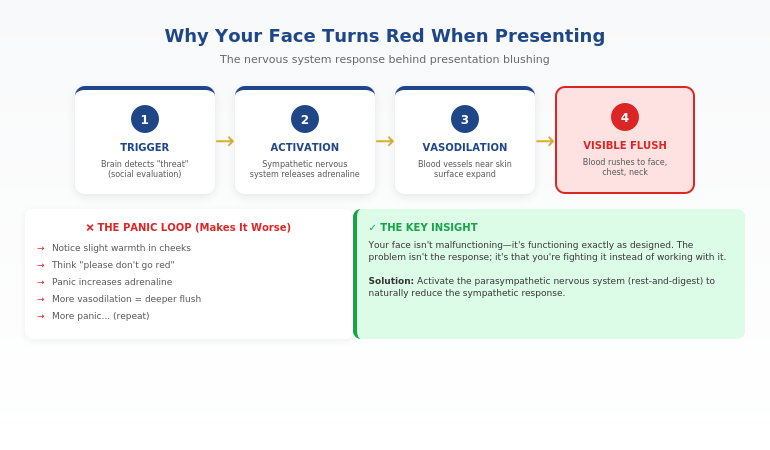
Record yourself delivering the opening of each presentation. Watch for: clear problem statement, logical flow to solution, specific ask at the end.

Days 31-60: Expansion

Goal: Add the Pyramid Principle.

Now you have two tools: PSA for the overall structure, Pyramid for how you present information within each section. Lead with conclusions. Support with evidence.

Get feedback from one trusted colleague on one presentation during this phase. Specific feedback on structure, not general “that was good.”

Days 61-90: Integration

Goal: Add storytelling with STAR.

Identify one story you can use in your presentations. Structure it with STAR. Practice it until it’s natural. You now have three frameworks that handle nearly any business presentation.
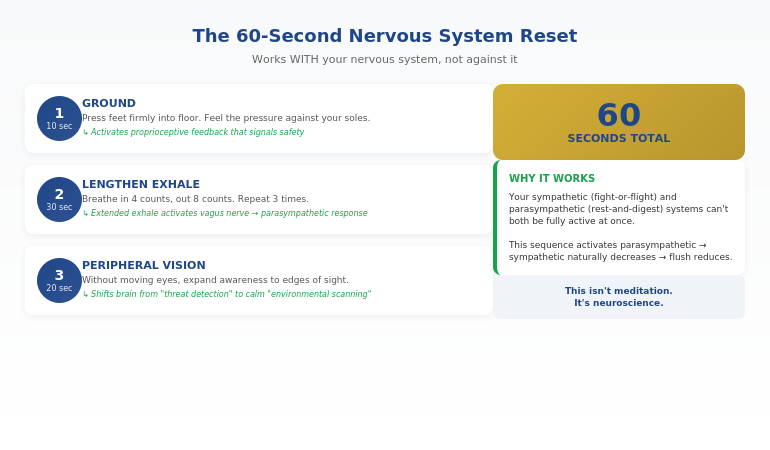
By day 90, you’ve done more active skill-building than three years of TED Talk watching.

If you’re experiencing a plateau in your presentation skills, see the presentation skills gap most professionals don’t see.

Want a structured path with expert guidance? AI-Enhanced Presentation Mastery compresses years of self-directed learning into a focused cohort experience. Learn More →

Frequently Asked Questions

Are TED Talks completely useless for presentation skills?

Not completely—but they serve a different purpose than skill-building. TED Talks can inspire you, expose you to new ideas, and show you what excellence looks like. What they can’t do is teach you how to structure your own presentations, give you feedback on your delivery, or help you apply frameworks to your specific context. Think of them as entertainment that occasionally inspires, not training that builds skills.

Why does watching great speakers not make me better?

Skill acquisition research shows that passive observation creates almost zero transfer to active performance. You can watch 1,000 hours of tennis and not improve your serve. The same applies to presentations. Improvement requires deliberate practice: working on specific weaknesses, getting feedback, and adjusting. Watching—no matter how attentively—doesn’t include any of those elements.

What’s the fastest way to improve my presentations?

The fastest path to improve presentations is: (1) learn one framework deeply, (2) apply it to your next real presentation, (3) record yourself, (4) get specific feedback, (5) adjust and repeat. Most professionals try to learn too many techniques at once and apply none of them consistently. Mastering one framework and using it repeatedly will improve your presentations faster than consuming hundreds of hours of content.

How many frameworks do I actually need?

For most business professionals, 3-4 frameworks handle 90% of presentations: a general structure framework (Problem-Solution-Action), an information hierarchy framework (Pyramid Principle), a storytelling framework (STAR), and optionally a persuasion framework. Going beyond that adds complexity without proportional benefit. Depth beats breadth.

Should I still watch TED Talks?

If you enjoy them, yes—but recategorize them in your mind. They’re entertainment and inspiration, not training. Watch them when you want to relax, not when you want to improve. And when you do watch, focus on structure rather than delivery. Notice how the speaker organized their argument. That’s more transferable than trying to copy their charisma.

How long does it take to see real improvement?

With deliberate practice using frameworks, most executives see noticeable improvement within 3-4 presentations (roughly 2-4 weeks if you present regularly). Significant improvement—where colleagues start commenting on the difference—typically takes 8-12 weeks of consistent framework application. This is dramatically faster than passive learning, which often produces no improvement at all regardless of time invested.

What if I don’t present very often?

Less frequent presenting actually makes framework-based learning more important, not less. When you only present occasionally, you need reliable structures you can pull out without much warmup. Frameworks give you that. Create practice opportunities: volunteer for presentations, offer to present at team meetings, record yourself practicing. The less naturally you get reps, the more deliberate you need to be about creating them.

Is This Course Right For You?

✓ This is for you if:

  • You’ve consumed presentation content before without seeing results
  • You want frameworks you can apply immediately to real presentations
  • You’re a senior professional who presents to executives/stakeholders
  • You’re willing to do active practice, not just watch content

✗ This is NOT for you if:

  • You want self-paced content you can watch passively
  • You’re looking for inspiration, not skill-building
  • You prefer consuming content to applying it
  • You’re not currently presenting at work

⭐ Three Years of TED Talks Taught Me This: You Need Frameworks, Not Inspiration

After 200+ TED Talks and zero improvement, I finally understood: passive watching doesn’t build skills. AI-Enhanced Presentation Mastery is everything I wish existed when I was stuck in the consumption trap.

What you’ll actually do:

  • Apply 4 executive frameworks to real presentations
  • Practice with live feedback (not passive video)
  • Use AI to handle creation so you focus on delivery

See the Full Curriculum →

Next cohort starting soon. Limited to 20 participants.

📧 The Winning Edge Newsletter

Weekly frameworks for executive presentations—the opposite of passive content consumption. Actionable structures you can apply immediately. For senior professionals who want results, not just inspiration.

Subscribe Free →

Your Next Step

If you’ve been trying to improve presentations by watching TED Talks, consuming podcasts, or reading books, you now understand why it hasn’t worked. The problem isn’t your effort or intelligence—it’s the learning mode.

Passive consumption feels productive but builds no skills. Active application of frameworks—even just one framework, applied consistently—will do more for your presentations than years of watching.

Start with Problem-Solution-Action. Apply it to your next presentation. Record yourself. Get feedback. That’s the path forward.

Or, if you’re ready for structured improvement with expert guidance, see the AI-Enhanced Presentation Mastery curriculum.

If you’re also dealing with high-stakes presentations where failure has real consequences, see how to present after a failure without destroying your credibility—today’s partner article on recovery presentations.

About the Author

Mary Beth Hazeldine is the founder of Winning Presentations and creator of AI-Enhanced Presentation Mastery. The “200+ TED Talks” admission that opened this article is real—and it took her three years to realise watching wasn’t the same as learning.

With 24 years of corporate experience at JPMorgan Chase, PwC, Royal Bank of Scotland, and Commerzbank, plus having trained 5,000+ executives, she now teaches the framework-based approach that actually builds presentation skills.

Book a discovery call | View services

23 Jan 2026
Woman with a slight smile and eyes closed thinking "I found what works."

Sweating During Presentations? The 60-Second Reset That Stopped Mine Cold

I watched the dark patches spread across my shirt in real-time. Thirty executives were watching me present—and watching me visibly fall apart.

Quick answer: Sweating during presentations is your sympathetic nervous system responding to perceived threat. The harder you try to stop it, the worse it gets—because fighting the response adds more stress to an already activated system. The technique that works: a 60-second parasympathetic reset that calms your nervous system from the inside out, stopping the sweat response before it becomes visible.

In practice, stopping presentation sweating means working WITH your nervous system rather than against it—using specific breathing patterns, grounding techniques, and pre-presentation protocols that prevent the cascade before it starts.

Written by Mary Beth Hazeldine — executive presentation coach, trained clinical hypnotherapist, 24 years corporate banking experience. Last updated: January 2026.

🚨 Presenting TODAY? The 2-minute emergency protocol:

  1. Bathroom reset: Run cold water on your wrists for 30 seconds + 3 slow exhales
  2. Temperature drop: Remove jacket until right before you present; stay in cooler areas
  3. First 30 seconds script: Memorize your opening line so you don’t have to think while nervous
  4. Anchor object: Hold a pen or clicker—gives your hands something to do and hides any trembling

This won’t eliminate the response, but it will reduce visible symptoms enough to get through. For lasting change, use the full protocol below.

📅 Presenting in the next 7 days? Do this now:

  1. 10 minutes before: Find a private space and do the 4-7-8 breath (inhale 4, hold 7, exhale 8) three times
  2. 5 minutes before: Press your feet firmly into the floor and notice 3 things you can see
  3. Right before you stand: Exhale completely, then take one slow breath
  4. If sweating starts: Slow your speech, press your feet down, and let the wave pass (60 seconds)

This works because it activates your parasympathetic nervous system—the “rest and digest” mode that naturally reduces sweating.

After my shirt incident, I spent three years learning everything I could about the nervous system and presentation anxiety. What I discovered changed everything—and it had nothing to do with “confidence tips” or “just relaxing.”

The executives who don’t visibly sweat aren’t less nervous. They’ve learned to work with their nervous system instead of against it.

If sweating during presentations has ever made you dread speaking up, this article gives you the exact technique that finally worked for me—and the hundreds of executives I’ve taught since.

Why You Sweat During Presentations (It’s Not What You Think)

Here’s what’s actually happening when you start sweating during presentations:

Your brain detects a threat. Not a physical threat—a social one. The possibility of judgement, embarrassment, or failure. To your ancient nervous system, social rejection was genuinely dangerous. So it responds the same way it would to a predator.

Your sympathetic nervous system activates. Adrenaline floods your system. Your heart rate increases. Blood flow shifts to your muscles (preparing you to run). And your body starts cooling itself down—because it thinks you’re about to need to sprint.

That’s why you sweat. Your body is preparing for physical exertion that never comes.

I see this pattern constantly: high-performing executives who are calm in genuinely high-stakes situations—negotiations, crises, difficult conversations—but who visibly sweat the moment they have to present to a group. It’s not about competence or confidence. It’s about how your nervous system has learned to respond to this specific trigger.

A finance director named Sarah told me: “I can face a hostile CFO in a one-on-one meeting without breaking a sweat. But put me in front of a group with a PowerPoint, and I’m drenched within five minutes. It makes no sense.”

It makes perfect sense—once you understand it’s not a character flaw. It’s a nervous system pattern. And patterns can be changed.

Why “Just Relax” Makes Sweating Worse

The worst advice anyone can give someone who sweats during presentations: “Just relax.”

Here’s why this backfires: trying to relax when your sympathetic nervous system is activated creates internal conflict. Part of you is saying “danger!” while another part is saying “stop reacting to danger!” This conflict adds more stress to an already stressed system.

The result? You sweat more.

A client named James described it perfectly: “I’d be standing there telling myself to calm down, and I could feel myself getting hotter. The harder I tried to relax, the worse it got. It was like my body was fighting itself.”

That’s exactly what was happening. His conscious mind was trying to override his autonomic nervous system—and the autonomic system always wins that fight.

The solution isn’t to fight the response. It’s to redirect it.

Diagram showing why fighting the sweat response makes it worse - the sympathetic vs parasympathetic nervous system during presentations

⭐ Stop the Sweat Response Before It Starts

Calm Under Pressure gives you the complete nervous system toolkit—the exact techniques that stop visible sweating by working WITH your biology, not against it.

What’s inside:

  • The 60-second parasympathetic reset (works mid-presentation)
  • Pre-presentation protocol (prevents activation entirely)
  • Emergency recovery techniques (when sweating has already started)

Get Calm Under Pressure → £19.99

Built from clinical hypnotherapy training + 24 years coaching executives through high-stakes moments.

Instant download • Use it today • Keep forever

📦 What You Get (Specifically):

  • The complete 60-second reset — step-by-step technique you can use invisibly during presentations
  • Pre-presentation protocol — the 10-minute sequence that prevents nervous system activation
  • Emergency recovery guide — what to do when sweating has already started
  • The science explained simply — understand why these techniques work (so you trust them)
  • Quick-reference cards — pocket-sized reminders for before you present

📌 What Calm Under Pressure gives you that this article can’t:

  • The complete guided walkthrough — not just what to do, but exactly how to do it with timing cues
  • The layered protocol — techniques that build on each other for cumulative nervous system retraining
  • The emergency recovery scripts — word-for-word phrases for when sweating starts mid-presentation

This article gives you the method. The product gives you the repeatable system you can use in 7 minutes.

The 60-Second Parasympathetic Reset

This is the technique that finally stopped my visible sweating during presentations. It works because it activates your parasympathetic nervous system—the “rest and digest” mode that naturally opposes the stress response.

You can do this invisibly, even while presenting.

Step 1: Ground Your Feet (5 seconds)

Press your feet firmly into the floor. Feel the pressure. This activates sensory pathways that signal “safety” to your nervous system. You’re not running. You’re grounded.

Step 2: Extended Exhale (15 seconds)

Take a breath in through your nose (4 counts). Then exhale slowly through your mouth (8 counts). The extended exhale is the key—it directly stimulates the vagus nerve, which activates parasympathetic response.

One breath with this ratio can begin shifting your nervous system state.

Step 3: Peripheral Vision (20 seconds)

Without moving your head, expand your awareness to the edges of your vision. Notice what’s in your peripheral field. This is counterintuitive, but it works: peripheral vision activates a different neural pathway than focused vision—one associated with calm alertness rather than threat detection.

Step 4: Slow Your Speech (20 seconds)

Deliberately slow down your words. Pause between sentences. This creates a feedback loop: slow speech signals to your nervous system that there’s no emergency, which reduces activation, which makes it easier to speak slowly.

A product director named Michael told me this was the breakthrough: “I always rushed when I was nervous, which made me more nervous. When I forced myself to slow down—even though it felt uncomfortable—my body actually calmed down. It was like I was telling my nervous system ‘we’re safe’ through my behavior.”

The entire sequence takes 60 seconds. And the sweat response begins to subside.

For more on breathing techniques, see the complete guide to presentation breathing.

Want the complete 60-second reset with guided walkthrough? Calm Under Pressure includes the full technique plus audio guidance you can use before any presentation. Get the Full Technique → £19.99

Instant download • Use it today • Keep forever

The Pre-Presentation Protocol (Prevent Before It Starts)

The best way to stop sweating during presentations is to prevent the nervous system cascade from starting in the first place. This requires a specific pre-presentation protocol—not “psych yourself up” motivation, but deliberate nervous system preparation.

Here’s the protocol I use with executives:

30 Minutes Before: Movement

Get your body moving. Walk briskly. Take stairs. Do some light stretching in a private space. This burns off excess adrenaline before you need to stand still and present.

A VP of sales named Rebecca told me: “I used to sit and review my notes obsessively before presenting. Now I walk the hallway. It sounds too simple, but the difference is dramatic.”

15 Minutes Before: Temperature Management

Cool down proactively. Splash cold water on your wrists. If possible, stand somewhere cooler than the presentation room. Your body sweats to cool down—if you’re already cool, the threshold is higher.

10 Minutes Before: The 4-7-8 Sequence

Find a private space. Do three rounds of 4-7-8 breathing: inhale for 4 counts, hold for 7, exhale for 8. This pre-activates your parasympathetic system so you start from a calmer baseline.

5 Minutes Before: Grounding + Observation

Press your feet into the floor. Look around the room and name (silently) three things you can see. This anchors you in the present moment rather than future catastrophizing.

Right Before You Start: The Centering Breath

Exhale completely. Then take one slow, full breath. Begin speaking on the exhale of that breath. This ensures you start from a parasympathetic state rather than a sympathetic one.

Related: See how to calm nerves before a presentation for additional pre-presentation techniques.

The pre-presentation protocol timeline showing when to do each nervous system technique before presenting

⭐ If You Sweat Even When You’re Fully Prepared

That’s the most frustrating part—you know your content, but your body doesn’t get the memo. Calm Under Pressure works on the nervous system level, not the “confidence” level.

Specifically designed for:

  • Executives who sweat despite thorough preparation
  • Presenters whose sweating is paired with racing heart or shaky voice
  • Professionals who’ve tried “just relaxing” and made it worse

Get Calm Under Pressure → £19.99

Works because it targets the autonomic nervous system—not your mindset.

Instant download • Use it today • Keep forever

What to Do If Sweating Starts Mid-Presentation

Sometimes, despite preparation, the sweat starts. Here’s how to handle it without making things worse.

Don’t Acknowledge It

The instinct is to apologize or call attention to it. “Sorry, it’s warm in here.” Resist this. Drawing attention to sweating increases your self-consciousness, which increases sympathetic activation, which increases sweating.

Most people notice sweating far less than you think. And if they do notice, they’ll forget within minutes—unless you make it memorable by talking about it.

Use the 60-Second Reset (Invisibly)

Press your feet down. Take a slow breath with an extended exhale. Expand your peripheral vision. Slow your speech. You can do all of this while continuing to present—no one will notice.

Take a Strategic Pause

Ask a question. “Before I continue, does anyone have questions about what I’ve covered so far?” This gives you 30-60 seconds where attention is on the audience, not you. Use that time to do the reset.

A marketing director named David told me this saved him in a board presentation: “I could feel the sweat starting. Instead of powering through, I asked a question. While they were thinking, I did the grounding and breathing. By the time I continued, the wave had passed.”

Let the Wave Pass

Here’s the most important thing to understand: the acute sweat response lasts about 60-90 seconds. If you can ride through that window without adding more stress (by fighting it or catastrophizing), the intensity naturally decreases.

Your job isn’t to stop the wave. It’s to not make the wave bigger. The techniques above help you do that.

If you’re also dealing with other physical symptoms during high-stakes presentations, see what senior leaders actually do about high-stakes nerves.

Want the complete emergency recovery guide? Calm Under Pressure includes exactly what to do when sweating starts mid-presentation—plus techniques for other physical symptoms. Get Emergency Recovery Guide → £19.99

Instant download • Use it today • Keep forever

Frequently Asked Questions

Why do I sweat so much when presenting?

Sweating during presentations happens because your sympathetic nervous system detects social evaluation as a threat and triggers the stress response. Your body prepares for physical exertion (fight or flight) by cooling itself down—hence the sweating. This is a normal nervous system response, not a character flaw. The solution is learning to activate your parasympathetic system (the “rest and digest” mode) through specific techniques like grounding, extended exhales, and peripheral vision.

How do I stop nervous sweating when presenting?

To stop nervous sweating when presenting, use the 60-second parasympathetic reset: press your feet firmly into the floor (grounding), take a breath with an extended exhale (4 counts in, 8 counts out), expand your peripheral vision, and deliberately slow your speech. This activates your parasympathetic nervous system, which naturally opposes the sweat response. Prevention is even more effective—use the pre-presentation protocol starting 30 minutes before you speak.

Can you train yourself not to sweat when nervous?

Yes. Sweating when nervous is a learned nervous system pattern, and patterns can be retrained. With consistent practice of parasympathetic activation techniques—before, during, and after presentations—your nervous system learns that presenting isn’t actually dangerous. Most executives I work with see significant improvement within 4-6 presentations using the pre-presentation protocol and 60-second reset consistently.

Does everyone notice when I’m sweating during a presentation?

Far less than you think. When you’re sweating, your attention is hyperfocused on the sensation—which makes it feel enormous. But audiences are focused on your content, not your forehead. Unless you draw attention to it (“Sorry, it’s so hot in here”), most people won’t notice or remember. And even if they notice, they’ll attribute it to the room being warm, not to you being nervous.

What if I start sweating before I even begin speaking?

This is anticipatory anxiety, and the pre-presentation protocol is specifically designed for it. Start the protocol 30 minutes before: movement, temperature management, 4-7-8 breathing, grounding. If sweating starts despite this, use the 60-second reset before you begin. You can do this while waiting to be introduced—press feet down, extended exhale, peripheral vision. Start speaking only after one centering breath.

Are there clothes that help hide presentation sweating?

Yes—but this should be backup, not primary strategy. Dark colors (navy, black, charcoal) hide sweat marks better than light colors. Natural fabrics (cotton, wool) breathe better than synthetics. Layering with a jacket gives you coverage. But more important than clothing is the nervous system work—the techniques in this article will reduce sweating at the source, not just hide it.

Should I tell the audience I’m nervous?

Generally, no. While vulnerability can build connection, drawing attention to sweating often backfires—it increases your self-consciousness and primes the audience to watch for signs of nervousness. A better approach: acknowledge nothing, use the 60-second reset, and let the wave pass. If someone directly asks if you’re okay, a simple “I’m good, thanks” is sufficient.

Is This Right For You?

✓ This is for you if:

  • You experience visible sweating when presenting (even when prepared)
  • You’ve tried “just relaxing” and it made things worse
  • You want techniques that work WITH your nervous system
  • You’re willing to practice the protocol consistently

✗ This is NOT for you if:

  • You have a medical condition causing excessive sweating (see a doctor first)
  • You’re looking for a pill or quick fix
  • You’re not willing to practice techniques before presentations
  • You want generic “confidence tips”

⭐ The Technique That Finally Stopped My Visible Sweating

After my shirt incident in front of 30 executives, I spent three years learning the nervous system. Calm Under Pressure is everything that actually worked—distilled into techniques you can use before your next presentation.

What you’ll use immediately:

  • 60-second parasympathetic reset
  • Pre-presentation protocol (30-minute countdown)
  • Emergency recovery techniques

Get Calm Under Pressure → £19.99

Built from clinical hypnotherapy training + 24 years coaching executives through visible anxiety.

Instant download • Use it today • Keep forever

📧 The Winning Edge Newsletter

Weekly techniques for presentation confidence, nervous system management, and the psychology of high-stakes speaking. For professionals who want to present without visible anxiety.

Subscribe Free →

Your Next Step

If sweating during presentations has made you dread speaking up, you now understand why—and more importantly, what to do about it.

The executives who present without visible sweating aren’t less nervous. They’ve learned to work with their nervous system instead of against it. Grounding. Extended exhales. Peripheral vision. Slowing down. These aren’t “tips”—they’re direct interventions in your autonomic response.

Start with the 60-second reset in your next presentation. Practice the pre-presentation protocol. Let the wave pass without fighting it.

For the complete system with guided techniques, get Calm Under Pressure → £19.99.

If you’re also facing a high-stakes presentation where the content itself is difficult (like presenting after a project failure), see how to present after failure without destroying your credibility—today’s partner article on the structure that rebuilds trust.

About the Author

Mary Beth Hazeldine is the founder of Winning Presentations and creator of Calm Under Pressure. The “shirt incident” that opened this article happened to her—and it launched a three-year deep dive into nervous system science that changed how she approaches presentation anxiety.

With 24 years of corporate experience at JPMorgan Chase, PwC, Royal Bank of Scotland, and Commerzbank, plus training as a clinical hypnotherapist, she brings a unique perspective on the physiological reality of presentation nerves—and how to actually change it.

Book a discovery call | View services

23 Jan 2026
Executive presenting with composed confidence after a project failure, demonstrating the ownership and forward-focus that rebuilds credibility

Presenting After Failure? The 3 Words That Saved a VP’s Career

The £2.1 million product launch had flopped. Now Marcus had to present to the same executives who’d approved the budget.

Quick answer: Presenting after failure requires a fundamentally different approach than normal presentations. The instinct is to defend, explain, or minimise—all of which destroy credibility further. The 3 words that work: “Here’s what’s next.” This reframe shifts the room from judgement mode to problem-solving mode, and it only works when paired with a specific slide structure that demonstrates you’ve already done the hard thinking.

In practice, presenting after failure means leading with accountability, pivoting quickly to forward action, and providing a concrete recovery framework—so executives see a leader taking ownership, not someone making excuses.

Last updated: January 2026 — Updated for 2026 with executive recovery slide examples + decision scripts that rebuild credibility fast.

📅 Presenting about a failure in the next 7 days? Do this now:

  1. Open with ownership (15 seconds max on what went wrong—no excuses)
  2. State “Here’s what’s next” before slide 2
  3. Present your recovery framework with specific actions and timelines
  4. Close with the decision you need—don’t leave it open-ended

This structure works because it demonstrates leadership, not defensiveness. Executives respect ownership + action far more than perfect outcomes.

I’ve coached executives through dozens of these moments—the failed product launches, the missed targets, the projects that went sideways. The ones who recovered their credibility all did something counterintuitive.

They stopped trying to explain what happened. And they started showing what happens next.

If you’re facing a presentation where you have to own a failure, this article gives you the exact structure that rebuilds trust instead of destroying it.

Why Your Instincts Are Wrong After a Failure

When a project fails, your brain goes into threat-response mode. You want to explain. Justify. Provide context. Show that it wasn’t entirely your fault.

Every one of these instincts will make things worse.

I see this pattern constantly: executives walk into failure presentations with 15 slides of explanation—market conditions, vendor issues, timeline pressures, resource constraints. They think they’re providing context. The room sees someone who can’t take ownership.

Marcus—the VP with the £2.1 million flop—made this mistake in his first attempt. His presentation opened with three slides explaining why the launch failed: competitor timing, supply chain issues, marketing budget cuts.

The CFO stopped him on slide four. “I don’t need a post-mortem. I need to know what you’re going to do about it.”

That’s when Marcus called me. And that’s when we rebuilt his presentation from scratch.

The problem wasn’t that his explanations were wrong. The problem was that presenting after failure requires a completely different psychological contract with your audience.

Executives don’t want to understand why something failed. They want to know you’ve already figured out the path forward.

The 3 Words That Change Everything

Here’s what we put on Marcus’s second slide, right after a single sentence acknowledging the failure:

“Here’s what’s next.”

Three words. That’s it.

These words work because they accomplish three things simultaneously:

  1. They signal ownership. You’re not asking permission to move forward. You’re already there.
  2. They shift the room’s mindset. Executives go from judgement mode to evaluation mode—assessing your plan rather than your past.
  3. They demonstrate leadership. Leaders don’t dwell. They act.

A product director named Jennifer used this exact phrase after a feature launch that alienated key customers. “The moment I said ‘here’s what’s next,’ I could feel the room relax,” she told me. “They weren’t there to punish me. They were there to solve a problem. I just had to show them I was already solving it.”

But these three words only work if what comes next is actually compelling. That’s where the slide structure matters.

Diagram showing why fighting the sweat response makes it worse - the sympathetic vs parasympathetic nervous system during presentations

⭐ The Slide Structure That Rebuilds Credibility

Executive Slide System includes the exact frameworks for high-stakes presentations—including recovery presentations after failures, setbacks, and missed targets.

What’s inside:

  • 5-slide recovery structure (ownership → action → decision)
  • Executive-tested slide templates
  • Before/after examples from real presentations

Get the Executive Slide System → £39

Built from 24 years in corporate banking + 15 years coaching executives through high-stakes boardroom moments.

Instant download • Use it today • Keep forever

📦 What You Get (Specifically):

  • 12 executive slide frameworks — including recovery presentations, bad news delivery, and credibility rebuilding
  • Before/after transformations — see exactly how to restructure failing presentations
  • The 60-second slide test — know instantly if your slides will land or bomb
  • Headline formulas — turn forgettable slide titles into executive attention-grabbers
  • Decision slide templates — get faster approvals with the right structure

The 5-Slide Structure for Recovery Presentations

After working with Marcus and dozens of other executives in similar situations, I’ve refined the structure that works for presenting after failure:

Slide 1: The Ownership Slide (30 seconds max)

One sentence stating what happened. No explanations. No context. No defensive qualifiers.

Marcus’s slide read: “The Q3 product launch missed revenue targets by 67%. I own that outcome.”

That’s it. Sixteen words. The instinct is to add more—but more words signal defensiveness, not leadership.

Slide 2: “Here’s What’s Next” (The Pivot)

Immediately pivot to forward action. This slide should contain your recovery thesis in one sentence, followed by the 3 words: “Here’s what’s next.”

Marcus wrote: “We’ve identified the three fixable issues and built a 90-day recovery plan. Here’s what’s next.”

Slide 3: The Recovery Framework

Show your thinking, not just your conclusions. Executives want to see that you’ve done the analysis. Use a simple framework—I recommend three columns: Issue, Root Cause, 30-Day Action.

This slide proves you’ve moved past blame and into solutions.

Slide 4: Timeline + Milestones

Specific dates. Specific metrics. Specific accountability.

Vague timelines (“over the coming months”) destroy credibility. Specific timelines (“Phase 1 complete by February 15, measured by X metric”) rebuild it.

Slide 5: The Decision Slide

End with what you need from them. Don’t leave it open. “I need approval to reallocate £400K from Q4 budget to fund the recovery plan. Can I have that today?”

This structure works because it demonstrates exactly what executives want to see: ownership, forward thinking, concrete planning, and decisive action.

For more on structuring executive-level presentations, see the executive presentation structure that gets buy-in.

Need the complete recovery presentation framework? Executive Slide System includes the full 5-slide structure plus templates for every high-stakes scenario. Get the Framework → £39

Instant download • Use it today • Keep forever

What NOT to Do (I’ve Seen Careers End This Way)

Before we go further, let me tell you about Sarah—a director who did everything wrong.

Her project had gone 40% over budget. Instead of the ownership + action structure, she opened with seven slides of explanation: scope creep, vendor delays, team turnover, unclear requirements from stakeholders.

Each slide was technically accurate. And each slide made things worse.

By slide five, the CEO interrupted: “Sarah, I’m hearing a lot of reasons why this isn’t your fault. What I’m not hearing is what you’re going to do about it.”

She didn’t have a good answer. She’d spent all her preparation time building the defence case instead of the recovery case.

She was moved to a different role within three months.

Here’s what to avoid when presenting after failure:

  • Don’t open with explanations. Even accurate ones signal defensiveness.
  • Don’t distribute blame. “The vendor failed to deliver” might be true—but it’s not leadership.
  • Don’t minimise. “It wasn’t as bad as it looks” insults your audience’s intelligence.
  • Don’t ask for sympathy. “It’s been a really difficult quarter” is irrelevant to executives.
  • Don’t leave the path forward vague. “We’re working on solutions” means you haven’t done the work yet.

The common thread: every one of these mistakes focuses on the past or on yourself. Recovery presentations must focus on the future and on the business.

Related: See the complete guide to presenting bad news without destroying your credibility.

The pre-presentation protocol timeline showing when to do each nervous system technique before presenting

⭐ Turn Your Next Difficult Presentation Into a Career Win

The executives who recover from failures aren’t luckier—they have better frameworks. Executive Slide System gives you the structures that transform difficult moments into leadership demonstrations.

Frameworks included:

  • Recovery presentation structure (5 slides)
  • Bad news delivery framework
  • Budget request structure (even after overruns)

Get the Executive Slide System → £39

Same frameworks I used with Marcus. His recovery presentation got the budget approved—and a promotion six months later.

Instant download • Use it today • Keep forever

How to Rebuild Credibility Over Time

The presentation is just the first step. Rebuilding credibility after a failure is a multi-month process that requires consistent follow-through.

Here’s what I coach executives to do in the 90 days after a recovery presentation:

Week 1-2: Over-communicate on Progress

Send brief weekly updates to the key stakeholders who were in that room. One paragraph, three bullet points: what you said you’d do, what you did, what’s next.

This seems excessive. It’s not. After a failure, silence breeds doubt. Proactive communication rebuilds trust.

Month 1: Hit Your First Milestone Publicly

Whatever you committed to in that recovery presentation, deliver the first milestone early if possible. Then make sure the right people know about it.

A VP of operations named James told me this was the turning point in his recovery: “I said I’d have the vendor situation resolved in 30 days. I got it done in 21 and sent a one-line email to the CEO. He replied with two words: ‘Well done.’ That was the moment I knew I was back.”

Month 2-3: Reference the Learning

In subsequent presentations, briefly reference what you learned from the failure. Not defensively—as a demonstration of growth.

“After Q3, we rebuilt our vendor assessment process. Here’s how that’s improved our Q4 planning…” shows you’ve extracted value from the setback.

If you’re nervous about these follow-up presentations, the physical symptoms are real. See how to stay composed when presenting under pressure—today’s partner article on managing the physical side of high-stakes moments.

Want every executive presentation framework in one place? Executive Slide System covers recovery presentations, board updates, budget requests, and more—all using the same psychology-backed structure. See All Frameworks → £39

Instant download • Use it today • Keep forever

Presenting After Failure: Common Questions

How do you present after a project failure?

Presenting after failure requires leading with brief ownership (one sentence, no excuses), pivoting immediately to “here’s what’s next,” presenting a concrete recovery framework with timelines and accountability, and closing with a specific decision request. The structure that works: Slide 1 (ownership), Slide 2 (pivot), Slide 3 (recovery framework), Slide 4 (timeline), Slide 5 (decision). Avoid explanations, blame distribution, and vague forward plans.

What do you say after a failed presentation or project?

The three words that work: “Here’s what’s next.” This phrase signals ownership, shifts the room from judgement to problem-solving, and demonstrates leadership. Follow immediately with your concrete recovery plan. Avoid phrases like “it wasn’t as bad as it looks,” “the circumstances were difficult,” or anything that distributes blame to others.

How do you rebuild credibility after a failure at work?

Rebuilding credibility after failure is a 90-day process: deliver your recovery presentation with the ownership + action structure, over-communicate progress weekly for the first month, hit your first milestone early and publicly, then reference the learning in future presentations. Consistency matters more than any single moment—executives watch whether you follow through on what you committed to.

Is This Framework Right For You?

✓ This is for you if:

  • You’re facing a presentation about a failed project, missed target, or setback
  • You need to rebuild credibility with executives or stakeholders
  • You want a proven structure (not generic advice)
  • You’re willing to lead with ownership, not explanations

✗ This is NOT for you if:

  • You want templates for routine presentations (this is for high-stakes moments)
  • You’re looking for ways to avoid accountability
  • You need legal or HR advice about a workplace situation
  • The failure involves ethical violations (different playbook required)

⭐ The Framework Marcus Used to Save His Career

After his £2.1M launch flopped, Marcus used the Executive Slide System to rebuild his recovery presentation. He got the budget approved—and was promoted six months later. The same frameworks are inside.

What you’ll use immediately:

  • 5-slide recovery structure
  • Ownership slide template
  • Recovery framework format

Get the Executive Slide System → £39

Built from 24 years in corporate banking. Tested across 200+ executive recovery presentations.

Instant download • Use it today • Keep forever

FAQ

Should I apologise when presenting after a failure?

Brief ownership is essential; extended apology is counterproductive. “I own that outcome” works. “I’m so sorry this happened and I want to apologise to everyone affected” takes too long and puts the focus on emotion rather than action. Executives want to see you’ve moved past the failure mentally—prolonged apology suggests you haven’t.

How long should I spend explaining what went wrong?

30 seconds maximum. One slide, one sentence stating what happened. The explanation instinct is strong, but every minute spent on the past is a minute not spent on the future. If executives want more context, they’ll ask—and then you can provide it. But most won’t. They care about the path forward.

What if the failure wasn’t entirely my fault?

It doesn’t matter for the presentation. Distributing blame—even accurately—makes you look weak. Take ownership of the outcome regardless of contributing factors. You can address process improvements (including vendor management or cross-functional coordination) in your recovery framework without pointing fingers. Leaders own outcomes; managers explain circumstances.

Can this structure work for team failures, not just individual ones?

Yes—and it’s even more important. When presenting on behalf of a team, you must own the outcome personally. “We failed” is weaker than “I led a team that didn’t deliver, and I’m accountable for that.” Then pivot to “here’s what’s next” and show the team’s recovery plan. Your willingness to take personal ownership for a team outcome is exactly what executives want to see from leaders.

📧 The Winning Edge Newsletter

Weekly frameworks for executive presentations, high-stakes communication, and the psychology of leadership presence. For senior professionals who present to boards, executives, and stakeholders.

Subscribe Free →

Your Next Step

If you’re presenting after failure, you’re facing one of the highest-stakes moments in your career. The good news: it’s also an opportunity.

The executives who handle these moments well—with ownership, forward focus, and concrete action plans—often emerge with more credibility than they had before. Failure handled well demonstrates leadership more clearly than success that came easily.

Remember: ownership (one slide), “here’s what’s next” (the pivot), recovery framework (show your thinking), timeline (specific dates), decision (what you need).

For the complete framework with templates and examples, get the Executive Slide System → £39.

About the Author

Mary Beth Hazeldine is the founder of Winning Presentations and creator of the Executive Slide System. She’s coached 200+ executives through recovery presentations after project failures, budget overruns, and missed targets—including Marcus, whose story opened this article.

With 24 years of corporate experience at JPMorgan Chase, PwC, Royal Bank of Scotland, and Commerzbank, she’s seen firsthand how the right presentation structure can rebuild—or destroy—executive credibility.

Book a discovery call | View services

22 Jan 2026
Corporate executive preparing for a presentation.

Presentation Skills Training That Actually Sticks? I Found It After 3 Failures.

I spent £4,200 on presentation training over five years. Two weeks after each course, I was back to my old habits.

Quick answer: Most presentation skills training fails because it fights how your brain actually learns. The forgetting curve erases 70% of new information within 24 hours—and traditional one-day workshops ignore this completely. Training that sticks uses spaced repetition, immediate application, and framework-based learning that anchors to situations you already face. The difference isn’t motivation; it’s methodology.

In practice, effective presentation skills training should build automatic habits for structure, delivery, and composure—so you can perform under pressure without consciously “remembering tips.”

Last updated: January 2026 — with current research on adult learning and skill retention.

📅 Presenting in the next 7 days? Do this now:

  1. Pick one framework (LEAD: Lead with decision, Evidence, Anticipate objections, Define next steps)
  2. Rewrite your slide order to match it (30 minutes)
  3. Practice transitions once out loud
  4. Use the same structure again next week to reinforce it

This won’t replace proper training—but it’s the fastest way to improve your next presentation while you decide on a longer-term approach.

After my third failed course, I started asking different questions. Not “which training is best?” but “why doesn’t any of it stick?”

The answer changed how I approach skill development entirely—and eventually led me to design training that works the opposite way from everything I’d tried before.

If you’ve invested in presentation training and watched the skills fade within weeks, you’re not the problem. The methodology is.

Why Most Presentation Training Doesn’t Stick

Here’s what typically happens with presentation skills training:

You attend a workshop. You learn techniques. You feel energised. You tell yourself “I’m going to use this.” Two weeks later, you’re presenting exactly the way you did before—maybe with one or two small changes that eventually fade too.

I watch this pattern repeat constantly: executives invest in training, see temporary improvement, then gradually return to baseline. It’s not lack of effort. It’s a fundamental mismatch between how training is delivered and how adults actually retain skills.

A client of mine—a technology director named Rachel—had done four different presentation courses before we worked together. “I have binders full of notes,” she told me. “Tip sheets, frameworks, checklists. I pull them out before big presentations, skim them, and then forget everything the moment I start speaking.”

She wasn’t lacking information. She was drowning in it—with none of it anchored deeply enough to access under pressure.

The problem isn’t the content of most training. It’s the delivery model: compressed timeframes, generic examples, no structured practice, and zero connection to the specific situations you actually face.

⭐ Training Designed to Actually Stick

AI-Enhanced Presentation Mastery uses spaced learning, framework-based methodology, and immediate application—the three elements that make skills permanent, not temporary.

What makes it different:

  • Spaced modules (not a single overwhelming day)
  • Frameworks you apply to your actual presentations
  • Live cohort for accountability and practice

See the Course Methodology →

Built from 24 years in corporate banking + hypnotherapy training in how adults actually learn and change.

📦 What You Get (Specifically):

  • 4 executive presentation frameworks — decision slides, board updates, stakeholder buy-in, high-stakes pitches
  • AI-enhanced creation workflow — cut slide creation time by 70% while increasing quality
  • Live cohort sessions — practice with peers, get real-time feedback, build accountability
  • Framework application exercises — apply each framework to presentations you’re actually giving
  • Spaced learning structure — modules across weeks, not crammed into one overwhelming day

The Forgetting Curve Nobody Mentions

In 1885, psychologist Hermann Ebbinghaus discovered something that should have changed training forever: we forget approximately 70% of new information within 24 hours, and 90% within a week—unless we actively reinforce it.

This is called the forgetting curve. And almost every presentation training programme ignores it completely.

Think about the typical format: an intensive one-day or two-day workshop. You’re hit with dozens of techniques, tips, and frameworks in a compressed timeframe. Your brain is overwhelmed. You leave feeling like you learned a lot—but the forgetting curve is already erasing most of it before you reach your car.

⏱️ Quick test: Think about the last presentation training you did. Can you name three specific techniques you learned? Can you describe exactly when and how to use each one? If you’re struggling, you’ve experienced the forgetting curve firsthand.

I experienced this myself after a two-day executive communication workshop. I filled an entire notebook. I was convinced I’d transformed. Six weeks later, a colleague watched me present and asked if I’d ever had any training. The techniques were gone—not because I didn’t value them, but because my brain had no structure for retaining them.

The solution isn’t more training. It’s differently structured training that works with how memory actually functions.

For more on why traditional approaches fail, see why most presentation training fails.

The forgetting curve showing how presentation skills training fades without spaced repetition and structured reinforcement

The 3 Elements That Make Training Permanent

After researching adult learning, cognitive psychology, and behaviour change, I identified three elements that separate training that sticks from training that fades:

1. Spaced Repetition (Not Compressed Delivery)

Your brain consolidates learning during sleep and through repeated exposure over time. A single intensive day fights this process. Spaced learning—where you encounter concepts multiple times across days or weeks—works with it.

A VP of marketing named David had done three intensive workshops. When he joined a spaced programme instead, he noticed something different: “I kept coming back to the same frameworks in new contexts. By the third week, I wasn’t thinking about the techniques anymore—I was just using them.”

That’s the difference between information you’ve heard and skills you’ve internalised.

2. Framework-Based Learning (Not Tips)

Tips are easy to teach but hard to remember. “Make eye contact.” “Start with a hook.” “Use the rule of three.” These float in your mind as disconnected fragments that you can’t access under pressure.

Frameworks are different. A framework is a mental structure that organises multiple techniques into a coherent system. When you learn a framework, you’re not memorising tips—you’re building a mental architecture that guides decisions automatically.

I’ll explain this more in the next section, but here’s the key: presentation skills training that relies on tips will always fade. Training built on frameworks becomes permanent because the framework itself is the memory structure.

3. Immediate Application (Not Future Promise)

Most training operates on delayed application: learn now, use later. But “later” rarely comes in a structured way, so the skills atrophy before you need them.

Effective training builds application into the learning itself. You don’t just learn a framework for structuring executive presentations—you immediately apply it to a presentation you’re actually giving next week.

A finance director named James told me this was the turning point for him: “In previous courses, the examples were hypothetical. In this one, I was restructuring my actual board presentation while learning. The framework stuck because it was already attached to something real.”

Want training built on these three elements? AI-Enhanced Presentation Mastery uses spaced learning, framework-based methodology, and immediate application to your real presentations. See How It Works →

Framework-Based vs. Tips-Based Learning

Let me show you the difference between tips and frameworks with a concrete example.

Tips-based approach:

  • “Start with a compelling hook”
  • “State your key message early”
  • “Use data to support your points”
  • “End with a clear call to action”

These are all true. They’re also almost useless under pressure because they’re disconnected fragments you have to consciously remember and sequence.

Framework-based approach:

The LEAD framework: Lead with the decision, Evidence that supports it, Anticipate objections, Define next steps.

One mental structure. Four components that flow logically. You don’t have to remember tips—you just move through the framework.

A client named Sarah switched from tips-based thinking to framework-based thinking after years of struggling. “I used to stand up and think ‘okay, hook, message, data, action…’ and I’d freeze trying to remember the sequence,” she told me. “Now I just think ‘LEAD’ and the structure unfolds. It’s not something I’m remembering—it’s something I’m using.”

This is why presentation skills training built on frameworks creates lasting change while tips-based training fades. The framework becomes the memory architecture itself.

Related: See how the presentation skills gap affects career progression—and why framework-based learning closes it faster.

Framework-based learning versus tips-based learning showing how frameworks create lasting presentation skills

⭐ Framework-First Presentation Mastery

AI-Enhanced Presentation Mastery teaches frameworks—not tips—so your skills become permanent mental architecture, not forgettable fragments.

Core frameworks you’ll master:

  • Executive decision frameworks (for board-level buy-in)
  • Story architecture (for memorable delivery)
  • AI-enhanced creation workflow (70% faster, higher quality)

Explore the Frameworks →

Live cohort learning with fellow senior professionals. Next cohort starting soon.

Why Immediate Application Changes Everything

Here’s something I learned from my hypnotherapy training that most presentation trainers miss: knowledge becomes skill only through contextual application.

Reading about how to structure an executive presentation is knowledge. Structuring your actual Q1 board update using that framework is skill development. The difference isn’t semantic—it’s neurological. Applied learning creates different, stronger neural pathways than theoretical learning.

This is why the “learn now, apply later” model fails. By the time “later” arrives, the neural pathways have weakened. You’re essentially starting over.

Effective presentation skills training eliminates the gap between learning and application. You don’t learn frameworks in the abstract—you learn them while applying them to presentations you’re already scheduled to give.

A product director named Michael described the shift: “In my previous training, I learned how to structure a stakeholder update. Then I went back to work and… kept doing what I’d always done because the moment had passed. This time, I restructured my actual stakeholder update during the session. I presented it two days later. The framework was already attached to a real outcome.”

That’s not just better retention. It’s a fundamentally different relationship between learning and doing.

If you’re building your slides alongside learning, see the common slide mistake executives make—one of the patterns we fix in the framework application exercises.

Ready for training that applies immediately? Every module in AI-Enhanced Presentation Mastery connects to presentations you’re actually giving—so skills stick from day one. See the Application Model →

Presentation Skills Training: Common Questions

Why doesn’t presentation skills training stick?

Most presentation skills training fails because it’s delivered in compressed timeframes (fighting the forgetting curve), relies on disconnected tips (instead of integrated frameworks), and separates learning from application (so skills atrophy before use). Training that sticks uses spaced repetition, framework-based learning, and immediate application to real presentations you’re already giving.

What makes presentation skills training effective?

Effective presentation training has three elements: spaced learning (concepts revisited over days/weeks, not crammed into one day), framework-based methodology (mental structures that organise multiple techniques), and immediate application (learning attached to presentations you’re actually giving). When all three are present, skills become permanent rather than temporary.

How long does it take to improve presentation skills?

With the right methodology, you can see meaningful improvement within 2-3 weeks—not because you’re learning faster, but because you’re retaining more. Traditional training shows initial improvement that fades within weeks. Spaced, framework-based training shows gradual improvement that compounds over time. Most professionals report feeling “transformed” within 6-8 weeks of consistent framework application.

Is This Training Right For You?

✓ This is for you if:

  • You’ve tried presentation training before and it didn’t stick
  • You’re a senior professional who presents to executives, boards, or clients
  • You want frameworks that become automatic, not tips you forget
  • You’re willing to apply what you learn to real presentations (not just theory)

✗ This is NOT for you if:

  • You’re looking for a quick fix or overnight transformation
  • You want generic tips without doing the application work
  • You’re not currently giving presentations at work
  • You’re at the start of your career (this is designed for senior professionals)

⭐ Presentation Training That Finally Works

AI-Enhanced Presentation Mastery is built on the three elements that make skills permanent: spaced learning, framework methodology, and immediate application to your real presentations.

What you’ll walk away with:

  • Frameworks that become automatic (not tips you forget)
  • Skills applied to your actual presentations (not hypotheticals)
  • AI-enhanced workflow that cuts creation time by 70%

Join the Next Cohort →

Live cohort format with senior professionals. Built from 24 years of corporate presentation experience.

FAQ

How is this different from other presentation training?

Most training compresses everything into 1-2 intensive days, teaches disconnected tips, and uses generic examples. This programme uses spaced learning (modules over weeks), framework-based methodology (integrated mental structures, not fragments), and immediate application (you work on your actual presentations, not hypotheticals). The result is skills that stick rather than skills that fade.

Will this work if I’ve tried training before?

Previous training likely failed because of the delivery methodology, not the content or your ability to learn. If you’ve experienced the “temporary improvement that fades” pattern, this approach addresses exactly that problem. The three-element methodology (spaced, framework-based, immediately applied) creates different outcomes than traditional compressed workshops.

How much time does this require?

The programme is designed for busy senior professionals. Modules are spaced across weeks rather than compressed into exhausting full days. You’ll spend roughly 2-3 hours per week—but because you’re applying frameworks to presentations you’re already giving, much of this time replaces (rather than adds to) your existing preparation work.

When will I see results?

Most participants report noticeable improvement within the first 2-3 weeks, as they apply frameworks to real presentations. The deeper transformation—where frameworks become automatic and you stop consciously thinking about technique—typically occurs around weeks 6-8. Unlike traditional training, these results don’t fade because the methodology addresses retention from the start.

📧 The Winning Edge Newsletter

Weekly insights on presentation mastery, executive communication frameworks, and the psychology of skill development. For senior professionals who want training that actually sticks.

Subscribe Free →

Your Next Step

If you’ve invested in presentation skills training before and watched the skills fade, you now understand why: the forgetting curve, tips-based content, and delayed application work against how your brain actually learns.

The question isn’t whether to invest in training—it’s whether to invest in training designed to stick.

Spaced learning. Framework-based methodology. Immediate application to presentations you’re already giving.

That’s what separates temporary improvement from permanent transformation.

To see how this methodology works in practice, explore AI-Enhanced Presentation Mastery.

About the Author

Mary Beth Hazeldine is the Owner & Managing Director of Winning Presentations and creator of AI-Enhanced Presentation Mastery. After spending £4,200 on presentation training that didn’t stick, she studied cognitive psychology and adult learning to understand why—then designed a methodology that actually works.

With 24 years of corporate experience at JPMorgan Chase, PwC, Royal Bank of Scotland, and Commerzbank, plus training as a clinical hypnotherapist, she brings a unique perspective on how professionals actually learn and retain presentation skills.

Book a discovery call | View services

22 Jan 2026
Professional woman speaking with slightly flushed cheeks during a presentation

My Face Turned Bright Red in Front of 200 People. Here’s What Finally Stopped It.

I felt the heat start at my chest. By the time it reached my cheeks, I knew everyone could see it.

Quick answer: Your face turns red when presenting because your sympathetic nervous system triggers vasodilation—blood vessels near your skin’s surface expand as part of the fight-or-flight response. The more you try to stop it, the worse it gets. The fix isn’t fighting the flush; it’s a 60-second reset that works with your nervous system instead of against it.

Last updated: January 2026 — with the latest research on presentation anxiety and nervous system regulation.

I spent five years trying to hide the blushing. Turtlenecks in summer. Strategic positioning away from windows. Foundation that promised “colour correction.” None of it worked—because I was treating the symptom, not the cause.

What finally worked wasn’t a breathing trick or a confidence hack. It was understanding why my face was doing this, and then using that knowledge to calm my nervous system before it escalated.

If your face betrays you every time you present, you’re not broken. Your nervous system is doing exactly what it’s designed to do—and you can learn to work with it.

Why Your Face Turns Red (The Real Reason)

Here’s what’s actually happening when your face flushes during a presentation:

Your brain detects a threat—in this case, social evaluation. It doesn’t matter that no one is physically dangerous; your nervous system can’t tell the difference between a lion and a boardroom full of executives watching you.

The moment your brain registers “threat,” it activates your sympathetic nervous system. Adrenaline floods your body. Your blood vessels dilate, especially the ones near your skin’s surface. Blood rushes to your face, chest, and neck.

This is vasodilation. It’s completely automatic. And here’s the cruel part: the more you think about it, the more blood flows to your face.

I see this pattern constantly: someone notices a slight warmth in their cheeks, panics about it, and the panic itself triggers a deeper flush. It’s a feedback loop that feels impossible to escape.

A client of mine—a finance director named Sarah—described it perfectly: “It’s like my face has a mind of its own. The second I think ‘please don’t go red,’ I can feel the heat spreading. It’s like my body is betraying me in front of everyone.”

She wasn’t wrong about the betrayal feeling. But she was wrong about why it was happening.

Her face wasn’t malfunctioning. It was functioning exactly as designed—protecting her from a perceived threat by preparing her body for action. The problem was that the “action” her nervous system wanted (run away) wasn’t available in a conference room.

⭐ Stop the Flush Before It Starts

Calm Under Pressure gives you the exact protocols for managing physical anxiety symptoms—including the 60-second reset that works with your nervous system, not against it.

Includes:

  • The pre-presentation nervous system calm-down sequence
  • Mid-presentation reset (when you’re already flushing)
  • Long-term desensitisation techniques

Get Calm Under Pressure (£19.99) →

Created by a qualified clinical hypnotherapist who spent 5 years overcoming presentation anxiety. Instant download.

Why “Just Relax” Makes It Worse

The worst advice you can give someone whose face is turning red: “Just relax.”

Here’s why that backfires:

When you tell yourself to relax, you’re using your conscious mind to fight an unconscious response. Your sympathetic nervous system doesn’t take orders from your thoughts. It responds to signals—and “trying to relax” often sends the signal that something is wrong.

Think about it: you only tell yourself to relax when you’re not relaxed. The instruction itself confirms the threat. Your nervous system hears “relax” and thinks: “Why would I need to relax unless something dangerous is happening?”

More adrenaline. More vasodilation. Redder face.

⏱️ Quick self-check: Think about the last time your face turned red during a presentation. Did you try to suppress it? Think “don’t blush”? That thought alone probably made it worse. The solution isn’t suppression—it’s redirection.

I learned this the hard way. For years, I would stand in front of audiences mentally chanting “stay calm, stay calm, stay calm.” My face would flush deeper with every repetition.

It wasn’t until I trained as a clinical hypnotherapist that I understood what I was doing wrong. I was fighting my nervous system instead of working with it.

The same pattern appears in almost everyone I work with. A marketing VP named Mark told me he’d developed an elaborate system of “distraction techniques”—counting ceiling tiles, focusing on one friendly face, reciting song lyrics in his head. None of it worked because none of it addressed the actual nervous system response.

“I thought I could trick my brain into not noticing,” he said. “But my face noticed anyway.”

The nervous system response showing why your face turns red when presenting and what triggers the flush response

The 60-Second Reset That Actually Works

The technique that finally worked for me—and that I now teach to clients—doesn’t fight the flush. It redirects the nervous system’s attention.

Here’s the science: your sympathetic nervous system (fight-or-flight) and parasympathetic nervous system (rest-and-digest) can’t both be fully active at the same time. If you can activate the parasympathetic response, the sympathetic response naturally decreases.

The trick is doing this in a way that doesn’t signal “emergency.”

The 60-Second Nervous System Reset:

Step 1: Ground (10 seconds)
Press your feet firmly into the floor. Feel the pressure. This activates proprioceptive feedback that signals safety to your brain.

Step 2: Lengthen the exhale (30 seconds)
Breathe in for 4 counts, out for 8 counts. The extended exhale activates the vagus nerve and triggers parasympathetic response. Do this 3 times.

Step 3: Peripheral vision (20 seconds)
Without moving your eyes, expand your awareness to include your peripheral vision. Notice what’s at the edges of your sight. This shifts your brain from “focused threat detection” to “environmental scanning”—a calmer state.

This isn’t meditation. It’s neuroscience. Each step sends a specific signal to your nervous system that reduces the threat response.

Sarah—the finance director—was sceptical when I first taught her this. “It seems too simple,” she said. “I’ve tried breathing exercises before.”

I explained that this wasn’t about the breathing alone. It was about the sequence—grounding first, then the extended exhale, then the peripheral vision shift. Each step builds on the previous one.

She tried it before her next board meeting. “I felt the warmth start,” she told me afterward, “and instead of panicking, I pressed my feet down, did three long exhales, and softened my vision. The heat stopped spreading. It actually stopped.”

For the first time in years, she finished a presentation without her face giving her away.

Want the complete protocol? Calm Under Pressure includes the full 60-second reset plus pre-meeting preparation sequences and recovery techniques for when you’re already flushing. Get the Full Protocol →

How to Prevent the Flush Before It Starts

The 60-second reset works in the moment. But the real goal is preventing the flush from starting in the first place.

This requires working with your nervous system before you walk into the room.

The 10-minute pre-presentation protocol:

  1. Physical discharge (3 minutes): Your body has adrenaline that needs somewhere to go. Before your presentation, find a private space and do 30 seconds of vigorous movement—jumping jacks, wall push-ups, or even just shaking your hands vigorously. This burns off excess adrenaline before it can trigger flushing.
  2. Temperature management (2 minutes): Run cold water over your wrists. The blood vessels there are close to the surface, and cooling them slightly can reduce overall flush response. Some people also hold a cold water bottle.
  3. Nervous system priming (5 minutes): Do the 60-second reset three times in a row, slowly. This pre-activates your parasympathetic system so it’s already engaged when you walk into the room.

I did this protocol before every presentation for about six months. Eventually, my nervous system learned that presentations weren’t emergencies. The flushing became less frequent, then rare, then almost non-existent.

For more on calming techniques, see how to calm nerves before a presentation and presentation breathing techniques.

The 60-second reset technique for stopping facial flushing during presentations

⭐ Your Complete Physical Anxiety Toolkit

Calm Under Pressure covers every physical symptom—blushing, shaking, sweating, racing heart—with specific protocols that work with your nervous system.

What’s inside:

  • The 60-second reset (step-by-step walkthrough)
  • 10-minute pre-presentation protocol
  • Mid-presentation recovery techniques
  • Long-term nervous system training

Get Calm Under Pressure →

Instant download. Start using these techniques before your next presentation.

What to Do If You’re Already Red

Sometimes you don’t catch it in time. You’re mid-sentence and you feel the heat rising. What then?

First: don’t acknowledge it out loud unless you want to. There’s advice out there that says “just name it—say ‘excuse me, I’m blushing.'” For some people, that helps. For many others, it makes the flush worse because it draws attention to it.

Instead, try this mid-presentation recovery:

  1. Take a deliberate pause. Say “Let me check my notes” or “I want to make sure I’m being clear here.” This gives you 10-15 seconds without seeming nervous.
  2. During the pause, press your feet into the floor hard. Really feel the ground. This activates the grounding response.
  3. Take one long exhale through your mouth. Make it look like you’re just collecting your thoughts.
  4. Resume speaking slightly slower than before. Slower speech signals confidence to your audience and to your nervous system.

A client named James used this exact sequence during a presentation to investors. “I felt my face go hot on slide three,” he told me. “I said ‘let me make sure I’m explaining this correctly,’ did the feet-press thing, took a breath, and kept going. By slide five, the heat had faded. No one mentioned anything afterward.”

The flush didn’t disappear instantly—it rarely does. But it stopped escalating, and that made all the difference.

Related: If you’re also worried about the content of your presentation, see the executive slide mistake that costs decisions. Sometimes fixing your slides reduces your anxiety about presenting them.

Need the complete recovery toolkit? Calm Under Pressure includes specific techniques for when you’re already flushing—plus how to train your nervous system so it happens less often. Get the Recovery Techniques →

Face Turns Red When Presenting: Common Questions

Why does my face turn red when presenting?

Your face turns red when presenting because your sympathetic nervous system detects social evaluation as a threat and triggers vasodilation—the expansion of blood vessels near your skin’s surface. This is the same fight-or-flight response that would prepare you to flee a predator. The blood rushing to your face is your body preparing for action. It’s automatic and unconscious, which is why you can’t simply “decide” not to blush.

How do I stop blushing during presentations?

You can’t stop blushing through willpower—trying to suppress it makes it worse. Instead, use techniques that activate your parasympathetic nervous system: ground your feet firmly, extend your exhales (4 counts in, 8 counts out), and expand your peripheral vision. This 60-second reset redirects your nervous system away from the threat response. With practice, your body learns that presentations aren’t emergencies.

Is blushing a sign of anxiety?

Blushing is a sign that your nervous system has detected a perceived threat—which in presentations usually means social evaluation. It’s a physical response, not a character flaw. Many confident people blush; many anxious people don’t. The visibility of your nervous system response doesn’t determine your competence. That said, if blushing bothers you, it’s worth addressing the underlying nervous system patterns rather than trying to hide the symptom.

⭐ Work With Your Nervous System, Not Against It

Stop fighting the flush. Calm Under Pressure teaches you to redirect your nervous system so blushing becomes rare—not something you have to hide.

Includes:

  • The 60-second reset (immediate relief)
  • Pre-presentation protocol (prevention)
  • Mid-presentation recovery (when you’re already red)
  • Long-term nervous system retraining

Get Calm Under Pressure (£19.99) →

Created by a clinical hypnotherapist who overcame 5 years of presentation anxiety. Built from 24 years in corporate banking + hypnotherapy training.

FAQ

Can I actually prevent blushing or just hide it?

You can significantly reduce how often and how intensely you blush by training your nervous system over time. The 10-minute pre-presentation protocol, done consistently, teaches your body that presentations aren’t emergencies. Most clients see noticeable improvement within 4-6 presentations. Complete prevention is rare, but reduction from “every time, very visibly” to “occasionally, mildly” is realistic and achievable.

What if I’m already red—can I recover mid-presentation?

Yes. The mid-presentation recovery technique (deliberate pause, feet grounding, long exhale, slower speech) won’t make the redness disappear instantly, but it stops the escalation. The flush typically starts to fade within 1-2 minutes if you don’t panic about it. The key is having a plan so you don’t spiral into “I’m blushing, everyone can see, this is terrible”—that spiral is what makes it worse.

Does this get better with experience?

Often, but not always automatically. Some people blush less as they become more experienced presenters; others continue blushing for decades because they never addressed the underlying nervous system pattern. The difference is whether you’re just “getting through” presentations or actively retraining your nervous system’s response. With deliberate practice using the techniques above, most people see significant improvement within 3-6 months.

Should I acknowledge the blushing or ignore it?

This depends on you. Some people find that saying “excuse me, I always flush when I’m passionate about a topic” defuses their anxiety and actually reduces the blushing. Others find that acknowledging it out loud makes them more self-conscious and intensifies the response. Try both approaches and see which works for your nervous system. There’s no universal right answer—only what works for you.

📧 The Winning Edge Newsletter

Weekly insights on managing presentation anxiety, nervous system techniques, and the psychology of confident speaking. From someone who spent 5 years overcoming presentation terror.

Subscribe Free →

Your Next Step

The next time you feel that familiar warmth starting in your chest, you have a choice.

You can do what you’ve always done—try to suppress it, panic about it, make it worse.

Or you can press your feet into the floor, take three long exhales, soften your vision to the periphery, and let your nervous system calm itself.

Your face turns red when presenting because your body is trying to protect you. Once you understand that—and once you know how to work with that response instead of against it—the power shifts back to you.

For the complete nervous system toolkit, including pre-presentation protocols and mid-presentation recovery techniques, get Calm Under Pressure.

About the Author

Mary Beth Hazeldine is a qualified clinical hypnotherapist and the Owner & Managing Director of Winning Presentations. She spent five years experiencing intense presentation anxiety—including visible blushing—before training in hypnotherapy and NLP to understand and overcome it.

With 24 years of corporate experience at JPMorgan Chase, PwC, Royal Bank of Scotland, and Commerzbank, she has trained thousands of executives on managing physical anxiety symptoms and presenting with confidence.

Book a discovery call | View services