20 Jan 2026
Executive presentation framework that AI can't replace - the human judgment layer that turns slides into decisions

Executive Presentation Framework: What AI Can’t Replace (And Never Will)

Quick answer: An executive presentation framework is the strategic thinking layer that determines what to say, in what order, to which audience, for what decision. AI tools can generate slides, but they cannot read the room, build your credibility, or structure content for your specific stakeholders’ decision-making style. The framework is what makes AI useful—not the other way around.

Master the framework, and AI becomes a powerful accelerator. Skip the framework, and AI produces polished slides that get polite nods and no action.

⚡ Before you open any AI tool, answer these 4 framework questions:

1. Decision: What specific decision or action do I need from this audience?

2. Objection: What’s their biggest concern or resistance?

3. Evidence: What proof will overcome that specific objection?

4. Structure: What order puts my strongest point where it matters most?

Now prompt AI with these answers. Watch the output transform.

The Presentation That AI Made Worse

A VP at a tech company came to me after a failed board presentation. She’d used every AI tool available—Copilot for the slides, ChatGPT for the script, Gamma for the visuals. The deck was beautiful.

The board said no.

“I don’t understand,” she told me. “The slides were better than anything I’ve made before.”

I reviewed the deck. She was right—the slides were polished. But the structure was wrong. She’d built up to her recommendation over 20 slides when the board wanted her position in the first 60 seconds. She’d included data that addressed her concerns, not theirs. She’d structured it for herself, not for how her CFO actually makes decisions.

AI had made her faster at building the wrong presentation.

That’s the trap nobody talks about.

⭐ Master the Framework That Makes AI Actually Useful

Stop producing polished slides that get polite nods. Learn the executive presentation methodology that turns AI from “fast but generic” into “fast and compelling.”

In this live cohort course:

  • The Decision-First Framework for executive audiences
  • How to read your stakeholders’ decision-making style
  • Structuring for your specific audience (not generic “best practices”)
  • Live feedback on your actual presentations

Includes a Decision-First briefing template you can reuse before every deck.

Join AI-Enhanced Presentation Mastery →

Live cohort with Mary Beth Hazeldine. 70% framework thinking, 30% AI execution. Works with any tool—Copilot, Gamma, ChatGPT, or whatever comes next.

If you have a board presentation or investor pitch in the next month, this will transform how it lands.

The 3 Things AI Cannot Do (And Never Will)

AI is extraordinarily good at certain tasks. It can generate slide layouts, suggest visual designs, produce draft content quickly, and format information cleanly.

But there are three capabilities at the heart of effective executive presentations that AI fundamentally cannot perform—and these aren’t limitations that will be solved with the next model update.

1. AI cannot read the room.

Executive presentations succeed or fail based on real-time audience response. The CFO who leans back when you mention the budget. The board member who checks their phone during your risk slide. The CEO who nods slightly at your third point.

These signals tell you what to emphasise, what to skip, and when to pivot. AI can’t see them. AI can’t adjust. AI doesn’t know that your COO makes decisions emotionally and justifies them rationally, while your CFO does the opposite.

You do. That’s the framework.

2. AI cannot build your credibility.

When you present to executives, they’re not just evaluating your slides. They’re evaluating you. Your command of the material. Your ability to answer unexpected questions. Your judgment about what matters.

AI can give you beautiful slides, but it can’t make you credible. When a board member asks “What happens if this fails?” and you give a thoughtful, unrehearsed answer that shows deep understanding—that’s what gets buy-in. That comes from framework thinking, not AI prompting.

3. AI cannot structure for your specific decision-maker.

Generic presentation advice says “lead with your conclusion” or “tell a story.” But your CFO might want numbers first and narrative second. Your CEO might want strategic context before tactical recommendations. Your board might want risk assessment before opportunity analysis.

AI produces average structures for average audiences. Your executive presentation framework must be tailored to how your specific stakeholders process information and make decisions. That’s human judgment. It always will be.


The three things AI cannot do in executive presentations: read the room, build credibility, and structure for specific decision-makersWhat an Executive Presentation Framework Actually Is

A framework isn’t a template. Templates are fill-in-the-blank structures that produce generic results. A framework is a decision-making methodology that produces tailored results.

The Decision-First Framework has four components:

Component 1: Decision clarity

Before anything else, define the specific decision you need. Not “inform them about the project” but “get approval for the £200K Phase 2 budget.” This clarity shapes everything that follows—what to include, what to cut, and how to structure the flow.

Component 2: Audience analysis

Who’s in the room? What are their concerns? How do they prefer to receive information? A framework helps you map each stakeholder’s decision-making style, objections, and priorities—then structure your content accordingly.

Component 3: Evidence selection

You have more data than you can present. A framework helps you select the evidence that specifically addresses your audience’s concerns—not the data that’s most impressive to you. This is where most AI-generated presentations fail: they include everything rather than selecting strategically.

Component 4: Structure optimization

The order of information matters enormously. A framework tells you whether to lead with recommendation or build to it, whether to address objections early or late, and where to place your strongest evidence for maximum impact. Learn more about executive presentation structure and how decision-first ordering works.

When you have this framework clear, AI becomes powerful. You’re not asking AI to think—you’re asking AI to execute your thinking faster. That’s the multiplier effect.

Want to master framework-first presentation thinking? AI-Enhanced Presentation Mastery teaches the complete Decision-First Framework with live practice on your actual presentations. See upcoming cohorts →

Framework as Multiplier: Why AI Needs You More Than You Need It

Here’s the uncomfortable truth about AI presentation tools: they multiply what you put in.

If you put in vague thinking, you get polished vagueness. If you put in generic structure, you get beautiful generic slides. If you put in framework-quality input—clear decision, specific audience analysis, selected evidence, optimized structure—you get executive-quality output at unprecedented speed.

Without framework:

“Create a presentation about our Q3 results for the board”

→ AI produces a generic quarterly review that looks like every other quarterly review the board has seen this month

With framework:

“Create a 6-slide presentation requesting £500K for market expansion. Board’s main concern is timeline risk. Lead with our mitigation plan, then show the opportunity cost of delay. CFO needs IRR and payback period on slide 3.”

→ AI produces a targeted, decision-ready deck tailored to your specific board’s priorities

Same AI. Same topic. Completely different output. The variable is the framework thinking you bring.

This is why I teach 70% framework, 30% AI tools. The framework is the skill. The AI is just the accelerator. If you have a solid AI presentation workflow, it’s because you have solid framework thinking underneath it.


Framework-first versus prompt-first approach showing how strategic thinking transforms AI output quality

⭐ The Framework That Makes Every AI Tool More Powerful

Learn the methodology that transforms AI from “fast at generic” to “fast at excellent.” Works with Copilot, Gamma, ChatGPT—or whatever tool comes next.

What you’ll master:

  • The 4-component Decision-First Framework
  • How to analyze any audience’s decision-making style
  • Evidence selection that addresses real objections
  • Structure optimization for executive buy-in

Join the Next Cohort →

Live sessions + direct feedback on your presentations. Framework skills that last a career.

This pays for itself the first time you get buy-in instead of polite nods.

Future-Proofing Your Presentation Skills

AI tools will keep improving. Copilot will get smarter. New competitors will launch. Models will advance.

But the executive presentation framework skills—reading your audience, building credibility, structuring for specific decision-makers—will remain human skills. They’re future-proof because they’re based on how humans make decisions, not on how technology generates content.

What becomes more valuable as AI improves:

  • Judgment about what to include — AI can generate anything; knowing what matters is human
  • Understanding of specific stakeholders — AI knows averages; you know your CFO
  • Ability to adapt in real-time — AI can’t see the room; you can read it
  • Credibility through deep knowledge — AI can script answers; you can think on your feet

What becomes less valuable:

  • Slide design skills (AI handles this well)
  • Content drafting speed (AI is faster)
  • Formatting consistency (AI is better)

The executives who thrive will be those who invest in the human judgment layer—the framework—and use AI to accelerate execution. Those who rely on AI for thinking will produce faster mediocrity.

The 3Ps Framework I’ve developed over 24 years in banking has helped clients raise more than £250M in funding. That wasn’t because of technology. It was because of strategic thinking applied to specific audiences.

Ready to build AI-proof presentation skills? AI-Enhanced Presentation Mastery teaches framework-first thinking that works with any tool and lasts a career. View course details →

Related: Framework thinking applies to every aspect of executive presentations. See how it shapes your executive presentation opening line and how it helps you manage high-stakes presentation nerves.

Common Questions About Executive Presentation Frameworks

What is an executive presentation framework?

An executive presentation framework is a decision-making methodology for structuring presentations to senior leaders. It includes four components: clarifying the specific decision you need, analyzing your audience’s concerns and decision-making style, selecting evidence that addresses their objections, and optimizing the structure for maximum impact. Unlike a template (fill-in-the-blank), a framework produces tailored results for each unique situation.

Can AI create executive presentations?

AI can create slides, but it cannot create effective executive presentations. The difference is judgment—knowing what to include, understanding your specific stakeholders, reading the room during delivery, and building credibility through deep knowledge. AI produces average content for average audiences. Executive presentations require tailored thinking that AI cannot perform. AI is best used to accelerate execution after you’ve done the framework thinking.

What makes executive presentations different?

Executive presentations are decision-focused, not information-focused. Senior leaders don’t want to learn about your topic—they want to make a decision and move on. This requires leading with recommendations, addressing specific objections, and structuring for their decision-making style rather than your preference. Generic presentation advice often fails with executives because it assumes audiences want information rather than clarity for action.

⭐ Build the Skill AI Can’t Replace

Framework thinking is the competitive advantage that makes AI useful. Learn the methodology that executives trust—and that technology can’t replicate.

Inside the course:

  • The complete Decision-First Framework
  • Audience analysis techniques for any stakeholder
  • How to brief AI for executive-quality output
  • Live practice with direct feedback

Enroll in AI-Enhanced Presentation Mastery →

Live cohort format with Mary Beth Hazeldine. Framework-first methodology developed from 24 years in corporate banking and executive coaching.

FAQ

Will AI replace presentation skills?

AI will replace some presentation tasks—slide design, content drafting, formatting—but not presentation skills. The human judgment layer (reading audiences, building credibility, structuring for specific decision-makers, adapting in real-time) remains irreplaceable because it depends on understanding specific people in specific contexts. Professionals who invest in framework thinking will use AI as an accelerator. Those who rely on AI for thinking will produce faster mediocrity.

What framework do consultants use for executive presentations?

Top consulting firms use variations of the Pyramid Principle—leading with the answer, then supporting with evidence. But the specific framework matters less than the underlying skill: analyzing your audience, clarifying the decision, selecting relevant evidence, and optimizing structure. Generic frameworks fail when applied without adaptation. The skill is knowing how to tailor any framework to your specific stakeholders.

How long does it take to learn a presentation framework?

The concepts can be learned in a few hours. Applying them fluently takes practice—typically 4-6 presentations with conscious framework application. Most professionals see improvement immediately (clearer structure, better audience response) and mastery within 2-3 months. The goal isn’t memorizing steps; it’s developing judgment that becomes automatic.

Does this work with Copilot/Gamma/ChatGPT?

Yes—the framework is tool-agnostic. Framework thinking improves your output from any AI tool because it improves your input. The specific prompting syntax varies slightly by tool, but the underlying methodology (decision clarity, audience analysis, evidence selection, structure optimization) applies universally. Learn the framework once, use it with whatever technology emerges.

📧 The Winning Edge Newsletter

Weekly insights on framework-first presentation thinking, AI-enhanced workflows, and executive communication. Practical methodology from 24 years in corporate banking—no AI hype, just what actually works with senior leaders.

Subscribe Free →

Your Next Step

AI generates slides. Frameworks generate buy-in.

Before your next executive presentation, spend 10 minutes on framework thinking: What decision do you need? What’s your audience’s main concern? What evidence addresses it? What structure puts your strongest point where it matters most?

Then use AI to execute your thinking. The output will transform—because you’ve transformed the input.

For the complete framework methodology with live practice and direct feedback, join AI-Enhanced Presentation Mastery.

About the Author

Mary Beth Hazeldine is the Owner & Managing Director of Winning Presentations and a former corporate banker with 24 years of experience at JPMorgan Chase, PwC, Royal Bank of Scotland, and Commerzbank. She has trained thousands of executives on high-stakes presentation skills and helped clients secure more than £250 million in funding and budget approvals.

Mary Beth is also a qualified clinical hypnotherapist and NLP practitioner. She developed the framework-first methodology after watching countless executives struggle with polished AI slides that failed to get buy-in—and discovering that the missing piece was always strategic thinking, never better technology.

Book a discovery call | View services

20 Jan 2026
High-stakes presentation nerves - what senior leaders actually do to stay calm and present with confidence

High-Stakes Presentation Nerves: What Senior Leaders Actually Do

Quick answer: Senior leaders don’t eliminate high-stakes presentation nerves—they channel them. The executives who seem effortlessly calm have built preparation rituals that transform anxiety into focused energy. The key shift: they interpret racing heart and heightened alertness as “I’m ready” rather than “I’m afraid.” This reframe, combined with specific preparation habits, is what separates composed presenters from visibly nervous ones.

The techniques below come from watching hundreds of senior executives prepare for board meetings, investor pitches, and career-defining moments over 24 years in corporate banking.

⚡ High-stakes presentation in the next 24 hours? Do this now:

Tonight: Run through your opening 3 times out loud. Know your first sentence cold.

Morning of: 10 minutes of movement (walk, stretch). No new content review.

10 minutes before: Find a private space. Six slow breaths (4 counts in, 6 counts out).

Right before: Drink water. Slow your first two sentences deliberately.

The reframe: When you feel your heart racing, say to yourself: “This is my body getting ready to perform.”

The CFO Who Threw Up Before Every Board Meeting

Early in my banking career, I worked with a CFO who presented quarterly results to a FTSE 250 board. In the room, he was composed, authoritative, unshakeable. The board trusted him completely.

What I didn’t know until years later: he vomited before every single board meeting. Every quarter. For seven years.

He wasn’t fearless. He had a system.

The same ritual every time. The same preparation sequence. The same mental reframe that turned physical terror into focused energy.

When I started coaching executives on presentations, I discovered this wasn’t unusual. The most composed presenters aren’t the ones without nerves. They’re the ones who’ve built systems to channel them.

Here’s what those systems actually look like.


⭐ Calm Your Nervous System Before High-Stakes Moments

A hypnotherapist’s toolkit for stopping the physical symptoms of presentation anxiety.

Includes:

  • The 60-second reset that calms racing heart and shaking hands
  • Breathing techniques that work even when you’re already nervous
  • Pre-presentation routine you can do outside the boardroom

Get Calm Under Pressure → £19.99

Created by a clinical hypnotherapist who’s helped hundreds overcome presentation anxiety.

The Myth of the “Naturally Confident” Executive

Here’s what most people believe: some executives are just naturally confident. They were born with a presentation gene. The stakes don’t affect them the way they affect the rest of us.

After 24 years watching senior leaders prepare for high-stakes moments, I can tell you: this is completely wrong.

The executives who look effortlessly calm are often the most anxious beforehand. What they have isn’t an absence of nerves—it’s a system for managing them that’s become automatic.

What nervous professionals do:

  • Try to suppress or eliminate anxiety (impossible)
  • Over-prepare content until the last minute (increases stress)
  • Interpret physical symptoms as evidence they can’t handle it
  • Wing the opening because “I know this material”

What senior leaders do:

  • Accept that nerves are part of high-stakes performance
  • Stop content preparation 24 hours before
  • Interpret physical symptoms as readiness signals
  • Rehearse their opening until it’s automatic

The difference isn’t confidence. It’s preparation architecture.

If you want to overcome the fear of public speaking long-term, you need to build the same systems. But even for a single high-stakes presentation, these habits make a measurable difference.

The Nerves Reframe: Anxiety as Readiness

This is the single most important technique for managing high-stakes presentation nerves.

When you feel anxiety—racing heart, sweaty palms, shallow breathing—your brain is making an interpretation. It’s asking: “What does this physical state mean?”

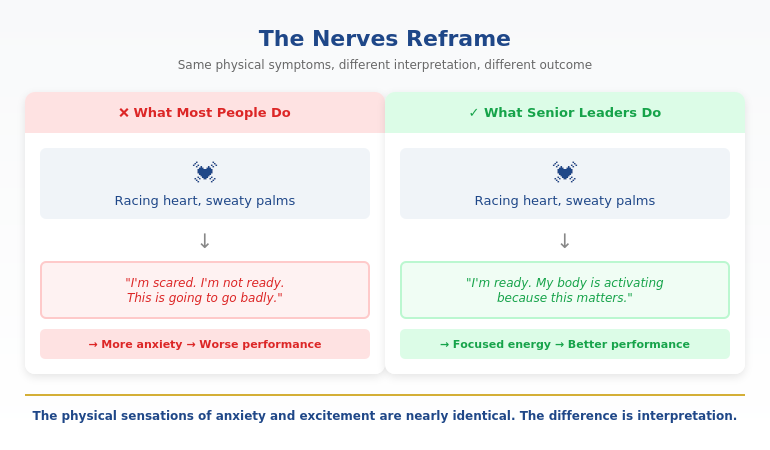
Most people’s default interpretation: “I’m scared. I’m not ready. This is going to go badly.”

That interpretation makes everything worse. It triggers more stress hormones. It creates a feedback loop of escalating anxiety.

The reframe that senior leaders use:

When you feel those physical symptoms, consciously tell yourself: “This is my body getting ready to perform. These are readiness signals, not danger signals. My system is activating because this matters.”

This isn’t positive thinking. It’s physiologically accurate.

The physical sensations of anxiety and excitement are nearly identical: elevated heart rate, heightened alertness, increased blood flow. The difference is entirely in interpretation. Research shows that people who interpret pre-performance arousal as helpful actually perform better than those who try to calm down.


The Nerves Reframe showing how senior leaders interpret anxiety signals as readiness rather than fear

How to practice the reframe:

Next time you feel presentation nerves, say out loud (or silently): “I’m not scared—I’m ready. My body is activating because this matters. This energy is going to help me perform.”

It feels strange the first few times. After a dozen repetitions, it becomes automatic. Senior executives have done this reframe so many times it’s now their default interpretation.

For the complete protocol including the neurological basis and practice exercises, it’s covered in depth in Conquer Speaking Fear.

Want the complete Nerves Reframe Protocol? Conquer Speaking Fear includes step-by-step techniques for rewiring how your brain interprets anxiety—plus emergency protocols for when panic hits. See what’s included →

What Senior Leaders Actually Do (The Preparation Rituals)

Here’s what I’ve observed from watching hundreds of executives prepare for board meetings, investor presentations, and career-defining moments:

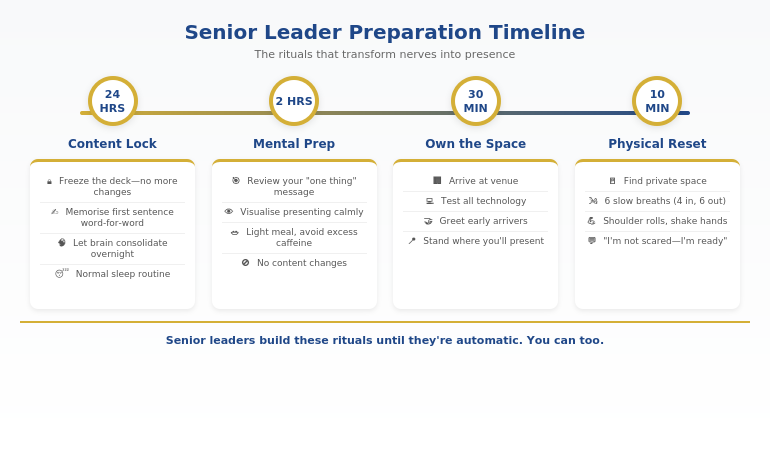
Ritual #1: Content lock 24 hours before

Senior executives stop changing their content a full day before presenting. No more tweaks. No more “one more data point.” The presentation is frozen.

Why this works: last-minute changes increase cognitive load and anxiety. Your brain needs time to consolidate. The executives who seem most natural have stopped thinking about content and started thinking about delivery.

Ritual #2: First sentence memorised word-for-word

Every senior leader I’ve worked with knows their first sentence cold. Not approximately—exactly. They could say it in their sleep.

Why this works: the first 10 seconds are when anxiety peaks. Having an automatic opening eliminates the “what do I say first?” panic. Once you’re past those first words, momentum takes over. Learn more about crafting a powerful executive presentation opening line.

Ritual #3: Physical reset before entering

Before walking into the room, senior leaders find a private space—bathroom, empty office, stairwell—for a 2-minute physical reset. This typically includes: 6 slow breaths, shoulder rolls to release tension, and 30 seconds standing in an expanded posture.

Why this works: physical state drives mental state. You can’t think your way to calm, but you can breathe your way there. For a complete pre-presentation reset routine, see how to calm nerves before a presentation.

Ritual #4: Arrival 15 minutes early

Executives arrive early enough to own the space. They test the technology. They stand where they’ll present. They greet early arrivers casually.

Why this works: arriving rushed puts you in reactive mode. Arriving early puts you in host mode. The psychological shift is significant.


Senior leader preparation timeline showing what executives do 24 hours, 2 hours, and 10 minutes before high-stakes presentations


⭐ High Stakes Trigger Your Nervous System — Here’s the Override

These techniques work at the physiological level, not just “think positive” advice.

Includes:

  • Vagus nerve activation that shifts you out of fight-or-flight
  • The grounding method that stops symptoms mid-presentation
  • Emergency reset when nerves spike unexpectedly

Get Calm Under Pressure → £19.99

Used by executives who present to boards, investors, and leadership teams.

The Day Of: Hour-by-Hour Protocol

Here’s the exact timeline senior leaders follow on presentation day:

Morning (3+ hours before):

  • Normal routine. Don’t disrupt sleep or eating patterns.
  • 10 minutes of physical movement—walk, stretch, light exercise.
  • One run-through of opening and closing only. No full rehearsal.
  • No content changes. The deck is locked.

2 hours before:

  • Review your “one thing”—the single most important message.
  • Visualise the room, the faces, yourself presenting calmly.
  • Light meal or snack. Avoid caffeine if you’re already anxious.

30 minutes before:

  • Arrive at the venue. Test technology. Claim the space.
  • Greet anyone who’s early. Small talk reduces your threat perception.

10 minutes before:

  • Find a private space. Bathroom stall works.
  • 6 slow breaths: 4 counts in, hold 2, 6 counts out.
  • Shoulder rolls. Shake out hands.
  • Say your opening sentence out loud once.
  • Reframe: “I’m not scared—I’m ready.”

1 minute before:

  • Stand tall. Shoulders back. Take up space.
  • Smile briefly—it releases tension.
  • Focus on serving your audience, not on your performance.

This protocol works because it shifts your focus from “how will I perform?” to “how will I serve?” Senior leaders have made this shift so many times it’s automatic. You can build the same pattern.

Want a printable version of this protocol? Conquer Speaking Fear includes the complete day-of timeline plus emergency techniques for unexpected situations. Download now →

Related: Once you’ve managed your nerves, make sure your opening line earns the attention you deserve. Read Executive Presentation Opening Line That Makes Executives Put Down Their Phones.

Common Questions About High-Stakes Presentation Nerves

How do you calm nerves before a high-stakes presentation?

The most effective approach is reframing, not calming. When you feel anxiety symptoms, interpret them as readiness signals rather than fear signals. Tell yourself: “My body is activating because this matters.” Combine this with physical reset techniques—6 slow breaths, shoulder rolls, expanded posture—in the 10 minutes before presenting. Trying to eliminate nerves entirely backfires; channeling them works.

Why do I get so nervous before important presentations?

Your nervous system is doing its job. High-stakes situations trigger a stress response designed to help you perform—increased alertness, faster processing, more energy. The problem isn’t the nerves; it’s interpreting them as “something is wrong.” Senior executives feel the same physical symptoms—they’ve just learned to interpret them as “I’m ready” rather than “I’m afraid.” Build presentation confidence by changing the interpretation, not fighting the sensation.

How do executives stay calm under pressure?

They don’t stay calm—they manage activation. The executives who seem effortlessly composed have built preparation rituals that become automatic: content lock 24 hours before, first sentence memorised, physical reset before entering, early arrival to own the space. They’ve also practiced the anxiety reframe so many times that “I’m ready” is now their default interpretation of nervous symptoms.


⭐ Ready to Eliminate Presentation Fear Permanently?

Go beyond managing symptoms — rewire how your brain responds to high-stakes situations entirely.

Includes:

  • The complete fear-to-confidence transformation system
  • Mental rehearsal techniques that build genuine confidence
  • Cognitive reframing methods from clinical hypnotherapy

Get Conquer Speaking Fear → £39

The complete system for professionals who want to present without fear — not just manage it.

FAQ

What if I’ve tried everything and still get nervous?

You’re not trying to stop being nervous—you’re trying to use the nervousness differently. The reframe technique doesn’t eliminate anxiety; it changes your relationship with it. If deep breathing hasn’t worked, it’s because you were trying to suppress symptoms rather than reinterpret them. The shift from “I need to calm down” to “this activation is helping me” is subtle but transformative.

How far in advance should I start preparing mentally?

Lock your content 24 hours before. Start the mental preparation—visualisation, reframe practice, physical routines—the morning of. Don’t over-prepare the day before; this increases rumination and anxiety. The goal is to arrive at your presentation with fresh energy and automatic habits, not exhausted from mental rehearsal.

Does this work for virtual high-stakes presentations?

Yes—with modifications. For virtual presentations, arrive at your setup 20 minutes early to test technology and settle in. Do your physical reset away from camera, then return with 2 minutes to spare. The reframe technique works identically. Virtual presentations often feel harder because you can’t read the room, so having automatic habits becomes even more important.

What if the nervousness is visible (shaking, sweating)?

Two approaches: manage the symptoms and reframe the visibility. For physical symptoms, the breathing reset helps (it activates your parasympathetic nervous system). But also know this: audiences notice visible nerves far less than you think. And mild nervousness often reads as “this person cares about this topic.” If symptoms are severe, the Calm Under Pressure guide covers specific techniques for physical symptom management.

📧 The Winning Edge Newsletter

Weekly techniques for confident presenting, managing nerves, and executive communication. Practical methods from a clinical hypnotherapist with 24 years in corporate banking—no generic advice, just what actually works under pressure.

Subscribe Free →

Your Next Step

Senior leaders don’t eliminate high-stakes presentation nerves. They build systems that transform anxiety into focused energy.

For your next important presentation: lock your content 24 hours before, memorise your first sentence, do the physical reset 10 minutes before, and practice the reframe—”I’m not scared, I’m ready.”

These aren’t tricks. They’re the exact preparation rituals I’ve observed from executives who present to boards, investors, and senior leadership regularly.

For the complete system—including the Nerves Reframe Protocol, day-of timeline, and emergency techniques—get Conquer Speaking Fear.

📋 Free Resource: Calm Under Pressure Quick Guide

Techniques for managing physical symptoms of presentation anxiety—shaking, sweating, racing heart. Perfect companion to the mindset techniques above.

Download Calm Under Pressure →

About the Author

Mary Beth Hazeldine is the Owner & Managing Director of Winning Presentations and a former corporate banker with 24 years of experience at JPMorgan Chase, PwC, Royal Bank of Scotland, and Commerzbank. She has trained thousands of executives on high-stakes presentation skills and helped clients secure more than £250 million in funding and budget approvals.

Mary Beth is also a qualified clinical hypnotherapist and NLP practitioner, specialising in helping professionals overcome presentation anxiety and speaking fear. After spending five years battling her own terror of presenting at JPMorgan, she developed the neuroscience-based techniques she now teaches to executives worldwide.

Book a discovery call | View services

20 Jan 2026
Executive presentation opening line - the formula that makes executives put down their phones and pay attention

Executive Presentation Opening Line That Makes Executives Put Down Their Phones

Quick answer: The best executive presentation opening line signals relevance and decision-readiness in the first 10 words. Instead of “Thank you for your time” or an agenda slide, open with the stake: “We’re leaving £2M on the table quarterly—here’s how we fix it.” This tells executives immediately: this matters, there’s a recommendation coming, and their time won’t be wasted.

Copy/paste the sentence structure below, then fill in your numbers. This stops the “half-listening while checking email” behaviour that kills most presentations before slide two.

⚡ Presenting to executives soon? Use this opening formula:

Formula: [Stake] + [Recommendation preview] + [Timeframe]

Example: “We’re losing 23% of customers at renewal. I’m recommending we invest £150K in the onboarding fix—and I’ll show you why it pays back in 6 months.”

This works because executives now know: (1) why this matters, (2) that you have a position, and (3) how long this will take.

The CFO Who Looked Up After 11 Words

I was coaching a director who’d been struggling to get budget approvals. His presentations were thorough—40+ slides of analysis, context, and methodology.

The problem: by slide three, his CFO was answering emails.

We changed one thing. His opening line.

Instead of: “Thanks for making time. I’ll walk you through our Q3 analysis and some recommendations.”

He said: “We’re hemorrhaging £340K monthly on a system nobody uses. I need 12 minutes and a decision.”

Eleven words in, the CFO closed his laptop.

The same data. The same recommendation. Different result. He got his budget approved that afternoon—after months of delays.

The content didn’t change. The opening line did.

⭐ Open Every Executive Presentation With Confidence

Get the exact slide structure, opening scripts, and frameworks that command attention from the first word.

Inside the Executive Slide System:

  • Decision-first opening templates (copy/paste ready)
  • The 5-slide structure executives actually want
  • Scripts for budget requests, updates, and recommendations
  • Before/after examples from real boardroom presentations

Get the Executive Slide System → £39

Built from 24 years in corporate banking. The same frameworks used in FTSE 100 boardrooms, steering committees, and C-suite budget meetings.

Why Executives Check Phones During Your Opening

Here’s what happens in the first 10 seconds of most presentations to senior leaders:

You say: “Good morning, thank you for making time. I’m going to take you through our quarterly review and share some thoughts on next steps.”

They hear: “This is going to be a standard update. I can half-listen and catch up on email.”

Phones stay up. Laptops stay open. You’ve lost them before you’ve started.

This isn’t rudeness. It’s triage. Executives sit through 8-12 presentations weekly. They’ve learned to filter ruthlessly. If your opening doesn’t signal “this requires my full attention and a decision,” they allocate partial attention.

The three signals that keep phones up:

  • “Thank you” openers — Signal politeness, not urgency
  • Agenda slides — Signal “I’m going to walk through things methodically” (translation: slowly)
  • Context-building — Signal “the point is coming eventually” (translation: I can tune out now)

The three signals that put phones down:

  • A stake — Something at risk that matters to them
  • A position — You have a recommendation (not just information)
  • A timeframe — This will be brief and decision-focused

Your executive presentation opening line needs all three. In the first sentence.


The Decision-First Opening Formula showing three components: stake, recommendation, and timeframe

The Decision-First Opening Formula

Every effective executive opening follows the same structure. Once you see it, you can’t unsee it:

[STAKE] + [RECOMMENDATION PREVIEW] + [TIMEFRAME]

Let’s break it down:

1. The Stake (Why This Matters)

Start with what’s at risk, what’s being lost, or what opportunity exists. Use numbers when possible. Make it concrete.

  • “We’re losing £2.3M annually to a process that takes 4 clicks to fix.”
  • “Three of our top 10 clients have mentioned switching providers.”
  • “The compliance deadline is 90 days out and we’re 60% ready.”

2. The Recommendation Preview (You Have a Position)

Signal that you’re not just presenting data—you’ve done the thinking and have a clear recommendation. You’ll defend it, but they know it’s coming.

  • “I’m recommending we invest £150K now to avoid £800K in penalties.”
  • “I’m proposing we sunset Product X and redirect resources to Product Y.”
  • “My recommendation is we delay launch by 6 weeks—and I’ll show you why that saves money.”

3. The Timeframe (Respect Their Time)

Tell them how long this will take. Executives relax when they know there’s a defined endpoint.

  • “I need 12 minutes and one decision.”
  • “This is a 10-minute presentation with 5 minutes for questions.”
  • “I’ll be brief—8 slides, then I need your input on two options.”

When you combine all three, you get opening lines like:

“We’re leaving £400K on the table every quarter because of a pricing gap our competitors have already closed. I’m recommending a 15% adjustment to our enterprise tier—and I’ll walk you through the analysis in 10 minutes.”

That’s 45 words. Phones are down. Laptops are closed. You have their attention.

This is the same structure I teach in the executive presentation structure framework—opening lines are just the first application of decision-first thinking.

Want opening scripts you can copy and customise? The Executive Slide System includes decision-first opening templates for budget requests, project updates, strategic recommendations, and more. See what’s included →

5 Opening Lines That Work (With Scripts)

Here are five executive presentation opening lines for different scenarios. Each follows the stake + recommendation + timeframe formula:

1. Budget Request

“Our current system is costing us 340 hours monthly in manual workarounds—that’s £180K annually in productivity loss. I’m requesting £75K for an automation upgrade that pays back in 5 months. I need 10 minutes and your approval to proceed.”

2. Quarterly Business Review

“Q3 revenue is up 12%, but customer acquisition cost increased 23%—if that trend continues, we’ll miss our annual margin target by £2M. I have three recommendations to reverse this. Let me walk you through them in 15 minutes.”

3. Project Status Update

“Project Atlas is 2 weeks behind schedule due to the vendor delay I flagged last month. I’m recommending we bring in a second vendor for the integration phase—it adds £30K but gets us back on timeline. I need 8 minutes and a decision on the budget adjustment.”

4. Strategic Recommendation

“We’re fourth in market share and losing ground every quarter. I’m proposing we acquire CompetitorX before they get snapped up—the window is 90 days. This presentation makes the case in 12 minutes, then I need your input on whether to proceed with due diligence.”

5. Risk/Compliance Alert

“The new GDPR requirements take effect in 60 days. We’re currently 40% compliant. I’m recommending an emergency workstream with dedicated resources—total investment £95K to avoid fines up to £4M. I’ll explain the gaps and the fix in 10 minutes.”

Notice what these all have in common: no “thank you,” no agenda, no context-building. They go straight to what matters.


Before and after comparison of weak versus strong executive presentation opening lines

⭐ Never Lose an Executive in Your First 10 Seconds Again

Get proven opening scripts, slide structures, and frameworks that command attention from word one.

What’s inside:

  • The Decision-First Opening Formula (with fill-in-the-blank scripts)
  • 5-slide executive structure that keeps attention throughout
  • Templates for budget requests, updates, and recommendations
  • Before/after examples from real presentations

Get Instant Access → £39

Instant download. Start applying these frameworks to your next presentation today.

What to Say Instead of “Thank You For Your Time”

Let’s be specific about what to replace:

Instead of: “Thank you all for making time today.”

Say: Nothing. Jump straight to the stake. You can thank them at the end if you want.

Instead of: “I’m going to walk you through our Q3 results.”

Say: “Q3 results show a problem we need to address today—and I have a recommendation.”

Instead of: “Before I get into the details, let me give you some context.”

Say: “Here’s what’s at stake: [stake]. Here’s what I recommend: [position]. Let me show you why.”

Instead of: “As you know, we’ve been working on this project for six months.”

Say: “Six months in, we’ve hit a decision point that affects the next 18 months. I need your input.”

The pattern: delete throat-clearing. Start with why they should care.

If you’re nervous about skipping pleasantries, remember: executives don’t experience your directness as rude. They experience it as respect for their time. The psychology of presentation hooks confirms this—decision-makers respond to relevance, not politeness.

If the nervousness itself is the issue, that’s a separate challenge. Here’s what senior leaders actually do to manage high-stakes presentation nerves.

Struggling with what to put on your first slide? The Executive Slide System includes the exact first-slide template that complements a decision-first opening line. Download now →

Common Questions About Executive Presentation Openings

How do you start an executive presentation?

Start with the stake—what’s at risk, what opportunity exists, or what decision is needed. Follow immediately with your recommendation preview (so they know you have a position), then state your timeframe. Skip “thank you,” skip the agenda slide, skip context-building. Executives decide in the first 10 seconds whether to give you full attention. Lead with relevance.

What is the best opening line for a presentation?

The best executive presentation opening line combines three elements: a stake (why this matters), a recommendation preview (you have a position), and a timeframe (how long this takes). Example: “We’re losing £200K quarterly to a fixable process gap. I’m recommending a £50K investment that pays back in 4 months. I need 10 minutes and a decision.” This signals relevance immediately and earns full attention.

How do you grab attention in a business presentation?

Use numbers and specifics, not generalities. “We have a customer retention challenge” loses to “We lost 47 enterprise customers last quarter—£3.2M in annual recurring revenue.” Specificity signals preparation and importance. Combine it with a clear recommendation (“Here’s how we fix it”) and executives will put down their phones. Learn more about first slides that grab attention here.

⭐ Command the Room From Your First Word

Stop losing executives in the first 10 seconds. Get the complete system for presentations that earn full attention and drive decisions.

The Executive Slide System includes:

  • Decision-first opening scripts (copy/paste ready)
  • The 5-slide structure that keeps attention throughout
  • First-slide template that complements your opening line
  • Before/after transformations from real presentations

Get the Executive Slide System → £39

Built from 24 years in corporate banking and tested in boardroom environments. Instant download.

FAQ

Should I start with “thank you for your time”?

No. “Thank you for your time” signals politeness but wastes the most valuable real estate in your presentation—the first 10 seconds when executives decide whether to give you full attention. If you want to express gratitude, do it at the end: “Thank you—I’ll take questions.” Opening with thanks tells them nothing about why this presentation matters.

What if my presentation is just an update, not a decision?

Reframe it. Every update has implications. “Q3 revenue is up 12%” becomes “Q3 revenue is up 12%, which puts us on track for the expansion budget we discussed—I want to confirm we’re still aligned on timing.” Even status updates can signal relevance. If there’s genuinely nothing at stake, question whether the meeting is necessary.

Does this work for virtual presentations?

It’s even more important virtually. In a conference room, social pressure keeps phones somewhat hidden. On Zoom, executives are checking email in another window constantly. A strong opening line is your only tool to pull their attention back to your screen. Start with the stake immediately—before they’ve had time to open their inbox.

How do I open if I’m presenting bad news?

The same formula applies—perhaps more importantly. “We missed our Q3 target by 15%. I have a recovery plan that gets us back on track by Q1, and I need your approval on one resource decision.” Bad news with a recommendation is far better received than bad news followed by rambling context. Executives respect presenters who diagnose problems and propose solutions.

📧 The Winning Edge Newsletter

Weekly techniques for executive presentations, confident speaking, and career communication. Practical frameworks from 24 years in corporate banking—no generic tips, just what actually works in boardrooms.

Subscribe Free →

Your Next Step

Your next executive presentation will be judged in the first 10 seconds. The opening line you choose determines whether you get full attention or half-listening.

Use the formula: [Stake] + [Recommendation preview] + [Timeframe].

Delete the “thank you.” Delete the agenda. Start with why they should care.

For the complete system—opening scripts, slide structure, and decision-first frameworks—get the Executive Slide System.

📋 Free Resource: Presentation Openers & Closers Swipe File

A collection of proven opening and closing lines you can adapt for your next presentation. Includes executive, client, and team meeting variations.

Download Free Swipe File →

About the Author

Mary Beth Hazeldine is the Owner & Managing Director of Winning Presentations and a former corporate banker with 24 years of experience at JPMorgan Chase, PwC, Royal Bank of Scotland, and Commerzbank. She has trained thousands of executives on high-stakes presentation skills and helped clients secure more than £250 million in funding and budget approvals.

Mary Beth is also a qualified clinical hypnotherapist and NLP practitioner, specialising in helping professionals overcome presentation anxiety and communicate with executive presence. She developed the Decision-First Opening Formula after watching hundreds of presentations fail in the first 10 seconds—and discovering that the fix was simpler than most people think.

Book a discovery call | View services

19 Jan 2026
Why AI-generated slides look generic - the framework-first fix for executive-quality presentations

Why Your AI-Generated Slides Look Generic (And How to Fix It)

Quick answer: Your AI-generated slides look generic because you’re asking AI to do the thinking for you. The tool isn’t broken—the input is. When you prompt AI without a clear framework (structure, audience, decision point), it defaults to safe, templated output. The fix isn’t better prompts. It’s building your presentation framework first, then using AI to accelerate execution.

This fixes the endless cycle of generate → cringe → delete → redo that wastes hours and leaves you with slides you’re embarrassed to present.

⚡ Need to fix generic AI slides right now? Do this before your next prompt:

Step 1: Write your main message in one sentence (what do you want them to decide/believe?)

Step 2: List your 3 supporting points in order of importance

Step 3: Identify your audience’s #1 objection

Step 4: NOW prompt AI with this structure—watch the output transform

The £2M Pitch That AI Almost Ruined

A client came to me last year in a panic. She’d used AI to create her investor pitch deck—Gamma for the slides, ChatGPT for the script. The output looked polished. Professional fonts, clean layouts, smooth transitions.

The investors passed in under five minutes.

“It felt like every other pitch we’ve seen this month,” one told her. “Nothing stood out.”

That’s the trap. AI-generated slides look generic not because the tools are bad, but because they’re designed to be safe. They optimise for “acceptable to everyone” rather than “compelling to your specific audience.”

Six weeks later, we rebuilt her deck using a framework-first approach. Same information. Same AI tools for execution. Different result: £2.1M raised.

The AI didn’t change. Her input did.

⭐ Master the Framework That Makes AI Output Executive-Ready

Stop fighting with prompts. Learn the structure-first methodology that transforms any AI tool from “generic template generator” to “presentation accelerator.”

In this live cohort course:

  • The Decision-First Framework for AI-enhanced presentations
  • How to brief AI tools so they produce executive-quality output
  • Live feedback on your actual presentations
  • Templates that work with Copilot, Gamma, ChatGPT, and any future tool

Join AI-Enhanced Presentation Mastery →

Live cohort course with Mary Beth Hazeldine. Limited seats per session. Framework-first methodology tested across banking, consulting, and FTSE 100 environments.

If you have an investor pitch, board deck, or QBR in the next 2–3 weeks, this will pay for itself immediately.

Why Every AI Tool Produces Generic Output

Here’s what most people don’t understand about AI presentation tools: they’re trained on millions of slides, which means they’ve learned to produce the average of all those slides.

Average is, by definition, generic.

When you prompt Copilot with “Create a presentation about Q3 results,” it generates what a Q3 presentation typically looks like—across thousands of companies, industries, and contexts. It doesn’t know your audience is a skeptical CFO. It doesn’t know your Q3 results contain a critical pivot point. It doesn’t know the board has seen 47 similar presentations this month.

So it gives you:

  • Safe bullet points that could apply to any company
  • Stock imagery that signals “corporate presentation”
  • Slide titles like “Overview” and “Key Takeaways” that tell the audience nothing
  • A structure that builds to a conclusion (when executives want conclusions first)

This isn’t a flaw in the AI. It’s working exactly as designed. The problem is the input, not the tool.

If you’ve tried fixing generic Copilot slides with better prompts, you’ve probably noticed: better prompts help marginally. They don’t solve the core problem.

The Framework-First Method That Changes Everything

The executives I’ve trained over 24 years in banking don’t start with slides. They don’t start with AI prompts. They start with a framework.

Framework-first means answering these questions before you touch any tool:

1. What’s the one decision I need from this audience?

Not “inform them about Q3.” A specific decision: “Approve the £500K investment in the new system.”

2. What’s their biggest objection or concern?

A CFO worries about ROI. A board worries about risk. A client worries about implementation. Name it.

3. What evidence will overcome that objection?

Not all your data. The specific proof points that address their specific concern.

4. What’s the logical flow that leads to yes?

Decision → Impact → Risk mitigation → Evidence. This is the executive presentation structure that actually works.

Once you have this framework, AI becomes extraordinarily useful. You’re not asking it to think for you. You’re asking it to execute your thinking faster.

Instead of prompting: “Create a presentation about our new CRM system”

Prompt with framework: “Create a 6-slide presentation for our CFO requesting £500K for a CRM upgrade. Main message: this investment pays back in 14 months through reduced customer churn. Address the objection that implementation will disrupt Q4 sales. Structure: recommendation first, then ROI evidence, then risk mitigation, then timeline.”

The output from the second prompt is unrecognisable from the first—even though it’s the same AI tool.

Want to master framework-first AI presentations? AI-Enhanced Presentation Mastery is a live cohort course that teaches the complete methodology—with feedback on your actual presentations. See upcoming sessions →

Before and After: Same Tool, Different Input

Here’s what the framework-first difference looks like in practice:

BEFORE (prompt-first approach):

Prompt:

“Create a presentation about implementing a new project management system”

AI Output:

  • Slide 1: Title slide with generic stock image
  • Slide 2: “Agenda” (why do executives need an agenda for 8 slides?)
  • Slide 3: “Current Challenges” (vague bullet points)
  • Slide 4: “Proposed Solution” (feature list)
  • Slide 5: “Benefits” (generic claims)
  • Slide 6: “Implementation Timeline” (Gantt chart)
  • Slide 7: “Budget Overview” (numbers without context)
  • Slide 8: “Next Steps” / “Questions?”

AFTER (framework-first approach):

Framework completed first:

Decision: Approve £85K for project management system. Audience: COO + Finance Director. Main objection: disruption to current workflow. Key evidence: 23% productivity gain from pilot team.

Prompt:

“Create a 6-slide executive presentation requesting £85K budget approval for a project management system. Lead with the recommendation and expected ROI. Address workflow disruption concerns by showing pilot results. Include risk mitigation. Audience is COO and Finance Director who value efficiency metrics.”

AI Output:

  • Slide 1: “Recommendation: Approve £85K—Expected 340% ROI in 18 months”
  • Slide 2: Pilot results showing 23% productivity gain
  • Slide 3: Workflow disruption mitigation plan
  • Slide 4: Financial breakdown with payback timeline
  • Slide 5: Risk assessment with contingencies
  • Slide 6: Decision requested + implementation start date

Same AI. Same topic. Completely different output. The difference is worth thousands in approved budgets and closed deals. Learning to create framework-first presentations can transform how decision-makers perceive your proposals—and your readiness for senior roles.


Framework-first vs prompt-first approach comparison showing how the same AI tool produces generic versus executive-quality slides based on input quality

⭐ Stop Producing Slides That Look Like Everyone Else’s

The framework-first methodology works with any AI tool—because it fixes the input, not the technology. Learn it once, apply it forever.

What you’ll master:

  • The 4-question framework that transforms AI output
  • Executive presentation structures that work across industries
  • How to brief any AI tool for professional results
  • Live practice with real-time feedback

Join the Next Cohort →

Live sessions + async practice. Includes templates, frameworks, and direct feedback on your presentations.

Which AI Tool Actually Matters? (Hint: None of Them)

People ask me constantly: “Should I use Copilot or Gamma? Is ChatGPT better than Claude for slides? What about Beautiful.ai?”

The honest answer: it barely matters.

Every major AI tool can produce executive-quality slides—if you give it executive-quality input. And every tool will produce generic output if you give it generic prompts.

The tools will keep changing. Copilot will update. New competitors will launch. GPT-6 will arrive. But the framework-first methodology stays constant because it’s based on how humans make decisions, not how AI generates content.

This is why I teach frameworks that are tool-agnostic. My clients use the same methodology whether they’re in Copilot, Gamma, or building slides manually. The AI presentation workflow accelerates execution, but the thinking happens before any tool is opened.

What to ask instead of “which tool is best?”:

  • “Do I have a clear decision I’m asking for?”
  • “Have I identified my audience’s main objection?”
  • “Do I know the evidence that overcomes that objection?”
  • “Is my structure decision-first or conclusion-last?”

Answer those questions, and any AI tool will serve you well.

Ready to master framework-first presentations? AI-Enhanced Presentation Mastery teaches the complete system—70% framework thinking, 30% AI execution. Works with any tool, now and in the future. View course details →

Related: Once your slides are executive-ready, make sure your structure and delivery match. Read Executive Presentation Structure: The Format That Gets Instant Buy-In and How to Stop Saying Um (Without Sounding Robotic).

Common Questions About AI-Generated Slides

Why do AI presentations look so generic?

AI tools are trained on millions of slides, so they produce the statistical average of all presentations. Average means generic. The tool optimises for “safe and acceptable” rather than “compelling for your specific audience.” To get non-generic output, you must provide specific input: the decision you need, the objection you’re addressing, and the evidence that overcomes it.

How do I make AI-generated slides look professional?

The secret isn’t in the prompts—it’s in the framework you create before prompting. Define your one key decision, your audience’s main concern, and your supporting evidence structure. Then prompt AI with this specific context. The same tool that produces generic bullet points will produce executive-ready slides when given framework-quality input.

What’s wrong with AI presentation tools?

Nothing is wrong with the tools. Copilot, Gamma, ChatGPT, and others are all capable of producing excellent output. The problem is how most people use them—asking AI to think instead of asking AI to execute. When you do the strategic thinking first (framework) and use AI for tactical execution (slides), the results transform completely.

⭐ Create Presentations That Don’t Look AI-Generated

Learn the methodology that makes AI your presentation accelerator—not your presentation liability.

Inside the course:

  • The Decision-First Framework (works with any AI tool)
  • Executive presentation templates with prompting guides
  • Live cohort sessions with direct feedback
  • How to brief AI for boardroom-quality output

Enroll in AI-Enhanced Presentation Mastery →

Live cohort format with Mary Beth Hazeldine. Framework-first methodology developed from 24 years in corporate banking and executive coaching.

FAQ

Which AI tool is best for presentations?

The tool matters far less than the input. Copilot, Gamma, ChatGPT, Beautiful.ai, and Canva’s AI features can all produce excellent presentations—if you give them framework-quality input. Choose based on what integrates with your workflow (Copilot for Microsoft users, Gamma for standalone, etc.), not based on which “produces the best slides.” They all produce generic slides with generic prompts.

Can AI really create executive-quality slides?

Yes—but only when you provide executive-quality thinking first. AI excels at execution: formatting, visual consistency, generating variations quickly. It struggles with strategy: understanding your specific audience, identifying the key decision, structuring for persuasion. Do the strategy yourself, use AI for execution, and the output will impress executives.

How long does the framework-first approach take?

About 10-15 minutes of structured thinking before you open any tool. This feels slower initially but dramatically reduces total time. You eliminate the “generate, delete, regenerate” cycle that wastes hours. Most of my clients report cutting total presentation creation time by 40-60% once the framework-first approach becomes habit.

Will this work with Copilot/Gamma/ChatGPT?

The framework-first methodology works with any AI tool because it focuses on input quality, not tool features. I’ve tested it extensively with Copilot, Gamma, ChatGPT, Claude, and several others. The specific prompting syntax varies slightly by tool, but the core framework remains identical. Learn the framework once, adapt to any tool.

📧 The Winning Edge Newsletter

Weekly insights on AI-enhanced presentations, executive communication, and framework-first thinking. Practical techniques from 24 years in corporate banking—no AI hype, just what actually works.

Subscribe Free →

Your Next Step

Your AI-generated slides look generic because AI is doing what it’s designed to do: produce safe, average output. The fix isn’t a better tool or better prompts. It’s better input.

Before your next presentation, take 10 minutes to answer the framework questions: What decision do you need? What’s the main objection? What evidence overcomes it? What’s the logical structure?

Then prompt AI with that framework. The output will transform—and so will how your audience responds.

If you want to master the complete framework-first methodology with live feedback and executive-tested templates, join AI-Enhanced Presentation Mastery.

About the Author

Mary Beth Hazeldine is the Owner & Managing Director of Winning Presentations and a former corporate banker with 24 years of experience at JPMorgan Chase, PwC, Royal Bank of Scotland, and Commerzbank. She has trained thousands of executives on high-stakes presentation skills and helped clients secure more than £250 million in funding and budget approvals.

Mary Beth is also a qualified clinical hypnotherapist and NLP practitioner, specialising in helping professionals overcome presentation anxiety. She developed the framework-first AI methodology after seeing countless executives struggle with generic AI output—and discovering that the fix was strategic thinking, not better technology.

Book a discovery call | View services

19 Jan 2026
How to stop saying um - the pause and breathe technique for eliminating filler words

How to Stop Saying Um (Without Sounding Robotic)

Quick answer: Learning how to stop saying um isn’t about willpower—it’s about replacing the filler with a deliberate pause. When you feel “um” coming, close your mouth, take one breath, then continue. This 3-second reset interrupts the nervous system pattern that causes filler words. Within two weeks of practice, most professionals reduce their ums by 70% or more.

⚡ Presenting or speaking in a meeting soon? Try this now:

Step 1: When you feel “um” rising, close your mouth completely

Step 2: Take one silent breath through your nose

Step 3: Continue speaking only when you know your next word

The pause feels longer to you than to your audience. What they see is confidence.

The Meeting That Made Me Finally Fix This

A client once sent me a recording of her team presentation. She wanted feedback on her content. Instead, I counted 47 “ums” in 12 minutes.

She was mortified. “I had no idea I did that.”

Most people don’t. Filler words operate below conscious awareness—until someone points them out, or worse, until you notice colleagues checking their phones while you speak.

The good news: as a clinical hypnotherapist and presentation coach, I’ve helped hundreds of professionals eliminate this habit. Not by trying harder. Not by recording themselves obsessively. But by understanding why “um” happens in the first place—and interrupting the pattern at its source.

Here’s what actually works.

⭐ Eliminate Filler Words at the Source

Stop fighting symptoms. Address the nervous system patterns that cause “um,” “uh,” and rambling in the first place.

Includes:

  • The Pause-and-Breathe Protocol (rewires your default response)
  • Pre-presentation nervous system reset techniques
  • Scripts for high-pressure Q&A without filler words

Get Conquer Speaking Fear → £39

Developed by a clinical hypnotherapist with 24 years of corporate experience. Techniques drawn from neuroscience, NLP, and real boardroom testing.

Why You Say Um (It’s Not What You Think)

“Um” isn’t a vocabulary problem. It’s a nervous system problem.

When you speak under pressure—whether it’s a presentation, a meeting, or even a casual conversation where you feel judged—your brain enters a mild stress state. In this state, two things happen simultaneously:

1. Your thoughts speed up. Stress hormones accelerate mental processing. Ideas come faster than you can articulate them.

2. Your mouth tries to keep up. Rather than pause (which feels vulnerable), your brain fills the gap with sound. “Um” is that sound. It’s your nervous system saying “don’t stop talking or they’ll think you’re incompetent.”

This is why willpower doesn’t work. You can’t think your way out of a stress response. Telling yourself “don’t say um” actually makes it worse—you’re adding cognitive load to an already overloaded system.

The solution isn’t to try harder. It’s to give your nervous system a different option.

The Pause-and-Breathe Technique

Here’s how to stop saying um using a method that works with your neurology, not against it:

Step 1: Recognise the “um impulse.”

There’s a micro-moment before every “um” where you feel the urge to fill silence. It might feel like pressure in your throat, a slight panic, or just the sense that you need to keep making sound. Learn to notice this moment.

Step 2: Close your mouth.

Physically close your lips. This is critical. You cannot say “um” with your mouth closed. It sounds obvious, but this physical interruption breaks the automatic pattern.

Step 3: Take one breath.

Breathe in through your nose. This does two things: it gives your brain oxygen (improving clarity) and it activates your parasympathetic nervous system (reducing the stress response that caused the filler word).

Step 4: Speak only when you have your next word.

Don’t open your mouth until you know exactly what you’re going to say. The pause might feel like three seconds to you. To your audience, it looks like confidence.

This technique works because it replaces the filler behaviour with a different behaviour. You’re not eliminating anything—you’re substituting.

Want the complete system for calm, confident speaking? Conquer Speaking Fear includes the full Pause-and-Breathe Protocol plus techniques for managing nerves before you even start speaking. Get instant access →

How to Practice Without Feeling Awkward

The technique is simple. The challenge is making it automatic. Here’s how to practice without driving yourself crazy:

Low-stakes conversation practice (Week 1):

Practice the pause-and-breathe in conversations that don’t matter—ordering coffee, chatting with a neighbour, calling customer service. The goal isn’t perfection. It’s building the muscle memory of pausing instead of filling.

Recording review (Week 2):

Record yourself for 2 minutes talking about your weekend. Watch it back. Don’t count your ums—notice where they happen. Are they at the start of sentences? During transitions? When you’re searching for a specific word? This tells you when to deploy the pause.

Meeting integration (Week 3+):

Start using the technique in real meetings. Pick one meeting per day where you consciously practice. Don’t try to eliminate every filler word—focus on the first one. Catch that first “um impulse” and pause instead. Success builds on itself.

Most people see significant improvement within 2-3 weeks. The filler words don’t disappear entirely (and they don’t need to), but they reduce by 60-80%.


The Pause-and-Breathe Technique: 4 steps to stop saying um - recognize the impulse, close your mouth, take one breath, speak when ready

⭐ Speak Without the Mental Scramble

Filler words are a symptom. The real problem is the anxiety underneath. Address both with techniques that actually stick.

You’ll learn:

  • How to reset your nervous system before high-stakes conversations
  • The “clarity pause” technique for Q&A sessions
  • Why traditional advice (“just relax”) makes anxiety worse

Get the Complete System → £39

Instant download. Start applying these techniques to your next meeting.

Advanced Techniques for High-Stakes Situations

The pause-and-breathe technique handles everyday speaking. But what about high-pressure moments—board presentations, job interviews, client pitches?

The pre-meeting reset:

Five minutes before any high-stakes conversation, find a private space. Take six slow breaths (4 counts in, 6 counts out). This activates your parasympathetic nervous system and reduces the stress hormones that cause filler words. Learn more about pre-presentation calming techniques here.

The “first sentence” anchor:

Memorise your first sentence word-for-word. Not your whole opening—just the first sentence. When you know exactly how you’ll start, you eliminate the uncertainty that triggers early filler words. A clean start builds momentum.

The Q&A pause protocol:

Questions trigger more “ums” than any other speaking situation. Here’s why: you’re processing and speaking simultaneously. Solution: after someone asks a question, pause for a full 2 seconds before answering. Say “That’s a good question” if you need a bridge. Then answer. This tiny delay gives your brain time to formulate a complete thought.

If you tend to ramble when nervous, these techniques work together. Pausing naturally creates shorter, more structured responses.

Ready to eliminate speaking anxiety entirely? Conquer Speaking Fear goes beyond filler words to address the root cause: the nervous system patterns that create anxiety in the first place. See what’s included →

Related: Once you’ve eliminated filler words, make sure your slides don’t undermine your newfound confidence. Read Executive Presentation Structure: The Format That Gets Instant Buy-In.

Common Questions About Filler Words

Why do I say um so much?

“Um” is a stress response, not a speech habit. When your brain processes faster than your mouth can speak (which happens under pressure), it fills the gap with sound rather than silence. This is an automatic nervous system behaviour—which is why trying to “just stop” doesn’t work. The solution is replacing the filler with a deliberate pause, which gives your brain time to catch up.

How do I train myself to stop saying um?

Train the pause-and-breathe technique: when you feel the “um impulse,” close your mouth, take one breath, then speak only when you know your next word. Practice in low-stakes conversations first (ordering coffee, casual chats), then gradually apply it in meetings. Most people see 60-80% reduction within 2-3 weeks of consistent practice.

Is saying um unprofessional?

Occasional filler words are normal and human. Excessive filler words (more than 3-4 per minute) can signal nervousness and reduce perceived confidence. The goal isn’t to eliminate every “um”—it’s to reduce them enough that they don’t distract from your message. Research suggests audiences stop noticing filler words below a certain threshold.

⭐ Speak With Confidence—Not Filler Words

Stop the mental scramble that causes “um.” Get techniques that work with your nervous system, not against it.

What’s inside:

  • The Pause-and-Breathe Protocol (step-by-step)
  • Pre-meeting nervous system reset
  • Q&A confidence techniques
  • Scripts for high-stakes situations

Get Instant Access → £39

Developed by a qualified clinical hypnotherapist. Techniques tested in real boardrooms, client pitches, and high-stakes presentations.

FAQ

How long does it take to reduce filler words?

Most people see noticeable improvement within 2-3 weeks of consistent practice. The first week focuses on awareness and low-stakes practice. By week three, the pause-and-breathe technique starts becoming automatic. Complete elimination isn’t the goal—reducing filler words by 60-80% is realistic and sufficient for professional impact.

What if I can’t pause—my mind races too fast?

Racing thoughts are a sign of elevated stress hormones, not a personality trait. The pre-meeting breathing reset (6 slow breaths before speaking) reduces this significantly. If your mind still races during speaking, shorten your sentences. Aim for one idea per sentence. Racing thoughts can’t outpace short, complete statements.

Does this work for virtual meetings too?

Yes—and pauses are actually more powerful on video. On camera, filler words stand out more because there’s less visual information to distract from them. The pause-and-breathe technique works identically in virtual settings. Bonus: you can keep a sticky note with “PAUSE” written on it near your camera as a reminder.

Should I ask someone to count my ums?

This usually backfires. Having someone count your filler words increases self-consciousness, which increases stress, which increases filler words. Instead, record yourself occasionally and review privately. Notice patterns without judgement. The goal is awareness, not punishment.

📧 The Winning Edge Newsletter

Weekly techniques for confident speaking, presentation skills, and career communication. No fluff—just actionable methods from a clinical hypnotherapist with 24 years in corporate banking.

Subscribe Free →

Your Next Step

Learning how to stop saying um isn’t about willpower or self-criticism. It’s about giving your nervous system a better option than filling silence with sound.

Try the pause-and-breathe technique in your next conversation. Close your mouth when you feel the filler word coming. Take one breath. Speak when you’re ready. It will feel awkward at first—and your audience won’t notice anything except that you sound more confident.

If you want the complete system for eliminating speaking anxiety—not just filler words, but the underlying nervousness that causes them—get Conquer Speaking Fear.

📋 Free Resource: Public Speaking Cheat Sheets

Quick-reference cards covering body language, vocal techniques, and confidence signals. Perfect companion to the pause-and-breathe technique.

Download Free Cheat Sheets →

About the Author

Mary Beth Hazeldine is the Owner & Managing Director of Winning Presentations and a former corporate banker with 24 years of experience at JPMorgan Chase, PwC, Royal Bank of Scotland, and Commerzbank. She has trained thousands of professionals on high-stakes presentation skills and helped clients secure more than £250 million in funding and budget approvals.

Mary Beth is also a qualified clinical hypnotherapist and NLP practitioner, specialising in helping professionals overcome presentation anxiety and speaking fear. After spending five years battling her own terror of presenting at JPMorgan, she developed the neuroscience-based techniques she now teaches to executives worldwide.

Book a discovery call | View services

19 Jan 2026
Executive presentation structure diagram showing the Decision-First Framework for C-suite buy-in

Executive Presentation Structure: The Format That Gets Instant Buy-In

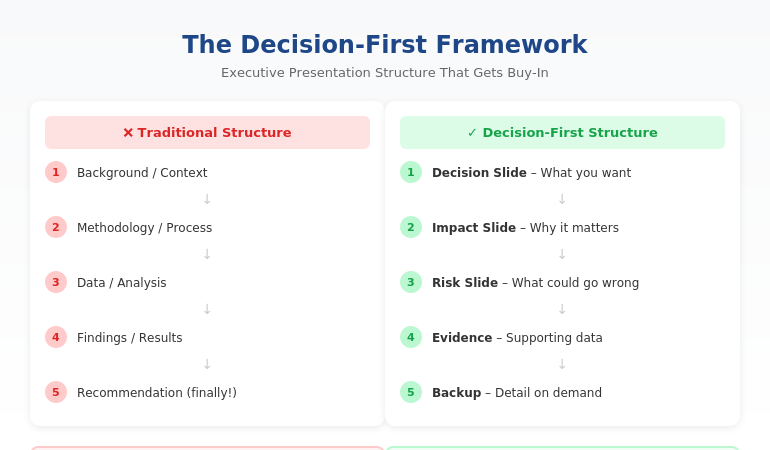
Quick answer: The best executive presentation structure leads with the decision, not the data. Put your recommendation on slide one, follow with business impact and risk, then provide supporting detail only if asked. This “decision-first” structure matches how executives actually process information—and it’s why some presenters get instant buy-in while others get “let’s circle back.”

⚡ Presenting to executives in the next 48 hours? Here’s your structure:

Slide 1: Decision — what you want + expected outcome

Slide 2: Impact — why it matters (revenue, cost, risk)

Slide 3: Risk — what could go wrong + mitigation

Slides 4–6: Evidence — only data that supports your ask

Backup: Detail on demand (methodology, deep analysis)

The 11-Word Slide That Rescued a £4M Budget Request

The right executive presentation structure can change everything. I learned this watching a client named Sarah lose—then win—the same £4 million budget request.

The first time, Sarah presented 47 slides. Background, methodology, analysis, findings, recommendations. Textbook structure. The CFO flipped through seven slides, said “I don’t see what you’re asking for,” and moved to the next agenda item. Fourteen hours of preparation, dismissed in 60 seconds.

Six weeks later, Sarah presented again. Same request. Same CFO. But this time, her opening slide contained exactly 11 words: “Request: £4M to reduce customer churn by 23% within 18 months.”

The CFO leaned forward. “Now we’re talking. Walk me through the numbers.”

She got her budget approved in that meeting.

The data hadn’t changed. The structure had. After 24 years in corporate banking at JPMorgan Chase, PwC, and Commerzbank, I’ve seen this pattern hundreds of times. The executives who get buy-in aren’t better at analysis. They’re better at structure.

⭐ Maven Flagship — Executive Buy-In

Build the case your stakeholders can’t dismiss

The Executive Buy-In Presentation System is a self-paced framework — 7 modules walking you through the structure, psychology, and delivery that get senior approval. Monthly cohort enrolment, optional recorded Q&A calls.

£499, lifetime access.

Enrol in the Executive Buy-In System →

Why the Structure You Learned Is Wrong for Executives

Most professionals structure presentations the way they were taught: background → methodology → analysis → findings → recommendation. This is logical. It’s how you think through problems. And it’s exactly why executives stop listening by slide three.

Here’s the disconnect: you build presentations chronologically, but executives don’t consume them that way.

When a CFO opens your deck, they’re not thinking “I can’t wait to understand your methodology.” They’re thinking: “What do you need? Why should I care? Can I say yes and move on?”

If those questions aren’t answered immediately, you’ve lost them. Not because they’re impatient—because they’re triaging. A typical C-suite executive makes 35+ decisions per day. Every slide that doesn’t answer “so what?” gets mentally filed under “I’ll review later.” (They won’t.)

The executives who command attention flip the traditional structure entirely. They lead with the end. They put the decision first and the supporting detail last.

The Decision-First Structure Executives Actually Want

The most effective executive presentation structure follows what I call the Decision-First Framework. It’s the opposite of how most presentations are built—and that’s exactly why it works.

Traditional structure (what you learned):

Background → Process → Data → Analysis → Recommendation

Decision-first structure (what executives want):

Recommendation → Impact → Risk → Supporting Data (if needed)

This structure works because it matches how executives actually think. They don’t need to understand your journey to make a decision. They need to understand the decision itself, what happens if they say yes, and what could go wrong.

When you lead with your recommendation, something remarkable happens: executives engage differently. Instead of waiting to find out what you want, they’re immediately evaluating whether to approve it. You’ve shifted from “presenter explaining things” to “advisor proposing solutions.”

This is exactly how top-tier consulting firms structure client presentations. It’s how I structured every pitch at JPMorgan Chase. And it’s how my clients consistently get faster decisions than their peers.

Want the complete framework with templates for different scenarios? The Executive Slide System includes everything you need to restructure your next presentation. Get instant access →

The Exact Slide Order for Executive Presentations

Here’s the executive presentation structure I teach to banking professionals and FTSE 100 leaders. This works for budget requests, strategic recommendations, project updates, and board presentations:

Slide 1: The Decision Slide

State exactly what you’re asking for and the expected outcome. No background. No preamble. Example: “Recommendation: Approve £2.1M for CRM upgrade. Expected ROI: 340% over 3 years.”

Slide 2: The Impact Slide

Show what happens if they say yes. Revenue impact, cost savings, risk reduction—whatever matters most to this audience. Make the benefit concrete and quantified.

Slide 3: The Risk Slide

Address what could go wrong and how you’ll mitigate it. Executives always think about downside. If you don’t address it, they’ll ask—and you’ll look unprepared.

Slides 4-6: Supporting Evidence

Only include data that directly supports your recommendation. If a slide doesn’t help them say yes, cut it.

Backup Slides: Detail on Demand

Put methodology, detailed analysis, and additional data in backup. You’ll rarely need it—but when an executive asks, you look thorough, not disorganised.

This structure typically reduces a 30-slide presentation to 8-12 slides. More importantly, it reduces decision time from “let’s reconvene” to “approved.”


Decision slide, Impact slide, Risk slide, Supporting evidence, then Backup slides

⭐ Stop Building Slides That Get Ignored

Get the complete Decision-First Framework with plug-and-play templates for every executive scenario.

Includes:

  • The exact slide order for budget requests, board updates, and strategic recommendations
  • Action-title formulas that eliminate “Overview” and “Background” slides
  • Before/after transformations from real presentations

Transform Your Presentation Structure → £39

Instant download. Apply to your next presentation immediately.

How to Apply This Structure to Your Next Presentation

You don’t need to rebuild your entire deck. Start with these three changes:

1. Rewrite your first slide as a decision.

Take whatever’s on your current slide 1 and replace it with: “[Action verb]: [What you want] to [achieve outcome].” If your current first slide says “Q3 Project Update,” change it to “Recommendation: Extend Q3 timeline by 2 weeks to protect £400K deliverable.”

2. Move your recommendation forward.

Find wherever your current recommendation lives (usually slide 15 or later). Move it to slide 1. Yes, it feels uncomfortable. Do it anyway. The supporting detail still exists—it’s just in the right place now.

3. Apply the “so what?” test to every slide.

For each slide, ask: “Does this directly support my recommendation?” If the answer is no, move it to backup. Most presentations lose 30-40% of their slides this way—and become dramatically more effective.

This is exactly how successful CFO presentations are structured. The content isn’t simpler—it’s organised for how finance leaders actually make decisions.

Want a step-by-step system for restructuring your slides? The Executive Slide System walks you through the entire process with templates and real examples. See what’s included →

Related: Great structure is only half the equation. If nerves undermine your delivery, read How to Stop Saying “Um” (Without Sounding Robotic).

Common Questions About Executive Presentation Structure

What is the best structure for an executive presentation?

The best executive presentation structure leads with your recommendation, followed by business impact, risks, and supporting evidence. This “decision-first” approach matches how executives process information. They want to know what you’re asking for before they evaluate whether to approve it. Traditional structures that build to a conclusion waste executive attention.

How do you structure a presentation for senior leadership?

Structure presentations for senior leadership around decisions, not information. Open with your recommendation and expected outcome. Follow with the business case (why it matters), risk assessment (what could go wrong), and supporting data. Keep the main presentation to 8-12 slides and put additional detail in backup slides for reference.

How many slides should an executive presentation have?

Most effective executive presentations have 8-12 slides, plus backup. The goal isn’t a specific number—it’s ensuring every slide directly supports your recommendation. If a slide doesn’t help executives make a decision, it belongs in backup or should be cut entirely. Your executive summary slide alone should convey the core message.

⭐ Present Like Someone Who Understands Executives

Get the complete system for structuring presentations that get immediate buy-in—not polite nods and forgotten follow-ups.

What’s included:

  • The Decision-First Framework with exact slide order
  • 12 executive slide templates (budget, board, strategy, updates)
  • Before/after examples from real presentations
  • Action-title formulas that eliminate weak slide titles

Get Instant Access → £39

The same framework used in FTSE 100 boardrooms, investment banking pitches, and C-suite budget approvals.

FAQ

How long does it take to restructure my existing slides?

Most people can restructure a 20-slide presentation in 60-90 minutes once they understand the Decision-First Framework. The first time takes longest because you’re learning the approach. After that, you’ll naturally build presentations this way from the start—which actually saves time because you’re not second-guessing your structure.

What if my executive actually prefers detailed presentations?

Executives who “prefer detail” actually prefer having detail available when they want it. Lead with your recommendation and keep supporting detail in backup slides. When they ask for more information, you’ll look prepared. In my experience, once executives see a well-structured presentation, they rarely ask for the backup—but they appreciate knowing it exists.

Does this structure work for technical presentations?

Especially for technical presentations. Technical experts often bury their conclusions under methodology because that’s how they solve problems. But executives don’t need to understand your process—they need to understand your conclusion and its business implications. The Decision-First structure forces you to separate “what I did” from “what it means.”

Should I use the same structure for board meetings?

Yes, with one adjustment: boards have even less time and need even clearer decisions. For board presentations, I recommend putting your recommendation AND the expected vote on slide one. Example: “Recommendation: Approve acquisition of XYZ Corp for £12M. Board action requested: Approval vote.” This immediately frames the entire discussion.

📧 The Winning Edge Newsletter

Weekly insights on executive communication, presentation structure, and career-building skills. No fluff—just actionable frameworks from 24 years in corporate banking.

Subscribe Free →

Your Next Step

The right executive presentation structure isn’t about simplifying your message—it’s about sequencing it for how leaders actually make decisions. Lead with the decision. Follow with impact and risk. Put supporting detail where it belongs: available but not in the way.

Try this with your next presentation: write your recommendation as slide one before you create anything else. Build the rest of your deck to support that single slide. You’ll be surprised how much easier the whole process becomes—and how differently executives respond.

If you want the complete framework with templates, examples, and step-by-step guidance, get the Executive Slide System.

📋 Free Resource: Executive Presentation Checklist

Not ready for the full system? Start with this free checklist covering the 10 structural elements every executive presentation needs.

Download Free Checklist →

About the Author

Mary Beth Hazeldine is the Owner & Managing Director of Winning Presentations and a former corporate banker with 24 years of experience at JPMorgan Chase, PwC, Royal Bank of Scotland, and Commerzbank. She has trained over 5,000 executives on high-stakes presentation skills and helped clients secure more than £250 million in funding and budget approvals.

Mary Beth is also a qualified clinical hypnotherapist and NLP practitioner, specialising in helping professionals overcome presentation anxiety. After spending five years battling her own fear of presenting at JPMorgan, she developed the techniques she now teaches to executives worldwide.

Book a discovery call | View services

18 Jan 2026
Presentation workflow efficiency - from 6 hours to 90 minutes using the framework-first approach

Presentation Workflow Efficiency: From 6 Hours to 90 Minutes — The Workflow That Changed Everything

The fastest path to presentation workflow efficiency isn’t better tools—it’s a framework-first approach. Most professionals spend 6+ hours on presentations because they start with slides instead of structure. The workflow that cuts creation time by 75% has four phases: Clarify the Decision, Build the Narrative Spine, Draft Content Blocks, then Polish and Refine. This is the system I’ve taught to senior leaders who don’t have 6 hours to spare.

⚡ Presentation due tomorrow? Here’s your 90-minute shortcut:

  1. Write the decision you need in one sentence (5 min)
  2. Draft 5-7 slide headlines as assertions, not topics (15 min)
  3. Add one proof point per slide — data, example, or visual (40 min)
  4. Polish formatting and flow (20 min)

Want the full system with templates, AI integration, and expert feedback? Enroll in AI-Enhanced Presentation Mastery →

If you want to master this workflow with guided practice and expert feedback, AI-Enhanced Presentation Mastery teaches the complete framework—plus how to use AI tools to accelerate each phase without sacrificing quality.

Early in my banking career, I spent an entire Sunday building a Monday presentation. Fourteen hours across the weekend. Forty-seven slides. The CFO flipped through it in 3 minutes and asked, “What’s the recommendation?”

I didn’t have a clear one. I’d spent so long on slides that I’d lost the thread of what I was actually trying to say.

That was the moment I realised my workflow was backwards. I was building presentations from the outside in—starting with slides, then trying to figure out the story. No wonder it took forever.

Over the next 24 years in corporate banking—at JPMorgan Chase, PwC, RBS, and Commerzbank—I rebuilt my approach from scratch. The workflow I developed now takes 90 minutes for presentations that used to take 6 hours. And the presentations are better, because the thinking happens first.

Here’s the system.

⭐ Master the Framework That Cuts Presentation Time by 75%

Stop spending weekends on Monday presentations. Learn the workflow senior leaders use to create executive-ready decks in 90 minutes.

AI-Enhanced Presentation Mastery includes:

  • The Decision Clarifier worksheet (Phase 1)
  • Narrative Spine builder template with worked examples
  • Headline-first slide writing method + before/after samples
  • AI prompt library for each phase (Clarify, Structure, Draft, Polish)

If you build 4 presentations/month, saving 4 hours each gives you 16 hours back — every month.

Enroll in AI-Enhanced Presentation Mastery →

A Maven course built from 24 years of executive presentations. 70% framework mastery, 30% AI enhancement.

Why Presentations Take So Long (The Real Problem)

Most professionals approach presentations like this:

  1. Open PowerPoint
  2. Create a title slide
  3. Start adding content to slides
  4. Reorganise slides repeatedly
  5. Realise the story doesn’t flow
  6. Rebuild large sections
  7. Run out of time and ship something mediocre

This is the outside-in approach, and it’s why presentations take 6+ hours. You’re making design decisions before you’ve made thinking decisions. You’re arranging slides before you know what story they need to tell.

The result: endless reorganisation, late-night edits, and presentations that look polished but don’t land.

The fix isn’t working faster. It’s working in the right order.

Framework-first means you complete the thinking before you touch the slides. By the time you open PowerPoint, you know exactly what goes where. There’s nothing to reorganise because the structure is already solid.

This is the same principle behind effective presentation structure—get the architecture right first, and everything else falls into place.

The Framework-First Approach: Why It Works

Framework-first presentation workflow efficiency comes from a simple insight: clarity before creation.

When you know these three things before you start building, presentations come together fast:

1. The Decision You Need

Every executive presentation should drive a decision. What do you need from the room? Approval? Resources? Awareness? Direction? If you can’t articulate this in one sentence, you’re not ready to build slides.

2. The Narrative Spine

What’s the logical flow that leads to your decision? For most executive presentations, this follows a pattern: Situation → Complication → Resolution → Ask. The spine is 4-7 points that, spoken aloud, tell a complete story without any slides.

3. The Evidence That Matters

What data, examples, or proof points does your audience need to reach the decision you want? Not everything you know—just what they need. Most presentations fail because they include too much evidence, not too little.

When these three elements are clear, building slides is almost mechanical. You’re not creating—you’re translating.

Whether you’re building a quarterly OKR update or a board-level strategic recommendation, the framework stays the same. Only the content changes.

Want to master framework-first thinking?

AI-Enhanced Presentation Mastery teaches you to clarify the decision, build the narrative spine, and identify evidence that matters—with guided practice on real presentations.

Learn the Complete Framework →


The 90-minute presentation workflow showing the four-phase framework-first approach

The 90-Minute Presentation Workflow

Here’s the exact workflow I use and teach. It assumes a standard executive presentation of 7-15 slides.

Phase 1: Clarify (15 minutes)

Before anything else, answer these questions in writing:

  • What decision do I need from this presentation?
  • Who is my audience, and what do they already know?
  • What’s the ONE thing they must remember?
  • What would make them say no, and how do I address it?

This phase feels slow but saves hours later. Most presentation problems trace back to unclear thinking at the start.

Phase 2: Structure (20 minutes)

Build your narrative spine—no slides yet, just an outline:

  • Opening: Hook + context + preview
  • Body: 3-5 main points in logical sequence
  • Close: Summary + specific ask + next steps

Write this as bullet points you could speak aloud. If the flow doesn’t make sense when spoken, it won’t make sense on slides.

Phase 3: Draft (40 minutes)

Now—and only now—open PowerPoint:

  • Create slides for each point in your structure
  • Focus on headlines first (the slide title should state the point, not describe the topic)
  • Add supporting content: one key visual or 3-4 bullets per slide
  • Don’t format yet—just get content in place

This phase is fast because you’re not thinking—you’re executing a plan that’s already clear.

Phase 4: Polish (15 minutes)

With content in place, refine:

  • Strengthen headlines (make them assertion-led, not topic-led)
  • Cut anything that doesn’t directly support the decision
  • Apply consistent formatting
  • Review the flow: does each slide lead naturally to the next?

Total: 90 minutes.

This workflow assumes you know the framework. The first few times, it takes longer as you build the habit. By the fifth or sixth presentation, 90 minutes becomes realistic for most executive decks.

⭐ Stop Trading Weekends for Monday Presentations

Learn the workflow that senior leaders use to create executive-ready presentations in a fraction of the time—without sacrificing quality.

AI-Enhanced Presentation Mastery includes:

  • The 4-phase workflow with timing guides for each phase
  • Framework templates for board updates, budget requests, and strategy decks
  • AI integration playbook: which tools, which prompts, which phases

Methodology + templates + AI techniques + expert feedback — all in one course.

Enroll Now →

For executives and senior professionals who are done spending 6 hours on presentations that should take 90 minutes.

Where AI Fits (And Where It Doesn’t)

AI tools like ChatGPT, Claude, and Copilot can dramatically accelerate presentation creation—but only if you use them correctly.

Where AI Helps

  • Phase 1 (Clarify): AI can help you articulate your decision and identify potential objections through structured questioning
  • Phase 2 (Structure): AI can suggest narrative frameworks and help sequence your points logically
  • Phase 3 (Draft): AI can generate first-draft content for each slide, which you then refine
  • Phase 4 (Polish): AI can strengthen headlines, cut filler, and check for consistency

Where AI Fails

  • Strategic judgment: AI doesn’t know what decision you actually need or what your audience cares about
  • Organisational context: AI can’t account for internal politics, history, or relationships
  • Original thinking: If you rely on AI to do the thinking, you get generic presentations that don’t land

The key insight: AI accelerates execution, but framework does the thinking.

This is why I teach 70% framework mastery, 30% AI enhancement. Without the framework, AI just helps you build bad presentations faster. With the framework, AI becomes a powerful accelerator.

For a deeper dive into AI presentation workflows, the principles are the same: framework first, AI second.

Ready to integrate AI the right way?

AI-Enhanced Presentation Mastery teaches you exactly where to use AI in each phase—and where human judgment is irreplaceable.

Learn the Framework + AI System →

People Also Ask

How long should it take to create a presentation?

A standard executive presentation (7-15 slides) should take 60-90 minutes using a framework-first workflow. If you’re regularly spending 4+ hours, the issue is usually workflow—starting with slides before the thinking is clear. Investing 15 minutes in clarifying your decision and structure saves hours of reorganisation later.

What’s the fastest way to create a presentation?

The fastest sustainable approach is framework-first: clarify the decision, build the narrative spine, then draft content. This feels slower at the start but eliminates the reorganisation cycles that consume most presentation time. Combined with AI tools for execution, this workflow can cut creation time by 75%.

How do executives create presentations so quickly?

Experienced executives use mental frameworks they’ve internalised over years—they automatically know the structure, evidence requirements, and decision points for different presentation types. They’re not faster at building slides; they’re faster at thinking. Framework-first training accelerates this process.

3 Workflow Mistakes That Double Your Time

Mistake 1: Starting in PowerPoint

Opening PowerPoint before your thinking is clear guarantees hours of reorganisation. The slide canvas encourages decoration before direction. Start in a blank document or even on paper. Move to slides only when you can articulate your narrative spine aloud.

Mistake 2: Perfecting as You Go

Formatting slides while you draft them creates constant context-switching that destroys efficiency. Draft all content first (ugly is fine), then polish everything in one pass. This single change can save 30+ minutes per presentation.

Mistake 3: Including Everything You Know

More content doesn’t mean better presentations—it means longer creation time and audiences who can’t find the point. Ruthlessly cut anything that doesn’t directly support the decision you need. If in doubt, leave it out. You can always add if asked.

These mistakes are why the executive presentations guide emphasises structure and clarity over comprehensiveness.

⭐ Reclaim Your Weekends. Master the Workflow.

Join senior leaders who’ve transformed how they create presentations—from dreaded time-sink to efficient, high-impact process.

What you get inside:

  • Decision Clarifier + Narrative Spine templates
  • Headline-first slide writing with before/after examples
  • Phase-by-phase AI prompts that enhance your thinking
  • Live practice sessions with expert feedback

4 presentations/month × 4 hours saved = 16 hours back. Every month. That’s 2 full working days.

Enroll in AI-Enhanced Presentation Mastery →

Built from 24 years of executive presentations in banking. For professionals who value their time and their impact.

Frequently Asked Questions

Does this workflow work for complex, data-heavy presentations?

Yes, and it’s especially valuable for complex presentations. The framework-first approach forces you to identify which data actually matters before you start building charts. Most data-heavy presentations fail because they include too much data, not too little. Clarifying the decision first helps you curate rather than dump.

What if I don’t know what decision I need?

That’s a signal you’re not ready to build a presentation. Spend more time in Phase 1. Ask: “If this presentation goes perfectly, what happens next?” If you can’t answer that, schedule a conversation with your stakeholder to clarify expectations before you start building.

Can I use this workflow with my existing templates?

Absolutely. The workflow is template-agnostic. Your corporate template handles the visual layer; the framework handles the thinking layer. In fact, having a consistent template makes Phase 3 (Draft) even faster because you’re not making design decisions.

How long does it take to get to 90 minutes consistently?

Most professionals see significant improvement within 3-5 presentations if they follow the phases strictly. The temptation is to skip Phase 1 (Clarify) because it feels unproductive. Resist that. The time investment in clarity pays back 3x in Phases 2-4.

Get Weekly Presentation Efficiency Insights

Join executives who receive one actionable technique every week for creating better presentations in less time.

Subscribe to The Winning Edge →

Your Next Step

Presentation workflow efficiency isn’t about working faster—it’s about working in the right order. Framework first, slides second.

The 90-minute workflow: Clarify (15 min) → Structure (20 min) → Draft (40 min) → Polish (15 min).

Try it on your next presentation. Resist the urge to open PowerPoint until Phase 3. Notice how much easier the build becomes when the thinking is already done.

And if you want to master this workflow with guided practice and expert feedback—to truly transform how you create presentations—AI-Enhanced Presentation Mastery gives you the complete system.

Your weekends are worth more than Monday presentations. It’s time to reclaim them.

18 Jan 2026
Presentation anxiety before meetings - the executive reset technique for calming nerves before high-stakes presentations

Presentation Anxiety Before Meetings: The Executive Reset That Actually Works

Presentation anxiety before meetings isn’t a character flaw—it’s your nervous system misfiring a protection response. The executives I’ve trained don’t eliminate anxiety; they reset it. The technique takes 5 minutes: interrupt the pattern, redirect the energy, and anchor to your message. This works whether you’re presenting to the board, leading a steering committee, or delivering a quarterly update to senior leadership.

If you want the complete system for conquering presentation anxiety—not just tips, but the psychological framework that creates lasting change—Conquer Speaking Fear gives you the tools I’ve used with hundreds of executives.

I spent five years terrified of presenting.

Not nervous. Terrified. The kind where you wake at 3am before a big meeting, heart pounding, rehearsing disaster scenarios. The kind where you sit in the car park for ten minutes because your hands won’t stop shaking.

I was a senior banker at JPMorgan Chase. I’d closed multi-million pound deals. But standing up in front of the executive committee? My body acted like I was being chased by a predator.

That’s what drove me to train as a clinical hypnotherapist. Not because I wanted to help other people—at first, I just wanted to fix myself.

What I discovered changed everything: presentation anxiety before meetings isn’t about confidence. It’s about your nervous system. And once you understand that, you can reset it.

Here’s the exact technique I now teach to executives who face the same thing I did.


⭐ Stop the Anxiety Spiral Before Your Next Meeting

A hypnotherapist’s toolkit for calming your nervous system when the dread kicks in.

Includes:

  • The 60-second reset you can do at your desk before walking in
  • Breathing patterns that interrupt the anxiety response
  • Physical grounding techniques that work in real time

Get Calm Under Pressure → £19.99

Created by a clinical hypnotherapist who’s helped hundreds overcome presentation anxiety.

Why Presentation Anxiety Hits Hardest Before Big Meetings

Your brain doesn’t distinguish between physical danger and social threat. When you’re about to present to the board, your amygdala fires the same alarm as if you were about to be attacked.

The result: cortisol floods your system. Your heart races. Your palms sweat. Your mind goes blank or starts racing through worst-case scenarios.

This isn’t weakness. This is evolution.

For most of human history, being rejected by the group meant death. Your brain learned to treat social evaluation as a survival threat. Standing in front of senior leaders—people who control your career, your income, your professional identity—triggers that ancient wiring.

The problem? Most advice tells you to “just relax” or “think positive thoughts.” That’s like telling someone with a racing heart to simply slow it down. The conscious mind doesn’t control the stress response.

What works instead: interrupt the pattern, redirect the energy, anchor to purpose.

This is the foundation of the work I do with executives who need to overcome fear of public speaking at a deeper level than surface-level tips provide.

The 5-Minute Executive Reset

This technique works because it addresses all three channels your nervous system uses: physical, cognitive, and intentional.

Do this 5-30 minutes before any high-stakes meeting. Not the night before (too early). Not as you walk into the room (too late). The sweet spot is the gap between arriving and presenting.

Phase 1: Interrupt (90 seconds)

Break the anxiety loop with a physical pattern interrupt. Options:

  • Cold water on your wrists and the back of your neck
  • 10 slow, deep exhales (exhale longer than inhale)
  • Squeeze your fists tight for 5 seconds, then release completely

Phase 2: Redirect (90 seconds)

Shift from threat-focus to task-focus. Ask yourself:

  • “What’s the ONE thing I need them to understand?”
  • “What decision do I need from this room?”
  • “What’s the best outcome for the people I’m presenting to?”

Phase 3: Anchor (2 minutes)

Connect to your purpose and competence:

  • Recall one specific moment when you presented well (even if small)
  • Remind yourself: “I know this material. I’ve done the work.”
  • Set one micro-intention: “I will speak slowly for the first 30 seconds”

This entire reset takes 5 minutes. It doesn’t eliminate anxiety—it channels it into focus.

Only have 2 minutes? Use the emergency version: splash cold water on your wrists, take three slow exhales, and say “I know this material. My only job is to help them understand one thing.” It covers all three phases in 30 seconds—enough to take the edge off before you walk in.

Want the full reset protocol?

Conquer Speaking Fear includes the complete nervous system reset—plus the deeper psychological work that makes the change permanent.

Get the Complete System — £39 →


The 5-minute executive reset for presentation anxiety showing the three-phase approach

Phase-by-Phase Breakdown: Why Each Step Works

Phase 1: Interrupt — Breaking the Loop

Anxiety feeds on itself. The more you notice your racing heart, the more it races. The more you worry about going blank, the more likely you are to go blank.

A physical pattern interrupt breaks this loop by giving your nervous system something else to process. Cold water works because it triggers the dive reflex—a parasympathetic response that naturally slows your heart rate. Deep exhales work because they activate the vagus nerve, signalling safety to your brain.

The key: make it physical, make it immediate, make it intense enough to notice.

Phase 2: Redirect — From Threat to Task

Anxiety narrows your focus onto threat. You start thinking about what could go wrong, who might judge you, how you might fail.

Redirection expands your focus back to the task. When you ask “What’s the ONE thing I need them to understand?”, you shift from self-focused fear to audience-focused purpose.

This is why well-prepared presenters often feel less anxious: their attention is on the message, not on themselves. If you’re presenting an OKR update to executives, knowing exactly what decision you need makes anxiety harder to sustain.

Phase 3: Anchor — Competence and Purpose

Your brain believes evidence over affirmation. “I’m confident” means nothing if your body doesn’t believe it. “Last month, I explained the Q3 results clearly and the CEO nodded—I can do this” is specific, real, and your nervous system responds to it.

The micro-intention (“I will speak slowly for the first 30 seconds”) gives you one thing to focus on when you start. It’s small enough to achieve, which builds momentum.


⭐ Pre-Meeting Anxiety Is a Body Problem — Not a Mindset Problem

These techniques work at the physiological level, so you’re not fighting your own nervous system.

Includes:

  • Vagus nerve activation that shifts you out of fight-or-flight
  • The calming sequence to use the morning of important meetings
  • Emergency reset when anxiety spikes 5 minutes before you present

Get Calm Under Pressure → £19.99

Used by executives who present to leadership, clients, and boards.

What to Do the Morning of a High-Stakes Meeting

The morning of a big presentation is when anxiety peaks. Here’s the routine I recommend to executives:

The night before:

  • Review your slides once—no more. Over-rehearsing increases anxiety.
  • Write down your opening sentence. Memorise just that.
  • Set your clothes out. Remove decision fatigue.

The morning:

  • Exercise if possible—even a 15-minute walk changes your neurochemistry
  • Eat protein, not sugar. You need stable energy, not a spike and crash.
  • Avoid checking emails about the presentation. New information creates new anxiety.

30 minutes before:

  • Run the 5-minute Executive Reset
  • Review your opening sentence and your closing ask
  • Arrive early enough to test tech and claim your space

This routine isn’t about eliminating nerves. It’s about arriving in a state where you can perform despite them.

For deeper work on building sustainable presentation confidence, the principles here are a starting point—but lasting change requires addressing the underlying patterns.

Ready to address the underlying patterns?

Conquer Speaking Fear goes beyond techniques to rewire how your nervous system responds to high-stakes presentations.

Get Conquer Speaking Fear — £39 →

People Also Ask

Why do I get so anxious before presenting at work?

Your brain interprets evaluation by senior colleagues as a social survival threat. This triggers the same fight-or-flight response as physical danger. It’s not weakness or lack of preparation—it’s your nervous system doing what it evolved to do. The solution isn’t to eliminate the response but to reset and redirect it.

How do I calm down before a big presentation?

Use a physical pattern interrupt (cold water, deep exhales, muscle tension-release), then redirect your focus from self to task by asking “What’s the one thing I need them to understand?” Finally, anchor to a specific moment of past competence. This 5-minute reset works better than generic deep breathing because it addresses all three channels: physical, cognitive, and intentional.

Is presentation anxiety a sign I’m not ready?

No. Many of the most prepared executives experience significant anxiety before high-stakes presentations. Anxiety is about perceived threat, not actual competence. The goal isn’t to feel no anxiety—it’s to perform well despite it. Some research suggests moderate anxiety actually improves performance by increasing focus and energy.

3 Mistakes That Make Presentation Anxiety Worse

Mistake 1: Over-Rehearsing the Night Before

Rehearsing more than twice the evening before a presentation increases anxiety, not confidence. Your brain starts finding new things to worry about. Review once, write down your opening line, then stop. Trust that you know the material.

Mistake 2: Trying to “Feel Confident”

Confidence isn’t a feeling you summon—it’s a result of action. Telling yourself to feel confident when your body is screaming threat creates cognitive dissonance that makes anxiety worse. Instead, focus on one small action: “I will speak slowly for the first sentence.” Action builds confidence; waiting to feel confident prevents action.

Mistake 3: Avoiding the Anxiety

The more you try to suppress or avoid anxiety, the stronger it gets. This is well-documented in psychology research. Instead, acknowledge it: “I notice I’m feeling anxious. That’s my nervous system doing its job. I’m going to do the reset and then present anyway.” Acceptance reduces the secondary anxiety—the anxiety about being anxious.

These mistakes are why quick tips often fail. The deeper approaches to calming nerves address the underlying patterns, not just the symptoms.


⭐ Ready to Stop Dreading Meetings Entirely?

Go beyond managing symptoms — rewire how your brain responds to presentations so the anxiety stops before it starts.

Includes:

  • The complete fear-to-confidence transformation system
  • Mental rehearsal techniques that build genuine calm
  • Cognitive reframing methods from clinical hypnotherapy

Get Conquer Speaking Fear → £39

The complete system for professionals who want to present without dread — not just survive it.

Frequently Asked Questions

How long does it take for the Executive Reset to work?

The reset itself takes 5 minutes and provides immediate relief for most people. However, lasting change—where you stop experiencing severe anticipatory anxiety—typically takes 4-8 weeks of consistent practice. The reset is a tool for the moment; the deeper work in Conquer Speaking Fear addresses the underlying patterns.

What if I have to present in 2 minutes and don’t have time for the full reset?

Use the 30-second emergency version: splash cold water on your wrists, take three slow exhales, and say to yourself “I know this material. My only job is to help them understand one thing.” This covers all three phases in compressed form. It won’t eliminate anxiety, but it will reduce it enough to perform.

Does this work for virtual presentations too?

Yes, and virtual presentations have advantages: you can do the reset without anyone noticing, keep notes visible off-camera, and control your environment. The same technique applies—interrupt, redirect, anchor—just adapted for the virtual context. Many executives find virtual presentations less anxiety-inducing once they learn to use the format strategically.

I’ve tried deep breathing and it doesn’t work for me. Will this be different?

Deep breathing alone often fails because it only addresses one channel (physical) and can actually increase focus on the anxiety. The Executive Reset works differently: it interrupts the anxiety loop, redirects cognitive focus away from threat, and anchors to competence and purpose. If deep breathing hasn’t worked, that’s exactly why this three-phase approach exists.

Get Weekly Confidence-Building Insights

Join executives who receive one actionable technique every week for presenting with confidence and clarity—even under pressure.

Subscribe to The Winning Edge →

Your Next Step

Presentation anxiety before meetings is your nervous system doing what it evolved to do. You can’t eliminate it by willpower, but you can reset it in 5 minutes.

The Executive Reset: Interrupt the loop (physical pattern break), redirect your focus (from self to task), and anchor to competence (specific past success + micro-intention).

Use it before your next high-stakes meeting. Notice what shifts.

And if you’re ready to do the deeper work—to change the pattern itself, not just manage the symptoms—Conquer Speaking Fear gives you the complete system I’ve developed from my own journey and 15+ years of working with executives who face the same thing.

Not ready to buy today? Start with this free resource:

Download the Executive Presentation Checklist—it includes a pre-meeting anxiety check that pairs with the reset technique above.

Download Free Checklist →

18 Jan 2026
OKR update presentation template showing the 7-slide executive format for quarterly reviews

OKR Update Presentation Template: Get Leadership Decisions in 10 Minutes

The best OKR update presentation template uses exactly 7 slides: Executive Summary, OKR Scorecard, Top 3 Wins, Top 3 Risks, Resource Needs, Next Quarter Preview, and Decision Request. This structure takes leadership from “where are we?” to “here’s what I need from you” in under 10 minutes. Most OKR (Objectives and Key Results) updates fail because they report data instead of driving decisions. The template below fixes that.

If you want this as a ready-to-use slide deck you can reuse every quarter, the Executive Slide System includes these layouts—just add your content and present.

Three years ago, I watched a Head of Product at a fintech company present their Q3 OKR update to the executive committee. She had 34 slides. Every objective. Every key result. Every percentage point of progress.

The CFO checked his phone at slide 6. The CEO interrupted at slide 11 to ask, “What do you actually need from us?”

She didn’t have an answer ready.

After the meeting, she asked me to help rebuild her OKR update presentation template from scratch. We stripped it down to 7 slides. The next quarter, she got her headcount request approved in 8 minutes. The CEO said it was “the clearest update I’ve seen all year.”

That’s not because she had less to say. It’s because she structured what she said around what leadership needed to decide—not what she needed to report.

Here’s the exact OKR update presentation template I’ve refined across hundreds of executive updates.

⭐ Build Your Next OKR Deck in 20 Minutes (Not 3 Hours)

Stop rebuilding slides from scratch every quarter. Get exec-ready templates you can fill in and present today.

The Executive Slide System includes:

  • Executive summary, status update, and decision request layouts
  • RAG dashboards and scorecard formats
  • Risk and mitigation slide structures

Get the Executive Slide System — £39 →

Built from 24 years of executive presentations in banking. Used in QBRs, steering committees, and board meetings.

Why Most OKR Updates Waste Leadership’s Time

The typical OKR update treats executives like a tracking system. Here’s every objective. Here’s the percentage. Here’s the colour code.

But executives aren’t tracking systems. They’re decision-makers with 47 other things competing for their attention.

When you present OKRs as data, you force leadership to do the mental work of figuring out what matters. Most won’t. They’ll nod, check their phones, and forget everything by the next meeting.

The shift that changes everything: present OKRs as decisions, not data.

Every slide should answer one of three questions:

  • What do you need leadership to know?
  • What do you need leadership to decide?
  • What do you need leadership to do?

If a slide doesn’t answer one of those questions, cut it.

This is the same principle behind effective QBR presentations—the format changes, but the executive expectation stays the same: tell me what matters and what you need.

The 7-Slide OKR Update Structure

Here’s the exact slide order for an OKR update presentation template that executives actually want to see:

Slide Purpose Time
1. Executive Summary Overall status + the one thing they must know 60 sec
2. OKR Scorecard RAG status for all objectives (one view) 90 sec
3. Top 3 Wins What’s working + why it matters 90 sec
4. Top 3 Risks What’s at risk + your mitigation plan 2 min
5. Resource Needs What you need to stay on track 90 sec
6. Next Quarter Preview Where you’re heading + key milestones 60 sec
7. Decision Request The specific ask with clear options 60 sec

Total: 7 slides. Under 10 minutes. Room for questions.

Notice what’s missing: no deep dives into individual key results, no historical trend charts, no appendix slides you “probably won’t need.” If leadership wants detail, they’ll ask. Your job is to give them the clearest possible view of status and decisions.

Want these slides ready to fill in?

The Executive Slide System includes executive summary, scorecard, and decision request layouts—formatted and ready to customise.

Get the Templates — £39 →


7-slide OKR update presentation structure showing the executive-ready flow from summary to decision request

Slide-by-Slide Breakdown: What Goes Where

Slide 1: Executive Summary

This is the only slide that matters if leadership has 60 seconds. Structure it as:

  • Headline: One sentence status (e.g., “Q4 OKRs: On Track with One Risk Requiring Decision”)
  • Overall RAG: Green, Amber, or Red with one-line explanation
  • The One Thing: The single most important item leadership must know or decide today

The executive summary slide format I teach follows the same principle: lead with the answer, not the journey.

Slide 2: OKR Scorecard

One slide. All objectives. RAG status visible at a glance.

  • Objective name (short)
  • Progress percentage or status indicator
  • RAG colour (Green/Amber/Red)
  • One-word trend arrow (↑ improving, → stable, ↓ declining)

Do not explain every item. Let leadership scan and ask about what concerns them.

Slide 3: Top 3 Wins

Three accomplishments. Each one gets:

  • What happened (one sentence)
  • Why it matters to the business (one sentence)
  • Who contributed (optional, builds team credibility)

Wins aren’t bragging—they’re proof that your team delivers. Executives need this context when allocating resources.

Slide 4: Top 3 Risks

This is where credibility lives. Executives distrust updates that are all green.

  • Risk: What might go wrong
  • Impact: What happens if it does
  • Mitigation: What you’re doing about it
  • Ask: What you need from leadership (if anything)

If you’re presenting OKR updates and feeling nervous about surfacing risks, that anxiety is worth addressing. The strategies for managing presentation anxiety before big meetings can help you show up with confidence—even when delivering difficult news.

⭐ Get Leadership Saying “Yes” Faster

The exact slide layouts that make your updates clear, credible, and impossible to ignore.

The Executive Slide System includes:

  • Executive summary templates that open with impact
  • RAG scorecard and dashboard layouts
  • Risk, mitigation, and decision request structures

Get the Slide Templates — £39 →

Join leaders who present updates that get decisions, not blank stares.

Slide 5: Resource Needs

Be specific. “We need more support” means nothing. Instead:

  • “We need 1 additional engineer for 6 weeks to hit the Q1 launch”
  • “We need £15K additional budget for the customer research study”
  • “We need a decision on vendor selection by February 1”

Tie every resource ask to a specific OKR outcome. Executives approve resources when they see clear ROI.

Slide 6: Next Quarter Preview

Show leadership you’re thinking ahead:

  • Top 3 priorities for next quarter
  • Key milestones and dates
  • Dependencies on other teams or decisions

Keep this forward-looking, not defensive. You’re demonstrating strategic thinking.

Slide 7: Decision Request

End with clarity. What specific decision do you need?

  • State the decision in one sentence
  • Provide 2-3 options if relevant
  • Include your recommendation
  • Specify the deadline for the decision

If you don’t need a decision this quarter, say so: “No decisions required—update only.” That clarity is equally valuable.

Skip the formatting guesswork

The Executive Slide System includes decision request layouts with the exact structure that gets approvals faster.

Get the Templates — £39 →

Writing the OKR Executive Summary That Hooks Leadership

The executive summary slide determines whether leadership pays attention or mentally checks out.

Here’s the formula I’ve refined across hundreds of OKR updates:

Headline: [Quarter] OKRs: [Overall Status] + [One Key Insight]

  • “Q4 OKRs: On Track, Revenue Objective Exceeding Target by 12%”
  • “Q4 OKRs: Amber Status, Engineering Capacity Risk Requires Decision”
  • “Q4 OKRs: Strong Progress with One Dependency Escalation”

The headline tells leadership exactly what to expect. No suspense. No “let me walk you through this.” Answer first, context second.

Below the headline, include:

  • Overall RAG with explanation: “Amber: 4 of 5 objectives on track, 1 at risk due to vendor delay”
  • Key number: One metric that captures progress (e.g., “78% of key results on track vs 65% last quarter”)
  • The ask: What you need from this meeting (decision, awareness, or support)

Executives should be able to read this slide, understand your status, and know what’s coming—all in under 30 seconds.

For a deeper dive into structuring executive updates beyond OKRs, see the complete executive presentations guide.

People Also Ask

How long should an OKR update presentation be?

Keep OKR update presentations to 7-10 slides and under 15 minutes including questions. Executives have limited time and attention. A focused 10-minute update that drives a decision is more valuable than a 45-minute data review that gets forgotten.

What should I include in an OKR executive summary?

Include three elements: overall RAG status with a one-line explanation, the single most important insight or risk, and what you need from leadership (decision, awareness, or resources). The executive summary should answer “how are we doing and what do you need to know” in 30 seconds.

How do I present OKRs that are off track?

Lead with transparency—executives respect honesty over spin. State the status clearly, explain the root cause in one sentence, present your mitigation plan, and specify what support you need. Hiding bad news destroys credibility; owning it and showing a path forward builds trust.

3 Mistakes That Kill OKR Credibility

Mistake 1: Presenting Data Without Decisions

An OKR update that’s all status and no asks wastes everyone’s time. Even if you don’t need approval for anything, tell leadership what you need them to know and why it matters for upcoming decisions.

Mistake 2: Hiding Bad News in Appendix Slides

Executives notice when risks are buried. Surface problems early, own them, and show your plan. The leaders I’ve worked with at JPMorgan, PwC, and Commerzbank all said the same thing: they trust people who bring them problems with solutions, not people who pretend problems don’t exist.

Mistake 3: Using OKR Software Screenshots as Slides

Screenshots from Lattice, Culture Amp, or Asana look lazy. They’re designed for tracking, not presenting. Rebuild key information into clean slides with consistent formatting. It takes 20 minutes and signals that you respect leadership’s time.

⭐ Stop Rebuilding OKR Decks From Scratch Every Quarter

Get the templates that make you look prepared, credible, and strategic—every time you present to leadership.

The Executive Slide System includes:

  • Executive update and status report layouts
  • Scorecard and dashboard formats that communicate at a glance
  • Decision request templates that get approvals

Get the Executive Slide System — £39 →

Built from 24 years of executive presentations. Ready to customise and present in minutes.

Frequently Asked Questions

Can I use this template for monthly OKR check-ins, not just quarterly?

Yes. For monthly updates, compress slides 3-4 (wins and risks) into a single “Highlights and Risks” slide. Monthly updates should be even shorter—5 slides maximum. The structure stays the same: status, what’s working, what’s at risk, what you need.

What if my organisation uses a specific OKR format I have to follow?

Use this 7-slide structure as your presentation layer on top of whatever tracking format your organisation requires. The tracking system captures the data; your presentation translates that data into decisions. You can reference the official OKR system in an appendix if leadership wants to drill down.

How do I handle OKR updates when different objectives are owned by different people?

One presenter should own the deck and narrative, even if content comes from multiple contributors. Collect inputs in advance, synthesise into the 7-slide structure, and present as a unified story. Multiple presenters for a single OKR update creates confusion and wastes time.

Should I send the deck in advance or present it live first?

Send it 24 hours before if your organisation’s culture expects pre-reads. This lets leadership arrive with questions ready instead of processing information in real time. If presenting live first, still share the deck immediately after so leadership has a reference for follow-up decisions.

Get Weekly Executive Presentation Insights

Join leaders who receive one actionable tip every week for presenting to executives with confidence and clarity.

Subscribe to The Winning Edge →

Your Next Step

You now have the exact OKR update presentation template that executives want: 7 slides, under 10 minutes, focused on decisions instead of data.

The structure is simple. Executive Summary → Scorecard → Wins → Risks → Resources → Next Quarter → Decision Request.

Your next OKR update doesn’t have to be another data dump that gets forgotten. Make it the one that gets decisions.

Not ready to buy today? Start with this free resource:

Download the Executive Presentation Checklist to ensure your next OKR update meets leadership expectations—before you walk into the room.

Download Free Checklist →

17 Jan 2026
Man in a suit giving a presentation in a modern conference room, gesturing toward a projected slide deck behind him.

Voice Shaking When Speaking (Fix It in 60 Seconds)

Voice shaking when speaking is a brief loss of vocal stability caused by adrenaline, tight throat muscles, and shallow breath support—which is why a fast body-first reset works better than “confidence tips.”

Quick Answer: If your voice is shaking when speaking, don’t fight it and don’t “power through.”
Do this 60-second reset: exhale first (6–8 seconds), drop your tongue (release jaw tension),
hum low (10 seconds), then start with a calm sentence—not a big greeting. This stabilises breath support and stops the tremor fast.

I’ve seen it happen to people who look completely confident on paper.

Senior leaders. CFOs. Heads of Sales. Brilliant experts.

They walk into a meeting, start speaking… and their voice wobbles.

Not because they’re unprepared. But because the body does something very predictable under pressure: it tries to protect you.

This article gives you a fix you can use in under 60 seconds, and it’s the same approach I use when coaching executives who need their voice to stay steady in high-stakes situations.

If you’re about to speak in the next 5 minutes:

  1. Exhale slowly once (6–8 seconds)
  2. Hum low for 10 seconds
  3. Start with: “Let me frame this clearly.”

Then download Calm Under Pressure so you never have to “hope your nerves behave” again.


Get Calm Under Pressure → £19.99

Why Your Voice Shakes When Speaking (It’s Not Weakness)

A shaky voice is usually a body support problem, not a “confidence problem.”

In high-pressure moments, adrenaline creates a chain reaction:

60-second voice stabiliser steps to stop a shaky voice before speaking

  • Your throat tightens slightly (protective reflex)
  • Your breathing moves higher into the chest
  • You start talking before your breath support is stable
  • Your voice loses steadiness and “tremors”

The fix is simple: stabilise breath + release tension before you speak.

The 60-Second Fix (Do This Before You Speak)

This is the fastest reset I teach because it works even when your nerves are strong.

Why voice shaking happens when speaking showing adrenaline breath and throat tension

⭐ Stop the Shaking Before Your Next Presentation

A hypnotherapist’s toolkit for calming your nervous system when physical symptoms strike.

Includes:

  • The 60-second reset that stops trembling hands and voice
  • Breathing techniques that work in high-stakes moments
  • Pre-presentation calming routine you can do anywhere

Get Calm Under Pressure → £19.99

Created by a clinical hypnotherapist who’s helped hundreds overcome presentation anxiety.

Step 1: Exhale First (6–8 seconds)

Don’t inhale. Exhale slowly. This signals safety to your nervous system and stops the “fight-or-flight” spike.

Step 2: Drop Your Tongue + Jaw

Let the tongue relax off the roof of the mouth. This opens the throat and reduces vocal strain instantly.

Step 3: Low Hum (10 seconds)

Hum softly on a low note. It warms the vocal cords and stabilises vibration.

Step 4: Start Mid-Sentence

Skip the “big greeting.” Start with a calm, grounded sentence like:

  • “Let me frame this clearly.”
  • “Here’s what matters most.”
  • “I’ll take this step-by-step.”

If you want the full system for staying calm in high-stakes moments (voice, breathing, mind, and body), it’s inside Calm Under Pressure.

Emergency Opening Lines (If Your Voice Is Already Shaking)

Sometimes you’re already speaking when the tremor hits. These lines buy you time without sounding nervous.

Emergency opening lines to use when your voice is shaking during a presentation

Use one line, then pause for a full breath. That pause is not awkward. It’s authority.

What NOT to Do (The Mistakes That Make It Worse)

Tip: If you want a full set of executive-safe delivery fixes, this is a good companion read: Public Speaking Tips.

  • Don’t gulp air. It increases instability.
  • Don’t rush. Speed makes tremor louder.
  • Don’t lift pitch. Higher pitch shakes more.
  • Don’t apologise. “Sorry, I’m nervous” amplifies it in your mind.

Your 3-Minute Pre-Meeting Calm Routine

If you want this to stop happening long-term, do this before any important call or presentation:

  1. 30 seconds: long exhale cycles (4–6 breaths)
  2. 60 seconds: low hum + gentle neck release
  3. 30 seconds: first sentence rehearsal (slow, low, grounded)
  4. 60 seconds: decide your “first 3 words” (start strong)

This is exactly how “calm presenters” build stability: they stabilise the body first, then the voice follows.

⭐ Walk Into Your Next Presentation Without Fear of Shaking

The techniques in this toolkit become automatic with practice — so you’re always prepared.

Includes:

  • Step-by-step calming sequences for before, during, and after
  • Physical anchoring techniques from clinical hypnotherapy
  • The confidence reset that works even when you’re already shaking

Get Calm Under Pressure → £19.99

Instant download. Use before your next presentation.

Frequently Asked Questions

Why does my voice shake when I speak in meetings?

Usually it’s adrenaline + tight throat + unstable breath support. The fix is exhale first, release tongue/jaw tension, and speak slightly lower and slower.

How do I stop my voice from trembling in public speaking?

Use the 60-second stabiliser before you speak, and practise the 3-minute calm routine before every high-stakes moment.

Is a shaky voice a sign of anxiety?

Often yes—but it’s a physical expression of pressure, not a character flaw. You can retrain it quickly with the right techniques.

What this really costs you: a shaky voice doesn’t just feel uncomfortable—it can make your message sound uncertain.
If you present, pitch, or lead meetings, you need a calm system you can trigger on demand.

📧 Want calm communication skills every week?
Subscribe to The Winning Edge →

Not ready to buy yet? Start with my free Executive Presentation Checklist (simple fixes that instantly improve your delivery).Download the Executive Presentation Checklist →

Related Resources


About the author: Mary Beth Hazeldine leads Winning Presentations and has trained 5,000+ executives to speak with clarity and confidence. She is also a qualified clinical hypnotherapist and NLP practitioner.