26 Mar 2026
Executive compliance presentation to a corporate board in a glass-walled boardroom with navy and gold accent lighting

I presented compliance to our board. Here’s what changed their minds.

A compliance presentation to your board isn’t about listing every control and audit trail. It’s about making the invisible visible—demonstrating that your organisation understands its risks, has addressed them thoughtfully, and remains operationally solid. The best compliance presentations satisfy governance requirements whilst keeping executives mentally engaged rather than overwhelmed by detail.

Need a structured approach to board presentations?

The Executive Slide System gives you proven frameworks, prompt cards, and slide templates for high-stakes governance meetings.

Explore the System → £39

A real moment: Kwame, the Chief Compliance Officer at a mid-market insurance broker, stood in front of his board with a 47-slide deck on regulatory obligations. Three minutes in, the Finance Director was checking emails. By slide twelve, the Chair asked him to “just tell us what we need to know.” He’d made a classic error: he’d built the presentation for the audit file, not for the boardroom. Six months later, after restructuring his approach around business impact rather than compliance tick-boxes, the same board gave his compliance update a standing question—because they understood not just what he was managing, but why it mattered to the organisation’s future. That shift—from “here are the rules” to “here’s how we’re protecting value”—is what separates compliance presentations that merely pass governance from those that actually persuade.

The Three-Act Structure That Works

A compliance presentation to a regulatory board or steering committee needs clear architecture. Executives are not processing compliance for the first time; they’re busy, they’re sceptical of jargon, and they’re thinking about what it costs the business. Your structure must answer three questions in sequence: What are we managing? How well are we managing it? What do we do next?

Act One: Context and Risk Landscape. Don’t open with a list of policies. Open with the risk picture. What regulatory environment is your organisation operating in? What has changed since the last update? What are the material compliance risks? This section should take 10–15 per cent of your time and establish why the board should pay attention. Use language like “our regulatory footprint has shifted” or “three new obligations take effect in the next quarter” rather than “we have implemented controls.”

Act Two: Control Posture and Assurance. This is where you demonstrate rigour. Show what you’re monitoring, how you’re testing, and where you’ve found gaps. The key is proportionality: don’t list every control. Show the control framework, then zoom into material areas. Use heat maps, trend lines, and open-item trackers so the board can see both your governance discipline and the reality of your risk management. This is also where you surface remediation activity—”we identified this gap in Q3, we’ve taken these steps, and here’s our timeline to close.” Boards respect transparency about gaps far more than a false appearance of perfection.

Act Three: Forward Look and Decisions. End with what you need from the board. Is it sign-off on a remediation plan? Approval of budget for a new control framework? Acknowledgement that you’re managing a residual risk? Make the ask clear and specific. Don’t end by summarising what you’ve just said.


The Compliance Board Deck infographic showing five stacked framework cards: Regulatory Context, Gap Analysis, Action Plan, Residual Risk, and Board Decision — each with a concise description of the slide's purpose

Master Board Presentation Structure

The Executive Slide System includes frameworks for:

  • Building credibility with governance committees in under 30 minutes
  • Structuring complex risk narratives into clear, decision-ready slides
  • Balancing regulatory detail with boardroom engagement
  • Creating control heat maps and status dashboards executives actually read
  • Crafting forward-looking recommendations boards will approve

Used by compliance, risk, and executive teams in regulated industries

Get the Executive Slide System → £39

Language That Board Members Respect

The way you talk about compliance in a boardroom sets the tone for how seriously they take it. Poor language signals either defensiveness (“we had to implement this”) or bureaucratic distance (“the control framework necessitates”). Strong language signals mastery and confidence.

Use outcomes, not activities. Instead of “we conducted 247 audit tests,” say “our testing validated that 96 per cent of high-risk transactions are operating within tolerance.” Instead of “we rolled out a new policy,” say “we’ve tightened approval authorities in the approval workflow to reduce settlement risk.” Boards care about what the activity achieved, not that you did it.

Connect to strategy and value. Compliance isn’t abstract governance. It’s about protecting shareholder value, maintaining customer trust, and operating with licence to trade. When you talk about regulatory obligations, immediately connect them to business impact. “The FCA’s new conduct rules affect how we price advisory services—we’ve redesigned our fee structure to ensure we remain competitive whilst maintaining margin.” That’s a language board members understand.

Be precise about timelines and ownership. Vague timelines erode credibility. Don’t say “we will enhance controls over the next period.” Say “we will implement the new segregation-of-duties control by end of Q2, with testing complete by end of Q3.” Name the owner. “Sarah Chen in Operations is leading this workstream.” This level of specificity signals that you have a real plan, not a hope.

When you’re discussing challenges or gaps, use language that frames them as managed risks rather than failures. “We identified a gap in our data retention protocol during the Q2 audit cycle. We’ve prioritised remediation and expect closure by April. The residual risk remains within our tolerance whilst controls are strengthened.” This is how senior executives talk to each other about problems.

Slide Design for Compliance Confidence

Compliance presentations often suffer from slide design that screams “I had to put this together quickly and I’m not sure what’s important.” Clean, intentional design signals that you’re on top of your brief.

One idea per slide. If your compliance slide has four separate concepts, your audience will remember none of them. A slide on risk landscape stays on risk landscape. Your next slide addresses controls. This discipline forces you to think clearly about sequence and meaning.

Use visuals that work. Heat maps showing risk ratings (green/amber/red) are far more useful than text lists. A simple bar chart showing the trend in audit findings over time tells a story in seconds. A control dashboard showing status, owners, and completion dates is infinitely more credible than a paragraph describing control assurance. Visuals aren’t decoration in a compliance presentation; they’re how you make complexity legible.

Label every number. A slide that says “247” with no context is useless. But “247 transactions tested with 237 passing tolerance, 10 requiring remediation” gives the board immediate insight. When you’re showing metrics, always include the denominator, the time period, and what “good” looks like.

As discussed in our technology evaluation presentation guide, even technical audiences respond to clarity and structure. The same principles apply to compliance: remove noise, highlight signal, make numbers speak.

Ready to redesign your compliance slides? The Executive Slide System includes templates for board-ready control dashboards, risk matrices, and assurance trackers.

Common Mistakes in Board Compliance Presentations

Knowing what to avoid is half the battle. Most compliance presentations stumble on a handful of predictable errors.

Mistake One: Leading with process instead of impact. Your first slide should not be your governance structure chart. It should be your risk landscape or your compliance evolution. Process details come later, if at all. The board doesn’t care about your committee hierarchy; they care about what risks you’re managing and how well you’re managing them.

Mistake Two: Presenting to the wrong audience layer. If your board has a dedicated Risk or Audit Committee, that committee’s appetite for detail is different from the full board’s. A Risk Committee might sit with a 40-slide deep-dive on control testing. The full board will mentally check out at slide 15 unless every slide answers “why does this matter to us?” Tailor your depth and terminology to the room.

Mistake Three: Hiding bad news. Boards have instincts for obfuscation. If you’ve found gaps or issues, surface them early and clearly. Explain what you’ve done about them. Then move on. A board’s confidence in your compliance posture depends less on the absence of problems than on your credibility in identifying and addressing them. As we explored in our article on restructuring presentations and team trust, transparency builds credibility more than spin.

Mistake Four: Forgetting that boards are busy. A 90-minute compliance presentation will lose your audience. Aim for 20–30 minutes of core content, with time for questions. Every slide should earn its place. If it doesn’t change the board’s understanding or decision, remove it.

Cut presentation time. Increase board confidence.

  • AI prompt cards for rapid slide refinement
  • Pre-built frameworks for risk narrative and assurance storytelling

Get Started → £39

Preparing for Questions and Challenges

Boards ask questions. The best compliance presentations anticipate them. If you’re presenting on a new regulatory requirement, be ready to explain: What does this mean for our business specifically? What’s our timeline? What resources do we need? Who bears accountability? What’s our competitive position?

Prepare for sceptical questions too. “Why do we need to spend £500k on this control framework?” “What happens if we don’t implement this?” “Are our competitors doing the same thing?” Having clear, business-focused answers ready signals that you’ve thought the matter through, not just accepted regulatory instruction at face value.

Keep your backup slides minimal but focused. One or two slides with detailed control matrices or policy excerpts can be useful if a director wants to dive deeper. But don’t rely on backup slides as a substitute for clear main-deck storytelling.
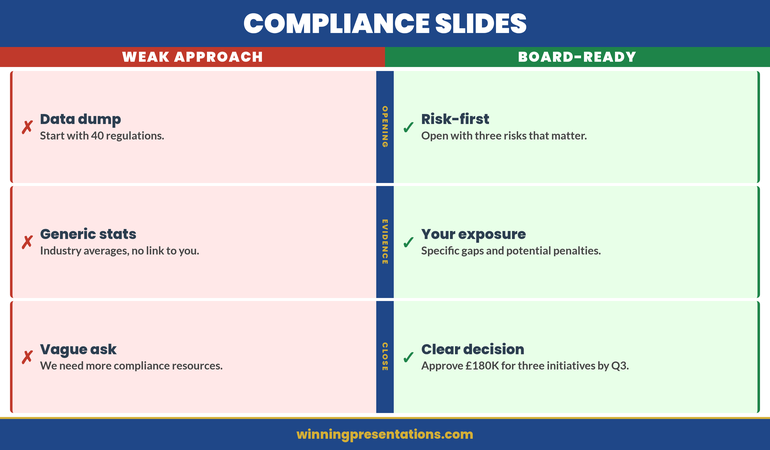

Compliance Slides split comparison infographic contrasting weak approaches (data dump, generic stats, vague ask) against board-ready approaches (risk-first opening, specific exposure data, clear decision request)

Building a Presentation Rhythm Across the Year

Most organisations give compliance updates to their boards quarterly or semi-annually. Use this rhythm strategically. Your Q1 update might focus on the regulatory landscape shift and annual compliance calendar. Q2 might dive into audit findings and remediation tracking. Q3 could focus on policy refresh and control enhancements. Q4 might be about compliance readiness for the next regulatory year and resource planning.

This prevents every update from feeling like a fire-hose of information. It also allows you to build narrative momentum. Boards remember a series of connected updates far better than a series of isolated reports. Your compliance presentation doesn’t stand alone; it’s part of your year-long conversation with the board about managing risk and protecting value.

Structure your compliance presentation like a strategic narrative, not a checklist. The Executive Slide System gives you frameworks for turning governance obligations into board-ready stories.

Is This Right For You?

This approach is for compliance officers, risk leaders, audit heads, and finance executives who need to communicate governance obligations to boards, steering committees, and regulatory oversight bodies. You’re looking to move beyond “here’s what the regulator said” towards “here’s what we’re managing and why it matters.” You want your board to understand not just that you’re compliant, but that you’re in control.

You’ll get the most from this if you’re working in a regulated industry (financial services, insurance, healthcare, utilities, major technology platforms), you’re responsible for enterprise risk or compliance reporting, and you want to tighten your boardroom communication around these high-stakes updates.

Turn Compliance Updates Into Board Confidence

The Executive Slide System gives you everything you need for high-confidence governance presentations:

  • Frameworks for structuring risk narrative, control posture, and forward-looking recommendations
  • Slide templates for compliance heat maps, audit dashboards, and regulatory tracking
  • AI prompt cards for rapid iteration and refinement of your messaging
  • Psychology-backed guidance on how boards process risk information and make decisions
  • Real examples of compliance presentations that persuade rather than pacify

Join compliance leaders and risk officers who’ve transformed their board communication

Get the Executive Slide System → £39

Frequently Asked Questions

How long should a compliance presentation to a board take?

Aim for 20–30 minutes of core content, leaving 10–15 minutes for questions. Some boards will want more time; some will want less. The time should be proportional to the complexity of the compliance landscape and the materiality of recent findings. A board facing a new regulatory regime might give you 45 minutes. A routine quarterly update might be 15 minutes. Clarify expectations with your Board Chair or Audit Committee Chair before you begin building your deck.

What’s the best way to handle a board question you can’t answer in the moment?

Be direct. “That’s a great question. I don’t have the data to hand, but I’ll get you clarity by end of week.” Then actually do it. This builds credibility far more than trying to bluff your way through. Boards respect humility and follow-through more than the appearance of total omniscience. If it’s a question that might come up again, use it as a cue to improve your data and measurement going forward.

How do I talk about compliance costs without sounding defensive?

Frame compliance investment as risk management, not cost. “We’ve budgeted £300k for control enhancements this year. This addresses three high-priority regulatory obligations and reduces our settlement risk by an estimated 75 per cent. It also brings us in line with peer practices in the market.” You’re answering: What are we getting? Why does it matter? How does it compare? This is how boards think about investment decisions.

Join The Winning Edge

Weekly intelligence on presentation structure, boardroom psychology, and executive communication. Delivered to your inbox.

Subscribe Now

Get the Executive Presentation Checklist free—a step-by-step framework for structuring any board presentation.

Related: Learn how to structure difficult announcements to your board in our guide to redundancy announcement presentations.

Your board needs clarity, confidence, and momentum. The Executive Slide System → £39 gives you the frameworks and templates to deliver exactly that in your next compliance update.

Mary Beth Hazeldine is Owner & Managing Director of Winning Presentations. She advises thousands of executives across financial services, healthcare, technology, and government on how to structure presentations that persuade boards and stakeholders in high-stakes funding rounds and approvals. With 24 years of corporate banking experience at JPMorgan Chase, PwC, Royal Bank of Scotland, and Commerzbank, she knows what boards actually listen to—and why.

25 Mar 2026
Professional at a desk surrounded by multiple drafts and revision notes, showing the exhaustion of over-preparation

Presentation Perfectionism: Why Over-Preparing Makes Your Anxiety Worse

Presentation perfectionism is the anxiety trap that looks like diligence. You rehearse more, edit more slides, prepare for more questions — and the anxiety gets worse, not better. That’s not a willpower failure. It’s a neurological pattern: over-preparation signals threat to your nervous system, which increases vigilance, which drives more preparation. This article explains why the cycle works, what keeps it locked in place, and the clinical framework that breaks it.

Quick Navigation

The Story: Margot’s 11-Hour Preparation for a 10-Minute Update

Margot was a senior product manager at a SaaS company. Competent, respected, consistently rated in the top 10% of her peer group. She also spent 11 hours preparing for a 10-minute sprint review update. Every sprint. Without fail.

Her preparation ritual had layers: three complete rewrites of her talking points, a full rehearsal in front of a mirror, a practice run on video that she’d watch back and critique, a second rehearsal incorporating the self-critique, then a final review of every slide at midnight. By the time she walked into the meeting, she was exhausted, over-caffeinated, and vibrating with the specific kind of anxiety that comes from having rehearsed so much that every word feels like it’s balanced on a knife edge.

The irony: her colleagues who spent 20 minutes preparing gave roughly equivalent updates. Some were better. Some were worse. None of them seemed to carry the weight of the presentation like it was a performance review of their entire professional worth.

When Margot finally spoke to a clinical psychologist about it, the feedback stunned her: “Your preparation isn’t reducing your anxiety. It’s causing it. Every rehearsal is a message to your nervous system that something dangerous is coming. You’re training yourself to be afraid.”

Trapped in the over-preparation cycle?

Explore Conquer Speaking Fear → clinical techniques for breaking the perfectionism-anxiety pattern.

Why More Preparation Makes Anxiety Worse (The Neuroscience)

The logic seems unassailable: if I prepare more, I’ll be more confident, and if I’m more confident, I’ll be less anxious. But that’s not how anxiety works. Anxiety doesn’t respond to evidence of competence. It responds to perceived threat — and excessive preparation is a threat signal.

When you spend 11 hours preparing for a 10-minute presentation, your amygdala — the brain’s threat-detection system — draws a reasonable conclusion: *This must be genuinely dangerous. Otherwise, why would we be spending this much energy on it?* The preparation becomes evidence of danger, not evidence of readiness.

This creates a feedback loop that cognitive behavioural therapists call a “safety behaviour.” Safety behaviours are actions you take to prevent the feared outcome (embarrassment, failure, judgment) that actually maintain the anxiety long-term. Over-preparation is one of the most common safety behaviours in professionals with presentation anxiety — and one of the hardest to recognise, because it looks like professional diligence.

The distinction matters: adequate preparation builds genuine confidence. Over-preparation — the kind where you rewrite talking points three times, rehearse on video, and still don’t feel ready — feeds the anxiety it’s trying to solve.

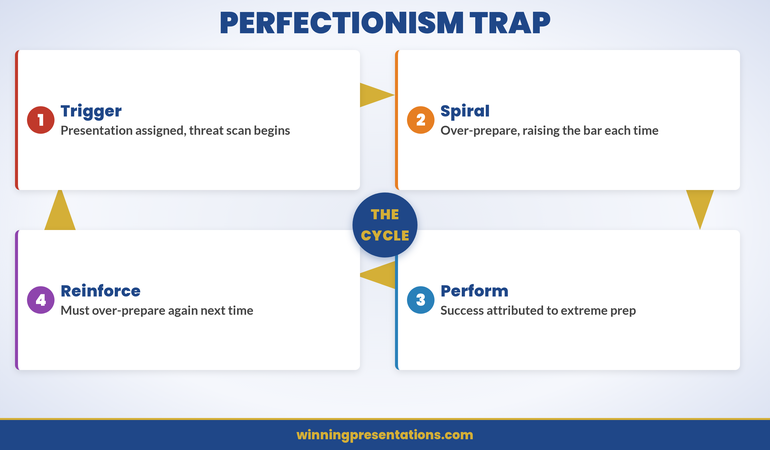
The perfectionism-anxiety cycle showing how over-preparation increases threat signals

The Perfectionism-Anxiety Cycle: How It Locks in Place

Presentation perfectionism follows a four-stage cycle. Understanding each stage is the first step toward breaking it.

Stage 1: The Trigger. You’re assigned a presentation. Immediately, your brain runs a threat assessment: Who’s in the audience? What if I forget my point? What if they ask something I can’t answer? What if they think I’m not competent? The threat assessment feels like strategic thinking, but it’s anxiety wearing a professional mask.

Stage 2: The Preparation Spiral. To manage the anxiety from Stage 1, you prepare. Then you prepare more. Then you rewrite. Then you rehearse. Each round of preparation temporarily reduces the anxiety — but the relief is short-lived, because each round also raises the standard you’re holding yourself to. “Good enough” keeps moving further away.

Stage 3: The Performance. You deliver the presentation. It goes fine — perhaps even well. But you don’t register the success, because the perfectionist filter is scanning for flaws: the sentence you phrased differently than rehearsed, the question you answered slightly awkwardly, the moment you lost your place for half a second. The experience confirms the anxiety: “It only went well because I prepared that much.”

Stage 4: The Reinforcement. Because you attribute the success to the extreme preparation (not to your actual competence), the next presentation triggers the same cycle. The anxiety isn’t learning from the positive outcome — it’s being reinforced by it. “It worked because I over-prepared. So I must over-prepare again.” The cycle locks.

Understanding why your voice changes when you’re nervous is part of the same pattern — physical symptoms that feel like evidence of danger, reinforcing the preparation spiral.

Break the Perfectionism Cycle Before Your Next Presentation

The over-preparation trap isn’t solved by more willpower — it’s addressed through clinical techniques that help your nervous system respond differently to presentation situations. Structured methods for dismantling the perfectionism-anxiety loop.

  • ✓ Nervous system regulation techniques for pre-presentation anxiety
  • ✓ Reframing methods to interrupt the perfectionism pattern
  • ✓ Practical protocols for calibrating preparation without over-preparing
  • ✓ Approaches grounded in clinical hypnotherapy and NLP

Explore Conquer Speaking Fear →

Designed for breaking the over-preparation cycle

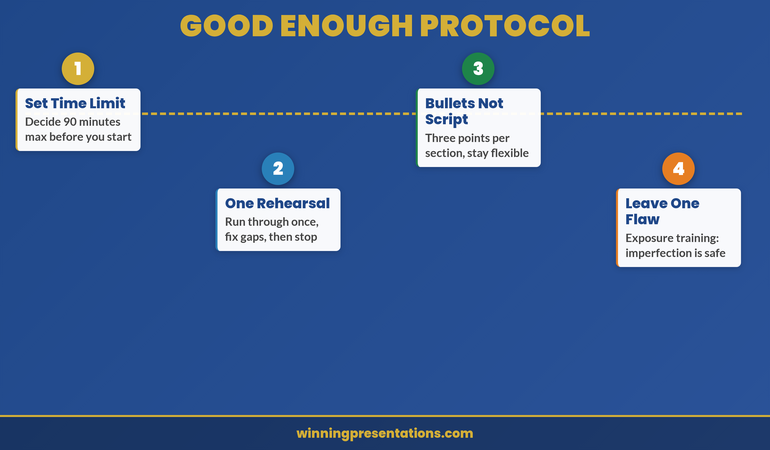
Breaking the Pattern: The “Good Enough” Protocol

Breaking presentation perfectionism doesn’t mean reducing your standards. It means recognising that excessive preparation has diminishing returns — and that beyond a certain point, additional preparation actively harms your performance.

Set a preparation time limit before you start. Decide in advance: “I will spend 90 minutes preparing for this presentation.” When the time is up, stop. Not “stop when it feels ready” — stop at the time limit. The anxiety will tell you it’s not enough. That’s the anxiety talking, not an objective assessment of your readiness.

Rehearse once, not five times. One full run-through is useful. It identifies genuine gaps — a slide that doesn’t flow, a transition that’s unclear. The second rehearsal adds marginal value. The third adds anxiety. By the fourth, you’re not rehearsing the presentation — you’re rehearsing the fear of getting it wrong.

Write three bullet points, not a script. Scripts create a brittleness that perfectionism feeds on. If you’ve memorised every word, any deviation feels like failure. Three bullet points per section give you structure with flexibility. You’ll say it differently each time — and that’s fine. “Different” is not the same as “wrong.”

Leave one slide deliberately imperfect. This sounds counterintuitive, but it’s a clinical technique called “exposure with response prevention.” Leave a minor imperfection in place — a chart that could be slightly better formatted, a bullet point that could be tighter. Present with it there. Notice that the world doesn’t end. This trains your nervous system that imperfection is survivable.

The Rehearsal Limit: How Much Preparation Actually Helps

Research on performance preparation — across music, sport, and professional communication — consistently shows a preparation curve with diminishing returns. The first hour of preparation for a presentation delivers the most value. Each subsequent hour delivers progressively less.

For a typical 15-minute business presentation, the evidence-based preparation window looks like this:

30 minutes: Content structure. Decide your three key points. Build the slide skeleton. Identify the one thing your audience must remember.

30 minutes: Slide refinement. Polish the visuals. Check data accuracy. Ensure the flow makes sense.

30 minutes: One rehearsal. Run through the full presentation once. Note any stumbles or unclear transitions. Fix them.

Total: 90 minutes. For a routine business update, that’s sufficient preparation for a competent professional. If the stakes are genuinely higher — a board presentation, a client pitch, a career-defining moment — add another 60 minutes for a second rehearsal and deeper anticipation of questions. But beyond 2.5 hours of total preparation for a single presentation, you’re almost certainly in perfectionism territory.

The body scan technique is a useful complement to preparation — it gives your nervous system a reset signal that counteracts the escalation from over-rehearsal.

Preparation time vs anxiety level showing diminishing returns curve

The Self-Compassion Shift That Changes Everything

Perfectionism in presentations is, at its core, a relationship with failure. Specifically, it’s the belief that failure in a presentation is catastrophic — that a stumble, a forgotten point, or a less-than-brilliant answer will permanently damage your professional reputation.

That belief is almost never true. Think about the last presentation you watched that had a minor stumble. Do you remember it? Do you think less of the presenter? Almost certainly not. But perfectionism convinces you that your audience has a different standard for you than you have for everyone else.

The shift: instead of asking “Was that perfect?”, ask “Was that useful?” A presentation that communicates its key message, answers the audience’s core question, and moves a decision forward is useful — even if the delivery wasn’t flawless. Utility is the right success metric for professional presentations. Perfection is the wrong one.

The practice: after your next presentation, write down three things that worked. Not three things that went wrong — three things that worked. Perfectionism trains you to scan for failure. Self-compassion trains you to register competence. Both are habits. One of them is useful.

Building genuine executive presence in presentations starts with this internal shift — presence comes from accepting imperfection, not from eliminating it.

Is This Right For You?

✓ You consistently spend more time preparing presentations than your peers and still feel anxious

✓ You rehearse multiple times and each rehearsal makes you more critical, not more confident

✓ You want clinical techniques to break the cycle, not generic “just relax” advice

✗ Your anxiety is related to genuine lack of subject knowledge — preparation is the right solution there

✗ You rarely feel anxious about presentations — this is specifically for the over-preparation pattern

Frequently Asked Questions

How do I know if I’m over-preparing or just being thorough?

The test is simple: does additional preparation make you feel more confident or more anxious? If your third rehearsal increases your confidence and reduces your stress, that’s productive preparation. If your third rehearsal makes you more critical of your performance and more worried about what could go wrong, you’ve crossed from preparation into perfectionism. Another signal: if you routinely spend more than three times as long preparing as the presentation itself takes to deliver, the preparation has likely become a safety behaviour.

Will reducing preparation make my presentations worse?

Almost certainly not. The performance difference between 90 minutes of focused preparation and 5 hours of anxious over-preparation is negligible — and often negative. Over-rehearsed presentations tend to sound rigid, scripted, and disconnected from the audience. Presentations delivered from clear structure with natural delivery tend to be more engaging and more persuasive. The goal isn’t less effort — it’s right-sized effort.

Is presentation perfectionism the same as impostor syndrome?

They’re related but distinct. Impostor syndrome is the belief that you’re not qualified for the role you’re in. Presentation perfectionism is the belief that your presentations must be flawless to maintain your credibility. You can have perfectionism without impostor syndrome (believing you’re competent but that your presentations must be perfect) and impostor syndrome without perfectionism (believing you’re not qualified but not necessarily over-preparing). When both are present, they reinforce each other — the impostor fear drives the perfectionism, and the perfectionism confirms the fear.

The Winning Edge — Weekly Presentation Intelligence

Frameworks, slide strategies, and executive communication insights delivered every week. Trusted by professionals who present to boards, clients, and senior leadership.

Subscribe to The Winning Edge

If your board presentations are adding to the pressure, the risk appetite presentation framework shows how eight slides can replace forty — reducing both the preparation burden and the anxiety that comes with it.

The perfectionism cycle breaks when you stop treating presentations as performance tests and start treating them as conversations with structure. The clinical techniques to make that shift exist — and the next presentation you prepare in 90 minutes instead of 11 hours will demonstrate the pattern change.

About the Author

Mary Beth Hazeldine is Owner & Managing Director of Winning Presentations. With 24 years of corporate banking experience at JPMorgan Chase, PwC, Royal Bank of Scotland, and Commerzbank, she advises executives across financial services, healthcare, technology, and government on structuring presentations for high-stakes funding rounds and approvals.

Book a discovery call | View services

25 Mar 2026
Board meeting room with a clean risk appetite dashboard on the presentation screen showing traffic light indicators

The Risk Appetite Presentation Boards Actually Want (Not What You Think)

A risk appetite presentation should take eight slides and fifteen minutes. Most take forty slides and ninety minutes — because they confuse explaining risk with enabling a decision. Boards don’t want a lecture on risk frameworks. They want to know: what are we willing to accept, what are we refusing, and what changes? This article gives you the slide structure that turns abstract risk language into the concrete decisions boards actually need to make.

Quick Navigation

The Story: Ngozi’s Risk Presentation That Ended a Two-Year Stalemate

Ngozi was the Chief Risk Officer at a mid-sized insurance group. For two consecutive years, her board had failed to formally approve a risk appetite statement. Not because they disagreed with it — because the presentations were so dense that the board ran out of time before reaching the approval agenda item. Each year, the risk appetite discussion consumed 90 minutes, generated 40 questions about methodology, and got deferred to the next quarter.

The third year, Ngozi took a different approach. She scrapped the 38-slide deck. She built eight slides. The first slide showed a single table: five risk categories, each with a one-sentence appetite statement and a traffic-light indicator showing current position against that appetite. No methodology. No framework diagrams. No definitions of “inherent” versus “residual” risk.

The board chair looked at slide one and said: “So we’re outside appetite on cyber. What are we doing about it?” Within 20 minutes, the board had approved the risk appetite statement, asked three focused questions about the two categories flagged amber, and moved to the next agenda item. Ngozi’s chair told her afterwards: “That was the first time I’ve actually understood what you were asking us to decide.”

Two years of failure. One structural change. Same content, different architecture.

Presenting risk appetite to the board?

Explore the Executive Slide System → board-level governance templates for risk presentations.

What Boards Actually Decide in a Risk Appetite Discussion

A risk appetite presentation has one job: get the board to formally approve the organisation’s risk boundaries. Everything else — methodology, framework diagrams, heat maps, historical trend analysis — is supporting material that belongs in the board pack appendix, not on your slides.

The board is deciding three things:

Where are our boundaries? For each material risk category, what level of exposure are we willing to accept? This needs to be expressed in language the board can act on — not “moderate” or “low-medium” but “We will not accept operational losses exceeding £2M in any single quarter” or “We will maintain a minimum solvency ratio of 150%.”

Are we currently within those boundaries? For each category, show the current position against the stated appetite. Green, amber, red — or whatever visual system the board is familiar with. This is the decision trigger: green categories need no discussion, amber categories need monitoring plans, red categories need immediate action.

What’s changed since last time? Boards think in terms of direction, not position. Has our cyber risk exposure increased? Has our credit risk appetite been tested? What’s different about the external environment that might require adjusting our stated appetite? This is where you earn the board’s trust — by showing you’re scanning the horizon, not just reporting the present.

That’s it. Three decisions. Your slides should make those decisions as easy as possible. Everything else is noise that eats into the board’s limited time.

Dashboard showing board risk appetite decision framework with traffic light indicators

The Three Mistakes That Derail Risk Appetite Presentations

Most risk appetite presentations fail the board — not because the analysis is wrong, but because the presentation is built for risk professionals, not for directors who govern risk.

Mistake 1: Leading with the framework. Slides about your risk taxonomy, your three-lines-of-defence model, your risk culture maturity assessment — these belong in the appendix. The board appointed a CRO to manage the framework. They don’t need to see the plumbing. They need the dashboard: where do we stand, and what do we need to decide?

Mistake 2: Using risk language the board hasn’t defined. “Our operational risk appetite is moderate.” What does “moderate” mean in pound terms? In incident terms? In regulatory terms? If the board can’t translate your risk language into business consequences, they can’t make decisions. Every appetite statement must be anchored to a metric the board already understands — revenue impact, capital requirement, regulatory threshold, or customer impact.

Mistake 3: Presenting risk in isolation from strategy. Risk appetite only makes sense in the context of what the organisation is trying to achieve. If you’re expanding into a new market, your appetite for market risk may need to increase. If you’re cutting costs, your appetite for operational risk may need tighter boundaries. Presenting risk without referencing the strategic context forces the board to make that connection themselves — and they may connect it differently than you intended.

If you’ve ever struggled with a first board presentation as a new director, you’ll recognise the same challenge: boards want decisions, not education.

Board-Ready Slide Templates for Risk Governance

The eight-slide risk appetite framework needs visual templates that signal board-level professionalism. Pre-built layouts for governance presentations provide the structure so you can focus on the risk content that drives decisions.

  • ✓ Executive slide templates for board and governance presentations
  • ✓ Messaging frameworks for board-ready risk summaries
  • ✓ Dashboard and decision-framework slide layouts
  • ✓ Structure guides for high-stakes governance meetings

Explore the Executive Slide System →

Designed for board governance presentations

The Eight-Slide Risk Appetite Framework

This framework is designed for a 15–20 minute board slot. Eight slides, each with a specific job. No filler, no methodology, no framework diagrams.

Slide 1: The Risk Appetite Summary Table. This is the slide that does most of the work. A single table: risk categories down the left, appetite statement for each, current position (RAG status), and direction arrow (improving/stable/deteriorating). The board should be able to read this slide and understand the entire picture in 60 seconds. Everything that follows is elaboration on what they see here.

Slide 2: Strategic Context. One slide linking the risk appetite to the current strategic priorities. “We’re expanding into the Nordic market (Board-approved Q4). This increases our exposure to FX and market risk. Our appetite for these categories has been adjusted upward to accommodate this growth.” Two to three bullet points. No more.

Slide 3: What’s Changed. A comparison slide: last year’s appetite versus this year’s proposed changes. Highlight only the categories where the appetite statement has changed. If nothing has changed, this slide says “No changes proposed” — and you move on. Don’t fill time with categories that are stable.

Slides 4–6: Deep Dives (Amber and Red Only). One slide per risk category that is flagged amber or red. Each slide: what the appetite statement says, where we currently stand, why we’re outside appetite (or approaching it), and what management is doing about it. If everything is green, skip these slides entirely.

Slide 7: Key Metrics and Thresholds. The quantitative backing for the appetite statements. This is where your numbers live — solvency ratios, loss thresholds, capital buffers. Present them as a reference table, not as a narrative. The board may glance at this or they may not. It’s there for rigour, not for presentation.

Slide 8: The Ask. “The board is asked to approve the risk appetite statement as presented, including [number] amendments to the following categories: [list]. The next formal review is scheduled for [date].” One slide. One decision. Clear ask.

The Executive Slide System includes board-level governance templates that give this eight-slide framework the visual authority a risk appetite presentation requires.

Language That Makes Risk Concrete for Board Directors

Risk professionals and board directors speak different languages. Your job in a risk appetite presentation is to translate — not to educate the board in risk terminology, but to express risk concepts in the language directors already use: money, customers, regulatory consequences, and strategic outcomes.

Replace “moderate appetite” with a boundary. “We have a moderate appetite for operational risk” means nothing actionable. “We will not accept operational losses exceeding £2M in any single quarter without board notification” is a boundary the board can approve, monitor, and enforce.

Replace “inherent risk” with “before controls.” Many board members understand the concept but stumble on the jargon. “The inherent risk is high but the residual risk is medium” becomes “Before our controls, this risk is significant. After our controls, it’s within appetite.” Same meaning, clearer language.

Replace “risk culture” with behaviour. Instead of “We’re embedding a stronger risk culture,” say “We’ve trained 240 managers on the new escalation thresholds, and escalation volume has increased 35% this quarter — which tells us people are actually using the system.” Behaviour is measurable. Culture is abstract.

This same principle — translating professional expertise into decision-ready language — applies to any board presentation. The approach to capital expenditure presentations that win CFO approval follows the identical pattern: speak in outcomes, not methodology.

Risk language translation guide showing jargon vs board-ready phrasing

Getting the Risk Appetite Statement Approved in One Meeting

Board approval of risk appetite statements is a procedural necessity with real consequences. Getting it right in one meeting — rather than deferring across quarters — comes down to preparation outside the boardroom, not performance inside it.

Pre-brief the board chair. The chair controls the agenda and the time allocation. If they understand your deck before the meeting, they’ll manage the discussion efficiently. Walk them through the summary table and the amber/red categories in a 10-minute pre-brief call. Their questions become your edit list.

Circulate a one-page summary with the board pack. Not the full deck — a single page that mirrors Slide 1 (the summary table). Directors who arrive having read it will spend less time orienting and more time deciding. This is the same pre-read strategy that works for any executive deck when the stakes are high.

Anticipate the three questions every board asks. “What’s our biggest single exposure right now?” “What happens if [current event] gets worse?” “Are we confident in our controls for [red/amber category]?” Prepare crisp, one-sentence answers. If you need supporting data, have it in the appendix — not on a slide.

End with a clear resolution. “The board is asked to resolve that the risk appetite statement for FY2026/27 is approved as presented.” Give the company secretary the exact wording before the meeting. Administrative clarity accelerates governance decisions.

Is This Right For You?

✓ You’re presenting a risk appetite statement to a board within the next quarter

✓ Your previous risk presentations have overrun their time slot or been deferred

✓ You want a structured slide framework that respects board time and drives approval

✗ You need a detailed risk register or risk assessment framework — this is a board presentation framework, not a risk methodology

✗ Your board has a prescribed template they require — check with the company secretary first

Frequently Asked Questions

How detailed should the risk appetite statement be?

Each category should have a one-sentence qualitative statement and a one-line quantitative threshold. “We accept moderate credit risk within a portfolio concentration limit of 15% per counterparty.” The qualitative statement gives the board intent; the quantitative threshold gives management a boundary to operate within. Anything more granular belongs in the risk management framework, not the board presentation.

Should I present every risk category or just the material ones?

Present the summary table with all categories (Slide 1), but only deep-dive the categories that are amber or red. Green categories don’t need board airtime. The summary table shows completeness; the deep-dive slides show focus. If the board wants detail on a green category, they’ll ask — and you can pull it from the appendix. Don’t pre-emptively spend time on categories that are within appetite.

How often should the risk appetite be formally reviewed by the board?

Annually as a minimum, with interim updates triggered by material events (acquisitions, regulatory changes, significant market shifts, or any category breaching from green to red). Most governance codes recommend annual formal approval with quarterly monitoring. Your final slide should include the next review date — this gives the board confidence that risk oversight is structured, not reactive.

The Winning Edge — Weekly Presentation Intelligence

Frameworks, slide strategies, and executive communication insights delivered every week. Trusted by professionals who present to boards, clients, and senior leadership.

Subscribe to The Winning Edge

Free resource: Download the Executive Presentation Checklist — a quick-reference guide for structuring any high-stakes executive deck.

If presentation anxiety is adding pressure to your board preparation, the perfectionism trap in presentation preparation may be making it worse — and there’s a structural fix for that too.

Your next risk appetite review doesn’t need 40 slides and 90 minutes. Use the eight-slide framework above to build a presentation that respects board time and translates risk language into the concrete decisions governance requires.

About the Author

Mary Beth Hazeldine is Owner & Managing Director of Winning Presentations. With 24 years of corporate banking experience at JPMorgan Chase, PwC, Royal Bank of Scotland, and Commerzbank, she advises executives across financial services, healthcare, technology, and government on structuring presentations for high-stakes funding rounds and approvals.

Book a discovery call | View services

25 Mar 2026
Professional preparing a career proposal presentation with a five-slide framework visible on screen in a modern office

The Lateral Move Presentation: How to Pitch a Career Shift to Leadership

A lateral move presentation is the career conversation most professionals get wrong — because they pitch it as a personal desire instead of a business case. The executives approving your transfer aren’t evaluating your ambition. They’re evaluating the cost of losing you from one team and the value of gaining you in another. This article gives you the slide framework that reframes a sideways career move as a strategic decision leadership wants to say yes to.

Quick Navigation

The Story: Linnea’s Move From Compliance to Product Strategy

Linnea had spent seven years in regulatory compliance at a fintech company. She was good at it — good enough that her manager kept expanding her remit. But for two years, she’d been drawn to product strategy. She understood regulatory constraints better than anyone on the product team, and she kept spotting opportunities they missed because they didn’t understand the compliance landscape.

Her first attempt at a lateral move was a conversation with her VP: “I’d like to explore moving to the product team.” The VP nodded, said he’d think about it, and nothing happened for four months. When Linnea followed up, she learned the VP had mentioned it to the CPO, who’d said: “We can’t afford to lose someone from compliance right now.”

That response told Linnea everything. The VP hadn’t pitched a business case. He’d conveyed a personal request. The CPO heard “Linnea wants to leave” and instinctively protected the existing team structure.

Linnea changed approach. She built a five-slide deck that reframed the entire conversation. Not “I want to move” but “Here’s how my compliance expertise in the product team eliminates the regulatory review bottleneck that’s delayed three launches this year.” She presented it to the CPO directly. The move was approved within two weeks — not as a favour, but as a strategic decision that made the CPO look smart for reorganising the talent she already had.

Building a lateral move proposal?

Explore the Executive Slide System → business case templates designed for internal career conversations.

Why Most Internal Transfer Pitches Fail

Most lateral move presentations fail because they’re framed as personal career aspirations. That framing creates three problems simultaneously:

Your current manager hears a retention risk. The moment you signal “I want to move,” your manager’s first thought isn’t your development — it’s the hole you’ll leave. If they’re a good manager, they’ll support you. If they’re a typical manager, they’ll slow-play the request or raise concerns about timing.

The receiving team sees a favour, not a gain. When a transfer comes across as “This person wants to join your team,” the receiving manager evaluates you as someone who needs something. When it comes across as “This person’s regulatory expertise eliminates a bottleneck that’s cost you three quarters of delayed launches,” the same manager evaluates you as an asset they’d be foolish to refuse.

Senior leadership sees disruption, not strategy. Internal moves always create short-term disruption. Unless you provide a clear business rationale and a credible transition plan, leadership will default to the status quo. Inertia wins when the only argument for change is personal preference.

The common mistake: presenting the lateral move as a conversation about your career, when it needs to be a conversation about the company’s talent allocation.

Framework showing how to reframe a lateral move as a business case

Building the Business Case: From Personal Desire to Strategic Reallocation

A successful lateral move presentation answers three questions from leadership’s perspective — not yours:

What problem does this solve for the receiving team? Identify a specific, measurable gap. Not “I could add value” but “The product team has missed three regulatory review deadlines in the past 12 months because they lack in-house compliance expertise. My move eliminates that bottleneck.”

What’s the cost of not making this move? Quantify it. Revenue delayed. Projects stalled. External consultants hired to fill the gap you could fill. The more specific you are about what the organisation is currently losing, the more obvious the decision becomes.

What’s the transition plan for the team you’re leaving? This is the objection killer. Most transfer requests stall because leadership worries about the gap you’ll create. If you present a credible 90-day transition plan — including who picks up your responsibilities, what documentation you’ll create, and how you’ll support the handover — you remove the primary blocker before it’s raised.

The approach is similar to how you’d build a skip-level presentation — you’re speaking to someone who cares about organisational outcomes, not individual preferences.

Slide Templates for Career-Defining Conversations

A lateral move pitch needs the right visual structure to land as a business case, not a personal request. Pre-built slide layouts provide the framework so you can focus on the argument that addresses leadership’s concerns.

  • ✓ Executive proposal templates for internal career conversations
  • ✓ Messaging frameworks for business case development
  • ✓ Slide layouts designed for senior leadership audiences
  • ✓ Framework guides for internal transfer proposals

Explore the Executive Slide System →

Designed for business case development

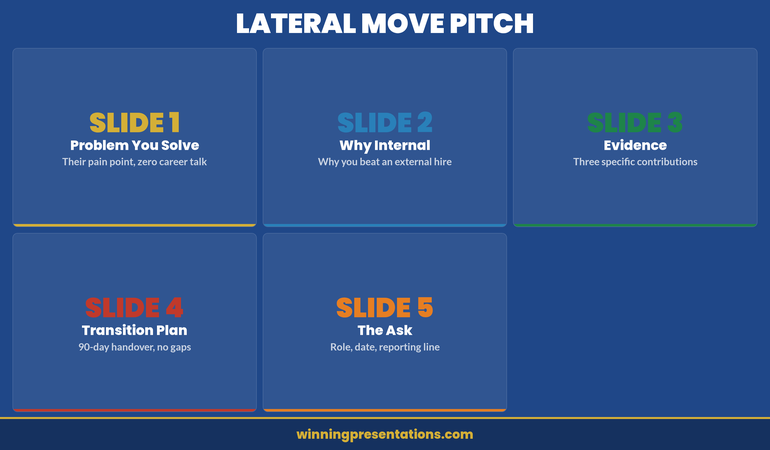
The Five-Slide Framework for a Lateral Move Presentation

This framework is designed for a 15-minute conversation with the decision-maker — typically the head of the receiving team or a shared senior leader. Keep it tight. Five slides. No filler.

Slide 1: The Problem I Can Solve. Open with the receiving team’s specific challenge. Not your desire to move — their pain point. “The product team has spent £85,000 on external regulatory consultants this financial year. Three product launches were delayed by an average of six weeks due to compliance review bottlenecks.” One slide, two to three data points, zero mention of your career.

Slide 2: Why This Requires an Internal Solution. External hires and consultants are the default alternative. Explain why an internal transfer is superior: institutional knowledge, existing relationships, lower ramp-up time, cultural fit. “An external hire takes 6–9 months to understand our regulatory landscape. I already have seven years of context and relationships with every compliance stakeholder.”

Slide 3: What I Bring (Evidence, Not Claims). Three specific examples of work you’ve already done that demonstrates your capability in the new role. Not hypothetical value — actual contributions. “I identified the API data retention issue in Q2 that would have blocked the enterprise launch. I drafted the simplified compliance checklist that the product team now uses for every sprint review. I built the regulatory impact assessment template that cut review time from three weeks to five days.”

Slide 4: The Transition Plan. This is where most lateral move presentations either excel or collapse. Show a 90-day plan that addresses: who takes over your current responsibilities, what documentation and training you’ll complete before moving, how you’ll remain available for compliance questions during the transition, and what the handover timeline looks like week by week.

Slide 5: The Ask. Be specific. “I’m proposing a move to the product strategy team, reporting to [name], effective [date], with a 90-day transition period starting [date]. I’ve briefed [current manager] on the transition plan.” The specificity signals that you’ve thought this through — you’re not floating an idea, you’re presenting a decision-ready proposal.

The Executive Slide System includes proposal templates that give this five-slide structure the right visual weight for a senior leadership audience.

The Transition Plan That Removes the Objection

The single biggest reason lateral moves get blocked isn’t that leadership thinks you’re wrong for the new role. It’s that they can’t see how to fill the hole you’d leave. Your transition plan is the objection-removal device.

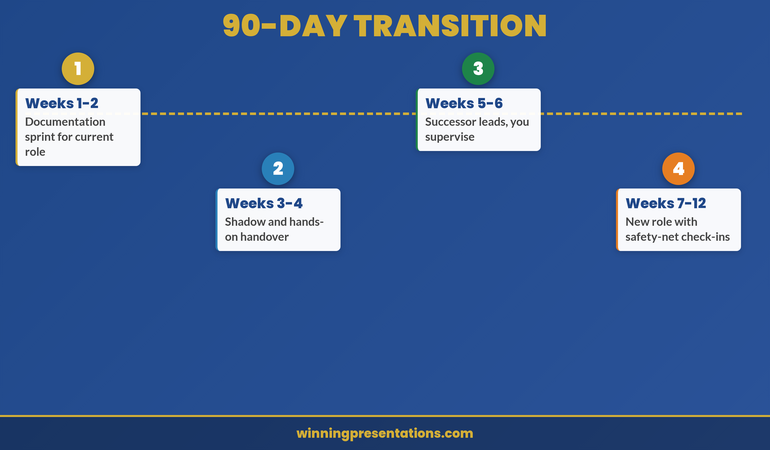
Weeks 1–2: Documentation Sprint. Write the operational playbooks for your current role. Not theoretical manuals — practical guides that answer “What does Monday look like? What happens when X occurs? Who do you call when Y breaks?” These documents should enable someone to cover 80% of your responsibilities within a week of receiving them.

Weeks 3–6: Shadowing and Handover. Identify the person (or people) who’ll absorb your responsibilities. Work alongside them. Let them handle the work while you supervise. This is the equivalent of a co-pilot taking the controls while the captain watches — you’re building their confidence and competence simultaneously.

Weeks 7–12: Clean Transition with a Safety Net. You’re now in the new role, but you remain available for questions from your former team. Set clear boundaries: “I’ll hold a 30-minute weekly check-in for the first month, and I’m available on Slack for urgent questions.” This isn’t about doing two jobs. It’s about demonstrating that you haven’t abandoned the team you’re leaving.

If you’ve ever built a compensation discussion presentation, you’ll recognise the same dynamic: the person you’re presenting to needs to feel that approving your request doesn’t create a bigger problem than the one it solves.

90-day transition roadmap for lateral move presentations

When and How to Have the Conversation

Timing a lateral move presentation is as important as the content. Get it wrong and even a perfect deck gets shelved.

Present after a visible win, not during a lull. If you’ve just delivered a successful project, your credibility is at its peak. That’s when leadership is most open to hearing proposals. Pitching during a quiet period signals restlessness. Pitching after a win signals ambition backed by evidence.

Talk to the receiving team leader first. Before presenting to anyone, have an informal conversation with the person who’d be your new manager. Not a formal pitch — a coffee conversation: “I’ve been thinking about how my compliance background could help with the regulatory review bottleneck. Would you be open to exploring that?” If they’re enthusiastic, you have an internal sponsor. If they’re lukewarm, you know to adjust your approach.

Brief your current manager before the formal pitch. Blindsiding your manager is the fastest way to turn a supporter into a blocker. Have the conversation early: “I’m considering proposing a move to the product team. I’ve built a transition plan and I wanted your input before I present it.” Most managers will be more supportive when they feel consulted rather than bypassed.

Understanding how to structure your arguments for leadership audiences applies whether you’re pitching a career move or building any executive presentation structure — the principles of clarity, evidence, and audience-first framing are the same.

Is This Right For You?

✓ You’re planning a lateral move within your organisation and want a structured approach

✓ You’ve tried the informal “I’d like to explore a move” conversation and it went nowhere

✓ You want slide templates that position your transfer as a business decision, not a favour

✗ You’re looking for interview preparation for external roles — this is specifically for internal moves

✗ Your organisation has a formal internal transfer process that doesn’t involve presentations

Frequently Asked Questions

Should I use a presentation for an internal transfer or just have a conversation?

Both — but the presentation changes the conversation from a casual request to a business proposal. A verbal conversation says “I’d like to move.” A five-slide deck says “Here’s my analysis, evidence, and transition plan.” The deck signals that you’ve done the work, which makes approval easier for the decision-maker. Even if you only share it on-screen during a 15-minute meeting, the structure forces clarity.

What if my manager blocks the move?

A strong transition plan is your best defence against a blocking manager. Most managers block transfers because they fear the operational gap, not because they want to limit your career. Address that fear directly: show exactly who covers what, when the handover completes, and how you’ll support the transition. If your manager still blocks you after seeing a credible plan, escalate to HR or a senior sponsor — most organisations have internal mobility policies that prevent indefinite blocking.

How do I present a lateral move without looking disloyal to my current team?

Frame it as talent optimisation, not escape. “I’ve built strong systems in my current role that can operate without me — and I’ve identified a gap in the product team where my regulatory expertise creates more value for the company.” This positions you as someone who’s thinking about organisational effectiveness, not someone who’s running from their current responsibilities. The transition plan reinforces this: it shows you care about what happens after you leave.

The Winning Edge — Weekly Presentation Intelligence

Frameworks, slide strategies, and executive communication insights delivered every week. Trusted by professionals who present to boards, clients, and senior leadership.

Subscribe to The Winning Edge

Free resource: Download the Executive Presentation Checklist — a quick-reference guide for structuring any high-stakes executive deck.

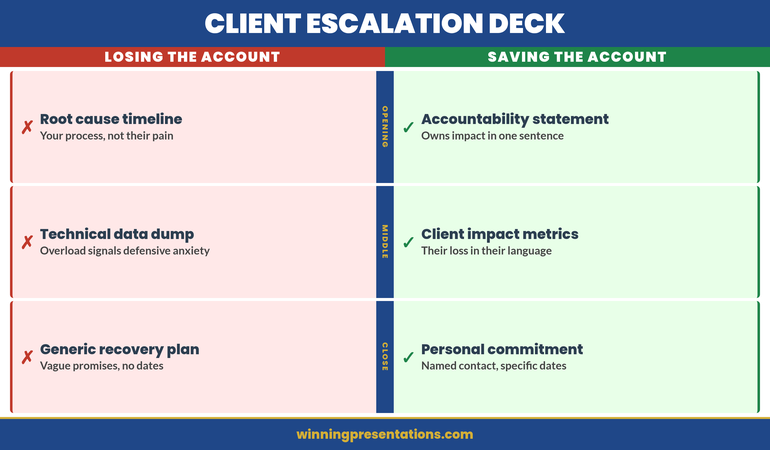
If you’re also facing a client escalation presentation, the same accountability-first framing applies — different audience, same commitment to clarity and directness.

Your lateral move deserves more than a casual conversation that gets forgotten. Build a five-slide deck using the framework above, and ensure the business case is clear enough that leadership sees it as a strategic decision, not a personal favour.

About the Author

Mary Beth Hazeldine is Owner & Managing Director of Winning Presentations. With 24 years of corporate banking experience at JPMorgan Chase, PwC, Royal Bank of Scotland, and Commerzbank, she advises executives across financial services, healthcare, technology, and government on structuring presentations for high-stakes funding rounds and approvals.

Book a discovery call | View services

24 Mar 2026
Three executives on stage during panel discussion with moderator and audience in professional conference setting

Panel Q&A: How to Handle Questions When You’re One of Several Presenters

Panel Q&A is a different animal. When you’re one of several presenters, the rules shift. You can’t control where questions go, you can’t always answer first, and you’re exposed to contradictions you didn’t create. Mishandle it, and you look unprepared or evasive—even if your individual answers were solid.

Jump to Section

The Deferred Answer That Cost Credibility

James was on a fintech panel about regulatory compliance. A moderator asked him directly about cross-border KYC requirements—his area. He glanced at the panellist next to him, hesitated, then said: “I think Marcus might have more recent data on that one.” He didn’t. Marcus gave a half-answer. The moderator asked James again. He deferred again. By the third redirect, the audience saw uncertainty where there had been none before. His credibility didn’t recover. The problem wasn’t his knowledge. It was that he’d abdicated authority over his own expertise to avoid appearing “that guy” who talked too much. Weeks later, the investment firm hosting the panel went with a competitor James had worked with before—because they doubted his confidence.

Panel Q&A isn’t about being polite. It’s about owning your remit without trampling on co-presenters’ authority.

Panel session coming up?

The Executive Q&A Handling System includes frameworks for handling questions in high-pressure shared-stage scenarios.

When Questions Come in Real Time on Stage

The Executive Q&A Handling System contains response architectures that work whether you’re the only voice in the room or one of five. Question prediction frameworks, structured answer templates, and recovery tactics for difficult terrain—all designed for high-pressure settings where you can’t script the answer.

  • ✓ Frameworks that work across solo and panel formats
  • ✓ Scripts for handling ambiguity and multi-presenter dynamics
  • ✓ Recovery tactics when co-presenters contradict you

Explore the System

Designed for board-level and investor relations scenarios

Why Panel Q&A Rules Are Different

In a solo presentation, Q&A is yours. You set the tone, manage the flow, and answer on your terms. You’re the authority. You control the narrative.

In a panel, none of that is true.

Someone else—the moderator—owns the room. Questions can be directed at you, at someone else, or at the group as a whole. You may not speak first. You may not speak at all if you don’t assert yourself. And if a co-panellist says something you disagree with, you have seconds to decide whether to correct them, validate them, or stay silent.

The stakes are higher because the dynamics are more visible. An audience watching a solo presenter evaluate one Q&A doesn’t see a lot. An audience watching three presenters respond to the same question sees everything: hesitation, contradiction, deference, authority. They’re watching you watch your co-panellists. They’re evaluating not just what you say, but when you say it and why.

This is why panel preparation differs from solo Q&A prep. You’re not just preparing answers. You’re preparing behaviour: when to hold back, when to step in, how to validate others without diminishing yourself, and how to signal alignment without sounding scripted.

When Questions Are Aimed at You (vs. The Group)

The moderator will sometimes pose a question directly to you by name. “Sarah, in your experience managing merger integration, how do you handle resistance from legacy systems teams?” That’s yours. Own it.

The moderator will also ask the group: “How should organisations approach this?” Now you have a choice.

If the question is direct and named: Answer it. Clearly. Don’t defer to a co-panellist unless you genuinely don’t have relevant experience. If you do, and you defer, you signal doubt. James’s problem wasn’t that he didn’t know—he had the answer. He chose not to own it.

If the question is open to the group: You can answer if you have something distinct to add. You can build on what someone else said. You can stay quiet if the previous answers were comprehensive. There’s no obligation to speak. But if you do speak, you’re competing for the moderator’s attention and the audience’s goodwill. Make it count.

If a question lands on someone else and they stumble: You can bridge in. “That’s a good point about X. I’d add that in my sector, we’ve seen…” This isn’t rescuing them. It’s contributing your angle. It makes you look collaborative and substantive.

If a question lands on someone else and they nail it: Silence is often your best move. If you repeat their answer with minor variations, you look like you’re following rather than leading. If you add something tangential, you sound argumentative. Sometimes, the best use of your airtime is waiting for a question only you can answer.

When to Defer, When to Answer, When to Pass

These three behaviours are not the same. Understanding the difference protects your credibility.

Defer: A co-panellist has more current expertise or direct experience. “That’s really Marcus’s territory—he runs the regulatory function. Marcus, your thoughts?” This is honest and collaborative. It works because you’re not dodging; you’re accurately mapping expertise.

Answer: The question touches your remit. You speak. You don’t wait to see if someone else will take it. If it’s your domain, own it. If you defer when you shouldn’t, you look uncertain.

Pass: You don’t have relevant insight or the question has been thoroughly answered. You stay silent. Silence isn’t weakness. Silence is confidence. The audience doesn’t expect every panellist to answer every question. They expect each panellist to have boundaries and know where they are.

The trap: people confuse “being polite” with deferring. James deferred about KYC requirements—his expertise—because he didn’t want to seem like he was dominating. What he actually signalled was: “I’m not sure enough to stand by this.” That’s worse than speaking too much.

Track your speaking balance before the panel. If you’ve spoken twice and there have been five questions, you’re not over-speaking. If you’ve spoken five times out of five, you’re competing with the moderator. Find the middle ground. But don’t shrink from your expertise to get there.

If you want structured frameworks for knowing exactly when to speak, defer, or stay silent during Q&A, the Executive Q&A Handling System includes decision trees for these exact scenarios.

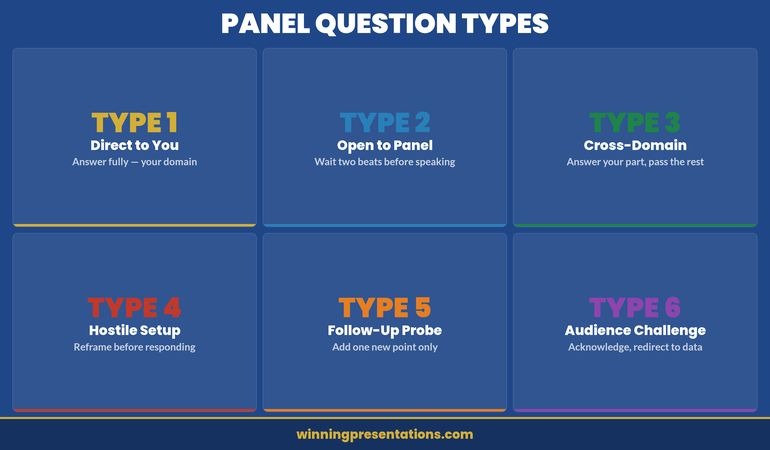
Six types of panel Q&A questions and how to handle each one

How to Avoid Contradicting Co-Presenters

A panellist says something you believe is incomplete, outdated, or wrong. You’re on stage. The moderator is looking at you for a response. The audience can sense tension. What do you do?

Validate first. Then add nuance. “Marcus makes a strong point about regulatory timelines. What I’d add, based on recent guidance, is that the approach can vary depending on whether you’re operating in EMEA or APAC. In APAC specifically…” You’re not contradicting. You’re expanding. You’re showing that his point is true in context—and that context matters.

Separate facts from interpretation. If a co-panellist states a fact you know is wrong, correct it gently: “I think the guidance actually changed in Q2 last year—it’s now X rather than Y.” If they’re sharing an opinion or experience that differs from yours, you don’t need to correct them. You can offer your perspective: “In our organisation, we’ve found the opposite to be true.” Two truths can coexist on stage. Two facts cannot.

Watch your tone. If you sound didactic or corrective, the audience hears arrogance. If you sound collaborative or curious, they hear intelligence. “Help me understand—when you say the timeline is always six months, have you seen exceptions when budget constraints shift the priority?” sounds like learning. “That’s not actually how it works” sounds like superiority.

Never make it personal. “Marcus doesn’t understand the post-Brexit landscape” is career-limiting. “The landscape has shifted significantly since the Trade and Cooperation Agreement” is professional and clear.

This is where the pre-panel conversation becomes essential. If you know beforehand that a co-panellist holds a view you disagree with, you can agree on language before you hit the stage. You can decide: do we present unified messaging, or do we surface this debate transparently? (Transparent debate, done well, is often more credible than forced unity.)

The Pre-Panel Alignment Conversation

Every panel should have a 30-minute alignment call before you present. Most don’t. That’s why panels often feel disjointed.

In that call, cover:

1. Likely questions. What will the moderator ask? What will the audience ask? Brainstorm the top seven. Agree on each person’s perspective so you’re not hearing it for the first time on stage.

2. Your domains. “I’ll own questions about implementation. You own strategy. You own the vendor landscape.” Make it explicit. This prevents the situation where two panellists try to answer the same question and sound repetitive or contradictory.

3. Known disagreements. If you know you’ll disagree on something (e.g., pace of adoption, risk tolerance), decide now whether you’ll present it as a debate or align on messaging. If you debate, agree on the language so it sounds intellectual rather than personal. “Some argue we should move fast and absorb the learning curve. Others believe the risk of adoption failure is higher than the upside speed—let me explain why” sounds like substantive disagreement. “I think you’re being too cautious” does not.

4. Messaging priorities. What three things does each panellist need to land? Make sure they don’t overlap. If everyone wants to say “digital transformation requires cultural change,” the message dilutes. If each person owns a different pillar—culture, technology, governance—the message compounds.

5. Speaking style. Will you use data heavily? Anecdotes? Will you interrupt each other or wait for pause points? Will you use humour? None of this needs to be identical, but gross mismatches (one panellist storytelling, another delivering slides worth of statistics) make panels feel off-kilter.

6. Q&A behavior. Agree that if someone is stumbling on an answer, another panellist can bridge in with “I’d add…” rather than leaving awkward silence. Agree that you won’t all speak at once. Agree that if the moderator asks a clarification, you’ll wait a beat before assuming it’s directed at someone else.

This takes 30 minutes. It prevents 30 minutes of on-stage tension.

Also: understand how board-room Q&A differs from other high-stakes settings. Board members ask differently than conference audiences. You’re applying the same frameworks, but the context shifts your priority. Similarly, all-hands Q&A presents unique challenges around what you can and cannot disclose—when you’re one of several leaders on stage, that constraint multiplies.

Multi-Presenter Q&A Breaks Down When You’re Unprepared

The Executive Q&A Handling System teaches you question categories, answer architecture, and micro-recovery tactics. It’s built for moments when you don’t have a script—when a co-panellist says something that changes the Q&A dynamic mid-flow, or when you need to correct someone without damaging rapport.

  • ✓ Tactical frameworks for reading the room in real time
  • ✓ Language patterns that validate co-presenters whilst establishing your authority
  • ✓ Scripts for the moments when conflict between panellists surfaces

Get the System

Covers shared-stage dynamics and co-panellist alignment

Three executives on stage during a panel discussion with one panellist responding to a moderator's question

When you encounter a compound question—one that asks multiple things at once—you have a tactical choice in a panel that you don’t have solo. You can answer the first part, then say: “I’ll let Marcus tackle the second part since it touches his remit.” This distributes authority, shows clear domains, and prevents you looking like you’re hoarding airtime. It only works if your domains are clear from the alignment call.

Frequently Asked Questions

What if I disagree strongly with a co-panellist’s answer?

Address it on stage, but frame it as intellectual disagreement, not personal criticism. “I see that differently. Here’s why…” Then explain your rationale with data or experience, not emotion. If it’s a factual error, correct it gently: “The recent guidance actually shifted to X.” If it’s an opinion, you can coexist: “In our organisation, we’ve found the opposite.” The key is keeping it professional. The audience is evaluating your character as much as your expertise.

How do I know when to add to someone else’s answer versus staying quiet?

Speak if: (1) you have something genuinely distinct to add (not a repackaged version of what they said), (2) you have direct experience that illustrates or contradicts their point, or (3) the previous answers were incomplete. Stay quiet if they’ve covered the ground thoroughly and your input is marginal. There’s no rule. Read the room. If the moderator seems satisfied and the audience is nodding, silence is often the right choice.

What if the moderator directs a question at me and I genuinely don’t know the answer?

Say so. “That’s a great question. I don’t have current data on that, but here’s what I do know about the broader context…” Then pivot to what you do know. Audiences respect honesty. They don’t respect bluffing. If a co-panellist has the answer, you can say: “Marcus would be better placed to answer that.” But don’t defer when you can offer value. There’s a middle ground between bluffing and abdicating.

Should we prepare scripted panel answers together?

No. Scripted panels sound robotic and audience-alienating. Instead, prepare the three pillars of your answer: (1) what’s the core insight, (2) what’s the supporting evidence or story, (3) what’s the call to action or implication. Know those. Deliver them conversationally. This gives you consistency without sounding canned.

The Winning Edge

Weekly presentation strategies for executives who present under pressure.

Subscribe Free

Panel Q&A is learnable. The variables are higher—you’re reading multiple presenters, a moderator, and an audience simultaneously. But the core skills are the same: know your domain, stay on message, listen to what’s being asked (not what you want to answer), and respect co-panellists without diminishing yourself. Do that, and you’ll look composed, credible, and collaborative. That’s how panels build your reputation rather than damage it.

If you’re preparing for an executive panel and want structured Q&A frameworks that account for shared-stage dynamics, the Executive Q&A Handling System provides decision frameworks for both solo and multi-presenter scenarios.

For additional context on different Q&A environments, review how executive presence shapes perception during presentations. Your behaviour on a panel is part of that presence.

About the Author

Mary Beth Hazeldine is Owner & Managing Director of Winning Presentations. With 24 years of corporate banking experience at JPMorgan Chase, PwC, Royal Bank of Scotland, and Commerzbank, she advises executives across financial services, healthcare, technology, and government on structuring presentations for high-stakes funding rounds and approvals.

Book a discovery call | View services

24 Mar 2026
Executive preparing backstage before presentation with water glass and calm breathing technique

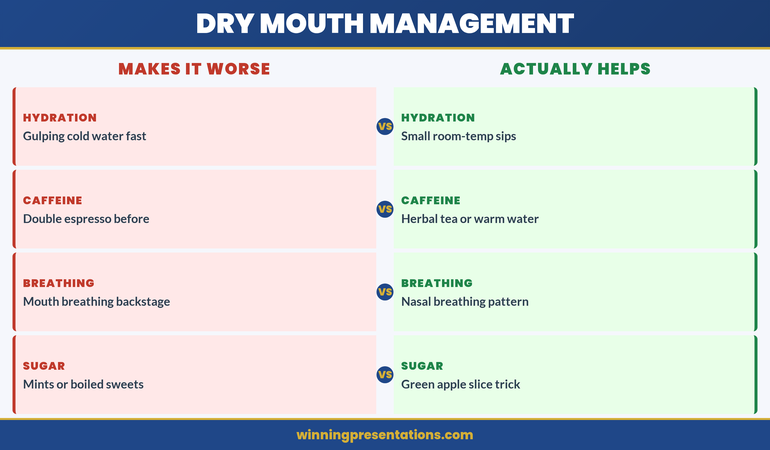
Dry Mouth Before Presenting: Why It Happens and the 3-Minute Fix

Your mouth goes dry. Three seconds into your deck, and you’re reaching for water that’s nowhere near you. The more you think about it, the worse it gets. Dry mouth presenting is one of the most common physical symptoms executives report—and it’s entirely manageable once you understand what’s happening.

Dry mouth before presenting isn’t a character flaw. It’s your sympathetic nervous system responding to perceived threat. The good news: there’s a 3-minute protocol that actually works, and you can deploy it the moment you feel it happening.

Contents

Why Dry Mouth Happens During Presentations

When you step in front of an audience, your amygdala registers threat. Your body floods with cortisol and adrenaline. Your sympathetic nervous system—the fight-or-flight branch—takes over.

One of the first physiological changes: reduced saliva production. Your mouth redirects resources away from digestion and non-essential functions. Blood flow concentrates where you’ll need it for survival: heart, lungs, large muscles. Salivary glands are deprioritised. The result is the sticky, cottony sensation that makes speaking feel like pushing through concrete.

This is not a flaw in your system. It’s ancient programming designed to help you survive. But in a boardroom, it works against you.

The trigger is anticipatory anxiety. Your mind projects into the future—what if I stumble? What if they ask a question I can’t answer?—and your body responds as if the threat is happening now. Over 72% of executives report presentation physical symptoms before they step onto a stage. Dry mouth is the most underestimated of them all.

Why? Because most people don’t know how to address it until the moment it’s happening. And by then, they’re improvising instead of executing a protocol.

Control Your Nervous System Before You Present

Your mouth is dry because your sympathetic nervous system is in overdrive. The Calm Under Pressure guide contains nervous system regulation protocols designed for high-stakes presentations.

  • ✓ Breathing techniques designed to activate your parasympathetic nervous system
  • ✓ Pre-presentation hydration and salivary gland activation protocols
  • ✓ In-the-moment recovery techniques you can use during your presentation

Get Calm Under Pressure

Designed for executives facing presentation pressure

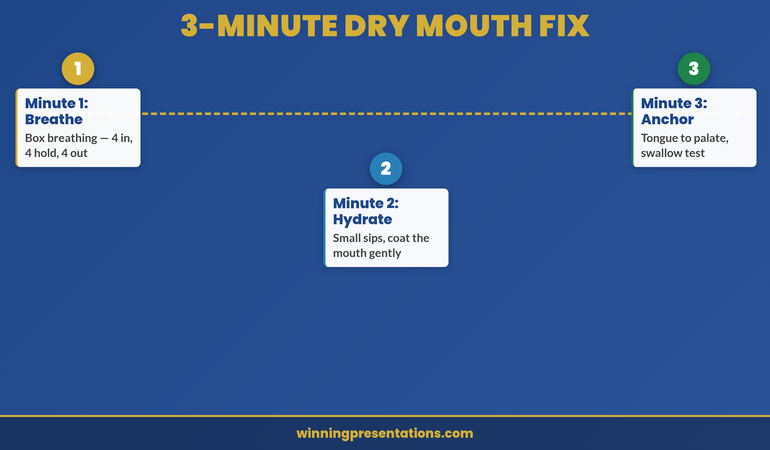
The 3-Minute Protocol: Your Recovery Roadmap

You have three minutes before you present. Here’s the exact sequence that works.

Minute 1: Sympathetic Reset

Do box breathing. Breathe in for a count of 4, hold for 4, exhale for 4, hold for 4. Repeat four times. This activates your vagus nerve—the “off switch” for fight-or-flight. Your heart rate drops. Your nervous system begins to recognise safety. Your salivary glands start to reactivate.

The science is solid: controlled breathing directly signals your parasympathetic nervous system. Within 60 seconds, your body chemistry begins to shift from cortisol-dominant to a calmer state.

Minute 2: Physical Rehydration

Drink water. Not a sip—a full glass if you have it. Water does two things: it directly hydrates your mouth, and the act of swallowing stimulates your salivary glands. If water isn’t available, place your tongue on the roof of your mouth and move it in small circles. This activates the palatal glands. It feels odd. It works.

Some executives keep a lozenge in their pocket. Sucking a lozenge stimulates saliva production faster than water alone. Choose something sugar-free so your mouth doesn’t become sticky again mid-presentation.

Minute 3: Mental Anchor

Shift your focus. Stop thinking about your dry mouth. Instead, run through your opening line. Say it aloud, quietly. Feel yourself speaking with authority. Your mind and body are linked—when you speak with confidence in rehearsal, your nervous system registers safety. Your salivary glands stay engaged.

This is the critical shift. You’re no longer in panic mode. You’re in preparation mode. Your body recognises the difference.

Priya, a VP of Strategy at a tech firm, used this protocol 45 minutes before a Series B funding pitch to investors worth £8.2m. She’d struggled with dry mouth before every major presentation for years. “I did the box breathing in the lift, drank a full glass of water in the washroom, and then stood outside the conference room and ran through my first minute of the pitch aloud,” she told me. “By the time I walked in, my mouth felt normal. I didn’t think about it once during the presentation. That pitch closed in 18 days.”

The protocol works because it addresses both the physiology and the psychology. You’re not just hydrating your mouth—you’re signalling safety to your nervous system and reclaiming your focus.

Need nervous system techniques for presenting?

The Calm Under Pressure guide includes evidence-based protocols for managing physical symptoms of presentation anxiety.

Timeline showing the 3-minute protocol: minute 1 box breathing, minute 2 hydration, minute 3 mental anchor

Stop Treating Dry Mouth as Your Problem

Dry mouth presenting is a symptom of nervous system activation. The Calm Under Pressure guide contains full protocols for managing the 6 most common presentation physical symptoms—dry mouth, shaking hands, voice cracking, heart racing, and more.

  • ✓ Before-presentation nervous system reset techniques
  • ✓ During-presentation recovery manoeuvres
  • ✓ Post-presentation nervous system reset to prevent spiralling

Get Calm Under Pressure

Evidence-based practice and executive coaching approaches.

What NOT to Do (The Mistakes That Backfire)

Don’t Use Caffeine

Coffee and tea dry your mouth further. They also spike cortisol, making your nervous system more reactive. If you’re struggling with dry mouth, caffeine 90 minutes before your presentation is self-sabotage. Stick to water.

Don’t Mouth-Breathe Before You Present

Breathing through your mouth dries your mouth and signals your nervous system that you’re in danger. Nose breathing activates your parasympathetic nervous system. The 3-minute protocol uses nose breathing deliberately for this reason.

Don’t Skip the Swallow Test

Before you step in front of your audience, swallow deliberately. If you can’t swallow easily, your nerves are still in control. Go back to your protocol. Do another round of box breathing. Give your nervous system five more minutes if you need them. A dry swallow on camera is worse than taking 300 seconds to prepare properly.

Don’t Rely on Sugar

Boiled sweets feel like they work because they trigger saliva production quickly. But the sugar rush also spikes blood glucose, which triggers cortisol release. You’ll feel better for 90 seconds, then worse. If you use a lozenge, use sugar-free only.

Managing Dry Mouth Once You’re Presenting

You’ve done the protocol. You step in front of the room. And halfway through your third slide, the dryness returns.

This is normal. It happens because the moment you’re presenting, your sympathetic nervous system reactivates. You’re managing threat in real time. The key is to have a 90-second recovery you can deploy without stopping your presentation.

The Pause Technique: Stop speaking. Swallow deliberately. Take a breath in through your nose. Reach for water if it’s available and take a sip—not a huge gulp, just enough to wet your mouth. Swallow again. Then resume speaking. The entire sequence takes 8–10 seconds. Your audience interprets this as a thoughtful pause, not panic.

The Tongue Anchor: If you don’t have water, use your tongue. Place it on the roof of your mouth. This stimulates your palatal glands immediately. You can do this whilst speaking—your audience won’t see it. Within 10 seconds, saliva production increases noticeably.

Both techniques break the feedback loop: dry mouth → panic about dry mouth → more dryness. You interrupt the cycle by introducing a physical action that rehydrates and signals safety.

See also: How to Fix Your Voice Getting Higher When You’re Nervous. Dry mouth often accompanies voice cracking and pitch elevation. These physical symptoms are linked—managing one often helps manage the others.

Long-Term Fixes That Reduce Recurrence

Hydration Baseline

The week before a major presentation, drink 2.5 litres of water daily minimum. This primes your salivary glands and ensures your nervous system isn’t already working from a deficit. Dehydration amplifies presentation anxiety. Most executives don’t hydrate deliberately enough.

Nervous System Conditioning

Practise box breathing daily, not just before presentations. Five minutes a day, five days a week, for six weeks. This trains your parasympathetic nervous system to activate more readily. Over time, your body learns to downregulate threat faster. Dry mouth becomes less severe and less frequent.

This is not meditation or relaxation. It’s nervous system fitness. You’re building capacity.

Presentation Practice Under Pressure

Practice your presentation in front of people. Not in front of the mirror. In front of 2–3 colleagues who will ask questions and challenge you. This exposes your nervous system to the actual threat stimulus in a controlled environment. Over time, your body habituates. Presentations feel less threatening. Your sympathetic activation weakens.

This is why executives who present weekly are rarely bothered by dry mouth. They’ve desensitised their threat response.

Post-Presentation Recovery

After you present, your nervous system stays elevated for 30–90 minutes. Most executives ignore this. They crash into their next task without recovering properly. This means your nervous system stays in a heightened state heading into your next high-stakes situation. Over time, this creates cumulative anxiety.

After you present, spend five minutes in deliberate recovery: box breathing, a walk outside, or a conversation with a trusted colleague. This signals to your nervous system that the threat has passed. You recover properly. Your baseline anxiety drops.

For more on this, read Post-Presentation Anxiety: Why Your Heart Is Still Racing After.

Long-term nervous system management cycle: daily hydration, conditioning, practice under pressure, post-presentation recovery

Frequently Asked Questions

Q: Does anti-anxiety medication help with dry mouth presenting?

Medication can help with overall presentation anxiety. However, many anti-anxiety medications actually worsen dry mouth as a side effect. If you’re considering medication, discuss this with your doctor. The behavioural protocols (box breathing, nervous system conditioning) often work as well or better without medication side effects.

Q: Can I prevent dry mouth by eating before I present?

Light eating can help—a banana, a handful of nuts, or a piece of toast 60–90 minutes before you present provides steady glucose and prevents blood sugar drops that amplify anxiety. However, eating right before you present can make you feel sluggish or create additional anxiety about your breath. Eat early. Present later.

Q: What if I don’t have time for the full 3-minute protocol?

Do box breathing. It’s the most important element. 90 seconds of box breathing—just four rounds—will shift your nervous system state meaningfully. If you have one more minute, add water. If you have a third minute, add the mental anchor. But even one minute of box breathing is better than nothing.

Q: Does dry mouth presenting mean I’m not cut out for public speaking?

No. The most seasoned executives still experience dry mouth before high-stakes presentations. It’s not a sign of weakness—it’s a sign that your nervous system recognises that the moment matters. What separates confident presenters from anxious ones isn’t the absence of dry mouth. It’s having a protocol to manage it before it manages you.

The Winning Edge

Weekly presentation strategies for executives who present under pressure.

Subscribe Free

Dry mouth presenting is one of the most correctable presentation symptoms you’ll face. You’re not powerless. You have a nervous system you can regulate, a protocol that works, and the capacity to present with vocal control. The 3-minute fix isn’t magic—it’s applied neuroscience.

Use it before your next presentation. Then read about Restructuring Your Presentation Team for Trust and Impact to ensure the content you’re delivering lands with the same confidence as your delivery.

About the Author

Mary Beth Hazeldine is Owner & Managing Director of Winning Presentations. With 24 years of corporate banking experience at JPMorgan Chase, PwC, Royal Bank of Scotland, and Commerzbank, she advises executives across financial services, healthcare, technology, and government on structuring presentations for high-stakes funding rounds and approvals.

Book a discovery call | View services

24 Mar 2026
Senior executive delivering high-stakes presentation with confident posture in corporate boardroom

Executive Presence in Presentations: What Senior Leaders Actually Evaluate Beyond Your Slides

Executive presence in presentations isn’t about magnetism or performance—it’s about demonstrable competence, strategic clarity, and the ability to command trust under pressure. Senior leaders evaluate far more than your slides: they assess your command of the room, your mastery of your subject, your composure under challenge, and whether you’ve thought through the implications of what you’re proposing.

Ingrid had delivered six successful funding rounds for her tech division. She knew her numbers. She’d refined her deck over three weeks. But walking into the boardroom to present her £12m expansion proposal to the new CFO, she felt something shift. The CFO watched her first slide without comment, then asked: “What are you assuming about market adoption?” Ingrid had the answer—but she paused, checked her notes, then delivered it hesitantly. The CFO nodded, said nothing more, and later blocked the proposal. Not because the numbers were wrong. But because Ingrid had signalled uncertainty in the moment she needed to signal authority. The proposal went to a peer who presented the exact same case with conviction and ease. That’s the gap between having a good presentation and having executive presence.

Presenting to senior leaders?

The Executive Slide System includes slide templates and frameworks designed for executive presentations.

What Executive Presence Actually Means

Executive presence is not charisma. It’s not charm, not stage presence, not the ability to tell a compelling story. Those things can enhance a presentation, but they’re not the foundation.

Executive presence is credibility manifested in real time. It’s the visible confidence that you’ve thought deeper than the room expects, that you understand not just what you’re proposing but why it matters, what could go wrong, and what you’ll do if it does. It’s the composure that says: I’ve considered this from every angle, and I’m not rattled by your questions.

In the corporate banking world I spent 24 years navigating, I watched hundreds of pitches. The ones that moved money weren’t always the slickest. They were the ones where the presenter had so thoroughly mastered their subject that they could be interrupted mid-sentence, take a challenging question, and respond with precision—without returning to notes or hedging language. That’s executive presence. It’s the inverse of relying on your deck to carry you.

The stakes in executive presentations are different from standard business presentations. You’re typically asking for approval, funding, or organisational commitment. Your audience is experienced at detecting weakness—not nastiness, but genuine uncertainty about whether you’ve thought this through. Your job isn’t to entertain them or even impress them with smooth delivery. Your job is to convince them you’re someone worth trusting with their time and their resources.

Build the Slides That Back Up Your Presence

When your slides are designed for executive scrutiny, you’re freed from defending basic structure and can focus entirely on credibility and command.

  • ✓ Executive-focused templates that eliminate obvious weakness
  • ✓ AI prompt cards for rapid risk/mitigation framing
  • ✓ Strategic structure guides for high-stakes asks

Explore the System

Designed for high-stakes executive approval presentations

The Three Things Senior Leaders Evaluate

When a senior leader sits in your presentation, they’re running a rapid assessment on three fronts. Understanding these helps you calibrate what actually matters.

1. Do you know your subject better than I do? This is the opening test. If you hesitate on foundational questions, if you misstate a metric, if you have to say “let me check that,” you’ve broken a critical assumption. Senior leaders make fast decisions partly because they trust specialists to have already done the deep work. When you can’t defend basic facts under pressure, you signal that you either haven’t done the work or you’re not confident in it. Either way, you lose authority immediately.

2. Have you thought through implications that I would think through? This is the depth test. Every proposal has risks, constraints, dependencies. A presenter with true executive presence acknowledges these unprompted. You don’t wait for the CFO to find the flaw in your financial model—you’ve already highlighted it and explained why it’s not a blocker. You don’t present a restructuring plan without addressing talent retention or transition risk. You show that you’ve already thought three moves ahead. This is often what separates approval from rejection—not the core idea, but whether you’ve demonstrated strategic foresight.

3. Do I trust you to manage this if I say yes? This is the character test. Under pressure, do you become defensive or curious? Do you answer the question asked, or do you dodge into your talking points? When challenged, do you hold steady or do you fold? Senior leaders know they’re betting on your ability to execute under real-world conditions. They’re watching for signs of resilience, intellectual honesty, and the capacity to think on your feet. If you come across as rehearsed, brittle, or overly polished, you fail this test. If you come across as grounded and adaptable, you pass.

Senior leader evaluating executive presence during presentation

Why Slide Quality Alone Isn’t Enough

This is where many executives stumble. They invest heavily in aesthetics—design, animation, colour, professional imagery—and assume that a polished deck will carry them. It won’t.

A beautiful presentation can actually work against you in executive contexts. If your slides are so slick that they feel detached from you, if they’re so visually complex that they distract from your message, if they signal more about design resources than strategic thinking, you’ve created distance between yourself and your audience. Senior leaders don’t want to admire your presentation. They want to trust your thinking.

What matters is this: your slides should support your credibility, not replace it. The best executive presentations I’ve seen use clean, understated design. A strong headline. Data presented clearly. Plenty of white space. This forces the presenter into the spotlight. Your slides become a reference point, not a performance.

More importantly, consider what your slides reveal about your thinking. If you have seventeen slides for a thirty-minute presentation, you’re asking your audience to process information faster than they can actually absorb it. That signals either poor planning or poor respect for their time. If you have one data point per slide and no context about why it matters, you’re hiding your thinking rather than showing it. If your slide titles are generic (“Market Overview,” “Key Findings”), you’re forcing the audience to listen to you to understand your point—whereas a strategic headline on that slide would make your logic instantly clear.

The hidden factor that keeps talented presenters from advancing is often that they’re too focused on presentation mechanics and not focused enough on the thinking that those mechanics should reveal. Executive presence comes from letting your strategic clarity show through a disciplined deck.

If you’re building a presentation for a high-stakes approval decision, your slide structure should demonstrate that you’ve thought the issue through from multiple angles. The Executive Slide System includes templates that force this kind of strategic architecture—so you’re not starting with aesthetics, you’re starting with logic.

The Structure That Signals Leadership

There’s a predictable structure that senior leaders find credible, because it mirrors how they themselves think through problems. Understanding this structure is one of the fastest ways to improve your executive presence.

Start with the situation, not the solution. Before you tell them what you want, show them why you’re asking. What’s changed? What’s broken? What’s the gap between where we are and where we need to be? This contextualises your ask and demonstrates that you’re responding to a real problem, not pushing an agenda.

Name the constraints openly. What can’t we do? What are we assuming? What could go wrong? By surfacing constraints before your audience has to, you show you’ve done realistic thinking rather than wishful thinking. This is where many presenters lose credibility—they present best-case scenarios as if they’re certain. Leadership expects you to acknowledge uncertainty.

Present your option as one of several. Even if you have a clear recommendation, show that you’ve considered alternatives and explain why you rejected them. This demonstrates critical thinking rather than linear thinking. It also makes your recommendation feel more thoughtful—you chose this, you didn’t just default to it.

Be explicit about decision triggers and success metrics. What will tell us this worked? What will tell us it failed? What decision points will we revisit? This signals that you’re thinking in terms of management and accountability, not just implementation. You’re already positioned to own the outcome.

This structure shows respect for your audience’s time and their need for clarity. It also creates natural space for questions—and questions, when you’ve prepared for them this way, become opportunities to deepen credibility rather than threats.

Strategic presentation structure framework for executives

Strategy Isn’t Enough Without Execution

  • ✓ Slide templates that force this strategic architecture
  • ✓ Ready to deploy for your next executive ask

Get the System

Common Presence-Killers to Eliminate

Some patterns consistently undermine executive presence. If you recognise yourself in any of these, the fix is straightforward.

Over-apologising. “I’m sorry, this is a complex topic…” or “Sorry, let me clarify…” weakens your position before you begin. You’re signalling that you expect your audience to judge you harshly. Replace apologies with directness: “This is complex. Here’s the logic.” Confidence doesn’t mean never hedging—it means hedging strategically, not reflexively.

Filler language. “Um,” “like,” “you know,” “so,” repeated between sentences, destroys executive presence faster than almost anything else. It signals you’re thinking rather than you’ve thought. Record yourself. Identify your pattern. Practice the pause instead. A three-second silence while you gather your next thought sounds far more authoritative than verbal filler.

Reading from your slides or notes. This is the single fastest way to lose authority. Your audience can read. What they need from you is interpretation, insight, and real-time response. If you’re reading, you’re not present—you’re a narrator. Confidence comes from knowing you don’t need your notes, which means preparing differently than most people do. Prepare to know your story, not to recite it.

Defensive responses to questions. When challenged, do you explain or do you defend? There’s a difference. A defensive response feels like you’re protecting yourself; an explanatory response feels like you’re sharing information. “That’s a good question. The reason we structured it this way…” sounds fundamentally different from “Well, actually…” Practice staying curious when questioned, even when you disagree.

Mismatched energy and situation. Some presentations call for urgency and directness. Others call for thoughtfulness and deliberation. If you come in energised and rapid-fire when the room needs careful consideration, you’ll seem scattered. If you come in measured and cautious when the situation calls for conviction, you’ll seem uncertain. Match your energy to the stakes and the moment.

Frequently Asked Questions

Can you build executive presence, or is it something you’re born with?

It’s entirely buildable. Executive presence looks like a natural talent because people who have it make it look effortless—but that effortlessness is the product of relentless preparation. You prepare so thoroughly that you can be present rather than anxious. You practise your logic so many times that you can adapt it in real time. You think through scenarios so carefully that questions feel like invitations rather than threats. None of that is innate.

What if I’m naturally quiet or introverted?

Introversion and executive presence are entirely separate things. Some of the most commanding presenters I’ve worked with were introverts. They didn’t fill the room with energy; they commanded attention through clarity and authority. If you’re quiet, your superpower is that people have to listen to hear you. Use that. Speak deliberately. Make each word count. Senior leaders respect precision far more than volume.

How do I recover if I lose composure during a presentation?

Pause. Acknowledge it silently—don’t apologise for being human. Take a breath. Return to your logic. Most audiences respect this more than pretending nothing happened. You’ve just demonstrated that you stay grounded under pressure, which is exactly what they want to see. The presentation itself isn’t what matters; your ability to recover is.

Should I memorise my presentation?

No. Memorising creates rigidity. If you’ve memorised and someone asks a question that disrupts your script, you’ll panic. Instead, internalise your logic. Know your argument so deeply that you can explain it in any order, emphasise any part, and adapt to any question. This is the difference between being a performer and being a strategist. Senior leaders want strategists.

The Winning Edge

Weekly presentation strategies for executives who present under pressure.

Subscribe Free

Not ready to invest? Start with the free Executive Presentation Checklist — a quick-reference guide for your next high-stakes presentation.

This post was published alongside “Restructuring Presentations: How to Build Team Trust Through Change Communication” as part of our executive series.

Executive presence isn’t about being the most confident person in the room. It’s about being the most prepared, the most thoughtful, and the most honest about what you do and don’t know.

About the Author

Mary Beth Hazeldine is Owner & Managing Director of Winning Presentations. With 24 years of corporate banking experience at JPMorgan Chase, PwC, Royal Bank of Scotland, and Commerzbank, she advises executives across financial services, healthcare, technology, and government on structuring presentations for high-stakes funding rounds and approvals.

Book a discovery call | View services

24 Mar 2026
Executive presenting restructuring announcement to team in modern glass boardroom with trust and clarity

The Restructuring Presentation: A Slide Framework That Keeps Team Trust Intact

When you announce a restructuring, you have 90 seconds to preserve trust or lose it. Most executives use that time to explain the business case. That’s backwards. A restructuring presentation succeeds because the *framework* signals respect for your people first, then delivers the difficult message. This article walks through the exact slide sequence, word choices, and structural decisions that keep your team’s confidence intact when roles are changing.

Quick Navigation

The Story: Anya’s Restructure That Nearly Broke Her Team’s Trust

Anya led a 40-person commercial operations team at a luxury goods manufacturer. Last September, the board mandated a restructure: two lateral layers were being collapsed into one. Twelve roles would shift. Four team members would move to a different function entirely. On the face of it, no redundancies—but the reshuffle felt like betrayal waiting to happen.

Anya’s first draft was a PowerPoint: seven slides, heavy on org chart before-and-afters, structured around “why we’re doing this” (supply chain efficiency, margin protection, headcount optimisation). Clear. Logical. Completely soulless.

She showed it to her peer, Henrik, who’d navigated a similar restructure two years earlier. His feedback stopped her cold: “You’re explaining why *you* made the decision. Your team doesn’t care why yet. They care whether you think *they’re* still valuable.”

Anya scrapped the deck. She rebuilt it around a different spine: respect for what the current team had built, acknowledgement of uncertainty, clarity on *how* she’d manage the transition, and then the business rationale. She led with people, not process. When she presented it, the room’s tension visibly shifted. People asked harder questions—but they asked them like they trusted her to have thought through the answers.

Building a restructuring presentation?

The Executive Slide System includes slide templates designed for organisational change announcements.

Why Restructuring Presentations Fail (Even When the Logic Is Sound)

Most restructuring presentations collapse because they’re built on a technical assumption: *If I explain the business case clearly, people will understand and accept the change.* That’s not how restructures work. The business case is downstream. The first question in your team’s mind isn’t “Is this strategically sound?” It’s “Do I still matter?”

A restructuring presentation fails on three predictable faults:

1. Leading with the org chart. Showing the “after” structure first forces people to map themselves into (or out of) the new world before you’ve given them any emotional permission to trust you’re thinking about them. It triggers threat response immediately.

2. Over-explaining the “why.” When you spend four slides defending the business rationale, you signal that you know your people are unhappy and you’re bracing for pushback. That defensive posture *increases* scepticism. People hear: “I expect you to disagree, so here’s my armour.”

3. Burying the human transition plan. Most executives bury the practical details (How will I find a new role? Will my salary change? What happens this week?) in slide five or six, or punt them to an email after the meeting. People stop listening after slide two if you haven’t told them how this affects *them* specifically.

The result: even if the restructure makes perfect sense, your team leaves the room thinking you’ve prioritised process over people. Trust fractures before the new structure even launches.

Slide framework for restructuring presentations showing trust-first sequence

The Trust-First Framework: Structure Before Content

A restructuring presentation that keeps team trust follows this sequence. Notice that the org chart doesn’t appear until slide five. That’s intentional.

Slide 1: Acknowledgement & Context. “We’ve decided to restructure how the commercial operations team is organised. This affects everyone in this room. I’m going to walk you through what’s changing, why, and how we’ll manage the transition. I know there’s uncertainty right now—that’s normal and I’ll do my best to answer your questions.”

This is 30 seconds of spoken word with a single, simple visual (your team name, the word “Restructure”, maybe a single supporting image). The goal isn’t information. It’s permission to continue. You’re saying: “I know this is uncomfortable. I’m not pretending it isn’t. We’re going to talk about it directly.”

Slide 2: What We’re Keeping (Your Anchor). What has this team done well? What are you proud of? What *won’t* change? Name three specific, credible wins from the past 12 months. “You’ve taken customer onboarding from 18 days to 9. You’ve reduced invoice errors by 34%. You’ve built relationships with every regional director that actually mean something.” This isn’t cheerleading. It’s a foundation. You’re saying: “What you’ve built matters. That didn’t change yesterday.”

Slide 3: Why Now (Business Context, Not Defence). Present the market condition or internal shift that makes this necessary. One slide. Three bullet points maximum. “Margin pressure from overseas competitors has increased 12% this year. We need to flatten decision-making to respond faster. That means organisational layers need to shift.” This isn’t justification. It’s context. You’re answering: “Why is this real, and why is it real now?”

Slide 4: What’s Changing (The Honest Bit). “The commercial operations team will be restructured from three layers to two. Twelve roles will shift. Four team members will transition to the finance function. Some roles will change title. Some will have expanded responsibility. Some will have a different manager.” This is the moment you say the thing people are afraid of. Say it plainly. Don’t soften it, and don’t over-explain it yet.

Slide 5: The New Structure. Now show the org chart. Annotate it to show where movement is happening. Use colour or markers to highlight “New Team” vs. “Expanded Role” vs. “Moved to Finance.” People can map themselves. This is information, not emotion.

Slide 6: Your Individual Transition (The Critical Slide). “Your role in the new structure is [X]. Your new manager is [Y]. You’ll report on this formal date. Between now and then, here’s what I need from you: [three things]. Here’s what I’m committing to: [three things, including specific one-on-one timing].” One slide, tailored for each audience cohort if necessary. This is where you move from “team” to “you.”

This six-slide structure takes 12–15 minutes to deliver. It respects your audience’s intelligence and their emotional reality. You’re not hiding anything. You’re presenting it in an order that makes it *possible* for people to hear it.

Slide Templates Built for These Scenarios

The exact slide sequence above comes alive with the right visual templates. Pre-built layouts remove the cognitive load of designing whilst managing the emotional weight of the message. The Executive Slide System includes six ready-to-edit templates for restructuring scenarios.

  • ✓ Trust-first slide sequence templates (6 slides, not 20)
  • ✓ Org chart templates that highlight change, not just structure
  • ✓ Prompt cards for difficult questions and follow-ups

Explore the System

Designed for high-stakes executive announcements

Slide Sequence: What Goes On Each Slide (Detailed Design Choices)

The framework is clear. Now let’s talk visual execution—because a well-structured message can still fail if your slides look like you’ve delegated the design to someone’s nephew.

Slide 1 (Acknowledgement): Minimal Visual, Maximum Presence. White or soft grey background. Your team name at the top in a clear sans-serif, 60pt. Single image below—maybe your office, maybe a symbolic image of change (a path splitting, a bridge) that doesn’t try too hard. One sentence of text: “Restructuring: How we’ll stay strong together.” (Or similar, in your voice.) The visual purpose is to hold attention while you speak. Your voice carries the real message.

Slide 2 (What We’re Keeping): Achievement-Focused Layout. Three boxes or three rows, each highlighting one concrete win. Include metrics if honest (not inflated). Use your brand colour for the header, but keep backgrounds neutral. Font: 18pt body, 28pt headers. “Customer onboarding: 9 days (down from 18)” is stronger than “We’ve improved efficiency significantly.” Specificity builds credibility.

Slide 3 (Why Now): Context, Not Justification. Three bullet points. A single supporting visual on the right—maybe a chart showing market conditions, or a simple icon for each point. Avoid red colours or “declining” imagery (even if accurate—you’re presenting context, not catastrophe). Dark text on light background. 20pt font. This is functional; make it clear.

Slide 4 (What’s Changing): Honest and Unadorned. Four bullet points, plain text. No icons, no illustrations. You’re delivering difficult news. Overdesigning it looks manipulative. Font size 20pt, clear hierarchy. “Some roles will shift to the finance function” doesn’t need visual flourish. It needs clarity.

Slide 5 (The New Structure): Org Chart That Shows Change. Use colour or line weight to distinguish new reporting lines from existing ones. Annotate with dates: “Effective 1 April.” Include names (or placeholder names if confidential). Keep it to 60% of the slide; don’t cram it all in. People need to be able to read it in a room of 30 people on a projector. If your org is complex, show it in two layers: “Commercial Operations leadership” on one slide, “Your team assignments” on another.

Slide 6 (Individual Transition): Personal and Actionable. This slide should have *your* name and photo at the top. “Here’s what I need from you in the next three weeks” (then three specific, achievable things). “Here’s what I’m committing to” (then three things you can actually deliver, including “One-to-one with each of you by Friday of this week”). Use your brand colour for the headers. Font 18pt for easy reading.

The overall design philosophy: trust is built through clarity, not through visual magic. Your slides should disappear; your message should remain.

Language That Maintains Trust vs. Language That Destroys It

Your words matter more than your slides. Restructuring announcements live or die on precise language choices.

Avoid: Euphemism. “We’re right-sizing” sounds like you’re hiding something. Your team will hear “layoffs are coming” even if that’s not true. Say what you mean. “We’re restructuring” or “We’re reorganising” or “We’re consolidating layers.” Simple, honest, unvarnished.

Use: Specific Transition Language. Instead of “Your role will evolve,” say “Your role will expand to include customer data analysis in addition to vendor management.” Instead of “There will be some changes to reporting lines,” say “You’ll report to Sarah instead of Michael, starting 1 April.” Specificity signals competence. Vagueness signals panic.

Avoid: Spin. “This is actually a great opportunity for growth” might be true, but when you say it in a restructuring announcement, it sounds patronising. Let people decide whether it’s an opportunity. Your job is to be clear and respectful, not to sell them on the silver lining.

Use: Empathy Without Apology. “I know this creates uncertainty, and you’ll likely have questions I can’t answer today” is honest. “I’m really sorry we have to do this” is apologising for the business decision, which undermines your credibility. Own the decision, acknowledge the impact, commit to managing the transition well.

Avoid: Over-Explanation in Real Time. If you’re 10 minutes into a restructuring presentation and people are asking “Why are we doing this?” or “Did the board force this?”, you don’t answer in the moment. You acknowledge it, stay on script, and say “That’s a fair question—I’ll come back to that in Q&A. Right now I want to make sure everyone understands what’s changing and what the timeline is.”

Use: Pause. After you announce the restructure (Slide 4), pause for three full seconds. Let it land. People need processing time. If you fill that silence, you’ll rush into defensive explanation. Don’t.

Executive communicating restructuring message with confidence and clarity

Handling the Q&A When Emotions Run High

The presentation itself is 12 minutes. The Q&A is where your team decides whether you’ve lost them.

Expect Three Categories of Questions:

The Practical Question. “When does this take effect?” “Will my salary change?” “How do I apply for the new role?” These are your allies. They mean people are already thinking about implementation. Answer them briefly and directly. Use this moment to reinforce your timeline and your next steps.

The Uncertainty Question. “What if I don’t want the new role?” “Is there a chance this changes in three months?” “Are we hiring in the new structure?” These are harder because the honest answer is often “I don’t know yet.” Say that. “That’s a fair question. I don’t have a definitive answer, but here’s what I know [then the boundary], and here’s when you’ll know more [then the date].”

The Challenge Question. “Isn’t this just cost-cutting?” “Why wasn’t the team consulted?” “Did the board make this decision, or did you?” These questions are testing whether you’ll stay honest under pressure. Answer them. Don’t defend. “Yes, it is partly cost-driven—margin pressure is real. It’s also about moving faster. Both are true. Both matter.” If it was a board decision, say so. If you disagree with part of it, don’t pretend otherwise, but stay aligned on the execution.

Your Role in Q&A: Listen fully before answering. Repeat the question back (“So you’re asking whether your benefits package changes?”). Answer the question asked, not the question you wish they’d asked. If you don’t know, say “I don’t know, I’ll find out by Thursday, and I’ll email you.” Then actually do it. These follow-ups matter more than your slides.

If the room becomes emotionally charged, pause. “I can see this matters deeply. That’s appropriate. Let’s take it offline—I’m going to schedule 20 minutes with each of you in the next week. We’ll talk through your specific situation.” Then close the meeting on time. Running 45 minutes over won’t convince anyone. It signals you’ve lost control.

Implementation: What Happens After the Slides Close

Your restructuring presentation isn’t a one-off event. It’s the beginning of a managed transition. Most executives end the meeting and assume they’ve done the hard part. They haven’t.

Within 24 hours: Send a written summary of what you announced. Include dates, names, reporting lines, and links to resources (intranet page, FAQ, HR support contact). Don’t add new information—just codify what you said. This gives people something concrete to share with their partners or to read again when they’re processing.

Within one week: One-to-one conversations with every direct report. Not HR—you. 20 minutes each. The agenda is their specific situation: What’s changing for them? What’s not? What’s the next step they need to take? What do they need from you? Listen more than you talk. Many people won’t raise their real concern in the group setting.

Within two weeks: Publish an updated team page or document showing the new structure, new role descriptions, and the new team charter (how you’ll work together differently). This gives people certainty that the restructure is real and deliberate, not provisional.

Then, every week for the first month: A short team update on implementation progress. Keep it brief: “This week we finalised the new vendor management process. Next week we’ll train everyone on the new system.” These updates do two things: they signal momentum (reducing uncertainty), and they prove you’re thinking about how to make the transition smooth.

Your restructuring presentation keeps trust in the moment. Your follow-up execution keeps trust alive. Miss either, and you’ll have announced a reorganisation only to discover your best people are already interviewing elsewhere.

Need the Templates, Not Another Article?

If the restructuring presentation structure is clear but your slides still aren’t built, the Executive Slide System gives you ready-to-edit layouts for high-stakes change announcements. Also see the project delay presentation framework for sequencing difficult announcements across your organisation.

View Templates

Frequently Asked Questions

Should I rehearse a restructuring presentation differently than other presentations?

Yes. Rehearse it twice: once for technical accuracy (slides, timing, order), then once for emotional tone. Have someone watch the second rehearsal and tell you honestly: “Do you sound defensive?” “Do you sound like you care about the impact on people?” “Are you going too fast?” This is harder than rehearsing a financial update, but the stakes are higher.

What if people ask me questions I can’t answer in the meeting?

Write it down. Say: “That’s a really important question. I don’t have the answer right now, but I will by [specific date], and I’ll email you and the team.” Then do it. Credibility during a restructure is built on following through on what you say you’ll do, even small things.

Should I announce the restructure in person or can I do it via video call?

In person if at all possible, especially if your team is co-located. Video works if your team is remote and you can’t travel, but the lack of physical presence makes tone harder to read. If you do it by video, be extra clear about your emotional intent: “I know this is harder to absorb on a call. I’m committing to one-to-ones this week so we can talk through your specific situation.”

How do I present a restructure if I disagree with how it’s been designed?

This is a conversation with your leadership before the presentation, not during it. Once you’re delivering the message, you own it. If you visibly distance yourself from the decision (“The board made me do this”), you lose your team’s confidence that you’re in control. Disagree upstairs; align downstairs.

The Winning Edge

Weekly presentation strategies for executives who present under pressure.

Subscribe Free

Not ready to invest? Start with the free Executive Presentation Checklist — a quick-reference guide for your next high-stakes presentation.

About the Author

Mary Beth Hazeldine is Owner & Managing Director of Winning Presentations. With 24 years of corporate banking experience at JPMorgan Chase, PwC, Royal Bank of Scotland, and Commerzbank, she advises executives across financial services, healthcare, technology, and government on structuring presentations for high-stakes funding rounds and approvals.

Book a discovery call | View services

Related reading: How to Build Executive Presence Into Your Presentation | Town Hall Presentation: Rebuild Trust After Layoffs | Stop the Dry Mouth Before Presenting

23 Mar 2026
Empty corporate boardroom after a meeting with a single clock on the wall and presentation materials left behind suggesting the critical post-meeting decision window

The 48-Hour Window After Every Q&A: Why Most Presentations Win the Room but Lose the Decision

The 48-Hour Window After Every Q&A: Why Most Presentations Win the Room but Lose the Decision

Astrid crushed her steering committee Q&A. Every question answered confidently. The committee chair said, “This looks solid.” Two people nodded. She left the room feeling certain approval was coming.

Three weeks later, the project was still “under review.” No formal objection. No rejection. Just silence.

Astrid had won the Q&A. She had lost the follow-up.

Quick Answer: The Q&A follow-up decision window — the 48 hours after your presentation’s question session — is where most executive approvals are won or lost. Presenting well gets you consideration. Following up strategically gets you a decision. The 3-step framework below covers what to send, when to send it, and how to frame the decision so it moves from “under review” to “approved” before the momentum dies.

Q&A follow-up after your presentation

The 48-hour window begins the moment the Q&A ends. Have you structured your follow-up across the timeline described?

→ Explore the Q&A handling framework and follow-up system → View the Executive Q&A Handling System

I learned about the 48-hour window the hard way.

Early in my banking career at Commerzbank, I presented a restructuring recommendation to a regional leadership team. The Q&A lasted 25 minutes — longer than the presentation itself. I answered every question. The managing director said, “Good work, let’s get this moving.”

I walked out, wrote a quick “thank you for your time” email, and waited.

A week passed. Then two. I chased with a gentle follow-up. The response: “We’ve got a few concerns to work through internally.”

Those “concerns” were questions that had surfaced after the Q&A, when the decision-makers were alone and the confidence of my presentation had faded. Without a structured follow-up, the momentum I’d built evaporated. The decision went from “let’s get this moving” to “let’s revisit next quarter.”

What I discovered, across hundreds of presentations since, is that the Q&A session isn’t the end of the conversation. It’s the beginning of a decision window. And that window closes — in most organisations — within 48 hours. What you do in those 48 hours determines whether your presentation becomes an approval or a memory.

Why Q&A Wins Die in the Follow-Up

The psychology is straightforward. During your Q&A, the decision-makers are in your frame. They’re seeing the data you chose, hearing the answers you’ve prepared, and feeling the confidence of a well-structured session. This is peak persuasion.

The moment they leave the room, competing information floods in. The next agenda item. A direct report with a different priority. An email chain about budget constraints. Your carefully constructed frame dissolves within hours.

Worse, the questions they didn’t ask during the Q&A — the ones they were too polite to raise, or the ones that only surface when they’re discussing it with their own teams — now sit unanswered. Without a follow-up strategy, these unasked questions become silent objections.

Most executives don’t reject proposals outright after a good Q&A. They defer them. “Let’s take another look.” “We need to socialise this more broadly.” “Can we revisit this at the next meeting?” Every one of these phrases means the same thing: the momentum has died and nobody wants to be the one to kill it formally.

Strong Q&A preparation — like using a systematic Q&A preparation checklist — gets you through the session. But the follow-up is what closes the deal. And it needs a framework, not an improvised email.

The 48-Hour Decision Window: Why Timing Matters More Than Content

In executive decision-making, timing is a structural advantage. Decisions have momentum, and momentum has a half-life.

The first 4 hours after a Q&A: the decision-makers still remember your key points, your confidence, and the room’s energy. This is when a follow-up has the most impact.

Hours 4–24: the details begin to fade, but the overall impression remains. A well-structured follow-up during this period anchors the decision in the decision-maker’s mind as “progressing” rather than “pending.”

Hours 24–48: the decision is now competing with everything else on the executive’s agenda. After 48 hours, most decisions migrate from “active” to “someday” — and “someday” decisions rarely happen without external pressure.

This isn’t speculation. It’s the pattern I’ve seen across hundreds of executive decision cycles in banking, consulting, and corporate finance. The presenters who close in one meeting don’t just present better. They follow up faster and more strategically.

The 48-hour Q&A follow-up decision window roadmap infographic showing 3 stages: 4-hour summary, 24-hour gap close, 48-hour decision prompt

Q&A Preparation and Follow-Up Framework

The Executive Q&A Handling System provides a complete framework for Q&A management and the 48-hour decision window:

  • Question prediction frameworks for preparation
  • Response structures for difficult and ambiguous questions
  • Follow-up frameworks for the 48-hour decision window
  • Bridge statement techniques for clear communication

Explore the Executive Q&A Handling System →

Based on experience with executive Q&A sessions in banking, consulting, and corporate governance.

Step 1: The Decision-Framed Summary (Within 4 Hours)

Most people send a “thank you for your time” email after a Q&A session. This is a wasted opportunity. The first follow-up email should frame the decision, not express gratitude.

The structure is specific. Lead with the decision statement — not “thanks for the great discussion” but “To confirm, we are requesting approval for [specific ask] by [specific date].” Then list the three strongest points that emerged during the Q&A, phrased as agreed positions, not arguments. Finally, note any action items that were assigned during the session, with owners and deadlines.

This email does three things. It anchors the decision in the recipient’s mind as “active.” It converts the discussion into documented agreement. And it creates a written record that makes deferral harder — it’s much easier to defer a vague conversation than a specific, documented ask.

Send it within 4 hours. Not the next morning. Not after you’ve “had time to reflect.” Within 4 hours, while the room energy is still fresh in everyone’s memory. The technique I describe for pausing before answering creates the same kind of deliberate strategic timing — it’s about controlling the pace, not just the content.

Step 2: The Gap Close (Within 24 Hours)

The gap close addresses the questions that weren’t asked — or were only partially answered — during the Q&A session.

After every Q&A, write down two lists. List one: questions that were asked and answered. List two: questions that should have been asked but weren’t. The second list is more important.

Silent objections — the concerns decision-makers have but don’t voice in the room — are what kill proposals between meetings. If you know the decision-maker’s peers are sceptical about the budget, or the timeline seems aggressive, or the risk assessment didn’t address a specific scenario, proactively addressing these in a follow-up removes them as deferral ammunition.

The gap close email is short. “Following our session yesterday, I wanted to address two points that may be relevant as you discuss next steps.” Then address the unasked questions directly, with concise answers and supporting data if needed.

This demonstrates two things the decision-maker values: you understand their context beyond the presentation room, and you’re not waiting passively for a verdict. A strong question prediction framework helps you identify these silent objections before they become blockers.

Step 3: The Decision Prompt (Within 48 Hours)

The decision prompt is the follow-up most people never send. It explicitly asks for the decision.

Not “just checking in.” Not “wanted to see if you had any further questions.” A direct, respectful request for a decision.

The format: “Based on our discussion on [date] and the follow-up I sent yesterday, I’d like to propose we target a decision by [specific date — ideally within the next week]. If there are outstanding concerns, I’m available to address them in a 15-minute call. Otherwise, I’ll proceed with [specific next step] pending your confirmation.”

This email works because it creates a decision fork. The recipient either approves, raises a specific objection (which you can address), or requests a call (which gives you another opportunity to close). The one thing it prevents is silence — which is where most post-Q&A proposals go to die.

The timing matters. Send it at hour 48 — not earlier, not later. Earlier risks appearing pushy. Later risks losing the momentum entirely. At 48 hours, you’ve given them time to process, you’ve addressed potential gaps, and you’re now making it easy to say yes.

Dashboard infographic showing the 3-step Q&A follow-up framework: decision summary at 4 hours, gap close at 24 hours, decision prompt at 48 hours with key metrics

Structured Q&A Follow-Up Over 48 Hours

Complete framework for Q&A management — from preparation through the decision-framed follow-up.

Explore the Executive Q&A Handling System →

Built from experience across banking, consulting, and corporate governance.

The Anatomy of a Decision That Stalls: What Goes Wrong After a Strong Q&A

Understanding why decisions stall helps you prevent it. The pattern is remarkably consistent across organisations and industries.

Stage 1: Post-room confidence (hours 0–6). The decision-maker feels positive. Your presentation landed. The Q&A went well. They’re inclined to approve.

Stage 2: Peer consultation (hours 6–24). The decision-maker mentions your proposal to colleagues, direct reports, or their own manager. These people weren’t in the room. They ask questions you’ve already answered — but the decision-maker can’t remember the details. Doubt begins.

Stage 3: Competing priorities (hours 24–48). New urgent items arrive. Your proposal moves from “top of mind” to “when I get to it.” The emotional momentum from your Q&A has fully dissipated.

Stage 4: Deferral default (48+ hours). Without active follow-up, the proposal enters “pending” status. Nobody formally rejects it. Nobody formally approves it. It sits in limbo until an external deadline forces action — or until it’s forgotten entirely.

The 3-step framework interrupts this pattern at stages 1, 2, and 3. The decision-framed summary captures stage 1 momentum. The gap close pre-empts stage 2 peer objections. The decision prompt prevents stage 3 drift.

The Cross-Link: When the Partnership Pitch Needs This Framework

Partnership proposals are particularly vulnerable to the 48-hour window problem because the decision involves multiple stakeholders from multiple organisations. If you’re presenting a partnership, joint venture, or strategic alliance, today’s companion article on the partnership proposal that gets yes in one meeting covers the slide structure — and this follow-up framework is what locks the decision in place after the slides are closed.

Is This Right for You?

✓ This is for you if:

  • You’ve had Q&A sessions that felt like wins but never converted into approvals
  • Your proposals consistently stall in “under review” status after strong presentations
  • You want a structured follow-up framework, not just “send a thank-you email”

✗ This is NOT for you if:

  • Your challenge is handling the Q&A itself (questions, hostile audiences, freezing under pressure)
  • You’re preparing for a presentation that doesn’t require a decision or approval
  • The decision is already made and you need implementation support

Frequently Asked Questions

Won’t sending three follow-up messages in 48 hours seem aggressive?

Not when each message adds value rather than just “checking in.” The decision-framed summary provides documentation. The gap close answers questions they haven’t asked yet. The decision prompt offers a specific path forward. Executives respect efficiency and initiative. What they find annoying is passive “just following up” messages with no substance. Each of these three messages gives them something useful, not just a reminder that you exist.

What if the decision-maker explicitly said “we need more time”?

Respect the timeline they give — but still send the decision-framed summary and the gap close. These aren’t pressure tactics. They’re documentation and proactive objection handling. When they’re ready to decide, your follow-up materials will be the reference documents they use. The only message you delay is the decision prompt — send it when their stated timeline expires, not before.

Does this framework work when the Q&A didn’t go well?

It’s even more important when the Q&A was rocky. A poor Q&A performance is an open wound — if you don’t address it quickly, the decision-makers’ last memory of your proposal is confusion or unconvincing answers. The gap close email is critical here: it lets you provide the clear, composed answers you wish you’d given in the room. Many approvals have been recovered by a strong follow-up after a weak Q&A.

📬 The Winning Edge — Weekly Presentation Intelligence

Join executives who receive one actionable presentation insight every week. Q&A techniques, decision frameworks, and follow-up strategies that convert presentations into approvals.

Subscribe to The Winning Edge →

Read next: Why Visualisation Doesn’t Work for Presentation Anxiety (And What Does, According to Neuroscience)

Your next Q&A session will end. The room will empty. What you do in the next 48 hours determines whether that session becomes an approval or a footnote. Download the Executive Q&A Handling System before your next high-stakes session and own the follow-up.

About the Author

Mary Beth Hazeldine is Owner & Managing Director of Winning Presentations. With 24 years of corporate banking experience at JPMorgan Chase, PwC, Royal Bank of Scotland, and Commerzbank, she advises executives across financial services, healthcare, technology, and government on structuring presentations for high-stakes funding rounds and approvals.

Book a discovery call | View services