28 Mar 2026
Professional investor update presentation setting with financial charts displayed on a presentation screen

Investor Update Presentation: How to Structure for Confidence and Clarity

An investor update presentation that feels like an afterthought — slides thrown together the night before, metrics scattered across pages without clear narrative — creates doubt. Not about your numbers, but about your leadership. If you can’t present your own progress clearly, why should investors believe you’ll execute the next milestone?

Luisa had been CEO of a Series B fintech company for eighteen months. Her first three investor updates went well — the metrics were strong, the story was straightforward, and investors responded with enthusiasm. Then Q3 arrived. Growth slowed. Churn ticked up in the enterprise segment. Two key hires fell through.

Luisa’s instinct was to front-load the presentation with context. She built a 22-slide deck explaining market headwinds, competitive pressure, hiring delays, and product timeline shifts. She spent four days building it. When she presented to her lead investor, he interrupted on slide six: “Luisa, what’s the one number I should care about this quarter?”

She didn’t have an answer. She had 22 slides of explanation but no clarity on the single metric that defined Q3’s story. The investor said something she never forgot: “I don’t need you to explain the weather. I need to know if you can still steer the ship.”

The following quarter, Luisa restructured her entire update around five slides. She led with one number — net revenue retention — and built the narrative around it. The meeting lasted twelve minutes. Her investors asked better questions. She left feeling like a leader, not a defendant.

If you want a structured approach to investor updates that keeps your leadership position strong without requiring hours of design work, there’s a framework built specifically for this scenario.

Explore the System →

Why Investor Updates Demand Structure

Investors expect investor updates to do three things simultaneously: show progress against targets, demonstrate competent leadership, and build confidence in future execution. Most founder presentations try to do all three by showing every metric, every initiative, every team expansion.

That approach backfires. When investors see a wall of metrics without a clear narrative thread, they don’t think “thorough.” They think “scattered.” They wonder whether you’re managing the business or whether the business is managing you.

The difference between an investor update that builds confidence and one that creates anxiety isn’t the quality of your progress. It’s the clarity of your storytelling. You’re not presenting data. You’re presenting your leadership through the lens of how you explain progress.

The Core Framework: Five Slides That Matter

Strip away the noise. Every investor update needs exactly five core slides before you move into scenario-specific content (product roadmap, hiring progress, financial detail). These five form the foundation.

Slide 1: The One Number That Defines This Quarter. Not your headline metric surrounded by seventeen other metrics. One number. Revenue growth. User acquisition. Runway months. Pipeline expansion. Choose the single metric that best answers “Are we on track?” Everything else is supporting detail. Investors remember three things: the one number you led with, one question they asked, and their gut feeling about your leadership. Don’t waste the first slot on clutter.

Slide 2: The Gap Between Plan and Reality. If you’re tracking against a plan, show it. Not in a chart buried on page 8. Show plan vs. actual for your top three business drivers. If you’re ahead, own it (briefly). If you’re behind, show what changed and what you’re doing about it. Investors don’t penalise you for missing targets. They penalise you for missing targets and pretending everything’s fine.

Slide 3: One Major Win. One Major Problem. Investors want to understand your leadership judgment. What did you get right? What surprised you? This isn’t about balance or positive framing. It’s about demonstrating that you’re seeing clearly, even when things don’t go as planned. A founder who can articulate both the win and the problem comes across as realistic.

Slide 4: What You’re Building Next. This is the forward-looking commitment. What’s the next milestone? What’s the risk if you don’t hit it? Investors are funding your future execution, not your past performance. Show that you’ve thought through what’s next.

Slide 5: What You Need From Investors (Beyond Money). Are you asking for an introduction? A specific skill in the room? This shows intentionality. It shows you’re thinking of investors as partners, not ATMs.

Investor update presentation dashboard showing five core slides, forward focus ratio, clear ask, and target length

Need the Templates for These Five Slides?

The Executive Slide System includes investor update templates built for exactly this structure: a cover slide that anchors your narrative, the five core slides above, Q&A preparation frameworks, and recovery patterns for when a question throws you off balance. Templates are structured so you can fill in your own metrics and narrative, rather than starting from scratch.

Designed for founders and investor relations leaders facing recurring investor presentations.

Get the System (£39)

The Progress-to-Vision Ratio

A common mistake: spending 90% of your update on last quarter’s metrics and 10% on what comes next. Investors already know your historical performance — they invested, they track you, they see your dashboards. They’re listening to understand your vision and how you’re steering toward it.

Rebalance. Aim for roughly 70% forward focus — most of your time on pipeline, next milestones, and strategic direction — and 30% on what happened last quarter. This is the ratio that signals executive confidence. You’re saying: “We understand last quarter. Now let’s talk about where we’re going.”

This ratio shifts investor psychology in a measurable way. When you talk about pipeline and next milestones for the majority of your time, investors stop evaluating your past and start engaging with your future. They ask forward-looking questions instead of forensic ones. The conversation moves from “What went wrong?” to “How do we accelerate what’s working?” — which is exactly the conversation you want.

There’s a practical reason this works: investors who spend most of the meeting looking backwards leave feeling uncertain. Investors who spend most of the meeting looking forward leave feeling aligned. Alignment is what generates follow-on funding decisions, introductions, and patience when a quarter doesn’t land perfectly.

The Confidence Signal Every Investor Watches

Investors claim they care about your metrics. They’re lying to themselves. What they’re actually assessing is this: Does this founder understand what’s really happening in their business?

You signal this through specificity, not scale. A founder who says “Churn upticked in the SMB segment from 4.2% to 5.8% because of product feature delays, and we’ve scheduled engineering for this by end of Q2” sounds like they know their business. A founder who says “We had some churn this quarter due to market conditions” sounds like they’re guessing.

Your investor update is a leadership test. Answer with specifics. Own the gaps between plan and reality. Show that you see what’s happening, not just what you hoped would happen. That moves the needle on investor confidence more than hitting a number by luck.

Contrast panel comparing trust-eroding versus trust-building investor update approaches

The contrast between investor updates that erode trust and those that build it comes down to three dimensions. The first is metrics. Trust-eroding updates lead with vanity numbers — total users, gross revenue, page views — presented without context or trend. Trust-building updates lead with driver metrics linked directly to the growth thesis: net revenue retention, qualified pipeline growth, unit economics improvement. Driver metrics tell the investor whether the engine is working. Vanity metrics tell them you’re trying to impress rather than inform.

The second dimension is narrative. Trust-eroding updates are reactive — a report on what happened, structured as a backward-looking summary. Trust-building updates are proactive — a story that connects progress to vision. “We grew ARR by 18% this quarter because our enterprise onboarding improvements shortened time-to-value, which validates our thesis that faster adoption drives expansion revenue.” That’s not a data point. That’s a narrative connecting execution to strategy. Investors fund narratives, not data points.

The third dimension is confidence. Trust-eroding updates avoid bad news until asked directly — burying problems in appendices or hoping investors don’t notice. Trust-building updates lead with risks and your mitigation plan. When you surface problems before investors discover them, you demonstrate control. When they discover problems you didn’t mention, you demonstrate either blindness or dishonesty. Neither is recoverable in the next funding round.

Handling the Questions You Dread

Most founder Q&A sessions falter because the founder hasn’t anticipated what investors actually want to know. They prepare for friendly questions and get blindsided by the hard ones.

Before your investor update, ask yourself: What question would destroy investor confidence if I stumbled on the answer? What metric would they ask about that I don’t have? What assumption in my plan are they most likely to challenge?

Prepare a one-sentence answer for each. Not a deflection. An honest, brief acknowledgment followed by your plan to address it. “Churn is higher than we modelled in March. We’ve identified the cause — delayed feature releases for the SMB segment — and we’re restructuring engineering capacity to fix this by end of Q2.”

That answer demonstrates: you’re paying attention, you understand root cause, you have a timeline, you’ve thought through the fix. That’s all an investor needs to hear.

The Timing Rhythm That Builds Trust

Consistency matters more than perfection. An investor who receives a quarterly update on the same day each quarter, structured the same way, with the same lead metrics highlighted, develops trust in your leadership.

Set a cadence: first Friday of each quarter, same time, same format. Investors will begin to expect it and to trust the rhythm. That rhythm becomes part of how they assess your execution capability.

The alternative — sporadic updates, format changes, surprise metrics — signals that you’re scrambling, not steering. Investors don’t invest in scrambling.

If you’re building your investor update and want templates that maintain this consistency quarter after quarter, the Executive Slide System includes investor update slide structures with the five-slide framework already built in, plus AI prompt cards to customise them for your metrics.

Want a Presentation System That Handles the Variability?

The Executive Slide System includes quarterly update templates that adapt to your metrics but maintain consistent structure. You can spend less time on design and more time on narrative clarity.

Designed for investor relations leaders, founders, and executives managing recurring board or investor presentations.

Explore the System (£39)

Questions Founders Ask About Investor Updates

How long should an investor update presentation be?
Fifteen minutes maximum, including Q&A. Your core narrative — the five slides — should take seven to eight minutes. The remaining time is for questions and discussion. Investors lose focus after fifteen minutes. If your update takes longer, you’ve over-communicated. Respect their time and they’ll respect your leadership.

Should I include financial projections in my investor update?
Only if your plan has changed materially since the last update. If you’re tracking against the original plan, reference the variance rather than reprinting the whole forecast. New projections signal that something fundamental shifted — make that the story of the update, not a background slide.

What happens if I miss a quarterly target?
Lead with it. Don’t bury it on slide 8 and hope investors don’t notice. Show what you missed, why it missed, and what you’re doing differently. Investors can tolerate missed targets. They cannot tolerate founders who hide them.

How do I handle an investor who pushes back on my plan?
Listen first. Understand what assumption they’re challenging. Then respond with specificity. “That’s a fair question. We’ve modelled for 12% growth because [reason]. If we see [trigger], we’ll pivot to [alternative].” You don’t have to agree. You have to show you’ve thought it through.

More on Investor-Facing Presentations

See also: Steering Committee Presentations: How to Drive Decisions Instead of Status Updates for handling internal board and governance scenarios with the same clarity framework.

Join The Winning Edge Newsletter

Get structure-first presentation insights delivered to your inbox. Real frameworks, no fluff.

Subscribe to The Winning Edge →

Not ready for templates yet? Start with the free checklist.

Download the Executive Presentation Checklist →
Free. Covers 16 structural elements every executive presentation needs.

Your next investor update is an opportunity to reinforce why they funded you in the first place: your ability to see clearly and steer intentionally. Structure your presentation that way.


Mary Beth Hazeldine is Owner & Managing Director of Winning Presentations. With 24 years of corporate banking experience at JPMorgan Chase, PwC, Royal Bank of Scotland, and Commerzbank, she advises executives across financial services, healthcare, technology, and government on structuring presentations for high-stakes funding rounds and approvals.

28 Mar 2026
Abstract representation of anticipatory anxiety before a high-stakes presentation showing a lone figure in a dimly lit corridor

The Anticipatory Anxiety Loop: Why Dreading the Presentation Is Worse Than Giving It

Most executives don’t fear the presentation itself. They fear the days leading up to it. The dread starts on Monday when the presentation is Friday. It builds through the week—rehearsal feedback loops in your mind, worst-case scenarios feel plausible, sleep becomes difficult. Then Thursday night arrives and you’re exhausted before you’ve even stepped in front of the room. The paradox is that the actual presentation, once it starts, rarely feels as bad as the week of anticipating it.

Amara had scheduled a board presentation for March 15th. It was important—a funding case for a new product line, the kind of thing that could accelerate her career if she landed it. When she put it on her calendar on February 28th, it felt manageable.

By March 10th, five days before, her stomach started tightening every morning. She rehearsed in her head while commuting. She woke at 3 a.m. replaying questions she imagined the board might ask. She changed slides twice—not because they were broken, but because she was searching for safety that no slide could provide.

On March 14th, exhausted, she called a colleague. “I’m not sleeping. I’m stressed about this. I don’t know if I’m ready.” The colleague asked: “Do you know your material?” “Yes,” she said. “Could you explain the investment case to me right now?” “Yes, easily.” “Then the presentation will be fine. The dread you’re feeling isn’t about readiness—it’s just dread.”

It was the most useful thing anyone said to her that week. Not “You’ll be great,” which felt hollow. Not “Don’t be nervous,” which is impossible. Just: “That feeling isn’t information. It’s just the anticipatory loop running.”

If presentation anxiety is making the week before your big talk harder than the talk itself, you might explore Conquer Speaking Fear. It’s structured specifically for acute presentation anxiety—with nervous system techniques, reframing exercises, and practical tools designed for the hours leading up to high-stakes presentations.

Explore Conquer Speaking Fear →

What is anticipatory anxiety?

Anticipatory anxiety is the worry you experience before an event—in this case, a presentation. It’s not the nervousness you feel when the presentation actually starts. It’s the dread that builds in the days (or hours) leading up to it.

The distinction matters because the two anxieties serve different purposes. Nervousness during the event is your nervous system preparing you to perform. Adrenaline, focus, heightened awareness—these are useful. Your mind narrows, your perception sharpens, you adapt to the room’s energy.

Anticipatory anxiety is different. It’s abstract worry about something that hasn’t happened yet. Your mind runs through scenarios. You imagine questions you can’t answer. You rehearse failed moments. You lose sleep. You check the slides one more time looking for problems. You might feel physically unwell—nausea, chest tightness, difficulty concentrating.

And here’s the cruel part: anticipatory anxiety doesn’t improve your performance. It just makes the waiting harder. By the time the presentation arrives, you’re already depleted.

Why it intensifies the longer you wait

Anticipatory anxiety follows a predictable pattern. The further away the presentation, the more abstract your fear. “I have a board presentation in six weeks.” Manageable. “I have a board presentation next Friday.” Now it’s concrete. “I have a board presentation tomorrow.” Now your nervous system is engaged.

Each day that passes without the event happening allows your mind to generate new “what if” scenarios. What if the projector fails? What if I forget my key points? What if they ask me something I can’t answer? What if I panic?

Most executives, particularly those who care about performance, respond to anticipatory anxiety by preparing harder. You run the presentation again. You revise the slides. You rehearse answers to tougher questions. This is rational—if I’m more prepared, I’ll be less anxious.

But the research is clear: beyond a certain point, additional preparation doesn’t reduce anticipatory anxiety. It reinforces it. Each rehearsal is another opportunity to find something “wrong” or to imagine the audience’s judgment. You’re feeding the anxiety loop, not breaking it.

The anticipatory anxiety cycle showing four stages: trigger, catastrophise, avoid, and escalate

Techniques Designed for Presentation Anxiety

Conquer Speaking Fear gives you nervous system techniques, reframing exercises, and decision-making frameworks designed for acute presentation anxiety—the kind that starts days before and peaks the morning of.

  • Nervous system reset techniques for anxiety spirals
  • Reframing exercises that separate dread from actual risk
  • Pre-presentation routines that build confidence
  • Tools to manage the anxious mind without ignoring it

Explore Conquer Speaking Fear — £39

Designed for executives managing acute presentation anxiety

The neuroscience of dread

Your brain doesn’t distinguish between anticipating something bad and experiencing it. When you imagine the board asking a question you can’t answer, your amygdala (your brain’s threat detector) activates as if it’s happening right now. Your nervous system releases cortisol and adrenaline. Your heart rate rises. You feel the physical symptoms of anxiety even though the threat is imagined.

This is useful when you’re genuinely in danger. Your body prepares you to fight or flee. But when the threat is abstract—”What if I mess this up?”—the physical response becomes a problem. You can’t fight or flee from a presentation. You can only sit with the activation.

The longer the time between now and the presentation, the more time your mind has to rehearse worst-case scenarios. Each rehearsal deepens the neural pathway, making the anxiety feel more real, more inevitable. By Thursday night, your brain has convinced you that failure is probable, even though nothing has actually happened.

Add sleep disruption to this equation, and your emotional regulation gets worse. You’re more irritable, more prone to catastrophic thinking, less able to distinguish between real risk and imagined risk. The presentation itself hasn’t changed. Your mental state has deteriorated.

How to break the loop

The first step is recognising that anticipatory anxiety is not information about your readiness. It’s a feeling that your nervous system is generating based on threat-perception, not on actual risk assessment.

This seems obvious when you read it. But in practice, when you’re exhausted and anxious, your mind treats dread as evidence. “I’m this anxious, so something must be genuinely wrong.” In fact, you can be completely prepared and still experience intense anticipatory anxiety. The two are independent.

The second step is stopping the preparation loop. Once you reach a threshold of readiness—you know your material, you’ve done one solid rehearsal, you have answers to likely questions—additional rehearsal is counterproductive. It gives your anxious mind more material to worry about.

Instead of rehearsing more, you need to:

  1. Name the loop: “This is anticipatory anxiety, not actual danger. It will pass.”
  2. Interrupt the rehearsal: When you notice yourself running through scenarios, consciously stop. Physical activity (a walk, a gym session) interrupts the mental loop more effectively than trying to think your way out of it.
  3. Reset your nervous system: Breathing techniques, cold water, grounding exercises—these activate your parasympathetic nervous system and counteract the threat activation.
  4. Establish a boundary: “I will prepare until Wednesday. After that, no more slides, no more rehearsal.” This protects you from the preparation loop extending into the presentation day.
  5. Redirect attention: The night before, shift focus away from the presentation. Read something unrelated. Spend time with people you care about. Let your mind rest from the threat narrative.

If your anticipatory anxiety is severe enough to disrupt your sleep or work in the days before a presentation, Conquer Speaking Fear includes specific nervous system techniques designed for those hours when the dread feels most intense.

Four-step roadmap for breaking the anticipatory anxiety loop before presentations

In practice, breaking the anticipatory anxiety loop follows four moves. The first is to acknowledge — name the dread without judging yourself for feeling it. “I’m anxious about Thursday’s presentation” is a statement of fact, not a confession of weakness. The moment you name it, you create distance between yourself and the feeling. You’re observing the anxiety rather than being consumed by it.

The second move is to prepare early — start with one slide to break the avoidance pattern. Anticipatory anxiety often creates a paradox: the dread makes you avoid the very preparation that would reduce it. Opening the presentation file and writing a single slide title — even a bad one — interrupts avoidance. Action, however small, breaks the freeze.

The third is to rehearse aloud — speak the opening three times to build familiarity. Not a full run-through. Just the first sixty seconds. Your voice forming the words builds a physical memory that your body can fall back on when anxiety spikes. The opening is where panic is strongest. If your mouth already knows the first two sentences, your nervous system calms faster.

The fourth move is to reframe — shift your focus from performance to contribution. Instead of “Will I do well?”, ask “What does the room need from me?” When you reframe the presentation as a contribution rather than a test, the threat perception drops. You’re not being judged; you’re providing something valuable. That distinction changes how your nervous system responds to the approaching event.

Practical strategies that shift anxiety to readiness

Beyond interrupting the anxiety loop, there are specific practices that help executives convert anticipatory dread into something more useful: focused readiness.

Compartmentalise the presentation time. Instead of thinking about “the presentation” as this amorphous future threat, break it into concrete actions: What do you do 10 minutes before you start? What’s your opening line? Where do you stand? What do you do if you forget a point? When you focus on specific micro-actions rather than “Will I perform well?”, your brain shifts from threat-assessment to task-execution.

Create a pre-presentation routine. The night before, the morning of, the hour before—develop a specific sequence of actions that signal to your nervous system, “This is expected. This is manageable.” For some people it’s a specific breakfast, a particular walk, a few minutes of breathing. The content matters less than the consistency. Routines reduce the novelty and uncertainty that feed anticipatory anxiety.

Identify your specific “what if” fears and reality-test them. Not generally—specifically. If your fear is “What if they ask me something I don’t know?”, the reality is: “If they ask something I don’t know, I’ll say, ‘That’s a great question—let me follow up with you separately.’ And the presentation continues.” You’re not avoiding the fear; you’re proving to yourself that you can handle it.

Separate the days before from the day of. What you do Monday through Thursday should be different from what you do Friday morning. Early in the week, preparation and rehearsal are valuable. As you approach presentation day, shift to rest, routine, and nervous system regulation. This signals a boundary between “get ready” and “be ready.”

Managing the evening before

The evening before a high-stakes presentation is often the worst moment for anticipatory anxiety. You’ve done all the prep you can. The event is real and imminent. Your mind is searching for something to control.

Here’s what actually helps:

Do not rehearse the presentation. You’ve already rehearsed. One more run-through will not make you more confident. It will only give your anxious mind more material to second-guess. Close the laptop. Put the slides away.

Engage in something that requires focus. Cook a meal. Watch a film that demands your attention. Play a game that requires strategy. Anything that pulls your conscious mind away from the anticipatory narrative. You’re not ignoring the anxiety; you’re not giving it the spotlight.

Manage the physical symptoms directly. If you can’t sleep, don’t lie in bed fighting the insomnia. Get up. Read. Stretch. The pressure to “get good sleep before the big day” can itself generate anxiety. Sleep matters, but obsessing about sleep is counterproductive. A mediocre night’s sleep followed by a good presentation is far better than an anxious night spent worrying about sleep.

Remember that the nervousness you feel the morning of is not a problem to solve—it’s your nervous system preparing you. Some anxiety on presentation day is actually useful. It sharpens focus. It elevates your energy. The goal is not to eliminate it. The goal is to interpret it correctly: “This is not danger. This is readiness.”

Nervous System Tools for Presentation Anxiety

Conquer Speaking Fear includes breathing techniques, reframing exercises, and pre-presentation routines designed for the hours when anxiety is most intense.

Get the Tools — £39

Frequently asked questions

Is it normal to feel this anxious about a presentation?

Yes. High-stakes presentations trigger real physiological responses. Your nervous system perceives public performance as a potential threat. This is true across cultures and industries. The executives who manage it best aren’t those who don’t feel anxiety—they’re those who understand what anticipatory anxiety is and have tools to work with it.

Does better preparation reduce anticipatory anxiety?

To a point, yes. But after you’ve reached competence—you know your material, you can answer likely questions, you’ve done a full rehearsal—additional preparation doesn’t reduce anxiety. It often increases it because each rehearsal creates new opportunities for self-criticism. The threshold is usually after one to two solid rehearsals, not five or ten.

What if my anxiety is so severe that I’m considering cancelling the presentation?

Severe anticipatory anxiety (where you’re genuinely considering avoidance) is a signal to get support. This might be a coach, a therapist, or someone trained in anxiety management. Avoidance reinforces anxiety—it tells your nervous system, “This is genuinely dangerous.” But with structured support and targeted techniques, even severe anticipatory anxiety can be managed. You do not have to cancel.

Get practical frameworks for high-stakes presentations. Join The Winning Edge, a weekly newsletter for executives who lead with confidence. Presentation techniques, communication frameworks, anxiety management—sent to your inbox every Thursday.

Subscribe to The Winning Edge →

Related: If you’re presenting quarterly results or a strategic plan, read The Q2 Planning Presentation: Setting Your Team Up for the Next 90 Days for a structural framework that reduces the pressure on delivery.

Anticipatory anxiety is not a sign of weakness or lack of readiness. It’s how your nervous system responds to stakes. The executives who manage it best don’t ignore the dread—they work with it. They understand what it is, they interrupt the rehearsal loop, they protect their sleep, they develop routines, and they remember that the anxiety before the presentation is almost always worse than the presentation itself. You don’t need it to disappear. You need to understand it, and then move forward anyway.

Mary Beth Hazeldine is Owner & Managing Director of Winning Presentations. With 24 years of corporate banking experience at JPMorgan Chase, PwC, Royal Bank of Scotland, and Commerzbank, she advises executives across financial services, healthcare, technology, and government on structuring presentations for high-stakes funding rounds and approvals.

28 Mar 2026
Executive presenting Q2 planning slides in a modern boardroom with quarterly targets displayed on screen

The Q2 Planning Presentation: Setting Your Team Up for the Next 90 Days

Most Q2 planning presentations fail because leaders cram too much into them—strategy, budgets, timelines, risk mitigation—all at once. The result is a presentation that satisfies no one. The best Q2 planning presentations do something simpler: they clarify what matters most in the next 90 days, explain who does what, and create permission for teams to move fast without constantly checking back.

Henrik is the managing director of a mid-market manufacturing firm. In February, he asked his leadership team to build the Q2 presentation. They worked for weeks—drafting slides on market conditions, new product roadmaps, hiring plans, cost controls, and risk scenarios. The resulting deck was 57 slides long.

On presentation day, Henrik’s CEO watched the first 15 slides about market positioning, interrupted with a question about one hiring decision, and effectively shut down the narrative. Nobody made it through the product roadmap. The finance director’s risk section never ran. Three weeks of work landed in a single failed hour.

Six months later, Henrik watched a peer deliver a Q4 planning presentation—just 12 slides. The peer spent the first half on what the quarter meant for the business (three critical objectives). The second half was “who owns what” and “how we’ll measure progress.” The room was quiet, focused, and by the end, the leadership team moved straight into execution without endless clarification meetings.

Henrik realised his mistake: he’d been trying to persuade and inform in the same hour. The Q2 planning presentation doesn’t need to be a research document. It needs to be a compass.

If you want a structured approach to building your Q2 planning presentation—with proven slide sequencing and decision-maker language built in—you might explore the Executive Slide System. It includes templates designed specifically for quarterly planning scenarios.

Explore the System →

Why most Q2 planning presentations fail

The typical Q2 planning presentation tries to do too much because senior leadership assumes that quarterly reviews require comprehensive coverage. You need to show the market context. You need to justify the budget. You need to explain the risks. You need to detail the product roadmap. You need to outline the hiring plan.

What you actually need is to answer three questions:

  1. What are we doing this quarter, and why? (The strategic clarity)
  2. Who does what? (The accountability)
  3. How will we know if it worked? (The measures)

Presentations that fail typically bury these three questions under layers of context, backstory, and supporting detail. Teams leave the room knowing the market story but uncertain who actually owns what. Or they know the budget but not the strategic priority that justifies it. Or they see three different metrics and don’t know which one matters most.

The fix is architectural, not rhetorical. You don’t need better delivery. You need a simpler structure.

The clarity structure that works

The Q2 planning presentations that actually drive execution follow a four-element structure. Each element earns its place because it answers a question the room is silently asking. Remove one and you leave a gap that fills itself with confusion.

Element 1: Strategic Context
Connect your Q2 targets to the annual plan in one slide. The room needs to understand why these priorities exist—not because you’re recapping the annual strategy, but because you’re showing how Q2 specifically advances it. Frame it as: “Our annual objective is X. Q2’s role in that objective is Y.” This single slide prevents the “but why are we doing this?” interruption that derails so many quarterly presentations. If your Q2 targets don’t visibly link to the annual plan, the room will question your judgement before you reach slide three.

Element 2: Priority Focus
Three deliverables maximum—clarity beats ambition. This is where most Q2 planning presentations go wrong: they list eight or ten objectives and call them all “critical.” If everything is critical, nothing is. Your leadership team can hold three priorities in their heads. They cannot hold eight. Choose the three deliverables that, if completed, make the quarter a success—even if nothing else gets done. Be specific: “Reach 65 per cent of the product adoption target” is clearer than “drive adoption.” State each priority in one sentence. If you can’t, you haven’t thought it through enough.

Element 3: Resource Reality
Show capacity constraints before asking for commitment. This is the element most presenters skip entirely—and it’s the one that causes the most execution failures. If you’re asking your product team to deliver three features while they’re running at 120 per cent capacity from Q1 carry-over, say so. If your sales team needs two additional hires to hit the revenue target, surface that dependency now, not in week six when the target is already missed. Resource reality means showing the gap between what you’re asking and what people can actually deliver with current headcount, budget, and bandwidth. It’s uncomfortable because it exposes trade-offs. But trade-offs addressed in the planning presentation are manageable. Trade-offs discovered mid-quarter are crises.

Element 4: Accountability Map
Name owners, deadlines, and review checkpoints. Not “the marketing team owns brand awareness.” That’s a department, not a person. Name the individual: “Sarah Chen owns the brand awareness target, measured by a 15 per cent increase in unaided recall by 30 June, reviewed fortnightly at the Monday leadership stand-up.” When you name a person, you create ownership. When you set a deadline, you create urgency. When you schedule review checkpoints, you create a mechanism for course correction before small problems become large ones. The accountability map transforms your Q2 planning presentation from a strategy document into an execution contract.

Total presentation length: 8–10 slides. Not 57. These four elements give the room everything it needs to move from understanding to action.

Q2 planning presentation structure showing four key elements: strategic context, priority focus, resource reality, and accountability map

Get the Q2 Planning Template Structure

The Executive Slide System gives you the slide sequencing, decision-maker language, and narrative flow for quarterly planning presentations that teams actually understand—without overloading them with supporting detail.

  • Slide templates for quarterly planning scenarios
  • Language patterns for positioning strategic objectives
  • Accountability and execution frameworks
  • AI prompt cards to build custom decks in hours, not days

Explore the System — £39

Designed for executives structuring quarterly planning presentations

What to include—and what to leave out

The decision about what stays and what goes comes down to one test: Does this information change what the team does in the next 90 days?

Include:

  • The external conditions that shape your Q2 strategy (one to two slides maximum)
  • Your three to five critical objectives stated clearly
  • Who owns each objective and what accountability looks like
  • Two to three key milestones per objective that tell you whether you’re on track
  • What happens if a critical objective is off track (your contingency thinking)

Leave out:

  • Detailed market analysis (save this for a separate strategic deep-dive if needed)
  • Line-by-line budget justification (finance teams handle this separately)
  • Comprehensive risk registers (flag the critical ones; details are for a risk workshop)
  • Product roadmap detail beyond what affects Q2 delivery
  • Competitive intelligence that doesn’t directly shape your quarterly strategy
  • Motivational content or company history

This sounds obvious, but it’s remarkably hard to do. Every function—finance, product, operations, marketing—has legitimate information they feel should be in the quarterly review. The discipline is to ask: “Does this change the decisions we make this quarter?” If the answer is no, it goes into a supporting document, not the main presentation.

How to structure the narrative flow

A well-structured Q2 planning presentation follows a narrative that mirrors how humans actually make decisions. It’s not: “Here’s all the information, now decide.” It’s: “Here’s what’s changed, here’s what we’re doing about it, here’s what you need to do.”

Slide sequence:

  1. Opening frame: “In Q2, we’re navigating [specific business condition]. Our strategy responds by focusing on [one sentence].”
  2. Context slide: Two to three specific facts about the external environment that justify your Q2 focus
  3. Critical objectives: List your three to five priorities with one-line descriptions of success
  4. Objective deep-dive (one slide per critical objective): For each objective, show: what we’re doing, who leads it, the key milestones, and how we’ll respond if we’re off track
  5. Closing frame: “Your role in Q2 is…” (speak to each function briefly, or link to a supporting document)
  6. Final slide: “Questions and next steps” or “Let’s align on priorities”

This sequence creates three moments of clarity: first, “I understand why we’re doing this.” Second, “I know what matters most.” Third, “I know what I’m supposed to do.”

If you’re building a quarterly planning presentation and want the slide sequencing and decision-maker language already tested with executive teams, the Executive Slide System gives you templates for quarterly planning scenarios, plus AI prompt cards to customise them for your business.

Comparison of weak versus strong Q2 planning presentations across opening, content, and closing approaches

The difference between a weak and a strong Q2 planning presentation comes down to three pivots. The first is the opening. Weak presentations open with a status dump—reviewing everything from last quarter, walking through what happened, relitigating decisions already made. Strong presentations open with forward focus: three priorities that matter for the next 90 days. The room doesn’t need a history lesson. They need a direction.

The second pivot is the slide content itself. Weak presentations fill slides with dense data and no narrative thread—charts without interpretation, tables without insight, information without implication. Strong presentations build decision slides: each slide asks one question or assigns one action. If a slide doesn’t move the room closer to a decision, it doesn’t belong in the deck.

The third pivot is the close. Weak presentations end with vague next steps: “We’ll try to do better this quarter” or “Let’s align offline.” Strong presentations close with named commitments: who owns what, reviewed by when. The difference between “we need to improve retention” and “Amir owns the retention target of 92 per cent, reviewed at the 15 April checkpoint” is the difference between a presentation that was heard and a presentation that was acted on.

Building engagement moments that stick

A quarterly planning presentation is not a monologue. It’s an alignment conversation. The most effective presentations build in explicit moments for the room to respond and refine.

After you present your critical objectives, pause and say: “Tell me if you see something different. Tell me if a priority is missing. Tell me if you’re unclear on what success looks like.” This invitation is not weakness—it’s authority. It says you’re confident enough in your thinking to test it against the room’s reality.

Similarly, after you present accountability (who owns what), ask: “Are there dependencies or conflicts I’m missing?” This catches execution problems before they hit you in week three.

These moments feel vulnerable because they require you to listen, not control. But they’re what actually move a presentation from “information transfer” to “decision-making.” Teams remember presentations where they felt heard, not presentations where they sat through 57 slides.

Closing with accountability, not cheerleading

The last slide of your Q2 planning presentation should not be a “We’ve got this” motivational moment. It should be a statement of accountability.

Something like: “In Q2, you’ll own [specific role/objective]. I’ll measure progress against [specific metric]. We’ll review this on [date]. If we’re off track, here’s how we course-correct.”

This framing does two things. First, it removes ambiguity. Everyone walks out knowing what they’re accountable for, how it will be measured, and what happens if things slip. Second, it signals that you’re serious. You’re not presenting strategy for discussion—you’re presenting it for execution.

Executives often worry that stating accountability this clearly will sound harsh or demotivating. The opposite is true. Teams perform better when they know exactly what’s expected, how progress will be tracked, and what support is available. A clear closing removes the anxiety of ambiguous expectations.

Need the Slide Templates, Not Another Article?

The Executive Slide System includes ready-built templates for quarterly planning presentations, plus AI prompt cards to customise them in hours.

Get the System — £39

Frequently asked questions

Should my Q2 planning presentation include risk scenarios?

Yes, but limit it to critical risks that would change your quarterly strategy if they occurred. If a risk is real but manageable within normal contingency, save the detail for a supporting document. In the main presentation, flag what matters strategically. For example: “If we see customer churn above 3 per cent, we’ll shift marketing investment to retention.” That’s the right level of risk coverage.

How do I handle departments that want their full roadmap presented?

Separate the strategic Q2 planning presentation from departmental planning documents. The quarterly review presentation answers: “What does this department do in Q2 that affects our critical objectives?” Detailed roadmaps, budgets, and hiring plans are supporting documents, not main presentation content. This distinction protects you from presenting long before the room has aligned on strategy.

What if my CEO wants a longer presentation with more detail?

Ask why. Often, “more detail” is code for “I’m not confident you’ve thought this through.” If your three to five critical objectives, the accountability structure, and your contingency thinking are clear, detail rarely adds value. If your CEO is still uncertain, the problem isn’t the presentation—it’s that your strategy itself needs more work. Better to invest time aligning on strategy separately than to use presentation length as a proxy for thinking depth.

Get clarity on the presentations that matter. Join The Winning Edge, a weekly newsletter for executives who lead with confidence. Strategy briefings, presentation techniques, decision-making frameworks—sent to your inbox every Thursday.

Subscribe to The Winning Edge →

Not ready for the full system? Start here instead: download the free Executive Presentation Checklist—a simple framework to audit whether your next presentation has the structure and clarity that executives expect.

Related: If you’re presenting quarterly results and worry about managing the anxiety that comes with high-stakes presentations, read The Anticipatory Anxiety Loop: Why Dreading the Presentation Is Worse Than Giving It.

The Q2 planning presentation you build this month will shape how your team executes for the next three months. Get the structure right—clear objectives, accountability, and contingency thinking—and you’ve removed a major source of execution friction. Most teams fail not because they lack talent, but because they’re unclear on what matters most. A well-structured quarterly planning presentation fixes that.

Mary Beth Hazeldine is Owner & Managing Director of Winning Presentations. With 24 years of corporate banking experience at JPMorgan Chase, PwC, Royal Bank of Scotland, and Commerzbank, she advises executives across financial services, healthcare, technology, and government on structuring presentations for high-stakes funding rounds and approvals.

27 Mar 2026
Executive at a podium confidently responding to a question during a corporate Q&A session

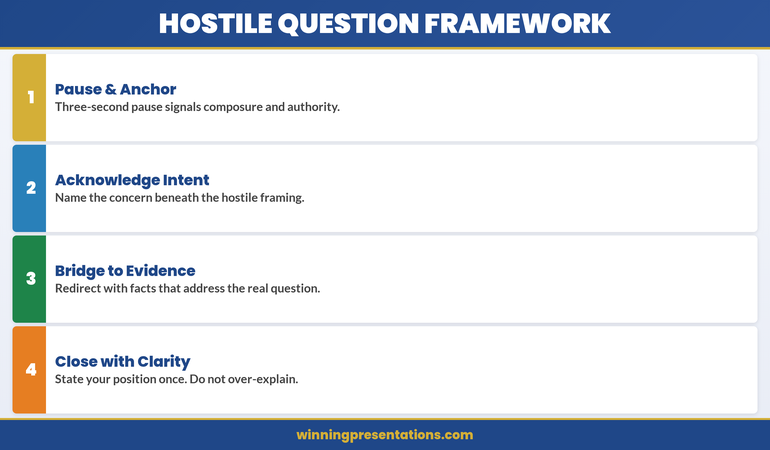
The Bridge That Saved My Presentation When a Director Went Off-Script

Quick Answer

The acknowledge-bridge-deliver framework gives you a three-step structure to handle difficult, off-topic, or hostile questions without losing your poise or message. Acknowledge the questioner’s point, bridge to what matters most, then deliver your key message. This technique lets you stay in control, redirect without appearing evasive, and turn tension into credibility.

Annika was presenting her company’s sustainability strategy to a sceptical board. Midway through, a director asked a loaded question about last year’s carbon offset failures—nothing to do with the current roadmap. She froze. Then she answered defensively, which spiralled into a 10-minute debate that buried her message. Later, she told her coach: “I lost them the moment I got defensive.” She was right. What Annika didn’t know was that a single framework—acknowledge-bridge-deliver—would have let her validate the director’s concern, pivot to her new strategy, and regain control in 30 seconds. Three months later, at her next board presentation, she used it. Same tough director. Same loaded question. Different outcome: “That’s a fair point. What matters now is our new approach, which addresses exactly that weakness.” The room leaned in. She didn’t lose a single second of momentum.

Difficult questions test your presence.

The acknowledge-bridge-deliver framework helps you stay in control. The Executive Q&A Handling System includes frameworks and response templates for every question type. Explore the System →

What Is a Bridging Technique?

A bridging technique is a structured way to acknowledge a difficult or off-topic question, validate the person asking it, and then redirect the conversation back to your key message—without appearing evasive or dismissive. Think of it as a verbal pivot: you don’t ignore the question, and you don’t get pulled into a tangent. Instead, you take the questioner with you.

Bridging is especially valuable in executive contexts where you’re presenting to boards, investors, or sceptical stakeholders. These audiences are trained to probe. They ask hard questions. If you dodge, they lose trust. If you get sucked into a debate on something peripheral, your core message evaporates. A bridging technique lets you do neither.

The beauty of bridging is that it works on three levels. First, it buys you time to think—you’re not stammering or going silent. Second, it validates the questioner, which defuses tension and keeps the room on your side. Third, it keeps your message intact. That’s the real win.


Bridge Technique infographic showing four stacked response steps: Acknowledge, Bridge, Deliver, and Check — each with a concise tactical description for handling difficult Q&A

The Acknowledge-Bridge-Deliver Framework

This three-step structure is the backbone of every effective bridging technique response. Learn it, practise it, and you’ll find it works regardless of how hostile or off-topic the question is.

Step 1: Acknowledge

Your first job is to make the questioner feel heard. Don’t argue. Don’t correct them. Simply acknowledge what they’ve said or the concern behind it. This step is short—one or two sentences maximum. Examples: “That’s a fair question.” “I understand your concern there.” “You’ve touched on something important.” The goal is to signal respect and buy yourself thinking time.

Step 2: Bridge

Now you pivot. This is the crucial middle step. You use a bridging phrase—a connector that shifts the conversation toward your message without being obvious about it. Examples: “What’s more important right now is…” “The broader context here is…” “What we’re focused on today is…” A good bridge acknowledges the question’s existence whilst making it clear you’re moving to what matters most. It’s not dismissive; it’s directional.

Step 3: Deliver

Finish by delivering your key message or the most relevant point to your overall narrative. This is where you regain control. You’re not answering the original question directly; you’re providing context that matters more. Keep it concise and confident. Then move on—don’t circle back to the difficult question unless the room presses further.

Master Q&A Handling Frameworks

The Executive Q&A Handling System covers everything you need:

  • The acknowledge-bridge-deliver framework for difficult questions
  • Seven question categories and how to spot them in real time
  • Ready-made response structures and bridge statements you can use immediately
  • How to handle hostile, off-topic, and ambiguous questions without losing your message
  • Techniques to buy thinking time and stay calm under pressure
  • Scripts and examples for every scenario—board meetings, investor pitches, public forums

Get the Executive Q&A Handling System → £39

Real-World Examples

Understanding the framework in theory is one thing. Seeing it in action is another. Here are three scenarios you’re likely to encounter, and how bridging technique questions turns potential disasters into moments of credibility.

Scenario 1: The Gotcha Question

The Question: “Your competitor just launched a product that does exactly what you’re proposing. Why should we invest in yours?”

Without Bridging (Mistake): “Well, their product is actually quite different…” [You spend five minutes defending against a competitor narrative, and your own value prop gets buried.]

With Bridging: “That’s a smart competitive question. [Acknowledge] The difference is in execution and integration—which is what we’re focused on today. [Bridge] We’ve designed this specifically to work within your existing infrastructure, cutting implementation time by 40% and reducing staff retraining. [Deliver]”

Scenario 2: The Hostile Question

The Question: “Frankly, your track record on this doesn’t inspire confidence. What makes you think this time will be different?”

Without Bridging (Mistake): “That’s not fair—our last project was actually…” [You get defensive. The questioner digs in. The room watches the sparring match.]

With Bridging: “I hear you. [Acknowledge] That’s exactly why we’ve restructured our approach. [Bridge] What we’re presenting today is built on lessons from previous work, and we’ve brought in external oversight to ensure accountability. [Deliver]”

Scenario 3: The Off-Topic Question

The Question: “What’s your stance on offshore outsourcing?”

Without Bridging (Mistake): You either spend 10 minutes on a tangent or brush the question off, making the questioner feel dismissed.

With Bridging: “That’s a broader policy question, and a fair one. [Acknowledge] For today’s discussion, what matters is how we deliver results locally, which is the cornerstone of this proposal. [Bridge] We’re committed to building a team here, investing in your local talent, and delivering within your community. [Deliver]”

Common Mistakes When Bridging

Bridging is simple, but it’s easy to get wrong. Here are the pitfalls to avoid.

Mistake 1: Acknowledging Without Sincerity

If your acknowledgement sounds rushed or insincere—”Sure, sure, that’s fine”—you’ve lost credibility before you bridge. Slow down. Take one second. Let your acknowledgement land. The room will feel the difference between a genuine “That’s a fair point” and a dismissive brush-off.

Mistake 2: Bridging Too Hard

If your bridge phrase is obviously a dodge—”That’s interesting, but what I really want to talk about is…”—you look evasive. A good bridge is natural and subtle. It should feel like a conversational pivot, not a redirect sign.

Mistake 3: Delivering the Wrong Message

After bridging, you need to deliver something relevant to the broader narrative. If you bridge away from a difficult question only to say something completely unrelated, you’ve wasted the technique. Your delivery should feel like a natural extension of your main point, not a random pivot.


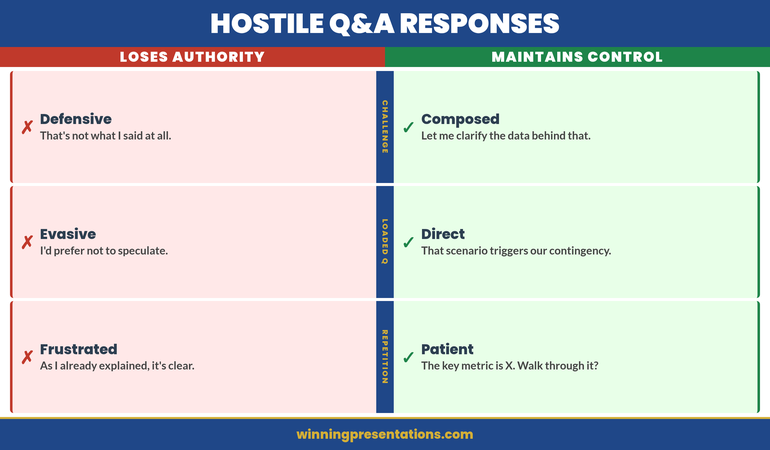
Bridging Responses split comparison infographic contrasting authority-losing responses (ignoring, getting defensive, going deep into detail) against on-message responses (acknowledging, reframing, elevating) across three question types

Not Just Framework—Confidence Under Pressure

The acknowledge-bridge-deliver framework works because it gives your brain a structure to follow when tension is high. You’re not improvising. You’re executing a proven method. That’s where confidence comes from. The Executive Q&A Handling System includes workbooks, scenarios, and quick-reference cards you can use before your next presentation.

Learn More → £39

Combining Bridging With Other Q&A Techniques

Bridging works best when combined with other Q&A frameworks. If you want to deepen your Q&A toolkit, consider pairing acknowledge-bridge-deliver with these complementary approaches:

Evidence-First Answers: After you bridge and deliver your message, backing it up with data or evidence makes it unshakeable. Learn more in our guide to the evidence-first answer structure.

Preemptive Framing: If you know difficult questions are coming, address them before Q&A even starts. This reduces the sting and makes bridging unnecessary for those particular questions. See our full article on preemptive Q&A strategies.

Frequently Asked Questions

What if the questioner pushes back after I bridge?

Stay calm and use the bridge again if needed, but this time acknowledge the persistence. Example: “I understand you’re keen to dig into that point. Here’s what’s most relevant to today’s decision…” You’re not avoiding; you’re refocusing. If they push a third time, offer to discuss offline. This signals confidence and control.

Can bridging come across as evasive?

Only if you acknowledge without sincerity, bridge too obviously, or deliver a message that feels unrelated. A genuine acknowledgement plus a natural bridge plus a relevant delivery feels like a confident executive who knows what matters. That’s not evasive; that’s leadership.

Should I write out my bridge statements in advance?

Yes, especially for predictable questions. Write three or four bridging phrases and practise them until they feel natural. When you’re in the moment, muscle memory takes over. You won’t be scrambling; you’ll be executing.

Stay Sharp on Q&A and Executive Presence

Join The Winning Edge newsletter for practical frameworks, real scenarios, and strategies for handling pressure in the boardroom.

Subscribe to The Winning Edge

Related Reading

Q&A confidence extends beyond the message—it includes your presence on camera. If you’re presenting virtually, see our article on managing presentation anxiety and camera presence for tips on staying calm in remote scenarios.

The acknowledge-bridge-deliver framework works because it respects both the questioner and your message. You’re not dodging. You’re redirecting with grace and authority. Next time a difficult question lands, you won’t freeze or get defensive. You’ll acknowledge, bridge, and deliver—and the room will lean in.

About the Author

Mary Beth Hazeldine is Owner & Managing Director of Winning Presentations. With 24 years of corporate banking experience at JPMorgan Chase, PwC, Royal Bank of Scotland, and Commerzbank, she advises executives across financial services, healthcare, technology, and government on structuring presentations for high-stakes funding rounds and approvals.

Book a discovery call | View services

27 Mar 2026
Professional laptop setup showing a virtual meeting screen with warm lighting and a calm workspace environment

I Was Fine in Boardrooms. Then Zoom Destroyed My Confidence.

Quick answer: Camera-based presenting triggers distinct anxiety because you can see yourself, lose real-time audience feedback, and face screen fatigue. Unlike in-person presenting—where you read the room—virtual meetings isolate you with your own image and a grid of faces you can’t fully process. The self-view effect can intensify anxiety. Three immediate fixes: disable self-view, position your camera at eye level, and use the “pause and breathe” technique between responses.

The Scene: Petra had delivered presentations to boardrooms across Europe with barely a tremor. But when her company moved to hybrid meetings, something shifted. During her first Zoom call with the leadership team, she felt her chest tighten the moment her camera went live. She could see herself in the small box—the tilt of her head, the occasional blink—and it was distracting her completely. The faces on screen seemed distant and unreadable. No nods, no engaged eye contact. Just flat tiles and occasional frozen frames. By the time she finished her slides, her shoulders were in her ears and she’d forgotten half of what she planned to say.

“It’s completely different from in-person,” she told her colleague afterwards. “I know how to work a room. But this? I can’t read anyone. And I’m stuck watching myself.”

Petra’s experience isn’t unusual. Virtual presentation anxiety is its own beast—distinct from stage fright or boardroom nerves. And understanding why is the first step to managing it.

Managing camera anxiety takes more than tips.

The Conquer Speaking Fear programme teaches nervous system techniques specifically designed for remote anxiety.

Explore Conquer Speaking Fear →

Why Self-View Breaks Your Confidence

The moment your camera goes live, you face a fundamental difference from in-person presenting: you can see yourself. In a boardroom, you never watch yourself present. You read the audience. You track energy. You adjust. But on Zoom? There you are, in a small box, present for your own performance.

This isn’t vanity. It’s neuroscience. Research shows that seeing your own face on screen can increase self-focused attention and affect stress responses. You’re essentially creating a second “observer” in your own mind, constantly monitoring and judging your appearance, your expressions, even the slight delay in video transmission.

That split attention—between what you’re saying and how you look saying it—hijacks working memory. You have fewer cognitive resources left for the actual content. Your delivery becomes smaller, more cautious. Your voice may tighten. And paradoxically, the more aware you become of this, the more anxious you feel.

Professional presenters often disable self-view entirely during live streams for exactly this reason. The moment they stop watching themselves, delivery improves dramatically.


Camera Anxiety Cycle infographic showing four stages in a continuous loop: See Yourself, Monitor Expression, Lose Flow, and Anxiety Builds — with a central Self-View hub indicating where to break the cycle

Loss of Real Audience Feedback

In a physical room, you read microexpressions. A furrowed brow tells you someone’s confused. A smile and a nod say you’ve landed a point. Leaning forward signals engagement. These cues are instantaneous and unconscious—your nervous system processes them automatically, and your brain adjusts your delivery in real time.

On a video call, that feedback loop breaks. Faces are small. The bandwidth of Zoom video is compressed, which flattens micro-expressions. Internet latency creates a slight delay, so even if someone nods, you might not see it immediately. And if someone’s camera is off, or they’re multitasking off-screen, you have absolutely no signal of whether your message is landing.

This uncertainty creates what neuroscientists call “communicative stress.” Your brain is wired to seek evidence that you’re being understood. Without it, anxiety builds. You may find yourself overexplaining, speaking faster, or becoming overly formal—all compensation behaviours that make you sound less confident.

Some presenters experience this as a unique form of isolation: you’re performing into a void. You can’t modulate your message based on real feedback. That loss of control triggers the ancient anxiety response—your nervous system interprets silence or ambiguous facial expressions as potential rejection or disapproval.

The Real Issue: Your Nervous System Isn’t Built for This

Camera anxiety isn’t a character flaw or a confidence issue. It’s your nervous system responding to genuine communicative ambiguity. When you’re unsure if you’re being understood, or aware that you’re being watched through a screen, your body triggers a mild threat response. Your sympathetic nervous system activates. Heart rate climbs. Breathing becomes shallow.

The Conquer Speaking Fear programme gives you three frameworks to reverse this:

  • Nervous System Reset Technique: A 90-second body-based practice that shifts your physiology from threat mode to task focus—proven to lower cortisol and stabilise heart rate before you go live.
  • Anxiety Reframe Method: Transform the physical sensations of anxiety (racing heart, butterflies) into signals of readiness, not danger. This rewires your stress response in real time.
  • Audience-Centred Grounding: A mental technique that shifts your focus from how you look to the value you’re delivering—dissolving self-consciousness and rebuilding confidence.

These aren’t willpower strategies. They’re neuroscience-backed tools that work with your biology, not against it.

Get Conquer Speaking Fear → £39

Screen Fatigue and Cognitive Overload

Virtual presenting demands more cognitive effort than in-person delivering. You’re processing multiple information streams simultaneously: your own image, the faces of attendees, your slides or notes, chat messages, and the slight technical delay that creates a cognitive friction with your speech.

This is called “Zoom fatigue” in the research literature, and it’s real. Studies from Microsoft and the University of Arizona found that video calls cause higher cognitive load than equivalent in-person meetings. Your brain has to work harder to extract meaning from compressed video, to compensate for the loss of body language, and to manage the slight asynchronisation between audio and video.

That effort is exhausting. After a 60-minute video presentation, many people report feeling drained in a way that a 90-minute in-person presentation doesn’t trigger. And when you’re cognitively fatigued, anxiety often spikes. Your emotional regulation becomes compromised. That wobble in your voice, the stumble over a word, the moment you lose your thread—these happen more often when you’re running on depleted resources.

Some presenters also experience what’s called “glass face syndrome”—the feeling that the camera is capturing every minute of emotion, every flicker of uncertainty. Combined with cognitive fatigue, this creates a perfect storm: you’re exhausted, watching yourself, and convinced that every slip is visible to everyone.

Practical Fixes You Can Use Today

1. Disable Self-View (Immediately)

This matters. In Zoom, click your video thumbnail and select “Hide Self View.” In Microsoft Teams, right-click your video and choose “Turn off my video preview.” In Google Meet, click your video icon and select “Settings” → “Hide self view.”

Removing self-view can reduce anxiety markers and improve natural delivery. You’re no longer operating with a self-consciousness observer in the room. Try it for one meeting and notice the difference in how you feel.

2. Position Your Camera at Eye Level

If your camera is below your eye line, you’re presenting looking down, which unconsciously conveys submission or low confidence. If it’s above, you’re looking up, which can read as uncertain or seeking approval. A camera positioned at your eye level creates psychological equilibrium and more confident body language.

Use a laptop stand, a stack of books, or a monitor arm. This single adjustment will improve how you feel and how you’re perceived.

3. Use the “Pause and Breathe” Technique

During your presentation, pause after each major point for 2-3 seconds. Use those seconds to take a deliberate breath through your nose. This serves multiple functions: it resets your nervous system, it gives your audience time to absorb your message (compensating for the feedback loss), and it creates a natural rhythm that reduces the sense of needing to fill silence.

The pause also breaks the illusion that you’re “on camera performing.” It grounds you in the present moment, which dissolves much of the self-consciousness.

4. Create a “Green Room” Ritual

Fifteen minutes before going live, step away from your desk. Do something physical: a short walk, five minutes of stretching, or even standing and shaking out your shoulders. This activates your parasympathetic nervous system (the “rest and digest” state) and prevents you from sitting in anxiety-rumination mode until the meeting starts.

If you’re presenting from your office, even a 60-second walk to the kitchen and back will interrupt the anxiety loop.

Feeling like you need more than tactics?

The nervous system techniques in Conquer Speaking Fear address the physiology of camera anxiety. You’ll learn structured methods to manage the physical sensations of anxiety and present with more ease, regardless of your delivery medium.

Learn more about Conquer Speaking Fear

Calm Your Nervous System Before Going Live

The 2-5 minutes immediately before your presentation are critical. Your nervous system is hypervigilant, scanning for threat. Here’s what works:

The 4-7-8 Breathing Pattern: Breathe in for 4 counts, hold for 7, exhale for 8. Do this three times. This is a practical nervous system technique that can help reduce heart rate and activate your parasympathetic system. Many find it helpful before presenting.

Grounding: Feel your feet on the floor. Notice the texture of your chair. Name five things you can see in your room. This pulls your attention out of anxious anticipation and into the present moment, where you’re actually safe.

A Simple Affirmation (Not Toxic Positivity): Rather than “I’m going to be amazing,” try “I’ve prepared for this, and I know my material.” This is grounded in fact and activates your competence nervous system rather than your performance anxiety system.

Combine these three elements in a 5-minute pre-presentation ritual, and you’ll notice your anxiety shifts from anticipatory dread to focused readiness.

From Anxiety to Presence

Virtual presenting anxiety is distinct from in-person stage fright because it activates different neural pathways. The self-view effect, the loss of real-time feedback, the cognitive load—these are specific problems with specific solutions.

But there’s a deeper shift that happens when you understand what’s actually triggering your anxiety. You move from “Something is wrong with me” to “This is a communication design problem, and it has solutions.” That’s where real confidence begins.

The executives and entrepreneurs we work with at Winning Presentations don’t become anxiety-free overnight. Instead, they develop the nervous system literacy to recognise when anxiety is rising, to intervene quickly, and to use that energy as fuel rather than fighting it. That’s what changes presentations from white-knuckle performances into genuine communication.

Your camera isn’t your enemy. Your nervous system isn’t broken. You just need to understand how this specific medium works and adjust accordingly.


Virtual Presenting split comparison infographic contrasting anxiety-increasing behaviours (watching yourself, looking at faces, staying still) against anxiety-reducing alternatives (hiding self-view, looking at lens, using controlled gesture)

Frequently Asked Questions

Is camera anxiety the same as regular stage fright?

No. Stage fright is triggered by physical presence in a room and the immediate risk of judgment. Camera anxiety is triggered by self-visibility, loss of audience feedback, and cognitive overload from the digital medium. The techniques that work for one don’t always transfer to the other. In-person presenting relies on reading the room and adjusting energy; virtual presenting requires managing self-consciousness and creating connection through a screen. If you’re comfortable in boardrooms but anxious on video calls, that’s a medium-specific issue, not a confidence issue.

If I disable self-view, won’t I stop caring about how I look?

The opposite. When you remove the self-monitoring, you typically become more natural and more present. You stop performing and start communicating. Your posture improves, your voice becomes steadier, and you actually deliver better content. The self-view doesn’t improve your appearance—it just increases anxiety and degrades your delivery. Most professional presenters and newsreaders disable self-view specifically to present more confidently.

How long before these techniques actually work?

The breathing and grounding techniques create an immediate shift—you should notice a difference in heart rate and focus within 5 minutes. The reframing tools and nervous system reset typically show benefits within 3-5 presentations as your body learns that the “threat” scenario isn’t actually dangerous. The deeper presence shift, where you stop thinking about anxiety altogether, often takes 2-3 weeks of consistent practice.

Want proven strategies delivered to your inbox?

Join The Winning Edge newsletter for executive-level presentation techniques, anxiety management frameworks, and the occasional uncomfortable truth about what actually builds speaking confidence.

Subscribe to The Winning Edge

Or grab our free Executive Presentation Checklist to ensure every detail is covered before you present.

Related: If camera anxiety often emerges during difficult questions, read how to use bridging techniques to reset your nervous system mid-conversation.

Camera anxiety isn’t a weakness. It’s your nervous system responding accurately to a genuinely different communicative context. The fix isn’t willpower or more practice delivering to a webcam—it’s understanding the mechanism and using tools designed specifically for this medium.

About the Author

Mary Beth Hazeldine is Owner & Managing Director of Winning Presentations. With 24 years of corporate banking experience at JPMorgan Chase, PwC, Royal Bank of Scotland, and Commerzbank, she advises executives across financial services, healthcare, technology, and government on structuring presentations for high-stakes funding rounds and approvals.

Book a discovery call | View services

27 Mar 2026
New executive walking into a corporate boardroom for their first board presentation with confident posture

My First Board Presentation Nearly Ended My Career. Here’s What I Did Wrong.

Your first board presentation sets the tone for your executive tenure. Boards expect clarity, confidence and strategic thinking—not perfection. Structure your introduction around your mandate, demonstrate you understand board dynamics, and anchor every point to business value. Get this right, and you’ve gained crucial credibility; stumble, and you’ll spend months rebuilding trust.

The story of Chiara’s board debut

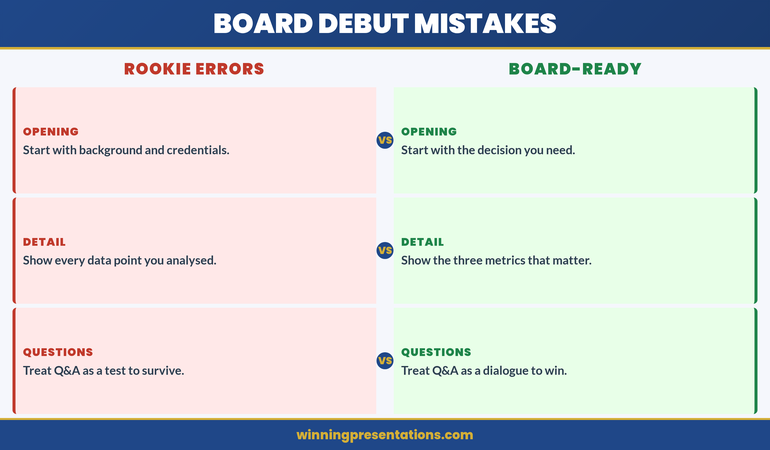
Chiara had been promoted to Chief Commercial Officer after eight years as Regional Director. She knew her market. She knew the numbers. She’d thrived in her previous role. But stepping into the boardroom for her first presentation, she made a decision that nearly cost her the role: she presented as if the board were her team.

She dived into operational detail. She answered technical questions with granular process explanations. She treated challenge questions as attacks. By minute fifteen, she’d lost the chair’s attention. By minute twenty-five, a non-executive director had visibly withdrawn. The CFO was checking his notes, clearly unimpressed.

Three weeks later, Chiara received feedback: “Solid operator, but we’re not sure you grasp the strategic horizon.” She’d made six critical errors in that single thirty-minute presentation. Once she understood what boards actually needed—clarity over detail, business impact over process, and confidence over perfection—her next presentation landed. This article details exactly what she learned, and what you need to know before your board debut.

Your first board presentation matters.

The Executive Slide System includes board-ready frameworks and positioning templates designed to help new executives make a strong impression. Explore the System →

What Boards Actually Expect

Board members are not your team. They are not your peers. They are a specific audience with distinct expectations, and your first presentation reveals whether you understand that distinction.

Boards expect three things above all else:

Clarity first. Board members consume information rapidly and demand precision. They have limited time and multiple competing priorities. Your message must be distilled to its essence. If you cannot explain your mandate, your strategy or your risk profile in three sentences, you are not ready for the board.

Business value anchored to reality. Board members will ask themselves: “What does this executive’s success mean for shareholder value, risk mitigation or strategic position?” Every statement you make must connect to one of these. General statements, feel-good language and process updates bore them. They want to understand impact.

Confidence without arrogance. Boards respect executives who own their decisions and acknowledge complexity. They distrust those who claim certainty where none exists, or who become defensive under scrutiny. Your first presentation is a trust-building exercise. Boards are assessing whether you can be trusted with significant decision-making authority.

Beneath these sit a fourth, often-unstated expectation: that you understand board culture. You’ve entered a different ecosystem. The dynamics are different. The conversation speed is different. The tolerance for uncertainty is different. New executives who fail often fail because they treat the board like an extended management team, rather than recognising they are now operating in a distinct governance context.

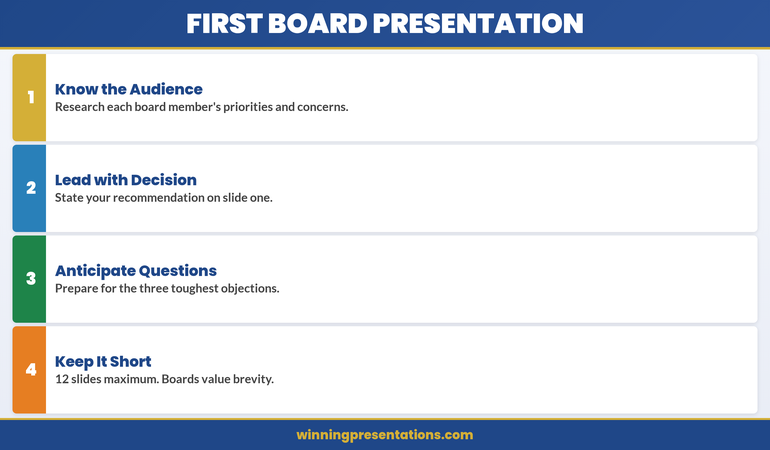
First Board Presentation infographic showing four stacked framework cards: Know the Audience, Lead with Decision, Anticipate Questions, and Keep It Short — each with practical advice for new board presenters

How to Structure Your Introduction

Your introduction is not a biography. It is a 90-second positioning statement that establishes your credibility, your mandate and your early priorities. Structure it in four layers:

Layer 1: The mandate (20 seconds). Start by explicitly stating what the board has asked you to do. “I’ve been appointed to transform our customer acquisition cost structure whilst maintaining market share growth.” This immediately anchors you to a business outcome. It demonstrates you understand your accountability. Board members will recognise whether your mandate is clear—and whether you recognise it.

Layer 2: Your relevant experience (30 seconds). Boards care about pattern-matching. They want to know: has this executive succeeded in similar situations? Compress your career into the two or three experiences that directly support your ability to deliver your mandate. “In my previous role at [Company], I led a similar turnaround across three regions, reducing acquisition costs by 28% whilst growing net revenue by 14%.” Short. Specific. Measurable.

Layer 3: Your early observations (25 seconds). This is your credibility builder. After your first weeks, what have you noticed? What’s the landscape? “I’ve observed that our current acquisition strategy is contact-heavy but conversion-weak. Our data infrastructure is solid, but we’re not leveraging it strategically.” You’re signalling that you’ve done your homework and that you’re thinking strategically.

Layer 4: Your immediate priorities (15 seconds). Close with two to three concrete priorities for the next quarter. “My focus is threefold: map the current customer journey end-to-end, benchmark our position against three direct competitors, and propose a revised acquisition strategy by Q2.” Concrete. Time-bounded. Stakeholder-aware.

This structure takes 90 seconds. It establishes you as someone who understands their mandate, has relevant experience, has done their research, and is thinking strategically about outcomes. It is the opposite of self-focused introduction; it is board-focused positioning.

The Executive Slide System

Stop improvising. Start commanding.

  • Board-ready opening templates for new executives
  • Section structures that boards recognise
  • AI prompts to translate your strategy into board-level language
  • Positioning frameworks for major executive scenarios
  • Visual hierarchy guidelines that command board attention

Designed for new executives presenting to boards

Get the Executive Slide System → £39

Already know your mandate? Use our slide templates to structure your presentation in 2 hours →

Six Rookie Mistakes to Avoid

The following mistakes appear consistently in first presentations from executives who would otherwise succeed. Avoid them:

Mistake 1: Presenting to impress rather than to inform. You’re nervous. You want to prove your worth. So you load your slides with detail, demonstrate deep expertise, and answer every conceivable question. Boards interpret this as either insecurity or misaligned priorities. They don’t need to know you’re smart. They need to know you can deliver outcomes. Focus your presentation ruthlessly on what matters to governance and strategy.

Mistake 2: Defending your predecessor’s decisions. This is almost always a trap. New executives often feel obligated to explain why previous strategies were sound. Don’t. You’re the new steward. Your job is to move forward, not to defend the past. If you’re changing strategy, say so clearly. If you’re continuing certain approaches, say so strategically. Never spend board time defending what’s already been decided.

Mistake 3: Overstating certainty about the future. Boards are sophisticated. They know business is uncertain. They respect executives who acknowledge what they don’t know and explain how they’ll navigate uncertainty. New executives often overcompensate by claiming confidence they don’t yet have. “I’m confident we’ll achieve 20% growth” lands worse than “Our baseline scenario models 15% growth; I’m working to identify levers that could take us to 18-20%, and I’ll report back in eight weeks.”

Mistake 4: Using too much jargon. You’ve just entered a new context with new terminology. But board members speak multiple internal languages across your organisation. Don’t deploy specialist jargon to prove you belong. Use plain, precise language. If a term is essential, define it once and move on.

Mistake 5: Reading your slides. This signals either that you don’t know your material or that you don’t respect the board’s time. Know your slides. Speak to them. Make eye contact. Let the slides support your narrative, not replace it.

Mistake 6: Treating questions as attacks. Board members ask sharp questions. That’s their role. They’re not attacking you; they’re doing governance. When challenged, pause. Acknowledge the question. Answer directly. If you don’t know, say so and commit to follow-up. Never become defensive or dismissive. This is where new executives often lose credibility most rapidly.

Need a faster route to board credibility?

The Executive Slide System includes board presentation templates, positioning frameworks and quality-control checklists designed for first presentations. £39. Instant access. →

Demonstrating Strategic Capability in Your First Board Presentation

Boards promote executives who think strategically. Your first presentation is an opportunity to demonstrate that you understand not just your remit, but the broader strategic context in which it sits.

Strategic thinking at board level means connecting three dots: your area of responsibility, the organisation’s overall strategy, and the risks or opportunities that sit at their intersection. Most new executives present only the first dot—their own domain. Strategic executives present all three.

Domain focus: Here’s what I own and what I’m delivering.

Strategic anchor: Here’s how my outcomes connect to our overall strategic direction.

Risk/opportunity insight: Here’s what I’m seeing that the board should know.

Example: “As Chief Commercial Officer, I’m accountable for customer acquisition efficiency and retention. This directly supports our strategy of profitable growth over market-share-grab. In my first month, I’ve identified a material opportunity: our sales team is still working to sales-qualified-lead stage, but our product team has shifted to freemium acquisition. This misalignment is costing us £400K monthly in wasted pipeline. I’m recommending we realign sales motion to freemium conversion within Q2, which should recover £300K annually whilst improving overall customer quality.”

Notice what this communicates: deep operational knowledge (you know the sales process), strategic alignment (you’re connecting to the overall strategy), problem-finding capability (you’ve identified something the board should care about), and decisiveness (you have a recommendation, not a question). This is what strategic executives sound like.

Board Debut Mistakes contrast panels infographic comparing rookie errors (starting with background, showing every data point, treating Q&A as a test) against board-ready approaches (starting with the decision, showing three key metrics, treating Q&A as a dialogue)

Reading and Navigating Board Dynamics

Boards have culture, alliances, tensions and unwritten rules. Your first presentation happens in the context of existing dynamics. Understanding these dynamics is part of your job.

Before your presentation: Ask your board secretary who speaks most often, who challenges most directly, who has seniority concerns, who tends to be supportive. Ask your chair or chief executive what landmines exist, what sensitivities matter, and which board members care most about your area. This isn’t manipulation; it’s preparation. Politicians do this before major speeches. Executives should too.

During your presentation: Watch the room. Who is engaged? Who has checked out? When do you lose someone—is it when you get technical, or when you speak about change? Board members often communicate more through body language than words. If the chair is nodding, you’re on track. If a non-executive director is shaking their head subtly, you may have missed a concern.

When fielding questions: Answer the person who asked. Make eye contact. Don’t deflect to the chair. If someone asks a challenging question, resist the urge to over-answer. Say what you know. Acknowledge what you don’t. Commit to follow-up if necessary. Never correct a board member or signal they’ve misunderstood. Instead: “That’s a great point. Here’s how I’m thinking about it…” Then offer your perspective, not a correction.

After your presentation: Don’t disappear. Remain present. Engage in informal conversations if the chair allows it. Board members often ask the sharpest questions in side conversations after formal presentations. These are not attacks; these are opportunities for relationship-building.

Board dynamics take months to fully understand. Your first presentation is not the time to navigate them expertly. But it is the time to signal that you’re aware they exist and that you respect the context you’ve entered.

The 48-Hour Preparation Checklist

You cannot control everything about your first board presentation. But you can control your preparation. This 48-hour checklist covers the essentials:

Timing (48 hours before):

  • Confirm the exact time, location and format (in-person, hybrid, virtual).
  • Identify the board members attending, their backgrounds and their typical questions.
  • Ask your chair or CEO what outcome they’re looking for from your presentation.
  • Verify technical setup if presenting virtually (camera, audio, screen sharing).

Content (36 hours before):

  • Finalise your slides. No changes after this point.
  • Review for jargon. Strip out anything that needs explanation. If you must use a term, define it once.
  • Check every number. Every. Single. One. Boards remember inaccuracy.
  • Ensure every slide has a clear headline. One idea per slide. No slides that exist just to look impressive.

Practice (24 hours before):

  • Deliver your full presentation out loud. Alone first, then to a trusted colleague who will ask board-level questions.
  • Time yourself. You must deliver in the allotted time, with buffer for questions.
  • Prepare opening remarks. Know your first 90 seconds cold. This sets the tone for everything that follows.
  • Prepare for the most likely three questions. Have answers ready. Not memorised scripts—ready thinking.

Logistics (12 hours before):

  • Test all technology if presenting virtually. Do a full run-through of screen sharing, audio and video.
  • Choose what to wear. Something professional that reflects your role and the board’s culture. Nothing distracting.
  • Get sleep. Do not work on your presentation the night before. Your brain needs rest more than your slides need tweaking.

Final hour:

  • Arrive early (in-person) or log in 10 minutes early (virtual).
  • Greet board members as they arrive. Small talk counts. It signals confidence.
  • Take a breath. You’ve prepared. You know your material. You belong in this room.

Frequently Asked Questions

What should I do if a board member challenges me aggressively?

Breathe. Remember that sharp challenge is part of board culture—it’s not personal. Listen fully to the question. Pause before answering (silence is better than filler). Answer directly. If you don’t know, say so and commit to follow-up. Never match their tone or become defensive. Executives who can stay composed under challenge gain respect. This is your opportunity to demonstrate that quality.

How much detail should I include in my first presentation?

Include enough detail to answer the question “How will you deliver that outcome?” but no more. Boards don’t need to understand your process; they need to understand your thinking. If a board member wants detail, they will ask. If you’re unsure, err toward less. You can always elaborate. You cannot unsay what you’ve said.

Should I reference my predecessor in my first presentation?

Minimally. Acknowledge continuity where it matters (“We’ll build on the strong customer base [predecessor] established”), but focus on your mandate and your thinking. Don’t spend time defending their decisions or criticising their approach. You’re the new steward. Make that clear through your focus and energy, not through explicit comparison.

Stay ahead of presentation challenges.

Each week, The Winning Edge delivers executive presentation strategies, framework examples and case studies from executives like you. Join 2,000+ subscribers →

Prefer a checklist? Download the Executive Presentation Checklist (free). Grab it here →

Related reading: How to Present a Major Capital Expenditure to Your Board

Also explore: Presenting a Lateral Move to StakeholdersBuilding Executive Presence in Your PresentationRestructuring Communications that Maintain Team Trust

Your first board presentation matters. It establishes your credibility, signals your understanding of governance, and shapes how board members will interpret your future contributions. Go in prepared. Go in clear. Go in strategic.

If you’d like a faster route to board-ready presentations, the Executive Slide System includes templates, positioning frameworks and quality-control checklists. Hundreds of executives have used it to move from uncertain to commanding. £39. Instant access.

Mary Beth Hazeldine is Owner & Managing Director of Winning Presentations. With 24 years of corporate banking experience at JPMorgan Chase, PwC, Royal Bank of Scotland, and Commerzbank, she advises executives across financial services, healthcare, technology, and government on structuring presentations for high-stakes funding rounds and approvals.

27 Mar 2026
Executive presenting a capital expenditure request with financial charts visible on a boardroom screen

The CapEx Request That Got Approved Before the Meeting Ended

Finance committees reject CapEx requests that lack clear financial justification. The difference between approval and rejection is rarely the investment itself—it’s how you structure the business case and frame return on investment. A capital expenditure presentation must answer three questions immediately: Why now? How much? What’s the measurable return?

Vikram, Operations Director at a £85m logistics firm, had requested £2.3m for warehouse automation. Finance rejected it in fifteen minutes. The CFO said “weak business case.” Six months later, Vikram resubmitted with a restructured presentation: operational efficiency gains mapped to quarterly profit targets, risk mitigation quantified, ROI shown against three scenarios (conservative, expected, optimistic). This time, approval came in the first meeting. The difference wasn’t the investment. It was how he framed the capital expenditure presentation to speak to what the committee actually wanted to hear: risk-adjusted returns and strategic alignment.

Structure matters. Clarity builds confidence.

The Executive Slide System includes frameworks and templates designed for capital expenditure presentations. Explore the System →

Structure Your Business Case From First Slide

A capital expenditure presentation needs architecture, not a narrative dump. Finance committees evaluate requests using five core dimensions: strategic fit, financial return, timeline, risk, and alternatives. Every slide must address at least one. Open with an executive summary that names the investment, its purpose, and the expected return in a single sentence. Then move to the four-part structure:

Context. What’s driving the need? Market pressure, competitor action, operational bottleneck, or compliance requirement? Show the cost of not investing—cost of delay matters as much as investment size.

Solution. What will you acquire or build? Be specific: don’t say “technology platform.” Name the system, its core capability, and why this particular solution. Include implementation partners if relevant.

Financial Case. Three-year projection showing capital cost, implementation costs, operating cost changes, and revenue or savings impact. Include working capital requirements if material.

Risk and Mitigation. What could go wrong? Scope creep, delivery delays, adoption resistance, technology obsolescence. Show how you’ll manage each one. This is where governance and oversight shine.

CapEx Presentation Essentials dashboard infographic showing four metric cards: ROI (Lead With Return), 3 Yr (Payback Window), Risk (Cost of Inaction), and 1 Pg (Executive Summary) — each with concise guidance for structuring the business case

Executive Slide System

Jump past DIY slide building. The Executive Slide System includes:

  • ✓ Slide templates for finance requests and capital justifications
  • ✓ AI prompt cards for ROI narratives and financial scenarios
  • ✓ Framework guides for business case structure and risk communication
  • ✓ Appendix templates for assumptions and sensitivity analysis
  • ✓ Colour schemes and fonts pre-aligned to corporate governance standards

Get the Executive Slide System → £39

Designed for capital expenditure presentations and financial justifications

ROI Framing That Persuades Finance Committees

The phrase “return on investment” means nothing without context. A 15% ROI sounds weak if it’s compared to equity markets (historically 10%+ annually). But if the alternative is outsourcing at 8% cost of revenue, it’s compelling. Frame your capital expenditure presentation’s ROI against the actual comparator the committee uses internally: cost of capital, hurdle rate, or competitor benchmarks.

Use three scenarios: conservative (downside case, lower adoption or delayed benefits), expected (realistic case with minor headwinds), and optimistic (everything lands on schedule). Show payback period for each. Most CFOs want 18–36 months; if yours is longer, lead with the strategic rationale, not the ROI.

Separate cash flow from profit impact. Automation might improve EBITDA but consume cash in year two. Working capital swings matter. Show both. If your business is capital-constrained, leading with cash payback beats EBITDA gains.

Quantify non-financial benefits only if they translate to numbers eventually. “Improved customer satisfaction” without a link to retention or pricing power is noise. But “reduced churn by 2% → £1.4m incremental revenue” is material. Stay precise. Executive teams make £50m decisions on £200k annual benefit assumptions; rigour builds confidence.

Financial Justification Framework: What Committees Actually Want

Finance committees receive dozens of CapEx requests annually. Yours competes not just on absolute return, but on clarity and governance maturity. Present your justification in four layers:

Strategic layer: How does this capital deployment advance the published strategy? Name the strategic pillar explicitly. If your strategy says “operational excellence” and this is a supply chain investment, lead with that link. Ambiguous connections trigger scepticism.

Financial layer: What’s the direct return? Show calculation assumptions explicitly. CFOs will challenge your gross margin assumptions, implementation timelines, and adoption curves. Write them down. Transparency here prevents later accusations of “sandbagging” or hiding risks.

Risk layer: What’s the downside? A £3m investment with a 2% delivery-delay risk isn’t dangerous; a £50m bet with single-vendor lock-in is. Quantify risks you can, qualify risks you cannot. Show how governance (steering committees, go/no-go gates) will manage slippage.

Governance layer: Who’s accountable? Name the project sponsor, the finance owner, the steering committee chair. Define success metrics before you start spending. Show how monthly reviews will track actuals versus budget and benefits versus plan. Committees approve investment and oversight together; weak governance sinks strong financials.

A related internal link worth reviewing: if you’re presenting CapEx alongside compliance requirements, see our guide on compliance presentations to regulatory boards—the financial justification format translates directly.

Slide templates save hours. Framework guides save meetings.

Pre-built financial justification slides, ROI scenario templates, and risk communication frameworks for capital expenditure requests. £39 → Start now

Handling Pushback on Large Capital Requests

Finance committees will challenge every material assumption. Expect it. Prepare for it. The best capital expenditure presentations include an objection appendix—slides that live in reserve, supporting your core claims with deeper data.

Objection: “Payback is too long.” If your project has a 42-month payback, don’t defend it as acceptable. Instead, decompose it. Show what payback looks like in year three versus year one. Show how phasing implementation reduces upfront cost and accelerates early returns. Offer a staged investment: “£1.2m in phase one, £1.8m in phase two (gate-gated on phase one results).” Staged approaches reduce perceived risk and buy time for outcomes to prove themselves.

Objection: “We could outsource instead.” Have the outsourcing financials ready. Show why build beats buy (or admit it doesn’t and reframe around control, IP, or capability). If outsourcing is genuinely cheaper, your capital request is dead—unless you layer in strategic or risk factors outsourcing can’t solve. Be honest. Committees respect rigour more than optimism.

Objection: “Adoption risk is real.” Show your change management plan. Name the sponsor who’ll champion adoption. Quantify training investment and timeline. Tie adoption to incentive structures where possible. Finance wants to see that you’ve thought through the human side, not just the technology.

Objection: “What if benefits don’t materialise?” Build in benefit verification gates. Show when you’ll measure actuals against plan. Commit to a post-implementation review at 6 months and 12 months. Show corrective actions if tracking is off. This transforms pushback into partnership—you and finance are jointly invested in outcomes, not just spend.

You’ll find similar dynamics when presenting risk appetite presentations to boards—the governance framework is identical.

If you’re building a capital request presentation from scratch, the Executive Slide System includes templates for all five core sections so you’re not starting blank.

Delivery Timeline and Impact Roadmap

The final element of a compelling capital expenditure presentation is a delivery roadmap that feels achievable. Don’t present an 18-month project with no interim milestones. Break it into quarters and show when key outputs (system live, first tranche of benefits realised, full adoption) hit the target.

Use a simple Gantt or staged diagram. Show dependencies clearly—if benefit realisation depends on vendor delivery or organisational change, make that visible. If you’re ahead of plan, say so. If you’ve absorbed early delays through schedule margin, say so. Committees want to see that you’re tracking, not gambling.

Attach a benefits tracking schedule to your presentation. Define what “success” looks like quantitatively in month 1, month 6, month 12, month 24. Name the person who owns measurement. Commit to monthly variance reporting in the first year. This transforms capital investment from a one-time decision into a managed programme. Governance rigour sells.

CapEx Approval Pathway roadmap infographic showing five milestones on a winding path: Build the Case, Pre-Sell Stakeholders, Present to Committee, Handle Pushback, and Secure Sign-Off

Frequently Asked Questions

How detailed should my financial model be in the presentation itself?

Show the summary (investment, payback, IRR, strategic fit) in slides. Build the detailed model (quarterly assumptions, sensitivity tables, build-versus-buy analysis) as appendices. Committee members may download the full pack before the meeting. Two-layer approach: headline numbers in the room, detailed justification on demand.

What if my CFO says the ROI isn’t strong enough?

This is valuable early feedback. Don’t defend weak ROI publicly; go back to the sponsoring business unit and ask if benefits assumptions are realistic or if the investment case should be rethought. Sometimes the answer is “reframe around strategic fit” rather than financial return. Other times it’s “this investment isn’t ready yet.” Better to learn that in a pre-meeting conversation than in the full committee room.

Should I present one scenario or three?

Three scenarios (conservative, expected, optimistic) show sophistication. But pick one as your “ask”—usually the expected case. Name it clearly. Show the others as upside and downside bounds. This prevents committees from anchoring to the optimistic case and then disappointing them when reality lands in the middle.

Stay ahead on executive communication.

Join The Winning Edge for weekly insights on presenting to boards, finance committees, and investor audiences. Practical frameworks. Real examples. No fluff.

Subscribe to The Winning Edge

Free resource: Download the Executive Presentation Checklist — a one-page review guide for testing your capital expenditure presentation before it reaches the committee room.

If you’re new to presenting at this level, you might also find value in our guide on structuring your first board presentation in a new role—many of the financial governance principles overlap with capital expenditure requests.

A strong capital expenditure presentation is built on three pillars: crystal-clear business case structure, ROI framing that connects to your committee’s actual hurdle rate, and governance transparency that builds confidence in execution. Get those right, and finance committees move from scepticism to partnership. The Executive Slide System gives you templates to structure all three.

About Mary Beth Hazeldine

Mary Beth Hazeldine is Owner & Managing Director of Winning Presentations. With 24 years of corporate banking experience at JPMorgan Chase, PwC, Royal Bank of Scotland, and Commerzbank, she advises executives across financial services, healthcare, technology, and government on structuring presentations for high-stakes funding rounds and approvals.

Book a discovery call | View services

26 Mar 2026
Corporate boardroom viewed from behind a presenter facing a challenging question from an executive across the table

The Board Member Who Tried to Destroy My Credibility in 30 Seconds

Hostile questions in board meetings are often about power, not information. The most effective response framework combines tactical pauses, structured bridge statements, and strategic redirection—giving you time to compose your thoughts whilst maintaining board-room authority. When challenged publicly, the goal isn’t to win the argument but to demonstrate calm, credibility, and control.

Katrin, a CFO at a mid-cap insurance firm, was presenting quarterly results to her board. Halfway through, Martin—a particularly vocal shareholder director—interrupted with a pointed attack: “These numbers don’t stack up. Either your team can’t count or you’re hiding something. Which is it?” The room went silent. Katrin felt her pulse spike. Her instinct was to defend sharply. Instead, she paused, breathed, and replied: “That’s a fair question, Martin. I appreciate the directness. Let me address both the calculation you’ve flagged and the data we’re seeing.” She took him to the detailed schedule, showed her working, and invited him to identify the specific line that troubled him. By the time Martin had found nothing, Katrin had repositioned the entire moment—she was the professional with answers, and he was the one asking for evidence. The board noticed. Not because she won an argument, but because she stayed composed and showed command.

The Executive Q&A Handling System offers frameworks and response structures designed for handling challenging board room questions.

Explore the System →

Understanding Hostile Questions in the Boardroom

Hostile questions are rarely about missing information. They’re about power, distrust, or agenda. A shareholder questions your strategy not because they genuinely don’t understand it, but because they want to undermine it in front of the board. A non-executive director challenges your financial assumptions not to learn, but to position themselves as the critical thinker. Understanding this distinction changes how you respond.

When someone delivers a hostile question, they’re signalling one of three things: they lack confidence in your competence, they disagree with your direction, or they’re trying to build credibility by appearing rigorous. The tone—sarcasm, incredulity, a loaded premise—signals intent before content.

The trap is reacting to the tone rather than addressing the substance. If you become defensive, emotional, or counter-aggressive, you’ve handed control to the questioner. They’ve successfully rattled you. Instead, your job is to separate the emotional content from any legitimate underlying issue, then respond to the legitimate issue with calm authority.

Master Q&A Under Pressure

The Executive Q&A Handling System

Four proven frameworks that work in any boardroom:

  • Response structures that buy you composure time without sounding evasive
  • Bridge statements that redirect loaded questions to your territory
  • Deflection techniques for questions you can’t or shouldn’t answer
  • Question categorisation to separate substance from posturing

Get the System → £39

The Three-Part Response Framework

The most effective response to a hostile question has three components: acknowledge, clarify, answer. This isn’t capitulation. It’s tactical.

Part 1: Acknowledge. Before you answer, signal that you’ve heard the question. Not agreeing with the tone—acknowledging the question itself. “That’s a direct question, and I appreciate the challenge” or “I understand why that matters to you.” This does two things: it gives you five seconds of breathing room, and it signals to the board that you’re confident enough to listen without becoming defensive.

Part 2: Clarify. Before answering, reframe. “What I’m hearing is a concern about our cash conversion cycle. Is that right?” This serves three purposes. First, you’re confirming you understand. Second, you’re removing any loaded language and restating it in neutral terms. Third, you’re subtly taking control of the narrative—you’re the one defining what the question is about. If the questioner interrupts and says “No, that’s not what I meant,” you’ve already improved your position.

Part 3: Answer. Now you answer the question you’ve clarified, not the loaded version that was asked. You’re not being evasive—you’re being precise. You’re answering the substantive question, grounded in fact, with evidence if you have it. The tone is assured, not rushed.

This framework works because it buys you time, removes emotional charge, and establishes you as the authority. Learn more about answering from evidence first—it transforms how boards perceive your credibility.

Bridge Statements That Redirect Loaded Questions

Some questions contain a false premise. “Aren’t we overexposed to the Asian market?” might assume a fact not in evidence. The questioner has built an assumption into the question, hoping you’ll defend against it and inadvertently validate the premise.

A bridge statement lets you reject the assumption without sounding evasive. For example: “I’d reframe that. We’re not overexposed—we’re strategically positioned. Here’s the data.” You’ve rejected the premise, offered your framing, and then provided evidence. The board hears that you’re not hiding something; you have a different view based on numbers.

Effective bridges use phrases like: “I’d look at it differently,” “The data shows something different,” “That’s one way to frame it, but the reality is,” or “I appreciate the concern, and here’s what we’re actually seeing.” Each one takes the loaded question and moves it to territory where you can answer with authority.


Hostile Question Framework infographic showing four stacked response cards: Pause and Anchor, Acknowledge Intent, Bridge to Evidence, and Close with Clarity — each with a concise tactical description

Before You Answer

1. Genuine information gap or test? Curious questions sound different from challenging ones.

2. What’s the underlying concern? Surface words might not reveal the actual issue.

3. What narrative is this trying to create? Understand the questioner’s intent before answering.

Maintaining Authority When Challenged Publicly

Authority doesn’t come from being right (though that helps). It comes from how you carry yourself when you’re being attacked. The board is watching not your answer, but your composure.

When you respond to a hostile question, use these tactical elements: pause before answering (signals you’re thinking, not reacting), maintain steady eye contact (with the questioner first, then the board), keep your voice level (no rise in pitch, no pace increase), and use declarative statements, not questions (say “The reality is” not “Don’t you think that might mean”). Each one signals control.

If you don’t know the answer, authority means saying so calmly. “That’s a specific number—let me come back to you with the exact figure” sounds stronger than either guessing or becoming evasive. You’ve acknowledged the question, shown you take it seriously, and bought yourself time to deliver accurate information. The board sees competence and integrity, not weakness.

The mistake most executives make is trying to over-answer hostile questions. More words, more detail, more justification. This reads as defensive. Instead, answer what’s asked, provide your evidence, and stop. If they want more, they’ll ask. Your brevity signals confidence. See how to stay composed even when ambushed—these principles apply to any audience size.

When to Stand Firm, When to Concede

Not every challenge deserves the same response. If a questioner has spotted a genuine error or gap in your thinking, the move is to acknowledge it and explain how you’ll address it. This actually builds authority—you’re confident enough to learn in real time.

If a questioner is challenging your decision or strategic direction, your job is not to convince them—it’s to explain your reasoning clearly, acknowledge their concern has been heard, and move on. You don’t need everyone to agree. You need the board to see that you’ve thought it through and you’re not rattled by dissent.

If a question is out of bounds (confidential, speculative, or not your area), you can deflect with: “That’s outside what I can comment on in this forum” or “I’ll address that separately with the appropriate committee.” You’re not being evasive; you’re being responsible. The board respects boundaries.


Hostile Q&A Responses split comparison infographic contrasting authority-losing responses (defensive, evasive, frustrated) against authority-maintaining responses (composed, direct, patient) across three challenge types

Frequently Asked Questions

What if the hostile questioner is a majority shareholder or board chair?

Your approach doesn’t change—if anything, it’s more important to stay composed and professional. The power dynamics are already known; demonstrating that you don’t rattle under pressure is actually what builds their confidence in your leadership. Use the same framework: acknowledge, clarify, answer. The only adjustment is your pacing—you might want to be slightly more thorough in your response to show you’re taking their question seriously, but never to the point of over-explaining.

How do I prepare for hostile questions I can’t anticipate?

You prepare for the framework, not specific questions. Know your three-part response structure cold. Practise acknowledging without agreeing, clarifying without defensiveness, and answering with confidence. Anticipate your key vulnerabilities—areas where the board is most likely to push back—and have your evidence organised. Develop contingency answers for your riskiest points—this gives you the confidence to handle almost anything.

What if I lose my composure in the moment?

Pause. Acknowledge it if necessary: “That’s a fair challenge—let me take a breath and answer properly.” This is not weakness. The board will respect your willingness to slow down and think rather than react emotionally. Most of the executives who perform best in hostile Q&A do so because they’ve learned to recognise the moment they’re about to lose composure and they pause. That pause is the skill.

Get Board-Ready Insights Every Week

The Winning Edge newsletter gives you frameworks, case studies, and tactical Q&A prep for executives who present to boards, investors, and high-pressure rooms.

Subscribe Now

Related Article

Managing Visible Anxiety: Why Trembling Hands Undermine Board Credibility — read how to manage the physical signs of stress during high-stakes presentations.

About the Author

Mary Beth Hazeldine is Owner & Managing Director of Winning Presentations. With 24 years of corporate banking experience at JPMorgan Chase, PwC, Royal Bank of Scotland, and Commerzbank, she advises executives across financial services, healthcare, technology, and government on structuring presentations for high-stakes funding rounds and approvals.

26 Mar 2026

Trembling Hands When Presenting? Master Calm Delivery in High-Pressure Moments

Quick Answer: Trembling hands occur because your nervous system floods your body with adrenaline when facing perceived threat—a presentation stage feels high-stakes to your brain. You can manage this in the moment through grounding techniques, strategic breathing, and deliberate physical anchors. Most importantly, understanding that shaking hands is a sign of engagement (not failure) allows you to reframe the experience and regain control.

Hands Still Trembling? Get Professional Support

The Conquer Speaking Fear programme (£39) teaches you how to manage acute presentation anxiety in real time. You’ll discover the nervous system reset techniques that high-performing executives use to deliver under pressure—without medication, without sacrificing authenticity.

  • Learn why your body reacts this way—and how to interrupt the fear response
  • Master grounding and breathing protocols you can use moments before you speak
  • Rewire your nervous system’s perception of presentations as safe, not dangerous
  • Build the confidence to present even when anxiety shows up

Get Conquer Speaking Fear → £39

The Moment It Clicked For Ananya

Ananya, a finance director at a mid-cap bank, dreaded quarterly board presentations. Her hands would visibly shake as she moved through slides—not because she didn’t know her numbers, but because she perceived the boardroom as a high-stakes judgment arena. Every tremor felt like a public announcement of her anxiety. During one presentation, a senior executive asked a challenging question. Her hands trembled so badly she had to grip the podium. That evening, she realised something crucial: the trembling wasn’t a sign of incompetence; it was a sign her body was doing exactly what it was designed to do—mobilise resources for a perceived threat. Once she understood the physiology and learned how to interrupt the adrenaline spike, her hands stabilised. Within three months, she was presenting to the board with visible ease. The shaking didn’t disappear overnight, but her relationship to it transformed completely.

Why Your Hands Shake When Presenting

Trembling hands are one of the most visible and distressing physical symptoms of presentation anxiety. Unlike some symptoms that remain internal (racing heart, shallow breathing, tight chest), shaking hands are public. Everyone watching can see them. This visibility often creates a secondary layer of anxiety: “They can see I’m nervous, which proves I’m failing.”

The truth is more nuanced. Your hands shake because your nervous system is doing its job—perhaps a bit too well. When you step onto a presentation stage, your brain perceives it as a high-stakes social and professional situation. In evolutionary terms, it’s similar to standing before a group with status and resources at stake. Your nervous system responds by releasing adrenaline and cortisol, preparing your body for action. This is the fight-flight-freeze response.

Your hands are particularly sensitive to this activation because they are densely innervated—full of nerve endings connected directly to your sympathetic nervous system. When adrenaline floods your bloodstream, those fine motor nerves fire rapidly, creating the tremor you feel and see.

The irony is that mild trembling is often a sign that your nervous system is engaged and alert. The problem is one of degree and perception. For some presenters, a slight tremor is barely noticeable. For others, hands shake so visibly that concentration shifts from content to managing the tremor itself.

Stop Letting Anxiety Control Your Presentation Delivery

Your hands don’t have to shake. Your voice doesn’t have to waver. You don’t have to white-knuckle your way through presentations anymore.

Conquer Speaking Fear (£39) teaches you the nervous system protocols that corporate executives use to present with authority, even when anxiety shows up:

  • Understand exactly why your body reacts this way—and how to interrupt the cascade
  • Learn three breakthrough breathing and grounding techniques you can deploy in seconds
  • Master the psychological reframe that transforms anxiety into readiness
  • Build sustainable confidence so presentations feel manageable, not terrifying
  • Access templates and scripts to manage self-doubt before you even step into the room

Get Conquer Speaking Fear → £39

The Nervous System Explanation: Why This Happens Physiologically

To manage trembling hands, you need to understand the neurophysiology behind them. There are two branches of your nervous system: the sympathetic (fight-flight) and parasympathetic (rest-digest). Under normal circumstances, they’re in balance. When you face a presentation, your amygdala—the brain’s threat-detection centre—evaluates the situation. It doesn’t distinguish between a predator and a boardroom. It simply detects: “Multiple observers, evaluation implied, status at risk.”

Your sympathetic nervous system ignites. Adrenaline (epinephrine) and noradrenaline (norepinephrine) flood your bloodstream. Your heart rate increases, pupils dilate, and blood is shunted away from digestion and toward your muscles—preparing you to fight or flee. Your hands receive a massive surge of neurological activation, causing the fine tremors you experience.

This is not weakness. This is not a character flaw. This is neurology. The same mechanism that helped your ancestors survive predation is now misfiring in a conference room.

The additional layer: once you notice your hands shaking, you become hyperaware of them. This attention amplifies the tremor. You grip the podium harder, your muscles tense further, and the shaking actually intensifies. It becomes a vicious cycle: anxiety → trembling → awareness of trembling → increased anxiety → worse trembling.

Breaking this cycle is the focus of the Conquer Speaking Fear programme, which teaches you both the nervous system resets and the cognitive reframes that stop the amplification loop.


Trembling Hands The Facts dashboard infographic showing four metric cards: 70% of presenters affected, 3-5 minute peak duration, 10x self-perception gap, and 90-second reset window

In-the-Moment Techniques to Stop Trembling

You cannot eliminate nervousness before a high-stakes presentation. You can, however, dramatically reduce the physical manifestation. Here are three techniques you can deploy minutes before stepping into the room—or during the presentation itself.

1. The 5-4-3-2-1 Grounding Protocol
This sensory anchoring technique shifts your nervous system from internal threat detection to external awareness. Before your presentation, identify: five things you can see (the presentation screen, the room setup, audience members), four things you can touch (the texture of your suit, the podium, your own arm), three things you can hear (background ambient sound, people settling in, air conditioning), two things you can smell, and one thing you can taste. Spend 10–15 seconds on each. This forces your brain to process external reality rather than ruminating on internal threat.

2. Box Breathing (Combat Reset)
Your hands shake partly because your breathing is shallow and rapid—typical of the fight-flight state. Box breathing reverses this. Inhale for a count of four, hold for four, exhale for four, hold for four. Repeat for 2–3 minutes. This parasympathetic activation signals safety to your nervous system. Your hands will noticeably steady within seconds of beginning this protocol. You can do this in a restroom, car, or even whilst walking to the presentation stage.

3. Progressive Muscle Relaxation (Targeted)
Tense every muscle in your body hard for five seconds—clench your fists, tighten your legs, tense your core. Then release completely. Repeat twice. This paradoxical technique (temporary tension → release) signals to your nervous system that the threat has passed. Your muscles literally relax, and the fine motor tremor diminishes.

The Real Problem: You’re Managing Anxiety Solo

These techniques work—but they’re only half the solution. You need both the in-the-moment tools AND a systematic approach to rewire your nervous system’s perception of presentations as safe. That’s what Conquer Speaking Fear provides—expert-backed protocols grounded in neuroscience and 24 years of working with high-performing executives.

Minimising Visible Shaking During Delivery

Even as you manage the internal physiology, there are practical delivery techniques that reduce the visibility of trembling:

Control Your Hand Positioning
Don’t gesture wildly or hold notes in your hand. Keep your hands below the lectern or in your pockets between gestures. When you do gesture, make them intentional and large—small, uncertain movements amplify the visibility of shaking. Large, purposeful gestures are both seen as more confident and actually steady your hands because they activate larger muscle groups rather than fine motor nerves.

Use Anchor Points
Rest one hand on the podium or lectern periodically. This provides physical grounding and makes the tremor far less visible. Avoid holding a glass of water or small objects—these become tremor amplifiers.

Lean Into Your Content
This sounds simple, but it works: the moment you focus genuinely on your content rather than on your hands, the tremor diminishes. Your nervous system receives the message that you’re engaged with the material, not threatened by the audience. This requires preparation—when you know your content inside out, you can shift attention away from self-monitoring and into genuine communication.

Move Strategically
Walking reduces fine motor tremor. Small, still presentations tend to amplify hand trembling because your body has no outlet for the mobilised energy. If you move slightly (not paced nervously, but purposefully between points), your larger muscle groups activate and the tremor in your hands becomes less pronounced.

The combination of psychological readiness and physical technique is taught comprehensively in Conquer Speaking Fear, which incorporates both nervous system reset and authentic delivery coaching.


The Trembling Trap cycle infographic showing four stages in a continuous loop: Notice Shaking, Focus Inward, Anxiety Spikes, Trembling Worsens — with a central Break Here hub

Reframing Trembling as Readiness, Not Failure

Here’s the cognitive shift that changes everything: trembling hands are not a sign of weakness. They’re a sign of activation. Your body is mobilised. You’re ready. The problem is that our culture has taught us to interpret this activation as fear or failure rather than as preparation.

Research on anxiety and performance shows that the same nervous system activation that causes trembling can enhance performance if you reframe it. An athlete before a competition feels the same adrenaline surge, the same elevated heart rate. They call it excitement, not fear. The physiology is identical; the interpretation is different.

When your hands begin to shake during a presentation, you have a choice: “My hands are shaking; I must be failing” or “My hands are shaking; my nervous system is engaged and ready for this challenge.” The second interpretation is neurologically honest and psychologically protective.

This reframe is not positive thinking or denial. It’s accurate neuroscience. Your sympathetic nervous system activation is genuinely preparing you for enhanced performance—elevated alertness, faster information processing, heightened sensory perception. These are gifts, not failures.

Over time, as you repeatedly experience presentations where trembling doesn’t derail you—where you deliver excellently despite (or because of) nervous system activation—your amygdala recalibrates. It learns that presentations aren’t actually threats. The trembling becomes less frequent and less intense naturally, not through white-knuckling suppression, but through lived evidence that the situation is safe.

Your Hands Don’t Have to Shake Every Time

Conquer Speaking Fear gives you the complete system: the nervous system resets, the reframes, the delivery techniques, and the psychological coaching that executives need to move from anxiety-driven presentations to confident, authentic delivery.

  • Master the neuroscience of presentation anxiety so you understand, not just manage, your symptoms
  • Access battle-tested breathing and grounding protocols used by corporate leaders
  • Learn the reframes that transform anxiety from threat to opportunity
  • Build a sustainable foundation so presentations become easier, not harder, over time
  • Get lifetime access to scripts, templates, and refresher modules

Get Conquer Speaking Fear → £39

Want the slides too?

Preparation reduces anxiety. The Executive Slide System (£39) includes confident-presenter templates designed to minimise preparation stress.

Frequently Asked Questions

Can you completely eliminate hand trembling before presentations?

Not instantly, but significantly. With consistent practice of the nervous system reset techniques and cognitive reframing, most presenters experience a substantial reduction in trembling within 3–4 presentations. Some people continue to experience mild tremor under extreme stress, but they learn to manage it effectively and know it won’t derail their delivery. The goal is not to eliminate the response entirely, but to reduce its intensity and your emotional reaction to it.

What if the trembling is severe enough to be medically concerning?

Trembling that appears in other contexts (not just presentations), tremors that worsen over time, or shaking accompanied by other symptoms (weight loss, heat intolerance, palpitations) should be evaluated by a doctor. These could indicate medical conditions like thyroid disorder or essential tremor. The techniques in this article address presentation-specific anxiety. If you have underlying medical concerns, address those with your GP first.

Does Beta-blocking medication help with presentation trembling?

Some speakers do use beta-blockers (prescribed by their doctor) for anxiety-induced trembling. These medications reduce the physical symptoms by slowing heart rate and dampening adrenaline response. However, they don’t address the underlying nervous system miscalibration. Many high-performing executives prefer to master the psychological and physiological techniques so they’re not dependent on medication. Conquer Speaking Fear teaches the non-medication approach that builds lasting confidence.

Ready to master your presentation anxiety?

Join thousands of executives who’ve transformed their relationship with public speaking. Get weekly strategies, expert insights, and confidence-building techniques delivered to your inbox.

Subscribe to The Winning Edge Newsletter

Related Reading:

Dealing with difficult questions in the boardroom? Read our companion article: How to Handle Hostile Questions in Board Meetings.

The Bottom Line: Trembling Hands Are Manageable

Trembling hands during presentations are not a character flaw. They’re a physiological response to a perceived threat. Once you understand the mechanism—the adrenaline surge, the nervous system activation—you can interrupt it. You have tools: grounding techniques, breathing protocols, reframing, and delivery adjustments that work immediately and compound over time.

The executives who present with visible confidence aren’t the ones who never feel nervous. They’re the ones who’ve learned to manage the nervousness, reframe it as readiness, and deliver excellently despite (and often because of) their activated nervous system.

If trembling hands have been holding you back from the presentations you need to deliver, Conquer Speaking Fear (£39) gives you the complete system to move past this. You’ll learn the techniques I’ve outlined here, plus the deeper psychological work that builds lasting confidence. Most importantly, you’ll understand that presentations don’t have to trigger this anxiety. That calibration is learnable.

Other Articles in This Series:
What to Do When Your Heart Is Racing After a Presentation
Recovering from Shame After a Bad Presentation
The Comparison Trap: How Watching Great Speakers Fuels Anxiety

About Mary Beth Hazeldine

Mary Beth Hazeldine is Owner & Managing Director of Winning Presentations and a qualified clinical hypnotherapist and NLP practitioner. Over 24 years in corporate banking, she worked with thousands of executives navigating high-stakes presentations. She spent 5 years battling severe presentation terror herself—until she cracked the neuroscience of it and built the systems that now help corporate leaders present with calm authority, regardless of anxiety.

26 Mar 2026
Executive standing at a podium in a corporate meeting room preparing to deliver a difficult announcement to staff

How to Announce Redundancies With Executive Credibility

When you announce redundancies poorly, trust collapses. Employees hear dismissal instead of strategy. Remaining staff question their own security. Within hours, your credibility has eroded across the entire organisation. The difference between a managed redundancy announcement and a crisis lies in one thing: structure. This article walks you through the slide framework, language choices, and executive positioning that transforms a difficult conversation into a demonstration of leadership integrity.

You’re handling the hardest conversation your organisation will have.

Without a clear framework, redundancy announcements backfire. The Executive Slide System gives you the architecture, language patterns, and credibility cues that demonstrate leadership under pressure.

Get the Framework → £39

A Real Scenario

Margaux leads a financial services team of 18 people. Three months ago, her organisation decided to consolidate two teams due to market conditions. She has two hours to announce the redundancy programme to her department. Her hand shakes as she opens the presentation editor. Without a clear structure, she’s terrified she’ll create panic or appear defensive. She knows that how she frames this—the words she uses, the evidence she presents, the dignity she conveys—will determine whether her team remains functional or fractures. She needs a framework that demonstrates leadership, not just delivery of bad news.

The Three-Part Structure That Maintains Credibility

A redundancy announcement breaks into three distinct parts, and each serves a different purpose. If you skip or collapse any of them, credibility suffers. The first part is context—not excuses, but the business reality that forced this decision. The second is the actual redundancy information: who, when, and support available. The third is organisational clarity: how the remaining structure works and what comes next.

Most executives compress these into one blur. Employees can’t hear the support offer because they’re still processing the shock of redundancy. Remaining staff can’t think about restructuring because they’re anxious about their own jobs. By separating these three movements, you give your audience time to absorb each layer.

Redundancy Announcement roadmap infographic showing four milestones on a winding path: Acknowledge, Explain Why, Detail Support, and Next Steps — each with concise guidance for structuring the announcement

The Executive Slide System for £39

This is exactly what you get:

  • Pre-built slides for difficult conversations (redundancy, restructuring, crisis)
  • AI prompts to draft your specific language and messaging
  • Executive frameworks for maintaining credibility under pressure
  • Delivery checklists and tone guidance
  • Customisable slide templates for your organisation’s data

Used by thousands of executives. 24 years corporate banking experience embedded in every slide.

Get the Executive Slide System → £39

Setting Context Without Fear

The first slide must answer: Why are we here? Not in a defensive way—that reads as justification and triggers defensiveness. Instead, present the business reality with clarity and confidence. Market shift, strategic consolidation, efficiency requirement. Name it directly.

This is where many executives falter. They soften the language: “We’re exploring some structural changes” or “We’re looking at ways to streamline.” Soft language creates anxiety because employees hear euphemism, which they interpret as weakness or deception. Instead, use direct language: “The market environment has shifted, requiring us to restructure our team capacity.”

The context slide should show evidence—market data, financial position, strategic necessity—that demonstrates this decision wasn’t arbitrary. This isn’t about overjustifying; it’s about showing that leadership has done its homework. When employees see evidence, they understand the decision wasn’t personal or reactive. That distinction matters enormously for credibility. For more on how trust forms during restructuring, see our article on restructuring presentations that rebuild team trust.

Language That Demonstrates Respect

This is the section that defines how people remember this conversation. The language you choose here either demonstrates respect or appears callous. Small word choices matter enormously.

Never use: “Unfortunately”, “Regrettably” (these signal pity, not respect), “Let go” (too informal for the gravity), “Transition” (vague), “Affected staff” (dehumanising). Instead use: “Colleagues who are redundant”, “Support package”, “Outplacement services”, “Career transition services”.

When you name people, use full language: “Jane and Marcus in the client services team are redundant as of [date].” Not “Jane and Marcus’s roles are redundant.” This subtle shift—making it about the person’s transition, not just eliminating the role—preserves dignity. The redundancy is a business reality; the individual deserves respect throughout the process.

Support information must be crystal clear. Don’t bury severance details. Present them as a numbered list: notice period, financial package, benefits continuation timeline, outplacement support, reference provision. When people hear the exact details, anxiety drops because there’s clarity instead of ambiguity. You might also review how town hall presentations rebuild trust after layoffs.

Which language choice demonstrates credibility in a redundancy announcement? The Executive Slide System includes word-by-word language patterns that show respect without appearing weak, direct without appearing harsh.

Clear Next Steps and Organisational Clarity

After the redundancy information, remaining staff need to understand what the organisation looks like now. This is where many executives hesitate because the full restructure might not be finalised. But leaving this vague is worse than sharing partial information.

Provide what you know: the new team structure, reporting lines, any immediate role changes. Then be explicit about what’s still being determined and when staff will hear more. “We’re currently finalising the new team structure for the London office. All staff will receive their updated role descriptions by [date].” This creates expectation and prevents rumour-filling.

The final slide must answer: What does success look like, and what’s my role in it? This gives the audience something forward-looking to hold onto. It moves the conversation from loss to clarity about the future state. This is the foundation for maintaining morale and productivity during restructuring.

Crisis Communications Require Structure

When you’re announcing something difficult, the framework is what keeps credibility intact. Redundancy announcements, restructuring communications, even client escalations follow the same principle: clarity, respect, evidence. The system works because it’s built on how senior leadership actually thinks.

Delivering With Authority, Not Defensiveness

The delivery matters as much as the content. Most executives make one critical error: they apologise for the announcement rather than owning it. “I’m really sorry we’re in this position” reads as weakness. “This decision reflects our responsibility to the organisation and its future” reads as leadership.

Your tone should be: steady, matter-of-fact, respectful. This isn’t enthusiasm (which would be inappropriate), but it’s not doom either. You’re speaking as someone who has thought through this decision carefully and is implementing it responsibly.

Pause after delivering key information. Let it land. Don’t fill silence with nervous talking. A three-second pause after you’ve named the redundancies gives people a moment to absorb. Then move to the next point. This rhythm—information, pause, next point—demonstrates control and confidence.

Redundancy Language contrast panels infographic comparing corporate speak (rightsizing, HR will be in touch, we appreciate your understanding) against direct and honest alternatives (naming the number, specific packages, open questions)

Is This Right For You?

Use this framework if you’re:

  • Announcing redundancies to your department or division
  • Leading a restructuring conversation with multiple teams
  • Communicating organisational change to staff or stakeholders
  • Concerned about maintaining credibility during difficult business decisions
  • Wanting to protect team morale whilst delivering tough news

If you’re in HR preparing guidance or comms preparing enterprise-wide messaging, you’ll need additional elements. But if you’re the leader delivering this to your team, this framework is built for exactly your situation.

Lifetime Access to the System

You get slide templates for redundancy announcements, restructuring communications, crisis briefings, and all difficult conversations. Plus AI prompts to customise everything to your organisation’s context. This is the difference between sounding like you’re reading from a template and owning the conversation.

  • Crisis communication frameworks
  • Delivery checklists and tone guidance

Get the Executive Slide System → £39

The Follow-Up Conversation

The group announcement is the foundation, but the work happens after. Redundant colleagues need individual conversations with HR and their manager about their specific package, timeline, and next steps. Remaining staff need clarity about their new roles and how the change affects them.

Many organisations handle this well immediately after the group announcement, then lose momentum. By week two, nobody knows who’s handling what, and credibility begins to erode again. Maintain a communication schedule: day one is the announcement, day two staff get individual letters, day three is one-to-ones, week two is the restructure detail.

This consistency of communication — proving that leadership is managing the change thoughtfully — is what rebuilds trust. It shows that the announcement wasn’t a shock tactic but the beginning of a managed process.

The Executive Slide System includes follow-up communication frameworks alongside the announcement slides — because the presentation is only the first conversation in a series that defines your leadership credibility.

Lead the Hardest Conversation With Confidence

Redundancy announcements define leadership reputations. The difference between a conversation that destroys trust and one that preserves it comes down to structure, language, and delivery. Pre-built frameworks remove the guesswork so you can focus on your people.

  • ✓ Slide templates for crisis and restructuring announcements
  • ✓ AI prompt cards to adapt messaging to your organisation’s context
  • ✓ Framework guides for difficult leadership conversations
  • ✓ Follow-up communication structure for the weeks after announcement

Get the Executive Slide System → £39

Built from real restructuring conversations across financial services and corporate leadership

Frequently Asked Questions

What if staff ask questions I can’t answer during the announcement?

Write down the question and commit to an answer timeline: “That’s a good question. I don’t have that detail today, but I’ll get back to you by Friday.” This is far better than guessing or deflecting. It shows respect for the question and demonstrates you’re managing the process responsibly. Then actually provide the answer on schedule.

How long should the announcement presentation be?

Twenty to thirty minutes for the presentation itself, then allow thirty to forty-five minutes for questions. The presentation should be under ten slides. Longer presentations lose focus and make it seem like you’re overexplaining, which undermines confidence. Say what needs to be said, then open the conversation.

Should I announce redundancies in person or all-hands meeting?

In person, delivered by the leader who has authority over that decision. All-hands meetings work for organizational context, but redundancy information must come from the leader with accountability. This demonstrates respect and ownership. If you’re in a multi-location organisation, deliver the same message in person at each location on the same day, then provide follow-up calls for remote teams.

The Winning Edge Newsletter

Executive communication skills land in your inbox every Friday. Sign-up link: Subscribe to The Winning Edge

Prefer a printed framework? The Executive Presentation Checklist breaks down crisis communication step-by-step. Free download.

For more on difficult conversations that matter to credibility, read our article on how to present compliance changes to regulatory boards.

Your Next Step

You’ve now got the structure. The slides, language patterns, and delivery framework live in the Executive Slide System. Get access today and customise the redundancy announcement for your organisation.

Get the Executive Slide System → £39

About the Author

Mary Beth Hazeldine, Owner & Managing Director of Winning Presentations. 24 years corporate banking experience at JPMorgan Chase, PwC, RBS, and Commerzbank. Has guided thousands of executives through redundancy announcements, restructuring communications, and crisis briefings—building the frameworks that turn difficult conversations into demonstrations of leadership credibility.