23 Mar 2026
Abstract representation of a brain with neural pathways illuminated in navy and gold tones against a dark professional background suggesting threat and calm pathways

Why Visualisation Doesn’t Work for Presentation Anxiety (And What Does, According to Neuroscience)

Why Visualisation Doesn’t Work for Presentation Anxiety (And What Does, According to Neuroscience)

Tomás did everything right. Three nights before his product review with the executive team, he spent 20 minutes visualising success. He pictured himself standing confidently, making eye contact, nailing the key message about market share.

The morning of the presentation, his heart rate hit 140 before he reached the conference room door. His voice cracked on the second sentence. He lost his place twice.

The visualisation hadn’t just failed. It had made things worse.

Quick Answer: Visualisation makes presentation anxiety worse for most executives because the brain doesn’t distinguish between “imagining a high-stakes event” and “experiencing a high-stakes event.” When you visualise presenting, your nervous system rehearses the threat response. Neuroscience shows that process-based techniques — nervous system regulation, cognitive reappraisal, and procedural rehearsal — outperform outcome visualisation for presentation anxiety. The shift from imagining success to regulating your physiology is the difference between spiralling and speaking with clarity.

Presentation anxiety and visualisation

If you’ve found that mental rehearsal or “picturing success” makes anxiety worse rather than better, you’re not alone. Many executives experience this response.

→ Explore anxiety management techniques grounded in neuroscience → View Conquer Speaking Fear

I spent five years terrified of presenting. Every presentation coach I worked with said the same thing: “Visualise yourself succeeding. Picture the applause. Imagine the confident version of you.”

So I tried. Lying in bed the night before a board presentation at RBS, I’d close my eyes and picture myself standing at the front, speaking clearly, the board nodding. What actually happened was my brain fast-forwarded to the worst-case scenarios. The voice crack. The silence. The CFO’s frown.

The visualisation didn’t create confidence. It created a rehearsal space for catastrophe.

When I trained as a clinical hypnotherapist, I learned why. The brain processes imagined experiences and real experiences through overlapping neural circuits. When you visualise a high-stakes presentation, your amygdala doesn’t know it’s a rehearsal. It fires the same threat signals. Your cortisol rises. Your heart rate increases.

You’re not building confidence. You’re conditioning anxiety.

The techniques that actually worked — the ones I now teach — don’t ask you to imagine anything. They regulate the physiology first. Confidence doesn’t come from picturing success. It comes from a nervous system that isn’t in fight-or-flight.

Why Visualisation Backfires for Presentation Anxiety

Visualisation works brilliantly for athletes. A sprinter imagining the perfect start. A gymnast rehearsing a routine. The difference? Athletes are visualising motor sequences — physical movements they’ve practised thousands of times. The brain’s motor cortex benefits from this kind of mental rehearsal.

Presenting isn’t a motor sequence. It’s a social-evaluative threat. When you “visualise presenting,” you’re not rehearsing a physical movement. You’re rehearsing an emotional situation. And emotional situations activate the limbic system, not the motor cortex.

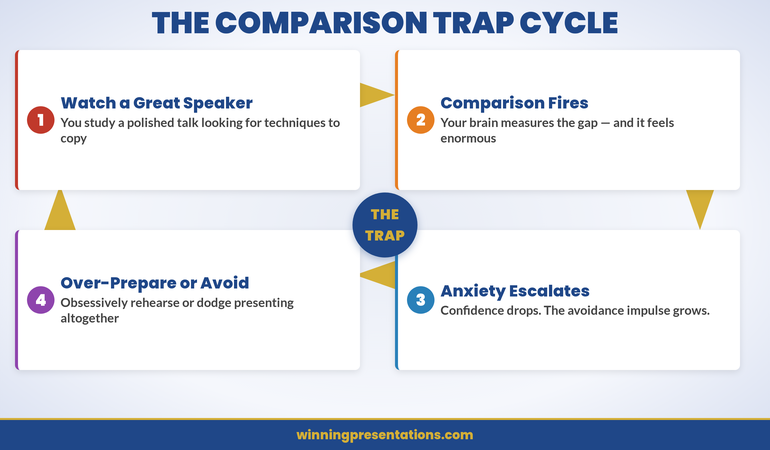
For executives with presentation anxiety, visualisation triggers what researchers call the “anticipatory anxiety loop.” You imagine the boardroom. Your brain scans for threats. Your amygdala fires. Cortisol floods your system. Now you’re anxious about being anxious — and you’ve got a powerful memory of that anxiety associated with the upcoming event.

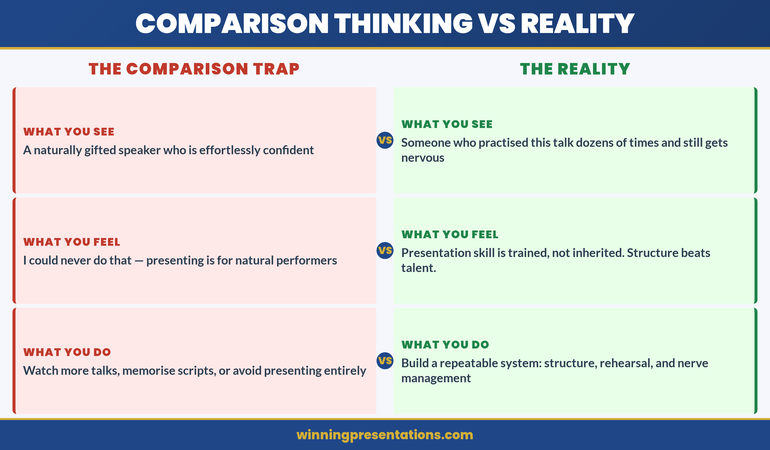
The person who told you to “just visualise success” probably doesn’t experience presentation anxiety themselves. For people without an overactive threat response, visualisation is neutral or mildly positive. For people with presentation anxiety, it’s fuel on the fire. If you’ve tried visualisation and found it made things worse, you’re not doing it wrong. The technique is wrong for your situation. Understanding this is the first step — and I’ve written about what to do when nothing seems to work for presentation anxiety.

What Neuroscience Says About the Threat Response and Presenting

Your brain has two processing pathways for threat detection. The fast pathway goes directly from sensory input to the amygdala — bypassing conscious thought entirely. The slow pathway goes through the prefrontal cortex, where it’s evaluated rationally.

Presentation anxiety lives in the fast pathway. Before your rational brain can say “this is just a meeting, you know this material,” your amygdala has already sounded the alarm. Heart rate up. Palms sweating. Voice tightening.

Visualisation doesn’t interrupt the fast pathway. It feeds it. When you imagine standing in front of executives, the amygdala doesn’t process this as “imagination.” It processes it as “incoming threat data.” The physiological response is identical whether you’re actually presenting or vividly imagining it.

This is why the advice to “just think positive” is neurologically backwards. Positive thinking is a prefrontal cortex activity. Presentation anxiety is a limbic system activity. You’re trying to calm a fire alarm with a motivational poster.

The techniques that work target the fast pathway directly — through the body, not through thought. Effective breathing techniques work because they send direct signals to the vagus nerve, telling the amygdala to stand down. No visualisation required.
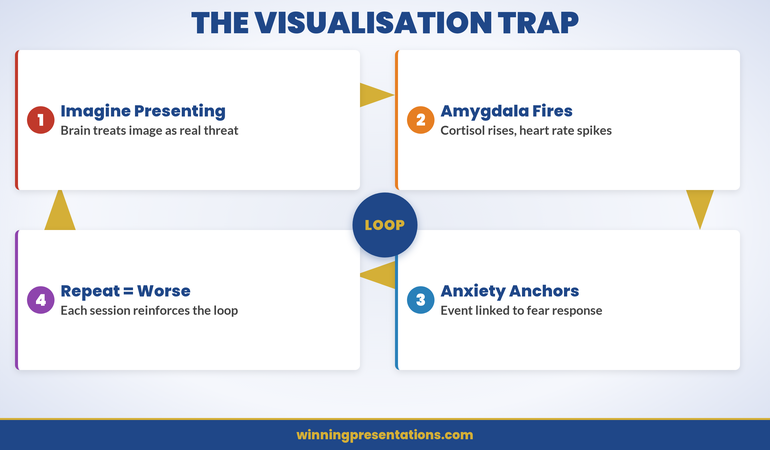
Neuroscience of presentation anxiety infographic showing the fast threat pathway versus slow rational pathway and why visualisation feeds the wrong one

Presentation Anxiety Management Programme

Conquer Speaking Fear provides a 30-day structured approach targeting nervous system regulation. Built from clinical hypnotherapy principles:

  • Nervous system regulation techniques based on neuroscience
  • Cognitive reappraisal frameworks for executives
  • Evidence-based approaches from clinical hypnotherapy
  • 30-day structured programme with progressive techniques

Explore Conquer Speaking Fear →

Based on clinical hypnotherapy training and work with executives in banking and consulting.

The 3 Techniques That Actually Work (And Why)

If visualisation feeds the anxiety loop, what breaks it? Three approaches, each targeting a different level of the nervous system.

1. Vagal tone activation (physiological level)

Your vagus nerve is the direct line between your body and your brain’s threat system. Stimulating it sends a “safe” signal that overrides the amygdala’s alarm. Extended exhale breathing — breathing in for 4 counts, out for 8 — activates the parasympathetic nervous system within 60 seconds. This isn’t meditation. It’s neurology. It works in the lift on the way to the meeting.

2. Cognitive reappraisal (interpretation level)

Reappraisal isn’t positive thinking. It’s relabelling the physical sensation. “My heart is racing because my body is preparing to perform” instead of “my heart is racing because I’m about to fail.” The physiological state is identical. The interpretation changes the anxiety trajectory entirely. Research shows reappraisal reduces cortisol more effectively than suppression (“calm down”) or visualisation.

3. Procedural rehearsal (behavioural level)

Instead of imagining the outcome, rehearse the process. Practise your first 30 seconds out loud. Walk through your slide transitions physically. Stand in the actual room if you can. This gives your motor cortex something useful to rehearse and creates procedural memory — the kind of memory that operates under stress. Athletes know this: they don’t just imagine the race. They physically rehearse the start.

Process Rehearsal vs. Outcome Visualisation: The Critical Difference

This distinction matters more than any other in anxiety management for presenters.

Outcome visualisation: “I see myself finishing the presentation. The board is smiling. They approve my budget.” This is what most coaches recommend. It’s abstract, emotional, and activates the threat system for anxious presenters.

Process rehearsal: “I walk to the front. I place my hands on the lectern. I say my first sentence: ‘The recommendation is to approve the £2M investment.’ I click to slide 2.” This is concrete, motor-based, and gives the brain a physical sequence to anchor to.

The difference is neurological. Outcome visualisation activates the ventromedial prefrontal cortex — the part of the brain that evaluates emotional significance. Process rehearsal activates the dorsolateral prefrontal cortex and premotor areas — the parts that plan and execute sequences.

For anxious presenters, the emotional significance pathway is already overactivated. Feeding it more emotional content (even positive emotions) increases arousal. Engaging the procedural pathways gives the brain a different job to do — one that doesn’t involve threat evaluation.

Many executives find this shift transforms their pre-presentation experience entirely. Instead of lying awake imagining catastrophe, they run through their opening sequence like a musician practising scales. The ritual approach I describe in my article on pre-presentation rituals borrowed from Olympic athletes builds on this same principle.
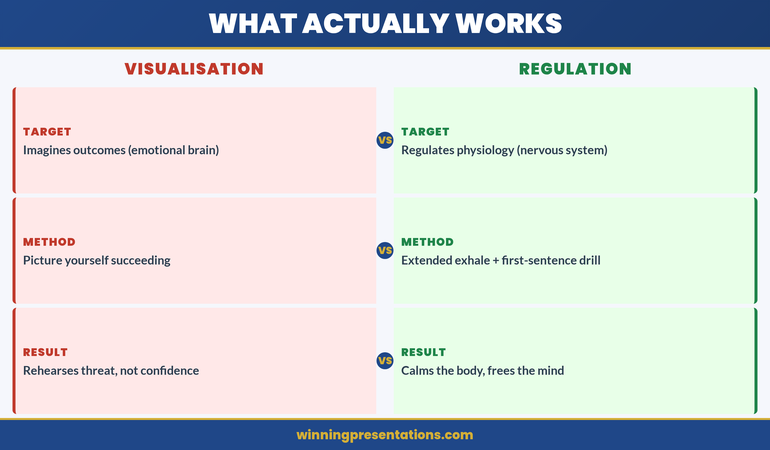
Contrast panel infographic comparing outcome visualisation (feeds anxiety) versus process rehearsal (builds control) for presentation anxiety

Structured Anxiety Management Over 30 Days

Progressive nervous system regulation techniques — grounded in neuroscience rather than visualisation or positive thinking.

Explore Conquer Speaking Fear →

Evidence-based techniques from clinical hypnotherapy and neuroscience research.

The 90-Second Nervous System Regulation Technique

This is the single most effective pre-presentation technique I know. It takes 90 seconds. You can do it in a toilet cubicle, a stairwell, or your car.

Seconds 1–30: Extended exhale breathing. Breathe in through the nose for 4 counts. Out through the mouth for 8 counts. Three cycles. This activates the parasympathetic nervous system via the vagus nerve. Your heart rate will begin to drop within 20 seconds.

Seconds 31–60: Peripheral vision activation. Soften your gaze and expand your visual field to the edges of your vision without moving your eyes. This is a neurological “safety cue” — threat scanning narrows vision (tunnel vision), so deliberately widening it signals safety to the brain. Your shoulders will drop.

Seconds 61–90: First-sentence rehearsal. Say your opening sentence out loud, twice. Not in your head. Out loud. This engages the motor cortex and procedural memory, giving your brain a concrete task instead of an abstract threat to evaluate.

That’s it. 90 seconds. No visualisation. No affirmations. Just neurological signals that tell your threat system to stand down.

The Cross-Link: When Your Slides Are the Anxiety Source

Sometimes presentation anxiety isn’t about standing up. It’s about whether your slides are good enough. If your fear is less about the audience and more about “does this deck hold up?” — structural confidence in your slides can reduce anxiety significantly. Today’s companion article on the partnership proposal structure that gets yes in one meeting shows how the right slide structure removes the guesswork that feeds anxiety.

Is This Right for You?

✓ This is for you if:

  • You’ve tried visualisation, positive thinking, or “just breathe” advice and it hasn’t worked
  • Your anxiety is physical — racing heart, shaking, voice cracking — not just mental nervousness
  • You want science-based techniques from a clinical hypnotherapist, not generic coaching

✗ This is NOT for you if:

  • Your presentation nerves are mild and manageable with basic preparation
  • You’re looking for general public speaking tips rather than anxiety-specific intervention
  • You need physical symptom management in-the-moment (see Calm Under Pressure for that)

Frequently Asked Questions

If visualisation doesn’t work, why do so many coaches recommend it?

Visualisation works well for people with low-to-moderate anxiety and for motor-skill performance (sports, music). Most presentation coaches don’t have clinical anxiety training — they’re applying performance psychology to a clinical problem. For executives with genuine presentation anxiety (not just mild nerves), the evidence shows visualisation either has no effect or increases anticipatory anxiety. The techniques that work target the nervous system directly.

How is process rehearsal different from just practising my presentation?

Standard practice usually means running through the content — saying the words, reviewing the slides. Process rehearsal is about rehearsing the physical and procedural sequence: how you walk to the front, where you place your hands, what your first sentence sounds like out loud, how you transition between slides. It gives your motor cortex a job to do, which reduces the bandwidth available for threat scanning. Practice builds content familiarity. Process rehearsal builds motor memory that holds up under stress.

Can I combine the 90-second technique with other anxiety management approaches?

Yes — and the combination is often more powerful than any single technique. The 90-second regulation technique works as a pre-presentation reset. Pair it with process rehearsal the day before, and cognitive reappraisal when you notice anxiety rising during the presentation itself. The Conquer Speaking Fear programme builds exactly this kind of layered approach over 30 days.

📬 The Winning Edge — Weekly Presentation Intelligence

Join executives who receive one actionable insight every week — from anxiety management techniques to slide structures that build confidence. Neuroscience-informed, not generic advice.

Subscribe to The Winning Edge →

Read next: The 48-Hour Window After Every Q&A: Why Most Presentations Win the Room but Lose the Decision

Your next presentation is on your calendar. It’s not going away. But the anxiety spiral can. Download Conquer Speaking Fear before that date arrives and stop rehearsing catastrophe.

About the Author

Mary Beth Hazeldine is Owner & Managing Director of Winning Presentations. With 24 years of corporate banking experience at JPMorgan Chase, PwC, Royal Bank of Scotland, and Commerzbank, she advises executives across financial services, healthcare, technology, and government on structuring presentations for high-stakes funding rounds and approvals.

Book a discovery call | View services

23 Mar 2026
Two executives shaking hands across a modern glass boardroom table with presentation screens showing partnership framework slides in navy and gold tones

Partnership Proposal Presentation: The 4-Slide Structure That Gets Board Approval in One Meeting

Partnership Proposal Presentation: The 4-Slide Structure That Gets Board Approval in One Meeting

Lena spent six weeks preparing a partnership proposal for a logistics company’s board. She had 28 slides. Competitive analysis. Market sizing. Risk matrices. Implementation timelines stretching to 2028.

The board chair stopped her on slide 9. “Lena, what do you actually want us to decide today?”

She had buried the partnership ask behind 8 slides of context. The meeting ended with “let’s reconvene.” Three months later, a competitor closed the deal she’d been building for a year.

Quick Answer: A partnership proposal presentation that wins in one meeting follows a 4-slide structure: mutual problem, combined capability, shared economics, and a single decision ask. Most partnership pitches fail because they present two companies’ capabilities instead of one shared outcome. The structure below eliminates the “let’s reconvene” response by making the decision inevitable before slide 5.

Partnership proposal structure

Can you articulate these three elements clearly: the shared problem, the combined capability, and the single decision you’re seeking?

→ Explore the Executive Slide System for decision-first templates → View templates

I once watched a partnership proposal die in the most instructive way possible.

Two pharmaceutical companies — one with distribution, one with IP — were trying to bring a diagnostic product to market. The presenting team built a 34-slide deck. Slides 1–12 covered Company A’s capabilities. Slides 13–24 covered Company B’s capabilities. Slides 25–30 covered “synergies.” Slides 31–34 covered implementation.

The problem? The board saw two capability presentations stapled together. There was no shared problem. No combined economic model. No single decision they could say yes to.

The chair said: “This looks like two companies that want something from each other. Show me what the customer gets that they can’t get today.”

That feedback changed how I think about every partnership proposal. The structure isn’t two companies presenting side by side. It’s one new entity presenting a solution that didn’t exist before.

When I rebuilt the deck around that principle — mutual problem, combined capability, shared economics, single ask — the same board approved it in 40 minutes. Same companies. Same product. Different structure.

Why Most Partnership Proposals Get the “Let’s Reconvene” Response

Partnership presentations fail for a different reason than other executive pitches. They don’t fail because the idea is weak. They fail because the structure creates confusion about who benefits and what the decision actually is.

Most partnership decks follow this pattern: “Here’s what we do. Here’s what they do. Together, we’ll do more.” That sounds logical. It’s also the fastest route to deferral.

Boards and executive committees approve decisions, not concepts. When a partnership proposal presents two sets of capabilities, the audience has to do the synthesis work themselves. They have to imagine the combined offering. They have to calculate the shared economics. They have to figure out what they’re actually being asked to approve.

Most won’t. They’ll say “interesting — let’s schedule a follow-up” and move to the next agenda item.

The fix isn’t more slides or better data. It’s a structural change that moves the audience from “two companies presenting” to “one solution requesting approval.” That’s the difference between a 6-month partnership courtship and a 40-minute decision. A strong decision slide is the foundation of every partnership deck that gets approved in a single session.

The 4-Slide Structure That Closes a Partnership in One Meeting

This structure works because it mirrors how executive committees actually make decisions about partnerships. They don’t evaluate each company separately. They evaluate the proposition.

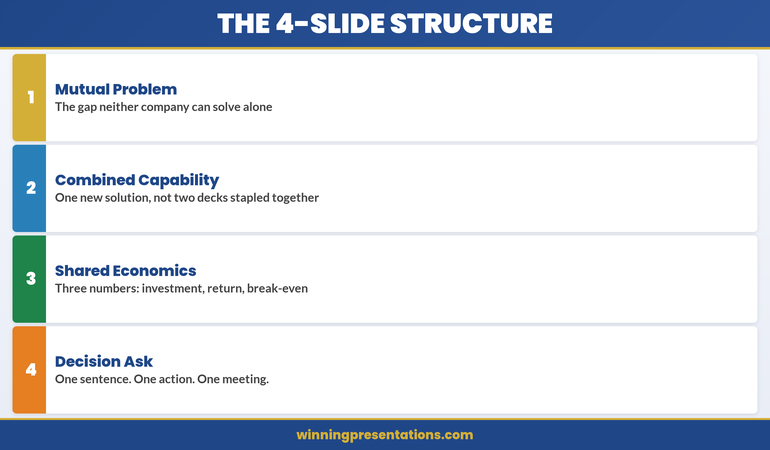
Slide 1: The Mutual Problem — What market gap or customer pain exists that neither company can address alone?

Slide 2: The Combined Capability — What does the partnership create that’s new? Not “Company A does X, Company B does Y.” Rather: “Together, we deliver Z, which doesn’t exist today.”

Slide 3: The Shared Economics — Revenue model, cost structure, and year-one projections. One model, not two.

Slide 4: The Decision Ask — What exactly do you need approved today? Scope, timeline, and the single next step.

Everything else — competitive analysis, risk assessments, implementation details — goes in the appendix. Available if asked. Never presented unprompted.

The 4-slide partnership proposal structure infographic showing mutual problem, combined capability, shared economics, and decision ask

⭐ Maven Flagship — Executive Buy-In

Turn reluctant stakeholders into active advocates

The Executive Buy-In Presentation System is a self-paced programme with 7 modules. Enrol with this month’s cohort, work through at your own pace — optional live Q&A calls are fully recorded.

£499, lifetime access to materials.

Enrol in the Executive Buy-In System →

Slide 1: The Mutual Problem Neither Company Can Solve Alone

This is the most important slide in the deck. It sets the entire frame for the decision.

Most partnership proposals skip this slide entirely or replace it with “market opportunity.” That’s a mistake. Market opportunity tells the audience the prize is worth winning. The mutual problem tells them why they can’t win it alone.

The structure is simple. One sentence for the customer pain. One sentence for why Company A can’t solve it alone. One sentence for why Company B can’t solve it alone. One sentence for what happens if neither company acts.

For the pharma partnership I mentioned, the mutual problem slide read: “Oncology practices need point-of-care diagnostics that integrate with existing lab workflows. We have the diagnostic IP but no distribution infrastructure. They have distribution in 4,200 oncologypractices but no proprietary diagnostic products. Without a partnership, the market defaults to the incumbent — and neither company captures the £340M opportunity.”

That slide did more work than the other 33 combined. It told the board exactly why this partnership mattered and what was at stake. Effective stakeholder mapping before the meeting ensures you know exactly whose concerns to address in this opening frame.

Slide 2: Combined Capability (Not Two Capability Decks Stapled Together)

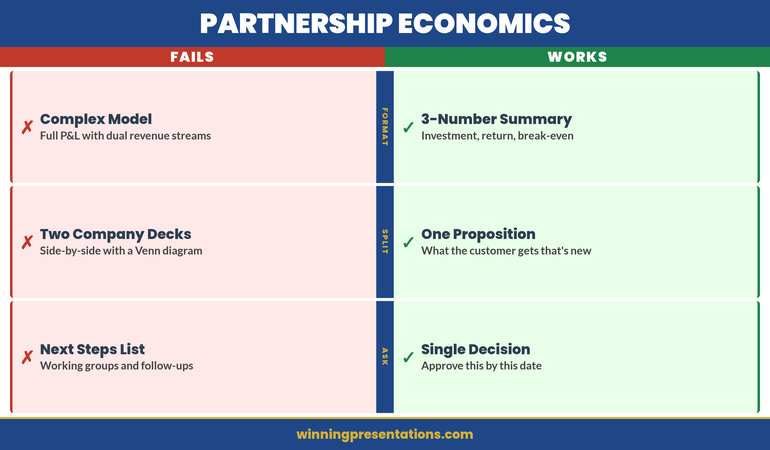
This is where most partnership presentations go wrong. They present Company A’s strengths on the left and Company B’s strengths on the right, with a Venn diagram in the middle showing “overlap.”

Boards don’t invest in Venn diagrams. They invest in solutions.

Slide 2 should describe the new thing the partnership creates. Not what each company brings. What the customer receives that doesn’t exist today.

Instead of: “Company A: 15 years of diagnostic IP. Company B: 4,200-site distribution network.”

Write: “Together: point-of-care oncology diagnostics delivered to 4,200 practices within 18 months — a product-distribution combination no single competitor can replicate.”

The shift is from inputs (what each company contributes) to outputs (what the partnership delivers). Inputs interest internal teams. Outputs interest boards. Every approval I’ve seen land in one meeting made this shift explicitly on slide 2.

Slide 3: Shared Economics That Make the Decision Obvious

Partnership economics are inherently more complex than single-company financials. Two revenue streams, two cost structures, shared investment, and split returns. Most presenters try to show all of this.

Don’t. Show the combined model only.

The board needs three numbers: total investment required, projected year-one return, and break-even timeline. Everything else is appendix material.

The format that works: a single-page financial summary with three rows. Row one: “Joint investment — £X.” Row two: “Year-one projected revenue — £Y.” Row three: “Break-even — Z months.”

Below that, one sentence on how revenue splits. Not a detailed financial model. Just: “Revenue split: 60/40 in favour of distribution partner, reviewed annually.”

Executives approve partnerships faster when the economics are simple enough to explain to their own boards in one sentence. If your economics slide needs a 10-minute walkthrough, it’s too complex for a decision meeting. Understanding how executives evaluate proposals — especially in contexts like vendor selection decisions — reveals why simplicity always wins.

Partnership economics infographic comparing ineffective complex financial models versus effective 3-number decision format

Partnership Proposal Templates Ready to Use

Pre-built slide templates for partnership proposals and strategic recommendations, structured around the mutual problem, combined capability, shared economics, and decision ask.

Explore the Executive Slide System →

Used in cross-border partnership presentations at financial institutions and consulting firms.

Slide 4: The Decision Ask — One Sentence, One Action

The decision slide is where partnership proposals either close or stall. Most presenters end with “next steps” — a list of follow-up actions, working groups to form, and timelines to agree.

That’s not a decision. That’s a project plan. And boards don’t approve project plans in decision meetings.

The decision slide needs one sentence: “We are asking for approval to [specific action] by [specific date], with an initial investment of [specific amount].”

For the pharma partnership: “We are asking for board approval to execute the distribution partnership agreement with [Company B], with a joint investment of £2.1M and first product delivery targeted for Q3 2026.”

One sentence. One decision. One meeting.

If the board has questions — and they will — the appendix handles those. But the decision frame is set. They’re not evaluating a concept. They’re saying yes or no to a specific ask.

What Belongs in the Appendix (And What Doesn’t)

The 4-slide structure works because it’s lean. But that doesn’t mean you ignore the details. You just put them where they belong: ready for questions, never presented unprompted.

Appendix material for a partnership proposal includes competitive landscape analysis, detailed implementation timeline, full financial model with sensitivity analysis, legal and governance structure, and risk assessment with mitigation strategies.

What doesn’t belong in the appendix? Anything that changes the decision. If there’s a deal-breaking risk or a regulatory hurdle, that goes on slide 3 as a caveat, not hidden in appendix slide 14.

The rule I follow: if hiding it would embarrass you, it’s not appendix material. Put it on the main slide. Everything else can wait for questions.

Managing Presentation Confidence in Partnership Pitches

The 4-slide structure removes ambiguity from the room — but only if you’re able to deliver it with clarity. Presentation confidence matters in high-stakes partnership meetings. I’ve written about how to manage presentation anxiety using evidence-based approaches.

Is This Right for You?

✓ This is for you if:

  • You’re presenting a partnership, joint venture, or strategic alliance proposal to a board or executive committee
  • Your partnership discussions have stalled in “let’s keep talking” without a clear decision
  • You want a slide structure that moves from concept to approval in a single meeting

✗ This is NOT for you if:

  • You’re creating a general company overview or capability deck (not a partnership-specific pitch)
  • You need a legal partnership agreement rather than a presentation structure
  • The partnership has already been approved and you need implementation planning

Frequently Asked Questions

How do I handle partnership presentations when the other company wants their own slides in the deck?

This is the most common partnership presentation mistake. The answer is to build one unified deck together, not staple two decks side by side. Propose the 4-slide structure as the joint approach and offer to draft it. The company that controls the narrative controls the decision frame. If they insist on separate sections, add their content as appendix material and keep the core 4 slides focused on the combined proposition.

What if the board wants more financial detail than 3 numbers?

They will. That’s what the appendix is for. Present the 3-number summary on slide 3, then say: “The full financial model is in the appendix — happy to walk through any line item.” This lets the board control the depth. In my experience, most boards ask about one or two specific assumptions, not the full model. The 3-number summary gives them the decision frame; the appendix gives them the assurance.

Does this structure work for internal partnerships between departments, not just external ones?

Absolutely — and internal partnerships often need this structure even more. Cross-departmental initiatives frequently die because the proposal reads like two departments justifying their own budgets. The mutual problem slide is particularly powerful internally: “Neither Engineering nor Marketing can solve the customer onboarding bottleneck alone. Together, we can reduce time-to-value from 45 days to 12.” Same structure, same decision clarity.

📬 The Winning Edge — Weekly Presentation Intelligence

Join executives who receive one actionable presentation insight every week. Proposal structures, slide frameworks, and decision-making psychology — directly applicable to your next partnership pitch.

Subscribe to The Winning Edge →

🆓 Want to start free? Download the Executive Presentation Checklist first.

Read next: The 48-Hour Window After Every Q&A: Why Most Presentations Win the Room but Lose the Decision

Your next partnership proposal doesn’t need 28 slides. It needs 4. Download the Executive Slide System before your next joint meeting and build the proposal that gets approved in one session.

About the Author

Mary Beth Hazeldine is Owner & Managing Director of Winning Presentations. With 24 years of corporate banking experience at JPMorgan Chase, PwC, Royal Bank of Scotland, and Commerzbank, she advises executives across financial services, healthcare, technology, and government on structuring presentations for high-stakes funding rounds and approvals.
Book a discovery call | View services

23 Mar 2026
Executive VP presenting annual budget to a leadership team in a modern boardroom, CFO visible as key listener, clean financial slide on screen behind them showing outcome-linked figures, confident and prepared demeanour

Annual Budget Presentation: The CFO-Approved Format That Secures Sign-Off Before Year End

Quick Answer

Annual budgets that secure CFO approval open with business outcomes, not financial figures. CFOs reject budget requests because they cannot see what the organisation gains—not because the numbers are wrong. A structured format reorders the presentation to lead with strategy, then moves to financial detail, risk mitigation, and alternatives considered. This structure is designed to give CFOs the information they need in the order they need it to evaluate the request.

Preparing your annual budget presentation now:

The 7-slide outcomes-first structure addresses how CFOs evaluate financial requests. If your budget has been rejected or required revision, the issue is likely structural, not financial.

Diane, VP of Operations at a UK logistics firm with 2,800 employees, had her annual budget request rejected twice. The first year, the CFO said the ask was “too high and not justified.” The second year, after she adjusted the figures downward by 12%, the response was the same: “Revise and resubmit.” Neither rejection was about the numbers. Her 31-slide presentation buried the strategic rationale—why the investment mattered to the organisation—in slide 22. The spreadsheets came first. The CFO couldn’t see what £6.8 million would do for the business.

In year three, Diane restructured to 7 slides. Slide 1: what the investment would enable for the supply chain network. Slide 2: how it aligned to the three-year strategic plan. Slide 3: the £6.8M ask and its breakdown. Slide 4: the assumptions behind the numbers. Slide 5: what would be at risk if the budget was cut. Slide 6: two alternatives she’d considered and rejected. Slide 7: the specific approval decision she needed. The CFO approved in the first review meeting. No revision requested. “You’ve done the hard thinking for me,” he said. Diane’s budget moved from year-long paralysis to execution within weeks.

Why Most Annual Budget Requests Get Rejected (Or Trapped in Revision Loops)

The conventional annual budget presentation is built backwards. It opens with financial summary tables, bar charts showing year-on-year growth, and category breakdowns. The logic seems sound: show the totals, show the detail, show the comparison, and the CFO will approve.

But that’s not how decision-makers process budget requests. A CFO who receives a 25-slide presentation opening with spreadsheet data doesn’t know whether you’re asking for £2 million or £20 million—or what the organisation gets in return—until slide 18. By then, they’re already thinking of questions, objections, and alternative scenarios. They loop back, ask for revisions, and the cycle repeats.

The core problem isn’t the budget amount. It’s the mental model. CFOs approve budgets when they understand three things in this order:

1. What does this money enable? Not what it costs. What does the organisation gain? What becomes possible? How does it move the needle on strategic priorities?

2. How does this connect to our stated strategy? Does it support the three-year plan? Does it address a known gap or bottleneck? Is it aligned to what we said we’d prioritise this year?

3. What assumptions underpin the request? CFOs approve confident asks, not uncertain ones. They need to see that you’ve pressure-tested the numbers, thought through the risks, and considered alternatives. That rigour signals competence and reduces their approval risk.

When a budget presentation skips these steps and leads with financial tables, the CFO is forced to work backwards—inferring the outcomes, checking alignment, and guessing at your assumptions. That creates friction, revision requests, and delays.

⭐ Maven Flagship — Executive Buy-In

Learn the structured approach senior professionals use to secure approval for high-stakes decisions

The Executive Buy-In Presentation System — 7 modules, self-paced, with monthly cohort enrolment and optional recorded Q&A.

£499, lifetime access to materials.

Enrol in the Executive Buy-In System →

The 7-Slide Annual Budget Format: Outcomes First, Numbers Second

The framework that secures approvals follows a strict logic: establish outcomes and alignment before introducing financial asks. Each slide serves a specific decision-making purpose.

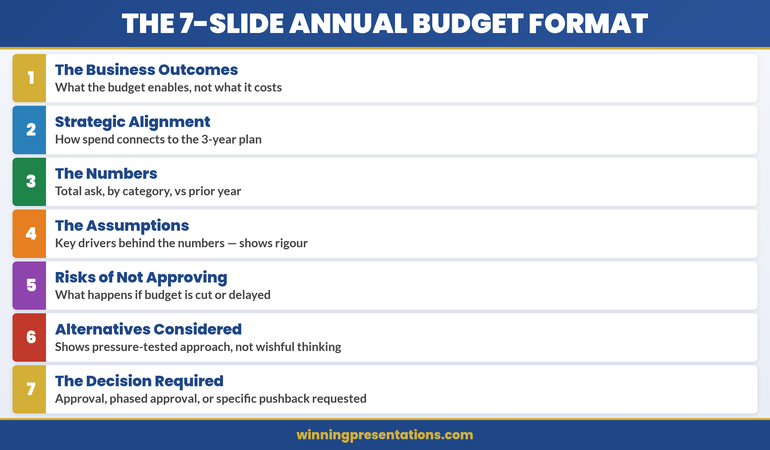
The 7-Slide Annual Budget Format: Card 1 Business Outcomes, Card 2 Strategic Alignment, Card 3 Numbers, Card 4 Assumptions, Card 5 Risks of Not Approving, Card 6 Alternatives Considered, Card 7 Decision Required

Notice the architecture: the first three slides build a narrative (outcomes → alignment → numbers). Slides 4–7 provide evidence and reduce decision risk. The CFO can now move through your logic without guesswork.

Slide 1: The Business Outcomes (Not the Cost)

Open with one clear statement of what the budget enables. Not what it costs. What becomes possible.

Wrong: “Annual Budget Request: £6.8M (Operations) + £2.3M (IT) + £1.4M (HR)”

Right: “This budget expands our logistics network capacity to process 40% more throughput without adding headcount, reducing per-unit delivery costs by 18% and unlocking the enterprise customer tier we’ve targeted in the three-year plan.”

The right version answers the CFO’s unconscious question: “What does this organisation gain?” Add one visual—a simple outcomes graphic, a network diagram, or a throughput chart—to reinforce the outcome. Then move on. This slide should take 90 seconds to present.

CFOs who see outcomes first are already mentally committed to exploring your ask. They know what they’re evaluating.

Slide 2: Strategic Alignment (Why Now? Why This?)

Now that the CFO knows what you’re asking for, connect it to the strategy. Show how the budget supports the published three-year plan, addresses a known strategic gap, or enables a stated corporate priority.

This slide removes guesswork. It says: “I’ve been paying attention to the organisation’s stated direction, and this budget is not a nice-to-have—it’s how we execute the strategy you’ve already approved.”

Use a simple visual: perhaps a 2×2 matrix showing the three strategic pillars and where your ask aligns, or a timeline showing when this investment is needed to hit strategic milestones. The text should be sparse—one or two sentences explaining the connection.

Alignment is a permission structure. It signals that your ask isn’t surprising or opportunistic; it’s the inevitable next step in executing a plan the board already endorsed.

Slide 3: The Numbers (Total Ask, Breakdown, Year-on-Year)

Now introduce the financial detail. By this point in your presentation, the CFO understands what you’re asking for and why it matters. The numbers are no longer a surprise; they’re the cost of delivering the outcomes you’ve already sold.

Keep this slide visual and simple. Use:

  • Total request at the top in large type. Don’t bury the number.
  • Category breakdown below (3–5 categories max). Operations, IT, People, Risk Mitigation, Innovation—whatever makes sense for your organisation.
  • Year-on-year comparison. Show variance as a percentage of total budget. If you’re asking for a 7% increase, say so explicitly. If this is a flat budget with reallocation, show that clearly.

Never lead with the numbers. Position them as supporting evidence for an already-established case.

Slides 4–7: The Proof (Assumptions, Risks, Alternatives, Decision)

Slide 4: The Assumptions Behind the Numbers

CFOs approve confident budgets. They want to see that you’ve thought through the drivers behind your ask. What labour market conditions underpin your hiring forecast? What supplier contract renegotiations support your savings projection? What customer growth assumptions justify the IT investment?

List 3–5 key assumptions. For each, show one piece of supporting data: a market report, an internal trend, a contract timeline. This isn’t a deep dive—it’s proof that you’ve done rigorous thinking, not guesswork.

Slide 5: What’s at Risk If We Don’t Approve (Or Cut) This Budget

This is perhaps the most important slide after outcomes. It answers: “What happens if we say no?” Spell it out clearly and specifically.

Don’t be vague (“We’ll fall behind competitors”). Be concrete: “If we don’t invest in supply chain automation this year, our order-to-delivery time will remain at 6 days while competitors move to 3. We’ll lose the high-volume enterprise contracts where margins are 40% higher. Estimated impact: £2.1M in forgone revenue over 18 months.”

Risk clarity is a stronger motivator than outcomes for many CFOs. It frames the budget not as optional spending but as necessary defence.

Slide 6: Alternatives You Considered (And Why You Rejected Them)

This signals that you haven’t just asked for one thing. You’ve pressure-tested your approach and chosen the best option. Show two alternative strategies and explain why they don’t work as well as your ask.

Example: “Alternative 1: Outsource logistics to a third party. This would be £200K cheaper but would reduce our network control and make enterprise customers nervous about data security. Rejected.” Or: “Alternative 2: Phase the investment over three years. This costs £800K more in eventual implementation but delays our competitive positioning. Rejected.”

Alternatives show maturity. They signal that your ask is the result of thoughtful analysis, not wishful thinking.

Slide 7: The Decision You’re Requesting

End with absolute clarity about what you need. Are you asking for full approval? Phased approval with specific milestones? Conditional approval pending board sign-off? A specific discussion topic or decision date?

Don’t end vaguely with “Please consider this and get back to me.” End with: “I’m seeking your approval to proceed with Phase 1 implementation (£2.1M) in Q2, with a review checkpoint before Phase 2 commitment in Q3.” Clarity removes friction. It tells the CFO exactly what decision is in front of them.

Budget Presentations Structured for CFO Review

The Executive Slide System provides outcome frameworks, assumption templates, and risk visualisation slides. Each is designed around the 7-slide format that addresses how CFOs evaluate financial requests.

See the Templates

The Confidence Gap: Why This Format Wins

Numbers-first presentations create uncertainty. A CFO sees a list of costs and asks: “Is this enough to solve the problem? What am I missing? Why should I trust these estimates?” These are revision triggers.

Outcomes-first presentations create confidence. The CFO sees your complete thinking: what you’re trying to accomplish, why it matters, what you’ve considered, and what’s at risk if you don’t proceed. Your rigour becomes visible. Your competence is proven by your assumptions, your risk awareness, and your realistic alternatives.

The 7-slide format compresses decision time from weeks to hours. Budget approvals that typically require 3–4 revisions move to single-meeting sign-off. CFOs who use this structure consistently report that it removes the guesswork from capital allocation.

Numbers-First vs Outcomes-First Budget Presentation Comparison: Numbers-First opens with totals, CFO asks what this buys, rejected for revision; Outcomes-First opens with business outcomes, CFO asks how soon can you start, approved in first meeting

Notice the difference: outcomes-first doesn’t just change the order of your slides. It changes how the CFO engages with your ask from the moment you begin.

Is This Approach Right For You?

Yes, if:

  • Your budget request has been rejected or asked for revision before
  • You’re asking for approval from a CFO or finance committee, not a single manager
  • Your ask is material enough that approval takes more than one meeting

Not as critical, if:

  • You’re requesting a routine departmental budget increase under 5% with no strategic change
  • Your CFO has already communicated approval in principle pending formal sign-off
22 Mar 2026
CEO presenting strategy to formal board table with engaged Non-Executive Directors, large screen showing clean structured strategy slide with navy and gold accents, corporate governance atmosphere

Board Strategy Presentation: The 20-Minute Format That Gets Non-Executive Directors to Engage

Quick Answer: Effective board strategy presentations are compact and decision-focused. Rather than comprehensively covering the detail, a 6-slide format that isolates the strategic choice, frames the trade-offs, and requests explicit board approval delivers clarity in 20 minutes. This structure helps the CEO make the required decision clearer for Non-Executive Directors.

If you’re presenting strategy to the board in the next two weeks:

This article walks you through the exact 6-slide structure that keeps NEDs (Non-Executive Directors) engaged and moves strategic decisions in under 30 minutes. You’ll learn how to isolate the choice you actually need the board to make, and how to frame trade-offs in language directors understand.

The CEO Who Lost the Board at Slide 8

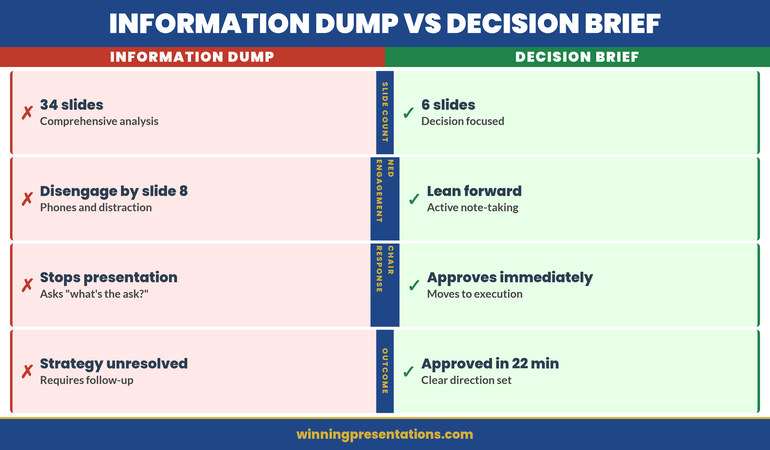
Jonathan was the CEO of a £85 million professional services firm. He’d spent three weeks building a 34-slide strategy deck with his leadership team. It covered market analysis, competitive positioning, operational restructuring, technology investments, and a new service line launch. Every slide had been carefully researched. The data was solid.

He walked into the boardroom confident. By slide 8, something had shifted. One Non-Executive Director was checking her phone. Another was making notes that didn’t look like engagement — they looked like distraction. The Chair was leaning back in his chair, not forward.

Jonathan kept going. Slide 12. The Chair interrupted: “Jonathan, I appreciate the depth here. But what’s the one strategic choice you’re recommending we make today? What decision do you actually need from this board?”

Jonathan paused. He hadn’t led with that. The recommendation was somewhere in slides 18-24, embedded in operational detail. He’d framed everything as context first, decision second. By the time he got to the ask, the board’s attention had already dissolved.

Two months later, Jonathan restructured his board presentation completely. Six slides. One clear strategic choice. The same board dynamics, the same NEDs. But this time they leaned forward. They took notes. One NED asked a sharp clarifying question about the trade-offs. The Chair said, “Approved — let’s move the decision to the 90-day implementation plan.” Twenty-two minutes. Done.

Why Comprehensive Strategy Decks Fail with NEDs

Non-Executive Directors occupy a unique cognitive position. They have deep experience in business, but they see your company once a month (or quarterly). They are NOT immersed in your operational reality. They don’t live with your market challenges or your internal constraints.

What they do have is a sharp ability to smell whether a strategy is clear or muddled. And they have limited time and attention. A 34-slide deck that tries to comprehensively justify every detail before revealing the ask is a form of cognitive tax on NEDs. It forces them to hold competing pieces of information in memory, waiting for you to finally name the choice.

The second problem: comprehensive decks rarely isolate the real choice. Instead, they present a menu of activities (market entry, technology investment, org restructuring, product launch) with the implicit message, “We’re doing all of this.” NEDs don’t feel they’re being asked to decide. They feel they’re being briefed on a done deal wrapped in a presentation.

The third problem: comprehensive decks hide the trade-offs. When you bury the limitations and risks in slides 22-30, NEDs never see the complete risk picture. They approve something incomplete and later discover constraints they didn’t know existed.

Information Dump vs Decision Brief comparison: left panel shows 34 slides, covers everything, NEDs disengage by slide 8, chair asks 'what's the ask?', strategy unresolved; right panel shows 6 slides, one clear recommendation, NEDs lean forward, chair says 'approved', strategy moves in 22 minutes

The Six-Slide Board Strategy Framework

A board strategy presentation that moves decisions in under 25 minutes has a precise structure. It’s not about oversimplifying — it’s about structuring complexity so NEDs can follow your logic and reach the same conclusion you have.

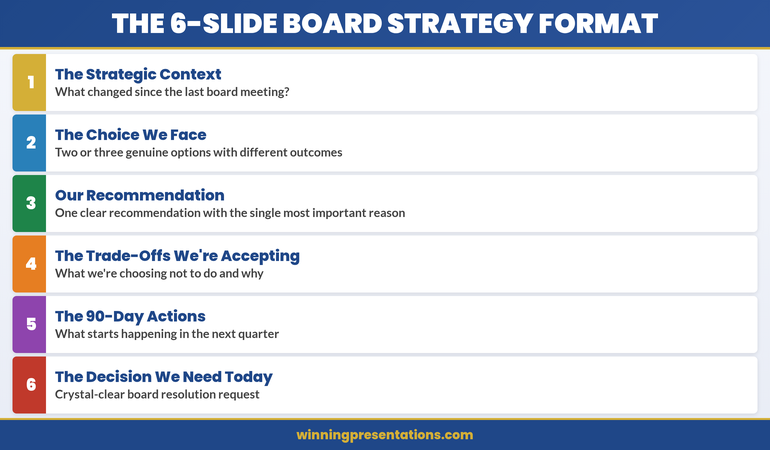
The framework isolates six decision moments, each on its own slide:

Slide 1: The Strategic Context

What has changed since the last board meeting that makes a new strategic decision necessary right now? (Market shift, competitor move, internal capability change, regulatory change.) This is not the full market analysis. This is the precipitating factor that triggered the need for board-level decision-making.

Slide 2: The Choice We Face

Two or three genuine options. Not one obvious option with two strawmen. Describe each option clearly, in language that reveals what each choice means for the business (growth rate, market position, risk profile). Real choices feel uncomfortable because each option has genuine merit and genuine limitations.

Slide 3: Our Recommendation

One clear recommendation with the single most important reason. Not three reasons. Not a comprehensive justification. The one thing that tipped the decision. NEDs will remember a crisp one-reason recommendation more than they’ll absorb three supporting arguments.

Slide 4: The Trade-Offs We’re Accepting

What we’re choosing NOT to do and why. This is the slide that builds credibility. You’re not pretending the choice is risk-free. You’re naming what you’re giving up and demonstrating you’ve thought it through. This is where NEDs feel heard because you’re acknowledging their likely concerns.

Slide 5: The 90-Day Actions

What starts happening in the next quarter if the board approves this strategy. Name the three or four actions that will be underway before the board meets again. This answers the question NEDs always ask: “How will we know this is working?”

Slide 6: The Decision We Need Today

A one-sentence, crystal-clear request for a specific board resolution. Not “approve the strategy.” Rather: “Approve the acquisition of TechCorp as our market entry mechanism” or “Approve the organisational restructuring to separate the operations and client service divisions.” Say exactly what resolution the board needs to pass.

Isolating the Strategic Choice You Actually Need

Most strategy decks fail at Slide 2 because the “choice” isn’t actually a choice. The CEO has already decided. The presentation is an elaborate justification, not a decision point.

A real strategic choice in front of a board should feel mutually exclusive. If you choose Option A, you explicitly do not choose Options B and C. There should be reasonable people — reasonable NEDs — who could argue for each option based on different risk tolerances or different interpretations of the market.

If your three options are (A) Acquire the competitor, (B) Acquire the competitor, or (C) Acquire the competitor, then you don’t have a choice. You’re presenting a done deal as though it’s a decision. NEDs will sense that immediately.

Real choices for boards often look like this:

Option A: Enter the North American market via organic growth. Invest £12M over 24 months. Lower short-term revenue impact. Higher execution risk. Slower market share capture.

Option B: Acquire a local North American player. Invest £22M upfront. Accelerated revenue. Known execution risks (integration). Higher short-term earnings pressure.

Option C: Partner with a North American distributor. Invest £2M. Minimal capital. Market risk (we don’t control the customer relationship). Slower long-term upside.

Now the board is facing a real decision. The CFO might lean toward Option C (capital efficiency). The growth-focused NED might lean toward Option B (speed to market). The risk-conscious Chair might prefer Option A (control, phased capital). Your job is to take a position, acknowledge that reasonable people could choose differently, and say why you recommend what you do.

When presenting strategy to a board, clarify your actual choice first.

Ask yourself: “If the board said no to my recommendation and chose a different option instead, would the business be substantively changed?” If the answer is no — if any of your three options would produce essentially the same business outcome — then you don’t have a real choice yet. Go back to your leadership team and refine the trade-offs until each option produces a materially different outcome.

Board Meeting This Week? Use the 6-Slide Structure

The Executive Slide System includes board strategy slide templates designed for the decision-focused format — each with context-setting, option framing, and trade-off language ready to adapt. Start with a structure that isolates the choice and frames the trade-offs before you walk in.

  • ✓ Board strategy slide templates for the 6-slide decision format
  • ✓ Trade-off framing guides to prepare Slide 4
  • ✓ Decision-slide frameworks for isolating the strategic choice
  • ✓ AI prompt cards to generate context and option language

Get Started →

The Trade-Offs Conversation NEDs Will Remember

Slide 4 is the most underrated slide in executive presentations. It’s the moment you shift from selling to credibility-building.

Most CEOs write Slide 4 reactively — “Here are the risks we’ve considered.” That’s passive. Instead, write it actively: “Here’s what we’re choosing not to do and why.”

If your recommendation is to enter the North American market via acquisition, your trade-offs might be:

“We’re choosing not to pursue organic growth because our window to establish market position is 18 months. Competitors are moving faster. We’re trading 18-24 months of higher capital expenditure for entry speed and known market position. We’re accepting the integration risk because the acquisition target’s client list is worth the execution complexity.”

Notice what that does: it answers the questions NEDs were already thinking. It shows you’ve weighed the alternatives. It makes the case that you’re not being reckless — you’re being strategic about which risks you’re willing to take and which you’re not.

This is where the board’s trust in you either deepens or erodes. If your trade-offs sound incomplete (“We’re not worried about integration issues”), NEDs will question your judgment. If your trade-offs sound honest and fully considered (“Integration risk is real; here’s our playbook to mitigate it”), you’ve built credibility.

One more principle: frame trade-offs in terms NEDs care about, not terms that matter to you internally. Your operations team cares about resource allocation. Your board cares about risk profile and shareholder value impact. Translate.

Moving from Presentation to Decision

The 90-day actions slide (Slide 5) serves a critical function. It signals to the board: “If you approve this, here’s what we’re actually doing. Here’s the resource commitment. Here’s the visible progress you’ll see by Q2.”

Many boards say no to strategies not because the strategy is bad, but because the CEO hasn’t convinced them that the business can execute. Your 90-day actions directly address that doubt.

What goes in the 90-day actions? The three or four initiatives that you will have visibly started before the board meets again. Not everything. Not the 12-month roadmap. The immediate next moves that prove you’re serious and capable.

If your strategy is to acquire TechCorp, your 90-day actions might be: (1) establish due diligence team, (2) sign NDA and begin deep financial review, (3) map integration playbook, (4) identify retention risks for key TechCorp staff. By the next board meeting, the board can see tangible progress. They know you’re executing.

The final slide — the resolution you need — should feel like a natural conclusion, not an abrupt ask. You’ve walked the board through context, options, your recommendation, trade-offs, and actions. The resolution slide is simply: “We need the board to pass the following resolution…” and you name it, one sentence, crystal clear.

If you’ve built the case well, NEDs won’t need time to think. They’ll be ready to pass the resolution in the meeting.

The 6-Slide Board Strategy Format: Card 1 shows Strategic Context, Card 2 shows The Choice We Face, Card 3 shows Our Recommendation, Card 4 shows Trade-Offs We're Accepting, Card 5 shows 90-Day Actions, Card 6 shows Decision We Need Today

The Mistakes That Extend Board Meetings

A board strategy presentation should take 18-22 minutes. If yours is consistently running 45 minutes or longer, one of these mistakes is happening:

Mistake 1: Comprehensive context instead of precipitating change. You’re giving the board a full market analysis when you should be naming the one thing that changed. Boards don’t need to relearn your market. They need to know why you’re asking them to make a decision now.

Mistake 2: Presenting options as though they’re all bad. If you frame Option A as “we could do this but it’s complicated,” and Option B as “we could do this but it’s risky,” then you’re not presenting real options. You’re presenting a predetermined conclusion disguised as choices. NEDs will feel manipulated, and they’ll slow down to ask clarifying questions to verify your options aren’t strawmen.

Mistake 3: Burying the recommendation. If it takes 12 minutes before you say what you actually recommend, you’ve lost the board’s permission to lead. Frame your recommendation early (Slide 3), then use Slides 4-5 to build the case.

Mistake 4: Trade-offs that sound defensive. “We’re aware of the integration risk.” That’s passive. “We’re accepting the integration risk because gaining market position in 12 months is worth the execution complexity, and here’s our mitigation plan.” That’s active and credible.

Mistake 5: 90-day actions that are too vague or too comprehensive. “We’ll begin implementation” isn’t an action. “We’ll have the due diligence team assembled and the first round of financial review complete” is. Name three or four specific, visible milestones.

Mistake 6: A resolution that sounds like a question. “Do you think we should consider approving the acquisition?” No. “We need the board to pass a resolution approving the acquisition of TechCorp pending satisfactory completion of due diligence.” That’s a request, not an inquiry.

Structuring your board presentation takes time the first time.

Most CEOs need 2-3 iterations before the choice, the recommendation, and the trade-offs all land cleanly. That’s normal. What matters is that you’re not starting from a 34-slide data dump. You’re starting from a framework that forces clarity. Our guide to executive presentation structure walks you through how to isolate the core decision and build your argument efficiently.

Is This Right For You?

  • ✓ You present strategic decisions to a board or governance committee — and you’ve noticed NEDs disengage when presentations exceed 25 minutes.
  • ✓ You struggle to isolate a clear strategic choice — your “options” feel like variations on a predetermined answer.
  • ✓ Board approval cycles are longer than they should be — you’re giving boards too much information and not enough clarity on what decision you need.

Frequently Asked Questions

What if the board asks for more detail during the presentation?

Embrace the question. If a NED asks for more detail on a specific point (market size, competitor positioning, integration timeline), you have that detail in your supporting deck. Say, “Good question — that’s in our detailed market analysis. Let me pull that up.” Then address the question without losing the board’s focus on the core decision. The 6-slide structure is your presentation; supporting materials are your backup.

How do I present three genuine options when I have a strong preference for one?

Present the options objectively, then make your recommendation clear on Slide 3. The key is that each option should be defensible — reasonable people with different risk tolerances could choose any of them. Your job is to name what you prefer and why, not to make the other options look foolish. If you can’t make a case that reasonable people could choose Option B or C, then they’re not real options. Go back and refine them so they are.

What if the board doesn’t approve my recommendation?

That’s the board doing its job. You’ve presented genuine options, they’ve chosen differently, and now you execute their choice. You don’t undermine it or lobby for yours. Your credibility depends on adapting to board direction and proving you can execute their chosen path as effectively as you would have executed yours. If you can’t do that with genuine commitment, you have a governance problem that a better presentation won’t solve.

The Winning Edge — Weekly insights for executives

Every Tuesday, we send a short email with one insight on presentation strategy, decision-making, or governance. Practical ideas you can use in your next board meeting. No promotional noise.

Sign Up for The Winning Edge

One more thing: your choice of whether to present a comprehensive deck or a decision-focused deck signals something to your board about your leadership. Comprehensive says, “Here’s everything I know, please decide.” Decision-focused says, “Here’s the choice I’ve made, here’s why, and here’s what I need from you.” NEDs reward clarity and decisiveness. They reward confidence balanced with honest acknowledgement of trade-offs. The 6-slide format isn’t about dumbing down complexity — it’s about proving you’ve thought the complexity through and can articulate why you’re recommending what you do.

When your next board meeting approaches, ask yourself: “Can I explain my strategic recommendation in six slides, naming the choice, the trade-offs, and what I need from the board?” If the answer is yes, you’re ready. If the answer is no, you probably don’t have a clear recommendation yet.

Not ready for the full system? Start here instead: download the free Executive Presentation Checklist — a one-page audit covering clarity of recommendation, trade-off framing, and decision readiness before you walk into any board room.

If you’re presenting multiple strategies to different boards, you’ll want to look at our guide to decision slides for executives, which goes deeper into how to frame the specific decision moment so NEDs move from listening to approving. And if your strategy involves multiple stakeholder groups, stakeholder mapping for presentations will help you tailor your framing for each audience.

Author: Mary Beth Hazeldine is Owner & Managing Director of Winning Presentations. With 24 years of corporate banking experience at JPMorgan Chase, PwC, Royal Bank of Scotland, and Commerzbank, she advises executives across financial services, healthcare, technology, and government on structuring presentations for high-stakes funding rounds and approvals.

The choice is not whether to be clear — it’s whether to be clear with the board in your presentation, or clear with yourself after the meeting when they reject the muddled recommendation.

22 Mar 2026
Executive composing strategic follow-up email on laptop after boardroom Q&A session, focused expression, modern office with presentation materials visible in background

Post-Q&A Follow-Up: The Email That Converts ‘We’ll Think About It’ Into Approval

A regional operations director received pushback on a distribution network expansion in three consecutive Q&A sessions. Same outcome: “We’ll think about it.” After the third deferral, she changed her approach. Approved in one email.

Quick Answer: A post-Q&A follow-up email converts deferred decisions into approvals by doing three things: answering the questions that were actually asked (not the ones you wished they’d asked), addressing the concern behind the question that wasn’t voiced, and framing the next step so small that saying yes requires less effort than saying “let me think about it” again.

Got a “we’ll think about it” after your last Q&A?

If the Q&A ended without a decision and you’re not sure what to write in the follow-up, the Executive Q&A Handling System includes post-session follow-up frameworks designed to help move deferred decisions forward within 48 hours.

Explore the System →

The Distribution Network Expansion That Got Approval on the Fourth Attempt

Ines, a Regional Operations Director at a logistics company, presented a distribution network expansion across three board meetings. Each time, the Q&A went well—solid ROI projections, clear cost analysis, detailed implementation timeline. Each time, the result was identical: “We’ll think about it.” After the third deferral, she changed tactics entirely. Instead of requesting another board slot, she sent a follow-up email within 24 hours. Not a meeting recap. Not a gratitude note. A pivot. She zeroed in on one question the CFO had asked repeatedly—”What’s our exposure if demand forecasts don’t hit targets in Year 2?”—and provided a specific scenario analysis. Then she reframed the ask: “Would you be comfortable approving the network expansion for Year 1 only, with Year 2 contingent on Q4 demand validation?” The CFO responded within two hours. “Yes. Let’s lock in Year 1 and review in October.”

Turn Post-Q&A Silence Into Decisions That Move Forward

  • A complete Q&A handling system that covers preparation, in-session responses, AND the post-session follow-up that most Q&A training ignores entirely
  • Follow-up email frameworks designed to convert “we’ll think about it” into approval within 48 hours—with templates for each common deferral pattern
  • Question prediction methods that help you anticipate objections before the Q&A starts, so your follow-up addresses concerns before they crystallise into blockers
  • The reframing technique that turns partial objections into partial approvals—getting movement instead of stalling

Explore the Executive Q&A Handling System →

Designed for executive presentations where structured follow-up conversations help move decisions forward—because the real decision work often happens after the Q&A closes.

Why “We’ll Think About It” Is a Q&A Failure, Not a Decision Delay

“We’ll think about it” feels like a polite deferral. It’s actually diagnostic information. It tells you that the Q&A session failed to resolve the one concern that mattered most to the decision-maker.

In most cases, that concern was never voiced directly. The CFO asked about implementation timelines, but the real concern was risk. The VP asked about team capacity, but the real concern was whether this initiative competes with their own priorities. The CEO asked for “more data,” but the real concern was confidence—they didn’t trust the recommendation enough to put their name on it.

If you walk out of a Q&A with “we’ll think about it” and send a standard follow-up—”Thank you for the discussion, please find the deck attached”—you’ve wasted the most valuable conversion window in the entire decision cycle. The 24 hours after a Q&A session is when the decision-maker’s concerns are fresh, their memory of your answers is sharpest, and their willingness to engage is highest.

Your Q&A preparation needs to include a follow-up strategy, not just an in-session strategy. The follow-up email is where deferred decisions become approved ones.

The Three-Part Follow-Up Email Structure

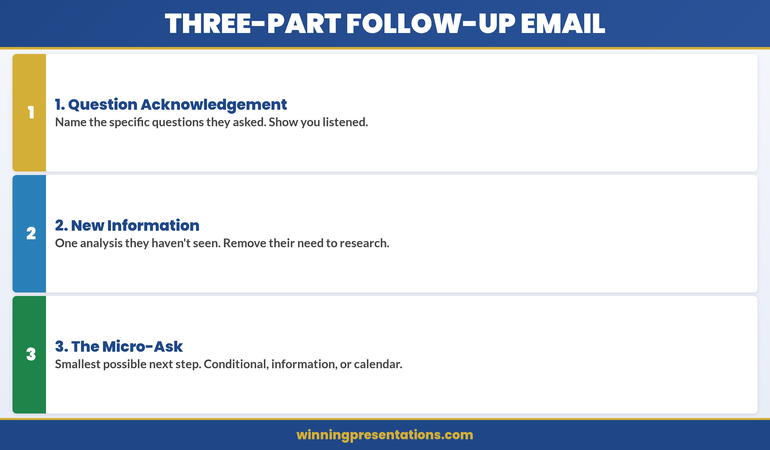
The post-Q&A follow-up email that converts deferrals into approvals has three parts. Not a summary. Not a recap. A conversion instrument.

Part 1: The Question Acknowledgement (2-3 sentences)
Name the specific questions that were asked. Not all of them—just the ones that revealed the decision-maker’s real concern. “You raised two important questions during our discussion: the implementation risk if the vendor timeline slips, and the impact on the Q3 reforecast if we start before Q2 results are final.” This tells the reader: I was listening to what you actually care about, not what I wanted to talk about.

Part 2: The New Information (3-5 sentences)
This is the critical section. Provide one piece of information, analysis, or framing that wasn’t in the presentation or the Q&A. Not something you forgot—something you’ve now prepared specifically in response to their concern. “Since our meeting, I’ve modelled the scenario where the vendor timeline slips by 6 weeks. The financial impact is £40k in additional parallel running costs—within our contingency budget of £75k. The attached one-page analysis shows the three trigger points where we’d escalate.” This demonstrates responsiveness and removes the decision-maker’s need to do their own analysis.

Part 3: The Micro-Ask (1-2 sentences)
Don’t ask for the full approval again. Ask for the smallest possible next step. “Would you be comfortable giving a conditional go-ahead for Phase 1, with Phase 2 contingent on the Q2 review?” Or: “Can we schedule 15 minutes next Tuesday to review the updated risk analysis? I can have it ready by Monday.” The micro-ask works because it reduces the decision from “approve everything” to “agree to this small thing.” And small agreements compound.

Three-part follow-up email structure infographic showing Question Acknowledgement, New Information, and Micro-Ask as stacked cards for converting deferred decisions

Answering the Question They Didn’t Ask Out Loud

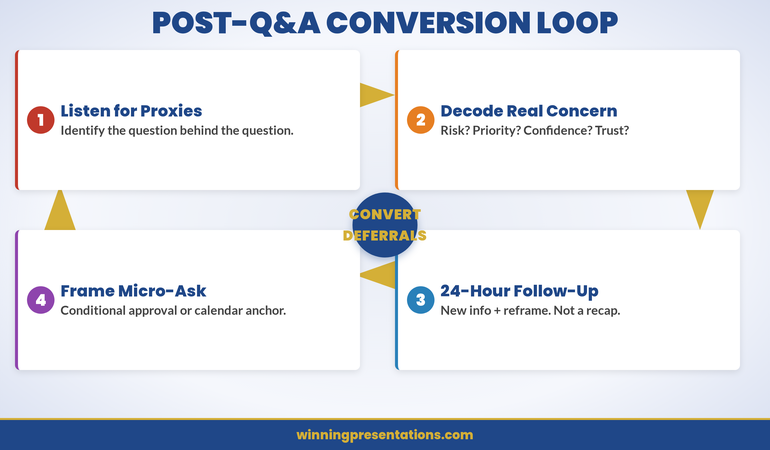
The most important question in any Q&A session is the one that wasn’t asked. Decision-makers rarely voice their deepest concern directly. Instead, they ask proxy questions—questions that circle the real issue without naming it.

Here’s how to decode common proxy questions:

“Can you walk me through the implementation timeline again?”
They’re not confused about the timeline. They’re worried the project will overrun and they’ll be associated with a failure. Your follow-up should address implementation risk explicitly—not repeat the timeline.

“Have you considered any alternatives?”
They’re not suggesting you missed options. They’re testing whether you’re married to one solution or capable of pivoting if it doesn’t work. Your follow-up should show flexibility: “If the initial approach encounters [specific obstacle], we have two fallback options already scoped.”

“What does the team think about this?”
They’re not asking for a poll. They’re worried about execution capability—does the team have capacity and willingness to deliver? Your follow-up should name specific people and their commitments.

If you predicted these questions before the session, you’ll recognise the proxy pattern in real time. Your follow-up email becomes the place where you answer the real question directly—something that’s difficult to do in the social dynamics of a live meeting but perfectly natural in a written follow-up.

Want to Predict the Questions Before They’re Asked?

The Executive Q&A Handling System includes the question prediction framework that maps likely objections to specific decision-maker roles—so your follow-up can address concerns when they arise.

Explore the System →

The 24-Hour Window: Why Timing Matters More Than Content

You have 24 hours after a Q&A session to send the follow-up that converts the deferral. After 24 hours, two things happen that work against you.

First, the decision-maker’s memory of your answers starts to degrade. They remember their own questions clearly—but your answers blur. If you don’t reinforce your strongest answers in writing within 24 hours, the decision-maker reconstructs their own version of what you said. That reconstruction is rarely favourable.

Second, other priorities fill the gap. The urgency you created in the presentation dissipates. By Wednesday, your Monday Q&A feels like last week’s problem. The decision-maker’s calendar fills with new requests, new presentations, new decisions. Your proposal moves from “I need to decide on this” to “I should revisit this when I have time.” That time never comes.

The 24-hour follow-up breaks this pattern. It arrives while the decision-maker still remembers the conversation, still feels the momentum, and still has mental space for your proposal. It gives them a reason to act now instead of later.

If you missed the 24-hour window, a 48-hour follow-up still works—but you need to create a new urgency. “Since our discussion, I’ve learned that the vendor pricing expires end of month” or “The project team I’ve reserved will be reassigned to another initiative on Friday.” Genuine time pressure, not manufactured scarcity.

Framing the Next Step So Small They Can’t Say No

The biggest mistake in post-Q&A follow-ups is asking for the same decision that was deferred. If the decision-maker said “we’ll think about it” to a £500k investment, asking again for £500k produces the same result.

Instead, shrink the ask. There are three ways to do this:

The Conditional Approval: “Would you be comfortable approving Phase 1, with Phase 2 contingent on [milestone]?” This works because it turns one big decision into two smaller ones. The first decision feels lower risk.

The Information Request: “Would it be helpful if I prepared a one-page risk analysis addressing the scenario you raised? I could have it ready by Thursday.” This works because you’re not asking for a decision—you’re asking for permission to be helpful. Nobody says no to “can I give you more information?”

The Calendar Anchor: “Can we block 15 minutes next Tuesday to review the updated analysis together?” This works because it commits the decision-maker to a specific follow-up moment. Without a calendar anchor, “we’ll think about it” means “we’ll forget about it.”

Each of these micro-asks does the same thing: it creates forward momentum without requiring the decision-maker to overcome the inertia of the full commitment. And once they’ve said yes to the small step, the full approval becomes a natural continuation, not a new decision.

This is why understanding how to handle situations where you don’t know the answer during the Q&A itself is so valuable—because “I’ll research that and send you the analysis by tomorrow” becomes a natural bridge to the follow-up email. The gap in your knowledge becomes your conversion opportunity.

Cycle infographic showing the four stages of the post-Q&A conversion loop: Listen for Proxy Questions, Decode the Real Concern, Send 24-Hour Follow-Up, and Frame the Micro-Ask

Stop Losing Approvals to Post-Q&A Silence

  • Follow-up email frameworks that convert “we’ll think about it” into approval within 48 hours—with templates for conditional approvals, information bridges, and calendar anchors
  • Question decoding guide that helps you identify the real concern behind proxy questions—so your follow-up addresses what the decision-maker actually cares about

Get the Executive Q&A Handling System →

Designed for the critical 24 hours after Q&A sessions where you can build momentum—because follow-up strategy often determines whether a deferral becomes a decision.

People Also Ask

How long should a post-Q&A follow-up email be?

Under 200 words in the email body. Decision-makers scan, they don’t read. Your email should have three short sections: acknowledge the key questions (2-3 sentences), provide one new piece of information (3-5 sentences), and make one small ask (1-2 sentences). If you need to provide detailed analysis, attach it as a one-page document and reference it in the email—don’t embed it.

Should I copy everyone who was in the Q&A session?

Copy only the people whose concerns you’re addressing directly. If the CFO asked the key question, send the follow-up to the CFO and copy your sponsor. Don’t copy the entire meeting list—it diffuses accountability and makes the email feel like a broadcast instead of a targeted response. If other attendees need updates, send those separately with different framing.

What if the decision-maker doesn’t respond to my follow-up email?

Wait 48 hours, then send a one-line follow-up with a calendar link: “Would 15 minutes on [specific day] work to discuss? Here’s a link to my calendar.” If there’s still no response after a week, the issue isn’t your follow-up technique—it’s either a priority misalignment or an organisational blocker. Ask your internal sponsor what’s happening behind the scenes before sending another email.

Is This Approach Right for You?

This is for you if:

  • You’ve had Q&A sessions that went well but ended with “we’ll think about it” instead of a decision
  • You’re sending standard “thank you for the meeting” follow-ups and not getting traction
  • You want a structured approach to the post-presentation phase that most Q&A training ignores
  • You’re presenting proposals that require multiple stakeholder approvals and need to keep momentum between meetings

This is NOT for you if:

  • Your Q&A sessions consistently end with clear decisions—your current process is working
  • You’re in a context where follow-up emails aren’t culturally appropriate (some organisations require formal proposal resubmission instead)
  • The deferral is genuinely about budget timing, not about unresolved concerns—in that case, a follow-up email won’t change the fiscal calendar

Frequently Asked Questions

I’m worried that a follow-up email will seem pushy. How do I avoid that?

Pushiness comes from asking for the same thing again without adding value. The three-part structure avoids this by design: you acknowledge their specific concern (showing you listened), provide new information they didn’t have before (adding value), and frame a smaller ask (reducing pressure). This reads as helpful and responsive, not pushy. The key is the new information—if your follow-up contains nothing the decision-maker didn’t already have, it is pushy.

What if there were multiple decision-makers and they had different concerns?

Send separate follow-ups. The CFO gets a follow-up addressing financial risk. The CTO gets a follow-up addressing technical feasibility. Each email should feel like a personal response to their specific question, not a mass communication. If you need both to agree, include one line that bridges to the other stakeholder’s concern: “I’ve also prepared the technical risk analysis that [CTO name] requested—happy to share if helpful.”

Should my follow-up email include the presentation deck as an attachment?

Only if they asked for it. Attaching the full deck makes your email feel like a broadcast, not a targeted response. Instead, attach only the new material—the one-page analysis, the updated financial model, the risk scenario you modelled. This signals that the follow-up contains something they haven’t seen before, which is the reason to open it.

The Winning Edge — Weekly

Q&A strategies, executive communication frameworks, and the presentation techniques that get decisions approved. One email weekly. Built for executives who present to other executives.

Join The Winning Edge

About the Author

Mary Beth Hazeldine is Owner & Managing Director of Winning Presentations. With 24 years of corporate banking experience at JPMorgan Chase, PwC, Royal Bank of Scotland, and Commerzbank, she advises executives across financial services, healthcare, technology, and government on structuring presentations for high-stakes funding rounds and approvals.
Book a discovery call | View services

22 Mar 2026
Executive standing calmly in corporate corridor before presentation, composed posture, soft lighting suggesting inner calm, modern office environment with navy and gold tones

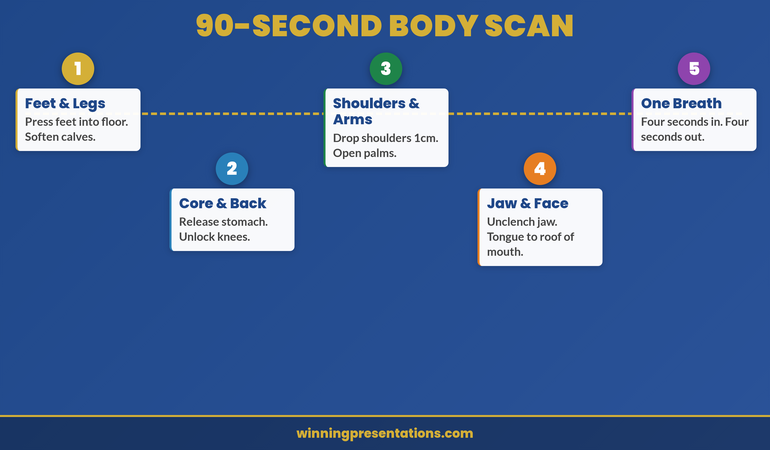
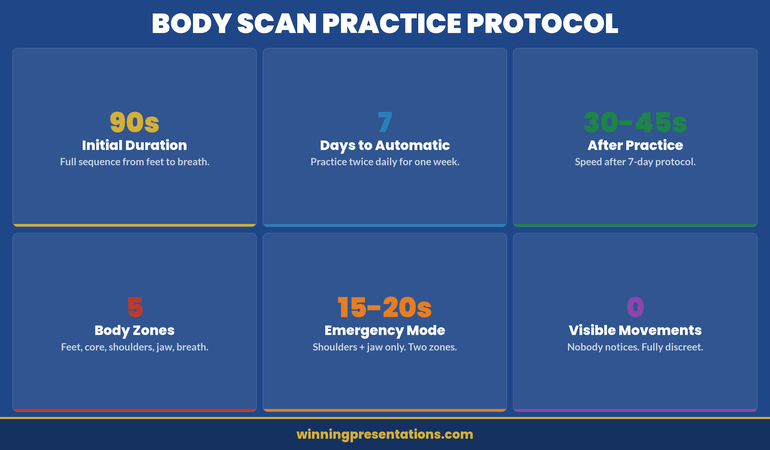
The Body Scan Technique: 90 Seconds to Reset Your Nervous System Before Any Presentation

Ngozi had been rehearsing her investor pitch for six weeks. Everything was locked down—data, timings, even her opening joke. But thirty minutes before the call, she opened her laptop camera and her hands were shaking so badly she could barely read the screen. Not from doubt. From her nervous system reading the moment as a threat. The body scan technique was the first thing that reset that signal in under two minutes.

Quick Answer: The body scan technique is a 90-second nervous system reset that works by shifting your brain’s attention from threat detection to physical awareness. Instead of fighting anxiety with willpower or breathing exercises alone, a body scan interrupts the fight-or-flight loop at the somatic level—giving your prefrontal cortex enough space to regain control before you walk into the room.

Presenting this week and need a technique that works fast?

If breathing exercises haven’t been enough and your anxiety starts in your body before it reaches your mind, the body scan technique targets the physical layer where presentation fear actually lives. Conquer Speaking Fear is a programme built from clinical hypnotherapy approaches that include the body scan alongside deeper nervous system regulation techniques.

Explore Conquer Speaking Fear →

How Ngozi Discovered Body Scanning Under Pressure

Ngozi spent weeks preparing her Series A pitch. Financials perfect. Slide transitions polished. She could recite her story in her sleep. But thirty minutes before the Zoom call with three partners, her hands started shaking. Not trembling—visibly shaking. She could barely click her mouse. Her mind knew she was ready. Her nervous system didn’t agree. She’d heard about body scanning somewhere—a LinkedIn article, a podcast—and had nothing to lose. She gave herself ninety seconds. Shoulders down. Jaw unclenched. One slow breath. By the time the call started, her hands were steady and her voice was clear. She secured £1.2 million that day. The body scan was the first technique that told her nervous system it was safe to let her mind do its job.

Reset Your Nervous System Before Your Next Presentation—Without Medication

  • A programme using clinical hypnotherapy techniques to retrain your body’s response to presentation pressure—starting with the body scan and building to deeper nervous system regulation
  • Techniques designed for the 90 seconds before you present, not 90 minutes of meditation you don’t have time for
  • Methods that target the physical layer of anxiety (shaking, voice cracking, racing heart) because that’s where presentation fear actually lives
  • Evidence-based approaches from clinical hypnotherapy, not generic “just breathe” advice that hasn’t worked

Explore Conquer Speaking Fear →

Built from nervous system regulation techniques developed with clinical hypnotherapy methods—approaches that address the physical foundations of presentation anxiety.

Why Your Body Panics Before Your Mind Does

Presentation anxiety doesn’t start in your head. It starts in your body.

Your amygdala detects a threat—a room full of senior executives watching you—and triggers the sympathetic nervous system before your conscious mind even registers what’s happening. By the time you think “I’m nervous,” your body has already decided: heart rate up, muscles tense, blood diverted from your digestive system to your limbs, vocal cords tightening.

This is why telling yourself to “calm down” doesn’t work. Your conscious mind is trying to override a survival response that operates faster than thought. The body scan technique works because it doesn’t try to override anything. It redirects your brain’s attention from external threat scanning to internal body awareness—and that attention shift is enough to interrupt the cascade.

The neuroscience is straightforward: your brain can’t simultaneously scan for threats and observe its own physical sensations in detail. When you systematically notice “my shoulders are tense, my jaw is clenched, my hands are gripping,” you’re occupying the neural circuits that were busy amplifying the alarm signal. The fight-or-flight response doesn’t stop—but it drops to a level where your prefrontal cortex can function again.

The 90-Second Body Scan: Step by Step

You can do this standing in a corridor, sitting in a waiting area, or in the toilets two minutes before your slot. Nobody will notice. That’s the point.

Seconds 1-15: Feet and legs. Press your feet deliberately into the floor. Notice the weight distribution—are you leaning forward? Shift back slightly. Feel the contact between your shoes and the ground. Notice your calf muscles. Are they braced? Let them soften. Not relax—soften. There’s a difference. Relaxing implies effort. Softening implies permission.

Seconds 16-30: Core and back. Notice your stomach. Is it clenched? Most anxious presenters brace their core without realising it—as if preparing for a physical impact. Let it release. Notice your lower back. If you’re standing, unlock your knees slightly. Your body will interpret this micro-adjustment as “we’re not in danger” because locked muscles signal threat readiness to your nervous system.

Seconds 31-50: Shoulders and arms. Drop your shoulders one centimetre. That’s all. Most people carry their shoulders closer to their ears when anxious—a defensive posture your body adopted before you noticed. Let your arms hang. If you’re holding notes or a laptop, set them down briefly. Open your palms for three seconds. Your nervous system reads open hands as “no threat detected.”

Seconds 51-70: Jaw and face. Unclench your jaw. Touch your tongue to the roof of your mouth—this is a clinical trick that relaxes the masseter muscle and sends a calm signal through the vagus nerve. Let your forehead smooth. If your brow is furrowed, it’s because your brain is in problem-solving mode. You don’t need to solve anything right now.

Seconds 71-90: One breath. Take one slow breath through your nose. Not deep—slow. Four seconds in, four seconds out. This single breath is the capstone, not the foundation. The body scan has already done the heavy lifting. The breath just confirms to your nervous system: we’re ready.

Five-step body scan technique roadmap showing Feet and Legs, Core and Back, Shoulders and Arms, Jaw and Face, and One Breath as sequential milestones for a 90-second nervous system reset

Why This Works When Breathing Exercises Don’t

When working with executives on presentation anxiety, the most common feedback is: “I tried breathing exercises and they didn’t fully resolve the physical symptoms.”

Here’s why. Breathing techniques target one symptom (rapid breathing) and hope the rest of the anxiety cascade follows. Sometimes it does. Often it doesn’t—because your body is still braced for impact in every other muscle group. You’ve slowed your breathing, but your shoulders are still at your ears, your jaw is still clenched, and your hands are still gripping the clicker like a weapon.

The body scan works differently. Instead of targeting one symptom, it addresses the entire physical anxiety pattern systematically. By the time you reach the breath at the end, your body has already shifted out of high alert. The breath becomes confirmation, not intervention.

There’s another reason. Breathing exercises require you to do something—and when you’re anxious, “doing something” can feel like another performance demand. The body scan asks you to notice, not to perform. Noticing is passive. Your anxiety can’t turn noticing into another source of pressure.

This distinction matters in the context of NLP anchoring techniques too. The body scan creates a foundation state that anchoring techniques can build on. Without the physical reset first, anchoring a confident state onto a tense body doesn’t hold.

Breathing Exercises Haven’t Been Enough?

The body scan is just the entry point. Conquer Speaking Fear builds the complete nervous system regulation system—body scan, reframing, and approaches from clinical hypnotherapy.

Explore the Programme →

When to Use the Body Scan (and When You Need Something Deeper)

The body scan is a pre-presentation tool. It works in the 90 seconds before you walk into the room. It doesn’t fix what happens the night before, the week before, or the career-long pattern that makes presenting feel dangerous.

Use the body scan when your anxiety is situational—it spikes before the presentation and settles afterward. It works well for quarterly reviews, team updates, client meetings, and any scenario where you know you can present competently but your body doesn’t seem to agree.

You need something deeper when the anxiety starts days before the presentation. When you’re losing sleep on Sunday night because of a Tuesday meeting. When you’re rehearsing not the content but the escape routes—which door is closest, what excuse gets you out. When the anxiety has shifted from “I’m nervous about this presentation” to “I’m a person who can’t present.”

That shift—from situational anxiety to identity-level anxiety—is where the body scan reaches its limit and clinical-grade techniques become necessary. The body scan can interrupt a fight-or-flight response. It can’t reprogram the belief system that triggers the response in the first place.

If this resonates, you’re not failing at anxiety management. You’re using the right technique for the wrong layer of the problem.

Making It Automatic: The 7-Day Practice Protocol

The body scan is a skill. Like any skill, it gets faster and more effective with practice. Here’s how to make it automatic before your next presentation.

Days 1-2: Practice at home. Do the full 90-second body scan twice daily—morning and evening. You’re training the neural pathway, not managing anxiety. Do it when you’re already calm so your body learns the sequence without the interference of real stress.

Days 3-4: Practice in low-stakes moments. Before a team meeting. Before a phone call. Before opening your laptop in the morning. You’re teaching your body that the scan is a normal transition, not an emergency measure.

Days 5-6: Speed it up. By now, you know the sequence. Try completing it in 60 seconds, then 45. Your body will start anticipating each zone—feet, core, shoulders, jaw, breath—before you consciously direct attention there. This is the automaticity you need.

Day 7: Test under mild pressure. Use it before a slightly uncomfortable conversation—a feedback session, a negotiation, a meeting with someone senior. Not a boardroom presentation yet. This intermediate step builds confidence in the technique before high stakes demand it.

After seven days, most people report that the body scan takes 30-45 seconds and produces a noticeable shift in physical state. Some report that simply thinking “body scan” triggers a micro-release in their shoulders and jaw—the sequence has become a mental shortcut.

Dashboard infographic showing four key metrics of the body scan practice protocol: 90 seconds initial duration, 7 days to automaticity, 30-45 seconds after practice, and works in 5 body zones

Stop Dreading the Physical Symptoms That Derail Your Presentations

  • Programme that builds from the body scan technique to deeper nervous system regulation—so physical anxiety symptoms become manageable, then minimal
  • Clinical hypnotherapy methods that target the root cause, not just the symptoms—for executives who’ve tried breathing exercises and need something that goes further

Get Conquer Speaking Fear →

Designed to address the root patterns of presentation anxiety—because managing symptoms and resolving underlying patterns require different approaches.

People Also Ask

Can the body scan technique work for severe presentation anxiety?

The body scan is effective for situational anxiety—the spike that happens before a specific presentation. For severe, chronic presentation anxiety that starts days before the event and affects your career decisions, the body scan is a starting point but not a complete solution. Severe anxiety involves identity-level beliefs about yourself as a presenter, and those require deeper techniques like cognitive reframing and clinical-grade interventions.

Is the body scan technique the same as mindfulness meditation?

Related but different. Mindfulness body scans are typically 10-20 minutes and aim for deep relaxation. The presentation body scan is 90 seconds and aims for functional readiness—not relaxation, but a state where your nervous system is calm enough for your brain to perform. You don’t want to feel relaxed before a board presentation. You want to feel alert and in control. That’s a different target state.

What if I don’t have 90 seconds before my presentation?

After practising the full sequence for a week, most people can trigger a meaningful physical shift in 15-20 seconds by scanning just two zones: shoulders (drop them one centimetre) and jaw (unclench and touch tongue to roof of mouth). These two adjustments produce the largest nervous system response because they address the two most common anxiety holding patterns.

Is This Approach Right for You?

This is for you if:

  • Your presentation anxiety shows up physically—shaking hands, tight chest, racing heart, voice changes—before you’ve even started speaking
  • Breathing exercises help a little but don’t fully resolve the physical symptoms
  • You want a technique you can use discreetly in any setting, without anyone noticing
  • You’re willing to practise for 7 days to make the technique automatic

This is NOT for you if:

  • Your anxiety is primarily cognitive (racing thoughts, catastrophising) with minimal physical symptoms—you may benefit more from cognitive reframing techniques
  • You need a technique that works immediately with zero practice—the body scan requires a 7-day training period to become fast and automatic
  • Your presentation anxiety is managed well by current techniques—if what you’re doing works, keep doing it

Frequently Asked Questions

I’ve tried body scans before and they didn’t help with my presentation nerves. What’s different about this approach?

Most body scan techniques are adapted from meditation—they’re designed for deep relaxation and take 10-20 minutes. The presentation body scan is different in three ways: it’s 90 seconds (realistic before a meeting), it targets functional readiness rather than relaxation, and it’s sequenced to address the specific muscle groups that presentation anxiety affects most (jaw, shoulders, core). It’s a clinical intervention, not a wellness practice.

Can I combine the body scan with beta blockers or medication?

That’s a question for your doctor, not a presentation coach. What I can say is that many executives I’ve worked with used medication and somatic techniques simultaneously while building confidence in the body scan, then gradually relied less on medication as the technique became automatic. The body scan doesn’t conflict with medication—it works on a different layer of the anxiety response.

Will people notice I’m doing a body scan before presenting?

No. That’s the design advantage. Dropping your shoulders one centimetre, unclenching your jaw, and pressing your feet into the floor are invisible movements. You can do the full 90-second sequence while appearing to review your notes or check your phone. Nobody in the room will know you’re running a nervous system reset protocol. They’ll just notice that you look calm.

The Winning Edge — Weekly

Presentation confidence strategies, anxiety management techniques, and executive communication insights. One email weekly. Built for executives who take presenting seriously.

Join The Winning Edge

About the Author

Mary Beth Hazeldine is Owner & Managing Director of Winning Presentations. With 24 years of corporate banking experience at JPMorgan Chase, PwC, Royal Bank of Scotland, and Commerzbank, she advises executives across financial services, healthcare, technology, and government on structuring presentations for high-stakes funding rounds and approvals.
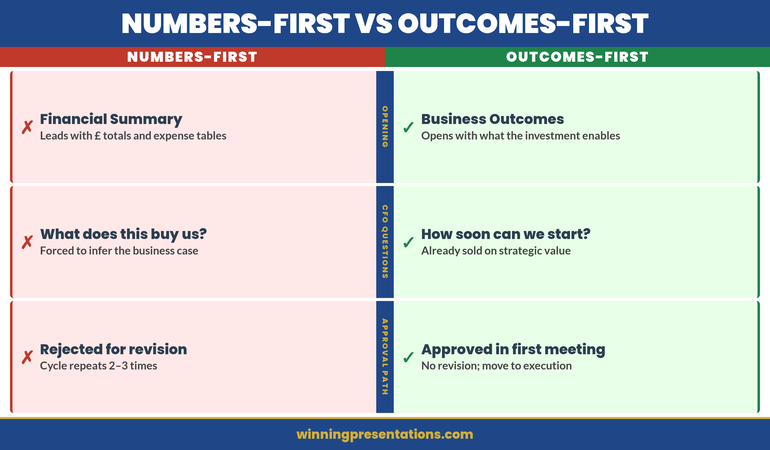
Book a discovery call | View services

22 Mar 2026
Executive presenting capital expenditure proposal to CFO in modern glass boardroom, confident posture, financial charts visible on presentation screen, navy blue and gold corporate setting

The Capital Expenditure Presentation: How to Make the CFO Your Ally, Not Your Gatekeeper

The CFO looked at slide 38 and said eleven words: “Why should I fund something you can’t explain in one slide?”

Quick Answer: A capital expenditure presentation fails when it leads with the asset and hopes the CFO sees the value. A strong CapEx presentation structure leads with the business outcome the expenditure unlocks, positions the CFO as a co-owner of the investment thesis, and frames the approval as a strategic decision rather than a spending decision. The difference is whether Finance feels like a checkpoint or a champion.

Already preparing a CapEx presentation for next week?

If your capital expenditure presentation is treating the CFO as a gatekeeper instead of a strategic partner, the slide structure is working against you. The Executive Slide System includes CapEx-specific templates designed to frame financial approval as a shared investment decision.

Explore the System →

The CapEx Request That Taught a VP a Costly Lesson

Kenji was the VP of Operations at a mid-sized logistics company. He’d built a solid business case for warehouse automation—a £2.3M investment that would reduce processing time by 40% and cut staffing needs by 18 positions over three years. He’d been careful. Three months of vendor evaluation. Detailed ROI analysis. Risk mitigation plan. He walked into the CFO’s office with a 35-slide presentation, confident the numbers would speak for themselves. The CFO watched him through the first four slides, then stopped him: “You haven’t told me why you’re here. Show me the business outcome first, then come back to the technical detail.” Kenji went back to his desk and restructured the deck. Business problem—first slide. Payback period—slide two. The CFO pre-read the new version, approved it in their next meeting, and told him: “I would have approved this the first time if you’d led with what we were solving, not what we were buying.”

Build the CapEx Presentation That Turns Your CFO Into Your Strongest Advocate

  • Deploy slide templates designed specifically for capital expenditure approvals—structured around the financial logic CFOs use to evaluate long-term investments
  • Use AI prompt cards that translate technical infrastructure needs into business outcome language Finance teams respond to
  • Build payback period slides that show the cost of delay, not just the cost of the investment
  • Include the decision-first slide framework that gets CFO alignment before the technical deep-dive

Explore the Executive Slide System →

Built from 24 years presenting capital expenditure cases in banking—where CapEx approvals required sign-off from Finance, Risk, and the board in the same meeting.

Reframing CapEx: From Spending Request to Strategic Investment

Most capital expenditure presentations open with the asset. “We need new servers.” “We need to upgrade the CRM.” “We need to replace the trading platform.” Every one of those sentences positions the CFO as a gatekeeper. You’re asking permission to spend money.

The reframe that changes the entire dynamic: open with what becomes possible after the investment. Not “we need new servers” but “we can reduce settlement processing from 72 hours to 4 hours, which eliminates the manual reconciliation that costs us £180k annually in labour and exposes us to regulatory risk every quarter.”

Now the CFO is evaluating a business outcome, not a purchase request. The conversation shifts from “can we afford this?” to “can we afford not to do this?”

This is not a language trick. It’s a structural decision about where your presentation starts. When your budget presentation leads with the business outcome, every subsequent slide—technical architecture, vendor selection, implementation timeline—becomes evidence supporting a decision the CFO already wants to make.

The Four-Slide CapEx Structure That CFOs Actually Approve

After watching capital expenditure presentations succeed and fail across four global financial institutions, I’ve identified a four-slide opening sequence that consistently gets CFO alignment before the technical detail begins.

Slide 1: The Business Problem Statement (Not the Technical Problem)
Frame the problem in language the CFO uses in their own presentations to the board. Revenue at risk. Regulatory exposure. Operational cost that scales with growth. Manual processes that prevent the team from working on higher-value activities. One slide. Two to three sentences. No technical jargon.

Slide 2: The Payback Logic
Not a full financial model—that goes in the appendix. Show three numbers: total investment, annual benefit, payback period. If the payback period is under 18 months, the CFO’s next question is about risk, not cost. If it’s over 24 months, you need a strategic justification on this same slide. Either way, the CFO now has the financial frame before seeing any technical detail.

Slide 3: The Decision Framework
Show the three options you evaluated and why you recommend this one. Not a vendor comparison—a decision comparison. Option A: do nothing (cost of status quo). Option B: partial upgrade (cost and limitations). Option C: full investment (cost and full benefit). The CFO sees that you’ve already done the analysis they would have asked for.

Slide 4: The Ask
State the specific approval you need, the timeline, and the first milestone. “We’re requesting £1.8M in CapEx for Q2 implementation, with first measurable benefit by Q3.” This is the slide where the CFO decides whether to keep listening or start asking questions. If you’ve structured slides one through three correctly, they keep listening.

Four-slide CapEx structure infographic showing Business Problem, Payback Logic, Decision Framework, and The Ask as sequential steps for CFO approval

Pre-Empting the Three CFO Objections That Kill CapEx Requests

Every CFO evaluating a capital expenditure request runs the same mental checklist. If your presentation doesn’t address these three objections before the CFO raises them, you’ve lost control of the conversation.

Objection 1: “What happens if the project overruns?”
CFOs have been burned before. Every CapEx request promises on-time delivery. Few deliver it. Your presentation needs a slide that acknowledges implementation risk honestly. Show your contingency budget (typically 15-20% of total). Show your milestone-based funding structure—if phase one doesn’t deliver the expected benefit, phase two funding is re-evaluated. This tells the CFO you’ve thought like a CFO, not like a project manager.

Objection 2: “Can we lease instead of buy?”
This is the CFO testing whether you understand the difference between CapEx and OpEx. If leasing is genuinely worse for this scenario, show why: higher total cost over the asset life, less control over upgrades, vendor dependency. If leasing is actually viable, acknowledge it—and show why ownership is better for this specific case. The worst answer is ignoring the question entirely.

Objection 3: “Why now? Can this wait until next fiscal year?”
This is the timing objection, and it kills more CapEx requests than budget constraints do. Your answer needs to be specific: what gets more expensive, more complex, or more risky if you delay twelve months? Quantify the cost of waiting. If the vendor’s pricing expires, say so. If a regulatory deadline makes this urgent, show the compliance timeline. If the team will lose capacity to competing projects in Q3, map it out.

If you address these three objections in your slides before the CFO raises them, something powerful happens: the CFO stops evaluating and starts advocating. They’ve seen that you understand their concerns. Now they’re helping you refine the proposal instead of challenging it.

Need to Present CapEx to Your CFO This Quarter?

Explore the slide templates designed to structure capital expenditure requests around the financial logic CFOs use to evaluate investments.

Explore the Templates →

The Payback Slide That Changes How Finance Sees Your Request

Most CapEx presentations show a payback period as a single number. “24-month payback.” The CFO nods, writes it down, and moves to the next proposal that has a shorter one.

The payback slide that actually changes the conversation shows three things simultaneously: the cost of the investment, the cost of not investing, and the crossover point where doing nothing becomes more expensive than doing something.

Here’s what that looks like in practice. Your current system costs £420k per year in maintenance, workarounds, and manual processing. That cost increases by 12% annually as the system ages and the team grows. The new system costs £1.2M to implement and £180k annually to maintain. The crossover point—where cumulative cost of the old system exceeds cumulative cost of the new system—is month 19.

Now the CFO isn’t evaluating whether to spend £1.2M. They’re evaluating whether to keep spending £420k (and rising) per year on a system that’s getting worse. The CapEx request becomes the financially responsible choice, not the expensive one. This is the difference between presenting to a CFO who sees you as a cost centre and a CFO who sees you as a strategic partner.

If you’re also presenting quarterly forecasts alongside your CapEx case, the forecast presentation structure that simplifies complex financial data works on the same principle: show the trajectory, not just the snapshot.

Comparison infographic showing wrong versus right approaches to CapEx presentation payback slides across four categories including cost framing and timeline presentation

Why Timing Your CapEx Presentation to Budget Cycles Matters More Than Content

You can build the perfect capital expenditure presentation and still get rejected if you present it at the wrong point in the budget cycle. CFOs think in cycles: annual planning, quarterly reviews, mid-year reforecasts. Each cycle has a different appetite for new expenditure.

The best window for CapEx approval is during annual planning (typically Q4 for the following year) when the CFO is actively allocating budget. The second-best window is immediately after a strong quarterly result, when there’s confidence in the financial outlook. The worst window is mid-quarter after a miss, when every new expenditure feels like a threat to the reforecast.

If you’re forced to present outside the ideal window, acknowledge it explicitly: “I know we’re mid-cycle, and I wouldn’t bring this outside planning season unless the timing risk justified it.” Then show why waiting for the next planning cycle costs more than approving now.

This is how experienced capital expenditure presenters operate. They don’t just build better slides—they time the conversation to match the CFO’s mental state about spending. The same proposal gets rejected in February and approved in October, not because the numbers changed, but because the context did.

Stop Losing CapEx Approvals to Structure Problems

  • Slide templates that lead with business outcomes and payback logic—so the CFO evaluates strategy, not just cost
  • AI prompt cards that help you frame capital expenditure in the language Finance teams use to justify investment to the board

Explore the Executive Slide System →

Designed for capital expenditure presentations where the CFO needed to see payback logic before technical detail—and approved the investment in the pre-meeting.

People Also Ask

How many slides should a capital expenditure presentation have?

For CFO-level CapEx approval: 8-12 slides in the main deck, with detailed financial models and technical specifications in an appendix. The first four slides determine whether the CFO keeps listening or starts challenging. Those four slides—business problem, payback logic, decision framework, and the ask—must stand alone as a complete argument.

What’s the difference between a CapEx presentation and a budget presentation?

A budget presentation allocates recurring operational spending. A CapEx presentation justifies a one-time investment in a long-term asset. The approval criteria are different: budget presentations focus on allocation efficiency, while CapEx presentations focus on payback period, asset life, and strategic value. CFOs evaluate them with different mental models, so the structure must be different.

Should I include vendor details in a capital expenditure presentation?

Include vendor selection rationale, not vendor detail. The CFO needs to know you evaluated options and made a defensible choice. They don’t need the vendor’s technical architecture diagram. Show the decision logic: why this vendor, what the alternatives were, and what the switching risk is. Keep vendor-specific detail in the appendix for IT stakeholders who need it.

Is This Approach Right for You?

This is for you if:

  • You’re presenting a capital expenditure request to a CFO or finance committee and need approval, not just acknowledgement
  • Your previous CapEx requests have been deferred or sent back for “more financial detail”
  • You’re a technical leader who needs to translate infrastructure investment into business language
  • Your organisation requires formal CapEx approval and you want to get it done in one meeting, not three

This is NOT for you if:

  • Your CapEx request is under £10k and follows a simplified approval process
  • You’re presenting to a technical committee only, with no Finance stakeholders in the room
  • Your organisation doesn’t distinguish between CapEx and OpEx approvals

Frequently Asked Questions

My CFO keeps asking me to “come back with more detail” on CapEx requests. What am I doing wrong?

“More detail” usually means “you haven’t answered my real question yet.” CFOs rarely want more data—they want more clarity on payback period, implementation risk, and what happens if the project fails. Check whether your presentation addresses the three standard CFO objections: overrun risk, lease vs. buy, and timing. If any of those are missing, that’s what “more detail” actually means.

Should I present CapEx separately or include it in my quarterly review?

Present it separately unless the CapEx request is directly tied to a quarterly result. Quarterly reviews have their own agenda and time pressure. A CapEx request buried in a quarterly review gets evaluated with less attention and often deferred to a dedicated session anyway. Request a standalone 20-minute slot with the CFO. It signals that you take the financial commitment seriously.

How do I handle a CapEx presentation when the CFO has already said no once?

Don’t re-present the same case. Identify what changed since the rejection: new data, new urgency, new risk, or new competitive pressure. Open with that change. “Last quarter you said no because the payback period was too long. Since then, our maintenance costs increased 23% and the vendor raised implementation pricing by 15%. Here’s the updated analysis.” The CFO needs to see that new information justifies a new decision, not that you’re simply asking again.

The Winning Edge — Weekly

Advanced presentation strategy and executive communication insights. One email. Every week. No fluff, no sales pitch—just the frameworks that get decisions approved.

Join The Winning Edge

Free resource: Executive Presentation Diagnostic Checklist

About the Author

Mary Beth Hazeldine is Owner & Managing Director of Winning Presentations. With 24 years of corporate banking experience at JPMorgan Chase, PwC, Royal Bank of Scotland, and Commerzbank, she advises executives across financial services, healthcare, technology, and government on structuring presentations for high-stakes funding rounds and approvals.

Book a discovery call | View services

21 Mar 2026
Executive presenting confidently in a glass-walled boardroom, screen behind showing clean structured slide with key metrics, senior leaders listening attentively

Promotion Business Case Presentation: The 4-Slide Structure That Wins Committee Approval

Claire was Head of Digital at a UK retail group. She’d submitted for Director three times and been rejected three times. “Not quite ready,” the feedback always said. No specific gaps, no roadmap to yes. On her fourth submission, she stopped writing a detailed CV and started building a business case presentation instead. Four slides. No prose. Just quantified impact: £2.1M in revenue from her team’s initiatives. Three cross-functional projects delivered. Headcount grown from 4 to 11 people under her management. The committee approved her promotion in the first meeting. Effective date six weeks later.

Quick answer: A promotion business case presentation stops the committee from evaluating you against abstract criteria and forces them to evaluate you against the numbers you’ve already delivered and the scope you’re ready for. Most promotion candidates submit a CV (which invites comparison and judgment) or a rambling narrative (which buries the business case in words). Instead, build four slides: The Commercial Impact you’ve delivered, The Scope you’re ready for, The Gap you’ve already closed, and Why Now. Each slide answers one specific question. Together, they answer the only question that matters: “Is this person clearly ready, or are we still waiting?”

Promotion decision meeting this month?

Most candidates prepare what they’ve done. Few prepare what they’re ready to do. If you’re walking into a promotion committee meeting with a CV or a vague narrative, you’re accepting the rejection you’ve already received twice.

  • Quantify exactly what you’ve delivered in the current role
  • Define the scope you’re ready for at the next level
  • Show the specific gaps you’ve already closed
  • Explain why the committee should move now, not wait

→ Skip ahead to the four-slide business case structure below.

The Fourth Submission That Worked

Claire had done everything right the first three times. Her CV was polished. She’d taken every leadership course available. She’d mentored junior team members. Her manager called her “a natural leader.” But the promotion committee saw the CV and asked: “Compared to other candidates at her level, is she exceptional?” That question invited comparison. Comparison invites hesitation.

Before the fourth submission, Claire rebuilt her approach entirely. She stopped thinking about proving she’d “earned” the promotion through tenure and effort. She started thinking like she was already in the role, and the committee needed a business case for moving her now. She quantified. She showed scope. She closed perceived gaps. She explained risk: the talent she’d develop was being poached by other teams because she wasn’t promoted. One presentation. Four slides. No hedging. The committee didn’t compare her to other candidates. They compared her to the cost of losing her. Promotion approved.

Why CVs Fail and Business Cases Win

The promotion decision is not a comparison decision. It never should be. But a CV invites comparison. So does a narrative summary of what you’ve done. Here’s why:

CVs Are Backward-Looking

A CV lists past roles, responsibilities, and achievements. The implicit message is: “I’ve been here a long time doing this very well.” The committee hears: “Are they better than other candidates who’ve also been somewhere a long time?” Suddenly you’re in a comparison tournament. If another strong candidate is being considered, you both look similar. Hesitation sets in.

Business Cases Are Forward-Looking

A business case says: “Here’s what I’ve delivered in the current role. Here’s what I’m ready to deliver at the next level. Here’s what could go wrong if you wait. Let’s decide now.” The committee isn’t comparing you. They’re evaluating risk and opportunity. Very different mental frame.

CVs Invite Questions You Can’t Answer

A CV prompts the committee to ask: “Is this person leadership material? Are they visionary? Will they grow into the role?” These are judgment questions. You can’t answer them with facts. You can only hope the committee sees it the way you do.

Business Cases Answer Questions Before They’re Asked

A business case says: “I’ve already led projects of this scale. I’ve managed budgets of this size. I’ve handled this type of stakeholder complexity. I’ve closed this gap. Here’s the evidence.” No speculation. No hopes. No judgment required—just an evaluation of readiness based on demonstrated scope.


CV Review vs Business Case comparison infographic contrasting backward-looking evaluation versus forward-looking scope demonstration across four dimensions (Focus, Message, Response, Outcome)

The Four Slides: Structure That Works

A promotion business case has exactly four slides. Not three (too little scope), not five (too much detail). Four slides answer four specific questions the committee is asking (whether they say it aloud or not):

  1. Slide 1 — Commercial Impact: What have you actually delivered? (Numbers only.)
  2. Slide 2 — Scope: What are you ready to lead? (Bigger picture.)
  3. Slide 3 — Gap: What did you need to learn? And have you learned it? (Addressing doubt.)
  4. Slide 4 — Why Now: What’s the cost of waiting? (Creating urgency.)

This structure works because it doesn’t ask the committee to evaluate you. It asks them to evaluate your readiness. Completely different exercise.

Promotion Committee This Month? Build the Business Case, Not the Narrative

If your committee meeting is coming up and you’re still working from a CV or a verbal narrative, the Executive Slide System gives you the exact four-slide business case structure to build instead. It includes:

  • The four-slide business case structure for promotion committees (commercial impact, scope, gaps closed, why now)
  • Worked examples showing how to quantify impact at executive level
  • Decision-slide frameworks designed for internal committee presentations
  • Templates ready to adapt to your organisation, role, and committee

Get the Executive Slide System → £39

Informed by real-world executive presentation experience across investment banking, SaaS, and consulting — including internal promotion contexts.

Slide 1: The Commercial Impact You’ve Delivered

This slide answers: “What has this person actually delivered?” Not in prose. Not in a list of responsibilities. In numbers.

What Numbers Go Here?

Revenue driven. Cost reduced. Headcount managed. Projects completed on time or early. Customer retention improvement. Market share gained. Team size growth. Budget managed without overspend. Retention of top talent you’ve developed. Any metric that matters to your organisation’s financial or operational success.

If you’re in a function that doesn’t directly drive revenue (HR, Finance, Operations), quantify the impact you’ve had on the business that relies on you: “Reduced hiring cycle time from 14 weeks to 7 weeks, enabling 40 critical hires in year two. Prevented £1.2M in turnover costs through culture initiatives.”

How Many Numbers?

Three to five numbers. No more. Each number should be large enough to be noteworthy and specific enough to be credible. “Big revenue” is vague. “£2.1M in revenue from digital commerce initiatives, 180% year-on-year growth” is specific.

Present Them Minimally

One number per line. No paragraphs. No explanation. The slide is pure fact. The explanation comes in the presentation moment, face to face.

Example Slide 1 (Digital Leader, Retail Group):

  • £2.1M revenue from digital commerce initiatives (Year 1–2)
  • Team scaled from 4 to 11 people (net retention 94%)
  • 3 cross-functional projects delivered on time: Platform migration, Customer data integration, Omnichannel pricing
  • Average digital customer NPS: +28 points year-on-year

This slide doesn’t prove Claire deserves a promotion. It proves she’s already delivered at the scope of the role she wants.

Slide 2: The Scope You’re Ready For

This slide answers: “What would this person be responsible for at the next level?” Again, no narrative. Just scope.

What Scope Information Goes Here?

Team size. Budget responsibility. Revenue or P&L ownership. Number of stakeholders. Strategic decisions you’d make. Cross-functional responsibilities. Geographic scope. Customer base. Market segment. Anything that defines the size and scale of the role you’re applying for.

Make It Comparative

Show current scope and next-level scope side by side. “Currently manage 11 people, £2.8M annual budget. Director role would manage 28–35 people, £7–9M annual budget, and P&L responsibility for three business units.” This makes the leap clear without being grandiose.

Example Slide 2 (Digital Director Role):

Dimension Current (Head of Digital) Next Level (Director)
Team size 11 28–35
Budget authority £2.8M (operational) £7–9M (P&L)
Strategic decisions Digital strategy execution P&L strategy, portfolio, resource allocation across 3 units
Stakeholder groups Marketing, IT, Finance, Operations Board, CEO, CFO, three business unit heads, external investors

The committee now sees that you’ve already led projects at 40–60% of the next-level scope. You’re not asking them to take a massive bet. You’re asking them to expand a proven track record.

Slide 3: The Gap You’ve Already Closed

This slide addresses the silent question every committee has: “What concerns do we have, and have they already been addressed?” Don’t wait for them to say it. Say it first.

What Gaps Commonly Come Up?

For first-time directors: “Have they managed a larger team?” or “Have they handled a serious people issue?” For cross-functional promotions: “Do they understand the P&L?” For external hires seeking rapid advancement: “Do they know our culture?” For technical leaders moving to management: “Can they lead non-technical people?”

Think back to feedback you’ve received. Think about what the next-level role requires that you haven’t yet formally held. That’s the gap.

Show the Evidence You’ve Already Closed It

Don’t say, “I’m ready to manage a larger team.” Say, “I’ve managed the Platform Migration project, which required me to coordinate 22 people across three departments for six months. Delivered on time, no overruns, 96% of team stayed post-project.”

Example Slide 3 (Digital Leader, potential gaps and evidence):

  • Gap: Can you handle P&L responsibility? → Evidence: Managed £2.8M annual budget with zero overruns for two years. Drove cost negotiations that saved 18% vs. year one. Forecast accuracy 94%.
  • Gap: Can you lead at board level? → Evidence: Presented quarterly business reviews to CFO and CEO for 18 months. Lead quarterly board updates on digital KPIs (8 presentations, zero rework requests).
  • Gap: Can you make the hard people decisions? → Evidence: Led the reorganisation of the digital team (11 people, reallocation of three, one exit managed professionally). Retained 100% of high performers during restructuring.
  • Gap: Can you develop the next generation? → Evidence: Promoted two team members to senior roles. One is now leading the platform team. 94% of team stayed, suggesting effective development and engagement.

The committee stops worrying about gaps. They start thinking about timing.


The 4-Slide Promotion Business Case structure infographic showing stacked cards: The Commercial Impact, The Scope You are Ready For, The Gap You have Closed, Why Now

Slide 4: Why Now

This is the most underrated slide. It answers: “Why should we move now instead of waiting six months, a year, or until a formal opening exists?”

Reasons to Move Now

Organisational timing: “We’re about to launch the omnichannel initiative. The role I’m being considered for will own it. Waiting six months means losing momentum and delaying revenue impact.”

Market competition: “Two competitors have hired directors into similar roles in the last quarter. Talent in this space is moving fast. If we wait, the best people available now might not be available in six months.”

Risk of attrition: “I’ve had three conversations in the last two months about external opportunities. I’m not looking, but I’m being sought out. A decision now sends a clear signal about career progression in this organisation.”

Team stability: “If this role opens formally, I’d be a candidate. So would external hires. A decision now avoids the chaos of a competitive internal process that could destabilise the team.”

Capability readiness: “I’ve deliberately taken on stretch assignments in the last 18 months to prepare for this role. I’m at peak readiness now. Waiting longer doesn’t add capability—it just delays momentum.”

Frame It as Mutual Benefit, Not Threat

The worst version of Slide 4 is: “I have other offers, so decide now or lose me.” The best version is: “Here’s why moving now benefits the organisation more than waiting.” These are genuinely different messages.

Example Slide 4 (Digital Leader):

  • Organisational: Omnichannel strategy launch (Q2) requires director-level ownership. Director structure in place now ensures strategic alignment from day one.
  • Talent landscape: Digital director roles in retail are tight. Three director-level hires completed by competitors in the last quarter. First-mover advantage matters.
  • Team continuity: Current structure has been stable for 18 months. Promoting internally ensures zero transition risk and maintains momentum.
  • Cost: Internal promotion costs 60% less than external recruitment for this level.

The committee hears: “This is smart business.” Not: “Hurry or I leave.”

Unsure how to quantify your impact?

Many executives underestimate what they’ve delivered because they focus on activity instead of outcome. The Executive Slide System includes a metrics framework that walks you through finding and framing the numbers that matter most for your role.

Common Mistakes That Sink Promotion Cases

Mistake 1: Burying Impact in Narrative

You say: “I’ve managed several large projects, led a team through significant growth, and delivered strong results.”

The committee hears: “Maybe.”

Say instead: “£2.1M revenue, team grew from 4 to 11, three projects on time.”

The committee hears: “Clearly.”

Mistake 2: Confusing Current Scope With Next-Level Scope

You say: “As director, I’d continue what I’m doing now, but at a larger scale.”

The committee worries: “So you’d be doing the same job, bigger. Who develops the next generation of heads of function?”

Say instead: “Currently I execute digital strategy. As director, I’d own digital strategy and P&L for three business units, allocate resources across portfolios, and report to the CEO quarterly.”

The committee hears: “You’ve thought about the leap.”

Mistake 3: Ignoring the Gaps They’re Worried About

You present your four slides. The committee thinks: “What about P&L? Has she handled a board-level conversation? Can she manage a larger team?”

These worries sit silent. Unanswered. They become reasons to delay the decision.

Say it first. Show the evidence. Close the gap before they voice it. They can’t worry about something you’ve already addressed.

Mistake 4: Creating Urgency by Threat

You say: “I’ve had offers from other companies, so I need a decision by Friday.”

The committee hears: “You’re a flight risk. If we promote you and you leave anyway, we’ve wasted time.”

Say instead: “The omnichannel initiative launches in Q2. This director role needs to own that strategy from day one. A decision in March means we’re ready; a decision in May means we’re playing catch-up.”

The committee hears: “You’re thinking about the business, not just yourself.”

Mistake 5: Not Presenting It as a Presentation

You email four slides with a cover letter to the committee.

The committee reads it in their calendar between two other emails. The four slides sit in isolation without context.

Insist on 15 minutes in the room. Present the four slides. Let them ask questions. The presentation—your presence, your clarity, your composure—is half the power. The slides are the other half.

When Your Manager’s Advocacy Isn’t Enough, the Business Case Has to Speak for Itself

Most candidates wait for their manager to make the case in the room. When the committee meets without you, your manager’s opinion becomes the only evidence. The Executive Slide System gives you the specific slide formats that shift the conversation from advocacy to documented impact — the promotion business case, the decision-slide structure, and the quantified impact framework.

Get access to: Promotion business case frameworks, decision-slide structures, and the exact formats for presenting quantified impact to senior committees.

Get the System → £39

How to Present Your Four Slides

The four slides are useless if they sit in an inbox. They’re powerful if you present them in person, face to face, to the decision-making committee.

Book 15 Minutes

Not 30. Not 45. Fifteen. Long enough to present clearly. Short enough that it feels confident, not defensive. “I’d like 15 minutes with the promotion committee to walk through my business case for the director role.”

Start With the Rescue

Before the first slide, say: “I’m not here to ask you to compare me to other candidates. I’m here to show you why moving now is better for the business than waiting. I’ve organised this around four questions I know you’re asking: What have I delivered? What am I ready for? Have I closed the gaps you’re worried about? Why should we move now? Let’s walk through them.”

You’ve just told them the meeting won’t be self-aggrandising or political. It will be clear and business-focused. That’s the tone that wins.

Present Without Over-Explaining

Show Slide 1. Say: “Here’s what I’ve delivered in the current role. Four key metrics: revenue, team growth, projects, customer impact. Any questions?” Wait for them. Let them ask. Then move to the next slide.

You’re not performing. You’re having a business conversation. They’ll respect that.

End With Openness

After Slide 4, say: “That’s the case. What questions do you have?” Sit down. Let them ask. Don’t keep talking. Silence here is not awkward—it’s them processing. Let them process.

When They Say They’ll Think About It

They will. Say: “I appreciate that. Is there anything you’d like me to clarify or any information I should get you before you decide?” This is not pushy. It’s professional. You’re saying: “I’ve made the case clearly. If there are gaps in the case, I want to fill them.”

Know Your Committee Before You Present

The four slides work, but only if you know who you’re presenting to. Before you schedule that 15-minute meeting, know:

  • Who has final say? (CEO, CFO, Board of people?)
  • What does each person care about most? (CFO cares about cost and P&L. CEO cares about strategy. Your boss cares about continuity.)
  • What concerns might each person have? (Frame Slide 3 to address each person’s specific concern.)
  • Have you worked with them before, or is this your first high-stakes interaction? (If it’s your first, prove you can handle board-level presence.)

Understanding your audience before you present is the foundation of every executive presentation. Your promotion business case is no exception.

Is This Right For You?

This four-slide business case approach is right for you if you can answer YES to at least two of these:

  • ✓ You’ve been told “not quite ready” before, and you want to change that conversation from judgment to business reality
  • ✓ You’ve delivered measurable impact in your current role, but the committee doesn’t seem to see it
  • ✓ You’re being considered for promotion but haven’t had the chance to present your case directly to the decision-makers
  • ✓ You’re worried that without a structured argument, the committee will compare you to other candidates and hesitate

This approach is NOT right for you if:

  • ✗ You’re in a role where you haven’t yet delivered any measurable impact (in that case, focus on delivering first, then building the case)
  • ✗ The organisation doesn’t have formal promotion committees (in that case, the conversation is one-on-one, not structural)
  • ✗ You’ve already been told you’re promoted pending a formal announcement (you don’t need to persuade; you need to transition)

Frequently Asked Questions

Should I include these four slides in my official application, or present them separately?

Separate. Your official application—CV, cover letter, form—follows the organisation’s process. The four-slide business case is what you present to the decision-making committee after your application is accepted. It’s not a replacement. It’s the tool you use in the meeting to move from “maybe” to “yes.”

What if I’m being promoted internally and the committee already knows my work?

They know your role. They might not know the quantified impact. Many executives don’t realise how much revenue their team drove or how many people they’ve successfully developed until they start looking for the numbers. Even if the committee knows you well, the numbers create clarity that relationships alone can’t. Show the slides anyway. It changes the conversation from “we like working with you” to “you’ve demonstrably delivered at the next level’s scope.”

What if I can’t quantify some of my impact?

Quantify what you can. For the rest, show evidence of scope. If you’ve managed a project that involved coordinating 20 people for six months, that’s scope, not a number. If you’ve led a cross-functional initiative that touched three departments, that’s scope. Numbers are better, but scope is credible too. Just make sure every slide has either a number or a significant scope indicator. Don’t leave a slide blank because you “didn’t have numbers.”

Should I mention other job offers to create urgency?

No. Frame urgency around the business case (Slide 4) instead. “The omnichannel initiative launches in Q2” is urgency. “I have another offer” is a threat. The committee might promote you, but you’ll start the role with a damaged relationship because they felt pressured. Use business urgency instead.

What’s Inside the Executive Slide System

The Executive Slide System gives you slide structures, templates, and decision frameworks for the executive presentation scenarios you face most often — including the promotion business case, the budget briefing, the governance reset, and the stakeholder presentation.

What you get:

  • Slide templates for 12 executive scenarios (including the complete four-slide promotion business case)
  • Decision-slide frameworks designed for committee presentations
  • Worked examples from real executive presentations (SaaS, consulting, financial services)
  • Pre-briefing strategy guides
  • One-time price: £39

Get the Executive Slide System → £39

The Presentation Is Only the Beginning

The four slides win the committee’s approval. But that approval only happens if you’ve done the work before you walk into the room.

Build your case over weeks, not days. Collect the numbers. Run the projects. Develop the people. Close the gaps. The four slides are the summary of work you’ve already been doing. They’re not magic. They’re clarity.

When Claire walked into her fourth promotion committee meeting, the four slides weren’t new to her. She’d been building that case for 18 months through the projects she’d taken on, the metrics she’d tracked, the scope she’d deliberately expanded. The four slides just made it visible.

That’s when the committee saw what had been true all along: she was already ready.

Get weekly guidance on executive presentations

Every Monday, a short email with the presentation strategy that moves decisions. Join 2,400+ executives.

Subscribe to the Newsletter

🆓 Free resource: Executive Presentation Checklist — a free guide to strengthen your presentation preparation.

Related: Why Your Evaluation Presentation Needs Structure

The same principle applies to technology evaluations and other high-stakes business decisions. The technology evaluation presentation that gets both IT and Finance to say yes follows a similar framework: show impact, define scope, prove readiness, create urgency. Different context, same structure.

About Mary Beth Hazeldine

Mary Beth spent 16 years in investment banking and corporate finance at RBS, where she made and lost pitches at every level. She’s sat in promotion committees. She’s submitted CVs and been rejected. She’s also seen what works—and what doesn’t. Now she helps executives build presentations that change decisions. She’s based in Edinburgh and works with leaders across SaaS, consulting, and financial services.

Your promotion business case doesn’t prove you deserve the role. It proves the organisation deserves the upside of moving you now.

21 Mar 2026
Senior executive standing at a boardroom lectern preparing strategic response cards for contingency questions in a high-stakes presentation setting

What’s Your Plan B? — The Contingency Questions That Define Senior Presentations

You’ve built an airtight case for your recommendation. You’ve walked through the numbers, the timeline, the expected outcomes. And then a board member leans forward and asks: “But what if it fails?” Everything you said before that moment—the entire case—suddenly feels irrelevant. Because they weren’t testing your recommendation. They were testing your contingency thinking.

Quick Answer: Senior executives ask contingency questions in Q&A to assess your strategic depth and risk awareness—they’re testing whether your recommendation survives when reality deviates from your plan. The five core question types (Assumption Failure, Timing Deviation, Competitive Response, Resource Constraint, and Demand Collapse) follow predictable patterns, so you can prepare systematically instead of hoping you won’t be caught off-guard. Learning to recognise these patterns and respond with credible fallback positions is what separates presenters who survive boardroom scrutiny from those who collapse under it.

Do You Have a Contingency Blind Spot?

You might need this system if any of these sound familiar:

  • You’ve been caught off-guard by “What if your key assumption doesn’t hold?” and had no credible answer
  • You’re confident in your recommendation but haven’t fully mapped what breaks if you’re wrong
  • Senior audiences ask why you haven’t considered Plan B, and you sense they’re not convinced by “We’ll adapt”
  • You’ve presented to boards or senior committees and felt the Q&A was testing something deeper than your numbers
  • You’re strong on execution but weaker on contingency frameworks—and you know it matters at senior level

If yes to 2+ of these: You’re not missing execution rigour. You’re missing the contingency thinking that executives expect to see in strategic decisions.

The Board Member’s Question Revealed Everything

Fadilah had spent two weeks perfecting her recommendation. Market analysis, competitive positioning, three-year financial model, implementation roadmap. It was thorough. It was clear. By the time she reached slide 6, everyone in the room understood the strategic rationale.

Then the longest-serving board member—the one who never asked questions—raised his hand.

“This works if everything unfolds as you’ve written it. But what happens at the first deviation? What’s your Plan B?”

Fadilah paused. She had execution contingencies. But she didn’t have strategic contingencies—she hadn’t mapped what would change her recommendation if key assumptions shifted. So she did what most presenters do: she hedged. “We’d adapt as we go. We’re flexible.”

She saw it in his face. That wasn’t the answer. He wasn’t testing her optimism. He was testing her thinking. And she’d just told him she hadn’t fully thought through what would actually break her recommendation—or what she’d do about it.

That’s when she understood: contingency thinking isn’t a side conversation. It’s the central conversation in senior Q&A.

Know the Contingency Questions Before They’re Asked

The Executive Q&A Handling System (£39, instant download) walks you through how senior executives ask contingency questions, what they’re really testing for, and exactly how to build fallback positions that demonstrate strategic depth rather than optimism.

You’ll learn to predict 80% of the questions before they land—because they follow patterns. And you’ll know how to answer them credibly, without hedging or waffling.

Learn the System →

If contingency questions keep catching you flat-footed, the problem isn’t your content — it’s that you haven’t mapped the question patterns.

The Executive Q&A Handling System walks through the five contingency question types senior decision-makers use, how to predict them before the meeting, and how to answer without hedging.

Explore the system →

The Five Core Contingency Question Types

Contingency questions in senior Q&A aren’t random challenges. They follow a taxonomy. Once you recognise the pattern, you can prepare systematically instead of hoping you won’t be caught off-guard.

These five types account for roughly 75% of the contingency questioning you’ll encounter in boardrooms and senior Q&A.

Five Contingency Question Types infographic showing Assumption Failure, Timing Deviation, Competitive Response, Resource Constraint, and Demand Collapse as numbered steps executives test in Q&A

Assumption Failure: “What if you’re wrong?”

This is the most direct contingency question. An executive picks apart one of your core assumptions and asks what happens if it doesn’t hold.

Example: “You’re assuming 60% of the existing customer base will migrate to the new platform. What if that migration rate is only 35%?”

This question is testing whether your entire recommendation collapses if that assumption breaks. The executive isn’t being hostile—they’re doing risk assessment. They want to know if you’ve thought past your base case.

How to answer: Don’t defend the assumption. Instead, show what you’ve modelled if it shifts. “If migration is 35%, we’d expect revenue to lag by 18 months, but we’d still hit break-even in Y3 because the lower initial spend means we’ve held cost discipline.” You’re not predicting the assumption is wrong. You’re demonstrating you’ve mapped the failure path.

Timing Deviation: “What if it takes longer?”

Executives have seen countless projects slip. They want to know whether your contingency planning accounts for the real world—not the project plan.

Example: “You’ve outlined a 12-month rollout. What’s our position if regulatory approval takes an extra quarter?”

The question is straightforward: Can your recommendation survive when timelines stretch? This is particularly acute in regulated industries, where “six weeks” often means “six months”.

How to answer: Show the cost of delay without pretending delay won’t happen. “A quarter-long approval lag reduces Year 1 revenue by approximately 18%, but it doesn’t change the unit economics—it just pushes our break-even to Q2 of Year 2 instead of Q4 of Year 1. We’ve already budgeted for three months of contingency cost.” You’re not predicting everything will go to plan. You’re showing you’ve funded the waiting period.

Competitive Response: “What if they copy this?”

In strategic Q&A, executives ask what happens when competitors respond to your move. This is particularly acute for innovation presentations.

Example: “If we launch this service and it’s successful, what prevents a competitor from replicating it within six months?”

They’re not asking you to guarantee competitive advantage. They’re asking whether your contingency plan accounts for a world where your first-mover advantage erodes faster than you’ve modelled.

How to answer: Show what you’d do if competitive positioning changed. “If competitive response accelerates our timeline to differentiation, we’d shift budget into the proprietary data layer—that’s where the moat is. We can do that within existing spend because we’ve ring-fenced 15% of Year 1 budget as a competitive response reserve.” You’re not claiming you’ll stay unique forever. You’re showing you’ve planned for the commoditisation curve.

Resource Constraint: “What if budget gets cut?”

This is the perennial boardroom question. CFOs and boards always ask: What happens if funding doesn’t materialise as planned?

Example: “This plan depends on the full £2M investment. What if the board only approves £1.5M?”

This isn’t pessimism. This is governance. They want to know whether your recommendation is fragile or robust.

How to answer: Show the phased fallback without reframing the recommendation. “At £1.5M, we’d defer the international expansion to Year 2, but the core UK implementation stays intact. That means we hit our break-even target 12 months later, but the risk profile is actually lower because we’re validating the model before expanding scope. We’d just need to ring-fence the £1.5M for the full year rather than phase it.” You’re not saying the recommendation doesn’t need funding. You’re showing where you can compress without abandoning strategy.

Demand Collapse: “What if adoption is slower than forecast?”

This is the inverse of your growth assumption. Executives ask this because they’ve seen products with brilliant features and zero demand.

Example: “You’re forecasting 2,000 sign-ups in Year 1. What if the market gives you 400?”

They’re testing whether your recommendation survives if you’re optimistic about market pull.

How to answer: Show the contingency without claiming it won’t happen. “At 400 sign-ups, we’d be cash-flow negative through Year 1, but our contingency is the partnership route—we have pre-qualified channels that could accelerate adoption. We’d activate those in Q3 if organic adoption lags. That doesn’t guarantee we hit 2,000, but it gives us a credible path to breakeven without additional capital.” You’re not defending your forecast. You’re showing you have levers to pull if the market doesn’t cooperate.

Contingency Answers comparison infographic contrasting unprepared responses versus strategic responses across three common Plan B question scenarios

Learning to recognise these five question types gives you a system. You’ll stop feeling blindsided.

Explore the Q&A System →

Stop Getting Caught Without a Plan B

Every time you walk into a boardroom without a credible fallback position, you’re betting that no one will ask about risk. The Executive Q&A Handling System (£39, instant download) teaches you how to build contingency positions that earn credibility—not defensiveness.

Get the System →

Is This Right For You?

This system is built for senior presenters who:

  • Present to boards, executive committees, or C-suite audiences regularly
  • Know that Q&A is where credibility is built or lost—and want to control the narrative
  • Have been caught by contingency questions and want a framework to prepare systematically
  • Understand that “I’ll figure it out” doesn’t work in executive rooms
  • Want to walk into Q&A knowing what’s coming and how to respond

Not for you if: You’re presenting to audiences without governance mindsets, or you’re still building foundational presentation skills rather than mastering strategic Q&A.

People Also Ask

How do you answer ‘What’s your Plan B?’ in a presentation?

Your Plan B should never feel like you don’t believe in Plan A. Instead, show the contingency levers you’d pull if key assumptions shift. Focus on what you’d do first to adapt (cost reduction, timeline adjustment, scope compression), not on worst-case fantasy scenarios. The answer demonstrates strategic flexibility, not pessimism.

What are contingency questions in executive Q&A?

Contingency questions are the ones executives ask to test whether your recommendation survives when reality deviates from your plan. They fall into five types: Assumption Failure, Timing Deviation, Competitive Response, Resource Constraint, and Demand Collapse. They’re not objections—they’re risk assessments. Learning to recognise them lets you prepare credible fallback positions instead of being caught off-guard.

Why do boards ask about Plan B?

Boards ask about Plan B because they’re evaluating risk management, not just execution confidence. They want to know whether you’ve thought systemically about what breaks your recommendation and whether you have credible levers to pull. It’s a governance question disguised as a contingency question. The answer tells them whether you’re prepared for the real world or just the project plan.

Frequently Asked Questions

Should I include contingency plans in my presentation slides, or wait for Q&A?

Build your primary recommendation on the slides, but have your contingency thinking fully mapped and ready to articulate in Q&A. You don’t need a “Plan B slide”—that muddies your core message. But you absolutely need credible fallbacks to show when someone asks. This separates presenters who have contingency thinking from those who only have presentations.

How do you prepare for contingency questions you haven’t thought of?

You can’t prepare for questions you haven’t imagined, but you can prepare for the pattern. Once you recognise that most contingency questions fit into one of five types, you can stress-test your recommendation against each one systematically. That covers 75% of what you’ll hear. For the remaining 25%, your answer is structural: acknowledge the question, show the thinking process, and outline how you’d approach that new contingency. That builds credibility even when you’re improvising.

What’s the difference between contingency planning and lack of conviction?

Lack of conviction sounds like “We’re not sure this will work, so we have a backup.” Contingency planning sounds like “This recommendation works on our base case. Here’s what we’d do if Assumption X shifts, because we’ve thought it through.” The first sounds defensive. The second sounds strategic. The difference is in the framing: you’re not hedging your recommendation, you’re demonstrating that you’ve thought past it.

Get the Winning Edge

New frameworks, Q&A patterns, and execution strategies delivered every week.

Subscribe to the Newsletter

About the Author

Mary Beth Hazeldine has spent 25 years coaching executives, watching boardrooms think, and teaching presenters how to handle Q&A with confidence. She’s worked with companies ranging from FTSE firms to scale-ups, helping leaders move from good presentations to boardroom credibility. Her frameworks focus on what actually happens in senior Q&A—not what presentation theory says should happen.

21 Mar 2026
Executive watching a presentation from the audience with visible tension while a confident speaker presents on stage in a corporate conference setting

The Comparison Trap: Why Watching Great Speakers Makes Your Anxiety Worse (Not Better)

You watch a TED talk to calm your nerves before your board presentation. Instead of feeling inspired, you feel crushing inadequacy. That’s not weakness—it’s a predictable anxiety pattern. And it gets worse the more “great speakers” you study.

Quick Answer

Watching skilled speakers when you’re already anxious doesn’t motivate—it triggers comparison and reinforces the belief that you’re not good enough. Your nervous system reads it as evidence you can’t measure up, not inspiration to improve. Breaking the pattern requires understanding what anxiety actually does to your brain, then rewiring how you relate to your own speaking challenges.

Does This Sound Like You?

  • You watch a polished TED talk and feel worse about your own presentation skills
  • You study “great speakers” hoping to feel more confident—but feel more anxious instead
  • You compare every moment of your delivery to speakers who have years of practice (but you only notice their polish, not their process)
  • The more “speaker content” you consume, the more self-doubt creeps in
  • You spiral into “I could never do that” thinking before major presentations
The CFO Who Couldn’t Breathe During Board AnnouncementsTomás had been with the company for seven years. By every measure, he was a competent financial leader. But the moment he stepped into the boardroom to present quarterly results, something shifted. His chest would tighten. His breathing would shallow. His mind would race to every way his analysis might be incomplete, every question the board might ask, every error he might have missed.

He’d started watching YouTube videos of confident CFOs presenting. Financial analysts at Ted talks. Executives delivering flawless earnings calls. The more he watched, the worse the anxiety got. He wasn’t learning confidence. He was collecting evidence that he didn’t measure up. He didn’t need better financial analysis. He needed his body to feel safe in that boardroom.

Stop Measuring Yourself Against Speaker Highlight Reels

The primary problem with using other speakers’ performances as your learning benchmark is that you’re comparing your full, unfiltered reality—including anxiety, self-doubt, and visible struggle—to someone else’s highlight reel.

What you see: A polished delivery, perfect pacing, no visible nerves.

What you don’t see:

  • Their first 50 presentations (where they were terrible)
  • The speaking situations where they failed and learned
  • How they actually feel in their body during presentations
  • The years of practice hidden behind 18 minutes of TED talk
  • Their current anxiety triggers and vulnerabilities

When your nervous system is already primed for threat (which it is when you’re presentation-anxious), watching someone else’s polished performance reads as evidence that you’re deficient. Your brain doesn’t think, “That looks learnable.” It thinks, “I could never do that.”

The pattern that keeps you stuck: Watch skilled speaker → Feel inadequate → Try harder → Rehearse obsessively → Anxiety increases anyway → Watch more speakers to feel better → Repeat.

The Conquer Speaking Fear programme (£39) breaks this cycle by teaching you how your nervous system actually works during presentations—using clinical hypnotherapy and NLP techniques to regulate anxiety at the source, rather than trying to out-skill your fear.

Explore the Anxiety-Based Approach

You’re Watching Highlight Reels, Not Real Practice

Here’s what gets hidden when you study great speakers: their learning curve. The neurobiologist who delivers a brilliant TED talk has probably given that talk a thousand times. The executive coach who looks totally composed has probably felt exactly as anxious as you do.

But you don’t see that journey. You only see the highlight.

This creates a dangerous assumption in your brain: They’re naturally good at this. I’m naturally anxious. We’re different.

That difference isn’t skill. It’s practice. It’s repetition. It’s nervous system regulation they learned (usually by trial and error, not by watching other people).

When you’re already battling presentation anxiety, consuming more “great speaker” content doesn’t close the gap. It widens it. Because every polished performance feels like evidence that the gap is wider than you thought.

The Comparison Trap Cycle infographic showing four stages: Watch a Great Speaker, Internal Comparison Fires, Anxiety Escalates, and Avoidance or Over-Preparation

How the Comparison Trap Hijacks Your Nervous System

Your nervous system has a job: keep you safe. When you’re presentation-anxious, it’s already in a heightened state of alert. Your body is primed to notice threat.

Then you watch a skilled speaker deliver flawlessly. In that moment, your nervous system interprets the signal as: That’s the standard you need to meet. You’re not meeting it. You are unsafe/failing.

This isn’t a logic problem. It’s a nervous system problem. The more speakers you watch, the more evidence your system collects that you don’t measure up.

The comparison trap doesn’t just affect your confidence. It actually heightens physiological anxiety: increased heart rate, shallow breathing, cortisol release. It’s not just negative thinking. Your body is responding to what feels like a threat assessment.

This is why “just practice more” or “study great speakers” advice often backfires. You’re adding pressure on top of an already dysregulated nervous system.

The Faulty Logic of Anxiety-Driven Learning

Anxiety has a particular way of “teaching” you. It shows you problems, not solutions. When you’re anxious about presentations, your brain highlights:

  • Everything that could go wrong
  • Every way you might fail
  • Every person watching who might judge you
  • Every flaw in your delivery compared to “better” speakers

Then you try to solve this by consuming more speaker content—thinking you’ll find the “right” way to do it. But you’re not learning the right way. You’re reinforcing the belief that there’s a standard you’re failing to meet.

This is learning through threat, not learning through mastery. And it doesn’t stick. It just creates more anxiety.

What actually works is learning how to regulate your nervous system first, then practicing presentation skills from a calmer, more resourced state. That’s when learning actually happens. That’s when confidence builds—not from watching someone else do it perfectly, but from your own body learning that you can manage the situation.

Feeling the comparison spiral right now? This is exactly what Conquer Speaking Fear addresses: how to interrupt the anxiety pattern before it becomes your default response.

What Actually Reduces Speaking Anxiety (It’s Not Speaker Videos)

The research on anxiety reduction is clear: exposure to threat (like watching skilled speakers when you’re anxious) doesn’t reduce fear. What reduces fear is regulated exposure to manageable challenge, combined with nervous system techniques that help your body learn the situation is safe.

That’s the gap most presentation advice misses. You don’t need:

  • More tips on body language
  • More examples of “perfect” presentations
  • More pressure to match someone else’s standard

You need your nervous system to feel safe while you practice. You need techniques that actually work at the physiological level. You need to build confidence through your own success, not through comparison to others.

Reframing: From Comparison to Nervous System Regulation

The shift from “I need to watch better speakers to learn” to “I need to regulate my nervous system to perform” changes everything.

Instead of:

  • Watching great speakers → feeling worse
  • Rehearsing obsessively → staying anxious
  • Comparing yourself → spiralling into self-doubt

You’d be:

  • Learning how your body responds under pressure
  • Practising techniques that actually calm your nervous system
  • Building confidence through managing your anxiety, not copying someone else’s skill
  • Developing a genuine sense of readiness, not just borrowed confidence from studying others

Comparison Thinking vs Reality infographic contrasting what you see, what you feel, and what you do when caught in the speaker comparison trap versus the reality of learnable skills

Stop Rehearsing What They’re Thinking About You

Here’s what happens in the comparison trap: you’re not just watching speakers. You’re imagining what the audience will think of you compared to them. You’re rehearsing judgment in your head.

This creates a secondary anxiety layer. Now you’re anxious about the presentation and anxious about being judged as “not good enough.”

That’s where nervous system regulation techniques become essential. Not to pump yourself up with false confidence. But to actually interrupt the fear response at the source.

The Conquer Speaking Fear programme uses evidence-based techniques from clinical hypnotherapy and NLP to help your nervous system feel safe during presentations—not just think positive thoughts about them.

Learn the Regulation Techniques

Is This Right For You?

This approach is for you if:

  • You’ve studied great speakers and it hasn’t reduced your anxiety (it may have increased it)
  • You’re rehearsing presentations obsessively but still feel nervous before delivering
  • Comparison is part of your anxiety pattern—you measure yourself against others
  • You want to feel genuinely confident, not just “get through” presentations
  • You’re ready to work on the nervous system level, not just the skills level

From Speaking Terror to Teaching Others

That CFO who couldn’t breathe in the boardroom? He didn’t stop being anxious by watching more successful financial leaders or studying presentation techniques. He stopped by learning how his nervous system actually worked during high-pressure situations. Once he understood that, he could regulate it.

Within 18 months, he went from dreading board announcements to volunteering to lead quarterly presentations to the full board. He didn’t become naturally good at presenting. He learned to manage his nervous system well enough that anxiety stopped controlling his performance.

Three years later, he’s mentoring other finance leaders through their presentation anxiety. Not because he became a “natural presenter.” But because he learned the one thing most presentation advice skips: how to work with your nervous system instead of against it.

The Conquer Speaking Fear programme (£39) condenses that learning curve into a structured programme using clinical hypnotherapy and NLP to create lasting change. You get the nervous system techniques that actually work. Not tips. Not tricks. Tools that work at the physiological level.

Join the Programme

📊 Want to improve your slides?

Preparation reduces anxiety. The Executive Slide System (£39) includes confident-presenter templates designed to minimise preparation stress.

People Also Ask

Does watching great speakers actually help with presentation anxiety?

For some people, watching skilled speakers can be motivating. But if you’re already anxious about presenting, it often increases comparison and self-doubt. The key difference is your nervous system state when you watch. If you’re primed for threat, you’ll interpret polished performances as evidence you’re not good enough. Nervous system regulation should come first; learning through observation should come later.

How long does it take to get over presentation anxiety?

It depends on your approach. If you’re trying to “think positive” or “rehearse more,” it often takes months or years—and can actually worsen anxiety. If you’re working directly with nervous system regulation techniques, most people notice significant shifts within 2-4 weeks. The foundation changes quickly; building full confidence takes longer, but you’re working from a much more resourced place.

Can I stop being anxious about presentations if I’m naturally an anxious person?

Yes. “Naturally anxious” usually means your nervous system is sensitised to threat more readily than others’—not that you’re broken or incapable. With the right nervous system tools, you can learn to regulate that sensitivity in specific situations (like presentations). You don’t become a different person. You become someone whose anxiety no longer controls their performance.

FAQ

Should I completely stop watching other speakers?

Not necessarily. The issue isn’t watching speakers; it’s when you watch them and why. If you’re watching them to learn a specific technique and you’re in a calm, resourced state, that can be valuable. If you’re watching them because you’re anxious and hoping to feel better, that usually backfires. Focus first on nervous system regulation. Then, from a calmer place, you can observe and learn without the comparison trap activating.

Is presentation anxiety the same as general anxiety disorder?

Not exactly. Presentation anxiety is specific to the performance situation. You might be calm in most areas of life but dysregulated when presenting. This specificity is actually an advantage—you can work directly with the nervous system triggers in that context. If you have generalised anxiety, presentation anxiety might be one manifestation of that larger pattern, and you’d want support for both.

If I fix my nervous system, will I need less practice?

No, but your practice will be more effective. Right now, if you’re anxious, you might be rehearsing obsessively and still not feeling confident—because anxiety is hijacking your learning. Once your nervous system is regulated, your practice time creates actual skill development and real confidence. You’ll likely need smarter practice, not necessarily more practice.

Ready to Stop the Comparison Cycle?

Join The Winning Edge newsletter for weekly strategies on nervous system regulation, presentation confidence, and the counter-intuitive approaches that actually reduce anxiety.

Subscribe (It’s Free)

🆓 Free resource: Get the Checklist — a free guide to strengthen your presentation preparation.

About the Author

Mary Beth Hazeldine is a presentation coach and nervous system specialist working with senior leaders and executives. She’s trained over 3,000 professionals to move from presentation anxiety to genuine confidence—by working at the nervous system level, not just the skills level. She’s the creator of the Conquer Speaking Fear programme and the Executive Slide System.