

Virtual Presentation Pacing: Why You Should Speak 20% Slower on Zoom (and the Pacing Protocol)
Quick answer: On Zoom, Teams, Webex and Google Meet, the audience absorbs information at a noticeably slower rate than in person — directionally around 20 per cent slower — because audio compression and packet variance add micro-delays, peripheral body-language cues that aid in-room comprehension are absent, the cognitive cost of decoding multiple stacked tiles is real, and fixed sitting compounds visual fatigue. The fix is a four-part pacing protocol: slow the opening so there is roughly one beat between sentences in the first minute; hold deliberate three-second pauses at slide transitions rather than the in-room one-second pause; insert a micro-check every four to five minutes — “I will pause here for any quick reactions”; and compress the content so that around 70 per cent of the in-person material is covered in the same time slot, with the optional examples and warm-up anecdotes dropped. The protocol is structural, not stylistic; it transfers across platforms and seniority levels.
JUMP TO:
Anika, a director of strategy at a Munich-headquartered industrial group, was running her third virtual steering committee of the quarter — twelve members across four time zones, a single forty-minute slot to take the committee through a procurement reorganisation. She had prepared the same way she always prepared. The deck was clean, the recommendation was sharp, and the timing was rehearsed. She came out of the meeting frustrated. The chair had asked her to “slow down a bit” twice; a member in Singapore had asked her to repeat the variance number; and the final ten minutes felt rushed, with two of the assumption questions still on the table when the slot closed. Her in-person delivery of the same material six months earlier had finished a minute early with no clarification requests.
The diagnosis is not that the deck was wrong, the rehearsal was insufficient, or the speaker was unclear. The diagnosis is that virtual time is denser than physical time. The audience on a video call is doing more work per minute to take in the same content — decoding compressed audio, parsing multiple tiles, processing without the peripheral body-language cues that help interpretation in person — and the speaker who paces for the in-person room overruns the audience’s capacity to absorb. The shortfall is not a few percentage points; the practical working figure is around 20 per cent slower, and the gap shows up most painfully in the moments the speaker cannot afford to lose: the recommendation, the assumption slide, the close.
This piece walks through why Zoom slows audience processing, the four-part pacing protocol that addresses the gap, the three-second slide-transition discipline, the micro-check rhythm that earns attention back, the content-compression decisions that protect the load-bearing argument, and the dynamic adjustment work that responds to attention drop in real time. The aim is not to make virtual delivery feel sluggish; it is to give senior presenters a structured pacing protocol that matches the medium they are actually working in, rather than imposing in-person timing on a fundamentally different audio-visual channel.
Before the next virtual senior meeting, the structural setup check is worth a look.
The Virtual Presentation Quick-Start Checklist is the free setup, delivery, and rescue checklist for high-stakes virtual presentations — the camera, lighting, audio, and pacing checks to run before a senior meeting. Free download.
Why Zoom slows the audience’s processing
The first reason is audio. The codecs that Zoom, Teams, Webex and Google Meet use compress speech aggressively to keep the call stable across variable bandwidth, and the compression introduces micro-artefacts the listener’s brain has to compensate for. On a quiet, low-jitter connection the cost is small. On a typical corporate call — with background processing on the listener’s machine, occasional packet variance, and an averagely-tuned headset — the cost is enough that the listener is doing perceptible additional work to decode each sentence. The work is not large; it is just consistent, and it accumulates across a forty-minute meeting in a way that an in-person listener does not experience. The audience does not feel “I am struggling to understand”. The audience feels, by minute eighteen, “I am a bit tired”, and they ask the speaker to slow down or repeat.
The second reason is the missing peripheral cues. In a physical room the listener is reading the speaker’s full body — stance, the small hand gestures that mark out structure, the orientation of the shoulders, the head tilt that signals “this is the important sentence”. The listener is doing this without conscious effort; the cues compress the cognitive load of following the argument. On a Zoom tile the listener is seeing a head-and-shoulders rectangle, often slightly out of natural framing, often at a resolution and frame rate that strips the small gestures out. The peripheral comprehension scaffolding is gone, and the listener has to do that work explicitly — by paying closer attention to the words themselves. This is real cognitive cost, and it shows up as slower absorption.
The third reason is the tile-decoding tax. On a call with eight to twelve participants, the listener’s eye is moving across multiple stacked tiles to read reactions and gauge the room. Each glance is a small interruption in attention to the speaker. The speaker who paces for a single-focal-point audience — the in-person room, where every eye is more or less on them — is pacing for an attention pattern the virtual audience cannot deliver. The compounding effect of three or four hours of this in a typical executive day is what virtual-meeting research has been calling “Zoom fatigue” for several years. The speaker cannot fix the medium; the speaker can pace for it.
The four-part pacing protocol
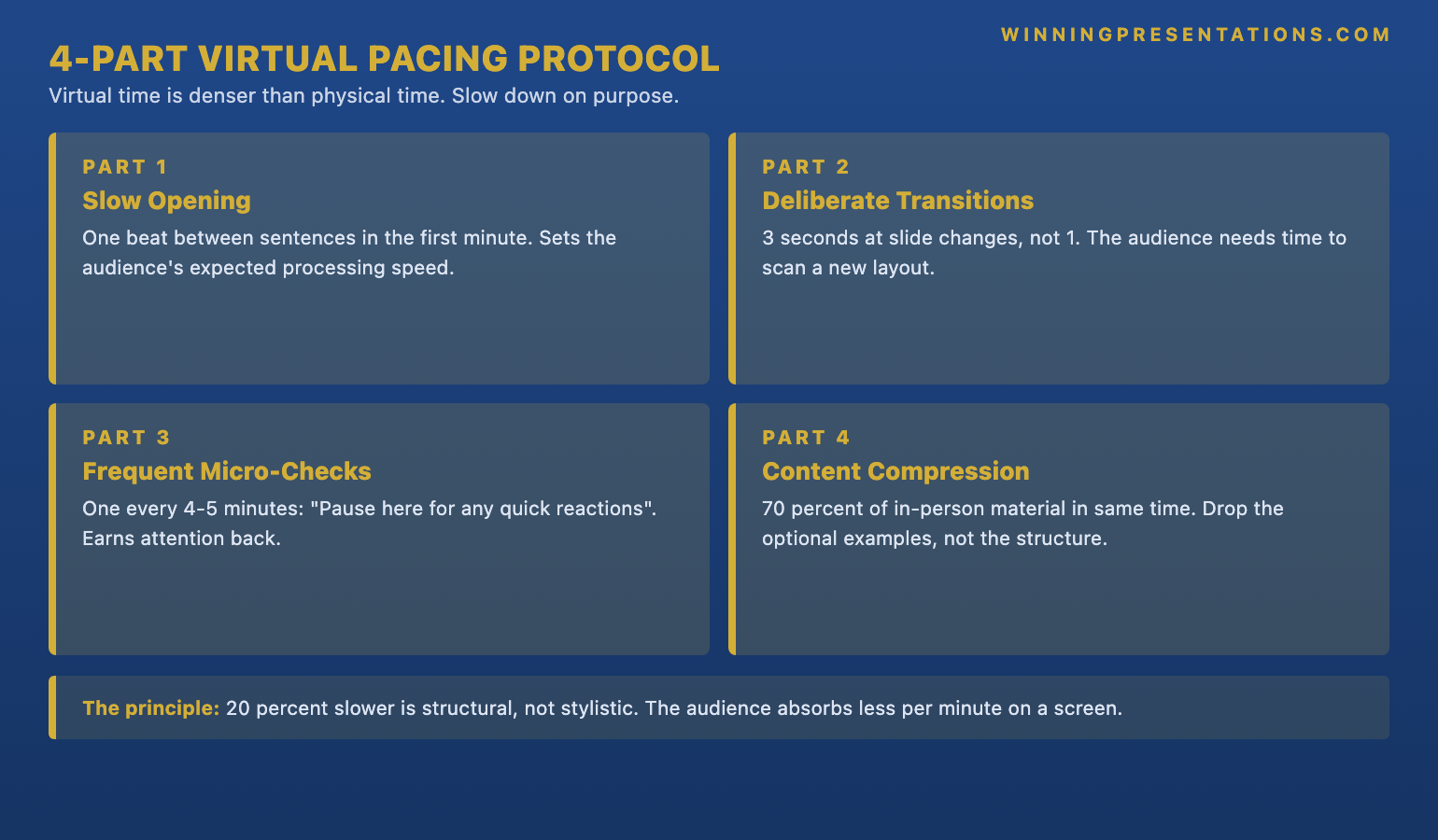
The protocol has four parts and they work together. The first is the slow opening. The first minute of a virtual presentation is where the audience is still calibrating — to the speaker’s voice through the codec, to the visual framing, to the cadence. A senior speaker who opens at in-person pace loses the audience’s calibration window and arrives at the recommendation before the audience is fully tuned in. The opening discipline is roughly one beat between sentences in the first minute, where one beat is the duration of a slow, silent “one” count. The pause feels long to the speaker; it does not feel long to the listener, because the listener is using the pause to settle into the channel.
The second is the deliberate slide-transition pause, covered in its own section below. The third is the micro-check, also covered separately. The fourth is content compression. The arithmetic is simple: if the audience absorbs around 20 per cent slower, the speaker who tries to cover 100 per cent of the in-person material in the same time slot will either overrun or arrive at the close with the audience two slides behind. The structural fix is to cover roughly 70 per cent of the in-person material, leaving slack for the slower pacing without rushing the load-bearing sentences. For the closely connected work on the energy register that holds attention through a long virtual meeting — and on why the same material that lands at a measured pace in person can feel flat on a video tile if the speaker does not adjust delivery accordingly — see our companion piece on virtual presentation energy.
The four parts are not negotiable separately. A speaker who slows the opening but does not compress content will overrun. A speaker who compresses content but does not slow the opening will lose the calibration window. A speaker who does both but skips the micro-checks will lose the audience’s attention by minute twenty. The protocol is a system; the parts compound. Mihail, a managing director at a Bucharest-headquartered software group, ran the protocol on his quarterly board call for the first time after coaching. He shaved twelve slides off the deck, paced the opening at one beat between sentences, and inserted a micro-check at minute six and minute eleven. The call finished two minutes early with no clarification requests. He told his coach the call had felt slower in delivery but more in control.
Slide transitions: the three-second discipline
In a physical room the speaker can move to the next slide and start talking almost immediately. The audience’s eye has registered the new slide before the first sentence lands, partly because the screen is larger and partly because the audience’s peripheral vision has already started parsing the layout. On a video call the new slide arrives in a smaller window, often after a fraction of a second of share-screen lag, and the audience needs a moment to register what is on the slide before the speaker’s commentary can be parsed against it. The in-person one-second pause is structurally too short for the virtual channel.
The discipline is a three-second pause at every slide transition. The speaker advances the slide, pauses silently for three seconds, then begins the commentary. To the speaker this feels uncomfortably long. To the audience it feels like the speaker is letting them catch up — which is what is actually happening. The three seconds is not arbitrary; it is roughly the time it takes a virtual audience to register the slide title, scan the structure, and orient to where the speaker is about to take the argument. Under that interval, the speaker’s first sentence lands on an audience that is still parsing the slide, and the sentence is half-absorbed at best.
The discipline is hardest on the slides where the speaker is most engaged with the material — the recommendation slide, the variance slide, the risk-and-mitigation slide. The temptation is to fill the silence, because the speaker knows what is on the slide and the pause feels redundant from their side of the screen. The audience does not know what is on the slide yet, and the redundancy is exactly the point. A useful internal discipline is to count three silent beats before the first sentence on any slide that carries a load-bearing argument — opening, recommendation, ask, close. The lower-stakes slides can run faster; the load-bearing ones cannot.
The at-a-glance pacing-and-delivery reference cards for senior virtual and in-person meetings.
Public Speaking Cheat Sheets is a structured set of at-a-glance reference cards covering pacing, pauses, vocal variety, opening protocols, and the high-stakes delivery rules — designed to be reviewed in the ten minutes before a senior virtual or in-person meeting. The cards distil the structural delivery rules into a format that is readable on a phone screen or a single sheet of A4, so the moves are accessible in the moment they are needed rather than buried in a longer programme.
- Delivery cheat sheets covering pacing, pauses, vocal variety, and the high-stakes opening protocols
- Designed for last-ten-minutes review before a senior meeting
- Includes the virtual pacing protocol and the in-person delivery rules side by side
- Phone-readable and print-friendly formats
- £14.99, instant download, lifetime updates
The micro-check rhythm and why it earns attention back
The micro-check is a brief, deliberate pause in the flow of the presentation where the speaker offers the audience a structured opportunity to react. The phrasing matters: “I will pause here for any quick reactions” is the working version. The “quick” signals to the audience that the pause is short and that the speaker is still in control of the time. The “reactions” rather than “questions” invites a wider range of input — a clarifying check, a flag of disagreement, or a request for a moment to absorb — without forcing every contribution to be framed as a formal question.
The cadence is every four to five minutes in a virtual presentation. That is roughly three times more frequent than the equivalent in-room pause, which is appropriate to the medium. The virtual audience cannot signal a need for a pause through body language as easily as an in-room audience can; the speaker has to build the pause into the structure. The micro-check at four-to-five minutes does several things at once: it lets the audience surface a question before it accumulates into frustration; it gives the audience members in different time zones a chance to ask the small clarifying questions they would not interrupt for; and it earns the speaker the audience’s attention back, because the audience now knows the next micro-check is only a few minutes away.
The discipline that breaks the micro-check is the speaker who asks “any questions?” and moves on after two seconds of silence. The audience on a video call needs a longer silence to unmute and contribute, partly because of the cognitive cost of unmuting, partly because the audience is reading the other tiles to see whether anyone else is going first. The working interval is five to seven seconds of silence before moving on. The silence feels long to the speaker; the audience uses it. For the related discipline on whether to require cameras on during virtual meetings and how the answer interacts with audience engagement and the success of the micro-check rhythm, see our piece on camera on or off in virtual presentations.
If the structural setup and pacing work above is the pattern that resonates:
The Virtual Presentation Quick-Start Checklist is the free setup, delivery, and rescue checklist for high-stakes virtual presentations — the camera, lighting, audio, and pacing checks to run before a senior meeting. Free download.
Content compression: what to keep and what to drop
Content compression is the part of the protocol most senior speakers resist, because the instinct is to cover more material in less time rather than less material at the same pace. The instinct is wrong for the medium. Covering more material faster runs into the absorption gap and produces an audience that is two slides behind the speaker by the end of the meeting. Covering less material at a calibrated pace produces an audience that is with the speaker at the close. The decision is what to keep and what to drop, and the rule is structural rather than topical.
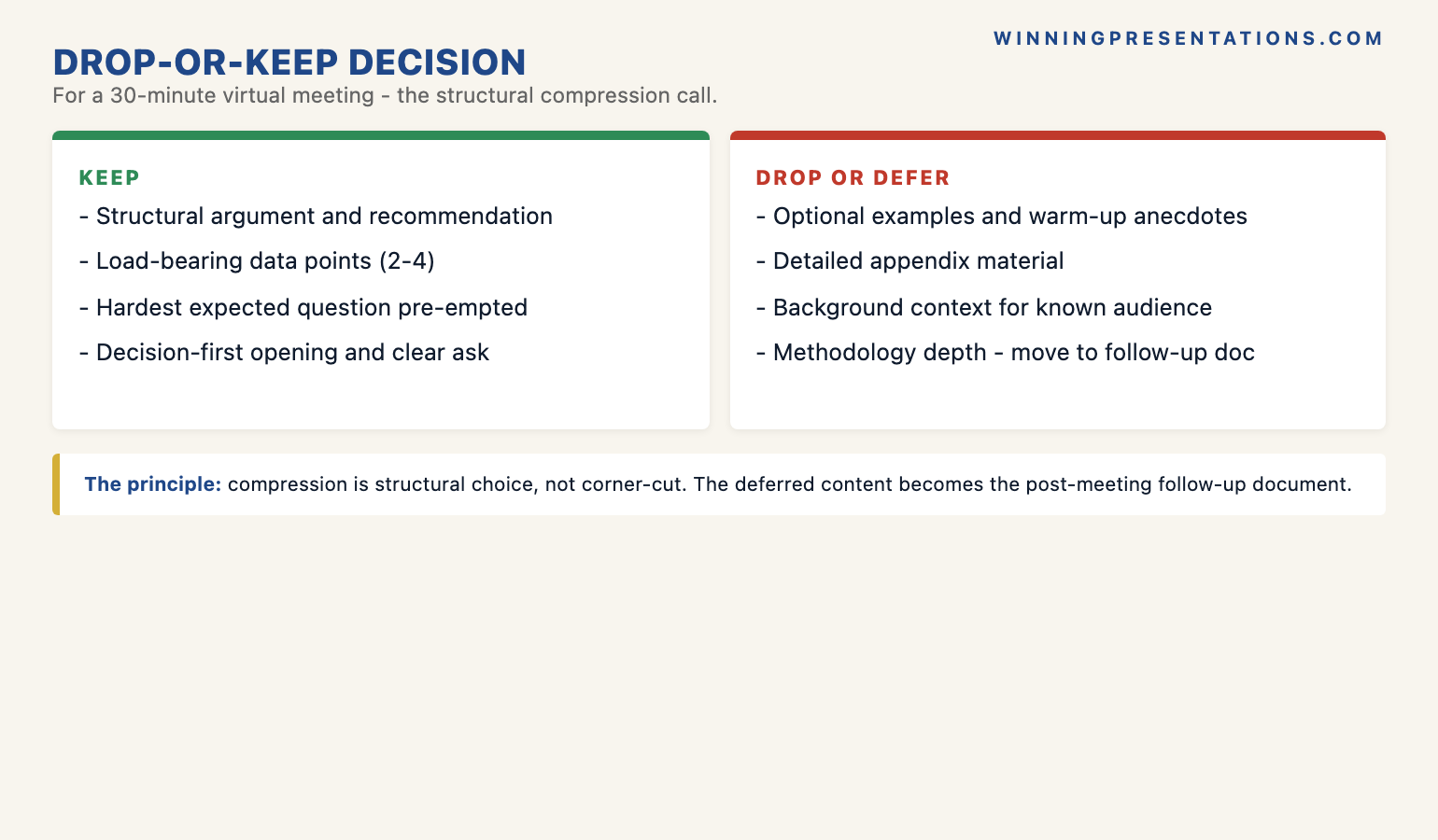
The keep list is short. Keep the structural argument — the opening that frames the decision the meeting is being asked to take, the recommendation, the one or two assumption slides that carry the analytical load, the risk-and-mitigation, and the close. Keep the load-bearing data — the two or three numbers the recommendation rests on, presented at the level of detail the audience needs to evaluate the argument rather than at the level of detail the team needed to produce it. Keep the contingency for one or two anticipated questions, prepared as slides that can be jumped to rather than walked through in sequence. Anything that supports the argument structurally stays in.
The drop list is longer and harder. Drop the warm-up anecdote unless it carries a structural function — most do not. Drop the second illustrative example where one is sufficient. Drop the slides that show working rather than conclusion — most senior audiences want the answer, not the working. Drop the optional context slides that set up the problem the audience already understands. Convert pairs of in-person slides into single virtual slides, with the key point bolded and the supporting detail removed or moved to a post-meeting follow-up document. The drop list is structural; the speaker who tries to compress by trimming sentences within each slide rather than by removing slides outright usually fails. For the closely connected discipline on board-level virtual meetings, where the compression decisions are sharper still because the audience is more senior and the slot is shorter, see our piece on virtual board meeting presentations.
Reading the room: in-meeting dynamic adjustment
The pacing protocol is the baseline; the dynamic adjustment is the work the speaker does in real time when the baseline turns out to need recalibration for this specific audience on this specific day. The signal to watch is attention drop, and on a video call attention drop has a specific signature. Tiles start drifting out of frame as members lean back. The chat goes quiet — there are no acknowledgement reactions, no small messages confirming a point. The speaker can see, in the gallery view, eyes moving off-camera to a second screen. The audience has not left the meeting, but the meeting has lost their primary attention.
The dynamic-adjustment move at that point is not to speak faster to finish on time. Speaking faster compounds the absorption gap and confirms to the audience that the meeting is no longer worth their primary attention. The move is to slow down further and to insert an unscheduled micro-check: “I will pause here. We are about halfway through, and I want to make sure the recommendation framing has landed before I go into the risk slide.” The unscheduled micro-check accomplishes three things: it forces the audience back into primary attention, because they are now being addressed directly; it surfaces whether the framing has actually landed, which is the question that matters; and it signals to the audience that the speaker is paying attention to them, not just to the deck.
Bartlomiej, a chief financial officer at a Warsaw-headquartered manufacturing group, used this move on a virtual board call last year when he saw two of his five non-executive directors visibly lose attention around minute fifteen. He paused, ran an unscheduled micro-check, and discovered that the variance number on slide six had landed differently than he had expected — one of the directors had been silently re-running the calculation against a different baseline for ten minutes and had stopped paying attention to the rest of the presentation. The five-minute conversation that followed resolved the misalignment and the rest of the call landed cleanly. Without the dynamic adjustment, the variance question would have surfaced at the end, when there was no time left to resolve it.
Frequently asked questions
Is the 20 per cent slower rule literal or directional?
Directional. The figure is a working approximation for the absorption gap between in-person and virtual audiences on a typical corporate call. The exact gap varies with connection quality, audience size, time of day, the seniority and fatigue of the audience, and the complexity of the material. A small, well-rested audience on a low-jitter connection at ten in the morning may sit closer to a 10 to 15 per cent gap; a tired audience at the end of a day of back-to-back calls, with several members on patchy connections, may be at 25 to 30 per cent. The point of the rule is not to hit a specific number; it is to give senior speakers a structured starting point that is closer to the right pace than in-person timing would be. Adjust upward from there based on how the specific audience is responding.
Won’t I lose half my content if I slow down that much?
You will lose some content; you will not lose half. The arithmetic is roughly that pacing for a 20 per cent absorption gap requires covering around 70 per cent of the in-person material in the same time slot — so you are dropping around 30 per cent of the volume, not 50 per cent. The 30 per cent is structured: the optional examples, the warm-up anecdote, the slides that show working, the second illustrative case. The load-bearing argument — the recommendation, the assumption slide, the risk and mitigation, the close — stays intact and is delivered at a pace the audience can actually absorb. The trade is favourable for senior meetings, where the audience would rather have 70 per cent of the material absorbed cleanly than 100 per cent of the material rushed past them.
Should I tell the meeting up front that I’m going to pause frequently?
Yes, briefly. A single sentence at the start of the meeting — “I will pause every few minutes for any quick reactions, so please do not save up the small clarifications” — sets the audience’s expectation and removes the awkwardness of the first micro-check. Without the sentence, the audience may read the first pause as a hesitation or a lost-place moment rather than as a structural choice. With the sentence, the pause reads as deliberate from the first instance, and the audience is more likely to use the micro-check rather than wait to be invited. The sentence belongs in the opening, before the first content slide, and should not be longer than one breath.
Does this apply equally to Teams, Webex, and Google Meet, or just Zoom?
The protocol applies equally across the four major platforms. The underlying mechanisms — audio compression, missing peripheral cues, tile-decoding tax, fixed-seat visual fatigue — are present in all of them, with small variations in codec behaviour and interface design that do not materially change the absorption gap. The three-second slide-transition pause holds for share-screen on Teams, for present-mode on Google Meet, and for content-share on Webex just as it does for screen-share on Zoom. The four-to-five minute micro-check rhythm is platform-independent. The dynamic-adjustment signals — tiles drifting, quiet chat, eyes off-camera — read the same way regardless of which interface the audience is looking at. Use Zoom as the worked example in the protocol; apply it without modification on the others.
The Winning Edge — weekly newsletter
The Winning Edge is a weekly newsletter for senior professionals who present at the executive level. One short email a week, focused on the structural moves that separate decks committees back from decks they defer. Subscribe to The Winning Edge →
Not ready for the cheat sheets? Start here instead: download the free Virtual Presentation Quick-Start Checklist — the setup, delivery, and pacing checklist to run before any senior virtual meeting.
About the author
Mary Beth Hazeldine is Owner & Managing Director of Winning Presentations Ltd. With 25 years of corporate banking experience at JPMorgan Chase, PwC, Royal Bank of Scotland, and Commerzbank, she advises executives across financial services, healthcare, technology, and government on structuring presentations for high-stakes funding rounds, board approvals, and strategic decisions.