
Tag: sales presentations

17 Mar 2026
Executive walking into a boardroom where committee members have already made their decision, subtle body language showing predetermined outcome, navy and gold corporate aesthetic

Your Presentation Didn’t Fail — The Decision Was Already Made Before You Walked In

Quick answer: Many boardroom presentations fail not because of weak slides or delivery, but because the decision was predetermined. Executives often use presentations to validate existing leanings rather than genuinely evaluate options. Understanding this pre-decision dynamic lets you reframe your approach and influence the outcome.

Stuck in a presentation where you sense the outcome is already locked? You’re not imagining it. Pre-decision dynamics operate in every boardroom, and most presenters never address them directly. The Executive Slide System teaches you how to diagnose these dynamics early and restructure your slides to shift them.

Discover how to reframe your slides for pre-decided audiences → £39

A senior VP sat in the boardroom watching her team present a three-year cost-reduction strategy. Forty-five minutes of analysis. Seventeen slides of data. Three different implementation scenarios. She nodded at the right moments, asked clarifying questions, then rejected every option—not because the logic was flawed, but because the CFO had already decided he wanted his own proposal on the table first.

The presentation didn’t fail because it was poorly constructed. It failed because the decision had already been made, and the presentation was being used as political theatre, not genuine evaluation.

This happens in corporate environments constantly. Your slides are competing not against the strength of your logic, but against existing stakeholder leanings, hidden agendas, and pre-aligned factions. Understanding this dynamic isn’t pessimistic—it’s liberating. Once you see the pattern, you can work with it instead of against it.

Pre-Decision Dynamics in Boardrooms

Executive audiences rarely enter a presentation with blank minds. By the time you’re presenting, stakeholders have already formed initial preferences based on a dozen inputs you may never have controlled: prior conversations, rumour, political loyalty, financial incentive, or simple familiarity with an option they’ve already discussed privately.

This is what researchers call confirmation bias in high-stakes environments. Decision-makers instinctively look for information that confirms what they already believe, and minimise information that contradicts it. In boardrooms, this tendency amplifies because:

  • Ego is involved. Reversing a position already stated publicly feels like a loss of credibility.
  • Politics are present. Siding with one faction over another has real consequences for internal influence and career trajectory.
  • Time pressure is constant. Executives prefer to move toward a “decided” state quickly rather than remain in genuine evaluation mode.
  • Social proof drives conformity. If the senior voice in the room has already leaned one way, others follow to maintain group cohesion.

None of this means your presentation is worthless. It means your presentation is operating in a context where the rules are different from what most presenters assume.

Why Your Slides Don’t Change Pre-Made Minds

Traditional presentation advice says: show the data, build the argument, land the recommendation. This works beautifully in classrooms and sales contexts where the audience genuinely wants to be persuaded.

But in executive environments with pre-decided audiences, this approach backfires. Your detailed analysis becomes ammunition for the already-decided stakeholder to construct counter-arguments. Your three options become a buffet of justifications for why the preferred option is best.

Why? Because pre-decided audiences use presentations differently. They don’t evaluate—they filter. They’re looking for:

  • Reasons to rule out competing options
  • Language they can repeat to justify their preference
  • Data points that look good in an email recap
  • Anything that makes them look decisive and informed

Your job isn’t to persuade them. Your job is to become the clearest path to the decision they’re already leaning toward—or to expose flaws in that decision so obviously that staying the course becomes riskier than changing course.

How to Diagnose Pre-Decision Early

Before you present, you need to know whether you’re walking into a genuine evaluation or a pre-decided outcome. Real diagnostic signals appear weeks before the meeting:

Signal 1: Private alignment conversations have already happened. Stakeholders mention the decision casually in corridor chats before you’ve even presented the analysis. “I think we’re going with option B” signals that evaluation is over—you’re in validation mode.

Signal 2: The decision-maker defines “success” in oddly specific terms. Instead of “help us choose the best option,” they say “I need a clear business case for approach X.” You’re not evaluating X—you’re justifying it.

Signal 3: Certain voices are absent from decision meetings. If key stakeholders who should influence the choice are being excluded, a faction has already decided and is controlling the process.

Signal 4: The timeframe is artificially compressed. “We need this decided by Thursday” often means the decision is already made and they’re rushing to legitimacy. Real evaluation takes longer.

Signal 5: Your predecessors’ recommendations are being ignored or contradicted without new information. If prior analysis said one thing and the new brief says another without any material change in context, a decision has been made at a different level.

Recognising these signals early lets you adjust your strategy before you’re standing in front of the room.
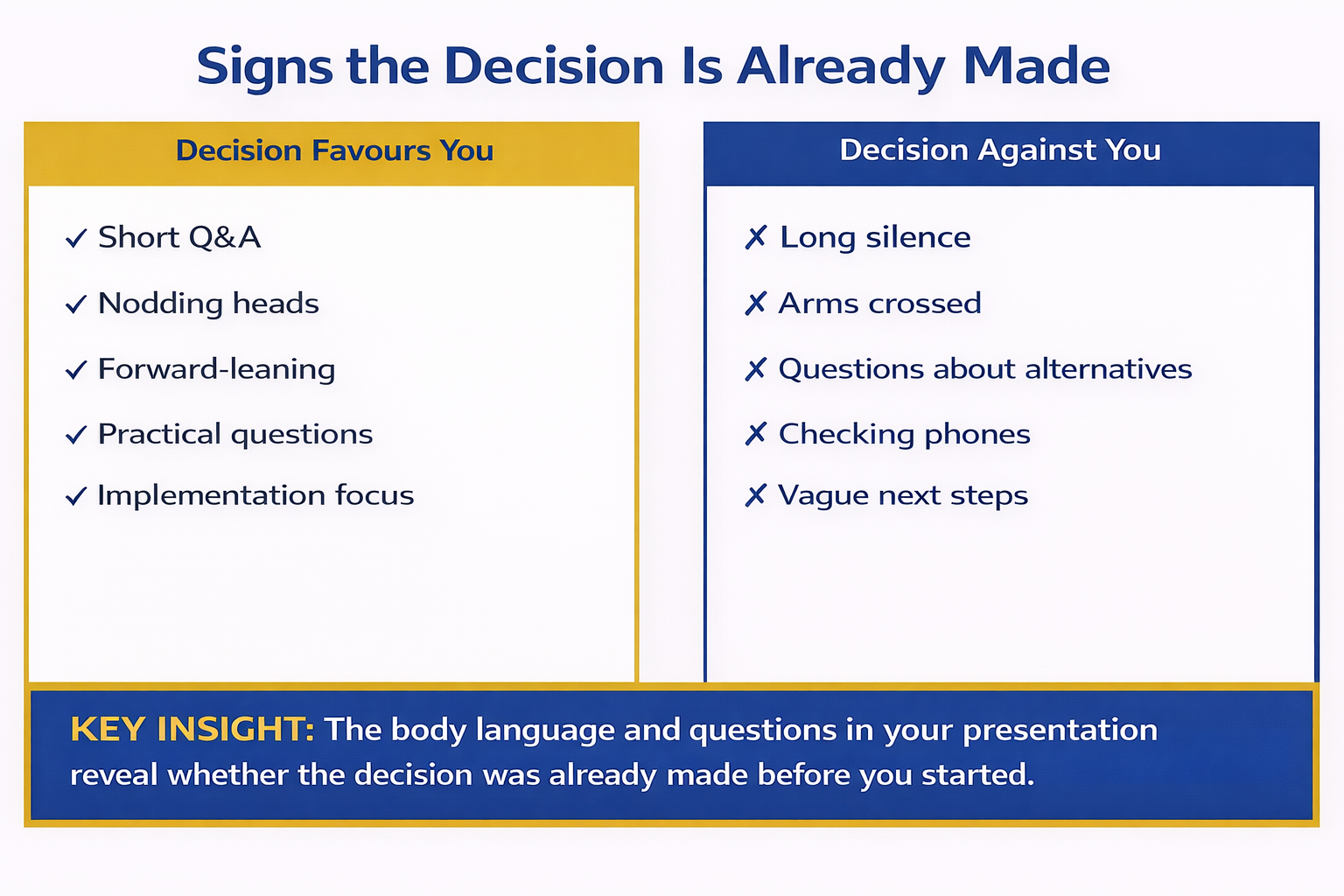
Body language and verbal cue comparison infographic showing signs the decision favours you versus signs the decision is against you across multiple indicators

Restructuring Your Approach for Pre-Decided Audiences

Once you know you’re presenting to a pre-decided audience, your slide strategy changes fundamentally. Your aim shifts from persuasion to clarity and credibility.

First: Lead with the stakeholder’s preference, not your analysis. Name the option they’re leaning toward. Validate the reasoning. This removes defensiveness and positions you as someone who understands their thinking.

Second: Surface the hidden risks in their preferred option using neutral language. Don’t argue against it—illuminate gaps. “This approach works beautifully if assumption X holds true. Here’s what we’ve seen when that assumption breaks down.”

Third: Reframe competing options not as alternatives, but as complementary or sequential steps. Instead of “Option A or Option B,” use “Option B achieves X quickly, and Option A handles Y in the medium term.”

Fourth: Make it easy for them to change their mind without losing face. Give them new information that legitimises reversal. “We just learned this from the market research—it changes the risk profile of the original approach.”

Master Pre-Decision Dynamics With Structured Slide Architecture

The Executive Slide System teaches you a seven-slide foundation that works in pre-decided boardrooms. You’ll learn how to diagnose stakeholder leanings before you present, structure your recommendation to shift pre-aligned positions, and surface hidden risks that force genuine reconsideration.

  • Identify whether you’re in evaluation mode or validation mode (Signal check)
  • Restructure your recommendation to address unspoken stakeholder concerns
  • Create slides that surface risk without appearing to argue
  • Build a decision-shifting narrative that feels like new information, not contradiction
  • Deliver with confidence when you understand the real dynamics at play

Get the Executive Slide System → £39

Used by executives at FTSE 250 companies and funded startups to restructure high-stakes presentations in real time.

Need a framework to diagnose pre-decision dynamics before you walk in?

Get the ESS Framework → £39

The Pre-Presentation Alignment Conversation

The most powerful move you can make happens before you present. Conduct a pre-decision stakeholder conversation with the key decision-maker. Not to persuade them—to understand them.

This conversation should happen 3–5 days before the presentation. Its purpose is diagnostic, not political:

“I want to make sure my slides land clearly. Walk me through your current thinking on this decision. What’s most important to you about the final choice?”

Listen for:

  • What they say first (usually the real priority)
  • What they return to multiple times (the worry underneath)
  • What they don’t mention (the blind spot)
  • Who they reference (“I’ve talked to the CFO about…”)—the informal power structure

This single conversation often reveals whether you’re in a pre-decided scenario. If they already have a clear leaning, you now know. If they’re genuinely undecided, you’ll hear it in the language they use—it’s more tentative, more exploratory, less prescriptive.

Armed with this clarity, restructure your slides to build genuine buy-in, not just validation. The slides should address the stakeholder’s actual priority, not the priority you guessed.
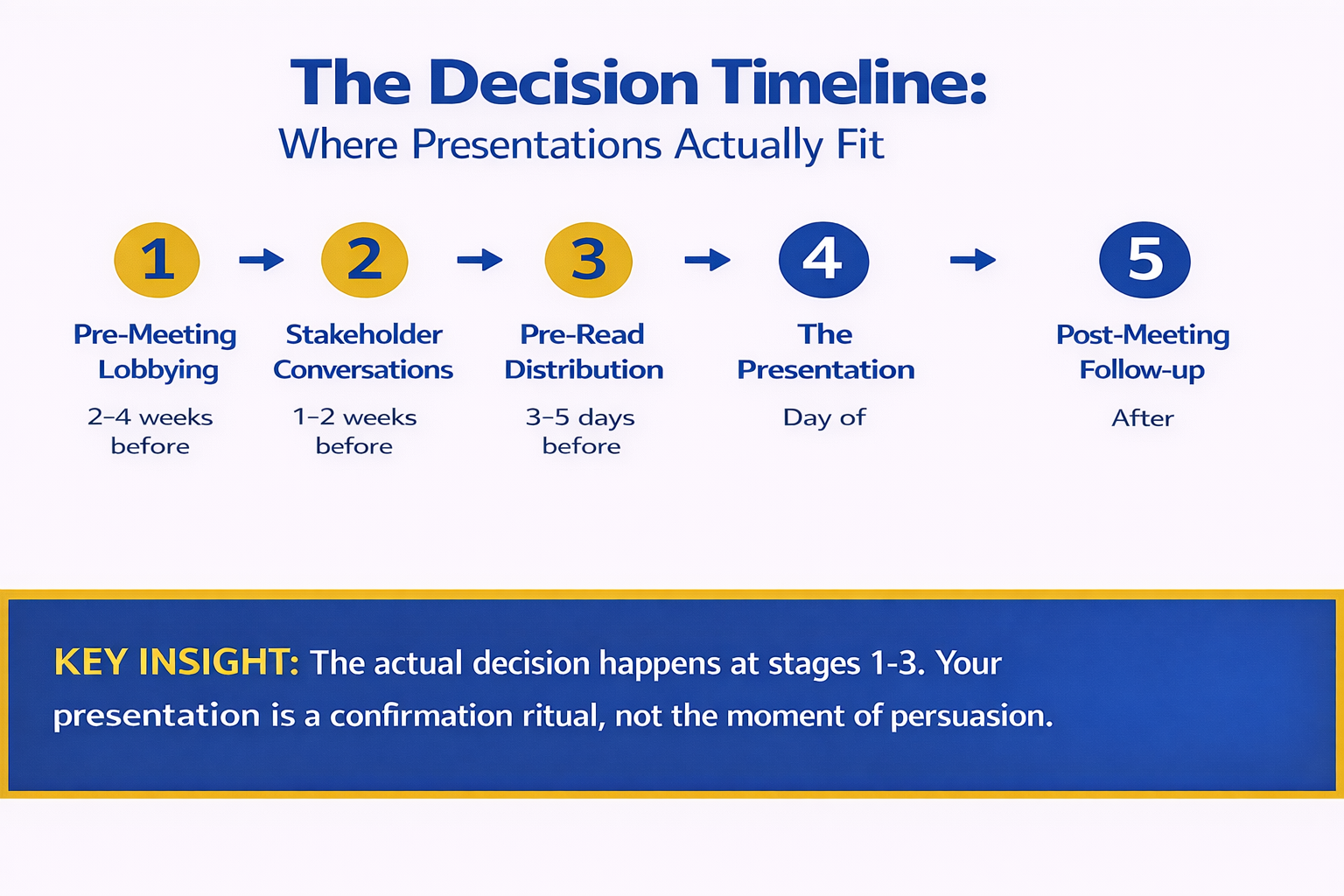
Decision timeline infographic showing five stages from pre-meeting lobbying to post-meeting follow-up highlighting that the actual decision happens at stages one to three not during the formal presentation

Winning Presentations Beyond Pre-Decision Scenarios

Not every presentation operates under pre-decision pressure. Some stakeholder groups genuinely want to evaluate options. But too many presenters assume they’re in the evaluation group when they’re actually in the validation group.

Understanding which context you’re in changes everything. A strong boardroom presentation structure works in both scenarios, but the emphasis shifts. In pre-decision environments, clarity and risk transparency become more important than volume of detail.

The stakes of getting this wrong are real. A misread pre-decision scenario can lead you to over-prepare, over-present, and over-argue, which only reinforces stakeholder defensiveness about their leaning. You come across as someone who doesn’t understand the political reality.

Diagnose and Restructure Before Your Next Boardroom Presentation

The Executive Slide System includes a pre-presentation diagnostic tool to identify whether you’re facing a pre-decided audience. Once you know, the system guides you through restructuring every slide to work with stakeholder leanings, not against them.

  • Pre-presentation diagnostic: Signals to spot pre-decided scenarios
  • Stakeholder alignment conversation template: Uncover hidden priorities
  • Slide restructuring framework: Adapt your narrative for pre-aligned audiences
  • Risk-surfacing techniques: Highlight flaws without appearing argumentative
  • Real-world boardroom examples: Presentations that succeeded despite pre-decision pressure

Get the Executive Slide System → £39

Included: Full stakeholder alignment conversation template (save 2 hours of preparation).

Ready to restructure your slides for the boardroom reality you’re actually facing?

Start With the ESS → £39

Key Takeaways

Pre-decision dynamics are normal in executive environments. Stakeholders often use presentations to validate existing leanings rather than genuinely evaluate options. Recognising this isn’t cynical—it’s realistic.

Your presentation isn’t failing because it’s weak. It’s failing because you’re treating a validation scenario as an evaluation scenario. The approach is different.

Diagnosis comes before restructuring. Ask yourself: has the decision already been made? If yes, shift from persuasion to clarity and credibility. If no, use a traditional persuasion structure.

A pre-presentation stakeholder conversation is your strongest diagnostic tool. It reveals whether you’re in a pre-decided scenario and, if you are, what the real priority is.

Is This Right For You?

✓ This is for you if:

You’re presenting to stakeholders who seem to have already decided, and your slides feel like they’re being used to justify rather than evaluate.
You suspect a stakeholder faction has aligned privately before your presentation, and you need to know how to work with that reality.
You want to diagnose pre-decision dynamics early so you can restructure your approach instead of walking into the boardroom blindly.

✗ Not for you if:

You’re presenting to an audience that genuinely hasn’t formed a preference yet and is asking you to help them decide. (In that case, use a traditional persuasion structure.)
You prefer to ignore the political reality of boardrooms and hope that strong analysis alone will win the day.

People Also Ask

What if I’m wrong about whether the decision is pre-made? You’re not really wrong—the stakes of being wrong are low. If you treat a genuine evaluation scenario like pre-decided, you’ll be clear and organised (which helps). If you treat a pre-decided scenario like genuine evaluation, you’ll be verbose and argumentative (which hurts). Defaulting to the pre-decided assumption is safer.

Is it unethical to adjust my slides based on a stakeholder’s existing leaning? No. Your job is to serve the decision-maker’s real needs, not your imagined idea of what’s neutral. If you understand what they actually care about, you present information in a way they can hear. That’s not manipulation—that’s communication.

How do I surface concerns about the preferred option without looking like I’m arguing against it? Use neutral, exploratory language: “Here’s what we’ve seen when this assumption holds” or “This approach works beautifully in scenario X. Here’s what happens in scenario Y.” You’re not saying the option is wrong—you’re surfacing contingencies they need to account for.

The Complete Framework for Pre-Decision Boardrooms

The Executive Slide System is built on one core truth: your slides must serve the stakeholder’s real decision-making process, not an imagined ideal one. That’s how you build credibility and influence.

  • Seven-slide architecture that works in pre-decided scenarios
  • Pre-presentation diagnostic checklist (identify the real situation)
  • Stakeholder alignment conversation template (uncover hidden priorities)
  • Slide restructuring toolkit (adapt your narrative in real time)
  • Risk-surfacing language (raise concerns without appearing argumentative)

Get the Executive Slide System → £39

Trusted by executives at FTSE-listed companies, family offices, and venture-backed startups.

FAQ

Can I still influence a pre-decided decision through my presentation?

Yes, but indirectly. You don’t change a pre-decided stakeholder’s mind through argument—you do it by surfacing information they didn’t have that makes the original decision riskier. “We just learned X from the market” or “Competitor Y has moved faster than we anticipated” gives them a legitimate reason to reconsider without admitting their original leaning was wrong.

What’s the difference between a pre-decided scenario and a bad presentation?

A bad presentation fails because the slides are confusing, the logic is weak, or the delivery is poor. A pre-decided scenario fails because the audience was never going to be persuaded by slides alone—they were there to validate. You can have excellent slides and still fail in a pre-decided scenario if you don’t address the real dynamic.

Should I confront a stakeholder if I think they’ve already decided?

No. Never accuse a stakeholder of having pre-decided. Instead, use the alignment conversation diagnostic to understand their thinking, acknowledge what you learn, and restructure your slides accordingly. They may not even realise they’ve already decided—and that’s fine.

How many pre-presentation alignment conversations should I have?

Ideally, one with the primary decision-maker and one with the most influential peer stakeholder. That’s usually enough to map the terrain. More than that and you risk looking like you’re lobbying rather than gathering information.

Related: The ‘One More Thing’ That Ruins Good Presentations: Why Anxiety Makes You Add Content — How nervous presenters often over-prepare in pre-decided scenarios, which backfires.

Related: Technical Questions From Non-Technical Executives: How to Translate Under Pressure — When the Q&A reveals a comprehension gap that you need to bridge instantly.

Get Clarity on Boardroom Politics Before Your Next Presentation

The executives who win boardrooms aren’t the ones with the most data. They’re the ones who understand the political reality—who has decided what, why, and what would actually shift their thinking.

The Executive Slide System gives you a diagnostic framework to map that reality in your next presentation. Once you see the dynamics clearly, restructuring your slides becomes straightforward.

You’re presenting on March 24? You have seven days to diagnose the stakeholder landscape and restructure your narrative. That window is shrinking—start your stakeholder alignment conversation this week.

Join the executives learning to read boardroom dynamics before they present. Subscribe to The Winning Edge newsletter for weekly frameworks on executive communication.

🆓 Free resource: Download now — a free guide to strengthen your presentation preparation.

About the Author

Mary Beth Hazeldine is the Owner & Managing Director of Winning Presentations. With 24 years of corporate banking experience at JPMorgan Chase, PwC, Royal Bank of Scotland, and Commerzbank, she has delivered high-stakes presentations in boardrooms across three continents.

A qualified clinical hypnotherapist and NLP practitioner, Mary Beth combines executive communication expertise with evidence-based techniques for managing presentation anxiety. She has trained thousands of executives and supported high-stakes funding rounds and approvals.

Book a discovery call | View services

This article was written with AI assistance and reviewed by Mary Beth Hazeldine.

16 Jan 2026
Client presentation skills framework showing useful vs impressive approach

Client Presentation Skills: Why ‘Impressive’ Loses and ‘Useful’ Wins Every Time

Quick Answer: The most effective client presentation skills focus on being useful rather than impressive. Clients don’t want to be dazzled—they want clarity on how you’ll solve their problem. Structure every slide around their decision, not your credentials. Lead with the answer, support with evidence, and close with clear next steps.

Three years ago, I watched a client presentation that should have been a slam dunk turn into a disaster.

The consulting firm had spent 47 hours perfecting their deck. Custom animations. Cinematic transitions. A video that cost more than my first car. Their credentials section alone was 12 slides of logos, awards, and testimonials.

The client—a FTSE 100 CFO—sat through all 58 slides without interrupting. When the lights came up, she asked one question: “Can you tell me specifically how this solves my inventory problem?”

Silence. The presenters looked at each other. They’d been so focused on being impressive that they’d buried the actual solution on slide 47.

The firm didn’t win that contract. A smaller competitor did—with a 9-slide deck that started with the client’s exact problem and ended with a clear implementation plan.

I know because I helped that smaller firm prepare their pitch.

After 24 years in corporate banking at JPMorgan Chase, PwC, RBS, and Commerzbank—and training over 5,000 executives on high-stakes presentations—I’ve seen this pattern repeat hundreds of times. The teams that try to impress almost always lose to the teams that choose to be useful.

This article will show you exactly why, and how to develop client presentation skills that actually close business.

⭐ Steal the Exact Slide Structure That Closes Client Deals

The best salespeople don’t convince—they structure. Get the plug-and-play frameworks that guide prospects to yes.

What’s inside:

  • The 9-slide client pitch framework
  • “No-Brainer Calculation” ROI template
  • Implementation timeline layouts

📊 Preview: Problem slide → Recommendation → ROI calculation → Implementation timeline → Next steps

“This turned our deck into a decision document overnight.” — Management Consultant, London

Used by executives in banking, consulting, and corporate finance to win time-critical pitches.

Built from frameworks behind £250M+ in funded pitches. Aggregate outcomes across multiple client pitches and funding rounds.

Download the Client Pitch Deck Templates → £39

Built for people who need a client pitch deck in the next 72 hours.

The ‘Impressive’ Trap That Kills Client Presentations

Here’s an uncomfortable truth I’ve learned from watching thousands of client presentations fail: being impressive is actually a defence mechanism.

When you’re unsure whether your solution truly fits the client’s needs, you compensate with credentials. When you haven’t done enough discovery, you hide behind animations. When you’re anxious about the outcome, you add more slides showing how brilliant your company is.

The problem? Clients see through it instantly.

Research cited by Corporate Visions (via Forrester) shows executive buyers strongly favour the seller who delivers value and insight early—not the one with the most impressive presentation. Clients aren’t sitting in your meeting thinking, “Wow, that transition was smooth.” They’re thinking, “Does this solve my problem or not?”

What makes a good client presentation?

A good client presentation leads with the client’s specific problem, presents a clear recommendation within the first few minutes, and closes with concrete next steps. It prioritises usefulness over impressiveness.

The Impressive Presentation Pattern

Most client presentations follow the same doomed structure:

  • Slides 1-5: Company history and credentials
  • Slides 6-15: Services overview (all of them, just in case)
  • Slides 16-25: Case studies (impressive ones, naturally)
  • Slides 26-35: Team bios and qualifications
  • Slides 36-40: Finally, something about the client’s actual situation
  • Slides 41-50: Methodology (in exhaustive detail)
  • Slide 51: Pricing
  • Slide 52: Questions?

By the time you reach the client’s actual problem, they’ve mentally checked out. Their attention peaked in the first three minutes—and you wasted it on your founding story.

Why “Impressive” Feels Safe (But Isn’t)

I understand the instinct. When I started presenting at PwC, I did exactly the same thing. My first major client pitch included a 15-minute section on our global footprint. I thought it showed credibility.

What it actually showed was that I didn’t understand what the client needed to make a decision.

The client didn’t care that PwC had offices in 157 countries. They cared whether we could fix their supply chain issue before Q4.

Comparison chart showing useful vs impressive client presentation approaches

What Clients Actually Want (It’s Not What You Think)

After sitting through more than 500 client presentations on the buying side during my banking career, I can tell you exactly what goes through a client’s mind:

“Get to the point. Help me make a decision. Don’t waste my time.”

That’s it. That’s what every client wants from every presentation. Everything else—the rapport building, the credibility establishing, the relationship developing—is secondary.

The 4 Questions Every Client Is Silently Asking

While you’re presenting, your client is running an internal checklist:

  1. Do they understand my specific situation? Not a generic version of my industry—MY situation, with MY constraints and MY priorities.
  2. Is their solution actually right for us? Not a solution they’ve sold to others—one that fits what we need.
  3. Can I trust them to deliver? Not impressive credentials—evidence they can execute.
  4. What happens next? Not a vague “we’ll be in touch”—a clear path forward.

Notice what’s missing? They’re not asking about your founding story. They’re not wondering how many awards you’ve won. They’re not impressed by your global headcount.

They’re asking: “Can this person solve my problem?”

How long should a client presentation be?

Most client presentations should be 15-20 minutes followed by discussion—typically 9-12 slides. Shorter presentations that hit every key point beat longer ones that lose audience attention.

The Shift from Impressive to Useful

When I work with clients on their client presentation skills, the first thing we do is flip the entire structure. Instead of building toward the solution, we lead with it.

Here’s how the same content looks when reorganized around usefulness:

  • Slide 1: The client’s specific problem (proving you understand)
  • Slide 2: Your recommended solution (the answer they came for)
  • Slide 3: Why this approach (supporting evidence)
  • Slides 4-6: How it works (implementation clarity)
  • Slide 7: What you’ll deliver (specific outcomes)
  • Slide 8: Investment required (pricing in context)
  • Slide 9: Next steps (clear path forward)

Credentials? They’re in an appendix—available if the client asks, invisible if they don’t.

This structure respects the client’s time and signals confidence. You’re saying: “I understand your problem so well that I can cut straight to the solution.”

The Useful Framework: 5 Pillars of Client Presentations That Win

After years of testing and refining, I’ve identified five pillars that separate client presentations that close from those that don’t.

Pillar 1: Lead with Their Problem, Not Your Credentials

Your opening slide should reflect the client’s world back to them. Not a generic industry challenge—their specific situation.

I had a client preparing to pitch a major retailer. Their original opening was: “About Our Agency: 15 Years of Retail Excellence.”

We changed it to: “Your Checkout Abandonment Problem: 34% of Customers Leave at Payment.”

The client leaned in immediately. Why? Because we’d shown in five seconds that we understood exactly what was keeping them up at night.

The rule: Your first slide should include at least one number specific to the client’s situation. If you can’t find one, you haven’t done enough discovery.

Pillar 2: Answer First, Explain Second

Most presenters build suspense: background, analysis, options, then finally the recommendation. Clients hate this.

They’re thinking: “Just tell me what you think I should do.”

The Pyramid Principle, pioneered at McKinsey, puts the answer first. You state your recommendation, then support it with evidence. This isn’t just more efficient—it builds trust.

When you hide your recommendation until the end, clients wonder what you’re hiding. When you lead with it, they see confidence.

Pillar 3: Show Implementation, Not Just Strategy

Strategy slides are cheap. Every consultant can create them. What clients pay for is execution.

A VP of Operations once told me: “I’ve seen 50 presentations that diagnosed my problem perfectly. I’ve seen two that convinced me the presenter could actually fix it.”

Your presentation needs to show the “how” as clearly as the “what.” This means:

  • Specific timelines with milestones
  • Named team members (not just roles)
  • Dependencies and risk mitigation
  • Communication and reporting cadence

The more concrete your implementation section, the more real your solution feels.

💡 Want the exact implementation slide layouts? The Executive Slide System includes ready-to-use implementation and timeline templates.

Client presentation implementation framework showing timeline and milestones

Pillar 4: Make the ROI Impossible to Ignore

Every client presentation should include a slide I call the “No-Brainer Calculation.”

This slide shows, in simple maths, why your solution is worth the investment. Not vague benefits—specific, calculated returns.

Example:

“Your current checkout abandonment rate costs £2.4M annually. Our solution has reduced abandonment by 23% for similar retailers. A 23% reduction = £552K annual revenue recovery. Our fee: £180K. Payback period: 4 months.”

When clients can see their own numbers in your calculation, the decision becomes obvious.

💡 Need the ROI calculation template? The Executive Slide System includes the “No-Brainer Calculation” slide layout ready to customise.

Pillar 5: Close with Momentum, Not Questions

The worst way to end a client presentation: “Any questions?”

This hands control to the room, invites objections, and creates uncertainty about what happens next.

The better approach: close with specific next steps and immediate action.

“Based on what we’ve discussed, here’s what I propose: We’ll send the detailed scope document by Thursday. You’ll review with your team and come back to us with any modifications by the following Tuesday. We can have the kickoff scheduled for February 1st. Does that timeline work for your team?”

Notice: you’re not asking IF they want to proceed. You’re asking WHEN.

This isn’t aggressive—it’s useful. You’re making their life easier by proposing the path forward.

How to Structure a Client Presentation That Closes

Let me give you the exact structure I use with clients who need to win competitive pitches.

The 9-Slide Client Presentation Framework

Slide 1: Their Problem (with specifics)
“Your inventory carrying costs have increased 34% over 18 months while turns have decreased.”

Slide 2: Your Recommendation
“We recommend implementing a demand-sensing system integrated with your existing ERP.”

Slide 3: Why This Approach
3-4 bullet points explaining why this solution fits their specific situation.

Slide 4: How It Works (Overview)
Visual showing the system architecture or process flow.

Slide 5: Implementation Timeline
Clear milestones: Week 1, Month 1, Month 3, Go-Live.

Slide 6: Expected Outcomes
Specific, measurable results: “15-20% reduction in carrying costs within 6 months.”

Slide 7: Investment Required
Pricing with context—show the ROI calculation here.

Slide 8: Why Us (One Slide Only)
2-3 proof points specific to this project. Not your whole history—just why you’re right for THIS.

Slide 9: Next Steps
Specific actions with dates and owners.

Appendix: Everything Else
Team bios, detailed methodology, additional case studies—available if asked.

This structure works because it respects the client’s time while giving them everything they need to make a decision. Learn more about persuasive presentation techniques that complement this framework.

⭐ Want This as a Ready-to-Use Client Pitch Deck?

If you’re building a client pitch this week, get plug-and-play slides so you’re not starting from scratch.

What’s inside:

  • The complete 9-slide client framework (ready to customise)
  • ROI “No-Brainer Calculation” template
  • Implementation timeline layouts

Get the Plug-and-Play Deck Frameworks → £39

What is the best structure for a client pitch?

The best client pitch structure leads with the client’s problem, presents your recommendation on slide 2, supports it with evidence and implementation details, then closes with pricing in context and specific next steps. Keep credentials in an appendix.

The First 30 Seconds

Your opening line sets the tone for everything that follows. Skip the pleasantries and get to value immediately.

Weak opening: “Thank you for having us today. We’re really excited to present our proposal. Before we dive in, let me tell you a bit about our company…”

Strong opening: “Your checkout abandonment rate is costing you £2.4 million annually. In the next 20 minutes, I’m going to show you exactly how we’ll cut that by at least 23%—and have it running before your Q4 peak.”

The strong opening passes the “So What?” test. The client immediately knows why this meeting matters.

For more on powerful openings, see how to start a presentation.

The 7 Client Presentation Mistakes That Lose Deals

I’ve watched brilliant solutions lose to mediocre competitors because of avoidable presentation mistakes. Here are the seven I see most often.

Mistake #1: Starting with Your Company History

The client doesn’t care about your founding story. They care about their problem. Every second you spend on your history is a second they’re mentally checking out.

Fix: Move all company information to an appendix. Only share it if the client asks.

Mistake #2: Generic Problem Framing

“Companies in your industry face digital transformation challenges.”

This tells the client nothing. It shows you’ve done surface-level research and are delivering a template presentation.

Fix: Use specific numbers from their situation. “Your customer acquisition cost has increased 47% over three years while lifetime value has stayed flat.”

Mistake #3: Too Many Options

Presenting three options seems helpful—”We’ll let them choose!”—but it actually creates decision paralysis.

Research by Sheena Iyengar shows that too many choices reduce decision-making confidence and increase the likelihood of choosing nothing.

Fix: Make a recommendation. Present one option with conviction. Mention alternatives briefly in the appendix.

Mistake #4: Burying the Price

Putting pricing on slide 47 of 52 signals that you’re nervous about it. Clients notice.

Fix: Present investment in context, early enough that you have time to discuss it. Frame it against the value delivered, not as a standalone number.

Mistake #5: Vague Next Steps

“We’d love to continue the conversation” isn’t a next step. It’s a platitude.

Fix: Propose specific actions with dates. “We’ll send the scope document by Thursday. Your review deadline would be the following Tuesday. Kickoff February 1st.”

Mistake #6: Reading the Slides

When you read your slides, you become redundant. The client can read faster than you can speak—so why are you there?

Fix: Your slides should be visual anchors, not scripts. Design them so they need you to explain them. For more on confident delivery, explore building presentation confidence.

Mistake #7: Ignoring the Decision-Maker

Sometimes the real decision-maker isn’t obvious. They might be the quietest person in the room.

Fix: Before your presentation, ask: “Who else will be involved in the decision?” During the presentation, watch for who others defer to. Address your key points to that person.

Common client presentation mistakes infographic with fixes

Case Study: From 23% Close Rate to 67% in 90 Days

Let me share a transformation that illustrates what’s possible when you shift from impressive to useful.

A management consultancy came to me after losing three major pitches in a row. Their presentations were polished—beautiful design, smooth delivery, comprehensive coverage of every service they offered.

The problem? They were winning only 23% of competitive pitches. Industry average was closer to 40%.

The Diagnosis

I sat through one of their dry-run presentations. Within five minutes, I understood the problem.

Their 44-slide deck spent the first 15 slides on company credentials. By the time they reached the client’s actual situation, we were 20 minutes into a 45-minute slot.

More critically, their recommendation was buried on slide 38. A client who lost focus—or had to leave early—would never reach it.

They were trying to impress their way to a contract. The clients weren’t buying it.

The Transformation

We restructured everything around the 9-slide framework I described earlier.

Original deck: 44 slides, credentials-first, recommendation on slide 38.

New deck: 9 slides, problem-first, recommendation on slide 2.

We moved their credentials section—all 15 slides of it—to an appendix. Their team was initially terrified. “But the client needs to know who we are!”

I reminded them: “The client already knows who you are. That’s why you’re in the room. What they don’t know is whether you understand their problem and can solve it.”

The Results

Over the next 90 days, they pitched seven new opportunities using the new structure.

Close rate: 67% (5 wins from 7 pitches).

Combined contract value: £3.2 million.

But here’s what surprised me: client feedback consistently mentioned how “refreshing” and “efficient” their presentations felt. Multiple prospects commented that it was the clearest proposal they’d received.

Being useful isn’t just more effective—it’s more appreciated.

What They Said

“The thing that changed everything was leading with the client’s numbers. Within 30 seconds, they knew we understood their situation. The rest of the presentation was just confirming what they already sensed: that we were the right choice.”

— Managing Director, the consultancy

⭐ Win the Pitch by Controlling the Decision

Most competitors show capability. You’ll show clarity, ROI, and execution—the things buyers actually decide on.

What’s inside:

  • Answer-first structure that builds trust fast
  • “No-Brainer Calculation” ROI slide template
  • Stakeholder framing for multi-buyer meetings

Download the Executive Slide Templates → £39

Frequently Asked Questions

How long should a client presentation be?

For most competitive pitches, aim for 15-20 minutes of presentation followed by discussion. This typically means 9-12 slides. Anything longer suggests you’re including content the client doesn’t need. Remember: shorter presentations that hit every key point beat longer presentations that lose audience attention. The goal is decision clarity, not comprehensive coverage.

Should I send the presentation before the meeting?

Generally no. Sending slides in advance removes your ability to control the narrative and lets competitors see your approach. If the client insists, send a 2-page executive summary instead—enough to confirm the meeting is worth their time, not enough to replace the meeting itself. Save the full deck for your live presentation where you can read reactions and adapt.

How do I handle multiple decision-makers with different priorities?

Map stakeholder priorities before the meeting and address them explicitly. Structure your presentation so each decision-maker hears their concern addressed directly: “For the finance team, here’s the ROI calculation… For operations, here’s the implementation impact…” This shows you understand the organisation’s complexity and have thought through implications for each stakeholder group.

What if I don’t have specific numbers for the client’s situation?

If you can’t find client-specific data, use industry benchmarks positioned as conversation starters: “Based on companies your size, we typically see X. During our discovery, we’ll validate this for your specific situation.” This demonstrates research effort while inviting the client to share their actual numbers. Often, they’ll correct you with more accurate data—which is exactly what you want.

How do I compete against larger, more established firms?

Focus on usefulness, not credentials. Large firms often rely on brand recognition and deliver template presentations. Your advantage is personalisation. A smaller firm that demonstrates deep understanding of the client’s specific situation will often beat a larger firm that treats them as one of hundreds of similar accounts. Lead with insight, not with size.

What’s the best way to handle pricing objections during the presentation?

Anchor the price to value before revealing it. Show the ROI calculation first: “This problem is costing you £X annually. Our solution delivers Y% improvement, which represents £Z in value.” Then present your price in that context. When clients see the value first, the price becomes a no-brainer rather than a negotiation point. Never apologise for your pricing—confidence in your value proposition is itself persuasive.

📧 Join 2,000+ professionals getting weekly presentation insights. Subscribe to The Winning Edge →

If you want the full slide frameworks (not just a checklist), the Executive Slide System turns this into ready-to-use decks.

📋 Free Resource: Sales Presentation Checklist

Before your next client presentation, run through this comprehensive checklist covering structure, messaging, and delivery. Includes the “No-Brainer Calculation” template and stakeholder mapping framework.

Download the Free Checklist →

Related Resources

Closing: Useful Wins. Every Time.

Remember that FTSE 100 CFO I mentioned at the start? The one who sat through 58 slides of impressive content?

She later told me what she was thinking during that presentation: “I kept waiting for them to tell me how they’d solve my problem. Instead, they told me about their awards.”

The firm that won her business—the one with 9 slides—understood something fundamental about client presentation skills: clients aren’t looking to be impressed. They’re looking for help.

Every slide you add that isn’t directly useful is a slide that risks losing your audience. Every credential you lead with is attention you could have spent on their problem. Every minute you spend impressing is a minute you’re not helping.

The best client presentations feel like conversations with a trusted advisor. They’re clear, direct, and focused entirely on the client’s success. They don’t try to dazzle—they try to be useful.

And useful, it turns out, is far more impressive than impressive ever could be.


About the Author

Mary Beth Hazeldine is a qualified clinical hypnotherapist, NLP practitioner, and Managing Director of Winning Presentations. After 5 years terrified of presenting, she built a 24-year banking career at JPMorgan Chase, PwC, RBS, and Commerzbank. She has treated hundreds of anxiety clients and trained over 5,000 executives.

This article was created with AI assistance; all stories and insights are based on 35 years of real client work.