Tag: presentation tips

28 Dec 2025
How to build confidence in public speaking - 5 stage progressive framework for lasting confidence

How to Speak Confidently in Public: 10 Techniques From a Hypnotherapist

Already know the problem? Jump to the 10 techniques β†’

Yes β€” speaking confidence is buildable. But the sequence matters.

The techniques work best in the right order, applied at the physiological level. Conquer Speaking Fear uses clinical NLP to build the internal state that makes these techniques stick β€” not just something you try before a big meeting.

Get it now β€” Β£39 β†’

Last updated: December 28, 2025 Β· 14 minute read

You know that moment when your mouth goes dry, your heart pounds, and your brain empties itself of every intelligent thought you’ve ever had?

I lived in that moment for five years.

As a junior banker at one of the world’s largest investment banks, I spent every credit committee meeting praying nobody would ask me a question. I’d prepare obsessively, rehearse my points until 2am, then sit in the meeting unable to speak. When I did manage to say something, my voice would shake so badly that senior colleagues would look away in second-hand embarrassment.

If you want to know how to speak confidently in public, you’re probably not looking for the generic advice that fills most articles on this topic. “Just breathe” and “picture the audience in their underwear” doesn’t cut it when your career depends on commanding a room.

What I’m about to share comes from both sides of this problem. I spent five years as the terrified presenter. Then I learned techniques that transformed me so completely that I spent the next 19 years training others β€” including qualifying as a clinical hypnotherapist where I helped hundreds of clients overcome the exact same fear.

These aren’t tips. They’re the techniques that actually work when you’re genuinely terrified.

⚑ Key Takeaways

  • Public speaking anxiety is a nervous system problem, not a knowledge problem β€” you can’t think your way out of it
  • The 4-7-8 breathing technique activates your calm-down system in 60 seconds
  • Anxiety and excitement feel identical β€” reframe “I’m nervous” to “I’m excited”
  • Script your first 30 seconds word-for-word β€” muscle memory works when your brain freezes
  • Create a consistent pre-performance ritual to train your brain for confident performance

πŸ“₯ FREE DOWNLOAD: 7 Presentation Frameworks

The exact structures I use for every presentation β€” from team updates to board meetings. No fluff, just frameworks that work.

Why Most “Speak Confidently in Public” Advice Fails

Before I share what does work, let me tell you what doesn’t β€” because you’ve probably tried all of it.

“Practice more” β€” I practised until I could recite presentations in my sleep. Still shook like a leaf in the actual meeting.

“Fake it till you make it” β€” Tried that for three years. The gap between my fake confidence and my internal terror just made the anxiety worse.

“Visualise success” β€” Lovely idea. Completely useless when your nervous system is in full fight-or-flight mode.

The reason this advice fails is because public speaking anxiety isn’t a knowledge problem. It’s a nervous system problem. Your brain has learned to treat presentations as threats, and no amount of positive thinking overrides millions of years of survival programming.

What actually works is retraining your nervous system’s response. That’s what these ten techniques do.

How to Speak Confidently in Public: 10 Techniques That Actually Work

Infographic showing 10 techniques to speak confidently in public including breathing exercises, anchoring, and pre-performance rituals

1. The 4-7-8 Pattern Interrupt

This is the single most effective technique I know for acute presentation anxiety and stage fright, and it comes directly from my clinical hypnotherapy training.

Here’s what happens when you’re anxious: your breathing becomes shallow and fast, which triggers more anxiety, which makes your breathing worse. It’s a feedback loop that escalates until you’re in full panic mode.

The 4-7-8 technique breaks this loop by activating your parasympathetic nervous system β€” the “rest and digest” system that counteracts fight-or-flight.

How to do it:

  • Breathe in through your nose for 4 seconds
  • Hold for 7 seconds
  • Exhale through your mouth for 8 seconds
  • Repeat 3-4 times

The 4-7-8 breathing pattern for presentation anxiety - breathe in 4 seconds, hold 7 seconds, exhale 8 seconds

Do this in the bathroom before your presentation, in your car, or even at your desk with your eyes closed. Within 60 seconds, your heart rate will drop and your thinking will clear.

I used this before every major presentation for years. Now it’s automatic β€” my body knows the signal means “we’re safe, calm down.”

For more techniques on managing pre-presentation nerves, see my guide on how to calm nerves before a presentation.

2. Reframe the Physical Symptoms

Here’s something that changed everything for me: the physical symptoms of anxiety and excitement are identical.

Racing heart. Sweaty palms. Butterflies in your stomach. Heightened alertness.

Your body doesn’t know if you’re terrified or thrilled β€” it just knows something important is happening and it’s preparing you to perform.

Elite athletes experience these exact same symptoms before competition. The difference is they interpret them as “I’m ready” rather than “I’m dying.”

The technique: When you notice anxiety symptoms, say to yourself (out loud if possible): “I’m excited. My body is getting ready to perform.”

This isn’t positive thinking nonsense. Research from Harvard Business School shows that people who reframe anxiety as excitement perform measurably better than those who try to calm down.

I remember the first time I tried this before a client pitch. Instead of fighting the racing heart, I thought “Good β€” I care about this. My body knows it matters.” The presentation was the best I’d given in months.

3. The First 30 Seconds Script

The most terrifying part of any presentation is the beginning. Once you’re flowing, it gets easier. But those first moments? Brutal.

Here’s what I learned from bombing dozens of openings: script your first 30 seconds word-for-word.

Not bullet points. Not a rough idea. Exact words, memorised until you could say them in your sleep.

Why? Because when anxiety peaks, your working memory crashes. You can’t think creatively or adapt on the fly. But you can execute something you’ve drilled into muscle memory.

My first 30 seconds always follows this structure:

  1. Hook β€” A question, statistic, or statement that captures attention
  2. Relevance β€” Why this matters to the audience
  3. Roadmap β€” What I’ll cover (3 points maximum)

By the time I’ve delivered those 30 seconds, my nervous system has realised we’re not dying and I can think clearly again.

For 15 specific opening structures you can use, see my guide on how to start a presentation.

4. The Power Position Reset

Amy Cuddy’s “power pose” research has been debated, but here’s what I know from 25 years in corporate environments: how you hold your body affects how you feel.

When we’re anxious, we collapse inward. Shoulders hunch. Arms cross. We make ourselves small. This protective posture signals to your brain that there’s a threat β€” which increases anxiety.

The technique: Two minutes before you present, find a private space and stand like this:

  • Feet shoulder-width apart
  • Shoulders back and down
  • Hands on hips or arms slightly extended
  • Chin parallel to the floor
  • Take up space

Hold this for two minutes while doing the 4-7-8 breathing.

I used to do this in the bathroom stall before board presentations at Royal Bank of Scotland. Felt ridiculous. Worked brilliantly.

When you walk into the room, maintain an open posture. Don’t grip the podium. Don’t cross your arms. Keep your hands visible and your chest open. Your body will tell your brain “we’re confident” and your brain will start to believe it.

5. Anchor Your Confidence

This is an NLP technique I’ve used with clients across financial services, consulting, and senior leadership, and it’s one of the most powerful tools for building lasting presentation confidence.

An “anchor” is a physical trigger that you associate with a specific emotional state. You probably have negative anchors already β€” maybe a certain meeting room that makes you anxious, or a particular colleague whose presence makes you tense.

We’re going to create a positive anchor.

How to do it:

  1. Think of a time you felt genuinely confident. Could be anything β€” a conversation, an achievement, a moment when you knew you were good at something.
  2. Close your eyes and relive that moment. See what you saw, hear what you heard, feel what you felt. Make it vivid.
  3. As the confident feeling peaks, make a specific physical gesture β€” press your thumb and forefinger together, touch your wrist, make a fist. Something subtle you can do in public.
  4. Hold the gesture for 10-15 seconds while the feeling is strong.
  5. Release and shake it off.
  6. Repeat 5-10 times with different confident memories, always using the same gesture.

After enough repetition, the gesture becomes linked to the confident state. Before a presentation, you can fire the anchor and access that confidence on demand.

This isn’t magic β€” it’s classical conditioning. The same principle that makes your mouth water when you smell your favourite food.

Use the Clinical Framework Behind These Techniques β€” Not Just the Tips

The 10 techniques in this article work because they target the nervous system, not just thinking. Conquer Speaking Fear is the complete 2-hour self-paced programme that takes you through the clinical NLP sequence behind them β€” so you install them at depth, not just apply them one at a time.

Immediate access. Built by a clinical hypnotherapist with 20+ years of anxiety practice.

Get Conquer Speaking Fear β€” Β£39 β†’

How to Speak Confidently in Public: Techniques 6-10

6. The Audience Ally Technique

When I was at my most anxious, I’d scan the room looking for threats. The person frowning. The one checking their phone. The senior executive with the intimidating reputation.

This is exactly backwards.

The technique: Before you start, identify 2-3 friendly faces in the room. People who are smiling, nodding, or simply look approachable. These are your “allies.”

As you present, direct your attention primarily to these allies. Not exclusively β€” you’ll rotate through the room β€” but return to them regularly.

Why this works: Friendly faces activate your social engagement system, which counteracts the threat response. Your brain thinks “we’re among friends” rather than “we’re being evaluated by predators.”

I remember a particularly hostile credit committee at Commerzbank where the CFO was clearly determined to tear my proposal apart. Instead of fixating on him (my instinct), I focused on the two supportive colleagues I’d identified beforehand. It let me stay calm enough to handle his tough questions without falling apart.

7. The Pause Power Move

Anxious speakers rush. We talk fast, skip transitions, and barrel through to the end like we’re trying to escape a burning building.

This makes everything worse. Fast speech signals anxiety to the audience, which makes them uncomfortable, which we sense, which increases our anxiety. Another feedback loop.

The technique: Deliberately insert pauses at key moments:

  • After your opening hook β€” let it land
  • Before each major point β€” signals importance
  • After asking a question β€” even rhetorical ones
  • When you lose your place β€” take a breath, consult your notes, no apology needed

Here’s the counterintuitive truth: pauses make you look more confident, not less. Confident speakers aren’t afraid of silence. They own the room enough to let moments breathe.

The first time I forced myself to pause for a full three seconds after my opening line, it felt like an eternity. The audience leaned in. They thought I was being deliberately dramatic. It worked.

8. The Recovery Protocol

You’re going to make mistakes. Lose your train of thought. Say something that doesn’t land. Maybe even freeze completely.

What separates confident speakers from anxious ones isn’t the absence of mistakes β€” it’s how they recover.

My recovery protocol:

For losing your train of thought: Pause, take a breath, glance at your notes, and say “Let me come back to that point” or simply continue from where you are. No apology. No explanation. The audience rarely notices what you’ve skipped.

For saying something wrong: Correct it simply: “Actually, let me rephrase that” and continue. Don’t dwell. Don’t apologise profusely. One correction, move on.

For a complete freeze: This happened to me once in front of 200 people at a PwC conference. I took a breath, smiled, said “Give me a moment to check my notes,” looked down for five seconds, and continued. Several people came up afterward and said they hadn’t noticed anything wrong.

The key insight: your internal experience of mistakes is about 10x more dramatic than what the audience perceives. They’re not tracking your internal state. They’re following your content. Small hiccups barely register.

9. The Pre-Performance Ritual

Elite performers in every field have pre-performance rituals. Athletes, musicians, surgeons β€” anyone who needs to perform under pressure has a consistent routine that signals to their brain “it’s time to focus.”

You need one too.

My pre-presentation ritual (30 minutes before):

  1. Review my first 30 seconds (5 minutes)
  2. 4-7-8 breathing (2 minutes)
  3. Power position in private (2 minutes)
  4. Fire my confidence anchor (30 seconds)
  5. Reframe: “I’m excited, my body is ready to perform”
  6. Identify my allies in the room
  7. Begin

Pre-presentation ritual checklist - 7 step confidence routine to complete 30 minutes before presenting

The specific elements matter less than the consistency. Your brain learns that this sequence precedes confident performance, and it starts preparing automatically.

Board and investor presentations carry their own set of confidence pressures β€” the guide for first board presentations covers the specific dynamics that make those rooms feel different.

The Winning Edge β€” Weekly for Executives Who Present

Want all 10 in sequence with clinical depth? Conquer Speaking Fear (Β£39) takes you through the complete framework in 2 hours.

Practical presentation strategy in under 5 minutes. No fluff.

Subscribe Free β†’

After six months of using the same ritual, I found I could enter a calm, focused state within minutes. My body knew what was coming.

10. The Post-Presentation Debrief

Most anxious speakers do something destructive after presentations: they replay every mistake on a loop, catastrophising about how badly it went and what everyone must think of them.

This trains your brain to associate presentations with negative outcomes, making the next one even harder.

The technique: Immediately after presenting, do a structured debrief:

Three things that went well. Find them. Even if the presentation was rough, something worked. Maybe your opening landed. Maybe you recovered from a stumble smoothly. Maybe you simply got through it without fleeing.

One thing to improve. Just one. Make it specific and actionable. Not “be more confident” but “pause for two seconds after the opening question.”

Then stop. No more analysis. No rumination. You’ve extracted the learning. The rest is self-torture that makes future presentations harder.

I keep a simple note on my phone where I jot these down after every significant presentation. Over time, you build evidence of your competence. The “things that went well” list grows. The anxious voice in your head has less ammunition.

For the five highest-leverage areas to focus on, see my guide on how to improve public speaking skills.

Can You Really Learn How to Speak Confidently in Public?

Here’s what I wish someone had told me during those five miserable years as an anxious presenter:

Confidence isn’t the absence of fear. It’s having fear and presenting anyway.

Even now, after two decades of presenting and 19 years of training others, I still feel nervous before big moments. The difference is I know how to work with that nervous energy instead of being overwhelmed by it.

The techniques in this article aren’t about eliminating anxiety β€” that’s not realistic for most people. They’re about managing your nervous system well enough to let your competence shine through.

Because here’s what I discovered: underneath my anxiety was someone who actually had valuable things to say. Underneath yours is too.

The anxiety was never about lacking ability. It was about a nervous system that had learned the wrong response. These techniques teach it a new one.

Not because I gave them confidence they didn’t have β€” but because I helped them access the confidence that was already there, buried under years of anxiety and bad experiences.

πŸŽ“ Ready for Complete Transformation?

If you’re serious about becoming a confident, compelling presenter, AI-Enhanced Presentation Mastery is my comprehensive 8-module course covering:

  • Confidence and anxiety elimination (everything in this article, plus advanced techniques)
  • Presentation structure and storytelling
  • Delivery and executive presence
  • AI tools to create presentations 10x faster

Self-paced. Immediate access.

Learn More About the Course β€” Β£499 β†’

How to Speak Confidently in Public: Your Next Steps

Learning how to speak confidently in public isn’t something that happens overnight. But it also doesn’t take the five years of suffering I went through.

Start with technique #1 (the 4-7-8 breathing) and #3 (scripting your first 30 seconds). Use them for your next presentation and notice what shifts.

Then gradually add the others. Build your pre-performance ritual. Create your confidence anchor. Train your nervous system to respond differently.

If you want to accelerate the process, here are your options:

If this pattern sounds familiar

You are not alone in this β€” and it is not a willpower problem. When preparation and practice have not been enough on their own, a structured approach that works at the nervous system level can make the difference. Conquer Speaking Fear was designed for exactly this situation.

Speaking Confidence Isn’t About Willpower β€” It’s About Rewiring Your Response

Conquer Your Fear of Public Speaking gives you neuroscience-based protocols for nervous system regulation, cognitive reframing, and physical symptom management β€” Β£39, instant access.

Get the Programme β†’

Designed for executives who want to stop dreading presentations

Frequently Asked Questions About Speaking Confidently in Public

How long does it take to become confident at public speaking?

Most people notice significant improvement within 4-6 presentations if they’re consistently applying the right techniques. The nervous system can learn new responses relatively quickly when given consistent signals. I’ve seen clients go from paralysing anxiety to genuine confidence in 8-12 weeks of focused practice.

What if I still feel nervous even after using these techniques?

That’s normal and expected. The goal isn’t to eliminate nervousness β€” it’s to manage it well enough that you can still perform. Many confident speakers feel nervous before every presentation. The difference is they’ve learned to channel that energy productively rather than being overwhelmed by it. For a deeper dive into managing nerves, see my guide on how to overcome fear of public speaking.

Do these techniques work for virtual presentations too?

Yes, all of these techniques apply to virtual presentations. In some ways, virtual is easier β€” you can have notes visible, do breathing exercises with your camera off, and use your confidence anchor without anyone seeing. The main adaptation is for the Audience Ally technique: on Zoom, pick people whose video is on and who tend to nod or react positively.

What’s the most important technique to start with if I want to speak confidently in public?

Start with the 4-7-8 breathing technique. It’s the fastest way to interrupt the anxiety response and it works immediately. Combine it with scripting your first 30 seconds, and you’ve addressed the two biggest challenges: the physical anxiety symptoms and the terrifying opening moments.

Can I overcome public speaking anxiety without professional help?

Many people do. The techniques in this article are the same ones I use with private clients who pay Β£500+ for coaching sessions. The main value of professional help is accountability, personalisation, and having someone identify blind spots you can’t see yourself. But consistent application of these techniques will produce results for most people.

Why do I freeze up when speaking in public even though I know my material?

Because public speaking anxiety isn’t about knowledge β€” it’s about your nervous system’s threat response. When your brain perceives danger (and it’s been trained to see presentations as dangerous), it triggers fight-or-flight mode. This floods your body with stress hormones that actually impair the parts of your brain responsible for language and memory. That’s why you can know your material cold and still go blank. The techniques in this article work by retraining that automatic threat response.


Mary Beth Hazeldine is the Owner & Managing Director of Winning Presentations and a Microsoft Copilot PowerPoint specialist. She’s a qualified clinical hypnotherapist who has helped clients across financial services, consulting, and senior leadership overcome presentation anxiety, drawing on 25 years of corporate experience at JPMorgan Chase, PwC, Royal Bank of Scotland, and Commerzbank. She works with executives across financial services, consulting, and senior leadership preparing for high-stakes presentations.

Get Weekly Presentation Insights

Practical presentation strategy in under 5 minutes every week. No fluff, no spam β€” just techniques that work.

Subscribe to The Winning Edge β†’

27 Dec 2025
Presentation mistakes that stall careers - what to avoid and what to do instead

Presentation Mistakes That Stall Careers (And What to Do Instead)

The habits that keep talented professionals stuck β€” even when their work is excellent

Some of the most talented professionals I’ve worked with never got promoted. Not because they lacked skills. Because they made presentation mistakes that made leadership question their readiness.

These aren’t obvious errors like reading from slides or going over time. They’re subtle habits that create doubt β€” often without the presenter realising it.

Here are the career-stalling mistakes I’ve seen most often, and what to do instead.

🎁 Free Download: 7 Presentation Frameworks β€” structures that prevent these mistakes automatically.

5 Presentation Mistakes That Make Leadership Question Your Readiness

1. Building to Your Conclusion

The mistake: Walking through all your analysis before revealing your recommendation. “First, let me show you the data… then the methodology… and here’s what I think we should do.”

Why it stalls careers: Executives assume you’re not confident enough to lead with your position. It signals “analyst” not “leader.”

Do this instead: State your recommendation in the first 60 seconds. “I’m recommending Option B. Here’s why.” Then provide supporting evidence.

2. Answering Questions You Weren’t Asked

The mistake: Someone asks “What’s the risk?” and you explain your entire methodology. Someone asks “Can we afford this?” and you discuss technical requirements.

Why it stalls careers: Leaders conclude you can’t listen, can’t prioritise, or you’re avoiding the real question. None of those perceptions help you.

Do this instead: Answer the actual question directly β€” even if briefly β€” before adding context. “The main risk is timeline. Here’s why…”

3. Including Everything You Know

The mistake: 40 slides when 15 would do. Covering every angle because “they might ask.” Confusing thoroughness with effectiveness.

Why it stalls careers: It signals you can’t distinguish what matters from what doesn’t β€” a critical leadership skill. Executives don’t promote people who waste their time.

Do this instead: Cut ruthlessly. For each slide, ask: “If I remove this, does my recommendation change?” If no, cut it.

Related: Professional Presentation Skills: What Sets Top Performers Apart

4. Getting Defensive When Challenged

The mistake: A senior leader pushes back and you immediately justify, explain why they don’t understand, or repeat your point more forcefully.

Why it stalls careers: This is the biggest one. Defensiveness signals insecurity. Leadership roles require handling challenge gracefully β€” in board meetings, with clients, with stakeholders. If you can’t do it internally, why would they put you in front of external audiences?

Do this instead: Acknowledge first: “That’s a fair concern.” Clarify if needed: “Can I ask what’s driving that question?” Then respond substantively, not emotionally.

5. Ending With “Any Questions?”

The mistake: Trailing off at the end. “So, um, that’s the analysis. Any questions?” Then sitting down without a clear ask.

Why it stalls careers: You had the room’s attention and you gave it away. Leaders notice when you don’t close. It suggests you’re uncomfortable asking for what you want β€” not a trait they’re looking for in senior roles.

Do this instead: End with your recommendation, the specific ask, and a request for decision. “Based on this, I’m recommending Option B, starting Q1. I need approval today to begin. Can I get that?”

Related: Professional Presentation Skills: What Sets Top Performers Apart β€” the complete 7-skill framework.

Avoid These Mistakes Under Pressure

The Public Speaking Cheat Sheets (Β£14.99) give you pocket-sized reminders for high-stakes moments β€” openings, closings, handling tough questions, and recovering when things go wrong.

Get the Cheat Sheets β†’

Why These Mistakes Are So Damaging

The frustrating part: you can do excellent work and still make these mistakes. They’re not about competence β€” they’re about perception.

When leadership evaluates you for promotion, they’re not reviewing your spreadsheets. They’re recalling how you showed up in presentations. Did you seem ready for the next level? Could they picture you in front of the board?

These five mistakes all create the same doubt: “Not quite ready yet.”

The good news: they’re all fixable. They’re habits, not personality traits. With awareness and practice, you can replace them with behaviours that signal leadership readiness instead.

Related: Business Presentation Skills: What Actually Matters in Corporate Environments


Your Next Step

Pick the mistake you recognise most in yourself. Focus on fixing that one first β€” it will make the biggest difference fastest.

πŸ“– Go deeper: Professional Presentation Skills: What Sets Top Performers Apart β€” the 7 skills that replace these mistakes.

🎁 Get the frameworks: 7 Presentation Frameworks β€” free, structures that prevent these errors automatically.

πŸ“‹ Get the quick reference: Public Speaking Cheat Sheets (Β£14.99) β€” reminders for high-stakes moments.


Mary Beth Hazeldine spent 24 years in corporate banking watching talented professionals stall β€” and others accelerate past them. The difference was rarely about skill.

27 Dec 2025
Professional presentation skills - what sets top performers apart in corporate environments

Professional Presentation Skills: What Sets Top Performers Apart

After 24 years in corporate banking, here’s what actually separates those who get promoted from those who don’t

In 24 years at JPMorgan, PwC, Royal Bank of Scotland, and Commerzbank, I watched hundreds of talented professionals present. Most were competent. Some were forgettable. A handful were exceptional β€” and they’re the ones who got promoted.

The difference wasn’t intelligence or even presentation “talent.” It was a specific set of professional presentation skills that most people never develop because no one teaches them explicitly.

I’m going to teach them to you now.

🎁 Free Download: 7 Presentation Frameworks β€” the structures top performers use consistently. Print-ready PDF.

What Professional Presentation Skills Actually Look Like

First, let’s define what we’re talking about. Professional presentation skills aren’t about being charismatic or having a “stage presence” personality. They’re about:

  • Clarity under pressure β€” delivering complex information simply, even when stakes are high
  • Executive alignment β€” structuring content for how senior leaders actually think
  • Credibility without arrogance β€” demonstrating expertise while remaining approachable
  • Decisive recommendations β€” telling the room what you think, not just presenting options
  • Composure during challenge β€” handling tough questions without defensiveness

These skills are observable, teachable, and learnable. They’re not personality traits. They’re behaviours you can practise until they become automatic.

Related: Business Presentation Skills: What Actually Matters in Corporate Environments

The 7 Professional Presentation Skills That Get You Promoted

I’ve distilled 24 years of observation into seven specific skills. Master these, and you’ll stand out in any corporate environment.

1. Lead With the Recommendation

Junior presenters build to their conclusion. Senior presenters start with it.

The executives I watched get promoted fastest all did this: they told the room what they wanted in the first 60 seconds. “I’m recommending we proceed with Option B. Here’s why.”

This isn’t arrogance β€” it’s respect for the audience’s time. It also forces clarity in your own thinking. If you can’t state your recommendation in one sentence, you haven’t thought hard enough.

What this looks like:

  • “I’m recommending we invest Β£2M in customer retention. Let me show you why.”
  • “My conclusion: we should proceed with the acquisition. Here’s the analysis.”
  • “Bottom line: this project is at risk unless we add resources. Here’s the evidence.”

2. Answer the Question Actually Being Asked

I’ve watched brilliant analysts torpedo their careers by answering the wrong question. A board member asks “What’s the risk?” and they launch into methodology. A CFO asks “Can we afford this?” and they explain the technical requirements.

Top performers listen to the actual question, pause, and answer it directly β€” even if briefly β€” before providing context.

The pattern:

  1. Answer the question in one sentence
  2. Provide essential context
  3. Check if that’s sufficient: “Does that address your concern?”

This sounds simple. In practice, it’s remarkable how few people do it.

3. Cut Your Content in Half (Then Cut Again)

Every presenter thinks they need more slides. Every executive wishes they had fewer.

The people who got promoted in my observation consistently presented with fewer slides than their peers. A 30-page deck became 10 pages. A 60-minute presentation became 20 minutes with 40 minutes for discussion.

This requires ruthless prioritisation: what absolutely must be said, versus what would be nice to say?

The test: For each slide, ask “If I cut this, would the recommendation change?” If no, cut it.

Related: How to Create Executive Presentations That Get Results

4. Own the Room Physically

Professional presentation skills include how you use space. Top performers:

  • Stand (when possible) rather than sit β€” it commands more attention
  • Use purposeful movement, not nervous pacing
  • Make eye contact with decision-makers during key points
  • Pause before important statements, rather than rushing through
  • Keep hands visible and gestures controlled

None of this requires natural confidence. It requires practice until the behaviours feel automatic.

5. Handle Challenge Without Defensiveness

This is where careers are made or broken. When a senior leader challenges your recommendation, how do you respond?

Defensive presenters:

  • Justify immediately
  • Explain why the challenger doesn’t understand
  • Get visibly flustered
  • Repeat their original point, louder

Professional presenters:

  • Acknowledge the challenge: “That’s a fair concern.”
  • Clarify if needed: “Can I ask what’s driving that question?”
  • Respond substantively, not emotionally
  • Concede when appropriate: “You’re right β€” I hadn’t considered that angle.”

The ability to receive challenge gracefully signals confidence more than any power pose ever will.

Presentation mistakes that stall careers - what to avoid and what to do instead

6. Show Your Thinking, Not Just Your Conclusion

This seems to contradict “lead with the recommendation” β€” but it doesn’t. You state your conclusion first, then briefly show how you got there.

The key word is “briefly.” You’re not walking through every step of your analysis. You’re highlighting the 2-3 key considerations that shaped your thinking.

Example: “I’m recommending Option B. The three factors that drove this: cost efficiency, implementation timeline, and team capacity. Let me show you each briefly.”

This builds credibility. It shows you’ve done rigorous work without subjecting the audience to all of it.

7. Close With Clarity

The final professional presentation skill: ending decisively. Too many presenters trail off: “So, um, that’s the analysis. Any questions?”

Top performers end like this:

“Based on what we’ve discussed, I’m recommending we proceed with Option B, starting in Q1. I need your approval today to begin procurement. Can I get that?”

Note what this does: restates the recommendation, specifies timing, names the ask, requests a decision. No ambiguity.

Related: Public Speaking Tips That Actually Work in Corporate Settings

Quick Reference for Your Next Presentation

The Public Speaking Cheat Sheets (Β£14.99) give you pocket-sized reminders for all seven skills β€” plus 15 more techniques for handling nerves, structuring content, and commanding attention.

What’s included:

  • 7-skill checklist from this article
  • Opening and closing templates
  • Body language quick reference
  • Tough question response frameworks

Get the Cheat Sheets β†’

Why Most Professionals Don’t Develop These Skills

If these professional presentation skills are so valuable, why don’t more people have them?

1. No one teaches them explicitly. Business schools teach case analysis, not presentation skills. Most corporate training focuses on slide design, not strategic communication.

2. Practice happens in high-stakes moments. You don’t get to rehearse a board presentation 20 times. You get one shot, under pressure, with your reputation on the line. That’s a terrible learning environment.

3. Feedback is rare and vague. “Good presentation” tells you nothing. “You answered the CFO’s question indirectly and it created doubt” β€” that’s actionable. But most professionals never receive feedback that specific.

4. The wrong things get rewarded. In many organisations, comprehensive decks are praised over concise ones. Being “thorough” is valued over being decisive. The incentives work against developing professional presentation skills.

This is why deliberate training matters. You need to practise these skills in a low-stakes environment with specific feedback before you deploy them in high-stakes situations.

Professional Presentation Skills vs. Natural Talent

I’ve trained thousands of professionals. The ones who improve fastest aren’t the naturally confident ones β€” they’re the ones who practise systematically.

Professional presentation skills are like any other skill: they improve with deliberate practice and specific feedback. The “natural” presenters often plateau because they’ve never had to work at it. The “nervous” presenters often surpass them because they’ve built robust systems.

Some of the best presenters I know still get nervous. The difference is they have frameworks that work regardless of how they feel.

Related: How to Present Like a CEO: Executive Presentation Skills for Leadership

Develop Professional Presentation Skills Systematically

AI-Enhanced Presentation Mastery teaches all seven skills from this article β€” plus AI-powered workflows that help you prepare faster and practise more effectively.

8 self-paced modules (January–April 2026):

  • The AVP Framework: Action-Value-Proof for executive-level structure
  • The 132 Rule: How to cut content ruthlessly without losing impact
  • Q&A handling frameworks for hostile and challenging questions
  • NLP delivery techniques for composure under pressure
  • AI prompts that accelerate preparation and practice

Plus: 2 live coaching sessions with personalised feedback on your real presentations.

Presale price: Β£249 (increases to Β£299, then Β£499)

60 seats total. Lifetime access.

See the full curriculum β†’

Frequently Asked Questions About Professional Presentation Skills

How long does it take to develop professional presentation skills?

You can see noticeable improvement in 2-4 weeks with deliberate practice. Mastery takes longer β€” typically 6-12 months of consistent application. The key is getting specific feedback on real presentations, not just reading about techniques.

Can introverts develop strong presentation skills?

Absolutely. Some of the best presenters I’ve trained are introverts. Professional presentation skills are about clarity and structure, not extroversion. Introverts often excel because they prepare more thoroughly and listen more carefully to questions.

What’s the single most important skill to develop first?

Lead with your recommendation. It forces clarity in your thinking and immediately differentiates you from presenters who build to their conclusion. Practice stating your recommendation in one sentence before you do anything else.

How do I practise when I don’t have many presentation opportunities?

Create opportunities. Present in team meetings, even briefly. Record yourself presenting to your laptop. Join groups like Toastmasters. The skills transfer β€” a 5-minute team update uses the same fundamentals as a board presentation.

Are professional presentation skills different in virtual settings?

The core skills are identical: lead with recommendation, answer questions directly, cut ruthlessly. What changes is execution: eye contact means looking at the camera, energy must be 20% higher to read through the screen, and visuals matter more when you’re competing with distractions.


Your Next Step: Pick One Skill and Master It

Don’t try to develop all seven professional presentation skills simultaneously. Pick the one that would make the biggest difference for you right now, and focus on it for your next 3-5 presentations.

For most people, I recommend starting with “Lead with the recommendation.” It’s the highest-leverage change and it forces improvement in everything else.

🎁 START FREE: Download 7 Presentation Frameworks β€” including the structures top performers use consistently.

πŸ“‹ GET THE QUICK REFERENCE (Β£14.99): Public Speaking Cheat Sheets β€” pocket-sized reminders for all seven skills plus body language, openings, closings, and Q&A handling.

πŸŽ“ MASTER IT ALL (Β£249): AI-Enhanced Presentation Mastery β€” 8 modules covering professional presentation skills, AI tools, and delivery. January–April 2026, 60 seats.

The professionals who get promoted aren’t more talented. They’ve developed skills that most people never bother to learn. You can be one of them.


Mary Beth Hazeldine spent 24 years in corporate banking at JPMorgan, PwC, Royal Bank of Scotland, and Commerzbank, observing which professionals advanced and which plateaued. She now trains executives in the professional presentation skills that drive career growth.

20 Dec 2025
How to look confident when presenting - 7 techniques to project confidence even when nervous

How to Look Confident When Presenting (Even When You’re Not)

7 techniques that project confidence to your audience β€” while your nervous system catches up

Here’s a secret from someone who advises executives across financial services, healthcare, technology, and government.

They’ve just learned what confidence looks like β€” and they do those things deliberately until their nervous system catches up.

I know this because I lived it. For my first five years in banking, I was terrified of presenting. But I learned to look confident when presenting long before I actually felt confident. And eventually, the feeling followed the behaviour.

Here are the seven techniques that make you look confident when presenting β€” even when you’re shaking inside.

1. Plant Your Feet (And Stop Swaying)

Presenting this week?

If nerves are already building, a framework matters more than another rehearsal. Explore Conquer Speaking Fear β†’

The physical framework matters: Conquer Speaking Fear addresses the nervous system response that drives visible anxiety β€” so you can project the confidence you actually have.

Nervous presenters shift their weight, sway side to side, or pace without purpose. It’s one of the most visible signs of anxiety β€” and your audience registers it immediately.

How to look confident instead:

  • Stand with feet shoulder-width apart
  • Press your feet firmly into the floor
  • Distribute weight evenly on both feet
  • Move only when transitioning between points (purposeful movement)

This “grounding” technique does double duty β€” it makes you look confident AND activates a calming response in your nervous system. I used this technique extensively in my clinical hypnotherapy practice before bringing it into presentation training.

Related: How to Calm Nerves Before a Presentation: The 5-Minute Reset

2. Slow Your Speech (Especially at the Start)

When we’re nervous, we speed up. It’s a fight-or-flight response β€” our brain wants to get through the “danger” as quickly as possible.

The problem? Fast speech signals anxiety. Slow speech signals confidence and authority.

How to look confident instead:

  • Deliberately slow your first three sentences by 30%
  • Pause between sentences (count “one” silently)
  • Drop your pitch slightly β€” nervous voices rise

Your audience can’t tell you’re nervous if you don’t sound nervous. Control your pace, and you control their perception.

Look Confident. Even When You Don’t Feel It.

Looking confident when presenting is a skill, not a personality trait. Conquer Speaking Fear (Β£39, instant access) gives you the physical and structural framework that changes how you come across β€” before and during the presentation.

  • Nervous system techniques that reduce the visible signs of anxiety
  • Voice, posture, and pace frameworks that project authority naturally
  • The preparation system that replaces last-minute panic with structured readiness
  • Designed for professionals who know their content but struggle to show it

Get Conquer Speaking Fear β†’ Β£39

Designed for professionals who need to project composure, not just feel it.

3. Make Eye Contact With Friendly Faces

Nervous presenters do one of two things: avoid eye contact entirely, or scan the room so fast they connect with no one.

Confident presenters hold eye contact with individuals β€” typically 3-5 seconds per person.

How to look confident instead:

  • Before you start, identify three friendly faces in different parts of the room
  • Rotate your eye contact between these three people
  • Ignore the sceptics (crossed arms, phone-checkers) β€” they’re not your audience

This technique makes you look confident while creating genuine connection. And connection reduces your own anxiety β€” it reminds your brain these are humans, not threats.

Related: Public Speaking Tips: 15 Techniques That Actually Work

4. Use Pauses Instead of Filler Words

“Um,” “uh,” “so,” “like,” “you know” β€” filler words scream nervousness. But the instinct behind them is right: you need a moment to think.

The solution isn’t to think faster. It’s to pause silently.

How to look confident instead:

  • When you need to think, stop talking completely
  • Take a breath
  • Then continue

Here’s the counterintuitive truth: pauses make you look MORE confident, not less. Watch any skilled speaker β€” they pause constantly. It signals that you’re in control, not rushing.

5. Open Your Posture (Uncross Everything)

Closed posture β€” crossed arms, hunched shoulders, hands clasped in front β€” signals defensiveness. Your audience reads it as insecurity.

How to look confident instead:

  • Keep arms uncrossed and relaxed at sides (or use gestures)
  • Roll shoulders back and down
  • Keep chin parallel to the floor (not tucked down)
  • Take up space rather than shrinking

Before you present, do a quick “power pose” in private β€” hands on hips, chest open, for 60 seconds. Research is mixed on whether it changes your hormones, but it absolutely interrupts the closed posture that anxiety creates.

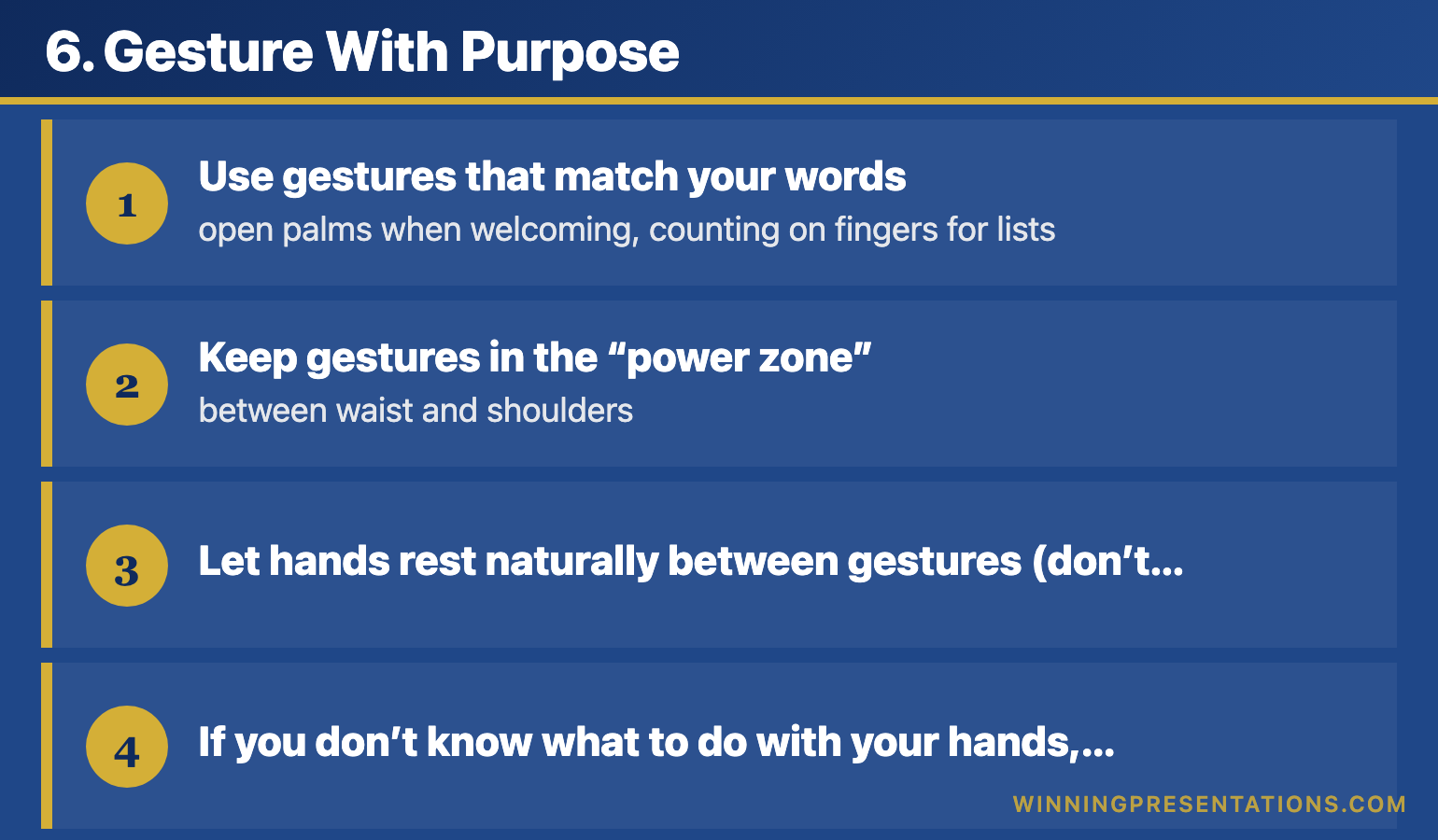
6. Gesture With Purpose

Nervous presenters either freeze their hands (stiff at sides or gripping notes) or gesture frantically. Neither looks confident.

How to look confident instead:

  • Use gestures that match your words β€” open palms when welcoming, counting on fingers for lists
  • Keep gestures in the “power zone” β€” between waist and shoulders
  • Let hands rest naturally between gestures (don’t wring them)
  • If you don’t know what to do with your hands, hold a clicker or pen

Purposeful gestures don’t just look confident β€” they help you think. Research shows that gesturing while speaking actually improves verbal fluency.

Related: Presentation Confidence: How to Build It (Not Fake It)

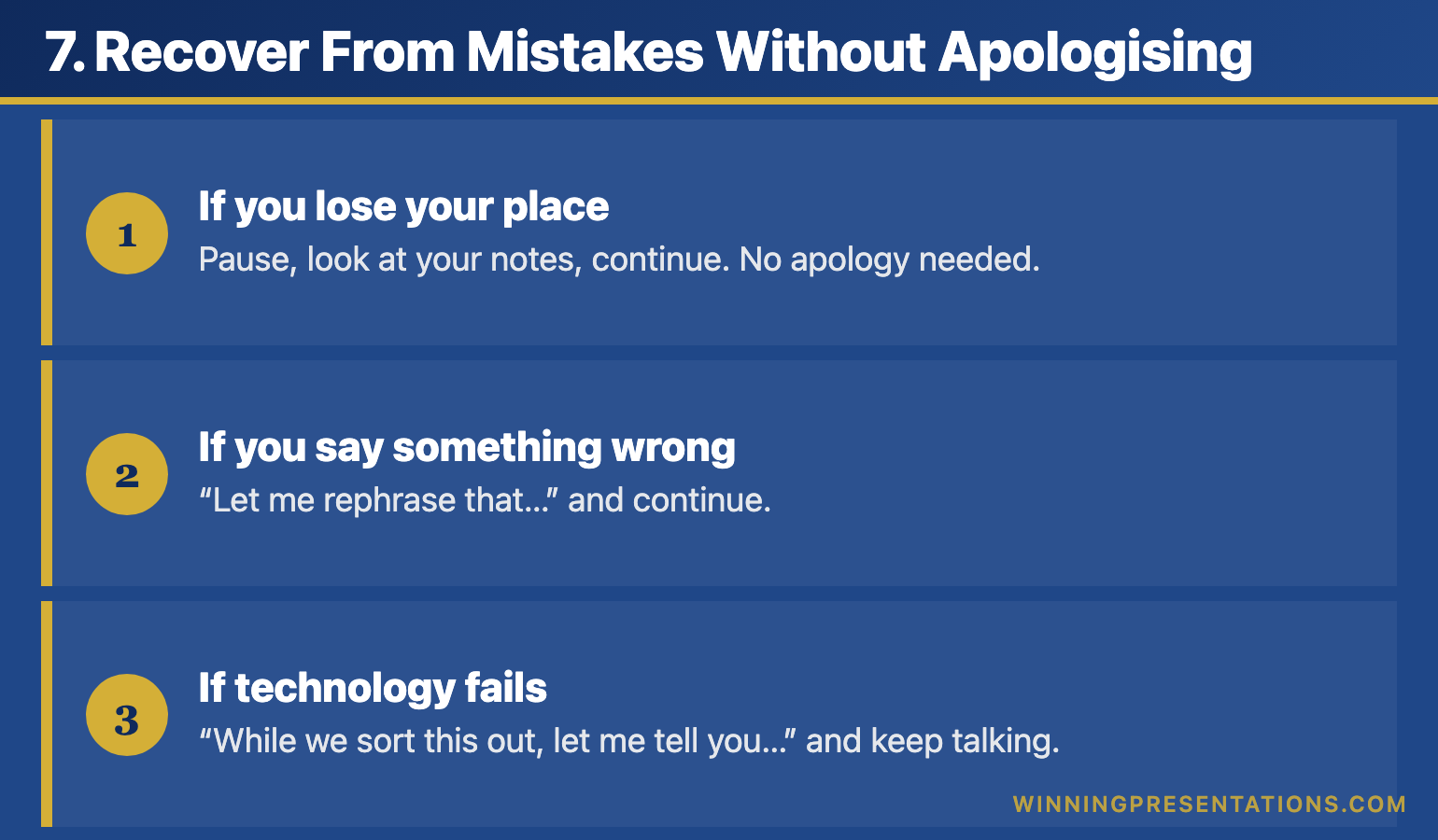
7. Recover From Mistakes Without Apologising

Every presenter makes mistakes. The difference between looking confident and looking nervous is how you handle them.

Nervous presenters apologise profusely, call attention to errors, or freeze up. Confident presenters recover smoothly and move on.

How to look confident instead:

  • If you lose your place: Pause, look at your notes, continue. No apology needed.
  • If you say something wrong: “Let me rephrase that…” and continue.
  • If technology fails: “While we sort this out, let me tell you…” and keep talking.

Pre-plan your recovery phrases. When you know you can handle anything, you look confident because you genuinely feel in control.

Related: How to Start a Presentation: 15 Powerful Opening Techniques

Why Looking Confident Leads to Feeling Confident

There’s a psychological principle at work here: behaviour shapes emotion, not just the reverse.

When you adopt confident body language, your brain receives signals that you’re safe. Your nervous system calms down. And over time, the feeling of confidence follows the appearance of confidence.

I discovered this accidentally in my first five years of banking. By forcing myself to look confident when presenting, I gradually became more confident. The techniques became automatic. The anxiety faded.

You don’t have to wait to feel confident before presenting well. You can look confident now β€” and let the feeling catch up later.

Consistent Composure. Every Presentation.

Conquer Speaking Fear (Β£39, instant access) builds composure that holds β€” across different audiences, stakes, and settings. Structured techniques, not confidence tips.

Get Conquer Speaking Fear β†’ Β£39

Designed for experienced professionals who present regularly under pressure.

Frequently Asked Questions

How do I look confident when my hands are shaking?

Hold something β€” a clicker, a pen, or your notes. This gives the shaking somewhere to go without being visible. Also, the shaking usually subsides within 60-90 seconds of starting. If you can get through your opening, your body will calm down.

What if I can’t make eye contact without feeling more nervous?

Look at foreheads instead of eyes β€” the audience can’t tell the difference. Or focus on the friendly faces only. You don’t need to make eye contact with everyone, just enough people to create connection.

How do I slow down when my instinct is to rush?

Memorise your first three sentences word-for-word and practice them at half speed. When you start slowly, you’re more likely to maintain that pace. Also, build in deliberate pauses β€” after your opening, after key points, before your conclusion.

Does “fake confidence” actually work?

It’s not about faking β€” it’s about doing what confident presenters do. The behaviours (grounding, eye contact, pauses, open posture) are real skills you’re building. Over time, the feeling follows the behaviour. You’re not pretending; you’re practising.


Your Next Step

Pick one technique from this list and use it in your next presentation:

  1. Plant your feet β€” the easiest to implement immediately
  2. Slow your first three sentences β€” sets the tone for everything that follows
  3. Replace filler words with pauses β€” makes the biggest visible difference

Master one technique before adding another. Within a few presentations, you’ll look confident without thinking about it.

Go deeper: Presentation Confidence: How to Build It (And Why “Fake It Till You Make It” Doesn’t Work) β€” the complete guide to building lasting confidence.


Mary Beth Hazeldine is a qualified clinical hypnotherapist and Owner & Managing Director of Winning Presentations. After spending her first five years in banking terrified of presenting, she learned to look confident before she felt confident β€” and went on to present successfully for 19 more years at JPMorgan, PwC, RBS, and Commerzbank. She has since advised executives across financial services, healthcare, technology, and government.

The Winning Edge Newsletter

Weekly techniques for executives who present under pressure. Evidence-based, practical, no fluff.

Subscribe Free β†’

Not ready for the full system? Start here: download the free 7 Presentation Frameworks β€” practical structures for any presentation scenario.

20 Dec 2025
Presentation confidence guide - how to build lasting confidence with frameworks not fake it till you make it

Presentation Confidence: How to Build It (And Why “Fake It Till You Make It” Doesn’t Work)

A hypnotherapist explains why presentation confidence isn’t a personality trait β€” and the framework that transformed a nervous junior banker into a confident presenter for 19 years

For my first five years in banking, I had zero presentation confidence. Not because I lacked knowledge β€” I knew my material cold. But every time I had to present, my voice would shake, my mind would go blank, and I’d avoid speaking up entirely.

I wasn’t presenting to boards back then. I was too junior. It was the everyday moments that terrified me: credit committee presentations, client meetings, speaking up in internal discussions. I’d sit there with something valuable to say and stay silent because I didn’t trust myself to deliver it.

Then I took a training course called “Pitching to Win” β€” and everything changed.

It didn’t make me a confident person. It gave me something far more powerful: a framework. A structure I could follow every single time. And that framework gave me presentation confidence for the next 19 years at JPMorgan, PwC, RBS, and Commerzbank.

Years later, when I trained as a clinical hypnotherapist and treated hundreds of anxiety clients, I finally understood the science behind why that framework worked β€” and why “fake it till you make it” never does.

The 5 Pillars of Lasting Presentation Confidence

After 35 years of presenting and training others to become confident presenters, I’ve identified five pillars that create lasting presentation confidence. Notice that none of them require you to “be” confident β€” they require you to do specific things.

The 5 pillars of presentation confidence - structure, rituals, recovery, evidence, and physiology

Pillar 1: Structural Certainty

Know exactly how your presentation flows before you start. Not word-for-word memorisation β€” structural certainty. You should be able to answer:

  • What’s my opening line? (Memorised, word-for-word)
  • What are my 3-5 key points?
  • What transitions move me between sections?
  • What’s my closing line? (Memorised, word-for-word)

When you have structural certainty, your brain relaxes. It knows where you’re going even if you stumble along the way. This is the foundation of speaking with confidence.

Related: How to Start a Presentation: 15 Powerful Opening Techniques

Pillar 2: Preparation Rituals

Confident presenters don’t wing it. They have rituals β€” consistent pre-presentation routines that signal to their brain: “We’ve done this before. We know what happens next.”

My ritual before every high-stakes presentation:

  1. Review my opening (2 minutes)
  2. 3-Breath Reset β€” in for 4, hold for 4, out for 6, repeat 3 times (90 seconds)
  3. Ground my feet β€” press them firmly into the floor (30 seconds)
  4. Say out loud: “I’m excited to share this” (5 seconds)

The content of the ritual matters less than its consistency. Your nervous system learns that this sequence leads to successful presenting β€” and that builds presentation confidence automatically.

Related: How to Calm Nerves Before a Presentation: The 5-Minute Reset

Pillar 3: Recovery Protocols

Here’s a secret about confident presenters: they make mistakes too. The difference is they have recovery protocols β€” pre-planned responses to common problems.

When you know you can recover from anything, mistakes lose their power to create panic.

Pre-plan your recovery phrases:

  • Mind goes blank: “Let me come back to that point…” (look at notes, continue)
  • Lose your place: “The key thing I want you to take away is…” (pivot to your main message)
  • Technical failure: “While we sort this out, let me tell you the story behind this data…”
  • Hostile question: “That’s a fair challenge. Here’s how I see it…”

When I finally understood this β€” that confident presenters aren’t mistake-free, they’re recovery-ready β€” my entire relationship with presenting changed.

Pillar 4: Competence Evidence

Your brain needs evidence that you can do this. Not affirmations. Evidence.

Build your evidence bank:

  • Record yourself presenting (painful but invaluable)
  • Start small β€” team meetings before board meetings
  • Collect wins β€” keep a note of presentations that went well
  • Get specific feedback β€” “What worked?” not just “That was great”

Every successful presentation is evidence your brain can reference next time. The more evidence, the more your nervous system trusts that you’ll be okay β€” and the more you become a genuinely confident presenter.

Pillar 5: Physiological Control

This is where my hypnotherapy training transformed my understanding. Presentation confidence isn’t just mental β€” it’s physiological.

You can directly influence your nervous system state through:

  • Breathing patterns β€” Extended exhales activate the parasympathetic response
  • Posture β€” Open posture signals safety to your brain
  • Grounding β€” Physical connection to the floor redirects nervous energy
  • Anchoring β€” NLP techniques that access confident states on demand

These aren’t tricks. They’re how your nervous system works. When you understand the machinery, you can operate it deliberately β€” and that’s the fastest path to confident public speaking.

Related: Public Speaking Tips: 15 Psychology-Backed Techniques

Related:Β Β How to Look Confident When Presenting (Even When You’re Not)

Want to Build Lasting Presentation Confidence?

My AI-Enhanced Presentation Mastery course teaches the complete system β€” frameworks that eliminate uncertainty, psychology techniques from my hypnotherapy practice, plus AI tools that cut preparation time by 75%.

What’s included:

  • The structural frameworks that build real confidence
  • Psychology techniques for managing your nervous system
  • Self-paced modules with lifetime access
  • 50+ AI prompts to prepare faster and better

Β£499 β€” self-paced, immediate access.

See the full curriculum β†’

How to Build Presentation Confidence in Different Situations

The five pillars apply everywhere, but different contexts require different emphasis. Here’s how to become a confident presenter in specific situations:

Building Confidence for Internal Meetings

This is where most presentation anxiety actually lives β€” not in formal presentations, but in everyday meetings where you need to speak up with confidence.

Build presentation confidence by:

  • Preparing one key point before every meeting
  • Speaking early β€” the longer you wait, the harder it gets
  • Using grounding (press your feet into the floor) while seated
  • Starting with questions rather than statements if direct contribution feels hard

I spent five years avoiding contribution in internal meetings. The framework that changed this: prepare one thing to say, say it in the first 10 minutes, then relax.

Building Confidence for Client Presentations

Client presentations carry stakes β€” which means your nervous system is more alert. Combat this with over-preparation on structure:

  • Know your opening cold (word-for-word memorised)
  • Have your three key messages written on a card
  • Prepare answers to the five most likely questions
  • Arrive early and familiarise yourself with the room

Related: How to Create Executive Presentations That Get Results

Building Confidence for High-Stakes Presentations

Board presentations. Investor pitches. Career-defining moments. The framework matters even more here β€” high stakes amplify everything, including the benefit of preparation.

  • Rehearse out loud at least three times (not in your head β€” out loud)
  • Do a full dress rehearsal if possible β€” same room, same setup
  • Front-load your confidence β€” put your strongest material in the first two minutes when you’re most nervous
  • Have a pre-presentation ritual and do it without fail

Related: How CEOs Actually Present: Executive Presentation Skills

Stop the Racing Heart Before Your Next Meeting

Conquer Your Fear of Public Speaking is a neuroscience-based programme covering nervous system regulation, cognitive reframing, physical symptom management, and pre-presentation protocols β€” Β£39, instant access.

Get Conquer Your Fear of Public Speaking β†’

Designed for professionals who want to present with genuine confidence

Why Presentation Confidence Compounds Over Time

Here’s what nobody tells you about becoming a confident presenter: confidence compounds.

Each successful presentation β€” even a small one β€” deposits evidence in your brain that you can do this. Over time, these deposits accumulate. Your nervous system references them automatically. What once required conscious effort becomes unconscious competence.

I wasn’t “confident” after one good presentation. I became a confident presenter after hundreds β€” each one building on the last, each one reinforced by the same framework.

That’s why the framework matters so much. It’s not just about surviving individual presentations. It’s about building a system that makes you more confident every time you use it.

35 years later, I still use the same principles. The content changes. The framework doesn’t.

Building presentation confidence - what works vs what doesn't work comparison chart How presentation confidence compounds over time - each success builds evidence for your nervous system

Presentation Confidence Killers (And How to Avoid Them)

Killer #1: Comparing Yourself to “Natural” Presenters

There’s no such thing as a natural confident presenter. There are people who’ve had more practice, better training, or more supportive environments. But nobody was born confident at presenting.

Fix: Focus on your own progress, not others’ apparent ease.

Killer #2: Perfectionism

Waiting until you feel “ready” means waiting forever. Perfectionism is anxiety wearing a productivity mask.

Fix: Aim for “good enough to be useful” not “perfect.” Your audience wants value, not perfection.

Killer #3: Avoiding Presentations

Every presentation you avoid is evidence you’re collecting against yourself. Your brain learns: “This is dangerous. We should keep avoiding it.”

Fix: Take small opportunities. Team updates. Brief contributions. Build the evidence bank.

Killer #4: Post-Presentation Rumination

Replaying every mistake after a presentation trains your brain to associate presenting with pain.

Fix: Do a structured debrief instead. Three things that worked, one thing to improve next time. Then stop.

Want the complete nervous system toolkit? Conquer Speaking Fear (Β£39) gives you the clinical framework behind these five pillars β€” structured for executives who present under pressure.

If this pattern sounds familiar

You are not alone in this β€” and it is not a willpower problem. When preparation and practice have not been enough on their own, a structured approach that works at the nervous system level can make the difference. Conquer Speaking Fear was designed for exactly this situation.

If your preparation is solid but your nerves still derail you, Conquer Your Fear of Public Speaking gives you a structured system to manage exactly this.

Frequently Asked Questions About Presentation Confidence

How long does it take to build presentation confidence?

Most people notice meaningful improvement within 3-5 presentations when using a consistent framework. Real confidence β€” the kind that feels automatic β€” typically takes 15-20 presentations over several months. The key is consistency: same framework, same rituals, same recovery protocols.

Can introverts become confident presenters?

Absolutely. Some of the most confident presenters I’ve trained are introverts. Introversion means you process internally and may need recovery time after social interaction β€” it doesn’t mean you can’t present well. In fact, introverts often prepare more thoroughly, which builds more presentation confidence.

What if I’ve tried building confidence before and it didn’t work?

Usually this means you were trying to “feel” confident rather than “do” confident. Confidence isn’t an emotion you summon β€” it’s an outcome of preparation, practice, and physiological management. Focus on the five pillars (structure, rituals, recovery, evidence, physiology) rather than trying to feel a certain way.

Does presentation confidence come from knowing your material?

Knowing your material is necessary but not sufficient. I’ve seen experts freeze because they knew the content but had no framework for delivering it. You need both: subject matter expertise AND presentation structure. The framework is what lets your expertise come through.

How do I build confidence when I rarely present?

Create opportunities. Volunteer for team updates. Offer to present someone else’s work. Join a speaking group. The less you present, the less evidence your brain has β€” and the more anxious you’ll be when presentations do arise. Frequency builds presentation confidence more than intensity.

Can I build presentation confidence quickly before an important presentation?

You can’t build deep confidence overnight, but you can create the conditions for a confident performance. Focus on: knowing your opening cold, having a clear structure, preparing recovery phrases, and doing your pre-presentation ritual. This won’t make you permanently confident, but it will get you through the presentation β€” and that’s one more deposit in your evidence bank.


Your Nerves Aren’t the Problem β€” Your Response to Them Is

Conquer Your Fear of Public Speaking gives you a structured system to manage physical symptoms, reframe anxious thoughts, and build genuine confidence for any speaking situation β€” Β£39, instant access.

Get the Programme β†’

Designed for executives who want to stop dreading presentations

Your Next Step to Becoming a Confident Presenter

Building presentation confidence is simple, but not easy. It requires you to stop waiting to “feel” confident and start doing the things that create confidence.

Here’s what I suggest:

  1. Choose your next presentation β€” even a small team update
  2. Apply one framework β€” structure your content with a clear opening, three points, and a strong close
  3. Create one ritual β€” even just three deep breaths before you start
  4. Notice what happens β€” collect the evidence

That’s how it starts. One framework. One ritual. One presentation at a time.

Go deeper: Public Speaking Tips: 15 Psychology-Backed Techniques That Actually Work β€” the complete guide to speaking with confidence.

Presentation confidence cheat sheet - the 5 pillars and key techniques for confident presenting

Ready to Build Real Presentation Confidence?

AI-Enhanced Presentation Mastery

Frameworks that build confidence + Psychology that makes it stick + AI that cuts prep time

Β£249 Β£499

Early bird ends December 31st β€’ 60 seats β€’ Full refund guarantee

Learn More β†’

The Winning Edge β€” Weekly Presentation Insights

One technique, one mindset shift, and one real-world scenario every week. Practical, evidence-based, read in under 3 minutes.

Join The Winning Edge β€” Free


Mary Beth Hazeldine is a qualified clinical hypnotherapist and Owner & Managing Director of Winning Presentations. She spent 25 years in corporate banking at JPMorgan, PwC, Royal Bank of Scotland, and Commerzbank. After struggling with presentation anxiety for her first five years, she discovered that frameworks β€” not fake confidence β€” were the key to becoming a confident presenter. She works with executives across financial services, consulting, and corporate leadership, helping them present with genuine confidence.

18 Dec 2025
AI presentation workflow showing time savings from 6 hours to 90 minutes with before and after comparison

AI Presentation Workflow: How I Cut Creation Time from 6 Hours to 90 Minutes

The exact system I use with Copilot to build presentations that actually win decisions

My AI presentation workflow changed everything.

Six months ago, I spent 6 hours on a pitch deck for a biotech client. The slides looked professional. The data was solid. The client lost the funding round.

Last month, a similar client needed a similar deck. I used my AI presentation workflow. Spent 90 minutes. They raised Β£4.2 million.

Same me. Same expertise. Completely different approach to using AI.

🎁 Free Download: Get my 10 Essential Copilot Prompts β€” the exact prompts I use in this workflow. No email required.

Here’s what I’ve learned after testing AI presentation workflows on hundreds of client decks: most people use Copilot backwards.

They open PowerPoint, type “create a presentation about Q3 results,” and wonder why the output looks generic and forgettable.

That’s not an AI presentation workflow. That’s hoping AI will think for you. It won’t.

The workflow I’m sharing today is different. It’s the system I’ve refined over the past year, tested on real presentations for investment banks, biotech founders, and SaaS executives. It’s also the foundation of the course I’m launching in January.

Why Your AI Presentation Workflow Isn’t Working

Let me guess what’s happening:

You prompt Copilot. You get 15 slides of generic structure β€” title, agenda, overview, data, data, data, summary, questions. It’s technically correct. It looks like every other AI-generated deck.

You spend the next two hours trying to fix it. Moving slides around. Rewriting bullet points. Fighting with formatting. By the end, you’ve saved no time and the presentation still feels… flat.

Sound familiar?

The problem isn’t Copilot. The problem is you’re asking AI to do your strategic thinking. It can’t. Here’s what AI cannot do:

  • Decide what your audience needs to believe
  • Determine which data actually matters for this decision
  • Structure an argument that leads to action
  • Know when to break the rules for impact

That’s your job. But here’s the breakthrough: once you’ve done that thinking, AI executes ten times faster than you can manually.

The AI presentation workflow I’m about to share separates strategic thinking (you) from execution (AI). That’s why it works.

Want the Complete System?

The AI-Enhanced Presentation Mastery course teaches this entire workflow with templates, 50+ prompts, and live practice sessions.

January cohort: Β£249 (increases to Β£499 in April)

Only 60 seats. Early bird ends December 31st.

See what’s included β†’

4-step AI presentation workflow - AVP Framework, 132 Rule, SEE Formula, and AI Execution with time for each step
The AI Presentation Workflow: 4 Steps

This is the exact process I use. It works for investor pitches, board presentations, sales decks, and executive updates. The frameworks adapt to any presentation type.

Step 1: AVP Framework (5 minutes β€” before you touch PowerPoint)

Before I prompt Copilot for anything, I answer three questions on paper:

A β€” Action: What specific decision or action do I need from this audience?

V β€” Value: What’s in it for them? Why should they care?

P β€” Proof: What evidence will make them believe me?

This takes 5 minutes. Most people skip it and spend hours wandering through slides wondering why nothing feels right.

Real example from a client deck last month:

  • Action: Approve Β£500K for the pilot programme by Friday
  • Value: This solves the customer churn problem costing us Β£2M annually
  • Proof: Three case studies showing 40% churn reduction, internal data on our trajectory, ROI calculation showing 4x return

Now β€” and only now β€” am I ready to use AI. See the difference? I’m not asking Copilot to figure out my strategy. I’m asking it to execute a strategy I’ve already defined.

Related: How to Structure a Presentation: 7 Frameworks That Actually Work

AVP Framework diagram showing Action Value Proof - three questions to answer before creating presentations with AI

Step 2: The 132 Rule for Structure

The 132 Rule is how I structure every presentation, regardless of length:

  • 1 β€” One core message (the thing you want them to remember)
  • 3 β€” Three supporting arguments (the structure of your case)
  • 2 β€” Two types of evidence per argument (facts + stories)

This is where Copilot becomes genuinely powerful.

My prompt (this took me months to refine):

“I’m presenting to [specific audience] requesting [specific decision]. My core message is [from AVP]. My three supporting arguments are: 1) [argument], 2) [argument], 3) [argument]. Create a presentation outline that opens with my recommendation, develops each argument with one data point and one brief example, and closes with my specific ask and timeline.”

Executive Resource

Stop Writing AI Prompts From Scratch

The Executive Prompt Pack gives you 50 battle-tested prompts for executive-level presentations β€” board updates, budget requests, investor briefs, and Q&A preparation. Built for PowerPoint Copilot and ChatGPT.

Get the Executive Prompt Pack β†’

Used by executives preparing for board briefings, budget requests, and high-stakes presentations.

That’s a 30-second prompt. Copilot generates a structured outline in another 30 seconds. What used to take me 45 minutes now takes one minute.

The key: I gave Copilot the strategic decisions. It handled the structural execution.

Related: Best Copilot PowerPoint Prompts That Actually Work

The 132 Rule for presentation structure - 1 core message, 3 supporting arguments, 2 evidence types per argument with visual tree diagram

Step 3: S.E.E. Formula for Each Section

Generic AI presentations fail because every slide sounds the same β€” informative but forgettable. The audience nods politely and does nothing.

The S.E.E. formula fixes this:

  • S β€” Statement: What’s the point of this slide? (One sentence, opinionated)
  • E β€” Evidence: What proves it? (Specific data, quote, or case study)
  • E β€” Emotion: Why does it matter to THIS audience? (The “so what?”)

My prompt for transforming flat slides:

“For this slide about [topic], the key statement is [X]. The evidence is [data point]. Rewrite to emphasise what this means for [specific audience] β€” connect it to their priorities, not just the numbers. Make the title state the conclusion, not describe the content.”

Copilot becomes a translation layer between your data and your audience’s concerns. You provide the strategic insight; it finds the words.

S.E.E. Formula for persuasive slides - Statement Evidence Emotion framework for transforming flat presentations
Step 4: AI Handles the Grunt Work

Once the strategic structure is solid, there’s tedious work that AI handles brilliantly:

  • Reformatting bullet points into cleaner layouts
  • Rewriting descriptive titles into action titles (“Q3 Revenue Analysis” β†’ “Revenue Beat Target by 12% β€” Here’s Why It’s Sustainable”)
  • Creating consistency across the deck
  • Generating speaker notes
  • Building an executive summary from the full deck

None of these require strategic thinking. All of them used to eat hours. Now they take minutes.

Related: PowerPoint Copilot Tutorial: Complete Guide 2025

AI presentation workflow time comparison table showing tasks reduced from 5+ hours to 70 minutes total

The Real Time Savings

Here’s what changed when I adopted this AI presentation workflow:

Task Before With AI Workflow
Strategic planning (AVP) Skipped β€” then struggled 5 minutes
Outline creation 45 minutes 2 minutes
First draft slides 2 hours 20 minutes
Formatting and polish 1 hour 10 minutes
Review and refinement 1.5 hours 30 minutes
Total 5+ hours ~70 minutes

That’s 4+ hours saved per presentation. If you create two presentations a week, that’s 400+ hours a year β€” ten full work weeks.

Who This Works For (And Who It Doesn’t)

This AI presentation workflow works if you:

  • Already know your content but struggle to structure it persuasively
  • Spend too long on slides that don’t get the results they should
  • Want to use AI strategically, not just as a shortcut
  • Present to executives, boards, investors, or clients who make decisions

This probably isn’t right for you if:

  • You want AI to do all the thinking (it can’t β€” and the results show it)
  • You’re looking for templates without learning the strategy behind them
  • You don’t present regularly enough to justify learning a system

I’m direct about this because I’d rather you know upfront. The people who get results from this workflow β€” and from my course β€” are professionals who present regularly and want to get dramatically better, faster.

What Happens in the Course

The AI presentation workflow above is the foundation. The AI-Enhanced Presentation Mastery course goes deeper:

8 self-paced modules (January–April 2026):

  • Module 1: AI as your strategic co-creator (not a shortcut)
  • Module 2: The AVP framework with templates and examples
  • Module 3: The 132 Rule β€” structuring any presentation
  • Module 4: S.E.E. formula β€” making every slide persuasive
  • Module 5: Data storytelling with AI
  • Module 6: Building your personal prompt playbook
  • Module 7: Executive presence and delivery
  • Module 8: The complete AI presentation workflow

2 live coaching sessions (April 2026):

  • Live deck reviews and feedback
  • Q&A on your specific challenges
  • Recordings available if you can’t attend

Resources you keep forever:

  • 50+ tested prompts (my personal library)
  • AVP and S.E.E. templates
  • Before/after slide transformations
  • The complete AI presentation workflow PDF
  • Lifetime access to all materials and updates

Ready to Master the AI Presentation Workflow?

January cohort opens December 31st.

Β£249 Β£499

Early bird price β€’ 60 seats maximum β€’ Lifetime access

Enrol Now β†’

Backed by the Maven Guarantee β€” full refund until halfway point

Try the Workflow Today

You don’t need the course to start. Here’s what to do with your next presentation:

  1. Before opening PowerPoint: Write down your AVP (Action, Value, Proof). 5 minutes.
  2. Use the 132 Rule: Define your one message, three arguments, and two pieces of evidence per argument.
  3. Prompt Copilot with your strategy: Use the prompts above β€” give it your decisions, let it execute.
  4. Apply S.E.E. to each slide: Statement, Evidence, Emotion.

If this workflow saves you even one hour on your next presentation, imagine what happens when you master the complete system.


Mary Beth Hazeldine is the Managing Director of Winning Presentations. She spent 24 years in corporate banking at JPMorgan Chase, PwC, Royal Bank of Scotland, and Commerzbank before training thousands of executives to present with impact. Her clients have raised over Β£250M using her frameworks.

18 Dec 2025
First slide examples for presentations before and after

The First Slide Nobody Knows How to Write (And 10 Examples That Work)

Stop staring at a blank title slide. Here’s exactly what to put on it.

You’ve got your presentation structured. You know your key points. You’ve even rehearsed the middle section.

But you’re still staring at slide one.

What do you actually put on the first slide? Your name and the date? A clever quote? The company logo? Something that “grabs attention”?

Most people get this wrong β€” and it costs them the room before they’ve said a word.

After 24 years presenting to boards, investors, and C-suite executives at JPMorgan, PwC, and Royal Bank of Scotland, I’ve tested dozens of opening slide approaches. Here are the 10 that consistently work.

Want all 10 openers (plus 15 closers) as copy-paste templates?

The Openers & Closers Swipe File gives you 25 ready-to-use templates with fill-in-the-blank scripts. Stop staring at blank slides.

Get the Swipe File (Β£9.99) β†’

Why Your First Slide Matters More Than You Think

Your audience decides in the first 30 seconds whether to pay attention or check their phones. The first slide sets that tone.

A weak first slide signals: “This will be like every other boring presentation.”

A strong first slide signals: “This person knows what they’re doing. I should listen.”

The difference isn’t design. It’s intent. Your first slide should do ONE of three things:

  • Create curiosity β€” make them want to know more
  • Establish stakes β€” show them why this matters
  • State your position β€” tell them exactly what you’re recommending

Here are 10 ways to do that.

10 First Slide Presentation Examples That Actually Work

1. The Bold Claim

State your conclusion upfront. No build-up, no context, no “let me walk you through.”

Example:

“We should acquire Company X for Β£15M. Here’s why.”

Why it works: Executives don’t want to wait for your conclusion. Give it to them immediately, then spend the rest of the presentation proving it.

Best for: Board presentations, executive briefings, any audience with authority and limited time.

Related: The Pyramid Principle for Presentations

2. The Provocative Question

Ask something that challenges assumptions or creates immediate tension.

Example:

“What if everything we know about customer retention is wrong?”

Why it works: Questions engage the brain differently than statements. The audience can’t help but start formulating answers.

Best for: Strategy presentations, innovation pitches, challenging the status quo.

3. The Startling Statistic

Lead with a number that makes people sit up.

Example:

“Β£4.2 million. That’s what this problem cost us last quarter.”

Why it works: Specific numbers feel concrete and credible. They create immediate stakes.

Best for: Budget requests, problem presentations, any situation where you need to establish urgency.

First slide example showing startling statistic presentation opening

4. The Before/After Promise

Show the transformation you’re offering.

Example:

“From 6-hour turnaround to 45 minutes. This is what AI did for our team.”

Why it works: People understand contrast instantly. The gap between before and after creates curiosity about how you got there.

Best for: Case studies, sales presentations, process improvement updates.

5. The Enemy Slide

Name the problem your audience is fighting.

Example:

“Manual reporting is killing your team’s productivity.”

Why it works: When you articulate someone’s pain better than they can, you earn instant credibility. They think: “This person understands my world.”

Best for: Sales pitches, proposals, any presentation where you’re solving a problem.

Related: How to Structure a Presentation: The Step-by-Step Guide

6. The Counterintuitive Truth

Challenge conventional wisdom immediately.

Example:

“The best sales teams don’t focus on selling.”

Why it works: Contradictions create cognitive tension. The audience needs to hear the explanation to resolve it.

Best for: Thought leadership, keynotes, any presentation where you’re changing minds.

7. The Single Word

Maximum impact, minimum noise.

Example:

“Momentum.”

Why it works: A single word forces the audience to lean in. What does it mean? Why that word? You have their full attention for your verbal explanation.

Best for: Keynotes, team rallies, presentations where you want to create a memorable moment.

Get All 25 Templates

The Openers & Closers Swipe File includes:

  • 10 opening slide templates (with fill-in-the-blank scripts)
  • 15 closing slide templates (including “The Ask” and “The Callback”)
  • Before/after examples showing weak vs. strong versions
  • Guidance on which opener fits which situation

Stop reinventing the wheel for every presentation.

Get instant access (Β£9.99) β†’

8. The “What If” Scenario

Paint a picture of a different future.

Example:

“What if you could close deals in half the time with twice the confidence?”

Why it works: “What if” bypasses skepticism. It’s hypothetical, so there’s nothing to argue with. But it plants a seed of possibility.

Best for: Product launches, vision presentations, sales pitches.

9. The Audience Mirror

Describe exactly what they’re experiencing right now.

Example:

“You’ve got 47 slides, a meeting in an hour, and no idea what your main point is.”

Why it works: When someone describes your situation perfectly, you trust them. They clearly understand your world.

Best for: Training sessions, consulting pitches, any presentation where you’re positioning yourself as the expert.

10. The Direct Ask

Skip the preamble entirely. Say what you want.

Example:

“I need Β£500K and 6 months. Here’s what I’ll deliver.”

Why it works: Directness signals confidence. It respects the audience’s time. And it frames everything that follows as justification for a specific request.

Best for: Budget requests, investor pitches, any presentation where you’re asking for a decision.

Related: How to End a Presentation: 7 Closing Techniques

Opening slide example showing direct ask presentation technique

What NOT to Put on Your First Slide

Now that you know what works, here’s what to avoid:

❌ Your name and title β€” Nobody cares yet. Earn their attention first.

❌ The date and meeting title β€” They know what meeting they’re in.

❌ A table of contents β€” Save it for documents. Presentations should flow.

❌ “Today we’ll cover…” β€” This signals a lecture, not a conversation.

❌ A generic quote β€” Unless it’s directly relevant, it’s filler.

❌ Your company logo taking up the whole slide β€” Branding matters, but not more than your message.

Your first slide has one job: make them want slide two.

Matching Your Opener to Your Situation

The right opening depends on your audience and goal:

Situation Best Openers
Board presentation Bold Claim, Direct Ask
Sales pitch Enemy Slide, Before/After, What If
Investor pitch Startling Statistic, Direct Ask, Bold Claim
Keynote / all-hands Single Word, Provocative Question, Counterintuitive Truth
Training session Audience Mirror, Before/After
Strategy recommendation Bold Claim, Provocative Question

Frequently Asked Questions

Should I introduce myself on the first slide?

No. Earn their attention first, then introduce yourself β€” either verbally after your opening or on slide two. The exception is if you’re unknown to the audience AND your credibility is central to the message. Even then, keep it brief.

What about title slides for formal presentations?

If protocol requires a title slide (some board meetings, academic presentations), use it β€” but make it work harder. Instead of “Q3 Financial Update,” try “Q3 Results: Why We’re Accelerating Investment.” Same information, but it creates curiosity.

How do I choose between these openers?

Ask yourself: What does my audience need to feel in the first 10 seconds? Curious? Alarmed? Reassured? Challenged? Pick the opener that creates that emotion. When in doubt, go with The Bold Claim for executives or The Enemy Slide for sales.


Stop Staring at Blank Slides

Your first slide sets the tone for everything that follows. Get it right, and you’ve earned attention. Get it wrong, and you’re fighting uphill for the next 20 minutes.

The Openers & Closers Swipe File gives you 25 templates you can use immediately:

  • 10 opening slides with fill-in-the-blank scripts
  • 15 closing slides (including The Single Ask, The Callback, and The Forward Story)
  • Before/after examples showing weak vs. strong versions
  • Situation guide so you always pick the right one

Get the Swipe File (Β£9.99) β†’

Instant download. Use it on your next presentation.


Mary Beth Hazeldine is the Managing Director of Winning Presentations. She spent 24 years in corporate banking at JPMorgan Chase, PwC, Royal Bank of Scotland, and Commerzbank before training thousands of executives to present with impact. Her clients have raised over Β£250M using her frameworks.

17 Dec 2025
How to End a Presentation: 7 Closing Techniques I Teach C-Suite Executives

How to End a Presentation: 7 Closing Techniques I Teach C-Suite Executives

The difference between polite nods and signed approvals

I’ve trained executives at JPMorgan, PwC, and Royal Bank of Scotland. I’ve helped biotech founders raise Β£250M+ in funding. And after 24 years in corporate banking and thousands of presentations coached, I can tell you this:

Most presentations die in the last 60 seconds.

Everything else can be perfect β€” compelling data, clean slides, confident delivery β€” but a weak close kills the deal. The audience leaves nodding politely and then… nothing happens.

Here are 7 closing techniques I teach senior executives. I’m sharing 3 in full today. The other 4? Those are part of the deep-dive in my AI-Enhanced Presentation Mastery course launching in January.

Why Presentation Closings Fail

Before the techniques, let’s diagnose the problem.

Bad closings usually fall into three traps:

The Fizzle: “So… that’s it. Any questions?” You just handed control to the room and signalled uncertainty.

The Repeat: Summarising every slide again. Your audience isn’t stupid. They were there.

The Vague Ask: “Let me know what you think.” Think about what? Do what? By when?

Great presentation endings do the opposite. They create momentum, clarity, and commitment.

Technique 1: The Single Ask

This is the most important closing technique, and the one executives resist most.

The rule: End with ONE specific request. Not three options. Not “a few things to consider.” One thing.

Here’s why it works: Decision fatigue is real. When you give people multiple options at the end of a presentation, you’re asking them to do more cognitive work. Most will default to “I’ll think about it” β€” which means nothing happens.

Weak close: “So we could either proceed with the pilot, or do more research, or schedule a follow-up discussion to align stakeholders.”

Strong close: “I’m asking for approval to start the pilot on January 15th. That requires your sign-off today.”

One ask. Specific. Time-bound.

When I coach executives on investor pitches, this is often where we spend the most time. They want to hedge, offer alternatives, seem flexible. But flexibility at the close reads as uncertainty.

Your call to action should answer: What do you want them to do, and by when?

Technique 2: The Forward Story

This technique works brilliantly for strategic presentations, board meetings, and any situation where you’re proposing change.

Instead of ending with what you’ve covered, end with what happens next β€” told as a story.

Structure:

  • “Imagine it’s [specific future date]…”
  • Describe the outcome as if it’s already happened
  • Make the audience the hero of that story

Example:

“Imagine it’s July 2026. We’ve completed the integration, and your team is running both systems from a single dashboard. The CFO just told you the efficiency savings hit Β£2.3 million β€” Β£800K more than we projected. That’s the future we’re building. The first step is approving the Phase 1 budget today.”

This works because it:

  • Creates emotional connection to the outcome
  • Makes the decision feel smaller (it’s just “the first step”)
  • Positions the audience as the one who made it happen

I use this technique constantly with biotech founders pitching investors. Investors aren’t buying your science β€” they’re buying a future where your science changed something. Show them that future.

Technique 3: The Silence Close

This one takes nerve. Most people can’t do it without practice.

After you make your ask, stop talking.

Don’t fill the silence. Don’t add qualifiers. Don’t say “so yeah” or “if that makes sense” or “let me know what you think.”

Just ask, then wait.

Example:

“I’m recommending we proceed with Vendor A. The cost is Β£340,000, and I need your approval today to meet the Q2 deadline.”

[Silence]

Here’s what happens in that silence: the other person has to respond. They can’t just let your words hang there. And whatever they say next tells you exactly where you stand.

If they object, you’ve surfaced the real issue. If they agree, you’ve closed. If they ask a question, you’ve identified what’s actually blocking the decision.

Most presenters panic in silence and start backpedaling: “Of course, we could also look at other options…” You just undermined your own recommendation.

The silence close requires confidence. It requires believing your recommendation is sound. That’s why we practice it extensively in my course β€” it’s a skill, not a personality trait.

β†’ Learn all 7 techniques in the January course (early bird: Β£249)

The Other 4 Techniques

I’ve shared three. Here’s what’s in the full system:

Technique 4: The Callback Close β€” Referencing your opening to create narrative closure

Technique 5: The Objection Preempt β€” Addressing the unspoken concern before they raise it

Technique 6: The Social Proof Stack β€” Using specific evidence at the close to overcome last-second doubt

Technique 7: The Next Yes β€” For situations where you can’t get the final decision today

Each of these has specific language patterns, practice exercises, and real examples from executive presentations I’ve coached.

Where to Learn the Full System

I’m running AI-Enhanced Presentation Mastery on Maven starting January 2026.

It’s not just closing techniques. It’s the complete system:

  • Proposition: How to structure your argument so the close is inevitable
  • Presentation: Slides, data, and visuals that support your ask
  • Personality: Delivery techniques including the silence close and high-stakes Q&A

This is the same methodology that’s helped my clients raise over Β£250 million in funding and get budgets approved at Fortune 500 companies.

Early bird pricing closes December 31st.

β†’ Join the January cohort for Β£249 (save Β£50)

Try This Today

You probably have a presentation coming up. Before you finalise your final slide, ask yourself:

  1. What is my ONE ask?
  2. Can I paint a forward story of what success looks like?
  3. Am I prepared to stop talking after I make the ask?

If you can answer yes to all three, your presentation ending is already stronger than 90% of presenters.

Frequently Asked Questions

How long should a presentation closing be?

60-90 seconds maximum. Your close should be the most focused part of your presentation β€” not a second summary. State your ask, paint the forward story if appropriate, then stop.

What’s the best way to end a presentation to executives?

Lead with your recommendation, not your reasoning. Executives want the answer first, then the supporting evidence. Use the Single Ask technique: one specific request with a deadline.

How do I end a presentation without saying “any questions?”

Replace it with a specific call to action. Instead of “Any questions?” try “I’m asking for your approval on the pilot budget. What concerns would you need addressed before signing off today?”


Mary Beth Hazeldine is the Managing Director of Winning Presentations, where she trains executives at investment banks, biotech companies, and SaaS firms to present with impact. Her clients have raised over Β£250M using her methodology.

Her AI-Enhanced Presentation Mastery course launches January 2026. Early bird enrollment (Β£249) closes December 31st.

17 Dec 2025
Presentation Structure: 7 Frameworks That Actually Work - proven structures from McKinsey, TED, and top executives

Presentation Structure: 7 Frameworks That Actually Work [2026]

πŸ“… Updated: December 2025

Quick Answer

The best presentation structure depends on your goal: use the Problem-Solution-Benefit framework for sales, the Pyramid Principle for executive briefings, or the What-So What-Now What structure for data presentations. This guide covers 7 proven frameworks with slide-by-slide breakdowns, so you can choose the right structure for any situation.

πŸ“¦ USED BY 250+ EXECUTIVES

Executive Slide System β€” Β£39

All 7 frameworks as ready-to-use PowerPoint templates. 51 AI prompts. Slide-by-slide scripts. Stop starting from blank slides.

Get the Templates β€” Β£39 β†’

Instant download. Lifetime access. 30-day money-back guarantee.


Why Structure Matters More Than Content

I’ve watched brilliant people give terrible presentations. PhDs who can’t explain their research. CFOs who lose the board in slide three. Salespeople who know the product cold but can’t close.

The problem is never knowledge. It’s structure.

A client came to me last year with a 47-slide deck for a Β£2M deal. Every slide was accurate. Every data point was relevant. And the prospect said: “This is really comprehensive. We’ll get back to you.”

They didn’t.

We restructured the same content into 12 slides using Framework 1 below. Same information, different architecture. The next prospect signed in the room.

Structure is the difference between information and persuasion.

Here are 7 frameworks that work β€” each designed for a specific situation. Use the wrong one and you’ll confuse your audience. Use the right one and you’ll guide them exactly where you want them to go.

Framework 1: Problem-Solution-Benefit (Sales Presentations)

Best for: Sales pitches, proposals, any presentation where you’re asking for a decision

Why it works: Humans are wired to solve problems. When you start with a problem your audience recognises, they lean in. When you present the solution, they’re already primed to say yes.

The structure (7 slides):

  1. The Problem β€” State the pain your audience feels. Be specific. “Most sales teams spend 40% of their time on admin instead of selling.”
  2. The Cost β€” Quantify what the problem costs them. Time, money, opportunity. “That’s Β£180K per year in lost productivity for a team of 10.”
  3. The Cause β€” Explain why the problem exists. This positions you as someone who understands.
  4. The Solution β€” Introduce your answer. High-level, not features.
  5. How It Works β€” 3 steps maximum. Keep it simple.
  6. Proof β€” One case study with specific numbers. “Acme reduced admin time by 60% in 90 days.”
  7. Next Step β€” One clear action. Not “any questions?” but “I recommend we start a pilot next week.”

Pro tip: Spend 70% of your time on slides 1-3. If your audience doesn’t feel the problem, they won’t care about your solution.

Related: Sales Presentation Template: The Structure Top Performers Use

Framework 2: The Pyramid Principle (Executive Briefings)

Best for: Board presentations, executive updates, any audience with limited time and high authority

Why it works: Executives don’t want to follow your thinking process β€” they want your conclusion. The Pyramid Principle, developed at McKinsey, puts your answer first and lets the audience drill down only if needed.

The structure:

  1. The Answer β€” Lead with your recommendation or key finding. “We should acquire Company X for Β£15M.”
  2. Supporting Point 1 β€” First reason with evidence
  3. Supporting Point 2 β€” Second reason with evidence
  4. Supporting Point 3 β€” Third reason with evidence
  5. Implications β€” What this means for the business
  6. Next Steps β€” What you need from them

The rule of three: Never more than 3 supporting points. If you need more, you haven’t synthesised enough.

Pro tip: Prepare 10 slides of backup detail you may never show. Executives will ask questions β€” have the data ready, but don’t put it in the main flow.

Related: The Pyramid Principle for Presentations: McKinsey’s Secret Weapon

⚑
Stop Reinventing the Wheel

The Executive Slide System includes the Pyramid Principle, Problem-Solution-Benefit, and all 15 other frameworks as ready-to-use templates. Just fill in your content.

Get All 7 Templates β€” Β£39 β†’

Framework 3: What-So What-Now What (Data Presentations)

Best for: Quarterly reviews, analytics presentations, any data-heavy content

Why it works: Data alone is meaningless. Your audience needs to know what it means and what to do about it. This framework forces you to interpret, not just report.

The structure:

  1. What β€” The facts. “Revenue is up 12% but margin is down 3 points.”
  2. So What β€” The interpretation. “We’re winning more deals but at lower prices β€” likely due to competitor pressure in the mid-market.”
  3. Now What β€” The action. “I recommend we raise prices 5% on enterprise while holding mid-market rates.”

Apply it to every chart: Before you show any data visualisation, prepare your “So What” statement. If you can’t explain why the data matters, don’t include it.

Pro tip: Most data presentations fail because they’re all “What” and no “So What.” Force yourself to have one insight per slide.

Related: QBR Presentation Template: Quarterly Reviews That Retain Clients

Framework 4: The Hero’s Journey (Keynotes & Vision Presentations)

Best for: Conference talks, company all-hands, any presentation meant to inspire

Why it works: Stories are how humans make sense of the world. The Hero’s Journey β€” the structure behind every great film β€” works because it’s hardwired into how we process information.

The structure:

  1. The Ordinary World β€” Where we are today. Establish the status quo.
  2. The Challenge β€” The disruption that demands change.
  3. The Journey β€” The obstacles overcome, lessons learned.
  4. The Transformation β€” What changed. The new capability or insight.
  5. The New World β€” The better future now possible.
  6. The Call to Action β€” What the audience should do to join this journey.

Pro tip: The hero isn’t you β€” it’s your audience. Position them as the protagonist who can achieve the transformation.

Framework 5: SCQA (Consulting-Style Presentations)

Best for: Strategy presentations, recommendations, complex problem-solving

Why it works: SCQA (Situation-Complication-Question-Answer) creates narrative tension. By the time you reach the Answer, your audience is desperate to hear it.

The structure:

  1. Situation β€” The context everyone agrees on. “We’re the market leader in the UK with 34% share.”
  2. Complication β€” The problem or change that disrupts the situation. “But a new competitor entered last quarter and is winning on price.”
  3. Question β€” The strategic question that must be answered. “How do we defend our position without destroying margin?”
  4. Answer β€” Your recommendation, followed by supporting analysis.

Pro tip: The Complication is where you create urgency. Make it specific and quantified β€” “They’ve taken 8 points of share in 6 months” hits harder than “competition is increasing.”

Framework 6: The 10-20-30 Rule (Pitch Decks)

Best for: Investor pitches, startup presentations, any high-stakes pitch with time pressure

Why it works: Guy Kawasaki’s rule forces discipline: 10 slides, 20 minutes, 30-point minimum font. It prevents the most common pitch mistake β€” death by PowerPoint.

The 10 slides:

  1. Title β€” Company, name, contact
  2. Problem β€” The pain you solve
  3. Solution β€” Your unique approach
  4. Business Model β€” How you make money
  5. Secret Sauce β€” Why you win (technology, team, timing)
  6. Marketing Plan β€” How you reach customers
  7. Competition β€” Landscape and your differentiation
  8. Team β€” Why you’re the right people
  9. Financials β€” Projections and key metrics
  10. Ask β€” What you want and what you’ll do with it

Pro tip: 30-point font isn’t just about readability β€” it forces you to cut words and focus on what matters.

Related: Investor Pitch Deck Template: The Sequoia Format That Raised Billions

Framework 7: The Modular Deck (Flexible Meetings)

Best for: Client meetings, consultations, any presentation where the conversation might go in different directions

Why it works: Not every presentation is linear. The Modular Deck gives you building blocks you can rearrange in real-time based on audience interest.

The structure:

  1. Opening Module β€” 3-5 slides that always come first (context, agenda, key question)
  2. Core Modules β€” 4-6 self-contained sections of 3-5 slides each, any of which can be skipped or reordered
  3. Closing Module β€” 3-5 slides that always come last (summary, next steps, call to action)

Pro tip: Number your core modules clearly (Section 1, Section 2) so you can say “Let’s skip to Section 4” without fumbling. Use PowerPoint’s Zoom feature to navigate non-linearly.

Comparison chart showing which presentation framework to use for different situations - sales, executive, data, keynote, consulting, pitch, flexible

How to Choose the Right Framework

Use this decision tree:

Are you asking for money or a decision?

  • Investor pitch β†’ 10-20-30 Rule
  • Sales presentation β†’ Problem-Solution-Benefit

Are you presenting to executives?

  • Board or C-suite β†’ Pyramid Principle
  • Strategy recommendation β†’ SCQA

Are you presenting data?

  • Quarterly review β†’ What-So What-Now What

Are you trying to inspire?

  • Keynote or all-hands β†’ Hero’s Journey

Is the conversation unpredictable?

  • Client meeting β†’ Modular Deck

Why Frameworks Alone Aren’t Enough

Here’s what I’ve learned training executives for 35 years: knowing the framework is 20% of the battle. Executing it is the other 80%.

I’ve seen people use the Pyramid Principle and still bury the lead. I’ve watched sales presentations with perfect Problem-Solution-Benefit structure fail because the proof wasn’t credible. I’ve reviewed decks that followed every rule but still felt flat.

The difference between good and great is in the details: how you phrase the opening line, which proof points you choose, how you handle the “so what,” what you put on each slide.

That’s why I built the Executive Slide System.

It’s not just frameworks β€” it’s ready-to-use templates with every slide designed for maximum impact. You get the exact structure, the placeholder text, the AI prompts to generate content, and the scripts for what to say.

My clients have used these templates to close over Β£250 million in deals. Not because the frameworks are secret β€” you just read them above. Because the execution is dialled in.

What’s Included: Free vs. Paid

What You Get Free Checklist Executive Slide System (Β£39)
7 framework summaries βœ“ βœ“
One-page reference card βœ“ βœ“
Ready-to-use PowerPoint templates β€” βœ“ 17 templates
Before/after examples β€” βœ“ Real transformations
AI prompts for each framework β€” βœ“ 51 prompts
Slide-by-slide scripts β€” βœ“ What to say per slide
Result Know the theory Present like a pro

🎯 MOST POPULAR

Executive Slide System

17 PowerPoint templates. 30 AI prompts. Slide-by-slide scripts.
Built from frameworks that have closed Β£250M+ in deals.

Get Instant Access β€” Β£39 β†’

βœ“ Instant downloadΒ Β Β βœ“ Lifetime accessΒ Β Β βœ“ 30-day guarantee

Frequently Asked Questions

What is the best structure for a presentation?

The best presentation structure depends on your goal. For sales presentations, use Problem-Solution-Benefit. For executive briefings, use the Pyramid Principle (answer first, then supporting points). For data presentations, use What-So What-Now What. The key is matching structure to audience expectations β€” executives want conclusions upfront, while sales prospects need to feel the problem first.

How do you structure a 10-minute presentation?

For a 10-minute presentation, use 5-7 slides maximum: opening hook (1 slide, 1 minute), main point with 3 supporting arguments (3-4 slides, 7 minutes), and closing call to action (1 slide, 2 minutes). The most common mistake is trying to cover too much β€” focus on one core message and make it memorable.

What is the 5-5-5 rule in PowerPoint?

The 5-5-5 rule suggests no more than 5 words per line, 5 lines per slide, and 5 text-heavy slides in a row. It’s a useful guideline for preventing death by PowerPoint, but I prefer the “one idea per slide” principle β€” each slide should make exactly one point that your audience can grasp in 3 seconds.

How do you structure a presentation for executives?

Use the Pyramid Principle: lead with your recommendation or conclusion, then provide 3 supporting points with evidence, then implications and next steps. Executives have limited time and want your answer, not your thought process. Prepare backup slides for detailed questions but keep the main flow to 6-8 slides.

What is the SCQA framework?

SCQA stands for Situation-Complication-Question-Answer. It’s a consulting-style framework that creates narrative tension: start with agreed context (Situation), introduce the problem (Complication), frame the strategic question, then deliver your recommendation (Answer). It works because by the time you reach the Answer, your audience is primed to hear it.

Not Ready to Buy? Start Here.

Get the free checklist with all 7 frameworks as a one-page reference. You can upgrade to templates later.

Download Free Checklist β†’

πŸ“§
The Winning Edge Newsletter

Weekly insights on presentations that close deals, win budgets, and advance careers.

Subscribe Free β†’

Related Resources

About the Author

Mary Beth Hazeldine has trained executives on high-stakes presentations for 35 years. With 24 years in corporate banking at JPMorgan Chase, PwC, Royal Bank of Scotland, and Commerzbank, she’s seen what separates presentations that close from those that stall. Her clients have closed over Β£250 million using her presentation frameworks. She teaches at Winning Presentations.

16 Dec 2025
The First 30 Seconds: Why Most Presenters Lose Their Audience Immediately

The First 30 Seconds: Why Most Presenters Lose Their Audience Immediately

I’ve sat through over 500 executive presentations in my career.

Board meetings at JPMorgan. Investor pitches at PwC. Strategy sessions at RBS. Budget reviews at Commerzbank.

And I can tell you the exact moment most presenters lose their audience: somewhere between second 5 and second 30.

Not minute 5. Not slide 5. Second 5.

After 25 years in investment banking and 16 years training executives, I’ve seen the pattern so many times I can predict it. The presenter walks up, clears their throat, and says some version of:

“Good morning everyone. Thanks for having me. Today I’m going to talk about our Q3 results and the strategic initiatives we’re planning for next year. I’ll try to keep this brief because I know you’re all busy.”

And just like that β€” before a single piece of content has been delivered β€” the room is gone.

Phones come out. Eyes glaze over. The CFO starts reviewing emails. The CEO is mentally planning their next meeting.

The presenter hasn’t even started, and they’ve already lost.

What’s Actually Happening in Those First 30 Seconds

Here’s what most people don’t understand about audiences: they’re not neutral. They’re not sitting there thinking, “I can’t wait to hear what this person has to say.”

They’re thinking: “Is this going to be worth my time?”

That’s the only question running through their minds. And they answer it fast β€” usually within 10-30 seconds.

Neuroscientists call this the “primacy effect.” We form impressions quickly and then spend the rest of our time confirming them. If you open weak, you’re fighting that first impression for the next 20 minutes.

If you open strong, everything that follows lands better.

The stakes couldn’t be higher. And most presenters waste this moment completely.

The Three Opening Mistakes I See Every Week

After training over 10,000 executives, I’ve identified the three opening mistakes that kill presentations before they start:

Mistake #1: The Throat-Clearing Opener

“So, um, thanks for having me. Let me just get my slides up here… okay, there we go. So today I’m going to talk about…”

This signals nervousness, lack of preparation, and β€” worst of all β€” that what’s coming isn’t important enough to be planned properly.

Mistake #2: The Apology Opener

“I know you’re all busy, so I’ll try to be quick…”

You’ve just told the room that your content isn’t valuable enough to deserve their full attention. Why would they give it to you?

Mistake #3: The Agenda Opener

“Today I’m going to cover three things: first, our Q3 results; second, our challenges; and third, our plan for next year.”

Boring. Predictable. Zero reason to pay attention. You’ve just told them everything they’re going to hear, so now they don’t need to listen.

The Pattern I’ve Noticed: The executives who get promoted, who close deals, who get their budgets approved β€” they never open this way. They’ve learned (often through painful experience) that the first 30 seconds determine everything that follows.

Own Every Presentation From the First Second

The first 30 seconds set the tone for everything that follows. The Executive Slide System gives you the exact opening frameworks senior leaders use to command attention and establish authority from the very first word.

Executive Slide System β†’

What I Learned from a Β£4 Million Mistake

Early in my banking career, I watched a senior colleague lose a Β£4 million deal in the first 30 seconds of a pitch.

He walked in, fumbled with the projector, apologized for being “a bit under the weather,” and opened with: “So, I know you’ve seen a lot of these pitches, but hopefully we can show you something different today.”

Hopefully? Hopefully?

The investors checked out immediately. I watched their body language shift β€” arms crossed, eyes down, phones appearing. The rest of the presentation was technically excellent, but it didn’t matter. The decision had already been made.

Afterwards, the lead investor told us: “You lost me at ‘hopefully.’ If you’re not certain your solution is different, why should I be?”

That moment changed how I thought about presentations forever.

If your first slides need to earn attention instead of losing it, The Executive Slide System gives you 22 ready-made templates to start from.

The 30-Second Framework That Changes Everything

After years of testing, refining, and watching what actually works in high-stakes situations, I developed a simple framework for the first 30 seconds:

Seconds 1-5: PRESENCE
Don’t speak immediately. Walk to your spot. Plant your feet. Make eye contact with three people. Breathe. This silence signals confidence and commands attention.

Seconds 6-15: HOOK
Open with something that creates curiosity β€” a surprising statistic, a bold statement, a relevant story, or a thought-provoking question. Make them need to hear what comes next.

Seconds 16-25: RELEVANCE
Connect your hook to their world. Why should they care? What’s at stake for them? Make it personal and immediate.

Seconds 26-30: PREVIEW
Tell them exactly what they’ll get from the next few minutes. Be specific about the value you’re delivering.

That’s it. Thirty seconds to transform your presentation from forgettable to commanding.

After the First 30 Seconds, Then What?

The Executive Slide System gives you the complete structure to follow through on a powerful opening β€” so every presentation you deliver is as strong at the end as it was at the start.

Executive Slide System β†’

Master Your First 30 Seconds (And Everything After)

The 30-Second Framework is just one module in my comprehensive AI-Enhanced Presentation Mastery course on Maven.

Over 6 weeks, you’ll learn:

  • How to open any presentation with confidence
  • The structure that keeps executives engaged
  • How to handle tough Q&A without freezing
  • Using AI tools to cut preparation time by 80%
  • The closing techniques that drive action

This isn’t theory β€” it’s the exact system I’ve used to train 10,000+ executives at companies from startups to leading organisations.

Live cohort starts January 2026.

Join the Course β†’

Why This Matters More Than Ever

In an age of Zoom fatigue and shrinking attention spans, the first 30 seconds matter more than they ever have.

Your audience has more distractions than ever. More tabs open. More messages pinging. More reasons to tune out.

But here’s what hasn’t changed: humans are still wired to pay attention to what’s interesting, relevant, and delivered with confidence.

Master those first 30 seconds, and you’ve earned the right to the next 30 minutes.

Waste them, and you’re talking to a room that’s already moved on.

The choice is yours.


Frequently Asked Questions

Why are the first 30 seconds of a presentation so important?

Research on first impressions shows audiences form judgements about a speaker’s credibility within seconds. If you open weakly β€” fumbling with slides, apologising, or reading your agenda β€” the audience mentally downgrades everything that follows. A strong opening creates a halo effect that carries through the entire presentation.

How do I make a strong first impression in a presentation?

Pause before speaking, make eye contact with the room, and deliver your opening line with conviction. Your first sentence should be surprising, relevant, or emotionally resonant β€” not logistical. Physical presence matters as much as words: stand still, speak clearly, and project confidence even if you do not feel it.

What should I say in the first 30 seconds of a presentation?

Lead with a hook: a striking observation, a question the audience has been thinking, or a brief scenario that illustrates the problem you are solving. Follow immediately with why this matters to them specifically. Do not introduce yourself or outline your agenda β€” save that for after you have earned their attention.

How do I recover if I start a presentation badly?

Pause, take a breath, and reset. You can say something like β€œLet me start with the most important point” β€” this reframes the opening without drawing attention to the stumble. Audiences are forgiving of a rocky start if the content that follows is strong. The recovery matters more than the mistake.

Mary Beth Hazeldine spent 25 years in investment banking at JPMorgan, PwC, RBS, and Commerzbank before becoming an executive presentation coach. She has trained over 10,000 executives and her clients have raised over Β£250 million using her presentation frameworks. Learn more at Winning Presentations.

One More Thing β€” Before You Go

Owning the first 30 seconds is the hardest part. The Executive Slide System gives you the structure to back it up β€” a complete decision-first framework that keeps executives with you all the way through.

Explore the System

Related Reading: