Tag: executive communication

10 Feb 2026
Executive confidently answering difficult question in boardroom presentation

How to Handle Difficult Questions in a Presentation: The 4-Part Executive System

The CFO leaned forward. “What’s the ROI, and how confident are you in that number?”

I knew the answer. I’d calculated it myself. But in that moment — with twelve executives watching — my mind went blank. I started talking. And talking. Sixty seconds of rambling later, I could see the energy draining from the room.

We lost the deal. Not because of the presentation. The deck was solid. The strategy was sound. We lost it in Q&A, in the space between a reasonable question and an answer that never quite landed.

That was fifteen years ago. Since then, I’ve helped hundreds of executives prepare for exactly these moments — the high-stakes questions that can make or break a decision. What I’ve learned: handling difficult questions is a skill, not a talent. And it’s entirely learnable.

Quick answer: Handle difficult presentation questions using the 4-part system: Forecast the questions before the meeting, Build executive-ready answers using the Headline → Reason → Proof → Close framework, Control the room with bridging phrases and deliberate pacing, and Protect the decision by capturing open loops. Most presenters fail in Q&A because they prepare their slides but not their answers.

Here’s what nobody tells you about executive presentations: the deck is the easy part. You control the narrative. You choose the sequence. You decide what to emphasise and what to minimise.

Q&A is different. Someone asks a question you didn’t anticipate. The room shifts. Suddenly you’re not presenting — you’re defending. And if you don’t have a system for handling that moment, even the best presentation can unravel in sixty seconds.

I’ve watched it happen to brilliant people. Subject matter experts who know their content cold but freeze when challenged. Senior leaders who’ve delivered the same presentation a dozen times but still dread the questions at the end.

The good news: there’s a system that works. I’ve used it myself and taught it to executives facing boards, investors, regulators, and hostile stakeholders. It doesn’t require you to predict every question. It requires you to be ready for any question.

Prefer a ready-made system? The Executive Q&A Handling System gives you the full 4-part framework — forecasting templates, response structures, and bridging phrases — so you don’t have to build it from scratch.

Why Q&A Derails Good Presentations

Most presentation training focuses on delivery. Slide design. Story structure. Eye contact. Voice modulation. All important — but all useless if you lose the room in the last ten minutes.

Q&A derails presentations for predictable reasons:

You answer the question you heard, not the question they asked. Executive questions often have subtext. “What’s the timeline?” might really mean “I’m worried this will slip.” If you answer only the surface question, you miss the real concern.

You go too detailed. When challenged, the instinct is to prove you know your stuff. So you dive into methodology, caveats, edge cases. The executive wanted a 20-second answer. You gave them two minutes. Their eyes glaze over. Your credibility drops.

You get defensive. A sharp question feels like an attack. Your body language shifts. Your tone hardens. Now you’re in a confrontation instead of a conversation. Even if you “win” the exchange, you’ve lost the room.

You ramble while thinking. You don’t know the answer immediately, so you start talking to fill the silence. The longer you talk without landing somewhere, the less confident you appear.

You let one question derail the agenda. Someone asks about a tangent. You engage fully. Twenty minutes later, you’ve never returned to your core message, and the decision you needed hasn’t been made.

Every one of these failures is preventable. Not with more subject matter expertise — with a system.

The 4-Part System That Keeps You in Control

After years of coaching executives through high-stakes Q&A, I’ve distilled the approach into four parts. Each takes 10-20 minutes of preparation. Together, they transform how you handle difficult questions.

Part 1: Forecast the Questions (10 minutes)

Before every high-stakes presentation, spend 10 minutes forecasting the questions that could kill your decision.

Not every possible question — the dangerous ones. The questions that, if answered badly, will derail the meeting.

These cluster into six categories:

  • Money: “What’s the ROI?” / “Why is this the best use of budget?” / “What happens if costs overrun?”
  • Risk: “What could go wrong?” / “What’s your contingency?” / “Why should we believe this will work?”
  • Priorities: “Why this over other initiatives?” / “What are we saying no to?”
  • Time: “Why now?” / “What if we wait six months?” / “Can this be done faster?”
  • People: “Do we have the capability?” / “Who’s accountable?” / “What about the team impact?”
  • Credibility: “How do you know?” / “What’s this based on?” / “Who else has done this?”

Write down the 5-10 questions most likely to come from your specific audience. If you’re presenting to a CFO, weight toward Money and Risk. If you’re presenting to a board, weight toward Credibility and Priorities.

🎯 Get the Complete Q&A Preparation System

The Executive Q&A Handling System — £39, instant access — includes a question forecasting framework, a library of executive challenge questions organised by category (Money, Risk, Trade-offs, Timing, Capability, Evidence, Politics), and a one-page prep sheet you can use before every high-stakes meeting. Stop dreading Q&A — start controlling it.

Get the Executive Q&A Handling System → £39

Instant download. Use it for your next presentation.

Part 2: Build Executive Answers (20 minutes)

For each forecasted question, write a headline answer using this framework:

Headline → Reason → Proof → Close

This structure keeps your answers between 20-45 seconds — long enough to be substantive, short enough to maintain attention.

Example question: “What’s the ROI and how confident are you?”

Headline: “We project 3.2x return within 18 months.”

Reason: “That’s based on conservative estimates of cost reduction in three areas.”

Proof: “We’ve validated these numbers with Finance and they align with what we saw in the pilot.”

Close: “I’m confident in the methodology. Happy to walk through the assumptions if helpful.”

Total time: 30 seconds. The executive got a clear answer, understood the basis, and has an option to go deeper if they want.

Write these out. Don’t just think them through — write them. The act of writing forces clarity. When the question comes live, you won’t remember the exact words, but you’ll remember the structure.

Part 3: Control the Room (Live)

When you’re in the room, three techniques keep you in control:

Pause before answering. A 2-3 second pause signals confidence, not uncertainty. It shows you’re considering the question rather than reacting to it. This is counterintuitive — most people rush to fill silence — but it transforms how you’re perceived.

Use bridging phrases. When a question is hostile or off-topic, bridge back to your message:

  • “That’s an important consideration. The way we’ve addressed it is…”
  • “I understand the concern. What I’d focus on is…”
  • “That’s worth exploring. Before we do, let me make sure we’ve covered…”

These phrases acknowledge the question without letting it hijack the conversation.

Park questions safely. Not every question needs an immediate answer. “I want to give that the attention it deserves. Can I come back to you with a fuller answer by Friday?” This is not weakness — it’s professionalism.

Don’t want to build the bridging library from scratch?

The Executive Q&A Handling System gives you the bridging phrases, parking techniques, and control language ready to use in any live Q&A. £39, instant download — lifetime access.

Get the Q&A Handling System →

Part 4: Protect the Decision (After Q&A)

Q&A doesn’t end when the meeting ends. Questions create open loops — concerns raised, information promised, follow-ups needed. If these aren’t captured, decisions drift.

Within 24 hours of every high-stakes presentation, send a brief follow-up:

  • Questions raised and answers provided
  • Open items with owners and deadlines
  • Clear next steps toward the decision

This isn’t administrative busywork. It’s decision protection. It shows you’re organised, reliable, and driving toward action — exactly the qualities that make executives say yes.


4-part Q&A handling system showing Forecast, Build, Control, Protect framework

The 7 Question Types Executives Ask

Once you recognise the patterns, executive questions become predictable. Here are the seven types you’ll encounter most often:

1. The ROI Challenge: “What’s the return?” / “Justify this investment.” / “Why is this worth the money?”

2. The Risk Probe: “What could go wrong?” / “What’s your contingency?” / “What if this fails?”

3. The Trade-off Question: “Why this over X?” / “What are we not doing if we do this?” / “Is this the best option?”

4. The Timing Question: “Why now?” / “Can we wait?” / “Is this urgent?”

5. The Capability Question: “Can we actually do this?” / “Do we have the skills?” / “Who’s going to deliver?”

6. The Evidence Question: “How do you know?” / “What’s this based on?” / “Where’s the data?”

7. The Political Question: “Who else supports this?” / “What does [stakeholder] think?” / “Is this aligned with [initiative]?”

Before any high-stakes presentation, scan your content through these seven lenses. Where are you weakest? That’s where the tough questions will come.

📋 50+ Executive Challenge Questions — Ready to Use

The Executive Q&A Handling System (£39, instant access) includes a curated library of tough questions organised by category — Money, Risk, Trade-offs, Timing, Capability, Evidence, and Politics. Use it to stress-test every presentation before you deliver it.

Get the Executive Q&A Handling System → £39

Instant download. Includes response frameworks for each question type.

The Response Framework That Works Every Time

The Headline → Reason → Proof → Close framework works for most questions. But some situations need variations:

For Hostile Questions

When the tone is sharp or the question feels like an attack:

Acknowledge → Reframe → Answer → Bridge

“I understand why that’s a concern [acknowledge]. The way I’d frame it is [reframe]. Here’s what we’re doing [answer]. What matters most for this decision is [bridge].”

This defuses tension without being defensive. You’re not fighting the questioner — you’re redirecting the conversation.

For Complex Questions

When a question has multiple parts or requires nuance:

Clarify → Chunk → Answer → Check

“Let me make sure I understand — you’re asking about X and Y? [clarify] I’ll take those separately [chunk]. On X… On Y… [answer] Does that address what you were looking for? [check]”

Breaking complex questions into parts prevents rambling and ensures you actually answer what was asked.

For Questions You Weren’t Expecting

When something comes from left field:

Pause → Acknowledge → Partial Answer → Commit

“[Pause] That’s not something I’d considered from that angle [acknowledge]. My initial thought is [partial answer]. Let me give that more thought and come back to you with a fuller response by [date] [commit].”

This is far better than making something up or rambling while you think.

How to Handle “I Don’t Know” Moments

The question every presenter dreads: what if you genuinely don’t know the answer?

First, recognise that this isn’t failure. No one knows everything. The executives asking questions don’t expect omniscience. What they do expect is honesty, competence, and follow-through.

Here’s how to handle it:

Don’t bluff. Executives detect BS instantly. A made-up answer destroys credibility far more than admitting uncertainty. If you don’t know, don’t pretend you do.

Don’t over-apologise. “I don’t know” is fine. “I’m so sorry, I really should know this, I can’t believe I don’t have that information” is weak. State it simply and move on.

Offer what you do know. “I don’t have the exact figure, but I know it’s in the range of X to Y based on [source]. I’ll confirm the precise number and send it by end of day.”

Commit to a specific follow-up. “Let me find out and get back to you by [specific time].” Then actually do it. Reliable follow-through builds more credibility than knowing everything on the spot.

Use the room. Sometimes the answer is in the room. “I don’t have that detail — Sarah, do you know?” This shows collaboration, not weakness.

The magic phrase: “I want to give you an accurate answer rather than a quick one. Let me confirm and get back to you.”

What Changes When You Have a System

I recently worked with a VP preparing for a board presentation. She’d delivered the same content twice before — and both times, Q&A had gone sideways. The board had concerns she couldn’t address cleanly, and the decision kept getting deferred.

We spent 90 minutes applying this system. We forecasted the likely questions (six of them, mostly in the Risk and Capability categories). We wrote headline answers for each. We practised bridging phrases for the one board member who always went off-topic.

The third presentation took 25 minutes. Q&A took 15 minutes. She answered every question in 30-45 seconds, using the frameworks. The decision was approved that day.

Same presenter. Same content. Same board. Different result — because she had a system.

🎓 25 Years of Boardroom Q&A. One System.

The Executive Q&A Handling System is built from 25 years of corporate banking and 16 years coaching senior professionals across financial services, healthcare, technology, and government. Every framework — the 4-part system, the bridging phrases, the parking techniques, and the post-Q&A capture process — comes from real boardroom situations where Q&A decided whether the room said yes.

Designed for senior professionals who present to boards, investment committees, and executive sponsors where Q&A is the deciding moment.

Get the Executive Q&A Handling System → £39

Instant download — lifetime access to every framework and template.

Frequently Asked Questions

How much time should I spend preparing for Q&A?

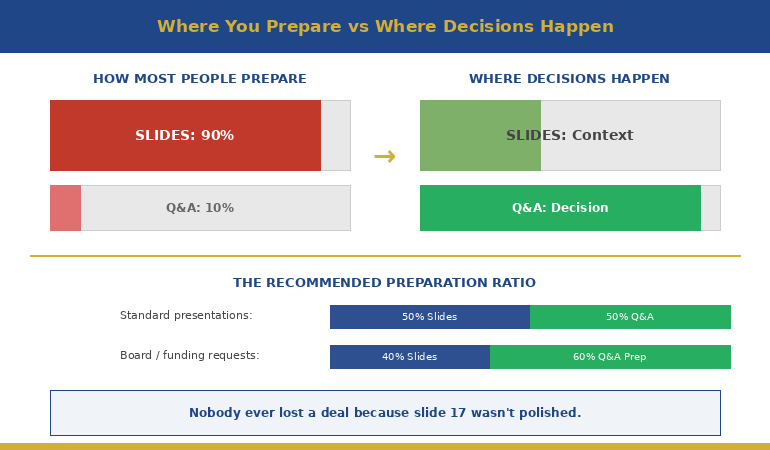
For a high-stakes presentation, spend 30-45 minutes on Q&A preparation: 10 minutes forecasting questions, 20 minutes writing headline answers, and 5-10 minutes reviewing bridging phrases. This investment pays off dramatically. Most presenters spend hours on slides and zero time on Q&A — then wonder why they lose momentum at the end.

What if someone asks a question I haven’t prepared for?

Use the Pause → Acknowledge → Partial Answer → Commit framework. A 2-3 second pause buys thinking time. Acknowledge the question is valid. Give the best partial answer you can. Commit to a specific follow-up if needed. This handles 90% of unexpected questions professionally.

How do I handle a questioner who’s clearly hostile?

Use Acknowledge → Reframe → Answer → Bridge. Don’t get defensive — it never helps. Acknowledge their concern as valid, reframe to the substance of the issue, give a clear answer, then bridge back to your core message. Stay calm, maintain eye contact, and keep your voice steady. Hostility often dissolves when met with professionalism.

Should I take questions during the presentation or save them for the end?

For executive audiences, it’s usually better to take questions as they arise — executives don’t like waiting. But set a boundary: “I’m happy to take questions as we go. If something requires a longer discussion, I’ll note it and we’ll come back to it at the end.” This keeps you in control while respecting their time.

📬 The Winning Edge Newsletter

Weekly frameworks for executive presentations and high-stakes communication. Join senior professionals who receive actionable techniques every week.

Subscribe free →

Related: If difficult questions trigger physical anxiety — racing heart, shallow breathing, mind going blank — the techniques in The Fight or Flight Hack I Learned From Hypnotherapy can help you stay calm under pressure.

You can have a perfect deck and still lose the room in Q&A. The difference between presenters who maintain control and those who don’t isn’t subject matter expertise — it’s preparation and system.

Forecast the questions. Build executive answers. Control the room with deliberate technique. Protect the decision with clear follow-through.

The next tough question doesn’t have to derail you. You just need a system.

About the Author

Mary Beth Hazeldine is the Owner & Managing Director of Winning Presentations. With 25 years of corporate banking experience, she has faced — and helped clients prepare for — high-stakes Q&A sessions with boards, investors, regulators, and senior leadership teams.

A qualified clinical hypnotherapist and NLP practitioner, Mary Beth combines executive communication expertise with evidence-based techniques for staying calm under pressure. She advises executives across financial services, healthcare, technology, and government on high-stakes presentation structure and Q&A preparation.

09 Feb 2026
Executive presenting difficult news to team in boardroom with empathetic body language

I Had to Present 200 Redundancies. Here’s What I Learned About Trust.

The CFO handed me the deck at 4pm. “Present this tomorrow. 200 roles. Be clear but compassionate.”

I looked at the slides. Twelve pages of financial rationale. Charts showing declining margins. A timeline of “workforce optimisation.” Not a single word about the humans whose lives were about to change.

That night, I rebuilt the entire presentation. Because I’d seen what happens when cost reduction presentations focus on the numbers instead of the trust. I’d watched leaders lose their teams’ respect in 15 minutes — respect that took years to build and would never fully return.

The presentation the next morning wasn’t easy. But six months later, the remaining team was still engaged, still productive, and still willing to go the extra mile. That almost never happens after restructuring announcements.

Here’s what I learned about presenting cost cuts without destroying the trust you’ll need to rebuild.

Quick answer: Cost reduction presentations destroy trust when they lead with financial justification and treat people as line items. To preserve trust: acknowledge the human impact first, explain the business reality second, be specific about what’s happening and when, answer the questions people are actually thinking, and commit to specific next steps. The sequence matters as much as the content.

Why Trust Dies in Cost Reduction Presentations

I’ve watched dozens of cost reduction presentations over 24 years in banking and consulting. The ones that destroy trust share the same pattern:

They lead with the business case.

“Market conditions have changed. Our margins are compressed. We need to reduce operating costs by 15%.”

The moment you start with numbers, you’ve lost them. Because everyone in that room is doing the same mental calculation: “Am I a cost? Am I being reduced?”

They’re not hearing your carefully constructed rationale. They’re scanning for threat signals. Their nervous systems have already shifted into fight-or-flight. And everything you say after that opening gets filtered through fear.

The trust equation shifts instantly.

Before the presentation, your team believed you cared about them as people. The moment you lead with financial justification, they recategorise you. You’re no longer “leader who has my back.” You’re “person who sees me as a number.”

That recategorisation takes seconds. Reversing it takes years — if it’s even possible.

For more on delivering difficult news, see my guide on how to present bad news to executives.

The 5-Part Framework That Preserves Credibility

After that 200-person restructuring presentation, I codified what worked into a framework I’ve used — and taught — ever since.

Five-part framework for presenting cost cuts while maintaining trust

Part 1: Acknowledge the Elephant (First 60 Seconds)

Before anything else, name what everyone is feeling.

“I know why you’re here. I know what you’re expecting to hear. And I know that whatever I say in the next few minutes is going to affect how you feel about this company, about this team, and about me. I’m not going to pretend this is easy news.”

This does something crucial: it signals that you see them as humans, not audience members to be managed. It also prevents the mental drift that happens when people are anxious — they’ll actually hear what you say next.

Part 2: State the Decision Clearly (No Euphemisms)

“We are reducing our workforce by 200 positions. This affects the following departments…”

Don’t say “workforce optimisation.” Don’t say “right-sizing.” Don’t say “strategic realignment of human capital.”

Euphemisms don’t soften the blow. They signal that you’re either ashamed of the decision or think your audience is too stupid to understand plain language. Neither builds trust.

Part 3: Explain the Why (But Not First)

Now — and only now — explain the business context. But keep it brief and honest.

“Here’s why this is happening: our revenue dropped 23% this year. We explored every alternative — hiring freezes, salary reductions, project deferrals. This was the option that gives us the best chance of protecting the remaining roles long-term.”

Notice what’s different: you’re not justifying. You’re explaining. The tone is “here’s the reality” not “here’s why you should be okay with this.”

Part 4: Answer the Unasked Questions

Everyone in that room has the same questions. Answer them before they have to ask:

  • “Is my role affected?” — Be specific about who knows what and when.
  • “When will I find out?” — Give exact timelines.
  • “What support is available?” — Be concrete about severance, outplacement, references.
  • “What happens to my projects?” — Show you’ve thought about continuity.
  • “Can I trust what you’re telling me?” — Address this directly: “I’m telling you everything I know right now.”

Part 5: Commit to Specific Next Steps

“By end of day Friday, every affected person will have a one-on-one with their manager. By next Wednesday, HR will have individual packages prepared. I will send a written summary of everything I’ve said today within two hours.”

Specificity signals competence. Vague promises (“we’ll support everyone through this”) signal that you haven’t actually planned what happens next.

📊 Difficult Conversations Require Clear Structure

Cost reduction presentations fail when leaders improvise. The Executive Slide System gives you proven frameworks for structuring sensitive communications — including templates for restructuring announcements that preserve trust while delivering clarity.

  • 10 executive slide templates (including difficult news formats)
  • Recommended-first structures that work for sensitive topics
  • Opening and closing frameworks that set the right tone

Get the Executive Slide System → £39

Built from 24 years in corporate banking and consulting. Designed for restructuring, cost reduction, and high-stakes stakeholder meetings.

What Never to Say (And What to Say Instead)

Some phrases seem professional but actually destroy trust. Here’s what to avoid:

❌ “This was a difficult decision.”

Everyone knows it was difficult. Saying it sounds like you’re asking for sympathy — which should be flowing the other direction.

✓ Instead: “I wish I had better news.”

❌ “We’re all in this together.”

If you’re not losing your job, you’re not in this together. This phrase infuriates people.

✓ Instead: “I know this affects some of you more than others.”

❌ “This is an opportunity for the company to emerge stronger.”

True, perhaps. But saying it in a redundancy announcement makes you sound like you’re celebrating.

✓ Instead: Save this for three months later, when you’ve earned the right to look forward.

❌ “HR will handle the details.”

This makes you look like you’re delegating the hard part. Even if HR does handle details, you need to own the communication.

✓ Instead: “I’ll be working with HR to ensure everyone gets individual support. Here’s exactly what that looks like…”

The Executive Slide System includes specific language frameworks for sensitive presentations — phrases that land and phrases to avoid.

The Slide Structure That Works

If you must use slides (and sometimes you must, for documentation or remote teams), here’s the structure that maintains trust:

Slide 1: The Decision

One sentence. No charts. No logos. Just the news.

“We are reducing our workforce by [X] positions, effective [date].”

Slide 2: Who Is Affected

Departments, locations, roles. Be specific. Don’t make people guess.

Slide 3: The Timeline

When people will be notified. When last day is. When support begins.

Slide 4: Support Available

Severance terms. Outplacement services. Reference policies. Healthcare continuation.

Slide 5: What Happens Next

Specific actions with specific dates. Who to contact. When the next communication will happen.

Slide 6 (Optional): Business Context

If you include this, keep it to one slide. This is not the time for a 20-slide market analysis.

Notice what’s missing: no “journey” language, no vision statements, no “exciting future” positioning. Those come later, if ever.

For more on presentation structure, see my guide on executive presentation structure.

🎯 Structure Sensitive Presentations With Confidence

The difference between a cost reduction presentation that preserves trust and one that destroys it often comes down to structure. Get it wrong, and you lose your team’s respect permanently. Get it right, and you maintain the credibility needed to rebuild.

Get the Executive Slide System → £39

Designed for restructuring announcements, difficult conversations, and crisis communications.

What Happens After the Presentation

The presentation is just the beginning. Trust is built or destroyed in what comes next.

Within 2 hours: Send a written summary of exactly what you said. No softening, no additions. This creates a record and shows consistency.

Within 24 hours: Every affected person should have had an individual conversation. Not an email — a conversation.

Within 1 week: Check in with your remaining team. Not to sell them on the future — to listen to their concerns. The people who stay are watching how you treat the people who leave.

Within 1 month: Acknowledge the transition openly. “We’re a smaller team now. Here’s how we’re adapting. Here’s what I need from you.”

The biggest mistake leaders make post-announcement: acting like it never happened. Your team remembers. Pretending it’s “business as usual” insults their intelligence and damages whatever trust remains.

For more on this topic, see my article on restructuring announcement presentations.

Presenting Cost Cuts Without Losing Your Team

Here’s what it comes down to:

Your team will remember how you made them feel during the hardest moments. Not your financial rationale. Not your market analysis. Not your carefully worded euphemisms.

They’ll remember whether you looked them in the eye. Whether you spoke plainly. Whether you answered their real questions. Whether you followed through on what you promised.

The Executive Slide System gives you the structural frameworks. But the trust comes from how you deliver them.

That 200-person presentation? It wasn’t my finest hour. But the team that remained trusted me enough to rebuild. And that trust started with acknowledging that I was about to deliver news that would change lives — before I said anything else.

📋 Ready to Structure High-Stakes Presentations?

Whether you’re presenting cost reductions, restructuring announcements, or any difficult news — structure determines whether you preserve trust or destroy it. The Executive Slide System gives you proven templates for sensitive executive communications.

  • 10 executive-ready slide templates
  • Difficult news presentation frameworks
  • Opening scripts that acknowledge reality
  • 30-day email support if you get stuck

Get the Executive Slide System → £39

Built from 24 years in corporate banking and consulting + 15 years training senior executives.

Frequently Asked Questions

Should I rehearse a cost reduction presentation?

Yes, but not for polish — for emotional preparation. Rehearse so you can deliver the difficult parts without hesitating, stumbling, or showing discomfort that makes you seem uncertain about the decision. Your team needs to see that you’ve fully processed this, even if they haven’t.

What if I don’t agree with the cost cuts?

This is one of the hardest leadership moments. You have three options: advocate privately until the decision changes, present the decision as your own (which it becomes the moment you deliver it), or resign before delivering news you can’t stand behind. What you cannot do is subtly distance yourself from the decision during the presentation — your team will sense it, and it destroys trust in both you and the organisation.

Should I take questions during the presentation?

Yes, but manage the format. Say: “I’ll answer questions after I’ve covered everything. That way, some of your questions might already be addressed.” This prevents derailment while still showing openness. Have a clear time limit for Q&A and commit to following up on anything you can’t answer immediately.

What if someone gets emotional during the presentation?

Acknowledge it. “I understand this is difficult to hear.” Then pause. Give them space. Don’t rush past it. The worst thing you can do is pretend it’s not happening or quickly move to the next slide. Human reactions deserve human responses.

Related: Difficult presentations affect your nervous system long after they’re over. If you’re still carrying the weight of past presentations, see Why Your Nervous System Remembers That Awful Presentation From 2019.

About the Author

Mary Beth Hazeldine is the Owner & Managing Director of Winning Presentations. With 24 years in corporate banking and consulting — including roles at JPMorgan Chase, PwC, Royal Bank of Scotland, and Commerzbank — she has delivered and supported high-stakes presentations in boardrooms across three continents, including restructuring announcements affecting thousands of employees.

A qualified clinical hypnotherapist and NLP practitioner, Mary Beth combines executive communication expertise with evidence-based techniques for navigating difficult conversations. She has trained thousands of executives on presenting with clarity, credibility, and composure under pressure.

Book a discovery call | View services

08 Feb 2026
Senior executive woman reviewing presentation slides on laptop with focused analytical expression in modern office

What Executives Actually Read on Your Slides (In the First 5 Seconds)

I watched a CFO flip through 47 slides in under two minutes. She stopped on three of them.

This was during my banking career, sitting in on a budget approval meeting. The presenter had spent weeks building what he thought was a comprehensive deck. Beautiful charts. Detailed analysis. Supporting data for every claim.

The CFO’s eyes landed on the slide titles. Then the recommendation boxes. Then the numbers in bold. Everything else — the carefully crafted explanations, the background context, the methodology sections — might as well have been invisible.

After 24 years in corporate banking and consulting, I can tell you: most slides are built for the wrong reader.

They’re built for someone who will read every word. Senior leaders don’t.

Here’s what they actually look at — and what they skip entirely.

Quick answer: Senior leaders read in a predictable pattern: slide title first (to decide if the slide is relevant), then any boxed recommendation or conclusion, then bolded numbers or outcomes, then the first bullet only. They skip methodology, background context, detailed explanations, and anything that looks like “supporting information.” Structure every slide so the most important content appears in those four high-attention zones.

⚡ Presenting to executives this week?

Quick fixes that take 15 minutes:

  1. Rewrite your slide titles as conclusions. Not “Q3 Sales Analysis” but “Q3 Sales Exceeded Target by 12%”
  2. Add a recommendation box to every decision slide. Bold border, 2 sentences maximum, top-right position.
  3. Bold the numbers that matter. Revenue, headcount, timeline, cost — the figures they’ll be asked about later.

These three changes put your key content where executive eyes actually land.

If your slide title doesn’t contain the decision or outcome, senior leaders assume you don’t have one.
Fix your titles first — then drop your content into templates built for executive scanning.

Get the Executive Slide System → £39

The Executive Reading Pattern

Senior leaders don’t read slides. They scan them.

This isn’t because they’re lazy or don’t care. It’s because they’re making decisions all day, and reading every word of every presentation would be impossible. They’ve developed a filtering system — a rapid triage that separates “need to know” from “nice to know.”

Understanding this pattern changes how you build slides.

The scan takes about 3-5 seconds per slide. In that window, a decision-maker determines: Is this slide relevant to me? Is there a decision required? What’s the key number or outcome? Do I need to dig deeper or can I move on?

If your most important content isn’t visible in those 3-5 seconds, it doesn’t exist.

The Executive Reading Pattern showing what executives look at first second and skip on slides

Here’s the scanning sequence I’ve observed across hundreds of boardroom presentations:

First: Slide title (0.5 seconds)
This is the gatekeeper. The title tells them whether to invest attention or flip to the next slide. Titles that describe content (“Market Analysis”) get skipped. Titles that state conclusions (“Market Share Dropped 8% — Action Required”) get attention.

Second: Boxes and call-outs (1 second)
Anything visually separated — recommendation boxes, key takeaway sections, highlighted conclusions — draws the eye next. Decision-makers have learned that presenters put important things in boxes.

Third: Bold numbers (1 second)
Revenue figures. Headcount. Timelines. Percentages. Costs. Leaders are trained to find numbers because numbers are what they’ll be asked about in the next meeting.

Fourth: First bullet point (1-2 seconds)
If they’re still on the slide, they’ll read the first bullet. Maybe the second. Rarely the third. Almost never the fourth or fifth.

Then: Decision to engage or move on
Based on those 3-5 seconds, they either ask a question, request you to slow down, or mentally move to the next topic.

For more on structuring presentations for senior audiences, see my guide on executive presentation structure.

Build Slides That Get Read in the First 5 Seconds

The Executive Slide System includes templates pre-structured for how senior leaders actually scan — with recommendation boxes, conclusion-first titles, and visual hierarchy that puts key content where eyes land first.

Get the Executive Slide System → £39

Built from 24 years of presenting in boardroom-style decision meetings.

What They Actually Read (In Order)

Let’s break down each high-attention zone and how to use it.

1. Slide Titles: Your 8-Word Headline

Most presenters write titles that describe what’s on the slide. “Revenue Overview.” “Project Timeline.” “Risk Assessment.”

These titles are useless to someone scanning quickly. They don’t answer the only question that matters: “What do I need to know?”

Better approach: Write titles that state the conclusion.

Descriptive Title (Skip) Conclusion Title (Read)
Q3 Sales Performance Q3 Sales Beat Target by £2.4M
Project Status Update Project On Track for March Launch
Budget Analysis Budget Request: £450K for Q2
Risk Factors Three Risks Require Board Decision

Notice the pattern: conclusion titles tell the reader what to think about the slide before they’ve read anything else. They can decide instantly whether to engage deeply or move on.

For more examples of this transformation, see my guide on slide titles before and after.

2. Recommendation Boxes: The Decision Zone

Decision-makers are trained to look for recommendations. Put your “ask” in a visually distinct box — border, background colour, positioned top-right or bottom of slide.

A good recommendation box contains:

  • What you’re recommending (one sentence)
  • What it costs or requires (one sentence)
  • Nothing else

Example: “Recommendation: Approve £200K for pilot programme. Decision required by March 15.”

That’s it. The supporting argument is in the rest of the slide — but the recommendation stands alone in its box, scannable in under two seconds.

3. Bold Numbers: The Facts They’ll Quote Later

When leaders leave your presentation, they’ll be asked: “What was the number?” Make sure the important numbers are visually unmissable.

Bold these categories consistently:

  • Revenue/cost figures
  • Headcount impacts
  • Timeline milestones
  • Percentage changes
  • Decision thresholds

Don’t bold for emphasis. Bold for memorability. If the audience can’t recall the key figure 30 minutes later, it wasn’t bold enough.

4. First Bullets: Your One Chance at Detail

If you have supporting points, the first bullet is prime real estate. The second bullet is acceptable. The third is rarely read. The fourth and fifth are essentially invisible.

This means: front-load your bullet lists. Put the most important point first, not last. Don’t build to a conclusion — start with it.

For more on what senior leaders look for, see my guide on the executive summary slide.

What They Skip Entirely

Equally important: knowing what decision-makers don’t read. This is where most presenters waste time and slide space.

Background and context sections

You know that “Background” slide at the beginning? The one that sets up why this topic matters? It gets skipped. The audience already knows why they’re in the meeting. Context that seems essential to you is old news to them.

Methodology explanations

“How we arrived at this recommendation” is rarely read unless someone challenges the conclusion. Lead with the answer; keep methodology in the appendix for questions.

Detailed timelines

Gantt charts with 47 task lines? Skipped. They want three things: when does it start, when does it end, what are the major milestones in between. Everything else is operational detail they’ll delegate.

Supporting data tables

Raw data is for analysts. Senior audiences want the interpretation. “Sales grew 12%” is readable. A table with 24 monthly figures that demonstrates 12% growth is not.

Paragraphs of any kind

If your slide has a paragraph on it, that paragraph is invisible. They don’t read paragraphs in presentations. They read headlines, bullets, and numbers. Paragraphs signal “this isn’t important enough to summarize” — so they skip them.

Anything below the fold

Content that requires scrolling or appears at the very bottom of a dense slide is effectively hidden. If it matters, it should be visible without effort.

How to Structure Slides for Executive Eyes

Here’s the slide structure that works for senior-level scanning:

Top of slide: Conclusion title
State what the slide proves in 8 words or fewer.

Top-right: Recommendation box (if decision slide)
What you want them to approve, and what it requires.

Middle: Visual or key data
One chart, one table, or 3-4 bullets maximum. Bold the numbers that matter.

Bottom: Source line (tiny) or next steps
If there’s a “so what” action, put it here. Otherwise, just the data source in small font.

What’s missing from this structure? Background. Methodology. Explanation. Context. All of that lives in your speaker notes or the appendix — not on the slide itself.

The 10-Second Test

Before finalising any slide, show it to someone for exactly 10 seconds, then hide it. Ask them: “What was that slide about? What’s the key number? What’s the recommendation?”

If they can answer all three questions, your slide is structured correctly. If they can’t, the important content isn’t in the high-attention zones.

For more on board-level presentations, see my guide on board presentation best practices.

Stop Building Slides That Get Skipped

The Executive Slide System gives you templates that put your content where senior eyes actually land — conclusion titles, recommendation boxes, and visual hierarchy built for 3-second scanning. Stop guessing. Start structuring for how decisions actually get made.

Get the Executive Slide System → £39

Instant download. Built from 24 years of boardroom experience.

Frequently Asked Questions

What if my executive audience wants detail?

Some do — but they want detail on demand, not upfront. Structure your slides for scanning, then have detailed appendix slides ready for questions. When someone asks “How did you calculate that?”, you can flip to the methodology. But don’t put methodology on the main slide where it will be skipped by the three people who don’t ask.

How many bullets are too many?

Three is ideal. Four is acceptable. Five is pushing it. Beyond five, you’re writing a document, not a slide. If you have more than five points, you either need multiple slides or you need to group points into categories.

Should I read my slides aloud during the presentation?

Never read content they can scan faster than you can speak. Instead, use your speaking time to add context, tell stories, and address the “so what” — the things that don’t fit in a scannable format. Your slides and your speaking should complement each other, not duplicate.

What about technical presentations with complex data?

The same principles apply, but with one addition: a “headline chart” that summarises the complex data before you show the detail. The audience wants to understand what the data means before they see the data itself. Give them the interpretation first, then offer to go deeper if they want.

Your Next Step

The next time you build a presentation, imagine your most senior audience member scanning each slide for 3-5 seconds. Ask yourself: In that window, can they see the conclusion? The recommendation? The key number?

If not, move that content to where their eyes actually land.

Your deck might look different — fewer words, more conclusion titles, bolder numbers. But it will work better. Because it’s built for how decision-makers actually read.

Ready to build slides that get read in the first 5 seconds?

Get the Executive Slide System → £39

📧 Get the Winning Edge Newsletter

Weekly insights on executive communication, presentation structure, and high-stakes delivery — from someone who’s spent 24 years in boardroom-style decision meetings.

Subscribe free →

Related reading: If the thought of Monday’s presentation is already keeping you up tonight, read The Night Before the Biggest Presentation of Your Career for the protocol that actually helps you rest before high-stakes moments.

About the Author

Mary Beth Hazeldine is the Owner & Managing Director of Winning Presentations. With 24 years of corporate banking experience at JPMorgan Chase, PwC, Royal Bank of Scotland, and Commerzbank, she has sat through thousands of executive presentations — and learned exactly where senior leaders look and what they skip.

She now helps professionals build slides that work for how decisions actually get made, not how presenters wish they were made.

07 Feb 2026
Female executive delivering a restructuring announcement at a corporate town hall with employees in background

Restructuring Announcement Presentation: What HR Won’t Tell You

I watched a CEO destroy ten years of trust in twelve minutes.

The restructuring was necessary. Everyone in the room knew the numbers didn’t work. But the way he delivered it — reading from a script that Legal had clearly written, avoiding eye contact, rushing through the “people impact” slide like it was a quarterly metric — turned necessary change into organisational trauma.

Three months later, 40% of the people he’d asked to stay had already left. Not the ones he’d let go. The ones he’d kept.

I’ve witnessed many restructuring announcements at JPMorgan Chase, Royal Bank of Scotland, and Commerzbank. I’ve sat in rooms where careers ended and futures became uncertain. And I’ve learned that how you deliver this news matters as much as the news itself.

HR will give you the legal language. Legal will give you the liability protection. But neither will tell you how to keep your credibility — and your remaining team — intact.

That’s what this guide is for.

Quick answer: Restructuring announcements fail when leaders prioritise legal protection over human connection. The most effective structure has three phases: Context (why this is happening), Impact (who is affected and how), and Path Forward (what happens next for everyone). Lead with honesty, not corporate euphemisms. Acknowledge the human cost before discussing business rationale. And never, ever read from a script.

⚡ Announcing a restructuring tomorrow?

If you’re short on time, focus on these three things:

  1. Open with acknowledgment, not business case. “I know this news will be difficult” before “Here’s why we’re doing this.”
  2. Be specific about what you know and don’t know. Vagueness breeds fear. “Decisions will be finalised by Friday” beats “over the coming weeks.”
  3. Tell people what to do next. Uncertainty is paralysing. Give everyone a concrete next step, even if it’s just “Your manager will meet with you individually by 3pm today.”

These won’t make the news easy. But they’ll preserve trust when you need it most.

📊 If you must use slides, here are the only 4 you need:

Slide Purpose
1. Timeline Key dates: when decisions are final, when transitions begin, when support ends
2. Support Available Severance, outplacement, counselling, references — what people can expect
3. Who to Contact HR contacts, manager availability, confidential questions channel
4. Next Steps (Today) What happens in the next 2-4 hours for everyone in the room

Everything else — the why, the context, the acknowledgment — should come from you directly, not a screen.

Why Most Restructuring Announcements Fail

Most restructuring announcements are designed by committee — Legal, HR, Communications, Finance — each adding their requirements until the message becomes a corporate word salad that protects the company but alienates the people.

Here’s what typically goes wrong:

The euphemism problem. “Right-sizing.” “Workforce optimisation.” “Strategic realignment.” Everyone knows what these words mean. Using them signals that you think your audience is stupid — or that you’re too cowardly to say what’s actually happening. Neither builds trust.

The script problem. Reading from prepared remarks in a restructuring announcement sends a devastating message: this moment doesn’t matter enough for me to speak to you directly. People can tell when you’re reading Legal’s words versus speaking your own.

The speed problem. Leaders often rush through restructuring announcements because they’re uncomfortable. But speed signals callousness. When you’re telling someone their job is at risk, moving quickly through slides feels like you’re trying to get it over with — because you are.

The sequence problem. Most announcements lead with business rationale: market conditions, financial pressures, strategic imperatives. By the time you get to the human impact, you’ve already signalled that spreadsheets matter more than people.

The vagueness problem. “Some positions will be affected.” “Changes will be implemented over the coming weeks.” “We’ll share more details soon.” Vagueness might feel kinder, but it creates anxiety that’s worse than bad news. People fill uncertainty with worst-case scenarios.

For more on delivering difficult news effectively, see my guide on how to present bad news without destroying credibility.

Structure High-Stakes Announcements With Confidence

The Executive Slide System includes frameworks for the presentations that matter most — including restructuring announcements, difficult news delivery, and crisis communication. Slide structures that maintain credibility when the stakes are highest.

Get the Executive Slide System → £39

Built from 24 years in corporate banking and leadership communication delivery.

The Three-Phase Announcement Structure

Effective restructuring announcements follow a specific structure that balances honesty, clarity, and humanity. Here’s the framework I’ve used across three banks and dozens of organisational changes:

The three-phase restructuring announcement framework showing Context Impact and Path Forward with timing guidelines

Phase 1: Context (3-5 minutes)

Before you explain what’s happening, you need to acknowledge the moment. This is where most leaders go wrong — they jump straight to business rationale.

Start with humanity:

“I want to begin by acknowledging that what I’m about to share will be difficult to hear. I wish I were standing here with different news. But I owe you honesty, and I owe you the full picture.”

Then, and only then, provide context:

  • What market or business conditions have changed
  • What options were considered and why this path was chosen
  • What this means for the organisation’s future

Keep this section factual but not detached. You’re explaining why, but you’re doing it as a human being who understands the weight of what you’re saying.

Phase 2: Impact (5-7 minutes)

This is the hardest part — and the part most leaders rush through. Don’t.

Be specific about:

  • How many roles are affected (exact number, not “some”)
  • Which teams or functions are impacted
  • The timeline for decisions and transitions
  • What support will be provided (severance, outplacement, references)

Be equally specific about what’s NOT changing. People in unaffected roles need reassurance that this news doesn’t apply to them — otherwise everyone spends the next week assuming the worst.

Crucially: if you don’t know something yet, say so explicitly. “Individual decisions will be communicated by Friday” is better than vague promises of “soon.”

Phase 3: Path Forward (3-5 minutes)

After delivering difficult news, people need to know what happens next. Not just for the organisation — for them, personally, today.

Cover three things:

  1. Immediate next steps: “Your manager will meet with you individually within the next two hours to discuss how this affects your role specifically.”
  2. Resources available: “HR will be available in Conference Room B until 5pm for questions. Here’s the email address for confidential concerns.”
  3. Your commitment: “I will be here. I will answer your questions. And I will not hide behind process or policy.”

End with your door being open — and mean it.

For more on structuring town hall presentations, see my guide on town hall presentation templates for leaders.

What to Say (And What Never to Say)

The words you choose in a restructuring announcement carry enormous weight. Here’s what works — and what destroys trust:

Say this:

  • “We’re eliminating [X] positions” — Direct and honest
  • “I wish I had different news” — Acknowledges the human cost
  • “Here’s exactly what happens next” — Reduces anxiety through clarity
  • “I don’t know yet, but I will by [specific date]” — Honest about uncertainty
  • “This was my decision” — Takes accountability (if true)

Never say this:

  • “We’re right-sizing the organisation” — Corporate euphemism that insults intelligence
  • “This is actually an exciting opportunity” — Tone-deaf and dismissive
  • “We’re all in this together” — You’re not; some people are losing their jobs
  • “It’s not personal” — It’s deeply personal to the people affected
  • “We had no choice” — There’s always a choice; own the one you made

The accountability principle:

If you made this decision, say so. “I decided” is more trustworthy than “It was decided.” Passive voice in restructuring announcements signals that no one is willing to own the impact — which makes everyone distrust leadership more.

If the decision came from above you, you can acknowledge that while still taking responsibility for how you’re implementing it: “The board made this decision, and I’m accountable for how we execute it and how we treat people through this process.”

The 48 Hours After: What Most Leaders Miss

The announcement is just the beginning. What you do in the 48 hours after determines whether you keep or lose your remaining team.

Be visible. The instinct after a difficult announcement is to retreat to your office and let HR handle the fallout. Resist it. Walk the floor. Be available. Let people see that you’re not hiding.

Follow through on every commitment. If you said managers would meet with people by 3pm, that needs to happen by 3pm. If you said HR would be available until 5pm, they need to be there until 5pm. Broken commitments after a restructuring announcement compound the damage exponentially.

Listen more than you talk. People need to process. They need to vent. They need to ask questions — sometimes the same questions multiple times. Your job in these 48 hours is to absorb, not to convince anyone that the decision was right.

Watch for the second wave. The people you’re keeping often have stronger reactions than the people you’re letting go. Survivor guilt, fear of being next, anger at losing colleagues — these emotions surface in the days after the announcement, not during it.

Document what you’re hearing. The questions and concerns that surface after a restructuring announcement are valuable data. They tell you what wasn’t clear, what fears remain, and what you need to address in follow-up communications.

For more on crisis communication, see my guide on crisis communication slides: the 5 things you must never say.

Navigate High-Stakes Presentations With Confidence

The Executive Slide System gives you proven structures for the presentations that define careers — restructuring announcements, board presentations, budget requests, and strategic recommendations. Frameworks that work when the stakes are highest.

Get the Executive Slide System → £39

Built for board-level and town-hall moments where credibility matters.

Frequently Asked Questions

Should I use slides for a restructuring announcement?

Minimal slides, if any. A restructuring announcement should feel like a human conversation, not a presentation. If you use slides, limit them to factual information people will want to reference later: timeline, support resources, who to contact, next steps. Never put the “why” on slides — that needs to come from you directly, not from a screen.

How do I handle questions I can’t answer yet?

Be honest that you don’t have the answer, and be specific about when you will. “I don’t know yet” is acceptable. “I don’t know yet, but I will have that answer by Thursday at noon and will email everyone directly” is better. The key is converting uncertainty into a specific commitment.

What if I disagree with the restructuring decision?

If you’re delivering the announcement, you need to own it — regardless of whether you agreed with the decision. You can acknowledge complexity (“This was a difficult decision with no perfect answer”) without undermining the decision itself. If you genuinely can’t support the decision, consider whether you should be the one delivering it. Half-hearted delivery is worse than no delivery.

How do I handle emotional reactions in the room?

Expect them and don’t rush past them. If someone is visibly upset, acknowledge it: “I can see this is hitting hard. That’s understandable.” Don’t try to fix the emotion or move quickly to the next point. Give people space to react. Silence after difficult news isn’t awkward — it’s necessary.

Your Next Step

If you’re facing a restructuring announcement, remember: the news itself is fixed, but how you deliver it is entirely in your control.

Lead with humanity. Be specific about impact and timeline. Take accountability for the decision. And be visible in the aftermath.

The people you’re keeping are watching how you treat the people you’re letting go. That’s what they’ll remember long after the restructuring is complete.

Need a structure for your next high-stakes presentation?

Get the Executive Slide System → £39

📧 Get the Winning Edge Newsletter

Weekly insights on executive communication, crisis leadership, and high-stakes presentations — from 24 years in corporate banking.

Subscribe free →

Related reading: Delivering a restructuring announcement is one of the highest-anxiety presentation moments a leader faces. If you’re struggling with the night before, read The Night Before the Biggest Presentation of Your Career for techniques that actually help.

About the Author

Mary Beth Hazeldine is the Owner & Managing Director of Winning Presentations. With 24 years of corporate banking experience at JPMorgan Chase, PwC, Royal Bank of Scotland, and Commerzbank, she has delivered restructuring announcements, led teams through organisational change, and learned firsthand what preserves trust when delivering difficult news.

Now she teaches senior professionals how to navigate high-stakes communication moments with confidence and credibility. She combines executive communication expertise with evidence-based techniques for managing difficult conversations.

03 Feb 2026
Executive addressing large all-hands meeting audience from podium in corporate auditorium

The All-Hands Meeting That Destroyed Morale (And How to Avoid It)

The CEO opened with “I’m excited to share our new direction.”

Twelve minutes later, 200 employees were mentally updating their CVs.

I was consulting for a mid-sized tech company when this happened. The CEO had genuinely good news—a pivot that would create opportunities, not cuts. But by the time he finished, the Slack channels were on fire. “What does this mean for us?” “Reading between the lines here…” “Anyone else feel like that was rehearsed?”

The content was fine. The delivery destroyed trust.

That meeting cost them 14 resignations over the next quarter. Not because the strategy was wrong—but because the presentation of that strategy broke something that couldn’t be easily repaired.

Quick answer: The most common all-hands meeting presentation mistakes aren’t about slides or timing—they’re about trust. Leaders fail when they lead with corporate messaging instead of human acknowledgment, when they avoid difficult realities employees already sense, when they fill time instead of respecting it, when they perform rather than communicate, and when they treat Q&A as a threat rather than an opportunity. The all-hands meeting that builds morale does the opposite: it acknowledges reality first, delivers substance over polish, respects employees’ intelligence, and creates genuine dialogue. This article covers the five mistakes that destroy morale and the structure that builds trust instead.

⚡ All-Hands This Week? The 10-Minute Trust Check

Before you present, ask yourself these four questions:

  1. What’s the elephant in the room? Name it in your first 60 seconds—or employees will assume you’re hiding something.
  2. What would a skeptical employee think? Address that concern directly, not defensively.
  3. Can you cut 30%? Respect their time. Say less, mean more.
  4. Is your Q&A genuinely open? If you’re screening questions, they know—and trust erodes.

These four checks won’t fix structural issues, but they’ll prevent the most damaging mistakes. For the complete framework, keep reading.

Mistake 1: Leading with Corporate, Not Human

“I’m excited to announce…” “We’re thrilled to share…” “This is an incredible opportunity…”

The moment employees hear corporate enthusiasm, their guard goes up. They’ve been trained by years of experience: when leadership sounds excited, something uncomfortable is coming.

The tech CEO I mentioned opened with excitement about “transformation” and “new horizons.” What employees heard: “I’m about to tell you something you won’t like, and I’m pretending it’s good news.”

The fix: Lead with acknowledgment, not enthusiasm.

“I know there’s been uncertainty about our direction. Today I want to address that directly.” This signals respect. It says: I know you’re not naive. I’m not going to insult you with spin.

Acknowledgment before announcement. Reality before vision. Human before corporate.

For more on this approach, see my guide on presenting difficult news without destroying credibility.

Mistake 2: Avoiding What Everyone Already Knows

In every organisation, there are things “everyone knows” but leadership pretends don’t exist. The product that’s failing. The competitor that’s winning. The restructure that’s coming. The executive who’s struggling.

When you stand in front of your entire company and don’t mention the elephant, you don’t make it disappear. You confirm that leadership either doesn’t know (incompetent) or won’t say (dishonest).

Neither builds trust.

I watched a CFO give a 45-minute all-hands without mentioning that Q3 results were 40% below target. Every employee in the room knew the numbers. The Slack messages afterwards weren’t about the content of the presentation—they were about what it revealed about leadership’s honesty.

The fix: Name the elephant in the first 90 seconds.

“Before I get into our plans, let’s acknowledge what’s on everyone’s mind. Q3 was significantly below where we needed to be. That’s not a secret, and I’m not going to pretend otherwise. Here’s what we’re doing about it…”

You don’t have to have all the answers. But you have to acknowledge the questions.

Mistake 3: Filling Time Instead of Respecting It

The standard all-hands runs 60-90 minutes. Why? Because that’s how long all-hands meetings are supposed to be.

But here’s what actually happens: 15 minutes of substance gets stretched to fill the slot. Department updates that could be emails. Metrics that are already in the dashboard. Celebrations that feel forced because they’re wedged between filler.

Employees aren’t fooled. They know when you’re wasting their time. And every unnecessary minute costs you credibility.

The fix: Cut ruthlessly. Then cut more.

A 25-minute all-hands with genuine substance builds more trust than a 90-minute meeting with padding. Respecting employees’ time signals that you value their contribution more than the appearance of thorough communication.

Ask yourself: If employees were billing you £200/hour each, would you still include this section?

Comparison diagram showing the five all-hands meeting mistakes that destroy morale versus trust-building alternatives

🎯 Build Slides That Build Trust

The Executive Slide System includes templates specifically designed for high-stakes company communications—including all-hands meetings, town halls, and leadership updates. Structure that respects your audience’s intelligence.

What’s included:

  • Town hall and all-hands frameworks
  • Opening slides that acknowledge reality
  • Q&A preparation structures
  • Templates that cut filler automatically

Get the Executive Slide System → £39

Instant download. Built for high-stakes leadership communications.

Mistake 4: Performing Instead of Communicating

Over-rehearsed delivery. Memorised transitions. The corporate voice that sounds nothing like how the CEO actually talks.

Performance creates distance. Employees can feel when someone is delivering lines versus sharing thoughts. And in an all-hands—where the entire point is connection—that distance is fatal.

The irony: leaders rehearse to seem confident. But over-rehearsal signals the opposite. It says: “I’m so worried about how this will land that I’ve scripted every word.”

The fix: Prepare your structure, not your script.

Know your key points. Know your opening acknowledgment. Know how you’ll handle the hard questions. But deliver in your actual voice, with your actual personality, including your actual uncertainty where it exists.

Employees don’t need you to be polished. They need you to be real.

“I don’t have all the answers yet” builds more trust than a perfectly delivered non-answer.

📊 Need a structure you can make your own? The Executive Slide System (£39) gives you frameworks to prepare thoroughly while still sounding human.

Mistake 5: Treating Q&A as Damage Control

Screened questions. Pre-selected softballs. The classic “we’re running out of time” when hard questions start coming.

Employees see through all of it. And each evasion confirms what they suspected: leadership doesn’t want honest dialogue.

The worst version: anonymous questions that are clearly filtered, so everyone knows the difficult ones were removed. You’ve now combined dishonesty with the appearance of openness—the most damaging combination.

The fix: Embrace the hard questions. They’re the point.

The question that makes you uncomfortable is exactly the question that needs answering. When you address it directly—even if the answer is “I don’t know yet, and here’s why”—you build trust that no amount of polished presentation can create.

If you’re afraid of what employees might ask, that fear is data. It’s telling you something about the gap between what you’re saying and what they’re experiencing.

For more on handling difficult questions, see my guide on executive presentation structure.

💡 Q&A Is Where Trust Is Won or Lost

The questions that make you uncomfortable are exactly the questions that need answering. When you address them directly—even if the answer is “I don’t know yet, and here’s why”—you build trust that no amount of polished slides can create. The Executive Slide System includes Q&A preparation frameworks for anticipating and handling the hard questions.

The All-Hands Structure That Builds Trust

After watching hundreds of company meetings—the ones that built trust and the ones that destroyed it—here’s the structure that works:

1. Acknowledge First (2-3 minutes)

Name what’s on everyone’s mind. Don’t spin. Don’t pivot to positivity immediately. Just acknowledge.

“I know the last quarter has been difficult. I know there’s uncertainty about what’s coming. I want to address that head-on today.”

2. Context Before Content (3-5 minutes)

Before you share decisions, share the thinking behind them. What did you consider? What trade-offs did you make? What would you do differently?

This transparency builds trust because it treats employees as partners in understanding, not just recipients of announcements.

3. Substance Over Padding (10-15 minutes)

Deliver your actual content. Cut everything that could be an email. Cut department updates that don’t affect everyone. Cut metrics that are already visible. Keep only what requires the entire company’s attention.

4. Honest Q&A (15-20 minutes)

Open the floor genuinely. Don’t screen questions. When you get a hard one, pause, acknowledge its importance, and answer as honestly as you can—even if that answer is incomplete.

5. Close with Commitment (2-3 minutes)

What specifically are you committing to? When will you follow up? What can employees hold you accountable for?

Vague inspiration erodes trust. Specific commitments build it.

Total time: 35-45 minutes. Not 90. Not 60. Less time, more substance, more trust.

For a detailed template, see my town hall presentation template.

🎯 The Complete Executive Communication System

The Executive Slide System gives you everything in this article as ready-to-use templates—plus frameworks for board presentations, stakeholder updates, and every other high-stakes executive communication. Build slides that build trust.

Includes:

  • All-hands and town hall frameworks
  • Trust-building opening templates
  • Q&A preparation structures
  • Board presentation formats
  • Stakeholder update templates

Get the Executive Slide System → £39

Instant download. Transform your next all-hands from morale-killer to trust-builder.

Frequently Asked Questions

What should you not do in an all-hands meeting?

The five biggest mistakes: leading with corporate enthusiasm instead of human acknowledgment, avoiding topics everyone already knows about, filling time with content that could be emails, over-rehearsing until you sound scripted, and treating Q&A as damage control rather than genuine dialogue. Each mistake signals that leadership values appearance over substance—and employees notice immediately.

How do you make an all-hands meeting engaging?

Engagement comes from trust, not entertainment. Acknowledge reality in your opening, share the thinking behind decisions (not just the decisions themselves), cut ruthlessly to respect people’s time, deliver in your actual voice rather than a corporate performance, and embrace hard questions as opportunities to build credibility. A 30-minute meeting with genuine substance beats a 90-minute meeting with forced energy.

Why do all-hands meetings fail?

Most all-hands meetings fail because they prioritise information delivery over trust-building. Leaders focus on what they want to say rather than what employees need to hear. They avoid difficult realities, pad time with filler, and treat Q&A as a risk to manage. The result: employees leave feeling more disconnected than before, regardless of the content.

How long should an all-hands meeting be?

As short as possible while covering genuine substance—typically 30-45 minutes including Q&A. The standard 60-90 minutes exists because of tradition, not effectiveness. Shorter meetings that respect employees’ time build more trust than longer meetings padded with updates that could be emails. If you can’t fill 30 minutes with content that requires the entire company’s attention, you don’t need an all-hands meeting.

Should you allow anonymous questions at all-hands?

Only if you’ll actually answer them—including the difficult ones. Filtered anonymous questions are worse than no anonymous questions at all, because employees know the hard questions were removed. If you allow anonymous submission, commit to addressing every question (you can group similar ones). If you’re not willing to do that, better to have live Q&A and demonstrate openness through your genuine responses to real-time challenges.

How do you deliver bad news at an all-hands meeting?

Lead with it. Don’t bury bad news in the middle or save it for Q&A. Acknowledge it in your first 90 seconds: “I want to start with something difficult.” Then provide context (why this happened), impact (what it means), and path forward (what you’re doing about it). Employees can handle bad news; what destroys trust is the sense that you’re hiding it or spinning it.

What’s the best structure for an all-hands meeting?

Acknowledge first (2-3 minutes)—name what’s on everyone’s mind. Context before content (3-5 minutes)—share thinking behind decisions. Substance over padding (10-15 minutes)—only content that requires company-wide attention. Honest Q&A (15-20 minutes)—unfiltered, genuine responses. Close with commitment (2-3 minutes)—specific accountabilities, not vague inspiration. Total: 35-45 minutes maximum.

📧 The Winning Edge Newsletter

Weekly insights on executive communication, leadership presentations, and what actually builds trust in corporate settings. From 24 years in banking boardrooms.

Subscribe Free →

📋 Free: Executive Presentation Checklist

A pre-presentation checklist for any high-stakes executive communication—including the trust check, audience analysis, and Q&A preparation. Use it before your next all-hands.

Download Free Checklist →

About the Author

Mary Beth Hazeldine is the Owner & Managing Director of Winning Presentations. With 24 years of corporate banking experience at JPMorgan Chase, PwC, Royal Bank of Scotland, and Commerzbank, she has delivered high-stakes presentations in boardrooms across three continents—and watched countless all-hands meetings build or destroy organisational trust.

A qualified clinical hypnotherapist and NLP practitioner, Mary Beth combines executive communication expertise with evidence-based techniques for managing presentation anxiety. She works with thousands of executives on high-stakes funding rounds and approvals.

Book a discovery call | View services

Your Next Step

Before your next all-hands meeting, run the trust check. Ask yourself: What’s the elephant in the room? Am I acknowledging it—or avoiding it?

The five mistakes in this article are easy to make and hard to recover from. But they’re also easy to avoid once you see them clearly.

Your employees are smart. They see through spin, they feel performance, and they remember evasion. The all-hands meeting that builds trust is the one that treats them as the intelligent partners they are.

Lead with acknowledgment. Deliver substance. Respect their time. Embrace the hard questions.

That’s it. That’s the whole system.

Related: If presenting in front of groups triggers anxiety—even when you’re the one in charge—see today’s companion article on what to do when emotions overwhelm you mid-presentation. It happens to more leaders than you’d think.

30 Jan 2026
Executive in boardroom looking concerned after realizing he said the wrong thing, colleagues visible in background

I Lost a £4M Deal in a 30-Minute Presentation. The Mistake Took 5 Seconds.

“That’s an interesting perspective, but let me show you why the data disagrees.”

Seventeen words. Five seconds to say them. £4 million gone.

The CFO had raised a concern about implementation risk. I had prepared for this question. I had three slides of data proving our risk mitigation was solid. I was ready.

So I corrected him. Politely. Professionally. With impeccable data.

And I watched his face close. Not angry—worse. Neutral. The engaged executive who’d been leaning forward for 20 minutes leaned back, crossed his arms, and didn’t ask another question for the rest of the presentation.

The deal died in that moment. Everything after was theatre.

Quick answer: The most expensive executive presentation mistakes aren’t about slides, structure, or preparation. They’re about the words you say in critical moments—responding to a question, handling an objection, or reacting to resistance. I’ve lost deals with perfect decks and won deals with mediocre ones. The difference was almost always something I said (or didn’t say) in a 5-second window. This article covers the 7 in-room mistakes that kill executive buy-in and the exact language patterns that prevent them.

Why 5 Seconds Can Undo 5 Weeks of Work

After 24 years in corporate banking—JPMorgan Chase, PwC, Royal Bank of Scotland, Commerzbank—I’ve been in hundreds of rooms where deals lived or died. The pattern I’ve observed is humbling: preparation gets you to the table, but what you say in critical moments determines whether you leave with a yes.

Here’s why those 5-second windows matter so much:

Executives are constantly evaluating two things: your proposal AND you. They’re asking themselves: “Is this person someone I can work with? Do they listen? Do they get defensive? Will they be a problem when things go wrong?”

Your slides answer the first question. Your in-room behaviour answers the second.

A single defensive response can flip their mental model from “this person is competent” to “this person will be difficult.” And once that flip happens, your data doesn’t matter anymore. They’re not evaluating your proposal—they’re looking for reasons to say no.

The CFO I mentioned earlier? He later told my colleague: “The proposal was solid. But when I raised a concern, he made me feel stupid. I don’t want to work with someone who does that.”

I hadn’t made him feel stupid intentionally. I’d just corrected him. With data. Professionally.

But in executive dynamics, being right isn’t the same as being effective.

The 7 in-room mistakes that kill executive buy-in with fixes for each

Mistake #1: Correcting an Executive (Even When You’re Right)

This is the mistake that cost me £4M, and I see it constantly.

An executive says something that’s factually incorrect or based on outdated information. You have the data that proves otherwise. Your instinct is to correct them—politely, of course.

What you say: “Actually, the data shows something different…” or “That’s not quite accurate—let me explain…”

What they hear: “You’re wrong and I’m about to prove it in front of your colleagues.”

Executives have egos. More importantly, they have positions to protect. Correcting them publicly—even gently—triggers a defensive response. They stop listening to your content and start protecting their status.

What to say instead:

“That’s a really important point. I had a similar assumption initially. What we found when we dug deeper was…”

This does three things: validates their thinking, admits you once thought the same (so they’re not stupid for thinking it), and introduces new information as discovery rather than correction.

Or try: “You’re right that [acknowledge the valid part of their concern]. The piece that changed our thinking was…”

Find the kernel of truth in what they said—there almost always is one—and build from there rather than contradicting.

⭐ Master the Critical Moments That Win (or Lose) Executive Buy-In

The Executive Buy-In Presentation System teaches you exactly what to say—and what never to say—in the high-stakes moments that determine whether you get approval.

You’ll learn:

  • Language patterns that turn resistance into engagement
  • How to handle objections without triggering defensiveness
  • The psychology behind executive reactions (and how to work with it)
  • Scripts for the 10 most common deal-killing moments

See the Executive Buy-In System on Maven →

Cohort-based programme for senior professionals. See Maven for dates.

Mistake #2: Defending Instead of Exploring

When an executive raises an objection, your instinct is to address it. To explain why it’s not a problem. To defend your proposal.

This instinct is wrong.

What you say: “I understand the concern, but here’s why it’s not an issue…” or “We’ve actually addressed that—let me show you…”

What happens: You’ve just entered an adversarial dynamic. They raised a concern; you dismissed it. Now they have to either accept that their concern was invalid (unlikely) or push harder to prove they were right to raise it (likely).

I watched a colleague lose a £2M consulting engagement this way. The client mentioned concerns about timeline. My colleague immediately launched into a detailed explanation of why the timeline was achievable. Fifteen minutes of defending.

The client wasn’t asking for reassurance. She was asking to be heard.

What to say instead:

“Tell me more about that concern. What specifically worries you about [X]?”

Or: “That’s worth exploring. When you think about [the concern], what would need to be true for you to feel comfortable?”

This does something powerful: it moves you from opposing positions to the same side of the table. You’re now exploring the concern together, not defending against an attack.

Often, when you explore, you discover the stated concern isn’t the real concern. The executive worried about “timeline” might actually be worried about resource allocation, or political dynamics, or a past project that went badly. You can’t address the real concern if you’re busy defending against the stated one.

Mistake #3: The “Let Me Finish” Signal

You’re explaining a key point. An executive interrupts with a question. You say some version of: “I’m going to cover that in a moment” or “Let me just finish this thought” or “Hold that—I’ll get there.”

What you intend: Orderly presentation flow. You have a structure and you’re sticking to it.

What they experience: Their question isn’t important enough to answer now. You value your agenda over their curiosity.

Executives interrupt because something you said triggered a thought they want to explore. That interruption is engagement. It’s interest. It’s exactly what you want.

When you defer their question, you’re telling them their engagement doesn’t matter. Many will stop engaging entirely.

What to say instead:

“Great question—let me address that now.” Then answer it, even if it disrupts your flow. Your slides can wait. Executive engagement cannot.

If the question truly would be answered better with context from later slides: “That’s actually the perfect lead-in to the next section. Mind if I show you something that’ll help frame the answer?” Then go directly to that section.

The key insight: their agenda matters more than your agenda. Flexible presenters who follow executive interest build more trust than rigid presenters who stick to their script. If you struggle with staying composed when your flow is disrupted, see my article on how to stop rambling when nervous.

Mistake #4: Answering the Question They Asked

This sounds counterintuitive, but stay with me.

An executive asks: “What’s the implementation timeline?”

You answer: “Twelve weeks for phase one, then another eight weeks for full rollout.”

Factually accurate. Completely unhelpful.

Because the question behind the question was probably: “Is this going to disrupt Q2?” or “Will this conflict with the ERP migration?” or “Am I going to have to explain a delay to the board?”

The mistake: Answering the literal question without addressing the underlying concern.

What to say instead:

“Twelve weeks for phase one—so we’d complete before the Q2 crunch you’re navigating.” Or: “Twelve weeks, and I’ve coordinated with Sarah’s team to make sure we’re not competing for the same resources as the ERP work.”

If you don’t know the underlying concern, ask: “Before I answer, help me understand what’s driving that question. Is there a timing constraint I should know about?”

Executives are often asking about implications, not facts. The presenter who answers implications builds more trust than the one who answers facts.

⭐ Learn to Read What Executives Are Really Asking

The Executive Buy-In Presentation System teaches you to hear the question behind the question—and respond in ways that build trust instead of triggering resistance.

The programme includes:

  • Decoding executive questions: what they ask vs. what they mean
  • Response frameworks that address concerns without being defensive
  • Practice scenarios with real executive objection patterns
  • Recovery techniques when you sense you’ve lost the room

See the Executive Buy-In System on Maven →

For executives and senior professionals who present to decision-makers.

Mistake #5: Filling Silence

You make your recommendation. The room goes quiet. Executives are thinking.

The silence feels uncomfortable. So you fill it: “Of course, there are other options we could consider…” or “I know this is a big decision…” or “Let me show you a few more supporting points…”

What you’ve just done: Undermined your own recommendation. Signalled that you’re not confident. Given them reasons to delay.

Silence after a recommendation is often good. It means they’re processing. They’re considering. They’re taking you seriously.

When you fill that silence, you interrupt their processing. Worse, you often plant doubts that weren’t there: “Other options? Maybe I should ask about those.”

What to do instead:

Make your recommendation. Then stop talking. Let the silence sit for 5-10 seconds (it will feel like an hour). If you must say something, try: “I’m happy to answer questions, or if it would be helpful, I can walk through the alternatives we considered and why we landed here.”

Notice the difference: you’re offering to provide more information if they want it, not volunteering it out of nervousness.

The executives who get buy-in most consistently are comfortable with silence. They make their case, then wait. They project confidence by not needing to fill every gap.

Mistake #6: The Accidental Ultimatum

You’re trying to convey urgency. The window for this opportunity is closing. You want them to act.

What you say: “If we don’t move forward by March, we’ll lose this opportunity” or “This is a now-or-never situation.”

What they hear: You’re pressuring them. You’re trying to force a decision before they’re ready. You don’t trust them to make good choices on their own timeline.

Even if the urgency is real, framing it as an ultimatum triggers resistance. Executives don’t like being told what to do. They especially don’t like feeling manipulated into decisions.

What to say instead:

“I want to flag a timing consideration. The vendor’s pricing is locked until March 15th—after that, we’re looking at a 20% increase. I’m not trying to rush the decision, but I wanted you to have that context.”

Or: “There’s a window here that I think is worth noting. Here’s what changes if we move in Q1 versus Q2…” Then present the trade-offs neutrally.

The difference: you’re providing information for their decision, not pressuring them toward your preferred outcome. Same facts, different framing, completely different response.

Mistake #7: Winning the Argument, Losing the Room

An executive pushes back. Hard. They’re wrong—you can prove it. You have data, precedents, expert opinions. You can win this argument.

So you do. Point by point, you dismantle their objection. You’re thorough. You’re factual. You’re right.

And you’ve just lost the room.

Because every other executive watched you publicly defeat one of their peers. They’re now thinking: “If I raise a concern, will I get the same treatment?”

The room goes quiet. Not because they’re convinced—because they’ve decided not to engage. They’ll raise their concerns after you leave, in conversations you’re not part of, where decisions will be made without your input.

What to do instead:

When you sense an argument forming, de-escalate: “I think we might be looking at this from different angles. Can we step back? Help me understand the core concern here.”

Or try: “You’re raising something important. Let me make sure I understand it fully before I respond.”

If they’re genuinely wrong about something material, address it one-on-one after the meeting, not publicly in the room. Save their face. Preserve your relationship. Get the same outcome without the collateral damage.

For more on presenting to senior audiences without triggering these dynamics, see my guide on presenting to senior leadership.

What’s the most common mistake that kills executive buy-in?

Correcting executives publicly, even when you’re factually right. When you contradict an executive in front of their peers, you trigger a defensive response that has nothing to do with your proposal. They stop evaluating your idea and start protecting their status. Instead, validate first (“That’s an important point”), then introduce new information as discovery rather than correction (“What we found when we explored further was…”).

How do I handle executive objections without being defensive?

Explore before you defend. When an executive raises a concern, your instinct is to explain why it’s not a problem. Resist this instinct. Instead, ask: “Tell me more about that concern” or “What specifically worries you about that?” This moves you from opposing positions to exploring together. Often, the stated concern isn’t the real concern—and you can’t address what you don’t understand.

What should I do when an executive interrupts my presentation?

Answer their question immediately, even if it disrupts your flow. Interruptions are engagement—exactly what you want. When you defer with “I’ll cover that later,” you signal that your agenda matters more than their interest. Executives who feel unheard stop engaging. Your slides can wait; executive engagement cannot.

⭐ Stop Losing Deals in Critical Moments

The Executive Buy-In Presentation System gives you the exact language, frameworks, and practice you need to handle high-stakes moments without triggering resistance.

What you’ll master:

  • The psychology of executive decision-making under pressure
  • Scripts for the 10 most common buy-in killers
  • Recovery techniques when you sense you’ve lost the room
  • Practice scenarios with feedback from senior peers

See the Executive Buy-In System on Maven →

Cohort-based on Maven. See current dates and availability.

Frequently Asked Questions

Can I recover if I make one of these mistakes mid-presentation?

Sometimes. If you catch yourself early, you can course-correct: “Actually, let me reframe that. What I should have said was…” Acknowledging the misstep shows self-awareness. If you’ve lost an executive (they’ve gone quiet or defensive), consider addressing it directly: “I sense I may have missed something important in how I responded to your question. Can you help me understand what I should be considering?” Humility can recover what defensiveness cannot.

What if the executive is genuinely wrong about something material?

Address it privately if at all possible—after the meeting, one-on-one. If you must address it in the room, use the “I had the same assumption” frame: “That was actually my initial read too. What changed my thinking was…” This corrects without contradicting. You’re sharing a learning journey, not proving them wrong.

How do I know if I’ve lost the room?

Watch for: executives who were engaged going quiet, crossed arms or leaning back, checking phones or watches, questions that become pointed or skeptical rather than curious, and the senior decision-maker deferring to others (“What do you all think?”) instead of engaging directly. These signals don’t mean you’re definitely lost, but they warrant a check-in: “I want to pause and make sure we’re tracking. Is this addressing what matters, or should we shift focus?”

Is it better to prepare answers for tough questions or respond naturally?

Both. Prepare frameworks for common objection patterns, but don’t script word-for-word answers. Scripted responses sound rehearsed and often miss the nuance of the actual question. Know the categories of concerns you might face (timeline, cost, risk, resources, political implications) and have a general approach for each. Then listen carefully to the specific question and adapt. The combination of preparation and presence beats either one alone. For strategic pre-meeting work, see my guide on stakeholder mapping for presentations.

📧 The Winning Edge Newsletter

Weekly insights on executive presentations, stakeholder strategy, and the language patterns that win buy-in.

Subscribe Free →

The 5-Second Difference

That CFO who killed my £4M deal taught me something I couldn’t learn from any presentation training: what you say in critical moments matters more than everything else combined.

Preparation gets you in the room. Slides give you credibility. But the words you choose when an executive pushes back, questions your assumptions, or goes quiet—those 5-second windows determine whether you leave with a yes.

I’ve since learned to pause before responding to tough questions. To validate before correcting. To explore before defending. To welcome interruptions as engagement rather than disruption.

These aren’t natural instincts—they’re learned behaviours that feel wrong until you see them work.

The good news: once you recognise the patterns, you can prepare for them. You can practice the language. You can build the reflexes that turn deal-killing moments into deal-making ones.

Five seconds is long enough to lose everything. It’s also long enough to win.

29 Jan 2026
what-executives-want-presentations-featured-wordpress.png (1200×675) Alt text: Professional woman presenting confidently to executive audience in boardroom meeting

I Prepared 47 Slides. The CFO Stopped Me on Slide 3.

“I don’t need to see the rest,” she said. “You’ve already told me what I need to know.”

I’d prepared 47 slides. Market analysis. Competitive benchmarks. Financial projections with three scenarios. The kind of presentation that takes 40 hours to build and covers every possible question.

She approved the £2.3 million budget request in under four minutes.

That moment taught me something that changed how I approach every executive presentation: what executives actually want from your presentation has almost nothing to do with the amount of data you show them.

Quick Answer: Executives don’t want more data—they want clarity on the decision you need them to make, the risk of inaction, and your specific recommendation. After 24 years presenting to C-suite leaders in banking, I’ve learned that the presentations that get approved are the ones that respect executive time and cognitive load. Lead with the decision, not the data.

📋 Presenting to Executives This Week? 48-Hour Deck Rescue

Before you present, check these five things:

  1. Slide 1 headline — Does it state the decision you need? (Not the topic)
  2. Stakes slide — Have you quantified the cost of inaction?
  3. Recommendation — Is it ONE clear ask, not “three options”?
  4. Every title — Is it a complete thought, not a label?
  5. Your close — Do you ask for a specific decision by a specific date?

If any answer is “no,” fix it before you present. Need the full structure? ↓

I Learned This the Hard Way at JPMorgan

Early in my banking career, I believed preparation meant coverage. More data. More slides. More contingencies.

I once spent three weeks preparing a technology investment proposal. Eighty-two slides. Every objection pre-answered. Every data point sourced.

The Managing Director interrupted me ninety seconds in. “What do you want me to do?”

I stumbled. The data was there—buried on slide 41.

“Come back when you know,” he said. Meeting over.

That failure cost me six months. The project stalled while competitors moved. By the time I got another meeting, the window had closed.

Over the next 24 years—at PwC, Royal Bank of Scotland, Commerzbank—I studied what actually worked. What I discovered contradicted everything I’d been taught about “thorough” presentations.

Executives don’t want thorough. They want clear.

What Executives Actually Want (The 3-Part Framework)

After presenting to hundreds of C-suite leaders and training over 5,000 executives, I’ve identified a pattern so consistent it’s almost formulaic.

What executives want from presentations comes down to three things:

1. The Decision (Not the Journey)

Executives don’t need to understand your analysis process. They need to know: What decision do you need from me, and why should I make it today?

Every executive I’ve worked with—from FTSE 100 CEOs to startup founders—operates under the same constraint: cognitive overload. They’re making dozens of decisions daily. Yours is one of many.

The presentations that win start with the decision. Not the background. Not the methodology. The decision.

2. The Risk of Inaction (Not Just the Opportunity)

Opportunity motivates. But risk mobilises.

When presenting to executives, framing matters enormously. “This investment will generate £2M in revenue” is less compelling than “Every month we delay costs us £167K in market share we won’t recover.”

The best executive presenters I’ve trained understand this instinctively. They don’t just sell the upside—they quantify the cost of doing nothing.

3. Your Recommendation (Not Options)

Junior presenters offer options. Senior presenters make recommendations.

Executives want to know what YOU think they should do. They can override you—that’s their prerogative. But presenting “three options for your consideration” signals you haven’t done the hard thinking yourself.

One clear recommendation. One backup if they push back. That’s it.

What executives want from presentations visual framework showing decision focus vs data focus

The Data Trap: Why More Information Kills Decisions

Here’s the paradox most presenters miss: the more data you present, the less likely you are to get a decision.

This isn’t opinion. It’s cognitive science.

Research on decision fatigue shows that information overload doesn’t create confidence—it creates paralysis. When executives face too much data, their default response is “Let me think about it.” Which means: no decision today.

I’ve seen this pattern destroy projects worth millions:

A biotech client prepared a 60-slide investor presentation. Detailed market analysis. Competitive landscape. Regulatory pathway. Clinical trial data. Financial projections with sensitivity analysis.

The investors’ feedback: “Impressive work. We need to digest this.”

Translation: They couldn’t find the signal in the noise. No investment.

When we restructured the same content into 12 slides—leading with the decision, the market gap, and one clear ask—they closed £4.2M in their next meeting.

Same company. Same opportunity. Different structure.

The data wasn’t the problem. The data volume was the problem.

If you’re preparing for a high-stakes executive presentation, understanding how to write an executive summary slide is the single most valuable skill you can develop.

⭐ Stop Building Slides Executives Skip

Get the exact slide structure that gets executive attention—not polite nods while they check their phones.

The Executive Slide System includes:

  • The 12-slide executive structure (used to secure £4.2M+ in approvals)
  • Decision-first slide templates that respect executive time
  • Before/after examples from real board presentations

Get the Executive Slide System → £39

Built from 24 years presenting to C-suite leaders in investment banking. The same structure behind £4M+ approvals.

The Slide Structure That Gets Executive Attention

If data volume kills decisions, what replaces it?

Structure.

After analysing hundreds of successful executive presentations, I’ve identified the exact sequence that works consistently:

Slide 1: The Decision Headline

Not “Q3 Marketing Review.” That’s a topic, not a headline.

Try: “Recommendation: Shift £400K from Brand to Performance Marketing in Q4.”

The executive knows immediately what you want. They can start forming their response while you present—which is exactly what you want them doing.

Slide 2: The Stakes

Why this decision matters. Why now. What happens if we don’t act.

Quantify where possible. “Current trajectory: 12% market share loss by Q2” is more compelling than “We’re losing ground to competitors.”

Slide 3: The Recommendation (Expanded)

Your specific ask. Timeline. Resources needed. Expected outcome.

One slide. No options. Just your best thinking.

Slides 4-8: Supporting Logic

Notice this comes AFTER the recommendation. Not before.

Only include data that directly supports the decision. Everything else goes in an appendix they’ll never read—and that’s fine.

Slides 9-10: Risks and Mitigation

Executives respect presenters who acknowledge what could go wrong. It builds credibility and pre-empts their concerns.

Slides 11-12: Next Steps and Ask

What you need from them. When. How they should signal approval.

Never end with “Questions?” End with a specific request for action.

This structure works because it matches how executives actually process information. They need the conclusion first, then decide how deep to go into the supporting data.

For a complete breakdown of this approach, see my guide to the 3-slide system that gets executive decisions fast—it’s the foundation of everything I teach about structuring executive presentations.

What do executives look for in a presentation?

Executives look for three things: a clear decision or recommendation, the business impact of action vs. inaction, and evidence you’ve done the hard thinking so they don’t have to. They don’t want data dumps—they want clarity that respects their time and cognitive load.

How do you present to C-level executives?

Present to C-level executives by leading with your recommendation, not your methodology. State the decision you need in the first 60 seconds. Quantify the cost of inaction. Limit supporting data to what directly drives the decision. End with a specific ask, not “any questions.”

What is the biggest mistake when presenting to executives?

The biggest mistake is burying your recommendation behind background and data. Executives make dozens of decisions daily—if they can’t identify your point within the first two slides, you’ve lost them. Start with the decision, then provide supporting evidence.

Real Example: From 47 Slides to 12 (And a £4M Approval)

Let me show you what this looks like in practice.

A client came to me with a technology platform proposal. 47 slides. Beautiful design. Comprehensive data.

The steering committee had rejected it twice with “needs more analysis.”

Here’s what we changed:

Original Slide 1: “Cloud Migration Strategy: Executive Overview”

New Slide 1: “Recommendation: Approve £4M Migration to Reduce Operating Costs by £2.1M Annually”

Original Slide 2: “Agenda” (listing 12 sections)

New Slide 2: “The Cost of Waiting: Every Month Delay = £175K in Avoidable Infrastructure Spend”

Original Slides 3-15: Current state analysis, market research, vendor comparison

New Slides 3-4: Three-year cost projection (one slide) and vendor recommendation with rationale (one slide)

We moved 35 slides to the appendix. The committee never looked at them.

The presentation went from 45 minutes to 12. The decision went from “rejected” to “approved” in one meeting.

What changed? Not the content. The emphasis.

The executives didn’t need more information. They needed the right information in the right order.

⭐ Get Executive Decisions in One Meeting

Stop hearing “let me think about it.” Start hearing “approved.”

What you’ll get:

  • Slide-by-slide structure that matches executive thinking
  • Headline formulas that signal decisions (not topics)
  • Real examples from £4M+ approvals

Get the Executive Slide System → £39

Developed from 24 years of presenting to C-suite leaders at JPMorgan, PwC, and Royal Bank of Scotland.

The 4 Mistakes That Lose Executives in the First 60 Seconds

Understanding what executives want from presentations means understanding what makes them disengage.

Here are the four patterns I see most often:

Mistake #1: Starting With Background

“To provide context, let me walk you through how we got here…”

Executives don’t need context. They need conclusions. If the context matters, they’ll ask.

Mistake #2: Using Topic Titles Instead of Headlines

“Financial Overview” tells an executive nothing. “Revenue Up 23% But Margin Pressure Requires Action” tells them everything.

Every slide title should be a complete thought. If an executive only reads your headlines, they should understand your entire argument.

Mistake #3: Presenting Options Without a Recommendation

“We’ve identified three approaches…” signals you’re not ready to commit. Executives want to hear what YOU think, then decide whether to override you.

Present one recommendation. Have one backup if they push back. That’s sufficient.

Mistake #4: Ending With “Any Questions?”

This passive close puts the executive in charge of next steps. Instead, end with a specific ask: “I’d like your approval to proceed with Phase 1 by March 15. Can we confirm that today?”

The executives I’ve worked with consistently prefer presenters who know what they want and ask for it directly.

If presentation anxiety is affecting your ability to present confidently to senior leaders, read about how to overcome the fear of being judged when speaking—the psychological techniques apply directly to executive presentations.

Your Action Framework: Presenting to Executives This Week

If you have an executive presentation coming up, here’s how to apply what you’ve learned:

Step 1: Find Your Headline

What do you want the executive to DO after your presentation? Write that as a complete sentence. That’s your Slide 1 headline.

Step 2: Quantify the Stakes

What happens if they don’t decide? Put a number on it—money, time, market position. If you can’t quantify it, the decision probably isn’t urgent enough for executive attention.

Step 3: Audit Your Slides

For every slide after Slide 3, ask: “Does this directly support the decision, or is it background?” Move background to the appendix. Be ruthless.

Step 4: Rewrite Your Titles

Turn every topic title into a headline. “Competitive Analysis” becomes “Competitors Have 18-Month Lead—Here’s How We Close the Gap.”

Step 5: Prepare Your Close

Script the exact words you’ll use to ask for the decision. “I’d like your approval to proceed with [specific action] by [date]. Can we confirm that now?”

Practice this close until it feels natural. The ask is where most presenters lose their nerve—and lose the decision.

For more on building lasting confidence for these moments, see my guide on getting executive buy-in—it covers the stakeholder dynamics most presenters miss.

⭐ Transform How Executives Respond to Your Presentations

The difference between “let me think about it” and “approved” is structure—not data. Get the exact framework that’s secured £4M+ in executive approvals.

The Executive Slide System gives you:

  • Decision-first structure executives actually respond to
  • Headline formulas that cut through cognitive overload
  • Complete before/after transformation examples

Get the Executive Slide System → £39

Built from 24 years presenting to C-suite leaders at JPMorgan, PwC, and Royal Bank of Scotland.

Frequently Asked Questions

How many slides should an executive presentation have?

Most effective executive presentations have 10-15 slides for the main deck, with detailed analysis moved to an appendix. The goal isn’t a specific number—it’s ensuring every slide directly supports the decision you’re asking for. I’ve seen £4M approvals from 12-slide decks and rejections from 80-slide decks.

Should I send the presentation before the meeting?

For senior executives, yes—but send a one-page executive summary, not the full deck. Let them come prepared with questions rather than processing new information in real-time. The presentation meeting should confirm the decision, not introduce the concept.

What if the executive interrupts with questions early?

This is actually a good sign—it means they’re engaged. Answer directly, then ask: “Would you like me to continue with the recommendation, or explore this question further?” Let them guide the depth. Having your recommendation early means interruptions don’t derail your main point.

How do I handle executives who want more data?

The appendix is your friend. When an executive asks for more detail, say: “I have that analysis in the appendix—slide 34 covers the full breakdown. Shall I walk through it now or send it after for review?” This shows preparation without cluttering your main deck.

Get Weekly Executive Presentation Insights

Actionable advice on presenting to senior leaders—no fluff, just techniques that work.

Subscribe to The Winning Edge →

📋 Not Ready to Invest? Start With This Free Checklist

Get the Executive Presentation Checklist—a one-page audit you can use before your next presentation to ensure you’re hitting what executives actually want.

Download Free Checklist →

Related: If the thought of presenting to executives triggers anxiety, you’re not alone. Read Fear of Being Judged When Speaking: How to Break the Loop for the psychological techniques that help senior professionals present with confidence.

The Bottom Line

What executives want from your presentation isn’t complexity—it’s clarity.

Lead with the decision. Quantify the stakes. Make a recommendation. Ask for what you need.

Do this, and you’ll stand out from the 90% of presenters who bury their point under data executives don’t have time to process.

Your next step: Take your current executive presentation and rewrite Slide 1. Turn it from a topic (“Q4 Review”) into a decision headline (“Recommendation: Increase Q4 Investment by £200K to Capture Market Window”). That single change will transform how executives engage with everything that follows.

Mary Beth Hazeldine is the Owner & Managing Director of Winning Presentations, with 24 years of experience presenting to C-suite leaders at JPMorgan Chase, PwC, Royal Bank of Scotland, and Commerzbank. She has trained over 5,000 executives on high-stakes presentation skills.

27 Jan 2026
Professional man smiling confidently at whiteboard while explaining a framework to colleagues in modern office

The 3-Part Presentation System Executives Trust: Structure → Story → Slides

I once spent 14 hours on a single board presentation. Fourteen hours. And it still wasn’t right.

After 24 years in corporate banking — at JPMorgan Chase, PwC, Royal Bank of Scotland, Commerzbank — I’d built hundreds of presentations. But I had no system. Every deck was a fresh struggle: staring at a blank screen, rearranging slides endlessly, second-guessing every choice.

Then I developed what I now call the 3-part presentation system executives actually trust. It cut my prep time by 75%. More importantly, it consistently delivered results — budget approvals, project sign-offs, client wins.

Here’s the system I wish someone had given me two decades ago.

Quick Answer: The presentation system executives trust follows three phases in strict order: (1) Structure — nail your recommendation and logic flow before touching slides, (2) Story — add the human element that makes data memorable, (3) Slides — build visuals that support your structure, not the other way around. This sequence prevents the #1 time-waster: building slides before you know what you’re actually saying.

📋 Creating a Presentation This Week? Start Here:

Before you open PowerPoint, answer these 3 questions:

  1. What’s your ONE recommendation? (If you can’t say it in one sentence, you’re not ready)
  2. What are the 3 proof points? (Data, example, or logic that supports it)
  3. What decision do you need? (Approval, funding, alignment, action)

Only after you can answer all three should you start building slides.

Why Most Presentation “Systems” Fail

Early in my banking career, I watched a colleague present to the executive committee. He had 47 beautifully designed slides. Animations. Charts. The works.

The CFO stopped him on slide 3. “What are you actually recommending?”

My colleague couldn’t answer clearly. He’d spent days on slides without first nailing his structure. The meeting ended early. The project stalled for months.

I’ve seen this pattern hundreds of times since. Professionals jump straight to PowerPoint, build slides that look impressive, then wonder why executives lose interest or decisions don’t happen.

The problem isn’t the slides. It’s the sequence.

Most presentation advice focuses on delivery tips or design tricks. But without a solid underlying system, you’re just decorating a house with no foundation.

Phase 1: Structure (The Foundation)

Structure is 70% of whether your presentation succeeds or fails. Yet most people spend 70% of their time on slides.

The structure phase happens entirely OFF the screen. Whiteboard, paper, or just thinking — but not in PowerPoint.

The Executive Structure Formula:

  1. Lead with your recommendation. Not background. Not context. The answer first.
  2. Identify 3 supporting points. Data, logic, or examples that prove your recommendation is sound.
  3. Define the decision needed. What exactly do you want them to approve, fund, or do?
  4. Anticipate 2-3 objections. What will they push back on? Have your responses ready.

This follows the Pyramid Principle that McKinsey made famous: conclusion first, then supporting evidence. It’s the opposite of how most people naturally think (building up to the conclusion), but it’s how executives prefer to receive information.

For a deeper dive into the exact format, see our guide to executive presentation structure.

What system do executives use for presentations?

Senior executives typically use a top-down structure: recommendation first, supporting evidence second, decision request third. This is often called the Pyramid Principle or BLUF (Bottom Line Up Front). The best executive presenters also have a consistent personal methodology — a repeatable process they follow for every presentation, regardless of topic or audience.

The 3-part presentation system: Structure leads to Story leads to Slides, shown as a sequential process"

⭐ Master the Complete System in 4 Weeks

AI-Enhanced Presentation Mastery is a live cohort course that teaches the full Structure → Story → Slides methodology — plus how to use AI tools to accelerate (not replace) each phase.

What you’ll learn:

  • The complete 3-part framework in depth
  • How to apply it to board decks, client pitches, and internal updates
  • AI prompts that enhance each phase (without making slides generic)
  • Live feedback on your real presentations

Learn More About the Course →

Live cohort format with direct instructor access. Built from 24 years of corporate banking experience.

Phase 2: Story (The Connection)

Once your structure is solid, you add the human element. Data convinces the rational mind. Story convinces the whole person.

This doesn’t mean turning your board presentation into a TED Talk. It means strategic use of narrative to make your points memorable and your recommendations compelling.

Three Story Techniques for Executive Presentations:

1. The Stakes Story (60 seconds)

Before presenting your recommendation, briefly establish what’s at risk. “If we don’t address this now, here’s what happens…” This creates urgency without being dramatic.

2. The Proof Story (90 seconds)

Instead of just citing data, briefly tell the story behind one data point. “When we piloted this with the Manchester team, here’s what happened…” Specific examples stick better than aggregate statistics.

3. The Future Story (60 seconds)

Paint a brief picture of what success looks like. “Six months from now, if we do this, here’s where we’ll be…” This helps executives visualise the outcome they’re approving.

Notice the time limits. Executive presentations aren’t the place for long narratives. These are strategic micro-stories embedded within a structured argument.

How do you structure an executive presentation?

The most effective structure for executive presentations is: (1) Recommendation/conclusion first, (2) Three supporting points with evidence, (3) Clear decision or action request, (4) Appendix for detail. This “top-down” approach respects executives’ time and mirrors how they make decisions. Avoid building up to your conclusion — executives want to know your answer immediately, then decide if they need the supporting detail.

Ready to master the complete system?

Explore AI-Enhanced Presentation Mastery →

Phase 3: Slides (The Delivery)

Only now — after structure and story are locked — do you open PowerPoint.

This is where most people START, which is why they waste so much time. When you build slides before your structure is solid, you end up rearranging endlessly, adding slides you don’t need, and second-guessing every design choice.

When structure comes first, slides become almost mechanical. You know exactly what each slide needs to say. You’re just visualising decisions you’ve already made.

The Slide Phase Checklist:

  • One message per slide. If a slide makes two points, split it.
  • Headlines that state conclusions. Not “Q3 Results” but “Q3 Revenue Exceeded Target by 12%”
  • Visuals that prove the headline. The chart or image should make the headline obvious.
  • Appendix for detail. Anything they might ask about but don’t need upfront.

For the detailed workflow I use, including how AI can accelerate this phase, see our guide to AI presentation workflow.

Time allocation comparison: amateur vs professional presenters showing where time should be spent

What makes a presentation system effective?

An effective presentation system is: (1) Repeatable — works for any presentation type, (2) Sequenced — forces you to do the right things in the right order, (3) Efficient — eliminates wasted time and rework, (4) Results-focused — optimised for getting decisions, not just delivering information. The best systems separate thinking (structure) from building (slides), ensuring you don’t waste time on visuals before your logic is sound.

⭐ Stop Reinventing Every Presentation

The AI-Enhanced Presentation Mastery course gives you a complete, repeatable system — so you never face a blank screen wondering where to start again.

Course includes:

  • 4 weeks of live instruction + Q&A
  • Templates for board, client, and internal presentations
  • AI prompt library for each phase of the system
  • Peer cohort for feedback and accountability

Learn More About the Course →

Framework-first, AI-enhanced. Next cohort starting soon.

Where AI Fits (And Where It Doesn’t)

AI tools like ChatGPT, Claude, and Copilot can dramatically accelerate presentation creation. But only if you use them at the right points in the system.

Where AI helps:

  • Phase 1 (Structure): Brainstorming counter-arguments, stress-testing your logic, identifying gaps
  • Phase 2 (Story): Drafting story options, finding analogies, refining language
  • Phase 3 (Slides): Generating first-draft slide content, reformatting data, creating visual options

Where AI fails:

  • Knowing your specific audience and what they care about
  • Understanding the political dynamics in your organisation
  • Making the judgment call on what to include vs. leave out
  • Replacing the strategic thinking that makes presentations persuasive

The professionals who get the most from AI use it as an accelerator within a proven framework — not as a replacement for having a system in the first place.

Want to learn how to combine framework + AI effectively?

Explore AI-Enhanced Presentation Mastery →

Is This System Right For You?

The 3-part system works for anyone who creates presentations for business audiences. But the full course is designed for a specific professional:

Qualification chart showing who the AI-Enhanced Presentation Mastery course is designed for

If you recognised yourself in the left column, the system will transform how you approach presentations — whether you learn it from this article or go deeper in the course.

⭐ The Complete System + Live Instruction

AI-Enhanced Presentation Mastery is a 4-week live cohort course that teaches the full Structure → Story → Slides methodology — plus the AI techniques that accelerate each phase without making your presentations generic.

What’s included:

  • 4 weeks of live sessions with Q&A
  • The complete 3-part framework with templates
  • AI prompt library for each phase
  • Feedback on your real presentations
  • Cohort of peers for ongoing accountability

Learn More About the Course →

Built from 24 years of corporate banking experience. Framework-first, AI-enhanced.

Frequently Asked Questions

How is this different from using AI tools alone?

AI tools are powerful but they don’t give you a system. They can generate content, but they can’t tell you what content you actually need. Without a framework, AI often produces generic slides that look impressive but don’t persuade. The 3-part system gives you the strategic foundation — AI then accelerates execution within that framework. It’s the difference between having a GPS (system) versus just having a fast car (AI).

Does this work for different presentation types (board, client, internal)?

Yes — that’s the point of having a system. The Structure → Story → Slides sequence works whether you’re presenting to a board, pitching a client, updating your team, or requesting budget. The specific content changes, but the methodology stays the same. In the course, we apply the system to multiple presentation types so you can see how it adapts.

How much time does the system actually save?

In my experience, the system cuts presentation prep time by 50-75% once you’ve internalised it. The savings come from eliminating the two biggest time-wasters: (1) building slides before your structure is clear, and (2) endless rearranging and second-guessing. When you know exactly what each slide needs to say before you open PowerPoint, the building phase becomes almost mechanical.

What if I’m already experienced at presentations?

Most experienced presenters are “unconsciously competent” — they do things that work but can’t articulate why. The system makes your process conscious and repeatable, which means you can improve it deliberately and teach it to others. It also fills gaps you might not know you have. Many experienced professionals find the Story phase (Phase 2) particularly eye-opening.

Get Weekly Presentation System Insights

Frameworks, templates, and techniques for executive presentations — from 24 years in corporate banking.

Subscribe to The Winning Edge →

Your Next Step

The 3-part presentation system — Structure → Story → Slides — isn’t complicated. But it does require discipline to follow the sequence, especially when you’re tempted to jump straight into PowerPoint.

Start with your next presentation. Before you open any software, answer the three questions from the rescue block above. Get your structure right first. Everything else becomes easier.

P.S. If you’re making a presentation this week, check out the presentation habit that’s quietly killing careers — it’s about the structural mistake most professionals make without realising it.

P.P.S. If nerves are part of your presentation challenge, I wrote about how to speak confidently in meetings — including the 30-second reset that helps even when anxiety hits.

About Mary Beth Hazeldine
Owner & Managing Director of Winning Presentations. 24 years in corporate banking at JPMorgan Chase, PwC, RBS, and Commerzbank. I’ve built hundreds of executive presentations and now teach the system I wish I’d had from the start.

27 Jan 2026
Professional woman having moment of realization at boardroom table while reviewing presentation on laptop

The Presentation Habit That’s Quietly Killing Your Career

She got the promotion. He had the better slides.

I watched this play out at JPMorgan Chase more times than I can count. The analyst with the comprehensive 40-slide deck passed over. The one with 12 slides and a clear recommendation? Fast-tracked to VP.

The difference wasn’t talent. It wasn’t data quality. It wasn’t even presentation confidence.

It was a single presentation career mistake that most professionals don’t even know they’re making — one that quietly signals to leadership: “This person isn’t ready.”

Quick Answer: The presentation habit killing most careers is building slides bottom-up (data → analysis → conclusion) instead of top-down (recommendation → supporting evidence → details if needed). Bottom-up signals you haven’t done the executive thinking. Top-down signals you’re ready for leadership.

📅 Presenting This Week? Use This 6-Slide Structure:

  1. Slide 1: Your recommendation + the ask
  2. Slide 2: Stakes — why this matters now
  3. Slides 3–5: Three proof points (one per slide)
  4. Slide 6: Decision needed + next steps
  5. Appendix: All supporting detail (only if asked)

This structure works for board updates, steering committees, budget requests, and any decision-seeking presentation.

Want the complete structure with copy/paste templates?

Get the Executive Slide System → £39

The Invisible Mistake Nobody Tells You About

In my 24 years in corporate banking — at JPMorgan Chase, PwC, Royal Bank of Scotland, and Commerzbank — I sat through thousands of presentations. And I noticed something that changed how I coach executives today.

The people who got promoted didn’t have better data. They didn’t have fancier slides. They didn’t even have more confidence.

They structured their presentations differently.

Specifically: they led with their recommendation. Not their process. Not their analysis. Not their methodology. Their conclusion — slide one.

Meanwhile, talented professionals with years of expertise were building decks the “logical” way: background, then analysis, then findings, then finally — on slide 37 — what they actually recommended.

And leadership tuned out long before they got there.

This is the presentation habit that’s quietly killing careers. It’s invisible because everyone does it. It feels right because it mirrors how we think. And nobody tells you it’s wrong because they’re doing it too.

Why This Happens (And Why It’s Not Your Fault)

You were trained to present bottom-up.

School taught you to show your work. University rewarded methodological rigour. Your first job praised thorough analysis.

So you build presentations the same way you build reports:

  • Start with context
  • Walk through the data
  • Explain your analysis
  • Finally, share your conclusion

This is bottom-up thinking. And it’s career poison in executive settings.

Here’s why: executives don’t have time to follow your journey. They need your destination — then they’ll decide if they want the map.

When you present bottom-up, you’re asking leadership to hold 15 minutes of context in their heads before they understand why it matters. Most won’t. They’ll check email, interrupt with questions, or mentally check out.

Then they’ll remember you as “the one who couldn’t get to the point.”

What presentation mistakes hurt your career?

The most damaging presentation mistake is structural, not cosmetic. Building presentations bottom-up (data first, conclusion last) signals to leadership that you haven’t done the executive thinking. It suggests you’re presenting your process rather than your judgement — which is exactly what leaders are evaluating when considering promotions.

What Executives Actually See When You Present

When you present bottom-up, executives don’t see thorough analysis.

They see someone who:

  • Can’t prioritise. If everything gets equal airtime, nothing is important.
  • Hasn’t formed a judgement. Walking through data without a clear recommendation suggests you want them to decide for you.
  • Doesn’t understand their time. Executives operate in 15-minute windows. Burying your point on slide 30 signals you don’t get that.
  • Isn’t ready for leadership. Leaders make recommendations. Analysts present data.

This is brutal, but it’s real.

I’ve sat in rooms where promotion decisions were made, and I’ve heard the exact words: “Great analyst, but not strategic enough yet.” What that often means: “Their presentations don’t lead with insight.”

Comparison showing bottom-up versus top-down presentation structure and how executives perceive each approach

Why do some presenters never get promoted?

Many talented professionals plateau because their presentation structure signals “analyst” rather than “leader.” They present their thinking process (how they got to the answer) instead of their strategic judgement (what should happen and why). This structural choice — often unconscious — shapes how leadership perceives their readiness for senior roles.

The Shift That Changes Everything

Top-down presentation structure is the opposite of how most people present — and exactly how executives think.

Bottom-up (what most people do):

  1. Background and context
  2. Methodology and approach
  3. Data and analysis
  4. Findings and insights
  5. Recommendation (finally)

Top-down (what gets you promoted):

  1. Recommendation and ask
  2. Key supporting points (3 maximum)
  3. Evidence for each point
  4. Appendix for details (if asked)

The shift feels uncomfortable at first. You’ll worry you’re not being thorough. You’ll feel exposed leading with your conclusion before you’ve “earned” it.

That discomfort? It’s the feeling of presenting like a leader.

If you’re finding that speaking confidently in meetings is also a challenge, the structure shift actually helps — when you know exactly what you’re arguing for, confidence follows.

⭐ Stop Signalling “Not Ready” — Start Presenting Like a Leader

The Executive Slide System gives you the exact structure that signals strategic thinking — built from 24 years in corporate banking and 15+ years coaching executives.

Includes:

  • Top-down slide structure template
  • Executive summary framework
  • Before/after transformation examples
  • Decision-slide formula

Get the Executive Slide System → £39

Built for board updates, steering committees, and CFO decision meetings.

How to Fix This (Starting With Your Next Deck)

You don’t need to overhaul everything. You need to change your starting point.

Step 1: Write your recommendation before you open PowerPoint

One sentence. What do you want them to decide, approve, or do? If you can’t articulate this clearly, you’re not ready to build the deck.

Step 2: Identify your 3 supporting points

Not 7. Not 12. Three. If you have more, you haven’t prioritised. Executives remember threes.

Step 3: Build the deck backwards

Start with your recommendation slide. Then your three supporting points. Then evidence for each. Everything else goes in the appendix — where it belongs.

Step 4: Apply the “slide 1 test”

If an executive only saw your first slide and nothing else, would they understand what you’re asking for and why? If not, restructure.

This approach mirrors the Pyramid Principle that consulting firms like McKinsey have used for decades. It’s not new — but it’s rarely taught outside elite environments.

Want the exact templates to make this shift immediate?

Get the Executive Slide System → £39

How do executives structure presentations differently?

Executives use top-down structure: recommendation first, supporting points second, evidence third, details in appendix. This approach respects the audience’s time, demonstrates strategic judgement, and signals leadership readiness. It’s the opposite of the bottom-up academic approach most professionals default to.

The 4-step process to fix presentation structure showing write recommendation first then identify 3 supporting points then build deck backwards then apply slide 1 test

⭐ Your Next Presentation Could Change How Leadership Sees You

One presentation with the right structure can shift perception faster than a year of good work. The Executive Slide System shows you exactly how.

What you’ll implement immediately:

  • The “recommendation-first” opening template
  • The 3-point evidence structure
  • The appendix strategy that shows depth without burying your point

Get the Executive Slide System → £39

Based on real boardroom experience — not theory.

Is This Right For You?

This structural shift isn’t for everyone. Here’s how to know if it applies to you:

Qualification chart showing who the Executive Slide System is for and who it is not for

Recognised yourself in the “yes” column?

Get the Executive Slide System → £39

The uncomfortable truth: if you’ve been presenting the same way for years without the career progress you expected, the structure is likely the issue. Not your data. Not your confidence. Your structure.

For more on building executive-grade presentation structure, see our complete guide to executive presentation structure.

⭐ Transform How Leadership Perceives You — Starting This Week

The Executive Slide System is the complete structure transformation I wish I’d had in my first decade in banking. It would have saved years of invisible career damage.

Inside:

  • The top-down structure template (copy/paste ready)
  • Real before/after examples from client transformations
  • The decision-slide formula that gets “yes”
  • Executive summary framework for any presentation type

Get the Executive Slide System → £39

Built from 24 years in corporate banking + 15 years coaching executives on high-stakes presentations.

Frequently Asked Questions

Can one presentation habit really affect promotion decisions?

Yes. Promotion decisions often hinge on perceived “executive presence” and “strategic thinking” — both of which are heavily influenced by how you structure presentations. When you present bottom-up, you signal analyst-level thinking even if your content is brilliant. When you present top-down, you signal leadership readiness. I’ve seen this pattern repeatedly across 24 years in corporate banking.

How do I know if I’m making this mistake?

Open your last presentation. Look at slide 1. Does it state your recommendation and ask? Or does it say “Agenda,” “Background,” or “Overview”? If your conclusion appears after slide 10, you’re presenting bottom-up. If executives regularly interrupt you mid-presentation asking “what’s the bottom line?” — that’s another clear signal.

What if my company culture expects detailed, thorough slides?

You can still be thorough — just restructure the order. Lead with your recommendation, provide your three key supporting points, then include all the detail in an appendix. This approach gives executives what they need immediately while proving you’ve done the deep work. It’s not less thorough; it’s better organised.

How long does it take to change this habit?

The structural shift can happen with your very next presentation — it’s a framework change, not a skill that takes months to develop. The discomfort of leading with your recommendation typically fades after 2-3 presentations. Most professionals I’ve coached report noticeable changes in how leadership responds within their first month of using top-down structure.

Get Weekly Executive Presentation Insights

Actionable presentation strategies delivered every Tuesday — from someone who’s been in the room where decisions are made.

Subscribe to The Winning Edge →

Your Next Step

The presentation habit that’s killing careers is structural, not cosmetic. It’s invisible because it feels logical. And it’s fixable — starting with your next deck.

Write your recommendation before you open PowerPoint. Lead with your ask. Structure top-down.

One presentation built this way can shift how leadership perceives you more than a year of good work presented the wrong way.

For more on crafting the critical first slide, see our guide to the executive summary slide.

P.S. If anxiety is also affecting your presentations, I wrote about how to speak confidently in meetings even when anxious — the structure shift actually helps with confidence too.

About Mary Beth Hazeldine
Owner & Managing Director of Winning Presentations. 24 years in corporate banking at JPMorgan Chase, PwC, RBS, and Commerzbank. Qualified clinical hypnotherapist. I help executives transform their presentations from forgettable to career-defining.

26 Jan 2026
Executive woman presenting data to leadership in boardroom with dashboard charts on screen behind her

Why “Data-Driven” Presentations Often Backfire With Executives

The CFO cut him off on slide three: “What do you want me to do?”

The analyst didn’t have an answer. Not because he hadn’t done the work—he’d spent three weeks building the most thorough financial analysis I’d ever seen. Twelve slides of charts, trend lines, and statistical significance. Every number sourced. Every projection defensible.

His £4M budget request was dead before he reached slide four.

I’ve watched this scene repeat hundreds of times across JPMorgan Chase, PwC, Royal Bank of Scotland, and Commerzbank. Brilliant people with impeccable data losing executive support—not because their analysis was wrong, but because their structure was backwards.

Quick answer: Data presentations fail with executives because they’re structured for analysis, not decision. Executives don’t want to re-walk your analytical journey—they want to know what you recommend and whether they should act on it. Leading with data signals you don’t understand how senior leaders make decisions. The fix: recommendation first, supporting evidence second, detailed analysis in the appendix.

Written by Mary Beth Hazeldine, Owner & Managing Director of Winning Presentations. 24 years corporate banking at JPMorgan Chase, PwC, RBS, and Commerzbank. I’ve sat in hundreds of executive meetings watching data-heavy presentations succeed or fail—the patterns are unmistakable. Last updated: January 2026.

Why Data-Heavy Presentations Fail With Executives

Here’s the uncomfortable truth: your data isn’t as persuasive as you think it is.

When you build analysis, you start with data and work toward a conclusion. That’s the right process for analysis. But it’s the wrong structure for presentation.

Executives have already delegated the analysis to you. They don’t want to re-do your work—they want to know what you concluded and whether they should act on it.

The Attention Economics Problem

A typical executive has 8-12 meetings per day. Your presentation is one of many competing for their mental bandwidth. They’re making a rapid assessment within the first 60 seconds: “Is this worth my full attention, or can I skim while checking email?”

Data-heavy openings signal: “This person is going to walk me through their entire process.”

That’s when you lose them.

📚 Research note: Studies on executive attention (Kahneman’s work on cognitive load, Davenport’s research on the attention economy) consistently show senior leaders use heuristics and pattern recognition rather than systematic data analysis. They’re scanning for “does this person know what they’re talking about?” and “what do they want me to do?”—not evaluating your methodology.

The Credibility Paradox

Here’s what’s counterintuitive: leading with data often reduces your credibility with executives.

Why? Because it signals you don’t understand your audience. Executives interpret data-heavy openings as:

  • “This person doesn’t know what’s important”
  • “They’re hiding behind numbers because they’re not confident”
  • “They don’t understand how decisions get made at this level”

That analyst with impeccable data? He lost credibility precisely because his structure was wrong. He knew the numbers—but he didn’t know his audience.

Diagram showing why data presentations fail with executives: the credibility paradox and attention economics

How Executives Actually Process Information

Understanding how executives think changes how you structure everything.

The Pyramid Principle (Inverted)

Barbara Minto’s Pyramid Principle—developed at McKinsey—captures this perfectly: start with the answer, then provide supporting evidence only as needed.

Most presenters do the opposite. They build to their conclusion like a mystery novel. But executives aren’t reading for suspense—they’re reading for decision.

What executives are thinking in the first 60 seconds:

  1. “What does this person want?”
  2. “Why should I care?”
  3. “What do they need from me?”

If you haven’t answered these questions by slide two, you’ve likely lost their full attention.

The “So What?” Filter

Every piece of data passes through an automatic filter in the executive mind: “So what?”

Revenue increased 12% → So what?
Customer acquisition cost dropped → So what?
Market share grew in Q3 → So what?

If you’re not explicitly answering “so what?” for every data point, executives are doing it themselves—and they might reach different conclusions than you intended.

For more on structuring executive communication, see how to write the executive summary slide.

⭐ Stop Building Presentations Executives Ignore

The Executive Slide System gives you the recommendation-first structure that senior leaders respond to. No more data dumps that get “taken offline.” No more brilliant analysis that dies on slide three.

What’s included:

  • The 6-slide executive structure (recommendation-first)
  • Data slide templates with built-in “so what?”
  • Appendix strategy for supporting evidence
  • Before/after examples from budget and strategy presentations

Get the Executive Slide System → £39

Used by senior professionals presenting budgets, forecasts, and business cases to CFOs and executive committees.

The Recommendation-First Structure That Works

The key insight: lead with the destination, not the journey.

Slide 1: The Recommendation

State your conclusion immediately. Not “today I’ll walk you through…” but “I recommend we do X because Y.”

This feels uncomfortable if you’re used to building up to your point. Do it anyway. Executives will respect you more, not less.

Slide 2: The Stakes

Why does this matter? What’s the cost of inaction? What’s the opportunity if we act?

This is where you earn continued attention. If the stakes aren’t clear, executives will mentally downgrade your priority.

Slides 3-5: Supporting Evidence (Curated)

Not all your data—the 3-4 data points that most directly support your recommendation. Each one with an explicit “so what.”

Critical: If a data point doesn’t directly support your recommendation, it goes in the appendix. Period.

Slide 6: The Ask

What specific decision or action do you need? “Approve the budget,” “Greenlight phase 2,” “Allocate resources to X.”

Vague asks get vague responses. Specific asks get decisions.

Appendix: Everything Else

All that additional data? It goes here. Available if executives want to drill down, but not blocking your core message.

→ Want templates for this exact structure? The Executive Slide System includes recommendation-first templates, data slide frameworks, and real before/after examples.

5 Rules for Data Slides Executives Will Actually Read

When you do include data slides, these rules prevent the common failures:

Rule 1: One Insight Per Slide

If a slide contains multiple charts or data points, executives don’t know where to look. They’ll either pick one (maybe not the one you wanted) or disengage entirely.

One slide. One insight. One “so what.”

Rule 2: The Headline IS the Insight

Your slide title should state the conclusion, not describe the content.

Wrong: “Q3 Revenue by Region”
Right: “EMEA Revenue Growth Outpaced Forecast by 23%”

If an executive only reads your headlines, they should understand your entire argument.

Rule 3: Simplify Ruthlessly

That complex chart that took you hours to build? It probably needs to be simpler. If executives can’t grasp the insight in 5 seconds, the chart is too complicated.

Use the “squint test”—if you squint at the slide, can you still see the main point?

Rule 4: Annotate, Don’t Explain

Don’t make executives hunt for the important part. Annotate directly on the chart:

  • Circle the key data point
  • Add a callout with the insight
  • Use colour to direct attention

Rule 5: Source, Don’t Defend

Include your data source, but don’t pre-emptively defend your methodology. If executives question it, you can explain. But leading with “this data is statistically significant because…” signals insecurity.

For more on making numbers compelling, see data storytelling techniques.

The 5 rules for data slides that work with executives: one insight, headline is insight, simplify, annotate, source don't defend

⭐ Transform How Executives Respond to Your Presentations

The Executive Slide System contains the exact structure that gets data-heavy presentations approved instead of ignored. Stop building decks that die on slide three.

Inside:

  • The recommendation-first framework
  • Data slide templates with “so what?” built in
  • “One insight per slide” layouts
  • Appendix strategy for supporting evidence

Get the Executive Slide System → £39

Move from “taken offline” to approved in the meeting.

Before and After: A 47-Slide Transformation

Let me show you what this looks like in practice.

Before: The 47-Slide Data Dump

A finance director came to me with a budget presentation that had been rejected twice. Here’s what it looked like:

  • Slides 1-3: Methodology explanation
  • Slides 4-15: Historical data analysis
  • Slides 16-30: Market comparisons
  • Slides 31-42: Projections with multiple scenarios
  • Slides 43-47: Finally, the recommendation and ask

The CFO had never made it past slide 20. Twice.

After: The 12-Slide Decision Deck

We restructured completely:

  • Slide 1: “I recommend a £2.3M budget increase for Q3. Here’s why it will deliver £8M in returns.”
  • Slide 2: The cost of inaction (lost market opportunity)
  • Slides 3-6: Four supporting data points, each with explicit “so what”
  • Slide 7: Risk mitigation
  • Slide 8: Implementation timeline
  • Slide 9: The specific ask
  • Slides 10-12: Appendix (methodology, detailed scenarios, sources)

Result: Approved in the meeting. The CFO asked two questions, both answered from the appendix.

Same data. Same analyst. Different structure. Different outcome.

→ Ready to restructure your next data presentation? The Executive Slide System gives you the templates and framework to transform any data-heavy presentation for executive audiences.

🎯 Transform Your Next Data Presentation in 30 Minutes:

  1. Write your recommendation in one sentence — this becomes slide 1
  2. Identify the 3-4 data points that most directly support it — these become slides 3-5
  3. Move everything else to an appendix — available but not blocking
  4. Write “so what?” under each chart — make the insight explicit

Is This Right For You?

✓ This is for you if:

  • You present budgets, forecasts, or business cases to executives
  • Your data-heavy presentations keep getting “taken offline”
  • You want frameworks that get faster decisions
  • You’re willing to restructure how you present data

✗ This is NOT for you if:

  • Your audience is analysts who need to verify your methodology
  • You’re presenting research findings, not recommendations
  • Your presentations are primarily educational, not decisional
  • You’re not the one making recommendations

⭐ That £4M Rejection Taught Me What Actually Works

Watching brilliant analysts lose executive support because of structure—not substance—changed how I think about every presentation. The Executive Slide System contains exactly what I learned: the framework that gets data presentations approved instead of ignored.

What you’ll get:

  • The recommendation-first framework
  • Data slide templates with “so what?” built in
  • Executive summary structures that work
  • Appendix strategy for supporting evidence
  • Before/after examples from real presentations

Get the Executive Slide System → £39

Transform how executives respond to your data presentations.

Frequently Asked Questions

Won’t executives think I’m hiding something if I don’t show all the data?

No—they’ll think you understand what’s important. The appendix shows you’ve done thorough analysis. Leading with conclusions shows you can synthesise that analysis into actionable insight. That’s the skill executives want to see.

What if my executive is very data-oriented and wants to see the numbers?

Even data-oriented executives appreciate recommendation-first structure. They can always ask for more detail (that’s what the appendix is for). But starting with data when they want to start with conclusions wastes everyone’s time. Structure for decision-making, then support with data as requested.

How do I know which data points to keep vs. move to appendix?

Ask: “Does this directly support my recommendation?” If yes, it stays. If it’s interesting-but-tangential or supporting-but-not-essential, it goes to appendix. When in doubt, appendix it. Less is more with executive audiences.

What if I don’t have a clear recommendation yet?

Then you’re not ready to present. A presentation without a recommendation is a status update—and status updates rarely get decisions. Clarify your recommendation before you build the deck.

📧 Optional: Get weekly executive presentation strategies in The Winning Edge newsletter (free).

Your Next Step

Your data is probably excellent. Your analysis is probably thorough. What’s likely missing is structure that matches how executives actually make decisions.

The gap between “comprehensive analysis” and “approved budget” is often just presentation structure.

Start by restructuring your next data presentation using the framework in this article. Move your recommendation to slide one. Cut your data slides in half. Add “so what?” to every chart.

For the complete system—including templates, examples, and the full executive slide framework—get the Executive Slide System (£39).

P.S. If the problem isn’t your slides but your nerves when presenting them, see how to stop hands shaking during presentations—a quick nervous system reset that works in the moment.

About the Author

Mary Beth Hazeldine is the Owner & Managing Director of Winning Presentations. That £4M rejection that opens this article? She watched it happen—and it changed how she thinks about every data presentation since.

With 24 years at JPMorgan Chase, PwC, Royal Bank of Scotland, and Commerzbank, she’s sat in hundreds of executive meetings where data-heavy presentations succeeded or failed. The patterns are clear—and teachable.

Book a discovery call | View services