Tag: board presentation

22 Mar 2026
CEO presenting strategy to formal board table with engaged Non-Executive Directors, large screen showing clean structured strategy slide with navy and gold accents, corporate governance atmosphere

Board Strategy Presentation: The 20-Minute Format That Gets Non-Executive Directors to Engage

Quick Answer: Effective board strategy presentations are compact and decision-focused. Rather than comprehensively covering the detail, a 6-slide format that isolates the strategic choice, frames the trade-offs, and requests explicit board approval delivers clarity in 20 minutes. This structure helps the CEO make the required decision clearer for Non-Executive Directors.

If you’re presenting strategy to the board in the next two weeks:

This article walks you through the exact 6-slide structure that keeps NEDs (Non-Executive Directors) engaged and moves strategic decisions in under 30 minutes. You’ll learn how to isolate the choice you actually need the board to make, and how to frame trade-offs in language directors understand.

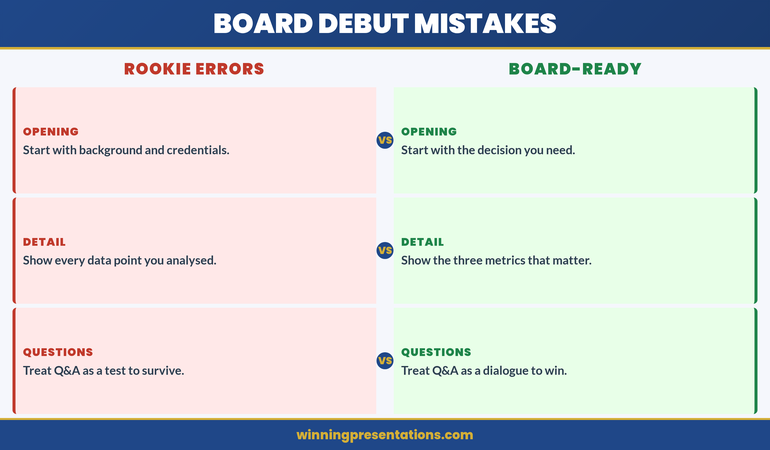
The CEO Who Lost the Board at Slide 8

Jonathan was the CEO of a £85 million professional services firm. He’d spent three weeks building a 34-slide strategy deck with his leadership team. It covered market analysis, competitive positioning, operational restructuring, technology investments, and a new service line launch. Every slide had been carefully researched. The data was solid.

He walked into the boardroom confident. By slide 8, something had shifted. One Non-Executive Director was checking her phone. Another was making notes that didn’t look like engagement — they looked like distraction. The Chair was leaning back in his chair, not forward.

Jonathan kept going. Slide 12. The Chair interrupted: “Jonathan, I appreciate the depth here. But what’s the one strategic choice you’re recommending we make today? What decision do you actually need from this board?”

Jonathan paused. He hadn’t led with that. The recommendation was somewhere in slides 18-24, embedded in operational detail. He’d framed everything as context first, decision second. By the time he got to the ask, the board’s attention had already dissolved.

Two months later, Jonathan restructured his board presentation completely. Six slides. One clear strategic choice. The same board dynamics, the same NEDs. But this time they leaned forward. They took notes. One NED asked a sharp clarifying question about the trade-offs. The Chair said, “Approved — let’s move the decision to the 90-day implementation plan.” Twenty-two minutes. Done.

Why Comprehensive Strategy Decks Fail with NEDs

Non-Executive Directors occupy a unique cognitive position. They have deep experience in business, but they see your company once a month (or quarterly). They are NOT immersed in your operational reality. They don’t live with your market challenges or your internal constraints.

What they do have is a sharp ability to smell whether a strategy is clear or muddled. And they have limited time and attention. A 34-slide deck that tries to comprehensively justify every detail before revealing the ask is a form of cognitive tax on NEDs. It forces them to hold competing pieces of information in memory, waiting for you to finally name the choice.

The second problem: comprehensive decks rarely isolate the real choice. Instead, they present a menu of activities (market entry, technology investment, org restructuring, product launch) with the implicit message, “We’re doing all of this.” NEDs don’t feel they’re being asked to decide. They feel they’re being briefed on a done deal wrapped in a presentation.

The third problem: comprehensive decks hide the trade-offs. When you bury the limitations and risks in slides 22-30, NEDs never see the complete risk picture. They approve something incomplete and later discover constraints they didn’t know existed.

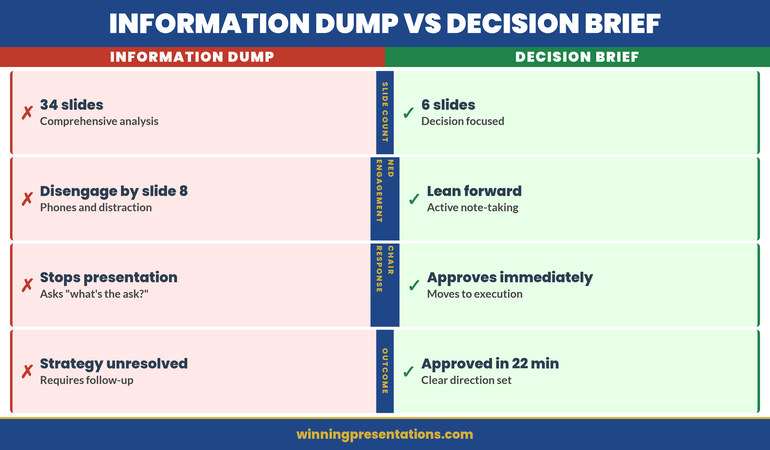
Information Dump vs Decision Brief comparison: left panel shows 34 slides, covers everything, NEDs disengage by slide 8, chair asks 'what's the ask?', strategy unresolved; right panel shows 6 slides, one clear recommendation, NEDs lean forward, chair says 'approved', strategy moves in 22 minutes

The Six-Slide Board Strategy Framework

A board strategy presentation that moves decisions in under 25 minutes has a precise structure. It’s not about oversimplifying — it’s about structuring complexity so NEDs can follow your logic and reach the same conclusion you have.

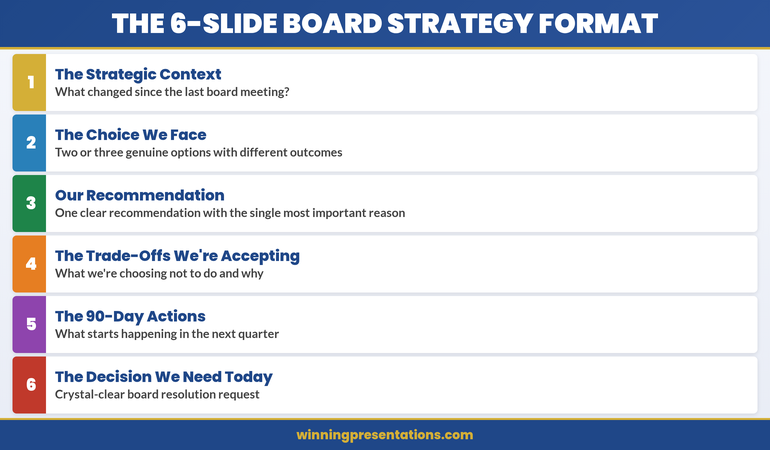
The framework isolates six decision moments, each on its own slide:

Slide 1: The Strategic Context

What has changed since the last board meeting that makes a new strategic decision necessary right now? (Market shift, competitor move, internal capability change, regulatory change.) This is not the full market analysis. This is the precipitating factor that triggered the need for board-level decision-making.

Slide 2: The Choice We Face

Two or three genuine options. Not one obvious option with two strawmen. Describe each option clearly, in language that reveals what each choice means for the business (growth rate, market position, risk profile). Real choices feel uncomfortable because each option has genuine merit and genuine limitations.

Slide 3: Our Recommendation

One clear recommendation with the single most important reason. Not three reasons. Not a comprehensive justification. The one thing that tipped the decision. NEDs will remember a crisp one-reason recommendation more than they’ll absorb three supporting arguments.

Slide 4: The Trade-Offs We’re Accepting

What we’re choosing NOT to do and why. This is the slide that builds credibility. You’re not pretending the choice is risk-free. You’re naming what you’re giving up and demonstrating you’ve thought it through. This is where NEDs feel heard because you’re acknowledging their likely concerns.

Slide 5: The 90-Day Actions

What starts happening in the next quarter if the board approves this strategy. Name the three or four actions that will be underway before the board meets again. This answers the question NEDs always ask: “How will we know this is working?”

Slide 6: The Decision We Need Today

A one-sentence, crystal-clear request for a specific board resolution. Not “approve the strategy.” Rather: “Approve the acquisition of TechCorp as our market entry mechanism” or “Approve the organisational restructuring to separate the operations and client service divisions.” Say exactly what resolution the board needs to pass.

Isolating the Strategic Choice You Actually Need

Most strategy decks fail at Slide 2 because the “choice” isn’t actually a choice. The CEO has already decided. The presentation is an elaborate justification, not a decision point.

A real strategic choice in front of a board should feel mutually exclusive. If you choose Option A, you explicitly do not choose Options B and C. There should be reasonable people — reasonable NEDs — who could argue for each option based on different risk tolerances or different interpretations of the market.

If your three options are (A) Acquire the competitor, (B) Acquire the competitor, or (C) Acquire the competitor, then you don’t have a choice. You’re presenting a done deal as though it’s a decision. NEDs will sense that immediately.

Real choices for boards often look like this:

Option A: Enter the North American market via organic growth. Invest £12M over 24 months. Lower short-term revenue impact. Higher execution risk. Slower market share capture.

Option B: Acquire a local North American player. Invest £22M upfront. Accelerated revenue. Known execution risks (integration). Higher short-term earnings pressure.

Option C: Partner with a North American distributor. Invest £2M. Minimal capital. Market risk (we don’t control the customer relationship). Slower long-term upside.

Now the board is facing a real decision. The CFO might lean toward Option C (capital efficiency). The growth-focused NED might lean toward Option B (speed to market). The risk-conscious Chair might prefer Option A (control, phased capital). Your job is to take a position, acknowledge that reasonable people could choose differently, and say why you recommend what you do.

When presenting strategy to a board, clarify your actual choice first.

Ask yourself: “If the board said no to my recommendation and chose a different option instead, would the business be substantively changed?” If the answer is no — if any of your three options would produce essentially the same business outcome — then you don’t have a real choice yet. Go back to your leadership team and refine the trade-offs until each option produces a materially different outcome.

Board Meeting This Week? Use the 6-Slide Structure

The Executive Slide System includes board strategy slide templates designed for the decision-focused format — each with context-setting, option framing, and trade-off language ready to adapt. Start with a structure that isolates the choice and frames the trade-offs before you walk in.

  • ✓ Board strategy slide templates for the 6-slide decision format
  • ✓ Trade-off framing guides to prepare Slide 4
  • ✓ Decision-slide frameworks for isolating the strategic choice
  • ✓ AI prompt cards to generate context and option language

Get Started →

The Trade-Offs Conversation NEDs Will Remember

Slide 4 is the most underrated slide in executive presentations. It’s the moment you shift from selling to credibility-building.

Most CEOs write Slide 4 reactively — “Here are the risks we’ve considered.” That’s passive. Instead, write it actively: “Here’s what we’re choosing not to do and why.”

If your recommendation is to enter the North American market via acquisition, your trade-offs might be:

“We’re choosing not to pursue organic growth because our window to establish market position is 18 months. Competitors are moving faster. We’re trading 18-24 months of higher capital expenditure for entry speed and known market position. We’re accepting the integration risk because the acquisition target’s client list is worth the execution complexity.”

Notice what that does: it answers the questions NEDs were already thinking. It shows you’ve weighed the alternatives. It makes the case that you’re not being reckless — you’re being strategic about which risks you’re willing to take and which you’re not.

This is where the board’s trust in you either deepens or erodes. If your trade-offs sound incomplete (“We’re not worried about integration issues”), NEDs will question your judgment. If your trade-offs sound honest and fully considered (“Integration risk is real; here’s our playbook to mitigate it”), you’ve built credibility.

One more principle: frame trade-offs in terms NEDs care about, not terms that matter to you internally. Your operations team cares about resource allocation. Your board cares about risk profile and shareholder value impact. Translate.

Moving from Presentation to Decision

The 90-day actions slide (Slide 5) serves a critical function. It signals to the board: “If you approve this, here’s what we’re actually doing. Here’s the resource commitment. Here’s the visible progress you’ll see by Q2.”

Many boards say no to strategies not because the strategy is bad, but because the CEO hasn’t convinced them that the business can execute. Your 90-day actions directly address that doubt.

What goes in the 90-day actions? The three or four initiatives that you will have visibly started before the board meets again. Not everything. Not the 12-month roadmap. The immediate next moves that prove you’re serious and capable.

If your strategy is to acquire TechCorp, your 90-day actions might be: (1) establish due diligence team, (2) sign NDA and begin deep financial review, (3) map integration playbook, (4) identify retention risks for key TechCorp staff. By the next board meeting, the board can see tangible progress. They know you’re executing.

The final slide — the resolution you need — should feel like a natural conclusion, not an abrupt ask. You’ve walked the board through context, options, your recommendation, trade-offs, and actions. The resolution slide is simply: “We need the board to pass the following resolution…” and you name it, one sentence, crystal clear.

If you’ve built the case well, NEDs won’t need time to think. They’ll be ready to pass the resolution in the meeting.

The 6-Slide Board Strategy Format: Card 1 shows Strategic Context, Card 2 shows The Choice We Face, Card 3 shows Our Recommendation, Card 4 shows Trade-Offs We're Accepting, Card 5 shows 90-Day Actions, Card 6 shows Decision We Need Today

The Mistakes That Extend Board Meetings

A board strategy presentation should take 18-22 minutes. If yours is consistently running 45 minutes or longer, one of these mistakes is happening:

Mistake 1: Comprehensive context instead of precipitating change. You’re giving the board a full market analysis when you should be naming the one thing that changed. Boards don’t need to relearn your market. They need to know why you’re asking them to make a decision now.

Mistake 2: Presenting options as though they’re all bad. If you frame Option A as “we could do this but it’s complicated,” and Option B as “we could do this but it’s risky,” then you’re not presenting real options. You’re presenting a predetermined conclusion disguised as choices. NEDs will feel manipulated, and they’ll slow down to ask clarifying questions to verify your options aren’t strawmen.

Mistake 3: Burying the recommendation. If it takes 12 minutes before you say what you actually recommend, you’ve lost the board’s permission to lead. Frame your recommendation early (Slide 3), then use Slides 4-5 to build the case.

Mistake 4: Trade-offs that sound defensive. “We’re aware of the integration risk.” That’s passive. “We’re accepting the integration risk because gaining market position in 12 months is worth the execution complexity, and here’s our mitigation plan.” That’s active and credible.

Mistake 5: 90-day actions that are too vague or too comprehensive. “We’ll begin implementation” isn’t an action. “We’ll have the due diligence team assembled and the first round of financial review complete” is. Name three or four specific, visible milestones.

Mistake 6: A resolution that sounds like a question. “Do you think we should consider approving the acquisition?” No. “We need the board to pass a resolution approving the acquisition of TechCorp pending satisfactory completion of due diligence.” That’s a request, not an inquiry.

Structuring your board presentation takes time the first time.

Most CEOs need 2-3 iterations before the choice, the recommendation, and the trade-offs all land cleanly. That’s normal. What matters is that you’re not starting from a 34-slide data dump. You’re starting from a framework that forces clarity. Our guide to executive presentation structure walks you through how to isolate the core decision and build your argument efficiently.

Is This Right For You?

  • ✓ You present strategic decisions to a board or governance committee — and you’ve noticed NEDs disengage when presentations exceed 25 minutes.
  • ✓ You struggle to isolate a clear strategic choice — your “options” feel like variations on a predetermined answer.
  • ✓ Board approval cycles are longer than they should be — you’re giving boards too much information and not enough clarity on what decision you need.

Frequently Asked Questions

What if the board asks for more detail during the presentation?

Embrace the question. If a NED asks for more detail on a specific point (market size, competitor positioning, integration timeline), you have that detail in your supporting deck. Say, “Good question — that’s in our detailed market analysis. Let me pull that up.” Then address the question without losing the board’s focus on the core decision. The 6-slide structure is your presentation; supporting materials are your backup.

How do I present three genuine options when I have a strong preference for one?

Present the options objectively, then make your recommendation clear on Slide 3. The key is that each option should be defensible — reasonable people with different risk tolerances could choose any of them. Your job is to name what you prefer and why, not to make the other options look foolish. If you can’t make a case that reasonable people could choose Option B or C, then they’re not real options. Go back and refine them so they are.

What if the board doesn’t approve my recommendation?

That’s the board doing its job. You’ve presented genuine options, they’ve chosen differently, and now you execute their choice. You don’t undermine it or lobby for yours. Your credibility depends on adapting to board direction and proving you can execute their chosen path as effectively as you would have executed yours. If you can’t do that with genuine commitment, you have a governance problem that a better presentation won’t solve.

The Winning Edge — Weekly insights for executives

Every Tuesday, we send a short email with one insight on presentation strategy, decision-making, or governance. Practical ideas you can use in your next board meeting. No promotional noise.

Sign Up for The Winning Edge

One more thing: your choice of whether to present a comprehensive deck or a decision-focused deck signals something to your board about your leadership. Comprehensive says, “Here’s everything I know, please decide.” Decision-focused says, “Here’s the choice I’ve made, here’s why, and here’s what I need from you.” NEDs reward clarity and decisiveness. They reward confidence balanced with honest acknowledgement of trade-offs. The 6-slide format isn’t about dumbing down complexity — it’s about proving you’ve thought the complexity through and can articulate why you’re recommending what you do.

When your next board meeting approaches, ask yourself: “Can I explain my strategic recommendation in six slides, naming the choice, the trade-offs, and what I need from the board?” If the answer is yes, you’re ready. If the answer is no, you probably don’t have a clear recommendation yet.

Not ready for the full system? Start here instead: download the free Executive Presentation Checklist — a one-page audit covering clarity of recommendation, trade-off framing, and decision readiness before you walk into any board room.

If you’re presenting multiple strategies to different boards, you’ll want to look at our guide to decision slides for executives, which goes deeper into how to frame the specific decision moment so NEDs move from listening to approving. And if your strategy involves multiple stakeholder groups, stakeholder mapping for presentations will help you tailor your framing for each audience.

Author: Mary Beth Hazeldine is Owner & Managing Director of Winning Presentations. With 24 years of corporate banking experience at JPMorgan Chase, PwC, Royal Bank of Scotland, and Commerzbank, she advises executives across financial services, healthcare, technology, and government on structuring presentations for high-stakes funding rounds and approvals.

The choice is not whether to be clear — it’s whether to be clear with the board in your presentation, or clear with yourself after the meeting when they reject the muddled recommendation.

01 Mar 2026
New director presenting recommendation-first slide to boardroom of executives

Your First Board Presentation as a New Director

My first time presenting to the board lasted four minutes. I’d prepared for forty.

The chair thanked me after slide two, said the board had read the pre-read, and asked one question I hadn’t anticipated. Four minutes. Twelve days of preparation. And the only thing that mattered was a question I’d never considered.

Quick Answer: Your first board presentation as a new director succeeds or fails on structure, not content. Directors don’t want your expertise demonstrated — they want a clear recommendation, the key risk, and the ask. Lead with the decision. Keep it under 12 slides. Prepare for the five questions every board asks, not the fifty you’re worried about.

🚨 First board presentation coming up this week?

Quick 60-second check before you build another slide:

  • Does your first slide state your recommendation (not your agenda)?
  • Can a director grasp your ask within 30 seconds?
  • Have you identified who on the board will challenge you — and on what?

→ Need the exact board presentation templates? Get the Executive Slide System (£39)

I worked with a newly appointed director at a financial services company last year. She’d spent three months preparing her inaugural board appearance — a 34-slide deck covering every metric her division tracked, every risk on her register, and every initiative she’d launched since joining.

The board chair cut her off on slide six.

“We’ve read the pack,” he said. “What do you need from us?”

She didn’t have a clear answer. Because her entire presentation was built to demonstrate competence, not to request a decision. She’d designed a 34-slide CV when the board wanted a 3-slide business case.

After that meeting, we rebuilt her approach from scratch. Her second board presentation was eight slides. She led with the decision, supported it with two data points, and ended with a specific ask. The board approved it in the meeting. No deferrals. No “come back with more detail.”

The difference wasn’t her expertise. It was her structure.

Here’s exactly how to get your initial board-level presentation right — including the structure, the pre-read, and the questions you need to prepare for before you walk in.

The Mistake Every New Director Makes (And Why Boards Tolerate It Exactly Once)

New directors over-present. Every single one. It’s a pattern I’ve seen across hundreds of boardroom presentations at JPMorgan, RBS, PwC, and Commerzbank — and it’s one of the board presentation best practices that experienced directors learn the hard way.

The instinct makes sense. You’re new. You want to prove you belong. So you build a comprehensive deck that demonstrates everything you know about your area.

But boards don’t work that way.

Directors have read your pre-read (or they should have — more on that in a moment). They already know the context. What they need from you in the room is the answer to one question: “What do you need from us, and why should we say yes?”

When you spend your first 15 minutes on context they already have, you signal something dangerous: that you don’t understand how board time works. And that impression is very hard to undo.

The calibration problem: In your previous role, thoroughness was rewarded. At director level, efficiency is rewarded. Your opening board appearance is where that shift either happens — or doesn’t.

Most new directors present like senior managers giving an update. Effective new directors present like peers making a recommendation.

The 8-Slide Structure That Earns Credibility in One Meeting

This is the structure I recommend to every new director presenting to a board for the first time. It’s designed to do two things: demonstrate that you understand how boards operate, and get your item approved without a deferral.

Slide 1: The Recommendation. State what you’re recommending and what you need the board to approve. One sentence. If you can’t articulate this in one sentence, your thinking isn’t ready.

Slide 2: Why Now. The trigger, deadline, or cost of delay. Boards prioritise urgency. Without a “why now,” your item slides to next quarter.

Slide 3: The Business Case (Summary). Financial impact, resource requirement, and timeline. Three numbers maximum. Directors will interrogate the detail — don’t front-load it.

Slide 4: Key Risk + Mitigation. Name the biggest risk and your mitigation plan. Boards respect directors who surface risk voluntarily. Hiding risk destroys trust.

Slide 5: Stakeholder Alignment. Who supports this? Who has concerns? What’s been done to address them? New directors often skip this. Experienced directors never do.

Slide 6: Decision Requested. Restate the specific approval you need. Make it easy to minute. “We recommend the board approve X, at a cost of Y, with implementation beginning Z.”

Slides 7–8: Appendix. Supporting data, detailed financials, scenario analysis. These exist for Q&A, not for presentation. Most boards never open them.

That’s it. Eight slides. Under 10 minutes of presenting. The rest of your time is Q&A — which is where the real board meeting happens.

Infographic showing the 8-slide board presentation structure with numbered steps from recommendation through appendix

The Board Deck That Earns Credibility in One Meeting

Your debut board-level presentation sets the tone for every interaction that follows. The Executive Slide System gives you:

  • The recommendation-first board template — pre-built for the 8-slide structure directors expect
  • The executive summary slide that answers “what do you need from us?” in one glance
  • AI prompts to draft your board deck in 30 minutes (not the 12 days you’re planning)
  • The risk assessment template that surfaces concerns before the board does

Get the Executive Slide System → £39

Built from board-level presentations at JPMorgan, RBS, and Commerzbank — including approvals for multi-million-pound initiatives.

The Pre-Read That Does the Heavy Lifting

Here’s something most new directors don’t realise: the board decision often happens before the meeting. I covered this in detail in my article on executive presentation pre-reads — the principle applies doubly at board level.

Directors read pre-reads on the train, in the car, between other meetings. If your pre-read is clear, structured, and leads with the recommendation, many directors arrive at the meeting having already decided. Your presentation becomes a formality — a chance to confirm, not to persuade.

If your pre-read is 40 pages of context with the recommendation buried on page 37, directors arrive confused. And confused directors defer.

The pre-read structure that works:

Page 1: Executive summary. Recommendation, cost, timeline, key risk, decision requested. Everything a director needs to form a view before reading further.

Pages 2–3: Supporting evidence. The data that supports your recommendation. Not all the data — the data that matters.

Pages 4–5: Risk and mitigation. Detailed risk register for directors who want to interrogate assumptions.

Appendix: Everything else. Background, methodology, detailed financials. Available for reference. Never presented.

A well-structured pre-read means your in-room presentation can be shorter, sharper, and focused entirely on the decision. That’s the goal.

Building your first board pre-read?

The Executive Slide System includes the executive summary template that directors actually read — plus the pre-read structure used in global banking governance.

Get the Executive Slide System → £39

The Five Questions Every Board Asks (Regardless of Topic)

You can’t predict every question a board will ask. But you can predict the categories. After 24 years of banking boardrooms, I can tell you that nearly every first-time director faces the same five question types:

1. “What happens if we don’t do this?” The cost-of-inaction question. Boards need to understand why this can’t wait. If you can’t articulate what happens if they say no, your urgency case is weak.

2. “What’s the downside scenario?” Not worst case — downside. Directors want to know the realistic risk, not the catastrophic one. Have a specific number ready.

3. “Who else supports this?” The stakeholder alignment question. If the CFO hasn’t seen it, the board wants to know why. If a key stakeholder disagrees, the board wants to know what you’ve done about it.

4. “What are we comparing this to?” The alternatives question. Boards don’t approve proposals in isolation. They approve the best option. If you haven’t shown why this is better than the alternatives, expect a deferral.

5. “What do you need from us specifically?” The most important question — and the one new directors fumble most often. Your ask must be specific and minuteable. “Approval to proceed” is vague. “Approval to commit £400K in Q2 for the platform migration, with a progress update at the July board” is minuteable.

Prepare for these five. Have your answers written down. Rehearse them out loud. The content of your slides matters less than how you handle these questions.

People Also Ask:

How long should a new director’s board presentation be?
Aim for 8–12 slides and under 10 minutes of presenting. Boards allocate most time for discussion, not presentation. If your slot is 20 minutes, plan to present for 8 and leave 12 for Q&A.

Should new directors use the same format as other board presenters?
Ask the company secretary for recent board packs. Match the format for consistency but strengthen the recommendation-first structure. Boards appreciate consistency in format and clarity in thinking.

What’s the biggest mistake new directors make in board presentations?
Over-presenting context the board already has. New directors spend too long proving they know the detail and too little time stating what they need the board to decide. Lead with the recommendation. Always.

Conference table with structured board pack showing executive summary first page

Your First Five Minutes: What Directors Actually Notice

Directors form an impression of new board members within the first five minutes. (If you want the full breakdown on what directors read on slides, see what executives actually read in the first 5 seconds.) Not of your expertise — of your judgement. Here’s what they’re watching for:

Do you lead with the decision or the context? Leading with context signals that you’re still operating as a senior manager. Leading with the recommendation signals that you understand governance.

Do you know your numbers cold? You don’t need to present every number. But when a director asks about a specific figure, you need to answer without looking at your slides. Hesitation on your own numbers erodes confidence fast.

Do you name the risk before they do? Directors respect proactive risk disclosure. If you surface the biggest concern before they raise it, you demonstrate maturity. If they have to drag it out of you, you’ve lost ground.

Do you handle the first challenge well? The first pushback question is a test. Not of your answer — of your composure. Stay measured. Don’t over-explain. A direct, two-sentence response earns more respect than a five-minute justification.

Your debut in the boardroom isn’t about impressing the room. It’s about signalling that you belong at the table. Structure does that. Over-presenting undermines it.

Stop Building the 34-Slide “Prove Yourself” Deck

The templates inside the Executive Slide System are designed for the structure boards actually expect — recommendation-first, decision-ready, under 12 slides.

Get the Executive Slide System → £39

The same structure used across board-level governance at global financial institutions.

Worried about the Q&A after your presentation?

Preparation beats confidence every time. Today’s partner article covers the exact Q&A checklist senior executives use — worth reading alongside this one.

Is the Executive Slide System Right For You?

This is for you if:

  • You’ve recently been appointed to a director-level role and have a board presentation coming up
  • You’re spending days building a deck when you know it should take hours
  • You want a clear, structured framework rather than guessing what boards expect
  • You need the pre-read template, executive summary, and risk slides ready to customise

This is NOT for you if:

  • You’re presenting to a team meeting, not a board — the structure is specifically designed for governance-level presentations
  • You need a full presentation skills course rather than slide templates and frameworks
  • You’re looking for industry-specific regulatory templates (these are cross-sector executive templates)


Frequently Asked Questions

How do I find out what format the board expects?

Ask the company secretary for the last three board packs. Study the format, slide count, and level of detail. Match the format for consistency, but strengthen the structure by leading with your recommendation. If no standard exists, the 8-slide structure in this article is a reliable starting point used across multiple sectors.

Should I rehearse my board presentation with a colleague first?

Yes — but choose someone who will challenge you, not reassure you. Ask them to interrupt you on slide two with a difficult question. If you can handle that interruption smoothly, you’re ready. If you can’t, you need to know your content better. Rehearsing with someone senior to you is ideal, as they’ll simulate the board dynamic more accurately.

What if a director asks something I genuinely don’t know?

“I don’t have that figure to hand, but I’ll confirm it by end of day” is a perfectly acceptable board response. What damages credibility is guessing. Directors can tell when you’re improvising numbers. A confident “I’ll come back to you” signals integrity. A fumbled guess signals that your preparation was shallow.

📬 The Winning Edge Newsletter

Weekly boardroom-tested techniques for executives who present under pressure. One actionable insight every week — no fluff.

Subscribe Free →

🆓 Want to start free? Download the Executive Presentation Checklist first.

Read next: If you’re also managing the nerves around your first board appearance, read why even confident presenters still get nervous before every talk — it’s more common than you think.

About the Author

Mary Beth Hazeldine is the Owner & Managing Director of Winning Presentations. With 24 years of corporate banking experience at JPMorgan Chase, PwC, Royal Bank of Scotland, and Commerzbank, she has delivered high-stakes presentations in boardrooms across three continents.

A qualified clinical hypnotherapist and NLP practitioner, Mary Beth combines executive communication expertise with evidence-based techniques for managing presentation anxiety. She advises executives across financial services, healthcare, technology, and government on structuring high-stakes presentations for funding rounds and approvals.

Book a discovery call | View services

Your first board presentation is on the calendar. The structure above takes less than an hour to build. Lead with the decision, prepare for the five questions, and let the pre-read do the heavy lifting. That’s it.

Get the Executive Slide System (£39) and have your board deck built before lunch.

22 Feb 2026
Female professional in navy blazer using a red pen to mark and audit colourful sticky notes on a whiteboard while holding a tablet, actively restructuring a presentation deck in a bright modern office

I Audited a Real Executive Presentation: Before and After, 15 Slides Became 7

Quick answer: This is a real executive presentation before and after audit. A 15-slide budget approval deck was restructured to 7 slides — cutting context the audience didn’t need, merging duplicate data, and moving the recommendation from slide 14 to slide 2. Not a single decision-critical data point was lost. The board approved it in one meeting.

Build Executive Decks That Get Approved — Without the Bloat

The Executive Slide System gives you decision-first slide structures for board meetings, budget approvals, steering committees, and every executive format — so you never build a 15-slide deck when 7 will get the decision.

Get the Executive Slide System → £39

Built from 24 years of corporate experience. Used in budget approvals, board presentations, and executive governance meetings.

She’d Been “Almost Ready” for Three Weeks. The Problem Wasn’t the Content.

A senior programme manager came to me with a deck she’d been revising for three weeks. Budget approval presentation for a £1.8M technology programme. Every time she thought it was finished, she’d add another slide. One more context slide. One more risk. One more stakeholder update.

Fifteen slides. Forty-five minutes of material for a thirty-minute slot.

I told her: “You don’t have a content problem. You have a confidence problem. You’re adding slides because you’re afraid of being caught without an answer. But every extra slide dilutes your recommendation and gives the board more reasons to defer.”

We sat down for 90 minutes. I audited every slide against one question: “Does this slide help the board make a decision, or does it just make you feel prepared?” Eight slides failed that test. We cut them. The remaining seven were restructured with the recommendation first.

For a quick version of this audit you can apply to any deck, try the 60-second test every executive slide should pass before your next boardroom meeting.

She presented the next day. Approved in one meeting. The board chair told her it was the clearest budget presentation he’d seen that quarter. Same data. Same project. Eight fewer slides.

The Executive Presentation Before the Audit: All 15 Slides (and What’s Wrong With Each)

Here’s the original slide order, anonymised but structurally identical. I’ve tagged each slide with its function and the problem.

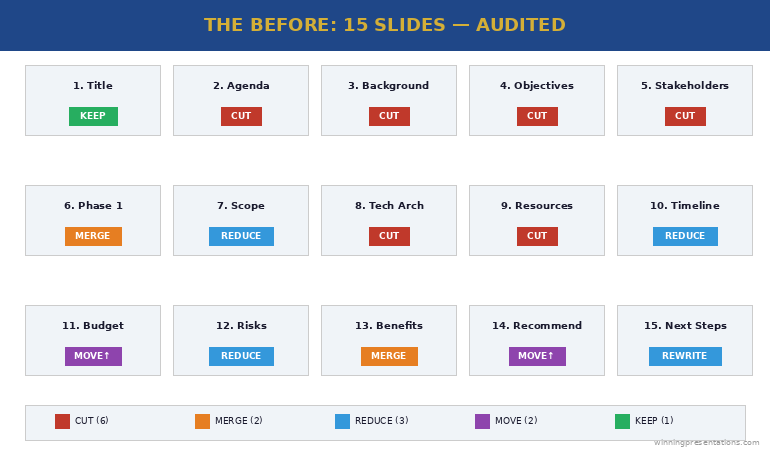
Slide 1: Title slide. “Programme Phoenix — Budget Approval Request.” Problem: None. Every deck needs a title. Keep.

Slide 2: Agenda. Listed all 15 sections. Problem: Agendas for executive presentations signal “this will be long.” Cut.

Slide 3: Programme background. Two paragraphs of context about why the programme exists. Problem: The board already approved Phase 1. They know why this exists. This slide is for the presenter’s comfort, not the audience’s decision. Cut.

Slide 4: Programme objectives. Five bullet points restating the business case. Problem: Duplicate of the original business case they already approved. Cut.

Slide 5: Stakeholder map. Org chart showing all stakeholders. Problem: The board doesn’t need to see who reports to whom. This is an internal working document, not a decision slide. Cut.

Slide 6: Phase 1 summary. What was delivered, milestones hit. Problem: Good content, wrong position. Merge with the recommendation slide as evidence, not a standalone. Merge.

Slide 7: Phase 2 scope. Detailed breakdown of Phase 2 deliverables. Problem: Too granular for a board audience. Reduce to three key deliverables and move detail to appendix. Reduce.

Slide 8: Technical architecture. System diagram. Problem: Nobody on this board is making a technical decision. This is an appendix slide. Cut.

Slide 9: Resource plan. Team structure and headcount. Problem: The board cares about cost, not headcount. Merge resource cost into the budget slide. Cut.

Slide 10: Timeline. Gantt chart with 20+ milestones. Problem: Too much detail. Reduce to 5 key milestones. Reduce.

Slide 11: Budget breakdown. Detailed cost table. Problem: Good slide, wrong position — should be slides 2-3, not slide 11. The board has been waiting 15 minutes for this. Reposition.

Slide 12: Risk register. 12 risks in a traffic light matrix. Problem: Twelve risks overwhelms. Reduce to the 3 risks the board can actually influence. Reduce.

Slide 13: Benefits realisation. Projected ROI and savings. Problem: Good content, but separated from the budget by two slides. Merge with budget to show cost AND return together. Merge.

Slide 14: Recommendation. “We recommend proceeding with Phase 2.” Problem: The recommendation is on slide 14 of 15. The board has been listening for 35 minutes before they know what you’re asking for. This should be slide 2. Reposition.

Slide 15: Next steps. Problem: Generic “pending approval” language. Replace with a specific ask: “Approve £1.8M. Authorise procurement. Target: contracts signed by March.” Rewrite.

Before audit showing 15 slides with tags indicating cut, merge, reduce, or reposition for each slide

The Executive Slide System gives you the decision-first structure so you build the right deck from the start — no 15-to-7 audit needed.

Get the Executive Slide System → £39

The 5 Cuts That Transformed the Deck

Every cut followed one of five principles. These work on any executive deck, not just this one.

Cut #1: Remove context the audience already has. The background and objectives slides (3 and 4) restated information the board approved months ago. If the audience was in the room when the decision was made, they don’t need a recap. That’s four minutes of presentation time that adds nothing. Slides removed: 3, 4.

Cut #2: Remove internal working documents. The stakeholder map (5), technical architecture (8), and resource plan (9) are useful for the programme team but irrelevant to a board decision. The test: “Would I send this slide to the board as a standalone?” If not, it doesn’t belong in the main deck. Slides removed: 5, 8, 9.

Cut #3: Merge data that answers the same question. The budget (11) and benefits (13) were separated by two slides, forcing the board to hold cost data in memory while listening to risks. Combined into one slide: “Investment: £1.8M. Return: £4.2M over 3 years. Payback: 11 months.” One slide. One decision. The Phase 1 summary (6) merged into the recommendation as evidence. Slides merged: 6→2, 11+13→one slide.

Cut #4: Reduce granularity to decision-level. The timeline (10) had 20+ milestones — reduced to 5 key dates the board needs to track. The risk register (12) had 12 risks — reduced to 3 the board can actually influence. Detail moved to appendix for anyone who wants it. Slides reduced: 10, 12.

Cut #5: Move the recommendation to slide 2. This is the structural change that transforms everything. The recommendation moved from slide 14 to slide 2. The board knows what you’re asking for within 60 seconds, and every subsequent slide becomes evidence supporting that recommendation. This is how steering committee presentations should be structured — decision first, evidence after.

The Executive Slide System (£39) gives you the decision-first slide structures for budget approvals, board meetings, and steering committees — build the 7-slide version from the start.

The Executive Presentation After the Audit: 7 Slides That Got Approved

Here’s the restructured deck:

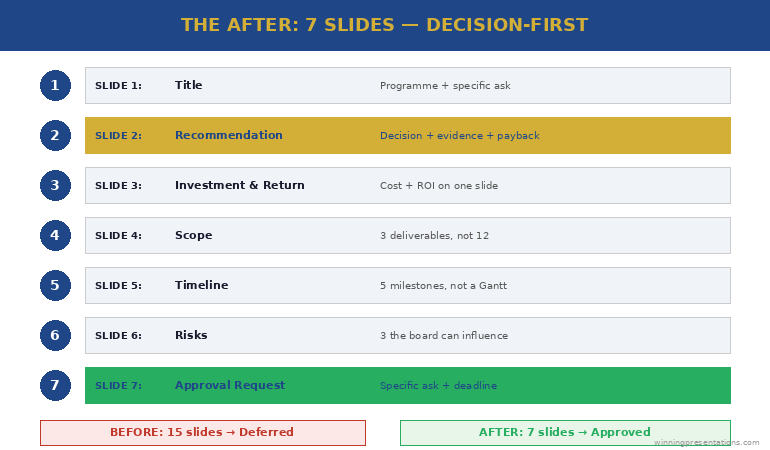
Slide 1: Title. “Programme Phoenix Phase 2 — Budget Approval (£1.8M)”

Slide 2: Recommendation. “Approve £1.8M for Phase 2. Phase 1 delivered on time and £40K under budget. Phase 2 delivers £4.2M return over 3 years with 11-month payback.”

Slide 3: Investment and return. Budget breakdown (3 categories, not 12 line items) plus projected return and payback period — on one slide. The board sees cost and value together.

Slide 4: Scope. Three key Phase 2 deliverables (not the full breakdown). Each linked to a specific business outcome. Detail in appendix.

Slide 5: Timeline. Five milestones: start, three checkpoints, go-live. Not a Gantt chart — a clean visual the board can track at a glance.

Slide 6: Risks. Three risks the board can influence, each with a mitigation already in place. Not a traffic light matrix — a clear “risk → mitigation → status” format.

Slide 7: Approval request. “Approve £1.8M. Authorise procurement to begin contract negotiation. Target: signed by 31 March.” One specific ask with a specific deadline.

Seven slides. Twenty minutes. Approved in one meeting. The approach to writing effective executive summary slides applies the same principle: say the essential thing first, then support it with evidence.

After audit showing 7-slide structure with recommendation on slide 2, investment and return combined, and specific approval request on slide 7

The 3 Rules for Auditing Any Executive Presentation Before and After

You can apply this audit to any deck in 30 minutes using three rules:

Rule 1: The decision test. For every slide, ask: “Does this help the audience make a decision, or does it just make me feel prepared?” If it’s for your comfort rather than their decision, cut it or move it to the appendix. This single question typically removes 30-40% of slides.

Rule 2: The position test. Your recommendation should appear by slide 2 or 3 — never at the end. If it’s later than slide 3, restructure. Everything after the recommendation becomes supporting evidence, not build-up. The same principle works for writing stronger slide titles — lead with the conclusion, not the context.

Rule 3: The merge test. If two slides answer the same question (e.g., “How much does it cost?” and “What’s the return?”), merge them. The board should never have to hold data from slide 11 in memory while listening to slides 12 and 13. If data points belong together, put them together.

The Executive Slide System (£39) applies all three rules by default — every template is decision-first, merged where appropriate, and stripped of context slides that don’t serve the audience.

Common Questions About Executive Deck Audits

How many slides should an executive presentation have?

There’s no universal number, but most executive decisions can be supported in 5-8 slides. The audit principle is more useful than a slide count: every slide must help the audience make a decision. If a slide exists for context the audience already has, internal detail they don’t need, or granularity beyond decision-level — cut it or move it to appendix.

How do you cut slides without losing important information?

You’re not losing information — you’re repositioning it. The appendix holds everything the main deck doesn’t. Detail-oriented audience members can review it. But the main presentation should contain only the slides that drive the decision. Most “important information” in bloated decks is important to the presenter, not to the decision-maker.

What’s the biggest mistake in executive presentations?

Burying the recommendation. In the audit above, the recommendation was on slide 14 of 15. The board spent 35 minutes waiting to find out what they were being asked to decide. Moving the recommendation to slide 2 changes the entire dynamic — every subsequent slide becomes evidence rather than build-up, and the audience listens with purpose because they know what decision you’re driving toward.

Stop Auditing Your Deck. Start Building It Right.

The Executive Slide System gives you decision-first templates for every executive format — board meetings, budget approvals, steering committees, and weekly leadership updates. Build the 7-slide version from the start.

Get the Executive Slide System → £39

Used in budget approvals, board presentations, and executive governance meetings across corporate and consulting teams.

Frequently Asked Questions

What should I put in the appendix?

Everything that supports your recommendation but isn’t needed for the decision itself: detailed cost breakdowns, technical architecture, full risk registers, resource plans, stakeholder maps, and granular timelines. The appendix exists for two purposes — answering detailed Q&A questions and providing an audit trail. If you never open the appendix, your main deck was perfectly structured.

What if my organisation requires a specific slide template with 15+ sections?

Many organisations have mandatory templates. Use them — but restructure the content within them. Move your recommendation to the earliest possible slide. Merge sections that answer the same question. Add “See appendix” to sections that don’t serve the decision. The template stays compliant. The content becomes decision-focused.

How do I know which slides to cut versus move to appendix?

Cut slides that contain information the audience already has (background, objectives they previously approved, restated business cases). Move to appendix slides that contain useful detail someone might ask about in Q&A (technical architecture, detailed costs, full risk registers). The distinction: cut = nobody needs this in this meeting. Appendix = someone might ask about this, but it shouldn’t be in the main flow.

Get Weekly Presentation Intelligence

Deck audits, slide structures, and the executive communication strategies that get decisions in one meeting — delivered every week.

Join the Newsletter

Related: Once your deck is tight, the next risk is Q&A. Read Nobody Prepares for Q&A. That’s Why Q&A Kills the Presentation. — the Question Map for predicting every question before you present.

Your next step: Open your current deck. For every slide, ask: “Does this help the board make a decision?” If the answer is no, move it to the appendix. Your 15 slides will become 7 — and your approval rate will change overnight.

Want the decision-first templates so you build the right deck from the start?

Get the Executive Slide System → £39

About the Author

Mary Beth Hazeldine is the Owner & Managing Director of Winning Presentations. With 24 years of corporate banking experience at JPMorgan Chase, PwC, Royal Bank of Scotland, and Commerzbank, she specialises in executive-level presentation skills and decision-focused slide architecture.

A qualified clinical hypnotherapist and NLP practitioner, Mary Beth combines executive communication expertise with evidence-based techniques. She has spent 15 years auditing and restructuring executive decks for board presentations, budget approvals, and governance meetings.

Read more articles at winningpresentations.com

29 Dec 2025
Board presentation structure - how to brief executives in 15 minutes or less

Board Presentation Structure: How to Brief Executives in 15 Minutes or Less

Last updated: December 29, 2025 · 9 minute read

The first time I presented to a board of directors, I made every mistake possible.

I prepared 45 slides. I started with background context. I buried my recommendation on slide 38. And when the CFO interrupted five minutes in to ask “What are you actually recommending?”, I fumbled through my deck trying to find the answer.

That was at Royal Bank of Scotland, early in my career. I learned more about board presentation structure in that painful 20 minutes than in years of regular presenting.

Here’s what I know now after 24 years of presenting to boards at JPMorgan Chase, PwC, Royal Bank of Scotland, and Commerzbank: boards don’t want information. They want decisions.

Your board presentation structure needs to deliver a clear recommendation, supported by evidence, with explicit asks — in 15 minutes or less. Everything else is noise.

At Winning Presentations, I’ve trained hundreds of executives on this exact framework. Here’s how it works.

⚡ Key Takeaways

  • Lead with your recommendation — boards want the answer first, then the evidence
  • Use the 4-part structure: Recommendation → Context → Evidence → Ask
  • 15 minutes maximum — plan for 10, leave 5 for questions
  • One slide per section maximum — 4-6 slides total, not 40
  • End with a clear, specific ask — what decision do you need from them?

📥 FREE DOWNLOAD: Executive Presentation Checklist

The pre-presentation checklist I use before every board meeting. Covers structure, timing, and common pitfalls.

Download Free →

Why Board Presentation Structure Is Different

Regular presentations can meander. You can build to a conclusion. You can use suspense.

Board presentations cannot.

Harvard Business Review research shows that board members have limited attention spans for individual agenda items — often as little as 10-15 minutes. They’re processing multiple complex topics in a single meeting. They need to make decisions, not absorb information.

This means your board presentation structure must be:

  • Conclusion-first: Lead with your recommendation, not your analysis
  • Decision-oriented: Everything supports a specific ask
  • Ruthlessly concise: If it doesn’t support the decision, cut it
  • Interrupt-proof: You should be able to state your recommendation in 30 seconds if asked

The structure I’m about to share has been tested in hundreds of board presentations. It works because it’s designed for how boards actually process information.

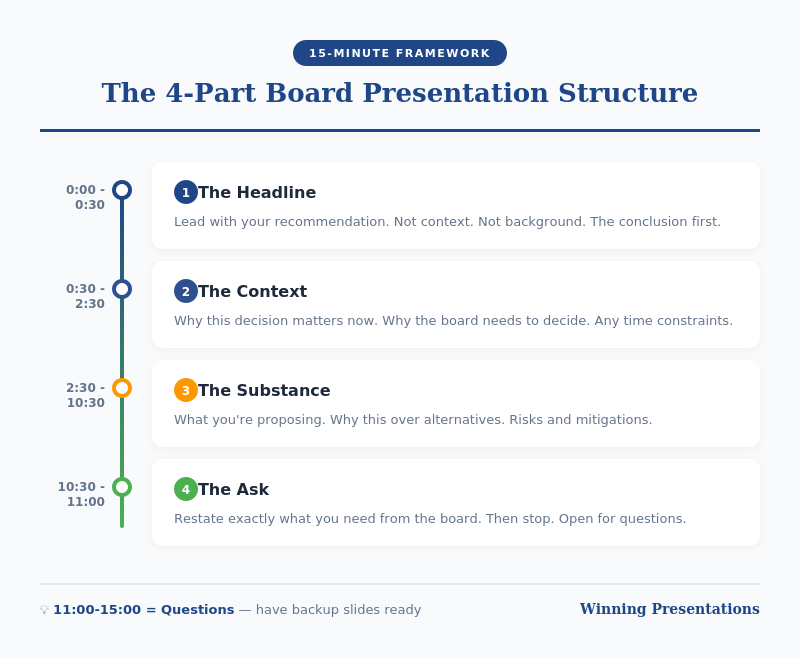
The 4-Part Board Presentation Structure

Board presentation structure framework - the 4-part structure for executive briefings

Part 1: Recommendation (2 minutes)

Start with your conclusion. Not background. Not context. Your recommendation.

“I’m recommending we approve a £2.4M investment in the CRM upgrade, to be implemented over Q2-Q3, with expected ROI of 340% over three years.”

This should take 30 seconds to say and one slide to show.

Why lead with this? Because boards are thinking “What do you want from us?” from the moment you start. If you make them wait, they’re mentally searching for your point instead of listening to your argument.

By stating your recommendation first, you frame everything that follows. The board knows what to listen for.

For techniques on delivering this opening with confidence, see my guide on how to speak confidently in public.

Part 2: Context (3 minutes)

Now — and only now — provide the minimum context needed to understand your recommendation.

The key question: What does the board need to know to evaluate my recommendation? Nothing more.

This typically includes:

  • The problem or opportunity you’re addressing
  • Why this is board-level (scale, risk, strategic importance)
  • Timeline constraints, if any

One slide maximum. Often this can be combined with your recommendation slide if you’re ruthless about brevity.

What NOT to include: history of how you got here, alternative approaches you considered, technical details, organisational politics. These belong in the appendix if anywhere.

💡 Want Ready-Made Executive Templates?

The Executive Slide System includes board presentation templates built on this exact structure — plus 6 other frameworks for different executive contexts.

  • Board recommendation template
  • Executive summary one-pager
  • Investment case structure
  • Video walkthroughs of each framework

Get the Executive Slide System — £39 →

Part 3: Evidence (5 minutes)

Now support your recommendation with evidence. This is the “why you should agree” section.

Structure your evidence around the board’s likely concerns:

  • Financial: What’s the cost, return, and payback period?
  • Risk: What could go wrong, and how will you mitigate it?
  • Execution: Who’s accountable, and what’s the timeline?
  • Strategic fit: How does this align with company priorities?

Two to three slides maximum. Use data, not opinions. Be specific: “23% cost reduction” not “significant savings.”

Anticipate questions and address them proactively. If the CFO always asks about cash flow impact, include it before she asks.

Part 4: The Ask (2 minutes)

End with a crystal-clear ask. What specific decision do you need from the board today?

Good asks:

  • “I’m requesting approval to proceed with the £2.4M investment.”
  • “I’m seeking authorisation to negotiate final terms with the vendor.”
  • “I need the board’s input on whether to prioritise Option A or Option B.”

Bad asks:

  • “Thoughts?” (Too vague)
  • “I wanted to update you on our progress.” (Not a decision)
  • “Let me know if you have questions.” (Passive, not action-oriented)

If you don’t have a clear ask, question whether this needs to be a board presentation at all. Informational updates can usually be handled in pre-read documents.

For techniques on delivering powerful closings, see my guide on how to start a presentation — which also covers endings.

Board Presentation Structure: Timing Guide

Board presentation timing guide - how to allocate 15 minutes across four sections

If you have 15 minutes on the agenda, plan for 10 minutes of presenting and 5 minutes of questions.

Section Time Slides
Recommendation 2 min 1
Context 3 min 1
Evidence 5 min 2-3
Ask 1-2 min 1
Questions 5 min Appendix

Notice this gives you 4-6 slides maximum for your main presentation. Everything else goes in the appendix — ready if asked, but not in your core flow.

Board Presentation Structure: Slide Template

Here’s a template you can adapt for any board presentation:

Slide 1: Recommendation + Context

  • Headline: Your recommendation in one sentence
  • 3-4 bullets: Key context points
  • Visual: Timeline or high-level financial summary

Slide 2: Financial Case

  • Investment required
  • Expected return (ROI, NPV, payback)
  • Comparison to alternatives if relevant

Slide 3: Risk and Mitigation

  • Top 3 risks
  • Mitigation plan for each
  • Contingency if needed

Slide 4: Execution Plan

  • Timeline (phases, milestones)
  • Accountability (who owns this)
  • Dependencies

Slide 5: The Ask

  • Specific decision requested
  • What happens next if approved
  • When you’ll report back

Appendix: Technical details, alternative analysis, historical context, org charts — anything that supports questions but doesn’t need to be in the main presentation.

🎓 Master Executive Presentations

AI-Enhanced Presentation Mastery includes a complete module on executive and board presentations — plus live coaching sessions where I review your actual presentations and give direct feedback.

8 modules. 2 live sessions. Learn the techniques that got me through hundreds of board presentations.

Learn More — £249 →

Common Board Presentation Structure Mistakes

After reviewing hundreds of board presentations, these are the mistakes I see most often:

Mistake 1: Burying the Recommendation

Starting with history, context, or analysis before stating what you want. By slide 10, the board has mentally checked out.

Mistake 2: Too Many Slides

40 slides for a 15-minute slot is not thorough — it’s unfocused. Ruthlessly cut anything that doesn’t directly support your recommendation.

Mistake 3: No Clear Ask

Ending with “Any questions?” instead of a specific decision request. Boards need to know what you’re asking them to do.

Mistake 4: Reading the Slides

Your slides are for reference, not scripts. Speak to the board, not the screen. They can read faster than you can talk.

Mistake 5: Not Preparing for Interruptions

Boards interrupt. It’s how they process. If you can’t state your recommendation in 30 seconds when interrupted, you’re not prepared.

Your Next Step

Before your next board presentation, restructure using the 4-part framework: Recommendation → Context → Evidence → Ask.

Time yourself. If you can’t deliver it in 10 minutes, you haven’t cut enough.

Resources for Executive Presentations

📖 FREE: Executive Presentation Checklist
Pre-presentation checklist for board meetings and executive briefings.
Download Free →

💡 QUICK WIN: Executive Slide System — £39
7 frameworks + templates for any executive presentation context.
Get Instant Access →

🎓 COMPLETE SYSTEM: AI-Enhanced Presentation Mastery — £249
8-module course including executive presentations module + live coaching.
Learn More →

FAQs About Board Presentation Structure

How long should a board presentation be?

Plan for 10 minutes of presenting, leaving 5 minutes for questions if you have a 15-minute slot. Most board presentations can — and should — be delivered in under 10 minutes. If you need more time, you probably haven’t focused your message enough.

How many slides should a board presentation have?

4-6 slides maximum for your core presentation. Everything else goes in the appendix, ready for questions but not in your main flow. More slides usually means less clarity, not more thoroughness.

Should I include an executive summary slide in my board presentation?

Your first slide essentially IS your executive summary — your recommendation plus key context. A separate “executive summary” slide before this often wastes time and delays your main point.

What if the board interrupts before I finish my board presentation structure?

Expect interruptions — they’re normal in board settings. Be prepared to state your recommendation in 30 seconds if asked. Answer the question directly, then ask: “Shall I continue with the evidence, or would you like to discuss this point further?”

How do I handle tough questions during a board presentation?

Prepare your appendix with supporting data for likely questions. If you don’t know an answer, say “I’ll get you that information by [specific date]” rather than guessing. Board members respect honesty more than waffling.

What’s the biggest mistake in board presentation structure?

Burying the recommendation. Starting with background, context, or analysis instead of stating what you want. Lead with your conclusion — the board can follow your logic backward, but they can’t extract your point from 40 slides of analysis.


Mary Beth Hazeldine is the Owner & Managing Director of Winning Presentations and a Microsoft Copilot PowerPoint specialist. She has delivered hundreds of board presentations during 24 years at JPMorgan Chase, PwC, Royal Bank of Scotland, and Commerzbank, and now trains executives on high-stakes presentation skills.

Get Weekly Presentation Insights

Join 2,000+ professionals getting practical presentation tips every Tuesday.

Subscribe to The Winning Edge →

13 Dec 2025
Executive presentation template - 12 slides that command the room

Executive Presentation Template: 12 Slides That Command the Room

📅 Updated: January 2026 | Based on 25 years presenting to C-suite leaders

Need a Faster Way to Build Executive Slides?

Most executives spend hours on slides that still miss the mark. The Executive Slide System gives you a structured framework for building slides that land with senior audiences — without starting from scratch every time.

Explore the System →

Quick Answer

The best executive presentation template follows a 12-slide structure: Executive Summary, Situation Overview, Problem/Opportunity, Recommendation, Strategic Options, Implementation Plan, Resource Requirements, Risk Assessment, Timeline, Success Metrics, Governance, and Call to Action. Lead with your conclusion. Executives decide in the first 2 minutes — give them what they need upfront.

The first time I presented to JPMorgan’s Executive Committee, I made a classic mistake.

I built a 35-slide deck. Started with background context. Walked through the analysis methodically. Saved my recommendation for slide 28.

The Managing Director interrupted at slide 4: “What do you want us to do?”

I fumbled forward to my recommendation, completely thrown off. The meeting ended with “send us a summary” — the polite executive way of saying no.

That experience taught me something that changed every presentation I’ve given since: executives don’t want information. They want decisions.

After 25 years presenting to C-suite leaders at JPMorgan, PwC, RBS, and Commerzbank — and training executives on their own presentations — I’ve developed a 12-slide structure that works every time.

Why Most Executive Presentations Fail

Before I share the template, you need to understand why the typical approach doesn’t work.

Mistake #1: Building up to the conclusion

Academic training teaches us to present evidence, then reach a conclusion. Executive presentations are the opposite. Lead with your recommendation. Then provide supporting evidence for those who want it.

Mistake #2: Including everything

Your 40-slide deck shows how much work you’ve done. Executives don’t care about your effort. They care about the decision in front of them. The appendix exists for a reason — use it.

Mistake #3: Presenting information instead of decisions

“Here’s an update on Project X” is information. “Project X requires £200K additional funding to hit the Q2 deadline — I recommend we approve it” is a decision. Executives want the second one.

Related: The 3-Slide System That Gets Executive Decisions Fast

12-slide executive presentation structure from executive summary to call to action

For Presentations That Need Approval

Walk into your next approval meeting prepared

The Executive Buy-In Presentation System gives you 7 self-paced modules covering stakeholder analysis, case construction, and the presentation structures that hold up to scrutiny. Monthly cohort enrolment — £499, lifetime access.

  • Pre-wire stakeholders before the meeting (not after the decision)
  • Build the case that answers the objection your audience hasn’t asked yet
  • Structure decisions so senior audiences can say yes in the room

Explore the Executive Buy-In System →

Self-paced with monthly cohort enrolment — optional recorded Q&A calls available.

The 12-Slide Executive Presentation Template

This structure works for board updates, strategic recommendations, budget requests, and major initiative proposals. Adjust the emphasis based on your specific context, but the flow remains consistent.

Slide 1: Executive Summary

Purpose: Give them everything they need in 60 seconds.

This single slide should answer: What’s the situation? What do you recommend? What do you need from them?

If an executive could only see one slide, this is it. Many will make their decision here and use the rest of your presentation to confirm it.

Include:

  • One-sentence situation statement
  • Your recommendation (specific and actionable)
  • Key supporting points (3 maximum)
  • What you need from them (decision, resources, approval)

Related: The Executive Summary Slide: How to Write the Only Slide That Matters

Slide 2: Situation Overview

Purpose: Establish shared understanding of current state.

Keep this factual and brief. You’re not building a case yet — you’re ensuring everyone starts from the same place.

Include:

  • Current state (quantified where possible)
  • Key context executives need
  • What triggered this presentation

Slide 3: Problem or Opportunity

Purpose: Make the case for action.

This is where you create urgency. Quantify the cost of the problem or the value of the opportunity. Make inaction feel expensive.

Include:

  • The problem/opportunity clearly stated
  • Financial impact (cost of inaction or value of action)
  • Why now — what happens if we wait?

Slide 4: Recommendation

Purpose: State exactly what you want them to do.

Be specific. “Approve £1.2M investment in customer platform upgrade with a go-live target of September 2026” is a recommendation. “Consider investing in technology improvements” is not.

Include:

  • Your specific recommendation
  • Why this approach over alternatives
  • Expected outcome if approved

Want ready-made layouts for each of these 12 slides?

The Executive Slide System (£39, instant access) includes 26 structured templates, 93 AI prompts, and 16 scenario playbooks — designed for senior audiences who decide in the first 90 seconds.

Get the Executive Slide System →

Slide 5: Strategic Options

Purpose: Show you’ve considered alternatives.

Present 2-3 options including your recommendation. This demonstrates rigorous thinking and gives executives a sense of control. Make your recommended option clearly the best choice.

Include:

  • Option A (your recommendation) — with pros/cons
  • Option B (viable alternative) — with pros/cons
  • Option C (do nothing) — with consequences

Slide 6: Implementation Plan

Purpose: Prove you can execute.

Executives approve ideas they believe will actually happen. Show you’ve thought through how to make this real.

Include:

  • Key phases or workstreams
  • Major milestones
  • Who owns what
  • Dependencies and assumptions

Slide 7: Resource Requirements

Purpose: Be transparent about what you need.

This is where trust is built or broken. Understate requirements and you’ll lose credibility when reality hits. Overstate and you won’t get approval.

Include:

  • Financial investment (broken down by category)
  • People required (FTEs, contractors, skills)
  • Technology or infrastructure needs
  • Timeline for each investment

Related: Budget Presentation Template: How to Get Your Budget Approved First Time

Slide 8: Risk Assessment

Purpose: Show you’ve thought about what could go wrong.

This is where most presenters lose executives — by either ignoring risks or drowning them in a 50-row risk register.

At RBS, I watched a colleague present a £5M initiative with a single line: “Risks are manageable.” The CFO’s response: “Name three.” He couldn’t. Proposal rejected.

The next week, I presented a similar-sized initiative. I led with our top three risks and the mitigation plan for each. Same CFO said: “You’ve clearly thought this through. Let’s discuss the timeline.”

Include:

  • Top 3-5 risks (no more)
  • Likelihood and impact for each
  • Mitigation strategy
  • Kill switch — what would make you stop?

Related: How to Present to a CFO: The Finance-First Framework

Slide 9: Timeline

Purpose: Make progress visible and measurable.

Executives want to know when they’ll see results and how they’ll track progress. Give them clear milestones.

Include:

  • Key milestones with dates
  • Decision points and checkpoints
  • Quick wins (what will we see in 90 days?)
  • Full completion date

Slide 10: Success Metrics

Purpose: Define what winning looks like.

If you can’t measure it, executives can’t evaluate it. Be specific about how you’ll know this worked.

Include:

  • Primary KPIs (3 maximum)
  • Baseline and target for each
  • How and when you’ll measure
  • Leading indicators (early signs of success/failure)

Slide 11: Governance

Purpose: Show how you’ll stay accountable.

Who’s responsible? How will progress be reported? What authority does the team have? Executives want to approve and move on — show them they can trust the process.

Include:

  • Executive sponsor and project lead
  • Steering committee (if applicable)
  • Reporting cadence and format
  • Escalation process

Slide 12: Call to Action

Purpose: Make the decision easy.

Don’t end with “any questions?” End with exactly what you need them to do, right now.

Include:

  • Specific decision requested
  • What happens after approval
  • Next steps with owners and dates
  • Your contact for follow-up

The Presentation That Changed Everything

Six months after my JPMorgan disaster, I used this structure for a £4M technology investment proposal.

Same Executive Committee. Same intimidating room. Different approach.

I opened with my executive summary: “I’m requesting £4M to modernise our client onboarding platform. Return is strong. Main risk is vendor delivery — we’ve built in a kill switch at Phase 1 completion. I need your approval today to hit our Q3 deadline.”

The Managing Director who’d shut me down six months earlier nodded and said: “Walk us through the risks.”

Forty-five minutes later, I had full approval. Not because I was a better speaker. Because I’d given them what they needed in the format they expected.

The structure works. Trust it.

Before and after executive presentation comparison - from information dump to decision-ready structure

Adapting the Template for Different Contexts

The 12-slide structure is a framework, not a straitjacket. Here’s how to adjust for common scenarios:

Board presentations: Emphasise governance, risk, and strategic alignment. Boards think in quarters and years, not weeks. See: Board Presentation Template

Budget requests: Lead with ROI and resource requirements. CFOs want numbers upfront. See: Budget Presentation Template

Project updates: Simplify to 6 slides — summary, progress, risks, decisions needed, next steps, appendix. See: Project Status Updates That Don’t Waste Everyone’s Time

QBR presentations: Focus on metrics, insights, and forward-looking actions. See: QBR Presentation Template

Using AI to Build Your Executive Presentation

Tools like PowerPoint Copilot can accelerate your executive presentations — if you use them strategically.

What AI does well:

  • Generating first-draft structure from your notes
  • Creating consistent formatting across slides
  • Transforming bullet points into visual layouts

What AI can’t do:

  • Know your audience’s politics and priorities
  • Determine the right recommendation for your context
  • Anticipate the questions your specific executives will ask

Use AI for speed. Use your judgment for substance.

Related: Best Copilot PowerPoint Prompts That Actually Work

Why a Template Isn’t Enough

This structure will get you 80% of the way. But structure alone doesn’t command a room.

The executives who consistently get approvals have more than a good template. They have:

  • Pre-meeting relationships — They’ve socialised the recommendation before the meeting
  • Confident delivery — They present without reading slides
  • Q&A mastery — They handle tough questions without getting defensive
  • Executive presence — They project credibility before they say a word

The template is the foundation. The skills are what make it work.

For Senior-Level Approval Presentations

The framework that replaces last-minute panic with structured confidence

Learn the structured approach that senior professionals use to secure approval for high-stakes decisions. The Executive Buy-In Presentation System — 7 modules, self-paced, with monthly cohort enrolment and optional recorded Q&A. £499, lifetime access to materials.

Explore the Executive Buy-In System →

Frequently Asked Questions

How long should an executive presentation be?

12 slides for a major decision. 6 slides for an update. Rule of thumb: 2 minutes per slide maximum. If your meeting is 30 minutes, prepare 12 slides and expect to only get through 8 — the rest is Q&A.

Should I send the presentation before the meeting?

Yes — 24-48 hours in advance if possible. This gives executives time to form questions and means less time presenting, more time discussing. Pre-read culture is standard at most global organisations.

How do I handle pushback on my recommendation?

Don’t get defensive. Acknowledge the concern, ask a clarifying question, then address it directly. “That’s a fair point. Can you help me understand what specifically concerns you about the timeline? … I see. Here’s how we’ve built in contingency for that.”

What if I have more than 12 slides of content?

Put it in the appendix. The core 12 slides are your presentation. Everything else is backup for questions. Most executive meetings never get to the appendix — and that’s fine.

How do I present virtually vs. in-person?

Virtual requires tighter structure and more visual slides — executives are more likely to multitask. Keep slides less text-heavy, use more visuals, and check in more frequently: “Any questions before I move to risks?”

📧 The Winning Edge Newsletter

Weekly insights on executive presentations, AI-enhanced workflows, and what’s actually working in boardrooms right now.

Subscribe Free →

Related Resources

🎁 Free: Executive Presentation Checklist

The 12-point checklist I use before every executive presentation. One page. Covers structure, timing, and the mistakes that get decks rejected.

Download Free Checklist →

No email required. Instant download.

About the Author

Mary Beth Hazeldine is Owner & Managing Director of Winning Presentations. With 25 years in corporate banking at JPMorgan Chase, PwC, Royal Bank of Scotland, and Commerzbank, she advises senior professionals across financial services, consulting, and technology on structuring presentations for board approval and high-stakes funding decisions.

08 Dec 2025
The 60-Second Board Opening Framework showing the 4 elements: State Action Required, Establish Timeline, Preview Recommendation, Set Discussion Expectations

How to Open a Board Meeting So Everyone Knows What’s Expected

I watched a CFO lose a £4 million approval in eleven words.

“Let me walk you through our Q3 performance and then discuss…”

That was it. Eleven words. The moment he said “walk you through,” I saw three directors reach for their phones. By the time he got to his actual request — 22 minutes later — the room had mentally moved on. The board deferred his decision to next quarter. The delay cost his company £400K in interim licensing fees.

I’ve sat in hundreds of board presentations over 25 years at JPMorgan Chase, PwC, Royal Bank of Scotland, and Commerzbank. The pattern is unmistakable: presenters who open with context and background lose the room in 60 seconds. Those who open with clarity about what’s needed get decisions in 15 minutes.

Directors aren’t impatient — they’re fiduciaries with packed agendas. When you don’t establish expectations immediately, they spend your entire presentation wondering “what does this person actually want from me?”

That uncertainty kills decisions.

Here’s exactly how to open a board meeting so everyone knows what’s expected — and you walk out with the outcome you need.

The 60-Second Board Opening Framework showing the 4 elements: State Action Required, Establish Timeline, Preview Recommendation, Set Discussion ExpectationsThe 4-part framework that’s helped my clients secure board approvals for major strategic initiatives

Presenting to an open board meeting in the next 30 days?

The Executive Slide System includes board presentation templates built for open sessions — with AI prompt cards so you can customise the narrative for your specific proposal in under an hour.

If you want a ready-made framework for executive presentations: Explore The Executive Slide System →

Templates, AI prompts, and scenario playbooks for building board-ready slides.

Why the First 60 Seconds Determine Everything

Board meetings operate differently from other executive meetings. Directors carry fiduciary responsibility. They’re evaluating risk, thinking about governance implications, mentally categorising every agenda item as “decision required” or “information only.”

When you open with “Let me walk you through our Q3 performance,” directors enter passive information-receiving mode. They’ll listen, nod, ask polite questions. But they’re not primed to decide anything.

When you open with “I’m requesting board approval for a £2M infrastructure investment with expected 18-month payback,” the dynamic shifts entirely. Directors immediately know their role. They’re evaluating a specific decision with specific parameters. Questions become focused. Discussion becomes productive.

The way you open a board meeting establishes everything that follows.

The 4-Part Framework for Your First 60 Seconds

Your opening slide and opening words should cover four elements — in this order:

1. State the Board Action Required

Lead with exactly what you need. Not context. Not background. The action.

Weak: “Today I’ll be presenting our technology modernisation initiative and the progress we’ve made over the past quarter.”

Strong: “I’m requesting board approval for Phase 2 of our technology modernisation — a £2M investment over 18 months.”

When directors hear the action first, everything that follows supports a specific decision. They’re not wondering where you’re headed.

2. Establish the Timeline

Tell directors when you need the decision and why timing matters.

Example: “I’m requesting approval today because vendor contracts expire January 15th. Delaying this decision by one quarter costs approximately £400K in interim licensing.”

This isn’t manipulation — it’s information directors need to prioritise their attention. Without timeline clarity, the default response becomes “let’s revisit this next quarter.”

3. Preview Your Recommendation

Give away your conclusion immediately. Don’t make directors wait 20 minutes to discover what you think they should do.

Example: “My recommendation is to approve the full £2M investment with Vendor A, rather than the phased approach or Vendor B alternative. I’ll walk you through the analysis supporting this recommendation.”

This might feel counterintuitive — shouldn’t you build to your recommendation? No. When directors know your position upfront, they can evaluate your supporting evidence against a clear thesis. They’re engaged, not guessing.

4. Set Discussion Expectations

Tell directors how you’ve structured the presentation and where you want their input.

Example: “I’ll take 10 minutes to walk through the business case and risk assessment. I’d particularly value the board’s perspective on vendor selection criteria and implementation timeline. I’ve reserved 15 minutes for questions.”

This maintains your control of the discussion while inviting meaningful input exactly where you need it.

Want the exact template?

The Executive Slide System includes a board meeting template with this opening structure built in — plus 9 other executive presentation frameworks. The same templates clients have used to secure approvals totalling over

Side-by-side comparison showing a weak board meeting opening versus a strong opening that gets decisions
The difference between getting a decision and getting a deferral

The Complete 60-Second Script

Here’s the exact script I give my clients. Adapt it to your specific situation:

“Good morning. I’m here to request board approval for [specific action] — [financial amount or scope] with [timeline or payback period].

I’m requesting this decision today because [urgency/timeline driver]. Delaying would result in [cost of inaction].

My recommendation is [clear recommendation]. I’ll walk you through the business case and risk assessment in 10 minutes, then I’d welcome the board’s questions — particularly on [specific areas where you want input].

Let me start with [first section].”

That’s 45-60 seconds. Every director now knows exactly what’s expected. No confusion. No wondering what you want. Just clarity — and a room that’s ready to decide.

The 60-second board meeting opening script template with checklist
Save this script template — it works for any board presentation

If you want to start your board meetings with a slide deck that sets the right tone, The Executive Slide System gives you 22 ready-made templates to start from.

5 Opening Mistakes That Kill Decisions

After hundreds of board presentations, these are the patterns I see destroy momentum before it starts:

Mistake 1: Opening with context. “Let me give you some background…” signals a long presentation ahead. Directors mentally check out. Start with the action; add context only as needed to support your ask.

Mistake 2: Opening with an agenda slide. Directors don’t need to see “Background, Analysis, Options, Recommendation, Next Steps.” They need to know what you want them to decide. Use your first slide for the Board Action Requested, not a table of contents.

Mistake 3: Opening without a clear ask. “I wanted to share our progress on digital transformation” makes directors think: “Why is this at board level? What am I supposed to do with this?” Always connect to a decision — even if it’s “I’m seeking board feedback on our approach.”

Mistake 4: Opening with apologies. “I know you’re busy” or “I’ll try to keep this brief” undermines your authority before you’ve established it. Open with confidence and clarity, not apology.

Mistake 5: Not knowing your number. “Approximately £2 million” sounds unprepared. “£2.1 million over 18 months, with £800K in Year 1” sounds like someone who’s done the work. Know your numbers cold.

After the 5 mistakes section, before "Adapting the Framework for Different Scenarios"
Avoid these five mistakes and you’re already ahead of 80% of presenters

Adapting the Framework for Different Scenarios

Requesting budget approval: “I’m requesting board approval for [amount] to [purpose], with [payback period/ROI]. Decision needed by [date] because [timeline driver].”

Presenting strategic recommendations: “I’m seeking board endorsement of [strategic direction], which requires [resource/commitment]. This supports our [strategic priority] and positions us for [outcome].”

Reporting on progress: “I’m providing the quarterly update on [initiative]. We’re [on track/behind/ahead] with [key metric]. I’m seeking board feedback on [specific decision point] and requesting [any needed approvals].”

Presenting risk or bad news: “I need to bring a [risk/issue] to the board’s attention. [State the issue directly]. I’m recommending [mitigation approach] and requesting [any needed authorisation].”

Open board meetings are different. The templates need to be too.

The Executive Slide System includes board presentation templates structured for open sessions — with layouts for agenda framing, stakeholder Q&A, and decision slides.

Executive Slide System — £39, instant access.

Designed for executives presenting where decisions are made.

Frequently Asked Questions

What if I’m not requesting a decision — just providing an update?

Even updates need a point. Clarify what you want from directors: “I’m providing this update and seeking the board’s guidance on [specific question]” or “I’m sharing this for awareness and will return next quarter with a formal proposal.” Updates without purpose waste board time.

What if someone else chairs the meeting and introduces me?

Still lead with your own framing. After the introduction, say “Thank you. I’m here today to request…” Don’t rely on the chair to establish your purpose.

How detailed should my opening be?

Cover the four elements in 60 seconds or less. Details come in the body of your presentation. The opening establishes the frame — it doesn’t make the entire case.

What if I’m not sure the board will approve?

Still lead with a clear recommendation. Hedging your opening (“I wanted to explore whether the board might consider…”) signals uncertainty. If you’ve done the analysis and believe in your recommendation, present it with conviction. Let the board decide — that’s their job.

Get the Complete Board Presentation System

The Executive Slide System includes the board meeting template with this exact opening structure — plus the complete framework for business case, risk assessment, and recommendation slides.

Clients have used these templates to secure board approvals totalling over 10 templates. 30 AI prompts. Instant download.

GET INSTANT ACCESS →

30-day money-back guarantee • Instant PDF download • Use on unlimited presentations


Related: How to Create Executive Presentations That Get Approved in 2025

📧 The Winning Edge Newsletter

Weekly insights on executive presentations, QBR strategies, and what’s actually working in boardrooms right now.

Subscribe Free →