Tag: board presentation

29 Dec 2025
Board presentation structure - how to brief executives in 15 minutes or less

Board Presentation Structure: How to Brief Executives in 15 Minutes or Less

Last updated: December 29, 2025 · 9 minute read

The first time I presented to a board of directors, I made every mistake possible.

I prepared 45 slides. I started with background context. I buried my recommendation on slide 38. And when the CFO interrupted five minutes in to ask “What are you actually recommending?”, I fumbled through my deck trying to find the answer.

That was at Royal Bank of Scotland, early in my career. I learned more about board presentation structure in that painful 20 minutes than in years of regular presenting.

Here’s what I know now after 24 years of presenting to boards at JPMorgan Chase, PwC, Royal Bank of Scotland, and Commerzbank: boards don’t want information. They want decisions.

Your board presentation structure needs to deliver a clear recommendation, supported by evidence, with explicit asks — in 15 minutes or less. Everything else is noise.

At Winning Presentations, I’ve trained hundreds of executives on this exact framework. Here’s how it works.

⚡ Key Takeaways

  • Lead with your recommendation — boards want the answer first, then the evidence
  • Use the 4-part structure: Recommendation → Context → Evidence → Ask
  • 15 minutes maximum — plan for 10, leave 5 for questions
  • One slide per section maximum — 4-6 slides total, not 40
  • End with a clear, specific ask — what decision do you need from them?

📥 FREE DOWNLOAD: Executive Presentation Checklist

The pre-presentation checklist I use before every board meeting. Covers structure, timing, and common pitfalls.

Download Free →

Why Board Presentation Structure Is Different

Regular presentations can meander. You can build to a conclusion. You can use suspense.

Board presentations cannot.

Harvard Business Review research shows that board members have limited attention spans for individual agenda items — often as little as 10-15 minutes. They’re processing multiple complex topics in a single meeting. They need to make decisions, not absorb information.

This means your board presentation structure must be:

  • Conclusion-first: Lead with your recommendation, not your analysis
  • Decision-oriented: Everything supports a specific ask
  • Ruthlessly concise: If it doesn’t support the decision, cut it
  • Interrupt-proof: You should be able to state your recommendation in 30 seconds if asked

The structure I’m about to share has been tested in hundreds of board presentations. It works because it’s designed for how boards actually process information.

The 4-Part Board Presentation Structure
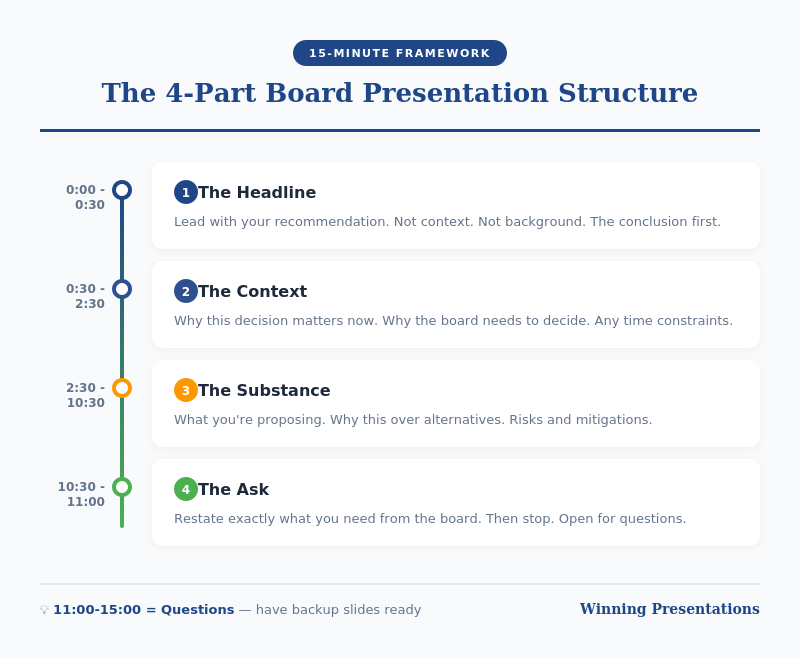
Board presentation structure framework - the 4-part structure for executive briefings

Part 1: Recommendation (2 minutes)

Start with your conclusion. Not background. Not context. Your recommendation.

“I’m recommending we approve a £2.4M investment in the CRM upgrade, to be implemented over Q2-Q3, with expected ROI of 340% over three years.”

This should take 30 seconds to say and one slide to show.

Why lead with this? Because boards are thinking “What do you want from us?” from the moment you start. If you make them wait, they’re mentally searching for your point instead of listening to your argument.

By stating your recommendation first, you frame everything that follows. The board knows what to listen for.

For techniques on delivering this opening with confidence, see my guide on how to speak confidently in public.

Part 2: Context (3 minutes)

Now — and only now — provide the minimum context needed to understand your recommendation.

The key question: What does the board need to know to evaluate my recommendation? Nothing more.

This typically includes:

  • The problem or opportunity you’re addressing
  • Why this is board-level (scale, risk, strategic importance)
  • Timeline constraints, if any

One slide maximum. Often this can be combined with your recommendation slide if you’re ruthless about brevity.

What NOT to include: history of how you got here, alternative approaches you considered, technical details, organisational politics. These belong in the appendix if anywhere.

💡 Want Ready-Made Executive Templates?

The Executive Slide System includes board presentation templates built on this exact structure — plus 6 other frameworks for different executive contexts.

  • Board recommendation template
  • Executive summary one-pager
  • Investment case structure
  • Video walkthroughs of each framework

Get the Executive Slide System — £39 →

Part 3: Evidence (5 minutes)

Now support your recommendation with evidence. This is the “why you should agree” section.

Structure your evidence around the board’s likely concerns:

  • Financial: What’s the cost, return, and payback period?
  • Risk: What could go wrong, and how will you mitigate it?
  • Execution: Who’s accountable, and what’s the timeline?
  • Strategic fit: How does this align with company priorities?

Two to three slides maximum. Use data, not opinions. Be specific: “23% cost reduction” not “significant savings.”

Anticipate questions and address them proactively. If the CFO always asks about cash flow impact, include it before she asks.

Part 4: The Ask (2 minutes)

End with a crystal-clear ask. What specific decision do you need from the board today?

Good asks:

  • “I’m requesting approval to proceed with the £2.4M investment.”
  • “I’m seeking authorisation to negotiate final terms with the vendor.”
  • “I need the board’s input on whether to prioritise Option A or Option B.”

Bad asks:

  • “Thoughts?” (Too vague)
  • “I wanted to update you on our progress.” (Not a decision)
  • “Let me know if you have questions.” (Passive, not action-oriented)

If you don’t have a clear ask, question whether this needs to be a board presentation at all. Informational updates can usually be handled in pre-read documents.

For techniques on delivering powerful closings, see my guide on how to start a presentation — which also covers endings.

Board Presentation Structure: Timing Guide

Board presentation timing guide - how to allocate 15 minutes across four sections

If you have 15 minutes on the agenda, plan for 10 minutes of presenting and 5 minutes of questions.

Section Time Slides
Recommendation 2 min 1
Context 3 min 1
Evidence 5 min 2-3
Ask 1-2 min 1
Questions 5 min Appendix

Notice this gives you 4-6 slides maximum for your main presentation. Everything else goes in the appendix — ready if asked, but not in your core flow.

Board Presentation Structure: Slide Template

Here’s a template you can adapt for any board presentation:

Slide 1: Recommendation + Context

  • Headline: Your recommendation in one sentence
  • 3-4 bullets: Key context points
  • Visual: Timeline or high-level financial summary

Slide 2: Financial Case

  • Investment required
  • Expected return (ROI, NPV, payback)
  • Comparison to alternatives if relevant

Slide 3: Risk and Mitigation

  • Top 3 risks
  • Mitigation plan for each
  • Contingency if needed

Slide 4: Execution Plan

  • Timeline (phases, milestones)
  • Accountability (who owns this)
  • Dependencies

Slide 5: The Ask

  • Specific decision requested
  • What happens next if approved
  • When you’ll report back

Appendix: Technical details, alternative analysis, historical context, org charts — anything that supports questions but doesn’t need to be in the main presentation.

🎓 Master Executive Presentations

AI-Enhanced Presentation Mastery includes a complete module on executive and board presentations — plus live coaching sessions where I review your actual presentations and give direct feedback.

8 modules. 2 live sessions. Learn the techniques that got me through hundreds of board presentations.

Learn More — £249 →

Common Board Presentation Structure Mistakes

After reviewing hundreds of board presentations, these are the mistakes I see most often:

Mistake 1: Burying the Recommendation

Starting with history, context, or analysis before stating what you want. By slide 10, the board has mentally checked out.

Mistake 2: Too Many Slides

40 slides for a 15-minute slot is not thorough — it’s unfocused. Ruthlessly cut anything that doesn’t directly support your recommendation.

Mistake 3: No Clear Ask

Ending with “Any questions?” instead of a specific decision request. Boards need to know what you’re asking them to do.

Mistake 4: Reading the Slides

Your slides are for reference, not scripts. Speak to the board, not the screen. They can read faster than you can talk.

Mistake 5: Not Preparing for Interruptions

Boards interrupt. It’s how they process. If you can’t state your recommendation in 30 seconds when interrupted, you’re not prepared.

Your Next Step

Before your next board presentation, restructure using the 4-part framework: Recommendation → Context → Evidence → Ask.

Time yourself. If you can’t deliver it in 10 minutes, you haven’t cut enough.

Resources for Executive Presentations

📖 FREE: Executive Presentation Checklist
Pre-presentation checklist for board meetings and executive briefings.
Download Free →

💡 QUICK WIN: Executive Slide System — £39
7 frameworks + templates for any executive presentation context.
Get Instant Access →

🎓 COMPLETE SYSTEM: AI-Enhanced Presentation Mastery — £249
8-module course including executive presentations module + live coaching.
Learn More →

FAQs About Board Presentation Structure

How long should a board presentation be?

Plan for 10 minutes of presenting, leaving 5 minutes for questions if you have a 15-minute slot. Most board presentations can — and should — be delivered in under 10 minutes. If you need more time, you probably haven’t focused your message enough.

How many slides should a board presentation have?

4-6 slides maximum for your core presentation. Everything else goes in the appendix, ready for questions but not in your main flow. More slides usually means less clarity, not more thoroughness.

Should I include an executive summary slide in my board presentation?

Your first slide essentially IS your executive summary — your recommendation plus key context. A separate “executive summary” slide before this often wastes time and delays your main point.

What if the board interrupts before I finish my board presentation structure?

Expect interruptions — they’re normal in board settings. Be prepared to state your recommendation in 30 seconds if asked. Answer the question directly, then ask: “Shall I continue with the evidence, or would you like to discuss this point further?”

How do I handle tough questions during a board presentation?

Prepare your appendix with supporting data for likely questions. If you don’t know an answer, say “I’ll get you that information by [specific date]” rather than guessing. Board members respect honesty more than waffling.

What’s the biggest mistake in board presentation structure?

Burying the recommendation. Starting with background, context, or analysis instead of stating what you want. Lead with your conclusion — the board can follow your logic backward, but they can’t extract your point from 40 slides of analysis.


Mary Beth Hazeldine is the Owner & Managing Director of Winning Presentations and a Microsoft Copilot PowerPoint specialist. She has delivered hundreds of board presentations during 24 years at JPMorgan Chase, PwC, Royal Bank of Scotland, and Commerzbank, and now trains executives on high-stakes presentation skills.

Get Weekly Presentation Insights

Join 2,000+ professionals getting practical presentation tips every Tuesday.

Subscribe to The Winning Edge →

13 Dec 2025
Executive presentation template - 12 slides that command the room

Executive Presentation Template: 12 Slides That Command the Room

📅 Updated: January 2026 | Based on 25 years presenting to C-suite leaders

Quick Answer

The best executive presentation template follows a 12-slide structure: Executive Summary, Situation Overview, Problem/Opportunity, Recommendation, Strategic Options, Implementation Plan, Resource Requirements, Risk Assessment, Timeline, Success Metrics, Governance, and Call to Action. Lead with your conclusion. Executives decide in the first 2 minutes — give them what they need upfront.

The first time I presented to JPMorgan’s Executive Committee, I made a classic mistake.

I built a 35-slide deck. Started with background context. Walked through the analysis methodically. Saved my recommendation for slide 28.

The Managing Director interrupted at slide 4: “What do you want us to do?”

I fumbled forward to my recommendation, completely thrown off. The meeting ended with “send us a summary” — the polite executive way of saying no.

That experience taught me something that changed every presentation I’ve given since: executives don’t want information. They want decisions.

After 25 years presenting to C-suite leaders at JPMorgan, PwC, RBS, and Commerzbank — and training executives on their own presentations — I’ve developed a 12-slide structure that works every time.

Why Most Executive Presentations Fail

Before I share the template, you need to understand why the typical approach doesn’t work.

Mistake #1: Building up to the conclusion

Academic training teaches us to present evidence, then reach a conclusion. Executive presentations are the opposite. Lead with your recommendation. Then provide supporting evidence for those who want it.

Mistake #2: Including everything

Your 40-slide deck shows how much work you’ve done. Executives don’t care about your effort. They care about the decision in front of them. The appendix exists for a reason — use it.

Mistake #3: Presenting information instead of decisions

“Here’s an update on Project X” is information. “Project X requires £200K additional funding to hit the Q2 deadline — I recommend we approve it” is a decision. Executives want the second one.

Related: The 3-Slide System That Gets Executive Decisions Fast

12-slide executive presentation structure from executive summary to call to action

Board presentation in two weeks — and slide one is still the title slide?

Executive Slide System has 16 Executive Templates including Executive Summary, Strategic Recommendation, and Board Meeting Opener — the exact slides this article teaches. £39, instant download, 30-day refund.

Get the Slide System →

The 12-Slide Executive Presentation Template

This structure works for board updates, strategic recommendations, budget requests, and major initiative proposals. Adjust the emphasis based on your specific context, but the flow remains consistent.

Slide 1: Executive Summary

Purpose: Give them everything they need in 60 seconds.

This single slide should answer: What’s the situation? What do you recommend? What do you need from them?

If an executive could only see one slide, this is it. Many will make their decision here and use the rest of your presentation to confirm it.

Include:

  • One-sentence situation statement
  • Your recommendation (specific and actionable)
  • Key supporting points (3 maximum)
  • What you need from them (decision, resources, approval)

Related: The Executive Summary Slide: How to Write the Only Slide That Matters

Slide 2: Situation Overview

Purpose: Establish shared understanding of current state.

Keep this factual and brief. You’re not building a case yet — you’re ensuring everyone starts from the same place.

Include:

  • Current state (quantified where possible)
  • Key context executives need
  • What triggered this presentation

Slide 3: Problem or Opportunity

Purpose: Make the case for action.

This is where you create urgency. Quantify the cost of the problem or the value of the opportunity. Make inaction feel expensive.

Include:

  • The problem/opportunity clearly stated
  • Financial impact (cost of inaction or value of action)
  • Why now — what happens if we wait?

Slide 4: Recommendation

Purpose: State exactly what you want them to do.

Be specific. “Approve £1.2M investment in customer platform upgrade with a go-live target of September 2026” is a recommendation. “Consider investing in technology improvements” is not.

Include:

  • Your specific recommendation
  • Why this approach over alternatives
  • Expected outcome if approved

From blank slide to board-ready in under 30 minutes

26 templates, 93 AI prompts, 16 scenario playbooks. £39, instant access, lifetime use.

Get the System →

Slide 5: Strategic Options

Purpose: Show you’ve considered alternatives.

Present 2-3 options including your recommendation. This demonstrates rigorous thinking and gives executives a sense of control. Make your recommended option clearly the best choice.

Include:

  • Option A (your recommendation) — with pros/cons
  • Option B (viable alternative) — with pros/cons
  • Option C (do nothing) — with consequences

Slide 6: Implementation Plan

Purpose: Prove you can execute.

Executives approve ideas they believe will actually happen. Show you’ve thought through how to make this real.

Include:

  • Key phases or workstreams
  • Major milestones
  • Who owns what
  • Dependencies and assumptions

Slide 7: Resource Requirements

Purpose: Be transparent about what you need.

This is where trust is built or broken. Understate requirements and you’ll lose credibility when reality hits. Overstate and you won’t get approval.

Include:

  • Financial investment (broken down by category)
  • People required (FTEs, contractors, skills)
  • Technology or infrastructure needs
  • Timeline for each investment

Related: Budget Presentation Template: How to Get Your Budget Approved First Time

Slide 8: Risk Assessment

Purpose: Show you’ve thought about what could go wrong.

This is where most presenters lose executives — by either ignoring risks or drowning them in a 50-row risk register.

At RBS, I watched a colleague present a £5M initiative with a single line: “Risks are manageable.” The CFO’s response: “Name three.” He couldn’t. Proposal rejected.

The next week, I presented a similar-sized initiative. I led with our top three risks and the mitigation plan for each. Same CFO said: “You’ve clearly thought this through. Let’s discuss the timeline.”

Include:

  • Top 3-5 risks (no more)
  • Likelihood and impact for each
  • Mitigation strategy
  • Kill switch — what would make you stop?

Related: How to Present to a CFO: The Finance-First Framework

Slide 9: Timeline

Purpose: Make progress visible and measurable.

Executives want to know when they’ll see results and how they’ll track progress. Give them clear milestones.

Include:

  • Key milestones with dates
  • Decision points and checkpoints
  • Quick wins (what will we see in 90 days?)
  • Full completion date

Slide 10: Success Metrics

Purpose: Define what winning looks like.

If you can’t measure it, executives can’t evaluate it. Be specific about how you’ll know this worked.

Include:

  • Primary KPIs (3 maximum)
  • Baseline and target for each
  • How and when you’ll measure
  • Leading indicators (early signs of success/failure)

Slide 11: Governance

Purpose: Show how you’ll stay accountable.

Who’s responsible? How will progress be reported? What authority does the team have? Executives want to approve and move on — show them they can trust the process.

Include:

  • Executive sponsor and project lead
  • Steering committee (if applicable)
  • Reporting cadence and format
  • Escalation process

Slide 12: Call to Action

Purpose: Make the decision easy.

Don’t end with “any questions?” End with exactly what you need them to do, right now.

Include:

  • Specific decision requested
  • What happens after approval
  • Next steps with owners and dates
  • Your contact for follow-up

The Presentation That Changed Everything

Six months after my JPMorgan disaster, I used this structure for a £4M technology investment proposal.

Same Executive Committee. Same intimidating room. Different approach.

I opened with my executive summary: “I’m requesting £4M to modernise our client onboarding platform. Return is strong. Main risk is vendor delivery — we’ve built in a kill switch at Phase 1 completion. I need your approval today to hit our Q3 deadline.”

The Managing Director who’d shut me down six months earlier nodded and said: “Walk us through the risks.”

Forty-five minutes later, I had full approval. Not because I was a better speaker. Because I’d given them what they needed in the format they expected.

The structure works. Trust it.

Before and after executive presentation comparison - from information dump to decision-ready structure

Adapting the Template for Different Contexts

The 12-slide structure is a framework, not a straitjacket. Here’s how to adjust for common scenarios:

Board presentations: Emphasise governance, risk, and strategic alignment. Boards think in quarters and years, not weeks. See: Board Presentation Template

Budget requests: Lead with ROI and resource requirements. CFOs want numbers upfront. See: Budget Presentation Template

Project updates: Simplify to 6 slides — summary, progress, risks, decisions needed, next steps, appendix. See: Project Status Updates That Don’t Waste Everyone’s Time

QBR presentations: Focus on metrics, insights, and forward-looking actions. See: QBR Presentation Template

Using AI to Build Your Executive Presentation

Tools like PowerPoint Copilot can accelerate your executive presentations — if you use them strategically.

What AI does well:

  • Generating first-draft structure from your notes
  • Creating consistent formatting across slides
  • Transforming bullet points into visual layouts

What AI can’t do:

  • Know your audience’s politics and priorities
  • Determine the right recommendation for your context
  • Anticipate the questions your specific executives will ask

Use AI for speed. Use your judgment for substance.

Related: Best Copilot PowerPoint Prompts That Actually Work

Why a Template Isn’t Enough

This structure will get you 80% of the way. But structure alone doesn’t command a room.

The executives who consistently get approvals have more than a good template. They have:

  • Pre-meeting relationships — They’ve socialised the recommendation before the meeting
  • Confident delivery — They present without reading slides
  • Q&A mastery — They handle tough questions without getting defensive
  • Executive presence — They project credibility before they say a word

The template is the foundation. The skills are what make it work.

Walk into the boardroom with a deck built on proven structure

Executive Slide System — 26 templates plus the Pyramid Principle, SCQA, and AVP frameworks built in. Designed for senior audiences who want the recommendation first, not the journey. £39.

Explore the System →

Want the complete toolkit?

A repeatable executive presentation template is one of seven assets senior presenters keep ready for any board ask. The Complete Presenter Bundle pulls all seven products together — slides, Q&A, anxiety, storytelling, delivery, openers, cheat sheets — for £99 (save £91.97 vs buying separately). Lifetime access.

Get the Complete Presenter Bundle — £99 →

Frequently Asked Questions

How long should an executive presentation be?

12 slides for a major decision. 6 slides for an update. Rule of thumb: 2 minutes per slide maximum. If your meeting is 30 minutes, prepare 12 slides and expect to only get through 8 — the rest is Q&A.

Should I send the presentation before the meeting?

Yes — 24-48 hours in advance if possible. This gives executives time to form questions and means less time presenting, more time discussing. Pre-read culture is standard at most global organisations.

How do I handle pushback on my recommendation?

Don’t get defensive. Acknowledge the concern, ask a clarifying question, then address it directly. “That’s a fair point. Can you help me understand what specifically concerns you about the timeline? … I see. Here’s how we’ve built in contingency for that.”

What if I have more than 12 slides of content?

Put it in the appendix. The core 12 slides are your presentation. Everything else is backup for questions. Most executive meetings never get to the appendix — and that’s fine.

How do I present virtually vs. in-person?

Virtual requires tighter structure and more visual slides — executives are more likely to multitask. Keep slides less text-heavy, use more visuals, and check in more frequently: “Any questions before I move to risks?”

Ready for the deeper buy-in framework?

The Executive Buy-In Presentation System

A self-paced programme on Maven covering the structure, psychology, and stakeholder analysis behind senior approvals. 7 modules with optional recorded Q&A sessions — no deadlines, no mandatory attendance. £499, lifetime access to materials.

Explore the programme →

📧 The Winning Edge Newsletter

Weekly insights on executive presentations, AI-enhanced workflows, and what’s actually working in boardrooms right now.

Subscribe Free →

Related Resources

🎁 Free: Executive Presentation Checklist

The 12-point checklist I use before every executive presentation. One page. Covers structure, timing, and the mistakes that get decks rejected.

Download Free Checklist →

No email required. Instant download.

About the Author

Mary Beth Hazeldine is Owner & Managing Director of Winning Presentations. With 25 years in corporate banking at JPMorgan Chase, PwC, Royal Bank of Scotland, and Commerzbank, she advises senior professionals across financial services, consulting, and technology on structuring presentations for board approval and high-stakes funding decisions.

08 Dec 2025
The 60-Second Board Opening Framework showing the 4 elements: State Action Required, Establish Timeline, Preview Recommendation, Set Discussion Expectations

How to Open a Board Meeting So Everyone Knows What’s Expected

I watched a CFO lose a £4 million approval in eleven words.

“Let me walk you through our Q3 performance and then discuss…”

That was it. Eleven words. The moment he said “walk you through,” I saw three directors reach for their phones. By the time he got to his actual request — 22 minutes later — the room had mentally moved on. The board deferred his decision to next quarter. The delay cost his company £400K in interim licensing fees.

I’ve sat in hundreds of board presentations over 25 years at JPMorgan Chase, PwC, Royal Bank of Scotland, and Commerzbank. The pattern is unmistakable: presenters who open with context and background lose the room in 60 seconds. Those who open with clarity about what’s needed get decisions in 15 minutes.

Directors aren’t impatient — they’re fiduciaries with packed agendas. When you don’t establish expectations immediately, they spend your entire presentation wondering “what does this person actually want from me?”

That uncertainty kills decisions.

Here’s exactly how to open a board meeting so everyone knows what’s expected — and you walk out with the outcome you need.

The 60-Second Board Opening Framework showing the 4 elements: State Action Required, Establish Timeline, Preview Recommendation, Set Discussion ExpectationsThe 4-part framework that’s helped my clients secure board approvals for major strategic initiatives

Presenting to an open board meeting in the next 30 days?

The Executive Slide System includes board presentation templates built for open sessions — with AI prompt cards so you can customise the narrative for your specific proposal in under an hour.

If you want a ready-made framework for executive presentations: Explore The Executive Slide System →

Templates, AI prompts, and scenario playbooks for building board-ready slides.

Why the First 60 Seconds Determine Everything

Board meetings operate differently from other executive meetings. Directors carry fiduciary responsibility. They’re evaluating risk, thinking about governance implications, mentally categorising every agenda item as “decision required” or “information only.”

When you open with “Let me walk you through our Q3 performance,” directors enter passive information-receiving mode. They’ll listen, nod, ask polite questions. But they’re not primed to decide anything.

When you open with “I’m requesting board approval for a £2M infrastructure investment with expected 18-month payback,” the dynamic shifts entirely. Directors immediately know their role. They’re evaluating a specific decision with specific parameters. Questions become focused. Discussion becomes productive.

The way you open a board meeting establishes everything that follows.

The 4-Part Framework for Your First 60 Seconds

Your opening slide and opening words should cover four elements — in this order:

1. State the Board Action Required

Lead with exactly what you need. Not context. Not background. The action.

Weak: “Today I’ll be presenting our technology modernisation initiative and the progress we’ve made over the past quarter.”

Strong: “I’m requesting board approval for Phase 2 of our technology modernisation — a £2M investment over 18 months.”

When directors hear the action first, everything that follows supports a specific decision. They’re not wondering where you’re headed.

2. Establish the Timeline

Tell directors when you need the decision and why timing matters.

Example: “I’m requesting approval today because vendor contracts expire January 15th. Delaying this decision by one quarter costs approximately £400K in interim licensing.”

This isn’t manipulation — it’s information directors need to prioritise their attention. Without timeline clarity, the default response becomes “let’s revisit this next quarter.”

3. Preview Your Recommendation

Give away your conclusion immediately. Don’t make directors wait 20 minutes to discover what you think they should do.

Example: “My recommendation is to approve the full £2M investment with Vendor A, rather than the phased approach or Vendor B alternative. I’ll walk you through the analysis supporting this recommendation.”

This might feel counterintuitive — shouldn’t you build to your recommendation? No. When directors know your position upfront, they can evaluate your supporting evidence against a clear thesis. They’re engaged, not guessing.

4. Set Discussion Expectations

Tell directors how you’ve structured the presentation and where you want their input.

Example: “I’ll take 10 minutes to walk through the business case and risk assessment. I’d particularly value the board’s perspective on vendor selection criteria and implementation timeline. I’ve reserved 15 minutes for questions.”

This maintains your control of the discussion while inviting meaningful input exactly where you need it.

Want the exact template?

The Executive Slide System includes a board meeting template with this opening structure built in — plus 9 other executive presentation frameworks. The same templates clients have used to secure approvals totalling over

Side-by-side comparison showing a weak board meeting opening versus a strong opening that gets decisions
The difference between getting a decision and getting a deferral

The Complete 60-Second Script

Here’s the exact script I give my clients. Adapt it to your specific situation:

“Good morning. I’m here to request board approval for [specific action] — [financial amount or scope] with [timeline or payback period].

I’m requesting this decision today because [urgency/timeline driver]. Delaying would result in [cost of inaction].

My recommendation is [clear recommendation]. I’ll walk you through the business case and risk assessment in 10 minutes, then I’d welcome the board’s questions — particularly on [specific areas where you want input].

Let me start with [first section].”

That’s 45-60 seconds. Every director now knows exactly what’s expected. No confusion. No wondering what you want. Just clarity — and a room that’s ready to decide.

The 60-second board meeting opening script template with checklist
Save this script template — it works for any board presentation

If you want to start your board meetings with a slide deck that sets the right tone, The Executive Slide System gives you 22 ready-made templates to start from.

5 Opening Mistakes That Kill Decisions

After hundreds of board presentations, these are the patterns I see destroy momentum before it starts:

Mistake 1: Opening with context. “Let me give you some background…” signals a long presentation ahead. Directors mentally check out. Start with the action; add context only as needed to support your ask.

Mistake 2: Opening with an agenda slide. Directors don’t need to see “Background, Analysis, Options, Recommendation, Next Steps.” They need to know what you want them to decide. Use your first slide for the Board Action Requested, not a table of contents.

Mistake 3: Opening without a clear ask. “I wanted to share our progress on digital transformation” makes directors think: “Why is this at board level? What am I supposed to do with this?” Always connect to a decision — even if it’s “I’m seeking board feedback on our approach.”

Mistake 4: Opening with apologies. “I know you’re busy” or “I’ll try to keep this brief” undermines your authority before you’ve established it. Open with confidence and clarity, not apology.

Mistake 5: Not knowing your number. “Approximately £2 million” sounds unprepared. “£2.1 million over 18 months, with £800K in Year 1” sounds like someone who’s done the work. Know your numbers cold.

After the 5 mistakes section, before "Adapting the Framework for Different Scenarios"
Avoid these five mistakes and you’re already ahead of 80% of presenters

Adapting the Framework for Different Scenarios

Requesting budget approval: “I’m requesting board approval for [amount] to [purpose], with [payback period/ROI]. Decision needed by [date] because [timeline driver].”

Presenting strategic recommendations: “I’m seeking board endorsement of [strategic direction], which requires [resource/commitment]. This supports our [strategic priority] and positions us for [outcome].”

Reporting on progress: “I’m providing the quarterly update on [initiative]. We’re [on track/behind/ahead] with [key metric]. I’m seeking board feedback on [specific decision point] and requesting [any needed approvals].”

Presenting risk or bad news: “I need to bring a [risk/issue] to the board’s attention. [State the issue directly]. I’m recommending [mitigation approach] and requesting [any needed authorisation].”

Open board meetings are different. The templates need to be too.

The Executive Slide System includes board presentation templates structured for open sessions — with layouts for agenda framing, stakeholder Q&A, and decision slides.

Executive Slide System — £39, instant access.

Designed for executives presenting where decisions are made.

Frequently Asked Questions

What if I’m not requesting a decision — just providing an update?

Even updates need a point. Clarify what you want from directors: “I’m providing this update and seeking the board’s guidance on [specific question]” or “I’m sharing this for awareness and will return next quarter with a formal proposal.” Updates without purpose waste board time.

What if someone else chairs the meeting and introduces me?

Still lead with your own framing. After the introduction, say “Thank you. I’m here today to request…” Don’t rely on the chair to establish your purpose.

How detailed should my opening be?

Cover the four elements in 60 seconds or less. Details come in the body of your presentation. The opening establishes the frame — it doesn’t make the entire case.

What if I’m not sure the board will approve?

Still lead with a clear recommendation. Hedging your opening (“I wanted to explore whether the board might consider…”) signals uncertainty. If you’ve done the analysis and believe in your recommendation, present it with conviction. Let the board decide — that’s their job.

Get the Complete Board Presentation System

The Executive Slide System includes the board meeting template with this exact opening structure — plus the complete framework for business case, risk assessment, and recommendation slides.

Clients have used these templates to secure board approvals totalling over 10 templates. 30 AI prompts. Instant download.

GET INSTANT ACCESS →

30-day money-back guarantee • Instant PDF download • Use on unlimited presentations


Related: How to Create Executive Presentations That Get Approved in 2025

📧 The Winning Edge Newsletter

Weekly insights on executive presentations, QBR strategies, and what’s actually working in boardrooms right now.

Subscribe Free →