Tag: stakeholder communication

24 Apr 2026

Budget Overrun Presentation: How to Brief Executives When Projects Exceed Costs

Quick Answer

A budget overrun presentation succeeds when it leads with the size of the problem, explains the cause clearly, and presents a credible recovery path — all before anyone asks. The executives in the room do not need surprise minimised. They need enough information to make a decision about what happens next, and they need that information structured so they can act on it quickly.

Tomás was ninety seconds into his project status update when the CFO held up one hand and said, “Skip to the number.”

The number was £1.4 million over the approved budget — a 22 per cent overrun on a digital transformation programme that had been running for nine months. Tomás had prepared twelve slides explaining the circumstances: regulatory changes, vendor delays, scope additions requested by the business. All of it true. All of it irrelevant to what happened next.

The CFO looked at the COO. The COO looked at the programme sponsor. Somebody asked whether the project should be paused. Tomás spent the next forty minutes defending a project he had originally been asked to update on. By the time the meeting ended, the overrun was no longer the problem. The problem was that nobody in the room trusted the forecast anymore.

That meeting could have gone differently. Not because the numbers were wrong, but because the presentation was built to explain the overrun rather than to manage it.

Presenting a budget overrun to executives this quarter?

The Executive Slide System gives you the templates and frameworks to structure difficult financial briefings — so executives get the information they need to make decisions, not a defensive explanation they have to interpret.

Explore the Executive Slide System →

Why Budget Overruns Destroy Trust Faster Than Missed Deadlines

A missed deadline is a schedule problem. A budget overrun is a judgement problem. That distinction matters because it changes how executives interpret everything else you say.

When a project runs late, the typical assumption is that something took longer than expected — complexity, dependencies, resource availability. Most senior leaders have seen this before and can contextualise it. When a project runs over budget, the assumption is different: somebody either underestimated the costs, failed to control spending, or didn’t flag the issue early enough. All three are judgement failures, and judgement failures erode trust in the person presenting — not just the project.

This is why budget overrun presentations require a fundamentally different approach from standard project updates. A project update says “here is what’s happening.” A budget overrun briefing says “here is what went wrong, here is why I didn’t catch it sooner, and here is exactly what I’m going to do about it.” The order of those three elements matters more than most presenters realise.

The second complication is that budget overruns compound. An executive hearing about a £1.4 million overrun is not just thinking about £1.4 million. They are thinking: “Is this the final number, or is there more coming?” If your presentation doesn’t explicitly address forecast reliability — why they should believe the new number — you will face that question regardless. Better to answer it before it’s asked.

Understanding how to handle budget variance presentations is useful context here, but a variance and an overrun are not the same conversation. A variance is expected movement. An overrun is a breach of the approved envelope. The stakes are higher, and the presentation needs to reflect that.

The Three-Part Structure for Overrun Briefings

Every effective budget overrun presentation follows the same logic, regardless of the size of the overrun or the industry. It answers three questions in a specific order, and the order is non-negotiable.

Part 1: The current position — exactly how much and exactly why

Open with the number. Not the background, not the context, not the history of the project — the number. State the approved budget, the current forecast, and the variance in both absolute and percentage terms. Then explain the cause in no more than three clear categories. For example: “The overrun is driven by three factors. Regulatory requirements added to the scope accounted for £620,000. Vendor repricing after the contract mid-point accounted for £480,000. Internal resource reallocation from a parallel programme accounted for the remaining £300,000.”

Notice what this does not include: excuses, qualifications, or phrases like “due to unforeseen circumstances.” Every circumstance was unforeseen until it happened. What executives need is specificity, not apology.

Part 2: Forecast reliability — why they should believe this number

This is the part most presenters skip, and it is the part that determines whether the room trusts you or not. After presenting the current variance, explicitly address the question: “Is this the final number?” Explain the methodology behind your revised forecast. Show which cost categories are now fixed (contracted, committed, or delivered) and which still carry variance risk. If you are 85 per cent through the project with 90 per cent of costs committed, say so — that is a materially different risk profile from being 60 per cent through with significant uncommitted spend.

The best presenters I have worked with include a simple confidence indicator on their forecast slide: a three-tier assessment showing which cost lines are firm, which are estimated, and which carry identified risk. This gives the CFO what they actually want — not certainty, but a clear view of where uncertainty remains.

Budget overrun presentation structure showing three parts: Current Position with variance breakdown, Forecast Reliability with confidence indicators, and Recovery Plan with timeline and cost controls

Part 3: The recovery plan — what you are going to do about it

End with a specific, time-bound recovery or completion plan. This is not a list of good intentions. It is a slide that shows: revised completion timeline, remaining cost envelope, specific cost controls you have already implemented, and the decision you need from the room (additional funding approval, scope reduction, or a hybrid approach). If the project can be de-scoped to bring costs back within the original budget, show what that looks like alongside the full-scope option. Let executives choose — do not choose for them.

Need to Brief Executives on a Budget Overrun This Month?

Structuring a budget overrun presentation requires a different framework from a standard update. The Executive Slide System — £39, instant access — gives you the templates designed for exactly these high-stakes financial conversations:

  • Slide templates for financial variance and recovery plan briefings
  • AI prompt cards to structure your cost analysis and forecast slides
  • Executive summary frameworks for delivering difficult financial news
  • Stakeholder-ready formats that separate the problem from the plan

Get the Executive Slide System →

Designed for executives presenting financial decisions to senior leadership.

The Recovery Slide That Restores Executive Confidence

If the overrun slide breaks trust, the recovery slide rebuilds it. And the difference between a weak recovery slide and a strong one is specificity.

A weak recovery slide says: “We will implement tighter cost controls and review the project plan to identify savings.” This tells executives nothing. It reads like a response drafted by someone who has not yet worked out what to do.

A strong recovery slide shows four things:

1. What has already changed

List the cost controls you have already implemented — not the ones you plan to implement. This signals competence and urgency. For example: “Weekly spend reviews introduced from 1 April. Vendor change request approval now requires programme director sign-off. Non-essential scope items paused pending revised business case.”

2. Revised cost forecast with committed versus estimated split

Show the remaining budget in two columns: committed costs (contracted, invoiced, or in progress) and estimated costs (subject to change). This gives the CFO the risk transparency they need without pretending you have perfect information.

3. Completion timeline — realistic, not optimistic

An overly optimistic revised timeline after a budget overrun is worse than an honest one. If the project will take three additional months, say so. Executives would rather hear a credible timeline once than an optimistic timeline twice.

4. The decision required

End the recovery slide with a clear ask. “We are requesting approval for an additional £1.4 million to complete the full scope, with revised completion in Q4. Alternative: reduce scope to phase one only, completing within the original budget by Q3.” Give the committee options and the information to choose between them. This is what presenting bad news to senior leadership actually looks like when done well — not minimising the problem, but framing the decision.

If you need templates for structuring these recovery conversations, the Executive Slide System includes frameworks for financial variance briefings and executive decision slides that separate the problem from the recommendation.

Language That Backfires When Presenting Bad Financial News

The words you use in a budget overrun presentation matter as much as the numbers. Certain phrases — often used with good intentions — consistently make the conversation harder, not easier.

“Due to unforeseen circumstances”

This phrase raises a question it was intended to answer: if the circumstances were foreseeable, why didn’t you foresee them? And if they genuinely weren’t foreseeable, then what does that say about the original budgeting process? Replace it with specificity. “Regulatory changes published in February added £620,000 to the compliance workstream” is a fact. “Due to unforeseen circumstances” is a defence.

“The project is slightly over budget”

Minimising language is the fastest way to lose credibility in these conversations. If the overrun is 22 per cent, it is not “slight.” Executives can read a spreadsheet. When the language doesn’t match the numbers, they stop trusting the language — and by extension, everything else in the presentation. State the variance clearly, without qualification. The CFO will form their own view on whether it’s significant.

“We’re confident the revised forecast will hold”

Confidence claims without evidence are meaningless after a budget overrun — because the original budget was presumably also presented with confidence. Replace the claim with the basis for it: “Ninety-one per cent of remaining costs are committed or contracted, leaving £180,000 of estimated spend still subject to variance.” That is a reason for confidence. The word “confident” on its own is not.

Budget overrun language comparison showing three phrases to avoid and their specific, credible replacements for executive financial briefings

This kind of precise, honest communication is also central to effective cost reduction presentations — the same executives who need transparency about overruns also need it when you’re proposing cuts.

Handling the Hardest Questions in a Budget Overrun Q&A

The Q&A after a budget overrun presentation is where trust is either rebuilt or permanently damaged. Preparation is everything.

“Why didn’t we know about this sooner?”

This is the most common question, and the only honest answer addresses the reporting cycle directly. If the overrun materialised gradually and was identified at the most recent forecast review, say so. If the overrun was identifiable earlier but was not escalated, acknowledge that and explain what has changed in the reporting process. The worst response is to imply that the overrun only just happened when the data suggests otherwise. Executives who discover a delayed escalation after the fact will never trust the project team’s reporting again.

“What’s the worst case from here?”

Always have a worst-case number prepared. If the revised forecast is £1.4 million over, what is the maximum credible exposure? If the answer is £1.8 million under a specific set of adverse conditions, say so, and explain what those conditions would need to be. A presenter who can articulate the worst case calmly and specifically signals that they understand the risk landscape. A presenter who hesitates signals that they haven’t thought about it.

“Should we stop the project?”

This question often sounds more aggressive than it is. In most cases, the person asking wants to hear a clear case for continuation — they want to be persuaded. Respond with the sunk cost reality, the cost of stopping versus completing, and the business value that still justifies the investment. If the honest answer is that stopping should be considered, say that too. A recommendation to pause or descope is more credible than a recommendation to continue at all costs.

See also how today’s related articles tackle adjacent challenges: adapting executive presentations for cross-cultural audiences, the career cost of avoiding presentations at work, and building the structured system for boardroom credibility.

Turn a Difficult Briefing Into a Clear Decision

The Executive Slide System — £39, instant access — includes the financial briefing and recovery plan templates that turn a budget overrun conversation into a structured decision meeting. Stop improvising these slides under pressure.

Get the Executive Slide System →

Designed for executives delivering financial updates to senior leadership.

Frequently Asked Questions

How do you open a budget overrun presentation?

Open with the number. State the approved budget, the current forecast, and the variance in both absolute and percentage terms. Do not start with background, context, or a project timeline — these delay the conversation the room actually needs to have. Once the number is on the table, explain the cause in three clear categories and then move to the recovery plan. Executives facing a budget overrun want to understand the scale of the problem before anything else.

Should you present a budget overrun before the full picture is clear?

Yes, with appropriate caveats. A delayed escalation is always worse than an early one with acknowledged uncertainty. Present what you know, flag what you don’t, and commit to a specific date for the revised forecast. The phrase “the current estimated overrun is £X, with a further £Y still under review — we will have the full picture by [date]” is far more effective than waiting until you have perfect numbers. Executives consistently prefer incomplete but timely information over complete but late information.

What should the recovery plan slide include?

Four elements: actions already taken to control costs, the revised cost forecast split between committed and estimated spend, a realistic completion timeline, and the specific decision you need from the room. The recovery plan is not a list of intentions — it is a concrete proposal with options. Always present at least two options (full scope with additional funding, or reduced scope within the original budget) so executives can make a choice rather than simply react to a problem.

The Winning Edge — Weekly Presentation Intelligence

Every Thursday, I share one framework, one real-world example, and one practical technique drawn from 24 years of presenting in boardrooms across three continents. Join The Winning Edge newsletter →

Not ready for the full system? Start here instead: download the free Executive Presentation Checklist — a one-page reference covering the structure, opening, and critical elements every executive financial briefing needs.

About the Author

Mary Beth Hazeldine is the Owner & Managing Director of Winning Presentations. With 24 years of corporate banking experience at JPMorgan Chase, PwC, Royal Bank of Scotland, and Commerzbank, she advises executives across financial services, healthcare, technology, and government on structuring presentations for high-stakes funding rounds and approvals.

Book a discovery call | View services

24 Apr 2026

Cross-Cultural Presentation: Adapting Executive Communication for Global Audiences

Quick Answer

A cross-cultural presentation requires adapting your communication style — not your content — to the decision-making norms of the audience in the room. What reads as confident directness in London can read as aggressive in Tokyo. What feels like thorough preparation in Frankfurt can feel like over-engineering in New York. The content stays the same. The framing, structure, and delivery shift to match how your audience processes information and makes decisions.

Astrid had presented the same strategic recommendation to three different regional boards in the space of two weeks.

In Stockholm, she led with the data, presented two options with a clear recommendation, asked for questions, and had approval within twenty minutes. In Singapore, she followed the same structure. Forty minutes later, the board thanked her for the presentation and said they would discuss it internally. Two weeks passed before she received a response — a set of questions she had already answered on slide four. In São Paulo, the board interrupted her before the second slide, asked about the commercial implications, challenged the competitive assumptions, and approved the recommendation on the spot — but with a modification she hadn’t anticipated.

Same proposal. Same slides. Same presenter. Three completely different outcomes. The content wasn’t the variable. The audience’s decision-making culture was. And Astrid’s presentation hadn’t adapted to any of them.

Presenting to an international executive audience soon?

The Executive Slide System gives you adaptable templates and frameworks that work across different audience cultures — so you can structure your content once and adjust the delivery for any room.

Explore the Executive Slide System →

Why Presentation Style Matters More Than Language

Most advice about cross-cultural presentations focuses on language: speak slowly, avoid idioms, use simple vocabulary. This is useful but insufficient. The deeper challenge is not whether the audience understands your words — it is whether your presentation structure matches how they expect to receive and process information.

In high-context cultures — Japan, South Korea, parts of the Middle East — what you don’t say often matters as much as what you do. A direct recommendation delivered early in the presentation can feel presumptuous, as though you have decided before consulting the room. In these settings, the expected structure is context first, analysis second, recommendation last — and the recommendation may be framed as a suggestion rather than a conclusion.

In low-context cultures — the US, UK, Netherlands, Australia — the opposite applies. A presentation that spends fifteen minutes building context before reaching the recommendation will lose the room. These audiences want the conclusion first, then the evidence to evaluate it. Anything else feels like deliberate delay.

German-speaking audiences occupy a different position entirely: they want depth. A presentation that moves quickly from recommendation to action without comprehensive supporting analysis feels superficial. They are not impatient for the conclusion — they are evaluating whether the analysis is rigorous enough to support the conclusion.

None of these preferences are wrong. They are simply different norms for how decisions get made. A strong cross-cultural presenter recognises which norm applies and adapts their structure accordingly. A weak one delivers the same presentation everywhere and wonders why it works in some rooms and fails in others.

The Three Decision-Making Norms That Change Everything

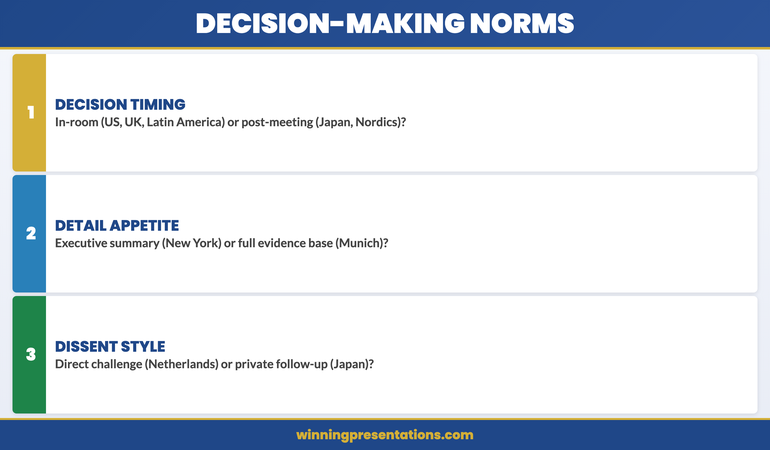
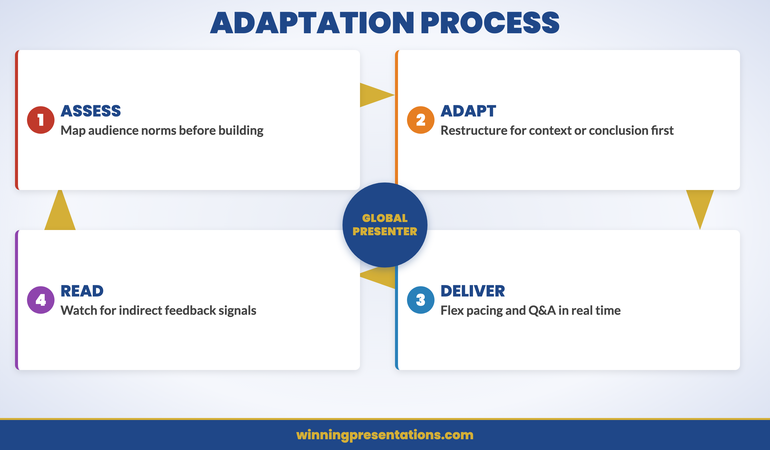
Rather than memorising cultural generalisations by country, focus on three structural variables that drive how your audience will respond to your presentation. Assess these before you build your deck.

1. Decision timing: in-room or post-meeting?

Some audiences expect to make decisions during the presentation. The US, UK, and much of Latin America fall into this category — if the case is strong, the decision should happen now. Other audiences — Japan, South Korea, and many Nordic organisations — prefer to deliberate after the presentation. The decision happens in a conversation you are not part of. If you structure your presentation to force an in-room decision with an audience that prefers post-meeting deliberation, you will get silence, not agreement. Build in a clear “next steps” slide that acknowledges the deliberation process without pushing for immediate commitment.

2. Detail appetite: executive summary or full evidence?

A board in New York may want three slides and a recommendation. A board in Munich may want thirty slides and a detailed appendix. Neither is wrong. The signal you need to read is how much analytical depth the audience requires before they feel comfortable making a decision. When in doubt, build a short core presentation with a comprehensive appendix. This lets you flex: present the summary to an action-oriented audience and pull up appendix slides for a detail-oriented one. The executive presentation structure that works globally is one designed to be modular, not fixed.

3. Dissent style: direct challenge or private question?

How an audience signals disagreement varies dramatically across cultures. In the Netherlands and Israel, disagreement is voiced openly and directly — it is not personal, it is the process. In Japan and many Southeast Asian cultures, disagreement is expressed indirectly: through questions, through silence, or through a follow-up conversation after the meeting. In parts of the Middle East, disagreement may come through a senior figure who speaks last, after everyone else has indicated support. If you misread the dissent style, you may think you have agreement when you actually have unresolved concerns — or you may interpret a direct challenge as hostility when it is simply how the conversation works.

Three decision-making norms for cross-cultural presentations: decision timing, detail appetite, and dissent style — with examples of how different cultures approach each

One Deck, Any Audience — Built for Global Presenters

Presenting across cultures means building modular, adaptable decks — not starting from scratch for every region. The Executive Slide System — £39, instant access — gives you the templates designed for exactly this flexibility:

  • Modular slide templates that flex from executive summary to full evidence
  • AI prompt cards to adapt your messaging for different audience contexts
  • Framework guides for structuring presentations around decision-making norms
  • Executive summary formats that work for action-oriented and deliberation cultures

Get the Executive Slide System →

Designed for executives presenting strategic recommendations to global stakeholders.

Structural Adaptations for Different Audience Cultures

Once you understand which decision-making norms apply to your audience, the structural changes are straightforward. Here are the four most common adaptations.

Lead with context or lead with conclusion

For audiences that prefer deliberation (East Asia, Nordics, many Middle Eastern settings), start with the background, the analysis, and the options — then present your recommendation at the end. This respects the audience’s expectation that they should form their own view before hearing yours. For audiences that prefer action (US, UK, Latin America), invert the structure entirely: recommendation first, then the supporting evidence. These audiences find a context-first structure frustrating because they cannot evaluate the evidence without knowing what it is evidence for.

Adjust the level of explicit direction

Some cultures expect the presenter to tell the room what to do. “I recommend we proceed with Option B and sign off this week” is appropriate for a US or UK board. For a Japanese board, the equivalent might be: “Based on the analysis, Option B appears to address the criteria we discussed. We would welcome your guidance on the appropriate next steps.” The content is the same. The framing shifts from directive to facilitative. Getting this wrong does not just feel odd — it can actively undermine your credibility with the audience.

Build in deliberation space

For audiences that decide after the meeting, your presentation needs to work without you in the room. This means: clear written labels on every slide, no reliance on verbal commentary that won’t be available later, a summary slide that restates the recommendation and the key evidence, and printed or emailed materials that the group can review independently. Think of it as building a presentation that is also a document. For these audiences, the quality of your leave-behind material matters as much as the quality of your delivery.

Manage Q&A expectations explicitly

In some cultures, questions during the presentation are expected and welcomed. In others, questions are saved for the end — or asked through intermediaries after the meeting. If you are presenting to a mixed audience, make the Q&A format explicit at the start: “I’ll pause after each section for questions, or you’re welcome to raise them at the end — whichever is most useful for you.” This removes ambiguity and lets different cultural preferences coexist without awkwardness. The techniques for managing hybrid meeting facilitation apply here too — mixed formats require explicit ground rules.

If you need adaptable templates that flex across these structures, the Executive Slide System includes modular frameworks designed for executives presenting to diverse stakeholder groups across regions.

Presenting to a Mixed-Culture Audience

The most challenging cross-cultural presentation is not one delivered to a single unfamiliar culture. It is one delivered to a room containing multiple cultures simultaneously — a global steering committee, a cross-regional board, or a multinational client team.

In these settings, you cannot optimise for one culture without potentially alienating another. A direct, conclusion-first approach may engage the London and New York attendees while causing the Tokyo attendees to disengage. A context-first approach may lose the Americans before you reach the recommendation.

The practical solution is a layered structure that accommodates both preferences:

Layer 1: Executive summary on slide one

Open with a single slide that states the recommendation, the key evidence, and the ask. This satisfies the action-oriented attendees immediately. It also gives the deliberation-oriented attendees a frame for what follows — they now know where the presentation is going, which makes the supporting analysis easier to process.

Layer 2: Full supporting analysis

Walk through the evidence, the alternatives considered, and the risk assessment. This satisfies the detail-oriented attendees and gives the deliberation-oriented attendees the information they need to form their own view. For the action-oriented attendees who are already persuaded, these slides serve as validation rather than persuasion.

Layer 3: Clear next steps with flexible commitment

End with next steps that offer both immediate action and a deliberation path. “If the group is comfortable proceeding today, the next step is X. If you would prefer to review the materials and reconvene next week, I can have the supporting documentation to you by end of day.” This respects both norms without making either group feel pressured or sidelined.

Maintaining energy in virtual presentations is particularly important in cross-cultural settings, where audience engagement cues may be less visible — especially when cultural norms suppress visible reactions.

Cross-cultural presentation adaptation cycle: Assess Audience Norms, Adapt Structure, Deliver Flexibly, Read Feedback — continuous adaptation process for global presenters

Handling Q&A Across Cultural Expectations

Q&A dynamics change significantly across cultures, and misreading them can undo the work your presentation did.

When no one asks questions

In some cultures, an absence of questions does not mean agreement — it means the audience is processing, or that questions will come through private channels later. If you are presenting to a group that does not ask questions during the meeting, do not interpret the silence as assent. Instead, close with: “I expect there will be questions as you review the materials. I will follow up with each of you individually to address anything that needs further discussion.” This gives the audience a culturally appropriate channel for their concerns.

When questions come as challenges

In cultures with direct dissent norms (Netherlands, Israel, parts of Scandinavia), questions may feel like attacks — “Why didn’t you consider Option C?” or “These numbers don’t hold up under X scenario.” This is not aggression. It is rigorous evaluation, and it is a signal of engagement, not rejection. Respond with the same directness: acknowledge the point, address it with evidence, and move on. Becoming defensive in these settings signals that you haven’t thought through your position.

When questions are asked indirectly

In some East Asian and Middle Eastern settings, a question like “Have you also considered the implications for the regional team?” may actually mean “I disagree with the recommendation as it applies to our region.” Listen for the implicit concern behind the explicit question. Responding to the literal question without addressing the underlying concern will leave the issue unresolved — and it may surface as a block to the decision later.

See also how today’s related articles tackle adjacent challenges: structuring a budget overrun presentation for executive committees, understanding the career cost of avoiding presentations, and building structured boardroom presentation skills.

Build Decks That Work in Any Room

The Executive Slide System — £39, instant access — includes modular templates and AI prompt cards that adapt to different audience expectations. Stop rebuilding your deck for every region.

Get the Executive Slide System →

Designed for executives presenting strategic recommendations to global stakeholders.

Frequently Asked Questions

How do you adapt a presentation for an audience you haven’t met before?

Research the decision-making norms rather than the cultural stereotypes. Ask three questions: Does this audience typically decide in the room or after? Do they prefer high-level summaries or detailed evidence? Is dissent expressed openly or privately? You can often get answers from a local colleague or the person who arranged the meeting. Build a modular deck that lets you flex between a short executive summary and a full evidence walkthrough, and read the room’s energy in the first five minutes to adjust in real time.

What is the biggest mistake in cross-cultural presentations?

Assuming that silence means agreement. In many cultures, silence during a presentation is a sign of respect, processing, or deference to seniority — not consensus. The second biggest mistake is interpreting direct questions as hostility. In cultures with strong direct-dissent norms, challenging your analysis is a compliment — it means the audience is taking your proposal seriously enough to stress-test it.

Should you change your slide content for different cultures?

Rarely. The substance — the data, the analysis, the recommendation — should remain consistent. What changes is the structure and the framing. The order in which you present information, the level of explicit direction you give, the way you handle Q&A, and the amount of supporting detail you include in the main body versus the appendix. Think of cross-cultural adaptation as adjusting the delivery envelope, not rewriting the letter inside it.

The Winning Edge — Weekly Presentation Intelligence

Every Thursday, I share one framework, one real-world example, and one practical technique drawn from 24 years of presenting in boardrooms across three continents. Join The Winning Edge newsletter →

Not ready for the full system? Start here instead: download the free Executive Presentation Checklist — a one-page reference covering the structure, opening, and key elements every executive presentation needs before it goes to an international audience.

About the Author

Mary Beth Hazeldine is the Owner & Managing Director of Winning Presentations. With 24 years of corporate banking experience at JPMorgan Chase, PwC, Royal Bank of Scotland, and Commerzbank, she advises executives across financial services, healthcare, technology, and government on structuring presentations for high-stakes funding rounds and approvals.
Book a discovery call | View services

31 Mar 2026
Executive boardroom prepared for a succession planning discussion with leadership pipeline slides on screen

Succession Planning Presentations: The Format That Makes the Conversation Productive

Succession planning presentations fail when they’re built like status updates. You walk into the room with slides about the timeline, the candidate profile, and the transition plan, but what you get back is hesitation, questions you didn’t anticipate, and a “let’s revisit this later” that means the board has reservations you never heard.

Jump to: What makes these presentations different | The five-section structure | Handling objections | Building credibility | Common missteps

The problem is structural. Ines, a Chief Operating Officer at a financial services firm, spent six weeks preparing a succession plan for her retiring Head of Operations. She’d done the hard work: identified the internal candidate, mapped the knowledge transfer, assessed the risk. But when she presented to the board, the conversation stalled. Board members asked for more detail on capability gaps. They wanted to see the bench. They wondered whether promoting from within was even the right move. Ines walked out having to restart the conversation entirely.

What Ines lacked wasn’t information—it was structure. A succession planning presentation isn’t a briefing. It’s a persuasion architecture. It needs to surface stakeholder concerns early, build confidence in your reasoning, and move people from scepticism to alignment. That’s a different format entirely.

Struggling with high-stakes presentations? The Executive Slide System is built for moments like this. Learn the framework that structures difficult conversations—succession, restructuring, investment cases—so stakeholders hear your reasoning first, not your conclusion. Explore the system →

What makes succession planning presentations different

Succession planning sits in a narrow band of corporate conversation. It’s not a routine update. It’s not a crisis. It sits between approval-seeking and reputation-building, where the stakes feel high to everyone in the room because people’s careers are on the line—yours included.

The listeners—board members, senior executives, investors—are thinking three things simultaneously: Is this person ready? Is this process sound? And am I comfortable with the risk? They’re not hostile. They’re protective. They want to buy in, but they’re also doing their job by stress-testing your recommendation.

A standard presentation format doesn’t account for this. It leads with the conclusion (promote candidate X), then supports it with evidence (credentials, track record, transition plan). But that reverses how people actually evaluate succession moves. They evaluate from risk down to recommendation. They ask themselves: What could go wrong? How have you thought about alternatives? Why this person, not someone else?

The succession planning presentation format inverts this. It leads with the stakes and the risks, shows how you’ve thought them through, builds confidence in your process, and then presents the recommendation as the logical outcome of sound reasoning.

Executive Slide System £39

Master the exact format financial services, healthcare, and technology leaders use to gain alignment on succession, restructuring, and major decisions. Includes templates, framework guides, and real-world examples.

View System (£39) →

The five-section structure that builds alignment

The productive succession planning presentation has five sections. Each one serves a specific function in moving stakeholders from scepticism to agreement.

1. The Context & Constraints
Start by naming the decision that needs to be made and the timeline you’re working within. Be explicit about constraints: regulatory requirements, board expectations, market conditions. This grounds the conversation in reality and shows you’ve already done the systems thinking. It also signals that this isn’t a whim—it’s a necessary move aligned with business strategy.

2. The Risks & Mitigations
Name the specific risks stakeholders are thinking about but haven’t said out loud. Loss of institutional knowledge. Capability gaps. Retention risk among other candidates. Market disruption during transition. Then, for each risk, articulate how you’ve thought about mitigation. Not as bullet points that wave them away, but as genuine strategies. This is where you build credibility. You’re not hiding the hard problems—you’re showing you’ve already solved them mentally.

3. The Evaluation Process
Walk through how you evaluated options. Did you consider internal candidates, external candidates, or both? What criteria did you use? How did you weight them? This section is about transparency of thinking. It reassures stakeholders that you haven’t rushed to a conclusion. The recommendation that follows will land more firmly because people have seen the methodology.

4. The Recommended Candidate & Case
Now you present the recommendation. Lead with why this person solves the strategic problem you named at the start. Not their CV, not a skills matrix, but the argument: What does this organisation need from this role in the next three years, and why is this person the best positioned to deliver it? This is where you connect dots between capability and strategy.

5. The Transition & Success Metrics
Close with the practical plan: the transition timeline, who they’ll work with, the key milestones, and the metrics you’ll use to measure success in the first 100 days, first year. This moves people from abstract approval to concrete execution. It says: I’m not just recommending this person, I’m committing to making them successful.

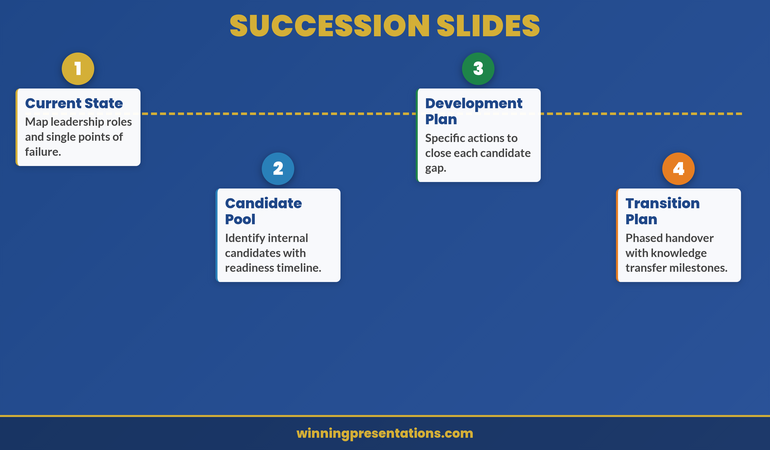
Succession planning slide structure showing four elements: current state, candidate pool, development plan, and transition plan

Within this five-section framework, your slides need to cover four concrete deliverables that the board expects to see. The first is the current state: a clear map of leadership roles and single points of failure. If one person’s departure would cripple an entire function, that’s the urgency the board needs to feel. Don’t assume they already understand the risk. Show them the org chart with the gaps circled.

The second deliverable is the candidate pool: who are the internal candidates, and what’s the readiness timeline for each? This isn’t a list of names with job titles. It’s an honest assessment of who could step into the role in six months, who needs twelve months of development, and who’s a longer-term prospect. Readiness timelines force you to be specific, and specificity is what gives the board confidence that you’ve thought beyond the immediate vacancy.

The third is the development plan: specific actions to close each candidate’s gaps. Not “we’ll provide coaching and mentoring” — that’s generic and the board will hear it as wishful thinking. Instead: “Priya needs exposure to regulatory reporting. We’re placing her on the compliance steering committee for Q2 and Q3 and assigning her to lead the next FCA submission.” That’s a plan the board can evaluate and hold you accountable for.

The fourth is the transition plan: a phased handover with knowledge transfer milestones. When does shadowing begin? When does the outgoing leader step back from day-to-day decisions? When is the new leader accountable for outcomes? Milestones create checkpoints where the board can assess whether the transition is on track — and that mechanism of oversight is often what converts their hesitation into approval.

Handling objections before they arise

The most powerful move in a succession planning presentation is to voice objections yourself before anyone else does. Not all of them—that would seem defensive—but the critical ones.

For example: “Some of you may be thinking we should look outside the organisation. Here’s why I’ve chosen to recommend from within, and here’s what I’ve validated about external alternatives.” This isn’t you being defensive. It’s you being thorough. It shows you’ve already tested your own recommendation and it held up. It also gives you control of the conversation. You’re bringing objections into the open where you can address them, rather than having them linger unspoken in the back of stakeholders’ minds.

The key is specificity. Don’t say “some people worry about capability.” Say “the role requires deep knowledge of our derivatives operations, and I want to address whether John’s background in equities is a limitation.” Now you’re talking about a real concern, and your answer carries weight.

This technique—naming and mitigating objections in your presentation—is covered in depth in our first board presentation guide, which walks through how to build board confidence in high-stakes moments.

When you present the Executive Slide System, you’ll see this principle embedded throughout. It’s the difference between a presentation that feels defensive and one that feels authoritative.

The role of confidence and credibility

A succession planning presentation is also a test of your credibility as a leader. Stakeholders are evaluating not just your candidate, but your judgment. Are you thoughtful? Have you considered second and third-order consequences? Do you understand the political landscape? Can people trust you with a decision this important?

This is why the structure matters so much. The format I’ve outlined—starting with context and constraints, moving through risks and evaluation process, then to recommendation—builds credibility with every section. You’re not asking stakeholders to trust you on assertion. You’re showing them your thinking. You’re letting them see that you’ve thought hard, evaluated fairly, and arrived at a conclusion that’s justified.

Equally important is tone. Succession planning presentations can’t be soft. But they can’t be rigid either. They need to be direct, precise, and conversational. You’re talking to peers who have legitimate concerns. Treat them that way. Acknowledge the weight of the decision. Show that you’ve felt the responsibility and done the work accordingly.

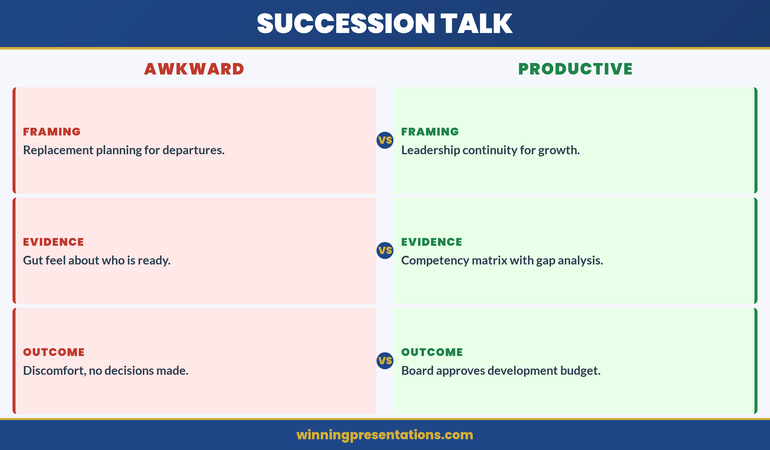
Comparison of awkward versus productive succession planning conversations across framing, evidence, and outcome

The difference between an awkward succession conversation and a productive one comes down to three dimensions. The first is framing. Awkward conversations frame succession as replacement planning for departures — someone is leaving, and we need to fill the gap. That framing carries anxiety because it centres on loss. Productive conversations frame succession as leadership continuity for growth — we’re building the next generation of capability because the organisation is evolving. That framing carries momentum. The board responds differently when the narrative is about growth rather than risk management.

The second dimension is evidence. Awkward succession presentations rely on gut feel about who is ready — “I’ve worked with James for five years and I believe he’s the right person.” That’s an assertion, not evidence. Productive presentations use a competency matrix with gap analysis: here are the five capabilities the role requires, here is where each candidate stands against them, and here are the gaps we’ve identified with specific development actions to close them. The matrix transforms a subjective opinion into a defensible process. Boards can challenge a gut feeling. They struggle to challenge a rigorous framework.

The third dimension is outcome. Awkward succession conversations end in discomfort and deferred decisions — no one wanted to say no, but no one was ready to say yes. Productive succession conversations end with the board approving a development budget, endorsing a transition timeline, or requesting a follow-up in 90 days with specific milestones. The difference isn’t the quality of the candidate. It’s the quality of the presentation structure that carried them there.

Common missteps in succession planning presentations

Most succession planning presentations fail not because the recommendation is weak, but because the format doesn’t create the conditions for stakeholders to feel confident in the decision.

Misstep 1: Leading with the candidate
You put the person’s photo and credentials on slide two. But stakeholders need to understand the problem and the decision context first. They need to know why this decision matters to the organisation. Only then does the candidate’s background become relevant.

Misstep 2: Treating risks as obstacles to get past, not problems to solve
When you name a risk and then quickly move on, stakeholders hear “this person has a gap and we’re hoping it doesn’t matter.” When you name a risk and articulate a specific mitigation strategy, they hear “we’ve thought about this and we have a plan.” The second builds confidence.

Misstep 3: Being vague about the evaluation process
“We looked at both internal and external candidates and decided that internal was the right move.” Too vague. Better: “We identified six candidates who met our criteria for the role. Four were internal, two external. We evaluated them against three dimensions: technical depth, leadership capability, and cultural fit. Here’s the outcome of that evaluation and why the recommendation emerged from that process.” Now people see you’ve been rigorous.

Misstep 4: Skipping the transition plan
The recommendation is the easy part. The transition is where things actually happen or fall apart. Stakeholders know this. When you walk through your transition plan—who the candidate will shadow, what handover looks like, what support you’re putting in place—you signal that you’re not just promoting someone and hoping for the best. You’re engineering a successful transition.

Ready to master executive-level presentations? The Executive Slide System includes real templates for succession planning, investment cases, and restructuring announcements. Learn the framework used by leaders in financial services, healthcare, and technology.

View System (£39) →

Common questions

Should I present the internal candidate’s main competitor as an alternative?

Only if you’re genuinely unsure which is the stronger recommendation, or if board members have specifically asked you to compare. If you’ve already concluded internally, presenting a serious alternative can confuse the conversation and make stakeholders worry you lack conviction. Instead, acknowledge that other candidates were considered and articulate why your recommendation emerged. You’ve done the hard comparison work already—stakeholders don’t need to see someone else in the presentation for it to feel like a fair process.

How much detail should I include about the candidate’s weaknesses?

Only the material ones—gaps that might genuinely affect success, paired with mitigation. Don’t list every small area for development. That reads as defensive list-making and undermines your recommendation. Instead, select one or two genuine capability gaps, name them clearly, and articulate how they’ll be addressed: through mentorship, external coaching, paired leadership, etc. This shows you’ve thought about development, not that you’ve settled for a mediocre candidate.

What if the candidate is a controversial choice?

If the recommendation is genuinely controversial—because of a past mistake, a difficult relationship, or a different career path—you need to address it directly in your presentation. Don’t hide it and hope board members don’t notice. Name the concern, acknowledge why it’s a fair thing to worry about, then articulate why you believe it’s not a disqualifying factor. Show what’s changed, what you’ve learned, or why the role is a different context. This gives stakeholders permission to move past their hesitation.


A succession planning presentation isn’t a status update. It’s a moment to demonstrate your judgment, your process, and your commitment to making the right decision for the organisation. When you structure it properly—moving from context to risks to evaluation to recommendation to transition—you create the conditions for stakeholders to hear your reasoning, evaluate it fairly, and move from scepticism to alignment.

The format works because it respects how senior leaders actually evaluate succession decisions. They don’t decide from conclusions down—they evaluate from risks up. Give them what they need, in the order they need it, and they’ll buy in.

Stay ahead in executive communication

Get insights on structuring high-stakes presentations, board conversations, and funding pitches. Delivered to your inbox weekly.

Join The Winning Edge →

Prefer a checklist? Download our Executive Presentation Checklist (free) and audit your next high-stakes presentation against the framework senior leaders expect.

See related articles: Learn how to structure a department update presentation or master your lateral move presentation.

Start with your transition narrative. Build the case from there.


Mary Beth Hazeldine is Owner & Managing Director of Winning Presentations. With 24 years of corporate banking experience at JPMorgan Chase, PwC, Royal Bank of Scotland, and Commerzbank, she advises executives across financial services, healthcare, technology, and government on structuring presentations for high-stakes funding rounds and approvals.

22 Mar 2026
Executive composing strategic follow-up email on laptop after boardroom Q&A session, focused expression, modern office with presentation materials visible in background

Post-Q&A Follow-Up: The Email That Converts ‘We’ll Think About It’ Into Approval

A regional operations director received pushback on a distribution network expansion in three consecutive Q&A sessions. Same outcome: “We’ll think about it.” After the third deferral, she changed her approach. Approved in one email.

Quick Answer: A post-Q&A follow-up email converts deferred decisions into approvals by doing three things: answering the questions that were actually asked (not the ones you wished they’d asked), addressing the concern behind the question that wasn’t voiced, and framing the next step so small that saying yes requires less effort than saying “let me think about it” again.

Got a “we’ll think about it” after your last Q&A?

If the Q&A ended without a decision and you’re not sure what to write in the follow-up, the Executive Q&A Handling System includes post-session follow-up frameworks designed to help move deferred decisions forward within 48 hours.

Explore the System →

The Distribution Network Expansion That Got Approval on the Fourth Attempt

Ines, a Regional Operations Director at a logistics company, presented a distribution network expansion across three board meetings. Each time, the Q&A went well—solid ROI projections, clear cost analysis, detailed implementation timeline. Each time, the result was identical: “We’ll think about it.” After the third deferral, she changed tactics entirely. Instead of requesting another board slot, she sent a follow-up email within 24 hours. Not a meeting recap. Not a gratitude note. A pivot. She zeroed in on one question the CFO had asked repeatedly—”What’s our exposure if demand forecasts don’t hit targets in Year 2?”—and provided a specific scenario analysis. Then she reframed the ask: “Would you be comfortable approving the network expansion for Year 1 only, with Year 2 contingent on Q4 demand validation?” The CFO responded within two hours. “Yes. Let’s lock in Year 1 and review in October.”

Turn Post-Q&A Silence Into Decisions That Move Forward

  • A complete Q&A handling system that covers preparation, in-session responses, AND the post-session follow-up that most Q&A training ignores entirely
  • Follow-up email frameworks designed to convert “we’ll think about it” into approval within 48 hours—with templates for each common deferral pattern
  • Question prediction methods that help you anticipate objections before the Q&A starts, so your follow-up addresses concerns before they crystallise into blockers
  • The reframing technique that turns partial objections into partial approvals—getting movement instead of stalling

Explore the Executive Q&A Handling System →

Designed for executive presentations where structured follow-up conversations help move decisions forward—because the real decision work often happens after the Q&A closes.

Why “We’ll Think About It” Is a Q&A Failure, Not a Decision Delay

“We’ll think about it” feels like a polite deferral. It’s actually diagnostic information. It tells you that the Q&A session failed to resolve the one concern that mattered most to the decision-maker.

In most cases, that concern was never voiced directly. The CFO asked about implementation timelines, but the real concern was risk. The VP asked about team capacity, but the real concern was whether this initiative competes with their own priorities. The CEO asked for “more data,” but the real concern was confidence—they didn’t trust the recommendation enough to put their name on it.

If you walk out of a Q&A with “we’ll think about it” and send a standard follow-up—”Thank you for the discussion, please find the deck attached”—you’ve wasted the most valuable conversion window in the entire decision cycle. The 24 hours after a Q&A session is when the decision-maker’s concerns are fresh, their memory of your answers is sharpest, and their willingness to engage is highest.

Your Q&A preparation needs to include a follow-up strategy, not just an in-session strategy. The follow-up email is where deferred decisions become approved ones.

The Three-Part Follow-Up Email Structure

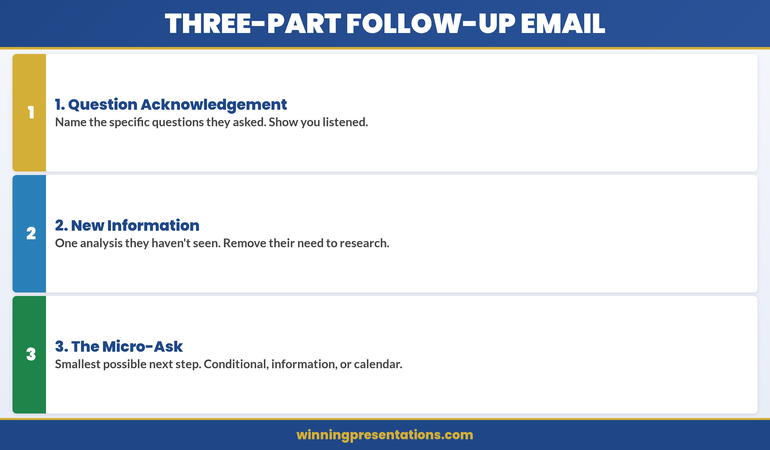
The post-Q&A follow-up email that converts deferrals into approvals has three parts. Not a summary. Not a recap. A conversion instrument.

Part 1: The Question Acknowledgement (2-3 sentences)
Name the specific questions that were asked. Not all of them—just the ones that revealed the decision-maker’s real concern. “You raised two important questions during our discussion: the implementation risk if the vendor timeline slips, and the impact on the Q3 reforecast if we start before Q2 results are final.” This tells the reader: I was listening to what you actually care about, not what I wanted to talk about.

Part 2: The New Information (3-5 sentences)
This is the critical section. Provide one piece of information, analysis, or framing that wasn’t in the presentation or the Q&A. Not something you forgot—something you’ve now prepared specifically in response to their concern. “Since our meeting, I’ve modelled the scenario where the vendor timeline slips by 6 weeks. The financial impact is £40k in additional parallel running costs—within our contingency budget of £75k. The attached one-page analysis shows the three trigger points where we’d escalate.” This demonstrates responsiveness and removes the decision-maker’s need to do their own analysis.

Part 3: The Micro-Ask (1-2 sentences)
Don’t ask for the full approval again. Ask for the smallest possible next step. “Would you be comfortable giving a conditional go-ahead for Phase 1, with Phase 2 contingent on the Q2 review?” Or: “Can we schedule 15 minutes next Tuesday to review the updated risk analysis? I can have it ready by Monday.” The micro-ask works because it reduces the decision from “approve everything” to “agree to this small thing.” And small agreements compound.

Three-part follow-up email structure infographic showing Question Acknowledgement, New Information, and Micro-Ask as stacked cards for converting deferred decisions

Answering the Question They Didn’t Ask Out Loud

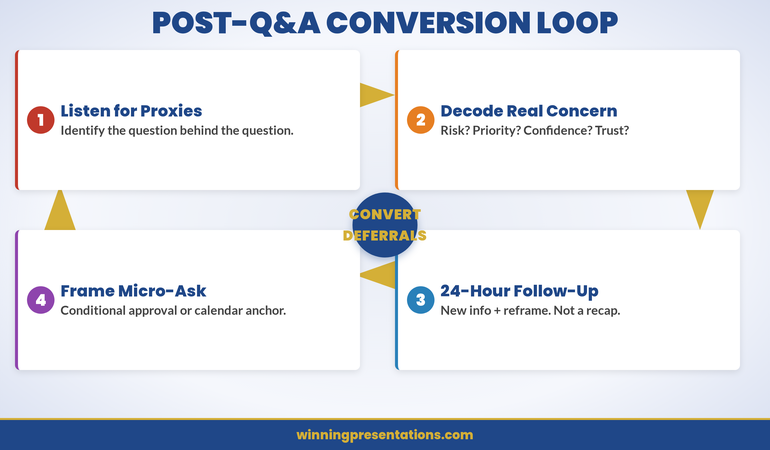
The most important question in any Q&A session is the one that wasn’t asked. Decision-makers rarely voice their deepest concern directly. Instead, they ask proxy questions—questions that circle the real issue without naming it.

Here’s how to decode common proxy questions:

“Can you walk me through the implementation timeline again?”
They’re not confused about the timeline. They’re worried the project will overrun and they’ll be associated with a failure. Your follow-up should address implementation risk explicitly—not repeat the timeline.

“Have you considered any alternatives?”
They’re not suggesting you missed options. They’re testing whether you’re married to one solution or capable of pivoting if it doesn’t work. Your follow-up should show flexibility: “If the initial approach encounters [specific obstacle], we have two fallback options already scoped.”

“What does the team think about this?”
They’re not asking for a poll. They’re worried about execution capability—does the team have capacity and willingness to deliver? Your follow-up should name specific people and their commitments.

If you predicted these questions before the session, you’ll recognise the proxy pattern in real time. Your follow-up email becomes the place where you answer the real question directly—something that’s difficult to do in the social dynamics of a live meeting but perfectly natural in a written follow-up.

Want to Predict the Questions Before They’re Asked?

The Executive Q&A Handling System includes the question prediction framework that maps likely objections to specific decision-maker roles—so your follow-up can address concerns when they arise.

Explore the System →

The 24-Hour Window: Why Timing Matters More Than Content

You have 24 hours after a Q&A session to send the follow-up that converts the deferral. After 24 hours, two things happen that work against you.

First, the decision-maker’s memory of your answers starts to degrade. They remember their own questions clearly—but your answers blur. If you don’t reinforce your strongest answers in writing within 24 hours, the decision-maker reconstructs their own version of what you said. That reconstruction is rarely favourable.

Second, other priorities fill the gap. The urgency you created in the presentation dissipates. By Wednesday, your Monday Q&A feels like last week’s problem. The decision-maker’s calendar fills with new requests, new presentations, new decisions. Your proposal moves from “I need to decide on this” to “I should revisit this when I have time.” That time never comes.

The 24-hour follow-up breaks this pattern. It arrives while the decision-maker still remembers the conversation, still feels the momentum, and still has mental space for your proposal. It gives them a reason to act now instead of later.

If you missed the 24-hour window, a 48-hour follow-up still works—but you need to create a new urgency. “Since our discussion, I’ve learned that the vendor pricing expires end of month” or “The project team I’ve reserved will be reassigned to another initiative on Friday.” Genuine time pressure, not manufactured scarcity.

Framing the Next Step So Small They Can’t Say No

The biggest mistake in post-Q&A follow-ups is asking for the same decision that was deferred. If the decision-maker said “we’ll think about it” to a £500k investment, asking again for £500k produces the same result.

Instead, shrink the ask. There are three ways to do this:

The Conditional Approval: “Would you be comfortable approving Phase 1, with Phase 2 contingent on [milestone]?” This works because it turns one big decision into two smaller ones. The first decision feels lower risk.

The Information Request: “Would it be helpful if I prepared a one-page risk analysis addressing the scenario you raised? I could have it ready by Thursday.” This works because you’re not asking for a decision—you’re asking for permission to be helpful. Nobody says no to “can I give you more information?”

The Calendar Anchor: “Can we block 15 minutes next Tuesday to review the updated analysis together?” This works because it commits the decision-maker to a specific follow-up moment. Without a calendar anchor, “we’ll think about it” means “we’ll forget about it.”

Each of these micro-asks does the same thing: it creates forward momentum without requiring the decision-maker to overcome the inertia of the full commitment. And once they’ve said yes to the small step, the full approval becomes a natural continuation, not a new decision.

This is why understanding how to handle situations where you don’t know the answer during the Q&A itself is so valuable—because “I’ll research that and send you the analysis by tomorrow” becomes a natural bridge to the follow-up email. The gap in your knowledge becomes your conversion opportunity.

Cycle infographic showing the four stages of the post-Q&A conversion loop: Listen for Proxy Questions, Decode the Real Concern, Send 24-Hour Follow-Up, and Frame the Micro-Ask

Stop Losing Approvals to Post-Q&A Silence

  • Follow-up email frameworks that convert “we’ll think about it” into approval within 48 hours—with templates for conditional approvals, information bridges, and calendar anchors
  • Question decoding guide that helps you identify the real concern behind proxy questions—so your follow-up addresses what the decision-maker actually cares about

Get the Executive Q&A Handling System →

Designed for the critical 24 hours after Q&A sessions where you can build momentum—because follow-up strategy often determines whether a deferral becomes a decision.

People Also Ask

How long should a post-Q&A follow-up email be?

Under 200 words in the email body. Decision-makers scan, they don’t read. Your email should have three short sections: acknowledge the key questions (2-3 sentences), provide one new piece of information (3-5 sentences), and make one small ask (1-2 sentences). If you need to provide detailed analysis, attach it as a one-page document and reference it in the email—don’t embed it.

Should I copy everyone who was in the Q&A session?

Copy only the people whose concerns you’re addressing directly. If the CFO asked the key question, send the follow-up to the CFO and copy your sponsor. Don’t copy the entire meeting list—it diffuses accountability and makes the email feel like a broadcast instead of a targeted response. If other attendees need updates, send those separately with different framing.

What if the decision-maker doesn’t respond to my follow-up email?

Wait 48 hours, then send a one-line follow-up with a calendar link: “Would 15 minutes on [specific day] work to discuss? Here’s a link to my calendar.” If there’s still no response after a week, the issue isn’t your follow-up technique—it’s either a priority misalignment or an organisational blocker. Ask your internal sponsor what’s happening behind the scenes before sending another email.

Is This Approach Right for You?

This is for you if:

  • You’ve had Q&A sessions that went well but ended with “we’ll think about it” instead of a decision
  • You’re sending standard “thank you for the meeting” follow-ups and not getting traction
  • You want a structured approach to the post-presentation phase that most Q&A training ignores
  • You’re presenting proposals that require multiple stakeholder approvals and need to keep momentum between meetings

This is NOT for you if:

  • Your Q&A sessions consistently end with clear decisions—your current process is working
  • You’re in a context where follow-up emails aren’t culturally appropriate (some organisations require formal proposal resubmission instead)
  • The deferral is genuinely about budget timing, not about unresolved concerns—in that case, a follow-up email won’t change the fiscal calendar

Frequently Asked Questions

I’m worried that a follow-up email will seem pushy. How do I avoid that?

Pushiness comes from asking for the same thing again without adding value. The three-part structure avoids this by design: you acknowledge their specific concern (showing you listened), provide new information they didn’t have before (adding value), and frame a smaller ask (reducing pressure). This reads as helpful and responsive, not pushy. The key is the new information—if your follow-up contains nothing the decision-maker didn’t already have, it is pushy.

What if there were multiple decision-makers and they had different concerns?

Send separate follow-ups. The CFO gets a follow-up addressing financial risk. The CTO gets a follow-up addressing technical feasibility. Each email should feel like a personal response to their specific question, not a mass communication. If you need both to agree, include one line that bridges to the other stakeholder’s concern: “I’ve also prepared the technical risk analysis that [CTO name] requested—happy to share if helpful.”

Should my follow-up email include the presentation deck as an attachment?

Only if they asked for it. Attaching the full deck makes your email feel like a broadcast, not a targeted response. Instead, attach only the new material—the one-page analysis, the updated financial model, the risk scenario you modelled. This signals that the follow-up contains something they haven’t seen before, which is the reason to open it.

The Winning Edge — Weekly

Q&A strategies, executive communication frameworks, and the presentation techniques that get decisions approved. One email weekly. Built for executives who present to other executives.

Join The Winning Edge

About the Author

Mary Beth Hazeldine is Owner & Managing Director of Winning Presentations. With 24 years of corporate banking experience at JPMorgan Chase, PwC, Royal Bank of Scotland, and Commerzbank, she advises executives across financial services, healthcare, technology, and government on structuring presentations for high-stakes funding rounds and approvals.
Book a discovery call | View services

20 Mar 2026
Executive at whiteboard or conference table with project timeline on screen in background, calm authoritative demeanour, navy and gold accents, professional corporate setting

Project Delay Presentation: The Slide Structure That Keeps Stakeholder Trust When Timelines Slip

Quick Answer: Delays happen to every large project. The difference between those that maintain stakeholder trust and those that lose it comes down to a single structure: a four-slide “delay briefing” that leads with what happened, explains why, shows concrete recovery action, and requests one clear decision. This approach transforms the conversation from “you failed to deliver” into “here’s how we move forward together.”
Already in a project delay situation? Skip ahead to the “The 4-Slide Delay Briefing Structure” section for the exact format you need to present this week. If you’re managing multiple stakeholders, the “Stakeholder Mapping for Delay Conversations” section will help you tailor the message to each audience before you walk in the room.

Why Delays Derail Stakeholder Trust (And How to Prevent It)

Marcus arrived at the steering committee meeting with the regular progress update, ready to bury the bad news on slide 14 of 18. He thought if he framed it right—”We’ve experienced some velocity headwinds on the critical path, but we’re still tracking to rebaseline the milestones”—no one would actually notice the £12 million rail modernisation project was now running six weeks behind.

The executive sponsor noticed immediately. So did the infrastructure minister’s office representative. Within fifteen minutes, Marcus had lost the confidence of the entire governance board. For the next three months, every decision took twice as long. Every status update was scrutinised. Trust, once lost, becomes the most expensive commodity on any project.

Marcus, a Programme Director at a large UK infrastructure firm, was managing a £12 million rail station modernisation project with a baseline deadline of 18 months. At month twelve, the structural survey revealed unexpected foundation work that hadn’t appeared in the preliminary geotechnical study. The project slipped nine weeks. Marcus tried to bury the announcement in a standard progress deck, presenting it on slide 14 of 18 with vague language like “velocity headwinds” and “rebaselining milestones.” The executive sponsor spotted it immediately, then in the next meeting, challenged every decision. Marcus’s credibility plummeted for three months until he shifted to a completely different approach: a dedicated four-slide delay briefing presented at the top of the next steering committee agenda. He led with the specific date the delay was discovered, the exact cause (unexpected foundation requirements), named the recovery action owner, and asked for one decision (approve the revised critical path or commission an external validation). The transparency reset trust entirely. His next project—which also slipped nine weeks—never lost sponsor confidence because the delay was briefed the same way, the first time the governance board heard about it.

The problem is almost never the delay itself. Every large project experiences schedule pressure. Sponsors understand that. What destroys trust is the appearance of hiding, the use of vague language, the inclusion of delay news buried in a thirty-slide deck rather than presented first and directly.

The solution is structural. It is not a better apology. It is not more frequent updates. It is a specific slide structure that does three psychological things at once:

  • It signals respect for your audience’s time. You’re not making them hunt for the news. It’s there, honest and clear, at the top of the agenda.
  • It reframes the conversation from failure to problem-solving. You’re not asking for forgiveness; you’re inviting them to collaborate on next steps.
  • It demonstrates control in the face of uncertainty. You know what happened, why it happened, what you’re doing, and what you need from them. That confidence is contagious.

Large organisations—especially those managing infrastructure, capital projects, or regulated environments—live with delays. What they cannot tolerate is the feeling that the project team is making decisions or hiding information. Transparency, specificity, and a clear path forward are worth more than a miracle recovery plan that no one believes.

The 4-Slide Delay Briefing Structure

The structure is deceptively simple, but the simplicity is the point. When people are stressed—and a project sponsor hearing about a major delay is stressed—they cannot process complexity. They want four things in order:

  1. What is the bad news?
  2. Why did it happen?
  3. What are we doing about it?
  4. What do you need from me?

Each of those gets one slide. No more. The power comes from the restraint.

Side-by-side split comparison infographic showing The Buried Approach (delay hidden on slide 14, vague language, no clear owner, sponsor surprised) versus The Proactive Brief (dedicated slide at top of agenda, specific dates and cause, named owner, sponsors briefed in advance)

Figure 1: The Buried Delay Approach loses sponsor trust within minutes. The Proactive Brief reframes the conversation.

This is not a presentation format you use to convince people the delay isn’t actually a delay. It is a format designed to deliver difficult news in a way that keeps the governance relationship intact. If your organisation uses executive presentation structure frameworks, you already understand that simplicity, specificity, and signal-to-noise ratio matter more than comprehensiveness.

Delay Briefing This Week? Use the Exact Four-Slide Structure

The Executive Slide System £39 includes the complete four-slide delay briefing structure used by project and programme leaders in infrastructure, capital, and technology sectors. If you need to rebuild the conversation fast, start with the sequence, not the slides. It includes:

  • Slide templates for the exact four-slide delay structure (ready to adapt to your project)
  • Worked examples from infrastructure, capital, and tech projects
  • The governance conversation framework—how to brief stakeholders before the formal meeting
  • Recovery plan slide formats designed for high-scrutiny executive review

Price: £39 once. No subscription.

Get the Executive Slide System

Slide 1: What Happened (The Single Honest Statement)

This slide has one job: state the fact. No hedging. No jargon. No minimisation.

Bad examples:

  • “We are experiencing velocity headwinds on the critical path.” (What does that mean?)
  • “The project has encountered some scheduling challenges.” (This could mean anything.)
  • “We’ve had to rebaseline certain milestones.” (Why?)

Good example:

  • “On 14 February, we discovered additional foundation work required for the east wing. The project now runs nine weeks behind the baseline completion date.”

The difference is specificity. Specific date. Specific reason. Specific number of weeks. No interpretation, no softening language, no “however.” Just fact.

This slide should take up maybe 60 per cent of the slide real estate. The text should be in the sans-serif body font, the colour navy (#1F4788) on white. Add a single icon or accent line in gold if you want visual interest, but do not overcomplicate it. People are anxious. They want clarity.

The psychological effect is paradoxical: the more direct and simple this slide is, the more competent and trustworthy the project team appears. Vagueness makes people nervous. Specificity makes them think you have control.

Slide 2: Why It Happened (One Root Cause, Not a List)

This is where most project leaders go wrong. They list five reasons—poor requirements, scope creep, resource constraints, third-party delays, weather—and by the time they finish, the executive has tuned out and lost confidence.

The rule for this slide is absolute: one root cause.

If you cannot distil the delay to one root cause, you do not yet understand the delay well enough to brief it. Go back to your team. Work until you find the single thread that, if pulled, explains everything else.

In Marcus’s case, the root cause was not “poor surveying” or “inadequate budget” or “bad luck.” It was: “The preliminary geotechnical study did not include excavation analysis of the east wing basement.” Everything else flowed from that one fact.

This slide should be roughly the same size as Slide 1. One sentence or two maximum. The root cause in the largest font. Smaller text (if needed) showing what this root cause led to.

Do not use this slide to explain away the delay. Do not list mitigation measures you should have taken but didn’t. Do not apologise. State the cause, and move to the next slide.

Slide 3: What We’re Doing About It (Concrete Action)

Now the conversation shifts forward. This slide answers: “What is the concrete action, and who owns it?”

The slide should include:

  • A single recovery action (not a list of ten ideas). For Marcus, it was: “Commission specialist foundation engineering firm to design and schedule the additional work.”
  • The named owner (not “the team” or “we”). For Marcus: “Sarah Chen, Engineering Lead, responsible.”
  • A deadline (when will this action complete). For Marcus: “Completed design and schedule by 28 March.”
  • The outcome that deadline produces (what the sponsor will have on 28 March). For Marcus: “Revised critical path and cost impact for sponsor decision.”

This slide is not a wish list. It is not “things we hope to do.” It is a commitment. The owner should know they are being named on this slide before they walk in the room.

The psychological shift here is profound. The sponsor went from hearing bad news to hearing that the project team has a plan and someone accountable for it. That is enough to keep most governance boards confident.

Slide 4: What You Need To Decide (The One Question)

The final slide removes the ambiguity about the sponsor’s role. It is not “What do you think we should do?” It is a specific decision gate.

This slide should frame a single, clear decision:

  • “Approve the revised critical path, or request external validation before approval.”
  • “Release the contingency budget, or commission a value engineering review first.”
  • “Proceed with the revised schedule, or escalate to the steering committee.”

The decision should be answerable in the meeting or within a short specified window (e.g., “within 48 hours”).

This slide does something psychologically important: it returns agency to the sponsor. They are not passive recipients of bad news; they are decision-makers. Their role is clear. The path forward is clear. That clarity is worth more than any amount of hope or optimism.

Four-card stacked infographic showing The 4-Slide Delay Briefing Structure: Card 1 "What Happened" (one sentence, specific date, specific weeks), Card 2 "Why It Happened" (single root cause), Card 3 "What We're Doing" (named owner, concrete action, deadline), Card 4 "What You Need To Decide" (one decision gate)

Figure 2: The 4-Slide Delay Briefing—each slide answers one question in order.
Pro tip: Rehearse this four-slide briefing with your executive sponsor or steering committee chair before the formal meeting. The briefing works best when it is not a surprise. If the sponsor already knows the four points, the formal briefing becomes confirmation, not shock. That small gesture—giving them a heads-up—can mean the difference between “the project team hid this from us” and “the project team is being transparent with us.”

Timing, Sequence, and Stakeholder Communication

A four-slide briefing fails if it is presented cold. The real skill is in the pre-briefing communication strategy.

Start the process 48 hours before the formal steering committee or governance meeting. Your approach should be:

  1. Brief the chair or sponsor individually first (1:1 conversation, not email). Share all four slides. Let them ask questions. Answer fully. This is not a surprise—it is a partnership.
  2. Brief any other key governance members (steering committee chair, finance lead, executive sponsor) before the group meeting. Same four slides. Same transparency. By the time the group meets, there are no surprises.
  3. Present the four-slide briefing to the full governance board as the first agenda item. This is not buried in a 30-slide deck. It is the opening conversation.

Stakeholder mapping for the delay conversation means understanding which stakeholders need to hear the news first, in what sequence, and in what format. For a capital project, the executive sponsor is always first. For a product release, the head of product is first. For a regulatory matter, legal and the regulatory lead are first.

The four-slide briefing then becomes the “formal record” that was already discussed, not a shock announcement.

Common Mistakes That Destroy Trust

Mistake 1: Trying to Make the Delay Sound Small

Language like “a modest three-week slip in the east wall construction phase” sounds like you are minimising the problem. Call it what it is: “three weeks.” Let the sponsor decide if it is modest or serious.

Mistake 2: Burying the Announcement in a Larger Deck

If the delay briefing is slides 14–17 of a 30-slide progress deck, the sponsor’s first reaction is not “Okay, let’s work on this together.” It is “Why is this buried? What else are they hiding?” Present the four slides as a standalone briefing or as the first section of a meeting.

Mistake 3: Listing Multiple Root Causes

If you say “The delay was caused by poor surveying, inadequate budget reserves, and unexpected weather,” the sponsor hears “Your project team is disorganised and doesn’t know what actually went wrong.” Find the one thing that, if it hadn’t happened, the project would not be delayed. Everything else is secondary.

Mistake 4: Proposing a Recovery Plan Without a Named Owner

“We will accelerate the east wing work by bringing in additional resources” is vague. “Sarah Chen will bring in two additional foundation teams by 21 March, with completion targeted for 15 May” is a commitment. The named owner is what gives sponsors confidence.

Mistake 5: Leaving the Sponsor’s Role Ambiguous

Do not end with “Any questions?” End with a specific decision gate: “We need you to approve the revised schedule by Friday, or escalate to the steering committee for a broader review.” That clarity is what allows them to move forward instead of worry.

When Sponsor Trust Is at Stake, Structure Is What Protects Your Standing

Sponsors rarely lose confidence because of one delay. They lose confidence when the briefing is vague, evasive, or unprepared. The Executive Slide System gives you the specific slide formats that keep governance relationships intact under pressure — the delay briefing, the recovery plan, and the replan presentation. Each format is structured to demonstrate clarity, ownership, and forward motion, so the conversation stays professional rather than defensive.

Get access to: Delay briefings, replan presentations, budget conversations, governance resets, and crisis communication frameworks.

Get the System for £39

Building the Recovery Narrative Beyond the Four Slides

Once the four-slide briefing has been delivered and the decision made, the project moves into a different communication phase. This is no longer a crisis brief; it is a recovery narrative.

The recovery narrative should include weekly updates (brief, specific), clear milestones with target dates, and a planned “recovery complete” milestone that the sponsor can anticipate. The tone shifts from “here is bad news” to “here is progress toward resolution.”

In many cases, especially in long-term infrastructure projects, the recovery narrative becomes routine status reporting. The key is that the project team has now established a pattern of transparency and specificity. Future announcements—whether positive or negative—will be received with greater credibility because the team has demonstrated they communicate clearly under pressure.

This is where the decision-slide framework for executive conversations becomes invaluable. Every recovery update, every milestone review, and every governance conversation needs the same clarity: here is the situation, here is what we are doing, here is what we need from you.

Adapting the Framework to Your Project Type

The four-slide structure works across all project types because it is psychologically sound, not because it is industry-specific. However, the content adapts slightly depending on what you are managing:

Infrastructure and Capital Projects: Slide 1 focuses on the specific work package delayed and weeks behind. Slide 2 names the physical or contractual cause. Slide 3 names the remediation action and owner. Slide 4 asks for budget or schedule approval.

Technology and Product Launches: Slide 1 names the feature or release delayed and the revised go-live date. Slide 2 focuses on technical or resource constraints (bugs discovered, skills gaps, third-party API delays). Slide 3 names the engineering lead and the specific resolution path. Slide 4 asks for a decision on MVP scope or launch timing.

Regulatory and Compliance Projects: Slide 1 names the deadline or milestone at risk. Slide 2 cites the regulatory or compliance barrier (new interpretation, third-party audit finding, external requirement change). Slide 3 names the compliance lead and the approach to remediation. Slide 4 asks for escalation to legal or regulatory leadership if needed.

The structure is the same. The details change based on your context. The psychological principle—clarity, ownership, and forward motion—is universal.

Is This Approach Right For You?

  • Yes, if: You manage projects with external stakeholders or governance boards who need to approve scope, schedule, or budget changes. You are facing a delay of more than a few days and need to reset the relationship with sponsors.
  • Yes, if: You have experienced a situation where poor communication about a delay led to loss of confidence, and you want a framework to prevent that from happening again.
  • No, if: Your delays are typically resolved without governance approval or sponsor notice. This framework is for situations where the sponsor’s trust and decision-making matter.

Frequently Asked Questions

What if the delay is still being assessed? Do I brief the sponsor before I have all the facts?

Yes. Here is what you say: “We discovered a potential delay on [date]. We do not yet have a full assessment, but here is what we know so far: [specific facts]. We are commissioning [named action] to give us full clarity by [date]. In the interim, here is what the delay could mean: [range]. We will brief you the moment we have the full picture.” This is transparency, not weakness. Sponsors trust teams that know what they don’t know.

Should I present the four-slide briefing in a formal steering committee meeting, or in a 1:1 with the sponsor first?

Do a 1:1 first (48 hours before the formal meeting). Share all four slides. Answer every question. Then brief other key stakeholders individually. Then present to the full group as confirmation, not shock. The four-slide briefing is the same in all contexts, but the audience shape matters for trust.

What if the sponsor asks for more detail or a deeper recovery plan during the four-slide briefing?

Have a follow-up deck ready (separate from the four slides). The four-slide briefing is the governance conversation. The follow-up deck is the detailed plan. Keep them separate. The four-slide briefing should answer the immediate questions (what, why, what now, what do you decide). The follow-up deck goes deeper into risk, cost, resource, and timeline detail. Never mix them or the impact of the four-slide clarity is lost.

🆓 Free resource: Executive Presentation Checklist — a free guide to strengthen your presentation preparation.

For more on structuring high-stakes presentations, read our guide to pipeline review presentations for sales leaders—another scenario where clarity and specificity determine whether sponsors lean forward or pull back.

What’s Inside the Executive Slide System

The Executive Slide System gives you slide structures, templates, and decision frameworks for the executive presentation scenarios you face most often — including delays, budget briefings, governance resets, crisis communications, and stakeholder recoveries. Each template is ready to adapt to your specific project, timeline, and audience.

What you get:

  • Slide templates for 12 executive scenarios (including the complete four-slide delay briefing)
  • Decision-slide frameworks that make briefings clear and actionable
  • Worked examples from real projects (infrastructure, capital, technology, regulatory)
  • Pre-briefing communication strategy guides
  • One-time price: £39

Get the Executive Slide System for £39

About the author: Mary Beth Hazeldine is a former investment banker at RBS with over 20 years’ experience in executive communication, stakeholder management, and crisis briefings across infrastructure, capital, and technology sectors. She is based in Edinburgh and specialises in helping leaders master the presentation skills that determine organisational outcomes. Her work has been featured in financial media and executive leadership publications.

Project delays are inevitable in large organisations. What matters is whether your sponsors believe you are hiding something or collaborating with them to move forward. The four-slide briefing structure gives you a way to do the latter.

21 Feb 2026
Senior professional man gesturing while explaining data on a presentation screen to colleagues from different departments in a modern glass-walled meeting room

Presenting Cross-Functionally: Why Your Best Slides Fail Outside Your Department

Quick answer: Your slides fail cross-functionally because they’re structured around your department’s priority filter, not the receiving audience’s. Finance listens for cost and risk. Marketing listens for growth and reach. Operations listens for efficiency and timeline. The Audience Translation Method restructures the same data through the priority filter of whoever you’re presenting to — without creating a new deck from scratch.

My Client’s Slides Got a Standing Ovation From IT. The Board Fell Asleep by Slide 4.

A programme director brought me the same deck he’d used to get IT leadership excited about a platform migration. Detailed architecture. Risk mitigation. Technical milestones. Clear delivery timeline.

He needed to present the same project to the main board — a mix of finance, commercial, and HR directors. Different people, same project, same facts.

I asked him: “What does the CFO care about in this project?” He said: “The technology benefits.” I said: “No. She cares about the £2.1M annual saving and whether you’ll go over budget getting there. That’s slide 1 for her. Your architecture diagram? That’s the appendix she’ll never open.”

We restructured the same data — not a single new fact — through the board’s priority filter. The CFO’s question (cost) became slide 1. The commercial director’s question (customer impact) became slide 2. The HR director’s question (change management) became slide 3. The technical architecture moved to backup slides.

Same project. Same facts. Completely different slide order. The board approved it in one meeting — a project that had been stuck in technical review for three months.

The 5 Priority Filters (Every Audience Uses Only One)

After 24 years working across departments in large organisations, I’ve identified five priority filters that cover virtually every cross-functional audience. Each department processes your information through one dominant filter — and largely ignores everything else until that filter is satisfied.

1. The Cost Filter (Finance, CFO, Budget holders). First question: “What does this cost and what’s the return?” They’re scanning for numbers, risk to budget, and payback timeline. If your first three slides don’t address cost, they mentally check out and wait for the financial summary.

2. The Growth Filter (Commercial, Marketing, Sales, CEO). First question: “How does this grow revenue, customers, or market position?” They want impact on the top line. Technical capability only matters if it connects to growth.

3. The Efficiency Filter (Operations, COO, Delivery teams). First question: “Does this make things faster, simpler, or more reliable?” They’re scanning for process improvement, capacity impact, and timeline risk. Everything else is noise until efficiency is addressed.

4. The Risk Filter (Legal, Compliance, Risk committees). First question: “What could go wrong and have we covered it?” They’re scanning for exposure, regulatory implications, and precedent. Benefits are secondary until risk is addressed.

5. The People Filter (HR, Change management, People leaders). First question: “What’s the impact on people — skills, roles, morale?” They want to know about change management, training needs, and employee experience. Technology and finance are background until the people impact is clear.

The mistake most professionals make isn’t having bad content. It’s leading with their own department’s filter when presenting to people who use a different one. Your executive presentation structure needs to flex based on who’s in the room.

Five audience priority filters showing cost filter for finance, growth filter for commercial, efficiency filter for operations, risk filter for legal, and people filter for HR with lead with this indicators

Present the Same Data to Any Audience — And Get Buy-In Every Time

The Executive Slide System gives you audience-adaptive slide structures for cross-functional presentations, boards, steering committees, and mixed-stakeholder meetings — so your slides work for finance, commercial, operations, and leadership.

Get the Executive Slide System → £39

Built from 24 years of corporate experience across banking, consulting, and financial services.

The Audience Translation Method (3 Steps)

You don’t need to build a new deck for every audience. You need to restructure the same deck in 15 minutes using three steps.

Step 1: Identify the dominant filter in the room. Before you present, answer one question: “What’s the first thing this audience will want to know?” If it’s a finance audience: cost. Commercial: growth impact. Operations: timeline and efficiency. If it’s a mixed audience (like a board), identify the most senior person’s filter — that’s your lead slide.

Step 2: Restructure your first three slides through that filter. Your slides already contain the information — it’s just in the wrong position. Move the data that answers the dominant filter’s question to slides 1-3. Everything else slides back. You’re not adding content. You’re changing the order.

❌ Wrong (presenting a tech project to Finance):

Slide 1: Platform architecture overview. Slide 2: Technical capabilities. Slide 3: Migration timeline. Slide 4: Cost and ROI.

✅ Right (same project, translated for Finance):

Slide 1: £2.1M annual saving + 14-month payback. Slide 2: Budget vs. actual (on track). Slide 3: Risk mitigation for the two financial risks. Slide 4: Technical summary (one slide).

Step 3: Translate your headlines into their language. Every department has vocabulary that signals “this person understands our world.” Finance responds to “ROI,” “payback period,” “cost per unit.” Marketing responds to “conversion,” “reach,” “customer acquisition.” Operations responds to “throughput,” “capacity,” “cycle time.” Replace your department’s jargon with theirs — same data, different labels.

Understanding stakeholder psychology is what makes this method work. You’re not dumbing down your content. You’re restructuring it through the lens of what your audience already cares about.

The Executive Slide System includes audience-adaptive frameworks for cross-functional meetings, boards, and mixed-stakeholder presentations.

Get the Executive Slide System → £39

Same Project, Three Different Audiences — Worked Example

Here’s a real restructure using a CRM implementation project. Same facts, three audiences:

To the CFO (Cost Filter):

Slide 1: “CRM investment: £340K. Projected revenue uplift: £1.2M in Year 1. Payback: 4 months.” Slide 2: “Budget status: £15K under forecast. No change requests pending.” Slide 3: “Financial risk: vendor pricing locked for 36 months. Overspend buffer: 8%.”

To the Sales Director (Growth Filter):

Slide 1: “Pipeline visibility increases from 60% to 95%. Lead response time drops from 4 hours to 12 minutes.” Slide 2: “Sales team adoption: 78% actively using (target: 70%). Top performers adopted first.” Slide 3: “Q3 forecast: 15% uplift in conversion rate based on early data.”

To the Operations Director (Efficiency Filter):

Slide 1: “Manual data entry eliminated. Team saves 12 hours/week.” Slide 2: “Integration with existing systems complete — no parallel running needed.” Slide 3: “Go-live timeline: on track. No dependency on other projects.”

Same CRM. Same week. Three completely different slide 1s. The information the audience needs first changes everything about how they receive the rest of your presentation.

Same CRM project data restructured for three audiences showing CFO sees cost and payback first, Sales Director sees pipeline and conversion first, and Operations Director sees efficiency and time savings first

The Executive Slide System (£39) gives you audience-adaptive slide structures and priority filter frameworks for every cross-functional scenario — restructure any deck in 15 minutes.

The 15-Minute Cross-Functional Slide Restructure

You have an existing deck and 15 minutes before presenting to a different audience. Here’s the rapid restructure process:

Minutes 1-3: Identify the filter. Who’s in the room? What’s their dominant priority? If mixed, who’s the most senior decision-maker?

Minutes 4-8: Restructure slides 1-3. Find the data in your existing deck that answers the dominant filter’s first question. Move those slides (or those data points) to positions 1-3. You’re not creating new slides — you’re reordering.

Minutes 9-12: Translate three headlines. Rename three slide titles using the receiving department’s vocabulary. “Technical architecture” becomes “System reliability” for ops. “User adoption metrics” becomes “Change management progress” for HR. “Revenue impact” stays “Revenue impact” for commercial.

Minutes 13-15: Cut or move two slides. Identify the two slides most rooted in your department’s filter and move them to backup. Your deck just got shorter and more relevant. The approach to reading the room before you enter it starts with this 15-minute preparation.

If your first slide doesn’t match their priority filter, you lose them before slide 3. The Executive Slide System (£39) includes audience-adaptive templates so you can restructure for any department in minutes — not hours.

Common Questions About Cross-Functional Presentations

Why do my presentations fail with other departments?

Your presentations fail cross-functionally because they’re structured around your department’s priority filter. Every department processes information through a different lens — finance hears cost, marketing hears growth, operations hears efficiency. When your first three slides don’t address their priority, they mentally disengage before you reach the content that matters to them. The fix isn’t better content. It’s restructuring the same content so their priority appears first.

How do you present the same data to different audiences?

Use the Audience Translation Method: identify the dominant priority filter of your audience (cost, growth, efficiency, risk, or people), restructure your first three slides to address that filter first, and translate your slide headlines into the receiving department’s vocabulary. You’re not building a new deck — you’re reordering and relabelling the same data. This takes 15 minutes and dramatically changes how different audiences receive the same information.

How do you present to a mixed audience with different priorities?

When presenting to a mixed audience, identify the most senior decision-maker’s priority filter and lead with that. If the CFO is the most senior person, lead with cost and return. After addressing the dominant filter in slides 1-3, briefly acknowledge other filters: “The operational efficiency gain is covered on slide 5” and “People impact and change management is on slide 6.” This signals that you’ve considered everyone’s perspective while still leading with the decision-maker’s priority.

Stop Rebuilding Your Deck for Every Audience. Restructure It in 15 Minutes.

The Executive Slide System gives you the Audience Translation Method plus slide structures for boards, steering committees, and every cross-functional scenario — so one deck works for any room.

Get the Executive Slide System → £39

Used in cross-functional meetings, programme boards, and multi-stakeholder presentations across corporate teams.

Frequently Asked Questions

Do I really need a different version for every department?

No. You need one deck with a flexible first three slides. The Audience Translation Method doesn’t require building separate decks — it requires knowing which data to lead with for each audience. Most cross-functional restructures take 15 minutes because the data is already in your deck. You’re moving slides, not creating them.

What if I’m presenting to a department I don’t understand well?

Ask one person in that department a single question before your presentation: “What’s the first thing your team will want to know about this project?” Their answer tells you the dominant priority filter. You can also look at what that department measures — their KPIs reveal their filter. Finance measures cost and return. Marketing measures reach and conversion. Operations measures throughput and reliability.

What about presenting to senior leadership who came from different departments?

People carry their departmental filter even after promotion. A CFO who came from commercial still thinks in growth terms as well as cost. A COO who came from engineering still values technical detail. When presenting to a leadership team, research the most senior decision-maker’s career background — it reveals which filter they’ll default to, even if their title suggests otherwise.

Get Weekly Presentation Intelligence

Slide structures, audience frameworks, and the executive communication strategies that work across departments — delivered every week.

Join the Newsletter

Related: If your cross-functional presentation involves recommending a vendor or product, read The Vendor Selection Presentation: How to Get a £500K Decision in One Meeting — the Decision Architecture for comparison presentations.

Your next step: Before your next cross-functional presentation, answer one question: “What’s the first thing this audience will want to know?” Move that answer to slide 1. You’ll present the same data and get a completely different response.

Want the complete Audience Translation Method with priority filters and worked examples for every department combination?

Get the Executive Slide System → £39

About the Author

Mary Beth Hazeldine is the Owner & Managing Director of Winning Presentations. With 24 years of corporate banking experience at JPMorgan Chase, PwC, Royal Bank of Scotland, and Commerzbank, she specialises in executive-level presentation skills and cross-functional stakeholder communication.

A qualified clinical hypnotherapist and NLP practitioner, Mary Beth combines executive communication expertise with evidence-based techniques. She has spent 15 years training executives for board presentations, cross-departmental meetings, and multi-stakeholder decision forums.

Read more articles at winningpresentations.com

07 Dec 2025
Project status update framework showing traffic light dashboard with green status indicator, key metrics, changes section, and executive action needed panel

Project Status Updates That Don’t Waste Everyone’s Time

The CFO stopped listening at slide 3. By slide 7, she was answering emails. The project manager kept presenting anyway.

I watched this happen at Commerzbank during a £12 million programme update. Forty-five minutes of task-level detail. Zero decisions made. The steering committee scheduled another meeting “to actually discuss the issues.”

After 25 years in corporate banking managing complex programmes at JPMorgan Chase, PwC, Royal Bank of Scotland, and Commerzbank, I’ve developed a project status update framework that communicates everything leadership needs in 2 minutes — and actually keeps them engaged.

Here’s how to deliver project status updates that respect everyone’s time and establish you as someone who can be trusted with bigger projects.

Quick Answer: Effective project status updates answer three questions in under 2 minutes: Is this on track? Do you need to do anything? What should you be worried about? Lead with a traffic light headline (green/amber/red), show 3-5 key metrics, highlight only what changed since the last update, and state explicitly whether executive action is required.

Why Most Project Status Updates Fail

The fundamental problem with most project status updates: they’re written for the project team, not for executives.

Project managers track dozens of tasks, dependencies, and risks. So their project status update includes all of it. But executives don’t need task-level visibility — they need to know three things:

  • Is this project on track?
  • Do I need to do anything?
  • What should I be worried about?

A project status update that answers these three questions in 2 minutes is infinitely more valuable than a 30-minute walkthrough of your Gantt chart.

I learned this the hard way at RBS. I’d spent six hours preparing a comprehensive programme update — 18 slides covering every workstream, every milestone, every risk. The Programme Director interrupted me on slide 4: “Just tell me if we’re going to hit the deadline and what you need from me.”

That moment changed how I structure every project status update since.

The Project Status Update Framework: Traffic Light Plus Context

Every effective project status update follows this structure:

Element 1: The Headline Status

Open your project status update with a single line that tells leadership exactly where things stand:

🟢 GREEN: Project on track — 2 weeks ahead of schedule, within budget

🟡 AMBER: Project at risk — vendor delay may impact launch date; mitigation in progress

🔴 RED: Project off track — need executive decision on scope reduction by Friday

This headline tells executives immediately whether they need to pay close attention or can relax. Most project status updates bury this on slide 8 — put it first.

Element 2: The Key Metrics

After the headline, your project status update should show 3-5 metrics that matter:

Metric Target Actual Status
Timeline March 15 March 1 🟢
Budget £500K £485K 🟢
Scope 100% 100% 🟢
Quality <5 defects 3 defects 🟢

This dashboard gives executives the complete picture in seconds. They can see whether you’re ahead, on track, or behind — and where specifically.

Element 3: What Changed Since Last Update

Executives don’t want to re-read everything — they want to know what’s new. Your project status update should highlight changes:

Changes Since Last Project Status Update:

  • Completed: User acceptance testing (2 days early)
  • Started: Production deployment preparation
  • Changed: Moved training from Feb to Jan based on stakeholder availability
  • Escalated: None this period

This format lets executives skip what they already know and focus on what’s new. It’s the difference between a helpful update and a time-wasting repeat.

Element 4: Risks and Issues

Every project status update must address risks — even if there aren’t any significant ones:

Notice the last line: “no executive action needed.” Always tell leadership whether you need them to do something. Most risks you’re managing yourself — make that explicit in your project status update.

The traffic light framework I’ve described is exactly what’s built into The Executive Slide System → — clients have used these templates to run steering committees for programmes worth over £50 million.

Element 5: Decisions or Support Needed

If your project status update requires executive action, state it clearly:

Executive Action Required:

Decision needed by: Friday, February 7

Question: Should we proceed with vendor A (£50K higher cost, 2 weeks faster) or vendor B (lower cost, standard timeline)?

Recommendation: Vendor A — the timeline benefit outweighs the cost given our Q1 deadline

Status updates are one scenario where a structured presentation skills training programme pays back fastest — avoiding the slide-by-slide drift that lost the steering committee above.

If no action is needed, say that explicitly: “No executive decisions required this period.” This tells leadership they can simply note the update without adding it to their action list.

#image_title

⭐ Transform Your Next Status Update in Minutes

Your steering committee is next week. Use the same framework that’s kept executives engaged through £50M+ programme reviews.

What you get:

  • Traffic light dashboard template (fill in your metrics)
  • Risk register format executives actually read
  • Decision slide structure that gets clear approvals

Get Instant Access → →

Instant download • 30-day money-back guarantee

The 2-Minute Project Status Update Script

Here’s exactly how to deliver your project status update verbally:

First 15 seconds — Headline:
“Project Phoenix is green — we’re two weeks ahead of schedule and within budget. No executive action needed this week.”

Next 30 seconds — Key changes:
“Since our last update, we completed UAT two days early and started deployment prep. We moved training up to January based on stakeholder availability.”

Next 45 seconds — Risks:
“One risk I’m monitoring: our lead developer is on leave for two weeks in February. We’re cross-training a backup and pulling critical work forward. I don’t expect this to impact the timeline, but I’ll flag it if that changes.”

Final 30 seconds — Look ahead:
“For next period, we’re focused on completing deployment prep and beginning production migration. Next update will confirm go-live readiness.”

Total: under 2 minutes. Executives have everything they need. You’ve demonstrated control of your project without wasting anyone’s time.

This script structure works because it follows the same principles built into The Executive Slide System — lead with the conclusion, support with evidence, close with the ask.

Project Status Update Mistakes to Avoid

Mistake 1: Reading every line of your slides.
Executives can read. Summarise the headline, highlight what changed, flag what needs attention. Don’t read word-for-word.

Mistake 2: Task-level detail.
“John completed the database migration scripts” doesn’t belong in an executive project status update. Executives need milestone-level visibility, not task-level.

Mistake 3: Hiding problems.
If the project is amber or red, say so. Finding out later that you knew about problems destroys trust faster than the problems themselves.

Mistake 4: No clear action.
Every project status update should end with either “no action needed” or a specific ask. Don’t leave executives wondering what you need from them.

Mistake 5: Inconsistent format.
Use the same structure every time. Executives shouldn’t have to learn a new format each week — consistency lets them find information quickly.

Related: If presenting status updates makes you anxious, see Presentation Anxiety Before Meetings: The Executive Reset That Actually Works — the techniques I teach clients who need to stay calm under pressure in steering committees.

FAQ

How often should I send a project status update?

Weekly for active projects, bi-weekly for steady-state. Match your frequency to how fast things change and how closely leadership wants to track. If nothing changes between updates, that’s useful information too — it shows stability.

How long should a project status update be?

One slide for verbal updates, maximum two pages for written. If your update is longer, you’re including too much detail. Everything else belongs in an appendix or separate detailed report for the project team.

What if nothing changed since the last update?

Say that explicitly: “No significant changes since last update. All metrics remain green, on track for March delivery.” A brief update confirming stability is valuable — it takes 30 seconds and builds confidence that you’re in control.

One More Thing — Before You Go

Need a status update framework that gets sign-off the first time? The Executive Slide System gives you the exact templates and structure used by senior leaders to move projects forward without going round in circles.

Explore the System

Should I include good news in my project status update?

Yes — briefly. Wins deserve acknowledgment. “Team delivered UAT two days early — strong execution” takes 5 seconds and builds confidence. Don’t bury it, but don’t spend five minutes on celebration either.

📧 Get Weekly Executive Presentation Insights

Join 2,000+ professionals getting frameworks, templates, and real examples every week.

Subscribe Free →

🎁 Free Resource: Executive Presentation Checklist

12 things to check before any executive presentation — including your next project status update.

Download Free →

Your Next Project Status Update

You probably have a project status update due soon. Before you build another 15-slide deck, try this:

  1. Write your headline status in one sentence
  2. List 3-5 metrics with traffic light indicators
  3. Note what changed since your last update
  4. List active risks with mitigations
  5. State clearly whether you need executive action

That’s your project status update. One slide. Two minutes. Everything leadership needs to know.

The project managers who advance are the ones who can run complex projects while keeping leadership informed without overwhelming them. This framework demonstrates exactly that capability.


Related: How to Create Executive Presentations That Get Approved — the complete guide covering all 10 executive presentation types, including the project status update framework.

See also: QBR Presentation Template: How to Run Quarterly Business Reviews That Drive Action