Tag: leadership presentation

26 Apr 2026
Featured image for Promotion Panel Presentation: How to Make Your Case Without Overselling

Promotion Panel Presentation: How to Make Your Case Without Overselling

Quick Answer

A promotion panel presentation should demonstrate how you already operate at the next level rather than listing your achievements at the current one. The strongest candidates frame their case around future organisational impact — what they will do with the role — and let their track record serve as evidence of capability, not the centrepiece of the argument.

Nadine had spent three weeks preparing for her panel presentation. She had metrics for every quarter, endorsements from two managing directors, and a slide deck that documented her contribution to the firm’s largest client migration in five years. By any objective measure, she was the strongest internal candidate.

She did not get the role.

The feedback, delivered carefully by her line manager, was that the panel found her presentation “impressive but backward-looking.” They described another candidate — someone with a shorter tenure and a less distinguished record — as having “a clearer vision for the function.” Nadine had spent twenty minutes proving she deserved the promotion. The other candidate had spent fifteen minutes showing what she would do with it.

The difference was not talent or track record. It was framing. Nadine presented a case for recognition. The other candidate presented a case for investment. Promotion panels do not reward past performance — they invest in future leadership. That distinction changes how you build every slide in the deck.

Preparing for a promotion panel this quarter?

Before you finalise your deck, pressure-test it against these three questions — the ones panel members rarely say aloud but always evaluate:

  • Does your opening slide describe the role’s future impact or your past achievements?
  • Could a panel member summarise your case in one sentence to a colleague who was not in the room?
  • Are you showing how you already operate at the next level, or asking to be given the chance?

Explore the Executive Slide System →

The Overselling Trap That Undermines Strong Candidates

The instinct in a promotion panel presentation is to demonstrate as much as possible. More achievements, more metrics, more examples of impact. The logic feels sound: the panel needs evidence, so give them evidence in volume. But volume works against you in this setting because it shifts the tone from leadership to audition.

Panel members are typically senior leaders who have been through this process themselves. They recognise overselling instantly — not because the claims are false, but because the framing feels effortful. A candidate who needs twelve slides to justify a promotion signals that the case requires extensive explanation. A candidate who presents a clear forward vision and supports it with two or three well-chosen examples signals that their readiness is self-evident.

The overselling trap also creates a structural problem. When your deck is dense with achievements, you leave no space for the panel to explore your thinking. The questions you receive become administrative — “Tell me more about the Q3 migration timeline” — rather than strategic. You want the panel asking questions about your vision, your priorities, and your leadership approach. Those conversations are where promotion decisions are made, not during your slide presentation.

The antidote is restraint. Select three examples of impact that are directly relevant to the role you are seeking, and let them do the heavy lifting. Everything else belongs in a brief appendix that demonstrates depth without consuming presentation time. If you have also been thinking about how to build a promotion business case presentation, this principle of selective evidence applies equally there.

Presenting Your Case to a Promotion Panel?

The difference between candidates who get promoted and candidates who get praised is almost always in the slide structure. The Executive Slide System — £39, instant access — gives you frameworks built from 24 years of corporate banking experience:

  • 22 slide templates for high-stakes executive scenarios
  • 51 AI prompt cards to structure persuasive arguments fast
  • 15 scenario playbooks for board, panel, and leadership presentations

Get the Executive Slide System →

Designed for senior professionals preparing career-defining presentations.

What Promotion Panels Are Actually Evaluating

Promotion panels assess four things, and only one of them is past performance. Understanding all four changes how you allocate your presentation time.

Leadership readiness. Can this person operate effectively at the next level? Panel members look for evidence that you already think and act like someone in the target role. They are not asking whether you could grow into it eventually — they are assessing whether the gap is small enough that the transition will be smooth. Your presentation should demonstrate that you have already been operating at this level informally, and the promotion formalises what is already happening.

Organisational awareness. Does this person understand the broader context? A strong candidate connects their role to the organisation’s strategic priorities. A weak candidate talks about their function in isolation. If you are presenting for a director-level role, your deck should reference how your function interacts with other parts of the business, where the friction points are, and what you would do to address them.

Stakeholder judgement. Can this person navigate complexity? Panel members listen for how you talk about difficult situations — budget constraints, underperforming teams, competing priorities, political dynamics. They are less interested in what happened and more interested in how you thought about it. Your micro-stories should reveal your reasoning process, not just the outcome.

Communication clarity. Can this person influence a room? The panel presentation itself is a test of this capability. If you cannot structure a clear, persuasive ten-minute presentation about a subject you know intimately — your own career — then the panel will question whether you can do it on subjects that are less familiar and higher stakes.
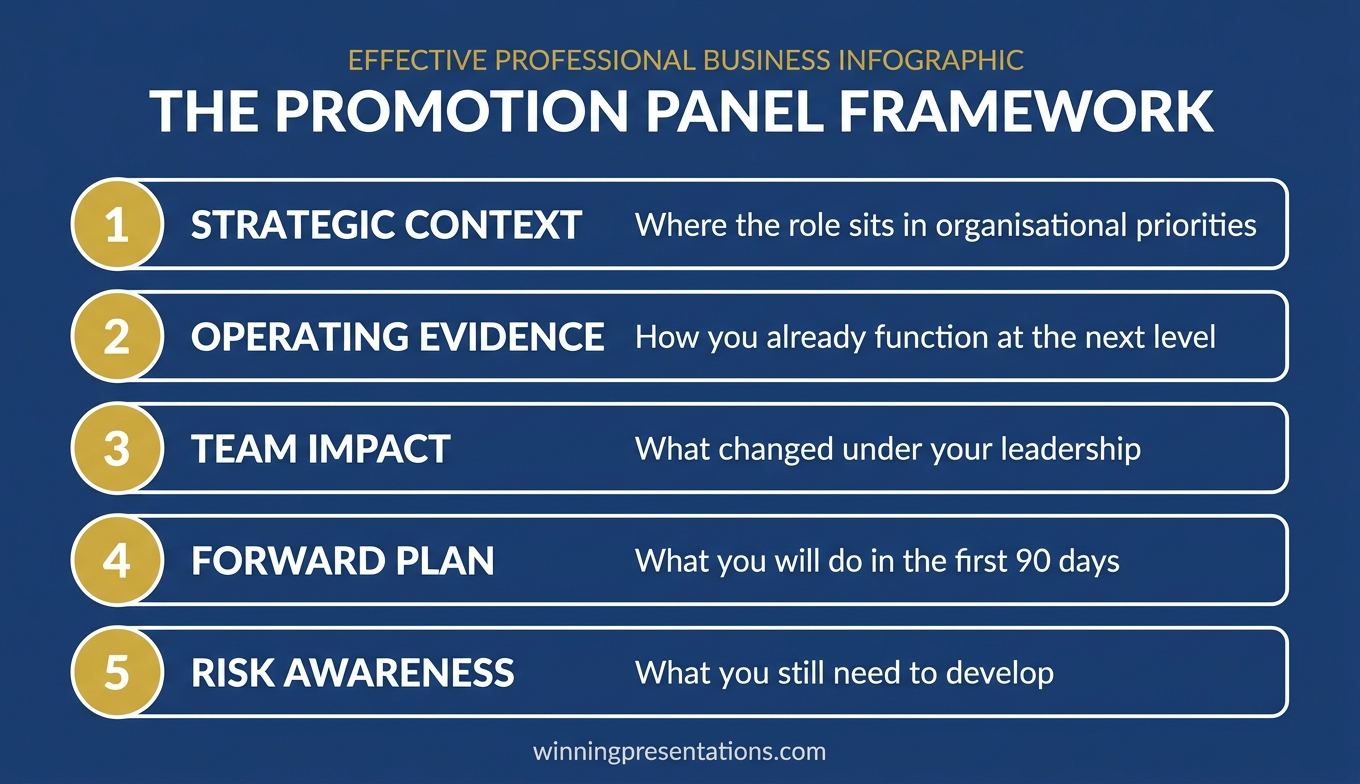

Infographic showing the four dimensions promotion panels evaluate: leadership readiness, organisational awareness, stakeholder judgement, and communication clarity

How to Structure Your Promotion Panel Presentation

The most effective structure for presenting to a promotion panel follows a three-part architecture: context, capability, and commitment. Each part serves a different purpose and answers a different unspoken question from the panel.

Part 1: Context (2 slides, 2-3 minutes). Start by demonstrating that you understand the strategic landscape of the role you are seeking. What are the three most important priorities for this function over the next twelve to eighteen months? What external pressures or internal changes will shape the role? This is not about impressing the panel with research — it is about proving that you have already started thinking like someone in the role. Open with the organisation’s context, not yours.

Part 2: Capability (3-4 slides, 5-6 minutes). This is where your evidence lives, but it must be framed as capability for the future role, not recognition for past work. For each priority you identified in Part 1, present one example from your career that demonstrates relevant capability. The structure for each example: “Here is what I did, here is why it is relevant to this role, and here is how I would apply that experience to [specific future priority].” This three-part framing turns every achievement into a forward-looking proposition.

Part 3: Commitment (1-2 slides, 2-3 minutes). Close with your vision for the first ninety days and beyond. What would you prioritise? What would you change? What would you protect? This section reveals your leadership instincts. Panel members listen carefully to what you would keep as well as what you would change — both signals are informative. A candidate who plans to change everything signals inexperience. A candidate who plans to change nothing signals complacency. The right answer is selective, strategic, and grounded in the context you established in Part 1.

If you are also preparing for the transition after a successful panel, you may find useful frameworks in this guide on delivering your first presentation after promotion.

Presenting Evidence Without Sounding Like You Are Bragging

This is the tension at the centre of every panel presentation for promotion: you need to demonstrate impact, but you cannot sound self-promotional. The candidates who navigate this well use three techniques consistently.

Frame achievements as team outcomes. Instead of “I led the restructuring of the compliance function,” try “The compliance restructuring — which I was asked to lead — reduced processing time by 35 per cent and is now the model being adopted across European operations.” The first version centres you. The second version centres the outcome and lets the panel draw their own conclusion about your role in it.

Let the scale speak for itself. When the numbers are significant, they do not need amplification. “The portfolio grew from £120 million to £340 million during my tenure” is more powerful than “I personally drove unprecedented growth across the portfolio.” Understated delivery of substantial results signals confidence. Overstated delivery of any results signals insecurity.

Attribute credit generously. Panel members know that senior outcomes are never solo achievements. A candidate who acknowledges the contributions of their team, their sponsors, and their peers demonstrates the kind of leadership maturity that promotion panels are specifically looking for. “I built the team that delivered this, and I was fortunate to have a sponsor in the COO who removed barriers at the executive level” tells the panel three things: you build teams, you leverage sponsors, and you are secure enough to share credit.

The Executive Slide System includes frameworks for structuring evidence slides that let results speak without requiring self-promotion.
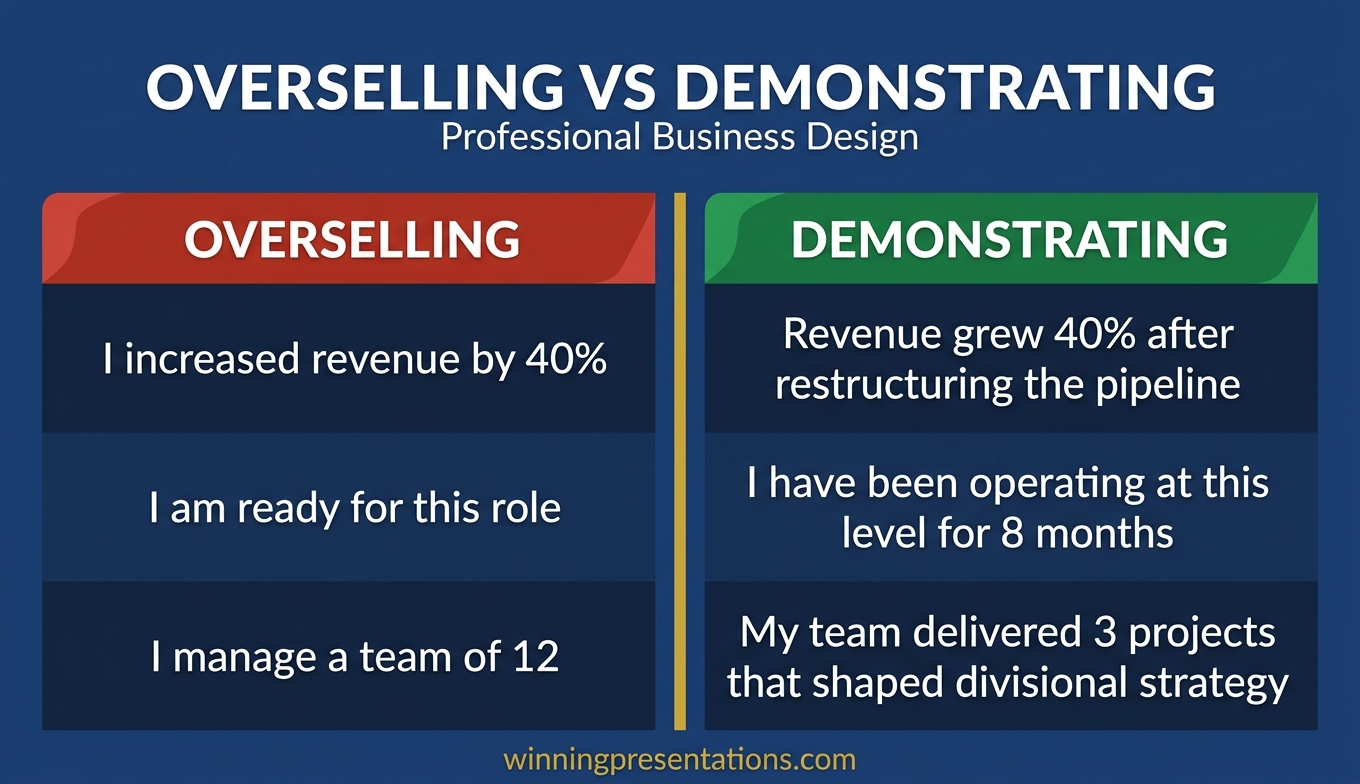

Comparison infographic showing self-promotional framing versus leadership framing when presenting to a promotion panel

Handling Panel Questions That Test Leadership Maturity

The questions after your panel presentation are not an afterthought — they are often the deciding factor. Panel members use questions to test three things: how you think under pressure, whether your self-awareness is genuine, and whether your vision can survive scrutiny.

“What would you do differently if you could go back?” This question tests self-awareness. The worst answer is “nothing.” The best answer names a specific decision, explains what you learned, and connects that learning to how you would approach a similar situation in the new role. Avoid rehearsed corporate language like “I would communicate more proactively” — be specific enough that the panel believes you have actually reflected on the question before today.

“Where do you see the biggest risk in this function?” This question tests strategic judgement. Panel members are looking for evidence that you can identify threats that are not yet obvious to everyone. A good answer demonstrates that you understand the external environment, the internal dependencies, and the second-order effects of decisions being made elsewhere in the organisation.

“How would you handle a situation where your team disagrees with a senior leader’s direction?” This question tests leadership courage and political skill simultaneously. The panel wants to know that you can push back constructively without damaging relationships. The best answers describe a process — how you would gather evidence, frame the alternative, choose the right moment, and protect your team from reputational risk regardless of the outcome.

“Why this role, and why now?” This deceptively simple question is where many candidates stumble. The answer should connect your personal trajectory to the organisation’s timing. “The function is entering a period of transformation, and my experience in [specific area] is particularly relevant to the challenges ahead” is stronger than “I feel ready for the next step in my career.” The first answer is about the organisation. The second is about you.

For broader guidance on building the skills that underpin strong panel performances, this article on presentation skills for promotion covers the fundamentals.

Build Your Promotion Panel Deck With Confidence

Stop guessing what promotion panels want to see. The Executive Slide System (£39, instant access) gives you 22 templates, 51 AI prompts, and 15 scenario playbooks — built from real executive presentation experience.

Get the Executive Slide System →

Designed for executives preparing for career-defining moments.

Frequently Asked Questions

How long should a presentation to a promotion panel be?

Most promotion panels allocate ten to fifteen minutes for the presentation and ten to fifteen minutes for questions. Aim for the shorter end of the presentation window — a ten-minute presentation that leaves ample time for discussion signals confidence and creates space for the strategic conversation that panels value most. Never exceed your allotted time. A candidate who cannot manage a clock is unlikely to manage a department.

Should I include slides about my current role’s performance metrics?

Include metrics only when they directly demonstrate capability for the target role. A slide showing revenue growth is relevant if the new role involves commercial responsibility. A slide showing project delivery timelines is relevant if the new role involves operational leadership. Avoid metrics that demonstrate competence at your current level without connecting to the next level’s requirements. Two or three well-chosen metrics are more persuasive than a comprehensive performance dashboard.

What is the biggest mistake candidates make when presenting to a promotion panel?

Treating the presentation as a performance review rather than a leadership proposition. The most common structural error is spending 80 per cent of the time on past achievements and 20 per cent on future plans. Reverse that ratio. Panel members already have your performance record — they invited you to present because the record is strong. What they need from the presentation is evidence that you can think and act at the next level.

How do I handle presenting to a promotion panel when I am competing against an external candidate?

Your advantage as an internal candidate is institutional knowledge, established relationships, and a shorter ramp-up period. Lean into these without being defensive about the external threat. Frame your first-ninety-day plan around actions that only an insider could execute quickly — leveraging existing relationships, building on current momentum, addressing known friction points. The external candidate can only promise generic plans; you can offer specific, grounded commitments.

If you are also preparing for a committee-level presentation, this guide on remuneration committee presentations covers the structural principles that apply when the audience holds decision-making authority.

The Winning Edge

A weekly newsletter for executives who present at senior level. Frameworks, slide structures, and panel preparation strategies — delivered every Thursday.

Subscribe to The Winning Edge →

Free resource: Executive Presentation Checklist — a quick pre-panel checklist to pressure-test your deck before the day.

About the Author

Mary Beth Hazeldine is the Owner & Managing Director of Winning Presentations. With 25 years of corporate banking experience at JPMorgan Chase, PwC, Royal Bank of Scotland, and Commerzbank, she advises executives across financial services, healthcare, technology, and government on structuring presentations for high-stakes funding rounds, board briefings, and leadership decisions.

03 Apr 2026
Executive leader addressing a small group of team members in a glass-walled meeting room during an organisational change discussion

Stakeholder Change Presentation: How to Communicate Organisational Restructuring Without Losing Trust

A stakeholder change presentation is the moment where leadership credibility is either built or broken. The restructuring decision has already been made. What remains is whether the people affected trust the reasoning, understand the timeline, and believe the leadership team is acting with integrity. Here’s how to structure the communication that preserves trust.

Dimitri had been given seventy-two hours to prepare the restructuring announcement. The pharmaceutical division he led was merging two research units into one, eliminating fourteen roles and creating nine new ones. His instinct was to lead with the strategic rationale—market pressures, patent cliff, the need to consolidate pipeline investment. His head of HR stopped him. “They won’t hear the strategy,” she said. “They’ll hear ‘fourteen people are losing their jobs.’ Start there.” Dimitri rewrote the entire presentation overnight. He opened by acknowledging the human cost directly, naming the support provisions before explaining the structural logic. He held separate thirty-minute sessions with each affected team rather than one all-hands announcement. The feedback afterwards was not “we agree with the decision”—it was “we understand why, and we trust the process.” Three months later, the merged unit was outperforming both predecessor teams. The people who stayed attributed it to how Dimitri handled the first conversation.

Preparing a restructuring communication? The Executive Slide System includes templates and frameworks for high-stakes organisational communications that maintain stakeholder confidence.

Why the Human Cost Must Come Before the Strategy

The most common error in stakeholder change presentations is leading with the strategic rationale. Market conditions have shifted. The competitive landscape demands a response. The organisation must evolve. All of this may be true, and none of it matters to the person sitting in the audience wondering whether they still have a job next month.

When people are anxious—and restructuring announcements generate acute anxiety—their cognitive processing narrows to a single question: “What does this mean for me?” Until that question is addressed, everything else is noise. The strategic rationale, the market analysis, the competitive pressures—none of it registers until the listener’s personal uncertainty is acknowledged.

Open with three things in this exact order. First, a direct acknowledgement that this announcement affects people’s lives and livelihoods. Not corporate-speak—plain language. “I know this is difficult. Some of you will be directly affected by these changes, and I want to address that before I explain the reasoning.” Second, the specific support provisions: redundancy terms, redeployment opportunities, career transition support, timelines for individual conversations. Third, and only third, the strategic context that explains why this restructuring is happening.

This ordering is counterintuitive for executives who think strategically. It feels as though you’re leading with bad news rather than building a logical case. That’s precisely the point. Stakeholders experiencing change don’t process logic until their emotional response has been acknowledged. Research in organisational psychology consistently shows that perceived procedural fairness—how the change is communicated and implemented—matters more to long-term trust than the change itself. Your stakeholder change presentation sets the perception of fairness from the opening sentence.

Communicate Change With Clarity and Credibility

The Executive Slide System gives you restructuring communication templates and decision frameworks—so your stakeholder presentation maintains trust whilst delivering difficult messages with precision.

  • ✓ Board-ready templates for organisational change scenarios
  • ✓ AI prompt cards to structure sensitive communications fast
  • ✓ Framework guides for high-stakes leadership presentations

Get the Executive Slide System → £39

Designed for executives preparing high-stakes presentations

Audience Segmentation: One Message Does Not Fit All Stakeholders

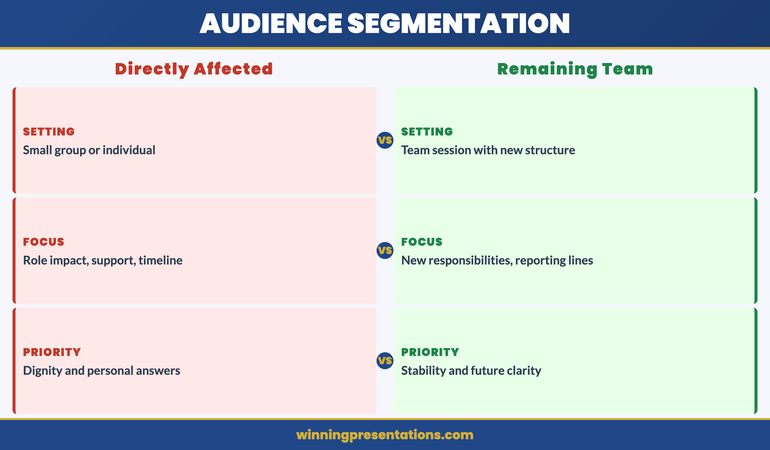
A restructuring affects multiple audiences, each with different concerns, different information needs, and different levels of vulnerability. Presenting the same message to all of them—a single all-hands announcement—is efficient and almost always damaging. The people being made redundant, the people staying in restructured roles, the people unaffected but watching, the leadership team responsible for implementation, and the external stakeholders (clients, investors, partners) all need different communications.

For the directly affected group, the presentation must be personal, specific, and delivered in a small-group or individual setting. They need to hear what is happening to their role, what the timeline is, what support is available, and who their point of contact will be for questions. A large-audience announcement denies them the dignity of a personal conversation and creates a public spectacle of private distress.

For the people remaining in restructured roles, the presentation focuses on what changes for them: new reporting lines, new responsibilities, revised team structures, and the timeline for stabilisation. Their primary anxiety is not about redundancy—it’s about whether the organisation they’re staying in will function well enough to justify staying. Address that directly.

For the broader organisation—the people not directly affected—the presentation must explain why the restructuring happened, what the organisation looks like afterwards, and what it means for them operationally. Their anxiety is lower but their cynicism is often higher: they’re watching how leadership treats the affected colleagues, and that observation shapes their long-term trust. If you’ve read our guide on restructuring presentations and team trust, you’ll recognise the critical role that visible fairness plays in organisational recovery.

Stakeholder audience segmentation framework for restructuring communications showing three audience groups and their communication needs

Framing the Strategic Rationale Without Corporate Jargon

Once the human cost is acknowledged and the support provisions are clear, the strategic rationale must follow. But the language matters enormously. Corporate jargon in a restructuring announcement—“right-sizing,” “synergy realisation,” “operational efficiency”—reads as evasion. It signals that the leadership team is hiding behind terminology rather than being direct about what’s happening and why.

The rationale should be expressed in three plain sentences. Sentence one: what has changed in the market or the organisation that made this restructuring necessary. Sentence two: what the restructured organisation will look like and why that structure is better positioned. Sentence three: what the leadership team has already done to minimise the impact on people. Three sentences. If you can’t explain the rationale in three sentences, you either don’t understand it fully or you’re trying to obscure something.

Avoid two common traps. The first is over-explaining—providing so much market context and competitive analysis that the rationale gets lost in data. Stakeholders experiencing change don’t need an MBA case study. They need to understand the logic simply enough to explain it to their families. The second trap is euphemism. Don’t say “we’re creating a more agile organisation” when you mean “we’re removing a layer of management.” Don’t say “some roles will be impacted” when you mean “fourteen people will be made redundant.” Direct language hurts in the moment but builds trust over time.

The most effective restructuring communicators—and Dimitri’s approach illustrates this—treat the rationale as context for a decision that’s already been made, not as justification for it. There’s a difference. Justification implies the leadership team is seeking approval from the audience. Context implies they’ve made a difficult decision and they’re explaining their reasoning honestly. Stakeholders respect the latter even when they disagree with the outcome.

The Timeline Slide: Certainty Where Possible, Honesty Where Not

After a restructuring announcement, the single most destructive force is uncertainty about timing. People can absorb bad news. They cannot absorb indefinite ambiguity. The timeline slide in your stakeholder change presentation must be as specific as possible about dates, and completely honest about what isn’t yet decided.

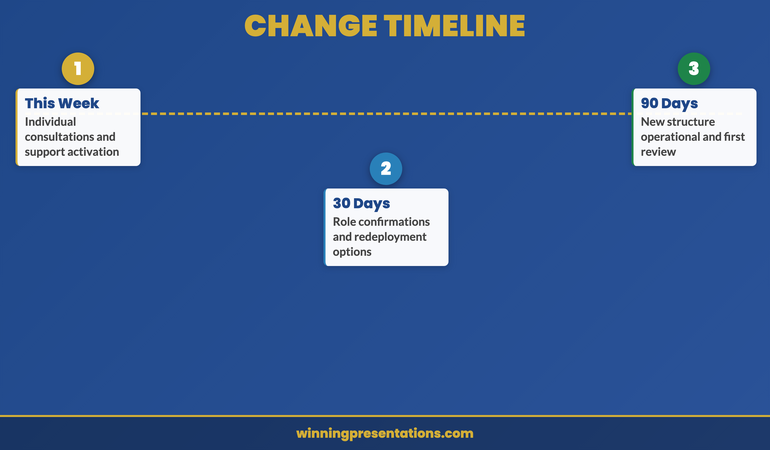
Structure the timeline in three phases. Phase one: what happens this week. Individual consultation meetings scheduled, support resources activated, FAQ document distributed. Phase two: what happens over the next thirty days. Consultation period, role confirmation for restructured positions, redeployment opportunities communicated. Phase three: what happens by ninety days. New structure operational, integration milestones, first review checkpoint.

For elements where dates are genuinely uncertain—regulatory approvals, union consultation outcomes, client contract negotiations—say so explicitly. “We expect this to be resolved by mid-May, but we’ll confirm the date by the end of next week” is far better than a vague “in due course.” Ambiguity in timelines is interpreted as either incompetence or concealment, regardless of the actual reason.

One detail that many leaders overlook: commit to a specific communication rhythm after the announcement. “I will send an update email every Friday until the restructuring is complete.” This single commitment reduces anxiety disproportionately, because it assures people that silence is not abandonment. The announcement presentation is the beginning of the communication, not the entirety of it. Our guide on how leaders can use redundancy announcement presentations covers the specific language and sequencing that preserves dignity during the most difficult conversations.

If you’re structuring a change communication for the first time, the Executive Slide System provides the structural templates that ensure every stakeholder audience receives the right message at the right moment.

Three-phase timeline framework for restructuring communication covering this week, thirty days, and ninety days

Preparing for the Questions You Hope Nobody Asks

In restructuring communications, the Q&A session is where trust is won or lost. The presentation itself is a controlled environment—you’ve chosen the words, the sequence, the framing. The questions that follow test whether the presentation was honest or merely polished.

Prepare for five categories of questions. The “why me” question: “How were the affected roles selected?” Your answer must reference objective criteria—not performance, not politics. Structural logic: “These roles existed to serve a function that the new structure addresses differently.” The “what next” question: “What happens if I don’t accept the redeployment offer?” Have the answer ready with specifics. The “trust” question: “How do we know there won’t be another round in six months?” Be honest: “I can’t guarantee that no further changes will ever be needed, but this restructuring is designed to be stable for [timeframe].” The “leadership accountability” question: “Are senior leaders being affected too?” If yes, say so specifically. If no, explain why—honestly. The “real reason” question: “Is this really about strategy, or is it about cutting costs?” Do not deflect. “Cost reduction is part of the rationale, yes. We need to operate within [budget/margin]. The structural changes also position us for [strategic goal]. Both are true.”

The questions you hope nobody asks are exactly the ones you must prepare for most thoroughly. If you’re visibly uncomfortable or evasive when they surface, every other message in your presentation unravels. Our guide on town hall presentations that rebuild trust covers the Q&A preparation framework in detail, including how to handle emotional responses without shutting them down.

After the Presentation: Follow-Through That Rebuilds Trust

The presentation is the beginning, not the end. What happens in the seventy-two hours after a restructuring announcement determines whether the trust you’ve worked to preserve actually survives. Three actions are non-negotiable.

Action 1: Individual conversations within 48 hours. Every affected person must have a private, face-to-face (or video) conversation with their direct manager or a senior leader within two working days. Not an email. Not a group session. A personal conversation where their specific situation is discussed, their questions are answered, and they are treated as an individual, not a headcount number.

Action 2: Written summary within 24 hours. Distribute a written document that captures everything said in the presentation. People under stress do not retain verbal information well. The written summary serves as a reference they can return to once the initial shock subsides. Include all support provisions, timelines, contact details, and the strategic rationale in plain language.

Action 3: Visible leadership presence. In the days following the announcement, the leadership team must be visibly present. Not hiding in offices. Not travelling. Walking the floor, eating in the canteen, being available for informal conversations. This is not about having more formal meetings. It’s about demonstrating that the leaders who made this decision are not detaching from its consequences.

Dimitri did all three. Within forty-eight hours, every affected team member had a private conversation. A written FAQ was distributed the same afternoon. Dimitri ate lunch in the main canteen every day for three weeks. Trust isn’t built by presentations. It’s built by what leaders do after the presentation ends.

Lead Through Change With Structured, Honest Communication

Restructuring requires precision in every slide and every word. The Executive Slide System gives you the communication frameworks, stakeholder templates, and scenario guides you need—for £39.

Get the System Now → £39

FAQ: Stakeholder Change Presentations

Should I announce a restructuring in one large meeting or multiple smaller sessions?

Multiple smaller sessions, segmented by audience. The directly affected group should hear the news in a small-group or individual setting before the wider organisation. This prevents the public spectacle of people learning their role is at risk in front of hundreds of colleagues. The broader all-hands session should follow within hours, not days—delays create a rumour vacuum that’s worse than the announcement itself. The key principle is that no stakeholder should learn about changes to their own role from someone outside their direct leadership chain.

How do I handle tears or emotional reactions during the presentation?

Do not rush past them, minimise them, or pretend they aren’t happening. Pause. Acknowledge the emotion directly: “This is a difficult conversation and your reaction is completely understandable.” Offer the person the option to continue or step out for a moment. Do not move to the next slide whilst someone is visibly distressed—it signals that the agenda matters more than the people. Have tissues, water, and a private space available. If the session is derailed by strong emotion, call a brief pause rather than pushing through. Emotional responses are not obstacles to the communication—they are part of it.

What if I don’t have all the answers at the time of the announcement?

Say so honestly, and commit to a specific date when you will have the answer. “I don’t have that information yet—we’re still working through the consultation process. I’ll have an answer by next Friday and will communicate it directly.” This is far better than guessing, hedging, or deflecting. Stakeholders during restructuring have finely calibrated sensors for evasion. An honest “I don’t know yet” followed by a specific commitment builds more trust than a vague reassurance that turns out to be inaccurate.

The Winning Edge

Weekly insights on executive presentations, slide strategy, and boardroom communication.

Subscribe Free

Leading through organisational change? Download the Executive Slide System checklist for a quick restructuring communication framework.

If your restructuring is driven by a merger or acquisition, our guide to mergers and acquisitions presentations covers the board-level deal presentation that typically precedes stakeholder communications.

About the author

Mary Beth Hazeldine, Owner & Managing Director, Winning Presentations. With 24 years of corporate banking experience at JPMorgan Chase, PwC, Royal Bank of Scotland, and Commerzbank, she advises executives across financial services, healthcare, technology, and government on structuring presentations for high-stakes funding rounds and approvals.

19 Mar 2026
Executive standing confidently in a modern boardroom presenting without any slides or screen behind them, speaking directly to a small group of senior leaders with full eye contact, navy and gold corporate aesthetic

Presenting Without Slides: When PowerPoint Hurts More Than It Helps

Quick Answer: Presenting without slides works best when your argument is simple, your audience is senior, and your credibility is already established. The format that replaces decks: a verbal three-part structure (context–recommendation–evidence) that forces sharper thinking and stronger eye contact. Most executives who try it never go back for certain meeting types.

Diagnostic — Should You Skip Slides for This Meeting? If your audience is five people or fewer, your recommendation fits in one sentence, and the meeting is under 20 minutes, slides are likely slowing you down. But if you’re presenting data, comparisons, or anything that requires visual evidence, you still need structure. The question isn’t “slides or no slides” — it’s “what format serves this specific room?”

See the decision framework for slide-free vs structured decks →

The Deck That Wasn’t There

A biotech company had a 47-slide investor deck. They’d spent three weeks refining it. Every data point was accurate. Every chart was clean. The lead scientist could walk through it backwards.

The investors gave them 12 minutes.

Twelve minutes for 47 slides. The team scrambled to cut content. They made it to slide 19 before the lead investor raised a hand and said: “Stop. What are you actually asking for, and why should we care?”

They came back the following week. No slides. The CEO stood up and said three sentences: “We’ve developed a diagnostic that catches pancreatic cancer 18 months earlier than current screening. We need £4.2 million to complete Phase II trials. If we succeed, the addressable market is £2.8 billion.” Silence. Then questions. Then a term sheet.

The slides hadn’t failed because they were badly designed. They’d failed because the room didn’t need visual evidence — it needed verbal clarity. That’s the distinction most executives miss when deciding on their presenting without slides format.

When Slides Actually Hurt Your Credibility

Slides create a psychological contract with your audience. The moment a deck appears on screen, the room shifts from “I’m listening to a person” to “I’m reading a document someone is narrating.” That shift is often exactly what you want — data needs visual support, comparisons need side-by-side displays, complex processes need diagrams.

But there are situations where that psychological shift works against you.

When you’re the authority in the room. If you’re the CFO updating the board on financial performance, a deck says “I’ve prepared evidence for your review.” Standing and speaking without one says “I know this material so well I don’t need a crutch.” The second posture communicates command. Senior executives intuitively respect the verbal-only approach because it signals mastery.

When the meeting is about a single decision. Slides encourage comprehensiveness. They make you want to show the full picture. But a decision meeting needs focus: here’s the recommendation, here’s why, here’s what happens if we don’t. Three verbal points. Done. Adding slides adds complexity to something that should be surgically simple.

When trust is the deliverable. Post-crisis updates, team morale conversations, stakeholder concerns — these are moments where human connection matters more than information density. Slides create distance. Your voice, your eye contact, your pauses create proximity.

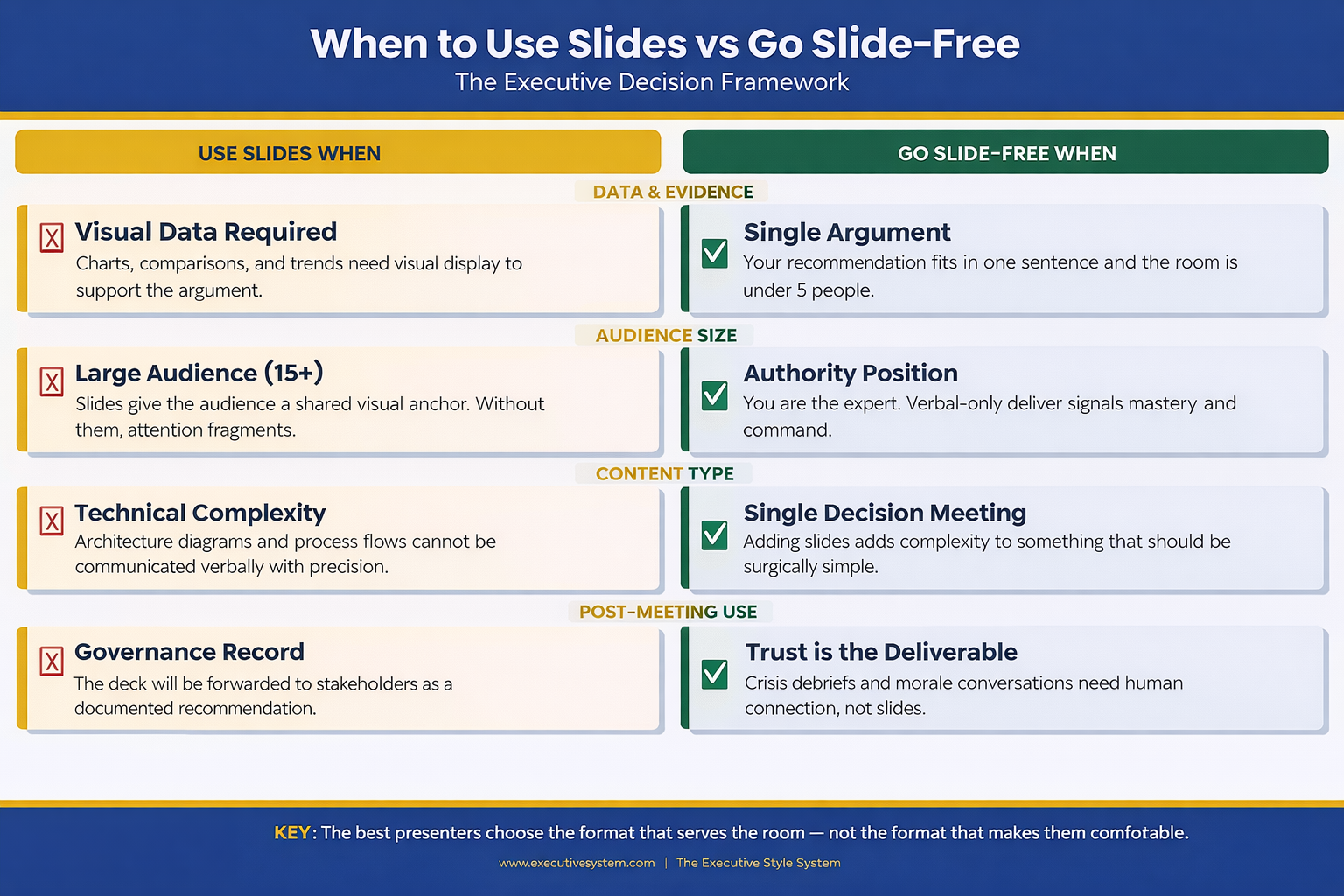
 Decision framework infographic showing four categories where slides help versus four categories where going slide-free is more effective for executive presentations including data evidence audience size content type and post-meeting use

The Verbal Structure That Replaces a Deck

Going slide-free doesn’t mean going structure-free. The executives who do this well use a verbal architecture that’s actually more disciplined than most decks.

It’s called the Context–Recommendation–Evidence framework, and it works like this:

Context (30 seconds): Name the situation. Not a history lesson. Not background. One sentence that frames why everyone is in this room right now. “We have three weeks until the regulatory deadline and we’re behind on two of the four compliance workstreams.”

Recommendation (15 seconds): State what you think should happen. Don’t build to it. Don’t warm up. Say it. “I recommend we pause the product launch by two weeks and redirect the dev team to compliance.”

Evidence (2–4 minutes): Now support it. This is where most people want to put slides. Instead, use verbal signposting: “Three reasons. First…” Give each reason a number. Give each reason a name. “First, the regulatory risk. If we miss the deadline, the fine is estimated at £1.2 million.” Numbers spoken aloud land harder than numbers on a slide because the audience has to process them actively, not passively read them.

Then stop. Ask for questions. The entire presentation takes under five minutes. Most executive decisions are made in the first 90 seconds of a presentation — the remaining time is evidence and challenge. This structure front-loads the decision and respects the room’s time.

This verbal structure also solves a problem many people don’t notice until it’s too late: when you present with slides, your audience reads ahead. They’re on slide 7 while you’re explaining slide 4. Without slides, you control the pace. Every word lands in sequence. Nothing gets skipped.

The Slide-Free Structure for Executive Meetings

The Executive Slide System includes the Context–Recommendation–Evidence framework as a verbal playbook — plus the decision tree for when to use slides and when to ditch them. You’ll know before you walk in whether this meeting needs a deck or a conversation.

  • The verbal architecture template: Context–Recommendation–Evidence with timing for each section
  • Decision matrix: slides vs no-slides for 12 common meeting types (board, QBR, budget, strategy, client pitch, all-hands)
  • The one-slide hybrid format for meetings that need a visual anchor without a full deck
  • Verbal signposting script — how to replace slide transitions with spoken structure

Get the Executive Slide System → £39

Built from 24 years of corporate banking presentations at JPMorgan Chase, PwC, Royal Bank of Scotland, and Commerzbank — where many of the highest-stakes decisions happened without a single slide.

Five Scenarios Where No Slides Wins

Not every meeting deserves a deck. Here are five where you’re better off without one — and the verbal approach that works for each.

1. The executive update (under 10 minutes). You’re updating the leadership team on project status, budget burn, or timeline. The room already has context. They don’t need slides — they need a concise verbal summary and your recommendation on any open decisions. Use the CRE framework. Three minutes, maximum.

2. The one-on-one with your manager. You’re asking for headcount, budget, or a project pivot. Slides make this feel like a pitch instead of a conversation. Sit across the table. Make your case verbally. Let the discussion flow. You’ll get better engagement and faster answers.

3. The crisis debrief. Something went wrong. The team needs to hear from leadership. Opening a laptop and displaying slides signals “I’ve prepared a narrative” when what the room wants is “I’m here, I understand what happened, and here’s what we’re doing about it.” Speak from notes if you must, but keep the screen dark.

Speaking of difficult moments — if you’ve ever walked out of a room feeling the weight of a presentation that didn’t land, the shame spiral after a bad presentation is a real phenomenon, and it has nothing to do with your slides.

4. The team alignment meeting. You’re aligning three departments on priorities for the quarter. This is a facilitation exercise, not a presentation. Slides turn it into a lecture. Instead, write three questions on a whiteboard (physical or virtual) and facilitate discussion. You’ll leave with genuine alignment instead of passive head-nodding.

5. The board check-in (informal). Not the formal board meeting — the informal check-in between meetings where the chair wants a candid update. Slides here feel over-prepared. The chair wants your judgement, not your formatting skills. Speak to three priorities. Answer questions. Leave.

Know exactly when to skip the deck and when to build one?

Get the Decision Framework → £39

When You Still Need Slides (Don’t Kid Yourself)

The slide-free approach has real limits. Ignoring them will cost you credibility just as fast as overusing slides.

You need slides when data tells the story. Financial comparisons, trend lines, market analysis, competitive positioning — these are visual arguments. Describing a chart verbally is like describing a painting over the phone. The audience needs to see it. If your presentation relies on numbers, graphs, or comparisons, build the deck.

You need slides when the audience is large. More than 15 people in the room? Slides give the audience a shared visual anchor. Without them, attention fragments. People hear different things. The deck provides a single source of truth that everyone references.

You need slides when the content is technical. Architecture diagrams, process flows, system dependencies — these cannot be communicated verbally with the precision they require. If someone needs to reference what you said after the meeting, slides create that artefact.

You need slides when the decision requires sign-off. Formal approvals often require a documented recommendation. The deck becomes the record. It gets forwarded to stakeholders who weren’t in the room. It gets attached to the board minutes. In these cases, the slides aren’t a presentation aid — they’re a governance document.

The key distinction: slides serve the audience, not the presenter. If you’re using slides because they make you feel more prepared, that’s a confidence issue, not a communication strategy. If you’re using slides because the audience genuinely needs visual information to make a decision, that’s good judgement. Understanding how executive presentation structure works helps you make this call correctly every time.

People Also Ask: Can you present to a board without slides?

Yes — but only for informal check-ins, relationship updates, or verbal-only agenda items. Formal board presentations almost always require a documented deck because it serves as a governance record. The exception: if the board chair specifically requests a verbal update, honour that preference. The verbal CRE framework gives you structure without slides.

People Also Ask: How do you structure a presentation without visual aids?

Use the Context–Recommendation–Evidence framework. Open with one sentence of context. State your recommendation immediately. Then support it with three numbered evidence points. The verbal signposting (“three reasons — first, second, third”) replaces slide transitions and keeps the audience tracking your argument.

People Also Ask: Is it unprofessional to present without PowerPoint?

In many executive settings, it signals the opposite — confidence and mastery. Presenting without slides in the right context communicates that you know the material well enough to speak without support. The perception of unprofessionalism comes from being unstructured, not from being slide-free. Structure your verbal delivery and you’ll be perceived as more authoritative, not less.

Stop Building Decks That Don’t Serve the Room

The Executive Slide System teaches you when to build and when to walk in with nothing but your argument — and gives you the verbal structure to do both confidently.

  • 12-scenario decision matrix (deck vs no-deck vs hybrid)

Get the Executive Slide System → £39

Designed for executives who present weekly and need to know — instantly — whether this meeting needs a full deck, one slide, or nothing at all.

The Hybrid Approach: One Slide, Maximum Impact

There’s a middle ground that most presenters never consider: the single-slide presentation.

One slide. Not a title slide. Not an agenda. One visual that anchors your entire argument. It might be a single chart that proves your point. A timeline that shows the critical path. A comparison table with three rows. One visual, displayed for the entire meeting, while you speak around it.

This works brilliantly for budget requests, strategic recommendations, and project status updates. The slide provides the visual evidence while your voice provides the narrative. You get the best of both approaches: the authority of speaking without support and the clarity of a visual anchor.

The single-slide approach also solves the “read-ahead” problem. There’s nowhere for the audience to skip to. Their eyes are on one visual. Their ears are on you. Full attention, no fragmentation.

One executive I worked with took this approach to every leadership meeting for a year. Same format: one slide with three numbers (revenue, burn rate, runway), spoken narrative around them. Her leadership team started calling it “the truth slide.” It became the most efficient meeting format in the company because everyone knew exactly what to expect.

Understanding how pacing and rhythm keep executives engaged is critical here — the single-slide format only works if your verbal delivery carries the weight. The Executive Slide System (£39) includes the one-slide hybrid template with delivery notes for exactly this approach.

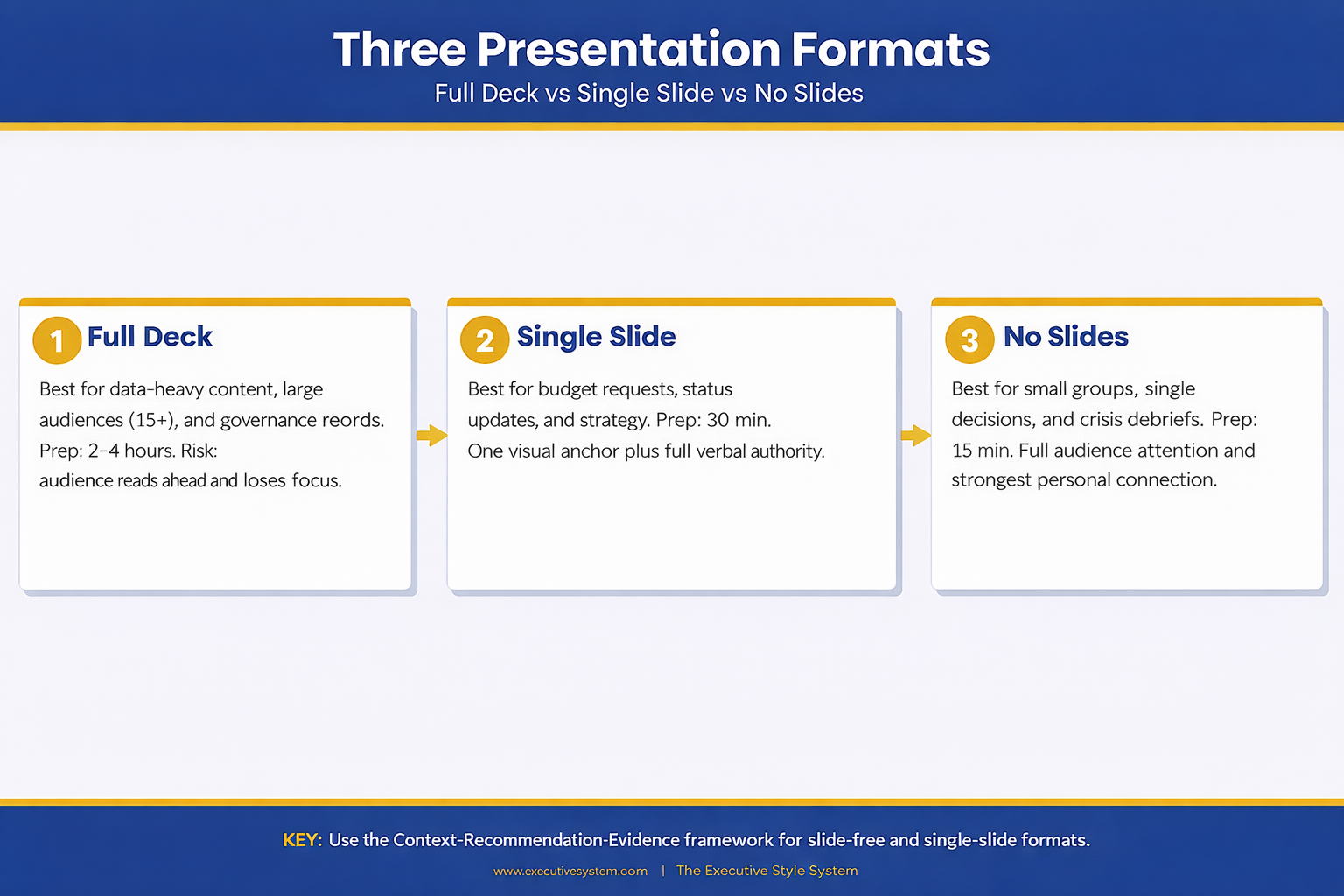
Three-column comparison infographic showing full deck versus single slide versus no slides approach with preparation time benefits and ideal meeting types for each presentation format

Want the one-slide hybrid template?

Get the Executive Slide System → £39

Making the Call Before Your Next Meeting

The decision to present with or without slides should happen before you open PowerPoint. Once you start building, momentum takes over. You add one more chart, one more backup slide, one more appendix — and suddenly you’ve spent four hours on a deck for a 10-minute conversation.

Before your next meeting, ask three questions: Does this audience need visual evidence to make a decision? Is the room larger than 15 people? Will this presentation be forwarded to people who weren’t there? If the answer to all three is no, consider leaving the laptop closed.

The best presenters aren’t the ones with the most polished slides. They’re the ones who know when slides serve the room and when they get in the way. That judgement — knowing the right format for the right moment — is what separates executives who communicate effectively from those who just create decks. And when you do need the right format for a strategy presentation, having a proven structure saves hours.

When the stakes are high and you need to answer questions on the fly, your format choice matters even more. Evidence-first answers build trust faster than any slide ever could — whether you’re presenting with a deck or without one.

Your next presentation might not need a single slide. The Executive Slide System (£39) gives you the framework to decide — and the structure for whichever format you choose.

Is This Right For You?

✓ This is for you if:

  • You present to senior audiences weekly and suspect half your decks aren’t needed
  • You spend hours building slides for meetings that end in 10 minutes of conversation
  • You want a verbal framework that’s as structured as a deck but faster to prepare
  • You’re presenting a single recommendation and want maximum impact without visual clutter

✗ Not for you if:

  • Your presentation relies on data visualisation, comparisons, or technical diagrams — you need slides
  • Your audience is larger than 15 people and needs a shared visual anchor
  • The presentation will be forwarded as a governance record — you need a documented deck

Every Format. One System. 30 Minutes to Prepared.

The Executive Slide System covers every presentation format: full decks, single-slide hybrids, and verbal-only structures. You get the decision framework, the templates, and the delivery scripts — so you walk into every meeting knowing exactly which approach will land.

  • 22 PowerPoint templates for when you do need slides — pre-built for executive scenarios
  • The verbal CRE framework with timing, signposting scripts, and practice prompts
  • The one-slide hybrid template (the “truth slide” format)
  • 51 AI prompt cards to build any deck in under 30 minutes when a full presentation is required

Get the Executive Slide System → £39

Used by executives across banking, biotech, and professional services who present multiple times per week and need the right format every time — not just the same deck recycled.

Frequently Asked Questions

What if my manager expects slides and I show up without them?

Set expectations in advance. Send a brief message: “For Thursday’s update, I’ll walk through the three priorities verbally rather than a deck — wanted to make the most of our 15 minutes.” Most managers welcome this if the verbal delivery is structured. If your manager insists on slides, use the one-slide hybrid: one visual anchor with a verbal narrative around it.

How do I handle follow-up requests if there’s no deck to share?

Send a one-page written summary after the meeting. Three paragraphs: what was discussed, what was decided, what happens next. This takes five minutes to write and serves as a better record than a 20-slide deck that nobody will re-read. Some executives find the summary more useful than the original deck because it captures the actual conversation, not just the prepared content.

Won’t I forget my points without slides to guide me?

That’s the point. If you can’t remember your argument without visual prompts, the argument isn’t clear enough yet. The CRE framework forces clarity: one sentence of context, one recommendation, three evidence points. If you can’t hold that in your head, simplify the argument until you can. The discipline of going slide-free makes you a sharper thinker.

Does this work for virtual presentations on Zoom or Teams?

Yes, with one modification. In virtual meetings, your face replaces the slide as the visual anchor. Keep your camera on, maintain eye contact with the lens, and use verbal signposting even more deliberately (“I’m going to cover three things — first…”). Without slides to share, the screen shows your face, which is actually more engaging for audiences under 10 people.

Your Next Meeting Is the Test

You have a meeting this week where slides aren’t necessary. You already know which one it is. The question is whether you’ll trust your verbal delivery enough to walk in without a deck — and whether you have the structure to make it land.

Close the laptop. Open with context. State your recommendation. Support it with three evidence points. Stop. The room will follow you.

Stay Updated

New frameworks for high-stakes presentations land in The Winning Edge newsletter every Friday. Subscribe for frameworks you can use immediately.

🆓 Free resource: Free PDF — a free guide to strengthen your presentation preparation.

About the Author

Mary Beth Hazeldine is the Owner & Managing Director of Winning Presentations. With 24 years of corporate banking experience at JPMorgan Chase, PwC, Royal Bank of Scotland, and Commerzbank, she has delivered high-stakes presentations in boardrooms across three continents.

A qualified clinical hypnotherapist and NLP practitioner, Mary Beth combines executive communication expertise with evidence-based techniques for managing presentation anxiety. She has trained thousands of executives and supported high-stakes funding rounds and approvals.

Book a discovery call | View services

28 Feb 2026
Senior executive standing protectively with team working behind him during corporate reorganisation

Your Department Is on the Chopping Block. Here’s the Reorg Presentation That Protects Your Team.

I watched a director lose his entire 14-person team in a reorg at RBS. Not because they weren’t performing — they were one of the strongest units in the division. He lost them because when leadership asked every department head to present their case for survival, he showed up with a 22-slide activity report. His colleague across the hall showed up with 6 slides that connected every team output to a revenue line. Guess whose team survived.

Quick Answer: During a restructure, your presentation isn’t an update — it’s a defence case. You need to prove three things in under 15 minutes: what your team protects (revenue, clients, institutional knowledge), what breaks if you’re cut (specific costs, delays, and risks), and what your team delivers in the new structure that nobody else can. The executives making reorg decisions have 8-12 of these presentations to sit through. They’re looking for reasons to consolidate. Don’t give them one.

🚨 Restructure announced and your department is at risk? Quick 60-second check: Can you name, right now, three specific revenue lines your team protects? Can you quantify what happens to those lines if your team is dissolved? If you can’t answer both, your survival presentation has a gap.

→ Need the exact reorg deck templates? Get the Executive Slide System (£39)

In my years at JPMorgan and later at Commerzbank, I lived through four major restructures. The first one, I was junior enough to just keep my head down. By the third and fourth, I was helping directors prepare their cases.

What I noticed was brutal in its consistency: the leaders who survived weren’t always the ones running the best teams. They were the ones who could articulate why their team mattered — in the language the decision-makers cared about. Revenue protection. Client retention risk. Regulatory exposure. Cost of transition.

One director I worked with at Commerzbank had 48 hours’ notice before presenting to the integration committee. She didn’t have time to build a polished deck from scratch. But she had a structure — a framework for proving value under pressure. She kept every single person. The director next door, who’d had the same notice and arguably a stronger team, lost six of his twelve.

The difference wasn’t the team’s performance. It was the presentation’s structure.

Why Activity Reports Get Teams Killed in Reorgs

Here’s what happens when a restructure is announced: every department head is asked — formally or informally — to justify their team’s existence. Most leaders default to what they know. They pull together a deck that shows everything their team has been doing. Projects completed. Initiatives underway. Headcount and budget utilisation.

This is an activity report. And it’s the single most dangerous thing you can present during a reorg.

Why? Because the people evaluating you aren’t asking “What does your team do?” They’re asking “What happens if your team doesn’t exist tomorrow?” Those are fundamentally different questions, and an activity report answers only the first.

Activity reports also invite comparison. If you list 12 projects and the team being considered for merger lists 15, you’ve handed leadership a reason to combine you — or worse, absorb your work into their headcount. You’ve turned your survival case into a feature list, and feature lists get consolidated.

How do you present during a restructure? You present a value case, not an activity report. A value case answers three questions: what you protect, what breaks without you, and what you deliver next. Everything else is background noise that gives decision-makers permission to cut.

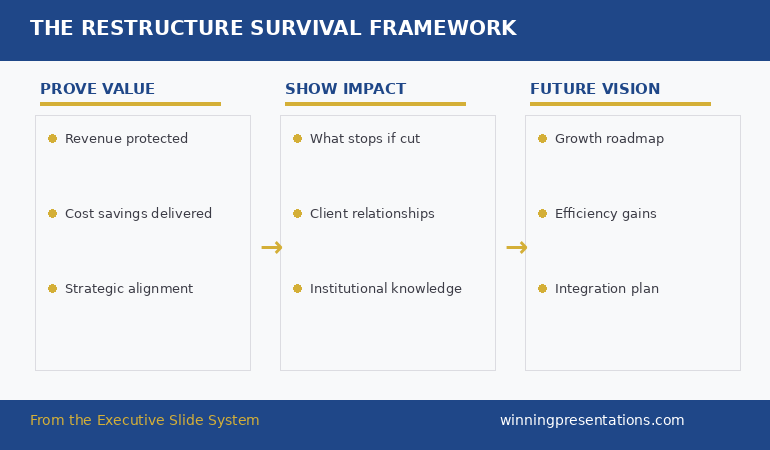
The Three-Pillar Framework: Value, Impact, Vision

Every reorg survival presentation needs to rest on three pillars. Miss one and your case has a structural weakness that leadership will find — or worse, that a rival department head will point out.

Pillar 1: Value Protection. This is the anchor slide. What revenue, clients, or regulatory obligations does your team currently protect? Not “manage” — protect. The language matters. “We manage £8M in client accounts” is passive. “We protect £8M in annual recurring revenue across 14 enterprise clients, three of whom are in active contract renewals” is a value statement that makes cutting you feel dangerous.

Pillar 2: Cost of Disruption. This is where most presentations fail because leaders are uncomfortable quantifying negative outcomes. But this is exactly what the decision-makers need. What happens to those 14 clients during a 6-month transition? What institutional knowledge walks out the door? What deadlines get missed? Be specific. “Client relationship risk” is vague. “Three contract renewals worth £2.4M are due in Q3 — our account leads have managed these relationships for 4+ years” is a number that makes the finance director pause.

Pillar 3: Future Value. This is where you stop defending and start building. What does your team deliver in the new structure that no other unit can? This is your forward-looking slide, and it should connect directly to whatever strategic priorities the restructure is supposedly serving. If the reorg is about efficiency, show your efficiency roadmap. If it’s about growth, show your growth plan. Mirror their language back to them.

The restructure survival framework showing three pillars: prove value, show impact, and future vision for reorg presentations

The Restructure Deck That Proves Your Team’s Value in 6 Slides

Your department is at risk. You don’t have weeks to figure out the right structure. The Executive Slide System gives you:

  • The executive summary template — pre-built for high-stakes survival presentations where the first slide determines whether they keep listening
  • The strategic recommendation framework — connects your team’s output directly to revenue and risk lines leadership cares about
  • 51 AI prompts to draft your reorg defence deck in under 90 minutes — including prompts that generate cost-of-disruption analysis
  • The scenario playbook — step-by-step guidance for exactly this situation

Get the Executive Slide System → £39

Built from restructure presentations at JPMorgan, RBS, and Commerzbank — including integration committees where entire departments were at stake.

The ‘Cost of Cutting Us’ Slide Nobody Thinks to Build

This single slide has saved more teams in reorgs than any amount of “we’re a great team” messaging. And almost nobody builds it.

The Cost of Cutting slide works because it reframes the conversation. Instead of asking leadership to reward you for past performance (which feels like entitlement during a cost-cutting exercise), you’re asking them to calculate the risk of removing you (which feels like financial due diligence).

Here’s what goes on this slide:

Transition costs: How long does it take to redistribute your team’s work? What does that cost in contractor hours, overtime, or delayed deliverables? Be specific — “6-month transition at an estimated £180K in temporary staffing” is harder to dismiss than “it would take time.”

Client continuity risk: Which client relationships are personally held by your team members? What’s the revenue at risk if those relationships reset during a transition period? Any contract renewals coming up that require continuity?

Knowledge loss: What does your team know that isn’t documented? Systems, processes, client preferences, regulatory history. This is often the most compelling argument because institutional knowledge is genuinely irreplaceable in the short term.

Regulatory or compliance exposure: Does your team hold any regulatory responsibilities that can’t be easily transferred? In financial services, this alone has saved departments from the axe.

If you’re building a reorg survival deck this week, the Executive Slide System includes the strategic recommendation and budget request templates that work perfectly as a cost-of-disruption framework — with AI prompts to populate them fast.

The Institutional Knowledge Argument That Stops Mergers

What should you include in a reorg survival presentation? Beyond revenue and cost metrics, the institutional knowledge argument is the one that most frequently changes minds in the room — because it’s the one thing that can’t be solved with money or time.

I worked with a director at PwC whose team was being considered for a merger with a larger consulting unit. On paper, the merger made sense — the combined team would have broader capability and lower per-head cost. The numbers favoured consolidation.

But she built one slide that changed the conversation: a map of every key client relationship her team held, with the length of each relationship and the specific institutional knowledge attached to it. Three clients had been with her team for 7+ years. Two had regulatory requirements that her team members understood because they’d been involved since the original compliance build.

The merger was restructured to keep her team intact as a sub-unit rather than dissolving them. That single slide — client relationships mapped to institutional knowledge — was the reason.

If your team holds knowledge that can’t be transferred in a document, build a slide that shows it. Name the relationships. Quantify the tenure. Map the dependencies. Make the cost of losing that knowledge feel real and immediate.

What Leadership Actually Evaluates in Reorg Presentations

Having sat through reorg evaluation meetings from the other side of the table, I can tell you what the decision-makers are actually scoring — and it’s not what most presenters think.

They’re not comparing team performance. They’re comparing strategic fit. The question isn’t “which team performed better last year?” It’s “which configuration of teams best serves where we’re going?” If your presentation only looks backward, you’re answering the wrong question.

They’re looking for leaders who get it. When a director presents their team’s case and it’s clear they understand the strategic rationale for the reorg — even while arguing against their own team’s dissolution — that signals executive maturity. Leaders who resist the reorg as a concept rather than making a strategic case within it tend to lose.

They’re watching for cost awareness. If you present your team’s value without once mentioning cost, you look detached from the financial reality driving the restructure. Include your team’s cost base, then show the ROI. “This team costs £620K fully loaded and protects £4.2M in revenue” is a ratio that speaks for itself.

How do you prove your team’s value during reorganisation? Prove it in the language of the restructure’s goals. If the reorg is about cost reduction, prove your team’s cost efficiency. If it’s about strategic focus, prove your team’s alignment to the new direction. Mirror the decision criteria back to the decision-makers.

Stop Going Into Reorg Meetings With an Activity Report

Activity reports get departments consolidated. Value cases get them protected. The Executive Slide System gives you the structure that keeps teams intact:

  • 22 executive templates (15 executive + 7 framework) — including the strategic recommendation format that reframes activity as value
  • 15 scenario playbook pages — with step-by-step guidance for exactly this kind of high-stakes survival presentation
  • 6 checklists and guides — including the before-you-present audit that catches the gaps leadership will exploit

Get the Executive Slide System → £39

The same structure used in integration committees at global banks — where department survival depended on six slides, not sixty.

The leaders who survive restructures aren’t the ones with the longest track record — they’re the ones who present their case in the format leadership is evaluating. The Executive Slide System gives you that format, pre-built and ready to populate.

How to Structure Your Reorg Deck in 90 Minutes

You probably don’t have days to prepare this. Most reorg timelines give department heads a week at best, and you’ve got a day job running alongside. Here’s how to build a credible survival deck in 90 minutes.

Minutes 1-15: The executive summary slide. One slide. Your recommendation (keep the team), three supporting reasons (one sentence each), and the specific ask (what you need leadership to decide). This slide goes first. If you only get 3 minutes instead of 15, this slide carries the whole case. Use the executive summary slide structure — recommendation first, evidence second.

Minutes 15-40: The value protection slide. Map every revenue line, client relationship, and strategic deliverable your team owns. Connect each to a number. This is your Pillar 1.

Minutes 40-60: The cost-of-disruption slide. Quantify what happens if your team is cut. Transition costs, client risk, knowledge loss, regulatory exposure. This is your most powerful slide — build it carefully.

Minutes 60-75: The future value slide. Show what your team delivers in the new structure. Connect it to the stated goals of the reorganisation.

Minutes 75-90: The ask slide and review. State the specific decision you want. “Retain the team as a standalone unit” or “Preserve the core team of 8 within the new structure.” Be explicit. Then review the whole deck once for clarity and remove anything that doesn’t directly support the case.

That’s 5-6 slides built in 90 minutes. If your company’s restructure has been announced and your team is at risk, you can find more about the presentation structure to defend your funding when finance wants cuts.

Is the Executive Slide System Right for Your Reorg Presentation?

This is for you if:

  • Your company has announced a restructure and your department is at risk of being merged, downsized, or dissolved
  • You’ve been asked (formally or informally) to present your team’s case to leadership
  • You need a credible deck structure fast — not in two weeks, but this week
  • You want to present a value case, not an activity report

This is NOT for you if:

  • You’re the one delivering the reorg announcement (see: restructuring announcement presentation)
  • You’re looking for HR templates for restructuring communications
  • Your team’s position is already confirmed safe

24 Years of Restructure Presentations at JPMorgan, RBS, and Commerzbank. Now Available as Templates.

I’ve been on both sides of restructure decisions — presenting my team’s case and evaluating other departments’ presentations. The Executive Slide System is built from what actually works in those rooms:

  • 22 templates covering every executive presentation scenario — including the exact formats used in integration committees and restructure evaluations
  • 51 AI prompts that draft your survival deck in under 90 minutes
  • The scenario playbook — step-by-step guidance for high-pressure situations where your team’s existence is on the line

Get the Executive Slide System → £39

Instant download. Start building your reorg deck today.

Frequently Asked Questions

What if I don’t have hard data to prove my team’s impact?

Use proxy metrics. If you can’t show direct revenue, show what your team enables: “We process 340 client requests per month — average resolution time 2.4 hours. Industry benchmark for outsourced handling is 8+ hours.” If your team’s value is in speed, reliability, or institutional knowledge, quantify those. Decision-makers need numbers, but they don’t have to be revenue numbers.

How much time do I realistically have to prepare?

In my experience across four restructures, department heads typically get 5-10 working days between the announcement and the evaluation meetings. Some get less. The 90-minute deck structure above is designed for exactly this constraint — it gives you a credible case fast, then you refine if time allows.

What if my boss is the one proposing the restructure that eliminates my team?

This is more common than people think. Your presentation needs to go above your boss to whoever is making the final decision. Frame your case in terms of organisational risk, not personal loyalty. The cost-of-disruption argument works regardless of who proposed the reorg because it’s about financial impact, not politics.

Should I involve my team in preparing the presentation?

Selectively. Your team members are your best source of data — they know the client relationships, the institutional knowledge, the dependencies. But be careful about creating anxiety. Ask for specific information (“Can you list every client relationship you manage and the annual value?”) rather than announcing “We need to fight for our survival.” Get the data you need without triggering panic.

The Winning Edge Newsletter

Weekly strategies for executive presentations that get decisions, approvals, and buy-in. Trusted by thousands of executives.

Subscribe free →

Optional free resource: Executive Presentation Checklist — a pre-meeting audit to stress-test your reorg deck.

Also today: If you’re also facing the Q&A after your reorg presentation, read how AI can help you predict and prepare for every hard question before you walk in the room.

The restructure has been announced. The evaluation meetings are coming. Your team is watching to see what you do next. Build the deck that keeps them together.

→ Get the Executive Slide System (£39) and start building your reorg deck today.

About the Author

Mary Beth Hazeldine is the Owner & Managing Director of Winning Presentations. With 24 years of corporate banking experience at JPMorgan Chase, PwC, Royal Bank of Scotland, and Commerzbank, she has delivered high-stakes presentations in boardrooms across three continents.

A qualified clinical hypnotherapist and NLP practitioner, Mary Beth combines executive communication expertise with evidence-based techniques for managing presentation anxiety. She has trained thousands of executives and supported presentations for high-stakes funding rounds and approvals.

Book a discovery call | View services

20 Feb 2026
Professional woman in navy blazer presenting compensation data on laptop screen to senior male executive in glass-walled boardroom

Presenting to the Person Who Will Decide Your Bonus (What Most Professionals Get Wrong)

Quick answer: Presenting to your boss about compensation is not a negotiation — it’s an executive presentation. The professionals who get better outcomes treat it like a boardroom pitch: lead with impact, not with an ask. Structure your slides using a Value-First framework that positions what you’ve delivered before the compensation question even surfaces. Most people do it backwards — they open with what they want instead of what they’ve earned.

The Compensation Conversation I Almost Ruined at JPMorgan

I walked into my manager’s office with a number in my head and nothing on paper.

This was early in my banking career at JPMorgan Chase. I’d delivered three major client presentations that quarter, each one securing significant renewals. I knew I deserved a better bonus. What I didn’t know was how to make that case without sounding like I was complaining.

So I did what most people do: I started talking about what I wanted. My manager listened politely, said he’d “look into it,” and nothing changed.

Six months later, a colleague in the same team got a significantly better outcome. The difference? She’d walked in with three slides. Not a deck — three slides. One showed her client retention numbers. One showed the revenue she’d influenced. The third showed her next-quarter pipeline. She never mentioned money once. Her manager brought it up.

That was the moment I understood: presenting to the person who decides your compensation isn’t a conversation. It’s a presentation. And the structure matters more than the ask.

After 24 years in corporate banking — across JPMorgan, PwC, Royal Bank of Scotland, and Commerzbank — I’ve seen this pattern play out in every team I’ve worked with. The people who present their value well get rewarded. The people who just “have a chat” get told to wait.

The difference isn’t talent or timing. It’s structure. And the professionals who consistently get recognised for their contributions all do the same thing: they present evidence before they present an ask. They make it easy for their manager to fight for them in the room where compensation decisions actually happen — which is rarely the room you’re sitting in. Here’s the framework I now teach to executives preparing for one of the highest-stakes presentations of their career — and one that most people never think to prepare for at all.

Stop Winging Your Most Important Presentation

The Executive Slide System gives you the exact slide structures that position your value before anyone has to ask. Built from 24 years of boardroom experience.

Get the Executive Slide System → £39

Built from 24 years in banking and consulting environments. Used in board updates, steering committees, and decision meetings.

Why Most Compensation Presentations Fail Before Slide 2

The biggest mistake isn’t asking for too much. It’s starting with the ask.

When you open a compensation conversation with “I’d like to discuss my bonus,” you’ve immediately put your manager in a defensive position. They’re now thinking about budget constraints, team equity, and how to manage your expectations — before you’ve given them a single reason to fight for you.

This is the same pattern I saw repeatedly across my years at PwC and Commerzbank. The professionals who struggled with compensation conversations all made the same structural error: they treated the meeting like a negotiation instead of a presentation.

Here’s what that looks like in practice:

❌ Wrong opening: “Thanks for making time. I wanted to discuss my compensation for this year. I’ve been here three years and I feel like my salary doesn’t reflect my contribution.”

✅ Right opening: “Thanks for making time. I put together a brief overview of what I’ve delivered this quarter and where I see the biggest opportunities next quarter. I’d value your perspective.”

The first version puts your manager on the back foot. The second gives them something to work with — and a reason to listen.

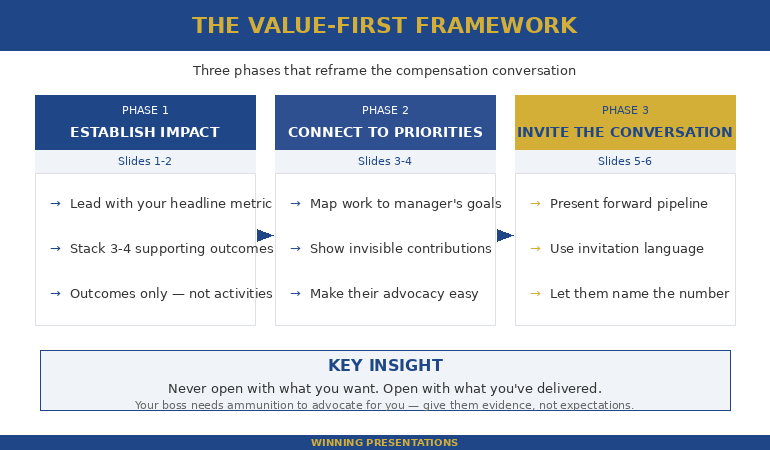
Value-First framework for presenting to boss about compensation showing three phases: establish impact, connect to priorities, then invite the conversation

The Value-First Framework for Presenting to Your Boss About Compensation

The framework that consistently works for compensation presentations has three phases — and none of them start with money.

Phase 1: Establish Impact (slides 1-2). Open with what you’ve delivered in the current period. Not activities — outcomes. Not “I worked on the Q3 client review.” Instead: “Q3 client review retained £1.2M in renewals.” If you don’t have revenue numbers, use time saved, problems prevented, or stakeholders influenced. Your boss thinks in these units.

Watch the difference:

❌ Wrong: “I’ve been really busy this quarter. I worked on the client review, the onboarding project, and helped with the team offsite.”

✅ Right: “Three outcomes this quarter: £1.2M in retained client revenue, 40% faster onboarding cycle, and the new team structure that reduced escalations by half.”

The first is a list of activities. The second is a portfolio of results. Your boss can take the second version into their own review meeting. They can’t do anything with the first.

Phase 2: Connect to Their Priorities (slides 3-4). Show how your work maps directly to what your manager is measured on. Every manager has 3-4 things their boss asks them about. If your contributions connect to those things, you’ve just made it easy for your manager to justify your compensation — not to you, but to the person above them.

This is exactly the kind of structure the Executive Slide System helps you build — slide-by-slide frameworks that make your case before anyone has to ask.

Get the Executive Slide System → £39

Phase 3: Invite the Conversation (slides 5-6). You don’t ask for a number. You present your forward-looking value and let the compensation discussion emerge naturally. “Given the pipeline I’m building for Q2, I’d value your perspective on how my contribution is being recognised.” That’s not an ask — that’s an invitation. It works because your boss has just seen the evidence.

The 6-Slide Structure That Reframes the Entire Conversation

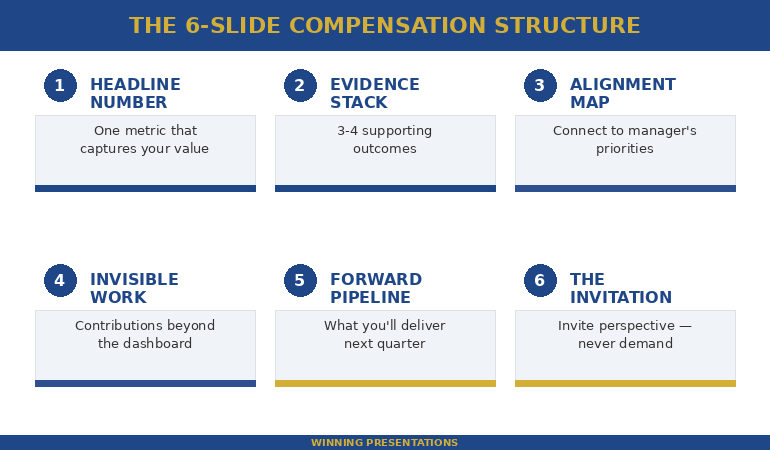
Here’s the exact slide-by-slide breakdown I recommend to executives preparing to present to the person who controls their compensation. Each slide has one job. No more.

Slide 1 — The Headline Number. One metric that captures your contribution this period. Not a paragraph. One number with context.

❌ Wrong slide 1 title: “Compensation Review Discussion — Q1 2026”

✅ Right slide 1 title: “£1.2M Retained Revenue From Three Client Renewals I Led”

The wrong version announces what you want. The right version announces what you’ve delivered. Your boss reads the second title and immediately thinks: “This person knows their value.” That’s the frame you want before a single word is spoken. This is your executive summary slide — the one that frames everything after it.

Slide 2 — The Evidence Stack. Three to four supporting outcomes that reinforce the headline. Each one should be a single line: metric + context.

❌ Wrong: A bulleted list of everything you worked on — “Participated in the Q3 client review process. Helped onboard new team members. Contributed to the offsite planning.”

✅ Right: Three lines only — “Client retention: 100% renewal rate (£1.2M). Onboarding: cycle reduced from 6 weeks to 3.5. Escalations: down 52% since new structure implemented.”

No explanations. No qualifiers. Your boss doesn’t need you to explain why retaining a client matters.

Slide 3 — The Alignment Map. Show how your outcomes connect to your manager’s stated priorities. If their boss asked them “what’s your team delivering?” — your slide should be the answer they’d give.

❌ Wrong: “My achievements this quarter” — a self-focused list with no connection to departmental goals.

✅ Right: A two-column slide: left column lists your manager’s stated Q1 priorities, right column shows your direct contributions to each one.

This is what separates professionals who get rewarded from those who get “we’ll revisit this next quarter.”

Slide 4 — The Invisible Work. Every professional does work that doesn’t show up in dashboards. Mentoring. Crisis management. Covering for absent colleagues. Political navigation. One slide acknowledging this work — with specifics — tells your boss you understand your full value, not just the measurable parts.

❌ Wrong: “I also do a lot of things that aren’t captured in my KPIs.”

✅ Right: “Three contributions beyond the dashboard: mentored two junior analysts through their first client presentations. Resolved the supply chain escalation before it reached the exec team. Stepped in to cover the Northern region when James was on leave for six weeks.”

Vague claims get nodded at. Specifics get remembered — and repeated upward.

Slide 5 — The Forward Pipeline. What are you set to deliver in the next quarter? This is the slide that changes the conversation from backwards-looking (“what have you done?”) to investment-oriented (“what will you do next?”). Managers who see a strong pipeline are more willing to invest in retaining you.

Slide 6 — The Invitation. No ask. No demand. Just: “I’d appreciate your perspective on how my contribution is being recognised going forward.”

❌ Wrong: “So based on all of this, I think a 15% increase is fair and I’d like to discuss how we make that happen.”

✅ Right: “I’d value your perspective on how this level of contribution is being reflected. I’m also happy to put together a summary you can share with [skip-level name] if that’s useful.”

The wrong version turns you into a negotiator. The right version turns you into a partner — and gives your boss a tool to advocate for you in the room you’re not in.

Six-slide compensation presentation structure showing Headline Number, Evidence Stack, Alignment Map, Invisible Work, Forward Pipeline, and Invitation slides

Build Your Compensation Presentation Tonight

The Executive Slide System includes ready-to-use frameworks for exactly this scenario — including slide structures for value positioning, stakeholder alignment, and decision presentations.

Get the Executive Slide System → £39

Built from 24 years of corporate banking experience and 15 years training executives for high-stakes conversations.

What to Say When Your Boss Says “The Decision Isn’t Mine”

This is the most common deflection — and the most misunderstood. When your boss says the compensation decision isn’t entirely theirs, they’re usually telling the truth. But they’re also telling you something else: they need ammunition.

The correct response is: “I understand it involves multiple stakeholders. Would it help if I put together a brief summary of my contributions this period that you could share?”

You’ve just offered to make their job easier. You’ve also ensured your value gets presented upward — in your words, not a second-hand summary that loses the impact.

This is the same dynamic I saw at Royal Bank of Scotland when working with directors who needed to justify team compensation to the executive committee. The directors who had structured summaries from their team members could advocate effectively. The ones who had to reconstruct contributions from memory couldn’t.

Having the right structure makes this effortless. The Executive Slide System gives you frameworks designed for presenting to senior decision-makers — including the people who control your pay.

Get the Executive Slide System → £39

One timing note: Present your value 4-6 weeks before the compensation cycle starts — not during it. By the time formal reviews begin, budgets are often already allocated informally. And if you’ve just delivered a visible win, don’t wait. Recency bias is real. Your boss’s memory of your value is at its peak right after a result, not three months later during the “proper” review window.

If the anxiety of these high-pressure conversations is what holds you back, you’re not alone — I spent five years terrified of exactly this kind of meeting before I found techniques that worked. Read more about managing high-stakes meeting nerves.

Common Questions About Presenting Your Value in a Pay Review

How do you present your case for a raise to your boss?

Present your case using a Value-First structure: lead with your measurable impact (revenue, savings, client retention), connect your contributions to your manager’s priorities, then invite the compensation conversation rather than making a direct demand. Three to six focused slides work better than a verbal request. Your boss needs evidence they can present upward — give them that evidence in a format they can use.

What should you include in a compensation presentation?

Include one headline metric that captures your contribution, three to four supporting outcomes with numbers, a slide showing how your work connects to your manager’s priorities, acknowledgement of your invisible contributions, your forward pipeline for next quarter, and a soft close that invites discussion. Avoid listing activities — focus on outcomes. Avoid comparing yourself to colleagues — focus on your own value. And keep it to six slides maximum.

How do you talk to your boss about a bonus without sounding entitled?

The key is structure. When you present documented evidence of your impact and then invite your boss’s perspective — rather than making demands — you position yourself as a professional seeking fair recognition, not someone complaining. The phrase “I’d appreciate your perspective on how my contribution is being recognised” works because it’s collaborative, not confrontational. It also gives your boss room to advocate for you rather than defend a position.

Your Next Compensation Conversation Deserves More Than a Chat

The Executive Slide System gives you proven slide frameworks for career-defining moments — including performance reviews, skip-level meetings, and compensation presentations. Built from 24 years of corporate banking experience.

Get the Executive Slide System → £39

Used in board updates, performance reviews, and compensation conversations across banking, consulting, and corporate teams.

Frequently Asked Questions

Can I use this 6-slide structure for a skip-level meeting?

Yes — and you should. Skip-level meetings are often even more important than direct manager conversations because the senior leader may have more influence over compensation decisions. Adjust the Alignment Map (slide 3) to reflect the skip-level leader’s priorities rather than your direct manager’s. Everything else applies exactly the same way. If anything, the structured approach matters more at skip-level because you have less time and need to make a stronger first impression.

What if I don’t have hard revenue numbers to show?

Revenue isn’t the only language bosses speak. Use time saved (“reduced reporting cycle from 3 days to 4 hours”), problems prevented (“identified the compliance gap before the audit”), stakeholders influenced (“aligned three department heads on the integration plan”), or quality improvements (“reduced client escalations by 60%”). The key is specificity. “I contributed to the project” is worthless. “I led the workstream that delivered the client migration two weeks early” is concrete evidence your boss can use.

What if my boss dismisses the presentation entirely?

This happens — and it usually means one of two things. Either the timing was wrong (present earlier in the cycle next time), or your boss genuinely doesn’t control compensation and hasn’t been transparent about it. In either case, the deck you prepared is not wasted. Ask if you can share it with HR or with the person who does influence the decision. Having a structured document of your contributions is always better than relying on memory — yours or theirs.

Should I include specific salary numbers in my slides?

No. Never put a specific number on a slide. The moment you anchor to a number, you’ve turned a value presentation into a negotiation — and you’ve likely anchored lower than what your boss might have offered. Your six slides are designed to build the case so compellingly that your boss initiates the compensation discussion. Let them name the number first. Your job is to make the case so strong that the number reflects your actual value.

📬 Get Weekly Presentation Intelligence

Slide structures, executive communication strategies, and career presentation techniques — delivered every week. No fluff. No spam. Just the frameworks that work in real boardrooms.

Join the Newsletter

📋 Free: Executive Presentation Checklist

A quick-reference checklist for any high-stakes executive presentation — including compensation conversations, board updates, and stakeholder reviews.

Download the Free Checklist

Related: If the anxiety of a salary or bonus conversation is what’s really holding you back, read How I Learned to Present Under Extreme Pressure — the techniques that helped me stay calm in the conversations that mattered most.

Your next step: Open a blank deck tonight. Create six slides using the structure above. You’ll be surprised how much easier the conversation feels when you have evidence on screen instead of nerves in your head.

Want the proven frameworks that make this effortless? Build your salary review presentation in under an hour.

Get the Executive Slide System → £39

About the Author

Mary Beth Hazeldine is the Owner & Managing Director of Winning Presentations. With 24 years of corporate banking experience at JPMorgan Chase, PwC, Royal Bank of Scotland, and Commerzbank, she has delivered high-stakes presentations in boardrooms across the UK and Europe.

A qualified clinical hypnotherapist and NLP practitioner, Mary Beth combines executive communication expertise with evidence-based techniques for managing presentation anxiety. She has spent 15 years training executives and supporting high-stakes board presentations, steering committee updates, and decision meetings.

Book a discovery call | View services

03 Feb 2026
Executive addressing large all-hands meeting audience from podium in corporate auditorium

The All-Hands Meeting That Destroyed Morale (And How to Avoid It)

The CEO opened with “I’m excited to share our new direction.”

Twelve minutes later, 200 employees were mentally updating their CVs.

I was consulting for a mid-sized tech company when this happened. The CEO had genuinely good news—a pivot that would create opportunities, not cuts. But by the time he finished, the Slack channels were on fire. “What does this mean for us?” “Reading between the lines here…” “Anyone else feel like that was rehearsed?”

The content was fine. The delivery destroyed trust.

That meeting cost them 14 resignations over the next quarter. Not because the strategy was wrong—but because the presentation of that strategy broke something that couldn’t be easily repaired.

Quick answer: The most common all-hands meeting presentation mistakes aren’t about slides or timing—they’re about trust. Leaders fail when they lead with corporate messaging instead of human acknowledgment, when they avoid difficult realities employees already sense, when they fill time instead of respecting it, when they perform rather than communicate, and when they treat Q&A as a threat rather than an opportunity. The all-hands meeting that builds morale does the opposite: it acknowledges reality first, delivers substance over polish, respects employees’ intelligence, and creates genuine dialogue. This article covers the five mistakes that destroy morale and the structure that builds trust instead.

⚡ All-Hands This Week? The 10-Minute Trust Check

Before you present, ask yourself these four questions:

  1. What’s the elephant in the room? Name it in your first 60 seconds—or employees will assume you’re hiding something.
  2. What would a skeptical employee think? Address that concern directly, not defensively.
  3. Can you cut 30%? Respect their time. Say less, mean more.
  4. Is your Q&A genuinely open? If you’re screening questions, they know—and trust erodes.

These four checks won’t fix structural issues, but they’ll prevent the most damaging mistakes. For the complete framework, keep reading.

Mistake 1: Leading with Corporate, Not Human

“I’m excited to announce…” “We’re thrilled to share…” “This is an incredible opportunity…”

The moment employees hear corporate enthusiasm, their guard goes up. They’ve been trained by years of experience: when leadership sounds excited, something uncomfortable is coming.

The tech CEO I mentioned opened with excitement about “transformation” and “new horizons.” What employees heard: “I’m about to tell you something you won’t like, and I’m pretending it’s good news.”

The fix: Lead with acknowledgment, not enthusiasm.

“I know there’s been uncertainty about our direction. Today I want to address that directly.” This signals respect. It says: I know you’re not naive. I’m not going to insult you with spin.

Acknowledgment before announcement. Reality before vision. Human before corporate.

For more on this approach, see my guide on presenting difficult news without destroying credibility.

Mistake 2: Avoiding What Everyone Already Knows

In every organisation, there are things “everyone knows” but leadership pretends don’t exist. The product that’s failing. The competitor that’s winning. The restructure that’s coming. The executive who’s struggling.

When you stand in front of your entire company and don’t mention the elephant, you don’t make it disappear. You confirm that leadership either doesn’t know (incompetent) or won’t say (dishonest).

Neither builds trust.

I watched a CFO give a 45-minute all-hands without mentioning that Q3 results were 40% below target. Every employee in the room knew the numbers. The Slack messages afterwards weren’t about the content of the presentation—they were about what it revealed about leadership’s honesty.

The fix: Name the elephant in the first 90 seconds.

“Before I get into our plans, let’s acknowledge what’s on everyone’s mind. Q3 was significantly below where we needed to be. That’s not a secret, and I’m not going to pretend otherwise. Here’s what we’re doing about it…”

You don’t have to have all the answers. But you have to acknowledge the questions.

Mistake 3: Filling Time Instead of Respecting It

The standard all-hands runs 60-90 minutes. Why? Because that’s how long all-hands meetings are supposed to be.

But here’s what actually happens: 15 minutes of substance gets stretched to fill the slot. Department updates that could be emails. Metrics that are already in the dashboard. Celebrations that feel forced because they’re wedged between filler.

Employees aren’t fooled. They know when you’re wasting their time. And every unnecessary minute costs you credibility.

The fix: Cut ruthlessly. Then cut more.

A 25-minute all-hands with genuine substance builds more trust than a 90-minute meeting with padding. Respecting employees’ time signals that you value their contribution more than the appearance of thorough communication.

Ask yourself: If employees were billing you £200/hour each, would you still include this section?

Comparison diagram showing the five all-hands meeting mistakes that destroy morale versus trust-building alternatives

🎯 Build Slides That Build Trust

The Executive Slide System includes templates specifically designed for high-stakes company communications—including all-hands meetings, town halls, and leadership updates. Structure that respects your audience’s intelligence.

What’s included:

  • Town hall and all-hands frameworks
  • Opening slides that acknowledge reality
  • Q&A preparation structures
  • Templates that cut filler automatically

Get the Executive Slide System → £39

Instant download. Built for high-stakes leadership communications.

Mistake 4: Performing Instead of Communicating

Over-rehearsed delivery. Memorised transitions. The corporate voice that sounds nothing like how the CEO actually talks.

Performance creates distance. Employees can feel when someone is delivering lines versus sharing thoughts. And in an all-hands—where the entire point is connection—that distance is fatal.

The irony: leaders rehearse to seem confident. But over-rehearsal signals the opposite. It says: “I’m so worried about how this will land that I’ve scripted every word.”

The fix: Prepare your structure, not your script.

Know your key points. Know your opening acknowledgment. Know how you’ll handle the hard questions. But deliver in your actual voice, with your actual personality, including your actual uncertainty where it exists.

Employees don’t need you to be polished. They need you to be real.

“I don’t have all the answers yet” builds more trust than a perfectly delivered non-answer.

📊 Need a structure you can make your own? The Executive Slide System (£39) gives you frameworks to prepare thoroughly while still sounding human.

Mistake 5: Treating Q&A as Damage Control

Screened questions. Pre-selected softballs. The classic “we’re running out of time” when hard questions start coming.

Employees see through all of it. And each evasion confirms what they suspected: leadership doesn’t want honest dialogue.

The worst version: anonymous questions that are clearly filtered, so everyone knows the difficult ones were removed. You’ve now combined dishonesty with the appearance of openness—the most damaging combination.

The fix: Embrace the hard questions. They’re the point.

The question that makes you uncomfortable is exactly the question that needs answering. When you address it directly—even if the answer is “I don’t know yet, and here’s why”—you build trust that no amount of polished presentation can create.

If you’re afraid of what employees might ask, that fear is data. It’s telling you something about the gap between what you’re saying and what they’re experiencing.

For more on handling difficult questions, see my guide on executive presentation structure.

💡 Q&A Is Where Trust Is Won or Lost

The questions that make you uncomfortable are exactly the questions that need answering. When you address them directly—even if the answer is “I don’t know yet, and here’s why”—you build trust that no amount of polished slides can create. The Executive Slide System includes Q&A preparation frameworks for anticipating and handling the hard questions.

The All-Hands Structure That Builds Trust

After watching hundreds of company meetings—the ones that built trust and the ones that destroyed it—here’s the structure that works:

1. Acknowledge First (2-3 minutes)

Name what’s on everyone’s mind. Don’t spin. Don’t pivot to positivity immediately. Just acknowledge.

“I know the last quarter has been difficult. I know there’s uncertainty about what’s coming. I want to address that head-on today.”

2. Context Before Content (3-5 minutes)

Before you share decisions, share the thinking behind them. What did you consider? What trade-offs did you make? What would you do differently?

This transparency builds trust because it treats employees as partners in understanding, not just recipients of announcements.

3. Substance Over Padding (10-15 minutes)

Deliver your actual content. Cut everything that could be an email. Cut department updates that don’t affect everyone. Cut metrics that are already visible. Keep only what requires the entire company’s attention.

4. Honest Q&A (15-20 minutes)

Open the floor genuinely. Don’t screen questions. When you get a hard one, pause, acknowledge its importance, and answer as honestly as you can—even if that answer is incomplete.

5. Close with Commitment (2-3 minutes)

What specifically are you committing to? When will you follow up? What can employees hold you accountable for?

Vague inspiration erodes trust. Specific commitments build it.

Total time: 35-45 minutes. Not 90. Not 60. Less time, more substance, more trust.

For a detailed template, see my town hall presentation template.

🎯 The Complete Executive Communication System

The Executive Slide System gives you everything in this article as ready-to-use templates—plus frameworks for board presentations, stakeholder updates, and every other high-stakes executive communication. Build slides that build trust.

Includes:

  • All-hands and town hall frameworks
  • Trust-building opening templates
  • Q&A preparation structures
  • Board presentation formats
  • Stakeholder update templates

Get the Executive Slide System → £39

Instant download. Transform your next all-hands from morale-killer to trust-builder.

Frequently Asked Questions

What should you not do in an all-hands meeting?

The five biggest mistakes: leading with corporate enthusiasm instead of human acknowledgment, avoiding topics everyone already knows about, filling time with content that could be emails, over-rehearsing until you sound scripted, and treating Q&A as damage control rather than genuine dialogue. Each mistake signals that leadership values appearance over substance—and employees notice immediately.

How do you make an all-hands meeting engaging?

Engagement comes from trust, not entertainment. Acknowledge reality in your opening, share the thinking behind decisions (not just the decisions themselves), cut ruthlessly to respect people’s time, deliver in your actual voice rather than a corporate performance, and embrace hard questions as opportunities to build credibility. A 30-minute meeting with genuine substance beats a 90-minute meeting with forced energy.

Why do all-hands meetings fail?

Most all-hands meetings fail because they prioritise information delivery over trust-building. Leaders focus on what they want to say rather than what employees need to hear. They avoid difficult realities, pad time with filler, and treat Q&A as a risk to manage. The result: employees leave feeling more disconnected than before, regardless of the content.

How long should an all-hands meeting be?

As short as possible while covering genuine substance—typically 30-45 minutes including Q&A. The standard 60-90 minutes exists because of tradition, not effectiveness. Shorter meetings that respect employees’ time build more trust than longer meetings padded with updates that could be emails. If you can’t fill 30 minutes with content that requires the entire company’s attention, you don’t need an all-hands meeting.

Should you allow anonymous questions at all-hands?

Only if you’ll actually answer them—including the difficult ones. Filtered anonymous questions are worse than no anonymous questions at all, because employees know the hard questions were removed. If you allow anonymous submission, commit to addressing every question (you can group similar ones). If you’re not willing to do that, better to have live Q&A and demonstrate openness through your genuine responses to real-time challenges.

How do you deliver bad news at an all-hands meeting?

Lead with it. Don’t bury bad news in the middle or save it for Q&A. Acknowledge it in your first 90 seconds: “I want to start with something difficult.” Then provide context (why this happened), impact (what it means), and path forward (what you’re doing about it). Employees can handle bad news; what destroys trust is the sense that you’re hiding it or spinning it.

What’s the best structure for an all-hands meeting?

Acknowledge first (2-3 minutes)—name what’s on everyone’s mind. Context before content (3-5 minutes)—share thinking behind decisions. Substance over padding (10-15 minutes)—only content that requires company-wide attention. Honest Q&A (15-20 minutes)—unfiltered, genuine responses. Close with commitment (2-3 minutes)—specific accountabilities, not vague inspiration. Total: 35-45 minutes maximum.

📧 The Winning Edge Newsletter

Weekly insights on executive communication, leadership presentations, and what actually builds trust in corporate settings. From 24 years in banking boardrooms.

Subscribe Free →

📋 Free: Executive Presentation Checklist

A pre-presentation checklist for any high-stakes executive communication—including the trust check, audience analysis, and Q&A preparation. Use it before your next all-hands.

Download Free Checklist →

About the Author

Mary Beth Hazeldine is the Owner & Managing Director of Winning Presentations. With 24 years of corporate banking experience at JPMorgan Chase, PwC, Royal Bank of Scotland, and Commerzbank, she has delivered high-stakes presentations in boardrooms across three continents—and watched countless all-hands meetings build or destroy organisational trust.

A qualified clinical hypnotherapist and NLP practitioner, Mary Beth combines executive communication expertise with evidence-based techniques for managing presentation anxiety. She works with thousands of executives on high-stakes funding rounds and approvals.

Book a discovery call | View services

Your Next Step

Before your next all-hands meeting, run the trust check. Ask yourself: What’s the elephant in the room? Am I acknowledging it—or avoiding it?

The five mistakes in this article are easy to make and hard to recover from. But they’re also easy to avoid once you see them clearly.

Your employees are smart. They see through spin, they feel performance, and they remember evasion. The all-hands meeting that builds trust is the one that treats them as the intelligent partners they are.

Lead with acknowledgment. Deliver substance. Respect their time. Embrace the hard questions.

That’s it. That’s the whole system.

Related: If presenting in front of groups triggers anxiety—even when you’re the one in charge—see today’s companion article on what to do when emotions overwhelm you mid-presentation. It happens to more leaders than you’d think.

30 Dec 2025
Advanced presentation skills - what senior leaders do differently

Advanced Presentation Skills: What Senior Leaders Do Differently

Last updated: December 30, 2025 · 10 minute read

Most presentation advice teaches you how to be competent. This article teaches you how to be exceptional.

After 24 years in corporate environments — at JPMorgan Chase, PwC, Royal Bank of Scotland, and Commerzbank — I’ve watched hundreds of senior leaders present. Managing Directors. C-suite executives. Board members.

What I noticed: the techniques that make someone a “good” presenter are completely different from the advanced presentation skills that make someone commanding, memorable, and persuasive at the senior level.

The basics matter. But if you’ve mastered the basics and want to present like a senior leader, you need to develop these advanced presentation skills. At Winning Presentations, these are the techniques I teach to executives who want to move from competent to compelling.

⚡ Key Takeaways

  • Senior leaders speak in headlines — they lead with conclusions, not build-ups
  • They use strategic silence — pauses signal confidence and create emphasis
  • They make one point, not many — clarity beats comprehensiveness
  • They read the room constantly — and adapt in real-time
  • They own the space physically — presence comes from stillness and intention

📥 FREE DOWNLOAD: 7 Presentation Frameworks

The structures senior leaders use for every presentation type — from team updates to board meetings.

Download Free →

The Gap Between Basic and Advanced Presentation Skills

Basic presentation skills get you through. Advanced presentation skills get you promoted.

Here’s what I mean:

Basic skills: Clear slides. Steady voice. Eye contact. Logical structure. Not reading from notes. Finishing on time.

These are table stakes. They’re necessary but not sufficient. Every competent professional eventually develops these.

Advanced presentation skills: Commanding attention without demanding it. Making complex ideas feel simple. Reading and adapting to room dynamics. Creating moments that people remember days later. Influencing decisions through presence, not just content.

Harvard Business Review research shows that executive presence — the way senior leaders carry themselves — accounts for a significant portion of leadership advancement. Presentation skills are the most visible expression of that presence.

For the foundational techniques, see my guide on professional presentation skills. What follows are the advanced techniques that build on that foundation.

7 Advanced Presentation Skills Senior Leaders Use

These are the patterns I’ve observed in the most effective senior presenters — and the techniques I now teach to executives at Winning Presentations.

Advanced presentation skills framework - 7 techniques senior leaders use

1. They Speak in Headlines First

Average presenters build up to their conclusion. Senior leaders start with it.

Average approach: “We analysed the market, reviewed three options, considered the risks, and concluded that…”

Senior leader approach: “We should acquire Company X. Here’s why.”

This isn’t just more efficient — it’s a completely different communication philosophy. Senior leaders assume their audience is intelligent and time-pressed. They give the conclusion first, then provide supporting evidence for those who need it.

I call this “newspaper structure” — headline first, details second. Practice leading with your recommendation or key message, then backing it up.

For a complete framework on structuring executive-level presentations, see my guide on creating executive presentations.

2. They Use Strategic Silence

Most presenters fill every moment with words. Senior leaders use silence as a tool.

Strategic silence works in three ways:

  • Before key points: A 2-3 second pause signals “what comes next is important” — audiences lean in
  • After questions: Pausing before answering shows you’re thinking, not reacting — it signals confidence
  • After your conclusion: Ending with silence rather than filler (“so, yeah…”) makes your ending land

Watch any effective CEO speak. They’re comfortable with silence in ways that junior presenters aren’t. This is a learnable advanced presentation skill.

At PwC, I noticed that partners who commanded the most respect in client meetings were also the ones who spoke least — but when they spoke, everyone listened. The silence between their statements created weight.

3. They Make One Point, Not Many

Average presenters try to be comprehensive. Senior leaders try to be memorable.

If you make ten points, your audience remembers zero. If you make one point with three supporting arguments, your audience remembers one.

The discipline: Before any presentation, ask yourself: “What is the ONE thing I need this audience to remember?” Then structure everything around that single point.

This is harder than it sounds. It requires killing your darlings — cutting good content that doesn’t serve your core message. But it’s what separates forgettable presentations from influential ones.

💡 Want Executive-Level Frameworks?

The Executive Slide System gives you 7 proven structures used by senior leaders for any business presentation — from team updates to board meetings.

  • The “Headline First” framework
  • Board recommendation structure
  • Strategic update template
  • Video walkthroughs for each

Get the Executive Slide System — £39 →

4. They Read the Room and Adapt

Average presenters deliver their prepared content regardless of audience response. Senior leaders treat presentations as dynamic conversations.

What they’re watching for:

  • Body language shifts (leaning in = interest, arms crossed = resistance, checking phones = lost attention)
  • The senior person’s reaction (often the decision-maker)
  • Confusion or skepticism on faces
  • Moments of strong agreement (to emphasise) or disagreement (to address)

How they adapt:

  • If attention is waning: “Let me cut to what matters most for this decision…”
  • If someone looks skeptical: “I can see some concern — let me address that directly…”
  • If running long and losing the room: “I’ll move to the recommendation and we can discuss details as needed…”

This advanced presentation skill requires preparation — you need to know your content well enough to restructure it on the fly.

5. They Own the Physical Space

Senior leaders don’t just stand in a room — they own it.

What this looks like:

  • Stillness when speaking: No swaying, fidgeting, or pacing. Movement is intentional.
  • Expansive posture: Taking up space rather than shrinking into it
  • Deliberate movement: Walking to a different position to signal a transition, then planting again
  • Eye contact that lingers: Completing a thought while looking at one person, not darting around

At Royal Bank of Scotland, I watched executives command rooms of 50+ people simply through how they positioned themselves. They arrived early, stood where they intended to present, and “claimed” the space before anyone else arrived.

For more on developing this kind of presence, see my guide on how to speak confidently in public.

Executive presence model for advanced presentation skills

6. They Tell Stories With Purpose

Everyone knows stories are powerful. Senior leaders use them strategically, not decoratively.

The difference:

  • Decorative story: A relevant anecdote that entertains
  • Strategic story: A specific narrative that makes your key point unforgettable and emotionally resonant

The senior leader approach:

  1. Identify the ONE point you need to land
  2. Find a story that embodies that point (ideally from your own experience)
  3. Tell it briefly — 60-90 seconds maximum
  4. Connect it explicitly to your business message

I once watched a Managing Director turn a room’s opinion on a £10 million investment with a two-minute story about a similar decision made five years earlier. The data hadn’t changed. The story changed how they felt about the data.

7. They Project Certainty (Even When They’re Not)

Senior leaders rarely sound uncertain, even when discussing uncertain topics.

This isn’t about being arrogant or closed-minded. It’s about how you frame uncertainty.

Average presenter: “I’m not sure, but maybe we should consider…”

Senior leader: “Based on current evidence, my recommendation is X. There are risks, which I’ll address.”

Both might have the same level of internal confidence. The difference is in the framing. Senior leaders:

  • State positions clearly, then acknowledge limitations
  • Use “I recommend” rather than “I think maybe”
  • Address uncertainty as risk to be managed, not as lack of conviction

This advanced presentation skill requires practice — it’s a language pattern, not just a mindset.

🎓 Ready to Develop Advanced Presentation Skills?

AI-Enhanced Presentation Mastery is designed for senior professionals who want to move beyond competent to commanding. It includes modules specifically on executive presence, strategic storytelling, and reading room dynamics.

8 modules. 2 live coaching sessions. Direct feedback on your actual presentations.

Learn More — £249 →

How to Develop Advanced Presentation Skills

These skills don’t develop from reading about them. They develop from deliberate practice with feedback.

Step 1: Record Yourself

Video yourself presenting. Watch it with the sound off first — you’ll see habits you never knew you had. Then watch with sound. Most people do this once, cringe, and never do it again. Senior leaders do it repeatedly.

Step 2: Focus on One Advanced Presentation Skill at a Time

Don’t try to develop all seven skills simultaneously. Pick the one that would make the biggest difference for you:

  • If you’re too detailed → Practice “headline first”
  • If you’re too rushed → Practice strategic silence
  • If people forget your points → Practice the “one point” discipline
  • If you feel rigid → Practice reading the room
  • If you feel nervous → Practice owning the space

Work on one skill for 4-6 weeks before adding another.

Step 3: Get Feedback From Senior People

Peers can tell you if you were clear. Senior leaders can tell you if you were compelling. Seek feedback specifically from people above your level who present well.

For more on the CEO-level techniques, see my guide on how to present like a CEO.

The Real Difference Advanced Presentation Skills Make

Early in my banking career, I was technically competent but forgettable. I delivered information clearly. I finished on time. I answered questions adequately.

But I wasn’t advancing.

What changed wasn’t my content — it was how I delivered it. I learned to lead with conclusions, use silence, make single points land, and command physical space. Within two years, I was presenting to boards.

Advanced presentation skills aren’t about being flashy or charismatic. They’re about being strategic with every element of your communication — words, pauses, movement, and presence.

My clients have collectively raised over £250 million using these techniques. Not because they’re naturally gifted — but because they developed these advanced presentation skills deliberately.

For the executive summary techniques specifically, see my guide on how to write an executive summary slide.

Your Next Step

Pick one advanced presentation skill from this list. Practice it in your next three presentations. Notice what changes.

That’s how senior leaders got to where they are — one deliberate improvement at a time.

Resources for Advanced Presentation Skills

📖 FREE: 7 Presentation Frameworks
The structures senior leaders use for every presentation type.
Download Free →

💡 QUICK WIN: Executive Slide System — £39
7 board-ready frameworks + templates + video walkthroughs.
Get Instant Access →

🎓 COMPLETE SYSTEM: AI-Enhanced Presentation Mastery — £249
8-module course with live coaching. Develop advanced presentation skills with direct expert feedback.
Learn More →

FAQs About Advanced Presentation Skills

What’s the difference between basic and advanced presentation skills?

Basic presentation skills are about competence: clear slides, steady voice, logical structure, finishing on time. Advanced presentation skills are about influence: commanding attention, making ideas memorable, reading and adapting to room dynamics, and creating moments that drive decisions. Basic skills get you through. Advanced skills get you promoted.

How long does it take to develop advanced presentation skills?

Expect 6-12 months of deliberate practice to see significant advancement. The key is focusing on one skill at a time for 4-6 weeks, getting feedback, and presenting regularly. Most people try to improve everything at once and improve nothing. Senior leaders who present well have usually been refining these skills for years.

Can you develop advanced presentation skills without natural charisma?

Absolutely. Most senior leaders I’ve trained weren’t naturally charismatic — they were deliberate. The techniques in this guide are learnable skills, not personality traits. Strategic silence, headline-first structure, and physical presence are all patterns you can practice and develop regardless of your natural style.

What’s the most important advanced presentation skill to develop first?

Start with “headline first” — leading with your conclusion rather than building up to it. This single change shifts how audiences perceive you from “informer” to “leader.” It’s also the fastest to implement. You can start using it in your very next presentation.

How do senior leaders handle nerves differently?

Senior leaders still feel nervous — they’ve just learned to channel it differently. They use pre-presentation rituals, reframe anxiety as excitement, and focus on serving the audience rather than performing for them. The visible difference is that their nervous energy goes into preparation, not into visible fidgeting or rushed delivery.


Mary Beth Hazeldine is the Owner & Managing Director of Winning Presentations and a Microsoft Copilot PowerPoint specialist. A qualified clinical hypnotherapist, she has trained over 300 executives on advanced presentation skills, drawing on 24 years of corporate experience at JPMorgan Chase, PwC, Royal Bank of Scotland, and Commerzbank. Her clients have collectively raised over £250 million using her presentation techniques.

Get Weekly Presentation Insights

Join 2,000+ professionals getting practical presentation tips every Tuesday.

Subscribe to The Winning Edge →

13 Dec 2025
Executive presentation template - 12 slides that command the room

Executive Presentation Template: 12 Slides That Command the Room

📅 Updated: January 2026 | Based on 25 years presenting to C-suite leaders

Quick Answer

The best executive presentation template follows a 12-slide structure: Executive Summary, Situation Overview, Problem/Opportunity, Recommendation, Strategic Options, Implementation Plan, Resource Requirements, Risk Assessment, Timeline, Success Metrics, Governance, and Call to Action. Lead with your conclusion. Executives decide in the first 2 minutes — give them what they need upfront.

The first time I presented to JPMorgan’s Executive Committee, I made a classic mistake.

I built a 35-slide deck. Started with background context. Walked through the analysis methodically. Saved my recommendation for slide 28.

The Managing Director interrupted at slide 4: “What do you want us to do?”

I fumbled forward to my recommendation, completely thrown off. The meeting ended with “send us a summary” — the polite executive way of saying no.

That experience taught me something that changed every presentation I’ve given since: executives don’t want information. They want decisions.

After 25 years presenting to C-suite leaders at JPMorgan, PwC, RBS, and Commerzbank — and training executives on their own presentations — I’ve developed a 12-slide structure that works every time.

Why Most Executive Presentations Fail

Before I share the template, you need to understand why the typical approach doesn’t work.

Mistake #1: Building up to the conclusion

Academic training teaches us to present evidence, then reach a conclusion. Executive presentations are the opposite. Lead with your recommendation. Then provide supporting evidence for those who want it.

Mistake #2: Including everything

Your 40-slide deck shows how much work you’ve done. Executives don’t care about your effort. They care about the decision in front of them. The appendix exists for a reason — use it.

Mistake #3: Presenting information instead of decisions

“Here’s an update on Project X” is information. “Project X requires £200K additional funding to hit the Q2 deadline — I recommend we approve it” is a decision. Executives want the second one.

Related: The 3-Slide System That Gets Executive Decisions Fast

12-slide executive presentation structure from executive summary to call to action

Board presentation in two weeks — and slide one is still the title slide?

Executive Slide System has 16 Executive Templates including Executive Summary, Strategic Recommendation, and Board Meeting Opener — the exact slides this article teaches. £39, instant download, 30-day refund.

Get the Slide System →

The 12-Slide Executive Presentation Template

This structure works for board updates, strategic recommendations, budget requests, and major initiative proposals. Adjust the emphasis based on your specific context, but the flow remains consistent.

Slide 1: Executive Summary

Purpose: Give them everything they need in 60 seconds.

This single slide should answer: What’s the situation? What do you recommend? What do you need from them?

If an executive could only see one slide, this is it. Many will make their decision here and use the rest of your presentation to confirm it.

Include:

  • One-sentence situation statement
  • Your recommendation (specific and actionable)
  • Key supporting points (3 maximum)
  • What you need from them (decision, resources, approval)

Related: The Executive Summary Slide: How to Write the Only Slide That Matters

Slide 2: Situation Overview

Purpose: Establish shared understanding of current state.

Keep this factual and brief. You’re not building a case yet — you’re ensuring everyone starts from the same place.

Include:

  • Current state (quantified where possible)
  • Key context executives need
  • What triggered this presentation

Slide 3: Problem or Opportunity

Purpose: Make the case for action.

This is where you create urgency. Quantify the cost of the problem or the value of the opportunity. Make inaction feel expensive.

Include:

  • The problem/opportunity clearly stated
  • Financial impact (cost of inaction or value of action)
  • Why now — what happens if we wait?

Slide 4: Recommendation

Purpose: State exactly what you want them to do.

Be specific. “Approve £1.2M investment in customer platform upgrade with a go-live target of September 2026” is a recommendation. “Consider investing in technology improvements” is not.

Include:

  • Your specific recommendation
  • Why this approach over alternatives
  • Expected outcome if approved

From blank slide to board-ready in under 30 minutes

26 templates, 93 AI prompts, 16 scenario playbooks. £39, instant access, lifetime use.

Get the System →

Slide 5: Strategic Options

Purpose: Show you’ve considered alternatives.

Present 2-3 options including your recommendation. This demonstrates rigorous thinking and gives executives a sense of control. Make your recommended option clearly the best choice.

Include:

  • Option A (your recommendation) — with pros/cons
  • Option B (viable alternative) — with pros/cons
  • Option C (do nothing) — with consequences

Slide 6: Implementation Plan

Purpose: Prove you can execute.

Executives approve ideas they believe will actually happen. Show you’ve thought through how to make this real.

Include:

  • Key phases or workstreams
  • Major milestones
  • Who owns what
  • Dependencies and assumptions

Slide 7: Resource Requirements

Purpose: Be transparent about what you need.

This is where trust is built or broken. Understate requirements and you’ll lose credibility when reality hits. Overstate and you won’t get approval.

Include:

  • Financial investment (broken down by category)
  • People required (FTEs, contractors, skills)
  • Technology or infrastructure needs
  • Timeline for each investment

Related: Budget Presentation Template: How to Get Your Budget Approved First Time

Slide 8: Risk Assessment

Purpose: Show you’ve thought about what could go wrong.

This is where most presenters lose executives — by either ignoring risks or drowning them in a 50-row risk register.

At RBS, I watched a colleague present a £5M initiative with a single line: “Risks are manageable.” The CFO’s response: “Name three.” He couldn’t. Proposal rejected.

The next week, I presented a similar-sized initiative. I led with our top three risks and the mitigation plan for each. Same CFO said: “You’ve clearly thought this through. Let’s discuss the timeline.”

Include:

  • Top 3-5 risks (no more)
  • Likelihood and impact for each
  • Mitigation strategy
  • Kill switch — what would make you stop?

Related: How to Present to a CFO: The Finance-First Framework

Slide 9: Timeline

Purpose: Make progress visible and measurable.

Executives want to know when they’ll see results and how they’ll track progress. Give them clear milestones.

Include:

  • Key milestones with dates
  • Decision points and checkpoints
  • Quick wins (what will we see in 90 days?)
  • Full completion date

Slide 10: Success Metrics

Purpose: Define what winning looks like.

If you can’t measure it, executives can’t evaluate it. Be specific about how you’ll know this worked.

Include:

  • Primary KPIs (3 maximum)
  • Baseline and target for each
  • How and when you’ll measure
  • Leading indicators (early signs of success/failure)

Slide 11: Governance

Purpose: Show how you’ll stay accountable.

Who’s responsible? How will progress be reported? What authority does the team have? Executives want to approve and move on — show them they can trust the process.

Include:

  • Executive sponsor and project lead
  • Steering committee (if applicable)
  • Reporting cadence and format
  • Escalation process

Slide 12: Call to Action

Purpose: Make the decision easy.

Don’t end with “any questions?” End with exactly what you need them to do, right now.

Include:

  • Specific decision requested
  • What happens after approval
  • Next steps with owners and dates
  • Your contact for follow-up

The Presentation That Changed Everything

Six months after my JPMorgan disaster, I used this structure for a £4M technology investment proposal.

Same Executive Committee. Same intimidating room. Different approach.

I opened with my executive summary: “I’m requesting £4M to modernise our client onboarding platform. Return is strong. Main risk is vendor delivery — we’ve built in a kill switch at Phase 1 completion. I need your approval today to hit our Q3 deadline.”

The Managing Director who’d shut me down six months earlier nodded and said: “Walk us through the risks.”

Forty-five minutes later, I had full approval. Not because I was a better speaker. Because I’d given them what they needed in the format they expected.

The structure works. Trust it.

Before and after executive presentation comparison - from information dump to decision-ready structure

Adapting the Template for Different Contexts

The 12-slide structure is a framework, not a straitjacket. Here’s how to adjust for common scenarios:

Board presentations: Emphasise governance, risk, and strategic alignment. Boards think in quarters and years, not weeks. See: Board Presentation Template

Budget requests: Lead with ROI and resource requirements. CFOs want numbers upfront. See: Budget Presentation Template

Project updates: Simplify to 6 slides — summary, progress, risks, decisions needed, next steps, appendix. See: Project Status Updates That Don’t Waste Everyone’s Time

QBR presentations: Focus on metrics, insights, and forward-looking actions. See: QBR Presentation Template

Using AI to Build Your Executive Presentation

Tools like PowerPoint Copilot can accelerate your executive presentations — if you use them strategically.

What AI does well:

  • Generating first-draft structure from your notes
  • Creating consistent formatting across slides
  • Transforming bullet points into visual layouts

What AI can’t do:

  • Know your audience’s politics and priorities
  • Determine the right recommendation for your context
  • Anticipate the questions your specific executives will ask

Use AI for speed. Use your judgment for substance.

Related: Best Copilot PowerPoint Prompts That Actually Work

Why a Template Isn’t Enough

This structure will get you 80% of the way. But structure alone doesn’t command a room.

The executives who consistently get approvals have more than a good template. They have:

  • Pre-meeting relationships — They’ve socialised the recommendation before the meeting
  • Confident delivery — They present without reading slides
  • Q&A mastery — They handle tough questions without getting defensive
  • Executive presence — They project credibility before they say a word

The template is the foundation. The skills are what make it work.

Walk into the boardroom with a deck built on proven structure

Executive Slide System — 26 templates plus the Pyramid Principle, SCQA, and AVP frameworks built in. Designed for senior audiences who want the recommendation first, not the journey. £39.

Explore the System →

Want the complete toolkit?

A repeatable executive presentation template is one of seven assets senior presenters keep ready for any board ask. The Complete Presenter Bundle pulls all seven products together — slides, Q&A, anxiety, storytelling, delivery, openers, cheat sheets — for £99 (save £91.97 vs buying separately). Lifetime access.

Get the Complete Presenter Bundle — £99 →

Frequently Asked Questions

How long should an executive presentation be?

12 slides for a major decision. 6 slides for an update. Rule of thumb: 2 minutes per slide maximum. If your meeting is 30 minutes, prepare 12 slides and expect to only get through 8 — the rest is Q&A.

Should I send the presentation before the meeting?

Yes — 24-48 hours in advance if possible. This gives executives time to form questions and means less time presenting, more time discussing. Pre-read culture is standard at most global organisations.

How do I handle pushback on my recommendation?

Don’t get defensive. Acknowledge the concern, ask a clarifying question, then address it directly. “That’s a fair point. Can you help me understand what specifically concerns you about the timeline? … I see. Here’s how we’ve built in contingency for that.”

What if I have more than 12 slides of content?

Put it in the appendix. The core 12 slides are your presentation. Everything else is backup for questions. Most executive meetings never get to the appendix — and that’s fine.

How do I present virtually vs. in-person?

Virtual requires tighter structure and more visual slides — executives are more likely to multitask. Keep slides less text-heavy, use more visuals, and check in more frequently: “Any questions before I move to risks?”

Ready for the deeper buy-in framework?

The Executive Buy-In Presentation System

A self-paced programme on Maven covering the structure, psychology, and stakeholder analysis behind senior approvals. 7 modules with optional recorded Q&A sessions — no deadlines, no mandatory attendance. £499, lifetime access to materials.

Explore the programme →

📧 The Winning Edge Newsletter

Weekly insights on executive presentations, AI-enhanced workflows, and what’s actually working in boardrooms right now.

Subscribe Free →

Related Resources

🎁 Free: Executive Presentation Checklist

The 12-point checklist I use before every executive presentation. One page. Covers structure, timing, and the mistakes that get decks rejected.

Download Free Checklist →

No email required. Instant download.

About the Author

Mary Beth Hazeldine is Owner & Managing Director of Winning Presentations. With 25 years in corporate banking at JPMorgan Chase, PwC, Royal Bank of Scotland, and Commerzbank, she advises senior professionals across financial services, consulting, and technology on structuring presentations for board approval and high-stakes funding decisions.