Tag: executive presentations

18 Jan 2026
Presentation workflow efficiency - from 6 hours to 90 minutes using the framework-first approach

Presentation Workflow Efficiency: From 6 Hours to 90 Minutes — The Workflow That Changed Everything

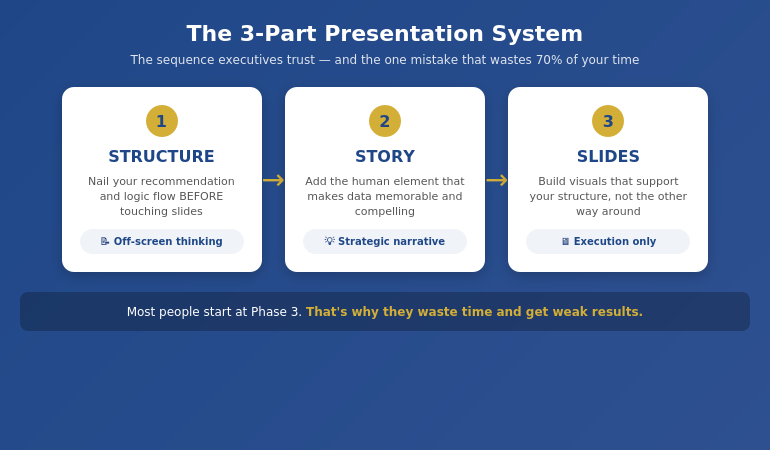
The fastest path to presentation workflow efficiency isn’t better tools—it’s a framework-first approach. Most professionals spend 6+ hours on presentations because they start with slides instead of structure. The workflow that cuts creation time by 75% has four phases: Clarify the Decision, Build the Narrative Spine, Draft Content Blocks, then Polish and Refine. This is the system I’ve taught to senior leaders who don’t have 6 hours to spare.

⚡ Presentation due tomorrow? Here’s your 90-minute shortcut:

  1. Write the decision you need in one sentence (5 min)
  2. Draft 5-7 slide headlines as assertions, not topics (15 min)
  3. Add one proof point per slide — data, example, or visual (40 min)
  4. Polish formatting and flow (20 min)

Want the full system with templates, AI integration, and expert feedback? Enroll in AI-Enhanced Presentation Mastery →

If you want to master this workflow with guided practice and expert feedback, AI-Enhanced Presentation Mastery teaches the complete framework—plus how to use AI tools to accelerate each phase without sacrificing quality.

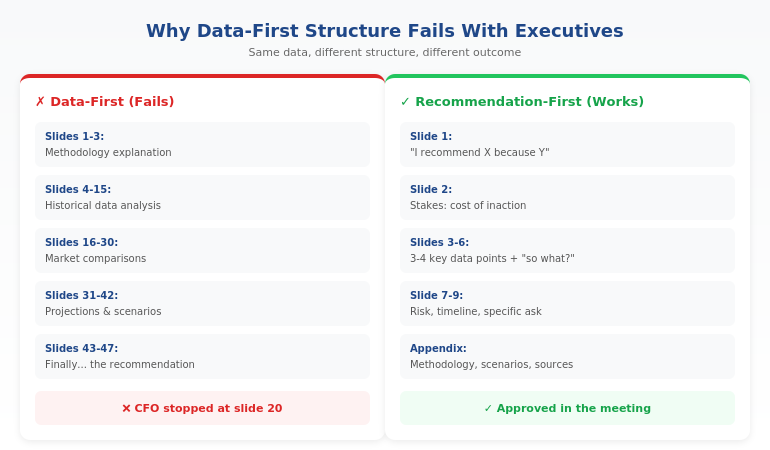
Early in my banking career, I spent an entire Sunday building a Monday presentation. Fourteen hours across the weekend. Forty-seven slides. The CFO flipped through it in 3 minutes and asked, “What’s the recommendation?”

I didn’t have a clear one. I’d spent so long on slides that I’d lost the thread of what I was actually trying to say.

That was the moment I realised my workflow was backwards. I was building presentations from the outside in—starting with slides, then trying to figure out the story. No wonder it took forever.

Over the next 24 years in corporate banking—at JPMorgan Chase, PwC, RBS, and Commerzbank—I rebuilt my approach from scratch. The workflow I developed now takes 90 minutes for presentations that used to take 6 hours. And the presentations are better, because the thinking happens first.

Here’s the system.

⭐ Master the Framework That Cuts Presentation Time by 75%

Stop spending weekends on Monday presentations. Learn the workflow senior leaders use to create executive-ready decks in 90 minutes.

AI-Enhanced Presentation Mastery includes:

  • The Decision Clarifier worksheet (Phase 1)
  • Narrative Spine builder template with worked examples
  • Headline-first slide writing method + before/after samples
  • AI prompt library for each phase (Clarify, Structure, Draft, Polish)

If you build 4 presentations/month, saving 4 hours each gives you 16 hours back — every month.

Enroll in AI-Enhanced Presentation Mastery →

A Maven course built from 24 years of executive presentations. 70% framework mastery, 30% AI enhancement.

Why Presentations Take So Long (The Real Problem)

Most professionals approach presentations like this:

  1. Open PowerPoint
  2. Create a title slide
  3. Start adding content to slides
  4. Reorganise slides repeatedly
  5. Realise the story doesn’t flow
  6. Rebuild large sections
  7. Run out of time and ship something mediocre

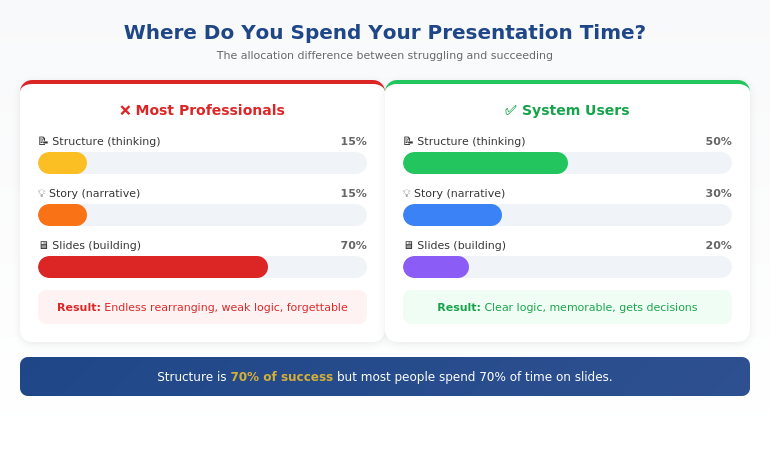
This is the outside-in approach, and it’s why presentations take 6+ hours. You’re making design decisions before you’ve made thinking decisions. You’re arranging slides before you know what story they need to tell.

The result: endless reorganisation, late-night edits, and presentations that look polished but don’t land.

The fix isn’t working faster. It’s working in the right order.

Framework-first means you complete the thinking before you touch the slides. By the time you open PowerPoint, you know exactly what goes where. There’s nothing to reorganise because the structure is already solid.

This is the same principle behind effective presentation structure—get the architecture right first, and everything else falls into place.

The Framework-First Approach: Why It Works

Framework-first presentation workflow efficiency comes from a simple insight: clarity before creation.

When you know these three things before you start building, presentations come together fast:

1. The Decision You Need

Every executive presentation should drive a decision. What do you need from the room? Approval? Resources? Awareness? Direction? If you can’t articulate this in one sentence, you’re not ready to build slides.

2. The Narrative Spine

What’s the logical flow that leads to your decision? For most executive presentations, this follows a pattern: Situation → Complication → Resolution → Ask. The spine is 4-7 points that, spoken aloud, tell a complete story without any slides.

3. The Evidence That Matters

What data, examples, or proof points does your audience need to reach the decision you want? Not everything you know—just what they need. Most presentations fail because they include too much evidence, not too little.

When these three elements are clear, building slides is almost mechanical. You’re not creating—you’re translating.

Whether you’re building a quarterly OKR update or a board-level strategic recommendation, the framework stays the same. Only the content changes.

Want to master framework-first thinking?

AI-Enhanced Presentation Mastery teaches you to clarify the decision, build the narrative spine, and identify evidence that matters—with guided practice on real presentations.

Learn the Complete Framework →


The 90-minute presentation workflow showing the four-phase framework-first approach

The 90-Minute Presentation Workflow

Here’s the exact workflow I use and teach. It assumes a standard executive presentation of 7-15 slides.

Phase 1: Clarify (15 minutes)

Before anything else, answer these questions in writing:

  • What decision do I need from this presentation?
  • Who is my audience, and what do they already know?
  • What’s the ONE thing they must remember?
  • What would make them say no, and how do I address it?

This phase feels slow but saves hours later. Most presentation problems trace back to unclear thinking at the start.

Phase 2: Structure (20 minutes)

Build your narrative spine—no slides yet, just an outline:

  • Opening: Hook + context + preview
  • Body: 3-5 main points in logical sequence
  • Close: Summary + specific ask + next steps

Write this as bullet points you could speak aloud. If the flow doesn’t make sense when spoken, it won’t make sense on slides.

Phase 3: Draft (40 minutes)

Now—and only now—open PowerPoint:

  • Create slides for each point in your structure
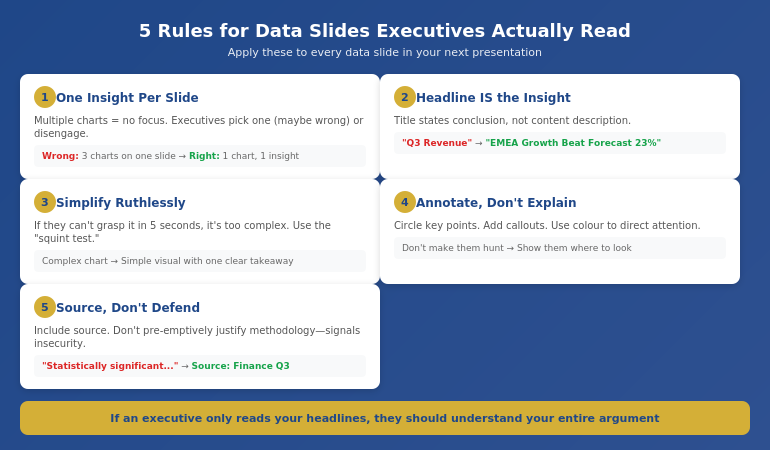
  • Focus on headlines first (the slide title should state the point, not describe the topic)
  • Add supporting content: one key visual or 3-4 bullets per slide
  • Don’t format yet—just get content in place

This phase is fast because you’re not thinking—you’re executing a plan that’s already clear.

Phase 4: Polish (15 minutes)

With content in place, refine:

  • Strengthen headlines (make them assertion-led, not topic-led)
  • Cut anything that doesn’t directly support the decision
  • Apply consistent formatting
  • Review the flow: does each slide lead naturally to the next?

Total: 90 minutes.

This workflow assumes you know the framework. The first few times, it takes longer as you build the habit. By the fifth or sixth presentation, 90 minutes becomes realistic for most executive decks.

⭐ Stop Trading Weekends for Monday Presentations

Learn the workflow that senior leaders use to create executive-ready presentations in a fraction of the time—without sacrificing quality.

AI-Enhanced Presentation Mastery includes:

  • The 4-phase workflow with timing guides for each phase
  • Framework templates for board updates, budget requests, and strategy decks
  • AI integration playbook: which tools, which prompts, which phases

Methodology + templates + AI techniques + expert feedback — all in one course.

Enroll Now →

For executives and senior professionals who are done spending 6 hours on presentations that should take 90 minutes.

Where AI Fits (And Where It Doesn’t)

AI tools like ChatGPT, Claude, and Copilot can dramatically accelerate presentation creation—but only if you use them correctly.

Where AI Helps

  • Phase 1 (Clarify): AI can help you articulate your decision and identify potential objections through structured questioning
  • Phase 2 (Structure): AI can suggest narrative frameworks and help sequence your points logically
  • Phase 3 (Draft): AI can generate first-draft content for each slide, which you then refine
  • Phase 4 (Polish): AI can strengthen headlines, cut filler, and check for consistency

Where AI Fails

  • Strategic judgment: AI doesn’t know what decision you actually need or what your audience cares about
  • Organisational context: AI can’t account for internal politics, history, or relationships
  • Original thinking: If you rely on AI to do the thinking, you get generic presentations that don’t land

The key insight: AI accelerates execution, but framework does the thinking.

This is why I teach 70% framework mastery, 30% AI enhancement. Without the framework, AI just helps you build bad presentations faster. With the framework, AI becomes a powerful accelerator.

For a deeper dive into AI presentation workflows, the principles are the same: framework first, AI second.

Ready to integrate AI the right way?

AI-Enhanced Presentation Mastery teaches you exactly where to use AI in each phase—and where human judgment is irreplaceable.

Learn the Framework + AI System →

People Also Ask

How long should it take to create a presentation?

A standard executive presentation (7-15 slides) should take 60-90 minutes using a framework-first workflow. If you’re regularly spending 4+ hours, the issue is usually workflow—starting with slides before the thinking is clear. Investing 15 minutes in clarifying your decision and structure saves hours of reorganisation later.

What’s the fastest way to create a presentation?

The fastest sustainable approach is framework-first: clarify the decision, build the narrative spine, then draft content. This feels slower at the start but eliminates the reorganisation cycles that consume most presentation time. Combined with AI tools for execution, this workflow can cut creation time by 75%.

How do executives create presentations so quickly?

Experienced executives use mental frameworks they’ve internalised over years—they automatically know the structure, evidence requirements, and decision points for different presentation types. They’re not faster at building slides; they’re faster at thinking. Framework-first training accelerates this process.

3 Workflow Mistakes That Double Your Time

Mistake 1: Starting in PowerPoint

Opening PowerPoint before your thinking is clear guarantees hours of reorganisation. The slide canvas encourages decoration before direction. Start in a blank document or even on paper. Move to slides only when you can articulate your narrative spine aloud.

Mistake 2: Perfecting as You Go

Formatting slides while you draft them creates constant context-switching that destroys efficiency. Draft all content first (ugly is fine), then polish everything in one pass. This single change can save 30+ minutes per presentation.

Mistake 3: Including Everything You Know

More content doesn’t mean better presentations—it means longer creation time and audiences who can’t find the point. Ruthlessly cut anything that doesn’t directly support the decision you need. If in doubt, leave it out. You can always add if asked.

These mistakes are why the executive presentations guide emphasises structure and clarity over comprehensiveness.

⭐ Reclaim Your Weekends. Master the Workflow.

Join senior leaders who’ve transformed how they create presentations—from dreaded time-sink to efficient, high-impact process.

What you get inside:

  • Decision Clarifier + Narrative Spine templates
  • Headline-first slide writing with before/after examples
  • Phase-by-phase AI prompts that enhance your thinking
  • Live practice sessions with expert feedback

4 presentations/month × 4 hours saved = 16 hours back. Every month. That’s 2 full working days.

Enroll in AI-Enhanced Presentation Mastery →

Built from 24 years of executive presentations in banking. For professionals who value their time and their impact.

Frequently Asked Questions

Does this workflow work for complex, data-heavy presentations?

Yes, and it’s especially valuable for complex presentations. The framework-first approach forces you to identify which data actually matters before you start building charts. Most data-heavy presentations fail because they include too much data, not too little. Clarifying the decision first helps you curate rather than dump.

What if I don’t know what decision I need?

That’s a signal you’re not ready to build a presentation. Spend more time in Phase 1. Ask: “If this presentation goes perfectly, what happens next?” If you can’t answer that, schedule a conversation with your stakeholder to clarify expectations before you start building.

Can I use this workflow with my existing templates?

Absolutely. The workflow is template-agnostic. Your corporate template handles the visual layer; the framework handles the thinking layer. In fact, having a consistent template makes Phase 3 (Draft) even faster because you’re not making design decisions.

How long does it take to get to 90 minutes consistently?

Most professionals see significant improvement within 3-5 presentations if they follow the phases strictly. The temptation is to skip Phase 1 (Clarify) because it feels unproductive. Resist that. The time investment in clarity pays back 3x in Phases 2-4.

Get Weekly Presentation Efficiency Insights

Join executives who receive one actionable technique every week for creating better presentations in less time.

Subscribe to The Winning Edge →

Your Next Step

Presentation workflow efficiency isn’t about working faster—it’s about working in the right order. Framework first, slides second.

The 90-minute workflow: Clarify (15 min) → Structure (20 min) → Draft (40 min) → Polish (15 min).

Try it on your next presentation. Resist the urge to open PowerPoint until Phase 3. Notice how much easier the build becomes when the thinking is already done.

And if you want to master this workflow with guided practice and expert feedback—to truly transform how you create presentations—AI-Enhanced Presentation Mastery gives you the complete system.

Your weekends are worth more than Monday presentations. It’s time to reclaim them.

16 Jan 2026
Steering committee presentation template showing 10-slide decision format

Steering Committee Presentation Template: The 10-Slide Decision Format That Gets Approvals

Quick Answer: An effective steering committee presentation template follows a decision-first 10-slide format:
Executive Summary → Decision Required → Current Status → Key Metrics → Issues & Risks → Options Analysis → Recommendation → Resource Ask → Timeline → Next Steps.
Lead with the decision, not the background—so the committee can approve in 15 minutes or less.

The programme director had prepared 47 slides for a 30-minute steering committee meeting.

I watched from the back of the room at Commerzbank as six executives grew visibly impatient. By slide 12—still on “project background”—the CFO interrupted: “What do you need from us?”

The presenter froze. The decision was buried on slide 38. The meeting ended without approval—not because the programme wasn’t solid, but because the deck structure was backwards: background first, decision last.

After 25 years in corporate banking (JPMorgan, PwC, RBS, Commerzbank) and 16+ years training senior leaders, I’ve learned one truth: steering committees don’t want comprehensive—they want decisive. Here’s the 10-slide format that consistently gets “yes.”

This is for you if:

  • You present to steering committees monthly/quarterly
  • Decisions keep getting deferred (“Let’s revisit next meeting”)
  • You need a deck that looks executive-ready without rebuilding from scratch


Steering committee on Tuesday — and the deck is still 47 slides long?

Executive Slide System gives you Strategic Recommendation, Risk Assessment, and Project Status templates plus a “Re-presenting After a Non-Decision” playbook for the second time round. £39, instant download.

Get the Slide System →

Why Most Steering Committee Presentations Fail

Steering committees are governance bodies. Their job is to make decisions—approve budgets, resolve escalations, unblock resources, and course-correct programmes.

Yet most presenters treat them like status update meetings. They walk through every workstream, every milestone, every percentage complete. By the time they reach the decision, the committee has mentally moved on to their next meeting.

The #1 mistake is leading with context instead of leading with the ask.

Executives on steering committees often oversee multiple programmes. They don’t need the full picture—they need the decision picture: what’s working, what’s not, and what you need from them.

Quick self-check: The 60-Second Test Every Executive Slide Should Pass.

What should be in a steering committee presentation?
A steering committee deck should include the decision required, current status, decision-level metrics, the top risks needing executive input, and a clear recommendation.
If the committee cannot approve in 15 minutes, the deck is too detailed.
How many slides should a steering committee deck have?
8–12 slides is ideal. Ten slides works well because it covers the decision, supporting evidence, and next steps without forcing executives to wade through delivery detail.
How do you get approvals faster in a steering committee meeting?
Lead with the decision, show “yes vs no” impact, and make trade-offs visible (time, cost, risk). Executives decide faster when the recommendation is explicit and quantified.

“Win the room. Every time.” — weekly tactics on executive presentations, Copilot for PowerPoint, and the psychology of persuasion. Free, from Mary Beth Hazeldine.

Send me the free newsletter →

The 10-Slide Steering Committee Framework

10-slide steering committee presentation framework showing decision-first structure

This steering committee presentation template works because it respects how steering committees actually operate: they scan, they decide, they move on.

Slide 1: Executive Summary (The Only Slide That Matters)

If the committee only sees one slide, this is it. Include:

  • Programme health (RAG status with one-line explanation)
  • The decision or approval you’re seeking
  • Your recommendation in one sentence
  • Key risk if no action is taken

Rule: everything else in your deck supports this slide. If your executive summary doesn’t communicate the essential message, the rest won’t save you.

Slide 2: Decision Required (Say it out loud)

State explicitly what you need the committee to decide. Not “for discussion”—for decision.

“Approve an additional £180K for Phase 2 infrastructure to maintain Q3 delivery.”

Be precise. Vague asks get deferred.

Slide 3: Current Status (10-second scan)

  • Overall RAG with brief explanation
  • Budget: spent vs remaining
  • Timeline: on track / at risk / delayed
  • One milestone achieved since last meeting

Resist workstream-level detail here. Put it in an appendix or backup slides.

If you want the ready-made slide layouts for these first three slides (executive summary + decision + status), they’re included in
The Executive Slide System.

Slide 4: Key Metrics (Decision metrics only)

Use 3–4 metrics that matter to this committee. Not vanity metrics—decision metrics.

Examples: adoption rate, defect density, benefits realisation, change readiness, stakeholder engagement.

Show trend (up/down) and target comparison, so executives instantly see “improving or deteriorating.”

Slide 5: Issues & Risks (Only what needs executive input)

Don’t list every risk in your register. Surface the ones that require steering committee attention.

Format each issue as: Issue → Impact → Mitigation → Ask

If a risk doesn’t require steering committee input, it doesn’t belong on this slide.

Related reading: How to Present Bad News Without Killing Your Career.

Walk in with a deck the committee can decide on

26 executive templates including Strategic Recommendation and Risk Assessment. Built for senior committees who want the decision, not the journey. £39.

Get the System →

Slide 6: Options Analysis (Make trade-offs visible)

If you’re asking for a decision between alternatives, present the trade-offs clearly.

Option Pros Cons Cost / Time
Option A Lower cost 6-week delay £120K / Q3
Option B (Recommended) Maintains timeline Higher investment £180K / Q2

Always indicate your recommendation. Steering committees reward clarity.

Slide 7: Recommendation (Three bullets max)

State your recommendation clearly, then support it with the three best reasons.

  • Maintains committed delivery date
  • Avoids a measurable downside (penalty, risk exposure, rework cost)
  • Aligns with an existing leadership priority

Slide 8: Resource Ask (Make “yes” easy)

  • What you need (exact amount / headcount)
  • Where it comes from (reallocation vs new investment)
  • What happens if not approved (consequence)

Need the budget/resource ask slide that reads like a CFO-approved business case? It’s inside

Slide 9: Timeline (Show both scenarios)

Show the path forward visually—key milestones only, not a full project plan.

If your decision affects timeline, show both scenarios: with approval vs without approval.

Slide 10: Next Steps & Actions (Who does what by when)

Close with clarity:

  • Finance to release funds by [date]
  • PMO to onboard resources by [date]
  • Next steering committee update: [date]

Name names. Assign dates. Leave no ambiguity about what happens after the approval.

What “No Decision” Is Costing You (And Why This Template Fixes It)

Steering committee deferrals feel harmless—until you calculate the real impact:

  • One more meeting cycle = lost momentum + delayed benefits
  • More stakeholder churn = more rework + more misalignment
  • More uncertainty = higher delivery risk and cost creep

The fastest way to stop deferrals is simple: make the decision unavoidable. When Slide 1–2 clearly shows
the ask and the “yes vs no” consequence, executives can approve immediately.

Presenting to Your Steering Committee (So the Decision Happens)

The template is half the battle. Delivery is the other half.

  • Start with the decision. Your first sentence should include the ask: “Today I’m asking the committee to approve…”
  • Assume they’ve read nothing. Even if you sent a pre-read, present as if they’re seeing it fresh.
  • Watch the sponsor. Their body language tells you when to pause, clarify, or move to the recommendation.
  • Time-box ruthlessly. In a 30-minute slot, plan to present for 12 and use the rest for discussion.

If nerves cause you to speed up under pressure, this is a common executive-room pattern:
How to Stop Talking Too Fast When Nervous.

Frequently Asked Questions

Can I download a steering committee PowerPoint template?

Yes—most teams use a standard steering committee PowerPoint template with a consistent slide order. The fastest way to improve approvals is to use a decision-first structure (Executive Summary → Decision → Status → Risks → Recommendation) so leadership can approve quickly.

How long should a steering committee presentation be?

Plan for 10–15 minutes of presenting within a 30-minute slot. The rest should be discussion. If time is short, cut to 5–7 slides: Executive Summary, Decision Required, Status, Risks, Recommendation, Next Steps.

Should I send the deck before the meeting?

Yes—send it 24–48 hours ahead as a pre-read. But present as if no one has seen it. A pre-read helps people arrive with questions, but many will skim at best.

What if the committee disagrees with my recommendation?

That’s their job. Present your recommendation with conviction, but be ready with Option A. The worst outcome isn’t disagreement—it’s deferral. Aim for a decision, even if it’s not your preferred one.

How do I handle steering committees with too many attendees?

Focus on decision-makers, not observers. Identify the 2–3 people with real authority before the meeting. Direct key points to them and keep the discussion anchored on the decision required.

Want the complete toolkit?

Slide structure is one piece of running a high-stakes steering committee. The Complete Presenter Bundle pulls all seven products together — slides, Q&A, anxiety, storytelling, delivery, openers, cheat sheets — for £99 (save £91.97 vs buying separately). Lifetime access.

Get the Complete Presenter Bundle — £99 →

📧 Get sharper executive messaging every week.
Subscribe to The Winning Edge →

📋 Free Download: Executive Presentation Checklist

Before your next steering committee, run through this checklist covering structure, executive summary essentials, and decision framing.

Download the Free Checklist →

Related: Presenting to senior leaders and worried you’ll speed up? Read:
How to Stop Talking Too Fast When Nervous

Related Resources


About the Author

Mary Beth Hazeldine spent 25 years at JPMorgan, PwC, RBS, and Commerzbank, and now leads Winning Presentations—helping executives communicate clearly when decisions matter.

14 Jan 2026
Professional woman in a dark blazer speaks and uses hand gestures in a business meeting.

Persuasive Presentation Opening: The First 10 Seconds That Determine Everything

Quick Answer: Your audience decides in the first 10 seconds whether to engage or resist. Most presenters waste this window on introductions and agendas. Persuasive openings activate a problem the audience already feels—creating psychological readiness for your solution before resistance forms.

Two presentations. Same recommendation. Same data. Completely different outcomes.

The first opened with: “Today I’ll walk you through our Q3 marketing analysis and recommendations for budget reallocation.”

The board checked their phones within 30 seconds.

The second opened with: “We’re leaving £2.3 million on the table every quarter. I’m going to show you exactly where it’s going and how to capture it.”

The board leaned forward.

Same presenter. Same room. Same data. The only difference was the first 10 seconds.

After watching hundreds of pitches succeed and fail at JPMorgan, I became obsessed with what separates openings that persuade from openings that lose the room before you’ve even started.

The difference isn’t charisma. It’s psychology.

⭐ Want a Structured Framework Instead?

If you want ready-made slide structures that guide your delivery — so you spend less time rehearsing and more time connecting — the Executive Slide System gives you exactly that.

Explore the Executive Slide System →

⭐ Slides That Persuade From Slide One

The Executive Slide System includes opening slide frameworks designed to capture attention and prime agreement—not just inform. Your first slide sets the psychological frame for everything that follows.

Get the Executive Slide System → £39

Why the First 10 Seconds Determine Everything

Your audience isn’t a blank slate. They arrive with competing priorities, natural skepticism, and limited attention. In the first 10 seconds, they’re unconsciously answering one question:

“Is this worth my attention?”

Open with your agenda, and the answer is “probably not.” Open with something that activates a problem they already feel, and the answer is “tell me more.”

This isn’t manipulation. It’s recognising that persuasion has a sequence. You can’t convince someone of your solution until they’re engaged with the problem. And you can’t engage them with the problem by talking about yourself.

The first 10 seconds set the frame. Everything after either reinforces that frame or fights against it.

For the complete psychology of influence in presentations, see our guide to persuasive presentations.

Comparison of weak vs strong persuasive presentation openings - what loses the room vs what captures attention

Three Persuasive Opening Techniques

1. The Problem Activation

Start with a problem your audience already feels—not one you need to convince them exists.

Weak: “I’d like to discuss some inefficiencies in our approval process.”

Strong: “How many deals have we lost because approval took too long?”

The weak version announces a topic. The strong version activates a frustration they’ve already experienced. Now they want to hear your solution.

2. The Startling Contrast

Juxtapose where they are with where they could be.

Weak: “Our competitors are investing heavily in digital transformation.”

Strong: “Our competitors respond to customer inquiries in 4 hours. We take 3 days. That gap is costing us market share every week.”

The contrast creates urgency. The specificity makes it real.

3. The Provocative Question

Ask something they can’t ignore.

Weak: “Have you thought about our retention rates?”

Strong: “What if I told you we’re spending £400,000 a year to replace employees we could have kept?”

The question engages their mind. The specific number demands attention.

These techniques are part of a broader framework for persuasive presentations that work at every level.

What to Avoid in Persuasive Openings

The most common persuasion-killers I’ve seen in 25 years:

  • “Let me introduce myself…” — They don’t care about you yet. Make them care about the problem first.
  • “Today’s agenda covers…” — Agendas are administrative, not persuasive. Save them for after you’ve hooked attention.
  • “Thank you for your time…” — Gratitude is fine, but it signals you’re about to take, not give.
  • Starting with data — Numbers without context invite analysis, not agreement. Establish why the numbers matter first.
  • Apologising — “I know you’re busy” or “This might be boring” primes them to disengage.

Every one of these openings puts the focus on you or on neutral information. Persuasive openings put the focus on a problem the audience cares about solving.

🏆 Master Executive Persuasion

The Executive Buy-In Presentation System teaches the complete psychology of persuading senior leadership—from opening frames to closing techniques that get yes.

Learn More → £199

📧 Join 2,000+ professionals getting weekly presentation insights. Subscribe to The Winning Edge →

Frequently Asked Questions

Why are the first 10 seconds so important for persuasion?

Your audience decides in the first 10 seconds whether to engage or resist. Open with data, and they’re already forming counterarguments. Open by activating a problem they feel, and they’re primed to hear your solution. You’re not just starting—you’re setting the psychological frame for everything that follows. More techniques in our persuasive presentations guide.

What’s the best way to open a persuasive presentation?

Start with a problem your audience already feels, not with your solution. “What would it mean if you could cut approval time in half?” activates desire before resistance. Then your recommendation becomes the answer to their question, not an idea they need to evaluate.

Should I start a persuasive presentation with data or story?

Neither—start with a question or statement that activates a felt problem. Data invites analysis; stories take time to land. A sharp question that hits an existing pain point creates immediate engagement. Save data and stories for after you’ve captured attention. See our full persuasive presentations framework for sequencing.

📥 Free Download: 7 Presentation Frameworks

Get structured structures for persuasive presentations—including opening frameworks that capture attention and prime agreement.

Download Free →

Related: Persuasive Presentations: How to Change Minds Without Manipulation


Mary Beth Hazeldine spent 25 years at JPMorgan, PwC, RBS, and Commerzbank. She’s a clinical hypnotherapist and MD of Winning Presentations.

14 Jan 2026
Businesswoman in a navy blazer speaks with expressive hand gestures during a meeting in a bright office. Behind her, colleagues listen.

Presentation Q&A: Why the Questions Terrify You More Than the Presentation


Quick Answer: The Q&A triggers more fear than the presentation because you lose control. You’ve rehearsed your slides; you can’t rehearse unpredictable questions. The solution isn’t predicting every question—it’s building a framework for handling any question. Prepare by category (challenges, gaps, critics), master bridging techniques, and remember: the audience wants you to succeed.

Still Panicking About Q&A?

You’re not alone. Most executives rank Q&A as their biggest presentation fear. The difference between panicked executives and calm ones? A structured system for handling any question. The Executive Q&A Handling System gives you exactly that: a question prediction framework, real-time response techniques, and 51 AI prompts to practise difficult scenarios.

Explore the System →

The Presentation That Nearly Ruined My Career

I delivered the best presentation of my career at Commerzbank in 2008. Twenty-two minutes of polished content, clear data, compelling recommendations. The CFO was nodding. My boss looked pleased.

Then came the Q&A. The first question was fine. The second was manageable. The third came from a director I’d never met: “Your projections assume a 12% market growth rate. What’s your evidence for that, given the current regulatory environment?”

I had evidence. Somewhere. In my backup slides. Which I couldn’t find. While twelve executives watched me fumble through my deck, my credibility evaporating with each passing second.

I eventually found the data. But by then, the damage was done. My carefully constructed presentation had been overshadowed by ninety seconds of visible panic.

That evening, I realised something that changed how I approach every presentation: the Q&A isn’t an afterthought. It’s where credibility is won or lost.

Over the following decade, I became obsessed with Q&A preparation. I interviewed executives who seemed effortlessly confident under questioning. I studied hostage negotiators and crisis communicators. I tested techniques with clients across industries.

What I discovered is that Q&A confidence has almost nothing to do with knowing all the answers. It comes from having a system for handling any question—including the ones you can’t predict.

Stop Rehearsing Every Possible Question

You can’t predict every question. But 95% of difficult questions fall into just 5 categories. Learn which ones matter for your presentation, and you’ll handle any curveball with calm certainty.

The Executive Q&A Handling System (£39) teaches you:

  • The 5-category preparation framework (done in under 30 minutes)
  • Bridging techniques that buy thinking time and signal confidence
  • Hostile question responses that reframe attacks into opportunities
  • 51 AI prompts to stress-test your answers before the room does

Master Your Q&A →

Designed for executives across banking, consulting, and technology. Master your Q&A in one afternoon.

The Psychology of Unpredictability

Why does Q&A trigger more anxiety than the presentation itself? The answer lies in control. During your presentation, you control what information you share, the order, pace, timing, which points to emphasise, when to pause. During Q&A, you control almost nothing. Questions come from anywhere. You’re reacting, not leading. Your carefully rehearsed structure is gone.

This loss of control activates your brain’s threat response. Suddenly you’re not presenting—you’re defending. Your body shifts into fight-or-flight mode, which is exactly the wrong state for clear, confident communication.

The physical symptoms follow: racing heart, shallow breathing, mind going blank. These aren’t signs of incompetence. They’re signs that your nervous system has misidentified a question as a threat.

Understanding this is the first step to managing it. Q&A anxiety isn’t about your knowledge or preparation. It’s about your brain’s response to unpredictability. And that response can be retrained.

How to Prepare When You Can’t Predict

You can’t anticipate every question. But you can prepare for every category of question. Before any presentation, work through five preparation categories:

Infographic for: presentation q and a (image 1)

  1. The Challenges – What are the five most likely challenges to your recommendation?
  2. The Gaps – Where is your data weakest? Identify yours before someone else does.
  3. The Critics – Who in the room is most likely to push back? What do they care about?
  4. The Clarifications – Which parts might be confusing? Prepare simpler explanations.
  5. The “What Ifs” – What scenarios might the audience raise that you haven’t addressed?

This category-based preparation is more valuable than trying to predict specific questions. For more on anticipating objections, see our guide on how to handle difficult questions in a presentation.

Want a structured framework that handles 95% of difficult questions? The Executive Q&A Handling System teaches you category-based preparation, real-time bridging techniques, and hostile question responses—all in one afternoon.

What to Say When You Don’t Know

Here’s a liberating truth: you don’t need to know everything. The most confident executives all share one trait: they’re comfortable saying “I don’t know.” But they say it strategically:

Infographic for: presentation q and a (image 2)

  • The Honest Admission: “I don’t have that specific data with me, but I can get it to you by end of day tomorrow.”
  • The Bridge: “That’s outside my direct area, but what I can tell you is…”
  • The Redirect: “Sarah has been leading that workstream—Sarah, can you speak to that?”
  • The Scope Clarification: “That’s a great question, but it’s probably outside the scope of today’s discussion.”

What you should never do: guess, bluff, or provide data you’re not certain about.

Handling Hostile and Loaded Questions

Not all questions are neutral. Some come with a hidden agenda. Some carry hostility. Difficult question types include:

  • The Loaded Question – reframe the premise before answering
  • The Hostile Question – stay curious, not defensive; treat it as information-seeking
  • The Agenda Question – acknowledge the alternative viewpoint without abandoning your position
  • The Ambush Question – ask for context if unfamiliar; take your time before responding

Key principle: hostile questions are often about emotion, not information. Your job is to address the underlying concern, not just the surface question.

The Difference Between Flustered and Composed

The executives who stay calm under hostile questioning share one thing: they’ve practised specific response techniques until they become automatic. They don’t think—they respond with precision.

Inside the Executive Q&A Handling System (£39, instant access):

  • 7 structured Q&A techniques that signal leadership under pressure
  • Scripts for hostile, loaded, and ambush questions
  • The Parking Lot technique and 4 other methods for handling questions that would derail the discussion
  • 51 AI-powered question prompts for personalised practice

Handle Any Question →

Immediate digital download, ready to use before your next presentation.

7 Techniques That Transform Q&A

These seven techniques have been tested with executives. Each one addresses a specific challenge in Q&A delivery:

  1. Repeat and Reframe – Echo the question back in your own words. This buys thinking time, demonstrates you understood, and shifts the framing to your advantage.
  2. The 30-Second Rule – Keep answers to 30 seconds maximum. Brevity signals confidence; rambling signals uncertainty.
  3. Bridge to Strength – Never leave an answer on a defensive note. Bridge to a point of strength or a supporting fact.
  4. The Parking Lot – For questions that derail the discussion, offer to discuss offline: “That’s important. Let’s park it and I’ll follow up with you.”
  5. Evidence Anchoring – When answering, point to a specific piece of data or research. Vagueness breeds doubt; specificity builds credibility.
  6. The Pause – Pause for 2-3 seconds before answering. It reads as thoughtful, not uncertain. Silence is underused power.
  7. End on Your Terms – Summarise your key point before moving to the next question. Don’t let the questioner have the last word on your topic.

For the specific anxiety that hits during Q&A rather than in planned content, the Q&A anxiety guide addresses the in-the-moment recovery techniques.

Case Study: From Q&A Terror to Q&A Confidence

Priya was a senior manager at a technology company. Brilliant during presentations—her slides were polished, her data was solid, her delivery was engaging. But the moment the first question came, she fell apart. Racing heart, defensive tone, rambling answers.

The problem wasn’t her knowledge. She over-prepared on content and under-prepared on Q&A. We restructured her preparation:

  • Week before: Work through the 5-category objection prep framework. Identify every possible challenge, gap, and critic.
  • Day before: Ask a colleague to challenge her with difficult questions. One hour of real dialogue beats days of solo preparation.
  • Morning of: 10 minutes practising “I don’t know” responses and pause techniques. Physical calibration, not content review.

We also addressed the physical response: before each practice question, she would pause for 2 seconds, take a full breath, then answer. By the time of her next board presentation, this was automatic.

The result: she handled an aggressive line of questioning from the toughest director in the room. No hesitation. No defensiveness. Clear, evidence-anchored answers with strategic pauses. When she finished, the CEO asked her to lead the follow-up strategic initiative.

Frequently Asked Questions

1. Why is the Q&A scarier than the presentation itself?

During a presentation, you control the content, pace, and flow. During Q&A, you lose control. Questions come from anywhere, and you’re reacting instead of leading. This perceived loss of control triggers your threat response—fight-or-flight—which is exactly the wrong neurological state for calm communication.

2. How do I prepare for questions I can’t predict?

You prepare by category instead of by specific question. Work through five categories: the challenges to your recommendation, the gaps in your data, the likely critics in the room, clarifications that might be needed, and “what if” scenarios. This framework captures 95% of difficult questions before they’re asked.

3. What do I do when I don’t know the answer?

You say so—strategically. Use one of four approaches: the honest admission (“I don’t have that data, but I’ll get it by tomorrow”), the bridge (“That’s outside my area, but here’s what I can tell you”), the redirect (“Sarah’s leading that—Sarah, you take this one”), or the scope clarification (“That’s outside today’s scope”). Never guess or bluff.

4. How do I handle hostile questions in a presentation?

Reframe the premise. If someone asks “Doesn’t your plan ignore the regulatory risk?” you might respond: “Actually, our plan was built around regulatory compliance. Here’s why…” Treat hostile questions as information-seeking, not attacks. Stay curious, not defensive.

5. Should I repeat the question before answering?

Yes—but reframe it. Echo the question back in your own words. This demonstrates understanding, buys you thinking time, and shifts the framing slightly in your favour. Example: “So you’re asking whether the timeline accounts for implementation lag—great question.”

6. How long should my Q&A answers be?

Aim for 30 seconds maximum. Longer than that, you’re rambling—which signals uncertainty. Keep it short, evidence-anchored, and end on a point of strength. If they want more detail, they’ll ask.

Get Weekly Insights on Presentation Mastery

Join executives who receive The Winning Edge—weekly strategies for presenting with confidence, handling difficult stakeholders, and leading through communication.

Subscribe to The Winning Edge

Free Resource: CFO Questions Cheatsheet

If you’re presenting to finance leadership, you need this. The CFO Questions Cheatsheet covers the 20 questions CFOs ask most frequently, with research-backed answers and talking points for each. Download free.

Download the Cheatsheet

Q&A Is Where Leaders Are Made

The presentation shows you can prepare. The Q&A shows you can think. It’s the moment where audiences decide whether you’re a functional expert or a leader worth following.

The executives who master Q&A aren’t smarter. They’re not better informed. They’ve simply applied a system—a framework for handling unpredictable questions with calm certainty. They prepare by category, they bridge to strength, they’re comfortable saying “I don’t know,” and they pause before speaking.

That system is learnable. In a few hours of focused preparation, you can transform Q&A from your biggest fear into your greatest strength. You can be the executive in the room who stays composed when others panic. Who clarifies when others fumble. Who builds credibility during questioning instead of just defending.

If Commerzbank taught me anything, it’s this: your presentation is the opening act. Your Q&A is where the audience decides whether you’re worth believing.

Related Resources


About the Author

Mary Beth Hazeldine is the Owner & Managing Director of Winning Presentations. She spent 25 years in banking, including roles at JPMorgan Chase, PwC, RBS, and Commerzbank. A qualified clinical hypnotherapist and NLP practitioner, she advises executives across financial services, healthcare, technology, and government on presenting with confidence and credibility. She specialises in Q&A preparation, stakeholder management, and high-stakes presentation confidence.

05 Jan 2026
Woman in a navy blazer speaking to a group at a conference table by a window, gesturing with her hands.

How to Deliver a Presentation: The Complete Performance Guide [2026]

Last updated: January 2026

I once watched a brilliant strategy director present a plan that would save her company £3 million. Her analysis was flawless. Her slides were clear. Her recommendation was exactly right.

The board said no.

Not because the content was wrong — but because her delivery undermined everything. Monotone voice. Eyes fixed on her laptop. Shoulders hunched like she was apologising for existing. The board didn’t trust her recommendation because her delivery said “I’m not sure about this.”

Three weeks later, I coached her through the same presentation. Same slides. Same data. Same recommendation. This time she delivered it with vocal contrast, purposeful movement, and eye contact that said “I’ve done the work and I’m certain.” The board approved it unanimously.

Content gets you in the room. Delivery gets you the yes.

🎁 Free resource: Download my 7 Presentation Frameworks PDF — includes delivery cues and timing guidance for each framework.

This guide covers how to deliver a presentation with impact — the voice techniques, body language, and presence that transform competent presenters into compelling ones. Everything here comes from 24 years presenting in corporate boardrooms and 15 years coaching executives to command the room.

Why Delivery Matters More Than You Think

Research from UCLA suggests that when content and delivery conflict, audiences believe delivery. If your words say “this is urgent” but your voice says “I’m bored,” they hear bored.

This isn’t about being a performer. It’s about alignment — ensuring your voice, body, and presence support your message rather than undermine it.

The good news: delivery is a skill, not a personality trait. Every technique in this guide can be learned and improved with practice.

The Presentation Delivery Framework

Effective delivery has three components. Master all three, and you’ll command any room — physical or virtual.

The presentation delivery framework showing voice, body, and presence elements

1. Voice: Your Primary Instrument

Your voice does most of the delivery work. Even in a room where people can see you, vocal variety carries more impact than movement.

Pace: Most presenters speak too fast when nervous. Deliberately slow down, especially for important points. A pause before a key statement signals “this matters.”

Pitch: Vary your pitch to avoid monotone. Higher pitch conveys excitement; lower pitch conveys authority and seriousness.

Volume: Louder for emphasis, softer to draw people in. A whispered phrase after several loud ones creates dramatic contrast.

Pause: The most underused tool. Pause before important points (creates anticipation). Pause after important points (lets them land). Pause instead of “um” (sounds confident instead of uncertain).

For a deep dive on vocal techniques, see: Presentation Voice Tips

2. Body: Physical Communication

Your body either reinforces your words or contradicts them. The goal isn’t to perform — it’s to remove the physical habits that distract from your message.

Posture: Stand balanced, shoulders back, weight evenly distributed. This isn’t about looking powerful — it’s about breathing properly and projecting your voice.

Gestures: Use them purposefully to emphasise points, not as nervous energy release. When not gesturing, hands at sides or lightly clasped in front — not in pockets, not crossed.

Movement: Move with intention. Step toward the audience for important points. Move to different areas for different sections. Never pace or rock.

Eye contact: The single most important physical element. Look at individuals, not the crowd. Hold for a complete thought (3-5 seconds), then move to someone else. In virtual settings, this means looking at your camera lens.

For specific body language techniques, see: Presentation Body Language

3. Presence: The Intangible Quality

Presence is what remains when voice and body are working well. It’s the quality that makes people pay attention even before you speak.

Groundedness: Being fully in the room rather than in your head. Focus on your message and your audience, not on how you’re being perceived.

Conviction: Believing in what you’re saying. If you don’t believe it, neither will they — and it shows.

Calm authority: The quiet confidence that comes from preparation and experience. You’ve done the work. You know your material. You belong here.

Presence can’t be faked, but it can be developed through practice and preparation.

Ready to master delivery? My Public Speaking Cheat Sheets (£14.99) include a delivery quick-reference card — voice techniques, body language cues, and presence builders on one page.

How to Deliver a Presentation: Step-by-Step

Here’s the sequence I teach executives for any high-stakes presentation:

Before You Speak

Arrive early. Stand where you’ll present. Get comfortable in the space. If virtual, test your tech and settle into your environment.

Breathe. Three deep breaths before you start. This lowers your heart rate and grounds your voice.

Set your opening line. Know your first sentence cold. The opening is where nerves peak — having it memorised prevents stumbling.

The First 30 Seconds

Pause before speaking. Look at your audience. Let them settle. This brief silence signals confidence.

Deliver your hook. Your opening line should grab attention immediately. See How to Open a Presentation for specific techniques.

Establish eye contact. Connect with 2-3 individuals in your first 30 seconds. This grounds you and signals connection.

During the Presentation

Vary your delivery deliberately. Faster for excitement, slower for importance. Louder for emphasis, softer for intimacy. Movement for transitions, stillness for key points.

Use the power of contrast. A whisper after sustained volume. A pause after rapid delivery. Stillness after movement. Contrast creates attention.

Read the room. Watch for signs of engagement or disengagement. Adjust your pace, add interaction, or cut content as needed.

Return to your notes without apology. If you need to check your notes, do it cleanly. Pause, look down, find your place, look up, continue. No “sorry, I just need to check…” — it’s unnecessary and undermines confidence.

The Close

Signal the end. “Let me leave you with this…” or “In closing…” tells the audience to pay attention to what follows.

Deliver your key message. Your final statement should be memorable — the one thing you want them to remember if they forget everything else.

Pause, then thank. After your final line, pause for a beat. Let it land. Then a simple “Thank you” ends cleanly.

Common Presentation Delivery Mistakes

Common presentation delivery mistakes and how to fix them

After coaching thousands of presenters, these are the delivery mistakes I see constantly:

Mistake 1: Speaking Too Fast

Nerves accelerate speech. What feels normal to you sounds rushed to your audience.

The fix: Practice at 75% of your natural speed. It will feel awkwardly slow — but it will sound professional to listeners. Record yourself to calibrate.

Mistake 2: Monotone Voice

When nervous, vocal variety disappears. Everything comes out at the same pitch and pace.

The fix: Mark your script or notes with delivery cues. Underline words to emphasise. Add “PAUSE” where you need to breathe. Practice with deliberate exaggeration until variation feels natural.

Mistake 3: Reading Slides

Turning your back to read your own slides destroys connection and credibility.

The fix: Know your content well enough to speak without reading. Glance at slides briefly to orient yourself, then turn back to the audience. Use presenter view or notes if needed.

Mistake 4: Avoiding Eye Contact

Looking over heads, at the floor, or at the back wall signals discomfort and prevents connection.

The fix: Pick specific individuals and speak directly to them. Rotate through the room. One complete thought per person. In virtual settings, look at your camera lens, not the screen.

Mistake 5: Nervous Physical Habits

Pacing, rocking, fidgeting, touching your face, clicking a pen — all distract from your message.

The fix: Record yourself presenting and watch for habits. Most people are unaware of theirs. Once identified, consciously replace them — keep hands at sides, plant your feet, hold the pen still.

Mistake 6: No Pauses

Filling every moment with words signals nervousness and exhausts your audience.

The fix: Build in deliberate pauses. Before key points. After key points. Where you’d normally say “um.” Silence feels longer to you than to your audience — embrace it.

Presenting to executives? My Executive Slide System (£39) includes delivery guidance specifically for boardroom and C-suite presentations where the stakes are highest.

How to Deliver a Presentation Virtually

Virtual delivery requires adaptation, not abandonment, of these principles. The fundamentals remain — but execution changes.

Voice matters more. Without physical presence, your voice carries all the delivery weight. Increase vocal variety by 30% compared to in-person.

Camera is your audience. Eye contact means looking at your camera lens, not at faces on screen. This feels unnatural but reads as direct connection.

Energy must be amplified. Video flattens you. What feels slightly too energetic in person will land as normal on screen.

Gestures stay in frame. Hand movements that work in person may be invisible or distracting on camera. Keep gestures smaller and within the visible frame.

For the complete virtual delivery guide, see: Virtual Presentation Tips

Practice Methods That Actually Work

Reading advice won’t improve your delivery. Practice will. Here’s how to practice effectively:

Record Yourself

Video is brutal but essential. Record your practice runs and watch them. You’ll spot habits you never knew you had. Focus on one improvement at a time.

Practice Out Loud

Silent mental rehearsal doesn’t build delivery skills. You must practice speaking at full volume, with full delivery, as if presenting to a real audience.

Practice the Difficult Parts More

Run your opening 10 times. Practice your close until it’s automatic. Rehearse the transition where you always stumble. Targeted practice beats full run-throughs.

Practice With Distraction

Once you know your material, practice with the TV on, while walking, or with someone asking random questions. This builds the resilience to handle real-world interruptions.

Get Real Feedback

Practice with someone who will be honest. Not “that was good” — specific feedback on what works and what doesn’t. A coach, colleague, or friend who understands presentation skills.

Delivery for Different Situations

Delivery should adapt to context. Here’s how to adjust:

Small Meetings (5-10 people)

More conversational, less performative. Sit or stand depending on room setup. Make eye contact with everyone multiple times. Encourage interruptions and questions.

Large Presentations (50+ people)

Bigger gestures, more vocal projection, deliberate movement across the stage. Eye contact with sections of the room rather than individuals. Fewer interruptions, clear structure.

Executive Presentations

Get to the point fast. Confident but not arrogant. Ready to answer challenges. Delivery should say “I’ve done the work and I’m certain of this recommendation.”

Virtual Presentations

Higher energy, camera eye contact, attention resets every 10 minutes. See Virtual Presentation Tips for the complete guide.

Building Confidence in Delivery

Confident delivery comes from three sources:

Preparation: Know your content cold. When you trust your material, you’re free to focus on delivery.

Practice: Rehearse until delivery is automatic. Nervousness decreases as familiarity increases.

Experience: Every presentation teaches you something. Over time, you build a track record that supports confidence.

If presentation anxiety is a significant challenge, see my guide: Presentation Confidence, which draws on my training as a clinical hypnotherapist to address the psychological dimension.

Your Next Step

Pick one element from this guide and focus on it in your next presentation. Just one. Maybe it’s pausing more. Maybe it’s varying your volume. Maybe it’s making eye contact with individuals.

One improvement at a time, compounded over presentations, transforms delivery. Trying to fix everything at once overwhelms and changes nothing.

Want to master presentation delivery systematically? My Executive Buy-In Presentation System includes live practice sessions where you’ll deliver presentations and receive real-time feedback on voice, body language, and presence.

Get weekly delivery tips: Join 2,000+ professionals getting my Wednesday newsletter — real techniques from real presentations. Subscribe free here.


About the AuthorMary Beth Hazeldine is the Owner & Managing Director of Winning Presentations, where she’s helped thousands of professionals command the room for over 15 years. With 24 years in corporate banking at JPMorgan Chase, PwC, Royal Bank of Scotland, and Commerzbank, she brings real boardroom experience to every technique she teaches. Mary Beth is also a qualified clinical hypnotherapist, combining business expertise with the psychology of confidence and persuasion.

Frequently Asked Questions

What makes a good presentation delivery?

Good delivery combines vocal variety (pace, pitch, volume), purposeful body language, genuine eye contact, and confident presence. Content matters, but delivery determines whether anyone remembers it.

How can I improve my presentation delivery quickly?

Focus on three things: pause more than feels comfortable, make eye contact with individuals not the crowd, and vary your volume for emphasis. These create immediate impact with minimal practice.

Why do I sound monotone when presenting?

Nerves flatten vocal variety. The fix is deliberate contrast — whisper a phrase, then speak loudly. Your brain needs permission to vary, so exaggerate in practice until natural variation emerges.

Should I memorise my presentation?

Memorise your opening, key transitions, and closing. Know the rest well enough to speak naturally. Fully memorised presentations sound robotic and collapse if you lose your place.

How do I handle nerves during delivery?

Channel nervous energy into movement and vocal power rather than trying to eliminate it. Pause and breathe before starting. Focus on your message, not yourself. Nervousness usually peaks in the first 90 seconds then fades.

30 Dec 2025
Expert

Why Technical Experts Struggle with Executive Presentations (And How to Fix It)

Last updated: December 30, 2025 · 6 minute read

You spent three weeks on the analysis. You know this material better than anyone. And yet, five minutes into your board presentation, you can see their eyes glazing over.

This is the paradox I watched play out hundreds of times during my 24 years in corporate banking: the people who knew the most often presented the worst.

Technical experts struggle with executive presentations not because they lack intelligence or preparation — but because their expertise works against them. At Winning Presentations, I’ve helped hundreds of analysts, engineers, and specialists break through this barrier. Here’s what’s actually going on — and how to fix it.

⚡ Key Takeaways

  • The curse of knowledge — you can’t un-know what you know, so you assume too much
  • Expertise creates over-explanation — you share the journey when executives only want the destination
  • Technical credibility ≠ executive credibility — different audiences need different proof
  • The fix is mindset, not technique — you must learn to think like a decision-maker, not an analyst

📥 FREE DOWNLOAD: Executive Presentation Checklist

The pre-presentation checklist I give to technical experts before boardroom presentations.

Download Free →

The Curse of Knowledge: Why Technical Experts Struggle with Executive Presentations

Harvard Business Review calls it “the curse of knowledge” — once you know something, you can’t imagine not knowing it. And this is exactly why technical experts struggle with executive presentations.

When you’ve spent weeks deep in analysis, every detail feels essential. Every caveat feels necessary. Every methodology step feels important to explain.

But executives haven’t been on that journey with you. They’re coming in cold, with seven other agenda items competing for their attention. They don’t need to understand your process — they need to understand your conclusion.

At Royal Bank of Scotland, I watched a brilliant credit analyst lose the room in under three minutes. His analysis was impeccable. His recommendation was sound. But he started with methodology, built through data, and buried his conclusion on slide 22. The MD interrupted: “What do you actually want us to do?”

He knew the material too well. And that knowledge became his biggest obstacle.

The 4 Traps That Cause Technical Experts to Struggle with Executive Presentations

4 traps that cause technical experts to struggle with executive presentations

Trap 1: Showing Your Working

In school, you got marks for showing your working. In boardrooms, you lose the room.

Technical experts instinctively present chronologically: “First we gathered data, then we analysed it, then we found these patterns, and therefore we recommend…”

Executives want the reverse: “We recommend X. Here’s why. Any questions on methodology are in the appendix.”

For more on this structure, see my guide on board presentation structure.

Trap 2: Mistaking Thoroughness for Credibility

Technical experts often believe that comprehensiveness proves competence. “If I show them everything I considered, they’ll trust my conclusion.”

The opposite is true. Executives see thoroughness as inability to prioritise. They think: “If this person can’t distinguish what matters from what doesn’t, can I trust their judgment?”

Real credibility at the executive level comes from confident simplification — showing you understand what matters most.

Trap 3: Defending Against Imaginary Objections

Because you know every weakness in your analysis, you preemptively address them all. “Now, you might be wondering about sample size…” “Some might argue that…”

This makes you look uncertain. Executives read it as lack of conviction. They’re thinking: “If you’re not sure, why should I be?”

Address limitations when asked. Don’t volunteer every caveat upfront.

💡 Struggling to Structure Executive Presentations?

The Executive Slide System gives technical experts 7 board-ready frameworks — including the “recommendation first” structure that executives expect.

Stop presenting like an analyst. Start presenting like a decision-maker.

Get the Executive Slide System — £39 →

Trap 4: Answering Questions Like a Witness

When executives ask questions, technical experts often give complete, technically accurate answers. Every fact. Every nuance. Every consideration.

This exhausts executives and makes simple questions feel complicated.

Senior leaders answer differently. They give the headline, then stop. If more detail is needed, the questioner will ask. This is how technical experts struggle with executive presentations even in Q&A — they over-answer.

For more on handling executive questions, see my guide on how to present to a CFO.

4 Mindset Shifts That Fix Why Technical Experts Struggle with Executive Presentations

These aren’t techniques — they’re ways of thinking that change everything.

Shift 1: You’re Not Teaching — You’re Enabling a Decision

Technical experts default to “education mode.” They want the audience to understand their analysis.

Executives don’t need to understand your analysis. They need to make a decision. Your job isn’t to transfer knowledge — it’s to make their decision easy.

Before every presentation, ask yourself: “What decision am I helping them make?” Then cut everything that doesn’t serve that decision.

Shift 2: Your Credibility Comes From Confidence, Not Comprehensiveness

Stop trying to prove you’re smart by showing all your work. Prove it by being clear, decisive, and unflappable.

The executive thought process: “This person has clearly thought it through. They’re giving me what I need. They’re not wasting my time. I trust their judgment.”

That trust comes from confident simplification — not from comprehensive coverage.

Shift 3: Silence Is Better Than Caveats

When you feel the urge to add “however” or “although” or “it should be noted that” — stop. Most caveats can wait until Q&A.

Your recommendation should land cleanly. Qualifications muddy the water. Save nuance for when someone specifically asks for it.

Shift 4: Think About What They Do Next, Not What They Learn

Technical experts think: “What do I need to explain?”

Executive presenters think: “What do I need them to do after this meeting?”

If you want budget approval, everything serves that. If you want a decision on a vendor, everything serves that. Ruthlessly cut anything that doesn’t move them toward the action you need.

For more on advanced techniques senior leaders use, see my complete guide on advanced presentation skills.

🎓 Ready to Present Like a Senior Leader?

AI-Enhanced Presentation Mastery is designed for technical experts who need to present at the executive level. Module 3 specifically addresses “The Expert’s Curse” with exercises to restructure how you think about presentations.

8 modules. 2 live coaching sessions. Feedback on your actual presentations.

Learn More — £249 →

What Changes When Technical Experts Fix This

One finance director I worked with had been passed over for promotion twice. His analysis was always the best in the room. But his presentations were lectures.

We didn’t change his content. We changed his mindset. Recommendation first. Ruthless cuts. Confident delivery without defensive caveats.

Six months later, he was presenting directly to the board. Same intelligence. Same expertise. Different approach.

The reason technical experts struggle with executive presentations isn’t a skills gap — it’s a thinking gap. Close the thinking gap, and everything else follows.

Resources for Technical Experts

📖 FREE: Executive Presentation Checklist
Pre-presentation checklist for technical experts presenting to senior leaders.
Download Free →

💡 QUICK WIN: Executive Slide System — £39
7 board-ready frameworks + templates. Stop presenting like an analyst.
Get Instant Access →

🎓 COMPLETE SYSTEM: AI-Enhanced Presentation Mastery — £249
8-module course with live coaching. Break through the expert’s curse for good.
Learn More →

FAQs: Why Technical Experts Struggle with Executive Presentations

Why do technical experts struggle with executive presentations?

Technical experts struggle with executive presentations because their expertise works against them. The “curse of knowledge” means they can’t imagine not knowing what they know, so they over-explain, show too much working, and bury conclusions in methodology. Executives want recommendations first — not the journey that led there.

How can technical experts improve their executive presentation skills?

The key is mindset, not technique. Shift from “teaching mode” to “decision-enabling mode.” Lead with your recommendation. Cut ruthlessly. Treat comprehensiveness as a weakness, not a strength. Save caveats for Q&A. Think about what you want them to do, not what you want them to learn.

What’s the biggest mistake technical experts make in boardroom presentations?

Showing their working. Technical experts present chronologically — data, analysis, findings, conclusion — when executives want the reverse. Start with your recommendation, provide key supporting evidence, and put methodology in the appendix. Don’t build to your conclusion; start with it.

How do I stop over-explaining in executive presentations?

Before each slide or section, ask: “Does this help them make the decision I’m asking for?” If not, cut it or move it to the appendix. Practice giving answers in one sentence. If they need more detail, they’ll ask. The urge to explain everything is the expert’s curse — resist it deliberately.

Can technical experts really learn to present like executives?

Absolutely. The skills are learnable — but they require unlearning habits that made you successful as an analyst. The technical experts who break through often become the most effective executive presenters because they combine deep knowledge with disciplined communication. It takes deliberate practice and often external feedback to shift ingrained patterns.


Mary Beth Hazeldine is the Owner & Managing Director of Winning Presentations. A qualified clinical hypnotherapist, she spent 24 years in corporate banking at JPMorgan Chase, PwC, Royal Bank of Scotland, and Commerzbank — watching brilliant technical experts struggle with executive presentations. She now helps them break through the expert’s curse and present with the confidence of senior leaders.

Get Weekly Presentation Insights

Join 2,000+ professionals getting practical presentation tips every Tuesday.

Subscribe to The Winning Edge →

27 Dec 2025
Professional presentation skills - what sets top performers apart in corporate environments

Professional Presentation Skills: What Sets Top Performers Apart

After 24 years in corporate banking, here’s what actually separates those who get promoted from those who don’t

In 24 years at JPMorgan, PwC, Royal Bank of Scotland, and Commerzbank, I watched hundreds of talented professionals present. Most were competent. Some were forgettable. A handful were exceptional — and they’re the ones who got promoted.

The difference wasn’t intelligence or even presentation “talent.” It was a specific set of professional presentation skills that most people never develop because no one teaches them explicitly.

I’m going to teach them to you now.

🎁 Free Download: 7 Presentation Frameworks — the structures top performers use consistently. Print-ready PDF.

What Professional Presentation Skills Actually Look Like

First, let’s define what we’re talking about. Professional presentation skills aren’t about being charismatic or having a “stage presence” personality. They’re about:

  • Clarity under pressure — delivering complex information simply, even when stakes are high
  • Executive alignment — structuring content for how senior leaders actually think
  • Credibility without arrogance — demonstrating expertise while remaining approachable
  • Decisive recommendations — telling the room what you think, not just presenting options
  • Composure during challenge — handling tough questions without defensiveness

These skills are observable, teachable, and learnable. They’re not personality traits. They’re behaviours you can practise until they become automatic.

Related: Business Presentation Skills: What Actually Matters in Corporate Environments

The 7 Professional Presentation Skills That Get You Promoted

I’ve distilled 24 years of observation into seven specific skills. Master these, and you’ll stand out in any corporate environment.

1. Lead With the Recommendation

Junior presenters build to their conclusion. Senior presenters start with it.

The executives I watched get promoted fastest all did this: they told the room what they wanted in the first 60 seconds. “I’m recommending we proceed with Option B. Here’s why.”

This isn’t arrogance — it’s respect for the audience’s time. It also forces clarity in your own thinking. If you can’t state your recommendation in one sentence, you haven’t thought hard enough.

What this looks like:

  • “I’m recommending we invest £2M in customer retention. Let me show you why.”
  • “My conclusion: we should proceed with the acquisition. Here’s the analysis.”
  • “Bottom line: this project is at risk unless we add resources. Here’s the evidence.”

2. Answer the Question Actually Being Asked

I’ve watched brilliant analysts torpedo their careers by answering the wrong question. A board member asks “What’s the risk?” and they launch into methodology. A CFO asks “Can we afford this?” and they explain the technical requirements.

Top performers listen to the actual question, pause, and answer it directly — even if briefly — before providing context.

The pattern:

  1. Answer the question in one sentence
  2. Provide essential context
  3. Check if that’s sufficient: “Does that address your concern?”

This sounds simple. In practice, it’s remarkable how few people do it.

3. Cut Your Content in Half (Then Cut Again)

Every presenter thinks they need more slides. Every executive wishes they had fewer.

The people who got promoted in my observation consistently presented with fewer slides than their peers. A 30-page deck became 10 pages. A 60-minute presentation became 20 minutes with 40 minutes for discussion.

This requires ruthless prioritisation: what absolutely must be said, versus what would be nice to say?

The test: For each slide, ask “If I cut this, would the recommendation change?” If no, cut it.

Related: How to Create Executive Presentations That Get Results

4. Own the Room Physically

Professional presentation skills include how you use space. Top performers:

  • Stand (when possible) rather than sit — it commands more attention
  • Use purposeful movement, not nervous pacing
  • Make eye contact with decision-makers during key points
  • Pause before important statements, rather than rushing through
  • Keep hands visible and gestures controlled

None of this requires natural confidence. It requires practice until the behaviours feel automatic.

5. Handle Challenge Without Defensiveness

This is where careers are made or broken. When a senior leader challenges your recommendation, how do you respond?

Defensive presenters:

  • Justify immediately
  • Explain why the challenger doesn’t understand
  • Get visibly flustered
  • Repeat their original point, louder

Professional presenters:

  • Acknowledge the challenge: “That’s a fair concern.”
  • Clarify if needed: “Can I ask what’s driving that question?”
  • Respond substantively, not emotionally
  • Concede when appropriate: “You’re right — I hadn’t considered that angle.”

The ability to receive challenge gracefully signals confidence more than any power pose ever will.

Presentation mistakes that stall careers - what to avoid and what to do instead

6. Show Your Thinking, Not Just Your Conclusion

This seems to contradict “lead with the recommendation” — but it doesn’t. You state your conclusion first, then briefly show how you got there.

The key word is “briefly.” You’re not walking through every step of your analysis. You’re highlighting the 2-3 key considerations that shaped your thinking.

Example: “I’m recommending Option B. The three factors that drove this: cost efficiency, implementation timeline, and team capacity. Let me show you each briefly.”

This builds credibility. It shows you’ve done rigorous work without subjecting the audience to all of it.

7. Close With Clarity

The final professional presentation skill: ending decisively. Too many presenters trail off: “So, um, that’s the analysis. Any questions?”

Top performers end like this:

“Based on what we’ve discussed, I’m recommending we proceed with Option B, starting in Q1. I need your approval today to begin procurement. Can I get that?”

Note what this does: restates the recommendation, specifies timing, names the ask, requests a decision. No ambiguity.

Related: Public Speaking Tips That Actually Work in Corporate Settings

Quick Reference for Your Next Presentation

The Public Speaking Cheat Sheets (£14.99) give you pocket-sized reminders for all seven skills — plus 15 more techniques for handling nerves, structuring content, and commanding attention.

What’s included:

  • 7-skill checklist from this article
  • Opening and closing templates
  • Body language quick reference
  • Tough question response frameworks

Get the Cheat Sheets →

Why Most Professionals Don’t Develop These Skills

If these professional presentation skills are so valuable, why don’t more people have them?

1. No one teaches them explicitly. Business schools teach case analysis, not presentation skills. Most corporate training focuses on slide design, not strategic communication.

2. Practice happens in high-stakes moments. You don’t get to rehearse a board presentation 20 times. You get one shot, under pressure, with your reputation on the line. That’s a terrible learning environment.

3. Feedback is rare and vague. “Good presentation” tells you nothing. “You answered the CFO’s question indirectly and it created doubt” — that’s actionable. But most professionals never receive feedback that specific.

4. The wrong things get rewarded. In many organisations, comprehensive decks are praised over concise ones. Being “thorough” is valued over being decisive. The incentives work against developing professional presentation skills.

This is why deliberate training matters. You need to practise these skills in a low-stakes environment with specific feedback before you deploy them in high-stakes situations.

Professional Presentation Skills vs. Natural Talent

I’ve trained thousands of professionals. The ones who improve fastest aren’t the naturally confident ones — they’re the ones who practise systematically.

Professional presentation skills are like any other skill: they improve with deliberate practice and specific feedback. The “natural” presenters often plateau because they’ve never had to work at it. The “nervous” presenters often surpass them because they’ve built robust systems.

Some of the best presenters I know still get nervous. The difference is they have frameworks that work regardless of how they feel.

Related: How to Present Like a CEO: Executive Presentation Skills for Leadership

Develop Professional Presentation Skills Systematically

AI-Enhanced Presentation Mastery teaches all seven skills from this article — plus AI-powered workflows that help you prepare faster and practise more effectively.

8 self-paced modules (January–April 2026):

  • The AVP Framework: Action-Value-Proof for executive-level structure
  • The 132 Rule: How to cut content ruthlessly without losing impact
  • Q&A handling frameworks for hostile and challenging questions
  • NLP delivery techniques for composure under pressure
  • AI prompts that accelerate preparation and practice

Plus: 2 live coaching sessions with personalised feedback on your real presentations.

Presale price: £249 (increases to £299, then £499)

60 seats total. Lifetime access.

See the full curriculum →

Frequently Asked Questions About Professional Presentation Skills

How long does it take to develop professional presentation skills?

You can see noticeable improvement in 2-4 weeks with deliberate practice. Mastery takes longer — typically 6-12 months of consistent application. The key is getting specific feedback on real presentations, not just reading about techniques.

Can introverts develop strong presentation skills?

Absolutely. Some of the best presenters I’ve trained are introverts. Professional presentation skills are about clarity and structure, not extroversion. Introverts often excel because they prepare more thoroughly and listen more carefully to questions.

What’s the single most important skill to develop first?

Lead with your recommendation. It forces clarity in your thinking and immediately differentiates you from presenters who build to their conclusion. Practice stating your recommendation in one sentence before you do anything else.

How do I practise when I don’t have many presentation opportunities?

Create opportunities. Present in team meetings, even briefly. Record yourself presenting to your laptop. Join groups like Toastmasters. The skills transfer — a 5-minute team update uses the same fundamentals as a board presentation.

Are professional presentation skills different in virtual settings?

The core skills are identical: lead with recommendation, answer questions directly, cut ruthlessly. What changes is execution: eye contact means looking at the camera, energy must be 20% higher to read through the screen, and visuals matter more when you’re competing with distractions.


Your Next Step: Pick One Skill and Master It

Don’t try to develop all seven professional presentation skills simultaneously. Pick the one that would make the biggest difference for you right now, and focus on it for your next 3-5 presentations.

For most people, I recommend starting with “Lead with the recommendation.” It’s the highest-leverage change and it forces improvement in everything else.

🎁 START FREE: Download 7 Presentation Frameworks — including the structures top performers use consistently.

📋 GET THE QUICK REFERENCE (£14.99): Public Speaking Cheat Sheets — pocket-sized reminders for all seven skills plus body language, openings, closings, and Q&A handling.

🎓 MASTER IT ALL (£249): AI-Enhanced Presentation Mastery — 8 modules covering professional presentation skills, AI tools, and delivery. January–April 2026, 60 seats.

The professionals who get promoted aren’t more talented. They’ve developed skills that most people never bother to learn. You can be one of them.


Mary Beth Hazeldine spent 24 years in corporate banking at JPMorgan, PwC, Royal Bank of Scotland, and Commerzbank, observing which professionals advanced and which plateaued. She now trains executives in the professional presentation skills that drive career growth.

26 Dec 2025
Data presentation tips - turn spreadsheets into stories that drive decisions

Data Presentation Tips: Turn Spreadsheets Into Stories in 5 Steps

A quick framework for transforming raw data into slides that actually get decisions

You have a spreadsheet full of numbers. You need a presentation by tomorrow. How do you turn rows and columns into something that actually moves people to action?

Here are 5 data presentation tips that transform raw data into compelling slides — without losing the rigour your audience expects.

🎁 Free Download: Executive Presentation Checklist — includes the data slide framework.

5 Data Presentation Tips That Transform Numbers Into Narratives

Infographic for: data presentation tips (image 1)

Step 1: Find the One Insight That Matters

Before touching PowerPoint, ask yourself: “If my audience remembers only one thing from this data, what should it be?”

That’s your headline. Everything else supports it.

Look for:

  • The biggest change (up or down)
  • The surprising finding
  • The number that triggers a decision
  • The trend that demands action

Example: A spreadsheet shows 12 months of regional sales. The insight isn’t “here’s our sales data.” It’s “EMEA grew 34% while Americas flatlined — we need to shift Q1 focus.”

Step 2: Write the Headline First

Most people build the chart, then write the title. Flip it.

Write your insight as a headline before you create any visualisation. This forces clarity. If you can’t write a clear headline, you haven’t found your story yet.

Weak headline: “Q3 Revenue by Region”
Strong headline: “EMEA Drives 70% of Q3 Growth”

The weak version labels the data. The strong version tells the audience what to think.

Related: Data Storytelling: How to Make Numbers Compelling (Not Boring)

Step 3: Choose the Right Chart Type

The wrong chart can hide your story. Match the visualisation to what you’re showing:

  • Trends over time → Line chart
  • Comparing categories → Bar chart (horizontal for many items)
  • Part of a whole → Pie chart (max 5 segments) or stacked bar
  • Showing correlation → Scatter plot
  • Single important number → Big number with context

When in doubt, use a bar chart. They’re the easiest to read quickly.

Step 4: Remove Everything That Doesn’t Support the Insight

Your spreadsheet has 50 data points. Your slide needs 5.

Delete ruthlessly:

  • Gridlines (usually unnecessary)
  • Data labels on every point (highlight key ones only)
  • Legends that duplicate axis labels
  • 3D effects (they distort perception)
  • Decimal places beyond what matters

Every element on your slide should earn its place. If it doesn’t support the insight, it’s noise.

Related: The Executive Summary Slide: How to Write the Only Slide That Matters

Step 5: Add the “So What” and “Now What”

Data without interpretation is just information. Add two things:

The “So What”: Why does this data matter? What does it mean for the business?

The “Now What”: What action should the audience take based on this data?

These can be a single line of text below your chart, or your verbal narrative as you present. Either way, never leave your audience to interpret the implications themselves.

Related: Team Dashboards That Tell a Story (Not Just Show Numbers)

Get Data Slide Templates That Work

The Executive Slide System (£39) includes ready-to-use templates for data presentations — with the insight-first structure already built in.

What’s included:

  • Data slide templates with headline frameworks
  • Dashboard layouts that tell stories
  • Before/after examples

Get the Executive Slide System →

Quick Data Presentation Checklist

Before you present any data slide, run through this:

  • ☐ Is there ONE clear insight? (Not three competing points)
  • ☐ Does the headline state the insight? (Not just label the data)
  • ☐ Is the chart type appropriate for the story?
  • ☐ Have I removed unnecessary clutter?
  • ☐ Is the “so what” clear?
  • ☐ Do I know what action I want from the audience?

If you can check all six, your data slide is ready.


Your Next Step

Take your next data-heavy slide and apply step 2 first: write the headline as an insight, not a label. That single change transforms how your audience receives the information.

📖 Go deeper: Data Storytelling: How to Make Numbers Compelling — the complete guide with 5 techniques, common mistakes, and real examples.

🎁 Get the checklist: Executive Presentation Checklist — free, includes data slide framework.

📘 Get the templates: Executive Slide System (£39) — data slide templates with insight-first structure.


Mary Beth Hazeldine spent 24 years presenting data to boards and credit committees in corporate banking. She now helps professionals turn spreadsheets into stories that drive decisions.

26 Dec 2025
Data storytelling - how to make numbers compelling and drive decisions

Data Storytelling: How to Make Numbers Compelling (Not Boring)

Turn spreadsheets into stories that drive decisions — techniques from 24 years of presenting to boards, credit committees, and investors

I once watched a colleague present 47 slides of flawless analysis to a credit committee. Every number was accurate. Every chart was properly labelled. The recommendation was sound.

They said no.

The problem wasn’t the data. It was the delivery. He presented numbers. He should have told a story with numbers. That’s the difference between data presentation and data storytelling — and it’s the difference between getting polite nods and getting decisions.

After 24 years in banking — presenting to boards at JPMorgan, credit committees at RBS, investors at Commerzbank — I’ve learned that the analysts who get promoted aren’t the ones with the best spreadsheets. They’re the ones who make data mean something.

🎁 Free Download: Executive Presentation Checklist — includes the data slide framework from this article. Print-ready PDF.

What Is Data Storytelling (And Why It Matters)

Data storytelling is the practice of building a narrative around data to help your audience understand and act on insights. It combines three elements: the data itself, the visualisation, and the narrative that connects them.

Here’s why it matters:

Data alone doesn’t persuade. Stanford research found that statistics presented with stories are 22 times more memorable than statistics alone. Numbers tell people what. Stories tell people why it matters.

Decisions are made emotionally. Neuroscientist Antonio Damasio’s research shows that people with damage to emotional brain centres can’t make decisions — even with perfect logic. Your CFO may think they’re purely analytical, but they’re not. Nobody is.

Attention is limited. The average executive spends 2-4 minutes reviewing a slide before moving on. If your data doesn’t land immediately, it doesn’t land at all.

Data storytelling isn’t about dumbing down your analysis. It’s about making your analysis accessible to people who don’t have time to interpret it themselves.

Related: How to Present to a CFO: The Finance-First Framework

The Data Storytelling Framework: Lead With Insight

Most presenters structure data slides like this:

Here’s the data → Here’s what it shows → Here’s what we should do

That’s backwards. By the time you reach your point, you’ve lost them.

Effective data storytelling reverses the order:

Here’s the insight → Here’s the data that proves it → Here’s what we should do

This is the “lead with the headline” approach. Your audience knows immediately what they’re looking at and why it matters. The data becomes evidence, not a puzzle to solve.

Example: Before and After

Before (Data-First):

“Q3 revenue was £4.2M. Q2 was £3.8M. Q1 was £3.5M. Year-over-year we’re up 12%. The EMEA region grew 18% while Americas grew 6%…”

The audience is doing mental maths, trying to figure out the point.

After (Insight-First):

“EMEA is now our growth engine — up 18% while Americas stalls at 6%. If we shift Q4 marketing budget accordingly, we can capture another £400K.”

Same data. Completely different impact.

Related: The Executive Summary Slide: How to Write the Only Slide That Matters

Data storytelling framework - lead with insight, support with data, end with action

5 Data Storytelling Techniques That Work in Business

These are the techniques I use with clients — from biotech fundraising decks to banking board presentations.

1. The Comparison Anchor

Numbers mean nothing without context. “£2.3 million” is abstract. “£2.3 million — that’s 3x what we spent last year for half the results” creates meaning.

Always anchor your data to something your audience already understands:

  • Compare to last year / last quarter
  • Compare to competitors or industry benchmarks
  • Compare to targets or forecasts
  • Compare to a familiar reference point

Example: “Our customer acquisition cost is £47. The industry average is £62. We’re 24% more efficient — and here’s why that matters for our Q1 targets…”

2. The Single Number Focus

When everything is important, nothing is important. Pick the one number that matters most and build your slide around it.

I learned this the hard way. Early in my career, I’d cram every relevant metric onto a slide. The result? Decision-makers couldn’t see the forest for the trees.

Now I ask: “If they remember only one number from this slide, what should it be?” That number gets visual prominence. Everything else supports it.

3. The Trend Line Story

A single data point is a fact. Multiple data points are a trend. Trends tell stories.

Weak: “Churn rate is 4.2%”

Strong: “Churn has dropped from 6.1% to 4.2% over eight months — the interventions are working”

When presenting trends, always explain the inflection points. What happened in March that changed the trajectory? That’s where the story lives.

4. The “So What” Test

For every data point, ask yourself: “So what?”

“Revenue grew 12%” — So what?
“Revenue grew 12%, which means we’ve hit our trigger for the expansion budget” — Now I understand why this matters.

If you can’t answer “so what” for a piece of data, it probably doesn’t belong in your presentation.

5. The Contrast Frame

Show what the data could have been — or what it will be if nothing changes.

Example: “At current trajectory, we’ll miss target by £800K. With this intervention, we close the gap entirely.”

Contrast creates stakes. Stakes create attention.

Related: Team Dashboards That Tell a Story (Not Just Show Numbers)

Turn Your Data Into Stories That Drive Decisions

The Executive Slide System (£39) includes templates specifically designed for data-heavy presentations.

What’s included:

  • The “Insight-First” data slide template
  • Before/after examples from real executive presentations
  • The single-number-focus framework
  • Dashboard templates that tell stories

Get the Executive Slide System →

Common Data Storytelling Mistakes (And How to Avoid Them)

After reviewing hundreds of data presentations, I see the same mistakes repeatedly.

Mistake 1: Showing all the data. Your analysis might require 50 data points. Your presentation needs 5. The rest belongs in the appendix. Include only what’s necessary to support your narrative.

Mistake 2: Letting the chart speak for itself. No chart is self-explanatory to a busy executive. Always add a headline that states the insight, not just a label that states the topic. “Q3 Revenue by Region” is a label. “EMEA Drives 70% of Q3 Growth” is an insight.

Mistake 3: Choosing the wrong chart type. Pie charts for trends. Bar charts for composition. Line charts for 15 data points. Match the visualisation to the story you’re telling:

  • Trends over time → Line chart
  • Comparison between categories → Bar chart
  • Part-to-whole relationships → Pie or stacked bar (with few segments)
  • Correlation → Scatter plot

Mistake 4: Burying the lead. The most important insight should be visible within 3 seconds. If your audience has to hunt for the point, they won’t.

Mistake 5: No clear action. Data without a recommendation is just information. Always end data slides with what you want the audience to do with this information.

Data Storytelling in Practice: A Real Example

A biotech client came to me with a fundraising deck. Their data slide looked like this:

Title: “Clinical Trial Results”
Content: A table with 12 rows of efficacy data, p-values, confidence intervals, and patient subgroup breakdowns.

Scientifically rigorous. Completely ineffective for investors who see 20 decks a week.

We restructured it:

Title: “87% Response Rate — 2x the Standard of Care”
Content: One large number (87%), one comparison bar showing vs. standard of care (43%), and a single line of supporting text about statistical significance.

The detailed data moved to the appendix. The story stayed on the slide.

They raised £18 million.

Related: Storytelling in Presentations: The NLP Techniques That Captivate Any Audience

📬 Get Weekly Presentation Tips

Every week, I share one actionable tip for presenting data, handling tough audiences, and getting decisions. No fluff, no spam — just techniques that work.

Subscribe to The Winning Edge →

Frequently Asked Questions About Data Storytelling

How do I tell a story with data without oversimplifying?

Simplifying isn’t dumbing down — it’s respecting your audience’s time. Keep the full analysis available (in appendix or backup slides) but lead with the insight. If someone wants to drill into methodology, they’ll ask. Most won’t.

What if my audience wants to see all the numbers?

Some audiences do — especially technical or financial reviewers. In these cases, structure your presentation in layers: executive summary with key insights first, then supporting detail, then full data appendix. Let them choose their depth.

How do I present data that tells a negative story?

Lead with the insight anyway — but frame it constructively. “We’re 15% behind target” is a problem. “We’re 15% behind target, and here’s the recovery plan that closes the gap by Q4” is a story with a path forward. Never hide bad data; contextualise it.

How many data points should one slide have?

As few as possible to make your point. For most business presentations, that’s 1-3 key metrics per slide. If you need more, ask yourself if you’re actually making multiple points that deserve multiple slides.

Should I use AI tools for data visualisation?

AI can help generate initial visualisations, but always review and refine. Tools like Copilot are good at creating charts quickly but often miss the storytelling elements — the headlines, the annotations, the “so what.” Use AI for speed, then add the human insight layer.


Master Data Storytelling + Persuasion + AI Tools

AI-Enhanced Presentation Mastery includes a dedicated module on data storytelling — how to structure data slides, choose visualisations, and build narratives that drive decisions.

8 self-paced modules (January–April 2026):

  • Module 4: Data Storytelling — turn numbers into narratives
  • The S.E.E. Formula for persuasive messaging
  • The 132 Rule for executive presentations
  • AI workflows for faster deck creation
  • Handling tough Q&A and hostile audiences

Plus: 2 live coaching sessions (April 2026) with personalised feedback.

Presale price: £249 (increases to £299, then £499)

60 seats total. Lifetime access.

See the full curriculum →

Your Next Step: Apply the Insight-First Framework

Data storytelling isn’t a talent — it’s a technique. Start with one change: on your next data slide, write the insight as your headline, not the topic.

Instead of “Q3 Sales Performance,” write “Q3 Sales Exceeded Target by 12% — Here’s What Drove It.”

That single shift transforms how your audience receives the information.

🎁 START FREE: Download the Executive Presentation Checklist — includes the data slide framework from this article.

📘 GET THE TEMPLATES (£39): The Executive Slide System gives you ready-to-use data slide templates with the insight-first structure built in.

🎓 MASTER IT ALL (£249): AI-Enhanced Presentation Mastery — includes a full data storytelling module plus 7 more modules on structure, persuasion, and delivery. January–April 2026.


Mary Beth Hazeldine spent 24 years in corporate banking at JPMorgan, PwC, Royal Bank of Scotland, and Commerzbank — where she learned that the analysts who get promoted aren’t the ones with the best spreadsheets, but the ones who make data mean something.

25 Dec 2025
Free presentation resources - checklists, templates, and frameworks for executives and professionals

Free Presentation Resources: Everything I Give Away (And Why)

10 free downloads, zero catch — checklists, templates, and frameworks from 35 years of presentation work

People sometimes ask why I give so much away for free.

The honest answer: because free presentation resources changed my career.

Early in my banking days, I was drowning in presentations — building decks from scratch, guessing at structure, hoping my slides wouldn’t embarrass me in front of senior leadership. Then I found a simple checklist from someone who’d been doing this for decades. It saved me hours. It made me look competent. It gave me confidence I hadn’t earned yet.

I’ve never forgotten that feeling.

So here’s everything I give away — 10 free presentation resources covering executive presentations, AI tools, pitch decks, and public speaking. No email required for some, just a signup for others. Take what you need.

🎯 Not Sure Where to Start?

The most popular download is the 7 Presentation Frameworks — it gives you reliable structures for any presentation type, so you never start from a blank slide again.

Updated 27 March 2026 — Revised for the latest Microsoft Copilot and ChatGPT capabilities.

Download 7 Presentation Frameworks (Free) →

Free Presentation Resources for Executives

These are designed for anyone presenting to senior leadership, boards, or C-suite audiences.

1. Executive Presentation Checklist

What it is: A pre-presentation checklist covering structure, messaging, and delivery. The same framework I use before any high-stakes presentation.

Best for: Anyone presenting recommendations, budgets, or strategic updates to executives.

What’s inside:

  • The 5-point structure check (does your deck pass the “so what” test?)
  • Messaging clarity questions
  • Delivery preparation reminders
  • The 60-second executive summary framework

👉 Download the Executive Presentation Checklist (Free)

Related reading: How to Create Executive Presentations That Get Results


2. CFO Questions Cheatsheet

What it is: The 10 questions finance leaders almost always ask — and how to prepare for them before they’re asked.

Best for: Anyone presenting budget requests, business cases, or investment proposals to finance teams.

What’s inside:

  • The ROI question (and how to frame your answer)
  • The “what if it fails” question
  • The timeline and resource questions
  • How to handle “can we do this cheaper?”

👉 Download the CFO Questions Cheatsheet (Free)

Related reading: How to Present to a CFO: The Finance-First Framework


3. 7 Presentation Frameworks

What it is: Seven proven structures for different presentation types — from executive updates to persuasive pitches to storytelling formats.

Best for: Anyone who wants a reliable starting structure instead of staring at a blank slide.

What’s inside:

  • The Pyramid Principle structure (McKinsey’s favourite)
  • The S.E.E. Formula (Story-Evidence-Emotion)
  • The Problem-Solution-Proof framework
  • The 132 Rule for executive presentations
  • Four more structures with fill-in templates

👉 Download 7 Presentation Frameworks (Free)

Related reading: Presentation Structure: 7 Frameworks That Actually Work


4. Pyramid Principle Template

What it is: A fill-in template for structuring any presentation using Barbara Minto’s Pyramid Principle — the framework used by McKinsey, BCG, and top consulting firms.

Best for: Complex recommendations, strategic proposals, and any presentation where you need to lead with the conclusion.

What’s inside:

  • The SCQA framework (Situation-Complication-Question-Answer)
  • How to structure supporting arguments
  • Fill-in boxes for your content
  • Before/after examples

👉 Download the Pyramid Principle Template (Free)

Related reading: The Pyramid Principle for Presentations: McKinsey’s Secret Weapon

💌 Want weekly tips? The Winning Edge newsletter delivers one actionable presentation tip every week — free, no spam.

Free presentation templates and checklists - executive, pitch deck, and AI resources

Free AI & Copilot Presentation Resources

These help you use AI tools effectively — without getting generic, robotic output.

5. 10 Essential Copilot Prompts

What it is: The 10 PowerPoint Copilot prompts I use most often — tested across hundreds of presentations.

Best for: Anyone using Microsoft Copilot for PowerPoint who wants better results than “Create a presentation about…”

What’s inside:

  • Prompts for slide generation, refinement, and formatting
  • The “context sandwich” technique for better output
  • Prompts for executive summaries and data slides
  • What to say instead of “make this better”

👉 Download 10 Essential Copilot Prompts (Free)

Related reading: Best PowerPoint Copilot Prompts That Actually Work


6. PowerPoint Copilot Quick-Start Checklist

What it is: A step-by-step checklist for getting started with Copilot in PowerPoint — from setup to your first AI-assisted deck.

Best for: Copilot beginners who want to avoid the common mistakes that waste the first few weeks.

What’s inside:

  • Setup and licensing checklist
  • Your first prompt sequence
  • What Copilot does well (and what it doesn’t)
  • The 5-minute workflow to test it

👉 Download the Copilot Quick-Start Checklist (Free)

Related reading: How to Use Copilot in PowerPoint: Complete Tutorial


7. AI-Human Checklist

What it is: A quality control checklist for AI-generated presentations — ensuring your deck doesn’t look (or sound) like a robot made it.

Best for: Anyone using ChatGPT, Copilot, or other AI tools who wants output that feels human and credible.

What’s inside:

  • The “AI smell test” — 7 signs your deck looks AI-generated
  • Human touch points to add
  • Language patterns to fix
  • The final polish checklist

👉 Download the AI-Human Checklist (Free)

Related reading: Why AI Presentations Fail (And How to Fix Them)

Stop Guessing What to Type. Start Building in 25 Minutes.

The Executive Prompt Pack gives you 71 tested prompts for ChatGPT and Copilot — structured by scenario so you know exactly what to type:

  • Build from scratch — scenario prompts for board reviews, budget requests, and investor decks
  • Rescue and rewrite — audit an existing deck, condense it, or fix one slide at a time
  • Industry-specific prompts for financial services, banking, consulting, and executive audiences
  • Power modifiers that transform any prompt into board-ready output
  • The 25-minute deck workflow that replaces 3–4 hours of manual building

Works with ChatGPT, Microsoft Copilot, and Edit with Copilot (formerly Agent Mode). Updated March 2026.

Get the Executive Prompt Pack → £19.99

Free Pitch Deck & Fundraising Resources

For founders, salespeople, and anyone building decks to raise money or close deals.

8. Investor Pitch Deck Checklist

What it is: A slide-by-slide checklist based on what actually gets investor meetings — not theory, but patterns from decks that raised funding.

Best for: Founders preparing seed, Series A, or growth-stage pitch decks.

What’s inside:

  • The 12 slides investors expect (and the 3 they skip)
  • What to include on each slide
  • Red flags that kill decks early
  • The “first 3 slides” test

👉 Download the Investor Pitch Deck Checklist (Free)

Related reading: Investor Pitch Deck Template: The Sequoia Format That Raised Billions


9. Pitch Deck Structure Checklist

What it is: A structural checklist for any pitch deck — ensuring your narrative flows and your ask is clear.

Best for: Anyone building a pitch deck for investors, partners, or internal stakeholders.

What’s inside:

  • The narrative arc checklist
  • Slide order logic
  • The “ask” positioning framework
  • Common structural mistakes to avoid

👉 Download the Pitch Deck Structure Checklist (Free)

Related reading: Pitch Deck Examples: 7 Real Decks That Raised Millions


10. Sales Presentation Checklist

What it is: A checklist for sales presentations and demos — focused on conversion, not just information delivery.

Best for: Sales teams, account executives, and anyone presenting to close deals.

What’s inside:

  • The discovery-to-demo flow
  • Objection handling preparation
  • The “next steps” close
  • Follow-up deck essentials

👉 Download the Sales Presentation Checklist (Free)

Related reading: Sales Presentation Template: The Structure Top Performers Use


For 71 tested prompts covering every scenario — build from scratch, rescue an existing deck, or fix individual slides — the Executive Prompt Pack gives you exactly what to type, updated for the latest Copilot and ChatGPT capabilities.

Why I Give Free Presentation Resources Away

Two reasons:

1. They work better when more people use them. Every checklist and framework here has been refined by feedback from people who actually used them. The more people download them, the more I learn about what needs improving.

2. Because I remember what it was like to need help and not have budget. I spent years early in my career guessing at things that should have been obvious. If a free checklist saves you from one embarrassing presentation, that’s worth more to me than the email address.

Take what you need. Share them with colleagues if they help.


Free Presentation Tips: The Winning Edge Newsletter

Every week, I share one actionable presentation tip — no fluff, no pitches, just something you can use in your next deck.

It’s the newsletter I wish existed when I was building presentations at 11pm wondering why nothing looked right.

👉 Subscribe to The Winning Edge (Free)


Beyond Free: Presentation Resources That Go Deeper

The free resources above will get you far. But if you want structured training with feedback, here’s what else I offer:

But honestly? Start with the free stuff. See if my approach resonates with how you think about presentations. If it does, the paid options are there when you’re ready.


71 Prompts. Every Scenario Covered.

Build from scratch, rescue an existing deck, or perfect individual slides — the Executive Prompt Pack covers every scenario. Works with ChatGPT, Copilot, and Edit with Copilot. Updated March 2026.

Get the Prompts → £19.99

Frequently Asked Questions About These Free Presentation Resources

Do I need to give my email for all of these?

Most require an email signup through Gumroad — it’s how I deliver the PDF and (occasionally) let you know about updates. I don’t spam. You can unsubscribe anytime.

Can I share these with my team?

Yes. Share the links freely. If your whole company wants copies, just have each person download their own — it helps me understand what’s most useful.

Are these really free? What’s the catch?

No catch. Some people who find value in the free resources later buy a guide or course. Most don’t, and that’s fine. The free stuff stands on its own.

Which one should I start with?

If you’re presenting to executives: Executive Presentation Checklist.
If you’re using AI tools: 10 Essential Copilot Prompts.
If you’re building pitch decks: Investor Pitch Deck Checklist.
If you want structure: 7 Presentation Frameworks.

Will you add more free resources?

Yes. Subscribe to The Winning Edge newsletter to hear about new releases.


Mary Beth Hazeldine spent 24 years in corporate banking at JPMorgan, PwC, Royal Bank of Scotland, and Commerzbank before founding Winning Presentations. She now helps executives and professionals communicate with clarity and confidence — one presentation at a time.