Tag: executive presentations

04 Dec 2025
Board presentation opening slide template - board action requested structure for governance meetings

The Board Presentation Structure Nobody Teaches You

📅 Updated: January 2026 | The framework that gets board approvals in 15 minutes

Quick Answer

The ideal board presentation structure follows a 10-slide framework: Executive Summary, Strategic Context, The Proposal, Business Case, Implementation Approach, Resource Requirements, Risk Assessment, Governance, Timeline, and The Ask. Lead with your recommendation. Board members decide quickly — most form their view within the first 3 minutes. Give them what they need upfront.

The first time I presented to a bank’s Board of Directors, I made every mistake possible.

I’d prepared a 45-slide deck. Comprehensive market analysis. Detailed financial models. Thorough competitive assessment. I was ready to walk them through every assumption.

The Chairman interrupted at slide 6: “What’s your recommendation?”

I fumbled to slide 38. By then, two board members were checking their phones. Another had stepped out. The Chairman said: “Send us a one-pager and we’ll discuss at the next meeting.”

That was a £12M decision, delayed by three months. Because I didn’t understand how boards actually work.

After 25 years presenting to boards at JPMorgan, PwC, Royal Bank of Scotland, and Commerzbank — and coaching hundreds of executives through their own board presentations — I’ve learned what the business schools don’t teach you.

Board presentations follow different rules. This is the structure that works.

⭐ Get the Board Presentation Templates That Actually Work

Stop guessing what boards want to see. Get the exact structures used for + in approved funding.

The Executive Slide System includes:

  • Board presentation template with 10-slide structure
  • Executive summary templates — the slide boards read first
  • 30 AI prompts to customise every template in minutes

Download the Templates →

Used by CFOs, CEOs, and division heads leading organisations. Instant download.

How Board Presentations Differ From Executive Presentations

Board presentations aren’t just executive presentations for a bigger audience. They follow fundamentally different rules.

Boards Think in Quarters and Years, Not Weeks

Executive committees focus on execution. Boards focus on strategy and governance. Your detailed implementation timeline matters less than your strategic rationale and risk assessment.

Boards Have Limited Context

Unlike your executive team, board members aren’t living your business daily. They see you 4-6 times per year. Don’t assume they remember details from last quarter — provide enough context to orient them quickly.

Boards Care About Governance

Who’s accountable? How will progress be reported? What are the escalation triggers? Executive committees often skip these questions. Boards never do.

Boards Read the Pack in Advance

Most board members will have reviewed your materials before the meeting. They’re not seeing this for the first time — they’re validating their initial impressions and getting answers to questions they’ve already formed.

Boards Value Brevity

A typical board meeting covers 8-12 agenda items in 3-4 hours. Your slot might be 15-20 minutes. Respect their time by getting to the point immediately.

10-slide board presentation structure from executive summary to the ask

The 10-Slide Board Presentation Structure

This framework works for strategic proposals, major investments, policy changes, and significant operational decisions that require board approval.

Slide 1: Executive Summary

Purpose: Everything they need to know in 60 seconds.

Board members often make their initial decision based on this slide alone. Everything after either confirms or challenges their first impression.

Include:

  • One-sentence situation statement
  • Your specific recommendation
  • Three supporting points (maximum)
  • What you need from them

Example: “Recommendation: Approve £8M acquisition of TechCo to accelerate our digital capability. ROI: 180% over 5 years. Strategic fit: Fills gap in our product roadmap. Risk: Manageable integration complexity. Ask: Approval to proceed to due diligence.”

Related: The Executive Summary Slide: How to Write the Only Slide That Matters

Slide 2: Strategic Context

Purpose: Connect this proposal to the bigger picture.

Boards approve things that advance strategy. Show how your proposal fits.

Include:

  • Relevant strategic priorities (reference the board-approved strategy)
  • Market context that makes this timely
  • Why now — what’s changed or what opportunity exists

Don’t: Repeat the entire corporate strategy. One slide. Three points maximum.

Slide 3: The Proposal

Purpose: State exactly what you’re asking them to approve.

Be specific enough that the board could vote “yes” based on this slide alone.

Include:

  • Precise description of what’s being proposed
  • Scope boundaries (what’s included, what’s not)
  • Key terms or conditions

Example: “Approve acquisition of TechCo Ltd for up to £8M, subject to satisfactory due diligence, with completion targeted for Q2 2026.”

Slide 4: Business Case

Purpose: Prove this is a good use of capital.

Boards are stewards of shareholder value. Show them the numbers.

Include:

  • Investment required
  • Expected returns (ROI, NPV, payback period)
  • Key assumptions
  • Sensitivity analysis (what if assumptions are wrong?)

Boards are sophisticated — don’t oversimplify. But don’t drown them in spreadsheets either. Summary on the slide, detail in the appendix.

Want ready-made board presentation templates with this structure built in? The Executive Slide System includes the complete 10-slide board framework with guidance on each slide.

Slide 5: Implementation Approach

Purpose: Demonstrate you can execute.

Boards approve ideas they believe will actually happen. Show you’ve thought through how.

Include:

  • High-level phases (not detailed project plans)
  • Key milestones
  • Critical dependencies
  • What needs to be true for this to succeed

Keep this strategic, not tactical. Boards don’t need your Gantt chart.

Slide 6: Resource Requirements

Purpose: Be transparent about what you need.

Include:

  • Capital expenditure
  • Operating expenditure impact
  • People (new hires, redeployment, external resources)
  • Technology or infrastructure

Boards respect honesty. Understate requirements and you’ll damage credibility when you come back for more. Overstate and you won’t get approval.

Slide 7: Risk Assessment

Purpose: Show you’ve thought about what could go wrong.

This is where board credibility is won or lost. Boards expect rigorous risk thinking.

Include:

  • Top 3-5 risks (no more — prioritise)
  • Likelihood and impact for each
  • Mitigation strategies
  • Residual risk after mitigation

At RBS, I watched a divisional CEO present a £50M initiative with “risks are manageable” as his only risk commentary. The Chairman’s response: “Unacceptable. Come back when you’ve done proper risk analysis.”

Three weeks later, same proposal, proper risk slide. Approved in 10 minutes.

Slide 8: Governance

Purpose: Show how you’ll stay accountable.

Boards care deeply about governance — it’s their primary responsibility.

Include:

  • Executive sponsor and accountable owner
  • Steering committee composition
  • Reporting cadence to the board
  • Escalation triggers (what would bring this back to the board?)
  • Decision rights at each level

Related: How to Present to a Board of Directors: 7 Mistakes to Avoid

Slide 9: Timeline

Purpose: Make progress measurable.

Include:

  • Key milestones with dates
  • Decision points requiring board input
  • When you’ll report back to the board
  • Expected completion

Keep this high-level. Quarterly milestones, not weekly tasks.

Slide 10: The Ask

Purpose: Make the decision easy.

End with exactly what you need them to do.

Include:

  • Specific resolution language (what they’re voting on)
  • Any conditions or caveats
  • What happens after approval
  • Next board touchpoint

Example: “Resolution: The Board approves the acquisition of TechCo Ltd for up to £8M, subject to satisfactory completion of due diligence, and delegates authority to the CEO to finalise terms within these parameters. Next update: Q2 board meeting.”

Then stop. Let them respond.

What Board Members Actually Read

After years of presenting to boards — and debriefing with board members afterward — here’s what I’ve learned about how they actually consume board papers.

Before the Meeting

Most board members spend 15-30 minutes reviewing each agenda item in advance. They read:

  • Executive summary — Almost always read in full
  • The ask — They want to know what decision is needed
  • Risk assessment — They scan for red flags
  • Financial summary — They check the numbers make sense

They skim or skip:

  • Detailed implementation plans
  • Lengthy market analysis
  • Comprehensive appendices

During the Meeting

Board members aren’t reading your slides — they’re validating their pre-formed impressions and getting answers to questions they’ve already thought of.

This means your verbal presentation should:

  • Reinforce the executive summary (don’t repeat it word-for-word)
  • Address the likely concerns head-on
  • Add insight not visible in the written materials
  • Demonstrate confidence and conviction

After the Meeting

Board members may revisit your materials when:

  • Writing up their own notes
  • Discussing with fellow board members
  • Preparing for follow-up meetings

Make sure your slides stand alone — they need to make sense without your narration.

Related: Board Presentation Template: The Executive’s Complete Guide

Board Presentation Mistakes to Avoid

Mistake #1: Too Much Detail

Boards don’t need your project plan. They need to understand the strategic rationale, the business case, and the risks. Put operational detail in the appendix.

Mistake #2: Burying the Recommendation

Your recommendation should be on slide 1, visible within 60 seconds. Don’t make board members hunt for what you want them to do.

Mistake #3: Weak Risk Analysis

“Risks are manageable” is not a risk assessment. Boards expect rigorous thinking about what could go wrong and how you’ll address it.

Mistake #4: Ignoring Governance

Boards are responsible for oversight. If you don’t explain how you’ll be accountable, they’ll either ask (wasting time) or worry (reducing confidence).

Mistake #5: Reading the Slides

Board members can read faster than you can speak. Your job is to add insight, demonstrate conviction, and handle questions — not to narrate the obvious.

Mistake #6: Defensive Body Language

Board questions aren’t attacks — they’re due diligence. If you get defensive or evasive, you destroy credibility. Address concerns directly and confidently.

The executives who consistently get board approvals follow a clear structure. The Executive Slide System gives you that structure with before/after examples for every board scenario.

How to Present to a Board: Delivery Tips

Arrive With a Point of View

Boards want recommendations, not options. Have a clear view on what should happen. Be prepared to defend it, but don’t waffle.

Manage Your Time Ruthlessly

If you have 15 minutes, plan to present for 8. Leave time for questions. Going over time is disrespectful and signals poor judgment.

Answer Questions Directly

When a board member asks a question, answer it. Don’t deflect, don’t hedge, don’t launch into a five-minute preamble. Answer first, then provide context if needed.

Know When to Take It Offline

If a board member has a detailed technical question that would derail the discussion, offer to follow up afterward. “That’s a great question — I don’t have that specific data here, but I’ll send it to you by end of day.”

Close Strong

End with your ask, clearly stated. “I’m requesting board approval for the £8M acquisition, subject to due diligence. Happy to answer any final questions before you deliberate.”

Then stop talking. Let them decide.

Board Presentation Checklist

Before you present to the board, verify:

  • ☐ Executive summary contains situation, recommendation, 3 supporting points, and ask
  • ☐ Strategic context links proposal to board-approved strategy
  • ☐ Proposal is specific enough to vote on
  • ☐ Business case includes ROI, key assumptions, and sensitivity analysis
  • ☐ Risk assessment covers top 3-5 risks with mitigation strategies
  • ☐ Governance slide shows accountability structure and reporting cadence
  • ☐ Final slide has clear resolution language
  • ☐ Total presentation is 10 slides or fewer (excluding appendix)
  • ☐ Appendix ready for detailed questions
  • ☐ Presentation rehearsed and timed (under 10 minutes of talking)

⭐ Your Next Board Presentation Deserves Better

Join the executives who’ve mastered the structure boards expect.

The Executive Slide System gives you:

  • Board presentation template with 10-slide structure
  • Executive summary templates — the slide boards read first
  • Risk assessment frameworks boards respect
  • 30 AI prompts that generate first drafts in minutes

Get Instant Access →

Clients have used these templates to secure Instant download.

Frequently Asked Questions

How long should a board presentation be?

10 slides maximum for the core presentation. Plan to speak for 8-10 minutes, leaving ample time for questions. Board meetings are packed — respect their time by being concise.

Should I send the board pack in advance?

Yes — standard practice is 5-7 days before the meeting. This gives board members time to review and formulate questions. Never surprise a board with new information in the meeting itself.

How do I handle tough board questions?

Answer directly, without defensiveness. If you don’t know something, say so: “I don’t have that figure to hand, but I’ll follow up by end of day.” Never bluff a board member — they usually know more than you think.

What if the board disagrees with my recommendation?

Listen to their concerns. Ask clarifying questions. If they raise valid points you hadn’t considered, acknowledge it: “That’s a fair challenge — I’d like to revisit that aspect and bring a revised proposal to the next meeting.” Don’t dig in defensively.

How much financial detail should I include?

Summary on the slide, detail in the appendix. Board members are sophisticated — they want to see ROI, payback, NPV. But they don’t need your full financial model in the main deck.

What’s the biggest board presentation mistake?

Weak risk analysis. Boards are responsible for oversight — they need to know you’ve thought rigorously about what could go wrong. “Risks are manageable” is never acceptable.

📧 The Winning Edge Newsletter

Weekly insights on board presentations, executive communication, and what’s actually working in boardrooms right now.

Subscribe Free →

One More Thing — Before You Go

If you have a board presentation coming up, the Executive Slide System gives you a clear structure that boards respond to — so you walk in confident your slides will land the way you need them to.

Explore the System

Related Resources

🎁 Free: Executive Presentation Checklist

The 12-point checklist I use before every board presentation. One page. Covers structure, timing, and the mistakes that get proposals rejected.

Download Free Checklist →

No email required. Instant download.

About the Author

Mary Beth Hazeldine spent 25 years in corporate banking at JPMorgan Chase, PwC, Royal Bank of Scotland, and Commerzbank — presenting to boards on deals worth billions. She’s trained senior executives on high-stakes presentations and She now runs Winning Presentations, training senior professionals to communicate with impact at the highest levels.

03 Dec 2025
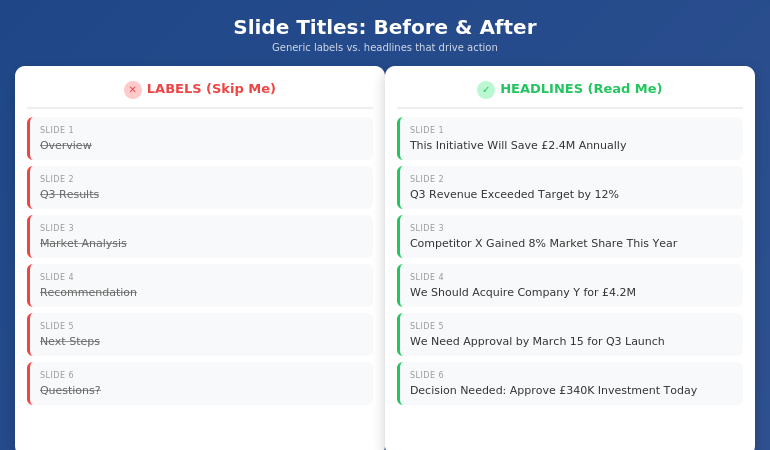
Executive slide before and after example - transforming a weak marketing update into a clear headline with recommendation

Stop Writing Slide Titles Like This (Before and After Examples)

Your slide titles are probably costing you approvals, buy-in, and promotions.

After reviewing thousands of presentations across 24 years in corporate banking and 16 years of training executives, I can tell you the single biggest mistake I see: label slide titles instead of headline slide titles.

“Q3 Financial Results” is a label. It tells me what category of information I’m about to see.

“Q3 Revenue Up 12% Despite Market Headwinds” is a headline. It tells me what I need to know — even if I never read the rest of the slide.

This distinction in slide titles sounds small. It’s not. It’s the difference between presentations that get skimmed and ignored versus presentations that drive decisions.

Here are 10 before-and-after examples to transform your slide titles today.

Executive slide before and after example - transforming a weak marketing update into a clear headline with recommendation
The same slide, transformed: label slide titles become headlines that communicate the key message

Why Slide Titles Matter More Than You Think

Executives don’t read presentations. They scan them.

They flip through slide titles looking for red flags, key decisions, and anything that requires their attention. If your slide titles are labels, you’re invisible. They’re scanning past your slide titles without absorbing anything.

But when your slide titles are headlines — complete messages that communicate the “so what” — executives can get your story just from the slide titles. They know what you’re saying before they read a single bullet point.

This changes everything about how your presentation lands.

The Slide Titles Test That Reveals Weak Presentations

Here’s how to know if your slide titles are working:

Read only the slide titles of your presentation, in order. Do they tell a coherent story? Does someone scanning just the slide titles understand your key message and recommendation?

If yes, you have headline slide titles. If no — if the slide titles are just labels that require reading the slide content — you have work to do.

Let’s fix your slide titles.

10 Slide Titles Transformations: Before and After

Slide Titles Example 1: Financial Results

❌ Before: “Q3 Financial Results” ✅ After: “Q3 Revenue Up 12%, Margins Stable at 42%”

Why this slide title is better: The executive knows exactly how the quarter went without reading anything else. The before slide title requires them to dig into the content to understand if Q3 was good or bad.

Slide Titles Example 2: Project Status

❌ Before: “Project Status Update” ✅ After: “Project Green: 3 Weeks Ahead, 10% Under Budget”

Why this slide title is better: The slide title communicates health, timeline, and budget in one line. An executive scanning these slide titles knows immediately this project doesn’t need attention.

Slide Titles Example 3: Market Analysis

❌ Before: “Competitive Landscape” ✅ After: “We Lead in 3 of 5 Categories; Gap in Enterprise”

Why this slide title is better: The slide title tells the strategic story — mostly winning, but with one clear weakness. The executive knows exactly where to focus the discussion from the slide title alone.

Slide Titles Example 4: Budget Request

❌ Before: “Budget Proposal” ✅ After: “Requesting £500K for Platform Upgrade — 6-Month Payback”

Why this slide title is better: The slide title states the ask and the return. The executive is already doing the mental math before seeing the details.

Want slide titles already written for you?

Every template in The Executive Slide System has headline-style slide titles built in — just fill in your numbers. No more staring at blank slide titles wondering what to write.

Slide Titles Example 5: Team Update

❌ Before: “Team Performance” ✅ After: “Team at Full Capacity — All KPIs Green for Q3”

Why this slide title is better: The slide title answers the question leadership actually has: is this team performing? Instead of making them hunt for the answer, your slide title delivers it immediately.

Slide Titles Example 6: Risk Assessment

❌ Before: “Risk Register” ✅ After: “2 High Risks Require Board Attention — Mitigations in Place”

Why this slide title is better: The slide title tells leadership exactly what they need to know: how many risks, severity level, and current status. They know immediately if this slide needs discussion from the slide title.

Slide Titles Example 7: Customer Metrics

❌ Before: “Customer Satisfaction” ✅ After: “NPS Up 15 Points to 72 — Highest in Company History”

Why this slide title is better: The slide title celebrates a win with specifics. The executive knows from the slide title this is good news worth acknowledging — maybe even sharing with the board.

The 60-second executive slide test - 6 questions every presentation slide must pass before presenting to leadership
Testing your slide titles is #5 on the 60-second check: “Does the title tell the story?”

Slide Titles Example 8: Strategic Recommendation

❌ Before: “Strategic Options” ✅ After: “Recommend Option B: Fastest Time-to-Market at Moderate Risk”

Why this slide title is better: The slide title leads with the recommendation. The executive knows your position before reviewing the options — which focuses the discussion on your reasoning rather than re-evaluating everything from scratch.

Struggling to write strong slide titles?

The Executive Slide System includes 30 AI prompts — one specifically generates 5 headline slide title options for any slide. The same prompts I’ve used to help clients secure over £250 million in funding.

Slide Titles Example 9: Challenges

❌ Before: “Current Challenges” ✅ After: “Churn at 8% — Above Target; Mitigation Plan in Progress”

Why this slide title is better: The slide title is honest about the problem but also shows you’re addressing it. It demonstrates accountability in the slide title rather than hiding bad news behind a vague label.

Slide Titles Example 10: Next Steps

❌ Before: “Next Steps” ✅ After: “Decision Needed by Friday to Meet Q1 Launch Date”

Why this slide title is better: The slide title creates urgency and specifies exactly what you need. “Next Steps” could mean anything; this slide title tells leadership precisely what action you’re requesting.

The Slide Titles Formula That Always Works

Every strong slide title follows this pattern:

The Headline Slide Titles Formula

[Subject] + [Key Message] + [Number or Context]

Slide titles examples:

  • • “Revenue + Up 12% + Despite Market Headwinds”
  • • “Project + On Track + 3 Weeks Ahead of Schedule”
  • • “Churn + Above Target + Mitigation in Progress”

Numbers are particularly powerful in slide titles. “Performance Improved” is vague. “Performance Up 23%” is specific and credible. Wherever possible, include a number in your slide titles.

Common Slide Titles Mistakes to Avoid

Mistake 1: Single-word slide titles. “Overview,” “Summary,” “Appendix” — these slide titles tell the reader nothing. Every slide should have a message, and the slide title should communicate it.

Mistake 2: Questions as slide titles. “What Did We Learn in Q3?” forces the reader to dig for the answer. “Q3 Taught Us Enterprise Is Our Growth Engine” delivers the answer in the slide title.

Mistake 3: Slide titles that need the slide to make sense. If your slide title only makes sense after reading the content, it’s backwards. The slide title should make sense first, then the content provides supporting detail.

Mistake 4: Slide titles that are too long. Slide titles should be scannable — ideally under 12 words. If you can’t communicate your message in 12 words, your slide might be trying to say too much.

FAQs About Slide Titles

Should every slide have a headline slide title?

Yes, with rare exceptions. Even “Agenda” can become “Today: 3 Decisions Required.” The only slides that might keep label slide titles are section dividers in long presentations — and even those slide titles can often be improved.

What about title slides with just the presentation name?

Title slides are the one exception for slide titles. “Q3 Business Review” is fine as a presentation title. But slide 2 onwards should all have headline slide titles, not labels.

Won’t headline slide titles give away my conclusions too early?

That’s the point. Executives want to know your conclusions immediately. Leading with conclusions in your slide titles shows confidence and respects their time. Building suspense is for movies, not presentations.

How do I write headline slide titles for complex topics?

Focus on the “so what” for your slide titles. Even complex analysis has a key takeaway. “Analysis Results” tells me nothing. “Analysis Shows Market Entry Viable in Q2” tells me the conclusion. Start with the takeaway and work backwards to write your slide title.

Transform Your Slide Titles Today

Open your most recent presentation. Look at the slide titles only — don’t read the content.

Ask yourself: if an executive only read these slide titles, would they understand my message?

For any slide title where the answer is no, apply the formula: Subject + Key Message + Number or Context.

This takes 10 minutes. It will transform how your presentation lands.

I’ve seen careers change because of slide titles. A VP at one of my client companies told me she started getting invited to board meetings after she fixed her slide titles. The content hadn’t changed — just the slide titles. But suddenly, executives could actually see her strategic thinking instead of having to dig for it.

Your slide titles are the first thing leadership reads. Make them count.

The Executive Slide System complete package - 10 PowerPoint templates, 30 AI prompts, and quick start guide for executive presentations

Get Templates With Headline Slide Titles Built In

Stop staring at blank slides. The Executive Slide System includes 10 PowerPoint templates with headline-style slide titles already written — just fill in your numbers and present.

Plus 30 AI prompts including one that generates 5 headline slide title options for any slide.

GET INSTANT ACCESS → £39

10 templates • 30 AI prompts • Instant download • 30-day guarantee


Related: How to Create Executive Presentations That Get Approved in 2025 — the complete guide covering all 10 executive presentation types with headline slide titles and structures.

03 Dec 2025
Budget request slide template - executive approval structure with ROI, cost breakdown, and payback timeline

How I Helped a Client Get a £2m Budget Approved (The Slide That Did It)

A single budget presentation slide secured £2M in funding for my client — in one 20-minute meeting.

No follow-up meetings. No “let me think about it.” No death by committee. The CFO reviewed the budget presentation, asked three questions, and approved on the spot.

This wasn’t luck. After 24 years in corporate banking at JPMorgan Chase, PwC, Royal Bank of Scotland, and Commerzbank, I’ve seen hundreds of budget presentations. Most fail — not because the request is unreasonable, but because the budget presentation makes it hard to say yes.

Here’s exactly how we structured the budget presentation that worked, and why most budget requests get stuck in approval limbo.

Budget request slide template - executive approval structure with ROI, cost breakdown, and payback timeline

The budget presentation structure that secured £2M approval

Why Most Budget Presentations Fail to Get Approved

Before I show you what worked, let me explain what doesn’t — because I see these mistakes in almost every budget presentation I review.

Mistake 1: Leading with the problem instead of the ask.

Most budget presentations spend 10 slides building up to the request. By the time the actual number appears, the executive has lost patience or checked out entirely. Your budget presentation should state the ask in the first 30 seconds.

Mistake 2: Hiding the total cost.

Some presenters break costs across multiple slides in their budget presentation, hoping the piecemeal approach makes the total less scary. It doesn’t. It makes executives suspicious. Your budget presentation needs one clear number, prominently displayed.

Mistake 3: Missing the “do nothing” cost.

Executives don’t just evaluate whether your budget presentation request is worth funding — they evaluate whether it’s worth funding compared to doing nothing. If your budget presentation doesn’t show what happens if they say no, you’ve made their decision easy: defer.

Mistake 4: No clear payback timeline.

CFOs think in terms of ROI and payback periods. A budget presentation that says “this will improve efficiency” without quantifying when and how much is asking for faith, not approval.

The Budget Presentation Structure That Got Approved

My client needed £2M for a platform modernisation project. She’d been trying to get this approved for 18 months. Previous budget presentations had been deferred three times.

Here’s what we changed in her budget presentation:

Budget Presentation Element 1: The Ask — Front and Centre

The budget presentation opened with one line:

“I’m requesting £2M for platform modernisation, with full payback in 8 months.”

That’s it. No preamble, no context-setting, no “as you may recall from previous discussions.” The CFO knew exactly what he was evaluating before she said another word.

Most budget presentations bury this on slide 8. We put it in the first sentence of her budget presentation.

Budget Presentation Element 2: The Cost of Inaction

Immediately after the ask, the budget presentation showed what happens if they don’t approve:

Cost of Doing Nothing:

  • 3 system failures per quarter at £200K each = £2.4M annual risk
  • Compliance audit finding in Q3 requires remediation by Q1 — estimated 3x cost if reactive
  • Two key engineers have cited system frustration in exit interviews

This reframed the budget presentation entirely. She wasn’t asking for £2M. She was offering to prevent £2.4M+ in annual losses. Saying no suddenly had a price tag.

Budget Presentation Element 3: The ROI Summary

The budget presentation included a simple ROI calculation — not buried in an appendix, but on the main slide:

Investment Year 1 Savings Payback
£2M £3.1M 8 months

The CFO didn’t need to do mental maths. The budget presentation did it for him. Eight-month payback is exceptional — and stating it plainly made approval easy.

Budget Presentation Element 4: The Breakdown

The budget presentation showed exactly where the money goes:

  • Platform licensing: £800K (40%)
  • Implementation partner: £600K (30%)
  • Internal resources: £400K (20%)
  • Contingency: £200K (10%)

Notice the contingency line. Most budget presentations try to appear precise by excluding contingency. Experienced CFOs know this is unrealistic. Including 10% contingency in the budget presentation actually increased credibility — it showed she understood projects don’t go perfectly.

Want the exact budget presentation template from this story?

The Budget Request template is one of 10 executive presentations in The Executive Slide System, with the budget presentation structure already built in. Just fill in your numbers.

Budget Presentation Element 5: The Decision Required

The budget presentation ended with an explicit ask:

“I’m requesting approval to proceed with vendor selection this week. The implementation timeline requires a decision by Friday to meet our Q1 compliance deadline.”

This created appropriate urgency without being pushy. The budget presentation connected the ask to an external deadline (compliance), not an internal preference. The CFO couldn’t defer without accepting compliance risk.

Executive slide before and after example - transforming a weak marketing update into a clear headline with recommendation

Most budget presentations bury the ask and miss the cost of inaction — the structure makes the difference

The Three Questions the CFO Asked About the Budget Presentation

After reviewing the budget presentation, the CFO asked exactly three questions:

Question 1: “What’s the confidence level on the £3.1M savings?”

She was ready for this. “Conservative estimate based on eliminating current incident costs only. Doesn’t include productivity gains or reduced technical debt — those would add another £500K-800K annually.”

Question 2: “Why 10% contingency?”

“Industry standard for projects of this complexity. If we don’t use it, it returns to the budget. But I’d rather ask for it now than come back in Q3 asking for more.”

Question 3: “Who’s the implementation partner?”

“We’ve shortlisted three. I’ll bring the recommendation to you next week — but I need budget presentation approval to proceed with final negotiations.”

Three questions. Twenty minutes total. Budget presentation approved.

The Budget Presentation Framework That Works Every Time

Here’s the framework for any budget presentation, based on what I’ve seen work across hundreds of requests:

Budget Presentation Framework

  1. The Ask: Total amount requested — first sentence of your budget presentation
  2. The ROI: Expected return with specific payback timeline
  3. The Cost of Inaction: What happens if they say no — make this concrete
  4. The Breakdown: Where the money goes — include contingency
  5. The Timeline: Key milestones and when returns materialise
  6. The Decision: Exactly what approval you need and by when

Every element of this budget presentation framework serves the same purpose: making it easy for the approver to say yes. A budget presentation isn’t about impressing people with analysis — it’s about removing obstacles to approval.

Building a budget presentation this quarter?

The Executive Slide System includes the Budget Request template with this exact budget presentation structure, plus AI prompts that help you calculate and present ROI clearly. Clients have used these frameworks to secure over £250 million in approved funding.

Common Budget Presentation Mistakes to Avoid

Don’t split the request across meetings. “Phase 1 is £500K, we’ll discuss Phase 2 later” invites approval for Phase 1 and indefinite deferral of everything else. If you need £2M, ask for £2M in one budget presentation.

Don’t undersell contingency. Asking for the bare minimum in your budget presentation signals either inexperience or sandbagging. Include 10-15% contingency and explain why.

Don’t assume they remember previous conversations. Your budget presentation should stand alone. Include all context needed to decide — don’t rely on “as we discussed.”

Don’t hide risks. If there’s implementation risk or dependency on other projects, address it in your budget presentation. Finding out later destroys trust.

FAQs About Budget Presentations

How long should a budget presentation be?

One slide for budget presentation requests under £500K. Two to three slides for larger requests. If your budget presentation is longer than 5 slides, you’re including too much detail — move supporting analysis to an appendix.

Should I present multiple options in a budget presentation?

Only if the options represent genuinely different approaches in your budget presentation. “Option A: £2M for full scope, Option B: £1M for reduced scope” can work. “Option A: £2M, Option B: £1.8M, Option C: £2.2M” just creates confusion.

What if my budget presentation gets deferred?

Ask specifically what’s needed to approve your budget presentation. “What additional information would help you decide?” is better than accepting “we need to think about it.” Get concrete next steps before leaving the room.

How do I present a budget presentation when ROI is hard to quantify?

Focus on risk reduction and cost avoidance in your budget presentation. “This prevents £X in potential losses” is often more compelling than “this generates £X in new revenue.” Executives understand downside protection.

Your Next Budget Presentation

You probably have a budget presentation coming up — next quarter if not sooner. Before you build another slide, apply this framework:

  • State the total ask in the first sentence of your budget presentation
  • Show the cost of doing nothing
  • Include a clear ROI with payback timeline
  • Break down where the money goes (with contingency)
  • End with the specific decision you need

This budget presentation structure won’t guarantee approval — bad ideas still fail. But it will ensure that good ideas don’t fail because of poor budget presentation structure.

My client’s £2M request had been deferred three times over 18 months. Same project, same numbers, same business case. The only thing that changed was how the budget presentation was structured.

Twenty minutes later, she had approval.

The Executive Slide System complete package - 10 PowerPoint templates, 30 AI prompts, and quick start guide for executive presentations

Get the Budget Presentation Template

The exact budget presentation structure from this story is built into The Executive Slide System — ready to fill in with your numbers. Plus 9 more executive presentation templates and 30 AI prompts.

Clients have used these budget presentation frameworks to secure over £250 million in approved funding.

GET INSTANT ACCESS → £39

10 templates • 30 AI prompts • Instant download • 30-day guarantee


Related: How to Create Executive Presentations That Get Approved in 2025 — the complete guide covering all 10 executive presentation types, including the budget presentation structure.

02 Dec 2025
10 executive presentation templates - QBR, budget request, board meeting, investor pitch, strategic recommendation slides

What 500+ Executive Presentations Taught Me About Getting Buy-In

I’ve reviewed over 500 executive presentations in my career — and most of them failed to get buy-in.

Not because the ideas were bad. Not because the data was wrong. These executive presentations failed because the presenter didn’t understand how executives actually make decisions.

After 25 years in corporate banking at JPMorgan Chase, PwC, Royal Bank of Scotland, and Commerzbank — followed by 16 years training professionals on executive presentations — I’ve identified the patterns that separate approved proposals from rejected ones.

Here’s what 500+ executive presentations taught me about getting buy-in. These same lessons helped one client secure £2M in funding and another turn a failing quarterly review into a promotion conversation.

10 executive presentation templates - QBR, budget request, board meeting, investor pitch, strategic recommendation slides
Different executive presentations require different approaches — but the principles of buy-in remain constant

Presenting a proposal to leadership in the next 30 days?

The Executive Slide System gives you the slide structures that put these buy-in principles into practice — 10 decision-ready templates with AI prompt cards to build them in under an hour.

Need a Faster Way to Build Executive Slides?

Most executives spend hours on slides that still miss the mark. The Executive Slide System gives you a structured framework for building slides that land with senior audiences — without starting from scratch every time.

Explore the System →

Lesson 1: Executive Presentations Are Decided in the First 2 Minutes

Most presenters build to a conclusion. They set up context, walk through analysis, address objections, and finally — on slide 15 — reveal the recommendation.

By slide 15, the executive has already decided. Usually “no” or “I need to think about it” — which is also “no.”

The executive presentations that get buy-in flip this structure. They open with the recommendation, then provide supporting evidence. The first two minutes tell leadership exactly what you want and why they should approve it.

The pattern for executive presentations: Lead with your ask. If the answer is yes, you’ve succeeded in two minutes. If they have questions, the rest of your presentation answers them. Either way, you’re in control.

What I’ve seen work: “I’m requesting £500K for platform modernisation. Here’s why it’s urgent: our current system fails 3x per quarter, costing us £200K each incident. The investment pays back in 8 months.”

That’s 30 seconds. The executive now knows exactly what’s being asked and has a reason to keep listening to your executive presentation.

Lesson 2: “What If We Do Nothing?” Wins Buy-In in Executive Presentations

Most executive presentations focus on benefits. Here’s what we’ll gain, here’s how great it will be, here’s the ROI.

Benefits are abstract. Risk is concrete.

The executive presentations that consistently get buy-in include the cost of inaction. Not as a scare tactic — as an honest assessment of what happens if leadership says no.

The pattern: Every recommendation in your executive presentations should include a “do nothing” option with explicit consequences. Make it clear that saying no is also a decision with costs.

What I’ve seen work: “If we don’t address this now, we’ll face mandatory compliance remediation in Q3 — estimated at 3x the cost of proactive investment, plus regulatory scrutiny.”

Executives are responsible for risk management. When your executive presentations show them the risk of inaction, you’re speaking their language.

Built for High-Stakes Presentations

Get Stakeholders to Say Yes — Not “Let Me Think About It”

The Executive Slide System (£39, instant access): includes dedicated buy-in presentation structures — objection-pre-emption frameworks, stakeholder mapping templates, and the exact slide sequences that move decisions forward.

Designed for executives who need approval, not just attention.

Get the Executive Slide System →

Lesson 3: One Decision Per Executive Presentation

I’ve watched presenters ask for budget approval, headcount, timeline extension, and strategic endorsement — all in one meeting. They got none of it.

Multiple asks in executive presentations create multiple opportunities to say no. And when executives face decision fatigue, the default is to defer everything.

The pattern: Identify the single most important decision you need. Build your entire executive presentation around getting that one yes. Everything else is a follow-up meeting.

What I’ve seen work: A director needed both budget and headcount. Instead of asking for both in her executive presentation, she requested budget approval first: “I’m asking for £300K for Phase 1. If approved, I’ll return next month with a staffing plan for Phase 2.”

She got the budget. The headcount conversation was easier because she’d already established momentum with her first executive presentation.

Want executive presentation templates built for buy-in?

I’ve built these lessons into The Executive Slide System — 10 PowerPoint templates with structures designed for approval. Designed for executives who need approval for proposals that matter.

Lesson 4: Executive Presentations Need Patterns, Not Promises

Anyone can promise results. Executive presentations that get buy-in show evidence — specifically, evidence that you’ve delivered before.

This doesn’t mean bragging in your executive presentations. It means referencing past performance as a predictor of future success.

The pattern: Before asking for something new in executive presentations, remind leadership of something you’ve already delivered. Create a pattern of reliability, then position your new request as the next step in that pattern.

What I’ve seen work: “In Q2, we launched the CRM integration on time and 10% under budget. In Q3, we delivered the mobile app ahead of schedule. This request continues that track record — same team, same methodology, higher impact.”

You’re not asking them to take a leap of faith with your executive presentation. You’re asking them to continue backing a winning approach.

Executive slide before and after example - transforming a weak marketing update into a clear headline with recommendation

The same information, restructured for buy-in: vague labels become clear headlines with recommendations

The structure of a proposal matters as much as its content.

The Executive Slide System gives you 10 decision-first templates — each structured around the buy-in principles above.

Executive Slide System — £39, instant access.

Designed for executives who present where decisions are made.

If you present to senior leadership regularly, the Executive Slide System gives you a structured framework for building slides that land — without starting from scratch each time.

Lesson 5: Address the Elephant in Your Executive Presentations

Every executive presentation has a weakness. A risk you’re downplaying, an assumption that might not hold, a question you’re hoping nobody asks.

Executives always find it. And when they do, your credibility takes a hit.

The executive presentations that get buy-in address the elephant proactively. They name the biggest concern and explain how it’s being managed — before anyone asks.

The pattern: Identify your executive presentation’s weakest point. Address it directly, early, with a clear mitigation plan. Turn a potential objection into evidence of thorough thinking.

What I’ve seen work: “The obvious question is timeline risk — we’re proposing an aggressive 6-month delivery. Here’s why we’re confident: we’ve already completed the architecture design, secured the technical lead, and identified no dependencies on other teams. If we do hit delays, we have a descoped Phase 1 that still delivers 70% of the value.”

Now the executive doesn’t need to probe for weaknesses in your executive presentation. You’ve shown you already know them.

Lesson 6: Make Executive Presentations Easy to Approve

I’ve seen 80-slide executive presentations. I’ve never seen an 80-slide presentation get buy-in.

More information doesn’t build confidence. It builds confusion and delays. Executives want enough information to decide, not all the information available in your executive presentation.

The pattern: For every piece of information in your executive presentations, ask: does this help them decide yes or no? If it’s “interesting background” or “might be useful,” cut it. Save it for the appendix or follow-up questions.

What I’ve seen work: The best executive presentations I’ve reviewed were 6-10 slides. They respected the audience’s time and focused relentlessly on the decision at hand. Executives could say yes in 15 minutes instead of deferring a 60-minute data dump.

The test: If your executive presentation takes more than 20 minutes to deliver, it’s too long. Cut until it hurts, then cut again.

Building an executive presentation this week?

The Executive Slide System includes 10 templates for every executive presentation type — QBRs, budget requests, board openers, strategic recommendations — plus 30 AI prompts to generate content in minutes. One client used the budget request template to secure approval in a single 15-minute meeting.

Lesson 7: Buy-In for Executive Presentations Starts Before the Meeting

This is the lesson that took me longest to learn: executive presentations that get buy-in usually have buy-in before the presentation happens.

The meeting is confirmation, not persuasion.

Experienced presenters socialise their ideas before the formal pitch. They have one-on-ones with key stakeholders, gather input that shapes the proposal, and build alignment so the executive presentation is a formality.

The pattern: Before any high-stakes executive presentation, identify the 2-3 people whose support you need. Meet with them individually. Ask for their input. Incorporate their feedback. When you present, they’re already invested in your success.

What I’ve seen work: A VP preparing a board presentation spent two weeks in pre-meetings. By the time he delivered his executive presentation, every board member had seen an early version and provided feedback. The presentation felt like a collaborative conclusion, not a surprise pitch. Approved unanimously.

The Meta-Lesson About Executive Presentations

Here’s what all 500+ executive presentations taught me: the audience isn’t “executives.” The audience is specific people with specific concerns, priorities, and decision-making styles.

A CFO reviewing executive presentations cares about ROI and risk. A CEO cares about strategy and competitive position. A board cares about governance and shareholder value. A COO cares about execution and resources.

The executive presentations that get buy-in are tailored to the actual people in the room — not a generic “leadership” audience.

The pattern: Before building any executive presentation, answer: Who exactly will be in the room? What do they each care about? What would make each of them say yes? Then build slides that address those specific concerns.

The Executive Presentation Buy-In Checklist

Before your next executive presentation, run through these questions:

Executive Presentation Buy-In Checklist

  1. ☐ Is my recommendation in the first 2 minutes?
  2. ☐ Have I shown the cost of doing nothing?
  3. ☐ Am I asking for ONE decision only?
  4. ☐ Have I referenced past success as evidence?
  5. ☐ Have I addressed the biggest objection proactively?
  6. ☐ Is the executive presentation under 20 minutes?
  7. ☐ Have I socialised this with key stakeholders beforehand?
  8. ☐ Have I tailored content to the specific people in the room?

If you can’t check every box, your executive presentation isn’t ready. Keep working until you can.

Structure That Commands Attention

Structure Your Next Buy-In Presentation in 30 Minutes

The Executive Slide System (£39) gives you 17 tested structures including the buy-in deck template — pre-built to address the objections senior audiences raise before you reach slide three.

Get the Executive Slide System →

FAQs About Getting Buy-In on Executive Presentations

What if I don’t know who’ll be in the room for my executive presentation?

Ask. Email the meeting organiser: “Can you confirm who’ll be attending? I want to make sure I address the right priorities.” This also signals professionalism and preparation for your executive presentation.

How do I get pre-meetings with senior executives?

Position it as seeking input, not pitching: “I’m developing a proposal for [topic] and would value your perspective before the formal executive presentation. Can I have 15 minutes to walk you through the approach?” Most executives appreciate being consulted.

What if my executive presentation genuinely needs 30+ slides?

It doesn’t. You have 30+ slides of content — that’s different. Distill it to 10 slides for your executive presentation, put the rest in an appendix for reference, and offer to send the full deck afterward for anyone who wants detail.

How do I address objections without sounding defensive in executive presentations?

Frame it as thorough thinking, not defensiveness: “The question I’d ask if I were in your seat is [objection]. Here’s how we’re managing that risk…” You’re showing you’ve anticipated concerns in your executive presentation, not responding to criticism.

Your Next Executive Presentation

You probably have an executive presentation coming up. A budget request, a project proposal, a quarterly review, a board update.

Before you build another slide, step back and ask:

  • What’s the one decision I need from this executive presentation?
  • Who specifically will decide?
  • What would make them say yes?
  • What’s the biggest reason they’d say no — and how do I address it?

Answer those questions first. Then build your executive presentation. That order matters.

Executive presentations aren’t about impressing people with your analysis. They’re about making it easy for smart, busy people to say yes.

Make it easy, and they will

The Executive Slide System complete package - 10 PowerPoint templates, 30 AI prompts, and quick start guide for executive presentations

Get Templates for Executive Presentations That Get Buy-In

These lessons are built into The Executive Slide System — 10 PowerPoint templates structured for approval, plus 30 AI prompts to generate your content in minutes.

Designed for executives who present where decisions are made. One client used these to turn a rejected proposal into a funded initiative.

GET INSTANT ACCESS →

Executive Slide System — £39, instant access.
10 templates • 30 AI prompts • Instant download • 30-day guarantee


Related: How to Create Executive Presentations That Get Approved in 2025 — the complete guide covering all 10 executive presentation types with structures and frameworks for buy-in.

📧 The Winning Edge Newsletter

Weekly insights on executive presentations, QBR strategies, and what’s actually working in boardrooms right now.

Subscribe Free →

01 Dec 2025
QBR presentation template - quarterly business review slide with metrics, wins, challenges, and next steps

Why Most QBR Presentations Bore Leadership (And How to Fix Yours)

Your QBR presentation is either building your career or stalling it.

There’s no middle ground. After 25 years presenting quarterly business reviews at JPMorgan Chase, PwC, Royal Bank of Scotland, and Commerzbank — and 16 years training executives on presentations — I’ve seen how quickly leadership forms opinions based on how you present your numbers.

A good QBR presentation demonstrates strategic thinking. A bad one makes leadership question whether you understand your own business.

Most QBR presentations are bad. Here’s why — and how to fix yours before the next quarter.

QBR presentation template - quarterly business review slide with metrics, wins, challenges, and next steps
A QBR presentation structure that keeps executives engaged

Preparing a QBR right now?

The Executive Slide System includes QBR and board-ready slide templates that translate your performance data into the narrative structure leadership actually wants to see.

Explore the Executive Slide System →

Why Most QBR Presentations Fail

The fundamental problem with most QBR presentations is that they report what happened instead of what it means.

Leadership doesn’t need you to read numbers off a slide. They can see the numbers. They need you to interpret them — to explain causation, context, and consequence.

“Revenue was £4.2M” is a data point.

“Revenue was £4.2M — 12% above target — driven by the Enterprise expansion we launched in July” is insight.

One informs. The other demonstrates that you understand your business. That’s the difference between a forgettable QBR presentation and one that builds your reputation.

The Three QBR Presentation Mistakes

Mistake 1: Leading with data instead of narrative. Sometimes the bigger problem is that the decision was already made before you walked in — and your QBR format made it worse. Sometimes the bigger issue is that the decision was already made before you presented.

When your first slide is a wall of numbers, you’re signalling that the next 30 minutes will be a data dump. Executives immediately disengage because they know they’ll hear the same information they already saw in the pre-read.

Your QBR presentation should lead with the story. What happened this quarter? Was it good or bad? Why? Then use data to support the narrative — not replace it.

Mistake 2: Hiding bad news (or burying it on slide 18).

Executives can smell spin from a mile away. When you lead with wins and bury challenges at the end of your QBR presentation, you lose credibility. They start wondering what else you’re hiding.

Worse: if they discover a problem you glossed over, they’ll never fully trust your quarterly reviews again.

Be direct. “We missed our customer retention target. Here’s why, and here’s what we’re doing about it.” That earns respect.

Mistake 3: No clear ask.

A QBR presentation isn’t just a report — it’s an opportunity. What do you need from leadership? Budget approval? Headcount? A decision on strategy?

If you walk out of a quarterly business review without having asked for something, you’ve wasted 30 minutes of executive time on a meeting that could have been an email.

The QBR Presentation Structure That Works

Here’s the quarterly business review structure I’ve used and taught for over two decades. It consistently keeps leadership engaged:

1. Headline Metrics (30 seconds)

Open your QBR presentation with 4-6 key numbers. Not 12. Not 20. The metrics that matter most.

The Executive Slide System includes a QBR template that follows this exact structure — so you can build your next review in under an hour.

Each metric should have three elements:

  • The number itself
  • The target or benchmark (so they know if it’s good or bad)
  • A visual indicator (green/amber/red, arrow up/down)

This takes one slide. Executives can see the health of the business in 10 seconds. That’s the point.

Example QBR headline metrics:

Metric Actual Target Status
Revenue £4.2M £3.8M 🟢
Gross Margin 42% 45% 🟡
New Customers 127 100 🟢
Customer Churn 8.3% 5% 🔴

Four numbers. Instant understanding. Now they’re ready to hear the story.

2. Performance Narrative (2-3 minutes)

This is where most QBR presentations fail — and where great ones shine.

Don’t explain what the numbers are. Explain why they are what they are.

“Revenue was up 12%” is reporting.

“Revenue was up 12%, driven by three factors: the Enterprise deal we closed in July contributed £400K; our pricing adjustment in August increased average deal size by 8%; and the marketing campaign generated 40% more qualified leads than Q2” is analysis.

The second version shows you understand causation. That’s what leadership wants to see in a QBR presentation.

Structure your narrative as:

  • Overall: Was it a good quarter or a bad quarter? Say it plainly.
  • What drove the results: 2-3 primary factors, with specifics.
  • What surprised you: Anything unexpected — good or bad.

3. Wins (2 minutes)

Specific achievements with impact quantified.

Not “We had some great wins this quarter.” That’s meaningless in a QBR presentation.

Instead:

  • “Closed £1.2M Enterprise deal with [Company] — largest in company history”
  • “Reduced customer onboarding time from 6 weeks to 2 weeks”
  • “Launched mobile app — 15,000 downloads in first month”

Each win should have a number attached. Numbers make wins credible. Without numbers, wins feel like spin.

Limit to 3-4 wins. More than that dilutes impact. Pick the ones that matter most to the business strategy.

4. Challenges (2 minutes)

This is where you build trust in your QBR presentation — or destroy it.

Be direct about what didn’t work. Then immediately pivot to what you’re doing about it.

Structure for each challenge:

  • The challenge (specific and honest)
  • Root cause (show you understand why it happened)
  • Mitigation (what you’re doing to fix it)
  • Timeline (when you expect improvement)

Example:

“Customer churn hit 8.3% this quarter — above our 5% target. Root cause: we identified that 60% of churned customers cited slow support response times. We’ve already hired two additional support staff, implemented a new ticketing system, and expect to see churn return to target by end of Q1.”

That’s accountability. Executives respect it.

What NOT to do in a QBR presentation:

  • “Churn was a bit elevated due to market conditions” — vague, externalises blame
  • “We’re looking into the churn issue” — no action, no timeline
  • Skip challenges entirely — destroys credibility

5. Next Quarter Focus (2 minutes)

Three priorities. Not seven. Three.

Each priority in your QBR presentation should have:

  • A specific outcome (not an activity)
  • A measurable target
  • An owner

Weak: “Continue to focus on customer retention”

Strong: “Reduce churn to 5% by end of Q1. Owner: Sarah. Key actions: New onboarding programme launches Jan 15, support SLA reduced to 4 hours.”

The strong version tells leadership exactly what you’ll deliver and who’s responsible. It gives them something concrete to check next quarter.

Want a ready-made QBR presentation template with this structure? The Executive Slide System — £39, instant access — includes the QBR template and 9 more executive presentation frameworks.

The QBR template is one of 10 executive presentations in The Executive Slide System, complete with AI prompts to generate your content in minutes. Structured for executives who need to turn data into strategic conversations at quarterly reviews.

The QBR Presentation Narrative Arc

Notice the structure follows a story:

  1. Setup: Here’s where we are (headline metrics)
  2. Context: Here’s how we got here (performance narrative)
  3. Highs: Here’s what went well (wins)
  4. Lows: Here’s what didn’t (challenges)
  5. Resolution: Here’s where we’re going (next quarter focus)

This is a story. Stories are engaging. Data dumps are not.

Executives stay engaged with your QBR presentation because they’re following a narrative, not watching you read numbers off slides.

10 executive presentation templates - QBR, budget request, board meeting, investor pitch, strategic recommendation slides
The QBR is one of 10 executive presentation types — each requires a different structure

Timing Your QBR Presentation

If you have 30 minutes:

  • Headline metrics: 2 minutes
  • Performance narrative: 5 minutes
  • Wins: 4 minutes
  • Challenges: 5 minutes
  • Next quarter focus: 4 minutes
  • Discussion/Q&A: 10 minutes

Notice: only 20 minutes of presentation. The rest is discussion.

If your QBR is being presented in a hybrid room with remote and in-person stakeholders, the hybrid presentation guide covers the structural adjustments that keep both audiences engaged.

That’s intentional. Executives want to ask questions, probe challenges, and discuss strategy. If you talk for 28 minutes and leave 2 minutes for questions, you’ve delivered a lecture, not a business review.

The 60/40 rule for QBR presentations: 60% presentation, 40% discussion. If you’re not hitting that ratio, you’re talking too much.

How to Handle Hard Questions in Your QBR

Good QBR presentations invite tough questions. Here’s how to handle them: If your QBR involves a risk committee, see our guide on preparing for the questions that expose blind spots. If your QBR involves a risk committee, see our guide on preparing for the questions that expose blind spots.

“Why did we miss the target?”

Don’t get defensive. Acknowledge the miss, explain root cause, describe what you’re doing about it. “You’re right, we missed by 15%. The primary driver was [X]. We’ve already started [Y] and expect to recover by [Z].”

“What would you do differently?”

This is a test. They want to see if you’ve reflected. Have an answer ready. “In hindsight, we should have [X] earlier. We’ve built that into our Q1 planning.”

“Is this team capable of delivering?”

Don’t take it personally. Answer with evidence. “We delivered [X] and [Y] this quarter despite [challenge]. I’m confident in the team, and I’m adding [resource] to address the gap in [area].”

“What’s the risk we miss again?”

Be honest. “There’s risk in [specific area]. We’re mitigating it by [action]. If [trigger] happens, we’ll [contingency].” Executives respect risk awareness more than false confidence.

QBR Presentation Checklist

Run through these questions before you present your quarterly business review:

QBR Pre-Flight Checklist

  1. ☐ Can leadership see overall business health in the first 30 seconds?
  2. ☐ Does every number have a target/benchmark for comparison?
  3. ☐ Have I explained why results happened, not just what happened?
  4. ☐ Are my wins specific and quantified?
  5. ☐ Have I been honest about challenges — with mitigation plans?
  6. ☐ Are next quarter priorities specific, measurable, and owned?
  7. ☐ Have I left time for discussion (at least 30% of the meeting)?
  8. ☐ Do I have an ask for leadership?

If you answer “no” to any of these, fix it before presenting your QBR.

The QBR Presentation That Changed My Perspective

Early in my career at JPMorgan, I watched a division head present a brutal quarter. Revenue down 20%. Major client lost. Two key hires had quit.

I expected him to spin it. He didn’t.

He opened with: “This was a bad quarter. We underperformed, and I’m accountable.” Then he spent 20 minutes explaining exactly what went wrong, why, and what he was doing to fix it. He ended with a specific ask for headcount to rebuild the team.

The CEO’s response? “Thank you for the honest assessment. Let’s get you those resources.”

That’s when I learned: QBR presentations aren’t about making yourself look good. They’re about giving leadership the information they need to make good decisions. Sometimes that means delivering bad news well.

Executives can handle bad quarters. What they can’t handle is being surprised — or worse, discovering you hid something.

FAQs About QBR Presentations

How long should a QBR presentation be?

For a 30-minute meeting, keep your QBR presentation to 8-12 slides. You want 60% presenting, 40% discussion. More slides means less time for the strategic conversation that makes quarterly reviews valuable.

Should I send my QBR presentation as a pre-read?

Yes, but send a condensed version. Include headline metrics and the performance narrative. Save wins, challenges, and next steps for the live discussion — that’s where you demonstrate strategic thinking.

What if my quarter was genuinely bad?

Lead with honesty. “This was a difficult quarter” followed by clear analysis of why and what you’re doing about it. Executives respect accountability. What destroys trust is discovering you minimised problems.

How do I handle a QBR when I’m new to the role?

Acknowledge it: “This is my first QBR in this role. I’ve spent [X weeks] understanding the business. Here’s what I’ve found.” Then present your analysis. Being new doesn’t excuse you from having a point of view.

What metrics should I include in my QBR presentation?

Include the 4-6 metrics leadership actually uses to evaluate business health. If you’re unsure, ask your manager before the QBR: “What numbers do you look at first?” Those are your headline metrics.

The Winning Edge — Free Weekly Newsletter

Every Thursday, one executive communication tactic you can use immediately. No fluff. No theory. Just what works in real boardrooms.

Subscribe Free

Transform Your Next QBR Presentation

Your next quarterly business review is an opportunity:

  • To demonstrate strategic thinking
  • To build trust through transparency
  • To secure resources for next quarter
  • To show leadership you understand your business

Don’t waste it on a data dump.

Lead with insight. Be honest about challenges. Ask for what you need.

That’s how QBR presentations become career accelerators instead of calendar fillers.

The Executive Slide System complete package - 10 PowerPoint templates, 30 AI prompts, and quick start guide for executive presentations

Get the QBR Template (Plus 9 More Executive Presentations)

Stop building quarterly business reviews from scratch. Get the QBR structure above as a ready-made PowerPoint template, plus AI prompts that generate your content in minutes.

The same frameworks my clients use to present at board level. Designed for directors and VPs preparing for high-stakes quarterly business reviews

GET INSTANT ACCESS →

The Executive Slide System — £39, instant access. 10 templates • 30 AI prompts • Instant download • 30-day guarantee


Related: How to Create Executive Presentations That Get Approved in 2025 — the complete guide covering all 10 executive presentation types, including the QBR structure with AI prompts.

01 Dec 2025
The 60-second executive slide test - 6 questions every presentation slide must pass before presenting to leadership

The 60-Second Test Every Executive Slide Should Pass

Every executive slide you create gets judged in three seconds.

That’s how long leadership spends deciding whether your slide is worth reading — or skipping. After reviewing thousands of executive slides across 25 years in corporate banking at JPMorgan Chase, PwC, and Royal Bank of Scotland, I’ve found that the same six problems kill presentations over and over.

The good news: you can catch all of them in 60 seconds.

Here’s the executive slide test I run before anything leaves my desk. My clients have used these same standards to present slides that helped raise

The 60-second executive slide test - 6 questions every presentation slide must pass before presenting to leadership
The 60-second executive slide test — print this and use it before every presentation

The 60-Second Executive Slide Test

Six questions. Answer “yes” to all six, or revise before presenting.

1. Can I explain this executive slide in ONE sentence?

This is the clarity test.

If you need two sentences to explain what a slide is about, the slide is trying to do too much. Split it or simplify it.

I once watched a director present a “Project Update” slide that covered timeline, budget, risks, team changes, and next steps. Five topics, one slide. The executive’s response: “What’s the headline here?”

There wasn’t one. That’s the problem.

The fix: Before you add anything to an executive slide, write one sentence describing what it communicates. If you can’t write that sentence, you don’t have a clear slide yet.

Examples:

  • Weak: “This slide shows our Q3 performance across several dimensions including revenue, costs, and headcount, with some notes on challenges.”
  • Strong: “This slide shows Q3 revenue beat target by 12%.”

The strong version might need supporting slides for costs and headcount. That’s fine. One clear message beats three muddy ones.

2. Is the “so what” obvious on this executive slide?

This is the relevance test.

Every executive slide should answer an unspoken question: why am I looking at this?

Data without interpretation is just noise. “Revenue was £4.2M” tells me a number. “Revenue was £4.2M — 15% above target, driven by Enterprise expansion” tells me what it means.

Executives don’t have time to figure out why something matters. That’s your job. If the “so what” isn’t obvious within three seconds, you’ve failed.

The fix: Add the implication to every data point. Don’t just show the number — show what it means for the business, the project, or the decision at hand.

Examples:

  • Weak: “Customer churn: 8.3%”
  • Strong: “Customer churn: 8.3% — above 5% threshold, requires immediate action”

3. Would my CEO understand this executive slide without me talking?

This is the standalone test.

Here’s something most people don’t think about: your slides will get forwarded. The executive you present to will send them to their boss, their peers, their team. Those people won’t have you there to explain.

Your executive slide needs to communicate without a voiceover.

This doesn’t mean cramming in more text. It means the text you include must be self-explanatory. No jargon that requires context. No acronyms without definitions. No charts that need narration to interpret.

The fix: Imagine emailing this slide to someone who wasn’t in the room. Would they understand it? If not, what’s missing?

Test it: Show the slide to a colleague for 10 seconds. Ask them what it’s about. If they can’t tell you, it doesn’t stand alone.

4. Is there ONE clear takeaway from this executive slide?

This is the focus test.

Multiple messages = no message.

When you put three key points on an executive slide, the audience remembers zero. When you put one point on a slide, they remember one. The maths is simple.

I know it feels efficient to pack information together. It’s not. It’s confusing. Executives are scanning while half-listening to you and thinking about their next meeting. Give them one thing to take away, and they might actually take it.

The fix: Identify the single most important thing you want the audience to remember. Make that the headline. Everything else is supporting evidence.

The discipline: If you have three key points, you have three slides. Accept it.

5. Does the title tell the story?

This is the headline test — and it’s where most executive slides fail.

“Q3 Financial Results” is a label, not a title. It tells me what category of information I’m about to see. It tells me nothing about what I should think or do.

“Q3 Revenue Up 12% Despite Market Headwinds” is a headline. It delivers the message before I read anything else. If I’m scanning a 30-slide deck, I can get the story just from the titles.

This is how executives actually read presentations. They scan titles, look for red flags, and only dig into detail when something catches attention. If your titles are labels, you’re invisible.

The fix: Rewrite every title as a complete sentence that communicates the key message. The title should make sense even if the audience reads nothing else on the executive slide.

Examples:

  • Label: “Project Status” → Headline: “Project On Track for March Launch”
  • Label: “Q3 Hiring Update” → Headline: “Q3 Hiring Complete — Team at Full Capacity”
  • Label: “Budget Analysis” → Headline: “Budget Request: £250K for Q1 Platform Upgrade”

6. Have I removed everything non-essential?

This is the discipline test.

Every element on your executive slide should earn its place. Every bullet point, every data label, every logo in the corner. If it doesn’t contribute to your one message, it’s noise.

This is hard because it feels like deleting things is losing value. It’s not. It’s adding clarity. The stuff you remove wasn’t helping — it was competing for attention with the stuff that matters.

The fix: Go through every element and ask: “Does this help communicate my one key message?” If the answer is no, delete it.

Common offenders:

  • Decorative images that don’t convey information
  • Logos on every slide (once at the start is enough)
  • Data points that don’t support the main message
  • Bullet points that repeat what the title already said
  • “Agenda” or “Overview” slides that waste time

Want this checklist as a printable PDF?

The “Before You Present” cheat sheet is included in The Executive Slide System — the same templates and prompts my clients use to present at board level. One client used these frameworks to secure significant funding.

How to Test Every Executive Slide in 60 Seconds

Don’t try to run all six questions in your head. Print this list or keep it on a sticky note by your monitor.

For every executive slide:

  1. Finish the slide
  2. Step away for 2 minutes (get coffee, check email)
  3. Come back with fresh eyes
  4. Run through all six questions
  5. Fix any “no” answers before moving on

This takes 60 seconds per slide. For a 10-slide deck, that’s 10 minutes of quality control. It will save you from the “what’s the point of this slide?” question that derails presentations.

The Executive Slide System includes slide templates that are pre-built to pass this test — so you start from a position of strength every time.

What Executives Are Really Thinking

These six tests map directly to what leadership thinks when reviewing your executive slides: For the full framework on how executives actually evaluate presentations, see our guide on executive presentation skills CEOs use.

Your Test What the Executive Is Thinking
Can I explain this in one sentence? “What is this about?”
Is the “so what” obvious? “Why should I care?”
Would my CEO understand this? “Can I forward this to my boss?”
Is there ONE clear takeaway? “What do I need to remember?”
Does the title tell the story? “Can I skim this deck?”
Have I removed everything non-essential? “Is this going to waste my time?”

When you pass all six tests, you’ve built an executive slide that answers every question before they ask it.

Real Example: Executive Slide Before and After

Here’s how the test works in practice.

BEFORE — The typical executive slide:

Title: “Marketing Update”

  • Campaign launched on Oct 15
  • Reached 50,000 impressions
  • Generated 1,200 leads
  • Cost per lead: £42
  • Industry benchmark: £65
  • Team added two new hires
  • Planning holiday campaign

Running the test:

  1. One sentence? No — covers campaign performance, team changes, and future plans.
  2. “So what” obvious? Partially — benchmark comparison hints at success, but it’s buried.
  3. Standalone? No — “Campaign” and “holiday campaign” need context.
  4. One takeaway? No — at least three different topics.
  5. Title tells story? No — “Marketing Update” is a label.
  6. Non-essential removed? No — team hires and future plans don’t belong with campaign metrics.

Score: 0/6. This executive slide needs work.

Executive slide before and after example - transforming a weak marketing update into a clear headline with recommendation
The same information, restructured: label title → headline title, data dump → clear recommendation

AFTER — The revised executive slide:

Title: “October Campaign Delivered Leads at 35% Below Industry Cost”

  • 1,200 leads generated (target: 1,000) ✓
  • Cost per lead: £42 vs. £65 industry benchmark
  • 50,000 impressions, 2.4% conversion rate
  • Recommendation: Increase Q1 budget by 20% to scale results

Running the test again:

  1. One sentence? Yes — “Our campaign outperformed on cost efficiency.”
  2. “So what” obvious? Yes — we beat the benchmark, so we should do more.
  3. Standalone? Yes — all terms are clear.
  4. One takeaway? Yes — the campaign worked, scale it up.
  5. Title tells story? Yes — headline delivers the key message.
  6. Non-essential removed? Yes — team hires and holiday planning are separate slides now.

Score: 6/6. This executive slide is ready.

Print This Executive Slide Checklist

Here’s the test in a format you can print or screenshot:

The 60-Second Executive Slide Test

Answer “yes” to all six before presenting

  1. ☐ Can I explain this slide in ONE sentence?
  2. ☐ Is the “so what” obvious?
  3. ☐ Would my CEO understand this without me talking?
  4. ☐ Is there ONE clear takeaway?
  5. ☐ Does the title tell the story?
  6. ☐ Have I removed everything non-essential?

What Happens When You Skip the Executive Slide Test

I’ll tell you exactly what happens, because I’ve seen it hundreds of times. In many cases, the decision was already leaning one way — and a weak slide just confirmed it.

You present a slide. An executive asks a clarifying question. You answer. They ask another question. You realise you’re explaining things that should have been on the slide in the first place. The meeting runs long. The decision gets deferred. You leave thinking “that could have gone better.”

For executives who refuse to leave slide quality to chance, the Executive Slide System (£39) provides the frameworks and templates to get it right the first time.

It could have. Sixty seconds of review would have caught the problem.

The executives I’ve worked with at JPMorgan, PwC, and Royal Bank of Scotland didn’t get to those positions by tolerating unclear communication. They have no patience for slides that waste their time. And they shouldn’t.

Your job is to make their job easier. The 60-second test is how you do it.

Every Slide You Present Is a 60-Second Decision About Your Credibility

The Executive Slide System gives you 12 structured slide templates that pass the 60-second test every time — plus AI prompt cards and frameworks to build executive-ready decks in under an hour. No more second-guessing whether your slides will land.

Get the Executive Slide System

Used by VPs and directors at FTSE 250 companies before board reviews and investor meetings.

FAQs About Executive Slides

How many bullet points should an executive slide have?

Three to five maximum. If you have more than five bullets, you’re trying to say too much. Split the content across multiple slides or cut what’s non-essential.

Should I use complete sentences in bullet points?

Fragments are fine for bullets, but your title should always be a complete sentence that communicates the key message. Bullets support the title — they don’t replace it.

How do I know if my executive slide is too busy?

Apply the squint test: squint at your slide from arm’s length. If you can’t identify the main message and structure, it’s too busy. Simplify until the hierarchy is obvious.

What’s the ideal number of slides for an executive presentation?

Fewer than you think. For a 30-minute meeting, aim for 8-12 slides maximum. That’s about 2-3 minutes per slide, which leaves time for discussion. Executives prefer fewer, clearer slides over comprehensive data dumps.

The Winning Edge — Free Weekly Newsletter

Every Thursday, one executive communication tactic you can use immediately. No fluff. No theory. Just what works in real boardrooms.

Subscribe Free

Your Next Executive Slide

Open your last presentation. Pick one slide — any slide. Run the test.

I’d bet money at least one question comes back “no.”

Fix it. Then do the next slide. By the time you’ve done 10 slides, the test will be automatic. You’ll start catching problems while you’re still building, not after you’re done.

That’s when your executive slides start getting approved instead of questioned.

The Executive Slide System complete package - 10 PowerPoint templates, 30 AI prompts, and quick start guide for executive presentations


Related: How to Create Executive Presentations That Get Approved in 2025 — the complete guide covering all 10 executive presentation types with structures and AI prompts.

30 Nov 2025
The Executive Slide System - AI-powered templates for executive presentations that get approved

How to Create Executive Presentations That Get Results in 2026

📅 Updated: January 2026 | The complete framework for presentations that get approvals

Need a Faster Way to Build Executive Slides?

Most executives spend hours on slides that still miss the mark. The Executive Slide System gives you a structured framework for building slides that land with senior audiences — without starting from scratch every time.

Explore the System →

Quick Answer

Executive presentations that get results follow a specific structure: lead with your recommendation (not background), limit to 12 slides maximum, include only three supporting points per argument, and end with a clear ask. The difference between presentations that get approved and those that get “let’s revisit this” is almost never the content — it’s the structure and delivery.

I spent the first five years of my banking career getting it wrong.

At JPMorgan, I’d build comprehensive 40-slide decks. I’d walk executives through every detail of my analysis. I’d save my recommendation for the end — like a detective revealing the killer in the final scene.

The result? “Send us a summary.” “Let’s table this.” “Interesting analysis — what do you recommend?” (on slide 35).

Then I watched a senior Managing Director present a £50M investment decision. Eight slides. Four minutes of talking. Approved unanimously.

That’s when I understood: executive presentations aren’t about showing your work. They’re about enabling decisions.

After 25 years presenting to C-suite leaders at JPMorgan, PwC, Royal Bank of Scotland, and Commerzbank — and training senior professionals on their own presentations — I’ve codified what works into a repeatable system.

This guide gives you the complete framework.

Presenting to a board or senior leadership in the next 30 days?

The Executive Slide System gives you 10 board-ready slide templates and 30 AI prompt cards — built around the principles in this guide so your next presentation takes an afternoon, not a weekend.

Why Most Executive Presentations Fail

Before we get to what works, let’s understand why the typical approach fails.

Problem #1: Building Up to the Conclusion

Academic training teaches us to present evidence, then reach a conclusion. Executive presentations require the opposite: lead with your conclusion, then provide evidence for those who want it.

Executives are processing dozens of decisions daily. They don’t have time to follow your journey of discovery. They want to know: What do you recommend? Why? What do you need from me?

Problem #2: Too Much Content

Your 40-slide deck demonstrates how much work you’ve done. Executives don’t care about your effort — they care about the decision in front of them.

The appendix exists for a reason. Put supporting detail there. Keep your core presentation to 12 slides maximum.

Problem #3: Presenting Information Instead of Decisions

“Here’s an update on Project X” is information.

“Project X is on track. We need a decision on the vendor delay — I recommend accepting it. Here’s why.” is a decision.

Executives want the second one. Every time.

Problem #4: Weak Executive Summary

If your opening slide doesn’t tell them everything they need to know in 60 seconds, you’ve already lost momentum.

Related: The Executive Summary Slide: How to Write the Only Slide That Matters

Problem #5: No Clear Ask

If you don’t tell executives what you need, they’ll assume you don’t need anything — and move on to someone who does.

The 5 problems that cause executive presentations to fail: buried conclusions, too much content, information vs decisions, weak summary, no clear ask

Built for High-Stakes Presentations

Turn This Guide Into Your Next Executive Deck

The Executive Slide System (£39, instant access): 17 structured templates for every executive presentation scenario — board updates, budget requests, strategic recommendations, and stakeholder buy-in decks.

Designed for executives who present at board level, to investors, and to senior leadership teams.

Get the Executive Slide System →

The Executive Presentation Framework That Works

After hundreds of executive presentations — and watching thousands more — I’ve identified five principles that separate presentations that get approved from those that get deferred.

Principle #1: Lead With Your Recommendation

Your recommendation should be visible within 60 seconds. Ideally, it’s in your slide title or the first line of your executive summary.

Weak: “Technology Infrastructure Assessment”

Strong: “Recommendation: Approve £1.2M Platform Upgrade — 180% ROI”

The strong version tells executives instantly what this presentation is about and what you want them to do.

Principle #2: Structure for Scanning

Executives often flip through decks before meetings. Your presentation should be comprehensible even if they never hear you speak.

This means:

  • Slide titles that tell the story (not “Overview” or “Background”)
  • Key points visible without reading paragraphs
  • Visual hierarchy that guides the eye to what matters

Test: Can someone understand your argument by reading only the slide titles?

Principle #3: Three Supporting Points Maximum

The human brain struggles to hold more than three to four items in working memory. Give executives five reasons and they’ll remember none. Give them three and they’ll remember all of them.

Force yourself to identify the three strongest arguments. Put them in order of impact. Cut the rest.

Principle #4: Anticipate Objections

Executives will have concerns. Address the obvious ones before they’re raised — it demonstrates you’ve thought rigorously.

Include a risks slide that covers:

  • Top 3-5 risks (no more)
  • Likelihood and impact for each
  • Your mitigation strategy

When executives ask about risks and you already have a thoughtful answer, you build credibility. When they surprise you with an obvious risk you didn’t consider, you lose it.

Principle #5: End With a Clear Ask

Don’t end with “Questions?” End with exactly what you need from them.

Weak: “We’d appreciate your guidance on next steps.”

Strong: “I need budget approval today to hit the Q3 deadline. Implementation plan is ready to execute.”

Be specific about the decision, the deadline, and what happens after they approve.

Related: Executive Presentation Template: 12 Slides That Command the Room

Want ready-made templates with this framework built in? The Executive Slide System includes 10 executive templates with the structure already done — just add your content.

Build Your Next Executive Presentation in Under an Hour

These five principles are the foundation. The Executive Slide System gives you the structure to apply them — 10 slide templates for board updates, budget requests, investor pitches, and more.

Executive Slide System — £39, instant access.

  • 10 executive slide templates — board, budget, strategy, QBR, and more
  • 30 AI prompt cards — one per slide type, works with Copilot and ChatGPT
  • Narrative-first layouts so your recommendation is visible in 60 seconds

Designed for directors and senior managers who present to boards, leadership teams, and investors.

The 12-Slide Executive Presentation Structure

This structure works for board updates, strategic recommendations, budget requests, and major initiative proposals.

Slide 1: Executive Summary — Everything they need in 60 seconds

Slide 2: Situation — Current state, briefly

Slide 3: Problem/Opportunity — Why action is needed

Slide 4: Recommendation — What you want them to do

Slide 5: Options Considered — Shows rigorous thinking

Slide 6: Implementation Plan — How you’ll execute

Slide 7: Resource Requirements — What you need

Slide 8: Risk Assessment — What could go wrong

Slide 9: Timeline — Key milestones

Slide 10: Success Metrics — How you’ll measure

Slide 11: Governance — Who’s accountable

Slide 12: The Ask — Specific decision needed

Not every presentation needs all 12. Project updates might use 6. Board presentations might emphasise governance. Adapt the structure to your context — but keep the flow.

Related: Board Presentation Template: The Executive’s Complete Guide

Executive Presentation Examples: What Works vs. What Doesn’t

Let me show you the difference with real examples from my coaching practice.

Example 1: Budget Request

What doesn’t work:

  • Opens with market analysis and competitive landscape
  • Slides 2-15 cover research methodology and findings
  • Recommendation appears on slide 16
  • Budget ask buried in appendix
  • Result: “Interesting research — send us a summary”

What works:

  • Opens with: “Requesting £400K for customer platform upgrade — payback in 8 months”
  • Slide 2 shows the problem (capacity hitting limits Q3)
  • Slide 3 shows three options with recommendation highlighted
  • Slides 4-8 cover implementation, resources, risks, timeline
  • Final slide: “Need approval today to hit Q3 deadline”
  • Result: Approved in 20 minutes

Example 2: Strategic Initiative

What doesn’t work:

  • Title: “Digital Transformation Strategy Overview”
  • 45 slides covering every aspect of the transformation
  • Multiple asks scattered throughout
  • No clear prioritisation
  • Result: “Good thinking — let’s break this into smaller pieces”

What works:

  • Title: “Phase 1 Digital Transformation: £2M Investment, £8M Return”
  • Executive summary: Phase 1 scope, cost, timeline, expected ROI
  • Clear recommendation: Approve Phase 1 now, revisit Phase 2 in Q3
  • 12 slides covering essentials, 30-slide appendix for detail
  • One ask: “Approve Phase 1 budget today”
  • Result: Approved with request to accelerate timeline

Example 3: Project Status Update

What doesn’t work:

  • Comprehensive status on all 15 workstreams
  • Every milestone listed with percentage complete
  • Issues mentioned but minimised
  • No clear decision requested
  • Result: Executives tune out, miss the one thing that needed attention

What works:

  • Opens with: “Project Phoenix: On track overall, need decision on vendor issue”
  • Green/amber/red summary of all workstreams on one slide
  • Deep dive only on the issue requiring decision
  • Clear options presented with recommendation
  • Result: Decision made in 10 minutes, meeting ends early

How to Deliver Executive Presentations With Confidence

Structure gets you 80% of the way. Delivery gets you the rest.

Know Your First 30 Seconds

Memorise your opening. Not word-for-word — but know exactly what you’ll say for the first 30 seconds. This is when nerves are highest and first impressions form.

“I’m here to request approval for our platform upgrade. £1.2M investment, 180% ROI over three years. I’ll walk you through the business case, risks, and implementation plan. I need a decision today to hit our Q3 deadline.”

That’s 15 seconds. You’ve told them everything they need to know.

Don’t Read Your Slides

Your slides are evidence. Your voice provides insight, context, and conviction.

If you’re reading slides aloud, you’re wasting everyone’s time. They can read faster than you can speak.

Pause After Key Points

When you make an important statement, pause. Let it land. Rushing through signals you’re nervous or don’t believe what you’re saying.

Handle Questions Confidently

When challenged, don’t get defensive. Acknowledge the concern. Ask a clarifying question if needed. Then address it directly.

“That’s a fair point. The main risk is vendor delivery — we’ve mitigated it by building a 3-week buffer and identifying a backup vendor we can switch to if needed.”

End Decisively

Don’t trail off with “so, um, any questions?” End with your ask, clearly stated, then stop talking.

“I need your approval for the £1.2M budget to proceed. We’re ready to start Monday if approved.”

Then wait. Silence is uncomfortable, but it’s their turn to speak.

The executives who consistently get approvals follow a structured delivery approach. The Executive Slide System gives you that structure with before/after examples for every scenario.

Using AI to Create Executive Presentations Faster

For prompts structured around the 12-slide framework, the Executive Slide System includes slide-by-slide AI prompt cards for Copilot and ChatGPT.

AI tools like ChatGPT, Claude, and PowerPoint Copilot can accelerate your executive presentations — if you use them correctly.

What AI Does Well

  • Structuring your thoughts into the 12-slide format
  • Drafting executive summaries from your notes
  • Tightening wordy language
  • Generating consistent formatting
  • Creating first-draft risk assessments

What AI Can’t Do

  • Know your audience’s politics and priorities
  • Determine the right recommendation for your context
  • Anticipate the specific questions your executives will ask
  • Provide the conviction and presence that sells your idea

Use AI for speed. Use your judgment for substance.

Effective AI Prompts for Executive Presentations

For executive summary:

“Write an executive summary slide for [topic]. Include: one-sentence situation, specific recommendation, three supporting points (quantified), and clear ask. Keep under 75 words total.”

For risk assessment:

“Generate top 5 risks for [project/initiative]. For each risk, provide: description, likelihood (high/medium/low), impact (high/medium/low), and one-sentence mitigation strategy.”

For slide titles:

“Convert these descriptive slide titles into action-oriented titles that tell the story: [list your titles]”

Related: Best Copilot PowerPoint Prompts That Actually Work

Executive Presentation Checklist

Before you present, verify:

  • ☐ Recommendation visible within 60 seconds
  • ☐ Executive summary contains: situation, recommendation, 3 supporting points, ask
  • ☐ 12 slides or fewer (excluding appendix)
  • ☐ Slide titles tell the story when read in sequence
  • ☐ Three supporting points maximum per argument
  • ☐ Risks addressed with mitigation strategies
  • ☐ Clear ask on final slide
  • ☐ First 30 seconds memorised
  • ☐ Total presentation under 20 minutes
  • ☐ Appendix ready for detailed questions

Structure gets you 80% of the way. The Executive Slide System handles the structure.

Ten decision-ready templates — one for each executive scenario you’re most likely to face.

Executive Slide System — £39, instant access.

Designed for executives who present where decisions are made.

Structure That Commands Attention

From Guide to Deck in 30 Minutes

The Executive Slide System (£39) gives you the frameworks behind every technique in this guide — ready to apply to your next presentation without starting from scratch.

Get the Executive Slide System →

Frequently Asked Questions

How long should an executive presentation be?

12 slides maximum for a major decision. 6 slides for an update. If your meeting is 30 minutes, plan for 15 minutes of presentation and 15 minutes of discussion. The discussion is where decisions get made.

Should I send the presentation before the meeting?

Yes — 24-48 hours in advance when possible. This lets executives come with informed questions rather than processing raw information in the meeting. Some will read it; some won’t. Accommodate both.

How do I handle pushback from executives?

Don’t get defensive. Acknowledge the concern, ask a clarifying question if needed, then address it directly. If you don’t have an answer, say so: “I don’t have that data with me — I’ll follow up by end of day.”

What if I have more content than fits in 12 slides?

Put it in the appendix. Your core presentation should contain only what’s essential for the decision. Everything else is backup for questions that may or may not arise.

How do I present bad news to executives?

Lead with it. Don’t bury bad news on slide 15. Open with: “We have an issue that needs your attention” and then present the situation, impact, options, and your recommendation. Executives respect honesty; they don’t respect surprises.

What’s the biggest mistake in executive presentations?

Burying the recommendation. I’ve reviewed thousands of executive decks, and the most common failure is saving the conclusion for the end. Lead with what you want them to do. Everything else is supporting evidence.

📧 The Winning Edge Newsletter

Weekly insights on executive presentations, boardroom strategies, and what’s actually working in corporate communication.

Subscribe Free →

Related Resources

🎁 Free: Executive Presentation Checklist

The 12-point checklist I use before every executive presentation. One page. Covers structure, timing, and the mistakes that get decks rejected.

Download Free Checklist →

No email required. Instant download.

About the Author

Mary Beth Hazeldine spent 25 years in corporate banking at JPMorgan Chase, PwC, Royal Bank of Scotland, and Commerzbank — presenting to C-suite leaders on deals worth billions. She’s trained executives across industries on high-stakes presentations and She teaches at Winning Presentations. She now runs Winning Presentations, training senior professionals to communicate with impact.