Tag: executive presentations

24 Dec 2025
Persuasive presentations - how to change minds without manipulation using ethical influence

Persuasive Presentations: How to Change Minds Without Manipulation

NLP-based influence techniques that get decisions — without tricks or pressure tactics

Early in my banking career, I watched a senior director get a £12 million budget approved in under 15 minutes. No hard sell. No pressure. No clever tricks. The room simply… agreed.

I’d spent weeks on a similar request and been rejected twice. What was he doing differently?

It took me years to understand: persuasive presentations aren’t about convincing people you’re right. They’re about helping people convince themselves. The difference is everything.

As a qualified NLP practitioner and clinical hypnotherapist, I’ve spent decades studying ethical influence — how to change minds without manipulation. Here’s what actually works in business contexts.

🎁 Free Download: Executive Presentation Checklist — includes the persuasion framework from this article. Print-ready PDF.

What Makes a Presentation Persuasive (It’s Not What You Think)

Most people think persuasion means stronger arguments. Better data. More compelling logic.

It doesn’t.

Neuroscientist Antonio Damasio studied patients with damage to emotional brain centres. They could analyse options perfectly — but couldn’t make decisions. His conclusion: emotion isn’t the enemy of reason. It’s the engine.

A persuasive presentation doesn’t overwhelm with logic. It creates the emotional conditions for agreement. The logic provides justification after the decision is already made.

This is why:

  • A CFO approves a budget wrapped in a client story but rejects the same numbers in a spreadsheet
  • A board says yes to a recommendation framed as risk mitigation but no to the same recommendation framed as opportunity
  • An investor funds a founder who tells a compelling origin story over one with better metrics

The information is identical. The emotional frame is different.

Related: Storytelling in Presentations: The NLP Techniques That Captivate Any Audience

Persuasive Presentation Techniques: The Ethical Approach

There’s a line between influence and manipulation. Manipulation exploits. Influence aligns.

Ethical persuasion helps people see how your recommendation serves their interests. It removes friction, addresses concerns, and makes the right decision feel obvious. It never tricks, pressures, or exploits cognitive biases against someone’s own interests.

Here are the techniques that work:

1. Lead With Their Problem, Not Your Solution

Most presenters start with what they want: “I’m recommending we invest £2 million in…”

Persuasive presenters start with what the audience wants to solve: “We’re losing 15% of deals in the final stage. Here’s why — and how to fix it.”

When you articulate someone’s problem better than they can, you earn the right to propose solutions. They lean in because you understand them.

2. Use the “Yes Ladder”

Before your main ask, get a series of small agreements. Each “yes” makes the next one more likely — this is called “commitment consistency” in psychology.

Example:

  • “Would you agree that customer retention is our biggest growth lever right now?” (Yes)
  • “And that our current churn rate is higher than the industry benchmark?” (Yes)
  • “So addressing this should be a priority for Q1?” (Yes)
  • “Here’s the investment that would make that happen…”

By the time you reach your recommendation, they’ve already agreed with the logic that leads there.

3. Name the Objection Before They Do

If you know people will worry about cost, timeline, or risk — say it first.

“You’re probably thinking this sounds expensive. Let me show you the numbers…”

This does two things: it builds trust (you’re not hiding concerns) and it lets you frame the objection on your terms. An objection you raise is half-answered. An objection they raise feels like a discovery.

4. Give Them the “Out”

Counterintuitively, acknowledging alternatives strengthens your position.

“We could do nothing and accept the current results. We could try a smaller pilot first. Or we could commit fully and capture the market window. Here’s why I’m recommending option three…”

When you present options fairly, people trust your judgment more. You’re not selling — you’re advising.

5. End With the Decision, Not the Data

Weak closings: “So that’s the analysis. Any questions?”

Strong closings: “Based on what we’ve seen, I’m recommending we proceed with Option A, starting in Q1. Can I get your approval to move forward?”

A persuasive presentation always ends with a clear ask. If you don’t ask, you don’t get.

Related: How to Create Executive Presentations That Get Results

Persuasive presentation techniques - 5 ethical influence methods: lead with problem, yes ladder, name objections, give the out, end with decision

The NLP Framework for Persuasive Presentations

In NLP, we talk about “pacing and leading.” Pacing means matching someone’s current state — their concerns, their language, their worldview. Leading means guiding them toward a new perspective.

You can’t lead someone you haven’t paced first. This is why jumping straight to your recommendation fails.

The sequence:

1. Pace their current reality. Show that you understand where they are. Use their language. Acknowledge their constraints. Reference their priorities.

“I know Q4 budget is already stretched. I know we’ve had implementation challenges before. And I know the board is focused on profitability over growth right now.”

2. Bridge with shared goals. Connect their current concerns to the outcome you’re proposing.

“Which is exactly why this matters. This isn’t about spending more — it’s about spending smarter. It directly addresses the profitability mandate.”

3. Lead to your recommendation. Now that you’re aligned, introduce your solution as the logical next step.

“Here’s what I’m proposing, and how it gets us to the outcome we both want…”

This isn’t manipulation. It’s communication that works with human psychology instead of against it.

Related: How to Present to Your CFO: The Financial Language That Gets Buy-In

Structure Your Persuasive Presentations

The Executive Slide System (£39) gives you the frameworks to structure presentations that get decisions.

What’s included:

  • The 3-slide decision framework
  • Before/after examples from real client work
  • Templates for budget requests, strategic recommendations, and board presentations
  • The “yes ladder” structure built into slide flow

Get the Executive Slide System →

What Persuasive Presentations Avoid

Knowing what not to do matters as much as knowing what works.

Don’t overwhelm with options. Three choices maximum. More than that creates decision paralysis, not persuasion.

Don’t hide weaknesses. If your recommendation has risks or limitations, acknowledge them. Audiences aren’t stupid — they’ll find the holes anyway. Better to address them on your terms.

Don’t mistake length for thoroughness. A 60-slide deck isn’t more persuasive than 15 slides. It’s less persuasive. Every slide that doesn’t advance your argument dilutes it.

Don’t end with Q&A. Q&A should happen, but it shouldn’t be your closing. After Q&A, return to your recommendation and ask for the decision. The last thing they hear should be your ask, not their own objections.

Don’t confuse agreement with action. “That makes sense” isn’t a yes. “Let me think about it” isn’t a yes. Push gently for a concrete next step: “Can I schedule the kickoff meeting for next week?”

Related: The Board Presentation Structure Nobody Teaches You

Frequently Asked Questions About Persuasive Presentations

How do I make a presentation persuasive without being pushy?

Focus on their interests, not yours. A persuasive presentation shows how your recommendation solves their problem. If you’ve done that clearly, you don’t need to push — the logic carries itself. The “pushy” feeling comes from asking for something without establishing why it matters to them.

What’s the most important element of a persuasive presentation?

Starting with their problem, not your solution. When you articulate someone’s challenge better than they can, you earn credibility. Everything else builds on that foundation. If you skip this step, no technique will save you.

How do I handle a hostile or sceptical audience?

Name it directly: “I know there’s scepticism about this approach — and I understand why. Let me address that head-on.” Then acknowledge the valid concerns before making your case. Fighting resistance amplifies it. Acknowledging resistance dissolves it.

Can I be persuasive with data-heavy content?

Absolutely — but lead with the insight, not the data. “We’re leaving £2 million on the table annually. Here’s the analysis that shows why.” The number creates interest. The analysis provides proof. Most presenters reverse this and lose the audience before they reach the point.

What’s the difference between persuasion and manipulation?

Intent and alignment. Persuasion helps people make decisions that serve their interests. Manipulation exploits cognitive biases against their interests. If your recommendation genuinely helps them, advocating for it strongly isn’t manipulation — it’s service.


Master Persuasive Presentations + AI + Structure

AI-Enhanced Presentation Mastery teaches the complete persuasion system — from frameworks to delivery to handling resistance.

8 self-paced modules (January–April 2026):

  • The S.E.E. Formula: Story-Evidence-Emotion for persuasive messaging
  • The AVP Framework: Action-Value-Proof structure for recommendations
  • The 132 Rule: Structure that executives prefer
  • Handling tough Q&A and hostile audiences
  • NLP delivery techniques for influence
  • AI prompts that build persuasive narratives

Plus: 2 live coaching sessions (April 2026) with personalised feedback.

Presale price: £249 (increases to £299, then £499)

60 seats total. Lifetime access.

See the full curriculum →

Your Next Step: Build Your Persuasion Toolkit

Persuasive presentations aren’t about being slick or clever. They’re about understanding how decisions actually get made — and structuring your communication to work with that process.

The techniques here are ethical, effective, and learnable. Start with one: lead with their problem, not your solution. Master that, and the rest follows.

🎁 START FREE: Download the Executive Presentation Checklist — includes the persuasion framework from this article.

📘 GET THE STRUCTURE (£39): The Executive Slide System gives you templates and frameworks for presentations that get decisions.

🎓 MASTER IT ALL (£249): AI-Enhanced Presentation Mastery — 8 modules covering persuasion, structure, AI tools, and delivery. January–April 2026, 60 seats.


Mary Beth Hazeldine is a qualified NLP practitioner and clinical hypnotherapist who spent 24 years in corporate banking at JPMorgan, PwC, Royal Bank of Scotland, and Commerzbank. She now trains executives in the ethical influence techniques that drive decisions — combining boardroom experience with the psychology of persuasion.

17 Dec 2025
How to End a Presentation: 7 Closing Techniques I Teach C-Suite Executives

How to End a Presentation: 7 Closing Techniques I Teach C-Suite Executives

The difference between polite nods and signed approvals

I’ve trained executives at JPMorgan, PwC, and Royal Bank of Scotland. I’ve helped biotech founders raise £250M+ in funding. And after 24 years in corporate banking and thousands of presentations coached, I can tell you this:

Most presentations die in the last 60 seconds.

Everything else can be perfect — compelling data, clean slides, confident delivery — but a weak close kills the deal. The audience leaves nodding politely and then… nothing happens.

Here are 7 closing techniques I teach senior executives. I’m sharing 3 in full today. The other 4? Those are part of the deep-dive in my AI-Enhanced Presentation Mastery course launching in January.

Why Presentation Closings Fail

Before the techniques, let’s diagnose the problem.

Bad closings usually fall into three traps:

The Fizzle: “So… that’s it. Any questions?” You just handed control to the room and signalled uncertainty.

The Repeat: Summarising every slide again. Your audience isn’t stupid. They were there.

The Vague Ask: “Let me know what you think.” Think about what? Do what? By when?

Great presentation endings do the opposite. They create momentum, clarity, and commitment.

Technique 1: The Single Ask

This is the most important closing technique, and the one executives resist most.

The rule: End with ONE specific request. Not three options. Not “a few things to consider.” One thing.

Here’s why it works: Decision fatigue is real. When you give people multiple options at the end of a presentation, you’re asking them to do more cognitive work. Most will default to “I’ll think about it” — which means nothing happens.

Weak close: “So we could either proceed with the pilot, or do more research, or schedule a follow-up discussion to align stakeholders.”

Strong close: “I’m asking for approval to start the pilot on January 15th. That requires your sign-off today.”

One ask. Specific. Time-bound.

When I coach executives on investor pitches, this is often where we spend the most time. They want to hedge, offer alternatives, seem flexible. But flexibility at the close reads as uncertainty.

Your call to action should answer: What do you want them to do, and by when?

Technique 2: The Forward Story

This technique works brilliantly for strategic presentations, board meetings, and any situation where you’re proposing change.

Instead of ending with what you’ve covered, end with what happens next — told as a story.

Structure:

  • “Imagine it’s [specific future date]…”
  • Describe the outcome as if it’s already happened
  • Make the audience the hero of that story

Example:

“Imagine it’s July 2026. We’ve completed the integration, and your team is running both systems from a single dashboard. The CFO just told you the efficiency savings hit £2.3 million — £800K more than we projected. That’s the future we’re building. The first step is approving the Phase 1 budget today.”

This works because it:

  • Creates emotional connection to the outcome
  • Makes the decision feel smaller (it’s just “the first step”)
  • Positions the audience as the one who made it happen

I use this technique constantly with biotech founders pitching investors. Investors aren’t buying your science — they’re buying a future where your science changed something. Show them that future.

Technique 3: The Silence Close

This one takes nerve. Most people can’t do it without practice.

After you make your ask, stop talking.

Don’t fill the silence. Don’t add qualifiers. Don’t say “so yeah” or “if that makes sense” or “let me know what you think.”

Just ask, then wait.

Example:

“I’m recommending we proceed with Vendor A. The cost is £340,000, and I need your approval today to meet the Q2 deadline.”

[Silence]

Here’s what happens in that silence: the other person has to respond. They can’t just let your words hang there. And whatever they say next tells you exactly where you stand.

If they object, you’ve surfaced the real issue. If they agree, you’ve closed. If they ask a question, you’ve identified what’s actually blocking the decision.

Most presenters panic in silence and start backpedaling: “Of course, we could also look at other options…” You just undermined your own recommendation.

The silence close requires confidence. It requires believing your recommendation is sound. That’s why we practice it extensively in my course — it’s a skill, not a personality trait.

→ Learn all 7 techniques in the January course (early bird: £249)

The Other 4 Techniques

I’ve shared three. Here’s what’s in the full system:

Technique 4: The Callback Close — Referencing your opening to create narrative closure

Technique 5: The Objection Preempt — Addressing the unspoken concern before they raise it

Technique 6: The Social Proof Stack — Using specific evidence at the close to overcome last-second doubt

Technique 7: The Next Yes — For situations where you can’t get the final decision today

Each of these has specific language patterns, practice exercises, and real examples from executive presentations I’ve coached.

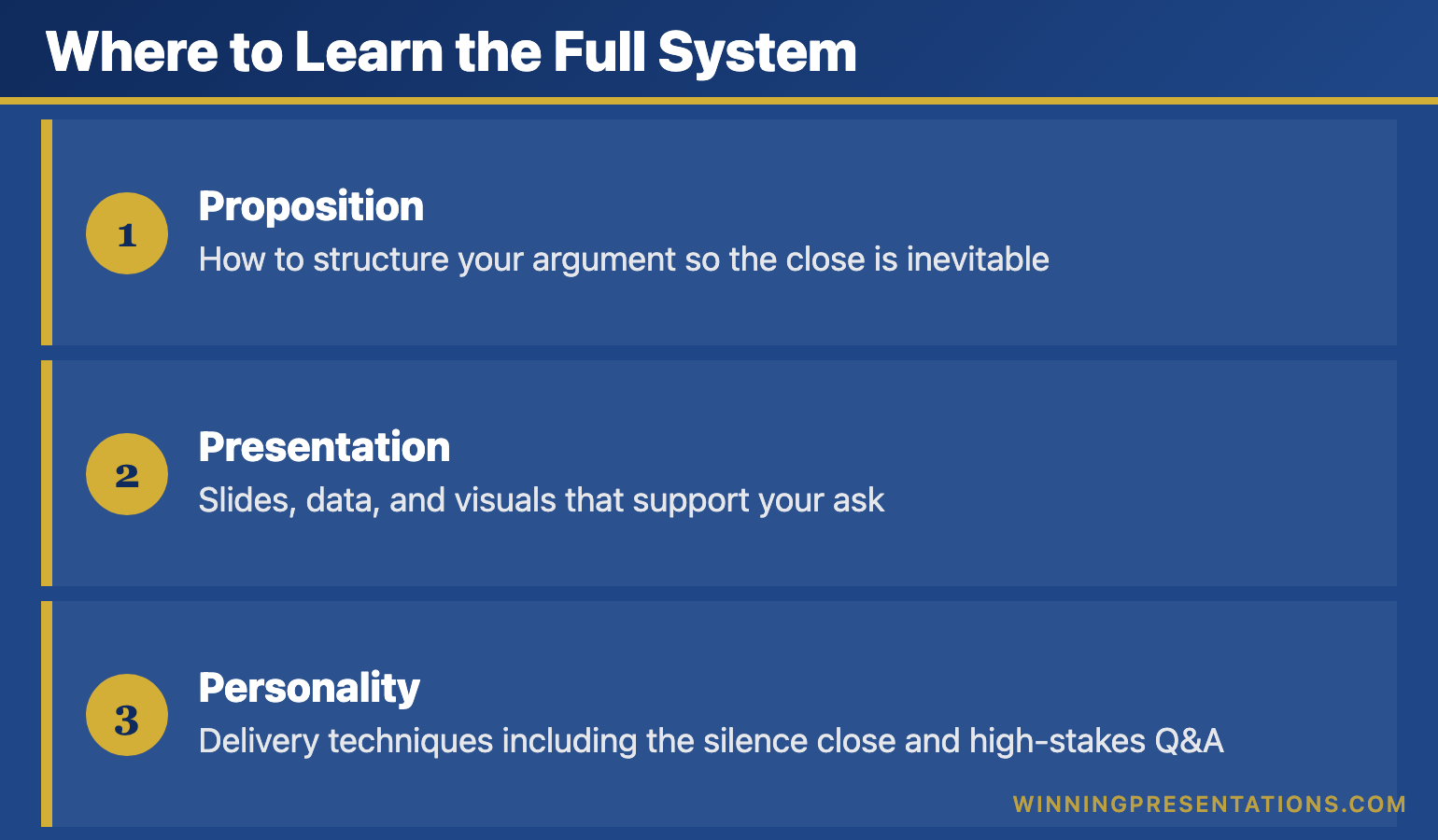
Where to Learn the Full System

I’m running AI-Enhanced Presentation Mastery on Maven starting January 2026.

It’s not just closing techniques. It’s the complete system:

Infographic for: how to end a presentation (image 1)

  • Proposition: How to structure your argument so the close is inevitable
  • Presentation: Slides, data, and visuals that support your ask
  • Personality: Delivery techniques including the silence close and high-stakes Q&A

This is the same methodology that’s helped my clients raise over £250 million in funding and get budgets approved at Fortune 500 companies.

Early bird pricing closes December 31st.

→ Join the January cohort for £249 (save £50)

Try This Today

You probably have a presentation coming up. Before you finalise your final slide, ask yourself:

  1. What is my ONE ask?
  2. Can I paint a forward story of what success looks like?
  3. Am I prepared to stop talking after I make the ask?

If you can answer yes to all three, your presentation ending is already stronger than 90% of presenters.

Frequently Asked Questions

How long should a presentation closing be?

60-90 seconds maximum. Your close should be the most focused part of your presentation — not a second summary. State your ask, paint the forward story if appropriate, then stop.

What’s the best way to end a presentation to executives?

Lead with your recommendation, not your reasoning. Executives want the answer first, then the supporting evidence. Use the Single Ask technique: one specific request with a deadline.

How do I end a presentation without saying “any questions?”

Replace it with a specific call to action. Instead of “Any questions?” try “I’m asking for your approval on the pilot budget. What concerns would you need addressed before signing off today?”


Mary Beth Hazeldine is the Managing Director of Winning Presentations, where she trains executives at investment banks, biotech companies, and SaaS firms to present with impact. Her clients have raised over £250M using her methodology.

Her AI-Enhanced Presentation Mastery course launches January 2026. Early bird enrollment (£249) closes December 31st.

16 Dec 2025
The First 30 Seconds: Why Most Presenters Lose Their Audience Immediately

The First 30 Seconds: Why Most Presenters Lose Their Audience Immediately

I’ve sat through over 500 executive presentations in my career.

Board meetings at JPMorgan. Investor pitches at PwC. Strategy sessions at RBS. Budget reviews at Commerzbank.

And I can tell you the exact moment most presenters lose their audience: somewhere between second 5 and second 30.

Not minute 5. Not slide 5. Second 5.

After 25 years in investment banking and 16 years training executives, I’ve seen the pattern so many times I can predict it. The presenter walks up, clears their throat, and says some version of:

“Good morning everyone. Thanks for having me. Today I’m going to talk about our Q3 results and the strategic initiatives we’re planning for next year. I’ll try to keep this brief because I know you’re all busy.”

And just like that — before a single piece of content has been delivered — the room is gone.

Phones come out. Eyes glaze over. The CFO starts reviewing emails. The CEO is mentally planning their next meeting.

The presenter hasn’t even started, and they’ve already lost.

What’s Actually Happening in Those First 30 Seconds

Here’s what most people don’t understand about audiences: they’re not neutral. They’re not sitting there thinking, “I can’t wait to hear what this person has to say.”

They’re thinking: “Is this going to be worth my time?”

That’s the only question running through their minds. And they answer it fast — usually within 10-30 seconds.

Neuroscientists call this the “primacy effect.” We form impressions quickly and then spend the rest of our time confirming them. If you open weak, you’re fighting that first impression for the next 20 minutes.

If you open strong, everything that follows lands better.

The stakes couldn’t be higher. And most presenters waste this moment completely.

The Three Opening Mistakes I See Every Week

After training over 10,000 executives, I’ve identified the three opening mistakes that kill presentations before they start:

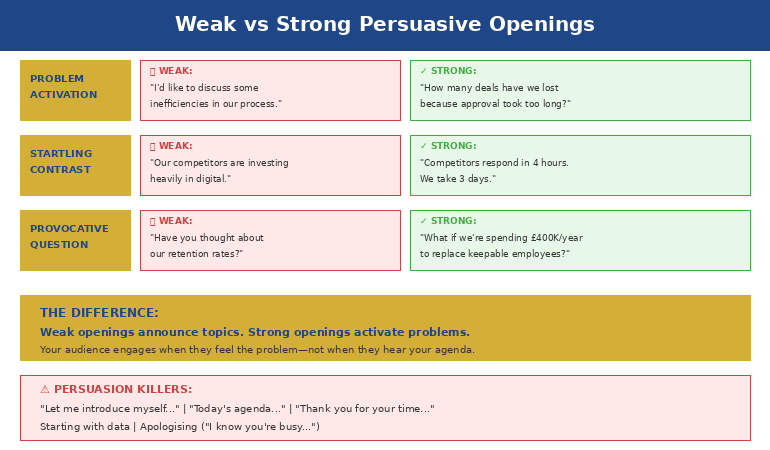
Infographic for: first 30 seconds presentation (image 1)

Mistake #1: The Throat-Clearing Opener

“So, um, thanks for having me. Let me just get my slides up here… okay, there we go. So today I’m going to talk about…”

This signals nervousness, lack of preparation, and — worst of all — that what’s coming isn’t important enough to be planned properly.

Mistake #2: The Apology Opener

“I know you’re all busy, so I’ll try to be quick…”

You’ve just told the room that your content isn’t valuable enough to deserve their full attention. Why would they give it to you?

Mistake #3: The Agenda Opener

“Today I’m going to cover three things: first, our Q3 results; second, our challenges; and third, our plan for next year.”

Boring. Predictable. Zero reason to pay attention. You’ve just told them everything they’re going to hear, so now they don’t need to listen.

The Pattern I’ve Noticed: The executives who get promoted, who close deals, who get their budgets approved — they never open this way. They’ve learned (often through painful experience) that the first 30 seconds determine everything that follows.

Own Every Presentation From the First Second

The first 30 seconds set the tone for everything that follows. The Executive Slide System gives you the exact opening frameworks senior leaders use to command attention and establish authority from the very first word.

Executive Slide System →

What I Learned from a £4 Million Mistake

Early in my banking career, I watched a senior colleague lose a £4 million deal in the first 30 seconds of a pitch.

He walked in, fumbled with the projector, apologized for being “a bit under the weather,” and opened with: “So, I know you’ve seen a lot of these pitches, but hopefully we can show you something different today.”

Hopefully? Hopefully?

The investors checked out immediately. I watched their body language shift — arms crossed, eyes down, phones appearing. The rest of the presentation was technically excellent, but it didn’t matter. The decision had already been made.

Afterwards, the lead investor told us: “You lost me at ‘hopefully.’ If you’re not certain your solution is different, why should I be?”

That moment changed how I thought about presentations forever.

If your first slides need to earn attention instead of losing it, The Executive Slide System gives you 22 ready-made templates to start from.

The 30-Second Framework That Changes Everything

After years of testing, refining, and watching what actually works in high-stakes situations, I developed a simple framework for the first 30 seconds:

Seconds 1-5: PRESENCE
Don’t speak immediately. Walk to your spot. Plant your feet. Make eye contact with three people. Breathe. This silence signals confidence and commands attention.

Seconds 6-15: HOOK
Open with something that creates curiosity — a surprising statistic, a bold statement, a relevant story, or a thought-provoking question. Make them need to hear what comes next.

Seconds 16-25: RELEVANCE
Connect your hook to their world. Why should they care? What’s at stake for them? Make it personal and immediate.

Seconds 26-30: PREVIEW
Tell them exactly what they’ll get from the next few minutes. Be specific about the value you’re delivering.

That’s it. Thirty seconds to transform your presentation from forgettable to commanding.

After the First 30 Seconds, Then What?

The Executive Slide System gives you the complete structure to follow through on a powerful opening — so every presentation you deliver is as strong at the end as it was at the start.

Executive Slide System →

Master Your First 30 Seconds (And Everything After)

The 30-Second Framework is just one module in my comprehensive AI-Enhanced Presentation Mastery course on Maven.

Over 6 weeks, you’ll learn:

  • How to open any presentation with confidence
  • The structure that keeps executives engaged
  • How to handle tough Q&A without freezing
  • Using AI tools to cut preparation time by 80%
  • The closing techniques that drive action

This isn’t theory — it’s the exact system I’ve used to train 10,000+ executives at companies from startups to leading organisations.

Live cohort starts January 2026.

Join the Course →

Why This Matters More Than Ever

In an age of Zoom fatigue and shrinking attention spans, the first 30 seconds matter more than they ever have.

Your audience has more distractions than ever. More tabs open. More messages pinging. More reasons to tune out.

But here’s what hasn’t changed: humans are still wired to pay attention to what’s interesting, relevant, and delivered with confidence.

Master those first 30 seconds, and you’ve earned the right to the next 30 minutes.

Waste them, and you’re talking to a room that’s already moved on.

The choice is yours.


Frequently Asked Questions

Why are the first 30 seconds of a presentation so important?

Research on first impressions shows audiences form judgements about a speaker’s credibility within seconds. If you open weakly — fumbling with slides, apologising, or reading your agenda — the audience mentally downgrades everything that follows. A strong opening creates a halo effect that carries through the entire presentation.

How do I make a strong first impression in a presentation?

Pause before speaking, make eye contact with the room, and deliver your opening line with conviction. Your first sentence should be surprising, relevant, or emotionally resonant — not logistical. Physical presence matters as much as words: stand still, speak clearly, and project confidence even if you do not feel it.

What should I say in the first 30 seconds of a presentation?

Lead with a hook: a striking observation, a question the audience has been thinking, or a brief scenario that illustrates the problem you are solving. Follow immediately with why this matters to them specifically. Do not introduce yourself or outline your agenda — save that for after you have earned their attention.

How do I recover if I start a presentation badly?

Pause, take a breath, and reset. You can say something like “Let me start with the most important point” — this reframes the opening without drawing attention to the stumble. Audiences are forgiving of a rocky start if the content that follows is strong. The recovery matters more than the mistake.

Mary Beth Hazeldine spent 25 years in investment banking at JPMorgan, PwC, RBS, and Commerzbank before becoming an executive presentation coach. She has trained over 10,000 executives and her clients have raised over £250 million using her presentation frameworks. Learn more at Winning Presentations.

One More Thing — Before You Go

Owning the first 30 seconds is the hardest part. The Executive Slide System gives you the structure to back it up — a complete decision-first framework that keeps executives with you all the way through.

Explore the System

Related Reading:

16 Dec 2025
How to Start a Presentation: 15 Powerful Openers That Grab Attention

How to Start a Presentation: 15 Powerful Openers That Grab Attention

Quick Answer: The best way to start a presentation is to grab attention in the first 10 seconds with a surprising statistic, a bold statement, a relevant story, or a thought-provoking question. Avoid starting with “Today I’m going to talk about…” — you’ll lose your audience before you begin.

I’ve watched over 500 executive presentations in my career. Investment bankers pitching billion-pound deals. Biotech founders presenting to skeptical investors. Senior leaders defending budgets to hostile boards.

And I can tell you exactly when most of them lost their audience: the first 30 seconds.

The opening of your presentation isn’t just important — it’s everything. Get it wrong, and you’re fighting an uphill battle for the next 20 minutes. Get it right, and your audience leans in, ready to hear what you have to say.

After 25 years in investment banking at JPMorgan, PwC, RBS, and Commerzbank — plus 16 years coaching executives on high-stakes presentations — I’ve identified exactly what works. Here are 15 powerful openers that grab attention and set you up for success.

Want 50 ready-to-use opening lines?

My Presentation Openers & Closers Swipe File gives you structured opening lines for every situation — from board meetings to investor pitches.

Get 50 Opening Lines →

Why the First 10 Seconds Matter More Than Anything Else

Neuroscience tells us something uncomfortable: your audience decides whether to pay attention within the first 10 seconds. Not 10 minutes. Ten seconds.

This is called the “primacy effect” — we remember beginnings and endings far more than middles. And in those crucial first moments, your audience is asking one question:

“Is this going to be worth my time?”

If you start with “Good morning, my name is Sarah and today I’m going to talk about our Q3 results…” — you’ve already answered that question. And the answer is no.

Here’s what the best presenters do differently.

15 Powerful Ways to Start a Presentation

15 Powerful Presentation Openers Infographic

1. The Shocking Statistic

Numbers that surprise create instant engagement. The key is contrast — show them something that challenges their assumptions.

Example: “75% of venture-backed startups fail. But the companies that master investor presentations are 40% more likely to get funded. Today, I’m going to show you exactly what separates the funded from the forgotten.”

Why it works: You’ve created a gap between what they know and what they need to know. Now they have to keep listening.

2. The Bold Statement

Make a claim that’s unexpected or even slightly controversial. This triggers curiosity and positions you as someone with a point of view.

Example: “Everything you’ve been taught about presenting to boards is wrong. And it’s costing you promotions.”

Why it works: You’ve challenged the status quo. Even if they disagree, they want to hear your reasoning.

3. The Relevant Story

Stories activate different parts of the brain than data alone. A well-chosen story creates emotional connection and makes abstract concepts concrete.

Example: “Three years ago, I sat in a boardroom in Frankfurt and watched a CFO lose a £4 million budget approval in eleven words. He opened with ‘I know we’re over budget, but let me explain.’ The meeting was over before it started.”

Why it works: Stories create suspense. Your audience wants to know what happened next — and how to avoid the same fate.

4. The Thought-Provoking Question

Questions engage the brain differently than statements. They force your audience to think, which means they’re actively participating rather than passively listening.

Example: “When was the last time you sat through a presentation and thought, ‘I wish this was longer’?”

Why it works: You’ve made them smile and acknowledged a shared frustration. You’re on the same side now.

5. The “Imagine” Scenario

Invite your audience into a future state. This technique, borrowed from hypnotherapy, creates a vivid mental picture that makes your solution feel tangible.

Example: “Imagine walking into your next board presentation completely calm. You know exactly what to say. The executives are nodding. And when you finish, the CEO says, ‘That was exactly what we needed.’ What would that be worth to you?”

Why it works: You’ve made them feel the outcome before you’ve explained the process.

6. The Counterintuitive Truth

Share something that goes against conventional wisdom. This positions you as an expert with insider knowledge.

Example: “The best presentations I’ve ever seen had zero bullet points. None. And they won billion-pound deals.”

Why it works: You’ve challenged a default assumption. Now they need to understand why.

Stop Fumbling Your Presentation Openings

The Executive Slide System gives you structured opening frameworks that command attention immediately — so you walk into every presentation knowing exactly how to start.

Executive Slide System →

7. The Specific Promise

Tell them exactly what they’ll get from the next few minutes. Be specific and benefit-focused.

Example: “In the next 12 minutes, I’m going to give you the three-slide structure that’s helped my clients raise over £250 million in funding. You can implement it in your next presentation tomorrow.”

Why it works: You’ve set clear expectations and promised immediate value. They know what’s coming and why it matters.

8. The Shared Problem

Articulate the pain your audience is experiencing. When people feel understood, they trust you to provide the solution.

Example: “You’ve spent three weeks on this presentation. You’ve rehearsed it a dozen times. And you still can’t shake the feeling that when you stand up, your mind will go blank and everyone will see you’re not ready.”

Why it works: You’ve demonstrated that you understand their world. You’re not just another presenter — you’re someone who gets it.

Struggling with presentation anxiety?

My Calm Under Pressure Toolkit gives you breathing techniques, confidence frameworks, and mental preparation strategies used by professional speakers.

Get the Confidence Toolket →

9. The Behind-the-Scenes Insight

Give them access to information they wouldn’t normally have. This creates a sense of exclusivity and trust.

Example: “I’ve sat in due diligence meetings at four global banks. And I can tell you exactly what the investment committee says after you leave the room…”

Why it works: You’re offering insider knowledge. They’re getting something not everyone gets access to.

10. The Historical Parallel

Connect your topic to a famous moment in history. This adds weight and context to your message.

Example: “In 1984, Steve Jobs stood in front of shareholders and said three words that changed Apple forever. Those three words weren’t about technology — they were about belief. And they’re the same three words you need in your next pitch.”

Why it works: You’ve borrowed credibility from a known success story and created curiosity about the connection.

11. The Live Demonstration

Show rather than tell. A well-executed demo captures attention like nothing else.

Example: Start by silently walking to the front of the room, pausing for three full seconds, and making eye contact with five people before saying a word. Then say: “That silence made you pay attention. Today, I’m going to show you how to command a room before you even speak.”

Why it works: You’ve demonstrated your expertise in real-time. No one is checking their phone now.

12. The Personal Failure

Vulnerability creates connection. When you share a mistake, you become human — and your audience trusts you more.

Example: “The worst presentation of my career was in front of 200 people at a banking conference. I blanked on my own name. Literally forgot who I was. And what I learned in the next 30 seconds saved my career.”

Why it works: They want to know how you recovered. And they believe you’ll help them avoid the same fate.

13. The Unexpected Object

Bring a physical prop. Objects create visual interest and give you something to anchor your message.

Example: Hold up a single slide printout. “This is the only slide that mattered in a £50 million deal. One slide. The other 47 were background noise. Today, I’ll show you how to find your one slide.”

Why it works: Physical objects break the pattern of typical presentations. People pay attention to what’s different.

14. The Direct Challenge

Challenge your audience to think differently or take action. This creates engagement through a sense of urgency.

Example: “By the end of this presentation, you’ll either change how you open every meeting — or you’ll keep losing your audience in the first 30 seconds. The choice is yours.”

Why it works: You’ve raised the stakes. This isn’t just information — it’s a decision point.

15. The Silence

Sometimes the most powerful opening is no words at all. Strategic silence commands attention and demonstrates confidence.

Example: Walk to the front. Stand still. Look at your audience for 5 full seconds. Then, quietly: “Now that I have your attention… let’s talk about why most presentations lose it.”

Why it works: Silence is unexpected. In a world of noise, quiet commands the room.

The Openings That Kill Your Credibility

Now that you know what works, here’s what to avoid:

❌ “Can everyone hear me?” — Start as if you’re already in command.

❌ “I’m just going to quickly talk about…” — The word “just” diminishes your message before you’ve delivered it.

❌ “I know you’re all busy, so I’ll try to be quick…” — You’ve just signaled that what you’re about to say isn’t important.

❌ “Today I’m going to talk about…” — Boring. They know you’re going to talk. Show them why they should care.

❌ “Let me just share my screen…” — Technical fumbling kills momentum. Have everything ready before you speak.

❌ Apologizing for anything — Never open with an apology. It puts you on the back foot immediately.

A Powerful Opening Deserves an Equally Powerful Deck

The Executive Slide System pairs your strong opening with a decision-first slide structure that keeps executives engaged from your first word to your final ask.

Executive Slide System →

If you want opening slides that command attention from the first second, The Executive Slide System gives you 22 ready-made templates to start from.

How to Choose the Right Opening for Your Situation

Not every opener works for every context. Here’s how to match your opening to your audience:

Board presentations: Use the Bold Statement, Specific Promise, or Shocking Statistic. Executives want confidence and clarity.

Investor pitches: Use the Relevant Story, Specific Promise, or Behind-the-Scenes Insight. Investors need to trust you before they trust your numbers.

Team meetings: Use the Shared Problem, Thought-Provoking Question, or “Imagine” Scenario. Internal audiences need to feel included.

Sales presentations: Use the Counterintuitive Truth, Direct Challenge, or Personal Failure. Buyers are skeptical — surprise them.

Conference keynotes: Use the Live Demonstration, Silence, or Historical Parallel. Large audiences need theatrical moments to stay engaged.

Ready to Transform How You Present?

For immediate help:

For complete transformation:

My AI-Enhanced Presentation Mastery course covers everything — from opening to closing, from confidence to content. Live cohort starts January 2026.

Join the Maven Course →

The 30-Second Opening Framework

If you remember nothing else from this article, use this simple framework for your next presentation:

Second 1-5: Establish presence (pause, make eye contact, breathe)

Second 6-15: Hook them (statistic, story, question, or bold statement)

Second 16-25: Create relevance (why this matters to THEM)

Second 26-30: Preview the value (what they’ll get from the next X minutes)The 30-Second Opening Framework: Presence, Hook, Relevance, Preview

That’s it. Thirty seconds to change the trajectory of your entire presentation.

One More Thing — Before You Go

If you want a complete presentation system — not just a strong opening — the Executive Slide System gives you the full structure from first slide to final close.

Explore the System

What Happens After a Great Opening

A powerful opening does more than grab attention — it changes the dynamic of the entire presentation.

When you open strong, you feel more confident. Your audience is engaged. You have momentum. Everything that follows is easier.

When you open weak, you spend the rest of the presentation trying to recover. You can feel the room’s attention drifting. You rush. You doubt yourself.

The difference between a presentation that wins and one that’s forgotten often comes down to those first 30 seconds.

Choose your opening carefully. Practice it until it’s second nature. And walk into that room knowing that before you’ve even finished your first sentence, you’ve already won half the battle.


Mary Beth Hazeldine is an executive presentation coach with 25 years in investment banking (JPMorgan, PwC, RBS, Commerzbank) and 16 years training executives to present with confidence. She has trained over 10,000 executives through Winning Presentations.

Related Reading:

Frequently Asked Questions

How should I start a presentation to grab attention?

Open with a surprising statistic, a bold statement, a relevant story, or a thought-provoking question. The first 10 seconds determine whether your audience leans in or checks out. Avoid starting with your name, your agenda, or ‘Today I’m going to talk about…’ — these signal a routine presentation.

What is the best opening line for a business presentation?

The best opening lines create immediate relevance for the audience. Try a specific problem statement they recognise (‘Every quarter, we lose three days rebuilding the same slides’), a counterintuitive claim, or a brief client scenario. The key is making the audience feel the topic matters to them personally, not just to you.

How do you start a presentation without being nervous?

Prepare your opening line word-for-word and practise it until it feels natural. Arrive early, claim your space, and take one slow breath before speaking. Starting with a well-rehearsed line gives you momentum — nervousness typically drops after the first 30 seconds once you hear your own voice sounding confident.

Should I start a presentation with a joke?

Only if humour is natural to your style and the setting allows it. In executive and board settings, opening with a relevant observation or insight is more effective than a joke. A failed joke creates awkwardness that takes minutes to recover from, while a compelling question or story creates instant engagement with zero risk.

📧 The Winning Edge Newsletter

Weekly insights on executive presentations, QBR strategies, and what’s actually working in boardrooms right now.

Subscribe Free →

12 Dec 2025
Why AI won't replace presentation skills - what AI handles vs what you master

Why AI Won’t Replace Presentation Skills (But Will Amplify Them) [2026]

📅 Updated: March 2026

Why AI won't replace presentation skills - what AI handles vs what you master

Why AI Won’t Replace Presentation Skills (But Will Amplify Them)

Quick Answer

AI presentation tools like Copilot and ChatGPT can generate slides in seconds — but they can’t read the room, handle tough questions, or build the trust that closes deals. The executives winning in 2026 aren’t choosing between AI and presentation skills. They’re using AI to handle the mechanics so they can focus on what matters: persuasion, presence, and human connection.

🎁 FREE DOWNLOAD

The AI + Human Presentation Checklist

What to delegate to AI vs. what only you can do. One page. No fluff.

Download Free Checklist →

No spam. Unsubscribe anytime.


Last month, I watched a biotech executive lose a £3 million funding round.

His slides were flawless. Copilot had generated a beautiful deck — clean layouts, smart charts, professional transitions. He’d spent maybe two hours on a presentation that would have taken me two days five years ago.

But when the lead investor asked, “What happens if your Phase 2 trials are delayed six months?” — he froze.

Not because he didn’t know the answer. Because he’d spent so much time perfecting slides that he’d forgotten to prepare for the conversation.

The AI did exactly what it was supposed to do. He didn’t.

Using Copilot or ChatGPT for presentations?

The executives pulling ahead aren’t using AI less — they’re using it with the right frameworks. The Executive Prompt Pack gives you 71 pre-structured prompts so AI executes your strategy, not a generic template.

Explore the Executive Prompt Pack →

The Dangerous Assumption

Here’s what I’m seeing across boardrooms, pitch meetings, and executive presentations: a dangerous assumption that better slides mean better outcomes.

They don’t.

I’ve trained executives for 16+ years. I’ve watched presentation technology evolve from overhead projectors to PowerPoint to Prezi to AI. And every single time, the same pattern repeats:

New technology makes average presenters slightly faster at being average.

The executives who were already good? They use the new tools to become exceptional. The gap widens, not narrows.

Copilot doesn’t change this equation. It accelerates it.

What AI Actually Does Well

Let me be clear: I’m not anti-AI. I use PowerPoint Copilot every day. I teach my clients to use it. It’s genuinely transformative for certain tasks.

AI excels at:

  • First drafts. Getting from blank page to working structure in minutes instead of hours.
  • Visual consistency. Layouts, formatting, brand alignment — all the mechanical work.
  • Content transformation. Turning documents into slides, data into charts, notes into talking points.
  • Iteration speed. “Make this more concise.” “Add a comparison.” “Simplify this chart.” Instant.
  • Agent Mode autonomy. Copilot’s Agent Mode (launched late 2025) can research, structure, and build complete presentations end-to-end — handling multi-step tasks without you prompting each step manually.

I used to spend 40% of my preparation time on slide mechanics. Now it’s maybe 10%. That’s a genuine productivity gain.

But here’s what I do with the time I save: I prepare for the parts AI can’t help with.

What AI Cannot Do (And Never Will)

No matter how sophisticated the technology gets, AI will never be able to:

1. Read the room in real-time

The CFO just glanced at her phone. The CEO’s arms are crossed. The technical lead is nodding enthusiastically while everyone else looks confused.

These signals tell you whether to speed up, slow down, skip ahead, or stop and ask a question. AI generates slides. You navigate the humans.

2. Handle the question that matters

The most important moment in any executive presentation isn’t on your slides. It’s the question that comes after.

“What’s your contingency if this fails?”

“Why should we fund this instead of the other three proposals?”

“What aren’t you telling us?”

Your answer — delivered with confidence, specificity, and composure — is what gets the yes or no. No AI can prepare you for that.

3. Build trust through presence

When I worked at JPMorgan, we had a saying: “People fund people, not PowerPoints.”

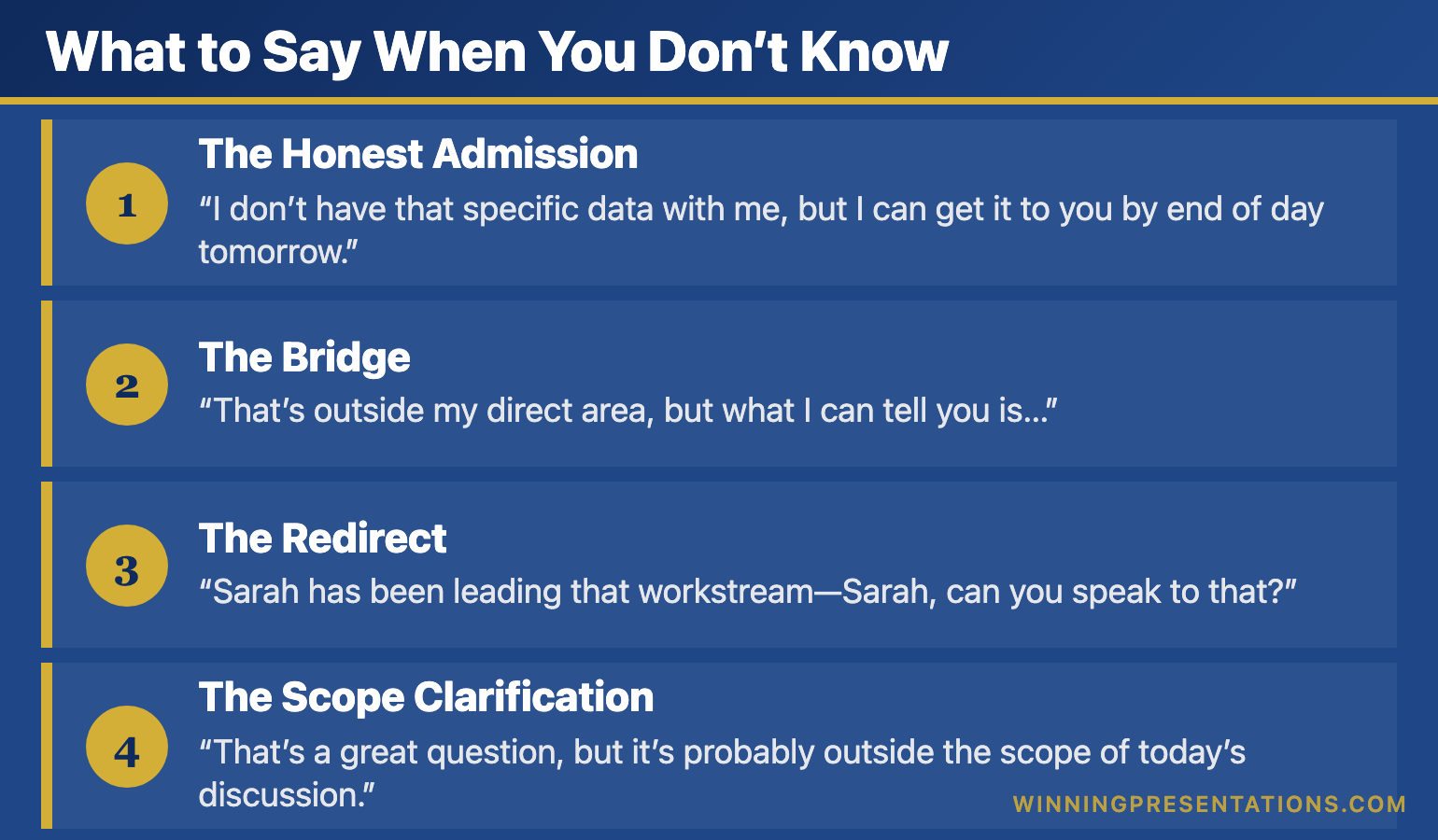
Trust is built through eye contact, conviction, how you handle pressure, whether you admit what you don’t know. It’s built in the pauses between slides, not on them.

A deck generated by AI is a deck that could have been generated by anyone. Your presence in the room is the differentiator.

4. Create genuine emotional connection

The most persuasive moment I ever witnessed wasn’t a clever chart or a well-designed slide.

It was a founder showing a photo of her grandmother — the person whose medical condition inspired her biotech startup — while explaining why she’d spent seven years on this problem.

AI can’t feel. It can’t share your conviction. It can’t make the room feel what’s at stake.

Related: How to Create Executive Presentations That Get Results

📄
The AI + Human Checklist

A one-page guide to what you should delegate to AI vs. what only you can do. Stop wasting time on the wrong things.

Download Free Checklist →

The Executive Who Got It Right

Compare that biotech executive with someone I worked with last quarter — a Head of Strategy at a FTSE 250 company presenting a £12 million transformation programme to the board.

She used Copilot to build her initial deck in 45 minutes. Solid structure, clean visuals, data-driven charts. Same AI tools as everyone else.

Then she spent the next two weeks on what AI couldn’t help with:

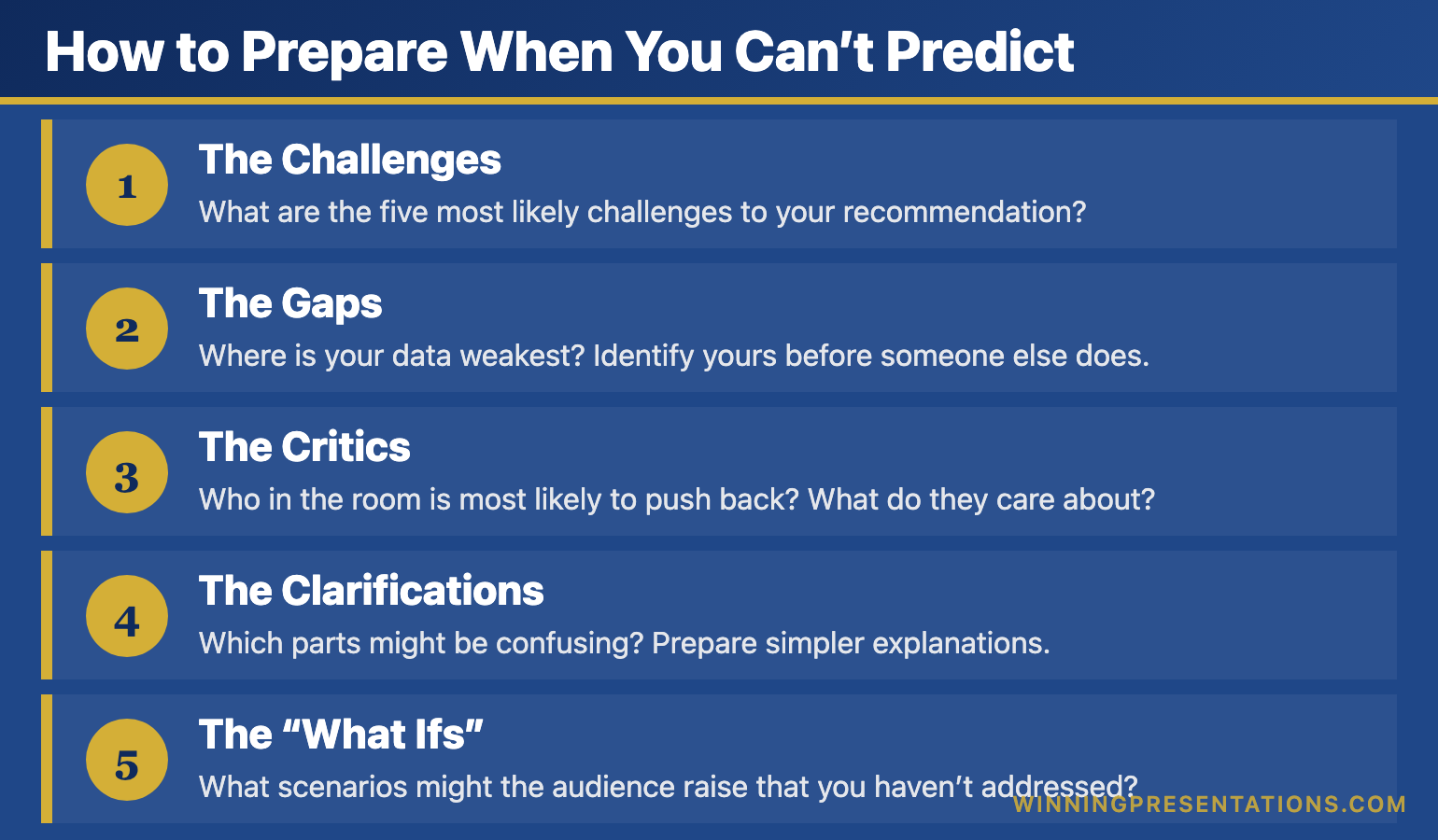
  • Anticipating the 15 most likely questions and rehearsing her answers
  • Understanding each board member’s priorities and concerns
  • Preparing three different versions of her “walk them through the numbers” section based on how much detail they wanted
  • Practicing her opening until she could deliver it while making eye contact with every person in the room
  • Building relationships with key stakeholders before the meeting so she had allies in the room

The presentation took 20 minutes. The Q&A went 40 minutes. She got full approval.

“The slides were table stakes,” she told me afterward. “The real work was everything else.”

The Prompts That Make AI Think Like an Executive

The Executive Prompt Pack (£19.99, instant access) gives you 71 tested Copilot and ChatGPT prompts designed for executive-level presentations — board updates, budget requests, investor briefs, and Q&A preparation. Each prompt embeds the strategic thinking AI skips, so the output is presentation-ready, not just formatted text.

  • 71 prompts structured around executive communication frameworks
  • Covers PowerPoint Copilot and ChatGPT for high-stakes decks
  • Instant download — use before your next board presentation

Get the Executive Prompt Pack →

Designed for executives across banking, consulting, and technology who present at board and leadership level.

The New Presentation Skills Stack

The new presentation skills stack - Layer 1 AI Fluency, Layer 2 Strategic Clarity, Layer 3 Human Performance

Here’s what I’m teaching executives in 2026. It’s not “ignore AI” or “embrace AI.” It’s a new stack of skills:

Layer 1: AI Fluency (Delegate This)

Know which tools to use for what. Master the prompts that generate useful output. Understand the limitations so you’re not surprised when AI produces garbage. Build your first draft fast.

This layer is now table stakes. Everyone will have it within two years.

Layer 2: Strategic Clarity (Own This)

What’s the one thing your audience needs to understand? What decision are you asking them to make? What’s the narrative arc that takes them from where they are to where you need them to be?

AI can’t answer these questions because they require understanding context, politics, relationships, and stakes that exist outside the presentation itself.

Layer 3: Human Performance (Master This)

How you show up in the room. Handling pressure. Building trust. Reading signals. Adapting on the fly. Answering the question behind the question.

This is where the gap between good and great has always been. AI just made it more visible.

Related: Why Presentation Templates Aren’t Enough

What 16+ Years of Presentation Training Taught Me About Technology

I started Winning Presentations in 1989. Since then, I’ve watched:

  • Overhead projectors replaced by slides
  • Slides replaced by PowerPoint
  • PowerPoint enhanced by animation, then Prezi, then beautiful templates
  • Templates supplemented by AI

Every single time, the technology got easier. Every single time, my clients asked: “Do we still need presentation training?”

And every single time, the answer was the same: The technology changes what you need to learn. It doesn’t eliminate the need to learn.

In 1995, you needed to learn how to not read from your slides. (Most people still need this.)

In 2005, you needed to learn how to not overwhelm with animation. (Death by bullet point became death by fly-in.)

In 2015, you needed to learn how to not hide behind beautiful design. (Prezi made terrible presenters look temporarily interesting.)

In 2026, you need to learn how to not let AI do the thinking for you.

The pattern is consistent: each wave of technology handles the mechanical work better, which raises the bar on the human work.

Stop Writing AI Prompts From Scratch

The Executive Prompt Pack (£19.99, instant access) — 71 prompts for every executive presentation scenario, structured so AI executes your thinking rather than replacing it.

For executives building a structured AI-powered presentation practice, the Executive Prompt Pack gives you 71 prompts designed for every executive presentation scenario — the practical complement to the skills covered in this article.

Get the Executive Prompt Pack →

Instant digital download. Works with PowerPoint Copilot and ChatGPT.

The Widening Gap

The widening gap between great and average presenters as AI tools are introduced

Here’s what concerns me about AI in presentations:

The executives who were already investing in their presentation skills are using AI to save time on mechanics and double down on mastery. They’re getting better faster.

The executives who thought “good enough” slides would carry them are now producing “good enough” slides in one-tenth the time — and they’re not investing the saved time in getting better. They’re just moving on to the next thing.

The gap is widening.

I see it in client work. The best presenters I train are light-years ahead of where they were five years ago. The mediocre ones are exactly where they were — just faster at being mediocre.

Which side of that gap do you want to be on?

Why Reading About Presentation Skills Doesn’t Work

You’ve made it this far, which tells me you understand the stakes. AI is changing the game, and the winners will be the people who master both the technology and the human skills.

But here’s what I’ve learned in 16+ years: you can’t read your way to presentation mastery.

I’ve written hundreds of articles like this one. They’re useful for awareness — understanding what matters and why. But presentation skills are performance skills. You don’t get better by reading. You get better by doing, getting feedback, and iterating.

That’s why I created a different approach.

🎓 ENROL NOW — MONTHLY COHORTS

AI-Enhanced Presentation Mastery: Persuade Faster, Influence More

A hybrid course combining 8 self-paced modules with 2 live coaching sessions — master AI-powered presentations that save time and win decisions.

What you’ll master:

  • The AVP Framework (Action-Value-Proof) — Create compelling outlines in minutes that guide audiences to yes
  • The 132 Rule — Organize information in the exact sequence your audience’s brain processes it
  • The S.E.E. Formula (Story-Evidence-Emotion) — Make your proof memorable and recommendations impossible to dismiss
  • Your Personal AI Playbook — Customised prompts that reflect your expertise and communication style

What’s included:

  • 8 self-paced modules (released January–April 2026)
  • 2 live 60-minute coaching sessions in April 2026
  • Lifetime access to all recordings and materials
  • Templates, checklists, prompt packs, and before/after examples
  • Access to next cohort at no additional cost if you can’t attend live

Investment: £499

Reserve Your Spot — £499 →

Dec 31, 2025 – May 1, 2026 • Hybrid format • All sessions recorded

Reading vs. Doing

What You Get Free Articles AI-Enhanced Mastery (£499)
Awareness of what matters
structured frameworks (AVP, 132 Rule, S.E.E.) Mentioned ✓ Deep training
8 structured learning modules ✓ Self-paced
Live coaching sessions ✓ 2 sessions in April
Templates & prompt packs Examples only ✓ Full library
Before/after transformations ✓ Real examples
Outcome Know what to do Actually do it

Not Ready for the Course?

Start with the free AI + Human Presentation Checklist — know exactly what to delegate vs. what to master.

Download Free Checklist →

The Bottom Line

AI is the most significant change to presentations since PowerPoint. But it doesn’t change the fundamental truth:

Presentations are human performance. AI is just the instrument.

A great musician with a mediocre instrument will outperform a mediocre musician with a Stradivarius. Every time.

The executives who thrive in 2026 won’t be the ones with the best AI tools. They’ll be the ones who use AI to handle the mechanics — and invest the time saved in becoming genuinely persuasive humans.

That’s the skill set that can’t be automated. That’s what I teach.

The question is: which side of the widening gap will you be on?

FAQ

Will AI eventually be able to deliver presentations for us?

AI can generate video avatars and synthetic voices, but trust is built through human presence. Even if AI could deliver slides, the Q&A, relationship-building, and real-time adaptation will remain human skills. The “delivery” is the smallest part of executive presentations.

How much time should I spend on AI vs. human skills?

For most executives, AI fluency takes 2-4 weeks to develop. Human performance skills take months to years. Invest accordingly — get competent with AI quickly, then focus your ongoing development on the human elements.

What if my company mandates AI use?

Great — use it for what it’s good at (drafts, formatting, iteration) and free up time for what matters (strategy, practice, relationship-building). Mandated AI adoption is an opportunity if you’re strategic about where you invest your saved time.

Is this relevant if I don’t use Copilot?

Yes. The principles apply regardless of which AI tools you use — ChatGPT, Gamma, Beautiful.ai, or any future tools. The human skills remain constant even as the technology evolves.

📧
The Winning Edge Newsletter

Weekly insights on AI-enhanced presentations, executive communication, and what’s actually working in boardrooms right now.

Subscribe Free →

Related Resources

About the Author

Mary Beth Hazeldine has trained executives on presentations for 16+ years. With 25 years of corporate banking experience at JPMorgan Chase, PwC, Royal Bank of Scotland, and Commerzbank, she’s helped clients enhanced presentation mastery at Winning Presentations.


10 Dec 2025
Executive summary slide template using the 4-Line Formula - Situation, Insight, Recommendation, Ask - get decisions in 10 seconds

The Executive Summary Slide: How to Write the Only Slide That Matters [2026]

📅 Updated: January 2026 | The slide that decides your outcome before you finish talking

Need a Faster Way to Build Executive Slides?

Most executives spend hours on slides that still miss the mark. The Executive Slide System gives you a structured framework for building slides that land with senior audiences — without starting from scratch every time.

Explore the System →

Quick Answer

An executive summary slide should contain four elements: situation (one sentence), recommendation (specific and actionable), key supporting points (three maximum), and your ask (what you need from them). Put your conclusion first. Executives decide in 60 seconds — give them what they need upfront, not buried on slide 15.

I learned this lesson the hard way at Commerzbank.

A senior VP asked me to present a £2.3M technology investment to the Executive Committee. I built a 28-slide deck. Comprehensive analysis. Beautiful charts. Ironclad logic building to my recommendation.

The CFO interrupted at slide 3: “What do you want us to approve?”

I fumbled to slide 24 where my recommendation lived. By then, I’d lost the room. The meeting ended with “let’s revisit this next quarter” — executive-speak for no.

Three months later, same ask, same committee. This time I led with a single executive summary slide. Sixty seconds in, the CFO said: “Makes sense. What’s the implementation timeline?”

Twenty minutes later, I had full approval.

The difference wasn’t the analysis — it was identical. The difference was giving executives what they needed in the first 60 seconds.

After 25 years presenting to C-suite leaders at JPMorgan, PwC, RBS, and Commerzbank, I’ve refined a formula for executive summary slides that works every time.

Why the Executive Summary Slide Decides Everything

Here’s what most presenters don’t understand: executives make decisions fast.

Senior leaders form initial judgments within seconds of seeing new information — experienced presenters know this instinctively. Everything after that either confirms or contradicts their first impression.

Your executive summary slide IS their first impression. Get it right, and the rest of your presentation is confirmation. Get it wrong, and you’re fighting uphill for the next 30 minutes.

I’ve seen this pattern hundreds of times:

Weak executive summary → Executives check phones → Questions become challenges → “Let’s table this”

Strong executive summary → Executives lean in → Questions become clarifications → “Walk us through implementation”

Same presenter. Same content. Different opening slide. Different outcome.

STOP REBUILDING DECKS FROM SCRATCH

The executive summary slide is the highest-leverage slide in any executive presentation toolkit — get this one right and you’ve already done 70% of the persuasion work.

Build executive slides that get past slide 3

The Executive Slide System gives you 26 templates, 93 AI prompts, and 16 scenario playbooks designed for senior presenters. Drop your content into a structure that already works — finance committees, board approvals, steering meetings, capital reviews. £39, instant access, lifetime updates.

Get the Executive Slide System →

£39, instant access. 26 templates, 93 AI prompts, 16 scenario playbooks. Designed for executive presenters.

The 4-Part Executive Summary Formula

Every effective executive summary slide contains exactly four elements. No more, no less.

The 4-Line Executive Summary Formula showing Situation, Insight, Recommendation, and Ask with real examples for each line

Part 1: Situation (One Sentence)

Ground everyone in the same reality. What’s happening? Why are we here?

Bad: “As you know, we’ve been evaluating our technology infrastructure across multiple dimensions including scalability, security, and cost efficiency, and have identified several areas of concern.”

Good: “Our customer platform will exceed capacity by Q3, risking £4M in annual revenue.”

One sentence. Quantified where possible. No preamble.

Part 2: Recommendation (Specific and Actionable)

What do you want them to do? Be precise enough that they could approve it right now.

Bad: “We recommend investing in technology improvements to address these challenges.”

Good: “Approve £1.2M to upgrade our customer platform, with completion by August 2026.”

Include the number. Include the timeline. Make it approvable as stated.

Part 3: Key Supporting Points (Three Maximum)

Why should they approve this? Give them three reasons — no more.

The human brain struggles to hold more than three to four items in working memory. Give executives five reasons and they’ll remember none. Give them three and they’ll remember all of them.

Example:

  • ROI: 180% over 3 years (payback in 14 months)
  • Risk mitigation: Prevents £4M revenue loss from capacity issues
  • Competitive: Matches capabilities our top 3 competitors launched last year

Each point should be scannable in under 5 seconds.

Part 4: The Ask (What You Need From Them)

Be explicit about what decision you need and when.

Bad: “We’d appreciate your input on next steps.”

Good: “I need budget approval today to meet the Q3 deadline. Implementation plan is ready.”

Executives respect clarity. They don’t respect hedging.

Want ready-made executive summary templates?

The Executive Slide System (£39, instant access) includes 26 executive templates with the 4-part formula built into every layout — plus 93 AI prompts and 16 scenario playbooks covering Board, Budget, QBR, and Strategy presentations.

Get the Executive Slide System →

For Senior Board-Level Approvals

The complete system for presenting decisions that get approved at senior levels

Executive Buy-In Presentation System — 7 self-paced modules, monthly cohort enrolment, optional recorded Q&A sessions. £499, lifetime access to materials.

Explore the Executive Buy-In System →

Executive Summary Slide Examples: Before and After

Let me show you how this works with real transformations from clients I’ve coached.

Example 1: Budget Request

BEFORE (Weak):

  • Title: “Technology Investment Proposal”
  • Content: Three paragraphs explaining background, four bullet points about challenges, reference to “detailed analysis in appendix”
  • No clear ask visible
  • Result: “Send us a summary” (rejected)

AFTER (Strong):

  • Title: “Request: £1.2M Platform Upgrade — 180% ROI”
  • Situation: Customer platform hits capacity Q3, risking £4M revenue
  • Recommendation: Approve £1.2M upgrade with August completion
  • Why: 180% ROI | Prevents £4M loss | Matches competitor capabilities
  • Ask: Budget approval needed today to meet deadline
  • Result: Approved in 20 minutes

Example 2: Strategic Initiative

BEFORE (Weak):

  • Title: “Market Expansion Analysis”
  • Content: Market size data, competitor overview, SWOT analysis summary, “recommendation on slide 18”
  • Result: Lost attention by slide 4

AFTER (Strong):

  • Title: “Recommendation: Enter DACH Market Q2 — £8M Opportunity”
  • Situation: UK growth slowing to 3%; DACH offers 12% growth with existing product fit
  • Recommendation: Launch DACH pilot Q2 with £400K investment
  • Why: £8M addressable market | 3 signed LOIs already | Existing team can execute
  • Ask: Approve pilot budget and hire 2 sales reps by March
  • Result: Approved with additional resources offered

Example 3: Project Status Update

BEFORE (Weak):

  • Title: “Project Phoenix Status Update”
  • Content: Timeline, milestones completed, milestones pending, budget status, team updates
  • Problem buried on slide 6
  • Result: Executives surprised and frustrated when issue finally surfaced

AFTER (Strong):

  • Title: “Project Phoenix: On Track, But Need Decision on Vendor Delay”
  • Situation: Phase 1 complete (on time, on budget). Phase 2 vendor delayed 3 weeks.
  • Recommendation: Accept delay (no cost impact) vs. switch vendors (£50K, saves 1 week)
  • Why: Delay acceptable — still hits Q3 deadline | Switching adds risk for minimal gain
  • Ask: Confirm we proceed with current vendor
  • Result: Decision made in 5 minutes, meeting ended early

Related: Executive Presentation Template: 12 Slides That Command the Room

Common Executive Summary Mistakes (And How to Fix Them)

Mistake #1: Burying the Lead

Your recommendation should be visible within 10 seconds of the slide appearing. If executives have to hunt for it, you’ve already lost.

Fix: Put your recommendation in the slide title or as the first bold line. “Request: £1.2M Platform Upgrade” tells them instantly what this is about.

Mistake #2: Too Many Supporting Points

Five bullet points means zero retention. Executives are processing dozens of decisions daily — they can’t hold your seven reasons in memory.

Fix: Force yourself to pick three. If you can’t decide which three matter most, you don’t understand your own argument well enough.

Mistake #3: Vague Language

“Significant investment” means nothing. “Improved efficiency” means nothing. “Strategic alignment” means nothing.

Fix: Use numbers. “£1.2M investment” is specific. “23% efficiency gain” is specific. “Supports Goal #2 in our 2026 strategy” is specific.

Mistake #4: No Clear Ask

If you don’t tell executives what you need, they’ll assume you don’t need anything — and they’ll move on.

Fix: End with an explicit ask. “I need approval today” or “I need a decision by Friday” or “I need you to choose between Option A and Option B.”

Mistake #5: Defensive Positioning

Starting with caveats, limitations, and “as you know” context signals insecurity. Executives smell fear.

Fix: Lead with confidence. State your recommendation directly. Address objections when asked, not before.

Related: The 3-Slide System That Gets Executive Decisions Fast

How to Write Your Executive Summary Slide (Step by Step)

Here’s my process for writing executive summary slides quickly and effectively.

Step 1: Start With the Ask

Write down: “At the end of this meeting, I need them to _______________.”

If you can’t complete that sentence, you’re not ready to present. Go back and figure out what you actually need.

Step 2: Write the Recommendation

Make it specific enough to approve as stated. Include amounts, timelines, and owners where relevant.

Test: Could they say “yes” to this exact sentence and know what happens next?

Step 3: Identify Three Supporting Points

Ask yourself: “If they push back, what are the three strongest reasons this makes sense?”

Those are your supporting points. Lead with the strongest.

Step 4: Write the Situation Line

One sentence that grounds everyone. Why are we here? What’s changed?

This often comes last because you need to understand your recommendation before you can frame the situation correctly.

Step 5: Cut Ruthlessly

Read your slide aloud. If it takes more than 45 seconds, cut something. The executive summary should be graspable in a single glance.

Using AI to Draft Your Executive Summary

AI tools like ChatGPT or Claude can accelerate your executive summary slide — if you prompt them correctly.

Effective prompt:

“I’m presenting to [audience] about [topic]. I need them to approve [specific ask]. Write an executive summary slide with: 1) one-sentence situation, 2) specific recommendation, 3) three supporting points (quantified where possible), 4) clear ask. Keep total word count under 75 words.”

What AI does well:

  • Structuring your thoughts into the 4-part format
  • Tightening wordy language
  • Suggesting quantified supporting points

What you must add:

  • Political context (what matters to THIS audience)
  • Accurate numbers from your analysis
  • Judgment about which supporting points will resonate

Related: Best Copilot PowerPoint Prompts That Actually Work

Executive Summary Slide Design Tips

Content matters most, but design affects comprehension.

Title: Make it active and outcome-focused. “Request: £1.2M Platform Upgrade” not “Platform Investment Overview”

Layout: Use visual hierarchy. Recommendation should be the most prominent element.

Font size: If executives are reading from 10 feet away (common in boardrooms), your key points should be readable. 24pt minimum for main text.

White space: Crowded slides signal disorganised thinking. If you can’t fit it with breathing room, you have too much content.

Colour: Use your corporate template. Don’t get creative with colours — it distracts from content.

When to Use an Executive Summary Slide

Not every presentation needs a formal executive summary slide. Here’s when to use one:

Always use one when:

  • Presenting to C-suite or board
  • Requesting budget or resources
  • Proposing a strategic decision
  • Presenting to time-pressed audiences
  • The meeting is 30+ minutes

Consider skipping when:

  • Informal team updates
  • Brainstorming sessions
  • Workshops where you’re facilitating, not recommending

When in doubt, include one. Executives never complain about getting to the point too quickly.

Related: Board Presentation Template: The Executive’s Complete Guide

Stop Rewriting the Proposal

Stop rewriting your proposal three times to hear “we’ll think about it”

The Executive Buy-In Presentation System teaches the structure that gets decisions, not delays — 7 self-paced modules with optional recorded Q&A calls. £499, lifetime access.

  • Decode stakeholder resistance before you build the slides
  • Sequence the case so the executive summary lands on the first attempt
  • Handle the objection your audience hasn’t raised yet

Explore the Executive Buy-In System →

Self-paced programme with monthly cohort enrolment — optional recorded Q&A calls available.

Frequently Asked Questions

How long should an executive summary slide be?

Under 75 words of actual content. It should be graspable in a single glance — roughly 30-45 seconds to read and understand. If you can’t read it aloud in under a minute, it’s too long.

Should the executive summary be slide 1 or slide 2?

Slide 1 in most cases. The only exception is if you need a single “context” slide to ground executives who aren’t familiar with the topic. Even then, keep the context slide to 30 seconds maximum before moving to your summary.

What if my recommendation is complex?

Simplify it for the executive summary, then expand in the supporting slides. “Approve the three-phase digital transformation programme” works on slide 1; the phases get their own slides later.

How do I handle multiple asks?

If you have more than one ask, you likely have more than one presentation. For genuinely related asks, bundle them: “Approve £1.2M budget AND two additional headcount for Q2 implementation.”

What if I don’t know what decision they’ll make?

Present options with a clear recommendation. “I recommend Option A for these three reasons. Option B is viable if timeline is the priority. I need you to choose today.”

Should I send the executive summary in advance?

Yes — 24-48 hours before the meeting if possible. Some executives prefer to form questions beforehand. Include it in the email body, not just as an attachment.

Ready for the deeper buy-in framework?

The Executive Buy-In Presentation System

A self-paced programme on Maven covering the structure, psychology, and stakeholder analysis behind senior approvals. 7 modules with optional recorded Q&A sessions — no deadlines, no mandatory attendance. £499, lifetime access to materials.

Explore the programme →

📧 The Winning Edge Newsletter

Weekly insights on executive presentations, slide design, and what’s actually working in boardrooms right now.

Subscribe Free →

Related Resources

🎁 Free: Executive Presentation Checklist

The 12-point checklist I use before every executive presentation — including the executive summary test. One page PDF.

Download Free Checklist →

No email required. Instant download.

About the Author

Mary Beth Hazeldine is Owner & Managing Director of Winning Presentations. With 25 years in corporate banking at JPMorgan Chase, PwC, Royal Bank of Scotland, and Commerzbank, she advises senior professionals across financial services, consulting, and technology on structuring executive summary slides and board approval presentations.

10 Dec 2025
AI presentation skills for executives - The AI Fluency Framework teaching strategic prompting, workflow design, and quality control - Maven course January 2026

From 6 Hours to 30 Minutes: The AI Presentation Skills Executives Need Now [2026]

📅 Published: December 10, 2025 — AI presentation course launching January 2026

Updated 27 March 2026 — Revised for the latest Microsoft Copilot and ChatGPT capabilities.

Marcus, a Director of Strategy at a FTSE 250 company, scheduled a full Saturday to build his board presentation. Twelve slides. Eight hours blocked. His wife wasn’t happy, but Q4 results were due Monday.

By 3pm, he was six hours in and only on slide 9. The formatting kept breaking. The charts looked amateur. He was exhausted and frustrated.

Two weeks later, after one session with me, Marcus built a similar deck in 41 minutes. Not a rough draft — a polished, board-ready presentation. He turned to me and said: “Why didn’t anyone teach me this earlier?”

The difference wasn’t intelligence. Marcus is brilliant. It was a skill gap that’s splitting executives into two camps: those who’ve learned how to use AI for presentations properly, and those who are working ten times harder for the same output.

Marcus transformation case study - Director of Strategy went from 8 hours per board deck to 41 minutes after learning AI Fluency Framework, 92% time reductionHere’s the uncomfortable truth: most executives are using AI presentation tools wrong. They’re treating Copilot like a fancy autocomplete instead of the strategic tool it actually is.

I’ve trained over 200 executives on AI-powered presentations in the past year. The pattern is always the same: they’re working too hard because no one taught them the right approach.

Want a structured framework for this?

71 structured prompts for ChatGPT and Copilot — covering board decks, investor pitches, quarterly reviews, and strategy presentations.

Explore the Prompt Pack →

The New Executive Skill Gap

I’ve trained executives for over a decade. The skills that mattered in 2020 are table stakes now. Today, there’s a new differentiator emerging:

AI fluency for executive communication.

Not technical AI skills. Not prompt engineering for developers. A specific, practical ability to use AI presentation tools like Copilot for PowerPoint and ChatGPT to create high-stakes presentations faster and better.

The executives who’ve developed this skill aren’t just saving time. They’re:

  • Producing more polished work (AI catches inconsistencies humans miss)
  • Iterating faster (test three approaches in the time it took to build one)
  • Focusing on strategy instead of formatting (AI handles the tedious work)
  • Responding to opportunities faster (urgent board deck? Done in an hour)

The executives who haven’t learned how to use AI for presentations? They’re working twice as hard for the same output. And the gap is widening every month as tools like Copilot get more powerful.

Why Most Executives Use AI Presentation Tools Wrong

I see the same mistakes repeatedly:

Mistake #1: Treating AI Like Magic

“Create a board presentation about Q4 results.”

That prompt will give you a generic, forgettable deck every time. AI isn’t magic — it’s a tool that responds to specific inputs. Vague prompts produce vague outputs.

The fix: Structure your prompts like you’d brief a junior analyst. Context, audience, objective, constraints. The more specific your input, the more useful the output.

Mistake #2: Using AI for Everything

AI is exceptional at some things: generating first drafts, creating structure, suggesting alternatives, formatting consistently.

AI is terrible at other things: understanding your company’s politics, knowing what your CFO cares about, applying judgment about what to include and exclude.

The fix: Use AI for the 80% that’s mechanical. Apply human judgment to the 20% that matters.

Mistake #3: Accepting First Outputs

AI’s first answer is rarely its best answer. Most executives take what they get and manually fix it. That’s backwards.

The fix: Iterate with AI, not after AI. “Make this more concise.” “Add a risk section.” “Reframe this for a skeptical audience.” Three rounds of refinement with AI beats three hours of manual editing.

Related: PowerPoint Copilot December 2025: Agent Mode Changes Everything

CLOSE THE AI PRESENTATION SKILLS GAP

AI-Powered Executive Presentations

8-week live course teaching executives to master AI presentation tools

Join the January Waitlist

£249 early bird • Only 60 seats • Launching January 2026

Executive Resource

Stop Writing AI Prompts From Scratch

The Executive Prompt Pack gives you 50 battle-tested prompts for executive-level presentations — board updates, budget requests, investor briefs, and Q&A prep. Built for PowerPoint Copilot and ChatGPT.

Get the Executive Prompt Pack →

Used by executives preparing for board briefings, budget requests, and investor meetings.

The AI Fluency Framework: 3 Skills That Separate 10x Executives

The AI Fluency Framework showing three skills that separate 10x executives: strategic prompting, workflow design, and quality control with specific techniques for each

After training over 200 executives to use AI for presentations, I’ve codified what works into a framework I call AI Fluency.

It’s not technical. It’s not about prompt engineering for developers. It’s about three specific skills that separate executives who get 10x value from Copilot and ChatGPT from those who get 10% value:

Skill #1: Strategic Prompting

Not “prompt engineering” in the technical sense. Strategic prompting means knowing how to brief AI the way you’d brief a talented but inexperienced team member.

This includes:

  • Providing context (audience, stakes, history)
  • Specifying constraints (time, format, tone)
  • Defining success criteria (what does “good” look like?)
  • Iterating productively (building on outputs, not starting over)

Example — Weak prompt:
“Create a presentation about our new product.”

Example — Strategic prompt:
“Create a 10-slide presentation for enterprise IT buyers. Focus on security and compliance benefits. Our main competitor is [X], and buyers typically object that our solution is too complex. Use a problem-solution-proof structure. Tone should be confident but not aggressive.”

Same AI. Dramatically different output.

Skill #2: AI + Human Workflow Design

The goal isn’t to have AI do everything. It’s to have AI do the right things so you can focus on what humans do best.

What AI should handle:

  • First draft structure
  • Content generation for standard sections
  • Formatting and consistency
  • Alternative versions and variations
  • Research synthesis

What humans should handle:

  • Strategic decisions (what to include/exclude)
  • Audience-specific customization
  • Political sensitivity
  • Final judgment calls
  • Delivery and presence

The executives who master this workflow don’t just work faster. They produce better work because they’re spending their energy on high-value decisions instead of formatting.

Skill #3: Quality Control & Refinement

AI makes mistakes. It hallucinates. It produces generic content. It misses nuance.

The skill isn’t avoiding these problems — it’s catching and fixing them efficiently.

This means:

  • Knowing AI’s common failure modes (and checking for them)
  • Having a systematic review process
  • Using AI to check AI (ask it to critique its own output)
  • Building templates that reduce error rates

The executives who skip this step end up with presentations that feel “AI-generated” — generic, slightly off, lacking personality. The executives who master it produce work that’s indistinguishable from (or better than) fully manual creation.

Related: Fix Generic Copilot Slides in 5 Minutes

💡 The AI Fluency Compound Effect: These three skills compound. Strategic prompting produces better raw material. Good workflow design means less manual rework. Quality control catches issues early. Together, they transform a 6-hour process into a 30-minute process — without sacrificing quality. That’s the AI Fluency Framework in action.

Stop Guessing What to Type. Start Building in 25 Minutes.

The Executive Prompt Pack gives you 71 tested prompts for ChatGPT and Copilot — structured by scenario so you know exactly what to type:

  • Build from scratch — scenario prompts for board reviews, budget requests, and investor decks
  • Rescue and rewrite — audit an existing deck, condense it, or fix one slide at a time
  • Industry-specific prompts for financial services, banking, consulting, and executive audiences
  • Power modifiers that transform any prompt into board-ready output
  • The 25-minute deck workflow that replaces 3–4 hours of manual building

Works with ChatGPT, Microsoft Copilot, and Edit with Copilot (formerly Agent Mode). Updated March 2026.

Get the Executive Prompt Pack → £19.99

What Changes When You Master AI Fluency

Let me be specific about the transformation I’ve seen across 200+ executives I’ve trained:

Time savings: Average reduction of 70% in presentation creation time. Marcus (from the opening) went from 8 hours to 41 minutes. Another client, a VP of Marketing at a SaaS company, cut her weekly deck time from 6 hours to 90 minutes.

Quality improvement: Counterintuitively, AI-assisted decks are often better. More consistent formatting. Fewer typos. More thorough coverage of alternatives. Better structure. One client told me: “My CEO commented that my presentations have gotten noticeably sharper. He doesn’t know I’m using AI.”

Capacity expansion: When presentations take less time, you can do more of them. Or spend the saved time on strategy, relationships, and high-value work. One client calculated she saved 180 hours in her first year — that’s more than four full work weeks.

Reduced stress: The Sunday evening panic of “I have a board presentation Monday” disappears when you know you can produce quality work in an hour. Multiple clients have mentioned this as the biggest unexpected benefit.

AI Fluency results from 200+ executives trained: 70% time reduction, 180 hours saved in year one, 10x faster iteration, zero weekend decks

Why I’m Teaching This in a Live Course

These skills can’t be learned from blog posts or YouTube videos. I’ve tried teaching them that way. It doesn’t work.

Here’s why:

You need to practice on real work. Not hypotheticals. Your actual board deck. Your real QBR. Your specific investor pitch. Generic exercises don’t build real skill.

You need feedback. Someone who can look at your prompts and tell you why they’re not working. Someone who can review your AI workflow and spot inefficiencies. You can’t get that from a video.

You need accountability. Learning a new skill requires consistent practice. A cohort with weekly sessions creates the structure for that practice.

The tools keep changing. Copilot’s Agent Mode launched this month. The techniques from six months ago are already outdated. Live instruction adapts; recorded content doesn’t.

JANUARY 2026 COHORT

AI-Powered Executive Presentations

8 weeks • Live sessions • Real presentations • Lasting transformation

8

Weeks

60

Max Seats

£249

Early Bird

Reserve Your Seat

Regular price £499 after January 15

What You’ll Learn in 8 Weeks

The course teaches the complete AI Fluency Framework:

Weeks 1-2: Strategic Prompting — How to brief AI effectively. Building your prompt library for executive presentations. The difference between weak and powerful prompts.

Weeks 3-4: AI + Human Workflow Design — Copilot, ChatGPT, and emerging AI presentation tools. When to use what. Building efficient processes that play to AI’s strengths.

Weeks 5-6: Executive Presentation Mastery — Board decks, QBRs, investor pitches. Applying AI Fluency skills to high-stakes contexts where you can’t afford mistakes.

Weeks 7-8: Quality Control & Delivery — Catching AI mistakes systematically. Adding human judgment. Presenting with confidence when the stakes are high.

Throughout: You’ll work on your actual presentations. Every week, you’ll apply what you learn to real work and get direct feedback from me.

For 71 tested prompts covering every scenario — build from scratch, rescue an existing deck, or fix individual slides — the Executive Prompt Pack gives you exactly what to type, updated for the latest Copilot and ChatGPT capabilities.

Who This Is For

Executives and senior managers who create presentations regularly — board decks, QBRs, strategy presentations, client pitches — and want to do it faster without sacrificing quality.

Leaders who feel behind on AI but don’t have time for technical courses. This is practical, not theoretical. You’ll leave with skills you use immediately.

High performers who want an edge. While your peers spend six hours on a deck, you’ll spend one. That time compounds.

Who This Is NOT For

Technical roles looking for developer-focused AI training. This is about executive communication, not code.

Anyone looking for passive learning. This course requires active participation. You’ll present, get feedback, and iterate.

People who don’t create presentations regularly. If you’re not building decks at least monthly, the ROI isn’t there.

The Cost of Waiting

Remember Marcus from the opening? He told me recently: “I used to dread presentation weeks. Now I almost look forward to them. I know I can produce something good in an hour that used to take me all weekend.”

Every month you delay learning these skills, the executives around you are getting faster. The skill gap widens.

In six months, AI fluency for presentations won’t be a competitive advantage — it’ll be a baseline expectation. The question is whether you’ll be ahead of that curve or scrambling to catch up.

The January cohort is the first. I’m limiting it to 60 seats so I can provide meaningful feedback to each participant. Early bird pricing (£249) is available until January 15 or until seats fill.

If you’re serious about mastering AI presentation skills, this is the time.

FROM 6 HOURS TO 30 MINUTES

Master AI Presentation Skills in 8 Weeks

Join 60 executives learning to create better presentations in a fraction of the time

Join the January Waitlist — Free

No payment required until enrollment opens

71 Prompts. Every Scenario Covered.

Build from scratch, rescue an existing deck, or perfect individual slides — the Executive Prompt Pack covers every scenario. Works with ChatGPT, Copilot, and Edit with Copilot. Updated March 2026.

Get the Prompts → £19.99

Frequently Asked Questions

How do I use AI for presentations effectively?

The key is treating AI like a talented but inexperienced team member, not like magic. Provide context (audience, stakes, history), specify constraints (format, tone, length), and iterate on outputs rather than accepting the first result. Most executives make the mistake of vague prompts like “create a presentation about Q4” — that will always produce generic results.

Is Copilot good for executive presentations?

Yes, when used correctly. Copilot for PowerPoint excels at generating first drafts, creating consistent formatting, and producing alternative versions quickly. The December 2025 Agent Mode update made it significantly more capable for complex presentations. However, Copilot still requires human judgment for audience-specific customization and strategic decisions.

What AI presentation tools do executives actually use?

The most common combination I see among the executives I train: Copilot for PowerPoint (in-app generation and editing), ChatGPT (for content strategy and research synthesis), and occasionally Gamma or Beautiful.ai for quick visual drafts. The specific tools matter less than learning the underlying skills — strategic prompting, workflow design, and quality control.

How long does it take to learn AI presentation skills?

Most executives see significant improvement within 2-3 weeks of focused practice. Full fluency — where AI-assisted work becomes faster AND better than manual work — typically takes 6-8 weeks. The key is practicing on real presentations, not hypothetical exercises.

Will AI replace the need for presentation skills?

No. AI handles the mechanical work: drafting, formatting, generating alternatives. Human skills become MORE important, not less: strategic thinking, audience awareness, executive presence, and delivery. The executives who thrive will be those who combine strong traditional presentation skills with AI fluency.

What’s the ROI of learning AI presentation skills?

If you create presentations weekly and save 3 hours per deck (conservative estimate), that’s 150+ hours per year — nearly four work weeks. At executive compensation levels, that time value is substantial. More importantly, the capacity to produce better work faster compounds: more iterations, more polish, less stress, better outcomes.

Start Building Skills Now

Whether or not the course is right for you, here are resources to start improving today:

About Mary Beth Hazeldine

After 25 years in corporate banking at JPMorgan Chase, PwC, Royal Bank of Scotland, and Commerzbank, Mary Beth now trains executives to communicate with impact. Her clients have raised over using her methodologies. She’s particularly focused on helping leaders integrate AI tools into their presentation workflow — creating better work in less time. She runs Winning Presentations and is launching the AI-Powered Executive Presentations course on Maven in January 2026.

09 Dec 2025
Budget presentation template 2026 - 5-slide structure to get your budget approved first time with executive ask, ROI breakdown, and decision options.

Budget Presentation Template: Get Your Budget Approved First Time [2026]

📅 Updated: December 2025 — Includes AI prompts to build your budget deck from a budget presentation template in 30 minutes

Updated 27 March 2026 — Revised for the latest Microsoft Copilot and ChatGPT capabilities.

Budget season is brutal. You’ve done the analysis, justified every line item, and built a rock-solid case. Then finance sends it back with questions you already answered on slide 47.

The problem isn’t your numbers. It’s your structure.

After 24 years in corporate banking and helping clients secure over £250 million in approvals, I’ve learned that budget presentations fail for one reason: they’re built for accountants, not decision-makers.

Here’s the budget presentation template that actually gets approved.

The 5-Slide Budget Presentation Structure

5-slide budget presentation template showing executive ask, strategic justification, ROI breakdown, risk mitigation, and decision slide with approval options

Decision-makers don’t read 50-slide budget decks. They scan for answers to three questions:

  1. What do you need?
  2. What will we get?
  3. What happens if we don’t approve this?

Answer those in five slides:

Slide 1: The Executive Ask

State your request in one sentence. Include the amount, the purpose, and the expected return.

Example: “Requesting £340K for customer success platform, projecting 23% reduction in churn (£890K annual value) with 4-month payback.”

That’s 23 words. A CFO can read it in 5 seconds and know exactly what you want.

Slide 2: Strategic Justification

Connect your budget request to company priorities. If it doesn’t align with what leadership already approved, you’re fighting uphill.

  • Which strategic initiative does this support?
  • What happens to that initiative without this budget?

Slide 3: ROI Breakdown

Show your math simply. One table:

  • Investment required
  • Expected return (quantified)
  • Payback period
  • ROI percentage

Keep the detailed financial model in an appendix. If they want to interrogate your assumptions, they’ll ask.

Slide 4: Risk & Mitigation

Every budget request has risks. Acknowledge them before someone else raises them.

  • What could go wrong?
  • How will you mitigate it?
  • What’s your contingency?

Two to three risks is enough. More looks like you’re not confident.

Slide 5: The Decision Slide

Make approval easy. Present clear options:

  • Approve: Full budget, proceed as planned
  • Approve with conditions: Reduced scope or phased approach
  • Defer: What additional information would help?

Then stop talking and let them decide.

⭐ GET THE COMPLETE TEMPLATE

Executive Slide System

Budget templates + board decks + AI prompts to customise them instantly

Download Templates — £39

Includes budget, board, QBR, and strategy templates

Stop Guessing What to Type. Start Building in 25 Minutes.

The Executive Prompt Pack gives you 71 tested prompts for ChatGPT and Copilot — structured by scenario so you know exactly what to type:

  • Build from scratch — scenario prompts for board reviews, budget requests, and investor decks
  • Rescue and rewrite — audit an existing deck, condense it, or fix one slide at a time
  • Industry-specific prompts for financial services, banking, consulting, and executive audiences
  • Power modifiers that transform any prompt into board-ready output
  • The 25-minute deck workflow that replaces 3–4 hours of manual building

Works with ChatGPT, Microsoft Copilot, and Edit with Copilot (formerly Agent Mode). Updated March 2026.

Get the Executive Prompt Pack → £19.99

3 Budget Presentation Mistakes to Avoid

Mistake #1: Starting with background. Nobody needs three slides of context before you tell them what you want. Lead with the ask.

Mistake #2: Hiding the downside. If you don’t address risks, the CFO will. Better to control that narrative yourself.

Mistake #3: Presenting to the wrong audience. A budget deck for your direct manager is different from one for the executive committee. Adjust depth and detail accordingly.

For 71 tested prompts covering every scenario — build from scratch, rescue an existing deck, or fix individual slides — the Executive Prompt Pack gives you exactly what to type, updated for the latest Copilot and ChatGPT capabilities.

Use AI to Build Your Budget Deck Faster

With tools like PowerPoint Copilot, you can generate a solid first draft in 30 minutes.

Try this prompt:

“Create a 5-slide budget presentation requesting [amount] for [purpose]. Include executive summary with ROI, strategic alignment, financial breakdown, risk mitigation, and decision options. Use professional business formatting.”

Then refine with your specific numbers and context.

Related: Board Presentation Template: The Executive’s Complete Guide

71 Prompts. Every Scenario Covered.

Build from scratch, rescue an existing deck, or perfect individual slides — the Executive Prompt Pack covers every scenario. Works with ChatGPT, Copilot, and Edit with Copilot. Updated March 2026.

Get the Prompts → £19.99

Related Resources

About the Author

Mary Beth Hazeldine spent 24 years in corporate banking at JPMorgan Chase, PwC, Royal Bank of Scotland, and Commerzbank. She’s helped clients raise over £250 million through high-stakes presentations and now trains executives to communicate with impact at Winning Presentations.

09 Dec 2025
Board Presentation Template 2025 - The 12-slide executive guide to boardroom success with structure used to secure £250M+ in board approvals

Board Presentation Template: The Executive’s Complete Guide to Boardroom Success [2026]

I’ve sat in boardrooms where £50 million decisions hung on a single presentation. I’ve watched executives with brilliant ideas fail because their board deck was a mess. And I’ve seen average proposals succeed because they were structured exactly right.

After 25 years in corporate banking — at JPMorgan Chase, PwC, Royal Bank of Scotland, and Commerzbank — I’ve worked on senior board presentations across financial services, consulting, and technology. I’ve helped clients structure the case for budget approval using the board presentation template I’m sharing today.

This isn’t theory. It’s the structure that gets budgets approved, strategies greenlit, and careers accelerated.

Need a Faster Way to Build Executive Slides?

Most executives spend hours on slides that still miss the mark. The Executive Slide System gives you a structured framework for building slides that land with senior audiences — without starting from scratch every time.

Explore the System →

What You’ll Learn in This Guide

  • The 12-slide board presentation template that works across industries
  • What board members actually want to see (and what makes them tune out)
  • Real before/after examples from clients who transformed their board decks
  • How to use AI tools like Copilot to create board presentations in 30 minutes
  • The 3 fatal mistakes that kill board presentations (and how to avoid them)

The Board Presentation Template: 12 Slides That Command the Room

12-slide board presentation template structure showing executive summary, problem, strategic alignment, solution, financial analysis, timeline, risks, resources, alternatives, governance, metrics, and the ask
Board members are busy. They’re reviewing multiple presentations, managing competing priorities, and making decisions that affect thousands of people. Your job is to make their decision easy.

Here’s the exact structure I use with clients:

Slide 1: Executive Summary (The Only Slide That Matters)

If board members only read one slide, this is it. Most presenters bury their ask on slide 15. That’s backwards.

What to include:

  • Your recommendation in one sentence
  • The investment required (money, time, resources)
  • The expected return (quantified)
  • The timeline for results

Example: “We recommend investing £2.4M in the Nordic expansion, projecting £8.2M revenue within 18 months (242% ROI) with break-even at month 11.”

That’s 28 words. A board member can read it in 5 seconds and know exactly what you’re asking for.

Slide 2: The Problem or Opportunity

Context matters. Before board members can evaluate your solution, they need to understand why it matters now.

What to include:

  • The business problem or market opportunity
  • Why it’s urgent (what happens if we don’t act)
  • Quantified impact on the business

Tip: Use the “So what?” test. After every statement, ask yourself “So what?” If you can’t answer with a business impact, cut it.

Slide 3: Strategic Alignment

Board members think in terms of strategy. Show them how your proposal connects to what they’ve already approved.

What to include:

  • Link to company strategy or board-approved priorities
  • How this advances strategic goals
  • What happens to strategy if this isn’t approved

Slide 4: The Proposed Solution

Now — and only now — do you present your solution. By this point, you’ve established the problem, the urgency, and the strategic fit.

What to include:

  • Clear description of what you’re proposing
  • Why this approach (vs. alternatives)
  • Key components or phases


STOP REBUILDING DECKS FROM SCRATCH

Build executive slides that get past slide 3

The Executive Slide System gives you 26 templates, 93 AI prompts, and 16 scenario playbooks designed for senior presenters. Drop your content into a structure that already works — finance committees, board approvals, steering meetings, capital reviews. £39, instant access, lifetime updates.

Get the Executive Slide System →

£39, instant access. 26 templates, 93 AI prompts, 16 scenario playbooks. Designed for executive presenters.

Slide 5: Financial Analysis

This is where most board presentations fail. Not because the numbers are wrong, but because they’re presented wrong.

What board members want to see:

  • Total investment required (not just this year — full cost)
  • Expected returns (revenue, cost savings, or both)
  • ROI calculation
  • Payback period
  • NPV if applicable

What they don’t want: 47 rows of spreadsheet data copied into PowerPoint. Summarise. If they want the detail, they’ll ask.

Slide 6: Implementation Timeline

A visual roadmap showing key milestones. Board members want to know:

  • When does this start?
  • What are the major phases?
  • When will we see results?
  • What are the key decision points?

Pro tip: Include a “Quick Win” milestone in the first 90 days. It builds confidence that you’ve thought through execution.

Slide 7: Risk Assessment

Boards don’t expect zero risk. They expect you to have identified and planned for risks.

Format that works:

  • Risk description
  • Likelihood (High/Medium/Low)
  • Impact (High/Medium/Low)
  • Mitigation strategy

Three to five risks is the sweet spot. Fewer looks naive. More looks like you’re not confident in the proposal.

Slide 8: Resource Requirements

Beyond money, what do you need?

  • People (FTEs, contractors, specific expertise)
  • Technology or infrastructure
  • External partners or vendors
  • Other departments’ involvement

Slide 9: Alternatives Considered

This slide demonstrates rigour. Show the board you’ve evaluated options:

  • Option A: Do nothing (what happens?)
  • Option B: Your recommendation
  • Option C: Alternative approach

Brief pros/cons for each. Make it obvious why your recommendation is the right choice — but let the logic speak for itself.

💡 Pro Tip: The “Alternatives Considered” slide is where AI tools like Copilot shine. Use prompts like: “Generate three strategic alternatives for [your proposal] with pros, cons, and estimated ROI for each.” You’ll get a first draft in 30 seconds that would take an hour manually.

Slide 10: Governance & Accountability

Who’s responsible? Boards want to know there’s clear ownership:

  • Executive sponsor
  • Project lead
  • Steering committee (if applicable)
  • Reporting cadence to the board

Slide 11: Success Metrics

How will we know this worked? Define 3-5 measurable KPIs:

  • What you’ll measure
  • Current baseline
  • Target
  • When you’ll measure it

This slide creates accountability — and makes your next board update much easier to structure.

Slide 12: The Ask

End where you began. Restate your recommendation clearly:

“We request board approval for £2.4M investment in Nordic expansion, with quarterly progress updates beginning Q2 2026.”

Then stop talking. The most powerful thing you can do after your ask is be silent and let the board respond.

Board presentation in the next 30 days? For a complementary approach, see our guide to executive presentation templates.

The 3 Fatal Mistakes That Kill Board Presentations

I’ve seen brilliant proposals fail because of these errors. Don’t make them.

Mistake #1: Burying the Lead

If you wait until slide 15 to reveal what you’re asking for, you’ve lost them. Board members are scanning for the bottom line. Give it to them immediately.

Fix: Put your recommendation and ask on slide 1. Everything else is supporting evidence.

Mistake #2: Data Dumping

Copying your entire financial model into PowerPoint doesn’t demonstrate rigour — it demonstrates that you don’t know how to communicate to executives.

Fix: One insight per slide. If a board member wants the backup, have it ready in an appendix or leave-behind document.

Mistake #3: Ignoring the Politics

Every board has dynamics. Who are the decision-makers? Who might oppose this? What concerns have they raised before?

Fix: Pre-wire your presentation. Talk to key board members before the meeting. Address their concerns in your deck. By the time you present, approval should feel like a formality.

For Senior Board-Level Proposals

The Buy-In framework senior professionals use to secure approval

Designed for senior professionals who present decisions to boards, investment committees, and executive sponsors. The Executive Buy-In Presentation System — 7 self-paced modules covering the psychology and structure that earn serious approval. £499, lifetime access.

Explore the Buy-In System →

Using AI to Create Board Presentations Faster

Here’s a reality: the board presentation template I’ve shared takes 4-6 hours to create manually. With AI tools like PowerPoint Copilot’s new Agent Mode, you can get a solid first draft in 30-45 minutes.

How I use Copilot for board presentations:

  1. Structure first: Use the prompt: “Create a 12-slide board presentation structure for [proposal] requesting [amount] for [objective]”
  2. Section by section: Generate each section with specific prompts, then refine
  3. Data visualisation: “Create a chart showing ROI trajectory over 18 months with break-even at month 11”
  4. Risk assessment: “Generate 5 potential risks for [project] with likelihood, impact, and mitigation strategies”

The new Agent Mode in Copilot (released December 2025) can even research your industry and pull in relevant market data automatically.

Related: 50 Best Copilot Prompts for PowerPoint Presentations

Board Presentation Examples: Before & After

Here’s what transformation looks like:

Before: A Client’s Original Executive Summary Slide

  • Title: “Q3 Strategic Initiative Update”
  • 12 bullet points covering everything from market research to team structure
  • No clear ask
  • No financials visible
  • Required 5 minutes to explain what it meant

Board presentation transformation showing cluttered 12-bullet slide deferred twice versus clear 4-line executive summary approved unanimously

After: The Transformed Version

  • Title: “Recommendation: £2.4M Nordic Expansion”
  • 4 lines: Ask, Investment, Return, Timeline
  • Visual showing 242% ROI
  • Clear “Approve / Reject / Defer” framing
  • Understood in 10 seconds

Result: Approved unanimously in the first board meeting. The previous version had been deferred twice.

Want the slide templates that go with this structure?

The Executive Slide System (£39, instant access) includes a 12-slide board presentation template built around the structure in this guide — 26 templates, 93 AI prompts, and 16 scenario playbooks to customise each slide for your specific proposal.

Get the Executive Slide System →

What Board Members Really Think (But Won’t Tell You)

After 25 years of working with boards, here’s what I’ve learned they’re actually thinking:

“Get to the point.” They have 6 more presentations after yours. Respect their time.

“What’s this going to cost me?” Not just money — political capital, resources from other projects, risk to their reputation if it fails.

“Has this person done their homework?” They’re evaluating you as much as your proposal. Sloppy deck = sloppy thinking.

“What’s the catch?” If your proposal sounds too good to be true, they’ll assume it is. Address risks proactively.

“Can I defend this decision?” Board members are accountable to shareholders, regulators, and each other. Give them the evidence they need to say yes.

Board Presentation Checklist

Board presentation checklist with 12 verification items including executive summary on slide 1, financial analysis, risk assessment, and pre-wiring with decision makers

Before you present, verify:

  • ☐ Executive summary on slide 1 with clear ask
  • ☐ Problem/opportunity quantified with business impact
  • ☐ Strategic alignment explicitly stated
  • ☐ Financial analysis summarised (detail in appendix)
  • ☐ Implementation timeline with milestones
  • ☐ 3-5 risks with mitigation strategies
  • ☐ Alternatives considered (including “do nothing”)
  • ☐ Clear success metrics defined
  • ☐ Governance and accountability assigned
  • ☐ Final slide restates the ask
  • ☐ Presentation under 20 minutes
  • ☐ Pre-wired with key decision makers

Walk Into the Boardroom Prepared

Stop rewriting your proposal three times before anyone says yes

Stop guessing what your board needs to hear. The Executive Buy-In Presentation System teaches the structure that gets decisions, not delays — 7 self-paced modules with optional recorded Q&A calls. £499, lifetime access.

  • Decode resistance before the meeting so you can address it in the deck
  • Build the case that answers the objection your board hasn’t asked yet
  • Walk through the approval narrative step-by-step — self-paced, no deadlines

Explore the Executive Buy-In System →

Self-paced programme with monthly cohort enrolment — optional recorded Q&A calls available.

Frequently Asked Questions

How long should a board presentation be?

12-15 slides maximum for the main presentation. If you need more, put it in an appendix. Most board presentations should take 15-20 minutes to present, leaving time for questions.

Should I send the board deck in advance?

Yes, always. Send it 48-72 hours before the meeting. This allows board members to review, formulate questions, and come prepared. Surprises in board meetings rarely go well.

What if a board member challenges my numbers?

Have your backup ready. Keep detailed financial models and source data accessible (laptop open, appendix printed). Answer calmly with specifics. If you don’t know something, say so and commit to following up.

How do I handle a hostile board member?

Pre-wire. If you know someone is likely to oppose your proposal, meet with them before the board meeting. Understand their concerns. Address them in your presentation. Sometimes the most vocal opponent becomes your strongest advocate when they feel heard.

Can I use animations and transitions?

Sparingly, if at all. Board members generally prefer clean, professional slides that don’t distract from the content. A subtle fade is fine. Flying text is not.

What’s the best font for board presentations?

Stick with clean, professional fonts: Arial, Calibri, or your company’s brand font. Size should be minimum 24pt for body text, 32pt+ for headers. If someone needs to squint, your font is too small.

Related Resources

Continue building your board presentation skills:

Ready for the deeper buy-in framework?

The Executive Buy-In Presentation System

A self-paced programme on Maven covering the structure, psychology, and stakeholder analysis behind senior approvals. 7 modules with optional recorded Q&A sessions — no deadlines, no mandatory attendance. £499, lifetime access to materials.

Explore the programme →

📧 The Winning Edge Newsletter

Weekly insights on executive presentations, QBR strategies, and what’s actually working in boardrooms right now.

Subscribe Free →

About the Author

Mary Beth Hazeldine spent 25 years in corporate banking at JPMorgan Chase, PwC, Royal Bank of Scotland, and Commerzbank before becoming Owner & Managing Director of Winning Presentations. She advises senior professionals across financial services, consulting, and technology on structuring presentations for board approval and high-stakes funding decisions.

08 Dec 2025
The 60-Second Board Opening Framework showing the 4 elements: State Action Required, Establish Timeline, Preview Recommendation, Set Discussion Expectations

How to Open a Board Meeting So Everyone Knows What’s Expected

I watched a CFO lose a £4 million approval in eleven words.

“Let me walk you through our Q3 performance and then discuss…”

That was it. Eleven words. The moment he said “walk you through,” I saw three directors reach for their phones. By the time he got to his actual request — 22 minutes later — the room had mentally moved on. The board deferred his decision to next quarter. The delay cost his company £400K in interim licensing fees.

I’ve sat in hundreds of board presentations over 25 years at JPMorgan Chase, PwC, Royal Bank of Scotland, and Commerzbank. The pattern is unmistakable: presenters who open with context and background lose the room in 60 seconds. Those who open with clarity about what’s needed get decisions in 15 minutes.

Directors aren’t impatient — they’re fiduciaries with packed agendas. When you don’t establish expectations immediately, they spend your entire presentation wondering “what does this person actually want from me?”

That uncertainty kills decisions.

Here’s exactly how to open a board meeting so everyone knows what’s expected — and you walk out with the outcome you need.

The 60-Second Board Opening Framework showing the 4 elements: State Action Required, Establish Timeline, Preview Recommendation, Set Discussion ExpectationsThe 4-part framework that’s helped my clients secure board approvals for major strategic initiatives

Presenting to an open board meeting in the next 30 days?

The Executive Slide System includes board presentation templates built for open sessions — with AI prompt cards so you can customise the narrative for your specific proposal in under an hour.

If you want a ready-made framework for executive presentations: Explore The Executive Slide System →

Templates, AI prompts, and scenario playbooks for building board-ready slides.

Why the First 60 Seconds Determine Everything

Board meetings operate differently from other executive meetings. Directors carry fiduciary responsibility. They’re evaluating risk, thinking about governance implications, mentally categorising every agenda item as “decision required” or “information only.”

When you open with “Let me walk you through our Q3 performance,” directors enter passive information-receiving mode. They’ll listen, nod, ask polite questions. But they’re not primed to decide anything.

When you open with “I’m requesting board approval for a £2M infrastructure investment with expected 18-month payback,” the dynamic shifts entirely. Directors immediately know their role. They’re evaluating a specific decision with specific parameters. Questions become focused. Discussion becomes productive.

The way you open a board meeting establishes everything that follows.

The 4-Part Framework for Your First 60 Seconds

Your opening slide and opening words should cover four elements — in this order:

1. State the Board Action Required

Lead with exactly what you need. Not context. Not background. The action.

Weak: “Today I’ll be presenting our technology modernisation initiative and the progress we’ve made over the past quarter.”

Strong: “I’m requesting board approval for Phase 2 of our technology modernisation — a £2M investment over 18 months.”

When directors hear the action first, everything that follows supports a specific decision. They’re not wondering where you’re headed.

2. Establish the Timeline

Tell directors when you need the decision and why timing matters.

Example: “I’m requesting approval today because vendor contracts expire January 15th. Delaying this decision by one quarter costs approximately £400K in interim licensing.”

This isn’t manipulation — it’s information directors need to prioritise their attention. Without timeline clarity, the default response becomes “let’s revisit this next quarter.”

3. Preview Your Recommendation

Give away your conclusion immediately. Don’t make directors wait 20 minutes to discover what you think they should do.

Example: “My recommendation is to approve the full £2M investment with Vendor A, rather than the phased approach or Vendor B alternative. I’ll walk you through the analysis supporting this recommendation.”

This might feel counterintuitive — shouldn’t you build to your recommendation? No. When directors know your position upfront, they can evaluate your supporting evidence against a clear thesis. They’re engaged, not guessing.

4. Set Discussion Expectations

Tell directors how you’ve structured the presentation and where you want their input.

Example: “I’ll take 10 minutes to walk through the business case and risk assessment. I’d particularly value the board’s perspective on vendor selection criteria and implementation timeline. I’ve reserved 15 minutes for questions.”

This maintains your control of the discussion while inviting meaningful input exactly where you need it.

Want the exact template?

The Executive Slide System includes a board meeting template with this opening structure built in — plus 9 other executive presentation frameworks. The same templates clients have used to secure approvals totalling over

Side-by-side comparison showing a weak board meeting opening versus a strong opening that gets decisions
The difference between getting a decision and getting a deferral

The Complete 60-Second Script

Here’s the exact script I give my clients. Adapt it to your specific situation:

“Good morning. I’m here to request board approval for [specific action] — [financial amount or scope] with [timeline or payback period].

I’m requesting this decision today because [urgency/timeline driver]. Delaying would result in [cost of inaction].

My recommendation is [clear recommendation]. I’ll walk you through the business case and risk assessment in 10 minutes, then I’d welcome the board’s questions — particularly on [specific areas where you want input].

Let me start with [first section].”

That’s 45-60 seconds. Every director now knows exactly what’s expected. No confusion. No wondering what you want. Just clarity — and a room that’s ready to decide.

The 60-second board meeting opening script template with checklist
Save this script template — it works for any board presentation

If you want to start your board meetings with a slide deck that sets the right tone, The Executive Slide System gives you 22 ready-made templates to start from.

5 Opening Mistakes That Kill Decisions

After hundreds of board presentations, these are the patterns I see destroy momentum before it starts:

Mistake 1: Opening with context. “Let me give you some background…” signals a long presentation ahead. Directors mentally check out. Start with the action; add context only as needed to support your ask.

Mistake 2: Opening with an agenda slide. Directors don’t need to see “Background, Analysis, Options, Recommendation, Next Steps.” They need to know what you want them to decide. Use your first slide for the Board Action Requested, not a table of contents.

Mistake 3: Opening without a clear ask. “I wanted to share our progress on digital transformation” makes directors think: “Why is this at board level? What am I supposed to do with this?” Always connect to a decision — even if it’s “I’m seeking board feedback on our approach.”

Mistake 4: Opening with apologies. “I know you’re busy” or “I’ll try to keep this brief” undermines your authority before you’ve established it. Open with confidence and clarity, not apology.

Mistake 5: Not knowing your number. “Approximately £2 million” sounds unprepared. “£2.1 million over 18 months, with £800K in Year 1” sounds like someone who’s done the work. Know your numbers cold.

After the 5 mistakes section, before "Adapting the Framework for Different Scenarios"
Avoid these five mistakes and you’re already ahead of 80% of presenters

Adapting the Framework for Different Scenarios

Requesting budget approval: “I’m requesting board approval for [amount] to [purpose], with [payback period/ROI]. Decision needed by [date] because [timeline driver].”

Presenting strategic recommendations: “I’m seeking board endorsement of [strategic direction], which requires [resource/commitment]. This supports our [strategic priority] and positions us for [outcome].”

Reporting on progress: “I’m providing the quarterly update on [initiative]. We’re [on track/behind/ahead] with [key metric]. I’m seeking board feedback on [specific decision point] and requesting [any needed approvals].”

Presenting risk or bad news: “I need to bring a [risk/issue] to the board’s attention. [State the issue directly]. I’m recommending [mitigation approach] and requesting [any needed authorisation].”

Open board meetings are different. The templates need to be too.

The Executive Slide System includes board presentation templates structured for open sessions — with layouts for agenda framing, stakeholder Q&A, and decision slides.

Executive Slide System — £39, instant access.

Designed for executives presenting where decisions are made.

Frequently Asked Questions

What if I’m not requesting a decision — just providing an update?

Even updates need a point. Clarify what you want from directors: “I’m providing this update and seeking the board’s guidance on [specific question]” or “I’m sharing this for awareness and will return next quarter with a formal proposal.” Updates without purpose waste board time.

What if someone else chairs the meeting and introduces me?

Still lead with your own framing. After the introduction, say “Thank you. I’m here today to request…” Don’t rely on the chair to establish your purpose.

How detailed should my opening be?

Cover the four elements in 60 seconds or less. Details come in the body of your presentation. The opening establishes the frame — it doesn’t make the entire case.

What if I’m not sure the board will approve?

Still lead with a clear recommendation. Hedging your opening (“I wanted to explore whether the board might consider…”) signals uncertainty. If you’ve done the analysis and believe in your recommendation, present it with conviction. Let the board decide — that’s their job.

Get the Complete Board Presentation System

The Executive Slide System includes the board meeting template with this exact opening structure — plus the complete framework for business case, risk assessment, and recommendation slides.

Clients have used these templates to secure board approvals totalling over 10 templates. 30 AI prompts. Instant download.

GET INSTANT ACCESS →

30-day money-back guarantee • Instant PDF download • Use on unlimited presentations


Related: How to Create Executive Presentations That Get Approved in 2025

📧 The Winning Edge Newsletter

Weekly insights on executive presentations, QBR strategies, and what’s actually working in boardrooms right now.

Subscribe Free →