Tag: executive communication

15 Apr 2026
Male executive reviewing a structured presentation outline at a glass desk, city skyline behind him

Executive Presentation Outline: The Five-Part Structure That Builds Any High-Stakes Deck

Quick answer: An executive presentation outline has five mandatory components regardless of topic: context statement, recommendation, three-part evidence structure, risk framing, and next steps. Getting the outline right before building slides is the difference between a deck that builds itself and one requiring eight revisions. The structure forces clarity on what you are actually asking for — and why — before a single slide is designed.

Kwame had a reputation in his division for building decks fast. When colleagues had a board submission due Friday, they would glance over at his desk by Tuesday and see a nearly finished presentation sitting in PowerPoint, polished and structured. They assumed it was natural fluency — some innate ability with slides he had always possessed.

Then came the quarterly review that changed his thinking entirely. He had built the deck in his usual way — starting with the title slide and working forward, slide by slide. The content was solid. The data was accurate. But in the room, the CFO stopped him eleven slides in and asked, “Kwame, what are you actually asking us to decide today?” He didn’t have a clean answer. The meeting ended without resolution and he was asked to come back the following month.

That week, he stopped opening PowerPoint first. Instead, he drafted a five-line outline on paper before touching his laptop. Context. Recommendation. Three evidence points. Risk. Next steps. Every deck he built from that point started on a single sheet. His reputation for speed didn’t change — but the outcomes in the room did. Decisions started being made on the day, not deferred.

If your decks are taking too long to build — or landing without the clarity you intended — it’s rarely a slide design problem. It’s a structure problem. The Executive Slide System gives you the frameworks, outline templates, and AI prompt cards to plan and build high-stakes presentations with confidence.

Explore the System →

Why Most Executive Presentations Fail Before the First Slide

The most common mistake in executive deck preparation is opening PowerPoint before you have clarity on structure. It feels productive — templates fill up, slides get labelled, transitions get applied. But without a deliberate outline in place first, you are essentially writing the second draft before completing the first one.

Senior decision-makers — board members, investors, C-suite stakeholders — evaluate presentations not just on content quality but on structural logic. They want to know, within the first two minutes, what you are asking them to consider and why it matters now. If your deck buries the recommendation in slide fifteen, you have already lost the room’s sharpest thinkers, who will have jumped ahead, formed their own conclusions, and stopped listening to your narrative.

Structure also protects you against scope creep. When you begin building slides without an outline, every interesting data point feels includable. Every supporting chart earns its place. Before long, a 10-slide board presentation becomes a 28-slide information dump. The outline is the editing tool — it forces you to decide what is load-bearing and what is background noise. For a deeper look at how to frame the beginning of any executive presentation, this guide on how to start a presentation covers the critical first moments in detail.

The five-part framework described in this article applies across presentation types: capital allocation requests, strategic updates, operational reviews, project sign-offs, and investor briefings. The components stay constant; only the content within them changes.


STOP REBUILDING DECKS FROM SCRATCH

Build executive slides that get past slide 3

The Executive Slide System gives you 26 templates, 93 AI prompts, and 16 scenario playbooks designed for senior presenters. Drop your content into a structure that already works — finance committees, board approvals, steering meetings, capital reviews. £39, instant access, lifetime updates.

Get the Executive Slide System →

£39, instant access. 26 templates, 93 AI prompts, 16 scenario playbooks. Designed for executive presenters.

The Five-Part Executive Presentation Outline

Every effective high-stakes deck shares the same underlying architecture, regardless of topic or audience. The five components below form the load-bearing structure. Remove any one of them and the deck becomes harder to follow, easier to challenge, and less likely to generate a decision on the day.

1. Context statement. One to three sentences establishing why this topic matters now. Not background — context. The context statement answers the question “Why are we having this conversation today?” It connects the presentation to a specific business condition, deadline, or strategic pressure.

2. Recommendation. A single, clearly stated ask or proposed course of action. This comes second — not at the end. Senior audiences do not need to be walked to a conclusion; they need to know where you are headed so they can evaluate your evidence against your recommendation as they listen.

3. Three-part evidence structure. Three distinct reasons, data points, or strategic rationales that support your recommendation. Not two, not seven. Three is the cognitive limit for retention under pressure, and it forces you to prioritise your strongest arguments rather than presenting everything you know.

4. Risk framing. An honest acknowledgement of what could go wrong, what you have considered, and how you propose to manage it. This section is frequently omitted. Its omission is what causes the sharpest person in the room to derail your presentation with a challenge you have not addressed.

5. Next steps. Specific, time-bound actions that follow a yes decision — or clarity on what happens if the decision is deferred. This closes the loop and transforms a presentation into a decision instrument rather than a status update.
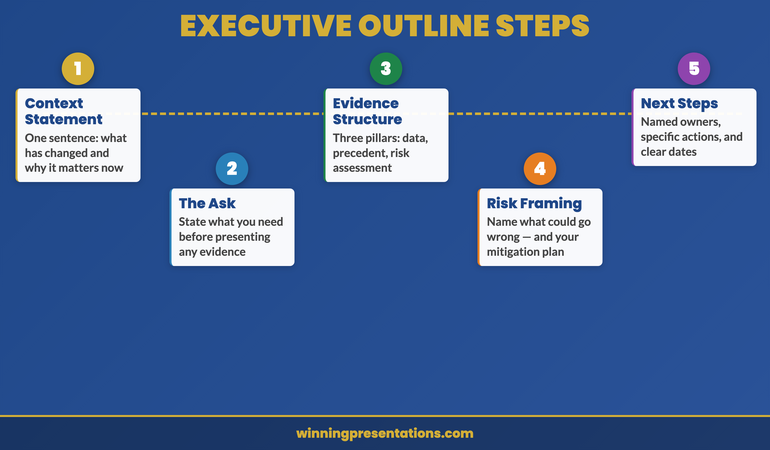

Five-part executive presentation outline diagram showing context, recommendation, evidence, risk framing, and next steps in sequence

The Context Statement: One Sentence That Changes Everything

Most presenters open with background. They explain the history of a project, recap previous decisions, or summarise the market landscape before getting to the point. This approach respects the audience’s knowledge less than it should. Board members and senior leaders do not need a history lesson — they need to know immediately why this presentation is happening today and what it requires from them.

A well-formed context statement is crisp and specific. Compare these two openings:

Weak: “As you will know, our operations in the northern region have been under review for the past eighteen months following the restructure in 2024. Today I want to take you through where we have landed.”

Strong: “The northern region restructure closes on 30 April. This presentation outlines the three decisions that need board approval before that date.”

The second version creates a decision frame immediately. It tells the audience what kind of meeting this is — a decision meeting, not a status update — and it makes the deadline explicit. Every executive in the room now knows what is expected of them before the second slide appears.

When writing your context statement during the outlining phase, ask yourself two questions: What is the specific business pressure creating urgency? And what kind of response do I need from this audience? Your answers should shape a single, declarative sentence that opens your deck. For context on how the executive summary slide fits into this structure, see this guide on the executive summary slide.

Building Your Evidence Structure Around the Decision

The evidence section is where most presentations either earn or lose their credibility. The instinct — particularly for analytically trained leaders — is to present all the data and let the audience draw their own conclusions. This approach hands control of the narrative to whoever in the room is most inclined to challenge you.

An effective evidence structure is built backwards from the recommendation. Start with what you are recommending, then ask: what are the three most compelling reasons a rational, sceptical senior executive should agree with this? Those three reasons become your evidence pillars. Each pillar should be expressible as a single, declarative sentence before you attach any data or analysis to it.

In practice, this means your outline for the evidence section looks like this before you open a single data file:

Evidence 1: The financial case — [one sentence stating the financial rationale]
Evidence 2: The strategic fit — [one sentence connecting to existing priorities]
Evidence 3: The timing imperative — [one sentence explaining why now and not later]

Each of these then becomes a section of your deck, with supporting data underneath. The discipline is in the ordering: you state the point first, then support it — not the other way around. This is the pyramid principle applied to outline architecture, and it is the difference between a deck that reads as a confident recommendation and one that reads as a hesitant data dump.

The Executive Slide System gives you pre-built outline frameworks for the executive presentations most likely to need structural clarity — including capital requests, strategic reviews, and board sign-offs where the evidence structure is the difference between a yes and a deferral.

Risk Framing: The Section Most Executives Leave Out

Omitting the risk section from your presentation outline is one of the most common — and most costly — errors in high-stakes communication. The instinct behind the omission is understandable: you are trying to build confidence in your recommendation, and explicitly surfacing risks feels counterproductive. But senior decision-makers operate differently. They are looking for evidence of judgement, not just advocacy.

A well-structured risk section demonstrates three things simultaneously: that you understand the complexity of the decision you are asking for; that you have done the work to anticipate objections; and that you are a trustworthy steward of the organisation’s resources. These three signals matter as much as the financial case.

In your outline, plan for two to three specific risks — not generic disclaimer language. Vague risk acknowledgements (“there are of course some uncertainties we will monitor”) read as evasion. Specific ones (“the primary execution risk is integration timeline, which we have addressed by bringing the programme manager’s start date forward by six weeks”) read as competence.

For each risk in your outline, draft three elements: the risk itself, your mitigation, and the residual exposure after mitigation. This three-part format prevents the risk section from feeling like a panic list. It shows that you have thought past identification to management. When a board member raises a risk you have already addressed, the credibility gain is significant. When they raise one you have not, your mitigation instinct has to work much harder.

If you are presenting to an audience that may be hostile to your recommendation, the risk framing section becomes even more important. See this article on presentation structure for hostile audiences for specific techniques when the room is divided.
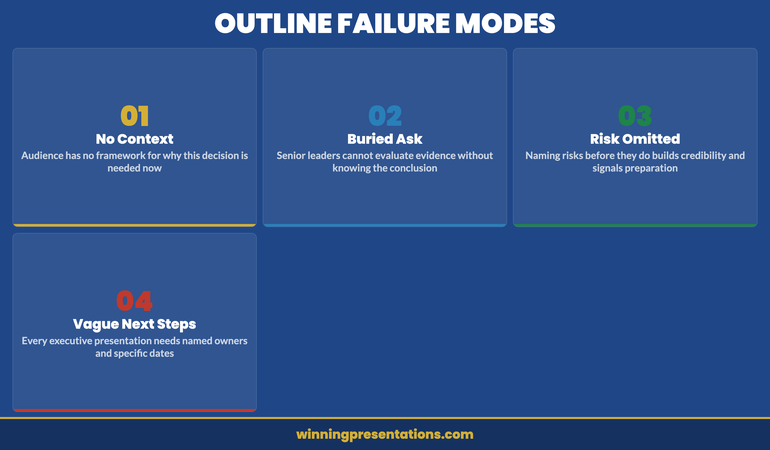

Executive presentation outline risk framing section showing risk, mitigation, and residual exposure structure

Executive Slide System — £39, instant access

Stop Starting From Scratch. Build Faster With the Right Templates.

The Executive Slide System includes outline templates specifically structured for the moments where clarity matters most — board approvals, capital allocation, strategic pivots, and operational reviews. Each template is pre-loaded with the five-part framework so you start every deck in the right place.

Get the Executive Slide System →

Testing Your Outline Before You Build

The outline is a testable document — and testing it before opening PowerPoint is where the real time saving happens. A five-minute outline review at the planning stage is worth sixty minutes of deck revision at the delivery stage. There are three tests worth running on every outline before you commit to building.

The “so what” test. Read your recommendation aloud to someone outside your immediate team — a trusted colleague, a coach, a peer from another division. If their immediate response is “so what?” or “what are you asking me to do?”, your recommendation is not specific enough. A good recommendation names an action, an amount, and a timeline. “I am recommending we proceed” is not a recommendation. “I am recommending board approval of £2.4m for Phase 2, with a go-live target of Q3 2026” is.

The coverage test. Does your evidence section cover financial, strategic, and operational dimensions — or is it heavily weighted towards one category? A purely financial case is vulnerable to strategic objections. A purely strategic case is vulnerable to financial ones. The most resilient outlines have evidence that addresses multiple decision-making lenses so that different stakeholders in the room find their priorities served by at least one pillar.

The one-minute summary test. Can you summarise your entire outline — context, recommendation, three evidence points, primary risk, and next step — in under sixty seconds, out loud, without notes? This is not a presentation rehearsal. It is a clarity check. If you cannot summarise the outline in a minute, the deck will not land cleanly in thirty. Conduct this test before you build a single slide. The clarity you develop in this sixty-second exercise will shape every content decision that follows.

If your presentation is heading to a board or a senior governance committee, the testing phase also needs to include a stakeholder mapping review. Who in the room will champion the recommendation? Who will probe hardest? Where does the power to say yes actually sit? These political considerations belong in the outline phase — not discovered mid-delivery. For board-specific structural guidance, see this article on board agenda presentations.

The outline is not a planning formality. It is the most important document you will produce in the presentation process — and it is the one most leaders skip. The leaders who do not skip it are the ones whose decks consistently drive decisions rather than deferring them.

Need the outline templates rather than building from scratch? The Executive Slide System (£39, instant access) ships with the five-part outline pre-loaded across 26 slide templates, 93 AI prompt cards, and 16 scenario playbooks — including capital requests, board sign-offs, and strategic pivots.

Frequently Asked Questions

How long should an executive presentation outline be?

An effective executive presentation outline should fit on a single page — typically five to eight bullet points covering context, recommendation, three evidence pillars, risk, and next steps. It is a planning document, not a content document. If your outline runs to multiple pages before you have built any slides, you are writing the presentation twice. The outline exists to establish the logic and sequence of your argument; detailed supporting content belongs in the deck itself, not the planning document.

Should the recommendation come at the start or end of an executive presentation?

For executive audiences, the recommendation comes at the start — specifically, as the second element after your context statement. This is the direct opposite of the narrative build used in consumer or public-facing communication. Senior decision-makers are time-pressured, context-rich, and scepticism-prone. They evaluate your evidence more effectively when they know what they are being asked to approve. Burying the recommendation at slide fifteen signals that you are not confident in your ask, or that you are hoping to build enough momentum to make the recommendation impossible to refuse — both of which undermine trust.

How do you outline a presentation when you don’t know the outcome yet?

When the recommendation is genuinely uncertain — exploratory briefings, scenario planning sessions, or strategic option reviews — the five-part structure adapts rather than breaks. Replace the recommendation slot with a “decision frame”: a clear statement of what options you are asking the audience to consider and what criteria they should use to evaluate them. Your evidence section then presents the case for each option rather than a single path. The risk and next steps sections remain the same. This approach maintains the structural clarity of the framework while respecting the genuinely open nature of the decision.

Ready for the deeper buy-in framework?

The Executive Buy-In Presentation System

A self-paced programme on Maven covering the structure, psychology, and stakeholder analysis behind senior approvals. 7 modules with optional recorded Q&A sessions — no deadlines, no mandatory attendance. £499, lifetime access to materials.

Explore the programme →

Get more executive communication strategies every Thursday. The Winning Edge is a weekly newsletter for senior leaders who want sharper presentations, stronger boardroom presence, and clearer communication under pressure.

Subscribe to The Winning Edge →

Free resource: The Executive Presentation Checklist — a one-page reference covering the key structural and delivery checks before any high-stakes presentation. Download it and use it before your next board or leadership team meeting.

Download the Free Checklist →

About the Author

Mary Beth Hazeldine

With 25 years of corporate banking experience at JPMorgan Chase, PwC, Royal Bank of Scotland, and Commerzbank, Mary Beth Hazeldine has spent 16 years coaching senior leaders to communicate with the clarity and authority their roles demand. She works with executives who need to perform under pressure — in board rooms, investor meetings, and high-stakes leadership settings where the quality of the presentation determines the outcome.


07 Apr 2026

How to Use Your Voice to Command a Room Without Shouting

Quick answer: Vocal authority in presentations is not about volume — it is about control of five specific variables: pace, pitch, pause, projection, and resonance. Under pressure, most executives lose control of all five simultaneously, which creates the impression of uncertainty even when the content is strong. Each variable can be trained individually, and the combination creates the quality that audiences describe as a speaker who “commands the room.”

Astrid had spent eleven years in investment banking before moving into a strategy director role at a European infrastructure fund. She was technically exceptional — her analytical rigour was well-regarded across the firm, and her written work was consistently cited as a reference by colleagues. But in rooms with more than six people, something changed. Her voice rose slightly. Her pace quickened. Her sentences — clear and authoritative on paper — became hedged and breathless in delivery.

A senior partner raised it with her directly: “Your content is excellent. But when you present it, you sound like you’re asking for permission.” Astrid was startled. She had not been aware of the shift. She had been focused entirely on the content — on the accuracy of her numbers, the logic of her argument, the completeness of her analysis. She had given almost no attention to the instrument she was using to deliver it.

What followed was six months of deliberate work on her vocal delivery — not elocution lessons or theatrical coaching, but specific, functional adjustments to the way she managed pace, pitch, and pause under conditions that mirrored the presentations she gave at work. The partner who had flagged the issue told her, nine months later, that something fundamental had shifted. “You walk in and people assume you know what you’re talking about before you’ve said a word.”

That is the effect of vocal authority. It operates as a pre-content signal — shaping how the audience receives the words before they have processed what those words mean.

Does your voice give you away under pressure?

Conquer Speaking Fear is a structured programme that addresses the physical and psychological dimensions of presentation anxiety — including the vocal changes that happen when your nervous system interprets the room as a threat.

Explore the Programme →

Why Your Voice Changes Under Pressure

The voice is directly controlled by the body’s stress response. When the nervous system perceives a high-stakes situation — a large audience, a sceptical board, a question you weren’t expecting — it releases adrenaline and cortisol. These hormones prepare the body for rapid action, and the changes they produce are useful in a physical emergency. In a presentation, they are largely unhelpful.

The laryngeal muscles — which control the tension and position of the vocal cords — respond to stress by tightening. This raises pitch. The diaphragm, which controls breath support for the voice, becomes less effective as shallow chest breathing replaces the deep diaphragmatic breathing that supports full vocal resonance. The result is a voice that is higher, thinner, faster, and quieter — regardless of the speaker’s intention to sound confident.

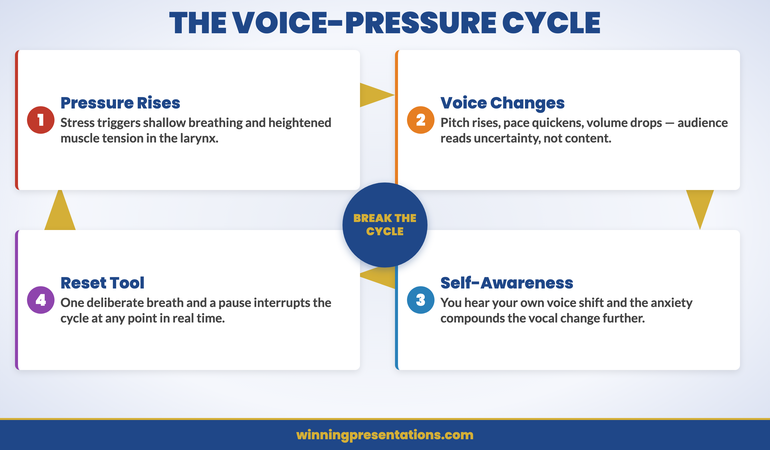
The problem is compounded by self-awareness. Many experienced presenters can hear the change happening in real time — the slightly higher note, the quickening pace — and their awareness of it creates a secondary layer of anxiety that reinforces the vocal change. This is the voice-pressure cycle: stress changes the voice, awareness of the change creates more stress, which changes the voice further.

Understanding this mechanism is important because it clarifies what training can and cannot achieve. You cannot eliminate the stress response entirely, and attempting to do so is counterproductive. What you can do is build the technical habits — breath control, pace awareness, physical positioning — that allow you to maintain vocal quality even when the stress response is active. For broader context on managing physical presentation symptoms, see this guide on why your voice goes higher when you’re nervous and how to fix it.

The Mechanics of Vocal Authority

Vocal authority is not a single quality — it is the auditory impression created by the combination of several technical elements working in alignment. When these elements are in alignment, audiences describe the speaker as authoritative, confident, or commanding. When they are out of alignment, the same content — presented with the same intention — reads as uncertain, apologetic, or unconvincing.

Breath is the foundation. Everything else in vocal delivery depends on the quality of the breath support beneath it. Diaphragmatic breathing — drawing air into the lower lungs rather than the upper chest — produces a fuller, more resonant sound and allows the speaker to maintain a steady pace without running out of breath mid-sentence. Most people breathe diaphragmatically when at rest. Under pressure, they revert to chest breathing without noticing. Retraining this default is the single most impactful investment in vocal quality.

Resonance amplifies authority. Resonance refers to where in the body sound vibrates before it leaves the mouth. A voice that resonates in the chest cavity produces a fuller, lower, more substantial sound than a voice that resonates primarily in the head or nasal cavity. Chest resonance reads as authority. Head resonance reads as uncertainty or youth. Physical relaxation — particularly in the jaw, neck, and shoulders — is prerequisite for chest resonance; tension collapses it.

Pace is the clearest signal of confidence. Research in communication consistently shows that slower delivery is associated with higher perceived credibility and authority. The optimal pace for high-stakes executive presentations is slower than most people’s natural conversational rate — and significantly slower than their pressurised presenting rate. A pause of two to three seconds between major points feels uncomfortably long to the speaker and authoritative to the audience. For broader context on pacing and executive attention, see this analysis of how pacing affects executive engagement in presentations.

The Five Voice Variables Executives Must Master

Each of the five variables below can be worked on independently. The sequence moves from the most foundational (breath) to the most contextual (reading the room), because changes to earlier variables often resolve problems in later ones.

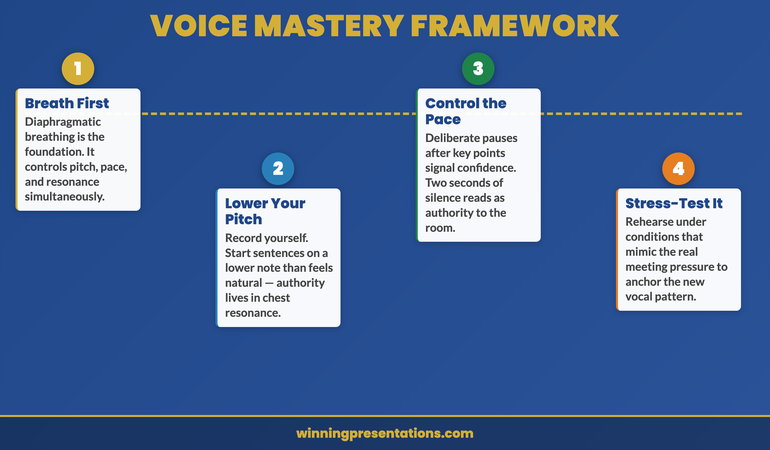
Five-stage roadmap for developing vocal authority in executive presentations

Variable one — Breath control. Practise diaphragmatic breathing as a deliberate routine before every presentation. Place one hand on your chest and one on your abdomen. A correct breath expands the abdomen without moving the chest. Three deep diaphragmatic breaths immediately before speaking — particularly before a high-stakes moment — activate the parasympathetic nervous system and provide the breath support the voice needs to function at its best.

Variable two — Pitch management. Record yourself presenting and listen back specifically for pitch. Most people are surprised by how much higher their pitch is under pressure than in ordinary conversation. To lower pitch deliberately, begin sentences on a lower note than feels natural, and resist the upward inflection at the end of statements that makes assertions sound like questions. The latter — sometimes called “uptalk” — is one of the most common authority-eroding vocal habits in executive presentations.

Variable three — Pace and pause. Mark deliberate pauses into your presentation notes or slides — not as reminders to pause, but as specific positions in the content where a pause creates meaning. After a key statistic. After a critical recommendation. After a question to the room. These pauses do triple duty: they give the audience time to process, they give you time to breathe, and they signal confidence in the material.

Variable four — Volume and projection. Projection is not shouting — it is directing the voice toward the back of the room while maintaining full resonance and control. The most common projection problem in executive presentations is not insufficient volume but insufficient direction: the speaker addresses the person nearest to them rather than projecting to the room as a whole. Speaking slightly past the audience — imagining an audience member a metre behind the furthest row — naturally increases both volume and clarity.

Variable five — Resonance and release. Physical tension is the primary enemy of resonance. Jaw tension, shoulder elevation, and neck stiffness all reduce the space available for vocal resonance and produce a thinner, tighter sound. A physical warm-up that includes jaw release, shoulder rolls, and neck mobilisation — done privately before the presentation — removes much of this tension before you enter the room.

Conquer Speaking Fear

A structured 30-day programme that addresses presentation anxiety at the physiological and psychological level — including the nervous system patterns that change your voice under pressure.

  • 30-day structured programme for systematic anxiety reduction
  • Nervous system regulation techniques for high-stakes presentations
  • Clinical hypnotherapy methods for rewiring the threat response
  • Practical drills designed for corporate presentation contexts

Get Conquer Speaking Fear — £39

Designed for executives whose anxiety affects their delivery under pressure.

Practical Drills You Can Do Before Any Presentation

The most effective vocal preparation combines physiological preparation — activating the breath and releasing tension — with cognitive familiarisation — running through the opening material until the initial sentences feel automatic. The following sequence takes approximately eight minutes and can be done in a private space immediately before the presentation.

Two minutes — physical release. Standing, roll both shoulders back slowly five times. Gently rotate the neck in each direction. Release the jaw by opening the mouth wide and then allowing it to close naturally — without pressing the teeth together. These movements address the primary tension sites that restrict vocal resonance.

Two minutes — breath activation. Three full diaphragmatic breaths: four counts in through the nose, hold for two, eight counts out through the mouth. On the exhalation, allow the abdomen to fully deflate. This activates the diaphragm and signals to the nervous system that the situation is manageable rather than threatening. For a full pre-presentation routine, see this framework for the pre-presentation ritual used by high-performance presenters.

Two minutes — vocal warm-up. Hum quietly at a comfortable pitch, feeling the vibration in the chest. Then speak your opening sentence aloud — at the pace you intend to use in the room, not faster. Repeat the opening sentence three times, focusing specifically on the pitch of the first word. Starting a sentence on a lower note than feels natural is one of the fastest ways to drop perceived register.

Two minutes — intention setting. Speak your opening two minutes aloud in full, as if you were in the room. Not as a rehearsal focused on accuracy — as a familiarisation run focused on physical delivery. The goal is to have the first two minutes feel familiar in the body before you enter the room, so that the nervous system has a prior reference for this specific act of speaking in this specific context.

For executives whose anxiety has a deeper physiological component, Conquer Speaking Fear provides a structured 30-day programme for rewiring the nervous system’s response to high-stakes speaking situations.

The Most Common Voice Mistakes Under Pressure

The following patterns appear consistently across executives who self-report difficulty with vocal authority. Each is a response to pressure rather than an intentional choice — which is why awareness alone is rarely sufficient to change them. Each requires a specific corrective practice.

The voice-pressure cycle showing how stress affects vocal quality and how to break the pattern

Rising inflection on statements. When the voice rises at the end of a declarative sentence, the sentence reads as a question — as if the speaker is seeking validation rather than making an assertion. This pattern is particularly damaging in recommendation and conclusion slides, where the executive needs to project certainty. The corrective is deliberate: end every statement with a downward inflection, even if it feels unnatural in practice sessions.

Filler vocalisations between sentences. “Um,” “er,” “so,” and “you know” are auditory signals of cognitive searching — they indicate to the listener that the speaker is uncertain about what comes next. The corrective is not silence; it is the pause. A two-second pause while the speaker transitions to the next point reads as deliberation and authority. The same transition filled with “um” reads as uncertainty. The distinction is almost entirely in the intention to pause rather than fill.

Trailing volume at the end of sentences. Many pressurised speakers begin a sentence at an appropriate volume and then allow the final clause to drop — both in pitch and in volume — as they run out of breath. The last few words of a sentence often carry its most important information: the verb, the number, the specific recommendation. Allowing them to trail off undermines the clarity of the message and signals to the audience that the speaker is uncertain about those specific words.

Pace acceleration through transitions. The space between slides — the moment of transition from one topic to the next — is where pace most commonly accelerates. The speaker feels exposed in the gap and rushes to fill it. This is precisely where a deliberate pause is most effective: it signals to the audience that the transition is intentional, creates anticipation for what follows, and gives the speaker a moment to breathe before beginning the next section.

Reading the Room Through Your Voice

Experienced presenters use their voice not only to deliver content but to read and manage the room. This is an advanced skill — one that requires the foundational vocal habits to be sufficiently automated that the speaker has cognitive bandwidth to observe audience response and adjust in real time.

Volume as a tool for re-engagement. When an audience becomes distracted — when people begin checking phones or having side conversations — the instinctive response is to speak louder. The counterintuitive but more effective response is to drop volume significantly. A dramatic reduction in volume forces the audience to lean in and focus, in a way that increased volume does not. This technique requires confidence, because it feels risky in the moment — but it is remarkably effective for recapturing attention.

Pace as a signal of complexity. When you reach the section of the presentation that contains the most complex or consequential information, slow down further than you think necessary. The additional slowness is a signal to the audience: this matters, pay attention. It also ensures that the audience has time to process before you move on — which reduces the likelihood of questions that reveal they missed a critical point.

Pitch variation to sustain engagement. Monotone delivery — a voice that remains at a constant pitch throughout the presentation — is fatiguing to listen to. Deliberate pitch variation — slightly higher for questions or provocations, slightly lower for conclusions or recommendations — maintains audience engagement over the duration of the presentation. This variation needs to be intentional; under pressure, most people’s pitch variation collapses toward monotone.

How Voice Training Connects to Confidence

There is a bidirectional relationship between vocal quality and confidence. Most people experience this unidirectionally: they believe that if they felt more confident, their voice would improve. This is true — but the reverse is also true, and often more actionable. When the voice functions well under pressure, the speaker receives immediate positive feedback from their own perception of the room’s response — and confidence builds in real time.

This feedback loop is why vocal training has a disproportionate impact on overall presentation confidence relative to the narrowness of its focus. Working specifically on breath control, pitch, and pace produces not only better vocal delivery but also a reduction in the anxiety symptoms that interfere with delivery — because the speaker has a reliable tool they can use to manage the physiological pressure response in the room.

The most effective vocal training for executive presenters combines technical practice — deliberate work on each of the five variables — with exposure to increasingly challenging contexts. Recording practice presentations and listening back with specific focus on one variable at a time accelerates the feedback cycle. Working with a Q&A simulation exercise — where a colleague challenges your answers under conditions that mirror the real room — builds the specific resilience that Q&A situations demand. See the companion piece on building hostile questioner resilience through simulation for a structured method for the Q&A context.

Address the Anxiety Behind the Voice

Conquer Speaking Fear is a structured 30-day programme that works at the nervous system level — addressing the physiological patterns that change your voice, your pace, and your presence under pressure.

View Conquer Speaking Fear — £39

Designed for executives whose anxiety affects their delivery under pressure.

Frequently Asked Questions

Can vocal authority be learned, or is it something you either have or don’t?

Vocal authority is a technical skill with a strong learned component. While some individuals have a naturally resonant voice or a slower default pace, the specific combination of habits that creates the impression of authority — controlled breath, deliberate pace, downward inflection on statements, intentional pausing — can be developed through specific practice. The timeframe varies: most executives who work consistently on these five variables report noticeable change within four to six weeks of deliberate practice.

Is it worth recording yourself to improve your voice?

Yes — with one important caveat. The first time most people hear a recording of themselves presenting, they experience a strong negative reaction to the sound of their own voice. This is normal and does not indicate that the voice is objectively poor. After one or two exposures, the initial aversion subsides and you can listen analytically — focusing on specific variables rather than on the global impression. A useful practice is to record a two-minute section of a presentation, then listen back twice: once for pace, once for inflection. Focusing on one variable at a time produces more actionable feedback than a general impression.

What should I do if my voice visibly shakes during a presentation?

A shaking voice is a physiological stress response — it is caused by tension in the laryngeal muscles, which are activated by adrenaline. The single most effective in-the-moment intervention is a deep diaphragmatic breath before continuing. This does not eliminate the adrenaline, but it provides the breath support that compensates for some of the tension. Slowing your pace simultaneously reduces the load on the vocal system and gives the muscles more time to recover between words. Over time, systematic desensitisation — deliberate exposure to high-stress presenting contexts — reduces the severity of the physiological response in familiar contexts.

The Winning Edge — Weekly Newsletter

Executive presentation strategy, delivered every Thursday. Practical frameworks for delivery, confidence, and high-stakes communication.

Subscribe to The Winning Edge

About the Author

Mary Beth Hazeldine is Owner & Managing Director of Winning Presentations. With 24 years of corporate banking experience at JPMorgan Chase, PwC, Royal Bank of Scotland, and Commerzbank, she advises executives across financial services, healthcare, technology, and government on structuring presentations for high-stakes funding rounds and approvals. Connect at winningpresentations.com.

03 Apr 2026
Executive leader addressing a small group of team members in a glass-walled meeting room during an organisational change discussion

Stakeholder Change Presentation: How to Communicate Organisational Restructuring Without Losing Trust

A stakeholder change presentation is the moment where leadership credibility is either built or broken. The restructuring decision has already been made. What remains is whether the people affected trust the reasoning, understand the timeline, and believe the leadership team is acting with integrity. Here’s how to structure the communication that preserves trust.

Dimitri had been given seventy-two hours to prepare the restructuring announcement. The pharmaceutical division he led was merging two research units into one, eliminating fourteen roles and creating nine new ones. His instinct was to lead with the strategic rationale—market pressures, patent cliff, the need to consolidate pipeline investment. His head of HR stopped him. “They won’t hear the strategy,” she said. “They’ll hear ‘fourteen people are losing their jobs.’ Start there.” Dimitri rewrote the entire presentation overnight. He opened by acknowledging the human cost directly, naming the support provisions before explaining the structural logic. He held separate thirty-minute sessions with each affected team rather than one all-hands announcement. The feedback afterwards was not “we agree with the decision”—it was “we understand why, and we trust the process.” Three months later, the merged unit was outperforming both predecessor teams. The people who stayed attributed it to how Dimitri handled the first conversation.

Preparing a restructuring communication? The Executive Slide System includes templates and frameworks for high-stakes organisational communications that maintain stakeholder confidence.

Why the Human Cost Must Come Before the Strategy

The most common error in stakeholder change presentations is leading with the strategic rationale. Market conditions have shifted. The competitive landscape demands a response. The organisation must evolve. All of this may be true, and none of it matters to the person sitting in the audience wondering whether they still have a job next month.

When people are anxious—and restructuring announcements generate acute anxiety—their cognitive processing narrows to a single question: “What does this mean for me?” Until that question is addressed, everything else is noise. The strategic rationale, the market analysis, the competitive pressures—none of it registers until the listener’s personal uncertainty is acknowledged.

Open with three things in this exact order. First, a direct acknowledgement that this announcement affects people’s lives and livelihoods. Not corporate-speak—plain language. “I know this is difficult. Some of you will be directly affected by these changes, and I want to address that before I explain the reasoning.” Second, the specific support provisions: redundancy terms, redeployment opportunities, career transition support, timelines for individual conversations. Third, and only third, the strategic context that explains why this restructuring is happening.

This ordering is counterintuitive for executives who think strategically. It feels as though you’re leading with bad news rather than building a logical case. That’s precisely the point. Stakeholders experiencing change don’t process logic until their emotional response has been acknowledged. Research in organisational psychology consistently shows that perceived procedural fairness—how the change is communicated and implemented—matters more to long-term trust than the change itself. Your stakeholder change presentation sets the perception of fairness from the opening sentence.

Communicate Change With Clarity and Credibility

The Executive Slide System gives you restructuring communication templates and decision frameworks—so your stakeholder presentation maintains trust whilst delivering difficult messages with precision.

  • ✓ Board-ready templates for organisational change scenarios
  • ✓ AI prompt cards to structure sensitive communications fast
  • ✓ Framework guides for high-stakes leadership presentations

Get the Executive Slide System → £39

Designed for executives preparing high-stakes presentations

Audience Segmentation: One Message Does Not Fit All Stakeholders

A restructuring affects multiple audiences, each with different concerns, different information needs, and different levels of vulnerability. Presenting the same message to all of them—a single all-hands announcement—is efficient and almost always damaging. The people being made redundant, the people staying in restructured roles, the people unaffected but watching, the leadership team responsible for implementation, and the external stakeholders (clients, investors, partners) all need different communications.

For the directly affected group, the presentation must be personal, specific, and delivered in a small-group or individual setting. They need to hear what is happening to their role, what the timeline is, what support is available, and who their point of contact will be for questions. A large-audience announcement denies them the dignity of a personal conversation and creates a public spectacle of private distress.

For the people remaining in restructured roles, the presentation focuses on what changes for them: new reporting lines, new responsibilities, revised team structures, and the timeline for stabilisation. Their primary anxiety is not about redundancy—it’s about whether the organisation they’re staying in will function well enough to justify staying. Address that directly.

For the broader organisation—the people not directly affected—the presentation must explain why the restructuring happened, what the organisation looks like afterwards, and what it means for them operationally. Their anxiety is lower but their cynicism is often higher: they’re watching how leadership treats the affected colleagues, and that observation shapes their long-term trust. If you’ve read our guide on restructuring presentations and team trust, you’ll recognise the critical role that visible fairness plays in organisational recovery.

Stakeholder audience segmentation framework for restructuring communications showing three audience groups and their communication needs

Framing the Strategic Rationale Without Corporate Jargon

Once the human cost is acknowledged and the support provisions are clear, the strategic rationale must follow. But the language matters enormously. Corporate jargon in a restructuring announcement—“right-sizing,” “synergy realisation,” “operational efficiency”—reads as evasion. It signals that the leadership team is hiding behind terminology rather than being direct about what’s happening and why.

The rationale should be expressed in three plain sentences. Sentence one: what has changed in the market or the organisation that made this restructuring necessary. Sentence two: what the restructured organisation will look like and why that structure is better positioned. Sentence three: what the leadership team has already done to minimise the impact on people. Three sentences. If you can’t explain the rationale in three sentences, you either don’t understand it fully or you’re trying to obscure something.

Avoid two common traps. The first is over-explaining—providing so much market context and competitive analysis that the rationale gets lost in data. Stakeholders experiencing change don’t need an MBA case study. They need to understand the logic simply enough to explain it to their families. The second trap is euphemism. Don’t say “we’re creating a more agile organisation” when you mean “we’re removing a layer of management.” Don’t say “some roles will be impacted” when you mean “fourteen people will be made redundant.” Direct language hurts in the moment but builds trust over time.

The most effective restructuring communicators—and Dimitri’s approach illustrates this—treat the rationale as context for a decision that’s already been made, not as justification for it. There’s a difference. Justification implies the leadership team is seeking approval from the audience. Context implies they’ve made a difficult decision and they’re explaining their reasoning honestly. Stakeholders respect the latter even when they disagree with the outcome.

The Timeline Slide: Certainty Where Possible, Honesty Where Not

After a restructuring announcement, the single most destructive force is uncertainty about timing. People can absorb bad news. They cannot absorb indefinite ambiguity. The timeline slide in your stakeholder change presentation must be as specific as possible about dates, and completely honest about what isn’t yet decided.

Structure the timeline in three phases. Phase one: what happens this week. Individual consultation meetings scheduled, support resources activated, FAQ document distributed. Phase two: what happens over the next thirty days. Consultation period, role confirmation for restructured positions, redeployment opportunities communicated. Phase three: what happens by ninety days. New structure operational, integration milestones, first review checkpoint.

For elements where dates are genuinely uncertain—regulatory approvals, union consultation outcomes, client contract negotiations—say so explicitly. “We expect this to be resolved by mid-May, but we’ll confirm the date by the end of next week” is far better than a vague “in due course.” Ambiguity in timelines is interpreted as either incompetence or concealment, regardless of the actual reason.

One detail that many leaders overlook: commit to a specific communication rhythm after the announcement. “I will send an update email every Friday until the restructuring is complete.” This single commitment reduces anxiety disproportionately, because it assures people that silence is not abandonment. The announcement presentation is the beginning of the communication, not the entirety of it. Our guide on how leaders can use redundancy announcement presentations covers the specific language and sequencing that preserves dignity during the most difficult conversations.

If you’re structuring a change communication for the first time, the Executive Slide System provides the structural templates that ensure every stakeholder audience receives the right message at the right moment.

Three-phase timeline framework for restructuring communication covering this week, thirty days, and ninety days

Preparing for the Questions You Hope Nobody Asks

In restructuring communications, the Q&A session is where trust is won or lost. The presentation itself is a controlled environment—you’ve chosen the words, the sequence, the framing. The questions that follow test whether the presentation was honest or merely polished.

Prepare for five categories of questions. The “why me” question: “How were the affected roles selected?” Your answer must reference objective criteria—not performance, not politics. Structural logic: “These roles existed to serve a function that the new structure addresses differently.” The “what next” question: “What happens if I don’t accept the redeployment offer?” Have the answer ready with specifics. The “trust” question: “How do we know there won’t be another round in six months?” Be honest: “I can’t guarantee that no further changes will ever be needed, but this restructuring is designed to be stable for [timeframe].” The “leadership accountability” question: “Are senior leaders being affected too?” If yes, say so specifically. If no, explain why—honestly. The “real reason” question: “Is this really about strategy, or is it about cutting costs?” Do not deflect. “Cost reduction is part of the rationale, yes. We need to operate within [budget/margin]. The structural changes also position us for [strategic goal]. Both are true.”

The questions you hope nobody asks are exactly the ones you must prepare for most thoroughly. If you’re visibly uncomfortable or evasive when they surface, every other message in your presentation unravels. Our guide on town hall presentations that rebuild trust covers the Q&A preparation framework in detail, including how to handle emotional responses without shutting them down.

After the Presentation: Follow-Through That Rebuilds Trust

The presentation is the beginning, not the end. What happens in the seventy-two hours after a restructuring announcement determines whether the trust you’ve worked to preserve actually survives. Three actions are non-negotiable.

Action 1: Individual conversations within 48 hours. Every affected person must have a private, face-to-face (or video) conversation with their direct manager or a senior leader within two working days. Not an email. Not a group session. A personal conversation where their specific situation is discussed, their questions are answered, and they are treated as an individual, not a headcount number.

Action 2: Written summary within 24 hours. Distribute a written document that captures everything said in the presentation. People under stress do not retain verbal information well. The written summary serves as a reference they can return to once the initial shock subsides. Include all support provisions, timelines, contact details, and the strategic rationale in plain language.

Action 3: Visible leadership presence. In the days following the announcement, the leadership team must be visibly present. Not hiding in offices. Not travelling. Walking the floor, eating in the canteen, being available for informal conversations. This is not about having more formal meetings. It’s about demonstrating that the leaders who made this decision are not detaching from its consequences.

Dimitri did all three. Within forty-eight hours, every affected team member had a private conversation. A written FAQ was distributed the same afternoon. Dimitri ate lunch in the main canteen every day for three weeks. Trust isn’t built by presentations. It’s built by what leaders do after the presentation ends.

Lead Through Change With Structured, Honest Communication

Restructuring requires precision in every slide and every word. The Executive Slide System gives you the communication frameworks, stakeholder templates, and scenario guides you need—for £39.

Get the System Now → £39

FAQ: Stakeholder Change Presentations

Should I announce a restructuring in one large meeting or multiple smaller sessions?

Multiple smaller sessions, segmented by audience. The directly affected group should hear the news in a small-group or individual setting before the wider organisation. This prevents the public spectacle of people learning their role is at risk in front of hundreds of colleagues. The broader all-hands session should follow within hours, not days—delays create a rumour vacuum that’s worse than the announcement itself. The key principle is that no stakeholder should learn about changes to their own role from someone outside their direct leadership chain.

How do I handle tears or emotional reactions during the presentation?

Do not rush past them, minimise them, or pretend they aren’t happening. Pause. Acknowledge the emotion directly: “This is a difficult conversation and your reaction is completely understandable.” Offer the person the option to continue or step out for a moment. Do not move to the next slide whilst someone is visibly distressed—it signals that the agenda matters more than the people. Have tissues, water, and a private space available. If the session is derailed by strong emotion, call a brief pause rather than pushing through. Emotional responses are not obstacles to the communication—they are part of it.

What if I don’t have all the answers at the time of the announcement?

Say so honestly, and commit to a specific date when you will have the answer. “I don’t have that information yet—we’re still working through the consultation process. I’ll have an answer by next Friday and will communicate it directly.” This is far better than guessing, hedging, or deflecting. Stakeholders during restructuring have finely calibrated sensors for evasion. An honest “I don’t know yet” followed by a specific commitment builds more trust than a vague reassurance that turns out to be inaccurate.

The Winning Edge

Weekly insights on executive presentations, slide strategy, and boardroom communication.

Subscribe Free

Leading through organisational change? Download the Executive Slide System checklist for a quick restructuring communication framework.

If your restructuring is driven by a merger or acquisition, our guide to mergers and acquisitions presentations covers the board-level deal presentation that typically precedes stakeholder communications.

About the author

Mary Beth Hazeldine, Owner & Managing Director, Winning Presentations. With 24 years of corporate banking experience at JPMorgan Chase, PwC, Royal Bank of Scotland, and Commerzbank, she advises executives across financial services, healthcare, technology, and government on structuring presentations for high-stakes funding rounds and approvals.

01 Apr 2026
Professional man in a navy suit reviews documents at a desk with a laptop in a modern office.

Board Paper vs Board Presentation: Know the Difference

A board paper is a written document submitted in advance that makes a case through evidence, context, and recommendation. A board presentation is a live conversation where visual support and executive summary matter more than comprehensive detail. The confusion costs organisations millions in poor governance decisions because boards receive the wrong format for their decision-making context.

Last month, Kwasi—a finance director at a mid-cap healthcare organisation—prepared what he believed was a comprehensive presentation on a proposed acquisition. He loaded 47 slides with financial models, regulatory timelines, and risk scenarios. He began his board presentation by saying, “I know there’s a lot here, so let me walk you through everything.” Midway through slide 12, the chair interrupted: “Kwasi, we didn’t need the detail. We needed your recommendation and the three key risks. You’ve buried the decision.” That 90-minute meeting should have taken 20 minutes. The board approved the acquisition anyway—but Kwasi had wasted the board’s time and undermined his own credibility because he’d confused a board paper with a board presentation. The paper existed (a 30-page investment memorandum, circulated days earlier). What the board needed was a live conversation structured around decision-making, not a slide-by-slide recitation of existing documents.

A practical resource for boards

Many governance professionals conflate these two formats, or worse, create only one when they need both. The problem is structural: boards need written evidence (the paper) and live dialogue (the presentation) to make sound decisions. Understanding the distinction clarifies not just what you write and speak—but how you think about board communication. This article walks you through both formats, including when to use each and how to structure them so your board actually makes better decisions faster.

cisions faster.

The Fundamental Difference Between Format and Purpose

A board paper and a board presentation serve fundamentally different cognitive and procedural purposes, even when they address the same topic.

A board paper is a written artefact of record. It exists to create a shared information base, build a case through evidence and reasoning, and allow board members to review independently before a meeting. Board papers typically run 8–30 pages. They include:

  • Executive summary or recommendation at the start
  • Detailed background context
  • Financial, legal, or regulatory implications
  • Risk analysis and mitigation strategies
  • Appendices with supporting data, external advice, or comparative analysis

A board paper is asynchronous: board members read it independently, sometimes days before the meeting. It must be self-contained because the author isn’t present to explain.

A board presentation is a live conversation with visual support. It exists to facilitate discussion, answer questions in real time, test assumptions, and build consensus around a decision. Board presentations typically run 15–40 minutes (not hours). They include:

  • A clear, concise recommendation at the start
  • Three to five key supporting points (not 30)
  • Visual aids that summarise, not enumerate
  • Invitation to questions and challenge
  • A closing decision frame (“We recommend approval, pending your questions about risk mitigation”)

A board presentation is synchronous: it depends on the presenter being present to respond, clarify, and address concerns. The visuals are memory aids for what the presenter is saying, not substitutes for the paper.

The psychological difference is critical. Reading demands sustained cognitive effort; the reader controls the pace. Speaking in real time demands attention but allows the presenter to prioritise, respond to non-verbal cues, and adjust based on the room’s reaction. A board that reads a paper first, then hears a presentation, has processed the information twice—once independently and once collaboratively. This redundancy is deliberate: it drives better decisions because it creates multiple moments for challenge and clarity.

Clarify your board communication structure today

The Executive Slide System gives you a tested framework for designing both board papers and presentations that boards actually engage with. No vagueness. No buried recommendations. Just clarity.

Get the Executive Slide System

Infographic comparing board paper format versus board presentation structure for governance meetings

When Each Format Is Appropriate

The choice between paper and presentation (or both) depends on the decision’s complexity, the board’s time availability, and the level of detail required for accountability.

Use a board paper when:

  • The decision involves complex financial, legal, or regulatory detail that requires deep scrutiny (acquisitions, material contracts, governance policy changes)
  • Board members must form an independent opinion before the meeting (regulatory best practice increasingly demands this)
  • You need a record of the information considered and the reasoning for the decision (audit trail)
  • Multiple stakeholders need to review the information asynchronously (board secretary, external counsel, auditors)
  • The decision is significant enough to warrant 30+ minutes of pre-meeting preparation from each director

Use the live presentation format when:

  • You’re presenting a recommendation that’s already backed by a written paper (the norm for most board meetings)
  • The recommendation needs live challenge or testing of assumptions
  • Time is limited and the decision is straightforward (board approval of a standard-form report, for instance)
  • The board has already reviewed detailed information and now needs to discuss and decide
  • You need to calibrate the board’s appetite for risk in real time based on their questions

Use both when: The decision is high-stakes, the paper is substantial (15+ pages), and the recommendation involves judgment calls. This is the norm for public company boards, private equity boards, and governance committees. The paper provides the evidence; the presentation surfaces assumptions and tests the logic.

The hybrid approach—where a board paper is circulated days in advance and a presentation follows at the meeting—remains the governance gold standard, particularly in regulated industries. It creates space for independent thought and collective challenge.

If you’re managing complex board communications, the Executive Slide System walks you through structuring written and live formats for maximum board engagement.

The Cost of Confusing the Two Formats

In practice, three mistakes dominate. Each one costs boards time, decision quality, or both.

Mistake one: Presenting the paper. This is Kwasi’s error. The presenter walks the board through a 25-page document, slide by slide, as though reading aloud is live discussion. The board already reviewed the written material. What they now need is clarification, challenge, and decision-making dialogue. Instead, they get a recitation. The result: wasted time, diminished credibility for the presenter, and a board that feels talked at rather than engaged with.

Mistake two: Creating a presentation without a paper. Some organisations skip the board paper entirely, assuming a good presentation is enough. This works for low-stakes decisions (approval of a standard report format, routine governance item). But for any decision with material implications, it shifts the burden of synthesis entirely to the board members during the meeting. They cannot form an independent view beforehand. They must absorb unfamiliar detail while also responding to live discussion. The decision quality suffers. And there’s no written record of the information that informed the decision—a problem during audits or if the decision comes under later challenge.

Mistake three: Confusing brevity with clarity. Some executives, trying to avoid Kwasi’s error, strip presentations down to four slides with almost no information. The board then feels they’re being patronised or hidden from the truth. Or they’re forced to pester the presenter for clarifications that should have been in the paper. The line between “appropriately concise” and “unhelpfully vague” is real but easily crossed.

The cost is real. Poor board communication leads to rushed decisions, unvetted assumptions, delayed approvals, and reduced board confidence in the executive team. Over time, it erodes the board’s ability to govern effectively.

How to Structure Board Papers for Maximum Impact

A board paper should guide the reader to a clear recommendation within the first two pages, then build the case. The structure matters more than the length.

Start with the executive summary. This is not an overview. It’s a one-page argument: what you’re recommending, why, the key evidence, and the risks you’ve considered. A competent board member should be able to read this page, ask intelligent questions, and vote based on the executive summary plus the detail they choose to explore. Many papers bury the recommendation on page 8. That’s a structural failure. The reader should know within 30 seconds what you’re proposing.

Follow with background and context. Assume the reader doesn’t know this space as well as you do. Provide the history, the regulatory landscape, or the market context that explains why this decision matters now. This is where you build credibility through evidence, not rhetoric.

Present the case in a logical sequence. Don’t arrange information by data source (financials, then legal, then operations). Arrange it by argument. If the decision hinges on three factors, present them in order of importance or logical dependency. Use clear headings. Use data visualisation where a table would burden the reader. A board member with limited time should be able to skim headings and grasp the argument.

Acknowledge risks and mitigation explicitly. A good board paper doesn’t pretend the option is risk-free. It identifies material risks and explains how you’d mitigate them. This is where boards actually trust executives—when they show they’ve thought critically about downside. A recommendation with no acknowledged risk looks naive.

Close with a clear decision frame. “We recommend approval of the acquisition, subject to no material changes to the vendor’s financial position between now and close, and contingent on the indemnity language reflecting the discussion at the last board meeting.” This is not vague. It’s precise. It tells the board exactly what they’re approving and what triggers a re-discussion.

Build board papers that actually drive decisions

The Executive Slide System includes a board paper template and checklist that ensures you structure recommendations for maximum clarity and board confidence. No guesswork. No wasted words.

Explore the System

Decision framework for choosing between board paper and board presentation formats

How to Structure Board Presentations for Decision-Making

A board presentation should assume the audience has read the paper (or at least the executive summary). Its job is to answer questions, test assumptions, and facilitate a decision. The structure is radically different from a typical corporate slide deck.

Start by stating your recommendation clearly. Not as a conclusion after 20 minutes of building. As the first thing you say. “We recommend approval of this acquisition, subject to the indemnity and earn-out terms outlined in the paper.” Then: “I’m here to answer your questions and address any concerns about the logic or the risks.” This positions you as confident and decision-oriented, not as someone who needs to talk the board into compliance.

Prepare for three categories of questions. Boards ask about assumptions (Is the revenue projection realistic?), risks (What if the vendor’s key customers leave?), and trade-offs (Why not explore an acquisition at a lower valuation?). Your presentation should signal that you’ve anticipated these. Have a slide or two on key assumptions and sensitivity. Have a slide on risks and mitigation. Have a slide on alternatives considered. But don’t present these unprompted. Present them only as they’re relevant to the discussion.

Use visuals as anchors, not scripts. Each slide should support what you’re saying, not duplicate it. If you’re discussing three market drivers for the acquisition, a simple visual showing those three drivers gives the board something to focus on while you explain the logic. A slide with 15 bullet points forces the board to read or listen—not both. Most choose to read, which means they’re not hearing you.

Build in space for dialogue. A 40-minute session should include 15–20 minutes of unstructured conversation, not just Q&A at the end. Early on, invite challenge: “Before I move to the financial detail, does anyone want to push back on the market assumptions?” This shows confidence and signals that you’re interested in collective intelligence, not rubber-stamp approval.

Close with a decision frame and next steps. “We need board approval to proceed with the vendor due diligence. The timeline is tight—we need approval today to keep to our close deadline. If there are any remaining concerns, I’d like to hear them now.” This is executive-level communication: clear, time-bound, and action-oriented.

Handling the Hybrid Scenario

Most high-stakes board decisions use both a paper and a presentation. This is the governance default for good reason: it allows boards to prepare independently and then deliberate collectively. But it creates a co-ordination challenge.

First, ensure the paper is circulated at least three working days before the board meeting. This gives directors time to read without rushing. It also signals that you’re serious about giving them space to form an independent view.

Second, before you present, confirm that all directors have received the paper and had a chance to review it. If someone hasn’t, adjust your presentation: briefly summarise the key argument and focus on the points most likely to generate discussion.

Third, start your presentation by stating what’s different from the paper. “Since the paper was circulated, we’ve received legal feedback on the vendor’s indemnity language. I want to walk you through that change and what it means for the board’s decision.” This respects the board’s preparation work and makes clear you’re not wasting their time repeating information they already have.

Finally, recognise that board members will interrupt or ask questions mid-presentation. This is a feature, not a bug. It means they’re engaged. Your job is to answer clearly and briefly, then continue. If a question reveals a gap in the paper, acknowledge it: “That’s a fair point that we should have addressed in more detail. Here’s my thinking…” This builds credibility far more than a defensive response would.

Frequently Asked Questions

Should every board decision have both a paper and a presentation?

Not always. Routine approvals often need only a paper. Complex or contested decisions benefit from both. The decision on format should be driven by two factors: how much context the board needs to process the decision, and whether the decision requires real-time discussion to reach alignment. If the answer to either is yes, a presentation adds value.

How long should the formal session actually be?

For a board presentation, 15–20 minutes including Q&A is the norm. A board paper has no fixed length but should respect the reader’s time: 3–5 pages of substantive content, with appendices for technical detail. If your paper exceeds 8 pages, you have included operational detail that belongs elsewhere.

What if the board hasn’t read the paper before the meeting?

Assume they haven’t. Structure your presentation so it stands alone. The paper provides depth for those who have read it; the presentation provides the decision framework for those who haven’t. If you rely on the paper being read, you’ll lose half the room before you’ve started.

Can I use the same slides for both the paper and the presentation?

No. A board paper is a written document designed to be read. A presentation is a visual aid designed to support spoken delivery. The formats, information density, and narrative flow are fundamentally different. Repurposing one as the other produces a document that fails at both jobs.

Subscribe to The Winning Edge

Practical insights on board communication, governance, and executive presence delivered fortnightly to your inbox.

Join The Winning Edge

Download the Executive Presentation Checklist to validate your approach before the next board meeting.

Related article from today

How to structure a product recall presentation so regulators and stakeholders understand your response plan. Read the article

Your next step: Audit your current board papers and presentations against the criteria in this article. Are you presenting the paper, or are you presenting to the board? Are your papers structured to guide the reader to your recommendation, or do they bury it? One structural change—moving the recommendation to page one, for instance—can shift how boards receive and engage with your communications.

About the author

Mary Beth Hazeldine is the Owner & Managing Director of Winning Presentations. With 24 years of corporate banking experience at JPMorgan Chase, PwC, Royal Bank of Scotland, and Commerzbank, she advises executives across financial services, healthcare, technology, and government on structuring presentations for high-stakes funding rounds and approvals.

28 Mar 2026
Professional investor update presentation setting with financial charts displayed on a presentation screen

Investor Update Presentation: How to Structure for Confidence and Clarity

An investor update presentation that feels like an afterthought — slides thrown together the night before, metrics scattered across pages without clear narrative — creates doubt. Not about your numbers, but about your leadership. If you can’t present your own progress clearly, why should investors believe you’ll execute the next milestone?

Luisa had been CEO of a Series B fintech company for eighteen months. Her first three investor updates went well — the metrics were strong, the story was straightforward, and investors responded with enthusiasm. Then Q3 arrived. Growth slowed. Churn ticked up in the enterprise segment. Two key hires fell through.

Luisa’s instinct was to front-load the presentation with context. She built a 22-slide deck explaining market headwinds, competitive pressure, hiring delays, and product timeline shifts. She spent four days building it. When she presented to her lead investor, he interrupted on slide six: “Luisa, what’s the one number I should care about this quarter?”

She didn’t have an answer. She had 22 slides of explanation but no clarity on the single metric that defined Q3’s story. The investor said something she never forgot: “I don’t need you to explain the weather. I need to know if you can still steer the ship.”

The following quarter, Luisa restructured her entire update around five slides. She led with one number — net revenue retention — and built the narrative around it. The meeting lasted twelve minutes. Her investors asked better questions. She left feeling like a leader, not a defendant.

If you want a structured approach to investor updates that keeps your leadership position strong without requiring hours of design work, there’s a framework built specifically for this scenario.

Explore the System →

Why Investor Updates Demand Structure

Investors expect investor updates to do three things simultaneously: show progress against targets, demonstrate competent leadership, and build confidence in future execution. Most founder presentations try to do all three by showing every metric, every initiative, every team expansion.

That approach backfires. When investors see a wall of metrics without a clear narrative thread, they don’t think “thorough.” They think “scattered.” They wonder whether you’re managing the business or whether the business is managing you.

The difference between an investor update that builds confidence and one that creates anxiety isn’t the quality of your progress. It’s the clarity of your storytelling. You’re not presenting data. You’re presenting your leadership through the lens of how you explain progress.

The Core Framework: Five Slides That Matter

Strip away the noise. Every investor update needs exactly five core slides before you move into scenario-specific content (product roadmap, hiring progress, financial detail). These five form the foundation.

Slide 1: The One Number That Defines This Quarter. Not your headline metric surrounded by seventeen other metrics. One number. Revenue growth. User acquisition. Runway months. Pipeline expansion. Choose the single metric that best answers “Are we on track?” Everything else is supporting detail. Investors remember three things: the one number you led with, one question they asked, and their gut feeling about your leadership. Don’t waste the first slot on clutter.

Slide 2: The Gap Between Plan and Reality. If you’re tracking against a plan, show it. Not in a chart buried on page 8. Show plan vs. actual for your top three business drivers. If you’re ahead, own it (briefly). If you’re behind, show what changed and what you’re doing about it. Investors don’t penalise you for missing targets. They penalise you for missing targets and pretending everything’s fine.

Slide 3: One Major Win. One Major Problem. Investors want to understand your leadership judgment. What did you get right? What surprised you? This isn’t about balance or positive framing. It’s about demonstrating that you’re seeing clearly, even when things don’t go as planned. A founder who can articulate both the win and the problem comes across as realistic.

Slide 4: What You’re Building Next. This is the forward-looking commitment. What’s the next milestone? What’s the risk if you don’t hit it? Investors are funding your future execution, not your past performance. Show that you’ve thought through what’s next.

Slide 5: What You Need From Investors (Beyond Money). Are you asking for an introduction? A specific skill in the room? This shows intentionality. It shows you’re thinking of investors as partners, not ATMs.

Investor update presentation dashboard showing five core slides, forward focus ratio, clear ask, and target length

Need the Templates for These Five Slides?

The Executive Slide System includes investor update templates built for exactly this structure: a cover slide that anchors your narrative, the five core slides above, Q&A preparation frameworks, and recovery patterns for when a question throws you off balance. Templates are structured so you can fill in your own metrics and narrative, rather than starting from scratch.

Designed for founders and investor relations leaders facing recurring investor presentations.

Get the System (£39)

The Progress-to-Vision Ratio

A common mistake: spending 90% of your update on last quarter’s metrics and 10% on what comes next. Investors already know your historical performance — they invested, they track you, they see your dashboards. They’re listening to understand your vision and how you’re steering toward it.

Rebalance. Aim for roughly 70% forward focus — most of your time on pipeline, next milestones, and strategic direction — and 30% on what happened last quarter. This is the ratio that signals executive confidence. You’re saying: “We understand last quarter. Now let’s talk about where we’re going.”

This ratio shifts investor psychology in a measurable way. When you talk about pipeline and next milestones for the majority of your time, investors stop evaluating your past and start engaging with your future. They ask forward-looking questions instead of forensic ones. The conversation moves from “What went wrong?” to “How do we accelerate what’s working?” — which is exactly the conversation you want.

There’s a practical reason this works: investors who spend most of the meeting looking backwards leave feeling uncertain. Investors who spend most of the meeting looking forward leave feeling aligned. Alignment is what generates follow-on funding decisions, introductions, and patience when a quarter doesn’t land perfectly.

The Confidence Signal Every Investor Watches

Investors claim they care about your metrics. They’re lying to themselves. What they’re actually assessing is this: Does this founder understand what’s really happening in their business?

You signal this through specificity, not scale. A founder who says “Churn upticked in the SMB segment from 4.2% to 5.8% because of product feature delays, and we’ve scheduled engineering for this by end of Q2” sounds like they know their business. A founder who says “We had some churn this quarter due to market conditions” sounds like they’re guessing.

Your investor update is a leadership test. Answer with specifics. Own the gaps between plan and reality. Show that you see what’s happening, not just what you hoped would happen. That moves the needle on investor confidence more than hitting a number by luck.

Contrast panel comparing trust-eroding versus trust-building investor update approaches

The contrast between investor updates that erode trust and those that build it comes down to three dimensions. The first is metrics. Trust-eroding updates lead with vanity numbers — total users, gross revenue, page views — presented without context or trend. Trust-building updates lead with driver metrics linked directly to the growth thesis: net revenue retention, qualified pipeline growth, unit economics improvement. Driver metrics tell the investor whether the engine is working. Vanity metrics tell them you’re trying to impress rather than inform.

The second dimension is narrative. Trust-eroding updates are reactive — a report on what happened, structured as a backward-looking summary. Trust-building updates are proactive — a story that connects progress to vision. “We grew ARR by 18% this quarter because our enterprise onboarding improvements shortened time-to-value, which validates our thesis that faster adoption drives expansion revenue.” That’s not a data point. That’s a narrative connecting execution to strategy. Investors fund narratives, not data points.

The third dimension is confidence. Trust-eroding updates avoid bad news until asked directly — burying problems in appendices or hoping investors don’t notice. Trust-building updates lead with risks and your mitigation plan. When you surface problems before investors discover them, you demonstrate control. When they discover problems you didn’t mention, you demonstrate either blindness or dishonesty. Neither is recoverable in the next funding round.

Handling the Questions You Dread

Most founder Q&A sessions falter because the founder hasn’t anticipated what investors actually want to know. They prepare for friendly questions and get blindsided by the hard ones.

Before your investor update, ask yourself: What question would destroy investor confidence if I stumbled on the answer? What metric would they ask about that I don’t have? What assumption in my plan are they most likely to challenge?

Prepare a one-sentence answer for each. Not a deflection. An honest, brief acknowledgment followed by your plan to address it. “Churn is higher than we modelled in March. We’ve identified the cause — delayed feature releases for the SMB segment — and we’re restructuring engineering capacity to fix this by end of Q2.”

That answer demonstrates: you’re paying attention, you understand root cause, you have a timeline, you’ve thought through the fix. That’s all an investor needs to hear.

The Timing Rhythm That Builds Trust

Consistency matters more than perfection. An investor who receives a quarterly update on the same day each quarter, structured the same way, with the same lead metrics highlighted, develops trust in your leadership.

Set a cadence: first Friday of each quarter, same time, same format. Investors will begin to expect it and to trust the rhythm. That rhythm becomes part of how they assess your execution capability.

The alternative — sporadic updates, format changes, surprise metrics — signals that you’re scrambling, not steering. Investors don’t invest in scrambling.

If you’re building your investor update and want templates that maintain this consistency quarter after quarter, the Executive Slide System includes investor update slide structures with the five-slide framework already built in, plus AI prompt cards to customise them for your metrics.

Want a Presentation System That Handles the Variability?

The Executive Slide System includes quarterly update templates that adapt to your metrics but maintain consistent structure. You can spend less time on design and more time on narrative clarity.

Designed for investor relations leaders, founders, and executives managing recurring board or investor presentations.

Explore the System (£39)

Questions Founders Ask About Investor Updates

How long should an investor update presentation be?
Fifteen minutes maximum, including Q&A. Your core narrative — the five slides — should take seven to eight minutes. The remaining time is for questions and discussion. Investors lose focus after fifteen minutes. If your update takes longer, you’ve over-communicated. Respect their time and they’ll respect your leadership.

Should I include financial projections in my investor update?
Only if your plan has changed materially since the last update. If you’re tracking against the original plan, reference the variance rather than reprinting the whole forecast. New projections signal that something fundamental shifted — make that the story of the update, not a background slide.

What happens if I miss a quarterly target?
Lead with it. Don’t bury it on slide 8 and hope investors don’t notice. Show what you missed, why it missed, and what you’re doing differently. Investors can tolerate missed targets. They cannot tolerate founders who hide them.

How do I handle an investor who pushes back on my plan?
Listen first. Understand what assumption they’re challenging. Then respond with specificity. “That’s a fair question. We’ve modelled for 12% growth because [reason]. If we see [trigger], we’ll pivot to [alternative].” You don’t have to agree. You have to show you’ve thought it through.

More on Investor-Facing Presentations

See also: Steering Committee Presentations: How to Drive Decisions Instead of Status Updates for handling internal board and governance scenarios with the same clarity framework.

Join The Winning Edge Newsletter

Get structure-first presentation insights delivered to your inbox. Real frameworks, no fluff.

Subscribe to The Winning Edge →

Not ready for templates yet? Start with the free checklist.

Download the Executive Presentation Checklist →
Free. Covers 16 structural elements every executive presentation needs.

Your next investor update is an opportunity to reinforce why they funded you in the first place: your ability to see clearly and steer intentionally. Structure your presentation that way.


Mary Beth Hazeldine is Owner & Managing Director of Winning Presentations. With 24 years of corporate banking experience at JPMorgan Chase, PwC, Royal Bank of Scotland, and Commerzbank, she advises executives across financial services, healthcare, technology, and government on structuring presentations for high-stakes funding rounds and approvals.

27 Mar 2026
Executive presenting a capital expenditure request with financial charts visible on a boardroom screen

The CapEx Request That Got Approved Before the Meeting Ended

Finance committees reject CapEx requests that lack clear financial justification. The difference between approval and rejection is rarely the investment itself—it’s how you structure the business case and frame return on investment. A capital expenditure presentation must answer three questions immediately: Why now? How much? What’s the measurable return?

Vikram, Operations Director at a £85m logistics firm, had requested £2.3m for warehouse automation. Finance rejected it in fifteen minutes. The CFO said “weak business case.” Six months later, Vikram resubmitted with a restructured presentation: operational efficiency gains mapped to quarterly profit targets, risk mitigation quantified, ROI shown against three scenarios (conservative, expected, optimistic). This time, approval came in the first meeting. The difference wasn’t the investment. It was how he framed the capital expenditure presentation to speak to what the committee actually wanted to hear: risk-adjusted returns and strategic alignment.

Structure matters. Clarity builds confidence.

The Executive Slide System includes frameworks and templates designed for capital expenditure presentations. Explore the System →

Structure Your Business Case From First Slide

A capital expenditure presentation needs architecture, not a narrative dump. Finance committees evaluate requests using five core dimensions: strategic fit, financial return, timeline, risk, and alternatives. Every slide must address at least one. Open with an executive summary that names the investment, its purpose, and the expected return in a single sentence. Then move to the four-part structure:

Context. What’s driving the need? Market pressure, competitor action, operational bottleneck, or compliance requirement? Show the cost of not investing—cost of delay matters as much as investment size.

Solution. What will you acquire or build? Be specific: don’t say “technology platform.” Name the system, its core capability, and why this particular solution. Include implementation partners if relevant.

Financial Case. Three-year projection showing capital cost, implementation costs, operating cost changes, and revenue or savings impact. Include working capital requirements if material.

Risk and Mitigation. What could go wrong? Scope creep, delivery delays, adoption resistance, technology obsolescence. Show how you’ll manage each one. This is where governance and oversight shine.

CapEx Presentation Essentials dashboard infographic showing four metric cards: ROI (Lead With Return), 3 Yr (Payback Window), Risk (Cost of Inaction), and 1 Pg (Executive Summary) — each with concise guidance for structuring the business case

Executive Slide System

Jump past DIY slide building. The Executive Slide System includes:

  • ✓ Slide templates for finance requests and capital justifications
  • ✓ AI prompt cards for ROI narratives and financial scenarios
  • ✓ Framework guides for business case structure and risk communication
  • ✓ Appendix templates for assumptions and sensitivity analysis
  • ✓ Colour schemes and fonts pre-aligned to corporate governance standards

Get the Executive Slide System → £39

Designed for capital expenditure presentations and financial justifications

ROI Framing That Persuades Finance Committees

The phrase “return on investment” means nothing without context. A 15% ROI sounds weak if it’s compared to equity markets (historically 10%+ annually). But if the alternative is outsourcing at 8% cost of revenue, it’s compelling. Frame your capital expenditure presentation’s ROI against the actual comparator the committee uses internally: cost of capital, hurdle rate, or competitor benchmarks.

Use three scenarios: conservative (downside case, lower adoption or delayed benefits), expected (realistic case with minor headwinds), and optimistic (everything lands on schedule). Show payback period for each. Most CFOs want 18–36 months; if yours is longer, lead with the strategic rationale, not the ROI.

Separate cash flow from profit impact. Automation might improve EBITDA but consume cash in year two. Working capital swings matter. Show both. If your business is capital-constrained, leading with cash payback beats EBITDA gains.

Quantify non-financial benefits only if they translate to numbers eventually. “Improved customer satisfaction” without a link to retention or pricing power is noise. But “reduced churn by 2% → £1.4m incremental revenue” is material. Stay precise. Executive teams make £50m decisions on £200k annual benefit assumptions; rigour builds confidence.

Financial Justification Framework: What Committees Actually Want

Finance committees receive dozens of CapEx requests annually. Yours competes not just on absolute return, but on clarity and governance maturity. Present your justification in four layers:

Strategic layer: How does this capital deployment advance the published strategy? Name the strategic pillar explicitly. If your strategy says “operational excellence” and this is a supply chain investment, lead with that link. Ambiguous connections trigger scepticism.

Financial layer: What’s the direct return? Show calculation assumptions explicitly. CFOs will challenge your gross margin assumptions, implementation timelines, and adoption curves. Write them down. Transparency here prevents later accusations of “sandbagging” or hiding risks.

Risk layer: What’s the downside? A £3m investment with a 2% delivery-delay risk isn’t dangerous; a £50m bet with single-vendor lock-in is. Quantify risks you can, qualify risks you cannot. Show how governance (steering committees, go/no-go gates) will manage slippage.

Governance layer: Who’s accountable? Name the project sponsor, the finance owner, the steering committee chair. Define success metrics before you start spending. Show how monthly reviews will track actuals versus budget and benefits versus plan. Committees approve investment and oversight together; weak governance sinks strong financials.

A related internal link worth reviewing: if you’re presenting CapEx alongside compliance requirements, see our guide on compliance presentations to regulatory boards—the financial justification format translates directly.

Slide templates save hours. Framework guides save meetings.

Pre-built financial justification slides, ROI scenario templates, and risk communication frameworks for capital expenditure requests. £39 → Start now

Handling Pushback on Large Capital Requests

Finance committees will challenge every material assumption. Expect it. Prepare for it. The best capital expenditure presentations include an objection appendix—slides that live in reserve, supporting your core claims with deeper data.

Objection: “Payback is too long.” If your project has a 42-month payback, don’t defend it as acceptable. Instead, decompose it. Show what payback looks like in year three versus year one. Show how phasing implementation reduces upfront cost and accelerates early returns. Offer a staged investment: “£1.2m in phase one, £1.8m in phase two (gate-gated on phase one results).” Staged approaches reduce perceived risk and buy time for outcomes to prove themselves.

Objection: “We could outsource instead.” Have the outsourcing financials ready. Show why build beats buy (or admit it doesn’t and reframe around control, IP, or capability). If outsourcing is genuinely cheaper, your capital request is dead—unless you layer in strategic or risk factors outsourcing can’t solve. Be honest. Committees respect rigour more than optimism.

Objection: “Adoption risk is real.” Show your change management plan. Name the sponsor who’ll champion adoption. Quantify training investment and timeline. Tie adoption to incentive structures where possible. Finance wants to see that you’ve thought through the human side, not just the technology.

Objection: “What if benefits don’t materialise?” Build in benefit verification gates. Show when you’ll measure actuals against plan. Commit to a post-implementation review at 6 months and 12 months. Show corrective actions if tracking is off. This transforms pushback into partnership—you and finance are jointly invested in outcomes, not just spend.

You’ll find similar dynamics when presenting risk appetite presentations to boards—the governance framework is identical.

If you’re building a capital request presentation from scratch, the Executive Slide System includes templates for all five core sections so you’re not starting blank.

Delivery Timeline and Impact Roadmap

The final element of a compelling capital expenditure presentation is a delivery roadmap that feels achievable. Don’t present an 18-month project with no interim milestones. Break it into quarters and show when key outputs (system live, first tranche of benefits realised, full adoption) hit the target.

Use a simple Gantt or staged diagram. Show dependencies clearly—if benefit realisation depends on vendor delivery or organisational change, make that visible. If you’re ahead of plan, say so. If you’ve absorbed early delays through schedule margin, say so. Committees want to see that you’re tracking, not gambling.

Attach a benefits tracking schedule to your presentation. Define what “success” looks like quantitatively in month 1, month 6, month 12, month 24. Name the person who owns measurement. Commit to monthly variance reporting in the first year. This transforms capital investment from a one-time decision into a managed programme. Governance rigour sells.

CapEx Approval Pathway roadmap infographic showing five milestones on a winding path: Build the Case, Pre-Sell Stakeholders, Present to Committee, Handle Pushback, and Secure Sign-Off

Frequently Asked Questions

How detailed should my financial model be in the presentation itself?

Show the summary (investment, payback, IRR, strategic fit) in slides. Build the detailed model (quarterly assumptions, sensitivity tables, build-versus-buy analysis) as appendices. Committee members may download the full pack before the meeting. Two-layer approach: headline numbers in the room, detailed justification on demand.

What if my CFO says the ROI isn’t strong enough?

This is valuable early feedback. Don’t defend weak ROI publicly; go back to the sponsoring business unit and ask if benefits assumptions are realistic or if the investment case should be rethought. Sometimes the answer is “reframe around strategic fit” rather than financial return. Other times it’s “this investment isn’t ready yet.” Better to learn that in a pre-meeting conversation than in the full committee room.

Should I present one scenario or three?

Three scenarios (conservative, expected, optimistic) show sophistication. But pick one as your “ask”—usually the expected case. Name it clearly. Show the others as upside and downside bounds. This prevents committees from anchoring to the optimistic case and then disappointing them when reality lands in the middle.

Stay ahead on executive communication.

Join The Winning Edge for weekly insights on presenting to boards, finance committees, and investor audiences. Practical frameworks. Real examples. No fluff.

Subscribe to The Winning Edge

Free resource: Download the Executive Presentation Checklist — a one-page review guide for testing your capital expenditure presentation before it reaches the committee room.

If you’re new to presenting at this level, you might also find value in our guide on structuring your first board presentation in a new role—many of the financial governance principles overlap with capital expenditure requests.

A strong capital expenditure presentation is built on three pillars: crystal-clear business case structure, ROI framing that connects to your committee’s actual hurdle rate, and governance transparency that builds confidence in execution. Get those right, and finance committees move from scepticism to partnership. The Executive Slide System gives you templates to structure all three.

About Mary Beth Hazeldine

Mary Beth Hazeldine is Owner & Managing Director of Winning Presentations. With 24 years of corporate banking experience at JPMorgan Chase, PwC, Royal Bank of Scotland, and Commerzbank, she advises executives across financial services, healthcare, technology, and government on structuring presentations for high-stakes funding rounds and approvals.

Book a discovery call | View services

26 Mar 2026
Executive standing at a podium in a corporate meeting room preparing to deliver a difficult announcement to staff

How to Announce Redundancies With Executive Credibility

When you announce redundancies poorly, trust collapses. Employees hear dismissal instead of strategy. Remaining staff question their own security. Within hours, your credibility has eroded across the entire organisation. The difference between a managed redundancy announcement and a crisis lies in one thing: structure. This article walks you through the slide framework, language choices, and executive positioning that transforms a difficult conversation into a demonstration of leadership integrity.

You’re handling the hardest conversation your organisation will have.

Without a clear framework, redundancy announcements backfire. The Executive Slide System gives you the architecture, language patterns, and credibility cues that demonstrate leadership under pressure.

Get the Framework → £39

A Real Scenario

Margaux leads a financial services team of 18 people. Three months ago, her organisation decided to consolidate two teams due to market conditions. She has two hours to announce the redundancy programme to her department. Her hand shakes as she opens the presentation editor. Without a clear structure, she’s terrified she’ll create panic or appear defensive. She knows that how she frames this—the words she uses, the evidence she presents, the dignity she conveys—will determine whether her team remains functional or fractures. She needs a framework that demonstrates leadership, not just delivery of bad news.

The Three-Part Structure That Maintains Credibility

A redundancy announcement breaks into three distinct parts, and each serves a different purpose. If you skip or collapse any of them, credibility suffers. The first part is context—not excuses, but the business reality that forced this decision. The second is the actual redundancy information: who, when, and support available. The third is organisational clarity: how the remaining structure works and what comes next.

Most executives compress these into one blur. Employees can’t hear the support offer because they’re still processing the shock of redundancy. Remaining staff can’t think about restructuring because they’re anxious about their own jobs. By separating these three movements, you give your audience time to absorb each layer.

Redundancy Announcement roadmap infographic showing four milestones on a winding path: Acknowledge, Explain Why, Detail Support, and Next Steps — each with concise guidance for structuring the announcement

The Executive Slide System for £39

This is exactly what you get:

  • Pre-built slides for difficult conversations (redundancy, restructuring, crisis)
  • AI prompts to draft your specific language and messaging
  • Executive frameworks for maintaining credibility under pressure
  • Delivery checklists and tone guidance
  • Customisable slide templates for your organisation’s data

Used by thousands of executives. 24 years corporate banking experience embedded in every slide.

Get the Executive Slide System → £39

Setting Context Without Fear

The first slide must answer: Why are we here? Not in a defensive way—that reads as justification and triggers defensiveness. Instead, present the business reality with clarity and confidence. Market shift, strategic consolidation, efficiency requirement. Name it directly.

This is where many executives falter. They soften the language: “We’re exploring some structural changes” or “We’re looking at ways to streamline.” Soft language creates anxiety because employees hear euphemism, which they interpret as weakness or deception. Instead, use direct language: “The market environment has shifted, requiring us to restructure our team capacity.”

The context slide should show evidence—market data, financial position, strategic necessity—that demonstrates this decision wasn’t arbitrary. This isn’t about overjustifying; it’s about showing that leadership has done its homework. When employees see evidence, they understand the decision wasn’t personal or reactive. That distinction matters enormously for credibility. For more on how trust forms during restructuring, see our article on restructuring presentations that rebuild team trust.

Language That Demonstrates Respect

This is the section that defines how people remember this conversation. The language you choose here either demonstrates respect or appears callous. Small word choices matter enormously.

Never use: “Unfortunately”, “Regrettably” (these signal pity, not respect), “Let go” (too informal for the gravity), “Transition” (vague), “Affected staff” (dehumanising). Instead use: “Colleagues who are redundant”, “Support package”, “Outplacement services”, “Career transition services”.

When you name people, use full language: “Jane and Marcus in the client services team are redundant as of [date].” Not “Jane and Marcus’s roles are redundant.” This subtle shift—making it about the person’s transition, not just eliminating the role—preserves dignity. The redundancy is a business reality; the individual deserves respect throughout the process.

Support information must be crystal clear. Don’t bury severance details. Present them as a numbered list: notice period, financial package, benefits continuation timeline, outplacement support, reference provision. When people hear the exact details, anxiety drops because there’s clarity instead of ambiguity. You might also review how town hall presentations rebuild trust after layoffs.

Which language choice demonstrates credibility in a redundancy announcement? The Executive Slide System includes word-by-word language patterns that show respect without appearing weak, direct without appearing harsh.

Clear Next Steps and Organisational Clarity

After the redundancy information, remaining staff need to understand what the organisation looks like now. This is where many executives hesitate because the full restructure might not be finalised. But leaving this vague is worse than sharing partial information.

Provide what you know: the new team structure, reporting lines, any immediate role changes. Then be explicit about what’s still being determined and when staff will hear more. “We’re currently finalising the new team structure for the London office. All staff will receive their updated role descriptions by [date].” This creates expectation and prevents rumour-filling.

The final slide must answer: What does success look like, and what’s my role in it? This gives the audience something forward-looking to hold onto. It moves the conversation from loss to clarity about the future state. This is the foundation for maintaining morale and productivity during restructuring.

Crisis Communications Require Structure

When you’re announcing something difficult, the framework is what keeps credibility intact. Redundancy announcements, restructuring communications, even client escalations follow the same principle: clarity, respect, evidence. The system works because it’s built on how senior leadership actually thinks.

Delivering With Authority, Not Defensiveness

The delivery matters as much as the content. Most executives make one critical error: they apologise for the announcement rather than owning it. “I’m really sorry we’re in this position” reads as weakness. “This decision reflects our responsibility to the organisation and its future” reads as leadership.

Your tone should be: steady, matter-of-fact, respectful. This isn’t enthusiasm (which would be inappropriate), but it’s not doom either. You’re speaking as someone who has thought through this decision carefully and is implementing it responsibly.

Pause after delivering key information. Let it land. Don’t fill silence with nervous talking. A three-second pause after you’ve named the redundancies gives people a moment to absorb. Then move to the next point. This rhythm—information, pause, next point—demonstrates control and confidence.

Redundancy Language contrast panels infographic comparing corporate speak (rightsizing, HR will be in touch, we appreciate your understanding) against direct and honest alternatives (naming the number, specific packages, open questions)

Is This Right For You?

Use this framework if you’re:

  • Announcing redundancies to your department or division
  • Leading a restructuring conversation with multiple teams
  • Communicating organisational change to staff or stakeholders
  • Concerned about maintaining credibility during difficult business decisions
  • Wanting to protect team morale whilst delivering tough news

If you’re in HR preparing guidance or comms preparing enterprise-wide messaging, you’ll need additional elements. But if you’re the leader delivering this to your team, this framework is built for exactly your situation.

Lifetime Access to the System

You get slide templates for redundancy announcements, restructuring communications, crisis briefings, and all difficult conversations. Plus AI prompts to customise everything to your organisation’s context. This is the difference between sounding like you’re reading from a template and owning the conversation.

  • Crisis communication frameworks
  • Delivery checklists and tone guidance

Get the Executive Slide System → £39

The Follow-Up Conversation

The group announcement is the foundation, but the work happens after. Redundant colleagues need individual conversations with HR and their manager about their specific package, timeline, and next steps. Remaining staff need clarity about their new roles and how the change affects them.

Many organisations handle this well immediately after the group announcement, then lose momentum. By week two, nobody knows who’s handling what, and credibility begins to erode again. Maintain a communication schedule: day one is the announcement, day two staff get individual letters, day three is one-to-ones, week two is the restructure detail.

This consistency of communication — proving that leadership is managing the change thoughtfully — is what rebuilds trust. It shows that the announcement wasn’t a shock tactic but the beginning of a managed process.

The Executive Slide System includes follow-up communication frameworks alongside the announcement slides — because the presentation is only the first conversation in a series that defines your leadership credibility.

Lead the Hardest Conversation With Confidence

Redundancy announcements define leadership reputations. The difference between a conversation that destroys trust and one that preserves it comes down to structure, language, and delivery. Pre-built frameworks remove the guesswork so you can focus on your people.

  • ✓ Slide templates for crisis and restructuring announcements
  • ✓ AI prompt cards to adapt messaging to your organisation’s context
  • ✓ Framework guides for difficult leadership conversations
  • ✓ Follow-up communication structure for the weeks after announcement

Get the Executive Slide System → £39

Built from real restructuring conversations across financial services and corporate leadership

Frequently Asked Questions

What if staff ask questions I can’t answer during the announcement?

Write down the question and commit to an answer timeline: “That’s a good question. I don’t have that detail today, but I’ll get back to you by Friday.” This is far better than guessing or deflecting. It shows respect for the question and demonstrates you’re managing the process responsibly. Then actually provide the answer on schedule.

How long should the announcement presentation be?

Twenty to thirty minutes for the presentation itself, then allow thirty to forty-five minutes for questions. The presentation should be under ten slides. Longer presentations lose focus and make it seem like you’re overexplaining, which undermines confidence. Say what needs to be said, then open the conversation.

Should I announce redundancies in person or all-hands meeting?

In person, delivered by the leader who has authority over that decision. All-hands meetings work for organizational context, but redundancy information must come from the leader with accountability. This demonstrates respect and ownership. If you’re in a multi-location organisation, deliver the same message in person at each location on the same day, then provide follow-up calls for remote teams.

The Winning Edge Newsletter

Executive communication skills land in your inbox every Friday. Sign-up link: Subscribe to The Winning Edge

Prefer a printed framework? The Executive Presentation Checklist breaks down crisis communication step-by-step. Free download.

For more on difficult conversations that matter to credibility, read our article on how to present compliance changes to regulatory boards.

Your Next Step

You’ve now got the structure. The slides, language patterns, and delivery framework live in the Executive Slide System. Get access today and customise the redundancy announcement for your organisation.

Get the Executive Slide System → £39

About the Author

Mary Beth Hazeldine, Owner & Managing Director of Winning Presentations. 24 years corporate banking experience at JPMorgan Chase, PwC, RBS, and Commerzbank. Has guided thousands of executives through redundancy announcements, restructuring communications, and crisis briefings—building the frameworks that turn difficult conversations into demonstrations of leadership credibility.

26 Mar 2026
Corporate boardroom viewed from behind a presenter facing a challenging question from an executive across the table

The Board Member Who Tried to Destroy My Credibility in 30 Seconds

Hostile questions in board meetings are often about power, not information. The most effective response framework combines tactical pauses, structured bridge statements, and strategic redirection—giving you time to compose your thoughts whilst maintaining board-room authority. When challenged publicly, the goal isn’t to win the argument but to demonstrate calm, credibility, and control.

Katrin, a CFO at a mid-cap insurance firm, was presenting quarterly results to her board. Halfway through, Martin—a particularly vocal shareholder director—interrupted with a pointed attack: “These numbers don’t stack up. Either your team can’t count or you’re hiding something. Which is it?” The room went silent. Katrin felt her pulse spike. Her instinct was to defend sharply. Instead, she paused, breathed, and replied: “That’s a fair question, Martin. I appreciate the directness. Let me address both the calculation you’ve flagged and the data we’re seeing.” She took him to the detailed schedule, showed her working, and invited him to identify the specific line that troubled him. By the time Martin had found nothing, Katrin had repositioned the entire moment—she was the professional with answers, and he was the one asking for evidence. The board noticed. Not because she won an argument, but because she stayed composed and showed command.

The Executive Q&A Handling System offers frameworks and response structures designed for handling challenging board room questions.

Explore the System →

Understanding Hostile Questions in the Boardroom

Hostile questions are rarely about missing information. They’re about power, distrust, or agenda. A shareholder questions your strategy not because they genuinely don’t understand it, but because they want to undermine it in front of the board. A non-executive director challenges your financial assumptions not to learn, but to position themselves as the critical thinker. Understanding this distinction changes how you respond.

When someone delivers a hostile question, they’re signalling one of three things: they lack confidence in your competence, they disagree with your direction, or they’re trying to build credibility by appearing rigorous. The tone—sarcasm, incredulity, a loaded premise—signals intent before content.

The trap is reacting to the tone rather than addressing the substance. If you become defensive, emotional, or counter-aggressive, you’ve handed control to the questioner. They’ve successfully rattled you. Instead, your job is to separate the emotional content from any legitimate underlying issue, then respond to the legitimate issue with calm authority.

Master Q&A Under Pressure

The Executive Q&A Handling System

Four proven frameworks that work in any boardroom:

  • Response structures that buy you composure time without sounding evasive
  • Bridge statements that redirect loaded questions to your territory
  • Deflection techniques for questions you can’t or shouldn’t answer
  • Question categorisation to separate substance from posturing

Get the System → £39

The Three-Part Response Framework

The most effective response to a hostile question has three components: acknowledge, clarify, answer. This isn’t capitulation. It’s tactical.

Part 1: Acknowledge. Before you answer, signal that you’ve heard the question. Not agreeing with the tone—acknowledging the question itself. “That’s a direct question, and I appreciate the challenge” or “I understand why that matters to you.” This does two things: it gives you five seconds of breathing room, and it signals to the board that you’re confident enough to listen without becoming defensive.

Part 2: Clarify. Before answering, reframe. “What I’m hearing is a concern about our cash conversion cycle. Is that right?” This serves three purposes. First, you’re confirming you understand. Second, you’re removing any loaded language and restating it in neutral terms. Third, you’re subtly taking control of the narrative—you’re the one defining what the question is about. If the questioner interrupts and says “No, that’s not what I meant,” you’ve already improved your position.

Part 3: Answer. Now you answer the question you’ve clarified, not the loaded version that was asked. You’re not being evasive—you’re being precise. You’re answering the substantive question, grounded in fact, with evidence if you have it. The tone is assured, not rushed.

This framework works because it buys you time, removes emotional charge, and establishes you as the authority. Learn more about answering from evidence first—it transforms how boards perceive your credibility.

Bridge Statements That Redirect Loaded Questions

Some questions contain a false premise. “Aren’t we overexposed to the Asian market?” might assume a fact not in evidence. The questioner has built an assumption into the question, hoping you’ll defend against it and inadvertently validate the premise.

A bridge statement lets you reject the assumption without sounding evasive. For example: “I’d reframe that. We’re not overexposed—we’re strategically positioned. Here’s the data.” You’ve rejected the premise, offered your framing, and then provided evidence. The board hears that you’re not hiding something; you have a different view based on numbers.

Effective bridges use phrases like: “I’d look at it differently,” “The data shows something different,” “That’s one way to frame it, but the reality is,” or “I appreciate the concern, and here’s what we’re actually seeing.” Each one takes the loaded question and moves it to territory where you can answer with authority.


Hostile Question Framework infographic showing four stacked response cards: Pause and Anchor, Acknowledge Intent, Bridge to Evidence, and Close with Clarity — each with a concise tactical description

Before You Answer

1. Genuine information gap or test? Curious questions sound different from challenging ones.

2. What’s the underlying concern? Surface words might not reveal the actual issue.

3. What narrative is this trying to create? Understand the questioner’s intent before answering.

Maintaining Authority When Challenged Publicly

Authority doesn’t come from being right (though that helps). It comes from how you carry yourself when you’re being attacked. The board is watching not your answer, but your composure.

When you respond to a hostile question, use these tactical elements: pause before answering (signals you’re thinking, not reacting), maintain steady eye contact (with the questioner first, then the board), keep your voice level (no rise in pitch, no pace increase), and use declarative statements, not questions (say “The reality is” not “Don’t you think that might mean”). Each one signals control.

If you don’t know the answer, authority means saying so calmly. “That’s a specific number—let me come back to you with the exact figure” sounds stronger than either guessing or becoming evasive. You’ve acknowledged the question, shown you take it seriously, and bought yourself time to deliver accurate information. The board sees competence and integrity, not weakness.

The mistake most executives make is trying to over-answer hostile questions. More words, more detail, more justification. This reads as defensive. Instead, answer what’s asked, provide your evidence, and stop. If they want more, they’ll ask. Your brevity signals confidence. See how to stay composed even when ambushed—these principles apply to any audience size.

When to Stand Firm, When to Concede

Not every challenge deserves the same response. If a questioner has spotted a genuine error or gap in your thinking, the move is to acknowledge it and explain how you’ll address it. This actually builds authority—you’re confident enough to learn in real time.

If a questioner is challenging your decision or strategic direction, your job is not to convince them—it’s to explain your reasoning clearly, acknowledge their concern has been heard, and move on. You don’t need everyone to agree. You need the board to see that you’ve thought it through and you’re not rattled by dissent.

If a question is out of bounds (confidential, speculative, or not your area), you can deflect with: “That’s outside what I can comment on in this forum” or “I’ll address that separately with the appropriate committee.” You’re not being evasive; you’re being responsible. The board respects boundaries.


Hostile Q&A Responses split comparison infographic contrasting authority-losing responses (defensive, evasive, frustrated) against authority-maintaining responses (composed, direct, patient) across three challenge types

Frequently Asked Questions

What if the hostile questioner is a majority shareholder or board chair?

Your approach doesn’t change—if anything, it’s more important to stay composed and professional. The power dynamics are already known; demonstrating that you don’t rattle under pressure is actually what builds their confidence in your leadership. Use the same framework: acknowledge, clarify, answer. The only adjustment is your pacing—you might want to be slightly more thorough in your response to show you’re taking their question seriously, but never to the point of over-explaining.

How do I prepare for hostile questions I can’t anticipate?

You prepare for the framework, not specific questions. Know your three-part response structure cold. Practise acknowledging without agreeing, clarifying without defensiveness, and answering with confidence. Anticipate your key vulnerabilities—areas where the board is most likely to push back—and have your evidence organised. Develop contingency answers for your riskiest points—this gives you the confidence to handle almost anything.

What if I lose my composure in the moment?

Pause. Acknowledge it if necessary: “That’s a fair challenge—let me take a breath and answer properly.” This is not weakness. The board will respect your willingness to slow down and think rather than react emotionally. Most of the executives who perform best in hostile Q&A do so because they’ve learned to recognise the moment they’re about to lose composure and they pause. That pause is the skill.

Get Board-Ready Insights Every Week

The Winning Edge newsletter gives you frameworks, case studies, and tactical Q&A prep for executives who present to boards, investors, and high-pressure rooms.

Subscribe Now

Related Article

Managing Visible Anxiety: Why Trembling Hands Undermine Board Credibility — read how to manage the physical signs of stress during high-stakes presentations.

About the Author

Mary Beth Hazeldine is Owner & Managing Director of Winning Presentations. With 24 years of corporate banking experience at JPMorgan Chase, PwC, Royal Bank of Scotland, and Commerzbank, she advises executives across financial services, healthcare, technology, and government on structuring presentations for high-stakes funding rounds and approvals.

23 Mar 2026
Executive VP presenting annual budget to a leadership team in a modern boardroom, CFO visible as key listener, clean financial slide on screen behind them showing outcome-linked figures, confident and prepared demeanour

Annual Budget Presentation: The CFO-Approved Format That Secures Sign-Off Before Year End

Quick Answer

Annual budgets that secure CFO approval open with business outcomes, not financial figures. CFOs reject budget requests because they cannot see what the organisation gains—not because the numbers are wrong. A structured format reorders the presentation to lead with strategy, then moves to financial detail, risk mitigation, and alternatives considered. This structure is designed to give CFOs the information they need in the order they need it to evaluate the request.

Preparing your annual budget presentation now:

The 7-slide outcomes-first structure addresses how CFOs evaluate financial requests. If your budget has been rejected or required revision, the issue is likely structural, not financial.

Diane, VP of Operations at a UK logistics firm with 2,800 employees, had her annual budget request rejected twice. The first year, the CFO said the ask was “too high and not justified.” The second year, after she adjusted the figures downward by 12%, the response was the same: “Revise and resubmit.” Neither rejection was about the numbers. Her 31-slide presentation buried the strategic rationale—why the investment mattered to the organisation—in slide 22. The spreadsheets came first. The CFO couldn’t see what £6.8 million would do for the business.

In year three, Diane restructured to 7 slides. Slide 1: what the investment would enable for the supply chain network. Slide 2: how it aligned to the three-year strategic plan. Slide 3: the £6.8M ask and its breakdown. Slide 4: the assumptions behind the numbers. Slide 5: what would be at risk if the budget was cut. Slide 6: two alternatives she’d considered and rejected. Slide 7: the specific approval decision she needed. The CFO approved in the first review meeting. No revision requested. “You’ve done the hard thinking for me,” he said. Diane’s budget moved from year-long paralysis to execution within weeks.

Why Most Annual Budget Requests Get Rejected (Or Trapped in Revision Loops)

The conventional annual budget presentation is built backwards. It opens with financial summary tables, bar charts showing year-on-year growth, and category breakdowns. The logic seems sound: show the totals, show the detail, show the comparison, and the CFO will approve.

But that’s not how decision-makers process budget requests. A CFO who receives a 25-slide presentation opening with spreadsheet data doesn’t know whether you’re asking for £2 million or £20 million—or what the organisation gets in return—until slide 18. By then, they’re already thinking of questions, objections, and alternative scenarios. They loop back, ask for revisions, and the cycle repeats.

The core problem isn’t the budget amount. It’s the mental model. CFOs approve budgets when they understand three things in this order:

1. What does this money enable? Not what it costs. What does the organisation gain? What becomes possible? How does it move the needle on strategic priorities?

2. How does this connect to our stated strategy? Does it support the three-year plan? Does it address a known gap or bottleneck? Is it aligned to what we said we’d prioritise this year?

3. What assumptions underpin the request? CFOs approve confident asks, not uncertain ones. They need to see that you’ve pressure-tested the numbers, thought through the risks, and considered alternatives. That rigour signals competence and reduces their approval risk.

When a budget presentation skips these steps and leads with financial tables, the CFO is forced to work backwards—inferring the outcomes, checking alignment, and guessing at your assumptions. That creates friction, revision requests, and delays.

⭐ Maven Flagship — Executive Buy-In

Learn the structured approach senior professionals use to secure approval for high-stakes decisions

The Executive Buy-In Presentation System — 7 modules, self-paced, with monthly cohort enrolment and optional recorded Q&A.

£499, lifetime access to materials.

Enrol in the Executive Buy-In System →

The 7-Slide Annual Budget Format: Outcomes First, Numbers Second

The framework that secures approvals follows a strict logic: establish outcomes and alignment before introducing financial asks. Each slide serves a specific decision-making purpose.

The 7-Slide Annual Budget Format: Card 1 Business Outcomes, Card 2 Strategic Alignment, Card 3 Numbers, Card 4 Assumptions, Card 5 Risks of Not Approving, Card 6 Alternatives Considered, Card 7 Decision Required

Notice the architecture: the first three slides build a narrative (outcomes → alignment → numbers). Slides 4–7 provide evidence and reduce decision risk. The CFO can now move through your logic without guesswork.

Slide 1: The Business Outcomes (Not the Cost)

Open with one clear statement of what the budget enables. Not what it costs. What becomes possible.

Wrong: “Annual Budget Request: £6.8M (Operations) + £2.3M (IT) + £1.4M (HR)”

Right: “This budget expands our logistics network capacity to process 40% more throughput without adding headcount, reducing per-unit delivery costs by 18% and unlocking the enterprise customer tier we’ve targeted in the three-year plan.”

The right version answers the CFO’s unconscious question: “What does this organisation gain?” Add one visual—a simple outcomes graphic, a network diagram, or a throughput chart—to reinforce the outcome. Then move on. This slide should take 90 seconds to present.

CFOs who see outcomes first are already mentally committed to exploring your ask. They know what they’re evaluating.

Slide 2: Strategic Alignment (Why Now? Why This?)

Now that the CFO knows what you’re asking for, connect it to the strategy. Show how the budget supports the published three-year plan, addresses a known strategic gap, or enables a stated corporate priority.

This slide removes guesswork. It says: “I’ve been paying attention to the organisation’s stated direction, and this budget is not a nice-to-have—it’s how we execute the strategy you’ve already approved.”

Use a simple visual: perhaps a 2×2 matrix showing the three strategic pillars and where your ask aligns, or a timeline showing when this investment is needed to hit strategic milestones. The text should be sparse—one or two sentences explaining the connection.

Alignment is a permission structure. It signals that your ask isn’t surprising or opportunistic; it’s the inevitable next step in executing a plan the board already endorsed.

Slide 3: The Numbers (Total Ask, Breakdown, Year-on-Year)

Now introduce the financial detail. By this point in your presentation, the CFO understands what you’re asking for and why it matters. The numbers are no longer a surprise; they’re the cost of delivering the outcomes you’ve already sold.

Keep this slide visual and simple. Use:

  • Total request at the top in large type. Don’t bury the number.
  • Category breakdown below (3–5 categories max). Operations, IT, People, Risk Mitigation, Innovation—whatever makes sense for your organisation.
  • Year-on-year comparison. Show variance as a percentage of total budget. If you’re asking for a 7% increase, say so explicitly. If this is a flat budget with reallocation, show that clearly.

Never lead with the numbers. Position them as supporting evidence for an already-established case.

Slides 4–7: The Proof (Assumptions, Risks, Alternatives, Decision)

Slide 4: The Assumptions Behind the Numbers

CFOs approve confident budgets. They want to see that you’ve thought through the drivers behind your ask. What labour market conditions underpin your hiring forecast? What supplier contract renegotiations support your savings projection? What customer growth assumptions justify the IT investment?

List 3–5 key assumptions. For each, show one piece of supporting data: a market report, an internal trend, a contract timeline. This isn’t a deep dive—it’s proof that you’ve done rigorous thinking, not guesswork.

Slide 5: What’s at Risk If We Don’t Approve (Or Cut) This Budget

This is perhaps the most important slide after outcomes. It answers: “What happens if we say no?” Spell it out clearly and specifically.

Don’t be vague (“We’ll fall behind competitors”). Be concrete: “If we don’t invest in supply chain automation this year, our order-to-delivery time will remain at 6 days while competitors move to 3. We’ll lose the high-volume enterprise contracts where margins are 40% higher. Estimated impact: £2.1M in forgone revenue over 18 months.”

Risk clarity is a stronger motivator than outcomes for many CFOs. It frames the budget not as optional spending but as necessary defence.

Slide 6: Alternatives You Considered (And Why You Rejected Them)

This signals that you haven’t just asked for one thing. You’ve pressure-tested your approach and chosen the best option. Show two alternative strategies and explain why they don’t work as well as your ask.

Example: “Alternative 1: Outsource logistics to a third party. This would be £200K cheaper but would reduce our network control and make enterprise customers nervous about data security. Rejected.” Or: “Alternative 2: Phase the investment over three years. This costs £800K more in eventual implementation but delays our competitive positioning. Rejected.”

Alternatives show maturity. They signal that your ask is the result of thoughtful analysis, not wishful thinking.

Slide 7: The Decision You’re Requesting

End with absolute clarity about what you need. Are you asking for full approval? Phased approval with specific milestones? Conditional approval pending board sign-off? A specific discussion topic or decision date?

Don’t end vaguely with “Please consider this and get back to me.” End with: “I’m seeking your approval to proceed with Phase 1 implementation (£2.1M) in Q2, with a review checkpoint before Phase 2 commitment in Q3.” Clarity removes friction. It tells the CFO exactly what decision is in front of them.

Budget Presentations Structured for CFO Review

The Executive Slide System provides outcome frameworks, assumption templates, and risk visualisation slides. Each is designed around the 7-slide format that addresses how CFOs evaluate financial requests.

See the Templates

The Confidence Gap: Why This Format Wins

Numbers-first presentations create uncertainty. A CFO sees a list of costs and asks: “Is this enough to solve the problem? What am I missing? Why should I trust these estimates?” These are revision triggers.

Outcomes-first presentations create confidence. The CFO sees your complete thinking: what you’re trying to accomplish, why it matters, what you’ve considered, and what’s at risk if you don’t proceed. Your rigour becomes visible. Your competence is proven by your assumptions, your risk awareness, and your realistic alternatives.

The 7-slide format compresses decision time from weeks to hours. Budget approvals that typically require 3–4 revisions move to single-meeting sign-off. CFOs who use this structure consistently report that it removes the guesswork from capital allocation.

Numbers-First vs Outcomes-First Budget Presentation Comparison: Numbers-First opens with totals, CFO asks what this buys, rejected for revision; Outcomes-First opens with business outcomes, CFO asks how soon can you start, approved in first meeting

Notice the difference: outcomes-first doesn’t just change the order of your slides. It changes how the CFO engages with your ask from the moment you begin.

Is This Approach Right For You?

Yes, if:

  • Your budget request has been rejected or asked for revision before
  • You’re asking for approval from a CFO or finance committee, not a single manager
  • Your ask is material enough that approval takes more than one meeting

Not as critical, if:

  • You’re requesting a routine departmental budget increase under 5% with no strategic change
  • Your CFO has already communicated approval in principle pending formal sign-off
23 Mar 2026
Two executives shaking hands across a modern glass boardroom table with presentation screens showing partnership framework slides in navy and gold tones

Partnership Proposal Presentation: The 4-Slide Structure That Gets Board Approval in One Meeting

Partnership Proposal Presentation: The 4-Slide Structure That Gets Board Approval in One Meeting

Lena spent six weeks preparing a partnership proposal for a logistics company’s board. She had 28 slides. Competitive analysis. Market sizing. Risk matrices. Implementation timelines stretching to 2028.

The board chair stopped her on slide 9. “Lena, what do you actually want us to decide today?”

She had buried the partnership ask behind 8 slides of context. The meeting ended with “let’s reconvene.” Three months later, a competitor closed the deal she’d been building for a year.

Quick Answer: A partnership proposal presentation that wins in one meeting follows a 4-slide structure: mutual problem, combined capability, shared economics, and a single decision ask. Most partnership pitches fail because they present two companies’ capabilities instead of one shared outcome. The structure below eliminates the “let’s reconvene” response by making the decision inevitable before slide 5.

Partnership proposal structure

Can you articulate these three elements clearly: the shared problem, the combined capability, and the single decision you’re seeking?

→ Explore the Executive Slide System for decision-first templates → View templates

I once watched a partnership proposal die in the most instructive way possible.

Two pharmaceutical companies — one with distribution, one with IP — were trying to bring a diagnostic product to market. The presenting team built a 34-slide deck. Slides 1–12 covered Company A’s capabilities. Slides 13–24 covered Company B’s capabilities. Slides 25–30 covered “synergies.” Slides 31–34 covered implementation.

The problem? The board saw two capability presentations stapled together. There was no shared problem. No combined economic model. No single decision they could say yes to.

The chair said: “This looks like two companies that want something from each other. Show me what the customer gets that they can’t get today.”

That feedback changed how I think about every partnership proposal. The structure isn’t two companies presenting side by side. It’s one new entity presenting a solution that didn’t exist before.

When I rebuilt the deck around that principle — mutual problem, combined capability, shared economics, single ask — the same board approved it in 40 minutes. Same companies. Same product. Different structure.

Why Most Partnership Proposals Get the “Let’s Reconvene” Response

Partnership presentations fail for a different reason than other executive pitches. They don’t fail because the idea is weak. They fail because the structure creates confusion about who benefits and what the decision actually is.

Most partnership decks follow this pattern: “Here’s what we do. Here’s what they do. Together, we’ll do more.” That sounds logical. It’s also the fastest route to deferral.

Boards and executive committees approve decisions, not concepts. When a partnership proposal presents two sets of capabilities, the audience has to do the synthesis work themselves. They have to imagine the combined offering. They have to calculate the shared economics. They have to figure out what they’re actually being asked to approve.

Most won’t. They’ll say “interesting — let’s schedule a follow-up” and move to the next agenda item.

The fix isn’t more slides or better data. It’s a structural change that moves the audience from “two companies presenting” to “one solution requesting approval.” That’s the difference between a 6-month partnership courtship and a 40-minute decision. A strong decision slide is the foundation of every partnership deck that gets approved in a single session.

The 4-Slide Structure That Closes a Partnership in One Meeting

This structure works because it mirrors how executive committees actually make decisions about partnerships. They don’t evaluate each company separately. They evaluate the proposition.

Slide 1: The Mutual Problem — What market gap or customer pain exists that neither company can address alone?

Slide 2: The Combined Capability — What does the partnership create that’s new? Not “Company A does X, Company B does Y.” Rather: “Together, we deliver Z, which doesn’t exist today.”

Slide 3: The Shared Economics — Revenue model, cost structure, and year-one projections. One model, not two.

Slide 4: The Decision Ask — What exactly do you need approved today? Scope, timeline, and the single next step.

Everything else — competitive analysis, risk assessments, implementation details — goes in the appendix. Available if asked. Never presented unprompted.

The 4-slide partnership proposal structure infographic showing mutual problem, combined capability, shared economics, and decision ask

⭐ Maven Flagship — Executive Buy-In

Turn reluctant stakeholders into active advocates

The Executive Buy-In Presentation System is a self-paced programme with 7 modules. Enrol with this month’s cohort, work through at your own pace — optional live Q&A calls are fully recorded.

£499, lifetime access to materials.

Enrol in the Executive Buy-In System →

Slide 1: The Mutual Problem Neither Company Can Solve Alone

This is the most important slide in the deck. It sets the entire frame for the decision.

Most partnership proposals skip this slide entirely or replace it with “market opportunity.” That’s a mistake. Market opportunity tells the audience the prize is worth winning. The mutual problem tells them why they can’t win it alone.

The structure is simple. One sentence for the customer pain. One sentence for why Company A can’t solve it alone. One sentence for why Company B can’t solve it alone. One sentence for what happens if neither company acts.

For the pharma partnership I mentioned, the mutual problem slide read: “Oncology practices need point-of-care diagnostics that integrate with existing lab workflows. We have the diagnostic IP but no distribution infrastructure. They have distribution in 4,200 oncologypractices but no proprietary diagnostic products. Without a partnership, the market defaults to the incumbent — and neither company captures the £340M opportunity.”

That slide did more work than the other 33 combined. It told the board exactly why this partnership mattered and what was at stake. Effective stakeholder mapping before the meeting ensures you know exactly whose concerns to address in this opening frame.

Slide 2: Combined Capability (Not Two Capability Decks Stapled Together)

This is where most partnership presentations go wrong. They present Company A’s strengths on the left and Company B’s strengths on the right, with a Venn diagram in the middle showing “overlap.”

Boards don’t invest in Venn diagrams. They invest in solutions.

Slide 2 should describe the new thing the partnership creates. Not what each company brings. What the customer receives that doesn’t exist today.

Instead of: “Company A: 15 years of diagnostic IP. Company B: 4,200-site distribution network.”

Write: “Together: point-of-care oncology diagnostics delivered to 4,200 practices within 18 months — a product-distribution combination no single competitor can replicate.”

The shift is from inputs (what each company contributes) to outputs (what the partnership delivers). Inputs interest internal teams. Outputs interest boards. Every approval I’ve seen land in one meeting made this shift explicitly on slide 2.

Slide 3: Shared Economics That Make the Decision Obvious

Partnership economics are inherently more complex than single-company financials. Two revenue streams, two cost structures, shared investment, and split returns. Most presenters try to show all of this.

Don’t. Show the combined model only.

The board needs three numbers: total investment required, projected year-one return, and break-even timeline. Everything else is appendix material.

The format that works: a single-page financial summary with three rows. Row one: “Joint investment — £X.” Row two: “Year-one projected revenue — £Y.” Row three: “Break-even — Z months.”

Below that, one sentence on how revenue splits. Not a detailed financial model. Just: “Revenue split: 60/40 in favour of distribution partner, reviewed annually.”

Executives approve partnerships faster when the economics are simple enough to explain to their own boards in one sentence. If your economics slide needs a 10-minute walkthrough, it’s too complex for a decision meeting. Understanding how executives evaluate proposals — especially in contexts like vendor selection decisions — reveals why simplicity always wins.

Partnership economics infographic comparing ineffective complex financial models versus effective 3-number decision format

Partnership Proposal Templates Ready to Use

Pre-built slide templates for partnership proposals and strategic recommendations, structured around the mutual problem, combined capability, shared economics, and decision ask.

Explore the Executive Slide System →

Used in cross-border partnership presentations at financial institutions and consulting firms.

Slide 4: The Decision Ask — One Sentence, One Action

The decision slide is where partnership proposals either close or stall. Most presenters end with “next steps” — a list of follow-up actions, working groups to form, and timelines to agree.

That’s not a decision. That’s a project plan. And boards don’t approve project plans in decision meetings.

The decision slide needs one sentence: “We are asking for approval to [specific action] by [specific date], with an initial investment of [specific amount].”

For the pharma partnership: “We are asking for board approval to execute the distribution partnership agreement with [Company B], with a joint investment of £2.1M and first product delivery targeted for Q3 2026.”

One sentence. One decision. One meeting.

If the board has questions — and they will — the appendix handles those. But the decision frame is set. They’re not evaluating a concept. They’re saying yes or no to a specific ask.

What Belongs in the Appendix (And What Doesn’t)

The 4-slide structure works because it’s lean. But that doesn’t mean you ignore the details. You just put them where they belong: ready for questions, never presented unprompted.

Appendix material for a partnership proposal includes competitive landscape analysis, detailed implementation timeline, full financial model with sensitivity analysis, legal and governance structure, and risk assessment with mitigation strategies.

What doesn’t belong in the appendix? Anything that changes the decision. If there’s a deal-breaking risk or a regulatory hurdle, that goes on slide 3 as a caveat, not hidden in appendix slide 14.

The rule I follow: if hiding it would embarrass you, it’s not appendix material. Put it on the main slide. Everything else can wait for questions.

Managing Presentation Confidence in Partnership Pitches

The 4-slide structure removes ambiguity from the room — but only if you’re able to deliver it with clarity. Presentation confidence matters in high-stakes partnership meetings. I’ve written about how to manage presentation anxiety using evidence-based approaches.

Is This Right for You?

✓ This is for you if:

  • You’re presenting a partnership, joint venture, or strategic alliance proposal to a board or executive committee
  • Your partnership discussions have stalled in “let’s keep talking” without a clear decision
  • You want a slide structure that moves from concept to approval in a single meeting

✗ This is NOT for you if:

  • You’re creating a general company overview or capability deck (not a partnership-specific pitch)
  • You need a legal partnership agreement rather than a presentation structure
  • The partnership has already been approved and you need implementation planning

Frequently Asked Questions

How do I handle partnership presentations when the other company wants their own slides in the deck?

This is the most common partnership presentation mistake. The answer is to build one unified deck together, not staple two decks side by side. Propose the 4-slide structure as the joint approach and offer to draft it. The company that controls the narrative controls the decision frame. If they insist on separate sections, add their content as appendix material and keep the core 4 slides focused on the combined proposition.

What if the board wants more financial detail than 3 numbers?

They will. That’s what the appendix is for. Present the 3-number summary on slide 3, then say: “The full financial model is in the appendix — happy to walk through any line item.” This lets the board control the depth. In my experience, most boards ask about one or two specific assumptions, not the full model. The 3-number summary gives them the decision frame; the appendix gives them the assurance.

Does this structure work for internal partnerships between departments, not just external ones?

Absolutely — and internal partnerships often need this structure even more. Cross-departmental initiatives frequently die because the proposal reads like two departments justifying their own budgets. The mutual problem slide is particularly powerful internally: “Neither Engineering nor Marketing can solve the customer onboarding bottleneck alone. Together, we can reduce time-to-value from 45 days to 12.” Same structure, same decision clarity.

📬 The Winning Edge — Weekly Presentation Intelligence

Join executives who receive one actionable presentation insight every week. Proposal structures, slide frameworks, and decision-making psychology — directly applicable to your next partnership pitch.

Subscribe to The Winning Edge →

🆓 Want to start free? Download the Executive Presentation Checklist first.

Read next: The 48-Hour Window After Every Q&A: Why Most Presentations Win the Room but Lose the Decision

Your next partnership proposal doesn’t need 28 slides. It needs 4. Download the Executive Slide System before your next joint meeting and build the proposal that gets approved in one session.

About the Author

Mary Beth Hazeldine is Owner & Managing Director of Winning Presentations. With 24 years of corporate banking experience at JPMorgan Chase, PwC, Royal Bank of Scotland, and Commerzbank, she advises executives across financial services, healthcare, technology, and government on structuring presentations for high-stakes funding rounds and approvals.

Book a discovery call | View services